
#arma3_model
1 messages · Page 16 of 1
 pastel heath
 marsh canyon
Just drag the area, drop anywhere you want
 lean furnace
marsh canyon
Just drag the area, drop anywhere you want
lean furnace
marsh canyon
Just drag the area, drop anywhere you want
Who Me ?
lean furnace
marsh canyon
No
Oh sorry.
marsh canyon
If I would reply on a post not just above of my post, I will ping.
pastel heath
Also i dont see where i can set mass how would i enable that ?
marsh canyon
Blender > Set it a Geometry LOD > Arma 3 Tools > Mass Tools
pastel heath
I dont see Mass tools

 marsh canyon
Try in Edit Mode
pastel heath
same
marsh canyon
Which Arma ToolBox you have?
pastel heath
i beleve this one :https://github.com/AlwarrenSidh/ArmAToolbox

GitHub
Arma Toolbox for Blender. Contribute to AlwarrenSidh/ArmAToolbox development by creating an account on GitHub.
marsh canyon
Check the pinned and get the experimental one
pastel heath
marsh canyon
Check the pinned and get the experimental one
Just tried installing it and got this error message:
Python: Traceback (most recent call last):
  File "C:\Users\Lenovo\AppData\Roaming\Blender Foundation\Blender\3.2\scripts\addons\ArmaToolbox\__init__.py", line 223, in execute
    exportMDL(self, filePtr, self.selectionOnly);
  File "C:\Users\Lenovo\AppData\Roaming\Blender Foundation\Blender\3.2\scripts\addons\ArmaToolbox\..\ArmaToolbox\MDLexporter.py", line 511, in exportMDL
    export_lod(filePtr, obj, wm, idx)
  File "C:\Users\Lenovo\AppData\Roaming\Blender Foundation\Blender\3.2\scripts\addons\ArmaToolbox\..\ArmaToolbox\MDLexporter.py", line 441, in export_lod
    writeMass(filePtr, obj, mesh)
  File "C:\Users\Lenovo\AppData\Roaming\Blender Foundation\Blender\3.2\scripts\addons\ArmaToolbox\..\ArmaToolbox\MDLexporter.py", line 320, in writeMass
    weight_layer = bm.verts.layers.float['FHQWeights']
KeyError: 'BMLayerCollection[key]: key "FHQWeights" not found'
When it says so? Installing?
pastel heath
ok simple restart of blender it fixed it ty. So to set mass i just defin weight and then i set mass on Selected ?
marsh canyon
Basically
pastel heath
Hi i now have this problem and dont know what is causing it. Any tips ?
 marsh canyon
What problem?
pastel heath
So you see that white line on the back of the object dont know is that normal or will that be shown in game as well.
marsh canyon
I don't see any white line on the back of the object
pastel heath
i am talking about this:
 marsh canyon
I would say that is an area and not back but front
How it should be? Like in Blender?
pastel heath
It should be whole object white its ment to be like a ice sheet
here is from another angle
And here is how it should be:


 pallid island
seems similar-shaped?
 pastel heath
pallid island
seems similar-shaped?
pastel heath
pallid island
seems similar-shaped?
If its that why is it on the only 1 side of object.
Ok so i manage to fix it somehow, all i did was go to Faces > Degenerated Faces > check. Then Faces > Degenerated Faces > repair.
 stuck oyster
you have unfortunately bought something that does not fit game use at all
this is WAY too high poly asset so you have a lot of work ahead of you to make this work properly
(buying stuff is rarely a shortcut)
you will first want to make a game fitting low poly model that has joint topology in right places, then you will need to bake the textures out of this on it to have game usable textures, then weight the low poly model so it moves with in game animations and then create distance and technical lods for it so it works with all the game features
pallid island
(you pay to get your brain melted, basically) 🙃
stuck oyster
pastel heath
Ok so i manage to fix it somehow, all i did was go to Faces > Degenerated Faces ...
I would say you may want to revisit the topology of this object as if this shape has had degenerate faces, it may be it could use some optimization
since it is not super complex, degenerate faces might indicate a deeper issue in the design
pastel heath
I manage it to import in arma but its bouncing when the simulation is on my guess is the mass is to low for the size of the object:
And this is topoly of a object everyting is quad no N gons or anything like that:

 stuck oyster
youll want to triangulate it
Arma does not do Ngons anyway
and everything is tris in game
pastel heath
oh do i need to trianulate the LOD ?
stuck oyster
bouncing stuff is yeah likely wrong setup between geometry mass and bouyancy lod
stuck oyster
pastel heath
oh do i need to trianulate the LOD ?
all visual mesh should be triangulated before putting in game yes
pastel heath
what about bouncing stuff ?
pastel heath
i dont have bouyancy lod do i need that ? And do i just copy geometry lod for that ?
Also what do i need for shadows.
this is my current setup for this object:

 mossy mulch
goat already told you this
mossy mulch
stuck oyster
you have unfortunately bought something that does not fit game use at all
lean furnace
pallid island
(you pay to get your brain melted, basically) 🙃
😆 Yea pretty much lol it was 30$ I had a unrealistic expectations when Modding Arma 3
 hollow fulcrum
quiet around here. everyone must be playing FO4 🙈
hollow fulcrum
admittedly i'd like to look at it, but need to catch up on arma foo after work pulled me away this last week.
hollow fulcrum
haha
 woeful viper
writing my diploma thesis though, so timing couldnt be worse... GTA5 came when i had to make similar but smaller thesis thingy
hollow fulcrum
https://gyazo.com/46fe27018529057c3ca39c785cd31824 time to fix the damn Mk95's and get this boat out.. (still needs sounds!!!!!!)
woeful viper
thats some pretty cheese you have there
hollow fulcrum
lets hope it bakes down nicely..
woeful viper
talking about baking... got another bitchy mesh that doesnt want to bake properly for some reason
hollow fulcrum
i never did sort that last one. whats the issue with this one?
woeful viper
baked AO on LP http://abload.de/img/2015-11-1022_43_19-unubstc.png
so apparently it just ignores the HP / treats it as "blocker" as you can see on the black edges that would be supposed to make it appear rounded
hollow fulcrum
hrmm... in max?
woeful viper
y
oh wait
seems to be that one stupid thing where it considers the LP itself as rendering object. Testing with applying 0 opacity material to LP now, had that thing a long time back once
worked apparently
hollow fulcrum
👍
 neon harness
How does the game figure out what should be touching the ground? Is it through land contact and geometry? (I want my player proxies to touch the floor but they seem to float slightly above it. What should I match the lower vertices of the proxy to?. I also want to check if my model is floating or not)
stuck oyster
neon harness
How does the game figure out what should be touching the ground? Is it through l...
what floor exactly?
floor model might be done so that the roadway surface is not exatly on the visual surfaces
neon harness
Floor as in the ground.
stuck oyster
and when you say player proxies, what do you mean by those
neon harness
stuck oyster
and when you say player proxies, what do you mean by those
Passenger proxies I think.
stuck oyster
so crew in a vehicle?
neon harness
Yes.
stuck oyster
driver/gunner/cargo proxy
so the proxy itself is a reference point for the game to glue a character on that position when occupied
and what it looks like depends on the action defined for it in the config
and then what animation that action uses
so the proxys location needs to match whatever shape/stance the animation is in
but there is no rule on what the offset is
neon harness
So I just have to move the bottom of the proxy around until it seem fine in game?
stuck oyster
pretty much.
this proxy trianlge could be set up to look like any pose

for vanilla animations there are various proxies in the game files that have a character in that animation pose on them as reference
for custom animations one would need to create a new proxy .p3d
main thing about proxy p3d is the name.
as it has to be DRIVER, GUNNER or CARGO to connect with engine naming
which is why they are split into various folders in the game files so they can have same name but different shape
 runic plover
stuck oyster
this proxy trianlge could be set up to look like any pose
runic plover
stuck oyster
this proxy trianlge could be set up to look like any pose
how is the pose of the pink one called? 
stuck oyster
runic plover
how is the pose of the pink one called? <:kekw2:799332351040684073>
I call it "Sentry"
runic plover

 pearl steeple
Hey guys. I've setup a git repo so I and my friend can work together but we've ran across a small issue. It looks like Object Builder wants a direct path to the file when setting a texture it doesn't appear to use the path from where the P3D is located.
It's causing some issues because of how we have the folders setup for better organiziation. Is there any work around for this? As if we use the direct path I am pretty sure it will cause texture loading errors when the mod is loaded in game.
Hopefully I explained this well.
Thanks for your time and help 🙂
 charred bolt
pearl steeple
Hey guys. I've setup a git repo so I and my friend can work together but we've r...
charred bolt
pearl steeple
Hey guys. I've setup a git repo so I and my friend can work together but we've r...
You should be using a "work drive", with drive letter p:
Everything is then referenced in relation to this drive.
p:\a3\ <all a3 files unpacked here>
p:\my_project\my_vehicle\my_vehicle1.p3d
p:\my_project\my_vehicle\data\my_texture.tga
p:\my_project\my_vehicle\data\my_material.rvmat
pearl steeple
Yeah, we are using the p drive. I thought we had to delete the p:\ when choosing a texture. That's how we've always done it. Does the p:\ get removed when the addon is packed?
charred bolt
Yes, remove the p:\
so in object builder, your texture says "my_project\my_vehicle\data\my_texture.tga"
runic plover
pearl steeple
Yeah, we are using the p drive. I thought we had to delete the p:\ when choosing...
in my case no when i directly texture in OB but when i remove the p:\ of the texture path, the textures still work / get shown in bulldozer
but i got to remove it or pboproject makes an error
pearl steeple
Yeah that wont work because of our we've setup our folders  . I think I've found a workaround by choosing a predefined path to textures on the config options for OB
charred bolt
In Object Builder, if the tool is happy with the path it will show a green parallelagram next to it, and if it can't find it, there will be a yellow question mark.
In the example, the one with a red arrow needs fixing.
 pearl steeple
Oh, I didn't know about that. That's cool. Thank you!
charred bolt
Window menu > Resource Library
pearl steeple
Yup I've got that open just never knew what it did  . Guess you do learn something new everyday
charred bolt
Just in case it's useful to someone, this is how I have OB set-up.
 pearl steeple
 when I remove the p:/ it goes back to yellow from green
Think it will be easier to just move everything to p:. The way we have it setup is
p:\1. Git Repo\Animation Files, Building Files, Item Files, etc.
and then inside those folders we have the actual "mod folder" so ILRP_Buildings
charred bolt
It depends where in OB you are looking.
In rename reference file, the p:\ is there.
But if you select the texture and look at it's properties, it truncates it.
 pearl steeple
reference is what OB uses for preview I assume?
charred bolt
If you're putting the p:\ in and OB shows the green mark, you're good to go
as long as all referenced files are somewhere under p:\
pearl steeple
I always thought that the path it showed here is what it tells the mod in game to load.

its green now though
I'll pack it and see if it works
charred bolt
quick note... you should have a _co suffix on your floor texture, assuming it is not transparent.
and I'd recommend you use .tga's in OB
so it would be floor_co.tga : then you can switch on solid view in OB and see the texture directly
charred bolt
If you have transparent textures, the suffix would be _ca. Important that _co or _ca are present in file name before converting to .paa
pearl steeple
Looks like that didn't work. As soon as I unloaded the P drive the textures wont load in game
So p:\ needs to be removed by the looks of it and we need to have the mod folders in the top level directory
charred bolt
"unloaded the p drive"?
pearl steeple
unmount
charred bolt
why?
if you tell software that files are on a particular drive, then remove that drive, of course it doesn't work
pearl steeple
Think there was a miscommunication somewhere. We need the textures to work in game not OB
We've got it to work though. Thanks for your time 🙂
charred bolt
You certainly don't need mod folders in top level directory, but glad to hear you've found the error.
 neon gulch
Ok friends where do I start looking if I'm having problems with my turret moving in the opposite direction to the mouse. The players head moves in the correct direction but the turret moves the wrong way. Config.cpp and model.cfg are the same setting for that turret. Could it be a memory lod issue?
hollow fulcrum
ermm.. my assumption is inversed entries in the model.cfg
 grizzled halo
Hello fellas,
How would I have to set up my rvmats to actually have a generic glossy reflection for glass like the ones used in sights?
I have lenses that have a red tint to them that are emmisive, but im missing the part where i can add my reflection
woeful viper
just switch the numbers on minangle and maxangle (-360 vs 360)
 sick kraken
i know this may be a bit random, does anyone know how the "Mass Texture & Material Renaming" tool within the O2 Editor works?
im trying to use it to quickly change multiple paths within the P3D itself but i have to do it individually, is there a way to use the "Mass Texture & Material Renaming" tool to quickly change texture paths?
sick kraken
grizzled halo
Hello fellas,
How would I have to set up my rvmats to actually have a generic g...
RVMats have a metalic or roughness texture reference somewhere im pretty sure, if you assign it a fully white texture it should make it nice and shiny
stuck oyster
sick kraken
RVMats have a metalic or roughness texture reference somewhere im pretty sure, i...
no
Arma3 does not use metal/rough pbr shading
it uses older specular/gloss workflow
@grizzled halo get yourself one of the vanilla rvmats you want to mimic as study material
 pseudo tartan
Hey, wondering if someone might be able to help me out, I'm trying to do some textures for TSF's AVS vests but I can't seem to open the .p3d file in object builder to change the .rvmat path. It just seems to crash
stuck oyster
pseudo tartan
Hey, wondering if someone might be able to help me out, I'm trying to do some te...
p3ds are not openable
retexturing is done only in config level
you dont edit or reupload the stuff you retexture
pseudo tartan
They do give permission to do so -
Copyright

We have no issue with people packing this into unit/personal modpacks. We have no issue with people making iterations on the mod or the content within. Create your own setups, add custom patches and/or use some of the content in your own mod. The only rules we have is that the content stays within Arma, it is not used commercially and/or that none of the content is used for profit.
-https://steamcommunity.com/sharedfiles/filedetails/?id=2499478882
Though I guess I might be understanding the process wrong cos this is new for me
mossy mulch
you change the hiddenselectionstextures
stuck oyster
pseudo tartan
They do give permission to do so -
```
Copyright
We have no issue with people ...
there is no process to edit p3ds no matter what they allow
you would need to get the source files from them
if they are self made and not bought
as bought models usually are restricted to be used by the buyer, not be distributed freely
 celest arch
ladies and gentlemen, my latest work: a fire station. Interiors are yet to be designed, but every thoughts/tips on the structure will be very appreciated!
http://i.imgur.com/dnBuV7c.jpg
http://i.imgur.com/KiQiTau.jpg
http://i.imgur.com/MsEE3Xq.jpg
http://i.imgur.com/ewmC2Fa.jpg
http://i.imgur.com/Vayh0zX.jpg
http://i.imgur.com/nnRPkjC.jpg
http://i.imgur.com/GP9WIKn.jpg
http://i.imgur.com/550zRQH.jpg
http://i.imgur.com/ctTSxg8.jpg
http://i.imgur.com/DGnB4he.jpg
http://i.imgur.com/V07CskW.jpg
http://i.imgur.com/8nG4wQs.jpg
maybe the thing that I'm noticing now is the bricks detail scale
hollow fulcrum
ok, so one thing i'm doing with all my large asset vessel/building models ... is adding in simple geometry for water piping and lighting (also including mempoints for lighting). so for example, fire suppresion systems. easy, and low costs on the counts. same with lighting. adds quite a bit to things i think.
and yes, texture wise the scaling is a bit off in places.
otherwise looks really cool ;)
celest arch
thanks!
yes the idea is to proxy radiators, and heating pipes
plus I need to make a lighting model that I'm going to place manually using Map Builder
then I think I'll also proxy a2 bunk beds, lockers, toilets etc
do you think better proxying them all or adding them as separate objects (assigning them a classname if they dont have one already) performance-wise?
I am tempted to go the proxy way as I'm going to use this model about 10 times thru the map, will save me somework, not sure about performance though
hollow fulcrum
so the deal is, it's the section counts that really kill things fast in RV. so limiting that the best you can is always the way to go. when you start using lots of proxies, you are increasing these counts. if you can work them into the texture set, i think thats better performance wise.
but...
anything performance is subjective and relative to many other things.
celest arch
so it's better to just do a single proxy including all radiators, pipes and lights instead of doing them separately
in the texture set do you mean as 2d?
I doubt a radiator will look good that way
sprinklers is also a good suggestion, should be able to model one with just a few faces thanks for the tip
hollow fulcrum
i honestly need to go back and do some testing on my test building. but all in all, you want to limit the number of draw calls going to the GPU, every time you add another tex/map you're adding to the 'section' count. so if you have a single proxy, that utilizes a single tex set/rvmat, thats way better than say ... a bunch of proxies, that all use the same tex set/rvmat. and obviously a bunch of proxies with a bunch of different tex sets/mats is far from ideal.
 cedar coral
what is the setting I need to tell buldozer (arma3.exe) to open on another display when in OB?
grizzled halo
stuck oyster
<@381655357551804426> get yourself one of the vanilla rvmats you want to mimic a...
yeah, I was poking on some of the available materials. Any recommendations on which one to use?
The one for "Reflect" overtakes the texture too much
cedar coral
buldozerconfigurator doesn't work now with the changes to not using buldozer in P and going directly to arma3.exe?
hollow fulcrum
good question, i honestly have never fiddled with the new foo
cedar coral
yeah, trying in the cfg now and not having much success?
 junior ibex
So I'm looking in the Arma 2 LDPs, and I can't find the covered Land Rover model, all the ones I open up in blender are missing the cover and windscreen frame
Like this

Anyone know where they are?
hollow fulcrum
i tend to use the diagexe and VR for testing/checking things. it's fairly quick, just a slightly different flow to things.
cedar coral
yeah, just want it to appear not on top of OB. :-)
stuck oyster
junior ibex
Like this
Could be they are added via one of those proxies
stuck oyster
grizzled halo
yeah, I was poking on some of the available materials. Any recommendations on wh...
Take any rvmat that has closest look to what you want to see
 keen comet
wondering if someone could tell me what the best way to create all the lods for an ifv like this is???
 stuck oyster
keen comet
wondering if someone could tell me what the best way to create all the lods for ...
stuck oyster
keen comet
wondering if someone could tell me what the best way to create all the lods for ...
same way you have modeled the tank, there isnt really any magic to it, its just modeling
keen comet
stuck oyster
same way you have modeled the tank, there isnt really any magic to it, its just ...
is there a way to make assigning the vertex groups a little less painfull?
stuck oyster
Blender is heavily customizeable so look up if there are plugins around for what you would want to do
hollow fulcrum
meh, drag ftw :D
cedar coral
lol :-P
 white jay
someone else got problems with Addon Builder?
neon gulch
Move your window to the other screen, close and it should reopen in that spot. That's all I have ever done to get it off O2
pastel heath
Hi guys question. My geometry is only working from 1 side of the object how would i fix that. Example Pixtures:


 stuck oyster
pastel heath
Hi guys question. My geometry is only working from 1 side of the object how woul...
stuck oyster
pastel heath
Hi guys question. My geometry is only working from 1 side of the object how woul...
Roadway lod is for walking
and it needs to be little bit larger than geometry lod
pastel heath
stuck oyster
Roadway lod is for walking
I goofed big time i didnt make my geometry convex.
stuck oyster
that would do it too
hollow fulcrum
@white jay Addon Builder is not within my tool set. And for all intensive purposes is inferior to pboProject.
cedar coral
@neon gulch it is not working the way you said. thanks though.
neon gulch
P:\buldozer.exe -buldozer -name=Buldozer -window -noLand -exThreads=0 -noLogs -noAsserts -cfg=p:\buldozer.cfg
thats my target in o2
in the bulldozer.cfg
it appears
winX=14;
winY=40;
these are your window placment, I'm running 5760x1080 so I'm not sure what it does for dual screen
I just disabled triple screens and you are correct, selecting bulldozer to open on the 2nd screen (adapter=1; ) like you can do for A3 does not work
cedar coral
I have 3 screens too.
neon gulch
ok just set desktop 1 to be the desktop you want BD to open in
cedar coral
What is the adapter setting? is that forcedadapter setting?
neon gulch
desktop 1/Primary display
https://community.bistudio.com/wiki/arma2.cfg ->Generic config -> adapter*
I tried changing this but BD would not load
cedar coral
yeah, I tried that too.
neon gulch
you not use 5760x1080? I find that works well as one whole desktop
cedar coral
no, I am doing 1920x1080 per display.
neon gulch
nvidia?
cedar coral
yeah.
junior ibex
stuck oyster
Could be they are added via one of those proxies
Any idea where the model would be?
neon gulch
Ok right click desktop -> nVidia control panel -> Configure Surround, PhysX -> hit configure... you can still run the game in 1920x1080 and all app snap to the window anyway expect for stupid bank sites go all the way across lol
I got my turret isse sorted, thanks hatchet and X3KJ it was my angle settings in model that was not set correctly
-/+ issues
hollow fulcrum
meh, ended up adding 852 faces.. gonna tweak the bake a bit and call it a heatshield: https://gyazo.com/0fc48ac6710b6f64cb91faeb04c4e4f1
@neon gulch 👍 glad that fixed it.
neon gulch
you guys sent me in the right direction to start lookin
runic plover
junior ibex
Any idea where the model would be?
100% its the middle proxy of the car cause the others are cargo proxies and flag proxy and damaged wheels proxies
Check the path of the middle proxy and you'll find the cover
 desert notch
One thing I don't understand is that you can apply animations to individual vertices of a convex component which could make them non-convex
Yet the geometry still works as far as I tested 
 muted tapir
desert notch
Yet the geometry still works as far as I tested <:think_turtle:70031140009410567...
muted tapir
desert notch
Yet the geometry still works as far as I tested <:think_turtle:70031140009410567...
if you do that geometry still works for colliding with people, it does different things for vehicles
muted tapir
iirc it more or less moves all the faces that are connected to the moved vertices without changing their shape, resulting in open geometry that just overall behaves weirdly for vehicles
desert notch
no it doesn't make it open. the vertex is shared between multiple faces
muted tapir
i don't recall the exact effects since it's been half a year since i experimented with this
the case i tested was moving the selected vertices up

so the model would look like this
 pallid island

muted tapir
iirc the collision with vehicles behaved as if it was like this
 stuck oyster
desert notch
One thing I don't understand is that you can apply animations to individual vert...
stuck oyster
desert notch
One thing I don't understand is that you can apply animations to individual vert...
does the new geometry work or does it just keep the original one?
cant really recommend animating single vertices in geometry lod 
desert notch
stuck oyster
does the new geometry work or does it just keep the original one?
well it "seemed" to work
I first shot at it without any anims
and then animated it and shot again and the bullets didn't hit the moved part
muted tapir
that matches with my experience
pallid island
now i want to check that with diag_drawmode
desert notch
muted tapir
iirc the collision with vehicles behaved as if it was like this
well if you use diag exe it doesn't look like that
desert notch
pallid island
now i want to check that with diag_drawmode
that's what I checked it with
desert notch
stuck oyster
cant really recommend animating single vertices in geometry lod <:blobcatsweats:...
it was more of an experiment 😅
muted tapir
desert notch
well if you use diag exe it doesn't look like that
i see, i came to my conclusion by ramming carts against it from different angles
wouldn't the collision with vehicles be looking at the geometryPhysX LOD?
according to the wiki you can't see that with diag_drawmode
desert notch
muted tapir
wouldn't the collision with vehicles be looking at the geometryPhysX LOD?
if it exists yes
if not it just uses geom afaik
muted tapir
i was under the impression that it gets automatically made from normal geo if it doesn't exist in the model, and then behaves differently from normal geo when animated
which would explain vehicle collisions not liking single vertex animated geo lods
pallid island
in my testing right now collisions don't happen outside of the original shape, but start crapping itself (having to intersect 2 polygons or not detecting collision at all) as soon as shape become non-convex  Tested with grenades that supposedly use physX collisions
also, nvidia's physx doc has at least a mention of "creating meshes from unvalidated input descriptors may result in undefined behavior", so yeah, "don't break things so they aren't broken"
stuck oyster
pallid island
also, nvidia's physx doc has at least a mention of "creating meshes from unvalid...
😅
pallid island
but hey, now i have experience of creating model.cfg animations 
muted tapir
iirc back when i tested with ir grenades they were working with it while the mesh stayed convex through the animations (didnt test not convex shapes), while karts broke with the same setup
 timid canyon
Hey folks,
How does it work when vehicles have, in the vehicle editor, the chance to hide/show things, like doorguns/seats for helicopters, or external fuel tanks for tanks and things?
More precisely: is a similar system available for static objects? I want to create a static EW Jammer, but would love to put in the option to add/show cameras to make it not just a jammer, but also a remote surveillance station. Is that system available for objects? Or will I have to do two versions, one with/one without the cameras?
runic plover
timid canyon
Hey folks,
How does it work when vehicles have, in the vehicle editor, the chanc...
- Do you mean static object = like a house is?
Then you can do it same like for vehicles with hideanimation but you can execute it with class Attributes
- Do you mean static object = like a static MG turret?
Then you can do it like vehicles have or also like 1)
timid canyon
I'm not sure yet. Probably closer to a static MG turret, so that it has a functional camera(s) that players can use.
runic plover
So you can do it like vehicles can do it or also with class Attributes, since static Mg's are simulation=tankX
timid canyon
Hmmm... yes, I know those words.
kidding, I'll look into that. Thanks!
runic plover
timid canyon
Hmmm... yes, I know those words.
kidding, I'll look into that. Thanks!
AnimationSources and animationList is needed, and ofcourse the definition in cfgModels for the source
timid canyon
Yeah, I've just been meaning to learn more about how animations work. So far have only done a simple trigger one.
timid canyon
heh I'm trying to offset my model so, despite being set as a launcher, it is used as a rifle, and well, it turns out it wants to be a hat instead:
 stuck oyster
yeah crazy non launcher offset will mean will have very weird offset when on back
you would need to use the isSelected animation to move it back to its place (negate the weird offset holding it as rifle needs)
it is also maybe a little bit big
timid canyon
It's realistic dimensions to the IRL item.
What exactly is the "isSelected" anim?
But yeah... to make it functional (i.e. without requiring someone to sacrifice primary), it needs to be a launcher.
otherwise, it'd have to be the sort of thing you put in a vehicle and bring out when needed, but it'd mean not useful for an infantry squad
I'll eventually make a smaller-range secondary one, but dont really feel like modeling again for now. Need to get back to scripting.
stuck oyster
timid canyon
It's realistic dimensions to the IRL item.
What exactly is the "isSelected" ani...
isSelect is one of the animation sources engine provides for weapons and can animate any part of a weapon object when it is selected or not selected
timid canyon
So, to see if I understand you correctly, you mean that I shouldn't offset model itself, BUT instead to do an anim so that when weapon is selected, it's moved to the right location?
stuck oyster
you can offset the weapon and then make the animation counter the offset when its on your back
its easier to do it that way
timid canyon
i still haven't quite figured out how to get the right amount of offset on Blender,using the ArmaRig, but I managed (when making the rifle version) with OB+loading the game a bunch of times just fine.
timid canyon
So... why can't I equip my gun/launcher?
Model seems offset about right, and the simple handanim I made also looks good enough. This is what it looks like in arsenal. I have 3 memory points (eye, the two hlavnes), and the config is the following:


huh, Im getting an error from the Clyde bot when I try pasting my config
Anyways, is it likely a handanim error, that it's not equip-able? or a config error?
lean furnace
Is their any way to make More wrinkles to the low poly mesh for the Combat pants ?
 timid canyon
You'll likely wanna bake those wrinkles to the texture, more than adding them to the mesh itself.
lean furnace
timid canyon
You'll likely wanna bake those wrinkles to the texture, more than adding them to...
More like an illusion of effects ?
timid canyon
timid canyon
So... why can't I equip my gun/launcher?
Model seems offset about right, and the...
To be more specific: I can equip it in the Editor Arsenal. that's what those images show. When I start the scenario, though, I can't actually use the gun/launcher. Hitting '3' won't make it equip.
timid canyon
And, in the RPT, I'm getting the following:
17:56:11 Bad camera direction in RUF_DroneGun_Tactical_Launcher:'eye'
 twilit seal
lean furnace
More like an illusion of effects ?
twilit seal
lean furnace
More like an illusion of effects ?
Yeah. If you pay attention, you'll see how many high detail models in arma really don't have as many polygons as you'd think and instead rely on texture and normals to make the model look good (not to say there wasn't a high poly model involved in the process)
stuck oyster
lean furnace
More like an illusion of effects ?
you should be able to find quite a lot of guide and tutorial material on Highpoly -> lowpoly game model workflow
timid canyon
Anybody got a suggestion? I've double-checked everything, and AFAIK, I can't spot what's going on.
Handanim seems decent-enough. Launcher seems equip-able in Arsenal, model has "eye" memorypoint and 2 hlavnes, config has cameraDir="eye".
AND YET, can't actually equip once scenario has started. I've never made a launcher before, but im stumped.
I keep getting a " Bad camera direction in RUF_DroneGun_Tactical_Launcher:'eye'" in the rpt, and no clue why.
cedar coral
What would cause a model to look like it is shivering? Mass on the GEO LOD set incorrectly?
stuck oyster
timid canyon
Anybody got a suggestion? I've double-checked everything, and AFAIK, I can't spo...
what ammo type does it have?
timid canyon
Oh. Yeah. That might be it. I forgot to change it from rifle ammo when i copied/edited the rifle version config. Damnit lol
Would that explain the bad camera direction error in the rpt?
Ill change, test and reportback
timid canyon
stuck oyster
what ammo type does it have?
That was it.
Now, weapon is holdable. Just trying to mess with config to make it a "blank" ammo, so scripts can do their work.
Thanks a lot!
 mossy oxide
I'm trying to get a texture with alpha to show up when on water, so it does not disappear like this graffiti. Is there a way to do that? I would prefer using a texture with alpha as it makes my model much easier to make and change.

My current rmvat setup looks like this:
ambient[] = {1.0,1.0,1.0,1.0};
diffuse[] = {1.0,1.0,1.0,1.0};
forcedDiffuse[] = {0.0,0.0,0.0,1.0};
emmisive[] = {0.0,0.0,0.0,1.0};
specular[] = {1.0,1.0,1.0,1.0};
specularPower = 1.0;
PixelShaderID = "NormalMapDetailSpecularMap";
VertexShaderID = "NormalMap";
renderFlags[] = {"AlphaTest128","AddBlend","NoZWrite"};
I was experimenting with renderFlags to see if I can get it to work. I also tried setting the Z bias to high in OB
marsh canyon
I do not think you can actually have proper alpha, but here is my workaround

Note that SuperHair pixel shader, this makes alpha 0 or 1, so cannot really have a good effect but better than invisible
This could work because in my situation background is really just white, but not sure about yours
mossy oxide
It's transparent
I have something going on like that graffiti I showed screenshot off
marsh canyon
Yeah I pretty much get it. There really is only a few ways to alter, while everything has some downsides
mossy oxide
@marsh canyon I think your solution is working out for me. Many thanks
Yup it worked out 100%, my custom mesh works properly now.
marsh canyon
Lovely
cedar coral
Solved it. It was to do with the amount of sections.
 umbral shuttle
I don recall where I saw this, but does having -- infront of a selection name in object builder mean anything?
 stuck oyster
no
but such naming can be convenient to sort certain kind of selections to different position on the list
charred bolt
It's commonly used as a "helper" selection, but isn't referenced in any of config or model.cfg.
umbral shuttle
Okay cool
 tribal rain
question for yall right what do i need to do do to make my model "solid" right now it acts like its got no physics and people can just walk right through it.
How do i give it collisions?
For context im talking about a prop object
stuck oyster
Needs valid geometry lod with enough mass
 worldly knoll
tribal rain
question for yall right what do i need to do do to make my model "solid" right n...
mossy oxide
worldly knoll
tribal rain
question for yall right what do i need to do do to make my model "solid" right n...
mossy oxide
Does arma 3 support double sided mesh faces? I would prefer to avoid having to copy faces and flip normals
 bold flare
Have never seen any model do that, so probably not
stuck oyster
mossy oxide
Does arma 3 support double sided mesh faces? I would prefer to avoid having to c...
no
 bleak heart
I will add a Unimog truck to the game, but there arma samples is no truck example. What should I do?
charred bolt
bleak heart
I will add a Unimog truck to the game, but there arma samples is no truck exampl...
Use the Car sample and make it bigger.
bleak heart
Hm i try
 thin wigeon
Hi gang, I'm making a large building model (approx 150m width) and I want to split it into sections so I'm not violating the 50m rule (or whatever is the max where road and geom go mental). I seem to recollect there are named memory verts you can add so that the magnet option in TB will join the models seamlessly, but I can't find the info on it. I think it's something like 4 two letter codes from memory. Anybody point me at the right docs? Thx in advance, and as always goat_sacrifice++
stuck oyster
thin wigeon
Hi gang, I'm making a large building model (approx 150m width) and I want to spl...
I have a post about it in BI forums
and probably have gone through it somewhere in the history here too 🤔
if you happen to got arma 2 samples the bridges there have them
thin wigeon
Yep, first thing I checked was the history, but it's knowing the right keywords
ahh, maybe that's where I last saw them
thin wigeon
I found something in bridge_asf_PMC BI example source but I'm not sure if I need both of these defined - which is A2 and which is still in A3, or is it both? Got LB/LE/PB/PE and .sp_basf1_A_0/.sp_basf1_A_1/.sp_basf1_V_0/.sp_basf1_V_1
stuck oyster
the LB LE PB PE points are for the road definition
and the .sp points are the snap points
the snap points work in pairs and form a snap vector
thin wigeon
ahh, that makes perfect sense now you've said it out loud! I didn't click that sp was snap point 🙂 Thanks again Mr. Goat; goat_sacrifice++;
 white jay
So what channel does talking about creating your own textures or retrextuiring fall under?
pastel heath
white jay
So what channel does talking about creating your own textures or retrextuiring f...
white jay
🫡 🫡 🫡 🫡
 sleek trout
Hello, I keep getting this error in BinMake
Error: Trying to add LOD with resolution that already exists, duplicate shadowbuffer LOD? Res: 1.101000e+004 (11010.000000)
I am not a modeller, but I have the .p3d. Can anyone point me in the right direction to fix this error?
charred bolt
sleek trout
Hello, I keep getting this error in BinMake
`Error: Trying to add LOD with resol...
This error message was introduced in the tools update 1.036 and is almost certainly itself an error.
https://dev.arma3.com/post/techrep-00054
sleek trout
charred bolt
This error message was introduced in the tools update 1.036 and is almost certai...
Okay thank you, Mikeros tools is not allowing me to finish crunching due to the error, should I just disable binarise errors on Mikeros?
charred bolt
Switch off "Warnings are also errors" in PboProject settings
sleek trout
Thanks, I was wondering if I should or not
stuck oyster
Typically the checks are there to help you make error free mods, but in this case it seems to be not user error but tools error so you can bypass it.
 near tundra
sorry in advanced if this is the wrong section to ask this
I am trying to make a custom penetration rvmat/bisurf for a building, but I am having trouble finding the configs for the "impact" effects and the "soundHit" effects I have tried digging through the a3 file but have been unsuccessful so far
stuck oyster
near tundra
sorry in advanced if this is the wrong section to ask this
I am trying to make a...
youll need all in one config to see them easily
near tundra
thanks ❤️
 muted gust
hey i need help getting a blender model turned into a p3d so i can use it i have tried addind arma tools to blender but it never recognizes that i have installed it and i just need some one that is willing to convert it for me
stuck oyster
muted gust
hey i need help getting a blender model turned into a p3d so i can use it i have...
You need right version of Blender and Toolbox
it is better to get it to work since it is unlikely your model will work right off the bat in game
you will need to work on it to make it game ready
muted gust
ok
sleek trout
I am back with more questions! I recieved permission from Aplion to change config and repack his NH90 from HAFM, but this error keeps popping up when I try to load the .p3d in Eliteness to check file pathing
HAFM_NH90\nh90.p3d: internal error: lod offset addresses are scrambled
hollow fulcrum
☕
@cedar coral I'm curious to know how section counts made things shiver. That confuses me. I would think wrong sim class, or lack of proper mass/dampening if a physx vehicle.
stuck oyster
sleek trout
I am back with more questions! I recieved permission from Aplion to change confi...
It's been tamper proofed I suppose
These things are part of why repacking stuff is not really the recommended way to do stuff
sleek trout
That's no worries, I wanted to change it's pathing but it can stay how it is
umbral shuttle
so I am tryna making a pump animation for a shotgun with CBA_weaponEvents, and in my first attempt with the rtm I noticed of the things that is wrong (the first of many) is that the lean of the torso is taken into account https://streamable.com/wgthua
my question is, with the armarig on the forum the guy is standing upright, how do I get the combat lean with one foot forward and the shoulders leaned in?
 stuck oyster
umbral shuttle
so I am tryna making a pump animation for a shotgun with CBA_weaponEvents, and i...
stuck oyster
umbral shuttle
so I am tryna making a pump animation for a shotgun with CBA_weaponEvents, and i...
you could try different blend mask so the back bone changes are not considered
umbral shuttle
stuck oyster
you could try different blend mask so the back bone changes are not considered
oh ah I have no idea what that means 🙂
what does a blend mask do
stuck oyster
defines how gestures blend with the underlying pose
woeful viper
twiddling thumbs bake faster you little toaster
umbral shuttle
Okay I shall go figure out how to do that
stuck oyster
there is a blendmask list in the gestrue config if I recall rigth
umbral shuttle
class BlendAnims?
stuck oyster
ye
cedar coral
@hollow fulcrum I went back and reworked the mass that did not fix it. But one of the LODs showed 64 sections, when it should have been on 4. I notice that during the mport of the model from another format it was importing it in with that number. So may be it was a combination? Either way fixed it. It was a building model.
hollow fulcrum
huh, glad it's fixed. i was just curious because it seems there are many 'why is this shaking/bouncing/jittering' questions coming my way the last couple days.
cedar coral
yeah, it was weird. I though it might be overlapping polys or something like that.
On a different question, in config.cpp how does one put an object name under a category? Is that the vehicleClass?
hollow fulcrum
displayName = "Mk.V SOC";
vehicleClass = "Ship";
^^ relative entries to make things happen
cedar coral
yeah, okay. I thought that was it. thanks.
hollow fulcrum
np
woeful viper
no category is something different
oh wait no, that was simulation class i was thinking of right now... nvm
hollow fulcrum
if you want your 'own' vehicleClass, takes a bit more doing.
cedar coral
lol, I am not only one that has fun remembering this stuff. Been a while since I got game ready assets together.
woeful viper
supposedly having your own vehicleclass is not so great for scripts making use of this and so on
cedar coral
@woeful viper why is that?
cedar coral
lol, yep. I could understand that.
woeful viper
no, if a script searches for "ship"s most people would propably use vehicle class, So if you use SGTGunnerShip as vehicle class the script wouldnt identify it as ship
cedar coral
okay, seeing we are getting into specifics pro's and cons to NonStrategic class to the House : HouseF class for a building/structure on land?
umbral shuttle
Ah okay I see some of them, ill try em out
cedar coral
What i can see so that is NonStrategic does not have many properties. I think the later has more around destruction, etc.
hollow fulcrum
i use HouseF for most building things, unless there is a need for 'strategic' functionality.
https://gyazo.com/ada4b15177195ff3319d70c84e064d4f last 5mins in Hatchetland ... because having a proper BMG round is needed for making sure internals are proper. :unamused:
cedar coral
@hollow fulcrum Thanks. You can never have enough ammo in my books. :-)
hollow fulcrum
the LP wasn't low enough. all better now: https://gyazo.com/bdb6f0956fcf195d38053f1c90a8679b
woeful viper
now imagine that there was not real gun but only something someone came up with as artwork >> basically my life. fumbling around with made up internal parts trying to figure out how it works... for little gain
 past canopy
@hollow fulcrum that LP round looks a little too poly heavy, I'd go ahead and remove some more
woeful viper
for 1st person view thats low enough
woeful viper
you go first
hollow fulcrum
yeah that will be an awesome bake.. lol
i could make it a 7 sided cylinder, but meh, this looks fairly pro. i'll keep the extra 7 polys. ;)
past canopy
;)
hollow fulcrum
heres a question: is it possible to create custom particle effects (models) for weapons? for spent casings specifically is what i'm after.
im thinking its a generic/hardcoded thing.. like vehicle tracks (retarded)
 last spindle
Sure, it is just a particle effects class, change it as much as you want
Wait, I'm thinking the ejecting mg belt links, not the cases, not sure now
hollow fulcrum
yeah, they are both the same i believe. i'd have to look at my configs again. i'll go ahead model the foo anyway, just in case.
hollow fulcrum
ah nice, thanks for that confirmation. :)
umbral shuttle
@stuck oyster
Okay so i tried out the blendAnims stuff, the first link is just using handsWeapon and the second is using leftHand, why is the left hand going all the way down there after applying that mask?
https://streamable.com/a84ybd
https://streamable.com/8x4wgp


 old gulch
Well, this is coming out well. Just need to remember all the memory points now.

 cedar coral
huh, what is xml one for?
hollow fulcrum
ermm, i thought all the stringtables were in .xml these days. granted i have no reason to be looking at these things. well, i do, but i don't.
cedar coral
yeah, looks like the xml one can cater for text color and is much more modular.
I think I will use the xml one and try and get it working. :-(
woeful viper
look at biki...
cedar coral
^did have it working. Thanks.
Does ARMA 3 care about height maps on a model? Is there a way to include one or doesn't matter?
 quick terrace
nope^^
cedar coral
Thanks PuFu. I was looking at the biki and could not find any reference to it in texture types.
quick terrace
supershader surely doesn't use height maps
cedar coral
Okay, thanks.
when building a SM or SMDI using the filter. Should it be off a normal or can I use a grey scale spec map from modeling tool?
quick terrace
? rephrase
by filter you mean the texview one that auto-converts (poorly) diffuse to smdi?
cedar coral
yes
quick terrace
it should be from difuse
cedar coral
when you say poorly, what other options?
quick terrace
since it is an auto process
it considers white as spec irc
the alternative is manual or via some sort of tool like quixel and/or substance
or simply manual
then you have more control on both spec and gloss
cedar coral
okay.
quick terrace
so there are instances when you can use that texview filter
but don't expect gorgeous things out of it
it surely can be used as a start point if nothing else
cedar coral
yep, that is what I am going to do. It has been a while and I am going through it all to get my pipeline in order. :-)
cedar coral
@quick terrace I am looking through the vertex and pixel shaders. If I just have a nohq and smdi. Then use the normalmap and NormalMapSpecularDIMap as a result. I don't need to use super, right?
keeps my material map simple. :-)
woeful viper
http://abload.de/img/screen01npo04.png
ofc it has to have a baking error i didnt see -.- theres always something i miss
hollow fulcrum
still looks good though 👍
needs a bayonet attachment! meh, guess it could snap on the muzzle break thing.
 orchid fern
Somebody here posted a great video showing the FPS impact of having two boatswith non-proxied roadway lods vs proxied roadway lods close to each other. Anybody have the link?
woeful viper
little brother of this http://abload.de/img/screen09wksnr.png
hollow fulcrum
@orchid fern that would be me, and i'll find a link here in a minute.
orchid fern
Thank you! Is that an issue specific to ships or would this also apply if I made e.g. a chinook that you can walk into to sit down.
hollow fulcrum
and it doesn't matter if they are proxied or not.
and no, it is only relative to ShipX class.
Helo(X) are fine. Konyo's uses them ;)
just to add to the confusion, if you have a ShipX class vehicle with a roadway, and try to drive it into something like one of Konyos chinooks ... you'll also experience the FPS hit. ShipX basicially doesn't get along with itself or any other vehicle class having a roadway. except for structures (which are non-vehicle, vehicles..)
@woeful viper ahaha, very nice. (just saw the second image)
cedar coral
@woeful viper yes, great job.
hollow fulcrum
@orchid fern https://www.youtube.com/watch?v=91zbc2vT3lY all of the vehicles in this video have roadways proxied to them. so it basically shows it's only the ShipX class foo
hollow fulcrum
😬 need more refs for a Mk95 mount. i have a bunch of images but nothing that shows me the front side and ballistic plate attachment points. looks like such: https://gyazo.com/66f1fd9280d6818cc3d984dcd0b79260
 limpid obsidian
Currently have an issue with placeable items (e.g. Mortars and backpack turrets) where they are disappearing after they are placed. Would anyone know what I could check to correct this?
orchid fern
@hollow fulcrum http://crsystemsinc.net/portfolio/mk95-mount/
hollow fulcrum
ah hell, perfect. many thanks for that :)
 runic iris
So my car has been acting very "slidy" / "drifty". Redphoenix suggested modifiyng the latStiffX, latStiffY, and longitudinalStiffnessPerUnitGravity.
I did and used the offroad paramaters with no fix.
I have also modified my frictionVsSlipGraph
These are my current values:
longitudinalStiffnessPerUnitGravity = 10000;
latStiffX = 2.5;
latStiffY = 18;
frictionVsSlipGraph[] = {{ 0,1.75 },{ 0.5,1.35 },{ 1,1.2 }};
bleak heart
B_MBT_01_tusk_f wheres the folder ?
 boreal jolt
PBO: Addons\armor_f_epc.pbo
Model: \a3\armor_f_epc\mbt_01\mbt_01_tusk_f.p3d
Textures: \a3\armor_f_epc\mbt_01\data\mbt_addons_co.paa, \a3\armor_f_epc\mbt_01\data\mbt_01_tusk_camonet_mc.paa
The remaining textures are shared with the baseline M2A1 Slammer's model, which is stored in Addons\armor_f_gamma.pbo.
bleak heart
boreal jolt
**PBO:** Addons\armor_f_epc.pbo
**Model:** \a3\armor_f_epc\mbt_01\mbt_01_tusk_f....
wow, how do you know that?
 fluid copper
You could use advanced developer tools and find the file path pretty easily
bleak heart
fluid copper
You could use advanced developer tools and find the file path pretty easily
Do you have an example of an application
Name or link
fluid copper
bleak heart
Do you have an example of an application
Its a mod on the workshop called "Advanced Developer Tools"
bleak heart
Thanks I'll check
 plucky escarp
I looked through the channel for a minute to see if I could figure it out by looking at y'all's past conversations. But I am struggling to create a model that should be mostly transparent but still bear a texture set. Imagine like a glass office door that has the business's name stamped on it. I want to be able to replace the business name with different logos and such using a transparent texture file. It's possible I'm doing the TGA thing wrong. Everyone says 32-bit TGA but I never saw the option in the applications I'm using to make the file 32-bit. Some things that might help me would be a link to a tutorial where is similar effect was achieved. Or an Open model that I could poke around in and figure out how it was done.
charred bolt
plucky escarp
I looked through the channel for a minute to see if I could figure it out by loo...
Make a .tga with an alpha channel, which you adjust to control the transparency.
Save your texture with a _ca suffix in the file name eg myTexture_ca.tga
Convert to a .paa using TexView2 eg myTexture_ca.paa
plucky escarp
Yes I believe I did that all correctly, but for some reason when it renders in game the areas that should be transparent come out black. What do you create your TGAs with? I've used substance painter and gimp to get a TGA but nothing mentions the 32 bit that other people have mentioned. Is there something perhaps in my model that is preventing it from being rendered as transparent. I honestly don't know object builder very well.
charred bolt
Both Substance and GIMP yes.
Are you definitely using the _ca suffix?
What rvmat are you applying?
charred bolt
Do you have the a3 files unpacked? Try using \a3\data_f\glass_veh.rvmat
plucky escarp
charred bolt
Do you have the a3 files unpacked? Try using `\a3\data_f\glass_veh.rvmat`
I've not done anything with the P drive. I just found this face properties section in OB I was gonna test if setting the rvmat and texture there would fix it.
plucky escarp
Holy crap that is what it was. All my looking though this stuff didn't even bring me close but applying the texture inside OB which I did not even realize was an option Fixed it.
plucky escarp
then I broke it again. Not sure how..
 indigo mountain
Is there a specific memory point for the backpack position on a unit?
stuck oyster
indigo mountain
Is there a specific memory point for the backpack position on a unit?
There is a proxy yes.
desert notch
Does the bone count limit only apply to Roadway LOD, or should other lods also contain fewer than 255 bones?
https://community.bistudio.com/wiki/LOD#Roadway
If roadway contains animated elements (bones), amount of points must be less than 255 (127 prior to 1.96 patch).
indigo mountain
stuck oyster
There is a proxy yes.
What's the name of it?
charred bolt
desert notch
Does the bone count limit only apply to Roadway LOD, or should other lods also c...
Bones are defined in model.cfg CfgSkeletons { }, where the total for the whole model must be less than 255.
desert notch
so for all LODs?
charred bolt
Effectively yes
charred bolt
but not to be confused with named selections of mesh in the LOD's, where you can have more
I'm not sure if there's an upper limit on named selections, but you can only animate around 255 of them before things start to break.
 outer condor
in regards to https://community.bistudio.com/wiki/Geometric_Occluders
does the engine not occlude on its own at all / generate some basic shapes? (less optimal than when manually created)
stuck oyster
charred bolt
I'm not sure if there's an upper limit on named selections, but you can only ani...
2048 is my educated guess. At least could not make more geometry components than that.
bold flare
outer condor
does the engine not occlude on its own at all / generate some basic shapes? (les...
Without it, it uses bounding sphere afaik, or bounding box
Objects behind it no. It can't really figure out if something is a window, or partially seethrough, or fully opaque or.. stuff
outer condor
bold flare
~~Without it, it uses bounding sphere afaik, or bounding box~~
Objects behind it...
Thanks a lot for that insight!
Does the terrain at least do some object culling? (if you have a terrain elevation blocking the view)
bold flare
Yes, horizon pruning
bleak heart
how to find the address of the car in arma 3 Advanced Developer Tools
indigo mountain
Address of the car?
bleak heart
indigo mountain
Address of the car?
I found it after a little effort, thank you
indigo mountain
stuck oyster
There is a proxy yes.
Do you happen to know the name of the point/proxy?
I couldn't find anything that directly said "backpack" in player selectionNames "Memory"
stuck oyster
indigo mountain
Do you happen to know the name of the point/proxy?
I couldn't find anything that...
Gear/equipment proxies are not in memory lod, they are part of the visual lods and possibly fire geometry.
indigo mountain
Gotcha, I saw some of weapon ones in there so thought that's where it might have been
outer condor
it seems like the RV engine/DX11(?) cant do/isnt do object instancing for vehicles and infantry - only for objects
anyone got a clue what that might be the case?
is this due to more "dynamic" nature of these models vs objects, or more complex simulation doesnt allow that for such model types
limpid obsidian
unsure if this is the correct place, but I am unable to pack this mod with a new character model. It is saying that "\a3\characters_f\heads\bysta.p3d" is missing. I have never had this happen before, does anyone know a fix for this?
stuck oyster
copy some file as bysta.p3d in there. for some reason it has been removed from the files despite it being used as the proxy for characters
limpid obsidian
What is the max size an object can be while still being able to have geometry?
limpid obsidian
marsh canyon
There is no height limitation I heard
Intresting. Is there a way I can check the distance in Blender easily or is that something that will take trail and error to figure out?
marsh canyon
You can simply make a 50m or 100m box and see if it is bigger than that or not
limpid obsidian
Gothca, thank you.
bleak heart
Does an inanimate object have ID?
Example SetTime objeid
What is the ID of the object?
muted tapir
what are you trying to do?
stuck oyster
bleak heart
Example SetTime objeid
can you tell what you try to do exactly?
stuck oyster
limpid obsidian
Intresting. Is there a way I can check the distance in Blender easily or is that...

the simulation works in terrain grid cells about like this

so simulation calculates in the cell the object is and the surrounding cells
but if it extends beyond the surrounding cells simulation stops
and weird stuff happens
limpid obsidian
stuck oyster
You the Goat for a reason 🙏🏽
 cinder sonnet
I got the apl_c130 that im trying to change the folder to look more like the other folders. I've managed to rename everything to work but im getting an error that it can't load some other models that are connected to it like the seats. The file paths are in the p3d model how can i change those paths to the new ones?
stuck oyster
cinder sonnet
I got the apl_c130 that im trying to change the folder to look more like the oth...
wheres the model from?
cinder sonnet
@stuck oyster Its Dust Saber's C130 - https://forums.bohemia.net/forums/topic/202707-apl-c-130/
Bohemia Interactive Forums
Keep getting requests about the C-130/source code. So I have decided to launch a streamlined version without many confusing features for everyone to use and adapt. APL C-130 A port of the original Arma 2 C-130 and based on BIS APL Source Files. It is the same as my other C-130 addon, just with le...
I pretty much just want to change the main folder to something else but im not familiar with O2 to be able to change the paths of the proxy models like the Seats and Drop tank. I found the proxies and changed the name but now im getting a new erro about animations. I'm guessing i shouldn't be messing too much with it if i don't know how to use the tool but can't find guides on some of this stuff

this is the error now
 broken glade
Hey guys, I try to create a damage model for a building (my own model), but all new vertex groups I create doesnt get exported as named selections to object builder (named selection window is just empty). Suddenly it stopped working. I dont know why. Arma toolbox is installed and checked. I think I unintentionally unchecked or changed some options in OB or Blender but I have no clue what it could be. The main building p3d is working also the named selections. I copied the model and then simply reworked it (dam_1 and dam_2 etc..)
stuck oyster
possibly you have done a error export and the file gets locked
close blender and open it again and try exporting again
 errant pumice
Need urgent help in making simple open buildings (boxy ones, no. Fancy shapes needed at this stage) , recreation of old ones from 2005 era. Arma 3 only. We need to complete this tribute map asap!
DM plz
 warm sand
hello, does anyone know how to add a helicopter that believes in Blender?, and that is like the AH-99 Blackfoot, that has those ways to take out the missiles and hide them, because I have a model made of the YG-99 from battlefield 2042 and I would like implement it in the game to use it
I need the motors to turn and move
quick terrace
@cedar coral - depends on what you use the shader for
i recommend super for anything but houses trees etc
cedar coral
@quick terrace - I did not use super. Worked out great for buildings.
quick terrace
see above - for anything BUT buildings trees etc
i use a mix of super for things like metal / ceramic roofs
and multimat for the rest
cedar coral
oh, okay. I am going to look at it more tomorrow then. Sorry tired.
quick terrace
no worries. You need the specific texture maps based on the shader used. It is ok to know what shader you wanna use beforehand
cedar coral
yeah. i only used the nohq and smdi for the one today. dropped the spec number down to 1.
so, i have a concrete, rust and roof metal rvmats, with there respective nohq and smdi
quick terrace
because multimat allows you to use 4 indiv textures (by that i mean diff, nohq, DTSMDI) and game will count as 1 section
it is advisable to use multimat instead of 4 indiv texs
cedar coral
ok. some reading first up tomorrow morning. Thanks again @quick terrace
stuck oyster
warm sand
hello, does anyone know how to add a helicopter that believes in Blender?, and t...
Is the model taken from bf2024 game? Ripping models from other games is strictly forbidden.
warm sand
nope, also I have no idea how to do that, I just create it my way with my own model style
stuck oyster
warm sand
nope, also I have no idea how to do that, I just create it my way with my own mo...
The I'd recommend starting learning game import with something simpler, like a box and the slowly graduate to a complex thing like a helicopter.
The Arma 3 samples on steam can help but it will require quite a lot of learning first.
broken glade
stuck oyster
close blender and open it again and try exporting again
Ok thanks, fixed it by reassign the vertex groups, and deleting vertex groups that overlapped with other uvs, that fixed it
 tulip gyro
How exactly does alpha sotring work?
I've made a custom NVG glint effect

however "blocks" the other texture
 bleak grove
#arma3_model message So I tried to follow this. but .p3d is not a option for me to select in the 'Default Programs Editor'
stuck oyster
bleak grove
https://discord.com/channels/105462288051380224/105462541215358976/9599449396665...
do you mean the an external default programs editor or the one in windows
the guide says you need external editor
bleak grove
External
stuck oyster
tulip gyro
I've made a custom NVG glint effect
how do you apply it?
tulip gyro
stuck oyster
how do you apply it?
It’s an overlaid _ca
tulip gyro
It’s a part of the NVG
It’s an extruded arma man model with a simple green glint texture
stuck oyster
the part should probably be given the "sort to top" treatment in OB
tulip gyro
stuck oyster
the part should probably be given the "sort to top" treatment in OB
That’s what I thought. I’m concerned with transparency issues with facewear tho
stuck oyster
you might not be able to have everything
tulip gyro
Is there a proper way to sort it
stuck oyster
I believe its more in the scope of each model
not all models in scene
models in scene have their own rendering sorting
and then on top of that the models have their internal sorting
bleak grove
Trying to import a .p3d into Blender, and I am getting "Wrong MDL version"
Oh, I was given a ODOL file. I see.
stuck oyster
cant edit those ye
 tacit herald
Hi Guys. I can't figure out how to make grass disappear under my objects. Is there something in the config.cfg for that? Or model.cfg
runic plover
Didnt do grass yet for Arma but i think it could be a Geometry LOD property in the 3D model itself
stuck oyster
I recall I was the roadway lod that does it. (how decals work)
stuck oyster
no
that would be strictly forbidden
we have 0 tolerance on ip theft
you can try asking the mod makers for source files for such things
 chilly gust
Does anyone know a model in the game which is 101 percent performance friendly or has no impact on performance and it's material is also emitting ir radiation (visible in thermal) and it can be targeted via launchers like Javelin? Ideally it could be 1mm x 1mm box with thermal compatible material
Or can anybody provide some instructions how to make one, like what material to set?
Also the model ideally must be somehow invisible or almost invisible
stuck oyster
chilly gust
Does anyone know a model in the game which is 101 percent performance friendly o...
no such object exist if you have not found one yet
the targetability should be less model thing and more config thing though
chilly gust
stuck oyster
the targetability should be less model thing and more config thing though
I confirmed it's not, model is required. In my test an invisible model was not targetable, but the same object with let's say Rock or Quad model was
stuck oyster
a model is required sure, but the target stuff is more config thing
needs to have geometry for valid simulation
 primal ledge
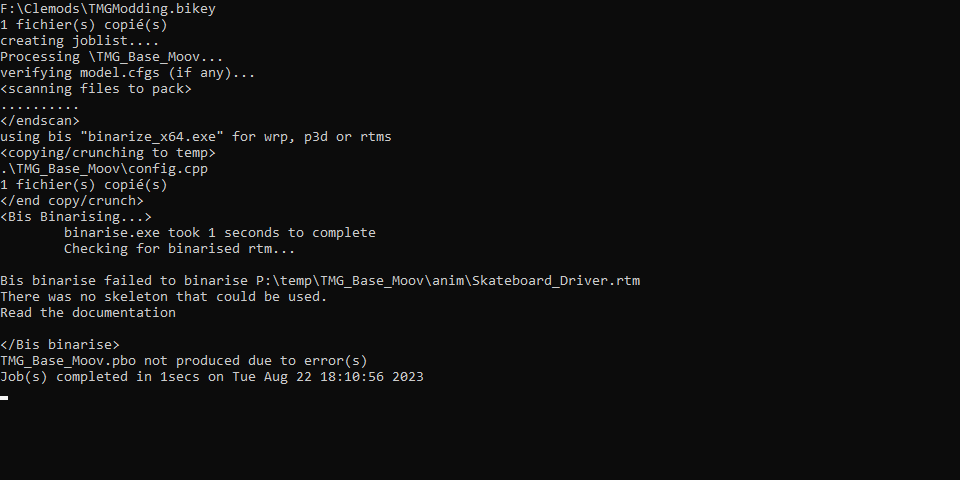
hello can you help my for my error? https://i.imgur.com/Fbn0RpO.png
 charred bolt
primal ledge
hello can you help my for my error? https://i.imgur.com/Fbn0RpO.png
charred bolt
primal ledge
hello can you help my for my error? https://i.imgur.com/Fbn0RpO.png
You need to have a valid model.cfg available for the skateboard_driver.rtm
 wispy orchid
hi. I'm trying to convert a backpack to a launcher, for use with ACE when disassembling a mortar. However, the launcher does not really fit with the unit. Any advice how to resolve this without excessive try/error? Example pic: https://cdn.discordapp.com/attachments/309093774460452875/1143681382200123432/image.png

 plucky depot
Isn't this backpack already done as a launcher here:
https://github.com/acemod/ACE3/blob/master/addons/apl/ACE_CSW_Bag.p3d ?
timid canyon
wispy orchid
hi. I'm trying to convert a backpack to a launcher, for use with ACE when disass...
You mean the object’s position? You’ll have to offset the model, or use an isSelected anim to make it go on the right spot.
wispy orchid
plucky depot
Isn't this backpack already done as a launcher here:
<https://github.com/acemod/...
Quite possible, thanks for the pointer! As it's APL I can point to the ACE source and put it into Unsung?
hmm, on second thought we probably can just point to the ACE launcher bag, as these settings are ACE only
 grand cloak
Hello, I am currently trying to implement FFV for a vehicle and while I have met much success, I am currently stuck in a position where the unit:
Can fire when turned inUsinginGunnerMayFireputs the first person camera at the feet of the unit.
Can turn entire torso around while turned in (as opposed to just the head)
Does anyone know any solutions to these problems?
oh wait, this is model_makers, not config_makers
tribal rain
so im making some props but im noticing they have no physics
stuck oyster
tribal rain
so im making some props but im noticing they have no physics
probably means you have not made a valid geometry lod and/or have not configured them with physx type simulation
tribal rain
stuck oyster
probably means you have not made a valid geometry lod and/or have not configured...
wait one ill show you what i mean
go to like 30 seconds in
id of edited it but i cba to edit a 1 minute clip 🤣
runic plover
Like HG already has mentioned, not valid or missing Geometry / or no Mass set in Geometry
tribal rain
runic plover
Like HG already has mentioned, not valid or missing Geometry / or no Mass set in...
how do i set mass is it a named value?
runic plover
Did you do a Geometry LOD?
Is your Geometry convex?
Does your Geometry meshes got named selections like Component01, 02, 03 etc?
To see Mass go to top bar / Window / show Mass or Mass
In Geometry LOD it shows up at bottom mostly
Select your Mesh(s) and add as example 1000000 into the Mass Line
Im talking about Object Builder
Blender i dont know
tribal rain
runic plover
Did you do a Geometry LOD?
Is your Geometry convex?
Does your Geometry meshes go...
Ohhhh hang so i need to take it into object builder add components and then add mass?
tribal rain
 tribal rain
stuck oyster
if that is what you model in
tribal rain
stuck oyster
if that is what you model in
it tis
thats my named properties in blender as it is right now
stuck oyster
mass is another tool in the arma 3 tools tab if I recall right
tribal rain
for the Geometry that is i literally just copy pasted the examples from the example house
stuck oyster
and geometry lod parts also needs to be convex as sentry mentioned and they need component naming in vertex groups
one of my pinned messages lists the geometry requirements
tribal rain
ok so i made a convex hull in object builder

but how do i add the mass from here
also i cant see mass as a tool in arma 3 tools tab in blender
this is what ive got
 stuck oyster
its present if object is set as geometry lod and you are in edit mode
if memory serves
could be its in the arma3 tab too
don thave it open atm
sentry did list how to toggle the mass dialog in OB
runic plover
tribal rain
but how do i add the mass from here
Select your mesh and there it opens the field to enter number
 stuck oyster
also convex hull might not always make very good geometry
😅
that blob may not be valid
runic plover
We trust in you 
tribal rain
runic plover
We trust in you <:blobcloseenjoy:700312018430722060>
i wouldnt lmao
also is it normal to have this many errors when packing
im guessing "no"
runic plover
What kind of errors 
tribal rain
 tribal rain
it does clear but i just have to button mash enter
unless i tab out
like i just did
then i have to manually click off each one

 tribal rain
runic plover
Thats good its finger fitness
tribal rain
runic plover
Thats good its finger fitness
im sure my wife will be thrilled 🤣
tribal rain
@runic plover @stuck oyster no bueno amigos it didnt work
Im doing something wrong but i dont know what
runic plover
Is your Geometry mesh called Component01?
Probably also what HG mentioned about your blob and not valid as Geometry mesh
tribal rain
runic plover
Is your Geometry mesh called Component01?
Probably also what HG mentioned about...
its called geometry
runic plover
In OB top bar window selection names
It needs to be called Component01 as selection name
Geometry is the LOD
tribal rain
i was reading through

sorry i interrupted my own thought read through HG's pinned post and the mesh needs to be "CONVEX" and "Closed"?
runic plover
Named Selections is there somewhere
tribal rain
yeah ive got it selected
runic plover
tribal rain
sorry i interrupted my own thought read through HG's pinned post and the mesh ne...
Yes the Geometry mesh needs to be convex and closed
tribal rain
ok by closed it needs to have no holes in the mesh?
stuck oyster
correct
tribal rain
think that might be the issue then among other things
stuck oyster
and the auto convex tools in OB sometimes make bad components with holes
make it a simple box
to begin with
once that works you can start making the box more correct shape or add more parts on it to make the shape
it does not have to be single blob
tribal rain
yeah im going to try that instead of using a decimated mesh of the actual model for now
ive just realised
im guessing it wont work if i dont press this button

 stuck oyster

tribal rain
VICTORY!!!!!!
@stuck oyster @runic plover cheers amigos i can now get to making my pyramids in peace
 stuck oyster
🙏
 lyric niche
Is it possible to skin and weigh a model in 3ds max?
stuck oyster
lyric niche
Is it possible to skin and weigh a model in 3ds max?
sure
lyric niche
is there a tutorial anywhere? The only ones i can find is either blender or 3ds max -> object builder and doing it there
Like what format do i export as and what settings to import in OB
stuck oyster
lyric niche
is there a tutorial anywhere? The only ones i can find is either blender or 3ds ...
you will need to find generic "how to use" 3dsmax tutorials
forget anything Arma related until you know how to use the program
lyric niche
I know how to model in 3ds max already
stuck oyster
then its that and exporting as fbx
lyric niche
Do i export every lod one at a time? What about the selections? All of them in one go or seperate?
stuck oyster
Dont know more, dont use max. youll have to experiment
 shrewd stag
tribal rain
i was reading through
shrewd stag
tribal rain
i was reading through
why dont use blender
tribal rain
shrewd stag
why dont use blender
i use both
 raw beacon
How does ARMA get ai to walk and drive over bridges? Im trying to make my own sci-fi bridge and I cannot seem to get ai to drive anywhere close to it
Basically looking for if there is a special property of attribute that the model needs for ai to recognize it as pathable
I also already have a paths lod set up that works so this is not the issue
charred bolt
raw beacon
I also already have a paths lod set up that works so this is not the issue
Roadway LOD?
raw beacon
Yep thats all set up
woeful viper
could somebody explain to me why when i select my entire mesh in OB and delete all textures it has 1 section. But when i select the entire mesh and apply a single texture + material to it, it has 4 sections?
hollow fulcrum
☕
woeful viper
1 uv set and everything mapped (apart from proxies)
but even without proxies its 4
it got more when i copied one piece of a mesh to another p3d, even with same mat/tex
hollow fulcrum
i know it does retarded things like that on occasion. i rarely see it in my flow of things. but it does happen. i usually just reimport my .fbx file into a clean OB instance, and then copy/paste into main model. /shrug
i dunno how to 'fix' it. would be nice to know. or rather, what causes it in the first place.
woeful viper
ok it seems what happend is that i had some pieces of the mesh that had more then one material ID value in max (edit poly -> polygon->MaterialIDs). And that caused it. After i set all to 1 it now has 1 section
hollow fulcrum
well that was simple
woeful viper
i wonder if you can correct this in OB as well...
hollow fulcrum
that i do not know, you would hope so. is probably the cause of many woes that go unnoticed..
woeful viper
yes and i wouldnt be surprised if the odd model of mine had a section or 2 more then it needs due to this. And i really dont wanna go back and reexport everything...
runic plover
raw beacon
How does ARMA get ai to walk and drive over bridges? Im trying to make my own sc...
Memory LOD: add LB PB LR PR points
Geometry LOD: you need property class road and map road or map mainroad
Config: you have to write in cfgVehicles simulation= road;
Important is to lower the GeometryPhys a bit of the visual or Vehicles get stuck or also won't drive over the bridge segment(s)
Also important in TerrainBuilder is to connect the roads correctly to the bridge and keep the directions correctly
Also it's not needed at all with roads, my tunnels as example don't have roads connected and work fine.
Then it should work
hollow fulcrum
yeah, i started exporting everything with single ID's many moons ago. i do all my texture assignment in OB, which is not ideal, but avoids the stupidity.
@AllDaModelMakers, quit playing FO4 and make some chit! the channel porn is lacking once again! 😠
stuck oyster
Also the road/bridge needs to be modeled in front to back direction
(up down ramp is OK, can make it sideways)
woeful viper
my replacement tablet comes on saturday... hopefully.
hollow fulcrum
😕 aye, thats not fun.
raw beacon
runic plover
__**Memory LOD:**__ add `LB PB LR PR` __points__
__**Geometry LOD:**__ you need...
Ok so I did all of this and now im lining it up in terrain builder. What should I look for to know it its going to work or not. I have the road diag mode on as well from bulldozer tools
runic iris
Do either any of you know why my car acts very slidy/drifty? Redphoenix suggested editing latStiffX and Y but I did with no afffect
It also won't shift out of first gear
woeful viper
use diag.exe
raw beacon
Pulled it into arma, Still dosnt work
runic iris
Is that in a3tools?
 bleak tangle
bleak tangle
bleak tangle
Yeah you're right
hollow fulcrum
dev branch (although i think it did make it into a stable once ... or maybe they 'thought' about it..)
runic iris
Oh ok, thanks
 wise coral
anyone have any suggestion to be able to carry a briefcase at your side?
quick terrace
@hollow fulcrum - if i buy FO4, i'll most likely do nothing else for the next 3 weeks, and i really need to put some real work in my projects
hollow fulcrum
lol, this is why i have yet to buy it. :D
quick terrace
i won't, maybe in december, but that is a big maybe
woeful viper
apparently lots of people moan about how it doesnt look good and how its not good ... #eyeroll
hollow fulcrum
many people have very little useful to do in their lives.
woeful viper
thats what happens when you hype yourself up with unrealistic expectations
hollow fulcrum
all i can say is, 6-9 months, HD texture pack. :)
celest arch
the only very disappointing thing that I've found is the lack of variety of radio songs
it's like 6 or 7 repeating
woeful viper
4k texture for eyes... yes you can bet on it
 merry hearth
are you guys modeling fallout 4 content to arma 3?
woeful viper
oh wait no, this is FO4 and not skyrim... so make that 8k
celest arch
apart from that, game is good as I expected
last spindle
@woeful viper @hollow fulcrum
i wonder if you can correct this in OB as well
If you select everything that should be a single selection and go into 'Face Properties' and make sure everything is the same, value, and ensure that there is a '0' zero in 'User Setting' under the RVMAT textbox. I believe that will sometimes fix it, you often that have to 'Sort' faces and change LOD to make it refresh
woeful viper
i tried it before i fixed it in max, but it didnt change anything
hollow fulcrum
i haven't tried in ages, but i never did sort a 'method' of fixing things consistently. well, i did, but it's not in OB. which is fine with me..
 snow plank
How does one move the location of the head on a model? Is that possible? I've moved the "bysta" proxy and the memory points related to head, but when I put the model in game, the head is back where the original A3 char's head is, which is slightly protruding from the chest of the model I've imported.
The same goes with hands...how come when I cut the hands off the sample model, and I paste them on a model I'm importing, they go all nuclear radiation mutation on me if I move their position? I literally have to leave them in the exact place of the hands of the sample model for them to work right. any1 know why / what I'm missing?
woeful viper
animations, weightpainting and bones are your clues
 still trail
Does anyone know what might cause a physx LOD to shift higher in the Y axis in game? For example, I have a physx lod as part of a ship. Try to land a helo on it and the helo lands 10m above the actual flight deck.
standard flight model
 terse elm
I had that issue but i dont know how i fixed it or what caused it
white jay
shouldnt you use RoadWay LOD for that?
white jay
mkay
still trail
apparently Roadway LOD for man class, physx LOD for aircraft
in the process of porting the A2 Frigate to A3 for CUP
terse elm
trying to think back to help u
still trail
wondering if its related to autocenter setting in physx LOD
terse elm
last time i worked on my ship was about 6 months ago
could be
u tried prxying in the roadway
still trail
so roadway lod is stable up to about 50m from center of model
here's the landing. That is parked, engines off
lol
terse elm
yeah i had the same issue with my 100m yacht
still trail
yah this is 112m
thought the PhysX LOD handled large object sizes well though (as opposed to GEO and Roadway)
terse elm
let me open my yacht up il take a look if anything jumps out
terse elm
whats ur autocenter set to
still trail
i don't set it
still trail
well if you don't set it, I believe pboProject sets it
let me check the packed model
physx lod - nothing set
buoyancy lod - nothing set
terse elm
il try rack me brain to see if i can remember
hatchet might be a good person to speak to
still trail
yeah that guy is awesome
so I take it back Mikero pboProject doesn't appear to set autocenter
terse elm
yeah definatly
hollow fulcrum
if you want to send me files, i'll fix it. (doing the conference call thing right now or i'd chit chat about it)
cedar coral
@still trail just PM'd you on something.
hollow fulcrum
mkay... tough call, but i'm going to redo the whole M2HB. found too many issues with the old LP that don't match up with me fairly accurate HP. 😒 hopefully won't take more than a few hours.
runic iris
So Im using arma3diag to check my vehicles gearbox and stuff. When I get to the top of the 1st gear it redlines and wont shift to second
any idea?
neon gulch
gearBoxMode = "auto"; //gearbox can be of type: full-auto (only requires 'W' or 'S'), auto (requires shift between drive and reverse), semi-auto, manual
moveOffGear = 1; // defines what gear an automatic or semi-automatic gearbox will move off from stationary in. 1 by default.
hollow fulcrum
@runic iris https://community.bistudio.com/wiki/Arma_3_Cars_Config_Guidelines#Gearbox_parameters im fiddling with other things at the moment, but the answer is within there. if you're using a custom gearbox, then obviously there could be issues there. if a copied/working setup, probably not enough gusto to keep it rolling.
this is assuming all your wheels/dampening and whatnot is proper.
runic iris
The wheels and dampers are correct to my knowledge, I think the problem is my gearboxmode is set to auto and on the wiki it says the default is full-auto
I guess I will have to test it
because the same problem occured in the sample car
hollow fulcrum
dont trust the samples. grab a gearbox and engine set from something in-game.
tweak as needed.
runic iris
ok
 elder fulcrum
I am trying to make a collimator sight for a launcher that rotates to the appropriate 'zeroing'. I have everything defined, everything is functional - but it isn't completely there. I am trying to get the sight to match at the different eye-views. Unfortunately, it seems that the axis of rotation does not 'line up' with the cameraDir memory point, and thus gets a bit fiddled up at higher zeroings.
I have thought of one solution for this, that being a way to attach my memory point for the camera dir to the location of the scope. If I attached that vertex to the bone of the sight in my model.cfg, would that suffice?
Pictures for reference:
- Angle of scope at 400m for reference. (3PP)
- Angle of scope at 50m (Lines up, everything looks good!)
- Angle of scope at 400m (a bit off center, but I could hit a target with a proper reticle included.)


I'm going to try out my boot leg solution. If anyone has any other ideas please @ me 🙂
last spindle
Yeah samples are samples, they often are just starting random crap ;)
 lone robin
Hello, I’m trying to add a bomb model that is compatible with FIR aircraft. The issue I’m running into is that I can choose the weapon in pylon settings but there is nothing on the wings. Where should I be looking to fix this ?
Pastebin
Pastebin.com is the number one paste tool since 2002. Pastebin is a website where you can store text online for a set period of time.
pallid island
elder fulcrum
Pictures for reference:
1. Angle of scope at 400m for reference. (3PP)
2. Angle...
new animation controllers zeroing1 and zeroing2 take values from discreteDistance[] of first and second muzzle of the weapon. The value is index number of current zeroing in the array starting with zero (that means the first value is 0, second is 1, the last is number of discrete distances plus one). It might be used for iron sights of the weapon if desired but better use is for UGL collimator sights rotation:
https://community.bistudio.com/wiki/Arma_3:_Weapon_Config_Guidelines#Model_config_changes_.7Bmodel.cfg.7D
- multiple eye memory points and
discreteDistanceCameraPoint[]=in weapon config to match the scope animation? I believe that's how vanilla UGLs work
 pure harbor
Hey guys, hope this doesnt go against any rules, but the AMCW mod team is looking for a 3D modeller to join up and help in creating our standalone mod. If you're interested, dm me and I'll send you the discord invite so you can speak to the project manager about joining the team. 
mossy mulch
 gleaming tusk
If I had a model with a translation axis, what would cause my object to teleport to either side when animated in game but in object builder it slides properly?
stuck oyster
gleaming tusk
If I had a model with a translation axis, what would cause my object to teleport...
maybe animation source that is instant 0 to 1
or multiple bones trying to animate same part messing it up mayhaps
gleaming tusk
Hm
class CfgSkeletons
{
    class Default
    {
        isDiscrete = 1;
        skeletonInherit = "";
        skeletonBones[] = {};
    };
    class For_Gond
    {
        isDiscrete = 0;
        skeletonInherit = "";
        skeletonBones[] =
        {
"gond1", "",
"gond2", ""

        };

    };
};

class CfgModels
{
    class Default
    {
        sectionsInherit="";
        sections[] = {};
        skeletonName = "";
    };

    class Gond: Default
    {
        sectionsInherit = "";
        skeletonName = "For_Gond";
        sections[] = {"Console"};
        class Animations {
            class Gond_1_slide
            {
               source = "Gond_1_source"
            type = "translation";
          memory = 1;
            selection = "gond1";
            axis = "X_axis";
            animPeriod = 30;
            initPhase = 1;
                minValue =-2.000000;
                maxValue = 2.000000;
                offset0= 2;
                offset1= -2;

            };
            class Gond_2_slide: Gond_1_slide{
               source = "Gond_2_source"
            offset1 = 2;
            offset0= -2;
              selection = "gond2";
              initPhase = 1;

            };
        };

    };


};
and in the config i have
class AnimationSource {
        class Gond_1_Source {
            source = "user";
            sound = "";
            animPeriod = 30;
            initPhase = 1;
        };
        class Gond_2_Source: Gond_1_Source
        {
            initPhase = 1;
            source = "user";
        }
    }
    class UserActions
    {
        class Start_gond
        {
            displayNameDefault = "<img image='A3\Ui_f\data\IGUI\Cfg\Actions\open_door_ca.paa' size='2.5' />";
            displayName = "move'em";
            position = "Console";
            radius = 5;
            condition = "((this animationPhase ""Gond_1_slide"" < 0.5) AND (this animationPhase ""Gond_1_slide"" < 0.5))";
            statement = "this animate[""Gond_1_slide"", 2]; this animate[""Gond_2_slide"", 2];"

        };
    };
i have no idea what be causin this wacky behavior
ill just restart since im animating a proxy back and forth, ill restart with an in place object 
The only reason I have it set to min max at -2 and 2 respectively is because it was teleporting at -1 to 1 and I was trying every value I could 
pallid island
inb4 that's because animate is used and not animateSource
pallid island
gleaming tusk
and in the config i have
```cc
class AnimationSource {
class Gond_1_Sou...
object animate [animationName, phase, speed]
https://community.bistudio.com/wiki/animate yeah, seems so
gleaming tusk
I used animate for my covenant doors and they work fine tho
But I'll give that a shot B4 I do anything drastic
charred bolt
gleaming tusk
But I'll give that a shot B4 I do anything drastic
You're missing semi-colons after source = "Gond_1_source" & source = "Gond_2_source"
stuck oyster
are they self made?
 fading harness
stuck oyster
are they self made?
fading harness
stuck oyster
are they self made?
Does it matter?
elder fulcrum
pallid island
> new animation controllers zeroing1 and zeroing2 take values from discreteDista...
That's how i've done it - but i've had to psyop the player with the ViewPilot and hope its enough.
The way the sight is setup is very, very annoying.
pallid island
Especially when it doesn't really mean much and the engine just shoves the projectile from the muzzle point on the distance-matching parabola anyways
gleaming tusk
charred bolt
You're missing semi-colons after `source = "Gond_1_source"` & `source = "Gond_2_...
Indeed
white jay
I have problems with importing arma 3 models in blender. Anyone can help?
marsh canyon
I said
describe more info
And you haven't
stuck oyster
white jay
I have problems with importing arma 3 models in blender. Anyone can help?
Models from the game or mods can not be opened or edited. You need to make new models
white jay
stuck oyster
Models from the game or mods can not be opened or edited. You need to make new m...
from game p3d
marsh canyon
Then you can't
white jay
marsh canyon
Then you can't
why?
marsh canyon
It is how it is
Long answer: you can't import a binarized model. And you can't unbinarize one, so you're out of luck
white jay
marsh canyon
Long answer: you can't import a binarized model. And you can't unbinarize one, s...
So I cant import from mods too?
marsh canyon
No
white jay
marsh canyon
No
No, I cant?
marsh canyon
No you can't
white jay
😭
plucky depot
No you can't and it's not legal to do so.
stuck oyster
white jay
No, I cant?
You are suppose to make new things.
white jay
stuck oyster
You are suppose to make new things.
I just want import houses and upgrade them
white jay
stuck oyster
You can only use the public released datapacks from the older games
wher eI can get them?
marsh canyon
Arma 3 Samples from Steam
stuck oyster
white jay
wher eI can get them?
BI wiki has a page about them
white jay
stuck oyster
BI wiki has a page about them
send me link
mossy mulch
Search the world's information, including webpages, images, videos and more. Google has many special features to help you find exactly what you're looking for.
stuck oyster
white jay
send me link
To make mods you will need to be able to find all kinds of info so this will be good practice for that.
 noble crest
Anybody got some advice for starting modeling?
stuck oyster
noble crest
Anybody got some advice for starting modeling?
pick a program like Blender and start looking up basic "how to use blender" tutorials
then start reading/watching on how to make game usable models
then once you got that stuff down you can start figuring out Arma specifics
noble crest
Alright is any other skills needed to implement models into a game
noble crest
Like can I make tank models and code it in?
stuck oyster
you can
noble crest
stuck oyster
but start with one
Alright thanks
woeful viper
epevehicles shows you the problem, so why do you ask us ???
 slim granite
I was in object builder... Was wondering... what does the "squarize" tool do exactly? Can someone break it down for me in the most simple of terms as if speaking to a kinder gardener?
marsh canyon
Umm, you do a model in OB?
marsh canyon
Ehh... definitely you shouldn't
runic plover
marsh canyon
Ehh... definitely you shouldn't
Why not
I still work with OB 🤣
stuck oyster
You started with it long time ago though 😅 if someone starts new it's far better to invest the time learning more modern program
marsh canyon
Do you mean we just need to forget about Arma 3 and move to Arma Reforger or something else?
stuck oyster
No. But object builder learning can be traded to learning something else, like Blender
marsh canyon
Yup
charred bolt
slim granite
I was in object builder... Was wondering... what does the "squarize" tool do exa...
Squarize converts a shape consisting of two triangles (four vertices, 2 faces) into a 'square' (4 vertices, 1 face). It's like the opposite of triangulation. It doesn't always work.
runic plover
stuck oyster
No. But object builder learning can be traded to learning something else, like B...
I got to learn Blender also, i talk every year of that 
runic plover
 slim granite
ty
 mellow dirge
how do I make a texHeaders.bin?
bold flare
You don't
mellow dirge
Can you explain how its made?
mellow dirge
I am wondering if it is needed in model creation, and importation.
bold flare
its not
mellow dirge
What does it do?
mellow dirge
That is all I wanted to know, thank you
twilit seal


 stuck oyster
 hard lodge
did someone know how to fix the safety mode animation ?
hard lodge
did someone know how to fix the safety mode animation ?
There is no safety animation
In the game
hard lodge
yeah i know
I check the model.cfg ,the memory lod axies seen like doesn't work
or it should say.....the angle is wrong...
hard lodge
weaponmode and rotation
class Animations
{
class safety_mode_rot417
{
type="rotationZ";
source="weaponmode";
selection="fireselector";
axis="fireselector_axis";//probably
sourceAddress = clamp;
minValue = 0.0;//rad 0.0
maxValue = 1.0;//rad 57.29578
angle0 = 0.0;//rad 0.0;
angle1 = 1.5707964;//rad 90.0;
animPeriod = 0.0;
initPhase = 0.0;
// memory = true;//(default assumed)
};
stuck oyster
Might need to use "rotation" if you want it to work around certain axis.
Also easier to test it in buldozer viewer through Object builder
hard lodge
well..I tryed but however what type I use it the angle seem like around the different center to rotated
stuck oyster
And as a side note your model is super high poly and will eventually cause fps issues. Might want to look into making it more game model level
hard lodge
not it self
stuck oyster
You define rotation axis by two vertex selection in memory lod
hard lodge
like this?
 marsh canyon
Urm, I 100% recommend try not to use Object Builder to adjust your model
You can define your memory points in your whatever model software and export into p3d
hard lodge
marsh canyon
You can define your memory points in your whatever model software and export int...
oh...like blender?
marsh canyon
More like, how else to do? OB is not a model software
hard lodge
yeah u're right
thx for advice
oh btw ,if i add the model on the weapon(like rail,stock maybe).does the memory lod should be rebuild?@stuck oyster@marsh canyon
I think the problem might be here
marsh canyon
What do you mean by rebuild?
stuck oyster
No unless axis positions change
The weapon model should stay in same place no matter what you add or remove from it
hard lodge
ok,thx. I'll try to recreate the new one ,if they work I'll send the perfect version pbo to thx for the help: )
hard lodge
salute bro
hard lodge
oh! finally!
the anim back to normal!!
but just had little bit iusse for the fafety rotation


yeah....when I change the firemode,it looks like this
class safety_mode_rot417
{
type="rotation";
source="weaponmode";
selection="fireselector";
axis="fireselector_axis";//probably
sourceAddress = loop;
minValue = 0.0;//rad 0.0
maxValue = 1.0;//rad 57.29578
angle0 = -4.712389;//rad -270.0;
angle1 = 2.1415927;//rad 180.0;
animPeriod = 0.0;
initPhase = 0.0;
// memory = true;//(default assumed)
};
@stuck oysterbro,does the angle setting right?
stuck oyster
probably yeh
 wide crown
Im trying to add the arma man skeleton to a model in blender so I can work with the vertex groups.
Can you do it using a tool in blender or do you need to input each group manually?
fluid copper
Are you talking about transferring the weight groups like the arms, legs, fingers, etc?
wide crown
Yeah
stuck oyster
does its shape match the arma man body?
wide crown
Not all of it the arms are longer and I have to do those manually
But everything else is matching
stuck oyster
then it wont work right with the animations
fluid copper
How much longer?
stuck oyster
since the animations dont adapt to the size of the mesh
hard lodge
yeah,this is not any other can edit new bone to animation's game
unless you make the mesh size match on arma3
stuck oyster
or new set of animations
hard lodge
hell yeah
hard lodge
wide crown
Im trying to add the arma man skeleton to a model in blender so I can work with ...
did u had armarig for blender?
and armatoolbox
wide crown
Yeah I’ve got arma toolbox
Now if it the model was too match the shape of the arma man skeleton how would you add it to the model?
stuck oyster
wide crown
Now if it the model was too match the shape of the arma man skeleton how would y...
There is a weight transfer tool you can use to transfer weight from the Arma man sample to your mesh
the skeleton itself is not saved into the model and in blender it is used only to check if weighting moves right
wide crown
Thanks
 somber stag
Does anyone know why I keep getting an issue where some things will not be faithful in game to their position in objectbuilder/blender. I had it happen with a memory point and now it's happening with a magazine
it's like distance in objectbuilder is adding a few feet for no reason despite other objects being perfectly fine
stuck oyster
somber stag
Does anyone know why I keep getting an issue where some things will not be faith...
Pictures might help