#arma3_model
1 messages · Page 13 of 1
 lone minnow
lone minnow
lone minnow
Actually I think it was that Geometry LOD wasn't present
 grizzled halo
you need autoCenter 0 in your geometry lod
lone minnow
When I tried that it stopped appearing at all
lone minnow
Alright let me wind it back. I got a few plate carriers in .fbx, .blend, .mtl, and .obj files. I would like to add these to arma as a mod. Where should I start? How should I convert these to p3ds, etc. ?
(note: same plate carrier in each file type, just highlighting that I have some options)
lone minnow
Another note, no I didn't rip these from anywhere I actually paid for them and they're royalty free
 spare ermine
Please tell me how to understand what I have tied to the right guests?
It seems to me that this is due to the fact that I made a mistake in them
 steep crest
hello, how can I add an inventory space to a model. I am using Arma default models. I have tried to add class TransportItems{};, but no luck so far. to remedy this I have been inheriting NATO_Box_Base, but that messes up the model position on the ground
the full thing class ap_BuildGarage: Land_TouristShelter_01_F { scope = 2; vehicleClass = "Ammo"; displayName = "AA BuildingGarage"; model = "\A3\Structures_F_EPC\Civ\Tourism\TouristShelter_01_F.p3d"; icon = "iconCrateWpns"; class TransportMagazines{}; class TransportWeapons{}; class TransportItems{}; };
grizzled halo
lone minnow
Alright let me wind it back. I got a few plate carriers in .fbx, .blend, .mtl, a...
decide which format you are gonna use and move from there, you can import into object builder using .obj and .fbx, but blender (.blend) will probably be best to streamline your process while using the armaToolbox addon from Alwarren. Read about configuration file setup in the wiki, you also have a fairly simple follow-along tutorial video by Sokolonko to implement clothes (https://www.youtube.com/watch?v=yqU3K9m2kMc) which altough not exactly a vest, will share probably like 80% of the process.

I'm sorry for the poor resolution, hope it doesn't burn your eyes out, if not this video, the pboProject errors will. It's just making your suffering a bit longer.
I'll add timestamps later on
lone minnow
grizzled halo
decide which format you are gonna use and move from there, you can import into o...
Legendary man, thanks for the reply! Will check it out
spare ermine
spare ermine
Please tell me how to understand what I have tied to the right guests?
It seems...
eh, can I have a video lesson on adding a bulletproof vest?
grizzled halo
spare ermine
eh, can I have a video lesson on adding a bulletproof vest?
try the one with the helmet, I think its either Sokolonko or ElTyranos for the author of that. If i remember correctly he/they go over ballistics on it.
spare ermine
grizzled halo
try the one with the helmet, I think its either Sokolonko or ElTyranos for the a...
Sokolonko does not have a tutorial on body armor
 stuck oyster
there probably is not tutorial for everything
some things just got to be figured out
spare ermine
grizzled halo
try the one with the helmet, I think its either Sokolonko or ElTyranos for the a...
And ElTyranos has only equipment/weapons
spare ermine
stuck oyster
there probably is not tutorial for everything
I was able to add any other vest, but the one above has defects, prichet made them the same
I added the same, but it was this vest that decided that it would not work correctly*
stuck oyster
from the look of it, just just bad weighting
probably the vest strap is part of some other bone selection by mistake
spare ermine
stuck oyster
probably the vest strap is part of some other bone selection by mistake
I tried to delete / fix it, but for some reason everything remained
, I can throw off the model to you, maybe you will see with a professional look what the problem is?(
stuck oyster
I probably could but I dont have time for that.
Id never get anything done if I fixed everyone elses stuff too
spare ermine
stuck oyster
Id never get anything done if I fixed everyone elses stuff too
:)))
 woeful viper
look for general weighting tutorials in blender. Once you understand the fundamentals, you can apply it to arma and any other game
spare ermine
woeful viper
look for general weighting tutorials in blender. Once you understand the fundame...
ok
lone minnow
While I work through the sokolonko tutorial, I was playing around with the arma 3 samples and trying to add the sample vest to the game to ensure I'm doing the scripting stuff right and the vest still appears at the feet of the character in the game. Surely the example vest has the right LOD/weights right. I think the issue is in the model.cfg. Does anyone have a good example of a model.cfg for a vest? Or is this something that isn't used?
 fluid copper
the model.cfg in the samples is correct, you just need to change the class name it uses to the name of the p3d of the vest
stuck oyster
lone minnow
While I work through the sokolonko tutorial, I was playing around with the arma ...
these need to match
 lone minnow
Will go try this now, thanks
lone minnow
It worked 👍
So when I supplanted the test vest with mine, it went down to his feet again so it's definitely a weighting issue in blender
 last spindle
wall-of-text. Killing me on the smart phone trying to read that
last spindle
Welll that is a +1 for Slack, the above displays nice on the desktop app, but is nothing more than a wall of text on the phone app.... my bad for being a ass about it, Discords fault
 past canopy
the problem
Computers > Windows
phones > Apple
Don't use Apple PCs it's horrible
last spindle
Phone = Computer
past canopy
Lol
last spindle
these days Toaster = Computer
past canopy
phone = anything the size of a laptop that makes calls
 empty vigil
yes and no, make sure your geo level has 'autocenter=0' setting in it
by default it's set to 1 and will always show your model at ground level
 cursive sleet
Do you need seperate UW for proxies in arma?
 atomic nymph
why does it change scale and location when i export with blender to object builder ?

 stuck oyster
you have moved and rotated it in object mode
atomic nymph
stuck oyster
you have moved and rotated it in object mode
i didnt
stuck oyster
you have to apply all transformations for it to export out correctly
stuck oyster
atomic nymph
i didnt
well then someone else did
atomic nymph
stuck oyster
you have to apply all transformations for it to export out correctly
how ?
stuck oyster
siince I can seee it is not in right place for starters
atomic nymph
stuck oyster
siince I can seee it is not in right place for starters
idk , when i choose open .p3d , it just put it here as i shows
stuck oyster
where is it from?
atomic nymph
stuck oyster
where is it from?
i made it
stuck oyster
blender manual/googling should get you to applying transformation, for the basic "how to use blender stuff" it is very important to be able to look up the stuff on your own
atomic nymph
i did and found nothing
stuck oyster
you typed in "blender apply transformation" into google?
atomic nymph
no
stuck oyster
well try that then
stuck oyster
👍
atomic nymph
another question tho
how do i know what the memory points i made are right
by other means
stuck oyster
check the samples and copy paste what they have. that usually works as a solid base
atomic nymph
stuck oyster
check the samples and copy paste what they have. that usually works as a solid b...
define more by "copy and paste"
you mean to check where they put the points and do the same ?
stuck oyster
open sample vest into blender, copy its memory lod and other lods you want to your new vest blend
atomic nymph
what you can do that ?
atomic nymph
arma is confusing + i didnt say iam the best 🥲
stuck oyster
not an issue, but learning how the tool you use work helps in making stuff
atomic nymph
yes
atomic nymph
@stuck oyster i think copy points doesnt work with 2 diffrent models
stuck oyster
Copy the whole object in object mode..
atomic nymph
doesnt work
stuck oyster
well you do something wrong there. I know it works.
maybe you dont have same blender versions open for some reason
atomic nymph
i have 3.3.1
so in object mode you just copy object and past object in the other model ??
stuck oyster
into another blender instance yes
 quick terrace
nope
grizzled halo
do pistol have any special attribute im missing?
Made a model and imported it into object builder incluidng geometry that is set to autoCenter 0 but for some reason the pistol offsets to the right?
using the default handAnim
stuck oyster
grizzled halo
do pistol have any special attribute im missing?
Made a model and imported it i...
ye as unfortunate as it is, the pistol proxy is poorly positioned.

pistol weapons need to be offset
grizzled halo
LOL that is weird, but thanks for the info. Was wondering if i was missing something xD
 foggy finch
whats the easiest methoed for rotating vetices in a memory LOD? rigging a ladder and for some reason they wont rotate
all vertices have thier axis' aligned
foggy finch
ya
atomic nymph
@stuck oyster is there is a way that i cant encrypt my vest models ?
so if anyone tried to edit it it corrupts ?
or can is there is a way to hide model.cfg ?
stuck oyster
binarization already makes it so it does not open
@atomic nymph
pack your pbo correctly and its like any other model in game
atomic nymph
@stuck oyster I already know that way but it’s too easy to debinarize , but thank you anyway !
stuck oyster
then no there is no other way to do it
atomic nymph
I was looking for better way
atomic nymph
stuck oyster
then no there is no other way to do it
Oh ok , thank you
 atomic nymph
stuck oyster
shadow lod is broken
atomic nymph
stuck oyster
shadow lod is broken
How do i make one probably....
stuck oyster
it requires the mesh be built out of closed shapes
atomic nymph
Closed ? means no spaces ?
stuck oyster
no holes
 atomic nymph
stuck oyster
no holes
atomic nymph
stuck oyster
no holes
and there is tons of holes

 stuck oyster
atomic nymph
and there is tons of holes
stuck oyster
atomic nymph
and there is tons of holes
no that kind of holes
the mesh has no holes
atomic nymph
there is no holes in this lod
 stuck oyster
yes there are
atomic nymph
where ?
stuck oyster
idk
turn on backface culling maybe
so it does not draw the backside of faces
or turn on face direction draw mode
atomic nymph
stuck oyster
yes there are
Where
stuck oyster
cant be seen from this picture
but how the shadow draw behaves its clear there are holes

 stuck oyster
Im not your personal model fixer though, you have to be able to find them yourself
atomic nymph
stuck oyster
Im not your personal model fixer though, you have to be able to find them yourse...
ofc , but i see you as a pro
atomic nymph
stuck oyster
turn on backface culling maybe
when i turn it on , what should i look for ? @stuck oyster
stuck oyster
holes
atomic nymph
stuck oyster
holes
Didn’t found any , any ideas ? Thank you very much also
stuck oyster
do you have camo selection on it?
atomic nymph
stuck oyster
do you have camo selection on it?
No
stuck oyster
then its holes in the model.
atomic nymph
stuck oyster
then its holes in the model.
Oh ok , will look into that
atomic nymph
atomic nymph
<@150949769953411072> how to fix that ?
@stuck oyster note: before adding the shadow lod it was the same , can this be caused by anything other than the shadow lod ?
stuck oyster
hiddenselection selections
but you said you dont have camo selection on it
so its likely holes, you just cant find them
atomic nymph
stuck oyster
hiddenselection selections
How about if I disabled them from model.cfg ?
atomic nymph
stuck oyster
so its likely holes, you just cant find them
Hmmmm
stuck oyster
its either you try to swap textures in shadow lod or you have holes in the mesh
nothing else makes such problems
 celest arch
"Well, I found a solution.
All I had to do was to make the start point further away from the wall than the end point. Funny that they didn't mention that in the tutorial. " might be a solution
atomic nymph
stuck oyster
its either you try to swap textures in shadow lod or you have holes in the mesh
Probably
stuck oyster
with backface culling off you can enable face orientation try to spot red faces


holes can also be just unmerged vertices
mesh that looks like closed can have holes
looks closed

WRONG

look closed 2

WRONG AGAIN
 atomic nymph
stuck oyster
holes can also be just unmerged vertices
atomic nymph
stuck oyster
holes can also be just unmerged vertices
Yes that’s probably it !
@stuck oyster all blue


@stuck oyster i dont have texture on shadow lod can that be the case ?
atomic nymph
What ?
atomic nymph
stuck oyster
no shadowlod must not have texture
so it should have texture ? you are being sarcastic ?
stuck oyster
atomic nymph
so it should have texture ? you are being sarcastic ?
No I said it MUST NOT have texture
atomic nymph
stuck oyster
No I said it MUST NOT have texture
and it doesnt have any holes
atomic nymph
can you see your memory points in object builder ?
atomic nymph
stuck oyster
well Id suggest you make the shadow lod again
ok good point
stuck oyster
are those the TFL gloves?
atomic nymph
i turned off backface culling and this happened

 atomic nymph
holy shit @stuck oyster my bad
 dapper hound
atomic nymph
can you see your memory points in object builder ?
dapper hound
atomic nymph
can you see your memory points in object builder ?
the vest doesn't have any?
atomic nymph
dapper hound
the vest doesn't have any?
then thats why
dapper hound
stuck oyster
are those the TFL gloves?
not sure? I got it from some steam workshop mod, but the only thing I'm modding right now is just the vest
atomic nymph
you need to assign the memory points
 muted tapir
does the vest have the autocenter 0 property?
atomic nymph
like so
 atomic nymph
dapper hound
the vest doesn't have any?
atomic nymph
dapper hound
the vest doesn't have any?
assign each point to its correct vertices
dapper hound
muted tapir
does the vest have the autocenter 0 property?
no, let me do that
stuck oyster
dapper hound
not sure? I got it from some steam workshop mod, but the only thing I'm modding ...
youre not supposed to get models from mods
what are you doing exactly?
atomic nymph
@stuck oyster i used solidfy modifier in blender for the best , so the vest has vacuum inside , is the ok as long as i close it ?
 dapper hound
stuck oyster
youre not supposed to get models from mods
dapper hound
stuck oyster
youre not supposed to get models from mods
I didn't do that though??
all I did was mod the vest
atomic nymph
stuck oyster
the red faces are not ok
i know , iam covering it now
muted tapir
stuck oyster
what are you doing exactly?
i think he just loaded the glove mod alongside the mod hes making
dapper hound

stuck oyster
sure but we try to cull the TFL stuff
muted tapir
why?
stuck oyster
its ripped
muted tapir
ah
stuck oyster
the gloves and the watch are pretty similar
atomic nymph
@stuck oyster better ?
 atomic nymph
stuck oyster
you just got to try it
atomic nymph
stuck oyster
you just got to try it
ok
 short needle
Depending on how you made the model there might be all kinds of weird duplicate verticies, inside faces, etc.
It's hard to tell from just an exterior picture
stuck oyster
#arma3_model message already explained above
atomic nymph
so its just better to remodel it
short needle
Mmm, not necessarily.
atomic nymph
short needle
Mmm, not necessarily.
then how do i fix the duplicate stuff , the vest is not simple to just find them
short needle
You might try some of the selection tools, but it's going to take some hand work tbh.
Hold on a sec
This thingy, you can go down to select by trait and select things like non-manifold geometry, loose verticies, etc. but it's not exactly foolproof

It can just give you a clue
short needle
Check to see if anything is selected
You can switch to wireframe mode maybe
All it does is select geometry that fits that description, it's up to you to decide what to do with it
short needle
Nope
I apologize, should have been clearer
Interior faces and non-manifold will probably be better clues
Just clues, not necessarily quick 100% fixes
atomic nymph
short needle
Do you have an option for non-manifold? Probably the best hint
no i dont
short needle
Switch to edge mode
atomic nymph
short needle
Switch to edge mode
selects these
 short needle
Kinda looks like you got two rows of edges butted up against each other that might just have a big ol hole in between them
Kinda hard to tell from a screenshot though
I don't know, it could be any number of things
atomic nymph
but if i fixed it it can fix the problem ?
short needle
Potentially
I'm willing to bet there's just some junky geometry in there from how you modeled it
Clean it up and try again
atomic nymph
short needle
Clean it up and try again
ok wait

ps : when i replaced the shadow lod with a cube , the cube shadow is infront
which means ?
i did that for testing
short needle
Don't know. Probably has something to do with the weird geometry of the mesh
I'd fix that first tbh
And then troubleshoot again afterwards
Finding holes in your mesh is just a general Blender problem as well. If something is specific to Blender, I'd look up Blender documentation. It's really thorough.
atomic nymph
short needle
I'd fix that first tbh
yes i think so
atomic nymph
short needle
Don't know. Probably has something to do with the weird geometry of the mesh
what do you mean by wierd geometry ?
short needle
Sometimes the way you model can introduce duplicate verticies, edges, etc. that are right on top of each other. Faces that are inside other faces. Sometimes you might have like let's say 4 faces that look ok but then for some reason you have a 5th face that spans all 4 faces. Just some goofy things I've done while learning Blender.
Those non-manifold edges you selected earlier, zoom in on them and see if anything looks weird
short needle
I mean like
Ok so you can have a vest that has an interior
But inside the interior in between two faces there's just a face chillin'
atomic nymph
short needle
Those non-manifold edges you selected earlier, zoom in on them and see if anythi...
looks ok after fixing a bit ?
 short needle
I suppose. Kind of hard to tell without being able to pan around
Look for red faces like you were instructed earlier
atomic nymph
i found red faces inside the model because i put on solidify modifier
short needle
Yes, sorry, I mean do it again now that you believe you've fixed it
atomic nymph
short needle
Yes, sorry, I mean do it again now that you believe you've fixed it
yea fixed
atomic nymph
short needle
No red faces?
yea
atomic nymph
short needle
You have to check again to verify your fix worked
i did
you can see here the litter cap , is kinda inside the vest , attached to vertices inside the vest , thats ok ?
 short needle
I think it should be fine provided there are no holes
I gotta bounce for a bit tho, good luck. Try to load the vest again
atomic nymph
short needle
I gotta bounce for a bit tho, good luck. Try to load the vest again
i heard from people that i cant delete the shadow lod , and arma will generate one , is this true ?
short needle
Not sure, but if you want to try it you can. You're probably going to have to fix the shadow lod regardless
atomic nymph
"those should be, in the vast majority fixed already. All models should create soft shadows. Stencil shadows is A2 legacy way of dealing with shadows, and should be active only when using low shadow ingame preferences "
short needle
I'd definitely look up some documentation/tutorials on just general game asset workflow
A lot of this stuff isn't really Arma specific
Anywho, gotta go
atomic nymph
short needle
Anywho, gotta go
ok , cya
Way better , also it has this little flap but still

Much appreciate to you guys ❤️@short needle @stuck oyster
stuck oyster
atomic nymph
i heard from people that i cant delete the shadow lod , and arma will generate o...
there is a generated shadowlod but for units/gear its very blurry blob
so if you want yours to match everything else then the shadow lod is needed
atomic nymph
stuck oyster
so if you want yours to match everything else then the shadow lod is needed
ah yes
atomic nymph
stuck oyster
there is a generated shadowlod but for units/gear its very blurry blob
meth busted tho
after removing the solidify modifier from the shadow lod
 stuck oyster
perhaps best to do the interior manually.
atomic nymph
problem fixed !
dapper hound
does anyone have a config file that makes a backpack become a tfar radio backpack? trying to make a new one that's compatible with tfar
stuck oyster
youll have to check tfar documentation
 tulip gyro
why is my blender arma toolbox not importing materials?
 tribal rain
howdy people so im trying to export my model into P3d and keep getting slapped with this error
 tribal rain
stuck oyster
<@815180273398448138>
tribal rain
stuck oyster
<@815180273398448138>
yeah i duplicated the original and deleted the original then exported and it worked
i think i used the default cube and apparently that can cause issues
tribal rain
stuck oyster
you just managed to do something odd 😅
as usual
atomic nymph
No
atomic nymph
tribal rain
as usual
You need to define the cube as a custom LOD
tribal rain
atomic nymph
You need to define the cube as a custom LOD
did that
atomic nymph
tribal rain
did that
Is it the first time using the plugin ?
tribal rain
atomic nymph
Is it the first time using the plugin ?
nope
past canopy
What we really need is a Texture artist channel with Sabre ;)
atomic nymph
Weird
 autumn ridge
I'm in......
autumn ridge
Dose anyone have a technical or a humvee with 50 cal project file for Arma 3 that I can use as a tutorial to port over my dpv we have been getting stuck with all kinds of problems trying to create our own configs and get this thing in game thanks....
tulip gyro
stuck oyster
no materials at all?
sorry, yeah, no materials whatsoever
It's extremely inconsistent about it too
somtimes there is no issue
other times it doesn't bother importing materials/edge smoothnes
stuck oyster

tulip gyro
I have a sneaking suspicion it's due to poly count
stuck oyster
What kind of poly counts we talking about?
 storm bluff
Vauge question ik but
if I had one goal
to make a mod that adds a model I have made into the game, how much would I have to learn?
assuming it does not need collision or any other sort of physics.
Just a static thing
tulip gyro
stuck oyster
What kind of poly counts we talking about?
30k+
stuck oyster
should not be an issue
grizzled halo
tulip gyro
30k+
I have +32k in a couple of models without issues. What version of the toolbox are we talking about?
The most latest release on 3.0.2+ versions of blender barely works
tulip gyro
grizzled halo
I have +32k in a couple of models without issues. What version of the toolbox ar...
yeah I'm using the newest version of blender
grizzled halo
try rolling back to previous versions for which the toolbox is intended, I did too have a lot of troubles using newer versions sadly
stuck oyster
do you guys have the toolbox I have linked in pinned messages?
grizzled halo
yes, that the latest experimental
stuck oyster
I run that on 3.41 no problem
 tranquil spire
same here ^^ the only problem I get with it is if I distribute weight and instantly go to object mode, that causes a crash, solution is just to wait 1-2 seconds
stuck oyster
yeah that one I got crashing too
 rapid tree
Hello, is someone from CUP here and can explain to me why they packed their vehicles in multiple pbos and not a single one ?
 sonic jay
Hey im having an issue that im struggling to wrap my head around. I have a house structure with named selections for things like doors and windows to animate. However when I try and view the objectparams using getCursorObjectParams, no matter where I look on it no selections are shown :/. But running selectionNames on it or manually animating one of the doors, and I can see them all listed and the door animates properly
 pallid island
rapid tree
Hello, is someone from CUP here and can explain to me why they packed their vehi...
pallid island
rapid tree
Hello, is someone from CUP here and can explain to me why they packed their vehi...
i'm not a CUP staff member, but most likely for keeping PBOs under 2 GB filesize limit. And, probably, some semantics. And, less likely, some modularity shenanigans (as in: being able to delete/not dowload pbos that aren't used in some setups).
rapid tree
Makes sense thanks for the insight
 somber garden
quick question, and let me know if this is the wrong place for this, but I am wanting to make a few weapons for in-game and lack the skills. Is there anywhere I could go to try and find someone willing to make some assets for me? I would be willing to pay of course.
rapid tree
somber garden
quick question, and let me know if this is the wrong place for this, but I am wa...
There is an Hiring Channel in this discord
 wispy orchid
I'm just testing the UAV Greyhawk on the Nimitz again. It keeps bumping when one building model is connected to the next one it seems. Does anyone know of a cure for this behaviour? I know that the F/A-18 and F-14 use some tricks with the supension, so they have less bumping
 cedar garden
Working on a custom parachute, was wondering how I can go about preventing player from being put on top of the parachute during landing?
stuck oyster
on top?
stuck oyster
cedar garden
Working on a custom parachute, was wondering how I can go about preventing playe...
what do you mean by that?
cedar garden
stuck oyster
what do you mean by that?
When a player lands, they are literally teleported to the top of the parachute and will fall off
stuck oyster
cedar garden
When a player lands, they are literally teleported to the top of the parachute a...
is it somehow different from normal parachute?
 vast nimbus
Are you using ace?
I know it might be a weird question but I remember getting told long time ago ace does something to chutes to do with animations and disembarking
Im in no way Knowledgeable other than the bare minimum level but if I remember rightly and please someone correct me if I’m wrong the parachute does a disembark on vehicle death to achieve its function
Sorry trying to dig up my notes
I had a similar issue a while ago and I can’t remember the solution I just know I never fixed it
Right sorry bout that
stuck oyster
sounds about right yeah
could be missing memorypoints or definitions in config for exiting.
or wrong setup in geometry lod
vast nimbus
Damn it can’t find it
It’s a memory point brains telling me disembark but think might actually be eject something and it has to be defined for getting out of vehicles by Ejecting which if I’m correct is the method the parachute works I just can’t find it
Guessing it’ll be on my desktop saved somewhere I can’t think of so I’ll look when I get home see if I can find the step by steps I got sent
 tawdry vale
 stuck oyster
Before doing anything that specific I'd recommend running through some basic tutorials to get but more experience with the tools and how they work.
 white oak
hey @stuck oyster is there a way to prevent autocenter messing up memory points?
turning autocenter off breaks the door axis
white oak
Yup
stuck oyster
it should not
never had a problem
are you using rotation type animation?
or rotationX Y
white oak
Still broken with rotation
stuck oyster
Broken how? You sure you don't have a typo?
Or multiple animated selections on same part?
stuck oyster
white oak
Still broken with rotation
Where do you test it? Buldozer? Live game?
white oak
Make and export it in blender
pack and test in live game
stuck oyster
use buldozer to test the animations
white oak
Animation works fine on bulldozer
Was trying to figure out why the door was animating wrong for a while
then on a whim I decided to re-enable autocenter and that fixed it
but if possible I'd rather keep it off as it makes other things much easier
stuck oyster
do you test editor or terrain placed version?
and how does the "not work manifest?"
white oak
testing editor placed

and this is the "not working" bit
It's rotating around "an" axis, just not the one I set up
 mortal estuary
Sorry to butt in, anyone familiar with whats causing this? Havent found the source myself
 stuck oyster
mortal estuary
Sorry to butt in, anyone familiar with whats causing this? Havent found the sour...
stuck oyster
mortal estuary
Sorry to butt in, anyone familiar with whats causing this? Havent found the sour...
whats "this"?
stuck oyster
white oak
testing editor placed
and it works ok in buldozer?
white oak
yup
mortal estuary
stuck oyster
whats "this"?
Weird deformed poly's from somewhere, all the white
stuck oyster
is it a model you made?
mortal estuary
Yes
stuck oyster
and those dont exist in the source model?
mortal estuary
They dont, and as far as I could see in Object Builder no LODs have it either
stuck oyster
what program did you use?
mortal estuary
Used Blender, havent tried importing the model again
stuck oyster
does it have multiple resolution lods?
mortal estuary
In the process of doing that
stuck oyster
it kinda looks like theres multiple lods on top of each other
mortal estuary
Thats what I thought as well but I couldnt find a solution in OB
stuck oyster
does it have a viewpilot lod?
mortal estuary
Yes
Re-importing may have worked, the structure is completely different in OB now. May have accidentally fumbled and did something to it
Thanks for the help anyways
stuck oyster
👍
white oak
tried building the object into the map
door still broken with autocenter off
stuck oyster
I cant really see any reason why that would happen.
make sure you actually build the right folder
and that a new pbo is created
and possibly clear p3d from P:\temp\ in case its stuck
white oak
yup, checked all those aswell
stuck oyster
white oak
yup, checked all those aswell
are there any other animated parts in that building?
white oak
there's a second door and some windows
stuck oyster
do they work?
white oak
windows do, the other door is similarly broken
stuck oyster
try comment out the bones and animations for the other door
white oak
no dice
stuck oyster
 dunno. never seen it not work
did you copy the base model.cfg setup from the sample house?
with isdiscrete = parameter and all that
do your animations have memory = 1 parameter in use?
@white oak
white oak
yes to all of those
slightly changed the model cfg where it no longer uses default as it was throwing errors
although, I'm sure that's not the issue as another model that uses the same modelcfg works fine
lone minnow
Commented here a few days ago and I've gotten this far with my AVS project. Now the coloring here isn't the .paa file, it's the shadowing. The shadows don't match the lighting in game and what's on the uniform. Is this an .rvmat issue? or something I need to do in blender?
 fluid copper
probably an rvmat or shadowlod one, what does it look like with no rvmat?
 fluid copper
It just looks like your textures are darker
stuck oyster
could be your normalmap is in wrong way
or your vertex normals dont export right because you dont have o2script exe path set up in the ArmaToolbox addon settings
@lone minnow
lone minnow
stuck oyster
or your vertex normals dont export right because you dont have o2script exe path...
Ah it could be this I couldn't find the o2script exe path when following the tutorial. I'll go digging again
lone minnow
fluid copper
It just looks like your textures are darker
Nah it's not that
stuck oyster
lone minnow
Ah it could be this I couldn't find the o2script exe path when following the tut...
pretty sure its this. The o2script exe can be found in object builders folder
without it set up, your vertex normals dont export right and model looks like a dark lump
lone minnow
stuck oyster
pretty sure its this. The o2script exe can be found in object builders folder
well what I mean is I couldn't find where to put the path in on the blender side
the UI on the tutorial I'm using is older so it's been sending me on easter egg hunts for certain things lol
lone minnow
Yah so I can't find the ArmaToolbox Settings to change the path
stuck oyster
lone minnow
Yah so I can't find the ArmaToolbox Settings to change the path
In the blender settings addons page where you first installed it
lone minnow
stuck oyster
In the blender settings addons page where you first installed it
Found it thanks. Running into another issue now where no edits I make in blender are showing up in game, even size changes to the plate carrier. Will prob start from scratch tomorrow and see where I end up
 young meteor
Hello there, I'm creating a road sign (with variable message) and I'd like to be able to perform a "setObjectMaterial" command on it, but I don't quite understand.
I see that the command works on some objects and not others, is there something special I need to define for this? (I've already defined my "hiddenSelections" line in config.cpp
stuck oyster
do you mean to use it as terrain object?
young meteor
I'm gonna use it as mission object and be able to apply various materials on it
stuck oyster
there are 3 essentials. P3d with selections for the changing parts, model.cfg config class that corresponds to the p3d and contains the previously mentioned selections in its sections[] array, and last the config cpp class for the thing containing the hiddenselections[] array at least and possible hiddenselectiontexture/material arrays for set defaults (if no config default is set, whats defined as surface texture/material on p3d is used)
young meteor
Okay thanks! But it doesn't seem to be working on my end, even though I've defined the selections in config.cpp and model.cfg.
I tested with a simple cube modeled quickly in object builder, I don't know if it's related to the fact that it doesn't seem to work?
I'll check it out, I'm sure I've missed something.
stuck oyster
common error is to not name the model.cfg class exactly same as the p3d file
young meteor
I'm gonna check 🙂
 near tundra
is there a limit to the number of positions (pos##) you can define in a path lod? I tend to put a lot in my models but it will only use like the first 10-12
stuck oyster
big vanilla buildings have mor than that I think
pallid island
they totally do


 gray nest
I am making a weapon and its all working except the textures. When I go to define the paths in the OBJ builder for camo 1 and 2 they do not save and the weapon is all black and sometimes white based on how you look at it in game.
Can anyone help?
stuck oyster
gray nest
I am making a weapon and its all working except the textures. When I go to defin...
Black/white means your paths are not right and don't correspond to what gets packed into pbo
gray nest
stuck oyster
Black/white means your paths are not right and don't correspond to what gets pac...
I checked paths both for cfg and the Object Builder, the OBJ builder does not seem to save them from what I can tell.
stuck oyster
Do you use P drive?
gray nest
Negative. Just juggle files on my desktop.
Fun thing is it works fine for someone else
stuck oyster
Yes well. That kind of workflow can work but it is pretty hit and miss. The "proper" way with P drive is more simpler imo since all the tools are created around it's use.
You do your paths wrong, that's basically what the problem is.
gray nest
        {
            "camo1",
            "camo2",
        };
        hiddenSelectionsTextures[]=
        {
            "TSR_Bolter\Data\Bolter_CO.paa",
            "TSR_Bolter\data\magazine_Co.paa",
        };
        hiddenSelectionsMaterials[]=
        {
            "TSR_Bolter\data\Bolter.rvmat.",
            "TSR_Bolter\data\magazine.rvmat.",
};```These?
stuck oyster
Yeah this path likely don't match the folder structure inside the created pbo
gray nest
hmm, there is no data folder when I pack it.
But when Its not packed its there. . .
I think I am missing something

Looking at the Steves PBOs shows more files. . .
gray nest
Making more did not help
stuck oyster
Yes well. This is basically result of the more wild workflow.
I can't really help further as I'm not familiar with how you do it. To me it's just plainly "wrong way" to do this stuff.
gray nest
ok, maybe I need to step back and set that up.
gray nest
PROGRESS, lighting is still wanky as hell though

 crisp turtle
Hey guys I decided to send a message in this channel as I'd like help with the modeling process for Arma 3. I know how to 3d model and I've created an object and it's UV map, however I can almost find no information on the rest of the process. I'm simply looking for someone to show me and teach me the process after the modeling portion. I'd very fast to learn and pick up on things super easily, I just simply need someone to show me. If someone is willing to help PLEASE DM ME :)
 umbral shuttle
Hello, so i noticed that if I import an fbx directly into object builder the model is all smooth. if I import the fbx into blender, use arma toolbox to make a p3d then the model has sharp edges/smooth edges where they should be. The checkbox for sharp & smooth edges is greyed out in object builder import. Any way to fix?
 compact zenith
How to I add a rotation to a memory point (e.g. for attachTo)? I can't just see how to add a direction with only one vertex
stuck oyster
compact zenith
How to I add a rotation to a memory point (e.g. for `attachTo`)? I can't just se...
Needs 2 vertex
compact zenith
stuck oyster
Needs 2 vertex
and how do the game know which one is the direction and which the position?
stuck oyster
Order of vertices in selection
Don't recall what way it goes butshould be easy enough to test.
Also don't recall how it determines which way is up, if it does that at all, but could also try more than 2 points (middle of vertices in a selection should be the origin of that selection)
compact zenith
stuck oyster
Order of vertices in selection
Ok I tried to add 2 vertices but the rotation doesn't change. The player is still facing in the wrong direction when attached to the object.
(both vertices in selection seat_1)
Tried with player attachTo [_table, [0,0,-0.54], format["seat_%1",(_seat+1)],true];. Do I have to add something special to the config also?
 last spindle
EMERY, you want a 50 cal weapon config? Use the off-road armed as a base for the turret
rapid tree
hi there is there a way to make a gunner of a vehicle be invisible ?
autumn ridge
Yea thatks pinga but ruben cracked it today got it in game with only a few small bugs to fix
 night summit
https://media.discordapp.net/attachments/735203619703619634/1117262546429292626/image.png https://cdn.discordapp.com/attachments/735203619703619634/1117262546802581625/image.png
I am having issues with changing buldozers lighting to accurate in-game one. I've followed through the steps in this https://pmc.editing.wiki/doku.php?id=arma3:modeling:buldozer-lighting guide.
Buldozer still has the default lighting when launched, and when I remove the bin folder from my P drive, buldozer still launches with no change. I assume it is using a bin folder from elsewhere and I don't know where to define that or what could be causing it.

 stuck oyster
It's using the bin.pbo from Arma install folder. If you temporarily Rename that it will use the p bin folder. Can't off the top of my head remember what controlled that.
last spindle
i mentioned a couple of fixes on Skype.....man old school
Those days when you have this kick ass plan to finish and texture a model in the eveneing after work, but get slammed with a last minute work project that has to be finsihed before you get to go home, and then your train is delayed for 30minutes when you finaly do leave, and you get home and just cbf doing anything but listen to music and play with the dog.....its just one of those days
compact zenith
compact zenith
Ok I tried to add 2 vertices but the rotation doesn't change. The player is stil...
anyone an idea?
stuck oyster
compact zenith
anyone an idea?
How is it wrong way?
compact zenith
stuck oyster
How is it wrong way?
it seems like the two points didn't changed anything in the model
stuck oyster
What command do you use for the attach?
Ah it's in the message
It's possible you would need to make it 3 points and make a face out of it. Or configure it as a bone in model.cfg.
Don't exactly remember what it required
night summit
stuck oyster
It's using the bin.pbo from Arma install folder. If you temporarily Rename that ...
Renaming the bin PBO in the game directory is having no effect, Buldozer still launches with the default lighting.
If I move the bin PBO out of the Arma 3 dta folder, then Buldozer fails to launch with CfgWorlds and shaders errors.
 plucky depot
Is bulldozer running with file patching?
stuck oyster
Could mean you don't have the arma3/dta folder unpacked to P
plucky depot
plucky depot
Is bulldozer running with file patching?
You should be able to patch the base lighting by having files in the correct place.
last spindle
http://i.imgur.com/E8GgVuj.png
http://i.imgur.com/5Vka9PE.png
Low Poly rendered with iRay, 4,300 Verts
rapid tree
Stupid Question, do you have your Mod Folder in the pdrive ?
night summit
Not sure where to go about having buldozer run with filepatching. Unless I have enabled/ disabled it by accident, it is whatever is default.
The mod with the object that I am testing on are in the P drive.
I have the debinerised bin and core folders in my p drive, with the updated config from the guide. I also have the steam_appid.txt and steam_api64.dll from arma in there.
 wheat shoal
P1NGA, is your artillery model partially configed or is it still straight out being textured?
last spindle
it is partly configured, but you cannot get in and shoot it yet...............the mechanics behind that is still unknow, if the cannon will be a turret, or if it will all be done via script, animating the weapon, spawning the projectiles and applying a velocity
wheat shoal
oh okay, I am rummaging around trying to find some inheritance classes or lines relevant to a howitzer static artillery thing. surprised I can't find anything, did they remove the black and white way of getting a simple static artilley piece in game since Arrowhead or has it always been complicated?
 orchid fern
@wheat shoal Massi's vehicle pack has an artillery gun in it. Might be worth a look
last spindle
i use the base class of the Mk6 Mortar, i think it is StaticMortar_F or something, will grab it now
"class StaticHowitzer: StaticMortar{};"
that is my starting point :p
 sleek trout
Quick one, how do I fix this?
https://i.imgur.com/EfVUMOT.png
It's using the exact same config as another helmet I have that has no issues
fluid copper
sleek trout
Quick one, how do I fix this?
https://i.imgur.com/EfVUMOT.png
its either a weighting issue or not correct model.cfg file
sleek trout
Yeah I figured it was an issue in the model.cfg file. The class wasn't defined down the bottom
Cheers
 desert notch
rapid tree
hi there is there a way to make a gunner of a vehicle be invisible ?
desert notch
rapid tree
hi there is there a way to make a gunner of a vehicle be invisible ?
Use UAV AIs
rapid tree
desert notch
Use UAV AIs
UAV Als ?
 marsh canyon
UAVs in Arma don't work by itself, they have their invisible AIs
rapid tree
oh i read it wrong, alright
sleek trout
Hello! How do I go about fixing this? Is it just adjusting it's position in Blender/O2 and trying again?
 marsh canyon
Is this an helmet object?
sleek trout
Yessir
marsh canyon
Then make the empty pilot LOD
sleek trout
Oh okay, thanks
I assume it's a simple O2 thing to do? Sorry I am usually only doing config for my mod and don't usually touch the models
stuck oyster
sleek trout
I assume it's a simple O2 thing to do? Sorry I am usually only doing config for ...
Yes
marsh canyon
You can make an empty object in Blender too so you won't forget it upon exporting
sleek trout
Thanks heaps! Something so simple lmao
marsh canyon
Meanwhile the simple thing is very complex in this game 😄
sleek trout
Now if I wanted to add some earmuffs only on certain versions, do I add them as a selection and then define in config to display them/hide them? How would I go about that?
As an example, I want to use the same headsets as this existing helmet someone donated to me

 stuck oyster
Variants would be separate P3d
night summit
night summit
Not sure where to go about having buldozer run with filepatching. Unless I have ...
@stuck oyster update on this. when I had the arma3_x64 set as the external viewer, Buldozer was throwing errors when trying to load textures from the mod in the P drive. Idk if that casts more light on where I might be going wrong.
stuck oyster
well not really. My setup is like that and works.
lone minnow
I added a pouch to a plate carrier and now I'm getting a "Data File Too Short" error and the game won't launch. Anything I'm missing?
stuck oyster
lone minnow
I added a pouch to a plate carrier and now I'm getting a "Data File Too Short" e...
added a pouch to a what plate carrier and how?
lone minnow
stuck oyster
added a pouch to a what plate carrier and how?
I have a slick model of a carrier, I added a pouch in blender and joined it (adding it to the LODs, updating the textures +rvmats etc.). Once it was all hood exported it to p3d
In the same mod folder
Oh wait I think I need to redo the weights
stuck oyster
datafile too short would indicate the packing of pbo did not work right
rapid tree
stuck oyster
Variants would be separate P3d
Nah he can import the full helmet and then hide things via HiddenSelections
stuck oyster
rapid tree
Nah he can import the full helmet and then hide things via HiddenSelections
Like I mentioned earlier that is not a good way to do it as it increases the polycount of the object a lot and makes gpu draw a lot of transparency
Split P3d is better
rapid tree
Okay thanks for the advice
 gleaming tusk
aight lads i am running into an issue, for some reason the shadows of an object are visible through mine?
I've only run into this one other time and it was on a hat i made, but i havent seen it since then except for other mods

 stuck oyster
gleaming tusk
aight lads i am running into an issue, for some reason the shadows of an object ...
stuck oyster
gleaming tusk
aight lads i am running into an issue, for some reason the shadows of an object ...
you have transparency on the model textures which makes the engine count it as transparenty and the ambient shadows from other objects bleed through
first tihng would be removeing alpha channel from all your _CO textures
gleaming tusk
copy that boss
done, testing now
okay @stuck oyster its still doing it, i made certain i was using the _CO file, could anything in the rvmat be doing this ?

here is the start of the rvmat file, i feel like if its an issue, it might be one of these values causing it?
ambient[] = { 1, 1, 1, 1 };
diffuse[] = { 1, 1, 1, 1 };
forcedDiffuse[] = { 0, 0, 0, 1 };
emmisive[] = { 0, 0, 0, 1 };
specular[] = { 0.1, 0.1, 0.1, 1 };
specularPower = 2;
PixelShaderID = "Super";
VertexShaderID = "Super";
and if its not one of those then perhaps one of the AS,SMDI,NOHQ entries?
stuck oyster
does the _Co texture have alpha channel?
you can still have it even if you dont have visible transparency
gleaming tusk
no i went into substance and removed any alpha channel
well disabled them
but they are still options on the shader i have selected
stuck oyster
gleaming tusk
but they are still options on the shader i have selected
yes the shader paramterers are always like that
gleaming tusk

 stuck oyster
substance painter does not affect that
stuck oyster
does the model also have other parts that are transparent?

 stuck oyster
you can split the force field part into separate p3d and add it to the main model as proxy
or you can try the forceNoAlpha named property in geometry lod (listed in the wiki for A3 named properties)
main issue I believe is the amount of transparency
gleaming tusk
stuck oyster
you can split the force field part into separate p3d and add it to the main mode...
is this how they get the big aircraft carriers to have collision? im working on a side project that is a very large object, if i can just have the other bits spawn in like that as they are in blender so the person in the editor doesnt have to mess with aligning things > -> would be awesome
gonna give the no transparency thing a shot first
stuck oyster
dimension limit is 50x50 meters (height can be more, but the larger the object the more simulation it triggers)
gleaming tusk
on the wiki it said 36 from center point is the max
but that extends to -36 from center as well so 72 total,
But if i can avoid that by just having it in pieces then put together via proxies?
sorry, those are the limits for roadway LODs
but this thing is ungodly masive > ->
 gleaming tusk
do you know how they do it with the aircraft carrier then?
stuck oyster
gleaming tusk
do you know how they do it with the aircraft carrier then?
its split in many parts
the config is written so they all are created together
gleaming tusk
okay so i just have to do that 😄
i didnt know if it was a proxy thing or config thing
for now ill just leave it as is, since its not like breaking the game or anything and ill just fix it when i figure out how to do ambient sounds.
The shield wall thing i mean.
thanks for the help as usual @stuck oyster ❤️
stuck oyster
 crisp turtle
so uh Is this supposed to happen when I import a .obj into object builder? I open it up in buldozer and Im pretty sure it's not supposed to be see through, anyone know what I didw rong? IS IT suppsoed to be see through?
 pallid island
yaaay, flipped normals
crisp turtle
pallid island
yaaay, flipped normals
Oh shit how do I fix that?
pallid island
if i've found the correct manual, then Object Builder should use F5 hotkey to recalculate normals and W hotkey to flip normals (probably at selected verts?)
 stuck oyster
You would really want to fix it in Blender though. Always fix stuff in the source
 pastel heath
Hi sorry guys i dont know where to ask so i ask here.
This is my first time running object builder.
And i have imported a simple box to view in Object builder. But when i go to view > Viewers > Buldozer > Start / restart
I have this error/warning and it dosent start the buldozer:
https://imgur.com/a/rD2hvh2
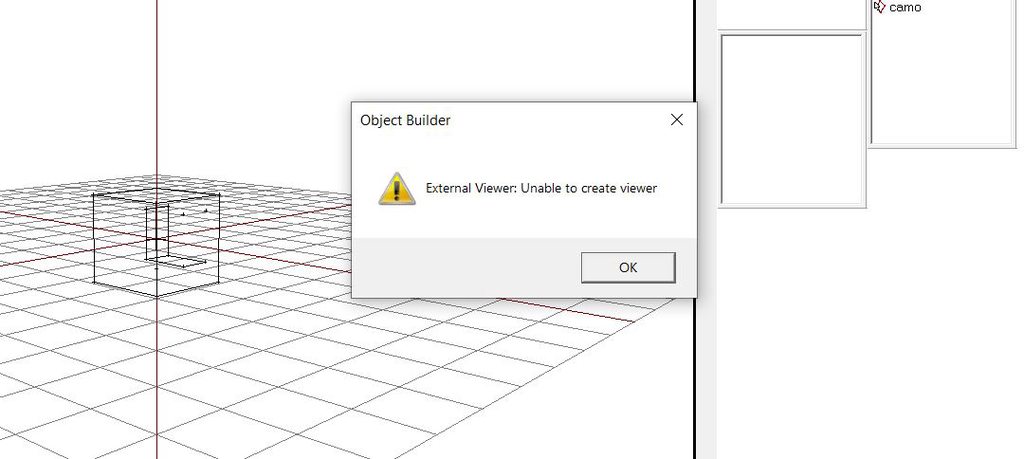 pastel heath
Ok nvm i managed to fix it.
crisp turtle
stuck oyster
You would really want to fix it in Blender though. Always fix stuff in the sourc...
Okay how would I fix it in blender? Cause it’s normal in blender
stuck oyster
crisp turtle
Okay how would I fix it in blender? Cause it’s normal in blender
its inverted in blender too but you dont have backface culling on
or its scale is negative
by default blender draws both front and back of a face
crisp turtle
I checked the face’s, they’re all blue
crisp turtle
Okay what’s that? Lol
stuck oyster
and it gets applied on export turning it upside down
crisp turtle
That sounds like it might be it
 crisp turtle
Right
stuck oyster
at least for starters
there are of course all kinds of things one can do withing object mode too if one knows how to work the transfer to game properly
but before that, its simpler to only do things in edit mode
crisp turtle
I only edit my shape in edit mode
 ocean glacier
@stuck oyster Oooh, you're awake. Mind if I pick your brain about something orientation/terrain builder related? 😛
crisp turtle
stuck oyster
Explain the scale being negative, is this the scale you’re talking about?
stuck oyster
ocean glacier
<@150949769953411072> Oooh, you're awake. Mind if I pick your brain about someth...
 stuck oyster
crisp turtle
Explain the scale being negative, is this the scale you’re talking about?
stuck oyster
crisp turtle
Explain the scale being negative, is this the scale you’re talking about?
this scale being negative would result in what you see in OB yes
stuck oyster
 crisp turtle
Side question: do I need to triangulate my object before I import it into object builder?
As in turn it into triangles and not polygons
stuck oyster
 stuck oyster
crisp turtle
As in turn it into triangles and not polygons
stuck oyster
crisp turtle
As in turn it into triangles and not polygons
OB technically supports quads too but not surfaces with more polies
but triangulation will ensure all faces form correctly
it should also be done prior UV mapping so that the uv shapes stay correct
stuck oyster
ocean glacier
<@150949769953411072> Oooh, you're awake. Mind if I pick your brain about someth...
and sure
ocean glacier
 So your name was one of the ones that popped up while looking into an issue I think you might've run into previously; the weird terrain builder orientations when compared to game-provided coordinates. This is actually for DayZ rather than Arma, but I'm hoping there's at least some crossover.
For an object rotated in game with SetOrientation(45, 45, 45), the orientation shown in Terrain Builder is just... wildly different. This is only approximate since I can't actually rotate numerically inside Buldozer, but I'm getting something around Yaw=9, Pitch=62, Roll=35
crisp turtle
So it’s at 1:1:1 and the faces were inverted? Or you inverted them to show?
crisp turtle
stuck oyster
it should also be done prior UV mapping so that the uv shapes stay correct
I got someone to explain the UV mapping and watched me do it, that part is right
ocean glacier
Visually it looks to be the same orientation, but the coordinates are just... 
stuck oyster
ocean glacier
<:KEKW:638897936650207248> So your name was one of the ones that popped up while...
yes it follows different coordinate system
stuck oyster
crisp turtle
So it’s at 1:1:1 and the faces were inverted? Or you inverted them to show?
used ctrl+A menu to apply scale
ocean glacier
That I was pretty sure of, but any idea what the actual specifics are of the coordinate system? I've tried with a different rotation operation order, different coordinate order, extracted direction/directionup/directionaside on the DayZ side and tried calculating based on E2TB, and literally nothing makes any sense
stuck oyster
I wrote something to do it for my own use a while back. Unfortunately I cant really properly explain it as it was basically a christmas miracle one night in december couple years back when I had some sort of epiffany and got it working.
but Blender uses XYZ right handed system where TB uses XZY left handed system if I remember right
or was it ZYX
its different anyway 😅
ocean glacier
I have a nasty feeling this is going to end after manually trying hundreds of permutations, either with success or a broken monitor and a sore hand
ocean glacier
As in a constant, or as in incantations?
stuck oyster
a magic transformation matrix
ocean glacier
Makes sense 😛 As if this problem wasn't bad enough, DayZ uses 0 1 0 for up rather than 0 0 1, so that's another step in any conversion nonsense lol
stuck oyster
ye exactly
pastel heath
stuck oyster
quest completed!
I didnt put the path to the buldozer in Object Builder.
stuck oyster
👍 that would indeed cause the isseu 😄
crisp turtle
@stuck oyster I pulled my model up and it's scale is not negative

and here is a photo showing that the faces are right

Did you mention that I must have backface culling on? Cause I do not see it enabled here
 stuck oyster
best to enable backface culling too yesh
crisp turtle
Okay
crisp turtle
stuck oyster
best to enable backface culling too yesh
and what's the process for making everything triangles?
stuck oyster
editmode, select all, triangulate
I do recommend browsing through Blender manual and watching workflow tutorials a bit
crisp turtle
Okay
I was told the workflow for Arma is outdated and I havcent exactly found one
Okay even with backface culling on, and my object is triangulated, it's still messed up
 pallid island
dumb(-ish) question: why .obj and not toolbox addon and direct .p3d export?
and back to the topic: can you maybe share a resulting/problematic file so i can poke it a bit?
stuck oyster
crisp turtle
I was told the workflow for Arma is outdated and I havcent exactly found one
well basically its just modeling
texturing is different from "todays PBR standard"
but modeling side is pretty much "just regular modeling"
crisp turtle
pallid island
dumb(-ish) question: why .obj and not toolbox addon and direct .p3d export?
Uhh simply put I was following a tutorial and that's what they said to import it as
Do you want me to try that?

I dont see p3d as an option unless it's "3d studio"
crisp turtle
 pallid island
and this ^ is Blender importer/exporter for that
stuck oyster
yes 👆
stuck oyster
crisp turtle
whats that from?
crisp turtle
Oh Yes I have arma toolbox
that's me clicking open in object builder
and trying to improt my p3d
pallid island
and this: https://www.youtube.com/watch?v=oJGyDyto-kg&list=PLWL6YGBg0MItYV7m6s-Qj5_qvm4loLTT8&index=2 looks like mostly-sane tutorial from what i see (?)
P.S. looks mostly insane when actually watching it
stuck oyster
then your p3d is broken or binarized
pallid island
or object isn't marked with any p3d LOD and exported file is empty 🙃
crisp turtle
pallid island
~~and this: <https://www.youtube.com/watch?v=oJGyDyto-kg&list=PLWL6YGBg0MItYV7m6...
I havent used that but it was my second option
crisp turtle
pallid island
or object isn't marked with any p3d LOD and exported file is empty 🙃
wdym?


 pallid island
oof, normals look funky after exporting from Blender and opening in OB
before/after recalc

 crisp turtle
Lmao
pallid island
so probably drag-selecting all verts, hitting F5 and saving after that can help if you see shading mishaps
stuck oyster
crisp turtle
IT WORKS
you will need to set the O2Script exe path in Blender Addon settings for the toolblox
to get it to fully work
crisp turtle
Im not sure what that is to be honest
crisp turtle
pallid island
so probably drag-selecting all verts, hitting F5 and saving after that can help ...
Okay
So what is my next step after I successfully get it into Obj Builder? should i continue my tutorial? Lmao considering it led me astray
pallid island
i suppose OB part should work alright, i doubt OB had any breaking workflow changes in the last decade
pallid island
stuck oyster
you will need to set the O2Script exe path in Blender Addon settings for the too...
looks like my problem as well
after setting the path normals seem to be okay
pastel heath
Where is o2script located at ?
or do i have to download that as well ?
Nvm i found it its in \steamapps\common\Arma 3 Tools\ObjectBuilder\O2Script.exe
stuck oyster
pastel heath
Nvm i found it its in \steamapps\common\Arma 3 Tools\ObjectBuilder\O2Script.exe
dis yes
another quest completed
you sir are on fire today!
 pastel heath
stuck oyster
dis yes
pastel heath
stuck oyster
dis yes
You have no clue how much hours i have spent today to make a simple box in arma with difrent colours.
This is what i manage to make it: https://imgur.com/a/Hg4H0HX
But i have 3 diffrent colors and i dont know why they arent showing.
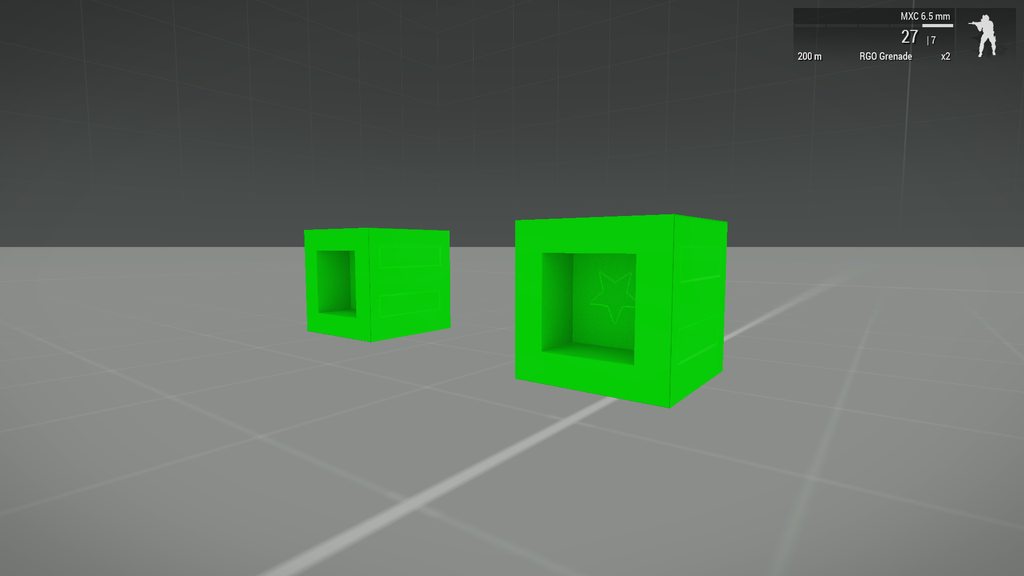
 pastel heath
 pallid island
stuck oyster
in this journey of creation, time is irrelevant
pallid island
stuck oyster
in this journey of creation, time is irrelevant
*color
crisp turtle
pastel heath
Nvm i found it its in \steamapps\common\Arma 3 Tools\ObjectBuilder\O2Script.exe
I'll do this in a little bit
pallid island
pallid island
~~and this: <https://www.youtube.com/watch?v=oJGyDyto-kg&list=PLWL6YGBg0MItYV7m6...
Now that i actually watch it, it seems to contain some... controversial takes. Like setting P-drive working directory to game root (why?). Or installing the toolbox addon by manually unzipping it into Blender folder (more why?).
And some editing errors. Like where the addon preferences aren't in the video.
Or using a goddamn chipmunk voice modulator
crisp turtle
pallid island
Now that i actually watch it, it seems to contain some... controversial takes. L...
I put my p drive to my game root

Where should it be?
 crisp turtle
Shit XD
Okay uhm
Can it be a random empty folder on the same drive that the P drive is virtually on? @stuck oyster
pallid island
Any random empty folder anywhere
Continuing the list: or using decimals for LOD numbers and setting them in reverse order... Holy guacamole
crisp turtle
Okay I changed my directiory and cliked Register
it good now? or do I need to re-do anything?
pallid island
Remount and reunpack
crisp turtle
remount my p drive and re-unpack what?
and this is the tutorial I used (for reference) https://youtu.be/v7cdG2sc0zk I was recommended this one by an OPTRE dev

I have decided to make some videos on creating things in object builder .
therefor I start with buildings.
pallid island
Game files
crisp turtle
I cant launch my arma 3 tools anymore
it says cloud status unable to sync, it wont re-sync even after a restart of steam
Okay that's weird but I remounted my P drive and Im re-extracting my game data rn
pallid island
The longer i watch that playlist the stronger i want to record my own tutorial. Except i don't know how to model and how to properly prepare/import stuff 🤣
pastel heath
pallid island
The longer i watch that playlist the stronger i want to record my own tutorial. ...
Learn it then do it. Its hard to find a up to date tutorial written or video for a model import or not.
crisp turtle
pastel heath
Learn it then do it. Its hard to find a up to date tutorial written or video for...
Yeah that was exactly what I was gonna do
I was gonna learn everything sicne there's nothing good out there or up to date
and I was gonna make a tutorial on it
also guys can one of you confirm that this is what a P drive is supposed to look like when it's done + a fresh install of Buldozer?
 pallid island
Yes, looks sane
pastel heath
Yea looks about right.
crisp turtle
Okay so I turned on backface culling for my model, triangulated the object and I DID NOT re-map the UV map because when I did I could not figure out how to fix it since Im still learning and I left it be. I also gave it it's arma 3 LOD property?this thing

and here is the mapping

Can you let me know if this is fine?
Im simply trying to learn how it import a basic object into Arma to get the process down before I learn all of the detail and nitty gritty, but I am trying to set good habits if I did something wrong
And also Should I re-map it after I make the faces into triangles? or do I map it first -> then make it into triangles?
pastel heath
Here is a bit older tutorail that i followed https://www.youtube.com/watch?v=WaQElVHtu5Y&ab_channel=EgilBallestad also i would recommend to use a simple cube for now as a model to learn UV and other things in blender and arma.

In this video I'm covering the basics on how to add simple textures and materials to an object. Im also making different textured variations to the same object
Files used in video:
https://www.dropbox.com/sh/arkw3ok6pq2u2ng/AACOiq42fq5FDUsZvFJCcTi8a?dl=0
allInOne config dump:
https://www.dropbox.com/s/xv4o4p5zyh03l4s/AIO_A3_1.81.144332.cpp?dl=0
crisp turtle
pastel heath
Here is a bit older tutorail that i followed https://www.youtube.com/watch?v=WaQ...
likely a fair reply regarding using a simpler cube like a cube with an inset into the core (which I have as well)

I was following his tutorial the other night actually
I couldnt wrap my head around some of the things he was doing though
he didnt exactly explain the maps or _files very well
crisp turtle
crisp turtle
7:31/38:25
pastel heath
Oh so its simple in arma files have to end with something that designates that as a cirtan type of texture for example:
box_co.paa is Texture of Object.
box_as.paa is Ambient Occlusion.
box_nohq.paa is Normal map
box_smdi.paa is Specular map of a object.
crisp turtle
right right I knew that, I jsut didnt know what the extensions meant so thank you, I did need that second part
gonna screenshtoi that
I also didnt understand the process of him getting those mappings and etc
he mentioned "baking" the object in blender, but the tutorial is so old I couldnt find any way whatsoever to do his way of baking so I straightup just ignored that part
pallid island
https://community.bistudio.com/wiki/Texture_Map_Types it's almost coherent 😉
crisp turtle
almost 😉
pastel heath
So for that part of tutorial i followed this:
https://www.youtube.com/watch?v=ChxGAcKO92Y&ab_channel=UnrealMatter
And for the Normal maps plugin for GIMP i used this:
https://www.youtube.com/watch?v=lXsBKjqFxeQ&ab_channel=HipolitoRodrigues

Hey guys,
In this tutorial I will show you how to bake ambient occlusion maps in Blender. This is extremely helpful to get better shadows on your 3D assets and make them look more 3 dimensional.
BuyMeACoffee:
https://www.buymeacoffee.com/unrealmatter
Unreal Engine:
https://www.unrealengine.com/
Blender:
https://www.blender.org/
Patr...
 crisp turtle
appreciate it
I'll check those out ina bit
regarding texture, I can jsut do a color to be basic right?
pastel heath
Yea just a simple 512x512 color or 1024x1024 just name it box_co.paa
crisp turtle
Okay
crisp turtle
pastel heath
Here is a bit older tutorail that i followed https://www.youtube.com/watch?v=WaQ...
this video here, what does it stop at?
does it cover configing and OB as well?
pastel heath
crisp turtle
this video here, what does it stop at?
I mean you can watch the video for your self and see what it does.
crisp turtle
Fair answer
Im currently working on some college work for a class that's kicking my ass so I've jsut been slightly working on stuff everyonce in a while
Really appreciate everyone's help here you've all been a tremendous help
woeful viper
its just a static weapon with a turret, that's it
 still trail
QQ, what are the pros and cons of using proxies vs AttachTo with large models? Any thoughts?
key difference seems to be that selections within a proxy cannot be animated?
woeful viper
LOD can be influenced for proxies (you can remove it at certain LOD -> can remove them at far distant LOD to save performance)
sleek trout
What’s considered the max poly count for a vehicle (interior and all)?
woeful viper
idk how performance taxing attach to is, can't be too much i guess. It's certainly more then using a proxy though.
also, proxies can be animated within the model. You'd have a hard time animating the attached model via script
still trail
so there isn't an issue with animation of a proxy?
woeful viper
you can animate the entirety of the proxy. You can't animate something that is inside the proxy
still trail
right
stuck oyster
100k
crisp turtle
stuck oyster
100k
Hey are you still awake?
Im in hell rn and cant figure out something
marsh canyon
That's not how to ask in IRC/Discord. Just ask the question already so anyone here can answer
crisp turtle
So the tutorial im following shows him saving his config file as a .cpp, but when I go to do the same my text file doesnt change, it stays a .txt, and Im trying to make it a .cpp


 stuck oyster
You'll need to turn file extension hiding off in windows folder settings
stuck oyster
Google 😅
 stuck oyster
Ye
pallid island
saving with name enclosed in " quotes works as well (at least in Notepad)

 white jay
Proxies are useful for things with basic animations (road wheels) or parts which are not animated (Boxes that are attached to the body). Depends on what you are using the Proxy for
lone minnow
So I got a slick version of the AVS model I'm working on into Arma 3 and it works great, but adding one with pouches is adding some complexity that's giving me a lot of texture issues. Are there best practices for joining the pouches etc. to the main vest in blender that will preserve where the textures are going?

 fluid copper
Blender should have them as seperate material selections that follow when merging, but depending on how you acquired it, those materials might be saved as vertex selections, which should also transfer
stuck oyster
oh my god that is a nightmare performance eater
lone minnow
stuck oyster
oh my god that is a nightmare performance eater
How so?
lone minnow
fluid copper
Blender should have them as seperate material selections that follow when mergin...
I noticed that when i join the PRC and PRC Pouch it will no longer show textures even in blender
They only show when they are separated
Same texture file for both the pouch and radio
fluid copper
lone minnow
How so?
It looks like theres atleast 9 textures there, it consumes a lot more performance to force the engine to grab 9 different texures everytime instead of 1 or 2
fluid copper
lone minnow
I noticed that when i join the PRC and PRC Pouch it will no longer show textures...
Where is the texture located? In materials? If so are the 2 materials named the same
lone minnow
fluid copper
Where is the texture located? In materials? If so are the 2 materials named the ...
I have the mod folder labeled "AVS\data" the model and textures are in the same folder
fluid copper
I mean in blender
fluid copper
Where is it defined and told where that filepath is
lone minnow

The highlighted one
What's weird is that the radio and pouch are three models before the join
fluid copper
Are the screenshots you're sending before or after the merge?
fluid copper
Its fine, im not at my computer rn but can you select where that material is defined?
I think theres something called 'select' or similar
To select the part of the mesh that its applied to
lone minnow
Not sure I'm following, when I selected by linked material it just highlights the whole mesh
stuck oyster
lone minnow
How so?
you have huge number of separate rvmats on it
which will make the section count of the thing very large
which will affect performance
fluid copper
lone minnow
Not sure I'm following, when I selected by linked material it just highlights th...
I believe it should just select the radio and pouch where its applied
lone minnow
It would before the join but now I don’t see that option
Tried looking on how to on the blend substack but it’s down for maintenance
I gotta step away but I’ll keep playing around and see what I can do
lone minnow
fluid copper
I believe it should just select the radio and pouch where its applied
So from what I can tell you can do that before they're joined, but not after
fluid copper
So it looks like the material isnt assigned correctly then
lone minnow
Right
The model maker has a discord and I've been chatting back and forth there with some people the consensus is the model is hard to get into arma, most modders there use it for Fallout 4. But I have seen this guys AVS' in Reforger
woeful viper
you should never proxy wheels...
pallid island
To highlight the impact of section count, a quote from modeller "P1nGa" about a test he did with a Performance Testscript created by JonBons on reddit: you can find some surprising results, like my Minimi Mk3 has almost 5k more verts, than the most common used M249 at the moment, but in almost all of the tests i get 5-10fps better, essentially because the other one has like 13 sections, and mine as 4 . That is 5-10 fps for just one weapon.
https://community.bistudio.com/wiki/Section_Count
i wonder what hardware was used and what were testing conditions in 2015 when that got added?
can result in increased section count even if the texture and rvmat match < Guide or link how to fix it>
that's cute
white jay
Not even road wheels on a tracked vehicle?
woeful viper
especially not road wheels on tracked vehicles
as few proxies as possible is the rule (none is preferred... exceptions are muzzle flashes)
 north sundial
I want to convert this hotel: https://gyazo.com/665889fda3cb0e3e89a94c80dacb1272 to arma 3 to use on my island
But i cant find loads of the textures for it, i extracted all the textures from the a2/oa files and his building is pathing the textures to the right place but the textures aren't there
Here is the texture list, https://gyazo.com/b2f679acd5d7a70c3ba27270b06a76ce some i have and others i don't (I know about the tga and paa thing) does anyone know where they are/do you have them and can give them to me or does anyone know a mod that has them
lone minnow
fluid copper
So it looks like the material isnt assigned correctly then
This seems to be an issue in blender, I noticed when playing around in blender that the pouches exhibiting the texture issues will also not emit an image texture in blender once joined
But some will, like the MPU5 on the chest will join just fine and there will be no issue with the texture
fluid copper
odd, try joining and then removing the material and texture and adding both back
north sundial
same story for this other hotel building https://gyazo.com/d2705ab5e0a983ef542b59d4b364da76 https://gyazo.com/372c0561b085dd887d29397818f71779
The model names are "Hotel.p3d" for the first and "hotel_riviera1.p3d" & "hotel_riviera2.p3d" for the second one in ca\buildings
lone minnow
stuck oyster
could be they all have different named uvsets
It was the UV Maps, some had dif names
fixed it!
Thanks gents!
 stuck oyster
👍
 icy dirge
north sundial
icy dirge
north sundial
Na E76 stuff is from sketchup i think, i'll check anyway though
celest arch
Kenny, just movefolder it from ca
different story if you also want to retexture it
which honestly you should do
north sundial
yeah i know, i just like having the textures as a reference or whatnot
fluid copper
Yay good job
crisp turtle
Well Im down to the last few steps now of getting an object into Arma, and the video Im following is using addon builder, now Ive heard a lot of people say it's not stable and to use a type of mikero tool. Problem is I dont know which one, and if I do go to use it will I be able to figure it out by myself or should i jsut continue the video and use addon builder?
marsh canyon
AB = good if you're touching only the surface of modding
Mikero's Tools = fundamental if you're getting deeper
There's also HEMTT but I haven't used it yet. I may try it some time
north sundial
nvm i found a mod with all the textures in
crisp turtle
marsh canyon
AB = good if you're touching only the surface of modding
Mikero's Tools = fundam...
Ahh okay, yeah this is surface level so I used addon builder, but Im having issues actually finding my object in the game
crisp turtle
is this extension supposed to be a .cpp?
 marsh canyon
https://community.bistudio.com/wiki/LOD#Geometry
<- collision
https://community.bistudio.com/wiki/Model_Config
<- model.cfg
crisp turtle
Okay lemme read over these
okay so I'm trying to apply Mass to the object but when I hit Alt M and it pulls this up, I'm not sure what to do with it since it doesn't allow me to type into it

 marsh canyon
You need the LOD
 marsh canyon
Yes
crisp turtle
Awesome thanks
marsh canyon
Also you also need the visual LOD too
crisp turtle
Is it a "view geometry" type through properties?
pallid island
a) you need to have both "1" and "Geometry" LODs
crisp turtle
Got it
pallid island
b) i only see one Component on the screenshot for obviously non-convex model
crisp turtle
Im not sure why but whenever I would re-add the resolution it would remove my compenents
crisp turtle
pallid island
b) i only see one Component on the screenshot for obviously non-convex model <:m...
does it need something other than component?
so this is odd, when I click the box with component01 in it, my object disappears, and my 1 resolution sometimes just disappears from existence. is this a bug?
Yeah I dont know why but whenever I add anything after the geometry property the object jsut disappears
stuck oyster
crisp turtle
here's a video of what Im doing
So yes. You create an empty resolution lod
Each lod is like a independent layer
If you want something in it
You have to model it
crisp turtle
RIGHT you're right
stuck oyster
I'd recommend doing that in blender though
crisp turtle
so how would I attach a model to the 1.0 res?
stuck oyster
Each lod would have its own object in blender
Each object would have its own lod property that defines what it exports as
Check out El tyranos and sokolonkos and battlestads videos for the principles
 stuck oyster
Yes
You can also import some of the arma 3 sample p3ds into blender and see how they are structured
crisp turtle
I just dont understand how to give the 1.0 res a new model, like the process
pallid island
if you want one model in multiple LODs, then the closest thing would be to duplicate the model and set the duplicate to different LOD. Or duplicate LOD in OB
crisp turtle
I think it worked?
i made a 1.0 res and pasted the geometry property onto it
is this all the "Named Properties" I need for a simple "box-like" object? or is there others that are recommended?

Nevermind I dont know what Im doing
pallid island
i mean. It would work without any named properties at all 🤷♂️
crisp turtle
It's really late at night and this whole like, object disappearing when I add a new property is really confusing me
I just re-paste the object into the object view
 crisp turtle
Im going to sleep
 shadow root
Hey. Is there any good tutorial that shows how to make vehicle mod?
 wraith tendon
@north sundial Simply unpack the A1/A2 incl. Addon Files.
north sundial
I forgot i owned a1 XD
wraith tendon
:D
 warm blade
is there such things as vehicle exit points? as in determines where a player exits a vehicle?
stuck oyster
warm blade
is there such things as vehicle exit points? as in determines where a player exi...
Yes
stuck oyster
shadow root
Hey. Is there any good tutorial that shows how to make vehicle mod?
Look up El tyranos, sokolonkos and
Battlestads tutorials.
 drowsy sail
So I have a uniform model, and in said model I have a proxy for A3\characters_f\Heads\bysta (Taken from the A3 samples) in the resolution LOD, but my character is still missing a head
Weapons appear fine, as do vests and backpacks
But no head, and no headgear
Is there another proxy for a head?
Oh... the SHADOW for the helmet appears too, but no actual head/headgear
 alpine bramble
hello so everytime i import a fbx model and then add a texture to it inside the game the texture is blury like this
 stuck oyster
alpine bramble
hello so everytime i import a fbx model and then add a texture to it inside the ...
stuck oyster
alpine bramble
hello so everytime i import a fbx model and then add a texture to it inside the ...
Wheres the model from?
alpine bramble
nvm i just found a fix i needed to reback the textures
 rich vigil
Hi, when i drop my CD object from my inventory it falls on its side. In blender is laying down. Ignore the size as its an easy fix


 stuck oyster
Some items have their dropped version sideway. If you want it be lying down on ground you need to rotate it in the model
rich vigil
okay no worries, thx
lone minnow
I have a backpack model that's all squared away but I can't get it to appear in arma, I think my configs are wrong. Are there any good backpack mod examples out there? The stuff on the wiki doesn't help all that much
 ocean patio
I have a building that has ~2700 convex components. This exceeds the 999 limit. Is separating the geometry LOD into three P3Ds with 999, 999, and ~600 components each, that are then referenced via proxies in the main model's Geometry LOD, a viable option? I've heard CUP does something similar
pallid island
iirc CUP moved the visuals of one story into the proxy, but the buildings that use it have full geo lods of their own 
Vanilla has some buildings/objects split into multiple models/classes. Like aircraft carrier or, iirc, big airport building
ocean patio
Ah damn, true, I forgot about those vanilla buildings
I'm glad you mentioned the aircraft carrier, I think I'm gonna do something like what it does to overcome the max horizontal size issue with spawning the other models/classes automagically (via scripts I imagine)
stuck oyster
ocean patio
I have a building that has ~2700 convex components. This exceeds the 999 limit. ...
Component limit is 2048 parts.
But you have pretty insane hefty amount of them there yeah
Any chance you could simplify it?
But proxies won't help
I'd recommend splitting that big building in smaller parts
ocean patio
stuck oyster
Component limit is 2048 parts.
Oh huh, Object Builder seems to enforce a 999 one instead of that. Deleted the LOD if it had more than that upon loading a file, and only created up to 999.
ocean patio
stuck oyster
Any chance you could simplify it?
No, only option is splitting it unfortunately. It's a complex building with a full interior (no furniture) and an elaborate brutalist exterior to top it off
stuck oyster
It should go up to 2048
But if? You hit any kind of limit, only option is to split it
woeful viper
ocean patio
No, only option is splitting it unfortunately. It's a complex building with a fu...
you could probably get away with some simplifications on the exterior. Not every nook is worth modelling.
For geolod i explicitly only model where it is important that grenades bounce correctly, and how people collide with it.
 plush trail
hello I started modeling a AGM-133 sidearm and made things needed (found a cc atribution model) and painted it properly when making a p drive will "extract data" copy also all my workshop mods to the p drive