#arma3_model
1 messages · Page 12 of 1
 frigid roost
 stuck oyster
<@433021752050712578> you can ask here, no need to DM me. this is the right plac...
stuck oyster
<@433021752050712578> you can ask here, no need to DM me. this is the right plac...
Alright!
 stuck snow
I just can't get it to work. Even using the examples provided by bi
frigid roost
So, I'm trying to open Arma 3 Samples with the direct access and steam acces and it's not working.
How can I use this?
stuck oyster
stuck snow
I just can't get it to work. Even using the examples provided by bi
you did have some stuff working earlier? whats not working exactly?
stuck snow
If I use a proxy mag instead of a mag in the gun.p3d the proxy doesn't show in game
stuck oyster
is it possible you have animation that hides it?
 white oak
First set of many variants (hopefully)
 stuck oyster
white oak
First set of many variants (hopefully)
stuck oyster
white oak
First set of many variants (hopefully)
quite nice! does it have interior?
and multimaterial is used from the looks of it? 👍
white oak
Only the ground floor
And yup using a very "basic" multimat
Current idea is to make many combinations in 4 categories
Architecture/Shape/Color/Floors
So that I can get a wide set of buildings to build out cities
stuck oyster
👍 if you like to add some more details you could use 2 multimaterials too. 1 for non damaged yellow plaster and 1 for damaged plaster so you could change the damage patterning at will
or you could move the top part uv a little bit to the side to break the big damage mark from repeating
small things
white oak
Is there a limit to how many multimaterials can go to a model
These already have 2
white oak
Fairs
stuck oyster
but also devil is in the details
this water damage should maybe continue too

theres some great details happening here already
white oak
Oh these are 4 seperate buildings in a square pattern
Only difference here is the floor count
white oak
Fair enough, just need a way to align them
stuck oyster
you can for example edit multiple selected objects together in blender and uvmap them together too
and that way snap their tiling mappings exactly aligned
white oak
I see
 fluid copper
Your weights are messed up or theres no model.cfg file
fluid copper
@frigid roost You can use the sample model.cfg file
and just change the class name of it to match the p3d file name
frigid roost
fluid copper
<@433021752050712578> You can use the sample model.cfg file
That file is at "Arma 3 Samples", right?
fluid copper
ya, under the character stuff
frigid roost
fluid copper
ya, under the character stuff
Time to search on each character_ file
fluid copper
its the model.cfg file under "Test_Character_01"
 alpine matrix
ive defined the muzzleFlash in the model
anyone got a clue as to why this could occur?

 inland pawn
alpine matrix
anyone got a clue as to why this could occur?
inland pawn
alpine matrix
anyone got a clue as to why this could occur?
- No hide anim in model.cfg
- Muzzle flash proxy is apart of another selection
alpine matrix
inland pawn
1. No hide anim in model.cfg
2. Muzzle flash proxy is apart of another selection
im using the default weapon model.cfg
muzzle flash proxy isnt part of any other selection
 fluid copper
option 2

 fluid copper
theres a class at the very bottom, change its name to the name of your p3d
frigid roost
fluid copper
theres a class at the very bottom, change its name to the name of your p3d
pivotsModel="A3\anims_f\data\skeleton\SkeletonPivots.p3d";
This part?
fluid copper
no
inland pawn
alpine matrix
im using the default weapon model.cfg
Did you define the selectionFireAnim in Config
inland pawn
frigid roost
lass Default
{
isDiscrete = 1;
skeletonInherit = "";
...
Where are you defining your model in cfgmodels
fluid copper
@frigid roost Bottom should look like this, change sHelmet to whatever your model name is
 inland pawn
The p3d file name
To be more clear
Otherwise none of your model.cfg animations will work with your model
frigid roost
pain.
 frigid roost
fluid copper
<@433021752050712578> Bottom should look like this, change sHelmet to whatever y...
frigid roost
fluid copper
<@433021752050712578> Bottom should look like this, change sHelmet to whatever y...
That goes into the Config.
fluid copper
the class sHelmet bit
frigid roost
class CfgModels
{
class Default
{
sectionsInherit="";
sections[] = {};
skeletonName = "";
};
class ArmaMan: Default
{
    htMin = 60;          // Minimum half-cooling time (in seconds)
    htMax = 1800;        // Maximum half-cooling time (in seconds)
    afMax = 30;          // Maximum temperature in case the model is alive (in celsius)
    mfMax = 0;           // Maximum temperature when the model is moving (in celsius)
    mFact = 1;           // Metabolism factor - number from interval <0, 1> (0 - metabolism has no influence, 1 - metabolism has full influence (no other temperature source will be considered)).
    tBody = 37;  // Metabolism temperature of the model (in celsius)

    sections[] =
    {
        "osobnost","Head_Injury","Body_Injury","l_leg_injury","l_arm_injury","r_arm_injury","r_leg_injury", "injury_body", "injury_legs", "injury_hands",
        "clan","clan_sign","Camo","CamoB","Camo1","Camo2","personality","hl", "injury_head", "insignia", "ghillie_hide"
    };
    skeletonName = "OFP2_ManSkeleton";
};

class Chale_Toki: ArmaMan{};
};
fluid copper
ya that looks right
 fluid copper
nono, the model.cfg file is seperate. It does not go in the config.cpp file
frigid roost
fluid copper
nono, the model.cfg file is seperate. It does not go in the config.cpp file
Okay so like this
 fluid copper
you've cut the file in half... you need the skeletons bit at the top. It should literally be the sample file with the addition of class Chale_Toki: ArmaMan{}; inside the cfgModels section
frigid roost
fluid copper
nono, the model.cfg file is seperate. It does not go in the config.cpp file
Ohh ok
alpine matrix
inland pawn
Did you define the selectionFireAnim in Config
yes
frigid roost
fluid copper
you've cut the file in half... you need the skeletons bit at the top. It should ...
Like that?
fluid copper
dont really want to download that, try sqfbin
frigid roost
fluid copper
dont really want to download that, try sqfbin
Alright.
 frigid roost
fluid copper
dont really want to download that, try sqfbin
frigid roost
fluid copper
dont really want to download that, try sqfbin
I can send it mode C++ if wanted
fluid copper
haha, no I mean like pastebin, the website
frigid roost
fluid copper
haha, no I mean like pastebin, the website
Pastebin
Pastebin.com is the number one paste tool since 2002. Pastebin is a website where you can store text online for a set period of time.
The link works?
fluid copper
yup, that looks good
frigid roost
fluid copper
yup, that looks good
Pastebin
Pastebin.com is the number one paste tool since 2002. Pastebin is a website where you can store text online for a set period of time.
Can you check it?
I added an other .p3d
fluid copper
you dont need to copy paste the whole thing again, just add class Cint_Hiatus : ArmaMan {}; under the other custom class
frigid roost
fluid copper
you dont need to copy paste the whole thing again, just add `class Cint_Hiatus :...
Like this?
Pastebin
Pastebin.com is the number one paste tool since 2002. Pastebin is a website where you can store text online for a set period of time.
fluid copper
ya
frigid roost
frigid roost
How do I save it?
Like format
fluid copper
as model.cfg, just put it in the same folder as the model
frigid roost
fluid copper
as model.cfg, just put it in the same folder as the model
Same folder?
This one?

or the mod file
inland pawn
frigid roost
or the mod file
The model.cfg usually goes where your p3d is
 inland pawn
Yes
frigid roost
Thx
frigid roost
inland pawn
Yes
I do have 2 problems now.
1st The belt doesn't want to go into the belt zone
2nd Some accessories are at the knee part
Do I need to add the view pilot to the 3d?
frigid roost
frigid roost
I do have 2 problems now.
1st The belt doesn't want to go into the belt zone
2...
 inland pawn
frigid roost
I do have 2 problems now.
1st The belt doesn't want to go into the belt zone
2...
inland pawn
frigid roost
I do have 2 problems now.
1st The belt doesn't want to go into the belt zone
2...
Then they aren’t apart of the correct selection
frigid roost
inland pawn
Then they aren’t apart of the correct selection
Can you explain me that please
inland pawn
For parts of a model to be on the player, they need to be apart of a certain selection that is on the ARMA man. So, you want a helmet? That would have to have the entire thing in a ‘head’ selection
frigid roost
inland pawn
For parts of a model to be on the player, they need to be apart of a certain sel...
That goes directly on the 3D file or on the config part?
frigid roost
inland pawn
For parts of a model to be on the player, they need to be apart of a certain sel...
Here
 inland pawn
frigid roost
That goes directly on the 3D file or on the config part?
inland pawn
frigid roost
That goes directly on the 3D file or on the config part?
That part needs to be in the p3d itself
frigid roost
inland pawn
That part needs to be in the p3d itself
Separated or at only 1 only doc
inland pawn
What?
frigid roost
inland pawn
What?
Like on blender
 fluid copper
in blender its referred to as vertex selections
Another term adjacent to it is weight painting
frigid roost
fluid copper
in blender its referred to as vertex selections
Alright!
 gloomy hemlock
what was an acceptable size for a pistol again?
Regarding tris/verts
 glacial compass
Hello, I have an issue with a texture that appears translucent (and should not). the suffix is correct (I tried both _ca or _co), I tried without binarizing (in Addon Builder), but still the same.
 tranquil spire
glacial compass
Hello, I have an issue with a texture that appears translucent (and should not)....
tranquil spire
glacial compass
Hello, I have an issue with a texture that appears translucent (and should not)....
are you sure that the texture has 100% opacity?
glacial compass
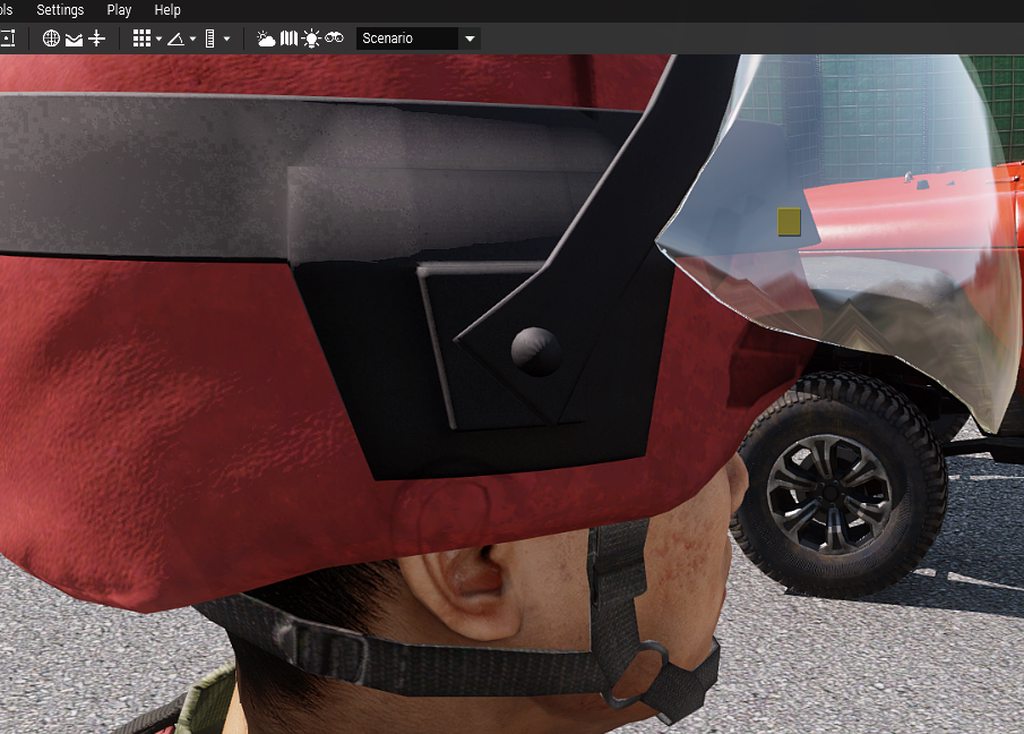 tranquil spire
do you happen to have any sort of second material for your model that contains a texture that has an alpha to it?
glacial compass
In gimp yes
glacial compass
tranquil spire
do you happen to have any sort of second material for your model that contains a...
the visor is transparent and I moved it to the top
(in object builder)
tranquil spire
glacial compass
the visor is transparent and I moved it to the top
I'm not sure if it would break your visor transparency but try forcenotalpha = 1 in the named properties of your geometry lod
glacial compass
Thanks I will try
stuck oyster
is the visor separate texture?
stuck oyster
does the _co texture still have alpha channel although it has no transparent pixels?
glacial compass
Yes...... could it be that lets try!
stuck oyster
if it has alpha channel thats what is likely reason the engine still counts it as transparent surface
glacial compass
Compiling... sounds logical
does not seem to work if I delete the channel from the png so trying to export from gimp in rvb...recompiling
No it does not work I have the same issue
Will try the force not aplpha
Also, this transucent issue seems to be more visible depending on light è- could it be a RVMAT issue?
stuck oyster
if I remember right its basically issue with how the binarization flags the object/p3d as transparent or not
and thats determined by the amount of _Ca surface I think
glacial compass
I'll retry without binarized ticked
stuck oyster
no no
you will want to binarize it
did the forcenotalpha named property do anything?
glacial compass
No nothing
Just tried now
Wait.. i retry, there was a typo sorry
It worked!!!, but I have a coupleof artifacts now
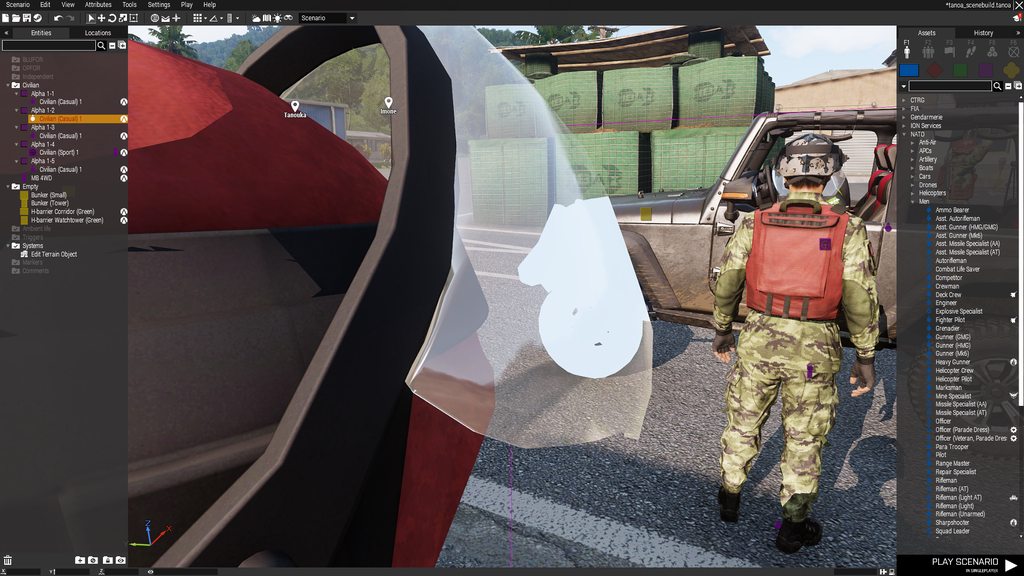
Visor is still transparent, but the care has no texture trhrough it
while if I move the soldier, the soldier has textures
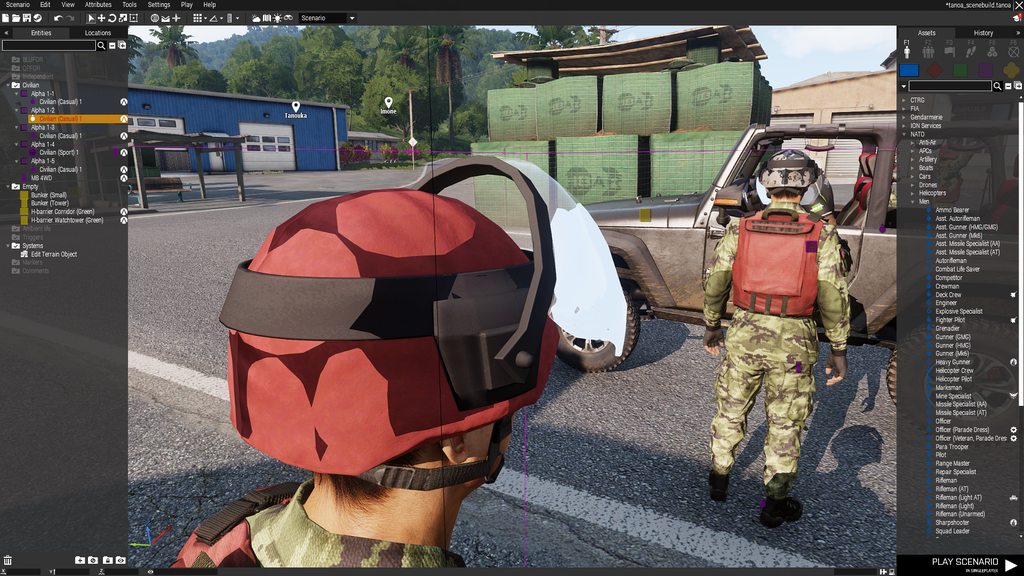
And I have strange shadows, but I might sure to my RVMAT not being correct
glacial compass
tranquil spire
I'm not sure if it would break your visor transparency but try `forcenotalpha = ...
It does work thanks and visor is still transparent, though with some strange artifact
tranquil spire
that seems to be the shadow of your object
so shadow lod not fully enclosed by the visual lod
glacial compass
Trying to work on the shadow
stuck oyster
you could also try adding a transparent texture for the visor instead of procedural color.
the procedural transparency might cause negative impact on the transparent or not flagging
so with a texture you might not need the forcenotalpha property as that property is likely what causes the jeep to not show correctly through it
glacial compass
I will try that
meanwhile, I scale the shadow lod to 0.9 and I have a n interesting issue:
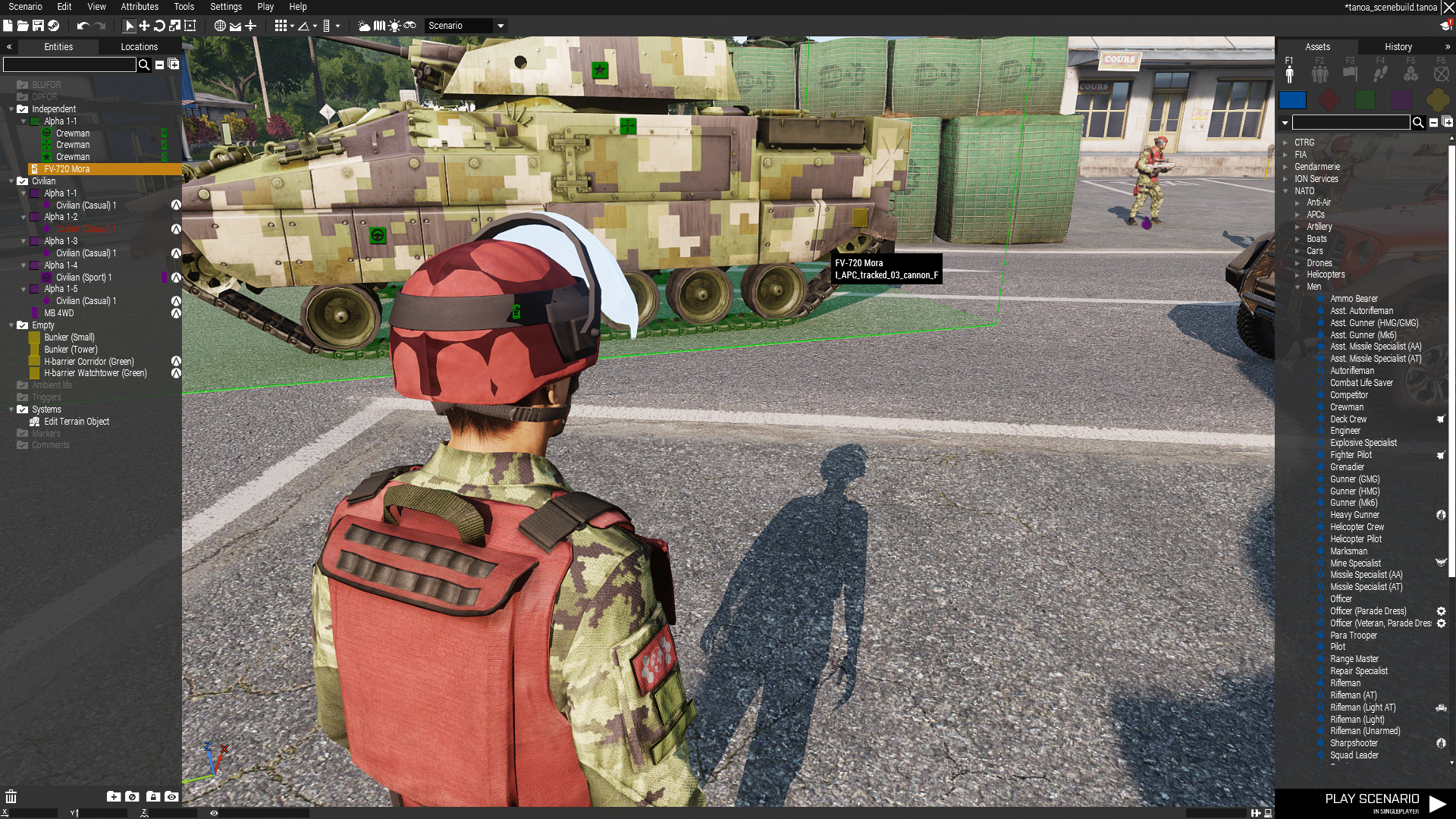
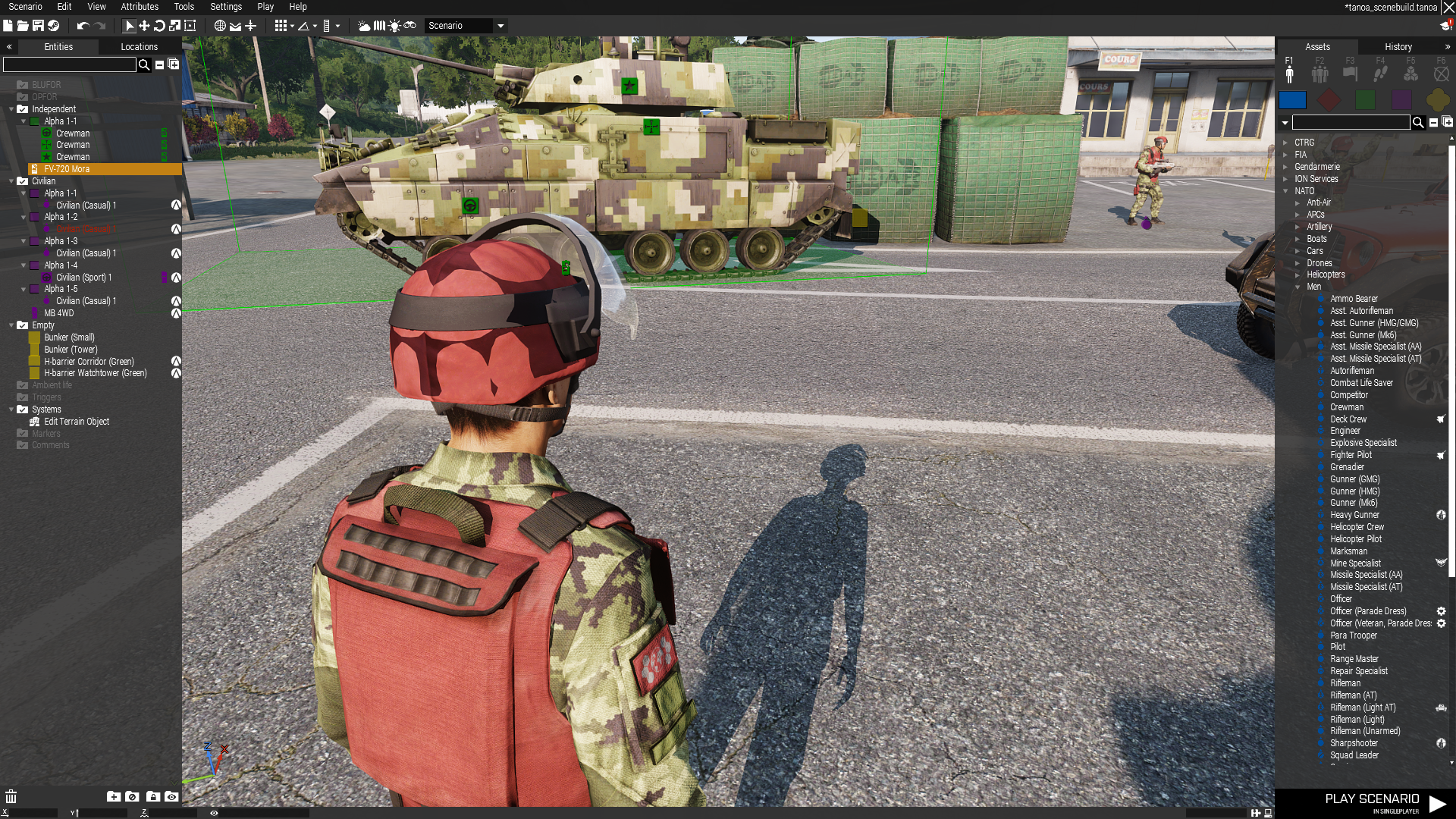
When I move the APC a bit further, the texture (comes back)
stuck oyster
so scaling shadowlod wont likely work. youll have to actually remake it to fit
you might have also made it too simple so it cant follow the round shape of the helmet
 tribal rain
Hey again so ive setup the Proxies how do i make it so the passengers can sit on top of the vehicle?
Like in the picture above but perhaps not as haphazard lmao.
currently they all sit inside the vehicle.

 charred bolt
Add more proxies on the top of the tank. Use cargo proxies if you want them to be passengers, or gunner proxies with accompanying class Turrets if you want FFV (firing from vehicle).
stuck oyster
you will also need to either position proxies so that your selection of vanilla proxy stance animations fit or you need to create new animations that work with your proxy positioning
tribal rain
ok coolio cheers guys
glacial compass
Thanks a lot for your help I am trying few thinks and will let y'all know if it worked !
glacial compass
Ok so I fixed the shadow issue by making sure no textures of the model or the rvmat has an alpha channel (but I nevertheless still need the forcenotalpha property on)
But still have the problem with the texture of vehicles that are close. I am gonna try to use a texture file as suggested rather than a procedural one and see the outcome.
You both helped me very much!
stuck oyster
remember to delete the forcenotalpha propert when you test just the texture
you could also try making the visor separate p3d and adding it as a proxy to the helmet. 🤔 I dont fully remember if that worked though
glacial compass
I thought about making it an NVG as well, but that would make it disappear when in vehicles. We'll see for the texture
stuck oyster
no I mean just by adding the other modle to the helmet as a proxy part
not as a nvg or such
glacial compass
What puzzles me is that the artifact is appearing only for vehicles, at close distance
stuck oyster
proxies can be 2 things
the NVG, Head, Weapon proxies that define where engine connects things to
glacial compass
stuck oyster
no I mean just by adding the other modle to the helmet as a proxy part
Did not know it was feasible
stuck oyster
or just plain model added to another
as a proxy that paths to the other model
it does not work in all situations
glacial compass
Might look into that actually, thanks
white oak
Is there a way to change the centerpoint of the object?
inland pawn
white oak
Is there a way to change the centerpoint of the object?
Center point?
white oak
Models have a center point, to be used as a reference for manipulations
Found a solution, disabling autocenter then changing the model
 west haven
Okay, now that I've tested all the ammunition and it flies in the correct direction, now I need to make a scope
How should I best go about this?
Like is there a guide or someone who has done it before to guide?
stuck oyster
white oak
Models have a center point, to be used as a reference for manipulations
Found a ...
oh dear
xD
the madness that is autocenter
stuck oyster
west haven
Like is there a guide or someone who has done it before to guide?
many have made scopes but there are no guides
white oak
stuck oyster
the madness that is autocenter
so far so good tbh
stuck oyster
yeah turning it off makes things so much easier 😄
for buildings
other things unfortunately require it to work
stuck snow
west haven
Like is there a guide or someone who has done it before to guide?
I mean arma 3 samples has a scope
Probably best option
 muted tapir
stuck oyster
other things unfortunately require it to work
muted tapir
stuck oyster
other things unfortunately require it to work
what would those things be?
stuck oyster
Vehicles for example
stuck snow
What controls how the weapon goes on your back? like the position of it? It's inside my custom vest and I'd liek to move it back a bit
 marsh canyon
Animation does
stuck snow
marsh canyon
Animation does
which animation would it be?
marsh canyon
Every animation
Or, to make it clear, it is human animation side. None of weapons tweaks it
glacial compass
Hello nice helping people! I tried using a texture file instead of a procedural one, and I still have the translucency issue if I remove the forcenotalpha. Initially I thought it was becausue of the hiddenselections I put in the model (have one model with the position up and down together as hiddenselections) that would increase the proportion of transparent (alpha) parts. I tried to remove one of the HS but stilll the same.
So I investigated a bit and seems that other models from other (more talented than me) modmakers have the same issue
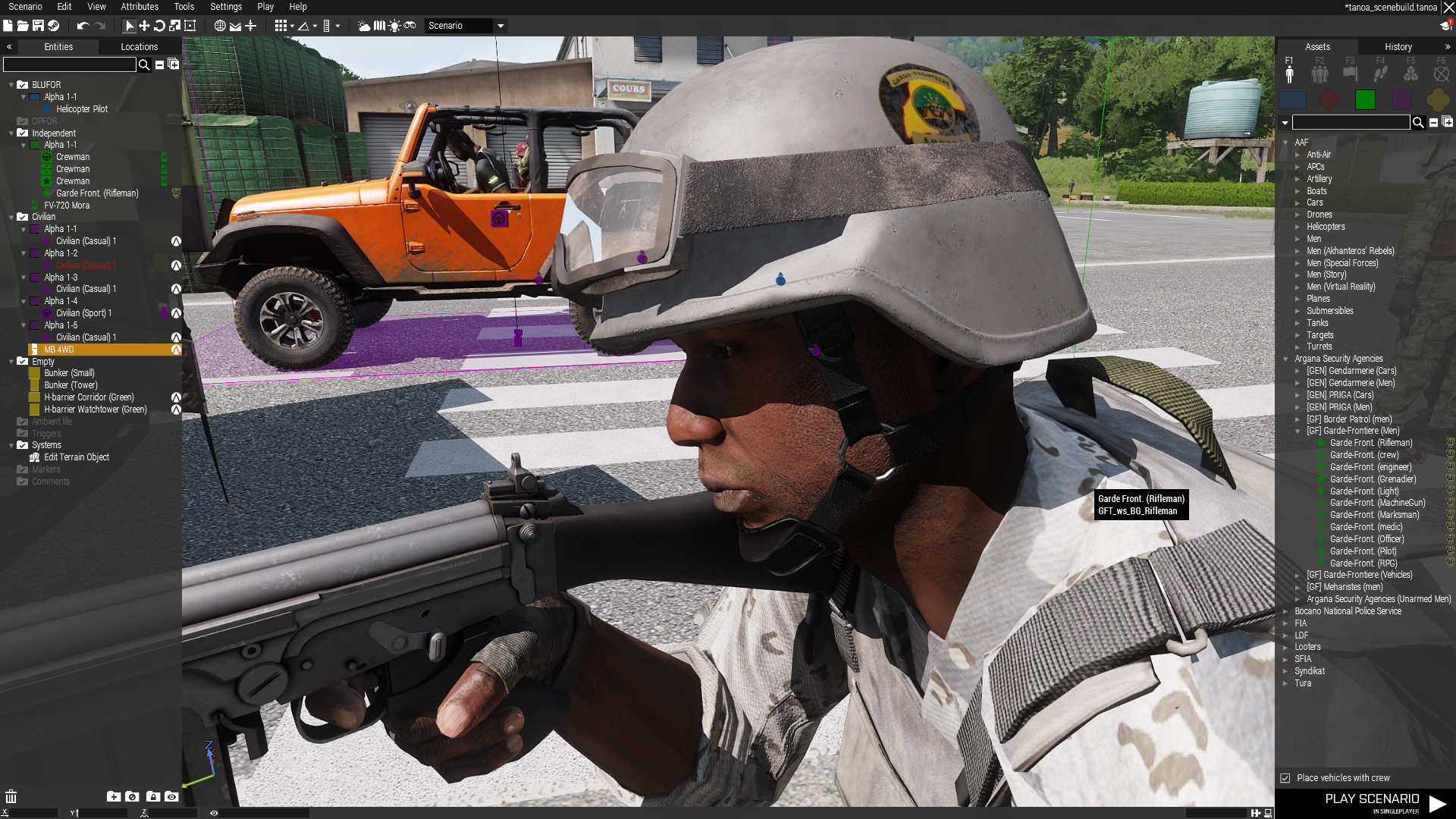
here for western sahara basic helmet with goggles
Thus seems a common artifact (as suspected by you above). Now I willl look into the proxy approach, but I might need to live with it.... What is the worst immersion breaker though? A big white patch when you are too close from a vehicle, or a translucency? - I wonder
stuck snow
marsh canyon
Or, to make it clear, it is human animation side. None of weapons tweaks it
so there is no way to changing it only when it comes to one vest? or would it be replacing the OFP2_ManSkeleton?
marsh canyon
If you really need to, you can. You will need to replace every vanilla animations which you don't want to
west haven
stuck snow
I mean arma 3 samples has a scope
Yeah I'm not so sure how well this works since my optic is part of my model and this is for a separate detached scope that can be added, hence I'm wondering what exactly to do

Right now I'm using the RPG-32 as a placeholder but it lacks a few things I was aiming to add like a rangefinder
 stuck snow
west haven
Yeah I'm not so sure how well this works since my optic is part of my model and ...
stuck snow
west haven
Yeah I'm not so sure how well this works since my optic is part of my model and ...
Wouldn't it be similar to ironsights setup? With eye selections in memory lod
west haven
I did set up that point and it does enter the RPG-32 scope, I'm just wondering if I have to make a whole new p3d for that display or not
stuck snow
I don't think so, I've seen a model with a scope on it before and it used selections don't really remember exactly what it did
stuck oyster
So the weaponsinfo parameter is what dictates what special things your scope view has
Yours is using the default empty. But you can check other weapons if they have something suitable and try their RSC entry
Or make your own.
The model optics is the visual overlay and if you want to make a new different looking one, then that needs a new model. (no tutorial)
You can get example from the arma2 publid data packs if I remember right.
west haven
Yeah I was hoping to make a different visual overlay
since this scope is really a full fire control system and I was either thinking it has graduations to a high range and a laser rangefinder, or a dynamic-ish crosshair
west haven
actually I'm not sure, do I put this stuff here or in the config makers? I might draw up how it's supposed to look
stuck oyster
I'd suppose you can split it but the thing is 2 part. The model overlay that has the black border and Crosshair texture (modelOptics) and the dynamic ui stuff configs (weaponInfoType)
west haven
Is the modelOptics a 2d image? Is there more on this or is it guesswork to get it all together
The range graduations too
stuck oyster
west haven
Is the modelOptics a 2d image? Is there more on this or is it guesswork to get i...
It is a plane object. Though I suppose you could have 3d elements in it too.
stuck oyster
yes
west haven
how big?
stuck oyster
uhh, someone was just making one some days ago if you scroll the history a bit
maybe they could share the model base
 supple tangle
Anyone have a guide or anything like that for making custom hand gestures?
same usage as the ACE ones but just different movements
stuck oyster
supple tangle
Anyone have a guide or anything like that for making custom hand gestures?
dont think anyone has made any
supple tangle
what tools should I be using to accomplish this and what will this process look like roughly?
stuck oyster
well I suppose Blender is the simplest approach as there are community tools that can create the animation RTM files directly (Blender ArmaToolbox) and community made animation rig that can be used to make them. (Macsers Armarig)
you would make animations, export them in RTM and create configs that use your new animations as gestures and then do something for the ACE usability (config stuff you may need to refer to ACE documentation or devs for assistance with)
 umbral shuttle
for model.cfg, is there an animationsource that tells if someone is aimming down sight?
 wispy monolith
Might be able to make a custom one, not entirely sure how those work.
Is physx tanks sitting at an angle and sliding backwards sometimes a common issue?

It also flings itself off into the distance when I spawn it, but weirdly, if I spawn like 5, they all land in roughly the same spot.
stuck oyster
wispy monolith
Is physx tanks sitting at an angle and sliding backwards sometimes a common issu...
not common but probably result of missing essentials
stuck oyster
umbral shuttle
for model.cfg, is there an animationsource that tells if someone is aimming down...
Dont think there is.
 humble haven
Hello, i want to create a 3D cube and import it into the empty flat terrain. I am thinking of doing my own meshes in blender and maybe some interesting architectural stuff.
stuck oyster
humble haven
Hello, i want to create a 3D cube and import it into the empty flat terrain. I a...
you can look up Blender to Arma tutorials from El Tyranos and Sokolonko. Those could get you started. Also there are Arma 3 samples on steam you can study.
However since you are also starting terraining Id suggest focusing on one of these tasks first then coming back to the other
 bright echo
umbral shuttle
for model.cfg, is there an animationsource that tells if someone is aimming down...
bright echo
umbral shuttle
for model.cfg, is there an animationsource that tells if someone is aimming down...
nope - wish there was, could make aperture sights better without butchering them if there was
hell i'd be content with just a viewGunner lod or something that's used for optics view
wispy monolith
stuck oyster
not common but probably result of missing essentials
I'm working off of the physx config from the sample tank, following instructions from the tank physx guidelines on the wiki. I've tried looking at the vanilla tank configs for physx, even mods like RHS, but I have each line from those configs under the physx area. I know there are also selections necessary in the P3D, and I've done all of those including the centers and bounds, as well as the dampers on the wheels (defined in the model.cfg). What's most curious to ME is that it's standing up like that, like there's some bit of geometry that's propping it up. Nothing in the LODS that would be doing that tho...
Is there a shortlist of essentials that I could run it all by really quick? I'm not looking to make a perfect suspension here I'm basically just trying to learn physx
Whatever the very basics are is fine
stuck oyster
could be your physX wheels are not created in correct size
due to some error/typo/missing thing
you could try the diag exe from dev branch as it has some extra developer commands in use that can visualize things like how physX is behaving
if you pack up just the sample tank, does it work normally?
umbral shuttle
bright echo
hell i'd be content with just a viewGunner lod or something that's used for opti...
Yeah I wanted to have a sight that pops in and out when adsing
wispy monolith
stuck oyster
could be your physX wheels are not created in correct size
Is there a config line that determines the size or is it just the actual model selection in the P3D?
stuck oyster
config parameter that connects to the memorypoints that define axis of the wheel and size of the wheel
wispy monolith
I assumed that was the "center" and "boundary" parameters
Which I've double checked, they were copy-pasted and only moved via X-axis so they should be PERFECTLY, aligned, I guess I can triple check to make sure none of them are grouped or something

 shell sail
So I'm working on this spotting scope that works like a turret(Ig that's a given lol) but I need a model.cfg for it
So how do I write that?
Or could someone point me in the right direction for a model.cfg for a turret like that
bright echo
id point to a static sample if there was one, so your best would be the tank sample
just omitting the 'moving' parts
and only focusing on the turret
bright echo
bright echo
id point to a static sample if there was one, so your best would be the tank sam...
or the arma 2 ones
 woeful viper
use arma 3 tank sample
 quick terrace
UTTER shit :(
 past canopy
PuFu any progress on that AS VAL?
 ember heart
:;(
quick terrace
@past canopy - focus is on vss, as val will remain the same until i finish the whole pack...why?
@ember heart - crybaby :P
 glass pine
Probably a silly question - is it possible to disable ambient occlusion on certain P3D's? I have a small number of models that don't seem to go together with it well.
stuck oyster
glass pine
Probably a silly question - is it possible to disable ambient occlusion on certa...
dont seem to go together with it how exactly?
First thing that comes to mind is you should fix your models so they work right. But if you explain what you mean perhaps better advice can be figured out
glass pine
stuck oyster
dont seem to go together with it how exactly?
I can't grab a screenshot at the moment, but essentially what happens is there's black "spots" that show up all over certain parts of the model when AO is enabled, pretty odd. I'm unsure if it's an issue with the UV map or something else.
stuck oyster
glass pine
I can't grab a screenshot at the moment, but essentially what happens is there's...
it likely means the engine counts your object as transparent due to large amount of transparent surface in it
not the place 😅 but also unlikely. #reforger_questions would be the place
 modest cliff
@stuck oyster thanks mate. Il copy and paste and delete
glass pine
stuck oyster
it likely means the engine counts your object as transparent due to large amount...
Ahhhh so that's it, thanks! Yeah, my model does have a lot of transparent surfaces. It's been plaguing a few of my models for a while and I've been unsure of how to fix it, but at least I know now.
Would setting the named property canocclude to 0 work as a temporary stopgap?
stuck oyster
no its not meant for that
there is forcenotalpha that affects it but can add artifacting on some semi transparent parts
you can scroll up a bit to see how it works
glass pine
I'll give it a try, thanks!
 terse elm
anyone had an issue when configing a custom uniform/unit where in game it hides all the heargear options in the arsenal?
 stuck oyster
Perhaps overwrite of some base class happens?
terse elm
fixed, not sure how i did it but its fixed haha
 modest viper
Is there a way I can "lock" a certain portion of my model in Object Builder, so it only shows the polygons that are selected? Similar to the Eden editor where you can lock a certain layer that disables you from editing all objects within
stuck oyster
modest viper
Is there a way I can "lock" a certain portion of my model in Object Builder, so ...
kinda but its a bit difficult to work with still. Id really recommend working such things in source model in better more modern 3D applications instead of OB
there is both hide/unhide and lock/unlock tools
modest viper
stuck oyster
kinda but its a bit difficult to work with still. Id really recommend working su...
I'll probably do that, I'm just concerned I'd loose the scale and placement of the helmet im working on if I did it in Blender
ember heart
substance this time
stuck oyster
importing the p3d back to blender is a possibility too
but exactly because of this it is really recommended to do everything in the source model so you can always go back to it if needed
 tender hemlock
No matter what I do, the screen is not fluent at all.How can I find a solution to this?
 stuck oyster
tender hemlock
No matter what I do, the screen is not fluent at all.How can I find a solution t...
stuck oyster
tender hemlock
No matter what I do, the screen is not fluent at all.How can I find a solution t...
what do you mean by fluent?
 grizzled halo
is there a way to sequence model animations?
For example, something that plays on the reload animation going from
custom anim a to custom anim b all while still being in the phase for reload anim?
or is that something that should be handled using event handlers or cba?
stuck oyster
reload plays only the one anim set on it so no, chaining inside it does not work
what would be the exact use?
hypotheticals are difficult to answer and may not even be accurate to the intended use
grizzled halo
stuck oyster
what would be the exact use?
bolt actions levers, since I have to rotate and translate in the same action but playing only the translation after the rotation
stuck oyster
i dont follow what the problem is
you can animate all movement both in weapon and in the rtm just like you want between the 0 - 1 of the reload
grizzled halo
can a translation and a rotation be done in a single animation?
Can the translation be played only after the rotation?
I see what you mean, sorry for the obvious question
stuck oyster
no it may not be always obvious. but yes you can have any number of different movements between between 0 and 1 state of the reload action like turn0-0.3 slide0.3-0.53 turn other way0.45-0.6 slide back0.6-1.0
 errant forge
who got a idea how i would be able to create the M1296 Dragoon for a milsim server i play on
stuck oyster
errant forge
who got a idea how i would be able to create the M1296 Dragoon for a milsim serv...
you choose 3D modeling program to learn to work with, then model said thing, then learn how Arma configs and models work, create configs and necessary technical model stuff and build that into an addon.
errant forge
oof and how much does it cost to get some1 to do it ? XD
stuck oyster
errant forge
oof and how much does it cost to get some1 to do it ? XD
well you cant really pay for all of it since arma tools are non commercial so you would have to learn that part at least (or get extremely lucky to get someone do it for you free). Good quality vehicle on commssion could be something like 3-4k€ to begin with. with interiors and stuff a lot more
tender hemlock
stuck oyster
what do you mean by fluent?
PIP feature
RCWS displays are not fluent
stuck oyster
I dont know what fluent means in this context
do you mean smooth?
@tender hemlock
tender hemlock
Although I set the PIP feature to the highest, the image given by the mirrors is of poor quality.
 cedar coral
@ember heart Nice job! Though you are going to add some dirt and grime to it, right? ;-)
stuck oyster
it is possible the vehicle is set with low resolution PIP in the model or config. Dont remember exactly where it was defined.
test if PIP looks better in other vehicles
tender hemlock
"it is possible the vehicle is set with low resolution PIP in the model or config." Where can i find it and fix it?
stuck oyster
tender hemlock
"it is possible the vehicle is set with low resolution PIP in the model or confi...
I dont think its something you can fix without source files
 alpine bramble
how can i rotate object from all sides instated of right and left
stuck oyster
alpine bramble
how can i rotate object from all sides instated of right and left
in where? 😅
alpine bramble
stuck oyster
in where? 😅
object builder sorry for not giving more details
stuck oyster
ok, next Im not quite sure what you mena by all sides?
but there is a roation tool widget that you can type in rotation values for all axis
buut honestly I dont recommend doing heavy editing in OB
its always best to do edits in the source files in the modern modern 3d programs
stuck oyster
what program did you use to model the thing you have?
alpine bramble
object builder lmao but i heard that some pepole use blender
stuck oyster
well yes Blender is good and has lot of Arma friendly plugins.
depends what you want to learn to use then
Object Builder can do a lot of things but is extremely difficult to learn since it has nearly 0 documentation
wispy monolith
Speaking of Object builder, buldozer is previewing my animation for a bolt-action working just fine, but then when put into game the animation off-sets almost like it's reading the wrong axis. I've tried screwing with the Autocenter property to no avail.
Oh, sidenote, Goat I fixed my physx issue, so thank you for helping with that.
stuck oyster
wispy monolith
Oh, sidenote, Goat I fixed my physx issue, so thank you for helping with that.
wee 
stuck oyster
wispy monolith
Speaking of Object builder, buldozer is previewing my animation for a bolt-actio...
is that part of mesh in multiple bone selections?
wispy monolith
Shouldn't be, I've checked to make sure it's not in multiple selections or parented to anything
wispy monolith
Why is it that whenever I ask for help I then immediately find the issue, often before I even hear back
stuck oyster
wispy monolith
Why is it that whenever I ask for help I then immediately find the issue, often ...
👍 that is how it works
grizzled halo
stuck oyster
no it may not be always obvious. but yes you can have any number of different mo...
I got a question regarding this:
Why does using translationX and rotationX (or any other axis binded movement) does not takes in consideration the begin and end phases for the model animation but using the non axis binded movement does? Is it intentional?
That was actually my issue, ditched the axis binded ones and it instantly worked as you mentioned it would work.
To put it into context, i was moving along an axis during a 0.08 phase interval but it was moving from the very beggining as is begin phase was 0 to up to 0.08 when the phases were actually 0.20 and 0.28
grizzled halo
I see, i will stick to those basic movement types then. Was following along ElTyranos weapon import video but its a bit old at this point so it might be outdated
stuck oyster
you might want to use min/max value instead of phase
tender hemlock
stuck oyster
I dont think its something you can fix without source files
I wanted to say this
Did you see the difference?
one gives a more fluid image than the other
stuck oyster
well it could be configured that way. idk. You should probably ask the mod maker
tender hemlock
here's the problem i'm the mod maker 😄
tender hemlock
stuck oyster
well it could be configured that way. idk. You should probably ask the mod maker
thank you for your time
 plucky depot
You have more PIP screens in your vehicle.
IIRC game has limited time for PIP render to keep the framerate somewhat playable, so the more of the PIP cameras on your vehicle the less time each of them gets => lower framerate
tender hemlock
Thank you, I will try to implement what you said.
woeful viper
@ember heart very nice. There's some slight clipping on the strap on the upper right though
 wraith tendon
wow oO 1 Restart gave me that (0 Messages before):
Warning: UV coordinate on point 1482 is too big UV(142.386993, 6.437750) - the UV compression may produce inaccurate results
wth?
 white jay
yeah ODOL file format (I think since v42?) employs a UV compression. the bigger the scale the more inaccurate it gets
wraith tendon
Strange this is: I didn't touched the Models for a few weeks. Now that appears, after i restarted oO
white jay
do you get this in rpt or from binarize?
wraith tendon
Nope, when opening Bulldozer in TerrainBuilder
Almost every model i imported from A2 seems to have that Prob now.
Re-Packing it again atm
grizzled halo
is there any attribute or special property to control the time of ejection of the cartridge from the ejection port of a weapon?
stuck oyster
grizzled halo
is there any attribute or special property to control the time of ejection of th...
it can perhaps be controlled through the particle effects config
grizzled halo
stuck oyster
it can perhaps be controlled through the particle effects config
is there any info on the possible classes for a weapon besides the sample?
Im assuming it can be modified as you mention as i've seen the class for particles but i haven dwelved in it
stuck oyster
the particle effects and such do go into the deeper undocumented level Im afraid
each effect has its own class in the configs and the weapons call upon them.
stuck oyster
 plush trail
also is there a way to duplicate a memory point
plush trail
also is there a way to duplicate a memory point
Arma 3 samples on steam.
memorypoints are just point in model they can be manipulated same way any points can
plush trail
So the p3ds in samples are unbinarized?
stuck oyster
yes
plush trail
Oh ok
I tried to duplicate one with copy paste but the little cross thing didn't get copied
stuck oyster
paste would put it in same place 
wraith tendon
hm, the Proxys generating those things.
 icy dirge
Hey guys i've got a problem with Textview 2 When i drag my png file and save it, its getting fuckes up so it moves automatticly to DTX
wraith tendon
Resolution of the Texture?
icy dirge
Nvm found the problem i saved it wrong from photoshop
plush trail
if I have a light memory point and want to duplicate it with copy paste will get me a second l_light?
or if not what name would I get
 livid canyon
plush trail
if I have a light memory point and want to duplicate it with copy paste will get...
livid canyon
plush trail
if I have a light memory point and want to duplicate it with copy paste will get...
in object builder you get another vertex, at the same position, also in the same selection.
if you want a new selection name, may be best to copy, make new LOD, paste there, change selection name, copy that, paste back in memory.
If you do it all in memory you'll have to redefine the original selection.
plush trail
I put a new memory point on my mig-29 project (copied over the ejections from test_plane and now it's all white
I'm loading the unbinarized for the testing. Do you think that's the issue
I only added the pos_eject and pos_eject_canopy memory points and moved them a bit above the plane
white oak
When there's a fire geometry LOD, does Geometry no longer stop bullets?
inland pawn
white oak
When there's a fire geometry LOD, does Geometry no longer stop bullets?
Geo is only used as fire geo if there is no fire geo. If your model has fire geo, then it uses that. Be sure your fire geo matches the requirements
grizzled halo
in order to define hiddenSelections[] in a weapon, do i need to follow a special procedure or just including my selection names in my array is enough?
charred bolt
grizzled halo
in order to define hiddenSelections[] in a weapon, do i need to follow a special...
Also put the selection name in model.cfg sections[]
grizzled halo
charred bolt
Also put the selection name in model.cfg sections[]
thanks brother
 wise coral
ok so im not much of a model artist but im trying to figure out this config i have for multiple images im using for billboard using an Arma3 blank billboard. I'm placing them but when i get in game they're all blank without the images I put in the config
is this a question for here or scripts?
 wide viper
I'm making an improved warrior IFV for arma, the model is done as is most of the code. Snagged a bit on the model.cfg anyone got any idea how to do those effectively?
stuck oyster
wide viper
I'm making an improved warrior IFV for arma, the model is done as is most of the...
There are examples in the Arma3 samples on steam that should give you some direction ehn combined with the model.cfg wiki page
wide viper
Yes everyone keeps saying that
But it doesn't make it work any more
If I could attach an image I'd show you
But the muzzle flash won't turn off for the main weapon
stuck oyster
Best way to start with it is from blank file. Don't just copy paste existing modelcfg as then you don't understand how the parts work together.
Also you will want to use buldozer preview through Object builder to verify the model.cfg works
Start derom something simple enough like a turret and create a cfg Skelton with single bone that is named same as your turret selection in the model and single set up the cfgmodels class with correct naming (same as your P3d name) and add single animation for rotating the turret (tank sample has that for example)
Usually people try to rush this without learning to understand how it works
wide viper
Honestly I just want the thing to work, I don't exactly get too much free time so it'll probably take a while to do.
At least when I get it, it'll be easier next time XD
stuck oyster
it takes what it takes. cant rush these things, that is just waste of time
one piece at a time
 stone cargo
I got a question about p3d geo lod limitations
i've heard that you can't make a geometry lod larger than 50x50x50m. Is that because there is a box around the model space which cuts off 50m in all directions from the center....
OR
is that a limitation on an individual basis per geo lod component?
stuck oyster
the first one
but its not a box around the model space
it has to do with how terrain grid works and how object collision calculation works in tiles
and when object is in a tile
then it will be detected by things in that tile
and tiles around it
stone cargo
So the tile is 50mx50mx50m. Does that mean the whole geo lod breaks
or just whats not in the tile, doesnt generate?
stuck oyster

it means that beyond the next terrain grid the collision wont work
50x50 meters is considered safe
there can be some variation but commonly larger things dont work very well
marsh canyon
I heard there is no height limit?
stuck oyster
have not come up with any
buut the bigger the object the larger simulation sphere it has
big enough object and its always being calculated
marsh canyon
AFAIK Contact's biggest Alien Ship does have like 200m height
stuck oyster
it is more a distant visual entity though, it does not even need collision for its purpose
marsh canyon
True point, but it does have some collision
stuck oyster
it could be done in the safe limits for sure
 last spindle
You will find a answer here. But the correct place would be in scripts or configs
plush trail
hi
plush trail
plush trail
I put a new memory point on my mig-29 project (copied over the ejections from te...
about this what is the issue?
stuck oyster
No idea. Could be related to not binarizing it. Do you even use P drive? Probably something messed up the paths.
 echo violet

I think there is a problem with the transfer. Usually the file sizes are between 0kb and 5kb, why is it like this, I wonder what am I missing...
stuck oyster
What is it you try to do?
0 size P3d indicates there is nothing in it so if you are trying to export a P3d from Blender that means the export fails due to error or because you have not set anything to be exported (Arma properties)
plush trail
stuck oyster
No idea. Could be related to not binarizing it. Do you even use P drive? Probabl...
no I don't have a P drive
I load the files from within my disk
but the mlod is in the mod folder with all the textures
stuck oyster
Honestly I don't know how to debug that workflow.
plush trail
I can show you how stuff are if you want
shell sail
How do I rescale an object in OB?
By numbers
Like i wanna change it from like a 1
to a 1.5 maybe
stuck oyster
there is scale tool dialog
what are you trying to scale though?
it usually can break a lot
stuck oyster
I do recommend editing in source model and easier to use tools
grizzled halo
Regarding proxy visualtization in object builder:
For testing purposes (especially when you are repositioning magazine) it is good to directly link in proxy to p3d containing your magazine so you can easily see it in buldozer
Does this mean i can see proxy objects in buldozer in order to make it easier for me to adjust?
If so, how do i do it?
 empty vigil
grizzled halo
Regarding proxy visualtization in object builder:
> For testing purposes (espec...
empty vigil
grizzled halo
Regarding proxy visualtization in object builder:
> For testing purposes (espec...
create a new proxy
once it is created, the new proxy come with its own normalized section
right click in the selection and select rename
change the path of the desired p3d model to the one you want, keep in mind it must be startingbwith the P drive
sorry for my bad english btw
grizzled halo
empty vigil
create a new proxy
once it is created, the new proxy come with its own normalize...
thanks. Is there any section on the wiki that mentions this?
empty vigil
grizzled halo
thanks. Is there any section on the wiki that mentions this?
nope, there's one that explain how magazine proxies work but proxy in general are a dated thing that nobody really bothered to talk about because all modders get to know about it by playing around with it
all you need to know about proxy is very simple : if you want to see whatever model you've set as proxy in bulldozer, make sure their path is from the P: drive
charred bolt
grizzled halo
Regarding proxy visualtization in object builder:
> For testing purposes (espec...
 stuck oyster
👆 this, though it works on unbinarized p3ds as proxies only if I remember right
empty vigil
stuck oyster
👆 this, though it works on unbinarized p3ds as proxies only if I remember right
nope, i justed it now
all p3d can be visualized
case on point, Arma 3 vanilla helo, binarized p3d file

as long parent directory is P: you can see everything
empty vigil
it really help when you make your own model and need a reference or size
stuck oyster
witht he show proxy objects
empty vigil
ah yes, i though you meant in bulldozer
stuck oyster
no, dozer loads it all
empty vigil
👍
grizzled halo
so to recap, i create a proxy and as path I use my p3d in in P drive
visibility in ob will be dependant on binarization and display should be ok as long as i set the proxies to show for object builder and bulldozer
correct?
tranquil spire
oh this is great, didnt know it was an option
 vast tulip
Heyo guys, im working on a "animated grass" object per say, and im trying to bruteforce it into working. currently im up to a stage where my grass planes are causing my model to turn partially see through, any ideas on how to fix that?

its hard to tell on the angle, but the planes are CA textures and make the whole thign slightly transparent
stuck oyster
vast tulip
Heyo guys, im working on a "animated grass" object per say, and im trying to bru...
Geometry named properties from the rice field dyke object in SOGPF

which is pretty similar to what you got
the forcenotalpha should do it
vast tulip
stuck oyster
the forcenotalpha should do it
it did fix the issue but made another, its now making a weird outline on my grass
 stuck oyster
means you have white background from under the alpha bleeding on the color
vast tulip
hmm, is there any way to fix that? i pathed to teh vanilla textures
stuck oyster
might need to make a copy and edit them
white jay
Anyone know the max number of Vertex per model for character items?
stuck oyster
white jay
Anyone know the max number of Vertex per model for character items?
it varies quite a lot, what kind of stuff are you looking into making?
 quaint stream
One message removed from a suspended account.
stuck oyster
quaint stream
One message removed from a suspended account.
there are quite a lot of information about that in the BI forums editing section history and there are couple of tutorial series that could be useful for you but I think there may not be any complete vehicle tutorial out there. at least cant remember any off the top of my head
Look up El Tyranos and Sokolonkos tutorials for starters at least
as to importing things, the basic blocks are same for everything
so learning to get something in game eventually leads to understanding how the stuff works and then being able to import anything
grizzled halo
empty vigil
👍
thank you, quite simple indeed but a note about it somewhere in the wiki could be useful
stuck oyster
grizzled halo
thank you, quite simple indeed but a note about it somewhere in the wiki could b...
there are quite a few note worthy things missing from there I guess 😅
grizzled halo
gonna ask Lou if this could be included into that magazine proxy section, for it to be atleast mentioned somewhere
done, asked in #community_wiki
muted tapir
stuck oyster
it means that beyond the next terrain grid the collision wont work
so if collision breaking is related to terrain cells, then models that are larger than the safe size that are scaled down to below the safe size (using setobjectscale) should have working collisions, right?
quaint stream
stuck oyster
so learning to get something in game eventually leads to understanding how the s...
One message removed from a suspended account.
 little sky
has anyone made the patriot missile launching station before?
stuck oyster
muted tapir
so if collision breaking is related to terrain cells, then models that are large...
Dunno. Maybe. Runtime scale change is pretty untested feature.
 feral cave
so im working on this helicopter model, and i cant remember how to fix this visual bug ive run into in the bulldozer, where some object behind glass don't actually appear properly, any ideas?

nvm fixed my issued thanks to this post ^
white jay
stuck oyster
it varies quite a lot, what kind of stuff are you looking into making?
Vests, helmets, backpack, general clothing, maybe weapons....
stuck oyster
well you never want to go to a "max" in game models. Rule of thumb is always "as few tris as you can make it"
uniforms could go say 5000 tris
vests 3000
helmets 1000 ish
grizzled halo
are weapons in Arma 3 accurate sized or are they perhaps slightly bigger than their source material?
I have some models made by real life standards and when compared to weapons already ingame their proportion seem off
grizzled halo
they do, actually mags seems to be more accurate sized since they fit a lot of stanag magwells
just wondering if I was going crazy or if the spar-16 was huge compared to a standard m4
xD
marsh canyon
Is there any way to let my alpha texture'd polygon behind a glass looks normal? Similar to this situation

I'm making a facewear kind of model, which has alpha textures. Heard is more of a glass (in this case the car) side of issue, so not fixable?
wise coral
thanks P1nga
stuck oyster
Alpha sorting is the thing that could perhaps help with that
grizzled halo
Can weapons be built out of proxies?
I know you can do base vehicles that add or remove stuff using proxies, can the same be done with weapons?
For example, I have multiple weapon variants that have different components, but each p3d has the base + the components as selections.
Would it be possible to make a single base "stripped" weapon and then use proxies to create the additional components so its easier to texture each component globally?
That said, does using proxies decrease the polycount of a p3d since the additional components are rendered in a different p3d file?
Im sorry if this questions seems pretty obvious for the veterans, but the google-fu doesn't really throw relevant info.
stuck oyster
weapons need to be all one mesh and only the attachment/magazine proxies work on them (engine feature proxies)
thing about variants is that
well
there is the question of what is too much
😅
variant blindness is a thing when creating stuff
grizzled halo
and im not even nearly done, they all share the same base since they are based on the same weapon, but they become "different models" itself since they are used for different roles, its not just the case of "this weapon has an MOE stock, oh this one has magpul rails, of this one has MLOK handguard etc"
 plucky patrol
Question, regarding a model, There is an optimal poligons number or quads number for the model to not cause FPS drop ? Becasue I a have fps drops on my model. My model has around 28k vertexs and 35k faces and triangles around 57k
grizzled halo
stuck oyster
weapons need to be all one mesh and only the attachment/magazine proxies work on...
Considering this, what does the engine considers a single mesh?
A model made from scratch in a literal single mesh in the modelling software or a model that can contain multiple selections/meshes in a single p3d?
stuck oyster
plucky patrol
Question, regarding a model, There is an optimal poligons number or quads number...
it varies between object types and sizes but 50-60 tris should not be a problem really
but you do need the reduced distnace lods so at long distance it not necessary to draw all the 60k tris
plucky patrol
well my fps drop from 200 to 19 when i change the view to model
and if a put a standard car and look at it fps drops are very little
stuck oyster
then you have done something else to it that breaks it
are you sure the tri count is actually 57k
and not like 570k
did you make the model?
does it use 100 different textures?
plucky patrol
nop I did not make the model I have imported it but in blender It tells me that it has Tris: 45k
it has 43 textures files
stuck oyster
oof
yeah thats not a good model
Id say best to put that one away and make new one that is properly set up
plucky patrol
I can modify it if know what the problem is, faces, or tris or number of vertexes or number of textures
stuck oyster
probably a combination of things
its not really possible to say for sure but definitely the model is not made for game use
and in my experience fixing a bad model takes same time or longer than making new one to proper specifications
plucky patrol
😦
white jay
Are the new sample models for 1.54 released yet?
Talking about soldiers with new selections like "face_hub".
 celest arch
Question: what would be the best approach for achieving slightly glowing trees? I'm talking about radiations and chemical pollution, but don't know if thats something do-able
 abstract mirage
P1NGA Is there a channel for configs? I don't see one.
quick terrace
RVMAT with emission turned up
@celest arch - that would be the best bet, not really certain what shader trees use
white jay
@celest arch
Probably with emmisive[]={255,255,255,255};, which makes the texture ignore darkness and shadows.
But I doubt the tree shader supports this
celest arch
I am planning to create all new trees, without leaves to avoid shadows, so yeah thanks I'll try that rvmat emmissive property
that way I should be able to avoid the specific tree shader right?
quick terrace
@white jay - treenofade
white jay
Maybe the tree shader is no issue. Just the first possible problem that came to mind. No tree glows
quick terrace
shader for trees support emissive
white jay
^
celest arch
thanks
white jay
I feel the sudden urge to make a christmas tree
celest arch
:D
quick terrace
when i get home i can check more "internal" info about it, but that should be a good start either way
the issue with trees is not the shaders/material files
but the way the normals should look like
only a couple of ppl within arma got those right irc
celest arch
I can't expect to be the 3rd one, but I can try
quick terrace
of course - i don't remember nicknames right now
but there is info on the subject on BIF and polycount
search his posts on BIF and polycount, there are also links towards what i am talking about in the bottom of the above link
celest arch
I think what I need is less complicated, given I don't need foliage
It would be just the wooden parts, as I'm talking about dead trees
celest arch
I'll start experimenting now, creating various rvmats on a single mesh and testing them all together
quick terrace
yeah it is a pity you cannot control the emissive parts via textures per see
white jay
How would that work?
white jay
Having the emissive parts in the diffuse/texture
quick terrace
i mean emissive being driven by a texture file
dunno, could be a greyscale map, could be a RBG(A) map
ember heart
yeah only way would be assigning the glow mat to to the specific parts of the mesh
@white jay it is
white jay
co?
quick terrace
so the mesh itself needs to have the parts already done for it to be assigned
@ember heart - you need ca for decals and glass mats either way :P
ember heart
i think only for hiding water you should use _ca
@quick terrace no I actually dont think so
_co seems to work just fine
quick terrace
ahh, sorry, read only from your comments downwards
ember heart
but any _ca file will hide water!!!
quick terrace
really? the CO texture if you let it O2 convert it by default will remove the alpha layer
will be RBA insteand of RGBA
i know of the water issue
quick terrace
hmm, will check laters i guess
white jay
By strange artefacts, do you mean a blue glow on the border of the alpha parts?
ember heart
in anycase using _ca makes the parts that have that texture shimmer when particles pass through it and shadows do not work
white jay
Especially when looking at other alpha textures?
quick terrace
anyhow, the whole idea is about being able to drive emissive values out of a texture file, which is not possible, which in return means you need a lot of aditional detail in the mesh if you want let's say a bleeding tree
ember heart
@white jay nope i mean the last comment i wrote
white jay
k
quick terrace
or you use a ca texture for some sort of decals
@ember heart - i told you before, if you want the shadow to pass through the ca texture (afaik the lights doesn't go through co + alpha either)
you need a special shadow lod
ember heart
yah but this is not about it throwing shadow, but rather receiving shadows from other elements
white jay
This cockpit uses 2 textures, one emissive and one not emissive.
http://i.imgur.com/Jz7kfSP.jpg
It would've been super helpful if you could put the emission into the texture.
celest arch
so if I got it right, emmissive won't affect nearby objects right?
white jay
it won't
celest arch
yeah so I need something to do it
white jay
From what I can tell it only ignores darkness
So in sunlight there is no difference and in the dark it looks like at day
celest arch
what if I proxy a chemlight?
white jay
Then you have a huge amount of light sources
If you want to make a whole forest of these trees
celest arch
well yes, some of them can have the light source some not
we have no other light sources on the terrain, so that might be affordable
white jay
Maybe look into street lamps to make the light source. Would be better than a chemlight or sqf lightsource I think
celest arch
but afaik street lights only force you on having a topdown light source
which wont work well in my case
white jay
Dunno
white jay
@celest arch Spooky scary trees
celest arch
empty vigil
43 texture files
holy fuck lol
try with that first, red oyour UV maps and texture
there's no shame in your model not looking absolutely good, it's arma 3 after all not NFS
icy dirge
Damn
grizzled halo
for view-pilot LOD for weapons, is removing the faces contrary to the vision/camera of the player a good idea or should this be acounted for with a specially made mesh?
stuck oyster
grizzled halo
for view-pilot LOD for weapons, is removing the faces contrary to the vision/cam...
I would not really remove faced since animations can show weapon from any angle in some occasions.
empty vigil
you can if you want but it's not needed
just make sure to remove useless bits that no one see, like the internal parts
grizzled halo
empty vigil
you can if you want but it's not needed
yeah, made the meshes without them being hollow precisely because of that, just kinda wanted to have less poly on the 1st pv
empty vigil
in my case i just make the first LOD and the view pilot use the same model
i don't make them different like in A2
but my model are relatively low poly and i do most details with the normal map
grizzled halo
how much distance lods is common for weapons?
First lod is really REALLY high poly so im kinda worried about the poly count in the p3d
empty vigil
distance LOD is a must, always use them
grizzled halo
that why i was asking for the weapon proxy making for individual components
empty vigil
for weapons i go from 1 to 5
i never tried using any other proxies for weapons other than the accessories one, one way to figure it out is to try it but i honestly think it won't work
also did you made the models or did you brought them ?
grizzled halo
i did them
empty vigil
ok, next models you make you should avoid large poly number with arma 3
reforger can handle it fine but not A3
take a look at the Arma 2 sample model and try to keep it like them but with some more details
grizzled halo
being honest, that the train of tought, they are intended to be used in higher quality environments but if they work on arma 3 that a plus
empty vigil
ah i see
grizzled halo
so i was wondering if i could find the tricks and nooks to make them look good in all places
empty vigil
i think if your model tris is around 20k you can already made good looking models with enough details
if i remember well, arma 3 can handle up to 35k tris
grizzled halo
i might as well do attachments with components even if that means i have to do more config, it will still allow me to pump more poly on scene without having to worry with render issues
grizzled halo
empty vigil
if i remember well, arma 3 can handle up to 35k tris
im pretty sure it can handle more, im doing almost 45k poly with all the first lod and pilot view and have no issue right now. First lod is 22k or something like that
empty vigil
i remember one mod actually doing it like that, laser and lamp along with the handguard was an attachment
you can for exemple make a gun model with just the receiver and barrel with stock and then the handguard was not present and instead you have to use the side attachment to have it
grizzled halo
empty vigil
you can for exemple make a gun model with just the receiver and barrel with stoc...
yeah, that what i was planning, thank god that first phase is the same base gun with a lot of role variants
stuck oyster
empty vigil
if i remember well, arma 3 can handle up to 35k tris
Technically few 100k works
But starts to naturally strain performance in large quantities
Weapons generally are somewhere between say 5k to 15k
With some exceptions of course
 wide rain
stuck oyster
Weapons generally are somewhere between say 5k to 15k
wide rain
stuck oyster
Weapons generally are somewhere between say 5k to 15k
What bout uniforms?
stuck oyster
Tupically around 10k I recall
 sharp coral
What config entry or model property defines how an object is seen through a glass type surface? Here are two screenshots showing a WS's fence, it's unrealistically brighter when seen through two layers of glass, compared to any other model or surface around.


 stone dew
alright, haven't a clue what I'm doing but I learn through doing it till I get it right-
so where would I find the folder for outfit models? and what tools/apps would be good for making/editing models? I use clip art studio for my art so I have a solid program from any texture related stuff, I also have blender which seems to be a commonly used app for most model related stuff to my knowledge, already got arma toolbox- but I'm sure I am missing something or could add something to make it a bit easier or overall better lol
stuck oyster
sharp coral
What config entry or model property defines how an object is seen through a glas...
Alpha channel of a texture
and overlapping transparency can often have issues
 bleak tangle
Say I have a building and interior with about 40k faces, is my best option to proxy the interior and only show it in LOD 1 but keep all the geometry in the normal model?
grizzled halo
is the rig found here the latest version?
Bohemia Interactive Forums
A constrained Ik rig built in Blender.Aimed at A2/A3. Intended for use with Alwarrens Arma toolbox. Static and hand anims can be exported direct to PBO. Dynamic animations like walk/run cycles can be also be exported directly with some extra work. Im not an expert on the internal workings of Blen...
stuck oyster
grizzled halo
is the rig found here the latest version?
yeah
quick terrace
best thing would be to proxy everything together. as in visual + geo fire etc
 thorn spire
Im.struggling how.to.approach retopology.on.arm on max
Cylinder.then bridge.to shoulder
Im.worried about proportions being too.huge on.cylinder
How do u guys usually do it?
Polydraw the.whole arm seems just to time.consuming
sharp coral
stuck oyster
Alpha channel of a texture
so there is no way to mitigate it other than making a more detailed model instead of using transparent textures?
stuck oyster
It could perhaps be solvable through alpha sorting and material tweaks, but the issue could be something in the fence model, not the glass.
 bitter turtle
Hi guys, Anyone here have knowledge on multimaterial assets? I'm wondering if I can use the UVset 2 in some TexGen ... The fact is that I have a weird UV Map but with texture done and I want integrate a multimaterial map in my house, so the idea is to have UVset 0 (uvsource="tex") the different texture mapped (wood, metal etc..), the UVset 1 having the ADS and MASK maps (uvsource="tex1") and another one in UVset 2 having the MC (which it's the texture I actually have modified into a MC) with the old UV map (uvSource="tex2")
past canopy
@white jay lets see what the model looks like, then you will be able to decide which method to use to retopologize
thorn spire
On Phone at work at at the moment
@past canopy im.basically trying to.Do.base mesh over sample charecter
Which i will then.sculpt, but
 tulip portal
anyway to get a list in object builder of all p3ds proxys, texture names, and materials in the a p3d?
thorn spire
I got torso pretty ok altough the.collar and arms. Are undone
past canopy
ah, you can use the surface placement method where you can paint vertex point over the mesh and connect them
stuck oyster
tulip portal
anyway to get a list in object builder of all p3ds proxys, texture names, and ma...
they show up in various dialogs yes. for what kind of purpose?
tulip portal
to get a list of what files i do and dont need to reduce size
which Dialogs would show these
stuck oyster
ah that stuff xD
honestly I would go at that completely different way. Get Mikeros tools and use pboProject to pack your mod and move everything but configs out
tulip portal
i tried just deleting everthing and reading the rpt complain but it wasent very effective
stuck oyster
and then pack it so it reports missing files
then start adding the missing stuff back
tulip portal
cant remember this was a year ago
stuck oyster
most times people who have trouble with it dont use P drive

in OB proxies show in the named selections and used texures and materials in the resource library
thorn spire
So far.Ive.done.It.by drawing strips on.surface and then extending vertex
stuck oyster
Star wars IP is not allowed to be used in mods by Disneys policy, so no thats not possible here
 chrome barn
stuck oyster
Star wars IP is not allowed to be used in mods by Disneys policy, so no thats no...
chrome barn
stuck oyster
Star wars IP is not allowed to be used in mods by Disneys policy, so no thats no...
Damn, no worries then 😛
stuck oyster
if you can obtain a permission then that would be another matter
chrome barn
stuck oyster
if you can obtain a permission then that would be another matter
Alright, thank you. Know anywhere I could enquire about the models?
stuck oyster
no, like I said Disney does not allow such use unless you get a permission
chrome barn
Alright, thanks
tribal rain
so im trying to export a model into p3d and keep getting hit with this error?
(note ive blacked out my user name for privacy purposes)
 stuck oyster
tribal rain
so im trying to export a model into p3d and keep getting hit with this error?
(...
stuck oyster
tribal rain
so im trying to export a model into p3d and keep getting hit with this error?
(...
you possibly have unused material slots
in the object
that are not assigned to any part of the model
or empty vertex groups
tribal rain
stuck oyster
you possibly have unused material slots
Deleted all vertex groups fixed it, cheers amigo
 candid atlas
Hey, i go a problem with the shading of lights from vehicles on to my bridge. Anyone has a clue what could cause this?
I got a Geo LOD, FIRE LOD, Roadway set up and sharp edges set in blender before export. Textures are all _co
tribal rain
so im looking at the config for the example house right and theres no mention of textures?
is it jut Hidden selection camo, Hidden selection?
Or is it handled differently?
 warm blade
If you don't want to change the textures say for different wall textures there's no need for a camo selection
Buildings quite rarely have camo selections unless they have different variants, such as the wall textures changes or the roof texture changes
tribal rain
warm blade
If you don't want to change the textures say for different wall textures there's...
so just simply set the textures in blender then? reason im asking this is my first building and every other thing ive made has hidden selection on it so wasnt sure how to approach it
warm blade
Yeah bud, I'd probably just delete the hidden selections
tribal rain
warm blade
Yeah bud, I'd probably just delete the hidden selections
aight bet thanks for the help
 real fox
Hello there! Do the developers behind the base game models happen to be part of this server? Like the model author for the J2M Viper suit?
stuck oyster
@tribal rain yeah buildings typically don't use hiddenselections as they are mainly used as terrain objects and those dont use hiddenselections
stuck oyster
real fox
Hello there! Do the developers behind the base game models happen to be part of ...
BI devs have never really been that specific about their work, so chances are 50/50. Is there some further question ypmoud like to present if they are?
real fox
Ah I understand. Mainly just wanted to reach out and post an inquiry about potential model tweaks for an additional “one-piece” undersuit variant. We do community fan-modding, and with one of our recent sets of armor, the viper suit is almost perfect aside from some minor clipping. Figured I’d make an attempt at contacting the model author before we go down the route of making our own undersuit model
stuck oyster
real fox
Ah I understand. Mainly just wanted to reach out and post an inquiry about poten...
Yeah the devs don't individually decide on such things so. I doubt that would be possible.
You can try making a feedback ticket too.
past canopy
hahahahhahahaha
it's under 8k with the max amount of accessories on it
or under 10k
thorn spire
Oh wheewh
past canopy
I set either a 10k or 8k limit for myself which is decent considering the detail
past canopy
Ah no I didn't see
thorn spire
It was a week ago
past canopy
Previously the version Koffein gave me from his BW mod was around 16k
past canopy
But my friend GMery on here as like sha9ow or something stupid like that redid the whole thing
So the base helmet is like 3-4k
thorn spire
Yea we finished our mich 2000
past canopy
Oh yeah? What team are you on? EuroSOC guys?
thorn spire
Not at eurosoc
past canopy
Ah okay
thorn spire
Cool
past canopy
Well if you guys ever want to collaborate on anything let me know
thorn spire
Any idea when thats gonna happen, I could just sculpt the helmet cover then
past canopy
I really enjoy modeling small things like the lights and lasers, idk why it's just fun to be able to toss out like 2-3 of those really fast
thorn spire
@past canopy Will do!
past canopy
I'll give you them now if you want as long as you don't release the source files
thorn spire
Have to ask the team if there is something now we dont have time to do yet
past canopy
Ok just pm me or something
thorn spire
That means you would be ok us to publish them, not the source files obviously? :)
More likely source files will be published before that happens
But ur the.man :D
Could you send them by email any chance? At work at the moment
past canopy
Yeah if you release your pack before Jan 1st 2016 which is when the first version of mine comes out
thorn spire
Well I think the helmet wont make that release anyway
past canopy
I'm pretty relaxed about sharing because I think it improves the community, shoot me your email and I'll send it over
thorn spire
Awesome
 cunning kelp
Can I pay someone to make a sledgehammer and a violin object mod?
empty vigil
i'm sure you can already found them for free online
fluid copper
@cunning kelp #creators_recruiting
cunning kelp
fluid copper
<@692908332511395890> <#292271129303842817>
thanks mb
 finite wave
Hey! Working on a custom asset, got the model all rigged and textures setup for the base of the helmet. However encountering an issue with the texture for the hidden selections of the object.
- All are properly defined in the config
- Hidden selections are defined in config and can be found in the model.cfg
- Textures are applied (with their own rvmatts)
The texture however is all black (not missing, but black).

(The backpouch, and black cover are the hidden selections we have used to test, the actual helmet is textured and works without a problem).
marsh canyon
Have you ever made an asset that worked flawlessly?
finite wave
First time we’re even trying!
marsh canyon
Good, I've just wanted to know where to start
Since I have no source of your asset, can't say exactly but...
- Texture name?
- Texture resolution?
- How about without custom rvmat (aka default rvmat)?
finite wave
Textures are named properly, checked over a billion times.
Dropped the resolution but they are massive. Is there a specific one you’d recommend?
Default Rvmat will work with the cover but not anything else (different initial textures) even with the default one for the cover it doesn’t work.
marsh canyon
First and second, how are they actually? What is the name and what is the res?
finite wave
Naming formats are BCO_SHC_BP(based on whichever part it is)_as(or co, nohq, smdi).paa
Res is currently 1024x1024, which is dropped substantially. These models were designed by another source not for ARMA, we’ve just been trying to get them to work.
Have hope it will work because we got the model rigged, and an initial texture on the helmet but following the same steps hasn’t worked for these.
stuck oyster
finite wave
Naming formats are BCO_SHC_BP(based on whichever part it is)_as(or co, nohq, smd...
The models are not from some other game Im hoping?
grizzled halo
finite wave
Naming formats are BCO_SHC_BP(based on whichever part it is)_as(or co, nohq, smd...
make sure that the path is relative to your addon and not a path to your actual file tree for both files, base CO and Rvmat. I sometimes forget and only CO is applied if RVmat is not relative
finite wave
stuck oyster
The models are not from some other game Im hoping?
Nope. Purchased from a model an awesome modeller who said we are welcome to put them in our addon (despite how difficult it’s been).
stuck oyster
👍
finite wave
grizzled halo
make sure that the path is relative to your addon and not a path to your actual ...
What do you mean by file tree? I’ve made sure the path doesn’t include the C:/Xxx/xxx stuff just the addon name and then the sub-folders.
quick terrace
@bitter turtle - this is how multimats works...where is the iessue?
finite wave
I do, may not have it working properly but it says it's mounted.
Pack it with addon builder.
stuck oyster
Right so addon builder does not really do much any error checking for you so if you want more debug on packing you might want to consider Mikeros Toolset and using pboProject from there to pack
and if you did P drive setup from the arma tools launcher you may need to disable/unistall that one and create new simpler setup with your own mapdisk bat with simple subst command to mount the drive and then use arma3p from mikeros toolset to extract the game data on it.
bitter turtle
@quick terrace Ok I'll be more clear... The ADS and MASK are working well, but the MC which the UV Map for MC texture is on UVsource="tex2" (having tex with UVmap scaled to match the texture of the individual material, tex1 for the mask and ADS) is taking UVSet 1 instead of UVSet 2!!
the result looks like this
So my question is if It's possible (at low level engine) to handle 3 differents UVSet to do the multimaterial in the way I want ("Recycling" the texture it's actually done converted to MC with UVMap saved on UVSet 2. UVSet 0 and UVSet 1 working as always a multimaterial work)
bitter turtle
Ok I have resolved my issue on my own by using only 2 UVSets but I'm curious if that's possible..
 past edge
good morning; could somebody shed some light on how to configure models to be sling-loadable? I've already got the memory points set up and am using the corresponding config entry, do I need anything else?
quick terrace
it should be possible yes
in fact, i think you could use second uvset for all multimat textures
and primary uv set for ads, mc, mask
or 1 set per texture if that is what is needed
there is a hardcoded uv set number, but is surely more than 6 irc
stuck oyster
past edge
good morning; could somebody shed some light on how to configure models to be sl...
mass needs to be something another thing can lift
past edge
good point, but I verified that it's light enough (100kg), yet it doesn't show as liftable even for the Huron
past edge
d'oh, nevermind... I figured out why 
apparently, Arma checks for obstacles when trying to slingload and will temporarily prevent objects from being slung, even if they're normally sling loadable
left-most barrel is sling loadable, the other 2 are too close to the power line

 stuck oyster
⚡
 spare ermine
hello, please tell me how to fix this bug. model.cfg seems to be registered, and the config is assembled correctly. And the helmet is still in the legs

unfortunately, I have not found a single lesson (video / form) where a helmet is added
in a bulldozer, everything is ok. but when I transfer to arma, then there in the legs
 marsh canyon
Possibilities:
- How you pack is wrong
- model.cfg is wrong
- Weight is wrong
spare ermine
is there a lesson where there is a solution to these problems?
Or can I throw you into a bos and you tell me what's wrong? 🙂
The way you pack is wrong - how can this be, I pack having a disk P , I pack through Addon Builder
model.cfg is wrong - maybe, but I took from the arma 3 lessons for helmet (but there is no detailed description there
marsh canyon
AB is one of the worst way than HEMTT or pboProject
spare ermine
Weight is wrong - this is quite possible, but I do not know how to check it
spare ermine
marsh canyon
Which software you use to make the helmet?
blender + object builder
spare ermine
stuck oyster
check top pinned message 😄
+++
spare ermine
stuck oyster
<@409998159218081792>
ha-ha-ha, thanks, I wouldn't have looked))
I watched Arma 3 Samples, but there is no description (understandable), there are only small hints
spare ermine
Hello, it's me again. Can someone please help with this helmet (I'll throw off all the files). I sit all day and he does not move, as if between but, and remained
Yes, I saw the tips and tried to play with the scales, but nothing worked out and the helmet also remained in the legs
 stuck oyster
does it have the autocenter 0 named property now?
in geometry lod
whats the name of the p3d?
and whats the name of the class in model.cfg you made for it
you will have to figure it out yourself if you want to make stuff
cant give up now
@spare ermine
bitter turtle
Ok Thx, I will keep researching!
spare ermine
stuck oyster
cant give up now
it seems that everything is as you write, but I do not understand the account (does it have the auto center 0 named property new? ), the class in model.cfg matches the name of the model. The rest also seems to have checked everything
spare ermine
stuck oyster
does it have the autocenter 0 named property now?
how to check it, I don't quite understand
I found such a guide, but I don't understand where to install it. In object builder ?
https://forums.bohemia.net/forums/topic/162407-rotation-displacing-selection-it-is-suppose-to-rotate/
Bohemia Interactive Forums
Hello So I have put a lot of cool features to my weapon but one feature I just cant add out of the strangest glitch is rotating the fire selector switch or folding the sights in when you put an optic on the weapon. It works fine in buldozer and everything but when I put it in the actual game, the...
Maybe I'm asking stupid questions, but the brain is already melting
stuck oyster
get some rest first ´then look at it again. check the bi forums for Blender To Arma tutorial series
El Tyranos and Sokolonko and Battlestad have made some good ones that can help
spare ermine
stuck oyster
El Tyranos and Sokolonko and Battlestad have made some good ones that can help
hahahaha, thank you)

 stuck oyster
how about the model.cfg?
did you copy the one from the samples and add your helmet.p3d name class at the end?
stuck oyster
spare ermine
my config
you have changed the skeleton name
cant do that
have to use the name it has in the sample
@spare ermine
spare ermine
but that's how it should be
stuck oyster
no
spare ermine
stuck oyster
no
tell me how it should be, can I use an example or what do I need to change?
stuck oyster

 spare ermine
stuck oyster
spare ermine
stuck oyster
Oh, thank you. Just while I was looking for a solution, maybe I accidentally changed it
stuck oyster
you have not copied it
copy it
and the other paramteres it has too
😛
please make absolutely sure you follow the advice given
all you need to do here is to change these to your p3d names
 spare ermine
try?:)
 stuck oyster
👍
spare ermine
I now have another question what to do if such a miracle? 🙂
I sort of figured out the hats, now the bulletproof vest, everything seems to be OK. But the straps are coming off, how to fix them, please tell me

the model is displayed normally in the editor. But when I add it to arma 3, it flies off
 fluid copper
It could be a weightpaint issue, could you send a pic of that?
spare ermine
fluid copper
It could be a weightpaint issue, could you send a pic of that?
class R_afgan_vest : Default
    {
        htMin = 60;          // Minimum half-cooling time (in seconds)
        htMax = 1800;        // Maximum half-cooling time (in seconds)
        afMax = 30;          // Maximum temperature in case the model is alive (in celsius)
        mfMax = 0;           // Maximum temperature when the model is moving (in celsius)
        mFact = 1;           // Metabolism factor - number from interval <0, 1> (0 - metabolism has no influence, 1 - metabolism has full influence (no other temperature source will be considered)).
        tBody = 37;  // Metabolism temperature of the model (in celsius)

        sections[] =
        {
            "camo",
            "leftarm",
            "leftshoulder",
            "rightarm",
            "rightshoulder",
            "spine2",
            "spine3"
        };
        skeletonName = "OFP2_ManSkeleton";
    };
I still think it's related to model.cfg because everything is fine in the editor. If there was an incorrect weight distribution, then it was the same in the editor
 spare ermine
fluid copper
It could be a weightpaint issue, could you send a pic of that?
spare ermine
fluid copper
It could be a weightpaint issue, could you send a pic of that?
but if you want, I can send the model, you look, because I don't see any problems in it
fluid copper
Did you use blender to define the weights?
spare ermine
fluid copper
Did you use blender to define the weights?
Object Builder
fluid copper
Ouch, when the player moves with the vest on does it move correctly?
spare ermine
I'll check in the morning, but everything seemed to be working properly except for what I described above
this can happen if I specified the wrong Supply?
fluid copper
If the selection is correctly defined as rightshoulder it might cause that
supple tangle
I'm trying to edit the movement speed of one of my client side mods but I'm unsure how to do so.
What I'm specifically looking to change the speed of is tactical jogging with rifle horizontal ready to shoot, left, right, front+left, front+right, back+right, back+left
These are the files I think are responsible for the movement speed

And I believe (might be wrong) this is the sort of "path" of the movement, AmovPercMtacSrasWrfl(Dfl/Dfr/Dbl/Dbr/Dl/Dr)
everything in parentheses are the movement directions that can be subbed in
I tried changing the speed variable in both config.xml and config_proper.xml
nothing changed in game
This is in config.xml

this is in config_proper.xml
 stuck oyster
supple tangle
I'm trying to edit the movement speed of one of my client side mods but I'm unsu...
stuck oyster
supple tangle
I'm trying to edit the movement speed of one of my client side mods but I'm unsu...
what is config xml?
would probably be just easier to alter characters animation playback speed in game instead of configs
with scripting
supple tangle
Please elaborate
plucky depot
These xmls are for internal BI tools
Pretty sure these are used to generate animation configs.
Which are normal mod config.
supple tangle
So where should I be looking instead to change the movement speeds?
plucky depot
CfgMoves
stuck oyster
supple tangle
can such script be added in as a mod that can then go into a modpack?
also, I'm trying to change a couple specific movement speeds
not all of them
supple tangle
That's not my concern though
stuck oyster
but no thats a script command you could run in live game to do stuff
supple tangle
so it's not really going to solve my issue
plucky depot
stuck oyster
or just https://community.bistudio.com/wiki/setAnimSpeedCoef
This affects everything tho, movement speed, reload speed, ladders
And is not really compatible with a lot of mods.
supple tangle
https://steamcommunity.com/sharedfiles/filedetails/?id=2693900972
This is the mod I'm editing



 muted tapir
supple tangle
can such script be added in as a mod that can then go into a modpack?
muted tapir
supple tangle
can such script be added in as a mod that can then go into a modpack?
well any script you can run in game you can pack as a mod that runs it automatically
stuck oyster
not reload at least according to the description
supple tangle
I don't want it to change overall speed
issue with the mod above is that lateral movement with gun up are so slow
I need to up that movement speed a little for the D, A, W+A, W+D, S+A, S+D
plucky depot
Then you need to patch that mod config
supple tangle
what do you mean?
stuck oyster
you create another mod that is loaded after this one and it applies your wanted changes on top of it
so you dont edit or publish the original mod
supple tangle
I copied the contents of the mod and put them in my personal computer to edit for myself, not redistributing it or publishing it anywhere it will only be used for me
that's what I'm editing above
stuck oyster
thats just silly
its easier to do it right way on top so you dont have to worry about breaking the original
well not the files anyway
supple tangle
I'll just reiterate
Where do I need to look to change the movement speeds of some of the movements included in this mod I posted above?
supple tangle
where can I find that? Is there a path or is it packed in some files in the Arma 3 directory?
supple tangle
No I only know how to read code and upload mods
I can unpack and pack Pbos and read their contents
plucky depot
Then maybe it's time to learn basic addon making.
plucky depot
I do not condone modding via unpacking changing a few values and packing as that approach ends up in needing to be handheld all the time due to zero understanding about what's going on.
supple tangle
this?

I understand what's going on the classes are referencing the animations and assigning values to variables associated to the class such as speed and interpolation speed to different classes
all I needed to know is what actually changes what I see in game
plucky depot
Yes, this is animation config.
supple tangle


I adjust the speed here but nothing translated to in game
I'm suspecting the speed is related to the animation itself which I reckon needs to be edited using some 3D viewer/editor tool
stuck oyster
no playback speed affects how fast an animation goes
you may be just editing wrong place
stuck oyster
this exactly is why you would want to make a config mod that works on top of the other one so you dont have to manage the huge configs
supple tangle
yeah so what exactly am I not doing right?
because even if I do what you say I don't even know what exactly I should be looking for and changing to achieve what I want
stuck oyster
cant do it for you, sorry.
 lone minnow
Does anyone have a good example of a vest mod (pre-binarizing everything)? I'm struggling with the configs and model.cfg. Currently learning all this stuff so I'm just trying to add a vest I already have a model and textures for
fluid copper
the example stuff is pretty solid
lone minnow
fluid copper
the example stuff is pretty solid
I've gotten most of the way with them sure, but my textures aren't loading and the plate carrier appears at my feet
fluid copper
textures are probably a path issue, and its likely at your feet because the model.cfg or weighting is incorrect