#arma3_model
1 messages · Page 9 of 1
 stuck oyster
 old gulch
Ah, okay
stuck oyster
it stops only at posX points
stuck oyster
crossing of paths might work but I dont think the AI would use the cross as junction
paths on different levels can cross no problem
old gulch
Ah, I appreciate it.
 white oak
Figured out the problem,
named properties didn't export from blender so shadows were wrong
 austere current
is there a way to move the placement of nvg's on helmets? or can it only be placed where the samples reference is?
 umbral shuttle
do weapon attachments not support hiddenselections? I noticed with the base game eotech that theres a model for aird and model for black
 marsh canyon
No, they don't 😦
 ocean patio
Does Arma 3's broad phase (both PhysX and non-PhysX) have a hardcoded 'size' limit for objects? I have an object large enough where the very edges generate no collision response; anything near the pivot point works fine (and I can even clip into components by approaching the pivot from within the model), and scaling it down solves the issue (though then it ends up looking rather silly, and ceases to serve its purpose).
BI's largest objects all seem to be similar lengths/heights, so I'm guessing that is indeed the case and I'm gonna have to split it up into two objects if I want it to keep its size. But I'm asking in case there's some named property or memory point combination I can use to 'bypass' that 'limitation'.
umbral shuttle
marsh canyon
No, they don't 😦
I am now sad 😦
marsh canyon
ocean patio
Does Arma 3's broad phase (both PhysX and non-PhysX) have a hardcoded 'size' lim...
Horizontally 50x50m, vertically none AFAIK. Might wrong but it is discussed well in this chat
marsh canyon
umbral shuttle
I am now sad 😦
Actually that is one of the biggest wishlist for A3, but Ded said it most likely not going to happen due to the rendering cost. But I kinda doubt there is a computer that struggles to add a texture into a model nowadays?
ocean patio
marsh canyon
Horizontally 50x50m, vertically none AFAIK. Might wrong but it is discussed well...
It's okay if it is, just knowing that there is indeed one is info enough. Thanks!
marsh canyon
Better to wonder, than facing something wrong!
umbral shuttle
marsh canyon
Actually that is one of the biggest wishlist for A3, but Ded said it most likely...
idk how bad can frames get anyways 
plus I doubt most of the mods optimize texture, section count, lod and poly count anyways, aside from maybe RHS lol
 storm wedge
Im having a weird issue where i got a model with 1 texture and 2 rvmats but its coming up at 85 sections. Anyone run into this issue?

 charred bolt
storm wedge
Im having a weird issue where i got a model with 1 texture and 2 rvmats but its ...
charred bolt
storm wedge
Im having a weird issue where i got a model with 1 texture and 2 rvmats but its ...
Select all of one of the rvmats, copy to clipboard, delete it, paste it back.
Repeat with the other rvmat.
Result will be 2 sections.
umbral shuttle
charred bolt
Select all of one of the rvmats, copy to clipboard, delete it, paste it back.
Re...
wat would cause this to happen in the first place?
charred bolt
It's extremely common in Object Builder. Copying and pasting of parts of the model is the usual cause, probably something related to multiple face ordering.
storm wedge
charred bolt
Select all of one of the rvmats, copy to clipboard, delete it, paste it back.
Re...
Absolute magic
 bold flare
ocean patio
It's okay if it is, just knowing that there is indeed one is info enough. Thanks...
bold flare
ocean patio
It's okay if it is, just knowing that there is indeed one is info enough. Thanks...
You can find such info on the LODs wiki page, it's on the geometry lod (the one doing collision)
white oak
Is it possible to do the multiple UV sets with blender or just OB?
marsh canyon
Blender offers to edit multiple UVs
white oak
That it does, but does it work with OB or is there something that needs to be done to have them play nice
marsh canyon
OB also does
white oak
Neat, so no extra work needed to transfer between then
stuck oyster
no as long as its done correctly
 muted tapir
is there a way to animate the physX geometry lod?
bold flare
muted tapir
is there a way to animate the physX geometry lod?
Depends.. what is your intention
muted tapir
animated pieces of ground
i have triangles that i animate to fill holes in the ground
bold flare
Why do you need physx lod.
Can you just use normal geometry lod?
muted tapir
and i just realized vehicles fall through them
bold flare
Ah that's Roadway lod, not physx geometry
muted tapir
i thought the roadway lod was for players walking on it?
bold flare
Pretty sure also vehicles
muted tapir
cause players walking on it works fine
vehicles treat the triangles as if they were in the pose that they are in in the p3d
players and bullets respect the animated position
muted tapir
bold flare
Pretty sure also vehicles
https://community.bistudio.com/wiki/LOD#Roadway this says roadway is for units
i had no physX lod before i noticed the problem, but it's the same
vehicles don't respect the animation
https://community.bistudio.com/wiki/LOD#Geometry_PhysX
here on the other hand it says not to include tank barrels in the physX lod cause the turret has infinite power.
i suppose that would only be a problem if it was possible to animate the physX lod
this works, so there must be a way

however it seems that way is different from what i am doing
muted tapir
could it be that there is something preventing the physX lod from changing shape?
stuck oyster
muted tapir
could it be that there is something preventing the physX lod from changing shape...
you cant animate individual vertex in the components
as that basically breaks the convexity
muted tapir
ah
stuck oyster
you would need to animate the whole component
muted tapir
animating individual vertices is what im doing
stuck oyster
then thats not possible for the geometry parts
muted tapir
thats bad news for me
stuck oyster
stuck oyster
then thats not possible for the geometry parts
at least as far as I know anyway
been long time since I've experimented with that
muted tapir
it would explain my problems
stuck oyster
also geometry cant animate beyond the original bounds of the object
muted tapir
i know that
stuck oyster
like gates for example
muted tapir
i made sure the bounds are big enough
stuck oyster
right, then it might just be that they dont support individual vertex animating
muted tapir
is there maybe a way to scale the whole model but only along one axis?
muted tapir
so then there's probably no way to change the shape of a triangle for physX
stuck oyster
likely not
muted tapir
stuck oyster
you would need smaller segments that can animate into each other maybe
that's what i'm thinking about
does "hide" work for physX?
stuck oyster
it should
muted tapir
how problematic would small (around 10 cm) holes in the physX lod as well as small pieces sticking out be?
problematic meaning trying to drive a vehicle on it and either falling through the ground or getting launched into space
stuck oyster
muted tapir
problematic meaning trying to drive a vehicle on it and either falling through t...
it can cause issues like that if something clips into a hole like that badly
small things sticking out are maybe a bit less dangerous, they will cause bumpy driving though
and a bad hit on bumb can be fuel for space race
muted tapir
oh no
stuck oyster
also grenades fall into those holes XD
muted tapir
that's the least of my worries rn
stuck oyster
adaptive terrain surface is a challenging project not gonna lie 😅
muted tapir
would multiple parts of the physX lod exactly overlapping cause any porblems?
like would this be problematic?
 stuck oyster
This should work I think
muted tapir
is there a way to show the physX lod ingame?
or do i need to build a scanner with some lineintersect command?
i think i just got a collision to change with single vertex animation using the "direct" animation
muted tapir
according to lineIntersectsSurfaces it works perfectly.
if i drive an mrap into it, it half works.
if i drive a kart into it, it half-works in a different way.
are grenades physX objects?
charred bolt
muted tapir
are grenades physX objects?
Yes, they collide with the geometry phys LOD.
 neon harness
Any idea if I could make this work? I want the rod raising the barrel to go down as the barrel is lowered down via elevation. If it can work, then what would the general idea be? Also, is there a way to see how the model rotates without having to go in game and see it (Constantly repacking the addon is kind of annoying)? (Any similar examples to this would also be great. All I have to look at are the model.cfgs of the 2B14 and D30 from the Arma 2 sample models).
 muted tapir
it seems like vehicle collisions use something different from the way that the physX lod is shaped in.
grenade collisions and lineIntersectsSurfaces follow my animations perfectly, but vehicle collisions do not
muted tapir
neon harness
Any idea if I could make this work? I want the rod raising the barrel to go down...
different animations with the same animationSource is my guess, but i don't know much about animations
neon harness
That actually makes a lot of sense.
stuck oyster
you can create a rig in blender that you can test how parts move
but you will need to recreate that in model.cfg
(yes there are some model.cfg animation exporters but I dont think they are suitable for stuff like turret movement)
 livid canyon
neon harness
Any idea if I could make this work? I want the rod raising the barrel to go down...
livid canyon
neon harness
Any idea if I could make this work? I want the rod raising the barrel to go down...
without having to go in game
In Object Builder you can open Model Viewer/Bulldozer and test model.cfg animations there
austere current
is there a way to move the placement of nvg's on helmets? or can it only be placed where the samples reference is?
stuck oyster
austere current
is there a way to move the placement of nvg's on helmets? or can it only be plac...
not possible
austere current
thanks for the quick response
neon harness
livid canyon
> without having to go in game
In Object Builder you can open Model Viewer/Bulld...
That is very good to know.
stuck oyster
yah there is that too 😅 sometimes the most obvious answer escapes
neon harness
If only I could have figured that out like a month ago...
 runic plover
neon harness
If only I could have figured that out like a month ago...
runic plover
neon harness
If only I could have figured that out like a month ago...
Not only you, some years before i changed values in the model.cfg and packed to pbo and tested ingame, closed game, changed again etc

I dont want to know how much time ive spent for...... nothing
neon harness
Oof.
Ok now I feel the need to ask this question. Is there also a way to edit other addon stuff without repacking the files after every change?
livid canyon
Configs you can live merge with diag exe https://community.bistudio.com/wiki/Arma_3:_Diagnostics_Exe
Script files (and possibly textures?) can be live updated with filepatching https://community.bistudio.com/wiki/CMA:DevelopmentSetup#Develop_with_unpacked_data
 pallid island
And https://community.bistudio.com/wiki/diag_resetShapes to reload models in diag branch, apparently
marsh canyon
Yup, textures can be reloaded on the fly
old gulch
Alright, so, hide animations.
I'm wanting to set up my model so that I can hide some collision and bricked up doorways to allow me to stack the building multiple times next to one another and allow players to walk between them.
I already have the selections defined in the model and model.cfg as part of the skeleton, and I have some animations defined for it too. But, I don't know how to set up being able to hide it in, say, Eden or via config?
stuck oyster
For Eden you would need to create editor attributes in you config that can then be accessed in editor
In congih you can set animationSource init phase to match what you want to hide or not
old gulch
Do I have to redefine it in each variant? Because this is how I have the building and its variants listed right now:
    class land_mars_paddock: mars_housebase
    {
        model = "\mars_buildings\paddock.p3d";    /* path to the object */
        displayName =  "Garage Paddock";

        editorCategory = "EdCat_Structures";
        editorSubcategory = "EdSubcat_mars_buildings";

        nameSound = "";
        mapSize = 11;                        /* Size of the icon */
        icon = "iconStaticObject";            /* Path to the picture shown in the editor. */
        accuracy = 0.2;
        armor = 45000;                        /* "Lifepoints", if you like to call it that way.*/
        destrType = "DestructNo";        /* type of destruction, when armor = 0 */
        scope = 2;                            /* Display it in the editor? 1 = No, 2 = Yes */
        scopeCurator=2;                    /* Visible in Zeus? 2 = Yes */

        class AnimationSources
        {
            // Used by animations called Door1, which don't define the source
            // parameter or by animations that define source = Door1;.
            class blockers_left_source
            {
                source = "user";    // The controller is defined as a user animation.
                animPeriod = 0;        // The animation period used for this controller.
                initPhase=0;        // Initial phase when object is created.
            };
            class blockers_right_source
            {
                source = "user";    // The controller is defined as a user animation.
                animPeriod = 0;        // The animation period used for this controller.
                initPhase=0;        // Initial phase when object is created.
            };
        };
    };
    class land_mars_paddock_left : land_mars_paddock
    {
        displayName =  "Garage Paddock (Left)";
    };
    class land_mars_paddock_right : land_mars_paddock
    {
        displayName =  "Garage Paddock (Right)";
    };
    class land_mars_paddock_center : land_mars_paddock
    {
        displayName =  "Garage Paddock (Center)";
    };
 karmic blade
Question, is there a resolution limit? I tried spawning in a model which has 8192x8192 texture, and it doesnt seem to appear. I will check if I did exporting correctly, but all other models I experted in this "batch" worked, and it shows up in Object builder, I wonder if texture is the problem
stuck oyster
yeah thats crazy
stuck oyster
karmic blade
Question, is there a resolution limit? I tried spawning in a model which has 819...
how the hell have you end up even trying that xD
karmic blade
Because it is a big ship model, and anything under that it looks like it belongs in ps2 game xDDDD
karmic blade
I thought about cutting it into pieces, but I was like thats a lot of work
stuck oyster
not baked textures
karmic blade
Oh\
stuck oyster
basically ship is a building
karmic blade
Ye I havent done buildings before
stuck oyster
at least big ships are
karmic blade
Do I tell the model that it has repeating texture in the object Builder?
stuck oyster
no
its not quite that simple
multimaterial requires multimaterial RVMAT and 2 uvsets in the model
karmic blade
Damn
i feel like with my skills, cutting the ship in small objects and than glueing it back together after the fact would be easier
stuck oyster
karmic blade
Well noone will be able to tell if the texture is the same
its not the same
karmic blade
Well in my defense USS Freedom is 10 pieces glued together
stuck oyster
and it still uses multimaterial
karmic blade
Anyway, thanks for the insight, any idea what is the "max" texture size I can use?
old gulch
There's nothing stopping you from using that method and using repeating seamless textures and multimaterials.
stuck oyster
its many pieces due to the object size limit
karmic blade
yeee 50m
stuck oyster
karmic blade
Anyway, thanks for the insight, any idea what is the "max" texture size I can us...
4k
karmic blade
4096x4096?
stuck oyster
yes
karmic blade
thanks
 wise coral
Can anyone point me in the direction of how to turn an item into a holdable prop?
 woeful viper
looki what i found in the depths of my universities library http://abload.de/img/inhalt1b8sc7.jpg "drivemechanics of tracked vehicles" :smirk: Prepare for ticket wave xD
 north sundial
Question for you guys, if any of you have used both quixel and Substance painter (And its other stuff like designer etc.) what would you guys say are the upsides and downsides to each and in your opinion which is better?
 wraith tendon
Yes
 hot hornet
Use multimat.
north sundial
Thanks Dscha, Haha
wraith tendon
Yeah, there is no real "better" :/ Some go with SubPainter, some with Quix. I prefer Subs for example, others here Quix
north sundial
I currently have quixel, however i find it lacking certain textures and i know i can make my own with it, and i also know they are working on the megascans library, i was just looking at substance to see if it could fill that gap/do things quixel can't
muted tapir
would a model that is over 70 meters large work if i spawned it in as a super simple object and scaled it down to be smaller than 70m?
 tame wyvern
Can any one help me with my object builder the points when i try to select them are off by an inch is there a fix or anything?
 muted tapir
How do object builder scripts work and what language are they in?
Context is that i'm thinking about how to best generate 890 different models of triangles and i wonder if object builder scripts are worth looking into
Otherwise I'll make a macro that makes them in blender
bold flare
SQF scripts (or SQS? pretty sure SQF) but with limited command set
old gulch
old gulch
Do I have to redefine it in each variant? Because this is how I have the buildin...
By the by, I'm still looking for some help with this. Also it turns out the positions I have defined in the Paths LOD aren't detected when trying to garrison units, and it has me confused.
muted tapir
how do i do a p3d export through blender python?
old gulch
Well, Arma Toolbox can do that for you.
muted tapir
yes
how do i call upon the arma toolbox via python script?
i want to export 890 models
i'm not doing that by hand
muted tapir
so i've figured out how to make it open the export dialogue, i have no clue how to manipulate that
it seems like the things the python tooltip says don't exist
muted tapir
i figured it out
white oak
How can I check if the pathing of my object is working?
stuck oyster
white oak
How can I check if the pathing of my object is working?
place it down and command AI to enterr it
white oak
doesn't it need position vertices for that
stuck oyster
tame wyvern
Can any one help me with my object builder the points when i try to select them ...
probably too late but you would see what you did in the undo history box if you have it enabled (it is recommended)
oh the question was not about that
😵💫
points being off might mean your camera is too close or you got some odd render mode on
or maybe you are not using the DXdraw mode
white oak
stuck oyster
place it down and command AI to enterr it
Trying to make a long staircase to use in steep places, so didn't really add position vertices
only "in"s
stuck oyster
make a platform that has a pos or two you can put up the stairs
or find a place where you can put it and command AI through it
white oak
stuck oyster
make a platform that has a pos or two you can put up the stairs
Right on that note, couldn't really find much info on paths yet
but should using planes suffice or do I go with closed meshes?
stuck oyster
white oak
Right on that note, couldn't really find much info on paths yet
but should using...
planes
but htey need to be connected and face up from the roadway surface under them
if they point down they wont work
white oak
connected to roadway?
white oak
stuck oyster
no the plane mesh to each other
Ah alright
one thing I saw now looking at the sample
all vertices are grouped together into a -path group
stuck oyster
as a selection?
does not really matter
only the in/pos points are important
oh and actionbeg/end points too for AI user action use
stuck oyster
that may not have desired effect, I would not recommend it
white oak
Finally

Guessing I need to narrow the path a bit so AI doesn't go so far to the edges
Also another thing.
In the sample the path edges are marked sharp, does that change anything
And for some reason I can't get blender to export sharp edges for the life of me
 carmine minnow
 stuck oyster
white oak
Guessing I need to narrow the path a bit so AI doesn't go so far to the edges
A...
stuck oyster
white oak
Guessing I need to narrow the path a bit so AI doesn't go so far to the edges
A...
i dont think sharp matters. 🤔
The AI walks on the edges so yes narrow path in this case works better
and the sharp export should just require edge marked sharp manually or by the autosharp tool (when object is in smoothshade mode)
assuming your toolbox is set up right with the o2script.exe path so it can process the p3d
white oak
stuck oyster
assuming your toolbox is set up right with the o2script.exe path so it can proce...
Might've done this wrong, apparently picked the csv
stuck oyster
white oak
~~Might've~~ done this wrong, apparently picked the csv
. . .

Well at least you get it right this time 😅
white oak
I llove how I was complaining earlier that there isn't much to read on, yet here I am unable to read stuff
 pseudo elbow
You can with vanilla Vans
It opens from inside
If you mean through script, check config for it
 peak isle
hey fellers back again, tried to pack this and got these errors. I dont think i have a Magazine_Axis in the model so idk whats up
https://i.imgur.com/3F7VUoL.png
https://i.imgur.com/TaxeNzL.png
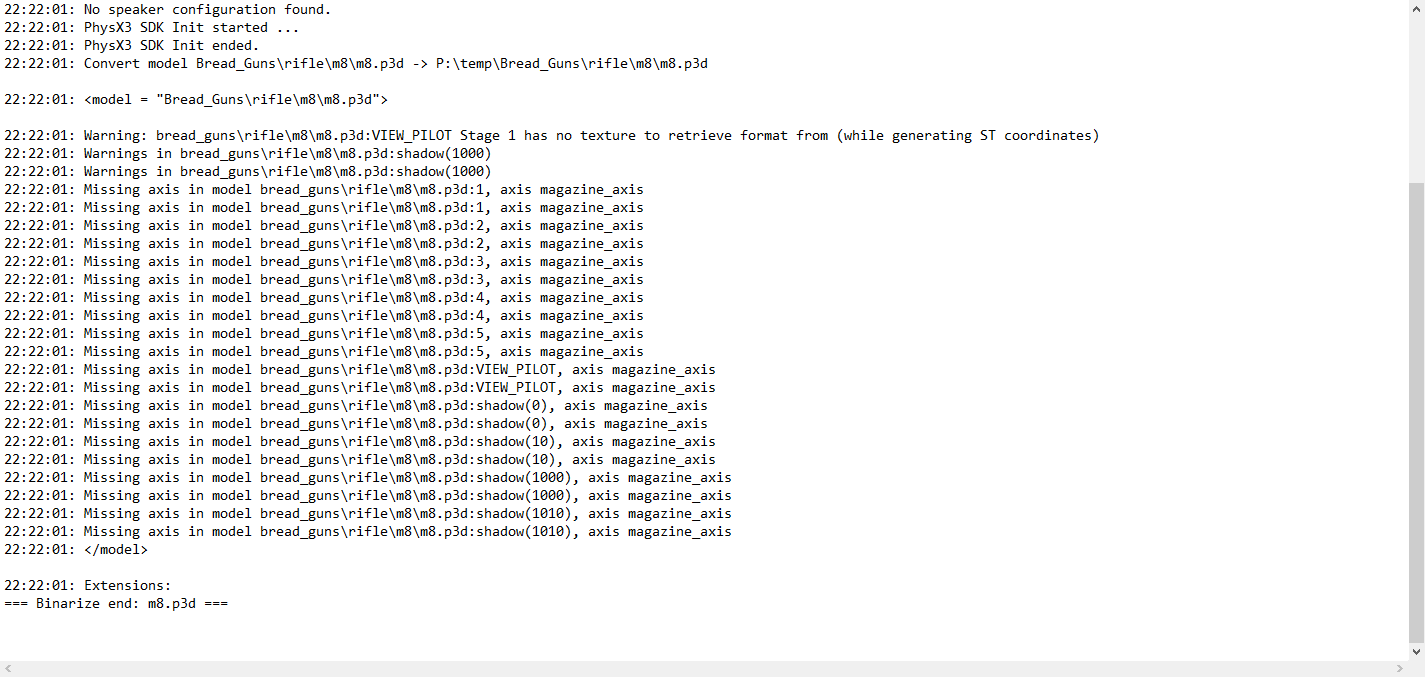
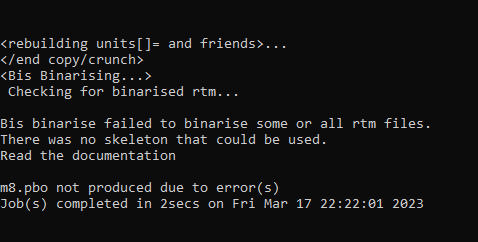
 livid canyon
peak isle
hey fellers back again, tried to pack this and got these errors. I dont think i ...
livid canyon
peak isle
hey fellers back again, tried to pack this and got these errors. I dont think i ...
You need the skeleton defined in model.cfg
peak isle
livid canyon
You need the skeleton defined in model.cfg
it is lol i think
also when i pack with pbo manager it works fine in game
runic plover
peak isle
it is lol i think
For what did you added it to the cfgSkeletons?
"Magazine_Axis", "",
peak isle
runic plover
For what did you added it to the cfgSkeletons?
```"Magazine_Axis", "",```
i removed it after i sent that here
runic plover
and in the model (Memory LOD) you have added the magazine_axis?
runic plover
if you define a axis in the model.cfg you need it
 runic plover
Then you have to make translationX / translationY or translationZ if you dont want a defined and added axis
If you just make translation it needs an axis
peak isle
runic plover
Then you have to make translationX / translationY or translationZ if you dont wa...
im not sure what u mean
runic plover
if you add in cfgModels:
type = translation
it needs a defined axis, means:
axis = blabla_axis
in your model you need to add in your Memory LOD the defined blabla_axis
if you add in cfgModels:
type = translationX (or Z or Y)
it doesnt need a defined axis so you dont even need to add axis = and you dont have to add a axis in to your Memory LOD
peak isle
sorry for all the questions but where would i put that exactly?
hold on i think im dumb and just figured it out
runic plover
peak isle
hold on i think im dumb and just figured it out
if not ill help then 😛
peak isle
runic plover
if not ill help then 😛
so idk why ctr f did not show me this before but i do have it defined. which means i need it in my model but im not sure where to make the points
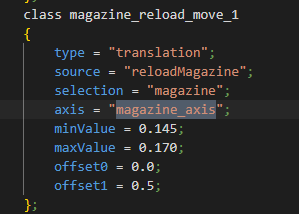
what i dont get is it works in game atm without it
runic plover
in the model in your memory LOD you need to add 2 points called magazine_axis where your magazine is
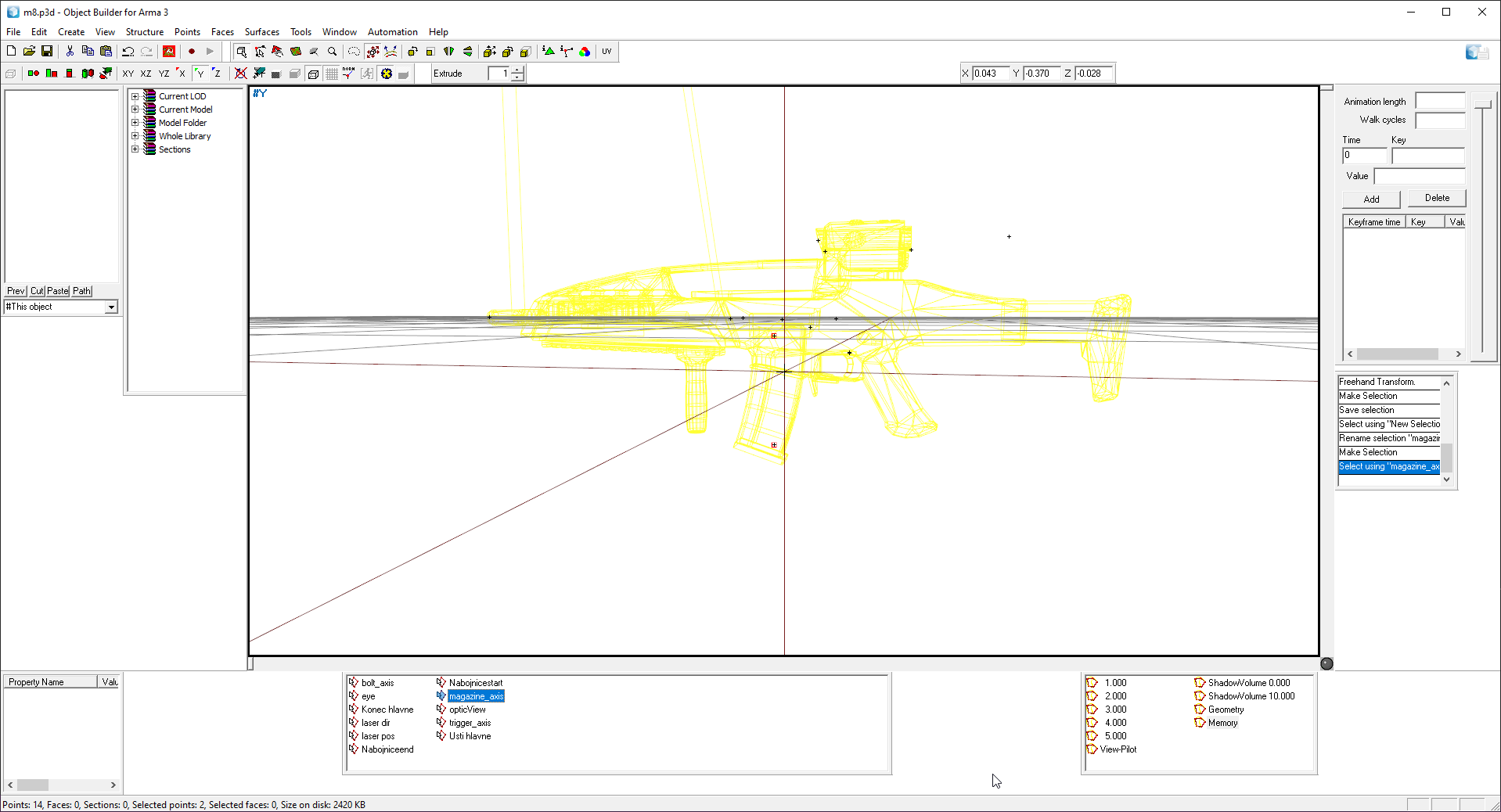 runic plover
 peak isle
runic plover
in the model in your memory LOD you need to add 2 points called magazine_axis wh...
peak isle
runic plover
in the model in your memory LOD you need to add 2 points called magazine_axis wh...
ye thats what i did got these errors
 runic plover
i cant see your magazine_axis error anymore?
peak isle
no but i dont get whats wrong now lol
stuck oyster
peak isle
no but i dont get whats wrong now lol
You need a model.cfg file with the character skeleton defined in it next to your RTM files so that the RTM can be binarized properly. Never ever again say "but with pbo manager" it works. It doesnt.
muted tapir
If i want to make an object that's purely visual (has no collisions) i just give it an empty geometry LOD and no roadway LOD, right?
peak isle
stuck oyster
You need a model.cfg file with the character skeleton defined in it next to your...
im smooth brain as you know so can you say that again for a crayon eater like me. what do you mean by next to my rtm file? and yeah pbo manager is not good enough thats why im fixing it properly with pbo project lmfao
muted tapir
is the roadway LOD on flat surfaces supposed to be at the same height as the geometry LOD or a few centimeters above it?
old gulch
Ideally 1cm above
muted tapir
thanks
 solid glacier
🍤
runic plover
peak isle
im smooth brain as you know so can you say that again for a crayon eater like me...
you need to do the same like you did for your weapon, but it has to be a character model.cfg and not for weapons
stuck oyster
peak isle
im smooth brain as you know so can you say that again for a crayon eater like me...
In the same folder as the RTM files you try to pack
woeful viper
arghhhhhh !!!!! finished cage, baked normal, enabled AO position modifier, cage broke 😡
peak isle
Okay I’ll look into this, I don’t get why the other two guns didn’t take this lol
stuck oyster
peak isle
Okay I’ll look into this, I don’t get why the other two guns didn’t take this lo...
did you have custom rtms for them?
peak isle
I’ll double check I thought I just used a random one
stuck oyster
you probably just used some vanilla animations then
RTM packing happens only if you have RTM in your files
peak isle
stuck oyster
RTM packing happens only if you have RTM in your files
what even are rtm files? like what would i have to google to make my own?
peak isle
stuck oyster
you probably just used some vanilla animations then
i assume BI wiki has a list
 peak isle
stuck oyster
you should know your files <:blobcatsweats:728343057354850325>
peak isle
stuck oyster
you should know your files <:blobcatsweats:728343057354850325>
nah buddies files but he is in a different time zone
 alpine matrix
Anyone know which model.cfg id use for a MATV? Unsure what i need.
stuck oyster
alpine matrix
Anyone know which model.cfg id use for a MATV? Unsure what i need.
custom one that fits it
like with any other object that needs model.cfg
alpine matrix
Well yeah, but its a Car. and the model config in the sample files is just a "civil_car"
and other stuff in there doesnt do much regarding Gunner and such.
stuck oyster
yeah the sample is just example
you should really just use it as reference when you write your own
so it contains only the things you need
alpine matrix
Fair enough, thank you my friend.
white oak
So got a bit confused with the UVsets
is it
UVSet0 -> Texture Scale
UVSet1 -> Texture Type
Or did I get it backwards
stuck oyster
white oak
So got a bit confused with the UVsets
is it
UVSet0 -> Texture Scale
UVSet1 -> Te...
depends how you set the rvmat to use the uvsets
it can be either way
white oak
stuck oyster
depends how you set the rvmat to use the uvsets
is it uvSource ?
tex and tex1
stuck oyster
personally I keep it UVSet0 for 1 space baked textures/mask etc UVSet 1 for tiled texture alignment
stuck oyster
white oak
is it uvSource ?
tex and tex1
yes
stuck oyster
While technically P3D seems to support that I think Arma uses only tex and tex1
I dont remember what results I had from testing more tex# values and uvsets since its been years but at least I dont remember any case where that would have been used
and cant say I can think of a reason why one would need more uvsets for same mesh either
runic plover
stuck oyster
I dont remember what results I had from testing more tex# values and uvsets sinc...
result is your p3d file gets biiig in KB / MB xD
 tawdry veldt
How does the location of a proxy work? Is the position on the right angle?
If it helps, specifically on about the launcher proxy
muted tapir
if i put the origin of a model outside of the boundingbox of the vertices, will the boundingbox ingame expand to include the origin?
stuck oyster
muted tapir
if i put the origin of a model outside of the boundingbox of the vertices, will ...
Depend on autocentering. Best way to add bounds space is to just add single points to corners at the size you want the bounds be
muted tapir
thanks
stuck oyster
tawdry veldt
How does the location of a proxy work? Is the position on the right angle?
Yes right angle is the position marker
 steel vault
I've been trying to make a wall with a hole in it. You can walk through the hole, and (I believe it is) the roadway works as you get raised a little bit. However I can also walk through the wall it self. I believe it has to do with n-gons or something, however I've triangulated all faces. Any idea what could cause this? I've also got a version of the wall without the hole which works fine.
muted tapir
do you have weights on your geometry lod?
steel vault
Yes, I've basically taken the full wall version which works perfectly fine and put a hole in it with a boolean modifier.
steel vault
let me google that term 😛
Yea object builder seems to confirm that, how can I fix that in blender? Can't find much about it, just tried something but that filled the hole up 
muted tapir
split the shape into multiple convex portions i think
steel vault
ah, so multiple pieces instead of one?
muted tapir
i think so.
i'm not entirely sure, all i've modeled so far has been triangles
steel vault
Thanks, I'll try that, still trying to learn blender at the same time...
 fluid copper
Ya EL_D148L0 is right, you can just use individual rectangles properly named component01-99 then it will work
muted tapir
the blender toolbox has a thing for automatically naming them
steel vault
thanks. just trying to figure out how I can split it. But I think I'll just start from scratch as it's a simple model.
 tiny copper
Yo is there someone that can help me with importing a gun model into the object builder? I have the model and textures, i'm just having trouble setting the model in Blender with the Arma toolbox addon and then exporting it to the Arma object builder. The LODs and the whole process are freaking me out.
Also i realise this must be a very common and annoying question around here lol, i just really want to finally get this working
white oak
I'm looking to make objects that are stackable stairs/platforms etc. Is there anything specific that I need to do in terms of pathing, ie make sure that in points can line up when stacked etc
neon harness
tiny copper
Yo is there someone that can help me with importing a gun model into the object ...
What error message do you get?
white oak
tiny copper
Yo is there someone that can help me with importing a gun model into the object ...
Do you get the error in blender or OB?
if OB double check your o2script path in blender
neon harness
I bet he forgot to triangulate his ngons.
tiny copper
the issue isn't that i get any errors, its just that i don't know how and what to setup.
For example i need children of the object i'm in porting to be in the same LOD as the parent, but it only imports the parent and nothing else
tiny copper
neon harness
I bet he forgot to triangulate his ngons.
and i have good enough topology to not have many Ngons if at all
so that is not the issue
But yeah just generally don't know my way around Arma modding lol
stuck oyster
tiny copper
But yeah just generally don't know my way around Arma modding lol
you should be able to find a few Blender to Arma tutorials (series on youtube) notably from El Tyranos and Sokolonko
those should get you going
tiny copper
aight will look at those
 past mesa
Is there a way to select two objects that are placed relatively close together in the editor "two walls for example" and via script move them together until the two closest faces are touching? Similar to how base building works in epoch or other mods. I have a lot of objects that need exact placing and moving them in x-cam is tough
tawdry veldt
stuck oyster
Yes right angle is the position marker
thanks btw. also wanted to ask, do the other 2 verts in the tri do anything in particular? or is it just to make a face to give it a direction?
north sundial
Wrong channel, and its easy to do in xcam, hold down alt and stuff moves slower
stuck oyster
tawdry veldt
thanks btw. also wanted to ask, do the other 2 verts in the tri do anything in p...
Yes it gives it direction
past mesa
@north sundial yes perhaps your correct, what channel should i be asking in?
north sundial
Terrain makers, better place to ask about placing stuff on maps
past mesa
worth a shot i guess :)
neon harness
How do I make it so that when let's say a cannon is loaded, I can see the shell in the barrel?
 tranquil spire
magazine proxy inside the barrel would do it
neon harness
What about its like orientation and what not?
tranquil spire
stuck oyster
Yes right angle is the position marker
goat summed it up ^
tranquil spire
stuck oyster
Yes it gives it direction
and ^
tranquil spire
np 
 junior ibex
Coming soonish™️ to a 2035 focused mod near you!

 kind nacelle
I feel sorry for the guys using a law in 2035
neon harness
I looked at the rocket and it reminded me of the lack of RPG 29s.
 halcyon hill
neon harness
I looked at the rocket and it reminded me of the lack of RPG 29s.
halcyon hill
neon harness
I looked at the rocket and it reminded me of the lack of RPG 29s.
Well, im working on one, altough its suffering from some delays. Should hopefully be done in a few months.
neon harness
halcyon hill
Well, im working on one, altough its suffering from some delays. Should hopefull...
Amazing, good luck with that.
junior ibex
kind nacelle
I feel sorry for the guys using a law in 2035
I mean, it weighs less than half of what an AT4 does, you hand one out to each squad member for clearing hard targets and dealing with enemy APCs and IFVs. Sure it can’t OHK an MBT but that’s not the intended target anyway
steel vault
Quick (stupid) question, in blender with the Arma 3 tools. What is the proper way to add weight? Because for me it's like 75% of the time just crashing or not doing anything.
And after spamming the same actions after a while it randomly works, I'm definitely not doing the same actions though as it works somehow 😅 .
stuck oyster
steel vault
Quick (stupid) question, in blender with the Arma 3 tools. What is the proper wa...
set mass to selected seems to crash. @shrewd jay have you noticed such happening?
distribute mass to selected seems to work
steel vault
Also, do you know why it's multiplying it by 8? Eg. I'm inputting 100 and it sets the weight to 800? (object is an rectangle could it be the 8 vectors?)
stuck oyster
just did a test with fresh Blender instance, selected the default cube, set it to geometry type and opened the weight panel, set it to 10000 and hit set mass to selected
steel vault
I just did it twice in a row without a crash... seems to be random
stuck oyster
set weight puts the given value on each verticle
steel vault
Ah
old gulch
You want to use distribute
stuck oyster
distribute mass to selected divides the given number between all selected vertex
steel vault
I see... will use that instead of my own calculator next time...
 shrewd jay
What might be an issue is that the custom data layer wasn't created. It should be created when the Arma 3 property is set, but it might not work. If it crashes, try saving first and then reload
stuck oyster
making quick test
stuck oyster
shrewd jay
What might be an issue is that the custom data layer wasn't created. It should b...
that seems to work
testing without saving again just to see if it still crashes
shrewd jay
Yeah for some reason the data layer isn't always created...
steel vault
So seems like if you select another vector group without selecting the actual vectors crashes it?
But that might be because the incorrect vectors are selected?
What is the correct order to set weight? Because I'm most likely doing it in a wrong order.
shrewd jay
There is no set order. You select the vertices you want to weight, enter the weight in the box and use either Set or Distribute
As I said, it it crashes, try saving and reloading
stuck oyster
if I have componet group active in vertex group list so it shows the group mass and I hit set mass it crashes
steel vault
Yea thats what I'm also having, and sometimes I have to press the component group twice, or press it again after pressing "Select" to actually have the set/distribute to work.
stuck oyster
oh actually it crashed also when not having the vertex tab open but after adding the component group
I'll test if saving after making components but before weight makes difference
stuck oyster
if I click the set fast it also crashes xD
stuck oyster
shrewd jay
Just tried it here as well, it works for me...
you might have bit newer dev build too though 😄
shrewd jay
Yeah possible. Did you try downloading the repository from github?
I really need to make a new release 😅
shrewd jay
I think that is the latest one. Just a couple of local changes...
stuck oyster
after creating a group and assigning vertices to it and then rapidly clicking either set mass it crashes
with no group at all I can spam the buttons as fast as I want
shrewd jay
What happens if you tab out and back into Edit mode?
Some changes are only applied after you leave edit mode
steel vault
Clicking the mass button twice crashes it for me as well, sometimes it doesn't do it the first time I have to then select another group (just the group not the vertices) and then back to the first one and it works.
But I now know the way so it won't crash so I guess that's good 😛
shrewd jay
Might be worth a shot
stuck oyster
tabbing seemed to not make a difference
stuck oyster
most of the time the geometry stuff has worked just fine on my end too.
steel vault
Still crashes on newest version as well, but might be just because I'm spamming it...
I know how to not let it crash though so it's fine for me.
 tribal finch
hoy anyone know how I'm supposed to build shadow proxies?
I get this weird self shading effect that always seems to affect the jet in one way or another. anything in the blender screenshot in dark blue is shadow proxy.
Can't tell if its supposed to be bigger than the jet or smaller, currently I'm trying it small. Am I an idiot here? 🙂
also ignore the shitty textures lmao

 stuck oyster
tribal finch
hoy anyone know how I'm supposed to build shadow proxies?
I get this weird self ...
stuck oyster
tribal finch
hoy anyone know how I'm supposed to build shadow proxies?
I get this weird self ...
shadow is not proxies
its specific lod
and the mesh needs to be closed and inside view mesh so it does not project over the surface
tribal finch
stuck oyster
shadow is not proxies
used to CE sorry 🙂
will close up my mesh and give it a shot soon
 last spindle
SP vs Quixel is like Nike vs Adidas, they do the same thing, it is the person using it that controls the end product, I use both, both are good at different things, working in ARMA I more often use Quixel, in Unit or UE4 I would use substance because they actually support the substance files which opens up pots more creative options
stuck oyster
tribal finch
used to CE sorry 🙂
will close up my mesh and give it a shot soon
simplest way to make it is out of simple box shapes and cylinders
 brazen valley
except that in this analogy nike releases shoes way more often than adiddas? xD just effing with you. i love painter i've used very little of quixel tho the quixel materials are powerful.
and look way nicer than some of painter, atleast on their integrated viewport.
 errant pumice
ACE] (medical_engine) ERROR: Bad hitpoints for unit type
^^ any tips how to fix this, I'm using sample soldier from BI
 desert notch
errant pumice
ACE] (medical_engine) ERROR: Bad hitpoints for unit type
^^ any tips how to fix ...
desert notch
errant pumice
ACE] (medical_engine) ERROR: Bad hitpoints for unit type
^^ any tips how to fix ...
have you defined the hitpoints in the CfgVehicles config of the soldier?
does anyone know the difference between phase and value in Animations in model.cfg?
https://community.bistudio.com/wiki/Model_Config#Animation_Properties
 runic plover
errant pumice
ACE] (medical_engine) ERROR: Bad hitpoints for unit type
^^ any tips how to fix ...
runic plover
errant pumice
ACE] (medical_engine) ERROR: Bad hitpoints for unit type
^^ any tips how to fix ...
What are you doing exactly? Cause i had some troubles with this also but with a plan behind it by me and i had to talk with the ace devs to solve that problem.
desert notch
desert notch
does anyone know the difference between phase and value in Animations in model.c...
I think phaseBeg and phaseEnd are not used?
stuck oyster
I wonder if the sample man ever got hitpoints updated. 🤔
neon harness
Do memory point normals matter?
stuck oyster
no
neon harness
Then how do you fix the shells coming out at a wrong angle from the barrel then? Move the memory points?
stuck oyster
there should be 2 memorypoints that define the vector
neon harness
stuck oyster
there should be 2 memorypoints that define the vector
Ah I see. Does that have to do with the gunbeg and gunend?
stuck oyster
yes
neon harness
Ok, I didn't have those as they weren't present in the A3 mortar config.
stuck oyster
it likely inherits the default definition from some base class
weapons always use those to define the barrel direction
neon harness
neon harness
Ah I see. Does that have to do with the gunbeg and gunend?
That pretty much fixed it.
So yes thank you!
stuck oyster
👍
 jovial cove
is there a mod for such a sight ? Torrey Pines Logic t12-m
white oak
Is Object Snap Points done with memory LOD?
muted tapir
white oak
Is Object Snap Points done with memory LOD?
you mean snapping to the ground?
that's done via the landcontact LOD iirc
white oak
Nope to each other
ie the cargo platforms
once you remove the sidewalls you can snap them together
white oak
that is a very good question
to which my answer is, I'm planning to add some
when/if I can figure out how to do so that is
 white oak
well time to do some digging then
stuck oyster
jovial cove
is there a mod for such a sight ? Torrey Pines Logic t12-m
unlikely if you have not found one. This channel however is meant for questions related to making stuff, not for asking if some mod exists. for that you can use #arma3_questions
stuck oyster
white oak
well time to do some digging then
the 3DEN snap system is not documented I think. but most likely it uses some sort of snap points
white oak
not documented
Shocker
Went into the eventhandler script
it does reference some points on the model
going to unbinarize it to have a look
stuck oyster
white oak
> not documented
Shocker
Went into the eventhandler script
it does reference so...
p3ds stay binned
we have 0 tolerance of stuff otherwise
you can draw memorypoints live in game with a bit of scripting though
since the positions can be read
you can for example create those 10cm spheres and attach them to mem points or draw lines between them
muted tapir
Or just use selectionPosition
stuck oyster
that is part of the bit of scripting mentioned
muted tapir
I thought when you said attach spheres to them that you may have only thought of something involving attachTos capability of attaching to bones
stuck oyster
attachto can also attach to memorypoints so yes that is one option
 finite pumice
Hello, trying to make a proper window for the car and can't fix this problem.
From the external, some parts behind the window are missing, while from the inside they look normal. Is there any way to fix it?

 umbral shuttle
so I am guessing this is a model issue
I have a effect and memory point is kind of in the center of these two beams. now in 3rd person its all fine, but in 1st person it looks like the gun is kind of like rendering over it
is there some named property I am missing?

 old gulch
I would hazard a guess that's because the effect isn't rendered as part of the view pilot, but is in world space. But I'm also kinda talking out of my ass.
stuck oyster
finite pumice
Hello, trying to make a proper window for the car and can't fix this problem.
Fr...
you need to set the windows alpha sorting order to top
there is a tool in the OB toolbar
stuck oyster
umbral shuttle
so I am guessing this is a model issue
I have a effect and memory point is kind ...
first person view is always rendered on top to avoid it clipping into things
so this is to be expected unless you create the effect with animated texture mesh that is in the weapons space
stuck oyster
old gulch
I would hazard a guess that's because the effect isn't rendered as part of the v...
this is correct
your ass speaks wisely
finite pumice
stuck oyster
you need to set the windows alpha sorting order to top
Yes, that worked fine. Thank You very much
umbral shuttle
stuck oyster
first person view is always rendered on top to avoid it clipping into things
ahh oooof makes sense, I guess I could try to maybe move it a bit to look good enough
umbral shuttle
stuck oyster
so this is to be expected unless you create the effect with animated texture mes...
animated texture?
stuck oyster
Could make a mesh strips with that sort of lightning texture in them rolling on and maybe with some animated segments to make it more random
old gulch
I am glad that my ass is wise.
umbral shuttle
oh okay and have them be part of zasleh or something
time to get a lightning model to use 🙂
 dusty karma
so uh it my first time making a "complete" model. a small crate. When i imported it in game, it spontaneously combusts when i shoot it lol. is it a LOD issue? Im not sure what best practice is for small items
stuck oyster
dusty karma
so uh it my first time making a "complete" model. a small crate. When i imported...
It's issue with how you have configured it.
It's no spontaneous combustion, you destroy it by shooting.
dusty karma
stuck oyster
It's issue with how you have configured it.
Good to know atleast i dont have to mess around with the model again. Its inheriting from "thing" i didnt think that could be destructible. Anyway guess ill check the samples again see how to do it properly
stuck oyster
You might not be able to make a thing type object indestructible
But the parameter destrtype determines the way object is killed.
runic plover
If you dont want it to be destroyed you can also add in the Geometry LOD / Properties / damage no
stuck oyster
Editor placed object reads the config parameter only
errant pumice
desert notch
have you defined the hitpoints in the CfgVehicles config of the soldier?
Nope, how do I do that? Any examples out there?
desert notch
the samples config.cpp of test character has some hitpoints listed
not sure if it's all of them
errant pumice
yeah I have them defined the same as in samples
stuck oyster
I think the samples one might be outdated. I don't remember if there were changes
errant pumice
😦
yeah, wierd. I've compared with SLA CUP units config and they seem the same:

memory points:
 stuck oyster
you would need a model.cfg class that matches the p3d name (also please add modding TAG_ on your files to make the names unique) and in that class you would need sections array that contains the hiddenselection selection names
you can find examples of how that looks in the Arma 3 samples
you class hig_mywall does not seem to match with the p3d name in the config
barrierg3.p3d -> modelcfg class barrierg3
yes
in model.cfg
white oak
does multi-rvmats do texture mixing?
looking at some examples there are places where the colors are mixed
stuck oyster
no they cant mix together read that first as multiple multimats
or you mean in single material?
yes the mask colors can mix in the mask
stuck oyster
maybe your selections on the model are not right or you have a typo somewhere
do you have default textures set in the p3d?
white oak
stuck oyster
or you mean in single material?
yeah the mask.paa the multi file references
 snow meadow
Where can I get a base player model to model gear on?
stuck oyster
the object seems pretty simple
what are camo1 and camo2
as in are they same selection?
I think you have mistaken how AI sees stuff
AI does not see the visual mesh or transparent texture
AI only sees the ViewGeometry lod of the object
so none of this is needed 😅
you just need an insibile block that has empty geometry lod, empty firegeometry lod and block of size you want in viewGeometry lod
well you dont need visible mesh at all
unless you want something to debug its position with
so lod0 could be empty too
technically at least
you will also want sbsource none named property
https://community.bistudio.com/wiki/Arma_3:_Named_Properties#sbsource
that will disable its shadow casting completely
so you can make the box in lod 0 if you like. but I think it would be more performance friendly to hide the mesh instead of using trasnparent texture for debug purpose
as transparency is expensive for GPU
sbSource = none would be best performance wise
empty shadow lod works too
so the mesh hiding could be an model.cfg animation
it can be triggered by scripting and/or made into a object editor attribute
stuck oyster
you would put that in the geometry lod
nearly all named properties go into geometry lod
it is the "root" of a model so to speak
last spindle
@white jay Is Substance Painter superior to Quixel Suite?
 white jay
What is the left hand rule?
last spindle
I think that answers it.......
 fleet furnace
Hey guys Im looking to learn about making models for arma 3 and was hoping if someone could take me under wing and help me learn as cringe as that sounds. I have a pretty solid interest in learning and i've already made a donut. But if not oh well sorry if this wasn't the right place to post this
stuck oyster
fleet furnace
Hey guys Im looking to learn about making models for arma 3 and was hoping if so...
well there isnt really anything that special about modeling for Arma3, the basics of things like modeling and texturing can be learned from tutorials like the doughnut
the more you model and make stuff you start to understand the technicalities and then can understand what Arma requires
fleet furnace
Yeah I understand that but I learn better with someone telling me what i'm doing wrong etc. in stead of scanning the internet for tutorials you know?
stuck oyster
I can understand that but it may not be realistic thing to happen
it is a lot of work for that someone
what you could try is to join one of the Blender community discords and chat about stuff there, ask for input on what you do etc
fleet furnace
stuck oyster
what you could try is to join one of the Blender community discords and chat abo...
That's actually a fair idea. thanks, idk why I never thought about that
stuck oyster
Its not that you could not ask here too but the channel is more intended for the actual Arma related stuff, not teach basic modeling in depth
but the blender discords are very suitable for that
fleet furnace
Yeah I get you, if I ever get to the level of importing stuff into arma i'll prob come back here to ask questions
stuck oyster
this is definitely the place for that
and we also like to see what people make for Arma
marsh canyon
Is there a common mistake so my human model doesn't take weapon IK into count?
errant pumice
Can anyone help me out with this issue?
11:31:22 [ACE] (medical_engine) ERROR: Bad hitpoints for unit type "O_Soldier_LAR1"?
Can't seem to find ACE knowledge base about that
marsh canyon
marsh canyon
Is there a common mistake so my human model doesn't take weapon IK into count?
Seems like a visible LOD issue, but can't figure what it is
 empty aurora
errant pumice
Can't seem to find ACE knowledge base about that
empty aurora
errant pumice
Can't seem to find ACE knowledge base about that

GitHub
Open-source realism mod for Arma 3. Contribute to acemod/ACE3 development by creating an account on GitHub.
errant pumice
interesing.....no clue what ADD_ACE_HITPOINTS(1,1); is... like a function, pboproject will go all alarmy on me lol
marsh canyon
marsh canyon
Seems like a visible LOD issue, but can't figure what it is
Solved, the reason was I haven't Arm/LegRoll selections (the model doesn't have one for a reason)
empty aurora
errant pumice
interesing.....no clue what ADD_ACE_HITPOINTS(1,1); is... like a function, pbopr...
https://github.com/acemod/ACE3/blob/master/addons/medical_engine/script_macros_config.hpp
There defined what current variable have
GitHub
Open-source realism mod for Arma 3. Contribute to acemod/ACE3 development by creating an account on GitHub.
So you can manually add current classes in your own class if you do not use macros
errant pumice
ahh thank you!
you're a life saver
model.cfg and memory points can probably stay the same?
 plucky depot
You shouldn't need to use that macro.
If you're not getting these hit points and you're making standard unit you most likely have broken the inheritance chain.
Using our internal macros is great recipe for a disaster in case we change anything on our side.
empty aurora
Thanks veteran for answer I wasn't sure so I didn't figure out correct way to do
errant pumice
thank you @plucky depot for supplying me with the correct inherit code. Will test asap
 amber swift
Guys im trying to model a apc, its almost done i just need to put it in game. What sample should i use the car or tank one?
stuck oyster
amber swift
Guys im trying to model a apc, its almost done i just need to put it in game. Wh...
does it have wheels or tracks?
amber swift
Wheels
stuck oyster
then car
amber swift
Oh ok, but it also has one of those manned turrets with an m2, how could i make it work?
stuck oyster
by looking at how turret is set up in the tank
amber swift
That makes sense, ill look it up, thanks.
 warm jackal
Hi there. I have a question related to car modding. I'm trying to setup rpm and speed indicators. Made arrows, created selections and axis MP. But how can I calculate right angle to move them correctly in animation? Really appreciate if someone can help with this.
stuck oyster
you will have to measure your model/textures
charred bolt
warm jackal
Hi there. I have a question related to car modding. I'm trying to setup rpm and ...
Model the needle to point at 0 on the dial.
Measure the angle between 0 and the maximum on the dial (eg 240 degrees from 0kph to 125kph).
At speed minValue, needle will rotate by angle0. At speed maxValue, needle will rotate by angle1.
assumes a linear graduation on the instrument
{
    source = "speed";
    type = "rotation"
    selection = "ins_mph";
    axis = "ins_mph_axis";
    minValue = 0;
    maxValue = 34.72;    // speed source is in m/s (125kph = 34.72m/s)
    angle0 = "rad 0";
    angle1 = "rad 240";
};```
 inland pawn
For AI to recognize the vehicle they are in and not fire through it, would that be view geometry?
Or something else
 past canopy
@white jay Is p1nga a big meanie?
white jay
You are correct :).
past canopy
Well there you have it @last spindle ;)
runic plover
inland pawn
For AI to recognize the vehicle they are in and not fire through it, would that ...
Yes
past canopy
Quixel is really cool for doing quick renders and adjusting UVs and adding small UV details, other than that I'm not the biggest fan. But you've seen what Hatchet does with it so.... all comes down to personal preference I suppose.
runic plover
FireGeometry = where it gets hit
ViewGeometry = blocks view behind/cant see trough
Geometry = where you stuck & defined its mass in kg
GeometryPhys = physical geometry, no mass added
All convex
Also for simple objects like a crate you can add only Geometry so FireGeometry and ViewGeometry LOD is not needed. Materials can be added also in Geometry LOD like FireGeometry materials then.
 slate epoch
@white jay is automoderator a big meanie?
white jay
Are you good at psychology?
slate epoch
@white jay no
white jay
Are you depressed?
slate epoch
@white jay no
white jay
Haha. No neither.
slate epoch
( ͡° ͜ʖ ͡°)
past canopy
( ͡° ͜ʖ ͡°)
slate epoch
I have a new friend
white jay
No that's not me.
white jay
You were not good enough?
slate epoch
Well, enough of spam :D
past canopy
yeah better stop before we get booted for spam ;) isnt that right @white jay?
white jay
Dream Theater is your favorite band.
past canopy
that's not true btw
white oak
So if I have a non-convex object
do I just slap multiple cubes together for the geometry LOD?
fluid copper
Ya
Doesn't have to be a ton of small cubes, but much less detail than your view lod
stuck oyster
👆
 stuck oyster
 thorny ridge
where to get started w model making
thorny ridge
where to get started w model making
probably from choosing a program (like Blender) and starting doing tutorials for it and reading how it and modeling works
stuck oyster
if you put blender modeling tutorials into youtube you will likely find a lot
any tutorials like the famous doughnut tutorial will help you understand how the tools work
umbral shuttle
is there any sample files for muzzle flashes?
stuck oyster
might not be 🤔
white oak
isn't that a texture rather than a model?
stuck oyster
its both
umbral shuttle
oh tragic, wanted to make a few that are different textures/sizes oooof
 hollow thorn
Hi all .... I'm hoping someone can offer some guidance on the proper implementation of the MFD class? I'm trying to build a custom MFD for a model and I simply can't get it to display in game. I've been through the Wiki, all searches for "MDF" in this channel and the Modelling page in the Bohemia forum with no luck. All the information is either unclear or incomplete ....
so a couple of points of clarification that hopefully someone can shed light on:
1 - It appears that the corner points in the memory LOD are the only features required in the .p3d file for an MFD to work. Is this correct? I don't need a named selection in the visual LOD that matches the MFD class name or anything else like that? ... Nothing needs adding to the model.cfg or similar?
2 - Are MFDs linked exclusively to particular vehicle slots? There is no naming convention like MFD_Gunner, MFD_Driver that determines whether an MFD is visible?
3 - Can all vehicles that inherit from LandVehicles have an MFD? I am currently working under the StaticCannon class .. Will this class support an MFD? (note that I have tried moving to using Tank, as I know tanks can have MFD's but this did not help)
4 - Should class MFD; be added to the class inheritance tree, and if so where. Namely, what is the highest level entity in the Land -> LandVehicle -> StaticWeapon -> StaticCannon hierarchy in which the MFD would first appear? .. I've seen an example above in which the MFD class was included as a child class of Components {}, however in some of the vanilla APC configs the MFD is just a child of the parent vehicle.
Current config for reference, mainly stolen directly from the MFD wiki reference:
class My_Test_Vehicle: StaticCannon_base {

  ....

  class MFD
  {
    class MFD_keyPad
    {
      topLeft        = "MFD_TopLeft";
      topRight       = "MFD_TopRight";
      bottomLeft     = "MFD_BottomLeft";
      bottomRight    = "MFD_BottomRight";
      borderLeft     = 0;
      borderRight    = 0;
      borderTop      = 0;
      borderBottom   = 0;
      color[]        = {0.85,0.85,0.85};
      alpha          = 0.5;
      enableParallax = 0;
      font="LCD14";
      class material
      {
        ambient[]  = {1,1,1,1};
        diffuse[]  = {1,1,1,1};
        emissive[] = {1000,1000,1000,1};
      };
      class Bones {};
      class Draw
      {
        color[]={0.61,0.62,0};
        alpha=1;
        condition="1";
        class PolygonTest
        {
          color[] = { 0.082, 0.408, 0.039 }; // use to define color
          class Polygon
          {
            type     = "polygon";
            texture  = "a3\Data_f\Images\Mod_Base_logo_ca.paa";
            points[] = {
            // space where texture should be drawn
              {
                { { 0, 0.1 }, 1 },
                { { 1, 0.1 }, 1 },
                { { 1, 1 }, 1 },
                { { 0, 1 }, 1 }
              }
            };
          };
        };
      };
    };
  };

   .... etc ...

};
MFD has a LOT of code in it
It’s quite confusing
My MFD wouldn’t show up until I put in defaultUserMFDvalues[]
karmic blade
There is also an MFD mod on workshop, it adds MDF to aircraft that didnt had it before, you can probably look up how he did that code
 indigo charm
Hey anyone got any blackhawks that are realstic and all? for a beginner??
hollow thorn
@inland pawn Are you able to provide further detail on what you mean by this? defaultUserMFDValues doesn't appear in the MFD wiki.
Am I just adding a defaultUserMFDValues[] = {}; to the list of MFD properties?
inland pawn
hollow thorn
<@266493686940958720> Are you able to provide further detail on what you mean by...
It was pulled from the Black Wasp Config I believe. Could try the values from there
inland pawn
hollow thorn
<@266493686940958720> Are you able to provide further detail on what you mean by...
The Biki is also outdated in some parts
karmic blade
hollow thorn
<@266493686940958720> Are you able to provide further detail on what you mean by...

Also, does anyone know how to check what memory point a vehicle has?
hollow thorn
karmic blade
Also, does anyone know how to check what memory point a vehicle has?
_vehicle selectionNames "MEMORY";
karmic blade
hollow thorn
```_vehicle selectionNames "MEMORY";```
I might be dumb, but how do you use this, I understand it should return a list, but where do I put it and where does the list appear?
nvm figured it out
white oak
So having a bit of grasping trouble what the MC file does
is it an overlay or another texture layer?
fluid copper
MC file?
white oak
with buildings
you have the
mask, texture mask to use with multi-rvmats
CO, textures outside the rvmat
MC, can't pin down what it does exactly
ADS, shadow overlay
fluid copper
Some info for it is on both these pages :
https://community.bistudio.com/wiki/Super_shader
https://community.bistudio.com/wiki/Multimaterial
white oak
both of which only mentions the texture, doesn't go into detail
fluid copper
Maybe this article will help? Pufu goes into the whole thing and a tutorial is also mentioned that you could reference for an example https://forums.bohemia.net/forums/topic/185296-multimaterial/
Also #arma3_texture might be a better place for this topic
stuck oyster
white oak
So having a bit of grasping trouble what the MC file does
is it an overlay or an...
overlay
desert notch
hey, I have a question about model proxies
if a proxy has proxies itself, do those "sub-proxies" get added when you add the proxy to a model? or does it only add the main proxy?
white oak
Experimenting with geometry nodes to create buildings rapidly
thoughts?

at the moment it is just the visible lods but should be able to extend it to do basic geometry/roadways/etc
stuck oyster
with good parts it might work quite ok to create variation. But also it might produce way over complex models.
also one thing to remember is that unique object count should be kept as low as possible for better performance
so if you generate hundreds of houses to be used just 1 time they will have huge impact on scene complexity and fps
inland pawn
runic plover
FireGeometry = where it gets hit
ViewGeometry = blocks view behind/cant see trou...
So, gave my model a designated view geometry and the AI can still fire through
runic plover
inland pawn
So, gave my model a designated view geometry and the AI can still fire through
FireGeometry
inland pawn
runic plover
FireGeometry
It also has that. Could it be non convex or something
Lemme check
Oh
It is
runic plover
Needs to be convex and every single mesh needs to be named as Component01 Component02, Component03 etc
inland pawn
runic plover
Needs to be convex and every single mesh needs to be named as `Component01 Comp...
Yeah, think that was the issue. Most of, if not the entire hull was not convex
Packing atm
runic plover
Also FireGeometry needs some materials, if not, you will be able to fire trough it with some bigger caliber
inland pawn
runic plover
Also FireGeometry needs some materials, if not, you will be able to fire trough ...
It uses the standard armour.rvmat
So, it should be fine
Pretty sure the non convexity was my issue
runic plover
As long it works, its solved 
inland pawn
👍
amber swift
guys im making a 8x8 apc and used the test_car sample. Problem is the front wheels spin but the rear ones dont, also only the right front wheel turns. The memory points are there and seem to to be named correctly. Any idea how to correct this?
stuck oyster
create animation classes one by one and make sure you have really have all necessary parts made in both model.cfg and in the model
white oak
stuck oyster
with good parts it might work quite ok to create variation. But also it might pr...
Trying to work around complexity
having windows that go into the model makes things quite difficult to simplify
on that I found if windows were to stick out, I can do a one solid face for the side of the building
with them dug in like that all walls have to get their own face
this building I tried both ways
the variant with the windows sticking out had ~75% less faces on

managed to get this down to 2700 faces <- although don't have much of an idea how good/bad it is
 hollow fulcrum
☕
pseudo elbow
Why doesn't this work anymore? Wanted to see the geometry behind Memory LOD and it doesn't show anything.

Didn't use O2 for years so I can't recall if there was a trick behind it
stuck oyster
pseudo elbow
Why doesn't this work anymore? Wanted to see the geometry behind Memory LOD and ...
It should still work 🤔
pseudo elbow
Also camera rotation is way off, goes very slowly and choppy, then suddenly jumps a lot, something isn't right.
 pseudo elbow
amber swift
have u enabled direct3d? it may be the reason
pseudo elbow
amber swift
have u enabled direct3d? it may be the reason
Tried that, no difference
amber swift
is the model heavy ?
pseudo elbow
OA BAF Jackal model from A2 Samples
So no
When I do camera rotation in Memory LOD (Left Alt + Right Mouse), it works fine, but when I do it in 1.000 LOD it barely works, barely does any rotation but then suddenly jumps with a huge rotation
Latest update of Win 10, nothing special going on otherwise 🤔
Windows 7 compatibility doesn't do anything, running as admin doesn't do either
amber swift
do u see the backfaces even with direct3d enabled?
 amber swift
weird, im going to have to leave the pc now, but i think smt may be conflicting with the program.
or maybe the faces arent welded
pseudo elbow
Trying on sample A2 models, they should be fine
And I had them working fine few years ago (different PC and Win 7)
pseudo elbow
stuck oyster
Turn off texturing perhaps
Nope, no change no matter what I do
Ran Oxygen 2 from my original setup years ago, behaves 1:1, same "lag" when rotating camera, same refusal to show in background


 slate epoch
heya
pseudo elbow
stuck oyster
do you have dx enabled on aal viewports?
On neither. Same picture when using DX, no background.
 stuck oyster
huh
stuck oyster
pseudo elbow
On neither. Same picture when using DX, no background.
check options if the setting is turned on?
 pseudo elbow
stuck oyster
check options if the setting is turned on?
pseudo elbow
stuck oyster
check options if the setting is turned on?
Yup, it was it. Weird why it wasn't enabled by default 
Thanks for helping me get to the bottom of it
stuck oyster
pseudo elbow
Yup, it was it. Weird why it wasn't enabled by default <:thronking:3297363327148...
😅 👍 good
pseudo elbow
Is it worth it submitting small model issues to feedback tracker anymore? Is there somebody working on fixing A3 models for patches left?
white oak
When making geo lod with multiple meshes in blender
should I join them into a single mesh when its done?
 upper lynx
white oak
Trying to work around complexity
having windows that go into the model makes thi...
upper lynx
white oak
Trying to work around complexity
having windows that go into the model makes thi...
Well for example House_1W06_F is 10000 faces for LOD1 so you are not running high. It of course has a detailed interior too. You can use Eliteness to check out object face counts.
stuck oyster
white oak
When making geo lod with multiple meshes in blender
should I join them into a si...
Toolbox export can join them for you and even renumber the so that joined parts component numbers match and are not shared.
white oak
neat
stuck oyster
Porsche 718 Cayman GT4 is it then?
I mean sure its nice model but it would be cool to not try to make it seem like you made the model
hollow fulcrum
anybody made/done anything the last few days? severe lack of porn in the channel.
muted tapir
will an object still work (for collisions) if it has no resolution LOD at all?
runic plover
muted tapir
will an object still work (for collisions) if it has no resolution LOD at all?
Yes
Resolution LODs are for distance calculations. Means you dont need to have as example a calculated 10'000poly model at 1000meters distance.
muted tapir
so having only a geometry, memory and roadway lod is fine for an object that serves as a collider if i understand this correctly?
runic plover
Do you want a invisible collider?
muted tapir
yes
muted tapir
i know that, i'm thinking that i may get better framerates if the object is not considered at all for rendering due to having no resolution lods
but i don't know if that would break the engine in some way
runic plover
Just do one Reso LOD so only one 1.000 which is empty and do the other LODs like Geometry, Memory, Roadway if needed
muted tapir
ok, i'll do that
runic plover
I did such often for some AI corrections at my terrains 😅
muted tapir
tell me more
what were the effects on the ai of such colliders?
did they have paths LODs?
runic plover
Were tests of their behaviour for cliffs i did. So they wont walk trough them and stuck / hide in them. But didnt work at all, somtimes it did and sometimes not, in some kind of formations or behaviours they dont really give a s@#t for such 😅
muted tapir
oh
 jagged tusk
every time I'm poly-deprived I just load up some fractalsponge models
hollow fulcrum
:D
 muted tapir
how do i best add a position that has a direction and up vector to the memory lod of an object?
do i just add 3 unconnected (or connected?) vertices with different names on each of them or is there a better way?
jagged tusk
what will it become?
 jaunty rune
a spacestation interior
jagged tusk
ooh
woeful viper
before you start adorning everything with fine modelled details... think about what textures you need first and create models for baking of detail wall textures. Bake the textures. Then build your room
jaunty rune
most of what im doing is in segments and is all the same color for the most part but ya I get what your saying, besides the bake the textures?
stuck oyster
muted tapir
how do i best add a position that has a direction and up vector to the memory lo...
For what kind of purpose?
muted tapir
Knowing in which position and orientation the object tiles with other objects
I have models of trenches, the open ends of which are supposed to connect. I need to mark the positions of these open ends in the model as well as the directions these open ends are facing in
stuck oyster
3 named points would probably be easiest to use for valvulation like that
woeful viper
modelling fine wall detail is a waste of polygons and is done better and more efficiently via proper textures including normalmaps
hollow fulcrum
go go nDo.. *if not actually wanting to model everything.. it works very well for highly detailed wall foo..
jaunty rune
ok well that is a parchal high polly, everything is in segments it can be fixed. thanks for the advice
north sundial
Sorry hatchet not done any modelling for a while, stuck on map work :(
hollow fulcrum
well im sure you're having all kinds of fun with that :D
hollow fulcrum
i haven't touched map making since the new tools came out. i used to play with that stuff a lot more than model foo. it scares me now though, so I'll let you guys handle that stuff. :P
 vast tulip
so super odd question im unsure of how to describe
im making a tank model with additional armor on it, i wanted the turret armor to be optional, is there a way to "hide" hitpoints?
so if i hide the turret armor in the garage it hides the hitpoints too etc
 subtle bison
does the extra armor really need custom hitpoints?
i would just slap a new box into the fire geo and give it a different penetration material. if it's belonging to the same selection, it will toggle on/off with the rest of the object
 hazy root
For anybody who needs a Marder, Atom or MTLB 3d Model https://github.com/Reyfin/Models https://sketchfab.com/sacher
runic plover
vast tulip
so if i hide the turret armor in the garage it hides the hitpoints too etc
Should work when hitpoints have same named selection
charred bolt
Or use armorComponent, rather than hitpoints.
vast tulip
i see i see
is there any guide thats up to date on tanks? or something that i can at least look into to get a headstart on implementing it
inland pawn
vast tulip
is there any guide thats up to date on tanks? or something that i can at least l...
Reference mod configs
white oak
Got gifted a copy of townscaper
and noticed you can export the buildings as obj files
now I'm wondering how well it would translate to arma
fluid copper
Probably just fine with a little touch up. The buildings from that game arent exactly arma level of graphics though haha
hollow fulcrum
ooo.. those are nice.
white oak
So to test the idea threw this together in 30mins or so

Scaling for both the object and textures are off but this is just to get a visual aid to see if it'll work or not
charred bolt
vast tulip
is there any guide thats up to date on tanks? or something that i can at least l...
woeful viper
baked the helmet+accessory yesterday, but my pen tablet gave up again. Not feeling like painting out errors via mouse :<
http://abload.de/img/2015-10-29_000029axrp.jpg not very spectacular with just ao+non-detailed normals...
 hollow fulcrum
ha, they still look great 👍
steel vault
Can roadways be affected by animations? Eg I want to make an hatch and when it's closed players can walk over it, but if it's open they can drop into it?
stuck oyster
white oak
So to test the idea threw this together in 30mins or so
pretty neat 😄
stuck oyster
steel vault
Can roadways be affected by animations? Eg I want to make an hatch and when it's...
yes they should be
you can find trapdoor bridges on SOGPF Cam Lao Nam if you got the dlc 😅
north sundial
Thats warhammer 40k
 heavy pagoda
i was at the scripting section, and i asked about the (class cfgweapons) if when i use it on my model script the character will hold it like weapon, and someone told me to solve this question here. Cause my the object that iin that case is not actually a weapon.Does anyone can help me? thank you
jaunty rune
anyone have any recommened tools for creating trees?
know theres one built intop unreal but not sure if there is a decent standalone
hollow fulcrum
@heavy pagoda I'm not sure I completely understand you. You have a model you wish for the character to hold in hand, but is not a weapon. Correct?
heavy pagoda
@hollow fulcrum yes, it's actually a guitar
hollow fulcrum
@jaunty rune there are a few apps out there. i honestly just do it manually if i really want something like that. not sure what is the most function app around currently.. probably SpeedTree..
@heavy pagoda I suppose that would work. What are you needing to do specifically? Get the hands in the right place?
jaunty rune
I woud have no idea how to take modeling a tree personaly
not very good with freeform natrialistic modeling
hollow fulcrum
lots of cylinders and planes :P
hazy root
Textures with Alpha
hollow fulcrum
check out speedtree though, it's pretty handy.
jaunty rune
little expensive for a hobby :)
heavy pagoda
@hollow fulcrum this also, i am new at the mod community on arma, i still at the beginning. So i want to make the guitar appears in the inventory, then the user take from the inventory and use it to play.The general idea is to make the character play the guitar as in real life
i am taking step by step to learning properly so i first need to know how to make, go to the inventory and then get to the hands
i dont know if i am being clear haha
hollow fulcrum
well, that is something that I'm personally not all that familiar with. granted i could probably beat my way through it. honestly, what you are wanting to do will work, but you are getting into some of the deeper aspects of modding things pretty quickly.
i recommend taking a look at the sample models provided with the tools, and also taking a look at configs related to other objects that function as you would like. Mikero has an excellent set of tools for unpacking the game to a development drive 'P:', and checking many aspects of things.
regarding specific inventory functions... i have link somewhere for that. give me a minute to find it.
@jaunty rune if you are playing Unity or Unreal, the monthly price isn't too bad.
all relative though i suppose.
heavy pagoda
@hollow fulcrum thanks, if i can get the inventory part, and the hold one, it would be a good first step :)
hollow fulcrum
jaunty rune
@hollow fulcrum i forget its been like 2 years since i used unity, can you export it to something that i can use
heavy pagoda
@hollow fulcrum it will be easy for me to get into it, even being a newbe?
hollow fulcrum
that is directly related to how motivated you are, and/or how quickly you get frustrated with things. all in all, it's not overly complicated. but does take investing time to sort what is what and how it all works together.
so between the Wiki, and looking at current configs, you should be able to sort it.
if you have specific questions about particular config sections, feel free to ask. plenty of guys around here who know things.
heavy pagoda
thank you for the help i will investigate about it, and see if i can get a little help with the script
also do you know if i want to put the guitar on my back, i need to set up a bone to do it?
jaunty rune
configure it as a rpg and make it so it has nothing to shot?
hollow fulcrum
no problem. the biggest or most challenging thing you might run into is actually animating the 'playing of the guitar' that requires above average knowledge of 3D animation foo. but if you have that, no worries.
and yes, look at the sample weapons/character rig and you'll find the relative mempoints/bones for these things.
@jaunty rune i'm pretty tied up with a long list of foo to do. might ask around if you are wanting a specific type of tree. i might have something, or someone else might.
jaunty rune
Its not emedeate im just wondering if anyone had information on it, im bussy making buildings
hollow fulcrum
@cedar coral likes trees and things..
hollow fulcrum
lol np!
heavy pagoda
@hollow fulcrum yeah the 3d knowledge is no problem., the thing is really the scripts haha
 cedar coral
Dont' ask me to do terrains though...
hollow fulcrum
@heavy pagoda get your model sorted, and then check with the scripting guys. they can help you at that point.
jaunty rune
thats kinda what i like to do more, modeling is just something i picked up along the way
cedar coral
What kind of trees?
heavy pagoda
@hollow fulcrum the thing is the told me to come here haha. But i'll sort it out thank you again
hollow fulcrum
@heavy pagoda Well, you need your model setup properly before you can script things is all ;)
jaunty rune
looking for new pine trees and or tropical
not sure what theme imn gonna go with the map for exodus yet
cedar coral
oh, I think you could use some of the A2MP map models, such as the african foliage mod set.
jaunty rune
ya might need to do some retextureing tho looks a little out dated for my tastes, for a3 atleast
cedar coral
yeah. Agree. Thought the models are pretty basic you could probably do them pretty quickly instead if you have experience in that space.
 ripe fiber
3DS or Blender
hollow fulcrum
https://gyazo.com/d518e5d5231a08341d88e0cf3a54a815 ULP PRC-148 (123 verts/212 Polys) minus it's gloss map..
steel vault
Seems to work great, Thanks!
Also, is there any documentation about the doors states attribute in 3den?
I've tried naming my door to Door_1 but it doesn't show up.
Can't find anything specific in the config for one of the houses about it either.
pallid island
inb4 3den checks for configOf _building >> "numberOfDoors" entry 🤔
steel vault
numberOfDoors = 6; is on one of the vanilla buildings, I'll try that. Thanks
steel vault
Works! Thanks
jaunty rune
@stggunner dont have expereance with trees or plants
only really do things like buildings guns and cars and misc models in that sort of group
im more of a terrain artist then a modeler
past mesa
Getting some missing texture errors when crunching. Should I use full or relative paths?
hollow fulcrum
what do your current paths look like?
or if in OB, watch out for the auto addition of the mighty P:\ when applying textures/mats to things.
past mesa
This is the error and shows the path im using. http://pastebin.com/GkSGPadn
Should i remove the p:/ in OB?
 warm blade
cant get pip to work
i have the texture #(argb,256,512,1)r2t(rendertarget0,1.0)
but its just black nothing is coming up, ive tried flipping the faces and stuff like that but no luck
config is fine too
stuck oyster
best to refrain from saying something is fine and right if it does not work.
warm blade
woke up on the wrong side?
stuck oyster
warm blade
woke up on the wrong side?
nope. its very honest advice from years of experience debugging stuff
people many many times say X is fine
and then X is the problem
are the faces uvmapped?
warm blade
they should be, imported object and it used to have a texture on but doesn't now because of the pip
past mesa
Ok i have removed the P:/ and im still getting the same error.
warm blade
I believe it might be because I had on 0.0 and viewcargo
hollow fulcrum
then there is something wrong with the path somewhere. either in the model or the .rvmat itself.
past mesa
would you mind pasting one of your rvmats so i can compare?
hollow fulcrum
i did just a few lines up, or 8
past mesa
oh sorry i missed that. thanks mate
hollow fulcrum
np
past mesa
last question if i may. is a rvmat required?
hollow fulcrum
generally speaking, yes. depending on what you're making, can/will decide what type of shaders to utilize within the .rvmat.
most objects less structures and plants, should use a SuperShader mat.
stuck oyster
having such lods should not affect it
hollow fulcrum
but its not a 'requirement'. more of a 'do it right' thing, so it looks proper type deal.
past mesa
right
hollow fulcrum
its not complicated though, here is an example of a SS mat using all procedural foo: http://pastebin.com/fC6xTyvh
warm blade

i got it down to this now
tried sorting the uvmap but it seems to doing its own thing
cedar coral
@jaunty rune Oh, ok.
past mesa
@hollow fulcrum thanks I will get stuck into that. I get the same error without an rvmat so i guess there is something i have messed up somewhere
cedar coral
@jaunty rune lol. What tree are you in dire need for?
jaunty rune
@cedar coral not dire but ion the future mioght be usful im a couple of months out before im placeing objects on a custom map but looking to do something tropical possibly like cuba
hollow fulcrum
@past mesa if you want to dropbox your current foo, i can check it. im on the craptop with time to kill.
cedar coral
@jaunty rune reference image?


 cedar coral
okay, got it. I think that they are generic enough that multiple terrain makers would use them. :-)
past mesa
@hollow fulcrum will do mate
hollow fulcrum
aye, just pm me 👍
jaunty rune
thanks, really aprecheate it
when im done my models for the space station and guns i gotta start work on houses
cedar coral
can't promise anything. Time is everyone's enemy. But I will do a quick sample scenarios, etc.
hollow fulcrum
🕐 🔫
jaunty rune
ya, it would help but im by no means relying on them if you dont have the time no issue
 plucky pecan
💥
hollow fulcrum
heya Raid, what you been up to?
plucky pecan
Absolutely nothing xD Work and shite.
hollow fulcrum
aye, feel ya there.
hollow fulcrum
lol, real? regular business and tickering with the 4x4 has been eating my time up this week so far. Getting some things done here and there though. Mostly tinkering with Quixel beta foo.
hollow fulcrum
Yeah, it's looking pretty stellar so far. Can't really chatter about it much. But things are on point, not sure if they'll hit release next month of wait until Dec.. right now.
cedar coral
@hollow fulcrum Is it worth the wait. I am spending alot of my time in substance now.
jaunty rune
remember the good old days? http://images.akamai.steamusercontent.com/ugc/451796939924650417/7525A8C99EFCDA1356E3136AE2874AE2130EAA12/
hollow fulcrum
think a couple of the larger features might hold it back a few more weeks. but it'll be worth it for sure. ;)
plucky pecan
So much for the Oct release am i right?
hollow fulcrum
I dont see it happening this month, no.
plucky pecan
Well enjoy your day everyone, I've actually got to head out. 👋
hollow fulcrum
later Raid 👋
@cedar coral it's solid man, far beyond what 1.8 is in functinality, power, etc..
cedar coral
cool, good to know. I would love to kick the tires on it and see if that is the case. But I guess I will have to wait on that.
I am having some new found fun with Zbrush anyways....
ripe fiber
You must be rich..
jaunty rune
@cedar coral if you wanted to do trees for a pack i would be glad to con tribute buildings into it fitting the same theme
cedar coral
that's okay. I love modeling buildings, just ask the folks on this channel they will tell you.
:-)
jaunty rune
@cedar coral im not worryed about you not wanting to i just want to contribute to something, im kinda new and want to show off what i can do :)
cedar coral
ah, okay. Contribute away then.
jaunty rune
most of the stuff i did previous was stuff for unity and map addons for epoch
offerd my help to ice breaker and he was like you got to show i sayed basdicly nothing he didn't respond
didn't think he would
 thorn spire
Whats the scale in max, mean 1grid equals 1 meter in armaverse?
jaunty rune
this eg hecktor guy has spammed every room that i kinda fits into, rip copy past arino
 spice narwhal
How can I get a UV map from object builder?
spice narwhal
stuck oyster
we do not support anzus gaming here.
How come out of interest?
stuck oyster
they as in people the guy work for are know rippers who take other peoples work without permission, lie about it and ripoff real money from kids on their servers.
stuck oyster
spice narwhal
How can I get a UV map from object builder?
as to this, OB has UV editor thats shows the uv map of the active lod
spice narwhal
stuck oyster
as to this, OB has UV editor thats shows the uv map of the active lod
Ah okay, i've managed to get the selection in the UV editor, how do I export it into a editable format (PNG ?)
stuck oyster
there might be a button for it in the menus, dont remember off the top of my head
or you can take a screenshot of it
muted tapir
is there a way to do whatever recalculating normals in object builder does in blender?
stuck oyster
yes
muted tapir
how?
stuck oyster
I dont remember what the tools are called off the top of my head
but like blender manual should have section for edit mode normal tools
muted tapir
these?
 stuck oyster
ye
muted tapir
which one do i use? recalculate outside doesn't have the desired effect
stuck oyster
what is it you try to do then?
muted tapir
somehow, my models have gotten darker, and i know that recalculating normals in OB fixes that issue
stuck oyster
it means you dont have the toolbox set up with o2script.exe path in the blender addon settings
and the p3d does not get written correctly
stuck oyster
👍
spice narwhal
stuck oyster
there might be a button for it in the menus, dont remember off the top of my hea...
I can only export as a emf or wmf
stuck oyster
Yeah you will need to convert that
stuck oyster
I've used IrfanView (also as my default windows image viewer)
spice narwhal
Alright got that, how can i make it so ONLY the selection is exported and not the whole thing
north sundial
Mr gunner, did i read correctly that you are gonna attempt to make some of the trees mr bayball linked?
cedar coral
@north sundial why?
north sundial
They are exactly the type of trees that are on my terrain in real life and would be amazingly helpful if you made them and i would be eternally greatful like the little aliens from toy story
 tulip gyro
one of my uniforms somehow doesn't want to change weapon grip animation
cedar coral
LOL, let me start something and then go from there. Time is my enemy here.
north sundial
Yeah sorry i just saw what you said afterwards, i just wanted to let you know it would be appreciated :)
hollow fulcrum
mmm... thought there was a flashlight out there somewheres..
headlamp is an interesting idea. wonder if that could be configured to work properly though.
plucky pecan
@hollow fulcrum If you mean by pressing L doubt it. Oh and i'm back 👋
past canopy
you would have to have a script and run it as an NVG slot or somethin
hollow fulcrum
well, actually i guess you could set it up as a NVG..
past canopy
sniped
past canopy
no, you would toggle the light with a script
hollow fulcrum
the issue i was concerned with, was being able to ID the attachment..
you could certainly 'rig' it though.
plucky pecan
Ah actually quite easy.
hollow fulcrum
flashlight as a secondary would be useful.. maybe. rather have a 2 million candle power handheld for spotlighting jihadis..
plucky pecan
Use cba in conjunction with a custom variable inside the config. Set the function to look for that variable.
set it up as a clientInit
Raid + Hatchet Ideas for days.
hollow fulcrum
im about to do one of these it seems: https://gyazo.com/8de441ac0c82c94fd8802f8abacf849f
plucky pecan
Interaction overlay?
hollow fulcrum
ACRE foo indeed
plucky pecan
Ahh yep.
hollow fulcrum
craptop should be able to handle that lol
plucky pecan
xD
hollow fulcrum
yeah.. working in 720p..
plucky pecan
He said it, get the 🔫
hollow fulcrum
pretty much, this will be ok though. simple stuff.
past canopy
gg hatchet
plucky pecan
For simple things haha
hollow fulcrum
just gotta find some dim info on these..
plucky pecan
Yep wouldn't have a clue.
hollow fulcrum
http://radionerds.com/images/2/2b/TM_11-5821-333-12.PDF @jagged tusk is efficient, didn't even have to dig very far. woot.
marsh canyon
tulip gyro
one of my uniforms somehow doesn't want to change weapon grip animation
Make sure roll selections/bones exist too
tulip gyro
marsh canyon
Make sure roll selections/bones exist too
Sorry but could you elaborate
marsh canyon
AKA make sure your forearm-forearmRoll-arm-armRoll are assigned properly
I can't show a pic rn but I had similar issie recently, and the issue is missing selections
marsh canyon
https://cdn.discordapp.com/attachments/1065377438663725066/1091553703745572965/IMG_3139.jpg
Indeed this was the issue I had

 amber swift
are the "zalesh" selections what define where the flash and smoke come out in a vehicle weapon?
marsh canyon
zasleh only defines which is the polygon muzzleflash