
#arma3_model
1 messages · Page 7 of 1
 stuck oyster
 alpine matrix
All there
stuck oyster
and config for the UGL
 alpine matrix
all there
stuck oyster
my guess is your config inheritance is not right and you dont get the defined points for the launcer firing points
or you have renamed the points and not defined them again with the correct names

this is where the default UGL originally inherits the point defines
alpine matrix
i think ive got it, im gonna pack it and see.
it was a space in the points
i didnt think a space in points would do anything though.
stuck oyster
they work same way as the barrel points define where bullets come out
alpine matrix
Yeah, sounds about like what i read up on. I got it to work it was literally just the extra space
stuck oyster
typos are modders worst enemy xD
personally I use _ instead of space
much clearer to read and compare
 lime basin
https://gyazo.com/8a4f54c8adba05978152920c204f53ba i think my LODs check out, and I did change the set up with the wheel but still the same result as last GIF I showed. I think my brain is melting
 stuck oyster
hard to see since you got that broken UI setup
alpine matrix
stuck oyster
typos are modders worst enemy xD
it was genuinely just an extra space between my selection name
like halvi_ konec
im just a little slow 💀
stuck oyster
everyone makes those mistakes
main thing is to learn from them to see them faster in the future
 last spindle
Lonewolf3D is one of the gold standards of Hard Surface modelling, his stuff is very very ... Very Nice
 past canopy
^
His understanding of topology and workflow is probably one of the best out there.
Anyone seen his AH64d?.... hard to tell its was a 3D model
Does anyone here use a script to switch between weapon models when magazines are applied? My MP7 has a 40rnd and 20rnd mag and since proxies arent a thing for whatever reason idk how to make it so visually there is a 20rnd other than the script with a whole new weapon model that is private
last spindle
You sure can do that with script, but you will run into issues with making things work as they should. You will find, that you always add a weapon that is empty, you cannot pre-load a magazine into it, it will then just pick a random one from your invetory and add it in, and it is rather random, sometimes it takes from vest, clothing or backpack. The reason it hasn't been done is because of the above, and more issues that you will find when you attempt to do it, it has been tried a couple of times i know of and always fails at the same issue, but not 100% sure what that was any more
past canopy
okay, fuck it then lol
last spindle
yeah, it is not worth it, if we someday have a magazine proxy in the weapon model, then it will work
past canopy
maybe in Arma 5
 bright echo
I know how to script it, toadie's augs use it for the barrel swapping
it's a bit of a pain though, you basically remove all the magazines and readd them
past canopy
ah
bright echo
it 'works' with no real issues but it's dirty
past canopy
hmmm....................... maybe I will try it then, not for alpha release but hopefully sooner than later
how bad are my sounds?
bright echo
one other way of doing it is you just have like, two weapon configs. one accepts the 40 rng mag the other accepts the 20 rnd mags
past canopy
I'm not willing to do it that way due to the fact that in Norway the MP7s are issued with both styles of mags
bright echo
and you just have an addaction or w/e similar to the in engine magazine swap, get the currently loaded mag, add it to their inventory, remove weapon, add it
past canopy
oh hmmm
bright echo
iron front did something similar for the PPSH-41 with switching between drum and stick magazines
there's also modelspecial but I don't know if they fixed that it used to cause crashes and some other problems
 wraith tendon
Okay, got Q: Does anybody tested, what the cons of hidden Parts in a Model is?
last spindle
no, but i was talking about this the other week on Skype, if we were still there i could find it and continue on
I would assume that if a part of the model is hidden it will not be sent to the renderer. If you have 20 instances of an object in the scene all the exact same, the engine will 'instance' them and only render the object one, not 20 times, but if you have versions that have different hidden parts for each variantion it will have to send it to the renderer seperatly, which will mean sligthlty less performance
wraith tendon
hmm, had something like that in mind
But there will be a max. of 10 (and this will be rare), so it should be fine then.
last spindle
but without someone that know how the engine handles the instancing, no idea. Every engine handles it differently and at different stages of the pipeline, so all just guess without an actual engine developer saying
wraith tendon
ah, kk
 charred bolt
lime basin
https://gyazo.com/8a4f54c8adba05978152920c204f53ba i think my LODs check out, an...
charred bolt
lime basin
https://gyazo.com/8a4f54c8adba05978152920c204f53ba i think my LODs check out, an...
There are quite a number of things that need to be done right to fix this kind of problem, but we can try one thing at a time.
Firstly, remove the gear (wheels and struts) and associated ComponentX selections from your Geometry Phys LOD - the wheels are defined entirely by config values for physx.
Do yourself (and us!) a favour by reorganising your Object Builder windows - they can be dragged, resized and snapped into place although it can be fiddly to set-up initially. The screenshot shows how I like them arranged.

 thin wigeon
I think I may be having a senior moment, but I cannot seem to figure out how to change the orientation of a loft ladder inside a building. I tried rotating the top/bottom vertices by adding an extra vertex and F6, but ingame the orientation of the solider climbing the ladder is always towards the front of the house, even though I have specified the ladder object in geom as the 4th argument and the ladder is facing 90 degs to the front. Can someone point me in the direction of a workflow that correctly orients the solider to the ladder - I feel like I am missing something really obvious here. goat_sacrifice++
 runic plover
lime basin
https://gyazo.com/8a4f54c8adba05978152920c204f53ba i think my LODs check out, an...
runic plover
lime basin
https://gyazo.com/8a4f54c8adba05978152920c204f53ba i think my LODs check out, an...
As addition what Apollo said, have you added in your config:
driveOnComponent?
Like this here:
https://community.bistudio.com/wiki/Arma_3:_CfgVehicles_Plane_class_config_reference#driveOnComponent
These config defined Components have to be also defined in your 3D Model / only in the GeometryPhys LOD
runic plover
thin wigeon
I think I may be having a senior moment, but I cannot seem to figure out how to ...
There's nothing special to add the ladder stuff.
Make sure in your Memory LOD are just 2 verts added / defined. So one is start, one is end.
If thats fine, maybe select both verts and in topview rotate them just 180°
I had such issue once and roating them 180° worked for me
 civic stratus
can proxies have hiddenselections?
charred bolt
runic plover
As addition what Apollo said, have you added in your config:
```driveOnComponent...
driveOnComponent is actually obsolete with physx simulation, but I must admit I still add it anyway, old habits die hard.
runic plover
Oof really? It helped me a lot to solve some rock problems for my vehicles 4days ago 🙈
Or obsolete for planes only?
thin wigeon
runic plover
There's nothing special to add the ladder stuff.
Make sure in your Memory LOD ...
Tried it with Rotate 2D, damn things are still facing the wrong way. Just tried deleting the verts and repeating the whole exercise too (as a default, facing towards front, tried rotating in top, same). I guess I need to take a step back and try and figure what's going on - I never had this problem before and def only got one vert defined for each. And they are 100% vertical ladders, so no funny stuff.
thin wigeon
I do have 4 ladders in my building model though - 2 on the drain pipes and 2 inside for the loft. Have I exceeded some maximum?
last spindle
You can include a proxy in a named selection, but you cannot use hiddenSelections on named selections inside a proxy, you cannot set the texture of a proxy
thin wigeon
nvm, senior moment event over. I answered my own dilemma above, didn't I? Verts should not be completely vertical for a ladder. Nothing to do with rotation, the engine calculates it based on the direction of slope. 🙂
lime basin
Thank u guys for your input! I will try these out, my OB looks like that because I was just exploring what the other options were lol, that's not my default setup I use.
 wheat ledge
Is there some special exporting method of A3? Like I have everything weighted and parented to the Rig but when importing the .fbx into object builder the weights are completely messed up for some vertex groups :/ Like I use to do this correctly a year ago and now I do not know what the hell I am doing wrong.
 stuck oyster
thin wigeon
nvm, senior moment event over. I answered my own dilemma above, didn't I? Verts ...
stuck oyster
thin wigeon
nvm, senior moment event over. I answered my own dilemma above, didn't I? Verts ...
correct
stuck oyster
wheat ledge
Is there some special exporting method of A3? Like I have everything weighted an...
use the arma toolbox p3d export
fbx is messy format
wheat ledge
stuck oyster
use the arma toolbox p3d export
I don't really know how to use the A3 tools for blender and I can not find a manual anywhere. I tried just exporting as a p3d of what you see in the image but when I open it up it just shows the head and cap reference.
I only ever used the fbx method. Just so happens that it doesnt work for me anymore..
stuck oyster
each object you want to export need to have arma properties enabled in Blender
(in the "arma3" toolbar tab)
that marks object to be exported and also what lod it belongs to
wheat ledge
stuck oyster
each object you want to export need to have arma properties enabled in Blender
That worked after checking off that box. Now it appears when opening the p3d. Unfortunately the weights are still screwed up.
stuck oyster
wheat ledge
That worked after checking off that box. Now it appears when opening the p3d. Un...
do they work in game?
wheat ledge
stuck oyster
do they work in game?
Some do, others don't.
stuck oyster
which version of the toolbox you have? and which version of blender?
and do you have the O2script.exe path set up in the toolbox settings
wheat ledge
Tools - v3.0.4, Blender v3.4.1 and no.
stuck oyster
try the more recent toolbox from the pinned messages and set up the o2script.exe path
otherwise the p3d wont write correct
civic stratus
Still wanna see this: http://feedback.arma3.com/view.php?id=5398
thanks for the info pinga
thats a bummer =/
past canopy
anyone know exactly how the VA logos work?
I have the code for them but I can't seem to nail the usage and which names should be shared
 stable sparrow
This might seem like a dumb question but do you need object builder/ arma 3 tools installed at all these days?
 marsh canyon
For what purpose? If you don't need one you just can ignore it
stable sparrow
well, for making 3d models in arma 3
i can see the arma toolbox for blender but im not sure if you still need object builder somewhere in the pipeline
marsh canyon
Good to have one. But ArmaToolbox for Blender is good enough to make p3d
stable sparrow
Sorry I dont understand. Do i need it or can i make addons and config them with just blender and the toolbox?
marsh canyon
No, Toolbox does make a p3d (model file) nothing else. You need to write your config by your text editor, and pack it into pbo via some other software
stable sparrow
ok that seems good enough. Im curious then why people still use object builder? (i just dont want to go through that process of setting of P: tbh)
stuck oyster
Im gonna say you will want to be able to preview stuff in Buldozer
and check out that animations work
and paths are right
unless you want to waste time packing and loading up the game just to see errors pop up and such
stable sparrow
ah ok that makes total sense
stuck oyster
and P drive is quite essential for getting properly set up mods
there are very very verrry messy mods out there
stable sparrow
sometimes a good thing the bar is so low
stuck oyster
eh
 dire snow
hello everyone anyone know pk my character crosses the ramp while the geometry is present ?http://image.noelshack.com/fichiers/2023/05/5/1675450487-20230203195212-1.jpg
 stuck oyster
dire snow
hello everyone anyone know pk my character crosses the ramp while the geometry i...
stuck oyster
dire snow
hello everyone anyone know pk my character crosses the ramp while the geometry i...
Either it becomes too big for collision detection or you animate it beyond the original bounds of the model and collision detection stops.
dire snow
stuck oyster
Either it becomes too big for collision detection or you animate it beyond the o...
even the roadway doesn't work, it's strange
stuck oyster
It's not if you are doing what I described
When you do those things what you see is expected behavior
dire snow
are you talking about these animations?
        class lift
        {
            type="rotation";
            source="lift";
            selection="lift";
            axis="lift_axis";//*probably*
            sourceAddress="clamp";
            minPhase=0;
            maxPhase=8;//10
            minValue=0;
            maxValue=8;
            memory=0;
            angle0=0;
            angle1=-1;
        };
        class slide
        {
            type="translationz";
            source="slide";
            selection="slide";
            sourceAddress="clamp";
            minPhase=-8;
            maxPhase=8;//8
            minValue=-8;
            maxValue=8;
            memory=0;
            offset0=0;
            offset1=0;
        };
Probably if they are the ones you show in the pics. 
alpine matrix
im currently having an issue with my weapons, it appears as i have a model/model.cfg issue but my sights dont fold down when i put on a scope and my bolt doesnt move when i shoot muzzle flash works fine though?
 hollow fulcrum
☕
 main sequoia
Where can I find models of the arma 's body to be able to model on top?
stuck oyster
main sequoia
Where can I find models of the arma 's body to be able to model on top?
Arma 3 samples on Steam
runic plover
\Arma 3 Samples\Addons\Test_Character_01

 runic plover
normaly its in common \ Arma 3 Samples instead of common \ Arma 3
dont know if others have it on the same path, but mine is there
stuck oyster
main sequoia
not Arma 3 the game
Arma 3 Samples is different thing
use google or steam store search
main sequoia
How strange is the problem that I really need to find these files, but in mine there is no such folder as samples
stuck oyster
NOT THE GAME
main sequoia
ok
main sequoia
stuck oyster
use google or steam store search
and where do I find this dough other than the one in the game?
stuck oyster
type in google search: Arma 3 samples steam
stuck oyster

main sequoia
thanks
stable sparrow
if just making models do i need to do "extract game data" when setting up P: ?
stuck oyster
stable sparrow
if just making models do i need to do "extract game data" when setting up P: ?
are you also making configs for those models?
are you referencing on existing data from A3 in them?
do you intend to preview your work in Buldozer to make sure you actually made things right?
stable sparrow
yes to at least some of those
stuck oyster
then yes you need proper P drive setup
stable sparrow
ok dokes
main sequoia
how can i reshape a binarized addon template?
stuck oyster
main sequoia
how can i reshape a binarized addon template?
what is binarized addon template?
main sequoia
stuck oyster
what is binarized addon template?
from what i've seen that when i try to import a p3d addon in the blender it throws error Wrong MDL Version and from what i've read it's because the model was binarized
stuck oyster
main sequoia
from what i've seen that when i try to import a p3d addon in the blender it thro...
you can only use the samples
binarized objects can not be edited
you can not edit the actual models from the game or from someone elses mod
 slate epoch
☕
wraith tendon
how to do dis stpd signs (╯°□°)╯︵ ┻━┻
 thorn spire
@wraith tendon is that trailer mp comp
hollow fulcrum
I'm not Dscha, but I happen to know that it is :)
wraith tendon
Yerp @white jay
 plucky pecan
wraith tendon
plucky pecan
wraith tendon
☕ <-- i meant that for example
wraith tendon
ah, kk
hollow fulcrum
i dont actually use the BetterDiscordApp, I just threw it out there day one as a distraction piece. haha. but yeah, just typing ":letters" does open the autoselect tray thingie.
:godmode: is still fail though.. gonna have to write them about that..
thin wigeon
is it allowed to use preprocessor statements (e.g. #define, #include ) in a model.cfg ? or is it only good for sqf / cpp? does binarise ignore it for model.cfg?
slate epoch
👏
hollow fulcrum
ahahaha, he lies.
slate epoch
✊
slate epoch
😠
 bold flare
Yes, no, no.
thin wigeon
bold flare
Yes, no, no.
ok, thanks - just wanted to rule out the blindingly obvious before I get lost in the debugging 😦
last spindle
㊗
civic stratus
If I'm not seeing the wheel animations in my buldozer, but am seeing them in my animations list in my model.cfg, what would be the cause of that?
 woeful viper
no you cant have externs
civic stratus
then whats the point of having bones in the parent class?
civic stratus
bis inherits bones in their sample car: http://pastebin.com/pf0k1SdT
woeful viper
does it work?
civic stratus
It seems I was just missing the skeletonInherit=
last spindle
you can have bones in a parent class in the same model.cfg, but not from a external model.cfg was my understanding
last spindle
yeah, im sure if he was here, he would of copied and pasted his typical response :p
civic stratus
if I had to answer the same question 20 times a day id have an auto response system
yeah, i was missing the skeletoninherit line haha
last spindle
why can i not deploy bipods in a window, there is no geometry existing there in any of the LODS, it shows up as resting, but cannot deploy???
but looking at it, it shows up as resting when ever you are next to a wall, so that is no indicator
hollow fulcrum
hrmmm... yeah i still haven't gotten around to looking at that stuff. curious to know what the underlying function is though.
last spindle
i don't think BI ever said anything other than, it will work seamlessly with user made content............ lol
hollow fulcrum
one of those.. that's kinda scary.
last spindle
I'm wondering if the geometry has to be cut a specific way to create the window, surely not though
im wondering lots of things atm actually :s
hollow fulcrum
should not be, at least from what i've seen of current models, nothing special. curious if there might be roadway interaction.. that i could maybe see..
actually haven't looked at the buildings in a while. i doubt seriously they changed all of them for the bipods though.
last spindle
yeah, i somewhat remember from a live stream that it was supposed to be calculated from the geometry lod that there was a surface in range
hollow fulcrum
that would make sense to me. it's all there anyway and no need to change other assets. might be a minimum surface area or something like that playing into things.
last spindle
im copying lods from the samples_f building now into the A2 buildings which im trying to do some updates on to see the results
but the windows are roughly the size of A3 buildings windows
civic stratus
can AnimationSources be inherited by an external class?
hollow fulcrum
@last spindle i would not be suprised if some of the math involved is not overly robust..
last spindle
it works on BI windows though ffs
hollow fulcrum
hmm.. thats interesting. gotta be something there if it works without fail. 😕
 crystal crest
hey so , i've got a building i ant into arma, but i'm confused bout the geo and the 1.00 2.00 and 3.00 stuff in object builder, any help ?
crystal crest
so how do you go about applying the geo, do you just simply, select the whole model and do the insert geo thing?
I'm not making this very clear about what i'm trying to say sorry XD
hollow fulcrum
https://community.bistudio.com/wiki/Oxygen_2_-_Manual will also help you. in effect the base geometryLod is simple geometry that defines collision for many things. within the links i shared you'll find the details as to which LOD requires what. Whether closed/convex geometry is required and so forth. it is also very helpful to look at the sample models that come with the tools.
that is the easiest way to sort what goes where and in general what it should look like.
crystal crest
so to make the geo for a object i would select it all then click inset and geo ?
I'm sorry for being an idiot btw
thorn spire
Try to make simpler object
crystal crest
atm i'm just trying to make a object , that i just can't walk through
thorn spire
Meanin geo defines were walls.etc are
crystal crest
yeah
crystal crest
1 sec, so for the test house, https://gyazo.com/29b278bbad5e03eb22b96f1316d77cda
would all of that be geo?
thorn spire
You.wanna.make same shape than the cube but with.simpler mesh
Thats too detailed
If you can.open the sample.building on oxy
Look at its geo lod.and u.know what.I.mean
crystal crest
oxy 2?
hollow fulcrum
or OB does not matter.
crystal crest
yeah it's in ob
civic stratus
whats the appropriate channel for asking questions in regards to model.cfg/config.cpp?
crystal crest
yeah got the geo selected yellow / black lines, assuming the black ones are applied geo ?
hollow fulcrum
@civic stratus here is fine..
@crystal crest the yellow lines are trace of other LODs, so you can see if things line up etc.. black foo would be the actual geometry in that LOD. in all honesty you should spend some time looking through the sample models and reading the links i posted. while it's not really hard to do things, there is a learning curve.
crystal crest
yeah , alright man thanks for the help
hollow fulcrum
one thing i tell guys to learn to do first is validate geometry. once you know how to do that, and you know the requirements of each LOD, you're in pretty good shape.
as a side note, one must apply mass to the geometryLOD for it to function. ie.. Ctrl-A, add 10000kg to it.
need components also..
civic stratus
I'm just trying to experiment with including/inheriting external classes to make my configs as small as possible, lol.
having 400 lines of code copied multiple times just seems wasteful and unintuitave
last spindle
you can have externals in configs, but no externals will work in a model.cfg
civic stratus
I'm only talking about config.cpp now, I've got the model.cfg sorted
seeing "EventHandlers: EventHandlers" is sort of confusing for me as well, Wouldn't "class EventHandlers" in the child class inherit the parent's "class EventHandlers" automatically?
last spindle
yes, but if you want to add extra stuff in the child class you need to first inherit from the parents class, unless you want to overwrite it
civic stratus
I think I understand
just sucks that the parent class I'm inheriting from has to be in the same config
last spindle
not really, you can have a pretty neat config, 400 lines is not that bad, 10,000 would be bad, if you really need to seperate it, use " #include 'x/path/to/extra.hpp' "
runic plover
 stuck oyster
But I can also be that Zmas Tree points up xD
civic stratus
I tried that, it said it couldnt include it
 silver zenith
having different z axis between separate softwares is one of the most petty and annoying thing of the 3d modeling scene
last spindle
probably got the path wrong, if it is in the same folder, just need the filename, not the whole path
last spindle
@hollow fulcrum
http://i.imgur.com/cZOfi0Q.jpg
The smaller windows on the left wall don't work, the windows on the right wall work, but the smallest window on both walls wont work, so this leads me to believe that it has a maximum height from standing surface, and minimum width of apperature
hollow fulcrum
ooo.. yeah you know what. i recall a conversation with an unnamed person. who i think indicated such a 'variable'. did you try switching stances?
at least the height bit..
last spindle
yeah, you can't use the raised stances for deployment anyway
hollow fulcrum
ok, then that makes sense.
last spindle
it is abit restrictive, those windows on the left are not even that high, just means im going to have to add little ramps at the windows of the A2 buildings so you can deploy out the windows, easier than going through all the LODS and making the windows lower or bigger
stuck oyster
 old gulch
But what about a Umas Tree?
old gulch
But what about a Umas Tree?
Those are trees for #arma3_texture
old gulch
That's a good point.
 pallid island
but what about normal trees?
hollow fulcrum
yeah.. that seems reasonable to me.
last spindle
but first we need to figure out exactly what that distance is :p would be so much easier if one of the BIMinions just gave it to us :D
hollow fulcrum
ermm... i can attempt to ask. (will do) probably quicker if you self sort it though. at least historically speaking. :D
 errant anchor
Picture time :P jk
thin wigeon
{
        simulation = "ruin";
        type = selectRandom( ["1.p3d", "2.p3d", "3.p3d" ] );
}```
Am I right in thinking this will never work, as the evaluation isn't happening at the time the building gets destroyed? It always seems to substitute the first item in the array. I'm trying to get some different variations on destroyed buildings without having lots of the same model.configs are read at game start, so any evaluation will be done once and that's it. You can't put an Expression there and expect it to execute at runtime. With the exception of few dedicated parameters (like "actions")
if you want variation, use a script that utilizes the kill eventhandler, and substitute the model with a particular ruin model
although i'm not sure if and how that would work with buildings placed on a map (as opposed to placed in eden)
thin wigeon
ooh right, good idea. I suspected it was getting read once at init and never again. I'll look into the kill event handler and see what I can find.
stuck oyster
That would be the way pretty much
Ruin model should be the very last completely destroyed thing and damage states can be used for partial destruction
How much variation can there be for a single buildings ruin?
last spindle
deploying stops working somewhere between the second last and last window.......now i just need to do the width, narrow them down to exact values +/- margin of error and Biki this
stuck oyster
Alternatively you could have the ruin as base and then spawn in some smaller additional flavor pieces with killed event.
But this all will be quite a lot of extra strain on performance
Since it will increase the number of unique models in scene
So there is that to keep in mind.
@thin wigeon
hollow fulcrum
@last spindle ♥ for punching through it.
lol we are all insane. no question about it.
last spindle
lol, im just going to put a pile of rugs under windows that are too high ...... solved
hollow fulcrum
brilliant!
last spindle
if it needs even more, a wooden bench
hollow fulcrum
it's not like the building models couldnt use something inside anyway. all pro :thumbsup:
last spindle
im going to relax abit first and play some FIFA16, and probably get super angry and rage at it
hollow fulcrum
haha, have fun with that. i always wanted to play it, but never enough time to even keep up with current set of games. which is 3..
last spindle
yeah, as we talked about in #other_games_chat a few of us have had every Fifa game since 95......lol dedicated or plain stupid
hollow fulcrum
dedicated sounds better. i'd roll with that.
OT offset: https://gyazo.com/da972c2b575247456db7710333c92a15 time to clean up things not needed, then wreck it again by cutting in the holes for the heat sheild.. normals just aren't going to cut it..
woeful viper
that mount looks supremely fragile...
hollow fulcrum
it is, not really it's mount.
going for http://vignette3.wikia.nocookie.net/ruffles/images/2/2d/Us-m2-50-bmg-127x99mm-browning-hmg-dual-naval-mount-3.jpg/revision/latest?cb=20130618145832 just gotta fix this heat shield and drop some counts a bit. as the dual will be pushing it.
and i did that mount some months back, and can't find the f'n thing. must be mixed in with one of the files here somewhere.. 😒
hollow fulcrum
haha im a fan of 'death by overwhelming firepower'.
woeful viper
too bad 1000rpm is kinda the usefull maximum in arma
hollow fulcrum
yeah, the mini-guns really are not as effective as they should be. although i can't recall what i left mine configured at ... i recall sub optimal buffoonery.
still though, better than a SAW.
woeful viper
thats why i prefer oversized calibers hehe
for strongly perforated heat shields, maybe an alpha map would be usefull
if the distance between shield and barrel is not too great
hollow fulcrum
but now you are making me 3rd guess myself.
yeah, that is the issue. it's just enough gap there that i didn't want to do it that way.
woeful viper
for 50cal its too much imo
but for something like this http://vignette2.wikia.nocookie.net/brotherinarms/images/9/98/3cb8256f9c87d8b748ba4382c8b0143b.jpg/revision/latest?cb=20120313002656 it would propably be the best approach
hollow fulcrum
indeed
 kind nacelle
silver zenith
having different z axis between separate softwares is one of the most petty and ...
kind nacelle
silver zenith
having different z axis between separate softwares is one of the most petty and ...
 last spindle
It would be super nice if when deployed, you could use the strafe keys to move sideways along the surface, or atleast lift and put back down without undeploying, that would be sooooo goood
 lunar trench
My M82A2 is getting a suppressor in the next update and i just wanted to say thanks to all that have helped me along the way in making my mods. Its really good to know that there is a solid community thats there to ask for advice and help. 😄
 hollow fulcrum
suppose you could do that. be like an autodeploy script basically. or maybe more of 'toggled' deployment? (idk..)
 rapid carbon
Hello, I just have the following problem. I can't select any animation in bulldozer with the mouse wheel click does anyone have any idea?
stuck oyster
rapid carbon
Hello, I just have the following problem. I can't select any animation in bulldo...
connection to model.cfg is lost perhaps
rapid carbon
stuck oyster
connection to model.cfg is lost perhaps
There are no errors in it, it does not work with any model. Not even with the arma samples. I can't select one but when I turn the mouse wheel it uses the first animation.
stuck oyster
does enter and backspace change animations?
rapid carbon
stuck oyster
does enter and backspace change animations?
yes
stuck oyster
then somethin might have changed your keybinds
rapid carbon
stuck oyster
then somethin might have changed your keybinds <:blobdoggoshruggoogly:7481240480...
how to customize them?
 clear mason
What is the maximum vehicle model size I can add to arma
stuck oyster
some collision related things start to go wonky after 50 meters
so safely 50 meters
clear mason
stuck oyster
some collision related things start to go wonky after 50 meters
Explain wonky please
runic plover
clear mason
Explain wonky please
you can walk / drive / shoot and fall trough even if you modeled geometries and even if you did them correct. "Bug" / Engine limitation since 2001
clear mason
That is a bit too small for a U-boat
old gulch
Anything walkable is restricted further as well to, what... 36-ish meters from origin?
And technically, with the geo, it's 50m from origin, so you can have up to 100m
But the limit can be a bit vague.
clear mason
old gulch
And technically, with the geo, it's 50m from origin, so you can have up to 100m
So it can be 100m long but have 36-ish meters squared of walkable area inside it and be glitchless
old gulch
Well, even then, you can't have a walkable moving surface in vanilla.
So, to be clear. Geometry is limited to 50m from origin (so 100m wide/long total), with unlimited height, Roadways are limited to 36m from origin (72m total).
Roadways that move are very janky, and if they're on a vehicle, the vehicle will just move out from underneath the player.
clear mason
Guess everyone will have to remain seated
old gulch
That's said, nothing wrong with having a separate static model that is walkable.
runic plover
old gulch
But the limit can be a bit vague.
sometimes it depends on terrain coordinates and rotation of the object. noticed this a lot with structures, sometimes it worked and when i have placed it somewhere else it didnt work. somehow weird xD
old gulch
It is weird!
I took some time to try and fix a model that was slightly too big for both limits and fix the roadway lod, and ended up just scaling the base of the whole thing down until it was appropriately undersized
runic plover
if its an object you can do it like the Arma3 big ships, just do it in seperated parts and let it connect together
old gulch
Oh, it was, but also it was one of those where it just wasn't worth doing that because it was such a simple object and it was just slightly over
The collisions were totally fucked, etc, so I just redid it.
clear mason
How do you add a roadway lod to the inside of a boat
old gulch
Well to start with, lemme tell ya, not a smart idea. I've done it. Waves make it real hinky.
charred bolt
Just add turrets so your players stay at their stations (helm, periscope, navigator, torpedoes etc), forget about walking around a moving uboat.
old gulch
Yeah, basically.
last spindle
yeah but you shouldnt be undeployed, i think RO2, or something, not sure what game it was, but it did it pretty good, when deployed you can still move while keeping the bipod deployed, but at like a movement modifier speed of 0.25, so it was really slow like you were dragging it around
 grizzled halo
Hello,
I have a model in .fbx format with an armature defined that when imported to object builder deform. If I import them as .obj the mesh display flawlessly but then im missing my armature.
Could there be any setting i could try to import my .fbx correctly, or to be able to import my .obj and my .fbx armature into a single file within object builder?
I managed to get all my animations working by only importing my armature and generating .rtm files with the normalized timeline, so no issue on that.
lunar trench
Hey y'all
I recently got a question from someone i know about LOD Resolution and explained the concept etc as well as showed him what's already written on the wiki page about it. All in all, its not the most complicated thing to understand, but it is at times something that is neglected in certain mods.
I have created a small demo mod for anyone that might be wondering about how the game handles LOD's at different distances with different resolutions. The mod adds a few simple items to the editor which you can move around to see the effect. For example, there is a cube that changes color based on which LOD Resolution the game is currently using. It also shows the differences between when the game uses a certain resolution for different object sizes etc.
I hope this helps someone out there! 😄
https://steamcommunity.com/sharedfiles/filedetails/?id=2930728434
 stuck oyster
grizzled halo
Hello,
I have a model in .fbx format with an armature defined that when importe...
stuck oyster
grizzled halo
Hello,
I have a model in .fbx format with an armature defined that when importe...
what program do you use to make the fbx?
and better yet, what exactly are you trying to make. The more details you give the better answers can be given
stuck oyster
lunar trench
Hey y'all
I recently got a question from someone i know about LOD Resolution an...
Excellent!
stuck oyster
lunar trench
Hey y'all
I recently got a question from someone i know about LOD Resolution an...
runic plover
grizzled halo
Hello,
I have a model in .fbx format with an armature defined that when importe...
If you import .obj file into OB, faces get reversed
Probably just select and press W
grizzled halo
stuck oyster
what program do you use to make the fbx?
its a quadrupedal creature with a custom skeleton. The software I dont have info on it, as its model and animation was commissioned.
 hot hornet
You want to include your Armature in your P3D?
grizzled halo
im pretty much a noob at importing characters into arma. I've only done static objects until now
im assuming you must import the armature in the same file?
or is that what the cfgSkeleton defines (the armature and the initial pose)?
stuck oyster
oof you are really jumping into the deeeeep dark end of modding
but no the armature is not imported
grizzled halo
stuck oyster
oof you are really jumping into the deeeeep dark end of modding
not only that, also learnt fsm in 2 days and made the AI for it too
hahaha
stuck oyster
you will want to take a look at the Sample animal in arma3 samples for what is in the actual model/p3d.
stuck oyster
grizzled halo
not only that, also learnt fsm in 2 days and made the AI for it too
Im afraid you dont yet know the half of the trouble you have to go through 😅
grizzled halo
so i heard, but such is life and im willing to learn
the only problem is that beside reverse engineering there is only just a handful of info here and there and not recent info that can be extrapolated
stuck oyster
indeed
this is one of the many non documented things you can make
and will expect you to do a lot of digging in the configs to put all the pieces together
Well Moonie there might be able to give you a pretty good head start 😄
grizzled halo
🤞
hot hornet
@grizzled halo
I was going to write a long post but I realized that it wouldn't be easy to explain if you don't have the basics of modding on Arma. If you are familiar with rigging and animations in other engines, some of this information may help you.
Useful links:
BI Wiki:https://community.bistudio.com/wiki/Arma_3:_Animations
Arma 3 Samples (on Steam - you need the game to download them): https://store.steampowered.com/app/390500/Arma_3_Samples/
mondkalb'scustom character: https://forums.bohemia.net/forums/topic/201941-operation-blockhead/
- You don't need to include your Armature directly into your P3D
- The engine/game uses a combination of things to make your model move (RTMs, Configs, P3Ds)
- Position/rotation of bones are actually controlled by your RTMs
- RTMs are linked to your model and actions by configs
- The Armature (Skeleton) is defined in a specific file
- Your P3D is composed of multiple LODs, named properties and *Selections*
- The Selections are like Vertex Groups in Blender
Here is a link to the sources of a custom unit made for Arma 3 (a crocodile). This archive contains the configs and the non-binarized P3Ds of the character. It may help you but understanding how all this works takes time, a lot of time (because you actually have to understand how the game works in general).
https://drive.google.com/file/d/1a-yOre2ZNXuVYjxC39hAnql5mlfDo7U5/view?usp=share_link
grizzled halo
hot hornet
<@381655357551804426>
I was going to write a long post but I realized that it ...
Much appreciated Moonie
 lean furnace
I want to create new content for Arma3 such as uniforms, but I'm still wet behind the ears, what do I need besides the Arma 3 Samples?? Do I need to Crate everything in marvelous designer. and then Import them into blender? or marvelous designer is optional? How do people Start when they create their first uniforms for Arma 3?
stuck oyster
marvelous designer is definitely optional tool
it is quite expensive professional design tool and not something you want to invest into as beginner
stuck oyster
lean furnace
I want to create new content for Arma3 such as uniforms, but I'm still wet beh...
how much experience do you have with blender?
do you know how to do modeling and texturing and such basic parts of making models?
grizzled halo
hot hornet
<@381655357551804426>
I was going to write a long post but I realized that it ...
I completely forgot to ask about this, Moonie @stuck oyster Have any of you guys tried this tool?
https://github.com/Talyataya/skelExport
This might also help with custom armatures, as told by Talya

GitHub
skelExport is a Blender Addon for exporting skeleton into a format usable in Arma 3 model.cfg files. - GitHub - Talyataya/skelExport: skelExport is a Blender Addon for exporting skeleton into a for...
stuck oyster
Id recommend learning to write the stuff manually first so you understand how it works
and what building blocks you are using
it makes it more easier to connect the dots through different config classes and models
lean furnace
stuck oyster
do you know how to do modeling and texturing and such basic parts of making mode...
Yeah, I'm aware of the Basics like shaping Mesh on the mannequin model. I have some knowledge of Blender, but the Hardest part for me is the retopology of the Hands of the Arma 3 Model mannequin guy. I'm feeling like I am doing something wrong.
stuck oyster
why are you retopoing it?
but yes, it is very possible to do something wrong if the result is not what you intend 😅
lean furnace
stuck oyster
why are you retopoing it?
Creating the Gloves for the uniform, maybe by retopology of the Hands of the model maybe I can Create the Gloves, but everything just turns into a sheet show at the end.
Here is my attempt at creating.
 clear mason
Any extensions you recommend for clothing?
stuck oyster
well there are couple of simple ways to just expand the hand to be a glove you can further work on
you can select the hand part as far as you need and duplicate the mesh

and use inset face tool to expand it

near perfect fit with some minor tweaks in some tight spaces needed

and then you can work on thisas you like
it will also be weighted perfectly on the hand
with skin it looks a little bit weird of course. 🤏


@lean furnace
lean furnace
stuck oyster
well there are couple of simple ways to just expand the hand to be a glove you c...
Ok, I can Dig it, How about for Fingerless combat Gloves?
 stuck oyster
if you turn it back to quads by "tris to quads" and subdive smartly you can even sculpt it pretty easily

jusy cant use dynatopo or youll lose weighting
stuck oyster
lean furnace
Ok, I can Dig it, How about for Fingerless combat Gloves?
you just cut off the finger tips of the glove
 lean furnace
stuck oyster
you just cut off the finger tips of the glove <:blobdoggoshruggoogly:74812404802...
lean furnace
stuck oyster
you just cut off the finger tips of the glove <:blobdoggoshruggoogly:74812404802...
I spent a year trying to figure this out. I am a newbie, Just Jumped into this Modding Arma 3 game, Not that many tutorials out there, except for facel, Search for denial
Youtube channel, it had informed me a lot.
stuck oyster
main thing is to not look for "how to model for arma"
or even "how to model X specific thing"
what will best help learning is the type of stuff that explains how some tool or technique works
lean furnace
stuck oyster
or even "how to model X specific thing"
lol true wish i knew that ahead of time.
stuck oyster
and then by practice you learn to implement those tools and techniques on your work
keep making stuff and it keeps getting easier
lean furnace
stuck oyster
and then by practice you learn to implement those tools and techniques on your w...
Another question is whether their multiple was on how to create gloves or its that particular way.
stuck oyster
there are as many ways to make gloves as there are modelers I suppose 😅
and then there are different kinds of gloves too
lean furnace
stuck oyster
and then there are different kinds of gloves too
Oh ok I have to get in tune with them Hopefully they can share me some tips maybe.
lean furnace
stuck oyster
and then there are different kinds of gloves too
Yeah Maybe it's a good thing because I'm pretty versed in the leanings of Blender, a well little bit, Because not going to lie, I was going to Spin some cash to get my project done. But Thanks man you're the best
stuck oyster
👍 its not wasted time if you enjoy it as a hobby. Making stuff is fun
lean furnace
Based
 pine acorn
how do you make part of a model transparent? I want the glasses to be transparent on this model
https://cdn.discordapp.com/attachments/669574822619250689/1073414435395350568/Skarmbild_2023-02-10_022527.jpg
 stuck oyster
by assigning it a texture that has alpha transparency
pine acorn
ah yes got it to work
hollow fulcrum
yeah RO has some really excellent weapons in general. think the bipods work that in there also. that would be ideal.
 jade flare
anyone got a guide on custom aircraft? I'm making a Valkyrie Sky Talon (SciFi, Vehicle Carrier) just need something to understand how the flight system works in A3 and how to configure for it.
charred bolt
jade flare
anyone got a guide on custom aircraft? I'm making a Valkyrie Sky Talon (SciFi, V...
Probably best to copy a BIS aircraft configuration and then use this link to adjust:
https://community.bistudio.com/wiki/Arma_3:_CfgVehicles_Plane_class_config_reference
jade flare
Thought that may be the case is the Test_Plane_01 a VTOL?
stuck oyster
jade flare
Thought that may be the case is the Test_Plane_01 a VTOL?
whats testplane 01?
jade flare
Arma 3 Samples\Addons\Test_Plane_01
jade flare
ah dang
charred bolt
Are there any VTOL? Don't think so
stuck oyster
charred bolt
Are there any VTOL? Don't think so
in A3?
yes
Blackfish
since you are doing similar system using blackfish as base is probably going to get you in right direction
jade flare
but the p3d will be encypted, so wont be able to view it in blender was hoping there was a sample out for it
stuck oyster
there isnt really much anything model wise that is special
charred bolt
ha!
stuck oyster
special regarding the vtol
charred bolt
ok, true 😉
stuck oyster
all systems adhere to the same principles
animations etc
you can use A2 samples and the vtols there for reference
jade flare
is it using the same flight sim system?
charred bolt
Is it a twin rotor aircraft? Might be ideal to put your centre of mass (geometry LOD) midway between them
stuck oyster
its a rocket thruster kind of a deal 😄 but basically should behave like blackfish or Osprey

 charred bolt
awesome looking
jade flare
tbh, this is just a model that was under creative coms and I'm editing to be more like another vehicle that is based on the same template (in lore)
so another question because the unit I'm making this for they don't like VTOL's how would i make this act like a Helo? is it just change the flight config?
charred bolt
simulation = "airplanex";
simulation = "helicopterRTD";
jade flare
do I need to define rotos for helos?
charred bolt
yeah
grizzled halo
stuck oyster
Id recommend learning to write the stuff manually first so you understand how it...
yeah, time consuming but nowhere as hard as a lot of people make it be and what i assumed it was going to be. Thanks for the encouragement, slowly making progress
stuck oyster
grizzled halo
yeah, time consuming but nowhere as hard as a lot of people make it be and what ...
there is logic behind all of it
 rustic field
So, i have spent a good amount of time on this model and im trying to import it into the game but i cant find any updated guides or youtube videos. can anybody help me out?
 woeful viper
barely anything has changed the past 5 years...
rustic field
I found a PDF Guide but the tools it uses are outdated
woeful viper

From Blender to ArmA 3 - Complete process tutorial : https://www.youtube.com/watch?v=GxGIgurkzW4
Check the time stamps below :
WIP...
In the very end when I import the model ingame, anims are quite offset. reason for this is that I forgot to assign autocenter=0 in memory and geometry LODs named properties.
Cheers.
rustic field
My model is made up multiple meshes instead of one being the whole firearm. do i have to make it into a single mesh?
woeful viper
no you dont have to
rustic field
I made my textures in substance painter and use node wrangler to apply them to the model in blender. do i have to convert the textures to TGA and RVMAT or will they be exported when i export the model?. if i have to convert them. how can i do that?
all my textures are in PNG
and i have multiple per part (base color, height, metallic, AO, normal, roughness)
stuck oyster
rustic field
and i have multiple per part (base color, height, metallic, AO, normal, roughnes...
metallic and roughness wont work in Arma staight away
Arma 3 does not use PBR shading but older Specular Gloss shading
but png as file format will work
the setup you have in node wrangler will not transfer to Arma
but you can use Arma Toolbox Blender plugin to apply texture and rvmat material paths to each Blender material you have
rustic field
Interesting
stuck oyster
and export directly to P3D
rustic field
The thing is, i have multiple PNG per part, do i have to merge them?
stuck oyster
RVMAT you will have to write yourself
stuck oyster
rustic field
The thing is, i have multiple PNG per part, do i have to _merge_ them?
for optimisation yes.
 rustic field
stuck oyster
for optimisation yes.
rustic field
stuck oyster
for optimisation yes.
how can i do that?
stuck oyster
by lot of model/uvmapping/texture rebaking work perhaps
honestly your setup does not sound like a gameready model
you may want to take another pass at it with game usability in mind
rustic field
Im very new to all of this. do you have any videos i can watch or guides so i can develop this better?
stuck oyster
a launcher would probably have max 2 texture sets
I dont really know current tutorials that well, you will need to browse youtube and the web
rustic field
Ok thanks
stuck oyster
and there are not much Arma specifc
so you will need to find some more generic tutorials that explain the theory and concept
rustic field
Got it
lean furnace
How can I get better sculpting? I don't see that much of a significant Change. How can Improve?

 stuck oyster
subdivide it more, use knife tool to make cuts where you want edges
by practicing 😅
 fleet nacelle
https://gyazo.com/2b4bcb14a2a7b790fdb0a305f289681c
https://gyazo.com/3407365d202f601eb695e412f92418ca
Hey does anybody know what might be causing this patch to show above the rest of the model? Its all appropriately defined in the model.cfg (i think!)

 woeful viper
which uniform model did you modify?
 gilded flume
Hey guys, do you know if there are any samples of UAV's anywhere, because I can't find one from the Arma 3 Samples...?
last spindle
Well is it a plane or helcopter based flight model, start from there, a sample of each different type of vehicle possible is not included
gilded flume
Alright, do you think it would work if I just used the components of a plane sample for the p3d and then used the configs from unpacked Arma 3 addons?
last spindle
of course you could make something work, but it would probably require some amount of hacking things to fit and work together as you want
gilded flume
Hmm.. I have no idea how to go about this then
jade flare
fleet nacelle
https://gyazo.com/2b4bcb14a2a7b790fdb0a305f289681c
https://gyazo.com/3407365d202...
Make sure to apply all transforms in blender
Unless your using a different soft which case may be freeze transforms
gilded flume
Seems like I can go fairly deep into the binarised uav model with Eliteness even if I can't unbinarise it
 white jay
looking for a model maker for a mod im working on
stuck oyster
white jay
looking for a model maker for a mod im working on
#creators_recruiting is the place to post
white jay
stuck oyster
<#292271129303842817> is the place to post
ohh sorry thank you
 pallid island
cya 12 seconds ago when it got rendered 🤣
pine acorn
https://cdn.discordapp.com/attachments/615983518882725912/1074079544354541638/20230211222729_1.jpg
https://cdn.discordapp.com/attachments/615983518882725912/1074079544585232434/20230211222757_1.jpg
Any clue on as to why you can see the ambient occlusion through the gasmask? (images with AO turned on & off)

 stuck oyster
you have transparency in the solid texture
which is a nono
only the transparent parts must have transparent texture with _CA suffix and solid parts need texture with no alpha at all and _CO suffix
pine acorn
ah, pain. So would it work to create a hidden selection and change the non transparent parts to a "co" texture" through that or to just hop back into blender and create 2 separate materials?
stuck oyster
no
it has to be done on the model itself
the model gets flagged by tranparency by what kind of texture it has
pine acorn
phrased what I wrote weirdly, meant to say "or do I need to hop into blender and create 2 separate materials, one for the transparent pieces and the other for the non transparent parts"?
stuck oyster
pine acorn
phrased what I wrote weirdly, meant to say "or do I need to hop into blender and...
yes
pine acorn
ok gotcha, thanks 👍
gilded flume
I finished messing around with the configs and the model and makepbo crashed on me without any errors :D I'll just give up and let others make uavs
 vast tulip
something i did

 desert notch
stuck oyster
hmm sometimes Blender just fries itself 😅
desert notch
stuck oyster
hmm sometimes Blender just fries itself 😅
OMG you have found a way to go back in time! 😱
Don't touch that computer! It's our only hope 
hot hornet
vast tulip
something i did
Ooooh interesting. Are you also working on a map?
woeful viper
vast tulip
Only just starting with the map assets though
you'll need a lot of endurance for that... i can craft you some potions for this
 woeful viper
it can do that yeah... provided you dont try to deviate too much from the "standard"
i was trying to make realistic defense fortifications, and after an initial motivation boost it ended in total frustration, because AI and other things just dont play along with it
 abstract mirage
anyone know why when I try to add a turn signal texture to an existing model and go to save it in Object Builder, it only saves that parameter and doesn't save anything else in that LOD?
grizzled halo
I've been having a lot of issues trying to get the arma toolbox addon to work properly, from every 2 times I open Blender (3.4) 1 of it fails to actually activate the addon and I get a trace callback error or my O2Script.exe get removed and my exports fails. Im using the latest version of the toolbox, any help could be appreciated. Author mentions it works with that version of blender 😦
stuck oyster
@grizzled halo do you have o2script exe path set up in the addon options?
and do you have the version from pinned messages or from github?
grizzled halo
the one from github, and yes, the path is set up but everytime i get the trace callback I actually have to unistall and reset again
trying the toolbox version pinned doesn't let me even activate it
stuck oyster
what does "does not let me activate it mean?"

 south badge
I had this issue as well, but unfortunately I don't even remember how I ended up fixing it. I think I reinstalled the Toolbox. It might have had something to do with improper placement of some files within Blender
grizzled halo
I tried reinstalling multiple times too to no avail
stuck oyster
grizzled halo
I tried reinstalling multiple times too to no avail
what did you set to the o2script path?
grizzled halo
in the 3.1.1 version nothing, i cannot even activate the addon.
In the latest release that works for me, im using the o2Script.exe file in addonBuilder folder
stuck oyster
grizzled halo
in the 3.1.1 version nothing, i cannot even activate the addon.
In the latest re...
the zip you get from the link in pinned messages is installed via the "install" button in addon dialog and the path should be to o2script.exe in Object Builders forlder
also uninstall the old one first
grizzled halo
yeah, that version I couldnt end up using it. Couldnt for the love of god make it work.
Ended up using the latest stable release from the git, got it to work after a couple more of attempts
However, and now speaking on the model itself, from blender to .p3d, the model is x100 bigger (literally) as the scale has to be set in O.B to 0.01 once opening the p3d that blender gives me.
Even when resetting all the transformations. And then even when re-setting my scale from blender to 0.01.
Units are metric, the unit itself is meters.
When comparing my model to the arma 3 sample men it looks just fine.
Any info on that? From the read in multiple post on the forums, they said that applying transformations should be enough but i cant get it to show correctly natively 
stuck oyster
grizzled halo
However, and now speaking on the model itself, from blender to .p3d, the model i...
applying transformation is the thing yes. It sounds like there may be some issue in the workflow somehow
if you use object parenting that can also affect scale through parent - child scale inheritance I suppose
1 unit in blender should equal 1 unit in OB
grizzled halo
yes, tried adjusting armature, pose and then mesh itself. Still the same result
stuck oyster
are they all in 1 , 1 ,1 scale?
grizzled halo
if I apply the tranformations to the whole collection though, it deforms really bad
stuck oyster
ah
then you got some bad scale inheritance happening
This probably is not a model/rig you made yourself fully?
grizzled halo
one thing i noticed is that if I apply the transformations to the whole collection, the deformation for the model its exactly the same as in o.b when importing it straight from .fbx, so I guess there is some sort of automation trying to be done in o.b
grizzled halo
stuck oyster
This probably is not a model/rig you made yourself fully?
sadly no, I dont do organic modelling
stuck oyster
basically you will need to figure out how to normalize the scaling
you can try turning armature modifier off or even deleting it and removing object parentings
it is likely going to be a bit difficult to sort out
grizzled halo
yeah, if I remove the armature from the static mesh pose and apply the transformation the model goes in as desired to .p3d
Im just trying to learn how to do it properly since im assuming im missing steps.
Now, about animations in mocap format. How do I make that my mesh stays visible through all the frames in O.B?
If I move to another frame that is not the static pose my mesh dissapears. Im trying to align the mocap data to generate the rtms according to this video.
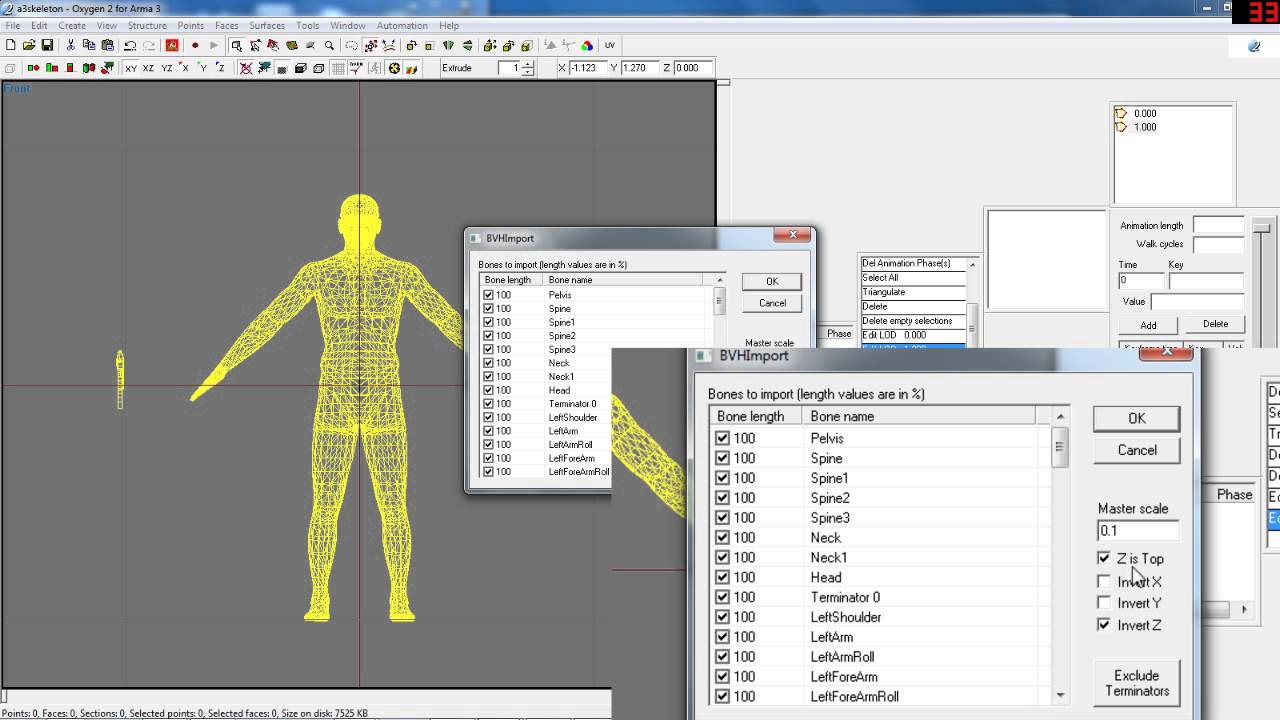
This is a simple tutorial to get animations from Blender 3D into Arma 3.
5 Steps :
- Make the animation you desire.
- Export the Character and Weapon bones with animation to two separate .bvh files.
- Import said .bvh files into Arma 3's Oxygen for placement correction and export the .rtm
- Write the appropriate configuration files in orde...
stuck oyster
you using mocap format???
grizzled halo
yeah, exporting the rtm straight from blender leads to the enormous deformation previously mentioned because of the transformations haha, whem importing from the mocap format i can set my scale and orientation correctly, I just cant really correct my position if i cant see the mesh
stuck oyster
nightmare stuff.
grizzled halo
you tell me
hahaha
so I should figure out the problem with the transformations and export the rtms from blender instead then?
stuck oyster
that would be my suggestion
grizzled halo
go it, whatever is ideal to stop wasting our time.
Ill fiddle with it a couple of days and see if I can get something going
 tranquil spire
can you have 2 muzzleflash proxies, 1 for main muzzle, 1 for UGL?
stuck oyster
kinda but got to do some magica with animations to hide/unhide the second one
tranquil spire
ah so probably having it placed in the model but not as a proxy?
stuck oyster
well if it works it works
tranquil spire
agreed 
for future reference, I ended up doing
class hide_muzzleflash_two {
    type = "hide";
    source = "trigger.1";
    selection = "muzzleflash_2";
    sourceAddress = clamp;  // (default)
    minValue = 0.0;         // rad 0.0
    maxValue = 1.0;         // rad 57.29578
    hideValue = 0.0;
    unHideValue = 0.7;
    animPeriod = 0.0;
    initPhase = 0.0;
};
 umbral shuttle
has anyone ever tried having a turret be a proxy? so for example having a tank chassis in 1 p3d, then tank + turret proxy in another and then idk some 3rd variation with a different turret proxy
stuck oyster
It can work but not really useful imo
Only benefit could maybe be if you use same turret in a lot of models, but even that is uncertain to be useful
umbral shuttle
what about the other way, the same body used
charred bolt
umbral shuttle
what about the other way, the same body used
The problem with proxies is that nothing INSIDE the proxy can be animated.
So in your first case, a turret as a proxy, the whole turret could turn, but the gun could not fire or the hatches open.
In your second case with the body as a proxy, the wheels and tracks could not animate etc.
It's therefore common to use proxies for shared objects, when they are static items.
umbral shuttle
charred bolt
The problem with proxies is that nothing INSIDE the proxy can be animated.
So in...
really? I have a weapon with a mag proxy and in model.cfg I define the animations to move the bullets along the MG belt when shooting.
is that cause its a mag proxy and so that has something special?
charred bolt
umbral shuttle
is that cause its a mag proxy and so that has something special?
Yes, magazine proxies are treated differently.
umbral shuttle
charred bolt
Yes, magazine proxies are treated differently.
 my hopes and dreams are gone
of not having to copy paste
stuck oyster
Main thing is to make the base thing work fully first
Then make the variants
An you can create selections for copied parts and unique parts you can more easily move around if necessary
umbral shuttle
Yeah I only recently discovered that theres an edit lod so I can use that
and another thing, is there an easy way to preview what the mag proxy will look like? same with scope hate having to restart game for minor adjustments
preview with bulldozer
 sudden sonnet
I am modeling some houses, but I can't get them into Arma3. I am having problems with the config file, where can I find a very basic one to take as an example?
pallid island
Arma 3 Samples in steam have a sample building with model and all necessary configs
sudden sonnet
I have been working with CGI for a long time, but totally nb in programming
thanks
stuck oyster
umbral shuttle
preview with bulldozer
use the actual magazine model as proxy then rename it
but also it can be previewed easily in blender
magazine objects origin point is where the proxy triangles 90d angle positions it
 jade harness
im trying to import a oil rig type thing i made which is rather large and complex is there anything i should be aware of in my attempt?
stuck oyster
jade harness
im trying to import a oil rig type thing i made which is rather large and comple...
youll have to split it into 50x50 meter chucks in order for collisions to work right
AI will need path lod to be able to walk on it
and path lod may need a contact to water or ground surface in order to work right
and large sructures should use multimaterials for better performance
jade harness
thanks for the help
umbral shuttle
stuck oyster
use the actual magazine model as proxy then rename it
Cool that worked, time saved lol
hollow fulcrum
☕
 hazy epoch
Made an ammo box, but the box is invisible in game. We had it visible at one point, but after updating the model it’s invisible in game. I can’t tell if I’m missing something in the config or if it’s the model itself
 fluid copper
Does it give an error when you place it? @hazy epoch
hazy epoch
fluid copper
Does it give an error when you place it? <@424648338000838668>
No error, unfortunately
fluid copper
You didnt change the model path in the config or anything?
hazy epoch
I double checked the file paths
fluid copper
Are the normals facing the right way?
Also what was it you changed between it working and it not?
woeful viper
🍸
making a teeny bit of progress http://abload.de/img/artyd3u6b.jpg
makes me want to animate the whole loading process... but without character animation during reload this would propably look kinda stupid
hollow fulcrum
thats stellar there buddy. really wish they would give us the current animation set. would make doing things like that sooooo much easier. 😦
grizzled halo
stuck oyster
if you use object parenting that can also affect scale through parent - child sc...
yeah, a lot of stuff to fix...
As you said, the scaling is all over the place, I've been fiddling with it left and right but I cant really get it to work just yet, applying transformations just basically destroy the model each freaking time. Considering that it has 50+ animations this is gonna be a whole ordeal.
Whats B.I stance of outsourcing the preparation of the models to be accepted in O.B but not worked in O.B itself?
stuck oyster
anything done without BI tools can be paid for
Unfortunately this kind of stuff is pretty common in bought assets. 😅
grizzled halo
yeah, I was willing to give it a shot but at this point having 2 weeks without any progress at all is disencouraging to say the least
I will just try for another week and if not, I guess i will post on creators recruiting
woeful viper
can you animate characters that sit in a vehicle via scripts?
cause that would be required in this case
hollow fulcrum
hrmm... that is a good question actually.
 elder fulcrum
vast tulip
something i did
elder fulcrum
vast tulip
something i did
epic multimat
working on some more structures for my pack, emulating 1940s france here - a simple farm house. just wanted some opinions on these stone edges for the doorway and edges of the house. some friends say they're too varied or too uniform but maybe some more experienced guys can tell me what they think?
 vast tulip
quite nice
stuck oyster
elder fulcrum
working on some more structures for my pack, emulating 1940s france here - a sim...
wehn in doubt I look into real life reference for tips
its a bit hard to say how it ends up looking without textures
but were the doorways done like that in reality?
I would think when possible builders would prefer even sized rocks for easier construction unless the unevenness is deliberate design choise
or that they have just used what materials are availalble
what is the rest of the house made of? rock/brick and mortar?
elder fulcrum
stuck oyster
but were the doorways done like that in reality?
yes, rest of the house is a mix of rock/brick

 woeful viper
also, how could i delay reload time between shots based on elevation? It needs to be cranked to neutral position, which is easy via script, but the reload process would start right after firing and would always be the same time.
removing ammo via script temporarily would result in AI complaining about ammo, which would be annoying
hollow fulcrum
yeah the first issue that comes to mind is the reload time, isn't it limited in some fashion?
stuck oyster
I think looking at these the sort of decorative stones would be cut evenly but the ones used in the wall could be more rough and uneven
Like if one goes through the trouble of cutting the corner rocks, might as well do them even. And I think typically even and symmetrical designs have been favoured
woeful viper
so i need to somehow prevent reload from starting before the gun is moved to neutral ... and then interrupt again for elevating up again... i dont see how that could work properly
last spindle
can you change the magazine which is loaded by script?
hollow fulcrum
yeah, the more i think about it, the more it looks like a grandmaster rigging of things scenario.. which really isn't my cup of tea.
last spindle
just have a magazine that as 0 ammo count, load that in when you don't want it to be fired
woeful viper
is a magazine with 0 ammo count even possible?
hollow fulcrum
AI will start bitching immediately..
woeful viper
i would assume it would be deleted right away
last spindle
i think it is, depends on the simulation i guess, in a vehicle when you empty your ammo, it still comes up saying 0, but with a player obv your empty magazines just disappear into oblivion
woeful viper
hollow fulcrum
:D thats quality there.
a mass of 'gun bunnies' (i can call them that as a prior FO)
woeful viper
my cannon has the same caliber
last spindle
This is a real cannon **WIP
https://www.youtube.com/watch?v=-9IP4QLPl2U
woeful viper
well... i guess i'll just scale the elevation animation to be faster/slower so i can use the same reload animation. Not ideal but before i break my head over this and use lot of hacks...
slate epoch
@last spindle Oh maaaaan!
hollow fulcrum
aye, that sounds reasonable. and that M198 is very cool. i have a triple 7 you can do that to if you want. hahaha
slate epoch
@hollow fulcrum I need to make some progress on D30 :D
hollow fulcrum
@slate epoch it's on the todo list next. waiting for the children to depart.
slate epoch
no stress!
last spindle
We plan for the M777 after we get the Indirect Fire working on the much simpler M198......very keen to see your 777
hollow fulcrum
@slate epoch have 3 kids.. near impossible to avoid. :D
woeful viper
very nice detail. i wish i had some kind of good reference to get more detail and faster. Not going to happen though, have to make up every detail on my own. The "original" doesnt have any way to reload it properly, and no traverse either...
slate epoch
hehe
hollow fulcrum
the M777 i have was done by Randy, but honestly it's a little out of proportion. but it wouldn't take much to fix it.
woeful viper
what do you mean by getting indirect fire working pinga?
hazy epoch
fluid copper
Are the normals facing the right way?
Correction: the model is showing up, but the texture isn’t. The model is just plain in game, but isn’t invisible. It had been a minute since I looked at it
fluid copper
Is it white? Or a pink checkerboard
last spindle
The whole mechanics behind setting up collimators, aiming posts, gun optics, deploying the howitzers from stowed positions, air lifting ammunition and properlling charges, getting propelling charges from containers, getting ammunition from pallets, installing fuses in shells, setting fuses with the inductive fuse setter
hazy epoch
fluid copper
Is it white? Or a pink checkerboard
It’s white
hollow fulcrum
:D better you than me.
fluid copper
How are you assigning textures?
hazy epoch
fluid copper
How are you assigning textures?
Through hidden selection textures in the config. If that’s what you mean
fluid copper
hazy epoch
Through hidden selection textures in the config. If that’s what you mean
And you're sure the path is correct? Also whats the resolution of the texture
hazy epoch
fluid copper
And you're sure the path is correct? Also whats the resolution of the texture
Double checked the texture file path. The resolution is 1024x1024
woeful viper
ok cool, sounds awesome. I think i'll keep it simpler though for the sake of my sanity
fluid copper
Try applying the texture to the model through object builder
woeful viper
do you have all the optics and equipment modelled on your HP yet? I could use some reference for making up my own optics/stuff.
last spindle
no, the optics are going to be seperate, so i left them off the Highpoly, they will be attached via proxy to the weapons, i have some low poly stuff, and lots of resources with some decent pics
 jagged tusk
That M198 stuff is kinda pushing it, but I love proper artillery stuff
last spindle
Should be able to find some suitable references for optics on some of these http://www.primeportal.net/the_battlefield_towed.htm
woeful viper
thanks
hollow fulcrum
@slate epoch alrighty.. lets see whats going on with this D-30
slate epoch
❤
stuck oyster
Model always needs default texture and material set up in the P3d. Hiddenselections in config are meant for creating variants
slate epoch
Ok guys, yet again I ask
I have model in p3d
I need to edit it in 3ds Max and I to do as little as possible polish between getting in in 3ds and back
What file format should I use?
I don't really want to loose selections
and smoothing groups
hollow fulcrum
.fbx?
although, i think it's kinda broken at the moment. or import was, don't recall.
ie.. you might lose one of those bits of info. maybe not though haven't looked at it in a while.
slate epoch
With FBX I always lost selections
woeful viper
OB doesnt export .fbx
slate epoch
does
hollow fulcrum
.fbx always.
woeful viper
you have to redo smoothingroups however
hollow fulcrum
and you dont have to redo smoothing :P
woeful viper
could somebody explain to me why for artillery (e.g. like in ACE2) you position this "aim mirror thingy". Then you rotate your gunsight for the calculated traverse angle. Then you move the gun so that the gunsight points at the aim mirror thingy. Why is this needed?
i mean, why does it need to be seperate, calculating angle and then setting a reference on the gunsight itself would also work wouldnt it?
hollow fulcrum
no clue personally. i was not a gun bunny. i can explain annoying/redundant communication things with the FDC and the like though. :P
woeful viper
and i can explain what the front of a ski is ^^
jade harness
how can i add a non-directional light source to a model?
slate epoch
@honest galleon can explain
woeful viper
i guess its propably for greater accuracy
hollow fulcrum
maybe has to do with the fact the gun moves when/after firing?
stuck oyster
jade harness
how can i add a non-directional light source to a model?
check sample house or lightpole for lighting config example
woeful viper
yes possibly... but when you think about selfpropelled artillery... i doubt they start spreading such toys all around the field before they fire
just to relocate again
hollow fulcrum
yeah i really have no clue, sounded good in me head though.
woeful viper
so this cant be the only reliable method of referenceing position and direction
jade harness
i checked the lamp and that one is just a directional light and i didn't find anything having to do with lights in the house sample
runic plover
use markerLights instead of Reflectors
stuck oyster
hmm maybe I remembered wrong that the house had markerlights then
jade harness
that works cheers lads
slate epoch
just summon @honest galleon he was head of arty :D
woeful viper
high explosive or armor piercing head ? :P
hazy epoch
fluid copper
Try applying the texture to the model through object builder
We got it applied in OB, but now we can’t get it into Arma
last spindle
The Collimator / Mirror Thingy is just your point of refernce that never moves, you can use two sticks, which is the concept of the aiming posts which are a more low tech soloution, you could use two trees if they are lined up properly
woeful viper
fffs.... my arty is completely ballsed up ingame. AI cant shoot with it, artillery computer only gives weird ranges (e.g. 2.1km-2.4km close, 5.3km-6Km medium, 13.6km - 15.4Km far) -.-"
hollow fulcrum
😶
i believe SOP on things like this, is to blame the gun bunnies.
wish i knew that stuff well, fairly useless i am with these things.
woeful viper
i copied gun and ammo from the 155mm so it can only be the cfgvehicle
and i still havent fixed the stupid AI issue with my AA tank where the ai shoots above the target...
 honest galleon
eh?
so for artillery accuracy is important because you are often shooting at things 10-30km away
so even being off by a few milliradians can translate to being off by dozens of meters
what an aiming reference is used for is to be just what the name implies
when your battery arrives to a firing site its already been surveyed, and a very accurate north bearing has been found
using the aiming circle you then lay each gun on their initial direction of fire using the surveyed north as a reference.
When each gun is laid they then emplace an aiming reference
these aiming references are the aiming stakes, the infinity reference collimator, or a distant aiming point (DAP)
with the aiming stakes you turn the sight of the gun (not the gun itself) till you have a clear area, and then you walk out and you place two stakes, 25-50 meters apart from each other, so the left edge of the stake lines up with the vertical line of the sight optic's symbology
the reason you place them 25-50 meters apart is two fold, one the guns sight unit is not placed directly on the axis that the gun rotates, and as such when the gun is traversed the sight unit will move relative to the aiming stakes in a side to side manner
second, the gun will displace when being fired until it is sufficiently dug in (and even then it can still move)
both of these situations create a situation where the aiming stakes are no longer able to be properly lined up, if you just had one stake you'd now be aiming slightly off angle to either side
what fixes this is the use of two stakes, which allows you to compensate via the parallax effect, in that if you place the left edge of the furthest stake half way between the left edge of the nearest stake and the vertical line of the sight units optic you have adjusted for this horizontal movement
this is called a compensated sight picture
with the collimator this process is even easier
the collimator simulates a point infinitely far away
the graphic inside the optic on the collimator will always appear to match the scale of the mil markings in the guns sight unit
this means that as the gun shifts left to right you can easily compensate by just lining up the numbers you see in the collimator with the numbers on the sight units optic symbology
if you do that the gun will have accounted for the displacement
this all makes explaining the last method even easier, the distant aiming point, or DAP, is just as the name implies, it is something far enough away that the parallax effect doesn't even occur. The usual distance for this is 1500 meters or more. The most common objects chosen for a DAP are well constructed objects such as large buildings, smoke stacks, prominant terrain features, etc.
I hope that explains. :P
woeful viper
yeah... should be more obvious when my brain is less clouded and rested too^^
and what about selfpropelled arty?
honest galleon
depends on the system
modern SPGs have intertial navigation and GPS
even modern towed pieces have it as well, such as the M777
they can "self-lay"
in that they know where they are and what direction they are facing
this means that laying can be done all automatically
woeful viper
ok, was gonna say... with all the hightech this stick referencing seemed a bit outdated
honest galleon
or at least easily (the 777 you just match the numbers for the fire mission to the numbers on the little screen)
well
electronics fail
in the US even with the M777 you still lay out your stakes and collimator
and you choose a DAP if you can
even the Paladin carries stakes and the collimator still
and if they are emplaced long enough will deploy them
woeful viper
ok another question - in ace 2 as observer you correct aim by guessing +xyz meter more right and +xyz m range based on the impact. with all the modern equipment, why do they not use rangefinder and "compass" to mark the impact location and transmit this information. Based on this the fire controll could find the aiming error way quicker
honest galleon
because again technology breaks, technology is expensive, it doesn't always work, radios suck
etc
past canopy
oh my god pinga removing the feet hahaha
honest galleon
they US army has been trying to get a systamatic data system fielded for like 15 years now
and its a total boondoggle
they cancelled the latest attempt like 2 years ago
past canopy
Honestly they make a mess out of most every endevor like that
IE the camoflauge selections
honest galleon
yah
so in the end, voice works wonders
and they do have range finders that can do that
the Vector 21 has a artillery adjustment mode
you point at the splash, then you point at your target
and it gives you the add/drop, left/right, up/down
it also gives you the OT dir
woeful viper
no i didnt mean via some data link whatever. I mean that the observer checks the range of impact to his position and the angle on the compass. And then radio's this. Instead of guessing how much to add
honest galleon
yea, but not everyone has a vector 21
and they need batteries
and they break
etc
past canopy
there is one FCS that mates the arty some uav and the uav tech hut
honest galleon
your eyes dont break really as easily, and normal binoculars with mil markings being used by an experienced observer is going to be just as fast
past canopy
it can automatically calc everything but you still need people to set up the arty
you wanna see some amazing shit? go look up the old school FCSs that are computers but entirely mechanical.... its amazing
woeful viper
yes i know, really like ww2 tech stuff because it's actually quite advanced if you look closer. IFF& radar / electronic warfare, reflex sight with auto correct, ...
past canopy
I just find all the mechanical shit insanely cool because of how much it can do
Like imagine the guys who designed all that and how clever they had to be
astounding
woeful viper
the german bombing sights where pretty cool
past canopy
^
woeful viper
i want a bombing-sight for my fighter-bomber. I have a RTT monitor and the plan is to check flight data and ground stuff, then animate the memorypoints for the RTT camera so that the bomb would fall right there.
not sure if it will work, havent tested it yet
hollow fulcrum
i still think it will work.
woeful viper
"just" need to learn scripting ^^
woeful viper
xD
hollow fulcrum
i have them, assuming you mean LP assets. slated for next month. actually working on a couple russian counter parts.
woeful viper
i remember some incident...
woeful viper
anyway, im off. later guys
hollow fulcrum
nah, they are secret. later KJ, oh and i found the boat! http://wio.ru/fleet/gal/nkl5.jpg
woeful viper
top sekrit nuclear powered jetboat :)
past canopy
no guard for the prop?
hollow fulcrum
https://gyazo.com/6bf8559fa487492ec20ce3d3de3df7b4 kinda old ;)
lol @past canopy my first thought..
past canopy
some Indiana Jones shit about to happen there
also Hatchet, while that photo is less revealing.... I find I can still get off to it
thanks
hollow fulcrum
lol np buddy, anytime :D
hollow fulcrum
better cover that with BIS tactics ... soon™
and no, i was actually waiting on files from someone..
past canopy
wow Emery
hollow fulcrum
yeah, think he was busy for a few days or something. need to move that conversation over here.
hollow fulcrum
trick Emery into it? guessing he started the skype channel.
hollow fulcrum
👍 :D
 shell hedge
Has there ever been a changed made to proxies so that they can animate as part of the main model? If I remember correct it's still not possible?
stuck oyster
shell hedge
Has there ever been a changed made to proxies so that they can animate as part o...
correct, not possible
the proxy moves fully only
shell hedge
Sucks! I'm trying to explore making an armed ghosthawk with pylons
I had a peek in the model and there is memory points for missiles / rockets, I wish the model still had the missile proxies as I'd be able to do what I want with ease
hollow fulcrum
catch you guys on Monday, range day tomorrow! 🔫
stuck oyster
shell hedge
I had a peek in the model and there is memory points for missiles / rockets, I w...
you will just have to be patient and wait until A3 public datapacks get released
shell hedge
Has that been confirmed? Didn't think it would actually happen, great news if so!
stuck oyster
shell hedge
Has that been confirmed? Didn't think it would actually happen, great news if so...
its been mentioned to be close. no dates set though
hollow fulcrum
quick question, and im sorry because i can not recall atm, but who is working on the CB-90?
umbral shuttle
is it possible to select a texture in all LOD's for ease of selection, or do I just have to bit the bullet and go through and select for each lod
 charred bolt
umbral shuttle
is it possible to select a texture in all LOD's for ease of selection, or do I j...
charred bolt
umbral shuttle
is it possible to select a texture in all LOD's for ease of selection, or do I j...
Each LOD.
stuck oyster
Might be easier to do on where the model is made in instead of OB
umbral shuttle
True, I'll let someone else deal with it 🙂
stuck oyster
selections and such are best done on source level so if source needs update for some reason the selections are still there and dont need to be done again in p3d
white jay
Evening all, quick query, this seemed the best channel for it, I've a friend thats after a mod that adds a pair of Aviators to the NVG tab (No NVG capabilities) just so he can have a different colour bandana with it. Anyone have a good guide on how I can accomplish this?
stuck oyster
white jay
Evening all, quick query, this seemed the best channel for it, I've a friend tha...
there isnt really any that specific guides
 exotic holly
white jay
Evening all, quick query, this seemed the best channel for it, I've a friend tha...
exotic holly
white jay
Evening all, quick query, this seemed the best channel for it, I've a friend tha...
Better of asking in #arma3_config
marsh canyon
Do we have a study that how an hiddenSelectionTextures/sections make the performance worse? I really don't know how it affects/how much it drops the FPS
One example is GM CDLC, it uses many hiddenSelections. Is it causing a FPS drop by any way? Of course more draw calls is bad, but how bad it is?
stuck oyster
I can't remember seeing any empirical study on that unfortunately ir would be interesting topics.
marsh canyon
Not even sure how we can make a test, do we have a good command/extension/external software we can use to check draw calls? Or, maybe simply put multiple objects and check FPS? IDK, may do after I'm back at the office
runic plover
marsh canyon
Do we have a study that how an hiddenSelectionTextures/sections make the perform...
I dont think it makes any FPS drops. I think it just loads always the whole 3D model, doesnt care if you hide something etc. But FPS drops can happen if you replace a texture and its material shader which is better / or has a better quality / or is bigger in KB/MB than the default one. Just in a logical order, but the drop should happen just once per started mission game until its registred in the memory space
slate epoch
Range day? Where I can sign up? :D
past canopy
@hollow fulcrum I am working on one, and the SAM studios guys are also working on one. Two different versions.
 civic forge
When i crack up the fog level, some buildings models stand out https://imgur.com/BQHaKQ6 any ideas as to whats causing this?


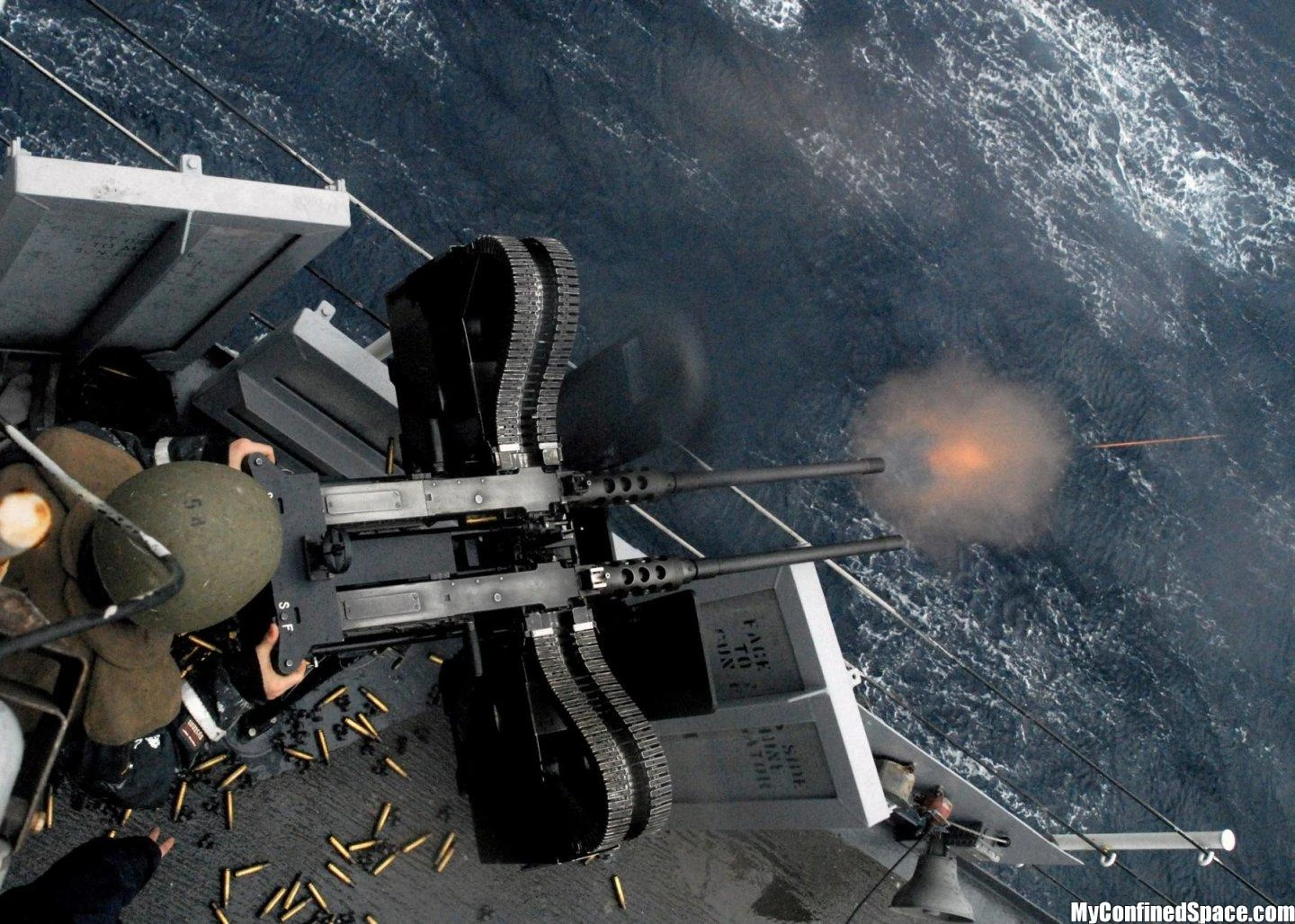


 stuck oyster
they got darker colors I suppose
south badge
Guys, does anyone know why does my Object become shiny once I get into the game? Everything looks fine in SP, but once I get it in game it doesnt look anything like it. Is this an rvmat issue?

 stuck oyster
south badge
Guys, does anyone know why does my Object become shiny once I get into the game?...
stuck oyster
south badge
Guys, does anyone know why does my Object become shiny once I get into the game?...
Arma uses different shading techniques than SP so the SP metalness rough textures won't work with Arma shaders
south badge
Ah, damn. I watched a tutorial from a long time ago, and it was using metal-rough when doing the texturing, while only enabling spec/glos/opacity channels before the texture export
so I guess that was not the right way of doing it lol
stuck oyster
It is somewhat more complex than that yes
 wispy orchid
hi, any alive user interesting in testing an experimental build of the Nimitz to see if still is despawned?
lean furnace
Is Zbrush Arma Friendly?
 thin swan
lean furnace
Is Zbrush Arma Friendly?
thin swan
lean furnace
Is Zbrush Arma Friendly?
erm it might cause external brain damage but apart from that you should be ok
lean furnace
thin swan
erm it might cause external brain damage but apart from that you should be ok
So for the most part people just use blender?
kind nacelle
lean furnace
Is Zbrush Arma Friendly?
wdym
arma is pretty agnostic towards software used
and as with any sculpts, wether you do them in b3d or zbruh, you will need to do retopology and bakes anyways
hot hornet
You can use zbrush for your highpoly, yes. A good retopo will be needed.
stuck oyster
lean furnace
So for the most part people just use blender?
zbrush can be used as part of the workflow for sure but I dont think it can produce everything required
lean furnace
stuck oyster
zbrush can be used as part of the workflow for sure but I dont think it can prod...
Oh, ok.
civic forge
Hey, I've got a ladder working in the eden editor but it doesn't work when i add it into my terrain? The class of the building is beginning with Land_
stuck oyster
maybe wrong simulation type in geometry lod named properties
needs class = house
and the classname needs to match the p3dname
so houseWithLadder.p3d -> class land_houseWithLadder
 wooden topaz
Greetings, I'm new here. And new to modding and modeling.
I have created a custom UAV model in Blender and OB but I am having trouble setting the correct pilot and gunner positions. I'd like the model to have the same cameras as the AR2 Darter, but can't quite figure out how to place them. I have tried placing Proxies on the View-Gunner and View-Pilot LOD's and giving them paths but it doesn't work either, instead it gives me a fixed camera view on the UAV.
In the UAV terminal the PIP-cameras work as intended, and I'd like to have the driver and gunner cameras be the same.
Any ideas what to try next?
(I hope this makes sense 😄 )
 worldly knoll
I'm currently trying to make my very first mod, and since I somewhat hate the controls in Object builder, I'm trying to make my memory LODs ahead of time in Blender, and for that purpose I'm trying to export my model in .p3d with arma toolbox so it might remember them, but whenever I try to load it into Object builder to check up on it, it gives me a generic "Error, load failed". I've read about the binarized and unbinarized p3d issues but afaik arma toolbox is supposed to export an unbinarized version, but at this point I'm kinda lost. I can still open the model fine with Object builder if I export it as an OBJ file instead first but it doesn't keep the memory LODs
stuck oyster
worldly knoll
I'm currently trying to make my very first mod, and since I somewhat *hate* the ...
have you set the different lod objects with Arma properties
unless that is set the p3d exported is empty
worldly knoll
Ohhh... nope I was not, thank you very much
 inland pawn
worldly knoll
I'm currently trying to make my very first mod, and since I somewhat *hate* the ...
inland pawn
worldly knoll
I'm currently trying to make my very first mod, and since I somewhat *hate* the ...
You need memory points
 night heath
Anyone willing to make custom models for my map?
wraith tendon
huehuehue
night heath
?
wraith tendon
I think the chance to find someone decent, who isn't involved in a group nor own projects is pretty rare.
night heath
Worth a try though
Yeah I know :/
I would do it myself but I've never even attempted modeling
white jay
what do you think about my mask model
 stuck oyster
white jay
what do you think about my mask model
stuck oyster
white jay
what do you think about my mask model
🤏Weird
charred bolt
What causes Object Builder to reset z-bias from Low or Medium to High, when you click the Apply button?
I'm sure I've been able to select all 3 options in the past.
 woeful viper
if you apply "high" to one selektion, maybe it switches the others that are high to medium?
charred bolt
woeful viper
if you apply "high" to one selektion, maybe it switches the others that are high...
Good idea, but that doesn't appear to be the case.
 still trail
@wispy orchid yes
 past mesa
@night heath what kind of models are you looking for?
 cursive quarry
@wispy orchid yes
still trail
@wispy orchid https://youtu.be/i_JcWiTLxak
ALiVE Website: http://alivemod.com/ ALiVE Wiki: http://alivemod.com/wiki/index.php?title=Main_Page ALiVE BIF Thread: http://forums.bistudio.com/showthread.ph...
 hidden bronze
@still trail Real footage of the recent Russian strikes in Syria obviously.
still trail
We are experimenting with naval support in ALiVE
woeful viper
is it possible to define a default crew for a vehicle that consists of different persons? e.g. multiple crew and one seperate tank commander unit. I tried
typicalCargo[] = {"crew", "crew", "cmdr", "crew", "crew"}; but that does nothing
still trail
ah yeah good point crew = driver basically
if you have turrets, then you can set hasGunner for each turret I believe
hasDriver=true;
hasGunner=true;
hasCommander=true;
driverIsCommander=false;
woeful viper
that was not the question. I want to fill it with different units as crew.
still trail
assuming you want to set classname for each driver etc
woeful viper
you cant do hasDriver ="crewxyzclass";
still trail
yep
i've set crew = "myclassname" and then typicalCargo = ["myclassname","myclassname"] and that spawns the vehicle with driver and gunner with the custom class
woeful viper
yes, but i want "myclass1" and "myclass2". and it doesnt work with typical Cargo...
wispy orchid
@still trail , tan
thanks
this is the experimental build: http://tetet.de/arma/arma3/nimitz/experimental/@Nimitz.7z
 pseudo elbow
I'm 0 at modelling, I wonder how difficult it would be to make these rocks properly walkable?
 hot hornet
pseudo elbow
I'm 0 at modelling, I wonder how difficult it would be to make these rocks prope...
hot hornet
pseudo elbow
I'm 0 at modelling, I wonder how difficult it would be to make these rocks prope...
The shape of this rock is simple, so it would not be very complicated to make a good roadway. With the right method, it's done in a few minutes.
runic plover
pseudo elbow
I'm 0 at modelling, I wonder how difficult it would be to make these rocks prope...
do a good convex Geometry in the Geometry LOD and take the upper part of this Geometry and add it to the Roadway LOD and lift it maybe like 1-2cm
pseudo elbow
Thanks, I was more wondering if its worth it requesting a fix for this, these rocks been an issue for 10 years already, maybe they should be finally fixed until its not too late
woeful viper
vbs...
 dim mica
"Optics field of view at default zoom in radians" how excatly this is calculated when you want 4x zoom
woeful viper
only thing i could try is delete crew="xyz"
no doesnt work. leave crew out and it spawns empty. put it in and all crew will be the same
sigh... http://feedback.arma3.com/view.php?id=26343 maybe in this century
wraith tendon
+1
charred bolt
dim mica
"Optics field of view at default zoom in radians" how excatly this is calculated...
FOV = 0.25 / Zoom
So for a Zoom of x4, FOV = 0.0625
dim mica
Thx @charred bolt
wispy orchid
@still trail nice video, how to differentiate the cruise missiles from the regular air to air missiles? Maybe we get an updated sea sparrow for the Nimitz and it would be nice to radar intercept the cruise missiles
stuck oyster
pseudo elbow
Thanks, I was more wondering if its worth it requesting a fix for this, these ro...
We redid all rocks we used in sogpf when they were retextured. There are few issues in there that could use fixing. 😅 When Arma3 public data release we can put up a workshop to overhaul them
pseudo elbow
stuck oyster
We redid all rocks we used in sogpf when they were retextured. There are few iss...
Wish these rocks would be fixed in the vanilla game, no idea why nobody pushed hard enough to have them fixed after all this time.
woeful viper
i made a ticket for that... circa 2013 😄
pseudo elbow
woeful viper
i made a ticket for that... circa 2013 😄
Lets bump it up, I'm all for this to finally get fixed
If there is anybody left at BI who's willing to touch that
But if you ask me, amount of gameplay improvement impact to effort ratio is huge here
Not THAT much work, but THAT much game improvement
woeful viper
nvm it was a ticket that complained about collision geometry that was far above the visual geometry... not about those particular rocks
what if it costs performance? 😅
pseudo elbow
woeful viper
what if it costs performance? 😅
Some other rocks work relatively fine, I don't think having them all working will have that much impact 🤔
stuck oyster
it has
 plucky depot
Collision checks near rocks can kill perf if their geo is too complex.
IIRC dedmen fixed it quite a bit but it's still and will be costly.
stuck oyster
theres few that are hollow inside which is why tou can glitch into them and stuff like that
umbral shuttle
if I have a selection in res lod called engineLeft, and I have a hitpoints selection with the same name, if I hide it in config with hiddenselections will the hitpoints also be hidden?
stuck oyster
umbral shuttle
if I have a selection in res lod called `engineLeft`, and I have a hitpoints sel...
hiddenselections only swap texture its not hiding the mesh
it makes it trasnparent
which is not good for performance
umbral shuttle
ah dang, so no way to hide hitpoints (or I guess fire geo) with config?
stuck oyster
umbral shuttle
ah dang, so no way to hide hitpoints (or I guess fire geo) with config?
hide animation in model.cfg
umbral shuttle
ah that will hide fire geo, ill see if I can use that
civic forge
Hey, is there a way to rotate a part e.g a door on its own axis in object builder, the rotate options in transform don't seem to be working as i expected
charred bolt
civic forge
Hey, is there a way to rotate a part e.g a door on its own axis in object builde...
Model.cfg
{
    source = "door1_open";
    type = "rotation";
    selection = "door1";
    axis = "door1_axis";
    minValue = 0;
    maxValue = 1;
    angle0 = "rad 0";
    angle1 = "rad 90";
};```
where door1_axis are two memory points about which the door rotates
and door1_open is the animation source from config.cppfunny how I have the same issue, except that I can´t see and use the action actually attached to the object. The interaction point should be a single vert in the memory lod, right?
south badge
perhaps if I didnt fuck up one pair of brackets in the config I wouldn´t have wasted 2 hours looking for the issue in all the other places
charred bolt
Try using mikero's tools, as they would have found that bracket issue for you immediately on trying to build.
south badge
yep, sounds like a plan
civic stratus
If my landcontact points are below my wheels, but my wheels still sink into the ground, is that because of the weights in my geometry lod?
wispy orchid
@civic stratus : not sure if it helps, but have you tried defining the wheels in the driveOnComponent array in the config?
 dark shore
Hi guys I make some models for one mode but when we try to pack this mod with hemtt builder it dont pop-up error but it lag on this model in Command line
If you want i Can send you model
runic plover
Pack it with pboProject / Mikero Tools and it will find your issue