#arma3_model
1 messages · Page 4 of 1
 stuck oyster
so I've learned by trying things out
you might be able to get away with 100 meter long ship. I believe the one you see in the video is about 100 meters from front to back
though the interior area is smaller
 elder fulcrum
I have these sign models I made in blender, checked the UV with a colorgrid to make sure it was facing the right way, and the posters that I put on the model still appear mirrored. Anyone know if this is a known issue?

I also double checked in UV editor to see if there was an extra UV set. The only fix I have found is manually mirroring the UV using horizontal mirror, but that isn't very practical for me. Just wondering if there is a way I can avoid this in the future, if blender seems to show me that the UV orientation is correct.
 hallow steeple
Can I make it so object builder shows textures on the model?
Also, does OB show the faces as inverted from in game?
stuck oyster
hallow steeple
Can I make it so object builder shows textures on the model?
Also, does OB show ...
if you assign tga or png to the model it will show in the viewport if you toggle the texture mode on (view mode buttons are the boxes left of the yellow blue DX button)
and you can also use the buldozer viewer that opens the model in engine instance
and no OB shows the faces as they are in game. if you have inverted faces then you have modeled them wrong way
hallow steeple
how do I invert faces? Flipping normals doesn't seem to do it in blender when I import into OB
Does "Faces -> Reverse" flip normals for ingame or just editor?
also why is the front the bottom o.o
what have i done oh no
oh, nvm, I did look at face instead of projected xD
Ah yes, I think I it might be a good idea to use a shader material in blender, since I'm more confident in there 😅
 stuck oyster
oh that means the uwmapping is wrong way
hallow steeple
hallow steeple
Does "Faces -> Reverse" flip normals for ingame or just editor?
What about this, now
stuck oyster
that flips it for both in editor and in game
hallow steeple
ok, so if it's inverted and I can see the opposite side, select all and reverse should fix?
stuck oyster
Arma draws only the front side of face
stuck oyster
hallow steeple
ok, so if it's inverted and I can see the opposite side, select all and reverse ...
yes
hallow steeple
assuming all are flipped
stuck oyster
yes
but preferably you make sure the faces are in right direction when you model it
is easier to manage face direction in more modern programs
hallow steeple
Blender, normals are flipped when imported to OB or?
I remember you said something about Z flipping
stuck oyster
if you do things right everything should be just same in blender and ob and in game
hallow steeple
wait-
is there a way to video opposite sides
it seems that might be what's happening now. I can see the opposite side, but it's darker.
stuck oyster
Im not quite sure what you mean
you can turn on face direction colors in Blender view to see how you have them originally
hallow steeple
I have that. They're correct
stuck oyster
also if you have scaled the object negatively the export will flip that
hallow steeple
but that red line at the top is supposed to be facing upward.
 stuck oyster
this seems to be inverted
 stuck oyster
it probably is not 1 ,1 ,1 scale

 stuck oyster
if you want to make it easy, use the arma toolbox addon (pinned messages) and export directly to p3d
hallow steeple
I tried that and it failed to load the object. Although maybe that's b/c I was using oxygen xD
Still needa fix the defualt program to open, but I'd need to add OB as a program that can open it
stuck oyster
you probably did not tick the arma Proeprty box to define the object for exporting
if no exportable object are present it creates empty broken p3d
hallow steeple
hallow steeple
Still needa fix the defualt program to open, but I'd need to add OB as a program...
There, that's fixed :P
stuck oyster
it is far better to get that working since you can define the P3d texture and material paths in blender directly
hallow steeple
will the addon for blender also triangulate?
Also, do I need to define a material?
As in, when I import into the game, if I haven't, will it just use a default material or?
 pallid island
well, to load the car model from Arma 3 samples that i've barely edited in Blender into the diag build of the game i needed to binarize the p3d first 🤔
hallow steeple
stuck oyster
you probably did not tick the arma Proeprty box to define the object for exporti...
where's this
oh nvm
How do I apply textures to be exported from blender?
oop
stuck oyster
you assign a material for surface in blender and in the material tab you should have arma texture and arma material dialogs
as long as that object is also set with "arma properties"
hallow steeple
hmm- i feel like this is a bit of a waste xD
 stuck oyster
a little bit
stuck oyster
well it can be like that but preferably you would have the resto fo the object in the rest of the texture surface
or you can use rectangle texture to have less empty space
like 128x512
hallow steeple
oh yea
It's not limited to XxX it can be XxY as long as it's po2
Can it be like- 32x512 or is it limited in how far the numbers are from each other?
stuck oyster
I dont remember if there was some limit on how small texture the engine eats
but might not be
try the 32x512
hallow steeple
Alright. And finally: How do I do hiddenSelectionTextures? :P
it's gonna be a sign. want the pole to be "static" and the side plate can be set with setObjectTexture
oh also thank you btw
pallid island
you probably create a vertex group and then use its name in CfgVehicles config 🤷♂️
pallid island
open Vertex Groups tab, press + to create one, double click on it to rename, then enter Edit mode, select the target verts and in the Vertex Group tab press Assign 🤷♂️
"named selections" is a pretty accurate name in that regard. It's just a saved selection of verts that's given a name
hallow steeple
Little more aimed at blender then arma specifically, but any way to save the image of the UV map?
pallid island
UV > Export UV layout in the UV Editor should work, i guess?
hallow steeple
something, it's like I've never used a computer before, sorry xD
pallid island
search in Blender is pretty useful. It's F3 by default, iirc. Or Space if you've selected that.
 shell bluff
when I want to have 3 models in one pbo file, I have to make 3 model.cfg,
?
stuck oyster
if the p3d are in separate folders, yes each folder needs model.cfg (and is clean practice)
if they are in same folder they will use same model.cfg
however model.cfg can contain multiple cfgSkeleton and cfgModel entries
pallid island
biki claims you can split files by naming .cfg files after the model, though 🤔
stuck oyster
sure
shell bluff
stuck oyster
if they are in same folder they will use same model.cfg
what if they are in one?
stuck oyster
the next line i wrote
stuck oyster
sure if you want to make separate cfg files for them
shell bluff
stuck oyster
sure if you want to make separate cfg files for them
aaah ok now i understand thank you
elder fulcrum
Has anyone got experience baking an AO map in blender for interiors? I've got this building and I cannot, for the life of me get there to be some type of lighting falloff within the interior for a simple AO bake. (2.80)
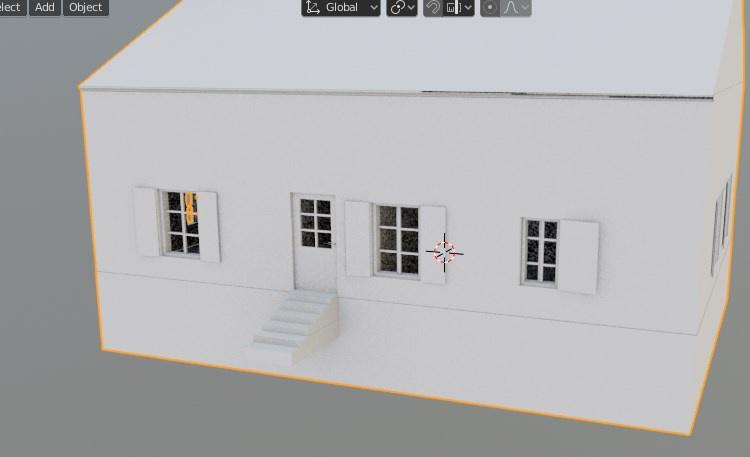
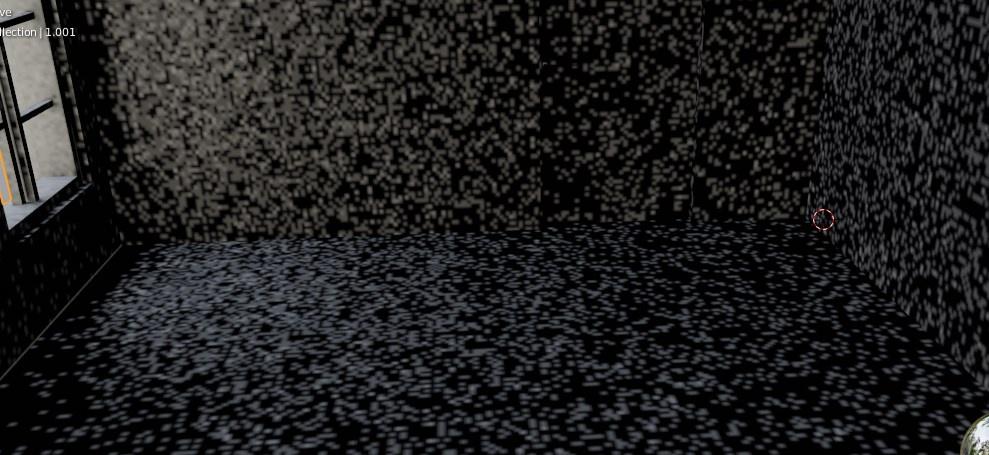 stuck oyster
you may want to put some lights in there
and check blender tutorials for how to adjust the AO bake grainyness
elder fulcrum
Adding lights to the scene wasn't helpful in actually baking it. The grainyness is due to the fact i'm just trying to actually get the AO to bake to my liking without having to wait five minutes each time
 woeful viper
decrease AO distance value
hallow steeple
how do I do collisions-
stuck oyster
hallow steeple
how do I do collisions-
With what kind of thing?
hallow steeple
O2
Is it just make an LOD that is "Geometry Phys" (Or geometery) and put a model into it? Assuming the model ain't too complicated, that is
* Cannot generate ST coordinates what does this mean o.o
hallow steeple
ok, no uv map. I didn't think I'd need a UV map for this but ok :I
how do people do this for a living
hallow steeple
oh? Did I get it?
 unkempt token
The geometry model has to be made out of simple shapes like convex cubes that conform to the parts of a model that should have any kind of collision, whose vertices then need mass applied in o2
 unkempt token
Yeah so if you wanted the sign to be a collision thing you'd just have a cube that matches the dimensions of that sign (but a little thicker if you were looking at it top-down, if that makes sense?) and then assign in a .rvmat from a3\data_f\penetration\whatevermaterial.rvmat to match it
Oh and if you're not working in the P:\ drive already, you should cause I only recently learned that materials from a3 wont work without your project being compiled from within P:\ lol
hallow steeple
i haven't even touched materials yet o.o
unkempt token
It's relatively easy once you're ready. You just select all of the collision model with Ctrl + A, hit E for face properties, and give the path of that rvmat in the Materials field at the bottom of the popup window that says material. I.e. you would put this in there for metal: a3\data_f\penetration\metal.rvmat
hallow steeple
so if there isn't a material, players will be able to walk through it, but bullets and stuff cant?
unkempt token
Not really, the material is just there to make penetration effects from bullets and impacts more accurate
As long as your geometry has enough Mass it should have collision
hallow steeple
oh- so why can the player go through but not other stuff xD
it might be mass then-
what should mass be 😅
unkempt token
I found that in the Virtual Reality map, physics are less predictable. I think when A3's FPS gets too high (200-300 FPS range like in VR map) collisions are more of a suggestion than accurate lol
hallow steeple
wait
unkempt token
You can try it in Altis. And the mass is usually found at the top, when selecting all your stuff in geometry it should light up and let you type in.
hallow steeple
ah yes. the only time I'd use the VR map
unkempt token
Yeah lol I found out I can just walk through vanilla doors and windows on the VR map
just walk up to it with your weapon up, keep holding W, then crouch and uncrouch and you can sometimes pop right through
hallow steeple
VR also makes lighting be weird
still no, walk right through it, but it stops my bullets
unkempt token
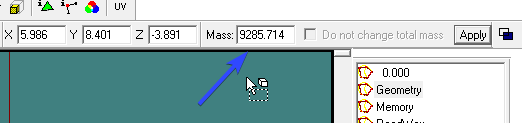 hallow steeple
What does mass do exactly xD
unkempt token
Adds "weight", but its mandatory for even static objects like a sign
Without mass, you can just walk through things and collisions don't work
unkempt token
For a sign? You could just put 100 or something
It's in Kg but I dont think its very important as long as it's not too low. For a static object.
Also, in your Geometry LOD, did you already run Find Components? https://i.imgur.com/tibN3FZ.png
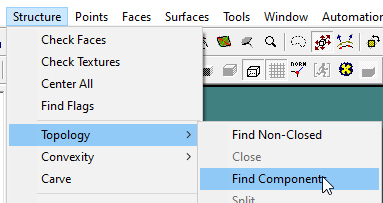 hallow steeple
unkempt token
Also, in your Geometry LOD, did you already run Find Components? https://i.imgur...
hallow steeple
unkempt token
Also, in your Geometry LOD, did you already run Find Components? https://i.imgur...
uh-
no- I did to convexity thing
unkempt token
This will also result in collisions not working, as every individual shape in your Geometry layer needs a ComponentXX number
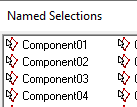
Run the Find Components button in O2 and you should have 1 or 2 components appear in the named selections list.
unkempt token
Named Component01 and Component02? And if you click them, it highlights the shapes?
hallow steeple
yea
hallow steeple
unkempt token
It's relatively easy once you're ready. You just select all of the collision mod...
where is metal located for required addons
unkempt token
The metal.rvmat is base game, I think you can skip anything required
hallow steeple
is it Geometry or Geometry Phys?
unkempt token
Geometry
Geometry Phys is for physx calculations. If you only haave a Geometry LOD and no other kinds of Geometry LODs like fire, view, physx, then the game will automatically use the contents of the plain Geometry LOD itself
hallow steeple
And I JUST need to have the material for the geometry faces?
unkempt token
Yup
hallow steeple
Thnak you :)
unkempt token
Happy to help. Let me know if it works
hallow steeple
wait, do I needa do anythin to configs or anything or just the p3d
well, there's one way to find out x3
pallid island
iirc bullet penetration properties are linked to the material through couple layers of convolution 
unkempt token
Configs should be fine if you already got it in game
hallow steeple
horray :P
Also, I tried to be cheaty by using tga. seems ya cant use TGA in addons x3
pallid island
hallow steeple
Horray!!! I cant get through!!! :D
pallid island
collision collides? Hooray!
i remember it taking half a dozen attempts when modelling a doghouse for giggles
unkempt token
Yeah it took me a month lol
hallow steeple
best part is I also made it have hidden selection textures x3
unkempt token
Nice
unkempt token
Depends on what you need to do
hallow steeple
Hmm-
 pallid island
what? Chromatic aberrations?
hallow steeple
the corner
unkempt token
Might need to use an Edge Split modifier on your visible mesh in Blender before you export it
hallow steeple
a wha
unkempt token
Edge split, good for making things that are supposed to have smooth edges work/look better https://i.imgur.com/6yDDRQT.png
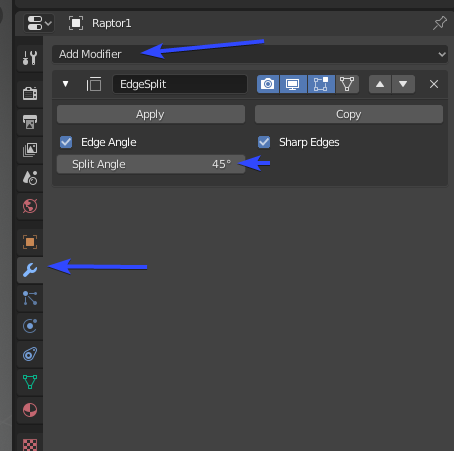
If you use Blender
stuck oyster
you need to mark sharp corners in blende on the model
pallid island

stuck oyster
HorribleTip of the Day:
GEOMETRY LODS
there are 4 types of geometry lods
geometry lod
- handles non physX collision (mainly character as vehicles are phys),
- acts as base/root of the whole model/object,
- contains also most of named properties that give the model specific attributes (different from named selection),
- for collision to work the lod needs:
- to be built from CONVEX and CLOSED shapes,
- each shape that is wanted to have collision needs to be named ComponentXXX (both OB and blender toolbox have automated tools for this)
- vertices of each shape need to have mass
-every other geometry lod defaults to this lod if they are not separately defined
firegeometry lod
-handles bullet/etc hits
-has same build requirements except mass(closed, convex, component,)
-each component can additionally have penetration material that defines the parts hit properties (armor, sand, glass, flesh etc) (P:\A3\Data_f\Penetration)
-is usually the most model accurate lod since it handles visual hits from bullets and the type of effects that might pop out of surface
viewgeometry lod
-defines AI view blocking of the object
-has same build requirements except mass(closed, convex, component,)
-can be signifcantly simpler than normal geometry in most cases
physXgeometry lod
-handles physX based collision (mostly vehicles)
-has same build requirements except mass(closed, convex, component,)
-can be signifcantly simpler than normal geometry in most cases
There are good examples of each of these in the Arma 3 samples on Steam
Some special use cases have not been listed.
stuck oyster
stuck oyster
HorribleTip of the Day:
# GEOMETRY LODS
there are 4 types of geometry lods
geo...
lets just pin that actually
and if I forgot something essential let me know
 charred bolt
stuck oyster
and if I forgot something essential let me know
charred bolt
stuck oyster
and if I forgot something essential let me know
Nice write up.
Geometry components must be closed, as well as convex and named.
Verticles isn't a word in English; it's written "vertex" (singular) or "vertices" (plural).
 inland pawn
Silly goat
 cloud zealot
Can i add animations to a weapon ?
inland pawn
cloud zealot
Can i add animations to a weapon ?
Yes
stuck oyster
cloud zealot
Can i add animations to a weapon ?
Yes/no depending on what exactly you mean
cloud zealot
stuck oyster
Yes/no depending on what exactly you mean
I want to make an hydraulic gripper as a weapon and i want to be able to open and close the gripper
stuck oyster
cloud zealot
I want to make an hydraulic gripper as a weapon and i want to be able to open an...
That may be possible. Weapons can't be accessed for user animations so that is a bit difficult but You could perhaps be able to use a weapon engine feature/aninationSource like magazine or having a attachment to power the animation and then control those via user actions on the character wielding the "weapon"
cloud zealot
thanks for your answer
 river kite
What could cause Issues with the Landing Gear on Objects ? When i land the Heli on normal ground everything works without problems but when i want to touch it down on objects like Buildings or the normal Piers the Heli jumps up and down and doesnt want to touchdown really and if i touchdown a bit to hard on objects it explodes, it happens in BFM and AFM
river kite
no one ?
 wispy orchid
hi, any idea what source= to use for a CfgAmmo bomb (not missile) for some hide/reveal animation? Currently I use two bomb models, one proxy on the pylon, and one when fired. Would be nice to use just one model and hide open parachute when on pylon, and hide folded parachute when fired.
 outer condor
is there a way to determine number of [convex] components via OB/O2script? (or other means)
SelectionID "31" is wrong for shape "ww2\lib_assets_m\characters\germans_m\ger_wehrmacht\lib_XXX.p3d"
also anyone knows what this is about?
 feral knoll
Good evening everyone hope your all dooing good .. if bin working on this Rooikat 120 for some time i want to ask can this interior work for arma 3 in first person ? outside is done the interior is still WIP


 woeful viper
feral knoll
Good evening everyone hope your all dooing good .. if bin working on this Rooika...
woeful viper
feral knoll
Good evening everyone hope your all dooing good .. if bin working on this Rooika...
what do you mean "can this interior work"? maximum detail level? Or functionality? Or what are your specific concerns?
feral knoll
woeful viper
what do you mean "can this interior work"? maximum detail level? Or functional...
Functionality mostly
woeful viper
i dont see why not... i mean... the tank dlc rhino looks pretty similar in terms of layout?
https://4.bp.blogspot.com/-Kw1gNBbwyzQ/WtFEA1AV5wI/AAAAAAAAXUg/_xCa6yQE_pQr-M_FC7mOmQ6tMqKlSqPWACLcBGAs/s1600/20180413193717_1.jpg

what you have to consider is that the periscopes require either A) PiP rendering (therefore image quality isnt as good) or B) cutouts so you can see directly through the hull. Much better image quality. But this is extremely tricky todo, because of view angles etc, so that you dont see the hull or the fakery.
feral knoll
woeful viper
i dont see why not... i mean... the tank dlc rhino looks pretty similar in terms...
Got the DLC for fot that exsact reson working on the other Rooikat models
woeful viper
what software is that? I dont recognize it. Looks like it's spline/nurbs based... might be a problem when it comes to polygon count on export, due to all the boolean bodies
feral knoll
woeful viper
what you have to consider is that the periscopes require either A) PiP rendering...
like the one ingame for the periscopes thats why i tryed to make it as real as posible
(sorry for bad english)
feral knoll
woeful viper
what software is that? I dont recognize it. Looks like it's spline/nurbs based....
Dame ........
feral knoll
woeful viper
what software is that? I dont recognize it. Looks like it's spline/nurbs based....
its SketchUp Pro 2020
i can exsport it to blender an then clean up the model
woeful viper
oof, lots of work...
feral knoll
woeful viper
oof, lots of work...
🥹
feral knoll
woeful viper
oof, lots of work...


This was the Rooikat 76 a very early model of mine that i imported to blender and cleand up
What is the max vertices a vehicle can have if i remeber it right its 250K ?
stuck oyster
this kind if thing triangles may have issues so you might need to add some extra verts to split the surface a bit
 feral knoll
stuck oyster
this kind if thing triangles may have issues so you might need to add some extra...
feral knoll
stuck oyster
this kind if thing triangles may have issues so you might need to add some extra...
how do i add that in blender ?
woeful viper
feral knoll
What is the max vertices a vehicle can have if i remeber it right its 250K ?
lol, no, not nearly as much... for exterior that is.
stuck oyster
feral knoll
how do i add that in blender ?
there are quite many ways. 😅
woeful viper
damn, ninjaed by HG again...
stuck oyster

feral knoll
stuck oyster
there are quite many ways. 😅
sorry man still very a noob at blender 😅
stuck oyster
typically tank exteriors are now at 40-60k if I remember right
woeful viper
- looks like you didnt clean up the actual geometry, but just "removed" the edge. But the face is still an n-gon, so if you triangulate it the old "terrible surface" will be back
- the rails and the smoke launchers are small, but have an extremely high amount of faces around their radius. This is what's a problem with spline based exporters
 feral knoll
stuck oyster
typically tank exteriors are now at 40-60k if I remember right
feral knoll
stuck oyster
typically tank exteriors are now at 40-60k if I remember right
dame thats low 😢 considering what i have
stuck oyster
game models are meant to be optimized for performance
you "can" go higher of course
but it will have a cost at some point
charred bolt
85k (tri) exterior will be fine
woeful viper
that's why "we" generally recommend not using sketchup or similar programs to build your detailed geometry... for sketches and other stuff it's ok. Or even Highpoly geometry for baking. But not for stuff you put into the game
stuck oyster
charred bolt
85k (tri) exterior will be fine
The Nyx was about that much wasnt it
woeful viper
250k will also be "fine" ... as long as you only have 1 vehicle on the screen, and every other mod had the courtesy of staying within poly limits
stuck oyster
well with good lodding it would work
the highest detail lod would just be visible quite rarely
just very up close
charred bolt
Polys aren't half as important as they used to be, as long as you have good lod's, sensible texture and section counts
feral knoll
woeful viper
that's why "we" generally recommend not using sketchup or similar programs to bu...
so i can use the sketchup one for the baking but have to make a new model form scrash on blender ?
woeful viper
with the same mindset we end up with browsers that take 30% cpu load on 8core desktop CPU and 12GB ram... because they decided "not relevant to optimize" 😛
woeful viper
feral knoll
so i can use the sketchup one for the baking but have to make a new model form s...
no, you can use your model and properly reduce it. It just takes work. And most importantly you need to learn how to do it correctly
also, maybe some different exporter settings can help
feral knoll
Dame thank you guys i still have a lot to learn .... can you mabey help me with totorials or docoments ?
woeful viper
most spline based exporters want to preserve roundness. They dont care how large an object is. So the circular rail you made might be exported with 20 faces. While the commander hatch will also be exported with 20 faces. Except the later is factor 100x bigger, so in games it needs more polygons than the rail to look round
and the rail can just be 3 or 4 sides and still look ok, from normal viewing distance
feral knoll
woeful viper
most spline based exporters want to preserve roundness. They dont care how larg...
thanks i see what i can read up about on blender
Thank you all for the time in helping me hope you have a nice day il see what i can do to help me learn a bit more 🤝 🍻
stuck oyster
there are a lot of "how to use blender" tutorials out there. You probably can pick it up fairly easily since you know how 3d modeling happens already
there are also Blender community Discords where you can likely find up to date info on what are latest good tutorials
feral knoll
stuck oyster
there are a lot of "how to use blender" tutorials out there. You probably can pi...
so its polygons ,baking , lod ,and geomertry
stuck oyster
for starters at least 😄
feral knoll
😁 🫡
woeful viper
you need to understand triangles, quads and n-gons -> this is the same for every tool, not just blender
here's a tut i found on the quick
https://www.youtube.com/watch?v=jzzX0uth0qE
you can skip the index buffer section, only interesting for programmers.
After that you need to understand how shading works in games. Hard edges / smooth shading (has different names in different tools)
Ingame everything is converted to triangles, because thats how GPU's work. So in the end your model must work with triangles. Your job is to make sure this will happen correctly, or you will get visual artefacts

Patreon: https://patreon.com/floatymonkey
Discord: https://floatymonkey.com/discord
Instagram: https://instagram.com/laurooyen
#math #computergraphics
feral knoll
woeful viper
you need to understand triangles, quads and n-gons -> this is the same for every...
copyd and saved it... thank you 🤝
woeful viper
that said... you dont need to learn all that to put something ingame to check how it looks. It can be a motivation boost to put the WIP ingame and look at it 😉
feral knoll
woeful viper
that said... you dont need to learn all that to put something ingame to check ho...
🍻 👍
 white jay
those loops can be a separate mesh you don't have to connect them to the turret faces
 blissful spire
howdy folks. Working on a boat model and having some issues. I read the wiki and i have the Geo, Geo Buoyancy and Geo Phys lods setup. They are closed and convex, normal geo lod has mass applied (100 total for testing). the buoyancy attribute is on the geo lod in OB. My issue is, if i have autocenter = 0 in the lod, it causes the model to just sink to the bottom of the lake, if i have it set to 1, it just sits ontop of the water regardless of how much mass i apply in OB. If does drive forward when its on the bottom of the lake though. I'm at a loss of what to do with it.
ah nevermind.
stuck oyster
Vehicles don't like autocenter 0. Your mass is very low too
blissful spire
stuck oyster
Vehicles don't like autocenter 0. Your mass is very low too
Yeah. Figured that out. Although the sample p3ds dont include autocenter on the boat model. which is strange. Needed it set to 1 and to drastically increase my weight
cranked it to 8k and did a test which seems like it worked.
stuck oyster
The 1 state and having it not at all are nearly the same so it should work without defining it at all
stuck oyster
And yes you need big mass to counter boyancy
blissful spire
ill leave that there incase someone has the same issue i did
 muted tapir
Does the p drive have to be a virtual drive mounted through arma 3 tools or can i also just mount a regular hard drive under the letter p?
 marsh canyon
Latter is true, actually
muted tapir
Neat
stuck oyster
I have actual drive just labeled P works fine
hallow steeple
is it possible to toggle a model's collision?
I doubt it, but would be cool for my idea
mid game*
 boreal glade
I had a server owner friend who told me a mod exists which allows the buildings on Tanoa to be destroyed, but I've had no such luck in finding anything like that. Does anyone know if something like that actually exists, or if I've just been misinformed?
marsh canyon
In short: yes you've been misinformed/trolled
Because of some conditions and other issues, it is impossible to have such Mod. IIRC Bohemians ever said they've planned to expand such feature for Tanoa buildings, but never happened
boreal glade
That's what I figured. Looks like the only way we get destructible buildings on Tanoa is if they're added in officially.
marsh canyon
Unfortunately, yeah. I think it is because the performance issue, but nobody knows why
boreal glade
Well, you never know. As far as I can tell, ARMA 3 still receives regular updates.
stuck oyster
boreal glade
Well, you never know. As far as I can tell, ARMA 3 still receives regular update...
not really in that scale though 😅
maybe when A3 data is released as public data pack for modding
boreal glade
That's a good point. Once it's open to the public, someone will probably do it.
stuck oyster
hallow steeple
is it possible to toggle a model's collision?
one could perhaps hide all geometry collision parts but that might have unexpected results
boreal glade
For now, we'll just have to imagine what it would look like to bombard Tanoa's skyscrapers with missiles. 😅
boreal glade
I apologize to anyone here working in retail who is getting Mariah Carey induced PTSD from this.
 hallow steeple
I mean, you could recreate the buildings and replace them via hide terrain x3
stuck oyster

white jay
Is it possible to transfer rigging (weights) from an existing basic character model to a new one?
Automatically
inland pawn
white jay
Is it possible to transfer rigging (weights) from an existing basic character mo...
It is in blender
It’s a modifier
white jay
What modifier?
stuck oyster
weight painting tool has also direct feature for it @white jay @inland pawn
there are also tutorials on how to use it
 hot hornet
white jay
Is it possible to transfer rigging (weights) from an existing basic character mo...
hot hornet
white jay
Is it possible to transfer rigging (weights) from an existing basic character mo...

 empty aurora
Good morning 🌄
I have model .p3d
Just tested add that to addon and use it on interhased object, got error
(Magic)
But now i have some time to do Config from null. So is there any other guide how to config model to Arma than model config in wiki.
So my question is , where to start and what to do?
inland pawn
empty aurora
Good morning 🌄
I have model .p3d
Just tested add that to addon and use it on in...
Open up a Config and get studying
empty aurora
inland pawn
Open up a Config and get studying
Thanks, i will do that.
inland pawn
empty aurora
Thanks, i will do that.
You can either use the class browser or unpack a3 and open up a Config
empty aurora
I try find out even one config of p3d, i do not find path to model configs.
Like 🖋️ pencil model config would be good place to start because there is no lot of animations etc in those
inland pawn
empty aurora
I try find out even one config of p3d, i do not find path to model configs.
Like...
Model.cfgs are baked into the p3d
You literally cannot legally access them
empty aurora
Okay, I need to start learning how to properly configure there. Some mentioned arma 3 samples, I will check them
inland pawn
Samples is always a decent place to start
 plush trail
hello. I have a question what websites have models that are actually free and not ripped
cause I've been seeing people telling issues with some of them that say their models are free to use but the assets end up being ripped
stuck oyster
It is always possibility. High quality free models are more likely to be ripped from somewhere than sold models and sometimes they are actually real proper models released for free. The user is the one responsible making sure they are legit.
You can always ask around for experienced advice on such models.
There is no site that has 100% sure models though. @plush trail
plush trail
ok also if I find X model and make a thing and later find out someone else used X model am I safe or it is considered an ip right violation
I'm new to model making and don't want to mess up
sorry if the question is dumb
stuck oyster
if you both use same source model that has a license that allows the use you are safe. Always good to document what models you use and where they are from though
and naturally safest way is to make models from scratch
stuck oyster
its a nice creative hobby for sure
plush trail
at one point I thought about importing models from a dead game(vector thrust)..but then thought that is a big big no no
empty aurora
inland pawn
Samples is always a decent place to start
Yeah, seems there is many variations of models.
It try get my own model to shown in editor.
It doesn't give errors but it doesn't shown in editor. Need more learning
empty aurora
Hmm. well it gives, what is this error?

 ruby lion

Any idea how to fix this ?
I changed the rvmat to see if it was causing this but the bug is still there
ruby lion
ok I found it
stuck oyster
ruby lion
ok I found it
what was the cause? this is pretty weird looking image 😅
ruby lion
its fog in arsenal, thats why it looks so weird XD
ruby lion
stuck oyster
what was the cause? this is pretty weird looking image 😅
the both objects had no shadowlod
 tender hemlock
I had a problem with the weapon animation, what is the reason?
model.cfg exists
 white jay
The head and weapon are not displayed
stuck oyster
white jay
The head and weapon are not displayed
you have added textures to the proxies so they cant work
This does not happen to be a ripped model from Force Unleashed does it...
as we do not condone IP theft here
white jay
stuck oyster
This does not happen to be a ripped model from Force Unleashed does it...
Yes, for operations based on The Force Unleashed
stuck oyster
white jay
Yes, for operations based on The Force Unleashed
You can not use that
this is your 1 chance before I have to ban you
white jay
Ok
stuck oyster
as in I want you to delete the model too
if you want to make mods, you will need to make your own models
is that clear @white jay ?
white jay
Yes. Anyway, if I'm going to make a mod for general use, all models and textures will be made by me.
stuck oyster
I hope so.
stuck oyster
tender hemlock
I had a problem with the weapon animation, what is the reason?
model.cfg exists
your weapon bone in your rig is not written in right case (should be "weapon" no "Weapon"). or your weapon bone is not in right place in relation to the hands
white jay
But still, what's the point of creating a model for one or two missions among a closed unit, if you can take an existing one? (local mod)
stuck oyster
doing the right thing
white jay
On the one hand there are copyrights
stuck oyster
and advocating that ripping is somehow ok gets one banned from here
white jay
On the other hand, extra time is spent
tender hemlock
stuck oyster
your weapon bone in your rig is not written in right case (should be "weapon" no...
How can I check this?
stuck oyster
@white jay please dont waste that 1 chance of redemption you get
if you dont want to "waste time" then you dont need such model at all
stuck oyster
tender hemlock
How can I check this?
depends how you made the animation I suppose
tender hemlock
stuck oyster
depends how you made the animation I suppose
I made it with blender
stuck oyster
then you edit the rig and check the bone name
or check that the weapon bone is shouldered so its easier to position the hands around it
tender hemlock
stuck oyster
or check that the weapon bone is shouldered so its easier to position the hands ...
Will I do the weapon animations again?
stuck oyster
well at least you have to export rtm again so whatever change/fix you do applies to the file
tender hemlock
It worked for me when I did binarise, but my friend gets the same error when I do binarise.
unkempt token
I feel like I just experienced a rite of passage, my first time of one of my custom building mod PBOs got taken from our community and reuploaded. Be free, my little PBO! 🤣
stuck oyster
fun times.
unkempt token
Do you have any suggested practices for watermarking? I was considering tucking away some QR codes to our group in some of the textures, and in unused UV space. That's the best non-destructive thing I can think of is simply branding it.
stuck oyster
that works sure
you can also add something like author = Bromine named property in the models
unkempt token
Oh smart!
Thanks. I'm not really miffed about it, that's just how the community does it now, but I can atleast pull some more eyes onto my content
stuck oyster
mainly problems may arise if you update your mod and the reupload breaks the use of the new one when used together
if you update remember to change the signature key so the old one cant be run over it/ with the new one
unkempt token
It's an unsigned PBO that got reup'd to Google Drive, I do have a key but it's deliberately not packaged with this one
stuck oyster
😅
unkempt token
Yeah 
 fathom gulch
hi anyone here know how to mod weapons in arma?
stuck oyster
yes Id believe many people do
fathom gulch
im looking for some one who can mod the gun that i already in arma, like length of a barrel
if you or anyone know can you plz dm me
stuck oyster
fathom gulch
im looking for some one who can mod the gun that i already in arma, like length ...
#creators_recruiting would be the channel for finding people to do stuff
fathom gulch
stuck oyster
<#292271129303842817> would be the channel for finding people to do stuff
thx. you are the man:)
 pine acorn
Anyone familiar with how you can export a mesh from blender to substance painter with mutiple materials with their own respective uv-maps? Currently my issue is that both of my materials in my model only uses one of the intended uv-maps for one of the materials
stuck oyster
you need just 1 uvmap
different materails can share the space
since they have different textures assigned
 wheat ledge
https://cdn.discordapp.com/attachments/847516074715250769/1045129086919528481/image.png
https://cdn.discordapp.com/attachments/847516074715250769/1045129143890759690/image.png


 silver zenith
wheat ledge
https://cdn.discordapp.com/attachments/847516074715250769/1045129086919528481/im...
silver zenith
wheat ledge
https://cdn.discordapp.com/attachments/847516074715250769/1045129086919528481/im...
what do you use for clothes? marvelous?
hot hornet
wheat ledge
https://cdn.discordapp.com/attachments/847516074715250769/1045129086919528481/im...
nice 
wheat ledge
silver zenith
what do you use for clothes? marvelous?
md & zBrush
silver zenith
very cool
wheat ledge
silver zenith
very cool
just realized I posted this in the wrong channel tho lmao
hot hornet
it's for reforger right?
wheat ledge
silver zenith
reforger?
Can be used for reforger or A3 but yeah was suppose to be in reforger. Here is the zBrush work.
 silver zenith
did you do the outfit in md and details in zbrush? what about the retopology if you made one?
wheat ledge
Basic shape in MD, details in zBrush then retopo in blender using the retopoflow 3 addon.
hot hornet
Same workflow here
wheat ledge
I’m still very new. Only started taking it somewhat serious like 5 months ago.
 gusty grotto
Does anybody have idea what might be the culprit? I modified my mod's folder structure and as a result all textures look like this ingame. They look all fine in OB, but once packed everything is like this.

I found culprit for above but this is still bugging me
 river kite
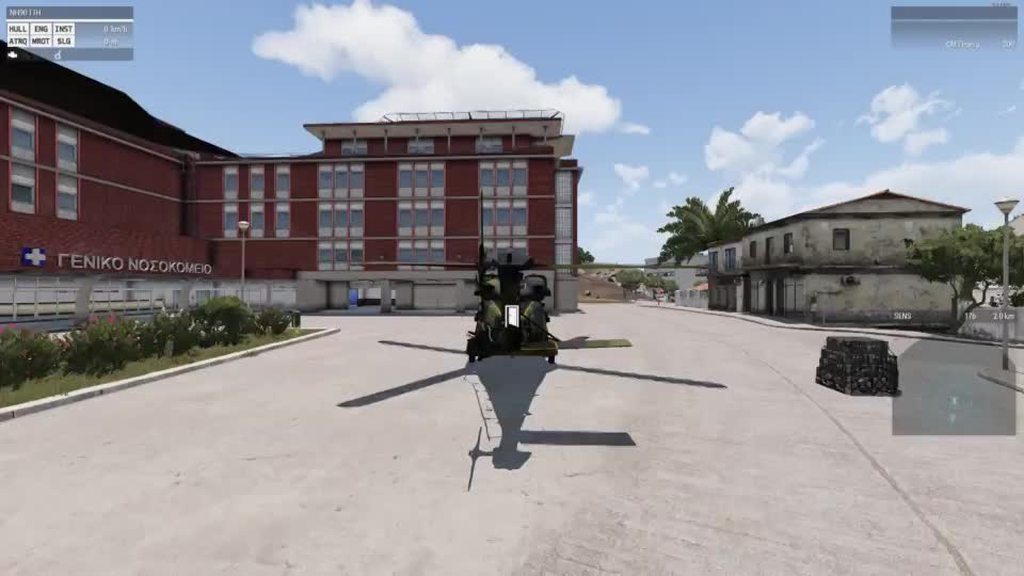
im once again asking this question, this time with a video. What could cause Issues with the Landing Gear on Objects ? When i land the Heli on normal ground everything works without problems but when i want to touch it down on objects like Buildings or the normal Piers the Heli jumps up and down and doesnt want to touchdown really and if i touchdown a bit to hard on objects it explodes, it happens in BFM and AFM
 stuck oyster
Do have you the wheels in geometry lods as components?
do you have land contact points in animated selections?
do you have physX wheel definitions?
do you use rotation or translation animation for the dampers?
river kite
Yes i have the Wheels in Geometry and Geometry Physx like it is in the Sample Heli and as Components,
Land Contacts of each wheel are named like the wheels.
The Wheels are definend in the Cfg Vehicles for driveOnComponent.
The Front Damper uses translation the backwheels are using rotation
 vast tulip
very odd question to you guys here, is there any way to get bones on the arma 3 body in blender? i want to be able to "Bend" their arms to sort of resemble the reforger characters pose for better creasing in Marvelous designer\
stuck oyster
there should be a bare skeleton example in the arma3 samples. or you can use macsers armarig
vast tulip
hmm, might have to use armarig
the bare skeleton has perfectly straight arms, which makes creasing in MD funky
stuck oyster
it may make fitting it back to the straight arms difficult though
vast tulip
yeah, was thinking that
stuck oyster
it is possible to bake it in that pose too Id suppose
woeful viper
That was my thinking too, for cloth simulation you need bent elbows and knees. maybe 30-40° from straight would be good. Then you do details and retopo for LP. Then weight it to skeleton, and turn it back into T pose.
If you think about it, most of the time the arms are bent anyway in normal ingame poses, so making the "normal position" slightly bent makes sense too, so that the stretching of the mesh when doing fully bent elbow vs straight elbow isn't so extreme as with T-pose
with Tpose your default is (almost) 0° bending with movement range from 0 to 180° almost.
opting for 45° default and having -45° to +135° relative bending angle seems like much better choice
charred bolt
river kite
Yes i have the Wheels in Geometry and Geometry Physx like it is in the Sample He...
Looking at your heli taking off from the ground, I'm going to suggest that there's something not right with your damper animations even there. The suspension isn't reacting to the ground quite right. Unfortunately helping you trouble shoot it could be tricky as there are so many variables to getting it right. But I'd concentrate on normal ground landings first, get that right, and then you might find landing on buildings is fixed too.
river kite
has it more to do so with the rtd xml stuff or in the model cfg
charred bolt
Nothing to do with rtd unless you're using the Advanced Flight Model (AFM), and even then, more config/model.cfg/p3d related.
river kite
its weird tho that it doesnt do that bumping on normal terrain and only on objects
charred bolt
Not really - when you land on the terrain I can see your dampers reacting too early
river kite
yes they do that a bit early, but it doesnt push me back up like on objects. i mean i didnt really set them up different like all the other dampers that helis have what could be the problem if it isnt in the rtd xml where also the ground contact stuff is assigned in
ruby lion
Is there a tutorial out there explaining how to make shadow lod in object builder ? cheers
stuck oyster
ruby lion
Is there a tutorial out there explaining how to make shadow lod in object builde...
No don't think so. OB is not the mod advanced modeling tool but it is made same way as any model in it. Adding vertices and faces between them or by using the ready created shapes
ruby lion
Ok I see
ruby lion
I have diffrent Stages of a wall, is there a way I can center the object inside object builder ?
cant find a function for it
stuck oyster
Don't remember the exact procedure but I'd really recommend modeling in better program
ruby lion
I just want to autocenter the object
because I want to have the exact same position when you upgrade the object ingame
ruby lion
thanks
stuck oyster
It is kinda a object design thing that should be decided on at the beginning and gets a bit difficult to rectify once model is already done and in use.
stuck oyster
👍👍👍
 lapis spoke
How difficult is it to get into A3 modding? The only experience I got in modding is downloading other people’s mods, so basically none.
On a scale of 1-10, 1 being a marine PFC can understand, and 10 being only Jeff bezos could understand
silver zenith
you're giving jeff bezos too much credit
modding has layers
it gets harder the deeper you want to go
stuff like retexturing is much easier than making an helicopter
lapis spoke
Ok, model making (let’s say uniforms, for example)
silver zenith
in the middle between them I guess
you'd have to learn rigging and I guess to a degree sculpting depending on how detailed you want the uniform
stuck oyster
It's difficult but learn able if one invests time into it.
For starting point you would just need to get some basic tutorials to follow for whatever program you want to learn (like blender)
Arma specifics come way later
 soft kernel
hi, i want to mod a willow tree for arma.
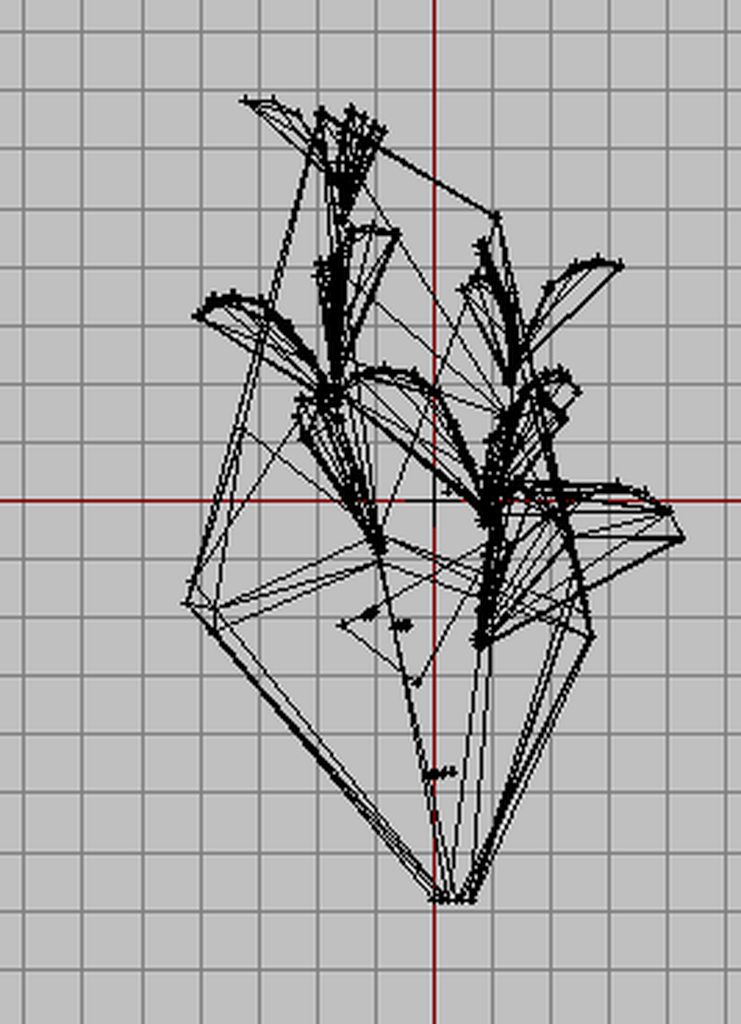
the problem is that creating the geometry lod is very time consuming if you try to create manually with boxes or cylinder. I keep running into the problem that the tree is not closed or that the convexhull deforms everything.(https://imgur.com/a/XcJLjJN)
The tree was created in treeit and blender.
Does anyone know a more effective way to create the model closed with boxes or cilynder than creating it manually in object builder?
 stuck oyster
soft kernel
hi, i want to mod a willow tree for arma.
the problem is that creating the geome...
stuck oyster
soft kernel
hi, i want to mod a willow tree for arma.
the problem is that creating the geome...
Create it manually in blender...
Also check out the sample tree on how the geometries typically are
There is no automation for geometries though
soft kernel
stuck oyster
Create it manually in blender...
ok, i thought that maybe a retoplogy addon in blender could help out
stuck oyster
The geometries for plants are typically not that accurate
soft kernel
stuck oyster
The geometries for plants are typically not that accurate
true the sample tree is not very accurate but my tree has 15+ branches and this is a lot of work. i try this convex hull creater: https://github.com/kmammou/v-hacd

GitHub
Automatically exported from code.google.com/p/v-hacd - GitHub - kmammou/v-hacd: Automatically exported from code.google.com/p/v-hacd
stuck oyster
It won't work very well.
I've tried it.
The tree geometries must be far more optimized
soft kernel
ok i also tried it. thanks for your help
stuck oyster
Don't worry, you're not the first one who would like to skip the tedious step of geometry making
But honestly there is no automation that would satisfy Arma specifics
inland pawn
silver zenith
(I'm joking please don't do that)
I’m not, do it
 half vector
bit of a random question but does anybody here know how to make an invisible item that would have the goggle effect in the nvg slot, preferably like some ww1 pilot goggle effect thingy
stuck oyster
It would not necessarily need an item. It would likely be done with scripting a screen overlay on the view
cloud zealot
How do i define how a weapon is held ? I heard with an RTM, but how do i define it in the config ?
pallid island
handAnim[] = {"OFP2_ManSkeleton", "\A3\Weapons_F\Rifles\MX\data\Anim\MX_cqc.rtm"}; in weapon's config seems to be it 🤔
stuck oyster
Correct
cloud zealot
thanks !
cloud zealot
Can anyone tell me hat am i doing wrong to get this result ?

I'm using armarig to make the RTM. I linked my weapon model with the weapon bone and made the animation
 stuck oyster
You need the weapon bone at the shoulder where rifle would be in the default pose
The weapon bone wont move from there
So if you don't want the weapon shouldered you need to offset it in the weapon p3d
Then have that model as reference on the weapon bone and then place the arms accordingly.
And weapon bone in the rig must be named "weapon" not "Weapon"
And you need likely to use mikeros pboproject to pack the pbo with the rtm
cloud zealot
stuck oyster
You need the weapon bone at the shoulder where rifle would be in the default pos...
The weapon is a handgun, not a rifle.
I've done everything you said but it's still not working
marsh canyon
What software you use to pack into a PBO?
cloud zealot
marsh canyon
What software you use to pack into a PBO?
i use PboManager
marsh canyon
smh
This can break any part of it, and even HG said
And you need likely to use mikeros pboproject to pack the pbo with the rtm
I would recommend to use Arma 3 Tools' Addon Builder if you're new to this, though
Since pboProject could take a while to setup
(Addon Builder is not a perfect tool for it though, since this could break any part of it, sometimes. pboProject is the perfect tool)
stuck oyster
Yeah pbo manager can't handle rtms I believe.
cloud zealot
stuck oyster
Yeah pbo manager can't handle rtms I believe.
i've already packed many rtms with Pbomanager and it always worked fine. I just tried Adon Builder and i get the exact same error. I think something is wrong with my RTM (i wouldn't get the same error with two differents software).
I'll try pboproject
 covert osprey
I know this is probably a dumb question, but is there tutorial anywhere which walks through the complete process of taking a model with all its maps and getting it into Arma, using modern tools?
I want to make an attachment, and I have the model and maps, but I don't know what to do with it.
wispy orchid
covert osprey
I want to make an attachment, and I have the model and maps, but I don't know wh...
I recommend to get it in as a ThingX first, then look into making it an attachment. Baby steps at start are best
covert osprey
wispy orchid
I recommend to get it in as a ThingX first, then look into making it an attachme...
I'll try, but I'm not sure how to do that.
Which is why I'm looking for a tutorial for someone completely new to Arma modding
wispy orchid
not aware of any such tutorials, back in 2013 I learned the basic steps following a tutorial by Mondkalb, but it was aged back then already 😉
covert osprey
Ughhh
wispy orchid
for completeness: https://community.bistudio.com/wiki/Mondkalb's_Addon_Tutorial
the basics are not that hard though, you need the model in p3d format, the textures as paa and a config and for animations a model.cfg
for a very basic cube in game I use for experiments: https://tetet.de/arma/arma3/stuff/ttt_cubesample.7z
first step would be to get the cube as is into a3 as pbo, then change the model to yours
covert osprey
I see.. Alright.
Okay, question
I have a model that uses multiple materials (in blender), all with their own texture files
How do I turn that into the paa/rvmat files the game needs?
For reference, the maps I have for each material are basecolor, metallic, specular, normal and roughness.
Actually, I'll ask in #arma3_texture
elder fulcrum
Hey guys, i'm back. I've made a ruins model for a house i've made and assigned the appropriate properties and made the proper config for the wreck in accordance to the sample House, but my house just falls under the map when it's damaged and it isn't replaced by the ruined building. Here is the config of both models, and the properties of the Geometry LOD.
class land_SN_dilapidated_barn: House_F
    {
        model = "\cf15_normandie_house\dilapidated_barn.p3d";
        armor = 550;
        scope = 2;
        vehicleClass = "Structures";
        scopeCurator = 2;
        displayName = "Dilapidated Barn";
        faction = "Empty";
        editorSubcategory = "French_Houses";
        class DestructionEffects: DestructionEffects
        {
            class Ruin
            {
                simulation = "ruin";
                type = "\cf15_normandie_house\dilapidated_barn_ruin.p3d";
                position = "";
                intensity = 1;
                interval = 1;
                lifeTime = 1;
            };
        };
    };
    class land_SN_dilapidated_barn_ruins: House_F
    {
        model = "\cf15_normandie_house\dilapidated_barn_ruin.p3d";
        armor = 550;
        scope = 2;
        scopeCurator = 2;
        vehicleClass = "Structures";
        displayName = "Dilapidated Barn (Ruins)";
        faction = "Empty";
        editorSubcategory = "French_Houses";
    };
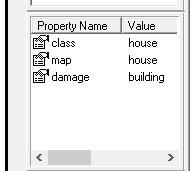
If anyone knows why this could be happening or how to fix it, I would greatly appreciate the help.
pallid island
inb4 "Land_" is case-sensitive
also, https://community.bistudio.com/wiki/Building_Land_Classes claims class Ruins; // required for the ruin model for the inheritance 🤔
wispy orchid
covert osprey
For reference, the maps I have for each material are basecolor, metallic, specul...
do you have the arma toolbox installed? You can assign a paa and rvmat when it is installed from the Blender material
covert osprey
wispy orchid
do you have the arma toolbox installed? You can assign a paa and rvmat when it i...
Oh, nice! Question - What if the model uses multiple materials?
wispy orchid
covert osprey
Oh, nice! Question - What if the model uses multiple materials?
each material becomes a paa and rvmat
do you texture in SP?
covert osprey
It's, uh
A model I bought
wispy orchid
how much Blender do you know then?
covert osprey
I used to use it a good amount
Less familiar now but I can figure out my way around it
wispy orchid
ok, it usually needs a lot of love to get a simple bought model into the game
are you familiar for example with the Arma 3 lod system and the texture conventions for the rvmats?
If not, have a read here: https://community.bistudio.com/wiki/LOD and https://community.bistudio.com/wiki/Arma:_Texture_Naming_Rules for a start
then the named properties are another topic: https://community.bistudio.com/wiki/Arma_3:_Named_Properties - especially on the geo lod
covert osprey
wispy orchid
are you familiar for example with the Arma 3 lod system and the texture conventi...
I'm not, I'll take a look through
Thank you!
covert osprey
wispy orchid
do you have the arma toolbox installed? You can assign a paa and rvmat when it i...
Alright, how do I do that?
I have arma toolbox and a textured model.
wispy orchid
covert osprey
Alright, how do I do that?
make it an arma model and then you will have two entries in the material tab for each material, paa and rvmat
covert osprey
wispy orchid
make it an arma model and then you will have two entries in the material tab for...
How do I make it an arma model? By exporting as a p3d?
Sorry, I'm totally new to this.
wispy orchid
covert osprey
How do I make it an arma model? By exporting as a p3d?
no, you need to open the arma toolbar and select the checkbox there. Probably try to find a video or tutorial on how to use arma toolbox
wispy orchid
covert osprey
How do I make it an arma model? By exporting as a p3d?
Not much of a tutorial, but a hastily assembled collection of screens: https://docs.google.com/document/d/1oRTdf4VDvk4VfHxnTbCIjCVWjWCtlUtL83BQA8SBSOA/edit?usp=sharing
elder fulcrum
pallid island
inb4 "Land_" is case-sensitive
Thanks, I didn't see this even with my google search. I appropriately changed my config to match the advanced config reference in the link, but the issue still persists. I even tried adding a Wreck LOD with a proxy and changed the damage property to wreck and the problem still persists. Any ideas?
pallid island
can you create "land_SN_dilapidated_barn_ruins" by hand? Because literally copying your config snippet into a config.bin and changing models to some vanilla ones for test works on my machine 🤔 https://sqfbin.com/mimopazeguwuzeyixicu
elder fulcrum
I am confused as to what you mean by hand. All of it was created by hand...?
pallid island
"land_SN_dilapidated_barn_ruins" createVehicle screenToWorld [0.5,0.5]
elder fulcrum
Oh!
Yeah, I got you.

I am indeed able to do both, and they both show up fine in my config editor and EDEN browser under empty. I double checked all the classes, tried packing with PBOProject and with Addon Builder. The results all remain the same.

Would you like me to pack you the raw files so you can take a look at it? I've got no idea as to what could be going wrong here
pallid island
huh, actually changing the ruin to model from my work drive allows me to reproduce
let me try this again. The current idea is to try and define the ruin before the building model 🤔
elder fulcrum
ok
maybe its bad config or lod properties?
though the model itself all mats and what not do not have P: or anything else... evertthing localized to addon folder and packed accordingly 
nothing in RPT either
elder fulcrum
Tested it with a CUP ruins model, this one seems to work as well. Unsure as to why this problem persists.
pallid island
some dark magic. No more ideas from me
elder fulcrum
🥹
pallid island
although diag build actually spits Failed ruin creation: no type for <somepath> into .rpt 🤔
fgs, let me try one more thing
friggin' got it. The ruin class should be named after the ruin model filename
@elder fulcrum
elder fulcrum
Failed ruin creation: no type for cf15_normandie_house\dilapidated_barn_ruin.p3d
pallid island
class should be named Land_dilapidated_barn_ruin
pallid island
tableflip indeed
 pallid island
i remember multimat .rvmat lying to me about what uv maps are used where
vanilla one from the gyros stand
 mild ledge
hello again guys! by an absolute miracle, the guy on Fiverr finally managed to get my big dude playable in arma.. although only as a uniform over the OpTre spartan-II, yet now my albedos seem to be unrealistically bright and the fiverr guy said my normal maps "weren't optimized to arma 3", and either that is also the reason why my model's shading is very bad, or perhaps that is an issue seperate from the fact my normal maps are invisible in arma 3. Could someone possibly help me figure out what's... what's even happening here 😅?! I'm a noob and I've been working on this for literally like a month and a half now I JUST WANNA PLAY AS MY BIG GUY IN ESCAPE FROM ARMA ALREADY 💀... uh, ha.. anybody willin to help 😅?
Basically?:
what is causing my model's albedo to be super bright, and how do I fix it - (I expect no hand-outs I will do it myself.)
what is causing the normal maps on my model to be invisible? - (I am experienced modeler / texturer and they work fine in the Source, Blender, and Godot engines)
what is causing the terrible shading and UV shading artifacts on my model? - (and is it perhaps related to my nonfunctional normal maps?)
here's the pictures of my model in blender:

here's the model in arma 3, as it stands:

(no normal on skin or fabric)


any advice would be appreciated. I am not asking for a hand-out, but in my experience of modding, these things can either take 3 minutes or 3 months depending on whether someone in the know is willing to point me in the right directions or not, and i have gone down both roads before
also, @stuck oyster I hope this ping isn't annoying but, uh, you were right about the skeleton. The fiverr guy was wrong and you were right. I expected such but wanted to find out for sure anyway
marsh canyon
I by myself is not a big modeler or such, but one flaw I found: you're not following the proper naming for textures. Check these articles:
https://community.bistudio.com/wiki/Texture_Naming_Conventions
https://community.bistudio.com/wiki/Texture_Map_Types
Also, how's your rvmat?
mild ledge
thank you!
mild ledge
marsh canyon
Also, how's your rvmat?
uuuh, want me to post it? I had the fiverr guy do it for me so i dont know
marsh canyon
Posting it probably helps you
mild ledge
thanks
which mat? the ones that are supposed to have normals attached? skin and fabric?
marsh canyon
Every rvmats that has issue
I can assume that it doesn't have normals because the texture doesn't have proper suffix
mild ledge


 marsh canyon
Oh no, no images but just upload rvmats please
mild ledge
marsh canyon
I can assume that it doesn't have normals because the texture doesn't have prope...
aaaah, then perhaps the shading problm is what i suspected - similar effect to having a missing normal map in blender
the glossy flat-shading effect in blender i mean
mild ledge
marsh canyon
Oh no, no images but just upload rvmats please
oooh ok thanks
one sec
would you like me to upload the normal .paas themselves too? or is that unnecessary?
marsh canyon
I do not think it is necessary for now
mild ledge
If I do not add the proper texture type at the end of the texture name can it mess up the textures in-game? Like, is that something the game actually checks for, or is that simply developer courtesy in Arma 3 such as the nonmandatory courtesy in Gmod to structue your folders in a certain way?
I read your links but they didn't seem to answer my question
marsh canyon
The suffix will provide the way how the engine should handle the texture, so it would change how it should work
mild ledge
ooooh, that is likely the source of my problems then. What threw me off is that in gmod the name is entirely arbitrary
what fucks with me though is i keep getting this vague error when i change the names and recompile
lemme show you
(not you specifically, I don't demand anything from you and while grateful, you can leave at any moment as you don't owe me anything unless you just wanna help me)
you gotta be kidding me
ok ill replicate it and post it in a bit
marsh canyon
I'm suck at joking 😛
mild ledge
lol, huh?
wait so the name doesn't matter then?
also lol it's ok you've already done more than anyone is obligated for a random stranger 😆
I'm just grateful you helped me at all
ah!
I got the error

i changed the name of the normal both file-side and RVMAT-side, but now it won't let me launch arma
when i check line 11 of the config it just shows the dependencies of the mod and makes 0 sense
marsh canyon
Well, not sure how you've done but things I can say are:
Name itself doesn't matter. But the suffix... therefore the filename super_albedo_I_made_for_my_Mod_nohq.paa is a valid nohq (aka normal) texture 😛
Huh wait, which software you use to pack the pbo?
mild ledge
marsh canyon
Huh wait, which software you use to pack the pbo?
uh,

this thing?
'the bulldozer' 😅 ?
marsh canyon
Hmm Addon Builder should at least checks obvious error...
mild ledge
lol source engine modding all over again
one step away from fixing my 45 days' project then i get stuck on a random error with a complete red herring explanation by the software leaving me clueless 😆
almost brings nostalgia of 2020

bizarrely, it speaks of "mod.weapons" on line 11, something that exists only on line 12 as far as i can see
marsh canyon
Well it might read the line 1 as 0, IDK
Are you sure you've updated the pbo properly?
mild ledge
marsh canyon
Are you sure you've updated the pbo properly?
uh.. no 😆?
if you're willing, perhaps you could tell me:
I delete my current pbo, edit the source files, recompile a new pbo from the edited source files, then add the new pbo where i deleted the old one, open arma 3 launcher, delete the old pbo from the list then reload it manually, then launch arma 3
would that work?
also..

i tried deleting the weapons thing at line 12 in the config.cpp and it allowed me to play arma, but for some reason that alone seemed to make my entire model partially nonexistent
like, it has it's name in the list, but just makes my character dissapear as an immobile point on the ground
 marsh canyon
IIRC CfgPatches >> weapons is somewhat mandatory to have?
mild ledge
huh ok thanks
lol, i found that out the hard way 😆
oh wait
perhaps i need to recompile the p3d so the material names on the faces in... oh wait nevermind normals dont get slots in blender
mild ledge
 marsh canyon
oof
mild ledge
all I can thikn of is the possibility that the supposed error on line 11 is that there's 2 entries for weapons[]={};, yet when i delete either 1 leaving the other, they make my model invisible and immobile in-game
i'm at a loss
any ideas?
sometimes GPT-3 gives good advice but this's probably too specific for it
mild ledge
well! I've come to a rather morbid discovery
the addon will solely work if i use it as it was when the fiverr guy gave it to me, for no discernible reason. If I edit simply one word from a single texture in a seemingly arbitrary way then recompile, the addon prevents me from loading arma 3 at all citing a "member already defined" error
if i change literally nothing but a single word in a single texture name, everything falls apart instantly
what could that even be?!
mild ledge
I tried decompiling the pbo feom the original pbo instead of using the pre-compiled files, and it seems the config.cpp in that one is slightly different in a way that doesn't repeat the weapons area, but when I tried renaming the textures in that one my character is invisible and immobile yet again
whelp, good news, i finally figured out the problem with the pbo was that when i compiled it, i didn't notice it was inside another folder of the exact same name and arma was reading the compiled pbo like "wtf there's no p3ds here, just a folder WITH p3ds in it but that's not on my pay-roll"
but renaming the normal maps with the NOHQ suffixes didn't help anyway 😂 👌
guys im dead
how do i head-lock arma into using these blessed normal maps?
stuck oyster
Oof. So much stuff...
Little bit too much to give any meaningful answer 😅
Mainly it sounds like you may have issues in the very fundamentals of tools/dev environment setup and project structure
And then second issue is trying to sledge hammer this thing through
mild ledge
😅
yeah
In a bit I'm gonna try converting the textures to .paas myself in-case the fiverr guy didn't convert em with the proper suffixes
maybe that will do something
mild ledge


omg no way it STILL doesnt work
i literally reconverted em straight from square normal maps with "_NO" suffixes
let the time stamps show I've literally been trying to fix these normal maps for 8 HOURS non-stop 😆
charred bolt
mild ledge
i literally reconverted em straight from square normal maps with "_NO" suffixes
Show us the rvmat for that part of the uniform. Especially we'll compare Stage 1 to your file name (eg check it's looking for _no.paa and not _nohq.paa).

 charred bolt
yeah
Sorry not to have read the entire thread previously. What are you packing with? Has it been suggested that you use a p:\ drive and Mikero's pboProject?
mild ledge
charred bolt
Sorry not to have read the entire thread previously. What are you packing with? ...
ooh P drive, I tried that on an old unrelated project but not this one. Is it absolutely necessary here?
also I've been using the bulldozer addon builder feature i think

this thing
I find P drive to be tedious
but if it's mandatory obviously i'll do it
obviously im not a slacker or anything this time one of my 12-hour modding fix binges is recorded here as proof
charred bolt
I'm suspecting that it's a file path naming issue. If you're at all serious (as in, want to do more than just a single retexture ever), then p drive and mikero's tools will be recommended to you by almost everyone. It will catch and fix all these little errors with good diagnostic messages.
charred bolt
There are some guides on setting up p:, extracting the a3 files, and installing mikero's tools around here - perhaps pinned to a channel somewhere
mild ledge
oh i have it installed i just haven't been using it
haven't got around to UNinstalling it yet actually
charred bolt
You would firstly move your project from downloads folder into a new folder on your p drive
then change the pathing in the p3d's and rvmats to work with p:
When building with pboProject, it will immediately tell you of all instances of missing files and won't let you continue until they are fixed.
mild ledge
thanks
also, quick question
can a model have solely a diffuse and normal map? Or will it only work if I also accompany those with specular and alpha in arma 3?
charred bolt
It seems like a hassle to start with, but there's a reason 99% "pro" modders use it in their work flow.
As you're using Super Shader, it's expecting 7 stages + a Ti, but as you have done with your newtex_albedo.rvmat, you can just use the "defaults" for those texture maps (nohq, as, smdi, ti_ca) that you haven't created.
https://community.bistudio.com/wiki/Super_shader
So a normal Arma 3 model, such as a uniform or car, will have a diffuse texture (_co) and material (rvmat) defined in the p3d, with the rvmat text file linking to the ambient occlusion (_as) texture, specular (_smdi) texture and normal bump map (_nohq). Also in there are other advanced stages which can be used for detailing, controlling how the light is absorbed/reflected (fresnel) and the environmental lighting.
If you don't create _as, _smdi, or _nohq textures, it will still "work", but won't look great as it will be using generic default values. Many artists these days use Substance Painter to create these texture maps along with the basic diffuse (_co).
mild ledge
oh ok cool
mild ledge
...on an unrelated note, if I ever wanna make a new unit with an entirely different naked body, am i right to assume i just import a new body as a uniform then add it to the new unit's config as "nakeduniform"?
like, "nakedUniform="U_BasicBody";"?
hot hornet
mild ledge
In a bit I'm gonna try converting the textures to .paas myself in-case the fiver...
The Fiverr guy converted the textures to PAA?
mild ledge
hot hornet
The Fiverr guy converted the textures to PAA?
yeah but i ended up redoing them myself and the normals still couldn't be recognized in-game
sadly
miraculously!
mild ledge
stuck oyster
And looks like Apollo covered the basics throughoutly 👌👍👌👍
he was very generous and kind and i am very grateful.
you have been too before goat, don't think i dont remember
and like i said, i believed you over the fiverr guy about the skeletons but i just wanted to make sure since i have disposable income
stuck oyster
I believe your setup just dont get the paths right
so what gets packed into pbo does not match whats in rvmat
mild ledge
I hope so 😅
I'll try that tomorrow
thank all of you for your immense help today btw.
man,
none of you were obligated to help me at all and thus I am thankful
stuck oyster
as long as people put in the effort we try to assist
silver zenith
is there a way to make an object be lockable by AT launchers?
 olive shadow
How do you reset object builder interface?
 jagged wren
Would anyone here be willing to make some US Army Chaplain stuff?
marsh canyon
Try your luck in #creators_recruiting
mild ledge
jagged wren
Would anyone here be willing to make some US Army Chaplain stuff?<:pepegod:78778...
I might
I'm a pretty good modeler but I can only do up to 'semi'-realism with my current texturing skills
also lol don't worry I'm here to save you from the bottomless vacuum, that's creators_recruiting lol
@jagged wren pm me some time chief
If it's not too time-consuming I'll gladly do it for free I just love helping people
I spent an entire week straight trying to make some star wars stuff for a guy for free and I would've finished it but the file got messed up and I decided against starting all over for an entire extra week of unpayed labor for a stranger
mine is the more spread-out guy
and, in hopes this one last post won't be too off-topic, here's my current best texturing job (obviously not dr. kleiner lol I'm not gaben)
 jagged wren
mild ledge
I might
jagged wren
mild ledge
I might
I wish I could but you have ur DM's off lol
mild ledge
jagged wren
I wish I could but you have ur DM's off lol
😂 👌
I won't abandon u bro hold on
yeah ok i think you might be able to dm me now
mild ledge
There IS something wrong with my model's shading right? No way I'm just crazy here:

is he full-bright or something? He seems to still have shadows and reflections just, why does he seem as if he's glowing without actually illuminating anything?
I feel like im goin crazy. Surely I'm not the only one he thinks this looks off
is this perhaps a flipped-normal thing? His light-occluded areas seem to shine while his light-facing side seems to be left alone entirely


i regret questioning the normals 😅
 stuck oyster
At the last pic it looks like your mesh faces are upside down
mild ledge
stuck oyster
At the last pic it looks like your mesh faces are upside down
yeah lol i know 😆
I'm not worried about that im very familiar with that error from gmod, "flipped normals"
I was testing whether the bad shading was a result of flipped normals and clearly not as arma 3 "1-sides" it's faces to the outside normal
stuck oyster
ah right right
mild ledge

I'm getting closer.
Having proven it's not flipped normals, and having seen the bad shading go away when i deleted every RV. this must mean it's an RV problem
well, RV or .paa
but probably RV
mild ledge
"I thought sun-block would block the demon core"
 charred bolt
Compare the header part of your rvmat's with those from the Arma 3 samples for characters.
diffuse[]={1,1,1,1};
forcedDiffuse[]={0,0,0,0};
emmisive[]={0,0,0,0};
specular[]={0,0,0,1};
specularPower=0;```
I'm not particularly familiar with character art, but your values for specular and specularPower of 0, look especially likely to be wrong.thanks! I'll try that
ambient[]={1,1,1,1};
diffuse[]={1,1,1,1};
forcedDiffuse[]={0,0,0,0};
emmisive[]={0,0,0,0};
specular[]={0,0,0,1};
looks to be the same
charred bolt
It was super shader last he showed
stuck oyster
@mild ledge can you screenshot what the normalmap texture looks like?
mild ledge
stuck oyster
<@236325061668241409> can you screenshot what the normalmap texture looks like?
sure!
wait uh, raw or paa?
here's the raw unzoomed (the details are EXTREMELY tiny cause i hate tiling):

and here's zoomed

ah and fabric
(zoomed obviously)
 mild ledge
stuck oyster
what type of shader were you using?
mild ledge
stuck oyster
what type of shader were you using?
yeah what apollo said. super shader.
I dunno that's just what the fiverr guy used
I read about it and apparently it's a "universal" shader
stuck oyster
oh
this
isnt really what you can use
this has nearly nothing in it
you need baked textures
or well drawn details if bake from highpoly to lowpoly is not possible

for example arma man shirt normalmap contains the extra detailing the simplified model cant have
mild ledge
I... omg you're right i just realized almost none of the models in arma 3 have fabric normals

what about the CSAT spacer-mesh though in the inner arms?
how would i do something like that?

the straps on here seem to have normals like that kinda
i'm not sure i understand what you're saying now. I see clear thread-lines in the normal here, it's just very small
 stuck oyster
mild ledge
what about the CSAT spacer-mesh though in the inner arms?
stuck oyster
mild ledge
what about the CSAT spacer-mesh though in the inner arms?
all of these details are same way in the normalmap as the fabric creases and such
but yes what you have is like normalmaps for possibly highpoly texturing that would then be baked down to the lowpoly game ready textures
mild ledge

if a bohemia normal has these tiny thread-lines surely mine could too right?
while obviously I'm not certain, I doubt they baked that from a model they modeled the individual threads on
they likely just projection painted those threads directly onto the picture as a background or something
I'm just thinking, if they did it what's different about mine?
and i mean, yeah even if it worked the difference'd be subtle, but that's one of the pit-falls I've found with my very clean and "perfect" textures, without utilizing normals and stuff they look cartoony because theres no imperfections like dirt or unequal reflection in the fabric's varying integrity
but i don't want to just go 2010 mode and fake 'realism' by covering my textures in dirt and brown filters
i feel like i kinda "need" it
like to not look stupid in-game
stuck oyster
mild ledge
no the threds are not really modeled but they are texture
or well
in some cases the high detail model can actually have modeled fabric surface tooo
but anyway thats not really what you have or can really have in this case since you have a game model, not a high poly detail model
https://www.youtube.com/watch?v=9DMaAWl_jLg @mild ledge you can look up higpoly - lowpoly workflow to understand how it works
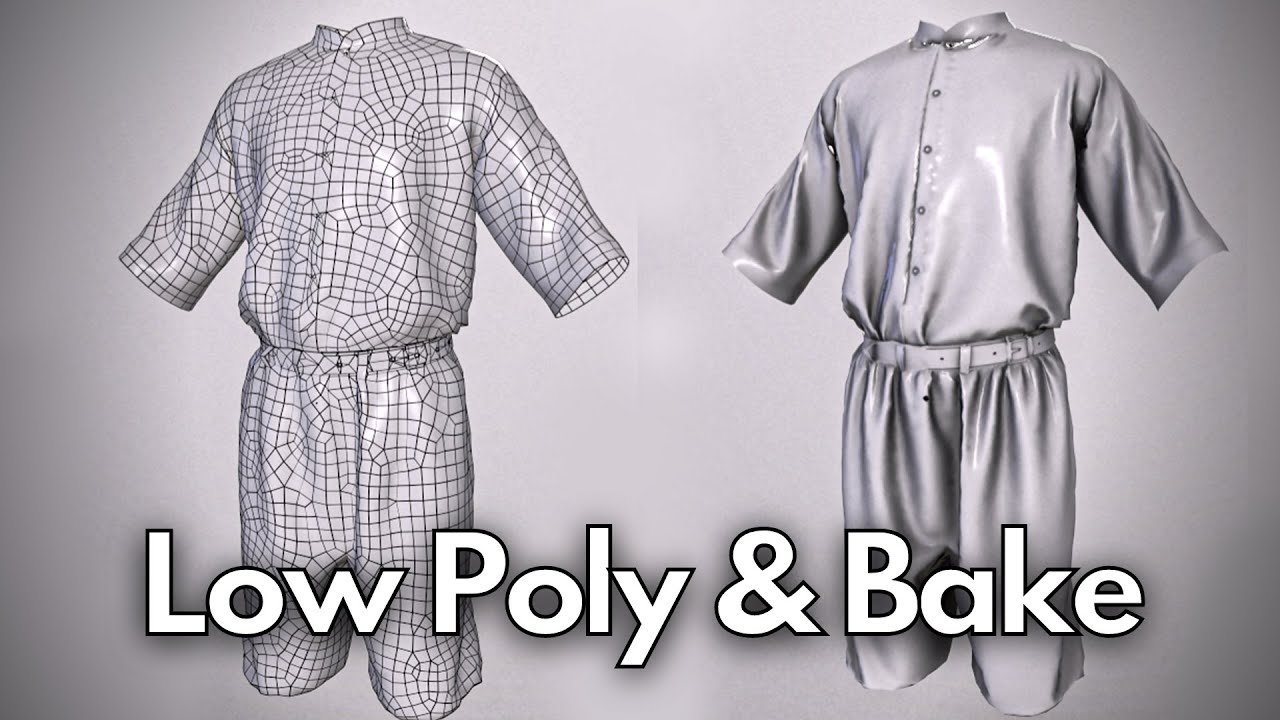
Hi guys
In this video, we are going to learn how to bake high-poly on low-poly models.
Summary:
First, in Marvelous Designer, we import two different files, first, we import a high-poly model and the second one would be the low-poly one.
For the next step in Substance Painter, bake the high-poly on the low-poly one.
.
.
.
Chapters:
0:00 | Intro
...
mild ledge
stuck oyster
https://www.youtube.com/watch?v=9DMaAWl_jLg <@236325061668241409> you can look u...
thanks!
woeful viper
the tiny fabric texture details like you had are just not noticeable, since the model isn't glossy. Those kind of details get lost on non glossy surfaces. And if you think about it, on normal fabric, you cant see the surface texture either. Only stitched lines nad so on
mild ledge
woeful viper
the tiny fabric texture details like you had are just not noticeable, since the ...
like as in there's no reflections for the normals to map in the first place?
that'd definitely explain things maybe
woeful viper
if your material is completely non reflective, you wont be able to see tiny changes in it's surface, because you only see the difference if it reflects light
(IRL and ingame)
clothing isn't completely non-reflective, but on the "almost not reflective" end of chart. And the surface texture of the fabric threads is not noticeable to the visible eye for most fabrics, apart from extremely rough ones (cordura, thick wool, and so on).
 kind nacelle
also try to avoid full black, it wont look great and doesnt really allow you to creat much detail in the texture
Whether I am making an all black airplane or any other scale model, I have found that painting pure black doesn't work.
In this video I show how I use shading, mottling and oils to paint an SR-71 Blackbird. This easy method will ensure all of the model's detail can be seen and appreciated.
not exactly digital texturing, but it more or less explains why you want to use mostly greys
hot hornet
mild ledge
if a bohemia normal has these tiny thread-lines surely mine could too right?
Typical workflow for a 3D model (video game)
Create/sculpt a high poly with as much detail as possible. Usually, you add your fabric details during this process. After finishing the sculpt, you start retopologizing the model to create a low poly version. When the retopo is done, you create UVs/Materials for your low poly and you transfer the details from the High Poly to the Low Poly using a technique called "baking". Once the baking is done, you'll have the details of your High Poly model in the textures of your Low Poly model.
Exemple of a High Poly model with fabric details on it : https://pbs.twimg.com/media/Fib9dwWWYAAwsB3?format=png&name=large

Everything is sculpted but some people only add some of the fabric details during the texturing phase
mild ledge
yeah lol 😅, I'm not familiar with that stuff. I taught myself 3d modelling solely to put my stuff in Gmod to play around with and so despite being able to make pretty decent humans and basically anything else, I instantly get lost on all kinds of random stuff that's second-nature to professionals taught in the mainstream way.
hot hornet
About texturing for Arma 3 : Arma 3 is kinda old school and doesn't handle PBR. If you're using substance, you'll never have the same result in the game so you have to find ways to make things look good at all times (because you can't see all the details when the light is directly pointed on the texture or when there is no light at all). One of the many tricks is to add the details of your normal into your color map/diffuse/albedo. You can do the same with your AO.
mild ledge
substance
😂👌
bro I'm a neet (well ok not a 'neet' just, I don't need a job due to my wealth. I learn and self-improve immensely though)
I just bought materializer the other day but historically I've always used 'Material Maker"
it can barely compete for realism but it'll lag like hell with all the workarounds you need
from what I've seen Substance you can easily layer like 9 textures that can individually only be replicated by like 10 nodes each in material maker
mild ledge
oh btw this VERY awesome dude helped me fix it btw
and yes it was the file paths to the RVs, but not in the files themselves, -on the model itself in object builder
something I would've NEVER guessed to check
cause OB sucks and I avoid it as much as possible
pine acorn
The uniform wont show in the game, there are no error msg:s regarding it but it's visible as an item in the arsenal. Any clues as to why?
https://cdn.discordapp.com/attachments/615983518882725912/1049305052130586664/20221205134241_1.jpg
 inland pawn
pine acorn
The uniform wont show in the game, there are no error msg:s regarding it but it'...
inland pawn
pine acorn
The uniform wont show in the game, there are no error msg:s regarding it but it'...
Bad model path, p3d is empty, etc
pine acorn
the new model and the resolution LOD are supposed to be in the same mesh or no? (Also I'm assuming the rvmat isn't really doing its job here considering the lighting is more than just a little bit off)
https://cdn.discordapp.com/attachments/615983518882725912/1049390265766510602/20221205192207_1.jpg

 subtle bison
did you put them all into the same layer? :p
pine acorn
currently have it like this
https://cdn.discordapp.com/attachments/615983518882725912/1049393573973475428/image.png
 pallid island
and each object(/layer) has the (separate) resolution LOD applied?
https://media.discordapp.net/attachments/737175675818999898/1049396135241973900/image.png?width=1440&height=571 for reference (part in red rectangle is from different LOD)
 pine acorn
yes, I'm just using the character template from samples only thing I've added is my own model to it
inland pawn
Looks like fucked normals?
stuck oyster
O2 script exe path may not be set in the addon options
pine acorn
I noticed I had a strange setting in blender where it seems data got overwritten when I merged my model with the pylons from the template (where things went funky and they started sharing the same UV), I think it's fixed now. Based on this image I assume the only thing not working is the rvmat?
https://cdn.discordapp.com/attachments/615983518882725912/1049599032810553454/20221206091047_1.jpg

(ignoring the obvious legs clipping and so from the template)
pine acorn
stuck oyster
O2 script exe path may not be set in the addon options
Just checked, think it's in order
pine acorn
inland pawn
Looks like fucked normals?
Face orientation shows blue so I believe it should be correct

 stuck oyster
no sharp edges set where they should be perhaps
outer condor
is there an easy way to check the component size for each in a model?
stuck oyster
you would model and texture it first (around the armaman sample so it fits) and then worry about the game importing
 boreal orbit
Not sure if this is the correct place but I am trying to import a plane 3d model I bought and whenever I exit the plane I go shooting to the sky...
inland pawn
boreal orbit
Not sure if this is the correct place but I am trying to import a plane 3d model...
No entry/exit memory points
white jay
armaman sample?
Stored in the directory containing the arma 3 samples?
Is it possible to give uniforms ridged joints? @stuck oyster
inland pawn
Would anyone happen to know why a rocket, when fired from a rocket launcher, instead of going where the reticle was pointed, goes slightly above where the reticle is?
stuck oyster
white jay
Is it possible to give uniforms ridged joints? <@150949769953411072>
What are ridged joints?
stuck oyster
inland pawn
Would anyone happen to know why a rocket, when fired from a rocket launcher, ins...
Misaligned memory points maybe?
inland pawn
stuck oyster
Misaligned memory points maybe?
They don’t seem to be. I’ll have to check again, when it’s not 6am
stuck oyster
Then it could be missile fligh profile/ammo config related
Or missile weapon/ pilot/ camera view offset causing slight disparency in what you see
The Crosshair is drawn to infinity, and if weapon is far from camera/view let's say far to right for example the Crosshair would be left of the middle of the view.
white jay
stuck oyster
What are ridged joints?
rigid sorry
stuck oyster
for custom character with custom animations sure
for Arma man, no
the joints turn all over the place
white jay
stuck oyster
for custom character with custom animations sure
Would it be better to make a vehicle instead? Oh god arma 3 doesn't like vehicles interacting with other vehicles boom... probably not a good idea.
stuck oyster
white jay
Would it be better to make a vehicle instead? Oh god arma 3 doesn't like vehicle...
I'm not sure what you are talking about
white jay
Make the exoskeleton a vehicle players "get into"
stuck oyster
If you want it to act like man the it needs to be uniform
As vehicle you'd likely get it to behave like the freight loader im Alien.
 dim mica
How do you define engine sound location on your vehicle?
empty aurora
dim mica
How do you define engine sound location on your vehicle?
https://gist.github.com/Nobatgeldi/c6ae4a7506e07445c985374b8d5310a1
There is one example how to define sounds of engine

Gist
Vehicle configuration code for Arma 3 mod. GitHub Gist: instantly share code, notes, and snippets.
 wheat olive
trying to set up a belt fed machine gun and having issues with opticView
everytime I put an optic on the gun and try to aim down sights the view puts me in the middle of the gun
should there not be an "opticView" memory point on the gun model itself?

 wheat olive
no optic puts eye at right place tho
 stuck oyster
Your optics is probably missing some memorypoints, check the sample sight for reference
wheat olive
oh I'm not using my own optics
just the vanilla optics
it happens with any optic I use
wheat olive
stuck oyster
Your optics is probably missing some memorypoints, check the sample sight for re...
long range full zoom optics work, but any scope mounted red dot/iron sight doesnt work, and neither does any reflex sight
stuck oyster
Then you need to make sure the memorypoint names match what you have in your config
wheat olive
the model.cfg?
I havent been able to find any reference to if the "eye" or "opticView" get referenced in model.cfg or config.cpp for the weapon itself
everything I can find is on the config for attachments themselves
wheat olive
okay I figured it out 🙏
stuck oyster
wheat olive
okay I figured it out 🙏
What was the issue?
 karmic silo
Alright, I solved one issue with configs now I have one more question for here. I have a glock model section with vertexs the way I need them in blender. What's the easiest way to import them in Object Builder without losing those selections? https://gyazo.com/e5cc717a51886a88e120fbc37cde5bff Obviously when I export as OBJ and import into object builder I lose them. It would make my day to find a way for that to not happen lol
 stuck oyster
karmic silo
Alright, I solved one issue with configs now I have one more question for here. ...
stuck oyster
karmic silo
Alright, I solved one issue with configs now I have one more question for here. ...
Blender Armatoolbox plugins P3d export
karmic silo
stuck oyster
Blender Armatoolbox plugins P3d export
I have that, but when I export just the 3D model it won't open in Object Builder
and when I open a P3D In blender and bring it over I just get export errors
stuck oyster
You probably are exporting empty P3d
You need to enable Arma properties on the objects you want to export so the exporter knows what to export and as what lod
karmic silo
That's probably exactly what it is, I'm gonna ask another stupid question. Where is it located? Object Properties?
karmic silo
Alright, well I guess discord didn't like the picture of blender with a glock in it so it timed me out
I got the settings enabled, at least just the properties checked but still getting errors on export

 stuck oyster
You need to add a material to the object too
karmic silo
I didn't realize I had to, does it want me to add it the regular blender way or through that arma properties?
stuck oyster
Normal blender material. When Arma properties are enabled the blender material tab will also have arma material properties which are used to write texture and rvmat path on the model according to assigned materials
wheat olive
stuck oyster
What was the issue?
It was one of a couple things but
I basically just made sure it had opticView, made sure my weaponconfig listed Opticview and made sure it had a ViewPilot
stuck oyster
Ah view pilot lod is required too indeed! 👌👍
karmic silo
So I already have the textures and an RV mat generated.
I applied just the texture to the model in blender
I am still receiving the errors when trying to export 😢

 wheat olive
stuck oyster
Ah view pilot lod is required too indeed! 👌👍
wheat olive
stuck oyster
Ah view pilot lod is required too indeed! 👌👍
Yeah I'd just deleted mine since I kept changing my model set up and wasn't gonna make it until I finalized stuff but I didn't realize it was needed for the aiming view to work right
charred bolt
karmic silo
https://gyazo.com/b0db782283c3262b624719352269caa3
Maybe try triangulating before export.
karmic silo
charred bolt
Maybe try triangulating before export.
I have 😞
I think I’m just gonna manually have to do it all which sucks, I was hoping to find an easier way
stuck oyster
you might have some hidden faces that dont get triangulated even if you select all
charred bolt
It could also be degenerated faces, but I don't know Blender sufficiently well to suggest how to check for them.
stuck oyster
triangulation would stll take make it triangles
karmic silo
I’ll rip the model back apart and try to triangulate it more as a last resort
stuck oyster
you can add a triangulation modifier to it too
karmic silo
Still giving me the issues 😢
stuck oyster
do you have only single object selected when you export?
try selecting only 1 object that has the arma properties and in the export dialog set it to "only selected"
karmic silo
Still Errors.
stuck oyster
same errors?
karmic silo
Yup
I think it's just gonna be something to do with blender at this point and the model not starting out as a P3D.
I think I am just gonna do it the long way and revisit it after I get it this one working because I've tried fucking with almost all the settings
stuck oyster
karmic silo
I think I am just gonna do it the long way and revisit it after I get it this on...
try making just a simple cube, set that with arma property and try to export that
karmic silo
It worked fine... Fuck so it is something with the model.
Still getting the same errors after separating the model and re-triangulating...
stuck oyster
any other modifiers on it?
karmic silo
No, so I just tried exporting all the pieces individually
They all worked except the slide
 stuck oyster
 odd
odd
karmic silo
And I'm not sure why, because if I export it as an obj then import in object builder there is no issues
OK
So I fixed the problem
if anyone has the same problem I do, even if you triangulate the whole model, it might not affect everything. If you follow this to find the remaining N-GON shape then triangulate it fixes everything https://www.youtube.com/watch?v=rnQTASH6gRs

In this video you will learn how to remove faces with more than 4 vertices (N-gons) from your models, in a simple and straightforward way.
I feel stupid I didn't think of it sooner, but it is solved now lol
charred bolt
So it was exactly what HG and I suggested.
karmic silo
Yeah, the issue was I already triangulate the model multiple time.
But there was a small section on the sights that the modifier wasn't affecting
charred bolt
mild ledge
karmic silo
Alright, well I guess discord didn't like the picture of blender with a glock in...
that's nothing. One time I sent a picture of a boss from a game I was making by myself and eventually I figured out it though the red on the protagonist's space suit was blood
it looked like the red and white racing jumpsuit in arma karts
perfectly clean
karmic silo
Alrighty folks that have helped me through these pain day from no other fault then my own. I have brought my first handgun into the game, it works and looks pretty good. In my opinion for being my first.
Only problem I have remaining is the pistol flashlight sitting too dam low. https://gyazo.com/4a36f870c2e9b02d592f368110faae51

I have yet to be able to figure out how to raise it because there are no memory points that I see? Any help would be appreciated while I scan through as much of the forums as I can.
marsh canyon
You mean the position of the flashlight is slightly off than it should?
karmic silo
marsh canyon
You mean the position of the flashlight is slightly off than it should?
Yes, it sits far too low
marsh canyon
Then adjust the entire model's position
karmic silo
Really? Like just move it downwards in object builder?
marsh canyon
Yes
karmic silo
huh, alright I'll give it a try in a few here
karmic silo
ALRIGHTY folks, the saga continues.
I am not attempting to make a custom red dot for said pistol. I have the model in the game unskinned, it mounts to the gun fine. I am now attempting to get the glass and red dot working however I am struggling attaching the right paa/rvmats to the right section. I have the arma optic I am copying off step by step and has been working so far.
No my question, is there and easy way in object build to see exactly which portion of the object the texture is attached to? So that way I can go back into blender and section it out
Any help will be appreciated.


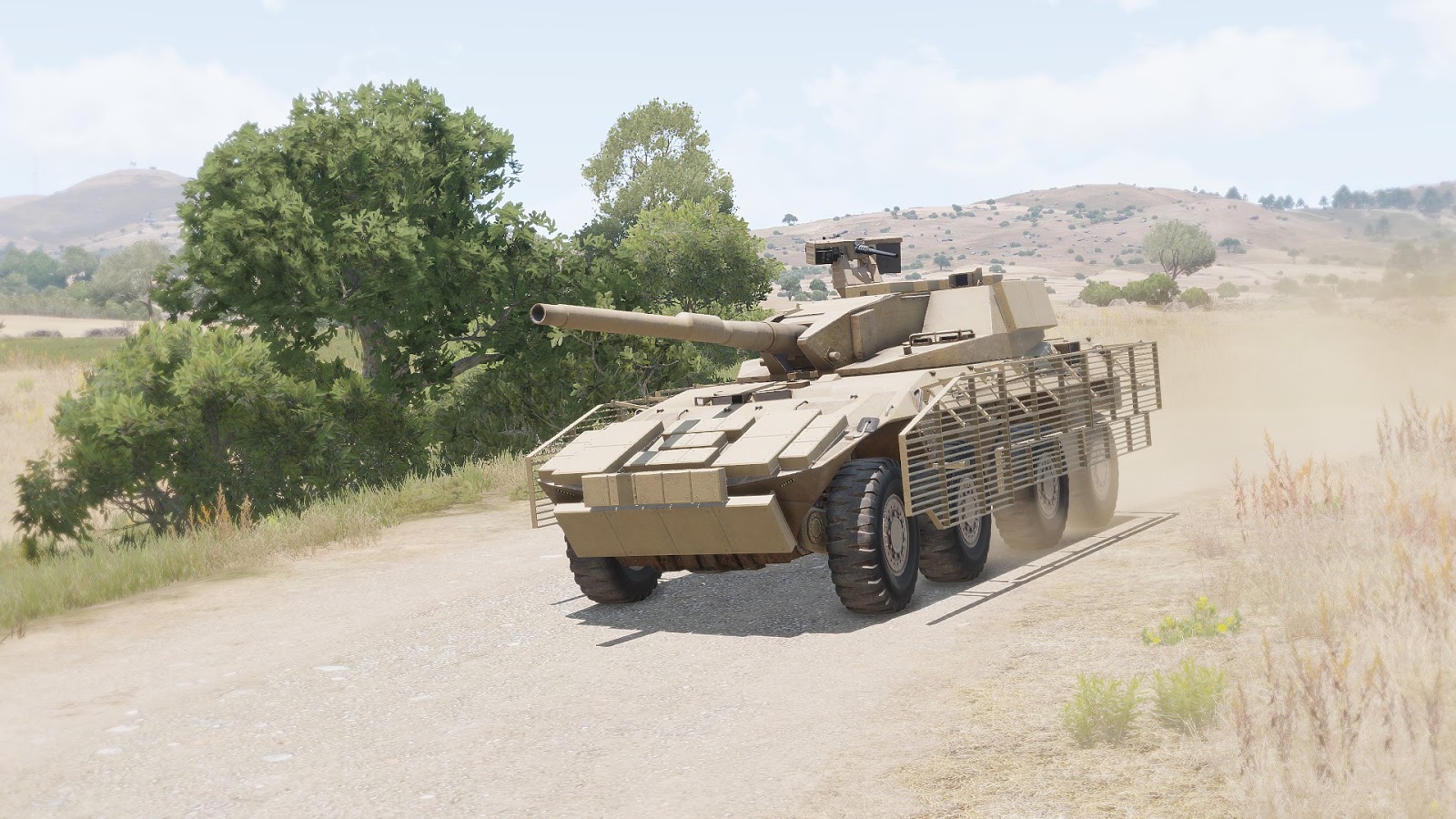


I got the glass working just no dot...
karmic silo
So I found out the dot is there, however is hidden under the top part of the optic and shifting memory points or even the physical object doesn't seem to shift the dot down 😢
 tulip bear
Hello, I have a question about importing P3D/PAA files into Arma. Every time I import a p3d file with paa texture into arma the color of the texture is inverted. In Arma Object Builder the color is normal. Has anyone experienced this before?
stuck oyster
Probably not following texture resolution rules (power of 2 resolutions only)
 cursive bone
Hey, so
For some reason, my Object Builder is broken
Whenever I try to open it, it shows up as a white box in my tabs view
I've validated files, fully reinstalled A3 Tools, nothing works
Could really use some help
charred bolt
cursive bone
Could really use some help
Sometimes with the UV window it gets minimised - try right clicking the OB icon in the tabs and "Maximise".
cursive bone
Got it, thanks!
 woeful crystal
Hey so I’m rather new to modding and I’ve been working as part of a mod team for a bit now as an engineering advisor and I kinda want to do more than make stuff OSHA compliant, therefore I feel like doing something a little extra either creating weapons or uniforms, what would be easier for me to initially get into?
charred bolt
Probably a weapon, but the usual advise is to initially learn how to get an inanimate object in game, as this will teach you the fundamentals without overwhelming.
woeful crystal
I know roughly how to do that but how do I get started on weapons modeling?
charred bolt
Download the Arma 3 samples from Steam, there is a weapon example to look at.
woeful crystal
Just any example?