#[Linux] LSFG-VK
2884 messages · Page 3 of 3 (latest)
 raven kite
 neon halo
then maybe maybe not 😏
raven kite
 what
what
 sour elm
Mangohud is showing 64-bit
 raven kite
Did doom 2016 work for anyone
neon halo
I can try on the deck but the game is 70 freaking GB lol
raven kite
The latest doom game is over 100gb  💀
💀
raven kite
The textures are insanely good
neon halo
doom 2016 however is big just because of megatextures
it was a tech at the time that used a giant texture atlas that was decompressed in real time by the CPU
the goal was to avoid consoles VRAM limitations, especially for the Xbox 360 era
but the system proved extremely inefficient with scalability
raven kite
But can it run on a toaster
neon halo
it allowed Rage to run at 60 FPS on the 360
 north quail
i get 100+ fps high preset, on 1440p, and I have not that good of a gpu, A1000 => 3050
raven kite
I get well over 150 fps in Doom 2016 at the highest settings and it's sad that I have to play the latest doom at low and with fsr 3 ultra performance
To get only 50 fps
😭
neon halo
but megatextures had to be dropped in favor of the decal system used by their new Vulkan backend for Eternal, much faster / efficient, and saves a ton of CPU performance compared to megatextures decompression
neon halo
raven kite
I get well over 150 fps in Doom 2016 at the highest settings and it's sad that I...
doom 2016 has some weird moments though, even in Vulkan native, the bridge for example, it never runs well
raven kite
They always say the bridge but never under the bridge
neon halo
if you load I believe level 3 or 4, and look at that bridge, FPS tanks, but CPU and GPU usage remains low
a mystery
north quail
also it crashes if you alt tab, so i run it in borderless mode with window rule set to fullscreen xD
neon halo
plenty of situations like that with the pre-eternal engine
raven kite
north quail
also it crashes if you alt tab, so i run it in borderless mode with window rule ...
Ok this never happened lol
north quail
raven kite
Ok this never happened lol
weird it crashes for me always when i alt
maybe nvidia thing
raven kite
May I know your specs
north quail
i get this error when i enable LSFG

[2025-07-07 13:17:42.633] [MANGOHUD] [info] [blacklist.cpp:75] process 'explorer.exe' is blacklisted in MangoHud
[1;37mlsfg-vk(hooks): Instance created successfully: 5555831459a0[0m
[1;37mlsfg-vk(hooks): Instance created successfully: 7f22700c35d0[0m
[1;37mlsfg-vk(hooks): Device created successfully: 7f227048f8f0[0m
[1;37mlsfg-vk(hooks): Device info created successfully for: 7f227048f8f0[0m
[1;37mlsfg-vk(hooks): Swapchain created successfully: 7f21e80e55b0[0m
[1;37mlsfg-vk(context): Created frame_0 image and obtained fd: 276[0m
[1;37mlsfg-vk(context): Created frame_1 image and obtained fd: 277[0m
[1;37mlsfg-vk(context): Created out_n[0] image and obtained fd: 278[0m
[1;37mlsfg-vk(context): (exiting LSFG context creation with id: 661811950)[0m
[1;37mlsfg-vk(context): Remaining misc context init finished successfully.[0m
[1;37mlsfg-vk(hooks): Swapchain context created successfully for: 7f21e80e55b0[0m
[00000000000001b8:] EXCEPTION handling: System.ComponentModel.Win32Exception: Access denied.
[0000000000000128:] EXCEPTION handling: System.ComponentModel.Win32Exception: Invalid window handle.
[0000000000000128:] EXCEPTION handling: System.ComponentModel.Win32Exception: Invalid window handle.
[0000000000000128:] EXCEPTION handling: System.ComponentModel.Win32Exception: Access denied.
[0000000000000128:] EXCEPTION handling: System.ComponentModel.Win32Exception: Access denied.
Dell Precision 5570
Hybird, IGPU + Nvidia (A1000 4gb)
raven kite
north quail
i get this error when i enable LSFG
Same
north quail
lsfg is intializing correctly though, maybe something wrong with engine
neon halo
what about other Proton versions?
raven kite
Btw @neon halo what proton are you using for quake remastered
neon halo
regular 9
works on Q2R too
technically I could try the doom + doom 2 source port as well, but frame gen is hardly necessary there lol
neon halo
it does, software, d3d11, vulkan
neon halo
but I mean, the game runs on everything
raven kite
Do I choose vulkan
neon halo
for Q2R?
raven kite
Quake 1
neon halo
always chose Vulkan that's the highest chances of guaranteed success
Quake Remastered only has Vulkan
 neon halo
Proton 9 ?
 wanton mural
V3dvk fine?
raven kite
neon halo
Proton 9 ?
Cachyos Proton package
neon halo
raven kite
Cachyos Proton package
can you try vanilla 9 or it won't work?
raven kite
neon halo
can you try vanilla 9 or it won't work?
I'll try later
First I'll check logs but can't do that now
 leaden violet
wanton mural
V3dvk fine?
leaden violet
wanton mural
V3dvk fine?
you mean vkd3d-proton?
wanton mural
Yeah. For pso
2004 old game
Their private server launcher adds d3d12 but apparently its actually vkd3d
north quail
i think 32bit game will not work, but apart from that you can try dxvk/vkd3d titles
or opengl , you can use Zink and then lsfg should work
wanton mural
Then this is unacceptable then. I have to get pso working
north quail
pso?
north quail
wanton mural
Pso blue burst
oh it's a 32bit game
ya you wont be able to run it of now
you'll need to build lib32 binary for it
wanton mural
Of dxvk lsfg?
raven kite
north quail
<@310442791446642689> <@1322682833176891474> have you guys tested VRR?
What is vrr
neon halo
can't
raven kite
😭
neon halo
raven kite
What is vrr
Gsync/Freesync
neon halo
north quail
I think it breaks VRR
that would be a bummer
raven kite
neon halo
Gsync/Freesync
Uhh my monitor always has freesync enabled
No problems so far
north quail
raven kite
Uhh my monitor always has freesync enabled
enable the in monitor FPS
and check if it's syncing with the fps shown in mangohud
not the in game fps counter
mine is going up and down
without it works fine
neon halo
raven kite
No problems so far
so if you have a game running at 60 FPS and you frame gen x2 to 120 at 144Hz it is perfectly smooth? (assming you have 144Hz)
raven kite
neon halo
so if you have a game running at 60 FPS and you frame gen x2 to 120 at 144Hz it ...
Yeah no i have 75hz
north quail
yup with x2 your monitor should use 120fps as gaame is being throwing output
neon halo
raven kite
Yeah no i have 75hz
30 to 60 then, at 75Hz
north quail
deafult is 41-75
 lusty talon
vrr works just fine for me
north quail
lusty talon
vrr works just fine for me
weird kinda broken for me let me try some other game
raven kite
@lusty talon will this ever support opengl
lusty talon
chances are it's your monitor lol
north quail
lusty talon
chances are it's your monitor lol
but works fine without it
lusty talon
raven kite
<@464843391771869185> will this ever support opengl
via zink
neon halo
sometimes it's just Nvidia proprietary drivers being dodgy, happened to me a few times even without any frame gen, reboot in case :p
lusty talon
north quail
but works fine without it
no of course, but you add framegen which inserts frames and flucuates the frame rate by syncing n frames every frame. most monitors can't handle that
 cunning copper
@lusty talon I'm on the latest commit. Setting any config option other than LSFG_DLL_PATH and LSFG_ENABLED causes games to instantaneously crash. (i.e setting LSFG_HDR or LSFG_MULTIPLIER) Again, only happening with DXVK or VKD3D games and not Vulkan native ones
raven kite
lusty talon
via zink
Isn't zink a vulkan to opengl conversion program?
lusty talon
 final vale
do you accept money
final vale
do you accept money
not if you ask me directly lol
but there is a github sponsor linked on the repo
lusty talon
raven kite
Isn't zink a vulkan to opengl conversion program?
no it's opengl to vulkan, right? lol
north quail
raven kite
Isn't zink a vulkan to opengl conversion program?
it's same as dxvk/vk3d, opengl-vk
cunning copper
lusty talon
send logs, I'll take a look at them later
the only logs are that it says instance created and then immediately dies after that. I think I may have a clue as to what's happening
north quail
lusty talon
no of course, but you add framegen which inserts frames and flucuates the frame ...
😦 ah so i can't get vrr with lsfg-vk?
lusty talon
cunning copper
the only logs are that it says `instance created` and then immediately dies afte...
do follow the steps in the guide just to be sure
raven kite
Isn't there a vulkan to opengl conversion method?
north quail
lusty talon
lsfg-vk syncs with vblank
yes but vrr helps smooth out the experience, not just tearing
lusty talon
north quail
yes but vrr helps smooth out the experience, not just tearing
no, it doesn't. like I said we're vsyncing
neon halo
raven kite
Isn't there a vulkan to opengl conversion method?
you mean the other way around?
raven kite
neon halo
you mean the other way around?
I mean, if someone has a gpu that doesn't support vulkan and wants to use this in opengl games
cunning copper
lusty talon
no, it doesn't. like I said we're vsyncing
oh so that's why Roblox was forcibly capped at 165 FPS when I tried LSFG on it
neon halo
raven kite
I mean, if someone has a gpu that doesn't support vulkan and wants to use this i...
if a GPU doesn't support Vulkan, it can't run LSFG, I mean in terms of raw power that is
raven kite
neon halo
if a GPU doesn't support Vulkan, it can't run LSFG, I mean in terms of raw power...
It was the equivalent of an hd7870 gpu
neon halo
because that would mean VERY old
raven kite
But laptop
north quail
lusty talon
no, it doesn't. like I said we're vsyncing
got it so if i am running the game with lsfg, i can just disable vrr for that app
final vale
raven kite
It was the equivalent of an hd7870 gpu
why would someone with a GPU like that still want to use framegen?
you cannot even run GTA 5 properly with that
north quail
although it's not completely broken, it sometime skip to max fps, when moving around
raven kite
final vale
you cannot even run GTA 5 properly with that
It can run doom eternal at low settings 1080p with 60 fps and even cyberpunk at 30 with upscaling and 60 with fg, fsr 3 ofc
cunning copper
FSR Ultra Performance A.K.A Vaseline simulator
raven kite
final vale
720p FSR Ultra Performance + FSR3 FG
It was 1080p with fsr quality
I can send you the video
final vale
yeah, it looks like shit lol
specially on Cyberpunk, XeSS is miles better
but i assume that your GPU cannot handle it
cunning copper
final vale
yeah, it looks like shit lol
specially on Cyberpunk, XeSS is miles better
XeSS accelerated*
raven kite
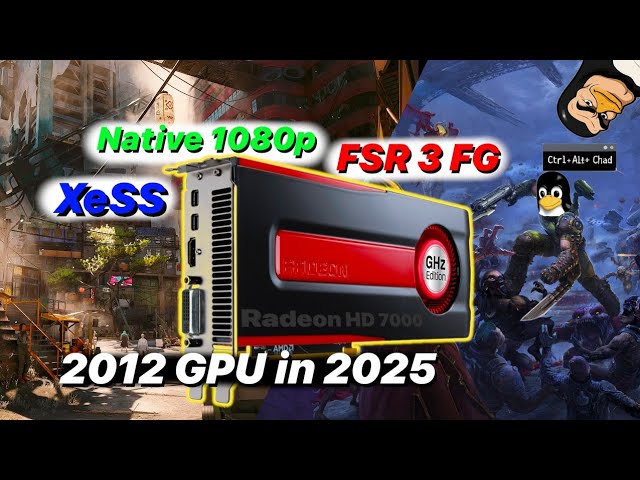
Testing modern graphics rendering technology like XeSS and FSR 3 frame gen on 2012's mid-high end offering from AMD, the Radeon HD 7870. Running this GPU with Linux's AMDGPU driver enables much greater performance and compatibility in modern games, because it is still receiving updates thanks to the open source driver stack! This GPU support DX1...
What I am talking about is not my gpu tho
I'm asking for a friend
cunning copper
final vale
i don't have a Intel GPU but XeSS is stilk way better looking
nah XeSS unaccelerated is worse than DLSS
maybe the quality preset is somewhat OK to use
but balanced and performance look blurry in motion
final vale
cunning copper
but balanced and performance look blurry in motion
DLSS also looks blurry as hell, i've had a NVIDIA GPU once
cunning copper
final vale
DLSS also looks blurry as hell, i've had a NVIDIA GPU once
unless you use DLSS performance at 1080p, it doesn't look blurry
final vale
can we move to #💭╭・general
wanton mural
north quail
lsfg-vk lib32
dont suppose theres a way to build that? Ill do anything to get PSO framegen on linux
lusty talon
you can certainly try, but dxvk-native does not have a way to build 32-bit out of the box
clang build times on windows are so atrocious 
north quail
lusty talon
no of course, but you add framegen which inserts frames and flucuates the frame ...
working fine on windows with LSFG, it's syncing the frames
cunning copper
lusty talon
do follow the steps in the guide just to be sure
it was an issue on my end specifically with my game. it was a race condition
raven kite
Time to troubleshoot @neon halo
raven kite
neon halo
?
Quake remastered
But now the goddamn stupid discord says there's an update avaible when there's nothing in pacman
north quail
raven kite
But now the goddamn stupid discord says there's an update avaible when there's n...
just go in
~/.config/discord/settings.json
and add
"SKIP_HOST_UPDATE": true
for some reason.. lsfg-vk perform better then the windows version..
raven kite
north quail
just go in
```~/.config/discord/settings.json```
and add
```
"SKIP_HOST_UPDATE"...
I already did. It did not work.
And btw, here are the logs for quake remastered
north quail
raven kite
I already did. It did not work.
weird worked for me
raven kite
I am forced to use vesktop now
@neon halo even with proton base 9 it still does not work
neon halo
yikes
raven kite
😭
neon halo
not that I'm any expert far from it lol
raven kite
Two problems today
neon halo
try with this one in Quake launch options
whatever was before the command ending by %command% >> log_file 2>&1
raven kite
neon halo
try with this one in Quake launch options
whatever was before the command endin...
After the %command%?
neon halo
yep
raven kite
And where will it store the logs
neon halo
near exe
raven kite
Well shi
lusty talon
@neon halo i had a really stupid idea. you said that on the steam deck in handheld mode nothing worked right?
try putting gamescope around the launch arguments:
gamescope -- env ENABLE_LSFG=1 (...)
no one ever said gamescope within gamescope was a bad idea
raven kite
ERROR: ld.so: object '/home/kiryufan/.local/share/Steam/ubuntu12_32/gameoverlayrenderer.so' from LD_PRELOAD cannot be preloaded (wrong ELF class: ELFCLASS32): ignored. pid 13546 != 13545, skipping destruction (fork without exec?) ERROR: ld.so: object '/home/kiryufan/.local/share/Steam/ubuntu12_32/gameoverlayrenderer.so' from LD_PRELOAD cannot be preloaded (wrong ELF class: ELFCLASS32): ignored. ERROR: ld.so: object '/home/kiryufan/.local/share/Steam/ubuntu12_32/gameoverlayrenderer.so' from LD_PRELOAD cannot be preloaded (wrong ELF class: ELFCLASS32): ignored. ERROR: ld.so: object '/home/kiryufan/.local/share/Steam/ubuntu12_32/gameoverlayrenderer.so' from LD_PRELOAD cannot be preloaded (wrong ELF class: ELFCLASS32): ignored. ERROR: ld.so: object '/home/kiryufan/.local/share/Steam/ubuntu12_64/gameoverlayrenderer.so' from LD_PRELOAD cannot be preloaded (wrong ELF class: ELFCLASS64): ignored. ERROR: ld.so: object '/home/kiryufan/.local/share/Steam/ubuntu12_32/gameoverlayrenderer.so' from LD_PRELOAD cannot be preloaded (wrong ELF class: ELFCLASS32): ignored. ERROR: ld.so: object '/home/kiryufan/.local/share/Steam/ubuntu12_32/gameoverlayrenderer.so' from LD_PRELOAD cannot be preloaded (wrong ELF class: ELFCLASS32): ignored. Proton: Restoring LD_LIBRARY_PATH to: Proton: Restoring PATH to: /usr/local/bin:/usr/bin:/usr/local/sbin:/var/lib/flatpak/exports/bin:/usr/lib/jvm/default/bin:/usr/bin/site_perl:/usr/bin/vendor_perl:/usr/bin/core_perl ProtonFixes[13549] WARN: [CONFIG]: Parent directory "/home/kiryufan/.config/protonfixes" does not exist. Abort. ProtonFixes[13549] INFO: Running protonfixes on "cachyos-10.0-20250702", build at 2025-07-05 19:43:40+00:00. ProtonFixes[13549] INFO: Running checks ProtonFixes[13549] INFO: All checks successful ProtonFixes[13549] INFO: Using global defaults for "Quake" (2310) ProtonFixes[13549] INFO: No global protonfix found for "Quake" (2310)
😭
neon halo
lusty talon
<@310442791446642689> i had a really stupid idea. you said that on the steam dec...
will try 😄
raven kite
"gameoverlayrenderer" is this a mangohud problem? 
Hold on
It was NOT a mangohud problem lol
neon halo
lusty talon
<@310442791446642689> i had a really stupid idea. you said that on the steam dec...
lol the game launches, but there's a spinning steam logo on top of it haha
lusty talon
hahaha
neon halo
I can hear Trent Reznor
raven kite
ERROR: ld.so: object '/home/kiryufan/.local/share/Steam/ubuntu12_32/gameoverlayrenderer.so' from LD_PRELOAD cannot be preloaded (wrong ELF class: ELFCLASS32): ignored. pid 13546 != 13545, skipping destruction (fork without exec?) ERROR: ld.so: object '/home/kiryufan/.local/share/Steam/ubuntu12_32/gameoverlayrenderer.so' from LD_PRELOAD cannot be preloaded (wrong ELF class: ELFCLASS32): ignored. ERROR: ld.so: object '/home/kiryufan/.local/share/Steam/ubuntu12_32/gameoverlayrenderer.so' from LD_PRELOAD cannot be preloaded (wrong ELF class: ELFCLASS32): ignored. ERROR: ld.so: object '/home/kiryufan/.local/share/Steam/ubuntu12_32/gameoverlayrenderer.so' from LD_PRELOAD cannot be preloaded (wrong ELF class: ELFCLASS32): ignored. ERROR: ld.so: object '/home/kiryufan/.local/share/Steam/ubuntu12_64/gameoverlayrenderer.so' from LD_PRELOAD cannot be preloaded (wrong ELF class: ELFCLASS64): ignored. ERROR: ld.so: object '/home/kiryufan/.local/share/Steam/ubuntu12_32/gameoverlayrenderer.so' from LD_PRELOAD cannot be preloaded (wrong ELF class: ELFCLASS32): ignored. ERROR: ld.so: object '/home/kiryufan/.local/share/Steam/ubuntu12_32/gameoverlayrenderer.so' from LD_PRELOAD cannot be preloaded (wrong ELF class: ELFCLASS32): ignored. Proton: Restoring LD_LIBRARY_PATH to: Proton: Restoring PATH to: /usr/local/bin:/usr/bin:/usr/local/sbin:/var/lib/flatpak/exports/bin:/usr/lib/jvm/default/bin:/usr/bin/site_perl:/usr/bin/vendor_perl:/usr/bin/core_perl ProtonFixes[13549] WARN: [CONFIG]: Parent directory "/home/kiryufan/.config/protonfixes" does not exist. Abort. ProtonFixes[13549] INFO: Running protonfixes on "cachyos-10.0-20250702", build at 2025-07-05 19:43:40+00:00. ProtonFixes[13549] INFO: Running checks ProtonFixes[13549] INFO: All checks successful ProtonFixes[13549] INFO: Using global defaults for "Quake" (2310) ProtonFixes[13549] INFO: No global protonfix found for "Quake" (2310) ERROR: ld.so: object '/home/kiryufan/.local/share/Steam/ubuntu12_32/gameoverlayrenderer.so' from LD_PRELOAD cannot be preloaded (wrong ELF class: ELFCLASS32): ignored. ERROR: ld.so: object '/home/kiryufan/.local/share/Steam/ubuntu12_64/gameoverlayrenderer.so' from LD_PRELOAD cannot be preloaded (wrong ELF class: ELFCLASS64): ignored. ERROR: ld.so: object '/home/kiryufan/.local/share/Steam/ubuntu12_32/gameoverlayrenderer.so' from LD_PRELOAD cannot be preloaded (wrong ELF class: ELFCLASS32): ignored. ERROR: ld.so: object '/home/kiryufan/.local/share/Steam/ubuntu12_32/gameoverlayrenderer.so' from LD_PRELOAD cannot be preloaded (wrong ELF class: ELFCLASS32): ignored. Proton: Restoring LD_LIBRARY_PATH to: Proton: Restoring PATH to: /usr/local/bin:/usr/bin:/usr/local/sbin:/var/lib/flatpak/exports/bin:/usr/lib/jvm/default/bin:/usr/bin/site_perl:/usr/bin/vendor_perl:/usr/bin/core_perl ProtonFixes[15052] WARN: [CONFIG]: Parent directory "/home/kiryufan/.config/protonfixes" does not exist. Abort. ProtonFixes[15052] INFO: Running protonfixes on "cachyos-10.0-20250702", build at 2025-07-05 19:43:40+00:00. ProtonFixes[15052] INFO: Running checks ProtonFixes[15052] INFO: All checks successful ProtonFixes[15052] INFO: Using global defaults for "Quake" (2310) ProtonFixes[15052] INFO: No global protonfix found for "Quake" (2310)
Tbh I have no idea what this even means
neon halo
Like that?
 lusty talon
no, put the backend right after gamescope
neon halo
This doesnt boot
 neon halo
same result than gamescope -- env
game launches but theres a window on top of it
can hear sound but that's all
raven kite
I'm gonna try launching the game with vkd3d proton now
Doubtful it'll fix anything but to try
neon halo
possible to have --backend wayland
? (nevermind, no swapchain right?)
lusty talon
neon halo
possible to have --backend wayland
? (nevermind, no swapchain right?)
that's what gamescope does by default
so no success sadly :(
neon halo
yep, honestly for now it's "okay"
the closest thing people can get which works, is desktop mode, and then big picture
lusty talon
ye once I got the deck I'll be able to debug this properly
 crisp scroll
oh man XD
neon halo
but I'd say, don't try to fight gamescope, you will probably loose your energy for nothing, this is something that has to be done in collab with Valve and/or the gamescope maintainer(s)
as a joined venture (I'm sure they'll be down)
neon halo
it totally is
is there an other channel/way for donations?
sadly GitHub doesn't accept paypal anymore 😦
and they're asking for my entire bio or something lol
raven kite
@lusty talon doom 64 works perfectly well with lsfg-vk, version is proton hotfix and from steam
 solemn elm
github has a donation feature?
raven kite
It uses the vulkan renderer
lusty talon
i don't even know how to feel about almost having 500 stars on this repo
neon halo
better get used to it because you're just getting started 😉
solemn elm
lusty talon
i don't even know how to feel about almost having 500 stars on this repo <:puppy...
people have been wanting this for a loooooong while
lusty talon
ehehe
crisp scroll
solemn elm
people have been wanting this for a loooooong while
yeap :C
lusty talon
solemn elm
people have been wanting this for a loooooong while
honestly when I joined this discord I expected a solid 5 people to be interested in this
solemn elm
 neon halo
the most impressive thing, is the frame pacing, for the rare instances where it works properly, I was expecting stutters, but no, flat as (insert joke here)
lusty talon
the current approach works well
I haven't thought about how well it works in sub-par situations
i need to spend time doing that
time that I don't have LOL
neon halo
crisp scroll
any idea native vulkan app i can try :v
Quake 1 or 2, or Doom recent port
crisp scroll
ok
solemn elm
lol
 neon halo
crisp scroll
ok
neon halo
crisp scroll
ok
if you feel very adventurous, you can try The Talos Principle original in Vulkan mode
since it was historically the first real game to support Vulkan
raven kite
I am gonna test if this works with flatpak
neon halo
you know what, I'm actually going to download it, I've been pushing away talos principle for the longest time
lusty talon
raven kite
I am gonna test if this works with flatpak
it won't out of the box
neon halo
need to play it more
lusty talon
see something that's really funny is, I made this program because of genshin, and no other reason
raven kite
lusty talon
it won't out of the box
The moment mangohud didn't work my hopes were crushed 😢
lusty talon
i own like 3 steam games
crisp scroll
found a playground of old linux games :D
neon halo
lusty talon
see something that's really funny is, I made this program because of genshin, an...
DXVK was made for NieR automata
lusty talon
raven kite
The moment mangohud didn't work my hopes were crushed 😢
you'll just have to wait a bit :P
raven kite
Will any opengl game work?
lusty talon
raven kite
Will any opengl game work?
you can try with zink, but no
anyways im gonna lock back in I really wanna finish 3.1
raven kite
I am gonna test doom + doom 2 real quick
neon halo
looking at my coffee machine with affection lol
crisp scroll
one thing if kicks the in vkcube must be slower?
raven kite
We can add both doom 64 and doom + doom 2 to the list of compatible games 👍
neon halo
Maybe the System Shock 2 remaster a well? 👀 since it runs on Kex too
raven kite
I'm ngl it feels so smooth it feels exactly like that mod called smooth doom where all the weapons have smoother animations
neon halo
despite my profile pic, I still haven't bought the game lol
no way Talos is even 64 bit!
raven kite
Seems like all those old Id software game remasters have a tendency to go in a black screen after quitting lol
neon halo
As expected, the native linux build of Talos is borked lol, game boots, but UI has issues
forcing Windows version by selecting proton exp (my little trick)
raven kite
So far I haven't tried a single native game
Every native game I have is either too old (such as half life)
neon halo
hard to, Proton favors Windows build 99% of the time (and it's a good thing)
raven kite
Or just broken on Wayland
For example the metro exodus native version on Wayland is broken and crashes
raven kite
What does that stand for
lusty talon
i somehow misread this as IE and I was like "no they didn't port internet explorer 😭"
neon halo
Enhanced Edition
raven kite
neon halo
Enhanced Edition
No
neon halo
yeah so better translate EE
raven kite
And besides the only difference is has is that it uses rt compared to the og
neon halo
what's wrong with EE
(kudos to those who get the ref)

 black was unreadable in dark mode
crisp scroll
black was unreadable in dark mode
crisp scroll
well ultrakill working fine
neon halo
raven kite
Whats wrong with ee?
neon halo
Damn, Talos is obscenely well optimized, it puts to shame a lot of productions out there
man I forgot how obscene Talos was, the number of options is like, 150
the guys are masters of their craft, there's like 8 different anti aliasing options for different things in the game
crisp scroll
mangohud can overlay the generated frames by lsfg?
neon halo
The Talos Principle (Proton Exp aka Windows Build forced) 64 bit build in Vulkan renderer, confirmed to work as intended with lsfg-vk 🙂
This is the smoothest 30 fps ever lol
wanton mural
Alternatively, if i had a fix for gamescope NOT randomly freezing PSO, that would be acceptable.. I guess
I wish I knew why
raven kite
crisp scroll
mangohud can overlay the generated frames by lsfg?
Yes
But it's really weird, sometimes it works and sometimes not
raven kite
neon halo
The Talos Principle (Proton Exp aka Windows Build forced) 64 bit build in Vulkan...
The compatible game list is gonna blow up like crazy
neon halo
not too much since for now, it's really only 64 bit and DX12 has been very dodgy, but it's a really really good start
when it works, it works like a dream, as it can be seen
I intended to be more stable while filming, but I was like, no-one is going to believe me that this is locked at 30 FPS lmao
raven kite
Imma test it on quake champions
neon halo
Skyrim Special Edition 💀
for some reason it runs like total ass on the deck lol
would be fun to see if it is at least possible to generate frames and see them lol
my expectations are not high lol
raven kite
Nah I ain't updating this dead ahh game of quake champions
neon halo
hey, you, you're finally stuttering
raven kite
I'll try wolfenstein 2 although it probably won't work since doom 2016 doesn't and it uses the same engine
neon halo
oof nono, Wolf 2 requires a powerhouse
raven kite
Black screen 👍
 pine topaz
heyyy how can I check if LSFG is actually working?
mangohud doesn't show an improvement
raven kite
pine topaz
heyyy how can I check if LSFG is actually working?
The guide says to memorize the vkcube spinning pattern and if it spins slower with fg it's working
neon halo
as for games, well, what's your monitor's refresh rate ?
pine topaz
144hz
neon halo
might want to lock the game you're trying to test at 36 FPS, and do x4
if it's smooth it's working, otherwise it's not 😄
pine topaz
okay I'll try satisfactory
pine topaz
pine topaz
okay I'll try satisfactory
doesn't seem smoother
neon halo
vkcube worked?
raven kite
pine topaz
doesn't seem smoother
Does mangohud show a fps difference?
raven kite
Does the cube at least spin slower
pine topaz
hard to tell but maybe?
pine topaz
made a gentoo ebuild that basically does the same thing
raven kite
$ file ~/.local/share/vulkan/implicit_layer.d/VkLayer_LS_frame_generation.json (...)/VkLayer_LS_frame_generation.json: JSON text data $ file ~/.local/lib/liblsfg-vk.so (...)/liblsfg-vk.so: ELF 64-bit LSB shared object, x86-64, version 1 (SYSV), dynamically linked (...)
Try doing this to verify if the files are correctly installed
If it gives the output shown above then yes
pine topaz
I install it to /usr/share/vulkan/implicit_layer.d/VkLayer_LS_frame_generation.json but should still work
neon halo
well, I got Skyrim to launch in fullscreen that's a start lol
raven kite
Yeah no you should've probably installed it to the guide's reccomended path instead
Still try checking the file in that dir where you've installed it
pine topaz
raven kite
Yeah no you should've probably installed it to the guide's reccomended path inst...
well I'm making a package to make it easier
neon halo
A Bethesda Game runs at sub 30 natively
sounds about right!
raven kite
pine topaz
well I'm making a package to make it easier
I don't find a package really useful, I'd just compile from source
And whenever there's an update I just do
cd lsfg-vk git pull rm -rf build cmake -B build -G Ninja \ -DCMAKE_BUILD_TYPE=Release \ -DCMAKE_INSTALL_PREFIX=~/.local \ -DCMAKE_INTERPROCEDURAL_OPTIMIZATION=ON \ -DCMAKE_CXX_CLANG_TIDY="" cmake --build build cmake --install build ENABLE_LSFG=1 LSFG_MULTIPLIER=4 vkcube
(stolen)
raven kite
And no doom 2016 
neon halo
we really need a faster model though, the deck crumbles, but frame generation on Skyrim SE works as intended with properly presented frames
Sorry for the bad camera quality, at least it records 60 fps well 🙂
 patent glade
neon halo
Sorry for the bad camera quality, at least it records 60 fps well 🙂
patent glade
neon halo
Sorry for the bad camera quality, at least it records 60 fps well 🙂
How's input latency?
neon halo
pretty much how'd you expect 30 FPS base + Vsync to be
it's allright
for a game like this
you're not going to flickshot with an arrow and gyroscope, but it's going to be allright
I'm eager to try 45 base x2 for 90 generated, but that will have to wait for a more efficient model 😉
patent glade
lusty talon
see something that's really funny is, I made this program because of genshin, an...
Same history behind DXVK, the dev created it just because he wanted to play Nier Automata on linux XD
north quail
I am not sure, but on linux there is less input letencu compared to windows lsfg
That what i felt
neon halo
probably placebo though, at least VRR vs VRR
especially if we're talking LS 3.2 with QT 0
raven kite
neon halo
Sorry for the bad camera quality, at least it records 60 fps well 🙂
Smoothest 60 fps ever
north quail
Though vrr works fine with windows
raven kite
Hope for performance mode 🙏
pine topaz
raven kite
`cd lsfg-vk
git pull
rm -rf build
cmake -B build -G Ninja \
-DCMAKE_BUILD...
[Vulkan Loader] ERROR: Error relocating /home/doggo/.local/share/vulkan/implicit_layer.d/../../../lib/liblsfg-vk.so: _ZN4dxvk2vk8DeviceFnD1Ev: symbol not found
neon halo
there must be some path replacement or something
pine topaz
neon halo
there must be some path replacement or something
no
neon halo
wait no I'm dumb sorry
it's late
it's 3 back actions in folder tree
yeah path is correct
pine topaz
pine topaz
`[Vulkan Loader] ERROR: Error relocating /home/doggo/.local/share/vulka...
maybe I should disable LTO idk
raven kite
pine topaz
`[Vulkan Loader] ERROR: Error relocating /home/doggo/.local/share/vulka...
You have to first uninstall it by deleting the files you put in your custom directory, and to update run each command individually, not all at once
pine topaz
I uninstalled my ebuild
raven kite
Alright
pine topaz
removed the older LTO build installed in ~/.local/share etc
 lethal steppe
neon halo
Sorry for the bad camera quality, at least it records 60 fps well 🙂
lethal steppe
neon halo
Sorry for the bad camera quality, at least it records 60 fps well 🙂
we'll never escape from this scene
raven kite
https://github.com/PancakeTAS/lsfg-vk/wiki/Installation-Guide @pine topaz this guide
GitHub
Lossless Scaling Frame Generation on Linux via DXVK/Vulkan - PancakeTAS/lsfg-vk
pine topaz
yes
raven kite
$ cd lsfg-vk $ git pull $ rm -rf build $ cmake -B build -G Ninja \ -DCMAKE_BUILD_TYPE=Release \ -DCMAKE_INSTALL_PREFIX=~/.local \ -DCMAKE_INTERPROCEDURAL_OPTIMIZATION=ON \ -DCMAKE_CXX_CLANG_TIDY="" $ cmake --build build $ cmake --install build $ ENABLE_LSFG=1 LSFG_MULTIPLIER=4 vkcube
A more understandable version of my way of updating the project
@pine topaz
pine topaz
raven kite
<@464106107942731777>
there's still [Vulkan Loader] ERROR: Error relocating /home/doggo/.local/share/vulkan/implicit_layer.d/../../../lib/liblsfg-vk.so: _ZN4dxvk2vk8DeviceFnD1Ev: symbol not found [Vulkan Loader] INFO | LAYER: Requested layer "VK_LAYER_LS_frame_generation" failed to load. in console when I run VK_LOADER_DEBUG=all ENABLE_LSFG=1 LSFG_MULTIPLIER=4 vkcube
to clarify vkcube does run, it's just that the layer doesn't load
neon halo
does someone here has the Steam Deck LCD?
raven kite
pine topaz
there's still ```
[Vulkan Loader] ERROR: Error relocating /home/doggo/....
Try removing vk debug all I'm too tired atp 😭
raven kite
neon halo
cvt 800 1280 60
Wtf is this
neon halo
and copy paste the result, thanks!
just listing the EDID of the LCD display in desktop mode
raven kite
I have no idea
pine topaz
yep
raven kite
Are all dependencies installed
pine topaz
they should be
 plush trench
who tried retroarch? all the cores freeze if ran from the GUI.
but invoking them with
VK_LOADER_DEBUG=all LSFG_LOG_DEBUG=all ENABLE_LSFG=1 LSFG_MULTIPLIER=4 retroarch -L ~/.config/retroarch/cores/mgba_libretro.so game.gba -v
works
neon halo
raven kite
Wtf is this
it's safe don't worry!
it's just that those MFs at Valve didn't add 60 Hz in desktop mode for the OLED deck
 pale onyx
Doesn't seem to work on dolphin emulator unfortunately. Tried to manually preload, launch straight into a rom, tried normally, doesn't seem to work :(
plush trench
pale onyx
Doesn't seem to work on dolphin emulator unfortunately. Tried to manually preloa...
works for me though
VK_LOADER_DEBUG=all LSFG_LOG_DEBUG=all ENABLE_LSFG=1 LSFG_MULTIPLIER=4 dolphin-emu -b -e TimeSplitters\ 2\ \(USA\).rvz
pale onyx
plush trench
`VK_LOADER_DEBUG=all LSFG_LOG_DEBUG=all ENABLE_LSFG=1 LSFG_MULTIPLIER=4 dolphin...
doesn't seem to work. What are your settings?
oh wiat, I dont think opengl would work lol
oops
plush trench
pale onyx
oh wiat, I dont think opengl would work lol
yeah it won't 😄
i'm kinda struggling to get it to work with xemu. you can select vulkan as a backend in the video options, but it still seems to use openGL anyway? (info from mangohud)
pale onyx
thank you, it works!!
you're goated, but unfortunately I forgot how much input delay ls adds 😔
pine topaz
plush trench
i'm kinda struggling to get it to work with xemu. you can select vulkan as a bac...
it shouldn't be using opengl
did you restart it?
plush trench
yes several times
i get a segfault if i try to use lsfg with it
i'm using the 0.8.92 build, can you try it out on your side?
pine topaz
plush trench
i'm using the 0.8.92 build, can you try it out on your side?
no I don't use it
I do know technically you could use zink to translate opengl to vulkan & use the layer but idk if anyone's ever done that before
plush trench
https://github.com/xemu-project/xemu/issues/2212#issuecomment-2923082227 yeah the gui itself uses openGL, so it won't work without workarounds
pine topaz
pine topaz
I do know technically you could use zink to translate opengl to vulkan & use the...
well I guess you can try that
MESA_LOADER_DRIVER_OVERRIDE=zink GALLIUM_DRIVER=zink
you need system mesa that has zink
which distro do you use?
plush trench
tried __GLX_VENDOR_LIBRARY_NAME=mesa __EGL_VENDOR_LIBRARY_FILENAMES=/usr/share/glvnd/egl_vendor.d/50_mesa.json MESA_LOADER_DRIVER_OVERRIDE=zink GALLIUM_DRIVER=zink LIBGL_KOPPER_DRI2=1 from the archwiki but it still seems to be using opengl
plush trench
pine topaz
which distro do you use?
i'm on endeavouros
patent glade
plush trench
tried `__GLX_VENDOR_LIBRARY_NAME=mesa __EGL_VENDOR_LIBRARY_FILENAMES=/usr/share/...
test with glxgears
Put MANGOHUD=1 it should show if it's zink
plush trench
patent glade
test with glxgears
nice it shows up zink ye
wanton mural
so.. would recompiling lsfg-vk as 32-bit help my issue?
with PSO
assuming i could somehow get it as 32-bit
neon halo
yeah I wasn't able to make a single 32 bit game run with lsfg-vk so far
pine topaz
what's PSO?
raven kite
Does zink work for opengl games yet?
pine topaz
neon halo
yeah I wasn't able to make a single 32 bit game run with lsfg-vk so far
I think maybe using wine wow64 you could
plush trench
i get the same exact segfault with lsfg+xemu regardless of zink being enabled or not 🤔
neon halo
pine topaz
I think maybe using wine wow64 you could
is there a Proton fork of that particular branch?
pine topaz
neon halo
is there a Proton fork of that particular branch?
no
it's not a branch is a build time option
plush trench
neon halo
is there a Proton fork of that particular branch?
wine-staging uses it by default now
pine topaz
pine topaz
it's not a branch is a build time option
basically wow64 runs 32 bits software without needing 32 bits wine or drivers
so maybe it'd fix your issue if it's really related to 32 bits?
neon halo
how does that work?
raven kite
Wow64?
wanton mural
what do i need to do to get lsfg working on PSO
use wine wow64?
pine topaz
a wine wow64 build
wanton mural
of PSO? its a defunct game. thats not happening
pine topaz
no I mean

GitHub
10.11 release.
How to know if NTSYNC works
Note that for NTSYNC you need a new Linux kernel (6.14 or newer) and, of course, a Wine build that has NTSYNC support (like staging-tkg-ntsync).
Run so...
a wow64 build like the one here
wanton mural
hmm. how to install on fedora?
plush trench
wanton mural
hmm. how to install on fedora?
just install wine-staging
wanton mural
ah
pine topaz
yeah recent one should work
neon halo
so that'd be using Wine instead of Proton though
pine topaz
yes
wanton mural
thats fine i dont need proton
pine topaz
neon halo
so that'd be using Wine instead of Proton though
you can't build proton with wow64 afaik
plush trench
yeah i'm curious how proton will handle these wine changes
neon halo
Yeah on Steam Deck let's say Proton is quite important lol
pine topaz
plush trench
yeah i'm curious how proton will handle these wine changes
it's optional
plush trench
if they'll keep the lib32 or switch to wow64
pale onyx
also just curious, why doesn't it support openGL?
neon halo
needs to hook on Vulkan at some point
can hook if the game is Vulkan or translated to Vulkan
but OpenGL isn't translated to Vulkan
pale onyx
understood, kind of a bummer though
wanton mural
...
0024:fixme:winediag:loader_init Please mention your exact version when filing bug reports on winehq.org.
0024:fixme:ntdll:NtQuerySystemInformation info_class SYSTEM_PERFORMANCE_INFORMATION

Unhandled Exception:
System.Windows.Markup.XamlParseException: The invocation of the constructor on type 'online.MainWindow' that matches the specified binding constraints threw an exception. ---> System.EntryPointNotFoundException: RenderOptions_ForceSoftwareRenderingModeForProcess assembly:<unknown assembly> type:<unknown type> member:(null)
  at (wrapper managed-to-native) MS.Win32.PresentationCore.UnsafeNativeMethods+MilCoreApi.RenderOptions_ForceSoftwareRenderingModeForProcess(bool)
  at System.Windows.Media.RenderOptions.set_ProcessRenderMode (System.Windows.Interop.RenderMode value) [0x00029] in <ff62695984974bf7841bbae43f5a81c3>:0
  at online.MainWindow..ctor () [0x00066] in <5a08444dfb6e45af8bf2e3b35b9a1bb1>:0
...``` aarrgghhhwine staging chokes on launcher
older wine is of course fine...
neon halo
pale onyx
understood, kind of a bummer though
maybe in the future if a different approach is possible 🙂
lusty talon
oh god I'm really noticing the frame pacing issues in genshin
hmm, they didn't used to be there I think
we'll that's a problem for 5 am me to find out
(these quests are quite long)
lusty talon
same
pale onyx
playing without shaders is honestly a game breaker
lusty talon
wdym force d3d9?
wanton mural
lutris does that to make PSO work
solemn elm
lusty talon
same
Wait it works on zink right?
lusty talon
yeah it should, but it doesn't.
solemn elm
I swear to god "Vulcan" and "zinc" I'll never get them correct
wanton mural
...
0024:fixme:winediag:loader_init wine-staging 10.4 is a testing version containing experimental patches.
0024:fixme:winediag:loader_init Please mention your exact version when filing bug reports on winehq.org.
0024:fixme:ntdll:NtQuerySystemInformation info_class SYSTEM_PERFORMANCE_INFORMATION

Unhandled Exception:
System.Windows.Markup.XamlParseException: The invocation of the constructor on type 'online.MainWindow' that matches the specified binding constraints threw an exception. ---> System.EntryPointNotFoundException: RenderOptions_ForceSoftwareRenderingModeForProcess assembly:<unknown assembly> type:<unknown type> member:(null)
  at (wrapper managed-to-native) MS.Win32.PresentationCore.UnsafeNativeMethods+MilCoreApi.RenderOptions_ForceSoftwareRenderingModeForProcess(bool)
  at System.Windows.Media.RenderOptions.set_ProcessRenderMode (System.Windows.Interop.RenderMode value) [0x00029] in <ff62695984974bf7841bbae43f5a81c3>:0
  at online.MainWindow..ctor () [0x00066] in <5a08444dfb6e45af8bf2e3b35b9a1bb1>:0
...``` seems like a wine bug.. guess ill gdbIf I had a nickel for every rendering framework that was a slightly misspelt version of an actual word I'd have two nickels it's not that many but it's weird it happened twice
wanton mural
A fatal error internal to GDB has been detected, further
debugging is not possible.  GDB will now terminate.
💀
plush trench
xddddddd
plush trench
idk how proton just works so often while wine just doesn't most of the time
wanton mural
warning: core file may not match specified executable file.
warning: Selected architecture i386:x86-64 is not compatible with reported target architecture i386
warning: Architecture rejected target-supplied description
``` maybe its this idk untold jewel
¿At least for now, it's imposible to framecap at 30fps to do a multiplier x2 to have 60fps with the current state right?
lusty talon
untold jewel
¿At least for now, it's imposible to framecap at 30fps to do a multiplier x2 to ...
wdym? of course you can
lusty talon
wanton mural
```
A fatal error internal to GDB has been detected, further
debugging is not po...
today is not debugger day
 wanton mural
ENABLE_LSFG=1 LSFG_LOG_DEBUG=all WINEPREFIX="/home/x5/Desktop/EphineaPSO" VK_LOADER_DEBUG=all LSFG_DLL_PATH="/home/x5/Desktop/EphineaPSO/drive_c/EphineaPSO/Lossless.dll" LSFG_MULTIPLIER=4 gdb wine /home/x5/Desktop/EphineaPSO/drive_c/EphineaPSO/online.exe```was the command
i installed wine staging
dropdowns dont work for online launcher aaaaa idk what to install
untold jewel
lusty talon
wdym? of course you can
When I test the vkcube, i don't have any problem, but when I use for some game I don't see any difference. I was trying to cap fps with mangohud but I don't see any interpolation.
Btw, thanks for you hard work.
lusty talon
i won't be able to help you with this now sadly
pale onyx
mght be a silly question, how can I use it with steam games?
plush trench
pale onyx
mght be a silly question, how can I use it with steam games?
https://github.com/PancakeTAS/lsfg-vk/wiki/Configuring-lsfg‐vk checkout the 2.
lusty talon
it worked on repo earlier, but when I tried retesting it REPO just crashed, even without LSFG
lusty talon
probably repo servers down and this is global?
pale onyx
nevermind, I just didnt have proton enabled 💀
pale onyx
also, pretty sure repo uses something other than dx or vk
nvm I have no idea what I'm talking about
lsfg just doesn't seem to work with repo currently 😔
north quail
pine topaz
a wow64 build like the one here
ya this should work
wanton mural
i tried that but it wont run the launcher 😦
pine topaz
pine topaz
there's still ```
[Vulkan Loader] ERROR: Error relocating /home/doggo/....
I guess I'll just give up, it doesn't work no matter what I do
I followed the wiki down to the very letter

lusty talon
@pine topaz are you the person trying to build this project with gcc?
i realize my dxvk compilation relies on pure compiler rng which is precisely why you're encountering this error, but seeing how most people could compile just fine I really don't see why it doesn't work for you.
what binutils, llvm and clang versions are you on? i'll take a look tomorrow
pine topaz
lusty talon
<@464106107942731777> are you the person trying to build this project with gcc?
...
I did both
pine topaz
lusty talon
<@464106107942731777> are you the person trying to build this project with gcc?
...
well I do have an usual setup
it's gentoo with clang+libcxx
whether it was gcc or clang didn't seem to matter, I've had the error on both
binutils: 2.44-r3 llvm/clang: 20.1.7
had the issue in a chroot with more normal setup too
could be gentoo shenanigans
 vestal belfry
Just want to say this is super cool. I was working on a similar project, however yours is in C++ and you're probably experienced. I was making mine in plain C as I learned C and I have extremely limited free time between 12H shifts and a family of four. Yours is also a conversion into native Vulkan. What I was doing was working on just modding the display capture and reprojection with Wayland display capture and ffmpeg ot GStreamer. I only ever got as far as program capture though.
I'll probably start focusing my efforts on other projects I want to make, but I'm for sure going to read your code because I'm super interested in how you did it. As I get more experienced I may submit a commit in the future.
Thanks again! I love the passion of FOSS projects.
lusty talon
pine topaz
whether it was gcc or clang didn't seem to matter, I've had the error on both
if you could dm me the entire build folder and the error i'll take a look at it tmrw
crisp scroll
lusty talon
today is not debugger day
F
vestal belfry
Once this is of high enough quality to be considered a first release, would it be possible to reach out to either Glorious Eggroll or Etaash to have this merged natively into ProtonGE or ProtonEM?
Of course the original program would still need to be purchased and installed on Steam first, but I think this could be helpful to the normies.
north quail
vestal belfry
Once this is of high enough quality to be considered a first release, would it b...
I dont think so it will be merged into proton
because use of proprietary software
wine is an opensource project, and proton too, they won't add something that require you have proprietary application to run it, if it was standalone ya they would have, as of now won't happen
Later on distro can ship it as package so you don't have to build it, that can happen
vestal belfry
north quail
I dont think so it will be merged into proton
ProtonGE and ProtonEM are both forks that already have stubs for proprietary software, though the stuff they hook to currently is available free of charge
north quail
vestal belfry
ProtonGE and ProtonEM are both forks that already have stubs for proprietary sof...
ya but i dont think it will happen, cause LSFG is not a free software, if it was free they could just do something like NGX_UPDATE or FSR4_Update think, where the dll is just updated to latest version and they can use dlss/fsr on latest model.
vestal belfry
I'm at work tonight so I haven't looked at how lsfg_vk hooks the source frame gen, but that's entirely possible
I'm not arguing, just thinking about possibilities
pale onyx
would it be possible to make a community made compatibility list?
 clever epoch
hello all. i've legion go on steam os3.8 and a pc on bazzite. I tried to compile under steamOS and bazzite but since Ninja etc.. are not integrated it was a pain. Do you think a version could appear in decky not immediately but eventually.?? Thx
 thin fable
hi, how do i test if this works on steam deck? I tried the wiki guide last night but nothing seemed to complie for me lol
 gusty spade
hi everyone, good morning, do we know if the port works under WSL? if not i wanna give it a try and test it in WSL.
 desert monolith
Why.
clever epoch
thin fable
hi, how do i test if this works on steam deck? I tried the wiki guide last night...
you must unlock steamOS , after install clang and ninja for cmake but it's dosn't work for me. I'v some errors when i compil on steamOS
gusty spade
desert monolith
Why.
why WSL?
desert monolith
Why try running a linux port of a windows only program in WSL?
thin fable
clever epoch
you must unlock steamOS , after install clang and ninja for cmake but it's dosn'...
ok thanks
gusty spade
desert monolith
Why try running a linux port of a windows only program in WSL?
i dont have a separate linux machine, i run everything linux related on containers or WSL
VMs are heavier and collide with WSL
desert monolith
desert monolith
Why try running a linux port of a windows only program in WSL?
Its like if you had a book in english, someone translated it 1 to 1 to japanese and now you are asking a translator to translate the japanese copy for you
gusty spade
how do you do it?
desert monolith
I jist dont see a reason why
gusty spade
desert monolith
Its like if you had a book in english, someone translated it 1 to 1 to japanese ...
i cant follow the analogy here tbh
desert monolith
Not like you could "pirate" LS as a Lossless.dll is required
gusty spade
where do you run the port then?
desert monolith
Why run the port if you are on windows
gusty spade
you are making me question my sanity ngl, i got confused a bit. Just for clarification again, im not trying to run it on windows
since i dont have a linux machine im trying to find out if it can run on WSL instead
WSL is not "windows", technically it lives inside the windows ecosystem but the same way a linux VM can exist inside windows
just help me out here and tell me where do you run your port forget about WSL
vestal belfry
gusty spade
hi everyone, good morning, do we know if the port works under WSL? if not i wann...
God's bravest tinkerer
 floral basin
AFAIK, WSL does not have a graphic environment, so you won't be able to run vulkan nor any graphic app
you can compile the software, but not use it, that's what I think
 winter cape
clever epoch
you must unlock steamOS , after install clang and ninja for cmake but it's dosn'...
winter cape
clever epoch
you must unlock steamOS , after install clang and ninja for cmake but it's dosn'...
I had success compiling it inside an arch linux container on steamos using distrobox:
$ distrobox create --image archlinux:latest --name lsfg
$ distrobox enter lsfg
(follow installation instructions from the wiki)
$ exit
In addition to the dependencies listed on the wiki, I think I also needed to install sdl3
clever epoch
winter cape
I had success compiling it inside an arch linux container on steamos using distr...
thanks I'm a beginner on Linux but I want to get there. i test after work
gusty spade
floral basin
AFAIK, WSL does not have a graphic environment, so you won't be able to run vulk...
X11 works fine rendering UI apps (sometimes it has issues or freezes) but i know i can open firefox and watch youtube videos for example
ill give it a try thank your time guys
lusty talon
i wake up and suddenly i'm on techlinked huh :333
 pliant lily
 halcyon sapphire
is there any way to confirm the framegen activated besides visually?
lusty talon
you can use a debugger, but other than that I don't know of a consistent way
halcyon sapphire
ive tried helldivers 2 and the famous cube but it doesnt seem to change anything
raven kite
halcyon sapphire
ive tried helldivers 2 and the famous cube but it doesnt seem to change anything
Spins slower?
halcyon sapphire
happend once but was because of high system load
raven kite
Hmm
 thin fable
i successfully got the vkcube thing working on my steam deck lol, but I can't really see the difference between the 2 speeds? 🤔
raven kite
halcyon sapphire
just to be sure this is right?
Yeah
Btw whenever you run vkcube with lsfg-vk, does the terminal show an output similar to this @halcyon sapphire ?
 halcyon sapphire
 raven kite
halcyon sapphire
raven kite
halcyon sapphire
Then it's not installed correctly
thin fable
📦[deck@lsfg lsfg-vk]$ ENABLE_LSFG=1 LSFG_MULTIPLIER=4 vkcube
Selected WSI platform: xcb
Selected GPU 0: AMD Custom GPU 0932 (RADV VANGOGH), type: IntegratedGpu
📦[deck@lsfg lsfg-vk]$ vkcube
Selected WSI platform: xcb
Selected GPU 0: AMD Custom GPU 0932 (RADV VANGOGH), type: IntegratedGpu
mine just says this
raven kite
Same for you, it's not installed correctly
thin fable
lol i c
halcyon sapphire
then what i did wrong, checking with the file command gave the desired output
raven kite
Do you have lossless scaling on steam?
raven kite
Is it installed in the default steam game directory or somewhere else?
halcyon sapphire
/home/iedi/.local/share/Steam/steamapps/common/Lossless Scaling/
is this right?
 sudden jolt
BTW, 2x 3x 4x confirmed working with X-Plane 12 on Linux. GPU is an RTX 3070
(native Vulkan)
raven kite
halcyon sapphire
/home/iedi/.local/share/Steam/steamapps/common/Lossless Scaling/
is this right?
Yeah
Still try giving it the dll path just to be sure
halcyon sapphire
i did, still nothing
raven kite
Huh
halcyon sapphire
i should recompile then
raven kite
Do you have all dependencies installed
halcyon sapphire
im on gentoo yk its harder to translate the dependencies
sudden jolt
halcyon sapphire
did you confirm this?
 halcyon sapphire
ye
sudden jolt
did you run cmake --install build?
thin fable
lemme check
sudden jolt
in the cloned lsfg-vk directory
thin fable
yeh i think i did
raven kite
$ cd lsfg-vk $ git pull $ rm -rf build $ cmake -B build -G Ninja \ -DCMAKE_BUILD_TYPE=Release \ -DCMAKE_INSTALL_PREFIX=~/.local \ -DCMAKE_INTERPROCEDURAL_OPTIMIZATION=ON \ -DCMAKE_CXX_CLANG_TIDY="" $ cmake --build build $ cmake --install build $ ENABLE_LSFG=1 LSFG_MULTIPLIER=4 vkcube
thin fable
it installed something from peparse_git
halcyon sapphire
im gonna do some vulkan recompiling with diffrent flags and will come back later
thin fable
this is what the error code says: 📦[deck@lsfg lsfg-vk]$ cmake --install build
-- Install configuration: "Release"
CMake Error at build/cmake_install.cmake:51 (file):
file INSTALL cannot find "/home/deck/lsfg-vk/build/liblsfg-vk.so": No such
file or directory.
raven kite
thin fable
this is what the error code says: 📦[deck@lsfg lsfg-vk]$ cmake --install build
-...
Try recompiling it from the start
thin fable
alright will do thanks
so it looks like I'll have to install sdl3 as it won't let me get further
lusty talon
halcyon sapphire
this is a beautiful font..
as for you and @thin fable, run with
VK_LOADER_DEBUG=all (after you fix your installation)
halcyon sapphire
lusty talon
this is a beautiful font..
as for you and <@639259794309513225>, run with
`VK_LO...
Its DepartureMono Nerd Font
vestal belfry
lusty talon
i wake up and suddenly i'm on techlinked huh :333
I don't think you realize just how much this has been wanted or the number of attempts, including myself, people have tried to approach this.
The fact that it's in a functional state is the biggest breakthrough on a path forward. With FSR4 and DLSS4 in the state they're currently in, all we really need is the frame gen, and hopefully some day adaptive frame-gen.
vestal belfry
halcyon sapphire
is there any way to confirm the framegen activated besides visually?
Also anyone know if Mangohud would show before or after frames? I have three days off after I get off this shift and plan on hardcore testing
Or maybe I'll just finish Jedi Fallen Order idk
 tawdry needle
Mangohud shows generated frames.
vestal belfry
Excellent. I should be able to tell the difference. I'll have to see if the framerate lock in mangohud affects the base or generated framerate. If I could x3 from 48, that would be great for frame-timings.
tawdry needle
Valheim is 40-60fps on my laptop at 1200p, with FG it was 80-100fps, and felt much better. Other games I've tried have been ~70fps, going to ~120. I've yet to find a game which doesn't work. 😍
gusty spade
lusty talon
i wake up and suddenly i'm on techlinked huh :333
thats how i found out about the port project i instantly went to check, congrats!!
raven kite
I got mangohud to work in quake 4 using zink. Now time to try lsfg-vk
thin fable
winter cape
I had success compiling it inside an arch linux container on steamos using distr...
how do i install sdl3?
raven kite
As expected fg doesn't work in quake 4 even if using zink
winter cape
thin fable
how do i install sdl3?
sudo pacman -S sdl3
thin fable
cheers bro
raven kite
Well, lsfg-vk launches with wolfenstein the new order using zink but it's very buggy and broken
Meanwhile wolfenstein 2009 works
 pastel stratus
thin fable
pastel stratus
thin fable
ok so i reinstalled everything, had to install sdl3, ninja and glsslang
vkcube works as advertised
how would i get this working in say, the dolphin emulator?
 flint ferry
General and Reports are closed
raven kite
Why are they private channels 💀
 old flame
🤷
tawdry needle
thin fable
how would i get this working in say, the dolphin emulator?
ENABLE_LSFG=1 LSFG_MULTIPLIER=4 dolphin-emu ?
 sour geode
Took this for a spin on my CachyOS RTX4060 laptop for Minecraft (via Prism launcher) and it works beautifully, no errors so far.
Still working on figuring it out for Metal Gear Rising via steam through the environmental variable launch options outlined in the github wiki's configuration section, so far nothing seems to change, at least neither steam's nor mangohud's fps values ever go above 60.
tawdry needle
Have you got a 60fps cap set anywhere?
sour geode
No I don't remember ever setting anything like that, nor any place where such an option would be available in this case.
As far as I'm aware only the game itself is locked to 60 fps, hence why I am trying to apply LS to it.
I use nothing else but standard default proton emulation for MGR (no forced proton version, idk which version it uses by default for MGR), inserted the recommended launch options into the steam launch box and launched the game.
 thin fable
tawdry needle
`ENABLE_LSFG=1 LSFG_MULTIPLIER=4 dolphin-emu` ?
thin fable
tawdry needle
`ENABLE_LSFG=1 LSFG_MULTIPLIER=4 dolphin-emu` ?
Thanks and how will i know if it's working lol
tawdry needle
Have you tried ENABLE_LSFG=1 LSFG_MULTIPLIER=4 MANGOHUD=1 %command%
sour geode
tawdry needle
Mangohud can set fps caps, either in the config file, or via Goverlay.
If Mangohud had an FPS cap set wouldn't that also prevent it from working in Minecraft?
Because mangohud clearly shows that LSFG is working nicely there.
tawdry needle
sour geode
If Mangohud had an FPS cap set wouldn't that also prevent it from working in Min...
Yes. I didn't know how you launched Minecraft, or if you had MH enabled.
sour geode
tawdry needle
Have you tried `ENABLE_LSFG=1 LSFG_MULTIPLIER=4 MANGOHUD=1 %command%`
Not yet, but I will try.
tawdry needle
thin fable
Thanks and how will i know if it's working lol
Start a game without FG, then with and see if you get an increase in fps?
sour geode
tawdry needle
Yes. I didn't know how you launched Minecraft, or if you had MH enabled.
Yes I did note above that I use minecraft via Prism launcher.
All I did to make that work was launch Prism itself together with the env args.
sour geode
tawdry needle
Have you tried `ENABLE_LSFG=1 LSFG_MULTIPLIER=4 MANGOHUD=1 %command%`
This is what I get still.
 tawdry needle
😦
sour geode
I'll double check magohud's options, maybe I'm overlooking something but not holding my breath
tawdry needle
If other games are showing >60fps with MH running, then it's not capped there.
sour geode

Yeah I don't see anything wrong here
If I am spamming images too much feel free to tell me to stop
I just wanna contribute somehow as tester
raven kite
sour geode
What renderer does metal gear rising use?
If it's opengl you can try using zink
sour geode
raven kite
What renderer does metal gear rising use?
I actually had to look this up but I think Directx from what I found?
specifically dx9
tawdry needle
Yeah, your screencap states it's using DXVK, so Direct X to Vulkan.
 toxic spindle
Hello I'm having trouble getting the vkcube to work
 sour geode
I got that error when I didn't install LS into the default location for steam, might be different issue though
tawdry needle
toxic spindle
Hello I'm having trouble getting the vkcube to work
Did you downgrade to the legacy version of LS?
@sour geode https://steamcommunity.com/app/235460/discussions/0/3112521013666754087/ at the end of that thread, is someone getting 144hz - might be worth a try, instead of FG?

I Tried all settings in game and it stays at 30 when i try them in-game, I've tried researching online for answers and searched through videos if it was possible to run the game at 60 fps, i also tried using Nvidia control panel to no luck. Just wondering is there a way or game is stuck at 30 fps?
neon halo
back on track, what did I miss? 🙂
probably not much I imagine, I'll patiently wait for the next push 🙂
maybe I can try to run other games in the meantime, to confirm they work
Having Skyrim SE working flawlessly was pretty surreal not gonna lie
I think it's safe to assume that every 64 bit Creation Engine based games will work too
raven kite
neon halo
back on track, what did I miss? 🙂
Wolfenstein 2009 worked with zink
Wolfenstein the new order instead launched but was stuttery and crashed every once in a while
But that game uses directx, so using zink maybe was a mistake
toxic spindle
tawdry needle
Did you downgrade to the legacy version of LS?
At the moment I have the latest version 3.1 installed on steam , which version should I check to run it on Linux ?
In addition I will add the compilation logs maybe there is a problem here .
https://pastebin.com/if2feMeW
 tawdry needle
toxic spindle
At the moment I have the latest version 3.1 installed on steam , which version s...
tawdry needle
toxic spindle
At the moment I have the latest version 3.1 installed on steam , which version s...
Legacy 2.13, as per the install instructions.
https://github.com/PancakeTAS/lsfg-vk/wiki/Installation-Guide#obtaining-lossless-scaling-and-lsfg-vk
GitHub
Lossless Scaling Frame Generation on Linux via DXVK/Vulkan - PancakeTAS/lsfg-vk
I did exactly the same 😉
toxic spindle
tawdry needle
Legacy 2.13, as per the install instructions.
Thank you, I hadn't noticed. Now it works.
 neon halo
raven kite
Wolfenstein the new order instead launched but was stuttery and crashed every on...
neon halo
raven kite
Wolfenstein the new order instead launched but was stuttery and crashed every on...
TNO is OpenGL
raven kite
neon halo
TNO is OpenGL
Weird because when I tried to install reshade I remember it requiring dx10
Or dx9
neon halo
OpenGL 3.2 even, because fuck everyone of us lol
raven kite
Hold on
neon halo
obligatory flex: https://www.youtube.com/live/N65oiZ2Iylk?si=H02Dloq4xe8ey6s9

Just Wolfenstein: The New Order, with the high framerate patch at 120 FPS but sometimes I have to switch back to 60 FPS otherwise the game softlocks. I was v...
raven kite
Yeah it was opengl
sour geode
tawdry needle
<@399410993618223115> https://steamcommunity.com/app/235460/discussions/0/31125...
That user really doesn't offer much info to go off of, no idea what "google fullscreenizer" is, all I found was some old unmaintained github from 4 years ago, idk how that is supposed to help.
 tidal iris
is there instruction on how to build this on nixos? beacuse I'm unable to do it.
raven kite
Ah hell nah nixos is a whole different breed
thin fable
for some reason I'm only getting 9fps on re2 remake 💀
 raven kite
Do it go smooth?
thin fable
no idea why my gpu is that high too lmao
i get a weird warping effect whenever i turn the camera lol
 slate bolt
lsfg must've been on
raven kite
Is it smooth? X2
thin fable
Yeah it’s smooth
raven kite
9 fps 💀
neon halo
a little too cinematic
thin fable
It’s kinda laggy in the menus but it seems fine in game apart from the camera movement
neon halo
Allirght, remember how Crysis 2007 64bit didn't work
actually it does, but it requires 2 things
1: Proton Experimental
2: you must engage Vsync in the game options!
and that's important, because for example, even if you lock your FPS to 30 and do x2 on 60 Hz and the compositor is tear free, it does NOT count as Vsync
Vsync must be engaged in the game itself, and then, frame pacing will be perfect
So not only Crysis 2007 works, but frame pacing is literally perfect, this is insane
@lusty talon Don't sweat right now on my ping since you're in do not disturb mode, but for later, enabling Vsync in the game engine itself (probably also through the DXVK option if there's no in game option) is mandatory (at least in fixed refresh? phenomenal frame pacing after that).
Resident Evil 2 Remake now works flawlessly on the deck with perfect frame pacing
So it's probably safe to assume all the RE Engine games will work
thin fable
neon halo
Resident Evil 2 Remake now works flawlessly on the deck with perfect frame pacin...
I should try this again, is the camera movement weird for you tho?
neon halo
thin fable
I should try this again, is the camera movement weird for you tho?
no it's perfect, now that I enabled in game vsync
neon halo
set the game framerate to variable, and lock it with VKD3D_FRAME_RATE=45 (or any other number)
thin fable
I’ll try that
 neon halo
raven kite
Logs for wolfenstein tno
neon halo
raven kite
Logs for wolfenstein tno
OpenGL won't work though
raven kite
neon halo
OpenGL won't work though
Yeah I'm trying with zink
neon halo
zink tranlslates OpenGL to Vulkan?
raven kite
Yeah
neon halo
oh that's sick I didn't know it existed
raven kite
It says it right there MESA: error: zink: swapchain killed 0x7f49003832c0
lusty talon
neon halo
<@464843391771869185> Don't sweat right now on my ping since you're in do not di...
i gotta try that with genshin as well
 timber mango
Sorry for the Image Quality but i get this error when i Build lsfg-vk

Im on Steam os Rog Ally x
 gray wigeon
lsfg-vk does not work in WSL😟
 neon halo
gray wigeon
lsfg-vk does not work in WSL😟
neon halo
gray wigeon
lsfg-vk does not work in WSL😟
RIP
yeah someone else tried and had the exact same error
neon halo
timber mango
Im on Steam os Rog Ally x
did you do these commands?
sudo steamos-readonly disable sudo pacman-key --populate archlinux sudo pacman -Syy sudo pacman -S clang vulkan-headers cmake meson ninja sudo pacman -S base-devel sudo pacman -S linux-headers sudo pacman -S glibc sudo pacman -S llvm
I feel like I should ping them maybe ^^
raven kite
@timber mango
timber mango
The First 2 yes but Not the other ones thanks im gonna Test
 keen harness
timber mango
Sorry for the Image Quality but i get this error when i Build lsfg-vk
keen harness
timber mango
Sorry for the Image Quality but i get this error when i Build lsfg-vk
I had same issue and this helped me

After this I had one more issue but chat gpt solved it
neon halo
Damn that's CRAZY, on Peripetieta (Unity3D, 64 bit, HDRP), as SOON as I toggled in game Vsync, everything runs perfectly
without it it was horrible
timber mango
neon halo
did you do these commands?
`sudo steamos-readonly disable
sudo pacman-key --po...
I did that now but Same error
neon halo
did you reboot? (just in case)
keen harness
Steam os cant compile , do this with distrobox
timber mango
Im rebooting now
neon halo
keen harness
Steam os cant compile , do this with distrobox
it can, I compile
it was a journey, but it compiles
keen harness
I spent yesterday 6 hours with chat gpt on this and in the end i got missing errno.h
timber mango
Faild again After reboot
neon halo
I can only see the hardware difference being a factor... but still, that's really weird, as the hardware difference is really not that huge
it's still AMD etc...
I suppose you do
rm -rf build
in the project folder before re-trying to build?
timber mango
Nope didnt know that sorry
neon halo
it's fine I didn't know that 3 days ago as well 😄
Pancake senpai told me
It's the equivalent of a build clear in Visual Studio when a build fails, if you're familiar with that
so, rm -rf build and then actually building = Rebuild command in an IDE
timber mango
Sorry i just know the basics
neon halo
you're good, I hope that it works now 😄
timber mango
So i put this command in the Terminal in lsfg-vk and than the Cmake Build command right ?
neon halo
this is the whole thing:
rm -rf build && \ cmake -B build -G Ninja \ -DCMAKE_BUILD_TYPE=Release \ -DCMAKE_INSTALL_PREFIX=~/.local \ -DCMAKE_INTERPROCEDURAL_OPTIMIZATION=ON \ -DCMAKE_CXX_CLANG_TIDY="" && \ cmake --build build && \ cmake --install build && \ ENABLE_LSFG=1 LSFG_MULTIPLIER=4 vkcube
timber mango
Ok thanks gonna try it
neon halo
Since Unity3D with HDRP works, I think it's safe to say that most Unity3D engine games should work
I have the impression that, as long as the game is 64 bit and Proton Experimental is being used, AND in game Vsync is enabled, it's going to work just fine.
keen harness
Is it better to use proton experimental instead of of ge 10-7?
neon halo
can't say, maybe maybe not
but it's sure better to use anything over 9
for this project
keen harness
I want to try it with wuva on deck and its working only with proton 10-7 and maybe you now does it work with optiscaler ?
timber mango
neon halo
this is the whole thing:
`rm -rf build && \
cmake -B build -G Ninja \
-DCMA...
so if i use tthis nothing happens 😂
neon halo
I didn't try it myself but optiscaler should work
 velvet stream
good afternoon folks! has anyone been able to use lsfg-vk on Ubuntu or Fedora?
neon halo
timber mango
so if i use tthis nothing happens 😂
you launched a terminal from inside the project folder?
timber mango
yes
velvet stream
velvet stream
good afternoon folks! has anyone been able to use lsfg-vk on Ubuntu or Fedora?
i've been following the instructions on the github page itself, but always end up getting errors when compilling/building
timber mango
ok now your command worked but same error again
neon halo
Metro Last Light Redux (64 bit, DX11) works like a charm with Proton Exp and in game Vsync engaged as well 🙂
will try the DXVK option instead of in game, just to be sure
 fast pendant
Hi everyone! I am working on an AUR package for this currently, and it seems as though installing it in /usr/ doesn't work. Are there any troubleshooting steps I should do and post here?
neon halo
timber mango
ok now your command worked but same error again
that's very weird, I don't know what to say
timber mango
neon halo
that's very weird, I don't know what to say
Yeah but thanks for the help um just gonna wait for a Release on GitHub or a Better steamos install
tawdry needle
velvet stream
good afternoon folks! has anyone been able to use lsfg-vk on Ubuntu or Fedora?
Fedora 42 here, working fine.
 vapid sedge
It says I need to switch to legacy_2.13 branch in the settings of Lossless Scaling inside Steam in the quickstart guide. How do I do that?
neon halo
timber mango
Yeah but thanks for the help um just gonna wait for a Release on GitHub or a Bet...
if it's just about using it though, for science (because the current model is very heavy) I can package the SteamOS files
raven kite
vapid sedge
It says I need to switch to legacy_2.13 branch in the settings of Lossless Scali...
Go into properties, betas and select legacy 2.13
vapid sedge
raven kite
Go into properties, betas and select legacy 2.13
Got it! Thanks!
velvet stream
tawdry needle
Fedora 42 here, working fine.
what did you do different from the official instructions?
(obviously) the packages aren't the same as Arch
timber mango
neon halo
if it's just about using it though, for science (because the current model is ve...
For me its just about testing it. I want to Test in emulators and some Games that i have Like horizon Zero Dawn
tawdry needle
velvet stream
what did you do different from the official instructions?
Installed the packages listed, and one other that came up as missing during the build.
tawdry needle
velvet stream
(obviously) the packages aren't the same as Arch
dnf in glslang glslangValidator were the missing ones
neon halo
@lusty talon I have 2 excellent news for our joined birthday
1: as long as the conditions are met (64 bit, proton exp, DX based game or Vulkan native, vsync manually engaged), it looks like you may want to start working on an exclusion list rather than a supported list 😉 everything pretty much works! And frame pacing is phenomenal as long as GPU usage is not reaching 99%
2: the dxgi.syncInterval = 1 command from DXVK can work as a replacement to ensure in game vsync is enabled, can be useful for games that don't expose this option (if DX9 or DX12, the equivalent command will also do the trick)
neon halo
timber mango
For me its just about testing it. I want to Test in emulators and some Games tha...
is it ok if I give you my built files?
timber mango
Yeah that would be Amazing
neon halo
raven kite
Wtf is this
I'm still waiting :p
velvet stream
tawdry needle
Installed the packages listed, and one other that came up as missing during the ...
the build commans where the same?

i have only compiled from source like once or twice haha 😅
tawdry needle
velvet stream
the build commans where the same?
Yes, just sudo dnf in clang llvm vulkan-headers cmake meson ninja git glslang glslangValidator first.
neon halo
Discord web on the deck refuses that I share the files 😦
even the official flatpak app
rip
tawdry needle
velvet stream
i have only compiled from source like once or twice haha 😅
You might need sudo dnf group install development-tools also.
neon halo
oh, maybe I did that command too and don't remember 👀
I tried to get all the commands but maybe I'm missing this one
lusty talon
:3


 hushed pendant
vapid sedge
hushed pendant
vapid sedge
I am running Xenia emulator through PortProton. But I don't know how to add ENABLE_LSFG=1and LSFG_MULTIPLIER=2in > PortProton > Open the Settings File. Does anyone know how? What should I add? Or is there another way?
 lusty talon
neon halo
<@464843391771869185> I have 2 excellent news for our joined birthday
1: as long...
lusty talon
neon halo
<@464843391771869185> I have 2 excellent news for our joined birthday
1: as long...
honestly the frame pacing surprises me a little. are you exclusively testing 2x?
my genshin reaches a dead stable 80 fps but the frame pacing is unusable
i'll try the syncInterval option though
neon halo
lusty talon
honestly the frame pacing surprises me a little. are you exclusively testing 2x?...
I can't really try x3 because the deck is dying lol
lusty talon
vapid sedge
I am running Xenia emulator through PortProton. But I don't know how to add `ENA...
if I'm reading this right you can simply add
export ENABLE_LSFG=1 into here
neon halo
but I will, real quick
lusty talon
neon halo
I can't really try x3 because the deck is dying lol
ye fair
neon halo
maybe base 20x3 can be okay
vapid sedge
lusty talon
if I'm reading this right you can simply add
`export ENABLE_LSFG=1` into here
I'll try it.
Nope. It doesn't run, neither on Lutris nor PortProton, which is weird because the vkcube spins slower and installation seems successful. I'll try it on Steam.
neon halo
comeon steam deck I JUST want to try x3 😭
neon halo
lusty talon
ye fair
20 x3 perfect frame pacing
perfect interpolation artefacts as well lol
since well, base 20 is base 20
fast pendant
Is anyone else experiencing severe FPS drops when enabling FG? I am running CachyOS with a Radeon 780m iGPU, and get similar results on every single game I've tried:
None - 165fps
2X - 16fps
3X -10fps
4X - 7fps
neon halo
but the smoothness is perfect
 short needle
This thread is getting locked due to server changes, including the update in #📣╰・announcements. This will be archived for read only purposes, and all future queries or cont. of current discussions can be had in the appropriate channel under "Linux Community". We look forward to seeing the community utilise and document info in #💬│linux-general #🛸╰・linux-dev #📗⏐linux-reports.
LSFG-VK has a lot of momentum behind it, and we appreciate everyone testing and working to make this viable in Linux. Huge props to pancake.