#[DUAL GPU SYSTEMS] Performance Issues and Troubleshooting
1 messages · Page 5 of 1
 elder smelt
 clear sundial
yup, at least I don't think normal TIM can have those temps. Mine was running 61-64ºC with 74-77ºC hotspot
elder smelt
clear sundial
yup, at least I don't think normal TIM can have those temps. Mine was running 61...
damn
better temps than me
this was at 355watts?
clear sundial
elder smelt
this was at 355watts?
I was running at 300-320W (slightly undervolted it)
elder smelt
ah so stock of the 7900xt
clear sundial
yup, I wasn't enjoying seeing spikes of 400W on that card
specially with another card running LSFG
 clear sundial
It's one of the reasons I sold it. I loved it so much, but the power consumption was too much for me
elder smelt
clear sundial
It's one of the reasons I sold it. I loved it so much, but the power consumption...
rip
clear sundial
elder smelt
so something like this
I wouldn't worry about yours. I would consider that way better than average
elder smelt
I tend to undervolt my 7900xt to 270W and with slightly higher fps than stock
but that was stock
makes sense tbh
my 7900xt is tiny asf compared to other cards
clear sundial
model?
elder smelt
reference
clear sundial
very interesting, I wonder if you're affected by the vapor chamber issue that some reference models had
which made temps with it sitting "up" a lot better (vertical mount)
elder smelt
clear sundial
very interesting, I wonder if you're affected by the vapor chamber issue that so...
I doubt that because those cards were hitting 105c easy
elder smelt
clear sundial
which made temps with it sitting "up" a lot better (vertical mount)
yea nope
vertical was worse for me 😄
clear sundial
true, but weren't those xtx models and without ptm?
elder smelt
yea
clear sundial
interesting, but still I wouldn't worry about it
clear sundial
This brick was running 80ºC on the core and 107ºC hotspot with factory tim btw 😛
Now it runs at 71ºC on the core and 89ºC on the hotspot
elder smelt
much better
elder smelt
elder smelt
its just a tiny card thats all
I think this is tiny atleast
 clear sundial
I still think it's a bad cooler though, big, chunky, but bad cooler
clear sundial
yup, that looks great for the size though!
elder smelt
feels like it weighs 2kg though lol
clear sundial
even better temps than my previous 4060 ti ventus, which I had to run it at 80% tdp in order to not hear the fans kick in semi-loud
and it's a 160W card
elder smelt
clear sundial
even better temps than my previous 4060 ti ventus, which I had to run it at 80% ...
the hell
elder smelt
clear sundial
and it's a 160W card
💀
clear sundial
MSI makes amazing coolers, but not ventus (or mech) models. Those suck so bad, it's insane.
elder smelt
after the 7900xt I honestly prefer reference cards more, atleast it is compact and not loud
elder smelt
clear sundial
MSI makes amazing coolers, but not ventus (or mech) models. Those suck so bad, i...
I've seen mech models everywhere
clear sundial
It's insane how massive the jump is from Ventus to "gaming x" models. It's like comparing an intel stock cooler to a noctua nh-d15
and suprim is like putting a 360mm AIO
elder smelt
lmao those are big boys
clear sundial
elder smelt
I've seen mech models everywhere
yup, and I don't know if at your place is normal, but here, most refurbished models are ventus models
It's like they are ticking time bombs
elder smelt
I've seen ventus a lot too
2nd hand market:
with undervolt 277w

and better perf than stock
clear sundial
 clear sundial
exaaaactly
 ivory moon
coolers on components are not the problem of today.
nearly all hi perf stuff has some vapour chambers and huge heatsink + whatever cheap fan (they skimp on fans SO MUCH)
it can be noisy but it will cool down said component with ease.
bad case design & air flow are real culprits. Mostly gpus and SSDs are affected.
Customers who buy cheaper GPU skews tend to look for other budget pc parts, and buy small cases with no airflow.
clear sundial
ivory moon
coolers on components are not the problem of today.
nearly all hi perf stuff has...
I agree with you besides the 5090. The FE card will literally burn itself to oblivion once summer hits. And no, I'm not talking about the connector shenanigans.
Look at the memory temperatures right now in winter... they're already hitting above 90ºC
On a open air bench...
clear sundial
Yeah but not on an air bench
clear sundial
oh and also not on a 40 dBa cooler 😛
ivory moon
elder smelt
94c open air is something else
tjmax is 100 celsius for gddr6~
everyone goes for the safe bet of 95C throttle
there are zero to non guidance for gddr7 temps
guidance "none" got me.
clown fiesta.
But one could imagine when the 5090 card gets 95C~ throttle at open case, what it would do in your typical setup: with 80C hot air nicely syphoned right from your CPU 😄


one of the reasons I want to do a dual gpu setup.. to use frame gen and not push my main card so much, as I will absolutely not buy 50xx series.
elder smelt
ivory moon
tjmax is 100 celsius for gddr6~
everyone goes for the safe bet of 95C throttle
...
that's insane
damn am5 motherboards
trash af
am4 motherboards for sub $200 supported bifurcation but not $500 am5 ones
ivory moon
i got asus 650 tuf and I hope that I can believe this:

 tired quest
Dang TUF 7900xtx is 2.9 inch thick.. welp I dunno if I wanna go single GPU (XTX) or go with evga 3080 and 6600xt. 6600xt case hasn't open and I can send it back
ivory moon
riser possible ? mount somewhere else or vertically. PCIE 4.0 riser is 40$
tired quest
If I want to use riser.. where can put it in? leave it on floor inside the case? I don't know lol
ivory moon
im a fan of DIY, so i would propably do that but (and gonna do exactly that), but secure the gpu somehow so it cannot move at all and still has some air intake.
underclock the core if not needed and OC the memory of needed as I heard the choke point for lsfg is memory
(gpu mem)
tired quest
I've been googling all the riser dual gpu setups and find nothing of it
ivory moon
😄 ye ... deep web on som forums logged in maybe
elder smelt
tired quest
I've been googling all the riser dual gpu setups and find nothing of it
wdym?
I used to do dual gpu with riser 😄
tired quest
I'm just bit worried about my 3 inch thick XTX fitting in with my secondary 6600xt gpu.
ivory moon
hm... thunderbolt gpu setup ? the cases are 150$ 😄
tired quest
I might have messed up. I've ordered the pc parts before I found out people using dual gpus with LSFG
elder smelt
pc case has no vertical slots?
 versed knoll
elder smelt
am4 motherboards for sub $200 supported bifurcation but not $500 am5 ones
versed knoll
elder smelt
am4 motherboards for sub $200 supported bifurcation but not $500 am5 ones
When an b650's manual couldn't tell me straight if the second slot was pcie 3.0 x4 or not, that was when I knew something was wrong
elder smelt
versed knoll
When an b650's manual couldn't tell me straight if the second slot was pcie 3.0 ...
its that bad huh
devolving from am4
tired quest
Fractal Design North ATX mATX Mid Tower PC Case - Charcoal Black Chassis with Walnut Front and Mesh Side Panel
 elder smelt
the only motherboard that has what I want is the proart mobos
elder smelt
tired quest
Fractal Design North ATX mATX Mid Tower PC Case - Charcoal Black Chassis with Wa...
rip
doesn't seem like it
ivory moon
mATX are not really made to fit even one big gpu inside, but its gonna be tight fit even with riser for 2
tired quest
yeah I'm f up lol
elder smelt
my case isn't the greatest but man it has space
had vertical slots
felt like I hit the jackpot
tired quest
oh well I can go single GPU with XTX and send 6600xt back
ivory moon
versed knoll
When an b650's manual couldn't tell me straight if the second slot was pcie 3.0 ...
ww its not for you ?
what did they put there xD
tired quest
Maybe I'll do this in like 5 years lol
versed knoll
ivory moon
ww its not for you ?
what did they put there xD
"noooo look at the table nooooo don't ask straight away"
And the table was a convoluted mess
ivory moon
versed knoll
And the table was a convoluted mess
yea but IS your secondary pcie on that 650m?
PCIE1x1 ? 😄
versed knoll
ivory moon
yea but IS your secondary pcie on that 650m?
PCIE1x1 ? 😄
I was looking at b650's to pick one for a friend since he wants to go for a ryzen 7 9800x3d
But wanted to choose one with potential for a second GPU if he ever wants to do it
and I kid you some motherboards I never found out what the second slot actually ran at
elder smelt
versed knoll
But wanted to choose one with potential for a second GPU if he ever wants to do ...
did you manage to find anything 😅
its like a wasteland there
proart mobos are the only ones and they barely exist
versed knoll
elder smelt
did you manage to find anything 😅
no
versed knoll
but my friend told me he would rather hit his buggy gtx 1650 with a sledgehammer than repurpose it for a second GPU
elder smelt
lmao
versed knoll
So I guess any b650 is fine
versed knoll
tired quest
Fractal Design North ATX mATX Mid Tower PC Case - Charcoal Black Chassis with Wa...
I would only run micro ATX case if I had a decent integrated graphics CPU or a micro ATX b550 and miraculously got an rx 6400
elder smelt
crazy
 clear sundial
It arrived 🗿


 ivory moon
how... how ... air ? 😄
 mental peak
ivory moon
how... how ... air ? 😄
mental peak
ivory moon
how... how ... air ? 😄
No air, only hope
 tidal finch
clear sundial
It arrived 🗿
tidal finch
clear sundial
It arrived 🗿
 clear sundial

Visión general:
Es un ventilador PCI muy silencioso. El soporte admite la refrigeración de la tarjeta gráfica y otros componentes internos, lo que puede mejorar efectivamente el flujo de aire en el chasis. Amplíe la vida útil de su tarjeta gráfica y su computadora.
Tipo: ventilador de tarjeta g...
to pull hot air from below
 rain hull
clear sundial
It arrived 🗿
rain hull
clear sundial
It arrived 🗿
What is that
clear sundial
rain hull
What is that
Basically a way to install a row of fans on a PCI case bracket
versed knoll
Damn, based
rain hull
clear sundial
Basically a way to install a row of fans on a PCI case bracket
I mean what GPUs are those
clear sundial
rain hull
I mean what GPUs are those
ah whoops, my bad. I was on mobile and didn't see the correct reply.
They are MSI RTX 3070 suprim (top) and MSI RTX 4080 Suprim X at the bottom
 onyx warren
Aww, they are cuddling
versed knoll
clear sundial
ah whoops, my bad. I was on mobile and didn't see the correct reply.
They are M...
MSI RTX(3070 + 4080)
Reminds me of my and my brother's GPUs
His MSI Mech RX 5700 looks very similar to my MSI Ventus 2x RTX 3060 12GB
clear sundial
well rip, it seems that less mm of clearance destroyed my temps

that's with 80% power limit btw
clear sundial
1mm of extra clearance reduced temps by 10ºC and fan speed to half
versed knoll
Are they already undervolted?
clear sundial
but with my motherboard and case config I can't push it higher. The 4080 has amazing temps though
clear sundial
versed knoll
Are they already undervolted?
only 80% power limit on the 3070
These are the 4080 temps
 versed knoll
My RTX 3060 regularly reached 80°C with no undervolt
clear sundial
yeah but this is a suprim card, has amazing temps but I literally have <1mm clearance with the bottom card. It's being chocked
these are the temps when I gave it +1mm clearance
 rain hull
clear sundial
well rip, it seems that less mm of clearance destroyed my temps
rain hull
clear sundial
well rip, it seems that less mm of clearance destroyed my temps
It's a miracle that it's not thermal throttling lol
tired quest
4080 Suprim
Width
140 mm
142 mm
5.5 inches
5.6 inches
Do you have to use Full Tower case for dual gpus? I'm just learning your ways.
versed knoll
tired quest
4080 Suprim
Width
140 mm
142 mm
5.5 inches
5.6 inches
Do you hav...
This is mine

 plucky crow
I have a question. I put my pc together as dual gpu. I ran Spider-Man 2 without activating lsfg in this state. But sub gpu still works. Is this normal?
My personal computer specification
i7 6700k
gtx1070(main) + rx6400 (dp connected)
Interestingly, even though my pc is a low specification that doesn't even meet the game's FHD recommended specifications, the game runs smoothly with a very amazing QHD resolution + high preset.
plucky crow
plucky crow
I have a question. I put my pc together as dual gpu. I ran Spider-Man 2 without ...

intel i7 6700k
GTX 1070 + RX6400
DDR4 16g
1440p
High preset
fsr3.1.3 performance + fsr3.1.3 FG
lsfg off, only fsr fg
afmf2 off, fsr3.1.3 fg on
elder smelt
the 2nd gpu working without lsfg is due to the gpu passthrough
the frames that are rendered from the 1070 still get sent to the 6400
that shows up as the usage you see
tired quest
GTX 1000 series achieved the goat status!
elder smelt
my setup when I was trying to get dual gpus working 💀

don't mind the cables and the dust
or the duct taped ssd
or mixed ram
elder smelt
yup
if my setup worked, that system would have been a beast
temps weren't bad
but my issue screwed it all up
tired quest
I noticed you guys use fan cpu coolers, so the AIO block CPU cooler don't conflict it right?
elder smelt
if it doesn't take too much space, it should be good
tired quest
awesome!
elder smelt
you're still planning to use dual gpus?
tired quest
yeah I plan it someday in the future
elder smelt
nice
elder smelt
same lol
I wanna go to am5 for that pcie gen 4 but the motherboards are complete ass
no bifurication support unless I spend a crapton
plucky crow
elder smelt
the frames that are rendered from the 1070 still get sent to the 6400
So you're saying that sub gpu isn't affecting performance at all?
elder smelt
best I can do is gen 4 x4
elder smelt
plucky crow
So you're saying that sub gpu isn't affecting performance at all?
it can if it gets too overloaded with frames but your 1070 is no where near that powerful for that
you're good
tired quest
Yeah I noticed some mobo are expensive if I wanna get Bifurication like 8x 8x
elder smelt
I can get an import mobo that has it for like $600 aud
still expensive asf
and who knows what the warranty is like
plucky crow
 tired quest
I noticed some people here using pcie chipset slot instead of pcieCPU slot.. does it make it any difference?
plucky crow
plucky crow
My poop-like pc got weird after the dual gpu installation.
elder smelt
tired quest
I noticed some people here using pcie chipset slot instead of pcieCPU slot.. doe...
it might
elder smelt
plucky crow
that card is tiny wtf
tired quest
yeah 1000 series is a small gpu
plucky crow

cpu = i7 6700k 4.0
gpu = gtx1070 + rx6400
ram = ddr4 2400 16g
power = 500w
1440p QHD
40 x 3 = 120fps
마블 스파이더맨 2
Marvel's Spider-Man 2
lsfg duel gpu lsfg
elder smelt
tired quest
I noticed some people here using pcie chipset slot instead of pcieCPU slot.. doe...
tbh I think it could be related to my issue
tired quest
I think its around 1.5 in thick
elder smelt
but dranas got it fixed with pcie 4 x8 x8
so not sure
but 99% of people use chipset slot
could be related
tired quest
I see
plucky crow
The big gpu is 1070.
The small gpu is rx6400
tired quest
thats a badass 6400 gpu lol
plucky crow
tired quest
thats a badass 6400 gpu lol
My 1070 is powerful.
tired quest
Yeah its a good card
plucky crow
My 1070 will break the head of 3070.
plucky crow
elder smelt
it can if it gets too overloaded with frames but your 1070 is no where near that...
I turned on the fsr frame generation, and the vram usage of the sub gpu increased.
tired quest
fsr from LSFG or the amd software?
plucky crow
tired quest
fsr from LSFG or the amd software?
only fsr
tired quest
lol
plucky crow
tired quest
Can you try SGSR scaling from LSFG app?
The lsfg program itself has not been executed.
elder smelt
plucky crow
I turned on the fsr frame generation, and the vram usage of the sub gpu increase...
more frames = more usage
that applies for vram too I guess
tired quest
oh yeah 6400 doing the FG can raise up the vram usage
elder smelt
yes
plucky crow
But the one that actually uses fg is 1070.
In fact, the 1070 increase in utilization when using fg.
elder smelt
elder smelt
more frames = more usage
^
if your 1070 is outputting more frames, the 6400 will have to work harder too
plucky crow
elder smelt
if your 1070 is outputting more frames, the 6400 will have to work harder too
Do I need a vram for operation?
elder smelt
plucky crow
Do I need a vram for operation?
wdym?
its just what happens when you transfer frames between 2 gpus
lsfg will use even more vram but it should be enough for anything you are doing
rain hull
elder smelt
its just what happens when you transfer frames between 2 gpus
You make it sound like you're talking about passthrough
When a higher framerate is being inputted into LS, it uses more GPU
plucky crow
elder smelt
its just what happens when you transfer frames between 2 gpus
I understand. Are you saying that rx6400 also needs vram to output additional frames to the screen?
rain hull
plucky crow
I understand. Are you saying that rx6400 also needs vram to output additional fr...
Yes, because a GPU needs VRAM to function
LS doesn't use much VRAM though, and when you're offloading it to a secondary GPU, it has no impact on the render GPUs VRAM
so VRAM is mostly out of the picture when it comes to dual GPUs
plucky crow
I didn't use lsfg, but rx6400 is responsible for screen output, so I'm going to use vram more to process more frames?
rain hull
Not VRAM, no, but PCIe bandwidth, because more data is being transferred
The data doesn't stay in the VRAM though, it just copies through it
plucky crow
rain hull
The data doesn't stay in the VRAM though, it just copies through it
But I didn't run lsfg and the vram increased. I only enabled fsrfg.
rain hull
plucky crow
But I didn't run lsfg and the vram increased. I only enabled fsrfg.
Oh. By how much did it increase?
plucky crow
100mb
rain hull
What if you go into a game menu where you typically easily get hundreds of FPS
plucky crow
I can't try it now.
The main 1070 increased by about 300mb,
The rx6400 increased by about 100mb.
Only fsr fg
rain hull
plucky crow
I can't try it now.
The main 1070 increased by about 300mb,
The rx6400 increase...
Makes sense, yeah Opbush was probably right
More frames copying means more VRAM usage ig
A negligible amount though. Not sure how much VRAM it's using on the render GPU
 broken solar
@rain hullUnfortunately my problem wasn't resolved by resetting NVCP to default values.
Here is a screenshot of my HWINFO while I'm running Fortnite, just sitting in the menu with 120 FPS. It seems weird to me that the 4070 Ti Super is under max load, but just pulling 25% of its TDP.
Anyone see anything odd that could possibly be the reason for the 4070 not bringing the performance, like it does in the top PCIE Slot?

Usually it would be around 70% Utilization there
clear sundial
tired quest
4080 Suprim
Width
140 mm
142 mm
5.5 inches
5.6 inches
Do you hav...
I'm using a Fractal Design Torrent Solid which is a pretty big case yes
tired quest
Thanks I'm exicted to see your dual gpu results!
clear sundial
I'm going to swap my 3070 for the 6800 I sold to a friend to see if the LSFG card can breathe, since it has 3mm more of clearance
If it doesn't work, I'll have to try running a PCI-E adapter with dual 120mm fans behind the card to pull hot air from the cooler, to see if it helps the card to not thermal throttle
When I removed the 3070 yesterday, it was so damn hot to the touch that it was almost burning my fingers, since it's a metal cooler
clear sundial
broken solar
Here is a screenshot of my HWINFO while I'm running Fortnite, just sitting in th...
what motherboard are you running? and CPU?
and it seems you're CPU bottlenecked, look at CPU busy metric
That's actually pretty interesting, I never thought about checking that metric when I was having issues. It could really be a CPU bottleneck issue when running LSFG
broken solar
@clear sundial here are my specs
broken solar
clear sundial
That's actually pretty interesting, I never thought about checking that metric w...
Hm, but that's actually without any FG on
clear sundial
broken solar
<@709713005419692053> here are my specs
PCI-E 3.0 x4 you're completely bottlenecked by the slot
PCI-E 3.0 x4 is already low bandwidth, but running it as a chipset slot will completely tank performance. Your chipset is probably overloaded, giving you CPU spikes
Unfortunately, since we can't measure chipset usage with software, there's no way to be 100% sure, but considering I was having issues with PCI-E 4.0 x4 (chipset), that's probably it

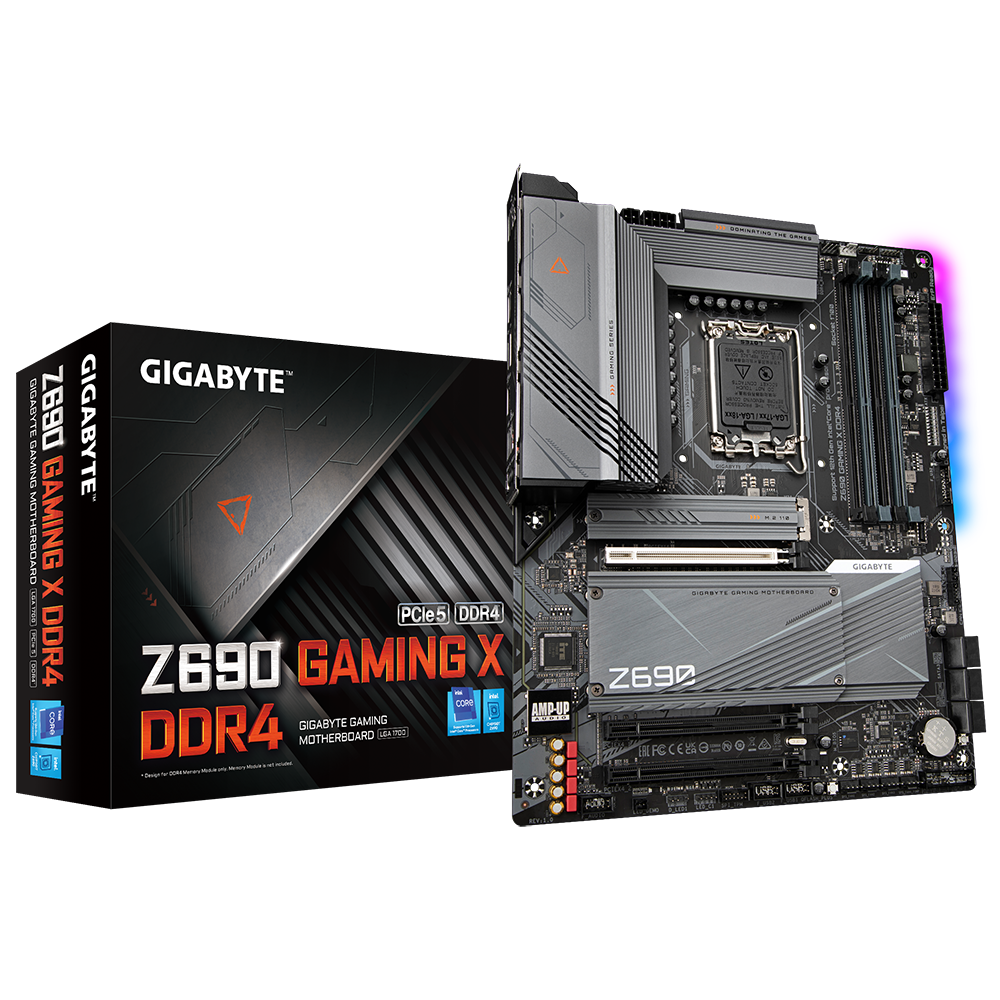
AORUS
'Intel® Z690 GAMING Motherboard with Direct 16+1+2 Phases Digital VRM Design, PCIe 5.0 Design, Fully Covered Thermal Design, 4 x PCIe 4.0 M.2 with Enlarged Thermal Guard, 2.5GbE LAN, 120dB Hi-Res Audio with WIMA, Rear USB 3.2 Gen2x2 TYPE-C®, RGB FUSION 2.0, Q-Flash PlusSupports Intel® Core™ 14th/ 13th /12th processorsDual Channel Non-ECC Unbuff...
clear sundial
broken solar
Hm, but that's actually without any FG on
You are running your main card (4070TIS) at the bottom slot, or at the top?
broken solar
clear sundial
PCI-E 3.0 x4 is already low bandwidth, but running it as a chipset slot will com...
This actually makes sense lol. Are there MOBOs that have 2 PCIE slots directly running to the CPU?
broken solar
clear sundial
You are running your main card (4070TIS) at the bottom slot, or at the top?
At the bottom right now. While in the top slot, all games refused to use it as the render GPU
clear sundial
On am5 yes, so it's probably the same for intel chips, but they are expensive
broken solar
broken solar
At the bottom right now. While in the top slot, all games refused to use it as t...
Which I find weird in itself
clear sundial
broken solar
At the bottom right now. While in the top slot, all games refused to use it as t...
The easiest way for you to take advantage of your current setup, imo, would be running the main GPU on the same slot as you're running and locking the FPS 60. Then use LSFG to interpolate frames using the closest multiplier to your monitor's refresh rate
PCI-E dictates the max FPS you're going to run, so your 4060 should be installed in the fastest slot of your system
clear sundial
broken solar
Which I find weird in itself
You need to make sure your advanced graphics settings in Windows have the 4070 ti S as the "performance GPU"
like this

If, you need high base FPS, you're going to need to be running at high PCI-E speeds. If you only care about interpolated frames, then the LSFG GPU needs to be run on the fastest slot and the "main gpu" on the other slot
broken solar
clear sundial
You need to make sure your advanced graphics settings in Windows have the 4070 t...
I did and tried it both on Windows 10 and 11.
broken solar
clear sundial
The easiest way for you to take advantage of your current setup, imo, would be r...
Well then this is a deal breaker. The game I'm playing a lot right now (Kingdom Come Deliverance 2) crashes instantly with this configuration. And the performance drop means I'd have to resort to higher FG multiples, ruining input latency.
As it stands I'll stay with a single GPU setup, possibly upgrading that in the future. Brings me better performance all around. Quite unfortunate
clear sundial
Yeah understandable
 unborn sluice
Windows version: 23h2
Driver(s) version: latest nvidia
GPUs used: render RTX3080, lsfg RX6400
Platform information (CPU+Mobo): intel i9 11900k - ASUS PRIME Z590-P Intel
How monitors are connected and used: 1 single 4k monitor via displayport to the RX6400
Any anomalies:
Weird performance loss. I used to play with lsfg with the window mode check because it reduces drastically the latency (hardware indepentent flip), but now with the dual gpu setup, not only is a stuttery mess, but the performance is terrible and the fps cap doesnt work (at least it never show i capped to 30-40fps, it always fluctuate like uncapped fps). when i uncheck the window mode, it doesn't stutter but it doesn't reach the desired performance at any resolution, i tried even in 1080p with the resolution scale all the way down
for a reason the pcie is capable of 4.0 but its working on 3.0, in any case, it should be enough for 2k


i'm using DXGI since WGC is not wirking properly on 23h2
rain hull
broken solar
Here is a screenshot of my HWINFO while I'm running Fortnite, just sitting in th...
It's probably not getting nearly as much PCIe bandwidth in the bottom slot.
 snow sparrow
rain hull
It's probably not getting nearly as much PCIe bandwidth in the bottom slot.
snow sparrow
rain hull
It's probably not getting nearly as much PCIe bandwidth in the bottom slot.
I think it is enough badwidth for that card, but its still sitting on the chipset rather than on cpu, could lead to some latency, but his issue is different
snow sparrow
unborn sluice
Windows version: 23h2
Driver(s) version: latest nvidia
GPUs used: render RTX3080...
All monitors connected to lsfg gpu?
unborn sluice
i just have 1, and its connected to the lsfg gpu
via DP
i'm just testing, it has to be a bandwidth problem, now it run "as expected" without window mode checked in lsfg but its not nearly as powerful as stated in the gpu chart
because if i want 40x3 ->120 i have to lower the resolution scale below 50%
and for me its really distracting all the UI artifacts at 50%
when i run lsfg in windowed mode it just doesnt cap my fps and its a stuttery mess
i don't know, my 3080 was capable of running lsfg flawlessly, my only concern was the performance hit in the VRAM, that some games required me to lower my resolution a lot, but thats it
and with the dual setup at minimum resolution and resolution scale still induces more latency than when i was using my 3080 alone
onyx warren
What is the bandwidth for the 6400?
onyx warren
unborn sluice
for a reason the pcie is capable of 4.0 but its working on 3.0, in any case, it ...
That should be enough tbh
rain hull
snow sparrow
I think it is enough badwidth for that card, but its still sitting on the chipse...
No, PCIe 3.0 x4 simply cannot transfer that much data
unborn sluice
onyx warren
What is the bandwidth for the 6400?
128gbps
at least is what it shows in my pc
rain hull
3.0 x4 has 4gb/s of bandwidth
unborn sluice
the thing is, my pcie is 4.0, but its working in 3.0 for some reason
is there a way to change that?
rain hull
unborn sluice
is there a way to change that?
Chances are your motherboard is wired that way
I'd check the manual to see what the expansion slots run at
unborn sluice
i'm not even capable of running 30x2 at 50% scale resolution xD what a shame
broken solar
rain hull
It's probably not getting nearly as much PCIe bandwidth in the bottom slot.
I also read somewhere that everything using the PCIE Chipset is sharing the bandwidth. Maybe that also plays into it
unborn sluice
meh, i'm disappointed, guides misleaded me, they say with a 3.0 could be enough for 2k and i can't even run at 1080, and also the rx6400 was enough too, i'm not sure what i'm doing wrong, or if im not wrong and things are like this
versed knoll
unborn sluice
meh, i'm disappointed, guides misleaded me, they say with a 3.0 could be enough ...
I didn't mislead anyone 

Specifications:
-B550 Asus Plus AC HES
-Ryzen 5 5500
-RTX 3060 12GB (Main Graphics Card)
-RX 6600M (LSFG Graphics Card)
-40 GB DDR4 3200 Mhz RAM
Tested game settings:
-Main GPU (RTX 3060 12GB) was running at PCIE 3.0 X16
-LSFG GPU (RX 6600M) was running at PCIE 3.0 X4
-1440p 165hz monitor
-82 FPS cap in RTSS to ensure smoothness and avoid teari...
My set-up runs my rx 6600m on pcie 3.0 x4
And perfectly at that
 fallow scarab
I'm playing Kingdom Come right now and there's a dual GPU issue. Even if I don't apply lsfg, the game won't start in a dual GPU configuration. Here, the 3070 is the master GPU and the second GPU is the 1070Ti. Also, the DP monitor output is output to the 1070Ti, and in this situation, if you select 3070 as the default high-performance GPU for Windows 11, the game will not start. However, if I connect the monitor cable to the 3070, the game will start. Conversely, if I select the 1070Ti as the default high-performance GPU, it will run. There seems to be a dual GPU issue with CryEngine. Does anyone know how to fix this?
 wary wraith
4090 + RTX A4000, i cant get A4000 working right in this mobo. Probably get a different mobo this weekend
 mental peak
Should I send back my 4060 and get a 7600XT instead for ls? They're about the same price here. Is the 7600XT better than the 4060?
I'm assuming it wouldn't be better at handling graphics than the 4070 I already have
I also don't see that card in the dual GPU chart, depending on if you guys think I should get it, I could test and add it
rain hull
broken solar
I also read somewhere that everything using the PCIE Chipset is sharing the band...
When I used 4.0 x16 + 3.0 x4 (secondary), it limited base FPS passthrough to around 220fps. Sylux's might be lower than mine for that reason, but their motherboard isn't going to be passing through 1440p 360fps any time soon.
rain hull
mental peak
I also don't see that card in the dual GPU chart, depending on if you guys think...
You could, though 7600s are known to have massive stability issues when running LS (as in, sudden full system shutdown).
The rx7000 series also seems to not have improved much from the 6000 series for LSFG at all.
versed knoll
He should get a 6650 xt instead
mental peak
versed knoll
He should get a 6650 xt instead
That one is better than the 4060 for ls?
versed knoll
The 6650 xt did better at LSFG than a 7600, but I don't know if the 7600 was better than a 4060
mental peak
I guess I was only thinking about vram
 vivid zealot
So.. im.not sure id call this a performance issue but on my 5080ti (pcie 5 x16) and 4070 (pcie 3.0 x4) i get 190ish base fps on Cyberpunk benchmark with no LSFG but when lsfg is active I only get 140ish base.
Granted I am running 4k with low settings to get the base rate that high.
Is this the cpu overhead from lsfg? I assume I am cou bottlnecked here even thought I am only at about 60% usage.
Ah nevermind, as I was testing again with rt overdrive as i was typing that, I saw only 1-2fps drop. So I guess it is cpu.
mental peak
whats your cpu
rain hull
vivid zealot
So.. im.not sure id call this a performance issue but on my 5080ti (pcie 5 x16) ...
You mean pcie 4.0 x4?
vivid zealot
rain hull
You mean pcie 4.0 x4?
Nope
Intel z690 the second port in an pcie 3.0 x16 in length but x4 in bandwith
The 3rd pcie is pcie 3.0 x16 size but only 1x in bandwith.
rain hull
vivid zealot
Intel z690 the second port in an pcie 3.0 x16 in length but x4 in bandwith
Dang, it's a miracle that that's transferring 190fps at 4k
When I tested 3.0 x4 it hard capped FPS to 85
I find it hard to believe that that's actually 3.0 x4
vivid zealot
rain hull
I find it hard to believe that that's actually 3.0 x4
Will show you a gpuz when I get back home.
Actually I have screenshot of manual.

Msi tomahawk z690 ddr4
tired quest
this tomahawk is doing 155 base 555FG with your GPU setup? Damn I should have kept my x670e Tomahawk
vivid zealot
Somethings off i think. I just did the maths 4k at 32bit pp work out at about 33MB per frame raw at fps it works out at about 4.9GB/s.. PCIE 3.p x4 should top out at 4GB/s.. unless there is something sort of compression in use 😕
elder smelt
yea weird
I do know of a compression that amd can use but its for vram only I think
but it could also help pcie maybe
vivid zealot
elder smelt
but it could also help pcie maybe
Perhaps.
onyx warren
Perhaps
elder smelt
indeed.
mental peak
Fun fact about my stutters in Helldivers 2, the base framerate is just that bad. Played without lsfg and my fps goes down from 46 to 25 out of nowhere. It HAS to be the game and their new update. Not ruling out any other issues than could be the culprit, but HD2's case, its that bad
elder smelt
every time I hear about helldivers 2, they get worse and worse each update
mental peak
The performance just tanks no matter the system, it's the main reason I stopped playing. What made me come back to it was discovering lossless scaling
vivid zealot
elder smelt
I do know of a compression that amd can use but its for vram only I think
Over 1000fps on timespy extreme
4k with lsfg 😕 - that just doesn't sound possible, but its what I am getting.
onyx warren
Bro got the PCIe slot of infinite power and bandwidth
vivid zealot
onyx warren
Bro got the PCIe slot of infinite power and bandwidth
Its looking that way 😱
 versed knoll
Maybe chipset lottery is a thing now
elder smelt
versed knoll
Maybe chipset lottery is a thing now
maybe cpu lane lottery is a thing too considering my situation 😄
vivid zealot
elder smelt
maybe cpu lane lottery is a thing too considering my situation 😄
Maybe I got your lanes 🤷♀️
elder smelt
@clear sundial was pcie 4 x4 not enough bandwidth for your setup? or you haven't tried it before
versed knoll
vivid zealot
Maybe I got your lanes 🤷♀️
I don't own a 4k monitor, but used Virtual Super Resolution on my AMD RX 6600M, my chipset pcie 3.0 x4 slot allowed a maximum of 82 base fps
vivid zealot
versed knoll
I don't own a 4k monitor, but used Virtual Super Resolution on my AMD RX 6600M, ...
Im gonna test more thoroughly tomorrow because the math dont math.
elder smelt
indeed
my goofy setup loses 20fps just by having a secondary card 😭
and here he is with casual 1k
vivid zealot
elder smelt
1000fps
Not 1000fps base obviously but lsfg generated.. i just cranked it up to max multiplier and set the scale to 25%
elder smelt
what was the base you could get?
vivid zealot
Cant remember the base frames but it was sub 100.
elder smelt
hmm
vivid zealot
Im in bed now so can't check.
Or maybe im talking sh*te.. i honestly cant remember I ran so many different benches.
But itbserves no purpose at all in the real world.
Just a shame none of this works for vr.. fs 2024 in vr is my thing at the moment.
clear sundial
elder smelt
<@709713005419692053> was pcie 4 x4 not enough bandwidth for your setup? or you ...
it felt similar to PCI 2.0 x8 when I was testing it. But I do have a lot of USB devices plugged in, so... not great
elder smelt
damn, looks like rng with motherboards ngl
clear sundial
I'm gonna retest the 6800 I've used before on that config (PCI-E 4.0 x4) which I think was the huge bottleneck, since I can't use the 3070 on my system without thermal throttling
elder smelt
pcie 4 x4 being a bottleneck is crazy
clear sundial
yes but it isn't "true PCI-E 4.0 x4". It's PCI-E 4.0 x4 shared with every other chipset device
every USB and sata device shares those PCI-E lanes
And on AM4 platforms, the chipset is bottlenecked by PCI 3.0 x4 connection to the CPU https://www.overclockers.ua/motherboard/asus-prime-x370-pro/01-asus-prime-x370-pro.png

this is why chipset PCI-E performance is very inconsistent
elder smelt
I see, so cpu lanes are the only true pcie performance
elder smelt
clear sundial
this is why chipset PCI-E performance is very inconsistent
yea most people seem fine with it though
clear sundial
 clear sundial
elder smelt
yea most people seem fine with it though
clear sundial
elder smelt
yea most people seem fine with it though
I bet most people aren't playing at 4K
elder smelt
true
onyx warren
I do tho 
elder smelt
onyx warren
I do tho <a:AwkwardKid:993942685259931749>
that performance hit of yours 🤨
clear sundial
Which is why the dev recommended 50% res scale at 4K. It reduces the data traveling massively, even without big image loss. At 80% res scale, even my 4060 ti didn't drop fps a single time.
onyx warren
clear sundial
this is AM5 https://images.anandtech.com/doci/17585/SoC_25.png
So AM5 chipset should be better with handling another GPU?
clear sundial
technically yes, but you have a lot more ways to spend that bandwidth with faster devices. So if you have fast USB devices plugged in, those will steal a lot of bandwidth
elder smelt
clear sundial
Which is why the dev recommended 50% res scale at 4K. It reduces the data travel...
honestly my performance hit acts like a pcie bottleneck ngl
clear sundial
the safest way is to have a CPU PCI-E slot reserved to the LSFG GPU
elder smelt
clear sundial
the safest way is to have a CPU PCI-E slot reserved to the LSFG GPU
$$$ mobo
onyx warren
All my usb slots are basically filled 
clear sundial
I had to buy a powered USB hub, so that explains why I can't have the same experience as ravenger 😛
elder smelt
how much usb wtf
I tend to use overkill amounts of usb too but thats just something else
clear sundial
It's more of ease of access. When you have a 20KG case and you have to shuffle USB pen drives, it becomes conbersome
And another thing is that AM5 motherboards, unlike AM4, skimp out on USB slots a lot, unless you pay more than double the price.
broken solar
clear sundial
every USB and sata device shares those PCI-E lanes
I also have like 8 USB + Sata devices plugged in lol
maybe should try another time without all those plugged in
 clear sundial
I looked into techpowerup database and it told me it was 3mm leaner compared to the 3070 suprim, but that's not true since the 3070 suprim fits, while this one doesn't
onyx warren
Sue them
clear sundial
My last hope will be this:
 clear sundial
wary wraith
clear sundial
wary wraith
Hey, do you by any chance have that glorious 3D print blueprint for the fan mounted on top of the GPU?
clear sundial
Does this look fine for you guys?
 vivid zealot
clear sundial
My last hope will be this:
vivid zealot
clear sundial
My last hope will be this:
I got this when my fans failed. A couple of decent fans ats its better than a stock cooler
wary wraith
clear sundial
Hey, do you by any chance have that glorious 3D print blueprint for the fan moun...
Bought it from this guy https://www.etsy.com/listing/1417013236/active-gpu-backplate-cooling-120mm-fan?ref=yr_purchases
clear sundial
wary wraith
Bought it from this guy https://www.etsy.com/listing/1417013236/active-gpu-backp...
Thanks ❤️
 cedar mango
3090 Ti + 4060, can achieve 100% resolution on FG, 4060 is in a PCIe4 @ 4x slot.
 versed knoll
What's the resolution and framerate?
cedar mango
4K @ 60, framlimiter with RTSS (Reflex)
2X FG = 120 at 100% resolution
Game is stuck forever at 120, it doesn't even lower 1 FPS on an entire match, I'm so happy.
onyx warren
But why are you using 55GB RAM?
versed knoll
He's a legend
cedar mango
hahah
I have Primo Cache with 32GB of RAM Cache for the storage with 60 seconds delay write, obviously I have an UPS.
That program can literally turn your SSD into a speed demon
I have 128GB of RAM btw. You absolutely need tons of RAM for that program
The software is miles better than the standard "write cache" that Windows does.
https://www.romexsoftware.com/en-us/primo-cache/index.html
Home page of PrimoCache product which is a supplementary software caching scheme to improve the system performance.
Works on Windows 10, 11, LTSC, you name it. It's an amazing piece of software.
versed knoll
Damn, you have made me curious now
mental peak
cedar mango
3090 Ti + 4060, can achieve 100% resolution on FG, 4060 is in a PCIe4 @ 4x slo...
what cpu do you have ? I struggle to run helldivers 2 past 40 to 50 fps. I'm curious how you got to stable 60
ivory moon
clear sundial
It seems it doesn't fit... Fml
after testing what 1050ti can do, frame latency etc with 4090 as a render gpu,
im srsly considering buying 6650xt. It seems to work.
I just need to find how gsync/freesync works in dual gpu setup configurations.
onyx warren
ivory moon
after testing what 1050ti can do, frame latency etc with 4090 as a render gpu,
...
Depends on the card that is connected to your monitors.
Gsync for Nvidia and FreeSync for AMD
mental peak
cedar mango
The software is miles better than the standard "write cache" that Windows does. ...
I'm really interested i using this? I got 64 GB of ram. Can you use it for everything or is it just for games ?
ivory moon
onyx warren
Depends on the card that is connected to your monitors.
Gsync for Nvidia and Fre...
yeye, but when you are not using lsfg, and your render gpu is nvidia but your output one is AMD, that is a problem no ?
onyx warren
No, you just use Freesync
ivory moon
oh, great. ty
onyx warren
FreeSync and Gsync are not game dependant so it doesn't matter if you actively use the card or not
versed knoll
versed knoll
Damn, you have made me curious now
For the first time, I see these numbers
 ivory moon
😄 I've seen 1.5tb ram usage at our prod server node...
but try to mod fallout 4. I overfilled 24gb VRAM & 64gm RAM with that.
elder smelt
cedar mango
I have Primo Cache with 32GB of RAM Cache for the storage with 60 seconds delay ...
I too run primocache but I use l2 cache instead
Got 2 128gb ssds, put software raid on them and made it the l2 cache in primocache
So far works great
mental peak
elder smelt
I too run primocache but I use l2 cache instead
What ssd would you recommend? Is 1tb for caching too much for just games?
elder smelt
1tb is overkill imo
Just use any drive your willing to sacrifice
I use spare 128gb because i have no use for them
mental peak
I see
mental peak
Should I prioritize write speed of the cache SSD instead of the actual storage on said drive
Like 256gb but with better read and write speed than a 1tb
mental peak
Since I have 64gb of RAM, I could allocate like 20 for caching?
elder smelt
if you want to, ram cache is obviously faster than l2 cache
really depends on what you want from it
right now I use 300mb of ram just as write cache
it takes load off my hdd
and does extremely fast writes for those 300mb
 mental peak
Faster video game cache and audio files that I move a lot between SSDs, I also have lots of games of on both my main SSDs. If the work of writing could be off loaded to another drive and spare RAM, that's pretty much what I'm looking for
elder smelt
hmm so you want more writing cache
mental peak
And for that usage, I guess 256gb is more than enough? Like every games' cache plus regular files
elder smelt
its a bit risky imo without a ups
mental peak
What's a ups
elder smelt
mental peak
And for that usage, I guess 256gb is more than enough? Like every games' cache p...
yea should be good
elder smelt
mental peak
What's a ups
its like a backup power supply incase the electricity goes out
or a unexpected crash happens
write cache can lose data in those situations
mental peak
Ah I see, I've never had any of those so I'm not super worried
elder smelt
well better safe than sorry imo
but its up to you
how big are you gonna go with write cache?
1gb?
mental peak
That's the part I'm not sure on, or what it exactly means
elder smelt
so write cache basically writes everything to ram and slowly writes it on the target drive
1gb = 1gb of data in ram
but you have instant access to it as if its already on that drive
mental peak
And RAM does it in the background
elder smelt
yea with primocache
mental peak
Cause I can spare lots of ram
mental peak
elder smelt
you have primocache rn?
Not yet but very soon, I'll buy a new drive for it
elder smelt
okay then
you will understand most of this stuff its pretty simple in the gui
also don't worry about block size
just make it 64kb or 128kb
up to you
elder smelt
hdd with primocache

hdd without

basically got my sata ssd speeds on it
even my 300MB of write cache did something
mental peak
But the file has to be transferred at least once for it to be written to cache? Those speed are only possible because the cache SSD knows that file already if I'm right?
elder smelt
yea for read cache it does
which is why games get huge boosts from it
repetitive loading
mental peak
Bought a new SSD, will buy primocache when I get it
elder smelt
theres a free trial
30 days
you can try it right now with that
just use ram and see what it does for you
versed knoll
elder smelt
which is why games get huge boosts from it
I don't think I ever saw genshin running this smoothly before without needing to resort to a fps cap

primocache is like magic
versed knoll
SSD, but I remember showing to @rain hull how inconsistent the frametime graph was before
elder smelt
oh damn
onyx warren
Did you give it 1GB?
elder smelt
I remember when relo was playing the first decendent and it was eating his ssd
then with primocache it fixed it
versed knoll
onyx warren
Did you give it 1GB?
I have no idea what a reasonable number is so I gave it half of my RAM (20 GB)
onyx warren
Genshin is really bad with frame drops, so if that helps I might just try it out
versed knoll
I still get the dip from first-time load
elder smelt
helps me tremendously in 7 days to die
versed knoll
But then it becomes extremely smooth
elder smelt
you could probably even do like 8gb
onyx warren
I get dips like every few seconds when exploring. It's so annoying
onyx warren
How much at least does it need to help with that?
elder smelt
4gb minimum
onyx warren
This good?
 versed knoll
Looks good to me
elder smelt
yes
onyx warren
Ok then
onyx warren
Possible
Actually seems a lot smoother now, even though it's already installed on an Nvme SSD
onyx warren
PCs are really something
versed knoll
Yeah all of my hoyoverse games run on a SSD
I tried it on Black Ops 6's Warzone too
Less stuttering
onyx warren
Graph is literally flat now
I mean

I'm too spoiled now with LS.
An inconsistent 100-120 FPS feels so bad now 💀
Problem is I'm probably gonna upgrade my motherboard in a few months, so I'd probably need to buy primocache again after
onyx warren
Yes am5
elder smelt
oh nice
onyx warren
And now I'm even tempted to go for 64gb ram 
onyx warren
True
versed knoll
I'll stay wth AM4 for at the very least another 2 years
elder smelt
im back to 16gb of ram so I'm crying rn
versed knoll
primocache solved one of my main gripes with staying on AM4
onyx warren
My 3800X is already struggling with something like HZD.
It sometimes goes as high as 80% usage on all 16 Threads
versed knoll
which was stuttering
elder smelt
I just want dual gpu support and huge ram with good speeds
$260 aud for 64gb of ddr5 ram is something
cheapest I could find tbh
onyx warren
Ram prices are so low compared to other pc components it's wild
elder smelt
yup mobo is gonna cost me so much
to get bifurication support its a minimum of $600
insanity
versed knoll
onyx warren
Ram prices are so low compared to other pc components it's wild
A 16gb DDR4 3200mhz stick costs me 20 bucks
rain hull
versed knoll
A 16gb DDR4 3200mhz stick costs me 20 bucks
Usd tho
versed knoll
rain hull
Usd tho
20 usd
wary wraith
Why is my frame higher than the what the games set to in lossless?
 onyx warren
Magic
wary wraith
Base frames i mean, games at 80, lossless says 89
Turned off hwinfo fixed it
Now im back to dropping frames on my 2nd gpu

Lol . Turning off msi aftrburner overlay fixed it
onyx warren
💀
wary wraith
Doesnt do that on my amd build
plucky crow
rain hull
Makes sense, yeah Opbush was probably right
I conducted the test on the 4070ti super + rx6400 system yesterday.
This pc's motherboard is b660m and supports pcie4.0.
The vram of the second gpu (6400) has not changed at all, regardless of whether the frame is increased or not, and always stays at 60mb.
Wouldn't frame increase in dual gpu have no effect on dual gpu's sub vram?
vivid zealot
plucky crow
I conducted the test on the 4070ti super + rx6400 system yesterday.
This pc's mo...
Both the gpu and ram should be utilised if dual gpu is in use.
plucky crow
When I play Spider-Man 2 with my pc, my stutter appears despite being a very stable base fps.
For example, if you set 60fps x 2 in that game, you don't get 120fps and it's 116 to 118.
Other games didn't have this problem. Base fps is very stable and overall usage is low, but it does cause problems.
Does lsfg performance fluctuate depending on the game?
ivory moon
wary wraith
Now im back to dropping frames on my 2nd gpu
If overlay causes problems, it's can be related to MPO support.
Your GPU & Monitor & OS have to support it.
Check in special-k if your card suports this.
One of the few thing I have to check regarding dual GPU setup, this HAS to behave correctly otherwise its a no go for me.
Using WCG in LSFG should completely eliminate the need for MPO support but.. i find the delay unbearable, maybe its placebo but something is off about WCG+VRR.


 left cape
cedar mango
Works on Windows 10, 11, LTSC, you name it. It's an amazing piece of software.
left cape
cedar mango
Works on Windows 10, 11, LTSC, you name it. It's an amazing piece of software.
recently downloaded this. even though both my os and games are downloaded on a pretty fast m.2, it fixed a lot of frametime inconsistencies, my graph is practically flat.
godsend my man
didnt affect 1%/.1% lows but capping framerate obviously fixes that
wary wraith
ivory moon
If overlay causes problems, it's can be related to MPO support.
Your GPU & Monit...
thanks for the info, i dont think the RTX A4000 supports MPO
 sleek nexus
Hi all- just set up a 4090 as primary and 4060 as secondary. I have set Windows to use the 4090 as the preferred GPU, but when I open Fortnite and click in, I see both GPUs spike in usage- I doubt this is normal and I doubt this is a game issue. Anyone run into something similar with other setups/games?
mental peak
sleek nexus
Hi all- just set up a 4090 as primary and 4060 as secondary. I have set Windows ...
Go in nvidia app, search for Fortnite and check the cuda cores setting at the bottom, uncheck the 4060 from it and see if that happens again
versed knoll
sleek nexus
Hi all- just set up a 4090 as primary and 4060 as secondary. I have set Windows ...
Copying over the video and frames takes GPU usage
But if it's just that the game for some reason is running on the 4060, try what Pyro suggested
rain hull
sleek nexus
Hi all- just set up a 4090 as primary and 4060 as secondary. I have set Windows ...
Depending on resolution and PCIe bandwidth, it's normal for the secondary GPU to hover around 15-40% usage due to video copying to it in a game.
plucky crow

1440p QHD
high preset
FSR 3.1.0 upscale (not FSR FG)
PC spec
cpu = i7 6700k 4.5
gpu = GTX1070(main) + RX6400(lsfg)
ram = ddr4 16g
Perfectly solved the stutter in the game.
Changing the cpu priority of lsfg to 'high' greatly affected it.
gtx1070 + rx600 + intel i7-6700k
rain hull
plucky crow
Perfectly solved the stutter in the game.
Changing the cpu priority of lsfg to '...
Huh
plucky crow
cpu = i7 6700k 4.0
gpu = gtx1070 + rx6400
ram = ddr4 2400 16g
power = 500w
1440p QHD
40 x 3 = 120fps
마블 스파이더맨 2
Marvel's Spider-Man 2
lsfg duel gpu lsfg
Game = cpu priority 'high'
lsfg = cpu priority 'normal'
 plucky crow

game = cpu priority 'high'
lsfg = cpu priority 'high'

lsfg to cpu priority 'high', Setting the cpu priority for the game to 'normal' was the most stable.
onyx warren
I just noticed that when my performance "degrades" while in-game it seems the cause of it is that at some point my main GPU just stops going over ~81-83% usage in GPU bound cases
versed knoll
plucky crow
https://www.youtube.com/watch?v=68HijgDBteI
That's korean 😭 @brave mesa
 brave mesa
 cedar mango
mental peak
I'm really interested i using this? I got 64 GB of ram. Can you use it for every...
cedar mango
mental peak
I'm really interested i using this? I got 64 GB of ram. Can you use it for every...
Everything. It sits almost at the kernel level.
versed knoll
Yesterday I used it and got caught off guard when an area change in HSR happened instantly
Everyone that doesn't utilize all of their RAM should use this
cedar mango
Yes, L2 SSD as buffer for HDD is great.
But I already have NVMe (no HDD) so for me, RAM > NVMe
We are talking about 24GB/s vs 6.5GB/s. And you can really feel that SSD is near instant. I use a huge 32GB cache for my NVMe with a 70 second write delay with an UPS that can hold up to 10 minutes. Check this crazy score, this is an SN850X btw.

Near 5GB/s on 4k-64Thrd is major craziness!
People don't realize just how much of an impact a good Caching system has on the storage. I bet at least half of the stuttering people experience in games is due to poor reading/writing patterns in games.. things that PrimoCache can help minimize by softening the storage use.
versed knoll
I run it daily
Ever since I tried it
I'm tight on money so I'm using the free trial
Does it forgive me if I uninstall it and install it again once the trial expires? It genuinely is worth the money but I can't spare anything right now
cedar mango
It will not. Your PC generates an internal key
Which is sent to their servers. This key will check the time you have.
It doesn't matter if you uninstall it, when you activate it, your key is having the time counted on their servers.
versed knoll
Oh well
cedar mango
My suggestion: buy it.
They do not charge for updates and once you buy it, it's yours forever. It's one of those programs that cost much less than what it actually gives you.
onyx warren
cedar mango
My suggestion: buy it.
They do not charge for updates and once you buy it, it's...
Until you change motherboards at least 
Which I'm planning to do this year
cedar mango
I had issues with activation when I change my PC (3 times now) and sending a support ticket they invalidated my previous license and resent it my way.
mental peak
@cedar mango https://amzn.eu/d/2w2M2Vq
I got this ssd to setup primocache with

Les précieuses performances Gen4 sont là. Voici le Crucial® P3 Plus Gen4 NVMe™ SSD, qui offre une vitesse impressionnante avec des lectures/écritures séquentielles allant jusqu'à 5000/4200MB/s. Incluant une accélération dynamique de l'écriture et une protection thermique adaptative pour garder vo...
cedar mango
So no, that is no problem, they are super kind and nice.
onyx warren
Ok,thats good then
cedar mango
Yes, they are not the greedy bastards kind.
You simply explain that you sold your previous motherboard and you changed it to something new and they will reset your license.
cedar mango
mental peak
<@366617598227513365> https://amzn.eu/d/2w2M2Vq
I got this ssd to setup primocac...
You should be good, provided the storage you want to speed up is slower than 4.5Gb/s
Yes, assign the entire storage as L2 and enjoy performance for cheap!!
I am telling you, these guys have a much much better caching algorithm than the Windows kernel itself has.
They are the "Loseless Scaling" of Storage 😂
versed knoll
One friend I recommended it to did say that
cedar mango
He is absolutely right!
In this age of "badly optimized software", there are still ABSOLUTELY GOOD pieces of software to be had.
versed knoll

 elder smelt
mental peak
<@366617598227513365> https://amzn.eu/d/2w2M2Vq
I got this ssd to setup primocac...
elder smelt
mental peak
<@366617598227513365> https://amzn.eu/d/2w2M2Vq
I got this ssd to setup primocac...
🔥
cedar mango
I'm almost a system engineer. Been working with hardware all my life. I've never seen a program handle memory as good as Primo Cache and Primo Ramdrive
You know what I do?. I also have 8GB for Primo Ramdrive and send all the browser temp storage to that.
Not only I can browse the internet much faster, I can simply restart the PC and have my history cleared without effort as the Ramdrive is set to forget contents upon restart.
They are both modular and built to work alongside, so you should have no problems using both at the same time.
You can set the Ramdrive for all the stupid programs such as Spotify that loves to write tons of TEMP files... so they are "off" your SSD. This also improves system responsiveness.
onyx warren
I don't have that much ram 💀
elder smelt
my poor 16gb
onyx warren
cedar mango
I'm almost a system engineer. Been working with hardware all my life. I've neve...
What does the Cache hit rate mean btw?
elder smelt
onyx warren
What does the Cache hit rate mean btw?
its when the cache that your ram or l2 cache gathered up actually does something
onyx warren
Damn I'm at 84% rn
onyx warren
Does this matter? The inactive part
 onyx warren
It cleared my ram, so I don't think it is lmao
elder smelt
rip 😭
onyx warren
I think it's because my ram usage is too high
I deleted the task, created a new one and it gives me an error that I don't have enough resources
Although I'd still have 6GB overhead
onyx warren
I am using 16gb atm and it didn't let me create a 12gb task, but 8gb is fine
onyx warren
Standard 32
elder smelt
hmm
onyx warren
elder smelt
8gb should be fine
Yeah, I was just trynna upgrade it a little since I usually have enough free ram
onyx warren
I have no idea how block sizes impact the performance so I just left it at default
mental peak
cedar mango
You should be good, provided the storage you want to speed up is slower than 4.5...
Yeah they all are, does that mean that I should allocate it 4.5 GB or RAM? Or more?
elder smelt
its just how well it handles allocation
each block is 32kb which is more accurate than a 64kb block
you don't really notice much in performance so a higher value isn't bad
with 32kb your getting like a near 2gb ram overhead
on 64kb its half that
and 128kb is half of that again
elder smelt
mental peak
Yeah they all are, does that mean that I should allocate it 4.5 GB or RAM? Or mo...
it has no ties with the speed
allocate how much you want
its only the cache size
mental peak
Ah okay
cedar mango
 mental peak
Did you partition your E drive?
cedar mango
onyx warren
I have no idea how block sizes impact the performance so I just left it at defau...
Block size does not impact performance much when in L2, but it does for RAM. The more you use, the faster (64-128k being ideal) but it will consume more RAM if it's bigger.
No, D is a Samsung 960 Pro (SSD) and E is an SN850X 4TB NVMe
mental peak
cedar mango
Block size does not impact performance much when in L2, but it does for RAM. Th...
Is there a way to know what block size corresponds to how much RAM needed?
cedar mango
Yes. Before pressing the button on create task, it will tell you how much will "waste" depending on the block size you use.
mental peak
Ok cool
cedar mango
Look at the "Memory Overhead", that's basically how much you're going to waste depending on that blocksize.
look at the lower left corner.
elder smelt
 cedar mango
That one
mental peak
I'll get my ssd on Wednesday and I'll get the free trial then
cedar mango
Overhead means = memory wasted
mental peak
OK thank you
onyx warren
mental peak
Is there a way to know what block size corresponds to how much RAM needed?
There's no real minimum needed.
You could just give it 1GB RAM if you wanted to
cedar mango
You can defer write to an L2-SSD, you cannot defer write to RAM unless you have an UPS.
Exactly. Problem doesn't care what you allocate but obviously it will be faster and more effective the more you allocate.
elder smelt
cedar mango
You can defer write to an L2-SSD, you cannot defer write to RAM unless you have...
I use defer write with ram 😅
its only a bit though
300MB
onyx warren
cedar mango
Exactly. Problem doesn't care what you allocate but obviously it will be faster...
Would it be beneficial to use some on the Boot drive?
cedar mango
Just to have an idea, with my 32GB allocation I can update a game on Steam and it will instantly validate upon downloading, like instantly, then I can see after 50 seconds a burst write of 6Gb/s on the disk.
cedar mango
onyx warren
Would it be beneficial to use some on the Boot drive?
Yes it will.
It will reduce the latency of the entire kernel.
onyx warren
I just allocated it all to my game drive
cedar mango
And if you're on 11, it's not "just a tiny more"
onyx warren
When I upgrade platform I'm probably just gonna get 64gb ram so I have 32 or more to spare for primocache
elder smelt
if I had more ram I'd definitely use some on my boot drive
cedar mango
On my system, just using 1GB for boot drive improved performance quite a bit
Yes, this one program is the sole reason why I've got 128 🙂
elder smelt
128gb damn
cedar mango
Also, do not assign L2 to boot drive, just RAM, only read cache, not write.
elder smelt
pretty sure am5 suffers in speed if you use 4 sticks 😔
cedar mango
C drive should have the safest caching possible to avoid corruption.
onyx warren
elder smelt
pretty sure am5 suffers in speed if you use 4 sticks 😔
wut
onyx warren
cedar mango
Also, do not assign L2 to boot drive, just RAM, only read cache, not write.
How do I do read only?
elder smelt
onyx warren
wut
yup, not sure how bad it is but it exists
cedar mango
Yes mine also suffers but you know what. Comparing 4-dimm slower overall performance decrease with 100% storage performance increase, I can assure you, you end up winning.
onyx warren
elder smelt
yup, not sure how bad it is but it exists
Man I was gonna go 4x16
elder smelt
onyx warren
Man I was gonna go 4x16
very bad idea
cedar mango
This is basic engineering, Storage is the slowest part of the entire system.
elder smelt
just get 2x32
cedar mango
get 4 x 32 🙂
elder smelt
also that
cedar mango
Once you start using big caches you will never go back
You won't care about the 4-dimm slower access time anymore
elder smelt
tbf it matters for cpu bottleneck situations
but it depends on if you care about it or not
cedar mango
The level of "snappiness" you can achieve by separating tasks (C drive to read only cache) and game drive for read/write is unheard of.
elder smelt
you could have a x3d cpu and it won't matter much
onyx warren
onyx warren
How do I do read only?
@cedar mango
elder smelt
just don't enable defer write?
onyx warren
Oh ok
 onyx warren
Is defer write safe on the game drive without a UPS?
elder smelt
I use 300MB without ups but it isn't recommended
onyx warren
Kk
onyx warren
Get money first
cedar mango
hahha yes of course
elder smelt
am5 = $$$$$
onyx warren
Alrighty then, 8 and 2GB
 elder smelt
I'm gonna aim for 64gb of ram
cedar mango
elder smelt
I use 300MB without ups but it isn't recommended
One invalid shutdown can completely corrupt the game you're playing.
elder smelt
yup lol
cedar mango
What do you mean with 8 and 2?
elder smelt
playing with fire but its always worked fine
onyx warren
cedar mango
What do you mean with 8 and 2?
GB Ram allocated
cedar mango
Also, if you're doing L2, use RAM as well, don't use L2 alone
onyx warren
I'm only using L1
rain hull
elder smelt
playing with fire but its always worked fine
"mama who turned off the power"
cedar mango
hahahah
onyx warren
cedar mango
Also, if you're doing L2, use RAM as well, don't use L2 alone
Both my drives are M.2 Nvme so no need for L2
cedar mango
Or best way ever to screw the kid... wait till he starts playing the favorite game and BAM... there it goes the power haha
elder smelt
just make sure to never use defer write on boot drive without a ups 💀
cedar mango
onyx warren
Both my drives are M.2 Nvme so no need for L2
For NVMe never use L2, just RAM
onyx warren
elder smelt
am5 = $$$$$
At least the 9800X3D is slowly reaching MSRP lmao
 onyx warren
cedar mango
For NVMe never use L2, just RAM
onyx warren
cedar mango
For NVMe never use L2, just RAM
Yes, that's what I'm doing
8 and 2GB respectively
cedar mango
When you have more RAM, test 16GB cache onwards... and watch your disk become god.
I'm telling you... it's out of this world performance.
onyx warren
I tried 12 an hour ago and it gave me a 'not enough resources' error
cedar mango
Watching Steam sucking all 32 cores while validating a game and seeing the RAM cache getting filled and watching the disk doing nothing is short of extacy.
onyx warren
But I'm deffo going for 64GB on AM5 to give them both 16GB each
elder smelt
even with my 2 striped ssds, I get huge decrease in stutters and insane loading speeds
cedar mango
Also, there is another thing that this program does to your SSD. It severely reduces the fragmentation when defer writes are enabled.
This is because the multiple read/writes are all packed into the RAM, then the program writes a single burst of 6-7GB/s on the disk and this is done "sequentially" instead of randomized as it could be done originally. This reduces fragmentation and improves performance of the storage system.
The defer-writes severely changes how the storage subsystem behaves, so the more RAM you have, the more performance you get from it. It's like literally maximizing read/write performance by using RAM as buffer.
cedar mango
elder smelt
even with my 2 striped ssds, I get huge decrease in stutters and insane loading ...
This is absolutely correct. All the messy read/writes are re-organized in RAM, this is why it reduces stuttering.
onyx warren
Yup, also noticed it in games that were BAD with loading stutters every few seconds
Smooth as butter now
cedar mango
Yes, absolutely correct. This piece of software is among the best you could ever have in your windows, along with Loseless Scaling. The other beautiful piece of software that must be there installed in your system is Process Lasso.
You can do wonders with that software as well.
I can literally send lower important background apps to E-cores and take them out of my P-cores, also change the default hetero-policy to redirect most high performance applications to the P-cores in my 13900K.
For sure it does a much better job than the lousy "thread director" in the W11 Kernel.
onyx warren
Tbf AMD doesn't really have P and E cores
cedar mango
Yes, AMD handle this much much better.
It's still useful.
For example, the stupid Epic Games Launcher forces the Overlay Launcher every time it detects a new game. Sometimes even outside the Epic Games Launcher (steam games).
There is no way to block the App without breaking the Launcher... but, here comes Proces Lasso you simply wait till the Overlay turns on, and you "disallow" the process.. bingo. No more worries and no breaking.
cedar mango
It's amazing how good you can handle every process in the system with this program. I bought the Pro because in my system, it simply replaced the Task Manager for good.
I have it mapped in "Win+C" with a free tool called "HotkeyP" and I can invoke it whenever I want. Have total control of the system 🙂
ivory moon
ddr4 is dirt cheap now... disk drives (all.. hdd & ssd) should adopt the concept of using volatile storage for caching if needed. 1gb-2gb of ddr4 speed right next to disk drive would be insane, no sw required.
but for gaming, it's snake oil. You are limited by so many translation layers, API's, drivers and so on, that once you get your main drive to be NVMe, your gaming drive could be the crappiest of sata ssd's and for 2017~ < games even HDD and it would not touch your 0.01 percentiles a bit. There are exceptions, but frame time health is not affected by disk specs much. At least for not of the absolute newest of games that rely on texture streaming compression/decompression.
Want to get rid of stutters ? win11 + mpo + gsync / vrr + specialk is the way.
Also limiting base framerate to 60 and using lsfg is one of ways of getting just insane framepacing with rock solid 0.01 perceltile lows.
That being said... loose files modding could cause stutters depending on the implementation in engine. Heavily modded Skyrim and Fallout 3/4 should see some direct performance benefit by using ramdisk
versed knoll
ivory moon
ddr4 is dirt cheap now... disk drives (all.. hdd & ssd) should adopt the concept...
Windows 11 hates Lossless Scaling
ivory moon
I agree. Too many factors to create a good experience. Its great if you know how the program works on technical level and what you need to have and do to actually use the damn thing on win 11 😄
For many confirugrations, win 11 will not be pleasant experience. It's expensive to have panel with MPO support. At least 900$, and it's mostly TV only.
plucky crow
cedar mango
I can literally send lower important background apps to E-cores and take them ou...
Your argument is very interesting. Will it improve performance on my pc?
My pc is i7-6700k and gtx1070+rx6400+dr4 16g.
In this situation, would connect the extra 120g ssd and apply it as an L2 cache increase the fps in the game?
onyx warren
Only if your game is on a HDD if you want to use L2 cache
It also would just decrease loading times and stutters, not actually give more performance
plucky crow
onyx warren
Only if your game is on a HDD if you want to use L2 cache
Wouldn't it improve 0.1% fps, 1% fps in the game?
plucky crow
elder smelt
even with my 2 striped ssds, I get huge decrease in stutters and insane loading ...
Does less lag in the game mean an improvement of 0.1 fps or 1% fps?
elder smelt
plucky crow
Does less lag in the game mean an improvement of 0.1 fps or 1% fps?
well yea
less stutters improve that
plucky crow
elder smelt
well yea
Very interesting. I just happen to have two spare ssd. Should I apply the raid option and designate it as an l2 cache?
elder smelt
its up to you
I would definitely do it
thats pretty much my setup
but instead of raid I just striped them in the windows partition manager
plucky crow
elder smelt
its up to you
You mean Windows Disk Manager made two ssd into one?
I'm going to try it today. I'm wondering if there will be any changes in dual lsfg.
elder smelt
plucky crow
You mean Windows Disk Manager made two ssd into one?
yes
clear sundial
Very interesting conversation about primo cache 🤔 I currently have 64GB of RAM and I am very interesting in trying out L1 read only cache, do you guys recommend a sweet spot number to test? I'm running a NVME 4.0 boot drive and another NVME 4.0 game drive.
elder smelt
64gb is a great amount
how much are you willing to use for cache?
if I had that amount, I'd atleast use 20gb
plucky crow
elder smelt
its up to you
 plucky crow
elder smelt
I'd change that block size
plucky crow
elder smelt
I'd change that block size
 onyx warren
plucky crow
onyx warren
plucky crow
How much do you have (free)
elder smelt
plucky crow
good
plucky crow
onyx warren
How much do you have (free)
I don't know.
onyx warren

plucky crow
 onyx warren
So you have 16gb ram
plucky crow
Is my PC set up now?
plucky crow
ok
onyx warren
plucky crow
Is my PC set up now?
Did you give the cache to a hard drive?
plucky crow
onyx warren
Did you give the cache to a hard drive?
yes my c:(nvme ssd) and d:(sata ssd)
onyx warren
So not hard drives
Then what you're doing doesn't really make sense
You're using an SSD as Cache for other SSDs.
Meaning you won't really get any speed improvements
onyx warren
It's either RAM for SSD or SSD for HDD
elder smelt
its better in some ways imo
onyx warren
That makes most sense
elder smelt
but ram is so much better for a system like that
onyx warren
But with 16gb ram not much to work with tbh
plucky crow
I'll test it in this situation.
And I'll install the 32gb RAM in the warehouse and try again.
plucky crow
elder smelt
try crystaldisk benchmark
Something's weird lol
Stuttering is the same but I think base fps has changed very stable. And I had a little pause when I needed to load during the game and this issue is gone too.
elder smelt
well I didn't expect it to work that well considering its already a sata and nvme drive
but if it works better then great
 plucky crow
 elder smelt
compare them
plucky crow


 plucky crow
elder smelt
this was my hdd with primocache
plucky crow
elder smelt
this was my hdd with primocache
wow
elder smelt
your numbers seem close to my cache speeds
 elder smelt
yea it doesn't seem to do anything for your case
if you want
remove the l2 cache and instead make a 2gb ram cache instead
see the speeds then
you will see how fast it can go
l2 cache doesn't seem to cut it for you
 elder smelt
alright
plucky crow
I will shut down the power of my computer lol
elder smelt
📈 🔜
plucky crow
elder smelt
📈 🔜
I installed the ram. What should I do now??
 plucky crow
 onyx warren


 elder smelt
try 32 or 64
onyx warren
64 sweet spot I think
 onyx warren
plucky crow
onyx warren
plucky crow
Yea

 onyx warren
ok
plucky crow
onyx warren
ok
I think the game's loading is more than twice as fast.
 onyx warren

plucky crow
Oh, now that I see it, cpu overclocking isn't applied. I need to re-apply it and come back. Geez..
 plucky crow
onyx warren
<:okaygebusiness:1111376448222134396>
plucky crow
onyx warren
<:okaygebusiness:1111376448222134396>
It's so funny. The fps have increased.
Stuttering isn't gone, but the base frame has increased. And it's stable.
I wanted to solve the stutter, but the base frame increased.
onyx warren
I haven't looked at the framerate tbh, but stutter hell now turned to Smooth as butter in some games for me
 clear roost
oopsie 


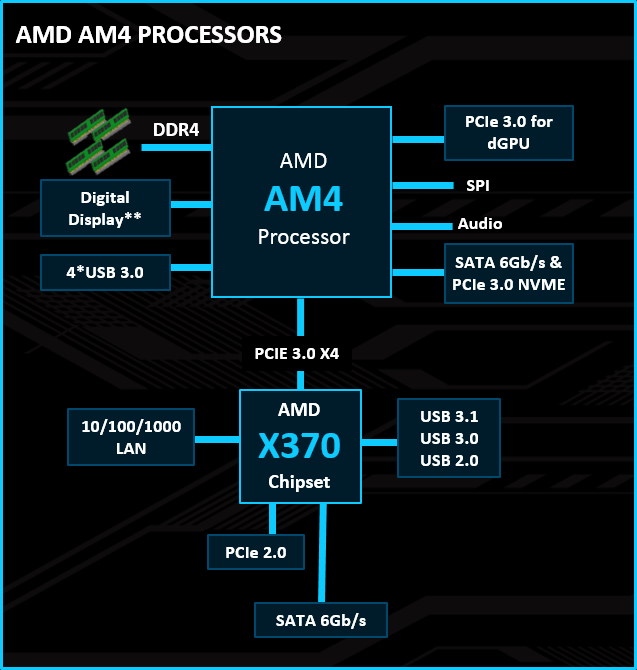
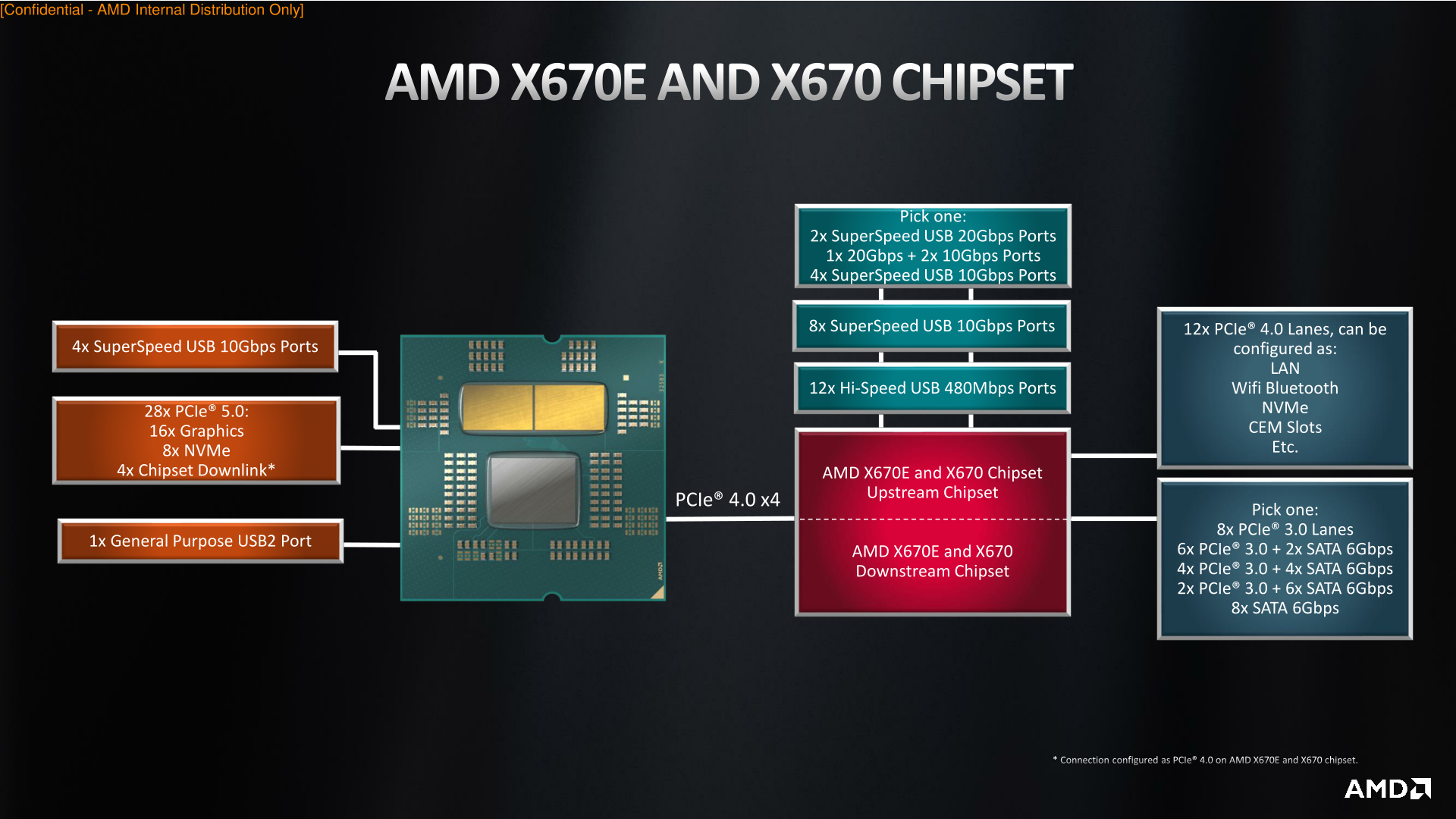 clear roost
^ monitor with RX 6400 connected, fixes itself after I turn off and on the monitor
elder smelt
clear roost
oopsie <:2x:854495816916008960>
avg dual gpu experience
clear roost
card is on warranty til September anyway
onyx warren
This happened after my Windows reinstall, got a BSoD and hasn't happened since lmao 
clear roost
onyx warren
This happened after my Windows reinstall, got a BSoD and hasn't happened since l...
for me it doesn't even impact performance let alone stability
onyx warren
Yeah, mine also just started artifacting this way and after a few minutes I got a really corrupt looking blue screen 💀
Since then nothing has happened
plucky crow
clear roost
for me it doesn't even impact performance let alone stability
I'm using Radeon for monitor output. What additional settings do I need in the adrenaline app?
plucky crow
onyx warren
Only thing I changed was turning the Overlay off in the settings
How do I set up G-Sync in lsfg settings?
onyx warren
In LS? Just turn on the toggle
mental peak
hows this?

making sure i do things right, i followed a video on youtube and he said to do those settings for faster read and write
onyx warren
Why 512 block size?
And I wouldn't activate defer write when using L1 cache, dangerous thing
mental peak
okay, i put it to 256 and no defer write. About the l2 cache options, can i put read/write in the middle? so it can do both? not just reading or writing
onyx warren
Defer write is the write option
But it can be dangerous when you have a power outage
mental peak
so even if i put the l2 cache to write only, its the same thing as defer write even tho its not enabled
 onyx warren
Idk much about L2 cache tbh, I only use L1.
But write with defer write disabled should be fine
mental peak
i'll do 50/50 for reading and writing since i'm pretty sure i'll do both often
should i use keep l1 cache on fast shutdown? it seems useful
 onyx warren
Uhh, I don't even know where that is lmao
mental peak
so i set it up and transferred a file from my hdd to the desktop and it didnt speed anything up, it was at 120mb/s. then I tried the same thing again after and tha time it took 2 seconds lmao.
but now i did the same thing from my desktop to my hdd and it doesn't work, it stays at 120mb/s even if i just copied it? did I miss something somewhere ?
versed knoll
mental peak
so i set it up and transferred a file from my hdd to the desktop and it didnt sp...
lmao
mental peak
im assuming ill have to precompile caches again for all games ?
wary wraith
Is this primocache program supposed to help lossless?
onyx warren
Not specifically, just general load times and stutters
versed knoll
wary wraith
Is this primocache program supposed to help lossless?
No
clear roost
mental peak
im assuming ill have to precompile caches again for all games ?
yep
at least it did it in stalker2 and cod for me
or it wasn't cod
def in s2
mental peak
I should delete all the games' caches manually or is it just gonna do it automatically?
vivid zealot
mental peak
I should delete all the games' caches manually or is it just gonna do it automat...
Its a cache do it should populate itself as you use your machine.
First time you use a file/data it will be normal speed and copied to cache. Then next time it will read from cache and be much faster.
onyx warren
Its sucking every last drop out of my 10GB 💀
 elder smelt
What happened when I was asleep 😭
onyx warren
World war 3
elder smelt
mental peak
i'll do 50/50 for reading and writing since i'm pretty sure i'll do both often
Please do not do this
😭
mental peak
elder smelt
Please do not do this
Why
I have RAM to spare anyway
Or should i do read only?
mental peak
So 80% for reading and 20% for writing instead of 50/50. Should I do that for l1 and also l2 cache?
this for l1 cache

and this for l2 cache
 onyx warren
Why not just leave it at default with the tick off?
onyx warren
It's off by default 
Also I've been playing a game for 3 hrs and had 450GB read and 10GB write
mental peak
so that way its just automatic
onyx warren
Yes
elder smelt
do you really need write cache?
mental peak
I transfer lots of files between lots of folders in different drives. and use them in DAWs fetching from different drives, I thought it'd help but I guess it can just be on automatic?
elder smelt
hmm
I'm not sure how safe it is without a ups
but if you are gonna do that, read cache should be 80% write 20%
mental peak
im not using defer write option since it seems dangerous without a ups
elder smelt
then why are you splitting them?
mental peak
elder smelt
but if you are gonna do that, read cache should be 80% write 20%
yes, should i do that for l1 and the l2 cache then?
elder smelt
l1 should be like that
l2 should be even less
but you aren't using defer write
no point
mental peak
so just default then
elder smelt
yep
onyx warren
elder smelt
yep
Btw prefetch yes or no?
mental peak
dumb question but when i create a cache task, i don't need to select the drive i use for the caching? would it be caching itself?
 mental peak
yeah that makes sense
onyx warren
mental peak
dumb question but when i create a cache task, i don't need to select the drive i...
The volume isn't even there.
You'd only select the 16mb local disk
 devout charm
This forums make no sense anymore 😂