Over the past week or so iv been posting about my issue where i can nolonger play the game.
Since the launch of the demo on steam. When i start a new game it gets to the end of loading where its placing resorces and then it just full closes with no crash log or anything. Im really sad because iv so far not been able to get any help getting my game to work again. Can anyone from the community or dev team please help me troubleshoot this so i can get back to playtesting Dawn Apart.
❤️
#Game still hard crash on new game
1 messages · Page 1 of 1 (latest)
 mossy tree
 tardy spire
mossy tree
Over the past week or so iv been posting about my issue where i can nolonger pla...
tardy spire
mossy tree
Over the past week or so iv been posting about my issue where i can nolonger pla...
Hey sorry you've been having that issue. I'm going to take a look at this today and try to figure it out.
Could you send me the Player and Player-prev files from the AppData\LocalLow\Industrial Technology and Witchcraft\Dawn Apart folder?
mossy tree
 spice pine
Hey, your specs say you GFX only has 6GB of VRAM. But it should be 12GB when I look up the GTX 1660 Ti.

 spice pine
Have to look into this more in detail.
mossy tree
anything you need let me know
spice pine
Gmae needs 8GB of VRAM. I don't have experience with shared VRAM. How much RAM do you have? How much is free?
mossy tree
16GB of DDR3 RAM
i was able to play the previous versions ok and i never really had too much performance issues. Like it was not perfect but it was playable
spice pine
We turned off the chunk loading system, which wasn't working properly. We now load the entire map into the VRAM, which is much more performent, but also takes up more VRAM. At the same time, the map increased in size by adding the jungle biome.
tardy spire
mossy tree
because my GPU only has 6GB
Something you can try to verify this is delete, or rename some of the jungle world region vox files.
SteamLibrary\steamapps\common\Dawn Apart Demo\Dawn Apart_Data\StreamingAssets\Data\Voxel\WorldRegions
If you rename them they won't be loaded and the main culprits are the _8 and _7
EX: WR_10_8 looks like

It would mean portions of the world wouldn't load, but I have a feeling that is the main issue
We need a cap or something, although eventually we need to tackle the issue which is the premade chunk system.
mossy tree
did not seem to have an effect
this was my GPU usage before the crash https://kappa.lol/DDgh2u
 tardy spire
Could you try renaming that WorldRegions folder and putting this one in it's place?
These are the ones from the older builds, if that still doesn't work then the issue is something else I guess.
mossy tree
still crashed
just to confirm, im using the playtest version, not the demo
but i have both installed
tardy spire
And the same issue is in the demo as well?
mossy tree
the folder you sent does have the _7 and_8
tardy spire
Yeah, but it is the same world tiles as the version that did work. Maybe because we load them all ahead of time now. Do you happen to remember if the game had hitches when moving around the map last time you played? I guess I can look at your old reports and check what version those were on
mossy tree
only time i had alot of lag happen was when wood was rolling on the ground after being cut
tardy spire
mossy tree
only time i had alot of lag happen was when wood was rolling on the ground after...
Also are there any crash logs in %AppData%\Local\Temp\Industrial Technology and Witchcraft\Dawn Apart\Crashes this folder from when it happens?
Beyond that I think we are going to have to take some shots in the dark, but my suspicion is this happened with the change to load all world at once. Which was the version after the one you were submitting reports on
mossy tree
no folder there
i also looked in event viewer and there is no crash
Its just really strange im the only person that i know so far has had this issue
unless everyone else is using better GPUs
just under 1% of steam users have the 1660TI from the hardware survey that steam does. so it is kinda of common https://store.steampowered.com/hwsurvey/videocard/
tardy spire
I think one other person has had a similar issue. Game shuts down after loading and no crash log. They also had a slightly older gpu though. I'm going to think about some solutions, and I'll ping you again if we have something that we think should fix this
mossy tree
sounds good. thanks for your time looking into this. ❤️
tardy spire
mossy tree
sounds good. thanks for your time looking into this. ❤️
Hey I made a build that has loading of the entire world disabled here: https://drive.google.com/file/d/1AYvIhQqaMq45Wn1Je-19bGHN0RVZUq81/view?usp=sharing
If you wouldn't mind could you let me know if that crashes as well in the same place? Also you said that you see placing resources right before it crashes?
Google Docs
If this one does, maybe try replacing those world region files. After all that if it doesn't fix then I think it's safe to rule out the new regions loading being the issue
mossy tree
tardy spire
Hey I made a build that has loading of the entire world disabled here: https://d...
it still crashed. Without the world region files too.
The last thing on the loading screen it says finishing up.
Have you got a copy of the old version from before the demo? Just so i can rule out its not something on my end that changed.
tardy spire
This is for a new game? One sec let me find one
mossy tree
yeah im starting a new game each time
tardy spire
mossy tree
it still crashed. Without the world region files too.
The last thing on the loa...
https://drive.google.com/file/d/12mcTAF2a9fYVLjJ99ZK3HcGec1Fo8lXo/view?usp=sharing
Maybe give this one a try. This is 0.68.2.1 which is a couple versions after the one you played.
Google Docs
And this one is 68.1.2 which is the version that you played on https://drive.google.com/file/d/1K7tmFR9H29AJV4ANu-_fkzrldi-ry6fS/view?usp=sharing
Google Docs
mossy tree
tardy spire
https://drive.google.com/file/d/12mcTAF2a9fYVLjJ99ZK3HcGec1Fo8lXo/view?usp=shari...
this one works
tardy spire
Alright then we can forget about that 68.1.2 version. What about this one https://drive.google.com/file/d/1vFA8wH1ozyBDxPynR9jfkxtrU-6eJghO/view?usp=sharing
Google Docs
This was the first demo build
mossy tree
i think thats when i first got the issue but ill check
tardy spire
If it crashes on that one I'll just have to compare patch notes to see what changed. Something between the world finishing and the game scene starting.
I honestly can't believe it wasn't the new region loading. Like seriously shocked lol
tardy spire
Nope, between 68.2.1 and 69.0.0 we added all the new regions and changed the loading.

So from this version to the next it broke for you. Something in these changes https://store.steampowered.com/news/app/3260690/view/547854206358259057?l=english
Hey Playtesters, First off I wanted to say thank you so much to everyone that backed our Kickstarter. The amount of support has just been amazing and we appreciate you all so much! On to the game, we've been working on one of our biggest progression updates. Something the team has been calling: Abundance With the abundance update we wanted to br...
spice pine
"Optimized reading strings from vox files"
What localization do you have set up on your machine?
mossy tree
English
spice pine
Any secondary ones?
tardy spire
That also would show during the initial parsing of voxel data. Even in the main menu when the ship is loaded
mossy tree
English US and English UK
spice pine
Can you try to deactivate the Uk one for us?
mossy tree
oh i only have UK enabled. i was looking at keyboard layouts https://kappa.lol/l46mMt
 spice pine
Interesting. Can you add US and make UK secondary?
mossy tree
spice pine
Interesting. Can you add US and make UK secondary?
yeah still crashed
Does the new version require the CPU to be AVX2?
tardy spire
mossy tree
yeah still crashed
Alright, well I think sometime soon (most likely tomorrow) I'll make you a special build with a huge number of debug logs and hopefully the player log will be more helpful. Good news is we narrowed it down a bit more.
We really appreciate you helping us out with this so much, hopefully soon we can get you back up and running on the standard builds.
mossy tree
tardy spire
Alright, well I think sometime soon (most likely tomorrow) I'll make you a *spec...
Sounds good! im happy to help 🙂
Because it means i get to play (i hope)
tardy spire
mossy tree
Does the new version require the CPU to be AVX2?
Nope, it was just code changes. New features & fixes
mossy tree
tardy spire
Alright, well I think sometime soon (most likely tomorrow) I'll make you a *spec...
Hey, i know you just finished the Kickstarter stuff so are going to be very busy, but are you still going to get that special build with the debug stuff for us to try? Thanks ❤️
tardy spire
mossy tree
Hey, i know you just finished the Kickstarter stuff so are going to be very busy...
Yeah sorry I was ended up getting sucked into this combat stuff. I’ll try to get you that soon. Thanks for following up on it!!
 low meadow
mossy tree
Hey, i know you just finished the Kickstarter stuff so are going to be very busy...
low meadow
mossy tree
Hey, i know you just finished the Kickstarter stuff so are going to be very busy...
I second this, just tried the Demo again as there was a update (according to steam), still crashes before loading into actual gameplay 😢
mossy tree
low meadow
I second this, just tried the Demo again as there was a update (according to ste...
What specs is your system running? CPU, GPU, RAM etc?
low meadow
mossy tree
What specs is your system running? CPU, GPU, RAM etc?
Windows 10 Pro 64 bit
i7-2700 @ 3.50GHz (8 cpus)
mem 32768MB RAM
Page File 86697MB available
DirextX 12
NVidia GeForce GTX 1080
Aprprox total mem 24425 MB
VRam 8059MB
Shared Mem 16366
tardy spire
mossy tree
Hey, i know you just finished the Kickstarter stuff so are going to be very busy...
Hey, I'm sorry it took me so long to get this together. Would you mind trying out this build and then sending me the player log after it crashes? https://drive.google.com/file/d/1n6bh6gBX9XISN0-AlHmjoA5PscGnhVTp/view?usp=sharing
I'll most likely need to make another one after I narrow down exactly where it stops working.
Google Docs
mossy tree
will give it a run
tardy spire
Also could you maybe do that 2-3 times so I can compare the player logs?
tardy spire
Perfect they both end at the same place. I'll get back to you again in a bit with another thing. Thanks for getting me those!
tardy spire
@mossy tree So I added more debug messages and removed the spawning of pioneers in this build: https://drive.google.com/file/d/1sqJ1HREWTZtdchgs-DSTKDTuOQLOXmFa/view?usp=drive_link
Could you try this again and if it crashes send me the player logs again
Google Docs
If it does load then this is also a dev build so you can spawn pioneers through the construct menu.
So in the case that it doesn't crash please do the following:
- Press
Ctrl + Shift + Fto enterFree Blueprint Mode - Select a
Prospector Unitfrom the construct menu - Spawn them in
If it crashes I guess there is some issue with agents, and if it doesn't it's again somewhere else
mossy tree
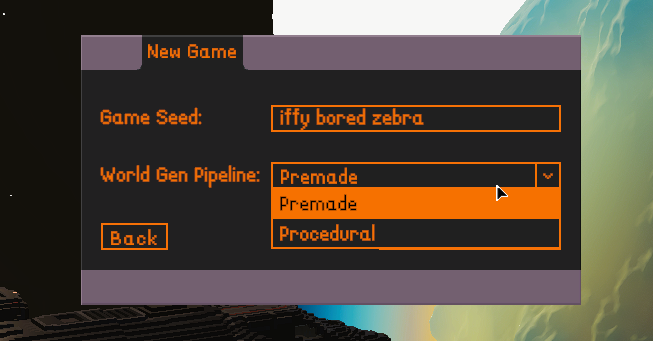
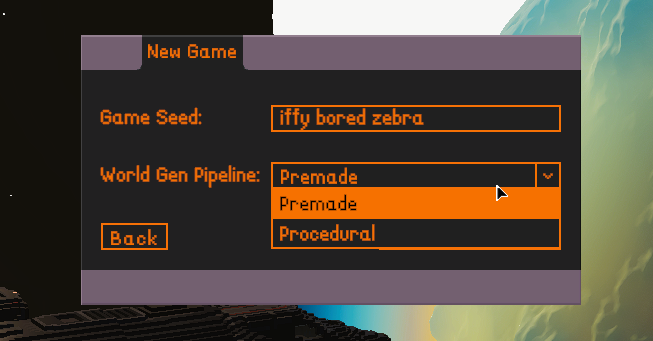
which do i use https://r2.fivemanage.com/image/BREw49NfUxPU.png
 tardy spire
mossy tree
which do i use https://r2.fivemanage.com/image/BREw49NfUxPU.png
tardy spire
mossy tree
which do i use https://r2.fivemanage.com/image/BREw49NfUxPU.png
Premade
Although you can try Procedural as well. It will still load, but it's something we aren't actively working on at the moment so it doesn't have all the features the premade world does
mossy tree
ok it did not crash. going to spawn in prospectors now
ok when i spawned them in. it crashed
tardy spire
Did it crash the instant you spawned them in?
mossy tree
yep
well it did the little animation of them being constructed
when it finished it crashed
no crash reporter tool came up and no crash log
tardy spire
Alright well that is great progress lol! I guess I just need to look through the agent changes on that 0.69.0.0 update and hopefully something jumps out
I'll get back to you again when I have something 
tardy spire
mossy tree
i spawned It'ak and it also crashed if that helps
Can you spawn in buildings and such just fine?
mossy tree
tardy spire
Can you spawn in buildings and such just fine?
yep that works. Seems to be just AI units
tardy spire
mossy tree
yep that works. Seems to be just AI units
Could you spawn in a Cutter?

To rule out it being an issue with the animation controllers which only units and certain other entities have
mossy tree
that works
i tried one of the debug tools to deal explode damage and that crashed
fire worked however
here is latest player log
tardy spire
mossy tree
that works
Alright one more: https://drive.google.com/file/d/1fYn6gXPommJ47X9hy-FABPmMHKXa0bPp/view?usp=sharing
This one is using a Debug config for Unity Build, so it will put out some extra info. If it doesn't give additional helpful info I'll have to start disabling systems that the agents use until I find the one that is causing issues
Google Docs
mossy tree
console was saying alot of things. Lets hope it helps 😄
low meadow
tardy spire
Alright one more: https://drive.google.com/file/d/1fYn6gXPommJ47X9hy-FABPmMHKXa0...
this actually got me into the game! Wasn't able to explore much due to time restraints, but I seemed to get a softlock, possible hardlock after clicking on I believe center/view crew member. Went into debug menu for camera then the game CTD
tardy spire
low meadow
this actually got me into the game! Wasn't able to explore much due to time rest...
Oh wow so you were actually able to place agents and use them?
Could you also send me the Player and file from the AppData\LocalLow\Industrial Technology and Witchcraft\Dawn Apart folder?
low meadow
tardy spire
Oh wow so you were actually able to place agents and use them?
I won't be available in the next few hours or so, but I'll send those when I can today
placing them, no. I just went to the crew tab I think, then clicked on the button between the arrows to switch between members and it just locked me. Coulnd't move the camera at all
 paper portalBOT
GG @low meadow, you just advanced to level 1!
tardy spire
low meadow
Awesome, thanks a bunch. I think it's the same problem for both of you.
I guess it actually makes sense the crew tab doesn't work sense there are no agents when you spawn in. I don't know if we have ever tried that since normally it's impossible to not have at least 1 agent.
I'm gonna check with the other the other devs and see if they also have some ideas on what we might have changed between those versions
low meadow
tardy spire
Awesome, thanks a bunch. I think it's the same problem for both of you.
I gues...
no problem, it's like a youtuber I watch who play custom doom maps and gives advice, always expect your players to do something unexpected lol glad to be of help though. I'll fool around a bit more later on today. Are there any guides for completely new players, possibly in video format, to help us survive the first few days? Don't think I'm following the tutorial properly haha
mossy tree
you kinda need the prospectors in order to play properly
tardy spire
I'm not sure if we have something like that. We have a basic tutorial and that is getting updated soon with some gifs to help out.
But yeah Busterguy is right you really need prospectors as they are the main workforce in the game. So we really need to fix this issue so you both, and whoever else has this issue, can actually play the game
tardy spire
@mossy tree I put up another build, this one has the Burst Compiler disabled which should maybe give more helpful information. Ideally this means it won't crash even though it will still break after placing a prospector
https://drive.google.com/file/d/1SeF_VuXS7XOxjzjPxzoP5WBNJ-GXBlnT/view?usp=sharing
Google Docs
Could you give that a try whenever you have some time

mossy tree
tardy spire
<@87674182002802688> I put up another build, this one has the `Burst Compiler` d...
so it loaded fine with the starting people and i was able to spawn more
no crash
i just quit the game and here is the player log
What should break? shall i try getting them to do things?
tardy spire
mossy tree
so it loaded fine with the starting people and i was able to spawn more
Well that sucks lol. I was really hoping for a ton of errors. Let me re-enable burst and make a new build. I also updated the current Unity Version so maybe that had something to do with it?
mossy tree
yeah im able to do everything with them. build, craft haul things. it all works lol
tardy spire
This is how I'm feeling right now
 tardy spire
mossy tree
yeah im able to do everything with them. build, craft haul things. it all works ...
tardy spire
mossy tree
yeah im able to do everything with them. build, craft haul things. it all works ...
Alright can you try this one: https://drive.google.com/file/d/1hn0QnnF46GSCfiT7oS9TsLbIhSJJJNX3/view?usp=sharing
Google Docs
This has burst enabled, but with some extra safety mechanisms. If this still doesn't crash then I'll take those out and that would be the normal state of the build.
mossy tree
tardy spire
This has burst enabled, but with some extra safety mechanisms. If this still doe...
no crash
paper portalBOT
GG @mossy tree, you just advanced to level 7!
mossy tree
tardy spire
mossy tree
no crash
Interesting. Is there anything in this folder: %AppData%\Local\Temp\Industrial Technology and Witchcraft\Dawn Apart\Crashes?
I see at the bottom of that it says it's uploading a crash report. I'm also gonna make you a build without the safety stuff in a bit and hopefully that will also look fine

 tardy spire
mossy tree
yes, but it looks to be from yesterday <:thinks:1315875386000801893>
tardy spire
mossy tree
yes, but it looks to be from yesterday <:thinks:1315875386000801893>
Hopefully this is the last one https://drive.google.com/file/d/1EdtvWvnae_1P9fsRDGZZESVqb4Nhz7oi/view?usp=sharing
this one is bursted with all optimizations enabled
mossy tree
tardy spire
Hopefully this is the last one https://drive.google.com/file/d/1EdtvWvnae_1P9fsR...
Sorry for the late reply. build looks to be working fine. no crashes.
Does this mean the bug is fixed? what was the issue?
tardy spire
mossy tree
Sorry for the late reply. build looks to be working fine. no crashes.
I'll be honest I'm not sure... Maybe something with the Unity Editor, but not sure why it would show between versions if it wasn't something we were doing...
We updated from an older version to the latest 2021 version to fix some other error and it seems like with that it's fixed whatever this issue was
Like that is the only thing that really changed between the playtest/demo you could play and the ones I sent you today that worked
mossy tree
interesting
tardy spire
Yeah, the thing is I hate when things are like that. I love fixing stuff, but this was so strange with absolutely 0 info from start to finish.
Literally if you weren't helping I have no clue how this would have been narrowed down and the solution tested
tardy spire
low meadow
I won't be available in the next few hours or so, but I'll send those when I can...
Hey would you mind also testing out this build: https://drive.google.com/file/d/1EdtvWvnae_1P9fsRDGZZESVqb4Nhz7oi/view?usp=sharing
This seems to work for Busterguy, so hopefully it will also let you play
If it does then maybe we can put this to bed and this will make it's way to the playtest/demo
low meadow
tardy spire
Hey would you mind also testing out this build: https://drive.google.com/file/d/...
started up fine, have four crew members and able to command them to move. Just started now, I'll give more updates
low meadow
got to trading copper and lucrum tutorials with no problems besides game tends to lag really hard if a harvested item, like wood, gets into a constant falling/floating state before being hauled.
tardy spire
low meadow
got to trading copper and lucrum tutorials with no problems besides game tends t...
Alright amazing, that is at least a more general issue. Sounds like this is fixed then. Thanks so much for testing it out, really appreciate it!
low meadow
Just got a key for the WIP build on steam and got the crash before finishing up loading screen again :/
mossy tree
low meadow
Just got a key for the WIP build on steam and got the crash before finishing up ...
i dont think its been updated yet. this is still version 0.69.3.0
The build that works for us is 0.69.4.2
tardy spire
Yeah, I think today we are pushing the update to the playtest. We were finishing up some other changes and now everything is together it should go live after we do a bit of in house playtesting
low meadow
mossy tree
i dont think its been updated yet. this is still version 0.69.3.0
The build that...
ok, didn't realize, just gotta wait now 🙂
tardy spire
low meadow
ok, didn't realize, just gotta wait now 🙂
It's live now. You both should be able to play on the latest playtest build
low meadow
Yeah, working great, still got that annoying lag from stuck resources tho :/ I''m sure you guys will get that figured out in a future patch tho!
paper portalBOT
GG @low meadow, you just advanced to level 2!