#Remix Plus - Extra features & API support for Modern Games
1 messages · Page 2 of 1
 opal rain
have you found what's wrong with Lottes by chance
 heavy cradle
less code and with so reno magic it'll look pretty decent
goal is to make the tonemapping / auto exposure "just work"
heavy cradle
untonemapped / hill aces / fitted aces / hable (uncharted 2) / agx (default) / lottes / psycho


slowly chipping away at it lol
 swift jackal
hill aces and hable (uncharted 2) looks really nice, though the hill one has richer black areas
last two ones are also really nice now that im looking
heavy cradle
yeah I'm suprised how good the uncharted 2 looks
agx looks a little out of place lol
the washed out look is intentional though
the idea is to reduce the saturation to have smoother gradients between colors
your supposed to grade ontop of it
opal rain
heavy cradle
yeah I'm suprised how good the uncharted 2 looks
i use that one one like 90% of games
swift jackal
im sure agx one is supposed to be tweaked per-game(i guess?), since it looks very gaudy
heavy cradle
yeah ideally you'd apply a lut ontop per game
heavy cradle
opal rain
i use that one one like 90% of games
fallout 4 is going to look so much better with the cleaned up tonemapping lol
opal rain

opal rain
heavy cradle
untonemapped / hill aces / fitted aces / hable (uncharted 2) / agx (default) / l...
i like the modified Lottes quite a bit tbh
heavy cradle
all of them are pretty decent now tbh
who would've though that running one tonemapper at a time and not using that weird brightness slider would make such a big difference :p
updating psycho to the latest
should be a smidge nicer I think

 heavy cradle
added gran turismo 7
psycho vs gt7


 clear sandal
 heavy cradle
are you asking my the normal maps or whatever look blue with psycho?
clear sandal
Js thought the random normal maps where funny
heavy cradle
ah lol
clear sandal
Jesse you forgot to convert normal maps Jesse
heavy cradle
was wondering because psycho being less purple and more blue is actually intentional
light blue objects often shift towards purple with most tonemappers because of imprecise math
anyways I'm going to take a break for a bit and then see how I'm going to pr this
ended up redoing a lot more than I thought I would
heavy cradle
heavy cradle
untonemapped / hill aces / fitted aces / hable (uncharted 2) / agx (default) / l...
@analog hornet laughing emoji?
heavy cradle
@opal rain I opened a pr for the tonemapping stuff

GitHub
Tonemapping & auto-exposure overhaul
Replaces the legacy global/local tonemapping path with an operator-dropdown
model, adds two new operators (Psycho V17 and Gran Turismo 7), retunes AgX,
...
hopefully I didn't break anything 🤞
 heavy cradle
she's a little chonky lol
heavy cradle
heavy cradle
https://github.com/RemixProjGroup/dxvk-remix/pull/30
@grim dagger psycho pr


 hushed comet
Oh yeah. You cooked hard on this, Nice one!
 gilded path
heavy cradle
https://github.com/RemixProjGroup/dxvk-remix/pull/30
gilded path
heavy cradle
https://github.com/RemixProjGroup/dxvk-remix/pull/30
just got to wait for the pull its still open
hushed comet
Should be able to cherry pick it. worked for me
gilded path
ah fair enough
 grim dagger
heavy cradle
<@326199486550376451> psycho pr
grim dagger
heavy cradle
<@326199486550376451> psycho pr
my only concern is that this will make updating the fork much harder in the future since it's such a big change
hushed comet
 heavy cradle
grim dagger
my only concern is that this will make updating the fork much harder in the futu...
heavy cradle
grim dagger
my only concern is that this will make updating the fork much harder in the futu...
that's fair
honestly think my code is cleaner than what was there before though and making the jump to hdr for all the tonemappers shouldn't be too much work
clear sandal
theoretical question
If the game supports vulkan couldn't we just ask it to make a native raytracing mod or
hushed comet
probably yeah. be a lot of work though still I think
clear sandal
Yeahh
hushed comet
you'd def want to to spec it out thoroughly. I don't think I'd let the current models chew on this one though atm. they are getting close but idk. I'd maybe wait for claude 4.8.
heavy cradle
@hushed comet got any pics of the new tonemapping + improved clouds in morrowind?
hushed comet
heavy cradle
<@237242727761313793> got any pics of the new tonemapping + improved clouds in m...
soon yeah cracking out a few issues first. not related to your stuff. MW jank. pretty much sorted now though.
heavy cradle
sick
hushed comet
heavy cradle
sick
jxr's too since these png's might look like shit.


PEAK imo
thx bro
heavy cradle
which tonemapper is that?
wonder why the sunrise is red like that
or is that intentional? lol
hushed comet
It's grabbing game data for that I think atm. pretty sure the vanila sunsets are exaggerated. need to still tweak some stuff like that
psycho
hushed comet
yeah I got most of the system wired into the game data so it's.. uh interesting at times
heavy cradle
was wondering because an orange to red hue shift could've been an issue with my stuff lol
hushed comet
vanilla sunset same city.. yeah game data for sure lol
 hushed comet
psycho is def hands down My fave for this game though.
you did good on the eye adaptation too. I used to have it off. now I can run it
olde eye adaptation sucked ass
heavy cradle
the exposure system is somewhat based off of code I got from shortfuse
shortfuse made psycho so it's bound to be pretty decent lol
hushed comet
yeah I've used some of his stuff
hushed comet
Peak for sure.
heavy cradle
cool part is that my commit wasn't actually that complex if you really look at it
I renamed a few files which kinda inflated the additions / removals lol
hushed comet
Seemed clean to Me
heavy cradle
that was the goal (:
 opal rain
hushed comet
jxr's too since these png's might look like shit.
opal rain
hushed comet
jxr's too since these png's might look like shit.
omg i'm SO happy with how the clouds look now
and @heavy cradle's tonemapping made them actually fit into the scene propery 🙏
heavy cradle
tis peak
opal rain
few things left to do:
- clean up dead imgui settings for clouds
- make remaining settings clearer
- update weather presets for new settings
- try to fix ground brightness based on cloud settings
the ground brightness is just an approximation. i tried SO many times to get real cloud shadows working but it just refused to happen
@grim dagger can you PR or commit the imgui fixes if you haven't
hushed comet
opal rain
omg i'm SO happy with how the clouds look now
 heavy cradle
and people think I'm weird for constantly pointing out the default tonemapping
hushed comet
opal rain
few things left to do:
- clean up dead imgui settings for clouds
- make remainin...
cloud shadows ? have a poke around Aerial perspective...frostbite paper had it. Claude said we forgot that part of the system.
opal rain
that's what i tried implementing 3 separate times 🙁
grim dagger
opal rain
<@326199486550376451> can you PR or commit the imgui fixes if you haven't
yeah i will, i forgor
opal rain
heavy cradle
and people think I'm weird for constantly pointing out the default tonemapping
would you be willing to fix some issues with the PR? if not i can handle them. you just know the changes a lot better so that's why i'm asking first
heavy cradle
opal rain
would you be willing to fix some issues with the PR? if not i can handle them. y...
what specifically should I look at?
opal rain
i'll get back to you in like an hour
sorry 😅
i'll just handle it. it's mostly minor stuff. nothing that'll break your changes
opal rain
heavy cradle
what specifically should I look at?
last question. would you rather i make my own branch for it, or would you want me to push to yours
heavy cradle
wanna try and get the auto exposure fix in lol
heavy cradle
find it funny that I haven't seen anybody mess with gran turismo 7 yet
opal rain
need to save that for a racing game 😆
hushed comet
tried it but I think i need to tune it a bit or something. could just be MW jank tho.
heavy cradle
it's definitely closer to an aces style tonemapper
little crunch
-# I added it to make psycho look better lol
-# because if g7 wasn't an option people would just assume it's better and ask about it
opal rain
😆
 heavy cradle
shortfuse actually prefers just neutwo for sdr lol
gonna expose that as an additional option
 deft latch
heavy cradle
it's definitely closer to an aces style tonemapper
deft latch
heavy cradle
it's definitely closer to an aces style tonemapper
gt7 uses a custom tonemapper which is arguably better than aces 2.0
heavy cradle
I was using "aces" as shorthand
deft latch
ah
heavy cradle
s-curve / contrasty style tonemapper is probably more accurate
deft latch
hushed comet
jxr's too since these png's might look like shit.
theres software that allows you to convert .jxr into 16-bit .png
and discord actually displays them properly on hdr monitors
opal rain
@heavy cradle https://github.com/TheGreatHMMMM/halo-dxvk-remix/pull/1
claude did the changes, i reviewed them and they all seem legit
deft latch


 heavy cradle
opal rain
<@759531177328508949> <https://github.com/TheGreatHMMMM/halo-dxvk-remix/pull/1>
...
heavy cradle
opal rain
<@759531177328508949> <https://github.com/TheGreatHMMMM/halo-dxvk-remix/pull/1>
...
yeah looks good
I'll merge the pr
heavy cradle
deft latch
thoughts on the color it produces?
it's a step up from aces but it's not amazing imho
@opal rain still working on some stuff so could you hold off from merging my pr for a bit lol
opal rain
ya
heavy cradle
shortfuse is saying I should probably do psycho to hdr and then displaymap down to sdr
kinda similar to what I'm doing for agx
wanna try that
heavy cradle
not hdr output
at least for right now lol
doing psycho to hdr and then displaymapping down to sdr should preserve more details in the highlights
 opal rain
if their changes are better than what hmm just did, i would keep their changes when rebasing and scrap the current system
grim dagger
well if its not up to par with Hmmmmm's, i dont think reverting NV's is a good idea either
heavy cradle
I'll probably just take the actual hdr output from them and maybe the hdr ui handling if they are doing anything special
grim dagger
we'll probably need to either adapt or changes or just hook it like we do now i think
 wide kelp
grim dagger
well if its not up to par with Hmmmmm's, i dont think reverting NV's is a good i...
wide kelp
grim dagger
well if its not up to par with Hmmmmm's, i dont think reverting NV's is a good i...
i mean they got the guy who did remedy's PC HDR to do it
opal rain
well yes, i wouldn't just keep the old system entirely. i'd apply hmm's work to the new architecture
opal rain
heavy cradle
I'll probably just take the actual hdr output from them and maybe the hdr ui han...
sounds good
grim dagger
wide kelp
i mean they got the guy who did remedy's PC HDR to do it
guh i dont think i ever saw a confirmation for this
is Pumbo working on it? @heavy cradle
wide kelp
grim dagger
guh i dont think i ever saw a confirmation for this
i remember one of the dudes during DF direct mention it
opal rain
grim dagger
is Pumbo working on it? <@759531177328508949>
i know Pumbo was trying very hard to get that position
heavy cradle
grim dagger
is Pumbo working on it? <@759531177328508949>
-# he officially announced it on his linkedin
grim dagger
opal rain
i know Pumbo was trying very hard to get that position
yeah thats what im referring from
grim dagger
heavy cradle
-# he officially announced it on his linkedin
guh
heavy cradle
I really don't think it'll be a big deal tbh
I think he wants to use his own tonemapper (spectre) which is based off the same math pyscho uses
opal rain
this isn't quite related, but i'm pretty scared of PRing the changes from plus to upstream
the entire way the fork is coded makes it difficult to PR like that (but much easier to maintain separately)
it's been requested multiple times now though so i should probably try it
opal rain
heavy cradle
I think he wants to use his own tonemapper (spectre) which is based off the same...
that's pretty neat
heavy cradle
honestly see remix plus as it's own thing now tbh
opal rain
that's how i view it too
grim dagger
yup
opal rain
all of the things added to Plus are here because it wouldn't be accepted in the main repo
so it was never designed with the intention of PRing back to upstream
heavy cradle
yeah
shouldn't stress out about opening a pr
if there's things that they want, they can just copy it lol
opal rain
yeah
heavy cradle
open source go brrr
grim dagger
opal rain
all of the things added to Plus are here because it wouldn't be accepted in the ...
(did nvidia not reach out to yall about this? they did for me)
heavy cradle
grim dagger
(did nvidia not reach out to yall about this? they did for me)
they did reach out to me lol
opal rain
grim dagger
(did nvidia not reach out to yall about this? they did for me)
-# we're in NDA territory
grim dagger
they definitely want some of these changes
grim dagger
opal rain
-# we're in NDA territory
feel free to delete my message lol
heavy cradle
opal rain
-# we're in NDA territory
I didn't sign anything
grim dagger
i didn't sign one either lol
opal rain
okay, then we're good
they requested it multiple times in the contributor chat and through other means
so they definitely want it
the easiest one to PR that they found useful was the build skills + custom build scripts for Claude
so i'll do that one at least
grim dagger
what about the atmospheric sky?
y'all have built a lot on top of my initial implementation
opal rain
i haven't been asked about that
given the performance hit, i wouldn't be surprised if they didn't want it. but it seems like most people here are happy to accept the perf hit for the visual improvement
- this allows for actual weather to be programmed as well
hushed comet
wait there's a performance hit?
deft latch
heavy cradle
it's a step up from aces but it's not amazing imho
what would be a better tonemapper
opal rain
hushed comet
wait there's a performance hit?
😆 yeah
heavy cradle
deft latch
what would be a better tonemapper
shortfuse's psychoV
the one I added and everybody has prefered lol
hushed comet
runs the same for me on raster lol. MW runs pretty shit tho I guess
opal rain
i haven't done proper measurements, but in some games i can easily go down from about 80 FPS to 50 after sky + clouds are enabled
but given that you're getting an accurate sky and cloud simulation + weather controls, imo it's worth it
heavy cradle
yeah
lighting outdoor scenes would be very very difficult to do without a proper sky
hushed comet
should be able to give it a performance pass.. or has that been done
opal rain
also my original scope for the weather presets included volumetric controls, but i think i'm going to scrap that. it's extremely easy to break it when the volumetric system is changed
opal rain
hushed comet
should be able to give it a performance pass.. or has that been done
it's been done about 6 times now
with each major change to the cloud system, i did a performance pass to improve it again
hushed comet
6 more's the charm 🤞
opal rain
😔
hushed comet
/jk
opal rain
at this point the sky itself is more performance intensive than the clouds. the clouds rely on a lot of information already computed by the sky to save on perf
deft latch
heavy cradle
shortfuse's psychoV
the one I added and everybody has prefered lol
is there a paper or repo because i cant seem to find anything on google
heavy cradle
deft latch
is there a paper or repo because i cant seem to find anything on google

GitHub
Renovation Engine for DirectX Games. Contribute to clshortfuse/renodx development by creating an account on GitHub.
hushed comet
watch You'll just pull back our missing frames.. bet.
opal rain
gonna wait till hmm finishes his PR lol
don't want to introduce breaking changes
my neighbors are like... bodyslamming each other or something
so fucking annoying
heavy cradle
lol
hushed comet
 wide kelp
heavy cradle
shortfuse's psychoV
the one I added and everybody has prefered lol
wide kelp
heavy cradle
shortfuse's psychoV
the one I added and everybody has prefered lol
i hope even with the new tonemapping pipeline there’ll still be room for the ability to use multiple tonemappers
heavy cradle
it has everything you could possibly want
wide kelp
heavy cradle
it has everything you could possibly want
like imitating other tonemappers?
opal rain

wide kelp
heavy cradle
these are all the options
oh thats what u meant, i thought u meant there should be only one tonemapper remix could use thats pretty good for general use
heavy cradle
nope
wide kelp
heavy cradle
https://discordapp.com/channels/1028444667789967381/1028600697463263314/15050912...
actual amazing work
heavy cradle
people want options so I am giving them options
hushed comet
well there is only one really...it's called psycho. 
wide kelp
do we know what tone mapper og source engine uses
or whatever is closest to a tonemapper
heavy cradle
it just clamps
wide kelp
heavy cradle
it just clamps
doesn’t allow aspects of the screen to get too overwashed?
heavy cradle
clamping is when information above 1.0 (HDR) get's set to 1.0
wide kelp
heavy cradle
clamping is when information above 1.0 (HDR) get's set to 1.0
Ah ok, would you say thats possible in remix with the no tonemapping option
heavy cradle
already an option
the first one
you really don't want to use it but it is there
wide kelp
heavy cradle
you really don't want to use it but it is there
beautiful cause when its time to work on the remix version of the mod i wanna make there’s a section where i want it to look exactly like the base game
but uh in remix
wide kelp
heavy cradle
should just use psycho in that case tbh
u mentioned source uses no tonemapper and just clamps
wide kelp
heavy cradle
but that looks bad
in remix or both
heavy cradle
in both
wide kelp
oh thats great that means it’ll look exactly like the unmodded version of the game
it’ll make sense dw
there’s a real reason why i’d want a section of the mod to look exactly like the base version of the game
heavy cradle
you'll get like no details in your highlights lol
wide kelp
heavy cradle
you'll get like no details in your highlights lol
the lack of a tonemapper adds to the rest of the details trying to mimick the base game in that important segment
sounds crazy ik but god i hope it makes sense by like idk mid/late 2027
ik ill just use alyx’s tonemapper for the rest of the mod
opal rain
@heavy cradle when you finish the PR, you will have to rebase on current main btw. it includes the volumetric fixes from yesterday
i gotta go work on moving stuff now  wish me luck
heavy cradle
redid the auto exposure

also added neutwo as an option
psycho vs neutwo


neutwo is tries to be as neutral as possible
heavy cradle
@opal rain I rebased. should be good to go I think
when you get to it
building now
I should hopefully have the improved clouds
you guys aren't ready for this lol


 opal rain
heavy cradle
you guys aren't ready for this lol
opal rain
heavy cradle
you guys aren't ready for this lol
gonna give cloud shadows one more shot too
also found some optimizations for the sky. helped performance a bit
opal rain
heavy cradle
you guys aren't ready for this lol
i'm sooooo happy with this
✨
amazing work with the tonemappers
it all looks so correct now
heavy cradle
literally looks like leaked screenshots for a remake
heavy cradle
opal rain
amazing work with the tonemappers
thank you
was well worth it I think
@grim dagger redid the auto exposure. should be much better now...
https://github.com/RemixProjGroup/dxvk-remix/pull/30

GitHub
Tonemapping & auto-exposure overhaul
Replaces the legacy global/local tonemapping path with an operator-dropdown
model, adds three new operators (Psycho V17, Gran Turismo 7, and Neutwo), re...
opal rain
heavy cradle
thank you
was well worth it I think
is this intentional btw
 opal rain
okie
opal rain
heavy cradle
I'll fix that real quick
there's also these. i doubt #6's actual impact, but still worth noting just in case
 heavy cradle
I'll fix those two
heavy cradle
opal rain
is this intentional btw
opting to just change the comment lol
looks great without feed into it
@opal rain should be good now I think
opal rain
i'm gonna do one push on your branch to clean up some stale comments and the fork touchpoints file, then merge
heavy cradle
that is fine with me lol
opal rain
in future PRs i will be pushing to the PR branches directly. it's just a lot easier lol
heavy cradle
yeah
opal rain

i just looked back at the older commits. ~72% of the current sky/atmosphere code is mine from all of the sky and cloud additions
a good portion of CR's original code went untouched, but some did have to be modified to allow the clouds to integrate well
a lot of goku's was rewritten but served as a great base for the current system ❤️
heavy cradle
it happens lol
@opal rain you see the white speckles in this screenshot? wondering it those are the stars from the night sky lol
 grim dagger
heavy cradle
<@410198342300205066> you see the white speckles in this screenshot? wondering ...
grim dagger
heavy cradle
<@410198342300205066> you see the white speckles in this screenshot? wondering ...
yeah i had the same issue in betart
i had to rollback my rtx.conf because i couldnt really figure it out
opal rain
heavy cradle
<@410198342300205066> you see the white speckles in this screenshot? wondering ...
those are the dust particles
part of volumetrics
they don't illuminate properly for whatever reason
heavy cradle
ahh lol
also I think the day and night cycle might be broken lol
haven't been able to test to see how it looks at night
heavy cradle
which config file would that be in?
opal rain
remix-comp.ini
heavy cradle
ah yeah I don't have that lol
clear sandal
opal rain
it was included in the zip i sent
opal rain
heavy cradle
yeah I didn't update it lol
did that fix it
heavy cradle
it did not
opal rain
then the address isn't being read properly for it
you can manually control the moon position from imgui for now. it's annoying but it works
heavy cradle
I see
heavy cradle
clouds are broken for me in halo ce 😭
 opal rain
heavy cradle
clouds are broken for me in halo ce 😭
opal rain
heavy cradle
clouds are broken for me in halo ce 😭
try adjusting the scale for clouds
it's a dedicated setting in the clouds section in imgui
different games need different settings for it
heavy cradle
are you accounting for games that use Z up with the clouds?
the scale didn't change anything
but the altitude did
higher altitude made the clouds small
lower altitude made the clouds bigger
opal rain
heavy cradle
are you accounting for games that use Z up with the clouds?
the clouds are properly affected by normal scene scale and z up
heavy cradle
alright
opal rain
it was kinda trippy loading into FNV and seeing a wall of clouds 
heavy cradle
messed with all the settings lol
opal rain
heavy cradle
higher altitude made the clouds small
lower altitude made the clouds bigger
default altitude is def too high
but nothing fixed it for halo?
heavy cradle
nope
 hot orchid
opal rain
<a:kit_Scared:1120570279098323026>
hot orchid
opal rain
<a:kit_Scared:1120570279098323026>
This u?
opal rain
hot orchid
This u?
swift jackal
that's tutu
 runic robin
heavy cradle
clouds are broken for me in halo ce 😭
runic robin
heavy cradle
clouds are broken for me in halo ce 😭
 Since when was CE looking this good?????? guh?????
runic robin
I guess ive not been paying much attention 
swift jackal
heavy cradle
clouds are broken for me in halo ce 😭
Also since this is a halo and not a planet, there might be some special tweak to make it look accurate afterwards
Wonder how clouds are being formed on halo which has fixed boundaries
opal rain
theoretically i could allow for cloud curvature to go negative, to simulate the shape of the halo?
swift jackal
What will negative curvature look like? Cuz since this was the original game there might have been some stylised artistic freedom to make it look alien world like

Not to mention the ring being close to a giant planet. Definitely could do something Halo-specific with the sky
opal rain
well, the idea being that it'd wrap upward instead of "around". instead of simulating a planet's atmosphere curve, it'd be curving the opposite way
swift jackal
Oh, I see
heavy cradle
wished halo wasn't so damn cursed lol
hushed comet
@heavy cradle that looks like the same thing I saw in MW. there's a tiling option that Might be causing that. in the cloud section "noise tile"
hushed comet
NP. I think it should be at six for default. I'd say looking at your screen you'll need to reduce it to 4 maybe idk
clear sandal
heavy cradle
wished halo wasn't so damn cursed lol
We wish reach wasnt so cursed
heavy cradle
mcc is something
hushed comet
@heavy cradle it also looks like you got a weird blue band thing just above the water. I had that too(diff color tho). Solved it by adding some aerial perspective code from the frostbite pdf
opal rain
hushed comet
<@759531177328508949> that looks like the same thing I saw in MW. there's a til...
this is the setting i was referencing earlier
hushed comet

yeah that's pretty much how mine looked on default settings of 6 that it ships with. I still need to tweak it a bit Myself as there is some visble tiling left
 unique tusk
Based on my experience with multi scattering volumetrics it would ctrl alt delete itself 
That being said, the markov chain real time path guiding paper from last year covered single scattering in participating media/volumes and the video demo was very impressive despite using Quake 1 - OTOH it doesn't seem to like lots of light sources.
heavy cradle
yeah mcpg not liking a large amount if light sources seems like a pretty big downside
opal rain
-# i hate headaches
opal rain
🙏
cloud shadows are ALMOST working
they are correctly showing up in all of the debug views, but the final view post denoising is messed up
hot orchid
@opal rain Maybe. Just maybe we could have a unified toolkit fork called toolkit plus or something like that.
Everyone makes changes to just that work.
I really really like the ies changes and I think the results are really good
The remix side implementation is basically complete aside from some bug fixes
Just the toolkit integration for actually adding an ies to a light remains
swift jackal
hot orchid
I really really like the ies changes and I think the results are really good
could you explain how IES works currently in the runtime?
heavy cradle
-# ies?
swift jackal
pretty lights
hot orchid
heavy cradle
-# ies?
 hot orchid
swift jackal
could you explain how IES works currently in the runtime?
hot orchid
swift jackal
could you explain how IES works currently in the runtime?
How to set it up?
Select a light hash. Enable IES shaping and point it to a file. The shape will be applied to the light
heavy cradle
the blender toolkit getting so more love would be nice
not a 3d artist but I'd imagine it would draw more people in who otherwise wouldn't want to contribute
swift jackal
hot orchid
https://cdn.discordapp.com/attachments/1028444668918235197/1504944384830083306/i...
What's this light supposed to be btw
 swift jackal
hot orchid
How to set it up?
Select a light hash. Enable IES shaping and point it to a file...
swift jackal
hot orchid
How to set it up?
Select a light hash. Enable IES shaping and point it to a file...
So with the toolkit are you aiming to add a IES library of some kind if you wish to implement it properly? Because all of these preconfigured files being downloaded individually must be pretty tedious
hot orchid
swift jackal
What's this light supposed to be btw
It's the same one as above. Ies has one caveat and it's a format limitation. If your light's physical size is too large, then the rays will naturally spread and the shape will get blurred. The only difference between the screenshot above and this one is that the one above has a very small spot size while this one is fairly large.
The same limitation exists in pretty much every other software in which I've used ies lights. Blender etc.
swift jackal
ngl IES and gobos would open up more lighting options, paired with remix logic and possibly more light animation stuff I guess the lighting side of things will be feature rich
hot orchid
swift jackal
So with the toolkit are you aiming to add a IES library of some kind if you wish...
Not at all. Finding a shape is YOUR problem. Not mine.
hot orchid
swift jackal
ngl IES and gobos would open up more lighting options, paired with remix logic a...
Gobos are also planned. And easier to make yourself.
swift jackal
hot orchid
Not at all. Finding a shape is YOUR problem. Not mine.
I will find you instead
hot orchid
This website used to be so good
https://ieslibrary.com/
But the owner is a dickhead and he paywalled even the most basic features.
swift jackal
What's the current go-to site for getting ies profiles then?
hot orchid
swift jackal
What's the current go-to site for getting ies profiles then?
Still this one, unfortunately
There are still a few loopholes that make it less of a pain to find specific things. Like if you try sorting by a specific manufacturer on the main page, it'll ask you to pay up. But if you go to the page that only lists manufacturers, search for a manufacturer and then click on it, the list will only show lights made by that company.
opal rain
hot orchid
<@410198342300205066> Maybe. Just maybe we could have a unified toolkit fork cal...
i personally have no interest in maintaining a toolkit fork, but if anyone else wants to contribute to one i'd be happy to have it labelled as Plus + under the remix group org
opal rain
i donm't have anything i want to add to it
that's the biggest reason lol
and toolkit changes are much harder to maintain vs dxvk
opal rain
what would you want done
hot orchid
Like y'know. I just want to make a pr and go to bed knowing the repo will be handled.
For the aes stuff
Or maybe gobos in the future
opal rain
with one or two changes it would be pretty easy to keep up to date
hot orchid
I don't intend to rip the tk apart at all
opal rain
opal rain
i personally have no interest in maintaining a toolkit fork, but if anyone else ...
my idea was that i'd set up the structure for the repo, same as we have for dxvk-remix-plus. then changes can be PR'd and all that and reviewed and accepted by myself or other maintainers
a project this complex won't survive with just one maintainer, so ideally we'd have a few more. CR is a maintainer for dxvk-remix-plus right now
i don't want the project to die if i vanish basically. i hope
opal rain
cloud shadows have easily been the most painful part of this whole project
WHY is it so difficult!
heavy cradle
aaaaa
opal rain
it's a bit choppy, update rate is a bit low rn. will fix
opal rain
clouds are the same as before
swift jackal
Can the cloud system generate size variations for the clouds, typically you would see much bigger clouds and some smaller scattered ones aside. Currently I feel as though it's a bit too uniform, don't you think?
opal rain
it allows that. my current settings in game have that
you can see it there. lots of small clouds mixed in with large ones
 heavy cradle
did you disable the aa in remix??
opal rain
i had to. RR was eating the shadows. you know that issue with it where staying still causes things to accumulate weirdly? was happening here too
i was playing death stranding 2 and looked at the cloud formation. really this isn't very far behind at this point. the biggest difference is cloud shape changing over time. i need to improve that here
this is death stranding. this is mostly possible with the current cloud system in remix. it just needs different settings. the glow on cloud edges would be missing though. that's something i haven't been able to replicate well
 heavy cradle
opal rain
i had to. RR was eating the shadows. you know that issue with it where staying s...
heavy cradle
opal rain
i had to. RR was eating the shadows. you know that issue with it where staying s...
shocked at how stable it is lol
granted it doesn't have pbr assets so maybe that is apart of it
opal rain
opal rain
this is death stranding. this is mostly possible with the current cloud system i...
we have independent controls for the cloud shape vertically. you can control the noise patterns for how it's formed. there's also the height adjustment itself , height variation controls so some clouds can be taller than others. a dual layer cloud system taken from RDR2 too
the cloud system in remix is a combination of 4-5 papers as well as custom stuff to make it work in path tracing
heavy cradle
nutty
opal rain
@swift jackal
 swift jackal
Amazing work 👏
opal rain
night

DLSS on. stars vanish

need to rework the star system to prevent this
also to prevent them from showing through clouds so easily
heavy cradle
are the stars in the motion vectors?
opal rain
most likely not
goku's original implementation didn't integrate into remix on a very deep level. the moon took about 3 days to get working well for example
the stars are the only part that have largely gone untouched
opal rain
opal rain
<@759994782528307220>
you guys know the most insane part? this was with DLSS ultra performance from 1080p. it doesn't fall apart at all. the only weirdness is some wobbling when you move the camera quickly
heavy cradle
opal rain
night
this with my auto exposure enabled?
opal rain
heavy cradle
this with my auto exposure enabled?
yeah...
it makes it look like daytime
heavy cradle
learning how finicky auto exposure is lol
in theory hooking up the auto exposure to work with the diffuse lighting instead of the scene color should help I think
would also have to add the sky to that I think
heavy cradle
damn
opal rain
it just goes from being able to see literally nothing... to daytime
i'm really glad you asked too because i thought i broke something with the moon system
Scope decision: commit the full cumulus-shadow-on-terrain workstream (post-denoise plumbing + cliff fix + ImGui slider from prior sessions + today's saturate-clamp fix + default bump + full-rate bake + 878 enum)
these are all the changes that had to be done today to get shadows to work. on top of ~3 days of prior work setting up the base system
heavy cradle
jesus
wonder if a dual auto exposure system makes more sense
I already have it so that it adapts differently to darkness and brightness
opal rain
i remember seeing that somewhere
heavy cradle
right now I have it anchored to the midgray because of reasons
maybe there should be a different target for the brightness and the darkness
opal rain
heavy cradle
right now I have it anchored to the midgray because of reasons
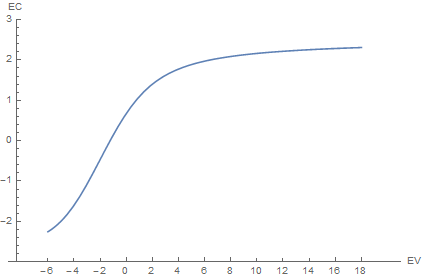
In games automatic exposure or eye adaptation is an algorithm for simulating eye reaction to temporal changes in lighting conditions and for selecting optimal exposure for a given scene and lightin…
i wonder if this would be helpful for you
it looks like pretty useful info
heavy cradle
I've actually skimmed that lol
opal rain
😅
heavy cradle
I want to try to do the "Adapting to illuminance" section
opal rain
yeah that's what caught my attention
heavy cradle
testing out betart I very quickly noticed that the auto exposure would often over expose in caves because of the stone textures lol
opal rain

heavy cradle
You don't see it in CR's videos because he cranked the contrast
opal rain
cloud shadows are on github
opal rain
heavy cradle
I want to try to do the "Adapting to illuminance" section
so i had claude review the current implementation and give some feedback. i doubt it'll be helpful but just in case
heavy cradle
there is definitely some helpful stuff in there
grim dagger
heavy cradle
You don't see it in CR's videos because he cranked the contrast
guh iirc i only upped it + 0.200 from the default value.
heavy cradle
-# I just lean more neutral tonemapping wise lol
grim dagger
gotcha
heavy cradle
I actually like the neutwo a lot in betart
 opal rain
heavy cradle
there is definitely some helpful stuff in there
opal rain
heavy cradle
there is definitely some helpful stuff in there
i will hold off on doing a release until the AE is improved btw
-# no pressure
heavy cradle
ah
opal rain
cleaning up the menu is going pretty nicely
it's muuuuch easier
about 2/3 of all of the sliders and options have been condensed
 clear sandal
Wow
opal rain
heavy cradle
some of the nicest clouds I've seen in a game lol
opal rain

 that means a lot tbh
i settled on these for the new defaults for the cloud system
lots of variation
heavy cradle
holy shit
opal rain
😅
i wasn't kidding when i said it wasn't far behind the decima clouds in death stranding 2 lol
i'm really happy with them
heavy cradle
I really need to retune the auto exposure lol
but I'm running on like 3 hours of sleep
heavy cradle
probs
clear sandal
Looks so good
heavy cradle
funny
one of the sky boxes in halo reach kinda looks like that
but that's just a 2d texture obviously
opal rain
heavy cradle
funny
one of the sky boxes in halo reach kinda looks like that
i did mess with negative curvature to simulate the halo, but it just doesn't look right. i'm not sure how viable this sky system will be for halo as a result unfortunately

 opal rain
ah okay
nice then
it'd have been kinda neat to see the clouds formed around the upper parts of the halo. that's what i was visualizing
like wrapping around with it
heavy cradle
would be cool but I think people would complain lol
opal rain
😅
opal rain
heavy cradle
I mean none of the games account for the curve like that I don't think
geometry in the actual game won't intersect with the clouds. i'll need to create a system to let the halo display in the skybox. unsure how to approach this
runic robin
opal rain
geometry in the actual game won't intersect with the clouds. i'll need to create...
approach it very...... carefully
opal rain

heavy cradle
Is there a way to put the halo between the clouds and the actual sky?
opal rain
as of right now, no
going to see if i can figure something out that wouldn't destroy performance
opal rain
opal rain
i settled on these for the new defaults for the cloud system
new changes are on github btw
opal rain
i'm not sure i should attempt this prior to the next release
it would allow games with skyscrapers and stuff to interact with the clouds though
hmmm
heavy cradle
think the static mesh stuff should take priority
opal rain
that one's def not gonna be in this release
heavy cradle
oh yeah for sure
just for right now I don't really mind the halo not being rendered
 quasi lance
heavy cradle
Is there a way to put the halo between the clouds and the actual sky?
quasi lance
heavy cradle
Is there a way to put the halo between the clouds and the actual sky?
The ring background will always be behind both the clouds and atmospheric scattering, the only thing behind it would be stars and planets/moons. All atmospheric effects would be foreground to it (this is something that 343 got wrong with Infinite and it annoyed me greatly)
That screenshot above where it's darker than the sky? lolno
heavy cradle
ahhh lol
opal rain
ah. well, that can't really happen with this sky system
 opal rain

 grim dagger
what about in motion?
opal rain
100% stable
grim dagger
😃
opal rain
there are controls for it, dw
grim dagger
which one, i couldn't figure it out on my end
opal rain
i added them in my local build just now
swift jackal
How is the moon handled btw, and is there any chance we could get configurable planets added sometime in the future
opal rain
the moon is a randomly generated pattern, which is configurable. you can change the color, size, craters count & size, etc.
(goku's original system, just modified)
hot orchid
moon count?
hushed comet
swift jackal
How is the moon handled btw, and is there any chance we could get configurable p...
there's no real limitation on what can be added, I don't think. Imagination that's about it. Initial implementation was more or less just brought to the POC stage and then I immediately got side tracked. Anyone is free to add or modify it. I did not do this for just Me really and was intended to be a community asset.
opal rain
a system to put in an image of a moon wouldn't be too hard to add. i just don't think it's necessary for the initial release
hushed comet
yeah that's how i feel as well about it.
I did try using textures as well but liked how these turned out.
and I also felt like it would limit what was intended to be a turn key solution to get a project moving.
opal rain
realistically not many games would need this feature. and the more things i have to add, the longer it'll be until release
we're pretty much at the end of the time i can allot to this project for at least a month probably, so it needs to be finished up in the next day or so
hushed comet
Amazing amount You've done thus far imo. I think it's in a good spot really. well featured, works, and looks good. like really good.
opal rain

hushed comet
I'll be contributing to it more in the future as well. Still got some ideas left.
 swift jackal
Just to be clear, is this also procedurally generated? Honestly if it is, then AI agents are fr cooking
opal rain
the only thing based on an image for this whole system is a small component of the cloud noise pattern, which is based on EA's fastnoise texture
hushed comet
the agents are def cooking.
swift jackal
I feel as though for the clouds to be an actual 3d object (like the ones we see in MSFS or RDR2), something about the way remix handles skybox and such has to be heavily modified. But rip performance, honestly what we have is pretty good
hushed comet
Need a artist for the meshes I think but it could be swapped in I think. It's what My agent wanted to do first but I can't mesh so.. yeah.
opal rain
there are some hacks that will allow in-world geometry to go into the clouds and look somewhat real without losing much perf. the camera should not go in it though, otherwise it'll look really bad
if we want it to function just like those games, we'd be sacrificing basically all of the performance optimizations i did. like... ALL of them
it'd be ~60% more intensive than it is right now
this cloud system seems to incur about an 8% performance hit i think
hushed comet
yeah none of that then.
opal rain
star fixes are pushed
opal rain
GitHub
Contribute to RemixProjGroup/dxvk-remix development by creating an account on GitHub.
this build will have the latest DLSS version as well
v310.6.0
wide kelp
opal rain
v310.6.0
what improvements does the latest dll include?
opal rain
@hushed comet noted improvements with ghosting. main reason for updating
wide kelp
opal rain
<@237242727761313793> noted improvements with ghosting. main reason for updating
on preset E?
opal rain
unsure
wide kelp
is it better ghosting for transformer RR?
hushed comet
Ghosting in Preset E: Many users found that Preset E in the earlier 3.1.1 version caused "smearing" behind moving objects. 3.1.11 (v310.6.0) significantly reduces this "trailing" effect
opal rain
opal rain
this build will have the latest DLSS version as well
i think i've worked on everything that i planned to before release. just waiting for AE improvements now
cloud shadows remain an issue when used with DLSS, i spent about a day trying to fix it with no luck. if you don't see them, that's why
hushed comet
I find it's ghost free on My project. results may vary though
I use RR. don't think there's anything I don't use really atm
wide kelp
hushed comet
Ghosting in Preset E: Many users found that Preset E in the earlier 3.1.1 versio...
@sick lake WE BACK BITCHES #PRESETEFORTHEFORSEEABLEFUTURE
hot orchid
wide kelp
<@653204540866166795> WE BACK BITCHES #PRESETEFORTHEFORSEEABLEFUTURE
Explain
hushed comet
Beside preset E , All the presets were improved IIRC.( not RR)
Also, I know the newest Nvidia drivers are a mixed bag with people, but the latest one seems to be a lot smoother and way less hitchy both with the runtime and the toolkit on My end. I'm almost certain it lost at least 2 fps from the previous driver but I'll take that for the smooth experience this one seems to deliver.
opal rain
noteworthy thing for me to work on later: make clouds interact with sunsets better

 opal rain
these are my preferred settings after tweaking it for a bit

hid that annoying particle that was in the way lol
 heavy cradle
-# do you have the tonemapping set to none?
opal rain
indeed
we need to set a default for that btw. when you do the AE tweaks can you please do that
here. Psycho tonemapping
 heavy cradle
should I default it to psycho?
opal rain
ya
heavy cradle
working on the ae stuff now
unfornately haven't been able to get the ae to use diffuse light as an input instead of scene color
opal rain
 opal rain
okay
color pickers are implemented for all of the relevant options
i added it to the volumetrics too
additionally i reorganized the whole sky section in imgui to make it easier to navigate
 heavy cradle
siiick
opal rain
✨
 heavy cradle
think I am pretty close to getting the auto exposure dialed in
heavy cradle
yeah I think I have something
need to test in new vegas though
have been only using betart for testing
heavy cradle
bruh
hushed comet
Would not be the first time the drivers did that with discord. I've only seen it CTD once yet on this one though. no BSOD... yet..
opal rain
imgui rework is on github
opal rain
heavy cradle
need to test in new vegas though
any luck? exciting 
heavy cradle
I think it's in a good spot now
 swift jackal
Fallout 3 
clear sandal
Remix-
opal rain
someone needs to test TTW
clear sandal
Ttw?
opal rain
a mod that puts FO3 in FNV
runic robin
The The What
clear sandal
Thats wild
heavy cradle
@opal rain opened a pr for the ae
 heavy cradle
there's probably further additions or fixes that could be made to the ae but I want to sleep tonight
feel free to ping me with any issues so I see them when I wake up
heavy cradle
no problem
hot orchid
18 hours awake
runic robin
hot orchid
18 hours awake
get those numbers up as high as you can  💪💪
💪💪
hot orchid
My max is like... 38?
hot orchid
opal rain
i've been awake since i was born
I could fix that
opal rain

runic robin
opal rain
i've been awake since i was born
I mean
How do I know I havent been awake since I was born? You cant know if youre unconscious 
opal rain
hot orchid
I heard a story about a girl who fell into a coma for like 3 days and lived ten years in a dream.
runic robin
 opal rain
heavy cradle
there's probably further additions or fixes that could be made to the ae but I w...
opal rain
heavy cradle
there's probably further additions or fixes that could be made to the ae but I w...
it works really good. i can't see anything to tweak. neither could claude
i updated some docs and comments on your branch but that's it. did one small code tweak but it's functionally identical to how it was originally (just easier to read)
well, i tried. it won't let me push to it still
just merged and applied on top
heavy cradle
opal rain
it works really good. i can't see anything to tweak. neither could claude
siiick
opal rain
added a script to the repo to create and update a document for all Remix API controls. should be trivial for projects to use it now
includes a document specifically for the sky system too
also rtxoptions.md has been updated
opal rain
and
one final change before release: i fixed sunsets. no more weird orange glow for all clouds
god i swear everything is fighting me today. game bar and Nvidia app both refuse to take screenshots rn

 heavy cradle
how bright do the new vegas nights get with my AE?
 heavy cradle
damn I'm good
lol
I was really thinking you would have to dynamically adjust the auto exposure settings at night with the remix api lol
heavy cradle
hope you are alright
opal rain
hopefully will be 🫂
opal rain
https://github.com/RemixProjGroup/dxvk-remix/actions/runs/26249978374
release build is building here. i'll do the release note ssoon, i just need to lay down for a bit
a pretty insane changelog
heavy cradle
Was just looking at some clouds irl
Crazy how close the pbr sky stuff is lol
hushed comet
Lol same.
opal rain

GitHub
Remix Plus 1.4.2
Release date: 2026-05-21
What's New
Realistic volumetric clouds that light up properly at sunrise, sunset,
and night, with drifting cloud shadows that match what's overhea...
heavy cradle
chonky
 brazen sluice
opal rain
https://github.com/RemixProjGroup/dxvk-remix/releases/tag/remix-plus-1.4.2
brazen sluice
opal rain
https://github.com/RemixProjGroup/dxvk-remix/releases/tag/remix-plus-1.4.2
 opal rain
-# then i have to go to the hospital
opal rain
opal rain
-# then i have to go to the hospital
i'm home. thankfully things went okay
clear sandal
Glad to hear it 
opal rain

grim dagger
@heavy cradle any reason why local tonemapping was ripped out? I like how psycho looks on gmod but too many times the scene is either overexposed or too dark and the AE never seems to find a good middleground even when tweaking it.
heavy cradle
I couldn't get it to look good
heavy cradle
I can look into the god of war local exposure if you want.
grim dagger
what is that 👁️
heavy cradle

In this blog post, I wanted to address something that I was thinking about for many years – since starting working on rendering in video games and with HDR workflows and having experience with vari…
grim dagger
yeah this looks great, i would like to see this in remix
no pressure of course
heavy cradle
yeah it looks way better than whatever was built into remix
-# iirc the default local stuff was built around photography not real time rendering
ideally I would make the auto exposure work on the diffuse lighting in the scene instead of the sceneColor
the auto exposure isn't perfect because it's taking the luminance of the textures into account
heavy cradle
@grim dagger does the auto exposure behave if you switch to the neutwo? If it does I have an idea
heavy cradle
have a quick and dirty prototype for an adjustment to the auto exposure


agx before / after
before I was sampling the raw scene and getting the median from that
now I am sampling the scene with tonemapping applied so that the median that the auto exposure is working off of actually reflects what the user sees
need to scale all the tonemappers to hdr to make it work properly but as a concept it works I think
opal rain
i might have to do a minor release for this + the new shading fix
heavy cradle
before / after psycho
not as much of a difference but still

 gilded path
https://gemini.google.com/share/8dd65a237276 if anyone wants to look at this, but i don't know if its feasable or a gaslight
 velvet bear
Hey Kim@opal rain, I'm currently using your Remix Plus for my GTA VC. I ran into a bit of a weird issue regarding the Remix API and was wondering if you might have any insights. My light plugin utilizes the Remix API to set in-game light sources. It works fine in the vanilla RTX Remix (lights are created as expected). However, when running it with Remix Plus, the lights seem to get deleted the exact same frame they are created. Do you happen to have any clues or ideas on what might be causing this?
These are comparison videos. You can see the lights are being deleted repeatedly.
opal rain
velvet bear
Hey Kim<@410198342300205066>, I'm currently using your Remix Plus for my GTA VC....
yeah, you need to recompile your plugin against Remix Plus's API. it's a different format (there was no choice but to do this)
here's some documentation for it
to be honest i'm surprised those lights spawn at all without doing this
heavy cradle
pretty neat
 velvet bear
opal rain
yeah, you need to recompile your plugin against Remix Plus's API. it's a differe...
velvet bear
opal rain
yeah, you need to recompile your plugin against Remix Plus's API. it's a differe...
I did recompile them all with the remix plus api cuz the old plugin would crash the game.
Though I might need to take a look at the documentations you mentioned.
opal rain

very strange
i did notice some issues with lights in FNV, but that game is kinda cursed so it wasn't surprising. i'll look into it and see if maybe i broke something
velvet bear
Btw, there's also another annoying bug that there are two mouses icon shown when using the remix runtime panel. This was a bug in the old vanilla remix and was already fixed in a release version. I don't know why it reappears in remix plus.
opal rain
do you know when that was fixed? Remix Plus isn't too far behind the latest main commit (but is ahead of official 1.4.2)
it's possible that a newer commit in main broke it
velvet bear
I can't recall. I think it was fixed between version 0.6.0 and 1.3.6. I can confirmed that the bug was already fixed in 1.3.6.
opal rain
velvet bear
I can't recall. I think it was fixed between version 0.6.0 and 1.3.6. I can conf...
are you able to test the latest github actions build from nvidia's dxvk-remix repo and see if it's there too?
velvet bear
opal rain
are you able to test the latest github actions build from nvidia's dxvk-remix re...
Yeah, i'll try and see if it also reappears.
opal rain
velvet bear
Yeah, i'll try and see if it also reappears.
last question: would you be willing to share the code so i can troubleshoot it better? if not i understand, but i can't really figure it out without that sadly
velvet bear
opal rain
last question: would you be willing to share the code so i can troubleshoot it b...
ofc, i will send you invitation to my repository later.
heavy cradle
interesting
 heavy cradle
actually found some issues with the pbr sky stuff
-# it's why the gradient in my screenshot looks different
heavy cradle
heavy cradle
clouds are broken for me in halo ce 😭
can see the difference in color here
I'll do some more testing after I get some sleep
opal rain

opal rain
velvet bear
I can't recall. I think it was fixed between version 0.6.0 and 1.3.6. I can conf...
fixed
 fading glen
Would look pretty good in IV 
But I don't really see a way to properly integrate that into my remix fork with the tons of commits and other things in remix plus getting in the way. Can't really put my changes on top either since the latest remix version breaks OMM building 💀


 velvet bear
opal rain
to be honest i'm surprised those lights spawn at all without doing this
velvet bear
opal rain
to be honest i'm surprised those lights spawn at all without doing this
Ok, I fixed it myself.
 opal rain
fading glen
Would look pretty good in IV <:green_fire:1271186031047217282>
But I don't real...
opal rain
fading glen
Would look pretty good in IV <:green_fire:1271186031047217282>
But I don't real...
i changed my approach to commits in remix plus to reduce hassle and confusion. sorry the old stuff is problematic though
other than OMM, what would you need changed to allow this to work
opal rain
velvet bear
Ok, I fixed it myself.
🔥
was it a game side issue?
i was just starting to look into it
fading glen
opal rain
i changed my approach to commits in remix plus to reduce hassle and confusion. s...
A branch that contains all of the atmos/cloud stuff which could easily be squashed into a single commit would be pretty nice (similar to how nv wants their PR's). Haven't really looked into the api side of your atmos system but it looks like it includes everything that I'd need
Mouse and keyboard input is also broken on this version of remix for some reason
velvet bear
opal rain
was it a game side issue?
Nope, it was on the mod side. My ASI plugin was creating/destroying RTX lights every frame, which works fine on vanilla dxvk-remix but breaks on Remix Plus because it has a different light lifecycle model (dynamic flag + per-frame keepalive).
opal rain
fading glen
Mouse and keyboard input is also broken on this version of remix for some reason
when the imgui menu is open?
fading glen
also noticed that I cant change these two options
 fading glen
opal rain
when the imgui menu is open?
fading glen
opal rain
when the imgui menu is open?
yea key input duplicates and mouse flickers between the actual cursor and some offset
opal rain
yeah. i just fixed that tonight. it's not pushed yet though
opal rain
fading glen
A branch that contains all of the atmos/cloud stuff which could easily be squash...
i wouldn't be able to fully separate it from the other changes in remix plus, it's pretty heavily tied into it. but i could make a branch just to simplify the commit history?
if you can give me more detailed info about what you'd need for this, i can give it a shot when i have some time to spare. i'm in the middle of moving rn so my time is pretty limited
fading glen
opal rain
if you can give me more detailed info about what you'd need for this, i can give...
Dw about this for now because I'm probably not rebasing my remix fork anytime soon
opal rain
fading glen
Would look pretty good in IV <:green_fire:1271186031047217282>
But I don't real...
it looks awesome here at least. i do hope integrating it works out one day
grim dagger
fading glen
A branch that contains all of the atmos/cloud stuff which could easily be squash...
i second this
opal rain
grim dagger
i second this
please tell me what this would entail, because i don't know exactly what you guys have in mind
from what i think it is, it sounds like it'd take an immense amount of time and effort
grim dagger
not really, you're just squashing commits related to a specific feature so it becomes 1 and is on top of upstream, look at my repo for example


you'd then cherry-pick these into your main branch

commits should be short with anything verbose in the description, but ideally those should be short too
hushed comet
 grim dagger
imo i find it hard to navigate remix-plus due to the same concerns as xoxor4d so keeping it clean like that would help a lot
opal rain
okay
i have never maintained a repository this large, and with all of my other projects over the last 4 years or so basically no one else has used the repo directly
it's a lot to learn and i think i fucked up by choosing to do this at such a volatile time in my life
grim dagger
opal rain
i have never maintained a repository this large, and with all of my other projec...
no worries lol, this kind of stuff is learned over time
fading glen
best way would be to work on new features on separate branches and keep all of the commit history there. Then when you want that feature on your main branch, you squash and PR that onto main as a single commit
like if multiple features require the same framework code, have a branch for that - but no features in that branch.
Then branch of from there for each new feature you build on top of that
opal rain
the original workflow for RP was based around that, but i changed it for reasons i don't remember tbh
guess i'll reimplement that
grim dagger
i havent pulled the latest remix-plus changes yet, but did this get fixed?
 opal rain
i went through and removed nosave on a bunch of them, so it should be
 opal rain
waow

 opal rain
good news
every feature has been squashed pretty well. even if it's not perfect, it should be much easier to navigate
am about to push to main-squashed
fading glen
I've just rebased my fork onto ToT so should be easy to cherry pick now - will try in a sec
opal rain
i also fixed the issue with the color pickers that you found
remix plus is a bit behind main right now, but not too far
 i'm reworking the commit messages. claude left them out almost entirely for some reason. give me a few. commit hashes will change as i have to force push
heavy cradle
heavy cradle
actually found some issues with the pbr sky stuff
one of the issues it the multiscatter lut for the sky isn't being applied afaik
 hushed comet
 heavy cradle
I'll open a pr on remix plus in a bit I guess so y'all can test it
velvet bear
The physical atmosphere looks amazing, but I noticed a strange red tint on the distant right before the sun comes up. It’s bleeding into the clouds and alpha objects, which breaks the look. I wonder what's causing it.
opal rain
velvet bear
The physical atmosphere looks amazing, but I noticed a strange red tint on the d...
are volumetrics enabled there? if so it's 100% that
but the sun's lighting is connected to pretty much all of remix's lighting paths now. volumetrics, alphas, etc. should all be affected
the problem is likely that the sun isn't being properly occluded by the terrain. i didn't consider this when implementing the new features
heavy cradle
I really want to see the cotten candy clouds in oblivion now lol
opal rain
velvet bear
The physical atmosphere looks amazing, but I noticed a strange red tint on the d...
i'll look into this when i have time. same for your PR @heavy cradle
i fixed the imgui issues in the latest commits too. also there's a branch now with all of the major feature commits squashed. ~30 commits now instead of 300 
should be easier for you guys to work on top of for your projects
opal rain
i wanted to ask before i did it in case anyone's project relied on it, but would you guys prefer if main had the squashed commits? it'd have to be a force push for the entire history of Remix Plus, so any existing project would need to be rebased after this
right now the squashed commits are on a separate branch
 opal rain
velvet bear
opal rain
are volumetrics enabled there? if so it's 100% that
It's still there when i turn the volumetric off. I think it's somehow related to how remix plus deal with alpha texture cause i noticed this red color would be shinier on those objects.
heavy cradle
feel like remix plus probably needs a testing branch also so that changes that could potentially cause issues for people hopefully get found before being pushed into the main branch
opal rain
i agree, but that does kinda depend on having consistent testers and stuff. and it would slow down development quite a bit most likely
that's why i ended up just doing this and testing as well as i could before doing a release
heavy cradle
ahh
wide kelp
 solar knoll
i cant see
runic robin
solar knoll
 opal rain
heavy cradle
I'll open a pr on remix plus in a bit I guess so y'all can test it
opal rain
heavy cradle
I'll open a pr on remix plus in a bit I guess so y'all can test it
ping me when you do this btw
heavy cradle
Will do
heavy cradle
still working on the pr lol
-# accidently broke the night brightness

but the gradients in the sky look much better
this is how it looks before

the sky is also blue during miday instead of a grayish blue
heavy cradle
@opal rain here is the commit to the sky fixes
https://github.com/TheGreatHMMMM/halo-dxvk-remix/commit/57d0e611e86a6aeafda1b344f8e962c698d6712d
didn't open a pr because of the commit squashing stuff
and it probably needs more testing since the sky system is so complex now lol
@grim dagger @hushed comet could you guys test this when get the chance 🙏
heavy cradle
the sky isn't as eye searing anymore
 heavy cradle
interesting

looks a lot like radiance now
definitely needs tuning
2x sun intensity looks about right for minecraft
 swift jackal
Water looks a bit off
heavy cradle
tis minecraft water
solar knoll
I think he's referring to the material. It has a very metallic look.
runic robin
It just looks like that when its in shade
heavy cradle
only using betart for testing because it has tendency to bring up edgecases that other remix project don't
not my thing to change
like the default sky color with the changes looks perfectly fine with halo ce but it looks "off"in betart lol

very good project for testing things
solar knoll
The lighting looks like the remake (in a good way).
heavy cradle
was just looking at this blender render someone made and thought his close it was lol
 velvet bear
opal rain
yeah. i just fixed that tonight. it's not pushed yet though
velvet bear
opal rain
yeah. i just fixed that tonight. it's not pushed yet though
Just tested out the latest branch. The mouse flickers issue is fixed, but the key input duplicates issue still exists.
fading glen
I had to comment this line to fix the dupe key input https://github.com/RemixProjGroup/dxvk-remix/blob/17c1c56a54782af07c3a42da40c110a046eeec80/src/dxvk/rtx_render/rtx_overlay_window.cpp#L159
GitHub
Contribute to RemixProjGroup/dxvk-remix development by creating an account on GitHub.
opal rain
velvet bear
Just tested out the latest branch. The mouse flickers issue is fixed, but the ke...
it's odd how some games don't have the issue but others do
HL2 RTX had the duplicate input issue, FNV only had the dupe cursor. VC has both i guess?
opal rain
fading glen
I had to comment this line to fix the dupe key input https://github.com/RemixPro...
will implement
🙏 also thank you guys for fixing bugs when you find them and opening PRs (or just sharing the fix). it helps so much
fading glen
squashed everything down and rebased it onto latest main but getting weird sun artifacts on surfaces now 
swift jackal
What does it look like 👀
opal rain
fading glen
squashed everything down and rebased it onto latest main but getting weird sun a...
-# but i already squashed it
fading glen
opal rain
-# but i already squashed it
I squashed it to a single commit 😄
opal rain

that's one massive commit
i did test the squash branch i made and it worked okay. i wonder why squashing it further would break things
fading glen
opal rain
i did test the squash branch i made and it worked okay. i wonder why squashing i...
it did not - rebasing these changes onto latest main messed things up
INTEGRATE_DIRECT_BINDING_PRIMARY_CLOUD_SHADOW_FACTOR_OUTPUT 73 .. 73 is now used by the shadow terminator
setting it to the next number 74 introduced issues
opal rain
fading glen
swift jackal
What does it look like 👀
 clear sandal
the sky system is completely borked in the newwest release for roblox
swift jackal
It looks like one of the shader games with messed up lighting
Also the road textures look weird asf
opal rain
clear sandal
the sky system is completely borked in the newwest release for roblox
how so
 fading glen
@opal rain can you ask your AI if changing INTEGRATE_DIRECT_BINDING_PRIMARY_CLOUD_SHADOW_FACTOR_OUTPUT from 73 to 74 needs changing somewhere else?
clear sandal
opal rain
is this with novetus?
yeah
opal rain
i was just looking into it
opal rain
clear sandal
yeah
try temporarily just renaing your rtx.conf to see if it's older saved settings breaking things
clear sandal
opal rain
try temporarily just renaing your rtx.conf to see if it's older saved settings b...
didnt change too much
 clear sandal
after work ye
fading glen
Okay turns out the weird lighting was caused by my api distant light which was on together with the new sky system
clear sandal
was it weird and blocky?
fading glen
Not sure why that would affect the distant light tho
fading glen
clear sandal
was it weird and blocky?
#1475609256949452972 message
clear sandal
ah yeah thats different
gilded path
wait something broke again? just got here
gilded path
all good
opal rain
fading glen
Okay turns out the weird lighting was caused by my api distant light which was o...
yeah claude couldn't find anything and neither could i
there is a collision at slot 34 though
soon i'll take the squashed main branch and rebase it on latest, fix all collisions
fading glen
opal rain
there is a collision at slot 34 though
ah thanks for letting me know
grim dagger
solar knoll
I think he's referring to the material. It has a very metallic look.
weird, it just uses the translucent shader, no metallic params/mats at all
solar knoll
grim dagger
weird, it just uses the translucent shader, no metallic params/mats at all
Could it be volumetric fog? Sometimes it does weird things with PSR.
opal rain
the thing that's weird is that the reflections don't have the fog
grim dagger
solar knoll
Could it be volumetric fog? Sometimes it does weird things with PSR.
it does use volumetric absorption to get the intended "beta" looking water. Without it, it just looks like the replied screenshot all of the time

this one
#1475609256949452972 message
swift jackal
grim dagger
it does use volumetric absorption to get the intended "beta" looking water. With...
Are the trees leaves going to be a problem with how many alpha blended textures it's using, very taxing on the GPU even with OMM
grim dagger
i thought it was before but the OMMs never seem to run out of budget

like its super low
changing the graphics settings to Fast which removes those alpha-tested leaves changes performance very little, so its still drawcall bottlenecked
solar knoll
grim dagger
it does use volumetric absorption to get the intended "beta" looking water. With...
Yeah, a lot better.
The textures are also 16x16, so it's easier for OMM to handle.
opal rain
grim dagger
semi related, but a few people have mentioned that newer remix breaks OMMs. i can't verify myself but it's something to watch out for
heavy cradle
wonder how difficult it would be to "bake" out the atmosphere for games with static times of day
opal rain
velvet bear
Just tested out the latest branch. The mouse flickers issue is fixed, but the ke...
put this in your .trex folder, see if this fixes it please
velvet bear
opal rain
put this in your .trex folder, see if this fixes it please
Sadly, no.
hot orchid
opal rain
put this in your .trex folder, see if this fixes it please
Happens for me too, btw
I wonder if it has something to do with borderless vs exclusive fulscreen
swift jackal
opal rain
put this in your .trex folder, see if this fixes it please
Why is your d3d9.dll 345mb in file size 😭
 opal rain
velvet bear
Sadly, no.
opal rain
velvet bear
Sadly, no.
nono this isn't for the input, it's for the glow with decals and stuff during sunset
egh. doesnt fix it
opal rain
heavy cradle
like the default sky color with the changes looks perfectly fine with halo ce bu...
i'm wondering if this was broken in CR's original build. the desert planet preset no longer looks like it used to after this tweak
i had to change a lot of settings to get it to resemble it at all
it's very blue as you can see

vs CR's original sky implementation with it (which is how it looked until your change)
 hot orchid
Maybe crs was broken and you fixed it
opal rain
well yes that's what i'm thinking, but i'm not 100% sure that this is better
velvet bear
opal rain
nono this isn't for the input, it's for the glow with decals and stuff during su...
Just tested it. Nope. Alpha objects are still glowing before sunrise and after sunset.
opal rain
i'm working on it rn
hushed comet
for the double inputs, have any of You tried to change to this in your bridge.conf ?
client.DirectInput.forward.mousePolicy = 1 client.DirectInput.forward.keyboardPolicy = 1
velvet bear
hushed comet
for the double inputs, have any of You tried to change to this in your bridge.co...
I just tried it. It didn't work for me.
hushed comet
hmm. werid. I do have the double inputs with remix plus for sure but that fixes it on my end.
clear sandal
hushed comet
for the double inputs, have any of You tried to change to this in your bridge.co...
We fixed it with = 0
For novetus


 wide kelp
hot orchid
I skipped to the last frame to stop the video from playing and got gold
wide kelp
hot orchid
I skipped to the last frame to stop the video from playing and got gold
gta 6
velvet bear
hot orchid
I skipped to the last frame to stop the video from playing and got gold
Yeah, the physical atmosphere is really incredible. This is a preset i made for extra sunny weather.
hot orchid
velvet bear
Yeah, the physical atmosphere is really incredible. This is a preset i made for ...
I need that preset for underground 2
velvet bear
Altitude=0.0
SunColorR=255
SunColorG=245
SunColorB=224
SunIlluminance=20.0
AirColorR=54
AirColorG=128
AirColorB=255
AirScatteringStrength=0.025
DustDensity=1
DustScatteringStrength=0.01
NightSkyBrightness=0.01
NightSkyColorR=98
NightSkyColorG=127
NightSkyColorB=255
These are the parameters i changed.
opal rain
velvet bear
Altitude=0.0
SunColorR=255
SunColorG=245
SunColorB=224
SunIlluminance=20.0
AirCo...
would you mind if i added this to the preset options?
hot orchid
velvet bear
Altitude=0.0
SunColorR=255
SunColorG=245
SunColorB=224
SunIlluminance=20.0
AirCo...
Yoinnk
velvet bear
Go ahead. But I think it only looks good at this certain time period. I might be able to do a better preset.