#Left 4 Dead - 2
1959 messages · Page 2 of 2 (latest)
 timber dock
 nova helm
wonder why color grading isn't a thing in the local one
 thorn timber
who knows
 placid umbra
Here's a couple IRL examples


 sleek cove
 rough meteor
hurry bro! your work is so handsome
rough meteor
hurry bro! your work is so handsome
I wouldn't rush him, Remix work on this scale takes time
nova helm
sleek cove
I wouldn't rush him, Remix work on this scale takes time

i'm also avoiding rushing in the hope that future Remix updates introduce features that are present in L4D for say
as I understand it there's no way to create custom shaders for Remix, which is definitely needed for some effects such as L4D's outline glows
sleek cove
nova helm
as I understand it there's no way to create custom shaders for Remix, which is d...
You can try replicating them
nova helm
sleek cove
You can try replicating them
i'll probably end up doing it through the model itself, make a custom vmt for glows that are picked up by Remix and work from there
 topaz yarrow
placid umbra
Here's a couple IRL examples
topaz yarrow
placid umbra
Here's a couple IRL examples
cells 4 at a 50-100 scale with bevel and slope blur greyscale node can achieve this
in Substance designer or Painter
 warped dock
placid umbra
Here's a couple IRL examples
warped dock
placid umbra
Here's a couple IRL examples
I need to think about it

I was thinking about this bit not perfectly connected cheaply placed bricks with some waterproof paint
On top of it
Im now on the road
Im gonna share og textures here
There is not much information on the albedo about spaces between bricks
nova helm
hmm...
 warped dock
Thats odd
Try to Mark it as doublesided material
Or mesh
If I remember correctly
Or something about geometry culling thing
nova helm
double sided marking doesn't work oddly enough - just gets forced back to default value
i'll look into it more later
 nova helm
would there be any way of re-implementing L4D's film grain?
placid umbra
warped dock
I need to think about it
Yeah after sending the examples I realized what you have ingame is a slightly more weathered wall that probably isn't even painted like the ones I sent pics of, that and ingame it looks like some cheap work someone would do for a basement so it the mortar between the bricks shouldn't look as clean as my example
nova helm
placid umbra
Yeah after sending the examples I realized what you have ingame is a slightly mo...
the original material ssbump is roughly more or less what your IRL example shows tbf
here's how that particular material looks when set up in Remix
 nova helm
@timber dock is it possible to read the $HeatAmount vmt value to use for scaling the emission intensity on the minigun/mounted gun heat glow during gameplay?
not too sure how i'd do that one myself
timber dock
nova helm
<@204650202072743936> is it possible to read the $HeatAmount vmt value to use fo...
I think I've implemented a way to set the emissive intensity per drawcall and there are also ways to check for certain material vars .. should be possible to get the value for it as well. Not a straightforward thing to implement if you are not a coder tho.
Wouldn't take me long to implement that. Can you gimme the map name where I can easily test that on? And maybe a vid of how it should look like?
nova helm
timber dock
I think I've implemented a way to set the emissive intensity per drawcall and th...
c8m5_rooftop or c8m2_subway both have miniguns
but i'd recommend using TUMTARA since it has both mounted guns placed and easily accessible

i've also been using it for easy captures and edits of a lot of materials
nova helm
proof of concept film grain using reshade
reshade overlay is bugged so i can't access it and tweak settings directly so atm the grain is a bit too strong
oh right video compression
yipee
let me redo that
aaand filesize limit lol
this shows it better
also roughly emulates the og film grain behavior by losing intensity around bright lights and being most prominent in dark areas
 nova helm
surprisingly difficult to do a convincing muzzle flash
nova helm
most of the textures in the first level are now PBR-ified - most of what's left are textures that don't have normal maps or envmap masks - which i'm recreating using bits of other textures that are also used on them, or PSDs (take this brick wall/window combo - the texture itself has also been increased to 2048x2048

 thorn timber
nice work
nova helm
quick displacement test while I'm at it lol

 autumn flint
i know rtx is thrown around as a buzzword a lot but man. it really does so much for these games
the simpler level design works in its favour
autumn flint
nova helm
hmm...
like yeah the lighting is a bit weird here but it looks so goddam good
it looks like a blender render
 unique sail
is the game supposed to look like this?
 timber dock
unique sail
is the game supposed to look like this?
timber dock
unique sail
is the game supposed to look like this?
looks like it's working, yea
warped dock
unique sail
is the game supposed to look like this?
rtx remix doesnt magicaly do materials it only takes base textures from the game
you can try yourself do material replacement or wait till somebody from community will release mod4
nova helm
looks like your DLSS quality is also quite low there
@timber dock i think i already asked you this, but do you have any idea as to how i can avoid the skybox intersecting geometry like this? L4D or source has some way of doing it, i think by forcing world geometry or props to render over the skybox in all cases, which i'm not too sure is doable in remix - also can't just delete the mesh since it's used for the buildings that are 'outside' at the start


also, any idea how i can stop fog from lights leaking through walls and stuff? i've tried using markers as blockers, but doesn't seem to work
 warped dock
ive tried a bit doing bill model
i mean material

i totally dont understand how to deal with it XD
 timber dock
nova helm
<@204650202072743936> i think i already asked you this, but do you have any idea...
timber dock
nova helm
<@204650202072743936> i think i already asked you this, but do you have any idea...
Not much you can do besides playing with the 3dskybox scale. I suggest not using the 3d skybox at all. Rather, capture the skybox and export it as a combined model via blender .. then add it back via a marker
warped dock
I love this door
 nova helm
timber dock
Not much you can do besides playing with the 3dskybox scale. I suggest not using...
nova helm
timber dock
Not much you can do besides playing with the 3dskybox scale. I suggest not using...
i've got the skybox models already since i have the original vmf thankfully, i guess yeah would just need to edit it and add back as a marker?
nova helm
warped dock
I love this door
it looks a little exaggerated? i think i have the psds for that door somewhere
nova helm
warped dock
i also have the psds for bill so i can work more on his materials later
nova helm
experimenting with some buildings being lit up

was trying to emulate like a tv being on or something but it turned out too green lol
 sleek cove
warped dock
ive tried a bit doing bill model
sleek cove
warped dock
ive tried a bit doing bill model
Be funny if you could import that DBD model, lol
 elder narwhal
nova helm
experimenting with some buildings being lit up
elder narwhal
nova helm
experimenting with some buildings being lit up
love the work youve been doing btw its incredible even if its sometimes funny lol
nova helm
elder narwhal
love the work youve been doing btw its incredible even if its sometimes funny lo...
Thank you!
nova helm
@warped dock
warped dock
looking good
nova helm
absolutely
just need to do this with the rest of the doors now
i can also increase or decrease the displacement at will - so if it feels too shallow for example it's an easy tweak
(or i can just be stupid 😅 )
warped dock

 nova helm

 nova helm
an important question: should I keep the fog in interiors or axe it?


looks like this w/o fog
 nova helm
placid umbra
nova helm
placid umbra
I think it looks good with fog, especially that scene considering there is an active fire next to it and it could almost pass for a smog created by the fire. But for the whole level I'd say nah, if only we had more control of it. I know Xoxor was able to pull some magic like that for the "first" level where you come out the elevator to the room on fire and he triggers the volumetrics to fill the room with a smokey haze
timber dock
Yeah the compatibility mod supports that out of the box by tweaking the map settings file
elder narwhal
nova helm
Thank you!
is there any way for me to test these out or still gotta wait
warped dock
indoor fog is og and fills emptines of the maps but without fog there is more depth to the maps
i dont know about either ways
nova helm
i think what @placid umbra said about the volumetrics is the ideal balance here - imo there SHOULD be smog around that fire that partially leads into the tunnel on the right but it shouldn't go all the way back
nova helm
elder narwhal
is there any way for me to test these out or still gotta wait
What exactly would you be testing here?
nova helm
nova helm
poll_question_text
fog or no fog?
victor_answer_votes
8
total_votes
14
victor_answer_id
2
victor_answer_text
no fog
victor_answer_emoji_name
☀️
elder narwhal
nova helm
What exactly would you be testing here?
how awesome it looks in game
nova helm
I'm kind of doing that on my own fine lol
I doubt I'll need testers, at least for a while
nova helm
nova helm
looks like this w/o fog
 nova helm
quick image comparison test
 nova helm
@timber dock did you ever have any luck with figuring out the volumetric slider stuff for lights? or is that an issue specific to Remix/the toolkit?
timber dock
nova helm
<@204650202072743936> did you ever have any luck with figuring out the volumetri...
wdym?
nova helm
with the builtin light editor for the rtx mod, i recall you mentioning you had issues with adding a volumetric slider for the lights?
i've been circumventing this so far by using markers with added lights in the toolkit..but i'm realising that making a unique marker for every single light in a map just to be able to replicate the original look as close as possible just isn't scalable for the entire game compared to..dropping it in through the built in light editor you made
thankfully it's not too big of a deal for non-volumetric lights, but there's defo spots i'd like to try to drop volumetrics in through the builtin editor without requiring markers if yk what I mean
in regards to that, i think i have a way to automate extract every single light from a .vmf into the xml using Blender w/ Python, so i could technically port every map light like that, but i'd need to actually try and write the script for it lol (and figure out how to properly handle unit conversion between blender and Remix for the light settings)
timber dock
nova helm
i've been circumventing this so far by using markers with added lights in the to...
why are you making a new marker for each light tho? You could attach all of your map lights to that one marker
nova helm
timber dock
why are you making a new marker for each light tho? You could attach all of your...
....holy shit why did i not think of that?
i can do that for sure lol
timber dock
I'd only use the light spawner of the comp. mod for lights that are dynamic in a sense. Eg if you need to turn them on/off on a certain event or if they are animated
the volumetric slider issue is a runtime / bridge issue. The issue on GH is still open so I dont think thats fixed yet
nova helm
ah, gotcha - fair enough
i've been trying to figure out if i can use the built in light editor to attach a light to the helicopter spotlight at the start of No Mercy...just need to figure out how i'd fake the volumetric effect since it won't look good in motion
hmmm
would it possible to have markers have the same toggle behavior as lights?
like to have the ability to turn on/appear from sound or choreo events?
in c8m2_subway for example when turning on power in the generator room, so that can be used for the volumetrics that are meant to appear
 timber dock
that would be possible yea. Can you create a very simple GH "issue" (suggestion) for that?
nova helm
sure thing
warped dock
 timber dock
looks like the compatibility mod does not assign the "infected shader" for that model. Do you know the model name and path to it?
This is what it looks for:
if (ctx.info.shader_name == "Infected" && (ctx.info.material_name.contains("/l4d2/") || ctx.info.material_name.contains("/l4d1/cim_ceda")))
it's the base l4d2 fallen survivor model, which is swapped to a unique vmt in L4D1 campaigns post-Last Stand update
you'll find it in the update pak.dir:
materials\models\infected\common\l4d1/cim_fallen_survivor_l4d1.vmt
i attempted to fix it myself not too long ago but didn't get too far - given that i intend to remove l4d2/unique tls content i ended up deciding not to bother fixing it
timber dock
nova helm
like to have the ability to turn on/appear from sound or choreo events?
marker via choreo / sound hash or sound name 👍
timber dock
@nova helm can you test if this https://github.com/xoxor4d/l4d2-rtx/actions/runs/16840612874 fixes the colorful infected model and does not break others? This also includes marker hide/show via events but you can only do that via manually editing the map_settings file rn (will add gui support tomorrow)
GitHub
Left 4 Dead 2 - RTX Remix Compatibility Mod. Contribute to xoxor4d/l4d2-rtx development by creating an account on GitHub.
warped dock
oh my damn
nova helm
timber dock
marker via choreo / sound hash or sound name 👍
fuck yes 🔥
nova helm
timber dock
<@871310883404513310> can you test if this https://github.com/xoxor4d/l4d2-rtx/a...
will do, cheers!
nova helm
timber dock
<@871310883404513310> can you test if this https://github.com/xoxor4d/l4d2-rtx/a...
yep, the l4d1 fallens are good now

don't see it breaking anything else
nvm, some of the fallen survivor variations are still bad

this one's fine


i'd have to look into what makes them show up as white
btw, there's a bug where using nb_delete_all on survivor bots that have their flashlights on makes said flashlights persist
 timber dock
nova helm
i'd have to look into what makes them show up as white
timber dock
nova helm
i'd have to look into what makes them show up as white
Probably happens because it’s now applying the „generative“ infected shader on models that use a standard colormap
warped dock
nova helm
btw, there's a bug where using nb_delete_all on survivor bots that have their fl...
thats kinda neat
you know when they die they just cant think of turning of the flashlights?
XD
nova helm
timber dock
Probably happens because it’s now applying the „generative“ infected shader on m...
makes sense - so probably need to set up some sort of exclusion list for specific textures or materials, then?
timber dock
Something like that yea. Do you know if there is a workshop map with all infected variants (l4d2 + 1)? Would make testing much easier

 timber dock
I guess I'll create my own one then 😛
 nova helm
timber dock
Something like that yea. Do you know if there is a workshop map with all infecte...
nova helm
timber dock
Something like that yea. Do you know if there is a workshop map with all infecte...
i think tumtara has one? not sure, actually
you can spawn a bunch of infected in the main map, but IDK if there's any way to spawn specific infected
timber dock
Ropes 😛
 fast dock
Wolfenstein ropes when /j
sleek cove
timber dock
Ropes 😛
When source engine be source engining
timber dock
tongue is working much better as well .. the vertices do not have any normal data unfortunately so it looks a little wrinkled
 timber dock
fallen should be fixed as well. It was using the common infected shader on cim_fallen_survivor_l4d1_pilot.vmt which is incorrect
 nova helm
timber dock
tongue is working much better as well .. the vertices do not have any normal dat...
nova helm
timber dock
tongue is working much better as well .. the vertices do not have any normal dat...
should be able to improve the look by using the normal map meant for the tongue, right?
timber dock
nova helm
should be able to improve the look by using the normal map meant for the tongue,...
That wont get rid of the wrinkled look but yea 🙌
timber dock
@grave finch should continue chatting here. Will look into the dxsdk dep
 grave finch
timber dock
<@566653752451399700> should continue chatting here. Will look into the dxsdk de...
grave finch
timber dock
<@566653752451399700> should continue chatting here. Will look into the dxsdk de...
on cmake it will be:
target_link_libraries(main PRIVATE d3d9)
i belive with premake it also possible
timber dock
grave finch
<@204650202072743936> merge when? ^w^
sorry was busy with life and portal 2. Will take a look today
grave finch
timber dock
sorry was busy with life and portal 2. Will take a look today
Thx for merging, i will do other pull requests with refactoring when i get some free time. i will try to add cmake support it should not have conflicts with premake, i'll do all preparations.
Btw I'll try to replace some parts of code And from l4d2 internal base with omath, i specifically designed modern library for cheats/modding/game development https://github.com/orange-cpp/omath

GitHub
Cross-platform modern general purpose math library written in C++23 that suitable for cheat/game development. - orange-cpp/omath
timber dock
grave finch
Thx for merging, i will do other pull requests with refactoring when i get some...
Don't want to discourage you but please don't waste your time on cmake. I'll not merge that into the repo because I don't see any benefit having it in there.
I don't really see a use-case for omath currently (that actually makes a difference)
grave finch
timber dock
Don't want to discourage you but please don't waste your time on cmake. I'll not...
CMake is a standard build system
It would be nice to support it
sleek cove
grave finch
It would be nice to support it
Just make a fork if anything
grave finch
sleek cove
Just make a fork if anything
its simple i wanna a challenge
warped dock
i have a programming challenge with remix in a diffrent game if you consider ;D
timber dock
@grave finch do you happen to know how to detect if the camera is in "detached" state (eg. intro cinematic on hotel or when a jockey sits on top of you)? It's not CAM_IsThirdPerson 🫣
grave finch
timber dock
<@566653752451399700> do you happen to know how to detect if the camera is in "d...
use cheat engine try to find some kinda of flag
grave finch
timber dock
<@566653752451399700> do you happen to know how to detect if the camera is in "d...
or if camera pos is far away from player origin like 200 h.u
grave finch
timber dock
<@566653752451399700> do you happen to know how to detect if the camera is in "d...
howdy, hows it goes?
timber dock
grave finch
howdy, hows it goes?
I reworked my hook that detects the 3rd person body and use the stock game checks to determine if the cam is detached. No clue what the var it checks is called tho
grave finch
well this how it goes, if it works dont touch it)
 trail snow
I'm going to have to play through your mod @timber dock I have L4D2 but since I don't live with my dad (who has a powerful enough PC for RTX Remix mods) I haven't found time to play
timber dock
mhh I'd wait for a proper remix mod to be available first
sleek cove
timber dock
mhh I'd wait for a proper remix mod to be available first
Can someone AI upscale all of L4D2 
 brazen sonnet
sleek cove
Can someone AI upscale all of L4D2 <:tux_dawg:1381989261481480242>
brazen sonnet
sleek cove
Can someone AI upscale all of L4D2 <:tux_dawg:1381989261481480242>
If i wasnt lazy....

 sturdy solstice
The current l4d2 rtx remix isn't a proper mod yet? Does it need to have every texture and model worked on to be considered a proper remix mod (like hl2 RTX)?
sleek cove
sturdy solstice
The current l4d2 rtx remix isn't a proper mod yet? Does it need to have every te...
 placid umbra
sturdy solstice
The current l4d2 rtx remix isn't a proper mod yet? Does it need to have every te...
placid umbra
sturdy solstice
The current l4d2 rtx remix isn't a proper mod yet? Does it need to have every te...
Xoxors is just a compatibility mod, making it possible for others to make a full fledged remix mod
grave finch
warped dock
i have a programming challenge with remix in a diffrent game if you consider ;D
i've already have complex projects to build. On day maybe
 final bough
showing some progress check on my rtx mod that i have done for the past week (only includes riverbank map for now), pbr fusion was used here for almost all textures, will change it later with handmaded textures. All original lightsources was added and placed by me, some of the meshes was replaced too and all emissives maps were recreated. What do yall think about pics?


 timber dock
Looking good 
final bough
new atm model
 final bough
new vending machine model, will add dirt on it soon

the emission mask took really long time to make🙏 😭
timber dock
final bough
fully new texture for soda dispenser and added details to vending machine


looking good
and new cash register model too

for this shelf new texture too
 sleek cove
final bough
fully new texture for soda dispenser and added details to vending machine
sleek cove
final bough
fully new texture for soda dispenser and added details to vending machine
Looks good, what's your plans with these in the long run?
final bough
sleek cove
Looks good, what's your plans with these in the long run?
Tysm, currently im working on two projects alongside its dark messiah rtx with team and this one, im gonna be mainly focused on dark messiah of course for now until release, l4d2 im doing only while i got nothing to do there for fun😅, but ye its really fun to work on this project
final bough
just remade model and texture for coffee machine
 final bough
new models/rain drop effects on ground/ lights are a little darker in certain scenes and new emissive for exit sign/tweaked tonemapper settings/new textures(credit to King David for nodes)


 final bough
showing some progress check on my rtx mod that i have done for the past week (on...
final bough
final bough
showing some progress check on my rtx mod that i have done for the past week (on...
ground looks really much nicer compare to this
 signal condor
First pic looks absolutely insane
final bough
signal condor
First pic looks absolutely insane
Thanks brother 
signal condor
You chose such a good map too, the rain really adds a lot to the whole thing. I am wondering if remix's particle editor can have us replace the raindrop materials with better rain particles
As it stands it's a coin flip whether you can visibly see it hah
final bough
signal condor
You chose such a good map too, the rain really adds a lot to the whole thing. I ...
Tadpole dev of call of duty have replaced sprites with real raindrops i think, but not with this new feature, i will check tomorrow if its even possible
This looks so nice
final bough
@timber dock is there any way to completely disable frustum culling from l4d2? I tried to do it with areas in dev gui menu but its just like doing nothing, i mean lights still appears from the back and terrain meshes are still disappears
its very noticeable in buildings
timber dock
final bough
<@204650202072743936> is there any way to completely disable frustum culling fro...
Mhh not sure if l4d2 had an option to choose the anti culling method for an area or if that was p2. There might be something in there. Would not recommend that for obvious reasons tho
Adding the current area and increasing the distance should definitely reduce culling tho (you can check with the remix free cam). Don't go overboard with the distance tho. It might cause stuff to disappear completely
final bough
timber dock
Mhh not sure if l4d2 had an option to choose the anti culling method for an area...
i tried to increasing distance setting to 3500 (on 4000 stuff starts to disappear) its not really do something, i mean i can still see that stuff still disappear in the distance and it only affecting area where i set this parameter, so i need to set distance to 3500 everywhere on map and performance impact is huge😭 . i guess i will ignore it for now and just do polishing for map that i already doing
timber dock
final bough
i tried to increasing distance setting to 3500 (on 4000 stuff starts to disappea...
Oh I think I know what your issue is. So first: the per area settings affect the entire culling system. That means that you do not need to adjust other areas to decrease culling further. Everything inside the distance around you gets affected.
The stuff disappearing in the very far distance is not actual culling but game optimization. The map likely had very dense fog? The game is made to not render certain areas because they'll be invisible due to the dense fog anyway

 timber dock
final bough
but i dont think its really that far
timber dock
final bough
but i dont think its really that far
might be caused by my anti culling implementation or the game might use something black to block off this area until you are close enough? You can do something similar if you spawn a nocull map marker with index .. 0? That has a black surface attached to it via my remix base mod
You can show that marker in certain areas and hide it when you are close to block the light leakage
the second picture shows remix view distance setting that I have enabled for a few maps to try to blend in stuff instead of it just popping into existance in one go
final bough
timber dock
might be caused by my anti culling implementation or the game might use somethin...
i dont think that the game uses panel to block area, cuz i cant choose it in textures, or its not supposed to have texture?
 timber dock
final bough
i dont think that the game uses panel to block area, cuz i cant choose it in tex...
timber dock
final bough
i dont think that the game uses panel to block area, cuz i cant choose it in tex...
it does but I disabled the drawing of them iirc
final bough
timber dock
it does but I disabled the drawing of them iirc
can i enable it somehow just to test it? i think it should look better just with black panel
timber dock
I dont think that I made it configurable
final bough
aight, i will just fix light leaks for now then
ye 💯 that its just black panels from valve so players cannot see what there in the distance
@timber dock last question if i have no conf for this map, i need to create it and just past it there?
c1m3_mall = [
{ in_area = 2, nocull_dist = 3500.00 },
{ in_area = 3, nocull_dist = 3500.00 },
{ in_area = 4, nocull_dist = 3500.00 },
{ in_area = 11, nocull_dist = 3500.00 },
{ in_area = 14, nocull_dist = 3500.00 },
{ in_area = 20, nocull_dist = 3500.00 },
]
timber dock
final bough
<@204650202072743936> last question if i have no conf for this map, i need to cr...
There should be a button to build that list for the current map iirc (and copy it to your clipboard)
but yea that looks good
final bough
well i created conf manually and when im pressing trigger nothing changes
 final bough
timber dock
There should be a button to build that list for the current map iirc (and copy i...
final bough
timber dock
There should be a button to build that list for the current map iirc (and copy i...
i looked for button but cant find it
final bough
timber dock
the area settings?
yes
final bough
but where should i then?
 timber dock
scroll up a little
there is a culling section
there you can live edit culling for areas and export your changes to the clipboard. You then need to paste them into the correct spot into the map_settings.toml file
GitHub
Left 4 Dead 2 - RTX Remix Compatibility Mod. Contribute to xoxor4d/l4d2-rtx development by creating an account on GitHub.
final bough
its working now, tysm!
 timber dock
final bough
its working now, tysm!
timber dock
final bough
its working now, tysm!
so did you put them into the conf files earlier as well (hence didnt see any changes?) 😄
final bough
timber dock
so did you put them into the conf files earlier as well (hence didnt see any cha...
ye i done that manually but to toml file now😀
wtf why dose my gpu is only 45

and it drops to 25 whaaaat
timber dock
yup you have to be really careful. Only ever draw as much as you really need and work with light blockers instead of just drawing everything
or disable rendering of the static world via ingame cvars and attach the entire static geometry to a map marker within remix
so that remix renders the game world from the get go without it going through the d3d9 pipeline
that increases performance by like .. 100% in certain scenarios
thorn timber
can confirm it does 🤓
final bough
so engine just blocking gpu when rendering too much meshes or what i just really dont understand
sleek cove
thorn timber
can confirm it does 🤓
Says the guy who made meshes stable
timber dock
well there is the engine side of things .. the engine needs to decide what to draw, then it needs to grab and pack all the data. Then it sends it off with large amounts of draw calls via the d3d api. (This all by itself takes time)
Then the bridge intercepts all that data and funnels it through a tunnel to the 64 bit renderer. Then everything needs to be setup, hashed, checked against meshes of the previous frame to then get rendered by remix
so if remix already has all the rendering data at any time as replacements, it clears a lot of headroom
so yea rendering large amounts of meshes results in cpu bottlenecks
final bough
timber dock
well there is the engine side of things .. the engine needs to decide what to dr...
bro knows everything😭 you gotta be some sort of engineer in irl
timber dock
final bough
bro knows everything😭 you gotta be some sort of engineer in irl
not at all 😄
final bough
man its so complicated, i will just do stable maps for now that have conf files for them
btw is there any way to make interactable objects hashes stable? im asking too many questions now...
thorn timber
this is a common source issue, skinned meshes like the ones in your video are cpu skinned so the mesh hash will change every frame
final bough
thorn timber
this is a common source issue, skinned meshes like the ones in your video are cp...
so i cant?
but as i can remember they are stable in gm
thorn timber
its a bit of a mixed bag, hl2rtx, portal rtx, and prelude rtx have engine changes to bring back gpu skinning, but for other games without engine source code, this is a difficult process
final bough
what about gm rtx your project are they stable here? i just dont remember
thorn timber
we were able to get most skinned props to be stable, but viewmodels, ragdolls, and NPCs are still unstable
final bough
thorn timber
we were able to get most skinned props to be stable, but viewmodels, ragdolls, a...
but you done it without any source code, right? but ye i dont think i can make this happen with 0 coding knowledge😭
thorn timber
final bough
but you done it without any source code, right? but ye i dont think i can make t...
a lot of the work was done using reverse engineering, with king david providing us a lot of the info.
timber dock
final bough
btw is there any way to make interactable objects hashes stable? im asking too m...
you can use the UNBAKE feature to get them stable
but that will disable all kinds of animations on the object (like actual animations - not it being moveable)
GitHub
Left 4 Dead 2 - RTX Remix Compatibility Mod. Contribute to xoxor4d/l4d2-rtx development by creating an account on GitHub.
final bough
timber dock
but that will disable all kinds of animations on the object (like actual animati...
oh so hashes are gonna be stable but interactable objects are no longer interactable?
or wha
or animations you mean something on object
timber dock
its still going to be interactable
if its a moving plant, it will be static with no animation for example
if its an npc, it will render in a T pose and just float through the world
final bough
what did i do wrong? chair is still unstable


and i got console opens now and it saying that something is off in map setting file

i think i forgot to put ] somewhere according to console
oh f i forgot to put ]} at the end
sleek cove
thorn timber
this is a common source issue, skinned meshes like the ones in your video are cp...
CR, you fixed this

fast dock
sleek cove
CR, you fixed this
just because a game runs in shaders DOES NOT mean it can be fixed in every game
timber dock
final bough
what did i do wrong? chair is still unstable
do not put # infront of the thing you want to unbake .. it makes it a comment
sleek cove
fast dock
just because a game runs in shaders DOES NOT mean it can be fixed in every game

Imma try it now
fast dock
sleek cove
<:sus:684134841045745679>
Yeah, the game will be running in shader mode but I dont think it'll work with xoxors mod
sleek cove
fast dock
Yeah, the game will be running in shader mode but I dont think it'll work with x...
Only one way to find out
final bough
timber dock
do not put # infront of the thing you want to unbake .. it makes it a comment
where do i need to put ]
 timber dock
this one looks fine
 final bough
where do i need to put ]
final bough
final bough
where do i need to put ]
and its 268 line like in console
timber dock
might be your editor / language adding weird chars
please paste the code from your screenshot into here
final bough
c6m1_riverbank = { checksum = [
0x4a6f2811f, chair_office2.smd
]}
its normal notepad++
timber dock
oh now i see sorry
keep the # infront of the model name
its only a comment so you know which model it is
because it's an array [] of hashes
so like this
map = { checksum = [
        0x6f769ab6, # chair_cafeteria.smd
    ]}
and add more models like so:
map = { checksum = [
        0x6f769ab6, # chair_cafeteria.smd
        0x13371337, # different_model.smd
    ]}
no still hashes are unstable

but no console this time
i need to go now sorry will be back in 2 hours
thorn timber
sleek cove
Imma try it now
it does not fix fixed function games with cpu skinning
i tried with gmod
timber dock
final bough
no still hashes are unstable
did you reload the map settings after changing it?
The ingame string should also display UNBAKED
final bough
yes i reloaded it with top right button
 sleek cove
thorn timber
it does not fix fixed function games with cpu skinning
sleek cove
thorn timber
it does not fix fixed function games with cpu skinning
How do you even tell if something is GPU skinned
thorn timber
when the mesh has bones and the hashes arent flickering every frame
like a game character
sleek cove
thorn timber
when the mesh has bones and the hashes arent flickering every frame
In Portal 2 and Left 4 Dead 1 and 2 the hashes don’t flicker, it’s just the bones that don’t capture
thorn timber
but is that with xoxor4d's mod or just shader backend
sleek cove
thorn timber
but is that with xoxor4d's mod or just shader backend
Just shader backend
thorn timber
try with his mod
sleek cove
thorn timber
try with his mod
I think the best thing would be to implement things like his culling with shader backend
But I’ll try it with fixed function when I’m home
thorn timber
since its a fake camera i dont think the skeletons would be accurate anyway
its all squished when viewed outside the perspective of the game camera
sleek cove
thorn timber
its all squished when viewed outside the perspective of the game camera
I mean could taking the fixed function camera matrices like suggested instead fix that?
timber dock
I dont think remix can replace vertex shader skinned meshes anyway
so doesnt really matter if the hash is stable or not
sleek cove
timber dock
so doesnt really matter if the hash is stable or not
Does GPU skinning improve performance over CPU skinning though?
thorn timber
yeah
sleek cove
thorn timber
yeah
So even if we can’t replace the meshes, wouldn’t it be better to still use it?
Left 4 Dead 2 RTX is one of those games in particular with bad performance
Though I also hear Pathtracing and large enemy amounts don’t go well together
timber dock
sleek cove
Does GPU skinning improve performance over CPU skinning though?
Hard to say honestly. While it is faster for an actual game, it might be slower with remix
since remix has to capture output from shaders
and it matters if you compare cpu skinning but still rendered via shader or cpu skinned but rendered with FF
have not done any tests because using shaders wasn't a possible route prior the imprecision fix
sleek cove
timber dock
and it matters if you compare cpu skinning but still rendered via shader or cpu ...
I’ll try to set up 3 comparisons then in Portal 2
CPU skinning via shader, CPU skinning with Fixed Function and GPU skinning via shader
@timber dock what part of your mod enables the fixed function?
sleek cove
timber dock
there arent a lot of skinned meshes in that game so
Left 4 Dead 2 then?
Pretty much all the zombies are skinned, right?
timber dock
sleek cove
<@204650202072743936> what part of your mod enables the fixed function?
GitHub
Portal 2 - RTX Remix Compatibility Mod. Contribute to xoxor4d/p2-rtx development by creating an account on GitHub.
final bough
final bough
yes i reloaded it with top right button
@timber dock any suggestions on that?
timber dock
final bough
<@204650202072743936> any suggestions on that?
does it add a red UNBAKED to the debug string you see in game?
this should say unbaked

 timber dock
final bough
no
timber dock
final bough
no

using this:
    c6m1_riverbank = { checksum = [
        0x4a6f2811, # chair_office2.smd
    ]}
oh you did put an "f" at the end of your hash
just use the unbake to file button
 final bough
timber dock
oh you did put an "f" at the end of your hash
final bough
timber dock
oh you did put an "f" at the end of your hash
ye but there was f
timber dock
oh right but every hash has one
I think I messed that up
use the log info to file button - it creates mapsettings_unbake_info.log in l4d2-rtx\logs
yea .. ooops
 timber dock
sorry for the inconvenience
final bough
so what the problem? i need to remove last letter in every hash?
final bough
timber dock
sorry for the inconvenience
well we fixed it thats good
final bough
final bough
so what the problem? i need to remove last letter in every hash?
oh yeah every hash have f at the end
now i can replace chair with 8k textures😀
timber dock
yea or log to file and search for your model name in there
then simply copy the line
timber dock
final bough
now i can replace chair with 8k textures😀
noooo
final bough
timber dock
noooo
its a joke ofc no
timber dock
you dont need to unbake just to change the texture
final bough
timber dock
you dont need to unbake just to change the texture
ye i will replace meshes too
thats why i need that
timber dock
alright 👍
just use unbake if you want to replace meshes
final bough
new keyboard and monitor meshes looks so good
 timber dock
did you make them?
final bough
timber dock
did you make them?
this two no, they are from sketchfab, i just dont see the point to create them by myself if sumular to original models existing
timber dock
final bough
this two no, they are from sketchfab, i just dont see the point to create them b...
true true!
final bough
im finally back home and here what i got for 3 hours: new grass models, 2 remade chairs and remade monitor, new office chair mesh and tweaked fog settings


damn this looks cool
 sleek cove
final bough
im finally back home and here what i got for 3 hours: new grass models, 2 remade...
sleek cove
final bough
im finally back home and here what i got for 3 hours: new grass models, 2 remade...
At this point, we’ll have a full remaster of Left 4 Dead 2 soon


placid umbra
 warped dock
https://discord.com/channels/1028444667789967381/1425146675042844743
No Mercy demo release
timber dock
Good stuff 🙏
warped dock
Still lots of work needs to be done in this project 😅
final bough
warped dock
https://discord.com/channels/1028444667789967381/1425146675042844743
No Mercy de...
this looks pretty amazing whos doing this project?
warped dock
i mean the plan was to do it with some folks into this game but only me and xorxor in the end did something ;D
would you like to connect forces? ;D
i think that this game needs something more than no mercy campaing
final bough
warped dock
would you like to connect forces? ;D
hmmm well its a good offer, i can share with you riverbank map that im doing, but i dont think that i will have enough time to develop two projects at once
im developing dark messiah rtx with team if you didnt know
warped dock
im bit burned out with l4d2 i will come back to it slowly with time
i will try to gather folks for this project and in mean time will do some testing of xorxor's gta 4 compatibility mod and some material work
so we dont have a deadline
final bough
nova helm
btw, there's a bug where using nb_delete_all on survivor bots that have their fl...
btw do you know where this guy just disappeared? he was doing great stuff on l4d2 too
warped dock
he was invited to team but went bit silent
final bough
warped dock
he was invited to team but went bit silent
got it
warped dock
when i was building base for work ;D
signal condor
final bough
im finally back home and here what i got for 3 hours: new grass models, 2 remade...
2nd pic, the dirt between the stone and the wetness on the stone itself
fast dock
l4d2 is cool n all but l4d1 will always be the goat
@warped dock do you have plans for the plane scene 👀
warped dock
If this project grow im open for collaboration
fast dock
warped dock
If this project grow im open for collaboration
i could do lighting for the plane crash area, among others but i cant do textures cuz im hauled up in that specifically for mcsm
warped dock
Plane crash or chopper crash? ;D
fast dock
plane crash
warped dock
chopper crash is after nomercy and i did place few lights
fast dock
 warped dock
i wanted to keep order when map remixing
"
The canonical order of the game(s) is as follows
L4D1:
No Mercy
Crash Course
Death Toll
Dead Air
-Dam it: buried by the flood (previously unreleased, canon campaign, made by TRS. It can be downloaded as a mod now)
Blood Harvest
-The Sacrifice comic (a comic, showing what happend after blood harvest, and connects it to the sacrifice)
The Sacrifice"
to give folks straight up campaing from the game
map by map
and i think that airport is in Dead Air campaing
warped dock
you can do it already and i will write you to the contributors for the mod
or creators
better to do that now if you have will to do it ;D
fast dock
might as well try rn ig but i gotta install it all again
warped dock
dm
sleek cove
warped dock
he was invited to team but went bit silent
Probably busy with life stuff
But wasn’t he in charge?, he was the one who applied to the Steam publishing initiative
warped dock
didnt knew about it
sleek cove
warped dock
didnt knew about it
That’s something he should have communicated with you


 final bough
more new vegetation
final bough
final bough
more new vegetation
changed bush on 8nd pic to better one
 final bough
2 more plants, abandoning this project for now cuz need to do some stuff on dark messiah, will upload beta release on moddb when i will have time

 warped dock
final bough
more new vegetation
warped dock
final bough
more new vegetation
this is dope
final bough
warped dock
this is dope
thanks💚
warped dock
all of it
warped dock
final bough
more new vegetation
those are alpha tested or 3d leafes?
better to have 3d than alpha tested thats why im asking
final bough
final bough
more new vegetation
forgot to send this old pics


 final bough
sleek cove
Should post it on Steam
final bough
sleek cove
Should post it on Steam
in dreams maybe... but in reality it would be hard
timber dock
sleek cove
Should post it on Steam
You are like 30% yosuke logo dude 
sleek cove
timber dock
You are like 30% yosuke logo dude <:kekw:765970273966882836>

I will not tolerate Moddb speeds
sleek cove
final bough
in dreams maybe... but in reality it would be hard
I don’t think it would be too hard
MacTavish had plans but he’s been gone for awhile so

warped dock
sleek cove
I will not tolerate Moddb speeds
lots of "paper work" on moddb to publish so it even doesnt have speeds
;D
final bough
sleek cove
I don’t think it would be too hard
MacTavish had plans but he’s been gone for aw...
maybe its not that hard, i just didnt look into it yet
sleek cove
final bough
maybe its not that hard, i just didnt look into it yet
I was in the process of talking with Steam about it
No response from them in awhile
sleek cove
warped dock
lots of "paper work" on moddb to publish so it even doesnt have speeds
Well I meant download speeds, lol
I’d argue Steam is worse for paperwork because you need a bunch of legal info
placid umbra
That and the whole CS Legacy / CSCO stuff made them really sketched out about source mods on steam, shouldn't apply to older source games but who knows what they're thinking
sleek cove
placid umbra
That and the whole CS Legacy / CSCO stuff made them really sketched out about so...
Huh, what happened with CS Legacy and CSGO?
placid umbra
Slightly unrelated but they're not allowed to release their mods at all because it used the CSGO branch of the source engine which isn't eligible for steam mods apparently. The way valve responded seemed very out of character and gave the impression any kind of source engine mod would be heavily reviewed before a store release was allowed. Again it was just the CSGO branch but kinda set precedence since Valve had never lashed out over mods like that before
sleek cove
placid umbra
Slightly unrelated but they're not allowed to release their mods at all because ...
I would say it’s because the branch of Source it’s on doesn’t have a public SDK, they acted weird to Left 4 Dead as well but at the same time Portal 2 is allowed to have mods despite only having the Authoring tools just like Left 4 Dead or CSGO so it’s weird
Authoring tools are technically listed as an SDK
Hell, actually their response to Portal 2 with RTX was to just upload it and they’ll list it as a Mod
Simple as that
Left 4 Dead tho, they asked a bunch of questions
Though, at least they didn’t say no (yet)
brazen sonnet
timber dock
You are like 30% yosuke logo dude <:kekw:765970273966882836>
what happened to him anyways? havent seen him around in a long while
sleek cove
thorn timber
was harassing people to use the logos he made for projects
He's still in the NightSight team
final bough
molotov texture looks sick


strange that bottle have liquid inside but bottle by it self is non transparent in original
fast dock
final bough
molotov texture looks sick
why does the botle have veins
final bough
fast dock
why does the botle have veins
nah its not the final result, i was just testing things
sleek cove
final bough
molotov texture looks sick
The fire should be able to be replaced with a Remix particle, right?
sleek cove
final bough
strange that bottle have liquid inside but bottle by it self is non transparent ...
Maybe they originally intended for it to be transparent?

final bough
sleek cove
The fire should be able to be replaced with a Remix particle, right?
i will try but cant give 100% hope
final bough
sleek cove
Maybe they originally intended for it to be transparent?
ye i noticed it after watched original game
final bough
anyone know if its possible to add roughness on translucent textures? cuz this textures looks too clean

 wet badger
final bough
anyone know if its possible to add roughness on translucent textures? cuz this t...
wet badger
final bough
anyone know if its possible to add roughness on translucent textures? cuz this t...
Sadly roughness and translucency are mutually exclusive for the moment. #general-remix message
This message from Mark explains a bit about why.
sleek cove
wet badger
Sadly roughness and translucency are mutually exclusive for the moment. https://...
Sadly why we can never get dirty glass back in P2 RTX

warped dock
final bough
anyone know if its possible to add roughness on translucent textures? cuz this t...
it is possible
final bough
warped dock
it is possible
then how?
if Mark said that it doesnt support rough on translucent
and @warped dock do you have any problems with culling in your project? if yes how did you fixed it?
this is really tiring

 final bough
ok
final bough
@timber dock srry for pinging, i encountered strange bug with attaching lights to marker, i have simply no lights where i placed them. i tried to do 2 times with different capures but nothing changed, usda looks normally too and i can see all lights in toolkit and that they are attached to marker


and marker is in game
 timber dock
Huh that’s weird
final bough
 timber dock
final bough
<@204650202072743936> srry for pinging, i encountered strange bug with attaching...
timber dock
final bough
<@204650202072743936> srry for pinging, i encountered strange bug with attaching...
So you placed marker num 100? do you still use my base remix mod? I might also have overrides on num 100.
If you recapture the scene with that marker now, lights will show up in the toolkit if you load that capture?
final bough
oh f i didnt know that i need to type in new number, one sec will try with 100
no way its working now, thanks man!
 timber dock
final bough
oh f i didnt know that i need to type in new number, one sec will try with 100
timber dock
final bough
oh f i didnt know that i need to type in new number, one sec will try with 100
wdym with new number? the material hash that is assigned to the marker says 0x64 which is 100 in decimal so it should already be 100?
Try something more random like 380
final bough
timber dock
wdym with new number? the material hash that is assigned to the marker says 0x64...
100 works
timber dock
huh wait what happend
what was it before
or did you not save the marker and just spawned a new one after making edits in the toolkit?
final bough
number here was 0 before and when i typed 100 it works
 timber dock
iirc the first 100 markers are reserved for markers using the entity system which can get culled just like normal objects .. so no cull markers start at 100 I think
final bough
somehow marker doesnt cull
 timber dock
final bough
somehow marker doesnt cull
timber dock
final bough
somehow marker doesnt cull
these dont cull - you can create cullable markers only by manually adding them to the map_settings file because you cant modify them at runtime
final bough
xor, do i need to create new marker for each capture? cuz im trying to attach lights to old marker and i have no lights again


 final bough
nothing changed even when i placed new marker directly under the room
 timber dock
final bough
xor, do i need to create new marker for each capture? cuz im trying to attach li...
timber dock
final bough
xor, do i need to create new marker for each capture? cuz im trying to attach li...
No they should stay visible on the entire map. You are now using marker 200?
final bough
timber dock
No they should stay visible on the entire map. You are now using marker 200?
im using markers 101 and 102
Strange that i can attach light to marker 100 but cant on 101 and 102, but i did everything like before
warped dock
maybe same marker id is for other map?
final bough
warped dock
maybe same marker id is for other map?
i dont think so, cuz in basic mod theres textures for markers only until 99
 timber dock
final bough
i dont think so, cuz in basic mod theres textures for markers only until 99
timber dock
final bough
i dont think so, cuz in basic mod theres textures for markers only until 99
Nah just look through the map settings file if the marker you want to use is already in use
final bough
timber dock
Nah just look through the map settings file if the marker you want to use is alr...
i think i found what markers are merging, or im not looking where i need to? cuz its nocull option, and theres no marker with number 102
 timber dock
final bough
i think i found what markers are merging, or im not looking where i need to? cuz...
timber dock
final bough
i think i found what markers are merging, or im not looking where i need to? cuz...
just for consistency, follow the format of already created markers. You are on c6 maps, so I suggest using the 600 range. That way you can be sure that nothing conflicts.
You only really need 1 marker per map if you are not going to disable it in certain areas. Make sure you add the marker to the map_settings file if you place it via the ingame gui.
You can add as many lights and meshes in various captures to the same marker. Never had any problems doing that
 grizzled bluff
final bough
new models/rain drop effects on ground/ lights are a little darker in certain sc...
grizzled bluff
final bough
new models/rain drop effects on ground/ lights are a little darker in certain sc...
i'll be watching your progress with great interest
Nostalgia Drive Team build


xoxor4d's


random


 grizzled bluff
 final bough
grizzled bluff
i'll be watching your progress with great interest
final bough
grizzled bluff
i'll be watching your progress with great interest
appreciate that, i will post new screenshots of second level of "the passing" any time soon
warped dock
there will be some more on oncoming months 😄
final bough
final bough
appreciate that, i will post new screenshots of second level of "the passing" an...
here just a little spoiler for now😉
 warped dock
stay tuned folks 😉
 glad widget
Hi guys, I just tried the demo from Nostalgia Drive Team and for some reason, everything has a blue tint (character skin, medkits, textures etc.), any idea ?
warped dock
glad widget
Hi guys, I just tried the demo from Nostalgia Drive Team and for some reason, ev...
yo, it means that compatibility mod didnt launched properly with the game
have you started game from steam?

you should run the game from this batch in game folder
glad widget
No, I ran it via run-l4d2-rtx bat file.
warped dock
how did you install the mod exactly step by step?
warped dock
glad widget
No, I ran it via run-l4d2-rtx bat file.
can you show me the root folder?
glad widget
I unzipped this into my L4D2 root folder (F:\SteamLibrary\steamapps\common\Left 4 Dead 2)

 warped dock
the game is installed on C:/Program Files x86/Steam?
glad widget
No, it's on another drive (F:\SteamLibrary\steamapps\common\Left 4 Dead 2)
warped dock
can we have conversation on voice chat so we dont throw messages with delay?
glad widget
Sorry, I don't have a mic right now. Nevermind, it's OK, thanks for your help!
sleek cove
I feel like performance will be one of the biggest problems

For reference, they say that the RTX 5080 was doing 30fps at 4K DLSS Performance
So that’s 1080p internal
final bough
dont know about 30 fps, but here its 50 most of the time at 4K DLSS Performance https://www.youtube.com/watch?v=up_9zzFHQ_M&t=808s
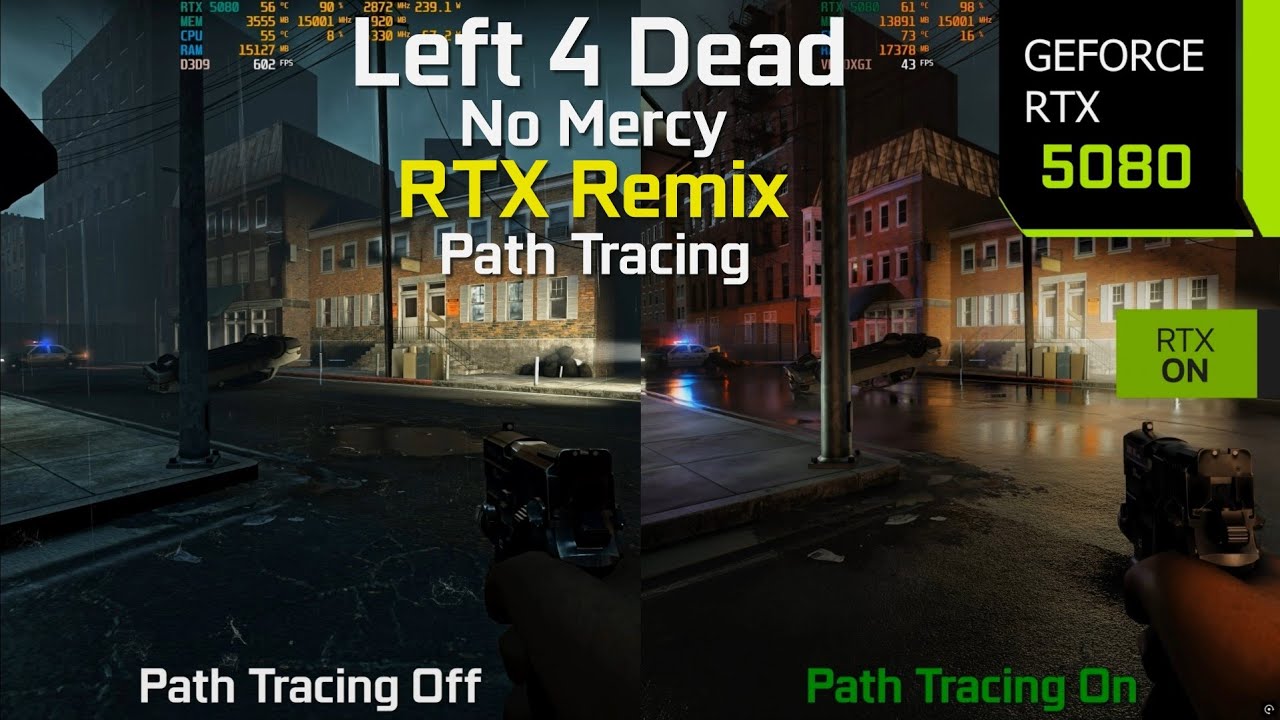
Left 4 Dead No Mercy Path Tracing with RTX Remix On vs Off graphics and performance comparison benchmark at 4K, 1440p DLSS 4 Balanced/Performance + DLSS 4 Multi Frame Generation and Ray Reconstruction with Path Tracing and Very High settings on RTX 5080 + i7 14700F
Left 4 Dead No Mercy RTX Remix Mod download link:
https://www.moddb.com/mods/lef...
its not a surprise that fps is that low even on 5080, path tracing... path tracing...
sleek cove
final bough
its not a surprise that fps is that low even on 5080, path tracing... path traci...
They did mention in the article it could hit 50 sometimes
Wccftech
The Left 4 Dead 2 RTX NDT mod breathes new life into the classic game's visuals with path tracing, but at a considerable performance cost
sleek cove
final bough
its not a surprise that fps is that low even on 5080, path tracing... path traci...
I think the two main issues is
- Fixed function causing some CPU issues like in P2 RTX
- Pathtracing is very intensive with large enemy counts
final bough
sleek cove
They did mention in the article it could hit 50 sometimes
wdym sometimes, it didnt drop to 30 in the video i send
it dropped to 40 only
final bough
sleek cove
I think the two main issues is
1. Fixed function causing some CPU issues like in...
ye its true
sleek cove
final bough
it dropped to 40 only
Yeah, maybe the article is wrong then because they’re using this video as reference but I don’t see it averaging 30fps like said
Left 4 Dead No Mercy Path Tracing with RTX Remix On vs Off graphics and performance comparison benchmark at 4K, 1440p DLSS 4 Balanced/Performance + DLSS 4 Multi Frame Generation and Ray Reconstruction with Path Tracing and Very High settings on RTX 5080 + i7 14700F
Left 4 Dead No Mercy RTX Remix Mod download link:
https://www.moddb.com/mods/lef...
It’s still not the best for 1080p internal
My 5060 Ti can do 1080p native at similar fps in different Remix titles
sleek cove
sleek cove
My 5060 Ti can do 1080p native at similar fps in different Remix titles
Actually scratch that, my can do it at high settings but the video linked is doing Ultra
final bough
sleek cove
Yeah, maybe the article is wrong then because they’re using this video as refere...
i want to ask this guy do the same but with my mod lol
warped dock
there is a ton of optimalisation that can be done with this compatibility mod
final bough
final bough
i want to ask this guy do the same but with my mod lol
i really love his benchmarks
warped dock
i mean sure i released version that looks the best ;D
sleek cove
warped dock
there is a ton of optimalisation that can be done with this compatibility mod
For sure, because as of now, it’s one of the heaviest
final bough
warped dock
i mean sure i released version that looks the best ;D
btw you are now focusing on gta 4 for now?
from my knowledge i know 2 things that can hit performance: alpha foliage and very intensive lights
intensive i mean 1000 and higher
sleek cove
final bough
from my knowledge i know 2 things that can hit performance: alpha foliage and ve...
For P2 RTX, I like to take my AMD card and view BVH structures to see what’s the most problematic
It’s also shows any areas that are being rendered outside player view
final bough
sleek cove
For P2 RTX, I like to take my AMD card and view BVH structures to see what’s the...
removing culling or at least reducing it is very necessary for remix games ngl and it hits performance A LOT
in l4d2 on riverbank culling is very intensive but on bedlam map theres really no culling or its that far, its something more map specific
thorn timber
l4d2 would probably benefit having the entire static world being rendered in remix like it is for sp_a1_wakeup in p2 rtx, it doubled performance
then you dont have to worry about culling being disabled
thorn timber
final bough
intensive i mean 1000 and higher
remix has no issue with light counts, the bottleneck is the amount of lights in the game itself
final bough
final bough
from my knowledge i know 2 things that can hit performance: alpha foliage and ve...
like here i was needed to make intensive lights for original look it hits performance quite a lot + theres alpha foliage so its a combo lol


 thorn timber
remix has no issue with light counts, the bottleneck is the amount of lights in...
thorn timber
thorn timber
remix has no issue with light counts, the bottleneck is the amount of lights in...
if you were to render all lights as a remix replacement or api lights, there would almost be 0 cost
final bough
thorn timber
remix has no issue with light counts, the bottleneck is the amount of lights in...
oh thats how
final bough
final bough
like here i was needed to make intensive lights for original look it hits perfor...
 thorn timber
do you have a level in mind that runs poorly? i can try converting the map into a remix replacement to see the perf difference
final bough
thorn timber
do you have a level in mind that runs poorly? i can try converting the map into ...
yep c6m2_bedlam, appreciate that
warped dock
final bough
btw you are now focusing on gta 4 for now?
Gonna Jump between the projects l4d2 and gta 4 to not get burnout with one
final bough
thorn timber
do you have a level in mind that runs poorly? i can try converting the map into ...
you mean like convert all terrain to 1 mesh? so it can hide culling too, right?
thorn timber
it would retain each mesh as it was ingame, but the entire level is rendered in remix while engine rendering is disabled, its easier on the BVH while also relieving any engine bottlenecks
but yes there would be 0 level culling
final bough
thorn timber
it would retain each mesh as it was ingame, but the entire level is rendered in ...
each you mean even objects like this? not only terrain

but what if i have replacement on them
it will like 2 object in 1?
clipping
thorn timber
1 .yes any static objects like the map and baked props, anything dynamic is left out as that would cause some weird issues.
- it would break replacements since its a mod itself, you'd have to replace it again
but no there would be no overlap
sleek cove
final bough
removing culling or at least reducing it is very necessary for remix games ngl a...
Needed for some, P2 RTX works because most of the game is split up in chambers
Once the player steps into the next chamber, you can cull the previous one because it’s never seen again
final bough
thorn timber
1 .yes any static objects like the map and baked props, anything dynamic is left...
oh thats how ok, can you do a c6m2_riverbank too if you have time pls?
thorn timber
yeah soon
sleek cove
final bough
like here i was needed to make intensive lights for original look it hits perfor...
That looks amazing
final bough
sleek cove
Needed for some, P2 RTX works because most of the game is split up in chambers
i noticed this thing too, it some kind of scripted panel from devs that are placing when players steps to another area
final bough
final bough
old video showing it
sleek cove
final bough
What does this look like in normal Left 4 Dead 2?
final bough
sleek cove
What does this look like in normal Left 4 Dead 2?
i dont have a clean install of l4d2 sadly, but as xoxor said to me it was just a black panel if im not lying
final bough
delete them
thorn timber
gmod has a -noworkshop commandline parameter
final bough
its not working in l4d2?
final bough
hmmm strange, theres addons control panel in game menu but you cant disable there too
sleek cove
thorn timber
how do i get l4d2 to ignore workshop addons
Steam properties should be able to toggle it off
thorn timber
disabling culling just seems to break stuff lmao
 final bough
thorn timber
disabling culling just seems to break stuff lmao
final bough
thorn timber
disabling culling just seems to break stuff lmao
damn
thorn timber
@timber dock do you know why raising the culling distance past 6500 causes some objects to cull anyway?
we dont run into this with p2rtx
final bough
timber dock
Mhh not sure if l4d2 had an option to choose the anti culling method for an area...
.
@thorn timber
timber dock
thorn timber
<@204650202072743936> do you know why raising the culling distance past 6500 cau...
Not sure tbh. Might be the recursive function messing stuff up or related to the area culling system the game uses
final bough
@timber dock do you know what might cause water pixelization and that you can see through it?
 timber dock
final bough
<@204650202072743936> do you know what might cause water pixelization and that y...
timber dock
final bough
<@204650202072743936> do you know what might cause water pixelization and that y...
No sorry 🙁
see through is likely due to no geometry below the water surface?
fast dock
Add geo
final bough
timber dock
No sorry 🙁
see through is likely due to no geometry below the water surface?
i had this issue before many times so i thought its a common issue and you know how to fix it, somehow it fixes for me sometimes when im reinstalling combability patch but not now. gonna try to copy enhancements on my second l4d2
well water is no longer pixelated, but i still can see through it, will try do put ground underneath
 final bough
gonna try to anchor all map to marker


 final bough
changed things a little bit that roof top things and roofs dont get culled too


and water looks normal too now

still need to do animation for it
final bough
remade model and texture for jukebox


 final bough
all videos are ready , will upload gameplay and side-by-side comparison tomorrow on my yt
 coarse forge

anyone know why its so bright?
nicks model is also completley bugged
Frame generation is also broken for me, black squares on the side of my screen
9800x3d and 5090 if that makes a difference
i already did a complete clean install of the game as well to no avail
anyone know of any solutions?
final bough
coarse forge
its supposed to look like this
timber dock
coarse forge
anyone know why its so bright?
It’s an overblend effect. Should go away shortly after being able to move tho
coarse forge
i think its the volumetric lighting for some reason its making everything super blown out
timber dock
Yea I increase a bunch of settings while the intro campath is active but these should transition back after spawning
coarse forge
coarse forge
Frame generation is also broken for me, black squares on the side of my screen
i just fixed this by replacing with the newest Nvidia streamline 2.9.0 and it went away
coarse forge
timber dock
Yea I increase a bunch of settings while the intro campath is active but these s...
ill see if i can take another screenshot
this is how it should look

but with volumetric lighting on

its super duper foggy
is that normal?
timber dock
Like I said, it’s supposed to reset
coarse forge
thats weird it just persisting for me
timber dock
Did you skip the intro camera?
coarse forge
wdym
like the cutscene when the game starts?
or the intro with the helicopter leaving
coarse forge
yeah the helicopter left and they were telling it to wait
let me restart steam and my pc and see if it does anything
timber dock
Huh weird
coarse forge
ok um
restarting my pc worked
for some reason
😂

this looks MUCH MUCH better
holy moly
i think its cause i was appearig offline in steam?
and for some reason it said steam wasnt open even tho it was on the batch file
but yeah it went away like you said
should multicore rendering be turned on?
actually is there anyway to force it to reset?
the problem is back again
coarse forge
figured it out
if you want to reset it just go into dev mode-> Global volumetrics -> set quality level preset -> default

still not as good looking as the other screenshot
but this is probably as good as its gonna get
coarse forge
ok just did another clean install
hopefully the issue gets fixed
still the same issue
also get rtx remix runtime crash when changing volumetrics
:((
timber dock
It’s only in this map . You can remove the intro config from
The map_settings.toml file under configvars I think. This will get rid of the j ital blooming effect
warped dock
coarse forge
it reminds me of mod somebody made this weapon holding XD
unrecord style l4d2 ultra realistic mod
or something like that
coarse forge
warped dock
it reminds me of mod somebody made this weapon holding XD
oh yeah i was just using the mw2019 weaponn mods
path tracing with the gun mods really gives it a newer feel
warped dock
aye
final bough
@timber dock is there anyway to disable rt without getting this?

i want to do comparison vid also
timber dock
final bough
<@204650202072743936> is there anyway to disable rt without getting this?
Ingame? No
You’ll have to rename the d3d9.dll and the asi
You can create a batch for that similar to the one that ships with the p2 comp mod
topaz yarrow
final bough
i want to do comparison vid also
Could probably record in-game demo and do a playback? One version would be remix and the other original
final bough
topaz yarrow
Could probably record in-game demo and do a playback? One version would be remix...
good idea, but i want to do side by side comparison with pictures, and gameplay with rt will be at the end of the video probably
timber dock
recording and playing back demos is probably the way to go
final bough
i have two l4d2 on pc, so i will just probably do pictures on the same coordinates in both versions
final bough
some new changes:
added metallic map to cars
new glass textures and new vending machine model


 final bough
@timber dock i want to do gun replacements, but they are unstable when holding in hands, what if i unbake them is it gonna break something?

as i can see guns uses different file type also
timber dock
final bough
<@204650202072743936> i want to do gun replacements, but they are unstable when...
nothing you can do about that and unbaking will prob. break them completely. If you want to mod the weapons, you'll have to do so via a source mod
final bough
timber dock
nothing you can do about that and unbaking will prob. break them completely. If ...
oh damn, i guess will do just texturing for them then
final bough
so here i replaced almost all weapons textures
made them all a little bit more reflective cuz of rainy weather
final bough
@timber dock srry for ping again, do you have any suggestions how to make light from gun shot?
the only thing i tried is to mark gun shot as world space ui texture but ye it didnt help
timber dock
not really no .. I would have to spawn a light via the api but that is easier said than done
final bough
@timber dock do you know maybe why does my water is not animated? but in rtx remix it is animated, one sec will send a video


like here water marked as "animated water" and we can see that its get animated
timber dock
I've never used that category so no idea why it does not work ingame
final bough
but isnt water on swamp map is animated?
timber dock
I'm always using a spritesheet normalmap
final bough
timber dock
I'm always using a spritesheet normalmap
oh thats how
is there any tutorial?
final bough
final bough
<@204650202072743936> do you know maybe why does my water is not animated? but i...
whats strange that water was animated but now not
and i didnt change anything
xor is there anyway that i can use your normal map ?
?
this one

i would give you a proper credit
timber dock
final bough
xor is there anyway that i can use your normal map<:isforme:1324851671779512401>...
sure you can use all the assets that come with the base mod
 ornate agate
final bough
finally fixed that shi
ornate agate
final bough
finally fixed that shi
You think this could work for other rtx remix source games ?
final bough
ornate agate
You think this could work for other rtx remix source games ?
why not, its just replacement through rtx remix not game engine
ornate agate
Soooo, are you willing to share this asset ?
👉👈
Just saying it would look sick in VTMB rtx remix, because rn, the water it's just a black texture 😂
timber dock
sure
 sinful lava
how can i play multiplayer with rtx remix
timber dock
sinful lava
how can i play multiplayer with rtx remix
dont - VAC
sinful lava
Also I tried loading a campaign from start and it immediately crashes once done loading
sleek cove
timber dock
dont - VAC
Remix triggers VAC?
timber dock
sleek cove
Remix triggers VAC?
well .. yea because it can be used to cheat. Even its not detected, it will detect the comp mod
sleek cove
timber dock
well .. yea because it can be used to cheat. Even its not detected, it will dete...
I forgot Left 4 Dead had PvP
sinful lava
sinful lava
Also I tried loading a campaign from start and it immediately crashes once done ...
Any way to fix this?
final bough
@timber dock im facing a strange bug with streaming i think not sure tho, let me explain, its happens when im playing for like 10 mins on c6m3_port without enabled freeze bots command in gui menu, BUT when i enable this command and walking around all 30 mins nothing happens and everything fine, and its fixes when im disabling enhanced meshes, all i want to say is that i have almost whole port map attached to marker to hide culling as much as i can, but i did it too on 2 others map of chapter and everything fine there
maybe you know what causes it?
and here light flicker too
final bough
final bough
<@204650202072743936> im facing a strange bug with streaming i think not sure th...
some textures turns grey on the brick construction at the end
timber dock
how did you disable the original parts of the map?
final bough
timber dock
how did you disable the original parts of the map?
i didnt, so it might mean that they are merging?
original one and one from remix
but its still strange that it happens past the time
if those were really merging it should show instantly
timber dock
not sure never seen anything like that. You should disable the original meshes tho
final bough
timber dock
not sure never seen anything like that. You should disable the original meshes t...
but why i just dont understand? it will optimize performance or wha? i did left original meshes in others 2 maps and everything fine there
timber dock
maybe somethings tagged as UI that shouldnt?
or the game is rendering something that it shouldnt
final bough
oh wait maybe
lemme check
nope, but what i found is flashlight breaks everything and when im pressing on texture it leads to 8x8 white texture
can it be source limitations somehow tho? rendering too much things, or game now uses fully custom pipeline?
and it happens not on all areas
timber dock
yea I think I've seen this somewhere and fixed it by some modification
final bough
timber dock
yea I think I've seen this somewhere and fixed it by some modification
dont remember the code?
and where it need to be placed
timber dock
I have no room in my head to think about other projects right now
final bough
timber dock
I have no room in my head to think about other projects right now
well alright i understand
will you ever touch l4d2 again btw?
timber dock
not sure what else I could add tbh. I'll have to update the runtime at some point
timber dock
you can literally spawn and animate them with the f4 menu 😄
final bough
timber dock
you can literally spawn and animate them with the f4 menu 😄
ik, i mean translate original lights to remix
timber dock
I have no clue where the game holds it's light data .. a lot of the light is probably baked into the lightmaps with no "light" information left
final bough
aight, thanks for letting me know
thorn timber
timber dock
I have no clue where the game holds it's light data .. a lot of the light is pro...
reading the bsp map data is the easier way for source games
timber dock
does the bsp still have all of the light entity information left in it?
cod games omit all of that
signal condor
Yes the BSP map data contains literal things called light entities which are ONLY used for light calculations
You don't actually even really need to pull the BSP data though
the engine contains a worldlights list that you can process
I know the gmod people have the BSPParser built into lua but in DM I just get the engine offset for the worldlights array and convert them to API lights
sinful lava
 warped dock
Launch game via bat in game folder
sinful lava
Is there anyway to bypass the Insecure to play online?
thorn timber
i never got a vac ban playing tf2 rtx back in like 2023 
sinful lava
Also does the game do automatic shader compilation when you start up RTX remix?
signal condor
sinful lava
Is there anyway to bypass the Insecure to play online?
You can play with friends on a local server if you have -insecure as a launch parameter
But you can not join steam servers
thorn timber
iirc xoxor4d already passes this with his bat file
or maybe the compat mod itself, but i know its already set
signal condor
bless
 thorn timber
i wouldnt join those
 thorn timber
there u go
sleek cove
maybe I should one day throw server hosting into the Publishing Initiative, lol
warped dock
@thorn timber yo i have one question you are master of source engine games and i saw once that you build tool to catch scene light and translate it to rtx lights would it be possible with l4d2 rtx comp mod from xorxor4d? 😄
thorn timber
i think you mean the blender toolkit? You can turn captured lights back into replacements
you can chain multiple captures together as well as i know getting rid of map culling isnt that easy in this game
warped dock
you had something on garrys mod that i saw on the other video on yt great stuff man by the way
you wrote the command and it instantly started to fill the map with lights
thorn timber
ah, those are remix api lights. You have to find a way to parse all of the source worldlights in the map and then some code to translate them back into api lights. For gmod it was a lot simpler because lua libraries already existed to get this data but for something like l4d2 or other source games, it's going to be a lot more difficult
im afraid im not as knowledgeable as xoxor4d or king david when it comes to this
warped dock
thank you for reply
signal condor
With an external module, maybe xoxors, find the engine.dll and get the worldlights struct out
once you have that you have two options
directly convert their data to API lights
or just spawn a prop_dynamic at their position so they never "turn off"
Before I did API light conversion for DM I just spawned microscopic pyramids with a texture that is ignored by remix
only the host needs to do that spawning
so theoretically this can ALSO be done with a simple sourcemod plugin
grave finch
warped dock
you will get vac ban
It depends if you will inject dll with wiped pe headers you should be fine. Don't make my mistakes though
 ivory smelt
grizzled bluff
xoxor4d's
ivory smelt
grizzled bluff
xoxor4d's
i'm late to the party but is this screenshots of the compatibility mod without any modifications?
fast dock
Looks like it
fast dock
ivory smelt
i'm late to the party but is this screenshots of the compatibility mod without a...
Im curious, and I mean no offense when I ask this, what do you do with the information given after you ask a question, is it just general questions outa curiosity or is it smthn else?
ivory smelt
pretty much general questions of curiosity :). I like to know what's happening and how things have changed. I try to keep a pulse on things happening across the community.
Sometimes i'm looking for interesting threads or stories. Things that might be worth sharing more broadly, either internally or externally.
timber dock
ivory smelt
i'm late to the party but is this screenshots of the compatibility mod without a...
This is how the compatibility mod looks out of the box without further mods 👌
grizzled bluff
ivory smelt
i'm late to the party but is this screenshots of the compatibility mod without a...
yep, no changes
I like the look tho
grave finch
ivory smelt
i'm late to the party but is this screenshots of the compatibility mod without a...
ye he hooked some of Source engine funcs to make it happen facinating
but offsets to them are hardcoded wichs mean if game updates mod dies, but will work on signature scanning pull request
sinful lava
is there a way to disable rtx remix for l4d
warped dock
delete d3d9.dll from folder propably
sinful lava
worked! thanks

 sleek cove
 jade island
😭
jade island
😭
Keep in mind, it was never a full remaster
Most of the areas weren’t touched
jade island
sleek cove
Keep in mind, it was never a full remaster
ok?
warped dock
jade island
😭
did you download the pack with materials from NDT??

 jade island
warped dock
did you download the pack with materials from NDT??
jade island
warped dock
did you download the pack with materials from NDT??
left 4 dead 2 RTX mods
sleek cove
warped dock
did you download the pack with materials from NDT??
Seems to just be the base mod
sinful lava
how does one disable RTX Remix on L4D
sinful lava
I
 sinful lava
How do I uninstall RTX remix on left 4 dead?
timber dock
Simply delete the files you extracted into the game folder
 hot prism
Hey y'all, just wanted to say this mod is looking sick as hell, and that y'all are awesome.
 pearl halo
sinful lava
how does one disable RTX Remix on L4D
pearl halo
sinful lava
how does one disable RTX Remix on L4D
find d3d9.dll in bin and delete it
brazen sonnet
https://steamcommunity.com/sharedfiles/filedetails/?id=3558049615&searchtext=nekoshader Hmm I completely forgot about this mod
brazen sonnet
 final bough
early progress on my new l4d2 mod for dead air campaign
all original lights sources have been placed, a bunch of remaded textures used and a few mesh replacements done


here some of remaded props by me


 final bough
@timber dock do you know any reasons why would general tab in dev gui has nothing?

I cant do prop unbaking cuz of this
tried to reinstall game 2 times, didnt help
sleek cove
final bough
I cant do prop unbaking cuz of this
Unbaking isn’t in map settings?
final bough
final bough
yes i reloaded it with top right button
.
no
in general
it was there before for me
timber dock
final bough
<@204650202072743936> do you know any reasons why would general tab in dev gui h...
uh I guess you downloaded the latest release and not used the actions build (which is now expired)?
general never had unbaking. it has infected, weapons and maps
final bough
timber dock
uh I guess you downloaded the latest release and not used the actions build (whi...
ah do i use this?
 timber dock
I've triggered a new build, grab it when its ready: https://github.com/xoxor4d/l4d2-rtx/actions/runs/21880933097
GitHub
Left 4 Dead 2 - RTX Remix Compatibility Mod. Contribute to xoxor4d/l4d2-rtx development by creating an account on GitHub.
final bough
timber dock
general never had unbaking. it has infected, weapons and maps
yeah just noticed it
all good now thanks
 hoary depot
timber dock
I've triggered a new build, grab it when its ready: https://github.com/xoxor4d/l...
hoary depot
timber dock
I've triggered a new build, grab it when its ready: https://github.com/xoxor4d/l...
thanksss
final bough
is updating runtime in your plans tho?
 timber dock
what are you missing that you need?
the portal 2 update didnt went that well and still has a big issue with vertex hashing and explosions for some reason
final bough
timber dock
what are you missing that you need?
its not necessary rn, just asking for a future like when dlss 4.5 will be implemented to remix
what is that in the sky👀
 timber dock
3d skybox
final bough
just it wasnt there before on previous version with 3d skybox enabled
brazen sonnet
timber dock
the portal 2 update didnt went that well and still has a big issue with vertex h...
auto pbr?
sleek cove
brazen sonnet
auto pbr?
Portal 2 didn’t get auto pbr
brazen sonnet
sleek cove
Portal 2 didn’t get auto pbr
ik. I'm saying for l4d2
sleek cove
brazen sonnet
ik. I'm saying for l4d2
Ah
sleek cove
brazen sonnet
Portal 2 crashes just like gmod for me
Oof
brazen sonnet
sleek cove
Oof
i get like 4 seconds max into a level and then it freezes
gmod aint THAT bad
though that is still annoying
sleek cove
brazen sonnet
i get like 4 seconds max into a level and then it freezes
I’ve never had one of our devs or testers report that, so I wouldn’t know what the issue is
brazen sonnet
sleek cove
I’ve never had one of our devs or testers report that, so I wouldn’t know what t...
gives the same error that gmod does
sleek cove
brazen sonnet
gives the same error that gmod does
Which is?
brazen sonnet
thorn timber
their gpu does not like remix or something
just gmod and prtal 2
remix itself is fine
tried so many games
even left 4 dead 2 runs perfectly, only crashes where it usually crashes with heavy mods
brazen sonnet
thorn timber
vk device lost
gta 4 also does it too
 final bough
remade a bunch of new stuff


 grave finch
timber dock
what are you missing that you need?
grave finch
timber dock
what are you missing that you need?
Yo do you still use offsets? I can make signatures for ya
timber dock
grave finch
Yo do you still use offsets? I can make signatures for ya
yes and no, I'll do that when I have the time for that. need to refactor the codebase a bit before doing that
grave finch
timber dock
yes and no, I'll do that when I have the time for that. need to refactor the cod...
I can help you with that 
https://libomath.org/utility/pe_pattern_scan/
timber dock
I already have a system for that and use it in newer projects. Want to keep it similar between projects that I have to maintain
grave finch
final bough
remade a bunch of new stuff
Wow looks crazy, gj
grave finch
timber dock
I already have a system for that and use it in newer projects. Want to keep it s...
Try vcpkg for package management , it's very handy
grizzled bluff
glad to see some movement in this thread, thought l4d2 was abandoned
final bough
anyone know why does text look normal in toolkit, but in the game its half transparent?


the texture is just text with alpha background

glass marked as thin-walled and im using texture as diffuse layer


 timber dock
hot
 tawny hinge
Is there gonna be a way to play RTX online and with mods? (steam official servers)
timber dock
no - you’ll get vac banned if you try so just don’t
warped dock
tawny hinge
Is there gonna be a way to play RTX online and with mods? (steam official server...
Only on unsecured servers so Pay attention
You are responsible what you do with your account and game
tawny hinge
L valve for that
grave finch
timber dock
no - you’ll get vac banned if you try so just don’t
Welll
If you erase pe headers you should be good to go
timber dock
not gonna happen
grave finch
Or you can go even further virtualize minhook to break potential sigs
grave finch
timber dock
not gonna happen
I got banned for my bhop cheat 
warped dock

 graceful plover
How can I fix it?

 quasi zinc
final bough
new assets
quasi zinc
final bough
new assets
Looks great!
 lavish crest
final bough
and the mirror🤩
lavish crest
final bough
and the mirror🤩
Bill became younger damn
 brazen sonnet
Will adding ToPBR/AutoPBR be feisable? Or at least worth it if it is. Since IDK if this game is like CSS with its broken materials (IK it would be worth for the countless cod model ports though lol)
 timber dock
 fast sigil
wwz nyc map looks insane
fast sigil
wwz nyc map looks insane
You may need to mark the skybox as sky in remix and could then use a fallback distant light. I think I've added the sun via map markers on other maps
fast sigil
yea been using the fall back, just wondering if there was way to link to sun
final bough
fast sigil
yea been using the fall back, just wondering if there was way to link to sun
To the original sun?
You would need a custom script for it ig
fast sigil
o


 fast sigil
some dead before dawn custom campaign


