#How to change sky and adjust shadow?
64 messages · Page 1 of 1 (latest)
 frail sage
 knotty kernel
frail sage
Your question is a little too vague. Do you mean change the texture used for the...
knotty kernel
frail sage
Your question is a little too vague. Do you mean change the texture used for the...
No Realtime Shadow.
And i don't know how to change sky texture.
frail sage
knotty kernel
No Realtime Shadow.
From what I can see the game is totally pathtracing. But because there's no direct light source there are no defined shadows.
Under the game setup tab, there's an area labeled fallback light. Set it to always on and use "distant"
It'll essentially force spawn in a sun-like lightsource. The values let you adjust the angle of the sun
knotty kernel
frail sage
ah you'll need to tag the sky textures, that should do the trick
under categorize textures
knotty kernel
tag menu texture to sky texture?
frail sage
in the runtime overlay there's a "categorize textures" tab. Go there, scroll and find the textures that are used for the sky in the original game. Click em and hit the "sky texture" checkbox
knotty kernel
Still not work.
frail sage
knotty kernel
Still not work.
those don't look like sky textures to my eye
knotty kernel
Original game
(TD Overdrive: The Brotherhood of Speed)
frail sage
yeah that would make it tricky to spot I guess
remove the tags you did and instead use auto sky detect in game setup
there's 3 options there including off, switch between em and see if you get anything good
knotty kernel
frail sage
Actually it looks about right to my eye, maybe I'm tripping. It's at nighttime normally so you'd want to turn off the distant light and instead do something with attaching lights where it would make sense on the track
And in the front of all the cars ofc
knotty kernel
frail sage
Actually it looks about right to my eye, maybe I'm tripping. It's at nighttime n...
So i don't how to do next now.
frail sage
My internet's acting up so the videos aren't playing for me. But from the thumbnails it looks about as expected. To do the thing I talked about in that last message, you need to take a scene capture. I'm sure you've come across the area with it in the overlay. Scene captures can then be opened in Nvidia Omniverse via the Remix toolkit. That's where all the magic happens with bringing in new assets and lighting. Starts with starting a mod project in the toolkit. Let me grab a link
#remix-beginners-guide message
Links to a message to install Omniverse
 frail sage
Oh great. Then you'll need to set up a project and open the capture you took using the runtime
knotty kernel
I want shadow to be like this game.
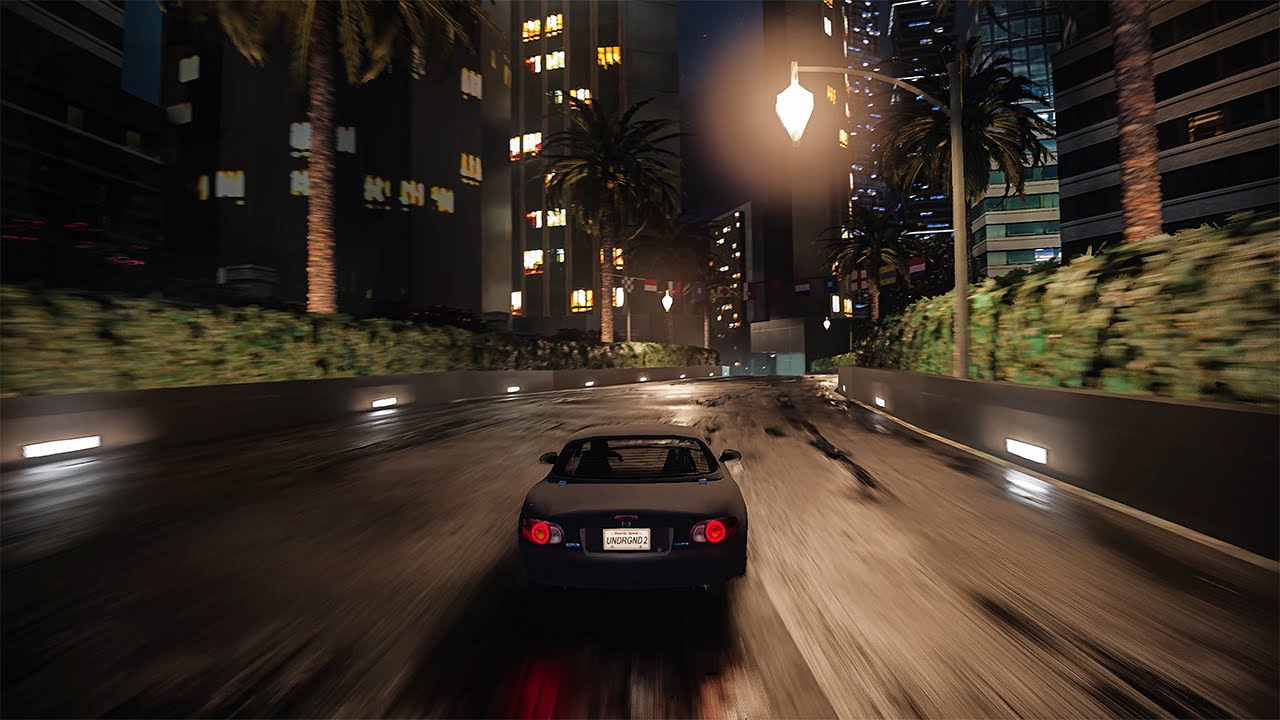
Join this channel to get access to perks:
https://www.youtube.com/channel/UCGuJRs0uaXHO6u7QR_h55Ew/join
Follow me on Instagram - https://www.instagram.com/gaming.theboss/
Follow me on Twitch - http://www.twitch.tv/thebossgaming95
Join my discord - https://discord.gg/e7tB3Th
Mods in This Video:
NFS Underground 2 RTX Remix - https://www.moddb...
frail sage
Set the cone angle to 90 degrees rather than 180 so the light only points in one direction. Radius I'd say should be no higher than 10 I think. Also set the road to a roughness of 1
You can make the car somewhat metallic with low-ish roughness below 0.5 for some more reflections
The NFS Underground 2 remix team spent a lot of time tuning the lighting to get a specific look. You'll have to play around with the values to see what looks best to you. Then when you're in-game, make sure your denoiser quality is set to high (in the Remix graphics menu, not dev menu. Button's at the top of the overlay) or use the latest build with ray reconstruction
knotty kernel
Still missing shadow and light is really weird.
This game use graphic api = Direct3D 8
frail sage
I totally see the shadows, it's just messed up because of the culling going on right behind the camera. You should try the "anti culling" toggle at the bottom of the runtime overlay. In many games it does work though it's not a guarantee
If you get weird behaviors also try the high precision culling option
knotty kernel
Light is ok now but still have a problem with shadow.
frail sage
Double check what your denoiser graphics settings is on in remix
If you're on low you lose a lot of detail
knotty kernel
frail sage
Set the quality from high to custom, then bump up denoising to high
knotty kernel
frail sage
Hmm that does seem a bit strange. I couldn't see it in the earlier video, what light type did you use for the streetlights? And what values for the parameters
knotty kernel
knotty kernel
SphereLight
knotty kernel
i see shadow moving but it look very bad.
frail sage
Yeah that looks
Not great
@lunar egret would you happen to have any ideas? I would've said try the ray reconstruction build but in the videos it looks like the other cards have 0 shadows at all almost
knotty kernel
 brisk burrow
I believe the sphere light radius might be too large. To confirm, you can check the actual size in the game. Press "Alt + X" to toggle the Remix menu, go to the first tab, select the "Light Panel," and enable the "Light Debug View" option. The size should ideally be 1 or below, depending on the scale of your scene.
frail sage
brisk burrow
I believe the sphere light radius might be too large. To confirm, you can check ...
Didn't know 1 is the standard. I've been bumping it up since the softness value has a huge impact on perceived brightness
brisk burrow
The radius of the sphere light should indeed be below 1. Since path tracing utilizes real world physics, it wouldn't be accurate for a street light to have a length of 1 meter. The radius should be adjusted accordingly to maintain realism within the scene.
 lunar egret
frail sage
<@428036528015540234> would you happen to have any ideas? I would've said try th...
lunar egret
frail sage
<@428036528015540234> would you happen to have any ideas? I would've said try th...
RR would be my suggestion --- there seems to be some amount of ghosting, but I can't tell whether that's just the bad video compression, maybe check for mesh instance flickering?
oh, if there's a bunch of large sphere lights in the scene that might do it, yes
frail sage
@knotty kernel ^