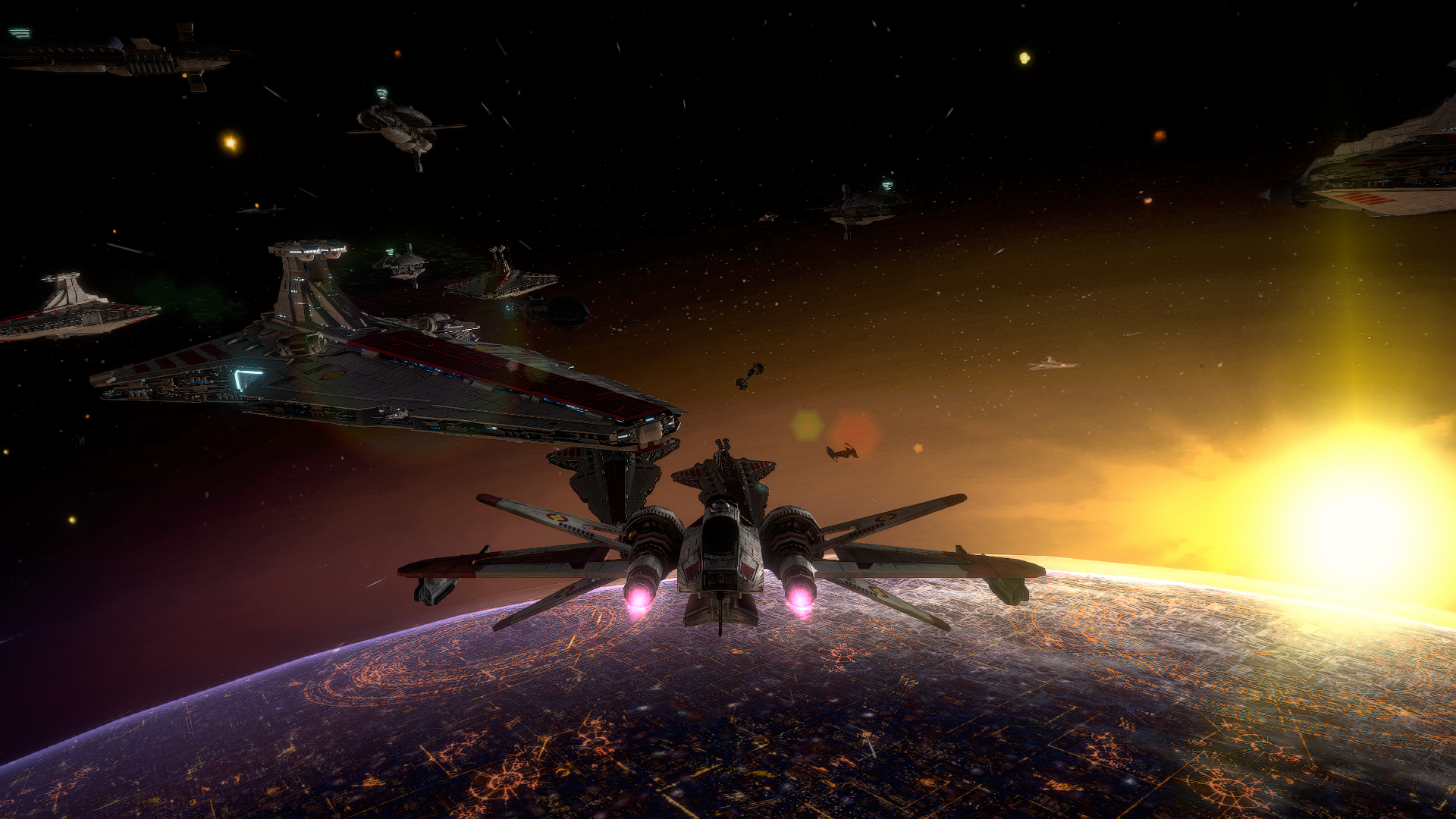
#Star Wars Battlefront 2 (2005)
1 messages · Page 2 of 1
 frosty elk
Tbh I hand picked the best looking location where it wan't bugging out. the rest of the map looked like this. Lol

 narrow kettle
Yeah, Remix does not play well with terrain in this game. The best showcases of it would probably be either space as Harrisonfog suggested or a map like Kamino or Coruscant: Jedi Temple that don't have any terrain.
frosty elk
My God

 ashen scroll
show me the planet and horizonn (thanks man 😛 )
Something lke my screenshot, but with remix
 frosty elk
 ashen scroll
huh looks weird but we all know it will be better in the end
thanks Razor for showing me these
 edgy island
Interesting...
frosty elk
Wow. The lights even interacting with the hangers of the frigates
 frosty elk
ashen scroll
thanks Razor for showing me these
frosty elk
ashen scroll
thanks Razor for showing me these
Anytime
edgy island
So I got a capture, and...the floor textures are upside down.
 ashen scroll
frosty elk
Wow. The lights even interacting with the hangers of the frigates
ashen scroll
frosty elk
Wow. The lights even interacting with the hangers of the frigates
that is awesome no doubt
narrow kettle
edgy island
So I got a capture, and...the floor textures are upside down.
Captures are upside down for the moment. It is being looked at by the devs.
edgy island
.<
Some parts are, and some parts are not, so..go figure, basically th at error makes it unable to do much XD
narrow kettle
Some of the more recent DXVK-Remix builds have some fixes that help to a degree, but your mileage may vary.
edgy island
still neat to see what it -can- do without custom modification.
ashen scroll
for this game, it's close, but not quite there yet apparently
edgy island
I suppose I will wait for them to maybe fix some more spots.

 torpid linden
frosty elk
Tbh I hand picked the best looking location where it wan't bugging out. the rest...
torpid linden
frosty elk
Tbh I hand picked the best looking location where it wan't bugging out. the rest...

Its mainly a z fighting issue, enabling the terrain baking makes that stable as it blends the textures, but it moves when your camera moves.
ashen scroll
torpid linden
Looks pretty, ty for the pics! The transparent leaves I added have shadows! that's pretty neat 😄
ashen scroll
frosty elk
ah too bad, it doesn't detect the green glow coming from the walls
frosty elk
ashen scroll
ah too bad, it doesn't detect the green glow coming from the walls
I think they have to manually add that
ashen scroll
most likely, it's not hard I already have the layers used for that map
 long current
so how do i get this running?
 obtuse mica
ashen scroll
most likely, it's not hard I already have the layers used for that map
obtuse mica
ashen scroll
most likely, it's not hard I already have the layers used for that map
Does it come with an emissive map? Otherwise glows won't happen.
ashen scroll
obtuse mica
Does it come with an emissive map? Otherwise glows won't happen.
the game doesn't have that, but the alpha channel used for glow it's pretty much the same as an emissive map, I'd just need to export it separately
obtuse mica
ashen scroll
the game doesn't have that, but the alpha channel used for glow it's pretty much...
Gotcha, in Remix when you create the PBR material, an emissive map would be required here to make these parts glow for when they're injected by Remix.
ashen scroll
for the record, bf2 uses diffuse and normals, the rest goes in alpha channels of said textures (specular, transparencies,glow, etc)
that's for the majority of things, then you have envmaps, or detail textures, but you won't encounter them as often
obtuse mica
We're speaking vanilla BF2 yeah?
ashen scroll
yep, but I just thought you guys should know
obtuse mica
It's good to know, but I think since we can replace the texture/material entirely with PBR ones here, we would need to use the PBR mapping process. I could be wrong here. But that would require to make an emissive map, which dictates which part of the material is well emissive.
I'd assume it would be possible to extract the parts out of the said alpha channels for the vanilla process then? Turn those into separate maps?
 inland haven
Yeah it's rediculously easy
obtuse mica
I'm no expert in making materials, I have dabbled with it before in Blender for various projects. But I never extracted this information from channels. How would one go about moving this information from the vanilla texture's alpha channel into separate maps?
inland haven
Use any image editor such as GIMP or photoshop
An emissive is really just a texture that dictates the color and intensity of the light emitted
obtuse mica
Yep, I am aware of the map types, emissive, specular, roughness, etc.
inland haven
Yep, thankfully it's very easy
ashen scroll
Well yes, what I'm saying is you can just grab it from the og asset alpha channel and save time
inland haven
Oh hiya Harri 😁
ashen scroll
(sometimes, and for certain things)
ashen scroll
inland haven
Oh hiya Harri 😁
hey bro
obtuse mica
I see that you said you'd just need to export it separately and that would be the emissive map, I overlooked that part. So apologies. 
ashen scroll
just trying to be helpful 🙂
obtuse mica
ashen scroll
just trying to be helpful 🙂
Never implied otherwise, I am also kind of just thinking out loud tbh.
 solid crag
Rn emmisves are only working when material is converted to translucent, at least for 2 games thats how ive seen it, and it turns off if not in screen space
obtuse mica
solid crag
Rn emmisves are only working when material is converted to translucent, at least...
I am going by what I remember from the tutorial. Check this timestamp. I don't see it there, but is it marked as transluscent anywhere there?

NVIDIA RTX Remix is a powerful tool that enables modders to remaster classic games with high quality PBR Assets, full ray tracing (path tracing), and NVIDIA technologies like DLSS and Reflex. This video gives you a crash course on RTX Remix, and serves as an introduction on using the Toolkit–except instead of modding a real game, you will mod a ...
solid crag
Cant see what its marked as in that vid 😦
You see it by pressing 3 dots next to material id
Ittl say “convert to translucent” or “convert to opaque” depending
obtuse mica
It does say _Opacity in the material, could it be that it does work the same as when integrating maps, where it picks it up based on say _Normal.
Maybe _Opacity works as a keyword that automatically turns the material translucent?
If a material has words like “translucent,” “glass,” or “trans” in its name during the Ingestion process, it will automatically become translucent.
Not sure if that would maybe also include that.
ashen scroll
did you guys install omniverse for this to work?
I still couldn't run the game with it
solid crag
What gpu do you have
ashen scroll
3070
solid crag
No omniverse is only necessary for toolkit
ashen scroll
solid crag
No omniverse is only necessary for toolkit
and what would that be?
solid crag
Theres the runtime known as just “Remix” which is what you install from github, is the backbone hooks the game into remix to be able to categorize meshes & textures add pathtracing mess with how the game hooks etc.. you can also capture a scene in the enhancements tabs
Thats where the Toolkit comes in, you end up editing this capture in a usd scene in an AUTO CAD like viewport where you can click on meshes and edit materials and also add lights
ashen scroll
Alright, I downloaded it since I would end up needing it in the end
Thanks for claryfing dude
solid crag
🙂
Technically you can do manually do everything with just remix without the toolkit but its a huge QOL improvement
ashen scroll
I'm just hoping it works haha, maybe this way it does
torpid linden
Technically speaking, everything could be done in notepad if you really wanted
usd is plaintext
How are the models in battlefront II? I need to build the skeleton exactly as the game has it
Trying to do a mesh replacement for that, but the animations will be totally broken if I don't have the skeleton right
Well actually idk. The docs don't go into a lot of detail on how you do CPU skinned meshes. I know you need to have it in the right format too.
narrow kettle
I am pretty sure that CPU skinned meshes cannot be replaced by Remix itself as of now.
The only games that have had mesh replacements have been games that used GPU skinning.
torpid linden
Yeah did some digging around and that is the case for sure.
Animated assets are probably stuck the way they are unless a patch were made to the game to interface with the Remix api directly
narrow kettle
Fortunately, you could replace them on the game side. Apparently there is a plugin for Blender that allows import and export of BF and BF 2 .msh files.
You'd just want to be careful with the polygon count.
torpid linden
Well the improved sides mod already did that. The annoying thing is the limit on the polygons
I suppose its not too bad, just need some good PBR textures
frosty elk
Has anyone got to improve sides to work with the latest version of remix?
I ask because I tried using it the other day and it freezes when loading the game.
narrow kettle
torpid linden
Well the improved sides mod already did that. The annoying thing is the limit on...
Well, if you stripped down the static meshes used by the game itself to just a few polys and replace them with high quality replacements (or even just the original mesh), you might be able to have more leeway with the quality of the animated meshes.
torpid linden
Well yeah that would be great
We really don't need any high quality assets at all on the engine side of things if those objects aren't animated
narrow kettle
As far as poly count goes, you could probably get away with roughly 10-20k for animated meshes, though you would have to deal with them switching to low res versions more often. Maybe less so in a stock map with the normal number of units.
obtuse mica
@torpid linden have you checked the new builds yet? There's one still running right now for the dxvk but bridge seems to be done.
obtuse mica
narrow kettle
I am pretty sure that CPU skinned meshes cannot be replaced by Remix itself as o...
No chance to force it into hardware animation. In case BF2 supports both CPU and GPU skinning?
torpid linden
I see it, I am able to capture stuff right now
obtuse mica
Sweet, then I will grab those builds later, let me know if you encounter any issues.
torpid linden
I will probably update it at some point, but it works for me right now I don't want to break anything
I did some combing through the code and found the issue was probably too many old materials cause deleting the materials directory had fixed the issue for me
I still don't know the exact reason why that fixed it, but I haven't had to delete the directory again since, and still captures work just fine
Turns out you can't generate PBR textures from 8k textures
Even with a 4090, you run out of VRAM
narrow kettle
obtuse mica
No chance to force it into hardware animation. In case BF2 supports both CPU and...
Not that I am aware of, though it is not entirely out of the question. It also might be possible to add support for it via scripting, much like how the early versions of the Shader Patch did.
obtuse mica
narrow kettle
Not that I am aware of, though it is not entirely out of the question. It also m...
Would be interesting to figure out at one point.
torpid linden
PBR generation on 2k textures takes a really long time
This isn't something to do long term, somebody mentioned a GitHub one that supposedly worked better?
inland haven
narrow kettle
As far as poly count goes, you could probably get away with roughly 10-20k for a...
I could get away with 50K with a few units, you just have to test and go
narrow kettle
inland haven
I could get away with 50K with a few units, you just have to test and go
Fair enough. Honestly, I have had more problems with them not munging once you get to the 40-50k point, though it may just depend on the model and how well it is broken up into digestible chunks for the munger to deal with.
torpid linden
Ideally if we could make the game interact with the remix api it would help a lot on performance
narrow kettle
A definite possibility. The game does use LUA for most of its scripting and has it all available to be looked at and modified in the mod tools.
It is a remarkably moddable game.
inland haven
narrow kettle
A definite possibility. The game does use LUA for most of its scripting and has ...
Absolutely, from another era 💕
Wish they'd release modtools with games more often nowadays
torpid linden


 frosty elk
I like
obtuse mica
New release coming up? At least it was pushed into the release branch.
 frosty elk
Do you guys think it's too soon to make videos on Battlefront 2 RTX?
inland haven
torpid linden
The cloth on the lampposts is to this day one of my favorite contributions. I love adding cloth to props 👌
torpid linden
I made a video a while back with just the material roughness and metallic tweaks.
torpid linden
inland haven
The cloth on the lampposts is to this day one of my favorite contributions. I lo...
Imma find a pbr cloth texture to test with that rn
frosty elk
Alright.
I was thinking of doing something of a cinematic teaser with Harrison's Space Coruscant in RTX.
torpid linden
 inland haven
I'm def curious how cloth looks in remix, also how it performs. For those flags I added several vertices to make them bend in the wind better, but idk if you replaced them with higher poly models if it'd help or not since the wind params are coded ingame.
frosty elk
I want to know what the tarp on mos esley looks like moving with RTX
torpid linden
The purple one?
frosty elk
Yee
torpid linden
Mos Eisley does in fact need some more animated stuff, nothing moves around on that map
Just the ammo and medical droids and such
frosty elk
Also maybe physics for sand.
Like footprints and have the occasional sand blowing in the wind
inland haven
Footprint decals are doable, as for sand you'd have to mess with a Droid odf
torpid linden
I was wondering about sand physics, can we do that on the engine side?
frosty elk
A lot of those same physics can be ported over to hoth for snow but with a color palette swap.
torpid linden
Its amazing how Harison, being one of the main texture artists here is seemingly the only one unable to launch the game with Remix
They also seem to not be using the Steam version of the game
frosty elk
I wonder if any version other than the steam version doesn't work.
narrow kettle
inland haven
I'm def curious how cloth looks in remix, also how it performs. For those flags ...
I think cloth would have need to be replaced in game, at least model wise. Textures could be replaced/added in Remix, though.
narrow kettle
frosty elk
I wonder if any version other than the steam version doesn't work.
I use the GOG version and it works fine for me.
frosty elk
Good to know,
That theories debunked now
torpid linden
Its like the CD key version that probably never got any patches or anything I think.
Not too sure if there were any on the Steam/GOG side of things
Odd, if I were @ashen scroll I would update as many things as possible like windows, DirectX, graphics driver etc. I do know you have to be able to suport Vulkan since it is what is used to run the path tracing stuff.
narrow kettle
It might be a driver issue now that you mention it. Still, his card itself is more than capable.
frosty elk
Is it up to date?
torpid linden
He updated his driver actually after I mentioned that to him
He wasn't able to open it at all before that, now it opens and he can hear audio but no visuals
frosty elk
I was getting an issue like that the other day.
Even have the tiny rectangular box in the top left side of the screen.
How I fixed it was I just reinstalled remix 4.0, bridge-remix, and dxvk.
But you know the latest versions of each
inland haven
Yeah I suppose it would help if we ironed out a conf too for moddb
torpid linden
I haven't even combed the conf file all too much to see what all the options do
dxvk.conf specifically
rtx.conf has some options worth noting as well
bridge.conf doesn't have really anything other than the api worth changing
 torpid linden

I like this one better than the stormtrooper
This isn't AI, I found out how to make the PBR textures myself from the diffuse/albedo
Note the floor difference, somehow the PBR got reverted on that and I unreverted it
Still need to make some walls PBR textures
ashen scroll
torpid linden
Mos Eisley does in fact need some more animated stuff, nothing moves around on t...
have you seen our version
has animated creatures and stuff 😄 just gotta give them PBR treatment and perhaps a high poly version and I'd keep them
ashen scroll
torpid linden
I like this one better than the stormtrooper
textures look wet, but it has potential
 ivory charm
Whats RTX if it doesnt look wet
solid crag
Ooooooooo
frosty elk
I imagine if you can change the music this would be the theme playing to a stormy Naboo.
https://youtu.be/XKwH4ph_0tM?si=hPqPiA3BNvHFMi6E

Suite of Padmé's Grave from Lucas King Youtube Channel. Composed by Lucas King.
Tracklist:
0:00 Anakin's Dark Deeds | Piano & Orchestra
1:57 Star Wars Sith Symphony - Darth Revan | Piano & Orchestra
2:43 Qui-Gon Jinn's Funeral | Padmé's Funeral
3:58 Qui-Gon Jinn's Funeral | Padmé's Funeral
ashen scroll
Yesterday I updated windows, tried several versions of dxvk and bridge. Still no luck. Now I'm trying to do it on a clean steam version instead of gog (I have both) don't know if that matters actually
frosty elk
Anyone know how to make installers?
That way most likely could be installed right every single time if it's put in the right location.
obtuse mica
ashen scroll
Yesterday I updated windows, tried several versions of dxvk and bridge. Still no...
The latest version work for me, UI clicking is still not fixed there though.
What issue do you have?
ashen scroll
obtuse mica
What issue do you have?
I hear the menu music, and I can hear the sound played when you move your mouse. But I see a small blackbox top left corner or a larger black box sometimes
frosty elk
Did you copy all the files from the TRex folder to your game data folder
ashen scroll
Nope, should I?
frosty elk
That's the thing I noticed that I did in the video I sent you that made the difference
But I said copy them into their instead of moving them just in case they are needed them both
I don't personally know I haven't tested it
ashen scroll
That made it start but no remix text
frosty elk
Hmm
ashen scroll
alt x does nothing, it's as if it was the vanilla game
frosty elk
In the video I sent you it happened to me too.
ashen scroll
Yeah
I realized it' the Bridge that breaks it, when I place just the dxvx files it launches
but not with remix enabled
frosty elk
Hmm
obtuse mica
The issue I have right now is that the game runs at good fps but animation and etc are like in slow motion.
torpid linden
 frosty elk
Nice shading on the trooper
torpid linden
I posted this for the wall lol
torpid linden
Creating the PBR materials yourself is way better, I got nowhere near these results using the AI stuff
torpid linden
Reworked the floor and the scout a little
 obtuse mica
@torpid linden Hey, have you experience the game play very slow? As in, the FPS is fine, but everything moves basically slow motion?
torpid linden
No its fine for me
obtuse mica
Hmm, which shadermodel setting have you set in the dxvk.config?
torpid linden
0
obtuse mica
Okay, got the same set there, so that's not it then.
frosty elk
obtuse mica
<@345398418090491905> Hey, have you experience the game play very slow? As in, t...
Are you playing on a laptop or a desktop?
obtuse mica
frosty elk
Are you playing on a laptop or a desktop?
Nvm I fixed it. I used a launch command /fixedrate to push the game to higher framerates past the cap. Without Remix that works just fine, when using Remix it actually causes the game to basically go slowmo.
I had to remove said command to not push the rate above its default.
torpid linden
Well remix needs to be made to not crash the game when you try to go to the next match, thats gonna be a problem
obtuse mica
Right now I am basically just using this to play around with it to be very honest. I don't really intend to single handedly make a remaster for this.
torpid linden
I am playing around with it too. I wish the active layer was saved when you closed out of the program. My layer formatting is off because of that.
solid crag
@torpid linden did you see the github issue response?
GitHub
Describe the bug This Game has worked in the past on select builds of remix but with .3 it is broken again Battlefront 1 (2004) has the exact same error 3080 Driver 537.58 Battlefront 1 Files NvRem...
ashen scroll
you guys know what this means?
 ashen scroll
Exception 0xc0000005 at 00007FFB33288EFE! Saving minidump to....
that's what it says
btw, it's always the bridge for me, I noticed that without it game runs, but no remix.
frosty elk
Which bridge are you using?
torpid linden
Thats still an access violation
ashen scroll
torpid linden
Thats still an access violation

You gave me an idea with that... and now it works
You won't believe what was causing the issue...
MSI Afterburner and/or RTSS
torpid linden
When making captures make sure you have indirect lighting enabled if the map doesn't have a lot of lights already
ashen scroll
think we should tag a dev/mod to let them know of this conflict? it's a pretty common program to have
torpid linden
GitHub issue is the best way.
ashen scroll
Seems like it
frosty elk
 ashen scroll

copied all my maps, without the sides, following your advice, let's see how it looks 👀
ashen scroll
torpid linden
When making captures make sure you have indirect lighting enabled if the map doe...
where is that
also, how did you fix terrain being transparent on kas

game crashed but I could capture this yipeeee
things light up with explosions 🥺 finally
frosty elk
I think it lights up just a little bit too bright sometimes.
But it still looks really awesome
ashen scroll
I'm sure it can be toned down
frosty elk
Same
ashen scroll
Man my improved assets don't look bad at all with this lighting
 torpid linden
DLSS might be helping too
ashen scroll
why would it?
I'm playing at 1080p, I don't even need DLSS
everytime I take a screenshot it crashes btw, same for you guys?
torpid linden
Print screen is reserved for something in remix
And yes
Use OBS to take screenshots since that actually supports HDR
ashen scroll
torpid linden
Use OBS to take screenshots since that actually supports HDR
I have geforce experience think that'd work too?
Remastered Hoth with RTX
 torpid linden
Idk if that would work with the game, but OBS for sure does
ashen scroll
Even though it's dark, looks so much better than this
https://www.moddb.com/mods/hd-graphics-mod/images/hoth-echo-base-remaster-battlefront-harrisonfog#imagebox

ModDB
Battlefront 2 Remaster Project Links: Join our Community https://discord.gg/Bmnuzd Youtube Channel https://www.youtube.com/c/Battlefront2Remaster Support on Youtube https://www.youtube.com/channel/UC_0ebpJLkvQ4dJyPuUsniBw/join Support my mods and join...
torpid linden
I know for a fact OBS supports HDR videos and screenshots. If you screenshot with snipping tool it blows out the whites
frosty elk
I've been using Windows + G to screenshot
torpid linden
obtuse mica
The latest version work for me, UI clicking is still not fixed there though.
The UI clicking I discovered the issue for, so hopefully will be fixed sometime soon
They have a default config that isn't initialized properly with Battlefront II and it causes a condition to return false to forward DirectInput messages.
Basically local variables were moved non local and it caused those variables to init on program start and not when the localized block was initialized
If there is a specific version you want to test, I can do the fix for that stuff and build it.
Actually lol the last bridge commit fixed that

GitHub
…dDirectInputMessages setting in DirectInputForwarder class.
obtuse mica
torpid linden
Actually lol the last bridge commit fixed that
Damn was there another one?
Because I just downloaded a new one today
LMAO, I have downloaded one before this build.
Gonna check this one later
ashen scroll
@frosty elk you were right it's so much better in person

 obtuse mica
You guys using a specific config btw?
Got some Z fighting going on with the terrain every now and then
 fallen meadow
ashen scroll
MSI Afterburner and/or RTSS
fallen meadow
ashen scroll
MSI Afterburner and/or RTSS
i know the game is funky with overlays, discord overlay just makes the screen black last i tried it XD
ashen scroll
I just got it to launch, no idea.
ashen scroll
fallen meadow
i know the game is funky with overlays, discord overlay just makes the screen bl...
that happens with the OG game, disable discord overlay
frosty elk
Sometimes I've actually had it so Discord overlay works with Battlefront.
I think it depends on the specs that your computer has.
fallen meadow
oh yeah i know, but its just funny thats what was holding it up XD

 frosty elk
WOW!!!
frosty elk
ashen scroll
<@445084348639870986> did you try this one
No I haven't.
I'm regretting that I haven't
ashen scroll
I put a lot of though into the lighting, shades and color grading of everything, here it really shows
frosty elk
Facts
ashen scroll
placed some lights in our Hoth Hangar, looks really cool
 frosty elk
Do you plan to add any lights to the falcon?
 echo herald
nice didnt know people where able to get in
long current
I wonder what bf3 legacy would look with rtx
Does the latest version of remix work?
I cant get to the start screens
obtuse mica
long current
I cant get to the start screens
What does it look like, does the game start, you hear sound but only see a one colored screen?
long current
Just black
obtuse mica
Might need to set the d3d9.shaderModel in dxvk.conf to 0.
Also make sure to use the latest GitHub builds not the one that's released manually. The current release 0.4.0 does not work with it.
0.4.1 is now a thing and might be worth a try
solid crag
Probably worth trying battlefront 1 since github issue was updated
 wicked quarry
ashen scroll
wicked quarry
ashen scroll
yeeesh why are the shadows blue
wicked quarry
long current
I wonder what bf3 legacy would look with rtx
will try soon
ashen scroll
wicked quarry
yeeesh why are the shadows blue
hey river, I don't know why
could be tweaked eventually
that's just the way it looks with remix by default 🙂
wicked quarry
ashen scroll
that's just the way it looks with remix by default 🙂
harrison how do you get it to launch with remix cause right now it is just all white for me
 ashen scroll
wicked quarry
harrison how do you get it to launch with remix cause right now it is just all w...
ashen scroll
wicked quarry
harrison how do you get it to launch with remix cause right now it is just all w...
yeah that happens a lot
I tried a lot of files until it worked
you know the bridge and dxvk files
also guys asked what gpu I had, non RTX gpus won't launch I've heard, but I could be wrong
wicked quarry
ashen scroll
I tried a lot of files until it worked
wdym
frosty elk
Didn't you also have a software that messed with it?
frosty elk
ashen scroll
MSI Afterburner and/or RTSS
These two
ashen scroll
I read a guy said
3060 ti min req
it wouldn't run, again, perhaps there's a way I don't know much about it myself guys
ashen scroll
long current
Do i have to uninstall msi afterburner
no, just close it
that's what I did
ashen scroll
then it's fine, it kinda takes over the gpu
and remix doesn't handle that, or something, the right term for it is access violation 😄
long current
Ill have to look into what else could cause it
ashen scroll
torpid linden
Thats still an access violation
.
yeah I've been trying to get it to launch since last week
and also earlier betas, never worked till now
long current
I have a 4070 pc at home i might wait until i get on leave to try it out
ashen scroll
yep, that would make sense, get it to run there then copy the installation and see if the 3050 can't run it
it's still very glitchy, a lot of things look messed up but it's fun to see our mods under... a different light (pun intended)
long current
It could be fixed with omniverse as far as i know
fallen meadow
the problem with omniverse atm is that things are inside out, or have they fixed that yet?
obtuse mica
Would love to not crash every other time I ingest textures
ashen scroll
obtuse mica
Would love to not crash every other time I ingest textures
can't send you a friend request for some reason (for DMs)
but yeah, crashes when the match ends as well for me
obtuse mica
ashen scroll
but yeah, crashes when the match ends as well for me
For me it's the Toolkit that crashes, the first time I ingest a texture it is fine, the second or third time it might crash the toolkit.
ashen scroll
obtuse mica
For me it's the Toolkit that crashes, the first time I ingest a texture it is fi...
performance really tanks too when adding lights
does that happen to you as well
wicked quarry
ashen scroll
does that happen to you as well
harrison do you have the default d39d file from bf2 I replaced mine with the remix's
ashen scroll
wicked quarry
harrison do you have the default d39d file from bf2 I replaced mine with the rem...
what you did is fine, you have to replace
obtuse mica
ashen scroll
performance really tanks too when adding lights
Oh yeah, depending on the amount of lights and intensity of course. Right now I am working on the first campaign mission, which spawns a bunch of stage lights under the map and one single distant light. I disabled all the stage ones and only turned on the distant light.
frosty elk
Ah yes.
Mygeeto
wicked quarry
ashen scroll
what you did is fine, you have to replace
Nah I mean to reverse it lol
So I can play normally
ashen scroll
wicked quarry
Nah I mean to reverse it lol
hang on
I think this is it
hope it works! g2g now, cya guys 👋
wicked quarry
torpid linden
Latest dxvk-remix and bridge-remix
is the latest already pre built?
torpid linden
Yes, just find the buld artifact for it.
long current
im gonna try this again on a clean install of bf2
long current

game does not like
whats weird is i run portal RTX at like 50-60 fps so i dont understand why even older games run so much worse
just finished installed swbf UI remaster for the UI stuff
going to try and get my mod in for maximum grafix
somehow this is worse than before
this is now

before

also objects are flashing in and out idk why
for some reason, its reading normal maps (which dont exist in bf2 wtf) as diffuse
this editor is also pretty archaic
gonna find a more
functioning map
it also should be possible to force BF2 to always load the high poly msh's by editing the .sky file
so you can just go into freecam and go nuts
narrow kettle
long current
this is now
Ah, I think I know why it is showing normal maps. It only does that if you have lighting quality set to high while it is not running in fixed function mode.
narrow kettle
long current
for some reason, its reading normal maps (which dont exist in bf2 wtf) as diffus...
It did not for the most part, but it did use bump maps and would convert them into normal maps while munging.
long current
narrow kettle
Ah, I think I know why it is showing normal maps. It only does that if you have ...
had it on low
long current
narrow kettle
It did not for the most part, but it did use bump maps and would convert them in...
it didnt at all because it used bump!! I dont think it converts them to normals while munging i think remix does that
converting a bump to normal afaik isnt as easy as just making it a normal map
coruscant does not like the existence of a sky box
its also hard to tell what qualifies as a sky texture
because some things that are fucked are technically objects placed in ZeroEdit
geonosis is sorta better
 narrow kettle
long current
it didnt at all because it used bump!! I dont think it converts them to normals ...
narrow kettle
long current
it didnt at all because it used bump!! I dont think it converts them to normals ...
I could be misremembering, but I recall reading in one of the documents in the mod tools that if the -bumpmap argument is used in a tga.option file, then it converts it into a normal map while munging. I'll have to take another look when I get home to be sure.
long current
i think it might im not sure
i asked another one of my modding friends but no ones every really cared because it doesnt matter for modding the game
i just use regular normal maps in my mods
i think the play for now is going to be to ignore all normal map textures since they can be re added
recapturing without normals
much better in remix but still ingame is basically unplayable
 narrow kettle
Are you using the rtx.conf and dxvk.conf that was posted?
long current
no whats different with it?
narrow kettle
It is kind of up a bit in the thread, so it is understandable if you missed it.
solid crag
link it ill pin it
long current
i found it
narrow kettle
long current
no whats different with it?
The RTX.conf has a few settings already tailored to the game, such as automatic skybox detection and most of the stock UI and sky boxes already set. The DXVK.conf has the Shader Model forced to 0 so that the game boot into fixed function mode. That right there might help performance a good bit since Remix hates shaders of any kind.
long current
alright
ive tested it and the performance is terrible (i have like 4 gbs of vram in this laptop) but it works
narrow kettle
If you have to, I would suggest turning the terrain Baking off or lowering the texture resolution of it. That eats through VRAM like a son of a bitch.
long current
ye, ive enabled DLSS and that gets me like 30fps which is passable
narrow kettle
And it still seems a bit buggy with the game for some reason.
narrow kettle
long current
i dont understand why the editor is so terrible
It seems more than a bit unoptimized and I believe has a few memory leaks from what people have said. I am hoping that will change here soon. There are settings to lower the render resolution within it, but even that only does so much at times.
long current
the main thing is that there is no way to enable any sort of unlit mode
narrow kettle
I think that the camera light mode is supposed to be about the closest thing to that, but it doesn't seem to work.
At least not when I've tried it.
long current
i cant get it either
unlit would be more for performance reasons
so i can select stuff not in 30 fps
can i change an individual objects material?
narrow kettle
solid crag
link it ill pin it
#1124245541824499802 message
long current
id like to make something emissive without making everything using its texture emissive
narrow kettle
long current
can i change an individual objects material?
I believe you should be able to set an override material, though I am not sure if that can only be done with models that you are using to replace the stock ones or not.
long current
stock models
i tried a space map expecting the planet to explode it but actually space looks the best so far
lemme add my mod to mos eisley real quick
i have rough maps for those models
real quick ill try legacy desolation station real quick
0 fps time
narrow kettle
long current
i tried a space map expecting the planet to explode it but actually space looks ...
Honestly, I think that the only real graphical issues the game has with Remix are terrain and anything that uses transparency. Stuff like the glass in the windows on Coruscant are actually rasterized rather than path traced because of that.
narrow kettle
Yeah, terrain is probably going to require Remix itself to have some fixes done. The terrain Baking does work in some games, but not all. It works perfectly fine in Morrowind, for example and even can be configured to work mostly well in Oblivion and Skyrim, as well as Fallout: New Vegas.
obtuse mica
Yeah, Zfighting on the terrain is pretty common, even with some of the Terrain experimentals turned on.
long current
the terrain can be fixed
but itd be foreced to have 1 material
cuz you can make the terrain a mesh
probably the best BF2 graphics can get

although it does not like raw bf3 legacy with BF3 sides

i do not know why
narrow kettle
long current
real quick ill try legacy desolation station real quick
One of those maps with the proper materials applied would look downright gorgeous. I think it would probably be possible to optimize them for Remix so that they would run better, though it would be a bit of work. I do think that Remix would actually be able to help with a lot of the issues the mod has had with running into polygon count limits and 32-bit memory limits as well.
long current
its pathtracing some things
 narrow kettle
long current
although it does not like raw bf3 legacy with BF3 sides
narrow kettle
long current
although it does not like raw bf3 legacy with BF3 sides
Odd. I did have some success with Cato Neimodia a while back. Maybe try that one.
long current
i only have invisible hand installed rn because legacy is like 20 gbs
rooms are flashing in and out of "rtx"

do you have any idea on this one?
similar things happen with the skybox in vanilla
ok yeah its something to do with that

when i get the player close to a wall it equal rtx
narrow kettle
That I am not sure about. It might be a texture or two incorrectly flagged as UI or it might just be a bizarre culling glitch of some kind.
I know that the skybox will disappear temporarily if you look at the sun. It doesn't necessarily rasterize the game, but it does remove a lot of global illumination until you look away from it.
long current
ok ive figured something out
whenever the character goes transparent (when the camera gets to close) the rtx works
found the issue in the edditor

remix doesnt like transparency right?
we make legacy maps look better than all others using a process we call incanning
which basically makes the whole map transparent
narrow kettle
long current
remix doesnt like transparency right?
Normally it is varying degrees of okay-ish with transparency, but for some reason it does not at all like BF 2's method of transparency.
ashen scroll
Hey again guys
Yeah for terrain I was thinking about trying to replace the mesh
Seems the easier way rather than waiting for them to fix it, also terrain in bf2 isn't pretty so it should even look better
narrow kettle
long current
is Remix only able to load DDS through the editor?
Sadly, yes. Both the editor and the runtime only support .DDS textures. There is a way to convert textures to .DDS through the ingestion tab, however.
Or you could use an external program if it would be easier. Chainner is a good choice and it also supports converting DirectX normal maps to Octohedral normal maps, which is what Remix needs in order to render them correctly.
long current
through an annoying process

i got materials working


what ive gathered from this is that Remix isnt viable yet
the editor is terrible and from this test above, it isnt showing anything i cant already achieve with BF2
with Shader Patch i can give the game PBR materials that achieve a similar and far more performant effect
the lighting on some maps (especially invisible hand) looks really good but its buggy and performs very meh
the map lighting is the main draw of this but with the amount of work required for the very few RTX capable players i cant see this as a viable option yet
if anyone here is willing to work on redoing assets by hand (probably just one map) and getting it all in
as a showcase
id be willing to help
but as a 1 man thing its quite the take
ashen scroll
You def have a point
even with remix I do miss certain improvements from shaderpatch as well
and the performance is...not good atm. Though rtx things are known to be demanding
long current
its a given the performance is going to be rough even on such an old game, but it just bars so many people off of playing it just for buggy gameplay
ill have to test it on my 3070 and 4070 for better results though
but those are fairly high tier GPU's that alot do not have access to
ashen scroll
I tested on 3070, does ok but it tanks with more light sources
long current
ah
ashen scroll
I made the lamps on hoth emissive
long current
I think this tool would be tons better if it used rasterization instead of RTX
ashen scroll
the ones from this pic

and added an extra light over the falcon, had to remove it cause frames really dropped
but perhaps it's just me not knowing how to configure it right
long current
that looks pretty good for BF2
ashen scroll
I like it too! too bad our sides don't work with it for some reason either
long current
they dont?
ashen scroll
No! so weird, I even tried without any scripts (you know, skinchanger and all that). That will work over time I guess, I suppose we just have to wait till they update it.
long current
does it crash or do they just act weird
obtuse mica
It's a given that the performance will suffer greatly due to it not just being ray tracing but path tracing, which is a good step further.
It is possible to disable the enhanced lighting as to only get the benefits of DLSS, Frame Gen and the PBRs. But it's also kind of besides the point.
frosty elk
I remember an older version of Remix did(kinda) work with Harrisons sides.
 misty abyss
long current
whats weird is i run portal RTX at like 50-60 fps so i dont understand why even ...
misty abyss
long current
whats weird is i run portal RTX at like 50-60 fps so i dont understand why even ...
Because its not fully fixed function
narrow kettle
misty abyss
Because its not fully fixed function
I think that another part of it is that Portal with RTX is using a build of Remix specifically designed for the Source Engine - and Portal in particular. The builds that are used for all other games are less specialized.
misty abyss
narrow kettle
I think that another part of it is that Portal with RTX is using a build of Remi...
No
You can literally update the runtime
And get BETTER performance
narrow kettle
Really?
Odd that the runtime hasn't been updated by Nvidia themselves by now then. Then again, I suppose it really isn't that hard to do oneself
misty abyss
narrow kettle
Odd that the runtime hasn't been updated by Nvidia themselves by now then. Then ...
Its supposed to get DLSS 3.5
And get the same treatment of portal prelude with rtx
obtuse mica
There's something I don't understand. I have a capture, in the capture distant light seems to be on the left side, as is indicated by the shadows in the scene. But in game the distant light actually seems to be on the opposite because shadows are being cast from the other direction?
What is going on here?
torpid linden
You can adjust the light direction and color
On another note, we should decide on what map to remaster first and work on collaborating on it. Preferably one that can best showcase the capabilities of Remix lighting. I was thinking Mos Eisley since it is probably one of the most recognized maps from the game.
ashen scroll
I will try the "fake" terrain fix we discussed yesterday
it's much easier in Mos as it's mostly flat
will post a screenie here or just DM you if I get it right
frosty elk
When it is ready I can make a really nice cinematic to show off the map
long current
torpid linden
On another note, we should decide on what map to remaster first and work on coll...
Mos eisleys terrain is also most easily faked
Just needs a big ass plane
obtuse mica
torpid linden
You can adjust the light direction and color
Yeah, but it seems to be the actual opposite of what I set in the toolkit?
I know it's the right one because the color change does apply. But the direction doesn't.
I am also not talking about the position of the distant light, because that doesn't matter. But the angle you set in the settings for it.
long current
i think for a remix mod
coruscant could be a good map
Tatooine has been covered more than enough in star wars media
but coruscant (in videogames) isnt too covered
and it should be fairly simple to get it looking good
if anyone here is good at modelling that would be cool too
ashen scroll
long current
Just needs a big ass plane
Exactly
ashen scroll
long current
coruscant could be a good map
True, as well
My Coruscant is really old and outdated
Would love to remodel and retexture it all
long current
i will play around with coruscant a bit, see what i can do, Remix can generate materials right?
long current
Yes, if we are gonna avengers team a coruscant id rather not used rezzed croisant, not because yours is bad but because it is limited by BF2
long current
iirc someone posted it in here
ashen scroll
Too old 😦 use whatever you'd like and remix materials for sure 😄
long current
would you be able to throw together your DS map without any alpha channels?
actually
i might not need that
oh my god DDS textures means i have to convert every texture to PNG then back to DDS
i could kiss nvidia
 ashen scroll
that sucks
tbh I won't go full into this, just doing some quick tests for now
things might change in the future perhaps it will read our tgas and we will be able to use some of the stuff we already got much easier
don't know if you saw we're updating the sides and I'm doing a few map updates as well (more carefully now, since some things I might just replace using remix in the end)
long current
with remaster vanilla stuff?
i am banned from the server from like 4 years ago now so i havnt seen much
 ashen scroll
long current
ashen scroll
long current
nice, launcher cor yesterday it was all dark. Emissive works wonders with this.
yeah the older maps are being updated and ISM3 should be out this year (finally)
long current
nice, cant wait to see it
I think the main thing that always bugged me was the weird stance in the animation set but thats fairly subjective, Ive been impressed with the new maps ive seen
ashen scroll
yes, Ryan is helping with a few custom anims and now I've gotten pretty good at creating custom animbanks with all the stuff I can find
I also learned how to trim an animation to create something you want from a longer one, it's not perfect but it's way better than before
and thanks, it's a learning curve sadly wish I knew all this stuff from the beginning but oh well 😄
 ashen scroll
long current
Ryan Hank is a godsent man
ashen scroll
long current
Ryan Hank is a godsent man
absolutely, very talented
long current
for now
ashen scroll
lmk if you do something else
long current
had to make an emissive map for one of them
ashen scroll
alright, I'm almost finished placing the cube terrain for Mos, gonna try using full PBR texs to see how that looks too
ashen scroll
long current
had to make an emissive map for one of them
yep you gotta unless the whole things glows equally
long current
yup
 livid vine
ashen scroll
NormalDX and NormalIGL textures?
livid vine
ashen scroll
NormalDX and NormalIGL textures?
The direction of the green channel in the texture
long current
OpenGL and DirectX
to switch them u just gotta invert the green channel
in the normal map
long current
most games are smart and use DX
livid vine
long current
most games are smart and use DX
And then you have unity.
long current
yes
ashen scroll

I deleted all layers of terrain (they are duplicated or sometimes triplicated 😨 ) and even though I applied PBR textures correctly the new terrain looks like this for some reason
frosty elk
BF2 
ashen scroll
maps without terrain will have to do for now, like you said. It's buggy af and it doesn't fix it if I do it this way
 ashen scroll
long current
maybe try raising it higher and subdividing it
ashen scroll
long current
maybe try raising it higher and subdividing it
I did raise it, but it doesn't look right, idk
could be that it's just a giant cube with no subdivision but I mean... shouldn't it be easier to read for remix?
I give up (for now) with terrain, since most likely I'll have to redo all my captures of these 2 outdoor maps anyways when this is fixed
I'm going to wait to see your results and prob try to change PBR textures of an indoor map like Jabba's Palace
safest bet for now imo

see this worked like a charm (more or less)
@torpid linden 😄
ashen scroll
I remember that's how I pictured when I edited that mesh and added normal maps
it didn't end looking like that at all 😄
long current
its possible to add lights in the editor right?
ashen scroll
I haven't messed much with it yet but yes
I did asset replacements and materials most part
long current
generating textures blasts VRAM
also the generated textures are pretty rough
bro
the generated textures come out as PNG
what the hell is this
torpid linden
ashen scroll
I deleted all layers of terrain (they are duplicated or sometimes triplicated 😨...
It usually looks like that in remix toolkit, just gotta load it in game. Naboo is the same way
ashen scroll
torpid linden
It usually looks like that in remix toolkit, just gotta load it in game. Naboo i...
I didn't get that sorry
ingame looks bad too and terrain meshes/patches overlap
 frosty nebula
hey all, I've been reading through the messages here trying to get remix to work with SWBFII, I have the GOG version 1.1, GPU RTX 3060
The rtxRemix v0.4.0 release seems to start to work by generating a whole bunch of files, but then CPU spikes to 100% and it hangs... :/
tried the latest build artifacts from github but not 100% sure what to do with these :/
If I put the d3d9.dll and NvRemixLauncher32.exe in the GameData folder the game hangs and then gives a little error window "Get Adapter Identifier failed! Error: 0x800004005", adding the .trex folder leaves the game hanging indefinitely. adding just the contents of the dxvk folder doesn't help and adding them with the contents of the bridge files makes no difference...
all that to say, I'm a little stuck 😦
(sorry for the wall of text)
frosty nebula
Thanks to @ivory charm, I got it working. going to try from a fresh install again later and jot down the steps for anyone in the future who might find it useful. and then I just need to get to grips with RTX Remix
ivory charm
I believed in ya
ashen scroll
Remastered Kashyyyk RTX

Too bad terrain is broken
In the OG my mod looks like this 😄

 frosty elk
Minus the broken terrain in the blurred textures I think it looks better.
I really like how the lights interacts with things.
It adds more depth that wasn't previously capable in BF2
ivory charm
Idk guys looks just like I remember it as a child! jk
ashen scroll
solid crag
or just lighting?
Just lighting
I'll do PBR only for interiors, things we can use and showcase right now
frosty elk
I wonder if you can add animated 3D Grass that flows in the wind with Remix.
ashen scroll
I haven't seen anything regarding animation when I replaced stuff around, but eventually who knows
ashen scroll
ivory charm
Idk guys looks just like I remember it as a child! jk
exactly, that's what my bf2 mod tries to do 😅
obtuse mica
Has anyone here manage to capture the textures for the first person view model?
long current
you can get them from the mod tools
frosty nebula
First attempts at moding textures. did the floor and pillars. in typical rtx fashion the floor is super shiny but I'm just happy to see something working. it's taken a while to get used to the tools and workflow. still haven't figured out how to make lights work in game 🤔
 long current
frosty nebula
First attempts at moding textures. did the floor and pillars. in typical rtx fas...
long current
frosty nebula
First attempts at moding textures. did the floor and pillars. in typical rtx fas...
is that what the RTX tool generated for roughness/normals?
on my end it made it look like stone lmao
frosty nebula
Lmao, no I painted those myself. The Ai ones were awful... 😂
I did have to use the Ai diffuse maps tho cos I'm not sure how to convert the dss files to something more universal :/
ivory charm
frosty nebula
First attempts at moding textures. did the floor and pillars. in typical rtx fas...
post this in #showcase asap, well done
frosty nebula
Just having some dinner than I'll get back on it ❤️
obtuse mica
frosty nebula
First attempts at moding textures. did the floor and pillars. in typical rtx fas...
Placed the lights yourself or did Remix actually create those?
frosty nebula
obtuse mica
Placed the lights yourself or did Remix actually create those?
I placed them myself in a usda file that I sublayered into the mod file. They show up in rtx remix and appear to work but in game I don't see them
obtuse mica
frosty nebula
I placed them myself in a usda file that I sublayered into the mod file. They sh...
So this is a screenshot from within the toolkit?
frosty nebula
no this is from in game, the white on the pillars is an emission texture
I was hoping to have lights on the sconces, but currently no luck getting those to function in game
torpid linden
You can add lights to textures in the runtime
In the toolkit, you can add lights to specific meshes and move them around offset from the mesh
narrow kettle
frosty nebula
I placed them myself in a usda file that I sublayered into the mod file. They sh...
If you haven't already, I would recommend placing the DXVK.conf in this message next to the game executable. #1124245541824499802 message
That causes the game to run with a fixed function pipeline, which allows the game to pass along its own lights and makes model and light replacement/additions possible.
frosty nebula
I will try with your dxvk file. right now I can see lights in RTX Remix, but they appear in their non instanced positions, so very hard to tell what lights are where. I just had a go at positioning my own lights inside RTX Remix, to apply any sort of spot lighting you need to scale the light to -1 in xyz otherwise you end up with an inverse spotlight, dark in the middle light on the outside. haven't looked at this in game yet. other pain point was not being able to duplicate lights :/
when I create lights in Composer and load them into rtx remix they appear to work but then don't render in the game, also when selecting them in rtx remix non of the properties show up
obtuse mica
I actually also still have issues with lighting. The distant light that was automatically created shows up coming from a different direction in the toolkit than from in game. And no matter how I adjust the angle of said light, it still seems to be the same in the game. So I essentially don't know how to say. Change the position of the sun from morning, to noon, to evening etc.
Maybe I'm just too stupid to understand how the lights translate?
obtuse mica
I guess I would need to tell the runtime to ignore directional light added by the game? There's no way to just change the directional light created by the game through remix?
torpid linden
There is, it's under game setup you check the boxes to ignore game lights for directional, point, spot.
There is also the light fallback you can change to never fallback. When adding lights, make sure they aren't clipping into a mesh or you may not ever see them in game.
obtuse mica
torpid linden
There is also the light fallback you can change to never fallback. When adding l...
Oh yeah I have found these settings too. I have decided to create a replacement light in the toolkit, but encountered a different issue with distant light, being that their angle is inverted to what is set in the toolkit.
ashen scroll
frosty nebula
First attempts at moding textures. did the floor and pillars. in typical rtx fas...
Hey Mr. Rob mind if I use your screenshot in a YT video I'm making
I will credit you of course, I'd be an early RTX remix preview, I'll add it alongisde my other captures
torpid linden
Does the toolkit support ambient occlusion maps? I am aiming for maximum realism just to push it as far as possible.
ashen scroll
torpid linden
Does the toolkit support ambient occlusion maps? I am aiming for maximum realism...
I haven't seen it anywhere, prob not
livid vine
torpid linden
Does the toolkit support ambient occlusion maps? I am aiming for maximum realism...
It's a pathtracer, it doesn't need Ambient Occlusion
If you provide your assets with a heightmap, they're actually self shadowed
ashen scroll
I don't know if that's true, you could add AO if you wanted to emphasize shadowing for certain object.
I know cyberpunk has AO and RT and you can turn them off individually
ashen scroll
Right, but you said it doesn't need AO.
livid vine
Yeah it doesn't
It creates accurate AO by itself
It doesn't need a texture to fake it
ashen scroll
It may need or not but if it can or cannot do it is something else 😛
livid vine
RIght, it can't either
ashen scroll
Gotcha
long current
sadge
performance is a big factor for me
and AO maps give it AO without having to blast frame rate
ashen scroll
I like them too
livid vine
Pathtracing is all about having shitty frames in exchange for doing it accurately instead
ashen scroll
we must just be old school man
livid vine
I use them in all my unreal projects, don't get me wrong, I don't hate on a good'ol AO map
long current
even though it doesnt support AO, you could bake them into the texture, which is what i do in Vanilla BF2 anyway
livid vine
It's just that a realistic pathtracer doesn't need them
long current
yes
ashen scroll
long current
even though it doesnt support AO, you could bake them into the texture, which is...
Yeah the only problem is moving objects
long current
oh yeah tru, i only bake AO into static stuff
Shader Patch is incredibly based for AO though
ashen scroll
Yeah I mean, wouldn't someone be able to port that in? it'd have to be a skilled programmer no doubt
also, I know in Cyberpunk Pathtracing tanks performance, however there's the classic ray tracing which doesn't as much
aren't we able to choose in Remix? is it just pathtracing?
I wouldn't mind less accurate shadows if it's gonna playable for most users
long current
I honestly wish remix was rasterized as opposed to path traced, or had an option for it
its nice to see stuff ray traced but it doesnt serve a great purpose past that
If im going to play portal to play it im going to pick the original version of the RTX version
frosty nebula
ashen scroll
Hey Mr. Rob mind if I use your screenshot in a YT video I'm making
yea for sure ❤️
torpid linden
There are a ton of settings for the path tracer, there may be something in there
frosty nebula
I haven't been able to generate AO on anything so far because of all the overlapping UVs and because of how low poly the models are so I've been hand painting in as much as I can. the other thing that really helps is normal maps to fake the small crevasses and bumps
torpid linden
Normal maps are based
Makes stuff look so much better
Couldn't we get some really good results via custom meshes though?
frosty nebula
here's a WiP of the Super Battel Droid reTextures
 torpid linden
As opposed to faking height with the normal maps, do it for real on the mesh
frosty nebula
torpid linden
Couldn't we get some really good results via custom meshes though?
I tried replacing the broken pillars on coruscant but that prevented the game from launching... probably something I broke tbh
has anyone had success with that yet ?
torpid linden
I had custom meshes spawned into the game from the asset library
You need like a specific format if I remember correctly. Something about triangulating the faces
#1096847508002590760 message
I remember getting one of the original captured models imported at one point. Got a non animated stormtrooper top put in there.
We should try to make the game interact with the remix API if we are able to do that with the scripting. It would bypass the DirectX intercepts and may even allow us to do animated meshes.
ashen scroll
Vid is up (for anyone interested) thanks Rob for the screenshot 😄
https://www.youtube.com/watch?v=O99VYCxtcic&ab_channel=Battlefront2Remaster

Nvidia's RTX Remix beta is out and it can work with BF2 2005. Here's what happened after I tested it this week.
►Support my mods and access the dev group https://www.patreon.com/harrisonfog
►Mod Site https://www.moddb.com/mods/hd-graphics-mod
►Donate + leave a message during streams https://streamlabs.com/harrisonfog
► Support this channel http...
long current
I couldve sent you coruscant with the fixed hallway lights!! good video though
nice that people can see this
ashen scroll
Oh yeah, would have been good for before and after!
torpid linden
I think I got hoth working at one point, I had to ignore some textures. There are only issues with the terrain, not any other textures do that. Clearly that type of texture has rendering issues. This is not a huge problem on Mos Eisley if you hide some textures
This is the best result from me so far
#1124245541824499802 message
Naboo also doesn't have issues with the terrain
frosty elk
long current
I couldve sent you coruscant with the fixed hallway lights!! good video though
Could I get that Coruscant with fixed lights?
I've been thinking of making some videos myself.
long current
Ye i got u
frosty elk
Sweet
 ashen kestrel
how do i get remix working for battle front 2
new to this and barely got a need for speed game working
 languid nimbus
solid crag
languid nimbus
solid crag
ty kim 🙂
solid crag
ashen kestrel
how do i get remix working for battle front 2
those files that just got pinned are a good startup point
long current
frosty elk
Sweet
frosty elk
long current
Excellent.
My plans for tonight when I get off work has now changed. 
long current
someone here mentioned a tool to quickly convert PNG/TGA to DDS
anyone remember who or what it was?
torpid linden
Chainner
frosty nebula
torpid linden
Chainner
another new toy to play with... who needs sleep 🥲
wicked quarry
long current
someone here mentioned a tool to quickly convert PNG/TGA to DDS
Photoshop
long current
Requires a plugin or some shit
Afaik doesnt do it out of the box
On 2023 cant even open dds
wicked quarry
long current
Afaik doesnt do it out of the box
Yea I know I have the plugin from working on eafront
Back in the day
 muted apex
long current
Requires a plugin or some shit
muted apex
long current
Requires a plugin or some shit
The proper method requires the PS plugin.
The quick converters tend to do so in a way that is either incorrect or unoptimal.
Depending on use case, this will either result in incompatible results, incorrect results, or if you are lucky, good ones/autofixed ones
long current
the quick converters have been working well enough for me
that chainner thing should work
there wont be a notable difference between a quick converter and PS plugin
wicked quarry
long current
there wont be a notable difference between a quick converter and PS plugin
I can tell you from expeirence their is
their are differnet compression methods for dds
you can not control this from a converter
long current
I mean in remix and with what im working with
inland haven

IGN
Star Wars: Battlefront Classic Collection is coming to Nintendo Switch and PlayStation 4 and 5 in March as a bundle of the two original games with new maps, characters, and more.
torpid linden
Oo new maps
inland haven
Just the DLC ones
 finite needle
The shadows the pathtracing makes on the player models is absolutely incredible 
ivory charm
Mind sharing your rtx conf?
finite needle
ivory charm
Mind sharing your rtx conf?
Sure thing!
ivory charm
finite needle
Sure thing!
Thanks man lifesaver! Hasn't worked this well in a hot minute. Soo I went through the deathstar map, it has no native detected light source. So I made a good chunk of the light textures have alpha emissives, as well as imported the DC15 from BF2 2017 EA as a replacement for the base games (looks and works great).
Only issue Im seeing, upon enabling an emissive map it brightens the entire texture instead of just where the lights part is (still emits light normally). As well as the platform in the firing room vanished after my capture lol, was there beforehand


Also Kashyyk is looking way damn better now, still flickering though


Yavin looking spectacular, only obseravble issue is flickering when viewing edge of the map


 real fog
What is with hud?
ivory charm
Ultrawide monitor doesnt play nice
 vivid glen
ivory charm
Thanks man lifesaver! Hasn't worked this well in a hot minute. Soo I went throug...
vivid glen
ivory charm
Thanks man lifesaver! Hasn't worked this well in a hot minute. Soo I went throug...
This looks amazing! Honestly, this is what I once wanted to see from a shader PTGI for ReShade when I was interested in modding Battlefront 2)
ivory charm
Went through and updated my textures, had them flipped lighting now correct, Looks fantastic!


 ivory charm
Went in and imported the BF2 2017 EA Droid TriFighter, as well as corrected the hangar lighting


@finite needle you able to share your latest .rtx conf once more? I've got some strange orange lighting in all my scenes using the last one you provided. Your latest video of Kamino seems you don't have that issue anymore... thanks!
finite needle
ivory charm
<@894151488601980949> you able to share your latest .rtx conf once more? I've go...
You got it! I turned the Fallback Light off in this latest rtx.conf - I change it to on/off depending on the map. It gives me an orange hue in some maps, like Kamino.
finite needle
Here's how I change settings depending on the map, I have the Fallback Light to act like a sun when I need it 🙂
(ignore the recording of a recording, I messed up my obs encoder lmao)
frosty elk
ivory charm
<@894151488601980949> you able to share your latest .rtx conf once more? I've go...
Looking amazing
ivory charm
finite needle
You got it! I turned the Fallback Light off in this latest rtx.conf - I change i...
Lifesaver thanks again man!
 bitter anvil
is the new version of rtx remix runtime working with swbf2 ? or i need an older build ?
finite needle
bitter anvil
is the new version of rtx remix runtime working with swbf2 ? or i need an older ...
Newest version works
 cyan lion
Is the install process just a matter of throwing in the two pinned files? DXVK.conf and RTX.conf I mean
And what's the state of captures? Does it work as intended
ivory charm
Nothing special just extract like you would normal. Use the rtx.conf skurtty provided, if you dont have a DXVK use this one
Game has plenty of issues, primarily on maps outside in the sun, flickering textures usually in those areas
cyan lion
ivory charm
Nothing special just extract like you would normal. Use the rtx.conf skurtty pro...
Thanks for the info. Is it known if replacing the textures fixes the flickering?
ivory charm
I have not tried
ivory charm
T-1 Day till Classic Collection releases, eager to see if Remix reacts differently!
 ivory charm
Rip I didnt say anything
cyan lion
for some god forsaken reason it's DX12???
ivory charm
Lies
cyan lion
why would you ever need DX12 for this game
I don't get it
I bet there's gonna be shader compilation stutter lol
ivory charm
What is interesting is I have not seen gameplay of this re-release at all even though Ive heard creators have recieved codes for it
cyan lion
it's probably gonna be underwhelming. Some of the textures looked good in some shots, but they're using AI upscales too it seems
oh no
it really does just look like AI upscaled textures with normal cleaner image quality
like the overall image is clean, the textures look upscaled
ivory charm
Yeah that haven't been clear about said topic nor have they pushed it in promotional content


 cyan lion
but PS2 vs 2024 re-release
this could've been so much better with a bit of ambition
they should not be using AI upscales for as much as they seem to
ivory charm
Last thing Ill say, what I dont get is the fact you can still play Multiplayer in BF2 2005 on Steam without any form of special launcher or workaround. This re-release seems targeted at consoles
cyan lion
ivory charm
Last thing Ill say, what I dont get is the fact you can still play Multiplayer i...
another reason why it should've been more ambitious
not talking AAA modern Battlefront tier but smoother models, hand-made textures, improved lighting
ivory charm
Aspyr... not a good reputation, not the folks you want for that type of work
finite needle
Argh, I'm guessing there's no workaround for this since I guess these two meshes are related
ivory charm
finite needle
Argh, I'm guessing there's no workaround for this since I guess these two meshes...
You mean making only one light up not the other? Then yeah no, since some reason thats being read as quite literally two meshes in one
solid crag
You could export the meshes into blender,delete original in remix scene, split them and reingest them into same places
I do this a lot to counter culling in games
long current
finite needle
Argh, I'm guessing there's no workaround for this since I guess these two meshes...
Its not the mesh
Its the material
They both use the same texture
You have to make an emission map in photoshop
solid crag
That is assuming that the game will still never use apart of the texture somewhere else that you also map
Having a new mesh will allow you to assign a whole new texture(a copy of original without emission)
Without having to worry about that problem+ it's possible the texture is being taken from the same spot in the texture file which a emission map won't remedy
ivory charm
Game indeed upscaled https://www.youtube.com/watch?v=oouFLnVNrhw

Star Wars Battlefront is back! This is my full review of the Star Wars Battlefront Classic Collection. I talk about the new graphic enhancements, the multiplayer modes, the return of modes like Conquest, Galactic Conquest, Hero Assault, XL mode and Space Battles! Star Wars Battlefront 1 and Star Wars Battlefront 2 are a part of the new Star Wars...
finite needle
Ahh gotcha, thanks! I’ll have to study blender more, I haven’t touched it in YEARS, but I’m overdue on getting back into it
finite needle
ivory charm
Game indeed upscaled https://www.youtube.com/watch?v=oouFLnVNrhw
Thank god, atleast they did something to the game rather than just enabling online servers 😂
ivory charm
This makes me fear though its definetly going to be DX12
solid crag
ivory charm
This makes me fear though its definetly going to be DX12
Steam listing says it's dx12
ivory charm
Alright so found something horrifyingly broken. Captured the Death Star's hangar and due to the reflectiveness of the floor, Remix captured the scene twice in both directions. As if what was being reflected on the ground was like actually just a glass window looking to a mirror version of the room above. Due to this the reflections of characters in the distance were captured in this upside down state.
Maybe Battlefront 2 is where Netflix got the idea for Stranger Things 🤷♂️ ... or maybe its just broken 😭

 finite needle
LOL I always wondered what the space levels looked like in a capture
The games come out tonight 
ivory charm
Eager to see if its really DX12 lol
narrow kettle
ivory charm
Alright so found something horrifyingly broken. Captured the Death Star's hangar...
That is actually normal. In order to create fake reflections in hangars, the geometry of them was doubled and the rotation was inverted so that it would be upside down. If you look at the models in a modeling program or even in the game's level editor, you can see the very same thing.
ivory charm
Oof
 finite needle
Absolute garbage, 3 servers???? 💀💀
ivory charm
finite needle
Absolute garbage, 3 servers???? 💀💀
Is the game indeed DX12, see if Remix has any function?
finite needle
I already refunded it, that was awful. The servers got back online but it was terrible, even with view distance at 100 anyone 30 feet away was a moving flash animation of a soldier running 💀
narrow kettle
ivory charm
Is the game indeed DX12, see if Remix has any function?
I don't know if it does use DX12 specifically, but it does not seem to use DX9. Remix does not hook at all.
 wind stirrup
Guys, it literally says on the steam page it's DX12
ivory charm
wind stirrup
Guys, it literally says on the steam page it's DX12
Yes yes but still was curious (if not hopeful)
I suspect the DX12 is due to the UI, pairing the two games, and Multiplayer updates, not actually gameplay related. Probably also related somewhat to 64 bit
ivory charm
finite needle
I already refunded it, that was awful. The servers got back online but it was te...
Also not surprising. They should have taken the Mass Effect LE approach. Upscale the later game, semi-remaster the oldest game
finite needle
So disappointed, but I guess they have time to fix it. Online felt goofy, like a VRchat game lobby. It felt worse than the original game
long current
finite needle
I already refunded it, that was awful. The servers got back online but it was te...
This is an engine limitation and will occur in the classic game as well with these player counts
long current
finite needle
So disappointed, but I guess they have time to fix it. Online felt goofy, like a...
Depending on your region most have reported the netcode is slot better
cyan lion
Xbox uses DX12 exclusively iirc so makes sense
ivory charm
Noticed BF2 seems to fail to launch with the latest Portal dlls for RR
narrow kettle
Try using the .trex folder from Portal with RTX, but also use the most recent bridge build or the one before it from the GitHub repository.
ivory charm
narrow kettle
Try using the .trex folder from Portal with RTX, but also use the most recent br...
No success, with either d3d9.dll game crashes on launch
ashen scroll
ivory charm
Noticed BF2 seems to fail to launch with the latest Portal dlls for RR
Yeah, tried to launch my working RTX modded copy of the game and it didn't launch
anyone has a fix?
narrow kettle
ivory charm
No success, with either d3d9.dll game crashes on launch
Odd. While the game does indeed fail to launch with the bridge from Portal With RTX, it did launch for me with the most recent bridge build (commit abe2be8 as of writing) and the .trex from Portal.
ivory charm
narrow kettle
Odd. While the game does indeed fail to launch with the bridge from Portal With ...
Using Bridge abe2be8-62 and trex from Portal, still fails to launch. Hit play it hangs, then after a minute closes
narrow kettle
ivory charm
Using Bridge abe2be8-62 and trex from Portal, still fails to launch. Hit play it...
Strange. Let me upload an RTX.conf and see if that helps any. I doubt that would be the cause, but it's worth a shot.
ivory charm
I might need to reinstall its probably just a mess of different builds at this point
narrow kettle
Worth a shot if all else fails.
 sudden rover
I have a fresh install and it won't launch with the latest bridge + portal files
ivory charm
narrow kettle
Odd. While the game does indeed fail to launch with the bridge from Portal With ...
Do you have the pathtracing disclaimer bottom left when you launch in BF2?
narrow kettle
ivory charm
Do you have the pathtracing disclaimer bottom left when you launch in BF2?
I do indeed.
 narrow kettle
ivory charm
narrow kettle
ivory charm
Starting to think something else is my issue, fresh install using your xt and dxvk. Latest bridge, Portals' trex.
I obeserved my rtx-remix folder is in-use by another program even if Omnivesrse if closed
Yeah removing said folder had no effect. Clueless, probably hardware related. Whats your GPU? Is it a 40 series?
narrow kettle
ivory charm
Yeah removing said folder had no effect. Clueless, probably hardware related. Wh...
It is a 3070.
ivory charm
3090 here damn, I thought I could blame it on 40 series 🤣
finite needle
ivory charm
3090 here damn, I thought I could blame it on 40 series 🤣
you'll need portal rtx's .trex folder, AND the d3d9.dll 
ivory charm
finite needle
you'll need portal rtx's .trex folder, AND the d3d9.dll <:howdycat:1135332273399...
I did try that combo however Boba here stated he tried with the latest bridge d3dl
ivory charm
finite needle
you'll need portal rtx's .trex folder, AND the d3d9.dll <:howdycat:1135332273399...
You have any recent success launching it?
Without the Portal d3d9 game closes on launch. With it, game simply hangs, never actually getting past the inital black box inidicating the game is initializing
finite needle
Ahh same here, adding the portal rtx rr files just has my game at a black screen. I guess we really can't mention anything or report bugs as it's not officially out for the runtime - but this runtime update reminds me of what happened last time to battlefront. At one point, some update for the runtime came out that broke compatibility with battlefront, I don't remember what the fix was, but I'm sure it'll be a quick fix like last time
torpid linden
It will be quick if you complain about it. The big report sat unattended for a while until the toolkit came out and we started complaining about stuff not working.
Reporting a bug is just a nice way of complaining about something that broke in the program
Speaking of complaining, since the classic collection sucked so much, we gotta show them who's boss. Remix by itself already looks better than the classic collection.
If we are to extend compatibility with lower spec GPUs then interacting with the Remix API would be a good idea.
All this said, if the classic collection does come back from the dead and actually work properly, texture mods could possibly be done with it to a much greater extent than in the original game due to running DX12. Only thing is if the game runs on an engine that would allow it.
narrow kettle
finite needle
Ahh same here, adding the portal rtx rr files just has my game at a black screen...
I think I figured out the problem. It seems like the "NvRemixBridge.exe" from the Portal .trex folder may be what is preventing the game from loading. You will want to either copy the contents of a bridge build over after copying the contents of the Portal .trex folder over or only copy the d3d9.dll from the Portal .trex folder into your BF 2 .trex folder.
ivory charm
That indeed did it I was able to launch with RR active
ivory charm
Latest DXVK (dxvk-remix-abc073c-490-release) with Portal RTX d3d9 for Ray Reconstruction is starting to look absolutely amazing especially in space.
Biggest issue remaining is the texture for terrain on maps such as Hoth, where the pure white throws it off making it like a mirror. Other maps like Kashykk are odd as the ground isnt able to be assigned a texture category atm. Overall though fantastic strides are being made, most lights are being rendered automatically (lasers, light fixtures, rockets, grenades, sky) Endor nowadays still runs horribly but way way better looking than before. Once performance is improved we will quickly see a remaster of that map like Redwood National Park lol.


(Also wth is there an asteroid in the imperial hangar???!!!)
finite needle
Holy CRAPP, those hanger pics look amazing especially!! Nice work Arrokoth
finite needle
Houston we have a problem
Mygeeto was working for me just fine last month. I tried reverting back to remix 0.41 release back in Feb but I still get this.
Can someone send me their rtx.conf file please? Does mygeeto look like this for anyone else? 
ivory charm
finite needle
Can someone send me their rtx.conf file please? Does mygeeto look like this for ...


dxvk-remix-abc073c-490-release.zip
bridge-remix-abe2be8-62-release.zip
remix-0.4.1-release.zip
Portal RTX's usd folder's d3d9.dll
finite needle
You're the man Arrokoth, much appreciated! I must've changed a setting by accident nuking everything lol
ivory charm
finite needle
You're the man Arrokoth, much appreciated! <a:peepoBlushReallyHappyDank:11176566...
 frosty elk
I always love seeing progress on this
ivory charm
Once we get GPU skinned meshes, it'll be wild
finite needle
Anyone have a sweetspot for the emissives on the lasers?
I remember you telling me Arrokoth, but I maaaaaay have done something wrong lol
 ivory charm
Why the hell does it look like they are shooting lego bricks
Are you on some form of debug mode? Lots of things looking off
For the emissive stuff I talked about. Its mainly for if you take a capture then select something in editor you want to go glow.
ivory charm
https://media3.giphy.com/media/v1.Y2lkPTc5MGI3NjExanJiaDlmdGo3emNodWFxMDQ4OWpuNGRrdXE3czJsbTdoaWtvOGd2cSZlcD12MV9pbnRlcm5hbF9naWZfYnlfaWQmY3Q9Zw/SslOM6oiSkIYBqVcMJ/giphy.gif
@finite needle @ashen scroll


Harrison while I have your attention would it be possible to have a 36:9 UI mod standalone? This UI stretching is real immersive ya know 😭
finite needle
SO GOOD!!
real fog
Nice, when we can look our self?
ashen scroll
ivory charm
https://media3.giphy.com/media/v1.Y2lkPTc5MGI3NjExanJiaDlmdGo3emNodWFxMDQ4OWpuNG...
Hey, nice shots
I tried installing the latest files but it didn't run this time ( I mean, it runs, but the game self closes when a match is about start after load)
Would you remind me the installation order that worked for you?
ivory charm
ashen scroll
Hey, nice shots
remix-0.4.1-release.zip
bridge-remix-1163038-65-release.zip
dxvk-remix-73c5297-493-release.zip
Portal RTX's usd folder's d3d9.dll
ivory charm
If anybody would like to partner on upscaling some basic interiors such as Space maps or Tantive IV lmk. Ill happily share my workflow. For anyone doing it on their own I recommend the following tools:
https://github.com/upscayl/upscayl for diffuses using model 4XNOMOS8KSC (part of the extra models serperate download)
For all other material maps, after generating a upscaled diffuse I plug it into https://boundingboxsoftware.com/materialize/getkey.php

GitHub
🆙 Upscayl - Free and Open Source AI Image Upscaler for Linux, MacOS and Windows built with Linux-First philosophy. - upscayl/upscayl
frosty elk
Is there a video that shows how to edit the textures.
Because I've been wanting to learn how to do that.
ivory charm
frosty elk
Is there a video that shows how to edit the textures.
Because I've been wanting...
Can you clarifiy? Do you mean how you replace a texture in RTX, or how you go about upscaling/modifying an existing texture from a capture?
frosty elk
Replacing /modifying existing textures
ivory charm
frosty elk
Replacing /modifying existing textures
Follow this basic guide for replacement of textures https://www.youtube.com/watch?v=P6ljqEiGrWs

After you import new textures, you can replace existing textures with them. This video shows you how to apply textures, including your new PBR maps, to assets in the game scene in RTX Remix.
Eager for your next lesson? Checkout the RTX Remix Tutorial Playlist and if you want more tips on understanding any aspect of texture/asset replacement, c...
Make a capture first and start a project with it before watching the video
ivory charm
I have been trying to get something going with upscaling to 4k and PBR for Tantive IV. It still feels very "etchy"/"scartchy" for certain materials like the black floor panels.


I also **cannot **for the life of me replicate the iconic shininess of the white walls as seen in other engines as seen below.
 ivory charm
Gave it another stab, got the reflectiveness on the white plastic. But going to need to tone it way down. I also feel the normal maps are way too rough, making everything look gritty. So Ill try giving that a pass at being smoother


 ivory charm
So before I actually redo those normals. This is it with normal strength 0


 frosty elk
Epic
ivory charm
Alright, final product, I tweak this any more Ill go insane. In the last 2 days Ive changed my pipeline 4 times over. Ended up settling with using AI model 4XNOMOS8KSC to upscale albedos to 4k. Then Adobe Substance Sampler to generate Normal/Roughness maps.
#showcase message
ivory charm
Dude this game is all levels of godamn wack
@ashen scroll do you know what shader this hallway floor mesh on Tantive IV is using to make it transparent like glass for the fake reflection effect?
Said floor mesh cant be detected by Remix and hence, any remix mesh over top of it gets visually deprioritized making it so the hallway floor is visible through it.


 narrow kettle
I've seen that before. A lot of objects (lasers, glass, forcefields, etc) in the game that use transparency end up rasterized and render on top of everything else. It used to be that if you enabled automatic sky detection, it would solved the latter issue, although such objects would still be rasterized. I don't know if newer builds have broken that or not.
ivory charm
Hiding the texture produces a white blob untextured
 narrow kettle
There really isn't anything you can do from Remix's end to fix the rasterization issue, but I have had success using the ZETools addon for XSI Modtool 7.5 to remove transparency from any material in a model that uses them in the .msh files.
ashen scroll
ivory charm
Dude this game is all levels of godamn wack
<@424688302688305154> do you know ...
it's not a shader
reflections in the game are achieved by duplicated and inverted meshes
Also, if you care about my opinion, I think 4k versions of those textures are kinda pointless. 2K should be good enough
and filesize will be more normal, otherwise it'll be like classic collection haha
ivory charm
ashen scroll
reflections in the game are achieved by duplicated and inverted meshes
So no, I mean the floor literally in between. Its is its own seperate mesh using some form of transparency. NV_Mark reckoned its some form of shader
I fully understand how the reflections in this game are "faked", what I cant wrap my head around is what the floor mesh is using to achieve transparency. And hence why Remix doesnt pick it up
ashen scroll
I don't know, a lot of things are kinda bugged with it. Terrain is still not working right afaik and I had certain meshes not being picked up
there's only one kind of transparency, and it did pick up transparent meshes when I tested it, so I don't know 🤷♂️
ivory charm
narrow kettle
I've seen that before. A lot of objects (lasers, glass, forcefields, etc) in the...
Is automatic sky detection a dxvk or runtime option?
narrow kettle
ivory charm
Is automatic sky detection a dxvk or runtime option?
It is a runtime option. It should be in the development menu under Game Setup, then Parameter Tuning, then Sky Tuning. Go ahead and set it to "By Camera Position and Depth Flags". That was what used to work.
ivory charm
This would be the result of said options being tweaked


 narrow kettle
So it does still work. That being said, the only way to completely get rid of that problem would to be mod it out on the game's side.
ivory charm
Works somewhat, I dont think its intended to hide any sky texture outright, its more just to hide them from being visible from behind non-remix objects
 mortal axle
I downloaded the files and put them into the game folder according to the guide and then downloaded the config file. Unfortunately I either have a black screen without any light sources or everything flashes like in the video below (tool and dev settings work fine under alt+x). I do not understand what else I should do. How do I start the game? Via game exe file or nvidia remix launcher? Am I doing something wrong or did I miss something? I made a clean install so no mods btw [EDIT] after reinstalling everything, including the drivers, I was able to start the game normally. Apart from transparency problems and occasional blackscreens it is bootable.
livid vine
mortal axle
I downloaded the files and put them into the game folder according to the guide ...
What GPU do you have?
mortal axle
livid vine
What GPU do you have?
rtx 3060
mortal axle
mortal axle
I downloaded the files and put them into the game folder according to the guide ...
Tried GOG version and the same thing
 narrow kettle
mortal axle
Tried GOG version and the same thing
narrow kettle
mortal axle
Tried GOG version and the same thing
If you don't have any light sources being passed through, then the game is not being rendered via its fixed function mode. To remedy this, either download this dxvk.conf in the linked message and place it in the same folder as the game executable or set the following launch argument:
-fixedfunction
#1124245541824499802 message
mortal axle
narrow kettle
If you don't have any light sources being passed through, then the game is not b...
Yeah as i said i put everything where it should be and it stared working after a ground up reinstall.The only thing I have a problem with right now is occasional blackscreens and transparency issues.


 narrow kettle
mortal axle
Yeah as i said i put everything where it should be and it stared working after a...
narrow kettle
mortal axle
Yeah as i said i put everything where it should be and it stared working after a...
In the case of transparency issues, try turning automatic sky detection on. This message explains how to do it. #1124245541824499802 message
mortal axle
narrow kettle
In the case of transparency issues, try turning automatic sky detection on. This...
Thanks i will try it
mortal axle
narrow kettle
In the case of transparency issues, try turning automatic sky detection on. This...
same problem even when using different configs.


mos eisley works best apart from penetrating missiles and command posts.
 ivory charm
Make sure you are using the latest dxvk and bridge builds
Found here:
https://github.com/NVIDIAGameWorks/dxvk-remix/actions
https://github.com/NVIDIAGameWorks/bridge-remix/actions
GitHub
Contribute to NVIDIAGameWorks/dxvk-remix development by creating an account on GitHub.
GitHub
This is the NVIDIA RTX Remix Runtime Bridge repository - Workflow runs · NVIDIAGameWorks/bridge-remix
mortal axle
ivory charm
Make sure you are using the latest dxvk and bridge builds
yeahhh I am using the latest version + I have checked various others, but this has not changed my situation in any way. I always have the same problems. I have also tried the various configurations I found here. Perhaps an update will help with my problems :/
ivory charm
mortal axle
yeahhh I am using the latest version + I have checked various others, but this h...
Use these
At that point you still see issues and are using 0.4.1, then its your GPU
mortal axle
ivory charm
Use these
thanksss finally fixed my problems using those configs + reinstalling remix 0.4.1 using direct github site.I thought it would never work. Sorry for the spam and thanks again for the help 😉
 ivory charm
Once one person has gone through the pain of fixing the setup, its best to ensure others avoid the hassle 😆
Had I realized you werent provided these earlier I'd of sentem!
ivory charm
Behold my completed take on a Tantive IV PBR mod #showcase message
If anybody would like to test this, let me know! I will be moving back to working on the spaceship interiors now. Plan to release to this mod alongside Spaceship interiors and possibly Death Star interior
frosty elk
I wouldn't mind testing it tomorrow when I wake up.
solid crag
ivory charm
https://media3.giphy.com/media/v1.Y2lkPTc5MGI3NjExanJiaDlmdGo3emNodWFxMDQ4OWpuNG...
Did you manually do PBR maps or ai?
solid crag
ivory charm
Behold my completed take on a Tantive IV PBR mod https://discord.com/channels/10...
^
mortal axle
btw how to run the game with the remaster and ray tracing enabled? The game unfortunately shuts down for me with this combination.
ivory charm
solid crag
Did you manually do PBR maps or ai?
Yes they are AI
solid crag
ivory charm
Yes they are AI
I released a new height map gen if you want to check it out for new PBR you work on
ivory charm
Thank you I saw
frosty elk
mortal axle
btw how to run the game with the remaster and ray tracing enabled? The game unfo...
I've noticed that RTX Remix doesn't like Harrisons Sides mod for the remastered mod.
Or at least any time I play it with that it stops responding.
I do know it didn't used to do that.
It's only started to happen for me around the time Sky Auto Detect was added.
mortal axle
At least battlefront 3 legacy somehow works although you cannot use orbital assault.
 ivory charm
I have begun work on Coruscant, here are some in progress pictures with completed textures. But boy I haven't the slightest clue how I'm going to do lighting on this map...


 frosty elk
Very epic
ivory charm
Can anyone with the latest dxvk/bridge builds confirm if sky tuning is functioning properly? Unless Im using portals d3d9 it does not function. All transparent objects remain visible regardless of objects inbetween
ivory charm
Have an issue currently where lights are being culled, aka not visible if in frame. If you look away at a certain angle/direction it will appear. Does anyone know a method/command/setting to turn off culling in BF2? Anti-culling enabled by Remix does not fix this issue, this issue seems engine related.
https://cdn.discordapp.com/attachments/1029710100014833675/1230779585696759930/Star_Wars_Battlefront_II_2024-04-19_01-17-28.mp4?ex=66348fd0&is=66221ad0&hm=78faa3e27e55540104639d8f86a31c18c97728743bb1bc79d0e71f5cc7e38747&
 vocal bridge
Hi I'm updating game info on ModDB, does this game still suffers from crashing after matches?
ivory charm
vocal bridge
Hi I'm updating game info on ModDB, does this game still suffers from crashing a...
It does not anymore
vocal bridge
@ivory charm Is it okay if I would upload your configs on ModDB? (With credit of course)
vocal bridge
Okay thanks
solid crag
ivory charm
Have an issue currently where lights are being culled, aka not visible if in fra...
I dont see any any anticulling functions to pass in command line http://www.secretsociety.com/forum/downloads/BF2Docs/BF2_case_hex_lines.txt
and if remix anti culling dosent work, the only way around this issue ive found is
-
To see whats being culled, while its happening, open runtime menu>dev> free cam. Close runtime tab right after when you click this, and zoom out on free cam you should see whats culling.
-
Find the mesh id in toolkit of mesh being culled, then import that mesh from remix capture folder into blender, export as obj reingest into toolkit, attach mesh to a know non culling object and place it right behind original mesh
ivory charm
Great idea, yeah so after nuking my rtx.conf starting my scratch only culling I see now is existing objects vanishing if looking a certain way, Which then leads to light being rendered through.
No longer the issue of lighting turning on when not looking at it
So half of the problem fixed, the other half is not a terribly big deal
solid crag
in some areas as ive messed with C&C Renegade i end up just putting a box around the basement or room thats having trouble
that way just no random light can enter if its not meant too
solid crag
ivory charm
So half of the problem fixed, the other half is not a terribly big deal
does that happen in vanilla?
cause if that only happens using remix
seems like a github issue
ivory charm
No its vanilla, the other problems of lights culling was Remix. This object culling, its vanilla
solid crag
👍
ivory charm
solid crag
👍
Now while I have your attention, since Ive nuked my rtx.conf. I cant figure out what setting affects lingering lights. Shoot a gun, the blaster bolt leaves behind a glow where it impacted.
The old rtx.conf fixed this, not sure what setting. Attached the current and the old rtx.confs, would you have a hunch at what setting it could be?
solid crag
ivory charm
Now while I have your attention, since Ive nuked my rtx.conf. I cant figure out ...
could be a texture that got ignored in previous or, this rtx.lightconverter line below
https://github.com/NVIDIAGameWorks/dxvk-remix/blob/main/RtxOptions.md
doesnt say what this does but it is present in old conf, could be that it gets hung as a baked light and not converted in remix? im not an expert in that
rtx.lightConverter = 0xB0E201BA3B11F0BA, 0x46C45B8FEE97CE5, 0xAB664DA7A27FD555, 0xE4FBB7AD81A7B015, 0xF70706D3E7A7ADD3, 0xC2FA26AC7B314453, 0x8F3AECB85987D9B, 0x7315F331F0DDA5E9, 0xF2A148F4AB42B8E9, 0xF5C2022991189E3D, 0xDE0EE93E82D8407D, 0xCE1E03A427A9D188, 0x88D0A4BC6D83AC41, 0x42C368A5C34C0B09, 0x61639CD0324629B6
GitHub
Contribute to NVIDIAGameWorks/dxvk-remix development by creating an account on GitHub.
if you just paste in old ignore list does it go away?
ivory charm
solid crag
if you just paste in old ignore list does it go away?
Sadly no
solid crag
then the only thing to try is add old line to new one one by one 😦
or chunks
then find line
ivory charm
Yeah, that was the next plan 😭
ivory charm
solid crag
lol
Alright lights vanishing at a certain direction, such as in this video https://cdn.discordapp.com/attachments/1029710100014833675/1230779585696759930/Star_Wars_Battlefront_II_2024-04-19_01-17-28.mp4?ex=66348fd0&is=66221ad0&hm=78faa3e27e55540104639d8f86a31c18c97728743bb1bc79d0e71f5cc7e38747& are caused by:
rtx.sceneScale = 0.01
Which is like, the wildest thing Ive ever seen
Still working on the blaster bolt lights hanging. Pinned it down to 15 lines, still testing
solid crag
🥳
ivory charm
Alright Im going with this being my final answer for a solid rtx.conf, and that is the current version with minimal changes lol.
rtx.sceneScale = 0.01 removed to fix the lights not being visible.
Figured out rtx.suppressLightKeeping = True is what keeps blaster bolts from having their light linger. (Should have been obvious)
Added a texture to be anti-culling to fix the odd exterior lighting popping in and out in Coruscant's main hall.
I've tried to a new rtx.conf but there is too many settings its missing causing flickering on maps like Naboo, and missing textures like on Mos Eisley. So for the sake of fps and visuals, best to just keep using what we have for now even if its messy internally and has settings it doesnt really need.
There still is some issues Ive seen. Like in Coruscant no matter if a texture is anti-culling it will still vanish if not looked directly at it.
ivory charm
vocal bridge
<@1172158393289555998> Is it okay if I would upload your configs on ModDB? (Wit...
Use the above rtx.conf and the attached dxvk (if needed). As far as credits go, at least throw @finite needle name in there. Since he did a lot of this texture tagging. Im not quite sure who else contributed, so dont worry about any specific others name, not even my own. Just give general credit to something like "active members of #1124245541824499802 "
@solid crag is 2.0 of your height map model out yet?
ivory charm
Ping me when the day comes, I havent touched height maps yet for Tantive IV, which is fully PBR'ed now. I dont like Adobe or any other models approach since they arent simple enough (very rough output). I like your approach, think it works best, simpler the better for a height map
solid crag
I will :), glad you like it that was the goal, they just arent the most "realistic" but more stylized, thats what 2.0 is hopefully gonna do better on, and youll be able to pass to the diffusion prompt if you want more stylized or realism.... hopefully
i just wish there were ComfyUI to apps stuff, comfy isnt the easiest thing to set up and learn
but its all new stuff i mean comfy hasnt existed for more then 8 months so, its basically still alpha, heck this whole ai space is lol
im having to work with very little documentation on this stuff but its been fun!
solid crag
solid crag
i just wish there were ComfyUI to apps stuff, comfy isnt the easiest thing to se...
I MAY be able to just write a script for new model but dont know yet
ivory charm
Update to rtx.conf, last thing I was hunting down I didnt mention was blaster impacts not being bright. Tracked that down to rtx.lightConversionSphereLightFixedRadius = 0.5
Also slightly improves command posts being too bright, but a capture can fix that properly.
solid crag
Is rtx.lightconversionspherelightfixedradius a light fall back thing?