#Garry's Mod
1 messages · Page 30 of 1
 willow fog
 lament quartz
You do know how to get it yeah
willow fog
I think?
lament quartz
Run it back to me
 lament quartz
willow fog
wha
lament quartz
willow fog
wha
Now open a new tab and go to gmod/garrysmod and fond gmad
willow fog
lament quartz
Now open a new tab and go to gmod/garrysmod and fond gmad
after I edit it, How do I quickly put it back in the game?
lament quartz
willow fog
after I edit it, How do I quickly put it back in the game?
I think you put the folder through gmad again and it'll compile it
Then replace the .gma
willow fog
lament quartz
Then replace the .gma
 lament quartz
willow fog
willow fog
lament quartz
willow fog
willow fog
pls
lament quartz
Lemme look into it
willow fog
help
lament quartz
 willow fog
Give me 5 minutes to make sense of all this text
 lament quartz
Omfg then search it up online I HAVE TO WORK
willow fog
Go weld metals
lament quartz
"Hiw to compile to .gma"
lament quartz
willow fog
Go weld metals
I'm going to weld galvanized in your room
willow fog
willow fog
lament quartz
Almost as toxic as my ex but not quite
DID IT
 lament quartz
willow fog
DID IT
lament quartz
willow fog
DID IT
Ayyyyy good for you lad
willow fog
lament quartz
See self joy in doing shit yourself now stop pinging me I can't have my ringer off
willow fog
lament quartz
See self joy in doing shit yourself now stop pinging me I can't have my ringer o...
.
lament quartz
I'm actually going to kill you
willow fog

I wonder if I can batch remove alll
Holy shit
I fixed literally every single file with notepad++ batch process
I'm about to cream
If only I knew how easy it would have been
willow fog
lament quartz
I'm actually going to kill you
Fixed all materials 🔥
lament quartz
willow fog
Fixed all materials 🔥
 willow fog
real
lament quartz
willow fog
real
Give me the gma patch
 loud mural
willow fog
after I edit it, How do I quickly put it back in the game?
loud mural
willow fog
after I edit it, How do I quickly put it back in the game?
If you don't care about packing it in a .gma file and you want to just test stuff just create a folder in your addons folder
C:\Program Files (x86)\Steam\SteamApps\common\GarrysMod\garrysmod\addons and shove your materials and whatnot in there
willow fog
loud mural
If you don't care about packing it in a .gma file and you want to just test stuf...
That's what I ended up doing
lament quartz
 lapis delta
how are you?
lapis delta
how are you?
Good and you?
 meager oar

 willow fog
ASVAL

 willow fog
I've found out that the reason why my ports look so poopoo is because I didn't realize that I had metalness map available for every single material and instead just eyeballed a fixed value
Welp
Going back and baking all of them now
3 pistols are done. I haven't slept for over 18 hours

lament quartz
willow fog
3 pistols are done. I haven't slept for over 18 hours
 you got this
willow fog
meager oar

 molten slate
does anybody know why things flash when spawning in things with the spawn menu
loud mural
Turn off "Draw Spawn Effect" in the Draw tab on the top left corner of your screen when you hold C
It's the refraction shader that Remix doesn't deal with well that the spawn effect uses
molten slate
loud mural
Turn off "Draw Spawn Effect" in the Draw tab on the top left corner of your scre...
yup worked thanks
loud mural
np
molten slate
was definitely not expecting this to be a thing
willow fog
molten slate
was definitely not expecting this to be a thing
sound activated lamps be like


 willow fog
I could do this all day

(I did it for 18 hours straight yesterday and I do not recommend that)
 quiet scroll
I wonder if a lua file update could get rid of all the vmt or whatever it is that makes all the fun guns grey 
willow fog
quiet scroll
I wonder if a lua file update could get rid of all the vmt or whatever it is tha...
I extracted all the files, opened all of the vmts in notepad++ and then batch removed the function in all of them.
quiet scroll
omg I have an idea
what's a mod that has vmts? 
wait wtf
my addons folders empty 

Oh fuck me, I'm old - they've moved them to a workshop folder 🧓

I wonder if I just.... 

Negative that shit did NOT work lmaooo - was the vmt line something like .vmt, or what should it look like? @willow fog
 willow fog
quiet scroll
Negative that shit did NOT work lmaooo - was the vmt line something like .vmt, o...
willow fog
quiet scroll
Negative that shit did NOT work lmaooo - was the vmt line something like .vmt, o...
you have to edit the .vmt files
lament quartz
lapis delta
where have you been for so long?
I was in my things
willow fog
These mags were previously black
 quiet scroll
Ohhhhhhh gotcha, with the gcfscape...oh crikey 
 valid elbow
willow fog
you have to edit the .vmt files
valid elbow
willow fog
you have to edit the .vmt files
What should people edit in it? I can try to make lua for it
willow fog
valid elbow
What should people edit in it? I can try to make lua for it
#1116089843479498782 message
valid elbow
willow fog
https://discord.com/channels/1028444667789967381/1116089843479498782/12603124998...
And can you send me your weapon addons so I’ll be able to test it
willow fog
It's arc9 base and then arc9 modern warfare 2019
 valid elbow
willow fog
valid elbow
willow fog
Can you give me your rtx.conf?
willow fog
valid elbow
Can you give me your rtx.conf?
Everything in arc9 has been added in this conf
valid elbow
willow fog
Everything in arc9 has been added in this conf
Any convars to remove white screen?
 willow fog
valid elbow
Any convars to remove white screen?
willow fog
valid elbow
Any convars to remove white screen?
You'll have to mark the background as ui
I'm having to redo soooo much work

Just 3 weapons left
Then I can continue to port new ones
valid elbow
willow fog
You'll have to mark the background as ui
Somehow I cant find that texture
valid elbow
@willow fog
local to_remove = {
  "$color",
  "$blendtintbybasealpha"
}

local function FixupMaterial(filepath) -- thanks Xenthio
  local mattrim = (filepath:sub(0, #"materials/") == "materials/") and filepath:sub(#"materials/" + 1) or filepath
  local matname = mattrim:gsub(".vmt" .. "$", "");
  local mat = Material(matname)
  for k, v in pairs(to_remove) do
    if mat:GetString(v) then
      print("Removing " .. v .. " from " .. matname)
      mat:SetUndefined(v)
    end
  end
end

local i = 0
local function RecursiveFixupMaterials(dir)
  local files, folders = file.Find(dir .. "/*", "GAME")
  for k, v in pairs(files) do
    if (v:find(".vmt")) then
      FixupMaterial(dir .. "/" .. v)
    end
  end
  for k, v in pairs(folders) do
    print("Recursing into " .. v)
    timer.Simple(i, function() -- prevent from lagging the game
      RecursiveFixupMaterials(dir .. "/" .. v)
      i = i + .1
    end)
  end
end

print("Fixing materials")
RecursiveFixupMaterials("materials/models/cod2019")
print("Done fixing materials")
You can try this method
willow fog
wh
valid elbow
( idk what you are trying to do with color, so idk how to test it, but it looks like it's removing "bad" mat params )
 subtle bison
willow fog
new with actual metal maps now
subtle bison
willow fog
new with actual metal maps now
looks much better
valid elbow
If I'm using Xenthio's config - game is starting. I'm changing window width to 5120:
del .\garrysmod\console.log
hl2 -allowdebug -dxlevel 90 -nod3d9ex +mat_dxlevel 90 +mat_disable_d3d9ex 1 -w 5120 -h 1440 -noborder -windowed -debug +sv_cheats 1 +r_3dsky 0 +r_WaterDrawReflection 0 +r_WaterDrawRefraction 0 +mat_softwareskin 0 +r_shadows 0 +r_frustumcullworld 0 +r_occlusion 0 +r_unloadlightmaps 1 +mat_specular 0 +mat_bumpmap 0 +mat_normalmap 0 +mat_parallaxmap 0 +r_staticprop_lod 0 +r_lod 0 +mat_forcedynamic 1
And game isn't starting. It's just freezing on ( attached screenshot )

I have no idea about it
So max working width is -w 4096, but it worked with old method and lua menu
 glossy mauve
willow fog
new with actual metal maps now
glossy mauve
willow fog
new with actual metal maps now
we need that hand SSS 🥺
willow fog
There's no sss in remix 😭
glossy mauve
paper ass sss
willow fog
It is paper sss. You know what it's actually called? Translucency
But they use the wrong name
And confuse everyone
glossy mauve
my beloved
quiet scroll
@subtle bison what’s the status on those pbr mmod - mod 


subtle bison

i think the rpg and grenade are the only ones left
im unhappy with the .357 PBR so i might re-do that one too
 half viper
I think you should ping mark for that
glossy mauve
they seem busy arguing with that other guy i don't wanna interrupt them
hey uh @lucid parcel , sorry to ping but, do animated textures not work?
quiet scroll
subtle bison
im unhappy with the .357 PBR so i might re-do that one too
Ahh phew, it’s still in development. What you’ve showed is sooooooo good 
subtle bison
all i need to get is a 5090, then i could make a proper showcase video that isnt 900p DLSS performance upscaled to 1080p
 lucid parcel
glossy mauve
hey uh <@617500777191047168> , sorry to ping but, do animated textures not work?
lucid parcel
glossy mauve
hey uh <@617500777191047168> , sorry to ping but, do animated textures not work?
There are several animated textures in Portal RTX that are working fine? you'll need to give me more context if some specific effect is broken
subtle bison
animated textures are also working for the water replacement?
glossy mauve
oh i've pinged the message in question where i @ you
imma send it again one sec
it's a static material, then animated by a tiling texture on remix
subtle bison
subtle bison
<:eouhh:1213804430550630461>
rpg in progress

there is a small chance i might re-do all the guns again because i have gotten a lot better at making metal maps


 peak rover
i hope rtx 50 series selling point is running ray tracing smoothly
quiet scroll
the 4090 runs path tracing smoothly


 quiet scroll
 they're so beautiful
subtle bison
imo it still looks a little off in remix vs what it looks like in substance so ill need to keep fiddling with that
quiet scroll
Where do you make metal maps? I JUST started using them with my new workflow, makes a world of difference 
subtle bison
im inverting the roughness map, and then making a mask that i can paint with (painting the stuff that is metallic and stuff), you should be able to do this in gimp and photoshop, but im doing it inside substance painter
it gets you 95% there if you dont want to actually draw the metallic map from scratch
ok fixed for real now (the sight was too foggy for my liking, and i tweaked the roughness map a bit more)
thank you ISP for throttling my upload speed to hell
oh hey look its me

hu why is my replacement albedo lower res than the non-enhanced version 
ok fixed now
 meager oar
yea really need a enhancement mod that adds pbr for the default weapons, idk why my physgun is all black 😭
subtle bison
my physgun mod is already out

ModDB
Release 2, PBR material fixes and better material quality overall
needs the mmod hl2 replacement weapons as a base
the one i currently have is more polished than this release but once i finish all the guns ill release it
🥵

357 remade pbr looking hawt
unfortunately this is one of those guns that just do not look good in remix but fine in substance fml


the non-enhanced is black because of a vmt issue with the addon
ty remix for lowering the texture quality of my replacements
forgot to keep this ticked

on second thought its no so bad (definitely need to fix the too-reflective grip though)

 lapis delta
subtle bison
unfortunately this is one of those guns that just do not look good in remix but ...
lapis delta
subtle bison
unfortunately this is one of those guns that just do not look good in remix but ...
$phong 1
$phongboost 16
willow fog
subtle bison
on second thought its no so bad (definitely need to fix the too-reflective grip ...
These look ai generated
lapis delta
subtle bison
on second thought its no so bad (definitely need to fix the too-reflective grip ...
is the second photo just gmod without rtx
?
subtle bison
willow fog
These look ai generated
none of it is AI, im using the existing roughness and alpha maps if they exist inside the vtf's. If they dont, im making them in photoshop/substance
willow fog
Ah
subtle bison
lapis delta
is the second photo just gmod without rtx
nope, still rtx, just with enhanced assets disabled
quiet scroll
making myhouse.wad old and weathered, one texture at a time

 willow fog


 plain blade
 willow fog
what the fuck lmao
subtle bison
quiet scroll
making myhouse.wad old and weathered, one texture at a time <:peepoM:95231460843...
honestly this doesnt look too bad for AI textures
the door might be a bit much but the other assets look pretty good
meager oar
plain blade
https://tenor.com/view/ai-dog-ai-ai-generated-generated-chat-gpt-gif-10057400470...
wat is this animal
lament quartz
willow fog
Cousin of glorp
 lament quartz
willow fog
Classic
lament quartz
willow fog
Classic
True
willow fog
meager oar
dayum
lapis delta
lament quartz
True
CAR
subtle bison
messing with a custom method for importing HDRIs into gmod

it kinda sucks and has a lot of issues but im working on improving it

the actual 3D sphere is at least 10x the size of the 3D skybox so rays take fuckin forever to reach the map when the fps is low

HDRIs really do look much better than the normal game lights/2D skyboxes


 lapis delta
subtle bison
lapis delta
subtle bison
this will be gmod in 2015
subtle bison
lol


really cool for turning night maps into day
secondary bounces still look like ass though
subtle bison
made a proper dome, and while i dont have it perfecly aligned yet, it looks so much better with some HDRIs
 modest whale
Could this HDRI be better, cuz no buildings etc ? https://polyhaven.com/a/kloofendal_48d_partly_cloudy_puresky

Poly Haven
Download this free HDRI from Poly Haven
subtle bison
ill give it a shot
modest whale
Check polyhaven HDRIs they have a shit ton of different stuff
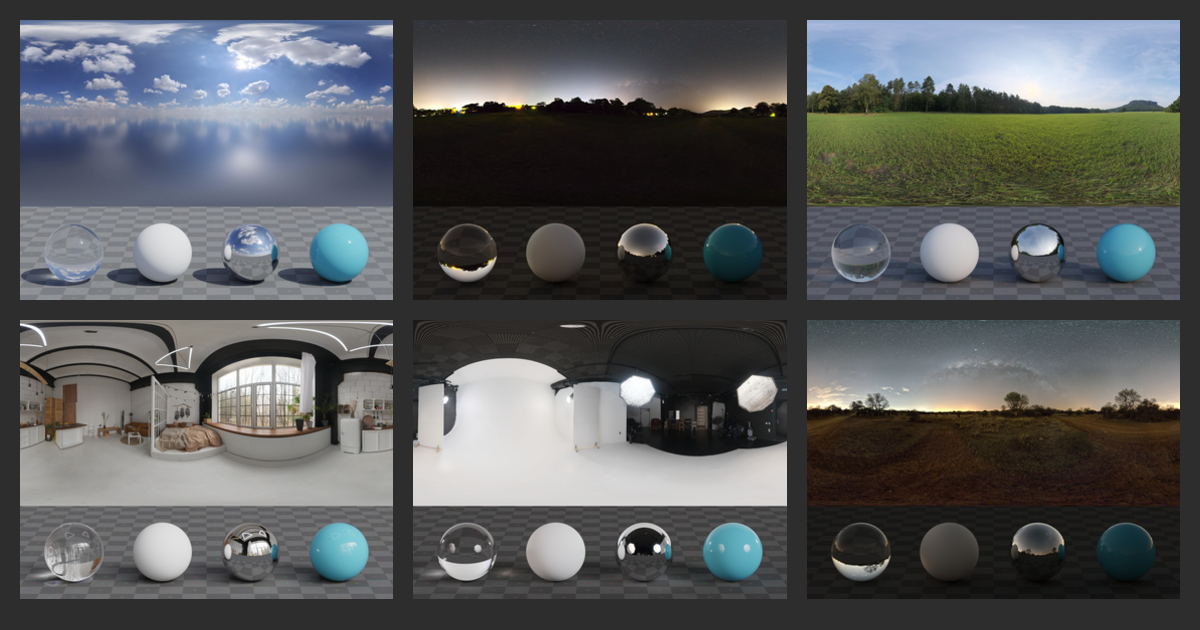
Poly Haven
Previously known as HDRI Haven. Hundreds of free HDRI environments, ready to use for any purpose. No login required.
modest whale
np
subtle bison
with the default emission intensity of 1, its pretty bright but the gamma of the HDRI looks a lot darker than it should

at intensity 5 it looks pretty good

 modern quest
i wanted to mention that PolyHaven consistently had the highest quality PBR assets compared to the rest of the sites
FreePBR was a distant 2nd
subtle bison
subtle bison
at intensity 5 it looks pretty good
but unfortunately the sky is overexposed and for whatever reason, remix's tonemapper doesnt account for HDRIs
also high exposure elements like the sun have really weird artifacting
its hard to see in a photo tho
lemme get a video
modest whale
Looks like DLSS or ray reconstruction being glitchy
subtle bison
with RR off i get clipping instead lol

remix is definitely not handling the HDRI correctly
modest whale
That's already very cool it can load them lmao
subtle bison
yeah but my results are far worse than some other people's where it works correctly
i have no idea why remix isnt using the embedded data for changing exposure
modest whale
maybe gmod being itself
subtle bison
its both tonemapping and eye adaptation
i did but nothing drastic to cause clipping, this issue is exlusive to HDRIs
modern quest
try turning off auto exposure entirely
subtle bison
its the actual exposure of the image, its too bright that the actual pixel is turning black,
modest whale
oh
subtle bison
it gets fixed if i set the emission intensity of 1
subtle bison
modern quest
try turning off auto exposure entirely
so its not the remix tonemapping/eye adaptation
turning it off does nothing
subtle bison
modest whale
since all the others worked fine
nah i get the artifacting on others when I have RR on
modest whale
oh
subtle bison
and if its off i get the same black clipping
like i said i think remix isnt actually using the whole 32-bit color range from the HDRI
just like a specific value instead
oml i think i just fixed it
fixed my gamma issue

its now correctly exposed
though emission seems to be messed up now, so maybe not fixed lol
yea remix doesnt handle gamma correctly
i might be able to tweak this in photoshop
modern quest
i don't think anyone else has had these issues
subtle bison
might still have to blame the custom plane to project the sky then
otherwise i cant think of anything else of what im doing wrong
I got it to look better adjusting the gamma in photoshop but i still have the overexposure issues, and horrible bounce lighting (note there is no blue light coming from the sky on these props)

starting to wonder if the force hdr sky toggle is broken
idk im going insane
i tried doing the gmod skydome prop method, when selecting the replaced texture as a sky texture it just dissapears 💀
modern quest
subtle bison
starting to wonder if the force hdr sky toggle is broken
it works in GTA SA
so def not
subtle bison
yea im sure it does im just lost lmao
probably the only HDRI that doesnt look overexposed and has correct gamma with the emission exposure at 1
https://polyhaven.com/a/ouchy_pier
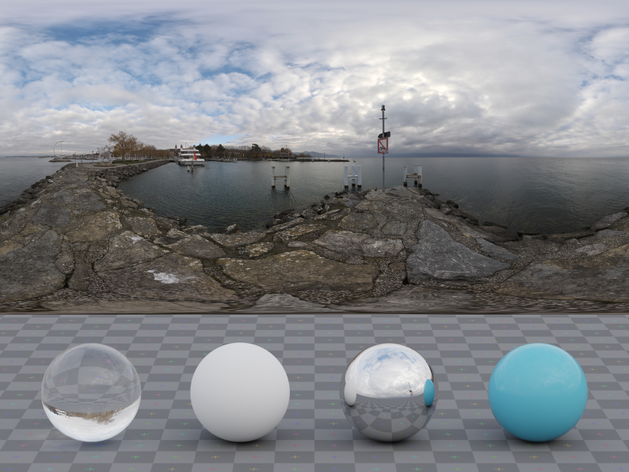

well its still overexposed compared to the reference image but its definitely better looking than the directly lit ones
 steel lark
subtle bison
I got it to look better adjusting the gamma in photoshop but i still have the ov...
steel lark
subtle bison
I got it to look better adjusting the gamma in photoshop but i still have the ov...
wow that looks crazy
subtle bison
no man pls its ass trust me 😭
ok well resetting my eye adaptation settings definitely helped
im still getting artifacting from the sun but that's happening no matter what I do
ok nvm that's also fixed
💀
curse you post-process
the only issue is that now maps without a HDRI look like ass
guess ill be adding more HDRI's to maps 👅
modern quest
lol yeah
i wish i could in Barnyard
needs it so bad
it animates the skybox though, so i don't think i can
modern quest
subtle bison
very glad you got it going
subtle bison
ty for the help
modern quest
auto exposure has messed me up many times lol
subtle bison
it was eye adaptation the whole time
modern quest
and np
subtle bison
omg the sun off the reflection 🥵

omfg the clipping returns

its very intermittent
and RR is fuzz
 modern quest
RR caused that?
subtle bison
nah, just different results depending on what is being used
non-RR shows the clipping, RR makes the denoiser go nuts instead
modern quest
hm
peak rover
quiet scroll
the 4090 runs path tracing smoothly
144 fps no dlss no bull crap
subtle bison
modern quest
hm
it looks much worse in a video
clipping is also still visible on the sun but its barely noticable

no idea what causes this behavor
messing with the emission intensity doesnt seem to change anything
so i dont think its with the HDRIs themselves
 safe jewel
subtle bison
https://www.moddb.com/mods/half-life-2-mmod-pbr-physics-gun/downloads/half-life-...
safe jewel
subtle bison
https://www.moddb.com/mods/half-life-2-mmod-pbr-physics-gun/downloads/half-life-...
im still rlly knew to this stuff, how do i install it?
subtle bison
download the mod
subscribe to this addon
extract the mod to steamapps\common\GarrysModRTX\rtx-remix\mods as shown

boot your game and make sure your enhancements are turned on
subtle bison
grigori lookin hawt
 quiet scroll
Did y'all have to use GWtool to get the _legacy.bin files open to remove the grey .vmt things?
Or is there an easier way lol
subtle bison
i extracted the addon using gmad, edited the vmt, and then drag the extracted addon to my addons folder
iirc custom addons have a higher load order so i think you can keep the addon subscribed
quiet scroll
Ahh gotcha, thanks!  That would've taken me forever to realize lmaooo
subtle bison
aww hell naw we got sky jiggle physics before gta 6
meager oar
subtle bison
aww hell naw we got sky jiggle physics before gta 6
ohh that's how u did it 😂
 night bramble
subtle bison
aww hell naw we got sky jiggle physics before gta 6
night bramble
subtle bison
aww hell naw we got sky jiggle physics before gta 6
so I'm seeing a day/night cycle with some rotation?
subtle bison
maybe
modern quest
attach a little tiny sphere to the main player mesh and have it rotate inside their body 😛
then attach the skybox to that
lament quartz
modern quest
then attach the skybox to that
That seems to work the wrong way
willow fog
 meager oar
I was wondering if there was a way to make the fallback lighting values in remix menu to constantly change themselves automatically so you get sun rotation changing and also the color changing aswell through out the game without touching them.
 rich badge
meager oar
I was wondering if there was a way to make the fallback lighting values in remix...
rich badge
meager oar
I was wondering if there was a way to make the fallback lighting values in remix...
why bother with that, we have bridge->remix api
Edit: I explored that concept long time ago: #showcase message
subtle bison
subtle bison
clipping is also still visible on the sun but its barely noticable
noticed its like this in the toolkit too
 subtle bison
🤤
 subtle bison
blends in really well with this map (the seam in the top right is not from the HDRI but an issue with my sphere model, im fixing it)

 wind yoke
subtle bison
made a proper dome, and while i dont have it perfecly aligned yet, it looks so m...
wind yoke
subtle bison
made a proper dome, and while i dont have it perfecly aligned yet, it looks so m...
That's gorgeous
quiet scroll
subtle bison
blends in really well with this map (the seam in the top right is not from the H...
OH MY GODDDDDD 
So the HDRI’s a big dome over the map? Or how is it getting added? 
subtle bison
yeah its basically a big sphere that is out of bounds of the map. I made it in blender and then attatched it to a primitive prop so I could manipulate it with the physgun
with primitive props, they have unique model hashes so i dont have to add a custom model to the game or replace an existing one
the big issue at the moment is if i keep making the sphere bigger, i lose a lot of bounce light and the actual rays take longer to arrive to geometry, so tl;dr lighting looks duller and is more unstable
so im having to compromise on size and emission strength to compensate
wind yoke
yh won't it block out sky lighting?
subtle bison
?
subtle bison
subtle bison
so im having to compromise on size and emission strength to compensate
you can kinda see when i move around, the skybox isnt static and there is some paralax since the sphere is actually pretty small
which actually looks great with this HDRI and map, but for bigger maps and some HDRIs, it can also be an issue
usually you want the skybox to not move with the player and be static
meager oar
subtle bison
you can kinda see when i move around, the skybox isnt static and there is some p...
dayum gives off volumetric clouds vibes
lapis delta
subtle bison
you can kinda see when i move around, the skybox isnt static and there is some p...
i have one idea
- set that duplication in the skybox
- enable r_3dsky
and, of course, enable "reproject sky to the camera"

 lapis delta
glad to hear that ☺️
subtle bison
its pretty bad in motion though
very unstable lol (ground jitters and there is some z-fighting)
at least 3D skyboxes look good now though
meager oar
subtle bison
had to fix the scaling but it looks nice
dayum ....wat resolution are those sky? wonder how a 24k res sky will look like, saw few with that available res in poly Haven
subtle bison
4k


 lone arch
subtle bison
lone arch
subtle bison
HDRI sphere
subtle bison
subtle bison
yeah its basically a big sphere that is out of bounds of the map. I made it in b...
^ (big sphere with a converted HDRI map applied to it)
subtle bison
I found the magic fix for clipping HDRIs 💀
HDR toning in photoshop is magic

with the following parameters it keeps the same exposure before the effect and so it looks the same as the unmodified one
here is a comparison
 livid rapids
willow fog
livid rapids
willow fog
Wow that looks better than what I did, good job
subtle bison
subtle bison
here is a comparison


ok well now that i look at it there is definitely some differences 💀
this will require further refinement but at least the shitty clipping is gone
 subtle bison
its a buggy mess so uhh watch out
its mostly because remix doesnt like 99% of HDRI maps

meager oar
subtle bison
is this sphere made by u? cause I'm trying the workshop ones but the texture gets all tangled up in them
subtle bison
yea, the model itself is not ingame
gaw hell naw they dropped me in europe

im at the point where this is no easy way to fix the HDRIs for remix,
the basic steps that are reproducable is lowering the dynamic range stops with camera raw inside photoshop
and then adding +2 gamma with photoshop as well to fix the overly dark look ingame
the important part is to do all of these changes in a way that doesnt remove all of the 32-bit data inside the image
otherwise it goes to shit

another HDRI fixed 
meager oar
subtle bison
the buildings look like there part of the map
subtle bison
its all about camera perspective
quiet scroll
subtle bison
noticed its like this in the toolkit too
Did you ingest it as an .hdr file?
subtle bison
you dont need to ingest hdr/exr files
install the standalone version of this

NVIDIA Developer
Allows users to create highly compressed texture files from image sources.
drag the hdr/exr into the program, and use this format as shown

then save as as a .dds where remix can see it (like an existing mod)
quiet scroll
OH SICK! Thanks! 
subtle bison
in the toolkit you import it as a emissive map and the object marked as a sky texture
do not set the albedo, also make sure the albedo color is 0, 0, 0
meager oar
i guess ill just use cube maps


thats a bright sun

yea couldnt find a proper sky dome in da wrkshop
but atleast found this tool so now i can replace the skybox with proper ones easily https://matheowis.github.io/HDRI-to-CubeMap/
meager oar
subtle bison
how do you even replace the skybox? i cant select it in the toolkit
octatex baby
quiet scroll
I hope octatex starts up again, it was so ahead of its time
 tulip meadow
meager oar
i guess ill just use cube maps
tulip meadow
meager oar
i guess ill just use cube maps
I thought cube maps aren't supported
In remix
subtle bison
i think he means converting the HDRI into a cubemap-like atlas so it can replace the game's original skybox
meager oar
yea i just open the default sky textures on paint3d then just paste the cube map one and just write it
night bramble
I liked the command line octatex much more than the webui version
lament quartz
meager oar
octatex baby
I thought it's old and there's a new tools already, isn't it?
I haven't been here for a long time
meager oar

 meager oar
lament quartz
I thought it's old and there's a new tools already, isn't it?
meager oar
lament quartz
I thought it's old and there's a new tools already, isn't it?
idk but looks like changing da skybox still doesnt wrk on toolkit

 opal depot
Just look at everyone enjoying hdri maps. Could you guys thumb react to Kim's feature request so everyone can benefit?

GitHub
Contact Details (Optional) No response What is the context of the feature/improvement? Many games do not have properly functioning skies or skyboxes, and the current best workaround appears to be a...
willow fog
livid rapids
Wow that looks better than what I did, good job
Thx
lapis delta
willow fog
Thx
ill even say more, it looks absolutely wonderful, as if it was real life


 meager oar

 subtle bison
opal depot
https://github.com/NVIDIAGameWorks/rtx-remix/issues/525
subtle bison
opal depot
https://github.com/NVIDIAGameWorks/rtx-remix/issues/525
btw what your exact method for fixing clipping on some HDRIs? i tried a couple different solutions as seen above but unfortunately they all involve removing a lot of dynamic range so it drastically changes how they look.
from what it looks like, remix is unable to handle more than 4 stops of dynamic range
subtle bison
subtle bison
^
opal depot
subtle bison
btw what your exact method for fixing clipping on some HDRIs? i tried a couple d...
I'm not sure I've seen that. Guess your hitting the limit of the bit depth for the texture format. Just clamp it a little in Photoshop to bring it within range
subtle bison
I've done that and it works but it usually kills strong points of light such as the sun or street lamps
so ill usually get more sky lighting than i do anything else
im currently messing with pfstools on linux to see if i can compress these exr's while maintaining luminance
steel lark
can you change the sun direction in gmod rtx?
because with the sun editor thing it doesn't work
modern quest
@subtle bison i found an open issue from tadpole that states that you need to convert the HDRI to BC6S to prevent color range issues
have you tried that?
you can do it in Nvidia Texture Tools
modern quest
you can just send the hdri and i'll convert it for you, if you'd like
subtle bison
i have the tool on me, what does the option specifically look like?
 subtle bison
yeah that's how i've been doing it this whole time
modern quest
with BC6S?
subtle bison
yeah, let me verify just to be sure
yeah either BC6S or BC6U have this issue


whats the issue link? might help to report these findings
modern quest

GitHub
Contact Details (Optional) No response Describe the bug Out of nowhere, without changing any catagorise apart from assigning it to a sky texture hours ago and after multiple reloads, the asset beco...
subtle bison
i have this issue too but this doesnt seem related to my problem?
modern quest
if you were using another format it could've been causing the clipping
i brought up BC6S specifically for that reason
was hoping it'd fix it
subtle bison
all good, ill make a new issue, it also happens in the toolkit so it will probably go into the rtx-remix repo
modern quest
Nvidia wanted all issue reports in the rtx-remix repo anyway btw
subtle bison
accidentally pushed with the wrong tags but the issue is posted
GitHub
Describe the bug .exr/.hdr converted HDRIs with the NVIDIA Texture Tools Exporter using the BC6S format have severe clipping and artifacts inside the toolkit and runtime (with RR off, its a black d...
subtle bison
ok well i finally found a definitive way of working around the issue while keeping the important highlights
(i know i said this for like 10th time but for real i finally was able to keep the full dynamic range)
I first had to change the gamma of the exr with pfsgamma. It's a linux only tool so I had to spin up a VM to do this. Though here are my steps so far:
- on the linux VM, change the gamma to something like 2.2 (heavily depends on the image, so ymmv)
pfsin rural_asphalt_road_8k.exr | pfsgamma -g 2.2 -m 1 | pfsout output.exr - copy the exr back to your windows host, open it in photoshop, use the camera raw filter
- copy the settings in the 1st screenshot and press ok
- save the exr and convert with nvidia tools exporter as normal
if you still get artifacting or clipping, go back to step 3 and keep bringing the whites down in a -10 incriment. For the example picture I had to do -50 white
do all of this with the emissive intensity of 1


finally

here is a fixed .exr if anyone wants it

 meager oar
subtle bison
here is a fixed .exr if anyone wants it
meager oar
subtle bison
here is a fixed .exr if anyone wants it
wats da original one


 meager oar
subtle bison
https://polyhaven.com/a/rural_asphalt_road
meager oar
subtle bison
https://polyhaven.com/a/rural_asphalt_road
hmm wats da difference between exr and tonemapped versions of the sky?
subtle bison
tonemapped means its a normal image without any high dynamic range data
you do not want tonemapped
an exr is a 32-bit image file with data that has multiple exposures baked into it which allows for much more realistic lighting
its one of those parts of a PBR workflow that makes everything a lot more realistic
meager oar


 near tartan
That looks great man
night bramble
subtle bison
an exr is a 32-bit image file with data that has multiple exposures baked into i...
was wondering why the skyboxes in your pics looked like hdr compressed down to sdr
meager oar
how is tis


 viscid ocean
you should get better hand models tbh
willow fog
I should
viscid ocean
mabye the csgo ones
modest whale
I'm pretty sure that the workshop has some set of hands that looks way better than csgo ones
probably tarkov or MW19 stuff would be the best
willow fog
viscid ocean
mabye the csgo ones
I'll grab the ones from mw19
viscid ocean
k
subtle bison
night bramble
was wondering why the skyboxes in your pics looked like hdr compressed down to s...
the eye adaptation and tonemapping exposure probably has more to do with that, i was originally compressing the HDRIs to fix clipping using a sub par solution but that's not the case anymore
night bramble
Can I get the exr?
subtle bison
for which picture
night bramble
Any of them just want to see one
subtle bison
subtle bison
here is a fixed .exr if anyone wants it
i uploaded one earlier ^
night bramble
Thanks
subtle bison
subtle bison
I first had to change the gamma of the exr with `pfsgamma`. It's a linux only to...
this is my method of fixing them while trying to preserve dynamic range
meager oar


 subtle bison
tonemapping be like
also since you're using a cubemap atlas, when you export it from the site, what format are you using
.png or .hdr?
willow fog
I wish for the day they put agx tonemapping in remix
meager oar
subtle bison
.png or .hdr?
png
subtle bison
rip any dynamic range
meager oar
subtle bison
rip any dynamic range
should i use hdr and then convert it to dds?
subtle bison
yes but then you'll most likely face the clipping bug that exists, which can be fixed but is complicated
meager oar
hmm imma try that
subtle bison
subtle bison
I first had to change the gamma of the exr with `pfsgamma`. It's a linux only to...
and then this if you have clipping issues ^
 subtle bison
willow fog
I wish for the day they put agx tonemapping in remix
subtle bison
willow fog
I wish for the day they put agx tonemapping in remix
i made my own ACES RRT tonemapping shader for reshade and that's what im using 
i believe agx also exists but adjusting reshade in remix is a nightmare
subtle bison
ACES RRT and AGX are about neck and neck for quality
remix uses normal ACES
i could try implementing agx myself though, would be nice to have other options
willow fog
subtle bison
remix uses normal ACES
yes
meager oar
subtle bison
ACES RRT and AGX are about neck and neck for quality
tis was da result

made it less exposed
 subtle bison
you sure you didnt adjust the exposure without removing dynamic range? these edits cannot be done in SDR space otherwise it gets stuck to a fixed exposure
if you zoom your gmod camera into the sun, does it get darker without losing detail?
should adjust like it does in this video
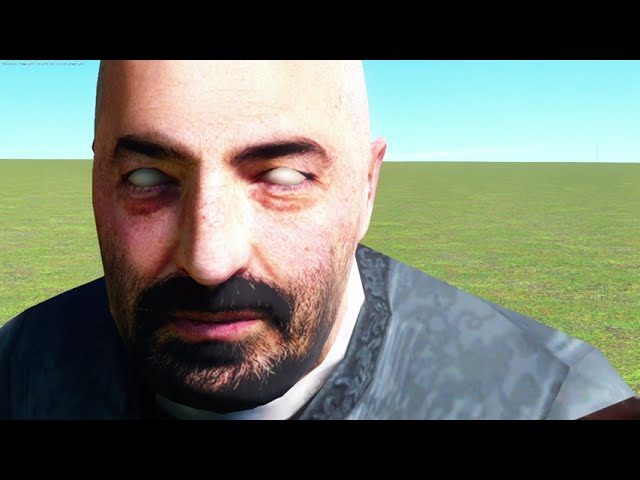
Looks really good, though im having some clipping issues as seen with the second HDRI
0:41
if it does, then you can lower the exposure ingame using the tonemapping settings
the HDRI shouldnt be adjusted at all unless it has clipping issues
meager oar
subtle bison
https://www.youtube.com/watch?v=RIHwd_FdO-E&t=68s
yea it doesnt 😭
subtle bison

meager oar
subtle bison
<:rip:311574011425456129>
heres how i did, got the .hdr version of the skybox, put it in the website and out put the skybox textures as .hdr, then just put the .hdr files in the textures tool with the correct hdr formet and then just saved as dds
subtle bison
the tool might be removing the dynamic range
meager oar
subtle bison
the tool might be removing the dynamic range
the website one? or nv texture tool
subtle bison
the website
you can check with photoshop by choosing the camera raw filter, click "Visualize HDR", and then see if there is anything in the HDR space
im not on windows atm to check myself
meager oar
subtle bison
the website
so i just put the whole hdr in a single skybox face without the website and i think its wrking right?
it gets darker the more u zoom in without losing detail

hmm both are same files but on left is .hdr and on right .png


hmm so skybox and world ui act the same? but ui has more bluish tint of the sky

 molten slate
was definitely not expecting this to be a thing
molten slate
molten slate
was definitely not expecting this to be a thing
anyone got any ideas how to fix this weird lighting bug
lament quartz
molten slate
anyone got any ideas how to fix this weird lighting bug
Commander hat? Haven't seen you in a while, anyways usual asks, have you got the most recent version of rtx remix, the right patches and rtx remix fixes addon?
molten slate
lament quartz
Commander hat? Haven't seen you in a while, anyways usual asks, have you got the...
yup, everything as of a week ago (unless theres been updates since)
yeah im not much active as i've got a ton of stuff on my plate and can't really dedicate my time to one thing, but I love trying to anyway lol
molten slate
lament quartz
Do you have anti culling lights on?
how do I toggle that
I use the provided batch file from the 'even newer way to install remix' video
lament quartz
Should be in the remix menu, at renderer near the bottom
molten slate
hold on ill give it a try
molten slate
lament quartz
Should be in the remix menu, at renderer near the bottom
nah doesnt seem to do anything
molten slate
lament quartz
Is it just that map or every map
i havent tried all but so far almost all the maps prior to the resonance cascade have this issue (ill check if they happen after too )
molten slate
lament quartz
Is it just that map or every map
anti culling lights doesnt do anything and anti culling everything just destroys performance while also doing nothing
subtle bison
meager oar
so i just put the whole hdr in a single skybox face without the website and i th...
nope the exposure is still at a fixed point, maybe send a picture of your eye adaptation settings under post processing
lament quartz
molten slate
anyone got any ideas how to fix this weird lighting bug
@subtle bison you got any idea on why this is happening
subtle bison
molten slate
i havent tried all but so far almost all the maps prior to the resonance cascade...
have you tried other maps that aren't half life source?
i can try going to that one in the video and see if i have the same issue
molten slate
subtle bison
have you tried other maps that aren't half life source?
I think I got something
adding the textures to worldspace UI fixes some of them
subtle bison
uhh that's a weird workaround, that's fixing the light culling?
molten slate
subtle bison
uhh that's a weird workaround, that's fixing the light culling?
it does something

some lights arent bright enough tho I suspect thats cause I have hdr on lmao
molten slate
molten slate
it does something
way better than complete darkness as you can tell
subtle bison
ok i see, youre marking the ceiling light as a worldspace ui texture so its emissive
not really a fix but i guess that's a good enough workaround

 molten slate
subtle bison
not really a fix but i guess that's a good enough workaround
molten slate
subtle bison
not really a fix but i guess that's a good enough workaround
I'll see what else it works on
so the funny thing is shooting the gun causes lights to emit but like at maximum brightness
but worldspace ui seems to keep its original brightness which really helps in terms of atmosphere for the game
boards are supposed to be animated but they're stuck in this position, but otherwise seem to light stuff up as they should, a tad bit bright tho imo

theres areas with no lights that remix interprets with lights at maximum brightness unfortunately, idk how to turn them off. I think its taking some data from where the lights are baked and interpreting them as lights themselves, rather than just a thing for the engine to bake light onto (if any of that makes sense)
subtle bison
yep half life source maps are cursed
no other valve games do this so i have no idea what's going on here
but tbf it is half life source so i guess this should be expected lmao
meager oar
subtle bison
yep half life source maps are cursed
Imma try those maps, I don't remember lights doing that when I tried it months ago
molten slate
if you try the half life maps that are resized on the workshop you get some more funky shit
 molten slate
subtle bison
not really a fix but i guess that's a good enough workaround
molten slate
subtle bison
not really a fix but i guess that's a good enough workaround
it has its limitations, lights that are supposed to be off don't remain off (but some do for some reason) im wondering how remix is deciding how some lights are on or off
subtle bison
this isnt a remix issue
this is a issue with the map/engine, as they're responsible to what gets sent to remix
i would probably recommend decompiling the maps and see what causes this behavior
meager oar
subtle bison
nope the exposure is still at a fixed point, maybe send a picture of your eye ad...
 subtle bison
i would get rid of exposure compensation, turn off center weight metering, set your eye adaptation min to -2, and max 2
having the max at -1 makes everything constantly bright
the HDRIs are highly dependent on balanced auto exposure settings
meager oar
subtle bison
the HDRIs are highly dependent on balanced auto exposure settings
imma try a 24k texture hehe
subtle bison
rip gpu
meager oar
subtle bison
rip gpu
 subtle bison
yea your cpu will have to cope
meager oar
had to restart whole pc dayum


 meager oar
subtle bison
why does it look all messed up
meager oar
subtle bison
why does it look all messed up
i just pasted the whole hdr in one face of da skybux cause the website doesnt support anything above 8k
subtle bison
here is another fixed HDRI
its just a pure sun

for this one i would use emission intensity of 1.25
keeps the brightness of the sun but also allows for the sky light to pour in

this gives off such a weird vibe
 meager oar
subtle bison
this gives off such a weird vibe
meager oar
subtle bison
this gives off such a weird vibe
high quality sky, mirror floor and low res buildings
opal depot
your adding emmisive to your skies? I just leave it non emissive and call it a day
subtle bison
opal depot
your adding emmisive to your skies? I just leave it non emissive and call it a d...
so you're just adding it as a albedo and marking as sky?
 subtle bison
for some reason that doesnt work in my case, sky does get replaced but obviously it doesnt cast any light

 lament quartz
Wow
subtle bison
last mmod weapon in progress
 subtle bison
thank you RR for completely destroying my specular detail


still not done but was wondering why it looks like shit in gmod/toolkit
ok now its done

still need to go back and polish some other weapons that look a bit off


ok yeah what broke RR seriously


its so blurry now
lapis delta
subtle bison
ok now its done
what is your gpu and cpu?
subtle bison
ryzen 9 7950X3D, rtx 2080
subtle bison
subtle bison
ok yeah what broke RR seriously
ok a driver update broke my DLSS preset override
which is causing smearing and ghosting
lapis delta
first of all, good choice about cpu
and second, bro, you are just cooking with mf 2080
subtle bison
lol
lapis delta
👏👏
subtle bison
i spent $500 on my 2080 back in 2019, the fact new GPUs near the same price still have 8gb is the reason why i havent upgraded
lapis delta
with these lags and other visual bugs
subtle bison
my fps is low in some of those screenshots because of full res DLSS
helps show better specular detail
lapis delta
too bad that rr cant get good filter for these details
subtle bison
it looked fine before i updated my driver yesterday lol
now everything looks like shit
lapis delta
huh?
subtle bison
RR heavily depends on the driver DLSS preset, i've been forcing preset E for about a year now to get rid of ghosting and blurryness

GitHub
Tweak DLL for NVIDIA DLSS, force DLAA on DLSS-supported titles, tweak scaling ratios & DLSS 3.1 presets, override DLSS versions without overwriting game files. - emoose/DLSSTweaks
lapis delta
subtle bison
RR heavily depends on the driver DLSS preset, i've been forcing preset E for abo...
wait, u can fix that blurry mess just with that preset?
subtle bison
iirc yes, lemme see if i can reapply it to confirm
subtle bison
subtle bison
thank you RR for completely destroying my specular detail

lol yeah much better
not as good as non-RR but acceptable
non-RR, RR


cant wait to buy a 5090 so i can run 1080p full res all of the time
plus FG, omg isnt that the dream 🤤
lapis delta
frame generation?
lapis delta
subtle bison
non-RR, RR
the heck with the metal?
it looks like plastic
with rr
non rr looks incredible
subtle bison
lapis delta
frame generation?
yea
subtle bison
lapis delta
the heck with the metal?
yea this is the case with any specular detail with RR 😭
meager oar
subtle bison
non-RR, RR
yum 😋
idk why looking at pbr textures in games make me want to eat and lick them especially the bricks 🤤
lapis delta
meager oar
idk why looking at pbr textures in games make me want to eat and lick them espec...

to tell the truth, i want to do that too
lapis delta
subtle bison
thank you RR for completely destroying my specular detail
the second photo (with rr) looks like usual gmod
half viper
subtle bison
thank you RR for completely destroying my specular detail
There is like, unshadowed halo around RR image
subtle bison
idk why RR looks fine here (RR left, non-RR left)
there is still some specular detail lost but its less pixelated so im kinda ok with it here

 subtle bison
half viper
There is like, unshadowed halo around RR image
subtle bison
half viper
There is like, unshadowed halo around RR image
screenspace denoising moment
subtle bison
subtle bison
idk why RR looks fine here (RR left, non-RR left)
there is still some specular d...
ok nvm RR still looks like shit here lol
god i forgot how much detail i added to the AR2
🥹
lapis delta
subtle bison
screenspace denoising moment
is rr screen space?
subtle bison
yea, at least a good part of it
found a bug with ReSTIR GI lol
only happens when using HDRIs
 subtle bison
only happens when using HDRIs
subtle bison
subtle bison
only happens when using HDRIs
iirc mark said this can be fixed by making the HDRI darker before importing it into remix and then increasing the emission strength, but doing that without fucking up dynamic range will SUCK
lapis delta
subtle bison
found a bug with ReSTIR GI lol
tbh, i don't need these screen space features, so i turn off restir gi completely
but
try it without enabled temporal reuse
subtle bison
i already did
messing with any of the settings do anything for that
only turning off restir gi entirely "fixes" it
ok so i think nvidia fucked up DLSS preset E in the newest driver because there is still a fuck ton of ghosting in motion
time to mess with driver stuff 🤪
subtle bison
idk, the way im doing HDRIs in gmod is kinda cursed so it might not actually be a bug

lapis delta
but it shouldn't be like this either
subtle bison
apparently others dont need to make their HDRI marked as emissive to light the scene but it does for me
here is the ghosting im talking about
it also happens with RR off but its less noticable
lapis delta
don't any presets help at all?
subtle bison
idk im messing with all the different presets in DLSSTweaks to see if one gets rid of the ghosting without trashing the image
not to be confused with the resolution presets
uhh
that was
fast
RR on vs RR off


lmfao
so forcing DLSS preset F was it
ghosting is gone too

ok well it still happens with HDRIs but meh im satisfied
nvm it only happens on that empty map??? flatgrass with a HDRI looks fine, i guess it just clashes with that grey texture
meager oar
very tricky things 😞
willow fog
Windows xp


 peak rover
subtle bison
peak rover
subtle bison
all fun and games till the dlss ruins how the game looks like
and makes it look like a vhs tape
i aint touching gmod rtx till i get like a 5090 or 6090
subtle bison
this was full res DLSS with no-RR, anyone with a 4000 series should be fine lol
hell even at 900p on a 2080 my fps is somewhat usable
peak rover
subtle bison
hell even at 900p on a 2080 my fps is somewhat usable
really?
i have a 3070 and it was like 30-40 fps
maybe bc i was on 1440p
butt
subtle bison
💀
peak rover
i had dlss on
subtle bison
still miles ahead of my 2080
peak rover
subtle bison
ima try to get the 5090 day 1
its gonna be 50-70% better than a 4090
i cant wait
for it
and there also gonna make sum random feature for 50 series
to make it a selling point
subtle bison
its gonna be like a 400% perf diff between my 2080 💀
subtle bison
and ill still be playing at 1080p
peak rover
subtle bison
and ill still be playing at 1080p
gotta get as much fps as u can in rtx
subtle bison
god 1080p high fps gaming is gonna be sweet
peak rover
🙏
peak rover
subtle bison
god 1080p high fps gaming is gonna be sweet
in some games it might be bottle necked tho
subtle bison
yea but i got a 7950X3D

the "bottleneck" will still leave me a couple hundred fps in most titles
especially indie
peak rover
subtle bison
the "bottleneck" will still leave me a couple hundred fps in most titles
true who needs like 1k fps
i hope there selling point is like 4k 240 fps
or sum like that
subtle bison
i have a 360hz monitor so ill definitely be benefitting
peak rover
subtle bison
i have a 360hz monitor so ill definitely be benefitting
question how much money do you have saved
peak rover
😭
subtle bison
built a whole new PC just waiting for the eventual upgrade
this 2080 has been through 4 builds
it needs a break
peak rover
subtle bison
this 2080 has been through 4 builds
i would display it cuz the 20 series has a nice design
subtle bison
oh its definitely still going to be used
i got a server that could use some gpu accel
peak rover
oooo
peak rover
imagine dual 5090
subtle bison
peak rover
imagine dual 5090
imagine only having 2 apps that can utilize it
SLI is dead
peak rover
subtle bison
imagine only having 2 apps that can utilize it
ikr
but its good for rendring
rendering
peak rover
subtle bison
SLI is dead
imo its prob dead bc of prices
and devs not wanting
to do allt
allat
peak rover
subtle bison
imagine only having 2 apps that can utilize it

opps
wrong reply
but look
at this pricing
 peak rover
subtle bison
cheap af
peak rover
subtle bison
cheap af
ohh i thought you were bout to pull like prices with even higher cost
subtle bison
naw
subtle bison
just showed you lol
peak rover
subtle bison
just showed you lol
i meant to say how much is a rtx 4090 going for
subtle bison
probably not much less than MRSP
its still a current card


crowbar PBR also fixed
my dumbass had the roughness map backwards and no metallic map
subtle bison
pistol is up next 🔥

this was the 1st one i worked on months ago but i did a pretty bad job, hopefully this time around i can make it more faithful


 meager oar
16k texture uff, RR off vs RR on


now i know why no one uses 16k textures
it was very painful


 lament quartz
 subtle bison

 lament quartz
Gah DAMN cr, great shit!
willow fog
Idk it doesn't look very good
lament quartz
Wdym
subtle bison
ok tell me why lol
lament quartz
Same I'm very curious
subtle bison
low albedo quality?
they're straight from the original VTFs so its not like i could do much there
im not AI upscaling it
lament quartz
I mean really only problem i can see is the stock looking flat and blurry but like ots still good
willow fog
subtle bison
low albedo quality?
That's one of the reasons, yeah. Lot of artifacting
subtle bison
lament quartz
I mean really only problem i can see is the stock looking flat and blurry but li...
unfortunately the stock had no existing PBR maps so i did that by hand by going off the albedo
lots and lots of painting
willow fog
There are some really good ai compression artifact removers
willow fog
Sorry I'm on my phone rn
But last time I used one, the results were really good
Used chainner
lament quartz
Alao cr be wary the owners of your pfp are copywriter striking the cats people use oooooooo 
subtle bison
💀
subtle bison
lament quartz
I mean really only problem i can see is the stock looking flat and blurry but li...
so here is what the stock looks like in substance
 lament quartz
subtle bison
💀
lament quartz
subtle bison
💀
I kid you not tho
subtle bison
remix really dulled it lol
lament quartz
subtle bison
remix really dulled it lol
Thats noticeable
willow fog
subtle bison
remix really dulled it lol
The joys of realtime path tracing
lapis delta
subtle bison
RR on vs RR off
is that f preset?
lament quartz
meager oar
That's how they staged landing on the moon
they just used 16k textures in garrysmod with RTX remix
meager oar
lament quartz
That's how they staged landing on the moon
💀 game theory
subtle bison
lapis delta
is that f preset?
yes
lapis delta
subtle bison
yes
so, that preset removes blurry and ghosting, am I right?
subtle bison
so far
meager oar


 subtle bison
with the ground replacements this doesn't even look like gmod anymore 💀💀💀
meager oar
subtle bison
with the ground replacements this doesn't even look like gmod anymore 💀💀💀
i think the sky aswell cause the default one doesnt make it look this good

 subtle bison
do you also have volumetric fog on?
meager oar
subtle bison
do you also have volumetric fog on?
yus but only set to 0.200
subtle bison
its helping blend the skybox and terrain so well
on my small phone screen i thought this was a render at first
💀
meager oar
ded combines
 quiet scroll
meager oar
ded combines
quiet scroll
meager oar
ded combines
That's THE most incredible ground I've ever seen LMAOOO
Working on a constructrtx again


I think I'm going to change the default lighting to kinda give it a pretty eyecandy rtx effect
It looks kinda mid with just regular
 humble mango
meager oar
ded combines
humble mango
meager oar
ded combines
sad that i can't run this on RTX 2060 super(
wait, would it be legal, if i use my legal copy of gmod, then apply goldberg crack and then manually install addons? cause i want different addons to mount and smaller install.
half viper
humble mango
wait, would it be legal, if i use my legal copy of gmod, then apply goldberg cra...
You can basically just copy it
And paste it
humble mango
half viper
You can basically just copy it
ok
half viper
humble mango
sad that i can't run this on RTX 2060 super(
Also you can run it, just don't expect good framerates
humble mango
cuz main install will not work with remix, and i know that
half viper
Wdym will not work?
half viper
Make a preset with all your currently enabled mods
And disable everything and enable what you need
half viper
humble mango
and it will take 4gb+ in ram
Whats the issue with that?
How much ram do you have?
humble mango
half viper
How much ram do you have?
16GB
half viper
That's enough
half viper
It won't
half viper
Unless you are running mods that specifically require 64bit
It wont
Sadly the 64bit patches for gmod aren't complete
lapis delta
subtle bison
with the ground replacements this doesn't even look like gmod anymore 💀💀💀
it amazes me cuz it also works in real time
even on 20 series
lament quartz
quiet scroll
Working on a constructrtx again <a:YesYes:1060102128795922472>
The bricks seem so oddly offscale
subtle bison
yeah maybe make the tile size smaller so it matches the original texture
meager oar

 plain blade
Idk why but it looks like it’s made in unity (no offense)
 winter radish
lapis delta
even on 20 series
winter radish
lapis delta
even on 20 series
Even on Steam Deck
We're truly in the age of Ray Tracing
willow fog
plain blade
Idk why but it looks like it’s made in unity (no offense)
Bad color management
Look at the clipping near the lights
Also ugly light colors and brightness
plain blade
Slender man fan game ahh lighting
willow fog
real
meager oar
that's just the point light color on the map on the torches
willow fog
meager oar
that's just the point light color on the map on the torches
use color temperature
quiet scroll
lament quartz
The bricks seem so oddly offscale
They do look really long now that I look at it lmaoo - imma try this one and see if it balances out lol

maaaaybe? too cartoony?

I really like ambientcg's textures, but the colors are so bright 
half viper
quiet scroll
I really like ambientcg's textures, but the colors are so bright <:1451monkas:12...
Desaturation honest reaction:
quiet scroll
@subtle bison what prop did you assign the hdri skybox to? I think I've got all the steps right, I just forgot to finda prop to assign it all to 
ohh wait I see, you've made it in blender. Hmmm, Wonder if I can somehow replace the skybox 
 meager oar
quiet scroll
ohh wait I see, you've made it in blender. Hmmm, Wonder if I can somehow replace...
meager oar
quiet scroll
ohh wait I see, you've made it in blender. Hmmm, Wonder if I can somehow replace...
if u have the skybox textures in the SubUSD of your mod folder, then u can probably manually replace them by converting the skybox textures u want into dds and pasting on them
that was one of the ways I replaced the skybox
quiet scroll
Oh geniusssss, the stage manager in the newest toolkit allows to find all the prims, I could find the sky texture there and change them out - thanks!
subtle bison
issue with popo's method is that the website that converts the HDRI to a cubemap atlas removes all dynamic range so its stuck at a fixed brightness
i created a sphere model so i could import the hdri directly without manipulating it
i have the hdri model and textures in a single mod so i can try packing it and sending it to you
also the dupe that spawns it
though probably tomorrow, im a bit preoccupied
quiet scroll
that'd be awesomeee, thank you! take your time - the stage manager doesn't have a search feature, and the meshes aren't organized by name, so it'll take a loooong time to find all the skybox textures to replace 😦
quiet scroll
Thoughts so far? Still haven't adjusted the lights in the buildings yet (which is why the white showroom has all those white lights reflecting) but other than thaaat, ehh? 

 meager oar
subtle bison
issue with popo's method is that the website that converts the HDRI to a cubemap...
meager oar
subtle bison
issue with popo's method is that the website that converts the HDRI to a cubemap...
tbh i dnt thnk its the website, i even tried putting the whole .hdr file without the website in the game and still couldnt make the hdr wrk 😭
meager oar
if anyone wanna try https://www.moddb.com/mods/flatsand-v2-rtx/downloads/flatsand-v2-rtx

ModDB
In Gmod's realm of sand so flat, With 16K textures, imagine that! RTX Remix makes the sky so bright, Shiny ground, a gamer's delight. A modder's dream, pure visual chat!
quiet scroll
meager oar
if anyone wanna try https://www.moddb.com/mods/flatsand-v2-rtx/downloads/flatsan...
never downloaded anything faster in my LIFE lmaooo
It looks so good! This is absolutely what Remix is missing right now, proper skyboxes like this are a total game changer
meager oar
😂 why is a darn .dds file in a mod giving me a bridge error
when i remove it game opens but when i have it game crashes when it starts
quiet scroll
maybe try disabling displacement - I think there's a bug where displacements are crashing mods atm
meager oar
quiet scroll
maybe try disabling displacement - I think there's a bug where displacements are...
cant do tat cause i cant even open the game with that .dds file 😂 so weird
quiet scroll
willow fog
meager oar
if anyone wanna try https://www.moddb.com/mods/flatsand-v2-rtx/downloads/flatsan...
Bro used chat gpt to write that description 
meager oar
quiet scroll
<a:pepespin:971473803924369531>
battle of el alamein dang
i thought that DOI npc mod got broken, was my favorite mod like hrs of just npc battles with it
meager oar
quiet scroll
<a:pepespin:971473803924369531>
😂 who da heck killed those poor Laras
meager oar


 willow fog
meager oar
aces looks nice in night skies but not good in day skies
willow fog
meager oar
aces looks nice in night skies but not good in day skies
Aces requires color grading to be done before it's ready to be used
Color grading which you can't do in remix

 meager oar
willow fog
Color grading which you can't do in remix
meager oar
willow fog
Color grading which you can't do in remix
uff i wish there was cause interiors look much better with aces, just sucks how it makes the sky washed out

 willow fog
agx also looks good
meager oar
willow fog
agx also looks good
hmm i never used it

 lament quartz
quiet scroll
Thoughts so far? Still haven't adjusted the lights in the buildings yet (which i...
lament quartz
quiet scroll
Thoughts so far? Still haven't adjusted the lights in the buildings yet (which i...
Ayy now we talkin
subtle bison
meager oar
ded
all i hear is the lego breaking sound when seeing this
willow fog
 stoic moon
red or orange
stoic moon
red or orange
both. Posted the red version to show how agx preserves brights by desaturating the color
#asset-creation message
This is the final
stoic moon
oh cool


 willow fog
 worldly cipher
Have you downloaded the latest action build of remix?
worldly cipher
willow fog
Have you downloaded the latest action build of remix?
is this it?
 worldly cipher
i dont know really, but i think i downloaded the latest build