#Battlefield 2
1 messages · Page 2 of 1
 thin vector
having access to camera matrices and sending the information back to bridge could work
thin vector
xoxor4d please share your blessings on this game 🙏 if possible
 quick kelp
Haven’t put much thought into it but would be a simple generic tool that reads an ini file where the user sets offsets at which it can find the matrices in memory .. and maybe an offset where in the renderer loop the game will send these matrices into the d3d pipeline
So would still require a lot of reversing … and at this point, writing something specific for that game might be easier
thin vector
That would be great. Better than nothing I suppose
quick kelp
Would definitely help if there is “external” “help” via pdb’s that were accidentally shipped with updates .. be it bf2 or earlier games … not sure if there are any related to bf games tho
thin vector
😬
 rapid spear
quick kelp
Would definitely help if there is “external” “help” via pdb’s that were acciden...
rapid spear
quick kelp
Would definitely help if there is “external” “help” via pdb’s that were acciden...
None exist
 winged raven
quick kelp
Haven’t put much thought into it but would be a simple generic tool that reads a...
winged raven
quick kelp
Haven’t put much thought into it but would be a simple generic tool that reads a...
Interesting
winged raven
I had a dream where Battlefield 2 was working pretty well with Remix
Then realized it was ReShade with some magic hq shadows
It can't even work in my dreams lol
winged raven
this got me


 rapid spear
Oh yea I forgot about that. I don’t quite know if they’re helpful tho
I was under the impression it would only have server related symbols
thin vector
can anyone be kind enough to explain what dwarf symbols are you guys talking about and what do they do?
quick kelp
thin vector
can anyone be kind enough to explain what dwarf symbols are you guys talking abo...
debugging information that are baked into the executable (useful if the process crashes .. the developer can directly attach a debugger and see function names / types etc .. so that he knows where exactly it crashed). Windows executables compiled with the msvc compiler come with a file called pdb
winged raven
Which game developers leak in purpose to help future modders
rapid spear

GitHub
Contribute to BadSanta12345/RFX development by creating an account on GitHub.
thin vector
Would access to renderer be any good to us?

 thin vector
rapid spear
https://github.com/BadSanta12345/RFX/ 👀
thin vector
rapid spear
https://github.com/BadSanta12345/RFX/ 👀
Brother how did you find this 
thin vector
quick kelp
because `CRenderer->CRendererInfo`
ProjectionMatrix ???
Is that what we're looking for
rapid spear
From the PR wiki
 thin vector
(excuse me I'm just babbling out of possible excitement)
quick kelp
man this looks like a really nice base
thin vector
 quick kelp
rapid spear
thin vector
Brother how did you find this <:kekw:844928213071298581>
quick kelp
rapid spear
thin vector
Brother how did you find this <:kekw:844928213071298581>
I yearn for digging deep in the mines of the internet
winged raven
Whats going on here
rapid spear
winged raven
Whats going on here
Cooking
thin vector
winged raven
Whats going on here
We're onto something
thin vector
rapid spear
https://github.com/BadSanta12345/RFX/ 👀
@winged raven look here
rapid spear
winged raven
So we basically have access to everything?
Nah just a good starting point
thin vector
we believe in xoxor4d 🙏
winged raven
So excited to see what you guys will come up with
thin vector
rapid spear
By the way, I finally got something that loads directly into a level. Add these to the target on a shortcut to the exe:
+fullscreen 0 +restart 1 +szx 1920 +szy 1080 +ignoreAsserts 1 +developer 1 +debugOutput 0 +gameMode sp1 +lowSpec 1 +menu 1 +ai 1 +maxPlayers 16 +playerName Name +loadLevel Gulf_of_Oman
quick kelp
actual bf2 exe or the editor (_r) one?
rapid spear
Should work on the regular one, but I tested it on the _r one
thin vector
rapid spear
From the PR wiki
Link?
I wanna read the RenderView section
winged raven
quick kelp
actual bf2 exe or the editor (_r) one?
Repo says it only works on regular 1.5 exe
quick kelp
@rapid spear https://github.com/marekzajac97/BF2-HUD-fix does this do anything for you if you run the game at .. lets say 2560x1080?

GitHub
stretched HUD fix for Battlefiled 2™ (2005). Contribute to marekzajac97/BF2-HUD-fix development by creating an account on GitHub.
looks like it places the hook at the correct spot but my game is not calling the hudManager.refresh method this hooks
ah nvm I'm stupid and didnt copy the hud folder into the zip 😜
winged raven
What about this
quick kelp
using this as a base rt and was just wondering why my breakpoint wouldnt trigger
quick kelp
lookin good

ah damn I forgot that there is no menu with remix loaded
oh no actually the latest build can show some parts of the menu

 winged raven
Well I want to tell something useful before freaking out of excitement, you can launch the dedicated server and use +joinServer ip. This works alone most of the time, if not you can probably add the +playerName Name
to directly load into a level
bf2_w32ded.exe
IT IS WORKING
What are you doing now
quick kelp

was just testing without these to see how it looks at it was just rendering the game with default shaders
winged raven
How promising is it
I am blown away by this point, not sure what to do if it gets any better
quick kelp

😜
how can I spawn without seeing the spawn menu map thing 😄
ooo even the moving tank has stable hashes
lmao
winged raven
quick kelp
ooo even the moving tank has stable hashes
Stable hashes lets gooo
quick kelp
is there like a console command that force spawns me or something
winged raven
quick kelp
is there like a console command that force spawns me or something
Uhh not I am aware of
I will have a look
I had a list of commands somewhere
quick kelp
or like a key combo I can press
winged raven
THIS IS INCREDIBLE
quick kelp
like 1 then enter then enter again of sorts
winged raven
quick kelp
like 1 then enter then enter again of sorts
Not I am aware of :/
The game even has a narrative help that will guide you how to spawn :D
How you do this? The same thing with CoD MW 1 ? So apperantly this isn't something generic so remix can do itself.
quick kelp
same as cod yea
winged raven
Uh nothing works
If ui works but just invisible, could you use some reference images?
quick kelp
mhh no there is no ingame ui unfortunately
winged raven
I mean if they're invisible, you could still click them?
 quick kelp
correct
ive now marked the little dot on the map and the done key
with electrical tape 😄
winged raven
lol
quick kelp
ah damn forgot that I cant even see my mouse 😄
winged raven
Default spawn time should be 15 s
winged raven
quick kelp
ah damn forgot that I cant even see my mouse 😄
damn
You could alt tab and focus on a different window, position the mouse, alt tab back and spam click maybe
Btw sometimes game decides to pop up the score tab which mouse controls the camera
Check if you hear sfx when hovering over the loadout menu
winged raven
If this doesn't work, I could record some gameplay demo, pass you over and you could replay that
quick kelp
original repo: https://github.com/marekzajac97/BF2-HUD-fix

GitHub
stretched HUD fix for Battlefiled 2™ (2005). Contribute to marekzajac97/BF2-HUD-fix development by creating an account on GitHub.
I think I'll try without this installation step here:

can you send me Battlefield 2\mods\bf2\Menu_server.zip because I did not make a backup :x
thanks!
make sure to use the most up to date build of remix
winged raven
quick, get it before the federals arrive

 winged raven
Uh mine just crashed :/
quick kelp
haha have fun and please post any progress! g2g to bed now
rapid spear
I can't seem to get it to work 
quick kelp
🙏
winged raven
rapid spear
I can't seem to get it to work <:Hmm:1021952353361993900>
Make sure to set everything to low, we both used windowed mode
I can't spawn either
quick kelp
Don’t use bf2_r
winged raven
It has fp precision errors, but it looks promising
rapid spear
quick kelp
Don’t use bf2_r
Yea I think that's my issue 
quick kelp
Should probably port the offsets other to bf2_r tho
quick kelp
winged raven
I need to figure out spawning 🤔
Cant you see the menu?
winged raven
Nope
quick kelp
Huh odd mine was working fine without the hud mod stuff
 rapid spear
I can't move my mouse 
winged raven
 winged raven
rapid spear
I can't move my mouse <:Sadge:1013613877289812028>
winged raven
rapid spear
I can't move my mouse <:Sadge:1013613877289812028>
Does it move the camera
instead
rapid spear
winged raven
Does it move the camera
Nope
winged raven
Uh, I have no idea then :(
Hmm it is too far away from the world center in the carrier
 rough gyro
pog
winged raven
it gets way better near the chimneys
winged raven
rough gyro
pog
LETS GOO
rough gyro
winged raven
It has fp precision errors, but it looks promising
try turning off world transforms?
winged raven
rough gyro
try turning off world transforms?
Nope that didn't help
winged raven


 winged raven
rapid spear
<a:NODDERS:1013959035982200862>
winged raven
rapid spear
<a:NODDERS:1013959035982200862>
Do you have fp errors
:/
At least shaders are open, maybe we could at least make them simpler?
winged raven
 winged raven
rapid spear
winged raven
rapid spear
Your trees are, raster?
rapid spear
Nope
winged raven
Also why enabling view model makes terrain texture work
rapid spear
I think I didn't set my visuals to low
winged raven
@oak jay Xoxor4d did the same treatment for Battlefield 2 as well!
We have some annoying fp precision errors. Since some of the shader code is in plain text format, could we fix this issue? What exactly causes this issue with remix, and what we should be looking for in the shader code?
Ah I updated remix, now I can't use mouse :/
 oak jay
winged raven
<@617500777191047168> Xoxor4d did the same treatment for Battlefield 2 as well!
...
oak jay
winged raven
<@617500777191047168> Xoxor4d did the same treatment for Battlefield 2 as well!
...
Well generally floating point can start having problems as numbers get larger.
winged raven
oak jay
Well generally floating point can start having problems as numbers get larger.
Yes but why this happens with remix exactly I was wondering
oak jay
if the origin of the map (the 0,0,0 point) is off in 1 corner, redoing the map with it at the center could help
I'm not sure precisely, but I suspect we just do a lot more floating point math on the vertex positions than old raster games had to, which means floating point error creeps in at smaller numbers
(and the advice about redoing the map would only help if 1 corner of the map is stable and the opposite corner is unstable
winged raven
Is there anything we could accomplish by modifying shaders? I don't think we can get rid of them entirely, but anything that could help?
oak jay
winged raven
Is there anything we could accomplish by modifying shaders? I don't think we can...
I don't think so, but I wouldnt' be able to say for sure without actually diving in to the data the game is sending to see where the big numbers actually are
winged raven
Got it, thank you for your time :)
 granite panther
how the hell did xorxor do this 😛
winged raven
My camera would orbit the earth 2 times with this speed in any other game
granite panther
i wish i had his skills
granite panther
winged raven
The maps are so big
damn
winged raven
granite panther
how the hell did xorxor do this 😛
He said same it's the thing with cod mw, he passes camera matrices through fixed function pl if I get it right
winged raven
fp errors are so bad
winged raven
rapid spear
https://github.com/BadSanta12345/RFX/ 👀
I have no idea ¯_(ツ)_/¯
Adam found this
It gives access to the master class as far as I understand
granite panther
ah, cool
i'm making progress with my RE knowledge. hopefully one day i can actually apply it enough to fix an entire game for Remix
winged raven
Commander view

Bad news, add light to texture doesn't work so are replacement mesh / lights
xoxor pls fix :)

 granite panther
does this game have major denoiser issues?
i noticed that BeamNG also has the absolutely huge maps in it, and was wondering if FP issues were causing the denoiser instability
quick kelp
Didnt see any noise iirc
Cod also has some fp issues but I could usually fix that by increasing the near plane from ~1 to 50 or so
thin vector
granite panther
does this game have major denoiser issues?
i think yes


fuzzy shadow details
granite panther
seizure warning
this is how BeamNG looks. turning off certain GI and denoiser settings fixes a large portion of it
quick kelp
Yea no that’s not a thing in bf2 🫣
granite panther
yeah... it's pretty terrible
 dusky pond
thin vector
i think yes
dusky pond
thin vector
i think yes
Is that RTX remix or reshade?
thin vector
RTX Remix
thin vector
can someone write down all the issues we have now?
i see we have a custom .exe file to run this. But we need a sort of patch file (like chess titans) to edit the exe using programs like x64dbg if possible
so that it'll be easier to run on normal game install
also update this plz 
winged raven
- Wild floating point precision errors. Likely caused by huge maps (by numbers). It is so severe for dynamic objects, sometimes you can't even see them.
- Things lose their material seemingly randomly.
- Sampling and denoising issues, it is even worse with RTXDI enabled, likely caused by fp errors.
granite panther
winged raven
- Wild floating point precision errors. Likely caused by huge maps (by numbers)....
winged raven
@granite panther I put them them to the first post, can you pin that instead
winged raven
Can we add images when editing a post
winged raven
Any image hosting service you would prefer?
granite panther
discord works, doesn't have to be external
winged raven
Oh I get it
granite panther
https://media.discordapp.net/attachments/1103606881538277386/1201647775125880842/resim.png
doing that should work
ohhh. you might have disabled all embeds for the original post...
if you did that, it'll never show
winged raven
Uh do I know what I am doing ¯_(ツ)_/¯
granite panther
just posting the link to the image directly should have it embed, so that means you probably disabled embeds on the post
if it doesn't embed, it won't show up as the thumbnail for the thread
winged raven
I probably once added an image with the texture list, thought it would mislead, removed
granite panther
maybe 😦
they very much need custom thread settings
both COD2 and BF2 will suffer the same fate it seems
 winged raven
should I put an ascii art 😛
 winged raven
It exceeds the limit
winged raven
thats a nice one
Map center isderived from 64 player version, so even the smallest maps are very bad
xoxor4d how promising is it you think? Does it look possible to port this to fixed function?
granite panther
do you have nitro?
granite panther
well here, just for fun. this fits within the 4k limit of nitro
winged raven
So you do, can you edit my message with a higher limit?
granite panther
i only have Nitro basic, which is 2k still 😦
and i can't edit messages like that
 winged raven
Oh now we have Unplayable tag
winged raven
granite panther
does this game have major denoiser issues?
There are, but nowhere near as severe as beamng.
thin vector
this status key is confusing

sounds close to remix incompatibility without context
it barely works now compared to nothing
winged raven
It matches
 quick kelp
winged raven
xoxor4d how promising is it you think? Does it look possible to port this to fix...
quick kelp
winged raven
xoxor4d how promising is it you think? Does it look possible to port this to fix...
I’d have to find the correct functions for that and reverse some of the structures .. might be doable
winged raven
After playing about 40 minutes, I can confirm that real life has floating point precision errors too
thin vector
are you sure its not your eyes?
what did mark suggest about FP errors
how do we solve them
winged raven
huh
winged raven
thin vector
what did mark suggest about FP errors
#1103606881538277386 message
winged raven
thin vector
how do we solve them
Apparently, we don't ¯_(ツ)_/¯
winged raven
FuShe Pass 16 map is somewhat playable btw
thin vector
winged raven
FuShe Pass 16 map is somewhat playable btw
can you should video or screenshots
Of it being stable?
currently there's just too much fp errors to make out what's going on lol
winged raven
I mean it is less wobbly, you can actually make out vehicles and such
thin vector
ah ok nice
winged raven
Do you want a video ?
thin vector
yes
thin vector
youtube?
winged raven
Ah great, I cant process videos longer than 15
winged raven
thin vector
can you should video or screenshots
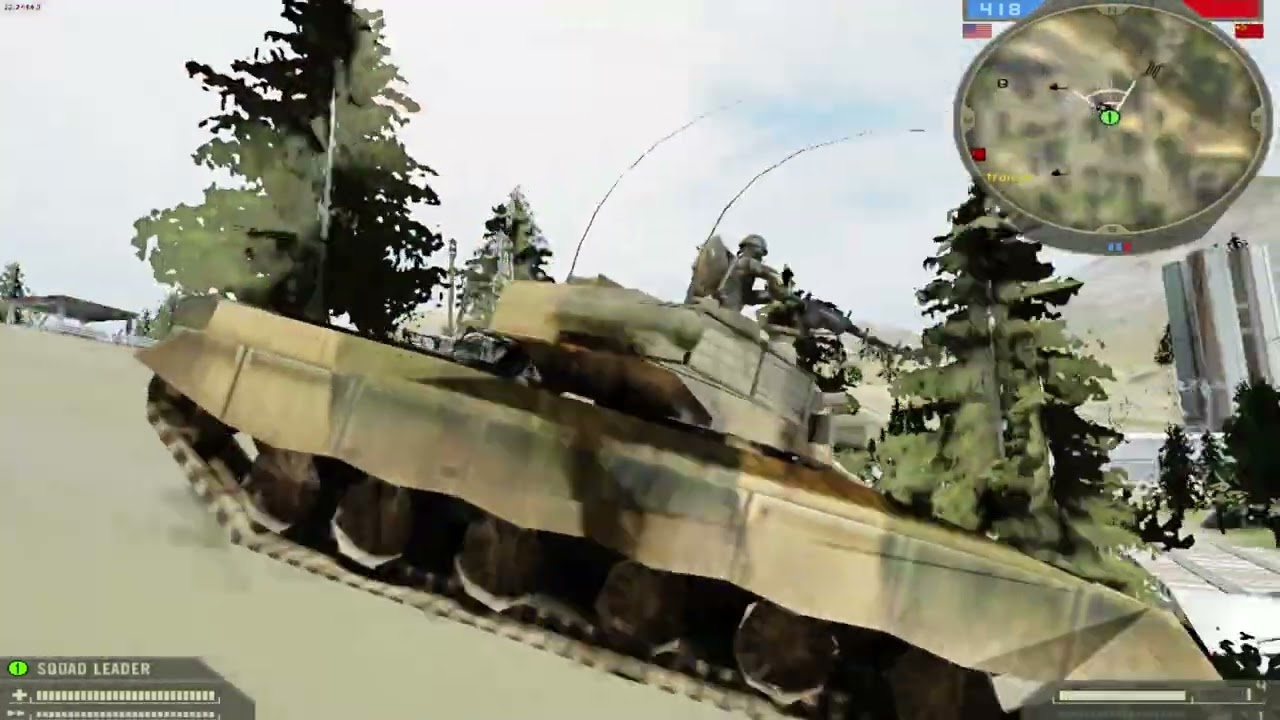
Thanks to xoxor4d for making this possible
unlisted
First 10 seconds is 360p for some reason
thin vector
winged raven
First 10 seconds is 360p for some reason
it will take time to process the 1080p footage
winged raven
thin vector
it will take time to process the 1080p footage
It did, only first 10 seconds
the rest is 1080p
thin vector
true battlefield experience
 winged raven
dum dum dum dum dum dum
It is slightly modded btw, mainly kits and some weapon stats
also wrecks stay
thin vector
winged raven
dum dum dum dum dum dum
 quick kelp
@winged raven wobble is "fixed"
granite panther
what did you change?
quick kelp
its the same fix that fixes the wobble in call of duty games (when stuff is rendered with shaders) -> adjusting the near plane
console command renderer.tweakNearPlane set to 4 in this case here
cant see the default value but setting it to a value of 0.1 results in wobble
You need higher and higher values for the nearPlane the further you are away from the map center
That wobble doesnt happen (no need to tweak the near plane) if its rendered using fixed function (that was the case for cod at least)
😂
rapid spear
Bit of wobble
winged raven
I can't view anything:
This content is no longer available.
Huh, can't send images either :/
@quick kelp Can you link an imgurl or something? Discord is broken for me for some reason
Someone please help me
I need to see this
quick kelp
winged raven
I can't view anything:
`This content is no longer available.`
odd, #1103606881538277386 message
aaaa
winged raven
I get this error This content is no longer available.
quick kelp
winged raven
Same
quick kelp
ill up it to drive then
 winged raven
Do you see my images btw
quick kelp
winged raven
Thats an addon 😜
quick kelp
winged raven
Do you see my images btw
which images?
winged raven
quick kelp
which images?
That means no :D
quick kelp
lmao
winged raven
quick kelp
https://drive.google.com/file/d/1eDrYpElOzG5v_4fq74J_XKqPnWhcETcc/view?usp=shari...
This is impressive
So the issue was that near plane was too close?
quick kelp
i've unlocked the console so you can use any commands now
winged raven
quick kelp
i've unlocked the console so you can use any commands now
In game commands?
quick kelp
winged raven
So the issue was that near plane was too close?
yup seems to be around 0.01 or so
winged raven
quick kelp
yup seems to be around 0.01 or so
Can I add this piece of information in https://discord.com/channels/1028444667789967381/1172073053182754876
quick kelp
sure might help in other games as well (if there is an option to change the nearplane)
winged raven
Can I get the new exe :)
quick kelp
winged raven
Can I get the new exe :)
oh nothing that is compiled yet. Was just changing stuff with cheatengine
need to implementing and rewrite a few things in the base I'm using to actually do that with the dll
winged raven
Whats the offset
quick kelp
winged raven
Whats the offset
// 0x69FD00 -> 0xEB
// 0x69FD18 -> 0xEB
It works better than Vietnam does now
still a bit wobbly in larger maps, but can adjust it real time
 winged raven
still a bit wobbly in larger maps, but can adjust it real time
winged raven
winged raven
still a bit wobbly in larger maps, but can adjust it real time
Some maps are really bad, like Dragon Valley. the center is far away from the combat zone
winged raven
thin vector
Random terrain flickering
Terrain hashes constantly change, might be the reason
thin vector
winged raven
Some maps are really bad, like Dragon Valley. the center is far away from the co...
What about road to jalalabad
Or wake island
winged raven
thin vector
What about road to jalalabad
I don't remember that map 🤔
I recall the name but
oh okay that one
thin vector

Battlefield Wiki
Road to Jalalabad is a map featured in Battlefield 2. It is comprised of a dense city surrounded by an open desert area. The layout of the map is very similar to that of Strike at Karkand. The map...

 thin vector

winged raven
I think the center is somewhere around the US base
in the 32 size version
I don't wanna see wake island without replacing the water ¯_(ツ)_/¯
winged raven
No, transforms are broken I guess
Also I don't remember seeing any lights
¯_(ツ)_/¯
Actually
thin vector
Good point
winged raven
I think mine isn't working
@quick kelp Is this correct


Finally, files are working again
quick kelp
winged raven
<@204650202072743936> Is this correct
looks good, should look like this in the disassembly view

both jne jumps should be jmp jumps now
that unlocks the console, then you obv. need to open the console and type renderer.tweakNearPlane 4
winged raven
Oh I thought this was for the values
quick kelp
oh sorry for not mentioning that
note: setting First N untextured drawcalls to anything above 100 or so fixes the white terrain flicker
quick kelp
nope
winged raven
I get unrecognized method error :/
quick kelp
that console is a pain to use .. make sure you have no space in front
its really annoying.. had to type the same thing multiple times to get it to recognize the command 😂
winged raven
quick kelp
that console is a pain to use .. make sure you have no space in front
ask me
 quick kelp
huH
thin vector
Garbled and smeared
winged raven
I think it might be caused by dxwrapper's borderless fullscreen feature
gotta turn it off
quick kelp


 quick kelp
well but it now recognizes the command
open that up in disassembly view

oh
also
why bf2.exe + the offset
that is wrong 😜
winged raven
Yep they are both jmp
winged raven
quick kelp
why bf2.exe + the offset
huh
how
I mean isn't it unique to prefetch otherwise?
quick kelp
no no these are static offsets that dont change their location in memory
so just add the offsets without bf2.exe + ..
quick kelp
you can also press Ctrl + G in the disassembly view to go to an adress, paste 0x69FD00 and double click the jne instruction. Then change it to jmp

 quick kelp
what is this?
winged raven
quick kelp
what is this?
1337 patch file
quick kelp
uhh .. no clue Im not using x64dbg 😄
winged raven
I made a dll to patch things at runtime, but I think I don't handle the case where it is empty :/
Can get far plane closer instead?
quick kelp
if you need the base offset you can also look into the disassembly view (first column)
 winged raven
quick kelp
if you need the base offset you can also look into the disassembly view (first c...
winged raven
quick kelp
if you need the base offset you can also look into the disassembly view (first c...
Oh that would work
quick kelp
winged raven
Can get far plane closer instead?
not sure if a command exists for that but the game might also use infinite projection so that wouldnt change anything then
it would just limit the draw distance
depends on the implementation tho
winged raven
quick kelp
it would just limit the draw distance
yea, I could hide it with a smoke machine :D
But it is really good
Thanks for the hard work ❤️
It looks totally okay with lower values like 1 - 2, in smaller maps
I think we can put this command into a con file to get it executed automatically
@quick kelp You can put that command in mods\bf2\GameLogicInit.con
sv.numPlayersNeededToStart 0

sv.manDownTime 0
sv.spawnTime 0

renderer.tweakNearPlane 4
Remix anticulling for point blank objects :D

Okay don't try it
It literally jumped from unplayable to partially playable with this update 
quick kelp
man this game is really .... hard to work with
its really hard to track where commands are used within the code so there is no easy way to navigate and use these as hints
and everything is a class member of another class with a lot of vtables
winged raven
oop hell
Do we have a PR developer in the server 🤔
https://discord.gg/PdjGGZPU
there are some devs active, not sure if they do re tho
quick kelp
and because most functions are thiscalls (x86 calling convention), they clean up the stack ... meaning I cant simply nop them to see what they might render
because the game will instantly crash
winged raven
:/
winged raven
Thank you for your amazing hard work ❤️ This game was hopeless just 2 days ago.
 winged raven
Should we mark it as Partially Playable now
winged raven
thin vector
can we load in high resolution textures?
you mean in game? haven't tried yet
thin vector
yes, current one looks like someone smeared play doh on the ground, is there a way to force high quaility textures
winged raven
I can try few minutes later, gotta edit the first post
I intentionally set it to low
Because apparently some games aren't so good at labeling what settings do
winged raven
https://github.com/jmacd/xdelta-gpl
Okay I can create a patch by comparing two executables with this
GitHub
GPL branch of https://github.com/jmacd/xdelta. Contribute to jmacd/xdelta-gpl development by creating an account on GitHub.
And I can upload the patch without an issue I guess
https://github.com/marco-calautti/DeltaPatcher
And someone made a nice gui for patching

GitHub
Delta Patcher is a GUI software that is able to create and apply xdelta patches. - GitHub - marco-calautti/DeltaPatcher: Delta Patcher is a GUI software that is able to create and apply xdelta patc...
for this format
Hey @quick kelp, because we can't upload the patched exe for obvious reasons 😛, I used this tool to create a patch by the difference of yours and the original one
If you can export the patch as 1337 it woul be easier tho
quick kelp
I'll create a dll that gets auto-loaded that does not need the "patched" exe or we use asiloader
winged raven
Isn't that asi == dll
winged raven
quick kelp
the exe was edited to simply load the dll .. nothing more
Oh so you modified the dll, not the exe?
which one is it
hudfix
quick kelp
yea
currently based on this https://github.com/marekzajac97/BF2-HUD-fix/blob/master/hudfix/dllmain.cpp
GitHub
stretched HUD fix for Battlefiled 2™ (2005). Contribute to marekzajac97/BF2-HUD-fix development by creating an account on GitHub.
I'll rewrite this today and up it to github so that the source is available and it auto builds on github
winged raven
If this thing can be done by a simple 1337 patch, we can use ultimate asi loader with the runtime patching asi
quick kelp
why the 1337 patch then tho
winged raven
quick kelp
why the 1337 patch then tho
Because then you don't have to write bf2 a specific dll ¯_(ツ)_/¯
If that will help a little
quick kelp
I have to because I need to do at least 1 hook with custom code that sets the camera data
quick kelp
I'll write my own little base that produces a dll -> rename that to asi -> can be loaded by an asi loader (hopefully)
winged raven
Thank you again :)
thin vector
winged raven
Should we mark it as Partially Playable now
is it good? if some part of the game can be played properly then yes
winged raven
thin vector
is it good? if some part of the game can be played properly then yes
No view model, broken materials on buildings, performance issues from shader capture, you cant go back to main menu after loading a level
thin vector
lets just keep it as unplayable
winged raven
This is more of a gray area
High textures

Like too high, that I need more social credits to see them
winged raven
I am having so much fun
thin vector
winged raven
I am having so much fun
 thin vector
winged raven
High textures
thin vector
winged raven
High textures
high textures made the ground invisible? maybe pixel shaders are involved here?
winged raven
thin vector
high textures made the ground invisible? maybe pixel shaders are involved here?
Likely
I can stream if you wish btw
thin vector
winged raven
I can stream if you wish btw
sure
quick kelp
@winged raven
 quick kelp
I think I did for the lense yea
winged raven
You can mark particle atlas as ui too but it messes up with the overall scene sometimes
quick kelp
kinda inconsistent tho .. flickers sometimes
winged raven
yea
Particles are broken, and they don't get affected by any tag but UI
They rendered as ui anyway I guess

Huh, renderer.allowOnDemandPostProcessing 0 brokes the game
like it doesn't render anymore
thin vector
quick kelp
<@1074634383996227627>
Is the view model path traced or rasterized?

 thin vector
quick kelp
raster
thin vector
quick kelp
raster
Anyway it could work?
winged raven
renderer.tweakFarPlane1p 0
winged raven
renderer.tvEnabled 0 doesn't fix the tv missile tho
I once had it working all fine
but not anymore
this could be useful renderer.setQualityLodDistanceALL int float -> void
quick kelp

with tweaknearplane1p at 1 and tweakfarplane1p at 1000
near 1 and 600 far seems to be a good range (the gun stays where it should) but with some floating point issues
winged raven
:/


 quick kelp
lmao
winged raven
Add renderer.drawPostProduction 0
fixes the issue with postfx messing up with camera
Why renderer.drawSunFlare 0 do this lol

renderer.drawUndergrowth 0 disable grass (kills my performance)
renderer.enableHWOcclusion 0 to crash the game
winged raven
winged raven
Add `renderer.drawPostProduction 0`
Also fixes the tv camera
lol

renderer.forceStaticMeshSkipLod -1 to disable lod for buildings
renderer.qualityLodEnabled 1
I think disabling postfx fixed wrecks too


 thin vector
Does it wobble?
winged raven
thin vector
Does it wobble?
No the material
I think this is the correct one, wrecks are not colored in bf2 (most)
but it is annoying
and stupid
thin vector
winged raven
I think this is the correct one, wrecks are not colored in bf2 (most)
They are grey I think
winged raven
At least we have tv cam working
 winged raven
@thin vector High texture and mesh quality works fine actually
winged raven
winged raven
High textures
Turns out I set the terrain to high instead (was doing it from memory)

The camera is actually behind the transparent cover lol

 winged raven
thin vector
Trees look any better with high texture quality
winged raven
thin vector
Trees look any better with high texture quality
yes they do
thin vector
winged raven
I like that the cockpit has translucent properties
winged raven
thin vector
I like that the cockpit has translucent properties
Gotta replace them and the water
thin vector
Also any idea why replacements aren't working? Unstable hash?
Or the captures aren't correct
winged raven
thin vector
Also any idea why replacements aren't working? Unstable hash?
No hashes are stable, I think its a similar issue with barnyard and others
thin vector
mhmm what's the issue then
winged raven
unlike them, I don't see anything in my head either
winged raven
thin vector
mhmm what's the issue then
broken transforms
thin vector
Gonna need someone to get a capture and see what it looks like in toolkit
quick kelp
replacements as in mesh replacements?
Should generally work but if its an instanced mesh, it will hide all instances of the model and only show the one that was placed in the toolkit iirc (that was the behavior in cod4)
winged raven
quick kelp
replacements as in mesh replacements?
Should generally work but if its an instan...
Huh you got them working?
they don't work for me
quick kelp
no havnt tried with this game yet
just found a server? build of bad company 2 that comes with debugging symbols ... might help with a few structs and understanding of the games layout
winged raven
quick kelp
just found a server? build of bad company 2 that comes with debugging symbols .....
bad company 2 is an entirely different engine
BF2142, BF Hereos, BF Play 4 Free are refactor 2
BF 1942 is refactor 1
winged raven
winged raven
bad company 2 is an entirely different engine
bad company and later is frostbite
oh no
 quick kelp
winged raven
bad company 2 is an entirely different engine
quick kelp
winged raven
bad company 2 is an entirely different engine
some of the general layout is still the same tho (like their command system)
can you modify the terrain shaders?
thin vector
isn't the frostbite engine vastly different from refractor 2?
quick kelp
could say the same about cod4 -> newest cod. Vastly different but some core principles are still the same
thin vector
winged raven
oh no
This isnt good 🙁
thin vector
quick kelp
could say the same about cod4 -> newest cod. Vastly different but some core prin...
I'll have to look if they made the engine from scratch or used refractor 2 as it's basis and kept adding on it
winged raven
quick kelp
can you modify the terrain shaders?
me? no I cant 😦
But they are plain text
quick kelp
so its possible without any code tweaks?
winged raven
quick kelp
so its possible without any code tweaks?
Inside shaders_client.zip
 winged raven
missile trails
thin vector
What's this then
 winged raven
thin vector
How about Flares? Do they look normal?
winged raven
thin vector
How about Flares? Do they look normal?
In the same particle atlas, no unless marked as ui
thin vector
Seems like everything needs to be set as UI like those particles fx
winged raven
thin vector
What's this then
This one is not from that atlas
winged raven
thin vector
Terrain uses pixel shader 1.4
you can nullify pixel shader compilation in those files but then they won't have any material
thin vector
yeah well that's because you don't have any access to the data now if you nullify shaders
Needs another way to get the data
winged raven
I can't seem to replace water :/

Something with th look changes when I toggle materials, but thats it
Actually they are absent from the captured textures

Ohh
the ones with no thumbnail
 winged raven
Actually they are absent from the captured textures
winged raven
winged raven
Actually they are absent from the captured textures
And a lot others missing to
thin vector
winged raven
Actually they are absent from the captured textures
Seems like it's only capturing terrain textures + weapons + playermodels
No building atlas or anything
winged raven
no buildings
but particle atlas is there
and vehicles, flags
ui atlas too
Lets see if we can replace the canopy on ah1z, it is present in textures folder so
 thin vector
Is this the z1 viper?
thin vector
ah it's just ah-1z
winged raven
looks weird tho I need to mark it thinwalled
 thin vector
It's reflective but maybe normals are not inverted?
winged raven
bot stole my heli lol
thin vector
Take the birdie down


 quick kelp
Nah that would be fine if rendered with fixed function 😜
thin vector
but reflections won't look nice on the canopy
winged raven
thin vector
but reflections won't look nice on the canopy
Normals would be fine with fixed function he is saying
quick kelp
Same issue as in cod. They probably packed the normal
winged raven
Man I can't believe, this evolved from black screen to reasonably playable and personally fun experience in just 2 days
winged raven

This map is so big that even with near plane set to 4 it freaks more that vanilla bf2 did
 quick kelp
uuh any idea why I cant move my mouse ingame to select a spawnpoint or something?
All I've did was run bf2_r once 
winged raven
quick kelp
uuh any idea why I cant move my mouse ingame to select a spawnpoint or something...
Delete your profile files
from documents
I think it is messes up because it is ran as admin?
Do someone has USD composer still installed
quick kelp
I do
winged raven
Is this a valid usda
Oh it is working now

I just needed to restart it
weird
Anyway, I think I messed up the usda syntax at my first attempt
Is this better
 quick kelp
yea the usda you send doesnt show in cpmposer
winged raven
quick kelp
yea the usda you send doesnt show in cpmposer
huh
It works after a restart tho
quick kelp
🤷♀️
winged raven
If the error is about materials, thats fine. I don't have them either.
quick kelp
he found the func that renders terrain
 winged raven
Who is he
thin vector
he is who found the func
winged raven
I am confused
 winged raven
3rd person expression_
quick kelp
thin vector
winged raven
Oh it is working now
honestly amazing this works
winged raven
thin vector
honestly amazing this works
It probably was from the beginning, I use a text editor so I probably messed it up
at first try
Now Wake Island time
Uh the same problem as bf1942
 thin vector
winged raven
Now Wake Island time
thin vector
winged raven
Now Wake Island time
oh boy
winged raven
winged raven
Uh the same problem as bf1942
There is no terrain mesh below the deep water -which makes sense- so it is technically infinitely deep
so it is colored exactly as transmittance_color
practically ignoring transmittance_measurement_distance
 thin vector
can you increase draw distance? seems like loads tiles or chunks
winged raven
thin vector
can you increase draw distance? seems like loads tiles or chunks
Not sure
Should search online
 thin vector
For Battlefield 2 on the PC, a GameFAQs message board topic titled "extend draw distance past 100%??".
winged raven
Too blue
thin vector
winged raven
Too blue
the original game do be like that
winged raven
thin vector
the original game do be like that
It looks like pen ink
 winged raven
great find thanks
winged raven
thin vector
https://gamefaqs.gamespot.com/boards/920407-battlefield-2/41659214
They talk about removing the fog which is not present with remix to begin with
thin vector
hmm
strike at karkand had this brown duststorm like fog
can we add that?
remix does have volumetric fog
winged raven
thin vector
remix does have volumetric fog
I cant get it work properly
likely messing up parameters
winged raven
thin vector
Can you link the website

 winged raven
excellent


not so excellent
I can adjust the transmittance distance to get the look I want on shallow water
since it wont affect the deep water (because there is no terrain mesh beneath)
it will always pick the exact color I enter
winged raven
winged raven
excellent
@thin vector You know what, this is the best result I got so far
You are definetely better than me at finding stuff :D
thin vector
winged raven
<@759994782528307220> You know what, this is the best result I got so far
im happy with what you achieved
looks amazing with remix
 winged raven
I wonder where this purple coming from

noise

normals are too strong I think
Whats going on here
Oh okay I just needed to set this wayy to high

150 seems fine
It was not
it was 101 before
thin vector
It's partially playable
winged raven
thin vector
It's partially playable
Yea we should open an issue in https://discord.com/channels/1028444667789967381/1199033356571123853
*request
winged raven
 thin vector
Let's make a couple of screenshots and post them in #showcase (WIP)
granite panther
looks good 🙂
 glossy merlin
winged raven
`renderer.forceStaticMeshSkipLod -1` to disable lod for buildings
glossy merlin
winged raven
`renderer.forceStaticMeshSkipLod -1` to disable lod for buildings
hey, just read that you found a few useful parameters here. Is there a way to set them as part of the config?
nice find 😉 👍
winged raven
glossy merlin
hey, just read that you found a few useful parameters here. Is there a way to se...
yes GameLogicInit.con
winged raven
glossy merlin
nice find 😉 👍
xoxor patched the game, otherwise you cant use them
glossy merlin
Thank you, I'm going to try these settings for the game I'm modding, Battlefront 2 OG
winged raven
glossy merlin
Thank you, I'm going to try these settings for the game I'm modding, Battlefront...
Uh you need the patch
glossy merlin
winged raven
Uh you need the patch
I'm modding a different game
I thought your commands were for remix
winged raven
glossy merlin
I thought your commands were for remix
No they are not :/
glossy merlin
winged raven
No they are not :/
ah ok, sorry for the mixup
winged raven
All fine
glossy merlin
LODs and mesh popping are really bad in that game too
just trying to see if there's a way to make it more stable
winged raven
Yea remix cant do anything about that unless you anchor a new mesh to every single lod level of every lod mesh
glossy merlin
winged raven
Yea remix cant do anything about that unless you anchor a new mesh to every sing...
So I've heard, that's a pretty annoying way of doing it am I right? 😅
winged raven
glossy merlin
So I've heard, that's a pretty annoying way of doing it am I right? 😅
Yea, as a last resort
glossy merlin
winged raven
Yea remix cant do anything about that unless you anchor a new mesh to every sing...
Have you done that? don't both meshes (high and low res) look overlapped?
If there's two of the same model
winged raven
glossy merlin
Have you done that? don't both meshes (high and low res) look overlapped?
You can tell remix to hide the original mesh when you anchor it a new one
glossy merlin
Oh if you don't mind could you tell me how? or show me a screenshot
I really don't know how one could do that, I use Omniverse interface...do you as well?
winged raven
glossy merlin
I really don't know how one could do that, I use Omniverse interface...do you a...
I don't know if it is exposed in the toolkit, if not:
over "mesh_AB48F4EEC700DC95"
{
    custom int preserveOriginalDrawCall = 0
}
But this should really be the last resort
as it requires too much effort
glossy merlin
winged raven
I don't know if it is exposed in the toolkit, if not:
```
over "mesh_AB48F4EEC70...
I'm going to look into it thanks man
quick kelp
@winged raven did you figure out good values for the 1p near and farplane or are your viewmodels wobbly
winged raven
Found where the chess board was
 winged raven
quick kelp
<@1074634383996227627> did you figure out good values for the 1p near and farpla...
winged raven
quick kelp
<@1074634383996227627> did you figure out good values for the 1p near and farpla...
Uh no sorry
quick kelp
alright just wanted to make sure
winged raven
for what
The coolest chopper in the game in the fan favorite map, combined with the best lightning this game ever seen
 quick kelp
for the gamelogicinit I'll add to the repo
renderer.forceStaticMeshSkipLod -1
renderer.qualityLodEnabled 1
renderer.tweakNearPlane 3
renderer.tweakNearPlane1p 1
renderer.tweakFarPlane1p 600
renderer.drawPostProduction 0
 quick kelp
@winged raven https://github.com/xoxor4d/bf2-rtx
GitHub
bf2 rtx-remix compatibility mod. Contribute to xoxor4d/bf2-rtx development by creating an account on GitHub.
winged raven
Now I don't need the hudfix do I
quick kelp
nope - stock bf2 exe and no hud dll
winged raven
Beep
quick kelp
scary beep
winged raven
Btw skinned meshes are done on the gpu
Interesting thing I found, those effects also work if you align it with the sky

It is not marked as ui right now
winged raven
lol

 quick kelp
lmao
winged raven
@granite panther

This is default viewport with the largest map refractor can handle (I believe)
This is with nearplane set to 4
 granite panther
ouch indeed
winged raven
this map looks cool with proper water
because it is literally just an ocean
 winged raven
thin vector
its small so might be stable
winged raven
thin vector
its small so might be stable
This is the biggest map you can go with yet it is totally playable
thin vector
winged raven
This is with nearplane set to 4
 winged raven
thin vector
https://tenor.com/view/oh-my-gawd-yikes-michael-scott-cringe-the-office-gif-1479...
winged raven
thin vector
https://tenor.com/view/oh-my-gawd-yikes-michael-scott-cringe-the-office-gif-1479...
You just need to take off and land at 3rd person
Also jets don't disappear up to 6.2
Which is slightly more stable
This is a naval combat map
thin vector
hmm, so we can replace materials but not add lights?
winged raven
only materials
thin vector
winged raven
only materials
That's good enough for me then
winged raven
thin vector
That's good enough for me then
I want lights so badly
there is loads of culling related commands, lets see if I can disable culling
quick kelp
winged raven
I want lights so badly
works for me (dont mind the translucent gun :D)

added a light to my weapon .. well its stationary and doesnt move with the gun but it works
and disappeares when I switch the gun
adding to world geo seems to work as well but culling is definitely a problem
 winged raven
quick kelp
works for me (dont mind the translucent gun :D)
winged raven
quick kelp
works for me (dont mind the translucent gun :D)
huh
how
Also how you fixed the view model
I want answers!!
terrainCuller.cullerType int -> int
seems 1-6
None of them stops the culling
3 by default
quick kelp
Nearplane 1
Nearplane1p 1
Farplane1p 610
winged raven
How you added the light
quick kelp
selected the viewmodel and added a light to it 😄
selected the rolling door of the building (pink light) and added a light 😄

 quick kelp
im rocking world in fused world view
and 300 in unique obj search distance (no clue what that does tbh)
 winged raven
still nothing :/
 winged raven
quick kelp
and 300 in unique obj search distance (no clue what that does tbh)
winged raven
quick kelp
and 300 in unique obj search distance (no clue what that does tbh)
If something moves more than the value in a single frame, it is considered a different object
quick kelp
huh
winged raven
It does not account for scene scale
winged raven
winged raven
If something moves more than the value in a single frame, it is considered a dif...
I heard from Uncle Buritto
winged raven
quick kelp
im rocking world in fused world view
None always behaves like world view in my experience
 winged raven
there is only terrain, and few chunks
quick kelp
I dont have any terrain at all lmao
winged raven
huh
whats going on here :/
Your nearplane settings made my game a slideshow for some odd reason
quick kelp
huh thats odd
 quick kelp
do you have the toolkit open by any chance?
winged raven
quick kelp
do you have the toolkit open by any chance?
nope

I probably messed up something
it is both
It is "meshes"
since you attach the light to a mesh
quick kelp
yea .. but why is your game such a mess with lights enabled 
winged raven
quick kelp
yea .. but why is your game such a mess with lights enabled <:KEKPOG:81361955082...
which part
lack of sky?
 winged raven
Huh it is magically fixed
 quick kelp

thin vector
Wait, when did we get the viewmodel working 
quick kelp
your gun isnt glass tho
winged raven
quick kelp
your gun isnt glass tho
I picked lights only
quick kelp
aaah alr
winged raven
I just disabled enhanced meshes before adjusting nearplane
instead of putting into the gamelogicinit
quick kelp
thin vector
Wait, when did we get the viewmodel working <:dead:901896026162622485> <:dead:90...
yesterday or so
thin vector
quick kelp
your gun isnt glass tho
I'm pretty sure his gun isn't a gun either, it's an unstable uranium isotope material

All wobbly
@quick kelp can you pick up projectile hash?
Wonder if we can attach a light to it
winged raven
oh
 thin vector
It's picking up view model transforms?

 quick kelp
thin vector
<@204650202072743936> can you pick up projectile hash?
quick kelp
thin vector
<@204650202072743936> can you pick up projectile hash?
mhh even if .. not sure if remix can get the actual transforms tho
quick kelp
winged raven
lol
had that too once
thin vector
winged raven
lol
Menu working (barely)
winged raven
Add light to texture still doesn't work
winged raven
thin vector
Menu working (barely)
It already does before getting in a level
just not after
 thin vector
I think we talked about changing the flash menus to more modern stuff?
Will that help?
winged raven
How you think that will work
 quick kelp
also having these bad framerate issues at certain spots
thin vector
@winged raven i found something that might help

Classic Battlefield Modding Wikia
How To Modify The BF2 Flash Menu by [PR-DEV]AncientMan Not entirely sure if there is already a flash menu editing tutorial around, so I'm going to write up one here to show you the basics of...
winged raven
modify
it is still flash
I think our best bet would be to do something with dear imgui
I found some console commands that the ui seems to be calling
winged raven
Uh cant disable culling :/

terrain culling*

Found how to disable the sun flare tho: skyDome.flareFadeMul 0
renderer.drawSunFlare 0 is bugged

@quick kelp https://dl.mumble.info/symbols/bf2.pdb/
thin vector
 winged raven
They look like sha 1
 thin vector
WHERE DID YOU FIND THIS!? 💀
thin vector
 winged raven
I am here for bf2
 winged raven
Ohh it is just a zip file
with this inside

772kb isn't it too small?
When I compile something, generally the generated pdb is ~30 times larger than the binary
 winged raven
How do we confirm if these are legit
thin vector
these were uploaded in 2020
quick kelp
nothing of interest
winged raven
quick kelp
nothing of interest
Why exactly
quick kelp
thats related to some audio engine and most certainly some "plugins" for that
rapid spear
Need them renddx9.DLL(?) symbols
winged raven
rapid spear
Need them renddx9.DLL(?) symbols
I searched for that as well, found nothing :/ I am not particularly good at googling tho
thin vector
2142 might work now
winged raven
huh
I set lightning to high and enabled dynamic lights with the hope that it will create lights that remix can capture, this is what I got
 quick kelp
remix can only capture fixed function lights. Lights in shader based games are not handled this way so there is nothing to pick up 😦
 winged raven
thin vector
https://www.moddb.com/games/battlefield-2/downloads/battlefield-2-editor-v13
winged raven
thin vector
https://www.moddb.com/games/battlefield-2/downloads/battlefield-2-editor-v13
What are we supposed to do with it
I remember trying to get it up and running couple times, and I did. It sucks and I don't think it will help much
thin vector
nothing im just finding stuff
someone must have thought of getting rid of the flash player
in some old god forsaken forum
winged raven
thin vector
someone must have thought of getting rid of the flash player
Even Project Reality, the most advanced bf2 "mod" still uses the flash menu :/
thin vector
does 1942 use flash player for menu?
winged raven
particleSystemManager.particleSystemShaderQuality 0 disables the broken particles all together
Edit: Interestingly it doesn't work for the ah1z autocannon
Edit2: It doesn't work for most, but does eliminate the booster effect from the hydra rockets
winged raven
thin vector
no more damage trail i suppose
that one was not shader based, but still broken
This one is the muzzle flashes and such
shadermanager.byPassDiceStates 1

I have no idea what this does
but it flickers like crazy
thin vector
winged raven
`shadermanager.byPassDiceStates 1`
tf why is everything pixelated
winged raven
thin vector
tf why is everything pixelated
¯_(ツ)_/¯

 winged raven
thin vector
didn't xoxor4d fix that?
winged raven
thin vector
didn't xoxor4d fix that?
Updated
thin vector
winged raven
Updated
now that i have modDB access i can update that as well
thin vector

ModDB
The full, standalone version of Heat of Battle. Maps and Reshade included. Be sure to read the description carefully to avoid issues and crashes!
Standalone mod
ugh it has reshade 💀
winged raven
Not sure about this one but I seen couple mods migrating over the ps3 like PR
 thin vector
Never realized there was a cut Easter egg
winged raven
I asked in Refractor 2 Modding server if they know of any leaked debug symbols.
thin vector
Anything new regarding battlefield 2 remix?
dusky pond
2 options:
Solution 1 - Wait for someone with brain intelligence 100+ to make everyones day
Solution 2 - Pay or hire a programmer
winged raven
Option 3: Wait for xoxor4d to done cod4-5 first
thin vector
dusky pond
2 options:
Solution 1 - Wait for someone with brain intelligence 100+ to make e...
xoxor4d already did that
from remix incompatiblity to partially playable
quick kelp
But thats probably all that I'll do for this game 🫣
That engine very hard to analyze and the results of my testings with terrain drawing are 
winged raven
I was thinking of tweaking nearplane on the fly by modding the game (I think it is possible with .con files, not tested tho) but I noticed that messing with near plane also changes hashes.
Unfortunately a value of 1 is not very viable for 32 and 64 sized maps.
 thin vector
 cold void
what do I do
cold void
what do I do
click on it
then go down
just click it again and it will download
 quick kelp
cold void
I cant click is this needs a git account
quick kelp
cold void
I cant click is this needs a git account
GitHub
actions build: https://github.com/xoxor4d/bf2-rtx/actions/runs/7760232922
 quick kelp
expected behavior
thin vector
cold void
uhh...
oh no you don't need to join the game like this