#NFSU2 (Need For Speed Underground 2)
1 messages · Page 25 of 1
 tawny elk

 jade briar
I can't begin to explain how wrong you are
 ember cobalt
Remix isn't the goal with that game release, it's just a game release
all initial testing of Remix up until the open source release was done using the binaries from Portal RTX, and the updates made to it
we're basically just doing the same thing now until the open source release gets these updates
 severe solstice
ember cobalt
all initial testing of Remix up until the open source release was done using the...
severe solstice
ember cobalt
all initial testing of Remix up until the open source release was done using the...
i understand
jade briar
So did portal with rtx get these updates?
severe solstice

 ember river
Lol. Did you install the LFS extension?
tawny elk
I switched over to gitkraken cause github desktop doesn't show branches at all
 safe patrol
tawny elk
I switched over to gitkraken cause github desktop doesn't show branches at all
safe patrol
tawny elk
I switched over to gitkraken cause github desktop doesn't show branches at all
uh...yes it does
tawny elk
fug
safe patrol
 jade briar
Well, I'm going to bed. The stream thingy was mostly uneventful, but it gave me some inspiration. Will not play prelude when I wake up, instead will just use the remix files and put them in other games to see what happens.
 ember river
Im a terminal user, so I have a bit of a hard time helping out 😞
tawny elk
I can't stand just a big list and no explanation of what's the latest
jade briar
I'm terminally online
safe patrol
tawny elk
I can't stand just a big list and no explanation of what's the latest
ok fair enough that's some good additional info
safe patrol
ember river
Im a terminal user, so I have a bit of a hard time helping out 😞
I'm a command line guy (I do linux for work) but I have desktop installed too mostly just so I know how to help other people with it
tawny elk
I don't do any of this for work so I need all the help I can get visually.
severe solstice
jade briar
Well, I'm going to bed. The stream thingy was mostly uneventful, but it gave me ...
60 fps with no cull exe dream 
ember river
I might as well start doing so. The readme im doing is focused on command line users. Ill have to spin up the desktop app and check their equivalents for the docs
jade briar
severe solstice
60 fps with no cull exe dream <:life:1074854015382323280>
Well, culling has been fixed already. And dlss will handle the 60 fps part.
safe patrol
@balmy chasm hmm. one of the textures in the garageLobby is causing my game to freak out and quit rendering. If I disable 02011601_garageLobby.usda in my mod.usda it works fine. I haven't tested the rest of the garages yet but at least the career garage seems to work fine.
tawny elk
I'm not too sure how I feel about the textures in this shop @balmy chasm

Feels too damp?
safe patrol
safe patrol
<@331104351907217408> hmm. one of the textures in the garageLobby is causing my...
hmm. ok I redid everything and now it's working. Not sure what changed but don't worry about it.
tawny elk
@ember river Mesh replacement appears to work now for me.

Are you good with me approving the merge?
Also can my lighting structure PR be looked at by someone? 
ember cobalt
i can look at it, but i can't do anything
tawny elk
 It makes it so much easier to track changes I make
ember river
tawny elk
Are you good with me approving the merge?
With you now there are 3 instances of it working so yeah, please 
ember river
tawny elk
Can I delete the branch too?
go ahead. Cleanup those big boys
ember river
tawny elk
Also can my lighting structure PR be looked at by someone? <a:modCheck:101362251...
I added a comment to it. Take a look at the changed files, something doesn't seems quite right 🤔
Some stuff went missing
https://github.com/Ekozmaster/NFSU2-RTX-Remix/pull/79/files
tawny elk
The mesh placeholder?
ember river
tawny elk
The mesh placeholder?
Nope, it is changing a lot of stuff in the mod.usda that endedup crashing with other replacements and losing some texture references
I'll have to go out now and socialize a bit guys. Be back later
tawny elk
ember river
Nope, it is changing a lot of stuff in the mod.usda that endedup crashing with o...
Aw man
It seems OV really doesn't want to format the mod usda right. I think I'll try it by hand
safe patrol
tawny elk
It seems OV really doesn't want to format the mod usda right. I think I'll try i...
that's why I've been using kim's script
ember river
tawny elk
It seems OV really doesn't want to format the mod usda right. I think I'll try i...
For mod.usda it is easy to fix by hand
safe patrol
ember river
For mod.usda it is easy to fix by hand
yeah that part I do by hand
review needed for a small change: added an exterior garage door texture for the performance shop. The original texture is extremely low res and looked super crappy
https://github.com/Ekozmaster/NFSU2-RTX-Remix/pull/83

one sec I'll get a screenshot


I think that gets applied to all the shop doors but I haven't confirmed yet
tawny elk
 tawny elk
Okay, I believe my branch has the overwhelming majority of roadway lights in it now
 cobalt gull
tawny elk
Okay, I believe my branch has the overwhelming majority of roadway lights in it ...
cobalt gull
tawny elk
Okay, I believe my branch has the overwhelming majority of roadway lights in it ...
still requires 400+ W usage for the GPU? haha jk
that looking awesome pal
tawny elk
cobalt gull
still requires 400+ W usage for the GPU? haha jk
Need to get that 1800W power supply and dedicate a circuit for this.
 balmy chasm
tawny elk
I'm not too sure how I feel about the textures in this shop <@331104351907217408...
balmy chasm
tawny elk
I'm not too sure how I feel about the textures in this shop <@331104351907217408...
You don't want to know what is going on there in original game :harold:. Let's just keep it as a fact: this is Paint shop hall, not the painting room
balmy chasm
safe patrol
<@331104351907217408> hmm. one of the textures in the garageLobby is causing my...
Guess you were referencing to the floor texture, because I didn't replace it after the fact it was replaced with some random .usda in repo.
just checked, it had 3 replacements in total, the one of them in mod_lights.usda somehow
balmy chasm
I have created a poll for garage textures. From what I've noticed that's just 4 lobbies which have differences. I'd like to ask not discuss publicly your own pick if possible.
@tawny elk @jade briar @ember river @safe patrol@cloud crypt
https://forms.gle/c2CYfsGwUiyg6C8r8

Google Docs
We do be voting for conflicting textures in few lobbies. If you'd like to look at them in game, check out garage_textures-and-lights branch for EA's textures and garage_textures-and-lights_BuggulaEdit for merged version in our repo.
jade briar
balmy chasm
I have created a poll for garage textures. From what I've noticed that's just 4 ...
I forgot to add it to the doc, but the garages definitely need more mesh replacements before they'll look good.
balmy chasm
I do agree. Especially Car lot
 trail quail
Uncle burrito back on remix when
jade briar
Soooon™️
trail quail
😎
 plain stag
I wish you to make it, I understand you I have mental problems myself and if you want to chat I will try to help you 👌🏼👌🏼 keep it up 🤜🏻🤛🏻
 thorny pawn
balmy chasm
I have created a poll for garage textures. From what I've noticed that's just 4 ...
thorny pawn
balmy chasm
I have created a poll for garage textures. From what I've noticed that's just 4 ...
Love the polls, well done!
safe patrol
For future polls, it might be a good idea to include a screenshot of vanilla NFSU2 before the two choices so we can compare to how it originally looked like.
thorny pawn
safe patrol
For future polls, it might be a good idea to include a screenshot of vanilla NFS...
good point
tawny elk
safe patrol
For future polls, it might be a good idea to include a screenshot of vanilla NFS...
Did y’all want to vote on high level design choices for lighting for each district? I typically have some sketches and mood boards before starting on them.
jade briar
Yes
 rain terrace
Anyone have screenshots of the Burger King and McDonald's signs in-game?
I just want to replace the images in this meme.
 balmy chasm
tawny elk
Did y’all want to vote on high level design choices for lighting for each distri...
balmy chasm
tawny elk
Did y’all want to vote on high level design choices for lighting for each distri...
Do you know if it is possible to add some global lights in the first place? So we don't get pitch black places where they have no light sources at all
tawny elk
balmy chasm
Do you know if it is possible to add some global lights in the first place? So w...
That’s typically what the head lights are for, but I’d suggest adding a light polluted skybox to give some background illumination.
It’d help a lot with areas that I can’t reasonably add light to
balmy chasm
I have noticed Remix doing some Auto-Exposure in the background even with Eye-Adaptation off. That's the pain. So can we change hdri?
tawny elk
Yea we can change the skyboxes ez
balmy chasm
How though? Remember someone saying skydome captures randomly. Is it the way?
tawny elk
I don’t quite know how. I know @sharp sinew has changed a skybox before
It might just be modifying the material. It shows up in OV
 sharp sinew
i added it as a mesh replacement but it blocked the sun out
tawny elk
Damn
tawny elk
tawny elk
That’s typically what the head lights are for, but I’d suggest adding a light po...
 balmy chasm
sharp sinew
i added it as a mesh replacement but it blocked the sun out
balmy chasm
sharp sinew
i added it as a mesh replacement but it blocked the sun out
Do you mean Distant Light source?
sharp sinew
yea
balmy chasm
Distant lights work?
 balmy chasm
What happens when you hide the mesh then? Black sky but working sun?
sharp sinew
if you hide the mesh you dont see the mesh
tawny elk
Can we replace the sky mesh with our own
balmy chasm
I guess problem will be the same, right?
sharp sinew
i just slapped the mesh on the first non culling thing i saw
tawny elk
We could keep one of the distant light sources and tweak it to be a diffused light pollution sky.
sharp sinew
skydome mesh to mess around with, any hdri maps to it
jade briar
sharp sinew
looks cool though
Did you try what I suggested? Regarding figuring out where the sky is?
balmy chasm
Also that's our repo's Distant Light. Guess it doesn't work whatsoever
sharp sinew
jade briar
Did you try what I suggested? Regarding figuring out where the sky is?
if i cant find it in omni though its not good right?
tawny elk
balmy chasm
Also that's our repo's Distant Light. Guess it doesn't work whatsoever
The games distant light sources come in too dim to work. You can ramp them up to be visible but I have no idea what effects or their stability are.
jade briar
sharp sinew
if i cant find it in omni though its not good right?
Hold on. I'll just record a video
balmy chasm
tawny elk
The games distant light sources come in too dim to work. You can ramp them up to...
Game doesn't have this one. Didn't have it in any of my captures. That's what I found out in our repo
sharp sinew
jade briar
Hold on. I'll just record a video
I got max open and i'm down to clown
jade briar
That's a good pickup line
sharp sinew
I've pulled
jade briar
Out?
ember river
Does the translucent material has emissive too? Maybe an skybox that allows light to passthrough but also emits the sky hdri could work 🤔
balmy chasm
Translucent material of such scale may impact performance
sharp sinew
balmy chasm
Translucent material of such scale may impact performance
try it and see
ember river
Maybe there is some setting for the mesh like not being double sided allowing rays from the sun to pass 
jade briar
sharp sinew
try it and see
I'm sorry for messing up all over the place. I got 50 things going through my head right now. Prelude fucked me up.
sharp sinew
ah i see, thanks buddy 🙂
tawny elk
jade briar
I'm sorry for messing up all over the place. I got 50 things going through my he...
So there is a way to replace the texture 
jade briar
Yes. I figured it out a few weeks ago. Told u guys to try it. Twice. Everyone ignored me
balmy chasm
jade briar
I'm sorry for messing up all over the place. I got 50 things going through my he...
You can import .usd into Blender and skip .fbx step entirely
balmy chasm
For you, yeah
tawny elk
jade briar
Yes. I figured it out a few weeks ago. Told u guys to try it. Twice. Everyone ig...
I don’t ignore you 
If we want, we can put up a poll of what hdris to use for the sky.
ember river
There is a proper blender for messing with USD in the OV launcher
tawny elk
God I wish I could use blender instead of OV.
Might even get annoyed enough to figure out how.
balmy chasm
tawny elk
If we want, we can put up a poll of what hdris to use for the sky.
Any, just make it work 🙏
jade briar
ember river
There is a proper blender for messing with USD in the OV launcher
I don want it
tawny elk
balmy chasm
Any, just make it work 🙏
You’ll have to try or wait till like 6pm EST for me to do anything. 
ember river
Id put something with some interesting characteristics. Maybe some nice clouds. If it is a night city sky, there wont be stars roughly, so a cloudy one would be nice
balmy chasm
But make it work on 1 sky brightness
 safe fossil
The entire game takes place at night anyway, no sun no moon
balmy chasm
safe fossil
The entire game takes place at night anyway, no sun no moon
No moon?
safe fossil
Iirc
tawny elk
balmy chasm
But make it work on 1 sky brightness
On that note, can we go back to local tone mapping? Global crushes the blacks like crazy.
safe fossil
Also, an hdri with a sun in it doesn't work?
jade briar
We gonna do sky via mesh replacement?
balmy chasm
tawny elk
On that note, can we go back to local tone mapping? Global crushes the blacks li...
You can add up a local tonemapping thing. Even though I haven't seen a way to implement it yet
tawny elk
balmy chasm
You can add up a local tonemapping thing. Even though I haven't seen a way to im...
What do you mean, it’s in the rtx menu. @ember river switched it to global for some color grading a week ago, but it’s not very good for gameplay when everything is pitch black
balmy chasm
How do you setup local tonemapping then?
tawny elk
In the RTX menu? I’m not sure what you mean.
balmy chasm
Local
tawny elk
RTX menu > Post Processing > Tonemapper
balmy chasm
.-.
I thought you were talking about coloring different regions of the map with different tonemap
tawny elk
tawny elk
https://polyhaven.com/a/moonless_golf
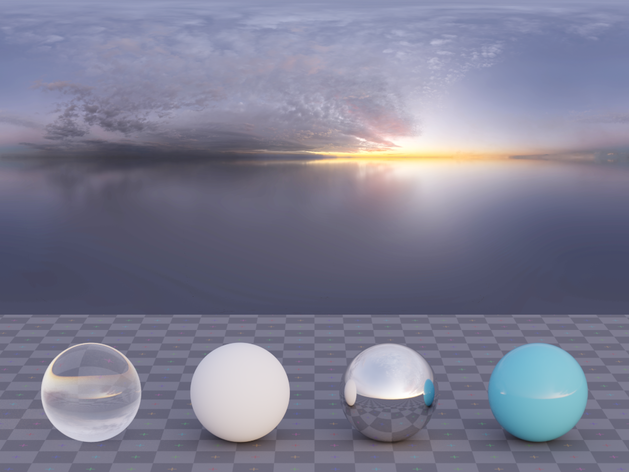
Wait. We could use blender to create an HDRI for this 
jade briar
tawny elk
Wait. We could use blender to create an HDRI for this <:Pog:1013613859921199184>
Real hdri better
balmy chasm
Shaping clouds is such a pain
jade briar
Unleass you're really good
tawny elk
I’ll give it a shot. I have some add ons for sky creation that might help.
jade briar
Physical atmosphere addon uses
tawny elk
jade briar
Real hdri better
Night HDRIs of a light polluted city sky are kind of niche unless y’all want to go out and create one
jade briar
Physical atmo isn't thaaaaaat good quality wise
tawny elk
It isn’t?
jade briar
is it?

I saw this one guy who made a really realistic sky using noides
I'll try to find him
It was on twitter
tawny elk
jade briar
is it?
Mine has volumetric clouds and atmospheric scattering.
Oh I have truesky

Blender Market
True-Sky is a highly accurate sky tool designed for Cycles. It offers functions for creating the perfect sky, with sky presets, cloud systems and fog systems. True-Sky also simulates atmospheric volumetrics and even Binary star systems. Probably the best sky tool for Blender...
 balmy chasm
With space views?

 ember river
Maybe assigning a material stronger than descendants 🤔
safe fossil
tawny elk
Mine has volumetric clouds and atmospheric scattering.
I mean, the sky colour works because of the scattering in the atmosphere so yeah, that is the whole point of a physical sky system, it can't exists without it

 sage wraith
 tawny elk
safe fossil
I mean, the sky colour works because of the scattering in the atmosphere so yeah...
tawny elk
safe fossil
I mean, the sky colour works because of the scattering in the atmosphere so yeah...
Now do the math behind Rayleigh scattering
safe fossil
Yeah, that's the fancy word for it
And yeah, a physical sky system does indeed do the math for it by definition
ember river
We keep coming back to the same thing: Writting custom shaders 
ember cobalt
i think mark said that it's not supported at all
jade briar
mark
tawny elk
ember cobalt
i think mark said that it's not supported at all
He said we could write our own in slang if we’d like.
It’s just a lot of work
jade briar
pls
ember cobalt
if you make a wavy foliage shader, let me know
ember river
Yeah this like the one used by opacity in the runtime rn
https://github.com/NVIDIAGameWorks/dxvk-remix/blob/main/src/dxvk/shaders/rtx/concept/surface_material/opaque_surface_material_interaction.slangh
Thing is, who is gonna take the burden
tawny elk
I vote for commissioning it to someone
ember river
tawny elk
I vote for commissioning it to someone <:KEKW:1013613815197347990>
Some unlucky fella
tawny elk
I was about to commission the guy who does silentpatch to figure out culling for this.
ember cobalt
does he even take commissions?
tawny elk
He does contract work
tawny elk
He does a lot of work for GOG
tawny elk
ember cobalt
i will contribute $1
Yea, any amount helps.
ember cobalt
i heard he was a bit of a creep
sharp sinew
tawny elk
Wonder what happens when a mat is assigned to it
nothing happens, same as it was before
if you can pass light through a material or mesh you can just slap a sky dome in the sky on a stable mesh
ember cobalt
idea for fake car paint
duplicate the mesh, make it slightly larger, apply a transparent material to it with a specular map for the shiny paint particles
tawny elk
Model each layer of paint 
jade briar
ember cobalt
duplicate the mesh, make it slightly larger, apply a transparent material to it ...
That's a little sub optimal
ember cobalt
obviously 😛
sharp sinew
ember cobalt
duplicate the mesh, make it slightly larger, apply a transparent material to it ...
your denoisers going to go to town on that. and opacity is alpha test not fade
ember cobalt
i was joking to be clear. buuut it might kind of slightly work if you try hard enough
sharp sinew
having right issues with decals and this alpha test opacity material
ember cobalt
and opacity is alpha test not fade
i don't understand what you mean by this
sharp sinew
alpha test is hard. it's either 100% solid or 100% transarent with no middle ground
alpha fade is soft, you get all the levels of transparency
remix only uses alpha test
ember cobalt
ah, okay
sharp sinew
sucks cause you cant have half transparent decals
ember river
Unless you use the translucent material, afaik
sharp sinew
makes this overkill as i really just want to darken the wallpaper not slap a chocolate cake on it
 ember cobalt
yeah, to clarify i was saying to apply the translucent material to the second mesh, not just apply a transparent texture
ember cobalt
sharp sinew
makes this overkill as i really just want to darken the wallpaper not slap a cho...
lol
sharp sinew
but your second mesh would be either 100% transparent or 100% solid. no middle ground
tawny elk
sharp sinew
makes this overkill as i really just want to darken the wallpaper not slap a cho...
Can’t you use something like OMM ? I thought there was a way for transparency in remix.
ember cobalt
sharp sinew
but your second mesh would be either 100% transparent or 100% solid. no middle g...
i mean, when i applied water to Skyrim, it was kind of in the middle?
 ember cobalt
tawny elk
Can’t you use something like OMM ? I thought there was a way for transparency in...
ember cobalt
tawny elk
Can’t you use something like OMM ? I thought there was a way for transparency in...
i also thought there was a way. i just woke up, so it's not gonna come to mind any time soon if there was
sharp sinew
we only got these aint we
 ember cobalt
yeah, i used the Translucent material
sharp sinew
never touched it. do you have to open the decal capture, create new material, assign and save the usd?
tawny elk
ember cobalt
i mean, when i applied water to Skyrim, it was kind of in the middle?
Fun fact: Everything uses the translucent material in new Vegas by default
ember cobalt
sharp sinew
never touched it. do you have to open the decal capture, create new material, as...
replace the material reference with the translucent material
Mark wrote a tutorial somewhere
sharp sinew
he's very helpful aint he
safe fossil
Translucent usually means it's doing scattering in the material
The translucency in games is alpha blending
Which is multiply the colour together with the alpha value
ember river
Well, I managed to change the skybox with just a simple material replacement, but it doesn't applies 100% of the time
#usda 1.0
(
    upAxis = "Z"
)

over "RootNode"
{
    over "Looks"
    {
        over "mat_CD7D5B8568275F7E"
        {
            over "Shader"
            {
                asset inputs:diffuse_texture = @./textures/CD7D5B8568275F7E.dds@ (
                    customData = {
                        asset default = @@
                    }
                    displayGroup = "Diffuse"
                    displayName = "Albedo Map"
                    doc = "The texture specifying the albedo value and the optional opacity value to use in the alpha channel"
                    hidden = false
                    renderType = "texture_2d"
                )
            }
        }
    }
}
 safe fossil
Remix doesn't do the latter i guess
ember cobalt
@sharp sinew
#1096847508002590760 message
#1096847508002590760 message
ember cobalt
safe fossil
Remix doesn't do the latter i guess
i believe it actually does, but it's been a while since i messed with it
i'll check as soon as i can
omniverse signs me out every 2 days, gets annoying
ember river
ember river
Well, I managed to change the skybox with just a simple material replacement, bu...
Maybe it is a matter of finding all the hashes the game uses like the casino roof with 4 different albedos we had
tawny elk
ember river
Well, I managed to change the skybox with just a simple material replacement, bu...
The skybox changes based on location and weather
tawny elk
tawny elk
The skybox changes based on location and weather
Weather being controlled by a function called weatherman
balmy chasm
sharp sinew
but your second mesh would be either 100% transparent or 100% solid. no middle g...
Last time I tested, both OV and Remix did react to middle values of Alpha. But With the values lower than 1 any roughness map ignored
sharp sinew
just swap a decal with a blurred alpha and see for yourself, its alpha test 100%
balmy chasm
I've tested different alphas on car headlight glass mesh. And it did work
ember cobalt
i also recall it working in Barnyard and Skyrim. not quite sure what i did though
ember cobalt
balmy chasm
Last time I tested, both OV and Remix did react to middle values of Alpha. But W...
what specific value did you adjust for this?
balmy chasm
Alpha map. I used photoshop to edit it
ember cobalt
i think that's what i did
ember river
tawny elk
The skybox changes based on location and weather
So maybe the best thing we can do is replace individually for each condition and keep having different skybox based on weather and locations 🤔

 balmy chasm
Source image?
 balmy chasm
Can we take a look at source image?
ember cobalt
is this decal on a separate mesh?
 blazing bone
Yeah decals had a special solution to them
sharp sinew
5% Opacity lol
 blazing bone
Idk if its possible to set it as a decal when its a replaced texture
sharp sinew
balmy chasm
Can we take a look at source image?
source
balmy chasm
Is it 5%?
sharp sinew
balmy chasm
Is it 5%?
 jade briar
My brain's surface physically feels itchy
 dusky seal
ember river
Well, I managed to change the skybox with just a simple material replacement, bu...
dusky seal
ember river
Well, I managed to change the skybox with just a simple material replacement, bu...
Can I stole this for my mw? XD
ember river
dusky seal
Can I stole this for my mw? XD
Go ahead lol. Just keep in mind it needs more replacements, this is for a single combination of location and weather
balmy chasm
sharp sinew
source
It just works here
 sharp sinew
hmmmmmm we got something going on here aint we
ember cobalt
sharp sinew
hmmmmmm we got something going on here aint we
given COD's issues with decals, it may just be a game issue
sharp sinew
yea talking to peter about it now
balmy chasm
Okay, it was easy
ah, yeah, another dynamic mesh thing

 cloud crypt
Hey guys, mental Health gets better and i defenetly can get back to work on remix next week.
Time for more and better lights.
I know many things have changed and maybe some others have done very much in the last month. @tawny elk should have done a very good lighting mod in that time. But like Arnold Schwarzenegger said: i will be back
 pallid river
I just got back from vacation
jade briar
When will mark be vack from vacation
pallid river
Gonna try some more ai cleanup for texture practice
Got to clean up one texture of artifacts before I left and I think I did okay
Not quite sure what the best way to blend is or what the best free software would be to use
cloud crypt
ember river
Well, I managed to change the skybox with just a simple material replacement, bu...
Roads look neat
ember river
cloud crypt
Roads look neat
Thx. They're 8k though. Since the UVs are in 8:1 ratio you endup with a very loooonng texture, only for the width be 1024 pixels
pallid river
are there any programs that have a content aware blend? Something that just varies pixel colors slightly in the brush area based on where you click on for variation? I’ve seen in it a MC skin maker so I’m assuming editing software would have it too
ember river
pallid river
are there any programs that have a content aware blend? Something that just vari...
photoshop has a pretty neat one
pallid river
Yeah but not free 😦
cloud crypt
pallid river
are there any programs that have a content aware blend? Something that just vari...
I can send you something
When i am home
tawny elk
cloud crypt
Hey guys, mental Health gets better and i defenetly can get back to work on remi...
I hope I did 
cloud crypt
tawny elk
I hope I did <:Prayge:1013619634924175440>
You did man.
pallid river
That was the last thing I saw before vacation
ember river
pallid river
Any progress toward reflectors?
u mean the retroreflector shader? nothing at all. Writting custom shaders for remix is an introspective life choice rn
pallid river
Haha. Didn’t know if any more info was gleaned
dusky seal
pallid river
Yeah but not free 😦
I use gimp or medibang on my note 9
pallid river
Totally forgot about gimp
ember river
I personally highly recommend using Krita. I had my time of using GIMP in the past for a long time and now I would never go back
 surreal ruin
Krita is the peak free one
I often use it for work as it does some stuff better than PS and the rest
balmy chasm
balmy chasm
Okay, it was easy
*ah, yeah, another dynamic mesh thing*
I'm going to bed. Not sure what 'circles' stand for, may be that's a way to blend states in. Other than that it seems there are only 3 states in freeroam
 ember cobalt
i use 3:
- Krita
- GIMP
- Affinity Photo
i don't like using 3, it's just that none of them have all of the stuff i need
tawny elk
Affinity photo doesn’t seem to be good/intuitive for textures
cloud crypt
i do all my work in Photoshop and that works fine
ember cobalt
yeah, i'm sure it's better. just can't justify the cost
ember cobalt
tawny elk
Affinity photo doesn’t seem to be good/intuitive for textures
it's my least favorite of the 3, unfortunately
cloud crypt
ember cobalt
yeah, i'm sure it's better. just can't justify the cost
then just wait a bit, i am preparing smth
ember cobalt
your own Photoshop? that'd be cool 😛
cloud crypt
XD
trail quail
jade briar
Yes. I figured it out a few weeks ago. Told u guys to try it. Twice. Everyone ig...
ooh how do you replace textures?
sorry to jump in, just looking for anyone that knows how
jade briar
Someone help this poor sould. Dude's been asking around for quite some time
trail quail
jade briar
Someone help this poor sould. Dude's been asking around for quite some time
I'm not a dude btw lol but yes, pls help me! anybody! in return, I give free advice
jade briar
who
 elfin beacon
Ctrl+Z.
elfin beacon
Sleeping
trail quail
jade briar
who
Wdym who?
jade briar
I got a ghost ping a minute ago
trail quail
oh, no that was me
I just deleted it to put it all in one message
rather than 3 separate messages
tawny elk
trail quail
ooh how do you replace textures?
Using OV? Or you mean the actual art part?
trail quail
tawny elk
Using OV? Or you mean the actual art part?
just the act of taking the texture and then being able to import a new one back in
I dont need to know about the kind of softwares
I would most likely use blender and bake
ember river
I'm writting some steps, wait a sec 😉
 jade briar
There's already a pretty good tutoriakl in videos channel
tawny elk
trail quail
just the act of taking the texture and then being able to import a new one back ...
Oh. Yea I’d suggest looking in here for general steps https://discord.com/channels/1028444667789967381/1108266959763685458
ember river
trail quail
ooh how do you replace textures?
In a nutshell:
- Open the game and go to the place where you see the texture you want to replace
- Open the remix menu (Alt+X), go to Enhancements tab and disable the top toggle
- Hit the new button that shows up: "Capture scene in USD"
- This will generage a whole lotta of
.usdfiles in yourrtx-remix/capturesfolder. - Open Nvidia Omniverse Launcher and launch "USD Composer"
- Use it to open the
capture-datetime-of-your-capture.usdfile. If your capture usd file is tiny like 1kb, wait a bit, the runtime is still processing stuff. - On the top left corner of your 3D view, Open the light bulb menu and enable Camera Light
- Open the Camera menu and chose "Perspective"
- On the right, open the "Layer" tab, there are three buttons at the bottom, click the green + one to add a new layer, save it next to your
rtx-remix/gameReadyAssets/mods/mod.usdaas ausdafile (Don't transfer the contents in the dialog). In this layer will be your replacement mods. - Right click your new layer > Set Authoring Layer, so your changes will be added to this layer's usda file.
- Use the mouse right click + WASD to navigate around and select your texture object
- On the right there is the "Property" tab, with the white sphere material icon, click it. From there you can select new .dds texture paths for diffuse, roughness, metallic and friends.dds...
- Once you're done editing your material, hit the blue save button on your authoring layer.
- Now again in USD Composer, File > Open > your
mod.usdafile. - On the three buttons, now hit the first to insert a sublayer, insert your newly created usda file and save
mod.usda - Enjoy the replacements
Make sure to check the pinned messages in the #1096847508002590760 too
Arrange your mods folder as you wish, just make sure there is a mod.usda file which references every other usda file


@jade briar now I see that calculator video about replacements in remix fits wonderfully
tawny elk
ember river
<@877275530813128724> now I see that calculator video about replacements in remi...
“It’ll be easier in the tool kit”(tm)
jade briar
ember river
<@877275530813128724> now I see that calculator video about replacements in remi...
yep
ember river
So I just pushed a new commit adding a docs/ directory with that cheat sheet README for git I was talking about, think it is ready for review, but if you guys have suggestions on what else to add before, feel free to point out on the PR:
https://github.com/Ekozmaster/NFSU2-RTX-Remix/pull/80
Here the README.md can be viewed in the neat formatted markdown way we all love:
https://github.com/Ekozmaster/NFSU2-RTX-Remix/tree/install-instructions-update/docs
jade briar
So what happened to the sky stuff. I was so busy with prelude that I completely missed the chat.
tawny elk
It work, here’s the mats #1103377328530276403 message
jade briar
Where new texture
tawny elk
Uh
We we're talking about it for a little bit
Thought were going to go with creating our own HDRI with blender and truesky addon
ember river
The UVs for the sky mesh are, you guess it...
 jade briar
ember river
The UVs for the sky mesh are, you guess it...
jade briar
ember river
The UVs for the sky mesh are, you guess it...
Fucked?
tawny elk
how bad could they be?
jade briar
ember river
The UVs for the sky mesh are, you guess it...
I'd rather we just replace the sky mesh with a normal UV sphere, so we can use normal 360 images.
ember river
They repeat the texture twice from horizon to top/zenith and around too
jade briar
tawny elk
Can we get a visual?
Texture tiles twice horizontally. Kinda saw it coming.
ember river
There is a seam looking 45 degrees upwards, you basically need the textures to be seamless vertically
tawny elk
Classic Blackbox
jade briar
Mark fix 
ember cobalt
tawny elk
_Classic_ Blackbox
could replace the sky with a black texture so it really lives up to the name
ember river
A full mesh replacement it is 👍
ember cobalt
ember river
A full mesh replacement it is 👍
i need to replace the sun in Barnyard. annoyingly it's not captured at all. if you could, could you detail at some point what you're doing to replace the skybox? if it's just the normal process, then don't worry about it
jade briar
The first time I saw the skybox mesh, I made up my mind
I didn't even bother checking uvs
tawny elk
I kinda wanna see what they game would look like with a texel or uv map mode
jade briar
What the heck is this thing?
 ember river
ember cobalt
i need to replace the sun in Barnyard. annoyingly it's not captured at all. if y...
ember river
ember cobalt
i need to replace the sun in Barnyard. annoyingly it's not captured at all. if y...
Yeah, just regular process for materials. The thing is the materials change hashes depending on time of day, weather, location, etc.
#1103377328530276403 message
tawny elk
ember river
Yeah, just regular process for materials. The thing is the materials change hash...
God I want to be able to add comments/descriptions in usda's so bad so we know what things are besides making the name extremely long
ember cobalt
i think you can
tawny elk
ember river
tawny elk
God I want to be able to add comments/descriptions in usda's so bad so we know w...
That would be nice, but the first time someone saves the file in OV the comments go through the window
tawny elk
ember river
That would be nice, but the first time someone saves the file in OV the comments...
Ugh
ember cobalt
                    colorSpace = "auto"
                    customData = {
                        asset default = @@
                    }
                    displayGroup = "Specular"
                    displayName = "Roughness Map"
                    hidden = false
                )```
you can add comments in the displayGroup and displayName sections hereand additionally in other places. i just have to look up how
tawny elk
Here's something to cheer us up: http://markcastle.com/wp-content/uploads/2017/12/UVMap.png

A really big UV map to peep the horror with
tawny elk
ember cobalt
```@../captures/textures/Terracotta_Solider_Roughness.dds@ (
...
Do they presist through saves?
ember cobalt
yeah
unless you're using my MagicUSDA script, since it just makes a new stage every time
stage.SetMetadata('comment', 'Step 1: Start and end time codes')
this seems like it may work too (this is a line for a python script)
jade briar
tawny elk
Here's something to cheer us up: http://markcastle.com/wp-content/uploads/2017/1...
You can generate one of these in blender
tawny elk
ember cobalt
<@264632269174472704> did you ever try just doing it like this?
```python
# thi...
It goes away if you save it in OV
ember cobalt
sad
as far as i know, the customdata thing persists
but you can only specify that per shader
jade briar
Mark. Where's the toolkit.
tawny elk
jade briar
Mark. Where's the toolkit.
Soon in vavle time.
ember cobalt
just ignore everything i said. customData can be custom, but i don't think you can modify the other ones
try putting a comment in the customData section @tawny elk
that should persist, as it's within the valid structure of a usda file
                    customData = {
                        # commenting is fun
                        asset default = @@
                    }
)```But prelude released lesss than a year after portal
tawny elk
ember cobalt
try putting a comment in the customData section <@264632269174472704>
Making dinner right now
ember cobalt
spaghetti
tawny elk
Close its chicken sausage pasta with bell peppers and a tomato sauce.
ember cobalt
yum
tawny elk
Done 😋
 tawny elk
jade briar
But prelude released lesss than a year after portal
tawny elk
jade briar
But prelude released lesss than a year after portal
Do you think if we begged nvidia hard enough they'd give us early access?
We can all send them a Barbenheimer card
ember river
A pink leather jacked
ember cobalt
so
did any of you try the prelude files on this game?
they improved the denoiser drastically. wondering how it'll look
ember river
I've got an older 3060, can't enjoy much of it afaik
ember cobalt
it'll help any card
less ghosting
also performance was supposedly improved as well, but i wasn't able to test that
pallid river
Didn't even know it dropped I'm checking it out now
is it ahead of the repo or something? @ember cobalt
balmy chasm
tawny elk
It goes away if you save it in OV
You can actually use 'Add' function of OV to add any custom property to any file, just like we did with custom int preserveOriginalDrawCall = 1. As for comment section you might want to add custom string field called 'Comment' and use it to fill in any random info you'd like. I did so with my lights and textures .usda for credentials. But in the end I just used Comment section of .usda file which was always there. and it won't get deleted because it follows OV's structure
elfin beacon
 ember river
elfin beacon
ember river
elfin beacon
Lets nocull the whole city.
You go away, and your framerates goes too
elfin beacon
ember river
Lets nocull the whole city.
You go away, and your framerates goes too
WHY?
tawny elk
ember river
Lets nocull the whole city.
You go away, and your framerates goes too
If only
ember river
Good morning y'all
 ember cobalt
pallid river
is it ahead of the repo or something? <@410198342300205066>
ember cobalt
pallid river
is it ahead of the repo or something? <@410198342300205066>
yes, it has improvements over the current open source release
improved denoiser and performance afaik
 humble niche
DLSS3.0 is also back, which I can only assume will never be in the open source release.
jade briar
How do I disable rtxio?
ember cobalt
you can't
it only works when implemented though, like in Prelude. afaik you can't do that in any other games
jade briar
ember cobalt
it only works when implemented though, like in Prelude. afaik you can't do that ...
The problem with need for speed is that, remix just randomly stop responding. I can hear the game audio working normally in the background. The problem also exists in prelude. I found out that it freezes when trying to load assets in fullscreen mode.
The game runs really smooth thos, and the image quality is pretty good.
balmy chasm
Happens to me when not enough VRAM happens, mostly after changing texture live in OV
jade briar
24 gigs
cloud crypt
I dont think its a Vram problem. Maybe a cpu usage problem? It seems to me that remix uses more cpu power than before
ember cobalt
i saw a lot of stuttering and performance issues with the new build in Prelude
i'm convinced it's RTXIO based on the way it behaves
but if it's happening outside of Prelude, then maybe not
 novel sparrow
Hi, I might have a shitty question that was already answered some time ago, but I've been struggeling to get some lights into URL and drifts. in WIP 4 I saw it should be fixed, but even after installing newest version (I installed the game not even week ago) its still dark. Any idea?
 balmy chasm
novel sparrow
Hi, I might have a shitty question that was already answered some time ago, but ...
balmy chasm
novel sparrow
Hi, I might have a shitty question that was already answered some time ago, but ...
It doesn't look like you have anything modded at all, just remix
novel sparrow
balmy chasm
It doesn't look like you have anything modded at all, just remix
Well I downloaded the files from github, if you think that
But I can try to do it again, I might have forgotten it
cloud crypt
Chech the last pin, it has all you need
 ember river
tawny elk
Anyone wanna do some mood boarding?
ember river
tawny elk
Anyone wanna do some mood boarding?
For?
tawny elk
ember river
For?
Lighting
 safe patrol
Sorry I'm at a cabin touching some grass for the rest of the week.

 blazing bone
safe patrol
Sorry I'm at a cabin touching some grass for the rest of the week.
blazing bone
safe patrol
Sorry I'm at a cabin touching some grass for the rest of the week.
They always tell me to touch grass
But i ask them
Where?:
tawny elk
The tip
 tawny elk
 ember river
Tip: Use gray bg. Pure white adds "bias" to the look & feel of the colors
tawny elk
True
Night mode

||Yes I know the text is hard to read, next one will have white text||
jade briar
Yeah
I noticed that yesterday
Asphalt has low specularity
Too bad we can't adjust that
tawny elk
Low reflectance as well.
jade briar
It all circles back to having good shaders
tawny elk
It's like .1 or less
jade briar
tawny elk
Low reflectance as well.
Did I stutter?
tawny elk
jade briar
Did I stutter?
Specularity and reflectance are different?
jade briar
How
tawny elk
Specularity is how it handles reflections no?
jade briar
Roughness. Is.... Roughness
And spec is the amount of light the surface reflects back regardless of how smooth it is
tawny elk
I guess? I mean reflectance is how a material absorbs the EM spectrum.
jade briar
Idk what em means, but I do know what I'm talking about
tawny elk
I'm talking in physical properties, not really orientated towards PBR limitations.
jade briar

tawny elk
Well they end up becoming PBR orientated but not in a more round about way. 
Anyway, asphalt is very dark 
tawny elk
jade briar
It all circles back to having good shaders
We could always just model the rough surface of asphalt
jade briar
That'd be a bit. Sub optimal.
ember river
 jade briar
Path tracing really isn't for games with fast movement
ember river
Could be worse. Could be a fast paced FPS
 jade briar
Huh
 timid prairie
https://tenor.com/view/%EB%88%88%EC%95%8C%EC%9D%84%EA%B5%B4%EB%A6%AC%EB%8B%A4-%E...
timid prairie
timid prairie
https://tenor.com/view/%EB%88%88%EC%95%8C%EC%9D%84%EA%B5%B4%EB%A6%AC%EB%8B%A4-%E...
well, I think we've done too many things for that conclusion, and that's why it's a late conclusion, it's better to finish things before the end than to abandon something halfway through because of something like that.
ember river
I don't see that as a down factor, not at all. PT being good or not, the visuals and the experience of being able to replay this classic game with nowadays graphics is a feeling impossible to describe
tawny elk
When using the less soaked E-man texures, the game looks a lot better since the denoiser isn't going wild
jade briar
timid prairie
well, I think we've done too many things for that conclusion, and that's why it'...
I said that because the shit ton of noise there is with every frame. Things move so guick that the denoiser isn't able to accumulate anything, and is basically denoising every frame.from scratch.
thorny pawn
jade briar
Path tracing really isn't for games with fast movement
it's just free motionblur /s
tbf Quake RTX is a really fast paced game, i'm sure it'll improve a lot, NV is hard at work to ensure that
jade briar
I'm not talking about just fast pased
I'm mainly talking about fast movement
The camera moving at 200mph really causes the scene th be noisy
tawny elk
Wonder if making the road less reflective would help
 dusty grove
tawny elk
Wonder if making the road less reflective would help
dusty grove
tawny elk
Wonder if making the road less reflective would help
Image still die regardless of reflections, light sources etc.
Just try to drive with bumper/hood camera, remix doesn't like that at all. (Cyberpunk too btw)
The only way to improve image stability (besides more rays, more pixels, more fps) woud be new denoiser like Neural Radiance Cache, wich doing some magic, but only remix devs know when it releases.
 gritty saddle
Hello! I installed everything according in this video (https://www.youtube.com/watch?v=U32QaB23Mws&ab_channel=HellRaven) but when my games starts it crashes.It opens for like a second and then just crashes.Can someone help me?

This project is still in very early development stages. It may not look good right now, but things will change.
You may want to visit @UncleBurrito15 Youtube Channel for WIP 1 to 3.
We are several Poeple working on this mod and it still will take much time until its perfect.
We have to ask you to wait.
If you still want to play the unfinishe...
tawny elk
dusty grove
Image still die regardless of reflections, light sources etc.
Just try to drive...
Hm. Maybe we should ask the prelude devs how they approached lighting a scene.
Or do a frame capture and load it up in OV ourselves 👀
From what I saw in game, it was a ton of emissive surfaces rather than light surfaces. But I could be wrong
Thought: if we turn on white materials is the image still noisy?
That would point towards the materials in the scene needing work in order to get rid of the noise.
gritty saddle
I also have this when i start the game
 jade briar
I hope it is. I haven't watched it
gritty saddle
is there another tutorial i can follow?
jade briar
gritty saddle
is there another tutorial i can follow?
#1103377328530276403 messagetry this
gritty saddle
ok,thank you
gritty saddle
Is it normal to crash when i turn vsync off?
jade briar
You shouldn't mess with that
gritty saddle
well,it opened but the game is so slow
tawny elk
Yea it do be like that.
gritty saddle
should i change smth from the Alt X menu?
jade briar
gritty saddle
well,it opened but the game is so slow
What card are you using? I have the settings set to high. You can change that for better performance
gritty saddle
RTX3070
jade briar
PRess alt x and click on graphics settings menu at the top
jade briar
Just use mouse
gritty saddle
ok
btw,yhe vsync option turns automatically on
even if the tutorial says to turn it off
tawny elk
tawny elk
Thought: if we turn on white materials is the image still noisy?
@ember river any thoughts on this?
@jade briar as well
ember river
tawny elk
<@544327892599963668> any thoughts on this?
Never tested it. Isn't there a debug view specifically for denoising?
tawny elk
No it just shows the plain white material. I’m trying to figure out if out if there’s some material property that is causing all the noise that we see compared to prelude.
jade briar
tawny elk
That would point towards the materials in the scene needing work in order to get...
That is one of the ways of all time to figure out where the noise is coming from
tawny elk
jade briar
That is one of the ways of all time to figure out where the noise is coming from
Do you think it's a good idea to try?
jade briar
Yeah.
jade briar


@tawny elk The light is so intense that You can't see a thing in white material mode.


Okay nvm. It's the overbright issue. I'm using prelude files.
How did we fix this?
ember river
It was a specific cursed light source that I removed
ember cobalt
looks like the sun got angry
jade briar
ember river
It was a specific cursed light source that I removed
So what's the status on the repo? Have adam's reworked lights been merged yet?
I haven't updated in a while
ember river
jade briar
So what's the status on the repo? Have adam's reworked lights been merged yet?
Nope, rn it is fine
No overbright anymore
jade briar
ember river
Nope, rn it is fine
I'll just update. I don't think you got my question.
ember river
ember cobalt
looks like the sun got angry
The amount of W / sqr meters seems to be enough for terraformation, I guess
ember river
jade briar
I'll just update. I don't think you got my question.
No adam's work has been merged in a while, there isn't any overbright in the current repo state either
jade briar
ember river
No adam's work has been merged in a while, there isn't any overbright in the cur...
right
jade briar
ember river
No adam's work has been merged in a while, there isn't any overbright in the cur...
Is readme changes in main yet?

 tawny elk
jade briar
<:sadge:895740413854490644>
tawny elk
jade briar
<:sadge:895740413854490644>
If that's mine, it's cause I'm under the impression that it's just road textures and I didn't want them to conflict with e-mans 
jade briar
Okay. Github geniuses. How do I update my files. To latest commit. Through github desktop.
tawny elk
You pull the main branch
 tawny elk
Discard all your changes if you have any
jade briar
Ah
ember river
jade briar
<:sadge:895740413854490644>
There are a few things in uncle_burrito.usda file that weren't migrated yet
ember river
I'm judging by looking att the usda file, many of the stuff are referencing the captures folder, honestlye idk what is and what isn't important to keep
tawny elk
There's 5 non capture materials by my count
 jade briar
I think those are the player car, and a few traffic cars I gave reflective shader before whoever it is who made the pbr maps for them
How do I see the download progress?
 tawny elk
You don't afaik :^)
 tawny elk
The hidden progress bar
jade briar
Github try to download 5mb challenge (hard)

 tawny elk
I wish there was like a way for everyone to have their own repo of assets, and then we just sync them together in this one.
The syncing when changing branches also takes a bit :/
jade briar
This is taking too long. IS it even doing anything?
ember river
I'm pretty sure you guys didn't install the LFS extension. The .dds and .usd files are setup to be uploaded as large binary files in a much faster way
tawny elk
ember river
I'm pretty sure you guys didn't install the LFS extension. The .dds and .usd fil...
I did 😦 it just goes really slow for some reason
 jade briar
Feel like pulling my hair out. While this thing tries to pull main.
ember river
You must download, install and run the command
 jade briar
Think I have it
 ember river
weird. On my machine it downloads pretty quickly, like downloading it raw from GDrive or something
 bold bayBOT

Info for RTX Remix Showcase
Owner
lyonhrt#0
Features
✅ Server Discovery
✅ Invite Splash
✅ Vanity Invite
✅ News Channels
✅ Animated Icon
✅ Banner
Boosts
Level 3 (maxed)
Carl-Bot premium
Channels
 40 (26 locked)
 2 (1 locked)
Info
✅ Scanning Images
Verification level: low
Icon link
Prefixes
@bold bay
?
!
Members
Total: 6355
Humans: 6351
Bots: 4
Roles
22 roles
ID: 1028444667789967381, Created
·

 tawny elk
ember river
weird. On my machine it downloads pretty quickly, like downloading it raw from G...
tawny elk
ember river
weird. On my machine it downloads pretty quickly, like downloading it raw from G...
Are you using the github client?
tawny elk
tawny elk
Are you using the github client?
Cause it was miserabbly slow for me for whatever reason as well
ember river
Not yet, I'm still using the command line
tawny elk
Gitkraken ended up being way faster to use
ember cobalt
jade briar
<:pepesus:859963095191650307>
basically all of them are archived channels from before your time here
jade briar
Ah.
Fair
Also the server icon
Kinda mid

It's like. The hello world of path tracing.
ember cobalt
until there's an official logo to use, we're pretty much just keeping it
 dusky seal
although it is an easy way or you could explain to me how to replace meshes
 jade briar
"Easy way"
Good luck
tawny elk
Easiest way is to wait till there's a better way
dusky seal
Thanks xD
ember river
dusky seal
although it is an easy way or you could explain to me how to replace meshes
Start here, reading carefully without skipping any steps. But keep in mind, it is a very manual, full of trial and error process:
#1096847508002590760 message
jade briar
Screw it. I'll just let it dl overnight.
dusky seal
i just updated remix and for some reason now the game doesn't die when i speed up in free roam did they change something?
jade briar
wait
 jade briar
dusky seal
i just updated remix and for some reason now the game doesn't die when i speed u...
jade briar
dusky seal
i just updated remix and for some reason now the game doesn't die when i speed u...
They change a lot every day.
How do I
 dusky seal
i guess my version was too old
jade briar
halp
ember river
Oh boy
 tawny elk
Just select Use the modified file from origin/main I believe and that'll overwrite what you have.
ember river
Is the git desktop clean, showing no files changed?

 ember river
did you copy the rtx-remix-defaults/rtx.conf to your folder?
jade briar
My eyes

I can do that
The damn light

It only appears when I disable denoise
@tawny elk

Is this supposed to look like this?
ember river
I can't tell from the pics if you got the latest stuff, but yeah mine looks like this rn

EAWorld is reworking the garages lights on his branch
jade briar
hmmmmmmmmmmmmmmmmmmmmmmmmmmmmmmmmmmmmmmmmmmmmm
 tawny elk
ember river
EAWorld is reworking the garages lights on his branch
tawny elk
ember river
EAWorld is reworking the garages lights on his branch
I can't remember where I put mine. I think I archived them.
 tawny elk
Probably not. I've only had time to rework the roadways and the hotel plaza area
jade briar
Even dlss fg can't keep up here.
 tawny elk
jade briar
Even dlss fg can't keep up here.
tawny elk
jade briar
Even dlss fg can't keep up here.
Switch the quality settings to ultra. Fixes FPS problems for whatever reason
jade briar
tawny elk
Switch the quality settings to ultra. Fixes FPS problems for whatever reason
For dlss?
ember river

 ember river
jade briar
Ah. No lights had been added to that area?
ember river
jade briar
Ah. No lights had been added to that area?
I'm looking at this pic and the asphalt seems a bit weird
jade briar
ember river
I'm looking at this pic and the asphalt seems a bit weird
Where are the road textures located?
ember river
jade briar
Where are the road textures located?
gameReadyAssets\02_materials\03_global\01_roads (020301)
jade briar
lots of blacks here

@ember river There's a lot of blacks in the rough here. That'

That's undesireable
I'll tell you why
Lemme find the messages
ember river
 tawny elk
0 roughness makes it use the super sharp reflections PT
I was thinking about this while reading about PBR today
jade briar
@ember river
 ember river
That is pretty cool to know
tawny elk
From adobe's PBR book
 ember river
I'm not sure if they're perfect black tones but I can bump them up a tiny bit just to avoid the threshold
tawny elk
Here's the PDF. It's a really good read: https://academy-api-adobe.substance3d.com/courses/b6377358ad36c444f45e2deaa0626e65/attachments/2b57526e-4bf3-4fd6-ae88-e9a9313a35cc
jade briar
Also. Technically speaking. Rough maps don't usually have such high contrast noise in them. I make try to come up with a better rough map later.
Don't mind me. I'm just getting back into modding.
ember river
I have the editable files and a complex chainner setup to recreate them all in a single run
jade briar
Are brighter headlights not merged yet?
ember river
I was following a bit of feedback on the threads about the asphalt looking like someone else's, so I made them almost pitch black. If you guys would like to change I can open a new branch to work on it
tawny elk
ember river
I was following a bit of feedback on the threads about the asphalt looking like ...
Yes please
 ember river
tawny elk
Yes please
ember river
tawny elk
Yes please
ask no more. I'm tired of mesh replacements screwing up each step I make
tawny elk
ember river
ask no more. I'm tired of mesh replacements screwing up each step I make <:Peepo...
I'm gonna see if I can recreate it in substance designer 
jade briar
ember river
I was following a bit of feedback on the threads about the asphalt looking like ...
I touched asphalt the other day. It's pretty dark irl
Very dark
mmmm dlss 3

Okay, so apparantly dlss 3 is broken.
Anyways.
 tawny elk
ember river
I have the editable files and a complex chainner setup to recreate them all in a...
tawny elk
ember river
I have the editable files and a complex chainner setup to recreate them all in a...
If you'd like, I can run the files through substance sampler to generate the maps and such
ember river
tawny elk
If you'd like, I can run the files through substance sampler to generate the map...
Lemme just see this beauty doing its work one more time 🥲

 ionic prawn
@ember river E ai quase pronto
ember river
@tawny elk is your Roadway light rework branch ready to merge, should we make a release from that then @jade briar ?
If it comes to be approved
tawny elk
ember river
<@264632269174472704> is your Roadway light rework branch ready to merge, should...
It was ready yea. That's why I made the PR 
jade briar
Uhh. I hadn't been keeping up the past month. I'll look around tomorrow and find more things that might need tweaking. Like the roads.
ember river
Right, I'm working on the roads and next I'll be reviewing and merging the lights branch
jade briar
I'd also like two more things replaced. The skybox, and the metal railing on the highway. This way, most of the main highway could be called done.
A little verticle slice, if you will.
tawny elk
jade briar
I'd also like two more things replaced. The skybox, and the metal railing on the...
The guard rail?
tawny elk
A galvanized steel one
jade briar
Galavenized
tawny elk
Something like this

Asset 'Metal 039' on ambientCG. Get this asset and 1000+ more PBR materials and textures for free under the Public Domain license.
ember river
I'm reworking the common walls around the roadways with new meshes, one of the things I'm planning to replace is the guard rails
Thoughts?


 tawny elk
👍
ember river
I like it. Gives a bit of that washed out asphalt vibes from LA

Aight, i'll be out for a while, probably might come back tomorrow. I uploaded new roads for you guys to test and give some feedbacks at the asphalt-adjustments branch:
https://github.com/Ekozmaster/NFSU2-RTX-Remix/tree/asphalt-adjustments
intersections and pedestrian crossings weren't touched
jade briar
ember river
Thoughts?
What am I looking at?
tawny elk
The asphalt
 digital salmon
jade briar
Anyways.
digital salmon
jade briar
Anyways.
the license plate light is somehow abnormal, on my car it illuminates the asphalt))
jade briar
digital salmon
the license plate light is somehow abnormal, on my car it illuminates the asphal...
Show
Asphalt looks good now
digital salmon
jade briar
Show
 ember river
A Mercosul license plate on a vw golf, a true mark of a Brazilian car
ember river
ember river
A Mercosul license plate on a vw golf, a true mark of a Brazilian car
Oh actually nevermind, it just looks quite a bit like Mercosul plates, taking a closer look it seems to be an European pattern, I guess 🤔
jade briar

trail quail
ember river
Start here, reading carefully without skipping any steps. But keep in mind, it i...
Kim has actually put together a little program that automates some of the process and correctly converts files
trail quail
jade briar
lots of blacks here
🤨
jade briar
trail quail
🤨

ember river
trail quail
Kim has actually put together a little program that automates some of the proces...
Yup, I found and wrote the original fix to the vertices in the meshes, Kim implemented some more functionality on it and the script ended up being a quite handy tool until the so awaited toolkit comes out 🤔

trail quail
Oh okay, so why didn't you mention it? Haha
ember river
I thought the threads were leading to it. Haven't checked them lately
tawny elk
digital salmon
Them aftermarkets 👀
I can tweak the plate lights to be more aftermarket looking if y’all like
I know the look very well
digital salmon
tawny elk
I know the look very well <:KEKW:1013613815197347990>
did) just keep in mind that in 2004 there was no diode backlighting of the number))
 tawny elk
Yea that’s why I went with the more warm color.
digital salmon
bulb left 2023 right 2004)
jade briar
We're all over the place with the "era of lighting"
ember river
I think we should go with whale oil candles
digital salmon
send a screenshot of the car (from the game) with the number above the bumper
tawny elk
Finally we can really see what the path tracer can really denoise.
tawny elk
digital salmon
send a screenshot of the car (from the game) with the number above the bumper
I honestly don’t think it had any plate lights.
digital salmon
one way or another, from the backlight of the number, the light should fall on the bumper

Why does the neon sign reflect when I look at the car from behind.
but it doesn't reflect when I look at it from the front?

 jade briar
Just wait until Adam removes the virus from the anti culling patch
digital salmon
tawny elk
Culling
it's not plausible
tawny elk
jade briar
Just wait until Adam removes the virus from the anti culling patch
You don't have the patch applied?
Ya'll be missin out
tawny elk
jade briar
I have. But windows hates it
Do you have UAC cranked to max?
jade briar
Defender deletes it. And when I allow it through there, windows.tells.me to stop when I try opening it.
ember river
My windows thinks it is supposed to run as administrator, I run and the thing simply doesn't loads lights in the game
tawny elk
Ugh
jade briar
ember river
My windows thinks it is supposed to run as administrator, I run and the thing si...
Anti cull patch works flawlessly
ember river
I didnt try the one adam sent me via dm though
tawny elk
ember river
I didnt try the one adam sent me via dm though
Yea try that one
jade briar
(virus)
tawny elk
I should post that file somewhere inconspicuous 👀
ember river
We're all using powerful rtx cards here. Im pretty sure adam is into cripto social engineering virus stuff
tawny elk
ember river
We're all using powerful rtx cards here. Im pretty sure adam is into cripto soci...
I ain't got time for that
tawny elk

jade briar
Also. The sine wave walls look a little scraggly
That's how I can describe it
Idk why
tawny elk
UV's prob be fucked

 ember cobalt
for a second, i was wondering how you got the glass looking so good, lol
ember river
jade briar
Also. The sine wave walls look a little scraggly
I might've gotten a little bit lazy with them, iirc
jade briar
Huh
tawny elk
jade briar
Post all.
If you're good you get more 
 jade briar
tawny elk
If you're good you get more <a:ezSteer:1050890756501545080>
jade briar
tawny elk
If you're good you get more <a:ezSteer:1050890756501545080>
What if I say please
jade briar
tawny elk
If you're good you get more <a:ezSteer:1050890756501545080>
I don't see any wet asphalt in this
tawny elk
The garage was damp

 tawny elk
ember river
Look, a guard rail reference
tawny elk
ember river
Look, a guard rail reference
All part of my 8 year plan to use these refences
 ember river
I wonder why they all have this "W" crosscut shape
tawny elk
ember river
I wonder why they all have this "W" crosscut shape
the guard rails?
tawny elk
No it's shape deflects vehicles
ember river
Fascinating
tawny elk
I don't particular know the physics of how, but it's probably similar to a jersey barrier.
ember river
I see
tawny elk
Just a thought: Would it be worthwhile to mark certain meshes or textures as “Hold Off” for mesh replacements rather than trying to retexture them?
ember river
tawny elk
Just a thought: Would it be worthwhile to mark certain meshes or textures as “Ho...
How would this mark be done?
tawny elk
ember river
How would this mark be done?
Dunno. Bunch of screen shots and a map?
ember river
tawny elk
Just a thought: Would it be worthwhile to mark certain meshes or textures as “Ho...
Hm... I've been thinking on a CI/CD pipeline to ensure replacements won't be repeated GitHub and unused assets that could be discarded, among many other checks, all done programatically per commit per PR
dusky seal
You who live in the first world, what color should this light be? (I'm going to change the intensity)
 ember river
dusky seal
You who live in the first world, what color should this light be? (I'm going to ...
ember river
dusky seal
You who live in the first world, what color should this light be? (I'm going to ...
@tawny elk is the guy
ember river
wut, no. He is the one doing lights in U2 lately
ember river
Asphalt adjustments PR awaiting approval
https://github.com/Ekozmaster/NFSU2-RTX-Remix/pull/85
ember river
 astral estuary
how can i download this?
astral estuary
how can i download this?
Check the pinned messages

 astral estuary
thx
dusty grove
E man how do u did mesh replacement? What shoud u do for that? When i put mesh under ingame asset mesh game doesn't loads in mesh
 ember river
dusty grove
E man how do u did mesh replacement? What shoud u do for that? When i put mesh u...
ember river
dusty grove
E man how do u did mesh replacement? What shoud u do for that? When i put mesh u...
Did you follow the steps from the threads and used Kim's scripts to fix the meshes in the USD? It is a complicated process rn
dusty grove
ember river
Did you follow the steps from the threads and used Kim's scripts to fix the mesh...
Nope, thanks for pointing out.
ember river
astral estuary
could it be this version?
You should own a copy of the 1.2 patch version at least
ember river
dusty grove
Nope, thanks for pointing out.
Here you start:
#1096847508002590760 message
 tawny elk
ember river
Hm... I've been thinking on a CI/CD pipeline to ensure replacements won't be rep...
tawny elk
ember river
Hm... I've been thinking on a CI/CD pipeline to ensure replacements won't be rep...
Could be done with GitHub projects 👀
ember river
astral estuary
where to download???
Use the 0.2.0 release instead:
https://github.com/Ekozmaster/NFSU2-RTX-Remix/releases/tag/v0.2.0-alpha
tawny elk
dusky seal
You who live in the first world, what color should this light be? (I'm going to ...
Prob a nice HPS orange, LPS green, or pure white.
ember river
tawny elk
Could be done with GitHub projects 👀
It is not the same. Those would be scripted pipelines that run performing several tests to check if nothing was broken and all that stuff I've metioned
dusky seal
astral estuary
could it be this version?
 ember river
astral estuary
do you really expect me to buy it?
ember river
astral estuary
do you really expect me to buy it?
You're supposed to do whatever you're up to, nobody is gonna stop you, as long as you don't encourage, share or even mention any kind of piracy. Think on the flip side: Many ppl in this server work on the software industry making software for a living, some at Nvidia itself, it only makes sense that the guidelines explicitly forbids such things, not to mention morally speaking.
Just follow the server guidelines and we should all be friends 😉
severe solstice
severe solstice
I have purchased portal prelude , what files do i need to replace in need for speed to get dlss 3? i replaced the trix folder and the game doesn't work. @ember cobalt
 hollow oak
Bought?
severe solstice
hollow oak
Bought?
purchased bad translation sory
ember cobalt
just copy .trex and d3d9.dll
hollow oak
severe solstice
purchased bad translation sory
Oh all g
Just worried u got scammed or smtg
severe solstice
ember cobalt
just copy `.trex` and `d3d9.dll`
nice, now works but activating fg crashes the game
waiting for @jade briar
severe solstice
hollow oak
Just worried u got scammed or smtg
np
sage wraith
digital salmon
because you using china lights^^
balmy chasm
trail quail
all my traffic cars lighning red
Missing texture. Your rtx-remix/mods folder has to be around 2 Gb size if you installed things succesfully
balmy chasm
Check Releases on our repo
trail quail
where is repo?
severe solstice

GitHub
First release, packed before this git repo existed. Kept for reference.
trail quail
thx
oh that should work cuz its much bigger thx
if some one else have the same problem mine was called rtx remix master and the right one is called rtx remix alpha
jade briar
severe solstice
waiting for <@877275530813128724>
Same
 digital salmon
tawny elk
Prob a nice HPS orange, LPS green, or pure white.
digital salmon
tawny elk
Prob a nice HPS orange, LPS green, or pure white.
 timid prairie
sage wraith
because you using china lights^^
timid prairie
sage wraith
because you using china lights^^
I don't know why, but I'm reminded of a Ricky Gervais joke.
tawny elk
jade briar
<@264632269174472704>
What are you looking for to be changed?
jade briar
I'm looking for no culling to be present
tawny elk
Ugh the game must do something different there
Try changing your camera to the far one.
I won’t be able to do much till like 7pm EST. Got a fun filled day scheduled.
 crude whale
anyone willing to help here? https://discord.com/channels/1028444667789967381/1106867078926962759
balmy chasm
Can't really remember anyone having such an issue 🤔
tawny elk
Might push my hotelplaza work into emans repo and start worn in another.
ember river
Heyo
tawny elk
Anyone need some reference photos? I’m in Indianapolis walking around 👀
jade briar
Is it raining?
ember river
jade briar
Teach me mesh replacements
Well, well...
- to begin, if you're a blender user, you're gonna need to use the blender from OV launcher. This one has a very important option that regular blender doesn't: triangulate meshes on export, with some other options
- Make your model as you wish and define the materials nodes and stuff as you want, just keep in mind that for now the only useful part exported from blender is the mesh. Materials can be discarded as you will setup materials in OV later
- Once exported the mesh as USD, you need to use Kim's scripts to fix that little issue with interpolation and stuff
- And then you open the mesh in OV, select the mesh -> Create -> Material -> Add MDL File -> Select
02_materials/AperturePBR_Opacity.mdland assign the textures (diffuse, rough, normal, etc.) - If you want, you can rearrange the material inside the mesh prim and delete the
Looksprim it creates to simplify it, doesn't really matter as long as it gets assigned to the mesh - Save it
- Now you open a capture, add and set your usda file as a authoring layer, find the mesh_HASH you want to replace (not instances, just like for materials replacements), delete the original
meshprim, right click themesh_HASHprim -> Add -> Reference -> Select the mesh.usd - Save the mod layer
- Enjoy

fuk, missclicked enter before the time
jade briar
ember river
Well, well...
- to begin, if you're a blender user, you're gonna need to use the...
tawny elk
jade briar
Take photos
Anything in particular?
ember river
ember river
Well, well...
- to begin, if you're a blender user, you're gonna need to use the...
Right I edited the message now @jade briar
I haven't been using Kim scripts honestly, out of lazyness, since I had my own running on windows context menu (right click menu), but might be easy to setup, I think you can run it inside OV
ember river
jade briar
That is interesting, if the modifier still allows you to manipulate the mesh as quads to preserve a good modelling topology (Ex: for loop cuts/select and such) then it might be very useful
ember river
I never noticed this modifier over there. I knew about triangulating in edit mode and at exporting time
Important: If you use the OV blender, use this settings to export the mesh. Mainly:
- don't convert to centimeters
- Leave the materials prim name empty in Stage section (Not necessary, just to not create a
Materialsscope prim when exporting) - Export only the mesh in Export Type section
- Mark triangulate meshes in Geometry
- Unmark anything in Materials section
Everything else leave as is
 ember cobalt
ember river
I haven't been using Kim scripts honestly, out of lazyness, since I had my own r...
ember cobalt
ember river
I haven't been using Kim scripts honestly, out of lazyness, since I had my own r...
if you meant mine, i don't think it can run in OV due to using command line arguments. i can probably make a separate version to run in OV though
ember river
ember cobalt
if you meant mine, i don't think it can run in OV due to using command line argu...
I was planning on doing that, but got sidetracked with many other things to do in the game and didn't take the time to do that. If you feel like it, would be awesome to have such an option
Hey @tawny elk , are you using a different tone mapping setting than the one from defaults/rtx.conf? I feel the roadway lights a bit too dim in your PR
jade briar
Why is this hdr sooo noisy
 ember river

 ember river
Not as many stars, since big cities with lots of lights obfuscate a lot of sky light at night
looks great

 ember river
There is an AI to generate free HDR maps out of text prompts, iirc you can upload your stuff for it to work with
ember river
Although the quality isn't always great
https://skybox.blockadelabs.com/

Skybox AI: One-click 360° image generator from Blockade Labs
tawny elk
ember river
Hey <@264632269174472704> , are you using a different tone mapping setting than ...
You gotta disable global tone mapping man, it’s crushing the blacks
ember river
The best one I found so far to generate somewhat decent images is DALLE, from OpenAI, but there is a paywall
https://labs.openai.com/
Experiment with DALL·E, an AI system by OpenAI
tawny elk
You want me to try using that trusky add on for blender and we can make our own
jade briar
I have like 2000 free generations for beta testing this
ember river
tawny elk
You gotta disable global tone mapping man, it’s crushing the blacks
Yeah, about that, I remember u asked about changing to local again, but I got sidetracked on the threads. Can you send the settings again?
tawny elk
ember river
Yeah, about that, I remember u asked about changing to local again, but I got si...
Just change it from global to local and you’re good

 jade briar


fuck
Just
Click on it


Here
I tried making something in truesky
Not very good
For those wondering about the sky, it's a fully procedural shader I've been working on intermittently for the past few weeks. Really pleased with the look of it so far!
💖 395
ember river
for the many variations of sky color, although I'm not sure how the materials work in skybox, I noticed a hard cut instead of a fade out/in on my replacement texture when I was testing. Maybe we'd need to stick with one fixed skybox for a while
jade briar


 jade briar
ember river
for the many variations of sky color, although I'm not sure how the materials wo...
jade briar
ember river
for the many variations of sky color, although I'm not sure how the materials wo...
We can replace it game-side, if we really need to do that
wait
nvm
Normal hdris won't wrap around whatever the hell the original devs tried using

So @tawny elk. One of the big things about underground 2 was the crowd gathered around the cars when the race starts and ends. Fixed function mode gets rid of that. Anyway to trick the game into putting them back in?
ember river
jade briar
So <@264632269174472704>. One of the big things about underground 2 was the crow...
wut, why do they go away?
jade briar
Fixed function
ember river
Yeah like, it is still possible to make skeletal animations with fixed function 🤔
Is it something remix related?
jade briar
ember river
Yeah like, it is still possible to make skeletal animations with fixed function ...
I know, I think it was a performance saving measure, since ff gpus weren't that powerful compared to newer hardware.
And the game had like 20 npcs in the scene at a time
ember river
Hmm I see. I heard something about mesh skinning characters being fixed by mark on portal too
Was the NPCs disabled or something?
jade briar
Yeah that was done for prelude.
ember river
So it is included in the set of features we're waiting to become public in the repos?
jade briar
ember river
Was the NPCs disabled or something?
Yes. I remember, when I was little, I didn't knew, but the gpu in my computer only had ff support, so I always wondered why I didn't see any npcs in my game while my friend's computer had them.
Now I know
ember river
Yeah, although becoming more interesting, games also lose a bit of their magic the more you know about them
ember river
@jade briar since you were the most hyped with lights, can you review adam's lights on the roadways?
https://github.com/Ekozmaster/NFSU2-RTX-Remix/pull/84
It is the RoadwayLightRework branch
For me it is approved
Oh wait, there is a missing comma in mod.usda that I had to fix
jade briar
Approved
ember river
wut