#NFSU2 (Need For Speed Underground 2)
1 messages · Page 17 of 1
 spark moon
i cleaned my system once in 3 year after they were aout of waranty
 cloud crypt
xD
 jade briar
This man really loves his setup
cloud crypt
I do xD
jade briar
I was planning to clean mine. Now I gotta wait for my burns to heal.
cloud crypt
Sry, its just a S23 Ultra xD
spark moon
cloud crypt
Sry, its just a S23 Ultra xD
now typing it
cloud crypt
nothing special 


spark moon
cloud crypt
Sry, its just a S23 Ultra xD
amazing phone
 cloud crypt
nah, i wait for 6000usd 5090
spark moon
jade briar
Still doesn't have a 4090
point to be noted
jade briar
cloud crypt
nah, i wait for 6000usd 5090
If only you didn't waste money on those overpriced light things and other random doodads
cloud crypt
i just baught it because i needed smth better than my 3070 Ti.
And these lightthings i had already with my Zotac 1070 AMP Extreme
spark moon
now wait nvidia will launch 5090 soon get that direxrtly
cloud crypt
5090 will be my next card. after that i'll wait 2 generations for a new one
jade briar
Maybe I'll buy a 5090. It gets really fucking hot in my country
And the 4090 is too much for my body to handle.
cloud crypt
xD. Pakistan, right?

 cloud crypt
thats way to hot
jade briar

spark moon
we also get that much for some time
spark moon
any way i will get preety fast this time
spark moon
jade briar
Just wait until 45° with 65% humidity
for us most of the time humid is 100% due high greenary
jade briar
Damn
 wispy drum
Version 0.2


 cloud crypt
god, i love what i did with the lights xD
wispy drum
its amazing and much better than the old 0.1 version
only bad the dlss ghosting its massive and the metallic/pearl colours in the car they all look matte
cloud crypt
turn off dev settings
wispy drum
i turned them off when i opened the game yes
only enable dlss
thank you for fixing the menu too no more dark they all look excellent
with DLSS 3 the fps would skyrocket in the game
cloud crypt
there are still many lights to be added
cloud crypt
wispy drum
with DLSS 3 the fps would skyrocket in the game
yeah true
wispy drum
and somehow to fix the motion vectors from the dlss upscaling there is another one car behind ours when running fast from the ghosting
the road the lighting all look way more realistic than the 0.1 version
your work with burrito and adams is amazing

 wispy drum

Need for Speed Underground 2[RTX Remix Update 0.2][4070ti/5700x/[3440x1440 Ultrawide]
 wanton apex
racing fans in general enjoy his content. I belive I found him through forza myself
jade briar
wispy drum
and somehow to fix the motion vectors from the dlss upscaling there is another o...
Go to the last tab in the settings, and disabled developer settings. I think that might be the problem.
 timid prairie
cloud crypt
made a green NFSUG2 logo with longer ends on the 2. Can someone do smth with tha...
timid prairie
cloud crypt
made a green NFSUG2 logo with longer ends on the 2. Can someone do smth with tha...

 plain stag
cloud crypt
plain stag
cloud crypt
Bro noooo green
 balmy chasm
cloud crypt
god, i love what i did with the lights xD
balmy chasm
cloud crypt
god, i love what i did with the lights xD
What is the emissive intensity in your config?
 cobalt peak
timid prairie
https://tenor.com/view/pakistan-cricket-fan-pakistan-fan-cricket-angry-fan-angry...
cobalt peak
timid prairie
https://tenor.com/view/pakistan-cricket-fan-pakistan-fan-cricket-angry-fan-angry...
Why does he look like Andrew Tate
cloud crypt
timid prairie
https://tenor.com/view/pakistan-cricket-fan-pakistan-fan-cricket-angry-fan-angry...
Can you do smth with it?
I am not that good in creating logos xD
timid prairie
I already done what i could, i still can't get rid of NFSU1 logo that i tried to do multiple times
cloud crypt
timid prairie
I already done what i could, i still can't get rid of NFSU1 logo that i tried to...
if it helps: all leters have exactly 10 degrees of inclination to the right
 hot gulch
How to install the mod for Nfsu2?
 surreal ruin
hot gulch
How to install the mod for Nfsu2?
surreal ruin
hot gulch
How to install the mod for Nfsu2?
Check the pinned messages.
 balmy chasm
When 1 is default
timid prairie
cloud crypt
if it helps: all leters have exactly 10 degrees of inclination to the right
If i could do that in programm in which im doing then there would be no need to say that, and someone still didn't gave me a simple answer
cloud crypt
balmy chasm
*When 1 is default*
XD, same setting as burrito is using
 twilit pasture
new update?
 jade briar
twilit pasture
after some gameplay this hpnd
jade briar
twilit pasture
after some gameplay this hpnd
Try restarting.
twilit pasture
 jade briar
How long did it take to happen?
twilit pasture
after 1:30
jade briar
twilit pasture
after 1:30
What are your dlss settings?


 jade briar
cloud crypt
this one
jade briar
cloud crypt
this one
What did you change in this one?
cloud crypt
its the one where i deleted the added lights to the textures
twilit pasture
cloud crypt
its the one where i deleted the added lights to the textures
same bro
 jade briar
strange
jade briar
twilit pasture
same bro
Does the sky also disappear?
cloud crypt
hm ok. then disable restrir gi
twilit pasture
jade briar
Does the sky also disappear?
yes i think It happens when it starts to rain
jade briar
Interesting.
balmy chasm
twilit pasture
same bro
Look at vignette which is super sharp
balmy chasm
Stefem writing a poem over there
cloud crypt
seems like that xD
 chrome meadow
PC internals components aren't designed to be handled by anyone like plugging the vacuum cleaner to the wall socket, it require some skills, albeit some really basic one like ensuring a correct insertion of a connector which apparently some lack or they simply decided that halfway was enough and thought "nah, it will be fine". Mishandling of internal of any electrical appliance pose risk of damage or other hazards like fire and electric shock, the old connector isn't an exception and it becoming the point of failure is way more common than most think.
People should rely on a professional or skilled person that know what's doing if they don't, faulty parts will ever be a thing but the design itself looks to be fine, it's been put through some nasty torture test without failing https://www.youtube.com/watch?v=hkN81jRaupA

Canais recomendados na Live:
Hardware Busters:
https://www.youtube.com/c/HardwareBustersInternational
https://www.youtube.com/watch?v=jNreBLVP6NU
Buldzoid:
https://www.youtube.com/c/actuallyhardcoreoverclocking
https://youtu.be/9I7U4kdc0V4
Link para nossas mídias sociais: https://lkt.bio/TecLab
Our social media link: https://lkt.bio/TecLab
Ah yea, the guy that drilled a hole in the motherboard without considering the possibility to struck a trace... which he ended up doing 👏
That was fun to watch, I though he was joking at first but he did it for real 😆
cloud crypt
ah ok, so i stay with Linux and some german techyoutuber you might dont know
but i think B8uer you will know
chrome meadow
B8uer certainly know what's talking about due to his job and studies
 misty pebble
by chance did i screw something up? I put all the stuff in the correct folders
 cloud crypt
its normal, just ignore
misty pebble
cool, and i love this. Gonna update my drivers to see if i still don't crash
cloud crypt
crashes can happen when using HD reflections plugin
misty pebble
I meant my PC going black
cloud crypt
oh ok xD
 severe solstice
thx

 balmy chasm
Why it looks so... Like the one from Substance?
 trail quail
I don't know it's textures I had in my HDD a long time ago I share for people here it's all nothing wrong


this is a texture for sidewalks
cloud crypt
instead of sharoing them loose could you pls put them in a rar or zip?
trail quail
I have a rotten connection that's why
 surreal slate
you know, if you got NFS 2015, you could rip it's textures for this project, somebody even ported the textures to NFS Carbon, they look pretty good

[b]NO TEXMOD REQUIRED![/b] Another Big Project of mine which aims to retexture all roads & vegetation in Palmont, San Jua...
 balmy chasm
Omg, banned website .-.
trail quail
road textures
cloud crypt
fixed the lightspread on the signs
 trail quail
balmy chasm
*Omg, banned website .-.*
trail quail
balmy chasm
*Omg, banned website .-.*
??

Gumroad
Update 9/10 All of my textures are now copyright free! You can find all of my textures on https://texture.ninja/ or download them here.52 free Fingerprint alphaseither 1024x1024 or 2048x2048Includes a .rar file with Jpgs and a photoshop brush pack. Any donations are appreciated! All goes towards upgrading my gear and enabling me to work on more ...

800 + TEXTURE


Gumroad
A set of photoscanned tileable textures. I shot the images with a Nikon D5500 and then processed them using Agisoft Photoscan and Photoshop.The pack is made of 4 bark textures, 3 ground textures, and 2 wall textures. Barks are 2048x4096. Grounds and walls are 4096x4096. Included textures are Color, Normal, AO, Height, and a basic Roughness map u...
 open atlas
misty pebble
where i have to do a force restart
open atlas
misty pebble
where i have to do a force restart
If you use always on top with task manager that isn't an issue
trail quail

Gumroad
Update 9/10 All of my textures are now copyright free! You can find all of my textures on https://texture.ninja/ or download them here.This is a pack of 111 Stone textures(non-tiling) for commercial use. License type CC-0If you have the means I'd appreciate any donation, even if it's $1. I'm no longer working full time so donations directly affe...
cloud crypt
@jade briar 2500K. Should i go a bit colder?
 cloud crypt
3225K

 trail quail
here I have shared several sites for textures I hope it will help people here if I find sites with textures I share with you
jade briar
nice
jade briar
cloud crypt
3810
looks good
misty pebble
open atlas
If you use always on top with task manager that isn't an issue
Hm, alright
misty pebble
jade briar
Seems like a hardware issue to me.
Would not be surprised as the RTX i have i bought used
cloud crypt
dont know why but in OV i placed them all...
3 out of 6 are glowing

ok, after i enabled normalize power 4 are working...
 balmy chasm
Aren't you using Normalize for every light?
cloud crypt
well no
balmy chasm
May be you should. Any shenanigan can make them work not as intended
cloud crypt
what does normalize power anyways?
balmy chasm
Hover over it
cloud crypt
oh, ok
balmy chasm
I didn't know about that either. Bless Adam knew
cloud crypt
hm
 jade briar
hm
cloud crypt
the 2 lights not working annoy me. But still lokks good
more and more lights coming together


small lights, that are emitting buildings i will do after i placed all road lights that are needed
cloud crypt
these are no lights rihgt?
 wispy drum
jade briar
Go to the last tab in the settings, and disabled developer settings. I think tha...
wispy drum
jade briar
Go to the last tab in the settings, and disabled developer settings. I think tha...
thank you will try it now.
jade briar
cloud crypt
these are no lights rihgt?
These are

 pearl pike
Hi guys, I installed the mod, following the tutorial, but the game doesn't run, is it common thing for some people?
cloud crypt
did you renamed dinput8 to dsound?
pearl pike
y
cloud crypt
?
pearl pike
o w8 what i thought i did but it wasnt
jade briar
cloud crypt
like that?
Looks good.
pearl pike
but now it crashes at start lol
cloud crypt
in widescreenfix it has to be windowed mode 4 and you have to delete HDReflections if you still have it in there
pearl pike
it runs now, but its like vanilla game, maybe i should do it again everything
rtx remis seems to load beacuse i can ALT+x but no changes
 odd dome
amazing
a bit greenish tint to road lights are more immersive
kinda like nfs 2015 ones
cloud crypt
Heights lights. Cant really change them since they are used elsewhere

i think on the highway
the heights will have different illuminated areas
 jade briar
cloud crypt
Heights lights. Cant really change them since they are used elsewhere
jade briar
cloud crypt
Heights lights. Cant really change them since they are used elsewhere
Damn. I wish they were light colored.
Like. Bluish.
chrome meadow
jade briar
Like. Bluish.
Ain't gonna happen, Adam corrupted him
jade briar
I mean. I like yellow lights.
Looks good for the highway.
But adam's version looked like my pee on a warm summer day.
(even tho I suggested those values)
Don't look at me.
I wanted the hills to have a different color because of two things.
It is a green hilly area, so cool lights would make it look more natural/fresher.
And the second reason is that I kinda want every different section of the map to have its unique color pallet. This way when the player is driving in a new area, they know that it is a different part of the map.
pearl pike
it runs now!, but why no lights? :'c
 jade briar
I KNEW THE RTX.CONF WAS BROKEN
@cloud crypt You said that my files were working.
I gotta look into it.
chrome meadow
jade briar
It is a green hilly area, so cool lights would make it look more natural/fresher...
Yea, the original game used kind of cold light for the hills if I remember
We should try to recreate the original mood
cloud crypt
jade briar
<@401032793829933056> You said that my files were working.
yes, for me they do lol. No issues no matter how often i uninstall and reinstall
jade briar
cloud crypt
yes, for me they do lol. No issues no matter how often i uninstall and reinstall
I think I know why it is like this.
cloud crypt
ok, what do you have in mind?
maybe because you seperated the 2 mod.usda's?
so only yours getting loaded
thats what i think
cloud crypt
jade briar
It is a green hilly area, so cool lights would make it look more natural/fresher...
its the best i can do on some lights without destroying the look of other areas

and the biggest part of the heights are using these ones
looks ok for me atleast
 cloud crypt
jade briar
And the second reason is that I kinda want every different section of the map to...
cloud crypt
jade briar
And the second reason is that I kinda want every different section of the map to...
i know what you mean. But the lights are reused everywhere. Its just not possible...
jade briar
Yeah.
jade briar
pearl pike
it runs now!, but why no lights? :'c
Hey can you replace this file in this folder
 pearl pike
K, I’ll try after lunch, thanks m8
cloud crypt
jade briar
Hey can you replace this file in this folder
have you merged them together now?
jade briar
Yes.
jade briar
cloud crypt
have you merged them together now?
I did the fix anchorlight helped me with in #general-remix
They're not merged.
That'd be a bad idea.
jade briar
I think different parts of the mod can be kept in their separate files for ever
Will help with organization
trail quail
Been watching you lot improve this day by day. Been cool to see the progress
cloud crypt
we do our best
jade briar
cloud crypt
we do our best
Yo hell, how did you change the rotation of the capture layer?
cloud crypt
jade briar
Yo hell, how did you change the rotation of the capture layer?
no, the root layer
 pearl pike
jade briar
Hey can you replace this file in this folder
pearl pike
jade briar
Hey can you replace this file in this folder
Still no lights, should I activate something in my gameconfig? I only had turned on Fog option.
 jade briar
That's strange. I'll have to look into it later. It's bed time.
pearl pike
there are some areas that have lights but its like some streets only
 cloud crypt
thats even more strange
 severe solstice
pearl pike
there are some areas that have lights but its like some streets only
severe solstice
pearl pike
there are some areas that have lights but its like some streets only
same problem i have rtx 2080
cloud crypt
pearl pike
those will be the files i'll use + WideScreen
wait
cloud crypt
pearl pike
those will be the files i'll use + WideScreen
use this dxvk_remix build
https://github.com/NVIDIAGameWorks/dxvk-remix/actions/runs/5272240553

GitHub
Contribute to NVIDIAGameWorks/dxvk-remix development by creating an account on GitHub.
pearl pike
k
k, after a bit of testing, it seems that works when i do it on admin mode (right click run as administrator)
@severe solstice test it that way
it looks a bit darker but it works

there are some settings that i can change to make it more brigther?
severe solstice
pearl pike
k, after a bit of testing, it seems that works when i do it on admin mode (right...
nice, yeah now works nice found
pearl pike
it seems that lowering World detail also make the lights disappear
cloud crypt
new mod.usda only for @jade briar since he has to add that to his textures.
!!THIS SHOULD !!NOT!! BE DOWNLOADED BY OTHERS!!
sry for ping. gn
jade briar
cloud crypt
new mod.usda only for <@877275530813128724> since he has to add that to his text...
What does this add?
cloud crypt
lights for the upper part of the map. its not completely done yet but it adds light to all roads
 cloud crypt

jade briar
Man's a mod developer
cloud crypt
uh nice
But yeah, i think i will pause it for now too. I will add more lights after i slept
only slept 3 hours last night xD
jade briar
Hey uhh hell
Why not you start with trying to add headlights to traffic? They're one big mesh so there's probably not gonna be any culling problems.
@cloud crypt
I think that'll add a lot of life to the city
misty pebble
wait, my map is a square???
 sweet ingot
cloud crypt
sweet ingot
cloud crypt
its normal. Just turn on horizon fog in settings and it is fixed
cloud crypt
jade briar
I think that'll add a lot of life to the city
yeah, i will see if i get that done
misty pebble
cloud crypt
its normal. Just turn on horizon fog in settings and it is fixed
Aight, will do
 safe patrol
jade briar
I think that'll add a lot of life to the city
safe patrol
jade briar
I think that'll add a lot of life to the city
Yeah seems like a low-hanging fruit that would make a pretty good difference. You can use my headlight emissives and it helps but real lights would be better
balmy chasm
pearl pike
it looks a bit darker but it works
@jade briar On this image you can see white painted strips on the road with the width of around 1.5m. Doesn't really contribute to realistic road texture
spark moon
 balmy chasm
Have you changed road roughness?
spark moon
balmy chasm
Have you changed road roughness?
yea settings different now... mistakenly deleted files so created again
balmy chasm
Previous one just hit the spot. Here it is more reflective 🥲
 balmy chasm
Now it is all about fixing that weird statue texture
spark moon
for now only working on lights
 sage wraith
Hey POM isnt Supported yet Right?
sage wraith
oh ok sad
sage wraith

 clever meadow
can someone send the rtx config please, i clicked reset on rtx remix and got all config broken now
burrito Underground 2 Remix WIP4 you have it ?

 jade briar
Bus simulator 2023
balmy chasm
So have you touched road marks?
jade briar
balmy chasm
So have you touched road marks?
They're custom made.
balmy chasm
The cross walk one
jade briar
balmy chasm
The cross walk one
All of them
balmy chasm
So you left that 1.5m cross walk intentionally?
jade briar
balmy chasm
So you left that 1.5m cross walk intentionally?
Yes.
balmy chasm
Great great
jade briar
balmy chasm
Great great
balmy chasm
If it is cross walk texture, then it is really UV stretched .-.
surreal ruin
balmy chasm
If it is cross walk texture, then it is really UV stretched .-.
Every texture in this game is uv stretched haha
Just take a careful look at any road
balmy chasm
I know I know :D
cloud crypt
jade briar
Bus simulator 2023
there was a bus in the game??
cloud crypt
jade briar
you should do the parking spot too... It just looks cringe when you are at the airport
balmy chasm
like make them true scale
balmy chasm
Exactly like original game means don't touch textures at all
sage wraith
Is it possible to Change tue repeat count of a Surface?
balmy chasm
UV tiling?
sage wraith
For example i Made a pile of rubble, but on the Model its really big
surreal ruin
Yeah that's UV tiling
balmy chasm
Just shrink the texture twice?
jade briar
Yep
sage wraith
Yes that would be possible, But the Resolution will be smaller then too
balmy chasm
Nah. Your texture will be sharper
jade briar
Double the resolution.
sage wraith
Then the textures will be really big
sage wraith
So its Not possible to change the uv Tiling?
surreal ruin
Remix's materials don't include UV tiling do they?
If not, you'd have to edit the mesh UV's.
balmy chasm
sage wraith
Then the textures will be really big
Eh? You can export same size
jade briar
You can, but finer details will get lost.
balmy chasm
He can export double the size or take it as is
jade briar
sage wraith
So its Not possible to change the uv Tiling?
Nope. You'll have to edit the uvs on the original mesh
But mesh replacements don't work
Yet
sage wraith
Ah Okey but will it come?
surreal ruin
They're working on it
sage wraith
Because then i will make my textures smaller And Change later the meshes
sage wraith
surreal ruin
They're working on it
Ah Nice Okey thx 🙏
 leaden gust
Hey guys I was following the video guide and I go to the links, but I don't see the option to download what I need from github.
jade briar
leaden gust
Hey guys I was following the video guide and I go to the links, but I don't see ...
You have to log into GitHub.
leaden gust
ah ok. thx
cloud crypt
Fully out of context: right now i am glad that my GPU isnt from gigabyte.
Why?: PCBs are cracking like Crazy right now because Gigabyte used way too soft PCB materials
Whats gigabyte doing: Refuses to warranty them
cloud crypt
yeah, zotac and asus are fine. only gigabyte has that problem rihgt now
leaden gust
probably shoud've asked about what graphics settings I should use b4 starting to play.
what should I use?
 cloud crypt
leaden gust
probably shoud've asked about what graphics settings I should use b4 starting to...
cloud crypt
leaden gust
probably shoud've asked about what graphics settings I should use b4 starting to...
try to run the game as administrator
leaden gust
alright
balmy chasm
cloud crypt
Fully out of context: right now i am glad that my GPU isnt from gigabyte.
Why?: ...
From what I've seen they made some structural changes in that part which caused cracking. But they don't have any lines crossing that part of the board either
cloud crypt
balmy chasm
From what I've seen they made some structural changes in that part which caused ...
they have, just because you dont see them doesnt mean theyre not there
the mainproblematic cards are 3080 and 3080ti
balmy chasm
Have anyone reported gpu malfunction? PCI lanes are always on the top layer
cloud crypt
some 40 series have the same problem
everything explained here
https://www.tomshardware.com/news/gigabyte-gpu-design-details-emerge-about-pcb-cracking
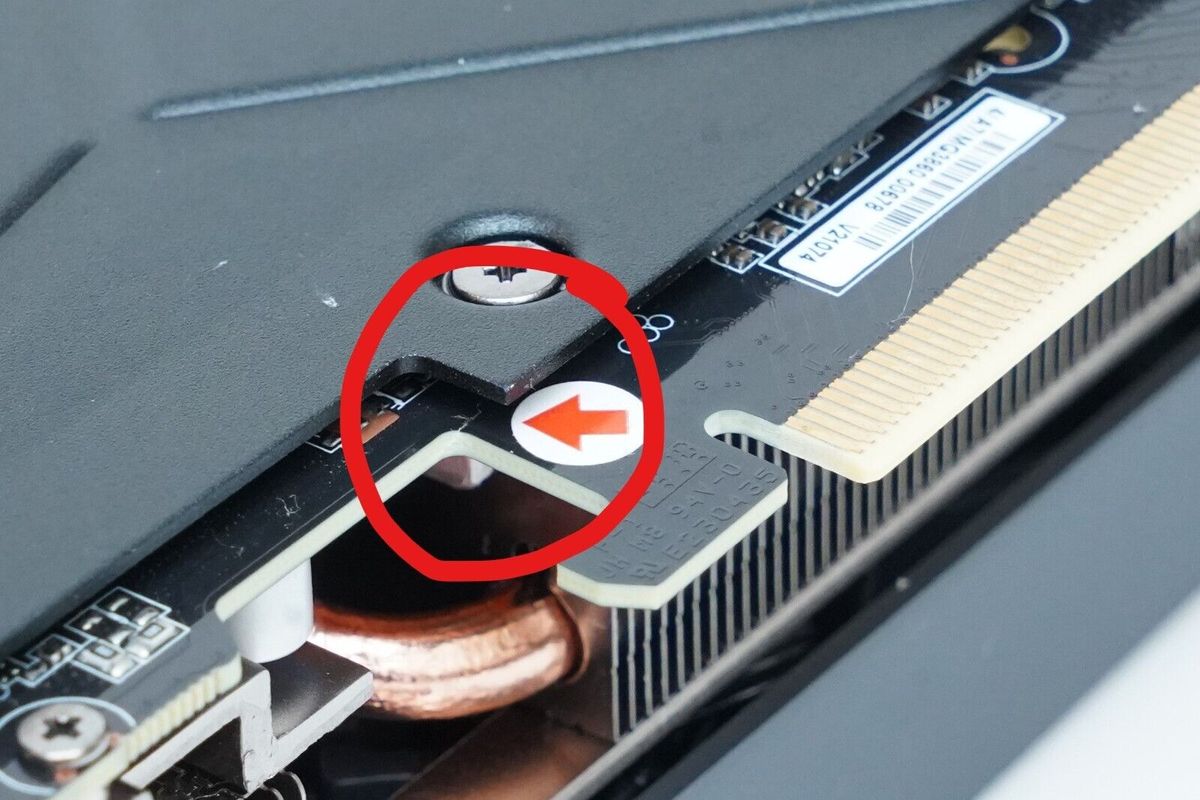
Tom's Hardware
PCB cracking turns Gigabyte GPUs into paperweights.
leaden gust
ran as admin and still got this. I quit to the menu and resumed from save and atm everything is good.
 cloud crypt
strange, really strange. For the moment we dont know how to fix that because we somehow cant reproduce that problem. Ive tried it several times but for me it runs without problems
 dusty grove
leaden gust
ran as admin and still got this. I quit to the menu and resumed from save and at...
dusty grove
leaden gust
ran as admin and still got this. I quit to the menu and resumed from save and at...
Turn off restir
leaden gust
cloud crypt
strange, really strange. For the moment we dont know how to fix that because we ...
It's all good I know this is still pretty early in development albeit with already awesome results.
If there's anything in particular I could help Lookout for or to help in this project let me know.
I have absolutely no coding experience so I can't help there unfortunately.
cloud crypt
we always have restrir on and do not have any problems
leaden gust
dusty grove
Turn off restir
Is that a in game option or the rtx menu?
cloud crypt
rtx menu
leaden gust
Alright. For the moment it's entirely fine but I'll remember to look for that if it happens again
dusty grove
leaden gust
Alright. For the moment it's entirely fine but I'll remember to look for that if...
If u not dissable restir it will happen again in same place, currently there is no other way around it
cloud crypt
that maybe, but still, its only a "for now" solution. We are trying to find out what is happening there.
somehow its mainly happening on older/weaker rtx gpus
leaden gust
dusty grove
If u not dissable restir it will happen again in same place, currently there is ...
That's not how it happened for me. It was entirely random. One sec everything is fine and then everything is like the sun. And I tried to replicate by doing the same race and it didn't happen.
leaden gust
cloud crypt
somehow its mainly happening on older/weaker rtx gpus
I have a 3060ti
 tawny elk
If you use the default rtx conf, does it still happen?
jade briar
I have a feeling that the restir issue could be a bug in remix itself.
dusty grove
cloud crypt
somehow its mainly happening on older/weaker rtx gpus
Maybe cuz weaker gpus using lower internal res like 720p?
Or maybe thet cuz 40xx series has a lot of cache ho knows...
cloud crypt
cache maybe, but i dont think it has smth to do with resolution
leaden gust
tawny elk
If you use the default rtx conf, does it still happen?
I haven't changed any settings is that not default?
tawny elk
I believe the bright spots are the result of the path tracer being unable to calculate that point.
cloud crypt
Have you installed the new lights yet burrito?
tawny elk
leaden gust
I haven't changed any settings is that not default?
If you’re using the rtx conf that uncle and hellraven use, they have tweaks to the denoiser.
jade briar
cloud crypt
Have you installed the new lights yet burrito?
Yes, but I don't see any new lights
leaden gust
So it just happened again and turning off restir does make all the white go away and game looks fine.
leaden gust
tawny elk
If you’re using the rtx conf that uncle and hellraven use, they have tweaks to t...
Gotcha
cloud crypt
jade briar
Yes, but I don't see any new lights
that is strange lol, i defenetly added new ones xD
tawny elk
leaden gust
So it just happened again and turning off restir does make all the white go away...
It sounds like the path tracer is unable to calculate those paths and gives up resulting in fireflies.
So the denoiser only gets those bright points to work with and makes everything super bright.
leaden gust
tawny elk
It sounds like the path tracer is unable to calculate those paths and gives up r...
Gotcha. I can screen record if it helps any.
cloud crypt
maybe because i didnt normalize the lights?
tawny elk
cloud crypt
maybe because i didnt normalize the lights?
No that just tweaks the power output to be in total rather than based on surface area.
cloud crypt
ah ok
tawny elk
leaden gust
Gotcha. I can screen record if it helps any.
If you can trigger it repeatedly in a spot, do it with reference mode enabled and then disabled.
leaden gust
tawny elk
If you can trigger it repeatedly in a spot, do it with reference mode enabled an...
This is what I got.
 jade briar
okay
cloud crypt
tell me when still not working
tawny elk
leaden gust
This is what I got.
Can you toggle reference mode on and off as well?
sage wraith
jade briar
I have a feeling that the restir issue could be a bug in remix itself.
So i have this issue too when i enable restrir
But Not with the First Version i used (the files down below your Tutorial Post)
leaden gust
tawny elk
Can you toggle reference mode on and off as well?
I thought I did that in my video. Hold on and I'll get on that
tawny elk
Is that with restir enabled or disabled?
leaden gust
That was with restir enabled.
tawny elk
Can you do it with it disabled? that was posted earlier my b
Last thing I’d suggest checking is if you backup your current rtx conf and then remove everything besides the texture classifications and see if it still happens.
leaden gust
Alright I'll check that out later. It's not a big deal quitting to main menu and loading the game seems to fix it for a decent, but it does eventually come back.
leaden gust
How do u shift in xbox control?
Can't figure it out for the drag races
balmy chasm
Somehow my controller settings are set up weirdly. Check yours too
leaden gust
Whenever I try to configure my controls in game nothing happens.
balmy chasm
You have to save the profile. Basically go back to main menu after setting it up, so save popup shows up
leaden gust
Nothing happens. I try to change a button to something else and the game softlocks and I have to alt+f4
clever meadow
nice can you show me your config ?
sage wraith
clever meadow
nice can you show me your config ?
So I’m using the default rtx.cfg out of here. I only disabled restir gl because it brings heavy brightness issues
 spark moon
cloud crypt
strange, really strange. For the moment we dont know how to fix that because we ...
spark moon
cloud crypt
strange, really strange. For the moment we dont know how to fix that because we ...
Told u they will keep having problem...
spark moon
cloud crypt
Your solution doesnt help either
I didn't said the solution...just showed the issue...u guys don't even wana listen...
cloud crypt
Its not the issues because it still happen
spark moon
ok god help them...mobile app sucks message dont evensend sometimes
spark moon
cloud crypt
<@877275530813128724> i dont know why they are not working for you
looks amazing
cloud crypt
It also only happens on 30 series. So we think that the issues lies in remix itself
Smth with the denoiser not working right or smth like that
sage wraith
cloud crypt
It also only happens on 30 series. So we think that the issues lies in remix its...
What happens with 30 series only?
cloud crypt
What GPU u have?
sage wraith
4090
cloud crypt
Ok, then it does not only affect 30 series
But still. The error seems to be in remix itself. No matter what rtx conf is used Flashbanks still happen on some systems
sage wraith
Maybe, but I had this brightness issue not from the beginning
I updated my mod.usda and added some emissive textures out here, and then I had this issue the first time
tawny elk
Can you post your rtx conf?
tawny elk
cloud crypt
But still. The error seems to be in remix itself. No matter what rtx conf is use...
I’ve never had it happen 👀
jade briar
Could this be a problem introduced with a new update?
sage wraith
Tomorrow I will set mz game back to to files out of the tutorial And will Look, if it happens then too, but guess its something in the mod. Usda
Because as i had this issue the first time i replaced Step by step And After i replaced the mod.usda with a newer one, i got this issue
tawny elk
jade briar
Could this be a problem introduced with a new update?
None of the recent remix updates touched the lighting system afaik.
jade briar
@cloud crypt You off work yet?
 sudden stag
Hi guys, is there any tutorials on how to install this?
cloud crypt
jade briar
cloud crypt
Now i have time
The thing I talked about yesterday
cloud crypt
Headlights
jade briar
Traffic vehicles headlights
cloud crypt
traffic
cloud crypt
do the lights work now?
jade briar
I didn't check. I've been so busy annoying mark
cloud crypt
xD
jade briar
Trying to get glass to work
cloud crypt
ah that part
You have to do it for every tint because every tint has its own hash. Like everything
jade briar
cloud crypt
You have to do it for every tint because every tint has its own hash. Like every...
No just traffic cars
spark moon
cloud crypt
ah that part
in ug2 does vanilla lights works for u?
cloud crypt
jade briar
I think It'll add a lot of life to the city.
i meant the glass tint. thats what you are working on
cloud crypt
spark moon
in ug2 does vanilla lights works for u?
no
jade briar
cloud crypt
i meant the glass tint. thats what you are working on
Yes glass tint. Well, the first step is to get glass to work in the first place. Even that's not working. But once its done. I'll think about the tints.
cloud crypt
who was the lighting expert right here? was it adam? i need to know what a common light temperature for headlights is
jade briar
cloud crypt
who was the lighting expert right here? was it adam? i need to know what a commo...

ez
cloud crypt
oh ok, yeah thy, dumb as fuck i am XD
sage wraith
Hey whats about mods for nfs? For example other carmodels. Will it work or makes it trouble?
tawny elk
cloud crypt
who was the lighting expert right here? was it adam? i need to know what a commo...
Blueish tint at 5000k for LEDs
cloud crypt
sage wraith
Hey whats about mods for nfs? For example other carmodels. Will it work or makes...
for now they are working, but when we have this project fineshed they will not work anymore
cloud crypt
jade briar
Yes glass tint. Well, the first step is to get glass to work in the first place....
well... i can add lights to the car, but only 1 side wil emit light
jade briar
What
sage wraith
When this project is finished, i guess All Cars will be replaced with high Poly Models 😂
cloud crypt
sage wraith
When this project is finished, i guess All Cars will be replaced with high Poly ...
probably, but the engine cant handle more than 20K ploly per car. currently they have 9K
cobalt peak
jade briar
Upscaled sky textures when
sage wraith
jade briar
What
Headlights for example will only emit light, when you can see them in the scene
cloud crypt
cobalt peak
Upscaled sky textures when
just use badassbaboons hdri sky for now
sage wraith
cloud crypt
probably, but the engine cant handle more than 20K ploly per car. currently they...
That’s ok 👌🏽
 cobalt peak
I did not buy a 3300$ monitor for this+
 sage wraith
cobalt peak
I did not buy a 3300$ monitor for this+
sage wraith
cobalt peak
I did not buy a 3300$ monitor for this+
So then play another game😂
cobalt peak
sage wraith
So then play another game😂
No I have a 3070 Ti any game to come out after 2010 will not run in 8K
Cant even enjoy Battlefield 3 in 8k
sage wraith
I allready tried to replace the skybox, but I don’t know how
tawny elk
cobalt peak
No I have a 3070 Ti any game to come out after 2010 will not run in 8K
> 8k
> 3070Ti
cobalt peak
sage wraith
I allready tried to replace the skybox, but I don’t know how
Become the Top G
sage wraith
cobalt peak
No I have a 3070 Ti any game to come out after 2010 will not run in 8K
😂 wrong priority i guess
cobalt peak
tawny elk
\> 8k
\> 3070Ti
Yea the 3070 Ti was faster than the 2080 Ti just less vram
I bought a 3070 Ti then I threw the 2080 Ti away
I mean I put it into the trashcan
Never regretted it
 ember cobalt
tawny elk
\> 8k
\> 3070Ti
ember cobalt
tawny elk
\> 8k
\> 3070Ti
lol i played 7 games at 8k on my 3070 ti
very playable, about 3-7 FPS
tawny elk
I was talking about using it for RTX remix 
cloud crypt
jade briar
What
@jade briar
 tawny elk
cobalt peak
Yea the 3070 Ti was faster than the 2080 Ti just less vram
tawny elk
cobalt peak
Yea the 3070 Ti was faster than the 2080 Ti just less vram
You're going to want to use something like 1440p with DLSS to get good performance
cloud crypt
This game with pathtracing never will run in 8K
tawny elk
I finally found a calculator for getting lumens to candela  https://www.omnicalculator.com/physics/lumen
jade briar
cloud crypt
<@877275530813128724>
So you can't add more than one light to a single mesh?
tawny elk
cloud crypt
but it works when they are not close together
Ah, there's a light grouping function that happens with remix
It might not take the scene scale into consideration?
cloud crypt
now its better to see
 tawny elk
No it's not something set in OV
cloud crypt
well, when i move the light more away it works just fine
 tawny elk
#1103377328530276403 message
Ah, there's a light grouping function that happens with remix
cloud crypt
can you turn it off somehow?
tawny elk
No idea
jade briar
tawny elk
https://discord.com/channels/1028444667789967381/1103377328530276403/11211814228...
I figured it out the first time you said that.
tawny elk
U2's scale being so tiny messes with all these things
tawny elk
jade briar
I figured it out the first time you said that.
Me too
cobalt peak
cloud crypt
now its better to see
Gigachad Roblox ERLC graphics
With minecraft concrete floor
cloud crypt
i am only doing lights. Texturing is Burritos job xD
sage wraith
cloud crypt
This game with pathtracing never will run in 8K
Haha so i Play in 5120x1440 And when i set dlss to Quality i get a diashow 😂😂

 jade briar
Yep. That'd fix it
cloud crypt
yeah, thats working good
 jade briar
That's nice.
jade briar
cloud crypt
yeah, thats working good
That'd also fix the cars only getting one headlight.
tawny elk
I think the scenescale is around 0.06
You can measure the car in OV to get the proper scale
cloud crypt
jade briar
That'd also fix the cars only getting one headlight.
yeah
jade briar
cloud crypt
yeah
For now, just do the civi vehicles
cloud crypt
tawny elk
You can measure the car in OV to get the proper scale
how?
tawny elk
cloud crypt
how?
The measure tool, its under utilities or something
 tawny elk
Yea that's what I mean by the scale is really bad by default
But if you change it to be correct
OV still looks exactly the same

cloud crypt
That size would explaine the never shown trailer
tawny elk
Trailer?
cloud crypt
cars driving on woman body

Need For Speed Underground 2 Official Trailer [HD]
Gostou do video? Clique em gostei e inscreva-se no meu canal
Like the video? Click liked and subscribe on my channel
Al igual que el video? Haga clic gustaba y suscribirse en mi canal
http://www.youtube.com/SRmasazuka
Acesse a area no SuperTuto
sudden stag
Hi guys, I am having a problem launching the game due to only having a windows 10 OS
cobalt peak
cloud crypt
cars driving on woman body
https://youtu.be/xYVIrJBJOhE
No, thats egypt
tawny elk
cloud crypt
cars driving on woman body
https://youtu.be/xYVIrJBJOhE
What a throwback
spark moon
cloud crypt
well... i can add lights to the car, but only 1 side wil emit light
that was happening with adding light to texture too...
sudden stag
I tried it with just normal widescreen script it worked, but when I installed the files after the tutorial it just doesn't start at all
cloud crypt
spark moon
that was happening with adding light to texture too...
yeah, scale 0.5 fixed it
but i think (since the headlight sprites still get culled) colored headlights still arent possible
or can i set them as anti culling textures?
jade briar
sudden stag
I tried it with just normal widescreen script it worked, but when I installed th...
You probably missed something. Do it again. Fresh reinstall the game.
sudden stag
jade briar
You probably missed something. Do it again. Fresh reinstall the game.
I've tried it for 5 times and still the same
jade briar
Strange.
sudden stag
I think its due to having a lower OS than the tutorial has
jade briar
Yeah, but I also have windows 10.
sudden stag
I have tried it with just widescreen fix and it worked fine
but after I installed and compressed all files from tutorial it doesnt start
If anything, is it possible to copy all of your files and perhaps put it on mega?
I'm really sorry if im being a pain
jade briar
sudden stag
I'm really sorry if im being a pain
The files in the zip are all the same as mine
cloud crypt
damn
spark moon
cloud crypt
but i think (since the headlight sprites still get culled) colored headlights st...
thanks....sprite is a emmesive they dont cull
cloud crypt
not in underground 2. Thex do get culled as soon you cant see them anymore
spark moon
thats not culling ...the way headlights sprite works is when they are far they are not visible only in the case of headlights sprite have seen
better add light to the mesh behind the light
sorry sprite
cloud crypt
how do i explain it for you: If i capture the car from the front they get shown in OV
if i capture the car from behind the mesh doesnt exist
they get culled
 misty pebble
My question I wanted to ask is: Is there a reason why Mods are being disabled when using the RTX Remix? I didn't know if some modders could make mods that'd work in RTX Remix
cloud crypt
im curious now
cloud crypt
misty pebble
My question I wanted to ask is: Is there a reason why Mods are being disabled wh...
which mods you mean?
misty pebble
cloud crypt
which mods you mean?
Mainly customization mods and cars
cloud crypt
well, archies Skyline mod does work
misty pebble
Like Customization Plus, Unlimiter with that extra customizations thing
misty pebble
cloud crypt
well, archies Skyline mod does work
Oh nice
cloud crypt
unlimiter also works. These mods should work with remix. maybe you want to try a new profile
misty pebble
Oh I haven't started with mods yet
spark moon
cloud crypt
now add that texture to aniti-culling texture and turn on anti culling
i disabled the sprite...added light to texture in remix working great
 misty pebble
Just RTX Remix. I just saw you guys talking about mods and possibly disabling it
misty pebble
spark moon
i disabled the sprite...added light to texture in remix working great
Yo! That is sick!
cloud crypt
spark moon
i disabled the sprite...added light to texture in remix working great
thats not what i meant. I want to know if the sprites still get shown after adding as anti culling texture when capturing from behind, because i am busy now with adding proper headlights in different variation to the civil cars
new loadingscreen
 jade briar
Still not the original
Well, I'm gonna go to bed. I hope you'll have the traffic lights sorted out.
jade briar
Nice.
spark moon
whats the cone angle u are using for headlights
cloud crypt
@safe patrol If you are still awake could you put the traffic car emissives with their albedo into a zip file and send them over? these would actually help us
cloud crypt
spark moon
whats the cone angle u are using for headlights
50 degree
but i will change that
maybe i will do a bit more
i would recommend 60 degree
sage wraith
so i made a new mud-street texture
 spark moon
ok brake lights working now but opposite when i brake it goes off litt when i dont
cloud crypt
what did you do?
rain fr only renders in front and back of vehicle and only what, like 3 meters
 spark moon
cloud crypt
what did you do?
spark moon
cloud crypt
what did you do?
added light mat as emmesive
cloud crypt
spark moon
added light mat as emmesive
ah ok lol xD
for UG2 it doesnt work. Lights are contsant and brakelights are shaded
spark moon
cloud crypt
for UG2 it doesnt work. Lights are contsant and brakelights are shaded
it works
there are 3 textures 1 probably not captures i guess cant find
cloud crypt
hm ok
ok, if car gets culled lights stay where they were at last

let me see, maybe setting them as unticulling textures will work
spark moon
spark moon
there are 3 textures 1 probably not captures i guess cant find
fixed it
cloud crypt
whats bro doing there

uhh... i hate culling

but yeah, they work...

but this traffic car has extreme culling, everytime it moves it gets culled

i hate this one...
 spark moon
cloud crypt
spark moon
cloud crypt
did u added the headlights to player car
cloud crypt
no, traffic
spark moon
i am having dificulty adding
spark moon
cloud crypt
are u adding to sprite?
cloud crypt
no, to the traffic car itself
and whem a different car passes me and i turn around the same is happening. But thats not as worse than the Taxi car
tawny elk
Plate lights
 cloud crypt
let me guess, you used the fix i found for this xD
spark moon
 tawny elk
cloud crypt
let me guess, you used the fix i found for this xD
tawny elk
cloud crypt
let me guess, you used the fix i found for this xD
Nah, I've always had the scale set to allow for multiple lights that close. I wanted to add more light to the back of the car.
cloud crypt
yikez, why didnt you shared that knowledge with us
tawny elk
Ya'll never asked
cloud crypt
i asked several times XD
tawny elk
spark moon
?
They had the scale set too high to allow for close lights, they kept getting grouped and removed.
The scale should be 0.01 from my testing.
cloud crypt
oh ok, good to know
spark moon
well the default is 1.0
tawny elk
Yea and that makes cars 4cm long
cloud crypt
thx adam, now we know what the overbright problem is
 tawny elk
What do you mean?
cloud crypt
set to 0.01 and lights go insane
tawny elk
Rip
Also, after digging into the exposure tools in remix I have discovered how AE causes ghosting.
spark moon
but i nver changed scale not happened with me
tawny elk
AE will ghost when it clips black/underexposed
Which is why the back of a car constantly ghosts
cloud crypt
i stay with 0.5, that works fine, car scale is 4.9 cm
cloud crypt
tawny elk
Which is why the back of a car constantly ghosts
i told you that xD
tawny elk
cloud crypt
i told you that xD
It was a theory no?
I proved your theory right in that case
cloud crypt
yeah, but that doesnt matter anymore
spark moon
so how much needs to be for headlights
tawny elk
Uh
cloud crypt
0.5 is enough
spark moon
cloud crypt
0.5 is enough
in ov
tawny elk
Mine are 50,000 intensity and they work well.

Oh
Treat as a point
Doesn't do anything in remix
cloud crypt
mine are 25 intensity at maximum for lights and 100 for headlights
cloud crypt
strg and just select
tawny elk
cloud crypt
mine are 25 intensity at maximum for lights and 100 for headlights
https://en.wikipedia.org/wiki/Orders_of_magnitude_(illuminance)#Luminance Here's a scale for intensity by the way. Using the "normalize power" toggle you can create a light to use a reference on that scale. Note that remix has an exposure set at 10,000 by default, so most intensity values will clip
As visual perception varies logarithmically, it is helpful to have an appreciation of both illuminance and luminance by orders of magnitude.
cloud crypt
or shift and select
cloud crypt
tawny elk
https://en.wikipedia.org/wiki/Orders_of_magnitude_(illuminance)#Luminance Here's...
well yeah, but i stay with my way as i mentioned earlier. You can do it your way. (dont get me wrong again here xD)
tawny elk
cloud crypt
well yeah, but i stay with my way as i mentioned earlier. You can do it your way...
You're good, I'm just putting it all here in case anyone else wants to use it for refence
Since Remix has an ||absurdly|| high default exposure, it's really hard to use real units.
spark moon
cloud crypt
strg and just select
but we changed the scale in remix...i still not understand properly
cloud crypt
spark moon
but we changed the scale in remix...i still not understand properly
its not for the scale, its for selecting multiple objects
tawny elk
spark moon
but we changed the scale in remix...i still not understand properly
?
I'm just holding control while clicking on them
cloud crypt
thats what i tried to tell him xD
well, i think i will delete the lights for this one specific cab for now
 cloud crypt
@tawny elk could u disable culling yet? XD

 cloud crypt
the denoiser does its work, badly
spark moon
and dlss...io have to use dlss 2060 super
cloud crypt
ouch xD

 tawny elk
Ya'll made me figure out this AE ghosting, I spent all my brain cells figuring it out
cloud crypt
XD but you didnt need to do that because i already had that theory. Now i feel even more:

sry for fucking up your brain cells XD
 teal wolf
hey guys how do i run this mod
safe patrol
cloud crypt
<@322425147132739585> If you are still awake could you put the traffic car emiss...
Sorry I was away for a bit - the emissives are all in the pack I shared previously. Might have to scroll up a bit for it
teal wolf
teal wolf
hey guys how do i run this mod
pls help
cloud crypt
tawny elk
I'm not sure why the cab is recreating it's lights each frame. Might be not moving smoothly enough for them to be grouped.
safe patrol
I'm away from my PC so I can't just re-share it sadly. I'll be back home Friday
cloud crypt
Ah ok
tawny elk
tawny elk
No
I'll probably get back to trying to figure that [culling] out like mid july depending off anything comes up.
safe patrol
I'd like to go through and adjust the headlight color to more accurately reflect the slightly warmer tone that would be expected on late 90's vehicles in general for all traffic cars.
Back when everything was pretty much just regular incandescent bulbs
So I'll do that when I get back on Friday and upload just the traffic cars for you guys to work with
And while I can probably look that up, Adam if you have an accurate number you want to feed me I wouldn't complain.
dusty grove
spark moon
while moving
Try disabling RESTIR.
RESTIR makes image more stable in static, but add ghosting while moving.
balmy chasm
@tawny elk Okay. I've seen advice that everyone should work in consistent scene scale. Otherwise merging projects would be tough. Does that mean you always used .01 scene scale which caused all of these sunbright values? As reference, 50k intensity and 0 exposure will result in the super nova brightness just as your previous lights
cloud crypt
Yes he did. I used 1 as normal but now switched to 0.5. This works pretty well
balmy chasm
cloud crypt
Yes he did. I used 1 as normal but now switched to 0.5. This works pretty well
Have you tested adding lights with extremely low radius/size instead?
sudden stag
Hi guys, anyone here to help. I can't launch the game despite reinstalling the game for atleast 9 times
sage wraith
have you installed the remix bridge with "release" in zip name?
can someone tell my, why the container is black? my albedo is red and i allready disabled rough texture ?! in create the container looks fine
 sudden stag
sage wraith
have you installed the remix bridge with "release" in zip name?
sudden stag
sage wraith
have you installed the remix bridge with "release" in zip name?
yep, even the latest one that @cloud crypt gave and still not starting at all
cloud crypt
balmy chasm
Have you tested adding lights with extremely low radius/size instead?
Yes, that didnt work either
balmy chasm
sage wraith
can someone tell my, why the container is black? my albedo is red and i allready...
Because you have to insert an Albedo map. Drak grey is default base color
sage wraith
balmy chasm
Because you have to insert an Albedo map. Drak grey is default base color
i did
balmy chasm
Check it twice
sage wraith
i create it looks fine
balmy chasm
It can and will look different
cloud crypt
In create it allways will look fine
balmy chasm
cloud crypt
Yes, that didnt work either
The thing I'm afraid of is we can loose all the progress once Remix Create release, if we use non default values
cloud crypt
I dont think that this will happen
I only changed scene scale value in remix, not ov
sage wraith
over "mat_570C7EF44091BC60"
{
over "Shader"
{
asset inputs:diffuse_texture = @./gu-textures/container.dds@ (
customData = {
asset default = @@
}
displayGroup = "Diffuse"
displayName = "Albedo Map"
doc = "The texture specifying the albedo value and the optional opacity value to use in the alpha channel"
hidden = false
)
float inputs:metallic_constant = 0 (
customData = {
float default = 0
dictionary range = {
float max = 1
float min = 0
}
}
displayGroup = "Specular"
displayName = "Metallic Amount"
doc = "Metallic Material"
hidden = false
)
asset inputs:metallic_texture = @./gu-textures/container_metal.dds@ (
colorSpace = "auto"
customData = {
asset default = @@
}
displayGroup = "Specular"
displayName = "Metallic Map"
hidden = false
)
asset inputs:normalmap_texture = @./gu-textures/container_normal.dds@ (
colorSpace = "auto"
customData = {
asset default = @@
}
displayGroup = "Normal"
displayName = "Normal Map"
hidden = false
)
float inputs:reflection_roughness_constant = 0.5 (
customData = {
float default = 0.5
dictionary range = {
float max = 1
float min = 0
}
}
displayGroup = "Specular"
displayName = "Roughness Amount"
doc = "Higher roughness values lead to more blurry reflections"
hidden = false
)
asset inputs:reflectionroughness_texture = @./gu-textures/container_rough.dds@ (
colorSpace = "auto"
customData = {
asset default = @@
}
displayGroup = "Specular"
displayName = "Roughness Map"
hidden = false
)
}
}
thats the code for the container, for me it looks all fine
balmy chasm
May be you applied it to the wrong material in OV?
jade briar
sage wraith
over "mat_570C7EF44091BC60"
{
over "Shader"
{
...
Double Check your DDS compression formats
tawny elk
balmy chasm
<@264632269174472704> Okay. I've seen advice that everyone should work in consis...
50k for an object 10cm in radius and with a 45 degree spread is okay. The radius and angle changes how much light it emits.
balmy chasm
You always set Normalize on, so it doesn't matter
tawny elk
balmy chasm
You always set Normalize on, so it doesn't matter
Remix doesn’t respect that from my testing.
balmy chasm
45 angle is quite a thin one though
balmy chasm
And I have noticed the difference with Normilize on and off. Can you test it again with no shape changed light?
timid prairie
okay, i'll just drop this and will never return to it
 balmy chasm
:D
 thorny pawn
do we still have that issue?
tawny elk
balmy chasm
And I have noticed the difference with Normilize on and off. Can you test it aga...
I can test it again sure. We’re both talking about in game correct?
balmy chasm
timid prairie
okay, i'll just drop this and will never return to it
You might want to learn some new software, becuase from what you said you just don't have enough tools to give yourself some freedom
tawny elk
balmy chasm
Right
Weird. It doesn’t do a thing when I toggle it in my game.
Oh it might be from the shape change if you get it working with no shape changes 
jade briar
cloud crypt
Ah yes. Here we go again. 0.5= 4.9cm and 0.01= 4cm
So basically both scales are correct to get lights close together without grouping them
tawny elk
I mean there's a true scale to be used. We have the car length as reference
Or am I missing something? Scene scale should be linear.
balmy chasm
So do you capture scene in .01 scale or just set it in configs after capturing?
tawny elk
Set the scene scale in the game to 0.01
You can change previous captures scenescale as well
OV doesn't convey scale so it's weird
Now OV doesn't seem to want to allow for a scale change
 sharp sand
i know this will be such a foolish question but, do you need an rtx card to run this?
tawny elk
RTX remix
sharp sand
ye i thought so
tawny elk

cloud crypt
@jade briar set scenescale in your rtx conf to 0.5. otherwise traffic car headlights wont work
tawny elk
Why 0.5 and not 0.01?
 tawny elk
What size radius are your lights?
cloud crypt
0.x
tawny elk
Weird
cloud crypt
every light is below 0
tawny elk
At scene scale 0.5, an RX7 is 9.8cm long
cloud crypt
at 0.5 my cars are 4.9cm long
tawny elk
Hotwheels Underground
 tawny elk
 cloud crypt
somehow our scene scales behave really different
tawny elk
Try turning the exposure down from 10 to like 5 and see if it still flash bangs.
cloud crypt
then the streetlights are not bright enough, already tested it.
i mean burrito can try to tune it himself
but for me it handles really weird
balmy chasm
10 exposure where?
tawny elk
In the tonemapper
cloud crypt
tonemapper
balmy chasm
You use 10 exposure?
cloud crypt
yes
tawny elk
They did yes
cloud crypt
works fine
balmy chasm
Who cares...
cloud crypt
he has them already
sage wraith
But to dark I guess 🧐
cloud crypt
they are only a bit weak to get them displayed in ov
tawny elk
Too bright and they look odd
cloud crypt
tawny elk
Plate lights
here
sage wraith
tawny elk
Too bright and they look odd
so it isn’t possible that they emit the surroundings ?
tawny elk
They do
cloud crypt
i think emisseves work best for backlights
tawny elk
cloud crypt
i think emisseves work best for backlights
I like to use both since emisseves don't "throw" light in a direction
cloud crypt
yeah. so emissive for the glow and normal lights for illumination
jade briar
well, idk what you did, but traffic cars don't have lights, and the particles are fucked up.

Even the hills area doesn't have any lights.
@cloud crypt
Okay I fixed it

But
There's only one headlight on most cars.
Okay I changed the scene scale, but you didn't get all cars.

bruh
 cloud crypt
thatts why i said disable the sprites
cloud crypt
i dnt do anything lol
jade briar
strange. I think the paths are missing. Because the main meny textures that you added are also missing.
cloud crypt
all path are there in my mod.usda
jade briar

So I had to remove and then re add your lights usd.
After that things are messed up.
cloud crypt
yeah, then you did smth really wrong there
jade briar
I've also found out that my road textures are too damn dark. Gotta lighten all of them up.
jade briar
cloud crypt
yeah, then you did smth really wrong there
probably.
cloud crypt
what you should have done is merging the mod usdas from me
not with yours, but the mod.usdas i gave you
jade briar
Yeah that's what I did.
cloud crypt
jade briar
After that things are messed up.
you didnt
jade briar
cloud crypt
you didnt
 cloud crypt
your mod_lights merged with my new lights
jade briar
huh.Lets see
cloud crypt
oh and you are right. i missed 2 traffic cars. but the one taxi cab i will leave out for the moment
because it has really ugly culling problems
everything working for me

 cloud crypt
ah, maybe because of the added lights to the textures??
jade briar
cloud crypt
ah, maybe because of the added lights to the textures??
I think it was an error on my end.
I checked in ov create.
balmy chasm
jade briar
I think it was an error on my end.
What was the error after all?
jade briar
@tawny elk Can you at least do something about the lod distances?
tawny elk
jade briar
<@264632269174472704> Can you at least do something about the lod distances?
Maybe. I have the memory address for that marked down, not sure how to implement to you guys.
cloud crypt
i have to do smth about the low illumination of these lights. They are so far away from each other
 jade briar
cloud crypt
i have to do smth about the low illumination of these lights. They are so far aw...
jade briar
jade briar
cloud crypt
i have to do smth about the low illumination of these lights. They are so far aw...
Maybe headlights on player cars will help.
cloud crypt
jade briar
Maybe headlights on player cars will help.
yeah xD
jade briar
Also make the traffic headlights brighter, I guess.
cloud crypt
butb still, smth seems to be broken on your mod usda
tawny elk
jade briar
Maybe headlights on player cars will help.
I tried that and it doesn't help as much as you'd hope unless you stop moving.
If we could shape the light more with something like an IES file, we'd be able to get it to look a lot better.
jade briar
hmmmm
cloud crypt
and adam, thats what burritos tonemapping is

i still use his exposure but i cahned the other values a bit

now it is a bit better
 balmy chasm
You said 10 .-.
 balmy chasm
What about adding 'moon light' finally. Some dim soften directional light
cloud crypt
cloud crypt
but he uses ae
which cause this
 jade briar
NEVERMIND
 jade briar
cloud crypt
which cause this
jade briar
cloud crypt
which cause this
Not for me.
balmy chasm
jade briar
NEVERMIND
First guess - missing texture path
balmy chasm
From captures folder
jade briar
nahh
I didn't replace that asset
So it should just use the texture that the game gives out.
balmy chasm
You merged mod.usda where it could be replaced
cloud crypt
this area is pretty bright xD
 balmy chasm
Wow, snowy hills
cloud crypt

 balmy chasm
I believe nothing renders over 3 mips
cloud crypt
0 mips

3mips

6mips

you can see that 3 and 0 is really blurry on the textures. 6 works best and everything over 6 will add to much blacklevel
and if you dont like 10 exposure 5 works also pretty well

 jade briar
Yeah my mod file was messed up pretty bad.
Deleting all the unused materials
idk how they became a part of the mod.
cloud crypt
damn xD


 cloud crypt
messed up again
shall i send you both of your mod usdas again?
@jade briar if you still want to use ae could u use these settings instead?
 jade briar
okay
sage wraith
jade briar
strange. I think the paths are missing. Because the main meny textures that you ...
Thats what Said few times now…
balmy chasm
Oh yeah. Smoke from under the tires(especially on offroad surfaces) causes so much lags. Any fix?
jade briar
balmy chasm
Oh yeah. Smoke from under the tires(especially on offroad surfaces) causes so mu...
Not really, no.
cloud crypt
its lagging as hell because for each particle new bounces get calculated
balmy chasm
I know. May be a way to disable it
cloud crypt
it would be enough if you reduce max bounces to 4
balmy chasm
I'm on 4 already
thorny pawn
jade briar
Maybe headlights on player cars will help.
did we ever figure something out on how to prevent the headlight culling?
jade briar
nooooooope
trail quail
Hey uncle is your game ok
cloud crypt
adding the headlight to to trunk mesh would help. but then they get culled when switching cams
thorny pawn
i can give this a try tonight and see if i can find a memory address for the headlight culling
been a while since i hacked assembly but it's worth a shot
jade briar
trail quail
Hey uncle is your game ok
I hope it is.
thorny pawn
btw random idea, it's not a perfect solution but we could attach headlights to the neon strips at the bottom, better than attaching to trunk etc. since it's always visible + it's used in all cars
downside is it will force you to use neon to have headlights, but i think if all else fails this might be a decent workaround
cloud crypt
that way it would be possible to have different headlight colors too i think
thorny pawn
or maybe we can do some shenenigangs by replacing the shadow texture on the floor, prevent drawing it and instead just use it as a marker for the cars position in space
thorny pawn
cloud crypt
that way it would be possible to have different headlight colors too i think
yep, could actually be sweet
cloud crypt
because every color has its own mesh
thorny pawn
did not know that 😄 thats nice
cloud crypt
BUT: we would need to do it for every car
so basically we would have to start with the starter cars
tawny elk
That give me an idea 
thorny pawn
tawny elk
That give me an idea <:HmmNote:1079656766796746832>
thats why i write my random ideas c: i haven't been able to contribute much yet, but i really hope i can get some ideas going
i feel bad when i just jump in when i notice something thats wrong or could be better but i do have some insight into how a lot of that stuff works so i try to help where i can without being annoying 😄

me backseating
jade briar
I don't think using neon or shadow would work
Both of them stick to the ground
And don't rotate
So if the car jumps
The lights will be left behind
cloud crypt
youre wrong here
the actual neon bars are sticked to the car
only shadow is sticked to ground
jade briar
Yeah but the neon bars aren't always visible
The will get removed as soon as the camera goes above the car
 ornate current
Well , that work but fps its a problem
cloud crypt
turn on dlss
ornate current
hm,how
cloud crypt
alt + x
dusty grove
actually is there any way to improve cpu performance? I have 6800k 4.1ghz and in some races i get drops to 15fps, if i try to disable crash fix in widescreenfix too use only one core, fps improves but game crashes.
cloud crypt
crash fix should stay one and only 1 cpu core should also be on
and tgry dlss perf ultra perf mode
and use this dxvk-remix build
https://github.com/NVIDIAGameWorks/dxvk-remix/actions/runs/5337524372
GitHub
Contribute to NVIDIAGameWorks/dxvk-remix development by creating an account on GitHub.
because in the latest builds a multicore performance fix is already implemented
thorny pawn
tawny elk
That give me an idea <:HmmNote:1079656766796746832>
what did you cook up 👀
tawny elk
Just some changes to which mesh I refence on the car for the on vehicle lights.
safe patrol
I still think the hood would be a good option because it doesn't get culled...if it weren't for the fact that there's so many alternate hoods we'd have to rig up.
ember cobalt
thorny pawn
do we still have that issue?
afaik yes
thorny pawn
anyone have a mod.usda with headlights handy? i'm on the headlight culling thingy
cloud crypt
nah, only for trafiic cars, adam has one for the rx7
sage wraith
cloud crypt
nah, only for trafiic cars, adam has one for the rx7
But for Player car isnt tintable then Right ?
thorny pawn
mhm, when i attach a light to this mesh it doesn't get culled for me, am i missing something?

or is that known and we're trying to make a general replacement for all headlights using the "glare" billboard effect and we want to prevent that one from getting culled?
tawny elk
It depends on the car on what gets culled on the front.
Since the game doesn’t have backface culling, what does get culled in the camera frustum was set by hand.
jade briar
Man I feel like quitting this.
 elfin beacon
jade briar
Man I feel like quitting this.
elfin beacon
jade briar
Man I feel like quitting this.
 jade briar
no
elfin beacon
yes
thorny pawn
another idea i had is maybe we can mod the headlights of cars using model swaps to make them bigger.... so big that they never get culled, depending on how the game is coded this may work
but i have 0 clue on how to do that, just know that there are car mods for NFSU2
sage wraith
thorny pawn
another idea i had is maybe we can mod the headlights of cars using model swaps ...
Model replacement arent working yet (with Remix)
thorny pawn
I meant in the base game 🙂 replacing meshes with remix won't do anything about the culling
sage wraith
ah ok but then you Need car mods, which are Complete tunable etc.
cloud crypt
jade briar
Man I feel like quitting this.
why
 hearty delta
toolkit release halt lesgo
jade briar
cloud crypt
why
The fucking usd man
After your last update. It has been full of issues.
cloud crypt
you fucked it up youself, dont blame me
because for me everything works fine with the new lights
and i asked if i should send you both files...
and i am asking again. Shall i send you both working files?
severe solstice
💀
hearty delta
nfsug2remix drama?
cloud crypt
nvm, i just send them @jade briar
sage wraith
cloud crypt
nvm, i just send them <@877275530813128724>
The mod_lights has all your lightsources included?
sage wraith
And the mod.usda can connect with it? Or do I need to connect them?
cloud crypt
they are already connected
sage wraith
So copy all code in one file
cloud crypt
no
sage wraith
cloud crypt
they are already connected
Ah Nice that was I thing I wanted to ask ^^ if it is possible to seperate all changes^^
cloud crypt
burritos mod.usda is connected with my mod_lights.usda
sage wraith
Ok so when I create a gu_mod.usda with only my textures, I can connect them with yours too?
cloud crypt
should be possible. i can edit the mod_lights for you so that no texture are required for it
sage wraith
That would be cool, because then it’s a modular build and if someone don’t what new textures for example, he can only delete the texture.Usda
cloud crypt
yep
sage wraith
And when you brings a update with new lights, i can update it, without adding all mz textures again
cloud crypt
here it is
sage wraith
Then I will create a new gu_mod.usda where only my textures are included 😊
cloud crypt
yeah, only lights now
sage wraith
Do I need a main file named mod.usda?
cloud crypt
yes
sage wraith
Where I implement all pathes to mod_lights and mod_textures