
#Silent Hill 2 - Scattered Paths
1 messages · Page 1 of 1 (latest)
 vagrant hazel
OUTDATED
|| With the current builds of RTremix, Silent Hill 2 Enhanced edition can be started, it can get into the main menu and even launch into the game if a current save file is available!
After a varying period of time, the game will however crash, but we can confirm that we indeed are in-game based on the menu startup sound, and if choosing "Continue" from the main menu we even get to a point where certain background sounds from the in-game world can be heard.
We are suffering from a black screen issue that blocks any visibility, the Remix menu, the games menus, and in-game everything turns out purely black.
I've not been able to test the base install of SH2 due to Securom being present on my disk version, Securom is blocked on modern windows machines.||
UPDATE, MAY 16 2023.
Silent Hill 2 RTXremix documentation, how to get it running, currently known issues etc etc.
Documentation authored by @vagrant hazel
https://docs.google.com/document/d/1hayGXNlAJZWOp2ivV8otdSMP23pbXk7DL-pfLq5ZJjU/edit?usp=sharing

Google Docs
 edgy furnace
what we could try is try a different wrapper, but judging how the Enhanced team made/tailored one for their project i think this might be actually harmful for the game
also if we looked aside from the securom protection things, the game would be highly unplayable, let alone boot into Remix mode because it's notoriously flawed, so we gotta work around with the Enhanced edition
vagrant hazel
Yeah I agree, getting it running through the enhanced edition would be the best way to approach it for general usability.
Enhanced edition comes with a bunch of DX9 shaders to fix things like missing fog cards and characters eyes etc, so when running Enhanced it's important to remember to disable those improvements.
I've tried a few different wrappers over the past weeks and the result has basically always been what I described in the OP, or the game not running at all.
Should dig more into the logs to see what exactly is going on
 woven mist
As I know RTX Remix currently can't pick any V/P Shaders in Silent Hill 2
Anyway I got some success run in SH3, but same config of RTX Remix get me crash in SH2
#1068947294977785987 message
Silent Hill 2 Enhanced Edition Mod[ 11 P / 21 V]
edgy furnace
i'm guessing a bit more primitive engine than SH3
SH3 actually fiddled a bit with the lights and overall engine tweaks
 proper grail
The game now boots with the newest version of RTX Remix
#showcase message
woven mist
awesome news
proper grail
I checked it out just now. The game now indeed runs with RTX Remix but there are some issues. For example none of the lights are recognized so the only option currently is to use fallback lighting. Another issue is that the geometry hashes are constantly changing when the camera is moving which means you can't do asset replacements.

 woven mist
proper grail
I checked it out just now. The game now indeed runs with RTX Remix but there are...
woven mist
proper grail
I checked it out just now. The game now indeed runs with RTX Remix but there are...
ye literally same problem was on old version RTX Remix in SH3
woven mist
proper grail
I checked it out just now. The game now indeed runs with RTX Remix but there are...
is that SH2:EE?
proper grail
Yeah
proper grail
You need to disable some of the fixes to get it to work
Probably could narrow it down to one that causes issues but I just turned most of them off for test purposes. 60fps works though so that's good
woven mist
I want to check SH3 for now, maybe there is some changes
proper grail
It definitely does seem more stable in general than previous versions
woven mist

maybe you know what problem it is?
dxvk got buffers and etc. but literally I can't see
anything
proper grail
Hmm, usually what fixes it is defining the UI textures
Or maybe there is no light present, so you may have to set a fallback light for testing purposes
vagrant hazel
Oh this is fantastic news! Can't wait to give it a whirl when I'm back home! Shame asset replacement isn't behaving though, but we're getting closer! I fully intend to remaster the whole game once possible!
vagrant hazel
Okay so, attempting to get started with SH2:EE.
First step is making sure to disable the shader fixes in the SH2EEsetup.exe
Do not disable running in DX9, but do disable the "Fixes" in the tab underneath that.

This seems to actually take us in game! I can now successfully open the RTremix menus unlike before which is awesome!
I can now actually get into the main menu of the game as well, and remix is picking up the menu textures too which is awesome!
However, when clicking start game, it crashes just the same as before.
But now it also simply crashes if attempting to continue from an already existing save, unlike before.
Note that this is using the 0.2.0 zip, no forks
Hmm yeah, any attempts to load into game when remix is running results in a crash.
@proper grailWhat were the exact steps you took to get in-game?
Hmm yeah disabling every single fix does get me in game now!
I'll take some time to tinker about and see which ones exactly are the issue

Let's go BAYBEEE
Lots of problems and issues that'll need sorting over time, but this is an excellent start ❤️
vagrant hazel
Okay I've figured out which setting has to go!
"Restore post processing effects" under the graphics tab needs to be disabled.
Makes sense as this probably uses shaders to make it work.

Everything else can be enabled except for the DX9 stuff - #1099999195898847363 message
#1099999195898847363 message
I'll be updating the opening post as we continue to figure things out, just to have all the information stored in one convenient place.
proper grail
Nice to know what option makes it work. I just toggled everything off lol
vagrant hazel
proper grail
I checked it out just now. The game now indeed runs with RTX Remix but there are...
#general-remix message
Sounds like we should peek around and see if we can do anything about what Mark mentions here to try and stop the hash refreshing
proper grail
Hmm, one idea would be to test it without the Enhanced Edition. I did have the original game running with RTX Remix, but never tested if hashes are stable before applying the EE patch.
I noticed geometry being swimmy in the apartment building so I wonder if it's a shader thing as well
vagrant hazel
proper grail
I noticed geometry being swimmy in the apartment building so I wonder if it's a ...
The Geometry is swimmy in the long forest walk after the opening parking lot too
I was assuming it was related to some kind of emulation of vegetation wind being applied
But I had to double check because I didn't think the game had any of that, and as it turns out it doesn't
So it's definitely no wind stuff
I'd love to test the non-EE version but that has SecuROM (( EE removes it )) and SecuROM has been blocked on modern windows machines for safety reasons
vagrant hazel
Woow, super odd! Decided to dive back in again today to see if anything could be done about the unstable hashes
Using the exact same steps I used previously, I get into the game menu, but when loading existing saves or starting a new one I'm met with a hard game crash
Simply can't get in game at all anymore and it's using the same files I did it with before
Loaded the game back up, tried again, I now get in game
Seems to be pure chance if it runs or not lol
Aaaaaaah... It seems like only certain areas of the game will actually start
The observation deck for example will load just fine
However the opening bathroom crashes completely, even if you instead of starting a new game, simply go back INTO the bathroom after having left once already
Although now transitions that USED to work previously don't anymore
vagrant hazel
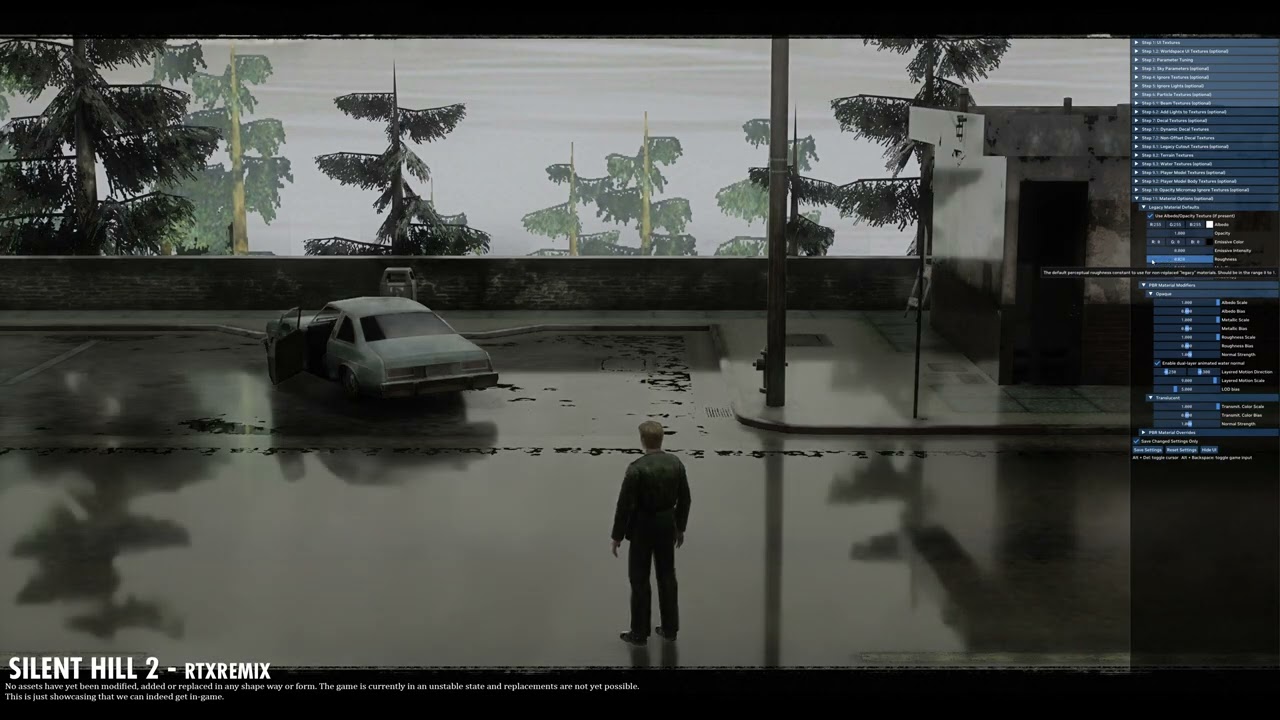
So this is just a short little video of me running about the observation deck, just showcasing that RTXremix can hook and run in Silent Hill 2 enhanced edition! Some tweaking of the settings and disabling of some of the enhanced fixes is needed for this to run.
I'm on a 2070 super so my performance is not fantastic by any means.
The game is cu...
Done did a little video just showcasing the game running
Nothing special to look at really, just neat to see it in action
vagrant hazel
I know I can't start replacing assets yet! Buut I just kinda felt like playing about regardless so I started building a blockout of James's car! Super WIP stuff ofc, no textures or anything applied at all so far.

 hexed gyro
How do I get past the main menu? Lol
I cant see anything, and when I press enter without moving the selection, it just exits
vagrant hazel
hexed gyro
I cant see anything, and when I press enter without moving the selection, it jus...
#1099999195898847363 message
@gaunt wedge Could you pin the OP in here? For ease of access
 vagrant hazel
You're most likely in the opening bathroom
hexed gyro
Im pretty sure im in an apartment complex?
vagrant hazel
Did you load a save?
vagrant hazel
Aah yeah okay! SO, you need to go under the lighting tab and start enabling fallback lights
hexed gyro
oh okay
vagrant hazel
SH2 itself doesn't actually have any light sources at all
The only actual light in the game is James's flashlight
Which I haven't actually tested yet, but I wouldn't be surprised if remix doesn't pick it up properly
hexed gyro
vagrant hazel
Aah yeah okay! SO, you need to go under the lighting tab and start enabling fall...
Where?
Im in the lighting tab
vagrant hazel
Uuuh shit I forgot where the setting is, 1 min
Dang I actually can't find it anymore lol
vagrant hazel
Oh? I don't get any fog at all hah
hexed gyro
 vagrant hazel
WOAH
hexed gyro
why does it look like thissss lmao
vagrant hazel
YEAH THAT'S A LOT
hexed gyro
ikr 😂
vagrant hazel
Actually, you might need to go in and mark some of your textures in the game set up tab!
I might have had this originally too now that I think about it
hexed gyro
So I set the car textures to a UI texture and its fixed???
hexed gyro

 hexed gyro
ohh okay
vagrant hazel
If you set it to these exact settings it'll create a little sphere light that still keeps the spook horror mood
vagrant hazel
It's good to do BECAUSE
hexed gyro
I dont wanna change stuff if its not gonna do anything rn
vagrant hazel
If you load the game from any other place than the start
hexed gyro
so ill wait lol
vagrant hazel
It will have zero lights
hexed gyro
yah
hexed gyro
vagrant hazel
It will have zero lights
so if I stand near the car, it looks like this

but I move away, and it goes foggy again

just thought it was kind of odd, thats all
vagrant hazel
Yeah I've noticed this too! Do you have "Volumetric lighting" enabled?
Also make sure you mark the distant lake texture as a Sky texture
It fixes a lot
There's 3 of them
 gaunt wedge
vagrant hazel
**OUTDATED**
|| With the current builds of RTremix, Silent Hill 2 Enhanced edit...
hexed gyro
gaunt wedge
vagrant hazel
**OUTDATED**
|| With the current builds of RTremix, Silent Hill 2 Enhanced edit...
hexed gyro
Where's the volumetric fog option?
vagrant hazel
Under "Rendering" - Froxel Radiance Cache/Voumetrics
hexed gyro
I don't know how you have so many tabs in there tbh
Like

i have WAY less tabs than you do
gaunt wedge
he's on a very old version
hexed gyro
ohh
vagrant hazel
Yeah I'm on 0.2
hexed gyro
lmaoo
gaunt wedge
many fixes have been implemented since then
vagrant hazel
Well my dumb artist brain hates fucking around with Github XD
gaunt wedge

MediaFire
this is a bit on the old side
but there ya go
i may just make a new one, since that has the bad bridge in it
vagrant hazel
Kim, yer a gem
If you could be bothered making one with the latest that'd be super appreciated
I recon zipping them up from time to time for the community would honestly be a good idea in general, the whole github thing is madenning
Or just give me a perforce set up haha
Although that'd demand accounts as well so not really helpful..
hexed gyro
vagrant hazel
Although that'd demand accounts as well so not really helpful..
so I set the those 3 values to 2000 and set the light to Distant
and

I only set it to distant to see how it looked
vagrant hazel
hexed gyro
so I set the those 3 values to 2000 and set the light to Distant
Oh no the light should be spherical
gaunt wedge
i'm not 100% sure distributing it like this is even okay, so i'm iffy on it. it should be given the licenses i saw, but i'm staying on the safe side
hexed gyro
yeah ik
hexed gyro
vagrant hazel
Oh no the light should be spherical
I did it just to see how it would look
hexed gyro
you would most likely also lower the values though in that case
gaunt wedge
MediaFire
vagrant hazel
Appreciated mate
hexed gyro
it still looks bad on the background lol
 vagrant hazel
Yeah if you mark the background as a sky texture it shouldn't recieve lighting from the environment
hexed gyro
I think I already did that
would it be a good idea to set some textures as UI textures for things like this?

this only happens when i walk down and the text appears
but otherwise. the textures are still there
and i set those textures as sky textures, this is how it looks with that lighting setup

yeah the textures disappear whenever a dialogue box shows up
 vagrant hazel
hexed gyro
would it be a good idea to set some textures as UI textures for things like this...
vagrant hazel
hexed gyro
would it be a good idea to set some textures as UI textures for things like this...
eah so I've not found what exactly causes this effect yet, an time you pick up and object or interact with anything it does it
hexed gyro
ah okay
vagrant hazel
gaunt wedge
https://www.mediafire.com/file/ucqir79fzbaimkw/Remix_6-5-23_Old_Bridge.zip/file
Which version is this specifically? Just so I can keep track
vagrant hazel
Oh we're not labelling them like 0.2.0 anymore? Or is this just an update TO that version? X)
hexed gyro
vagrant hazel
eah so I've not found what exactly causes this effect yet, an time you pick up a...
also, no textures in the bathroom?

for some reason
vagrant hazel
Now THAT'S peculiar
There WAS on my old version I believe
But viewing it with the updated one I just downloaded, you're right, no textures for me either
gaunt wedge
vagrant hazel
Oh we're not labelling them like 0.2.0 anymore? Or is this just an update TO tha...
these are development builds made between releases like 0.2.0
vagrant hazel
gaunt wedge
these are development builds made between releases like 0.2.0
aah roger that! Thank you Kim!
gaunt wedge
vagrant hazel
But viewing it with the updated one I just downloaded, you're right, no textures...
it could be an improperly marked texture. sounds like it
vagrant hazel
I'll check my old version just to make sure I'm not making this texture thing up
hexed gyro
I can still mark them as UI textures, but im pretty sure thats not the way to do it lol
 vagrant hazel
Hmm no neither version has the texture
I guess I just couldn't see it before because I only just added that sphere light hah
hexed gyro
yeah maybe
hexed gyro
vagrant hazel
Hmm no neither version has the texture
also, you see that random ball of light at the bottom right?

the ball of light isnt there but its reflecting it
vagrant hazel
hexed gyro
also, you see that random ball of light at the bottom right?
Yeah that's a reflection from the backup light
hexed gyro
where is the backup light, in this case? lol
because the reflection doesnt move with the camera
hexed gyro
hmm
gaunt wedge
hexed gyro
I can still mark them as UI textures, but im pretty sure thats not the way to do...
yeah, that just passes through the original
hexed gyro
any ideas on how to fix this?
 vagrant hazel
Yes! It's proper jank though, so that's actually one of the sky textures you marked from before! After the observation deck the game seems to attach one of the lake view textures as a screen-space kind of background texture to the whole game
It's why we can see lights if we keep playing from here, but if we re-load from somewhere else and that lake texture is never loaded in, we don't get a skybox
So basically, you can fix it by adding the skybox textures to the ignore textures
That will however break the observation deck
HOWEVER! That shouldn't be an issue once I can get in and actually modify the assets.
ALSO! Thanks for sitting around and doing this with me haha, it's really fun having someone else onboard!
hexed gyro
haha its okay
I like messing around with a bunch of stuff
I was kinda hoping you werent getting annoyed by my constant screenshots and questions
vagrant hazel
I LOVE IT ^^
 vagrant hazel
Oh damn, I have the fog working by just marking the fog texture as UI
But it looks pretty damned shite
It looks much better on your end
vagrant hazel
That looks like the stone walls texture though
hexed gyro
yeah
thats why I was wondering why it does that lmao
I feel like the stone wall texture shouldnt bring fog back?
 hexed gyro
ohhhhhh I thought that was like, a water texture
this is a closeup of the texture I marked
 vagrant hazel
I thought so too at first, but there IS no water
hexed gyro
well there is??? but only as part of the image used in the background
vagrant hazel
AND, that texture is basically always loaded in the game, even when you're in the city
hexed gyro
true
vagrant hazel
Damn your image looks really nice and clean though, what card are you on?
hexed gyro
lmao what is this
 hexed gyro
vagrant hazel
Damn your image looks really nice and clean though, what card are you on?
hexed gyro
vagrant hazel
Damn your image looks really nice and clean though, what card are you on?
4090
vagrant hazel
I'm on a 2070 super so my performance is proper jank
Aaah yeah that explains it haha
hexed gyro
lmao
vagrant hazel
hexed gyro
lmao what is this
THAT HAPPENED TO ME TOO! When I tried marking that fog texture as a "particle" texture
It just goes haywire
hexed gyro
since getting it, i've just been super interested in anything RTX based, im already a 3d artist so Cycles in blender is my go to raytracing platform
hexed gyro
vagrant hazel
THAT HAPPENED TO ME TOO! When I tried marking that fog texture as a "particle" t...
For me i just unmarked the brick wall texture as a UI texture lmao
vagrant hazel
Oooh neat to hear! I've been an industry artist in various positions for about 10 years now
T's my main source of income
vagrant hazel
"It's"
hexed gyro
ohh
vagrant hazel
hexed gyro
For me i just unmarked the brick wall texture as a UI texture lmao
Ooh woah, that's weird
Yeah I think the fog is probably going to be a pretty huge issue to overcome going forward haha
Espeically since remix doesn't seem to have any kind of distance fog
Which is a HUGE problem for us X)
hexed gyro
Yah
I set the fog texture as a UI texture and it looks like this

the brick wall texture isnt a UI texture anymore either
gaunt wedge
have you guys tried setting it as particle?
vagrant hazel
 hexed gyro
for me it just disappears when I set it as particle
 vagrant hazel
For me it's insanely strong
vagrant hazel
I gotta double check that actually, 1 sec
I vaguely recall it disappearing when set as particle now that you mention it
hexed gyro
hey wait
i see the light

I turned the sphere light into a flashlight shape
but thats the same light
just to the right of James
gaunt wedge
particles are pretty strong. they're not as transparent as they could be
i'm sure there's a way to tweak it though
hexed gyro
gaunt wedge
particles are pretty strong. they're not as transparent as they could be
for who?
vagrant hazel
Hmm, so with the old version of remix it DOES just disappear when marked as particle
hexed gyro
hmmm
vagrant hazel
But I tried it again now and it seems to work
hexed gyro
wait
vagrant hazel
Yeah but try loading into a later segment with it like in the town
It's so bright that you can't see anything else
hexed gyro
I kinda like how this looks
 vagrant hazel
Yeah that's legit really nice hah
hexed gyro
ikr haha
gaunt wedge
is that with volumetric fog disabled?
gaunt wedge
that is for fog, basically
vagrant hazel
And sh2 has no lights
gaunt wedge
it doesn't quite work that way
hexed gyro
im getting some funky edges
 gaunt wedge
hexed gyro
im getting some funky edges
gaunt wedge
hexed gyro
im getting some funky edges
yeah, that's the bloom effect i was referring to
i'm not sure how to properly tweak volumetrics, lol
vagrant hazel
Yeah but 90% of the game doesn't have a skybox
hexed gyro
no I mean the edges of the walls, floors, etc
gaunt wedge
ah, i see
vagrant hazel
It didn't need any skyboxes due to the fog
gaunt wedge
i recall seeing a deep dive on the PC port of this game, and i'm very sure i remember there being issues with the geometry like that
gaunt wedge
vagrant hazel
Yeah but 90% of the game doesn't have a skybox
but you can still see in-doors, right?
vagrant hazel
No
You have to use a fallback light to see anything in this game
The observation deck is the only place I've seen so far that has a skybox texture that can light things
James flashlight is the only lightsource sh2 actually has
gaunt wedge
Note that disabling this option does not disable the froxel radiance cache as a whole as it is still needed for other non-volumetric lighting approximations.```basically my understanding of this is that it does provide fog
vagrant hazel
Hmmm... well there are no settings for it that I can find
hexed gyro
this scene is so goofy now
 vagrant hazel
I mean it's technically fog yes
hexed gyro
you can see everything so clearly
vagrant hazel
But not distance fog
gaunt wedge
vagrant hazel
Hmmm... well there are no settings for it that I can find
it's right underneath the setting
 vagrant hazel
gaunt wedge
it's right underneath the setting
vagrant hazel
gaunt wedge
it's right underneath the setting
Yeah but that's still light based no?
It wont help if there's no lightsource
gaunt wedge
indoors you need to have some amount of light, pretty much no matter what
Remix can't do anything without it
vagrant hazel
Yeah, it's just the fallback light atm
gaunt wedge
yeah
basically the volumetric settings should replace the original fog for this game at some point in development. however it will be hard to re-capture the original feeling
iirc the PS2 version of the game used a fake volumetric lighting system for the fog? but the PC port couldn't replicate it entirely
vagrant hazel
Naw it was just distance fog
What couldn't be translated to the pc was the 2d fog layer
Because the ps2 had a funky 2d post process like feature

The distance settings seem to have no effect what so ever, even if you slam in insanely small or large numbers it changes nothing
hexed gyro
I turned off Eye Adaption and it got a lot darker

because its not adapting to the skybox anymore
thats technically how it should look
vagrant hazel
Oh geez there's eye adapation? I didn't know
Yeah that needs to go oofff
Nice find
vagrant hazel
I can not begin to Express how much I hate auto exposure, unreal is the same way
hexed gyro
like dont get me wrong, I like it because you can see

but thats not how the game should look
gaunt wedge
with Remix it seems to be more important than in other games
unless you have perfect light placement, a scene can go from being okay to too bright or dark very quickly
also when there's not enough light = tons of ghosting
hexed gyro
vagrant hazel
I can not begin to Express how much I hate auto exposure, unreal is the same way
oh and set tonemapping to global

it just makes it a tad bit brighter
gaunt wedge
this is really early in development still guys 😛
vagrant hazel
Hah yeah no I'm aware! Just goofing
Killing the motion blur fixes a lot of my ghosting issues
gaunt wedge
gaunt wedge
with Remix it seems to be more important than in other games
regarding this, i just ask you guys keep an open mind. path tracing in games is very different than traditional systems, and there's multiple ways to get the look you want.
you also need to pay attention to the stability of the image, and whether or not it has enough light to be stable
i dunno what past experience you have, but it takes some adjustment
vagrant hazel
Aye! I've worked as an art director for a good time
hexed gyro
gaunt wedge
this is really early in development still guys 😛
shhhh we can complain to ourselves lol
its fun
vagrant hazel
I think we should leave auto exposure and such off for now until i can get real pbr assets in here
vagrant hazel
We CAN swap texutres atm, but I'm going to avoid that
So I'm waiting until mesh replacements actually work
gaunt wedge
vagrant hazel
I think we should leave auto exposure and such off for now until i can get real ...
makes sense. it just seemed like you were gonna abandon it forever, lol
hexed gyro
I was about to say, can you replace normal maps?
gaunt wedge
yeah
vagrant hazel
gaunt wedge
makes sense. it just seemed like you were gonna abandon it forever, lol
AW HELL NAW
 vagrant hazel
I've already started blocking out James's car
gaunt wedge
you'll hate me, but i've never played MGS
hexed gyro
You made that??
gaunt wedge
vagrant hazel
nice work
vagrant hazel
hexed gyro
You made that??
MAKING rather, but yeah
hexed gyro
gaunt wedge
you'll hate me, but i've never played MGS
Same, I just know it used it
gaunt wedge
ah. i didn't, lol
vagrant hazel
I'm in this project for the long run, I fully plan on remastering every single fucking asset in the game manually
hexed gyro
for example, theres a boss thats scared of bees, so you can actually trap bees and let them out during that fight, and the boss will get scared and run away
hexed gyro
vagrant hazel
I'm in this project for the long run, I fully plan on remastering every single f...
exactly, we dont know what the remake is gonna be like but its safe to assume the gameplay wont be the same
hexed gyro
i'd be happy with a remaster of the current SH2 tbh
vagrant hazel
gaunt wedge
how long did it take you to do that? lol
Couple of hours
hexed gyro
vagrant hazel
Couple of hours
Teach me your ways???
gaunt wedge
meanwhile i can barely load the right file in blender
hexed gyro
lol
vagrant hazel
hexed gyro
exactly, we dont know what the remake is gonna be like but its safe to assume th...
Yeah this is my thoughts on it as well, I don't really like the look of the remaster and I have VERY strong feelings about the developer Bloober team
 vagrant hazel
hexed gyro
Teach me your ways???
vagrant hazel
hexed gyro
Teach me your ways???
Honestly I've just been doing this for a very long time
My first commercial game I worked on was Amnesia: A machine for pigs
Moved on to being an intern on SOMA after that
vagrant hazel
Mmhm aye
hexed gyro
im friends with a guy that worked on Rage 2
vagrant hazel
Oh neat! I did a games dev education back in 2012 so I know folks left and right
Very handy haha
hexed gyro
"friends" we dont really talk, he was gonna help me on one of my small projects but idk if thats happening
gaunt wedge
vagrant hazel
My first commercial game I worked on was Amnesia: A machine for pigs
that's pretty cool
what position did you have?
vagrant hazel
gaunt wedge
what position did you have?
I was still in school at the time so I was just assisting them with various props during my spare time
gaunt wedge
i liked the art direction quite a bit
hexed gyro
I also know a guy that is currently working on the new Fable with Playground, but hes kind of an ass lmao
vagrant hazel
So many of the chairs, pianos and random furniture you'll find around
gaunt wedge
vagrant hazel
I was still in school at the time so I was just assisting them with various prop...
makes sense. still pretty cool 😛
i hope one day i'll be as proficient as you with models, lol
hexed gyro
gaunt wedge
i hope one day i'll be as proficient as you with models, lol
Can I see some of the models you've made?
vagrant hazel
Honestly just keep at it and learn how to cheat as much as possible lol
hexed gyro
im not as skilled as Traggey but, eh
gaunt wedge
i can, and i can add normal maps and all that
hexed gyro
ooh
gaunt wedge
but i suck at actually shaping it into something meaningful
lol
i'm better at modifying existing models for that reason
hexed gyro
would you want me to help you with it someday?
because tbh sometimes, making a model from scratch can be easier
gaunt wedge
that'd be great, thank you
hexed gyro
often times, the model used in a game has messy geometry but it works for what they need
gaunt wedge
i learn better from trial and error than following tutorials, but i learn even better from someone walking me through it
and yeah, i've run into that a few times now
vagrant hazel
I've worked as a games art teacher for a while as well so I'm also happy to help with anything I can
gaunt wedge
i'm going to be doing most of the model work for the game i'm working on with Remix, so i need to figure it out fairly soon
vagrant hazel
Although I don't use Blender, so my knowledge there is limited to software-general stuff 😛
gaunt wedge
thank you 🙂
gaunt wedge
gaunt wedge
regarding this, i just ask you guys keep an open mind. path tracing in games is ...
also i'm sorry if this came off poorly. i just realized how hostile it sounds, lol
vagrant hazel
Nawh not at all, I totally get you! I've said the same thing myself to people on this very server haha
gaunt wedge
i was juggling 3 conversations 😛
and that's good then
i do need to go now unfortunately
i wish you guys luck with this game, and ping me if you need anything
 hexed gyro
tbh I get people like that all the time, I never know if they're being passive aggressive or if im just reading it that way so I usually just ignore it
vagrant hazel
Hah yeah I just generally lean towards people meaning good and being passionate about things
Helps filter stuff 😛
hexed gyro
vagrant hazel
https://tenor.com/view/thank-you-bow-michael-scott-the-office-gif-18616386
have you tried enabling Finalize With ACES? it makes the scene a bit darker but it looks a little bit better

imo
hexed gyro
vagrant hazel
Helps filter stuff 😛
also, less arguments lol
vagrant hazel
hexed gyro
have you tried enabling Finalize With ACES? it makes the scene a bit darker but ...
Oh, interesting that ACES isn't on by default!
That should definitely be on, as it's very good for keeping consistency across monitors
vagrant hazel
Well it's usually really nice for PBR style projects
hexed gyro
Yeah true
also, what should I do about these ripped posters?

they're being lit too well
vagrant hazel

ArtStation
Finally got time to sit down and finish an older project of mine! He's been in the making for quite some time due to just, being busy! Feels great to finally have it finished!
This one is purely 100 % handpainted in 3Dcoat, no bakes!

ArtStation
Gnox the Pungent is your typical all-over disgusting gangster boss, he enjoys surfing, romantic walks on the beach and is a HORRIBLE cook!
Created for the Handpainters Guild monthly workshop challenge!
But my primary artstyle is Handpainted stuff
hexed gyro
oh nice
vagrant hazel
And ACES RUINS handpaitned textures
hexed gyro
lmaooooo
vagrant hazel
hexed gyro
also, what should I do about these ripped posters?
I found marking them as Decals helped!
hexed gyro
I cant seem to find the textures for them
its also part of the fence as I get close enough
 vagrant hazel
They'll highlight the meshes as green when you hover over the texture
vagrant hazel
Yeah it's an issue atm, the assets share textures a lot
So some decals are on sheets with non decals
 vagrant hazel
Oh fuck!
hexed gyro
but now the game basically has no rtx applied
vagrant hazel
Aah yeah you might have just passed the raster through
hexed gyro
so it seems to be 1 step forward, 2 steps back
yeah
I mean I set one of the textures as UI texture lol
it might just be doing everything all at once
vagrant hazel
Yeah UI marking it basically can just rasterise it
So we should really avoid that where possible
hexed gyro
Yeah
some random assets are appearing through the fog

i still havent found out how to fix the posters lol
dirt around a vent, fence
hexed gyro
lol
also, idk why the fog is so damn thick, like way thicker than it was on your screenshot
 hexed gyro
I also cant set it as UI texture because that also just makes it rasterized

this is with the fog texture marked as particle
 vagrant hazel
Haha yeah it's a real mystery, settings it as particle actually works for me
Are you sure you disabled enhanced fog in the settings for enhanced edition?
hexed gyro
vagrant hazel
Are you sure you disabled enhanced fog in the settings for enhanced edition?
im not sure, lemme check
Im not sure why there's a light source
I turned fallback light to never
vagrant hazel
Thaaats strange
hexed gyro
ikr
vagrant hazel
Oooh nono it makes sense
So the game doesn't actually have a light source for the distance stuff right?
hexed gyro
yeah?
vagrant hazel
That black fadeout isn't from a light
It's just a distance fog of war shader kind of thing
hexed gyro
ohhh
vagrant hazel
I think it's a shader too because it doesn't work right
It disappears at certain angles
hexed gyro
any info about this blue glow from dead enemies?
 hexed gyro
vagrant hazel
It disappears at certain angles
hexed gyro
vagrant hazel
It disappears at certain angles
Yeah I noticed that too
vagrant hazel
I get the same blue glow when attacking enemies too
The blood textures just seem to look that way
hexed gyro
ah
vagrant hazel
Not sure WHY though
They don't in the normal game
You know what
It could be the "Increase blood pool sizes" fix
Maybe Enhanced edition uses a shader for it
Which would break it in this
I'll disable and try
 vagrant hazel
Also did you manage to get rid of the fake shadow mesh under james?
I don't see it in your screenshots
hexed gyro
not yet
vagrant hazel
But it's here on mine, and it's like, white
hexed gyro
it just doesnt show up sometimes
vagrant hazel
Aaah fair
Naw still blue even with fix off
Are you also getting the vertex imprecision problems?
hexed gyro
vagrant hazel
Are you also getting the vertex imprecision problems?
sometimes, but not a whole lot
like, earlier on it happened only when I took a screenshot
vagrant hazel
Mhm! Good to know it's consistent across our systems at least

 vagrant hazel
Wait you STILL see it???
hexed gyro
Yep
vagrant hazel
For me it only loads if you load from the observation deck
 hexed gyro
Wait your character has shine???
vagrant hazel
I think I know what's up with the bathroom
hexed gyro
vagrant hazel
I think I know what's up with the bathroom
SHH
hexed gyro
hexed gyro
Wait your character has shine???
HUH???
vagrant hazel
Whatever that effect is that's causing shit to go white when you're interacting with objects
That same filter is applied to the bathroom
hexed gyro
yeah thats what I assumed
vagrant hazel
hexed gyro
HUH???
Oh yeah under the "Materials" tab at the bottom under where you set your texture settings
You can adjust global material settings
It affects EVERYTHING
But it's fun to play with
Make everything super reflective
hexed gyro
HELP

lmao
i dont rlly need help, ik what option caused this
but you can see the blood is just one big blue shape now
vagrant hazel
hexed gyro
HELP
You're in AO bake land now!
 vagrant hazel
Hahaha slap an RTXON logo on there
hexed gyro
lmaooo
how's this?

this would only be improved with working fog, and enhanced textures/models now
vagrant hazel
Man this makes me wish i could run anything more than ultra performance dlss
hexed gyro
Yah it's super cool haha
for some reason my rendering was set to low, so I set it to Ultra (or whatever the highest is) and it turned blue
 vagrant hazel
Ah yes, blue. The superior more expensive to render colour.
 vagrant hazel
Ikr? Kinda sexy
hexed gyro
GTA V lmaooo
just because its pretty much daytime with nice reflections
im not a fan of the blood floating off of the floor though, but eh
maybe all blood does that
vagrant hazel
Hmmm yeah... That's probably not something we'll be able to fix either
Unless the blood puddles are just meshes they're spawning
In which case we could shift their pivot point
hexed gyro
Wouldn't it make more sense to be pre placed?
vagrant hazel
Yeah given how this game loads in they're probably just part of the general area mesh, true
hexed gyro
But that would be worse overall for us
vagrant hazel
Naw that actually makes it easier for us
Means we can just grab the geo and move it down
As soon as the game gets stable hashes that is
WHICH I ACTUALLY HAVE NOT TRIED WITH THIS NEW VERSION
Sooooo maybe
hexed gyro
When though? I noticed with showcases they used a full on editor style program that let's you fly around, click on meshes, export into a 3d program, modify, import it back in, etc
Even change light sources and stuff
That will be amazing when it comes out
vagrant hazel
Yeah that's Omniverse Create
I've managed to get captures from SH2 and loaded it into there
A little jank bit it does work
The only problem is the hash generation right now
Because whilst we can get assets OUT of the game, I'm not sure we can put new assets IN yet
That's how I grabbed James's car for example
Just exported it from out the level scene from omniverse
And used it as a reference for the new mesh I'm making
gaunt wedge
i have returned
hexed gyro
No because modding is gonna go crazy when this gets really good
gaunt wedge
geometry hash stability isn't the only issue right now
some games, despite having stable hashes, have this bug:
come on, embed please
basically the light is attached to a mesh, but it's actually attached to the player for some reason
imo you guys should try mesh replacement or light placement and see if it works, but you may run into this issue (which has no solution as of right now)
hexed gyro
gaunt wedge
imo you guys should try mesh replacement or light placement and see if it works,...
I couldnt do that lol
i barely know what im already doing
but I do want to learn and get better with modding in general
gaunt wedge
it requires omniverse
vagrant hazel
gaunt wedge
imo you guys should try mesh replacement or light placement and see if it works,...
Yeah agreed! This is what I want to try and tackle ASAP.
What was the way of displaying in-game hashes?
gaunt wedge
well, you can technically do it in text, but i wouldn't recommend it
hexed gyro
I made a "mod" for fallout 3 that replaces the main menu music with Fallout 4's main menu music
gaunt wedge
vagrant hazel
Yeah agreed! This is what I want to try and tackle ASAP.
What was the way of dis...
debug view -> Geometry hash view
vagrant hazel
Cool, and flickering colours = unstable yeah?
gaunt wedge
the newest build i sent you guys has an updated version that'll show the stability for captures and mesh replacement, rather than just for rendering
gaunt wedge
vagrant hazel
Cool, and flickering colours = unstable yeah?
yes
is this game sold on any platforms?
hexed gyro
Silent Hill 2?
vagrant hazel
Nope
hexed gyro
I dont believe so
gaunt wedge
mm
vagrant hazel
Gotta have a CD version
gaunt wedge
so much for me testing it
hexed gyro
PS2 if you can find it, might be the easiest way
but you can also get the enhanced edition online
vagrant hazel
I know there's an archived version online but yeah, that's yarrharr stuff
hexed gyro
yeah lol
vagrant hazel
I'm just lucky to actually own like, 5 different versions of this game lol
hexed gyro
my friend, well "friend" is absolutely obsessed with SH2
he started to hate me over a project difference tho, he ended up blocking me
he would love this
he was the one who sent me the link to the game
gaunt wedge
i can't imagine blocking someone over something like that
vagrant hazel
WELL
Good news
The player charcter is a fucking disco ball, which is to be expected
Buuuut
hexed gyro
basically I was kinda nagging him about helping him on his project (he had a huge team of people that had no skills with making movies or games) and so I was offering to help (I also really love working on projects so I was kinda desperate to work on anything) and he had enough so he blocked me lmao
lmaoo
vagrant hazel
The environment hashes SEEM stable
hexed gyro
ooh nice
gaunt wedge
hexed gyro
basically I was kinda nagging him about helping him on his project (he had a hug...
lol
hexed gyro
gaunt wedge
i can't imagine blocking someone over something like that
but yeah fr, my friend would have loved this whole project
hexed gyro
right? like I do admit I was kinda pushy about it
 hexed gyro
but at the time I was desperate to work on anything horror themed
gaunt wedge
i'd just outright tell the person that it's just not gonna happen (in a kind way)
vagrant hazel
But everything else seems completely fine
gaunt wedge
nice
you can try adding this to rtx.conf: rtx.geometryGenerationHashRuleString = positions,indices,texcoords,geometrydescriptor,vertexlayout
hexed gyro
gaunt wedge
i'd just outright tell the person that it's just not gonna happen (in a kind way...
the problem is, I wanted to make a game, and he wanted to make a film, so I suggested we work on both and just share assets where possible, but he said no and I was like "but ill be making all the assets, so you'll be getting them for free" and he still said no lol, and ended up blocking me
gaunt wedge
this will only improve rendering though, not capture
hexed gyro
vagrant hazel
Nice!!! what does all of this mean!
gaunt wedge
i guess it depends on how pushy you were, but it doesn't sound like enough to block someone over still
oh well, i guess 😛
vagrant hazel
hexed gyro
Nice!!! what does all of this mean!
It means THEORETICALLY
We should be able to replace meshes
gaunt wedge
Remix has a lot of requirements for meshes unfortunately
vagrant hazel
Although the tools for it are not out yet, it CAN be done manually
vagrant hazel
gaunt wedge
Remix has a lot of requirements for meshes unfortunately
Oooofh?
gaunt wedge
#1096847508002590760 message
#1096847508002590760 message
hexed gyro
this is really the years for remakes/remasters
gaunt wedge
it's enough to discourage me from even trying right now, lol
hexed gyro
think of the current remakes/remasters, plus all these fan remasters that will happen when it gets a lot better
vagrant hazel
gaunt wedge
https://discord.com/channels/1028444667789967381/1096847508002590760/10968477517...
Oh jeepers
Yeah I'm not touching that lol
gaunt wedge
placing lights is significantly easier though
and replacing textures even more so
i would suggest trying those out
vagrant hazel
I won't be doing any texture stuff because that'd be a waste when my intent is new assets for everything regardless
HOWEVER I did poke at placing new lights
But lots of issues involved
gaunt wedge
what did you run into?
vagrant hazel
1: World loads in upside down

2: Adding lights don't seem to actually produce any light
 hexed gyro
gaunt wedge
placing lights is significantly easier though
hexed gyro
gaunt wedge
placing lights is significantly easier though
ooh how how how
pls pls pls
gaunt wedge
hexed gyro
ooh how how how
#1096847508002590760 message
vagrant hazel
I thought the editor itself would at least react to it when done that way
hexed gyro
nvm it looks complicated
vagrant hazel
I haven't tried importing it in-game yet
gaunt wedge
vagrant hazel
I thought the editor itself would at least react to it when done that way
it's a bit iffy. i always have the editor and the game open. when i edit a light, the change shows up in the game when i click back into it
so it works out, but it is annoying
vagrant hazel
Oh shit wait it's THAT realtime?
gaunt wedge
for that to update, you need to have a mod.usda file already made, and the game needs to have loaded it (you'll see it in the bottom left)
gaunt wedge
vagrant hazel
Oh shit wait it's THAT realtime?
ya, it updates from the mod.usda file when you click back into it
vagrant hazel
Ooooooooooooh...
Although now the tabbing in and out issue will come back to bite me hahahaa
gaunt wedge
texture replacements don't work quite so fluidly, but lights usually do
gaunt wedge
vagrant hazel
Although now the tabbing in and out issue will come back to bite me hahahaa
what issue?
vagrant hazel
Y'know what, I shall attempt this tomorrow, but it's 4 AM now and I should really get my arse to bed hah
gaunt wedge
lol, i can relate. i've had many late nights messing with Remix now
vagrant hazel
gaunt wedge
what issue?
Tabbing out ot SH2 with remix running is inconsitently disabling my ability to click on anything with my mouse
gaunt wedge
ah right
vagrant hazel
Sometimes it still works, sometimes it works for a few minutes, and sometimes it completely disables my mouse LMB input
I have to CTRL ALT DEL and open taskmanager before I get control back
Super strange
hexed gyro
vagrant hazel
Sometimes it still works, sometimes it works for a few minutes, and sometimes it...
huh? thats kinda weird
gaunt wedge
i've had that with many older games
hexed gyro
that doesnt happen for me
gaunt wedge
is this a dx8 game btw?
hexed gyro
saying that, I cant click on anything anyway
vagrant hazel
I THINK it's DX8 but Enhanced Edition has its own 9 wrapper
vagrant hazel
hexed gyro
my mouse doesnt appear
Alt + Del to show mouse
gaunt wedge
okay. if it's DX8, dxwrapper may have some settings you can use to fix the mouse stuff
vagrant hazel
It doesn't happen it the normal version of the game though
It only happens once remix is added to it
AND
Enhanced edition has their own input manager thingy
Which can't be fucked with
The very latest version they shifted to something new
gaunt wedge
vagrant hazel
It only happens once remix is added to it
yeah, dxwrapper has some overrides that may help still
i dunno about enhanced edition though
that sucks
vagrant hazel
Enhanced Edition is the best choice due to their widescreen support and fixes and all that, but it's also the ONLY version that actually works
Because the base game comes with a specific type of DRM that modern versions of windows blocks
Enhanced edition disables it, making it kind of the only way of running the damned thing hah
But oh well, I really do need to hit the sack now! It's been a pleasure tonight folks! Looking forward to seeing what we come up with in future!
hexed gyro
vagrant hazel
But oh well, I really do need to hit the sack now! It's been a pleasure tonight ...
Nice, seeya!
 vagrant hazel
I've been poking away more at that car mesh today for the day when we can eventually replace meshes
Buuut I suppose it'd be a good idea to go over and marking more textures today
You can also add lights TO textures, so I think maybe finding the flashlight texture and attaching a light to it could be on the menu!
hexed gyro
Does marking textures help much?
Because even though I have the RTX side working (apart from the fog), marking textures as anything else either does nothing, or breaks the rendering
vagrant hazel
Going through it all will help us identify issues that will need overcoming, one of the things with remix is that we're still stuck with the original drawcalls and render distances etc
Perhaps not marking textures specifically
hexed gyro
Yeah, tbh adding a new sky box would help a ton from the get go
vagrant hazel
But just generally playing through and seeing what issues we can find
hexed gyro
And with new hardware, draw distance shouldn't be an issue if it was possible to disable it and maybe just cull the parts we can't see
vagrant hazel
The problem will be figuring out HOW we're going to actually implement a skybox
Yeah I don't think the render distance will be an issue as soon as we have the fog issue solved
We'll just do the same thing the original game does and HIDE that shit lol
Like, the original game doesn't really HAVE a skybox
So there's no mesh for us to hook into and just replace
vagrant hazel
I have NO clue! Haha it's not there on my end lol
hexed gyro
What do you see instead,
vagrant hazel
The only "Skybox" like thing the game has is that observation deck texture, and that one dissapears when starting the game from anywhere else so we can't rely on it
hexed gyro
What do you see in the city?
vagrant hazel
hexed gyro
What do you see instead,
I'm not in-game atm but I think it's just black for me?
Like if I don't apply that fallback light I don't see anything at all in the city
Just pure black
hexed gyro
Ohh, that's kinda worse actually
If it changes between black and white tho, depending on something, that means it can be edited, right?
Something is happening between our 2 games
vagrant hazel
Yeaah it could just be some texture that I've marked and you haven't
But in general I don't think the game will actually NEED a skybox regardless
hexed gyro
Yeah maybe
vagrant hazel
We should be good with just implementing a global light direction instead
hexed gyro
I don't think I've marked the sky textures you mentioned before actually
vagrant hazel
Because due to the fog you can't ever actually see the sky
hexed gyro
But why would it be that?
hexed gyro
vagrant hazel
Because due to the fog you can't ever actually see the sky
That's true
vagrant hazel
hexed gyro
But why would it be that?
Ah that might be it, that sky texture itself does attach itself to the camera as a screen space effect
It's really odd
hexed gyro
No because what if the "sky" is the white part of another texture?
Or black part perhaps, of another texture
vagrant hazel
I can SEE that sky texture when running around the city
But only if I load from the observation deck
If I load IN the city, it becomes black
hexed gyro
Ohh
vagrant hazel
So it's like the sky texture hooks onto the camera when it's loaded at the observation deck
But if you never go to the observation deck, it can't hook
I actually tested by loading somewhere else, getting the black sky and then running BACK to the observation deck
And doing that the texture does indeed re-hook itself
hexed gyro
hmm
could it be that the observation deck is just very far away?>
perhaps, outside of the "skybox"
and so it has to hook to the camera so you can still see it
vagrant hazel
I don't think so, because it doesn't actually attach itself as a screen space thing IN the obersvation deck, at least not in a way that you can see
hexed gyro
Hmm
vagrant hazel
Because the distant lake texture skybox thing is actually just 3 large planes that are pretty close to the rest of the scene
It's not until you enter the forrest walk that the texture is now a screen space effect
 vagrant hazel
But I think the safe thing to do there is to just nuke the skybox lake texture completely, that way it simply will never show up
hexed gyro
its brighter, implying that James is the shadow lmaoooo
vagrant hazel
And we'll just build a new diorama for the observation deck
vagrant hazel
hexed gyro
its brighter, implying that James is the shadow lmaoooo
HAH yeah that's what it looks like for me too!
It's really odd too because if you turn on volumetric lights, that shadow produces a blue glow
hexed gyro
I dont think that would easily be gotten rid of since its not a texture
vagrant hazel
As if it has an emissive map
vagrant hazel
hexed gyro
I dont think that would easily be gotten rid of since its not a texture
It actually does work if you just mark the skybox textures as "Ignore"
vagrant hazel
hexed gyro
How do I turn on volumetric lights?
Under that same volumetric fog tab that we talked about yesterday
hexed gyro
Do you know why marking something as "Player Model Texture" makes it invisible?
vagrant hazel
I THINK that's just a remnant from the original Portal implementation they did
Where you can use it to hide first person models and stuff
vagrant hazel
Which one is that? Not in remix atm
 hexed gyro
it doesnt disappear when I mark it as that tho actually
hexed gyro
vagrant hazel
Holy shit you gave James a lightsaber
Lmaooo, I marked it as World Space UI Texture
so I think its patching through to the skybox
with it being white
vagrant hazel
hexed gyro
it doesnt disappear when I mark it as that tho actually
It's probably so that you can hide the HEAD of a player model but not the body?
Not entirely sure, but I don't think we have to worry about those two settings at all since it's not an FPS game
 vagrant hazel
James = Jesus confirmed
hexed gyro
lmao ikr
hexed gyro
Lmaooo
whatever texture im selecting, is making me and that shop glow

it must be off back to the right somewhere
 vagrant hazel
Oh god XD
vagrant hazel
Aaah yeah that sounds like the funky thing I mentioned where you can't click on stuff
Happens to me too
Just have to restart the game I'm afraid
vagrant hazel
Oooh? 😮
hexed gyro
Basically, I can't use my mouse just because it moves so slowly
It's torture
So I just dont
I use keyboard instead
And I couldn't use my keyboard
vagrant hazel
Oooh yeah I've noticed that too at times
Does the game also lagg like crazy for you in the in-game menus/save stations?
hexed gyro
But I enabled the mouse and moved verrrry slowly to click on something, then I think I pressed tab?
hexed gyro
vagrant hazel
Does the game also lagg like crazy for you in the in-game menus/save stations?
I don't think so
Well the pause menu doesn't lag at all
vagrant hazel
Yeah the one you get from ESC works fine
But the save stations and the inventory screen lag something insane for me
hexed gyro
I'm gonna hook up my controller a sec
I have one of those knock off 360 ones
It's a good controller tbh
vagrant hazel
Ah yes, one of those where they just removed the X logo from the silver ball thing in the middle!
hexed gyro
Yeah lol
I like it, it works pretty well
I do have a real 360 controller to compare to aswell
the real 360 controller is a tab bit stiffer to move, thumbsticks, etc
the ABXY buttons are clickier, but not louder
hexed gyro
I dont have enough lmao
vagrant hazel
Don't even have a PS5, just bought the cotnroller because they're nice
hexed gyro
I have 3 Dualsense, 2 360 controllers, one of the new Duke controllers re released
vagrant hazel
I bought the Duke rerelease too! Love it for about half a year and then the left thumbstick and trigger broke
X) So fml
hexed gyro
for me, the controller doesnt feel as good for standard playing, just because its big lol
vagrant hazel
I'm a tall lad with big'ol hands so it fits me perfectly hah
hexed gyro
eh, how tall?
vagrant hazel
194
hexed gyro
idk what that is lol hold on
hexed gyro
it says 6 3
you're not rlly that tall are you?
jesus
your new name from now on, shall be
 vagrant hazel
Not terribly uncommon in scandinavia!
hexed gyro
El Gigante
vagrant hazel
Finding clothing in stores is a nightmare though X)
vagrant hazel
hexed gyro
**El Gigante**
Hahahaha XD As long as I get to smash huts I'm cool with that
vagrant hazel
There's 3 textures that appear if you go to the observation deck
They're all just pictures of the lake background
hexed gyro
Is it cool if I share my screen?
vagrant hazel
Yeah sure!
hexed gyro
It's just a lot easier that way
hmm
we need a voice channel
Streaming at the bottom?
vagrant hazel
Aaye
hexed gyro
idk if you're even talking, I dont have my headset on rn lol
vagrant hazel
Oh okay X)
hexed gyro
ok i have it on
hexed gyro
can you always hear me?
vagrant hazel
Updated the OP based on discoveries me and @hexed gyromade today during our lil' messing around session!
hexed gyro
We don't know if advanced filters needs to be off, but we assume it does because its adding post processing, I haven't had enough time with the setting to see if it affects much though
vagrant hazel

Google Docs
SILENT HILL 2 RTXremix documentation Using the Enhanced edition, launch the settings configuration tool SH2EEsetup.exe. Under the Display tab disable the following. -Adjust Colour Temperature -SMAA (anti-aliasing) -Restore brightness selector functionality -Simulate a CRT Sc...
We've made a google doc to contain the documentation, me and Zee are both editors atm.
hexed gyro
Hey, is anybody here and wiling to talk about the SH2 Remix progression?
vagrant hazel
If only we could pull off your lightsaber craziness with the flashlight!
hexed gyro
Ikr, but it doesn't seem to work lol
hexed gyro
I had an issue with the game menus, trying to access the Settings, Inventory, or certain pickups would cause the game to freeze visually, but not physically
I have finally landed on it being an issue with Remix, uninstalled Remix and the issue is gone
hexed gyro
I installed a clean Remix again and the issue has returned
vagrant hazel
hexed gyro
I have finally landed on it being an issue with Remix, uninstalled Remix and the...
Oh that's super interesting! I've at rare occasions found that a menu has frozen as well, nowhere near as consistent as you but it does happen
hexed gyro
vagrant hazel
Oh that's super interesting! I've at rare occasions found that a menu has frozen...
Oh you're back!
vagrant hazel
Bakc? I didn't die! Hahaha
hexed gyro
vagrant hazel
Bakc? I didn't die! Hahaha
I made a feet joke in dms and you still haven't seen it lol
The joke is wasted!!!!
vagrant hazel
Ooooh! MAH BAD! Been working ^^
hexed gyro
There goes my career as a comedian
vagrant hazel
pat there there
hexed gyro
🥺
 spark sandal
have y'all run into issues with the ingame menus (options menu, save menu) slowing to a halt FPS-wise while running remix with sh2?
vagrant hazel
spark sandal
have y'all run into issues with the ingame menus (options menu, save menu) slowi...
Yeah I've been dealing with this too, real nightmare
HOWEVER
If I recall correctly, this is an issue with Enhanced Edition, and not remix
Because I think I have it outside of remix too
I've googled about but haven't found any solutions for it, if you do figure something out I'd love to know!
vagrant hazel
If you lot do more testing on the game and figure things out that might be nice to the rest of us, please do post! I want to keep updating the Documentation google doc to cover as much as possible.
 paper zinc
vagrant hazel
https://docs.google.com/document/d/1hayGXNlAJZWOp2ivV8otdSMP23pbXk7DL-pfLq5ZJjU/...
paper zinc
vagrant hazel
https://docs.google.com/document/d/1hayGXNlAJZWOp2ivV8otdSMP23pbXk7DL-pfLq5ZJjU/...
Wait y’all got stable hashes 
vagrant hazel
paper zinc
Wait y’all got stable hashes <:blurryeyes:1051713989320654918>
Fuck yeah brother! I've been working on a replacement mesh for James's car to use as a tester
But the mesh import process is too bloody borked atm haha
paper zinc
New game to hyperfocus on lighting
vagrant hazel
Yeah! This'll be an interesting one because remix can't pick up the original games lights AT ALL
So everything will need to be relit from scratch
paper zinc
vagrant hazel
Yeah! This'll be an interesting one because remix can't pick up the original gam...


vagrant hazel
Lots of very fun issues to solve as well ❤️

Not touched it for a few weeks now due to work stuff
But there is where the car was at last I worked on it
paper zinc
Is there concept art of the game anywhere? Trying to get a vibe of what the game was intended to look like.
vagrant hazel
Honestly I think running the non-remix version of the game side by side will be the best way to get a feel for it
At least for my work going into this I'm very much aiming to not make it fundamentally different in any way, the remake is already doing that
paper zinc
Perfect timing for the rtx toggle
vagrant hazel
paper zinc
Perfect timing for the rtx toggle <:PeepoPlotting:1026313262524022855>
There's a toggle now? 😮
paper zinc
In the dev optimized build
vagrant hazel
Oooh! Welp, shame on me for not having set up the github stuff yet XD
paper zinc
I'll likely start getting some lighting in the game later today
vagrant hazel
Ooooooooh exciting! Looking forward to seeing what you do!
spark sandal
vagrant hazel
Fuck yeah brother! I've been working on a replacement mesh for James's car to us...
there's a level editor that works now btw!
for SH2 in particular, not RTX remix
supports obj import and export and custom textures

GitHub
Psilent pHill 2. Contribute to pmttavara/ph2 development by creating an account on GitHub.
 wary island
spark sandal
https://github.com/pmttavara/ph2
wary island
spark sandal
https://github.com/pmttavara/ph2
Virus.... hahaha
spark sandal
i can assure you it is not, i've used it myself
it's the level editor commissioned by the enhanced edition devs, this is just the repo for it
 bright roost
It's promoted by the team behind the silent hill 2 enhanced edition too
Even they mention that he makes the tool on live
spark sandal
it's really only for editing map geometry right now, nothing to do with placing props from the game (unless you get that model yourself) or otherwise
or lights, triggers, events, etc
it's good for remastering purposes which is what the enhanced edition devs need it for and good for what the dude i replied to seems to be doing
can also replace textures and materials
change material types
that sort of stuff
wary island
spark sandal
https://github.com/pmttavara/ph2
reup please beacuse have virus alert
spark sandal
wary island
reup please beacuse have virus alert
VirusTotal
gaunt wedge
i think they mean that they can't download it
spark sandal
gaunt wedge
i think they mean that they can't download it
ah, i'm not the maintainer of the repo lol
gaunt wedge
wary island
reup please beacuse have virus alert
try using a different browser to download it
vagrant hazel
wary island
have any project stand alone
I'm sorry what?
vagrant hazel
spark sandal
there's a level editor that works now btw!
Aah yeah I've seen! Neat stuff, probably wont help with this project but perhaps in future!