#Grand Theft Auto: San Andreas (GTA SA)
1 messages · Page 12 of 1
 gritty isle
 olive dragon
@gritty isle have You tried the installer? The installer should set everything up for You to fix all Your issues except muzzle flash. Which can be solved by forcing the game to use effects.fxp instead. You can do this via MixSets.ini
No3DGunflash = 1
Fix2DGunflash = 1
gritty isle
olive dragon
<@1312570225916514405> have You tried the installer? The installer should set e...
Is there a way to make the installer window smaller? I tried using it but the next button is out of reach?
gritty isle
olive dragon
<@1312570225916514405> have You tried the installer? The installer should set e...
Nvm. I figured out how to scale it. I'll update later on.
 warm thorn
Try setting the in game visual effects quality to medium. That should help fix the shadow problem.
gritty isle
olive dragon
<@1312570225916514405> have You tried the installer? The installer should set e...
Everything is working as intended now. Thanks for the help.
 analog sable
olive dragon
<@1312570225916514405> have You tried the installer? The installer should set e...
analog sable
olive dragon
<@1312570225916514405> have You tried the installer? The installer should set e...
but that's the default and it still doesn't work
analog sable
soo the foliage a little further away dissapears and the sky is green sometimes

 candid sapphire
analog sable
soo the foliage a little further away dissapears and the sky is green sometimes
candid sapphire
analog sable
soo the foliage a little further away dissapears and the sky is green sometimes
foliage is a gta sa issue unfixable as for as i know
candid sapphire
I never saw this green sky issue, idk if you have installed mods in your game or if it was not a clean install
candid sapphire
analog sable
😢
Their might be ways to fix it with remix but i don't know really
analog sable
candid sapphire
I never saw this green sky issue, idk if you have installed mods in your game or...
this is a clean install but the save is not but i don't think the save could be the reason
candid sapphire
could be
try with a new one
i know that my save without remix crashes when loaded with it
but my saves with remix loads perfectly fine
so definitely changes something
 magic scarab
candid sapphire
foliage is a gta sa issue unfixable as for as i know
magic scarab
candid sapphire
foliage is a gta sa issue unfixable as for as i know
It's already fixed, and the fix is in the latest update of proper fixes on patreon
#1097105394821759006 message
 split badger
It will probably get public
warm thorn
analog sable
soo the foliage a little further away dissapears and the sky is green sometimes
The sky color is likely caused by the time cycle settings. Probably need to make some adjustments to the time cycle settings to resolve the problem.
 solar cairn
if this water was in sa remix... revolutionary
 solar cairn
if this water was in sa remix... revolutionary
solar cairn
solar cairn
if this water was in sa remix... revolutionary
mixing this with the fallback light settings that i've been found will blow people's mind


 jaunty kestrel
solar cairn
if this water was in sa remix... revolutionary
jaunty kestrel
solar cairn
if this water was in sa remix... revolutionary
Literally it's a moving pbr image  you can add it to any game
 iron anchor
Literally to any, even in Doom if it would hook to Remix
jaunty kestrel
Wait i think I've told you this exact thing multiple times
jaunty kestrel
Thought so
solar cairn
iron anchor
Literally to any, even in Doom if it would hook to Remix
it already hooks🧐
jaunty kestrel
solar cairn
it already hooks🧐
😭
solar cairn
jaunty kestrel
😭
don't cry🥰
jaunty kestrel

solar cairn

vanilla water with terrain texture.

is there a way to assign custom terrain settings for different objects? this celashes with vehicles since vehicles use terrain textures too.
solar cairn
warm thorn
Try setting the in game **visual effects quality** to **medium**. That should he...
hey hemry, thank you for your hard job in creating the sa remix 😄, can we increase the water's enhanced asset resulotion?(or make it smaller, same)
i guess the resulotion makes it strange to be seen from close, if you look at water from a distance, it looks so beautiful and clear, but from close it looks like there are blue squares and borders in water
or making the water's enhanced asset smaller.
i'm figuring out something
what if we add a texture for puddles in the orginal game, and mark them as terrain texture?

the surface looks wet with terrain texture.
what if we do it for locazied points of surface? to add puddles.(which is possible via adding textures for puddles then marking them as terrain textures, but might it very hard since it modifies original game and we might need to put puddle textures on surfaces by hand in original game editor)
we could also make transparent-non transparenter points on that puddle texture so it won't look un natural.
warm thorn
solar cairn
what if we do it for locazied points of surface? to add puddles.(which is possib...
Actually, there's no need to mark it as a terrain texture. I think you've edited the terrain system's material properties to make it more reflective. We just need to replace the puddle texture with a highly reflective one in Remix, similar to what i did with the "bloody puddle" texture.
solar cairn
warm thorn
Actually, there's no need to mark it as a terrain texture. I think you've edited...
gta sa already has puddle texture?🧐
 warm thorn
solar cairn
gta sa already has puddle texture?🧐
warm thorn
solar cairn
gta sa already has puddle texture?🧐
#1097105394821759006 message
It sounds like you're having an issue with Moonloader. Your antivirus software may be deleting some Moonloader / Moonaddition related DLL files, which is causing problems. You'll probably need to check your antivirus settings and make sure it's not flagging and removing any of the required Moonloader / Moonaddition files.
solar cairn
warm thorn
It sounds like you're having an issue with Moonloader. Your antivirus software m...
thank you for your answer, will disable windows's realtime protection and install moonloader again 😄
solar cairn
solar cairn
what if we add a texture for puddles in the orginal game, and mark them as terra...
japan in 1945:
solar cairn
does it also workes with 0.6.0? i'm using it 😄

it looks like i haven't done this step yet(to open mod.usa file
it's still the same ;c : @./SARemix.usda@,
@./Meshes.usda@,
@./texture/effect/Effect.usda@,
@./Light.usda@,
@./Materials.usda@,
@./texture/sky/sky.usda@
]
i'm going to try single player, samp might be incompatitle with it.
solar cairn


 solar cairn
 solar cairn
solar cairn
solar cairn
sky looks so realtistic without any sky replacements.
but here it's unrealtiscally blue.
 solar cairn

beautiful glitches with samp objects and enabled directional lighting
it's far more amazing in a video, the lights colors changes and their location changes and new light sources appear whenever i move, creating a very colorfull and beautiful lighting🥰
solar cairn

disabled ignore directional game lights.
the lag is caused by the recorder.
 quaint heron
how the fuck do you have working samp ui while using remix
solar cairn
quaint heron
how the fuck do you have working samp ui while using remix
remix 0.6.0
also loco suggested a asi mod which converts's samp's chat to imgui😄(and the kills list) this worked for me on old remix versions but remix 0.6.0 is working out of box without any problems and any need to this mod. also this mod dosen't fix tab(players list) and the menu that tells you to enter your password.
solar cairn
best solution is remix 0.6.0 right now to compelety fix samp's ui 😄


 solar cairn

 umbral swift
looks so goof
good
but its too inconsistent . If they get consistency done in lighting and textures hell yeah. Id even pay money for a full done sa remix
solar cairn
i suggest to change the sky's brightness from 3 to 0.6 since it looks more realtistic.

 quaint heron
solar cairn
quaint heron
solar cairn
how much fps, and whats ur gpu
solar cairn
quaint heron
how much fps, and whats ur gpu
i thing close to 60 fps or maybe 50 fps, i haven't checked but it's too smooth(feels laggier without dlss frame generation)
rtx 4080 super
1920x1080.
quaint heron
solar cairn
rtx 4080 super
4080 super with 50-60fps
💀💀💀💀
what about me with rtx 3060
solar cairn
quaint heron
4080 super with 50-60fps
i haven't checked😁
solar cairn
quaint heron
what about me with rtx 3060
set dlss to performance😄
but it might look blurry
4k is so so laggy. unplayable
but smooth on performance. in 4k resulotion
(and dlss frame generation)
around 40-50 fps without dlss frame generation on 1080p full resolution.
with dlss frame generation it's 78 fps(monitor's refresh rate)
candid sapphire
The performance are still shit due to alpha textures, we just need to replace them nd the performance will likely double for everyone, we just need time
or if you just play with remix installed and not our mods, in the runtime you can toggle off alpha textures, better performance but a lot of meshes won't appear anymore
fences, trees, sign etc
solar cairn
i thought my graphics card couldn't run rtx remix at 4k with a smooth refresh rate😁 (with dlss frame generation)
quaint heron
solar cairn
around 40-50 fps without dlss frame generation on 1080p full resolution.
idk why people use 4k resolutions, 1080p is literally enough for me
if i had an rtx 4090 i'd still play at 1080p
quaint heron
candid sapphire
The performance are still shit due to alpha textures, we just need to replace th...
the main reason is because its literally patch tracing, which is literally the most realistic graphics engine
but also the heaviest in terms of FPS
candid sapphire
yeah but gpus aren't that shit, the 4080 should have like 100fps, it's still gta san andreas
umbral swift
by the time this project is finished we wont have to worry about RT performance anymore lol. We could just rawdog it.
solar cairn
candid sapphire
yeah but gpus aren't that shit, the 4080 should have like 100fps, it's still gta...
4080 super 120 fps then😢
candid sapphire
solar cairn
4080 super 120 fps then😢
kim on a 4090 went from 70 to 150 fps with alpha off, so yeah 4080 could have 120 fps
 opal sable
60 to 150 😛
 mossy flicker
omg
candid sapphire
Doing trees cuz alphas are mostly vegetation

1am here i'm doing 3d trees my life is random af
candid sapphire
i got them anyway on my epic account hehe
but idk
license block them in unreal i think
opal sable
the quixel asset giveaway from october to december didn't have that limitation
but you needed to select the indie license first

 opal sable
if you had the free UE tier before, then yes you can only use it in UE
#1211706192510844999 message
if you followed these instructions during that time frame, the assets are available for use in other programs
candid sapphire
i think i did i have a shit ton of quixel megascan in my epic library
even paid one that i know i never bought
cuz i never bought anything there


if there's any trouble i'll sue openai
candid sapphire
ok so
with the october to december thing they just gave everything for free to use everywhere to everyone that claimed the assets by that time
and i did
opal sable
but did you claim it under the UE license or the indie license?
because that still mattered
candid sapphire
indie
I just checked
standard license is indie
if it's unreal blocked it's UE license


chatgpt my savior 
opal sable
candid sapphire
that's again for fab, not from quixel's website
chatgpt is just giving you a lot of mixed up information lol
Fab's new license also has some terms in there that may restrict Remix usage. we tried emailing them for clarification but they didn't help at all
Quixel's standard license from before they switched to Fab was a lot more lenient
candid sapphire
opal sable
that's again for fab, not from quixel's website
but i have them and download them on fab
so why should i deal with quixel license if i don't even use quixel website
opal sable
fab's license is worse
you may not be able to use their assets in Remix without violating the license
if you got the quixel assets through Fab then you're stuck with the Fab license
if you got them through the older Quixel website then you have the better Indie license, which would permit Remix usage almost certainly
candid sapphire
I have them on quixel website too but i can't download them there, it just takes me to fab
 opal sable
i can still download them


 opal sable
yeah. until we receive clarification on if Remix usage is allowed, you're kinda screwed unfortunately
candid sapphire
i mean, you have them 
candid sapphire

solar cairn
candid sapphire
kim on a 4090 went from 70 to 150 fps with alpha off, so yeah 4080 could have 12...
i mean super xd
i thought rtx 4000 cards are too backward to run rtx remix

 solar cairn
candid sapphire
kim on a 4090 went from 70 to 150 fps with alpha off, so yeah 4080 could have 12...
solar cairn
candid sapphire
kim on a 4090 went from 70 to 150 fps with alpha off, so yeah 4080 could have 12...
it makes my game so laggier😢
what does alpha objects do? why they add alot of lag
opal sable
solar cairn
what does alpha objects do? why they add alot of lag
they're assets from the original game. things like power lines, trees, fences, etc. all use textures with transparency
Remix does NOT LIKE that, and will run horribly as a result
once these things are replaced with high quality modern assets it will run better
solar cairn
opal sable
turn off RTXDI and NEE Cache as well
thank you😄
solar cairn
water looks abnormal on remix 0.6.0 from distance
 iron anchor
you know, it would be funny to see Criminal Russia with RTX lighting


 unreal cloak
so funny
solar cairn
warm thorn
solar cairn
That's so true. My current job already exhausts all my energy...🥲
warm thorn
I've been able to pick up some new skills from working on VFX videos, things like photogrammetry, character modeling, clothing, hair creation, and rigging.
That will benefit my modding work aswell.
candid sapphire
solar cairn
True af lmao, I almost broke my back in a car accident and i'll have back pain for life now 😎
analog sable
candid sapphire
<:Sad:1286332010029387879>
port rtx remix to the unreal engine trollhd~1
 candid sapphire
analog sable
port rtx remix to the unreal engine [trollhd~1](https://cdn.discordapp.com/emoji...
candid sapphire
analog sable
port rtx remix to the unreal engine [trollhd~1](https://cdn.discordapp.com/emoji...
If I really do it https://www.youtube.com/watch?v=xIoqmgpYHlw

Made using Runway Gen-3
#aigenerated #ai #gta #gtasanandreas #gta5 #runway #gen3
candid sapphire
@opal sable General Restrictions. For any Content licensed to you under a Standard License, you may not:
- allow any third party to incorporate Content into their own products, services, or other projects (this means, for example, that you may not make Content available in world- or level-editing tools or templates or other modeling tools that allow works to be exported);
Fab + remix is a no
maybe quixel is different but fab itself is 
remix is a world editing tool and makes the assets available as it is so
no megascans for me
jaunty kestrel
Did you install the right thing? 😭
 lilac adder
yeah but it's kind of buggy and I wish I had time to participate in the development
coming back in 1 year to see how this is going
opal sable
candid sapphire
<@410198342300205066> General Restrictions. For any Content licensed to you unde...
we can pack assets into the RTXIO format, which may make it okay
the wording there is specific enough that it may be allowed
candid sapphire
OH
didn't know that
i checked their assets but all vegetations one i checked uses alpha
opal sable
really? the ones i had downloaded were full meshes
candid sapphire
opal sable
really? the ones i had downloaded were full meshes
i'm stupid i thought translucency was transparency
or whatever the name is
it's full mesh indeed
candid sapphire
Does this look good ?

 radiant axle
candid sapphire
Does this look good ?
radiant axle
candid sapphire
Does this look good ?
Looks weird.
No actual shape other than an oval clump, just branches randomly scattered.
Not saying it is not realistic, some trees are like that, but I'd look for some pieces with more style or interesting shapes
candid sapphire
i can't find a way to make it rotated around the tree instead of around the vertex its connected too
i used the hair system to spam the leaves
radiant axle
candid sapphire
i used the hair system to spam the leaves
Blender?
candid sapphire
yep
radiant axle
Use geo nodes bro. They're my goto strat for everything verge
candid sapphire
i never used that
radiant axle
The scatter points on surface has outputs for rotation and Rotation nodes that allow you to make local and global space rotations.
One tip: if you UV map the main trunk properly, you can plug the UV.y coord in a color ramp node to drive things like leaves size, density, rotation randomness, etc.
radiant axle
candid sapphire
i never used that
They're quite simple.
The nodes you'll be looking for are (iirc their names):
- Scatter Points on Surface
- Instance on Points
- Collection Info
- Rotate Rotation
- You will plug the input geometry node directly into the Points on Surface Thing node.
- Plug the Points on Surface output into the Instances on Points node
- Add all your leaves into a separate Collection
- Add a Collection Info node
- Plug that as input to Instances on Points node and tick "Pick Instance", and tick both options in the Collection Info node ("relative something" and the other thing)
- Plug the Rotation socket from POS to IOP node
- Plug the output of IOP node directly to the output of the graph.
You will see your leaves scattered with rotations based on your main trunk points, but the main trunk mesh disappears. That is expected
radiant axle
radiant axle
1. You will plug the input geometry node directly into the Points on Surface Thi...
- Add a Join Geometry node, and plug both the output of IOP and the graph geometry input to merge them both.
- Add a Realize Instances node and then plug the Join Geometry to it.
- Plug the Realize Instances node to the graph output. This will allow you to hit Apply Modifier.
- Add a Rotate Rotation node and plug the Rotation socket from POS to it.
- Plug Rotate Rotation on the IOP rotation input.
- Now you can play around with the values to see how they affect your leaves.
- Add a Random Value node, set it to Vector3/Float3 mode.
- Plug that to the other Rotate Rotation node input and tadaa 🎉 Random Rotation in local and global space
- Likewise add another Random Value Vector3 to the Scale input of IOP node to randomize the sizes.
candid sapphire
"They're quite simple"
radiant axle
Lmao. Yeah it looks like a lot but, trust me bro, it just works
candid sapphire
thanks but just for the nodes names
i never used it so i don't know which are the ones you want me to use
they're not the right ones
or maybe ur using blender 4 and their name changed idk
radiant axle
Yeah I don't remember from the top of my head. Gimme a sec
candid sapphire
Rotate Rotation and Scatter Points on Surface, I can't find them
radiant axle
candid sapphire
i never used it so i don't know which are the ones you want me to use

These two are the core ones
The Poisson Disk mode allow you to define a minimum distance between leaves, which is handy to control density and evenly scattering
candid sapphire
ok thanks i'm doing it rn
warm thorn
candid sapphire
Does this look good ?
Bro, tell you the truth we live in large scale simulated world. The trees are generated by math systems. So you don’t need to create the branches and leaves by hand. You can find some YouTube tutorials on using geometry nodes to do this.
#1097105394821759006 message
 round tendon
proper fixes now fixed the vegetation from further away bs : https://www.mixmods.com.br/2025/01/sa-proper-fixes/

MixMods
O maior site de mods para GTA San Andreas (e outros jogos) da América Latina.
 wintry mesa
Is it possible to run it in SA:MP?
candid sapphire
yes but i never tried it, i just saw people playing samp with it, check pins there is everything you need for the game to run properly, i can't help you to make it for samp tho
 nimble agate
wintry mesa
Is it possible to run it in SA:MP?
wintry mesa
nimble agate
+
nimble agate
wintry mesa
Is it possible to run it in SA:MP?
wintry mesa
nimble agate
+
Mb dm? bc i have many questions🙏
wintry mesa
nimble agate
+
Can you accept my friend request?
 manic forge
heloo
after patching the game to version 1, remix doesnt launch with the game
can someone help?
but it was working before patch
candid sapphire
manic forge
now my game just closes when loading in
candid sapphire
clean gta sa install + Auto installer
manic forge
alr
manic forge
Is it normal that the image gets fuzzy when you look at the sun during sunrise and sunset?
umbral swift
yes its the radiation
candid sapphire
manic forge
Is it normal that the image gets fuzzy when you look at the sun during sunrise a...
wdym by "fuzzy"
opal sable
no there's definitely something bugging out there
umbral swift
yes it does happen at 720
this is where tranformer model comes in handy. We see in 2 weeks
it not just happens in remix btw
same thing just way less strong can be observed in PT cp
manic forge
mossy flicker
i noticed that at 720p internal res
Yes
But at 1080p also
Only when i enable dlss
Imma try turing of ray reconstruction
umbral swift
does it happen at 1440p dlss quality?
manic forge
umbral swift
does it happen at 1440p dlss quality?
idk my display is 1080p
so ray reconstruction is the reason
i got it
 meager rivet
All we have to do is use SA Remix auto installer 1.2 over a clean GTA SA directory?
candid sapphire
meager rivet
All we have to do is use SA Remix auto installer 1.2 over a clean GTA SA direct...
Yep
And if you're having freezes/crashes, in the app you can install remix 0.5.4 which is a known stable version of remix but with worse performance
but try it as it comes first
meager rivet
candid sapphire
Yep
Well that's really convenient now, was more comlex last time I tries it. But for some reason my screen is really dark and draw distance a cuple of meters lol.
candid sapphire
 meager rivet
candid sapphire
meager rivet
candid sapphire
I deleted everything and started all over again, as soon as it downloads I will try it, thanks.
Will it continue downloading after this?
 candid sapphire
i never had this error, either your internet or github died through the download, you should stop and retry
meager rivet
candid sapphire
i never had this error, either your internet or github died through the download...
Ok, I'm deleting everything again lol. Fresh start.
Does it have to run on vulcan tho?
candid sapphire
yeah, remix works like that

 quaint heron
umbral swift
is 4070 super enough to run Rtx remix smoothly at 1080p native
quaint heron
umbral swift
is 4070 super enough to run Rtx remix smoothly at 1080p native
i cant find anyone here who asked
 warm sphinx
umbral swift
is 4070 super enough to run Rtx remix smoothly at 1080p native
warm sphinx
umbral swift
is 4070 super enough to run Rtx remix smoothly at 1080p native
I have a 4070 super, it depends on the game
candid sapphire
yeah, it depends on too much stuff to answer, remix runs differently on each game so it depends, i have better performance on cyberpunk ULTRA PT on than gta sa with remix, so the gpu isn't enough info to tell you how well it can run
solar cairn
umbral swift
is 4070 super enough to run Rtx remix smoothly at 1080p native
in gta sa, no.(without dlss fg)
rtx 4080 super in gta sa 1080p native with no fg:45-39 fps.
with dlss fg, probably yes.
 solar cairn
water looks abnormal on remix 0.6.0 from distance
solar cairn
solar cairn
water looks abnormal on remix 0.6.0 from distance
somebody please fix water for remix 0.6.0😢
 open coyote
is it possible to convert blocky low-poly sa models to smooth models in RTX remix?
candid sapphire
open coyote
is it possible to convert blocky low-poly sa models to smooth models in RTX remi...
Doing them by hands
there's no straight workflow to make something low poly to high poly other than subdivision spamming which is probably gonna look bad and be a wreck to run
Or if you know an AI that can model at a high quality 👀
open coyote
candid sapphire
Doing them by hands
what if we just extract and import models from definitive edition as it has high poly models plus it has pbr for every texture.
candid sapphire
Most definitive edition models are still the low poly ones
Also it's rockstar's models we can't just take them
it's just giving rockstar a reason to shut down our mod
you can do it for your own private mod tho
they won't know about it so who cares
open coyote
candid sapphire
Also it's rockstar's models we can't just take them
ikr
open coyote
candid sapphire
you can do it for your own private mod tho
yes thats something i could try
they are comparitively high poly bcuz they have smooth curved roards and mountain models that i noticed and it has pbr too which will look so good with path tracing
candid sapphire
Also, you don't want to smooth out terrain cuz the collision don't change so you'll just clip through it
the blocky terrain needs to stay for most part
iron anchor
yeah......though are we sure DE's got new collisions?
candid sapphire
They ai upscaled most textures, I doubt they did anything on collisions
iron anchor
candid sapphire
They ai upscaled most textures, I doubt they did anything on collisions
they smoothed map, GTA SA was infamous because of that
 solar cairn
candid sapphire
there's no straight workflow to make something low poly to high poly other than ...
solar cairn
candid sapphire
there's no straight workflow to make something low poly to high poly other than ...
I've tried it on blender, it doesn't look bad for most human objects and low poly round objects😄(not gta sa or rtx remix models, normal models)
solar cairn
iron anchor
they smoothed map, GTA SA was infamous because of that
Exactly.
I saw original game files and folders when i extracted the gta sa de edition.(In a folder, i don't remember correctly it was one-two years ago) They didn't even encrypt the package file of GTA sa de.
Rockstar just ported renderware to unreal engine, and maked the visuals-rendering to be done by the unreal engine(and the objects) but the game machanics are still done by renderware). Pretty similiar to rtx remix but with some diffrencies.
warm thorn
Don't try to subdivide old game models. Their simple mesh will give you bad UV stretching and make editing hard. Starting over with a new model is usually faster than fixing the old one.
warm thorn
solar cairn
Rockstar just ported renderware to unreal engine, and maked the visuals-renderin...
Actually, GTA Trilogy DE wasn't made by Rockstar. It was ported by Grove Street Games, a much smaller studio, which is why the quality wasn't great.
iron anchor
yeah, combine this with a little deadline they presumably got, they surely got less than Revolution Team with Vice City NextGen Edition (but those ended up having a huge ton of glitches of their own in a simillar to DE way, or probably even worse)
solar cairn
warm thorn
Actually, GTA Trilogy DE wasn't made by Rockstar. It was ported by Grove Street ...
yep, but i doubt if those grove street games members had the ability to code a such wrapper lol
candid sapphire
They did such a shitty job they are no longer in the credits of the game
so no they are not competent at all
i could work there probably
solar cairn
 mossy flicker
wrong channel
solar cairn
mossy flicker
wrong channel
grove street games team
iron anchor
candid sapphire
They did such a shitty job they are no longer in the credits of the game
Half of the new upgrades in last update where their names were removed from openning iname was made by them, yes, VGD didn't do ALL the work, GSG did some of their own
Besides
It was not their idea to remaster THREE GAMES at row!
They did with low Deadline as much quality job as Revolution Team did with VC NE for quite long time
(Both are hugely glitchy)
solar cairn
iron anchor
Half of the new upgrades in last update where their names were removed from open...
They're mobile devs, and they previously only worked on porting games to mobile phones. Rockstar's fault.
iron anchor
exactly, not GSG's, they tried their best
if they would be given just GTA 3 remaster and not whole Trilogy, quality could've been better
maybe not drastically, but still
round tendon
solar cairn
explains why trilogy was so bad
4 people did better with a more complicated rage engine with vice city
not so much of an excuse anymore
iron anchor
round tendon
4 people did better with a more complicated rage engine with vice city
they didn't, its almost as buggy, also have AI upscaled texture in there, plus RevTeam surely had much more time, yet still got problems
sorry mate, i'm not interested in huge excuses about VC NE, when someone tries to convince me that VC NE is better than DE, i'm expecting it to be better, not to be on similar level

 round tendon
still better than turd edition
i can point u out a thousand more clipping issues in D.E. too
at least vcng isnt bad at its core unlike the mobile versions lol ( de )
the only bugs i seen on this conversion mod were the crashes and z fighting which is generic for gta 4. the rest was fine. plus they gonna update this overtime too
and best part...they dont charge cocaine money for a turd
also, about time, probably about the same. around 2 years or so
rage is much more complicated anyway. and 4 people did better on a more complicated engine than 21 dei's did on a very popular engine
iron anchor
round tendon
i can point u out a thousand more clipping issues in D.E. too
The fact that you will point them won't make NE better, genius, it will just point DE problems, its like if i would point at broken hole in house in front of other broken house nearby
iron anchor
round tendon
at least vcng isnt bad at its core unlike the mobile versions lol ( de )
Yes, its because core is freaking GTA 4 with all its things like swimming, while DE (and mobile versions) stays true to Original to each freaking point
iron anchor
round tendon
and best part...they dont charge cocaine money for a turd
Well, i'm very grateful for that, but i doubt you would use same excuse if DE would be free, or if NE would require money too
iron anchor
round tendon
also, about time, probably about the same. around 2 years or so
WRONG
NE development surely started after VC2 cancellation, and it happened in 2021, they had 4 years
GSG very unlikely had 2 years at best
solar cairn
iron anchor
sorry mate, i'm not interested in huge excuses about VC NE, when someone tries t...
what's vc ne?
warm thorn
solar cairn
what's vc ne?
GTAForums
GTA Vice City Nextgen Edition is a global modification based on the RAGE game engine from GTA IV. This mod is not just another conversion of the city to the next part of the series. This mod is a complete transfer of all missions from the original game. This will provide an entirely new gaming ex...
solar cairn
warm thorn
https://gtaforums.com/topic/1000335-grand-theft-auto-vice-city-nextgen-edition/
thank you 😄 gta vc to gta v's engine is 100% better. but it's abondanded and dosen't work on new versions of gta v. gta vc ne tries to restore the old graphics from old gta vc as max as possible.
warm thorn
It transfers the content of GTA VC to the GTA 4 engine not GTA V.
solar cairn
warm thorn
It transfers the content of GTA VC to the GTA 4 engine not GTA V.
yes i mean vice cry mod for gta v, not gta ne 😄

If you like what you see, you can consider donating any amount to my ko-fi: https://ko-fi.com/mrvicho13
This video is just a proof-of-concept and has no relation to the current GTA5 port, which is still being worked on, the map had to be moved since it would crash the game if not, that explains why water planes aren't there or are way too below...
solar cairn
solar cairn
https://www.youtube.com/watch?v=Zt_BxpWCv7M
they had rdr 2's engine for DE... but they used mobile game porteres and ue4.
imagine if they just recreated object/textures and rdr2's engine.
warm thorn
solar cairn
yes i mean vice cry mod for gta v, not gta ne 😄
Vice Cry just brings Vice City's map to GTA V. VCNE is different, it has both the map and all the original game missions.
round tendon
iron anchor
Yes, its because core is freaking GTA 4 with all its things like swimming, while...
no they dont? theres a thousand issues with mobile versions. they should of ported the PC one
round tendon
iron anchor
**WRONG**
NE development surely started after VC2 cancellation, and it happened ...
even so, the entire thing has been rebuilt. RAGE is much more complicated than UE
round tendon
solar cairn
thank you 😄 gta vc to gta v's engine is 100% better. but it's abondanded and do...
TLAD Filter


 open coyote
There are PBR materials already made for full gta sa map but for renderhook shader, can this be somehow used with RTX remix?
https://youtu.be/SdXG0qIGsdw
⚌⚌⚌⚌⚌⚌⚌⚌⚌⚌⚌⚌⚌⚌⚌⚌⚌⚌⚌⚌⚌⚌⚌⚌⚌⚌⚌⚌⚌⚌⚌⚌⚌
GTA SA Graphics Mod & HD Retextures - RenderHook Serendipity
Remastering CLASSIC GTA San Andreas and making the real Definitive Edition
Serendipity RenderHook
Serendipity is a preset of RenderHook with some extra features to make RH more complete, and it presents a natural look of the game without strong st...
candid sapphire
open coyote
There are PBR materials already made for full gta sa map but for renderhook shad...
If you can export the textures from the mod, could work yeah
they will most likely use a specific extension to work for gta sa
open coyote
candid sapphire
If you can export the textures from the mod, could work yeah
Maybe someone include it in this project if PBR for whole map is not made here already?
candid sapphire
open coyote
Maybe someone include it in this project if PBR for whole map is not made here a...
Maybe not, they're most likely low res cuz gta sa has its engine limit, also that's called stealing
also the textures are terrible, it's too much displaced and too much destroyed, it's a poor neighborhood not at war
open coyote
candid sapphire
also the textures are terrible, it's too much displaced and too much destroyed, ...
No, you didn't understand, that is not texture, there is only PBR materials folder there and it will work with any texture pack, though only made for vanilla style textures like rosa evolved etc. and PBR doesn't seem low quality.
And the PBR materials only work with renderhook, and not with directx 3.0, I have tried
If stacking mods is equal to stealing then I am already a robber dude
But maybe it's the choice of you all, I just wanted to help, I don't know RTX Remix modding
candid sapphire
No it's most likely too low res, PBR is just a mix of multiple textures, for it to look good you need all textures to be same res, so they most likely are low res
solar cairn
round tendon
TLAD Filter

Take-Two Interactive is at war with modders, again..
🟥Support my work: https://www.patreon.com/intergta
Related videos ⬇️
Rockstar Games is Horrible... https://youtu.be/gaQYb5NI6QA
Rockstar Games Is Killing the GTA Community.. https://youtu.be/-8v4mosa_2c
Make sure to subscribe to my channel @INTERGTA
round tendon
yeah i seen that one
probably because he was pissed at this situation
lmao who deleted that message
solar cairn
round tendon
lmao who deleted that message
what?
solar cairn
round tendon
probably because he was pissed at this situation
take two?
round tendon
solar cairn
what?
maybe it was auto
anyway
i was saying that apparently an ex rockstar dev gave that build
some beta ps2 vc
 open coyote
Just installed, How to fix this? the healthbar is also missing
 warm thorn
open coyote
warm thorn
warm thorn
open coyote
warm thorn
I havedownloaded this from mixmods which is a very old version, the installer seems to be stuck in the starting even though the download speed is showing
warm thorn
If the auto installer not work, and you want to fix this, try the old manual method :
#1097105394821759006 message
candid sapphire
open coyote
I havedownloaded this from mixmods which is a very old version, the installer se...
The mod is 6 to 7gb, if your internet or your hard drive is slow it will take time
OH i didn't update the auto installer on moddb
mb
candid sapphire
candid sapphire
OH i didn't update the auto installer on moddb
Updated 
 charred knot
hello
i'd like to know if there's any way to fix the black surface textures randomly appearing
new to this so not sure what to do
warm thorn
charred knot
right
and uhh it somehow makes the performance worse
ok well the rtx.conf pinned doesn't really fix it
 candid sapphire
@charred knot sup, i think you need to have your game on low settings
You can have render distance at max tho
charred knot
candid sapphire
<@619238056997945350> sup, i think you need to have your game on low settings
does that have any noticeable impact on the visuals
(i mean it surely does though i wonder if it can be ignored)
candid sapphire
not really since lighting is not the original one
candid sapphire
Yeah pretty much
charred knot
ok so that fixed it
thanks
ok well just noticed another issue
street light pop in
the lights just keep turning on and off
and whenever you face away from a light source in interiors they just disappear
candid sapphire
charred knot
the lights just keep turning on and off
It's something wanted, a flicker to make it like it is malfunctioning
candid sapphire
charred knot
and whenever you face away from a light source in interiors they just disappear
That's culling, there's not a lot we can do about it as far as i'm aware
basically, the game not rendering stuff behind the player, but the light is linked to this object so it disappears too
charred knot
candid sapphire
It's something wanted, a flicker to make it like it is malfunctioning
So its intentional
Though is there a way to remove the flicker
Not a big fan really
candid sapphire
if you change the code yeah, it's in moonloader/SARemix_Lightman.lua
olive dragon
charred knot
Though is there a way to remove the flicker
open the SARemiv_LightMan.lua in the moonloader folder and change
max_flickers = math.random(3, 7) to
max_flickers = math.random(0, 0)
 sick glen
is 12gb vram at 1080p gonna be enough when this project is finished
candid sapphire
probably yeah
It should get better as we remake more stuff cuz of some issues with transparency
and DLSS, RR and fg getting updated it should get better too
sick glen
is dlss 4 in remix yet
candid sapphire
Nope, and won't for a bit
 merry hare
does anyone know how to make my gta san andreas run in 16:10
 wintry furnace
Very carefully
 warm thorn
merry hare
does anyone know how to make my gta san andreas run in 16:10
warm thorn
merry hare
does anyone know how to make my gta san andreas run in 16:10
%GTASA folder%\modloader\WideScreen\GTASA.WidescreenFix.ini
[MAIN] ; Use this option to override the game resolution (-1|0|*). ResX = 0 ResY = 0 ; Set game aspect ratio (auto|4:3|5:4|16:9|*:*). ForceAspectRatio = auto
merry hare
warm thorn
%GTASA folder%\modloader\WideScreen\GTASA.WidescreenFix.ini
`[MAIN]
; Use this o...
what do i do with this
holup
ahh
okay
i see now
thanks
warm thorn
merry hare
#1097105394821759006 message
warm thorn
or you can change the flickering rate yourself:
max_flickers = math.random(%wait_for_min_second%, %wait_for_max_second%)
 warm thorn
Ctrl+F
I'm using a development version that has extra debug functions, so my line numbers are different from the public version.
 fading sphinx
Does this work on Linux?
@warm thorn
I've tried following the instructions but it's a little unclear. If I don't put GTA SA Remix in the game root and overwrite it with RTX Remix 0.6, it just crashes yet the instructions don't say to do that. There are four states of "Running" I have been able to achieve. In screenshot one only the LUAs are being loaded. in screenshot 2 I had just put RTX Remix in the game folder, overwriting GTA SA Remix's 0.5.4 stuff


The third state is just a green blocky texture covering the rendered part of the screen, that happens if I do too much of the guide on GitHub

@opal sable Any ideas?
candid sapphire
I made an auto installer, it basically downloads and extract everything needed in the game, it's an exe but you have the source in the git if you wanna try and compile it to work with ur linux
@fading sphinx
fading sphinx
candid sapphire
<@276114422643032064>
Oh, sorry. I will give that a go. Most exes work so that should be fine
candid sapphire

fading sphinx
candid sapphire
<:ThumbsUp:1026833183943163914>
Also, a pin said it doesn't work on a fresh install, is that still relevant?
fading sphinx
candid sapphire
<:ThumbsUp:1026833183943163914>

If I press enter I can move it to the main menu, then I can see "Francis International Airport" and crash
candid sapphire
fading sphinx
Also, a pin said it doesn't work on a fresh install, is that still relevant?
It is made to be on a frssh install
candid sapphire
fading sphinx
Might be linux idk i never saw anything like that
fading sphinx
With Proton GE it looks like this
 candid sapphire
why is it green
candid sapphire
that's weird af
it works fine on windows i don't know linux enough to help you on that sry
fading sphinx
candid sapphire
it works fine on windows i don't know linux enough to help you on that sry
It tells me to get the log files and report it to the RTX Remix GitHub
Nvidia Reflex works just fine on CS2
solar cairn
He's running it in wine, not linux directly. Linux doesn't support exe files or any windows library.
fading sphinx
solar cairn
He's running it in wine, not linux directly. Linux doesn't support exe files or ...
Actually Proton GE gave me the best results but yes
fading sphinx
I figure it would be good etiquette to post the issue here https://github.com/NVIDIAGameWorks/rtx-remix/issues/726
GitHub
Describe the bug When I launch the game, the intro logos play with a green tint, then when it gets to the main menu, there seems to be no visual problems. It seems that upon loading 3D assets, the ...
fading sphinx
It appears I needed to disable the default DXVK

But what now?

I think what I would need is a Linux native dxvk-remix?
candid sapphire
yeah you pretty much turned off remix there
so it just has all the mods and modifications we did to the game for our mod
fading sphinx
Seems that way
This is immediately after running the download all option on the installer BTW
warm thorn
The textures/meshes aren't loading correctly because of mismatched hashes. Please make sure you've only installed our complete remix mod files, with no extra mods.
fading sphinx
warm thorn
The textures/meshes aren't loading correctly because of mismatched hashes. Pleas...
Fresh install of GTA SA + Yaniss' installer and it's exactly the same
fading sphinx
fading sphinx
I've tried following the instructions but it's a little unclear. If I don't put ...
At one point this thing was nearly working but IDK how
candid sapphire
might just be the way proton works that is not liking remix
fading sphinx
It's working for other games though
warm thorn
Sorry, neither Yaniss nor I can help with this issue since we both work on Windows and don't have experience with Linux.
candid sapphire
AUTO INSTALLER
❤️🔥 **UPDATE **❤️🔥 Hey, so i haven't been very active and i'm sorry, but i decided to drop everything I did instead of losing it again (RIP HDD)
 **App update : **
Changelog :
-
Added an "Install Remix Config" button to update the config (rtx.conf) when needed.
-
Improved download behavior to be more dynamic, eliminating the need for an app update with every mod update—this also resulted in faster downloads on GitHub.
-
Added a new section at the bottom for optional stuff.
Mod update (Yes, an actual update that adds replacement) :
All changes before and after : https://freeimage.host/a/saremix.ezyX4
You can download it using the Auto-Installer
**Enjoy ! 😄 **

GitHub
Contribute to KCDQYaniss/SARemix-Installer development by creating an account on GitHub.
(I couldn't test the app nor the mod on another machine, if it's not working ping me)
can someone pin plz 
meager rivet
😅
 candid sapphire
meager rivet
😅
candid sapphire
meager rivet
😅
Try installing remix 0.5.4 with the app, the 0.6.0 was unstable and might still be broken for some people
meager rivet
candid sapphire
Try installing remix 0.5.4 with the app, the 0.6.0 was unstable and might still ...
It runs fine, I was just amazed about this ram usage after just 5 min of play time
opal sable
candid sapphire
Try installing remix 0.5.4 with the app, the 0.6.0 was unstable and might still ...
wasn't that just an issue with the mods you guys had for the game?
candid sapphire
opal sable
wasn't that just an issue with the mods you guys had for the game?
I think it got fixed when i swapped the modpack to Aupx's one but i still have some issues sometime, idk if it's still from some mods in the game or just remix dying with all the alpha shit there is
opal sable
candid sapphire
YES YOU HAVE A 4090
i mean that it's not crashing at all, but it was with the original mod pack
candid sapphire
I think it's just eating a lot less vram and ram
so 4090 is fine with the 9 to 12gb it takes
not my 3080 or any gpu under 12gb in fact
opal sable
i'll launch it again to see, but it wasn't using much VRAM at all iirc
candid sapphire
the more i play it the more it eats memory
might have a memory leak
whatever it is
cuz it's eating 6gb when i start it
but i often open and close the toolkit and blender when i open the game sooooooo
idk if it really is coming fro mthe game
opal sable
 opal sable
candid sapphire
might have a memory leak
opal sable
candid sapphire
might have a memory leak
it does
opal sable
opal sable
that's DLSS quality from 3440x1440
 opal sable
candid sapphire
overriden dlss to transformer ?
opal sable
candid sapphire
overriden dlss to transformer ?
yes
again though, ultrawide. uses more VRAM
in different areas it uses less

looks oddly nice
 candid sapphire
hmmmmmmmm shadow
opal sable
lmao
 candid sapphire
hmmmmm flashbang
opal sable
actually hurt my eyes
candid sapphire
you're missing stuff btw cuz white cars has been fixed a long time ago
the script just don't start sometimes too tho
opal sable
yeah, i intentionally disabled the vehicle toolkit because it was causing insane VRAM usage on the older version i have
opal sable
which usda file is the main project file?
candid sapphire
mod.usda i guess
candid sapphire
mod.usda loads everything, and in toolkit it's another file that loads mod.usda
opal sable
had to rename it and set it to workfile instead of replacement
opal sable
candid sapphire
mod.usda loads everything, and in toolkit it's another file that loads mod.usda
mm. couldn't find it
candid sapphire
i prob removed it when cleaning before uploading
opal sable
it's okay, i made one
opal sable
just gonna experiment with replacing some alphas with assets real quick
candid sapphire
there is a TON of alphas
 opal sable
the lights are in a totally different place than the geometry lol
and a lot of geometry is missing

 candid sapphire
huh
opal sable
also, any way to fix the annoying running when the remix overlay is open?
candid sapphire
haha
i wish
it just happens
but not everytime
sometime you open the game and it doesn't happen
why ?
IDK
opal sable
always happens for me 😦
candid sapphire
try rebinding forward and sprint they usually have multiple binds
maybe they slapped alt on sprint i'm not sure
candid sapphire
hm
opal sable
lol
 candid sapphire
gaming in 2025 be like
opal sable
maybe the single replacement i did wants to use that much
candid sapphire
What you tryna slap real life in the game ?
opal sable

two plants. that's it lmao
OH no it's not the plants. the vehicle toolkit got re-enabled somehow

this is the version that had 8k textures that just destroy everything
opal sable
btw, why didn't you pack the installer as --onefile?
candid sapphire
it wouldn't want to
i used auto py to exe
and it was not happy when trying to
so i just packed it like that
opal sable
it looks like there are some extra python libraries included too. annoyingly it'll just pack all of the packages you have installed, regardless of whether or not the script needs them
opal sable
i usually make a separate conda environment that's blank, except for any required packages
but if you do get it packaged in one file, you can send it to microsoft to verify it as safe. no more false positives
candid sapphire
it gets false positive ?
i don't know shit about that lmao i learned python just for that app
"learned"
asked claude sonnet
opal sable
yes. unfortunately pretty much any python script packed as an exe will have false positives, because this method is used commonly in malware
i switched to using rust for the remix downloader because of this
candid sapphire
okok, i asked a friend to try it on his pc and he didn't tell me about antivirus going crazy so idk
is it smartdefender thingy when opening it ?
opal sable
candid sapphire
is it smartdefender thingy when opening it ?
i mean on virustotal
looking at it again, it's actually not detected by microsoft, so i guess it's fine
candid sapphire
yeah cuz it was having false positive at some point cuz of how i was doing it, i looked a bit on forums and used other stuff to get it less "malwary" and it went away
so i guess thanks stackoverflow
opal sable
unfortunately it'll usually be detected after a few different people run it
still worth sending it in imo
i couldn't run it to test right now, but this is the packed version of v1.3 of your script from github
if you can set up github actions to build this instead of manually uploading it to github, it'd be a lot better
https://github.com/Kim2091/RTX-Remix-Downloader/blob/python-backup/.github/workflows/build-release.yaml
this was the workflow for the downloader, which also used pyinstaller
candid sapphire
it's like, i drop the code and github just compiles it for me ?
opal sable
you update the repo (a single py file, instead of multiple like you have right now), then make a new release. github would then compile it for you and attach it to the release
opal sable
but i'm not sure how you'd go about including 7z
candid sapphire
can't i drop the portable folder in the repo and include it in the yaml as additional ?
opal sable
probably, yeah
candid sapphire
also can my last update message plz ?
opal sable
i dunno what you mean
candid sapphire
HAHA
I forgot a part
can you pin my last update message
is what i meant
#1097105394821759006 message
this
opal sable
candid sapphire
**AUTO INSTALLER**
❤️🔥 **UPDATE **❤️🔥 Hey, so i haven't been very active ...
candid sapphire
(all done thanks it's way better like this)
opal sable
🙂
that's not quite the setup i'd suggest. those types of builds actually expire after 3 months
      uses: softprops/action-gh-release@v2
      with:
        generate_release_notes: false
        files: |
          ./RTX Remix Downloader.exe```
this is the way i do it for the downloader
when i do that and make a new tag and release, it'll build it automatically and attach it. these never expire
opal sable
@candid sapphire you need to zip it before trying to push the release, because your current workflow will only attach the exe without the 7z files
candid sapphire
opal sable
<@282249335612112898> you need to zip it before trying to push the release, beca...
i think it's done
candid sapphire
yep works fine
candid sapphire
thanks for the help 👌
opal sable
last piece of advice: remove the version number from the .py file in the repository, and from the workflow file. that way you don't need to rename it every time & edit the workflow file
 mighty sapphire
candid sapphire
If I really do it https://www.youtube.com/watch?v=xIoqmgpYHlw
mighty sapphire
candid sapphire
If I really do it https://www.youtube.com/watch?v=xIoqmgpYHlw

GTA San Andreas in Real Life with AI - I have converted another game into "real life" by the use of the AI technology once again again. I think that this is one of the best conversions. It is truly impressive. You can find more similar videos on my channel.
In the future, once computers can calculate AI conversion in real time, we are going to ...
olive dragon
new volumetric settings in the latest runtime allows for some pretty nostalgic looking haze
 iron anchor
i bet its baked haze like in Mobile version of DE, which takes whole city
candid sapphire
iron anchor
i bet its baked haze like in Mobile version of DE, which takes whole city
We can't do localized ambients for now so yeah it will look like this on the entire map
iron anchor
 opal sable
@candid sapphire the new texture streaming stuff in Remix fixed the insane RAM usage, even with the old vehicle toolkit
it's only at 8 GB instead of 40
candid sapphire
oh
opal sable
 olive dragon
 candid sapphire
I missclicked on blender at 1am and ended up making 3 replacements, it's 4:18 am now help me


 radiant axle
candid sapphire
I missclicked on blender at 1am and ended up making 3 replacements, it's 4:18 am...
radiant axle
candid sapphire
I missclicked on blender at 1am and ended up making 3 replacements, it's 4:18 am...
The feet support in the barstools are a bit of a thick tube lol.
You can make them thinner by selecting the tubes with Ctrl+L and Shift+Alt+S to scale along normals
candid sapphire
radiant axle
The feet support in the barstools are a bit of a thick tube lol.
You can make th...
you don't know how many different searches i made to find how to make this shit thinner
yeah that's way better
 radiant axle
candid sapphire
yeah that's way better
radiant axle
candid sapphire
yeah that's way better
hmm yeah, looking much better
candid sapphire
idk less tall looks weird to me
 warm thorn

This isn't the exact same one, but using real world references always helps create better results.
opal sable
yeah these bars are meant to be pretty small
i guess the original design doesn't have that, but i dunno why tbh
it'd be impossible to use at the size they are
candid sapphire
Yeah the original model has them THICK
so i just made them like it was, i litteraly looked at the og model while making it
5:10 am i need to sleep i'll fix that tmrw
 elder river
Good work, I agree thinner rings on the bar stool though. I'm not sure where this prop is ingame but maybe they're thicker on the original because they're meant to be a different material, perhaps wooden/rattan/bamboo/wicker/cane?
candid sapphire
the one on the right on the ss is the og model with og tex, this game has shitty textures so hard to understand what it's supposed to be
it's in one of the strip clubs btw
solar cairn
olive dragon
https://www.youtube.com/watch?v=rYADPeNPYZM
which interior it is?
olive dragon
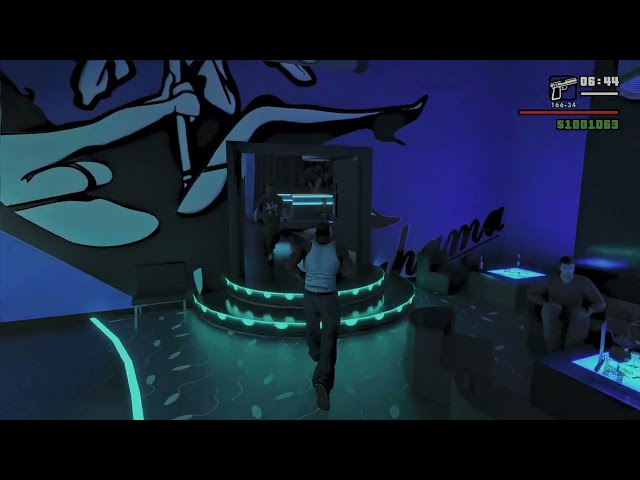
@solar cairn The interior is from a GTA V Bahama Mama's mod. There's a couple but I think the one I have is the Evolution Undercover one by Michelle_Works . The peds come from Urbanize by Junior_Djjr as a optional.
candid sapphire
does this look good ?
 candid sapphire
 If you're playing GTA SA with remix, you'd need to create a new CLEAN GTA SA FOLDER and then install the mod and remix on it, updating previous version to the new one seems to completely break the install
olive dragon
All the new stuff in it is too good to pass up bro. We need to get this fixed up.
candid sapphire
I can't even run the game anymore for some reason, idk what this 1.0 did but it entirely fucked up the installation
candid sapphire
olive dragon
All the new stuff in it is too good to pass up bro. We need to get this fixed up...
Ok, I just tried a few stuff and for some reason it started working again
if you want to use 1.0 don't just update, create a new install, clean GTA SA files
clean gta sa + auto installer and it should work fine
candid sapphire
cj's getting an upgrade


texture might be too clean tho, i haven't looked too much into it, idk it looks a bit too luxurious to me
olive dragon
yeah texture doesn't really fit in either the vanilla game IMO. it;s like it belongs to a completely different prop.
I'd suggest taking some creative liberty here and match it more to the other sections of the deck there. Model looks good though.
 iron anchor
olive dragon
yeah texture doesn't really fit in either the vanilla game IMO. it;s like it be...
iron anchor
olive dragon
yeah texture doesn't really fit in either the vanilla game IMO. it;s like it be...
I might pressume that texture belonged to MadDog's mansion thing and got a little recolored
opal sable
that kind of thing is supposed to be smooth, slightly polished
get rid of the height map, make it glossier
and make the base texture a bit brighter with some more contrast
that should look pretty close to what i've seen IRL for these
opal sable
opal sable
and make the base texture a bit brighter with some more contrast
less yellow too
 toxic elk
I can't seem to run the installer, it keeps showing this
 candid sapphire
toxic elk
I can't seem to run the installer, it keeps showing this
candid sapphire
toxic elk
I can't seem to run the installer, it keeps showing this
for some reason you can't load the image in the welcome page of the app
i tried and it loads on my side, and the image still exists on the website
i'll update the installer to remove the image cuz could be a website locked in some countries
candid sapphire
toxic elk
I can't seem to run the installer, it keeps showing this
https://github.com/KCDQYaniss/SARemix-Installer/releases Updated, download the last version and try again it should work fine
GitHub
Contribute to KCDQYaniss/SARemix-Installer development by creating an account on GitHub.
 peak zinc
The ground keeps showing grey boxes as I move
 floral wedge
Could one re-use the grass from the new hl 2 rtx and re use it here?
That'd be pretty fancy i assume.
Idk how exactly intensive grass can be in RTX remix, though.
But seeing this grass on the flat-green areas would be pretty big.
One could also re-color them a bit
 candid sapphire
peak zinc
The ground keeps showing grey boxes as I move
candid sapphire
peak zinc
The ground keeps showing grey boxes as I move
Visual FX in game settings to low should fix it
candid sapphire
floral wedge
Could one re-use the grass from the new hl 2 rtx and re use it here?
That's possible, I already tried a while ago and it looked insane
floral wedge
Woah
Its not perfomant tho right?
It would massively increase the Fidelity of SA since Vegetation Always was a weak point
candid sapphire
When I did it it was shit yeah
floral wedge
candid sapphire
When I did it it was shit yeah
Imagine filling a forest with it💀
candid sapphire
But it was remix 0.2 or 0.3 idr
It could work now that the performance are way better and memory has been optimized a lot
On the mods moddb page there's a screenshots using the 3d grass if you want to see how it looked
candid sapphire

ModDB
Who wants to kill their GPU with some path-traced GTA San Andreas? Yeah, me too! Well, you're in the right place!
(don't look at this banner it's dogshit)
olive dragon
do it!
 candid sapphire
I could try again but rn the toolkit is buggy, can't ingest, so when it's fixed
Also i'm spamming tarkov and fragpunk 
floral wedge
Will probably be fixed soon
floral wedge
candid sapphire
Also i'm spamming tarkov and fragpunk <:kekw:1324852756355354624>
How does one play tarkov without going insane
I just cant man, i wish i could refund
 candid sapphire
floral wedge
How does one play tarkov without going insane
candid sapphire
floral wedge
How does one play tarkov without going insane
I never said my mental state was stable
floral wedge
Every tarkov player lol
I mean honestly the game gets this right. You do not end up mentally healthy from a real gunfight either
radiant axle
floral wedge
Idk how exactly intensive grass can be in RTX remix, though.
But seeing this gr...
Getting grass to work in hl2rtx was insanely tricky. Mark had to implement GPU instancing (GeomPointInstancer) for that to work.
The painted grass needs to have relatively small clumps to avoid blades clipping through or floaing above uneven terrain, that results in 1000s of individual instances
So the resulting painted grass usda had to be run through a script to convert them to pointInstancer format
warm thorn
radiant axle
Getting grass to work in hl2rtx was insanely tricky. Mark had to implement GPU i...
Will grass clumps clipping through each other cause performance issues?
radiant axle
warm thorn
Will grass clumps clipping through each other cause performance issues?
Nope. That is fine. If it does causes, might be on a much smaller magnitude compared to everything else
floral wedge
radiant axle
Getting grass to work in hl2rtx was insanely tricky. Mark had to implement GPU i...
Theres no way we filling out these landscapes🤣


We can actually see grass here!
warm thorn
radiant axle
Nope. That is fine. If it does causes, might be on a much smaller magnitude comp...
That's good to hear. I could create an in-game scatter script to save grass positions as a single USDA file. If overlapping doesn't significantly impact performance, implementation should be straightforward. And if overlapping does cause serious performance issues, adding a simple custom distance boundary check wouldn't be difficult either.
radiant axle
floral wedge
Theres no way we filling out these landscapes🤣
Yeaaahh, no lol
You guys will definitely need to come up with a better strat to get that much grass coverage @warm thorn
For such a large area, it is really important to consider culling, LODs, etc.
Think you can write an ingame LOD script to add and remove "anchor" meshes based on camera distance? Grass instances can be attached to these anchor meshes and disappear when not close enough
Also, the usd composer tools I made have support for paint brush scatter with custom mesh_HASH anchors now (unreleased yet) for this exact strategy
warm thorn
I'm not sure how Lua will perform when handling a few thousand clumps per frame. I might need more optimized code like a grid-based or quadtree-based implementation. (I've actually already used quadtree generation in my streetlight script, though I haven't released that version yet.)
 lone basin
How playable is this mod at this point in time?
Been debating checking it out now or waiting longer still
warm thorn
lone basin
How playable is this mod at this point in time?
The game is pretty playable, but it's experiencing memory leak issues after Remix 0.54. Also, many assets remain untouched. The project has been on hold for a while since both Yaniss and I have been quite busy recently. However, I've got some free time now, so I'll be continuing work on it again.
lone basin
Sounds good ill give it a little more time, will be super nice to dive into with a fresh coat of paint. Thank you for all your hard work guys
floral wedge
warm thorn
The game is pretty playable, but it's experiencing memory leak issues after Remi...
Wasnt the memory issue fixed in the latest version
I heard WAY less ram usage or Something
warm thorn
 lone basin
warm thorn
lone basin
warm thorn
Clean.
candid sapphire
warm thorn
The game is pretty playable, but it's experiencing memory leak issues after Remi...
I don't think there is any memory leak anymore with 1.0
i runned the game for an hour twice with a consumption monitor linked to the bridge, other than the fact that my gpu was the bottleneck it was fine
warm thorn
candid sapphire
I don't think there is any memory leak anymore with 1.0
I still have memory leak issue with 1.0 release...
 candid sapphire
that's so weird
olive dragon
I think it depends on which mods are running
candid sapphire
maybe
@warm thorn do you have anything else than what is installed with the installer ?
cuz i don't have any issues other than the RR being all glitchy at times
ik i had a fov mod that was making the game stutter so anything can create these issues really
warm thorn
 olive dragon
The installer You have now doesn't have this issue if I clean install it, but as soon as I drop the files in from Hemry's original version in it will start with the memory leaks.
candid sapphire
i think vehfunc is creating the issues
that's the only thing that is both on the ss and the hemry modpack in the isntaller
for me it just crashes when i install vehfunc sooooo
might be doing some shit remix don't like
olive dragon
Hmm if I remember right, For Me I think it was missing some stuff that was never getting installed originally. I downladed it from mixmods I think and reinstalled it then it worked fine with remix... besides the mem leaks. but I'm not sure that's the cause there yet.
CrashInfo should give you a log though if you have it installed

MixMods - Mods para GTA SA e outros
O maior site de mods para GTA San Andreas (e outros jogos) da América Latina.
warm thorn
Woo, direct light flickering is finally fixed
warm thorn
candid sapphire
for me it just crashes when i install vehfunc sooooo
I tried the installer's modpacks and they still have memory leak issues, though they're not as severe as with my previously recommended modpack.


However, disc light movement is still noticeably smoother than direct light.
radiant axle
warm thorn
I'm not sure how Lua will perform when handling a few thousand clumps per frame....
No, you don't need to manage the grass instances yourself, just anchor meshes (could be a floating triangle, a cube, etc., as long as each will have their distinctive mesh hash), then remix comes in and replaces them with grass instances on the ground
olive dragon
admittedly I haven't tested the new installer for that long but I did noticed that even the ROSA RTX Remix has memory leaks as well so that's most likely a issue through any configuration.
lone basin
You need 1.0 for this installer or steam version work fine?
olive dragon
the installer downgrades it for you I believe
lone basin
gorgeous, if thats the case i might as well check out whats going on now lol
warm thorn
olive dragon
admittedly I haven't tested the new installer for that long but I did noticed th...
Even without any mods installed (neither modloader nor moonloader mods), the memory leak issue still exists after Remix 0.54 build, so I'm pretty confident it's a Remix issue. On the positive side, the visual quality has improved significantly with the transformer model and NRC with Remix 1.0.
olive dragon
warm thorn
Even without any mods installed (neither modloader nor moonloader mods), the mem...
Yeah I guess we'll have to formulate a proper bug report
0.54 never shows this behavior so it can't be that hard of a fix I guess
lone basin
warm thorn
Woo, direct light flickering is finally fixed
This is kinda crazy i wont lie
warm thorn
radiant axle
No, you don't need to manage the grass instances yourself, just anchor meshes (c...
I still need to manage a few thousand instances (even it's just a simple triangle) to address the performance issues when transitioning from CPU instancing to GPU instancing. This is particularly important since the objects are dynamic - being generated and despawned on each frame or every few milliseconds.
radiant axle
warm thorn
I still need to manage a few thousand instances (even it's just a simple triangl...
Think you're confusing the idea. Imagine you will spawn one anchor mesh every 30 meters in a grid, and they get culled away when, say, after 100 meters of distance from camera.
Now you paint the grass on the terrain, attaching all the 1000s of instances for that patch to the nearest anchor mesh_HASH, so when the Lua script culls the anchor, all the instances go away with it
warm thorn
radiant axle
Think you're confusing the idea. Imagine you will spawn one anchor mesh every 30...
Wow, you're very clever! Why didn't I think of that before?😅
candid sapphire
idk if that's gonna look good, there's whole forest in this game
radiant axle
warm thorn
Wow, you're very clever! Why didn't I think of that before?😅
Should work very decently. Something like that
Each anchor .USD painted data should have between 200kb to 1mb since it is only storing points, kinda
 floral wedge
Damn
warm thorn
radiant axle
Should work very decently. Something like that
Each anchor .USD painted data sho...
- Does your USD composer addon handle face normals? Since Moonloader doesn't allow reading mesh properties, I'm concerned that if I spawn grass in game, it will all stand straight up rather than following the terrain's curvature.
- Do you have a release date for the USD Composer Remix Renderer addon? https://discordapp.com/channels/1028444667789967381/1028600697463263314/1337212866490667070
 radiant axle
warm thorn
1. Does your USD composer addon handle face normals? Since Moonloader doesn't al...
radiant axle
warm thorn
1. Does your USD composer addon handle face normals? Since Moonloader doesn't al...
- You don't need to spawn grass via Lua, just spawn the achor meshes in the sky or under the terrain or anywhere, then take a capture of them. Open USD composer, paint all the grass and details and whatever you like, all attached to the captured anchor and save the USD file. The Paint Brush tool supports "Conform to surface" so yeah assets rotate with the normal

- Nope, that was just an experiment I was playing with. I didn't quite work as expected and was crashing too much on my end

warm thorn
lone basin
In-game, press "Esc" to go to the options menu. Then, go to Display setup > Advanced > Visual FX Quality and set it to Medium. This should fix some of the shadow (black surface) issues.
lone basin
Thank you
Very cool to see real-time in GTA SA keep it up guys cant wait to see whats to come
warm thorn
lone basin
Very cool to see real-time in GTA SA keep it up guys cant wait to see whats to c...
Thanks! I've learned something new from my recent work, so the next update of the mod may include detailed objects like this :
https://discordapp.com/channels/1028444667789967381/1196836285545971712/1330230210666434674
olive dragon
warm thorn
Thanks! I've learned something new from my recent work, so the next update of th...
 floral wedge
warm thorn
Thanks! I've learned something new from my recent work, so the next update of th...
floral wedge
warm thorn
Thanks! I've learned something new from my recent work, so the next update of th...
Lets not bump our vram into insanity
I dont think everyone who wants to play this one day has 80GB vram server gpus
candid sapphire
lone basin
Is there any way to warm the lighting a bit?
you can open the mod in the toolkit and change the sun color following the real sun light color but a way to do it in real time i don't think so
maybe in the usda file but idk
and yes you have to kinda know what you're doing
floral wedge
floral wedge
Lets not bump our vram into insanity
It looks crazy though, Like a cropped picture of a real shoe. Is this done via photogrammetery?
@warm thorn
warm thorn
floral wedge
It looks crazy though, Like a cropped picture of a real shoe. Is this done via p...
Yes, the original mesh and texture are from a worn shoe I downloaded from Sketchfab. I made some mesh adjustments and recreated the texture details in Substance Painter.
https://sketchfab.com/3d-models/worn-new-balance-990-ar-25b9ae0b32a44240a22b76558b446198

** Very old New Balance 990 Running Shoe **
Augmented Reality (AR) version
Original: https://skfb.ly/ooX9J
A perfect blend of cushioning and style, this shoe looks as good on your morning run as it does on the runway.
30.9 x 12.6 x 12.9 cm (118 micrometers per texel @ 4k)
Scanned using advanced technology developed by inciprocal Inc. th...
floral wedge
Ahh nice! I tried photogrammetery once but with my arse Phone camera i only got slop. no idea how people do it this Detailed
I do wonder how optimized these models would be for games.
I saw a part of a german city fully modeled into unreal engine, give me one second

[ENG] Gaussian splatting of the Aachen Schanz station in Unreal Engine. Captured with XGRIDS L2 Pro (32Ch, 120m) in approx. 30 minutes (yes 30 minutes!!!) - 100GB raw data, final splat 2.5GB. Dataprocessing on custom workstation (CALCULON). The scanner is 32k (excl. tax) + accessories.
Do you have questions about our services, UnrealEngine or t...
Yeah that looks insane
Thats gotta be a couple thousand pictures
These guys do have a service available i think
Lets Just take photos of the entirety of los angeles and slap em into remix 🤣
warm thorn
floral wedge
I do wonder how optimized these models would be for games.
It's not actually very high-poly just around 30K triangles (compared to some tree, grass models in other Remix mods). Remix path tracing renderer handles high-poly objects well, so don't worry about polygon count. 4K PBR textures consume much more memory than a 1 million polygon model. For comparison, a 4K (4096×4096) PBR texture set with color, normal, roughness, and metallic maps can use approximately 256-512 MB of VRAM, while a 1 million polygon model might only require about 20-40 MB of memory.
 floral wedge
Holy damn
Wouldnt this literally transform gaming?
Whats the catch?
Are these models able to like, to reflect
warm thorn
All you need for this is a powerful GPU capable of real-time path tracing - at least an RTX 3060 or better. Remix is a highly optimized path tracing renderer, so if your hardware can run real-time path tracing well, polygon count isn't an issue.
floral wedge
Sounds good
warm thorn
iron anchor
candid sapphire
(don't look at this banner it's dogshit)
because it doesn't have this
 candid sapphire
the "definitively better" part looks weird
almost like you painted on some text that you wanted to hide 
iron anchor
i just couldn't do it better and there is no clear version of this without DE words
warm thorn
Bro, don't worry. We artists can create it from scratch. We'll make a custom logo specifically for the mod.
iron anchor
damn, sad i won't see my creation, but okay
warm thorn
Thanks for your hard work❤️ , but we have our own vision in mind.
You know Rock* doesn't like modders copying their assets or anything from them, so we'd better create something custom before this mod gets bigger and attracts attention.
floral wedge
warm thorn
Thanks for your hard work❤️ , but we have our own vision in mind.
Can i pay you somehow lol
warm thorn
Interested in supporting the mod? We have a Patreon page at https://www.patreon.com/GTASanAndreasRTX where you can contribute.
(Unlike other paid mods, we don't promise specific update dates - we focus on quality over deadlines.)
For any job-related inquiries not connected to the mod, feel free to DM me personally.
 floral wedge
Lmao people gonna over engineer that now
candid sapphire
round tendon
i wanna see how the number 9 will look like in rtx
I'll make sure i use 32k textures for the fries
opal sable
warm thorn
Interested in supporting the mod? We have a Patreon page at https://www.patreon....
floral wedge
Is blender all it takes to create textures?
wintry furnace
Depends
floral wedge
Id like to help but idk shit
Id end up stealing assets from every game i know lmfao
candid sapphire
Youtube is how I learned
I opened blender for the first time in my life like a year ago
I'm not very good but i can do stuff and it can only get better
just don't look at 3D donuts for too long
warm thorn
floral wedge
Id like to help but idk shit
Back in the day, I used Photoshop with CC0 textures to create replacements. These days, I primarily use Substance Designer/Painter for texturing, though Blender can also create procedural textures effectively.
For our current approach, we're planning to use trim sheets and tileable textures that can be shared across multiple objects - it's much more memory efficient than unique textures for everything.
If you're interested in helping but concerned about your experience level, we can guide you through some basics. The important thing is avoiding copyrighted assets from other games to keep everything original.
floral wedge
I cant even think that far, what could one create to be used multiple times
A trash can for example, i guess
Vegetation hasnt been in the making at all no?
You could absolutely re-use trees if you rotate them a big
 slim lake
hey guys. im new here. i just want to ask how would i get the most latest updates for the rtx remix mod and how far do you guys think the project has gone. thank you.
 scenic sequoia
I thought about helping out with the logo
 olive dragon
scenic sequoia
I thought about helping out with the logo
olive dragon
scenic sequoia
I thought about helping out with the logo
#1097105394821759006 message
iron anchor
scenic sequoia
I thought about helping out with the logo
There is simillar mine logo i did earlier, but neither mine neither yours will be used, most importantly because our logos use R*'s resource and Hemry want to went safe way, so they'll do logo from scratch
 scenic sequoia
iron anchor
There is simillar mine logo i did earlier, but neither mine neither yours will b...
scenic sequoia
iron anchor
There is simillar mine logo i did earlier, but neither mine neither yours will b...
sure
if you guys want me to help with that let me know
floral wedge
I could see rockstar sueing this into oblivion
Why specify a project owner in the first place
They cant sue that, can they
candid sapphire
scenic sequoia
I thought about helping out with the logo
Problem is, anything looking like or taking ideas from the original logo is a good reason to end up dmca'd
candid sapphire
slim lake
hey guys. im new here. i just want to ask how would i get the most latest update...
Use the auto installer, you can check pinned comments for the download link
 shrewd wagon
game crashing every 15 minutes?
warm thorn
shrewd wagon
game crashing every 15 minutes?
May be memory leak, try install Remix 0.5.4.
shrewd wagon
oo
floral wedge
Is it possible to create different looks when weather is different
For example a grey and depressing look during the morning
With volumetric fog and so on
candid sapphire
I don't think so, it would mean that we would have to load a new config every weather changes and i don't even know if it's possible
warm thorn
If the Remix bridge API allows access to the new volumetric fog settings, then it would be possible.
floral wedge
Another thing that would greatly enhance a possible remaster
Rdr2 for example looks vastly different depending on the weather and people praise it for that

This game is just beyond insane , i cant wait for the weather system in gta 6
 pseudo moon
solar cairn
grove street games team
pseudo moon
solar cairn
grove street games team
bruh
quaint heron
floral wedge
This game is just beyond insane , i cant wait for the weather system in gta 6
We wont get it in GTA VI
unfortunately
it will be based on GTA V
but with volumetric clouds
floral wedge
Cap
quaint heron
floral wedge
Cap
check the trailer bro, it looks more arcadish than RDR2 itself
candid sapphire
quaint heron
check the trailer bro, it looks more arcadish than RDR2 itself
?????????????

ARCADISH ???????????
candid sapphire
both looks insane, rdr2 looks very good cuz the weather makes it more grey so it looks more realistic
quaint heron
candid sapphire
both looks insane, rdr2 looks very good cuz the weather makes it more grey so it...
exactly it looks more photorealistic
GTA VI will have better engine and graphics
but the atmosphere
will not be photorealistic
candid sapphire
Yeah it's more vibrant
candid sapphire
Probably cuz there's less stuff so they can go even harder on weather etc
quaint heron
candid sapphire
Probably cuz there's less stuff so they can go even harder on weather etc
idk
candid sapphire
and honestly, a few mods and it's 10x better than rdr2
quaint heron
candid sapphire
Probably cuz there's less stuff so they can go even harder on weather etc
tbh with a budget of 2B$
i dont think thats the case
i think they were meant to do that
quaint heron
candid sapphire
and honestly, a few mods and it's 10x better than rdr2
yeah a few mods
candid sapphire
vibrant colors
quaint heron
we’re gonna have to wait minimum 2 years from now
because PC release
then graphics and all
quaint heron
candid sapphire
i can wait
j cant, imma start college soon 😢
candid sapphire
and pc will get the final product
quaint heron
candid sapphire
and pc will get the final product
yeah as always
floral wedge
Can cars possible be remade as strong as What we see in the half life 2 rtx demo
Or is it somehow not possible due to them being movable objects
What are the limits, basically
I heard Character models are somehow not possible or Something
Or atleast not CJ
Due to him not being a Npc model or Something
candid sapphire
they can't be modified using remix, we have to mod the game
so no, we'd have to be limited by the game
floral wedge
gotya
floral wedge

MixMods - Mods para GTA SA e outros
O maior site de mods para GTA San Andreas (e outros jogos) da América Latina.
Thoughts on this
?
candid sapphire
floral wedge
https://www.mixmods.com.br/2020/04/pbr-materials-for-renderhook-by-jujubao-mater...
It's PBR on original 64x64 textures, so it's really bad
it's good if you don't have enough memory to have proper texture replacement
solar cairn
candid sapphire
cj's getting an upgrade
wowwww that looks so beautiful
warm thorn
iron anchor
warm thorn
not gonna lie, it looks strange, i know its WIP, but it looks like a woven carpet, from below, from above
warm thorn
iron anchor
not gonna lie, it looks strange, i know its WIP, but it looks like a woven carpe...
Wait, how did you know I used carpet texture as a base texture? Just kidding! I noticed I used the wrong gradient noise texture.🤣
warm thorn

 iron anchor
warm thorn
iron anchor
warm thorn
now THAT looks like a pavement!
iron anchor
warm thorn
Perfect!
 thorny copper
warm thorn
thorny copper
warm thorn
damn Ballas, won't leave us the hell alone
 unique arch
warm thorn
unique arch
warm thorn
Look's awesome!
opal sable
second one imo
candid sapphire
I like the epsilon logo so i'd say 1st one imo
iron anchor
warm thorn
in terms of being close to original - two
in terms of possible 'logic' - one (as i they could think of Epsilon as total okay thing for putting on star)
warm thorn
Just for reference, the second one is also from the original game texture. The problem is that the texture size is too small, which makes the logo barely visible from a distance.
And I don't want to use a 4K texture just for showing the Maya calendar logo. It would be more efficient to make a custom decal mesh for it and manually place those textures on the wall of frame pavement.


 warm thorn
warm thorn
warm thorn
WIP of asphalt and pavement texture day/night time comparison. I've been working on getting the right balance of detail and realism while ensuring good visual contrast between lighting conditions


 shy wind
warm thorn
shy wind
warm thorn
I like more dirty V2 look, V3 and V1 are way too reflective.
warm thorn
No noticeable difference on my side. What GPU are you using and what FPS are you getting?
I've found that some configurations can introduce input lag if your base framerate is too low before frame generation kicks in.
round tendon
dam y all come a long way
shrewd wagon
warm thorn
No noticeable difference on my side. What GPU are you using and what FPS are you...
4060
doing 20ish
warm thorn
round tendon
dam y all come a long way
Thanks! Been a lot of hard work, but seeing the progress makes it worth it.
warm thorn
shrewd wagon
4060
doing 20ish
Framegen struggles at low FPS like 20ish. You'll get better performance once we replace more meshes. GTASA is heavy with Remix because transparent objects (fences, trees, grass, foliage, wires) are very demanding in path tracing. We're working on replacing these one by one to improve performance.
shrewd wagon
ohh
btw did you place all lights manually in remix app?
trying to reproduce the same in vc
iron anchor
Not for use
done pure of wish to do something

done using only fonts, no original Rockstar resources were used
warm thorn
shrewd wagon
btw did you place all lights manually in remix app?
I wrote a script using moonloader and moonaddition that automatically reads the in game light positions, places simple objects there, and then replaces them with light objects in Remix. Saves a ton of time for lighting work.
warm thorn
You could try using CLEO or an ASI plugin for VC, should work similarly. I switched to moonloader (Lua-based) because CLEO scripting gave me headaches, but unfortunately VC doesn't support moonloader. CLEO would be your best bet for VC modding.
shrewd wagon
okie
manic forge
how can i reduce vram usage? even if it takes to lower textures or smt