
#.adg instrument racks I got but no matter how I try load them in I get "This preset cannot be loaded
1 messages · Page 1 of 1 (latest)
 woven vine
<@&1021368943572697188> hey any help would rlly be appreciated, really stuck with this
 runic saddle
@woven vine please do not tag the moderators
runic saddle
Also, giving more information would be useful. Which .adg is this? Where did you get it?
woven vine
runic saddle
Also, giving more information would be useful. Which .adg is this? Where did you...
i bought them, they are racks for generarting bass, chord stabs, fx etc
 runic saddle
Then I'd suggest getting in touch with who's selling those presets
woven vine
however this issue applies to all .adg files that are not stock
runic saddle
We don't provide support for third-party files or presets
woven vine
and these specific ones have been purchased many times with great reviews
woven vine
runic saddle
We don't provide support for third-party files or presets
i do not believe its an issue with the file, rather with my ableton
woven vine
runic saddle
We don't provide support for third-party files or presets
so thats it? you cannot help me out simply because its not a stock adg?
 surreal rock
woven vine
i do not believe its an issue with the file, rather with my ableton
surreal rock
woven vine
i do not believe its an issue with the file, rather with my ableton
which version of ableton are you running?
woven vine
12 suite
surreal rock
cool, wht's the name of the third party place you got these from? (just so I can start troubleshooting with you)
woven vine
surreal rock
cool, wht's the name of the third party place you got these from? (just so I can...
give me 2 seconds and ill get that for you, thank you
surreal rock
woven vine
give me 2 seconds and ill get that for you, thank you
sure, I'll just sit here with my noods:
 woven vine
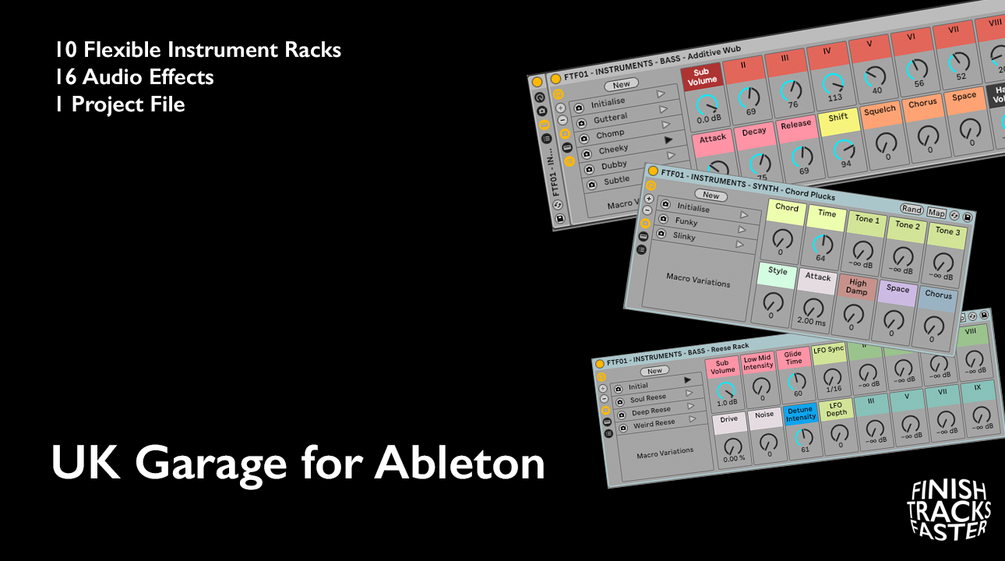
Gumroad
FINISH TRACKS FASTER.26 Ableton Racks to make UK Garage in Ableton Live Suite.Here's what you get:10 Instrument Racks – from clean, flexible bass generators to stab machines and randomized FX engines. These are built for quick ideas and deep tweaking.16 Audio Effect Racks – sculpt your sound with instant grit: transitions, textures, mix tool...

TikTok
@richellis_ 1160 Followers, 85 Following, 27.9k Likes - Watch awesome short videos created by Rich Ellis 💫
that’s the guy who sells it
surreal rock
it looks like he sends 2 versions of the plugin, one for ableton 11 and one for ableton 12

quickly double check you're using the Live 12 version
woven vine
yep
 surreal rock
oh I mean of the plugin
woven vine
oh yes i am
surreal rock
ok cool, next thing is to check you've got all the packs installed that he might be using in his plugins
any chance you could drag one of the .adg files onto here so I can have a look?
 gilded shell
Open one of the .adg files in a text editor.
First line after the standard XML header will tell you what minimum version of Ableton Live is required to run, for example:
 woven vine
here is one of them
surreal rock
ok I dragged it into my ableton and it worked straight away, so I think it might be that you're missing some Packs

 woven vine
gilded shell
woven vine
gilded shell
i know i have 12, how do i check its specifcally that version?
gilded shell
woven vine
i know i have 12, how do i check its specifcally that version?
Live > About Live
surreal rock
 woven vine
that would explain it i have 12.0.25
thank you for the help guys thats been driving me mad lol
on that note, if i now upgrade to the newer version and download that, will my templates as well as my plugins folders and sounds folders all remain?
gilded shell
Yep
woven vine
perfect ty for ur help rlly appreciate it!