#▶|stable-video-diffusion
1 messages · Page 5 of 1
 noble wolf
 weak bison
Nice looking + the parameters it's using are quiet sufficient for a decent animation and fast generation.
noble wolf
ah yeah fair enough
 iron topaz
i have a font error "ERROR:root:!!! Exception during processing !!!
ERROR:root:Traceback (most recent call last):
File "/home/boy21/Downloads/AI/ImmageGenerator/ComfyUI/execution.py", line 153, in recursive_execute
output_data, output_ui = get_output_data(obj, input_data_all)
^^^^^^^^^^^^^^^^^^^^^^^^^^^^^^^^^^^^
File "/home/boy21/Downloads/AI/ImmageGenerator/ComfyUI/execution.py", line 83, in get_output_data
return_values = map_node_over_list(obj, input_data_all, obj.FUNCTION, allow_interrupt=True)
^^^^^^^^^^^^^^^^^^^^^^^^^^^^^^^^^^^^^^^^^^^^^^^^^^^^^^^^^^^^^^^^^^^^^^^^^^^
File "/home/boy21/Downloads/AI/ImmageGenerator/ComfyUI/execution.py", line 76, in map_node_over_list
results.append(getattr(obj, func)(**slice_dict(input_data_all, i)))
^^^^^^^^^^^^^^^^^^^^^^^^^^^^^^^^^^^^^^^^^^^^^^^^^^^
File "/home/boy21/Downloads/AI/ImmageGenerator/ComfyUI/custom_nodes/ComfyUI-KJNodes/nodes.py", line 585, in createtextmask
font = ImageFont.truetype(font_path, font_size)
^^^^^^^^^^^^^^^^^^^^^^^^^^^^^^^^^^^^^^^^
File "/home/boy21/anaconda3/envs/comfyui/lib/python3.11/site-packages/PIL/ImageFont.py", line 996, in truetype
return freetype(font)
^^^^^^^^^^^^^^
File "/home/boy21/anaconda3/envs/comfyui/lib/python3.11/site-packages/PIL/ImageFont.py", line 993, in freetype
return FreeTypeFont(font, size, index, encoding, layout_engine)
^^^^^^^^^^^^^^^^^^^^^^^^^^^^^^^^^^^^^^^^^^^^^^^^^^^^^^^^
File "/home/boy21/anaconda3/envs/comfyui/lib/python3.11/site-packages/PIL/ImageFont.py", line 248, in init
self.font = core.getfont(
^^^^^^^^^^^^^
OSError: cannot open resource
"
 fossil atlas
svd is surprisingly fast... it only takes about twice as long as generating a single image
noble wolf
remember to use svdxt if you're doing 25 frame gens
iron topaz
fossil atlas
svd is surprisingly fast... it only takes about twice as long as generating a si...
yes and it works on gpus with 8gb vram
fossil atlas
iron topaz
i have a font error "ERROR:root:!!! Exception during processing !!!
ERROR:root:T...
it couldn't find the font
fossil atlas
try changing it to "times.tff" that worked for me. may not work for you, depending on your OS
PIL font loading is very bad
iron topaz
fossil atlas
try changing it to "times.tff" that worked for me. may not work for you, dependi...
where can i change that?
fossil atlas
on these nodes. there are four of them


 obtuse lance
any way to run stable animation in auto 1111?
noble wolf
strg z?
fossil atlas
ctrl-z/undo i guess
they've just accidentally duplicated a bunch of nodes and now have to delete them all manually
noble wolf
ahhh there's a plugin for that, but don't get it because it fucks comfy ui up on the latest update
might've fixed it by now but idk
iron topaz
fossil atlas
they've just accidentally duplicated a bunch of nodes and now have to delete the...
ther is no strg z
fossil atlas
in english and basically every other keyboard layout it's labelled ctrl (control)
noble wolf
Is there a customnode for just the queue prompt button?
I just want a big red button in the middle of my nodes
fossil atlas
there are a few nodes that can queue the workflow like that. typically they queue it n times, for animation
mtg animation nodes is one
or is it mtb? i forget
they are kind of hacky though, like the undo thing they sometimes break


 unkempt mica
obtuse lance
any way to run stable animation in auto 1111?
unkempt mica
obtuse lance
any way to run stable animation in auto 1111?
not yet but you can use StableSwarnUI its built in #🐝|swarm-ui message
 clever pendant
iron topaz
fossil atlas
clever pendant
iron topaz
fossil atlas
try higher fps on the img2vid conditioner
this will make the result shorter but possibly more coherent
(shorter in time, it will be the same number of frames)
noble wolf
damn bro kicked that croc and himself out of reality
clever pendant
weak bison
weak bison
fossil atlas
(shorter in time, it will be the same number of frames)
Actuall that helps with sharpness of the picture!
Still can't figure out how to set steps or motion to XY, tho
fossil atlas
the workflow has four copies of the gen workflow in it, then at the end it generates a 2x2 with all four results in it. so you can just set whatever params you want on each one
it's not really xy because it doesn't loop over the product of two lists
weak bison
fossil atlas
it's not really xy because it doesn't loop over the product of two lists
yeah, the problem I'm confused how to said parameters to each of them, it's bounded to Text so I'm lost.
jeez, as soon as I think I fiured some stuff out, I stumble upon something like this..
fossil atlas
just change it on the nodes directly
you can't change the svd params because it only runs that bit once
but if you make four svd nodes, one in each duplicate, then you can
weak bison
K, I'll try !
fossil atlas
but the whole point of this workflow is to test text prompting
making real loops in comfyui is currently extremely hard because of the internal architecture. there's some work towards refactoring to make it easier but it's quite complicated. even figuring out how a loop should be structured out of nodes is not trivial because a node graph is necessarily acyclic. so you have to handle it behind the scenes somehow.
oh also i recommend disabling that free_u v2 node. it does speed up generation but it seems to hurt quality
 severe moon
clever pendant
severe moon
severe moon
clever pendant
severe moon
Error: input must be 4-dimensional
severe moon
noble wolf
That one is actualyl so fucking sick. I guess it's super easy to keep consistent because it's just a bunch of cubes huh
 open heron
unkempt mica
open heron
unkempt mica
 weak bison
fossil atlas
but the whole point of this workflow is to test text prompting
weak bison
fossil atlas
but the whole point of this workflow is to test text prompting
Check this out, they took the last frame from animation and made it first for next one, it's a long stream
 silent hinge
unkempt mica
silent hinge
unkempt mica
just curious is this dalle or mj
unkempt mica
silent hinge
just curious is this dalle or mj
Just SD using colossusProjectXLSFW_v53Trained model.
 narrow canyon
@grim tangle Thanks for the concat workflow! Playing around with it now with the plan to try and force the model to zoom all the time but interesting enough, the zoom prompt seems less coherent than just the default
 cloud knot
with just svd model
severe moon
unkempt mica
severe moon
I am compelled to make Hatsune Miku images now..
 bold wave
did that three layers guy end up sharing his workflow? I havent been keeping up
 unkempt mica
perfect
 unkempt mica

bold wave
I was hoping you would do that.
 sand plinth
every time there is rain... 😄
open heron
severe moon
unkempt mica
 bold wave
I did myself as homelander, and it did not disappoint. 11/10
 open heron
 noble wolf
Fucking nice!
I'm just so hyped people can make basic videos for any purpose now with like 95% ai that's pretty decent
 long stream
severe moon
long stream
severe moon
 severe moon
hmm, seems we can up the res a bit to get around 720p quality according to fofrAI on twitter.... https://twitter.com/fofrAI/status/1728909603621224911
takes about twice as long for me
can shave off about 15 sec just actually setting dimensions to 720p.... "720p is the standard high-definition (HD) display resolution of 1280x720 pixels, with progressive scanning, at a 16x9 aspect ratio." - the googley
noble wolf
god damn those on twitter are pushing it and it looks beautiful, pushing 24gb of vram xD
severe moon
 mental magnet
 grim tangle
narrow canyon
<@228118453062467585> Thanks for the concat workflow! Playing around with it now...
grim tangle
narrow canyon
<@228118453062467585> Thanks for the concat workflow! Playing around with it now...
Nice...the panning seems to be the one that most often does something
 wicked wren
Can’t wait for this to run on apple silicon, performance on m3 max should be pretty noice no??
 lilac nova
wicked wren
Can’t wait for this to run on apple silicon, performance on m3 max should be pre...
lilac nova
wicked wren
Can’t wait for this to run on apple silicon, performance on m3 max should be pre...
Looks like m2 ultra is faster https://twitter.com/ivanfioravanti/status/1728903886390587559
long stream
noble wolf
what do you guys use to compress an image? just set an upscaler at like 0.8 or something?
just need more details before I shrink it to fit the video size
 buoyant aspen
Can't wait for longer video time is so fun
I want to show what you can use it as a tool.
noble wolf
Leg broken
mental magnet
noble wolf
Leg broken
looks so hurt,damn 
 hushed coral
 lean gate
Hey, feel free to post this at #1092446741984444416 , I will delete it from here since this channel is for Stable Video related content.
 tepid stream
Making my own Batman Movie now
hushed coral
tepid stream
narrow canyon
grim tangle
Nice...the panning seems to be the one that most often does something
Yeah I agree. I've reliably managed to get panning to work but rotate and zoom seems to not work. I'm going to try to use cinematography terms like truck, pan and dolly instead
Er...
tepid stream
hushed coral
 half hound
bold wave
did that three layers guy end up sharing his workflow? I havent been keeping up
half hound
bold wave
did that three layers guy end up sharing his workflow? I havent been keeping up

Requirements:
ComfyUI: https://github.com/comfyanonymous/ComfyUI#installing
ComfyUI-Manager: https://github.com/ltdrdata/ComfyUI-Manager
SDXL: https://huggingface.co/stabilityai/stable-diffusion-xl-base-1.0/tree/main
you can use any safetensor file, I used the base SDXL model.
SVD Model: https://huggingface.co/stabilityai/stable-video-diffus...
tepid stream
sand plinth
wicked wren
I’m getting this error on my Apple silicon: ”There appear to be 1 leaked semaphore objects to clean up at shutdown” when trying to render SVD with comfyUI
Segmentation fault
 severe bear
most of my outputs just end up as camera pans 
could've done the same in 1/100th of the time
silent hinge
yes i get a lot of those too
bold wave
severe bear
most of my outputs just end up as camera pans <:sadcat:1130568570712109176>
just keep refining. I've noticed that the best results come from 2 layer photos - a background and foreground picture. all the ones you see above that are really good are like that.
bold wave
sand plinth
OK this one is dope. It looks like NFT art
severe bear
🤷
silent hinge
bold wave
just keep refining. I've noticed that the best results come from 2 layer photos...
you mean combine actual layers or just you mean something in forground and background
not sure if you referring to the tutorial we have now on layers
from Fancy
bold wave
oh no, what I mean is to have a profile character (or car, or frog, or whatever) and then a detailed background.
when there are no background details it tends to look... bad.
 tidal pendant
severe moon
bold wave
oh no, what I mean is to have a profile character (or car, or frog, or whatever)...
tidal pendant
severe moon
bold wave
oh no, what I mean is to have a profile character (or car, or frog, or whatever)...
In my experience you want something with lots of 'depth' to it, that can be from tonal shift (orangey subjects against blueish background), heavy bokeh, obvious perpective lines.... stuff that divides the image into foreground or background. You can jsut choose images that already have this effect but also use an image editor like Photoshop to tweak colors or focus yourself. And even then it's still a crapshoot how the seed will respond. Sometimes it's better results to just try a different seed or motion bucket value instead of trying to tweak the image.
bold wave
severe moon
In my experience you want something with lots of 'depth' to it, that can be from...
oh yeah i didnt even think about photoshop at all! you're right, I do NFT stuff as a side thing, and it's been rough!! I am going to have to redo the images, is what I see.
severe moon
bold wave
severe moon
I love smoke effects when they pull together.
half hound
narrow canyon
<@228118453062467585> Thanks for the concat workflow! Playing around with it now...
👀 I haven't been following as closely to the thread. There is a way to control the camera movement :o! How?
severe moon
half hound
👀 I haven't been following as closely to the thread. There is a way to control ...
CLIP text processing added to the image input
nothing official
bold wave
severe moon
In my experience you want something with lots of 'depth' to it, that can be from...
looks like that is kinda the trick. a colorful background. I think I need to play with the IT rigging or whatever its called.

versus a B&W image, plus a boring background.
 tepid stream
Upscaled, Interpolated and looped it
bold wave
tepid stream
Upscaled, Interpolated and looped it
What's your upscale method?
tepid stream
Topaz Video AI 
open heron
 tidal shadow
tepid stream
Topaz Video AI <:dogsmile:1058544141929300039>
tidal shadow
tepid stream
Topaz Video AI <:dogsmile:1058544141929300039>
That's fucking awful bro. Use Comfy for upscaling you dope. free free free.
tepid stream
tidal shadow
That's fucking awful bro. Use Comfy for upscaling you dope. free free free.
Thanks man, you're so nice
tidal shadow
tepid stream
Thanks man, you're so nice

I just hope that you aren't@tepid stream paying for topaz.
bold wave
Hey I say if you have access to professional grade software, use it.
tidal shadow
bold wave
Hey I say if you have access to professional grade software, use it.
Have you seen topaz video ai?
People recommend it like they recommend Maya. It's the industry standard of upscaling. It's not good but also not the worst.
It cost so much because it's private code that has an any number value they want to attach to it. Topaz only has their image upscaler going for them.
bold wave
Replace that with anything. Photoshop. Microsoft Word. Etc etc.
For all you know, he is a graphic designer and his biz pays for it.
tepid stream
I didn't pay a penny, my company bought it
tidal shadow
bold wave
Replace that with anything. Photoshop. Microsoft Word. Etc etc.
For all yo...
@tepid stream@bold wave
Then they should make a training course on how to use ComfyUi for upscaling. It would be free and save the company money as well.
 molten eagle

Let's agree: Stable Video Diffusion is already mind-blowing in its first basic version.
Midjourney generation as image input.
#svd #stablevideodiffusion #ai #midjourney #aivideo #aianimation #stablediffusion #stabilityai @ai.art.community @stability.ai @midjourney.gallery @midjourneyartwork @midjourney.artwork.ai

 Instagram
so cool to play around with 🤩
 sterile mesa
I've collected so many workflows for svd, idk which to use.
molten eagle
haha
is there a workflow to basically take the svd output as a new input to generate better details on top or maybe interpolate frames?
tepid stream
tidal shadow
<@170273907889143809><@617079800552488962>
Then they should make a training cou...
I know how to use it, but they don't want to 
I really don't care, it's a decent tool
tidal shadow
tepid stream
I know how to use it, but they don't want to <:shruge:1075856136789557361>
I rea...
I'm done. I care about this conversation as much as you do, which is as little as possible.
Stay well and safe.
tepid stream
Why start it then
tidal shadow
tepid stream
Why start it then
I expected very little responses back. I thought I was going to be told off and not responded back to.
tepid stream
Makes even less sense now
sterile mesa
So.... how about them videos
severe bear
interpolated chromatic aberration is pretty trippy
cloud knot
Damn, just went back a few, these are soo good!
 hazy gorge
Hi guys does anyone know if they have already done fine-tuning on the Stable video diffusion model? Or at least if there is a method to train the model? 🧐
sterile mesa
hazy gorge
Hi guys does anyone know if they have already done fine-tuning on the Stable vid...
They have a bunch of general info in their research paper about training and provide the weights. I suppose training is possible. But I'm not aware of anyone finetuning anything yet and have to assume the training process is laborious and requires a lot more vram than most have.
Someone released pruned safetenors of the models a few days ago. Half the size of the original.
hazy gorge
sterile mesa
Someone released pruned safetenors of the models a few days ago. Half the size o...
That sounds great, could you give me the link to that information or something please?
sterile mesa
Research paper is in the pinned link in this discord channel
 tiny cradle
hazy gorge
That sounds great, could you give me the link to that information or something p...
tiny cradle
hazy gorge
That sounds great, could you give me the link to that information or something p...
Probably they're referring to someone else but I have the half sized versions here as well: https://huggingface.co/imaginairy/stable-video-diffusion/tree/main

 keen shuttle
I'm loving SVD .I'd like to control what it choose to render the zoom out ,or pan and movement any options for that yet?
fossil atlas
not yet
 tired egret
SVD on water photos
fossil atlas
the paper mentions camera motion loras but they haven't released them yet
open heron
Trying lemon for the first time
 keen shuttle
are you using style loras with this?
fossil atlas
you can try to mix a text prompt into the conditioning but it very rarely does anything
keen shuttle
there was a movement lora for animate diff wonder if that will work
I also wanna plug in text prompt,does it work well?
fossil atlas
no, it is almost entirely useless except in a few cases
tired egret
keen shuttle
I also wanna plug in text prompt,does it work well?
now it does not
you can only generate the initial image, or you can change the image with unClip
fossil atlas
you can mix image and text conditioning but 99% of the time it does nothing or destroys the image
keen shuttle
with my 1024 x 1024 renders ,I been cropping with node it to 1024 x 576 seens more stable
fossil atlas
1024x576 is the native res of svd model
keen shuttle
so does it also like that to start?
fossil atlas
the node auto crops and resizes the input i think
idk, it doesn't seem to make any difference if you pre-crop it anyway
keen shuttle
I think only to control where it crops
fossil atlas
yeah, that's true
 trail finch
any idea why i get this ?

 robust scarab
trail finch
any idea why i get this ?
robust scarab
trail finch
any idea why i get this ?
show workflow
fossil atlas
trail finch
any idea why i get this ?
you tried to load a sd model instead of svd
trail finch
robust scarab
show workflow
 fossil atlas
trail finch
fossil atlas
trail finch
ok, you used the wrong loader node for the model type
you have to use this one
 robust scarab
trail finch
robust scarab
trail finch
yeah the first one is using a regular loader
fossil atlas
svd doesn't have a clip model in it, so CLIP output is going to return None
if you want to encode text, you have to place a "load clip" node, and then load https://huggingface.co/laion/CLIP-ViT-H-14-laion2B-s32B-b79K/blob/main/open_clip_pytorch_model.bin in it
 trail finch
i feel like
 fossil atlas
if you're trying to just do normal txt2image then... you should load an sdxl model, not the svd model
trail finch
fossil atlas
you have to use this one
isn't it the same node ?
 fossil atlas
no, it is different
this is where the problem is

you can tell, because that node has a purple outline
and the problem is the node before it wants an SDXL checkpoint, but you have selected the SVD checkpoint
the SVD checkpoint doesn't have a CLIP to output, so it outputs None
trail finch
so this one doesn't works ?

 fossil atlas
yes, but you still have a image preview node at the end of the txt2img chain, which means it will still try to run
trail finch
do i delete it then ?
fossil atlas
you can mute it with ctrl-m or delete it
 open heron
silent hinge
open heron
silent hinge
(wave seem more fitting for the subject haha)
 solar willow
https://youtu.be/AlUsrP3YF4E?si=6ywUd_AhJa2ne1tT ♥️ SVD is gold at architecture topic

A short movie created using Stable Video Diffusion. If you would like to know more how it's done feel free to contact me on LinkedIn under the QR code or just leave a comment!
solar willow
solar willow
https://youtu.be/AlUsrP3YF4E?si=6ywUd_AhJa2ne1tT ♥️ SVD is gold at architecture ...
It's 2x upscaled and 10x fps gain so at the end it fit into 1920x1080 60 FPS. My power bill would be high as Snoop Dogg 😭
open heron

 native imp
im getting the same, how did you fix this error?
severe moon
native imp
im getting the same, how did you fix this error?
I just installed a newer ComfyUI version but I think some other people said it might be related to having FreeU node somewhere in their workflow
native imp
severe moon
I just installed a newer ComfyUI version but I think some other people said it m...
ok thanks, i am updated and i dont see freeU node in the workflow frrom the comfyui examples :/ i'll try a new install 😦
severe moon
native imp
ok thanks, i am updated and i dont see freeU node in the workflow frrom the comf...
Yeah I got the message after updating, totally new Portable ComfyUI worked fine first try with the workflows off the official Video Examples page on comfy’s github page
native imp
severe moon
Yeah I got the message after updating, totally new Portable ComfyUI worked fine ...
ok thank you 😄 ill do that
severe moon
native imp
ok thank you 😄 ill do that
You’ll need to move your checkpoints over but other than that it’s not too terrible to just start over, good luck!

 native imp
hi again 🙂 how do you make those normal videos? i only get that weird .webp thing
clever pendant
native imp
hi again 🙂 how do you make those normal videos? i only get that weird .webp thi...
videocombine node in the video helper suite custom nodes
 green valve
Hello, does anyone know how exactly the kohya deep shrink node works?, I have tested it with SVD and the results are much more coherent when working at a higher resolution than 1024x576, it seems to be 75% functional at double the resolution, it may be better to move the undocumented node parameters, or maybe kohya make one for SVD, the results are really encouraging when using it like this by default
severe bear
severe bear
green valve
Hello, does anyone know how exactly the kohya deep shrink node works?, I have te...
from comfy's blog:
The _for_testing->PatchModelAddDownscale node adds a downscale to the unet that can be scheduled so that it only happens during the first timesteps of the model. This lets you generate consistent images at higher resolutions without having to do a second pass.
haven't tested it with svd but that's a pretty good idea
green valve
Of course, as I said, I get this by doing double the resolution.
 severe bear
that is trippy
 calm temple
hey just wanted to pop in and say thanks for posting your notes, it helped me figure out my own wacky issues on linux with getting xformers and cuda to see each other properly because it was seeing a cached ver of my venv and wasn't linking up the reqs quite right
severe bear
dall-e images work pretty well as input (much better than sd )
green valve
I put together a video with SVD videos, all with SDXL generations
clever pendant
severe moon
calm temple
hey just wanted to pop in and say thanks for posting your notes, it helped me fi...
Awesome! 😎

 astral beacon
the exchange here really speeds it up. thx at all for sharing info and art
unkempt mica
 silent hinge
what program would you experts suggest for someone to make video of his clips from stable video. you know if i want to paste a bunch together maybe with some music. i have never done this before. sorry if ot
severe moon
tidal pendant
i put one of my backrooms renders into it
tidal pendant
severe moon
i really like how this is moving
severe moon
silent hinge
what program would you experts suggest for someone to make video of his clips fr...
if you have Windows 11 then MS Clipchamp is built into it, or search for it in the MS Store. MacOS should have iMovie built in. Linux.... well you should be used to googling anything you might need for Linux if you're using it already.....
Those are the most basic and easy tools that are probably already on their system for most people.
silent hinge
thanks. it always intimidate me to try before but i want to string some images together haha
tidal pendant
severe moon
I'm curious what's the prompt you did for this?
severe moon
I mean these vids we're outputting are so short and lower res, it's not like they need editing other than putting them one after the other on a timeline, so CLipchamp or equivalent should be plenty.
severe moon
tidal pendant
I'm curious what's the prompt you did for this?
4th-dimensional fluid dynamics --ar 16:9 --v 5.2
severe moon
silent hinge
cool image even without the video
unkempt mica

 icy valley
keen shuttle
I also wanna plug in text prompt,does it work well?
icy valley
keen shuttle
I also wanna plug in text prompt,does it work well?
I have a workflow that does

This is from txt2img2vid in one workflow
half hound
anyone have any good upscaling workflows?
severe moon
 green tree
Any chances for Stable Video Diffusion at Dreamstudio?
 zinc garden
So, is the motion it ends up making in any way tied to the seed that is fed into the sampler? Is there a way to 'encourage' motion behavior?
Because right now it's a crap shoot if I get something 'animated' or just panning
severe moon
severe moon
zinc garden
So, is the motion it ends up making in any way tied to the seed that is fed into...
It all seems random at this stage. This is a research model. The biggest effects on motion from my playing around with this is: image, motion_bucket_id, seed, and video_frames+fps . Some images are just more likely to encourage certain types of movement. The motion bucket tends to add more motion the higher it gets, but whether or not increasing it leads to more motion depends on what's in the image. The seed can totally change what's happening, but sometimes changing it just means variations of the same 'bad' motion. And finally the video_frames+fps determines how many frames get created and how close or far they are from each other temporally. You can get really jittery videos if you set fps high and choose long amount of video frames, but this usually lokos bad and takes a long time to render so it's not worth it for what I like to do.
zinc garden
Gotcha, thanks. What motion_bucket_id do you usally go with?
And do you mess with the augmentation_level?
severe moon
zinc garden
Gotcha, thanks. What `motion_bucket_id` do you usally go with?
I've just picked random values, I like 33, 66 ,111, 222, 333.... There's not enough info on what exactly they are, but I heard some discussion that they are like some sort of list of stored types of motion where the smallest amount and least chaotic are the lowest values. But it also doesn't sound as simple as it just increases some chaos factor that adds motion.... it sounded more like it was an actual index of stored types of motion from slow to fast but we don't have a list of what the motions actually are.....
 fallen wren
severe moon
I've just picked random values, I like 33, 66 ,111, 222, 333.... There's not eno...
fallen wren
severe moon
I've just picked random values, I like 33, 66 ,111, 222, 333.... There's not eno...
it's essentially lower = less motion, higher = more. The technical details of how it was trained are a lil wonkier but that shouldn't make much difference
zinc garden
Any tips on augmentation_level and the sampler/scheduler (and CFG)? I'm often losing coherence FAST and wondering if that too is just a matter of generation a bunch to cherry pick good ones
severe moon
fallen wren
it's _essentially_ lower = less motion, higher = more. The technical details of ...
yeah but it's still pretty random feeling.... you can't dial in specific motions, just choose some lower or higher value and pray it does what you want.
tidal pendant
bold wave
tidal pendant
lol this looks like the sort of thing my 6 year old watches on youtube
tidal pendant
XD
open heron
It may not seem like it but this is a complex 2-stage SVD work that I will try to perfect tomorrow
bold wave
still working on the image, but I think I found a good flow, I took the IP adapters, merged the profile with the background, and got some pretty decent results! A lot less cherry picking when you're that specific!

 icy valley
zinc garden
Because right now it's a crap shoot if I get something 'animated' or just pannin...
icy valley
zinc garden
Because right now it's a crap shoot if I get something 'animated' or just pannin...
the content of the init image determines the "layers", and the SVD render seed controls the motion of them
as far as I've gotten, anyways
hushed coral
severe moon
icy valley
severe moon
Damn I wish this one didn't do a straight zoomy!
severe moon
wicked wren
Hi! Trying to get Stable Video Diffusion to run in ComfyUI on my M1 Ultra (Mac Studio, OsX Ventura) but getting this error when queuing the prompt. Any ideas?

 hard ice
Water splashed out of the basin
 copper berry
wicked wren
Hi! Trying to get Stable Video Diffusion to run in ComfyUI on my M1 Ultra (Mac S...
copper berry
wicked wren
Hi! Trying to get Stable Video Diffusion to run in ComfyUI on my M1 Ultra (Mac S...
it's possible that it just doesn't work for apple chips for now like it's not working on amd card ...
wicked wren
copper berry
it's possible that it just doesn't work for apple chips for now like it's not wo...
There’s a dude on X that got it to work!
https://x.com/ivanfioravanti/status/1729035912816820662?s=46&t=f-T9SsLH77Ze40_WrOTnNA
copper berry
oh ok then i said nothing
fallen wren
this guy made it work too, and left some advice in their comment for future users: https://github.com/Stability-AI/StableSwarmUI/issues/185
cc @wicked wren
icy valley
step 1: purchase the $3,999 rendering function from apple.fckU
hushed coral
 alpine warren
Hi, I got permission denied when access to the github repo, do I need to apply for a stable video wait list for this?
fallen wren
alpine warren
Hi, I got permission denied when access to the github repo, do I need to apply f...
access to what exactly?
alpine warren
fallen wren
access to what exactly?
GitHub
Generative Models by Stability AI. Contribute to Stability-AI/generative-models development by creating an account on GitHub.
fallen wren
alpine warren
https://github.com/Stability-AI/generative-models
This repo is fully public, you can access it even without an account, not sure why you'd be seeing a 'permission denied' anywhere unless you tried to edit something
alpine warren
I didn't edit, I just tried to clone. And I got message like this: Please type 'yes', 'no' or the fingerprint: yes
Warning: Permanently added 'github.com' (ED25519) to the list of known hosts.
git@github.com: Permission denied (publickey).
fatal: Could not read from remote repository.
fallen wren
alpine warren
I didn't edit, I just tried to clone. And I got message like this: Please type '...
Use https to clone, not git@
github requires elevated perms to clone with git@ for some reason
alpine warren
fallen wren
Use https to clone, not git@
Thank you, I just copied the code from the repository.
fallen wren
Oh, yeah, that's a weird line, i'll poke tim about it
wicked wren
fallen wren
this guy made it work too, and left some advice in their comment for future user...
Thank you!
 finite breach
hushed coral
finite breach
hushed coral
That's awesome man
fossil atlas
because git@ is a ssh url. it works as long as you have a pubkey on your gh account, even if you have no specific permissions on the repo
 next acorn
 restive onyx
can you run this with a rtx 2060 6gb vram ?>
icy valley
next acorn
Amazing
tepid stream
restive onyx
can you run this with a rtx 2060 6gb vram ?>
I think 8GB is the minimum right now
restive onyx
thanks and if you generate do you have an option to say what you want ? like : lion in a cage dancing
tepid stream
restive onyx
thanks and if you generate do you have an option to say what you want ? like : l...
There is no way to combine it with a prompt as of right now
All you can do is feed an initial image
restive onyx
can you define how much time ?
tepid stream
Yes you can define Frames and Frames per second as well as a few other knobs and twists
restive onyx
ty
icy valley
I feed it a prompt and the workflow makes the image and sends it to SVD 
Same thing really
severe bear
does this actually work for anybody here in any capacity or just snake oil?

all my results are just as random as they were
 ruby pine
I'm amazed at results but it feels entirely like very first SD model. Like 0 control over what we can get from it
ruby pine
hushed coral
looks cool
can't wait for smth like LCM to drop
feels wierd to generate frames so slow
tepid stream
ruby pine
bold wave
still working on the image, but I think I found a good flow, I took the IP adapt...
interesting, could you elaborate smh or share workspace?
 glad dew
tidal pendant
glad dew
tidal pendant
glad dew
tidal pendant
glad dew
tidal pendant
im trying memes now
severe moon
tidal pendant
im trying memes now
tidal pendant
XD
severe moon
tidal pendant
tried doing another meme but it gets more and more cursed
severe moon
reminds me of this one I did a few days ago:
tidal pendant
glitch person run
 manic stag
tidal pendant
manic stag
tidal pendant
explosion
open heron
 tidal pendant
open heron
tidal pendant
open heron
floating car XD
severe moon
good boy
severe bear
would be sick if the parts moved or something but guess that's asking too much from svd
fossil atlas
it can do it... but it's very rare
severe bear
I guess it would be easier to experiment if I didn't have to wait 6 minutes for 25 frames
(lcm any time soon?)
fossil atlas
well you can use the 14 frame model... it's faster, about 2 minutes for me, and i can't even run the 25 frame one
buoyant aspen
Can't wait for they next model if we can little force a movement it will be great tool.
open heron
severe moon
severe bear
I guess it would be easier to experiment if I didn't have to wait 6 minutes for ...
try the smaller svd instead of svd-xt?
severe bear
meh, it's like 3-4 minutes with decoding and stuff
bold wave
severe bear
meh, it's like 3-4 minutes with decoding and stuff
Why do 24 frames? Set it to 10, at 5 FPS, decoding, and interpolation it shouldnt take that long.
until youre done experimenting
Cat (+ original images)


 severe moon
tidal pendant
severe moon
severe moon
tidal pendant
severe moon
the detail is crazy
im going to make a video were i take the last frame from the last video and make a new video and repeat that till the video reaches a minute
bold wave
ruby pine
interesting, could you elaborate smh or share workspace?
here's my setup! I use a custom lora that you will have to remove.
severe moon
tidal pendant
im going to make a video were i take the last frame from the last video and make...
this kinda works, of course SVD has no idea what the motion was from the previous clip. and the CFG can really start frying everything if you do a long chain
fossil atlas
new Tool video dropped?
severe moon
fossil atlas
new Tool video dropped?
Just slap a title like 'exogenesis' on it and roll it over some drone music and call it a day. :p
early I presented 'good boy, now may I present "wTF is that, run! boy'
tidal pendant
severe moon
early I presented 'good boy, now may I present "wTF is that, run! boy'
oh god XD
severe moon
tidal pendant
oh god XD
just remember we're doing research. this is all for science
tidal pendant
yea
severe moon
but anyway if anyone's thinking of doing high motion buckets at 1080p just know the model really freaks out
tidal pendant
are you running the model at actuall 1080
severe moon
yup, for science
 tidal pendant
i think my gpu would die if i tried that
severe moon
lol
tidal pendant
ima try it but i only have 12gb of vram
severe moon
oh no,
 severe moon
I have a 4090, it can do 1080p in about 90 seconds for this 10 video_frames setup. uses around 18GB for the sampling then jumps up to maybe 22 or 23Gb during the VAE so I don't recommend trying it for anyone with less than 24GB of VRAM
severe moon
i was just seeing if it could do 1080 without hitting shared memory
but the model can't handle that much res, everything just tends to wanna either explode or just do nothing
maybe some simple static shots with water in them would do better at this res
tidal pendant
im going to create a video with a really low res to see what happens
that was the fastest generationg i have ever seen
and its exactly what i thought i would see
wonder if there ever going to release a model that has text input for guiding it
severe moon
oh yeah, they said this is just the research model. txt2vid is part of the plan eventually
tidal pendant
oo nice
since i usually only use local ai models the last video ai one was modelscope and that one was getting old
severe moon
oh man, there is still potential for the higher res stuff:
tidal pendant
i love how this model moves in 3d space
severe moon
yeah it likes that the most for me. i know it can do walking, moving people, talking stuff but it rarely seems to happen
tidal pendant
i wonder what other random stuff we can push it to do for research

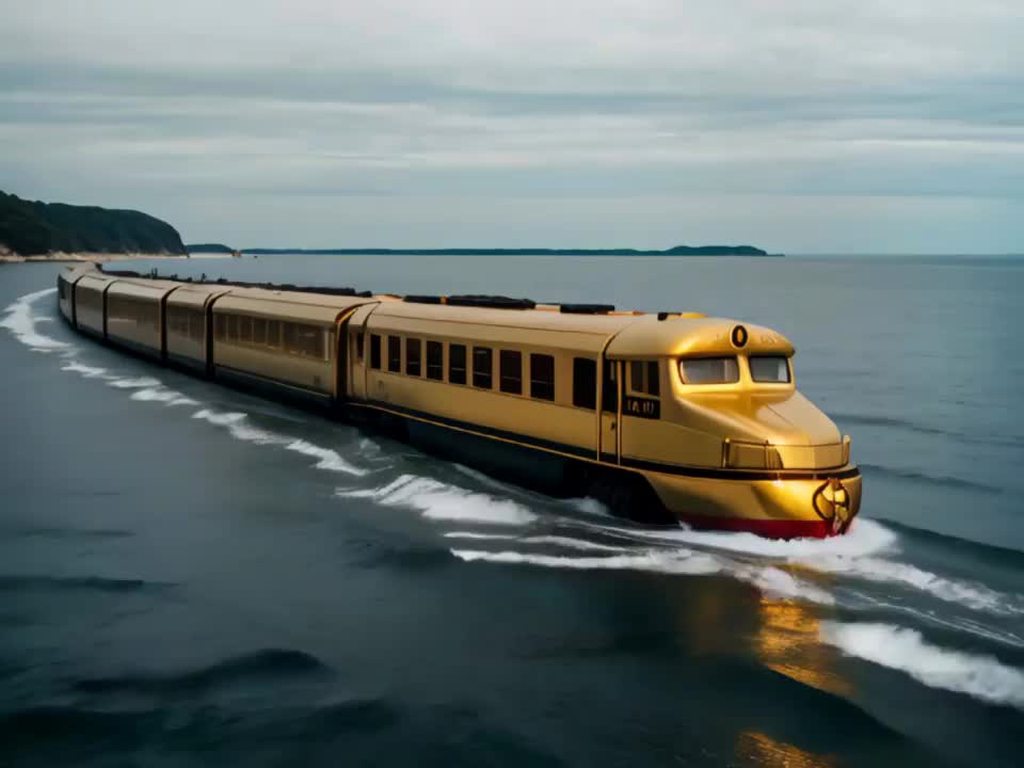 tidal pendant
bur
discord embed falier
ima resend
me watching my computer die with ai
for this one i forced it to render 40 frames instead of 25
and it seems like it got unstable
severe moon
yeah increasing video_frames beyond the model training limit tends to do that
tidal pendant
im surprised i never got a vram error
severe moon
hig v_f and fps together is how you get the jitters
tidal pendant
hes calling so much magic energy
severe moon
it's definitely a cool effect if you want it
severe moon
tidal pendant
whats the weirdest generation result you got from this
hmmm, maybe these where it generated shadow people and ghosts instead of moving the actual goblin guy from the image:
severe moon
man it's gonna be so cool once we can actually ask for stuff like that instead of just changing seeds and hoping for the best
 tidal pendant
it vanished
no drugs allowed
drugs despawn
i have no idea try posting in #🤝|tech-support
maybe they can help
👍
severe moon
oh wow, this little dude lives on my music production desk
 bronze pollen
Any idea of the model architecture of pika lab?
tidal pendant
what
severe moon
they're probably training their own models
open heron
Even in a bad drawing it knows how it should move. Amazing

 dull thunder

Image model: SDXL
Video model: SVD
open heron
 tidal pendant
severe moon
man I can't wait until we get txt/imgTo3d
tidal pendant
severe moon
man I can't wait until we get txt/imgTo3d
true
severe moon
open heron
whoa
tidal pendant
never tried 2d stuff with it
severe moon
TFW taco tuesday is so rad you turn into a cloud
 soft stratus
ping pong
severe moon
tidal pendant
also y does your video loop
ping-pong set True
 soft stratus
loop would be playing again
severe moon
 tidal pendant
i figured when i saw dragon's screenshot but when you randomly said it i thought you were just randomly adding to conversation XD
soft stratus
Gotta think of what the term would mean... ping pong = back and forth. 🙂
tidal pendant
yea
severe moon
Video Combine also has a loop count if you need set number of loops for a gif or video
tidal pendant
o ok
i was just wondering what it was im prob going to keep it off because the ending frames are funny most the time
severe moon
it's just an easy flag to make the videos twice as long for free and look good if osmeone turns loop on their player
 tidal pendant
mario sinking into a floor
ruby pine
Note: 40GB of VRAM required
Why they claim this?
ruby pine
10,6/24, so much free vram that it's possible to leverage upscale and anything you like. What an absurd statement about 40gb. Could be that we do smth wrong or what
damn ffmpeg consumes more vram than this whole generation
severe moon
tidal pendant
severe moon
hes getting crushed XD
open heron
ruby pine
Note: 40GB of VRAM required
Why they claim this?
That was early. Now run even on 8gb
ruby pine
wish we had some semblance of "control" over this pandora box
tidal pendant
im waiting for them to make a text input that we can use
ruby pine
it's fun but
i doubt they can just add it if it was trained without pairing to text tokens
tidal pendant
in the research paper its showing them using text to video

so it exist somewhere its just not out yet i think
 zinc karma
ruby pine
Note: 40GB of VRAM required
Why they claim this?
zinc karma
ruby pine
Note: 40GB of VRAM required
Why they claim this?
on Windows if it need more VRAM (more than 24GB) for me it works with VRAM swap into normal RAM where it took like 56 GB and it is just 50% slower in last/2nd VRAM hungry phase. It doesn't crash at all. I think this is windows feautre and they run it on Linux where it crash.. so maybe that's why they think it needs 40GB.
I haven't tested it on linux but I guess it doesn't have VRAM swapping by default.
ruby pine
zinc karma
on Windows if it need more VRAM (more than 24GB) for me it works with VRAM swap ...
i managed to get BSOD
Currently allocated : 15.81 GiB
Requested : 83.08 GiB
Device limit : 24.00 GiB
occasionally 4x upscale got into film interpolation
and it didn't end well
tidal pendant
i added a photo of a clock hopping it would animating the hands but it just moved the camera
zinc karma
ruby pine
i managed to get BSOD
I have sometimes with stable diffusion start after another AI program exit.. that is probably drivers fault it doesn't clean the RAM properly. Maybe try Studio drivers if you have gaming.
ruby pine
imma studio, well it's fist bsod ever
just some glitch
imma messed it real bad so, it's fine
but yeah swap works for me too. but i can't say that it's 1/2 speed, for me it's like super slow
 fossil atlas
so what's the worst possible test we can throw at svd? i think something like a picture of a wine glass falling. in the video we should see it smash, like this: https://www.youtube.com/watch?v=mWRuzFsmQHg

A small test animation of a wineglass breaking. I used the free plugin Thrausi http://nitro4d.x10hosting.com/blog/?page_id=79 to break the glass apart. Thrausi is a very useful destruction tool. You´ll find more information and also more free plugins on the Nitro 4D http://nitro4d.com/blog/ site.
Again made with Cinema 4D rendered in Vray.
...
so far i've seen absolutely no indication that svd is capable of anything even close to this
maybe if you start with a picture where the glass is already beginning to break
but that's cheating
tidal pendant
maybe when the text input comes out you could specify glass breaking or something
fossil atlas
try lower cfg. it might survive a bit longer
 barren hound
Is there a text to video through comfy yet? Or only img2vid so far?
fossil atlas
only img2vid with svd model
the paper talks about a txt2vid version, but they haven't released it afaik
it also mentions camera motion loras, also not released yet
tidal pendant
fossil atlas
try lower cfg. it might survive a bit longer
i did one awile ago that survived slightly longer
fossil atlas
what if instead of taking the last frame, you take the second frame?
or the middle frame etc
tidal pendant
i like watching it slowly get worse
fossil atlas
it will still do that, but if you take the second frame, it will be continuously smooth, instead of big (downward) jumps in quality every 25 frames
tidal pendant
true
fossil atlas
it might still jump just as far though, meaning you get like a 4 frame video. worth a try though i think
tidal pendant
yea
fossil atlas
if you set video_frames to 2, are the two generated frames identical to the first two when it is set to 25?
or do you get something completely different?
tidal pendant
no idea
 pure compass

Imagine APP
severe moon
fossil atlas
or do you get something completely different?
Probably something completely different, when I run smaller 12 frames batches to find if an image will look good in motion and then switch to 24 the motion is usually similar but still totally different
fossil atlas
how about quality?
i mean with 2 frames, will the second frame be as fried as 2/25, or 25/25?
severe moon
Good question, probably depends on your CFG scaling
fossil atlas
i don't actually use that cfg scaler node
severe moon
You just run straight into the SVD node from the model?
fossil atlas
yeah. the scaler just seems to make every video explode at the end
severe moon
Interesting
fossil atlas
i don't think it actually is a temporal thing anyway, despite what the docs say
severe moon
I leave it connected but almost always just the same setting as on kSampler
 tough crypt
fossil atlas
tough crypt
fossil atlas
i don't see how it can be if it is tweaking the model
hmm yeah, setting it equal or higher than what is on ksampler results in it behaving like it is not there at all. i did notice that, and then removed it 🙂
severe moon
I think the intention was to ramp from lower initial CFG to final samples CFG to control a tendency to get fuzzy towards the end
fossil atlas
i think it actually modulates over steps rather than frames. don't know. it seems to affect the first frames just as much as the later ones, it's just that with lower cfg the video is more likely to tend towards more motion
but if you set motion bucket real low and fps real high so there is no motion, then compare with and without it, with it just straight up looks worse
and every frame should be identical in both cases
noble wolf
if I use upscaler with controlnet, do I need to upscale the reference image first so my apply controlnet is 1024x1024, sorry i know its wrong channel but others are dead
fossil atlas
fossil atlas
but if you set motion bucket real low and fps real high so there is no motion, t...
by "worse" here, what i mean is every frame obviously was rendered with lower overall cfg, they are smoother and less fried. that could be better if you have very high cfg on the ksampler


 tidal pendant
these are big old guns
open heron
Snap fingers. Very surprising animation
 unkempt mica
That's a good one.
tidal pendant
hes so happy to see you
severe moon
burned through too many seeds trying to get one where not just the background moved so I decided to just throw them all into one long clip....
ruby pine
severe moon
burned through too many seeds trying to get one where not just the background mo...
how to merge many webp?
smh struggle to just slap them into ffmpeg
wonder if there are any convenient nodes
 ornate apex
Any good getting started guides for local Stable Video Diffusion out there? Also, any idea of a good GPU? I have an NVidia with 12Gb -- is that enough?
tidal pendant
ornate apex
Any good getting started guides for local Stable Video Diffusion out there? Also...
i have a 3060 with 12 gb its good enough maybe look in #1072220168534642768 for downloading it i just watched youtube tutorials for downloading it
tidal pendant
severe moon
burned through too many seeds trying to get one where not just the background mo...
this is y we need text prompting aswell
severe moon
ruby pine
how to merge many webp?
I don't work with webp format so not sure there's an easy way. How are you generating your videos?
severe moon
ornate apex
Any good getting started guides for local Stable Video Diffusion out there? Also...
ComfyUI is pretty easy to install if you just download the portable version. There's plenty of guides out there.
severe moon
tidal pendant
this is y we need text prompting aswell
yup
tidal pendant
i know when it comes out im going to be making more cursed stuff
plug this into your pc >:}
everything will be fine
severe moon
tidal pendant
are you using ping pong to go back to the original frame to add on
severe moon
no, just changing seed
tidal pendant
e
severe moon
that a cool thing about pingpong, anytime you change something and get a new video they all start from the same image so that's always the first and last frame and you can pretty easily string them together seemlessly to showcase
tidal pendant
tidal pendant
are you using ping pong to go back to the original frame to add on
thats what i tried saying here but i did not say it correctly
severe moon
🙂
tidal pendant
tidal pendant
plug this into your pc >:}
everything will be fine
i plugged it into my friends laptop
severe moon
no worries, I just wanted to be clear in case anyone got confused reading this later and thought the way to make new stuff was make a video and pull the last frame out for Load Image to use to start the next one
which is totally a way to string stuff together but not really necessary if you're using ping-pong
 severe moon
oh yeah I also used ping-pong initially to make the videos longer so i'd hit 3 seconds for anything i wanted to put on instagram
tidal pendant
I just render the videos at 6 - 15 fps and interpolate thrm
severe moon
yeah i usually render at 8 and interpolate x3 so a 12 or 24 frame long clip hits a full one or two seconds
 cloud knot
ornate apex
Any good getting started guides for local Stable Video Diffusion out there? Also...
cloud knot
ornate apex
Any good getting started guides for local Stable Video Diffusion out there? Also...
Just found this video describing the first aspects of SVD like frames_per_second motion_bucket_id etc https://youtu.be/82l0DsbLHhY?t=376 , also talks about to either install pinokio.computer and run locally or run it in huggingspace etc

Stable Diffusion has released an exciting new AI video model - Stable Diffusion Video. This revolutionary model generates short high quality videos from images.
In this video, I test out Stable Diffusion Video using different tools like Pinocchio, Hugging Face, and Replicate. I showcase the video quality, motion controls, and 3D understanding o...
noble wolf
how do I get my comfy ui to use more than 8gb of vram when doing svd ?
when I load in it detects my vram and says it loads normally, so it shouldn't be automatically using lowvram or anything
nvm got it
severe moon
If you go out in the woods today......
noble wolf
... don't eat the mushrooms

 shut narwhal
Anyone got a workflow with the different Motion Settings tests to generate all at once by any chance ? 
 keen ember
help:
i generate 4 secs using an input image
feed back in the last image so i can get 4 more sec (8 sec video now)
but it gets blurrier and now has purple ghost stuff appearing, omg it is deteriorating, how to avoid this?
hushed coral
that's a good idea. how do you grab the final image?
copper berry
hushed coral
that's a good idea. how do you grab the final image?
there is a lot of tools that can extract images from gif/webp so maybe like that
or create your node in comfy to do that
severe bear
you can just grab the last latent from the batch that svd outputs

I got the whole thing down to 4 minutes, as in txt2img2vid2upscale2render so not that much of a wait anymore, but still just camera pans
 silver dirge
I got my video generator working! https://www.youtube.com/shorts/0tiwN_0pA-4

Description: Join Sammy, the extraordinary suburban squirrel, as he embarks on a nocturnal adventure, running an espresso bar for his fellow critters and venturing into tech, literature, and even space travel. Witness the most daring project yet as Sammy becomes a spacefaring squirrel, achieving what no rodent has before! #SquirrelAdventures #No...
 left gulch
over saturated output. any idea why?
ruby pine
 woven fractal
I keep on getting a cuda out of memory error
 jagged oriole
woven fractal
I keep on getting a cuda out of memory error
jagged oriole
woven fractal
I keep on getting a cuda out of memory error
i have the same error
woven fractal
my GPU has 6gb of VRAM. I think the problem here is with pytorch
 torpid eagle
woven fractal
my GPU has 6gb of VRAM. I think the problem here is with pytorch
torpid eagle
woven fractal
my GPU has 6gb of VRAM. I think the problem here is with pytorch
Have seen folks running svd with as low as 8gb VRAM, but not sure if anyone has gotten it working with 6gb yet.
https://github.com/comfyanonymous/ComfyUI has a --lowvram option that is supposed to be flipped on automatically if it detects low VRAM so might be worth seeing if you have any luck with that if you haven't already.

GitHub
The most powerful and modular stable diffusion GUI with a graph/nodes interface. - GitHub - comfyanonymous/ComfyUI: The most powerful and modular stable diffusion GUI with a graph/nodes interface.
woven fractal
torpid eagle
Have seen folks running svd with as low as 8gb VRAM, but not sure if anyone has ...
Do you have a tutorial link? I'm using pinokio
I do have comfy UI
how do I get SVD on it?
torpid eagle
woven fractal
how do I get SVD on it?
If you have https://github.com/ltdrdata/ComfyUI-Manager installed you might be able to use the UI to install the SVD model (I haven't gone through this workflow myself).
If not, you'll want to have the SVD checkpoints file in the models/checkpoints directory within the ComfyUI directory.
wget -O /models/checkpoints/svd.safetensors 'https://huggingface.co/stabilityai/stable-video-diffusion-img2vid/resolve/main/svd.safetensors?download=true'
Once you have the SVD model installed, you can checkout https://comfyanonymous.github.io/ComfyUI_examples/video/#some-explanations-for-the-parameters which has links to image to video workflows. You can copy one of the workflows from the links and load them in ComfyUI.
GitHub
Contribute to ltdrdata/ComfyUI-Manager development by creating an account on GitHub.
woven fractal
Alright, thanks!
severe moon
 dusty lance
who are you crazy people, and how in the hell did you get 40gb vram
did ya'll download vram or something?
 heady coral
Heheh
Always download more ram

Go into your public library and download more ram
Be a man
 pastel matrix

 tawny storm
? Any idea why?
 severe moon
tawny storm
? Any idea why?
severe moon
tawny storm
? Any idea why?
use 'git clone https://' WHATEVERURL instead
tawny storm
severe moon
use 'git clone https://' WHATEVERURL instead
this issue is happeneing when I try to install the Missing Custom Nodes
severe moon
tawny storm
this issue is happeneing when I try to install the Missing Custom Nodes
which node is being installed?
tawny storm
severe moon
which node is being installed?
when i am trying to click on Install missing Custom Nodes... this happens
 severe moon
tawny storm
when i am trying to click on Install missing Custom Nodes... this happens
severe moon
tawny storm
when i am trying to click on Install missing Custom Nodes... this happens
I would close all that and then open Manager again and try doing the Fetch Updates or Update All first. Then after restarting Comfy and everything's all updated try to get the Missing Custom Nodes.
tawny storm
severe moon
I would close all that and then open Manager again and try doing the Fetch Updat...
let me give it a try
tawny storm
severe moon
I would close all that and then open Manager again and try doing the Fetch Updat...
still the same issue 🫠
tidal pendant
severe moon
tawny storm
still the same issue 🫠
i dunno man, maybe go to the comfy github and raise an issue there? it looks like some sort of connection error because [remote computer refused connection]. Github doesn't appear to be down so either you have an internet issue or the build of comfy you're using has some sort of issue itself.
tawny storm
severe moon
i dunno man, maybe go to the comfy github and raise an issue there? it looks lik...

 fervent belfry
tidal pendant
its running with my 12gb vram card so i have no idea
fervent belfry
tidal pendant
its running with my 12gb vram card so i have no idea
how do you get it running locally, js 8gb enough?
tidal pendant
i dont know about 8gb im using ComfyUI rn
 white ember
Does anyone know how to control the motion? Thanks!
bold wave
got a decent streamline going! mix 2 IP adapters for front and background, interrogate those clips, and then have a bit of guidance prompts. so far, it's been working quite well! I've tested this with flipping out cats with dogs and humans, and it seems to be super nice!!

 sterile mesa
bold wave
got a decent streamline going! mix 2 IP adapters for front and background, inte...
sterile mesa
bold wave
got a decent streamline going! mix 2 IP adapters for front and background, inte...
Will saving that gif give me the workflow in comfy? Would love to test out
bold wave
sterile mesa
Will saving that gif give me the workflow in comfy? Would love to test out
When I get home I'll share the json file. Basically just ip adapters, and then loading 2 images in to mix, interrogating those images, then doing a video.
sterile mesa
bold wave
When I get home I'll share the json file. Basically just ip adapters, and then l...
Thanks. Will try building something out but you may get home before i get on my computer again
icy valley
 tidal pendant
 solemn turtle
Hey does stable video diffusion work now with mac using comfy ui?
bold wave
sterile mesa
Thanks. Will try building something out but you may get home before i get on my ...
OK here we are.
sterile mesa
bold wave
OK here we are.
Oh thank you! Yoink!
bold wave
sterile mesa
Oh thank you! Yoink!
enjoy! youll have to remove the custom lora but there's not much else to it. comfy is good at daisychaining different ideas and putting it into one cohesive thing.
sterile mesa
bold wave
enjoy! youll have to remove the custom lora but there's not much else to it. co...
Yeah for real! I've only been using comfy for like a week and am ridiculously impressed
severe bear
just wondering but are there any sadtalker nodes for comfy? feel like it would go well with svd 
looked at the code but it doesn't seem immediately obvious how to implement them
 pallid wolf
whats the best workflow atm for svd?
severe moon
severe moon
tidal pendant
im just making weird stuff
 ocean flare
Did a small video animation for a SUNO music generation, pretty amazing how fast you can set something up now. Even if its pretty rough
tidal pendant
ocean flare
Did a small video animation for a SUNO music generation, pretty amazing how fast...
i did this but with a stable diffution lora of my friend and pika before svd came out
pastel matrix

 fluid quest
anyone know why it's reloading the model in comfyui every single time I generate a video?


 fierce schooner
left gulch
over saturated output. any idea why?
fierce schooner
left gulch
over saturated output. any idea why?
cfg value too high?
bold wave
yeah the fry is always due to high CFG
tidal pendant
 warm acorn
fluid quest
anyone know why it's reloading the model in comfyui every single time I generate...
warm acorn
fluid quest
anyone know why it's reloading the model in comfyui every single time I generate...
Not enough memory to store the model maybe, so it unloads it each time. Maybe...
fluid quest
warm acorn
Not enough memory to store the model maybe, so it unloads it each time. Maybe...
I've got an 8gb gpu, not sure
 pastel storm
4 questions for SVD in comfyUI: 1) how do I change the model and output directory 2) how do I add the SDXL refiner in my queue workflow 3) How do I make the motion in SVD better and actually relate to the image (i typically get results of a still image with the canvas panning away from it) 4) can someone explain cfg and augmentation level for SVD Thanks
open heron
 severe moon
Helga was part dwarvenkin and Meredith was all witch
open heron
pastel storm
4 questions for SVD in comfyUI: 1) how do I change the model and output director...
You don't change the model, there's only one SVD model. To change output depends on the save file node or you need to add to the bat file. SDXl and SVD are two different things. The movement depends on several things, mostly seed.
severe moon
pastel storm
4 questions for SVD in comfyUI: 1) how do I change the model and output director...
3 - you change the seed and hope for the best. motion_bucket is like a dial to go from slow to fast but it's not really possible to dial in anything specific. a simple trick is to change the ksampler steps down to around 4, this will look like crap but give you much faster output and a general indication of what type of movement will happen. You should be able to see if it pans the right way, or zooms, or looks like subject is a moving cloud, those are the main types of movements and then you can decide if you want to change the step# back to a proper render value.
severe moon
pastel storm
4 questions for SVD in comfyUI: 1) how do I change the model and output director...
4 - Augmentation level is basically adding extra noise back into each step, it can help fast moving stuff from getting all smooth looking. I still ahven't seen a good guide or explanation of what it actually is doing though so take that with a grain of salt. CFG sort of fries the image, if it's too low everything will look all soft,fluffy, and pastel but too high and everything gets too contrasty with weird edge artificats and looks like melted plastic, so adjust to taste I guess....
severe moon
pastel storm
4 questions for SVD in comfyUI: 1) how do I change the model and output director...
2- why do you want to do this with SVD? It's not necessary. If you still want to I'd go find a good Base/Refiner XL example and just stick this in place of the Load Image node on most SVD workflows.
severe moon
pastel storm
4 questions for SVD in comfyUI: 1) how do I change the model and output director...
1 - I wouldn't change the model directories unless you already know about symlinks and config files. If you know what those are then the github for ComfyUI has a section under Installation explaining how to setup your own config file and point it to wherever you're keeping your models. It will probably cause problems though to not just put things where Comfy expects them, especially if you start loading Custom Nodes.
You can save files wherever you want by looking for filename_prefix in whatever nodes are saving stuff in your workflow and setting the path there.
 pastel storm
severe moon
1 - I wouldn't change the model directories unless you already know about symlin...
pastel storm
severe moon
1 - I wouldn't change the model directories unless you already know about symlin...
thank you, I know about config files, my reasoning for doing this is so that I can use my models folder for normal txt2img then 2vid without wasting an extra like 60gb on duplicate storage, and I ask about the refiner for normal txt2img too
fierce schooner
I bought an M.2 SSD to store all of the checkpoints/models. It improves performance when switching models. Then just use symlinks in each apps folders to point to the SSD.
severe moon
pastel storm
thank you, I know about config files, my reasoning for doing this is so that I c...
Cool. Basicaly with the refiner you setup two KSamplers and feed one into the other. There's official examples pages in the ComfyUI github with images you can jsut drag onto the CUI screen to load the workflow, just look for the SDXL examples link.
fierce schooner
Only problem with symlinks is comfyui kills the links when it updates. So I just wrote a batch script to redo them after every update.
severe moon
Yuck
I finally decided that ComfyUI will be my daily driver for most AI stuff so I can just symlink anything else to where it stores things. Life has been much simpler since then.
warm acorn
so what's the lowdown on the whole Stability rumor they might sell to Jasper? should we download and archive everything so we can still use it if/when everything is no longer open source? 🙂
time to get a few massive hard drives hah
clever pendant
warm acorn
so what's the lowdown on the whole Stability rumor they might sell to Jasper? sh...
I read they were approached by other companies to purchase but not that SAI was looking for a buyer
severe moon
whatchu talkin about?
severe moon
severe moon
icy valley
 tepid stream
Whats a warthong? 
 winged iris
anyone knows how to generate videos exceeds 4-5 seconds?like 8-10 seconds or more longer
copper berry
winged iris
anyone knows how to generate videos exceeds 4-5 seconds?like 8-10 seconds or mor...
people are saying to use the last image from a generated video and use it as base image to continue the generation
 bold ocean
copper berry
people are saying to use the last image from a generated video and use it as bas...
bold ocean
copper berry
people are saying to use the last image from a generated video and use it as bas...
How is this possible is there a ComfyUI workflow for this?
copper berry
bold ocean
How is this possible is there a ComfyUI workflow for this?
idk i didn't try that but try to find a node to extract webp/gif frames or create your own node
if you find this node you should be able to loop (maybe you also need a loop node)
 winged glacier
a lonely man walking on the beach
severe bear
bold ocean
How is this possible is there a ComfyUI workflow for this?
you could use the 'latent from batch' node to pick the last frame from the sampler, then decode it and feed it to another conditioning node and run another sampler, and so on
tawny storm
Can somebody please send me the folders of the following Missing Nodes:
...
Incase if you are wondering why I am not using Manger Extgension, then just beleive me, I have tried too many attempts, but in the end, it states Faled to Establsih Remote Connection..
Apparenly, I mannualy installed RIFE Video into Custom Ndoes folder, and it worked..
So, incase any of you hguys have the above mentioned Custom Ndoes installed, please send me the link, or just put it in a dropbox

 left zenith
Hi, new here. I've done two videos with SVD generated with online solutions, however now I'm trying to run it locally (6 GB VRAM) via my Pallaidium: https://github.com/tin2tin/Pallaidium add-on for Blender, and the inference time is insane: 20 minutes for 14 frames(with Zeroscope it was max 2-3 minutes).
My SVD videos:
https://www.youtube.com/watch?v=3dco2igWyvk
https://www.youtube.com/watch?v=aEAy24d8F6E
I would love to hear if you could share your sweet-spot settings, VRAM, and inference time with me?
GitHub
Generative AI for the Blender VSE: Text, video or image to video, image and audio in Blender Video Sequence Editor using Zeroscope (SD, XL, upscale to XL), Animov, Potat1, Stable Diffusion(1.5, 2.0...

Done in the Blender add-on Pallaidium and SVD
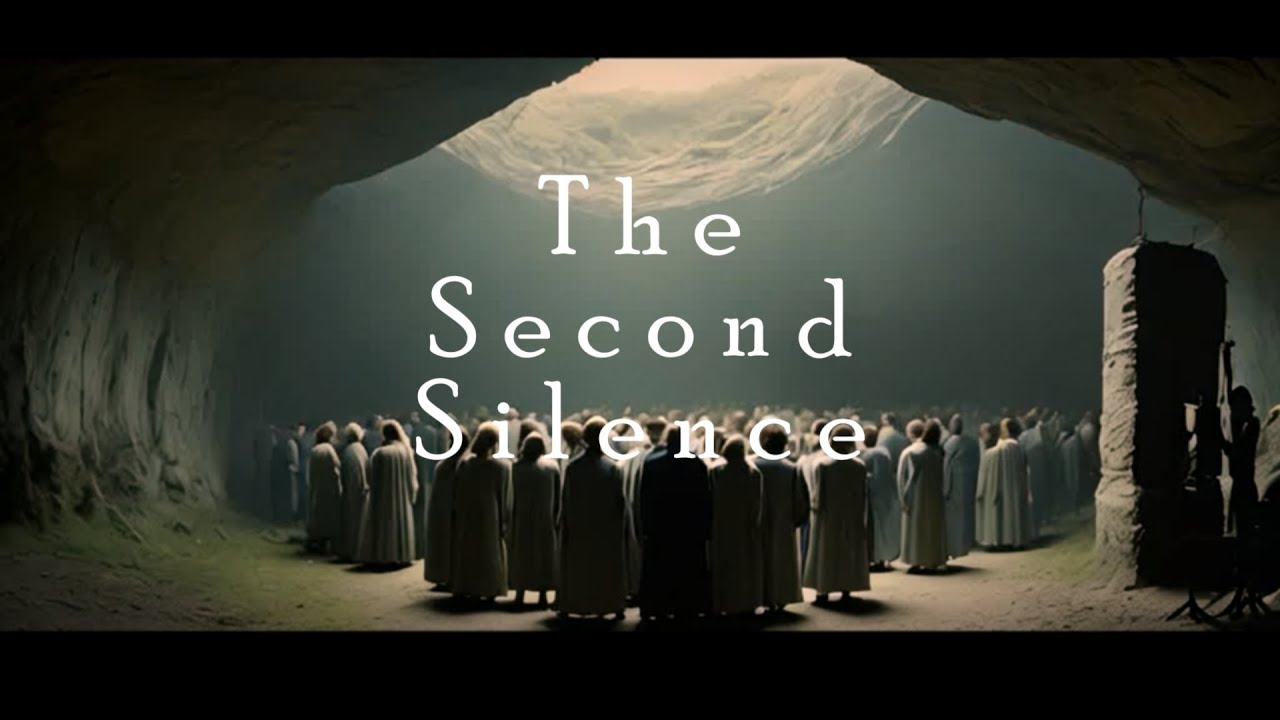
Done with Stable Video Diffusion and Pallaidium:
https://github.com/tin2tin/Pallaidium
bold ocean
left zenith
Hi, new here. I've done two videos with SVD generated with online solutions, how...
You videos are great ....I've heard a little bit about Palllaidium, how good is it and what are the advantages of using it over ComfyUI which is very memory efficient with low vram?
tawny storm
tawny storm
Can somebody please send me the folders of the following Missing Nodes:
...
Inc...
anyone please?
left zenith
bold ocean
You videos are great ....I've heard a little bit about Palllaidium, how good is ...
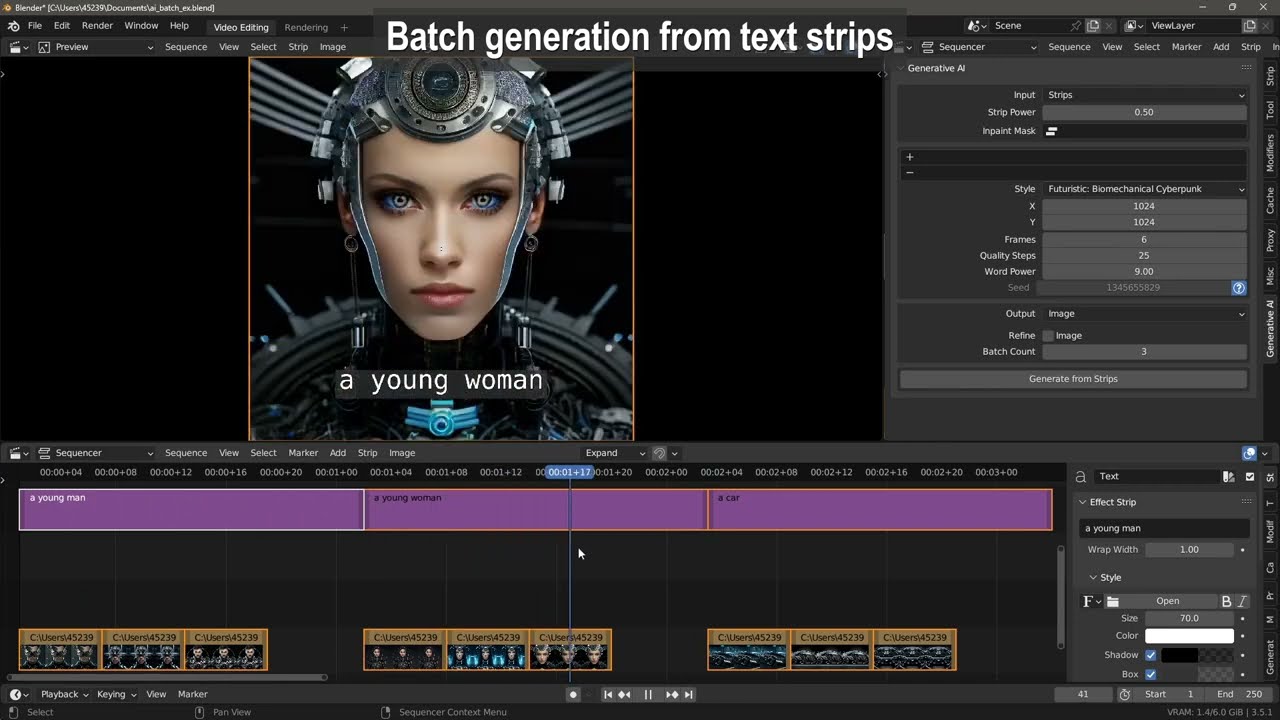
As mentioned, I developed it on 6 GB of RAM. So , everything implemented works with this little RAM. I never tried ComfyUI and can't compare it. The main advantage of Pallaidium is that you're generating images, video, sound, speech, music, and text directly into the timeline of a video editing program, and you can use strips as inputs for batch operations. Ex. select all text strips and batch convert them into images, or speech, or images into videos or images into text into images... or whatever...
However, I mainly posted here to ask for people's sweet-spot SVD settings, VRAM and inference times?
fossil atlas
bold ocean
You videos are great ....I've heard a little bit about Palllaidium, how good is ...
blender's node system is significantly better than the one in comfyui - it has working nesting and undo and a load of other stuff that makes editing much easier
left zenith
fossil atlas
blender's node system is significantly better than the one in comfyui - it has w...
Pallaidium is not using Blender's nodes. It is for generating into the Blender Video Sequence Editor timeline: https://www.youtube.com/watch?v=gSFWGkgaNsE
 bold ocean
left zenith
As mentioned, I developed it on 6 GB of RAM. So , everything implemented works w...
bold ocean
left zenith
As mentioned, I developed it on 6 GB of RAM. So , everything implemented works w...
🙌🏾 Ohh great work, do you have any updated introduction, feature walk-through and getting started type videos available somewhere? Also does Pallaidium add-on allow linking models/loras/controlnet/embeddings from other folder paths?
fossil atlas
left zenith
Pallaidium is not using Blender's nodes. It is for generating into the Blender V...
there's another add on which puts all comfy nodes into blender's node editor
i think it uses comfy api though so you still have to run the web server
left zenith
How long does ComfyUI take to render 14 frames of SVD on your amount of VRAM?
bold ocean
Using SVD (not SVD_XT) I'm getting 1-2minutes on my 4080 16GB
copper berry
with a A40 it took 110s 🙂 (XT version and 25 steps and with model loading)
with a CPU tho (yes i tested with a R7 5700) it took me like 45m to 1h
tepid stream
tawny storm
anyone please?
https://github.com/Kosinkadink/ComfyUI-VideoHelperSuite For the VHS node
https://github.com/rgthree/rgthree-comfy for the seed node I think
fossil atlas
left zenith
How long does ComfyUI take to render 14 frames of SVD on your amount of VRAM?
2070S 8GB and about 2 minutes
tepid stream
left zenith
How long does ComfyUI take to render 14 frames of SVD on your amount of VRAM?
15 seconds on a 4090 for 25 frames
left zenith
Uhhh... I'll need to upgrade my hardware. Out of curiosity, I'll have to see how Comfy works on my 6 GB then. Any hints on how get SVD & ComfyUI up and running quickly?
tepid stream
But depends on the image size you feed it obviously
left zenith
26 minutes!!!
 tepid stream
I dont envy people with lower hardware man
Cant imagine waiting half an hour just for a camera slide
severe bear
honestly just take the depth map and animate the pan yourself at this point 😆
you're going to have 25 minutes left over too
tepid stream
left zenith
severe bear
honestly just take the depth map and animate the pan yourself at this point 😆
Yeah, that spaghetti-eating video would be much quicker to do manually, including the time for cooking. 😅
 heady kelp
shut narwhal
tepid stream
heady kelp
shut narwhal
tepid stream
Is it Stable Diffusion Image with Runway ?
tepid stream
Its SDV with topaz for frame gen
shut narwhal
Stable Video Diffusion did that animation ? Then you upscaled the result on Topaz ?
tawny storm
tepid stream
https://github.com/Kosinkadink/ComfyUI-VideoHelperSuite For the VHS node
https:/...
really really thanks man
tawny storm
tepid stream
https://github.com/Kosinkadink/ComfyUI-VideoHelperSuite For the VHS node
https:/...
for the VHS Node, it isn't the correct one
tepid stream
tawny storm
for the VHS Node, it isn't the correct one
Are you sure? It should be
 tawny storm
tepid stream
Are you sure? It should be
tawny storm
tepid stream
Are you sure? It should be
can you just show me the whole node setup?
tepid stream
what do you mean?
tawny storm
tepid stream
what do you mean?
complete Workflow Screenshot of yours.. just want to check the node conenctionl.
tepid stream
Its not the workflow youre trying to load tho
tawny storm
tepid stream
Its not the workflow youre trying to load tho
Still... I know,, but want to see
 open heron
tepid stream
tawny storm
tepid stream
open heron
tepid stream
tawny storm
tepid stream
Gotch.a.... many many thanks brother for the link.. its now all set!
tepid stream

tawny storm
Let me try my 1st Image to video
tepid stream
You should try to set up comfy manager tho, try to resolve the error
tawny storm
tepid stream
<:AMpepethumbsup:709929989910298644>
Cant thank you enough.. been dwelling on this problem for 2 days
tawny storm
tepid stream
You should try to set up comfy manager tho, try to resolve the error
I understand... but I really tried hard for the past few day.. .hence ended up going for manual method
tepid stream
If you can send the error in #🤝|tech-support we can have a look and maybe help you out
tawny storm
tepid stream
If you can send the error in <#1002602742667280404> we can have a look and maybe...

bold wave
tepid stream
ok i like that cat
tawny storm
Sorry for the noob question though.. but why there is no Preview in the Video Combine Tab?
 tepid stream
You have to run it once for a preview to appear
If there is nothing to preview it wont show anything
tawny storm
tepid stream
You have to run it once for a preview to appear
How exactly?
 zenith depot
tawny storm
tepid stream
Run your workflow
zenith depot
tawny storm
tepid stream
Run your workflow
Sorry, but tbh, I am new to ComfyUI... Can you tell me how to run the workflow?
tepid stream
Press queue prompt on the right
tawny storm
tepid stream
Press queue prompt on the right
I did..
oh, I realsied that I was getting impatient... saw the things working in CMD.. sorry for bug
open heron
 unkempt mica
tawny storm
I did..
oh, I realsied that I was getting impatient... saw the things working i...
unkempt mica
tawny storm
I did..
oh, I realsied that I was getting impatient... saw the things working i...
In the UI it should highlight what part it's on so it's easy to visually track where it is.
 quartz vortex

 sour tulip
quartz vortex
sour tulip
quartz vortex
fyi discord will show your video if it's mp4 or gif
sour tulip

 fringe condor
Could anyone tell me what happened? I tried to install the missing nodes I needed for SDV inside of ComfyUI and once I restarted and it tried to install everything, I am getting this fat error. 😦

Here's the full log
 fossil atlas
you installed the svd custom nodepack, which is unnecessary because svd nodes are in core now. anyway that node pack tries to download svd models automatically for you, and it does so using a program called wget, which you do not have installed
fringe condor
So I simply should install wget?
fossil atlas
and it doesn't check for that possibility, so it just crashes instead
that may not be the actual error though
fringe condor
Do you think I could delete any of the recently installed custom nodes to revert it back to how it was before?
 fossil atlas
it appears that the actual crash is something torch related
fringe condor
Probably a version not truly compatible with something else :c
fossil atlas
well you should delete ComfyUI-Stable-Video-Diffusion because it's in the core now

 open heron
 fringe condor
Last resort momento
fringe condor
fringe condor
Last resort momento
Issue still occurs 😭
zenith depot
made an experiment, got the last pic of the first sequence and made a second sequence out of it and merged it
i wish we would have more control over it
 dusk dagger
has anyone here prompted SVD for motion?
zenith depot
is currently not possible
 are they lyin
fossil atlas
are they lyin
fossil atlas
yeah people here have done it
it doesn't work very well
like it rarely works at all
severe bear
it just acts like some random noise added to the conditioning, the results are nothing like what the prompt describes
dusk dagger
okay, has anyone tried using a diffusion image prior, like say form kandinsky-2, to jump from text space to image space? would make sense that it's mostly just noise if it's only trained from image embeddings
fossil atlas
yeah, i think people tried that too, but i haven't seen any workflows
fossil atlas
note that the latent output from svd conditioner is completely empty. it's just a convenience. you can try putting something not empty in to the sampler
open heron
zenith depot
https://cdn.discordapp.com/attachments/1021146407190667264/1179881620887584898/U...
In my tests using the last frame doesn't do much, its not different than mixing using 2 different seeds
 zenith depot
@open heron i think it depends also on what exactly happens in the picture
 balmy geyser
Hi,
I can't seem to find video memory requirements for stable Diffusion Video? Do you have any reference on that?
open heron
balmy geyser
Hi,
I can't seem to find video memory requirements for stable Diffusion Video? ...
I heard about people running with 6gb, but i'm not sure
half hound
Hey guys I made an update to my multi layer video workflow. Here are my two updated workflows you can grab.
Here is a video explain the new changes https://youtu.be/wRwUcSMqYNI

Requirements:
ComfyUI: https://github.com/comfyanonymous/ComfyUI#installing
ComfyUI-Manager: https://github.com/ltdrdata/ComfyUI-Manager
SDXL: https://huggingface.co/stabilityai/stable-diffusion-xl-base-1.0/tree/main
you can use any safetensor file, I used the base SDXL model.
SVD Model: https://huggingface.co/stabilityai/stable-video-diffus...
sour tulip
@grim tangle your parameter grid images are great. thanks!
Can you tell me some more about how prompt affects the motion? I don't understand. The prompt isn't fed into the SVD_img2vid_Conditioning node, so does the prompt actually affect the motion?
open heron
grim tangle
sour tulip
<@228118453062467585> your parameter grid images are great. thanks!
Can you tell...
It's not a proper method really, it's just concatenating clip text encoding to the SVD conditioning. In my tests, in some cases very strong prompt affected the motion, mostly the word "panning" was very consistent, but other camera related words worked, if they were possible with the init image in the first place. It's not a reliable method and has adverse effects overall, just experimenting, proper official controls are coming later anyway.
sour tulip
grim tangle
It's not a proper method really, it's just concatenating clip text encoding to t...
interesting! I didn't even think about adding any nodes to affect the conditioning between the SVD conditioning and the KSampler. I will play with that. thanks!
 night meadow
wanted the dragon to move failed succesfully?
icy valley

 quick badger

 sharp herald
Flamingo
 glass helm
How long is a second of animation taking y’all to generate on home gpus? (e.g., a 3080)
severe moon
severe moon
glass helm
How long is a second of animation taking y’all to generate on home gpus? (e.g., ...
on my 4090 it takes about a minute or two to make 24 video_frames, depending on settings
glass helm
Thanks and damn! A minute well spent by the looks of it!
severe moon
these settings are pretty low on CFG, sampler steps and I use interpolation to smooth things out. it's pretty easy to crank up just a few values and make stuff that takes 10+ minutes to render, but obviously, you don't need to to get fun results....
glass helm
Makes sense - I’m trying to figure if I can just use an extra gpu to run a nightly batch job for a generative game, so lower settings are fine. sounds like a maybe
severe moon
hmmm, maybe. the problem with batching it is the motion you get is so random that you'd probably end up with a lot of vids that are just panning or zooming shots
 echo blade

 nocturne magnetBOT
FAQ: I’m missing credits/having issues processing payments. What do I do?
If your account balance is incorrectly showing 0, please wait 2-3 minutes to see if the system auto-corrects. If not, please confirm with your bank to ensure the transaction completed successfully & then fill out a request using the following form on DreamStudio so the team can investigate it further: https://beta.dreamstudio.ai/support
severe moon
 latent pecan
severe moon
latent pecan
severe moon
reminded me of that japanese wave drawing from its structure
severe moon
 grizzled spruce
Can I try stable video now on my personal computer?
tawny storm
grizzled spruce
Can I try stable video now on my personal computer?
Why not? depends on your GPU though
grizzled spruce
tawny storm
Why not? depends on your GPU though
Is there a gui for it like with stable diffusion?
tawny storm
grizzled spruce
Is there a gui for it like with stable diffusion?
ComfyUI
or Pinokio
grizzled spruce
Thanks I'll try to install it.
tawny storm
grizzled spruce
Thanks I'll try to install it.

#StableVideoDiffusion Stable Video Diffusion has been Released! This easy Guide shows you how to set everything up. Run Stable Video Diffusion on your Computer today! This Image to Video Render Worflow is super easy to use and gives you stunning results.
Links from the Video
Download Workflow: https://drive.google.com/file/d/17UQXmD...
grizzled spruce
Noice!

 small heron
a long blonde hair girl working before the computer with McDonald hamburger on her hand
 vital spindle
 tepid stream
small heron
a long blonde hair girl working before the computer with McDonald hamburger on ...
tepid stream
tepid stream
small heron
a long blonde hair girl working before the computer with McDonald hamburger on ...
tepid stream
 surreal maple
Hey guys, an absolute beginner here.
I want to get my hands dirty sort of speak
what is an easy way to play with these new image-to-video capabilities?
tepid stream
surreal maple
Hey guys, an absolute beginner here.
I want to get my hands dirty sort of speak...
With a capable GPU you can use comfyUI to run it locally
surreal maple
tepid stream
With a capable GPU you can use comfyUI to run it locally
Thanks!
I kinda GPU poor tho 👀
Is there an image-to-video solution I can access on the web?
tepid stream
I think it runs with 8GB nowadays, I dont know about any online solutions
left zenith
@surreal maple I got SVD working in my free Blender genAI add-on, Pallaidium working on 6 GB of VRAM. If you lower the resolution, the render times will be okay. Get it here: https://github.com/tin2tin/Pallaidium
GitHub
Generative AI for the Blender VSE: Text, video or image to video, image and audio in Blender Video Sequence Editor using Zeroscope (SD, XL, upscale to XL), Animov, Potat1, Stable Diffusion(1.5, 2.0...
severe moon
shut narwhal
Wooow, so dooope!
severe moon
severe moon
 real flax
Did someone tried to add the SDXL refiner in the loop for each image?
it could help to stabilize the video, if there is some human faces
 granite hawk
severe moon
granite hawk
severe moon
Hi! Could you explain to me how do you succeed creating this kind of stuff. I think that it could fit the need of some website animation. Which tool do you use?
severe moon
granite hawk
Hi! Could you explain to me how do you succeed creating this kind of stuff. I th...
it's just Stable Video Diffusion running in ComfyUI... there should be lots of tutorials out there by now on getting that running.
granite hawk
severe moon
it's just Stable Video Diffusion running in ComfyUI... there should be lots of t...
Ok. I'm going to take to look at it. Thanks
severe bear
somehow didn't connect that lower fps means more motion till now 
severe moon
severe moon
copper berry
i wonder if it's possible to use SVD to have 360° of an object and then put it into a scanner for 3d models
severe moon
copper berry
i wonder if it's possible to use SVD to have 360° of an object and then put it i...
Possibly. There's a lot of seeds that do that kinda of 360 fly-around video, I guess it just depends on how much any particular model can extrapolate missing information for continuing the .... object's coherency.....
copper berry
severe moon
Possibly. There's a lot of seeds that do that kinda of 360 fly-around video, I g...
btw does a animation seed doing the same kind of animation ?? even if it's not the same generation seed / image ??
severe moon
copper berry
btw does a animation seed doing the same kind of animation ?? even if it's not t...
not really, it depends on the input image
copper berry
severe moon
Possibly. There's a lot of seeds that do that kinda of 360 fly-around video, I g...
there is some that are not bad like the one Corridor Crew use (if you know them)
copper berry
severe moon
not really, it depends on the input image
intresting
severe moon
I think though that if the input images are very similar, like same sized subject in same location and same background, then the seed would give similar motion for both images. The more divergent the images are then the greater chance seed will just choose to do motion differently.
severe moon
copper berry
i wonder if it's possible to use SVD to have 360° of an object and then put it i...
Another example, the input image is just the first frame! This goes almost 90 around it, making up all sorts of detail.
copper berry
severe moon
Another example, the input image is just the first frame! This goes almost 90 a...
nice and with that we take the last frame and try to gen more to have the full 360 can be cool
tepid stream
copper berry
i wonder if it's possible to use SVD to have 360° of an object and then put it i...
Just wait for the 3D model release
severe moon
getting them to spin is the hardest part lol
copper berry
severe moon
getting them to spin is the hardest part lol
at least it's not a weird thing
severe moon
copper berry
at least it's not a weird thing
oh i get plenty of those too....
copper berry
ya it's funny when it happen
bold wave
fantastic!! except the sword is a tiny bit wavy haha
 glass helm
Are there any good ways to control the animation? Bucket seems to control intensity, but how control what kind of animation?
 sonic path
copper berry
i wonder if it's possible to use SVD to have 360° of an object and then put it i...
sonic path
copper berry
i wonder if it's possible to use SVD to have 360° of an object and then put it i...
The main svd page talks about it. I think they already have a working model for it.
copper berry
noice
keen shuttle

This is AI Video made with new SDVideo Model #makebelievetv #cats #cat #aivideo #sdxl
fossil atlas
glass helm
Are there any good ways to control the animation? Bucket seems to control intens...
no, not yet
 arctic reef
icy valley
copper berry
i wonder if it's possible to use SVD to have 360° of an object and then put it i...
arctic reef
icy valley
copper berry
i wonder if it's possible to use SVD to have 360° of an object and then put it i...
Closest I've got
 copper berry
icy valley
Closest I've got
copper berry
icy valley
Closest I've got
and with a head not bad at all
icy valley
copper berry
and with a head not bad at all
Imo it's insane from just giving it an image
 ember rune
any updates on metal support for mac? 😅
seems to be stemming from lack of Conv3D support for MPS... maybe a smart monkeh could figure it out. 🙂
open heron
4 different animations, 100 frames and interpolation
open heron
tidal pendant
 half scaffold
soft stratus
half scaffold
half scaffold
soft stratus
half scaffold
Oh lawd, he's comin'!
silent hinge
is there a way to prevent stable video diffusion from getting so grainy
fringe condor
It feels like it gets stuck

 sullen harbor
you are not using the right node
Use this workflow: https://comfyanonymous.github.io/ComfyUI_examples/video/
fringe condor
Oh that's so weird! I thought I dropped in the second example and was working with it, but I guess ComfyUI being tricky with me
nocturne magnetBOT
FAQ: What is Stability AI?
Our vibrant communities consist of experts, leaders and partners across the globe. They are developing cutting-edge open AI models for Image, Language, Audio, Video, 3D and Biology.. AI by the people, for the people. Learn more here 
 jolly cedar
 severe moon
Above is with Face Restorer applied directly to video, below is applied to image first.
I think applying it to the video yields a slightly better quality but it has these weird glitches where it maps to the face slightly differently in a few frames.
 restive berry
/
 leaden hamlet
anyone know how i get the turbo scheduler to show up in comfyui? 😦
wow, those vids are fire
 honest garnet
leaden hamlet
anyone know how i get the turbo scheduler to show up in comfyui? 😦
honest garnet
leaden hamlet
anyone know how i get the turbo scheduler to show up in comfyui? 😦
Update it.
severe moon
leaden hamlet
anyone know how i get the turbo scheduler to show up in comfyui? 😦
Usually Refresh, Reload page, and update Comfy are the order I try things when new things aren't showing up for me.
severe moon
Iguana tests, one is from real pic and one from Midjourney pic:
severe moon
sterile mesa
severe moon
You happen to share your workflow prior? Would love to test
severe moon
sterile mesa
You happen to share your workflow prior? Would love to test
should be embedded

I usually test motions around 5 steps, and render at 12-16 but this middle guy's scales kept wriggling around so I upped to 30 for the render I posted.
sterile mesa
severe moon
should be embedded
Thanks. Will try to drag and drop when i get back home. I know discord strips mp4 meta sadly so appreciate the image.
severe moon
sterile mesa
Thanks. Will try to drag and drop when i get back home. I know discord strips mp...
yup, have fun!
severe moon
fringe condor
I woke up and hopped on ComfyUI to try out SVD but man I can't get anything at all to work


Both ComfyUI example workflows doesn't work for me.
 ashen tusk
fringe condor
I woke up and hopped on ComfyUI to try out SVD but man I can't get anything at a...
ashen tusk
fringe condor
I woke up and hopped on ComfyUI to try out SVD but man I can't get anything at a...
You should load a regular image generation model in that first checkpoint loader, not the video model. The SVD model is loaded later in the workflow.
 fringe condor
ashen tusk
You should load a regular image generation model in that first checkpoint loader...
fringe condor
ashen tusk
You should load a regular image generation model in that first checkpoint loader...
My mistake, but I still get this issue within that workflow
 ashen tusk
fringe condor
My mistake, but I still get this issue within that workflow
ashen tusk
fringe condor
My mistake, but I still get this issue within that workflow
is the svd_xt.safetensor actually in the correct directory? I mean, it is loaded by default right? Does it give the same error if you change it to svd.safetensors?


 ashen tusk
Put them in checkpoints, that's where I have mine, and it works just fine
fringe condor
hmm okay
I still get the issue no matter what I am using it seems, or where the checkpoints are located
ashen tusk
fringe condor
I still get the issue no matter what I am using it seems, or where the checkpoin...
Are you by any chance running a Ryzen? Seems like most people (all three i've found) are not running nivida gpus.
fringe condor
Yeah I have an AMD GPU, but Intel CPU
ashen tusk
Ah, probably cuda related then.
https://github.com/comfyanonymous/ComfyUI/issues/2043
There's an open issue about it.
GitHub
System : ryzen 3600 - rx 6600 8 GB - Windows 10 - Latest comfyui Using the sample workflow on the blog (https://comfyanonymous.github.io/ComfyUI_examples/video/) I try generating with the new svd m...
fringe condor
ashen tusk
https://github.com/comfyanonymous/ComfyUI/issues/2043
There's an open issue abou...
I'll comment on it with my error and any hardware information and such that may help
 prime plover
galaxie
 onyx thicket
open heron
Raining
onyx thicket
open heron
Raining
Looks like this is 3 vids stitched together using last frames of the previous vid. Do you have a workflow that automates this?
tidal pendant
tidal pendant
im trying to put in a low quality photo but its moving it like a slide show XD
tidal pendant
wanted to see what it would look like if i combine ebsynth with this
 sterile vigil
Is it possible to get stable video diffusion on Automatic1111?
 copper lynx
sterile vigil
Is it possible to get stable video diffusion on Automatic1111?
copper lynx
sterile vigil
Is it possible to get stable video diffusion on Automatic1111?
it's not an extension as of now. I would love to install it on A1111
I tried SVD install on an older machine last week but got busy. checking back in now. anyone have the latest workflow for low VRAM GPU?
open heron
onyx thicket
Looks like this is 3 vids stitched together using last frames of the previous vi...
Yes,
severe moon
This is the best video I've seen on getting specific motions so far: https://youtu.be/m-ZoxcYNWFg?si=B3IWdGjro1WJS69N

This is a comprehensive workflow tutorial on using Stable Video Diffusion in Comfy UI. Stable Video Weighted Models have officially been released by Stabality AI and support up to 25 frames per second of video generation. While it might seem that the motion generation is random, it is not. In the tutorial, I showcase 6 unique workflow examples e...
copper lynx
what's the lowest tier GPU that people have had success in generating animations with SVD?
I got it to say
Sampler: EulerEDMSampler
Discretization: EDMDiscretization
Guider: LinearPredictionGuider
Sampling with EulerEDMSampler for 26 steps: 0%| | 0/26 [00:00<?, ?it/s]
3050ti in my laptop with 32gb RAM. I wonder if it will even generate anything
severe moon
The biggest limiting factor seems to be VRAM, I don't recall seeing anyone with less than 8GB of VRAM reporting success. Those with lower VRAM should probably be starting out with the SVD and not SVD-XT model to test their rig out.
copper lynx
severe moon
The biggest limiting factor seems to be VRAM, I don't recall seeing anyone with ...
for sure, im starting with SVD
a little movement!
Sampling with EulerEDMSampler for 26 steps: 8%|██████▋ | 2/26 [31:41<6:15:38, 939.12s/it]
severe moon
yikes
copper lynx
LOL is that just to produce one frame?
open heron
copper lynx
LOL is that just to produce one frame?
No. That will make the whole animation but you should use the 14 frames model and do only 14 frames
severe moon
maybe someone else can let you know what settings are best on lower cards but I find lowering CFG and sampler steps really decreases the generation time
copper lynx
open heron
No. That will make the whole animation but you should use the 14 frames model an...
ohhhh. had seen someone say 48t to decode so I guess I thought it went there. I see now, that's how many frames. Ill try again with only 14 frames. how do I stop the current one? close that tab?
copper lynx
severe moon
maybe someone else can let you know what settings are best on lower cards but I ...
much appreciated
silent hinge
I forgot where i installed comfy ui. Its over
open heron
copper lynx
much appreciated
Press Q and hit cancel. The 14 frames model is another model file that you need to download. You can also do smaller than 1024x576 images, that will makes things faster
severe moon
ouch.
silent hinge
Is video diffusion any better than animate diffusion?
severe moon
if Comfy is in the middle of a doing a node that takes forever it can be a real pain to wait for Cancel to work. in the cmd prompt terminal window you can try hitting CTRL-C to stop the ComfyUI process and then open Task Manager and find the python Process, right click and End Process
then you'll need to restart Comfy again
copper lynx
open heron
Press Q and hit cancel. The 14 frames model is another model file that you need ...
where is the 14 frames model located
copper lynx
silent hinge
Is video diffusion any better than animate diffusion?
from what Ive seen from other users outputs I like the results from SVD better
severe moon
SVD is the 14 frame model and XT is the 25 one
copper lynx
severe moon
SVD is the 14 frame model and XT is the 25 one
I have the the SVD 14 frames model then
silent hinge
copper lynx
from what Ive seen from other users outputs I like the results from SVD better
Is svd faster?
severe moon
silent hinge
Is svd faster?
14 frames takes less time than 25
open heron
copper lynx
where is the 14 frames model located
https://comfyanonymous.github.io/ComfyUI_examples/video/ both models here. You also doing 26 steps, you should try 15-20
severe moon
of course you can put whatever you want for video_frames
copper lynx
silent hinge
Is svd faster?
not sure