#🔧|finetune
1 messages · Page 2 of 1
 tribal rapids
I’m on 3080
Just face, what’s it like on like more body shot images? Altho I can see the torso shot came out well
 viral jay
I'm on a 3080ti, uh I don't remember exactly but 6000 steps is quite fast, maybe it took 10-15 minutes
ah
tribal rapids
I mean generated ones
viral jay
and photos are 2048x2048
viral jay
full body ones tend to lost the face, I think I probably would need full body pictures too
tribal rapids
I think they’re tricky with any training types . I think you need to do an in paint after
 tough gazelle
How do those hypernetworks work as they don't have subject words? Does it just make every face into the one in the hypernetwork?
tough gazelle
tribal rapids
HN does have a token?
I didn't think they did
 wintry girder
viral jay
full body ones tend to lost the face, I think I probably would need full body pi...
wintry girder
viral jay
full body ones tend to lost the face, I think I probably would need full body pi...
What do you mean? The hypernetwork isn't working if you're generating full body?
viral jay
as it zoom out it stop adding my face, so it works up to certain distance on the photos only

like this, it has mustache, but looks nothing like my face
wintry girder
As if it only knows what to do if the subjects face fills the frame like your photos
tough gazelle
tribal rapids
Do you mean class word?
Yeah I've only done Dreambooth myself where you supply a subject name and a class word.
I don't see options for either of these when making a hyper network
viral jay
yeap seems like, I'm trying to get some better prompt for testing
yeah hypernetwork does not seem to have it, but I see that it takes into account the description
the full body is really hard to achieve, I will take some full body pictures of me and add to the training to see if that increases the possibility
I know that once I added me with another shirt it greatly improved the variations
tough gazelle
What sort of loss values were you getting during training?
I'm going to give a hypernetwork a try
viral jay
0.12-0.17
tough gazelle
ok cool
Mine seems to be hanging around similar
Testing it on an art style, with the same settings you used
It's actually looking like it's getting it already at 500 steps
viral jay
yeah here with 500 steps it already start to get some concept of my face
tough gazelle
This is quicker than I expected it to be
Only downside is I have to crank my fan upto 80% because of the ass memory cooling on the 3080 FE
wintry girder
I'd be interested to know if the same sizing issue exists with embeds too...
viral jay
wintry girder
I'd be interested to know if the same sizing issue exists with embeds too...
about the torso?
wintry girder
About the face with full body compositions
viral jay
it used to be better
wintry girder
As in, you didn't get this specific problem when you were using embeds?
viral jay
with embeds it was giving less zoom in bias, with HN when I decrease strength it get back to full body prompt, when I add strength it want to zoom in again


those are embedding generated
wintry girder
Got it, that's useful info, thanks
viral jay
it used to exaggerate features...lol
well HN can also produce some, but its giving that less often
 tough gazelle
So it seems to sort of work with art styles on Hyper Networks
This is with just Waifu Diffusion

This is the dreambooth model I made of the art style

And this is WD 1.3 + Hypernetwork

All on the same settings
It's definately a lot more subtle than Dreambooth, but you can see it. I'll run it for some more steps I think
viral jay
nice, yeah not bad at all I think
for existing content it kinda refines the details, I like it
tough gazelle
You can start from your existing step count, so I'm going to do it upto 10,000 and see what difference it makes, if any
But yeah, it looks to me like it's kept the original image from WD 1.3, but applied small style changes from the hypernetwork.
 tough gazelle
I've got it set to save them every 500 steps, so if it does that's fine
I wonder what makes it do that
viral jay
yeah just use the good one then, just warning because if you're not monitoring it you may waste time just producing junk
tough gazelle
My current problem is that some of the training images are slightly nsfw and I used the deepboruoo to make tags
So it keeps making rude images
Maybe I should have ticked to box to read the prompt from the txt2img tab lol and put my negatives in that prevent this
I cannot show any of the training examples here lmao


 viral jay
nice, I'm not familiar with those styles, I guess you're expecting the dreambooth one?
tough gazelle
Yeah dreambooth was trained solely on this style, so as close as possible to that style. It seems to be pretty close.
Just getting an X/Y plot of the different step stages
The dreambooth model usually defaults to ruder images, because of the training data, so I don't mind if the hypernetwork doesn't always have their breasts out
viral jay
hmm what about TI? have you given it a try?
tough gazelle
No, not tried that yet
There doesn't seem to be much of a difference after 5000 steps
 viral jay
yeah seems pretty stable after it
tough gazelle
Going to do a portrait one so I can see how the faces change
 mint lagoon
tough gazelle
mint lagoon
tough gazelle
There's no bots to do that here. We are all running locally on our own machines
tough gazelle
On what server? I have no idea what your talking about and it doesn't seem like it's for this channel anyway
Using a portrait it diverges pretty quickly, but there's a couple odd outliers
 viral jay
seems to stabilize after 7k
tough gazelle
This seems to give a better visualisation actually IMG2IMG
Source image

Using the Hypernetwork

whoops, there was some nipple on the dreambooth one lmao
So it seems to be essentially capturing the oil painting like art style and some of the clothes style and overlaying it on top of the original image.
 real tartan
Does anyone know why sometimes we get 2 headed people? lol

is it conflicting artists?
tough gazelle
No it's because it was designed to be on 512x512 images. So when you change the height or width it does strange things
If your using Automatic1111 Web-UI, try the Highres Fix option
tough gazelle
Yeah, it doesn't always do the double head thing, but once you go over 512 on the height it can
ok, 11500 steps and it's starting to get deep fried
And the loss has started to creep up to 0.24+
Yeah I let it go to 12000 and it was just a blue square
real tartan

real tartan
tough gazelle
Yeah I let it go to 12000 and it was just a blue square
didnt know you could go higher than 150
tough gazelle
real tartan
didnt know you could go higher than 150
this is for Hypernetwork Training.
but yeah you can go as many steps as you like for making images, but after a while it stops making much difference
 hot breach
comparison of 1.4 and FF7R model with empty prompt, same seeds, see if you can tell which is which

 sacred grail
yeah it sometimes splits words into multiple pieces..
tough gazelle
Hypernetwork not seeming as good at doing characters with the same settings. Up to 6000 steps and it barely looks like the target character
hot breach
tough gazelle
Hypernetwork not seeming as good at doing characters with the same settings. Up ...
I played with it a bit using my ff7r data set several times over doing a lot of tweaking of the LR schedule to try to ride the line in just ruining the model vs getting it to learn my data and have yet to get anything out of it for that, may only be useful for styles I guess?
i may try again and just caption everything as "screenshot from final fantasy" and see if it will at least learn the style
1636 images with extremely detailed captions ([filewords]), it would not draw my characters on the base model
tough gazelle
Mines sort of doing it, but it doesn't look right
Maybe I'll try do it with the caption just set as the character name, instead of using DeepDanbouroo captions
Maybe lower the learning rate too
viral jay
I'm quite happy with face learning using it, but for full body even after including few more pics of me at far distance it still not fully able to deal with my face, it improved but still not quite right
tough gazelle
People seem to be using a lot lower learning rates
Like 0.000005
instead of 0.00001
viral jay
I tried lower rates with my face, it wasn't working
maybe it does work but may require a lot more steps?
tough gazelle
Yeah it will take a lot longer to train
hot breach
this is me creating an LR schedule for it, started extremely high right on the edge of ruining the model then taper as slowly as I could manage it

graph is log10
I may try just purposely destroying the model to latent* noise and train it I guess
tough gazelle
The style model I did with 0.00001 started to fall apart around 12k steps
But it looked good pretty much from 6k steps onward
Seems a lot better for styles than characters, which I think makes sense
hot breach
I did 9800 steps with that LR schedule and nothing worthwhile out of it
tough gazelle
Maybe it's because of your huge amount of images
hot breach
actually, went back and added another 4000 later again on that schedule, still didnt seem to do anything
viral jay
with same learning rate its sitting at 6-7k with good results
tough gazelle
I'm almost at 10k with this attempt at a character model. It sort of looks like the character. But the face shape isn't quite right and the outfit is wrong
The loss is a lot lower than my style model though, it's usually around 0.08
Style model was consistently up at 0.12
 half folio
hot breach
actually, went back and added another 4000 later again on that schedule, still ...
half folio
hot breach
actually, went back and added another 4000 later again on that schedule, still ...
How many images do you have?
hot breach
1636
maybe it needs a ton more steps, i dunno, maybe ill try again with just on character
half folio
And you started with 1-e4 LR?
hot breach
6e-5 which was about as much as I could get away with in just one epoch without the loss skyrocketing I think?
schedule is in that graph, you can put in a LR:STEP,LR:STEP,... format into the box
i'll toy with it more later
half folio
Try starting with something like 5e-4
Then gradually decreasing
Your dataset is big
tough gazelle
ok, it's sort of starting to get it at 10k steps, if I use the characters Danbouroo tag
hot breach
im not doing anime so it may just not work well for other content, I dunno
half folio
I'm very sure it's your learning rate, you need to bump it higher
tough gazelle
10k steps goes from ok looking but not close enough, to 10.5k complete mess big blue blob
lowered the learning rate and goign to try that 500 steps again
viral jay
would be great if we could easily pick a saved embedding or hypernetwork to continue the learning with different parameter
 green flax
i made a kemono friends embedding
example prompt
positive: solo loli tiger kemono-friend in forest, (centered), ((tiger)), (symmetric eyes), ((perfect fingers)), (perfect hands), (tiger kemono-friend), ((loli))
neagtive: (text), (strange mouth), (blurry). extra fingers, mutated hands, ((poorly drawn hands)), ((poorly drawn face)), (((mutation))), (((deformed))), ((ugly)), ((bad anatomy)), (((bad proportions))), ((extra limbs)), cloned face, (((disfigured))). ugly, extra limbs, (bad anatomy), gross proportions, (malformed limbs), extra arms, extra legs, mutated hands, (fused fingers), (too many fingers)

image selected from 4 generated
(solo) seems important if you want just 1 of them for some reason
it may produce nsfw results even tho i made sure all the images are sfw
using the waifu model epoch 9 full
 hollow surge
what's a .pt? is that how you share textual inversions?
 fervent grail
green flax
i made a kemono friends embedding
fervent grail
green flax
i made a kemono friends embedding
Interesting that it's only 25kb - when a checkpoint is like 4 gb
green flax
hollow surge
what's a .pt? is that how you share textual inversions?
i think sometimes is .bin instead of .pt
put it in embeddings folder
at least thats how it works in automatic1111
green flax
fervent grail
Interesting that it's only 25kb - when a checkpoint is like 4 gb
as i understand it (possibly totally wrong) the embedding is just super specific clips data
basically like an ultra specific word
so theres no model data in the embedding just clips stuff
hollow surge
i heard "Embeddings now shareable via images; No need to download .pt files anymore"
reddit
223 votes and 124 comments so far on Reddit
half folio
viral jay
would be great if we could easily pick a saved embedding or hypernetwork to cont...
You can do that though. Just go to training and pick the HN that you had already finetuned.
tribal rapids
looking at the negative prompt above do you think prompts like (too many fingers) are really just placebos? surely the model is trained on what the images are tagged with? (was mostly scraped off the alt attribute?) I can't imagine people were tagging images with "too many fingers" ?
hollow surge
too many fingers negative prompts seem to work for me. it's trained on a lot of images, i think it understands these concepts. put too many fingers as your positive prompt and see what happens, lol
 coral mist
Have there been any good side-by-side comparisons of TI vs DreamBooth vs HyperNetworks?
 hollow valley
Can you combine all 3 to get a super good trained model
Trying to do my face etc but it's kinda like a similar person but not me
Much harder to trick the brain when it's your own face or someone you know like friends or family lol
viral jay
hollow valley
Trying to do my face etc but it's kinda like a similar person but not me
what are you using? TI or HN?
with hypernetwork I got really good result, all those are generated


hypernetwork / 6000 steps / 0.00001 learning rate / 100 * 2048x2048 photos / BLIP captions
I'm really happy with results form hypernetwork, much better than what I was getting with TI
hollow valley
viral jay
what are you using? TI or HN?
Ti and dreambooth so far haven't tried hyper yet
Yeah ti was only good for caricatures
What kinda training data?
2048????
I have been resizing to 512
viral jay
yes with HN I can train with 2048
hollow valley
Wow
viral jay
on my 12gb card
viral jay
maybe give it a go
hollow valley
For training?
hollow valley
The photos you used for ti and dreambooth
viral jay
I haven't tried dreambooth, only TI
viral jay
for TI yeah, but got same as you, only good for some caricatures or maybe 1/50 gens was kinda good
hollow valley
Maybe I need to only feed faces
It's funny I tried a set with body and face it gets the body well enough
 viral jay
yeah I did that on last training, I actually did 3 training (all from beginning)
nope I don't use flip, never tried it but as faces aren't symmetrical I didn't use it
hollow valley
I'll try hyper tonight 6000 steps like you suggested
That's a good point about flip I won't then
viral jay
first training I did only with that green jacket, it was quite biased to green cloths with it
viral jay
so after I changed my shirt and took more photos, that improved the variety of generations significantly
hollow valley
Nice
viral jay
and last one I took some photos that are a bit far from me
viral jay
haven't noticed a big improve with it, but last photos aren't that good either so might not doing well with it
hollow valley
I found it was the best out of ti and dreambooth
viral jay
you mean hyper?
hollow valley
Nah dreambooth it gives you a full new model file
viral jay
I'm training my wife face now, but with a much less photos (around 25)
still not there with 4k steps, but its walking to right direction
from what I'm seeing its doing a much better job than TI
hollow valley
GitHub
🤗 Diffusers: State-of-the-art diffusion models for image and audio generation in PyTorch - diffusers/examples/dreambooth at main · ShivamShrirao/diffusers
viral jay
TI was more specific on the features, but it used to exaggerate them too much, HN is looking more natural, I don't know with her face as her photos have filters lol so I don't blame the algorithm if it goes wrong
hollow valley
Oh yeah filters are hard lol
That's what I used for dreambooth
Can run it at the same time just remember to get the checkpoint file lol
Takes 20 mins for 1000 steps
viral jay
this one produce 4gb ckpt?
hollow valley
Yeah just to compare worth a go and it's on Google's GPU so nothing to lose hehe
I wonder if you can get that model
Then train hyper network using it
Or ti with it on the same face
To make it even more accurate lol
viral jay
maybe? I think if you can produce photos and save then you may be able to use it for training
but I think there's some watermark or stuff like that on images that tell the AI to don't use them for training, not sure if that applies to this case
viral jay
I finally got good results of my wife training, but comparing to my photos, it took around 25k steps to get desired output, now I'm quite happy with it, it was trained with 80 photos, in contrast my face required only 6k steps and I was using 100 photos (with way less variation)
 tardy sparrow
do captions in textual inversion training have effect?
the difference between "object" and "style" captions suggests they do, but what about details?
viral jay
for TI my tests went bad with captions, but for hypernetwork its kinda a must
I will give a try with it again for TI btw
 gray gulch
Hello guys, does anyone knows how to train his own model from absolute scratch, using the same code and a very small set of images ?
 silk crystal
You can't train a model "from absolute scratch" with a few images afaik
But I probably didn't understand what you want as you talk about using the same code
gray gulch
I want to train my own model.ckpt
 vale egret
It took stability 150000 computing hours to train on presumably millions of images. Popular variant ckpts trained on tens of thousands. You’re better off making a hypernetwork for few-shot training
gray gulch
Yeah I know but I want to use only a few images, see what kind of results i get...
 woeful goblet
Whats a good workflow for doing hands with inpainting? I've been rerolling a hand for hours and i still can't seem to produce more than a vaguely-properly-shaped fleshy mass. Sometimes a coherent hand that only has 3 fingers
i cannot get four fingers to show up at all
silk crystal
gray gulch
Yeah I know but I want to use only a few images, see what kind of results i get....
Then fine tune an existing model
You can get very good results
woeful goblet
is there perhaps a checkpoint just full of hands that i could use
viral jay
guys, anyone know if there's a way to find some face that matches what's trained on the model? for example I take a picture of my face and it says that y name is what matches it closely
I'm asking that because celebrities are kinda ok to use for styles etc, hypernetwork works most of time but the original face still play a bit of role, so finding someone with a matching face with at least basic features might help I think
viral jay
also can I choose the face restore to be applied only to eyes?
 upper prism
Anyone tried not using "constant" for the learning rate? And would it be better to start with a high learning rate and lower it or vice versa?
 novel crest
Are hypernetworks the new textual inversion?
upper prism
novel crest
Are hypernetworks the new textual inversion?
Kind of, yes. They have a similar way of working on top of the model and similar strengths and weaknesses
novel crest
I haven't used either. Do you have a recommendation if I want to train an artstyle?
or is it more of a leap of faith type thing
or should I use Dreambooth instead?
 restive ridge
Anyone have recommendations for how many steps and how many vectors per a token work well with auto11 embed training? (textual inversion)
This seems like something you have to experiment with a bit.
fervent grail
novel crest
I haven't used either. Do you have a recommendation if I want to train an artsty...
I just did a style with Dreambooth and it works VERY WELL. 200 photos, 5000 samples, on a 3060, works really well
novel crest
I've only used a Dreambooth to train a face
any differences I have to make a note of when training a style?
 dry panther
Related to this discussion, is it possible to use Dreambooth to train on images with different descriptions? I want to train a style on a set of sprites that I have descriptions for
restive ridge
Interesting. Haven't tried dreambooth. Just tried auto11 with 10,000 steps with 400 input images to try to train the style. The result is pretty rough, so trying more, but with that said, the image results were definitely recognizable.
 ashen perch
I think it's getting better, maybe I should separate my sample, because there are some images with isometric view

these were my sample images
 restive ridge
ashen perch
these were my sample images
restive ridge
ashen perch
these were my sample images
which one are you using? dreambooth or auto11?
ashen perch
automatic1111's webui and textual inversion
restive ridge
ashen perch
automatic1111's webui and textual inversion
Oh cool. Looks good. What "vectors per token" did you use, and for the "prompt template file" did you use "style" in the file or something different? Wasn't sure what kind of values would work best.
I did 12 just at random, and put a couple portrait prompts causing I was doing portraits, but not sure if "style" would be better
ashen perch
10 tokens, prompt template has a single line with [filewords], in style of [name] and the initialization text was 3d render style
restive ridge
Cool, thanks
And if it helps anyone tweaking their config (even though I'm still struggling to get good results). This is my setup. (I'm basically doing exactly what art twitter hates)
I love this guys art: https://www.instagram.com/samdoesarts and wanted to get a similar style
I downloaded images from his insta with: https://github.com/instaloader/instaloader
Left default initialization text as *, used 12 for the "vectors per token". Left the learning rate as default.
After 15,000 steps this is the result I'm getting, pretty rough looking:

I forgot to switch to the standard diffusion model. So, currently using a checkpoint I made from Waifu + Jinx diffusion. Not sure if that's hurting results.
woeful goblet
is it possible to create variants of a single specific inpainting result?
restive ridge
As in like doing it without using different seeds?
woeful goblet
i don't understand what you mean
if i'm trying to generate a piece of armor onto a character, i'd like to look at one of the generated results and make more like it
restive ridge
woeful goblet
i don't understand what you mean
which UI are you using? DreamStudio?
woeful goblet
automatic1111, webui
restive ridge
Oh like keep the style of one of the inpaints?
woeful goblet
yes
i'd like to generate more inpaints that are similar to it until i find one that seems just right
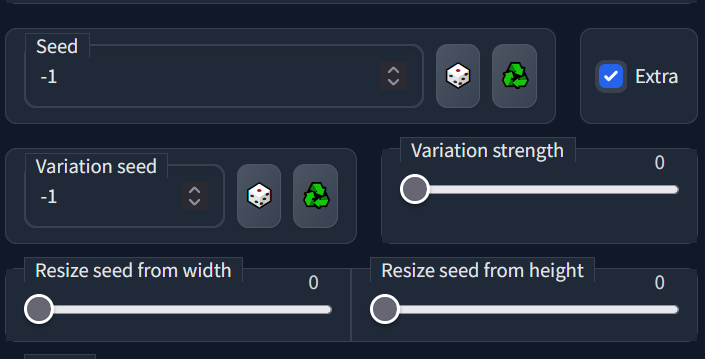
i confess i'm not entirely clear on how these controls work
https://i.imgur.com/tK3r7lk.png
 woeful goblet
i usually lock both seeds and play with the variation strength
restive ridge
Yeah I just know that way, where auto11 can do subtle variations. Haven't done much inpainting with auto11 yet, so sorry can't help too much
woeful goblet
this seems totally different from how variants work in midjourney. Is it? or am i misunderstanding
the inpainting is amazing unless you want to make hands, ive spent so much time rerolling hands ;-;
restive ridge
Thanks, well I'm now doing 100,000 steps lol, just it'll be a few hours 😂 I previously tried a more broad prompt like that and the results weren't coming out good. So, still trying to figure out what configs work best. Currently reusing a portrait prompt that has previously given me good results.
restive ridge
woeful goblet
the inpainting is amazing unless you want to make hands, ive spent so much time ...
Lol I've given up on hands all together. Have you messed with negative prompts? I know people try to use things like "deformed" "extra digits" "extra limbs" to deal with that. Not sure how well it works though. I haven't touched it too much because long negative prompts can hurt results.
Like you're saying img2img you're doing in DreamStudio? I'm using Automatic1111 webui
Oh nice. I need to try out dreambooth. Not sure the tradeoff between different ones, and whether dreambooth just keeps the subject consistent or can also do style (with different subjects).
I'm currently running stuff local now that I have a computer for AI stuff. But, previously was using Colab for everything, even paying for the Pro+ plan.
restive ridge
Btw if anyone wants training images for https://www.instagram.com/samdoesarts
They're here: https://drive.google.com/file/d/1WgpQIBqFds07KYAckDTvu_5OHVbrja7E/view?usp=sharing
Google Docs
tribal rapids
I’ve trained 32 images of a person with 128 regs at 3500 steps . Can I add more images of the person (will give me about 56) and continue training ? Should I add more regs? I was going to train another 1000 steps maybe.
For some reason some of the photos come out with the person looking a bit older and seems like their face looks more eastern than western (general look not specifically skin colour etc). I don’t know what would cause that. Maybe it’s found a similar celebrity that it’s leaning towards slightly?
tribal rapids
I’m going to try with fewer images from scratch later tho, but since I can’t go backwards I thought I’d try putting more in
 tardy olive
32 is too much IMO, how many agnles you want to get really? It doesnt need a lot, i think with more angles your likeness will suffer, if you give it less images it can focus on likeness better with your amount of training steps
tribal rapids
Ok thanks.
tardy olive
at least its what i found out with my training, 2000 steps and 15 imgs is better than 2000 and 20 imgs
tribal rapids
Yeah I reckon you need to put the steps up for more images?
Like 2500 for 20 there maybe ?
tardy olive
well lets say with 100 steps per image you get so so likeness and great stylisation
tardy olive
with less images you get more likeness but also more overfitting so it wont stylise as effortless but a plus is that your identity will holdup better during stylisation so id go for that, when you stylise then your face is changing a bit sometimes
tribal rapids
Currently I only used 128 on 3500 steps tho on 32 images
tardy olive
regs ? i dont use any at all, your model is polluted with your images i wouldnt bother with reg imgs
tribal rapids
Going for photo results currently more than charicature
I assumed reg images pushed the class back to its original to combat your training on the subject token
tardy olive
evn if you use regs then natalie portman will still have your face
yes, but lot of people just dont use it
more detailed trainings they do, and some people train 2 subjects at once
tribal rapids
I had a question about that specific thing here actually … https://github.com/JoePenna/Dreambooth-Stable-Diffusion/issues/73

GitHub
regarding this section: https://github.com/JoePenna/Dreambooth-Stable-Diffusion#-using-the-generated-model when you use Natalie Portman person it is clearly showing a lot of your sks subject, witho...
tardy olive
it leaks everywhere
even if he wuldnt use person word, natalie would have a face resembling his wife
i never really prompted 2 people at once so ... i dont mind it
i guess you wouldnt want it in scenario where youd prompt like me and trump shaking hands
but also if you train male subject then females wont be as polluted
tribal rapids
I’m training eg jmp909 man
tardy olive
some people also train max 2400 steps, stop and train additional 1000 steps on trained model again
tribal rapids
Yeah I did that 2400, then 1100 to make it up to 3500… I think it was a little better but I need to go back and compare the 2 checkpoints
tardy olive
my best results were trained on class only, so only on man, male, female ,woman
to b honest id want the model to be polluted with my likenes as much as i can pollute it with ability to still stylise
tribal rapids
Without a subject token? Presumably because you’re overwriting a lot of the class in there with your own images
tardy olive
likeness and stylisation are 2 main priorities
tribal rapids
Yes exactly. I’m trying to do it for my face not anybody else
and be able to say me wearing sunglasses and look like me behind them
tardy olive
so try to do it just on man
tribal rapids
Interesting ok thanks
tardy olive
it worked for me, worked for others
the thing is also, i trained on a cartoon, i used random name like japl and cartoon as aclass, the training went crap, so i restarted and just used boy and class cartoon, the training went great, i dont recommend uising random words, not sure where that idea came from
maybe it somehow worked for other people, but i bet it would work better just using gender
tribal rapids
Well the sks example it is a gun. But “sks man” Will not bring back a gun. So i think it’s just pairing for steering a specific pairing
 icy olive
... just hypernetwork stuff
I've trained a hypernetwork (10k steps). It's really good, except for the eyes. The rest of the face is ok, but the eyes are even worse than before, EXCEPT when I request a portrait/close up.
How exactly do I fix this?
tribal rapids
Codeformer?
tardy olive
imo its a theory made up by dreambooth devs but not really proven to work better
tribal rapids
@icy olive
tardy olive
using just class gave me best results but id gladly use something else if it works even better
icy olive
tribal rapids
<@490566780377628672>
I want to avoid resorting to postprocessing, since the eyes are fine without my hypernetwork.
tardy olive
icy olive
... just hypernetwork stuff
I've trained a hypernetwork (10k steps). It's reall...
do inpaint and use fullscale , i do that a lot just do get as best face as i can
tribal rapids
Well since I’m scrapping this model I’m going to throw another 24 subject images in to take me up to 56 and train another 1000 steps . See what happens in the name of research 😉
tardy olive
yeh i did a lot of sessions with intent to say "yyeh i knew its gonna be crap"
and they were
tardy olive
so now i know where i shouldnt go with training, and i keep image count and steps count like 110-120 steps per image
tribal rapids
Yeah I was thinking 100x per image
tardy olive
maybe even 130
tribal rapids
That might depend on learning rate as well tho I guess
tardy olive
but too low image count and you overfit so much youd get only training images with artifacts
tried training with just 2, failed hard can only do 2 training images
tribal rapids
Need to recheck my results without xformers as well
icy olive
Oh yeah, what's the highest amount of images you should go for hypernetworks (assuming training to 10000-20000 steps)
tardy olive
you did the one with variable training rates?
i stand by saying the less images the better
icy olive
yes, 5e-5:100, 5e-6:1500, 5e-7:10000, 5e-8:20000
tardy olive
every new image is derailing studying of existing images to focus on next one and next one
icy olive
so basically, more images needs more steps
tardy olive
but 100 steps and 1 imagfe it will catch up
icy olive
The eyes are just absolutely killing me and I can't figure out why. Maybe I just need more training
tardy olive
for inversion i do extra shots of face , from jaw to eyebrows
to get good eye detail
but on hypernetworks i gave up, crap results was what i got and nothing else
felt like wasting time
icy olive
I should mention that I'm training this on screenshots of 3D animation/CGI, rather than anything photorealistic
I'll probably try training an embedding next
tardy olive
why not dreambooth
icy olive
do I really want to train a whole new model file? also I have no idea how to do dreambooth
does it really do much better?
tardy olive
easy on colab , yes it gives best results https://colab.research.google.com/github/TheLastBen/fast-stable-diffusion/blob/main/fast-DreamBooth.ipynb

behaves like all other subjects already in SD model
you will get 2gb ckp file at the end
and its supe fast
30min and its done with 2000 steps
you can do 1000 steps or 1500 up to you
so its 15-20 mins
with free colab session sometimes lasts like 5 houirs, thats like 8 models that you can train and test
icy olive
what about locally?
tribal rapids
If torso result shots give a completely different person, do you think I should just add more source torso shots ? The close up face is pretty good as I have about 20 face shots
tardy olive
you mean mid shots from hips to hair ?
if you gonna do a lot of the images in this framing, give it more images of it, cause itgs gonna pretty much use the angles you give it
tribal rapids
Just above head down to waist
tardy olive
it works on top of your training images
tribal rapids
Ok
tribal rapids
Yeah the smaller the face the more it seems to diverge from the original person I think
tardy olive
eventually chest busts
yes tryue, happens with best trained models in SD, its just the nature of SD
so i just inpaint the face back in img2img
tribal rapids
Tried that but I think needed more angles for the face
tardy olive
but for inpainting of the face IMO textual inversion is the best , with 70 vectors
tribal rapids
Have you tried txt2img2img ?
tardy olive
yes
tribal rapids
Not quite sure what it solves specifically
tardy olive
overfit embedding
the ones with hig h vectors, cause embedding should have just 1 vector really
more vectors its harder to change style from photo
but this is amazing for inpainting your face into movies etc
tribal rapids
Is there a good prompt for a full body shot result rather than a face?
tardy olive
you wont get good face with SD on fullbody shot
but the prompt is pretty much - photo of full body shot of subject
tribal rapids
Thanks
much difference between photo of jmp909 man , photo of 'jmp909 man' and photo of <jmp909 man> ? (those single quotes should be backticks.. dont know how to add them here)
 short cairn
ashen perch
these were my sample images
short cairn
ashen perch
these were my sample images
oh damn thats good idea i love rts games
tardy olive
but you know, i looked up my resyults, with some artists you can get likeness on a shot from knees to hair, but with other artists its crap, so it depends
tribal rapids
also re body shots in general, i often see it can definitely style the person to a specific look of the person but just not the right person
so as a style it sort of works, just not for specifics. which is why i wonder about more images and more training.
tardy olive
i dont think it will help much , best emedy is to fullscale inpaint it and be done with it
don try to take out 3 birds with one stone
i did mostly zombies but here i can see its still me
 icy olive
textual inversion seems to be better, but i'll see
tardy olive

th more photostylised it is the more likenes i think, with anime it loses identity quicker i think
here is face fixed with img2img

its just quicker
anime
 tardy olive
icy olive
textual inversion seems to be better, but i'll see
tardy olive
icy olive
textual inversion seems to be better, but i'll see
to train a persons face? i did not seen good results from hypernetworks yet, seen it from inversion and dreambooth
icy olive
tardy olive
to train a persons face? i did not seen good results from hypernetworks yet, see...
the whole gamut, not just face
I'm hoping to get everything to look good
tardy olive
ive seen anime style changed fairy well with hypernetwork
you should join stable diffusion dreambooth discord
tribal rapids
My 3080 is rebooting my Pc just doing Clip Interrogation lol
Need a better psu I think
It’s so temperamental when I start pushing the chips
tardy olive
i have 1080ti but colab works faster, i think amost twice as fast
well 8 secs vs 6 on colab so, not twice but faster
and saves power, so i have like about 20 gmail accounts to use colab
hollow valley
anyone had any luck getting photorealistic finetuning of a face?
seems to work fine as a cartoon or painting etc but anytime i try output a photo the face is weird
tried dreambooth TI and hypernetworks but cant really find any good guides for training in a human being they all seem tailored for teaching it anime characters or art styles
tardy olive
hollow valley
anyone had any luck getting photorealistic finetuning of a face?
lot of people had it, photo is the easiest one to get
tribal rapids
interesting.... trained on jmp909 man....
photo of jmp909 man looks like subject,
photo of jmp909 man wearing red hat gives somebody else entirely (same gender)
photo of jmp909 wearing red hat (ie omitting man) looks quite like subject (at CFG=4.5)
(well... trained on token=jmp909, class=man i mean)
photo of [man:jmp909:0.1] wearing yellow hat looks like subject
photo of [man:jmp909:0.5] wearing yellow hat looks like opposite gender
the trouble with the prompt editing is trying to add man back in to eg [man:jmp909:0.5] to try control the gender without it steering towards somebody else entirely
this works well..
hollow valley
tribal rapids
<@185967700101562368> how many photos/steps?
75 photos full body and close up faces 10000 steps
tribal rapids
photo of [man:jmp909:0.5] wearing yellow hat. (jmp909 man:1.5) looks very like subject more than any other above, but keeps the hat. but note the original subject image it's getting close to i think was wearing a red hat anyway, so it's mostly recreating this source image but changing the hat colour i think
hollow valley
i get the body perfect but the face is always blurry
tribal rapids
i've only got as high as 3500 steps so far.
you mean the face in a full body shot? yes it's always going to be wrong mostly
close up face results should be good
hollow valley
yeah i have a mix
tribal rapids
solution seems to be to inpaint
hollow valley
bunch of full body shots and the faces zoomed in
maybe ill just stick to only super zoomed in face training images
and the body can be wrong
vale egret
Is there a way to convert an fp16 checkpoint to fp32?
tardy olive
for textual inversion training of a human subjects i did a guide here with settings mentioned and training photos shown https://github.com/rinongal/textual_inversion/issues/35
GitHub
GitHub
Hey @rinongal thank you so much for this amazing repo. I trained with over 10K steps I believe, and around 7 images. (Trained on my face) Using this colab I then used those pt files in running the ...
tardy olive
tribal rapids
`photo of [man:jmp909:0.1] wearing yellow hat` looks like subject
`photo of [man...
be mindful of whats the framing on a result - closer to cam will give better likeness so even if prompt is different it doesnt no matter as much as distance from camera
tribal rapids
yeah true, as mentioned it was quite like an existing source photo which was framed almost entirely on headshot
you could probably combine txt2img2img with a face detect algorithm to try automatically fix face on far shots but it's beyond my skills!
by eg doing an automatic inpaint etc
tribal rapids
@tardy olive i think i totally killed my model 😉
trained on 32 images, 128 regs generated by shivam up to 3500 steps, then trained on an extra 22 images (so 54), 256 regs from JoePenna's DDIMs another 1000 steps up to 4500 steps. ruined it.. whether it's the DDIM images I used instead of the ones Shivam's repo generates or the overtraining i don't know
tardy olive
tribal rapids
you could probably combine `txt2img2img` with a face detect algorithm to try aut...
yes but doing it manually a couple opf times lets you to select best result
 tacit leaf
guys,when I try to create hypernetwork, I got "RuntimeError: CUDA error: unspecified launch failure" error anyone knows how to solve it?
 true valley
in all seriousness could i possibly make SD output something similar to medical images if i did an inversion or training on CT/MRI images
ashen perch
Did an another training with TI without isometric images in the dataset, it's better
h3v13 is the new one

but there's a problem I've noticed
with other samples eg. LMS, the result is ugly
true valley
i love the statue of liberty
ashen perch
 true valley
is the ISS crashing into the eiffel tower
ashen perch
ashen perch
h3v13 is the new one
also I should include some pictures with water, because it has no idea now how water looks
tardy olive
increase steps , decrease cfg
also using shivam repo does that, use lastben repo, its the grading batches thats causing it, tod him about it but looks like its still there from huggingface unchanged, i think it needs more images to get even, didnt experimeted with it yet
restive ridge
My first DreamBooth model and holy cow DreamBooth is amazing (ty for the help @rotund forge)
800 regularization image and 50 training images from https://www.instagram.com/samdoesarts
I tried to keep the training images on the lower side, though even 50 may have been too many. The regularization images were just every image I had.
Ran 5,000 training steps (1 hour 45 min on a 3090)
Results feel a little "rough" still, but right now it's in a good way. Results sometimes are a bit random too.
 restive ridge
Merged the samdoesarts diffusion x waifu diffusion x jinx diffusion models together.
Stable Diffusion is amazing.
 upper prism
restive ridge
Merged the samdoesarts diffusion x waifu diffusion x jinx diffusion models toget...
upper prism
restive ridge
Merged the samdoesarts diffusion x waifu diffusion x jinx diffusion models toget...
Looks very cool!
To what parts have you merged the three?
restive ridge
upper prism
Looks very cool!
To what parts have you merged the three?
thanks 😁 I merged it to 80% samdoesarts, 6% jinx, 14% waifu. Still testing things out though. But, I've found if I do straight "samdoesarts diffusion", it looks more "rough" with paint strokes, which I actually love, but for a more refined result the merged checkpoints works fantastic. Waifu diffusion can start to make the image look "flat" with solid colors, which I'm not crazy about, so kept it low. Using jinx diffusion was just me screwing around, but I think it might help create a good "stylized" face.
If anyone wants the 5,000 step checkpoint of just "samdoesarts diffusion" I uploaded it to drive: https://drive.google.com/file/d/1ztK4B5038fnNBasArKDvsTTW1bFq833z/view?usp=sharing
I should mention the keyword I have it set to is samdoesarts person. You might be able to get good results without that, but to get the specific character, use that keyword.
Google Docs
 alpine rose
super cool, thanks for sharing the file
@restive ridge when you say you merged the models, is there an automatic process for it ?

ok I just need to open my eyes I guess
restive ridge
alpine rose
<@99647228502638592> when you say you merged the models, is there an automatic p...
Yeah that one. It works great.
alpine rose

i mean it's crazy good
got some good results merging with custom models as well
thanks again for sharing!
hollow valley
tardy olive
for textual inversion training of a human subjects i did a guide here with setti...
thanks ill have a look its really annoying me im getting great bodies but the faces are always blurry =\
tribal rapids
I noticed a lot of the reg images in JoePenna’s image repo are quite arty and random for eg person . If you’re training for photorealism is it better to have generated photos of people for the reg images or does it not matter because the regs are just there to stop the class getting too polluted by your token?
tribal rapids
tardy olive
good, so dont do that again
Unless it actually just needs training to about 5500-6000 because of the 54 images. Like it’s gone backwards a bit at 4500 since I dropped in more than the original 32 images @ 3500
 final patrol
Now that the dust has settled a bit, do people have a general idea as to which method of training is best for art styles? Between TI, Dreambooth, and Hypernetworks
 oak canopy
Can the image input be conditioned with image prompt instead of text ?
 stone garden
Would it be possible to use a hypernetwork to try and recreate a style like this, or is it too abstract? If so, what's the best way of inputting non-1:1 images?

Would it be OK if I cut them like this?
 viral jay
face training is hard 😔 my face it gets so easily, other people its kinda tricky, with HN my face was trained with 6000 steps, my wife required 25000 steps
stone garden
Also, what is "Number of repeats for a single input image per epoch"?
viral jay
textual inversion does exaggerate face features so it's not good too, now I'm trying to play with both at same time
viral jay
stone garden
Also, what is "Number of repeats for a single input image per epoch"?
I also would like to know, but I think its just the same image being repeated multiple times before changing to next one
stone garden
viral jay
textual inversion does exaggerate face features so it's not good too, now I'm tr...
that's so true, I got some hell tooth on TI each time I used pics with any teeth showing
Well the default is 100, but that seems quite high.
I'll just leave it alone and see what happens, I guess
viral jay
I haven't experimented with it, will give a go with changing it later
its also 100 as default here
stone garden
OK I'mma let this run in a minute and see what happens
Just need to adjust filewords
 open plaza
when training a style sd with dreambooth, how many training img vs reg img should you use? is 20 vs 1500 enough? if bumped up to 100 should it be 6000?
upper prism
open plaza
when training a style sd with dreambooth, how many training img vs reg img shou...
The paper recommends 200 reg images per sample, but I never used more than 2k reg images and still got good results.
So 1k to 3k reg images should be good
stone garden
I tried to train it to do the cards that I showed earlier, and while it did start to understand the form of the elements, it didn't really get the simple vector artstyle. I stopped it after about 10000 steps.
I'm gonna try it with MOBA items to see if that makes any difference.
Stuff like this
 tribal rapids
upper prism
The paper recommends 200 reg images per sample, but I never used more than 2k re...
tribal rapids
upper prism
The paper recommends 200 reg images per sample, but I never used more than 2k re...
Is there a suggestion on samples vs regs vs steps in the paper?
(Dreambooth) I think the current thinking was 100-120 steps per sample but I’m not so sure. I killed my 54 sample model at 4500 steps but then I did throw in extra samples at some point (was 32 samples @3500
Steps, then another 1000 steps with an extra 22 samples added in)…. Either that or adding more images means I needed to train a fair bit longer
(This is on eg jmp909 man)
upper prism
tribal rapids
Is there a suggestion on samples vs regs vs steps in the paper?
there are two versions of DB I think, one splits your steps into epoch according to your repeats. the other just runs for the specified step count.
the paper doesnt mention a guide on the required steps, but it only uses 5 samples at most. I tried to use steps = num_samples*1000
depends on your learning rate as well and a little on your images as well (how diverse are they, what is the background like, etc...)
tribal rapids
The images (54) are quite diverse. Like none are taken at the same time and span a couple of years so there’s going to be some averaging anyway
Of ie my face
I was trying shivam, I’m currently trying thelastben, modified slightly to (I think) load diffuser weights from my gdrive and resave back to the same location so I can resume it on a new Collab instance
ie first time it’ll create jmp909 model weights from 1.4 weights , I then copy those to gdrive at the end and modify the script to load those new jmp909 model weights from gdrive and retrain and save back to same location . I think that’s what shivam’s essentially does anyway, but I was just trying it with thelastben instead . I’m not sure the 2 are actually much different anyway in terms of the training?
tribal rapids
upper prism
there are two versions of DB I think, one splits your steps into epoch according...
I’ll try 5500 steps for 54 inages. I’m up to 2500, if the resume works I can compare, otherwise I’ll switch back to shivam and do it with that
Just not sure whether to add more regs . I’ve only got 400 as per the initial suggestion on thelastben (it says 50 samples, 400 regs, 2000 steps as a starting point)
upper prism
tribal rapids
Just not sure whether to add more regs . I’ve only got 400 as per the initial su...
yeah i think you can try it with that
The two DB methods are just using different model architectures, Shivam uses diffusers and JoePenna uses .ckpt files.
LastBen is using ckpt as well if i remember correctly
edit: looks like lastben repo uses diffusers as well
true valley
what's the advantage of training it on your face anyway
viral jay
true valley
what's the advantage of training it on your face anyway
advantage of generate images using our face?👀
jokes apart, I'm trying to learn this because I don't plan to use my face, the idea is to generate images with styles that could be printed to shirts and stuff like that, people here sell cups with custom face art, same can be achieved with SD, just need to get consistent results for learning process
viral jay
for sure, can be used for bad or good as any tech, just like instagram filters that do kind of miracles
something cool use is to take your face and try different cloth styles, there's n possibilities
tribal rapids
@upper prism it's still diffusers for lastben. the only use of .ckpt is saving at the end and then reloading it into the automatic1111 gradio interface...
vale egret
Definitely don’t use it to put someone else somewhere unsavory
tribal rapids
pretty sure if it's this structure, it's diffusers. ckpt files are just a conversion of that to a single file (I dont know the specifics of the conversion)
 upper prism
tribal rapids
pretty sure if it's this structure, it's diffusers. ckpt files are just a conver...
upper prism
tribal rapids
pretty sure if it's this structure, it's diffusers. ckpt files are just a conver...
yes, you're right
tribal rapids
So what I’m doing is saving that off to gdrive and loading it back in a new session and retraining. It’s not complaining so I assume it’s working. It’s just using those trained weights instead of the base stable diff 1.4 weights each time (presumably)
upper prism
tribal rapids
So what I’m doing is saving that off to gdrive and loading it back in a new sess...
Sounds like a plan
Good luck with your training 👍🏻
viral jay
so I'm kinda curious, why sometimes a training get good earlier? for example I did a training before and at 2k steps it was ok, now with another training its already on 4k and still off, same images, same prompts
silk crystal
Training algorithms are partially random by nature
 vernal arrow
Hi, can anyone help on what Var strength is? And how do it change it. I get great results on my x and y but can’t recreate it as I can’t control the car strength ? Any leads please .
viral jay
vernal arrow
Hi, can anyone help on what Var strength is? And how do it change it. I get grea...
from automatic webui? I believe its the variation strength from extra, once you set the seed you can still apply some small variation on top of it using variation strength
restive ridge
After screwing around with DreamBooth training, a comparison chart I made. Turns out doing 10,000 steps would over-train and give artifact-ish results. Merging over-trained models into other models can still yield great results though.

(All images use the same seed, I was kinda surprised the results were so different)
tribal rapids
have you an opinion on what's a good subject images count vs class (regularization) image count vs step count yet?
sorry, non-waifu stuff.. .just photorealism etc
i was going with eg subject = 50, steps = (50 * 101) = 5050 , regs = ... hmm well i have a 1000 but i heard 1 per step would be good
restive ridge
tribal rapids
have you an opinion on what's a good subject images count vs class (regularizati...
Right that probably affects what steps are good. For the comparison above I did 50 training and 800 regularization. There's was no method to it, I just tried to keep training low and happened to have 800 images. That's the next thing I gotta do. Definitely interested in anyone's wisdom on that matter.
tribal rapids
i've not trained past 3500 without breaking yet but that's cos i was mixing stuff up half way thru
32 images up to 3500 steps (came out quite well on close faces, but more like a style (similar hair, face structure etc) that was like the face and often very similar but not quite right) then added +22 images (=54) up to 4500.. came out horrible
maybe actually needed more training due to new images, or it was overtrained can't tell
was only 128 regs tho
i dont know how the celeb images were trained originally but its definitely easier to get a celeb image (ie correct face) with a longer body shot than it is with my own training currently (which basically just ends up somebody else or not very clear face at all if it's not a closeup shot).. .my only guess is they actually used a lot of images of one subject for it... unless we are all wrong and it really does just need 5-10 images 😉
what's your preferred number for steps do you think currently in terms of results?.. obviously that 70% 10000, 20-30% WD looks good but clearly it's pushed the results in a different direction
restive ridge
tribal rapids
what's your preferred number for steps do you think currently in terms of result...
yeah seems like 2,000 - 5,000 is enough. But, still figuring out the connection between num images and steps.
tribal rapids
well i've done 2500 steps on 54 images, i'm going to see how 5500 steps affects it (ie ~54 * 101)
you see this on the other discord? https://twitter.com/psuraj28/status/1582457585331888128
#Dreambooth is a method to teach new concepts to #stablediffusion , we have a super simple script to train dreambooth in 🧨diffusers. But our users reported that the results weren't as good as other Compvis forks. So we dug deep and found out some cool tricks.
A 🧵
Likes
175
 Twitter
·
Twitter
·
i've not tried JoePenna yet but it seems huggingface changed their DB approach slightly based on that..
restive ridge
tribal rapids
you see this on the other discord? https://twitter.com/psuraj28/status/158245758...
Cool, thanks. I followed the Nerdy Rodent tutorial which uses the dreambooth project inside the ShivamShrirao/diffusers repo.
tribal rapids
you think you can copy TheLastBen weights to resume with a Shivam train?
tried to share the file between my 2 accounts but i've had to cp it as it doesn't seem to traverse the shortcut the same as a symlink
but shivam is easier to resume overall and I've already trained 2500 with thelastben so wanted to resume from that model
restive ridge
tribal rapids
but shivam is easier to resume overall and I've already trained 2500 with **thel...
Nice, I'm still getting used to. Resuming training is a little confusing.
tribal rapids
just need to load the same MODEL_NAME from the OUTPUT_DIR on gdrive (i think)
content/drive/MyDrive/sd/stable_diffusion_weights/whatever
instead of CompVis/stable-diffusion-v1-4
tribal rapids
having trouble with gdrive mounting currently tho ValueError: Mountpoint must not already contain files
it's because it's doing a mkdir /content/drive/MyDrive/sd/stable_diffusion_weights/whatever before it's mounting the drive, so it cant mount MyDrive (my actual google drive) because there's a dir with the same name it created already.. need to move the mount to the top of the script before trying a mkdir
restive ridge
Yeah I'm running it on local and the paths weren't seeming to make any differnece
tribal rapids
that was confusing! there's no indication in the notebook ui that it's a physical folder not a virtual mount
i'll make a note on shivam's github issues
training is now working.. as far as I know it's resumed and will overwrite my original model.. although i dont think there's anyway to find out how many steps it has been trained (should be 3500 instead of 2500 by the end of this 1000 run)
would be easy to add a cp routine to make a backup of the weights as well first i guess, so can revert if necessary
what's the benefit of caching latents up front? (the class reg images)
i know there's an option to turn it off
i mean i know what caching as a general concept (not the specifics here), but once you get 1000+ class images i dont know if the time/memory taken to cache is better than not caching
tribal rapids
@restive ridge what's your loss value at the end of training when you've got good results? I think that's the thing you want to keep an eye on... loss should stabilize at a low value i think? well I don't know much about loss in DB/SD actually
icy olive
When training a hypernetwork, should I include a "special" keyword I can use for it to affect my prompts more, like sks is often used with TI or Dreambooth?
hollow valley
Hyper affects everything
Automatic has a slider in settings how much you want it to
 shell willow
Does hypernetwork training works with alpha layers (transparent packground)?
 modern lintel
hey, if I train a TI embedding and it ended up being bad (generating garbage images, maybe because the input images were not good or not enough), is it possible to add new images and resume the training or would I have to start the whole thing from scratch?
alpine rose
@restive ridge you trained your samdoesart model as a person, and results are great for sure. But technically, here we'd like to define a style rather than a model right? Since the goal would be to draw portraits of a subject "in the style of" samdoesart?
I don't know if training a hypernetwork on top would make a difference 🤔 maybe doing both could yield more creative and convincing results?
On an unrelated note, I merged my own model trained on someone's face, with yours & I have far less convincing results (aka far less "samdoeartesque" results) than with celebrities that was already present in the base SD model that you probably used. Could it be because I'm merging using "weight difference" technique rather than "add difference"? I'm getting CUDA errors if I use the latter, would love to get your input on that
viral jay
so I just noticed that automatic did a fix for the hypernetwork, now it does use image width/height, so before I was using 2048x2048 it actually was making no difference on doing that 😅
 lament idol
heh, yeah i saw that and instantly thought of you. I also may try my hand at re-training a hypernetwork as I was using 1280x1280 source images
viral jay
lament idol
heh, yeah i saw that and instantly thought of you. I also may try my hand at re-...
I haven't tried smaller ones, but 2048x2048 def make me run out of vram with 12gb card
restive ridge
alpine rose
<@99647228502638592> you trained your samdoesart model as a person, and results ...
Yeah in the DreamBooth training config I used "samdoesarts person" as the instance prompt and "person" as the class prompt. So, maybe if I did "samdoesarts style" or something like that, it might yield better results. The classifier / regularization images were all samdoesarts images too, so maybe doing completely random images there would've helped generalize the training.
restive ridge
tribal rapids
<@99647228502638592> what's your loss value at the end of training when you've g...
I've tried 2000 (good), 5000 (great), and 10000 (bad) step training. The loss was 0.128, 0.12, and 0.0996 respectively. So, there's probably more to it, and I'm still learning how to best use DreamBooth. Loss does seem to go down with more steps, but 10,000 steps was too many despite an even lower loss %.
viral jay
I'm finding something a bit interesting with hypernetwork, I still have to test more, but training with 256x256 is giving me the desired face faster than with 512
 sonic bobcat
What causes the style to turn into a huge mess and deep-fried with textual inversion...? Also does anyone have any suggested settings
 viral jay
sonic bobcat
What causes the style to turn into a huge mess and deep-fried with textual inver...
viral jay
sonic bobcat
What causes the style to turn into a huge mess and deep-fried with textual inver...
too many steps usually cause that for me, you can make it last longer by reducing the learning rate
sonic bobcat
So reduce learning rate from default?
viral jay
yes with lower rate it will go beyond but will also require more time to train it, on hypernetwork I've noticed that lower rate and longer training means that it will get somewhat more accurate while giving more freedom for styling, btw I'm saying this from my tests with facial learning, but I guess it may apply to styles too
sonic bobcat
Last time I was able to do 60 images * 0.01 rate, training with 1 token, don't remember loss
Now I'm using 154, split into 3 or 4 images (about 510 it reads) * 0.005 rate (default) , I think it was 16 tokens, loss is 0.2 I think
green flax
@sonic bobcat i used 0.000005 and got decent results now im trying 0.0000025 to see if it can be better
seemed to explode to noise at ~55k with lr at 0.000005
well started to explode at 55k became total static at 65k
sonic bobcat
The last one I finished at 32k because it looked good enough for me
green flax
wait i was thinking hypernetworks not textual inversion
sonic bobcat
I wonder if any updates to auto1111 gui changed anything since then
green flax
theres a difference of a few 0s between the 2
sonic bobcat
Maybe it will help too still
I wanted to look into dreambooth too but gpu issue and seems like I can't really find local stuff tutorials?
viral jay
would like to test it too, someone sent me a colab link but I tried it and it failed after training
it was pretty fast on the colab one, 1000 steps took like 15min and it was a tesla T4 which seems to be inferior to my 3080ti
sonic bobcat
I think this blow-up caused slower things for them
viral jay
well I'm testing more about the 256 versus 512 for face learning, I think the results are really getting better with 256 images, not sure why
cool thing is that 256x256 is also 50% faster, I get 4it/s with 512x512 and 6it/s with 256x256
sonic bobcat
Problem with dreambooth I saw was the need for vram
viral jay
sonic bobcat
Problem with dreambooth I saw was the need for vram
yes, but the colab version I was testing said that it would work on 10gb cards
so I believe they improved it somehow, I just didn't got able to try it yet locally, I'm not very good with python stuff
sonic bobcat
Same...
viral jay
I think the difference I'm getting from 256 to 512 isn't really the image size, but the difference in BLIP caption, that thing will need quite lot of testing to figure what's the source of improvement
but compared to before where I had to train like 25k steps I'm now getting close results with only 2k steps
sonic bobcat
I used deepdanbooru for this style, the other was BLIP I think but it shouldn't explode...
viral jay
deepdanbooru need to be added as arg right?
sonic bobcat
--deep-danbooru
viral jay
will give a try with it to see how well it goes
sonic bobcat
It spit out like 30 prompts for 1 image
viral jay
hmm
sonic bobcat
Also I think an update made it so that it reads from a txt it outputs, before it would hit the file name cap but I used blip/clip whatever for that
viral jay
yup I'm using the updated one with txt files
sonic bobcat
Now I don't know if I can go back though...
viral jay
uh?
why?
hmm its not working for me
getting a bunch of python errors when I use deepdanbooru
 lilac helm
restive ridge
If anyone wants the 5,000 step checkpoint of just "samdoesarts diffusion" I uplo...
lilac helm
restive ridge
If anyone wants the 5,000 step checkpoint of just "samdoesarts diffusion" I uplo...
Been trying this, really really well done on that ckpt — nails the look every single time!
restive ridge
lilac helm
Been trying this, really really well done on that ckpt — nails the look every si...
Nice! Glad to hear.
sonic bobcat
restive ridge
My first DreamBooth model and holy cow DreamBooth is amazing (ty for the help <@...
May I ask how easy/hard was it to set up dreambooth?
restive ridge
sonic bobcat
May I ask how easy/hard was it to set up dreambooth?
So, I'm on local. It's probably easier on colab. But, it was medium difficulty I'd say. I was following Nerdy Rodent's video tutorial on that setup. I highly recommend it. In the video description he has a link to a text file of every command he runs. https://www.youtube.com/watch?v=w6PTviOCYQY Only extra thing of difficulty was converting the .bin model files to .ckpt, I had to find a script to do that conversion for me.
Want to add your images to stable diffusion but don't have a 24 GB VRAM GPU and don't want to pay for one? Well, in just a few short hours since my last video the Dreambooth video, the VRAM requirements have dropped once again!
Dreambooth now works in Google Colab FREE and in this guide you'll also see how to install Dreambooth on your OWN Micr...
lilac helm
Yeah, way easier on Colab, especially since the script is part of the notebook now
sonic bobcat
I'll try when I get home 
 rotund forge
what are your favorite upres methods? In my experience I'm getting better results with ldsr than esgran, what is your preferred method?
fervent grail
rotund forge
what are your favorite upres methods? In my experience I'm getting better result...
BSRGAN for more cartoonie vibe, SWIN for more photorealistic. if youre doing dreambooth, do it without restore faces, and inpaint where you need to fix later (usually just the eyes)
tribal rapids
restive ridge
I've tried 2000 (good), 5000 (great), and 10000 (bad) step training. The loss wa...
Thanks how many images was that for where it went bad at 10000.? Just wondering if the sweet spot actually is n * 101.
Like I’m currsntly expecting 5050 to be great for 50 images but that’s just hearsay, guesswork and wishful thinking at this point 😉
woeful goblet
I am attempting to inpaint a "wrought iron brazier" into the lower right corner of my image, this is the best ive gotten
It's just a small corner of a brazier, not a whole one, and it seems to be trying to attach to the stage
Most of the results i get from this are nothing or tiny corners of one, as if its somehow rendering a big brazier and only showing me the part of it that intersects this painted space

it seems that it understands just fine what a brazier is, but not that i'm requesting an entire one to be placed here
any idea how i can convey that i want this to be a seperate object and not a part of the existing environment?
i want to place a thing like this
https://camo.githubusercontent.com/a46ea7c6536a71fc82b7b7f3a82f158b76f5e577d5e1d0e038f452b7053fee26/68747470733a2f2f6e656c6c63726f2e66696c65732e776f726470726573732e636f6d2f323031332f30322f6272617a6965722e6a7067
 restive ridge
tribal rapids
Thanks how many images was that for where it went bad at 10000.? Just wondering ...
restive ridge
tribal rapids
Thanks how many images was that for where it went bad at 10000.? Just wondering ...
800 regularization image and 50 training images (same for each step amount I tested)
I didn't put a ton of thought into it. I tried to keep training images low, ended up throwing in about 50 without moderating what I threw in. 800 regularization was the 400 or so images of samdoesarts that I had available * 2 because they were mirrored with Automatic1111's "preprocess" mirroring tool. auto11 also square-ified the images and split particularly tall images into 2 images.
 red seal
restive ridge
After screwing around with DreamBooth training, a comparison chart I made. Turns...
red seal
restive ridge
After screwing around with DreamBooth training, a comparison chart I made. Turns...
I have a few models i trained with dreambooth, all of them between 2000 and 3000 steps, and the face regenerates quite close to real. However I have had no success so far using hypernetworks to train a face 😦
restive ridge
red seal
I have a few models i trained with dreambooth, all of them between 2000 and 3000...
Cool. I've yet it touch hypernetworks yet. I'm guessing they offer a certain advantage (novel.ai's leaked model was a hypernetwork right?)
red seal
restive ridge
Cool. I've yet it touch hypernetworks yet. I'm guessing they offer a certain adv...
if I recall correctly it was a model with an hypernetwork on top of it, a 7gb model with an 800mb hypernetwork.
tough gazelle
Hypernetworks seem to be very good at styles, and ok at characters/people
This is from a hyper network trained on images of Roxy from Jobless Reincarnation vs, no hypernetwork with the same prompt and settings

 urban pollen
how do I get dreambooth to work on my local machine? I could use the collab but I have 4090
would be faster
restive ridge
urban pollen
how do I get dreambooth to work on my local machine? I could use the collab but ...
Take a look at the Nerdy Rodent video I linked above.
urban pollen
only possible with WSL?
restive ridge
I'm on Ubuntu 22.04
urban pollen
because my virtualization is off and I have a problem with my 4090 and mobo where I don't get video output in my BIOS 😩
restive ridge
alpine rose
<@99647228502638592> you trained your samdoesart model as a person, and results ...
Btw I tried training with "style" instead of "person". 5,000 steps with "person" looked fine. However, 5,000 steps with "style" appears over-trained or something. Results look really bad lol. Merging it with another model somewhat "fixed" the results. Going to try just 2,000 step training instead with "style".
restive ridge
urban pollen
because my virtualization is off and I have a problem with my 4090 and mobo wher...
Related to 4090 being released what like a week ago? 😂
restive ridge
urban pollen
early adopter's curse
Create a partition and install Ubuntu on it. Followed by realizing Linux is better :^)
woeful goblet
woeful goblet
any idea how i can convey that i want this to be a seperate object and not a par...
answering my own question here but maybe it will benefit someone. I ended up rerolling until i managed to get a vaguely brazier looking thing, then took that image as the new source for inpainting. It seems that inpainting works best with something existing to latch onto, and now that there's a crappy brazier where i want it, its suddenly generating much better braziers in the same place with ease
urban pollen
restive ridge
Create a partition and install Ubuntu on it. Followed by realizing Linux is bett...
don't even know if that's possible cause I can't tell my bios to boot from usb 

urban pollen
restive ridge
I'm on Ubuntu 22.04
I'm guessing this means dreambooth only runs on linux. Because I tried using a local runtime with jupytr for the dreambooth collab but got errors.
it did show my 4090
restive ridge
urban pollen
don't even know if that's possible cause I can't tell my bios to boot from usb <...
Worst case you could still try the installing ubuntu on a partition approach. Even if bios video doesn't work, pressing F2 or F12 or whatever to bring up the boot menu may still work.
urban pollen
it won't.. the mobo doesn't even detect the video card. It only works once windows boots and the nvidia driver takes over.
sonic bobcat
what about a virtual machine...?
urban pollen
can't mentioned above why
sonic bobcat
random gpu lying around?
urban pollen
I still have my old 3080 in the box
sonic bobcat
could use it to enable virtualization and hopefully it stays when u put the 4090 back ?
hot breach
urban pollen
I'm guessing this means dreambooth only runs on linux. Because I tried using a l...
im running a fork of xaiver's dreambooth repo locally on windows
hot breach
a few of us are, it works fine, just have to be very mindful about wasting vram
no, native
just conda
urban pollen
I need a tutorial
hot breach
gammagec, kanewallman's repos both work fine for me
make a new conda environment, install requirements, try to launch, if you're missing anything pi install it, that's pretty much it
urban pollen
alright I'll give it a try
hot breach
I think environment.yaml says LDM but a lot of people use that for old compvis and it may be incompatible, I don't know, so I just made a fresh env
VRAM use is very tight on 24GB
disable hardware accel on discord and VS code, try to close as many chrome tabs as you can
alpine rose
lets say i train person A model on base 1.4 model, and then i train person B on base 1.4 model = I have 2 separate models for person A & B :
Can I somehow add them up to get both persons A & B on the same model?
Or do I need to train person A's model on person B pictures ? (or vice versa)
hot breach
there's a model merger but I'm not sure it works well, it will probably water them down
you can train multiple people at once now in one training
alpine rose
https://github.com/JoePenna/Dreambooth-Stable-Diffusion
I used this one, I think there might be forks to train multiple persons
hot breach
https://huggingface.co/panopstor/ff7r-stable-diffusion this is my guide, I'm using kanwallman's repo, joe's has caption training as well that mrwho put in, but the convention for captions is different between the two
the caption training is what unlocks training as many concepts as you want at one time
I have like 1/2 of the entire game final fantasy 7 remake trained now into one model
alpine rose
It takes whatever is before an _ (underscore) in the file name and uses that as the caption on the image. (e.g. caption_xyz.jpg).
hot breach
yes kane'ss uses whatever is before the _ in filename, but the code mrwho put into joe's works differently, you can use either folder structure or I think @ symbol in filename
urban pollen
hot breach
VRAM use is very tight on 24GB
really even on 24gb? 😮
hot breach
yes
alpine rose
guess i'll try that
urban pollen
but the collab runs with a 16gb card
hot breach
thats probably a diffusers repo
alpine rose
hot breach
yes kane'ss uses whatever is before the _ in filename, but the code mrwho put in...
do you have a link for the github?
hot breach
xavier/joe/kane/gammagec are using compvis based code, it needs 24gb
hot breach
alpine rose
do you have a link for the github?
I strongly suggest you read through the huggingface link I posted above, link to his repo is there but you need to read carefully how to configure your training and reg data
urban pollen
I may just continue to use the collab then. Was hoping with my 4090 it'd run faster
hot breach
whoops link was not in there, I added it
hot breach
yes that's also another writeup I posted before, same thing
alpine rose
so you are victor ? 🤔
hot breach
yes
hot breach
np, gl, read carefully, its nontrivial to configure
alpine rose
yes the file structure is tricky
hot breach
I keep telling myself I'll do a video...
https://github.com/victorchall/EveryDream Laion data scraper in "good enough" state to share, if you are interested in web scraping images from Laion, currently at least works with Laion2B-en-aesthetics with basic search terms, working on improved filters and filenaming

GitHub
Advanced fine tuning tools for vision models. Contribute to victorchall/EveryDream development by creating an account on GitHub.
alpine rose
so lets say i want to train 2 persons A & B :
- I have my reg images in /reg/person/.. named whatever
- I have my training images in :
/training_samples/proj/person/
named tokenA_123.png and tokenB_123.png
hot breach
I pulled down 10k images in one go last night without issues, ~3.5 minutes on gigabit fiber
yes that will work
I might suggest "full name_123.png" and such
alpine rose
yes, token will be the name for sure :D
hot breach
or, run your images through clip/blip interrogation and put the entire caption in, just replace "a man" or "a woman" with the name of your subject, etc
ex. "a close up of barret wallace in a brown collared jacket wearing black sunglasses.webp"
 alpine rose
i'm not sure what you mean there
when do captions come into play?
hot breach
so, the whole dreambooth thing is very narrow scoped
"class" and "token" nonsense can be improved
alpine rose
you mean it takes whatever is before the first _
hot breach
yes
hot breach
yes!
alpine rose
than just using the token
hot breach
significantly better
alpine rose
HOLYYYYYYYYYYYY
hot breach
no class/tokens
alpine rose
i'm so hyped
hot breach
 alpine rose
right!
hot breach
you can use laion scraper above to replace your regularization images with ground truth as well, still need to crop/resize them though

 alpine rose
damn
hot breach
those are not cherry picked, first attempt no tricks
alpine rose
really seems to understand the concept

 hot breach
when you include things in your caption like the description of the outfit and scenery it helps immensely
alpine rose
if I understand your repo correctly, it allows to pull images from laion datased based on keywords, to use as your regularization pictures?
hot breach
also doesn't ruin the entire model one of these is ff7r model, the other is sd1.4


"tom cruise standing in the slums district of midgar city with a 2 story apartment in the background" one is ff7r model, other sd1.4


that one is obvious of course
alpine rose
haha
 alpine rose
yeahh im not really into ff7 but I can certainly understand how good the results are
hot breach
 alpine rose
thanks for sharing all this info! I hope it can be helpful to readers as well
hot breach
I have a lot of scenery learned on top of all the characters
using /city subfolder
just like you'd use /man or /person
people are starting to catch on to it, there's massive potential
alpine rose
the main limiting factor would now be the training data
hot breach
I don't see any reason I can't put in 20k training images in to add 4 different games worth of stuff all at once
yes, working on tools to automate data prep, that's labor intensive
web scraper is one major step at least
alpine rose
how would you go about learning styles with this technique
hot breach
just describe it like anything
use clip/blip
and add "by so and so artist" at the end
alpine rose

for example, I got this result with a model trained on samdoesart insta pictures
but the model was trained as a person
aka, you'd use samdoesart person in your prompt
alpine rose
:D
hot breach
"a painting of a close up of emma watson in a red dress holding a paintbrush in her hand by samdoesart" thats it
alpine rose
yeah right
hot breach
dont do "person" or "man" or "sks" or any of that garbage
alpine rose
but what would you use as the class then
hot breach
you can caption the regularization images as well
there's no class, just pairs of subfolders to link regularization folders to training folders, the folder names themselves are ignored
alpine rose
ohhhhhhhhhhhhhhhhhh
hot breach
the class is the ENTIRE caption
alpine rose
the folder names are irrelevant
hot breach
just there to correlate, that's it
alpine rose
but wait that's OP as fuck then
hot breach
so regularization/man will "pair" with /training/man
alpine rose
you're telling me it can learn by itself just based on the caption
hot breach
but you could just as easily use regularization/poofballmcfartyface and training/poofballmcfartyface
hot breach
similar concepts as the training images, and stuff you want to "preserve"
so you can just do "man" regularization images if you want
I'm using ground truth images off laion overnight tonight
alpine rose
:D will check back tomorrow
hot breach
it could fail spectacularly but I strongly suspect its going to work very well...
reg images:


its actually improper to call it regularization or dreambooth anymore if you do this
its just fine tuning, unfrozen unet training
alpine rose
do you think it makes a difference to use reg images from datasets versus reg images generated by the base model ?
hot breach
I strongly suspect it is superior, will have results tomorrow
think about it this way, Stability trained 1.2 ->1.3 and 1.3->1.4 with various laion datasets, millions or billions of images
i think 2B-en-aesthetics is actually fairly small, maybe a few million
so, Im trying to get to the point where I'm training on my new images + a few 10k or something, whatever is practical to do locally on a 3090
it's stepping towards what they do, they don't do regularization images afaik to make 1.4, 1.5 etc
its all ground truth images
the upside is I'm taking possibly more care with cropping, resizing, etc
some of the captions off laion are wonky, so I fix them, its just labor intensive
alpine rose
right
hot breach
im going to work on more tooling for it, scraper is one step
hot breach
you have to crop to square, the code I think resizes to 512x512
alpine rose
 hot breach
bad idea to not crop, or it will smoosh your images
alpine rose
im talking about this kind of stuff
hot breach
if you crop poorly, it will generate poorly cropped images
alpine rose
 hot breach
which is a problem with SD already...
crop like you want your output to look
if you want to generate images of half a face cropped, go ahead, crop half a face
alpine rose
yes but I assume it would understand the "concept" behind the image better ?
maybe it's only relevant in image classification tasks
hot breach
I don't think its a good idea with SD, we alrady see SD regularly cuts stuff off, because they probably just naively center cropped everything when they trained it
people complain about that constantly, and rightfully so
hot breach
that and some crappy captions
alpine rose
i have to get off, do you have social networks where you talk about your works?
alpine rose
:D see you there, and thanks for sharing
icy olive
What was the good dreambooth colab again?
tribal rapids
anyone trying Shivam's updated colab with the train_text_encoder stuff?
 halcyon citrus
You can finetune without cropping or skewing images, as long as the sides are a multiple of 8, and they fit in vram. NovelAI said they trained with variable sized input. Works alright for me too.
 quiet bane
hello, I would like to ask if there is any websites for sharing hypernetwork files. just like the embeddings on huggingface
 steel ocean
hey guys can you please explain to me whats the role of training images and regularization images in dream booth
alpine rose
what do you guys use as reg images to train with https://github.com/kanewallmann/Dreambooth-Stable-Diffusion ?
there are those : https://github.com/kanewallmann/Stable-Diffusion-Regularization-Images/tree/master/person
but the caption is just "person"
right now i'm generating images using "person" caption, ddim 50 steps, fixing faces with codeformer, and will rename them using blip
next step would be to take them from a dataset but im too lazy ^^ @hot breach
 manic flame
I’ve never done any type of training or anything before but if I wanted to teach a specific “species” what would be my best bet.
shell willow
Hey, is it possible to train with image with transparent backgrounds?
tardy olive
yes but dont
restive ridge
shell willow
Hey, is it possible to train with image with transparent backgrounds?
Not the same, but you can always use https://remove.bg after you generate the image if the background is easy to identify.

 hot breach
alpine rose
next step would be to take them from a dataset but im too lazy ^^ <@187004267641...
hot breach
alpine rose
next step would be to take them from a dataset but im too lazy ^^ <@187004267641...
https://github.com/victorchall/EveryDream I wrote a laion-driven web scraper, still need to crop/resize and probably fix up some bad captions here and there but it will search for your terms, name the filename the caption of the image the best it can (for use in kane's repo), will be adding more stuff later, maybe autocrop/resize, maybe even run images through clip or blip to caption them, and I'll probably make my own training fork as I'm getting a handle on the code finally
tribal rapids
if my photo likeness is good at eg CFG=2.5 how should i improve so higher CFG is better? more training? lower learning rate?
actually 8-10 is ok but brings in a few more artefacts and drift away from the identity i think
icy olive
What should I do to keep my TI from becoming "deep fried"? I'm trying to train a single character this time, and have ~26 images I've cut from various places. They're all cropped properly, but for some reason everything falls apart between 500 and 5000 steps. I've tried different learning rates too (5e-4, 5e-5, 5e-6, 5e-7).
sonic bobcat
icy olive
What should I do to keep my TI from becoming "deep fried"? I'm trying to train a...
this too, i am wondering if TI got an update since uh october 9th-10th ? (on automatics1111 GUI) i'm also wondering if xformers breaks it but didn't test, and/or "Unload VAE and CLIP from VRAM when training" even works
gonna try on a new git clone, default settings everything with just the package
since last time i managed to use 60 images and get results in the first place, now it's nightmares
shell willow
restive ridge
Not the same, but you can always use https://remove.bg after you generate the im...
Sorry I meant I would like to create a model but all the images I will use have a transparent background. Is it a good thing, or should I add a solid color background to all images before training
sonic bobcat
i don't think people have tried training without backgrounds yet?
shell willow
I was wondering that too
sonic bobcat
i wonder if it would load faster since no background = less data ?
shell willow
I think the alpha layer gives more data than RGB layers
restive ridge
shell willow
Sorry I meant I would like to create a model but all the images I will use have ...
They probably optimize the latent diffusion algorithm to ignore alpha. If you think about it they grabbed a ton of images from the web to train the model and most of those images are likely JPGs, which will not have alpha. It's probably technically possible, but updating the diffusion algorithm + new training sounds like work. I'm no expert though, #1003207327203209236 likely has people more knowledgeable of what's possible
 tribal mountain
is there any downsides using xformers in automatic1111?
restive ridge
PNGs are RGBA, so every pixel has an alpha. So, likely much larger. The reason the Stable Diffusion gives you PNGs is mostly likely because it's lossless compression, if they used JPGs you would have artifacts from the lossy compression.
icy olive
sonic bobcat
this too, i am wondering if TI got an update since uh october 9th-10th ? (on aut...
I have xformers disabled, so I can say that's probably unrelated
tribal rapids
tribal mountain
is there any downsides using xformers in automatic1111?
I’d also like to know that + fp16 “compression” (model reduction) in terms of results
I guess I could just try it 😉
tribal rapids
Yeah I’m gonna disable it on this run and re-output some photos
tribal mountain
damn, interesting


double de VRAM, like 15 more seconds, but worse results
prompt was "mindblowing lion playing tennis, deep focus, beautiful, highly detailed, digital painting, artstation, concept art, matte, sharp, illustration, hearthstone, art by artgerm and greg rutkowski and alphonse mucha"
sonic bobcat
icy olive
I have xformers disabled, so I can say that's probably unrelated
i tried on a fresh git pull and somehow it worked, literally only thing i added was the .ckpt, didn't change any setting for training either

 woeful sphinx
Does anyone have suggestions the best way to train a model on 2000 different unique individuals with each having their own image set associated with their name?
sonic bobcat
both are 2400 iterations, the one on top is a fresh install with just the .ckpt


so something is broken by some kind of setting in auto1111's gui
icy olive
sonic bobcat
i tried on a fresh git pull and somehow it worked, literally only thing i added ...
Do pruned, emaonly models break things? I did switch from a regular full model to a pruned one
sonic bobcat
i'm using pruned
icy olive
I guess I'll try non-pruned
sonic bobcat
don't ?
the problem is from a settings i'm guessing
the unbroken one is 100% fresh, 0 settings changed, not even training speed, same ckpt
woeful sphinx
Does anyone have suggestions the best way to train a model on 2000 different unique individuals with each having their own image set associated with their name?
icy olive
sonic bobcat
the unbroken one is 100% fresh, 0 settings changed, not even training speed, sam...
I guess rename/delete the settings JSON file, restart the web UI, and retry
sonic bobcat
if i knew which file that was... but if it works on a fresh install i'm willing to not change any settings just to train it then change settings back...
icy olive
It's the config.json file
sonic bobcat
i won't tinker around with it more... unless the fresh install breaks too
tribal rapids
tribal mountain
double de VRAM, like 15 more seconds, but worse results
It could be worse results because you initially tweaked your cfg/denoise with it on , so you’ve altered your expectations? Like you could potentially tweak it to be better, then go back to having xformers on and then find those are worse….. in theory anyway.
It’ll be a long road to working out which is better … just leave it on lol 😉
tribal mountain
tribal rapids
It could be worse results because you initially tweaked your cfg/denoise with it...
yeah well, watching them again, I don't find them actually worse, just one lion with 2 heads that could be fixed with a little bit of tweak like you said, I'm definetly keeping it on
tribal rapids
2 heads you need hires fix
I’ve still not quite worked out how to use it tho
Not sure which way to push the denoising and initial width/height
 dull hare
woeful sphinx
Does anyone have suggestions the best way to train a model on 2000 different uni...
dull hare
woeful sphinx
Does anyone have suggestions the best way to train a model on 2000 different uni...
I echo this question. Although for me, it would be around 10-20 people.
rotund forge
can we merge 1.5 model with other models like waifu diffusion etc?
woeful sphinx
dull hare
I echo this question. Although for me, it would be around 10-20 people.
From what I found, this is what people are saying...""training multiple new concepts, you have usualy better results training them individualy, going back from your main base model each time, and use the new models on their own, or merge them. Overlearning on the same model gave me very bad results personally"
"
dull hare
Thank you!
viral jay
guys, what's the effect of batch size in training?
I've noticed that with count of 1 its training at 3.7-4.0it/s while with count of 2 its 2.30-2.50it/s
in theory if its training 2 per time, this means 2*2.5 = 5 so its slightly better performance? or I'm getting it wrong?
 copper sierra
it's better performance at the cost of more vram
 spare birch
so i guess im starting new again with running Dreambooth locally.. which ways would you recommend for training using a 4090 possibly under windows? (i heard linux drivers are currently wack with this gpu)
is there even a way to run it under windows? (when trying to avoid linux driver support)
I also tried this way:https://github.com/smy20011/dreambooth-gui which would even provide a gui but windows has to restart for the installation of the linux subsystem to continue and on reboot reverts changes because of something, it doestnt tell or log in the event logging thing so i dont even know whats wrong in that part... maybe i just need to wait for someone to fix all the issues with the 40xx gen cards?
so if noone knows anything about the above, in what way do you all run dreambooth? dedicated drive for linux/dualboot? linux subsystem on win? or just the colab? and which repo maybe?
viral jay
copper sierra
it's better performance at the cost of more vram
so as long it can fits, its fine I guess?
copper sierra
viral jay
so as long it can fits, its fine I guess?
yessir
viral jay
well yeah it seems to have a sweet spot, for a grid with 20 images and 1 batch size = 40s, with 5 images and 4 batch size = 30s, more than that it start to increase time again
spare birch
Soo... in what way are you running dreambooth? Dedicated drive for linux/dualboot? linux subsystem on windows? Or just over the colab?
restive ridge
rotund forge
can we merge 1.5 model with other models like waifu diffusion etc?
v1.5 is out?
rotund forge
restive ridge
v1.5 is out?
yes
restive ridge
Cancelling my weekend plans now
Wait is that the "in painting" one that no is really sure if it's actually v1.5
Company StabilityAI has requested a takedown of this published model characterizing it as a leak of their IP
While we are awaiting for a formal legal request, and even though Hugging Face is not knowledgeable of the IP agreements (if any) between this repo owner (RunwayML) and StabilityAI, we are flagging this repository as having potential/disputed IP rights.
Wait nvm takedown was reversed by ~OpenAI~ StabilityAI seems like it's the actual model https://huggingface.co/runwayml/stable-diffusion-v1-5/discussions/1
rotund forge
restive ridge
Cancelling my weekend plans now
I've been cancelling my weekend plans for a while now. 😅
rotund forge
restive ridge
Wait is that the "in painting" one that no is really sure if it's actually v1.5
There's a lot of drama going on right now regarding the model, but I just downloaded the model and started experimenting.
spare birch
rotund forge
I've been cancelling my weekend plans for a while now. 😅
same xD
restive ridge
So looks like there's:
- v1.5 In-painting ckpt - https://huggingface.co/runwayml/stable-diffusion-inpainting
- v1.5 ema-only (4GB), and ema+weights (7GB) - https://huggingface.co/runwayml/stable-diffusion-v1-5
Ema+weights should be used for merging models? additional training on top?
 bleak swallow
the drama is resolved, fyi. it's the real 1.5 (and the inpainting extension) released legitimately

 river zinc
 toxic rover
https://prnt.sc/JVcE7Mkky6NK
toxic rover
https://prnt.sc/JVcE7Mkky6NK
install torch
icy olive
I think I found what janked up my training: a single oversized image in the dataset
urban pollen
anyone able to run dreambooth with the 1.5 model?
hot breach
I already ran one, yes
there's nothing special about training it vs 1.4
I'm adding more steps overnight and will have a fresh final fantasy 7 model out tomorrow
viral jay
ok the new inpainting model is quite impressive 😮

 gilded crater
i kinda like the inpainting one better


 brisk palm
Hi all, I'm not getting any responses in the other channels so I'm trying it here if that is okay. I have two questions. Let me try to explain.
Essentially I want a model that is better at depicting emotions (both facial expressions but also "emotional scenes"). I have a great dataset of emotion-laden images that either elicit or depict an emotion---categorized per emotion. Can I use, let's say, 50 images of the emotion "amusement" to train a DreamBooth model (or something else) that is better at expressing that emotion? If so, how :)?And then second, let's say this works, and I do the same for one about "sadness," can I combine the two in 1 model?
 radiant rose
gilded crater
i kinda like the inpainting one better
radiant rose
gilded crater
i kinda like the inpainting one better
where does that VIMOD version come from ?
wintry girder
brisk palm
Hi all, I'm not getting any responses in the other channels so I'm trying it her...
I am very interested in this topic! Getting a non-neutral expression is like getting blood from a stone. Textual Inversion (in the Train tab of auto1111) can let you train a specific keyword that you can use in prompts, like "sadness" or "my-sadness-keyword" for example. You can have I think any number of these working in tandem. Hypernetworks are an alternative, which as far as I understand allow you to train an extra layer that sits on top of the model. Only 1 HN may be used at a time, but for all I know this still has the power to do what you need in both cases.
I had a quick play with TI for this purpose, but it also imbued the facial features of the training data as well as the expression, so probably needs experimentation/research. If you find anything out, please keep me in the loop.
How does DreamBooth compare to TI and HN? Is there any reason to use it instead?
 crimson wasp
Dreambooth is training the whole model so it's only really good at that one thing. You need to switch the entire 2-12gb model every time you want to use it. It's powerful but only really good for specific things if you're okay with breaking the rest of the model
Negative prompts seem to be very helpful in getting expressions for me, far more than a bunch of regular prompts. Cancelling out a default expression such as smiling, neutral expression, and others which might pop up until you're closer to what you want
I suspect one vector embeddings could capture emotions easily and would work well as new words in the prompt, they'd already be in the model but driving them with the default words is currently hard
restive ridge
Anyone know if you use DreamBooth's batch argument, does that mean you should reduce the steps? Like if I'm doing 2,000 steps and set batch to 4, that's the same as doing 8,000 steps without batching right?
sonic bobcat
(textual inversion may be useful for DB too) one thing i found out, is that if you don't differ the images too much while training it will impact the output with defining characteristics, since there's scottish fold ears in 90% of the images, it also tries to do a lot of headbands because of the input having a lot of both
 brisk palm
wintry girder
I am very interested in this topic! Getting a non-neutral expression is like get...
brisk palm
wintry girder
I am very interested in this topic! Getting a non-neutral expression is like get...
If you’re at any point interested to discuss in person, lmk. My phd is on experimental emotion research in different areas
wintry girder
brisk palm
If you’re at any point interested to discuss in person, lmk. My phd is on experi...
I don't know about in person but I'm interested in discussing it, sure
wintry girder
crimson wasp
Dreambooth is training the whole model so it's only really good at that one thin...
Right, but that seems to me to be a disadvantage. Huge files, can't be used with different models, what's the pull?
On the surface it seems like DreamBooth is just a bad way of doing TI and HN
wintry girder
crimson wasp
Negative prompts seem to be very helpful in getting expressions for me, far more...
I've also found negative prompts to be essential for expressions.
brisk palm
wintry girder
I don't know about in person but I'm interested in discussing it, sure
Haha I mean, not in a big channel like this 😉
hot breach
wintry girder
On the surface it seems like DreamBooth is just a bad way of doing TI and HN
dreambooth is finetuning the model, and ultimately fine tuning the model is far more powerful than biasing the embedding, but yes at the cost of distributing a 2GB pruned file
finetuning can do a lot more than what people are doing with it now, a LOT more
I don't see any reason we cannot fine tune the model with, say, 10k new training images and add in 100k original laion ground truth images and basically "update" the model with a large amount of new stuff that wasn't captured originally, and without substantially "damaging" the model or "bleeding"
the only cost is the compute to train on a total of, in that example, 110k images in total
TI is a bit of a hack, and I'm not sure HNs are great at all arbitrary concepts, but they are easy to swap in and out, I'll give them that
also worth noting we can drop the term "dreambooth" when you do the above since if you're not using regularization images generated by the model, it's not really dreambooth anymore, it's just finetuning the model like 1.2->1.5, just likely scaled down a bit in scope from the .. I dunno 100m or 300m or whatever that is in laion2B-en-aesthetics to something a bit more manageable for community members, down to 100k
wintry girder
That's some good info, thanks! 😄
wintry girder
brisk palm
Haha I mean, not in a big channel like this 😉
Oh 😆
hot breach
I'm sucking down substantial chunks of laion2b-en-aes now to try this, it will take a week to train, but I'm fairly confident I can add all of final fantasy 7 into a model without really impacting much of the original qualities of the 1.4/1.5 models
maybe I'll just rent an A100 for a day or two to do it instead of local at that point
or ask emad for a compute grant 🙏
wintry girder
hot breach
I'm sucking down substantial chunks of laion2b-en-aes now to try this, it will t...
Good luck 🙂
hot breach
yeah I think the path here is clear, tools and data are available so fairly confident this will work, some exploration needed on techniques to preserve model integrity but it's all tractable problems
wintry girder
What's the plan with the finished article?
hot breach
wintry girder
What's the plan with the finished article?
https://huggingface.co/panopstor/ff7r-stable-diffusion current work there, same program I suppose, this isn't really a commercial endeavor


 wintry girder
Cool, so it's available to dl 🙂 not my thing, but I'm sure many will want it!
hot breach
yeah its more a particular project to drive the POC, but I happen to really like the game and I can easily screenshot it to collect training data
but same should apply for anything else you want to train
it has uniform quality of being a video game built by one team with a particular art style and game engine, so checking for model bleed and turning everything into a video game is easy to spot for the most part
i.e. making sure Tom Cruise doesn't look like a video game character after I train, and cities don't look like video game renders, etc
wintry girder
Yeah so you're just interested in enrichening the FF7 repertoire of the model without corrupting it, right?
hot breach
exactly
or, whatever else, FF7 is just a vehicle and convenient as I can collect screenshots/data
 grave carbon
Hello. So I am wandering ... We have a base 1.5 model and an inpainting specific now as I understand. Right? So if I dreambooth myself it wont work on the inpainting mode? Or how does that work?
Should I train myself in the inpainting model as well??
hot breach
here ya go, new FF7 model compared to 1.4, 1.5 and my old ff7 model: https://cdn.discordapp.com/attachments/1023643945319792731/1033106335887269978/mega_test01.webp


huge image warning...
my notes are, I think I actually improved 1.5 with better framing/cropping (one painting and several of the cars), I lost some "cartoon character" so they look a bit CG like, which I can fix, rest look pretty good
characters have been improved from ff7r 4.1 to ff7r 5.1, with more data for biggs/wedge, they look good, aerith is less burned looking as well, no chromatic aberration or red halo'ing
