#🤝|tech-support
1 messages · Page 91 of 1
 lost crescent
 ruby yoke
you're welcome
 ornate elk
Nope not needed to upgrade RAM. But if you want to use large flux models 64gb RAM is better
Can you show the txt2img settings you used?
 spare quail
ornate elk
Can you show the txt2img settings you used?
spare quail
ornate elk
Can you show the txt2img settings you used?
im using img2img inpaint and i can send a full screenshot in 1 second
 mighty grove
Can you help me generate a poster of the Black Mythical Monkey King
 ruby yoke
mighty grove
Can you help me generate a poster of the Black Mythical Monkey King
ruby yoke
mighty grove
Can you help me generate a poster of the Black Mythical Monkey King
wrong channel
 gilded canyon
ornate elk
Nope not needed to upgrade RAM. But if you want to use large flux models 64gb RA...
gilded canyon
ornate elk
Nope not needed to upgrade RAM. But if you want to use large flux models 64gb RA...
Is there a significant difference between a 3090 and 4090 performance wise? The VRAM is the same, but its almost a $1000 difference in my country
ornate elk
gilded canyon
Is there a significant difference between a 3090 and 4090 performance wise? The ...
Yea a 4090 is much faster
But your good with a 3090 too if you just want to generate images.
Even training is fast
gilded canyon
ornate elk
Yea a 4090 is much faster
I think I'll just rent a GPU on vast.ai for now 
Thanks for the advice
ornate elk
Np
ornate elk
spare quail
Set the preprocessor to Auto
Also check the cmd log when generating
It should show errors
spare quail
ornate elk
Set the preprocessor to Auto
theres no option for auto
Error running process: /opt/rd/apps/stable-diffusion-webui-forge/extensions-builtin/sd_forge_controlnet/scripts/controlnet.py
Traceback (most recent call last):
File "/opt/rd/apps/stable-diffusion-webui-forge/modules/scripts.py", line 844, in process
script.process(p, *script_args)
File "/opt/rd/miniconda3/envs/FRGE/lib/python3.10/site-packages/torch/utils/_contextlib.py", line 115, in decorate_context
return func(*args, **kwargs)
File "/opt/rd/apps/stable-diffusion-webui-forge/extensions-builtin/sd_forge_controlnet/scripts/controlnet.py", line 554, in process
self.process_unit_after_click_generate(p, unit, params, *args, **kwargs)
File "/opt/rd/miniconda3/envs/FRGE/lib/python3.10/site-packages/torch/utils/_contextlib.py", line 115, in decorate_context
return func(*args, **kwargs)
File "/opt/rd/apps/stable-diffusion-webui-forge/extensions-builtin/sd_forge_controlnet/scripts/controlnet.py", line 304, in process_unit_after_click_generate
input_list, resize_mode = self.get_input_data(p, unit, preprocessor, h, w)
File "/opt/rd/apps/stable-diffusion-webui-forge/extensions-builtin/sd_forge_controlnet/scripts/controlnet.py", line 164, in get_input_data
if len(unit.batch_mask_gallery) > 0:
TypeError: object of type 'NoneType' has no len()
this is what claude.ai said
 ornate elk
spare quail
this is what claude.ai said
ornate elk
spare quail
this is what claude.ai said
Can you try with one image instead of batch?
spare quail
ornate elk
Can you try with one image instead of batch?
ok yeah it worked with 1 image although distored i saw the controlnet image on the right side, but whenever i do batch upload, even just 1 image, its not working at all
 vivid ridge
Hello guys, I am working with SD upscaler and have some unclear part of it. When we use using it we use Stable Diffusion upscaler and usualy some type of GAN. How are they working like someone increase size and someone quality? Could some one explain it to me or sent some article about it? TY so much
 neon swallow
Hello guys, we have the UI of StabilityAI/StableStudio. A few hours ago, it was working fine. However, now every new generation shows 'Error generating answer' on Stability's side. We've had this problem before, and Stability resolved it after a few hours. Do you know what's happening or why this issue is recurring? @vocal burrow @north cedar


 vocal burrow
neon swallow
Hello guys, we have the UI of StabilityAI/StableStudio. A few hours ago, it was...
vocal burrow
neon swallow
Hello guys, we have the UI of StabilityAI/StableStudio. A few hours ago, it was...
Everything seems to be all right on stability's api side. https://stabilityai.instatus.com/
This channel is community driven and mainly for people self hosting SD, for problems related to their online services I'd recommend contacting them directly https://stabilityplatform.freshdesk.com/support/home
 woeful knot
Would it be a problem if I renamed a .sft file to .safetensors? I'm seeing .sft has some compatibility problems
 bleak mirage
For what ever reason whenever I start up stable diffusion it says “Aria2 error cannot start properly closing application” I hit ok and I can still run everything despite that error. What is going on? 🤔
ruby yoke
woeful knot
Would it be a problem if I renamed a .sft file to .safetensors? I'm seeing .sft ...
it can be, yes. if you're having to do that, then you have other issues. when you updated comfy, did you update via manager or did you use the update script located in /comfyUI/update?
ruby yoke
bleak mirage
For what ever reason whenever I start up stable diffusion it says “Aria2 error c...
can you paste your error log here please
bleak mirage
ruby yoke
can you paste your error log here please
Sure I will see if that can be found. My error log has not been acting appropriately. I could give ya the actual error for sure 👌
ruby yoke
bleak mirage
Sure I will see if that can be found. My error log has not been acting appropria...
can you explain what you mean by your error log hasn't be acing appropriately?
bleak mirage
ruby yoke
can you explain what you mean by your error log hasn't be acing appropriately?
It would not save things pretty much. I would check but the error log would be blank 😬
ruby yoke
bleak mirage
It would not save things pretty much. I would check but the error log would be b...
how much disk space do you have free?
bleak mirage
ruby yoke
how much disk space do you have free?
Oh easily more than a Terra bite 👌
ruby yoke
bleak mirage
Oh easily more than a Terra bite 👌
on your system drive
bleak mirage
ruby yoke
on your system drive
Let me see if it’s actually working. Ooo its on another drive not my system 😮😮
ruby yoke
bleak mirage
Let me see if it’s actually working. Ooo its on another drive not my system 😮😮
it's still going to need space on your sytem drive - and so is your sytem
bleak mirage
ruby yoke
it's still going to need space on your sytem drive - and so is your sytem
Where is the error log stored again. Its been a while 🤔
ruby yoke
bleak mirage
Where is the error log stored again. Its been a while 🤔
i have no idea where it is on your sytem. but at this point i'd encourage you to look at the system error log and make sure you're not seeing any errors there.
what's your OS?
bleak mirage
ruby yoke
what's your OS?
Windows 10 👌
ruby yoke
bleak mirage
Windows 10 👌
follow those steps to get the windows event log up and go through it first
bleak mirage
ruby yoke
https://kb.blackbaud.com/knowledgebase/Article/75433
I tried but its difficult to read. Here is the actual error👌
 ruby yoke
bleak mirage
I tried but its difficult to read. Here is the actual error👌
ruby yoke
bleak mirage
I tried but its difficult to read. Here is the actual error👌
okay, to start with, this is what aria2 is https://aria2.github.io/
aria2 is a lightweight multi-protocol & multi-source command-line
download utility. It supports HTTP/HTTPS, FTP, SFTP,
BitTorrent and Metalink. …
it's a downloader.
bleak mirage
ruby yoke
okay, to start with, this is what aria2 is https://aria2.github.io/
Yeah its tied with Civit browser I think. But that works too🤷♂️
ruby yoke
what else are you running on your sytem right now?
yeah, i'ts just being called by something in case you need to, or because that something, wants to download stuff
bleak mirage
ruby yoke
what else are you running on your sytem right now?
Just the the stable Diffusion nothing else 👌
ruby yoke
which interface are you running? comfyUI? auto1111? WebUI? something else?
you might try reinstalling aria2 on your system. steps are here https://ipv6.rs/tutorial/Windows_10/WebUI-aria2/
make sure you shutdown, leave off for 10 seconds, turn on to load everything fresh before you do that and dont' run anything after you start back up till you do the reinstall
bleak mirage
ruby yoke
which interface are you running? comfyUI? auto1111? WebUI? something else?
A1111
ruby yoke
bleak mirage
A1111
and what browser are you using?
bleak mirage
ruby yoke
and what browser are you using?
Microsoft edge
ruby yoke
bleak mirage
Microsoft edge
can you switch to Chrome and see if that has issues as well?
bleak mirage
ruby yoke
can you switch to Chrome and see if that has issues as well?
The error happens in the middle or ending of the bat. File start up by the way 🤔
ruby yoke
bleak mirage
The error happens in the middle or ending of the bat. File start up by the way �...
you're probably going to need to reinstall aria2 in that case
bleak mirage
ruby yoke
you're probably going to need to reinstall aria2 in that case
Is Aria2 OS tied or is it just tied to A1111 and stable diffusion 🤔
ruby yoke
bleak mirage
Is Aria2 OS tied or is it just tied to A1111 and stable diffusion 🤔
it's just a downloader. it's being called as you start auto1111.
you might wait for @ornate elk to log back on and see if he has any other information about the error
bleak mirage
ruby yoke
it's just a downloader. it's being called as you start auto1111.
Gotcha is this webUI-Aria2 a file in the A1111 same place as the bat. File? 🤔
ruby yoke
bleak mirage
Gotcha is this webUI-Aria2 a file in the A1111 same place as the bat. File? 🤔
no idea where it's at. you can always run a search for it with windows search
bleak mirage
ruby yoke
no idea where it's at. you can always run a search for it with windows search
Ok 👌
bleak mirage
ruby yoke
no idea where it's at. you can always run a search for it with windows search
Found it Could I just try to run aria2.exe? 🤔
ruby yoke
bleak mirage
Found it Could I just try to run aria2.exe? 🤔
sure
bleak mirage
It is in Civitai-browser-plus file 👌
ruby yoke
bleak mirage
It is in Civitai-browser-plus file 👌
what is civitai browser?
and what do you use it for?
bleak mirage
ruby yoke
what is civitai browser?
To search for models and Loras and download them directly from the AI screen 👌
Though that works too. I could try reinstalling the extension 👌
ruby yoke
bleak mirage
Though that works too. I could try reinstalling the extension 👌
you could.
bleak mirage
ruby yoke
you could.
Maybe corruption and such? 😬
ruby yoke
bleak mirage
Maybe corruption and such? 😬
or a pointer got lost
bleak mirage
ruby yoke
or a pointer got lost
There is a file called “running” I don’t know what that could be. Despite me not running it at the moment. 🤔
ruby yoke
bleak mirage
There is a file called “running” I don’t know what that could be. Despite me not...
could be anything. you'd have to look through the various bat files and stuff
bleak mirage
ruby yoke
could be anything. you'd have to look through the various bat files and stuff
Yeah 😬 but reinstalling Civit browser is a start I think 👌
ruby yoke
bleak mirage
Yeah 😬 but reinstalling Civit browser is a start I think 👌
maybe. i sort of avoid chainsaw solutions if possible. IF you are going to do that, however, make sure you uninstall it all the way first, and clean up any files that it leaves behind so you really do have a fresh install
bleak mirage
ruby yoke
maybe. i sort of avoid chainsaw solutions if possible. IF you are going to do th...
I gotcha good point 👌
woeful knot
ruby yoke
it can be, yes. if you're having to do that, then you have other issues. when yo...
It was on forge, on the vae section it could read the clip files being .safetensors but not the vae, being .sft. It showed when I changed the extension, as far as it working, I have no idea how to spot the difference
ruby yoke
woeful knot
It was on forge, on the vae section it could read the clip files being .safetens...
not sure forge can even use flux...
 pearl musk
So I managed to improve the LoRA but it still wont work without calling for character tags, maybe it's because I'm trying to train a hairstyle lora with just one subject...
ruby yoke
pearl musk
So I managed to improve the LoRA but it still wont work without calling for char...
you don't want to do that. you want a range of heads all with the hairstyle in question. and you want the images from different points of view - front, side, back, top down, etc. and since you're trying for something very specific, you need a specific tag like MyHairstyle to be used IN the prompt
and i woulid probably use around 100 images if i was training it
 pliant grotto
how do i install this ?https://github.com/AUTOMATIC1111/stable-diffusion-webui-pixelization i dont get it

GitHub
stable-diffusion-webui-pixelization. Contribute to AUTOMATIC1111/stable-diffusion-webui-pixelization development by creating an account on GitHub.
ruby yoke
pliant grotto
how do i install this ?https://github.com/AUTOMATIC1111/stable-diffusion-webui-p...
you are probably going to want to watch a couple of how to install videos on youtube
pearl musk
ruby yoke
you don't want to do that. you want a range of heads all with the hairstyle in q...
Thanks! The problem is, the character from I want to replicate the hairystyle has just 60 images on danbooru/gelbooru/etc, all of them are full body/half body and, half of those are low quality, that is the problem I face. Maybe I should train a character lora from said char, generate images from her face/head and then use them to train a lora?
ruby yoke
pearl musk
Thanks! The problem is, the character from I want to replicate the hairystyle ha...
so run them through the image upscaler under magic tools on the capcut website first
pearl musk
I'll try, I hope I can find images with different poses/closeups, probabably it does not help that the character has horns and a crown...
ruby yoke
pearl musk
I'll try, I hope I can find images with different poses/closeups, probabably it ...
run them all through the upscaler, then take them one at a time into photoshop and fix issues they might have, such as removing the horns and crown and so on
then if you want, you can train a lora for the character on those
generate a bunch of images, clean those up, and geneate another lora from them
pearl musk
Ahhh, so that was the problem too, I will have to dig up on my old photoshop tutorials
What a rabbit hole lora training is, thanks to artists drawing hairstyles with those stupid "hair intakes" or whatever they are called.
ruby yoke
pearl musk
What a rabbit hole lora training is, thanks to artists drawing hairstyles with t...
what you're doing right now is creating a good data set. you haven't gotten to the training part. and if you don't have a good data set, your lora will not be any good, either
and once you get good images, you get to label them 😉
but the more care and the more detailed you are about everything in the set, the better the lora will be
pearl musk
Yeah, I agree, something I still don't understand is the "trigger word" part. Where should it go when tagging?
Is this word defined by the folder where the dataset is?
ruby yoke
pearl musk
Yeah, I agree, something I still don't understand is the "trigger word" part. Wh...
i put the lora trigger word at the front of my prompt so i dont' forget to use it. it depends on yoru trainer, but usually, that's the keyword that is going to call up the data that's in the lora
pearl musk
Gotcha, thanks for the help, I will take the images I have, remove the crown and horns, and then tag them again
ruby yoke
pearl musk
Gotcha, thanks for the help, I will take the images I have, remove the crown and...
welcome
pliant grotto
bro who tf includes an extension with no instructions piece of dogshit
after an hour managed to fix this trash, didnt even pull the launch.py correctly
nvm
new errors
godbless america
ruby yoke
pliant grotto
bro who tf includes an extension with no instructions piece of dogshit
what extension and where did you get it?
ruby yoke
 hybrid kelp
https://discord.com/channels/1002292111942635562/1276220594416914536
hybrid kelp
https://discord.com/channels/1002292111942635562/1276220594416914536
stop spamming the channels
 rotund musk
Is it only me or flux.1-dev fp16 isn't loading loras? I been trying to using the diffusion pipeline and pipe.load_lora_weights but I get the same results with and without lora
ruby yoke
rotund musk
Is it only me or flux.1-dev fp16 isn't loading loras? I been trying to using the...
are you using a lora that has a keyword?
rotund musk
ruby yoke
are you using a lora that has a keyword?
In the LoRA page there's no mention about a keyword https://huggingface.co/XLabs-AI/flux-RealismLora , I don't know if it matters that I'm running it on Kaggle

I tried running with and without it same settings (and seed ofc) got still the same image, I know most people do it here locally but I made my own no UI Kaggle and wanted to know if it's an issue on my end, I can also send the notebook file
 flat olive
@ornate elk when its going to be done the shark studio installation for amd?, sorry for bothering
ruby yoke
rotund musk
In the LoRA page there's no mention about a keyword https://huggingface.co/XLabs...
okay. i don't use that myself. i know that it works however, we've got it implimented for crowbot. i would ask in the Xlabs community
 mental axle
does anybody know how to install this, and if I can run it in Fooocus or if I have to get ComfyUI first?
any time I need something from github/gitlab/huggingface I can't find the download button
ornate elk
mental axle
any time I need something from github/gitlab/huggingface I can't find the downlo...
Download the .safetensor file from civitai.com
Then put it into models folder
mental axle
ornate elk
Download the .safetensor file from civitai.com
Then put it into models folder
I don't need any of the other junk?
ornate elk
mental axle
I don't need any of the other junk?
Nope
 deft hemlock
I was able to figure out why my drive didn't work
It's because the cable was broken
I still wana try to boot sd from an external drive
I need this to happen
rotund musk
ruby yoke
okay. i don't use that myself. i know that it works however, we've got it implim...
ah okay, i don't know if u ever used https://civitai.com/models/660136/flux64-n64-and-ps1-game-screenshot-lora but this didn't work either for me, but thx i will ask in Xlabs about that lora i sent before

Like my work? Join me on the FLUX64 Discord and have a chat with me! Since FLUX64 is so well received, I will be training a V2 to hopefully get eve...
if u want i can also send the notebook file in case i coded something wrong, just saying though
 true zinc
hi guys, im super new to AI.
just trying out diff APIs now.
i tried multiple models on UIs first to see which one to use in my app that im building.
most of them were not good until i found stablediffusionweb.com.
the results are really good and i wanted ot use it.
on their website htey say they use SDXL, so i found stability.ai API offering it.
i am trying it out now with exact same prompts + params, even tried same seed - but the results are way different and ugly.
why is that? how can i just replicate exactly the same outputs as stablediffusionweb.com UI via an API? (dont mind building my own if thats what it takes but would rather use a ready API atleast for initial testing)
 hollow heath
i want to ask again, how to unsubscribe?
when i want to update payment info it redirects me to form of new subscription
website is broken
 sonic nexus
https://colab.research.google.com/github/Jelosus2/Lora_Easy_Training_Colab/blob/main/Lora_Easy_Training_Colab.ipynb#scrollTo=vGwaJ0eGHCkw
Does anyone know how to use this colab version?
I don't know how their connection works?
https://civitai.com/articles/4409/almost-local-lora-training-guide
ruby yoke
rotund musk
ah okay, i don't know if u ever used https://civitai.com/models/660136/flux64-n6...
yeah, i haven't used that one either. most video game characters are fairly easy to prompt it. i'll use loras for stuff that's really unique
ruby yoke
hollow heath
i want to ask again, how to unsubscribe?
unfortunately there's nothing we here on discord can do about account issues. you have to get hold of the company through their email.
hollow heath
ruby yoke
unfortunately there's nothing we here on discord can do about account issues. yo...
what is correct email? im trying to contact since few days, with no result
ruby yoke
hollow heath
what is correct email? im trying to contact since few days, with no result
all the information i have is on this page https://stabilityplatform.freshdesk.com/support/home
Stability AI API Support
just fill out a ticket and submit it
 rotund musk
ruby yoke
yeah, i haven't used that one either. most video game characters are fairly easy...
rotund musk
ruby yoke
yeah, i haven't used that one either. most video game characters are fairly easy...
Alr
ruby yoke
hollow heath
11 days, too much for payment query
i completely understand, but we're just the discord. we don't have anything to do with the company in the areas you need help with - we can't access your account or fix things with it. you could try pinging them on twitter perhaps
hollow heath
ruby yoke
i completely understand, but we're just the discord. we don't have anything to d...
cant some community mod or dev ask someone from inside company? 😐
ruby yoke
hollow heath
cant some community mod or dev ask someone from inside company? 😐
you can open a ticket to the mods, but there aren't any devs around right now
you'll find the place to open tickets in the #1010934719455707218 channel
 agile musk
Hi, im trying to Use inpaint anything, but when i install the extension through SD, It wont show up on my tabs, however it says enabled on my extension list ?
any help here?
ruby yoke
agile musk
Hi, im trying to Use inpaint anything, but when i install the extension through ...
what interface are you using?
agile musk
Hi, sorry, ive managed to fix it by installing from the browser rather than directly, However now realising its incomaptible with AMD GPU's 😅
ruby yoke
agile musk
Hi, sorry, ive managed to fix it by installing from the browser rather than dire...
??? stable diffusion runs fine on AMD. can you give a few more details on what is happening on your end?
ornate elk
agile musk
Hi, sorry, ive managed to fix it by installing from the browser rather than dire...
You need to follow my Guides from the first link of the pinned messages.
There are all AMD Guides
agile musk
oh i have it all working on SD, i was talking about Inpaint anything, im currently in a process of trying to download ZLUDA
to see if this lets me use it
ornate elk
agile musk
to see if this lets me use it
Yea Zluda is more compatible with extensions
Also much faster and uses less vram
agile musk
just a nightmare to install lol
ornate elk
Yea but my guide should be easy to follow
ornate elk
agile musk
pinned
The first link 👍
agile musk
hmm after following the steps again, python apparently isnt installed but it is? EDIT: installing through the microsoft store aswell fixed this
okay sorry for the spam, but next issue, im stuck at this with no way to continue or loading anything EDIT: issue seemed to fix its self after 20 mins
 ruby yoke
agile musk
okay sorry for the spam, but next issue, im stuck at this with no way to continu...
ruby yoke
agile musk
okay sorry for the spam, but next issue, im stuck at this with no way to continu...
can you try, first, shuting down, leave off for 10 seconds to make sure anything hung in cache is cleared, then boot up to load everything fresh - and try running it again
agile musk
yeah ill igve that a shot as i closed it to see if it would open any faster and its stuck again!
thanks for the advice
ruby yoke
agile musk
thanks for the advice
let's first, before any other troubleshooting make sure you're on a fresh system. let us know what happens
agile musk
this seemed to have fixed things!
 thorn badge
in flux running in forge, does anyone know what i should set my "gpu weights" to? I have 16GB on my RTX 3080, and 32GB on mobo

 balmy matrix
So, I'm having issues with my PC shutting down whenever I try and generate an image higher than 512x512 or queue multiple. The computer will shut down instantly on its own. It does not reboot. I have checked Windows Event log, it gives me nothing on why for the shut down.
I am using Windows 10, Radeon 6800XT GPU, Ryzen 5800 CPU, 32 GB RAM, 850watt PSU. I have my GPU undervolted via AMD driver software and have watched the temperatures using several programs. GPU hits temp of 100/101C before computer shut down. CPU stays around 65C.
Any idea at all as to the hardware causing this (I do presume it's a hardware issue). Is the 850Watt PSU not enough?
ruby yoke
balmy matrix
So, I'm having issues with my PC shutting down whenever I try and generate an im...
that's called crashing
that sounds like memory issue
i would start by making sure you have plenty of space on your system drive and enough swap space
balmy matrix
I have 200 GB of free space on my system drive.
ruby yoke
balmy matrix
I have 200 GB of free space on my system drive.
how much paging space do you have?
balmy matrix
Page file space says 40 GB.
ruby yoke
that's probably not enough. also, make sure you're not winding up with most of the work being done on the CPU instead of all on the GPU
balmy matrix
That's through system info. I'm unsure how to find any more information about paging space.
ruby yoke
and read through @ornate elk guides for AMD in the pinned posts
ruby yoke
balmy matrix
That's through system info. I'm unsure how to find any more information about pa...

Tom's Hardware
Follow these simple steps to manually manage the Virtual Memory (Pagefile) size in Windows 10.
balmy matrix
How much virtual/paged memory do you recommend?
I have read through the guides already during my own installation. I'm using ComfyUI (though before I found it I used SD.Next. Definitely prefer Comfy). The only difference from the guide is I am still using HIP SDK 5.7 instead of 6.1.2 because on the Comfy-UI github it says: "((UPDATE: HIP 6.1.2 released now, but there are problems so no need to use that one please be careful about selecting the correct version, "Windows 10 & 11 5.7.1 HIP SDK"))" So I didn't update to 6.1.2.
balmy matrix
I appreciate the help, btw. Spent all day on this on various githubs and reddit posts.
 runic moth
Does anyone know how to load the old novelAI checkpoints that were just publicly released today, in comfyUI? I've loaded plenty of SD 1.5 finetunes and they always worked just fine. I'm getting an error like this:
comfyui in load_checkpoint_guess_config raise RuntimeError("ERROR: Could not detect model type of: {}".format(ckpt_path))
balmy matrix
Double Alexes. Alexs?
balmy matrix
So I increased page file space to 100 GB, virtual memory is 125 GB. PC still crashes. I have steps set to 50. It gets to about 45/46 steps, then crashes. Setting to 20/30 steps prevents PC crashing. This is the same as it was before changing to more page file space.
ruby yoke
balmy matrix
So I increased page file space to 100 GB, virtual memory is 125 GB. PC still cra...
yeah. you're running out of memory. how much VRAM (not ram) do you have?
balmy matrix
6800XT has 16 GB of VRAM
ruby yoke
balmy matrix
6800XT has 16 GB of VRAM
find the pinned posts icon at the top of discord. click it. read through @ornate elk's guides for AMD
balmy matrix
I've already done that. :<
As stated, the only difference is I am using 5.7 AMD HIP SDK instead of 6.1, but that is because the ComfyUI-ZLUDA github said to remain on 5.7. Is that outdated now? Should I upgrade to 6.1 anyway?
 still frost
Forge not loading, I tried to re-install by replacing all the files from the zip and running update, but it keeps getting stuck here when loading.
 balmy matrix
I generated an image at 800x768 at 30 steps. Generated fine. I told it to generate another one. It got halfway through and crashed.
still frost

 restive sparrow
Anyone use SDUpscale or StableSR, trying them today. keep getting IndexError: index 10 is out of range on both extensions
resetting webui fixed sd upscale but not stablsr oh well never mind that extension then'
ruby yoke
balmy matrix
As stated, the only difference is I am using 5.7 AMD HIP SDK instead of 6.1, but...
amd has pulled out of zluda. but i would follow the guides anyway
ruby yoke
balmy matrix
I generated an image at 800x768 at 30 steps. Generated fine. I told it to genera...
you are running out of memory and it also sounds like cache isnt' clearing correctly
balmy matrix
ruby yoke
you are running out of memory and it also sounds like cache isnt' clearing corre...
What can I do to check this and fix it?
ruby yoke
balmy matrix
What can I do to check this and fix it?
you'll need to be running something that shows how much memory and how much GPU is being used in real time at the very least
balmy matrix
I have HWinfo. What exactly am I looking for, the GPU memory useage and the virtual and physical memory useage?
restive sparrow
nah literally juts use task manger gpu section if it starts using shared mem youre exceeding vram
 ruby yoke
balmy matrix
I have HWinfo. What exactly am I looking for, the GPU memory useage and the virt...
ruby yoke
balmy matrix
I have HWinfo. What exactly am I looking for, the GPU memory useage and the virt...
what you want to watch for, the entire run, is how much of each is being used in real time. not just what you happen to ahve in your system
balmy matrix
Here's the GPU, Memory, and CPU useage at the end of a run.


GPU utilization is at 99% I noticed.
ruby yoke
balmy matrix
Here's the GPU, Memory, and CPU useage at the end of a run.
during the run. in real time. not at the end. you want to watch how the usage is the entire time and see if you are bleeding over into shared memory at any point.
like cal said, you can open up windows taks manager, go to the GPU section, and watch how it's running while you generate
balmy matrix
So, during first generation, the dedicated GPU memory will hit just slightly under the maximum of 16 GB. Shared GPU memory only goes to 0.2/16 GB. When I run it again, right near the end of the step, dedicated memory shoots to max and I can see, for a single half second, that shared GPU memory goes to 2 GB/16 GB. If it goes higher than that, I don't get to see, as the computer crashes.
ruby yoke
balmy matrix
So, during first generation, the dedicated GPU memory will hit just slightly und...
so that tells you that memory isn't being cleared.
so now, i would suggest you wait for @ornate elk to log back on as he's the AMD expert, and see if he can figure out what you need to do.
work around - reboot after each run
or at least unload the program and reload it
balmy matrix
Thank you. Yeah, after a single run, dedicated GPU memory is stuck at 7.7 GB. Shared GPU memory is staying at 0.2, they are not decreasing.
ruby yoke
yup. so if you unload the program and reload it, does that fix that for the next run?
balmy matrix
Yep!
Gets to 7.9/16 GB dedicated GPU memory on each reoccuring "first" run. I close it, dedicated memory goes back down, open it, run it again, dedicated memory goes back to 7.7 or 7.9 GB.
I want to see if I can generate a single 1024x1024 image with dedicated gpu mem cleared.
The answer is no. It gets to about step 20, dedicated GPU gets to about 8.9/16 GB, and then it crashes. I don't see shared memory be used at all in this instance, but I presume something like that is happening.
ruby yoke
balmy matrix
The answer is no. It gets to about step 20, dedicated GPU gets to about 8.9/16 G...
yeah. you probably will need to upgrade Zluda. but wait and talk to cs1o
balmy matrix
Will do. Appreciate all your help and patience with me.
ornate elk
balmy matrix
GPU temp hit 100 C right before I snipped that.
Adjust your fan curve in AMD Adrenalin software
ornate elk
balmy matrix
Thank you. Yeah, after a single run, dedicated GPU memory is stuck at 7.7 GB. Sh...
Your using comfyui?
What workflow?
And which model?
ruby yoke
balmy matrix
Will do. Appreciate all your help and patience with me.
🙂 you're more than welcome
balmy matrix
ornate elk
Your using comfyui?
What workflow?
I have both comfyui and sdnext. I prefer comfyui and use the latest comfyui-zluda version. My model is pony xl. As for the workflow, I'm still slightly unsure what that means. I have a checkpoint and a vae and a lora.
balmy matrix
ornate elk
Adjust your fan curve in AMD Adrenalin software
Will do.
The issue happens in sdnext as well tho. Tho you probably already knew that given it's just a gui.
ruby yoke
balmy matrix
I have both comfyui and sdnext. I prefer comfyui and use the latest comfyui-zlud...
your workflow is exactly that. when you look at comfy, you see all the nodes and see how they are connected. they are doing work, and how they are connected is how the data flows from one to the other.
 fair oxide
can 'anyone' at all explain to me why I can't inpaint or img2img with SDXL models? It always looks like this

it's becoming a hinderance on my ability to make things
it's 'only' doing this with SDXL
forget it
vae problem
damnit every time

^ me
ornate elk
balmy matrix
The issue happens in sdnext as well tho. Tho you probably already knew that give...
The question is with which settings or workflow you get the crashes
For example upscaling with the wrong settings can cause that
Or generating at a to high native resolution
ruby yoke
fair oxide
damnit every time
yes, well - if the thing that's trying to decode isn't speaking the same langage as the thing that encoded ...
fair oxide
true zinc
hi guys, does anybody know exact model/LORAS/settings that stablediffusionweb.com uses?
for some reason their outputs are so much. better than anything i try.
 fierce hollow
What could be the problem?
 fierce hollow
What could be the problem?
fierce hollow
fierce hollow
What could be the problem?
So, I figured out that Forge needs to be updated, but I still don't understand what I need to load into these two folders to make these models work for me....

 chrome rampart
Hope somebody can help. I transfered my local comfyai from drive D to drive F via copy. Now I get some error related to python (comfy still seems to work) F:\comfyui\ComfyUI_windows_portable>.\python_embeded\python.exe -s ComfyUI\main.py --windows-standalone-build
[START] Security scan
[DONE] Security scan
Failed to execute startup-script: F:\comfyui\ComfyUI_windows_portable\ComfyUI\custom_nodes\ComfyUI-Manager\prestartup_script.py / Failed to initialize: Bad git executable.
The git executable must be specified in one of the following ways:
- be included in your $PATH
- be set via $GIT_PYTHON_GIT_EXECUTABLE
- explicitly set via git.refresh()
All git commands will error until this is rectified.
This initial warning can be silenced or aggravated in the future by setting the
$GIT_PYTHON_REFRESH environment variable. Use one of the following values:
- quiet|q|silence|s|none|n|0: for no warning or exception
- warn|w|warning|1: for a printed warning
- error|e|raise|r|2: for a raised exception
Example:
export GIT_PYTHON_REFRESH=quiet
Prestartup times for custom nodes:
0.0 seconds: F:\comfyui\ComfyUI_windows_portable\ComfyUI\custom_nodes\rgthree-comfy
3.4 seconds (PRESTARTUP FAILED): F:\comfyui\ComfyUI_windows_portable\ComfyUI\custom_nodes\ComfyUI-Manager
thanks in advance EEEK seems my SD and SDForge dont run anymore when i remove old D drive (is not my bootup C)
balmy matrix
ornate elk
The question is with which settings or workflow you get the crashes
So remove a piece of the workflow at a time until I narrow down the cause. This is the reason my memory doesn't clear?
ornate elk
balmy matrix
So remove a piece of the workflow at a time until I narrow down the cause. This ...
You can also Screenshot it so maybe we can see why it crashes
balmy matrix
Sure. I'll do that first. Will be home soonish and will send then. Thank you for helping.
 iron rivet
Has anybody managed to get Flux working on a AMD 6800xt card?
balmy matrix
Here is my current workflow.

Okay, taking out the LORA prevented computer crashing. I was able to produce several in a row without incident. I tried switching to another LORA, that one being the Smooth Anime Lora for pony, it got to the last step and crashed. Can I not use any LORA at all? :(
16 gb of vram not enough for ponyxl plus a lora?
 ornate elk
 gentle lava
What's your GPU?
gentle lava
rx 580 bro
ornate elk
iron rivet
Has anybody managed to get Flux working on a AMD 6800xt card?
Should work with Zluda and flux 16gb model
ornate elk
gentle lava
i followed the step pinned
You need to follow the guide from my guides on github
First link in the pinned messages
 iron rivet
ornate elk
Should work with Zluda and flux 16gb model
iron rivet
ornate elk
Should work with Zluda and flux 16gb model
the fp8 version seems to be working but its very slow... unfortunately nf4 is not working
ornate elk
iron rivet
the fp8 version seems to be working but its very slow... unfortunately nf4 is no...
Yep nf4 doesn't work on AMD windows cause it needs Bitsandbytes to work. That only works with AMD on Linux (or WSL) rn.
gentle lava

iron rivet
i figured, I just hope that someone manages to find a solution
i'm just a stupid end-user and have zero dev knowledge XD
balmy matrix
I wonder if I'll have less memory issues if I use Linux. I've not the foggiest. I do have a small Linux mint os already installed.
gentle lava
gentle lava
can someone help me
🤓
iron rivet
i once ran linux mint and it was like OS heaven!! everything was faster and nothing had memory issues
but gaming ultimately brought me back to win10
ornate elk
balmy matrix
Okay, taking out the LORA prevented computer crashing. I was able to produce sev...
Use the sdxl fp16 fix
From here:
https://huggingface.co/madebyollin/sdxl-vae-fp16-fix/tree/main
Also you shouldn't use comfyui for zluda as the performance and vram usage is much worse than on Auto1111
ornate elk
balmy matrix
Huh. That's good to know. Is SD.Next acceptable too?
Yea but SD next does a lot different than other webuis.
Idk how good the vram usage is with it
Haven't used it in a while
gentle lava
balmy matrix
I'll take your advice and use auto1111 and use that sdxl fp16 fix.
I know using the same workflow in sd.next that I've been using in comfyui also causes my pc to crash
gentle lava
gentle lava
@ornate elk Do you at least have any idea what it could be?
ornate elk
balmy matrix
I'll take your advice and use auto1111 and use that sdxl fp16 fix.
Yea with auto1111 you can also use an extension called Tiled VAE which helps a lot to not crash when using Upscaling or highres
gentle lava
if i put no half auto1111 use my cpu
ornate elk
gentle lava
<@161910921269084160> Do you at least have any idea what it could be?
You have a path issue. It couldn't find either rocm or zluda
Both need to be in the environment path of windows
 gentle lava
yes
ornate elk
gentle lava
yes
Delete the venv folder and the .zluda folder and relaunch the webui-user.bat
Then do the extra steps from my guide needed for rx580
balmy matrix
ornate elk
Yea with auto1111 you can also use an extension called Tiled VAE which helps a l...
For my own education: What constitutes high resolution? I can't even gen a single 1024x1024 without crashing. Or two 864x768.
gentle lava
I put hip path and zluda only in the below path, do I have to put it in both?
 ornate elk
balmy matrix
For my own education: What constitutes high resolution? I can't even gen a singl...
ornate elk
balmy matrix
For my own education: What constitutes high resolution? I can't even gen a singl...
Thats very strange.
But can you try to setup auto1111 with Zluda first. Its easier for me to compare and troubleshoot
Then we can test
balmy matrix
Yessir. Will do. Whatever helps you to help me.
ornate elk
gentle lava
I put hip path and zluda only in the below path, do I have to put it in both?
No only in the bottom one
 azure magnet
Hi, could someone help me with Ipadapter. Should i put CLIP-ViT-H-14-laion2B-s32B-b79K
CLIP-ViT-bigG-14-laion2B-39B-b160k both off this two models in the clip_vision folder?
And how should i rename those?
 gentle lava
ornate elk
Then do the extra steps from my guide needed for rx580
gentle lava
ornate elk
Then do the extra steps from my guide needed for rx580
Additional Step ONLY for RX580 Users:
Go into the stable-diffusion-webui-amdgpu folder and click in the explorer bar (not searchbar)
There Type cmd and hit enter.Then type and run these three commands on by one:
venv\scripts\activate
pip uninstall torch torchvision torchaudio -y
pip install torch==2.2.1 torchvision==0.17.1 torchaudio==2.2.1 --index-url https://download.pytorch.org/whl/cu118
this?
ornate elk
gentle lava
this?
Exactly
gentle lava
okay
balmy matrix
Got auto1111 installed, but I'm going ahead and updating to Rocm6.1 since I was still on 5.7, and the install guide says to do that anyway, I hadn't before because the comfyui-zluda github said to stay on 5.7.
chrome rampart
Hope somebody can help. I transfered my local comfyai from drive D to drive F via copy. Now I get some error related to python (comfy still seems to work) F:\comfyui\ComfyUI_windows_portable>.\python_embeded\python.exe -s ComfyUI\main.py --windows-standalone-build
[START] Security scan
[DONE] Security scan
Failed to execute startup-script: F:\comfyui\ComfyUI_windows_portable\ComfyUI\custom_nodes\ComfyUI-Manager\prestartup_script.py / Failed to initialize: Bad git executable.
The git executable must be specified in one of the following ways:
be included in your $PATH
be set via $GIT_PYTHON_GIT_EXECUTABLE
explicitly set via git.refresh()
All git commands will error until this is rectified.
This initial warning can be silenced or aggravated in the future by setting the
$GIT_PYTHON_REFRESH environment variable. Use one of the following values:
quiet|q|silence|s|none|n|0: for no warning or exception
warn|w|warning|1: for a printed warning
error|e|raise|r|2: for a raised exception
Example:
export GIT_PYTHON_REFRESH=quiet
Prestartup times for custom nodes:
0.0 seconds: F:\comfyui\ComfyUI_windows_portable\ComfyUI\custom_nodes\rgthree-comfy
3.4 seconds (PRESTARTUP FAILED): F:\comfyui\ComfyUI_windows_portable\ComfyUI\custom_nodes\ComfyUI-Manager
Comfy UI does seem to work tho
gentle lava
ornate elk
Exactly
venv "C:\AMD\SD-Zluda\stable-diffusion-webui-amdgpu\venv\Scripts\Python.exe"
WARNING: ZLUDA works best with SD.Next. Please consider migrating to SD.Next.
Python 3.10.6 (tags/v3.10.6:9c7b4bd, Aug 1 2022, 21:53:49) [MSC v.1932 64 bit (AMD64)]
Version: v1.10.1-amd-2-g395ce8dc
Commit hash: 395ce8dc2cb01282d48074a89a5e6cb3da4b59ab
Using ZLUDA in C:\AMD\SD-Zluda\stable-diffusion-webui-amdgpu.zluda
Skipping onnxruntime installation.
You are up to date with the most recent release.
no module 'xformers'. Processing without...
no module 'xformers'. Processing without...
No module 'xformers'. Proceeding without it.
C:\AMD\SD-Zluda\stable-diffusion-webui-amdgpu\venv\lib\site-packages\pytorch_lightning\utilities\distributed.py:258: LightningDeprecationWarning: pytorch_lightning.utilities.distributed.rank_zero_only has been deprecated in v1.8.1 and will be removed in v2.0.0. You can import it from pytorch_lightning.utilities instead.
rank_zero_deprecation(
Launching Web UI with arguments: --use-zluda --update-check --skip-ort --medvram
rocBLAS error: Cannot read C:\Program Files\AMD\ROCm\5.7\bin/rocblas/library/TensileLibrary.dat: No such file or directory for GPU arch : gfx803
rocBLAS error: Could not initialize Tensile host:
regex_error(error_backref): The expression contained an invalid back reference.
Pressione qualquer tecla para continuar. . .
show this error now
ornate elk
balmy matrix
Got auto1111 installed, but I'm going ahead and updating to Rocm6.1 since I was ...
Make sure you replace the zluda files and also check the environment paths
ornate elk
gentle lava
venv "C:\AMD\SD-Zluda\stable-diffusion-webui-amdgpu\venv\Scripts\Python.exe"
WAR...
Check out this:
https://github.com/CS1o/Stable-Diffusion-Info/issues/2
GitHub
GPU: RX580 OS: Windows 11 ROCm: 5.7 (The same one as the tutorial for RX580) Following the tutorial for RX580 "[AMD] Automatic1111 with ZLUDA" I can't make it work as I get the follow...
balmy matrix
Getting this error when I launch webui-user. I'd have posted a log, but I couldn't find one anywhere, so apologies if it's too large or annoying.

Sorry, meant to post this one first.
 ornate elk
balmy matrix
Getting this error when I launch webui-user. I'd have posted a log, but I could...
ornate elk
balmy matrix
Getting this error when I launch webui-user. I'd have posted a log, but I could...
You need to have Git installed
And also python 3.10.11
balmy matrix
I do have git installed. That's weird. I'll install the older version of python.
ornate elk
balmy matrix
I do have git installed. That's weird. I'll install the older version of python.
After that delete the venv folder and relaunch the webui-user.bat
 iron tartan
😉
gentle lava
ornate elk
Check out this:
https://github.com/CS1o/Stable-Diffusion-Info/issues/2
what i have to do with these

@ornate elk
balmy matrix
balmy matrix
Okay, taking out the LORA prevented computer crashing. I was able to produce sev...
Made a mistake earlier saying I removed the vae, when instead I had removed the lora. Have edited that.
I've got automatic1111 up and working now, about to test with just the vae you gave me and nothing else. I have also enabled "hypertile vae"
Should I also enable hyptertile u-net?
balmy matrix
Some good news: with the vae you have and hypertile vae enabled, I was able to generate a 1024x1024 image at 20 steps. I tried again at 30, then at 40, succeeding. I tried to 50 steps, it got to about 80 percent through, then the pc crashed.
ornate elk
gentle lava
what i have to do with these
Replace the rocm library files with either one of these and place the DLL like I mentioned
ornate elk
balmy matrix
I've got automatic1111 up and working now, about to test with just the vae you g...
No don't use hypertile. I meant the tiled diffusion extension which has a tiled VAE setting.
balmy matrix
ah, gotcha
ornate elk
And yes use the sdxl fp16 VAE for sdxl that helps a lot
balmy matrix
I did.
ornate elk
Also make sure to close every other GPU heavy programms like games or Wallpaper Engine
balmy matrix
Still, you'd think I could produce a 50 step 1024x1024. I know 50 isn't necessary, but I thought it'd be a simple measure to test.
I have nothing open except my browser, discord, and automatic1111
ornate elk
balmy matrix
Still, you'd think I could produce a 50 step 1024x1024. I know 50 isn't necessar...
Yep should work without problems at a normal 1024x1024
balmy matrix
Except it crashed at 50 step 1024x1024
I click the "Tiled Diffusion" check box now, right?
ornate elk
balmy matrix
I click the "Tiled Diffusion" check box now, right?
Only check tiled vae
And leave it at default values
ornate elk
Also you can try add --medvram-sdxl to the webui-user.bat and test if that helps
gentle lava
ornate elk
Replace the rocm library files with either one of these and place the DLL like I...
i tried
bro
 vast pulsar
Hey guys, in webui I was told --medvram would help speeding up the process but... Where exactly on the bat do I type this and what do I type exactly?
Cuz like the console keeps telling me it's launching with --lowvram which is not the case for my machine
Got 16 of hem gb to spare
gentle lava
ornate elk
Replace the rocm library files with either one of these and place the DLL like I...
venv "C:\AMD\SD-Zluda\stable-diffusion-webui-amdgpu\venv\Scripts\Python.exe"
WARNING: ZLUDA works best with SD.Next. Please consider migrating to SD.Next.
Python 3.10.6 (tags/v3.10.6:9c7b4bd, Aug 1 2022, 21:53:49) [MSC v.1932 64 bit (AMD64)]
Version: v1.10.1-amd-2-g395ce8dc
Commit hash: 395ce8dc2cb01282d48074a89a5e6cb3da4b59ab
Using ZLUDA in C:\AMD\SD-Zluda\stable-diffusion-webui-amdgpu.zluda
Skipping onnxruntime installation.
You are up to date with the most recent release.
no module 'xformers'. Processing without...
no module 'xformers'. Processing without...
No module 'xformers'. Proceeding without it.
C:\AMD\SD-Zluda\stable-diffusion-webui-amdgpu\venv\lib\site-packages\pytorch_lightning\utilities\distributed.py:258: LightningDeprecationWarning: pytorch_lightning.utilities.distributed.rank_zero_only has been deprecated in v1.8.1 and will be removed in v2.0.0. You can import it from pytorch_lightning.utilities instead.
rank_zero_deprecation(
Launching Web UI with arguments: --use-zluda --update-check --skip-ort --medvram
Pressione qualquer tecla para continuar. . .
🤡🤡🤡🤡🤡🤡🤡🤡
i did this like 8x
vast pulsar
Skill issue
gentle lava
what?
ornate elk
gentle lava
venv "C:\AMD\SD-Zluda\stable-diffusion-webui-amdgpu\venv\Scripts\Python.exe"
WAR...
Restart the PC and relaunch
vast pulsar
Do it 4 more times and you unlock a secret level
chrome rampart
hey all. Since i seem to have Python issue is it smart to de-install and do new install or risks ?
gentle lava
vast pulsar
Do it 4 more times and you unlock a secret level
will I get a photo of your round butt???
vast pulsar
gentle lava
will I get a photo of your round butt???
If you tell me where and how I type that medvram thing then maybe 🥵
I am the real John fallout afterall
War doesn't change
gentle lava
webui-user> right click> edit> type "--medvram" on (COMMANDLINE_ARGS=)
vast pulsar
Anywhere?
Not under some other bs?
aaaah
Okie
Thank you, you saved the post apocalyptic wasteland
balmy matrix
@ornate elk You're a damn brilliant man, fella, thank you. Following everything you've given, I am using the VAE you gave, a lora along with it, tiled VAE, and I'm able to produce 1024x1024 images without crashes. I can even produce them via batch count (though I won't dare to produce via batch size). Finally. It is greatly appreciated, truly. :)
My shared gpu memory doesn't even get used. 👍
gentle lava
gentle lava
venv "C:\AMD\SD-Zluda\stable-diffusion-webui-amdgpu\venv\Scripts\Python.exe"
WAR...
@ornate elk idk what to do anymore
gentle lava
yeah
vast pulsar
aight
ornate elk
balmy matrix
<@161910921269084160> You're a damn brilliant man, fella, thank you. Following e...
Perfect 🙂 glad it worked.
Comfyui has a similar node for tiled VAE. Maybe you can experiment with that.
ornate elk
gentle lava
venv "C:\AMD\SD-Zluda\stable-diffusion-webui-amdgpu\venv\Scripts\Python.exe"
WAR...
Is that the whole log? Does the webui opens?
gentle lava
ornate elk
Is that the whole log? Does the webui opens?
yeah
it open
i go to website too
but its dont generate
and after a while the site dont work anymore
wait
ornate elk
gentle lava
but its dont generate
What does the CMD shows after pressing Generate?
gentle lava
@ornate elk
nothing
I thought I had to wait some time for it to start generating but I waited about 15 minutes and nothing happened
and this appear after a while
 ornate elk
gentle lava
and this appear after a while
ornate elk
gentle lava
and this appear after a while
What does the task manager shows when generating?
 boreal python
ever since i used pony diff xl as checkpoint, my image generation time has increased drastically. any idea how to eliminate this lag? what does that A, R, Sys stand for in the right side of the image
 gentle lava
ornate elk
What does the task manager shows when generating?
gentle lava
ornate elk
What does the task manager shows when generating?
i will see
 karmic talon
I'm using Automatic1111. I did a git update and now I get 'Found no NVIDIA driver on your system'. But I can run LLMs just fine? It seems just StableDiffusion is broken for me
ornate elk
boreal python
ever since i used pony diff xl as checkpoint, my image generation time has incre...
Pony is sdxl based means that its also trained on a native resolution of 1024x1024
512 won't work
Also you should use xformers if your on nvidia
ornate elk
karmic talon
I'm using Automatic1111. I did a git update and now I get 'Found no NVIDIA drive...
Try delete the venv folder and relaunch the webui-user.bat
 boreal python
ornate elk
Pony is sdxl based means that its also trained on a native resolution of 1024x10...
boreal python
ornate elk
Pony is sdxl based means that its also trained on a native resolution of 1024x10...
so should i download sdxl ? how do i use xformers ?( i do have NVidia)
karmic talon
ornate elk
Try delete the venv folder and relaunch the webui-user.bat
ok trying. I use webui.sh btw. webui-user.sh just returns to command prompt with no error inmediately
 paper crag
say, i noticed some of the loras i got in my folder arent appearing when i search for them in SD.
This happened to any of you?
karmic talon
ok I fixed the above error. Now I get 'RuntimeError: Torch is not able to use GPU; add --skip-torch-cuda-test to COMMANDLINE_ARGS variable to disable this check'.
ornate elk
karmic talon
ok trying. I use webui.sh btw. webui-user.sh just returns to command prompt with...
Are you on Linux ?
ornate elk
boreal python
so should i download sdxl ? how do i use xformers ?( i do have NVidia)
Edit the webui-user.bat
At the line commandline_args=
You add: --xformers
Then save and relaunch
ornate elk
paper crag
say, i noticed some of the loras i got in my folder arent appearing when i searc...
Make sure they are for the right model version
Or they won't show up
boreal python
ornate elk
Edit the webui-user.bat
At the line commandline_args=
You add: --xformers
yeah i just did thanks 
gentle lava
gentle lava
when i generate a image its start to generate now but still in %0 and show this error
ITS WORKING
OMFG

chrome rampart
Anybody tip/advice >Since i seem to have Python issue is it smart to de-install and do new install or risks ?
karmic talon
ornate elk
Are you on Linux ?
yes on ubuntu. Worked before. And no driver change
ornate elk
gentle lava
ITS WORKING
Nice ^^
gentle lava
 gentle lava
ornate elk
Nice ^^
gentle lava
ornate elk
Nice ^^
OutOfMemoryError: CUDA out of memory. Tried to allocate 3.52 GiB. GPU 0 has a total capacity of 8.00 GiB of which 3.46 GiB is free. Of the allocated memory 2.15 GiB is allocated by PyTorch, and 744.96 MiB is reserved by PyTorch but unallocated. If reserved but unallocated memory is large try setting PYTORCH_CUDA_ALLOC_CONF=expandable_segments:True to avoid fragmentation. See documentation for Memory Management (https://pytorch.org/docs/stable/notes/cuda.html#environment-variables)
A guide to torch.cuda, a PyTorch module to run CUDA operations
i have to use lowvram? @ornate elk
ornate elk
gentle lava
i have to use lowvram? <@161910921269084160>
If --medvram doesn't help, yes
gentle lava
if i use lowvram the image get worse or this just help the auto1111 no use so much ram?
sorry my english is poor
XD
 karmic crown
image quality does not depend on a GPU, memory, or any other hardware part
it depends ONLY on MODEL and settings you are using
gentle lava
i know but if i use --lowvram the image get worse?
gentle lava
i think i understad
karmic crown
you can create better image with CPU only than with 4090
if you use better model, and better settings
with same settigns and model only difference is TIME
low-end GPU with low memory = SLOW
fast GPU with a lot of memory = FAST
choose a decent model from civitai, do not use default models
use the recommended number of steps, scheduler, and dimensions...
and you will get a good image, no matter how slow your graphics is
gentle lava
i tried to generated and..
NotImplementedError: Cannot copy out of meta tensor; no data!
gentle lava
karmic crown
low-end GPU with low memory = SLOW
fast GPU with a lot of memory = FAST
oohhH
thanks bro ❤️
karmic crown
i had a chance to try automatic on nvidia a100 with 80GB
hundreds of images in seconds
but quality is the same as on 1660
gentle lava
gentle lava
NotImplementedError: Cannot copy out of meta tensor; no data!
@ornate elk
karmic crown
what is your gpu?
karmic crown
show me your webui-user.bat
gentle lava
@echo off
set PYTHON=
set GIT=
set VENV_DIR=
set COMMANDLINE_ARGS= --use-zluda --update-check --skip-ort --lowvram
call webui.bat
karmic crown
looks fine
if you get ANY error related to memory, always close cmd first, and then re-run
which model you downloaded? what setting did you use?
gentle lava
i changed lowvram to medvram and its working
gentle lava
karmic crown
which model you downloaded? what setting did you use?
counterfeit
karmic crown
 gentle lava
(masterpiece, best quality),1girl, solo, flower, long hair, outdoors, letterboxed, school uniform, day, sky, looking up, short sleeves, parted lips, shirt, cloud, black hair, sunlight, white shirt, serafuku, upper body, from side, pink flower, blurry, brown hair, blue sky, depth of field
Negative prompt: EasyNegativeV2
Steps: 25, CFG scale: 10, Sampler: DPM++ 2M Karras, Seed: 2311942344, ENSD: 31337, Size: 1024x512, Model: CF5_Counterfeit-V3.0_fix_fix_fix, Model hash: db6cd0a62d, Hires upscale: 2, Hires upscaler: R-ESRGAN 4x+ Anime6B, Denoising strength: 0.45, Clip skip: 2
ornate elk
gentle lava
(masterpiece, best quality),1girl, solo, flower, long hair, outdoors, letterboxe...
Make sure to set hires steps to 10 or it can crash
Or freeze
karmic crown
CF5_Counterfeit-V3.0_fix_fix_fix ?!
gentle lava
yes
paper crag
ornate elk
Make sure they are for the right model version
thats the confusing part, i'm using pony checkpoint yet they not appearing in spite of being pony loras.
gentle lava
fp32
 karmic crown
gentle lava
yes
karmic crown
gentle lava
yes
i am not sure if you can run fp32 model with --lowvram
gentle lava
majicMIX realistic 麦橘写实 is 2gb and auto111 said its out of ram
karmic crown
and you used 512x1024 with 4x upscale?
that is not a small amount of ram 🙂
i am not sure if tiledvae can work and help with your config, CS1o knows that
gentle lava
karmic crown
and you used 512x1024 with 4x upscale?
i have to use 512x512 then?
or 600
idk
karmic crown
try without upsacle first
than if it work, try x2
than see what happens
Hires upscale: 2
you can try with 1.5
gentle lava
(masterpiece, best quality),1girl, solo, flower, long hair, outdoors, letterboxed, school uniform, day, sky, looking up, short sleeves, parted lips, shirt, cloud, black hair, sunlight, white shirt, serafuku, upper body, from side, pink flower, blurry, brown hair, blue sky, depth of field
Negative prompt: EasyNegativeV2
Steps: 25, Sampler: DPM++ 2M, Schedule type: Karras, CFG scale: 10, Seed: 402044191, Size: 512x1024, Model hash: cbfba64e66, Model: counterfeitV30_v30, Version: v1.10.1-amd-2-g395ce8dc
Time taken: 1 min. 57.2 sec.
 karmic crown
i usually start with 7
check images below
some has 3.5, 5, 7....
10 is too much
gentle lava
 ornate elk
If it won't work you need to change the Upscale by to 1.3 or install the tiled vae extension
Also dont use native 1024 resolution with 1.5 based models.
Try 512x768 for example.
I'm off now
gentle lava
out of ram again
gentle lava
ornate elk
If it won't work you need to change the Upscale by to 1.3 or install the tiled v...
okay
i will try again

 zenith sail
 ornate elk
flat olive
ornate elk
flat olive
Have you followed my guide?
flat olive
ornate elk
Have you followed my guide?
yep
 placid pier
Updated my nvidia the other day, today I get this error: Torch is not able to use GPU; add --skip-torch-cuda-test to COMMANDLINE_ARGS variable to disable this check
I haven't done anything besides updating and closing my PC, to come back to this today.
ornate elk
flat olive
yep
What does the cmd and taskmanager shows when you try to generate?
agile musk
So, the other day, i was generating images pretty fast, im trying today, and its getting stuck at 94% for about 5 minutes, per image, any suggestions, ive changed no settings at all since then
 solemn moon
hey bro's, will flux go to Auto, even eventually..?
karmic talon
Auto1111 recognizes two loras out of of a dozen I downloaded. How come
karmic talon
ok found it it's in the settings
solemn moon
solemn moon
hey bro's, will flux go to Auto, even eventually..?
gosh im panicking
ruby yoke
solemn moon
hey bro's, will flux go to Auto, even eventually..?
you'd probably get better results asking this on the flux github...
solemn moon
ruby yoke
you'd probably get better results asking this on the flux github...
bump a link bruvs
openness is what we're abt right? it what we're abt right?
ruby yoke
solemn moon
bump a link bruvs
here's the auto1111 main github page https://github.com/AUTOMATIC1111

GitHub
AUTOMATIC1111 has 41 repositories available. Follow their code on GitHub.
ruby yoke
solemn moon
openness is what we're abt right? it what we're abt right?
yeah, but you're asking a design question that only the a1111 devs can answer. all we can do here is guess
solemn moon
ruby yoke
you'd probably get better results asking this on the flux github...
sr i read that as "discord" my bad
 umbral compass
Trying out Forge UI, followed the installation guide. I ran the "run.bat" file, but do I also need to run "webui-user" file? It seems to be the same thing and only thing is it looks like it installed couple of files or something. (I'm using the f0017 ver.)
umbral compass
I'm also getting error for Forge, I'm running 3.10.11 Python (Like I do with ComfyUI and A1111) with no issues. But with Forge I can't get it to load.
If however, I do "@REM" it would work fine, but I won't be able to have my other models linked with A1111. How am I suppose to get it to work?

 flat olive
ornate elk
What does the cmd and taskmanager shows when you try to generate?
flat olive
ornate elk
What does the cmd and taskmanager shows when you try to generate?
all that goes before the crash, and the taskmanager just shows the use of gpu
if it's that what you mean
 placid torrent
@ornate elk Can I dm you
 drifting dirge
hello id like to ask for some gpu advice.
do you guys think upgrading to an ASUS Geforce RTX 3060 Dual OC V2 for 322$ is a good idea or what would you recommend ||(also saw a MSI GeForce RTX 3060 VENTUS 2X OC 12 GB
for 362$)||? primarily id like to do image gen (maybe some light lora training as well). currently my specs are:
`* Gigabyte H77-D3H
- I7 3770k 3,5 ghz
- two DDR3 8gb 1600hmz samsung, PC3-12800(16gb)
- Geforce GTX 760 HAWK 2 gb DDR5 (1111Mhz)
- Corsair CX600 80-plus bronze 600W`
ruby yoke
drifting dirge
hello id like to ask for some gpu advice.
do you guys think upgrading to an AS...
i recommend an intel cpu and the best nvidia gpu you can get
drifting dirge
ruby yoke
i recommend an intel cpu and the best nvidia gpu you can get
i do have an intel CPU but idk if those GPUs are good for this?
drifting dirge
ive heard the same thing but ive heard some nvidia gpus (even though they have sufficient vram) dont work properly with SD 🤔
do you think any of those listed GPUs would work? i saw some ppl on the SD reddit praise the 3060s 2 years ago but idk if theyve become outdated? ideally id also like to be able to train on my own digital paintings
gotcha gotcha. thanks for your input. i suppose ill have a look at some price history and such to figure out the pricing part.
 late sapphire
 thorn pendant
can anyone guide me those thing
 ruby yoke
thorn pendant
can anyone guide me those thing
ruby yoke
thorn pendant
can anyone guide me those thing
you just select what of those you want
 stark parrot
I WAS USING FORGE FINE . AFTER I UPDATED I GOT THAT ERROR
I USED THE UPDATE CMD WINDOW
solemn moon
does any1 know of a Control for Flux Auto?
 sonic ice
i was doing jsut fine making images, but now no matter what lora i use or what i do the faces are messed up. but i didnt change anything
fierce hollow
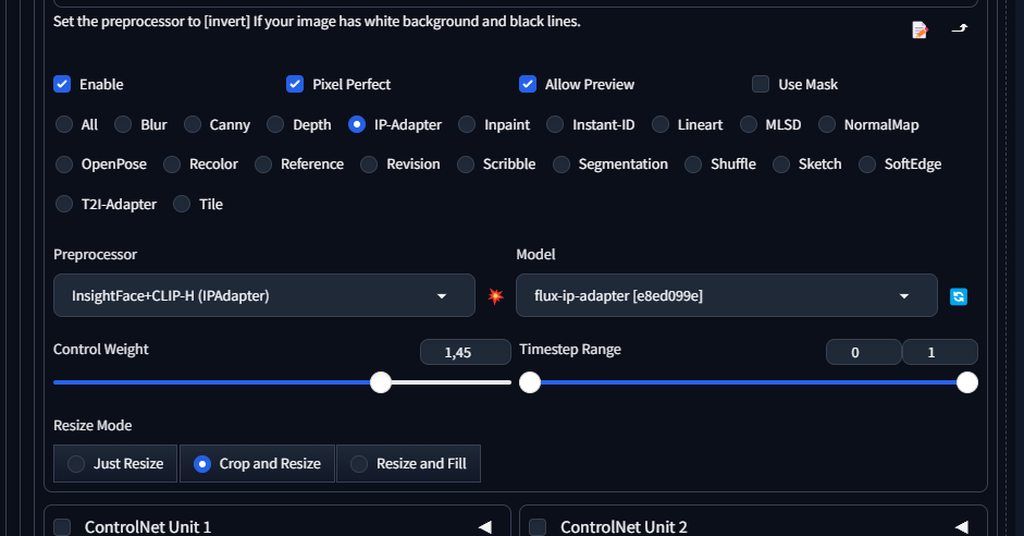
Who has worked with ControlNet? Please help me, I have tried to adjust all the settings (I mean the sliders ‘Control Weight’ and ‘Timestep Range’). I generated a girl of 25 years old, and I want her face again, but for some reason I can not, please tell me what I do wrong ?
https://imgur.com/a/bVvQBwJ
 flat olive
Is this output image somenthing?
 ornate elk
flat olive
Is this output image somenthing?
ornate elk
flat olive
Is this output image somenthing?
When do you get that ?
ornate elk
umbral compass
I'm also getting error for Forge, I'm running 3.10.11 Python (Like I do with Com...
It has to look like this:
#🤝|tech-support message
ornate elk
sonic ice
i was doing jsut fine making images, but now no matter what lora i use or what i...
Can you show an example + txt2img settings?
flat olive
ornate elk
When do you get that ?
using a1111+zluda, just generating
ornate elk
flat olive
using a1111+zluda, just generating
Which model?
Can you try an other model and without embeddings?
 ornate elk
Your webui is not updated
flat olive
yeah i updated just a few seconds i will try again
it works now but it wasn't until i updated, the update box warning, just don't showed the last time
👍
ornate elk
flat olive
it works now but it wasn't until i updated, the update box warning, just don't s...
Ah okay, good
 serene lake
How long does it typically take for an payment to go through? I payed 10min ago but I'm still getting 402 responses from the API working now so I guess around 15-20min
 raw vine
Does any guys know why my Depth and segmentation control pops out error when I try to see the preprocessor preview?
ornate elk
raw vine
Does any guys know why my Depth and segmentation control pops out error when I t...
Can you show the Controlnet depth settings ?
raw vine
 ornate elk
So just the preview doesn't work?
raw vine
No, the image that I generate doesn’t get the control from it too
The one you see rn is the image from me using canny
fierce hollow
fierce hollow
Who has worked with ControlNet? Please help me, I have tried to adjust all the s...
help..
 vocal burrow
settings ?
 desert grove
What in settings?
Usually it'll occur randomly and it'll be because of my current prompt configuration, and I'll have to remove or shift some words around to get it to not do that.
vocal burrow
what settings are you using to produce such images, models, prompts, sampler, etc... ? basically screenshot your whole webpage
 vocal burrow
yes. I see nothing really sus here. It could be the sampler's fault.
If you can reproduce it, try with a different sampler.
Also what command line arg do you have ?
desert grove
vocal burrow
(drop it in here)
@echo off
set PYTHON=C:\Users\Archi\AppData\Local\Programs\Python\Python310\python.exe
set GIT=
set VENV_DIR=
set COMMANDLINE_ARGS=--theme dark
call webui.bat
vocal burrow
and what s your gpu ?
desert grove
RTX 3060 ti
vocal burrow
ok, it s not gonna fix your issue. but I suggest adding --xformers to the set set COMMANDLINE_ARGS=--theme dark line. it will make things faster.
let me know if you find steps to reproduce the issue and I ll see if I can reproduce them too on my end (later tonight)
desert grove
Alright, thank you.
 trail pumice
guys my upscale model doesnt work correctly

i assume this is the problem
can anbody tell me how to solve this?
ornate elk
desert grove
RTX 3060 ti
You need --xformers --medvram-sdxl
Also you need to update your webui
ornate elk
trail pumice
guys my upscale model doesnt work correctly
Would need to see the full cmd log
trail pumice
trail pumice
ornate elk
Would need to see the full cmd log
i am not using webui btw
it is comfyui
ornate elk
trail pumice
i am not using webui btw
Oh okay
ornate elk
trail pumice
guys my upscale model doesnt work correctly
Whats the upscaler file ending?
.PTH or .safetensors?
trail pumice
pth
ornate elk
Have you tried other upscalers?
trail pumice
yes i did
they are giving same warnings
this upscalers just increasing image size
doesnt work in usual way to be suppose
like this model have restoration denoise and sharpening
but i cant see this results
 hot belfry
tried to use mimic motion but having black generation. i am losing my mind help would be appreciated. thanks.
 hot belfry
tried to use mimic motion but having black generation. i am losing my mind help ...
hot belfry
hot belfry
tried to use mimic motion but having black generation. i am losing my mind help ...
please : )
sonic ice
ornate elk
Can you show an example + txt2img settings?
yes

 solemn moon
sonic ice
yes
solemn moon
sonic ice
yes
im gonna give this a try, assuming your add detailer 1 is the same as 2
you should add what you want to see, like "beautifull face" (and negatives)

enabled but empty
i could very well be wrong
sonic ice
yes. enabled but empty. 1 is yolo hand the other is ylo face
solemn moon
im busy using ad detailer

beautiful face, intricately decorated, soft smooth lighting, soft colors, 100mm lens, 3d blender render, trending on polycount, modular constructivism, physically based rendering, centered, volumetric light, ultra realistic
blurry, toy, underwater, photoshop, out of focus, scary, creepy, evil, disfigured, missing limbs, ugly, gross, missing fingers, text, cropped, barcode, eyewear, fantasy
 knotty turret
 solemn moon
give it a try, if not, start deleting loras
knotty turret
can someone help me idk what to do
solemn moon
knotty turret
can someone help me idk what to do
torch is not compiled with cuda
knotty turret
solemn moon
torch is not compiled with cuda
how to solve?
sonic ice
solemn moon
give it a try, if not, start deleting loras
already tried that
knotty turret
solemn moon
torch is not compiled with cuda
tried to reinstall comfyui alot times but this keep give me this error
solemn moon
knotty turret
how to solve?
 knotty turret
solemn moon
knotty turret
solemn moon
already tried it
solemn moon
sonic ice
already tried that
maybe set vae to automatic
that fuzzy img looked like vae problems for me b4
solemn moon
knotty turret
already tried it
gpt?
karmic crown
knotty turret
show me your webui-user.bat
what is your GPU?
can you run webui at all? if you do, please screenshot and post the bottom where it listed versions of webui, torch...
knotty turret
karmic crown
show me your webui-user.bat
Its comfyui
karmic crown
ok
knotty turret
 karmic crown
its not important for comfy
i thougt its a1111
anyway
show me the whole output you are gettings
knotty turret
ok
karmic crown
copy paste whole text from cmd
 karmic crown
knotty turret
i can copy it too
karmic crown
knotty turret
i can copy it too
its fine
you have python 3.11 x64, so that is fine
did you use venv or directly installed requirements?
knotty turret
just download it from github using the portable nvidea and after that i installed the Animate Anyone because i want to use that. after i install the missing nodes that error happen
trying my best to explain in english 😅
solemn moon
yr english is good 😄
knotty turret
thx
knotty turret
ok
karmic crown
i am on mac, so i need to run virtualmachine, and then find and download it 🙂
 knotty turret
i using that one
 knotty turret
karmic crown
but its fine
knotty turret
karmic crown
but its fine
yeah np can wait
my upload for some reason cant pass 36mbps idk how to fix that
tried alot things
 knotty turret
karmic crown
27MB/s is around 240Mbps, and i have 600 Mbps
knotty turret
karmic crown
27MB/s is around 240Mbps, and i have 600 Mbps
i have the same problem
have 500 Mbps
 knotty turret
😃
karmic crown
so, you should have a folder python_embeded inside this
 karmic crown
give me a second, it need some time to extract, because my virtual disk image is dyniamc, so it need more time
knotty turret
I need to go to the bakery but I'll be back soon
karmic crown
it looks like this version does not have pip, and ensure pip does not work
but this do work
python_embeded\python -m pip --version
so we can use that to try to fix your installation
python_embeded\python -m pip install -r ComfyUI\requirements.txt
you have to run it from that folder that contains those 3
it should be ComfyUI_windows_portable (if you havent change the name)
if that doesnt help, try
python_embeded\python -m pip install torch==2.3.1 torchvision==0.18.1 torchaudio==2.3.1 --index-url https://download.pytorch.org/whl/cu121
also, check if you have cuda 12.1 or 11.8
if you have 11.8, you need another torch
python_embeded\python -m pip install torch==2.3.1 torchvision==0.18.1 torchaudio==2.3.1 --index-url https://download.pytorch.org/whl/cu118
ensure that you are in right folder, for example

or wherere you installed it

i just tried all commands i sent you
and they work as intended

 round ravine
running SD on AMD Gpu for first time and waiting in this screen for 10 minutes

Do I need to wait more?
knotty turret
knotty turret
<@916007004823257198>
it should be 12.1 cuda?
 knotty turret
how to downgrade?
knotty turret
oh ok
@karmic crown wait
tried this command python_embeded\python -m pip install torch==2.3.1 torchvision==0.18.1 torchaudio==2.3.1 --index-url https://download.pytorch.org/whl/cu121
and it worked
lol
but there just one thing that gives a error now
something about xformes
a error python pop on my screen but i cant take screentshot
and then comfy open
karmic crown
xformers are aslo nvidia thing, we do not have xformers, nor cude here 🙂
knotty turret
can just ignore it?
knotty turret
want see?
karmic crown
sure
knotty turret
let me get my phone
karmic crown
but i would try to change cuda to be 12.1
someone else will help later i guess
i can help with pyton, but not su much with windows stuff
knotty turret
 karmic crown
huh
Unable to locate the entry point of the
procedure
i would not ignore that
GitHub
How to swap/switch CUDA versions on Windows. Contribute to bycloudai/SwapCudaVersionWindows development by creating an account on GitHub.
check this, you should be able to change it
 karmic crown
wait
knotty turret
ok
knotty turret
alright
karmic crown
CUDA 11.8
python_embeded\python -m pip install torch==2.3.1 torchvision==0.18.1 torchaudio==2.3.1 --index-url https://download.pytorch.org/whl/cu118
i am sorry for a typo
knotty turret
use this?
karmic crown
yes
knotty turret
ok

 karmic crown
ok
than do this
python_embeded\python -m pip uninstall torch torchvision torchaudio
than install with that line
knotty turret
ok
knotty turret
do anyway?
karmic crown
python_embeded\python -m pip uninstall xformers
knotty turret
both?
karmic crown
it would be best
knotty turret
ok
ok what now

python_embeded\python -m pip install torch torchvision torchaudio
this right?
karmic crown
wait
knotty turret
ok
karmic crown
python_embeded\python -m pip install torch==2.3.1 torchvision==0.18.1 torchaudio==2.3.1 --index-url https://download.pytorch.org/whl/cu118
this
knotty turret
ok
karmic crown
than try to run comfy
knotty turret
alright just finishing the download first

its stuck 🥺
let me run again that command
karmic crown
it might need some time, even your connection to internet is fast, the connection to github might not be at this moment
knotty turret
its working better now
 trail summit
Hi did anybody have this error with the API?
Error: API error: 400 {"errors":["image: is required"]
I'm using it with JS exactly like in the docs, I have no idea why it fails. Someone here posted that adding filename to the image helps but I couldn't make it work 😦
knotty turret
 karmic crown
trail summit
Hi did anybody have this error with the API?
```
Error: API error: 400 {"errors"...
karmic crown
trail summit
Hi did anybody have this error with the API?
```
Error: API error: 400 {"errors"...
most people here use local installed apps, like stablediffusion webui, comfyui...
but i hope someone will know the answer, maybe it is better to write to official support, since this is unofficial (comunity) channel
karmic crown
if there is no error, it should be fine
knotty turret
 karmic crown
try to generate something
karmic crown
knotty turret
it looks fine to me
 karmic crown
what is your gpu again?
knotty turret
2060
karmic crown
you can try this model (i like it a lot)
https://civitai.com/models/200061/hephaistosnextgenxl-lcmbf16hybrid

This my first full LCM model. Its also the first model of the NextGenXL version of Hephaistos. Its trained on a merge of Hephaistos and Colossus Pr...
karmic crown
try with automatic
 karmic crown
dpmpp_sde
knotty turret
ok i found it on reddit
knotty turret
karmic crown
dpmpp_sde
yeah
knotty turret

classic one image
thx u man
everything see to work fine for now😅
btw do u have any good workflow?
 buoyant palm
Hi. My controlnet does not work properly. It is the last version. Any forum where i can check what is going on? thanks
karmic crown
knotty turret
btw do u have any good workflow?
i am using a1111 mostly
i do not remember when i used comfy last time
but to be honest, i lately spent much more time generating music than images 🙂
knotty turret
ok
karmic crown
buoyant palm
Hi. My controlnet does not work properly. It is the last version. Any forum wher...
you need to be sure that you are using the right combination of base and controlnet model
XL base + XL controlent model
or
1.5 base model + 1.5 controlnet model
you cant mix
everything that is not 1.5, basically should use xl controlnet, but i am not sure if it works for all (pony for example)
i have never used pony model, so i have no idea
buoyant palm
karmic crown
you need to be sure that you are using the right combination of base and control...
ok, thank you. I use XL. Maybe that is the problem.
chaz gpt tellsme it could be gradio. I will also check that.
karmic crown
chatgpt is not good for that
gentle lava
Do you have any idea what eta means? I see some prompts on civitai and there is something related to "Eta: 0.2" or something like that
karmic crown
its great for some things, but have no clue about ai image generation
buoyant palm
where can i find the controlnet xl models?
 buoyant palm
thank you so much 🙂
gentle lava
How do I add %HIP_PATH%bin to the path?
 oblique carbon
In comfy, there are a few different nodes related to tiled ksampling, supposedly allowing you to work on very large, detailed images. I haven't had much luck with them so far. Can anyone direct me to a workflow for this? Or explain the difference between these nodes? There's one from BlenderNeko, another from FlyingFireCo and a Tiled Diffusion & VAE from shiimizu. I tried to ask co-pilot what the difference was: you can imagine how useful that was. 🙄
gentle lava
i have to press "new" type "%HIP_PATH%bin" ?
ruby yoke
gentle lava
How do I add %HIP_PATH%bin to the path?
what OS are you running
gentle lava
windows
@ruby yoke Could I put it in, help me with something?
venv "C:\SD-Zluda\stable-diffusion-webui-amdgpu\venv\Scripts\Python.exe"
WARNING: ZLUDA works best with SD.Next. Please consider migrating to SD.Next.
Python 3.10.11 (tags/v3.10.11:7d4cc5a, Apr 5 2023, 00:38:17) [MSC v.1929 64 bit (AMD64)]
Version: v1.10.1-amd-4-gb0d9eb6d
Commit hash: b0d9eb6df1f6631a49988a9f705ff568f908aa2b
Failed to load ZLUDA: Could not find module 'C:\SD-Zluda\stable-diffusion-webui-amdgpu.zluda\nvcuda.dll' (or one of its dependencies). Try using the full path with constructor syntax.
Using CPU-only torch
Skipping onnxruntime installation.
You are up to date with the most recent release.
no module 'xformers'. Processing without...
no module 'xformers'. Processing without...
No module 'xformers'. Proceeding without it.
C:\SD-Zluda\stable-diffusion-webui-amdgpu\venv\lib\site-packages\pytorch_lightning\utilities\distributed.py:258: LightningDeprecationWarning: pytorch_lightning.utilities.distributed.rank_zero_only has been deprecated in v1.8.1 and will be removed in v2.0.0. You can import it from pytorch_lightning.utilities instead.
rank_zero_deprecation(
Launching Web UI with arguments: --use-zluda --update-check --skip-ort
Warning: caught exception 'Found no NVIDIA driver on your system. Please check that you have an NVIDIA GPU and installed a driver from http://www.nvidia.com/Download/index.aspx', memory monitor disabled
Loading weights [6ce0161689] from C:\SD-Zluda\stable-diffusion-webui-amdgpu\models\Stable-diffusion\v1-5-pruned-emaonly.safetensors
Creating model from config: C:\SD-Zluda\stable-diffusion-webui-amdgpu\configs\v1-inference.yaml
C:\SD-Zluda\stable-diffusion-webui-amdgpu\venv\lib\site-packages\huggingface_hub\file_download.py:1150: FutureWarning: resume_download is deprecated and will be removed in version 1.0.0. Downloads always resume when possible. If you want to force a new download, use force_download=True.
warnings.warn(
Page Not Found
ruby yoke
gentle lava
windows
you need to edit your sytem path. what OS are you running
gentle lava
ruby yoke
you need to edit your sytem path. what OS are you running
i already did it
ruby yoke
okay
gentle lava
help me with one thing
ruby yoke
i can try
gentle lava
when i try to run webui this error show
Failed to load ZLUDA: Could not find module 'C:\SD-Zluda\stable-diffusion-webui-amdgpu.zluda\nvcuda.dll' (or one of its dependencies). Try using the full path with constructor syntax.
Using CPU-only torch
and
no module 'xformers'. Processing without...
ornate elk
gentle lava
when i try to run webui this error show
Try delete the .zluda folder from the webui folder and relaunch
buoyant palm
Is this an error?
C:\Users\Julio\Documents\SDInstall-files\system\python\lib\site-packages\huggingface_hub\file_download.py:1150: FutureWarning: resume_download is deprecated and will be removed in version 1.0.0. Downloads always resume when possible. If you want to force a new download, use force_download=True.
warnings.warn(
do i need another version of python?`i just downloaded the last version
ruby yoke
buoyant palm
do i need another version of python?`i just downloaded the last version
you need to be on 3.11.x
buoyant palm
ruby yoke
you need to be on 3.11.x
yeah. Thanks. I unistalled everthing and just reinstalled it
buoyant palm
how do i get openpose editor for automatic 1111?
 patent fog
anyone know how to smoothly loop a gif in AnimateDiff? Am new to stable diffusion
vocal burrow
buoyant palm
Is this an error?
C:\Users\Julio\Documents\SDInstall-files\system\python\lib\si...
not an error, it's a deprecation warning. it shouldn't matter (for now)
not sure what you're trying to install but most SD related software (apart from comfyUI and a few others) require a python in between 3.10.6 and 3.10.11. So using 3.11 might cause issues
 stiff mountain
oops, maybe this channel was more appropriate!
I updated Stable and now it seems to me that it takes a long time to generate even simple images, furthermore the results dont resemble the model or the Lora I'm using, I fear some of my settings are wrong, could anyone help me? ;v; Im now trying to reinstall it 💧
vocal burrow
stiff mountain
oops, maybe this channel was more appropriate!
I updated Stable and now it seem...
what do the results look like ? what settings are you using ? care to generate an image and send a full consonle log (the white text in black window thing, copy paste it in a .txt and drop said file in here)?
vocal burrow
buoyant palm
how do i get openpose editor for automatic 1111?
you install it through the extension tab
buoyant palm
vocal burrow
not sure what you're trying to install but most SD related software (apart from ...
I installed this one: v3.10.6. thanks. I am trying to do controlled images.
stiff mountain
vocal burrow
what do the results look like ? what settings are you using ? care to generate a...
I tried to delete stable and reinstall it from github, but after have running "update" now "run" dosent works anymore 🫠
that's how my terminal ends like:
"...
File "email\message.py", line 15, in <module>
File "email\utils.py", line 29, in <module>
File "socket.py", line 51, in <module>
ModuleNotFoundError: No module named '_socket'"
vocal burrow
stiff mountain
I tried to delete stable and reinstall it from github, but after have running "u...
what are you installing exactly ?
stiff mountain
vocal burrow
what are you installing exactly ?

GitHub
The webui.zip is a binary distribution for people who can't install python and git.
Everything is included - just double click run.bat to launch.
No requirements apart from Windows 10. NVIDIA o...
stiff mountain
Im running a 3060 ti!
vocal burrow
ok then follow those instructions https://github.com/CS1o/Stable-Diffusion-Info/wiki/Installation-Guides#nvidia-automatic1111-webui-stable-diffusion-webui it will install automatic1111's stable-diffusion-webui
(url is different because it's just a guide rewriting the official instructions from here https://github.com/AUTOMATIC1111/stable-diffusion-webui?tab=readme-ov-file#automatic-installation-on-windows with more words and additional nice to have for better speed.)
 twin wharf
anyone know any command line auguments to improve speed of flux on zluda?
ruby yoke
twin wharf
anyone know any command line auguments to improve speed of flux on zluda?
you should start by reading through @ornate elk guides that are pinned in this channel
stiff mountain
vocal burrow
ok then follow those instructions <https://github.com/CS1o/Stable-Diffusion-Info...
Ok Im done!
I'll take back some model\lora and test again, thank you! 🙏
stiff mountain
vocal burrow
what do the results look like ? what settings are you using ? care to generate a...
ok that's an exemple, I put a very simple and silly promt but it still I feels like it dosent really recognize or use anyore any of my lora\models?

Also its really slow at generete even something silly like this :x

(that's the masterpiece I created btw)
 vocal burrow
stiff mountain
ok that's an exemple, I put a very simple and silly promt but it still I feels l...
vocal burrow
stiff mountain
ok that's an exemple, I put a very simple and silly promt but it still I feels l...
This is a pony model, therefore it's based on SDXL which is trained with 1024x1024 reesolution images. Asking for 512x512 with it is too low, you'll have to bump it up to at least 768x768 to get descent results.
Also don't use 0 for hires steps cause 0 means "use the same number of steps as for the original output" (so in your screenshot => 20)
10 to 15 should be enough
or simply don't use the hires.fix and like I said, set directly a 1024x1024 output resolution.
stiff mountain
vocal burrow
Also don't use 0 for hires steps cause 0 means "use the same number of steps as ...
!
I'll try whichever solution seems most convenient to me, but there's nothing to do about the speed? Does the model have any influence? Because before it didn't take so long :S
ruby yoke
stiff mountain
!
I'll try whichever solution seems most convenient to me, but there's nothing ...
you'd be better off using the base model
vocal burrow
- generating straight to 1024x1024 will be faster
- sd 1.5 based models are the fastest but output 512x512, sd2.1 output 768x768 kinda middle ground but not that much used.
- There are "lightning" and "turbo" variant of some models designed to achieve correct results in 2 to 3 steps
- the more lora you use the slower it will get
- did you add
--xformers --no-half-vae --medvramlike stated by the guide ? - there might be something broken with your install, we'd need to see a full log for that and I mean the full log, from the top.
stiff mountain
vocal burrow
1. generating straight to 1024x1024 will be faster
2. sd 1.5 based models are th...
I just put --xformers --no-half-vae, should I also add --medvram?
vocal burrow
3060 ti => 8gb => so at the very least --medvram-sdxl
Which means "--medvram but only for sdxl models" as sdxl models are hungry for that vram.
--medvram is a trade off, basically it will load parts of the model, do part of the work, then unload it and load the rest to finish the work.
on gpu with enough vram it's definitely slower to use it. But with """low vram gpus""" not using it will definitely harm your performance as it might use your system ram to fill the gap.
and storing gpu stuff in ram is slooooooow.
stiff mountain
could this be the reason for these times? o:
 vocal burrow
could be
but hey like I said, let me some logs to be sure.
nearly 3 am here so I'll probably check out pretty soon
stiff mountain
vocal burrow
nearly 3 am here so I'll probably check out pretty soon
Same here @@
where can I find the log??
vocal burrow
it's in the console you screenshoted earlier
just copy paste everything top to bottom into a .txt and drop said file in here
(only "personal information" in here should be your windows username. So probably not a concern)
stiff mountain
Ok, let me just restart the terminal first!
Should I gen at least one image before sending the log?
vocal burrow
probably not necessary from what I saw before
stiff mountain
venv "S:\AI\stable-diffusion-webui\venv\Scripts\Python.exe"
Python 3.10.11 (tags/v3.10.11:7d4cc5a, Apr 5 2023, 00:38:17) [MSC v.1929 64 bit (AMD64)]
Version: v1.10.1
Commit hash: 82a973c04367123ae98bd9abdf80d9eda9b910e2
Installing xformers
Launching Web UI with arguments: --xformers --no-half-vae --medvram
Tag Autocomplete: Could not locate model-keyword extension, Lora trigger word completion will be limited to those added through the extra networks menu.
Checkpoint v1-5-pruned-emaonly.safetensors not found; loading fallback ponyDiffusionV6XL_v6StartWithThisOne.safetensors [67ab2fd8ec]
Loading weights [67ab2fd8ec] from S:\AI\stable-diffusion-webui\models\Stable-diffusion\ponyDiffusionV6XL_v6StartWithThisOne.safetensors
Running on local URL: - - - -
To create a public link, set share=True in launch().
Creating model from config: S:\AI\stable-diffusion-webui\repositories\generative-models\configs\inference\sd_xl_base.yaml
S:\AI\stable-diffusion-webui\venv\lib\site-packages\huggingface_hub\file_download.py:1150: FutureWarning: resume_download is deprecated and will be removed in version 1.0.0. Downloads always resume when possible. If you want to force a new download, use force_download=True.
warnings.warn(
Startup time: 22.2s (prepare environment: 14.3s, import torch: 2.9s, import gradio: 0.9s, setup paths: 1.4s, initialize shared: 0.2s, other imports: 0.6s, load scripts: 0.7s, create ui: 0.5s, gradio launch: 0.5s).
Applying attention optimization: xformers... done.
Model loaded in 13.7s (load weights from disk: 0.8s, create model: 0.6s, apply weights to model: 11.0s, calculate empty prompt: 1.1s).
vocal burrow
127.0.0.1:7860 is a local ip no needs to hide it
stiff mountain
 stiff mountain
the anathomy is kinda broken, but the lora and model looks work now and the speed is not that slow!
vocal burrow
how slow ?
stiff mountain
Its mostly the last 2% which take a while
but on terminal it already say 100% so Im not sure what does it means :S
lets say that I started an image one minute ago and now its at 60%!
vocal burrow
last % always take a while, it's normal.
stiff mountain
a batch of 4 actually
not sure about how could I fix the anatomy but I'll give a check tomorrow, rn here are the 3 am x_x
vocal burrow
stiff mountain
a batch of 4 actually
you probably don't want to do that.
the larger the batch the more vram needed.
use batch count instead to be safe.
batch of 4 might be too much, batch of 2 should be good.
batch size <=> how many pics to generate at the same time / in parallel
batch count <=> how many pics to generate back to back.
stiff mountain
so its better play with batch count that batch size?
or should I just avoid both of them?
vocal burrow
batch count is safe to use
stiff mountain
((ok sorry my internet died and I didnt read in time before sending these messages))
vocal burrow
batch size will use more vram and can cause slow down / error if there s not enough
stiff mountain
vocal burrow
batch size will use more vram and can cause slow down / error if there s not eno...
I'll go to sleep for now, idk when my pc will send these message but thank you a lot for all the support!
sonic ice
anyone able to help? i still cant get it to make faces right
like, without loras its still messing up teh faces
 tranquil terrace
@halcyon zodiac I have a partnership praposal
 untold hollow
anyone have experience installing svd(sv3d) on mac m1? ive been stuck for hours
im getting
CFLAGS = None
    --- stderr


    error occurred: Failed to find tool. Is `clang` installed?


  error: `cargo rustc --lib --message-format=json-render-diagnostics --manifest-path Cargo.toml --release -v --features pyo3/extension-module --crate-type cdylib -- -C 'link-args=-undefined dynamic_lookup -Wl,-install_name,@rpath/tokenizers.cpython-310-darwin.so'` failed with code 101
  [end of output]
note: This error originates from a subprocess, and is likely not a problem with pip.
ERROR: Failed building wheel for tokenizers
Failed to build tokenizers
ERROR: ERROR: Failed to build installable wheels for some pyproject.toml based projects (tokenizers)
but pip install tokenizers works fine and i have gcc, clang installed:
(.pt2) (base) michellechen@MacBook-Pro-14-inch-2036 generative-models % gcc --version
Apple clang version 15.0.0 (clang-1500.3.9.4)
Target: arm64-apple-darwin23.5.0
Thread model: posix
InstalledDir: /Applications/Xcode.app/Contents/Developer/Toolchains/XcodeDefault.xctoolchain/usr/bin
(.pt2) (base) michellechen@MacBook-Pro-14-inch-2036 generative-models % clang --version
Apple clang version 15.0.0 (clang-1500.3.9.4)
Target: arm64-apple-darwin23.5.0
Thread model: posix
InstalledDir: /Applications/Xcode.app/Contents/Developer/Toolchains/XcodeDefault.xctoolchain/usr/bin
on Python 3.10.14
vocal burrow
sonic ice
like, without loras its still messing up teh faces
show examples of results and settings
also that s probably a dicussion for #📝|prompting-help
vocal burrow
untold hollow
im getting
CFLAGS = None
--- stderr
error o...
error occurred: Failed to find tool. Is clang installed?
Welp seems like you need to install clang
untold hollow
vocal burrow
`error occurred: Failed to find tool. Is clang installed?`
Welp seems like you n...
clang is installed tho?
Apple clang version 15.0.0 (clang-1500.3.9.4)
Target: arm64-apple-darwin23.5.0
Thread model: posix
InstalledDir: /Applications/Xcode.app/Contents/Developer/Toolchains/XcodeDefault.xctoolchain/usr/bin
vocal burrow
untold hollow
clang is installed tho?
Apple clang version 15.0.0 (clang-1500.3.9.4)
Target: ar...
I don t have the full log here so I can t help much. Especially considering that the last apple machine I owned was probably some apple 2 grey box.
But is clang installed in your crate/container/venv/whatever may apply there ?
untold hollow
its installed here: /Applications/Xcode.app/Contents/Developer/Toolchains/XcodeDefault.xctoolchain/usr/bin/clang
untold hollow
vocal burrow
I don t have the full log here so I can t help much. Especially considering that...
should it not be in xcode?
vocal burrow
That s probably (one of) its proper place system wide. But
1/ maybe what you re trying to use or install ( don t even know ) is running in some sort of vm/venv/cargo where it s not defined
2/ /Applications/Xcode.app/Contents/Developer/Toolchains/XcodeDefault.xctoolchain/usr/bin/clang might not added to your path, or some other magic env variable might not set and therefore clang cannot be found.
 severe kindle
@untold hollow I'm guessing svd is trying to install tokenizers 0.12.x and you're on Apple Silicon. The 0.12 series was never released as a binary wheel for Apple Silicon, which is why its trying to build it from source.
It's probably wanting that version due to an outdated (as in 2 years old) version of transformers so I'd try updating transformers to a version that worked with tokenizers 0.13.x.
Alternatively you could try downgrading tokenizers to 11.6
 rugged latch
imagine being the one peson who comes here, and asks, "what is stable diffusion "
round ravine
Can anyone help, i'm stuck at this on first run
 vocal burrow
it s normal for zluda stuff to take A WHILE for their first run
talking 10 to 40 minutes depending of the hardware.
round ravine
does this apply for all models?
vocal burrow
It should be good after that once it s done "translating cuda stuff to amd"
vocal burrow
round ravine
does this apply for all models?
doesn t matter the model you loaded
it will be slow for the first run and should be good afterwards regardless of the model.
 burnt vortex
Do I come here for problems withthe website?
vocal burrow
Probably not, this tech support is mainly for people hosting SD instances locally. I d advise you to use the website's support page.
 ornate elk
 grim moon
which one should i download?
grim moon
which one should i download?
What's your GPU?
grim moon
Oh hi CS1o
grim moon
ornate elk
What's your GPU?
Rx 6900XT
 muted scarab
I saw a video saying that you should have 8 GB or more of dedicated ram?* for SDXL
I have 16GB of RAM, how can i get more VRAM?

 errant thistle
So im using automatic 1111, and when i look at my lora tab, it only shows 18 of my loras.
Is it only able to display a certain amount before it caps?
Or is there just a bug where some loras just dont appear? Because ive had it with a few even before i downloaded that many.
muted scarab
errant thistle
Or is there just a bug where some loras just dont appear? Because ive had it wit...
there's a setting to show lora that aren't compatible with your SD vers, there's also a disable description on lora panels setting
errant thistle
muted scarab
there's a setting to show lora that aren't compatible with your SD vers, there's...
Uhuh. Where abouts is the first setting?
muted scarab
Settings / Extra Networks / ^ Always show all networks on the Lora page
errant thistle
muted scarab
Settings / Extra Networks / ^ Always show all networks on the Lora page
Yeah that brought them back, all 9. Dang. So i assume the ones that were otherwise hidden just still wouldnt work with automatic 11111 even if i used them?
muted scarab
idk i did that an ran it and i froze my pc and i had to restart, i am noob at this
so im downloading matching sd vers and models now
it says in the terminal what SD vers you are using, i think it's near the top
errant thistle
"Version: v1.10.1"
So its not necessarily incompatible with sd automatic111 in general? Its just the version im using that doesnt like it?