#🤝|tech-support
1 messages · Page 73 of 1
 ornate elk
 wet flame
what python version are you using <@161910921269084160>
wet flame
what python version are you using <@161910921269084160>
3.10.11 64bit
 viral knot
is python even available in 32 bit these days? lol
ornate elk
viral knot
is python even available in 32 bit these days? lol
yea 😮
viral knot
damn
 gentle eagle
when I try to use the text encoder clips on SD3 model it gives out of memory error... anybody have experienced this ?
ornate elk
gentle eagle
when I try to use the text encoder clips on SD3 model it gives out of memory err...
What's your gpu?
 fossil dew
welcome back cs n_n lmk when you got the time to help me out ❤️
ornate elk
gentle eagle
15gb
what sd3 model did you tried?
gentle eagle
ornate elk
what sd3 model did you tried?
the medium with 4gb one... it's on comfyui btw
it works if I don't use the triple clip thing
if I use --lowvram it proceeds but the images are generated black(with the triple clip that is)
fossil dew
heres a random question, just for curiosity's sake
can you download other sampling methods? 🤔
ornate elk
gentle eagle
it works if I don't use the triple clip thing
Try the 5gb model it has the clips included
viral knot
fossil dew
can you download other sampling methods? 🤔
yes like this https://github.com/redhottensors/ComfyUI-ODE
gentle eagle
ornate elk
Try the 5gb model it has the clips included
it works alone but I wanted to use the clips separated.. and then it's not gonna have all the clips I think?
it's strange that it's not working
ornate elk
gentle eagle
it works if I don't use the triple clip thing
which text encoder do you have? the t5- fp8 or the fp16 one?
wet flame
i think sd3 is not worth it and not worth the time investment in it as it is now
wait for community release for it from civtai
meanwhile models for xl like the luma is good enough
or fooocus
gentle eagle
ornate elk
which text encoder do you have? the t5- fp8 or the fp16 one?
I tried only the clip_g.safetensors and
clip_l.safetensors ones.. I don't have storage for t5
now I tried a dual instead of a triple with pure clip_g and it proceeded but the generation continue to come out all black
 tame yoke
what do i do if my dev branch a1111 hangs at 95% in image generationand doesnt let me apply settings as its stuck at ‚loading model weights’ or smth like that
ornate elk
gentle eagle
I tried only the clip_g.safetensors and
clip_l.safetensors ones.. I don't have s...
i think you need all 3

- sd3 4gb model
 hollow prism
ive changed no settings its allways worked now suddenly this what is wrong with it? https://gyazo.com/b8ccce929bcda840d66fb28b903a111c
 ornate elk
hollow prism
ive changed no settings its allways worked now suddenly this what is wrong with ...
ornate elk
hollow prism
ive changed no settings its allways worked now suddenly this what is wrong with ...
what are your txt2img settings?
whats your gpu?
hollow prism
3060 ti

also it dosent seem to change even if i change the width and height
nothign has changed besides like a windows update
also i did start using sdxl last week
idk if that is messing it up
ornate elk
whats in your webui-user.bat?
hollow prism
 hollow prism
ok i dont usally do upsacles tho
ornate elk
hollow prism
ok i dont usally do upsacles tho
okay den disable hires fix
and try a normal gen
ornate elk
hollow prism
also i never use hires fix to
in your screenshot its enabled xD
with wrong settings
so maybe thats your issue
hollow prism
oo just having it dropped down turns it on
your --medvram- thing worked
was it allways typed wrong and the program diddent care till now?
thank you for the helps
ornate elk
hollow prism
oo just having it dropped down turns it on
yea because your on an older webui version (in the new version it has checkboxes)
best would be to use or update to the latest auto1111 version if you dont rely on old extensions
ornate elk
hollow prism
was it allways typed wrong and the program diddent care till now?
--medvram is for every model type and --medvram-sdxl is only for sdxl. your gpu (8gb) only needs medvram for sdxl
 lapis oak
Anyone ever seen an extension called "stable-diffusion-webui-simplefix" ? It appears to be malware and I'm having trouble finding anything about it.
gentle eagle
ornate elk
i think you need all 3
I managed to fit all of them and it worked, thank you!!
ornate elk
gentle eagle
I managed to fit all of them and it worked, thank you!!
nice, np 🙂
 half island
What's the proper syntax to make a venv which i call "comfyui" but creates a venv named folder in comfy's root folder?
 ornate elk
half island
What's the proper syntax to make a venv which i call "comfyui" but creates a ven...
ornate elk
half island
What's the proper syntax to make a venv which i call "comfyui" but creates a ven...
here is my code for my custom Comfyui Launch bat.
https://github.com/CS1o/Stable-Diffusion-Info/blob/main/Resources/Start-ComfyUI.bat
it creates a venv and installs the requirements in there too. also it installs torch+cu118 (you can change it to your liking)
hollow prism
ornate elk
--medvram is for every model type and --medvram-sdxl is only for sdxl. your gpu ...
but i still use sd1.5 should i also put normal medvram?
ornate elk
hollow prism
but i still use sd1.5 should i also put normal medvram?
nope, --medvram slows 1.5 down, so you wont need that
hollow prism
o ok
half island
ornate elk
here is my code for my custom Comfyui Launch bat.
https://github.com/CS1o/Stable...
Thanks! Knew there was a step i forgot about. This shit xD
venv\Scripts\activate Just activate that shit, and i'm in it's venv where only shit for it appears :P
ornate elk
half island
Thanks! Knew there was a step i forgot about. This shit xD
`venv\Scripts\activa...
no problem ^^ yea always some little steps that are missing
ornate elk
lapis oak
Anyone ever seen an extension called "stable-diffusion-webui-simplefix" ? It app...
never seen it, very strange
half island
ornate elk
no problem ^^ yea always some little steps that are missing
Yep lol. Now to copy pasta that one to all my A.I stuffs so they don't affect eachother :P
lapis oak
ornate elk
never seen it, very strange
one result on A1111 issues, and talking to someone else who has been affected by it. Not certain it comes from A1111, might be from another malware he has.
ornate elk
lapis oak
one result on A1111 issues, and talking to someone else who has been affected by...
i noticed this message yesterday, but dont know if its related:
#💬|general-chat message
lapis oak
yes that one
ornate elk
and the github discussion is this:
https://github.com/AUTOMATIC1111/stable-diffusion-webui/discussions/15931
we have to keep an eye open
lapis oak
yes, there was a discussion on reddit over if using docker would help against malware, this guy has everything in containers, so not quite.
ornate elk
ah well, guess thats answers it xD
 mossy oar
whats the default ENSD?
ornate elk
mossy oar
whats the default ENSD?
0 (disabled)
half island
@ornate elk For a tool that only has "setup.py" and "run_gradio.py", what changes should it have for the run part? 
https://github.com/Stability-AI/stable-audio-tools This is what it's for
GitHub
Generative models for conditional audio generation - Stability-AI/stable-audio-tools
ornate elk
half island
<@161910921269084160> For a tool that only has "setup.py" and "run_gradio.py", w...
you want that also in a venv?
ornate elk
half island
<@161910921269084160> For a tool that only has "setup.py" and "run_gradio.py", w...
Use this: (it has a venv)
https://github.com/diontimmer/audio-diffusion-gradio?tab=readme-ov-file
its made for stable audio tools
half island
ornate elk
you want that also in a venv?
I want every A.I tool i have in a venv like this for conveniency, just some i need to alter as they are more just setup.py and gradio run ones :P
half island
ornate elk
Use this: (it has a venv)
https://github.com/diontimmer/audio-diffusion-gradio?t...
Ah, so the one i linked to is jsut the barebones, and the one you linked to is the more "here's all you need" fork?
 fair oxide
gentle eagle
now I tried a dual instead of a triple with pure clip_g and it proceeded but the...
fair oxide
gentle eagle
now I tried a dual instead of a triple with pure clip_g and it proceeded but the...
loading the clips incorrectly would give you black image
ornate elk
half island
Ah, so the one i linked to is jsut the barebones, and the one you linked to is t...
the one i linked is more like auto1111, and the one you linked is the source like the first sd code (more cli etc)
half island
ornate elk
the one i linked is more like auto1111, and the one you linked is the source lik...
ah ok, thanks :)
 fervent pier
@fallen quail I'm new to comfy, so I could have done something wrong, but I tried installing your custom samplers but got an error on MPS during execution: Cannot convert a MPS Tensor to float64 dtype as the MPS framework doesn't support float64. Please use float32 instead. Is this a known issue? I can give you the full traceback if it would be helpful.
half island
@ornate elk checked the one you sent, it's almost a year outdated :S
 fallen quail
fervent pier
<@122380520226160640> I'm new to comfy, so I could have done something wrong, bu...
fallen quail
fervent pier
<@122380520226160640> I'm new to comfy, so I could have done something wrong, bu...
Uhhhhh. That's something that we'll have to fix because torchdiffeq prefers to work in double precision floats. Could you file an issue so we don't lose track of it?
ornate elk
half island
<@161910921269084160> checked the one you sent, it's almost a year outdated :S
he made changes last week, but yea the rest is 8 months back :/
but it works
fervent pier
fallen quail
Uhhhhh. That's something that we'll have to fix because torchdiffeq prefers to ...
For some reason, I'm not seeing the Issues tab on your repo. Just Code and then Pull Requests.
fallen quail
fervent pier
For some reason, I'm not seeing the Issues tab on your repo. Just Code and then ...
Fuck. Uhh, I don't own the repo, I will write it down somewhere
half island
ornate elk
but it works
Nice. So as i got these, launched it though it's bat file, but it complains it has no models, even if they are in the models folder
 ornate elk
half island
Nice. So as i got these, launched it though it's bat file, but it complains it h...
ornate elk
half island
Nice. So as i got these, launched it though it's bat file, but it complains it h...
you need to download the .ckpt version of the model
i tried it too but the safetensor wont worked
half island
Ah shit. The insecure one 
ornate elk
yea xD
half island
ornate elk
yea xD
Though, is the diontimmer's fork as "unsencored" as the one i linked to? Or does sencoredness depend on the model itself? :P
ornate elk
half island
Though, is the diontimmer's fork as "unsencored" as the one i linked to? Or doe...
it depends on the model
 hexed pine
Hi. I am using stable diffusion webui with chrome, recetly it suddenly stopped working - its saying that I dont have enough vram. The model has about 10 GB, my vram is 16 GB. I tried reinstalling it, all together with python, torch, git and cuda but its all the same. I cant even load 4 GB version of models, it just says I dont have enough vram. I am honestly lost at what is the problem. Tried reinstalling drivers. Deleting possibly corrupted files, but as I said I even tried fresh automatic install
The error is
AttributeError: 'NoneType' object has no attribute 'lowvram'
ornate elk
hexed pine
Hi. I am using stable diffusion webui with chrome, recetly it suddenly stopped w...
hey, whats your GPU? whats the model? and whats your webui version
hexed pine
its 4080, the model is 10GB version of newest stable diffusion v3 (tried redownloading), webui version is 1.9.4, python 3.10.6, torch 2.1.2+cu121
half island
ornate elk
it depends on the model
Gotchu. So for this, do i just install cuda toolkit, and rerun? Or as it's in a venv, i need to add cuda toolkit to that?
"warning: User provided device_type of 'cuda', but CUDA is not available. Disabling
warnings.warn("
hexed pine
ornate elk
hey, whats your GPU? whats the model? and whats your webui version
Just tried medium version - 4GB, but with no change
ornate elk
hexed pine
its 4080, the model is 10GB version of newest stable diffusion v3 (tried redownl...
SD3 wont work in auto1111 right now
we all wait for an update ^^
hexed pine
ohhh
hexed pine
thank you, ill try the other ones then
ornate elk
no problem 👍
ornate elk
half island
Gotchu. So for this, do i just install cuda toolkit, and rerun? Or as it's in a ...
i dont think you need cuda for it
should be installed via torch in the venv
 white tide
I got around to testing out an LCM model on ComfyUI with Zluda just now
ornate elk
ah nice
ornate elk
awesome!
white tide
Now to look for some LCM workflows I could try out

 half island
ornate elk
i dont think you need cuda for it
half island
ornate elk
i dont think you need cuda for it
Got cuda working, sorry i didn't edit, forgot to
https://github.com/diontimmer/audio-diffusion-gradio/issues/2#issuecomment-2151127309

GitHub
I put new stable audio model with its json file to models directory - not recognized. I have only cpu as choice in "device", despite having 3090 The password thing ... not a fan. Is this ...
hexed pine
ornate elk
no problem 👍
are you still here? tried stable diffusion webui with other stuff that worked before and I got the same result. I tired AbsoluteReality and EpicRealism_Natural, both about 2GB for my 16GB card and it still says "low vram"
wet flame
ornate elk
3.10.11 64bit
idk why it keeps giving me this error

 cerulean hound
how to add --lowvram to ComfyUI on Pinokio?
wet flame
and i can't run foocus even with 16 gb vram
idk what happened but it was running all good then everything starts crashing
cerulean hound
cerulean hound
how to add --lowvram to ComfyUI on Pinokio?
all i found was this, but cant find it in Pinokio https://github.com/comfyanonymous/ComfyUI/discussions/3158

GitHub
This has been driving me crazy trying to figure it out . on the front page it says "Use --preview-method auto to enable previews." so I spent ages online looking how/where I enter this co...
cerulean hound
wet flame
what is pinokio?

AI Browser
 rancid nymph
i cant switch checkpoints for some reason
 rich garden
When I generate an image it gets stuck at 99% but the command prompt window says “total progress 100%”
After waiting a little bit, the image is finally complete but the quality is really bad like 360p for example. It’s pretty much the same quality as if it was still being generated. I can’t really send the picture here cuz I feel it’s a tiny bit on the NSFW side but not extreme
 solemn moon
rich garden
After waiting a little bit, the image is finally complete but the quality is rea...
solemn moon
rich garden
After waiting a little bit, the image is finally complete but the quality is rea...
i have this too
wet flame
OutOfMemoryError: CUDA out of memory. Tried to allocate 1.01 GiB. GPU 0 has a total capacty of 16.00 GiB of which 9.74 GiB is free. Of the allocated memory 4.75 GiB is allocated by PyTorch, and 331.25 MiB is reserved by PyTorch but unallocated. If reserved but unallocated memory is large try setting max_split_size_mb to avoid fragmentation. See documentation for Memory Management and PYTORCH_CUDA_ALLOC_CONF
solemn moon
wet flame
OutOfMemoryError: CUDA out of memory. Tried to allocate 1.01 GiB. GPU 0 has a to...
check yr drivers are up to date?
wet flame
yeah all updated
reinstalled everything today
did not had this issue but it started randomly
and sometimes i get no errors
i should not get this error at all with a 16 gb gpu
solemn moon
wet flame
OutOfMemoryError: CUDA out of memory. Tried to allocate 1.01 GiB. GPU 0 has a to...
maybe the full log will help someone help you better
 low basin
Sorry went AWOL and theres far too many messages to read lolol, did you figure out the issue? I think you said you were using an external ssd/hd to hold the models? If so what is the read and write speed of it? That would 100% cause your astronomically long model load times...
low basin
wet flame
yeah all updated
You're the second person in 24 hours to post the exact same issue. The person I just responded to was trying to troubleshoot theirs last night. I have no clue what it is but I feel for you guys
wet flame
it was not giving issue for long time
even on my 4 gb laptop with med vram
it started randomly now i can't use AI to make game art assets lol
low basin
What GPU? 12GB VRAM I assume?
wet flame
back to manually doing things 😦
low basin
Dur I cant read 16GB right there. Yeah something isn't right
wet flame
on desktop its a 4060 ti
and laptop its 3060
i had no issue for long time on laptop but it just started randomly last week
low basin
Is this the first install you've done on the desktop?
wet flame
issue started last week bascially
wet flame
low basin
Is this the first install you've done on the desktop?
no i did before too
low basin
So it didn't just start after a new install? You just reinstalled to try to fix it?
wet flame
no i did a fresh install of everything on desktop
and doing that on laptop too
even reinstalled python and git
low basin
So you did the manual install steps as opposed to the quick install? (just ruling out the install method as a cause here)
wet flame
but as far i know python or git should not cause the problems
i followed his guide
https://github.com/CS1o/Stable-Diffusion-Info/wiki/Installation-Guides#nvidia-automatic1111-webui-stable-diffusion-webui
GitHub
Stable Diffusion Knowledge Base (Setups, Basics, Guides and more) - CS1o/Stable-Diffusion-Info
although i can do it manually
but takes long time
low basin
Which fork did you use (A1111, Fooocus, etc...)
low basin
Hmm, well if you're willing you might try to use this guide (complete quick install) and see if it works. It's what I downloaded a few weeks ago on 4070 and worked just fine. https://github.com/AUTOMATIC1111/stable-diffusion-webui/wiki/Install-and-Run-on-NVidia-GPUs
GitHub
Stable Diffusion web UI. Contribute to AUTOMATIC1111/stable-diffusion-webui development by creating an account on GitHub.
Again out of curiosity what Nvidia driver and CUDA version do you have? You can quickly see by typing " nvidia-smi " into command prompt
low basin
If you do try another install method though I would probably purge any other installs prior just in case it causes issues. You can copy and save model and lora folders before if you have any
wet flame
also for some reason it keeps reducing my c drive space
i had like 70 gigs free on my OS c drive
now its down to 60
low basin
Depending on what you select when running it may just be from it downloading needed models in the background. I have no clue but yeah it eats storage for breakfast
low basin
That's rough... I'm already 600gb down on an ssd I got 2 weeks ago. Long gone are the days when 64gb was all you'd need for a lifetime 😔
hollow prism
so i updated to the new version of automatic 1111 and i cannot find the directory in the settings where my lora and checkpoints go to. Where is the setting?
 errant tundra
Hi, I'm hoping I can get some help with ComfyUI, specifically trying to upscale the latent image for a second pass of ksampler. I've watched a few videos but I can't seem to get ANYWHERE close to what is expected.
I'm trying to basically run through my first KSampler at a lower res say 360x640, which does give decent results, then upscale the latent image to a higher resolution to run through another ksampler with less steps since it's a higher resolution in order to add more detail.
My problem is that I do a preview image of each step and the first ksampler comes out fine, I then upscale the latent image then preview that which then gives me a MUCH blurrier version of the first image instead of retaining the same or better quality, then I preview the output of the second ksampler image and I get a COMPLETELY DIFFERENT image of which every single time is completely malformed. I even tried upscaling the actual image of the first ksampler output then encoding it back to latent and running that through the second ksampler but I still get absolutely awful results.
basically I'm trying to do a HiRes Fix but in comfyui
@old sky do you as the developer have any suggestions I could try? Sorry if I am not supposed to ping.
 old sky
errant tundra
old sky
errant tundra
I always get crap results
like if I do a 15 step first ksampler then on the second sampler I do a 1 step shouldn't I get a pretty similar image to the first? Cause I actually just get a crap load of noisy garbage that looks nothing like the original
old sky
do more than 1 step
 eternal jungle
Hey, I have a question regarding images from social media, are these generated with SD or another image generator? https://www.tiktok.com/@societiesr

TikTok
@societiesr 83.8k Followers, 38 Following, 2.7m Likes - Watch awesome short videos created by Societies-r
low basin
hollow prism
so i updated to the new version of automatic 1111 and i cannot find the director...
Models should be at C:\Users\Name\Desktop\ sd.webui\webui\models\Stable-diffusion and lora's are same path but "lora" as the final path instead of Stable-diffusion Disregard I'm an idiot and that was not at all what you were asking LMFAOOO
 restive sparrow
Does anyone know if you actually need this CUDA stuff installed to use xformers? "CUDA Runtime"/"CUDA Development"
thank you
I installed them last year and still ahve them
 split comet
this prompt (tongue out, tongue:2.0) is 2.0 to everything inside the backet right? or no?
fair oxide
Feedback: Please make support for Stable Artisan to be universally available in Stable Assistant, there is a Javascript discord error some of us receive when having to log in the current way that prevents us from accessing Stable Artisan on Discord because it continually does a failed login loop. I've tried everything, and now I will have to drop my subscription because I can't access Stable Artisan specifically on Discord.
tame yoke
is this normal?
i only changed live previews to be jpeg
 ornate elk
restive sparrow
Does anyone know if you actually need this CUDA stuff installed to use xformers?...
ornate elk
restive sparrow
Does anyone know if you actually need this CUDA stuff installed to use xformers?...
Nope you don't need cuda installed for xformers
ornate elk
hexed pine
are you still here? tried stable diffusion webui with other stuff that worked be...
In Auto1111?
Can you show the full cmd log?
ornate elk
wet flame
OutOfMemoryError: CUDA out of memory. Tried to allocate 1.01 GiB. GPU 0 has a to...
Can you show the txt2img settings when you get that error?
Make sure your nvidia driver is updated.
If you changed your gpu in the recent time then you need a complete driver reinstall.
ornate elk
hollow prism
so i updated to the new version of automatic 1111 and i cannot find the director...
Models/stable-diffusion and models/lora
You can't change these paths in settings
But you can define other folders with the launch args:
--ckpt-dir "D:\Path\To\Models"
--lora-dir "E:\Example\Path\Loras"
ornate elk
split comet
this prompt (tongue out, tongue:2.0) is 2.0 to everything inside the backet rig...
Everything in the ()
ornate elk
tame yoke
is this normal?
i only changed live previews to be jpeg
Can be normal yes
ornate elk
rich garden
After waiting a little bit, the image is finally complete but the quality is rea...
Is ist sdxl or 1.5 model?
What's in your webui-user.bat?
rich garden
ornate elk
Is ist sdxl or 1.5 model?
What's in your webui-user.bat?
how do i check?
it could also be that i'm using a laptop perhaps cuz it was working again a bit later
ornate elk
rich garden
how do i check?
Check the model file size in models/stable-diffusion
And for the webui-user.bat just right click and edit it

 rich garden
oh i thought u meant there was a file with "1.5" in the name
rich garden
what about this?
 ornate elk
Thats the first 1.5 model made by stability ai
rich garden
it seems most of my models are 2-3 GB's
ornate elk
rich garden
it seems most of my models are 2-3 GB's
These are based on 1.5 then
ornate elk
No problem at all ^^
rich garden

rich garden
rich garden
is this fine?
ornate elk
rich garden
What's your gpu?
rich garden
uhh.. does nvidia rtx 3060 laptop help?
i'm not the biggest tech gal xd
like in terms of specs and shit
ornate elk
Okay, yea the settings are correct for that gpu
ornate elk
Thats an good idea 🙂 more power for SD
ornate elk
But for your issue from above, recheck if it happens only with the sdxl model selected or any other model too
A 6gb vram gpu has a hard time with sdxl and pony (which is based on sdxl)
rich garden
it happened with a model only 2 gb's
earlier today
which is when i came to the server
ornate elk
Ah okay. Then make sure you don't run an other heavy programms in the background, like games or Wallpaper engine.
Whitelist the webui in any browser adblocker
rich garden
yeah i don't normally do PC games and i don't have wallpaper engine for now
i have the ad blocker extention for chrome tho
also another question, i tried generating some images earlier today and when i tried some negative prompts like ||bare skin||, ||uncensored breasts|| etc. it didn't actually to what i asked sometimes which means it had the opposite of what i wanted in the pics
shit
ornate elk
Also did you used upscaling, hiresfix or any extension while getting that issue?
rich garden
rich garden
shit
i pressed enter on accident
rich garden
ornate elk
Also did you used upscaling, hiresfix or any extension while getting that issue?
yeah i tried hiresfix sometimes
ornate elk
rich garden
yeah i tried hiresfix sometimes
If you use that make sure to always set hires steps to 10
If not it can error out
rich garden
ok
rich garden
rich garden
also another question, i tried generating some images earlier today and when i t...
i fixed the message now
ornate elk
rich garden
also another question, i tried generating some images earlier today and when i t...
It depends on the model. Dont use the base sdxl or 1.5 model as they are not trained for it
But other models do fine
rich garden
i used "yesmix"
ornate elk
Okay that should do it
rich garden
it still had the opposite of what i wanted most of the time tho

 ornate elk
You can also add sfw into positive prompt ^^
rich garden
true
one weird thing that also happened is when generating images it somehow brought 2 girls into a pic when i believe i only used either 1 character lora or "1girl" so idk where the other one came from but it actually looked sick as in the end. so basically i got lucky but i would've liked for results to appear as often and accurate as the random pic i got
ornate elk
rich garden
one weird thing that also happened is when generating images it somehow brought ...
That can happen if the resolution is set a lot higher than what to model got trained on.
1.5 models are trained on 512x512
So doing a 1024x1024 can cause duplicates and deformations.
Thats why hires fix is needed for 1.5 to gen like 512x768 and upscale by 2
rich garden
oh and that reminds me, i tried using 2 character loras to get them into one image but most of the time it would only add 1 character and not the other. i was using the "BREAK" method thingy and the regional prompter from this guide https://civitai.com/models/339604?modelVersionId=403892

How to Generate Multiple Different Characters, Mix Characters, and/or Minimize Color Contamination | Regional Prompt, Adetailer, and Inpaint | My W...
rich garden
ornate elk
That can happen if the resolution is set a lot higher than what to model got tra...
ah ok cuz i did 1280x720
ornate elk
Yea that likely caused that behaviour
rich garden
rich garden
ah ok cuz i did 1280x720
this?

wait lemme double check
ur saying if the dimentions are too high on a 1.5 model then it can cause 2 characters to appear for example?
rich garden
rich garden
oh and that reminds me, i tried using 2 character loras to get them into one ima...
cuz i had a bit of a brainfart and thought u were referring to this 😅
ornate elk
rich garden
ur saying if the dimentions are too high on a 1.5 model then it can cause 2 char...
Yes
rich garden
ornate elk
Yes
alright thanks
rich garden
rich garden
oh and that reminds me, i tried using 2 character loras to get them into one ima...
also do u possibly have a solution for this?
ornate elk
rich garden
also do u possibly have a solution for this?
For that I would use the tiled diffusion extension which has regional prompt control
rich garden

GitHub
Tiled Diffusion, MultiDiffusion, Mixture of Diffusers, and optimized VAE - shiimizu/ComfyUI-TiledDiffusion
just looking at these sample pictures it seems very complicated
nvm i assume u mean this
 ornate elk
rich garden
nvm i assume u mean this
ornate elk
rich garden
nvm i assume u mean this
Yes that one

 simple raptor
guys i need help with a model and a lora don't showing in the UI aftere refresh and restart it. Did i do something wrong??
ornate elk
simple raptor
guys i need help with a model and a lora don't showing in the UI aftere refresh ...
whats the models file size? or whats the model name
rich garden
is every region supposed to be 1 character each? cuz i generated an image with 2 regions and both sides had 2 of the same character doing the same thing and it seems the background has been split in half just like the red and yellow boxes

region 1 and region 2 were both 2 different character loras
simple raptor
ornate elk
whats the models file size? or whats the model name
https://civitai.com/models/377060/retro-fantasy-style
and the relative model suggested anything else v4

First i just wanted to make the Faceless warrior from Manowar. But i made it into a style inspired by Art from Frank Frazetta and Luis Royo. Trigge...
 steep ivy
Hi, I am facing an issue when I try to change a model, it returns this error:
attributeerror 'nonetype' object has no attribute 'lowvram'
I saw other people mention that here before but it seemed to me that the solution is GPU specific. My GPU is rtx 2080 super and my args are --listen --medvram --no-half-vae
ornate elk
simple raptor
https://civitai.com/models/377060/retro-fantasy-style
and the relative model sug...
thats a lora not a model
it goes into models/lora folder
ornate elk
steep ivy
Hi, I am facing an issue when I try to change a model, it returns this error:
a...
add --xformers and change --medvram to --medvram-sdxl
then try an other model
ornate elk
rich garden
is every region supposed to be 1 character each? cuz i generated an image with 2...
you need to make a region for the background, and 2 other foreground regions 1 for each character
rich garden
ah ok
simple raptor
ornate elk
it goes into models/lora folder
I've put it in the lora folder and the anything else model in the modello folder but, Nothing. I'll send you some screenshot
steep ivy
ornate elk
add --xformers and change --medvram to --medvram-sdxl
still the same :(
tame yoke
is comfyui better then a1111 or and is it also deprecated like forge?
ornate elk
steep ivy
still the same :(
whats the model you try?
solemn moon
better if you have a hand on nodes
steep ivy
ornate elk
whats the model you try?
None of the models work, it's stuck on sdxl turbo if it matters
ornate elk
steep ivy
None of the models work, it's stuck on sdxl turbo if it matters
how much RAM do you have?
rich garden
ornate elk
you need to make a region for the background, and 2 other foreground regions 1 f...
is it also possible to make 2 or more characters interact with each other? like lets say i would want one character to place their hand on the other character's shoulder or something else that's more advanced? if it's possible then i'm not sure what i should type as a prompt and in which box
ornate elk
rich garden
is it also possible to make 2 or more characters interact with each other? like ...
yea its possible by overlapping the zones
rich garden
so like this?
 rich garden
ah ok one sec

so what do i type in region prompt 1 and 2?
just any example is fine
i would assume in both region prompts i have 1 character lora each at the start?
ornate elk
you need 3 regions
1 for background
1 for character 1
1 for character 2
rich garden
ah shit yes my bad
ornate elk
and in the character prompts just add the loras and describe the char
rich garden
describe it as in looks and what it should do?
ornate elk
yep
rich garden
ok
i should probably mention that sometimes when i describe a character it tends to have some bugs like extra legs for example even tho i've added things like "deformed" "poorly drawn hands" "mutated fingers" etc. in negative prompt
ornate elk
rich garden
i should probably mention that sometimes when i describe a character it tends to...
yea that can happen sometimes
rich garden
is there a method to be more likely to avoid it?
ornate elk
rich garden
is there a method to be more likely to avoid it?
more negative tags, other resolutions, using sdxl or pony models
rich garden
ok
ornate elk
rich garden
ok
and when using hires fix lowering the denois can help too
rich garden
denoising strength?
i generated an image with 3 regions but both the characters look like twins when it's 2 different loras
steep ivy
ornate elk
how much RAM do you have?
16, I managed to fix the issue by deleting the venv folder. But now it gives me 1.5s/it :(
ornate elk
steep ivy
16, I managed to fix the issue by deleting the venv folder. But now it gives me ...
make sure you always launch the webui-user.bat and not the webui.bat
and if your using sdxl with an 8gb gpu, thats pretty normal speed
steep ivy
nope, 1.5 dreamshaper
steep ivy
args or screenshot of the webui?
ornate elk
steep ivy
args or screenshot of the webui?
both
rich garden
what would i have to type in a region prompt to get one character interacting with the other?
steep ivy
ornate elk
both
With that I now get ~2it/s is that normal?

 ornate elk
steep ivy
With that I now get ~2it/s is that normal?
ornate elk
steep ivy
With that I now get ~2it/s is that normal?
you have batch size on 4
thats slows down because it generates the images at the same time and using more vram
 fierce hollow
Images began to be generated for a long time. What could this be related to? 3070ti + 32 GB ram
steep ivy
ornate elk
thats slows down because it generates the images at the same time and using more...
with 1 I get ~4.8it/s. Would you consider that normal for 8GB VRAM RTX 2080 super, 16GB ddr4 RAM?
ornate elk
steep ivy
with 1 I get ~4.8it/s. Would you consider that normal for 8GB VRAM RTX 2080 supe...
make sure you close every other programm like games or wallpaper engine etc
is your webui updated ?
check the version at the bottom
rich garden
rich garden
what would i have to type in a region prompt to get one character interacting wi...
@ornate elk
ornate elk
rich garden
<@161910921269084160>
any interaction, like touching, kissing, hugging etc
rich garden
oh i meant like only one character interacting. for example lets say one of them is pregnant and the other character rubs or hugs the belly etc.
ornate elk
then only prompt the interaction for one character, like hugs.. or waves etc
mostly the interaction will come automaticly when the regions overlapping
rich garden
rich garden
oh i meant like only one character interacting. for example lets say one of them...
so what could i type for something like this? (this is what i meant by more advanced btw since it's only one character interacting)
fierce hollow
fierce hollow
Images began to be generated for a long time. What could this be related to? 307...
help
ornate elk
fierce hollow
help
more information needed
long time? how long?,
what model is used?
what settings are úsed?
fierce hollow
ornate elk
long time? how long?,
what model is used?
what settings are úsed?
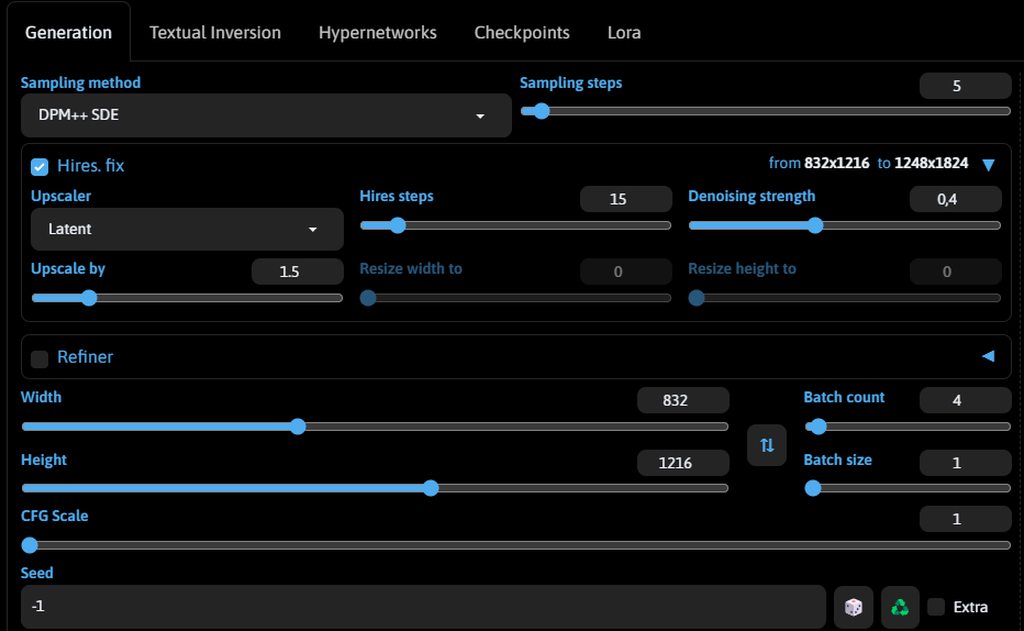
An 832x1216 image with Hires has been generated for 5 minutes already. fix that is, the final image is 1248x1824
Model - realvisxlV40_v40LightningBakedvae
The settings are as follows: Sampling steps - 5
Sampling method DPM ++SDE
CFG - 1
It took me about 7 minutes to generate one image
rich garden
i'm only getting 1 character in the image now. here are my prompts and settings to give u an idea


 ornate elk
fierce hollow
An 832x1216 image with Hires has been generated for 5 minutes already. fix that ...
ornate elk
fierce hollow
An 832x1216 image with Hires has been generated for 5 minutes already. fix that ...
SDE samplers can take double the time then non SDE samplers, so try DPM++ 2M or Euler a.
Also when using Hires fix, set the hires steps to 10
rich garden
rich garden
i'm only getting 1 character in the image now. here are my prompts and settings ...
should i maybe not have posted this cuz it's too lewd?
forgot about this btw
 ornate elk
nah its fine
ornate elk
rich garden
what should i type instead?
but i cant help much with difficult positions
its mostly more luck
you can also try/use the regional prompter extension, but i find it a bit difficult to use
fierce hollow
ornate elk
SDE samplers can take double the time then non SDE samplers, so try DPM++ 2M or ...
Milking this model requires exactly such settings to create a realistic image. It used to take less time
 thorny dragon
hello there, i started using stable diffusion about a month ago with automatic1111 but for some reason suddenly it was giving me "cuda out of memory" error. Even after fixing that error, a1111 was still running really slow, like 30 mins per image. Then i installed forge UI which is crazy fast but i am facing troubles in img2img. Even at low denoising strength it is distorting the body and instead of upscaling the image loses detail and quality. I am using rtx 2060 6gb vram graphics card. Can anyone help me fix this?
ornate elk
thorny dragon
hello there, i started using stable diffusion about a month ago with automatic11...
hey, i can help you fix auto1111
ornate elk
fierce hollow
Milking this model requires exactly such settings to create a realistic image. I...
you can screenshot them, maybe there is some wrong setting there
or try a restart
thorny dragon
thank you!!!...plz tell me what screenshots i need to provide...
 ornate elk
thorny dragon
thank you!!!...plz tell me what screenshots i need to provide...
ornate elk
thorny dragon
thank you!!!...plz tell me what screenshots i need to provide...
your content of the webui-user.bat
and your txt2img settings when getting a slow image.
ornate elk
fierce hollow
https://imgur.com/a/hHn8neB
looks normal, whats your gpu again?
wet flame
@ornate elk yes its a new install of gpu drivers and sd A111
where can i find the full logs of errors?
wet flame
ok
rich garden
fierce hollow
https://imgur.com/a/hHn8neB
how do u change to dark theme? i've always wondered that
fierce hollow
ornate elk
looks normal, whats your gpu again?
3070ti
fierce hollow
rich garden
how do u change to dark theme? i've always wondered that
Oh... somewhere in the settings, I'm sorry, I don't remember anymore, I switched over a long time ago...
ornate elk
rich garden
how do u change to dark theme? i've always wondered that
add --theme dark
to the webui-user.bat
rich garden
thx
ornate elk
fierce hollow
3070ti
and you have --xformers --medvram-sdxl --no-half-vae in your webui-user.bat?
wet flame
my errors started appearing after this error btw
J:\AI Apps\SDA111\stable-diffusion-webui\venv\lib\site-packages\huggingface_hub\file_download.py:1132: FutureWarning: resume_download is deprecated and will be removed in version 1.0.0. Downloads always resume when possible. If you want to force a new download, use force_download=True.
warnings.warn(
@ornate elk
OutOfMemoryError: CUDA out of memory. Tried to allocate 1.01 GiB. GPU 0 has a total capacty of 16.00 GiB of which 9.23 GiB is free. Of the allocated memory 5.50 GiB is allocated by PyTorch, and 81.35 MiB is reserved by PyTorch but unallocated. If reserved but unallocated memory is large try setting max_split_size_mb to avoid fragmentation. See documentation for Memory Management and PYTORCH_CUDA_ALLOC_CONF
Time taken: 1 min. 10.6 sec.
A: 6.81 GB, R: 7.09 GB, Sys: 8.3/15.9961 GB (51.7%
fierce hollow
ornate elk
and you have --xformers --medvram-sdxl --no-half-vae in your webui-user.bat?
@echo off
set PYTHON=
set GIT=
set VENV_DIR=
set COMMANDLINE_ARGS=--autolaunch --xformers --medvram-sdxl --no-half-vae
call webui.bat
ornate elk
wet flame
<@161910921269084160>
what are you trying to do?
it seems like your using a tiling extension in img2img or seomthing
ornate elk
fierce hollow
@echo off
set PYTHON=
set GIT=
set VENV_DIR=
set COMMANDLINE_ARGS=--autolaunch ...
okay looks good
wet flame
ornate elk
what are you trying to do?
it seems like your using a tiling extension in img2im...
yes i use that always it did not give errors before
creating seamless tiles from my images
ornate elk
wet flame
yes i use that always it did not give errors before
can you show the whole img2img settings then?
fierce hollow
ornate elk
okay looks good
I started having these problems after installing ComfyUI (not immediately, after some time ...)
ornate elk
fierce hollow
I started having these problems after installing ComfyUI (not immediately, after...
you can try to delete your venv folder and relaunch the webui-user.bat
that can remove unwantedd changes
thorny dragon
ornate elk
your content of the webui-user.bat
and your txt2img settings when getting a slow...


 ornate elk
thorny dragon
ornate elk
thorny dragon
you need to remove --always-batch-cond uncond and instead add --xformers --no-half-vae
then relaunch the webui-user.bat
fierce hollow
ornate elk
you can try to delete your venv folder and relaunch the webui-user.bat
that can ...
 ornate elk
fierce hollow
https://imgur.com/a/Pr5ZwwO
?
ornate elk
fierce hollow
https://imgur.com/a/Pr5ZwwO
?
delete the whole venv folder and relaunch the webui-user.bat
rich garden
ornate elk
checkout this guide:
https://github.com/pkuliyi2015/multidiffusion-upscaler-for-...
how come some of the words in the prompts are in brackets?
fierce hollow
ornate elk
delete the whole venv folder and relaunch the webui-user.bat
Sorry, but what is this folder responsible for?
wet flame
nothing fancy just making some textures from images
ornate elk
rich garden
how come some of the words in the prompts are in brackets?
thats for getting more attention to the word
can be used like (((word))) or (word:1.3)
ornate elk
fierce hollow
Sorry, but what is this folder responsible for?
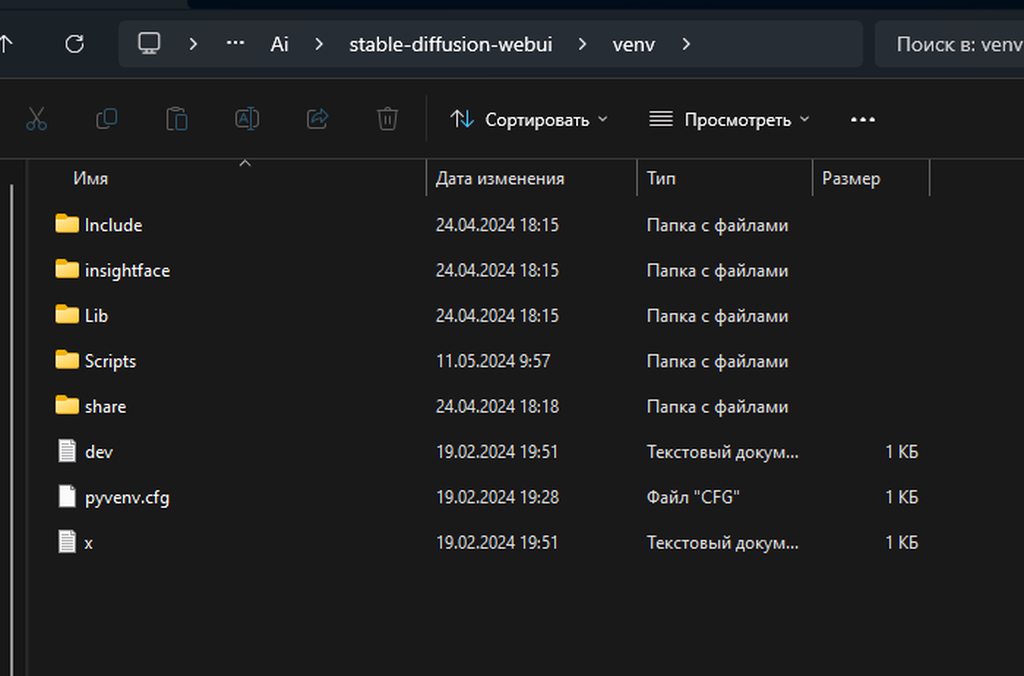
it stores librarys and stuff from extensions. also the whole torch and xformers stuff.
when launching the webui-user.bat it will get recreated automaticly
thorny dragon
ornate elk
you need to remove --always-batch-cond uncond and instead add --xformers --no-ha...
okay, i will try that....but can u help me with forge tho? i would really like to use forge but the img2img is generating weird bodies even in low denoising strength..any fix for that?
fierce hollow
ornate elk
it stores librarys and stuff from extensions. also the whole torch and xformers ...
I got it, I'll try it now, thanks
ornate elk
thorny dragon
okay, i will try that....but can u help me with forge tho? i would really like t...
Forge is deprecated for normal users. with the next update it will break. so i dont recommend using it
but you can use img2img in auto1111
no clue what could be wrong here :/
wet flame
i got no clue either
fierce hollow
By the way, a question about SD3, has the automatic111 update been released that supports these models?
wet flame
and i feel bad for being a computer techniciain and i can't fix it sigh
ornate elk
fierce hollow
By the way, a question about SD3, has the automatic111 update been released that...
its in development but not stable release yet
fierce hollow
ornate elk
its in development but not stable release yet
Is there an approximate time when to expect? At least approximate dates
ornate elk
fierce hollow
Is there an approximate time when to expect? At least approximate dates<:waow:10...
nope, but my guess is a week
fierce hollow
ornate elk
nope, but my guess is a week
Understood, thanks. Will this be notified in #📣|announcements and #1010934719455707218 ?)
ornate elk
fierce hollow
Understood, thanks. Will this be notified in <#1002292398703001601> and <#101093...
nope
rich garden
i tried ((hand on shoulder)), just as an example and it didn't work. here's my regions

i read through that link u sent btw
so far it seems to be the interaction that doesn't wanna work
thorny dragon
thorny dragon
hello there, i started using stable diffusion about a month ago with automatic11...
@ornate elk i was getting cuda out of memory errors beacuse of cuda fallback system on new nvidia drivers which enables the gpu to use my pc's ram as extra vram...according to some reddit post this causes massive memory leak and was the reason of slow genaration..they recomended turning it off...but when i turn it off it gets even worse, u got any opinions on this?
ornate elk
thorny dragon
<@161910921269084160> i was getting cuda out of memory errors beacuse of cuda fa...
Dont turn that off!
Like you said it makes it worse
thorny dragon
ornate elk
you need to remove --always-batch-cond uncond and instead add --xformers --no-ha...
btw, this kinda helped to reduce the genaration speed a little..tnx...
ornate elk
thorny dragon
btw, this kinda helped to reduce the genaration speed a little..tnx...
You need the tiled diffusion extension if your going for higher resolutions
It has an Option called Tiled VAE
Thats what you need for higher resolutions or upscaling
And its normal that it takes longer for your gpu if your using sdxl
For sdxl models you also need to increase your windows pagefile if you only have 16gb RAM
wet flame
i get the cuda out of memory with 16 gb gpu
@ornate elk
OutOfMemoryError: CUDA out of memory. Tried to allocate 1024.00 MiB. GPU 0 has a total capacty of 16.00 GiB of which 8.21 GiB is free. Of the allocated memory 5.03 GiB is allocated by PyTorch, and 1.56 GiB is reserved by PyTorch but unallocated. If reserved but unallocated memory is large try setting max_split_size_mb to avoid fragmentation. See documentation for Memory Management and PYTORCH_CUDA_ALLOC_CONF
Time taken: 2 min. 28.0 sec.
A: 6.79 GB, R: 7.12 GB, Sys: 8.3/15.9961 GB (52.0%)
thorny dragon
ornate elk
You need the tiled diffusion extension if your going for higher resolutions
ohhh! i see....i will install that extension then..tnx for all these valueable tips man!!!!
thorny dragon
ornate elk
For sdxl models you also need to increase your windows pagefile if you only have...
how do i do that? the windows pagefile thing....
fierce hollow
ornate elk
delete the whole venv folder and relaunch the webui-user.bat
It didn't help
fierce hollow
fierce hollow
It didn't help
95% processing takes a long time (1 image) Without increasing the quality. The standard 832.
I'm sorry, it was the first generation, I tried the second one - everything is OK, now I will try to zoom in
ornate elk
thorny dragon
ohhh! i see....i will install that extension then..tnx for all these valueable t...
No problem.
Its under extensions tab, available, load from, then search for Tiled.
Then only enabled tiled vae and leave its settings on default.
@thorny dragon for pagefile look here:
#🤝|tech-support message
Make sure its enabled for C drive and disabled for any other drive.
Then set the min to 16000
And Max to 24000
And make sure you have 15gb free space on C
simple raptor
ornate elk
add --xformers and change --medvram to --medvram-sdxl
Here where i put the models, is it ok??


As you can see it doesn't show them

 ornate elk
simple raptor
Here where i put the models, is it ok??
ornate elk
simple raptor
Here where i put the models, is it ok??
your webui version is to old
and remove this file from the models/stable-diffusion folder
 simple raptor
ornate elk
your webui version is to old
simple raptor
ornate elk
your webui version is to old
ahahah damn, can i update the UI from the UI itself?
ornate elk
simple raptor
ahahah damn, can i update the UI from the UI itself?
not with the ui. you have to do some more steps.
first in the webui click on the extensions tabs and click "check for updates" then let it load.
after that.
close the whole webui and cmd.
right click to edit the webui-user.bat
in an emtpy row you have to add Git pull
then at the line Commandline_ARGs= you add --xformers --no-half-vae
if it isnt there already.
Then save the file.
After that open up a cmd and type
Pip cache purge
Then delete the venv folder.
And finally launch the webui-user.bat

Then it should download the updated files
simple raptor
ornate elk
not with the ui. you have to do some more steps.
first in the webui click on the...
ok i've done, i'm not sure of the next steps, i don't understand well
 ornate elk
simple raptor
ok i've done, i'm not sure of the next steps, i don't understand well
ornate elk
simple raptor
ok i've done, i'm not sure of the next steps, i don't understand well
looks good, dont forget to save
ornate elk
simple raptor
ok i've done, i'm not sure of the next steps, i don't understand well
whats your gpu btw?
if it has 6gb vram or less you need to add --medvram
if it has 8-11gb vram you ned to add --medvram-sdxl
simple raptor
ornate elk
whats your gpu btw?
 ornate elk
simple raptor
ornate elk
simple raptor
how much dedicated vram? scroll down a bit to check
 simple raptor
just next to xformers?
ornate elk
simple raptor
just next to xformers?
yep, like
--xformers --medvram --no-half-vae
 ornate elk
Then the next step is to Open up a cmd.
click on the windows symbol and type cmd
then launch the cmd.
in the cmd type
pip cache purge and then press enter.
that will remove old temp files from the first webui install
simple raptor
ok
simple raptor
ornate elk
Then the next step is to Open up a cmd.
click on the windows symbol and type cmd...
done
 ornate elk
and then delete the venv folder
that folder will be recreated at the next launch with the new files
simple raptor
this one?
 ornate elk
simple raptor
this one?
ornate elk
simple raptor
this one?
yep
simple raptor
ornate elk
yep
ok, then i restart?
ornate elk
simple raptor
ok, then i restart?
yes, now launch the webui-user.bat
simple raptor
ornate elk
yes, now launch the webui-user.bat
still the same issue, it didn't show the lora and the model
ornate elk
simple raptor
still the same issue, it didn't show the lora and the model
make sure the lora is only in models/lora
and not in model/stable-diffusion
and then selecte and 1.5 based model
and delete the 1.4 model from your models/stable-diffsuion folder (its really old and bad)
simple raptor
here the models, i need to delete sd-v1-4?
 ornate elk
simple raptor
here the models, i need to delete sd-v1-4?
ornate elk
simple raptor
here the models, i need to delete sd-v1-4?
yep
simple raptor
ornate elk
yep
ok, than as you can see should be all ok, right?
 ornate elk
simple raptor
ok, than as you can see should be all ok, right?
ornate elk
simple raptor
ok, than as you can see should be all ok, right?
okay and what model is selectet at the top left?
in txt2img
simple raptor
ornate elk
okay and what model is selectet at the top left?
still mantein the old setting

not showing the one i need and showing the deleted one
ornate elk
simple raptor
not showing the one i need and showing the deleted one
the lora should be on the lora tab
also click the blue refresh button
then the 1.4 should be gone
simple raptor
i've clicked multiple times but nothing happens and the lora tab is empty
ornate elk
simple raptor
i've clicked multiple times but nothing happens and the lora tab is empty
and extensions installed? that could mess with loras?
can you try download an other lora to test if the lora is the problem?
simple raptor
yeah, now i try
ornate elk
for example this one:
https://civitai.com/models/58390/detail-tweaker-lora-lora
 chrome mica
It's been like this for a while now, it doesn't give me any errors but it doesn't do anything. Does anyone have an idea, or do they just need more time?
 ornate elk
chrome mica
It's been like this for a while now, it doesn't give me any errors but it doesn'...
ornate elk
chrome mica
It's been like this for a while now, it doesn't give me any errors but it doesn'...
what even is this? 😄
what tool are you trying to run
chrome mica
ornate elk
what even is this? 😄
what tool are you trying to run
Srry XD Im trying SD with Zluda in windows with AMD, text to image
ornate elk
chrome mica
Srry XD Im trying SD with Zluda in windows with AMD, text to image
ohh, so your trying SD Next i asume
whats your GPU?
chrome mica
ornate elk
ohh, so your trying SD Next i asume
Yes
 simple raptor
ornate elk
for example this one:
https://civitai.com/models/58390/detail-tweaker-lora-lora
simple raptor
ornate elk
for example this one:
https://civitai.com/models/58390/detail-tweaker-lora-lora
 chrome mica
ornate elk
whats your GPU?
chrome mica
ornate elk
whats your GPU?
RX6600XT
simple raptor
ornate elk
for example this one:
https://civitai.com/models/58390/detail-tweaker-lora-lora
 ornate elk
chrome mica
RX6600XT
ornate elk
chrome mica
RX6600XT
then i would recommend not trying it with SD Next and instead following my Automatic1111 AMD Zluda Guide.
im on AMD too and ive made many guides.
you can find them all here and feel free to ask if any step isnt clear.
https://github.com/CS1o/Stable-Diffusion-Info/wiki/Installation-Guides

 shy charm
ok so i'm moving back to a1111 since forge is apparently going to shit the bed
it told me to update xformers, so i did, and now it's saying this shit
 ornate elk
shy charm
ok so i'm moving back to a1111 since forge is apparently going to shit the bed
i...
ornate elk
shy charm
ok so i'm moving back to a1111 since forge is apparently going to shit the bed
i...
hey whats your GPU?
chrome mica
ornate elk
then i would recommend not trying it with SD Next and instead following my Autom...
I can try, which one do you recommend?
shy charm
RTX 3070, i was previously using a 1070 though and moved to forge when i got the 3070, so i never used the 3070 with a1111
ornate elk
chrome mica
I can try, which one do you recommend?
the Automatic1111 with ZLUDA guide
it covers everything you need. i helped like 3-4 guys with a 6600xt getting it to run ^^
so it should work for you
ornate elk
shy charm
RTX 3070, i was previously using a 1070 though and moved to forge when i got the...
okay, whats in your webui-user.bat?
shy charm
@echo off

set PYTHON=
set GIT=
set VENV_DIR=
set COMMANDLINE_ARGS= --reinstall-xformers --xformers

call webui.bat
it said xformers was out of date so i put that arg in there
my A1111 is also up to date on the stable release, i did a git pull before anything else
ornate elk
shy charm
```
@echo off
set PYTHON=
set GIT=
set VENV_DIR=
set COMMANDLINE_ARGS= --reinst...
okay add Git Pull into the second line thats empty
then remove --reinstall-xformers
then add --medvram-sdxl --no-half-vae to the --xformers
then save.
Now install Python 3.10.11 (because 3.10.7 has some bugs)
https://www.python.org/downloads/release/python-31011/
after that delete the venv folder
then relaunch the webuio-user.bat
chrome mica
ornate elk
the Automatic1111 with ZLUDA guide
I tried it but from what I see is that you have a few more steps added than another one that tried to install. I have tried several times to install it, is there anything you would recommend I clean?
shy charm
man why did the forge dev have to ruin it, this is so complicated 
ornate elk
chrome mica
I tried it but from what I see is that you have a few more steps added than anot...
you can remove the sdnext (automatic) folder and in a cmd run
pip cache purge
then your ready
chrome mica
ornate elk
you can remove the sdnext (automatic) folder and in a cmd run
`pip cache purge`...
I'll do that, thank you very much for the help!!
ornate elk
chrome mica
I'll do that, thank you very much for the help!!
and make sure your AMD driver is updated
and for any question feel free to ask
shy charm
i'm just going to keep using the current version of forge until there is a genuine reason to move on
ornate elk
shy charm
i'm just going to keep using the current version of forge until there is a genui...
why not fixing your auto1111 install?
most stuff from forge will get into the next auto1111 releases, thats why he forge gets back to experimental state, to improve auto1111
for example SD3 will not be usable with Forge
shy charm
someone said the dev branch of a1111 has the same performance improvements but the comments on the forge announcement say otherwise
ornate elk
shy charm
someone said the dev branch of a1111 has the same performance improvements but t...
you have a 3070, thats work great with auto1111 preformance wise
until last year i used a GTX1080 and had no issues even with SDXL
simple raptor
ornate elk
click on the reload icon on the right
nothing my man
half island
Isn't torchmcubes gotten from pip? As i'm missing that module for a node
shy charm
i feel like maybe i should just completely re-install a1111 because this install is from like 2022 and i've only kept it up to date using git pull
simple raptor
would you raccomand a fresh install?
ornate elk
simple raptor
would you raccomand a fresh install?
yep, that could solve it.
because your install was really old
follow the guide from the pinned messages
simple raptor
so, there's something i can keep?
ornate elk
simple raptor
so, there's something i can keep?
you can keep your models and loras
and outputs
shy charm
i don't remember if i installed python using bucket or scoop or whatever it's called
ornate elk
shy charm
i feel like maybe i should just completely re-install a1111 because this install...
yea then start fresh ^^ youll find an easy guide for that in the pinned messages of this channel (it will take like 10 mins max)
simple raptor
ok, i change folder for those and then i delete the webUi1111 folder and start from 0?
ornate elk
simple raptor
ok, i change folder for those and then i delete the webUi1111 folder and start f...
yep
simple raptor
ornate elk
yep
can you link me a new guide please?
shy charm
i don't remember where i installed python 3.10.7, can't find it in the start menu, and it isn't in the default install location for 3.10.11
 obsidian gull
guys any idea why my images are taking 5 minutes to generate? i have a rtx 4060
ornate elk
shy charm
i don't remember where i installed python 3.10.7, can't find it in the start men...
then uninstall via system settings /apps
or open up a cmd and type
where python to get its path
ornate elk
obsidian gull
guys any idea why my images are taking 5 minutes to generate? i have a rtx 4060
hey, whats in your webui-user.bat?
shy charm
ornate elk
then uninstall via system settings /apps
ah, that's where it is
 obsidian gull
ornate elk
hey, whats in your webui-user.bat?
obsidian gull
ornate elk
hey, whats in your webui-user.bat?
im sorry but how can i find whats in there?
ornate elk
obsidian gull
im sorry but how can i find whats in there?
right click and edit it
shy charm
i don't remember why i ever installed python using scoop
obsidian gull
ornate elk
right click and edit it
this one?
 ornate elk
the rxt4060 has 8gb vram right?
obsidian gull
ornate elk
the rxt4060 has 8gb vram right?
yep
shy charm
i'm just going to delete the whole scoop folder, surely nothing bad will happen
if i did install it for a reason, it's probably irrelevant now since i can't remember it
obsidian gull
 wet flame
put med vram
ornate elk
obsidian gull
at the line commandline_args=
you need to add:
--xformers --medvram-sdxl --no-half-vae
then save and relaunch the webui-user.bat
wet flame
you need that sdxl command to run sdxl models?
ornate elk
wet flame
you need that sdxl command to run sdxl models?
no but for 8gb vram cards --medvram-sdxl is better than --medvram
because --medvram slows down 1.5 models
ornate elk
shy charm
i'm just going to delete the whole scoop folder, surely nothing bad will happen
...
yea probably ^^
shy charm
is the venv folder on my a1111 install supposed to be 10 GB
obsidian gull
ornate elk
no but for 8gb vram cards --medvram-sdxl is better than --medvram
hey i got a new problem now
😔

photos are turning out like this
shy charm
what's your cfg and steps
ornate elk
obsidian gull
hey i got a new problem now
whats the model your trying?
obsidian gull
ornate elk
whats the model your trying?
its a model i got from civitai
ornate elk
obsidian gull
its a model i got from civitai
yea check if its made for sdxl or 1.5
shy charm
one time i accidentally cranked the cfg to 30 and didn't notice and i was like "wtf why is everything turning out like crap"
ornate elk
and yea make sure cfg is set to 7
obsidian gull
ornate elk
yea check if its made for sdxl or 1.5
it says 1.5
ornate elk
obsidian gull
it says 1.5
okay can you show your txt2img settings, like steps, resolution etc?
shy charm
it honestly really would have helped to have the image with the metadata
obsidian gull
ornate elk
okay can you show your txt2img settings, like steps, resolution etc?

like when it is generating it is fine, looks normal, but when its at the end with the final result it fucks it up
ornate elk
obsidian gull
make sure you also use an 1.5 vae
or when its sdxl based you need to use an sdxl vae
 obsidian gull
whats bis?
ornate elk
big
obsidian gull
oh it was around 6gb
ornate elk
obsidian gull
oh it was around 6gb
Then its mostly an sdxl model
That needs an sdxl vae
obsidian gull
can you send me a link for one?
ornate elk
Like this VAE here:
https://huggingface.co/madebyollin/sdxl-vae-fp16-fix/tree/main
 shy charm
i don't think i've personally encountered a checkpoint that didn't have a baked vae
i use mostly pony derivatives though
obsidian gull
ornate elk
The second from the bottom is the right one
thanks man it worked
simple raptor
is it normal? or do i need to write something special in the command line?
 shy charm
what file contains the settings again? i want to move them from my old install to my new one
ornate elk
simple raptor
is it normal? or do i need to write something special in the command line?
You need to edit the webui-user.bat like stated in my guide
ornate elk
shy charm
what file contains the settings again? i want to move them from my old install t...
I wouldn't do that. But its ui-config.json and config.json
wet flame
someone help me even after having 16 gb vram it says out of memory
shy charm
ornate elk
I wouldn't do that. But its ui-config.json and config.json
do you think i can copy and paste my extensions at least?
ornate elk
shy charm
do you think i can copy and paste my extensions at least?
You can but if they are that old I would recommend to just install them fresh
They dont contain much data anyway
shy charm
i launched it once and it worked, closed it, launched it again, and now it's doing this

 obsidian gull
or batch size?
ornate elk
obsidian gull
do i change batch count ?
batch count
batch size will slow down the process
ornate elk
shy charm
i launched it once and it worked, closed it, launched it again, and now it's doi...
did you moved an extension over? or the configs?
shy charm
i did move the extensions, but i tried deleting them and it's still doing this
ornate elk
shy charm
i did move the extensions, but i tried deleting them and it's still doing this
you then need to delete the venv folder
because the extensions can break the venv
most likely what happened here
shy charm
is there like a specific part of the venv i can delete to fix it? i have really slow internet
ornate elk
shy charm
is there like a specific part of the venv i can delete to fix it? i have really ...
dont worry, the files got cached at the first download so it wont download big stuff again
there isnt a specific part, as the extensions could mess up any folder in there
shy charm
i think it most likely messed up because i copied my extensions from forge and forgot to exclude forge couple
ornate elk
shy charm
i think it most likely messed up because i copied my extensions from forge and f...
ah well xD
shy charm
i'll try copying them over again without it and if it breaks again i'll just reinstall them
wet flame
ornate elk
ah well xD
hey i am unable to use sdxl and also it is giving me cuda out of memory can you help 😅
but i got latest driver and everything for the 16 gb 4060 ti
using A111
ornate elk
wet flame
but i got latest driver and everything for the 16 gb 4060 ti
whats in your webui-user.bat?
wet flame
ornate elk
whats in your webui-user.bat?
@echo off
set PYTHON=
set GIT=
set VENV_DIR=
set COMMANDLINE_ARGS=--xformers --medvram-sdxl --no-half-vae
call webui.bat
i did the one without the medram
same problem
ornate elk
shy charm
i'll try copying them over again without it and if it breaks again i'll just rei...
forge has specific modified extensions that wont work in auto1111 because they were made for auto1111 and modified for forge xD
example is tiled diffusion and controlnet (please dont copy them)
ornate elk
wet flame
@echo off
set PYTHON=
set GIT=
set VENV_DIR=
set COMMANDLINE_ARGS=--xformers --...
okay looks good, what yre your settings
ornate elk
wet flame
settings in settings tab?
no txt2img settings, like resolution steps etc
 wet flame
none
ornate elk
okay then please try txt2img first
wet flame

gave me connection timed out and press any button to continue
was there something happened with some update
everything was working just fine before
ornate elk
wet flame
everything was working just fine before
Nope, are you on the latest Version ?
ornate elk
Make sure any other programms are closed, like games or Wallpaper engine.
ornate elk
Yea something isnt right
We had some people with the same issue two days ago. They fixed it with a complete nvidia driver reinstall
You can also try to delete the venv folder
wet flame
ok
i did a fresh install yesterday including drivers
sometimes it works but most of the time it goes cuda out of memory
shy charm
what is the sechedule type dropdown for?
wet flame
ornate elk
We had some people with the same issue two days ago. They fixed it with a comple...
just did that still cuda out of memory
shy charm
this is comical
it took 6 minutes to spit out the image

i am using a RTX 3070 with these commandline args
--xformers --no-half-vae --medvram-sdxl
what was it doing?
it took like 2 minutes just to start the hires steps
shy charm
forge does the same thing in way less than a minute
restive sparrow
ornate elk
Nope you don't need cuda installed for xformers
ah thank you.
 subtle current
shy charm
forge does the same thing in way less than a minute
subtle current
shy charm
forge does the same thing in way less than a minute
forge might work better for your configuration then. use that.
I tried offering help but you argued. now i'm just annoyed
shy charm
i'm just confused and a little frustrated because i've been told to move back to A1111 and i just spent the last hour doing that
wet flame
why can't i use sdxl on my automatic a111?
it seems i can make 512x512 images fine but not 1024
half island
Hoi, any idea why comfy manager just stopped working after i updated it?
 shy charm
how do i switch to the dev branch of A1111, and can i switch back to the normal one?
 karmic crown
git switch dev
git switch master
 round glacier
hayo, bois!
I have some serius trouble using A1111 AnimateDiff.
Whenever i try to use it, i'm welcomed by this error

and i seem to be unable to fix it.
I tried on my setup, as well on a new fresh install.
no diffrence.
Now, clearly, i'm doing something wrong. but i do not know what
ornate elk
round glacier
Now, clearly, i'm doing something wrong. but i do not know what
Hey, what's in Your webui-user.bat?
And what's your gpu?
round glacier
3070ti
ornate elk
wet flame
it seems i can make 512x512 images fine but not 1024
Thats strange
 wet flame
ornate elk
Thats strange
wet flame
ornate elk
Thats strange
also i can't load any sdxl models
round glacier
and that's my standard one
 wet flame
before in my laptop with 4 gb ram everything ran smooth even sdxl
ornate elk
round glacier
Ah okay. At the line commandline_args=
You need to add
--xformers --medvram-sdxl --no-half-vae
Then at AnimateDiff set the batch size to 8 or 4
round glacier
Lemme see, one sec
ornate elk
wet flame
also i can't load any sdxl models
How much RAM do you have?
ornate elk
wet flame
vram 16 gb on desktop and 24 gb ram ddr4
RAM, sdxl needs a lot to load
shy charm
it sucks that forge is going to die because it would instantly solve this issue methinks
do you know if forge has any equivalent to --share=True?
i'm going outside of my home network for a bit but i still want to be able to generate on my PC from my laptop
ornate elk
wet flame
vram 16 gb on desktop and 24 gb ram ddr4
And the models are on HDD or SSD?
shy charm
SATA SSDs aren't that expensive these days and they are still way faster than HDDs
round glacier
ornate elk
And the models are on HDD or SSD?
No change. the settings.
 ornate elk
wet flame
its on hdd on desktop
ornate elk
wet flame
its on hdd on desktop
Okay then check your Windows pagefile.
It needs to be enabled only for C and not for any other drive.
You can increase the pagefile by setting it to 16000min and 24000 max
shy charm
i haven't been able to find if forge has any way to create a public link
normally on my home network i just RDP from my laptop to my desktop but i can't do that from outside the network
ornate elk
shy charm
forge does the same thing in way less than a minute
For real? Can you recheck?
5 to 1 minute is huge
I never saw that decrease in forge
round glacier
any ideas CS1?
shy charm
forge takes like 45 seconds for me to generate a 1024x1024 image at 30 steps with 15 hires steps
i feel like something is probably just wrong with my A1111 install
even though it's literally a brand new install
sure enough, only 48 seconds
 ornate elk
shy charm
even though it's literally a brand new install
ornate elk
shy charm
even though it's literally a brand new install
Yea thats the strange thing. But we had that yesterday too with someone that upgraded his gpu.
And his auto1111 thought its still using the old GPU with limited vram until he reinstalled the nvidia drivers
ornate elk
round glacier
any ideas CS1?
Is your webui updated?
Is your extension updated?
round glacier
we should not use the gaming ones, right?
ornate elk
round glacier
we should not use the gaming ones, right?
The gaming ones are fine
And I would recommend using them
shy charm
ornate elk
Yea thats the strange thing. But we had that yesterday too with someone that upg...
i think my old install from 2022 that i had kept updated with git pull actually performed better
hexed pine
ornate elk
In Auto1111?
Can you show the full cmd log?
Sure thing. When launching I at the end get this error

At should I try to generate, it lists error with "low vram"
 wet flame
btw for upscaling i suggest using a tool called upscayl
instead of wasting time using A111
its free and its local install
ornate elk
its a nice tool but it cant use latent upscale
so upscaling via hires fix is still better in auto1111
ornate elk
hexed pine
Sure thing. When launching I at the end get this error
your trying to use SD3 in auto1111. Its not supported yet
ornate elk
round glacier
Hires fix, sometimes, make it the image too... clean.
true, but lowering the denois can help a bit
round glacier
yes.
still, when you try to make a image that is gritty, as in
like, damaged helmet or dirty something
it does tend to clean it out a little bit.
okay, newest drivers installe.d
let's try again
hexed pine
ornate elk
your trying to use SD3 in auto1111. Its not supported yet
strange. I actually was using stable diffusion v3 for like 2 days. But randomly at one generating it stopped working with this error. So now nothing with SD3 can be used until its updated. Does it update itself or do I check the website from time to time? Thanks!
ornate elk
hexed pine
strange. I actually was using stable diffusion v3 for like 2 days. But randomly ...
if you have git pull in your webui-user.bat it will auto update
if not, then you have to manually run it
hexed pine
nice, thanks
ornate elk
you can also add --update-check to the launch args to get notified (this wont update, just notify for an available update)
round glacier
ornate elk
if you have git pull in your webui-user.bat it will auto update
Okay. Got a clean install, new drivers, and installed the animateddiff and control network. Should be good to go, with the command liknes you recommended, right?
ornate elk
round glacier
Okay. Got a clean install, new drivers, and installed the animateddiff and con...
yep
round glacier
the model for animateddiff (mm_sd15_v3) goes into i\extensions\sd-webui-animatediff\model
right?
stderr: ERROR: Could not install packages due to an OSError: [WinError 5] Access is denied: 'C:\new sdg\stable-diffusion-webui\venv\Lib\site-packages\cv2\cv2.pyd'
Check the permissions.
...and it crashed when i try to make an animation again.
ornate elk
round glacier
the model for animateddiff (mm_sd15_v3) goes into i\extensions\sd-webui-animated...
for the sd3 model you also need to use its lora
try the sd2 model
round glacier
roger.
ornate elk
it should work easier
round glacier
downloading.
 steady thistle
ornate elk
for the sd3 model you also need to use its lora
steady thistle
ornate elk
for the sd3 model you also need to use its lora
So I'm looking into a desktop in the $1300 range without peripherials, and I want it to run AI stuff smoothly. Do you have any build suggestions? Didn't know if this was discussed elsewhere also.
round glacier
ornate elk
for the sd3 model you also need to use its lora
no change.
all that console said.
C:\actions-runner_work\pytorch\pytorch\builder\windows\pytorch\aten\src\ATen\native\cuda\IndexKernel.cu:92: block: [89,0,0], thread: [66,0,0] Assertion -sizes[i] <= index && index < sizes[i] && "index out of bounds" failed.
Shows up quite alot.
ornate elk
round glacier
no change.
what resolution did you tried?
and which model
you need an 1.5 based model (2gb) and the resolution should be 512x768 max
round glacier
512x512, mm_sd15_v2 o arUniverse_V8,
wait, ti's doing maths now
like, mega slow, but it's not crashing
 ornate elk
steady thistle
So I'm looking into a desktop in the $1300 range without peripherials, and I wan...
ornate elk
steady thistle
So I'm looking into a desktop in the $1300 range without peripherials, and I wan...
what was your gpu again now?
ornate elk
batch size
round glacier
i assume you mean this?

hmm... should it be taking multiple minutes per frame? Alot more then a normal image, of that size?
i guess, makes sense.
ornate elk
round glacier
hmm... should it be taking multiple minutes per frame? Alot more then a normal i...
yes its very slow and takes very very long
 ornate elk
round glacier
the output... is worrying, as well
ornate elk
round glacier
the output... is worrying, as well
you need to enable a setting in auto1111 to make animatediff work
ornate elk
and better try with 24 frames to test
round glacier
good test values?
 ornate elk
round glacier
good test values?
ornate elk
round glacier
good test values?
in the settings go to Optmizations and there enable this:

 ornate elk
round glacier
didn
ornate elk
round glacier
didn
disable FILM
and check webm
then try an other model
best working for me was Photon
sampler euler a or dpm++2m
ornate elk
round glacier
you the man
no problem 🙂
steady thistle
ornate elk
what was your gpu again now?
Radeon and AMD and it's a laptop
ornate elk
steady thistle
Radeon and AMD and it's a laptop
ah you had the integrated gpu
steady thistle
ornate elk
ah you had the integrated gpu
AMD Ryzen 9 5980HX with Radeon Graphics, 3301 Mhz, 8 Core(s), 16 Logical Processor(s), Radeon RX 6800M GPU with 12GB GDDR6
ornate elk
steady thistle
AMD Ryzen 9 5980HX with Radeon Graphics, 3301 Mhz, 8 Core(s), 16 Logical Process...
okay, are you located in US or EU ? price related question xD
steady thistle
ornate elk
okay, are you located in US or EU ? price related question xD
US! N.W. Arkansas to be more precise.
ornate elk
okay
 young bridge
hello
I am getting this error
ImportError: numpy.core.multiarray failed to import
steady thistle
ornate elk
okay

Skytech Blaze4 Mini Gaming PC, Ryzen 7 5700 3.7 GHz (4.6GHz Turbo Boost), NVIDIA RTX 4060 Ti 8GB GDDR6X, 1TB SSD, 16GB DDR4 RAM 3200, 650W Gold PSU, Wi-Fi, Win 11 Home
ornate elk
steady thistle
https://www.amazon.com/Skytech-Blaze4-Gaming-4-6GHz-NVIDIA/dp/B0D1XM7C9G?th=1 T...
Nope
Dont buy anything that has a GPU with only 8GB Vram
You want 12GB or more
The more the better for Ai stuff
steady thistle
Ah right, gotcha.
ornate elk
steady thistle
Ah right, gotcha.
As processor go for AMD
steady thistle
Cool, is there an Amazon seller you like, or should I consider Best Buy?
errant tundra
is there a way to make comfyui fallback to shared gpu memory if dedicated gpu memory fills up? working with 6GB dedicated but 16gb shared
ornate elk
errant tundra
is there a way to make comfyui fallback to shared gpu memory if dedicated gpu me...
Have you enabled the fallback in the nvidia control panel?
ornate elk
steady thistle
Cool, is there an Amazon seller you like, or should I consider Best Buy?
Idk sry, im in EU so its very different
But I wouldn't buy complete pc builds on Amazon
errant tundra
ornate elk
Have you enabled the fallback in the nvidia control panel?
cuda fallback yes
yes I have
ornate elk
errant tundra
is there a way to make comfyui fallback to shared gpu memory if dedicated gpu me...
Are you trying to use sdxl or sd3 ?
errant tundra
idk I'm using a different model. it's an NSFW model. Pretty sure it's SDXL and not sd3
since not using any sd3 specific latent images or things like that
steady thistle
ornate elk
Idk sry, im in EU so its very different
But I wouldn't buy complete pc builds on...
Oh cool, danke sehr. 🙂
karmic crown
i guess you can just replace that with RTX 4070 TI SUPER 16GB, everything else looks fine to me
fierce hollow
Good day to all, please tell me the analog of the model realvisxlV40 for creating REALISTIC images of people.
karmic crown
karmic crown
i guess you can just replace that with RTX 4070 TI SUPER 16GB, everything else l...
it should not be drastically more expensive than NVIDIA RTX 4060 Ti 8GB
steady thistle
karmic crown
i guess you can just replace that with RTX 4070 TI SUPER 16GB, everything else l...
I was disappointed with the power supply, but it's such a small part. I should rip stuff out of my old desktop.
ornate elk
errant tundra
idk I'm using a different model. it's an NSFW model. Pretty sure it's SDXL and n...
How much normal RAM do you have?
errant tundra
32GB
ornate elk
steady thistle
I was disappointed with the power supply, but it's such a small part. I should r...
A 4070ti is great but pricey.
Also go for 32GB system ram. You'll need it
errant tundra
I'm working off my poor mans 1660 super XD
karmic crown
steady thistle
I was disappointed with the power supply, but it's such a small part. I should r...
https://arstechnica.com/gadgets/2024/01/review-geforce-rtx-4070-super-makes-a-good-gpu-even-better-still-costs-600/ <- check out this, you have comparation between similar cards here

Ars Technica
Remains pricier than past xx70-tier offerings, but the performance bump is nice.
steady thistle
karmic crown
https://arstechnica.com/gadgets/2024/01/review-geforce-rtx-4070-super-makes-a-go...
I'm being lazy and don't want to build it myself. Been there, done that.
ornate elk
errant tundra
I'm working off my poor mans 1660 super XD
Have you tried Auto1111? Does it behave the same there with sdxl
karmic crown
steady thistle
I'm being lazy and don't want to build it myself. Been there, done that.
you do not need to do that, just find the card that is right for you, than buy something with that card
errant tundra
I immediatly moved away from A1111 for comfyUI, I only had the allocation error happen once I was just asking to see if anyone had any info
but would like some help in dms since I am working with an NSFW model and don't know if that's allowed here to post images
specifically with HiRes Fixing
getting crap results even tho last night I did get some pretty good results but now it's just trash
also comfyUI just seems overall MUCH better. on A1111 my entire pc would come to a near standstill and sometimes even lock up entirely. I haven't had any issues like that on comfyUI
karmic crown
errant tundra
but would like some help in dms since I am working with an NSFW model and don't ...
you can try to generate SFW image by adding "nsfw, topless, nude, naked...." in the negative and something like "girl in white dress" in prompt. that works with some nsfw models, but not all
errant tundra
I can probably just switch off this model too but. idk it's whatever. I'm just confused how I was getting pretty decent results HiRes Fixing last night but now it's trash
since this is so garbled I think this is safe enough to post as an example:
 steady thistle
karmic crown
you do not need to do that, just find the card that is right for you, than buy s...
steady thistle
karmic crown
you do not need to do that, just find the card that is right for you, than buy s...
Finding the right Gb size in the right processor takes some hunting
errant tundra
this is my second pass ksampler

comfy said to put start at step to 5 last night which gave me the decent results but then today it was just trash. tried at 7 but same thing
karmic crown
steady thistle
Finding the right Gb size in the right processor takes some hunting
for PC - you want as much VRAM as possible and decent amount of RAM, and Nvidia works better with AI than Radeon. for Mac its much easier - just get one with most unified RAM you can afford 🙂
karmic crown
errant tundra
this is my second pass ksampler
cfg is too high
errant tundra
but that is so low
steady thistle
karmic crown
for PC - you want as much VRAM as possible and decent amount of RAM, and Nvidia ...
I have become well acquainted with Radeon issues, I'm sorry to say. This laptop is heading to be the new work laptop.
errant tundra
running now with cfg at 1
steady thistle
errant tundra
but that is so low
If I'm using a turbo, 2.5 cfg is as high as I dare.
errant tundra
wdym by a turbo?
steady thistle
SDXL turbo model that allows few steps and gives good results
I'm using dreamshaperXL_turboDpmppSDE.safetensors right now
errant tundra
mine doesn't have turbo in the name
karmic crown
steady thistle
I'm using dreamshaperXL_turboDpmppSDE.safetensors right now
i like lightning more than both turbo and lcm
steady thistle
karmic crown
i like lightning more than both turbo and lcm
I stopped DLing models a couple months ago. I'll have to try lightning. What model do you recommend?
karmic crown
any with 8 steps

variant of blue_pencil-XL LCM-LoRA / SDXL-Lightning
its a merge of lcm and lightning
steady thistle
karmic crown
its a merge of lcm and lightning
Nice, but I only use realism
karmic crown

This checkpoint is designed for a specific Workflow but you can also use it with just A1111. You can find it here: https://civitai.com/models/33200...
this one is experimental
lcm version is stable and you can use slightly higher cfg than with "standard" lcm (up to 5)
https://civitai.com/models/200061?modelVersionId=256258

This my first full LCM model. Its also the first model of the NextGenXL version of Hephaistos. Its trained on a merge of Hephaistos and Colossus Pr...
steady thistle
Nice
karmic crown
i haven't use a1111 for months, didn't have time and was busy at work
errant tundra
I just LOVE the modularity of ComfyUI and the fact it doesn't lag my computer at all is a MASSIVE W
karmic crown
errant tundra
I just LOVE the modularity of ComfyUI and the fact it doesn't lag my computer at...
on my mac a1111 works faster than both forge and comfy (with default settings) 🙊
but i managed to make forge to work slightly faster
errant tundra
comfy runs pretty fast for me but I think it's mostly model dependant.
karmic crown
with same model comfy should work faster on most computers
steady thistle
karmic crown
but i managed to make forge to work slightly faster
I haven't even considered forge. I just do a1111, tried comfy but didn't really go deep dive at all.
errant tundra
it's awesome honestly. much prefer it to A1111
other than hires fix being super finicky
steady thistle
karmic crown
lcm version is stable and you can use slightly higher cfg than with "standard" l...
Should I get the 13gb version or is the 6gb version okay?
karmic crown
for which model exactly?
steady thistle

This checkpoint is designed for a specific Workflow but you can also use it with just A1111. You can find it here: https://civitai.com/models/33200...
errant tundra
usually I tend to go for the larger versions so the model has more data to work with
steady thistle
FB32 vs. the BF16
I'm not sure what the actual difference is, and bandwidth issues. 😛
errant tundra
FP32 says it's slightly better
karmic crown
in general, smaller models need less VRAM, so always download smaller first
if it works, great
if not, get bigger one
steady thistle
6.62 gb it is
karmic crown
i will download that one when i finally install a1111 properly
i always have like 10+ experimental installations
since i need to test my install script and some issues
errant tundra
anyone willing to hop into a VC with me to help me get my HiRes Fix working properly again? NSFW Warning
shy charm
did adetailer just get an update recently? i swear it had a checkbox to activate it that was separate from the dropdown toggle


 mortal ember
Does anyone have a recommendation for where I can learn the basics of installing and learning to use stable diffusions weights? I'm finding it difficult to find a simple step-by-step tutorial and am finding it difficult to wrap my head around it. cheers.
steady thistle
karmic crown
https://arstechnica.com/gadgets/2024/01/review-geforce-rtx-4070-super-makes-a-go...
How about the 4070 rather than the 4070 Super? 12gb. It's difficult finding the PC I want for the right price
shy charm
karmic crown
i see it on your screenshot
i said separate from the dropdown toggle, it used to have one inside the menu itself like this
and i remember seeing it like that just yesterday

idk why they changed it
karmic crown
steady thistle
How about the 4070 rather than the 4070 Super? 12gb. It's difficult finding the ...
4070 super has more cuda cores than 4070, but if that is make price too high for you, go for 4070
 gilded canyon
I'm facing issues again with a1111, 12gb of vram but I can't do a single generation on SDXL without running out of memory
gilded canyon
I'm looking at task manager and when I generate something without a Lora, it works, but when I use a Lora, it shoots up to 12GB of VRAM utilization
Any ideas on how to fix this?
fatcat pls save me 
i see you typing
low basin
gilded canyon
I'm looking at task manager and when I generate something without a Lora, it wor...
That's normal as it holds the lora in VRAM alongside the model. I don't think there's a way around that other than using Forge or Fooocus
gilded canyon
I am using Forge, it was working perfectly up until a few days ago
now i cant generate using LoRA without my a1111 crashing
due to no memory
low basin
Did you reenable sysmem fallback policy in NCC after you nuked drivers?
gilded canyon
no ill do that rn oops
low basin
steady thistle
How about the 4070 rather than the 4070 Super? 12gb. It's difficult finding the ...
The 4070 to 4070 Super is the most cost effective upgrade/choice in the 40 series. 10% price increase for nearly 18% more CUDA/Tensor cores. Regardless, you'll be incredibly happy either way and both have 12GB VRAM so it's just generation speed that is affected (although the 4070 Super can pull some serious O/C...)
gilded canyon
enabled it and lora is still mkaking it crash
Moving model(s) has taken 0.64 seconds
To load target model SDXL
Begin to load 1 model
Reuse 1 loaded models
[Memory Management] Current Free GPU Memory (MB) = 4211.08544921875
[Memory Management] Model Memory (MB) = 0.0
[Memory Management] Minimal Inference Memory (MB) = 1024.0
[Memory Management] Estimated Remaining GPU Memory (MB) = 3187.08544921875
then its gone
low basin
What is the file size of the lora it's trying to load
gilded canyon
65,400 KB
is the size of the .safetensors file
im about to just switch to comfyui atp 
low basin
gilded canyon
65,400 KB
Are you missing a 0 in there by chance?
gilded canyon
 low basin
Huh that's a tiny lora
The other day I think you mentioned something about using an external drive or similar? I wonder if that may have something to do with it
gilded canyon
yup i have literally no clue why stuff is breaking
yea so
my C drive is where my python is installed alongside other windows stuff and pip
and my D drive is my main drive
where I have the stable diffusion folders
will that cause an issue?
wet flame
i really dislike comfy and anything node based stuff like that
low basin
When you say folders is it just the lora and model folders or is it the whole sd.webui folder package?
wet flame
i guess most artists may like their nodes and spider web of wires connecting nodes
gilded canyon
low basin
When you say folders is it just the lora and model folders or is it the whole sd...
the entire stable diffusion folder
gilded canyon
wet flame
i really dislike comfy and anything node based stuff like that
me too, thats why im trying so hard to make my a1111 work without breaking lol
wet flame
i hate blueprint in unreal too
or those any node based softwares or programs
i wish all those comfy features would be in A111
minus those nodes
low basin
gilded canyon
the entire stable diffusion folder
And you made sure the file paths are correct pointing to the models and loras?
gilded canyon
low basin
And you made sure the file paths are correct pointing to the models and loras?
yes, 100% correct
the lora appears in the ui and everything
I just made a generation, it finished in like 20 seconds at 1.38 it/s
now if i try with a lora, same prompt same settings, it will not work

 gilded canyon
now if i try with a lora, same prompt same settings, it will not work
gilded canyon
gilded canyon
now if i try with a lora, same prompt same settings, it will not work
yup, out of memory instantly
 wet flame
also programming is faster than visual scripting xD
low basin
gilded canyon
now if i try with a lora, same prompt same settings, it will not work
What does your task manager show for dedicated gpu memory usage when this is happening
gilded canyon
ill do it again and take a screenshot
wet flame
btw i still get that cuda out of memory in A111
everything works good as long i make 512x512 images
gilded canyon
but to describe it, it shoots up to 11.8/12 for dedicated GPU memory and then dies
wet flame
i did all the steps cso said
gilded canyon
the generation doesnt even get a chance to start
wet flame
but idk why i can't use sdxl models on a 24 gb ram and 16 gb vram rig
i checked performance it don't even use half of the rams
gilded canyon
wet flame
but idk why i can't use sdxl models on a 24 gb ram and 16 gb vram rig
a1111 is so broken
it sucks
wet flame
but its the best for my asset development
gilded canyon
a 16gb vram rig shouldnt run into cuda out of memory
wet flame
forged don't have a seamless tiling
it simple don't make anything seamless
i can't run foocus idk why
and i refuse to use comfy
no way screw that
and forged is becoming obsolete
 wet flame
same lol
gilded canyon
it works fine for 2 months and then breaks randomly
wet flame
i thought i can make my assets to sale faster with AI
i make stuff based on my doodles 😄
i am doing a workaround atm
low basin
gilded canyon
<@1230722223283896322>
Yikes and you're sure high-res fix is off and no other controlnets or anything else
wet flame
using upscayler to upscale
gilded canyon
low basin
Yikes and you're sure high-res fix is off and no other controlnets or anything e...
everything is off
wet flame
same