#🤝|tech-support
1 messages · Page 67 of 1
 solemn girder
Ï edited the second to bottom one then launched the top
So deleted the Venv again?
 ornate elk
solemn girder
So deleted the Venv again?
ornate elk
solemn girder
So deleted the Venv again?
Yep
Also open up a cmd and type
Pip cache purge
To remove the old torch stuff
solemn girder
Ive ran it like that before
solemn girder
ornate elk
Also open up a cmd and type
Pip cache purge
To remove the old torch stuff
In the command line?
 upbeat gyro
Traceback (most recent call last):
File "E:\Forge\webui\modules\call_queue.py", line 57, in f
res = list(func(*args, **kwargs))
TypeError: 'NoneType' object is not iterable
Im now getting this error
ornate elk
solemn girder
In the command line?
no just in a cmd
solemn girder
Gave me an error
ornate elk
solemn girder
Gave me an error
whats the error
solemn girder
Well now it worked, eternal curse!
ornate elk
solemn girder
Well now it worked, eternal curse!
thats how your webui-user.bat should look like
 solemn girder
Mines
set COMMANDLINE_ARGS=--medvram --autolaunch --no-half --xformers --medvram-sdxl --no-half-vae --pip-cache-purge
git pull
No spaces
Set python and such too
ornate elk
solemn girder
Mines
set COMMANDLINE_ARGS=--medvram --autolaunch --no-half --xformers --medvram...
remove --medvram --no-half --pip-cache-purge
ornate elk
solemn girder
Set python and such too
nope
solemn girder
No I meant I had them
solemn girder
I didnt send my full file in the copy paste
ornate elk
solemn girder
I didnt send my full file in the copy paste
oh you had the pythond and venv paths set?
thats not needed at all
solemn girder
@echo off
set PYTHON=
set GIT=
set VENV_DIR=
set SAFETENSORS_FAST_GPU=1
set COMMANDLINE_ARGS=--autolaunch --xformers --medvram-sdxl --no-half-vae
git pull
call webui.bat
--gradio-img2img-tool color-sketch
ornate elk
solemn girder
@echo off
set PYTHON=
set GIT=
set VENV_DIR=
set SAFETENSORS_FAST_GPU=1
set COM...
looks better, but --gradio-img2img-tool color-sketch wont work if its not in the line with the other args
solemn girder
Some tutorial at some point probably told me to add it
ornate elk
solemn girder
Some tutorial at some point probably told me to add it
bad tutorial then xD
i can take a look if you have the lnk
solemn girder
I probably didnt understand half of it so some of the code isnt there
ornate elk
but i doubt someone adds commandline args at the bottom
solemn girder
ornate elk
i can take a look if you have the lnk
Idk what I wanted fixed
ornate elk
solemn girder
I probably didnt understand half of it so some of the code isnt there
yea maybe
solemn girder
I installed this thing around when it first came out
ornate elk
you dont need --gradio-img2img-tool color-sketch so you can also remove it
solemn girder
Its been stopped here for a bit
 ornate elk
solemn girder
Its been stopped here for a bit
ornate elk
solemn girder
Its been stopped here for a bit
yea it will install a lot of stuff in the backround
when its done it should be on torch version 2.3 and xformers 0.0.23
webui version will be 1.9.3

 ruby oracle
Whenever I try in startups stable diffusion with the run.bat I keep on getting this
 ornate elk
solemn girder
Should I update that?
ornate elk
solemn girder
Should I update that?
you can later do that with this command: python.exe -m pip install --upgrade pip
or just install python 3.10.11 64bit and then delete the venv folder again. (it wont download everything again as the files are cached)
ornate elk
ruby oracle
Whenever I try in startups stable diffusion with the run.bat I keep on getting t...
hey, thats not the recommended way to install the Stable Diffusion Webui
checkout my Install guide in the Pinned Messages of this channel, or linked here:
#🤝|tech-support message
ruby oracle
I will go ahead and do that thank you for directing me to the right spot
solemn girder
ornate elk
you can later do that with this command: `python.exe -m pip install --upgrade pi...
Those 3 supposed to go in the same one?
ornate elk
solemn girder
Those 3 supposed to go in the same one?
thats a single command, that dont goes in any file but has to be run inside a cmd
upbeat gyro
upbeat gyro
Traceback (most recent call last):
File "E:\Forge\webui\modules\call_queue...
?
solemn girder
ornate elk
a lot of new stuff xD
Yeah, I just have zero clue how to SDXL, also I get blue sponge
 ornate elk
solemn girder
ornate elk
solemn girder
oh whats the model?
upbeat gyro
ornate elk
oh whats the model?
Hey, when you're done, can you help me through dm's?
solemn girder
It was auto picked but its an old one
ornate elk
upbeat gyro
Traceback (most recent call last):
File "E:\Forge\webui\modules\call_queue...
cant help much with forge :/ but you can show me the whole cmd log
upbeat gyro
Alright, wait a moment
solemn girder
Model is called final
ornate elk
solemn girder
Yeah, I just have zero clue how to SDXL, also I get blue sponge
for SDXL you need to download a SDXL model from civitai.com
and you also need an sdxl vae file.
ornate elk
solemn girder
Model is called final
can you try an other one?
solemn girder
Yeah
Wait, Ive always had my models in the stable diff folder
Do I need to change that
Okay new ones are working
But do I need to place the loras in loras now that Ive updated? (They didnt work when I did that before.)
ornate elk
solemn girder
But do I need to place the loras in loras now that Ive updated? (They didnt work...
loras and lycoris and everything lora related goes into models/lora
solemn girder
I feared so...
ornate elk
they should work normaly
solemn girder
I just have to figure out which are loras
upbeat gyro
ornate elk
they should work normaly
This is the errors i am getting
solemn girder
And which are checkpoints
ornate elk
solemn girder
And which are checkpoints
every file thats larger than 2gb (or 1.98gb) is a checkpoint (model)
solemn girder
So put all under 2gb into loras?
ornate elk
solemn girder
So put all under 2gb into loras?
yep
if you had them in the models/stable-diffusion folder then move them
thats only for the large models
solemn girder
Then I select the loras from the lora menu right?
ornate elk
solemn girder
Then I select the loras from the lora menu right?
exactly
solemn girder
Only 13 of them show up in the menu
ornate elk
in the prompt you then get a lora:name:1
ornate elk
solemn girder
Only 13 of them show up in the menu
they only show up if a compatible model is selctet. if you downloaded them in the last days, you may downloaded some SDXL loras by accidant
solemn girder
A lot of them are old
 dense tapir
No problem and thank you for your reply
ornate elk
upbeat gyro
This is the errors i am getting
what did you tried, it seems the error comes from jsut loading the model
upbeat gyro
ornate elk
what did you tried, it seems the error comes from jsut loading the model
The only thing i tried is booting up webui
solemn girder
Maybe anything in this is an error, gives me this when I try and refresh
 ornate elk
solemn girder
Maybe anything in this is an error, gives me this when I try and refresh
ornate elk
solemn girder
Maybe anything in this is an error, gives me this when I try and refresh
would need to see the full cmd log
did you used any embeddings (textual inversions) before? because they dont go into models/lora
solemn girder
nope
solemn girder
ornate elk
would need to see the full cmd log
It goes off screen
Imma try restarting
I pulled the files when the program was started
ornate elk
upbeat gyro
The only thing i tried is booting up webui
ohh okay
ornate elk
solemn girder
It just keeps loading stuff
what does the cmd shows?


 ornate elk
solemn girder
A load of idk
ornate elk
solemn girder
A load of idk
its generating
solemn girder
It began when I got pinged
ornate elk
make sure the webui is whitelisted in any browser adblocker
like ublock origin etc
Gradio middleware error is mostly caused by browser blocked stuff
solemn girder
Ah, course
solemn girder
solemn girder
Imma try restarting
This didnt work, Im still missing loras
ornate elk
solemn girder
This didnt work, Im still missing loras
and your sure they are loras?
ornate elk
solemn girder
They worked when they were in the stable diff folder years ago
can you show me the files?
solemn girder
Theyre all safe tenors
 vernal hare
Does anyone know what causes this error?
_MultiThreadedRendezvous: <_MultiThreadedRendezvous of RPC that terminated with:
status = StatusCode.UNAVAILABLE
details = "Received http2 header with status: 504"
debug_error_string = "UNKNOWN:Error received from peer {created_time:"2024-05-27T14:23:29.595436297+00:00", grpc_status:14, grpc_message:"Received http2 header with status: 504"}"
Randomly started getting it
 pale echo
Can anyone explain me how i can fix this message?
inference_feedback_manager.cc:114] Feedback manager requires a model with a single signature inference. Disabling support for feedback tensors.
ornate elk
vernal hare
Does anyone know what causes this error?
_MultiThreadedRendezvous: <_MultiThrea...
what webui do you use?, do you have a full cmd log?
ornate elk
pale echo
Can anyone explain me how i can fix this message?
inference_feedback_manager.cc:...
would also need to see the full cmd log
pale echo
ornate elk
would also need to see the full cmd log
INFO: Created TensorFlow Lite XNNPACK delegate for CPU.
WARNING: All log messages before absl::InitializeLog() is called are written to STDERR
W0000 00:00:1716819778.436678 278532 inference_feedback_manager.cc:114] Feedback manager requires a model with a single signature inference. Disabling support for feedback tensors.
W0000 00:00:1716819778.442801 278532 inference_feedback_manager.cc:114] Feedback manager requires a model with a single signature inference. Disabling support for feedback tensors.
u mean that? there is nothing else that happens.
ornate elk
pale echo
INFO: Created TensorFlow Lite XNNPACK delegate for CPU.
WARNING: All log message...
what tool are you triying to use?
vernal hare
ornate elk
what webui do you use?, do you have a full cmd log?
I'm just interacting with the API through collab
pale echo
ornate elk
what tool are you triying to use?
ADetailer. It just started to break all of the Sudden.
Should i try updating my Stable Diffusion first?
ornate elk
vernal hare
I'm just interacting with the API through collab
okay, api and collab, cant help with both xD sry
ornate elk
pale echo
ADetailer. It just started to break all of the Sudden.
Should i try updating my ...
yes and the extensions
in the extensions tab
pale echo
ornate elk
yes and the extensions
extensions i updated, maybe that broke it.
ornate elk
pale echo
extensions i updated, maybe that broke it.
whats your webui-version?
pale echo
ornate elk
whats your webui-version?
Zluda, version 1.9.3-amd-13-g517aaaff
and for extensions update this error happens:
*** Error checking updates for kohya_ss
Traceback (most recent call last):
File "C:\SD-Zluda\stable-diffusion-webui-directml\modules\ui_extensions.py", line 113, in check_updates
ext.check_updates()
File "C:\SD-Zluda\stable-diffusion-webui-directml\modules\extensions.py", line 194, in check_updates
for fetch in repo.remote().fetch(dry_run=True):
File "C:\SD-Zluda\stable-diffusion-webui-directml\venv\lib\site-packages\git\remote.py", line 1015, in fetch
res = self._get_fetch_info_from_stderr(proc, progress, kill_after_timeout=kill_after_timeout)
File "C:\SD-Zluda\stable-diffusion-webui-directml\venv\lib\site-packages\git\remote.py", line 889, in _get_fetch_info_from_stderr
output.append(FetchInfo._from_line(self.repo, err_line, fetch_line))
File "C:\SD-Zluda\stable-diffusion-webui-directml\venv\lib\site-packages\git\remote.py", line 460, in _from_line
old_commit = repo.rev_parse(operation.split(split_token)[0])
File "C:\SD-Zluda\stable-diffusion-webui-directml\venv\lib\site-packages\git\repo\fun.py", line 378, in rev_parse
obj = cast(Commit_ish, name_to_object(repo, rev))
File "C:\SD-Zluda\stable-diffusion-webui-directml\venv\lib\site-packages\git\repo\fun.py", line 184, in name_to_object
raise BadName(name)
gitdb.exc.BadName: Ref 'febc5c5' did not resolve to an object
ornate elk
pale echo
Zluda, version 1.9.3-amd-13-g517aaaff
and for extensions update this error happ...
you installed kohya_ss as extension but its not an extension xD
its an standanlone tool
that should not be in SD
pale echo
ah ok i can delete it from there then right?
ornate elk
yep
delete it from the extensions folder
then you might need to delete the venv folder too, if the error is still there
@pale echo if you want to train loras with AMD, that only works with OneTrainer (its also a standalone tool)
 manic grove
Can anyone confirm that REST API is currently not working?
 heavy perch
@ornate elk hi again 😂
 ornate elk
heavy perch
<@161910921269084160> hi again 😂
ornate elk
heavy perch
<@161910921269084160> hi again 😂
hey,
install python 3.10.11 64bit
heavy perch
ornate elk
hey,
install python 3.10.11 64bit
don't work with 3.10.6 anymore?
ornate elk
heavy perch
don't work with 3.10.6 anymore?
it should but the update could fix the error
heavy perch
kk
 worthy nymph
ok people, sorry to change chanel, but ive been told to come here to fix my problem, its driving me crazy

as said before, there is a problem in there apparently I cant find. Ive tried unistalling/installing torch, Pytorch, check PATH, now try with a different version of Python, and nothing changed I did check the shm.dll file which is apparently weird out, but it gives nothing to me
I dont know where to look anymore nor what to do
vernal hare
It started working again, looks like the api endpoint was down
 vocal burrow
worthy nymph
vocal burrow
worthy nymph
what is generate_art.py ?
worthy nymph
vocal burrow
what is generate_art.py ?
my file for generating a stable diffusion picture
im partially using the help of chat GPT. Its rough around the edges, but I just wanna learn for now
It told me to create a notepad file, create a bunch of lines with some prompts and sh*ts , name it "generate_art.py" and put it somewhere on my computer, then run command prompts with python
pale echo
ornate elk
then you might need to delete the venv folder too, if the error is still there
is it normal after deleting and reinstalling it, that it takes ages to launching the web ui?
vocal burrow
worthy nymph
It told me to create a notepad file, create a bunch of lines with some prompts a...
yeaaaaaah as expected from chatgpt
don t trust chatgpt
that program is probably hot garbage, I m not surprised it does not work
use already existing and proven solutions instead
worthy nymph
well I cant really always trust people either, they arent allocated to answers all the times either, so eitherway im fucked if I wanna learn
ornate elk
pale echo
is it normal after deleting and reinstalling it, that it takes ages to launching...
yes, its like the first zluda install. it can take 10-30 mins, just let it load
worthy nymph
thousands of different youtube tutorials with poor quality and 30min-an hour for bad results is just a waste of time, I dont call that learning
ornate elk
worthy nymph
well I cant really always trust people either, they arent allocated to answers a...
check out the pinned messages of this channel.
there are guides to install Stable Diffusion localy (for nvidia and AMD)
these are the best and easiest
vocal burrow
worthy nymph
well I cant really always trust people either, they arent allocated to answers a...
No offense but copy pasting from chatgpt is not learning.
If you want to learn how to use SD, use already existing programs.
If you want to learn how to write a SD program, trace back the error and read tons of documentations. Error is on line 1 so you re probably trying to import something that is not installed.
worthy nymph
wait I think ive found the problem
its the location of torch
- its in python 312
which is weird, because ive still reinstalled it at least 20 times eversince I changed to Python 310.6
should have taken the right torch version
 lost crescent
"Control Filter List" in ComfyUI - how does it work?
worthy nymph
I was actually able to correct all my problems with ChatGPT
ornate elk
worthy nymph
I was actually able to correct all my problems with ChatGPT
You still should install it the correct way with my guide if you don't want to have problems in the future.
worthy nymph
 worthy nymph
ornate elk
You still should install it the correct way with my guide if you don't want to h...
worthy nymph
ornate elk
You still should install it the correct way with my guide if you don't want to h...
problems like what, if I may ?
ornate elk
worthy nymph
problems like what, if I may ?
What can occur:
Models won't work or loras are incompatible.
Extensions won't work.
High vram usage and slow generation speed
ornate elk
worthy nymph
That looks not that good. It installs software that wasn't updated since 2 Years.
Runway 1.4 model is very old, it was the second public model available in 2022
 left juniper

I tried installing missing nodes but they're conflicting in plugin manager

I installed comfyui controlnet, now the only ones left are: Text box and SDXLPromptStyler, but i'm not sure if it's gonna break if I try installing the conflicting nodes
 wind thunder
even when i put --skip-torch-cuda-test it didn't work i think i wrote it bad
can someone tell me the right thing to put i have this now --xformers --medvram --no-half-vae
 ornate elk
wind thunder
even when i put --skip-torch-cuda-test it didn't work i think i wrote it bad
ca...
ornate elk
wind thunder
even when i put --skip-torch-cuda-test it didn't work i think i wrote it bad
ca...
please use my install guide from the pinned messages
and dont add --skip-torch..
pale echo
ornate elk
yes, its like the first zluda install. it can take 10-30 mins, just let it load
The Problem with ADetailer is still there. Strangly only on the 2nd Setting (mediapipe_face_mesh_eyes_only)
wind thunder
ornate elk
please use my install guide from the pinned messages
i just did it but is encounter this error ?
 upbeat gyro
ornate elk
please use my install guide from the pinned messages
upbeat gyro
ornate elk
please use my install guide from the pinned messages
I got ForgeUI To work 😄
ornate elk
wind thunder
i just did it but is encounter this error ?
make sure your nvidia driver is updated
then open up a cmd and type
pip cache purge
then delete the venv folder and relaunch the webui-user.bat
wind thunder
i just added skiptorch idk ...
and it worked
i mean for now in the cmd its progressing
ornate elk
wind thunder
i mean for now in the cmd its progressing
--skip-torch-cuda-test will not fix anything
it makes your webui run on slow CPU mode
wind thunder
oh ok
ornate elk
wind thunder
oh ok
if its run trough you have to do the steps i mentioned above to fix it
but before that remove --skip-torch...
pale echo
@ornate elk i believe i found my problem. i guess my eye model i used on adetailer wasnt compatible anymore with the latest update of it
ornate elk
pale echo
<@161910921269084160> i believe i found my problem. i guess my eye model i used ...
ahh you mean the face mesh thing?
pale echo
ornate elk
ahh you mean the face mesh thing?
exactly. i had used mediapipe_face_mesh_eyes_only all the time, i guess they get rid of it?
ornate elk
pale echo
exactly. i had used mediapipe_face_mesh_eyes_only all the time, i guess they get...
maybe, if yo uwant one only for eyes, i can recommend that one:
https://civitai.com/models/330727/full-eyes-detection-adetailer
oh i meant that one:
https://civitai.com/models/150925/eyes-detection-adetailer
pale echo
ornate elk
oh i meant that one:
https://civitai.com/models/150925/eyes-detection-adetailer
tested both, both do well. can u recommend me any hand ones? i find it hard to get a good hand result, they allways look like from a silent hill game xD
ornate elk
pale echo
tested both, both do well. can u recommend me any hand ones? i find it hard to g...
nope, for hand there isnt a good one. but if you want good hands try Pony models, they are incredibly good at it
wind thunder
how can i add a VAE model ? on stable vanilla i dont see option
i mean i know how but can we ?
ornate elk
wind thunder
how can i add a VAE model ? on stable vanilla i dont see option
put the vae into models/vae
then in the webui go to
Settings/ UserInterface/ Quicksettings
There add sd_vae
then hit apply and reload ui
then you get a vae dropdown next to the model dropdown
 hollow ocean
Well last night I went and did a clean install after that issue and it was fixed all night installed new extensions reinstalled models and loras. So I obviously reloaded and closed the session multiple times and it was fine search and refresh worked and there were no issues. Now its broken again. Disabled all extensions so nothing should be blocking it. Any other suggestions?
I should also add that I am not seeing any errors when launching so I really dont know what to look at as far as what may be causing it.
ornate elk
hollow ocean
I should also add that I am not seeing any errors when launching so I really don...
you can reset your ui by deleting the ui-config.json
also still make sure the webui is whitelisted in any browser adblocker
disabling extensions wont fix problems they cause
if they install stuff in the venv it will always be broken (no matter if disabled or enabled)
 fair oxide
does anyone wanna tutor me for NSFW images? i wouldnt ever post it, but if you are good at it please let me know. DMS are open
i have pretty good general knowledge in stable diffusion
just wanna see how some pros do it
worthy nymph
ok so whats Automatic1111 exactly guys ? As I said earlier im new, im not familiar with all the terms yet sorry
ornate elk
worthy nymph
ok so whats Automatic1111 exactly guys ? As I said earlier im new, im not famili...
hey, Automatic1111 is a webui (a cmd programm used with a Gui for easier usage)
it uses the Stable Diffusion process to let user generate images based on text prompts.
As there is no official "Stable Diffusion" Programm for End Users, Automatic1111 made the Webui so anyone can easily setup and use Stable Diffusion
 cosmic furnace
Yet again i get this error
on 1st try to do generation
img2img
NansException: A tensor with all NaNs was produced in Unet. This could be either because there's not enough precision to represent the picture, or because your video card does not support half type. Try setting the "Upcast cross attention layer to float32" option in Settings > Stable Diffusion or using the --no-half commandline argument to fix this. Use --disable-nan-check commandline argument to disable this check.
Time taken: 59.2 sec.
i was trying to make pixel art of 64x100 😄
mb its not trained to do so or whut? o.0
hm i guess it cant indeed, cant make it do anything like arrow o.0
ah seem to work now when i altered promt a lil bit and generated in txt2img first and then back there... still weird , no ?
 solemn moon
hi, i have two paths for ControlNet
1 - \stable-diffusion-webui-master\models\ControlNet
2 - \stable-diffusion-webui-master\extensions\sd-webui-controlnet\models
Both of mine have models in them, trying to free up space, do i need models in both
ornate elk
solemn moon
Both of mine have models in them, trying to free up space, do i need models in b...
no you only need them in models/ControlNet
so they wont disappear if you delete the extension
solemn moon
thaannkkkss you
 round edge
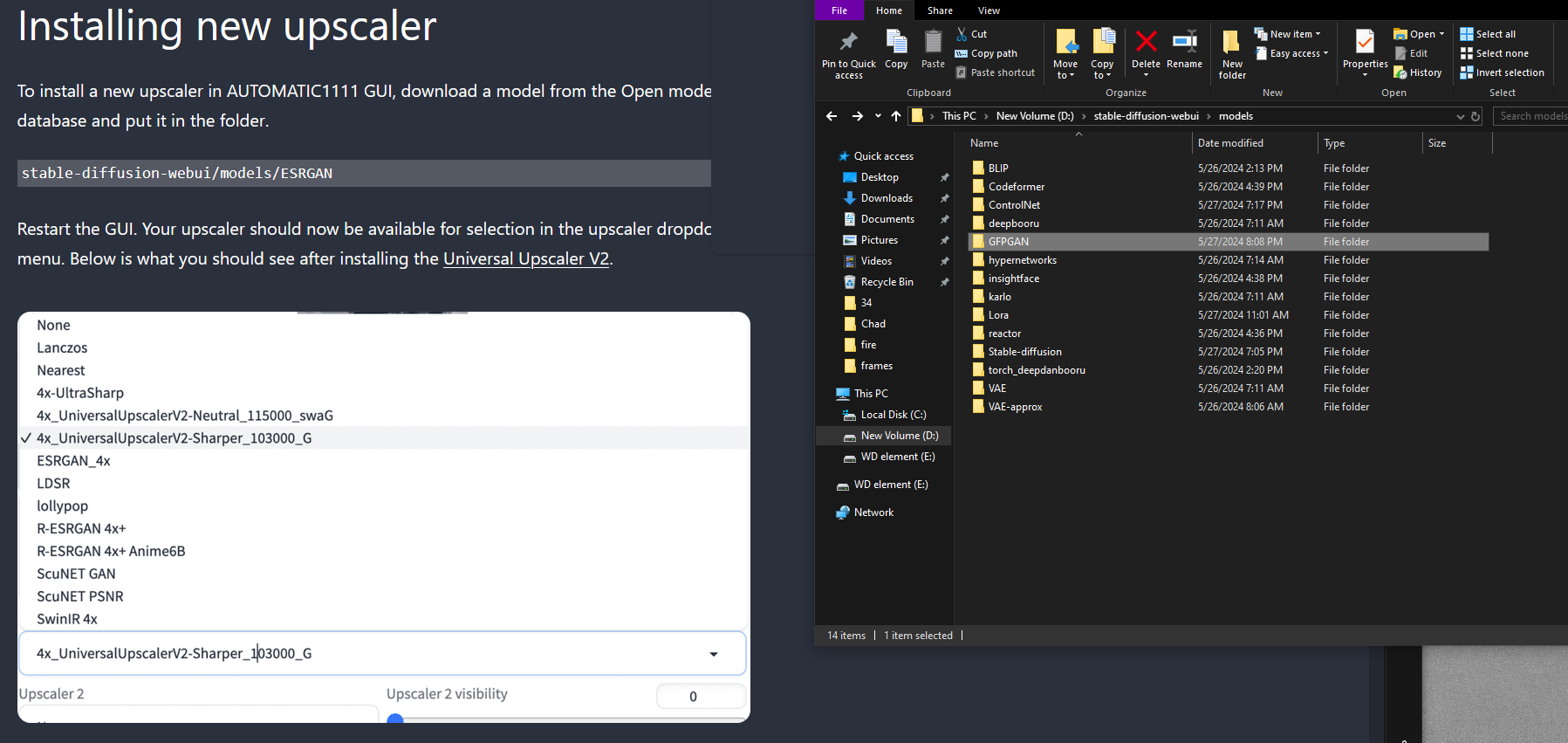
where do I put an upscaler pth file I put it in the gfpgan folder but it does not show up
 calm cairn
i feel bad asking questions because they always have simple answers
I want to machine-generate captions for an image
I'm sure I used to know how because I tried to make my own LoRA and succeeded at multiple textual inversions/embeddings, but I'm looking at this "BLIP/Deepbooru caption" option and I really don't remember what it does/how to work it.
Can someone tell me how to caption a single image?
round edge
https://ibb.co/QdDHm87 what am I supposed to do? (my image keeps getting compressed by discord)
 ornate elk
round edge
where do I put an upscaler pth file I put it in the gfpgan folder but it does no...
ornate elk
round edge
where do I put an upscaler pth file I put it in the gfpgan folder but it does no...
models/ESRGAN
you can create it
round edge
how do I add pth models to this screen
 ornate elk
round edge
how do I add pth models to this screen
ornate elk
round edge
how do I add pth models to this screen
are they in the models/esrgan folder?
and have you relaunched the webui-user.bat after putting them in there?
calm cairn
I have a sprite from an old video game and I want to make automatic/machine captions for it
I think i have korya installed but I don't remember anything about it
How do I get auto captions? Thanks in advance

 proper pike
Does anyone have a patreon I can sub to right now that can show me how to get a smoother pixel animation? Because my current workflow isn't working.
Trying to achieve like inner reflections recent pixel animation. Mine aren't working properly
round edge
ornate elk
are they in the models/esrgan folder?
Tried that nothing
 vivid token
hi, this might be a dumb question, but where do my .part files go? I have a .safetensor and a .part. I'm running on webui, and if you need more specs I'll get them to you. I'm just dusting off this program after not using it for over 10 months
nvm I'm tripping, turns out it wasn't done downloading
 cursive cobalt
I assume when it says "Checkpoint trained" and then "Base model: Pony", its just needs to be placed in the Lora folder, ye? (Pack in question https://civitai.com/models/331116?modelVersionId=464939)
calm cairn
hi, I posted a little earlier today, I don't think anyone was around who could help
I want to know how to use Automatic1111 to caption pictures (img 2 text), I know it's possible when making LoRA/embeddings, I just don't know how
Anybody know how? Thanks in advance
vocal burrow
Img2txt tab -> interrogate (clip)
cursive cobalt
(If you need a screenshot of it) The Clip and the box on the right. Use the clip.
 calm cairn
vocal burrow
Img2txt tab -> interrogate (clip)
calm cairn
vocal burrow
Img2txt tab -> interrogate (clip)
hmm, do I need to update? I don't have img2txt tab
ah never mind, I see a paperclip in img2img--though I probably should update too
Thanks to both of you! It's parsing now
vocal burrow
calm cairn
hmm, do I need to update? I don't have img2txt tab
img2img, my bad was on phone
 plush apex
how do you update the webUI I cant seem to find that update.bat script?
solemn moon
ever had a generation get stuck, like everytime , pls help 
 plush apex
how do you update the webUI I cant seem to find that update.bat script?
plush apex
plush apex
how do you update the webUI I cant seem to find that update.bat script?
nvm solved it.
for the record you litterally just git pull
cursive cobalt
solemn moon
ever had a generation get stuck, like everytime , pls help <:agony:1002961183105...
What i do, is i open a new tab, open the webui console window, spam "Enter" a few times", go back to the webUI browser tab, open the webui console window, spam enter a few times, and go back to the empty tab, and open window and spam enter a few times... It sounds weird, but oddly.... It works for me
It is a very, very weird method yes, but if it works, it works.
"It Just Works" - Todd Howard,
solemn moon
I'll try that
solemn moon
now it freezes here
Already up to date.
venv "C:\Users\o0\stable-diffusion-webui-master\venv\Scripts\Python.exe"
Python 3.10.6 (tags/v3.10.6:9c7b4bd, Aug 1 2022, 21:53:49) [MSC v.1932 64 bit (AMD64)]
Version: v1.9.3-1-gddb28b33
Commit hash: ddb28b33a3561a360b429c76f28f7ff1ffe282a0
CUDA 12.1
Launching Web UI with arguments: --xformers --no-half --medvram --api
[-] ADetailer initialized. version: 24.5.1, num models: 10
*** Error loading script: main.py
Traceback (most recent call last):
File "C:\Users\o0\stable-diffusion-webui-master\modules\scripts.py", line 508, in load_scripts
script_module = script_loading.load_module(scriptfile.path)
File "C:\Users\o0\stable-diffusion-webui-master\modules\script_loading.py", line 13, in load_module
module_spec.loader.exec_module(module)
File "<frozen importlib._bootstrap_external>", line 883, in exec_module
File "<frozen importlib._bootstrap>", line 241, in _call_with_frames_removed
File "C:\Users\o0\stable-diffusion-webui-master\extensions\openpose-editor\scripts\main.py", line 14, in <module>
from basicsr.utils.download_util import load_file_from_url
ModuleNotFoundError: No module named 'basicsr'
ControlNet preprocessor location: C:\Users\o0\stable-diffusion-webui-master\extensions\sd-webui-controlnet\annotator\downloads
2024-05-28 17:16:59,863 - ControlNet - INFO - ControlNet v1.1.449
*** Error loading script: main.py
Traceback (most recent call last):
File "C:\Users\o0\stable-diffusion-webui-master\modules\scripts.py", line 508, in load_scripts
script_module = script_loading.load_module(scriptfile.path)
File "C:\Users\o0\stable-diffusion-webui-master\modules\script_loading.py", line 13, in load_module
module_spec.loader.exec_module(module)
File "<frozen importlib._bootstrap_external>", line 883, in exec_module
File "<frozen importlib._bootstrap>", line 241, in _call_with_frames_removed
File "C:\Users\o0\stable-diffusion-webui-master\extensions\sd-webui-depth-lib\scripts\main.py", line 10, in <module>
from basicsr.utils.download_util import load_file_from_url
ModuleNotFoundError: No module named 'basicsr'
*** Error loading script: m2m_ui.py
Traceback (most recent call last):
File "C:\Users\o0\stable-diffusion-webui-master\modules\scripts.py", line 508, in load_scripts
script_module = script_loading.load_module(scriptfile.path)
File "C:\Users\o0\stable-diffusion-webui-master\modules\script_loading.py", line 13, in load_module
module_spec.loader.exec_module(module)
File "<frozen importlib._bootstrap_external>", line 883, in exec_module
File "<frozen importlib._bootstrap>", line 241, in _call_with_frames_removed
File "C:\Users\o0\stable-diffusion-webui-master\extensions\sd-webui-mov2mov\scripts\m2m_ui.py", line 23, in <module>
from modules.ui import (
ImportError: cannot import name 'create_sampler_and_steps_selection' from 'modules.ui' (C:\Users\o0\stable-diffusion-webui-master\modules\ui.py)
17:17:01 - ReActor - STATUS - Running v0.7.0-b7 on Device: CUDA
Loading weights [54ef3e3610] from C:\Users\o0\stable-diffusion-webui-master\models\Stable-diffusion\meinamix_meinaV11.safetensors
Creating model from config: C:\Users\o0\stable-diffusion-webui-master\configs\v1-inference.yaml
Applying attention optimization: xformers... done.
ornate elk
solemn moon
now it freezes here <:agony:1002961183105634415>
Already up to date.
venv "C:\U...
What's your GPU?
 solemn moon
oh lord
 unique bough
Need help with it, I want to generate a video using deforum and when I click "generate" it says an error and that's it

 mortal compass
unique bough
Need help with it, I want to generate a video using deforum and when I click "ge...
mortal compass
unique bough
Need help with it, I want to generate a video using deforum and when I click "ge...
What's in your terminal when this occurs
Yo @ornate elk, I wanna chance my directories from pic 1 to pic 2. I reckon I'm doing something wrong cause it ain't working lol


chatgpt tells me to chance versions of fastapi and pydantic cause they are causing a mismatch in regards to this
But I'm not sure if it's correct
unique bough
mortal compass
What's in your terminal when this occurs
 mortal compass
requirements doesn't even have pydantic in the txt file 
mortal compass
unique bough
you have installed your a1111 in c:\users\druma
Your root installation should be directly in C:\
Otherwise it will or may cause problems
unique bough
ok, ty, I`ll try
mortal compass
unique bough
ok, ty, I`ll try
If you are not experience with this stuff I highly recommend you watch videos on how to install whatever you want to run. There's a lot of ways to fuck up your installation 
unique bough
mortal compass
If you are not experience with this stuff I highly recommend you watch videos on...
I installed according to the tutorial on git
mortal compass
unique bough
I installed according to the tutorial on git
It's easy to miss one small step. I did many times and it made the program unbootable. I succeeded when I started to look up different videos and guides to actually learn how to install it rather than just reading steps
Anyway, that's just how I learned
unique bough
ty mate, have a nice day
ornate elk
mortal compass
Yo <@161910921269084160>, I wanna chance my directories from pic 1 to pic 2. I r...
the second screenshot doesn look right
@mortal compass it should look like this in forge:
`@echo off
set PYTHON=
set GIT=
set VENV_DIR=
set COMMANDLINE_ARGS=
@REM Uncomment following code to reference an existing A1111 checkout.
set A1111_HOME=H:/AI-Generator/stable-diffusion-webui <---- Only Change this Line to your Auto1111 Path
@REM
@REM set VENV_DIR=%A1111_HOME%/venv
set COMMANDLINE_ARGS=%COMMANDLINE_ARGS% ^
--ckpt-dir %A1111_HOME%/models/Stable-diffusion ^
--hypernetwork-dir %A1111_HOME%/models/hypernetworks ^
--embeddings-dir %A1111_HOME%/embeddings ^
--lora-dir %A1111_HOME%/models/Lora ^
--vae-dir %A1111_HOME%/models/vae ^
--controlnet-dir %A1111_HOME%/models/ControlNet
git pull
call webui.bat`
mortal compass
ornate elk
<@553562489523011611> it should look like this in forge:
`@echo off
set PYTHON=...
Where did you find out that this is what it should look like? I made a fresh install just a couple of days ago, and the first picture is basically unedited, except for the args
ornate elk
mortal compass
Where did you find out that this is what it should look like? I made a fresh ins...
i tested it for myself, and thats how it works by removing the "@REM" stuff
and adjusting the lines like in the example
mortal compass
I'll see if I can make it work
mortal compass
ornate elk
i tested it for myself, and thats how it works by removing the "@REM" stuff
Does this look correct to you?
`@echo off
set PYTHON=
set GIT=
set VENV_DIR=
set COMMANDLINE_ARGS= --pin-shared-memory --cuda-malloc --cuda-stream --xformers
@REM Uncomment following code to reference an existing A1111 checkout.
@REM set A1111_HOME=Your A1111 checkout dir
@REM
@REM set VENV_DIR=%A1111_HOME%/venv
set COMMANDLINE_ARGS=%COMMANDLINE_ARGS% ^
--ckpt-dir C:/Ai_Root/Stable-Diffusion_Forge/webui/models/Checkpoints ^
--hypernetwork-dir C:/Ai_Root/Stable-Diffusion_Forge/webui/models/hypernetworks ^
--embeddings-dir C:/Ai_Root/Stable-Diffusion_Forge/webui/models/embeddings ^
--lora-dir D:/Program_Files/Ai_stuff/lora ^
--vae-dir C:/Ai_Root/Stable-Diffusion_Forge/webui/models/VAE ^
--controlnet-dir C:/Ai_Root/Stable-Diffusion_Forge/webui/models/ControlNet
git pull
call webui.bat`
ornate elk
mortal compass
Does this look correct to you?
`@echo off
set PYTHON=
set GIT=
set VENV_DIR=
se...
looks okay
mortal compass
something about pydantic
I feel like this is one of those issues where I'm missing something obvious cause I'm not into programming xd This feels like it should be easy to do but no matter what people say on different threads or what chatgpt says, I'm running into errors
ornate elk
mortal compass
put albumentations==1.4.3 and pydantic==1.10.15 in the requirements_versions.txt file
then relaunch
mortal compass
Ran pip install requirements, everything seemed to install as it should, but I noticed an error at the end of the process:
Installing collected packages: pydantic, protobuf, albumentations Attempting uninstall: pydantic Found existing installation: pydantic 2.7.1 Uninstalling pydantic-2.7.1: Successfully uninstalled pydantic-2.7.1 Attempting uninstall: protobuf Found existing installation: protobuf 4.25.3 Uninstalling protobuf-4.25.3: Successfully uninstalled protobuf-4.25.3 Attempting uninstall: albumentations Found existing installation: albumentations 1.4.7 Uninstalling albumentations-1.4.7: Successfully uninstalled albumentations-1.4.7 ERROR: pip's dependency resolver does not currently take into account all the packages that are installed. This behaviour is the source of the following dependency conflicts. mediapipe 0.10.14 requires protobuf<5,>=4.25.3, but you have protobuf 3.20.3 which is incompatible. Successfully installed albumentations-1.4.3 protobuf-3.20.3 pydantic-1.10.15
I ran the bat file, and it looked like it was installing protobuf, and now it has launched correctly, everything is at it's place! I take it as the error has been taken care of?
ornate elk
mortal compass
Ran pip install requirements, everything seemed to install as it should, but I n...
looks good
mortal compass
ornate elk
looks good
Thanks for sharing your green circuit fingers! So, why wasn't those requirements already in the text file? Is it bad programming from forge's devs side or something else?
ornate elk
mortal compass
Thanks for sharing your green circuit fingers! So, why wasn't those requirements...
np, its caused by a controlnet dependency
ornate elk
cosmic furnace
Did that guy shared how he did that very speedy Webui with zluda amd?)
nope, but the outputs where not the same quality like with the zluda version we use now
solemn moon
ornate elk
But you have to install it in the venv
worked, im back in, now to see if it generates
would be cool if you could drop the text file into automatic, i know theres other ways, just dropping is kickass
cosmic furnace
ornate elk
nope, but the outputs where not the same quality like with the zluda version we ...
Oh... Not that good then i guess.)
 west mirage

Does anyone know how to fix? I tried reinstalling git but that did not work
i also tried git config --global --add safe.directory "*" but that does not work either
solemn moon
cursive cobalt
What i do, is i open a new tab, open the webui console window, spam "Enter" a fe...
turns out to hold true, lmao thanks bruh
cursive cobalt
solemn moon
turns out to hold true, lmao thanks bruh
Its a super weird "fix" xD But it works
ornate elk
west mirage
did you followed the guide from the pinned messages of this channel?
west mirage
ornate elk
did you followed the guide from the pinned messages of this channel?
no
i did it like i always do it by following automatic1111 guide
on the repo
cursive cobalt
Apparently, that guide does so much wrong
ornate elk
west mirage
no
okay, i would still recommend following my guide.
but first let us know what De syntaxis van de bestandsnaam, mapnaam of volumenaam is onjuist means
west mirage
ornate elk
okay, i would still recommend following my guide.
but first let us know what `D...
The syntax of the file name, folder name, or volume name is incorrect
ornate elk
west mirage
``The syntax of the file name, folder name, or volume name is incorrect``
okay, can you try using the guide from the pinned tabs and make a new folder for it?
 frail bobcat
Does anyone know why underscores don't work anymore? Dynamic prompt doesn't recognize my wildcards anymore but changing the underscores with two tildes in settings works. So something is overwriting the use of underscores??? Anyone have an idea?
west mirage
ornate elk
okay, can you try using the guide from the pinned tabs and make a new folder for...
i should clarify that this error is in webui.bat and not webui-user.bat
i want to use webui.bat since it always has been faster
ornate elk
west mirage
i want to use **webui.bat** since it always has been faster
Its not recommend to use the webui.bat
Also webui-user.bat should be faster depending what's inside it.
So what's in your webui-user.bat? And what's your GPU?
west mirage
ornate elk
Its not recommend to use the webui.bat
Also webui-user.bat should be faster depe...
RTX 3070ti - 8GB
ornate elk
west mirage
RTX 3070ti - 8GB
Then add --xformers --medvram-sdxl --no-half-vae
To the webui-user.bat at the line commandline_args=
And you have the best performance you can get for that card in Auto1111
But it only works when launching the webui-user.bat
Because the webui.bat doesn't have launch args
west mirage
ornate elk
Then add --xformers --medvram-sdxl --no-half-vae
To the webui-user.bat at the li...
doing that now
well, it works
ty
ornate elk
No problem 🙂
left juniper
Hi. is it incorrect to download PNGs from civitai and load them into confyui to see the workflow OP used? when i do this, the output is completely distorted and only looks like a silhouette of the rough sketch of what's it supposed to be.
I make sure to include all the checkpoints and loras it's using but still get a messed up output
 chrome rampart
hey all. question. Is it smart to activate restore face option in SD-forge and were do i find it ?
 brazen sun
Hello there, small question, its been a while since I have used this, has there been any updates on using it on amd or is still the automatic1111 thing that barely uses it?
ornate elk
brazen sun
Hello there, small question, its been a while since I have used this, has there ...
Hey, there was a huge improvement for AMD cards as Zluda released in February
You can find an install guide for it in the pinned messages of this channel
brazen sun
oh great! I'll look at it. Thanks!
ornate elk
brazen sun
oh great! I'll look at it. Thanks!
Np, if you have any question feel free to ask
It more than doubles the speed of directml
And uses less vram so sdxl works easily too
brazen sun
wow, and here I thought I was going to have buy another graphics cards for more speed
ornate elk
brazen sun
wow, and here I thought I was going to have buy another graphics cards for more ...
What's your GPU?
brazen sun
radeon rx6600
ornate elk
That will work with Zluda 🙂 as 3 others already got it to work here
brazen sun
I am seeing a video tutorial and it seems I will have to do a diferent thing related to a "hip sdk" thing
ornate elk
brazen sun
I am seeing a video tutorial and it seems I will have to do a diferent thing rel...
Don't follow the video guides. There is currently no correct one
Thats why I made the guides here
For zluda
brazen sun
oh then ill look them up, they are pinned right?
ornate elk
But yes hip SDK is needed
brazen sun
Okayp I was just installing it
ornate elk
brazen sun
Okayp I was just installing it
Here:
#🤝|tech-support message
brazen sun
ornate elk
Here:
https://discord.com/channels/1002292111942635562/1002602742667280404/12084...
it gives a 215 error, and I have the latest amd driver installed
any idea?
ornate elk
brazen sun
it gives a 215 error, and I have the latest amd driver installed
Would need to see the full cmd log
brazen sun
I am trying again and seems to be working, if there is an error again ill try and get it

how do I get the log from this?'
ornate elk
brazen sun
ohhh
ornate elk
brazen sun
I am trying again and seems to be working, if there is an error again ill try an...
try installing it again but disable the visual studio plugin installation option
wind thunder
i've putted the VAE in the good files but i dont see it in my SD

i checked the setting for so it always choose the model i selected
but still i dont see it
?
ornate elk
wind thunder
but still i dont see it
in the webui go to
Settings/ UserInterface/ Quicksettings
There add sd_vae
then hit apply and reload ui
brazen sun
ornate elk
try installing it again but disable the visual studio plugin installation option
seems to work, now its blue, ill continue reading the guide
ornate elk
brazen sun
seems to work, now its blue, ill continue reading the guide
blue?
brazen sun
the blue here used to be red
 ornate elk
brazen sun
the blue here used to be red
ornate elk
brazen sun
the blue here used to be red
ohh you installed the AMD pro driver :/
brazen sun
oh
ornate elk
in the guide it says to dont do that
brazen sun
do i have to unistall it or install it over it?
ornate elk
brazen sun
do i have to unistall it or install it over it?
i think you need to uninstall it before installing adrenalin again
brazen sun
wait I have to install adrenaline all over?
ornate elk
brazen sun
wait I have to install adrenaline all over?
i think so
brazen sun
darn, well ill get to it, brb and thanks again
ornate elk
brazen sun
darn, well ill get to it, brb and thanks again
np
also restart after the driver install
brazen sun
this one I have to unisntall right?
 ornate elk
brazen sun
this one I have to unisntall right?
ornate elk
brazen sun
this one I have to unisntall right?
yep
brazen sun
and do I have to restart after unstalling too?
ornate elk
brazen sun
and do I have to restart after unstalling too?
only if it says so
brazen sun
ookayp


 brazen sun
and the 4.5 step is if I have below a 6800 right?
great, and now it aint blue
and sorry for asking so much but what does this mean

and i have had this error

nvm just read the important step
 viscid dagger
How do i use SD3 via the discord?
brazen sun
brazen sun
and i have had this error
nvm nvm still same issue
ornate elk
brazen sun
and i have had this error
ohh do you have an amd cpu?
sry for the late response
brazen sun
nope, intel
ornate elk
brazen sun
and sorry for asking so much but what does this mean
this can be ignored
brazen sun
I have an amd gpu and intel cpu
ornate elk
brazen sun
I have an amd gpu and intel cpu
okay, you need to move the rocm libs files into the right folder
you have to download the right files for your gpu and then:
4.5 Go into C:\Program Files\AMD\ROCm\5.7\bin\rocblas folder. There copy and rename the library folder to old_library Open the .zip file and drag and drop all files of the library folder into the library folder. Not into the old_library folder.
brazen sun
I did that part yes
Last time I didnt restart but this time I did
(if it works now ill say dont worry)
or is there extra steps for intel cpu?
ornate elk
brazen sun
or is there extra steps for intel cpu?
nope
ornate elk
brazen sun
Last time I didnt restart but this time I did
restart is needed after the rocm library steps
brazen sun
and mostly out of curiosity, is there extra for amd cpus?
brazen sun
ornate elk
restart is needed after the rocm library steps
did it this time, seems to at least be taking longer
ornate elk
brazen sun
and mostly out of curiosity, is there extra for amd cpus?
there is an fix if you have an amd cpu with igpu
thats why i asked
 brazen sun
seems to be downloading a thing now (I opened before as said in the tutorial=
)*
and now its open, now I have wait a while for it to load right?
Works or not, thank you so much for your patience
this taking a while doing this little animation is normal and the console doing nothing is normal as well right?
 ornate elk
brazen sun
Works or not, thank you so much for your patience
ornate elk
brazen sun
Works or not, thank you so much for your patience
Yep it should load
ornate elk
brazen sun
this taking a while doing this little animation is normal and the console doing ...
Yep normal
brazen sun
so I just, wait, right?
ornate elk
brazen sun
so I just, wait, right?
Yep
15-40 minutes
After pressing Generate
If the button is grayed out and the cmd doesn't shows any error its good

 brittle lantern
Quick question does the stable assistant (the site) use stable diffusion 3 to generate those images? (Idk where else to ask this)
brazen sun
brazen sun
quite a creepy pic but that makes sense with no lora lmao
one last question if anyone knows, any way I can access my local webui from my phone?
 regal ridge
hi! i'm new to stable diffusion. I've been getting an error - ModelNotFoundError: No module named "modules". any help would be appreciated
ornate elk
regal ridge
hi! i'm new to stable diffusion. I've been getting an error - ModelNotFoundError...
hey, can you show the complete cmd log?
regal ridge
Microsoft Windows [Version 10.0.19045.4412]
(c) Microsoft Corporation. All rights reserved.
C:\Users\AJ20L\Downloads>python app.py
python: can't open file 'C:\Users\AJ20L\Downloads\app.py': [Errno 2] No such file or directory
C:\Users\AJ20L\Downloads>
I apologize. That was another error I got
I tried using python app.py on the CMD & that's what I got. i'm just trying to open the program & start it for the first time
ornate elk
regal ridge
Microsoft Windows [Version 10.0.19045.4412]
(c) Microsoft Corporation. All right...
if you checkout the pinned messages of this channel,
there is my complete install guide for Stable Diffusion Webui localy
try that and test if it works
its not against the TOS, but i cant help you with API stuff sry
Adetailer is not an upscaling tool, its used for fixing faces, eyes, hands etc, it uses Inpainting and automaticly detects the parts
what settings did you used?
like resolution, steps etc
regal ridge
ornate elk
if you checkout the pinned messages of this channel,
there is my complete instal...
sure thing. i'll check it out. i learned about stable diffusion from youtube so i probably should have looked for the discord first. tyvm for the reply!
ornate elk
regal ridge
sure thing. i'll check it out. i learned about stable diffusion from youtube so ...
np 🙂 there are a lot of old and outdated or just bad Install tutorials out there, so your at the best place by following my install guide from here
okay, yea for that you can just use Hires fix as an upscaler with the Esrgan4x+ or the 4x Ultrasharp upscaler model
hires fix is in auto1111 by default, also the Esrgan4x upscaler
4x ultrasharp has to be downloaed manually
yep and if you have a hr_step set it to 10
but it depends on the model
regal ridge
ornate elk
np 🙂 there are a lot of old and outdated or just bad Install tutorials out ther...
a quick question: where can i find the install guide? i don't want to scroll through the wrong category for minutes 😅
ornate elk
regal ridge
a quick question: where can i find the install guide? i don't want to scroll thr...
click on the Pin needel on the top right of this channel, then scroll down to the Nvidia Guide if you have an Nvidia GPU

damn xD
mayb you can find Face restoration as an option?
regal ridge
ornate elk
click on the Pin needel on the top right of this channel, then scroll down to th...
I see it. thanks again! 👍
ornate elk
Can you try Real-Esrgan4x+
Or Latent Nearest Exact
Or Bicubic
Oh
Yes, there is an option in the Auto1111 settings to get a Json file for each generated image
Hmm I'm not at the PC rn, can check tomorrow
Maybe it was only save as text file
Or search for generation data
I'm off, I'll take a look at it tomorrow
regal ridge
ornate elk
click on the Pin needel on the top right of this channel, then scroll down to th...
Just wanted to say tyvm! As it turned out I did everything wrong last time. It all worked out & I was able to use the program. 👍
 delicate citrus
hi guys
What PC configuration I need to make videos?
I wanna start work with SD profissionaly, I will buy a PC
can someone sugest me?
I talk about video but is a default configuration to do anything, I imagine that video is more heavy
solemn moon
delicate citrus
I talk about video but is a default configuration to do anything, I imagine that...
as long as you setup has a gpu i think
the bigger the gpu the faster it works
solemn moon
well, i have a 1660ti, and although it works, i want a 4060
solemn moon
might settle for the 30's range, im a laptop type of guy
delicate citrus
@solemn moon I need do something like this too
https://www.reddit.com/r/StableDiffusion/comments/18m3aa4/webcam_drawing_to_architectural_concept/
Reddit
Explore this post and more from the StableDiffusion community
it's for achitecture propose
delicate citrus
solemn moon
might settle for the 30's range, im a laptop type of guy
sorry my english is bad, 30 cm of dimension to put in a laptop? laptop interest me
maybe the company give me one : D
delicate citrus
delicate citrus
<@529708561996054578> I need do something like this too
https://www.reddit.com/r...
GitHub
Realtime diffusion (LCM-LoRA) from screen capture or webcam, for architecture, using torch and Pyside6 - s-du/FocusPocusAI
solemn moon
delicate citrus
sorry my english is bad, 30 cm of dimension to put in a laptop? laptop interest ...
A 30 series gpu
solemn moon
delicate citrus
https://github.com/s-du/FocusPocusAI
I’m sure there are lots of tools even if they are not for architecture
delicate citrus
solemn moon
I’m sure there are lots of tools even if they are not for architecture
yes, if you know anyone and wants share be free, I apreciate ^^
I see now a model so cool
it's for signal language
I was learning is very interesting
solemn moon
delicate citrus
I was learning is very interesting
Found this with a simple search, easier than creating your own assets
GitHub
Text-to-3D & Image-to-3D & Mesh Exportation with NeRF + Diffusion. - ashawkey/stable-dreamfusion
delicate citrus
I will check it, thanks!
yes is very usefull
@solemn moon what do you think about 3050?
solemn moon
Honestly I don’t know much, but, I’m sure it’s fine, I mean, it must be the bigger the better 😅🤷♂️
delicate citrus
ok haha I understand the concept
solemn moon
delicate citrus
<@529708561996054578> what do you think about 3050?
I will probably get this next
delicate citrus
nice
hey
I discovery now SD.Next
I was out of the updates
next can run controlnets on SDX models?
I'm in doubt
@solemn moon
solemn moon
Bro control nets are so frustrating, I end up doing all basic controls with SDXL, then use 1.5 models and 1.5 control nets to do anything more
delicate citrus
I cant run on SDX only 1.5
if next can run controlnets with SDX will be very cool
solemn moon
There are SDXL control nets, not many I don’t think 🤔 I think for architecture you would only need canny and line art, for most things
I tried to find it, can def remember seeing it but I uninstalled a lot of extensions lately and now can’t find it for you 🫠
Maybe something like SD Next or something that enhances the user interface, def saw it b4, and now it’s gone 😅

Have a feeling you might be able to add something in there too 🤷♂️ just a guess
Probably:
, .json
or
; .json
🤔
 delicate citrus
preprocessor? there nothing there
delicate citrus
I think yes
 subtle quarry
i'll give it a shot.
solemn moon
Noted, Must be the extension idea 😅
 delicate citrus
try it
mark open pose the SD will pick the preprocessor and model for you

man
you are using the wrong preprocessor
for track body is other model I think
can you show me the list?
@subtle quarry '
oh
XL
dont run controlnets I think too
or not all the controlnets...
subtle quarry
It runs controlnets, i've gotten it to work before
just ponyxl is being a headache.
subtle quarry
mhm. it works a good bit different than sdxl though
delicate citrus
you want show me the list of preprocessors?
mabe I recognize the right for you
@subtle quarry
subtle quarry
 subtle quarry
still not workin
 subtle quarry
i'll just check google real quick.
 oak wing
#🤝 Can Anybody tell me how can I generate videos using stable diffusion
oak wing
Can you share the link please
solemn moon
oak wing
Can you share the link please
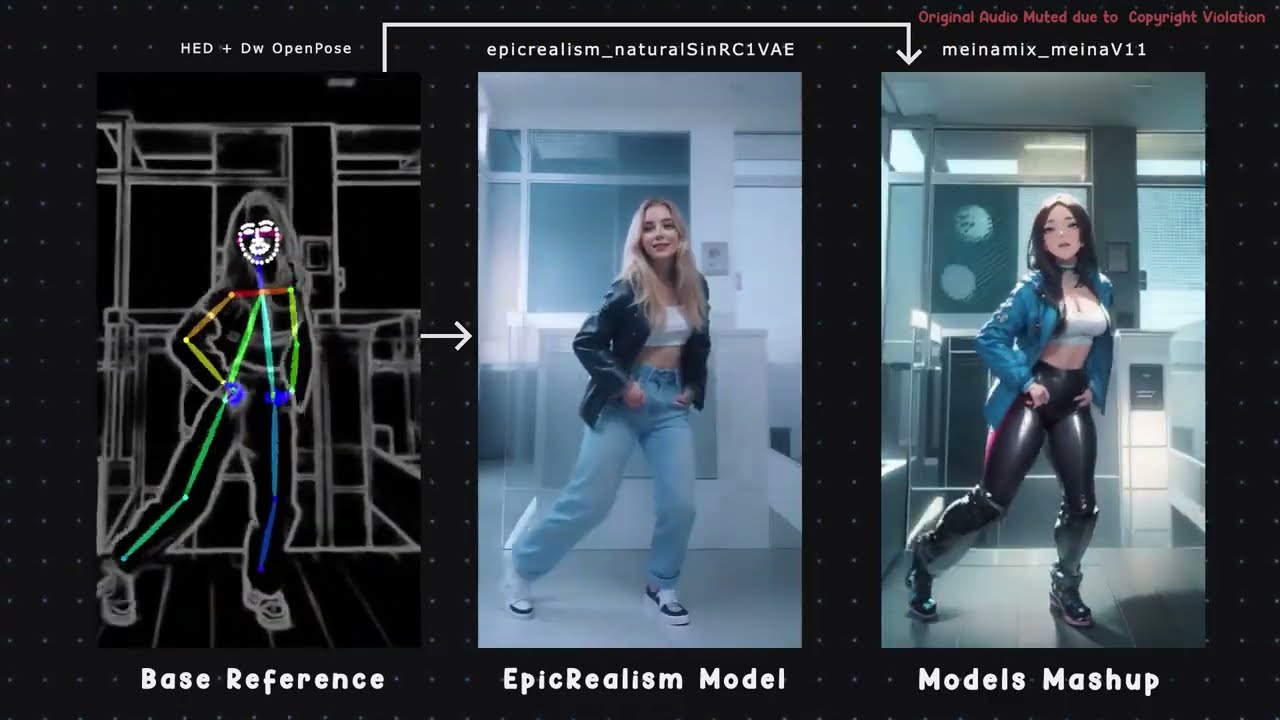
Animation Made in ComfyUI using AnimateDiff with only ControlNet Passes.
Main Animation Json Files:
Version v1 - https://drive.google.com/drive/folders/1HoZxKUX7WAg7ObqP00R4oIv48sXCEryQ?usp=sharing
New Version v2.1 - https://www.patreon.com/posts/update-v2-1-lcm-95056616
Output Render 1 (SD Mashup) : youtube.com/shorts/wxugGHMRpAQ
Output Ren...
oak wing
Thanks
subtle quarry
hey so i'm trying to get my computer to run a1111 from another profile on the computer and it keeps making me add new exceptions and it's driving me up the wall
nvm, got it figured out. i had to do it anyway but it's working now.
 formal trout
Hi, in Comfy, extra_model_paths.yaml, how to add a extra model path other than the Auto1111 one?
so it loads checkpoints from both
subtle quarry
why is controlnet ignoring me?

no matter what model i use, it just absolutely fucking refuses to listen.
gonna try 1.5 and see if it's just an sdxl issue.
solemn moon
solemn moon
Bro control nets are so frustrating, I end up doing all basic controls with SDXL...
SAME VIBES
I envisage, a SD3 model, with all extensions included and all extensions universally compatible 
 visual orbit
Hey guys, on a 3090 in forge I get about 3.4 to 3.7 it/s in ponysdxl 25 steps sde ++ karras 2m. I run xformers, cuda stream e.t.c. I am running on an undervolt of 893mv( around 330 watt) at 1860mhz and a +250 boost on memory.(9705) Any way I can speed this up more? My GPU is zotac amp extreme holo
delicate citrus
subtle quarry
why is controlnet ignoring me?
try with 1.5 and you will know if is the model or other thing
formal trout
formal trout
Hi, in Comfy, extra_model_paths.yaml, how to add a extra model path other than ...
I tried to do something like and got an error

 subtle quarry
formal trout
I tried to do something like and got an error
subtle quarry
formal trout
I tried to do something like and got an error
i think you have to flip the slashes
use \ instead of /
that's what i remember
you also need to include what drive it's from
Like C: or D: etc etc
so the path should look like C:\path\to\the\folder
subtle quarry
delicate citrus
try with 1.5 and you will know if is the model or other thing
1.5 ignores it as well.
gonna try updating extensions
delicate citrus
subtle quarry
gonna try updating extensions
It's a good idea
subtle quarry
god dammit! WHy is it not working???
I'm going to try another model that isn't open pose.
still isn't working
i'm getting kinda frustrated.
can anyone help?
Please?
subtle quarry
i tried deleting the venv and it did nothing
 solemn moon
subtle quarry
..i guess updating the drivers wouldn't hurt
solemn moon
subtle quarry
..i guess updating the drivers wouldn't hurt
was my issue at one point
subtle quarry
and it's also registering shit so like i dont know

i dont know what the problem is, but hopefully updating drivers will fix it.
i really don't feel like making a bug report...
nope. that didn't do shit.
gonna try comfyui i guess
it works in comfy ui. This is so stupid.
formal trout
subtle quarry
i think you have to flip the slashes
It's Linux, directories are like that
subtle quarry
formal trout
It's Linux, directories are like that
so are windows directories, but i still have to flip them
they should look like this
 formal trout
subtle quarry
and yeah , it's enabled
formal trout
subtle quarry
and yeah , it's enabled
Oh I think I might have the answer, when you use the image with the line dummy, you don't have to use the preprocessor, set it to none.
subtle quarry
i started with that.
formal trout
Or use an image for the preprocessor to work and generated the dummy
it works here


Why do you get two more images and they look black?

you should get only one with the dummy
 formal trout
subtle quarry
i started with that.
formal trout
subtle quarry
i started with that.
you should always do like that, if you make it preprocess the dummy it will certainly not work
subtle quarry
hmh, alright lemme mess around real quick.

 subtle quarry
oh. NOW it decides it's gonna work.
alright that's 1.5 figured out
now time to try sdxl
formal trout
I think it was that all along, it happens lol, you have to check the setup
subtle quarry
this is what i did for 1.5

well what i just now did
and that's what got it to work
so i'm gonna try the same method but for sdxl
oookay it's ignoring it
gonna try with just the dummy and not the preprocessor
okay it's still ignoring it
hmh.
maybe it's the openpose model i'm using... im not sure though.
formal trout
subtle quarry
maybe it's the openpose model i'm using... im not sure though.
try the one I'm using, thibaud_xl_openpose
subtle quarry
that's what i used
i'm trying to get the ijmage to finish but it seems to be stuck.
...ahhhh.
it's confusing layers.
it things a leg is an arm.
so it was making it kinda right, but it got confused.

 formal trout
subtle quarry
so it was making it kinda right, but it got confused.
formal trout
subtle quarry
so it was making it kinda right, but it got confused.
well good, it is working
subtle quarry
i'm gonna have to figure out how to get the open pose model right, but
formal trout
yeah better use an anime one for anime I guess
subtle quarry
did a little bit of editing on it, hopefully that somewhat fixes it

and back to ignoring it outright. Hm.

i love how the interrupt button doesn't work half the time.
adds an extra minute to the process of ending an image early.
formal trout
subtle quarry
i love how the interrupt button doesn't work half the time.
yeah it takes some time to do something, sometimes skip is faster I think
If you do Generate Forever
subtle quarry
i do not, i generate one at a time
formal trout
or various
subtle quarry
it's not working again.....might have to stick to comfyui for sdxl cnet.
formal trout
subtle quarry
it's not working again.....might have to stick to comfyui for sdxl cnet.
If you do complicated poses don't expect to get the exact pose, also try with non anime for that openpose model
 neat bay
hey good morning ! i m so so excited for the HUG and stability course more than you think but when i play for it it askes me for 180 dlr, ik it will give it back to me once i finish but the problem is i live in Egypt and paying with dlr is suspended in my country how can I apply now
 wide pecan
Hi, I am trying to reach out to Stable Audio for API integration for enterprise plan, I have sent serveral emails to your official email address and there is no reply, can anyone reply me back (Mandy), we really wish to start the cooperation asap
 torn girder
hey guys im getting blurry images in response using stable core, why?

 rain arch
Hello! Long time no chat. I've been tinkering with ComfyUI again and I have a question about schedule prompts. Specifically, is there any way possible to grab the positive and negative prompts from a given frame in FizzleDorf nodesand save the data when running multiple prompts? Please see the example images above. I have an input going in to where the "normal" set of scheduled prompts (like below) normally go, and have not been able to find a node that reads those values
"0":"A Toucan with butterfly wings, hopping gracefully through the meadows with a kaleidoscope of colors",
"1":"A castle built in the shape of a flower pot",
"2":"A Hiroshima Peace Memorial, a somber yet impactful example of modern Japanese architectural resilience",
"3":"Interstellar Wanderer, long-range interstellar exploration vessel, designed for extended missions into uncharted space",
"4":"A sailor ascends the mast to adjust the crow's nest, a solitary figure against the backdrop of a cloud-streaked sky"
I'd like each of those prompts to be read as the name of the prompt so I can save individual frames with the prompt as the filename. Is that at all possible? There is a reason for this madness, I promise.

 brazen sun
one question if anyone knows, any way I can access my local webui from my phone?
 obsidian carbon
Any comfui people here any good with working with Face Detailer? I need an issue resolved xD
obsidian carbon
TL;DR, a lora that has a clear face in it can't be detected with the face detailer in comfyui (impact pack)
 neon swallow
Hello @vocal burrow. Dream Studio is having issues generating images. Could you help us? CC @north cedar
 vocal burrow
neon swallow
Hello <@234988737526890496>. Dream Studio is having issues generating images. Co...
vocal burrow
neon swallow
Hello <@234988737526890496>. Dream Studio is having issues generating images. Co...
Looks like there s some network outage
https://dreamstudio.com/api/status/
best is probably to wait it out and contact support directly from their website if it lasts for more than a couple of hours.
 lean ocean
@vocal burrow can you help me
Traceback (most recent call last):
File "C:\Program Files\Python310\lib\runpy.py", line 196, in _run_module_as_main
return _run_code(code, main_globals, None,
File "C:\Program Files\Python310\lib\runpy.py", line 86, in run_code
exec(code, run_globals)
File "C:\Users\harla\Desktop\Kohya-Demo\kohya_ss\venv\Scripts\accelerate.EXE_main.py", line 7, in <module>
File "C:\Users\harla\Desktop\Kohya-Demo\kohya_ss\venv\lib\site-packages\accelerate\commands\accelerate_cli.py", line 47, in main
args.func(args)
File "C:\Users\harla\Desktop\Kohya-Demo\kohya_ss\venv\lib\site-packages\accelerate\commands\launch.py", line 995, in launch_command
args, defaults, mp_from_config_flag = _validate_launch_command(args)
File "C:\Users\harla\Desktop\Kohya-Demo\kohya_ss\venv\lib\site-packages\accelerate\commands\launch.py", line 928, in _validate_launch_command
raise ValueError(err.format(mode="bf16", requirement="PyTorch >= 1.10 and a supported device."))
ValueError: bf16 mixed precision requires PyTorch >= 1.10 and a supported device.
What is the fix to this Errorcode?
regal ridge
hi! does anyone know what the best model to use for Radeon RX 5500 XT (32 RAM)? I typed Cat to practice loading an image but I got an error. I'm also wondering if maybe there was an extra step I had to take to get images to generate.
ornate elk
lean ocean
Traceback (most recent call last):
File "C:\Program Files\Python310\lib\runpy....
You need to select fp16 on kohya
brazen sun
A bit of a stupid question but does regional prompter still work?
ornate elk
Should work
brazen sun
some times it just generates one character
regal ridge
updateL I got "disable-nan-check" error & when I put it now the generated images are all colored black.
 lean ocean
ornate elk
You need to select fp16 on kohya
lean ocean
ornate elk
You need to select fp16 on kohya
that didnt fix it i tried that first
ornate elk
lean ocean
that didnt fix it i tried that first
What are the other settings?
What's your GPU?
ornate elk
regal ridge
updateL I got "disable-nan-check" error & when I put it now the generated images...
Hey, which install guide did you followed?
@regal ridge I don't think a 5500XT is supported by Zluda AMD, so you should install the Directml Webui from my second AMD Guide
regal ridge
I download it from AMD: ([AMD] Here is a quick Guide to install Automatic1111 Directml Webui for AMD GPUs (Stable Diffusion) on Windows:). surprisingly the website opened up & I was able to use the default Model to load some images. however, everytime I download new Models to test them out, I get this error:
NansException: A tensor with all NaNs was produced in Unet. Use --disable-nan-check commandline argument to disable this check.
ornate elk
regal ridge
I download it from AMD: ([AMD] Here is a quick Guide to install Automatic1111 Di...
Ah okay so you uses the correct guide
Make sure the model you used is a model and not a lora.
Check the file size of it.
It needs to be above 1.98GB to be a model
regal ridge
I see. I made both of the mistakes. 😅 are there any model file recommendations? For instance, I go to Civitai to download the models, I click on models, & I see a bunch of Base Models: SD 1.5 and others. Then I check the models & I see Types (Wildcard, Lora, Workflows, etc.). I would like to know which ones to select/avoid or if there's a guide here I could check out.
ornate elk
regal ridge
I see. I made both of the mistakes. 😅 are there any model file recommendations?...
Checkpoints are models
left juniper
hi, i'm trying to troubleshoot why I'm generating distorted images when trying to replicate something from civitai, I import the png to comfyui and link all the loras and checkpoint, seed, and sampler, but in the end I get this jumbled mess of colors
Sometimes it works great, sometimes it's just a distorted bunch of colors, is it because the versions I download are different than the ones used in the example pictures from civitai?
It seems to me it happens a lot more with dpm++ 2m karras than with eula normal
regal ridge
ornate elk
Checkpoints are models
thanks for the advice! i'll be sure to check them out
 noble belfry
claymation looks good!
ornate elk
regal ridge
thanks for the advice! i'll be sure to check them out
for your gpu, you should use only 1.5 based models. These are 2gb
 reef patio
Where do I put --xformers --medvram-sdxl --no-half-vae
I do this and it gives me no module 'xformers'

and it's super slow
ornate elk
reef patio
I do this and it gives me no module 'xformers'
Make sure you launch the webui-user.bat and not the webui.bat
reef patio
ah thanks. Also, I cant seem to find prompt settings like guidance
sorry, I am a little rusty haven't done this in a while
ornate elk
reef patio
ah thanks. Also, I cant seem to find prompt settings like guidance
You can find images with prompts and settings on Civitai.com
 ornate elk
which settings?
reef patio
Like whatever Guidance is
ornate elk
reef patio
Like whatever Guidance is
CFG scale
ornate elk
no problem 🙂
 storm hearth
How do I speed up my txt2img generations? A singular image already takes over 5 minutes which seems unreasonably slow
reef patio
ornate elk
no problem 🙂
oh yeah, is there a guide somewhere to speeding up my prompts
They seem much slower than before to even generate one image, same pc
I have an Intel7 if that helps
ornate elk
reef patio
I have an Intel7 if that helps
whats your GPU?
ornate elk
storm hearth
How do I speed up my txt2img generations? A singular image already takes over 5 ...
whats your GPU? and whats insie your webui-user.bat?
reef patio
ornate elk
whats your GPU?
 storm hearth
ornate elk
whats your GPU? and whats insie your webui-user.bat?
storm hearth
ornate elk
whats your GPU? and whats insie your webui-user.bat?
Pretty sure I have a 3070 ti, and only added xformers to webui-user.bat
 plain stream
I am downloading Kohya SS, and I go to the point where I had to dowload homebrew, which I did, but now im stuck. What do I do?
ornate elk
storm hearth
Pretty sure I have a 3070 ti, and only added xformers to webui-user.bat
a 3070 ti needs --xformers --medvram-sdxl --no-half-vae for the best speed
ornate elk
reef patio
make sure you always launch the webui-user.bat
then also use 30 steps and i fyour using hires fix, set hires steps to 10
storm hearth
ornate elk
a 3070 ti needs `--xformers --medvram-sdxl --no-half-vae` for the best speed
I'll give that a try, hopefully that improves my generation time from over 5 minutes to something lower
reef patio
ornate elk
make sure you always launch the webui-user.bat
then also use 30 steps and i fyou...
i'm running webui-user.bat, using 20 steps and i'm not using the hires fix. I have these settings. Is one screwing me over
 ornate elk
storm hearth
I'll give that a try, hopefully that improves my generation time from over 5 min...
ornate elk
storm hearth
I'll give that a try, hopefully that improves my generation time from over 5 min...
if your using sdxl models rn, it should be faster then
ornate elk
reef patio
i'm running webui-user.bat, using 20 steps and i'm not using the hires fix. I h...
no these are needed for GPUs with 8gb vram
what are your txt2img settings?
make sure to dont enable Refiner
 storm hearth
ornate elk
if your using sdxl models rn, it should be faster then
storm hearth
ornate elk
if your using sdxl models rn, it should be faster then
Not sure if the checkpoint I'm using is based on sdxl
ornate elk
reef patio
looks normal
reef patio
Yeah weird. Not sure why its so slow now
I can run games at super high specs perfectly fine and get like 144 fps pretty consistently
ornate elk
storm hearth
Not sure if the checkpoint I'm using is based on sdxl
you can check the models file size. if its below 6gb its mostly an 1.5 model. If its around 6GB then its probably SDXL based
ornate elk
reef patio
I can run games at super high specs perfectly fine and get like 144 fps pretty c...
Games and Ai Stuff dont use the same techniques
Also make sure you dont run Heavy programms in the background like Games or Wallpaper Engine. That will slow down the generation speed
reef patio
Yeah, I was just saying that my PC runs stuff well and I haven't had issues in the past
Should I be looking out for CPU or memory
ornate elk
@reef patio Can you make a speed test?
Try an 512x512 image with 20 steps,
positive prompt: cute cat,
negative: blurry, deformed
Select an 1.5 based model that is 2gb in size like Dreamshaper v8
then check the it/s you get in the cmd
 viral knot
wait what... a1111 has automatic scheduler? how does that even work logically? like how does it select a scheduler automatically? lol
reef patio
ornate elk
<@397771612365258762> Can you make a speed test?
Try an 512x512 image with 20 st...


Can't find anything that tells how long it takes unless I am blind
 reef patio
hmm. My CPU and memory dont cap out with this
they only get to 80-90%
is it worth doing a factory reset on my PC or something
ornate elk
reef patio
is it worth doing a factory reset on my PC or something
nope (only if you installed windows like 5 years ago) but you can do a quick system check and repair by
opening up a cmd as admin and run
SFC /scannow
Also make sure you have the latest nvidia driver installed
reef patio
Yeah. I do often get prompts telling me I don't have the latest driver installed
but I can't really seem to update it
viral knot
ornate elk
Also make sure you have the latest nvidia driver installed
did nvidia fix the driver issues? i remember a while ago, you had to have like a specific driver version if you wanted a1111 to generate something good
ornate elk
viral knot
did nvidia fix the driver issues? i remember a while ago, you had to have like a...
yea, thats already fixed
viral knot
ah kk
ornate elk
reef patio
but I can't really seem to update it
why?
ornate elk
reef patio
i'll give it another go
make the system check before and a PC restart
 ornate elk
reef patio
ornate elk
reef patio
okay, it found stuff and repaired it, now make a PC restart
reef patio
Yeah honestly, my PC is doing some weird stuff. There's a few too many thing srunning in the background. I will do a wipe tommorrow
See if that fixes it
storm hearth
ornate elk
you can check the models file size. if its below 6gb its mostly an 1.5 model. If...
So the model I'm using is indeed SDXL based and with the changes to arguments my generations now don't seem to take longer than 2 minutes compared to well over 5 minutes. Thanks a lot!
ornate elk
storm hearth
So the model I'm using is indeed SDXL based and with the changes to arguments my...
ah perfect, no problem 🙂
lean ocean
ornate elk
What are the other settings?
uninstalling venv folder fixed it i think xd
viral knot
kek
lean ocean
its weird bcuz i have trained a ton and it gave out randomly lol
formal trout
brazen sun
some times it just generates one character
yes it is like that
 low basin
Finally got a proper pc and am curious about what commandline args I should be using for optimization. Gpu is 4070 Super (12gb)
ornate elk
low basin
Finally got a proper pc and am curious about what commandline args I should be u...
--xformers --no-half-vae should be enough
lean ocean
@ornate elk 17:52:03-319978 INFO Saving training config to
C:\Users\harla\Desktop\Kohya-Demo\model\vileaks_20240529-175203.json...
17:52:03-323987 INFO Executing command: C:\Users\harla\Desktop\Kohya-Demo\kohya_ss\venv\Scripts\accelerate.EXE
launch --dynamo_backend no --dynamo_mode default --mixed_precision bf16 --num_processes 1
--num_machines 1 --num_cpu_threads_per_process 2
C:/Users/harla/Desktop/Kohya-Demo/kohya_ss/sd-scripts/sdxl_train.py --config_file
C:\Users\harla\Desktop\Kohya-Demo\model/config_dreambooth-20240529-175203.toml
17:52:03-371835 INFO Command executed.
No Python at 'C:\Program Files\Python310\python.exe'
17:52:03-614674 INFO Training has ended.
Any idea of the fix?
No Python at 'C:\Program Files\Python310\python.exe' I have it which is weird
@vocal burrow
calm cairn
so here's a question about colors
I'm trying to inpaint, but the colors that come out do not match the colors in the original image. Is that a VAE problem? CFG is at 7, denoising 0.5-0.7
 pearl forge
Hi @ornate elk
Is it possible to skin this model image so that we can mkae it realistic person?
 viral knot
yes
 livid lark
does anyone know where to put the yolo face hand and gashion detection models in comfyu?
 hasty orbit
What is the best way to remove metadata from images in bulk?
formal trout
hasty orbit
What is the best way to remove metadata from images in bulk?
Exiftool
hasty orbit
formal trout
Exiftool
ehhh didn't work, can still see the prompt in PNG info
formal trout
hasty orbit
ehhh didn't work, can still see the prompt in PNG info
It should create two images, one original with different name and the new one with no metadata information,.same name as original
hasty orbit
Does dragging and dropping the image into the .exe still count?
formal trout
hasty orbit
Does dragging and dropping the image into the .exe still count?
I'm using a Linux version that works with a command line, I don't know which is the Windows one
hasty orbit
formal trout
I'm using a Linux version that works with a command line, I don't know which is ...
What's the command? I can just run it in gitbash or cmd
formal trout
You do something like exiftool all = *./ I'm not at home right now
formal trout
🙌
 warm otter
edit: it's not. somehow - sorry - I just checked against official python notebook - somehow my rest client has changed overnight, doing something different.
stability.ai api is broken, and not doing what it should.
See control/structure endpoint - it's ignoring the original image. This is on production. This is live. This worked the days prior, now the original image is ignored.
warm otter
Can anyone explain to me, why this request is not doing what it should? It's ignoring the original image
INFORMATION: --> POST https://api.stability.ai/v2beta/stable-image/control/structure h2
INFORMATION: Authorization: <omitted>
INFORMATION: accept: application/json
INFORMATION: User-Agent: OpenAPI-Generator/v1/java
INFORMATION: Content-Type: multipart/form-data; boundary=36eed318-391d-41d3-a465-169e36ae6407
INFORMATION: Content-Length: 556151
INFORMATION: Host: api.stability.ai
INFORMATION: Connection: Keep-Alive
INFORMATION: Accept-Encoding: gzip
INFORMATION: --36eed318-391d-41d3-a465-169e36ae6407
Content-Disposition: form-data; name="image"; filename="image17408095375412641010.png"
Content-Type: image/png
�PNG
<some decoded bytes>
--36eed318-391d-41d3-a465-169e36ae6407
Content-Disposition: form-data; name="control_strength"
Content-Type: application/json; charset=utf-8
0.7
--36eed318-391d-41d3-a465-169e36ae6407
Content-Disposition: form-data; name="seed"
Content-Type: application/json; charset=utf-8
0
--36eed318-391d-41d3-a465-169e36ae6407
Content-Disposition: form-data; name="output_format"
Content-Type: text/plain; charset=utf-8
png
--36eed318-391d-41d3-a465-169e36ae6407
Content-Disposition: form-data; name="negative_prompt"
Content-Type: text/plain; charset=utf-8
--36eed318-391d-41d3-a465-169e36ae6407
Content-Disposition: form-data; name="prompt"
Content-Type: text/plain; charset=utf-8
watercolor squirrel
--36eed318-391d-41d3-a465-169e36ae6407--
INFORMATION: --> END POST (556151-byte body)
source image and target image. Changing the control_strength parameter does not do anything.
When doing the same request from python, the result is as expected


Okay, found the issue. The official python notebook from openai uses as example for structure2image => sketch instead of structure - and structure is indeed broken right now!
here is the notebook:
https://colab.research.google.com/github/stability-ai/stability-sdk/blob/main/nbs/Stable_Image_API_Public.ipynb#scrollTo=59RaZazXz0AU
here is the relevant code line:
#@title Structure

#@markdown - Drag and drop image to file folder on left
#@markdown - Right click it and choose Copy path
#@markdown - Paste that path into image field below
#@markdown <br><br>

#some ommited stuff


host = f"https://api.stability.ai/v2beta/stable-image/control/sketch"
#some more
When changing the url to /control/structure, its not working at all anymore.

 vestal anchor
My GPU: GeForce RTX 3060 Twin Edge 12GB GDDR6
I just installed ComfyUI and tried to generate something, but I got this error:
torch.cuda.OutOfMemoryError: Allocation on device
 wise scroll
anyone else having issues with StableAudio timing out constantly when using input audio on generations?
😢
ornate elk
calm cairn
so here's a question about colors
I'm trying to inpaint, but the colors that com...
Yes, can be a VAE problem
ornate elk
vestal anchor
My GPU: GeForce RTX 3060 Twin Edge 12GB GDDR6
I just installed ComfyUI and tried...
What model and resolution? Did you used a custom workflow?
 wheat flare
Hey all,
I'm trying to run SDXL through AUTOMATIC1112 on an Nvidia GTX 1660 Ti (6GB VRAM). Whenever I hit Generate, my computer fan whines for several minutes while nothing happens, and then the generation fails due an all-NaN tensor.
I've tried booting up AUTOMATIC1111 use --lowvram but it still doesn't work. SD1.5 does work fine without --lowvram, but of course the image quality is much lower.
Any thoughts?
ornate elk
wheat flare
Hey all,
I'm trying to run SDXL through AUTOMATIC1112 on an Nvidia GTX 1660 Ti ...
hey, you also need to add: --xformers
also make sure you have 16gb RAM or more
wheat flare
ornate elk
also make sure you have 16gb RAM or more
I have 32GB RAM Will try --xformers in a sec
ornate elk
wheat flare
Hey all,
I'm trying to run SDXL through AUTOMATIC1112 on an Nvidia GTX 1660 Ti ...
also your gpu needs mostly --no-half because GTX16xx cards cant use FP16 made models without it
that should prevent NaN errors
wheat flare
OK, so I tried running AUTOMATIC1111 with --lowvram --xformers --no-half. No dice
 urban oyster
Hey guys, I'm testing the sd3 api https://api.stability.ai/v2beta/stable-image/generate/sd3 image-to-image request and i'm getting very slow request times (~40s for sd3, ~2m for sd3-turbo) is that normal?
ornate elk
wheat flare
OK, so I tried running AUTOMATIC1111 with `--lowvram --xformers --no-half`. No d...
what does the cmd shows?
wheat flare
ornate elk
what does the cmd shows?
 ornate elk
wheat flare
ornate elk
wheat flare
can you share the full cmd log?
wheat flare
ornate elk
can you share the full cmd log?
Copied and pasted straight out of Anaconda. Couldn't fit it in a Discord message, so here's a text file:
ornate elk
wheat flare
Copied and pasted straight out of Anaconda. Couldn't fit it in a Discord message...
you need to double click the webui-user.bat to start it with the launch args
and edit it before
it wont work like that: webui-user.bat --lowvram --xformers --no-half
wheat flare
Once I double-click, where do I put the args?
ornate elk
wheat flare
Once I double-click, where do I put the args?
right click to edit, then at the line Commandline_ARGS=
wheat flare
ornate elk
right click to edit, then at the line Commandline_ARGS=
Is this correct?
 ornate elk
wheat flare
Is this correct?
ornate elk
wheat flare
Is this correct?
yes
 pallid crag
gm guys, may I ask why I can't find lora training tab in Automatic1111 even I've installed dreambooth extension?
cursive cobalt
@pallid crag Should be there.

@ornate elk 👋 How does one find, and use the pose function of... ADetailer was it?
ornate elk
cursive cobalt
<@161910921269084160> 👋 How does one find, and use the pose function of... ADet...
pose?
cursive cobalt
Wasn't there some dynamic poses thing that made u able to fine tune poses?
wheat flare
ornate elk
yes
It's working! Thanks for the help
pallid crag
cursive cobalt
<@418436047958179860> Should be there.
oh I thought it is for Checkpoint? isn't it?
cursive cobalt

ornate elk
cursive cobalt
Wasn't there some dynamic poses thing that made u able to fine tune poses?
you mean controlnets openpose editor?
cursive cobalt
Yes. Thats the one
ornate elk
cursive cobalt
Yes. Thats the one
yea thats available in controlnet
cursive cobalt
Got a link to a guide that tells in an ELI5 format, how it works?
ornate elk
cursive cobalt
Got a link to a guide that tells in an ELI5 format, how it works?
do you have the controlnet extension already insatlled + the controlnet models?
cursive cobalt
I think so?

 ornate elk
cursive cobalt
I think so?
ornate elk
cursive cobalt
I think so?
then do this, and use the second edit button, not the one with P
 ornate elk
cursive cobalt
I think so?
ornate elk
cursive cobalt
I think so?
seems like you dont have the controlnet models
Here are they: https://civitai.com/models/38784/controlnet-11-models
cursive cobalt
That seems correct

D:\A1111\stable-diffusion-webui\extensions\sd-webui-controlnet\models, ye?
After an update, they showed up

Refresh***
cursive cobalt
Remnant of incorrectly installed.
I did install those. ControlNet 1.1 Models, is the one
ornate elk
which one ?
cursive cobalt
The Controlnet(space)1.1(space)Models.
ControlNet 1.1 Models, not the Controlnet11models_tileE
But presing the edit button opens this window
 ornate elk
cursive cobalt
The colors are nothing but a theme
ornate elk
cursive cobalt
The colors are nothing but a theme
thats how it should look like

you need the controlnet openpose model
 cursive cobalt
Figured, ye. I picked the OpenPose one
I moved the irrelevant stuff, THis is how it looks now
 ornate elk
cursive cobalt
I moved the irrelevant stuff, THis is how it looks now
ornate elk
cursive cobalt
I moved the irrelevant stuff, THis is how it looks now
okay good
cursive cobalt
OOoohhh... I c. I clicked the wrong Edit button. This is how it looks now
 ornate elk
cursive cobalt
OOoohhh... I c. I clicked the wrong Edit button. This is how it looks now
ornate elk
cursive cobalt
OOoohhh... I c. I clicked the wrong Edit button. This is how it looks now
yep perfect
cursive cobalt
Once edited, i press this, ye?
 ornate elk
cursive cobalt
Once edited, i press this, ye?
ornate elk
cursive cobalt
Once edited, i press this, ye?
Yep
cursive cobalt
"RuntimeError: mat1 and mat2 shapes cannot be multiplied (154x2048 and 768x320)"
 ornate elk
cursive cobalt
"RuntimeError: mat1 and mat2 shapes cannot be multiplied (154x2048 and 768x320)"
ornate elk
cursive cobalt
"RuntimeError: mat1 and mat2 shapes cannot be multiplied (154x2048 and 768x320)"
Are you using sdxl or 1.5?
cursive cobalt
A pony SDXL merge
ornate elk
cursive cobalt
A pony SDXL merge
That won't work with the 1.5 Controlnet
You need an sdxl Controlnet openpose model
You can find them here:
https://huggingface.co/lllyasviel/sd_control_collection/tree/main
 cursive cobalt
https://civitai.com/models/136070?modelVersionId=155270 ?I do mainly dabble in the 2, 2.5D space

bdsqlsz : canny | depth | lineart-anime | mlsdv2 | normal | normal-dsine | openpose | recolor | segment | segmentv2 | sketch | softedge | t2i-color...


 inland oracle
HI, I was using the webui and I tried to generate the second pic I face this error:
OutOfMemoryError: CUDA out of memory. Tried to allocate 512.00 MiB. GPU 0 has a total capacty of 7.75 GiB of which 7.06 MiB is free. Including non-PyTorch memory, this process has 7.73 GiB memory in use. Of the allocated memory 7.21 GiB is allocated by PyTorch, and 376.77 MiB is reserved by PyTorch but unallocated. If reserved but unallocated memory is large try setting max_split_size_mb to avoid fragmentation. See documentation for Memory Management and PYTORCH_CUDA_ALLOC_CONF
I am using linux and rtx 4060 laptop
cursive cobalt
ornate elk
Then use that openpose model
Didn't quite seem to work, unless i obviously did something wrong  I pressed the "Generate" button


It does generate the stickman, but not doesn't seem to "force" the character into that pose

 worthy nymph
Anyone knows if its possible to put pictures upon Loras or embedding for when selecting ? Having a hard remembering all they do exactly when I have to choose them with their weird names....
cursive cobalt
Is there an option for ComfyUI to do this (pic), but with promts, like Auto1111 can?
 regal ridge
i just got this error today while opening SD: "Torch is not able to use GPU; add --skip-torch-cuda-test to COMMANDLINE_ARGS variable to disable this check". It was working last night but not sure why now it isn't. any help would be appreciated 👍
formal trout
cursive cobalt
Didn't quite seem to work, unless i obviously did something wrong <:kek:65105404...
once you have the line dummy, you don't need the reference image and you don't need to run the pre-processor, set it to none
 waxen pebble
I have been having some great success training a comic style dreambooth... except alot of the images are coming out cropped:

im guessiung this is due to bucketing, i havent paid too much attention to it, and have quite a few bucket sizes in my training dataset.
anyone got ideas to what might be going wrong?
*i have tried this with wider aspect ratios. some things it just seems to want to cut off:

 safe basin
gets stuck on this
 ornate elk
safe basin
gets stuck on this
ornate elk
safe basin
gets stuck on this
hey, let it load, its not stuck
safe basin
I've let it load for 10 minutes with no progress.
I got past this on my first try, but I had some other kind of error that I tried fixing
ornate elk
safe basin
I got past this on my first try, but I had some other kind of error that I tried...
okay, let it load it can really take a bit
wlaos whats your gpu?
and how much RAM
safe basin
rx 6950 xt and 32gb
but i got past this before but i had this error instead
RuntimeError: Torch is not able to use GPU; add --skip-torch-cuda-test to COMMANDLINE_ARGS variable to disable this check.
so I followed some tutorial to fix that and somewhere along the way I prob messed something up
safe basin
yeah I followed the AMD guide, python and git. then I cloned it to a folder on my local disk. ran webui-user.bat and then It always just gets stuck on: Installing collected packages
ornate elk
safe basin
yeah I followed the AMD guide, python and git. then I cloned it to a folder on m...
did you followed my AMD Zluda guide?
or the directml one?
safe basin
https://github.com/lshqqytiger/stable-diffusion-webui-amdgpu is what I used
GitHub
Stable Diffusion web UI. Contribute to lshqqytiger/stable-diffusion-webui-amdgpu development by creating an account on GitHub.
ornate elk
safe basin
https://github.com/lshqqytiger/stable-diffusion-webui-amdgpu is what I used
Thats the right source but you need to follow an exact guide
I made an Zluda guide. Its in the pinned messages of this channel.
If you follow that you will get it to work
Direct link to the guide:
#🤝|tech-support message
safe basin
Im on it
ornate elk
I'm off now as its pretty late here (4am)
I can help you tomorrow
safe basin
Yeah still doesn't work, stuck at this now

python3 -m pip install git+https://github.com/mlfoundations/open_clip.git@bb6e834e9c70d9c27d0dc3ecedeebeaeb1ffad6b --prefer-binary
got me this

but when I reopen cmd its still on open_clip
subtle quarry
does anyone know what this means?
 ornate elk
safe basin
but when I reopen cmd its still on open_clip
ornate elk
safe basin
but when I reopen cmd its still on open_clip
Open up a cmd and type
Pip cache purge
Then delete the venv folder again and relaunch the webui-user.bat
And then let it load until you get an error.
Also make sure to have 10-15gb free space on C drive
safe basin
ornate elk
Open up a cmd and type
Pip cache purge
Then delete the venv folder again and rel...
Well I fixed it by running webui-user.bat with admin through cmd and disabling my integrated graphic drivers. But If I try to start it without admin I get an error.
But my new problem is that it crashes: There is not enough GPU video memory available. It uses all of my 16gb vram when I try to generate hi res images
Zluda made it so that I couldn't even render an image but I got it to work with directml.
cursive cobalt
What is this now 😢
 ornate elk
safe basin
Zluda made it so that I couldn't even render an image but I got it to work with ...
ornate elk
safe basin
Zluda made it so that I couldn't even render an image but I got it to work with ...
Yea directml isnt recommended to use please use zluda and don't start the file as admin
Better show me the error.
Show me your environment path settings too
cursive cobalt
Mornin @ornate elk How i fix the error code above?
warm otter
Stability api still broken, no way to contact support. Using them in production app. I will consider blogging about this failure.
How can a multimillion dollar company fail 1/10th of their product and not realizing?
I lost real money, because of that.
See reddit in the next hour for a write-up
ornate elk
cursive cobalt
Mornin <@161910921269084160> How i fix the error code above?
Do you have git installed?
cursive cobalt
Git... As in the client? No
Didn't need the client to install these 2, so didn't think I'd need it at all @ornate elk
 ornate elk
cursive cobalt
Didn't need the client to install these 2, so didn't think I'd need it at all <@...
ornate elk
cursive cobalt
Didn't need the client to install these 2, so didn't think I'd need it at all <@...
If you try to git clone something, like in the top screenshot, then you need the Programm Git
Install it and try again
It should work
cursive cobalt
Even when using the "INstall via GitURL" in the manager?
 ornate elk
Yep
cursive cobalt
Right. With Github installed and logged in, i just try again?
Nop @ornate elk Didn't seem to fix it


Hol
I c 1 issue
Sec. Lemme retry
Ok. If i weren't such a dummy, I should've realized... I already have the impact one installed xD
 cursive cobalt
AHA i'm BACK! What r this?
 vocal burrow
 cursive cobalt
vocal burrow
https://tenor.com/view/futurama-math-mathematics-we-need-math-we-need-to-use-mat...
cursive cobalt
vocal burrow
https://tenor.com/view/futurama-math-mathematics-we-need-math-we-need-to-use-mat...
I barely passed that stuff. Maff is hart
vocal burrow
can t tell with a screenshot so croped
cursive cobalt

Might have made a slight mistake importing a, what seems like a fairly complex workflow, cause damn son, this be producing errors
vocal burrow
Looks pretty self explanatory, you connect whatever numerical input you want to a,b and c. Type whatever math expression you want to use them with and it will spit out the result on the other hand.
cursive cobalt
Is the errors in question

Then it throws a purple outline around the same steps note
 cursive cobalt
I am a Ralph, when it comes to anything python related xD Slow learner
So, this is the group its near. Not quite understanding what the first box needs
 vocal burrow
no idea what it wants, that depends on the whole workflow :p
try passing just a for now
cursive cobalt
 vocal burrow
cursive cobalt
So, this is the group its near. Not quite understanding what the first box needs
vocal burrow
cursive cobalt
So, this is the group its near. Not quite understanding what the first box needs
it s not empty

you probably erased it
cursive cobalt
Windows key + Shift + S, Feather. Select area
cursive cobalt
vocal burrow
you probably erased it
Nah fren. A lot of stuff were missing some connections
Including these 2, but I assume they're just not needed xD
 vocal burrow
 pseudo prairie
it s telling you what to do at the very top of that screenshot of yours.
Install a compatible python (anything from 3.10.6 to 3.10.13), delete your stable-diffusion-webui/venv folder, launch again, read logs if there is any errors
vocal burrow
cursive cobalt
those are not connected on the workflow you ve sent
but that a / 2 was there
cursive cobalt
So is safe to simply ignore the error its outputting? (I assume the red outline = invalid input/output).
cursive cobalt
vocal burrow
but that `a / 2` was there
I c. I might deffo return later, once another unknown error, my smoof brian can't quite understand, pops up 😄
vocal burrow
cursive cobalt
So is safe to simply ignore the error its outputting? (I assume the red outline ...
try running it and see what happens
it s not gonna self explode :p
or is it...
cursive cobalt
Based on your novelty status... I'm afraid
 pseudo prairie
vocal burrow
it s telling you what to do at the very top of that screenshot of yours.
Instal...
pseudo prairie
vocal burrow
it s telling you what to do at the very top of that screenshot of yours.
Instal...
ok im an idiot i dont know where to find webui/venv folder
vocal burrow
pseudo prairie
ok im an idiot i dont know where to find webui/venv folder
should be right next to your webui-user.bat
unless you downloaded the .zip from github (I d advise against that method)
pseudo prairie
vocal burrow
unless you downloaded the .zip from github (I d advise against that method)
i followed this tutorial
vocal burrow
then it should be in one of the folder such as webui or something like that, I don t have access to it atm
pseudo prairie
and it did have the github thingy
vocal burrow
pseudo prairie
i followed this tutorial
"this" ? which one ?
pseudo prairie
vocal burrow
"this" ? which one ?

In this video I'm going to walk you through how to install Stable Diffusion locally on your computer as well as how to run a cloud install if your computer isn't quite up to par to run Stable Diffusion. Once you have Stable Diffusion installed, it opens up so many possibilities. You can run ControlNet, use your own models, make videos with Defor...
this guy
cursive cobalt
It seems once it reaches this area... (Expressions) it just... Stops. It doesn't seem to output a result to these


 cursive cobalt
pseudo prairie
cursive cobalt
pseudo prairie
Friend plz. Take screenshots not phone 😄 Makes it easier to read (Shift + Windows key + S, on Windows)
vocal burrow
pseudo prairie
https://youtu.be/Po-ykkCLE6M?si=Gum5-rEB-5EMeP7X
wow he recommends downloading sd 1.4... why... it s so outdated...
vocal burrow
pseudo prairie
now i don’t even have python
you probably didn t check the "add to path" checkbox during python install
pseudo prairie
what should i do 🥲
pseudo prairie
vocal burrow
you probably didn t check the "add to path" checkbox during python install
i did actually
vocal burrow
it s still trying to find your previous python 3.12
that s because you did nt delete the venv folder
 pseudo prairie
how do i delete that silly folder
vocal burrow
delete this
pseudo prairie
this what?
vocal burrow
right click the folder, shift + click on delete
pseudo prairie
i can’t find that folder
vocal burrow
pseudo prairie
this what?
it should be at the adress I just croped from your screenshot