#🤝|tech-support
1 messages · Page 60 of 1
 ornate elk
Maybe you need a PC restart again too
 elder mauve
ornate elk
Maybe you need a PC restart again too
elder mauve
ornate elk
Maybe you need a PC restart again too
same 😦
ornate elk
elder mauve
same 😦
Okay then do this:
go into the C:\ZLUDA\ Folder.
There copy the cublas.dll and the cusparse.dll and paste them inside it again.
Rename the copys to cublas64_11.dll and cusparse64_11.dll
Copy these two files to stable-diffusion-webui\venv\Lib\site-packages\torch\lib, and overwrite if asked.
then relaunch the webui-user.bat
elder mauve
where do i paste cusparse.dll and cublas.dll ?
ornate elk
Inside the zluda folder
Then rename them
And then copy them again to the other folder
 shell crystal
Which cloud service would you guys recommend for automatic1111? Thinking of using paperspace
ornate elk
shell crystal
Which cloud service would you guys recommend for automatic1111? Thinking of usin...
elder mauve
ornate elk
Okay then do this:
go into the C:\ZLUDA\ Folder.
There copy the cublas.dll and t...
WARNING: ZLUDA works best with SD.Next. Please consider migrating to SD.Next.
Using ZLUDA in H:\SD-Zluda\stable-diffusion-webui-directml\.zluda
Python 3.10.6 (tags/v3.10.6:9c7b4bd, Aug  1 2022, 21:53:49) [MSC v.1932 64 bit (AMD64)]
Version: v1.9.3-amd-5-g674c5cac
Commit hash: 674c5cacdac3392279653be6b3da0c8e62898693
Skipping onnxruntime installation.
You are up to date with the most recent release.
no module 'xformers'. Processing without...
no module 'xformers'. Processing without...
No module 'xformers'. Proceeding without it.
H:\SD-Zluda\stable-diffusion-webui-directml\venv\lib\site-packages\pytorch_lightning\utilities\distributed.py:258: LightningDeprecationWarning: `pytorch_lightning.utilities.distributed.rank_zero_only` has been deprecated in v1.8.1 and will be removed in v2.0.0. You can import it from `pytorch_lightning.utilities` instead.
  rank_zero_deprecation(
Launching Web UI with arguments: --use-zluda --medvram-sdxl --update-check --skip-ort
Press any key to continue . . .
 formal trout
I just updated my BIOS and now I'm agetting this, help

 gleaming copper
hello, when i double click the webui-user.bat I keep getting the runtime error skip torch cuda test
formal trout
I'ma trying this
Reddit
Explore this post and more from the StableDiffusion community
gleaming copper
ok thanks i'll take a look
 waxen cradle
Hi guys what monitor recoomend me for 4070ti súper 16gb?
 solemn jay
i love controlnet. in SD.15 i can do super amazing stuff. Trying to migrate to SDXL and i cant get it to work. it seems it just ignores it. i have tried multiple models and nothing

dont know what im doing wrong
 formal trout
solemn jay
i love controlnet. in SD.15 i can do super amazing stuff. Trying to migrate to S...
formal trout
solemn jay
i love controlnet. in SD.15 i can do super amazing stuff. Trying to migrate to S...
Mmm that's my experience with openpose in SD XL (I don't remember results in SD 1.5). Most of the time doesn't produce the same pose, but you have a coherent image loosely based on it so you should be thankful
ornate elk
gleaming copper
hello, when i double click the webui-user.bat I keep getting the runtime error s...
What's your GPU?
solemn jay
formal trout
Mmm that's my experience with openpose in SD XL (I don't remember results in SD ...
in sd 1.5 you can do magic
formal trout
solemn jay
in sd 1.5 you can do magic
I'm figuring it must work much better. In SD XL I just stop using it as it takes resources and no matter what it doesn't produce the exact pose, if you force it with more strength it produces deformed things. It kind of work for a general "idea" like your example.
solemn jay
this is very disappointing. hope it gets either fixed or SD3 improves uppon both
waxen cradle
waxen cradle
Hi guys what monitor recoomend me for 4070ti súper 16gb?
Help
formal trout
I reinstalled venv but now I'm getting @ornate elk any idea 🙏

 open fox
formal trout
I reinstalled venv but now I'm getting <@161910921269084160> any idea 🙏
open fox
formal trout
I reinstalled venv but now I'm getting <@161910921269084160> any idea 🙏
Are you on Linux?
If you you might need disable secure boot mode in bios.
formal trout
open fox
Are you on Linux?
yes
formal trout
open fox
If you you might need disable secure boot mode in bios.
Oh yes I just had enabled that
open fox
formal trout
Oh yes I just had enabled that
Disable it and retry. It should work again.
formal trout
open fox
Disable it and retry. It should work again.
yes that was it thanks! what a champ
Yes I updated my BIOS and tried to set the secure boot because League of Legends wasn't working on Windows and I though it was Vanguard security
ornate elk
elder mauve
```venv "H:\SD-Zluda\stable-diffusion-webui-directml\venv\Scripts\Python.exe"
WA...
You should reinstall rocm then restart the PC
 solemn atlas
hi, since the new update i cant find my negative embeddings

 dusty dragon
animate
gleaming copper
formal trout
https://www.reddit.com/r/StableDiffusion/comments/z6nkh0/torch_is_not_able_to_us...
I tried twice and i'm still getting the same error, i also tried updating my nvidia drivers
formal trout
gleaming copper
I tried twice and i'm still getting the same error, i also tried updating my nvi...
No idea, just found that, but my problem had a different cause
gleaming copper
ok thanks
ornate elk
gleaming copper
I tried twice and i'm still getting the same error, i also tried updating my nvi...
What's your GPU?
gleaming copper
2 rtx 3090 ti nvlinked
ornate elk
gleaming copper
2 rtx 3090 ti nvlinked
Okay and whats inside your webui-user.bat?
gleaming copper
How do I find that out .
.
ornate elk
gleaming copper
How do I find that out<:habby:1017789370532646913> .
Right click it and then edit
ornate elk
waxen cradle
Hi guys what monitor recoomend me for 4070ti súper 16gb?
Hey thats a good GPU for WQHD resolution.
Like the ASUS TUF Gaming VG27AQ3A
You can also go on FullHD 240hz if you want
gleaming copper
@echo offal@echo off
set PYTHON="C:\Users\Admin\AppData\Local\Programs\Python\Python310\python.exe"
set GIT=
set VENV_DIR=
set COMMANDLINE_ARGS=
git pull
call webui.bat
ornate elk
gleaming copper
@echo offal@echo off
set PYTHON="C:\Users\Admin\AppData\Local\Programs\Python\P...
At the line commandline_args=
Add: --xformers
Then save.
Then open up a cmd and type ans run
Pip cache purge
Then delete the venv folder and relaunch the webui-user.bat
gleaming copper
ornate elk
At the line commandline_args=
Add: --xformers
Then save.
Then open up a cmd and ...
ok one min
elder mauve
so u said not to install the pro driver, how do i not install the pro driver?

when i click on the download button it gives me this pro file
gleaming copper
ornate elk
At the line commandline_args=
Add: --xformers
Then save.
Then open up a cmd and ...
ans is not recongnized as an internal or external cmd
 native kernel
When I'm using num_images_per_prompt in the code below, what is being changed from image to image? The seed is manually set to 0, so what is being alterered to create different images with same prompt?:
`from diffusers import StableDiffusionXLPipeline
import torch
pipe_base = StableDiffusionXLPipeline.from_single_file(
"./models/stable-diffusion/sd_xl_base_1.0.safetensors",
torch_dtype=torch.float16,
use_safetensors=True,
variant="fp16",
)
pipe_base.to("cuda")
seed_gen = torch.Generator(device='cuda').manual_seed(0)
images = pipe_base(
prompt=prompt_positive,
negative_prompt=prompt_negative,
guidance_scale=5,
num_images_per_prompt = 2,
generator=seed_gen,
num_inference_steps=50).images`
Is it just auto-incrementing the seed / or randomly selecting different ones?
gleaming copper
ornate elk
At the line commandline_args=
Add: --xformers
Then save.
Then open up a cmd and ...
it worked thank you soooo much
ornate elk
elder mauve
so u said not to install the pro driver, how do i not install the pro driver?
From the guide link?
elder mauve
yes
ornate elk
elder mauve
yes
Ah okay yes thats the right one. But make sure when installing it the Pro driver at the bottom is not selected
 maiden coral
formal trout
I'm figuring it must work much better. In SD XL I just stop using it as it takes...
maiden coral
formal trout
I'm figuring it must work much better. In SD XL I just stop using it as it takes...
this thing works, although openpose editor isn't perfect it still reproduces the exact thing

especially if you set it to the highest strength
it's needed for openpose editor
DWPose estimator
formal trout
maiden coral
this thing works, although openpose editor isn't perfect it still reproduces the...
I use Automatic1111, but ty
maiden coral
that's pity
 gentle sundial
Hi @ornate elk Thanks for fixing my recent issue , I have another one tho, when I use sdxl it take 15 min to render an image and some times I get cuda error, I have the midvram-- thing in my webui script tho , any idea what is the problem? also I tried simple propt without anything , it takes same time
and the result is very bad unless I use auto for Vae
ornate elk
gentle sundial
Hi <@161910921269084160> Thanks for fixing my recent issue , I have another one ...
Hey, what was your GPU again?
gentle sundial
ornate elk
Hey, what was your GPU again?
3050 rtx ti laptop
ornate elk
gentle sundial
3050 rtx ti laptop
with 4gb vram?
gentle sundial
ornate elk
with 4gb vram?
display memo is 4gb and shared is 8gb
ornate elk
gentle sundial
display memo is 4gb and shared is 8gb
okay thats noot good for sdxl
what you can try is to activate th FP8 mode for sdxl in the settings
gentle sundial
ornate elk
what you can try is to activate th FP8 mode for sdxl in the settings
enable for sdxl or just enable?
and cache fp16 for lora should I check that?
ornate elk
gentle sundial
enable for sdxl or just enable?
only for sdxl
ornate elk
gentle sundial
and cache fp16 for lora should I check that?
no
gentle sundial
ornate elk
no
also animdiff takes 30 min for 1 8 frame gif 512 * 512 is that because of my gpu?
*8 frame
ornate elk
gentle sundial
also animdiff takes 30 min for 1 8 frame gif 512 * 512 is that because of my gpu...
yes animatediff is really vram hungry
gentle sundial
ornate elk
yes animatediff is really vram hungry
shoot, any alternative for that? like comfyui?
ornate elk
gentle sundial
shoot, any alternative for that? like comfyui?
comfyui doesnt change the vram usage of animatediff
you would need to use other extensions for getting a video
like Loopback Wavescript
gentle sundial
ornate elk
like Loopback Wavescript
Oh where should I find that?
ornate elk
gentle sundial
Oh where should I find that?
Here: https://rentry.co/sd-loopback-wave
it goes in stable-diffusion-webui/scripts
then its under scripts in img2img
with that you can make stuff like this:
gentle sundial
ornate elk
with that you can make stuff like this:
Oh so no movement ?
ornate elk
yea not much, its more like morphing
gentle sundial
ornate elk
yea not much, its more like morphing
so sdxl is fast now thank you! but I get weird images like these and still blurry when it finish rendering


 ornate elk
gentle sundial
so sdxl is fast now thank you! but I get weird images like these and still blurr...
ornate elk
gentle sundial
so sdxl is fast now thank you! but I get weird images like these and still blurr...
sdxl is trained on a 1024x1024 resolution, so dont use 512x512 for it
gentle sundial
ornate elk
sdxl is trained on a 1024x1024 resolution, so dont use 512x512 for it
Oh so I'm using hires , isn't that the same?
ornate elk
gentle sundial
Oh so I'm using hires , isn't that the same?
nope
1024x1024 needs to be the native resolution for sdxl
for 1.5 its 512x512
gentle sundial
ok thanks very much , I'll try it
gentle sundial
ornate elk
1024x1024 needs to be the native resolution for sdxl
I'm getting this error when I made it 1024 x1024
RuntimeError: Expected weight to be a vector of size equal to the number of channels in input, but got weight of shape [640] and input of shape [2, 1600, 128, 128]
ornate elk
gentle sundial
I'm getting this error when I made it 1024 x1024
RuntimeError: Expected weight ...
can you show the settins you used?
gentle sundial
 gentle sundial
ornate elk
can you show the settins you used?
gentle sundial
ornate elk
can you show the settins you used?
here
ornate elk
gentle sundial
here
oh you used negative embeddings that are made for 1.5
gentle sundial
ornate elk
oh you used negative embeddings that are made for 1.5
sorry it worked , animdiff was activated
ornate elk
oh okay
 unique bluff
Is VAE finishing supposed to take a long time to finish?
ornate elk
unique bluff
Is VAE finishing supposed to take a long time to finish?
A few seconds
Sdxl VAE takes longer
Installing and using tiled vae extension can fix it
unique bluff
ornate elk
A few seconds
Mine is taking more than 20 min in the VAE finishing stage
(The image currently has an awful quality as well)

Oh, I have vae on automatic if it matters
I’ve been able to generate couple of images in the past now it just won’t progress past this stage (I’ve tried using other images sizes as well)
idk what to do
(Now that I was finally getting hang of the prompts I need)
ornate elk
unique bluff
idk what to do
what does the terminal shows?
 wet flame
unique bluff
(The image currently has an awful quality as well)
wet flame
unique bluff
(The image currently has an awful quality as well)
just use windows snipping tool
who takes pics with their camera of their monitor anymore
doesn't mac have print screen xD
btw AI generators don't have any issue with AMD cpu do they?
its only the gpu right
amd cpu and gpu is much cheaper and performs similar in most apps
nvidia and their expensive price tags 😦
ornate elk
wet flame
btw AI generators don't have any issue with AMD cpu do they?
Nope, AMD CPUs work totally fine
unique bluff
wet flame
doesn't mac have print screen xD
Yes, but my computer is almost at 100% usage (I ASSUME) when sd is opened
If I try to screenshot it, there’s a high chance the computer gives up and dies (quite literally restarting itself)
unique bluff
ornate elk
what does the terminal shows?
19:53:13-936228 INFO Startup time: 2069.89 torch=225.93 onnx=6.30 olive=2.72 gradio=62.68 libraries=95.60 1dm=0.56 samplers=0.96 extensions=16.67 models=0.32 face-restore=70.15 upscalers=0.96 networks=0.23 ui-en=0.35 ui-txt2img=0.14 ui-img2img=0.11 ui-control=0.18 ui-extras=0.11 ui-models=0.07 ui-settings=1.56 ui-extensions=4.11 ui-defaults=0.13 launch=1.05 api=0.39 app-started=0.49 checkpoint=1578.05
19:53:29-533774 INFO Base: class=StableDiffusionPipeline
Progress 14.74s/it |||||||||||||||||||| 100% 20/20 04:54 00:00 Base``` zenith sail
Any ideas?

 onyx solar
You need to look at your console for details.
zenith sail
onyx solar
You need to look at your console for details.
Update custom node 'UltimateSDUpscale'
Update: ['https://github.com/ssitu/ComfyUI_UltimateSDUpscale']
CUSTOM NODE PULL: None
Update was successful.```That might be the update, but it didn't load. So restart and watch the console for when it's loading.
zenith sail
No errors either
onyx solar
Way too generic of a node name to know. Probably should just delete the node and replace it manually.
 limber pier
yeah that's pretty bad lol
"Text"
if i ever release a node pack, i'm gonna have a node just called "Node"
 austere gull
why doesn't control net work? first time using it and watched a tutorial but ion get it ( using webui-forge )

 ancient wadi
my image generation seem to be slowing down over time, anyone know what might be causing this
well mabtye
how can ifix that?
wheres that?
in cmd?
sorry im new
thanks man
elder mauve
ornate elk
Ah okay yes thats the right one. But make sure when installing it the Pro driver...
There is no option?
ancient wadi

no idea if i did this right
ok so would that be the webui python?
alright il give that a shot
thanks a ton
 fallen quest
ancient wadi
fallen quest
ancient wadi
That's correct, yes. 🤣
 forest zealot
GitHub
LoRA & Dreambooth training scripts & GUI use kohya-ss's trainer, for diffusion model. - Akegarasu/lora-scripts
dunno how to install dis
ran install.ps file but its not working
 civic remnant
Hello all! Why does ControlNet not working? I press preview and nothing happens

And I'll appreciate if somebody helps me with videofromimage workflow) I installed "ComfyUI-I2VGenXL" custom nodes, but when I start videofromimage workflow, SD doesn't recognise these nodes and manager doesn't see them neither. What am I doing wrong?
 ornate elk
elder mauve
There is no option?
ornate elk
elder mauve
There is no option?
Then its okay, for some it isnt there
ornate elk
austere gull
why doesn't control net work? first time using it and watched a tutorial but ion...
Wrong openpose model
austere gull
ornate elk
Wrong openpose model
idk i used it for open pose too and it didnt work, i just switched to dw since i read on reddit that it works
this is where i got it

i just download the safesensor and put it in models controlnet no?
ornate elk
austere gull
idk i used it for open pose too and it didnt work, i just switched to dw since i...
You need to download the correct openpose models:
If your on sdxl you find all supported here:
https://huggingface.co/lllyasviel/sd_control_collection/tree/main
 austere gull
huh why do they have different names
it seems like this is the one i downloaded but they have the correct name instead
ornate elk
austere gull
huh why do they have different names
Because they are made from different research groups
austere gull
ornate elk
Yes but thats a t2i adapter
austere gull
theres multiple t2i-adapter?? didn't know
does it not work
which ones in there actually work
for controlnet atleast
im just gonna install the largest file one and assume the big number makes it good
ornate elk
austere gull
which ones in there actually work
The 700mb file at the bottom
austere gull
ornate elk
The 700mb file at the bottom
ok epic ty
civic remnant
Why this error may appear?

 jaunty quarry
I have a problem with stable diffusion:
and I can't find anything to solve the problem
 bleak plover
does anyone here use webui Forge? Any advice on how to fix the current bug with pydantic https://github.com/lllyasviel/stable-diffusion-webui-forge/issues/674
GitHub
GitHub
Checklist The issue exists after disabling all extensions The issue exists on a clean installation of webui The issue is caused by an extension, but I believe it is caused by a bug in the webui The...
ornate elk
jaunty quarry
I have a problem with stable diffusion:
```RuntimeError: CUDA out of memory. Tri...
Hey, what's your GPU and whats inside your webui-user.bat?
ornate elk
bleak plover
does anyone here use webui Forge? Any advice on how to fix the current bug with ...
Go into the stable-diffusion-webui folder
Click in the explorer bar (not searchbar)
There type cmd and hit enter.
In the cmd type and run these 3 commands after each other.
venv\Scripts\activate
pip install albumentations==1.4.3
pip install pydantic==1.10.15
the file is mostly empty:
set PYTHON=
set GIT=
set VENV_DIR=
set COMMANDLINE_ARGS=

call webui.bat
usualy I just start sd with webui.bat
ornate elk
jaunty quarry
the file is mostly empty:
```@echo off
set PYTHON=
set GIT=
set VENV_DIR=
set C...
Okay at the line commandline_args=
add: --xformers
Then save and relaunch webui-user.bat
With that it generates faster and uses less vram
ornate elk
jaunty quarry
usualy I just start sd with webui.bat
Never start with only webui.bat
jaunty quarry
ornate elk
Never start with only webui.bat
It has problems to start xformers:
Error running preload() for B:\stable-diffusion\stable-diffusion-webui\extensions\adetailer-23.10.1\preload.py
Traceback (most recent call last):
  File "B:\stable-diffusion\stable-diffusion-webui\modules\script_loading.py", line 28, in preload_extensions
    module.preload(parser)
  File "B:\stable-diffusion\stable-diffusion-webui\extensions\adetailer-23.10.1\preload.py", line 5, in preload
    parser.add_argument(
  File "C:\Program Files\WindowsApps\PythonSoftwareFoundation.Python.3.10_3.10.3056.0_x64__qbz5n2kfra8p0\lib\argparse.py", line 1448, in add_argument
    return self._add_action(action)
  File "C:\Program Files\WindowsApps\PythonSoftwareFoundation.Python.3.10_3.10.3056.0_x64__qbz5n2kfra8p0\lib\argparse.py", line 1814, in _add_action
    self._optionals._add_action(action)
  File "C:\Program Files\WindowsApps\PythonSoftwareFoundation.Python.3.10_3.10.3056.0_x64__qbz5n2kfra8p0\lib\argparse.py", line 1650, in _add_action
    action = super(_ArgumentGroup, self)._add_action(action)
  File "C:\Program Files\WindowsApps\PythonSoftwareFoundation.Python.3.10_3.10.3056.0_x64__qbz5n2kfra8p0\lib\argparse.py", line 1462, in _add_action
    self._check_conflict(action)
  File "C:\Program Files\WindowsApps\PythonSoftwareFoundation.Python.3.10_3.10.3056.0_x64__qbz5n2kfra8p0\lib\argparse.py", line 1599, in _check_conflict
    conflict_handler(action, confl_optionals)
  File "C:\Program Files\WindowsApps\PythonSoftwareFoundation.Python.3.10_3.10.3056.0_x64__qbz5n2kfra8p0\lib\argparse.py", line 1608, in _handle_conflict_error
    raise ArgumentError(action, message % conflict_string)
argparse.ArgumentError: argument --ad-no-huggingface: conflicting option string: --ad-no-huggingface``` PyTorch 1.13.1+cu117 with CUDA 1107 (you have 1.12.1+cu113)
Python 3.10.9 (you have 3.10.11)
Please reinstall xformers (see https://github.com/facebookresearch/xformers#installing-xformers)
Memory-efficient attention, SwiGLU, sparse and more won't be available`
and when I try to reinstall torch:
Looking in indexes: https://pypi.org/simple, https://download.pytorch.org/whl/cu117
ERROR: Could not find a version that satisfies the requirement torch==1.13.1+cu114 (from versions: 1.11.0, 1.12.0, 1.12.1, 1.13.0, 1.13.0+cu117, 1.13.1, 1.13.1+cu117, 2.0.0, 2.0.0+cu117, 2.0.1, 2.0.1+cu117, 2.1.0, 2.1.1, 2.1.2, 2.2.0, 2.2.1, 2.2.2, 2.3.0)
ERROR: No matching distribution found for torch==1.13.1+cu114
Traceback (most recent call last):
  File "B:\stable-diffusion\stable-diffusion-webui\launch.py", line 360, in <module>
    prepare_environment()
  File "B:\stable-diffusion\stable-diffusion-webui\launch.py", line 269, in prepare_environment
    run(f'"{python}" -m {torch_command}', "Installing torch and torchvision", "Couldn't install torch", live=True)
  File "B:\stable-diffusion\stable-diffusion-webui\launch.py", line 89, in run
    raise RuntimeError(f"""{errdesc or 'Error running command'}.
RuntimeError: Couldn't install torch.
Command: "B:\stable-diffusion\stable-diffusion-webui\venv\Scripts\python.exe" -m pip install torch==1.13.1+cu114 torchvision==0.14.1+cu117 --extra-index-url https://download.pytorch.org/whl/cu117
Error code: 1
 mortal compass
Hey @ornate elk, you don't happen to know of some good upscaling guides for controlnet? Everything I find is like a year old which is super out dated
ornate elk
jaunty quarry
and when I try to reinstall torch:
```Installing torch and torchvision
Looking i...
You need to open up a cmd then run
Pip cache purge
Then delete the venv folder
And remove the --reinstall-torch command.
Only add --xformers
Then relaunch the webui-user.bat
 heavy perch
@ornate elk any idea why I might be getting a grey video?
 jaunty quarry
ornate elk
You need to open up a cmd then run
Pip cache purge
Then delete the venv folder
...
jaunty quarry
ornate elk
You need to open up a cmd then run
Pip cache purge
Then delete the venv folder
...
did not change that:
ERROR: No matching distribution found for torch==1.13.1+cu114
 turbid elk
jaunty quarry
did not change that:
```ERROR: Could not find a version that satisfies the requi...
turbid elk
jaunty quarry
did not change that:
```ERROR: Could not find a version that satisfies the requi...
try reinstalling python the latest version 3.12 didnt work for me
jaunty quarry
I have like 5 different versions on python
turbid elk
so i installed 3.10.6 and it worked
turbid elk
jaunty quarry
I have like 5 different versions on python
was the same case with me uninstalled all of them
and installed a fresh one
took me almost 2 hours to crack this error lol also dont forget to add the python path while installing
 chilly knot
Applied providers: ['CPUExecutionProvider'], with options: {'CPUExecutionProvider': {}}
its bad?
correct if show cuda?
ornate elk
jaunty quarry
did not change that:
```ERROR: Could not find a version that satisfies the requi...
What's your python version?
You need 3.10.11 64bit
ornate elk
heavy perch
<@161910921269084160> any idea why I might be getting a grey video?
Is that with mov2mov?
ornate elk
mortal compass
Hey <@161910921269084160>, you don't happen to know of some good upscaling guide...
Yes, I can show you one later
heavy perch
ornate elk
Is that with mov2mov?
yeah
jaunty quarry
it's still not able to download torch:
ERROR: No matching distribution found for torch==1.13.1+cu114``` viral knot
can you install another version? cause 1.13.1 has no match with cuda 11.4 as seen from the error
ornate elk
jaunty quarry
it's still not able to download torch:
```ERROR: Could not find a version that s...
Can you show the complete cmd log?
ornate elk
jaunty quarry
it's still not able to download torch:
```ERROR: Could not find a version that s...
You also need to delete the venv folder after changing python versions
elder mauve
ornate elk
Then its okay, for some it isnt there
but why doesnt it work 😦
 ancient rune
Hi, for some request (like "une patate" for example), I recieve an empty response.
( litteraly {"artifacts":[]} )
When I try with another prompt, it works but this specific prompt and some other just never work.
(I use the API)
Why and how to fix it ?
Here is the response for "une patate"
 ornate elk
elder mauve
but why doesnt it work 😦
ornate elk
elder mauve
but why doesnt it work 😦
What you can try first is to open up a cmd and type
SFC /scannow
After thats done restart the PC.
Then if it still doesn't work, move your ZLUDA folder into the C:\Programm Files folder.
Then update the zluda path in the system variables.
Sometimes windows 11 makes path problems
 slim basin
Hi, can anybody help me to install SD?
Windows 10
AMD 7900 XTX
miniconda3 3.10.11 64
Trying since 3 days, did't getting to run
ornate elk
slim basin
Hi, can anybody help me to install SD?
Windows 10
AMD 7900 XTX
miniconda3 3.10...
Hey, sure I'm on a 7900xtx too.
First uninstall miniconda.
Then follow my Zluda auto1111 install guide, its in the pinned messages of this channel
slim basin
i try it acn i DM you if i stuck ?
ornate elk
slim basin
i try it acn i DM you if i stuck ?
Sure
 naive dragon
so i still have the thing going on with my hdd being used 100% so i might as well put it on my ssd lol and it still loses connection.
can i just copy paste it to my ssd or would that not work or is it justbetter overall to reinstall it over again on a new ssd.
(because im pretty sure its the fault of my hdd that cant handle the speeds ;/ but that rly that big of an issue bcsi cna put it on my ssd)
ornate elk
naive dragon
so i still have the thing going on with my hdd being used 100% so i might as wel...
If you move it, then you can't update it anymore
elder mauve
what are control nets used for?
naive dragon
ornate elk
If you move it, then you can't update it anymore
thank you for that answer ill install it over again, also how do i update it bcs it doesnt let me type in the beginning when it tell me there is a new version
elder mauve
ornate elk
What you can try first is to open up a cmd and type
SFC /scannow
After thats don...
this means good?
 ornate elk
elder mauve
this means good?
ornate elk
elder mauve
this means good?
Yes now restart the PC
ornate elk
naive dragon
thank you for that answer ill install it over again, also how do i update it bcs...
By adding git pull to an empty row in the webui-user.bat
naive dragon
ornate elk
By adding git pull to an empty row in the webui-user.bat
i put it in here? (can i jsut keep it there so it automatically updates) and do i put it afterthe COMMANDLINE_ARGS?
 ornate elk
naive dragon
i put it in here? (can i jsut keep it there so it automatically updates) and do ...
ornate elk
naive dragon
i put it in here? (can i jsut keep it there so it automatically updates) and do ...
It needs to go in the empty line
 pine smelt
So i am facing a problem when i try to use image to vid models . (file attached: full cmd ). the problem is that after running this it takes 1.5 hours! and then error massage shows up and it stops . However i able to generate image but this error message also popup there { UserWarning: 1Torch was not compiled with flash attention.} but at least it gives me a output . please help and thanks for checking out
chilly knot
pine smelt
So i am facing a problem when i try to use image to vid models . (file attached:...
its try download model
pine smelt
chilly knot
its try download model
expand the code and you will see the problems
chilly knot
Applied providers: ['CPUExecutionProvider'], with options: {'CPUExecutionProvider': {}}
what could the message be related to?
what is running on my cpu now
insightface/models/buffalo_l/w600k_r50.onnx recognition
its lke that

its normal or bad
ornate elk
@elder mauve did it worked?
 ornate elk
elder mauve
same error
ornate elk
elder mauve
same error
can you delete the venv folder again, then relaunc the wbeui-user.bat
then check the taskmanager ram usage
@elder mauve oh wait there was a fix yesterday to the webui. (regarding zluda installation)
what you should try is to delete the stable-diffusion-webui-directml folder.
then do the steps 2 - 5 from my guide and relaunch
elder mauve
do i also delete zluda folder?
ornate elk
elder mauve
do i also delete zluda folder?
nope
elder mauve
and what about rocm?
ornate elk
elder mauve
and what about rocm?
nope
elder mauve
alr
heavy perch
heavy perch
yeah
@ornate elk
ornate elk
heavy perch
<@161910921269084160> any idea why I might be getting a grey video?
can you show more settings?
heavy perch
ornate elk
can you show more settings?
 ornate elk
heavy perch
ornate elk
heavy perch
try with 30 fps
also whats your gpu? and whats inside your webui-user.bat?
elder mauve
ornate elk
can you delete the venv folder again, then relaunc the wbeui-user.bat
then check...
same
 ornate elk
elder mauve
same
ornate elk
elder mauve
same
Can you show me the zluda folder and the path again?

 ornate elk
elder mauve
ornate elk
elder mauve
Any third party antivirus Programm running?
elder mauve
ornate elk
elder mauve
okay open up a cmd and type
where python
elder mauve
C:\Users\sixsi\AppData\Local\Programs\Python\Python310\python.exe
C:\Users\sixsi\AppData\Local\Programs\Python\Python312\python.exe
C:\Users\sixsi\AppData\Local\Microsoft\WindowsApps\python.exe
ornate elk
elder mauve
C:\Users\sixsi\AppData\Local\Programs\Python\Python310\python.exe
C:\Users\sixsi...
do you need python 3.12 for anything?
elder mauve
not really
ornate elk
elder mauve
not really
okay, then uninstall (not deleting) everything from python
 ornate elk
elder mauve
everything?
ornate elk
elder mauve
everything?
yes python 3.10.6 and python 3.12 and the python launcher
elder mauve
 and then i reinstall?
ornate elk
then download python 3.10.11 64bit (link is in my guide)
install it and check "add python to path" at the first window
then delete the venv folder
 cosmic furnace
76 gpu temp while hotspot 91 is okay or nah ? hmgm
ornate elk
cosmic furnace
76 gpu temp while hotspot 91 is okay or nah ? hmgm
76gp temp is not good, what are you doing?
cosmic furnace
playing at ultras xD
ornate elk
what game?
cosmic furnace
ornate elk
cosmic furnace
-
?
cosmic furnace
nope)
and its in silent mode =\
lil bit higher than shud probab ?
or fine?
others seems to have lower hm
ornate elk
cosmic furnace
and its in silent mode =\
its too high
@cosmic furnace when im playing Cyberpunk 2077 on WQHD with Max settings (RTX off)
im getting like 65 degree max and Hotspot is on 72
you never should be anywhere near over 80 with hotspot
cosmic furnace
ill look into it ... mb cuz silent ? 🤨
cosmic furnace
i see some ppl having that hotspot
ornate elk
cosmic furnace
i see some ppl having that hotspot
here is my Fan curve
 cosmic furnace
is it smthing that shud be disturbing or can be ignored?)
why gap between gpu temp and hotspot is so big? about 13-15 degrees
ornate elk
cosmic furnace
is it smthing that shud be disturbing or can be ignored?)
if you want to have your gpu for a long time then you should do something about it ^^
first thing is to cap the FPS in the game to not let your GPU run on 99%
then set the gpu to normal mode, and then adjust the fan curve
90 hotspot is very bad on the long run
ornate elk
@mortal compass
Here are my settings for Upscaling images in img2img with controlnet: (getting much more details)


 round ledge
hey coming back to stable diffusion for the first time in a while, I just fresh installed everything but its only recognizing 2 out of my 5 loras, is there any reason for this?

 ornate elk
round ledge
hey coming back to stable diffusion for the first time in a while, I just fresh ...
ornate elk
round ledge
hey coming back to stable diffusion for the first time in a while, I just fresh ...
hey, loras only show up when loadin a compatbiel model
sdxl loras work only with sdxl models
same goes for 1.5
round ledge
ornate elk
sdxl loras work only with sdxl models
same goes for 1.5
I get what you're saying but how would I get these loras to work now
I tried multiple checkpoints and nothing works
ornate elk
round ledge
I get what you're saying but how would I get these loras to work now
change the checkpoint to an 1.5 based model, then reload the loras
round ledge
ornate elk
change the checkpoint to an 1.5 based model, then reload the loras
do you have an example of a good 1.5 based model, I thought abyssorange was tbh
ornate elk
round ledge
do you have an example of a good 1.5 based model, I thought abyssorange was tbh
abyssorange is 1.5 yes
divineanimemix is a good 1.5 one
round ledge
ty
I'll give it a go
so just for future reference them loras will only work on 1.5 checkpoints
I noticed this pony checkpoint is really popular now
but none of my loras work there
ornate elk
round ledge
so just for future reference them loras will only work on 1.5 checkpoints
the 2 loras of your screenshot are pony and sdxl based
the others idk
but mostly 1.5
 barren spoke
hello! I have an application which creates an image using stable diffusion XL pipeline_text2image; then iterates over it using pipeline_image2image.
Things had been working fine for weeks but as of last night I'm now getting an error when using pipeline_image2image, it seems like it is not accepting the previous input which was a PIL image and am now getting this error:
cannot reshape tensor of 0 elements into shape [0, -1, 1, 512] because the unspecified dimension size -1 can be any value and is ambiguous
anybody else have this issue?
 upper linden
All of a Sudden my Zula Amd Stable Diffusion isn't working
 ornate elk
upper linden
All of a Sudden my Zula Amd Stable Diffusion isn't working
ornate elk
upper linden
All of a Sudden my Zula Amd Stable Diffusion isn't working
It seems it tried to use your amd CPUs gpu instead of your gpu
You need to deactivate it in the device manager
Also you should update your webui-user with git pull
 sage vessel
Im new to ai art, can anyone help me how do i get into the webui using automatic1111 and google colab
I've paid monthly subscription for the colab but i still can't find a beginner friendly ipynb file, if you could help me i'll be so grateful
I keep getting error no module pytorch lightning
upper linden
ornate elk
You need to deactivate it in the device manager
Also you should update your webu...
how would i do tthat?
this?
 sage vessel
upper linden
how would i do tthat?
sage vessel
upper linden
how would i do tthat?
I have the same gpu series, and i still don't know how to use my gpu instead of cpu 😂😂😂
naive dragon
i have installed it on my ssd because i tough it might have been my hdd but i still get the same error maybe i can use some help 😅 (hope i got some good cmd screenshots)


 sage vessel
I have the same gpu series, and i still don't know how to use my gpu instead of ...
sage vessel
sage vessel
I have the same gpu series, and i still don't know how to use my gpu instead of ...
That's why my only option is colab probably
maiden coral
naive dragon
i have installed it on my ssd because i tough it might have been my hdd but i st...
I think @ornate elk had a solution to increase filepage capacity on Windows and force models into f16 mode instead of f32 and ifyou have low VRAM and RAM previously.
I had the exact same "errored out" error but didn't know it was because of my low notebook specs
 vocal burrow
maiden coral
I think <@161910921269084160> had a solution to increase filepage capacity on Wi...
vocal burrow
maiden coral
I think <@161910921269084160> had a solution to increase filepage capacity on Wi...
Models load in fp16 (or something similar) by default and as for pagefile https://www.thewindowsclub.com/increase-page-file-size-virtual-memory-windows but that's probably not the problem here and we'd need to see the full log (copy paste it into a .txt and drop said .txt in here)
maiden coral
hmm... ok, it's just that he found this solution for this and I had the same error
vocal burrow
naive dragon
i have installed it on my ssd because i tough it might have been my hdd but i st...
full log ?
maiden coral
it just happened suddenly, no warning prior, no settings changed, but it has to do with SDXL models
 jovial wadi

 nova wren
anyone knows why when using hires fix with tiled diffusion and region prompt control, hires does not follow the regional prompts?
 keen geyser
I am trying to install a style but it says I need PonyDiffusionXL. How do I use two models at once?
ornate elk
sage vessel
I have the same gpu series, and i still don't know how to use my gpu instead of ...
Then you don't need Colab.
You just need to follow my install guide, its in the pinned messages of this channel
ornate elk
upper linden
this?
Right click on it and select disable
ornate elk
naive dragon
i have installed it on my ssd because i tough it might have been my hdd but i st...
Thats maybe a RAM error, how much do you have? And you should recheck the windows pagefile setting. Also what was your GPU again?
sage vessel
ornate elk
Then you don't need Colab.
You just need to follow my install guide, its in the ...
i specifically have rx 6500 xt gpu, is it compatible?
 young bridge
TypeError: 'NoneType' object is not iterable i am getting this error
and when I copy generation data from civitai jugg model, it is generating a low ress image
ornate elk
sage vessel
i specifically have rx 6500 xt gpu, is it compatible?
Ohh thats the only card thats not supported rn :/
It may could work with some adjustments but I can't guarantee it
sage vessel
ornate elk
Ohh thats the only card thats not supported rn :/
It may could work with some ad...
there no forum that discuss about the same problem anywhere on the internet but i've found a japanese dude that can actually work with it
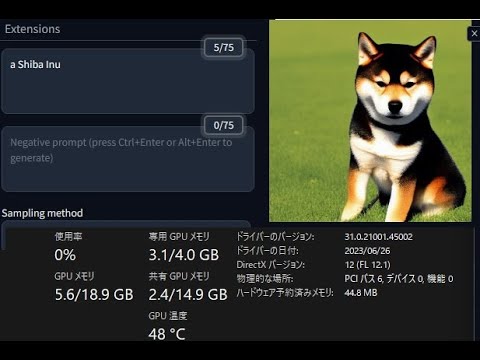
CPU:AMD Ryzen 5 3500U
GPU:AMD Radeon RX 6500 XT
※ CPU内蔵グラフィック有効
こちらの動画を参考にし、導入してみました
https://www.youtube.com/watch?v=aBwJhA9u4Tk
この録画はRyzenのCPU内蔵グラフィックのハードウェアエンコードで行っています
なので、RX6500XTには録画負荷はないので、画像生成に専念させているはずです
VRAM4GBですが
「--medvram --opt-split-attention」
のオプションのみで512x512がエラーなく出力されます
a girlの生成時間は40秒でした
unfortunately he didn't give a clue on how to do it in the video
or am i just stupid to do it myself 
ornate elk
sage vessel
or am i just stupid to do it myself <:sadcat:1130568570712109176>
There are two ways for AMD to get it running on windows.
The directml way = very slow and vram limited.
The zluda way = faster but needs rocm (which your card is not officially supported) but with workarounds could work
viral knot
why is amd struggling with ai stuff, im so happy to be with nvidia lol
young bridge
How can I fix my errors?
viral knot
you can fix errors by switching to comfy 🙂
 terse lichen
yes this is what i tried to do i think or direct install the code into the comfyui repository
open fox
terse lichen
yes this is what i tried to do i think or direct install the code into the comfy...
So you were in the custom node directory and used git clone to get all the files from the custom node repository.
And then you run python install.py?
Or „pip install -e .[cuda]“ ?
Double post. You posted the same 1 min. ago in #🏞|general-with-images
 dry swallow
Ok
terse lichen
open fox
And then you run python install.py?
more like i installed it directly and put it in the clone repository and when i am updating the manager it is saying inference core failed
terse lichen
open fox
And then you run python install.py?
yes
also where should i add the animatediff v3 like folder
open fox
terse lichen
yes
Did any errors appeared during the installation?
terse lichen
open fox
Did any errors appeared during the installation?
no errors popped up only after updating it said inference core failed
open fox
terse lichen
also where should i add the animatediff v3 like folder
I guess you used animate diff evolved node. Then let me recite their GitHub:
Place models in one of these locations (you can rename models if you wish):
ComfyUI/custom_nodes/ComfyUI-AnimateDiff-Evolved/models
ComfyUI/models/animatediff_models
open fox
terse lichen
no errors popped up only after updating it said inference core failed
And during the start of confyui you do not get any error report (code etc. ) just the import failed
terse lichen
open fox
And during the start of confyui you do not get any error report (code etc. ) jus...
yes
open fox
terse lichen
yes
You are using windows and the portable version of comfyui right?
And python 3.10 or which version.
terse lichen
open fox
And python 3.10 or which version.
i am using python 3.12 version
open fox
I found this:
if you want install this with python3.12 for now [2024.4.10]. just try:
-
download
mediapipe-0.10.11-cp311-cp311-win_amd64.whlfrom pypi site -
rename it to
mediapipe-0.10.11-cp312-cp312-win_amd64.whl -
pip install
-
edit
custom_nodes\ComfyUI-Inference-Core-Nodes\pyproject.tomlline 9:requires-python = ">=3.10,<=3.13" -
run
python install.py
enjoy...
GitHub
I'm getting this error message, I've tried reinstalling and it doesn't work
terse lichen
open fox
I found this:
if you want install this with python3.12 for now [2024.4.10]. jus...
thanks will try this
Workflow for generating morph style looping videos. v3 : Hyper-SD implementation - allows us to use AnimateDiff v3 Motion model with DPM and other ...
terse lichen
terse lichen
https://civitai.com/models/372584/ipivs-morph-img2vid-animatediff-lcm-hyper-sd
i have this model downloaded and do i need to add it to the animatediff model folder or checkpoints
@open fox so a lot of these nodes depends on proper installation right
open fox
terse lichen
i have this model downloaded and do i need to add it to the animatediff model fo...
This is a comfyui workflow and it uses some nodes. These nodes needs dependencies. Python packages, models,… on the page of this workflow you find informations about which models you need and where to put them.
 vast apex
does someone know how i can inpaint using comfyui/stability matrix?
terse lichen
open fox
This is a comfyui workflow and it uses some nodes. These nodes needs dependencie...
cant seem to understand what all nodes are needed got the ip adapter animatediff v3 but now not sure where to place the model i downloaded
open fox
terse lichen
cant seem to understand what all nodes are needed got the ip adapter animatediff...
If you copy a workflow from another person you are confronted with the nodes that are used to get the result. Best case only public available nodes are used and you can simply install them with the comfyui manager „install missing“. But still some nodes will require manual steps to work. Google the node, visit the according GitHub and read the requirements. One node after another. Just read and learn.
terse lichen
open fox
If you copy a workflow from another person you are confronted with the nodes tha...
i am trying to figure this out but not sure whats going wrong
vast apex
does anyone know about the differences from comfyui and stability matrix?
ornate elk
vast apex
does anyone know about the differences from comfyui and stability matrix?
Yes, comfyui is a webui that uses stable-diffusion to generate images.
Stability Matrix is an installer for webuis like comfyui or Auto1111
vast apex
Error starting the server: 'Namespace' object has no attribute 'tls_keyfile'
anyone know what that means :,)? cant generate or find webui link
 sinful needle
Questionnnnn: Is it possible to use animatediff for SDXL with Automatic1111 or is it only possible with ComfyUI?
 ornate elk
sinful needle
Questionnnnn: Is it possible to use animatediff for SDXL with Automatic1111 or i...
ornate elk
sinful needle
Questionnnnn: Is it possible to use animatediff for SDXL with Automatic1111 or i...
Yes it works with sdxl too in Auto1111
You need the animatediff sdxl bets model
sinful needle
ornate elk
Yes it works with sdxl too in Auto1111
I used the SDXL model and it only redirects to a still image. https://civitai.com/models/108836/animatediff-motion-modules
Originally shared on GitHub by guoyww Learn about how to run this model to create animated images on GitHub. Choose the version that aligns with th...
I used that model and placed it in the Animatediff/models folder.
AnimateDiff works for 1.5 models for me, just not this.
ornate elk
sinful needle
AnimateDiff works for 1.5 models for me, just not this.
What does the cmd shows when you try to use it?
Full log pls
sinful needle
ornate elk
What does the cmd shows when you try to use it?
Full from boot to end?
Reads that there is no motion module for SDXL, yet I've redownloaded that model various times.
ornate elk
sinful needle
Reads that there is no motion module for SDXL, yet I've redownloaded that model ...
Ah well, it gets blocked by the webui because its a .ckpt
You have to convert it to an .safetensor file.
An can tell you how
sinful needle
ornate elk
Ah well, it gets blocked by the webui because its a .ckpt
You have to convert it...
ah
ornate elk
sinful needle
ah
Here is a quick explanation:
#🤝|tech-support message
ornate elk
sinful needle
ah
Also what was your GPU again?
I see --no-half --precision full in your log.
 stark mulch
can i get some help
everytime i use one and it has a error it deletes one of my loras and only lets me use it on another model how do i fix it to where i can use it on that model again
nvm i figured it out had to do with sdls
why does that happen?
naive dragon
ornate elk
Thats maybe a RAM error, how much do you have? And you should recheck the window...
i have 16gb of ram and rx 6700 xt gpu
naive dragon
naive dragon
i have 16gb of ram and rx 6700 xt gpu
i see now that my ram speed got readjusted back to the default speed and not its full speed(idk why it got reset maybe thats what causing it?)
naive dragon
naive dragon
i see now that my ram speed got readjusted back to the default speed and not its...
i put it back to its speed now
sinful needle
givin it a spin! thanks lets see
sinful needle
ornate elk
Also what was your GPU again?
3090 RTX. im not sure why i require it but A1111 shits itself without nohalf. i should be fine without it, but no
ornate elk
sinful needle
3090 RTX. im not sure why i require it but A1111 shits itself without nohalf. i ...
You should remove both as these slow down your generating time tremendously! And increase your vram usage
Better add --no-half-vae and your fine
sinful needle
ornate elk
You should remove both as these slow down your generating time tremendously! And...
okiedokie
i tried the SDXL animatediff and it didnt error out but god damn did it slug my PC. regular animatediff doesnt slow me at all. didnt make it past 0%
ornate elk
sinful needle
i tried the SDXL animatediff and it didnt error out but god damn did it slug my ...
Yes because you had --no-half --precision full in there
sinful needle
ornate elk
Yes because you had --no-half --precision full in there
alrighty. removing
 slow saffron
The classic and safe way to earn up to €900 a day online only requires that you get a Smartphone or Laptop, for more information about the offer write me a direct message now
sinful needle
ornate elk
Yes because you had --no-half --precision full in there
some progress but now: NansException: A tensor with all NaNs was produced in VAE. Use --disable-nan-check commandline argument to disable this check.
ornate elk
slow saffron
The classic and safe way to earn up to €900 a day online only requires that you ...
Please no scam like advertising here. Please remove your message
ornate elk
sinful needle
some progress but now: NansException: A tensor with all NaNs was produced in VAE...
Have you added --no-half-vae ?
sinful needle
ornate elk
Have you added --no-half-vae ?
yea
ornate elk
Okay, whats the model? Lora's and embeddings?
They all need to be for the same base SD version
stark mulch
ornate elk
Sdls?
Idk but how come some sdl 1 and sdxl don’t work together for Lora’s?
sinful needle
ornate elk
Okay, whats the model? Lora's and embeddings?
Model: https://civitai.com/models/143043/starlight-xl-animated?modelVersionId=182077
Lora: https://civitai.com/models/267667/16-bit-pixel-backgrounds-v2
Embeddings: none
⚙️ ComfyUI workflows included 🇯🇵 Danbooru tags supported 💬 New Discord, come play with us: https://discord.gg/rHCnjX9cW9 🌟 Starlight XL 星光 Animated 🔮...
Although version 1 of this LoRA seems very capable, I noticed it had trouble producing some types of images in the correct style. I suspect this wa...
ornate elk
sinful needle
Model: https://civitai.com/models/143043/starlight-xl-animated?modelVersionId=18...
Okay looks right.
Can you give me the cmd log again?
No wait
What VAE did you used?
ornate elk
stark mulch
Idk but how come some sdl 1 and sdxl don’t work together for Lora’s?
They are trained differently and on an different resolution too
ornate elk
sinful needle
none associated. none were part of it either.
Then try to use the sdxl fp16 VAE fix vae
sinful needle
ornate elk
Then try to use the sdxl fp16 VAE fix vae
where to get it?
ornate elk
sinful needle
where to get it?
Here:
https://huggingface.co/madebyollin/sdxl-vae-fp16-fix/tree/main
Download the sdxl.vae.safetensor
 sinful needle
ornate elk
Here:
https://huggingface.co/madebyollin/sdxl-vae-fp16-fix/tree/main
Download th...
sinful needle
ornate elk
Here:
https://huggingface.co/madebyollin/sdxl-vae-fp16-fix/tree/main
Download th...
im guessing use the one second to the bottom of the list?
ornate elk
Also if you haven't already do this:
go into Settings, User Interface, Quicksettings, there add sd_vae
Then hit apply and reload ui.
Then you have a VAE dropdown menu
sinful needle
ornate elk
Also if you haven't already do this:
go into Settings, User Interface, Quicksett...
ur no damn coder
ur a wizard
get that patreon started dude u need support
ornate elk
sinful needle
get that patreon started dude u need support
I made a Kofi account a few days ago ^^
sinful needle
ornate elk
I made a Kofi account a few days ago ^^
ill have to make an account
ornate elk
Idk if others need an account for it
sinful needle
ornate elk
Idk if others need an account for it
drop the link ill tip a little for now
ornate elk
sinful needle
drop the link ill tip a little for now
The link is now in my Discord bio
Thank you! Appreciate it 🙂
Thank you! Will check when I'm at home
 river forge
Hello. I would like some help getting auto1111 + zluda running with my 7900xtx.
It currently fails at this stage:
File "D:\SD-Zluda\stable-diffusion-webui-directml\venv\Lib\site-packages\torchvision_meta_registrations.py", line 4, in <module>
import torch._custom_ops
ModuleNotFoundError: No module named 'torch._custom_ops'
I thought it my be related to using Python 3.11 vs 3.10?
ornate elk
river forge
Hello. I would like some help getting auto1111 + zluda running with my 7900xtx. ...
Hey, yes python 3.11 is not supported
Uninstall 3.11, install 3.10.11 64bit
Then delete the venv folder
river forge
Thanks, mate.
ornate elk
river forge
Thanks, mate.
Np, I have a 7900xtx too, works perfectly with Auto1111 on Zluda
 timid notch
hi i wanna generate a longer video, which node should i use right now? can some give me a hint

the context options node is not affect anything~~
i find it
 fathom shuttle
yo i just installed everything correctly (i think), but when i wanna generate is gives a queue or something. im a newb
 ornate elk
fathom shuttle
yo i just installed everything correctly (i think), but when i wanna generate is...
ornate elk
fathom shuttle
yo i just installed everything correctly (i think), but when i wanna generate is...
Hey, what does the cmd shows?
fathom shuttle
what do you mean?
ornate elk
fathom shuttle
what do you mean?
Did you installed Automatic1111 webui?
sinful needle
everyone make sure to support CS1o on his kofi since hes taking so much time out of the day to help
ornate elk
fathom shuttle
was gonna do that after
What did you setup now?
fathom shuttle
ye i feel bad for him having to deal with dumb me xd

i did this
and copied the url
idk just followed a tutorial
ornate elk
fathom shuttle
i did this
What's your GPU?
ornate elk
Okay then close the cmd.
Go into the stable-diffusion-webui folder.
There edit the webui-user.bat,
at the line commandline_args=
you add: --xformers --medvram --no-half-vae
Then save and relaunch the webui-user.bat
fathom shuttle
like this?

alr its running
thx boss
im completely new with this all but automatic1111 and stable diffusion are 2 different things no?
ornate elk
Np, when you get new models from Civitai.com, go for the 2gb ones. They work good on your GPU
ornate elk
fathom shuttle
im completely new with this all but automatic1111 and stable diffusion are 2 dif...
Automatic1111 is the webui you installed right now.
Stable diffusion is a process to generate images.
Models (checkpoint's) are needed for image generation.
There are community models.
These are based on 1.5 or sdxl (the two base stable diffusion model versions)
fathom shuttle
ah so i already have automatic1111
cool
do i keep the sampling method on DPM++ 2M?
ornate elk
fathom shuttle
do i keep the sampling method on DPM++ 2M?
Its a good and fast sampler. You can test others too.
For example Euler a is a good one too.
DPM++ sde also but slower
 vernal robin
Hi all, I’m getting a laptop to do sd work remotely from my employer, and I’ve been using PC to do my SD work at my previous job for about a year, is there any reason to choose mac vs PC? I’m comfortable with both OS but just havent used Mac for this yet, would appreciate any answers 🙏🏼
river forge
vernal robin
Hi all, I’m getting a laptop to do sd work remotely from my employer, and I’ve b...
Running SD locally??
open fox
vernal robin
Hi all, I’m getting a laptop to do sd work remotely from my employer, and I’ve b...
Depending are you paid by hour or by image 🙂
Most notebooks with a good nvidia card will be faster then a Mac.
ornate elk
vernal robin
Hi all, I’m getting a laptop to do sd work remotely from my employer, and I’ve b...
If you generate locally on your PC, then you want a dedicated Nvidia GPU with much VRAM.
If you only connect to your works PC then you can use any Laptop
terse lichen
@open fox can you pls tell whats causing this error
 heady pine
Is there a way to remove the box that is formed from enhancing the face?
ornate elk
heady pine
Is there a way to remove the box that is formed from enhancing the face?
The box? Is it darker or brighter than the image?
Make sure your using a VAE file
heady pine
ornate elk
The box? Is it darker or brighter than the image?
Sorry for the not showing a picture first, this thing, I don't usually use VAE files, but will doing so remove this box?
 ornate elk
heady pine
Sorry for the not showing a picture first, this thing, I don't usually use VAE f...
ornate elk
heady pine
Sorry for the not showing a picture first, this thing, I don't usually use VAE f...
yes it should remove it
heady pine
Alright, thank you. I appreciate your help.
ornate elk
no problem
fathom shuttle
I think they don’t match
young bridge
what do you mean
fathom shuttle
idk was just playing
sinful needle
so... now that AnimateDiff is animating. How do i control it better so that it doesn't animate lightposts lmaooooo?


terse lichen
terse lichen
<@599296039962411039> can you pls tell whats causing this error
i am in need of your help bro @sinful needle
sinful needle
terse lichen
i am in need of your help bro <@915324364952592414>
Oh and I don't use comfy ui. lol
young bridge
What is LDSR upscale and why is it slow
terse lichen
terse lichen
<@599296039962411039> can you pls tell whats causing this error
how to fix this error @maiden coral
terse lichen
sinful needle
Oh and I don't use comfy ui. lol
i see thanks for the reply
maiden coral
Is it an error while loading ComfyUI?
What is your python version? Are you using AMD or Nvidia GPU? Have you gone through the steps on github on the installation of ComfyUI? What are you specs? (your GPU with VRAM, amount of RAM, CPU)
also the workflow what you're trying to do
Also, are you using multiple GPUs?
terse lichen
maiden coral
What is your python version? Are you using AMD or Nvidia GPU? Have you gone thro...
its an error after prompt is qued and i am using a quadro p4000 and ram is 32 gb and cpu is intel xeon
Workflow for generating morph style looping videos. v3 : Hyper-SD implementation - allows us to use AnimateDiff v3 Motion model with DPM and other ...
maiden coral
Can you show me the workflow? just a screenshot is fine, I build my own and with the help of the internet
terse lichen
terse lichen
https://civitai.com/models/372584?modelVersionId=469548
i am using this workflow
maiden coral
I can't help you with img to vid, sorry.
Try a tutorial on youtube which goes step by step. You might be missing a node or something.
terse lichen
this is the workflow @maiden coral


 maiden coral
Have you installed all the requirements?
You can't install this one through manager.
terse lichen
maiden coral
Have you installed all the requirements?
yes i have installed all the requirements
maiden coral
probably tensors aer allocated to GPU and CPU and not on one device
terse lichen
i am getting this error
 fathom shuttle
quick question do you always launch sd through files or is there another 'better' way
maiden coral
terse lichen
i am getting this error
Have you tried other SD models?
terse lichen
maiden coral
Have you tried other SD models?
this model only accepts sd 1.5 models
maiden coral
I know but other variations of SD model
there are models based on SD 1.5
they count as SD models too, 2nd category are SDXL models which were trained in higher resolution 1024x1024 (SDXL) instead of 512x512 (SD1.5)
terse lichen
maiden coral
they count as SD models too, 2nd category are SDXL models which were trained in ...
i have majority sdxl models
maiden coral
When did you update Comfy?
or when was the last time you update comfy
I heard there are a lot of compatibility issues with AnimateDiff
fathom shuttle
i downloaded a model but after refreshing it doesnt show as an option, any tips?
open fox
terse lichen
<@599296039962411039> can you pls tell whats causing this error
As far as I can read/tell from the error log is that most comfyui nodes use your GPU but at least one is using the CPU instead. For the sampling it is needed that all tensors are on the same device.
open fox
fathom shuttle
i downloaded a model but after refreshing it doesnt show as an option, any tips?
Is the name of the model correct (.pth, .ckpt or .safetensor? Is the file readable for the user who executes your UI?)
 open fox
The last one looks like a link the first one like a zip folder?
maiden coral
fathom shuttle
i downloaded a model but after refreshing it doesnt show as an option, any tips?
you have to restart the server through comfyui manager or close comfyUI completely and start it up again. Probably for models refresh should be enough, but try it.
fathom shuttle
the second is the one i already had
maiden coral
it must be in model/checkpoints folder
fathom shuttle
maiden coral
you have to restart the server through comfyui manager or close comfyUI complete...
how do i do that
open fox
He is in this folder. But both actual files are not a safetensor but instead a directory and a link.
Please show size and file ending of the first and last file
Don’t need to restart. A refresh should work.
fathom shuttle
 maiden coral
ckpt I see
open fox
As mentioned no model there. The link does not help. Can you show the content of the folder.
open fox
maiden coral
ckpt I see
It is the old model
 open fox
He had it already. The new ones are the ones with the actual timestamp.

 open fox
Not the model.
This is the link to the model
https://civitai.com/api/download/models/425083?type=Model&format=SafeTensor&size=full&fp=fp16
 knotty cosmos
28 mega pixel tomato


 open fox
It should download a nearly 4gyte file. Rename to revAnimatedV2.safetensor and it should work
@fathom shuttle
fathom shuttle
ye i gotta log in first
open fox
knotty cosmos
28 mega pixel tomato
Wrong channel mate.
open fox
fathom shuttle
ye i gotta log in first
Yes some model owners require you to log in to be able to download it.
fathom shuttle
ii cant log in or something
every possible username iis taken
i dont get it

nvm got it
fathom shuttle
open fox
It should download a nearly 4gyte file. Rename to revAnimatedV2.safetensor and i...
i assume i put it in the model file?
open fox
Good as soon as you downloaded the large file check for the file extension (should be .safetensor) and then put it In the directory /models/checkpoints/
fathom shuttle
i dont have checkpoints?
fathom shuttle
should be in here no?
 open fox
The directory you shown on the screenshot earlier with the text file put models here.
 open fox
No just in the same directory.
fathom shuttle
ye like that right
how do you all launch it
since i do it through the explorer and the cmd
 amber cloud
guys, if a pc has dual 8GB gpu… would that make faster for image generation and deforum processing ? or the 2nd gpu has no effect on the SD ?
open fox
amber cloud
guys, if a pc has dual 8GB gpu… would that make faster for image generation and ...
Depends, in general PyTorch and other libraries can work with two GPU. If they are Linked and worked as one NVLink they would appear as a 16gbyte unit and that would help a lot as memory is very useful for higher resolution, animations etc.
If not you could a least both parallel so generating a batch of images would be faster.
amber cloud
what should i check to know if both has NVLink and will work as one ? i know SLI does not exist anymore
open fox
What GPU do you have?
amber cloud
i already have 3060.. thinking of getting my brother’s 3060 and install both on my pc
open fox
young bridge
which upscaler is the best one to use
Not a technical issue but a question of taste. I use different ones depending on the subject (anime vs. photorealistic). Sometimes when I am lazy even just upscaly or freescaler….
amber cloud
open fox
What GPU do you have?
3060 is installed, would another 3060 help ?
open fox
amber cloud
3060 is installed, would another 3060 help ?
From classic machine learning you would gain like 55% in performance. So you will lose some due to the dual setup which seems not be able to use SLI. So memory limitations (8gbyte) would still be a thing.
open fox
young bridge
photorealistic
For photo realistic I use RealESRGAN_x4Plus
young bridge
i used that but it makes the image so smooth
loosen the details
how can I use ADetailer with codeformer
open fox
young bridge
how can I use ADetailer with codeformer
Sorry not using adetailer. Using a control net Tile after upscale.
young bridge
ok
 fair oxide
Have simple question, whats the shortcut to disable/enable groups in comfyui?
ornate elk
fathom shuttle
thats not a model, you can delete the whole thing, models are single files (larger than 2gb)
fathom shuttle
ye i always ffound it a bit odd
 warped canyon
How do I rollback to controlnet 1.1.440 on a hosted service using jupyterlab? I feel like the new controlnet ip adapter face id v2 is giving me a slightly different face output to the one ive been using all this time with controlnet 1.1.440.? How do I rollback?
 mental sentinel
Hello, does anyone know why I get this error (I don't know much about python)

 cursive sparrow
Hey all for those of you using A1111 when going for ultra realism for "people" anyone figured out the best combinations of settings? I find this combination is working pretty decent but has anyone figured out the holy grail of settings? Edit: Besides the main checkpoint model.

 frail bay
can someone help me. i want my photo to me more colorful but all mine are just coming out kinda greyish tint
 smoky jay
hello, I installed the roop face swap extension for A1111 but a cant see the the roop on the interface and cant use it, someone please knows about that issue ?
 unique bluff
Okay, I generated an image but the pose is incorrect, is there any way to fix it post generation?
mental sentinel
mental sentinel
Hello, does anyone know why I get this error (I don't know much about python)
I was able to fix that but now I don't know what to do 
 smoky jay
hellow does anyone know why this error loading roop swaper?
 viral knot
you need to install onnxruntime, preferably the gpu version onnxruntime-gpu
formal trout
Having trouble installing Automatic1111 in Ubuntu 24.04
 viral knot
yea python above 3.10 is a problem, try to stick with 3.10
formal trout
I installed Rocm and pytorch nightly faor Rocm 6.0
formal trout
viral knot
yea python above 3.10 is a problem, try to stick with 3.10
How can I change that? I have no idea
I tried to "solve it" but I messed it last time
Ended up reinstalling ubuntu from scratch
I guess I have to created the venv with python 3.10 but how
viral knot
it's been a long time since i used a1111, did you use the precompiled version or what?
formal trout
viral knot
it's been a long time since i used a1111, did you use the precompiled version or...
I follow mostly this
 viral knot
but that is strange... it even says there to use python 3.10, so how did you end up with a higher version?
formal trout
I think those command didnt' work
And created the venv with the current python version
viral knot
oh boy
formal trout
 viral knot
you would have to remove your current python installation completely i think and install a python 3.10 version then redo this (assuming this is not a huge deal for you python wise, or projects wise)
formal trout
viral knot
you would have to remove your current python installation completely i think and...
I tried that, run some command for wiping out python but it messed up everything then
viral knot
im not expert when it comes to linux based stuff, i did a little bit, but was a long time ago, mostly windows these days, hmm doesnt linux have an easy way to install python 3.10 ?
formal trout
I'm going to try to find it, ty
viral knot
yea do some search and then redo the installation of a1111
sinful needle
i got animatediff to work, but for some reason it wants to animate literally everything in the scene all the time. ways to fix?
 limber pier
sinful needle
i got animatediff to work, but for some reason it wants to animate literally eve...
limber pier
sinful needle
i got animatediff to work, but for some reason it wants to animate literally eve...
if you eat enough acid it'll look like all those objects are at rest
viral knot
sadly the tech is still not at a level to do that, maybe one day
then again im no expert at animation stuff, so maybe there is a way :3
i mean i can think of one way of doing it actually, but it would be a very complex workflow
ornate elk
frail bay
can someone help me. i want my photo to me more colorful but all mine are just...
You need to use a VAE file, for color fix
ornate elk
smoky jay
hello, I installed the roop face swap extension for A1111 but a cant see the the...
Roop is abandoned, you need to delete the extension. Then install either Reactor or Roop-Unleashed
ornate elk
mental sentinel
I was able to fix that but now I don't know what to do <:O_B_pipipipip:109013912...
Your third party antivirus Programm broke the Python installation.
You need to:
Delete the venv folder.
Uninstall Python.
Disable your Antivirus Programm
Install Python and check "add Python to path"
Launch the webui-user.bat
Enable the AV again.
terse lichen
open fox
As far as I can read/tell from the error log is that most comfyui nodes use your...
how to identify which tensor is using my cpu ?
terse lichen
what does this mean now
 north sky
I'm looking for an assistant to help with data science tasks. Prior knowledge of data science is not essential. Applicants must have the right to work in their country of residence. Preference will be given to candidates from the US, Canada, Australia, Argentina, or Mexico. Please DM for more details.
fair oxide
guys can stable diffusion convert videos into anime?
also which gpu recommend for stable diffusion i need to convert 30 minute 1080p@60 fps video into animation
any1 who has tried converting videos plz report ur waiting time in minutes
terse lichen
terse lichen
how to identify which tensor is using my cpu ?
@old sky can you pls help me figure this out if free and thanks
fair oxide
i was thinking 4080 vs 7900xtx
ornate elk
fair oxide
also which gpu recommend for stable diffusion i need to convert 30 minute 1080p@...
That will take a long time, as you need to convert every frame.
But you can also reduce the video to 30fps and later Interpolate the frames back in.
ornate elk
fair oxide
i was thinking 4080 vs 7900xtx
For Stable Diffusion right now a Nvidia GPU is better supported, but it works with AMD too.
I'm running a 7900xtx. Great card.
But if you only want to do Ai stuff then get the 4080 or 4090, or a 3090.
The more VRAM the better for Ai tasks.
open fox
Only chance is to disable parts of your workflow and see what is working and what is not working. As mentioned copying a complex workflow with different nodes might require configuration of these nodes and Manuel steps. So to identify the one that is running on your cpu deactivate parts and replace them by a standard node and see if it works. If the error still remains activate the path again and chose the next one.
As obviously one node that you use is not happy to have the choice between GPU and CPU.
@terse lichen


 open fox
terse lichen
then what does this error mean <@599296039962411039>
open fox
terse lichen
then what does this error mean <@599296039962411039>
It states that all three parameters have to be the same datatype (query, key and value). In your case the query seems to be a dtype half while the key and the value are from datatype float. So either key and value need to be also half or the query must be a float value.
terse lichen
terse lichen
this is the workflow i am using
this is the workflow since i am hella confused
open fox
Which node turns red when you hit the queue button ?
terse lichen
open fox
Which node turns red when you hit the queue button ?
the ksampler turns purple always
fathom shuttle
ornate elk
For Stable Diffusion right now a Nvidia GPU is better supported, but it works wi...
your gpu is worth my entire pc 😭
open fox
terse lichen
the ksampler turns purple always
So back to trial and error as written. I guess the model is fine. So you still got positive negative condition as a source of error.
Switch the positive to a simple clip prompt node and see if it runs (result will not be as wanted). If it runs you know that the input for latent and negative is not the problem. If it does not work additional change the negative to a simple prompt and see if it works.
terse lichen
terse lichen
this is the workflow i am using
this is the workflow but what should i change in this can you mark it of sorts pls @open fox
fair oxide
ornate elk
That will take a long time, as you need to convert every frame.
But you can also...
how many minutes?
fair oxide
ornate elk
For Stable Diffusion right now a Nvidia GPU is better supported, but it works wi...
did u try converting ur video into animation with 7900xtx
sdo thats why i m confused 7900xtx has more vram 4080 has less vram but more compute units
ornate elk
fair oxide
how many minutes?
I can't say how long it takes. Would need to try
ornate elk
fair oxide
sdo thats why i m confused 7900xtx has more vram 4080 has less vram but more com...
AMD Cards are good if they are on Linux where they can use Rocm.
On windows you would need the cuda emulation tool Zluda to get a good performance.
A 4080 would be much faster than a 7900xtx on windows in ai
timid notch
what is this problem?

why failed?
i update everything and restart it but still this error ~
fair oxide
ornate elk
AMD Cards are good if they are on Linux where they can use Rocm.
On windows you ...
if we compare both in different systems then both equal or 1 faster than other?
ornate elk
fair oxide
if we compare both in different systems then both equal or 1 faster than other?
The 4080 would still be faster
fair oxide
ooh
fair oxide
ornate elk
The 4080 would still be faster
should i wait for 50 series for SD?
AI perf?
or 4080 will do?
 humble cobalt
Hello, does anyone know how to fix image with "Glitch" effects that appears a the generation ? Im using sdxl vae with PonyV6XL
ornate elk
fair oxide
should i wait for 50 series for SD?
Depends on you, newer cards always perform better.
ornate elk
humble cobalt
Hello, does anyone know how to fix image with "Glitch" effects that appears a th...
Hey can you show an example?
humble cobalt
ornate elk
Hey can you show an example?
here, like its not really glitch but its like oil paint idk

even with hi-res
ornate elk
humble cobalt
here, like its not really glitch but its like oil paint idk
Make sure you have clip skip 2
And sampler Euler a or DPM++ 2m
humble cobalt
how do i put clip skip 2 ?
ornate elk
humble cobalt
how do i put clip skip 2 ?
Do you use auto1111?
humble cobalt
yes
ornate elk
humble cobalt
yes
Then go into Settings, user interface, Quicksettings, there add:
sd_vae and Clip_stop_at_last_layer
Then hit apply and reload ui
humble cobalt
doesnt seem to work
humble cobalt
ornate elk
Then go into Settings, user interface, Quicksettings, there add:
sd_vae and Clip...
its still messing at the end of the generation
ornate elk
humble cobalt
its still messing at the end of the generation
thne try an other vae
this one: (sdxl.vae.safetensors
)
https://huggingface.co/madebyollin/sdxl-vae-fp16-fix/tree/main
humble cobalt
isn't this the same ?
terse lichen
ornate elk
this one: (sdxl.vae.safetensors
)
https://huggingface.co/madebyollin/sdxl-vae-fp...
can i send you a visual studio script of the error i am facing and how to fix it of sorts
ornate elk
humble cobalt
isn't this the same ?
nope
ornate elk
terse lichen
can i send you a visual studio script of the error i am facing and how to fix it...
i cant help with comfyui workflows sry
terse lichen
ornate elk
i cant help with comfyui workflows sry
ok but just wondering is the code the same for sd webui and comfyui ?
ornate elk
terse lichen
ok but just wondering is the code the same for sd webui and comfyui ?
depends on which code
a lot differs between them
but the initial stable diffusion is the same
terse lichen
ornate elk
but the initial stable diffusion is the same
the animatediff i am trying to use is of sd1.5 version mainly
ornate elk
terse lichen
the animatediff i am trying to use is of sd1.5 version mainly
ok
in comfyui you have more settings for animatediff as in auto1111
terse lichen
ornate elk
in comfyui you have more settings for animatediff as in auto1111
this i did not know about
ornate elk
whats your issue in comfyui?
terse lichen
ornate elk
whats your issue in comfyui?
its mainly 2 nodes not being compatible with the other in gpu and cpu
ornate elk
hmm
terse lichen
open fox
Only chance is to disable parts of your workflow and see what is working and wha...
its mainly this @ornate elk

 ornate elk
 azure magnet
Hi, i need an help how i get this
azure magnet
Hi, i need an help how i get this
you need this extension:
https://github.com/w-e-w/sd-webui-hires-fix-tweaks
azure magnet
ornate elk
you need this extension:
https://github.com/w-e-w/sd-webui-hires-fix-tweaks
Wait what? is it a bug that the extension fix?
ornate elk
azure magnet
Wait what? is it a bug that the extension fix?
nope, the extension gives you these additional settings
these are not in auto1111 by default
azure magnet
ornate elk
nope, the extension gives you these additional settings
I haven't this extension but i have it, why?
ornate elk
azure magnet
I haven't this extension but i have it, why?
i dont understand this question xD
the extension adds additional features to the hires fix
azure magnet
ornate elk
i dont understand this question xD
Ok, I'll explain well. I have this. But i haven't install the extension, why?

 late tree
Some extensions are installed by default
azure magnet
It show only when i do png info
ornate elk
azure magnet
Ok, I'll explain well. I have this. But i haven't install the extension, why?
oh, then check your extensions tab, maybe its installed?
azure magnet
ornate elk
oh, then check your extensions tab, maybe its installed?
This is my extension
 ornate elk
azure magnet
This is my extension
ornate elk
azure magnet
This is my extension
very strange then, are oyu using auto1111 or Forge ?
azure magnet
ornate elk
very strange then, are oyu using auto1111 or Forge ?
auto1111
 ornate elk
azure magnet
It show only when i do png info
ornate elk
azure magnet
It show only when i do png info
it does only show up wehn you load an image from png info?
azure magnet
ornate elk
it does only show up wehn you load an image from png info?

Yes and then i can use
ornate elk
that means the creator had the extension installed, that i linked
azure magnet
ok, so i have some others questions, i'll add this extension https://github.com/w-e-w/sd-webui-hires-fix-tweaks, i had posted my extension, do you have other to suggest me?
azure magnet
ornate elk
maybe tiled diffusion & tiled vae extension
With new version of automatic1111 i have sampling method and schedule type. Can you link me a guide that simply that explain how it work, and how i should use?
And last question what is downcast alphas cumprod and what it does
ornate elk
azure magnet
With new version of automatic1111 i have sampling method and schedule type. Can ...
its the same as in the old webui version, just leave the scheduler on automatic
azure magnet
ornate elk
its the same as in the old webui version, just leave the scheduler on automatic
And the last one question?
ornate elk
azure magnet
And the last one question?
Yes?
azure magnet
ornate elk
Yes?
What is downcast alphas cumprod and what it does?
 lucid sundial
i really need help, i've tried to google an answer to this and got no helpful answers. I installed stability matrix and everything has been working fine, but whenever I try to use controlnet it throws up error 500 and says the server got itself in trouble. What is going on here? How do I troubleshoot this?
terse lichen
thanks for all the help @open fox i finally managed to fix the error
open fox
terse lichen
thanks for all the help <@599296039962411039> i finally managed to fix the error
So you found the node which was using the cpu instead of GPU
 open fox
Or you just switched to another input node to achieve the results
terse lichen
open fox
So you found the node which was using the cpu instead of GPU
it was mainly 2 wrong nodes i used and added those and it worked
ornate elk
lucid sundial
i really need help, i've tried to google an answer to this and got no helpful an...
hey what does the cmd shows?
lucid sundial
how do i check that? there's nothing in the error message that says more.
 ornate elk
lucid sundial
how do i check that? there's nothing in the error message that says more.
ornate elk
lucid sundial
how do i check that? there's nothing in the error message that says more.
in the black cmd window
humble cobalt
ornate elk
nope
so i tried to use this vae, seemed to work sometimes, but now it just say connection errorred out after 2 generations and it showed me this


 ornate elk
humble cobalt
so i tried to use this vae, seemed to work sometimes, but now it just say connec...
ornate elk
humble cobalt
so i tried to use this vae, seemed to work sometimes, but now it just say connec...
can you translate?, i see a memory error?
azure magnet
ornate elk
So for better result should i change something or no?
ornate elk
lucid sundial
whats your gpu?
lucid sundial
nvidia 1050ti
ornate elk
azure magnet
So for better result should i change something or no?
no you can leave it off, it was just disabled in the latest versions, cause its not needed
ornate elk
lucid sundial
nvidia 1050ti
okay, i wouldnt recommend stability matrix, when you dont even see a cmd window with an error log.
Better install Automatic1111 webui the right way using my guide from the Pinned Message of this channel
humble cobalt
ornate elk
can you translate?, i see a memory error?
WerFault.exe - Application error
The application failed to start correctly
(Oxc000012d). Click OK to close the application.
The instruction to 0x00007FFBD8B95474 uses the address
memory 0x00000000000000000. The state of the memory cannot be read.
Click OK to complete the program.
Click Cancel to debug the program
ornate elk
humble cobalt
WerFault.exe - Application error
The application failed to start correctly
(Oxc0...
okay, whats your GPU and whats in your webui-user.bat?
and also how much RAM do you have?
humble cobalt
ornate elk
okay, whats your GPU and whats in your webui-user.bat?
and also how much RAM do ...
rtx 3060 Ti 8GB VRAM 16Go RAM and i have xformers medvram-sdxl and no half vae
ornate elk
humble cobalt
rtx 3060 Ti 8GB VRAM 16Go RAM and i have xformers medvram-sdxl and no half vae
okay thats good.
but you may need to increase your windows pagefile
humble cobalt
How do i do that ?
ornate elk
humble cobalt
How do i do that ?
there you need to make sure the Pagefile is only enabled for the C:/ drive and NOT for any other drive
then set Min to 16000 and Max to 24000
then restart the PC
humble cobalt
ornate elk
there you need to make sure the Pagefile is only enabled for the C:/ drive and N...
Thanks it seems to work for now
I didnt know 16 Gb RAM wasnt enough
ornate elk
humble cobalt
I didnt know 16 Gb RAM wasnt enough
yea SDXL needs lots of resources xD
mortal compass
Hey @ornate elk, I finally got to try your settings, and I have some follow up questions if you don't mind (it was about upscaling).
First off, this is how my settings in img2img looked when I started out.


I noticed at first, the outcome was not what I expected


I changed a lot of settings, trying to see what would make the outcome better
ornate elk
mortal compass
Hey <@161910921269084160>, I finally got to try your settings, and I have some f...
where did you get the sdxl tile model?
mortal compass
I'll look it up
mortal compass
ornate elk
where did you get the sdxl tile model?

Anyway I got it to look pretty decent by lowering denoising to 0,05
ornate elk
yea lowering the denois can help much
mortal compass
I don't understand how you can crank that up to 6 lol
ornate elk
i used 1.5 tile model not sdxl
mortal compass
That much of a difference! Damn
ornate elk
yep, sdxl controlnet models are very different
i will do some tests with the tile sdxl
mortal compass
Looks decent, but noting like the images I've seen here. It also introduced artifacts to the image at top left

 mortal compass
ornate elk
i will do some tests with the tile sdxl
mortal compass
ornate elk
i will do some tests with the tile sdxl
Cool! It's very new apparently
viral knot
mortal compass
https://huggingface.co/bdsqlsz/qinglong_controlnet-lllite/tree/main
hey, i didnt even know about this page, thanks 🙂
mortal compass
viral knot
hey, i didnt even know about this page, thanks 🙂
Anytime:) Hit me up if you find some dope setting configurations!
smoky jay
viral knot
you need to install onnxruntime, preferably the gpu version onnxruntime-gpu
thanks so much @viral knot I'll try it
 limpid cove
do i need to just set up webui to set up stable diffision 3 or are they completely different things?
terse lichen
open fox
Or you just switched to another input node to achieve the results
and its again back to error land sigh
fathom shuttle
mortal compass
Hey <@161910921269084160>, I finally got to try your settings, and I have some f...
what is .controlnet? i saw something about that im missing it and need it or something
mortal compass
fathom shuttle
what is .controlnet? i saw something about that im missing it and need it or som...
Controlnet are tools that you can use in stable diffusion. Controlnet itself is not only one tool or process, but several, with many ways to use it. For example Depth can analyze images and create layers to it that determines the depth of the image. Tiles is a way to manipulate or upscale images through painting in tiles, and so on. You don't need controlnet for stable diffusion to work, but it is an amazing asset.
 craggy scaffold
Anyone know why Dreamstudio is no longer saving images/prompt history?
pretty frustrating to not be able to see what I entered or have access to images i created. nothing shows after april 29
warped canyon
how do i install this verion of controlnet? https://github.com/Mikubill/sd-webui-controlnet/tree/eb451a007f7040288e865f96e9ee0842aa6ef91c

GitHub
WebUI extension for ControlNet. Contribute to Mikubill/sd-webui-controlnet development by creating an account on GitHub.
a specific commit
mental sentinel
ornate elk
Your third party antivirus Programm broke the Python installation.
You need to:
...
I followed all the steps and I still get an error
 open fox
mental sentinel
I followed all the steps and I still get an error
open fox
mental sentinel
I followed all the steps and I still get an error
Your missing some requirements. Obvious torch and torchvison (both python packages)
You could try to install manually
mental sentinel
ok
ornate elk
mental sentinel
I followed all the steps and I still get an error
Your python is still broken
What's your antivirus?
mental sentinel
It's RAV Although I had to uninstall it because it kept interfering
ornate elk
mental sentinel
It's RAV Although I had to uninstall it because it kept interfering
Okay make sure you restarted the PC after that.
Then uninstall python 3.10.7
And install python 3.10.11 64bit
Then delete the venv folder
Then relaunch the webui-user.bat
mental sentinel
oh, i didnt restart
fair oxide
plz tell me how long it takes to convert 1 video at 1080p@60fps which is of 1 minute into anime with rtx 4080
open fox
fair oxide
plz tell me how long it takes to convert 1 video at 1080p@60fps which is of 1 mi...
The reason why people not answering is because there are many factors which determine the time which it would need.
I would guess with a 4080 you get at least 30 it/s with 1024x1024 images. So with 30 steps and some controlnets, context, etc. I would guess 2-3 seconds per image. 60 * 60 * 2,5 could be the total time if the process work. If the model needs a large context etc. you might run out of memory and the swapping Beginns. Then it takes longer. But only a estimate.
fair oxide
open fox
The reason why people not answering is because there are many factors which dete...
so how many minutes according to u for 1 minute vudeo into animation
open fox
fair oxide
so how many minutes according to u for 1 minute vudeo into animation
Do the math. 60 frames per seconds, 60 seconds per minute and 2-3 seconds per generation.
fair oxide
open fox
Do the math. 60 frames per seconds, 60 seconds per minute and 2-3 seconds per ge...
how if i reduce it to 30 fps
less time
i suck at maths
can u just tell me
thx
open fox
Sorry I am not a fan of spoon feeding. But with 30 fps it would take only half as long.
But if you need to generate the missing frames as you maybe need the 60fps it would take additional time. Maybe it is faster creating „in-between“ frames then creating anime images per stable diffusion.
fair oxide
tell me ill calculate then
so 60 sec video 30fps per second
how do i calculate this?
so 120 minutes?
no wait 120 seconds?
180 sec right?
@open fox
60x30
or 200 sec if i add in 2-3 secs?
open fox
30 frames per second (fps)
60 seconds per minute
2-3 seconds per image generation.
Go for it I believe in you.
fair oxide
but video is only 1 minute long so 60 secs
10800 sec am i correct?
@open fox
so 180 minute?
am i correct?
@open fox
open fox
Yes
fair oxide
open fox
Yes
ur not trolling are u or sarcasm ?am i really correct?
open fox
No as mentioned the 2-3 second is a guess but creating a image2image process to make a real image to anime should not take much longer
fair oxide
so image to image is much faster than image video to video?
open fox
No faster ways would be special networks for style transfer video like some online tools offering. As long as you need to generate each frame it will take time.
fair oxide
can u give eg?
which tools
how much time it takes to generate 1 image og 1080p resolution?
image to image
open fox
2-3 seconds as mentioned
fair oxide
what thats fast as f
open fox
Just google for video style transfer.
fair oxide
too fast
fair oxide
open fox
2-3 seconds as mentioned
in sd?
open fox
Yes
fair oxide
open fox
Just google for video style transfer.
is it faster than SD?
i mean video to animation conversion?
ooh its like deepfake AI
like deepface labs
do u think 5080 will reduce AI timing from video to video conversion into 1 hour or 30 minutes?
@open fox
should i buy 4080 or wait next year
open fox
You should think about that if sd is the way you achieve your goals. Pretty sure video style transfer models will do the job better. Just google them take your time to read thru the pages.
In general some are writing better to wait. Even if it is only helping that the prices will fall.
open fox
fair oxide
is it free like SD or pay monthly like AI tools?
I repeat myself. Google it. There are free ones, payed ones, … the search term is video style transfer.
fair oxide
okays thx then can i do away with 4080 or 4070ti super with video style editor if thry are not demanding as Sd?
on gpu?
coz j alredy waited 1year for fd in 2023 this year supposed to buy pc i dont think i can wait 1 more bro
year
video style transger i mean
transfer
@open fox
open fox
fair oxide
<@599296039962411039>
https://github.com/westgarthb/style-transfer-video-processor
This is for example 3 years old but I guess there are newer repositories available. But you can see how they work.
GitHub
This code extends the neural style transfer image processing technique to video by generating smooth transitions between several reference style images - westgarthb/style-transfer-video-processor
fathom shuttle
mortal compass
Controlnet are tools that you can use in stable diffusion. Controlnet itself is ...
Thx boss
 serene notch
hey quick question, i have never done this before but i want to try and train some loras, i have an i7-6700, rtx 2070super 8Go, and 32gb of ram, is this good enough for that?
ornate elk
serene notch
hey quick question, i have never done this before but i want to try and train so...
yes that will work
 hard kettle
Helo, what is the best upscaler for comfy? I am thinking in 4x for video upscale. nothing overkill, like 8x or something. I am striving for sharp results.
mental sentinel
ornate elk
Okay make sure you restarted the PC after that.
Then uninstall python 3.10.7
And...
it worked
ty
ornate elk
mental sentinel
it worked
perfect, np 🙂
craggy scaffold
anyone know why dreamstudio no longer saves prompts or images generated in its history?
@echo hill could you mention to devs? submitted a ticket but no response
 echo hill
craggy scaffold
<@304180422357549056> could you mention to devs? submitted a ticket but no respo...
echo hill
craggy scaffold
<@304180422357549056> could you mention to devs? submitted a ticket but no respo...
I'm not really sure about that, but if I find anything out, I'll let you know! In the meantime, I would check back and see (depending on when you sent in the ticket,) or send another e-mail about it!
ornate elk
mortal compass
Anytime:) Hit me up if you find some dope setting configurations!
so i found out, that its not possible to use the sdxl tile resampler for the nice upscale you can do with the 1.5 tile controlnet
sinful needle
ornate elk
so i found out, that its not possible to use the sdxl tile resampler for the nic...
hey what did u tell me previously to add to the command line args to be able to checkpoint merge the SDXL motion model .ckpt?
something about nopickle
im making an instruction manual for dummies like me in case i forgor stuff
ornate elk
sinful needle
hey what did u tell me previously to add to the command line args to be able to ...
hey, it was --disable-safe-unpickle
but make sure you remove it after merging, as its a security risk to have it active
sinful needle
ornate elk
hey, it was --disable-safe-unpickle
but make sure you remove it after merging, a...
yep
thanks
ornate elk
np
sinful needle
my instructions are literally go-to-link, download something, place in specific folder with pathname, or edit file and specific line. most tutorials leave out steps because they assume us normies know a lot about it and its infuriating
ornate elk
sinful needle
my instructions are literally go-to-link, download something, place in specific ...
true, thats why i made my guides as simple as possible and keeping every step
 brittle lantern
Guys I have 8gb of vram should I use SDXL models or SD 1.5?
maiden coral
brittle lantern
Guys I have 8gb of vram should I use SDXL models or SD 1.5?
you can use both
you only cannot make complex workflows if you have ComfyUI
or probably can, I have half yours, so it's ok
ornate elk
brittle lantern
Guys I have 8gb of vram should I use SDXL models or SD 1.5?
you can use both at a decent speed.
if you have an nvidia gpu and using auto1111 webui, you need to edit the webui-user.bat
at the line Commandline_ARGS= you need to add: --xformers --medvram-sdxl --no-half-vae
for the best performance
 reef shoal
Hello. what requeriments i need for run SD? i only want make small res (768x768) images (my graphic card: Nvidia GeForce GTX 750, 2gb)
 azure ivy
hey guys , sd webui mov2mov or others that are in the master branch column does not show up where they should show up

how can i fix this ?
 woven locust
Hello everyone, please suggest is this PC setup is ideal for Stable Diffusion 1.0 SDXL -
Component
Option 1: RTX 3090
Option 2: RTX 4090
Processor
Single Intel Xeon Gold or Platinum processor
Single Intel Xeon Gold or Platinum processor
(e.g., 16 or more cores)
Memory (RAM)
128 GB ECC DDR4 RAM
128 GB ECC DDR4 RAM
Storage
2 TB, SSD-based storage
2 TB, SSD-based storage
GPU
NVIDIA RTX 3090 (24 GB VRAM at least)
NVIDIA RTX 4090 (24 GB VRAM at least)
brittle lantern
ornate elk
you can use both at a decent speed.
if you have an nvidia gpu and using auto1111...
AMD GPU on Linux with ROCm i have
 rich garden
anyone know what this is and how to fix it? i tried running "webui-user.bat" just now after not using it for a couple of weeks and got this error

also should i be using "webui-user.bat" or "webui.bat"? i kinda forgot 😅
 oak sun
Hi ..anyone know how to use old versions of torch with stabel diffusion..like force it to use certain older torch as I'm unable to update my gpu driver due to some reason and every time I update it it disconnects and i need to uninstall the driver and downgrade to get it to work .it used to work for me 7 months ago and I stopped then and now I'm getting this error saying torch unable to use gpu and adding skip torch cuda test but whenever I do that I get an error that my driver is old..any chance I can find a solution for that ..the gpu is gtx 1070 on my laptop and it stops working with latest nvidia drivers for some reason but as I said with this driver it was working 7 months ago but I'm finding it hard to even use older commit
open fox
woven locust
Hello everyone, please suggest is this PC setup is ideal for Stable Diffusion 1....
Ideal is hard to define. I saw some pretty nice Benchmark results from a nvidia h100 with 80gbyte of Memory. If it is only for stable Diffusion you will not Need the cpu and the 128 gbyte ecc ram a lot. So for price-performance optimization you could go way chaeper with a non xeon/threadripper plattform.
open fox
oak sun
Hi ..anyone know how to use old versions of torch with stabel diffusion..like fo...
In General the requirements.txt or the install scripts determine which torch version is needed. You might deinstall and force the install of an older package with the pip command. But I am pretty sure if the rest of the application is current it might use function of torch which were not implemented in older versions. So you could try different torch version from the past and hope for the best. If this is really the problem.
rich garden
@open fox why'd you skip me?
brittle lantern
some1 else came first lol
rich garden
yeah chin_key was before me but i was before diamond 
brittle lantern
 skill issue i assume
rich garden
do u have a solution to my problem?
brittle lantern
i do not otherwise i would've answered
oak sun
How do I force installation of a certain commit from the past along with its torch and requirements
open fox
rich garden
<@599296039962411039> why'd you skip me?
It is written that “git” is a command that you did not installed. So you are missing support for git or in your path environment the path to git is not set. So install git and retry.
rich garden
idk how git somehow left my laptop when i've used this software fine before but ok i'll reinstall thx
actually nvm i uninstalled it not knowing what it was LMFAO
open fox
oak sun
How do I force installation of a certain commit from the past along with its tor...
The python package manager: pip install -I torch==<VERSION>
open fox
I use comfy so I can’t tell if auto1111 got releases that you can pull.
oak sun
Did comfy also update torch in the last 7 months
It used to work for me but auto1111 is a lot simpler
open fox
oak sun
Did comfy also update torch in the last 7 months
Pretty sure. 7 month is ages in terms of ai 😉
oak sun
Yeah but I remember torch not being updated that regularly in 2022 and 2023 even though there were newer versions available
open fox
oak sun
Yeah but I remember torch not being updated that regularly in 2022 and 2023 even...
You could check:
https://github.com/AUTOMATIC1111/stable-diffusion-webui/releases
And git clone an older release.
GitHub
Stable Diffusion web UI. Contribute to AUTOMATIC1111/stable-diffusion-webui development by creating an account on GitHub.
oak sun
How do u clone an older release ..that was my original question..
How do u clone an older commit
brittle lantern
guys using auto 1111 on windows with AMD GPU is using my 5600 cpu and not the gpu how do i fix this?
oak sun
It isn't downgrading the requirements no matter what commit head I use
open fox
oak sun
How do u clone an older release ..that was my original question..
git clone …stable.git -b v1.8.0
Basically two minus and branch followed by the name of the version.
open fox
brittle lantern
guys using auto 1111 on windows with AMD GPU is using my 5600 cpu and not the gp...
Well to cite @ornate elk who is using an amd card as well. Try the guide which is here in the channel. Zuleda or so is what seems to help.
oak sun
I used v1.7.0 it seems to be collecting cu118 which should work I think
That's for downgrading
AFAIK
open fox
oak sun
I used v1.7.0 it seems to be collecting cu118 which should work I think
Good luck. And hopefully you get the option to upgrade your gpu drivers some day 🙂
oak sun
I will build a pc soon but I wanted to fiddle a little with Ai
It's working now
I don't think I will miss a lot
I ran sdxl on that card and there was no huge improvement over it in this last year AFAIK
open fox
oak sun
I ran sdxl on that card and there was no huge improvement over it in this last y...
It is more for some of the newer schedulers, or stable video, … more about addons that might not work. IPAdapters. … simple text2image will work
woven locust
open fox
Ideal is hard to define. I saw some pretty nice Benchmark results from a nvidia ...
Nvidia H100 is showing to be very costly, will RTX 3090 or 4090 give somewhat similar outcome?
brittle lantern
open fox
Well to cite <@161910921269084160> who is using an amd card as well. Try the gui...
done it lets find out if it works
open fox
woven locust
Nvidia H100 is showing to be very costly, will RTX 3090 or 4090 give somewhat si...
see by yourself benchmark of different systems and cards.
https://vladmandic.github.io/sd-extension-system-info/pages/benchmark.html
SD WebUI Benchmark Data; Author: Vladimir Mandic
brittle lantern
open fox
see by yourself benchmark of different systems and cards.
https://vladmandic.g...
now i have this issue "AttributeError: 'NoneType' object has no attribute 'lowvram'"
open fox
brittle lantern
now i have this issue "AttributeError: 'NoneType' object has no attribute 'lowvr...
Did you edited the webgui.bat as mentioned in the pinned message. At least I do not see passing the lowvram parameter in the guide.
terse lichen
open fox
Did you edited the webgui.bat as mentioned in the pinned message. At least I do ...
just curious but are there major difference in automatic 1111 and comfyui and which do you think is more simpler
open fox
terse lichen
just curious but are there major difference in automatic 1111 and comfyui and wh...
Simpler is automatic 1111 but as a more technical guy I prefer the node based logic of comfyui. And there is a reason for both tools so it is only depending on the favors of the user and their focus.
terse lichen
open fox
Simpler is automatic 1111 but as a more technical guy I prefer the node based lo...
i keep on getting that error of cuda and gpu for some reason and i am using the right tensors and all but it still happens
open fox
terse lichen
i keep on getting that error of cuda and gpu for some reason and i am using the ...
Reduce the complexity of the workflow. Get rid of parts, try if it works you get closer to the nodes that creating you trouble.
 past birch
does anybody knows how to fix that problem the path is the exact path and I get this problem on every pc I try it on
please help
 ornate elk
reef shoal
Hello. what requeriments i need for run SD? i only want make small res (768x768)...
ornate elk
reef shoal
Hello. what requeriments i need for run SD? i only want make small res (768x768)...
This GPU is not supported and won't work with stable-diffusion
ornate elk
brittle lantern
done it lets find out if it works
Hey, did it worked?
What's your GPU?
ornate elk
past birch
does anybody knows how to fix that problem the path is the exact path and I get ...
Can you show the video path in deforum?
past birch
@ornate elk
 ornate elk
past birch
<@161910921269084160>
ornate elk
past birch
<@161910921269084160>
Try changing the \ in the path to /
past birch
@ornate elk still the same
 ornate elk
past birch
<@161910921269084160> still the same
ornate elk
past birch
<@161910921269084160> still the same
Can you move the video out of OneDrive?
past birch
@ornate elk still, do you get this problem to?
 ornate elk
past birch
<@161910921269084160> still, do you get this problem to?
ornate elk
past birch
<@161910921269084160> still, do you get this problem to?
What's with the settings file path?
Is it correct?
naive dragon
alright im getting this still 😭 (its on my ssd now)
 naive dragon
alright im getting this still 😭 (its on my ssd now)
naive dragon
naive dragon
alright im getting this still 😭 (its on my ssd now)
this is still right if SD is on E right?
 naive dragon
alright im getting this still 😭 (its on my ssd now)
naive dragon
naive dragon
alright im getting this still 😭 (its on my ssd now)
i mean if you need the whole thing its super long so i dont know how to do the whole thing ;/
 past birch
ornate elk
What's with the settings file path?
Is it correct?
past birch
ornate elk
What's with the settings file path?
Is it correct?
what do you mean settings
is it in deforum or is it in my pc?
ornate elk
past birch
what do you mean settings
is it in deforum or is it in my pc?
Deforum
ornate elk
naive dragon
this is still right if SD is on E right?
There were some changes made for zluda.
You need to recheck my guide.
You may need other rocm files.
Also make sure your zluda files are the latest (from 4 days ago)
azure ivy
ornate elk
There were some changes made for zluda.
You need to recheck my guide.
You may ne...
do you know why the ones that are listed as master in branch column doesnt show up in a1111?
 naive dragon
ornate elk
There were some changes made for zluda.
You need to recheck my guide.
You may ne...
naive dragon
ornate elk
There were some changes made for zluda.
You need to recheck my guide.
You may ne...
i redownloaded it 2 or 3 days ago so the files should be fine but ill recheck your guide thank you 😅
naive dragon
ornate elk
There were some changes made for zluda.
You need to recheck my guide.
You may ne...
do i just have to download the default package again that i already have bcs i have a rx 6700 xt and not 6600 or did nothing change for me?
ornate elk
azure ivy
do you know why the ones that are listed as master in branch column doesnt show ...
You mean mov2mov ?
It needs a special fix
I can link you the fix
ornate elk
naive dragon
do i just have to download the default package again that i already have bcs i h...
You need to download the optimised files
Idk which ones you had
naive dragon
ornate elk
You need to download the optimised files
sry i might be blind but optimised thats only for those specific gpu's right
 ornate elk
naive dragon
sry i might be blind but optimised thats only for those specific gpu's right
ornate elk
naive dragon
sry i might be blind but optimised thats only for those specific gpu's right
Oh wait. I forgot to add something!
naive dragon
ornate elk
Oh wait. I forgot to add something!
😅 its fine lol
naive dragon
naive dragon
😅 its fine lol
atleast your helping me haha
ornate elk
naive dragon
atleast your helping me haha
No the guide is updated
naive dragon
ornate elk
No the guide is updated
do i remove the old stuff in the libarary (i renamed the other library to old library but i still have the other stuff downloaded from not specific gpu)
