#🤝|tech-support
1 messages · Page 47 of 1
 ornate elk
 autumn niche
G Morning,¿excuseme where i write the promtp here to make images whit sd xil 1.0?
 opaque jungle
ornate elk
yea let it run 🙂
opaque jungle
ornate elk
yea let it run 🙂
Yeah! Got it working!
 bitter zenith
autumn niche
G Morning,¿excuseme where i write the promtp here to make images whit sd xil 1.0...
bitter zenith
autumn niche
G Morning,¿excuseme where i write the promtp here to make images whit sd xil 1.0...
The bots are down
autumn niche
bitter zenith
The bots are down
Ok thx
 karmic crown
OK, we figured out where the problem is. this happens only on macOS 14.4 with Torch 2.2.0 or newer, downgrade to 2.1.2 fixed the problem
 vast crest
Hi guys, but you can convert Lora SDXL files to the format: SD1.5???
 solemn atlas
RuntimeError: mat1 and mat2 shapes cannot be multiplied (154x2048 and 768x64)
what does that mean
karmic crown
solemn atlas
RuntimeError: mat1 and mat2 shapes cannot be multiplied (154x2048 and 768x64)
what image size have you tried to make?
solemn atlas
karmic crown
what image size have you tried to make?
1024 x 1024
it worked just before but now idk what happend
karmic crown
show me the settings you used to generate image
solemn atlas
 vast crest
now it doesn't give me the loading percentage
 karmic crown
solemn atlas
karmic crown
solemn atlas
if you disable hires fix and use 512x512, does it work?
solemn atlas
karmic crown
if you disable hires fix and use 512x512, does it work?
it doesnt work
karmic crown
restart ui, put the same prompt, sampler... but do not add hires fix and use 512x512, 512x768 or 768x512 - do not use 1024x1024 with 1.5 models
solemn atlas
yes it works now
solemn atlas
now it works thank you
karmic crown
solemn atlas
now it works thank you
and any time when you get memory related error it is the best to restart webui before you try to generate something else
solemn atlas
I will do it thank you
A question is ADetailer !After Detailer manipulations from th extionsions tool?
 noble belfry
solemn atlas
now it works thank you
noble belfry
solemn atlas
now it works thank you
just as a sidenote, if you have a prompt that length you might want to try increasing the CFG value to maybe 9 or even 10 as its very specific. may or may not help, but just a good rule of thumb
solemn atlas
noble belfry
just as a sidenote, if you have a prompt that length you might want to try incre...
thank you I will do just that
 pale bobcat
Bump. Can someone please help. Thank you
 indigo ivy
OutOfMemoryError: CUDA out of memory. Tried to allocate 9.77 GiB. GPU 0 has a total capacity of 11.98 GiB of which 0 bytes is free. Of the allocated memory 3.09 GiB is allocated by PyTorch, and 9.31 GiB is reserved by PyTorch but unallocated. If reserved but unallocated memory is large try setting PYTORCH_CUDA_ALLOC_CONF=expandable_segments:True to avoid fragmentation. See documentation for Memory Management (https://pytorch.org/docs/stable/notes/cuda.html#environment-variables)
get this when trying to upscale with hires
My gpu memory usage was around 8 out of 12 so I don't know how its running out of memory
And usually its right when the image is done generating that this error pops out
noble belfry
are you on windows?
noble belfry
oh AMD, im not sure. i was going to say nvidia lets you fall back on system memory, im not sure of the AMD equiv
indigo ivy
Dang yeah I don't know about amd
noble belfry
sorry, i was ready to help you, but i dont know about AMD. hopefully someone else does
indigo ivy
Don't worry about it, you're good
ornate elk
indigo ivy
get this when trying to upscale with hires
make sure to set hires steps to 10 and it should work
indigo ivy
ornate elk
make sure to set hires steps to 10 and it should work
Tried it but got the same error
Its being upscaled from 832x1216 to 1248x1824, maybe my 6700XT just isn't strong enough?
ornate elk
indigo ivy
Its being upscaled from 832x1216 to 1248x1824, maybe my 6700XT just isn't strong...
for that you need the tiled vae extension
indigo ivy
ornate elk
for that you need the tiled vae extension
Do I also need controlnet?
ornate elk
that will prevent the out of vram error
indigo ivy
Alright will get it
indigo ivy
ornate elk
for that you need the tiled vae extension
ok installed it, do I just enable it and I'm good to go?
ornate elk
indigo ivy
ok installed it, do I just enable it and I'm good to go?
yes
but only tiled vae and not tiled diffusion
indigo ivy
ornate elk
yes
Alright and what sbout hires?
indigo ivy
alright
ornate elk
indigo ivy
alright
for sdxl try upscale by 1.5
indigo ivy
will do
indigo ivy
ornate elk
for sdxl try upscale by 1.5
looks fine?
 indigo ivy
ornate elk
for sdxl try upscale by 1.5
indigo ivy
ornate elk
for sdxl try upscale by 1.5
NansException: A tensor with all NaNs was produced in VAE. This could be because there's not enough precision to represent the picture. Try adding --no-half-vae commandline argument to fix this. Use --disable-nan-check commandline argument to disable this check.
got this error
ornate elk
indigo ivy
NansException: A tensor with all NaNs was produced in VAE. This could be because...
ah okay, you might need to add --upcast-sampling --no-half-vae to the webui-user.bat
indigo ivy
Alright will try that
indigo ivy
ornate elk
ah okay, you might need to add --upcast-sampling --no-half-vae to the webui-user...
There was an error with --upcast-sumpling
launch.py: error: unrecognized arguments: --upcast-sumpling
ornate elk
indigo ivy
There was an error with --upcast-sumpling
oh sry its --upcast-sampling
indigo ivy
Oh ok
indigo ivy
ornate elk
oh sry its --upcast-sampling
Dang same error
OutOfMemoryError: CUDA out of memory. Tried to allocate 9.77 GiB. GPU 0 has a total capacity of 11.98 GiB of which 0 bytes is free. Of the allocated memory 4.74 GiB is allocated by PyTorch, and 9.06 GiB is reserved by PyTorch but unallocated. If reserved but unallocated memory is large try setting PYTORCH_CUDA_ALLOC_CONF=expandable_segments:True to avoid fragmentation. See documentation for Memory Management (https://pytorch.org/docs/stable/notes/cuda.html#environment-variables)
Time taken: 5 min. 8.8 sec.
ornate elk
indigo ivy
OutOfMemoryError: CUDA out of memory. Tried to allocate 9.77 GiB. GPU 0 has a to...
then use a non sdxl model, or lower resolution
indigo ivy
Oh bet, thank you
vast crest
Hi, I can't find a solution to this problem other than having the old version of SD. As you can see my preview on the right is really too small. Is there a way to make it bigger?

 errant pelican
vast crest
Hi, I can't find a solution to this problem other than having the old version of...
errant pelican
vast crest
Hi, I can't find a solution to this problem other than having the old version of...
The preview on the right is small in this screenshot because the generation is underway. See where it says 6% ETA: 01:46: that means the progress is ~6%, estimated completion in 1m 46s
karmic crown
vast crest
Hi, I can't find a solution to this problem other than having the old version of...
what happen if you click on that small image?
i am not sure if it work by default, since i am on lobe theme
vast crest
errant pelican
The preview on the right is small in this screenshot because the generation is u...
I've already tried waiting, even until 100%, but nothing
karmic crown
both pictures look the same to me, are you using the fixed seed?
vast crest
karmic crown
what happen if you click on that small image?
what happens is that it becomes bigger, but the photo remains fixed. Below I see the sequence of images that continues, while the photo that I enlarged is still
vast crest
karmic crown
both pictures look the same to me, are you using the fixed seed?
No,i use: seed: -1
karmic crown
vast crest
No,i use: seed: -1
its img2img, i see now, but anyway, should not be the same, unless it is upscale, than it should be very similar
vast crest
this and version 18 of SD.MA in version 17 I didn't have this problem. The preview of the photos was much larger. I don't know how to fix it. If it's bigger, I can notice first if errors appear and then stop everything. But such a small preview, I struggle 😦
 arctic abyss
Hey guys, I write an illustrate a sci fi comic series called system earth (found at my website tomgardenart.com). I’d love to be able to use stable diffusion to ‘ink’ my pencils using my drafts as its guide and my 100 + pages of my own work as a style guide. Could anyone give me advice on the best plug ins etc to make this happen? Thanks in advance
Here’s an image of my comic (human made) whilst also showing levels of drafts that I would like to feed SD so I can speed up my inking process.
 errant pelican
arctic abyss
Hey guys, I write an illustrate a sci fi comic series called system earth (found...
errant pelican
arctic abyss
Hey guys, I write an illustrate a sci fi comic series called system earth (found...
I’d love to be able to use stable diffusion to ‘ink’ my pencils using my drafts as its guide
You mean coloring in the lines? I haven't done this myself, but this sounds like a job for ControlNet: maybe the lineart version. If you search "controlnet lineart" that should pull up some tutorials if that's what you're looking for
karmic crown
arctic abyss
Hey guys, I write an illustrate a sci fi comic series called system earth (found...
https://www.youtube.com/watch?v=Wl0JK5Ser28 <- start from here

Part 2 of a timelapse tutorial series on how to use Stable Diffusion A1111 to quickly generate images for a graphic novel project. Even if you're not making a comic, these techniques will improve both the quality and quantity of your creative output for your own project or commission.
Hardware:
I bought the computer I'm using to run Stable Dif...
errant pelican
If you want consistent coloring—again, just guessing here—maybe you could try loading a page into img2img, with half the page colored by you the human, and the other half pencil sketch. Then mask the pencil sketch for inpainting
arctic abyss
tbh i dont really want them 'coloured'. these days i just go greyscale. To me, its all about SD copying my style
vast crest
you should create a Lora Style with your drawing style
 noble belfry
oh it'll do the shading etc well, but it will be very inconsistent in color, even if you tell it a green/brown pallet one image the background guy is wearing brown, the next green
vast crest
This is a DreamArtist Textual Inversion Style Embedding trained on a single image of a Victorian city street, at night. You can get amazingly grand...
this is a Lora Style so to speak
you can recreate the style of other Masters etc
noble belfry
techniques to control colours only really work on fairly minimalist images consistently. what you might be able to do is use an SD1.5 inpainting model (the SDXL inpainting models barely exist).
arctic abyss
ok. So if i give it more of a suggestion of values in the draft, would that help its consistency? ei:
 noble belfry
vast crest
you can recreate the style of other Masters etc
noble belfry
vast crest
you can recreate the style of other Masters etc
they are their own master 🙂 its about inking their own work 🙂
arctic abyss
I'm happy to keep it greyscale
noble belfry
oh then yeah SD can absolutely be used. i'd recommend controlnet canny with anime lines and inverting the image, but at a low level. its something you have to just play around with and from piece to piece you'll have to adjust
also, props for being an artist using SD as a workhorse and not a copycat 😄
arctic abyss
Haha thanks. yeah I like comics but i really like the storytelling element and if this can help speed things up so im telling more stories faster, im all for it. I feel if i can just add enough detail to the draft, hopefully SD can get something similar to my final inkings. Here's another example
 noble belfry
yep thats totally doable
arctic abyss
ok thanks guys. And i can feed controlnet canny all my images to copy my style?
noble belfry
yep. you might need to tinker with its strength but you'll get the feel of it. i'd recommend doing it over panels rather than whole pages, it loses attention and tries to do too many things otherwise and you get kinda washy blurry faces etc.
arctic abyss
ok good idea
noble belfry
maybe add text after the fact though, its notoriously bad at things like that, ends up writing that language the sims talk 😄
arctic abyss
oh god, of course. It wouldnt be writing the script
noble belfry
oh i mean BLAM!?! action text
im not sure just how well it would work all the time and might cause awful results, but controlnet also has a reference feature and if you input an existing shaded image it should try to keep to that kinda "feel" of it too. you can have more than one controlnet. so you could try even adding that in too
arctic abyss
haha yeah. best to add that in. But yes that would be a slight issue cos good onomatopeas in comics are ones where its built into the composition of the image, not just put on top
noble belfry
that said, if you have the text thick lined already over it, if you put that into image2image it will trace over them
so if sketch A already had !! woah!! in it, then it would know when generating to the render
arctic abyss
Yeah it should just count it as a line like all the rest of the lines ae
mk. ill install controlnet and let ya know how it goes...
Do i need to install stable diffusion THEN controlnet canny? or can i just go straight for controlnet canny. sorry, newb here
noble belfry
i would install webui forge, personally, its a version of a1111 made by the controlnet developer

GitHub
Contribute to lllyasviel/stable-diffusion-webui-forge development by creating an account on GitHub.
arctic abyss
thanks. ok, ill install this first then 🙂
noble belfry
it comes with controlnet installed you just need to download the models for it. https://huggingface.co/lllyasviel/sd_control_collection/tree/main you'd primarily want the SDXL models with 'canny' in the filename. the other ones are fun and useful just not for your task
but focus on those after, installing a SD client the first time can take a lot of effort and headscratching
comfyui might be a better idea long term for setting up a digital inking sweatshop on your computer, but if you havent used SD before start here 🙂
arctic abyss
yeah there isnt a simple .exe after extraction. i might have to find a youtube video 😄
noble belfry
yeah theres a whole environment needs set up. i suggest olivio sarikas or sebastian kamph for handhold install videos
whats your system btw? what kind of graphics card do you have?
arctic abyss
nvidia geforce gtx 1050 ti
karmic crown
arctic abyss
nvidia geforce gtx 1050 ti
ouch
noble belfry
hmm. im not sure if thats enough to run it. you might be able to get away with forge and using SD1.5 models. since you're not making new images from scratch that should be fine. but it will be slow
arctic abyss
oh dam
karmic crown
for a decent speed, especially for a lot of images, you need at least something like nvidia 30xx
noble belfry
yeah you scrape through with SD1.5
 karmic crown
with at least 16GB
noble belfry
karmic crown
with at least 16GB
he only wants to img2img shade/ink things
arctic abyss
i got 32 gb of ram?
noble belfry
try it and see. the speeds might be monumentally slow but if youre just using it for touch up work it should be tolerable
theres lots of little tricks that let you squeeze all the toothpaste out of the tube
karmic crown
being able to run something and use something for work are two different things
arctic abyss
if it works with intended purpose, id consider a pc upgrade
noble belfry
oh it 100% will
arctic abyss
maybe 😉
noble belfry
just....maybe not on your pc. itll be like childbirth each generation
karmic crown
i know how frustrating it is to wait 3 minutes just to realize that the image is not what you want and to do a little tweak and wait again... in the and you spend 1 hour for a image that you could do in a 5 minutes with decent hardware
karmic crown
arctic abyss
if it works with intended purpose, id consider a pc upgrade
make sense
arctic abyss
Yeah i have reservations if this process will even work. It might work, but might take more time cleaning the image up than me just drawing it. But also, i am due for a PC upgrade
arctic abyss
hmm. after installing python, when I open 'webui.bat' I am getting text saying 'couldnt launch python' .

this is my python install folder.

Apparently it should look like this:
 karmic crown
arctic abyss
hmm. after installing python, when I open 'webui.bat' I am getting text saying '...
karmic crown
arctic abyss
hmm. after installing python, when I open 'webui.bat' I am getting text saying '...
#🤝|tech-support message <- please follow this tutorial
at least for python and git
since you are with nvidia on windows, and you are installing forge, you can also try this one
https://github.com/lllyasviel/stable-diffusion-webui-forge/releases/download/latest/webui_forge_cu121_torch21.7z
that's >>> Click Here to Download One-Click Package<<<
from https://github.com/lllyasviel/stable-diffusion-webui-forge

GitHub
Contribute to lllyasviel/stable-diffusion-webui-forge development by creating an account on GitHub.
arctic abyss
i dont think i checked 'add python to path' when installing python

 arctic abyss
ive already installed so i dont have that option anymore. plus python cant detect an installation file aso cant uninstall properly
karmic crown
run installer again
arctic abyss
ok
karmic crown
i am searching for images on the internet, since i am on mac
but that is the deal, you need to check that littel box at the bottom
and be sure that is 64 bit version of python 3.10.11
arctic abyss
ok so run installer again to unintalled? cos 'modify' option in the set up doesnt have the tickbox
arctic abyss


 karmic crown
should fix it, but if you already uninstalled, just install it
 arctic abyss
mk ticking that didnt work(run webui.bat) so will reinstall and tick box
might reset comp too
karmic crown
restart cmd
do not need to restat the whole windows (i hope)
in the last few years, i used Windows only a few times, so I forgot many things
arctic abyss
the folder that python installer installed is still there after installation..
karmic crown
if you installed that for all user it should be in program files, or in your home folder (somewhere) if you installed only for yourself
arctic abyss
i was expecting it to delete all files cleanly after running uninstall
not leave main file with its .exes etc
i can just delete that folder, reset comp and reinstall
karmic crown
if you are reinstalling at the same palce, no need to delete anything
arctic abyss
ok
karmic crown
but i am little confused what it left
 arctic abyss
some weird directory...
 karmic crown
that is fine
it should be there
that is default location for "use for myslef"
or whate that is called
if you type
python --version
does it work now?
also try
pip --version
if those two works, you installed python correctly
arctic abyss
 karmic crown
ok, 3.10.6, that should work, even 3.10.11 is recommended
and what about pip --version
arctic abyss
awesome. it opened properly
 karmic crown
arctic abyss
awesome. it opened properly
karmic crown
arctic abyss
awesome. it opened properly
looks fine
leave it like that
it take some time to download and install everything, depending on your computer and internet speed
i need to go, i am tired and need to work in the morning
but someone else will help if you need anything else
its 1am here
arctic abyss
thanks so much for your help 🙂
karmic crown
come to the dark side and buy a Mac. I made a script for this - just one command and everything magically works 🙈
 golden arch
Hi, thanks to @glad fiber and @ornate elk I was finally able to download SD. I did it very late, closed the folder and went to sleep and now I don't know how to open SD! can you please help me?
 onyx solar
golden arch
Hi, thanks to <@335024452742152204> and <@161910921269084160> I was finally ab...
onyx solar
golden arch
Hi, thanks to <@335024452742152204> and <@161910921269084160> I was finally ab...
Find the web ui batch file.
golden arch
onyx solar
Find the web ui batch file.
Sorry, I'm in the folder but find nothing...
C:\IA\stable-diffusion-webui
onyx solar
what do you see?
 safe ferry
I've always wondered why when you generate two pictures with exactly the same parameters they are not absolutely identical to each other? They look almost identical to a human, but some small details are always slightly different. Where does this randomness come from?
onyx solar
safe ferry
I've always wondered why when you generate two pictures with exactly the same pa...
Depends. If using a GPU vs a CPU, that can cause differences. Could also be that a parameter you're not seeing is causing the changes. If you truly have all the same parameters across the board, including hardware, then it generally will be identical.
 soft fiber
safe ferry
I've always wondered why when you generate two pictures with exactly the same pa...
soft fiber
safe ferry
I've always wondered why when you generate two pictures with exactly the same pa...
the randomness is part of how SD works, it's trained to create the image from noise
safe ferry
soft fiber
the randomness is part of how SD works, it's trained to create the image from no...
interesting, didn't know.
safe ferry
onyx solar
Depends. If using a GPU vs a CPU, that can cause differences. Could also be th...
I think it is on every setup is so. You just need to look really close to notice difference in pixel noise and very small details.
onyx solar
safe ferry
I think it is on every setup is so. You just need to look really close to notice...
You can do a bit by bit comparison to prove that an image with all the same parameters ran on the same hardware is the same.
safe ferry
Hmm, I see I have param Random number generator source set to GPU. I wounder how much will it be different between different options here.
yeah, if I use CPU it actually creates two identical images, but my GPUs RNG gives some randomness between them.
Does it make no difference which generator to use? It only makes a difference in the starting noise and has no effect on the final quality?
 viscid cobalt
Hello everyone, I saw this function on the official website, but I didn’t see this model in the interface, and the help document I clicked on was also a 404 page. How do I use this model?

 torn sigil
Gm

 proper glacier
I'm trying to train SD so that I can eventually make a video with certain faces, and I'm getting this error when I click to train... I'm pretty new to this stuff and the tutorials have options that arent on my panel. There's no "preprocess images" tab like the tutorial states. It says it's up to date, but do I have an out of date SD?


 unique hornet

i amcoming back with the same problem now when i install new lora they wont show up now
 clever flume

- Install Python 3. 10. 6 (newer versions of Python do not support torch), and select "Add Python to PATH".
- Install git.
- Download stable-diffusion-webui 4. If your computer's video memory is less than or equal to 8G, please edit the webui--user.bat file and add the following parameters after set COMMANDLINE_ARGS=: -medvram (video memory is less than 8G ) or lowvram, (video memory is less than 4G)
這個怎麼使用
viscid cobalt
clever flume
這個怎麼使用
这个好像不用改,默认就可以
 vocal burrow
yes you do need them as stated by the vram requirements. And english please.
 dapper basin
trying to install stable diffusion from this tutorial: https://youtu.be/mcqREz9xE74?si=uKPy-S95X3ZF76ER
It shows an error in mine tho
 vocal burrow
dapper basin
trying to install stable diffusion from this tutorial: https://youtu.be/mcqREz9x...
vocal burrow
dapper basin
trying to install stable diffusion from this tutorial: https://youtu.be/mcqREz9x...
it s telling you everything you need to know

invalid python
use any python from 3.10.6 to 3.10.11
dapper basin
I tried using that version
then it just says no files found in python 3.12 folder
vocal burrow
(if you have a venv folder in your stable-diffusion-master, delete it after downgrading to a compatible version)
vocal burrow
dapper basin
I tried using that version
then it just says no files found in python 3.12 fold...
probably because you didn't uninstall python 3.12 and/or didnt check the "add to path" checkbox during the install of the compatible python
 dapper basin
ok
let me try all this
ornate elk
dapper basin
trying to install stable diffusion from this tutorial: https://youtu.be/mcqREz9x...
Wow what a bad tutorial
dapper basin
ornate elk
Wow what a bad tutorial
can you suggest me a better one?
ornate elk
Please consider doing a proper installation by using the guide of the pinned messages of this channel
dapper basin
ok
ornate elk
dapper basin
ok
Chose the one matching your GPU type. Nvidia or AMD
dapper basin
yes
just did that
dapper basin
ornate elk
Its not compatible
After running the command it says following:
G:\Stable diffusion 2>git clone https://github.com/AUTOMATIC1111/stable-diffusion-webui.git
'git' is not recognized as an internal or external command,
operable program or batch file.
ornate elk
dapper basin
After running the command it says following:
G:\Stable diffusion 2>git clone ht...
You have to install git
dapper basin
https://git-scm.com/download/win
installing from here
clicked a lot of 'next' buttons
ornate elk
dapper basin
clicked a lot of 'next' buttons
Yea everything can be default
dapper basin
its installing now ig
ornate elk
Its for downloading SD, (not as zip) and later to update SD in the future
ornate elk
Looks good


 ornate elk
 fair oxide
is it normal that my gpu isn't being used? <:kek:812337962724360192>
fair oxide
is it normal that my gpu isn't being used? <:kek:812337962724360192>
What's in your webui-user.bat and what's your GPU?
fair oxide
ornate elk
What's in your webui-user.bat and what's your GPU?
3060ti and I got --xformers --no-half-vae
ornate elk
fair oxide
3060ti and I got --xformers --no-half-vae
Thats good, but for a ti you should add --medvram-sdxl
Also check the GPU vram usage when generating
In taskmanager under performance
Then on gpu
ornate elk
24gb is not the actual vram, thats with shared memory
Make also sure to always start the webui-user.bat and not the webui.bat
And yea add --medvram-sdxl for a speedup in generation when using sdxl models
 ornate elk
Np 🙂
 ember crystal
Hello, I'm expecting my new computer shortly. It's not very expensive, but it's better than the one I had. I've installed a 16GB VRAM graphics card; the previous one had 4GB. Now, let's get to the point. When creating images with SDXL, it can take up to 15 minutes with the following settings: 1134x833 upscale x2, hires steps 15, denoise 0.3, cfg scale 7, steps 30. How much do you believe the time will decrease with the 16GB card? For me, if it goes down to one minute, I'll be very satisfied. I know it might sound like a lot, but 15 minutes to 1 is a huge difference.
ornate elk
ember crystal
Hello, I'm expecting my new computer shortly. It's not very expensive, but it's ...
Hey, what are the GPUs?
ember crystal
ornate elk
Hey, what are the GPUs?
4070ti super
ornate elk
ember crystal
4070ti super
That will be really good for sdxl models. You should generate a 1024x1024 in seconds and with upscaling by 2 maybe 1 minute
Make sure to use --xformers
ember crystal
I'm looking forward to trying it out
fair oxide
Grok went open source with public release of their weights and codes
around 318gb downloadable size
 grim iron
how do I fix this? CUDA kernel errors might be asynchronously reported at some other API call, so the stacktrace below might be incorrect. For debugging consider passing CUDA_LAUNCH_BLOCKING=1. Compile with `TORCH_USE_CUDA_DSA` to enable device-side assertions.
I have tried restarting but I got the error again
using a1111 on a 3080
 grim iron
ur using the wrong vea
 valid flame
grim iron
ur using the wrong vea
valid flame
grim iron
ur using the wrong vea
tnx bro i will download sdxl so i can fix right
 vernal cargo
anyone know why its saying I dont have python when I have python????

 soft fiber
probably didnt set the path when installing
vernal cargo
soft fiber
probably didnt set the path when installing
wdym
I did though
and it says 311 when I have 3.10
I tried installing 3.11 but I can't have both 311 and 310 installed but I need 310 to be installed so I can use kohya but I can't use SD without 311 but I also can't use kohya with 311
do I need to just completely reinstall SD???
soft fiber
delete your venv folder wherever you installed SD
itl recreate one when you start up the webui-user.bat and that will resolve your issue
pretty common issue with that additional information, happens all the time
vernal cargo
okay thanks I will try that
vernal cargo
well it's what I was using lmao but it won't let me use kohya with it so I installed 3.10
soft fiber
oh okay i probably did read the message correctly then lmao
yeah so youll want to uninstall 3.11 then do the venv deletion step above
vernal cargo
so the kohya gui is what I use to train models right
vernal cargo
soft fiber
yeah so youll want to uninstall 3.11 then do the venv deletion step above
yeah I'm now reinstalling torch
 soft fiber
looks like youre good
vernal cargo
soft fiber
looks like youre good
thank you also after I install the kohya gui do I use that for making my own model?
soft fiber
yep thats right
 stuck wraith
Hello, I have recently just started using automatic1111 and it has been working fine for the past couple of days but today, it has been using all of my memory and crashing my pc just from starting up. What can I do to fix this? I have 8GB of VRAM
ornate elk
stuck wraith
Hello, I have recently just started using automatic1111 and it has been working ...
hey, are you using an nvidia gpu?
if so you need some performance arguments in your webui-user.bat
--xformers --medvram-sdxl --no-half-vae
Add them to the line COMMANDLINE_ARGS=
Then relaunch the webui-user.bat
vernal cargo
soft fiber
yep thats right
trying to get it setup but have an issue where cudnn only installs to torch but not as a folder so I don't get the 'upgrade.ps1' file
is there any other way for me to install cudnn or do I have to use kohya > cmd > .\setup.bat
soft fiber
hopefully cs1o or someone else knows, im unfamiliar with kohya setup
 sacred rampart
how do we write a propt? and which channel
karmic crown
valid flame
this can happen for 2 reasons - wrong vae (as someone already wrote) or too big CFG (might happen if you are using lcm/lightning/turbo... those require very low CFG (usually between 1 and 2)
 placid pier
Hey guys,
I wanted to use this upscale method. Is there a way to set the settings? or does it automatically use premade settings?
 stuck wraith
ornate elk
hey, are you using an nvidia gpu?
stuck wraith
ornate elk
hey, are you using an nvidia gpu?
Yes I am, I will give it a try and see how it goes
ornate elk
placid pier
Hey guys,
I wanted to use this upscale method. Is there a way to set the settin...
it uses the hires fix settings you can select
placid pier
ornate elk
it uses the hires fix settings you can select
The settings are different from my img2img settings that I usually use for upscaling.
ornate elk
placid pier
The settings are different from my img2img settings that I usually use for upsca...
not that much, you have a denois, some upscalers, set the hires steps to 10. and upscale by X depending on the resolution.
 glad fiber
is it strictly needed that the training images for a lora be the same size?
fair oxide
moved this here since I believe it's the right place

the tool for PT to SAFETENSORS
has some screwed coding errors
I did set gdrive on my pc and put the right path
allowed it
installed all the requirements
pfew
so uh ...all in all can you give me some troubleshooting advice ? :))
 cursive flame
Hello, can anyone recomend a good setup for someone getting started making video work with stable diffusion 1.5? Approximately $2500 budget, whether it's a laptop, desktop, or using service like RNDR. I'm a beginner, would appreciate any advice. Or if anyone can point me to a better place to ask these questions.
grim iron
cursive flame
Hello, can anyone recomend a good setup for someone getting started making video...
would say a 4080 super
but where u from
because that changes with prices
karmic crown
4080 by itself is over 2000 euros here, for example
and he said 2500 for the whole computer, not just gpu
fair oxide
fair oxide
moved this here since I believe it's the right place
hello
does someone know what this error might be ?
I'm trying to fix it around
but it
it's just not going anywhere , like I am not into coding
grim iron
karmic crown
4080 by itself is over 2000 euros here, for example
for me its 1300
so thast why I ask where he's from
Choose Your Parts
thisis for the us amazing
stuck wraith
ornate elk
if so you need some performance arguments in your webui-user.bat
`--xformers --m...
I did this and it’s still freezing my pc. I also see in my task manager that’s it’s using 100% of my memory every time now.
grim iron
nvm its 1100 for me in the us its 1300
karmic crown
grim iron
thisis for the us amazing
i agree with you that price depends on the local market

 ornate elk
stuck wraith
I did this and it’s still freezing my pc. I also see in my task manager that’s i...
ornate elk
stuck wraith
I did this and it’s still freezing my pc. I also see in my task manager that’s i...
How much memory do you have?
fair oxide
like
uh
someone told me to use forward slashes
instead of backslashes
and I think the coding language it's python
is the writing in red generally a bed deal , like it announces an error ?
 unique hornet
sorry to repost i am having the same problem again now all the new lora are now not showing up even when i refresh
 grim iron
unique hornet
sorry to repost i am having the same problem again now all the new lora are now ...
grim iron
unique hornet
sorry to repost i am having the same problem again now all the new lora are now ...
are they for sdxl? while using a 1.5 model?
unique hornet
both
ornate elk
unique hornet
sorry to repost i am having the same problem again now all the new lora are now ...
change the model, loras are either made for sdxl OR 1.5
stuck wraith
ornate elk
How much memory do you have?
16 GB
ornate elk
stuck wraith
16 GB
you may need to increase your windows pagefile then
grim iron
unique hornet
both
when ysing a 1.5 model u can only see 1.5 lora and vice versa
stuck wraith
 late cove
Should have gone into swap file
late cove
Should have gone into swap file
@late cove @ornate elk how do I do either of these? I'm sorry, i don't know much about software.
late cove
stuck wraith
<@1192191365535248467> <@161910921269084160> how do I do either of these? I'm so...
Means it should have either started using system ram or storage to make up for the ram usage being 100
Which is why it slows down to a crawl
unique hornet
i would agree with you but some of my 1.5 arent showing
stuck wraith
late cove
Means it should have either started using system ram or storage to make up for t...
oh I see what you mean. Yeah it does that but it takes 30 minutes to actually go to normal speed. Is that normal for it to take that long?
ornate elk
stuck wraith
<@1192191365535248467> <@161910921269084160> how do I do either of these? I'm so...
you can do that by following this:
https://www.thewindowsclub.com/increase-page-file-size-virtual-memory-windows
set min to 16000 and max to 24000
make sure the pagefile is set to C and disabled for other drives
make also sure to have 15-20gb free space on C drive
and restart the PC after that.
late cove
stuck wraith
oh I see what you mean. Yeah it does that but it takes 30 minutes to actually go...
Doesn't go up to normal speed
Uses system storage as ram
And painfully slowly generates the image
stuck wraith
ornate elk
you can do that by following this:
https://www.thewindowsclub.com/increase-page-...
Okay, I will see how this goes
unique hornet
how can i just fix this
late cove
This my setup : 💀
 stuck wraith
late cove
Uses system storage as ram
stuck wraith
late cove
Uses system storage as ram
Why is it doing this all of a sudden though? It was working fine but now it’s so laggy and I have to wait so long. Before, it only took like 5 minutes for a big generated piece.
late cove
stuck wraith
Why is it doing this all of a sudden though? It was working fine but now it’s so...
You got to many loras
Causing overflow of ram probably
Base sdxl is very easy to run
ornate elk
stuck wraith
Why is it doing this all of a sudden though? It was working fine but now it’s so...
make sure to also disable Wallpaper Engine before using SD, as WPE causes freezes
unique hornet
even my emdedding arent showing up\

 stuck wraith
ornate elk
make sure to also disable Wallpaper Engine before using SD, as WPE causes freeze...
stuck wraith
ornate elk
make sure to also disable Wallpaper Engine before using SD, as WPE causes freeze...
Where do I find wallpaper engine at?
grim iron
late cove
This my setup : 💀
hp r dell?
late cove
Dell
grim iron
thats where it goes wrong
ornate elk
stuck wraith
Where do I find wallpaper engine at?
If you dont know, you mostly dont have it
Make sure to close heavy programms in the background
grim iron
late cove
Works decent
I might have a hate against dell
fair oxide
Eh ?
golden arch
Hi, it's me again.
I'm trying to open SD with webui-user but this is the result...
grim iron
it has to be --xformers not xformers
noble belfry
i dont know how well xformers works with v1.8, or more specifically the torch and cuda versions it uses
golden arch
grim iron
it has to be --xformers not xformers
Thanks, so I have to open webui-user every time I want to use SD, isn't there a more direct interface?
ornate elk
golden arch
Thanks, so I have to open webui-user every time I want to use SD, isn't there a ...
You can make a shortcut to it
golden arch
ornate elk
You can make a shortcut to it
How?
ornate elk
golden arch
How?
Right click the webui-user.bat and press Send To, Desktop
 little echo
curious is there a reason why img2img tab does not support different upscalers too (r-ersgan, swinir, etc)
ornate elk
little echo
curious is there a reason why img2img tab does not support different upscalers t...
It does
You have to select SD upscale script to use them
little echo
not in forge then?
noble belfry
it does, open the scripts dropdown menu 🙂

its at the very bottom of img2img tab
just be sure to set your denoising level low, otherwise it will wrestle with you to make a new image over the current one 🙂
noble belfry
thats what i do for best results. i normally only scale factor 1.5 or lower each time, it keeps things consistent. a bit more work but on photographic prompts it adds in crazy detailing for pores, eyebrows, skin creases
little echo
i'm gonna go all out just to see what the detail is
2048x2048 r-esrgan 16x
i wonder if 4090 can handle it
noble belfry
it works by breaking the image into tiles and works on them as individual jobs so it can, itll just be a longer job.
little echo
so it'll be 32k wow
noble belfry
and you wont be able to use your computer for half an hour 😄
little echo
already 2048 x4 is taking over an hour
noble belfry
as i say though, low denoising is the key
noble belfry
60 steps is kind of pointless for an upscale
its not creating anything, just filling in and making things bigger, you could easily half that, but go hog wild and feel it out. i'd recommend youtube tuts on it too, theres a bit of a feel for it you'll get watching someone else use it
little echo
noble belfry
60 steps is kind of pointless for an upscale
why? there can be significant changes to the image between 20, 60, or 150 steps
really just depends on if the output is good
are you saying higher sampling is also like a denoise?
noble belfry
little echo
why? there can be significant changes to the image between 20, 60, or 150 steps
yes and if youre upscaling what you want are LESS significant changes and only subtle ones.
little echo
the problem is getting perfect arms/hands on people before upscaling
noble belfry
steps cfg and denoise settings are all something you'll have to play around with. theres no specific scale
 noble belfry
yeah work on that first 🙂
little echo
if i use a hand lora would it be good for distance shots
any good guides on getting perfect anatomy? may have to check civit
esp. when the scene contains many people
think it's pretty achievable reliably?
noble belfry
the more people the vaguer it gets, and inpainting is a bit crap on SDXL
little echo
yikes
noble belfry
theres an extension called Adetailer which is useful
id honestly suggest walking before running, a busy tableaux type image upscaled to the size you could put it on a buildings wall is achievable, but you're best getting there in steps.
 hasty orbit
Is there a way to make the preview image closer to the final image? I'll have an image that looks perfect in the preview, and then at the very end everything gets messed up and the final image is an abomination.
noble belfry
hasty orbit
Is there a way to make the preview image closer to the final image? I'll have an...
are you using latent upscaler by any chance?
because that can trash a perfectly good image.
hasty orbit
noble belfry
are you using latent upscaler by any chance?
Yes
Which one should I use instead?
noble belfry
try one of the other upscalers instead, its utter rubbish
what kind of image is it?
noble belfry
my spider senses tingled, it happens to me once in a while when i forget to set the upscaler and i get so mad 😄
hasty orbit
What's a good all-round upscaler?
noble belfry
these are my ones, i only have 2 you need to download manually

4x-ultrasharp is really good for photorealism and esrgan_4x i find best with vectors and illustrations. but you might just find your own favorites
there used to be an upscaler model wiki for downloads but they've moved it or something
little echo
yea, is there a guide how to install it
noble belfry
oh you just pop it into a folder in your models folder
 little echo
when i checked the site for it seemed to involve editing a py script
little echo
noble belfry
oh you just pop it into a folder in your models folder
image isn't loading
noble belfry
its just an image of forge\webui\models\ESRGAN where you can put the models in
https://upscale.wiki/w/index.php?title=Model_Database&oldid=1571 heres an old version of the upscaler database
little echo
noble belfry
oh you just pop it into a folder in your models folder
nice
shows when i click it
noble belfry
discord is being weird these days
anyway, 4x-ultrasharp is my fav all rounder model
 nova ermine
What would you do in order to better this face?
 noble belfry
nova ermine
What would you do in order to better this face?
noble belfry
nova ermine
What would you do in order to better this face?
bit of a broad question. do you mean with settings or prompts?
nova ermine
Anything you can consider if that betters the face, since the rest of the image is pretty nice
However, I've already included lots of prompts for the face in here

It is understable considering this is the reference image (controlnet included) and the face is just a drawing witch is not blended so well. But it should be a way to better results
 noble belfry
is this an SD1.5 or SDXL model you're using?
i would chop so many of those prompts out if its SDXL
https://discord.com/channels/1002292111942635562/1011743094309396631 this is a good channel for promptcraft btw
here is primarily "why computer no go brrr?" type questions 😉
nova ermine
noble belfry
https://discord.com/channels/1002292111942635562/1011743094309396631 this is a g...
So let's go there?
nova ermine
noble belfry
is this an SD1.5 or SDXL model you're using?
https://civitai.com/models/118086/3d-animation-diffusion My checkpoint
3D Animation Diffusion 3D Animation Style Model Do you like what I do? Consider supporting me on Patreon 🅿️ or feel free to buy me a coffee ☕. A ❤️, ...
noble belfry
if you're using controlnet, you could also experiment with cutting its ending step down to 0.8
little echo
noble belfry
oh you just pop it into a folder in your models folder
I don't understand, why does it go under esrgan/
then where are all the other upscaler models
nova ermine
noble belfry
if you're using controlnet, you could also experiment with cutting its ending st...
Are you meaning I set this down?
 noble belfry
yep, just to see. also things like reduce or increase your CFG as that is an enormous prompt
if you drop the ending control step down then it lets the model try to generate the last bits on its own and add in little things
nova ermine
Yeah it may work!
noble belfry
might make it worse too 🙂 its like letting go of the handlebars
nova ermine
noble belfry
i would chop so many of those prompts out if its SDXL
Talk about this point
in #📝|prompting-help if you want, but I'm interested on that
noble belfry
sure
golden arch
Hi guys, now I have this problem
SafetensorError: Error while deserializing header: MetadataIncompleteBuffer
ornate elk
little echo
then where are all the other upscaler models
The upscalers you can download on openmodel db are all based on the Esrgan technique, thats why they go into that Folder
ornate elk
golden arch
Hi guys, now I have this problem
SafetensorError: Error while deserializing head...
When do you get this?
A bit more info would help
golden arch
Ok, finally SD is running, I wrote some prompts and this is the result.
ornate elk
Maybe you can show your settings or the full cmd log
golden arch
ornate elk
Maybe you can show your settings or the full cmd log
Ok.
 rain stump
Hello, can someone please help my dumb ass make a lora? I already make the dataset and all, I was trying to do it in kohya and I was following a yt tutorial, but I can't do the training part
thank you

 ornate elk
golden arch
ornate elk
golden arch
What's your GPU and what's inside your webui-user.bat?
Also what model did you tried?
ornate elk
rain stump
Hello, can someone please help my dumb ass make a lora? I already make the data...
Where is the issue?
But remove the space in the image folder name
golden arch
ornate elk
What's your GPU and what's inside your webui-user.bat?
set PYTHON=C:\Python\Python310\python.exe
set GIT=
set VENV_DIR=
set COMMANDLINE_ARGS=--xformers --no-half-vae
call webui.bat
NVIDIA GeForce RTX 2050
I don't know the model, just followed your installation guide step by step.
ornate elk
golden arch
set PYTHON=C:\Python\Python310\python.exe
set GIT=
set VENV_DIR=
set COMMANDLINE...
You need to add --medvram
solemn atlas
Hey guys I have a big problem. I asked someone and he kindly helped me out to understand SD better and how to generate just like him. My SD did not do the same results as his. I used 1:1 the same parameters, vae, prompt, neg prompt, everything. Our results are very difficult. The outcome is very difficult. My version is 1.8 and his 1.6. That is the only diffrence
So I delated SD completly, download it again, and it still does not work
this is my out come of the image with the same lora etc

and this is his. We tried everything but I still get it so diffrently as you can see above
 ornate elk
solemn atlas
So I delated SD completly, download it again, and it still does not work
ornate elk
solemn atlas
So I delated SD completly, download it again, and it still does not work
1.8 had a change that is "seed breaking" I'm not at PC rn to tell you which. But its listed on the github changelogs.
Also you both need the same GPU type or it won't work. Also you need to both have RNG CPU selectet or it would be still different. Also xformers makes minor detail changes
solemn atlas
As I know we have the same VRAM, is that important too?
golden arch
ornate elk
You need to add --medvram
In COMMANDLINE_ARGS?
solemn atlas
ornate elk
1.8 had a change that is "seed breaking" I'm not at PC rn to tell you which. But...
so that means I first need the same Version which is 1.6 . But how is it possible to get that version back again?
So it's not possible to generate like his image at all even though the lora was created by him and the outcome should look like that
How do I or we select the same RNG CPU
ornate elk
solemn atlas
so that means I first need the same Version which is 1.6 . But how is it possibl...
No it wouldn't bother at this point. 1.8.0 is the better version.
You won't get 100% the same image but the lora should work the same for you as for him
ornate elk
solemn atlas
How do I or we select the same RNG CPU
You can select the CPU RNG under settings and then search for Seed
solemn atlas
https://github.com/AUTOMATIC1111/stable-diffusion-webui/wiki/Install-and-Run-on-NVidia-GPUs I downloaded it from here

GitHub
Stable Diffusion web UI. Contribute to AUTOMATIC1111/stable-diffusion-webui development by creating an account on GitHub.
solemn atlas
ornate elk
No it wouldn't bother at this point. 1.8.0 is the better version.
You won't get ...
And that is what i also wonderd. Why is my image not even near to his? I understand if its not 1:1 but at least the character should be regognizable
ornate elk
solemn atlas
And that is what i also wonderd. Why is my image not even near to his? I underst...
Do you have the meta data of his image?
And yours?
I could compare it
Nvm its included
solemn atlas
Okay (I dont know what that is but I'm happy you found it
We tried to find out what it could be for at least 4 hours or more
ornate elk
solemn atlas
Okay (I dont know what that is but I'm happy you found it
Okay so it seems you didn't used the same settings as him. Even the seed is a different one
solemn atlas
We really used the same settings. Same Prompt, same neg. prompt, same vae, model etc.
But what is the diffrence in these two images
I did everything he wrote so we have the same settings
ornate elk
solemn atlas
But what is the diffrence in these two images
No your seed is different also the denois strength is different
And more
solemn atlas
What should I change so I have the same as his. It's weird because I copy pasted everything he send me. I was sure I did everything just as the txt.file
ornate elk
@solemn atlas To check for yourself do the following:
Drop his image into the PNG-Info tab in auto1111.
Then you see all the Settings he used.
Screenshot it.
Then drop your image in and compare
noble belfry
seeds dont work on different computers. i think theres one old sampler where it does
but you will not get identical images.
its not the same as random seeds for map generation on say a video game
ornate elk
noble belfry
seeds dont work on different computers. i think theres one old sampler where it ...
Seeds work if the RNG is set to cpu
noble belfry
yes on both sides
karmic crown
@solemn atlas if one of you have nvidia and the other do not, you wil NEVER get the same image
unless you switch to CPU generator
solemn atlas
ornate elk
<@274935188499464192> To check for yourself do the following:
Drop his image int...
I put it into the PNG Info and then just "Send to txt2img" and used his parameters but it's still as mine

 noble belfry
ugh im an idiot i thought that was specific to one of the samplers
ornate elk
solemn atlas
I put it into the PNG Info and then just "Send to txt2img" and used his paramete...
Then it should be a different image to your last one
Because it would have used an other seed and denois
solemn atlas
I just looked it up. I have Nvidia but it is on GPU
 karmic crown
if you both have nvida and both on gpu it is fine
 fleet obsidian
Is there a text channel for developer based question for Automatic1111’s webui repo?
karmic crown
i learned that lesson the hard way
noble belfry
fleet obsidian
Is there a text channel for developer based question for Automatic1111’s webui r...
theres github
solemn atlas
Ohh I understand. I never heard of that. I'll try to change to NV and look if maybe that was the problem all along
karmic crown
i am on mac and i was desperately trying to recreate image from civita (made with nvidia) for 2 days 🙈
noble belfry
i do think though that seeds across clients should be a thing for the future as a standard. i like the idea of collaboration
karmic crown
then i tried on my sons pc (with nvidia) and got the 99.5% identical image from the first time
solemn atlas
karmic crown
i am on mac and i was desperately trying to recreate image from civita (made wit...
I have Nvidia but my settings were on CPU I guess maybe that was the problem. So how did you find it out and could you generate them just like on civitai?
It still reloads. I didn't know it takes so long
noble belfry
karmic crown
i am on mac and i was desperately trying to recreate image from civita (made wit...
civitai prompts are weird. so many photos of a beautiful unicorn have crazy prompts and you could tell the creator was going for a horror scene but missed
solemn atlas
can't wait to try it out
fleet obsidian
Maybe my question is generic enough for here. I’m curious about tile based Upscaling with img2img and ControlNet through an API. Mostly want to know what the flow should be, e.g Generate image > ESRGAN upscale > img2img ControlNet > ESRGAN upscale > img2img ControlNet
Maybe I’m wrong in how I’m thinking about it
ornate elk
solemn atlas
I have Nvidia but my settings were on CPU I guess maybe that was the problem. So...
If it was on CPU and his setting not, that is a big difference yes
golden arch
golden arch
In COMMANDLINE_ARGS?
I added and the result is
ornate elk
golden arch
I added and the result is
Can you go into the stable-diffusion-webui/models/Stable-diffusion folder?
There check the file size of the model pls.
solemn atlas
solemn atlas
I just looked it up. I have Nvidia but it is on GPU
does any of these other settings help
karmic crown
 ornate elk
@golden arch I guess the model could be corrupted.
Best is to download this one from here:
https://civitai.com/models/4384/dreamshaper
And put it into the models/Stable-diffusion folder.
Then select it in the checkpoint dropdown and try again
DreamShaper - V∞! Please check out my other base models , including SDXL ones! Check the version description below (bottom right) for more info and...
karmic crown
you need to press both of those

 ornate elk
 worldly grove
hello does it really take 10+ minutes to generate an image on 3080ti?
worldly grove
hello does it really take 10+ minutes to generate an image on 3080ti?
Hey, what webui do you use?
 jaunty seal
I dunno if this question goes here but...
How can I link the models from my Automatic1111 webUI folder to the Stable Swarm UI (or a custom folder located on another drive)
 worldly grove
@ornate elkpinokio installer
ornate elk
worldly grove
<@161910921269084160>pinokio installer
For auto1111?
worldly grove
 golden arch
ornate elk
Can you go into the stable-diffusion-webui/models/Stable-diffusion folder?
golden arch
ornate elk
Can you go into the stable-diffusion-webui/models/Stable-diffusion folder?
Ok, I think there's no model...
 rain stump
ornate elk
Where is the issue?
But remove the space in the image folder name
rain stump
ornate elk
Where is the issue?
But remove the space in the image folder name
Thanks for answering
I don't really know where is the problem, I got stuck in this part from the video
I left the space because the guy from the tutorial also left it (2nd image)
Something I have to highlight is that I reached min 46:17, saved the configuration, and closed Kohya, logged in again and loaded the lora configuration as it was.
I don't know if my mistake is that Kohya no longer detects where I put my image dataset???


 ornate elk
worldly grove
https://i.imgur.com/E1rLbz0.png
ornate elk
worldly grove
https://i.imgur.com/E1rLbz0.png
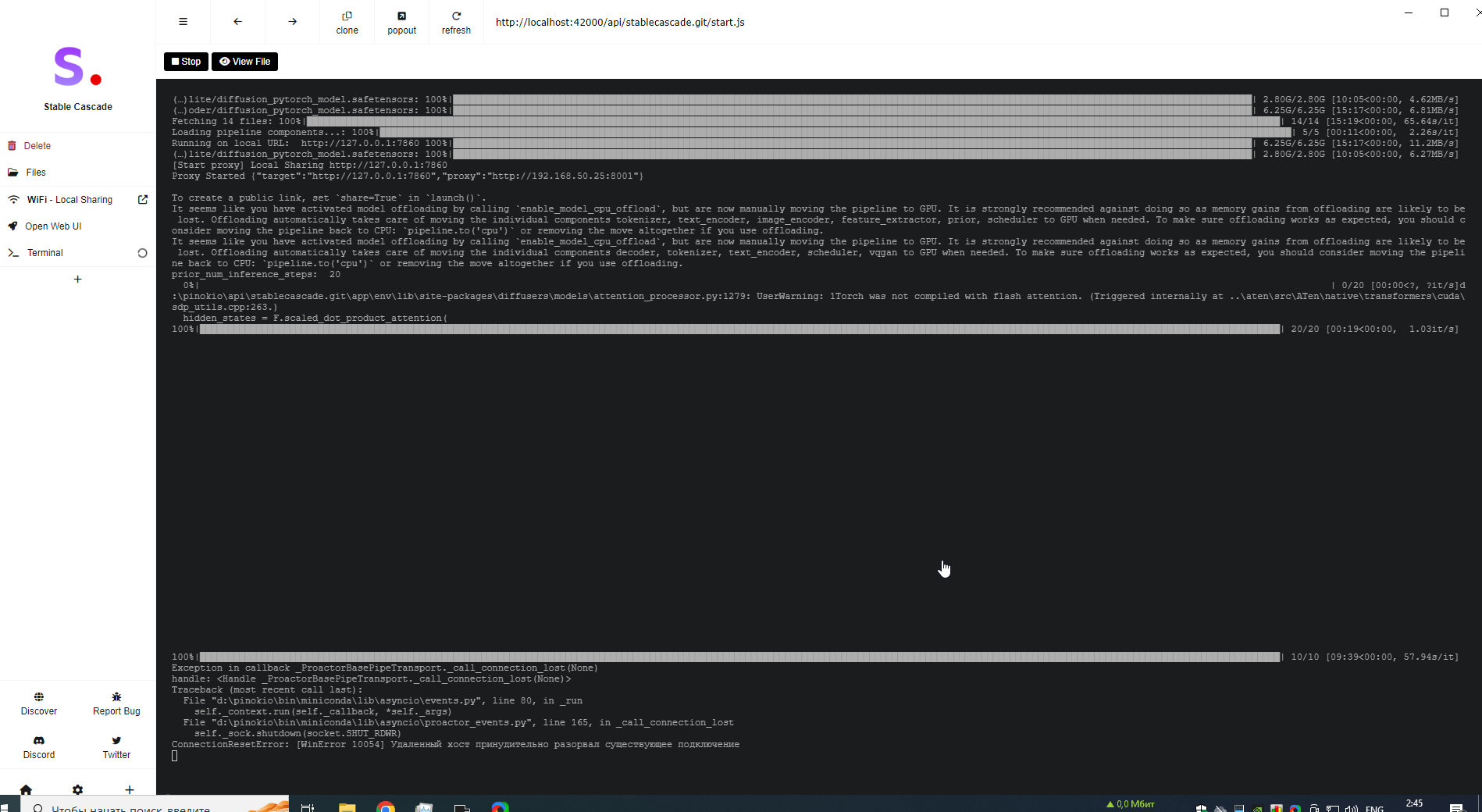
Oh stable cascade. Thats a special new thing. Thats not the normal Stable-diffusion webui.
So yes it could be normal that it takes so long
ornate elk
golden arch
Ok, I think there's no model...
Its in there but the file size is not correct. Please download the one I linked you
worldly grove
@ornate elkcan u recommend anything else with faster renders?
golden arch
ornate elk
Its in there but the file size is not correct. Please download the one I linked ...
Coming
jaunty seal
worldly grove
<@161910921269084160>can u recommend anything else with faster renders?
comfyui or stable swarm could work
ornate elk
worldly grove
<@161910921269084160>can u recommend anything else with faster renders?
Sure, if you want to use the normal stable diffusion webui most people use then follow my guide:
#🤝|tech-support message
Its much faster
And easier to use
jaunty seal
jaunty seal
I dunno if this question goes here but...
How can I link the models from my Auto...
@ornate elk do you think you can help me with this problem?
worldly grove
okay will try it now thanks
jaunty seal
since I am having difficulties with configuring it
ornate elk
jaunty seal
<@161910921269084160> do you think you can help me with this problem?
I dont think stableswarm has args for adding paths. So your only option is to use the good old Symlinks
jaunty seal

it does have this tho
doesn't this work?
since I tried placing windows paths but it didn't detect them
jaunty seal
ornate elk
Make sure the path ends with /
E:/ai/stable-diffusion-webui/models/Stable-diffusion/
This doesn't seem to work
solemn atlas
I really don't know. So i changed from RV to GPU and to CPU and the outcome is still the same. Shouldnt that at least look at bit diffrent? But it looks the same
 jaunty seal
I even restarted the backend
ornate elk
solemn atlas
I really don't know. So i changed from RV to GPU and to CPU and the outcome is s...
Look near the bottom it locked your RNG settings
You have to click the X
To remove the locked setting
Or it won't change
karmic crown
solemn atlas
I really don't know. So i changed from RV to GPU and to CPU and the outcome is s...
 solemn atlas
ornate elk
Look near the bottom it locked your RNG settings
solemn atlas
ornate elk
Look near the bottom it locked your RNG settings
where is the X ? Sorry i cant find it
 jaunty seal
yeah I just needed to set the root path for models and everything else was picked up automatically
solemn atlas
Ohh okay, should i remove both?
ornate elk
jaunty seal
yeah I just needed to set the root path for models and everything else was picke...
Good to know
Its like comfyui then (as its the same Backend)
solemn atlas
It's still the same. Didn't changed a bit
ornate elk
Need to go off now gn 😴
solemn atlas
I'm really confused
 karmic crown
i am off too its 1am, and i am awake from 5am
solemn atlas
good night
golden arch
ornate elk
<@1214184095966306349> I guess the model could be corrupted.
Best is to download...
It worked! Thanks!
vernal cargo
trying to get kohya setup but have an issue where cudnn only installs to torch but not as a folder so I don't get the 'upgrade.ps1' file
is there any other way for me to install cudnn or do I have to use kohya > cmd > .\setup.bat
arctic abyss
Hey guys, so I've successfully run the webui.bat using python. Im unsure what to do next 😄 does that mean its installed?

Oh maybe it didnt work given what its saying in the text above
ornate elk
arctic abyss
Oh maybe it didnt work given what its saying in the text above
Hey, what's your GPU?
arctic abyss
Hi, @ornate elk
 ornate elk
arctic abyss
Hi, <@161910921269084160>
ornate elk
arctic abyss
Hi, <@161910921269084160>
Okay, make sure you update your nvidia driver to the latest version, and restart the PC
Then relaunch the webui-user.bat
 dense delta
Any local open source tools describing images and generating texts?
arctic abyss
Nice! I have webui forge going (web browser based, didnt know that), now i am tring to add some models for it. Noob question, how do I add them from here? Im used to github and adding its url, but this, unsure.
https://huggingface.co/lllyasviel/sd_control_collection/tree/main
 arctic abyss
noble belfry
it comes with controlnet installed you just need to download the models for it. ...
arctic abyss
noble belfry
it comes with controlnet installed you just need to download the models for it. ...
referencing this message from Wit 🙂
grim iron
how do I put a max on the amount of vram sd uses
ornate elk
grim iron
how do I put a max on the amount of vram sd uses
You can try add --medvram to the webui-user.bat
grim iron
ornate elk
You can try add --medvram to the webui-user.bat
I already have that
ornate elk
arctic abyss
Nice! I have webui forge going (web browser based, didnt know that), now i am tr...
These models have to be downloaded manually and place inside models/Controlnet
grim iron
but I mean like a slider or something
vocal burrow
nope
grim iron
becaus normally I can just use everything, its jsut that I now need to have my wallpaper enginge on because clock
ornate elk
grim iron
becaus normally I can just use everything, its jsut that I now need to have my w...
Wallpaper engine causes stutters and freezes and even PC crashs when used at the same time while SD generates images.
solemn atlas
Good morning guys, about my problem yesterday that we can't generate the same images with the same settings
These are his version: version: v1.6.0-2-g4afaaf8a • python: 3.10.6 • torch: 2.0.1+cu118 • xformers: 0.0.20 • gradio: 3.41.2 • checkpoint: 354b8c571d
and these are mine: version: v1.8.0 • python: 3.10.6 • torch: 2.1.2+cu121 • xformers: N/A • gradio: 3.41.2 • checkpoint: 354b8c571d

 grim iron
ornate elk
Wallpaper engine causes stutters and freezes and even PC crashs when used at the...
grim iron
ornate elk
Wallpaper engine causes stutters and freezes and even PC crashs when used at the...
yeah ik
thats why I ask for the slider
vocal burrow
solemn atlas
Good morning guys, about my problem yesterday that we can't generate the same im...
Why do I get different results from civit.ai/my friend/alien lifeform examples :
1/ --xformers (and some other flags but mainly this one) will make stable-diffusion non deterministic. Meaning for the same prompt+settings running on different hardwares you'll get different results. The output should still correspond to whatever the prompt is.... It might just be slightly to very different if you're unlucky. So yeah, some command line arguments can alter the outputs of your prompts and your hardware might also do the difference.
2/ Do you have all the loras, embeddings mentioned in the prompt ?
3/ Are you really using the same settings ? Copy pasting manually what's inside the "Generation Data" boxes is not enough. Civitai is hiding a bunch of data there. If you want to get the exact same settings you'll have to click the "Copy Generation Data" button at the bottom of the image page, paste its content into Auto1111's prompt field and then click the blue arrow under generate to automatically apply each value to the correct field. Hidden values can be; clip_skip, ENSD, token merging ratio, etc
4/ Did you have any overrides set beforehand ? They should show up at the very bottom of the page (some will probably show up too if you use data from civitai like I mentioned in 3/)
5/ Maybe it's using some extensions that does not record its settings in the metadata
6/ Maybe you're using different versions of some extensions/auto1111/lora/models/etc that yield different results
7/ Are you using the same random number generator ? GPU / CPU / NV (Settings->Stable Diffusion->"Random number generator source")
8/ Maybe you're using a newer version than OP. One that includes a "seed breaking change", cf https://github.com/AUTOMATIC1111/stable-diffusion-webui/wiki/Seed-breaking-changes
tldr don t waste too much time trying to replicate images exactly
solemn atlas
vocal burrow
tldr don t waste too much time trying to replicate images exactly
the thing is, the Lora is the character I want to create. He created a Lora for that specific character. I don't want to copy 1:1 his image and pose but at least get the same hair, expression etc which is recognizable for that character but when i use the lora it looks completly diffrent. I only want to generate her as she is (with a few diffrences ofc but to get "her" into the image" And I don't know why it doenst happen
Is there a way to adjust xformers?
ornate elk
grim iron
thats why I ask for the slider
There is no slider. What you can do is to get yourself Rainmeter and a simple clock widget for it. And then disable WPE
grim iron
ok thanks
vocal burrow
(or look at your watch, smartphone, clock in the start bar, open a browser page with a clock on it, etc)
solemn atlas
vocal burrow
you set it on. or off
where can I do that? I looked at SD but I don't know where to try it out
oh xformers are just the NV GPU and stuff I understand
ornate elk
solemn atlas
oh xformers are just the NV GPU and stuff I understand
Xformers Is on when you added --xformers to the webui-user.bat
solemn atlas
is this on settings?
vocal burrow
set COMMANDLINE_ARGS=--xformers --whateverIsAlreadyThere
solemn atlas
So I go to webui-user.bat and open cmd
these things are in my black window thing when i open sd

there are a lot of errors
vocal burrow
what s in your webui-user.bat ?
solemn atlas
vocal burrow
solemn atlas
that s your log, not what s inside your webui-user.bat
solemn atlas
Oh I#m sorry it's this
 vocal burrow
solemn atlas
Oh I#m sorry it's this
vocal burrow
solemn atlas
Oh I#m sorry it's this
so yup you have litterally no arguments whatsoever ....
what s your gpu ?
solemn atlas
I'm not sure but GPU is this right
 vocal burrow
set COMMANDLINE_ARGS=--xformers --no-half-vae
then
solemn atlas
okay I did and then open it again
solemn atlas
vocal burrow
`set COMMANDLINE_ARGS=--xformers --whateverIsAlreadyThere`
Okay I opend it. Should I now put this too and remove the other one
vocal burrow
use this one .... set COMMANDLINE_ARGS=--xformers --no-half-vae
solemn atlas
I did
vocal burrow
then there you go
xformers is on
(and whatever error you had at startup because of some extension is probably still there)
solemn atlas
The outcome is still the same and yes the errors are still there. It says that " Unable to load ESRGAN model" and this "RuntimeError: PytorchStreamReader failed reading zip archive: failed finding central directory"
 wary wind
hi, i cannot find any # dreambot in left hand side, may i know it is normal?
solemn atlas
I even re-installed SD and still have problems. I don't understand what is wrong. Even after downloading Comfyui there is not bat.file. Something is off with my whole system
ornate elk
solemn atlas
The outcome is still the same and yes the errors are still there. It says that "...
Can you screenshot the whole cmd with that error?
solemn atlas
it's this
ornate elk
solemn atlas
it's this
Does the webui open in browser?
Do you have access to the Extensions tab?
solemn atlas
Yes it opens and I also have acces
ornate elk
Then click check for updates, let it load and then restart the webui-user.bat
vocal burrow
click apply update before restaring the webui
jaunty seal
In Stable Swarm UI I have a problem where my controlnet preprocessors aren't being showed I am just stuck on having canny as an option.
solemn atlas
ornate elk
Then click check for updates, let it load and then restart the webui-user.bat
I did
It's still these problems
Unable to load ESRGAN model
RuntimeError: PytorchStreamReader failed reading zip archive: failed finding central directory
I think i know where the problem comes with the ESRGAN model
I copy pasted these folders before delating SD and when putting all files back there was not ESRGAN folder and i just created a folder and named it that way and put all upscalers in there
ornate elk
solemn atlas
I copy pasted these folders before delating SD and when putting all files back t...
You should have had this folder in models/ folder
When installing sd
Otherwise something is broke
solemn atlas
It was not there, I also wonderd thats why i created it
ornate elk
solemn atlas
It was not there, I also wonderd thats why i created it
Maybe you should do a clean install of the webui
solemn atlas
So I need to delate SD again?
ornate elk
solemn atlas
So I need to delate SD again?
What you can do first to try to fix your webui:
Rename the Extensions folder to _extensions
Then delete the venv folder.
And restart the webui-user.bat
And then check if you get any errors
 gusty geyser
anyone manage to get stable diffusion run on intel core ultra integrated gpu?
ornate elk
gusty geyser
anyone manage to get stable diffusion run on intel core ultra integrated gpu?
You mean Intel UHD 620 ?
That won't work
SD can only work with Intel Arc or maybe IrisXE GPUs
gusty geyser
ornate elk
You mean Intel UHD 620 ?
no
gusty geyser
gusty geyser
anyone manage to get stable diffusion run on intel core ultra integrated gpu?
*it should be called intel arc graphics
i tried using the accelerate with openvino script but it isnt using the gpu at all
solemn atlas
ornate elk
What you can do first to try to fix your webui:
Rename the Extensions folder to ...
So I did and the error is still there
 split robin
I got CUDA runtime error
and it's like, felling all my RAM and VRAM...
I found out this issue when I searched about the commandline too, any fix for that?
RuntimeError: CUDA error: out of memory
CUDA kernel errors might be asynchronously reported at some other API call, so the stacktrace below might be incorrect.
For debugging consider passing CUDA_LAUNCH_BLOCKING=1.
Compile with **TORCH_USE_CUDA_DSA** to enable device-side assertions.
 gritty compass
When will the bot be fixed?
ornate elk
gusty geyser
*it should be called intel arc graphics
Okay, then for Intel arc you need to use the SD.next webui
ornate elk
solemn atlas
So I did and the error is still there
Then you need a reinstall
ornate elk
split robin
I got CUDA runtime error
and it's like, felling all my RAM and VRAM...
I found o...
What settings did you used?
split robin
which settings?
solemn atlas
ornate elk
Then you need a reinstall
from which page? I did that yesterday too
ornate elk
solemn atlas
from which page? I did that yesterday too
Here is my install guide:
#🤝|tech-support message
split robin
I'll start it later, I'm updating a driver xDD
solemn atlas
Or let's do it on weekend. I will message again.
I forgot I have an exam I need to learn for
ornate elk
split robin
which settings?
Resolution, model, etc
ornate elk
Hmm
Try a restart and test again
Make sure wallpaper engine is not running in the back
split robin
my wallpaper is literally a 768^2 image I generated xDD

can it maybe because I install a plugin?
ornate elk
split robin
can it maybe because I install a plugin?
Yes, which extension?
Some of them can break stuff
 ornate elk
split robin
well, this is a potato gpu for image generator afterall.. gotta deal with it xDD
ornate elk
split robin
well, this is a potato gpu for image generator afterall.. gotta deal with it xDD
Do you have any errors in the cmd?
split robin
split robin
I got CUDA runtime error
and it's like, felling all my RAM and VRAM...
I found o...
I only see this
ornate elk
For the Photoshop plugin you would also need to add --API to the webui-user.bat
ornate elk
Easy photo extension won't work on your gpu
split robin
ah, sadge
ornate elk
Or wait how much vram does it have?
split robin
RTX 3050 Laptop 4GB
ornate elk
Okay nope
split robin
lmao, sadge
ornate elk
You can delete it from the Extensions folder
ornate elk
Boorutag autocomplete is also a good extension
split robin
btw, how do I know what version of SD do I use in AT1111?
ornate elk
And you should get the tiled vae extension
split robin
or it can automatically use any SD version?
split robin
ornate elk
And you should get the tiled vae extension
interesting, what it do?
ornate elk
split robin
or it can automatically use any SD version?
With the auto1111 webui you can use any SD model version (1.5, 2.1, sdxl)
ornate elk
split robin
interesting, what it do?
It helps when using Hiresfix upscale to not run out of vram
Making it easier to upscale higher
 gusty geyser
ornate elk
Okay, then for Intel arc you need to use the SD.next webui
gusty geyser
ornate elk
Okay, then for Intel arc you need to use the SD.next webui
but it is intel arc on intel core ultra cpu? can it still use ipex?
split robin
gusty geyser
but it is intel arc on intel core ultra cpu? can it still use ipex?
you're in core ultra now? how's the iGPU performance?
ornate elk
gusty geyser
but it is intel arc on intel core ultra cpu? can it still use ipex?
Yes it supports Openvino and ipex
I can't guarantee that it will work, but its your best chance
ornate elk
split robin
this one?
Yes
gusty geyser
ornate elk
I can't guarantee that it will work, but its your best chance
alright. i will try it with sd.next
ornate elk
Best is to read on their github for the Intel instructions
gusty geyser
split robin
you're in core ultra now? how's the iGPU performance?
still haven't got it to actually be used in sd
split robin
oh ok
gusty geyser
ornate elk
Best is to read on their github for the Intel instructions
i couldnt find documentation made for it, those intel arc guides out there are made for their discrete gpus
ornate elk
gusty geyser
i couldnt find documentation made for it, those intel arc guides out there are m...
On SD.next it says igpus are not supported with Ipex. Use openvino instead
split robin
split robin
this one?
do I need to restart the AT1111 or ReloadUI is enough?
ornate elk
Best is to restart
split robin
hmm, okok
oh nuts, apparently I have to turn this on xDD

yes, the extension really useful, thanks
ornate elk
split robin
oh nuts, apparently I have to turn this on xDD
Yes enabling it is enough. Also you dont need to enabled tiled diffusion
split robin
I don't even know what it does, so I'm not enabling it xDD
 sage lava
Hey I've got an issue with the fetch_uri for my queued images
if I call it with curl I get
{"status":"error","message":"Invalid API Request","tip":"1. Make sure you are passing Content-Type: application/json in header. 2. Make sure you are doing POST request with valid JSON. 3. Make sure your JSON does not have error, use jsonlint to validate json array"}%
going a bit mad with this one, the api key is definitely correct and is used earlier to generate the images in the same package
vernal cargo
hey so I trained a lora model using kohya but its a JSON file instead of a 'safetensors' file
gusty geyser
I got the following error every time I want to generate a slightly higher resolution image. I'm using openvino acceleration
BackendCompilerFailed: backend='openvino_fx' raised: InvalidCxxCompiler: No working C++ compiler found in torch._inductor.config.cpp.cxx: (None, 'g++') Set TORCH_LOGS="+dynamo" and TORCHDYNAMO_VERBOSE=1 for more information You can suppress this exception and fall back to eager by setting: import torch._dynamo torch._dynamo.config.suppress_errors = True
here is the full error msg
 glad crescent

 vapid sphinx
So there are so many versions of ControlNet canny, depth, lineart etc. for SDXL 1.0 and from like 10 canny models, only 2 work good out of the box. I tested them all. Why is that and why the controlnets for 1.5 models were better?
jaunty seal
Stable Swarm UI problem here. It isn't detecting any of the controlnet preprocessors only canny no matter what other model is chosen.


 dense tapir
Any tips guys?
https://github.com/danielgatis/rembg
This is supposed to show up at the Extras tab, however it simply doesn't.

GitHub
Rembg is a tool to remove images background. Contribute to danielgatis/rembg development by creating an account on GitHub.
vocal burrow
dense tapir
Any tips guys?
https://github.com/danielgatis/rembg
This is supposed to show u...
use this one instead https://github.com/AUTOMATIC1111/stable-diffusion-webui-rembg
glad fiber
if I use the lora and the wb17myself in the prompt, the output image is nothing like what i want

how can i fix this?
noble belfry
dont know that model so don't know what triggers it best or the best strengths to use. look up wherever you got it and see how examples use it i guess
for stable diffusion theres a nice little civit model helper, but im not sure if it works for downloading anymore as the site changed things around and requires auth. but anyway what it did was fill out your lora with information like how to trigger it
glad fiber
this another version I have the lora is applied

 noble belfry
wait, is this a lora you trained yourself? just looked at your name
glad fiber
glad fiber
if I use the lora and the `wb17myself` in the prompt, the output image is nothin...
 noble belfry
oh right. damn there could be a dozen different things causing that which happened during your training
glad fiber
i guess it is related to my prompt or the captioning
noble belfry
olivio sarikas' discord has a pretty good training channel, i could send you an invite if you'd like to ask there, they're good with in depth things like that
glad fiber
send it
 cursive beacon
Can I ask about those online models which generate text exceptionally well, how do they do it?
compared to SDXL models
noble belfry
are you asking how the models work?
if you want to make them locally i could link you a really good video that dropped today, but its comfyui workflow
 terse mulch
How can I train pix2pix in SD to apply a style based on training data that consists of paired images, where A is a piece of artwork, and B is an image based on that artwork that is potentially very different. e.g. the 'style' image is outlines traced on the artwork. or the 'style' image is normal maps that were manually painted to match the source image.
i.e. I have a piece of software that animates images, and uses multiple textures based on that image. I want to train SD to be able to generate each of the different texture types, based on those which I have already done manually.
 inland sierra
hi guys, anyway to get more credits for stability . ai? I think will need more to test the app
noble belfry
terse mulch
How can I train pix2pix in SD to apply a style based on training data that consi...
controlnet has a good feature, 'reference', you might want to read up on that. its very good at translating the feel or style of an image over to another. https://github.com/Mikubill/sd-webui-controlnet/discussions/1280
its essentially pix2pix
 mellow wagon
Hello, I keep getting an omegaconf error regarding a missing key for ddconfig. I'm trying to get SVD running on a M1 Pro Macbook
Here is the traceback, I'm using the stable-diffusion-webui
gusty geyser
gusty geyser
I got the following error every time I want to generate a slightly higher resolu...
any help on this? thx
 rapid gale
whenever I use embeddings such as "easynegative" in the negative prompt I get the "RuntimeError: expected scalar type Half but found Float" error.
terse mulch
noble belfry
controlnet has a good feature, 'reference', you might want to read up on that. i...
how do I actually use this. It just seems to be a discussion about that feature? Is it just in SD if I update to 1.1.171?
noble belfry
controlnet works in a1111 and comfyui
both have seperate extensions, that was just a quick overview with pictures in case it looked like something you'd wanT*
lol i accidentally typed want with another character and got blocked by the server!!
terse mulch
noble belfry
controlnet works in a1111 and comfyui
So then to have SD take an existing artwork, and generate the different versions of it, I would train a style that is all of the texture types I have manually generated. Then use a new image I want transformed in the same way as controlnet image?
I feel like something where training accepts both 'original artwork' and "texture based on that artwork" is more likely to get the results I want "X artwork changed to Y texture in this way". So that I just give a new X artwork, and it changes it in the same way. But I"m not sure what functionality in SD trains "image A turned into image B".
gusty geyser
gusty geyser
here is the full error msg
whenever i run lora script, this also happens. any clues why?
 errant edge
hey just starting out using fooocus and im currently trying to recreate a generated picture on civit.ai
i tried copying the models, prompt, negative prompt, the seed but my image is entirely different, not even in the same artstyle
anyone care to help me out figuring out what the problem is?
noble belfry
errant edge
hey just starting out using fooocus and im currently trying to recreate a genera...
you wont get the exact same image, the generation from someone elses random seed is different to if you run it on your own. also a lot of civit generation data isnt easy to copy over, they might have used other upscalers or inpainting.
 noble belfry
oh hell no, thats a completely different model lol!
errant edge
yeah im confused because as i understand it, im not allowed to change the basemodel to the "vixon's fantasy mix" checkpoint
so i tried to understand how refining works
i assume theres the problem, but no idea
noble belfry
the one on the left seems to be using an anime trained model, you wont get anything even a mile close to that. the two model flavours interperet the prompt differently too. anime models wouldnt know what to do with a photorealistic prompt and vice versa
errant edge
huh, isnt the "resources used" category telling me what models they're using?
noble belfry
by "not allowed to change" do you mean its running on a server?
errant edge
noble belfry
by "not allowed to change" do you mean its running on a server?
no it gave me the error "You have selected base model other than SDXL. This is not supported yet." when i tried to
after googling i came across this:

so i went onto the vixon's fantasy mix model's page and it says "base model SD 1.5", due to the look i assumed it counts as "anime"
so i figured i put 0.667 on the refiner
noble belfry
what client are you using? is it local or running off someone elses computer?
errant edge
its local
noble belfry
if its local you can literally just download that model
errant edge
thats what i did
noble belfry
wait, which client are you running? a1111?
errant edge
fooocus
noble belfry
ooooh right
errant edge
so as i understand it, it doesn't support changing the basemodel or something
im clueless
im just trying to recreate similar images 😦
also unsure if i should change something here?

or whether i should use a style
noble belfry
its a bit undersupported, i dont know many people that use it that could talk you through settings mate
errant edge
so im better off looking for SDXL checkpoints?
at least i assumed using the SD 1.5 as refiner it would at least get me closer to the result i want
noble belfry
no i mean rooned. not many people use it so dont come across problems and can help you. you could bump this again tomorrow maybe during the day
i say during the day, i mean its late in US and europe
errant edge
maybe thats why
 errant edge
yeah using lora based on sdxl 1.0 it works much better
grim iron
errant edge
so im better off looking for SDXL checkpoints?
u could join the sd sub reddit discord the developer of foocus is in there
errant edge
with the help of @noble belfry i just switched to forge and having great results so far
grim iron
that also works XD
inland sierra
anyone successfully build https://github.com/Stability-AI/generative-models on Apple M1 pro? keep getting this error and related issue (but closed) https://github.com/Stability-AI/generative-models/issues/125
ModuleNotFoundError: No module named 'torch'
split robin
isn't torch python module?
grim iron
inland sierra
anyone successfully build https://github.com/Stability-AI/generative-models on A...
try pip install torch
ornate elk
rapid gale
whenever I use embeddings such as "easynegative" in the negative prompt I get th...
What's your GPU and what's inside your webui-user.bat?
rapid gale
my gpu is a gtx 1660 ti and this is inside my webui @echo off
set PYTHON=
set GIT=
set VENV_DIR=
set COMMANDLINE_ARGS=
git pull
call webui.bat
ornate elk
rapid gale
my gpu is a gtx 1660 ti and this is inside my webui @echo off
set PYTHON=
set G...
Okay for your GPU you need to add
--xformers --medvram --no-half
To the line COMMANDLINE_ARGS=
Then save and relaunch the webui-user.bat

 rapid gale
ornate elk
Okay for your GPU you need to add
--xformers --medvram --no-half
To the line COM...
rapid gale
ornate elk
Okay for your GPU you need to add
--xformers --medvram --no-half
To the line COM...
still dosnt work
ornate elk
rapid gale
still dosnt work
Thats strange, it should work.
Does the cmd shows any error?
Make sure you always launch the webui-user.bat and not the webui.bat
rapid gale
ornate elk
Make sure you always launch the webui-user.bat and not the webui.bat
Hoooooolyyyyyy shhhiiiiiiiit im stupid 😂 thank you so much its fixed now.
 ornate elk
No problem 🙂
 errant jewel
Hellow
I have a mainboard with 2x pcie 16 slots
I have a rtx 4080 running in it
can I use a rtx 4000 ada together with it?
Does someone run two different gpus in their system?
vocal burrow
only one gpu can be used at a time.
(but you can run one instance on each of your gpu, stable swarm UI might help you with this)
errant jewel
Oh ok thanks
I wanna do dreambooth training and maybe I can do that on two gpus simultaneously
 late tree
I'm getting an error when trying to generate, it goes through the whole thing but then fails at the end saying:
Cannot set version_counter for inference tensor

 karmic nova
does anyone know of a dataset that has just one person's face in a lot of different poses and angles?
vocal burrow
 inland zephyr
inland zephyr
inland zephyr
ty
 jade finch
is there a torrent for automatic1111, installing the portable version always fails and trying to use git fails as well
gusty geyser
split robin
you're in core ultra now? how's the iGPU performance?
if you are still wondering, i got about 1.3it/s on openvino and 1-2s/it on ipex
 sudden hawk
hello !
I need help regarding Stable Diffusion, I have installed Python and stable diffusion, i follow all the instructions but now i still can't launch it. and the first time it launched automatically I got an error message and I couldn't generate.
If someone can help me pls 🥹🥹
jade finch
what webui did you install?
ornate elk
sudden hawk
hello !
I need help regarding Stable Diffusion, I have installed Python and s...
hey, whats the error? and whats your gpu?
ornate elk
jade finch
what webui did you install?
Here is a full guide to install auto1111:
#🤝|tech-support message
you would need to install python onto the external drive aswell as SD
jade finch
my problem is that all standalone portable versions of automatic always crash for me, my internet connection over VPN is not stable enough and keeps crashing
that's why i am hoping for a torrent that doesn't restart every time your internet connection gets lost
sudden hawk
ornate elk
hey, whats the error? and whats your gpu?
it’s a red error msg up to the right in the screen
my GPU is nvidia RTX 3070
ornate elk
sudden hawk
it’s a red error msg up to the right in the screen
my GPU is nvidia RTX 3070
did you followed my install guide?:
#🤝|tech-support message
you can also screenshot the whole cmd output for me to check
split robin
gusty geyser
if you are still wondering, i got about 1.3it/s on openvino and 1-2s/it on ipex
Ooh, wow ok
 formal trout
I'm getting this error with Ultimate SD Upscaler. Only with "ultramix_balanced", for example not with "4x-UltraSharp"

 gritty ridge
Any link to install Kohya_ss on .MAC if possible at all… if not any other tip for training model through dreambooth / SD?
dense tapir
vocal burrow
use this one instead <https://github.com/AUTOMATIC1111/stable-diffusion-webui-re...
Thank you so much! 😄
 scarlet igloo
“CIDAS/clipseg-rd64-refined” Please help me, should I download the entire folder or which part of the file in the hugging face, and which directory should I place the downloaded file in the local folder
 sudden hawk
ornate elk
you can also screenshot the whole cmd output for me to check
sudden hawk
ornate elk
you can also screenshot the whole cmd output for me to check
Ok ! i succeded to install SD in the good way I think cause now I can lauch it, but, when I try to genere i have this grey screen, i don't know what to do
 gritty ridge
Any advice for changing in stable dif webui adapted for latest M3 Pro configured to max 16 C CPU / 40 C GPU with ANE 16C
ornate elk
sudden hawk
Ok ! i succeded to install SD in the good way I think cause now I can lauch it, ...
Is the model you try to use 6gb ? (Sdxl models are 6gb, 1.5 models are 2gb or larger)
Everything smaller is not a model
My guess is your trying to use a model as Lora.
I think old anime style xl v3 is a Lora for sdxl and not a model itself
If its a lora it goes into models/lora folder
As model try out aamMix
sudden hawk
ornate elk
As model try out aamMix
i'm sorry to ask, i searched on the web and didnt find. Where can I dl it pls ?
ornate elk
sudden hawk
i'm sorry to ask, i searched on the web and didnt find. Where can I dl it pls ?
You can get all the models and loras from here:
https://civitai.com/models
You can choose between 1.5 and sdxl models and loras.
1.5 is trained on a 512x512 resolution while sdxl is trained on 1024x1024 resolution.
For example this is AAM Mix
https://civitai.com/models/269232?modelVersionId=303526
An sdxl model for Anime
sudden hawk
ornate elk
You can get all the models and loras from here:
https://civitai.com/models
You c...
Oh thank you so much, now i understand better (i think myself so dumb now too 😅 )
ornate elk
no problem ^^
in img2img you can use the sd upscale script
at the bottom
set denois below 0.3
set the resolution to square
select the upscale script and an upscaler
hires fix is still better, but it uses the same technique
in img2img upscale you cant set the denois as high as with hiresfix
so best is to generate the image with hires fix and then inpaint and upscale it with the sd upscale script in img2img
 frail verge
anyone mess with adetailer before?
trying to run adetailer over this image to fix the face but it just messes it up

 ornate elk
frail verge
trying to run adetailer over this image to fix the face but it just messes it up
ornate elk
frail verge
trying to run adetailer over this image to fix the face but it just messes it up
are you on AMD?
whats your GPU?
ornate elk
frail verge
i am yes and i'm using a 6700 xt rn
ahh okay
then you may need to add --no-half --upcast-sampling
to the webui-user.bat
frail verge
alright ill give that a try
also: any idea why i have to reload the ui after starting it in order to do anything in it?
like the first startup is always unresponsive; won't generate, load extensions page or even PNG info
until i do "reload ui"
ornate elk
frail verge
like the first startup is always unresponsive; won't generate, load extensions p...
thats strange, maybe a gradio issue, make sure to whitelist the webui in any adblocker
frail verge
oh wow lol i'll try that, i didn't even consider that it could be my adblocker
ornate elk
frail verge
oh wow lol i'll try that, i didn't even consider that it could be my adblocker
yea, we had such issues here before, if its visual (and no console error), then its mostly the adblocker
frail verge
ornate elk
then you may need to add --no-half --upcast-sampling
to the webui-user.bat
erm, so before i could add these flags to my launcher i did a complete fresh install of the webui to make sure there wasnt any funny business going on (also to fix that weird reloading issue because at the time i thought maybe a fresh install could solve it (it didnt ofc))
and for some reason now adetailer is working fine?

i did a lot of shit that was almost 100% unrelated, like installing rocm sdk and not installing the insightface module so i really have no clue why it's working normally now
ornate elk
frail verge
i did a lot of shit that was almost 100% unrelated, like installing rocm sdk and...
hmm, yea normaly it should have worked on rocm linux without issues before
good that its back to normal now ^^
frail verge
it is!! but i'm also scared because it's just randomly working now xD
ok. i disabled my ublock origin completely and lowered firefox's security settings and the first launch is still buggy for some reason
web console errors from the ui
might be related to the agent-scheduler extension..? either that or it's a symptom. im going to try disabling it and see if that helps.
fair oxide
@ornate elk any thoughts on this? you see lcm lora works with 2-8steps and 1-2 cfg, and within those same parameters lcm lora has both sd and sdxl versions, while sdxl lightning lora too works with 2-4-8 steps wit cfg 1-2, what exactly is the key difference to them?
ornate elk
fair oxide
<@161910921269084160> any thoughts on this? you see lcm lora works with 2-8steps...
there is a lightning lora?
fair oxide
yes
ornate elk
can you share a link?



 ornate elk
ah interesting
fair oxide
also have a sdxl model merged with it
ornate elk
i guess the difference is thats its locked to steps?
fair oxide
no
you can go from 2-4-8 with either
hmm

technically you could just work with lcm for both sd and sdxl for decent output
after - detailer
why do you need adetailer to work before hires fix?
after detailer kicks in after the image has processed
its a way of correcting the image
you cant assess correction method before image is processed
dunno
doesnt sound logical what you are asking
hires fix does some correcting too as far image quality goes
hires fix sorts out image depth, adetailer works on image content quality specific to faces / hand attributes
they are entirely different in their function
or think of it this way, adetailer is sort of inpainting, it does its work when you have an image fully rendered
no not possible
due to their functional criterea


np once you understand their ussage concept its easy to understand how they are applied
frail verge
what's the difference between tiledvae and ultimate upscaler? which one is better for upscaling higher than you normally can?
and is ultimate upscaler still a good/viable option for sdxl?
ornate elk
frail verge
what's the difference between tiledvae and ultimate upscaler? which one is bette...
Tiled VAE is for getting higher resolution
SD upscale script is for upscaling
If you get out of vram errors enabled tiled vae
frail verge
gotcha ty
little echo
does anyone ever use non SD images in img2img tab? would it be of any use?
soft fiber
it can be any image in img2img, you dont need a generated picture for it
frail verge
@ornate elk sorry to bother you but i figured you'd want to know this. i think i figured out why adetailer was failing.. and it seems like it has to do with styles not being applied by adetailer
i was using a style for my negative prompt which worked fine for the base image, but not adetailer
after manually adding the negative prompt, adetailer worked normally again
ornate elk
frail verge
after manually adding the negative prompt, adetailer worked normally again
oh good to know thx
strange behaviour still