#🤝|tech-support
1 messages · Page 21 of 1
 blissful nimbus
What's the best Sampling method?
 willow zodiac
I could really use some help. When I run ComfyUI, my models in a1111 do not load in.
I have updated my extra_model_paths.yaml file to point to my base path. I assume it is typed correctly as I copy/pasted from the file explorer. I'm not sure what I am not doing right.
 glad fiber
guys, when I train a lora, all models have the exact same size

and they dont work (the character is not applied to the image)
the paramters used in kohya_ss ^
 wraith bolt
which settings did you use?
glad fiber
wraith bolt
which settings did you use?
I used the default ones
willow zodiac
CS1o, Thank you. I selected the YAML extension when I saved as, and didn't notice the .yml in the editor. That was what I needed.
wraith bolt
glad fiber
I used the default ones
without --xformers --medvram --no-half ?
glad fiber
wraith bolt
without --xformers --medvram --no-half ?
you meant command lines
I used those
wraith bolt
glad fiber
you meant command lines
yea just settings in general
cause i think my gpu is way too slow
 patent spear
I am about to upgrade my graphics card from AMD RX 5700 XT to a nvidia RTX 4070. I'm assuming I have to uninstall the webui since I installed it using the AMD settings. Does anyone know the process to convert it to nvidia GPU settings?
I installed the Automatic11111 AMD DirectML Webui using the steps in the pins
 flint acorn
do i need to re-install stable diffusion if i have updated my gpu driver?
i keep getting errno22 - invalid argument
in cmd when trying to launch
 compact falcon
START OF TRACEBACK
Traceback (most recent call last):
File "C:\Stable diffusion\stable-diffusion-webui\extensions\deforum-for-automatic1111-webui\scripts\deforum_helpers\run_deforum.py", line 116, in run_deforum
render_animation(args, anim_args, video_args, parseq_args, loop_args, controlnet_args, root)
File "C:\Stable diffusion\stable-diffusion-webui\extensions\deforum-for-automatic1111-webui\scripts\deforum_helpers\render.py", line 206, in render_animation
mask_vals['video_mask'] = get_mask(args)
File "C:\Stable diffusion\stable-diffusion-webui\extensions\deforum-for-automatic1111-webui\scripts\deforum_helpers\load_images.py", line 106, in get_mask
return prepare_mask(args.mask_file, (args.W, args.H), args.mask_contrast_adjust, args.mask_brightness_adjust)
File "C:\Stable diffusion\stable-diffusion-webui\extensions\deforum-for-automatic1111-webui\scripts\deforum_helpers\load_images.py", line 80, in prepare_mask
mask = load_image(mask_input, mask_input)
File "C:\Stable diffusion\stable-diffusion-webui\extensions\deforum-for-automatic1111-webui\scripts\deforum_helpers\load_images.py", line 71, in load_image
image = Image.open(image_path).convert('RGB')
File "C:\Stable diffusion\stable-diffusion-webui\venv\lib\site-packages\PIL\Image.py", line 3236, in open
fp = builtins.open(filename, "rb")
PermissionError: [Errno 13] Permission denied: 'C:\Stable diffusion\stable-diffusion-webui'
END OF TRACEBACK\
what do i do?
 sour plank
What is this error and what does this mean?

 wraith skiff
any solutions?

 ornate elk
wraith skiff
any solutions?
ornate elk
wraith skiff
any solutions?
Click on Available, click on Load from then you get a list. There search for sd-webui-controlnet and click install
wraith skiff
this right?
 ornate elk
patent spear
I am about to upgrade my graphics card from AMD RX 5700 XT to a nvidia RTX 4070....
ornate elk
patent spear
I am about to upgrade my graphics card from AMD RX 5700 XT to a nvidia RTX 4070....
Hey, you can follow my install guide in the pinned messages of this Channel. Then you only have to copy the models, embeddings, ans outputs folder to the new webui
ornate elk
flint acorn
do i need to re-install stable diffusion if i have updated my gpu driver?
You can first try to delete the venv folder. If that dont help then please show a full cmd screenshot
 ornate elk
wraith skiff
still same error
ornate elk
wraith skiff
still same error
Can you show the cmd log?
wraith skiff
ornate elk
Can you show the cmd log?
 ornate elk
wraith skiff
ornate elk
wraith skiff
You installed the webui the wrong way, by downloading it as zip and also placed it in the downloads folder. That can make problems.
Better to use my Install guide in the pinned message of this Channel
wraith skiff
okey how can i delete all and start from 0
ornate elk
wraith skiff
okey how can i delete all and start from 0
You only need to delete the sd.webui folder
wraith skiff
thanks i will try again
ornate elk
If you have any question about the install steps, feel free to ask
 amber copper
Hey, I got some problem with my Kohya_ss (trying to train a lora) I always get this error. I got python 3.10.9 version so everything should work, but it just doesn't... I also tried a fresh reinstall here's the error:

Does anyone know what the problem could be?
wraith skiff
i cant launch
 ornate elk
wraith skiff
i cant launch
ornate elk
wraith skiff
i cant launch
Because you PC Username does contain unsupported characters
wraith skiff
😐
amber copper
yeah, the maximum in the paths should be an empty space. You literally have an nightmare in there xD
ornate elk
wraith skiff
😐
You would need to change your Username. (Recommended). Or you install python on a different drive where the path doesn't contain the Username
wraith skiff
i have only that drive im tryin change username
 split sorrel
Hello, I wonder why I'm getting these results when using

 ornate elk
split sorrel
Hello, I wonder why I'm getting these results when using
ornate elk
split sorrel
Hello, I wonder why I'm getting these results when using
When using? Inpaint?
patent spear
ornate elk
Hey, you can follow my install guide in the pinned messages of this Channel. The...
Thanks. Just to clarify, I don't need to delete or uninstall the old folder? I can just follow the steps for the nvidia guide?
ornate elk
patent spear
Thanks. Just to clarify, I don't need to delete or uninstall the old folder? I c...
Yes you dont need to delete it. But after the install and moving the models, you can
patent spear
ornate elk
Yes you dont need to delete it. But after the install and moving the models, you...
Oh okay I think I understand, I am a complete beginner, never used Python before. I guess the new folder will be called stable-diffusion-webui instead of stable-diffusion-webui-directml
ornate elk
patent spear
Oh okay I think I understand, I am a complete beginner, never used Python before...
Correct 👍
patent spear
ornate elk
Correct 👍
Thank you, I was worried about doing something wrong 🙂
ornate elk
patent spear
Thank you, I was worried about doing something wrong 🙂
No problem 🙂 it should all work without problems. But If you get one we can fix it here
ornate elk
split sorrel
Hello, I wonder why I'm getting these results when using
because for inpaint on AMD you need to add --no-half to the webui-user.bat
But that will increase the vram usage for everything resulting sometimes in out of memory errors.
split sorrel
ornate elk
because for inpaint on AMD you need to add --no-half to the webui-user.bat
But t...
set COMMANDLINE_ARGS=--use-directml --medvram --opt-sub-quad-attention --opt-split-attention-v1 --no-half-vae --upcast-sampling Here, it's written that I'm actually using this
ornate elk
split sorrel
set COMMANDLINE_ARGS=--use-directml --medvram --opt-sub-quad-attention --opt-spl...
yes i know, for inpaint to work you need to add --no-half
then in the img2img tab
select inpaint area "only masked" and set the resoultion to 512x512
split sorrel
ornate elk
yes i know, for inpaint to work you need to add --no-half
I didn't understand, it's already there in the last code. If I need to change it, please edit and send it to me. I've done the other settings, but the result is the same."
ornate elk
split sorrel
I didn't understand, it's already there in the last code. If I need to change it...
no its not, there is --no-half-vae
no --no-half
use these: --use-directml --medvram --opt-sub-quad-attention --opt-split-attention-v1 --no-half --upcast-sampling
split sorrel
ornate elk
no its not, there is --no-half-vae
no --no-half
it work 😄 so thankyou
 ornate elk
wraith skiff
ornate elk
wraith skiff
whats your GPU?
ornate elk
wraith skiff
okey i think its worked
Good, don't use --skip-torch-cuda-test or it will use the CPU
So if you get that error again you need to delete the venv folder
wraith skiff
I formatted my computer and changed the name. I'm downloading again now
ornate elk
wraith skiff
I formatted my computer and changed the name. I'm downloading again now
Ah okay, then everything should work 👍
ornate elk
Make also sure the webui is whitelisted in any browser adblocker if you use one
wraith skiff
all off
ornate elk
wraith skiff
okay now im tryin extensions
Let me know if it worked
wraith skiff
Installed into C:\all\stable-diffusion-webui\extensions\sd-webui-controlnet. Use Installed tab to restart.
hahah
thanks dude
big respect+ 
ornate elk
wraith skiff
thanks dude
No problem, for ControlNet you also nees the controlnet models. You can get them from here:
https://civitai.com/models/38784/controlnet-11-models
STOP! THESE MODELS ARE NOT FOR PROMPTING/IMAGE GENERATION These are the new ControlNet 1.1 models required for the ControlNet extension , converted...
Each model is 700mb + its config file (there are multiple files you can select at the top)
Put them into models/controlnet
wraith skiff
👍
 steady thistle
@ornate elk Good morning! I'm still working with inpainting, I have a pic of a man holding a sword, and the angles are wrong. I want to mask the hand and sword, so I mask it, replace the prompt with a sword, keep the size and everything, but everywhere I paint it screws up the background too. I'm using the same model, same sampler... not sure what to do. Do I need an inpainting model?
ornate elk
steady thistle
<@161910921269084160> Good morning! I'm still working with inpainting, I have a ...
Hey Ohhs, Inpainting models can help. But it also works when using the same model that you used for the initial image.
What you have to check is to set
Inpainting Area to "mask only"
And then set the resolution to 512x512
These settings are essential for inpainting
 hazy wigeon
getting this when trying to generate txt2img > NotImplementedError: Cannot copy out of meta tensor; no data!
steady thistle
ornate elk
These settings are essential for inpainting
The resolution needs to go to 512x512 rather than match my original? I tend towards using taller images rather than square.
ornate elk
steady thistle
The resolution needs to go to 512x512 rather than match my original? I tend towa...
When you select inpaint area to "only masked" the resolution then is not the image output resolution. Instead its the resolution of your mask that get inpainted.
Inpainting is like generating an image into an image.
So thats why you set it to 512x512 as the 1.5 based models are trained on that resolution. 768x768 works too.
ornate elk
hazy wigeon
getting this when trying to generate txt2img > NotImplementedError: Cannot co...
Can you send a screenshot of the whole cmd?
steady thistle
ornate elk
When you select inpaint area to "only masked" the resolution then is not the ima...
Thank you! I'm sure that's my issue. 🙂
ornate elk
steady thistle
Thank you! I'm sure that's my issue. 🙂
Np, so yes you can use non square images as input but the inpaint area needs to be a square.
The output will have the same resolution as the input
steady thistle
This is really cool. lol
hazy wigeon
ornate elk
Can you send a screenshot of the whole cmd?
i literally turned it on & off again and its fine now... but here's another error when i try to use SAM: >> OSError: [WinError 1314] A required privilege is not held by the client: 'D:\stable-diffusion-webui\extensions\sd-webui-controlnet/annotator' -> 'D:\stable-diffusion-webui\extensions\sd-webui-segment-anything\annotator'
ornate elk
hazy wigeon
i literally turned it on & off again and its fine now... but here's another erro...
What's SAM?
hazy wigeon
Segment Anything
ornate elk
Ahh
ornate elk
hazy wigeon
i literally turned it on & off again and its fine now... but here's another erro...
You may need to change the read and write permission for the extensions folder.
hazy wigeon
i see
 valid gorge
Performed a super simple (and non-scientific) test of the speeds I'm getting with my current system in order to have some comparison data for later when possible getting a dedicated GPU for SD.
Would be interesting to hear your results on something similar. The prompt I used and details can be found in the picture.
Especially interested in RTX3060 12GB, RTX4060 TI 16GB and similar cards.

 vocal burrow
valid gorge
Performed a super simple (and non-scientific) test of the speeds I'm getting wit...
vocal burrow
valid gorge
Performed a super simple (and non-scientific) test of the speeds I'm getting wit...
feels like it might interrest you https://vladmandic.github.io/sd-extension-system-info/pages/benchmark.html
It's vlad/sd.next data, so not auto1111 but close enough.
SD WebUI Benchmark Data; Author: Vladimir Mandic
valid gorge
vocal burrow
feels like it might interrest you https://vladmandic.github.io/sd-extension-syst...
Looks very interesting, thanks!
This is very interesting! Looks like Linux in general increases the speeds significantly
vocal burrow
depends of the hardware, for AMD definitely yes.
valid gorge
I'm specsing new system, thinking of getting Ryzen 5700x so I guess I need to install Linux too
alongside windows that is hehe
steady thistle
valid gorge
I'm specsing new system, thinking of getting Ryzen 5700x so I guess I need to in...
I have 12gb vram on this: Processor AMD Ryzen 9 5980HX with Radeon Graphics, 3301 Mhz, 8 Core(s), 16 Logical Processor(s), Radeon RX 6800M GPU with 12GB GDDR6... I wish I had Nvidia for this stuff.
But I don't want to touch Linux because just no, I've been there and don't want to go back. If you're up for it, maybe you can do better than my results.
valid gorge
steady thistle
But I don't want to touch Linux because just no, I've been there and don't want ...
I've been more or less my whole life on mac and I feel like a total alien on Windows but I'm willing to test both haha
steady thistle
valid gorge
I've been more or less my whole life on mac and I feel like a total alien on Win...
Oof! lol... good luck!
steady thistle
I don't know enough to really say.
I just know I have to fight with medvram or lowvram when I have 12gb of vram, because I'm using Radeon.
valid gorge
Sounds like a hassle 😦
glad fiber
still needing help here #🤝|tech-support message
 calm wasp
how do i assign more ram to stable diffusion on my computer?
valid gorge
calm wasp
how do i assign more ram to stable diffusion on my computer?
VRAM?
As far I know, you can't assign more system memory unless you run SD completely on your CPU (guessing it will be slower)
valid gorge
You could experiment with different boot arguments
GitHub
Stable Diffusion web UI. Contribute to AUTOMATIC1111/stable-diffusion-webui development by creating an account on GitHub.
calm wasp
i am running it on a 4090ti and it still is really slow despite not even using an xl model
 valid gorge
I'm on a Mac and use these: --no-half --upcast-sampling --no-gradio-queu
valid gorge
calm wasp
i am running it on a 4090ti and it still is really slow despite not even using a...
Oh, that GPU should be a killer
calm wasp
agreed but the generation speed is trash and im incapable of figuring out why
valid gorge
How slow is it?
calm wasp
valid gorge
How slow is it?
3 images take half an hour to generate

i feel like there are some setting i have no idea about
*settings
and my keyboard is fukin broken
@valid gorge what settings should i adjust to increase generation speed but keep the quality at the same time?
valid gorge
Your settings look good to me. I personally don't use hires.fix when generating batches of base images I then take to img2img and tweak more
calm wasp
the problem is that my gpu usage never goes above 10% and i feel like i dont use its full potential
i might have to look into some tutorials
valid gorge
Hope you find the solution. I'm guessing could it be the drivers or GPU settings? (I don't know how Windows works at all sorry)
I usually start with generating base images in lower settings and then tweak them later to add detail and resolution.
calm wasp
valid gorge
Hope you find the solution. I'm guessing could it be the drivers or GPU settings...
thanks for helping i will look into it
valid gorge
Good luck with it, let me know the solution later when you find it
 thin quarry
calm wasp
the problem is that my gpu usage never goes above 10% and i feel like i dont use...
thin quarry
calm wasp
the problem is that my gpu usage never goes above 10% and i feel like i dont use...
since you are using sdxl - you can gen at 1024x1024, no highres fix and since it's euler a, you can just go somewhere around 25-40 steps
you can upscale later only images you actually like instead of doing highres on everything
valid gorge
calm wasp
the problem is that my gpu usage never goes above 10% and i feel like i dont use...
If you are only able to generate 3 images in an hour, there must be something weird going on. I'm able to generate 1024x1024 base images using SDXL checkpoints with couple LoRAs at 30-40 steps, taking a bit over a minute each.
For example I just generated an image with SDXL together with couple LoRAs and two ADetailers at 836x1024px, took me 1 min 13 seconds
@calm wasp Check this video to get the idea, https://youtu.be/RiN-zrUlneQ?si=0hZLhiAdQ5NN1Tbx

Welcome to this tutorial where we dive into the intriguing world of AI Art, focusing on Stable Diffusion in Automatic 1111. This video is designed to guide you through what I believe is the most efficient workflow for creating stunning AI artwork. We begin with the basics, setting up our tools and environment. From there, we journey through the ...
 muted halo
hi i have a similar question, using my 1660super im only able to generate about 1 picture evry 6-10 minutes is that something i should be worried about?
calm wasp
valid gorge
<@982771665467490366> Check this video to get the idea, https://youtu.be/RiN-zrU...
👍
 grand fable
hi, I tried to use TurboVisionXL and it shows some errors and took quite a lot of time to generate.. Could you help me what to do?
 grand fable
adding more info - it's on M1 macbook using ComfyUI
valid gorge
grand fable
adding more info - it's on M1 macbook using ComfyUI
Runs ok on my Mac Studio M1 Max, not a blazing fast but ok. A1111 feels faster though.
My Macbook Air M1 (the base model with added system memory to 16gb) simply is too slow with A1111 so I did not bother to try Comfy
 lucid niche
After installing everything i get this..? If someone has a fix please dm me


 high wave
what I want to know is.... How long before mAI shit breaks and I can't play video games anymore? lofl
 grand fable
valid gorge
Runs ok on my Mac Studio M1 Max, not a blazing fast but ok. A1111 feels faster t...
grand fable
valid gorge
Runs ok on my Mac Studio M1 Max, not a blazing fast but ok. A1111 feels faster t...
don't you know, what the errors are?
 fair oxide
hello, I'm using automatic1111 web ui and none of the buttons are working. They literally do nothing. I have installed the web ui in a python virtual environment with version 3.10.6. I've also selected the v1-5-pruned-emaonly.safetensors [6ce0161689] checkpoint.
What else do I have to do? Do I have to install a model? There's already a Stable diffusion folder under the models folder, so I guess i don't have to go to huggingface and get one?
EDIT: I should also add that I've tried restarting the whole virtual environment as well as rerunning the webui-user.bat
valid gorge
grand fable
don't you know, what the errors are?
No sorry, I don't have no idea. I suggest you try reinstalling it from the ground up. Make backups of your models, loras etc. so you can put those back later. You can follow the official guide, first homebrew, python etc and then SD with A1111 / ComfyUI
 astral comet
Hi guys! My gpu is quite outdated and i'm looking torwards cloud GPU services, any recommendations? I prefer paying monthly than by the hour/image
high wave
learning limits....
 hot spindle
astral comet
Hi guys! My gpu is quite outdated and i'm looking torwards cloud GPU services, a...
hot spindle
astral comet
Hi guys! My gpu is quite outdated and i'm looking torwards cloud GPU services, a...
Not sure if Colab is still an option, I know they cracked down on free tiers but I believe it's ok to run on subscription, it's 12eur/monthly that gives you credits where you can selected higher RAM machines, and use T4s or A100, when you deplete the credits you can still use T4 but with a lower 12GB RAM system
I used it often to Render in Blender but canceled my subscription last month, still can render there but smaller project's
ornate elk
calm wasp
3 images take half an hour to generate
whats in your webui-user.bat?
also 40 hires steps is to much, you waste time going over 20
ornate elk
muted halo
hi i have a similar question, using my 1660super im only able to generate about ...
whats in your webui-user.bat?
ornate elk
lucid niche
After installing everything i get this..? If someone has a fix please dm me
you installed the webui the wrong way (by downloading it as .zip)
Follow my install guide in the Pinned Message of this Channel
lucid niche
ornate elk
you installed the webui the wrong way (by downloading it as .zip)
Follow my inst...
thanks, but after installing a bunch of stuff i got it working in my browser
astral comet
hot spindle
Not sure if Colab is still an option, I know they cracked down on free tiers but...
The tutorials I see online have SD run THROUGH colab, can I use it to "boost" my pc? I like the local automatic111 interface and have already downloaded a bunch of models, loras, etc
ornate elk
fair oxide
hello, I'm using automatic1111 web ui and none of the buttons are working. They ...
make sure your webui is whitelisted in any browser adblocker
ornate elk
lucid niche
thanks, but after installing a bunch of stuff i got it working in my browser
you still are using an old version and you cant update it by the way you installed it
ornate elk
sry for beeing late ^^, but installing it isnt much of work. my guide covers all steps
lucid niche
will it work if i already have it working?
ornate elk
astral comet
Hi guys! My gpu is quite outdated and i'm looking torwards cloud GPU services, a...
Google Collab, Hugging Face, Paperspace, Runpod, are the most used
ornate elk
lucid niche
will it work if i already have it working?
yes
 ornate elk
high wave
learning limits....
ornate elk
high wave
learning limits....
you have to edit your webui-user.bat
at the line Commandline_ARGS=
you have to add: --xformers --medvram --no-half-vae
Then save and relaunch
ornate elk
lucid niche
cuz this is definitely not what i wanted 💀
after the installation you also need to download better models
lucid niche
i tried adding this epicrealism thing but i got it wrong i think
ornate elk
high wave
ik https://www.perplexity.ai/search/how-to-set-55WRl5T2Rm.E9rwv0pA3Dw?s=u
no not split size lol
high wave
lol
ornate elk
high wave
lol
the other commands make your gpu use less vram and generate faster at the same time
dont use split size stuff, that wont do much
high wave
ornate elk
you have to edit your webui-user.bat
at the line Commandline_ARGS=
you have to a...
ty, i may try that
fair oxide
i am stuck here and my pc is very slow (amd gpu, directml version)
 ornate elk
fair oxide
i am stuck here and my pc is very slow (amd gpu, directml version)
ornate elk
fair oxide
i am stuck here and my pc is very slow (amd gpu, directml version)
you installed the webui the wrong way (by downloading it as zip file)
Follow my Install Guide in the Pinned Messages of this Channel
fair oxide
ornate elk
you installed the webui the wrong way (by downloading it as zip file)
Follow my ...
thanks ima try

 fair oxide
where the path is
lucid niche
yeah?
fair oxide
wait
lucid niche
 lucid niche
 ornate elk
yes only cmd should be in the path
lucid niche
alr alr ty guys
ornate elk
 lucid niche
is this correct if i click on save
 ornate elk
lucid niche
is this correct if i click on save
ornate elk
lucid niche
is this correct if i click on save
you need a space
between --no-half-vae and --medvram
fair oxide
is it normal that this step takes like already 5 mins?
 lucid niche
yeah bro it took me more than that the first time i did it
i was worried too but everything was okay, just give it time
fair oxide
thanks
 zealous cargo
is it normal that my first generation on epicrealism model takes like 20-30 seconds but the next generation takes like 1 minute or more?
fair oxide
zealous cargo
is it normal that my first generation on epicrealism model takes like 20-30 seco...
did you change the prompt
or any settings
zealous cargo
fair oxide
did you change the prompt
no
fair oxide
it can have many reasons but its not a big deal some generations just take longer
as long is it works
ornate elk
fair oxide
is it normal that this step takes like already 5 mins?
you have paused the webui (by clicking in it) press space to unpause it
fair oxide
ornate elk
you have paused the webui (by clicking in it) press space to unpause it
oh okay
thanks
zealous cargo
fair oxide
it can have many reasons but its not a big deal some generations just take longe...
yea its just annoying
ornate elk
zealous cargo
is it normal that my first generation on epicrealism model takes like 20-30 seco...
whats your gpu and whats inside your webui-user.bat?
zealous cargo
ornate elk
whats your gpu and whats inside your webui-user.bat?
1650 super, --xformers --medvram --no-half
fair oxide
ornate elk
you have paused the webui (by clicking in it) press space to unpause it
can i skip the automatic model download i already downloaded some
ornate elk
fair oxide
can i skip the automatic model download i already downloaded some
yes if you place a model inside models/stable-diffusion it will be skipped
but you need to relaunch the bat
fair oxide
nah then idc
fair oxide
ornate elk
make sure your webui is whitelisted in any browser adblocker
nvm solved it. Turns out you cannot have the web ui installed in a path that contains a folder whose name begins with a dot. I had named my virtual environment folder .venv so that messed it up.
ornate elk
fair oxide
nvm solved it. Turns out you cannot have the web ui installed in a path that con...
oh yea that wont work ^^
fair oxide
its stuck
 ornate elk
fair oxide
its stuck
ornate elk
fair oxide
its stuck
you paused it again
ornate elk
fair oxide
nothing happens if i press space
okay, then close and restart the webui-user.bat
fair oxide
ornate elk
okay, then close and restart the webui-user.bat
is there a sampler u recommend for amd or in general?
ornate elk
fair oxide
is there a sampler u recommend for amd or in general?
euler a is good and fast
also DPM++ SDE or SDE Karras are good
fair oxide
thanks
hot spindle
I'm biased because I mostly work with photos but my 2cents: Euler a I associate mostly with illustration, strong lines, somewhat blurred midtones, SDE Karras looks like the opposite spectrum
fair oxide
nah 💀
ornate elk
fair oxide
nah 💀
ERROR: Could not install packages due to an OSError: [WinError 5] Zugriff verweigert: 'D:\stable diffusion\stable-diffusion-webui-directml\venv\Lib\site-packages\cv2\cv2.pyd'
*** Check the permissions.
your Stable-Diffusion Folder need Permissions
astral comet
Ok i'm confused, does google colab GPU Computing work across your local pc, so it virtually replaces my physical GPU, or do I need to run everything through the Google Colab interface to use the cloud GPU?
fair oxide
ornate elk
ERROR: Could not install packages due to an OSError: [WinError 5] Zugriff verwei...
how do i give permissions?
fair oxide
astral comet
Ok i'm confused, does google colab GPU Computing work across your local pc, so i...
everything runs in the cloud
astral comet
Ok but can I use my local Automatic111 UI/folder/files or do I need to use their UI and start from scratch
fair oxide
but the extension is installed now and works
fair oxide
astral comet
Ok but can I use my local Automatic111 UI/folder/files or do I need to use thei...
you need to do everything from scratch
ornate elk
fair oxide
how do i give permissions?
right click the Stable-diffusion-webui-directml folder then on advanced settings, security you have to click edit. then give yourself and System every permission
fair oxide
astral comet
Ok but can I use my local Automatic111 UI/folder/files or do I need to use thei...
its like a pc you can control in the cloud that has no access to your pc
fair oxide
ornate elk
right click the Stable-diffusion-webui-directml folder then on advanced settings...
maybe its because my windows user profile is not an admin
astral comet
@fair oxide Any alternative? I'd rather subscribe to something that just runs a better gpu on my pc, if that's a possibility
ornate elk
fair oxide
maybe its because my windows user profile is not an admin
yea that could be it
ornate elk
astral comet
<@456226577798135808> Any alternative? I'd rather subscribe to something that ju...
there is only your local gpu to generate or using gloud gpu services to generate
astral comet
So all cloud gpu services have their own UI, correct?
ornate elk
astral comet
So all cloud gpu services have their own UI, correct?
no, the most are using auto1111 as ui
but they are not connectet to yours
google collab can use gdrive to upload models
fair oxide
astral comet
So all cloud gpu services have their own UI, correct?
google collab uses notebooks
astral comet
Aight. Which ones use auto111?
fair oxide
astral comet
Aight. Which ones use auto111?
there is a plattform called rundiffusion (https://rundiffusion.com) wich offers like every ui there is

Fully managed Automatic1111 in the cloud on blazing fast GPUs. No code. Get a private workspace in 90 seconds. Start creating AI Generated art now!
but it costs
50 cents/hr
but you only pay when you use it
and you have 30 mins of runtime for free
fair oxide
they even offer audio generation ai and stuff like that
but i dont if this is the best solution
fair oxide
astral comet
Aight
you could look up yourself and compare them
hot spindle
astral comet
Ok i'm confused, does google colab GPU Computing work across your local pc, so i...
Its always remote, but you can use built in Gradio remote in A11111 so you access it in your local browser
Drawing a parralel I use my work much better computer to render SD while using my home computer browser
fair oxide
i always get this but it still works ´fatal: No names found, cannot describe anything.´
ornate elk
fair oxide
i always get this but it still works ´fatal: No names found, cannot describe any...
that can be ignored
 umbral plover
Is it normal that in a1111 between clicking generate and actual start of generation it does something (nothing in console) for 20-30 seconds? Didn't change any thing, rerun same parameters
ornate elk
umbral plover
Is it normal that in a1111 between clicking generate and actual start of generat...
If your models are stored on a HDD at this time it loads them into the vram of the GPU
umbral plover
Hmm, i have ssd only... Maybe I could somehow put it into RAM? I think it would be a little faster
ornate elk
umbral plover
Hmm, i have ssd only... Maybe I could somehow put it into RAM? I think it would ...
On SSD it should work fine. If you have more than 16gb of ram you can store multiple models on Ram for fast switch
umbral plover
I have 32 so it should be enough for 1-2 models
But I didn't touch model between generations and each run it takes 20-30 seconds thinking about something but I don't see anything in console
ornate elk
umbral plover
But I didn't touch model between generations and each run it takes 20-30 seconds...
Hmm thats strange then
30 seconds is pretty long
Any extensions that may do something?
umbral plover
 ornate elk
umbral plover
ornate elk
umbral plover
make sure to whitelist the webui in any browser adblocker
Idk but you could try disable Lobe Theme and webui-state and lcm extension then reload and test again
umbral plover
Will do and come back (Didnt know about adblocker - can you explain why?)
ornate elk
umbral plover
Will do and come back (Didnt know about adblocker - can you explain why?)
because sometimes they block javascript and other stuff on websites, even when the blocker shows 0 blocked sites, as the webui dont have any ads.
the webui sends the settings to the webui cmd and the adblocker is in between, so that often caused problems in img2img tab for some users
using opera gx vpn can cause also problems
umbral plover
Oh, maybe I should've mentioned that I use sdxl_turbo model, managed to shorten that stale time to 15-20 secs, disabled preview completly but not sure if it did impact that time or something completly different
 ornate elk
umbral plover
Oh, maybe I should've mentioned that I use sdxl_turbo model, managed to shorten ...
ornate elk
umbral plover
Oh, maybe I should've mentioned that I use sdxl_turbo model, managed to shorten ...
Preview can impact time
fair oxide
is there any way to speed up openpose? a 1 minute generations takes like 35 with openpose
ornate elk
fair oxide
is there any way to speed up openpose? a 1 minute generations takes like 35 with...
You need to use the smaller Controlnet models
STOP! THESE MODELS ARE NOT FOR PROMPTING/IMAGE GENERATION These are the new ControlNet 1.1 models required for the ControlNet extension , converted...
 torn lotus
I am getting general system crashes while generating with A1111. I got an out of memory error in my terminal.
On deb12
fair oxide
ornate elk
https://civitai.com/models/38784/controlnet-11-models
okay
ornate elk
torn lotus
I am getting general system crashes while generating with A1111. I got an out of...
Amd or nvidia GPU?
ornate elk
torn lotus
I have a 8G swapfile. But I think linux is mismanaging VM
Yea on Linux you need more ram or a bigger swapfile
torn lotus
more vram?
ornate elk
32 would be good. If you only have 16 then you need a 20-30gb swapfile
fair oxide
why does it take shorter time when i dont check low vram?
ornate elk
fair oxide
why does it take shorter time when i dont check low vram?
Because if disabled it dont splits the load it takes on the vram fron controlnet
fair oxide
ornate elk
Because if disabled it dont splits the load it takes on the vram fron controlnet
okay. the results are bad too
ornate elk
That doesn't depend on lowvram or not
How you define bad?
Do you generate a full body pose in a 512x512 image?
steady thistle
@ornate elk I'm having trouble with inpainting again. I am trying to improve the blade of a sword, I got the hilt fixed and now I want the blade etched. But what should I set my denoise, scaling and CFG scale to?
ornate elk
steady thistle
<@161910921269084160> I'm having trouble with inpainting again. I am trying to i...
I dont know you the perfect settings. You have to try.
But use 512x512 or 768x768 resolution
steady thistle
I'm using 1024x1024 on an sdxl turbo model
ornate elk
steady thistle
I'm using 1024x1024 on an sdxl turbo model
Ah okay
So you inpaint with a Turbo model?
Wouldn't recommend
As it always needs low cfg and steps
steady thistle
Okay, that's probably the issue.
I'll use a normal sdxl model for it and see if that fixes it. Thanks yet again for the help. I really appreciate it
ornate elk
steady thistle
I'll use a normal sdxl model for it and see if that fixes it. Thanks yet again f...
No problem, hope it works 🙂
steady thistle
Probably high denoise tho?
ornate elk
steady thistle
Probably high denoise tho?
The lower the denois the less will change
steady thistle
Gotcha.
There's still a blade on it, so I just want to improve it, so maybe low denoise then. I'll try both with the new model
ornate elk
steady thistle
There's still a blade on it, so I just want to improve it, so maybe low denoise ...
Yea lower would be good, try 0.5 and see what it does, then 0.3 etc
fair oxide
is there any way to get better resolutions without hires fix, my gpu cant use it
ornate elk
fair oxide
is there any way to get better resolutions without hires fix, my gpu cant use it
What's your GPU?
fair oxide
radeon rx580 i guess but ima look
ornate elk
fair oxide
radeon rx580 i guess but ima look
Okay that GPU can't use hires fix.
You would need to use the SD upscale script in img2img to upscale.
fair oxide
 fair oxide
ornate elk
Okay that GPU can't use hires fix.
You would need to use the SD upscale script i...
fair oxide
ornate elk
Okay that GPU can't use hires fix.
You would need to use the SD upscale script i...
where can i download it?
ornate elk
fair oxide
where can i download it?
Its already included
In img2img at the bottom under scripts
ornate elk
fair oxide
is there any way to automate this?
Yes you can click on Batch input
Then select a path to a folder with images you want to upscale
fair oxide
and when i generate an image its automatically being upscaled?
ornate elk
No
If you generate an image in txt2img you can click on the little painting with frame button. To send the image to img2img

 ornate elk
@fair oxide
To upscale in img2img do this:
Put an image into the img2ing tab by drag and drop or from the button in txt2img.
Then use some negative tags.
Set the resolution to 512x512 (thats not the output resolution)
Then set the Denois below 0.4
At the bottom select the SD Upscale script.
Then select an upscaler like Resrgan4x+
Then hit generate.
steady thistle
I've worked on the inpainting all this time. I decided to try Inpaint Anything and see if that solves my issue. Crossing fingers as I download models!
oh lord, the models.
so many gigs
steady thistle
@ornate elk Welp, how about this error with inpaint anything? 2024-01-13 19:57:43,239 - Inpaint Anything - ERROR - The size of tensor a (0) must match the size of tensor b (256) at non-singleton dimension 1
 solemn moon
steady thistle
<@161910921269084160> Welp, how about this error with inpaint anything? 2024-01-...
solemn moon
steady thistle
<@161910921269084160> Welp, how about this error with inpaint anything? 2024-01-...
i feel like ive seen this b4, but not ringing a bell
solemn moon
steady thistle
<@161910921269084160> Welp, how about this error with inpaint anything? 2024-01-...
if you post a screen shot of the setup i can try help
steady thistle
I'm downloading more files on Inpaint Anything, not sure if it will help, but it's supposed to simply be... drop in the image, pick the model and hit Run Segment Anything. But that is where it fails.
Maybe it's the wrong size image. I loaded the large and huge but not base. Just discovered this was a thing. heh
steady thistle
I was fighting inpaint regular and figured I'd try to work around it. heh
All this is just to learn about it all anyway, so it's useful
steady thistle
Okay I said, I can just try to sketch with the inpaint. Great. No problem. Then I get: IndexError: tuple index out of range
What the hell is a tuple and why isn't the index in range of it?
I think they're just making stuff up now. lol
 worldly rain
guys the result disappears when I generate an image

OutOfMemoryError: CUDA out of memory. Tried to allocate 2.02 GiB (GPU 0; 3.00 GiB total capacity; 6.05 GiB already allocated; 0 bytes free; 8.32 GiB reserved in total by PyTorch) If reserved memory is >> allocated memory try setting max_split_size_mb to avoid fragmentation. See documentation for Memory Management and PYTORCH_CUDA_ALLOC_CONF
it says under it
 warped bane
Can´t load animateDiff into SD. Could somebody help ?
 vocal burrow
worldly rain
OutOfMemoryError: CUDA out of memory. Tried to allocate 2.02 GiB (GPU 0; 3.00 Gi...
vocal burrow
worldly rain
OutOfMemoryError: CUDA out of memory. Tried to allocate 2.02 GiB (GPU 0; 3.00 Gi...
You're running out of vram/hitting the limit of your GPU. How to fix it (Nvidia edition) :
1/ If you're using a 2000/3000/4000 RTX series cards then you can try to use the --opt-sdp-attention command line argument. Otherwise use --xformers argument. To do so, Edit your webui-user.bat and append it to the set COMMANDLINE_ARGS= line. Please note, if you're using vladmandic's fork then you won't be able to use--xformers.
2/ Also throw --medvram in there if you've got a GPU with less than 8gb of vram, --lowvram if less than 4gb. (each argument must be seperated by a space)
3/ If you're using --precision full, --no-half and don't know what they're doing. Then you probably don't need them and therefore they're increasing your vram usage for nothing. Remove them. Notoriously --no-half is necessary for GTX1600 cards.
4/ Make Batch size lower
5/ Output at a lower resolution (and eventually upscale later on with hires.fix or img2img feature)
6/ Write less complex prompt
7/ Use lighter model (use fp16 pruned variant of your model if available)
8/ If you're using a VAE and your generation crash at the very end. You should try to install multidiffusion-upscaler-for-automatic1111 extension (available in the default extension list) and enable the TiledVAE features (cf screenshot)
https://media.discordapp.net/attachments/1002602742667280404/1111097170150563881/image.png?width=810&height=228
PS : keep in mind that SD1 models are trained with 512x512 images, SD2 models with 768x768 and SDXL 1024x1024. So stick close to those resolutions before doing any upscaling,
 vocal burrow
warped bane
Can´t load animateDiff into SD. Could somebody help ?
vocal burrow
warped bane
Can´t load animateDiff into SD. Could somebody help ?
there are probably more meaningful errors above in the log
worldly rain
vocal burrow
You're running out of vram/hitting the limit of your GPU. How to fix it (Nvidia ...
hello, thank you so much for the detailed answer, its much appreciated
I have a gtx1060 3gb, I already have --lowvram and --xformers added
I also have --no-half there so I'll remove it now
I use a 1.5 checkpoint model
vocal burrow
should be good with those settings. Do you still have issues ?
umbral plover
Why I don't get a preview image using sdxl turbo model?
 vocal burrow
umbral plover
Why I don't get a preview image using sdxl turbo model?
vocal burrow
umbral plover
Why I don't get a preview image using sdxl turbo model?
by default the live preview is actualized every 5 steps and you're supposed to use sdxl turbo with 1 step.
So there's no time for the preview to kick in
umbral plover
Oh, okay, is it a good idea to try to decrease that refresh time (if its possible)
vocal burrow
no, what would be the point of getting a preview at step 1 when you can already get the finalized result ?
Also preview comes at a price, the more you ask for it the slower your generation will be.
(and the more you risk getting out of vram error if you're on the edge)
umbral plover
vocal burrow
no, what would be the point of getting a preview at step 1 when you can already ...
You can get decent results on 1 step? Usually i have 4-6
vocal burrow
for sdxl turbo yes, it's made for 1 step gen and sub 1 cfg
Use this extension (read its doc) to use sub1 cfg in auto1111. https://github.com/seshelle/CFG_Rescale_webui. Otherwise setting the cfg at 1 should be enough to get ok results.
 umbral plover
vocal burrow
umbral plover
vocal burrow
 vocal burrow
umbral plover
vocal burrow
umbral plover
clip skip 1
umbral plover
vocal burrow
clip skip 1
Still the same
vocal burrow
umbral plover
Still the same
512X512 ?
umbral plover
Yeah, set COMMANDLINE_ARGS= --autolaunch --no-half-vae --theme dark --xformers --medvram the only thing different from yours i think is model
 vocal burrow
where did you get yours ?
umbral plover
vocal burrow
where did you get yours ?
Tried different samplers and different CFG rescale values and nothing changes
vocal burrow
Just tested the model, I got similar results.
So that's not a proper sdxl turbo model and more of a weird merge. I'd have to investigate more to understand what is going on exactly
warped bane
vocal burrow
there are probably more meaningful errors above in the log
this is all i got
 umbral plover
vocal burrow
So that's not a proper sdxl turbo model and more of a weird merge. I'd have to i...
umbral plover
vocal burrow
So that's not a proper sdxl turbo model and more of a weird merge. I'd have to i...
Okay, im downloading proper sdxl turbo but its slow as turtle so it will take a moment
ornate elk
umbral plover
for merged turbo models you need more steps
the creator of yours used 8
 ivory bramble
umbral plover
vocal burrow
So that's not a proper sdxl turbo model and more of a weird merge. I'd have to i...
ivory bramble
umbral plover
vocal burrow
So that's not a proper sdxl turbo model and more of a weird merge. I'd have to i...
Okay, proper one works nicely 10-14s per image. tried also normal sdxl with lcm but my god, 6 minutes for one picture ;D
vocal burrow
umbral plover
Okay, proper one works nicely 10-14s per image. tried also normal sdxl with lcm ...
that's pretty terrible perfs. What's your gpu ?
umbral plover
vocal burrow
that's pretty terrible perfs. What's your gpu ?
1060 6gb
vocal burrow
warped bane
this is all i got
1/ uninstall the extension
2/ delete your venv
3/ reinstall installation and monitor/save the logs for error during installation
vocal burrow
umbral plover
1060 6gb
ok and what settings did you use for the generation ?
umbral plover
vocal burrow
ok and what settings did you use for the generation ?
Turbo or SDXL 1 ?
vocal burrow
umbral plover
Turbo or SDXL 1 ?
for the sdxl
6 minutes seems like a lot but I'm not used to 1060 so who knows. I just want to check that you're not using over the top settings.
umbral plover
vocal burrow
6 minutes seems like a lot but I'm not used to 1060 so who knows. I just want to...
cute cat lora:lcm-lora-sdxl:1
Steps: 7, Sampler: LCM, CFG scale: 1, Seed: 688875665, Face restoration: CodeFormer, Size: 1024x1024, Model hash: a928fee35b, Model: albedobaseXL_v20, Lora hashes: "lcm-lora-sdxl: 2fa7e8e56b09", Version: v1.7.0
vocal burrow
ok I guess 1060 really sucks regarding sdxl then ^^" sorry
umbral plover
vocal burrow
ok I guess 1060 really sucks regarding sdxl then ^^" sorry
Well, vram, from what i read when i upgrade i should aim at 3060 12gb
umbral plover
vocal burrow
ok I guess 1060 really sucks regarding sdxl then ^^" sorry
Btw, when using turbo in inpainting should i up cfg scale?
 wind sun
Yo guys is there any online paid courses for stable diffusion
 stuck knot
How do I solve this Error with Segment-Anything, I have tried reinstalling Segment-Anything node multiple times, and I have even tried reinstalling ComfyUI Manager to see if it is the problem?

 languid ledge
Hi i wanna know if its possible to batch face inpaint using roop
cuz stable diffusion doesn't understand the image if i dont focus on the face
ornate elk
languid ledge
Hi i wanna know if its possible to batch face inpaint using roop
Does roop still works for you?
languid ledge
ornate elk
Does roop still works for you?
yep
ornate elk
Because most people use Reactor as its more updated
languid ledge
reactor?
ornate elk
Its a face swap extension like roop
languid ledge
can i get a link for that?
if you dont mind
is it easier to use tho compared to roop
ornate elk
languid ledge
is it easier to use tho compared to roop
Yes its very easy
Let me get the install guide
languid ledge
if so can you batch face inpaint?
ornate elk
Face inpaint?
languid ledge
yep
im trying to face swap and image but it doesn't work
only works when i inpaint it
it has some distraction on the side i think
ornate elk
languid ledge
only works when i inpaint it
Can you show an example?
Here is the site of Reactor:
https://github.com/Gourieff/sd-webui-reactor#features

GitHub
Fast and Simple Face Swap Extension for StableDiffusion WebUI (A1111, SD.Next, Cagliostro) - GitHub - Gourieff/sd-webui-reactor: Fast and Simple Face Swap Extension for StableDiffusion WebUI (A1111...
languid ledge
sure lemme go find one
languid ledge
ornate elk
Can you show an example?
i can't find an example but uh just lemme explain so the ai can't detect the faces as the other object/face lookalike that ai thinks is face has a higher priority. so im just inpainting the face to let ai understand which way they should look at
does that make sense
ornate elk
languid ledge
i can't find an example but uh just lemme explain so the ai can't detect the fac...
hmm idk if i understand it, but inpaint a face and then faceswap is not the right way ^^
languid ledge
ornate elk
hmm idk if i understand it, but inpaint a face and then faceswap is not the righ...
yk when you inpaint something, ai focuses on that inpaint part right
so i just want ai to focus on that face rather than other objects
 cloud topaz
hey is it possible to face swap from a custom image with a custom face with foocus?
languid ledge
if you get what i mean
ornate elk
languid ledge
yk when you inpaint something, ai focuses on that inpaint part right
yes but only if you set inpaint area to "mask only"
ornate elk
cloud topaz
hey is it possible to face swap from a custom image with a custom face with fooc...
not with fooocus sry
but with auto1111 or comfyui
cloud topaz
ohhh okay thanks you saved me lot of time ahah
i dont know if i am allowed to say this here but i am trying to face swap with comfy ai and get consistent realistic results to make an ai influencer
if u can help me i can pay you (sorry if its not alloweed to say here)
ornate elk
languid ledge
so is there a way to batch inpaint like that
yes there is the batch option in img2img
languid ledge
ornate elk
yes there is the batch option in img2img
yea but what if i want to use batch + inpaint
 ornate elk
languid ledge
what am i suppose to do with that?
ornate elk
languid ledge
what am i suppose to do with that?
batch means to use multiple images. so you need multiple input images + multiple inpaint masks, then these would get applied after another
languid ledge
do i have to inpaint manually?
ornate elk
if you just want to faceswap you should use Reactor
ornate elk
languid ledge
thanks
no problem, roop is also outdated and wont get updates, for reactor its needed to disable or delete roop.
Follow the Install instrucstions from the github link carefully to get it working.
languid ledge
okay ill let you know if i have a problem
i will install it tommorow
how do you delete an extension again?
ornate elk
languid ledge
how do you delete an extension again?
sure, you can just delete the sd-webui-roop folder from the extensions folder
ornate elk
no problem 🙂
ornate elk
cloud topaz
i dont know if i am allowed to say this here but i am trying to face swap with c...
cant help with comfyui sry
astral comet
ok, so, i'm able to generate good images in low res, then I use high res fix to create my final images, but the results are always hit and miss. extra limbs, fucked up clothing, etc that isn't in the lower res image. I know this is a broad question, but where should I start/what should I be looking at to get better/more consistent results?
ornate elk
astral comet
ok, so, i'm able to generate good images in low res, then I use high res fix to ...
that depends on your denois strenght and upscaler
the lower the denois the less will be changed
start with denois 0.5 in txt2img or denois 0.3 if you upscale in img2img
astral comet
@ornate elk thanks! How would I go about finding the best upscaler? Does it depend on the model or are there universally better ones
ornate elk
astral comet
<@161910921269084160> thanks! How would I go about finding the best upscaler? Do...
It depends on the model. For realistic images 4x-UltraSharp is good
For Anime images is Fatal Anime 5000
You can find different upscalers here:
https://openmodeldb.info/

OpenModelDB
OpenModelDB is a community driven database of AI Upscaling models. We aim to provide a better way to find and compare models than existing sources.
Download the .pth file and put it into models/Esrgan folder
The upscalers dont fix deformations like multiple limbs etc. Thats fixable with a lower Denois
astral comet
@ornate elk ok, in other words I need to find the denoize sweetspot
Do "hi res steps" matter in any way?
I always leave it at 0
ornate elk
astral comet
I always leave it at 0
Yes, don't use 0. if you leave it as 0 it will use the same amount as normal steps. So your wasting a lot of time.
Because mostly 10-15 are enough.
If you have a fast GPU you can go up to 20
steady thistle
I'm still getting Inpaint Anything - ERROR - Cannot set version_counter for inference tensor
Might be a python issue?
 shy edge
Does anyone know what this means?
got prompt
ERROR:root:Failed to validate prompt for output 160:
ERROR:root:* (prompt):
ERROR:root: - Required input is missing: images
ERROR:root:* VHS_VideoCombine 160:
ERROR:root: - Required input is missing: images
ERROR:root:Output will be ignored
ERROR:root:Failed to validate prompt for output 488:
ERROR:root:* (prompt):
ERROR:root: - Required input is missing: images
ERROR:root:* VHS_VideoCombine 488:
ERROR:root: - Required input is missing: images
ERROR:root:Output will be ignored
Requested to load SD1ClipModel
It is driving me nuts. I get output, but I see this in the logs and it makes me wonder if something is not quite right.
fair oxide
ornate elk
It depends on the model. For realistic images 4x-UltraSharp is good
Just throwing this hugging face link here for convenience https://huggingface.co/uwg/upscaler/tree/main as I've noticed downloads at openmodeldb often takes way too long.
warped bane
vocal burrow
1/ uninstall the extension
2/ delete your venv
3/ reinstall installation and mo...
If everything in life would be as easy as this. Deleting the venv folder helped. Thanks a lot👍
 little echo
hey, after recent update apparently several lora's won't show/no longer usable in A111 webui.
one of which is LCM weights. any suggestions on troubleshooting?
okay, i think in the settings actually it was set to hide if incompatible ver.
is there a possibility they may still work fine?
also is there a way to skip updates/roll back--it seems to force it before launching
i realize these questions may be specific to A1111 build, sorry if it's an inconvenience
 fair nacelle
helpe
 ornate elk
little echo
hey, after recent update apparently several lora's won't show/no longer usable i...
ornate elk
little echo
hey, after recent update apparently several lora's won't show/no longer usable i...
What do you mean by not usable?
fair nacelle
 ornate elk
fair nacelle
ornate elk
fair nacelle
Pls a full screenshot
fair nacelle
 ornate elk
fair nacelle
ornate elk
fair nacelle
Python version to new
fair nacelle
can i have both (old and new)
ornate elk
Do you need the new one?
fair nacelle
nah
ornate elk
Then uninstall and installing the right version would be better
fair nacelle
on it
ornate elk
Also use my install guide in the Pinned Messages of this Channel
fair nacelle
my sd is already installed
ornate elk
Ok still check it for the best performance arguments
You also have to delete the venv folder after installing python
fair nacelle
right sec

lemme try the run.bat

this technically launcher the webui
but like..everything is loading
im installing torch now
ornate elk
fair nacelle
idk what guide you followed, but looks like it wasnt a good one
fair nacelle
the github one?
ornate elk
make sure to update the extension, controlnet has an error
ornate elk
fair nacelle
the github one?
the github one doesnt say to use --diable-safe-unpickle
fair nacelle
well thats what i tried to avoid the previous error msg
ornate elk
also it doesnt say to have a folder called webui
fair nacelle
it installed itself
ornate elk
i dont think you installed it the right way
ornate elk
yea that means you used an other installation tool rather then the "offical way"
fair nacelle

GitHub
Stable Diffusion web UI. Contribute to AUTOMATIC1111/stable-diffusion-webui development by creating an account on GitHub.
i use this one
ornate elk
i dont see any .exe there
fair nacelle
it was rethorical
ornate elk
fair nacelle
it was rethorical
maybe you followed this, but thats still not the recommended way to install it

 ornate elk
that would be okay, but then your folder wouldnt have the name webui, instead it should has the name stable-diffusion-webui
 ornate elk
i would still recommend following my install guide, as you wont get any problems later with that.
The guide is in the Pinned Messages of this channel.
just follow that and delete the old stuff
fair nacelle
i wont
anyway
to add the python to path
do i need to include the .exe as well at the end of it
or just the older
(for some reason the fkin installation didnt add it self)
nvm its there but says it isnt
ornate elk
fair nacelle
do i need to include the .exe as well at the end of it
you can edit the webui-user.bat and therer add the path to python.exe
 ornate elk
fair nacelle
fk sake now what
ornate elk
fair nacelle
fk sake now what
You can use --port to define a port in the webui-user.bat COMMANDLINE_ARGS
fair nacelle

like this?
Finally
im fking it
thanks..
is there a way to bulk update the models? been a while since i touched them n that
ornate elk
fair nacelle
is there a way to bulk update the models? been a while since i touched them n th...
Nope
You can either download them manually or use the civitai browser + extension
fair nacelle
ty
ornate elk
np
fair oxide
did they add cross-compatibility between sd 1.5 and xl so 1.5 loras and embeddings can be used with XL models?
x-adapter proposed that idea to offer universal pluggin support, and i just rendered an image with XL model while using 1.5 lora and embeddings
no errors, no warnings.


 fair nacelle
well thats what im asking
 rustic otter
thats why i said copy paste
fair nacelle
running now
rustic otter
 fair nacelle
ffs now i dont have ports again
rustic otter
just remove precision and nohalf then
fair nacelle
i dont wnt to
how do i give it 1-20000000 fking port range?
so it doesnt bother me again
rustic otter
idk i dont use that command lmao
rustic otter
rustic otter
this is all i got
fair nacelle
im in
ornate elk
rustic otter
What's your GPU?

 ornate elk
fair nacelle
ornate elk
fair nacelle
Remove --precision full
And then make sure the model you try to use is larger than 1.98gb
fair nacelle
and if it isnt
ornate elk
Then its not a model and shouldn't be in the models/Stable-diffusion folder
Loras for example are small and go into models/lora
fair nacelle
sec
the quality is nice, but the photo color is kinda washed
im using vae-ft-mse-840000-ema-pruned.ckpt in vae settings
ornate elk
fair nacelle
the quality is nice, but the photo color is kinda washed
Make sure the VAE is in the models/VAE folder
fair nacelle
it is obviously othwise i couldnt have selecetd it
ornate elk
If the output is washed out. That means the VAE isn't applied
Check the cmd for any errors

 fair nacelle
i mean, it aint as bad as the first one, but it aint as good as the last one
i can dm u the pic
its not nude, but it is like.suggestive i guess
ornate elk
Okay sure
zealous cargo
where do you get vae's?
fair nacelle
hugginface i uess
ornate elk
zealous cargo
where do you get vae's?
Huggingface or civitai.com
fair nacelle
should loras be divided with , before or after
and should they be placed first or last
ornate elk
Yes separate them with ,
Doesn't matter where they are placed
Also adjust the lora strength by changing the :1 to :0.5
If it looks bad for example
fair nacelle
yea sure thanks
 proper pike
Does anyone know how to use this workflow? It wont even start for me when I click queue https://civitai.com/articles/3256/updatedcybearpunk-vid2vid-hotshotxl-ipamultipurpose-lorastack-4cn

Hi guys! This is my first contribution, this is the main workflow i use for almost everything, this is a tweaked version of Inner_reflections workf...
 onyx solar
proper pike
Does anyone know how to use this workflow? It wont even start for me when I clic...
onyx solar
proper pike
Does anyone know how to use this workflow? It wont even start for me when I clic...
Look at your console and see what the message is.
 weak ore
Do we know the price for the stability API
 errant ledge
Why would a SD 1.5 model have LoRA-v1-CLIP keys? Is there a purposeful reason to do this?
proper pike
onyx solar
Look at your console and see what the message is.
Where would this message be? Because there's no pop up
onyx solar
proper pike
Where would this message be? Because there's no pop up
In the console window, if there is one. If you're only looking in the browser, you're not looking at the console.
The other thing to look for is for any node that is bypassed, muted, or red.
proper pike
onyx solar
The other thing to look for is for any node that is bypassed, muted, or red.
https://pastebin.pl/view/c1c77172
the command line interface? Yeah nothing. I must be doing something wrong, but what? I did contrl b on all the nodes
Pastebin.pl is a website where you can store code/text online for a set period of time and share to anybody on earth
onyx solar
proper pike
https://pastebin.pl/view/c1c77172
the command line interface? Yeah nothing. I m...
Without seeing all the nodes and your console, no real way to know what's going on.
proper pike


 onyx solar
proper pike
onyx solar
proper pike
Well, on the last screenshot above, in the far left side of the screenshot in what is the Inputs (the gray/white group), the Load Checkpoint node in your screenshot doesn't have the MODEL or CLIP connections connecting to the CR Apply LoRA Stack node, so no initial model is being fed in.
 coarse galleon
should I download the NVIDIA Studio Ready Driver?
little echo
ornate elk
What do you mean by not usable?
there was a default setting to hide loras that aren't compatible versions
so i am guessing an SF update made them hidden
they seem to still work when turning that option off though
another question: are all the usable tags defined by each model?
if a tag is not defined in the SF model--does it get ignored?
 remote agate
II have encountered an issue with automatic 1111, and I need help. I am unable to recreate images using the same seed and literally the same parameters as the original image. Every time I create a new image, it starts distorting to a point where blotches literally begin to appear. I have tried everything, setting "xformers" and Eta Noise Seed Delta (ENSD) to 31337 temporarily resolves the issue, but then it starts distorting completely again. Please, I would like to know if there is a solution to this, and I would be deeply grateful for any assistance.
remote agate
remote agate
II have encountered an issue with automatic 1111, and I need help. I am unable t...
The results are the same if I don't modify the factory script to open stable diffusion on Windows
 ornate elk
coarse galleon
should I download the NVIDIA Studio Ready Driver?
ornate elk
coarse galleon
should I download the NVIDIA Studio Ready Driver?
Not needed for SD but you can
ornate elk
little echo
there was a default setting to hide loras that aren't compatible versions
so i a...
Yea every lora that isn't compatible with the model will not be shown as 1.5 and sdxl have different loras to use.
Can't say how many words a model understand but it won't ignore words. The output will still change. Worst it can happen is it doesn't know what it is and then it isn't generated in the output.
ornate elk
remote agate
II have encountered an issue with automatic 1111, and I need help. I am unable t...
What are your txt2img settings?
ornate elk
remote agate
The results are the same if I don't modify the factory script to open stable dif...
Remove that path to Python, its wrong
remote agate
ornate elk
What are your txt2img settings?
The only thing I have modified is the webui-user.bat and the ENSD configuration, but other than that, I haven't modified anything regarding txt-img
remote agate
ornate elk
Remove that path to Python, its wrong
Do I leave it empty?
languid ledge
Hi guys i fked up when installing reactor 
fair oxide
i reallly want to organize my loras but whenever i put them in folders loras disappear is there any other way like an extension or smth to organize loras?? or any way to fix them disappearing??
languid ledge
tried reinstalling this happened
 woven smelt
Sometimes when im generating i get timages like this. If i change models ill get a real picture again, but change back to that model and its broken again. Persists through restarting SD entirely only PC retsart fixes. Any ideas whats going on?
 ornate elk
remote agate
Do I leave it empty?
ornate elk
remote agate
Do I leave it empty?
Yes
ornate elk
remote agate
The only thing I have modified is the webui-user.bat and the ENSD configuration,...
Is the model 2.1 based or 1.5 based ?
ornate elk
fair oxide
i reallly want to organize my loras but whenever i put them in folders loras dis...
The folders should work. Is your webui updated? Also make sure the webui is whitelisted in any browser adblocker
ornate elk
woven smelt
Sometimes when im generating i get timages like this. If i change models ill get...
If its an older model try Euler a as sampler
ornate elk
languid ledge
tried reinstalling this happened
Delete the reactor folder from the tmp folder
coarse galleon
ornate elk
Not needed for SD but you can
i mean like are there any benefits of getting it?
or tensorRT
ornate elk
coarse galleon
or tensorRT
No benefit with the studio driver.
Nvidia has a TensorRT extension thst increases speed but isn't compatible with every SD function
woven smelt
ornate elk
If its an older model try Euler a as sampler
Happened again, black screens this time. changing the sampler yo euler didnt change anything
languid ledge
ornate elk
Delete the reactor folder from the tmp folder
as in ctrl + r and delete?
woven smelt
Its only this particular model that is having trouble but I cant understand why a computer restart is required rather than a SD retaart
languid ledge
ornate elk
Delete the reactor folder from the tmp folder
i only got these

*** Error completing request
*** Arguments: ('', 'https://github.com/Gourieff/sd-webui-reactor?tab=readme-ov-file', '') {}
Traceback (most recent call last):
File "C:\Stable Diffusion\stable-diffusion-webui\modules\call_queue.py", line 58, in f
res = list(func(*args, **kwargs))
File "C:\Stable Diffusion\stable-diffusion-webui\modules\ui_extensions.py", line 620, in <lambda>
fn=modules.ui.wrap_gradio_call(lambda *args: [gr.update(), *install_extension_from_url(*args)], extra_outputs=[gr.update(), gr.update()]),
File "C:\Stable Diffusion\stable-diffusion-webui\modules\ui_extensions.py", line 357, in install_extension_from_url
with git.Repo.clone_from(url, tmpdir, filter=['blob:none']) as repo:
File "C:\Stable Diffusion\stable-diffusion-webui\venv\lib\site-packages\git\repo\base.py", line 1308, in clone_from
return cls._clone(
File "C:\Stable Diffusion\stable-diffusion-webui\venv\lib\site-packages\git\repo\base.py", line 1219, in _clone
finalize_process(proc, stderr=stderr)
File "C:\Stable Diffusion\stable-diffusion-webui\venv\lib\site-packages\git\util.py", line 419, in finalize_process
proc.wait(**kwargs)
File "C:\Stable Diffusion\stable-diffusion-webui\venv\lib\site-packages\git\cmd.py", line 604, in wait
raise GitCommandError(remove_password_if_present(self.args), status, errstr)
git.exc.GitCommandError: Cmd('git') failed due to: exit code(128)
cmdline: git clone -v --filter=blob:none -- https://github.com/Gourieff/sd-webui-reactor?tab=readme-ov-file C:\Stable Diffusion\stable-diffusion-webui\tmp\sd-webui-reactor?tab=readme-ov-file
stderr: 'fatal: could not create work tree dir 'C:\Stable Diffusion\stable-diffusion-webui\tmp\sd-webui-reactor?tab=readme-ov-file': Invalid argument
'
same problem
ornate elk
woven smelt
Its only this particular model that is having trouble but I cant understand why ...
What model is it?
woven smelt
hentaiMixXLRoadTo_v40. I think it was some weird combination of tokens. I went back to a previous generation that worked then slowly added the prompts in and it worked, idk something weird in the prompt but seems ok now
ornate elk
languid ledge
same problem
Okay delete the reactor extension from the extensions folder and then delete the venv folder and relaunch
ornate elk
woven smelt
hentaiMixXLRoadTo_v40. I think it was some weird combination of tokens. I went b...
Okay still strange
woven smelt
I checked brackets, commas etc and added each prompt one by one until I got to the same prompt and it worked. Maybe some invisble cahracter messing with it
ornate elk
Maybe, I've got a similar issue the last days
grand fable
Hi, could you give me some tips about what HW is best to buy in order to use SD? I started with this few days ago and running SD on my M1 Macbook, but looking for some desktop with solely purpose for SD. As far as I understand it all depends on GPU, is there anything special like focusing on VRAM or some core frequencies etc.? And what about the other components? CPU, RAM, motherboard? Does it really matter whether I use Intel i3 or i9? How much RAM, 8, 16, 32gb? etc. Thank you a lot in advance for your tips 🙂
vocal burrow
grand fable
Hi, could you give me some tips about what HW is best to buy in order to use SD?...
The more vram the safer. Avoid AMD gpus as they're the underdog and therefore very few people optimize stuff for it, everything is gonna cost much more vram, some stuff wille be incompatible, etc. So yeah pick an nvidia gpu. And it goes without saying but don't waste money getting anything under 10XX. If you can, avoid 16xx series as they need --no-half => everything will use more of that precious vram.
8gb is the sweet spot if you're on a budget as you can do everything with minimal speed trade-off. You're mostly gonna have slow down on SDXL, heavy upscaling stuff and training.
12gb is the "I don't care spot" where you can do anything without any speed trade-off. But nothing is future proof, so maybe the future SDXXL or whatever will need 16gb to run comfortably.
Unless you plan to go deep in SDXL model training, anything beyond 16gb is probably a waste of money. Instead get a newer generation gpu if you can.
Other than that, cpu isn't used apart from transferring stuff to the GPU or trivial operations. And you'll need at least 16gb to use SDXL without hitting the pagefile / experiencing slowdown during model loading. So if you can, get 32gb anything beyond that is "look at me I have too much money" setup or someone with very specific need.
 royal turret
hello comfyui users i have an error popping up and well i dont understand what im supposed to do exactly : File "C:\Users\Nishant\Downloads\new_ComfyUI_windows_portable_nvidia_cu121_or_cpu\ComfyUI_windows_portable\python_embeded\Lib\site-packages\safetensors\torch.py", line 308, in load_file
with safe_open(filename, framework="pt", device=device) as f:
^^^^^^^^^^^^^^^^^^^^^^^^^^^^^^^^^^^^^^^^^^^^^^^^^^
umbral plover
Hi, in comfyui the lower section of menu with manager etc. disappeard, anyone any idea why? //edit Reinstall of manager helped
 grand fable
vocal burrow
The more vram the safer. Avoid AMD gpus as they're the underdog and therefore ve...
grand fable
vocal burrow
The more vram the safer. Avoid AMD gpus as they're the underdog and therefore ve...
thank you for that extensive answer 🙂 so basicaly nvidia RTX 3xxx or 4xxx with at least 12gb better with 16gb to be on the safe side for future usage. 32gb system RAM. And for the CPU? Is for example some low end i3 ok?
re. the GPU - when I quickly check it, the 3060 ti 12gb is for 355usd and 4060ti 16gb is fo 550usd - is it worthy to go for the 4060 for the extra 200usd? is there any noticeable difference between the 3xxx and 4xxx generations or just the better VRAM?
based on this it looks the 4070 12gb has better score than 4060 Ti 16gb, how is that possible? https://cdn.mos.cms.futurecdn.net/RtAnnCQxaVJNYgA4LbBhuJ.png
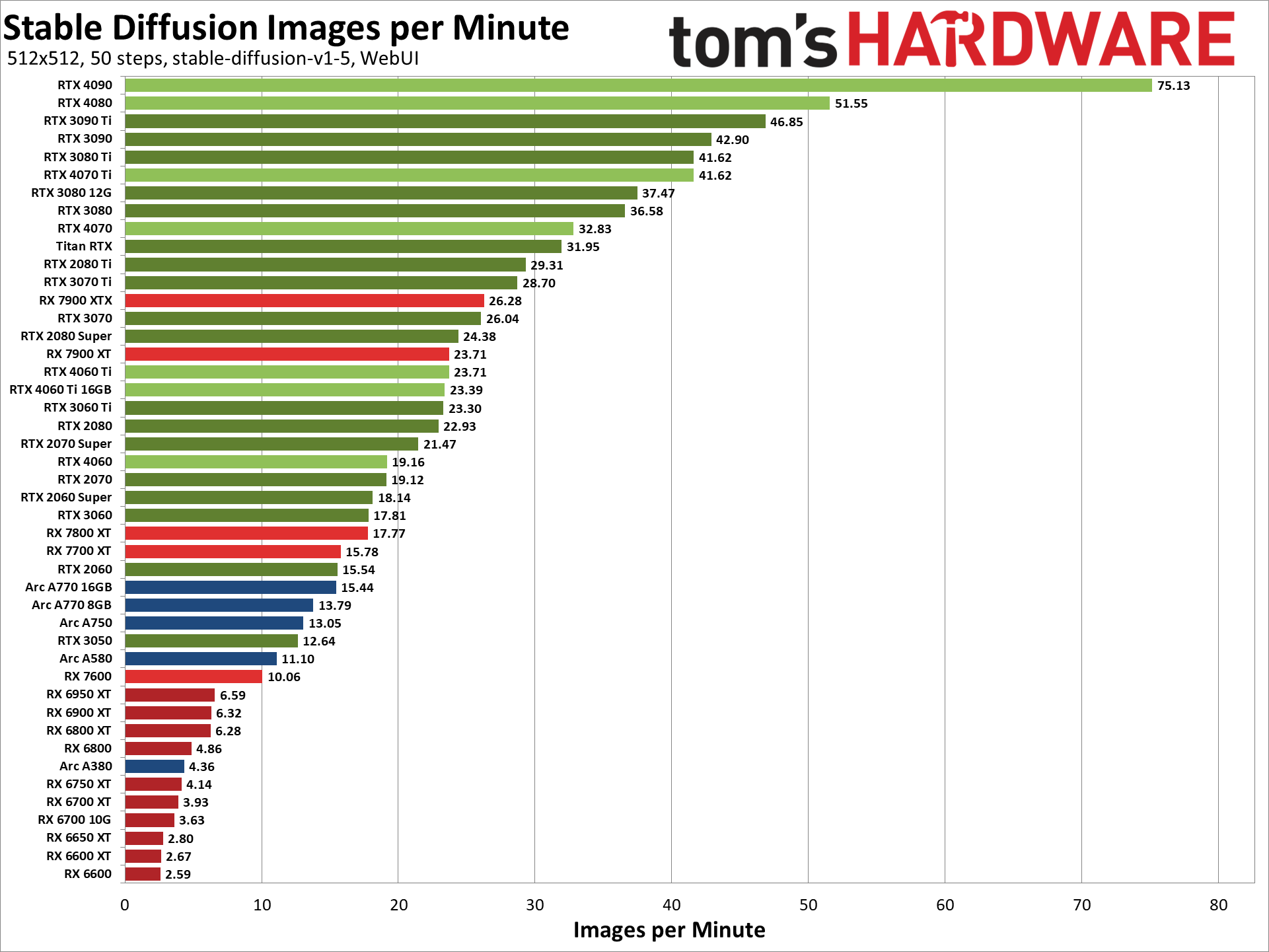
 rotund lava
grand fable
based on this it looks the 4070 12gb has better score than 4060 Ti 16gb, how is ...
rotund lava
grand fable
based on this it looks the 4070 12gb has better score than 4060 Ti 16gb, how is ...
128 bit bus memory on the 4060 plus more cuda cores
ornate elk
grand fable
thank you for that extensive answer 🙂 so basicaly nvidia RTX 3xxx or 4xxx with ...
Noteworthy is that rtx30 cards have a higher energy consumption than the rtx40 generation.
For CPU go for 4 cores or 6, CPUs aren't that expensive (AMD Ryzen 5 5600X for AM4, or Ryzen 5 7500F for AM5 platform (newer).
AMD CPUs mostly consume less power than Intel ones and with AM5 Mainboard you can upgrade the CPU without changing the Mainboard until 2026.
vocal burrow
not much to add on my side
grand fable
ok so AMD is the way for CPU. Is it just for the power consumption? Or are there some other differencies?
re. the GPU is it worthy to go for the more expensive 4070 or 4060?
umbral plover
Is there any equivalent of styles.csv from a1111 in comfyui?
woven smelt
ornate elk
Maybe, I've got a similar issue the last days
I managed to reproduce it. If I have a prompt of "multicolored hair with highlights" it goes balck. changed to "multicolored hair, hair highlights" and its ok
ornate elk
woven smelt
I managed to reproduce it. If I have a prompt of "multicolored hair with highlig...
Okay very strange, so Its something with to much words or tokens without separation
woven smelt
something like that
ornate elk
grand fable
ok so AMD is the way for CPU. Is it just for the power consumption? Or are there...
SD doesn't care about the CPU that much. But its good for the system in general to have a good CPU. And less power consumption is always a big plus if you for example generate images the whole night
 karmic crown
grand fable
Hi, could you give me some tips about what HW is best to buy in order to use SD?...
karmic crown
grand fable
Hi, could you give me some tips about what HW is best to buy in order to use SD?...
1660 SUPER is not bad for gaming but is not good for stable diffusion. my son has it in his PC, so I guess it is better to buy 10xx than this (at least for SD). I have two Macs, and they are also slow
but 30xx or 40xx is the safe way
even laptop with something like 3070 should be usable
languid ledge
ornate elk
Okay delete the reactor extension from the extensions folder and then delete the...
the whole file?
i mean like whole venv file?
zealous cargo
karmic crown
1660 SUPER is not bad for gaming but is not good for stable diffusion. my son ha...
yea for my 1650 it takes 30 seconds to 3 minutes or more sometimes
 mighty hare
hey so ive downloaded A1111, and the images it's pooping out are really. well just not great
languid ledge
venv "C:\Stable Diffusion\stable-diffusion-webui\venv\Scripts\Python.exe"
Python 3.10.6 (tags/v3.10.6:9c7b4bd, Aug 1 2022, 21:53:49) [MSC v.1932 64 bit (AMD64)]
Version: v1.5.1
Commit hash: 68f336bd994bed5442ad95bad6b6ad5564a5409a
Launching Web UI with arguments: --lowvram --xformers --no-half --no-half-vae
Traceback (most recent call last):
File "C:\Stable Diffusion\stable-diffusion-webui\launch.py", line 39, in <module>
main()
File "C:\Stable Diffusion\stable-diffusion-webui\launch.py", line 35, in main
start()
File "C:\Stable Diffusion\stable-diffusion-webui\modules\launch_utils.py", line 390, in start
import webui
File "C:\Stable Diffusion\stable-diffusion-webui\webui.py", line 44, in <module>
import gradio # noqa: F401
File "C:\Stable Diffusion\stable-diffusion-webui\venv\lib\site-packages\gradio_init_.py", line 3, in <module>
import gradio.components as components
File "C:\Stable Diffusion\stable-diffusion-webui\venv\lib\site-packages\gradio\components.py", line 55, in <module>
from gradio import processing_utils, utils
File "C:\Stable Diffusion\stable-diffusion-webui\venv\lib\site-packages\gradio\utils.py", line 339, in <module>
class AsyncRequest:
File "C:\Stable Diffusion\stable-diffusion-webui\venv\lib\site-packages\gradio\utils.py", line 358, in AsyncRequest
client = httpx.AsyncClient()
File "C:\Stable Diffusion\stable-diffusion-webui\venv\lib\site-packages\httpx_client.py", line 1397, in init
self._transport = self._init_transport(
File "C:\Stable Diffusion\stable-diffusion-webui\venv\lib\site-packages\httpx_client.py", line 1445, in _init_transport
return AsyncHTTPTransport(
File "C:\Stable Diffusion\stable-diffusion-webui\venv\lib\site-packages\httpx_transports\default.py", line 275, in init
self._pool = httpcore.AsyncConnectionPool(
TypeError: AsyncConnectionPool.init() got an unexpected keyword argument 'socket_options'
Press any key to continue . . .
when i try to open sd again when delete the whole venv folder
zealous cargo
why did you delete venv?
karmic crown
languid ledge
venv "C:\Stable Diffusion\stable-diffusion-webui\venv\Scripts\Python.exe"
Python...
Version: v1.5.1
your a1111 is outdated
my advice for you, rename your current folder as sd-backup for example
install it from scratch using te guide from pinned messages of this channel
(you have amd and nvidia guides there)
move your models from backup to new installation
mighty hare
why do my photos look like they are from dall e mini lmao
they are really poorly generated and i dont know what to do
im using models, im copying prompts from prompt hero and they look like garbage compared to the photos
languid ledge
zealous cargo
why did you delete venv?
cs10 told me to
mighty hare
mighty hare
im using models, im copying prompts from prompt hero and they look like garbage ...
can someone help please
mighty hare
i have downloaded many models and all of them produce bad results
i downloaded sdxl 1.0, that looked bad
languid ledge
karmic crown
Version: v1.5.1
your a1111 is outdated
how to update
solemn moon
mighty hare
i downloaded sdxl 1.0, that looked bad
Do you have VAE SDXL? Took me long to realize you need the right VAE too
mighty hare
whats that
karmic crown
languid ledge
how to update
update from 1.5.1 to 1.7.0 can be problematic, so i suggest:
- backup
- new install
- restore models from backup
languid ledge
ah fk.
mighty hare
i hate this so much, theres no instructions for this, just have to ask people haha
solemn moon
mighty hare
i hate this so much, theres no instructions for this, just have to ask people ha...
And wait bruh
karmic crown
languid ledge
ah fk.
some old extensions can cause problems, so this is usually faster than solving issues with old extensions
but you can try to upgrade if you want, but i would not recommend that path
mighty hare
how do i set the vae?
solemn moon
mighty hare
how do i set the vae?
Google how to add VAE shortcut to main menu or something
karmic crown
mighty hare
how do i set the vae?
go to setting, find user interface, than user inteface again
solemn moon
Bro I had this problem for so long lol
ornate elk
languid ledge
i mean like whole venv file?
Yes
solemn moon
ornate elk
Yes
This is like kicking it to get it started for me 😂
karmic crown
karmic crown
go to setting, find user interface, than user inteface again

and add those
 lost crescent
mighty hare
i downloaded sdxl 1.0, that looked bad
lost crescent
mighty hare
i downloaded sdxl 1.0, that looked bad
Best SDXL Models include CounterfeitXL, DynavisionXL, NightvisionXL and UnstableDiffusersXL
mighty hare
solemn moon
Google how to add VAE shortcut to main menu or something
i use automatic1111
solemn moon
Me too
karmic crown
mighty hare
i use automatic1111
 solemn moon
karmic crown
solemn moon
karmic crown
Or this
karmic crown
 solemn moon
GitHub
I've seen in various screenshots that there's supposed to be a dropdown selector for the VAE on the txt2img tab. Is there a setting to enable this or has it been removed?
Maybe that
ornate elk
languid ledge
venv "C:\Stable Diffusion\stable-diffusion-webui\venv\Scripts\Python.exe"
Python...
Your webui is outdated
languid ledge
ornate elk
Your webui is outdated
do i reinstal
mighty hare
solemn moon
https://github.com/AUTOMATIC1111/stable-diffusion-webui/discussions/9703
where do i find the dropdown?
and where do i put the vae file
mighty hare
theres nothing on the left hand side
languid ledge
solemn moon
<@1005734284667125823>
--update?
mighty hare
is this right?
 languid ledge
how do i even do that
solemn moon
Ahhh git pull
languid ledge
it just auto types when i start
karmic crown
ornate elk
Git pull
i am afraid that some extensions will make a problem, and in the end new install will be probably faster
fair oxide
ornate elk
The folders should work. Is your webui updated? Also make sure the webui is whit...
My webui should be updated, and I don't use adblock, are there any other reasons this may be happening???
 fair oxide
My webui should be updated, and I don't use adblock, are there any other reasons...
fair oxide
fair oxide
My webui should be updated, and I don't use adblock, are there any other reasons...
I reeeaallly want my stuff organized because I have a lot of loras
solemn moon
@echo off
set PYTHON="C:\Users\88\AppData\Local\Programs\Python\Python310\python.exe"
set GIT=
set VENV_DIR=
set COMMANDLINE_ARGS= --xformers --precision full --no-half --lowvram --opt-split-attention --always-batch-cond-uncond --api
git pull
call webui.bat
mighty hare
how do i set the vae
solemn moon
dont use my command line args
languid ledge
its just git pull right
solemn moon
mighty hare
how do i set the vae
dwnld and place in VAE folder and restart '
solemn moon
languid ledge
its just git pull right
yea
ornate elk
fair oxide
My webui should be updated, and I don't use adblock, are there any other reasons...
Can you show an example of the folder and the webui?
 karmic crown
languid ledge
its just git pull right
karmic crown
languid ledge
its just git pull right
if you manage to start webui after update without crash, you will probably be fine, but as soon as it stars go to extensions tab and update all extensions
mighty hare
my prompt was "dog, realistic"
solemn moon
bro screen shot yr whole setup
languid ledge
yea no
mighty hare
 languid ledge
oh i forgot to type space
mighty hare

 solemn moon
dont see refiner bar vae
 languid ledge
solemn moon
languid ledge
solemn moon
damn wtf why ur ui like that
solemn moon
see on the left "SD VAE"
solemn moon
languid ledge
damn wtf why ur ui like that
gang shit bruv
languid ledge
 solemn moon
weird
mighty hare
there we go, i got it showing up
solemn moon
yeeaaa
mighty hare
 languid ledge
ah i got it
languid ledge

solemn moon
SDXL was trained on minimum 1024 images (i could be corrected)
change width and height
solemn moon
also 30 steps for that sampling mathod works best
ornate elk
mighty hare
Sdxl models need a 1024x1024 resolution
solemn moon
imho
mighty hare
ornate elk
Sdxl models need a 1024x1024 resolution
why isnt any of this like
made obvious
ornate elk
solemn moon
@echo off
set PYTHON="C:\Users\88\AppData\Local\Programs\Python\Python310\pytho...
What's your GPU?
mighty hare
dogwater dookie
solemn moon
everytime a senior has suggested something else it fails
languid ledge
yo shesh stable diffusion look so different
solemn moon
this worls to point its saved in my dropbox
ornate elk
languid ledge
yo shesh stable diffusion look so different <:kekw:874597913127428146>
Dont forget to update the extensions
And then restart
languid ledge
ornate elk
Dont forget to update the extensions
oke 
fair oxide
ornate elk
Can you show an example of the folder and the webui?
Yeah one sec
fair oxide
ornate elk
Can you show an example of the folder and the webui?
does this work for SD???
 ornate elk
solemn moon
1660ti
ornate elk
solemn moon
1660ti
Why --precision full and --lowvram and not --medvram
ornate elk
fair oxide
does this work for SD???
Click on lora tab
fair oxide
my lora folder
 fair oxide
ornate elk
Click on lora tab
fair oxide
ornate elk
Click on lora tab
and wheni click on a directory, this is my faves

but there should be at least 50 loras in this folder and when i check there it, but it doesnt show up on sd??
solemn moon
ornate elk
Why --precision full and --lowvram and not --medvram
changed it, didnt work, went by what Aryetis suggested once, and then someone else cant remember but it kept crashing
oh shit
code bro request
remote agate
ornate elk
Is the model 2.1 based or 1.5 based ?
1.5 stable diffusion
fair oxide

 solemn moon
can Automatic get the same setup as comfy when setting how many pictures you want, increase batch size on Auto and VRAM fails, click generate 20 times on comfuy and you get 20 images.. just something i noticed
languid ledge
*** Error completing request
*** Arguments: ('', 'https://github.com/Gourieff/sd-webui-reactor?tab=readme-ov-file', '') {}
Traceback (most recent call last):
File "C:\Stable Diffusion\stable-diffusion-webui\modules\call_queue.py", line 57, in f
res = list(func(*args, **kwargs))
File "C:\Stable Diffusion\stable-diffusion-webui\modules\ui_extensions.py", line 641, in <lambda>
fn=modules.ui.wrap_gradio_call(lambda *args: [gr.update(), *install_extension_from_url(*args)], extra_outputs=[gr.update(), gr.update()]),
File "C:\Stable Diffusion\stable-diffusion-webui\modules\ui_extensions.py", line 369, in install_extension_from_url
with git.Repo.clone_from(url, tmpdir, filter=['blob:none']) as repo:
File "C:\Stable Diffusion\stable-diffusion-webui\venv\lib\site-packages\git\repo\base.py", line 1327, in clone_from
return cls._clone(
File "C:\Stable Diffusion\stable-diffusion-webui\venv\lib\site-packages\git\repo\base.py", line 1236, in _clone
finalize_process(proc, stderr=stderr)
File "C:\Stable Diffusion\stable-diffusion-webui\venv\lib\site-packages\git\util.py", line 419, in finalize_process
proc.wait(**kwargs)
File "C:\Stable Diffusion\stable-diffusion-webui\venv\lib\site-packages\git\cmd.py", line 604, in wait
raise GitCommandError(remove_password_if_present(self.args), status, errstr)
git.exc.GitCommandError: Cmd('git') failed due to: exit code(128)
cmdline: git clone -v --filter=blob:none -- https://github.com/Gourieff/sd-webui-reactor?tab=readme-ov-file C:\Stable Diffusion\stable-diffusion-webui\tmp\sd-webui-reactor?tab=readme-ov-file
stderr: 'fatal: could not create work tree dir 'C:\Stable Diffusion\stable-diffusion-webui\tmp\sd-webui-reactor?tab=readme-ov-file': Invalid argument
'
still error i guess

fair oxide
ornate elk
I see more .json than .safetensor files there
whats the difference btw
languid ledge
did install visual studio incorrectly
ornate elk
fair oxide
so what do i do
You sort the folder for filetype and check how many .safetensors are in there
fair oxide
ah, 1012 loras in my character folder btw
fair oxide
ornate elk
You sort the folder for filetype and check how many .safetensors are in there
hmmm alright
solemn moon
ornate elk
Why --precision full and --lowvram and not --medvram
believe it or not, i get 1984x1984 but after like 6hrs lol, dunno, it works, glitch mebe
fair oxide
ornate elk
You sort the folder for filetype and check how many .safetensors are in there
so a majority of them, about 70% seem to be json files
but a lot of those still work like loras
ornate elk
solemn moon
believe it or not, i get 1984x1984 but after like 6hrs lol, dunno, it works, gli...
Remove --precision full and try --medvram
Should be faster
fair oxide
there are safetensor files not popping up and json files popping up
solemn moon
ill try that thanks 
fair oxide
ornate elk
You sort the folder for filetype and check how many .safetensors are in there
what do i do after that 👁️
languid ledge
languid ledge
*** Error completing request
*** Arguments: ('', 'https://github.com/Gourieff/sd...
bump
solemn moon
languid ledge
*** Error completing request
*** Arguments: ('', 'https://github.com/Gourieff/sd...
need a screen shot of what you trying, or delete venv folder
karmic crown
languid ledge
*** Error completing request
*** Arguments: ('', 'https://github.com/Gourieff/sd...
i was afraid that that will happen. that's why i said it is better to reinstall and move models 🤷🏻♂️
languid ledge
solemn moon
need a screen shot of what you trying, or delete venv folder
trying to install reactor
solemn moon
karmic crown
i was afraid that that will happen. that's why i said it is better to reinstall...
or this
hmm
reactor with what model
karmic crown
if you had working v1.6.0 or v1.6.1 i would not recommend reinstall, but with 1.5.1... 😦
solemn moon
always update wtf brrrroooo
karmic crown
solemn moon
reactor with what model
i think he is trying to install/update it
solemn moon
also check drivers, i learnt that the hard way, why "nvidea driver update" doesnt pop up but "one drive startup" does is beyond me
solemn moon
languid ledge
trying to install reactor
so much fun btw
fair oxide
solemn moon
also check drivers, i learnt that the hard way, why "nvidea driver update" doesn...
OH HELP ME
how do i update drivers
ive had this computer for like 3 years but like
ive never found the drivers
languid ledge
solemn moon
also check drivers, i learnt that the hard way, why "nvidea driver update" doesn...
are you talking to me or?
fair oxide
im technodumb
solemn moon
languid ledge
are you talking to me or?
ya
solemn moon
fair oxide
~~im technodumb~~
same boat ,\happy to share
languid ledge
how do i update too
 solemn moon
press windows key, type "nvidea" then update drivers
solemn moon
languid ledge
are you talking to me or?
wont DM sorry bruv
 languid ledge
is aight
fair oxide
solemn moon
wont DM sorry bruv
ah rip, i was actually gonna send a friend request loooool you seem cool
solemn moon
fair oxide
???
shit guys maybe we shouldnt listen to me idk wtf that is lol
fair oxide
bro i dont know 😭
languid ledge
i think i know
fair oxide
this is deadass just my luck with tech
languid ledge
but its very troublesome
solemn moon
fair oxide
ah rip, i was actually gonna send a friend request loooool you seem cool
strict sec measures no hard felz
fair oxide
i dont understand it at all 😭
fair oxide
solemn moon
strict sec measures no hard felz
nah i get it, internet is a wild place man
fair oxide
💀
solemn moon
this is what i get
 remote agate
1.5 stable diffusion
remote agate
remote agate
1.5 stable diffusion
Genuinely, it's quite strange because initially, it generates the images in a very similar way, but when pressing "generate" again, it creates images with very ugly artifacts, and if I keep doing that, stains appear
languid ledge
guess i can't use reactor 
solemn moon
go to extentions
look for reactor
download
update
delete venv just incasies \
restert
then see it at the bottom of yr web.ui interface
languid ledge
do i have to go available or install from link
solemn moon
let me look
i wouldve googled
then wouldve ended up here

GitHub
Fast and Simple Face Swap Extension for StableDiffusion WebUI (A1111, SD.Next, Cagliostro) - GitHub - Gourieff/sd-webui-reactor: Fast and Simple Face Swap Extension for StableDiffusion WebUI (A1111...
lol
should be at the bottom of yr interface
 languid ledge
yea but it doesn't even let me install


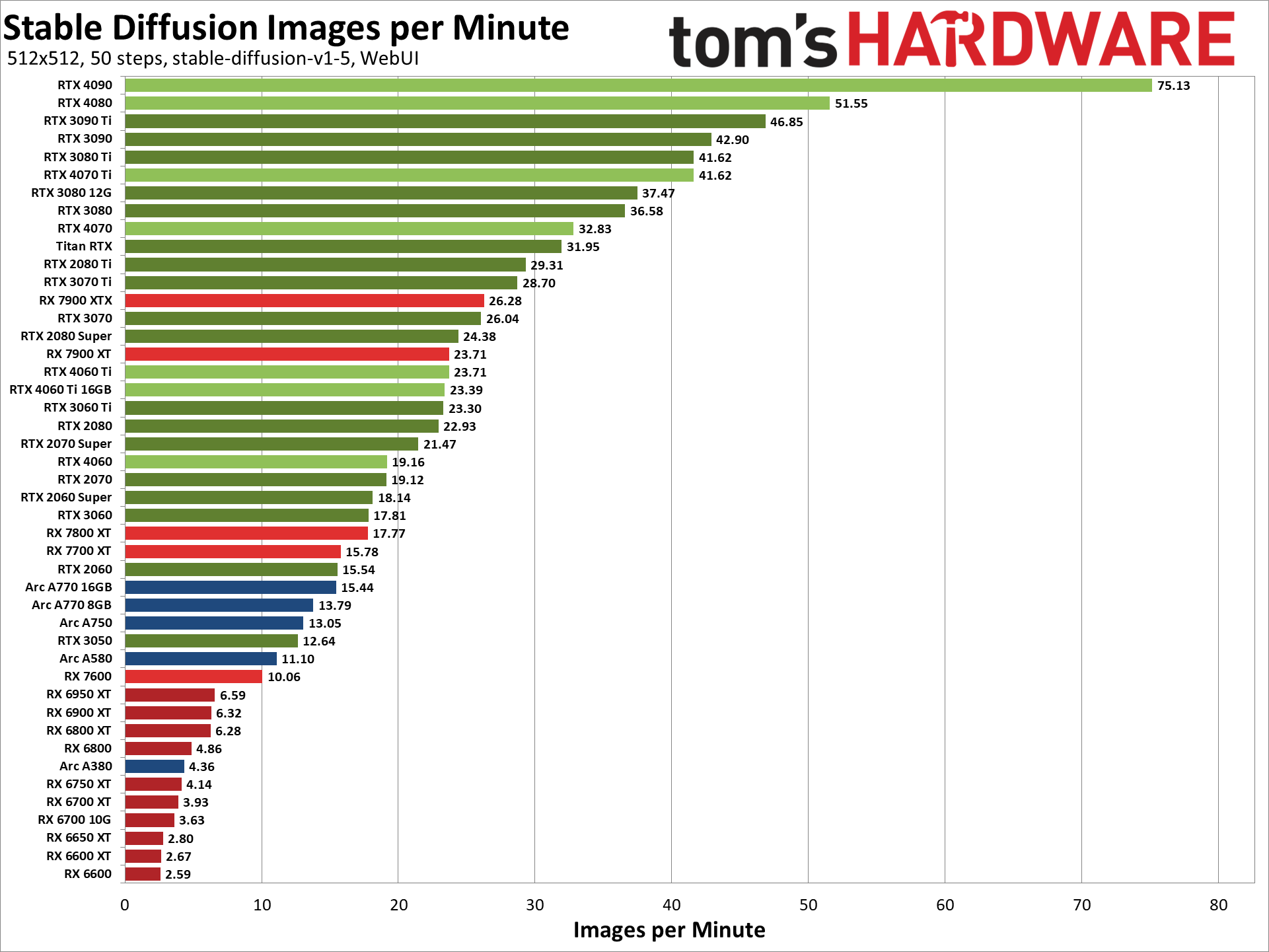
 ember venture
I had Auto1111 running on Linux on an old Tesla M40-12GB I got for cheap until last week, now it says it doesn't detect any HIP capable GPUs and I get errors I don't understand. Is this the kind of problem I can ask about here?
solemn moon
languid ledge
yea but it doesn't even let me install <:kekw:874597913127428146>

GitHub
Fast and Simple Face Swap Extension for StableDiffusion WebUI (A1111, SD.Next, Cagliostro) - GitHub - Gourieff/sd-webui-reactor: Fast and Simple Face Swap Extension for StableDiffusion WebUI (A1111...
languid ledge
yea i did that
solemn moon
make sure git pull is on, delete venv, maybe check extensions, restart

my extensions shows it
yrs?
languid ledge
how do you change ur ui btw
solemn moon
oh ya, you have to post any new works created as a result of support by me, just fyi
languid ledge
it looks very cool
languid ledge
solemn moon
oh ya, you have to post any new works created as a result of support by me, just...

its not worth it
trust me
solemn moon
i get a thrill everytime, reason i stopped using comfy was cause no lobe theme bruh
lobe for lyf
languid ledge
does it slows down ur sd 
karmic crown
languid ledge
does it slows down ur sd <:thinkies:1013540050761429053>
if you managed to update webui, and it working, do not forget to update all extensions (if you haven't already)
languid ledge
karmic crown
if you managed to update webui, and it working, do not forget to update all exte...
yea i did thank you 
thank you all for helping
karmic crown
i saw a few cases when updating and fixing extensions actually took too much effort and time, that's the only reason i suggest reinstall 🤷🏻♂️
proper pike
fair oxide
my lora folder
How come my lora folder doesn't show the images like yours?
fair oxide
proper pike
How come my lora folder doesn't show the images like yours?
no idea tbh
im still trying to figure out my own lora issues 😭
ornate elk
I can help everyone if I'm at home
ornate elk
fair oxide
im still trying to figure out my own lora issues 😭
Is your webui updated?
ornate elk
languid ledge
it worked when i download from available
So reactor works now?
languid ledge
ornate elk
So reactor works now?
didn't try yet I have to go to sleep I'll lyk tmr
ornate elk
languid ledge
didn't try yet I have to go to sleep I'll lyk tmr <:happycat:1068172327470243910...
Alright
ember venture
had Auto1111 running on Linux on an old Tesla M40-12GB I got for cheap until last week, now it says it doesn't detect any HIP capable GPUs. All the help I can find for this problem is about AMD systems
split sorrel
Hello, what should I do to fix this error? I get it while using hires. fix :--- RuntimeError: Could not allocate tensor with 1073741824 bytes. There is not enough GPU video memory available!
ember venture
That probably means the settings you're asking for are demanding more memory than you have. If you know you have more than enough memory there is something else wrong though
lost crescent
A1111 used to change model quite rapidly. Now, change the model, and it spends 10 minutes making a yaml file!!!! Why, what's changed at all?
 snow lance
any linux users here have a preference for which nvidia drivers work best now?
535 still the way to go?
ember venture
I think the latest version of Auto1111 broke on my Linux, but I find SDNext is working, sort of. I may need to tune it but at least it's running
remote agate
remote agate
Genuinely, it's quite strange because initially, it generates the images in a ve...
@ornate elk What could be the cause of the problem? I'm not referring to minor differences in the image in question; I mean it undergoes a very aggressive change and starts distorting completely to a point where it looks awful.
cloud topaz
hey guys! any idea why the manager isnt showing up? i installed the custom node

 ember venture
SDNext works for me where Auto1111 fails. Took some dialing in but it's running well now. I guess I don't have a problem anymore
ornate elk
split sorrel
Hello, what should I do to fix this error? I get it while using hires. fix :-...
What are your txt2img settings?
ornate elk
remote agate
<@161910921269084160> What could be the cause of the problem? I'm not referring ...
Can you generate an image again with that issue?
little echo
ornate elk
Yea every lora that isn't compatible with the model will not be shown as 1.5 and...
you say it may not be generated if its unknown, then in what regard will the output will still change? it will try to guess?
is there a way to extract the safetensors to find out the tags coded into them? (actually i am referring morever to how tags are used by the SF models not specifically loras)
 covert fox
Need help, How to solve this?
 ornate elk
covert fox
Need help, How to solve this?
ornate elk
covert fox
Need help, How to solve this?
make sure your webui is updated
and redownload the loras
remote agate
ornate elk
Can you generate an image again with that issue?
After testing with some scripts, the one that solved the problem was... "--no-half", although I'm not so sure what it does, what is this line of code supposed to do?
ornate elk
remote agate
After testing with some scripts, the one that solved the problem was... "--no-ha...
its a line needed for gtx 16xx gpus, it will load models with half precision, that makes it a lot slower in generation
remote agate
ornate elk
its a line needed for gtx 16xx gpus, it will load models with half precision, th...
It's strange, because my gpu is rtx 3060
ornate elk
remote agate
It's strange, because my gpu is rtx 3060
then you shouldnt use it
better is to use --xformers --no-half-vae
remote agate
ornate elk
better is to use --xformers --no-half-vae
I'll try it and see if it solves the problem.
remote agate
ornate elk
better is to use --xformers --no-half-vae
well it actually fixes the problem temporarily, when I reload the image it generates errors.
ornate elk
remote agate
well it actually fixes the problem temporarily, when I reload the image it gener...
can you show me the errors?
remote agate
ornate elk
can you show me the errors?
 umbral plover
Hi, when I'm trying to use face restoration in comfyUI i get following error, not sure why tho (Custom node mav-rik Facerestore CF (Code Former))
//edit when i ungrouped nodes (loader and restorer) it started working (wtf)
remote agate
ornate elk
what does the cmd shows?
 ornate elk
remote agate
ornate elk
remote agate
so the thrid images comes out deformed?
and you changed nothing?
is your webui updated?
remote agate
ornate elk
is your webui updated?
I installed it yesterday, so, yes
ornate elk
remote agate
I installed it yesterday, so, yes
okay, and you generate 3 images and changed nothing between them?
seed was -1 ?
or what did you tried ?