#🤝|tech-support
1 messages · Page 20 of 1
 willow zodiac
In the upper right corner, there is a thumbtack looking icon. If you click that, probably the second item on the list will be a step by step to install for Nvidia GPUs. Follow that and you will get there.
I'm pretty new here, but there are others that can generally help if you run into something sticky
 thorn goblet
thanl yopu ever so kiondly
is this an issue

i logged in now should i just rerun it
willow zodiac
You are missing the "t" at the end of the string, it should be "git"
thorn goblet
i dont mean for you to hold my hand im sorry
so after this- then what?
where do i edit the webui-user.bat
willow zodiac
right click and then edit it. You can edit it in Notepad, for example
thorn goblet
wheredo i find that file
willow zodiac
the folder will be named "stable-diffusion-webui". The file will be in there if the git repository downloaded correctly
I'm checking out. Hopefully someone else will be around. They will almost undoubtably be more knowledgeable than me.
thorn goblet
well youve been the only ome to reply, i hope someone else would pick up your burden for my sake\
im sorry to bother you so im just so... gone right now
i cant say sober me would be any better at understanding...
i really appreiate your patience
thorn goblet
i think i got it! ill need a little direction as to generating images with prompts and all that but i figure i can grab that within my community and all that
thank you again,i truly appreciate it
 ornate elk
What's your GPU? And you shouldn't use xformers together with opt-sdp-attention, as the webui can only use one of them.
Also --no-half is only needed for GTX 16xx cards
Hey, do you have a screenshot of the full cmd log with the error?
Because the file name should be .yaml and yours is .yml
thorn goblet
it closed and i dunno how to reopen it....
ornate elk
thorn goblet
it closed and i dunno how to reopen it....
Launch the webui-user.bat
 grand fable
Hi, I'm adding some info - the Macbook has 16GB of RAM, the workflow in ComfyUI is the default one without any changes, the cat on bicycle with sunset and countryside was made in 457 seconds, the cat was done in 372 seconds, both in 1024x1024px, SD XL base model. Attaching the Activity monitor screenshot from the time it was doing the cat.


 honest tangle
Hi! Can anyone help with an issue? Yesterday all ve been fine/
NansException: A tensor with all NaNs was produced in Unet. This could be either because there's not enough precision to represent the picture, or because your video card does not support half type. Try setting the "Upcast cross attention layer to float32" option in Settings > Stable Diffusion or using the --no-half commandline argument to fix this. Use --disable-nan-check commandline argument to disable this check.
runnung img2img nothing helps
honest tangle
upd: it blowed away after hitting reload ui button in settings
ornate elk
honest tangle
Hi! Can anyone help with an issue? Yesterday all ve been fine/
NansException: A ...
Hey, what's your GPU and what's inside your webui-user.bat?
 hot spindle
Hi, anyone have any idea if this is serious? On luch get a warning: ControlNet init warning: Unable to install insightface automatically. Please try run pip install insightface manually.
Whenever I try to manually install it get another warning:
DEPRECATION: torchsde 0.2.5 has a non-standard dependency specifier numpy>=1.19.*; python_version >= "3.7". pip 24.0 will enforce this behaviour change. A possible replacement is to upgrade to a newer version of torchsde or contact the author to suggest that they release a version with a conforming dependency specifiers. Discussion can be found at https://github.com/pypa/pip/issues/12063
GitHub
Towards #11715 What is changing pip has historically allowed many arbitrary strings as versions and version specifiers. Going forward, all versions and version specifiers will need to conform to PE...
Somehwere I cant figure out there's a mispelled dependency: numpy>=1.19.* when it should be numpy>=1.19 but cant figure out where to edit it
Solved, there's a 0.2.6 version , forced install that
hot spindle
Actually was going the wrong way, using nigthly build of Torch (diferent venv) was just: venv-torch-nightly/bin/pip install insightface
 karmic crown
hot spindle
Actually was going the wrong way, using nigthly build of Torch (diferent venv) w...
karmic crown
hot spindle
Actually was going the wrong way, using nigthly build of Torch (diferent venv) w...
do you have this version?
 hot spindle
1.1.430
karmic crown
even better
some older versions had errors on mac (especially with IP adapter)
i hope that will fix your controlnet issues you mentioned before
also, be sure that you use appropriate controlnet model corresponding to your base model (XL with XL base models, 1.5 with 1.5 base models)
hot spindle
I don't think I have real issues, but I was wondering if you need an inpaint Controlnet to use for instance on a inpaint on an image while using canny reference from another , meaning: inpaint a canny controlnet from a diferent image
karmic crown
hot spindle
I don't think I have real issues, but I was wondering if you need an inpaint Con...
ask this in #📝|prompting-help and you should get an answer
hot spindle
I will, too many things to try and work to do, do you happen to know why I cant find the sampling method on that Photoshop SD plug in?
Should be in main panel but cant find:
 karmic crown
i am actually a relatively new user (about 2 months), but i am reading and experimenting a lot. unfortunately, i haven't try that one yet since i do not have PS installed on M1 at this moment, but i will
hot spindle
ok, tks, will try github
helpfull as usual, thanks a lot 👍
BTW: should TurboSDXL use SDXL Controlnet models?
 hot spindle
I did
Its a viewr, Cotrolnet, Horde (extrenal render) and settings for ConfyUI/A1111
extras is upscale
karmic crown
hot spindle
BTW: should TurboSDXL use SDXL Controlnet models?
i am almost sure it should be SDXL
but i emphasize ALMOST 🙂

have you tried to scroll down? there is a scroller on the right
i guess you did

as i said, you have a button bellow 🙂

 calm cairn
tried a Samus Aran prompt in SDXL and got this--what is going on here? This is more than the wrong VAE right?

I've had similar errors in all my XL models so I'm hoping someone here knows what's happening
hot spindle
wrong size?If you use less than 1024 in SDXL that kind of stuff happens
calm cairn
oh wow ty
 rotund lava
no,thats a vae issue,you probably using a 1.5 vae on sdxl
calm cairn
I had no idea there was a specific VAE for XL, will switch that too thanks
rotund lava
you could also try to set vae to none because some models already have a baked vae
karmic crown
as far as i know, we only have 2 VAEs for SDXL
those two
https://huggingface.co/stabilityai/stable-diffusion-xl-base-1.0/tree/main
https://civitai.com/models/152040/xlvaec?modelVersionId=264491
・実験的VAE ・エンコーダーは調整していません ・画像にRefinerは使用していません ・NansException
karmic crown
rotund lava
you could also try to set vae to none because some models already have a baked v...
i agree, but automatic should also work fine for those
ornate elk
karmic crown
i agree, but automatic should also work fine for those
Automatic uses None if there isn't a VAE with the same name like the model in the models folder
karmic crown
exactly, i just didn't want to go into those deails 🙂
 reef patio
Hi, does anyone know/have working solution on how to batch upscale with esrgan model?
hot spindle
ChaiNNer?Easy batch upscale, only downside i you can't choose intermedite upscales
4x models will do 4x...no way to choose 2x
reef patio
well, i want to pass my dataset through jpeg remover esrgan model, which does 1x upscale 
ah, got it, gott try that one
hot spindle
It does support a lot more than just upscale, you'll have to check, the upside is you can convert PyTorch models to specific GPUs like NCNN and the one from NVIDIA I can't remember the name
If it's a "denoiser" it probably can be run from ChaiNNer as well
If it upscales by 1x just use two upscale nodes in tandem
1x isn't upscale though 😁
calm cairn
rotund lava
no,thats a vae issue,you probably using a 1.5 vae on sdxl
removing VAE to "none" did it, ty for advice, will add in XL VAE tonight, thanks
 versed ridge
SafetensorError: Error while deserializing header: MetadataIncompleteBuffer
i get this error when trying to geenrate image
hot spindle
@reef patio Would be something like this, where the first model is the "denoiser"
 versed ridge
can someone help
reef patio
hot spindle
<@349129681238491146> Would be something like this, where the first model is the...
yup, still installing torch
 zealous cargo
ornate elk
What's your GPU? And you shouldn't use xformers together with opt-sdp-attention,...
zealous cargo
ornate elk
What's your GPU? And you shouldn't use xformers together with opt-sdp-attention,...
it's a 1650 card, so i should only go with xformers? and probably -medvram
hot spindle
Just becarefull to use orifinals folderdirectory in image file interator windows and set save to another diferrent folder
If its a subfolder disable "recursive" in window
rotund lava
versed ridge
SafetensorError: Error while deserializing header: MetadataIncompleteBuffer
sounds like a corrupt model,download the model again,select it and try to generate another img with it
versed ridge
rotund lava
sounds like a corrupt model,download the model again,select it and try to genera...
so im gonna delete the folder and download again right? the model i downloaded is Aitrepreneurs one click download btw
 ivory bramble
All my final generations are ending up like this. I did end up installing a bunch of recommended extensions yesterday https://i.imgur.com/z1CT6sP.png

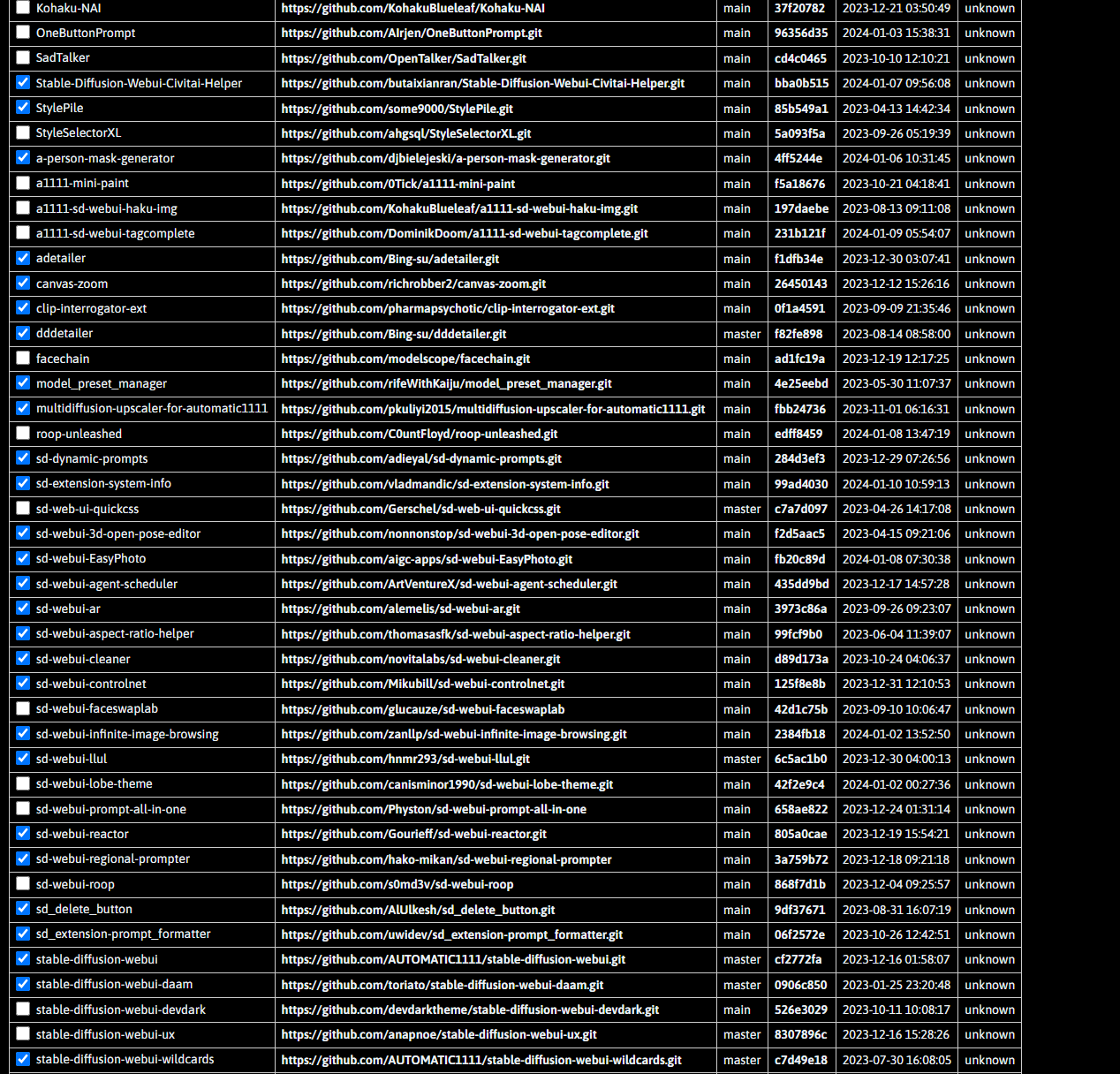
Any reason it might be happening?
rotund lava
versed ridge
so im gonna delete the folder and download again right? the model i downloaded i...
just redownload that model,then select it again from the dropdown list and try to generate another img
ornate elk
reef patio
Hi, does anyone know/have working solution on how to batch upscale with esrgan m...
Img2img SD upscale script
versed ridge
without deleting the folder, I already tried reinstalling bunch of times. I guess I have to uninstall first
ornate elk
zealous cargo
it's a 1650 card, so i should only go with xformers? and probably -medvram
Your GPU needs --xformers --medvram --no-half
reef patio
hot spindle
<@349129681238491146> Would be something like this, where the first model is the...
yup, thanks, works perfectly
karmic crown
ivory bramble
All my final generations are ending up like this. I did end up installing a bunc...
1.5 VAE with SDXL model or CFG set too high
ivory bramble
Oh that might be it, thanks!
rotund lava
versed ridge
without deleting the folder, I already tried reinstalling bunch of times. I gues...
no need to uninstall just delete the single model file
karmic crown
ivory bramble
Oh that might be it, thanks!
do not mix SDXL and 1.5 resources, easy as that 🙂
karmic crown
in that case you can use onlu 2 VAEs
ivory bramble
Version 3.0 of the Realism Engine In this version we improved the skin realism, the eyes. We also improved the Male anatomy. Keep in mind that this...
It was this one
karmic crown
those two
#🤝|tech-support message
ivory bramble
Nsfw if you scroll
versed ridge
rotund lava
no need to uninstall just delete the single model file
These are the files I have im not stable diff expert dont know much what you mean by deleting model? The stable dif webui file?

 ivory bramble
I'm trying with a different model altogether to see if the final result is still like that
karmic crown
versed ridge
These are the files I have im not stable diff expert dont know much what you mea...
find folder with name Models
ivory bramble
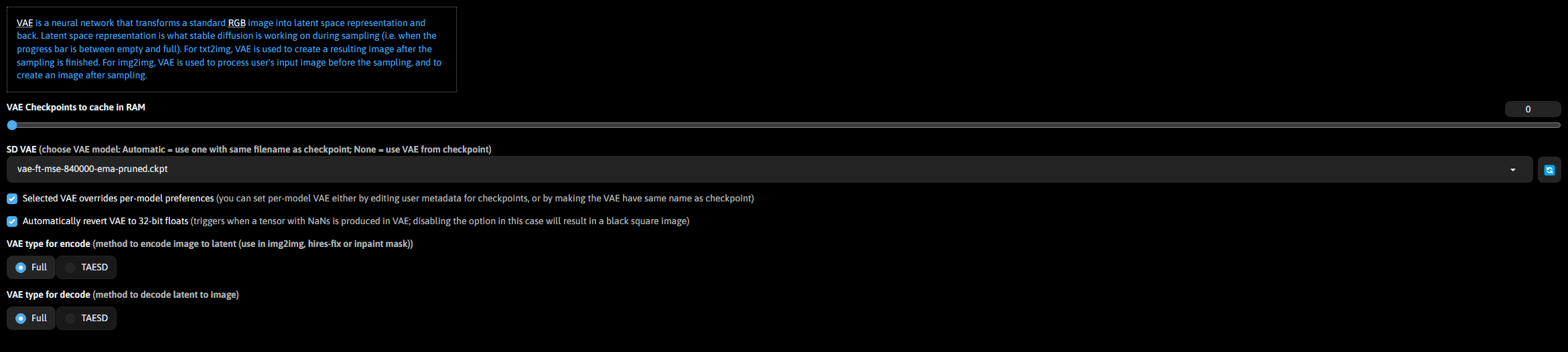
These are my current VAE settings https://i.imgur.com/4lm96PH.png
 versed ridge
karmic crown
find folder with name Models
versed ridge
karmic crown
find folder with name Models
ok. there are bunch of files

 karmic crown
ivory bramble
These are my current VAE settings https://i.imgur.com/4lm96PH.png
karmic crown
ivory bramble
These are my current VAE settings https://i.imgur.com/4lm96PH.png
that is your problem
set that to automatic
versed ridge
karmic crown
and find the one that make problems inside
 ivory bramble
Really? because everything was working fine yesterday until I installed all these extensions...
versed ridge
İ guesd i deletr refiner and go to my one click downlad and install it again
ivory bramble
But this one came out ok on a different model
 karmic crown
that is 1.5 model i guess
ivory bramble
I guess it was the model
ivory bramble
You sure?
karmic crown
 ivory bramble
Ok
zealous cargo
ornate elk
Your GPU needs --xformers --medvram --no-half
i see, but does it affect the performance if i change something under the optimization settings in the web gui? for example, increase token merging ratio?
karmic crown
ivory bramble
Ok
then set this

and reload
than you will have those 3

so you will be able to change it anytime you want
ivory bramble
Ohhh so you can change it at the top now
Ahh thank you so much viking
What theme are you using Viking? I want a plain black one like that
versed ridge
viking the problem solver now may i have your wisdom on the pic I sent?
ivory bramble
versed ridge
viking the problem solver now may i have your wisdom on the pic I sent?
Sorry didn't mean to hijack your help 😄
versed ridge
explain like you explain it to someon who doesnt know a thing
i just want my blender textures dont know anyting abut any of tis
versed ridge
ivory bramble
Sorry didn't mean to hijack your help 😄
.d np bro
karmic crown
just a second guys
versed ridge
ok
karmic crown
remove that one
 versed ridge
Ok after that? What do I do?
 ivory bramble
civitai browser has been a lifesaver, I started using it yesterday
karmic crown
you just put a link from civitai
and it will put everything in a right place for you
so you do not need to guess which folder you need
versed ridge
ok im on my way trying it now
ivory bramble
Model Preset Manager too
 ivory bramble
Ohh I should look at that one
versed ridge
karmic crown
you just put a link from civitai
to do that i open stable diff and download it there right?
karmic crown
versed ridge
ok im on my way trying it now
wait, i will explain
versed ridge
ok im waiting
 versed ridge
uhm wait
it doesnt launch stable diff now its doing an installation
cuz we deleted the file
karmic crown
than in search type
civitai browser+

it downloading default 1.5 base model
let it install it
you can remove that later, but leave it for now
versed ridge
okey
karmic crown
when you find extension, click on install

when it finish, go back to installed tab

and click that button
reef patio
@hot spindle One more question, do you know, does it support proccessing multiple at once? or only one by one?
versed ridge
karmic crown
and click that button
thank you man im gonna try it after the download finish cuz its lookingkinda big
and if a have a problem can I text you?
versed ridge
okey thx
karmic crown
after restarting go to civitai browser tab and pasta link from civitai; for example https://civitai.com/models/84728?modelVersionId=90072
Photon aims to generate photorealistic and visually appealing images effortlessly. Recommendation for generating the first image with Photon: Promp...
click on magnifying glass

click on picture and it will populate those boxes

i have that model, so i have delete model button, but you will get this one

when you click it will donwload model and put it the right folder
it simplifies the downloading of models a lot
versed ridge
so it will fix my bug and make downloading models easier right?
in what way making easier btw
karmic crown
as soon the downloading of base model finish, you will be able to generate images
karmic crown
versed ridge
in what way making easier btw
in "normal" situation you download model, lora, text inversion... and you need to find a proper folder for each of them, since those goes in different folders
but with civitai browser, you just need to paste link from civitai
it will take care that you do not put lora in model folder, or something similar that might make problems later
versed ridge
ok i kinda get it
now just have to wait for this big intall currently on
%25
if it all works out u are a lifesaver i will use this on my blender projects
karmic crown
versed ridge
now just have to wait for this big intall currently on
unfortunately, that is relative
from my perspective, anything below 10GB is not big, since i need 2-3 minutes to download that
but i understand that is a big file for many people
versed ridge
i use portable wi fi for some reasons and it downloads kinda slow
but works good when gaming 👍
karmic crown
than you have a good ping, but not good download speed
versed ridge
yeah just like that
karmic crown
if you have 2.4 and 5GHz enabled on your router, you can try to disable 2.4 and leave only 5GHz (if your computer supports it). that made a big difference at my home, since i have like 20 other routers around (from my neighbors)
but, lets try to stick with SD issues here 🙂
versed ridge
this one doesnt work like a normal wifi. Its more like a phone with hotspot on and it even has sim card like a phone.
versed ridge
karmic crown
but, lets try to stick with SD issues here 🙂
yepp i need that more than everything now .d
ornate elk
zealous cargo
i see, but does it affect the performance if i change something under the optimi...
Yes token merging can increase the performance
But dont change the optimization in general cause with the args in the webui-user.bat your using xformers.
So don't set it to Dogetexx or opt-sdp
karmic crown
ornate elk
Yes token merging can increase the performance
can it make my Mac run as fast as MCurto's 🤣
now seriously, where is that option exactly?
ornate elk
karmic crown
can it make my Mac run as fast as MCurto's 🤣
now seriously, where is that optio...
Its under performance settings. You can also add it to the Quicksettings by adding token merge or token merge ratio there
It can improve the speed but idk how much
 hot spindle
reef patio
<@692760264789065770> One more question, do you know, does it support proccessin...
hot spindle
reef patio
<@692760264789065770> One more question, do you know, does it support proccessin...
I dont know sry
zealous cargo
ornate elk
But dont change the optimization in general cause with the args in the webui-use...
alright
zealous cargo
karmic crown
any advice on ratio?
i've only seen 0.1-0.2 in a optimization video
ornate elk
karmic crown
any advice on ratio?
No clue. But here is the Source:
https://github.com/dbolya/tomesd

GitHub
Speed up Stable Diffusion with this one simple trick! - GitHub - dbolya/tomesd: Speed up Stable Diffusion with this one simple trick!
zealous cargo
and i guess it depends which model and settings you use for prompting
karmic crown
"Even with more than half of the tokens merged (60%!), ToMe for SD still produces images close to the originals, while being 2x faster and using ~5.7x less memory."
so that is 0.6
but i didnt see any diffrence with SDXL turbo on my iMac, i will try later on m1
versed ridge
@karmic crown download done and I can generate image but this is the quality i get. After the things you told me to do will it be fixed?
 karmic crown
go to https://civitai.com/models and find some models you like
Browse from thousands of free Stable Diffusion models, spanning unique anime art styles, immersive 3D renders, stunning photorealism, and more
this one is good for example
https://civitai.com/models/133005/juggernaut-xl?modelVersionId=288982
For business inquires, commercial licensing, custom models, and consultation contact me under juggernaut@rundiffusion.com Update: Try out the Inpai...
versed ridge
oh so I guess im using default model and if i use models that are created for realistic images or other purposes the result will change right?
and civitai makes model downloaing easier
karmic crown
yes
versed ridge
ok im understanding now
karmic crown
for example with this model


and it will download juggernautXL_v8Rundiffusion.safetensors and put it correct folder for you
versed ridge
ok im downloading it
i saw different mothods to download models on internet sites
but is this the method i should be using for downloading models from now?
karmic crown
this is the easiest one
versed ridge
ok one last question
karmic crown
almost forgot one importnat thing
versed ridge
on that website there are so much models. actually all of them. if I want to download a model from there what do I do?
versed ridge
karmic crown
almost forgot one importnat thing
what is that
karmic crown
when you see a image that you like

click on that circled i at the bottom corner

and you will get information what was used to create that image
prompts, cfg, sampler, steps...
versed ridge
uhm wher do I see these images with circled i at the bottom?
 versed ridge
ok ty and where do I see these images tho
karmic crown

and when you click on that arrow it will populate all those things for your, and leave only positive prompt there
on civitai
you have million images there
versed ridge
versed ridge
on that website there are so much models. actually all of them. if I want to dow...
what about it
karmic crown

if you want for example that one
copy address

and paste into civitai browser

like that
 loud shore
please heeeelp, NameError: name 'user_comment' is not defined
versed ridge
karmic crown
and paste into civitai browser
right where i typed jaggurnaut xl right?
karmic crown
versed ridge
right where i typed jaggurnaut xl right?
that is even easier
versed ridge
ty so much man u really did a lot
 versed ridge
someone give this man mod
karmic crown
loud shore
please heeeelp, NameError: name 'user_comment' is not defined
at least post a screenshot, or even better text from cmd
loud shore

 karmic crown
loud shore
karmic crown
loud shore
uh... that is Colab
I am not sure if those work anymore for users without billing
but i might be wrong
loud shore
i have a billing
versed ridge
@karmic crown im waiting on juggernaut xl download now u rly helped a lot today have a great day king. i hope to see you if I have more questions in the future 👑
karmic crown
loud shore
i have a billing
i am relatively new here (about 2 months), but i haven't seen anyone here who was able to help with Colab errors 😦
CS1o and Aryetis help a lot people with Windows, and I am the one who usually helps Mac users, but unfortunately, none of us use Colab 😦
karmic crown
versed ridge
<@916007004823257198> im waiting on juggernaut xl download now u rly helped a l...
for a questions not directly related to installation and problems with installation or errors, it is best to ask in #📝|prompting-help
some people there can help with a lot of things, but some of them usually do not look here
versed ridge
thx i will look up to that
karmic crown
loud shore
i have a billing
my advice for you is to rise an issue on github page of an author of that colab workbook
i am sorry i can't help more 🤷♂️
 kindred tinsel
Hey guys quick question, Chocolatey for npm required to install python 3.12 for some reason on my system and I needed to create a venv for webui again :c (messed ups omething else wiht faceswaplab) but now I don't know how to create the venv with the 3.10 version of python that I have installed.
Any help on how to select the versions or run the specific exe for python 3.10 would be greatly appreciated
ornate elk
kindred tinsel
Any help on how to select the versions or run the specific exe for python 3.10 w...
You have to edit the webui-user.bat
There is a line set Python=
There you set the path to the python.exe of 3.10.X
You get the path with the command
where python
Then you need to delete the venv
kindred tinsel
it worked thanbk you cs !!!!!. God Idek why I have choco in my system, I needed it for one thing, installing dart :c and it installed its own python :c
karmic crown
kindred tinsel
it worked thanbk you cs !!!!!. God Idek why I have choco in my system, I needed ...
 kindred tinsel
lmao csgo 🤤 also yes literally mvp of this chat
 astral comet
Why can't i see the seed in citivai's online generator?

 umbral plover
Hi, didn't been up-to-date for two months - what model/sampler is right now a go to for lowend gpus? Did something change with setting up a1111?
 crimson sail
i dont know why, i didnt change anything i just wantet to boot stable diffusion and i am getting this error every time
 hexed forum
any way to run SD somewhat smoothly on 4gb vram? i have a gtx1650 with 4gb 12gigs or RAM and i5 10th gen on a laptop and a lot of the prompts i was trying to make crashed so now im wondering if there is any way to run it on an external program or website or something similar?
 distant bear
Hello friends, imgtoimg results give results that are irrelevant to input. What do you think is the reason?
for example like this
 umbral plover
distant bear
Hello friends, imgtoimg results give results that are irrelevant to input. What ...
umbral plover
distant bear
Hello friends, imgtoimg results give results that are irrelevant to input. What ...
cfg scale propably?
 umbral plover
try decreasing denoising strength, or use original seed
distant bear
umbral plover
try decreasing denoising strength, or use original seed
original seed means = 0 ?
kindred tinsel
Hi, does anyone know how to fix this issue?
fatal: No names found, cannot describe anything.
*** Error loading script: civitai_gui.py
    Traceback (most recent call last):
      File "C:\Users\santi\Documents\StableDiffusionIDEs\stable-diffusion-webui-directml\modules\scripts.py", line 469, in load_scripts
        script_module = script_loading.load_module(scriptfile.path)
      File "C:\Users\santi\Documents\StableDiffusionIDEs\stable-diffusion-webui-directml\modules\script_loading.py", line 10, in load_module
        module_spec.loader.exec_module(module)
      File "<frozen importlib._bootstrap_external>", line 883, in exec_module
      File "<frozen importlib._bootstrap>", line 241, in _call_with_frames_removed
      File "C:\Users\santi\Documents\StableDiffusionIDEs\stable-diffusion-webui-directml\extensions\sd-civitai-browser-plus\scripts\civitai_gui.py", line 35, in <module>
        ver_bool = version.parse(ver[1:]) >= version.parse("1.7")
      File "C:\Users\santi\Documents\StableDiffusionIDEs\stable-diffusion-webui-directml\venv\lib\site-packages\packaging\version.py", line 54, in parse
        return Version(version)
      File "C:\Users\santi\Documents\StableDiffusionIDEs\stable-diffusion-webui-directml\venv\lib\site-packages\packaging\version.py", line 200, in __init__
        raise InvalidVersion(f"Invalid version: '{version}'")
    packaging.version.InvalidVersion: Invalid version: '.7.0'

---
I am encountering this issue after a fresh install, Im not sure how to update this thing to get it to version 1.7 which I assume it needs for this line
ver_bool = version.parse(ver[1:]) >= version.parse("1.7")
umbral plover
distant bear
original seed means = 0 ?


 dark owl
distant bear
dark owl
distant bear
denoise is too low try between .5 and .8
Also checkpoint model might not support black hair
seed 0 is bad too
-1 is random
distant bear
what should i change man ?
distant bear
Can you tell me the values I should give? I just installed it, I don't know anything.
dark owl
or -1 for random for each gen
the CFG slider increases the prompt strength and denoise slider will increase the blend between img2img
512x512 isn't that great either if you can do 512x768 or 540x968 is better
dark owl
the more steps the more details the AI will add
30-70 is good
batch count and size just generates more images at once per queue
distant bear
is it good now ?
 dark owl
swap the width and height
distant bear
oh
dark owl
then try generating an img
 ornate elk
umbral plover
Hi, didn't been up-to-date for two months - what model/sampler is right now a go...
ornate elk
umbral plover
Hi, didn't been up-to-date for two months - what model/sampler is right now a go...
What's your GPU?
Euler a is a good sampler.
distant bear
bad result again @dark owl
kindred tinsel
kindred tinsel
Hi, does anyone know how to fix this issue?
```CivitAI Browser+: Aria2 RPC start...
boop
dark owl
Yeah use Euler A for humans imo
ornate elk
hexed forum
any way to run SD somewhat smoothly on 4gb vram? i have a gtx1650 with 4gb 12gig...
You probably need some performance arguments in your webui-user.bat
Check my install guide in the pinned message of this channel
umbral plover
ornate elk
What's your GPU?
Euler a is a good sampler.
1060 6gb, was wondering if sdxl turbo would run on it, right now using 1.5 models and lcm sampler and lcm lora
ornate elk
umbral plover
1060 6gb, was wondering if sdxl turbo would run on it, right now using 1.5 model...
Yes sdxl turbo can run on it
With --xformers --medvram --no-half-vae
umbral plover
perfecto, will try it in a moment, thanks
ornate elk
kindred tinsel
Hi, does anyone know how to fix this issue?
```CivitAI Browser+: Aria2 RPC start...
Where did you get the extension from? The latest version is available on Civitai
ornate elk
kindred tinsel
let me check how to install it from then there ^^
This is an extension made for: Automatic1111's Stable Difussion It allows you to browse CivitAI, Check for updates and speed up downloads. Click "s...
kindred tinsel
But in there they say that the automatic installation should work too :c Like in a gif they show how to do it
ornate elk
Okay
kindred tinsel
Im not sure what it means about packaging.version.InvalidVersion .I checked my packaging module in the venv and it says the version is 23.2 wayyyy higher than the 1.7 :c
ornate elk
No clue then. Try a reinstall maybe
The latest version is from 2 days ago
Maybe something is just broken
kindred tinsel
Maybe but then how can I install a specific version before said update?:
distant bear
@dark owl whats wrong dude ?
 kindred tinsel
how about, you try inpainting, mask the area for the hair
ornate elk
kindred tinsel
Maybe but then how can I install a specific version before said update?:
A day ago the creator says to reinstall the extension to remove an test message
So worth a try to delete and redownload.
If not then download an older version from civitai
Then extract it and Copy the extension into the extensions folder
kindred tinsel
Okay I downloaded it again, let me test it.
CivitAI Browser+: Aria2 RPC started
fatal: No names found, cannot describe anything.
*** Error loading script: civitai_gui.py
    Traceback (most recent call last):
      File "C:\Users\santi\Documents\StableDiffusionIDEs\stable-diffusion-webui-directml\modules\scripts.py", line 469, in load_scripts
        script_module = script_loading.load_module(scriptfile.path)
      File "C:\Users\santi\Documents\StableDiffusionIDEs\stable-diffusion-webui-directml\modules\script_loading.py", line 10, in load_module
        module_spec.loader.exec_module(module)
      File "<frozen importlib._bootstrap_external>", line 883, in exec_module
      File "<frozen importlib._bootstrap>", line 241, in _call_with_frames_removed
      File "C:\Users\santi\Documents\StableDiffusionIDEs\stable-diffusion-webui-directml\extensions\sd-civitai-browser-plus\scripts\civitai_gui.py", line 35, in <module>
        ver_bool = version.parse(ver[1:]) >= version.parse("1.7")
      File "C:\Users\santi\Documents\StableDiffusionIDEs\stable-diffusion-webui-directml\venv\lib\site-packages\packaging\version.py", line 54, in parse
        return Version(version)
      File "C:\Users\santi\Documents\StableDiffusionIDEs\stable-diffusion-webui-directml\venv\lib\site-packages\packaging\version.py", line 200, in __init__
        raise InvalidVersion(f"Invalid version: '{version}'")
    packaging.version.InvalidVersion: Invalid version: '.7.0'
Here is the error again, Im going to try downloading a previous version or idk maybe uninstalling pacakging and allowing this extension to install it?
ornate elk
kindred tinsel
```cmd
CivitAI Browser+: Aria2 RPC started
fatal: No names found, cannot describ...
Make sure to delete the venv too after deleting big extensions like this one or face replacer etc
kindred tinsel
no way you want me to install everything again :c god damn
This is really weird, both my normal 3.10 installation, and the venv have packaging version 23.2. Now I am not seeing that error im seeing
CivitAI Browser+: Aria2 RPC started
CivitAI Browser+: Python module 'packaging' has not been imported correctly, please try to restart or install it manually.
Takes about 40+ seconds for 1 image - sample steps 4, cfg 2, res 512x512, DPM++ SDE Karras
dark owl
distant bear
<@144781734242811904> whats wrong dude ?
the resolution is wrong lol width = 540, height = 968
 analog crown
anyone that knows well diffusers library ?
 distant bear
dark owl
thats not even 540x968 lmao
distant bear
dark owl
thats not even 540x968 lmao
 dark owl
yeah but the picture that came out isnt xD
distant bear
dark owl
yeah but the picture that came out isnt xD
Could you do it on your own computer and send me a screenshot?
 distant bear
You said something about the checkpoint model. Could it be related to this?
distant bear
wdym
dark owl
Ha pp y N ew Ye ar, ev er yo ne! I recommend checking out the information about Realistic Vision V6.0 B1 on Hugging Face. This model is available o...
distant bear
should i download this ?
dark owl
It's what I used to make my pfp on discord here
kindred tinsel
distant bear
should i download this ?
Let me try it out mind sending me the image to check if I can get him with black hair
distant bear
kindred tinsel
Let me try it out mind sending me the image to check if I can get him with black...
 kindred tinsel
what's the image size?
distant bear
kindred tinsel
what's the image size?
1477x2048
dark owl
if you press this it will give you the resolution of the orginal image
 distant bear
kindred tinsel
what's the image size?
distant bear
kindred tinsel
what's the image size?
It doesn't have to be this picture. Any picture will do. What I want is to learn the correct settings.
kindred tinsel
I want to try it out,. but im having issues withmy webui lmao, the inpaint setting arent even showing up :=====
 glad fiber
still needing help with this #🤝|tech-support message
kindred tinsel
glad fiber
still needing help with this https://discord.com/channels/1002292111942635562/10...
hmmm training, there is a guy that has great youtube videos, Ive been meaning to watch his long form tutorials, maybe he can help youhttps://www.youtube.com/@SECourses

YouTube
Welcome to Software Engineering Courses (SECourses) – the ultimate destination for skillfully curated insights into state-of-the-art technologies and programming paradigms. We demystify the realms of Artificial Intelligence, Stable Diffusion, DreamBooth, LoRA, ControlNet, Textual Inversion, Software Engineering, Programming, C#, .NET, ASP .NET, ...
AFAIK he has some videos on lora training and he has produced some about himself so he knows what he is doing ^^
glad fiber
thanks, i will see
kindred tinsel
distant bear
It doesn't have to be this picture. Any picture will do. What I want is to learn...
I got some hair using inpaint with a simple prompt and only for that section. But I am trying with more steps to see if I get a better result.
distant bear
kindred tinsel
I got some hair using inpaint with a simple prompt and only for that section. Bu...
thank you for your efforts
 thin quarry
distant bear
for example like this
thin quarry
distant bear
for example like this
Mask area you want to change, img2img changes whole thing and since you didn't include in prompt what exactly is on the image - it's doing whatever it wants with black hair.
kindred tinsel
@distant bear horrible with masked area, I would use ip adapter but I dont have the time for that sorry
 distant bear
kindred tinsel
<@773154818993684510> horrible with masked area, I would use ip adapter but I do...
distant bear
kindred tinsel
<@773154818993684510> horrible with masked area, I would use ip adapter but I do...
thank you man
could u share your settings ?
kindred tinsel
Literally just moving sliders around ^^
 glad fiber
kindred tinsel
hmmm training, there is a guy that has great youtube videos, Ive been meaning to...
glad fiber
kindred tinsel
hmmm training, there is a guy that has great youtube videos, Ive been meaning to...
looks like his settings are almost exactly like mine
except the number of epochs, which mine was 3
kindred tinsel
glad fiber
looks like his settings are almost exactly like mine
Well I wouldn't really know I have no idea how to start training loras nor how many images or the like I would need for it to work ^^, but maybe there are other tutorials that can help
glad fiber
i will try with 12 epochs 💀
 kindred tinsel
glad fiber
i will try with 12 epochs 💀
kindred tinsel
glad fiber
i will try with 12 epochs 💀
May I ask where you found the images or how did you tag them?
glad fiber
I will try to get it to work first, then I will train with more images and I will take them from the actual show
I hope disney wont see it 🙏😭
crimson sail
crimson sail
i don`t know why, i didn`t change anything i just wantet to boot stable diffusio...
pls
karmic crown
kindred tinsel
This is really weird, both my normal 3.10 installation, and the venv have packag...
have you fixed this?
 dusky wing
Hi all! A few hours back, my stable diffusion was working just fine, but now suddenly it's really slow, and if I want to upscale with Img2Img, it just freezes, it stays at 0% with 00:00 it/s.. I have no idea how to find out how to fix this, anyone got any advice?
dusky wing
I've got 5s/it trying to generate a 512x512 image using a rtx3060ti... Is that a normal number, or should that be faster? Online, I find benchmarks saying it should get 8it/s
ornate elk
dusky wing
I've got 5s/it trying to generate a 512x512 image using a rtx3060ti... Is that a...
whats in your webui-user.bat?
dusky wing
just --xformers
I actually get around 5it/s if I run a 1.5 model, but as soon as I run a XL model, it goes up to like 5 to 10 s/it
ornate elk
dusky wing
just --xformers
yes because for sdxl your card also needs --medvram-sdxl --no-half-vae
that speeds it up
kindred tinsel
karmic crown
have you fixed this?
It works normally and even downloads the models and stuff, idk what that packaging thing does but it isn';t raising any errors yet
dusky wing
ornate elk
yes because for sdxl your card also needs --medvram-sdxl --no-half-vae
You're a wizard, it works so much better now hahaha
I' ve now got 1it/s using XL and generating 1024x1024 image
ornate elk
dusky wing
I' ve now got 1it/s using XL and generating 1024x1024 image
thats good 😄
dusky wing
It definitely feels good haha
It does freeze whenI try to do img2img on a higher resolution at the last percents though, is that also normal? Like, it says in the console Total progress:100%, but in the web uit, it says 91% ETA :2s and its saying that for a minute now
Is that just having patience or another magic word should be added to webui-user.bat
ornate elk
dusky wing
Is that just having patience or another magic word should be added to webui-user...
depens what your settings are on img2img
you should not generate at to high resolutions, instead use upscaling
dusky wing
It's a 1024x768 file which I try to get to 1536x1024
 ornate elk
dusky wing
It's a 1024x768 file which I try to get to 1536x1024
ornate elk
dusky wing
It's a 1024x768 file which I try to get to 1536x1024
resize by in img2img is not the right way to upscale images (it works, but is slow as you regnerate the whole image in higher res)
better use hiresfix in txt2img and then use sd upscale or ultimate upscale script in img2img
dusky wing
Aah I will look into that, thanks
 wraith bolt
is this fine for a 1650?

 split sorrel
Hello! I have an AMD 6700 graphics card, and I've installed Stable Diffusion, but it's not utilizing the GPU, it's using the CPU instead. What should I do? Please help.
ornate elk
split sorrel
Hello! I have an AMD 6700 graphics card, and I've installed Stable Diffusion, bu...
hey, then you have installed the wrong webui. Check the Pinned Messages of this Channel. There you will find my AMD Install Guide
split sorrel
ornate elk
hey, then you have installed the wrong webui. Check the Pinned Messages of this ...
No no, I'm sure I installed it properly.
ornate elk
split sorrel
No no, I'm sure I installed it properly.
okay, then show a screenshot of the cmd when starting the webui-user.bat
split sorrel
 ornate elk
split sorrel
ornate elk
split sorrel
thats the right webui, but with the wrong startup args
replace all of the args you added with these:
--use-directml --medvram --opt-sub-quad-attention --opt-split-attention-v1 --no-half-vae --upcast-sampling
in the cmd it also shows that it found an nvidia driver. so you also should uninstall that
split sorrel
gave this result

There is nothing related to nvidia, I searched but I couldn't find it, do you have any suggestions about what it is?
ornate elk
split sorrel
you need to delete the venv folder and relaunch
dont know where some ressts of the driver are found. But some tools like DDU can remove them.
split sorrel
ornate elk
dont know where some ressts of the driver are found. But some tools like DDU can...
The first time I accidentally installed stable diffusion, which is compatible with nvidia, the problem may be due to that, but I couldn't fix it no matter what I did.
ornate elk
split sorrel
The first time I accidentally installed stable diffusion, which is compatible wi...
okay, does it work now?
split sorrel
ornate elk
okay, does it work now?
yes yes thank you very much
You can't even imagine how hard I worked 😄 I'm very happy
ornate elk
split sorrel
yes yes thank you very much
good no problem 🙂
after the installation is done and the webui open in browser.
open up a cmd and type
pip cache purge
that will remove the nvidia stuff from SD
that was downloaded from your first failed install
split sorrel
Thank you very much my friend, you are a very good person ❤️
ornate elk
🙂 thx no problem
 warm tusk
When using -share and the gradio.live link I get a "JSON.parse: unexpected character at line 1 column 1 of the JSON data" error if I set the batch count higher than 2. This is on mobile, btw.
warm tusk
Nevermind, turns out I had no gradio queue on the command line from past troubleshooting and that breaks it entirely for mobile if generation takes "too long", probably some kind of timeout.
 sharp lichen
Does it help to put the lora in the front of the prompt?
glad fiber
wraith bolt
is this fine for a 1650?
gtx 1650?
if yes, then it is not
I get 1s/it at ComfyUI
~2s/it at a1111
getting almost 8s/it at ComfyUI with a batch size of 8

btw, how many regularisation images are enough to train a person?
 fair oxide
Hey guys, I need a little help here, my controlnet isn't recognizing the pose. Does anybody know how to solve this ?

 upper linden
Wanted to ask, for the amd guide to run optimized models, it seems like i cant get it to work. Is it worth doing this process, if i have a amd card?
this is the guide
also would more vram lead to better results in general?
wraith bolt
glad fiber
gtx 1650?
1650 super..
what settings do you got
ig it depends on the model you use?
and sampling steps etc
grand fable
Hi guys, is there a way how to generate more image previews faster (in some low quality) and then pick one to go for and generate it in higher resolution and work with that in next steps? I need to create some specific model but generating takes me around 7 minutes (1024x1024px 20-25 steps) so it’s quite time consuming to wait for every iteration that long when some of the results are thrash.. usi g ComfyAI on M1 Macbook. Thanks for every help! 🙂
ornate elk
fair oxide
Hey guys, I need a little help here, my controlnet isn't recognizing the pose. D...
The input image is already processed so set preprocessor to "None"
ornate elk
upper linden
Wanted to ask, for the amd guide to run optimized models, it seems like i cant g...
Hey, its not worth using this guide from amd.
You would get faster speed, but you then can't use any model you want and you cant change resolutions.
Also not every extension or feature will work.
So for Usability using directml without olive and onnx is better
Do you get out of vram errors ? Then you need the Tiled Diffusion Extension
ornate elk
thorn goblet
current eta is an hour and a half
What's your GPU?
thorn goblet
NVIDIA GeForce GT 1030
ornate elk
thorn goblet
NVIDIA GeForce GT 1030
And what settings do you used?
thorn goblet
negative guidance maxxed, token merging maxxed
ornate elk
thorn goblet
negative guidance maxxed, token merging maxxed
Okay and the txt2img settings, like resolution, steps etc?
 ornate elk
thorn goblet
negative guidance maxxed, token merging maxxed
ornate elk
thorn goblet
negative guidance maxxed, token merging maxxed
Why did you changed these?
thorn goblet
someone suggested it to make it go faster but it didnt work
thorn goblet
 ornate elk
Okay thats good
You could try using --medvram instead of --lowvram
Should be faster
Then set batch count to 1 to test
Also use Euler a as Sampler
Its faster
And use a model(checkpoint) thats 2gb
thorn goblet
i dont have the best hardware
 ornate elk
thorn goblet
i dont have the best hardware
ornate elk
thorn goblet
i dont have the best hardware
Oh okay only 2gb then stay with --lowvram
But do the other changes I mentioned
Sampler Euler a.
And make sure the model you try is 2gb and not bigger
thorn goblet
where can i get models
ornate elk
thorn goblet
where can i get models
From civitai.com
For example get the Dreamshaper model. Its 2gb
DreamShaper - V∞! Please check out my other base models , including SDXL ones! Check the version description below (bottom right) for more info and...
thorn goblet
i dont rember where toput it
ornate elk
thorn goblet
i dont rember where toput it
In the models/stable-diffusion folder
thorn goblet
on the page for dream scaper it says it requires LCM Sampler
idk what that is

ok well i cant make anything with the default width and height, it just says not enough memory
images are coming out shit anyway
ornate elk
thorn goblet
on the page for dream scaper it says it requires LCM Sampler
No you dont need that If you downloaded the v8 version
ornate elk
thorn goblet
ok well i cant make anything with the default width and height, it just says not...
Restart and try again please
grand fable
Hi, is there any optimization settings for using ComfyUI on M1 Macbook? In other words should I look for some settings or something to generate images faster?
sharp lichen
Hello how do i properly caption images when training a lora
karmic crown
grand fable
Hi, is there any optimization settings for using ComfyUI on M1 Macbook? In other...
how long does this take for you? (this is a 1.5 model)
1girl
Negative prompt: nsfw
Steps: 20, Sampler: DPM++ 2M Karras, CFG scale: 5, Seed: 1604009253, Size: 512x768, Model hash: ec41bd2a82, Model: photon_v1, VAE hash: 63aeecb90f, VAE: vae-ft-mse-840000-ema-pruned.safetensors, Version: v1.7.0

Time taken: 1 min. 7.4 sec.
A1111 on M1 MacBook Pro 16GB (8 CPU + 8 GPU cores)
karmic crown
but i usually use LCM, to reduce number of steps, and make a generation time drastically lower
1girl <lora:LCM_LoRA_Weights_SD15:0.5>
Negative prompt: nsfw
Steps: 8, Sampler: DPM++ 2M Karras, CFG scale: 2, Seed: 1604009253, Size: 512x768, Model hash: ec41bd2a82, Model: photon_v1, VAE hash: 63aeecb90f, VAE: vae-ft-mse-840000-ema-pruned.safetensors, Lora hashes: "LCM_LoRA_Weights_SD15: aaebf6360f7d", Version: v1.7.0

Time taken: 30.4 sec.
"normal" version (20 steps)

LCM version (8 steps)
 sharp lichen
Is anyone aware of this error?
TypeError: Descriptors cannot be created directly.
If this call came from a _pb2.py file, your generated code is out of date and must be regenerated with protoc >= 3.19.0.If you cannot immediately regenerate your protos, some other possible workarounds are:
- Downgrade the protobuf package to 3.20.x or lower.
- Set PROTOCOL_BUFFERS_PYTHON_IMPLEMENTATION=python (but this will use pure-Python parsing and will be much slower).
More information: https://developers.google.com/protocol-buffers/docs/news/2022-05-06#python-updates
The above exception was the direct cause of the following exception:
Changes announced for Protocol Buffers on May 6, 2022.

 grand fable
karmic crown
how long does this take for you? (this is a 1.5 model)
```
1girl
Negative promp...
grand fable
karmic crown
how long does this take for you? (this is a 1.5 model)
```
1girl
Negative promp...
this one took 105 seconds. Don't have the SD 1.5 right now, so I used SDXL instead


so the 105 seconds is fine, but the output is quite bad..
 steep belfry
I didn't use the program for a while, because I had to change my SSD (2TB), when I did that, it was like installing it on a new PC, but the already installed Stable Diffusion had taken it from my External HD and put it on the SSD, and when I try to open it, give it that and close it.

I had installed Python 3.10.6, I don't know if it has become obsolete
thorn goblet
2 was recommended i need to stop listening to randos
ornate elk
steep belfry
I didn't use the program for a while, because I had to change my SSD (2TB), when...
Hey, you shouldn't copy your old SD install over.
Better to reinstall the webui and only copy the models over
You find a quick install guide in the Pinned Messages here in this channel
thorn goblet
hey so uhhhhh my eta is an hour
ornate elk
thorn goblet
hey so uhhhhh my eta is an hour
Can you show your txt2img settings?
thorn goblet
these?
 ornate elk
Thats strange as in your screenshot from before the image took only 2 minutes
thorn goblet
ik
ornate elk
How big is your prompt?
thorn goblet
same exact prompt
thorn goblet
i got minecraft running
thorn goblet
 ornate elk
GPU not CPU

 ornate elk
thorn goblet
yippee
ornate elk
thorn goblet
yippee
It will take longer when you have other programms running in the background
steep belfry
ok, I adjusted, taking advantage, my Stable makes an image every 50 seconds, is this the standard or can you make it faster?
ornate elk
steep belfry
ok, I adjusted, taking advantage, my Stable makes an image every 50 seconds, is ...
Did you checked out my install guide?
There are the commands for the best performance depending on gpu


 weak rune
Hi! I have a problem with automatic1111. It crashes as soon as I press Generate. Can anyone help me?
 umbral ivy
I am trying to install model from stability matrix
But unable to do
I am getting package modification Faild
Any solution
 vocal burrow
steep belfry
vocal burrow
steep belfry
sure, but we can t see your gpu in those screenshots
vocal burrow
weak rune
Hi! I have a problem with automatic1111. It crashes as soon as I press Generate....
can t help without more details, console logs, etc
weak rune
vocal burrow
can t help without more details, console logs, etc
I have a rx 5700 xt
and installed rocm 5.6.1
this is from inside the venv:
$ pip list | grep torch
open-clip-torch           2.20.0
pytorch-lightning         1.9.4
pytorch-triton-rocm       2.1.0
torch                     2.1.2+rocm5.6
torchdiffeq               0.2.3
torchmetrics              1.3.0
torchsde                  0.2.6
torchvision               0.16.2+rocm5.6
What's Our GPU?
ornate elk
umbral ivy
I am trying to install model from stability matrix
But unable to do
I am getti...
Do you have a screenshot ?
umbral ivy
ornate elk
Do you have a screenshot ?
 ornate elk
umbral ivy
ornate elk
umbral ivy
Which webui did you installed with it?
umbral ivy
ornate elk
Which webui did you installed with it?
ComfyUI
vocal burrow
weak rune
and you do have a swap partition/file ?
Otherwise you might want to try using pytorch1 instead of pytorch2
weak rune
vocal burrow
and you do have a swap partition/file ?
$ lsblk
NAME   MAJ:MIN RM   SIZE RO TYPE MOUNTPOINTS
sda      8:0    0 931,5G  0 disk
├─sda1   8:1    0    16M  0 part
├─sda2   8:2    0    41G  0 part /...
└─sda3   8:3    0 890,5G  0 part /...
sdb      8:16   0 931,5G  0 disk
├─sdb1   8:17   0 243,2G  0 part /...
└─sdb2   8:18   0 688,3G  0 part /...
sdc      8:32   0 465,8G  0 disk
├─sdc1   8:33   0   512M  0 part /boot/efi
└─sdc2   8:34   0 465,3G  0 part /
sr0     11:0    1  1024M  0 rom
That means I don't have a swap partition, right?
weak rune
vocal burrow
Otherwise you might want to try using pytorch1 instead of pytorch2
I had pytorch1 before (it was installed by automatic1111 by default), but always got gray images
ornate elk
umbral ivy
ComfyUI
Can't help with that. But wouldn't recommend stability matrix for installation
Comfyui is just a zip file to download
weak rune
so I figured it must be the case that rocm is not backwards compatible, because pytorch1 uses rocm5.2
vocal burrow
weak rune
```
$ lsblk
NAME MAJ:MIN RM SIZE RO TYPE MOUNTPOINTS
sda 8:0 0 931,5...
looks like you dont have swap indeed
(I dont have much time to deep dive in linux right now, I m still at work)
weak rune
ok, so you would advise me to use pytorch1, which comes by default anyway? but with which rocm version? 5.2 isn't up anymore
vocal burrow
I d say make a swap partition first
it should be relatively easy with stuff like gpedit
weak rune
ok i can try
vocal burrow
gparted*
 dim cave
hello
set COMMANDLINE_ARGS= --xformers --no-half-vae --medvram-sdxl
so this is the only line i edit
ok seems python not in the path
ornate elk
dim cave
ok seems python not in the path
You can run the python installer again, click on modify, next and then check "add python to system variables"
 kind sapphire
Hi everyone, does anyone have a guide on how to setup a scalable API for SDXL Turbo?
What I am trying to achieve is real time inference for my app.
So from the client side I would open a socket connection to my nodejs server and that nodejs server should in turn talk to a cloud GPU server that runs SDXL Turbo and exposes it as API endpoint. Is it doable?
 slate shore
@ornate elk

the 150 is a usb with no antennaes, ultra cheap and the realtek is what im using now and it does have an antennae and its a bit less cheap still quite cheap
but the pci slot one is not there
ornate elk
slate shore
but the pci slot one is not there
and your mainboard doesnt have one integrated?
slate shore
no
ornate elk
is the pci one a wifi network adapter?
 valid gorge
Sometime I feel like I get stuck when generating, even I change the promt, seed, scale, steps etc A1111 keeps generating very similar images or a detail I don't want. Anyone else getting this, is it a bug?
slate shore
ubit wie4630
ornate elk
slate shore
it is wifi
okay, and you installed the drivers of it?
slate shore
yes i have direct from manufacturer website
ornate elk
slate shore
yes i have direct from manufacturer website
is it made for Win11?
slate shore
it didnt work on win 10, when i did the fresh install last night i started with 10, i installed a new water cooler as well so first thing i did was install windows 10 on new drive, then installed icue to monitor temps...then nvidia drivers for new GPU. once that was all working correctly i tried to go online and realized there was an issue... worked on that a bit and tossed a cheap usb dongle in... then proceeded with installing davinic, after effects etc then once it was setup and i had latest versions of everything i upgraded to 11
ivory bramble
Quick question, is there supposed to be 2 checkboxes under these settings? https://i.imgur.com/HJtIpsM.png
 honest tangle
Hi guys i have a problem while running ModuleNotFoundError: No module named 'tqdm.auto' Can someone helpm me to fix it? It all happened afte rinstalling temporal kit from github

it
upd. if someone needs. if you' ve installed temporal-kit extension? and you have the same issue just delete venv folder and run bat. it will reinstall it and start the sd
dim cave
ok now i need to learn what the settings do lol, o put many sliders to max, one photo is now taking 15 minutes
any guide to understand the sliders ?
 main axle
Hello, guys.
I wanna generate a background of product image.
But have no idea about it.
If I inpaint the other area, the edge is affected.
How to avoid this issue?
Does anyone can help me?
For example.

This is the input
And the desired output is this one.

The edge of image does not affected
dim cave
what sampling method ?
ivory bramble
https://stable-diffusion-art.com/change-background/#Step_1_Install_the_Rembg_extension this might help
You can add or change background of any image with Stable Diffusion. This technique works with both real and AI images.
I'm not sure, though, I'm not a helper
karmic crown
ivory bramble
https://stable-diffusion-art.com/change-background/#Step_1_Install_the_Rembg_ext...
that should work
karmic crown
ivory bramble
Quick question, is there supposed to be 2 checkboxes under these settings? https...
i have no idea who did you managed to have two of them
ivory bramble
Me either
karmic crown
btw, there is not need to use external service for images
ivory bramble
It doesn't affect anything
karmic crown
just paste a picture from clipboard here
ivory bramble
Yeah, I need to configure ShareX to copy the screen grab
it automatically uploads it to imgur
but doesn't copy it to my clipboard
ornate elk
dim cave
ok now i need to learn what the settings do lol, o put many sliders to max, one ...

This guide will give you advice from the express viewpoint of a beginner who has no idea where square one is. You will outgrow this advice as you t...
karmic crown
ivory bramble
but doesn't copy it to my clipboard
then ok, I thought you do that manually. i just wanted to tell you that there is not need for that, to save your time
ivory bramble
Thx, I'll configure that later
main axle
karmic crown
that should work
The background removal works well
But after remove background if I just put the product on background, the result is not realistic
And also the edge of prduct is not good
I think inpainting works the best
But affecting edge of the product
ivory bramble
What inpainting method are you using? fill, original?
I've been experimenting a lot with both
dim cave
to stop progress just close the cmd ?
main axle
I think there's not that big different with choice of inpainting method.
Is here any way to do inpainting without affecting the edge?
 main axle
I used depth map controlmap for inpainting
ivory bramble
If you like this LoRa add a ❤️ to receive future updates. SD 使用和训练教程文档请访问: afdian , 模型定制: vx: aimonstergo , 国内镜像: 化妆品|LiblibAI Prompt: perfume, yell...
 spice hill
i must have done something, i don't remember what, but now every generation with every model looks like this, anone can help? (automatic1111)
 main axle
But it was affect the edge a little.
karmic crown
ivory bramble
https://civitai.com/models/85514/cosmetics?modelVersionId=135830
nice one
karmic crown
spice hill
i must have done something, i don't remember what, but now every generation with...
99,99% you are using sdxl model with 1.5 lora
spice hill
karmic crown
99,99% you are using sdxl model with 1.5 lora
i'm not using sdxl model
main axle
spice hill
i must have done something, i don't remember what, but now every generation with...
Seems you need to increase step and decrease noise strenth
ivory bramble
Ha! I learned that yesterday and I was going to suggest it but I wasn't sure
spice hill
though, when i did, i changed some settings, but i reverted to using no VAE @karmic crown
karmic crown
please show us your setting for that image
spice hill
main axle
Seems you need to increase step and decrease noise strenth
i'm going to try, usually even lower steps worked
karmic crown
the text below the image
main axle
spice hill
i'm going to try, usually even lower steps worked
noise strength 0.2, steps 80>
spice hill
it looks fine whe generating
 main axle
Would be help
spice hill
spice hill
it looks fine whe generating
it goes awful when it's done
vocal burrow
spice hill
i must have done something, i don't remember what, but now every generation with...
what cfg ?
spice hill
vocal burrow
what cfg ?
i tried multiple models, anitoon/breakdomain, + 20 to 80 sampling steps and every model gives this result
 loud galleon
when generating video on comfy do you need to press queue twice during the process? after the line art is generated?
main axle
spice hill
i tried multiple models, anitoon/breakdomain, + 20 to 80 sampling steps and ever...
adjust the noise strength helps a lot.
cfg - just default works the best
spice hill
@vocal burrow so, it worked, until i wanted to try sdxl, then i got sdxl working, now when i revert to any other model it doesn't work
i disabled it's vae
 jade surge
hello guys .pip install xformers==0.0.16 how can i do that.I dont know any coding
spice hill
though it loads by default when i open automatic1111
karmic crown
as i said, please copy the info below the picture
jade surge
jade surge
hello guys .pip install xformers==0.0.16 how can i do that.I dont know any codin...
there is a folder pip.exe in scripts folder btw
spice hill
karmic crown
as i said, please copy the info below the picture
yes, 1 sec
karmic crown
so we can see what you are actually using
spice hill
karmic crown
so we can see what you are actually using
a bedroom
Steps: 80, Sampler: DPM++ 2M Karras, CFG scale: 7, Seed: 3000954253, Size: 512x512, Model hash: 1870fa10c3, Model: breakdomain_v10, VAE hash: 63aeecb90f, VAE: sdxl_vae.safetensors, Version: 1.7.0
Time taken: 11.5 sec.
vocal burrow
spice hill
i tried multiple models, anitoon/breakdomain, + 20 to 80 sampling steps and ever...
no but what s the cfg value ? also what model are you using with what settings ? basically screenshot your txt2img interface so we can check
vocal burrow
spice hill
a bedroom
Steps: 80, Sampler: DPM++ 2M Karras, CFG scale: 7, Seed: 3000954253, S...
512x512 using sdxl
karmic crown
1.5 model with, sdxl vae
spice hill
tried various prompts
karmic crown
so i was right
karmic crown
it is used
vocal burrow
if you re using sdxl you ve got to prompt for 1024x1024 resolution as that's the resolution of the dataset used to train sdxl
karmic crown
as you can see
jade surge
 karmic crown
VAE: sdxl_vae.safetensors
spice hill
karmic crown
VAE: sdxl_vae.safetensors
yes i've read, now, the problem is, how do i disable it then
 vocal burrow
spice hill
a bedroom
Steps: 80, Sampler: DPM++ 2M Karras, CFG scale: 7, Seed: 3000954253, S...
vocal burrow
spice hill
a bedroom
Steps: 80, Sampler: DPM++ 2M Karras, CFG scale: 7, Seed: 3000954253, S...
also yes just dont mix and match different base model and base vae
ivory bramble
Is there an extension that could compile errors and put them into a A1111 tab?
spice hill
vocal burrow
also yes just dont mix and match different base model and base vae
...problem is i wasn't trying to 😭
vocal burrow
ivory bramble
Is there an extension that could compile errors and put them into a A1111 tab?
errors should already be printed in the the console log
ivory bramble
It's a pain to go through the console log sometimes
vocal burrow
spice hill
...problem is i wasn't trying to 😭
np, now you know
VAE quick guide :
1/ Where do I put my VAE ?
- VAE with
.vae.pt,.vae.ckpt,.vae.safetensorsextensions go into the models\Stable-diffusion folder - VAE with
.pt,.ckpt,.safetensorsgo into models\VAE
2/ How do I use my VAE ? Three possibilities : - Either you name it similar to another one of your model (eg : Anything-V3.0.safetensors + Anything-V3.0.vae.pt), by doing that it should automatically load the VAE when you load the associated model.
- You manually load your VAE by going to Settings -> Stable-Diffusion -> sd_vae and selecting your VAE
- You add an easily accessible VAE dropdown at the top of your page to quickly switch back VAE by adding
sd_vaeto your Settings -> User Interface -> Quicksettings list
spice hill
vocal burrow
np, now you know
yes but, even though i disabled it in settings, it still tries using the VAE
honest tangle
ornate elk
Hey, what's your GPU and what's inside your webui-user.bat?
4090 . actually i've start to put init videos in the route folder of sd and after all is working ou t
 vocal burrow
spice hill
yes but, even though i disabled it in settings, it still tries using the VAE
vocal burrow
spice hill
yes but, even though i disabled it in settings, it still tries using the VAE
cf what I just posted
jade surge
guys anyone knows this issue?
 vocal burrow
spice hill
<@234988737526890496> solved by removing the no half vae flag in script
vocal burrow
spice hill
<@234988737526890496> solved by removing the no half vae flag in script
that s not how it works.....
spice hill
NansException: A tensor with all NaNs was produced in VAE. This could be because there's not enough precision to represent the picture. Try adding --no-half-vae commandline argument to fix this. Use --disable-nan-check commandline argument to disable this check.
ivory bramble
Also do this
vocal burrow
you simply need to pick a VAE compatible with your model
if you re using a sd15 model, use a sd15 vae
spice hill
vocal burrow
you simply need to pick a VAE compatible with your model
i want no VAE in this case
vocal burrow
sdxl model, sdxl vae
 spice hill
ivory bramble
Will make your life easier
spice hill
ivory bramble
Will make your life easier
it won't show in that menu, let me take a screen
ivory bramble
after you figure it out...
karmic crown
@vocal burrow i am obviously became blind, i cant find default VAE setting in my interface 🙈
vocal burrow
spice hill
i want no VAE in this case
not possible you ll always be using a vae, be it the one built-in the model or one you picked manually or one auto111 picked for you based on your naming scheme
spice hill
vocal burrow
not possible you ll always be using a vae, be it the one built-in the model or o...
okay
ivory bramble
This is what I see
 vocal burrow
karmic crown
<@234988737526890496> i am obviously became blind, i cant find default VAE setti...
vocal burrow
karmic crown
<@234988737526890496> i am obviously became blind, i cant find default VAE setti...
default should be auto (=> pick the one with the same name as model) or none (=> use one thats built in the model)
karmic crown
i know, but i cant find it anymore
ivory bramble
Maybe it's your theme extension
karmic crown
i do not need it i have quick settings
vocal burrow
karmic crown
i know, but i cant find it anymore
if you ve put it in the quicksetting list it won t show up in settings page
karmic crown
 spice hill
btw sorry if i asked dumb questions etc. btw i figured it out, i am dumb, i wasn't applying settings 😭 @vocal burrow@karmic crown
ivory bramble
Oh yeah, it doesn't show up in VAE settings anymore
karmic crown
vocal burrow
if you ve put it in the quicksetting list it won t show up in settings page
oops
ivory bramble
but it's on the txt2img page
vocal burrow
spice hill
btw sorry if i asked dumb questions etc. btw i figured it out, i am dumb, i wasn...
np glad you figured it out
ivory bramble
I still need to figure out the 2 checkbox situation
vocal burrow
jade surge
guys anyone knows this issue?
would need the full log
karmic crown
i was really worried i became blind or stupid 🤣
jade surge
vocal burrow
would need the full log
ok im taking it w8
karmic crown
ivory bramble
I still need to figure out the 2 checkbox situation
go to your webui folder and show me the result of
git status
ivory bramble
<input type="checkbox" id="txt2img_hr-visible-checkbox" class="svelte-1ojmf70 input-accordion-checkbox">
oh ok

 vocal burrow
jade surge
vocal burrow
jade surge
there s stuff before that
put the whole log in a .txt and drop the file in there
ivory bramble
this is my web-user.bat ```@echo off
set PYTHON=
set GIT=
set VENV_DIR=
set COMMANDLINE_ARGS= --xformers --autolaunch --no-half-vae --lowvram --medvram-sdxl --no-gradio-queue --theme dark
call webui.bat
Oh I just noticed I have lowvram whoops
karmic crown
ivory bramble
wsl2 is for linux embedded in windows, so that is not really needed in your case, but you can restore it
i do not see any file that was modified that should not be modified
i wanted to see that
jade surge
@vocal burrow
ivory bramble
Lets see if getting rid of --lowvram fixes it
vocal burrow
jade surge
<@234988737526890496>
You are running torch 1.13.1+cu117.
The program is tested to work with torch 2.0.0.
To reinstall the desired version, run with commandline flag --reinstall-torch.
at the very beginning of your log
karmic crown
ivory bramble
Lets see if getting rid of --lowvram fixes it
that should not be it
i would disable all extensions and see if there is any difference
i suspect some of extensions causing that issue
jade surge
but i dont know any coding ,i dont know where should i run the install what path what folder
vocal burrow
jade surge
<@234988737526890496>
also you re using no command line arguments at all so you re probably leaving performance on the table
vocal burrow
jade surge
but i dont know any coding ,i dont know where should i run the install what path...
Command line arguments explained like I'm five :
- First off, golden rule; .bat files are for windows, .sh for linux/mac, do NOT modify webui.bat/webui.sh. The only file you should be modifying ever is webui-user.bat/sh
- What is a command line argument/arg ? Those are words you use when launching a program to specify how it should work/trigger a specific behavior. They can look like this
--xxxor--xxx y(y being a specific value associated with the -xxx command line argument) - How do I set those ? Edit (with notepad or whatever text editor you want) your webui-user.bat/sh file and then :
- for windows users : find the following line
set COMMANDLINE_ARGS=and set whatever command line arguments (and its associated value) on the same line after the=. (eg :set COMMANDLINE_ARGS=--xformers --no-half-vae --medvram-sdxl) - for mac/linux users : find
#export COMMANDLINE_ARGS="", remove the # to uncomment it and then do the same as windows users
- Is there a list explaining what those arguments do ? What values I should use with such and such argument ? Check it here https://github.com/AUTOMATIC1111/stable-diffusion-webui/wiki/Command-Line-Arguments-and-Settings#all-command-line-arguments
and what gpu are you using ?
slate shore
so i installed python previously and i assume i did not select add to path i uninstalled and reinstalled and it did not go through the same questions as it did the first time. how do i correct this
vocal burrow
slate shore
so i installed python previously and i assume i did not select add to path i uni...
leave every settings to default except for the "Add to PATH" and eventually install folder if you want to change it.
slate shore
how do you change that once its installed?
 grim raft
So... I trained a lora and I got this when trying to infer images...
 vocal burrow
slate shore
how do you change that once its installed?
vocal burrow
slate shore
how do you change that once its installed?
change what ?
slate shore
add to path
grim raft
grim raft
So... I trained a lora and I got this when trying to infer images...
https://i.imgur.com/BhZOYUb.png These are my settings
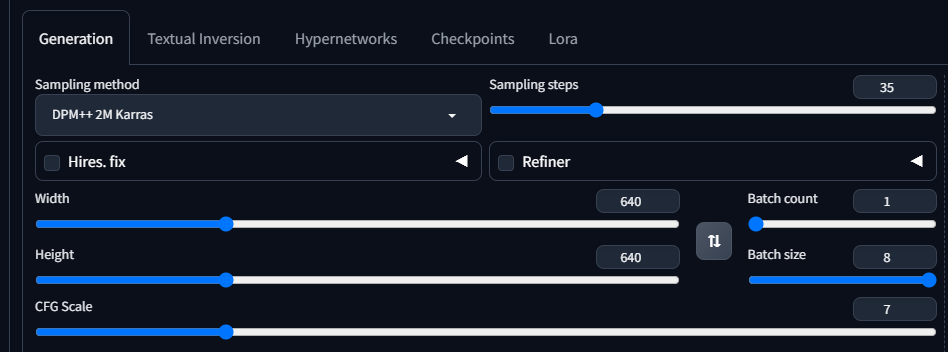 vocal burrow
slate shore
add to path
vocal burrow
slate shore
add to path
either you reinstall or you edit path manually
slate shore
i uninstalled and then reinstalled but it did not ask me those options during the 2nd installation it just installed it
 compact falcon
START OF TRACEBACK
Traceback (most recent call last):
File "C:\Stable diffusion\stable-diffusion-webui\extensions\deforum-for-automatic1111-webui\scripts\deforum_helpers\run_deforum.py", line 116, in run_deforum
render_animation(args, anim_args, video_args, parseq_args, loop_args, controlnet_args, root)
File "C:\Stable diffusion\stable-diffusion-webui\extensions\deforum-for-automatic1111-webui\scripts\deforum_helpers\render.py", line 206, in render_animation
mask_vals['video_mask'] = get_mask(args)
File "C:\Stable diffusion\stable-diffusion-webui\extensions\deforum-for-automatic1111-webui\scripts\deforum_helpers\load_images.py", line 106, in get_mask
return prepare_mask(args.mask_file, (args.W, args.H), args.mask_contrast_adjust, args.mask_brightness_adjust)
File "C:\Stable diffusion\stable-diffusion-webui\extensions\deforum-for-automatic1111-webui\scripts\deforum_helpers\load_images.py", line 80, in prepare_mask
mask = load_image(mask_input, mask_input)
File "C:\Stable diffusion\stable-diffusion-webui\extensions\deforum-for-automatic1111-webui\scripts\deforum_helpers\load_images.py", line 71, in load_image
image = Image.open(image_path).convert('RGB')
File "C:\Stable diffusion\stable-diffusion-webui\venv\lib\site-packages\PIL\Image.py", line 3236, in open
fp = builtins.open(filename, "rb")
PermissionError: [Errno 13] Permission denied: 'C:\Stable diffusion\stable-diffusion-webui'
END OF TRACEBACK\
what do i do?
vocal burrow
slate shore
i uninstalled and then reinstalled but it did not ask me those options during th...
somewhere during the installation be it the first, second or tihrd it surely asked about "add to PATH"
jade surge
vocal burrow
and what gpu are you using ?
msi 4060 8gb
slate shore
the fist time it did i did not check it i installed before finding this thread
vocal burrow
jade surge
msi 4060 8gb
ok then you should probably use --medvram-sdxl --xformers --no-half-vae
vocal burrow
slate shore
the fist time it did i did not check it i installed before finding this thread
ok but like I said it s gonna ask you about "add to PATH" evey time your reinstall
jade surge
direct command on windows or a path on sd?
vocal burrow
jade surge
direct command on windows or a path on sd?
those are command line arguments
so you put them in your webui-user.bat
like mentioned by the tutorial I ve sent above
jade surge
its installing xformers now,am i okey ?
vocal burrow
jade surge
its installing xformers now,am i okey ?
yes
jade surge
acces point now available
 vocal burrow
enjoy pretty much doubling your generation speed
vocal burrow
jade surge
acces point now available
log please
jade surge
ok ok i got it bro
grim raft
Can someone help me with my issue? I'm at a loss...
vocal burrow
grim raft
Can someone help me with my issue? I'm at a loss...
can t really help you with that :/ I dont do much training, maybe you can ask later once everything has calmed down, or move to #🔧|finetune
karmic crown
jade surge
acces point now available
do you have mcafee or some other 3rd party antivirus active?
problems like those are usually caused by mcafee and friends ☠️
karmic crown
jade surge
acces point now available

GitHub
Is there an existing issue for this? I have searched the existing issues and checked the recent builds/commits What happened? After installing xformers using a rentry guide, suddenly I get two erro...
see the last post
just remove venv folder and run webui again
it will create new venv for you, and it should work
jade surge
i got smt new
vocal burrow
jade surge
i got smt new
You are running torch 1.13.1+cu117.
The program is tested to work with torch 2.0.0.
To reinstall the desired version, run with commandline flag --reinstall-torch.
you still haven t run --reinstall-torch command line arg
remove all your args and run with only --reinstall-torch once
then restore your previous args
jade surge
okey
karmic crown
it is probably faster and easier just to run
webui.bat --reinstall-torch
without editing webui-user.bat 🙃
jade surge
i just learned it but tnx bro 😄
karmic crown
but i know why he wrote that
many people just like to click something, and not to go to cmd and type 🙂
slate shore
so this thread is filled with probably every answer i will have about this. i was trying to copy and paste into chat gpt to use as a refence point so that i can ask cht gpt questions and esentially have a database of answers... but it wont let me copy ...ctrl a ctrl c doesnt work, nor does right click. is there a way to do that?
jade surge
export as text
slate shore
i dont see that option
 grim iron
I get the following error when I try to captoin images in kohya RuntimeError: The size of tensor a (36) must match the size of tensor b (432) at non-singleton dimension 0 can someone helpo?
slate shore
how long should this process take? Its been at this point for a while now: emote: Enumerating objects: 277, done.
remote: Counting objects: 100% (165/165), done.
remote: Compressing objects: 100% (30/30), done.
remote: Total 277 (delta 137), reused 136 (delta 135), pack-reused 112
MiB/s
Receiving objects: 100% (277/277), 7.03 MiB | 4.61 MiB/s, done.
Resolving deltas: 100% (152/152), done.
Installing requirements for CodeFormer
Installing requirements
vocal burrow
slate shore
how long should this process take? Its been at this point for a while now: emot...
depends of your hardware and connection
make sure that the cmd has focus (click it in it and press space)
slate shore
should i not be doing anything else?
vocal burrow
depends if your hardware or connection is the bottleneck
slate shore
im on a pretty decent machine 128gb ram, 4070, m.2 ssd, with ryzen 7 5900x
processor is runnign at 3% usage
maybe time for nap and well see what it does after
grim iron
slate shore
processor is runnign at 3% usage
my 5600x is only at 8% usage while running so tahts normal I think
valid gorge
What would be the best option for a GPU under 500 euros / dollars to use for SD?
grim iron
would say a 4060ti
valid gorge
That's actually the one I'm been looking for.
What about memory, is 8 gb enough or should I get the 16 gb version. Not a big difference in price I think.
grim iron
16gb if I undersand vorrectly more vram = better
grand fable
I'm kinda not able to run LCM lora, it tooks so much time. Could you help me and tell me what is wrong please?

 valid gorge
grim iron
16gb if I undersand vorrectly more vram = better
valid gorge
grim iron
16gb if I undersand vorrectly more vram = better
Great, thanks!
grim iron
grand fable
I'm kinda not able to run LCM lora, it tooks so much time. Could you help me and...
clip for the promts has to come out of the lora node not the load model one
grand fable
grim iron
clip for the promts has to come out of the lora node not the load model one
I did it based on this video and he says it would be degradation. At time 4:00 https://m.youtube.com/watch?v=pw8eNpmhT5o

Today we explore how to use the latent consistency LoRA in your workflow. This fantastic method can shorten your preliminary model inference to as little as 0.7 seconds and in only 4 steps using ComfyUI and SDXL. This will also make it a lot easier to run these models on older hardware and is just mind-blowing fast! Now, it isn't perfect, but...
 steady thistle
I'm having trouble getting 1024x1024 using dreamshaperXL turbo. I tried 512x512 with hires fix of 2x, 10 steps, .5 denoise, plus tiled vae with encoder tile size 1024 and decoder tile size 112. I had lowvram set then I changed it to medvram and it seems to work now. I don't get why I didn't work with lowvram tho.
grand fable
grim iron
clip for the promts has to come out of the lora node not the load model one
is the "lcm_lora_weights" the right model? I downloaded it from civitai, because don't know how to download it directly from https://huggingface.co/latent-consistency/lcm-lora-sdxl
 steady thistle
I'm having trouble getting 1024x1024 using dreamshaperXL turbo. I tried 512x512 ...
steady thistle
steady thistle
I'm having trouble getting 1024x1024 using dreamshaperXL turbo. I tried 512x512 ...
But now it isn't working. What's the best way for me to get 1024x1024 on my Radeon RX 6800M GPU with 12GB GDDR6
vocal burrow
grand fable
is the "lcm_lora_weights" the right model? I downloaded it from civitai, because...

 valid gorge
guys, can you suggest me a YouTube video or a full course about SD in general where basics and beyond would be covered, and also a course for ComfyUI?
grand fable
vocal burrow
oh thanks 👍🏻 the "pytorch" prefix confused me.. now just put it in the "loras" folder and open ComfyUI?
slate shore
Hey guys, I finally got stable diffusion up and running. Quick heads-up: upgrading from a 2060 to a 4070 GPU cut my render time from 13 minutes to just 2.2 seconds. Anyway, I’ve got a specific use case and could use a bit of help. If someone could spare around 30 mins to an hour to guide me through their workflow and process, I'd be happy to pay for your time. What I need to do is take a photo of a client, an electrician for example, and then drop him into various scenes in that industry. The plan is to create about 100 images for their company that can be used on their website, blog content, Google Business profiles, etc. The images need to be bang on though; they can't be all glowy like DALL-E, and they can't have seven fingers like on Midjourney. Also, the bit where you can use a selection tool and only tweak a certain part of the image, I think it’s called inpainting. Anyone down to help me out for a bit sometime today?
vocal burrow
grand fable
oh thanks 👍🏻 the "pytorch" prefix confused me.. now just put it in the "loras"...
it's pretty much the default weight for that kind of things
grim iron
grim iron
I get the following error when I try to captoin images in kohya RuntimeError: T...
?
 hazy oriole
hello everyone, I just downloaded sd by the guide here for amd
https://github.com/AUTOMATIC1111/stable-diffusion-webui/wiki/Install-and-Run-on-AMD-GPUs
And It is using my cpu not gpu, I have amd vega 64, where can I find a guide for it ?
GitHub
Stable Diffusion web UI. Contribute to AUTOMATIC1111/stable-diffusion-webui development by creating an account on GitHub.
steady thistle
hazy oriole
hello everyone, I just downloaded sd by the guide here for amd
https://github.co...
Check out the pins on this channel and follow it closely. I had a similar issue as you.
The 'pip cache purge' fixed it for me.
hot spindle
slate shore
Hey guys, I finally got stable diffusion up and running. Quick heads-up: upgradi...
Sry dont have the time but gonna give you a tip that serves me well: If you have access to PS make a rough cutout of person in Photoshop, drop that person on something of other image you want as background, just a rough, dont mind to be neat, if needed free hand draw some lines...generate with Controlnet Canny with a small weight, something like 0.3 strenght and have it stop at about 0.3 or 0.5 then let SD fill the gaps..works wonders with SDXL
slate shore
ill give that a shot
hot spindle
Works wonders for me to generate backgrounds
steady thistle
If you want good backgrounds, this trick worked for me sometimes. Put your background text first and put [all the rest of the prompt:2]. That makes the first step be background only.
hot spindle
Small exemple, I had a 700x300 original, erased roughly the person, hand draw some black lines (for Canny to pick up) then let SD "improve" it a bit

Its now 5k width
grand fable
I changed the LoRA to the pytorch (which I think is the same as I had before based on the file size), I rewired the Clip from Lora node to the prompts (not as was said in the video https://m.youtube.com/watch?v=pw8eNpmhT5o ) but it still takes a huge amount of time to generate simple image 😕 any ideas how to run LMC lora so I can generete images fast?


Today we explore how to use the latent consistency LoRA in your workflow. This fantastic method can shorten your preliminary model inference to as little as 0.7 seconds and in only 4 steps using ComfyUI and SDXL. This will also make it a lot easier to run these models on older hardware and is just mind-blowing fast! Now, it isn't perfect, but...
hot spindle
 steady thistle
I'm trying to inpaint with controlnet and I got this error followed by a crash. Ideas? [F D:\a_work\1\s\pytorch-directml-plugin\torch_directml\csrc\engine\dml_util.cc:118] Invalid or unsupported data type.
steady thistle
steady thistle
I'm trying to inpaint with controlnet and I got this error followed by a crash. ...
@ornate elk Do you have any ideas on this? Sorry to bug you if you're busy.
hot spindle
Not sure, you do need specific models for 1.5 and SXDL and need to choose them accordingly , make sure model is selected, load same image as "independed control image" and hit Preview:

Preview is that "red explosion" button
steady thistle
hot spindle
Not sure, you do need specific models for 1.5 and SXDL and need to choose them a...
I did that, that's when it crashed, and I'm using 1.5 and only have 1.5 loaded in controlnet. I haven't downloaded the sdxl ones yet
hot spindle
I'm not that much into technicalities but try and check if it makes a preview
In terminal sometimes you have a more comprehensive report and suggestion fo fix it (or: enable --no-half or some other thing)
slate shore
ok so literally copied the exact settings from this ..i would expect the replicating the settings exactly would produce at least similar results but mine is far from a photo quality. what am i missing?

You can use weight up to 1.5. I left the Lora light so you can still customize the cars. 🙏 If you like this model, please click the Like button and...
steady thistle
hot spindle
I'm not that much into technicalities but try and check if it makes a preview
I have --no-half loaded and it crashes when I select the explosion button
If I forget to do the inpaint_only+lama, and leave it on inpaint, no crash
It's just when I select the +lama
hot spindle
Maybe someone more technically oriented can help you, I can get what I want done but don't have extensive knowledge
steady thistle
Do you have control_v11p_sd15_inpaint [ebff9138] as the model?
hot spindle
Inpaint Lama is usually for outpaint
steady thistle
Yeah, I wanted to outpaint
hot spindle
I work in SDXL mostly, always need highres
steady thistle
Where do you find the SDXL controlnet files?
hot spindle


 hot spindle
I would say depth and canny are the most useful to me
steady thistle
I use those often on 1.5
hot spindle
Don't think there's a specific controller for jnpaint in SDXL, think there is one experimental for ConfyUI
steady thistle
ah
 torn lotus
Hello. I am using SD Fooocus, was wondering if it's ok it takes >5m to generate an image. 1070TI
slate shore
torn lotus
Hello. I am using SD Fooocus, was wondering if it's ok it takes >5m to generate ...
that sounds about right. i just upgraded to 4070 for that reason i was getting very long times with a 2060. but with the 4070 it takes 2-3 seconds
torn lotus
very long times like what?
slate shore
4-13 minutes
torn lotus
oh man
slate shore
anyone ever had issue with loras not showing up in the lora tab? it only has this Nothing here. Add some content to the following directories: but the directory has a few in it
torn lotus
I'll rather use a cloud gpu at this rate
slate shore
torn lotus
I'll rather use a cloud gpu at this rate
a 10gb GPU cloud is like 180 a month, cheaper to just buy a GPU
ornate elk
torn lotus
Hello. I am using SD Fooocus, was wondering if it's ok it takes >5m to generate ...
with auto1111 you would take 1:40 for an sdxl image
a 1080 takes 1:30 for a 30 steps 1024x1024 sdxl one
ornate elk
slate shore
anyone ever had issue with loras not showing up in the lora tab? it only has th...
switch the models and they will show up
they only appear for 1.5 OR sdxl, when selecting the model
slate shore
im on sdxl base 1.0
ornate elk
hazy oriole
hello everyone, I just downloaded sd by the guide here for amd
https://github.co...
hey, please use my install guide for AMD cards, its in the Pinned Message of this channel
ornate elk
slate shore
im on sdxl base 1.0
then make sure the loras you downloaded are also for sdxl. if not they will only show up when using an 1.5 based model
slate shore
ahh that could be it. i will check that , i just downloaded a bunch to try out.
steady thistle
steady thistle
I'm trying to inpaint with controlnet and I got this error followed by a crash. ...
@ornate elk Welcome back! I had an error I can't figure out. lol It's this one here. I got around it by simply not using inpaint_only+lama but that's not the best way of doing it.
ornate elk
steady thistle
<@161910921269084160> Do you have any ideas on this? Sorry to bug you if you're ...
didnt tried inpaint with controlnet
steady thistle
Ah, okay, thanks!
torn lotus
what is best ? comfyui or auto1111?
ornate elk
slate shore
ok so literally copied the exact settings from this ..i would expect the replica...
you didnt have the same settings, as there are hidden settings. you need to click the "copy generation" data button, then paste it into the positive prompt box and click the white/blue arrow to apply them automaticly
ornate elk
torn lotus
what is best ? comfyui or auto1111?
auto1111 is in general easier to use and has better support
comfyui is for really experienced Node workflow users
ornate elk
torn lotus
ok i'll download auto1111
in the pinned Message of this channel you find my install guide with the best settings for each gpu(vram)
ornate elk
steady thistle
Ah, okay, thanks!
tested inpaint_only+lama controlnet and got the same error, tried inpaint_global_harmonious and it worked
torn lotus
oh thanks, I have followed another guide, but i'll check yours for tweaks
because I tried a couple prompts and I just generated monsters
ornate elk
torn lotus
because I tried a couple prompts and I just generated monsters
that happens if you set the resolution to high for the model
1.5 models got trained on a resolution of 512x512 for example
ornate elk
torn lotus
1152x896
for that you need to use an SDXL model
SDXL is trained on 1024x1024
steady thistle
ornate elk
tested inpaint_only+lama controlnet and got the same error, tried inpaint_global...
Interesting that you got the same error. The videos all say that the +lama is the best, so if you do get yours resolved, let me know how if you don't mind. I doubt I'll need it that much so it's not something I'll fret over.
ornate elk
steady thistle
Interesting that you got the same error. The videos all say that the +lama is th...
it wont work, i think it relies on stuff used by cuda (nvidia), or its just a directml incompatible thing more likely
do you want to outpaint or inpaint?
steady thistle
Both actually. And that makes sense. Curses to nvidia
 blissful nimbus
Hi, I have an amd GPU but even after i followed the pinned guide it still keeps giving me errors
ornate elk
blissful nimbus
Hi, I have an amd GPU but even after i followed the pinned guide it still keeps ...
hey, which error?
a screenshot of the cmd log can help
steady thistle
ornate elk
do you want to outpaint or inpaint?
I honestly think I'll use inpaint more in the future, but I'm still in the process of trying out the tools just to get familiar.
blissful nimbus
ornate elk
hey, which error?
it started with the cuda error, after which i used --skip-torch-cuda-test, then it became something like RuntimeError: "LayerNormKernelImpl" not implemented for 'Half' so i had to add --precision full --no-half. now its:
 ornate elk
blissful nimbus
it started with the cuda error, after which i used --skip-torch-cuda-test, then ...
ornate elk
blissful nimbus
it started with the cuda error, after which i used --skip-torch-cuda-test, then ...
then you followed the wrong guide
i have one for nvidia and one for AMD
you have the webui for nvidia installed
blissful nimbus
this one right?
blissful nimbus
oh wait im so dumb
ornate elk
blissful nimbus
oh wait im so dumb
xD delete the whole folder, and follow the other guide. Make sure to also do the Important Step i mention there
blissful nimbus
the cache purge?
ornate elk
exactly
blissful nimbus
tysm
ornate elk
blissful nimbus
tysm
no problem 🙂 feel free to ask here if you have any questions
torn lotus
how do I hand out the command --medvram-sdxl with linux? is it a ./webgui attribute?
ornate elk
torn lotus
how do I hand out the command --medvram-sdxl with linux? is it a ./webgui attr...
there you have to edit the webui-user.sh
and outcomment the # before commandline args
blissful nimbus
ornate elk
no problem 🙂 feel free to ask here if you have any questions
do i need the --medvram with a 7900xtx?
ornate elk
blissful nimbus
do i need the --medvram with a 7900xtx?
yes
xD
only because the directml version is unoptimized
if you would run SD on linux you wouldnt need it (much better performance for AMD)
i have the same GPU btw
blissful nimbus
ornate elk
only because the directml version is unoptimized
oh ok
torn lotus
I guess it's this one
Commandline arguments for webui.py, for example: export COMMANDLINE_ARGS="--medvram --opt-split-attention"
#export COMMANDLINE_ARGS=""
thx
defo stresses the gpu 1024x1024
kindred tinsel
@ornate elk
Do you have any idea of what this error means or should I open a new ticket to the directml fork?
ornate elk
kindred tinsel
<@161910921269084160>
Do you have any idea of what this error means or should I...
what did you tried?
kindred tinsel
Regional prompting with a new model anyhentai haha and composable lora
deactivated composable lora but it still hapens, a moment ago it could create images with no error :c
Imma do the usual hit the reset button and Ill try again :)
torn lotus
how to install more checkpoints?
ornate elk
torn lotus
how to install more checkpoints?
you can download them on civitai.com and then put them into the models/stable-diffusion folder
ornate elk
torn lotus
i still get ugly models
try dreamshaper v8
torn lotus
on civitai?
ornate elk
yup
torn lotus
k
ornate elk
DreamShaper - V∞! Please check out my other base models , including SDXL ones! Check the version description below (bottom right) for more info and...
ist a good starter model, and small too
torn lotus
2gbs small?
ornate elk
torn lotus
2gbs small?
yes, the smallest models you can get are 2gb
torn lotus
ah it has many images
glad fiber
is 380 images good for regularisation?
torn lotus
has improved a lot... still some minor imperfections .. can use refine?
ornate elk
torn lotus
has improved a lot... still some minor imperfections .. can use refine?
you should use upscaling
torn lotus
what is a lora?
kindred tinsel
ornate elk
what did you tried?
seems like it was composable lora, now it is back to normal