#🤝|tech-support
1 messages · Page 11 of 1
 fair oxide
 inland zephyr
Anyone using Automatic1111 and finding that SDXL checkpoints indefinitely stall at 50 or 95%, even with medvram-sdxl and xformer arguments?
 fair oxide
I tried this and everything worked smoothly under 5 steps
 dark owl
fair oxide
Which cpu is best for stable diffusion amd ryzen 9 7950X3D or Intel core i9-1490...
dark owl
fair oxide
Which cpu is best for stable diffusion amd ryzen 9 7950X3D or Intel core i9-1490...
Intel and nvidia have been the kings for over 50 years. Amd budgetware boys are sad when they get error for almost everything 
 ornate elk
fair oxide
Which cpu is best for stable diffusion amd ryzen 9 7950X3D or Intel core i9-1490...
ornate elk
fair oxide
Which cpu is best for stable diffusion amd ryzen 9 7950X3D or Intel core i9-1490...
Boath are good. Stable Diffusion dont rely on CPU, there wouldn't be any difference.
fair oxide
How do I import Civitai files into fooocus?
 tight vapor
hi all! Anyone know what the hell is wrong with this one LOL

why she look like an ogre
 vestal viper
hi, i'm really new in this stuff. tried to install SD and i've followed all the steps but i kept getting errors when trying to launch webui-user.bat. at first it showed error unable to use GPU or something (i'm using RX 6600) so i googled it and applied skip GPU check. now i got another error like runtime error couldn't clone stable diffusion. googled it and tbh i really have no idea what does anything mean like manually set path to python etc, i'm not tech savvy so can anyone explain it in easier words please?
tight vapor
mac or pc
vestal viper
pc - windows 10
 bleak ridge
i'm trying to contribute (game pc doing nothing), but i'm receiving
 tight vapor
ah idk about windows haha sorry!
bleak ridge
is this the right channel for worker questions?
 gilded river
hello my DS is only taking up 5 gigs of vram, and any ideas?
bleak ridge
i guess 6GB GPU is not enought to contribute?
 gilded river
bleak ridge
i guess 6GB GPU is not enought to contribute?
gilded river
bleak ridge
i guess 6GB GPU is not enought to contribute?
its wierd how its up to 7.3
guess that's cool
gilded river
tight vapor
Put white teeth on your prompt if you're already using restore faces
 gilded river
lmao
 gilded river
what model are you using
tight vapor
like wtf LOL
Natural Sin Final and last of epiCRealism Since SDXL is right around the corner , let's say it is the final version for now since I put a lot effor...
this one
 tight vapor
but why they so ugly HHAHAH oh my god its been bugging me all day
aight, ill try more! Do you know why it doesnt care about the reference pic at all?
gilded river
maybe get a textual invesion for negative prompts
tight vapor
aigth thanks bro
gilded river
tight vapor
aight, ill try more! Do you know why it doesnt care about the reference pic at a...
haven't used reference pictures
ornate elk
tight vapor
ahh sorrrry
Np, for better quality you need to use hires fix
tight vapor
okay thanks!!
any tips on how to stick to consistent face? mine goes spastic.
and which model for most realism? :S
 robust jacinth
Hey!
Every time I restart my RunPod session with Automatic1111 in Jupyter Notebook, I encounter errors from plugins indicating missing module dependencies. I'm unsure how to reinstall these dependencies effectively after each restart. Can anyone guide me on how to ensure these modules are available or how to reinstall them quickly when I start a new session?
 crimson leaf
Im trying to use dreambooth and train my first lora, but it instandly ooms at the beginning, something im doing wrong?


RuntimeError: No executable batch size found, reached zero.
 karmic crown
fair oxide
I tried this and everything worked smoothly under 5 steps
karmic crown
fair oxide
I tried this and everything worked smoothly under 5 steps
It worked only because you finally fixed Python. You would have the same issues as with A1111 if you tried to install that one first
if you go to your OS (C:) -> AI -> stabile-diffusion-webui
and run webui-user.bat
this time it should install everything and it should work
fair oxide
karmic crown
if you go to your OS (C:) -> AI -> stabile-diffusion-webui
and run webui-user.ba...
Thanks, it's dowloading rn. Do you have a list of reccomended prompts or prompt directions to follow?
What should I see after it is downloaded? @karmic crown
fair oxide
Okay it's downloaded and working fine but I have some memory issues apparantly
 spice warren
Hi all, anyone knows what I do wrong here? I tried to use ControlNet to colorized my sketch but somehow it doesn't work out. The outcome never matched with my input sketch. I was playing with the numbers from Apply ControlNet and KSampler but still no luck yet.. and it requires a lot 200+ steps for KSampler. Please help..
 ornate elk
fair oxide
Okay it's downloaded and working fine but I have some memory issues apparantly
ornate elk
fair oxide
Okay it's downloaded and working fine but I have some memory issues apparantly
whats your gpu ?
fair oxide
ornate elk
whats your gpu ?
Geforce RTX Nivida 3050 laptop
 worthy portal
Hi everyone
I encountered a problem in the installation of stable diffusion using auto1111 and no matter what I do, it is not solved
Please guide me if you know where this problem comes from
I will post the photo of anaconda as well
 ornate elk
fair oxide
Geforce RTX Nivida 3050 laptop
ornate elk
fair oxide
Geforce RTX Nivida 3050 laptop
then you need to edit the webui-user.bat, at the line COMMANDLINE_ARGS=
you need to add: --xformers --medvram --no-half-vae
then save and relaunch.
ornate elk
worthy portal
Hi everyone
I encountered a problem in the installation of stable diffusion usin...
delete the venv folder and try again.
if it still dont work you need to run
pip cache purge
then delete the venv folder again
fair oxide
ornate elk
then you need to edit the webui-user.bat, at the line COMMANDLINE_ARGS=
you need...
Like this?
 worthy portal
ornate elk
delete the venv folder and try again.
if it still dont work you need to run
pip...
worthy portal
ornate elk
delete the venv folder and try again.
if it still dont work you need to run
pip...
pip cache purge ?
ornate elk
fair oxide
Like this?
yes
ornate elk
worthy portal
pip cache purge ?
yea its a command oyu have to run in the anaconda terminal
worthy portal
ornate elk
yea its a command oyu have to run in the anaconda terminal
ok I'll try
fair oxide
ornate elk
yes
My pc restarts randomly when I open either foocus or SD
Yeah the screen just blinks, goes black, freezes for a bit and it cancels generating
ornate elk
fair oxide
WHY does this shit keep happening to me
How much RAM do you have ?
Also make sure your Laptop is plugged in
fair oxide
ornate elk
How much RAM do you have ?
16 gb
fair oxide
ornate elk
Also make sure your Laptop is plugged in
Yes

My laptop is always charging
Nobody can beat this cursed laptop 
 wind sun
yo guys im with the new build and im trying to install the processor drivers and its failing the installation
someone ?
 worthy portal
ornate elk
yea its a command oyu have to run in the anaconda terminal
worthy portal
ornate elk
yea its a command oyu have to run in the anaconda terminal
I implemented what you said, but I still encountered the same problem
.
I had previously installed stable diffusion on this system and it was running perfectly fine, but for some reason I deleted it and now when I want to install it again, I can't.

 ornate elk
fair oxide
16 gb
ornate elk
fair oxide
16 gb
You may need to increase your pagefile and make sure to have enough free space on C:/
ornate elk
wind sun
yo guys im with the new build and im trying to install the processor drivers and...
Maybe you need a BIOS update
 livid jetty
I have a photo of my cat and i want to put him in a forest how do i do that?
 sturdy ginkgo
livid jetty
I have a photo of my cat and i want to put him in a forest how do i do that?
sturdy ginkgo
livid jetty
I have a photo of my cat and i want to put him in a forest how do i do that?
think modifying a workflow for comfyUI might be the easiest .. use one that can generate a alpha mask of the cat (invert it) and have a forest background generated behind it.
https://civitai.com/models/237306/marduk191s-character-insertion-workflow
This is a workflow for inserting characters into separate generated backgrounds. Features: Image loader Mask editor for loaded image Auto project s...
livid jetty
ok and how would i make and image look better, i generated a dog and i want the dog to look better
ornate elk
livid jetty
ok and how would i make and image look better, i generated a dog and i want the ...
with upscaling
 burnt badger
when using multiple loras do i need to put them in a certain order or does weighting take care of everything?
ornate elk
burnt badger
when using multiple loras do i need to put them in a certain order or does weigh...
you need to play around with the lora strenghts
ornate elk
worthy portal
I implemented what you said, but I still encountered the same problem
.
I had pr...
i would recommend you install SD with my install guide and not an all in one installer in powershell, if you need my guide let me know.
tight vapor
ornate elk
with upscaling
How do you upscale? Just send IMG2IMG and upscale by 2?
 nova hedge
im getting this error when trying to install the automatic1111 webui
 ornate elk
nova hedge
im getting this error when trying to install the automatic1111 webui
ornate elk
nova hedge
im getting this error when trying to install the automatic1111 webui
What's your GPU and which webui did you tried to install ?
ornate elk
tight vapor
How do you upscale? Just send IMG2IMG and upscale by 2?
There are 2 ways.
First is using hires fix in txt2img.
Or using SD upscale script in img2img
nova hedge
ornate elk
What's your GPU and which webui did you tried to install ?
rtx 3070 and i git cloned from https://github.com/AUTOMATIC1111/stable-diffusion-webui.git
ornate elk
nova hedge
rtx 3070 and i git cloned from <https://github.com/AUTOMATIC1111/stable-diffusio...
interesting, someonme above had the same error today
maybe something is broken
nova hedge
i might just have to keep trying cause sometimes it gets further into the download
 pliant tide
Is there a huge trade off in performance, upgradability between a laptop like this and similarly priced/specc'd tower?
Gigabyte AORUS 17X C5AU Core i9 RTX 4090 17.3in QHD 240Hz Laptop
ornate elk
pliant tide
Is there a huge trade off in performance, upgradability between a laptop like th...
yes, mostly gpus in laptops are so called mobile gpus, they are downclocked gpus with lower performance so the laptop dont melt xD also sometimes they cut of vram.
3050 in pc = 8gb
3050 in laptop = 4gb
never buy a gaming laptop.
if you can afford a 4090 put it in a pc
pliant tide
ornate elk
yes, mostly gpus in laptops are so called mobile gpus, they are downclocked gpus...
Thank you.
ornate elk
pliant tide
Thank you.
np, imagine the battery time of a laptop with these specs. it wont last very long taking the point of portability. also a laptop with these specs need to be pluged in at any time to give the gpu enough power.
Airflow in Laptops is really bad. with these components i cant imagine the heat xD
pliant tide
ornate elk
np, imagine the battery time of a laptop with these specs. it wont last very lon...
Yeah, portability was the only real draw card, but that’s a good point on battery.
Guess I’m heading back to pcpartpicker then. Wish me luck 😬
ornate elk
pliant tide
Guess I’m heading back to pcpartpicker then. Wish me luck 😬
yea, portability is the only point for a laptop. but not for gaming or high performance stuff. For Office or normal Users its perfect.
Good luck 🙂 whats your budget and Use case?
pliant tide
ornate elk
yea, portability is the only point for a laptop. but not for gaming or high perf...
I’m purely building for an AI art workflow. Rest of my life is in Apple ecosystem. So looking to spend around 3-4K USD for a nicely future proofed system.
Doesn’t need to be pretty, just powerful.
ornate elk
pliant tide
I’m purely building for an AI art workflow. Rest of my life is in Apple ecosyste...
ahh okay, then a Tower PC is the best choice. 4090 Asus Strix or MSI SuprimX are the best in performance. CPU either intel or AMD.
for PSU maybe 1200W BeQuiet, 64 or 128gb RAM, and a good case with a nice airflow (much space for Fans), Lian Li or NZXT have nice ones. Or of course BeQuiet (less rgb, but silent)
burnt badger
is there a way to get more controlnets? have 3 now, would like as many as possibe
ornate elk
burnt badger
is there a way to get more controlnets? have 3 now, would like as many as possib...
You can go into the Settings under controlnet and increase the slider
fair oxide
ornate elk
You may need to increase your pagefile and make sure to have enough free space o...
How do I do that
Also after restarting everything there is another problem, I can't even press generate, it just reverts back immediately
Like it loads for a second and gone
^ this is for fooocus
ornate elk
fair oxide
How do I do that
launch sysdm.cpl from the Start menu search or run box (Win+R) and navigate to Advanced –> Settings –> Advanced –> Modify
Set it to "20000" for C:
And disable it for all other drives.
Then save and restart the PC.
Make sure to have 15-20gb free space on C drive.
Then restart your PC.
pliant tide
ornate elk
ahh okay, then a Tower PC is the best choice. 4090 Asus Strix or MSI SuprimX are...
Perfect. Thanks. And yeh, the bequiet dark stuff is super slick. I built my last pc around that with tinted black glass case, with ‘dark knight’ theme. Thanks again and happy xmas from Australia.
ornate elk
pliant tide
Perfect. Thanks. And yeh, the bequiet dark stuff is super slick. I built my last...
Ouh that sounds nice! Bequiet stuff is great! Using their Power Supply's only. And their fans in my last PC.
Merry Christmas from Germany.
fair oxide
ornate elk
launch sysdm.cpl from the Start menu search or run box (Win+R) and navigate to A...
It just opens system propertes
ornate elk
fair oxide
It just opens system propertes
Then click on the windows logo and type
Variables.
Click on the first entry it shows. Then follow my instructions from above
fair oxide
ornate elk
Then click on the windows logo and type
Variables.
Click on the first entry it s...
?
 ornate elk
fair oxide
?
ornate elk
fair oxide
?
Hmm nope
Home Support Guides How to Change the Windows Pagefile Size How to Change the Windows Pagefile Sizes The Windows Pagefile is used for virtual memory operations by the Windows kernel. Windows pagefile sizes are set during installation, and normally do not have to be changed. However, if you add memory to your system after initialization,
fair oxide
ornate elk
<@456226577798135808>
https://mcci.com/support/guides/how-to-change-the-windows...
 ornate elk
fair oxide
yea
ornate elk
fair oxide
yea
What do you have currently running?
fair oxide
ornate elk
What do you have currently running?
I tried restarting my pc
I just opened SD / fooocus, and this shit happens
ornate elk
fair oxide
I just opened SD / fooocus, and this shit happens
Dont open boath at once.
Make sure your PC is updated.
Then run
SFC /scannow
In a cmd as administrator.
That fixes windows errors.
I'm off for today
burnt badger
Is there a way to capture steps of the renderer as it progresses?
fair oxide
ornate elk
Dont open boath at once.
Make sure your PC is updated.
Then run
SFC /scannow
In ...
I didn't
Okay wait
How do I run SFC?
One sec

wtfwtf
fair oxide
ornate elk
You need to open the cmd as admin
how do i do that
ornate elk
fair oxide
how do i do that
Type cmd in search. Then right click. Run as administrator
Also make sure you have the latest nvidia driver installed
If not then update it and delete the venv folder and relaunch the webui-user.bat
I'm off for now.
livid jetty
lets say i made a dog, it turned out great except the dog's eye was weird, is there a way for me to just fix the eye or do i need to start all over, when i use the img to img it gives me a completeley different image.
 dark owl
@kindred tinsel I can help you in here
 kindred tinsel
ah thank you thank you let me switch to pc then
This is what i am getting rn, i have the highest I figured would work for openpose normal and it doesn't detect anythinbg, also apologies for the image, not that sfw

Im not sure which model it uses to do this, and if i can change it to the v1.1 sd1.5 openpose that I already have
dark owl
ive never seen anyone use light mode before 
it looks like it's working to me?
cept her clothes got in the way in that one
kindred tinsel
also when i change yolo models i get recursive errors in python, let me reproduce the error real quick
dark owl
a lot of the time it requires 2 controlnets, Open pose + Line art, or HED.
ill show you my node system
kindred tinsel
dark owl
ive never seen anyone use light mode before <:LOLL:1117933805416751266>
sorry bout that
I am using this, and get that error, does it mean that there is an error or incompatiblity between preprocessors, because it doesn't really give me much to go on :c

 dark owl
there are 2 models Open pose models and DW open pose models and they don't mix
kindred tinsel
dark owl
a lot of the time it requires 2 controlnets, Open pose + Line art, or HED.
So should I put both like at the same time and plug both into the generation using that controlnet apply thingy?
dark owl
 kindred tinsel
dark owl
there are 2 models Open pose models and DW open pose models and they don't mix
kindred tinsel
dark owl
there are 2 models Open pose models and DW open pose models and they don't mix
Oh then that must be the issue since one is like dw-ss smth smth and the other is the yolo but with this torchscript thingy which I do not recognize
also do you know if I can edit the pose inside of comfy with this pack or do I need another one?
 kindred tinsel
ahhhh oke oke oke I will, I think DW gives better results at first glance so I will try that one out
dark owl
yes DW is better
kindred tinsel
and can i edit the bone structure in comfy or should i do that in webui?
dark owl
Not sure i've never tried in comfy
I just use refference image
or a model pack from civit ai
can go here and filter "open pose" only
kindred tinsel
dark owl
Not sure i've never tried in comfy
so when you do your animations, how do you manage the poses? do you change them a bit or like allow the model to do its own work?
Also I got it working now and finally I can generate, follow pose and upscale on the same workflow thanks for your help ^^
dark owl
kindred tinsel
so when you do your animations, how do you manage the poses? do you change them ...
Video2video, record yourself with phone camera and rip the poses from it.
kindred tinsel
oooooooh I see so like you get a pose for every keyframe and then do it, that makes more sense lmao
dark owl

kindred tinsel
thanks for the help ^^
 jaunty sphinx
how do i solve this bruvs:
woa yooa posing like a woman
dats big brain
oh yeah how do i configure sd.next to run open vino
it says i shouldnt edit the webui.bat so should i edit something else or make a new file?
oh shit i figured it out using the cmd prompt
torch size still broken though
how do i fix the thing in the message txt.
why does the middle torch size cut in half
dark owl
maybe dont skip torch cuda compile is my only guess

NVIDIA Developer
Get access to SDKs, trainings, and connect with developers.
make sure this is up to date
jaunty sphinx
oh thanks
sd next open vino works but it makes my computer flash when the gpu is at 100% lol
how do i make it use only 90 percent lol
oi i dont have nvidia tho
dark owl
ohhh im no help then sorry Idk anything about AMD
jaunty sphinx
dam
jaunty sphinx
dam it works perfectly on sd next just fries the computer until i can't see anythang 😮
 topaz maple
I have a problem with Adetailer:
When applying Adetailer for the face alongside XL models (for example RealVisXL v3.0, Turbo and Non-Turbo Version), the resulting facial skin texture tends to be excessively smooth, devoid of the natural imperfections and pores. This occurs even though Adetailer impressively enhances details in areas like the eyes and mouth. Consequently, the facial skin appears unnaturally airbrushed, lacking in realistic detail.
Any advice on how to fix this?
PS: I did not test if this issue also occurs with SD1.5 models.
Here are comparisons of images without (left) and with (right) Adetailer.
RealvisXL 3 Turbo:
https://i.imgur.com/PisIdpA.jpg
https://i.imgur.com/ET1JXpQ.jpg
RealvisXL 3 Non-Turbo:
https://i.imgur.com/tyZZdgI.jpg
https://i.imgur.com/j8uco63.jpg
My Adetailer settings:




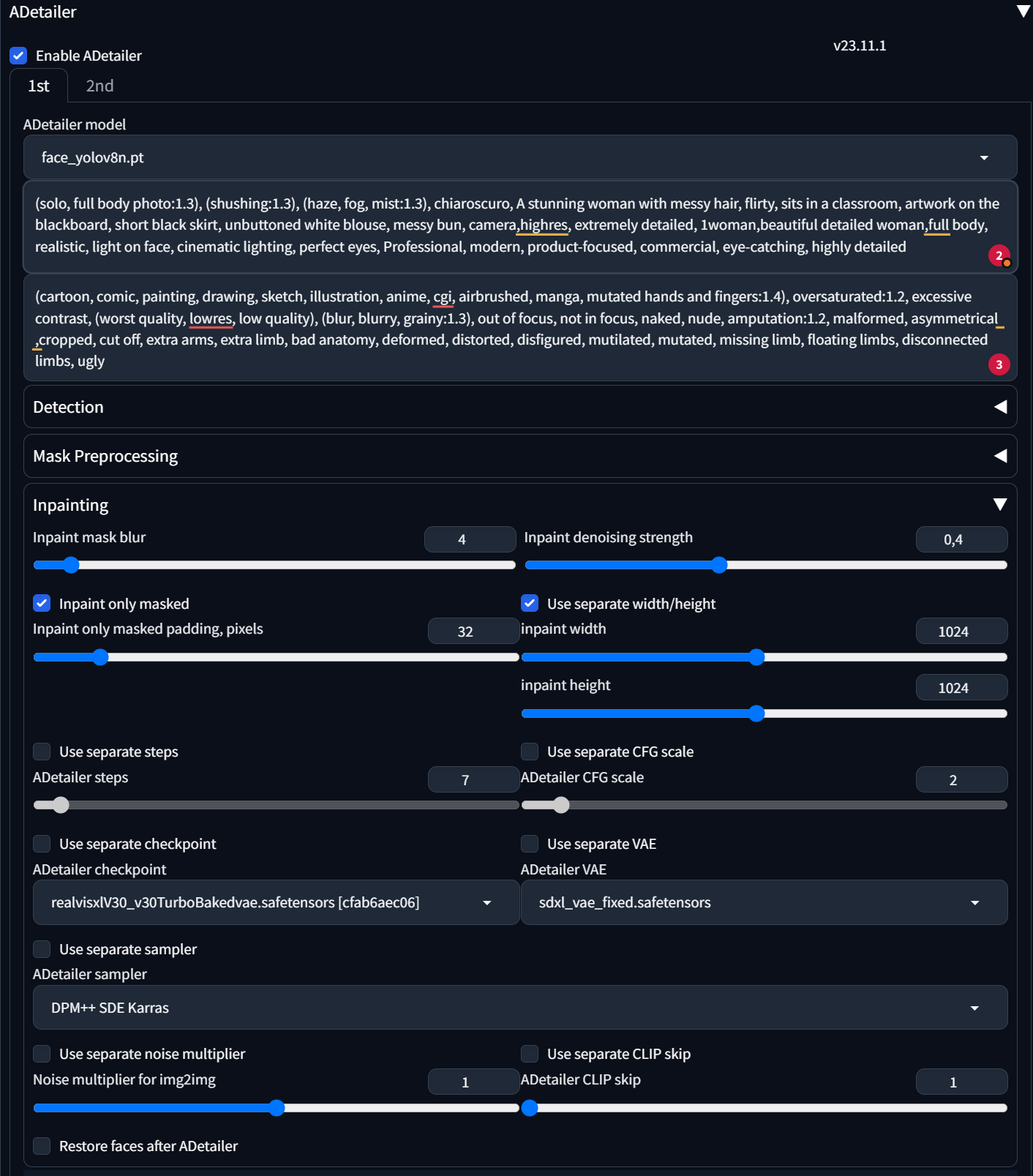 dark owl
@topaz maple click use separate steps and try 30+
 topaz maple
dark owl
<@570803978347085824> click use separate steps and try 30+
topaz maple
dark owl
<@570803978347085824> click use separate steps and try 30+
I will try!! Thanks! I will report back
topaz maple
dark owl
<@570803978347085824> click use separate steps and try 30+
I increased the steps. how does that look? is there an improvement?
 burnt badger
Is there a way to download sample images for loras that you have installed? so the cards in the menu show you what they look like?
topaz maple
dark owl
yes looks better
thank you for your advice. But I am a bit confused why I would need about 20-30 steps with a Turbo XL model for Adetailer, and for the primary generation the Turbo models are ok with 8 steps....
but increasing the steps definitly helps with the skin textire
dark owl
maybe it's the sampler? I find Euler A gives more realistic humans
topaz maple
dark owl
maybe it's the sampler? I find Euler A gives more realistic humans
it is weird, but I am glad I found a solution
thanks for helping out
topaz maple
burnt badger
Is there a way to download sample images for loras that you have installed? so t...
I dont exactly how to do it, but I know that STability Matrix (https://github.com/LykosAI/StabilityMatrix) have done this in their checkpoint / Lora manager. I guess they access the metadata von civitAI models including example images via the CivitAI API: https://github.com/civitai/civitai/wiki/REST-API-Reference
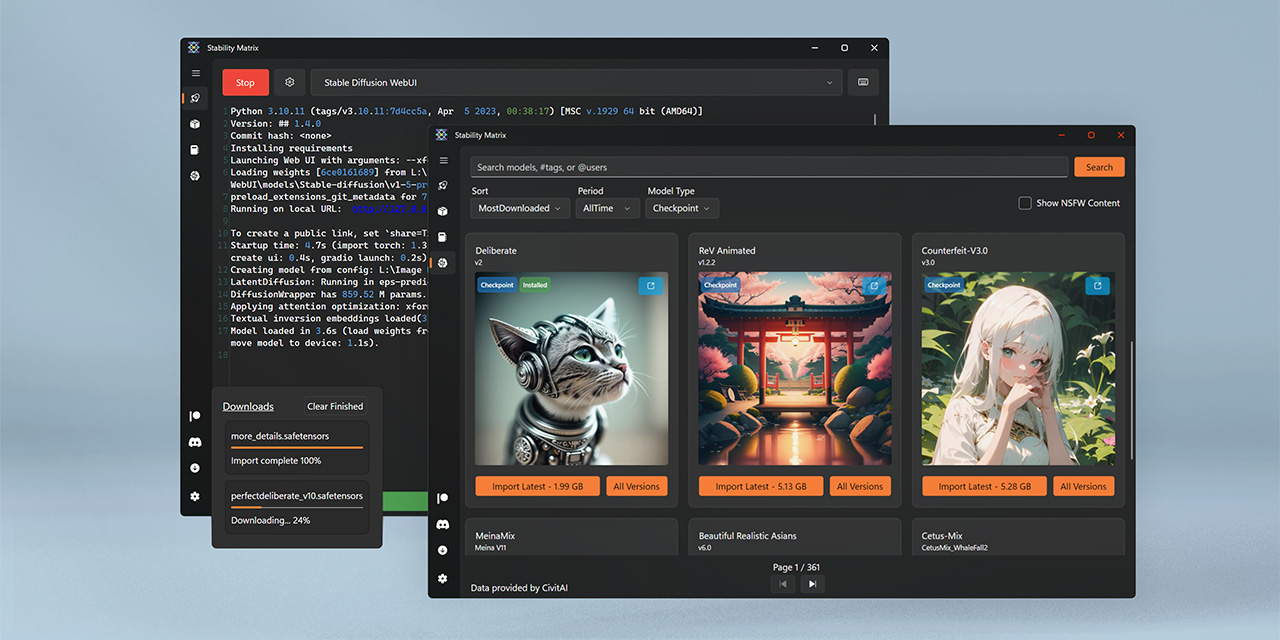
GitHub
Multi-Platform Package Manager for Stable Diffusion - GitHub - LykosAI/StabilityMatrix: Multi-Platform Package Manager for Stable Diffusion
 burnt badger
sweet, i'll give it a try
lora folder is getting way too big and I am forgetting wtf i've been downloading
dark owl
there is an easy way with automatic1111, you can render an image then use that for the lora cover picture
 rotund lava
burnt badger
Is there a way to download sample images for loras that you have installed? so t...
rotund lava
burnt badger
Is there a way to download sample images for loras that you have installed? so t...
civitai helper extension
 serene horizon
amdpoor here
trying to get the directml thingy with olive to work but I get this weird error whenever I try to convert the model
    Traceback (most recent call last):
      File "G:\stable-diffusion-webui-directml\modules\call_queue.py", line 57, in f
        res = list(func(*args, **kwargs))
      File "G:\stable-diffusion-webui-directml\modules\call_queue.py", line 36, in f
        res = func(*args, **kwargs)
      File "G:\stable-diffusion-webui-directml\modules\ui.py", line 1759, in optimize
        return optimize_sd_from_ckpt(
      File "G:\stable-diffusion-webui-directml\modules\sd_olive_ui.py", line 67, in optimize_sd_from_ckpt
        unoptimized_dir, optimized_dir = ready(unoptimized_dir, optimized_dir)
      File "G:\stable-diffusion-webui-directml\modules\sd_olive_ui.py", line 35, in ready
        unload_model_weights(shared.sd_model)
      File "G:\stable-diffusion-webui-directml\modules\sd_models.py", line 881, in unload_model_weights
        send_model_to_cpu(sd_model or shared.sd_model)
      File "G:\stable-diffusion-webui-directml\modules\sd_models.py", line 632, in send_model_to_cpu
        if m.lowvram:
    AttributeError: 'NoneType' object has no attribute 'lowvram'

running with the flags --onnx --medvram --use-directml(this one is kinda scuffed cuz the official guide told to use --backend directml but apparently it doesn't work)
 lament tusk
Hello, I have some issues to train dreambooth lora using diffusers
I am using this code but not working well when I change images
 worthy portal
ornate elk
i would recommend you install SD with my install guide and not an all in one ins...
worthy portal
ornate elk
i would recommend you install SD with my install guide and not an all in one ins...
yes I need
karmic crown
rotund lava
civitai helper extension
civitai browser plus is better (or at least i like it more) 🤣
karmic crown
worthy portal
yes I need
amd or nvidia?
worthy portal
karmic crown
amd or nvidia?
nvidia T2000
karmic crown
#🤝|tech-support message <- nvidia guide by CS1o
worthy portal
karmic crown
https://discord.com/channels/1002292111942635562/1002602742667280404/11874897629...
I do the same thing every time but I still run into problems
worthy portal
karmic crown
https://discord.com/channels/1002292111942635562/1002602742667280404/11874897629...
Could these errors occur due to the graphics card driver not being updated?
karmic crown
have you installed everything in a new folder?
also, please run git status and show me what you got
worthy portal
karmic crown
have you installed everything in a new folder?
 karmic crown
that is miniconda, use standarad installer, since automatic1111 use venv, you are now trying to use two diffrent virutal enviroments together
also, cs1o wrote to install in c:\AI since in some cases installation on desktop can cause a problem
you cant run git status in ai, you need to go inside stabile-diffusion-webui, and run it from there
worthy portal
worthy portal
Please see this as well, I am getting this error
karmic crown
i saw that
you can try to use newer pytorch
go to webui-user.bat and add this:
set TORCH_COMMAND=pip install torch==2.1.2 torchvision==0.16.2 --index-url https://download.pytorch.org/whl/cu118
then remove venv
and run webui-user.bat
it will create a new venv with newer version of torch
please let us know if that worked
i need to go now
work time starting
worthy portal
karmic crown
go to webui-user.bat and add this:
set TORCH_COMMAND=pip install torch==2.1.2 to...
thanks verymuch
 junior raven
hi, why when i try to DM images the bot is "thinking" for ever?
i mean, right click, apps and dm images, or this is something else?
 verbal olive
do amd users still need to use linux to make use of their gpu properly with stable diffusion? particularly the 5xxx radeon series?
fair oxide
Are Macs better for SD and code?
vestal viper
please help, waht should i do?
 fair oxide
fair oxide
fair oxide
AMD Ryzen 5 6600H with Radeon Graphics, 3301 Mhz, 6 Core(s),
My pc
I’m getting a new laptop soon anyway, it’s a Mac, would it be better?
karmic crown
which mac? its not the same if it is m1 or m3
Intel Macs = ☠️
M1 is slow as hell for SDXL, but it's not too bad for 1.5
M2 is better, but still not even close as good as nVidia
I have M1 MacBookPro and iMac 2019 (Intel + Radeon 580x)
M1 works faster with A1111
ornate elk
verbal olive
do amd users still need to use linux to make use of their gpu properly with stab...
Yes
ornate elk
fair oxide
Are Macs better for SD and code?
No
fair oxide
karmic crown
Intel Macs = ☠️
M1 is slow as hell for SDXL, but it's not too bad for 1.5
M2 is ...
What laptop should I get
ornate elk
vestal viper
please help, waht should i do?
You need to git clone again
You had a connection error
vestal viper
ornate elk
You need to git clone again
so run cmd and git clone to the same folder?
ornate elk
You can also try to make a new folder to git clone in
vestal viper
aight gonna try, thanks
karmic crown
fair oxide
What laptop should I get
depends on your budget and your needs
Silicon Macs (m1, m2, m3...) work extremely fast with javascript (which includes apps made in Electron), much faster than any PC
on the other hand, Silicon Macs are slower for stabile diffusion than PC laptops with 3xxx Nvidia graphics
if you are buying a Mac, MacBookPro is always a better choice than Air with the same processor (my last 3 laptops were MacBook Pros)
Macs need less RAM than PCs, so MacBookPro with 16GB is usually the same as a PC with 32 GB for most things (PhotoShop, for example)
keep in mind that you can not add more memory to your Mac laptop later since memory is soldered to the motherboard; you need to order one with more memory on purchase
it is possible to change SSD, but I saw cases where a new SSD made a lot of problems - do not take anything with less than 500GB SSD
my recommendation for Mac is an M2 (or newer) MacBookPro with at least 16 GB of RAM (if you have enough money, take 32GB) and at least 500 GB of SSD (1TB in an ideal case)
for PC, anything with a newer processor and Nvidia 3xxxx with dedicated RAM should be OK; just do not forget that in some cases, the latest i5 works faster than the old i7, so check the numbers (larger is better) and not the naming (i5, i7, i9)
ornate elk
karmic crown
depends on your budget and your needs
Silicon Macs (m1, m2, m3...) work extreme...
For Nvidia 8gb vram should be the starting point. The more the better
karmic crown
i agree with @ornate elk
 hoary sphinx
Can I train using Mac? is there a way of training textual embeddings, hypernetworks, lora or fine-tunining? I have a M1 64Gb
karmic crown
it should work, but the question is how fast (slow)
hoary sphinx
karmic crown
it should work, but the question is how fast (slow)
it always gives errors when I try to create a Textual embedding in automatic 1111
karmic crown
what you have in webui-user.sh?
and what text (with version infos) you have on the bottom?
hoary sphinx
karmic crown
what you have in webui-user.sh?
v1.6.0
#!/bin/bash
#########################################################
Uncomment and change the variables below to your need:#
#########################################################
Install directory without trailing slash
#install_dir="/home/$(whoami)"
Name of the subdirectory
#clone_dir="stable-diffusion-webui"
Commandline arguments for webui.py, for example: export COMMANDLINE_ARGS="--medvram --opt-split-attention"
#export COMMANDLINE_ARGS=""
python3 executable
#python_cmd="python3"
git executable
#export GIT="git"
python3 venv without trailing slash (defaults to ${install_dir}/${clone_dir}/venv)
#venv_dir="venv"
script to launch to start the app
#export LAUNCH_SCRIPT="launch.py"
install command for torch
#export TORCH_COMMAND="pip install torch==1.12.1+cu113 --extra-index-url https://download.pytorch.org/whl/cu113"
Requirements file to use for stable-diffusion-webui
#export REQS_FILE="requirements_versions.txt"
Fixed git repos
#export K_DIFFUSION_PACKAGE=""
#export GFPGAN_PACKAGE=""
Fixed git commits
#export STABLE_DIFFUSION_COMMIT_HASH=""
#export CODEFORMER_COMMIT_HASH=""
#export BLIP_COMMIT_HASH=""
Uncomment to enable accelerated launch
#export ACCELERATE="True"
Uncomment to disable TCMalloc
#export NO_TCMALLOC="True"
###########################################
karmic crown
hoary sphinx
v1.6.0
#!/bin/bash
#########################################################
#...
please add ``` text ``` at the beginning and the end, so it will be formated
but, ok, i see its not ok
where is your installaton located?
in which folder?
hoary sphinx
karmic crown
please add ` ``` text ``` ` at the beginning and the end, so it will be formated
/Users/gustavomello/Local_Folder/07_MISC_TOPICS/stable-diffusion-webui
karmic crown
download my a1111 script from https://github.com/viking1304/a1111-setup/releases/tag/0.0.5
and run it like this (from the terminal)
sh a1111-setup.sh -f all -d /Users/gustavomello/Local_Folder/07_MISC_TOPICS/stable-diffusion-webui
it will
- update your a1111 to latest version (1.7.0)
- update torch to the latest version (2.1.2)
- add some fixes
- change your command line params (for better performance and compatibility)

GitHub
Just a minor improvement
non-git installations of A1111 will be automatically converted to use git and updated to the latest version
Thanks to @CS1o for the idea
or follow my step by step guide https://github.com/viking1304/a1111-setup/discussions/2
from existing install part

GitHub
December 22th 2023 version UPDATE: I just released version 0.0.5 of a1111-setup script that will basically do everything for you. https://github.com/viking1304/a1111-setup/releases/tag/0.0.5 Simply...
but i recommend script, since is faster
and MUCH easier 🙂
unlike on windows, on macs you will still launch ./webui.sh and it will call webui-user.sh
hoary sphinx
thank that is great actually!
hoary sphinx
karmic crown
or follow my step by step guide https://github.com/viking1304/a1111-setup/discus...
have you tried training with Mac?
fair oxide
karmic crown
depends on your budget and your needs
Silicon Macs (m1, m2, m3...) work extreme...
What do you recommend for nvida
karmic crown
not yet, but:
- 1.5 works at a decent speed
- SDXL works without any problems (but is slow)
- upscale works
I honestly didn't play too much, since I spend a lot of time on speed testing, parameter optimization and making a script and tutorial
everything else also should work
i would be really glad if you can test it and report the results, so i can add that as a remark at the end of guide
karmic crown
fair oxide
What do you recommend for nvida
i would not dare to recommend any PC laptop, since i have not used PCs for years
ornate elk
fair oxide
What do you recommend for nvida
a 3060 with 12gb, a 4070 12gb or 4070ti if you want to game good on it too.
a 3060 is still good for all games in FullHD, 40xx series have more power
karmic crown
@ornate elk do not foget, that he asked about laptop with nvidia
ornate elk
karmic crown
<@161910921269084160> do not foget, that he asked about laptop with nvidia
ohhh
right
karmic crown
thats why i said i would not dare to recommand anything, if it was just a graphics card i would wrote same as you 🙂
ornate elk
i dont recommend any Laptop for gaming or SD.
but if a laptop is needed then any nvidia gpu with 8-12gb vram will do it
 chrome rampart
@ornate elk merry christmas and thks for all your help this year
karmic crown
the only PC laptop that i would ever recommend to anyone is this one https://rog.asus.com/laptops/rog-zephyrus/rog-zephyrus-g14-2023-series/
with a remark that is a based only on description and that i haven't seen it live

@ROG
Dive headfirst into AAA gaming with up to an AMD Ryzen ™ 9 7000 series CPU, up to an NVIDIA® GeForce RTX™ 4090 Laptop GPU, and a dazzling Mini LED Nebula Display.
ornate elk
chrome rampart
<@161910921269084160> merry christmas and thks for all your help this year
hey thanks, and merry christmas 🙂
karmic crown
i had i7 asus gaming laptop many years ago (before ROG), and i liked that one a lot (it had 17" screen) 🙂
merry christmas to you, mine is in 2 weeks 🤣
fair oxide
karmic crown
the only PC laptop that i would ever recommend to anyone is this one https://rog...
Thanks I will check it out
karmic crown
fair oxide
Thanks I will check it out
but please keep in mind that my recommendation is based only on the description of that laptop and my personal experience with an old Asus gaming laptop I had many years ago
hoary sphinx
karmic crown
download my a1111 script from https://github.com/viking1304/a1111-setup/releases...
dude, thanks a lot! training embeddings with mac is faster than with my 4090! amazing
fair oxide
@ornate elk

I was told to delete the venv, I tried many times, closed and restarted everything
It keeps returning
fair oxide
karmic crown
this looks good
Except when I try to generate a prompt with a model that I followed instructions give, copy pasted the extention; it doesn't work
In fact no models work
The generation comes out garbled
fair oxide
karmic crown
are you running webui-user.bat?
Yes
karmic crown
ok
let it finish
and show me the bottom of your user screen
with version numbers
fair oxide
 fair oxide
Can send a model and example prompt to test out
Maybe it's just the specific models I'm using that are fucking with me
karmic crown
wait
let it finish
and show me what you have here

i am intrested in the version infor at the bottom
and make a screenshot when you finish creating image so we can see if you did something wrong
 ornate elk
fair oxide
Maybe it's just the specific models I'm using that are fucking with me
ornate elk
fair oxide
Maybe it's just the specific models I'm using that are fucking with me
You should try Dreamshaper v8
Then show as the result
 main axle
Hello, I am trying to create a sdxl lora using diffusers
I am using this script to train a model, but it doesn't work well.
Does anyone can help me?
 sonic ferry
ComfyUI, what do parenthesis do, how do you use them? Is there a limit?
 kindred portal
I downloaded SDXL Turbo and stable diffusion 2.1, the only one that works is stable diffusion 1.4. I have 4gb vram and 16gb ram

I checked and I had enough ram left while rendering
kindred portal
karmic crown
Hey, that ui looks interesting/useful. What application is this?
ornate elk
kindred portal
Hey, that ui looks interesting/useful. What application is this?
Thats automatic1111 webui
The most used one here and in general
You should also use auto1111 for better optimisation with your GPU.
But sdxl won't work with 4gb vram or really really slow
 teal cedar
new error popped up recently, didn't have it till around today
 ornate elk
teal cedar
new error popped up recently, didn't have it till around today
ornate elk
teal cedar
new error popped up recently, didn't have it till around today
You installed automatic1111 the wrong way. (Inside a Onedrive Folder)
That causes problems. You also uses a different installer than normaly used.
teal cedar
ornate elk
You installed automatic1111 the wrong way. (Inside a Onedrive Folder)
That cause...
The installer was a must for me to be able to utilize my GPU. It worked fine until today.
ornate elk
teal cedar
The installer was a must for me to be able to utilize my GPU. It worked fine unt...
What's your GPU ?
teal cedar
ornate elk
What's your GPU ?
AMD Radeon RX 6600
ornate elk
teal cedar
AMD Radeon RX 6600
Ah okay. Normaly you could use the Directml version of auto1111
sturdy ginkgo
install to a folder like C:\SDWebUI\ instead and it should work fine ... OneDrive etc loves to disallow access randomly (security purposes as cloud storage rehashes the files making direct access only available to windows itself without redownloading)
 autumn inlet
What is the break point of whn you should/shouldn't use med VRAM?
 bleak shoal
i keep having this Warning for Canny contolnet. but im sure everything works fine. does anyone has any ideas why the warning?
 kindred tinsel
Heeyyyy people, merry christmas first, now onto the question.
Is there a comfyUI node, or way, to save images with a structured name. I don't want to save the images with the normal ComfyUI(seed).....
I want
ComfyUI-Result-(number)-(date)
I have some nodes that allow me to concatenate strings, but I am having a hard time wrapping my head around how to manage the number, I produce in batches of four and the images are outputted in tandem each iteration so like how can I send each of them to save with a different number?
ornate elk
autumn inlet
What is the break point of whn you should/shouldn't use med VRAM?
6gb vram and below is --medvram
 orchid adder
Are the inpainting versions of ckpts better for ADetailer?
autumn inlet
oh... so I shouldn't have been using it with my 1080ti then?
I got a 4070ti for xmas so I guess I don't need it now for sure 😛
ornate elk
autumn inlet
oh... so I shouldn't have been using it with my 1080ti then?
yes, you should only use --xformers
autumn inlet
ornate elk
yes, you should only use --xformers
what about no half vae?
ornate elk
autumn inlet
what about no half vae?
yes that helps to for sdxl and anime vaes
autumn inlet
sweet, I was already noticing a massive speed increase a project on my 1080ti took 18m40s, I re-ran it with my new GPU and it took 4m20s
ornate elk
autumn inlet
sweet, I was already noticing a massive speed increase a project on my 1080ti to...
18 to 4 minutes wow
sturdy ginkgo
bleak shoal
i keep having this Warning for Canny contolnet. but im sure everything works fin...
could be you are using a 1.1 or 1.5 controlnet model with SDXL or vice versa .. it cannot see it on the filename that is why it says the warning
karmic crown
hoary sphinx
dude, thanks a lot! training embeddings with mac is faster than with my 4090! am...
I just remembered you said you have 64GB. Then you could probably make some things even faster
open your webui-user.sh
and add # at the start of your current command line args
and then add this one below
export COMMANDLINE_ARGS="--skip-torch-cuda-test --opt-sub-quad-attention --upcast-sampling --no-half-vae --use-cpu interrogate --disable-model-loading-ram-optimization"
Batch Size 4, Steps: 10, Sampler: Euler a, Size: 1024x1024, Model: hephaistosNextgenxlLCM_v20, Version: v1.7.0
I went from 11 min. 8.3 sec. to 8 min. 30.4 sec. a few days ago
and now:
Time taken: 7 min. 51.6 sec.
I ditched both medvram and no-half on my M1 MacBookPro with 16GB, and I have no errors 🙈
wind sun
yo do someone know how i can fix fingers
karmic crown
i used to use some text inversions, but i do not use that anymore
karmic crown
yes
i am now using just this negative prompt
deformed, bad anatomy, disfigured, poorly drawn face, mutated, extra limb, ugly, poorly drawn hands, missing limb, floating limbs, disconnected limbs, disconnected head, malformed hands, long neck, mutated hands and fingers, bad hands, missing fingers, cropped, worst quality, low quality, mutation, poorly drawn, huge calf, bad hands, fused hand, missing hand, disappearing arms, disappearing thigh, disappearing calf, disappearing legs, missing fingers, fused fingers, abnormal eye proportion, Abnormal hands, abnormal legs, abnormal feet, abnormal fingers
karmic crown
i used to use badhandv4, ng_deepnegative_v1_75t, FastNegativeV2 and similar
wind sun
well now i have to find a chechpoint for full body shots cuz i have one of the best ones but its only from waist to head
karmic crown
photorealistic or anime? 1.5 or sdxl?
wind sun
i need it to be as real as possible
karmic crown
i love those two
https://civitai.com/models/200061?modelVersionId=256258 SDXL
https://civitai.com/models/84728?modelVersionId=90072 1.5
This my first full LCM model. Its also the first model of the NextGenXL version of Hephaistos. Its trained on a merge of Hephaistos and Colossus Pr...
Photon aims to generate photorealistic and visually appealing images effortlessly. Recommendation for generating the first image with Photon: Promp...
wind sun
well is it only civitai for checkpoints
karmic crown
there are some others, but i mostly use civitia
wind sun
alr
wind sun
karmic crown
i love those two
https://civitai.com/models/200061?modelVersionId=256258 SDXL
h...
i will try them later \
karmic crown
i also use https://www.liblib.art/ but if you cant read chinese or do not have chinese friends, you will probably be lost there 🙂
原创AI模型分享社区,这里有最新、最热门的模型素材,10万+模型免费下载。欢迎每一位创作者加入,分享你的作品。与中国原创模型作者交流,共同探索AI绘画。
bleak shoal
sturdy ginkgo
could be you are using a 1.1 or 1.5 controlnet model with SDXL or vice versa .. ...
Thank you, i have to check it again to make sure but i don't think im using sdxl.
kindred tinsel
Hello one question.
How different are, performance wise,
- Nvidia 4060 TI 16gb vram
- Nvidia 3090 ROG 24gb vram
- Nvidia 4090 Ti 24gb vram
Is veam more important that’s series like is the 3090 going to perform closely to the 4090 or would it be better to buy the 4060 although it has less vram?
sturdy ginkgo
3090+ it is less about VRAM and more about TensorCores
4060 out performs 4090 Ti on that
kindred tinsel
So like I’m confused which one is better for this kind of workflow? My card rn struggles with up scaling and basic generation so I want to have one that I can push hard on work; animation, etc
sturdy ginkgo
buy one your wallet allows
usually it is not the gpu but a different component causing issues ... dying HDD/SSD.. RAM not running optimal
kindred tinsel
Really? I can fit the 4060 but I’m scared the 12 gb vram isn’t enough. I’m running with 8gb and most of the time I get memory alloc errors. I was thinking of keeping 16 gb ram and the 3090 with 24 gb
I mean I’m sure the 3090 will be slower than the 4060 or 4070 but more vram sounds good
 safe inlet
in the world we live in now the 3090 is faster than the 4060 it seems

Tom's Hardware
Which graphics card offers the fastest AI performance?
ornate elk
kindred tinsel
Hello one question.
How different are, performance wise,
1) Nvidia 4060 TI 16g...
there is no 4090 ti,
in SD, vram is all that matters. a 3090 is much better and faster than a 4060 or 4070
tensor cores dont get used in SD, only when installing nvidias tensorRT extension.
wind sun
Any idea how can i remove clothes with sd
wind sun
ornate elk
there is no 4090 ti,
in SD, vram is all that matters. a 3090 is much better and ...
I mean im with 4070 rn and there is almost 2 seconds for generations
ornate elk
wind sun
Any idea how can i remove clothes with sd
Simply prompt what's under it xD
wind sun
Wym
Im stupid, you know that
I need more steps
i created that AI model but i want it without the bra
ornate elk
For example if the character wears a jacket. Prompt
Wearing T-shirt.
wind sun
wind sun
i created that AI model but i want it without the bra
look at your DM's
kindred tinsel
ornate elk
there is no 4090 ti,
in SD, vram is all that matters. a 3090 is much better and ...
So they have a random card up in their store? :0
kindred tinsel
ornate elk
there is no 4090 ti,
in SD, vram is all that matters. a 3090 is much better and ...
So probably a 3090 would be good since it has tons of memory? Also for training does that not require cuda cores or smth like that or only vram?
ornate elk
kindred tinsel
So probably a 3090 would be good since it has tons of memory? Also for training ...
Yep a 3090 or 4090 are the best for training cause of the vram amount.
For example sdxl requires a lot of vram to train
They use cuda cores but not tensor cores
kindred tinsel
Okay I see, well I found a 4090 for 2299 and a 3090 for 1100 both at 24 gb lmao I think I’ll push for the 3090 then
fair oxide
kindred tinsel
Okay I see, well I found a 4090 for 2299 and a 3090 for 1100 both at 24 gb lmao ...
reasonable. also consider psu upgrade.
kindred tinsel
Yeah I’m thinking about it too cus after taxes prices grow a lot. And also I need to get more storage ram and ssd so like
 I need to replace every single thing in this computer
fair oxide
kindred tinsel
<:agony:1002961183105634415> I need to replace every single thing in this comput...
SSD storage is a must for optimum SD performance. maybe around 500gb. Ram could be fair with 32gb.
kindred tinsel
I have 128 rn but my entire setup runs through a HDD. I was thinking of keeping the models there and moving executables and the like over to the ssd
Ram is expensive tho :( I’ve got 16 (2*8)
fair oxide
128gb ssd?
fair oxide
kindred tinsel
I have 128 rn but my entire setup runs through a HDD. I was thinking of keeping ...
16gb ram might not be all that performing with sdxl btw. recommended is 32gb but people even go up to 64gb which is not strictly necessary.
kindred tinsel
fair oxide
128gb ssd?
Yeah but it’s full just with windows installation
fair oxide
kindred tinsel
Yeah but it’s full just with windows installation
right, SSD drives are costly compared to HDD but you should aim for at least 500gb SSD.
kindred tinsel
I don’t really work with sdxl I’ve never tried it since by GPU struggles with sides of 1024 * 1024 but I wanted to get into it once I get capable hardware
My first idea for a model was something about agriculture, realistic landscapes for agriculture etc. Easy to categorize based on crop, growth rate, season, terrain
fair oxide
kindred tinsel
I don’t really work with sdxl I’ve never tried it since by GPU struggles with si...
reason for using SDXL is far better prompt coherence than SD 1.x versions. once you get to use SDXL its hard to ignore.
kindred tinsel
Hey is it okay if I dm you so I don’t bog down the chat?
fair oxide
its fine to talk here.
much better for our learning is anyone else shares vital info too
kindred tinsel
Aight I found one ssd says “NV2 500Gb M.2 PCle NVMe” for 57 dollars is that good ?
fair oxide
yes the nvme ones are good faster than other variants.
but for actual pricing you have to check locally
kindred tinsel
Nah but like 24 more and you get 1 TB
fair oxide
not a bad deal if its in your budget range
kindred tinsel
Looks like this

That’s supposed to go in the motherboard right ? Just underneath the the cpu or smth
fair oxide
yah it goes into supported mobo like a ram stick
place it in and screw it in .. easy to install
 bright hill
I've got a weird bug that's happening to me
fair oxide
kindred tinsel
That’s supposed to go in the motherboard right ? Just underneath the the cpu or ...
bright hill
Whenever I boot up Auto11, Lora files aren't loading in
When I look at the webui.bat, it says "model.safetensors: 48%"
It's taking forever to load
This hasn't happened before
fair oxide
nvme at 500gb isnt too pricey btw
kindred tinsel
fair oxide
https://www.backblaze.com/blog/nvme-vs-m-2-drives
I’m thinking of revamping storage like this
500gb or 1 tb ssd for applications, windows startup and basically just localized central installations of comfy and webui.
3tb HDD models, datasets, image results
kindred tinsel
fair oxide
nvme at 500gb isnt too pricey btw
Yeah but I heard m.2 is like faster and rn I’m using a 128 m.2 and it is quite fast
fair oxide
if you want to leverage on SD speed models need to be in SSD too
kindred tinsel

So you are telling me I need to move 280 gb of models into the ssd?
There literally won’t be any space left, besides how many read and writes operations does sd do on the models once loaded in vram? Wouldn’t them being in the HDD affect only loading times?
fair oxide
kindred tinsel
<:catwhaaa:1017794826395209829>
the difference might not be too high btw, and since you are having to store 128gb worth of models i think what you said about storing them in HDD could be a better alternative
but im not entirely sure about running SD on SSD and read models from HDD
kindred tinsel
Yeah I’ve got a ton of them and mostly what stops me from running generations is the lack of speed for generation with AMD
fair oxide
ornate elk
Its okay to store models on hdd
ahh thats nice
ornate elk
I store a lot on HDD and using symlink to just load them normal in SD
kindred tinsel
Thank youuuu :))) so that’s one thing less to worry about
fair oxide
you just opened up a solution for me @ornate elk
kindred tinsel
ornate elk
I store a lot on HDD and using symlink to just load them normal in SD
Using what?
Is that for Nvidia or smth never heard of that
ornate elk
kindred tinsel
Is that for Nvidia or smth never heard of that
Nope, its an OS thing.
My webui is installed on an SSD.
SD thinks all my models are in models/Stable-diffusion but I have linked them to a folder on my HDD.
SD then just loads them normaly as if they were in the folder on the SSD.
You can do that with any file or folder
kindred tinsel
So how does that work? You just reference them inside the models directory inside of like idk webui settings?
Like how you add extra models paths for comfy?
ornate elk
Yes
But without changing any config path
I just let SD think everything is in the right place
Symlink stands for Symbolic link.
kindred tinsel
Oh and if I do get an ssd would you mind helping me out to set up that later?
ornate elk
kindred tinsel
Oh and if I do get an ssd would you mind helping me out to set up that later?
Sure 🙂
kindred tinsel
I’m probably going to buy these two things before I move back to uni. I’ll die a little bit more every day either way with how slow Amd is
Once I have money I’ll buy the 3090 and finally be able to sit down and milk the power of AI
ornate elk
kindred tinsel
Once I have money I’ll buy the 3090 and finally be able to sit down and milk the...
With 24gb vram you won't get any problems with ai stuff.
Your then also be able to use large language models and voice ai stuff
Pretty fun stuff
kindred tinsel
Yeah I was thinking of doing smth like a little chatbot trained on calculus books and proofs just as a proof of concept. Like a model that regurgitates proofs already done but that in any case learnt something and I can call my own haha
safe inlet
i dabbled a little with local LLM to get prompts
ornate elk
Also a 2tb formfactor 2.5 ssd is also good and not to expensive
kindred tinsel
A what and what now?
fair oxide
btw @kindred tinsel here is a suggestion about running SD from nvme card and storing models elsewhere. instead of buying hdd for storing you could buy regular SSD but not nvme to cut down on price a lot and avoid some of the HDD related bottleneck or just regular perfomance
kindred tinsel
Ah I seeee well yeah that could work but I’m not sure which to buy then. I’m aware that m.2 is the best and have always looked for it I don’t know any other models sorry.
My professor didn’t cover this in our intro to cs
ornate elk
For the OS always use an M2
fair oxide
i would suggest buying a 500gb nvme for running windows and other apps, but for storage purpose use something like basic ssd cards
kindred tinsel
Hmmmmm but like I’m not sure tho. Is there an actual difference aside from speed ? Are they more reliable than a simple HDD?
sturdy ginkgo
lifespan of HDD is longer but SSD are faster and quieter
fair oxide
HDD are also prone to defect where SSD are far more robust
ornate elk
kindred tinsel
Hmmmmm but like I’m not sure tho. Is there an actual difference aside from speed...
Yes. HDDs can fail and get corrupt. If you shake your PC while its running, you will break your HDD and you can lose Data for example.
SSDs are not impactable by physical shaking or moving
kindred tinsel
Well with six different fans noise is not that much of an issue tbh.
So then which model is the one ssd that’s chest and simple like an upgraded HDD.
sturdy ginkgo
lost 4 SSD's due to power outages :/
kindred tinsel
I will try and get the terabyte ssd for system. HOLD UP ? I’m having like daily outages due to seasonal rains being a little….. gone for power generation in my country; are those issues common?
sturdy ginkgo
Have system critical stuff on HDD \
fair oxide
@kindred tinsel this is just a suggestion btw if your budget allows, but in overall about regular SDD vs HDD for storage, SSD are better in performance and less prone to damage
ornate elk
kindred tinsel
I will try and get the terabyte ssd for system. HOLD UP ? I’m having like daily ...
Power outtage while the PC is running can make Data and Windows system files corrupt.
kindred tinsel
Dang I’m doubting what to do now :(…. I’ve moved my computer a ton these past years, driving it around for uni and nothing has happened to the HDD. But now I’m scared having more of them maybe idk I don’t wanna lose my sd stuff
kindred tinsel
ornate elk
Power outtage while the PC is running can make Data and Windows system files cor...
Really? I’ve never had that even when literal lightning fell close to my house: my system rebooted and everything was back to normal :0
ornate elk
kindred tinsel
Dang I’m doubting what to do now :(…. I’ve moved my computer a ton these past ye...
If the PC is Off, it won't do anything if the shaking isn't to hard
kindred tinsel
I mean I always lay the pc down flat, turned off; power supply off and wrapped with a seatbelt
safe inlet
power spike can kill SSD, mechanical failure kills HDD generally
fair oxide
safe inlet
power spike can kill SSD, mechanical failure kills HDD generally
its advisable to use a decent PSU for that like corsair as an example
kindred tinsel
Yeah but I mean this can happen any time, anywhere, and to both so the issue here is how you care about your computer
fair oxide
and fyi those corsiar PSU are mostly designed to die than to let anything happen to your PC in case of abnormal spikes
bright hill
Hey Volv,do you remember me? I'm the guy that apparently never had a Lora folder
I found it
ornate elk
I bought a power socket with 60.000amp over voltage protection
bright hill
Do you know what VTRoot is?
fair oxide
fine lines of products here.. very reliable in most case scenarios even power outages / spikes https://www.corsair.com/us/en/c/psu
kindred tinsel
bright hill
Do you know what VTRoot is?
No idea lmao maybe @ornate elk
But glad you found the Lora folder :))
bright hill
Basically, it's a file folder that's in C:\VTRoot
Except VTRoot doesn't show up normally
kindred tinsel
Also @fair oxide How can I check the psu information inside my pc. I don’t remember max watt
bright hill
Anyway, I feel like I'm exploring some spooky part of the computre, since I have no idea why this stuff is here
fair oxide
kindred tinsel
Also <@456226577798135808> How can I check the psu information inside my pc. I ...
use the CPU-Z freeware tool
kindred tinsel
Okay I’ll give that try
ornate elk
bright hill
Except VTRoot doesn't show up normally
Seems like a folder created by third party antivirus Programm
ornate elk
Do you have that?
bright hill
Yes
ornate elk
OK then thats the cause
Would recommend Windows Defender over any Third Party antivirus software
For the normal users thats enough
fair oxide
kindred tinsel
Also <@456226577798135808> How can I check the psu information inside my pc. I ...
btw, i dont see much option for PSU info through software, you have to open the casing and physically check for it
and most psu should have a bold lettering on it to show the wattage
kindred tinsel
Aaaaah okey okey I don’t wanna do that tho 😨 I’m scared I might kill it
I’ll just have my brother check on it when he instwllls the other parts
sturdy ginkgo
fair oxide
and most psu should have a bold lettering on it to show the wattage
good modern PSU's have a LCD screen showing every little detail
most midrange pre-build systems have 650W or 750W
fair oxide
anyone updated their a1111 to 1.7.0 and seeing this attached warning message in the console?
 fresh geyser
Recently re-installed A1111 and somehow dont have the ability to drag new inpainted image over the old image i was inpainting to replace it? any idea why?
 indigo ivy
how do i fix this
 fair oxide
ornate elk
Then show as the result
fair oxide
ornate elk
Then show as the result
Give prompt
sturdy ginkgo
indigo ivy
how do i fix this
move or reinstall to a folder on your hdd that is not part of OneDrive (C:\SDWebUI\ for example)
sturdy ginkgo
another instance is already using the Cuda API .. check if any other python processes are active in taskmanager, if so force close/ or reboot pc
indigo ivy
sturdy ginkgo
move or reinstall to a folder on your hdd that is not part of OneDrive (C:\SDWeb...
im moving it to downloads and its notbudging at all, this normal?

 rose crystal
they removed it i think
main axle
Does anyone used this one with sdxl?
https://github.com/huggingface/diffusers/blob/main/examples/community/regional_prompting_stable_diffusion.py
GitHub
🤗 Diffusers: State-of-the-art diffusion models for image and audio generation in PyTorch - huggingface/diffusers
karmic crown
fair oxide
<@161910921269084160>
this is your problem
Launching Web UI with arguments: --lowvram
you must have a lot more params for your configuration, the ones you had before and just to replace medvram with lowvram, not to replace all of them with just lowvram
i need to work, cu guys later
indigo ivy
help
 ornate elk
indigo ivy
how do i fix this
ornate elk
indigo ivy
how do i fix this
You have to add --use-directml
To the webui-user.bat
At the line COMMANDLINE_ARGS=
indigo ivy
ornate elk
You have to add --use-directml
To the webui-user.bat
its working now thx
ornate elk
No problem 🙂
fair oxide
@ornate elk any chance you might be running a1111 v1.7.0 ?
ornate elk
Yes with nvidia and amd
fair oxide
i just got it updated and im getting a warning message about ...
ornate elk
fair oxide
i just got it updated and im getting a warning message about ...
Would recommend deleting the venv folder
fair oxide
ornate elk
Yes with nvidia and amd
this warning message that im getting #🤝|tech-support message
and i checked the line 2967 and its already is what it asking me to change
but other than the warning message i dont notice any errors
ornate elk
fair oxide
but other than the warning message i dont notice any errors
Ok. try delete the venv and let it rebuild
fair oxide
oooh... can i ignore that mesage tho?
since i dont see any glitches with generating images
fair oxide
ok
thanks, i will see if there is any other possible workaround
this warning message is new, so if i dont get any other solutions i'll delete the venv and update it
ornate elk
fair oxide
this warning message is new, so if i dont get any other solutions i'll delete th...
Make sure to update your extensions too
Also do you had the tensor rt extension installed? That could be something from it
fair oxide
ornate elk
Also do you had the tensor rt extension installed? That could be something from ...
i installed tensor rt before but removed it later, that was several weeks ago, and that warning message popped up few hours ago after git pull
ornate elk
fair oxide
i installed tensor rt before but removed it later, that was several weeks ago, a...
That could be a rest of that extension
That now got triggered due some changes in auto1111
Stuff installed by extensions in the venv won't get deletet when you delete an extension
Thats why its recommended to delete the venv from time to time.
After big updates. Or after deleting heavy extensions
fair oxide
ornate elk
That could be a rest of that extension
hmm that sounds logical, i'll delete the venv folder and update.
also didnt realize until you said it now that it may be a good practice to refresh the venv folder in between big updates
ornate elk
fair oxide
also didnt realize until you said it now that it may be a good practice to refre...
Yea thats how I do it after big version changes.
chrome rampart
morning all. i am getting new gpu YAYYYYYY. Is it needed/or smart to ones installed the new card to remove my VENV folder and regenerate?
ornate elk
chrome rampart
morning all. i am getting new gpu YAYYYYYY. Is it needed/or smart to ones instal...
Yes
Better to recreate the venv.
If not it could think your still having less vram from the old gpu
chrome rampart
ornate elk
Better to recreate the venv.
If not it could think your still having less vram f...
thks CS already think so. also cloning my HDD>SD to SSD drive so should see huge time improvement yay
ornate elk
chrome rampart
thks CS already think so. also cloning my HDD>SD to SSD drive so should see huge...
Yea, but moving the webui can breake the auto update function
That can be fixed with a few commands
chrome rampart
ornate elk
Yea, but moving the webui can breake the auto update function
thks for the extra tip will sure check and might get back to you then if ok
fair oxide
karmic crown
this is your problem
`Launching Web UI with arguments: --lowvram`
you must have...
I just put the bare minimum
Subject
Medium
Style
Artist
Website
Resolution
Additional details
Color
Lighting
So my pc is just too bad for it
ornate elk
fair oxide
So my pc is just too bad for it
What's your GPU again?
And what's in your webui-user.bat?
fair oxide
karmic crown
depends on your budget and your needs
Silicon Macs (m1, m2, m3...) work extreme...
silicon Mac’s are slower for stable diffusion
How much slower
fair oxide
ornate elk
What's your GPU again?
AMD Ryzen 5 6600H with Radeon Graphics, 3301 Mhz, 6 Core(s),
ornate elk
fair oxide
AMD Ryzen 5 6600H with Radeon Graphics, 3301 Mhz, 6 Core(s),
Wait you have no dedicated GPU?
And what's in your webui-user.bat?
fair oxide
ornate elk
Yea thats how I do it after big version changes.
thanks for the suggestion, big help. my webui is running smoothly again with no warning messages. 🙂

 ornate elk
fair oxide
ornate elk
fair oxide
So it works now?
fair oxide
Yes I think the problem comes when I put more than 3 words in the positive prompt
ornate elk
fair oxide
Yes I think the problem comes when I put more than 3 words in the positive promp...
Can you check in task manager under performance what's your GPU?
You need some additional commands
fair oxide
ornate elk
Can you check in task manager under performance what's your GPU?

Images still come out garbled in models
 vocal burrow
fair oxide
Images still come out garbled in models
vocal burrow
fair oxide
Images still come out garbled in models
How so ? Any example ?
 dense sandal
I was trying the img2vid using svd and got this error. strange because it worked about a week ago.

I updated everything and still got the error
ornate elk
fair oxide
Images still come out garbled in models
Okay then edit your webui-user.bat
By right clicking it.
Where you added --lowvram
You also add: --xformers --no-half-vae
Then save and relaunch the webui-user.bat
 clever nebula
hello i am getting this error all of a sudden:
RuntimeError: mat1 and mat2 must have the same dtype
ornate elk
clever nebula
hello i am getting this error all of a sudden:
RuntimeError: mat1 and mat2 mus...
Thats mostly a resolution error
When using loras or models that are not for the same base version
clever nebula
ornate elk
When using loras or models that are not for the same base version
im not using any loras and im using the recommended resolution in the models description

are these args okay?
clever nebula
clever nebula
hello i am getting this error all of a sudden:
RuntimeError: mat1 and mat2 mus...
 ornate elk
clever nebula
im not using any loras and im using the recommended resolution in the models des...
ornate elk
clever nebula
im not using any loras and im using the recommended resolution in the models des...
What's your GPU?
clever nebula
4070 ti
ornate elk
clever nebula
4070 ti
Then remove --precision full
And add --no-half-vae
clever nebula
working thankyou sir
 idle monolith
hello, i'm wondering what kind of hardware configuration i need for using stable diffusion.
If you got some recommandation or link to some configs, or just point me to the right direction.
ornate elk
idle monolith
hello, i'm wondering what kind of hardware configuration i need for using stable...
Any nvidia gpu with a minimum of 8gb vram is good.
More vram is always better.
Best budget/vram is a 3060 12gb.
Good GPUs are also 4060 or 4070.
For CPU any modern CPU with 6 cores is enough. AMD has very good and cheap ones.
32gb RAM is recommended.
idle monolith
i was wondering if something like a minining rig with lots of card is a good idea or not at all ?
fair oxide
ornate elk
Okay then edit your webui-user.bat
By right clicking it.
Where you added --lowvr...
Okay currently works
Why are Macs worse for SD but good at video editing
vocal burrow
Video editing doesn't need tensor cores
idle monolith
because they are specialized. And if you do big big project for video editing, mac is too expensive
vocal burrow
Different hardware for different usage
ornate elk
Macs dont have dedicated vram like a GPU. They don't have Cuda Cores
ornate elk
idle monolith
i was wondering if something like a minining rig with lots of card is a good ide...
You only can run a generation on one GPU.
So you can't combine the power of the cards
idle monolith
oh, good to know !
ornate elk
But you can generate multiple images at the same time with multiple gpus
Each running their own instance of sd
idle monolith
ok, so it's still faster with more gpus, but it's because it's just parallel work
ornate elk
idle monolith
ok, so it's still faster with more gpus, but it's because it's just parallel wor...
Yep, depends on the gpus, but mining GPUs should have much vram
But a radeon7 isn't as fast as a 1080
idle monolith
so, do you have a dream config link somewhere, with no budget limit ? 😄
ornate elk
idle monolith
so, do you have a dream config link somewhere, with no budget limit ? 😄
xD nope different countrys have different stores and prices. Dont have a general config rn.
But if you have no limit a 4090 is the best you can get.
Or an professional nvidia GPU
A100 xD
dense sandal
why svd is not working anymore? it used to work....
 fair oxide
ornate elk
xD nope different countrys have different stores and prices. Dont have a general...
fair oxide
ornate elk
xD nope different countrys have different stores and prices. Dont have a general...
Dell G15 or Zeph G14
dense sandal
dense sandal
why svd is not working anymore? it used to work....
Error occurred when executing KSampler:
unsupported operand type(s) for *=: 'int' and 'NoneType'
please help, I updated every custom node
chrome rampart
question. Is there way to check were my python actually is installed?
ornate elk
chrome rampart
question. Is there way to check were my python actually is installed?
Open up a cmd.
Run
where --python
chrome rampart
thks cs doubting if i better do new install python and SD on new SSD or clone my entire older HDD which includes both and lots more. thks again
ornate elk
chrome rampart
thks cs doubting if i better do new install python and SD on new SSD or clone my...
Would recommend to install python in its default path on C.
Git cloning the webui is easily done in seconds.
Then just move the models folder over and the outputs of course.
Maybe extensions too.
chrome rampart
thks
one more. i think i would need to remove my "old" python right? can you tell me how?
ornate elk
chrome rampart
one more. i think i would need to remove my "old" python right? can you tell me ...
Yea you uninstall it like any other software
Trough windows system control
Or in the new ui. Settings > Apps
chrome rampart
a easy lol thks
ornate elk
@grave zephyr Hey, follow my Install guide for automatic1111:
#🤝|tech-support message
 reef jewel
just downloaded my first extension(roop). i dont see it anywhere have i done something wrong?


i placed it inside C:\Users\myuser\auto1111\extensions
chrome rampart
@ornate elk did step you said and now works on SSD and YAYYY already lots faster. coming days new GPU and then cant blink ahahha kjoking> thks again
ornate elk
chrome rampart
<@161910921269084160> did step you said and now works on SSD and YAYYY already l...
Nice! 🙂
 fallow tusk
any thoughts on why this huge variance in generation times?

it seems I have to minimize the browser because it's using up too much GPU by itself so it starts lagging?
I have this issue on AUTOMATIC1111 but not on comfyUI, which is odd to me, but imo proves that it is an optimisation issue not hardware limitations
Sdxl turbo doesn't feel very turbo when I'm waiting 10 seconds per generation...
They were significantly faster on ComfyUI but idk how to do infill with it
sturdy ginkgo
fallow tusk
They were significantly faster on ComfyUI but idk how to do infill with it
if you mean inpaint: https://civitai.com/models/128556?modelVersionId=256787 try this and follow the youtube vids 🙂
Inpaint workflow V.3 Added segmentation and ability to batch images. You should be able to install all missing nodes with ComfyUI-Manager . For eff...
 proper pike
Does anyone know what type of settings to use to train a custom model in 1.5? I cannot figure out what settings to use on a 3090
ornate elk
fallow tusk
any thoughts on why this huge variance in generation times?
What's your GPU and what's inside your webui-user.bat?
ornate elk
@nimble valve
for a 6700xt use these:
--use-directml --update-all-extensions --medvram --opt-sub-quad-attention --opt-split-attention --upcast-sampling
and dont use olive. its very experimental and dont support much
 nimble valve
its a 6700S laptop cpu
is that similar to an xt?
and okay
ill send the dxdiag one sec
 ornate elk
@nimble valve ah well the 6700s is the gpu
then yes use my commands
and if you still get out of memory at 768x768 then change --medvram to lowvram
 warped ginkgo
ornate elk
and dont use olive. its very experimental and dont support much
warped ginkgo
ornate elk
and dont use olive. its very experimental and dont support much
So, what's this on about?
I've just upgraded to 1.7.0 of auto111's, uninstalled and re-installed python, and deleted the xformers folder in the users file, to GIT the one they talk about in the wiki
 ornate elk
warped ginkgo
So, what's this on about?
I've just upgraded to 1.7.0 of auto111's, uninstalled...
ornate elk
warped ginkgo
So, what's this on about?
I've just upgraded to 1.7.0 of auto111's, uninstalled...
your torch version is to old, do you have dreambooth installed ?
warped ginkgo
No, I don't
fallow tusk
ornate elk
What's your GPU and what's inside your webui-user.bat?
Rtx 3070 8+8 GB ram
I do have to check, it should be default settings since I haven't manually edited anything
ornate elk
fallow tusk
Rtx 3070 8+8 GB ram
I do have to check, it should be default settings since I ha...
okay then you need to edit the webui-user.bat and at the line COMMANDLINE_ARGS=
you add: --xformers --medvram-sdxl --no-half-vae
then save and relaunch
nimble valve
ornate elk
and if you still get out of memory at 768x768 then change --medvram to lowvram
got it, will give it a shot now
does it matter which hires i use?
and any step/cfg recommendations?
fallow tusk
ornate elk
okay then you need to edit the webui-user.bat and at the line COMMANDLINE_ARGS=
...
Ok thanksss
I'll have to check another day, already got fed up since I was struggling so much with my current prompt 😛
warped ginkgo
ornate elk
your torch version is to old, do you have dreambooth installed ?
am i okay to just pip install torch==2.0.1
ornate elk
nimble valve
does it matter which hires i use?
first try without hires fix.
then if you try with hires fix try the following settings:
512x768, 30 steps,
hires fix:
hires steps: 10
upscale by: 2
Denois: 0.5
Upscaler: Esrgan4x+
warped ginkgo
 ornate elk
warped ginkgo
am i okay to just pip install torch==2.0.1
ornate elk
warped ginkgo
am i okay to just pip install torch==2.0.1
can you show me the full cmd output after launching the webui-user.bat?
nimble valve
ornate elk
first try without hires fix.
then if you try with hires fix try the following se...
oki, will try this
hmm got this error
 ornate elk
nimble valve
oki, will try this
ornate elk
nimble valve
oki, will try this
it maybe wont work, but we can fix that with an extension called tiled diffusion
ornate elk
nimble valve
hmm got this error
oh that means your webui isnt on the latest version
 nimble valve
how do i update it
ornate elk
nimble valve
how do i update it
add git pull
to an empty white line before the webui.bat
warped ginkgo
ornate elk
whats your gpu?
remind me how to check, if you don't mind?
ornate elk
warped ginkgo
remind me how to check, if you don't mind?
task manager, performance, gpu
also check the version at the bottom of your webui in browser
nimble valve
like this?

 ornate elk
warped ginkgo
Geforce RTX 4070 16gb
ornate elk
warped ginkgo
Geforce RTX 4070 16gb
okay then remove --no-half from your webui-user.bat, its not needed for you and only slows down
ornate elk
warped ginkgo
versions look updated 👍
warped ginkgo
ornate elk
okay then remove --no-half from your webui-user.bat, its not needed for you and ...
danke
ornate elk
warped ginkgo
danke
bitte 😄
nimble valve
ornate elk
versions look updated 👍
is it normal for the terminal to just display lines of "already up to date" and then close itself
ornate elk
nimble valve
is it normal for the terminal to just display lines of "already up to date" and ...
it shouldnt close itself
nimble valve
thats what it did for me
after filling the screen with the quotes i sent
it just closed and did nothing
warped ginkgo
Is this important?
 ornate elk
warped ginkgo
Is this important?
ornate elk
warped ginkgo
Is this important?
nope, but you can download styles if you want, or create your own
 ornate elk
nimble valve
when i run the bat file it just crashes instantly
ornate elk
nimble valve
when i run the bat file it just crashes instantly
whats your folder called?
stable-diffusion-webui or
stable-diffusion-webui-directml ?
ornate elk
nimble valve
the first one
then you installed the webui for nvidia gpus
AMD needs a different one
warped ginkgo
ornate elk
nope, but you can download styles if you want, or create your own
Aight. Then as per tradition, have Gordon Ramsay punching a cow.
 ornate elk
nimble valve
<:ReiThinking:785862983376568340>
ornate elk
nimble valve
<:ReiThinking:785862983376568340>
Before following the guide, open up a cmd and type
pip cache purge
to remove the nvidia stuff.
Here is a quick Guide to install Automatic1111 Directml AMD Webui (Stable Diffusion)
You need to install Git 64bit: https://git-scm.com/download/win
and Python 3.10.11, 64bit: (any python above or 3.10.6) No 3.11, 3.12 https://www.python.org/downloads/release/python-31011/
And check "add python to path" when installing Python.
- Make a new Folder on your drive (not on Desktop, downloads, documents, Programms, Onedrive) and name it Ai for example:
C:\Ai\ - You go into the folder you created in this case Ai, then click in the File Explorer bar (not searchbar) and type
cmdthen press enter. - Then you copy and paste this command:
git clone https://github.com/lshqqytiger/stable-diffusion-webui-directml && cd stable-diffusion-webui-directml && git submodule init && git submodule update - Press enter and after its done you can close the cmd
- Edit the webui-user.bat (right click), At the line COMMANDLINE_ARGS= You add:
--use-directml --medvram --opt-sub-quad-attention --opt-split-attention-v1 --no-half-vae --upcast-sampling
After that save and launch the webui-user.bat inside the stable-diffusion-webui folder.
After the Installation that can take a while. Youll get an URL http://127.0.0.1:7860
Thats the webui you open in Browser.
nimble valve
ornate elk
Before following the guide, open up a cmd and type
`pip cache purge`
to remove t...
it launched, but there's no tab for VAEs
ornate elk
nimble valve
it launched, but there's no tab for VAEs
You have to manually add that.
Settings - User Interface - Quicksettings - there add SD_vae
Then apply and reload
nimble valve
ornate elk
You have to manually add that.
Settings - User Interface - Quicksettings - there...
can i leave the git pull line in there btw so it stays up to date?
also uh
where did clip size go
do i add that myself i assume
as expected, classic runtime error with hiresfix
without hires it renders perfectly
ornate elk
nimble valve
also uh
where did clip size go
yes
nimble valve

wdym yes
well anyways
thanks
this works mostly
"RuntimeError: Could not allocate tensor with 655360 bytes. There is not enough GPU video memory available!"
uh what
ornate elk
nimble valve
"RuntimeError: Could not allocate tensor with 655360 bytes. There is not enough ...
every time you get this error you need to restart the webui to clear the vram
nimble valve

ornate elk
if not you will get that error again sooner
nimble valve
so refresh and it will fix itself?
well i do plan on getting an nvidia soon anyways
amd is pretty annoying for ai stuff
 solid ridge
Why are my images do bad And don’t look like what I typed in
nimble valve
some models have recommendations for more specific/simple prompts
can also use a lora to help depending on what it is
solid ridge
What is a Lora
nimble valve
not sure how to explain it but basically if u wanna make a specific character u can find a lora of them and it helps a lot
"To put it in simple terms, the LoRA training model makes it easier to train Stable Diffusion on different concepts, such as characters or a specific style. These trained models then can be exported and used by others in their own generations."
solid ridge
Where do i find liess
solid ridge
Where do I put the downloaded one
nimble valve
stable-diffusion-webui-directml\models\Lora
if its a lora that is
if its a model, it goes in Stable-Diffusion instead of Lora
solid ridge
I got a .pt file, what is this
solid ridge
So is it s lora or model
nimble valve
it should tell u which it is when you download on civitai
it will say lora/model on the post
solid ridge
After I put a model into stable diffusion folder then how do I use it in the stable diffusion program
 keen wharf
why are my images so bad pls help somebody
nimble valve
solid ridge
After I put a model into stable diffusion folder then how do I use it in the sta...
refresh it
and itll show up
well refresh the models tab
should be a button beside it
a blue button to the right
solid ridge
Ok but now even with the model when I type Taylor swift it’s not Taylor swift
nimble valve
uh
depends on what ur trying to make
diff models better for diff things
also gotta play with the settings
nimble valve
solid ridge
Ok but now even with the model when I type Taylor swift it’s not Taylor swift
LORA of Taylor Swift Welcome to my corner! I'm creating Dreambooths, LyCORIS, and LORAs. If you want to know how I do those, here is the guide: htt...
try this taylor swift lora
put it in the folder where i showed u and refresh the lora tab, then apply it
for the prompts add something like 1girl, taylorSwift, celebrity, etc...
to use lora's just click the lora and itll add it in the prompt
keen wharf
nimble valve
to use lora's just click the lora and itll add it in the prompt
should i add anything else to the prompt aswell
nimble valve
depends on what ur trying to make
solid ridge
keen wharf
should i add anything else to the prompt aswell
Why are you being so Transphobic?
nimble valve
well first of all what do u wanna make
solid ridge
Well it’s nsfw Type shi
keen wharf
i wanna make taylor swift as a donkey
solid ridge
keen wharf
i wanna make taylor swift as a donkey
Wow that’s very unethical
keen wharf
 nimble valve
solid ridge
Well it’s nsfw Type shi
nimble valve
solid ridge
Well it’s nsfw Type shi
that lora i posted isnt nsfw only
they just put an nsfw example
you can add (NSFW) in negative prompts to get SFW only pictures
fair oxide
trying to get my comfyui workflow neat & tidy but these primitive nodes keep resetting after refresh even when pinned


any fix for this?
ornate elk
nimble valve
as expected, classic runtime error with hiresfix
you need the tiled diffsuion extension
the tiled vae option can help against that error
nimble valve
how do u install it
ornate elk
nimble valve
how do u install it
go on extensions tab, click on Available, click on load from, search for tiled.
install tiled diffusion ( multidiffusion)
then restart the webui
nimble valve
ornate elk
go on extensions tab, click on Available, click on load from, search for tiled.
...
the second one?
 ornate elk
nimble valve
the second one?
ornate elk
nimble valve
the second one?
yes
ornate elk
nimble valve
cant do 2.0 but now 1.5 works well
make sure to only enable tiled vae and not tiled diffusion
if you get gray squares, then set Endocer to 768 or 1024 and Decoder to 128
nimble valve
how do u do that
ornate elk
nimble valve
how do u do that
 nimble valve
uh i cant find that
ornate elk
have you restartet after installing the extension?

 ornate elk
set encoder to 768 or 1024, if 768 wont work 1024 should work always, and decoder to 128
nimble valve
forgot to say thx for the help
I can upscale up to 1.8 now without crashing
ornate elk
nimble valve
forgot to say thx for the help
I can upscale up to 1.8 now without crashing
nice, no problem 🙂
fair oxide

 ornate elk
fair oxide
ornate elk
fair oxide
you still need to edit your webui-user.bat and add:
--xformers --no-half-vae
fair oxide
ornate elk
you still need to edit your webui-user.bat and add:
--xformers --no-half-vae

Like this?
nimble valve
nimble valve
this looks good?
hmm now encorder tile side 768 is causing the webui to crash after the photo finishes
ornate elk
nimble valve
hmm now encorder tile side 768 is causing the webui to crash after the photo fin...
make sure to close every other programm, dont run wallpaper engine in the backround, close all other browser tabs.
 tired estuary
hey guys, i generated an image with a person (face and hair) i like and now i want to reuse the same face and hair in a different setting for example in a park or in the city with different clothes is there an easy way to do that? i tried pasting the image into imgtoimg and write a prompt and generate but it becomes a different person completely
help would be much appreciated 🙂
(sorry for copypasting from general)
 neat lagoon
Hello!
Unfortunately I have got a little problem with my python version.
My command window tells me that the python version 3.11.5 is activated.
How can I change that to 3.10.6? I have not got python 3.11.5 installed anymore. The only version installed on my pc is 3.10.6 rn.
For context: I am currently at minute 37 of "ARPS2 Tutorial #1: Training Your Model" from the corridor Digital website tutorial.
ornate elk
neat lagoon
Hello!
Unfortunately I have got a little problem with my python version.
My comm...
hey, what programm are you using?
neat lagoon
ornate elk
hey, what programm are you using?
I am using "EveryDream2trainer" (If you mean that) ... I am not really into this tbh
I am just trying to make some animated videos for a project.
nimble valve
ornate elk
make sure to close every other programm, dont run wallpaper engine in the backro...
alr
ornate elk
neat lagoon
I am using "EveryDream2trainer" (If you mean that) ... I am not really into this...
hmm okay, i didnt used that tool, but uninstalling python and installing 3.10 one with checked "addd python to path" should work
if the tool has a venv folder, delete it
neat lagoon
ornate elk
hmm okay, i didnt used that tool, but uninstalling python and installing 3.10 on...
well... I tried to see the Checkbox but it was not there. I could for some reason not click any box...
ornate elk
neat lagoon
well... I tried to see the Checkbox but it was not there. I could for some reaso...
if you run the setup of python again, click on modify, then next and then on "add python to system variables"
neat lagoon
By any chance... Just hypothetically: Is there any chance, anyone on this server could try and make a video (in anime style) to my selfmade music and my instructions? haha
Would be way easier for me (Yeah I am being a bit egoistical lol) and I actually do not understand anything of the stuff that's being said in the tutorial. I just understood, that I could ask in this Discord, if I had any questions, which I really appreciate.
neat lagoon
ornate elk
if you run the setup of python again, click on modify, then next and then on "ad...
oh on modify. Yeah wait lemme try that one
neat lagoon
neat lagoon
oh on modify. Yeah wait lemme try that one
that worked! Now I just gotta put it into my folder (I think) and then check again... Thank you very much, kind sir! 🙂
sturdy ginkgo
i am trying to get comfyUI to use python 3.12 with the torch nightly builds but when starting it it says the safetensors module are not installed (when checking they are installed) .. any idea what i have wrong? ... changed the path inside the bat file to use the python312 executable instead of the embedded one in the package.
python 3.12 is in system variables path
burnt badger
anyone have any idea why SD is creating two copies of every image created? Wasn't doing this a couple days ago.
 young goblet
burnt badger
anyone have any idea why SD is creating two copies of every image created? Wasn'...
young goblet
burnt badger
anyone have any idea why SD is creating two copies of every image created? Wasn'...
Using A1111 WebUI? Check to see if one is .png and the other is .jpg. If so it's due to either the filesize or resolution. By default it saves a compressed .jpg copy of large images. Thresholds for that can be adjusted in settings or it can be turned off completely.
young goblet
sturdy ginkgo
i am trying to get comfyUI to use python 3.12 with the torch nightly builds but ...
Using the portable version of Comfy or manual installed?
burnt badger
young goblet
Using A1111 WebUI? Check to see if one is .png and the other is .jpg. If so it's...
I think you are correct, and I've just deleted the pngs since I thought they were copies. Do the jpgs contain the meta data?
sturdy ginkgo
young goblet
Using the portable version of Comfy or manual installed?
from the provided zip, so the portable
young goblet
burnt badger
I think you are correct, and I've just deleted the pngs since I thought they wer...
no, only the PNG versions will have meta data.
young goblet
sturdy ginkgo
from the provided zip, so the portable
Did you use the unstable nightly pytorch zip from here? https://github.com/comfyanonymous/ComfyUI/releases
sturdy ginkgo
young goblet
Did you use the unstable nightly pytorch zip from here? https://github.com/comfy...
ah no.. i used the one directly from the main page .. gonna try that one now
young goblet
sturdy ginkgo
ah no.. i used the one directly from the main page .. gonna try that one now
yeah those portable versions are kinda funky if you want to modify them since they don't just use a python venv. I prefer manual install so I can easily update the deps manually. that nightly pytorch one should get you up and running though.
 acoustic drum
How did fix Expected all tensors to be on the same device, but found at least two devices, cpu and cuda:0
 ornate elk
acoustic drum
How did fix Expected all tensors to be on the same device, but found at least tw...
ornate elk
acoustic drum
How did fix Expected all tensors to be on the same device, but found at least tw...
open the nvidia control pannel, on the left click on 3D Settings, then on the right select the top dropdown and choose "Nvidia Highperformance Device"
acoustic drum
ornate elk
open the nvidia control pannel, on the left click on 3D Settings, then on the ri...
Do i restart the webui after that because the error keeps popping up
ornate elk
acoustic drum
Its the text generation
ahh the oobabooga

 acoustic drum
ornate elk
open the nvidia control pannel, on the left click on 3D Settings, then on the ri...
acoustic drum
ornate elk
open the nvidia control pannel, on the left click on 3D Settings, then on the ri...
Not sire if 3d settings have any effect on text generation
ornate elk
acoustic drum
What's your GPU ?
Maybe the model is too big
acoustic drum
ornate elk
What's your GPU ?
Maybe the model is too big
Rtx4070 in lenovo slim5 laptop
 spark forge
guys i'm experiencing the weirdest thing, i've been using stable diffusion (specifically a1111) for a very long time and my results have never been... this bad. the results suddenly look super bad, washed out and noisy, almost like i'm not using any vae. i have tested and it affects all of my models, including img2img. i have tried reinstalling multiple times and deleting the venv folder but the results are the same if not worse  im using all of the same prompts as i have in the past and they were giving me the most beautiful and detailed results, i have no idea why it suddenly looks like this
  sampling steps do almost nothing, i can barely see any difference changing it from 20 up to 150. any idea why its suddenly like this?


 acoustic drum
ornate elk
What's your GPU ?
Maybe the model is too big
acoustic drum
ornate elk
What's your GPU ?
Maybe the model is too big
Model is dolphin-2.6-mixtral-8x7b
acoustic drum
acoustic drum
Model is dolphin-2.6-mixtral-8x7b
By cognitivecomputations
sturdy ginkgo
spark forge
guys i'm experiencing the weirdest thing, i've been using stable diffusion (spec...
check that any update to A1111 didn't reset your bat file to the default ... can cause lots of changes in the outputs, same for the configs
ornate elk
spark forge
guys i'm experiencing the weirdest thing, i've been using stable diffusion (spec...
Seems like a missing vae
ornate elk
acoustic drum
By cognitivecomputations
How big is the file?


 ornate elk
acoustic drum
So 100 maybe
ornate elk
acoustic drum
So 100 maybe
Yea that won't work on any gaming GPU xD
sturdy ginkgo
yea 100GB ... that is for A100 GPU's etc
acoustic drum
ornate elk
Yea that won't work on any gaming GPU xD
Well the model loaded successfully
ornate elk
Can you show the file on your hard drive ?
acoustic drum
ornate elk
Can you show the file on your hard drive ?
Well its all in the models file in the text-generetaion-webui
ornate elk
All these 5gb files ?
acoustic drum
ornate elk
All these 5gb files ?
Yep

But im not sure if the model beeing to big would explain the error „Expected all tensors to be on the same device, but found at least two devices, cpu and cuda:0“
ornate elk
acoustic drum
Yea that won't work with your GPU
acoustic drum
Ok do you know a smaller model to try out
ornate elk
acoustic drum
But im not sure if the model beeing to big would explain the error „Expected all...
That errors can appear if the model dont fit in the gpu vram and gets loaded into ram too. And thats not usable
sturdy ginkgo
instead of oogabooga i would say use StudioLM instead ... has a build in ML model download and check if your system can run said model
acoustic drum
ornate elk
That errors can appear if the model dont fit in the gpu vram and gets loaded int...
Well when i load the model it asks me to assign a certain amount of gpu memmory
acoustic drum
sturdy ginkgo
instead of oogabooga i would say use StudioLM instead ... has a build in ML mode...
Tried it but the model that should be uncensored was censored even if it was the same model
spark forge
ornate elk
Seems like a missing vae
i am using vae 
acoustic drum
acoustic drum
Well when i load the model it asks me to assign a certain amount of gpu memmory
For example, memory assigned 0
 acoustic drum
For example, memory assigned 0
acoustic drum
acoustic drum
For example, memory assigned 0
Wait for it to load
ornate elk
spark forge
i am using vae <a:ooohhhh:850671159682924584>
Which VAE ?
It doesn't get applied correctly
Check the cmd
spark forge
ornate elk
Check the cmd
in this case orangemix.vae.pt
 ornate elk
@acoustic drum
Here you find models you can use:
https://gpt4all.io/index.html

Free, local and privacy-aware chatbots
ornate elk
spark forge
in this case orangemix.vae.pt
What's your webui version?
acoustic drum
acoustic drum
Wait for it to load
Then this error appears, tried to allocate 112 mib
 spark forge
ornate elk
What's your webui version?
spark forge
ornate elk
What's your webui version?
https://github.com/AUTOMATIC1111/stable-diffusion-webui/releases/tag/v1.7.0 reinstalled multiple times today 

GitHub
Features:
settings tab rework: add search field, add categories, split UI settings page into many
add altdiffusion-m18 support (#13364)
support inference with LyCORIS GLora networks (#13610)
add l...
ornate elk
spark forge
https://github.com/AUTOMATIC1111/stable-diffusion-webui/releases/tag/v1.7.0 rein...
Hopefully not by downloading it as zip.
acoustic drum
acoustic drum
Then this error appears, tried to allocate 112 mib
I gib in the gpu, of which 7.2 are allocated by pytorch
spark forge
ornate elk
Hopefully not by downloading it as zip.
no  the issue started suddenly about 2-3 weeks ago, without any reinstalls
ornate elk
@acoustic drum your GPU is to weak for that model. Use a smaller one from the link
acoustic drum
ornate elk
<@434336078502297612> your GPU is to weak for that model. Use a smaller one from...
But Then when i up the gpu memory in the webui the model loads just fine
acoustic drum
ornate elk
<@434336078502297612> your GPU is to weak for that model. Use a smaller one from...
What link
acoustic drum
ornate elk
<@434336078502297612>
Here you find models you can use:
https://gpt4all.io/inde...
This link
acoustic drum
ornate elk
https://discord.com/channels/1002292111942635562/1002602742667280404/11893596380...
But that dont look like a model at all
Its a whole instalation
ornate elk
acoustic drum
But that dont look like a model at all
Scroll down, there is a model list
acoustic drum
ornate elk
Scroll down, there is a model list
To where exactly
ornate elk
Model Explorer
ornate elk
spark forge
no <:monke_fall:816146823839744001> the issue started suddenly about 2-3 weeks a...
Have you tried an other VAE ?
acoustic drum
ornate elk
Model Explorer
Do you mean the dataset on huggingface
 ornate elk
acoustic drum
Do you mean the dataset on huggingface
ornate elk
acoustic drum
Do you mean the dataset on huggingface
Lol its missing in your screenshot
On my phone its there under model explorer
sturdy ginkgo
shift+win+S is better for making screenshots 😄
acoustic drum
ornate elk
Lol its missing in your screenshot
One of these maybe
 acoustic drum
sturdy ginkgo
shift+win+S is better for making screenshots 😄
acoustic drum
sturdy ginkgo
shift+win+S is better for making screenshots 😄
Nah dont have discord on the laptop yet
ornate elk
Nope its not there
sturdy ginkgo
is a windows feature
ornate elk
sturdy ginkgo
is a windows feature
But hes on phone lol how should he send them xD
sturdy ginkgo
web version of discord 🙂
ornate elk
sturdy ginkgo
web version of discord 🙂
True
acoustic drum
ornate elk
But hes on phone lol how should he send them xD
Nvm i see them in different browser
So which one would you recommend
sturdy ginkgo
Still would use LMStudio and not get these CLI issues at all from oogabooga or gpt4all
ornate elk
Firefox should show them too but maybe an extension is blocking
acoustic drum
sturdy ginkgo
Still would use LMStudio and not get these CLI issues at all from oogabooga or g...
But the model there is weird, its censored when it should be uncensored
acoustic drum
ornate elk
Firefox should show them too but maybe an extension is blocking
Ill fix that later
sturdy ginkgo
were you using the swarm feature .. some are censored even if the model is uncensored
acoustic drum
sturdy ginkgo
were you using the swarm feature .. some are censored even if the model is uncen...
Wait imma install it again
 mint seal
sturdy ginkgo
instead of oogabooga i would say use StudioLM instead ... has a build in ML mode...
mint seal
sturdy ginkgo
instead of oogabooga i would say use StudioLM instead ... has a build in ML mode...
I don't recommend that anyone use LMStudio.
 acoustic drum
sturdy ginkgo
were you using the swarm feature .. some are censored even if the model is uncen...
acoustic drum
sturdy ginkgo
were you using the swarm feature .. some are censored even if the model is uncen...
Which one should i choose?
 sturdy ginkgo
mint seal
I don't recommend that anyone use LMStudio.
sturdy ginkgo
mint seal
I don't recommend that anyone use LMStudio.
They are legally obligated to state that for most countries
ornate elk
acoustic drum
Which one should i choose?
The smallest. But I doubt that it will work on a Laptop
acoustic drum
ornate elk
The smallest. But I doubt that it will work on a Laptop
Ill try the q5 for now
Seemed to work before even if censored
ornate elk
Okay
mint seal
sturdy ginkgo
They are legally obligated to state that for most countries
Regardless of any supposed obligations, these are incredibly intrusive and disturbing terms. I certainly haven't seen any such terms on Oobabooga or Sillytavern.
mint seal
Nah, it's closed source.
ornate elk
Ah rip
mint seal
Btw, thanks for always fighting the good fight in helping people here CS1o. You probably don't get thanked a lot, heh.
acoustic drum
mint seal
Regardless of any supposed obligations, these are incredibly intrusive and distu...
Then how else am i supposed to run the 100gb dolphin model
acoustic drum
mint seal
Btw, thanks for always fighting the good fight in helping people here CS1o. You ...
True words
ornate elk
mint seal
Btw, thanks for always fighting the good fight in helping people here CS1o. You ...
Thank you! Always here to help if I can 🙂
mint seal
acoustic drum
Then how else am i supposed to run the 100gb dolphin model
I can't speak for the size, but I run LLMs with a combination of Oobabooga text generation webui, and SillyTavern.
They're not the most user friendly to set up, but they work very well and are quite compatible with most models out there.
acoustic drum
mint seal
I can't speak for the size, but I run LLMs with a combination of Oobabooga text ...
Well i get the error „Expected all tensors to be on the same device, but found at least two devices, cpu and cuda:0“ , model loaded fine
ornate elk
mint seal
I can't speak for the size, but I run LLMs with a combination of Oobabooga text ...
How much vram do you have ?
I tried oobabooga once with my 8gb GTX1080 and it failed
sturdy ginkgo
mint seal
I don't recommend that anyone use LMStudio.
read through the whole thing .. and they are talking about that the program can and will update things like Python etc without notifying you in order to keep the program to work.. and any suspected modifications to LMStudio will be investigated for harmful conduct (aka versions spread with injected malware etc not by LMStudio)
acoustic drum
sturdy ginkgo
were you using the swarm feature .. some are censored even if the model is uncen...
Here we go, theoretically the same model. 32gb in lmstudio. I use the advised threatening promt
Error, failed to load model, no such file directory
sturdy ginkgo
acoustic drum
Error, failed to load model, no such file directory
check the download manager if it succeeded the download especially these large ones as they download in parts
acoustic drum
sturdy ginkgo
check the download manager if it succeeded the download especially these large o...
It doesnt see the model under my models
mint seal
ornate elk
How much vram do you have ?
VRAM? 10gb. That all just depends on your model tbf. My system ram is 64gb though. I usually only use GGUFs, as I mainly run 13b models at 8bit quantization for best quality.
mint seal
sturdy ginkgo
read through the whole thing .. and they are talking about that the program can ...
The language used in those paragraphs that I screenshot isn't worded so specifically. They can do whatever they want with it update-wise, and look in on your usage without legal issue. That's directly how it reads.
acoustic drum
sturdy ginkgo
check the download manager if it succeeded the download especially these large o...
Ill just download the model again
acoustic drum
mint seal
VRAM? 10gb. That all just depends on your model tbf. My system ram is 64gb thoug...
So any idea what the error means? Expected all tensors to be on the same device, but found at least two devices, cpu and cuda:0
mint seal
acoustic drum
So any idea what the error means? Expected all tensors to be on the same device,...
Have you looked up the error to see if anyone else has had it, and how they solved it? I'm not immediately certain as to any potential solutions for it myself, though the error looks familiar to my eyes.
I don't even know what you're running 😅
acoustic drum
mint seal
Have you looked up the error to see if anyone else has had it, and how they solv...
Yes just google this exact line but damn i don understand anything in code
acoustic drum
mint seal
Have you looked up the error to see if anyone else has had it, and how they solv...
acoustic drum
mint seal
I don't even know what you're running 😅
Dolphin mistral8x7b in oobabooga on rtx4070 in lenobo laptop
acoustic drum
acoustic drum
This error pops up when i try to chat with the ai and it respods with nothing
mint seal
acoustic drum
Yes just google this exact line but damn i don understand anything in code
Yeah, I'm no coder myself. The best way I've found for such things is to google and look for people talking about the same problem on places like Reddit, where there's convos on how other people have approached such things. That and searching such specific error codes in the Discord search function for the server.
I'll take a search myself.
mint seal
acoustic drum
Dolphin mistral8x7b in oobabooga on rtx4070 in lenobo laptop
This may be beyond my knowledge then. From what I understand, Mixtral takes a special installation process that I am completely unfamiliar with.
acoustic drum
mint seal
This may be beyond my knowledge then. From what I understand, Mixtral takes a sp...
You can install it with anaconda, but i just did the old school internet download
mint seal
acoustic drum
You can install it with anaconda, but i just did the old school internet downloa...
Mixtral is a model. It's not a AI front/back end, as far as I understand.
Meaning you'd need something like Oobabooga, LMStudio, llama.cpp, etc. to use it.
acoustic drum
Yes im using oobabooga
But this error just keeps me from doing anything with mixtral dolphin
mint seal
acoustic drum
But this error just keeps me from doing anything with mixtral dolphin
Mixtral is still relatively new, and some LLM AI implements may not be entirely compatible, or may require some special setup to work properly with it. If it were me trying to use it, I'd try to find a guide that involves a specific installation process for using the model with something like llama.cpp or ooba.
sturdy ginkgo
Might have to force the GPU in advanced settings of the webUI or in the config or Bat file .. try adding -h when loading the bat in the command line for possible config options
acoustic drum
sturdy ginkgo
Might have to force the GPU in advanced settings of the webUI or in the config o...
Didnt understand that
mint seal
acoustic drum
Yes im using oobabooga
Here's a reputable guide that I've found for using Mixtral: https://www.reddit.com/r/LocalLLaMA/comments/18jxehq/guide_to_run_mixtral_correctly_i_see_a_lot_of/
acoustic drum
mint seal
Here's a reputable guide that I've found for using Mixtral: https://www.reddit.c...
Lets try lmstudio now first
With the simple uncensored break into a car question
Im surprised it worked, the last time i asked it it refused to answer
But its quite slow and the cpu percentage jumps to as high as 600%
acoustic drum
sturdy ginkgo
Might have to force the GPU in advanced settings of the webUI or in the config o...
How do i fix that
Gpu offload?
sturdy ginkgo
acoustic drum
But its quite slow and the cpu percentage jumps to as high as 600%
yea..seems it is using your CPU instead of GPU .. check settings if Use CPU is checked, if it autodetected to that than something with your drivers might be finky