#Suddenly Unable to connect

1 messages · Page 1 of 1 (latest)

near bisonBOT
#

:wave: Hey @tribal locust,

Thanks for reaching out to us. Please carefully read this message and follow the recommended actions. This will help us be more effective in our support effort and leave more time for building Immich immich.

References

#

Checklist

I have...

  1. :ballot_box_with_check: verified I'm on the latest release(note that mobile app releases may take some time).
  2. :ballot_box_with_check: read applicable release notes.
  3. :ballot_box_with_check: reviewed the FAQs for known issues.
  4. :ballot_box_with_check: reviewed Github for known issues.
  5. :ballot_box_with_check: tried accessing Immich via local ip (without a custom reverse proxy).
  6. :ballot_box_with_check: uploaded the relevant information (see below).
  7. :ballot_box_with_check: tried an incognito window, disabled extensions, cleared mobile app cache, logged out and back in, different browsers, etc. as applicable

(an item can be marked as "complete" by reacting with the appropriate number)

Information

In order to be able to effectively help you, we need you to provide clear information to show what the problem is. The exact details needed vary per case, but here is a list of things to consider:

  • Your docker-compose.yml and .env files.
  • Logs from all the containers and their status (see above).
  • All the troubleshooting steps you've tried so far.
  • Any recent changes you've made to Immich or your system.
  • Details about your system (both software/OS and hardware).
  • Details about your storage (filesystems, type of disks, output of commands like fdisk -l and df -h).
  • The version of the Immich server, mobile app, and other relevant pieces.
  • Any other information that you think might be relevant.

Please paste files and logs with proper code formatting, and especially avoid blurry screenshots.
Without the right information we can't work out what the problem is. Help us help you ;)

If this ticket can be closed you can use the /close command, and re-open it later if needed.

GitHub

Explore the GitHub Discussions forum for immich-app immich. Discuss code, ask questions & collaborate with the developer community.

GitHub

High performance self-hosted photo and video management solution. - Issues · immich-app/immich

strange shale
#

You checked all the boxes but provided none of the info that they tell you to give.

tribal locust
#

Yah sorry, I'm trying to make sense of how to get the logs from the terminal to Discord

#

I'm on the latest version and I've got a permission error in the /photos folder but i have no idea how to get the info needed into discord

strange shale
#

You save the logs from the terminal into a file, that's possible either by piping them directly into a file or copying the output from your terminal

#

Then just upload the file 🙂

tribal locust
#

Sorry! First time on Discord...only been working with unraid for a month....came over from a Synology NAS

strange shale
#

Alright so it looks like the permissions on your photos folder/volume are somehow bungled

#

And now we know you're working with unraid 😛 that's also important

tribal locust
#

7.0.0 unraid 🙂

strange shale
#

Are you using the unraid "app" install or something else?

tribal locust
#

yes, the app

#

Both Immich app and the UNRAID "OS" had updates within the same week so I'm guessing one or the other 'bungled' the permissions on the /photos folder

strange shale
#

You might have some luck in #unraid but I'm not sure any of the immich guys use unraid actually 🤔

tribal locust
#

share*

#

Yah I am doing some searches to try and figure out how to work on permissions for unraid folders

strange shale
#
tribal locust
#

I wish that made sense to me. I am trying to figure out where to even edit/update/change permissions for a folder...it's not anywhere in the unraid on screen help

#

You wouldn't think it would be a secret...

#

Seems like it's definitely an UNRAID issue so I'm on the forums for UNRAID trying to find info from the last 6 months on permissions...everything so far is from 4 years ago and the instructions are invalid/out of date

strange shale
#

Best of luck, worst case you could do the chown/chmod listed in the topic? 🙂

tribal locust
#

Update: I was able to set the parent Immich folder to read-write permission for ALL users and it cleared all Immich log errors and the local lan ip access is restored along with mobile app access.... so I've definitely narrowed down the problem. Now I just need to dig into UNRAID and get a better understanding of the best practices re: proper permissions for Immich etc and adjust back so I dont have overly generous / loose permissions.

strange shale
#

If you do figure it out, feel free to report back for future users

tribal locust
#

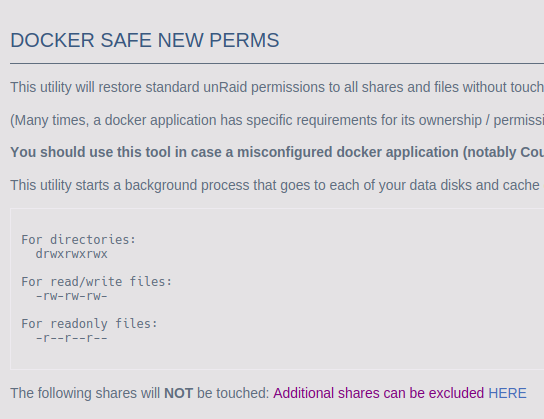
Looks like the recommendation is to run "new permissions" from within the Tools menu after an UNRAID version update

https://forums.unraid.net/topic/59696-docker-safe-new-permissions-what-does-it-do/

Unraid

Hi! I'm trying to use the unBALANCE plug in which is telling me that before I complete the operation I have in mind, I should run Docker Safe New Permissions (which is installed as part of CA). I would like to know: 1. What does "Docker Safe New Permissions" do? 2. Is it safe for my data and why?...