#🔨base-gamma-support
1 messages · Page 304 of 1
 raw raftBOT
 wraith goblet
yea i keep getting this monkeypatches error
 gritty lynx
ok did not work
 narrow sparrow
wraith goblet
yea i keep getting this monkeypatches error
narrow sparrow
wraith goblet
yea i keep getting this monkeypatches error
!152 update anomaly
raw raftBOT
You haven't updated to 1.5.2, that's why you're seeing this error.
If you already updated to 1.5.2 and still having problems, it means you did something wrong.
- Download the 1.5.2 update: https://www.moddb.com/mods/stalker-anomaly/downloads/stalker-anomaly-151-to-152
- Open the zip, you'll see 4 folders and a text file
- SELECT the content of this archive (4 folders and a .txt file)
- DRAG AND DROP the content of this archive inside your Anomaly folder
- OVERWRITE everything when asked to do so
- Open the installer with admin rights
- Click on
Download G.A.M.M.A. dataAND THEN CLICKFull G.A.M.M.A. Installation
IF YOU HAVE THE ENTIRE UPDATE FOLDER NAMED Anomaly-1.5.1-to-1.5.2-Update IN YOUR ANOMALY FOLDER, THE GAME IS NOT UPDATED.|||||||||||||||||||||||||||||||||||||||||||||||||||||||||||||||||||||||||||||||||||||||||||||||||||||||||||||||||||||||||||||||||||||||||||||||||||||||||||||||||||||||||||||||||||||||||||||||||||||||||||||||||||||||||||||||||||||||||||||||||||||||||||||||||||||||||||||||||||||||||||||||||||||||||||||||||||||||||||||||||||||||||||||||||||||||||||||||||||||||||||||||||||||||||||||||||||||||||||||||||||||||||||||||||||||||||||||||||||||||||||||||||||||||||||||||||||||||||||||||||||||||||||||||||||||||||||||||||||||||||||||||||||||||||||||||||||||||||||||||||||||||||||||||||||||||||||||||||||||||||||||||||||||||||||||||||||||||||||||||||||||||||||||||||||||||||||||||||||||||||||||||||||||||||||||||||||||||||||||||||||||||||||||||||||||||||||||||||||||||||||||||||||||||||||||||||||||||| _ _ _ _ _ _ https://cdn.discordapp.com/attachments/922555488665743391/1031175832376447077/unknown.png
 narrow sparrow
gritty lynx
ok did not work
narrow sparrow
gritty lynx
ok did not work
re-enable the mods you disabled and try then
 north turret
 ruby venture
i asked for help earlier but we never could resolve my issue with mo2 not recognizing my anomaly folder game. not sure what my issue is as ive followed everything mo2 just doesn't seem to like me
gritty lynx
guess i screwed up
 drifting coyote
Does somebody know how to install the classic textures pack? I installed the mod and disabled the agressor reshade and it simply doesn't work
wraith goblet
it works until i try to load into the actual game and then it wont load hints and crashes
gritty lynx
still getting fatal errors
narrow sparrow
gritty lynx
still getting fatal errors
Disable the reshade to see if thats the problem
gritty lynx
like in mo2?
 glossy pier
i just installed it and when i go to make a new game and press start it begins to load into the game then crashes what ca i do to fix it
narrow sparrow
gritty lynx
like in mo2?
!default or you can do the modlist part to reset everything to default
raw raftBOT
Mod list
To bring your mod list back to default, inverting any changes made by you:
- Open the installer with admin rights
- Click on
Only install G.A.M.M.A. addons
Keybinds
To bring your keybinds to default, DON'T press the default button in the menu, you'll mess up everything.
Instead, do this:
- Go in
GAMMA RC3\.Grok's Modpack Installer\G.A.M.M.A\modpack_patches\appdata - Copy the
user.ltxfile you'll find in there (note that every change made by you in youruser.ltxwill be reverted to default) - Paste this file in
Anomaly\appdata
narrow sparrow
glossy pier
i just installed it and when i go to make a new game and press start it begins t...
!crash send the log
raw raftBOT
Send your crash log where it was asked IF YOU ARE BEING HELPED, not inside #🤖bot-commands if you're using this command in this channel.
You won't be helped, it's literally just a channel where you can use commands.
The file is inside your Anomaly folder, this is the complete path:
Anomaly/appdata/logs.
This is what you could find:
xray_yournamehere.txtxray_yournamehere.logxray_yournameherewithout any file extension
You just need to send ONE of these files where it was asked. It's either ONE file with .txt OR .log OR with nothing at the end.
DON'T send anything with .bkp at end.
Drag and drop the file inside the Discord channel, Discord will handle it for you.
Make sure you're not using any extra mods, if you do, you'll need to ask in #🔨modded-gamma-support.
gritty lynx
disabled it and it works
guess i won't be able to use the shader
thanks
wait i found a solution
only disabled this

but it looks questionable lol
 oak isle
If I want to reinstall base Anomaly, do I also need to reinstall the Gamma pack?
 distant plover
https://gyazo.com/718468f363b78f01ce825f20ac5571eb Im trying to install Maids HD icon mod but I get this message. Any ideas what Im doing wrong?


 random peak
Getting this crash every time I launch since the most recent update. Unaltered modlist.

 prime fulcrum
random peak
Getting this crash every time I launch since the most recent update. Unaltered m...
prime fulcrum
random peak
Getting this crash every time I launch since the most recent update. Unaltered m...
screenshot your MO2
prime fulcrum
 river rune
https://gyazo.com/ead241d096a80534d1c3c245a36a59ca
river rune
https://gyazo.com/ead241d096a80534d1c3c245a36a59ca
screenshot your MO2
prime fulcrum
distant plover
https://gyazo.com/718468f363b78f01ce825f20ac5571eb Im trying to install Maids HD...
!gammavanilla
raw raftBOT
What "vanilla" means for G.A.M.M.A.:
Vanilla G.A.M.M.A. is considered to be the G.A.M.M.A. modpack as it comes. This means you have #📍577-mods-in-mo2 and have not enabled or disabled any of those, have not enabled any animations in MCM, and have not added any mods of your own.
If you're seeing this, it's because you're posting in the wrong channel. Go ask in #🔨modded-gamma-support.
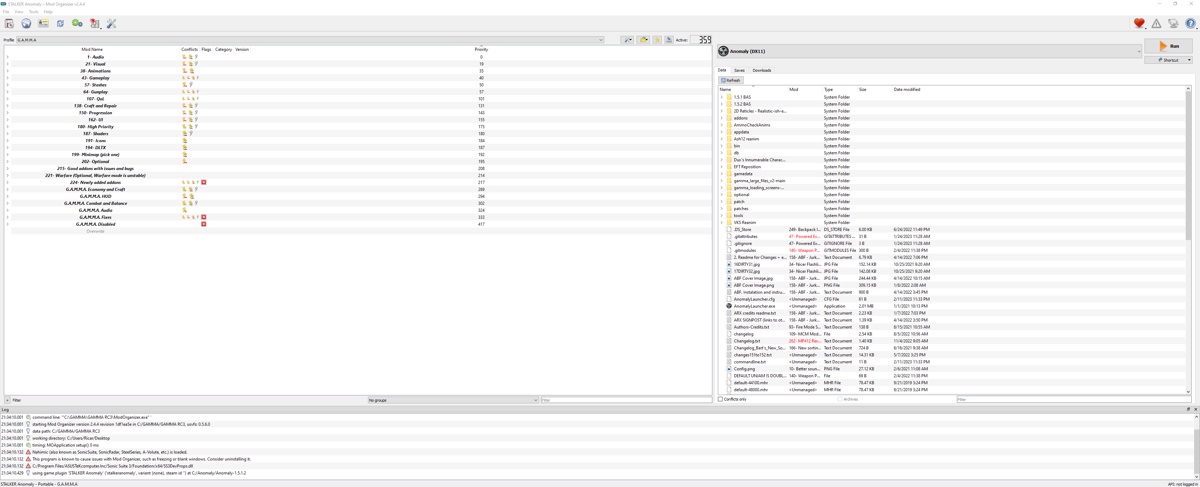 random peak
Just did a fresh install to see if it would fix. Still same problem. Haven't altered anything.
 river rune
also did a fresh install as well didnt work
distant plover
Fixed it. Apparently there’s a command to install Maids. Thank you
prime fulcrum
!fullblock @random peak @river rune
raw raftBOT
Check if you are blocked from accessing https://www.moddb.com/ (you'll see a big red screen)
If yes then wait for the indicated time + 40 minutes and then try accessing the site again.
(Or use vpn)
Then, do exactly this:
- Disable antivirus temporarily
- In Windows Defender, add Anomaly and Gamma folders to Exclusions:
windows security > virus & threat protection > manage settings > exclusions- Open GAMMA installer as admin
- Change moddb mirror to 127 or 128
- Click Download G.A.M.M.A. data
- Click Full G.A.M.M.A. installation
Don't delete anything
river rune
ok thanks ill try
 steel bridge
i just installed gamma and when i tried to launch it, this pops up

 true yoke
i think my traders are bugged this update, they are all selling m700 kits and no advanced tech items when at max goodwill, i tried confirming this through debug mode
Anyone else getting this problem? K98 is unable to be kitted with the forester kit, the fix was made only for the zf scope zoom and mounting/dismounting
359 mods installed and updating data -> complete installation didn't help, replacing anomaly's folders with the gamma patches folders didn't help either
prime fulcrum
steel bridge
i just installed gamma and when i tried to launch it, this pops up
re-extract the gamma rc3 archive
 spiral estuary
so I've been playing for a while and just realized I only have 334 mods active I downloaded it a while ago so has it just changed or should I do something
 prime fulcrum
spiral estuary
so I've been playing for a while and just realized I only have 334 mods active I...
prime fulcrum
spiral estuary
so I've been playing for a while and just realized I only have 334 mods active I...
!full
raw raftBOT
1. Open your G.A.M.M.A. installer as admin
2. Click "Download G.A.M.M.A. data"
3. Click "Full G.A.M.M.A. installation"
Full GAMMA Installation does NOT remove saves, nor does it mean you are redownloading everything and it won't delete anything at all.
A full install will simply check every mod in the pack, reinstall and fix them, and any that need to be updated will be updated.
In case you want to save your in-game or MCM settings (because the installer will revert them back to default), type !backup in #🤖bot-commands.
random peak
prime fulcrum
!fullblock <@719590775230300171> <@108072835708108800>
Fixed it. Thanks 💚
 gray mural
If i copy + pasta my game to another drive and redo the gamma data install, can i still play my saved games or nahh
 worn radish
Best way to disable all of gamma's artefact changes?
i would like it to pretty much be vanilla and i see several mods in mo2
also with out the game crashing as that seems to be a problem
prime fulcrum
gray mural
If i copy + pasta my game to another drive and redo the gamma data install, can ...
!move
raw raftBOT
KEEP IN MIND AND REMEMBER THAT THE FOLLOWING FOLDERS ARE -NOT- SUITABLE FOR ANOMALY AND G.A.M.M.A., DON'T USE THEM.
Desktop, Downloads, Documents, One Drive, Program Files/Program Files x86
DON'T. USE. THEM.
DON'T.
Moving Anomaly:
- Move your
Anomalyfolder to the new location - Go to your
G.A.M.M.Afolder - Delete the
ModOrganizer.inifile. It should be below theModOrganizer.exeapplication
Moving G.A.M.M.A.:
- Open your
G.A.M.M.A.folder and ONLY delete the "mods" folder you'll find inside. Leave the rest untouched, you don't need to delete anything else - Move your
G.A.M.M.A.folder to the new location
When you have finished moving everything to the new location:
- Run the installer as admin
- Click on
1. Allow Powershell scripts - Click on
2. Launch MO2 - Select your
Anomalyfolder - Click on
Download G.A.M.M.A. dataand then click onFull G.A.M.M.A. installation
gray mural
my science experiment says yes you can still play your saved games even after moving. the command didnt say so i tried it out lol
river rune
prime fulcrum
!fullblock <@719590775230300171> <@108072835708108800>

This is what I get now
I used a VPN to access MODDB if that means anything
prime fulcrum
river rune
I used a VPN to access MODDB if that means anything
a browser extension vpn?
river rune
😭 ok thanks
worn radish
 static inlet
night vision
static inlet
night vision
hold n?
static inlet
Thanks, I already answered elsewhere. Good luck
spiral estuary
got this after updating
 prime fulcrum
spiral estuary
got this after updating
prime fulcrum
spiral estuary
got this after updating
!fullblock
raw raftBOT
Check if you are blocked from accessing https://www.moddb.com/ (you'll see a big red screen)
If yes then wait for the indicated time + 40 minutes and then try accessing the site again.
(Or use vpn)
Then, do exactly this:
- Disable antivirus temporarily
- In Windows Defender, add Anomaly and Gamma folders to Exclusions:
windows security > virus & threat protection > manage settings > exclusions- Open GAMMA installer as admin
- Change moddb mirror to 127 or 128
- Click Download G.A.M.M.A. data
- Click Full G.A.M.M.A. installation
Don't delete anything
spiral estuary
ty
 violet seal
hey just want to confirm if this is an expected behavior or not, I have an older save from Nov. last year that has all the faction unlock quests finished but I no longer see them unlocked in the new game menu after updating GAMMA. Is this expected or no
prime fulcrum
violet seal
hey just want to confirm if this is an expected behavior or not, I have an older...
!factions
raw raftBOT
To unlock every faction from the beginning, you can type greh/renegades/isg/z when you start a new game in the character creation screen.
Since this sound strange, I literally mean "TYPE WITH YOUR KEYBOARD", you don't have an option where you can type in, like a console command.
For example, if you LITERALLY WRITE on your keyboard isg, and then you open the faction menu, you'll see the UNISG icon. Same goes for the rest.
steel bridge
 violet seal
prime fulcrum
!factions
violet seal
prime fulcrum
!factions
I mean this works and I know about this method but I was more curious if the roll back of previously unlocked factions thru story mode after update was a bug or not.
I thought the game checked your save file to see if the factions were to be shown unlocked during selection screen
 fluid rampart

 vague goblet
got this crash to desktop about 5-6 times in the space of half an hour. Tried to pin down is it's something specific that's causing it but I'm unsure as of yet.
 prime fulcrum
vague goblet
got this crash to desktop about 5-6 times in the space of half an hour. Tried to...
prime fulcrum
vague goblet
got this crash to desktop about 5-6 times in the space of half an hour. Tried to...
screenshot your MO2
prime fulcrum
fluid rampart
launch without AVX
vague goblet
 steel bridge
Keep getting this error both on dx11 and dx11avx doesnt load the game just go to start a new game gets to the loading and before it loads it crashes
 prime fulcrum
steel bridge
Keep getting this error both on dx11 and dx11avx doesnt load the game just go to...
prime fulcrum
steel bridge
Keep getting this error both on dx11 and dx11avx doesnt load the game just go to...
screenshot your MO2
prime fulcrum
vague goblet
!full
raw raftBOT
1. Open your G.A.M.M.A. installer as admin
2. Click "Download G.A.M.M.A. data"
3. Click "Full G.A.M.M.A. installation"
Full GAMMA Installation does NOT remove saves, nor does it mean you are redownloading everything and it won't delete anything at all.
A full install will simply check every mod in the pack, reinstall and fix them, and any that need to be updated will be updated.
In case you want to save your in-game or MCM settings (because the installer will revert them back to default), type !backup in #🤖bot-commands.
steel bridge
 prime fulcrum
steel bridge
prime fulcrum
steel bridge
!fullblock
raw raftBOT
Check if you are blocked from accessing https://www.moddb.com/ (you'll see a big red screen)
If yes then wait for the indicated time + 40 minutes and then try accessing the site again.
(Or use vpn)
Then, do exactly this:
- Disable antivirus temporarily
- In Windows Defender, add Anomaly and Gamma folders to Exclusions:
windows security > virus & threat protection > manage settings > exclusions- Open GAMMA installer as admin
- Change moddb mirror to 127 or 128
- Click Download G.A.M.M.A. data
- Click Full G.A.M.M.A. installation
Don't delete anything
 weak pulsar
after fast traveling to the outskirts i noticed that the lighting did not update and the landscape was fully lit and after a couple seconds my game crashed. reloaded the autosave from fast traveling and it happened again. tried reloading a save prior to that one and same thing happened. im by no means knowledgeable of how to read crash logs but i the crash log is just filled with what i assume is like a thousand lines of assets that are supposed to be loading in and a couple lines saying "blah blah blah invalid". im just gonna provide a snip for an exmple but i can provide the crash log if needed

 quasi crater
I got a question, are the meta files for the downloads in the Gamma folder supposed to be separate from the mod files
weak pulsar
weak pulsar
after fast traveling to the outskirts i noticed that the lighting did not update...
its actually 4900 lines of stuff loading and error messages to be exact
steel bridge
prime fulcrum
!fullblock
did this and when i went to re launch got this other error message
 prime fulcrum
steel bridge
did this and when i went to re launch got this other error message
prime fulcrum
steel bridge
did this and when i went to re launch got this other error message
!152
raw raftBOT
You haven't updated to 1.5.2, that's why you're seeing this error.
If you already updated to 1.5.2 and still having problems, it means you did something wrong.
- Download the 1.5.2 update: https://www.moddb.com/mods/stalker-anomaly/downloads/stalker-anomaly-151-to-152
- Open the zip, you'll see 4 folders and a text file
- SELECT the content of this archive (4 folders and a .txt file)
- DRAG AND DROP the content of this archive inside your Anomaly folder
- OVERWRITE everything when asked to do so
- Open the installer with admin rights
- Click on
Download G.A.M.M.A. dataAND THEN CLICKFull G.A.M.M.A. Installation
IF YOU HAVE THE ENTIRE UPDATE FOLDER NAMED Anomaly-1.5.1-to-1.5.2-Update IN YOUR ANOMALY FOLDER, THE GAME IS NOT UPDATED.|||||||||||||||||||||||||||||||||||||||||||||||||||||||||||||||||||||||||||||||||||||||||||||||||||||||||||||||||||||||||||||||||||||||||||||||||||||||||||||||||||||||||||||||||||||||||||||||||||||||||||||||||||||||||||||||||||||||||||||||||||||||||||||||||||||||||||||||||||||||||||||||||||||||||||||||||||||||||||||||||||||||||||||||||||||||||||||||||||||||||||||||||||||||||||||||||||||||||||||||||||||||||||||||||||||||||||||||||||||||||||||||||||||||||||||||||||||||||||||||||||||||||||||||||||||||||||||||||||||||||||||||||||||||||||||||||||||||||||||||||||||||||||||||||||||||||||||||||||||||||||||||||||||||||||||||||||||||||||||||||||||||||||||||||||||||||||||||||||||||||||||||||||||||||||||||||||||||||||||||||||||||||||||||||||||||||||||||||||||||||||||||||||||||||||||||||||||||| _ _ _ _ _ _ https://cdn.discordapp.com/attachments/922555488665743391/1031175832376447077/unknown.png
oak isle
I keep crashing when in combat, been on and off like this and now I'm crashing almost after every fight. This is what I get at the end of my log since it doesn't really CTD.
Time continual is:1056119 1409291 1109291 Time continual is:1058679 [Fuji] On hit, try magic [Fuji] Bad roll, aborting [Fuji] On hit, try magic [Fuji] Bad roll, aborting [Fuji] On hit, try magic [Fuji] Bad roll, aborting
 abstract galleon
is it bad if the installer hangs on the data installation part?
 solar ore
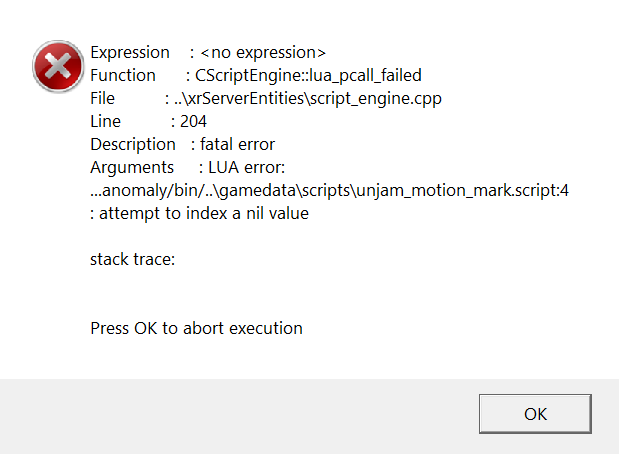
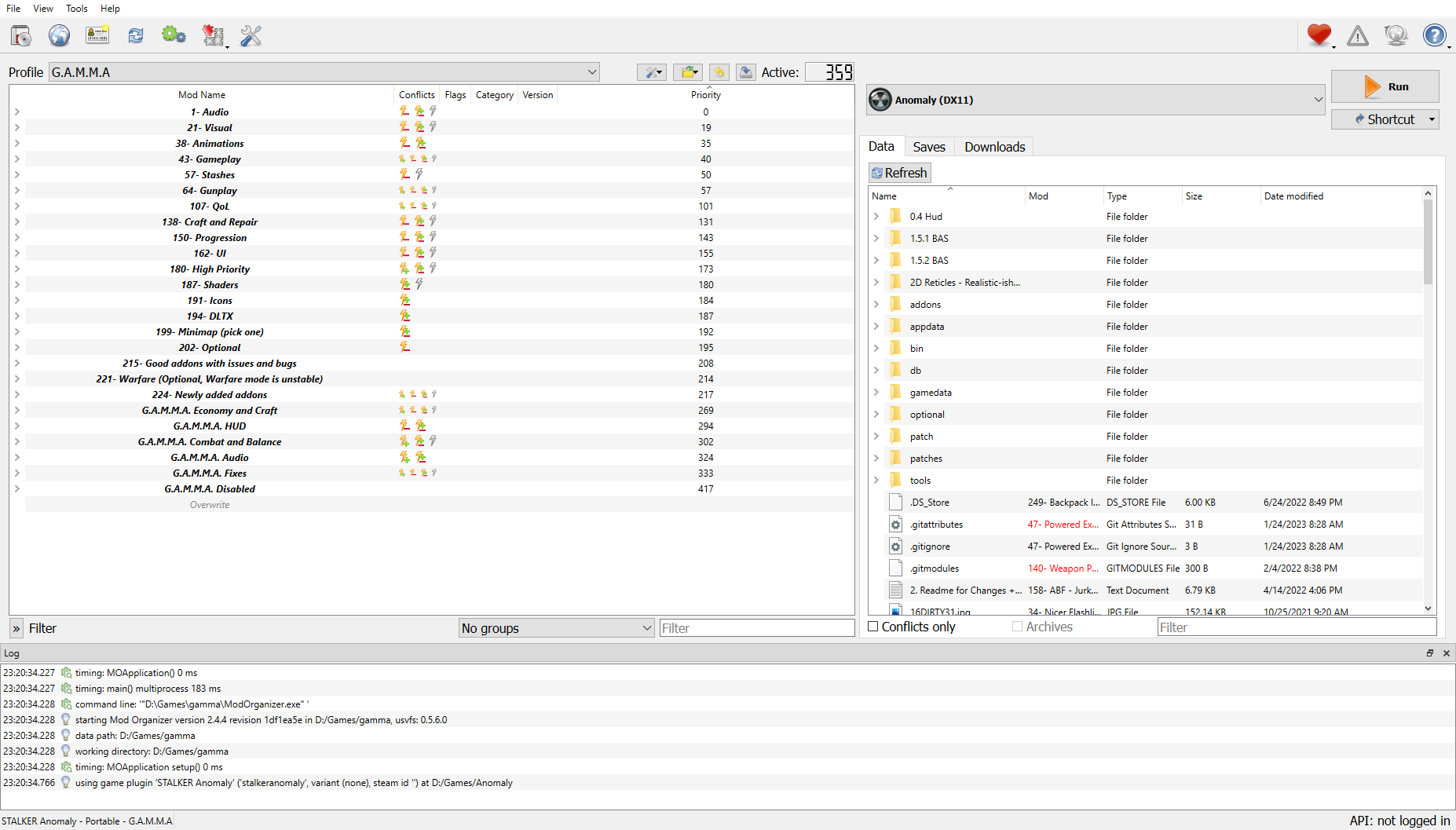
Good evening everyone, I have a problem.

 quaint wedge
solar ore
Good evening everyone, I have a problem.
quaint wedge
solar ore
Good evening everyone, I have a problem.
Do you have #📍577-mods-in-mo2 ? if so, see if you have any red X's next to mods.
quaint wedge
abstract galleon
is it bad if the installer hangs on the data installation part?
The installer hanging is fine. You have an issue if you see "unable to download"
prime fulcrum
oak isle
I keep crashing when in combat, been on and off like this and now I'm crashing a...
screenshot your MO2
prime fulcrum
solar ore
Good evening everyone, I have a problem.
screenshot your MO2
 median lotus
how to install additional mods?
 agile ledge
!dx8
median lotus
but why DX8?
 limber cypress
When I try to activate the Maids icons, the Kar98 dissapeared. I do not know how to do it right.
 ember idol
Guys i need some help I had this weird glitch where when I equipped my night vision and aim down sight with my gun, my game instantly crash
agile ledge
Hello, is there another place, not the GitHub where I can download the mod "GAMMA LARGE FILES v2" ?
I need someone who has downloaded the "gamma large files v2" mod and can help me.
quaint wedge
agile ledge
Hello, is there another place, not the GitHub where I can download the mod "GAMM...
!largefiles
raw raftBOT
https://github.com/Grokitach/gamma_large_files_v2
1. Go to your GAMMA RC3/downloads and delete gamma_large_files_v2 and gamma_large_files_v2.meta if you have it
2. Download the file from Github. Make sure it's called gamma_large_files_v2 and NOT gamma_large_files_v2-main, rename it if it has "-main" at the end
3. Make sure that the very first folder inside the zip is named gamma_large_files_v2-main and not gamma_large_files_v2
4. Drop the downloaded zip in your GAMMA/downloads folder AND DO NOT EXTRACT
5. Launch GAMMA installer as admin
6. Click the Download G.A.M.M.A. Data button
7. Click the Full G.A.M.M.A. installation button
quaint wedge
agile ledge
I need someone who has downloaded the "gamma large files v2" mod and can help me...
thats the link
oh sorry didnt see you say not github
agile ledge
quaint wedge
thats the link
unju
agile ledge
quaint wedge
thats the link
github gives me error
 viral needle
Hey hey hey, got so, got the game running finally. however the game will freeze momentarily and then continue on like nothing happened. frames are consistently in the high 80-high 90 range and they stay there so not exactly an FPS question. I do have the game off of Core 0 in my processor as well.
and it does this randomly from what I can tell as well I have render distances turned down to ensure that its not the game freaking out when it goes to render things
agile ledge
viral needle
Hey hey hey, got so, got the game running finally. however the game will freeze ...
congratulations, I'm still stuck
viral needle
im on a 2070 super
quaint wedge
viral needle
im on a 2070 super
this is obvious but, do you have the stutter mod enabled?
just checking
"turn this on if you stutter" or smth like that
viral needle
quaint wedge
this is obvious but, do you have the stutter mod enabled?
you say its obvious, but i did not know there was a mod for that. ill double check, thatll be in the mod config in game correct and not in MO2
quaint wedge
viral needle
you say its obvious, but i did not know there was a mod for that. ill double che...
Just saying incase because I usually tell people that and they act like Im dumb for suggesting it and they already have it on lol. Its in the mo2
look up "stutter" on filter and check it on
quaint wedge
agile ledge
github gives me error
What do you mean by "gives you an error" ? Have you navigated to the correct download spot because github can be confusing
viral needle
i did not, big help again my man, Ive never modded a game to this extent so im learning. im used to steam
quaint wedge
np dude. forgot that wasnt in the #old-framerate-optimisation channel. should be mentioned though
also another thing I heard from a youtube video was that bordlerless gets better fps. havent compared it but I run in borderless on a 1070ti and ryzen 5 2600 and get around 80fps even in rostok and less stutters so maybe thatll help
agile ledge
quaint wedge
What do you mean by "gives you an error" ? Have you navigated to the correct dow...
yes, but when I try to download it, I get an error almost at the end.
agile ledge
quaint wedge
np dude. forgot that wasnt in the <#929309266056196096> channel. should be menti...
I have tried countless times.
quaint wedge
No clue on that, sorry. github has always worked for me
agile ledge
quaint wedge
No clue on that, sorry. github has always worked for me
Can't you do me a favor and upload it somewhere so I can download it properly?
quaint wedge
Im on my phone, lol. And not in the mood to download a file and host it somewhere at 3 am
sorry bro
 rugged sparrow
When you update gamma through the recommended method on discord does it update anomaly as well or do I have to do separately?
quaint wedge
rugged sparrow
When you update gamma through the recommended method on discord does it update a...
What do you mean? Update anomaly to 1.5.2?
agile ledge
quaint wedge
What do you mean? Update anomaly to 1.5.2?
Yes, I appreciate it, I know it's late, but would you do it if it were earlier?
rugged sparrow
For example should anomaly 1 .5.3 release would gamma installer update method also update the anomaly version to 1.5.3?
quaint wedge
It should still be 1.5.2 to my knowledge.
#old-how-to-install is still guiding to be on 1.5.2
no need to update anomaly at all when updating mods
as long as your on what the install said you should be. they would change that if you needed an anomaly update
quaint wedge
median lotus
how to install additional mods?
Just download them. Load them on the bottom of your order and make sure you keep track of shit so that you know what to disable if it fucks up or go to #🔨modded-gamma-support to fix any issues with all that.
 winter kite
why does my GAMMA look ugly like this?
 prime fulcrum
winter kite
why does my GAMMA look ugly like this?
prime fulcrum
winter kite
why does my GAMMA look ugly like this?
!shader
raw raftBOT
To clean your "Shader Cache", don't use the option in the Anomaly launcher.
Go in this folder: Anomaly\appdata, you'll find a folder called shaders_cache, delete this folder and launch the game normally from MO2, using your preferred DX.
winter kite
does it reset all the graphics settings to its default values?
 ashen swan
Hi I have a small problem with mags redux I did as it was written in !mags and when I change the magazine the gun reloads without problem but at the end of the animation the game just throws some of the ammo from my backpack on the ground is there any way to fix this?
 tender forge
ashen swan
Hi I have a small problem with mags redux I did as it was written in !mags and w...
tender forge
ashen swan
Hi I have a small problem with mags redux I did as it was written in !mags and w...
 bronze ginkgo
i have a issue of the game crashing after i make my character/loadout
 raven swallow
I'm lost, I have been encountering this issue which causes a crash whenever I ads with nightvision enabled.
 winter kite
prime fulcrum
!shader
winter kite
prime fulcrum
!shader
uhh after deleting shader cache it got worse. Please help?

Bloom is too much and modifying reshade options does nothing.....also the godrays are flickering
 patent lodge
I have a problem with the shader. Clean installation of Gamma, running DX11, pressing Home and nothing opens
winter kite
winter kite
uhh after deleting shader cache it got worse. Please help?
Ok guys fixed it. I accidentally increased the sun rays intensity to full in settings.
winter kite
prime fulcrum
!shader
Thanks for your help
One more question. Does this lighting look too dark? I mean are my lighting settings ok or darker than it should be?

 magic isle
Hi, game crushes with following message after attempt to talk to ecologist trader in Yanov scientist bunker. It didn't crush by the first time I talked to him, but after I took a quest for placing anomaly detector and tried to get a reward, it did
 prime fulcrum
magic isle
Hi, game crushes with following message after attempt to talk to ecologist trade...
prime fulcrum
magic isle
Hi, game crushes with following message after attempt to talk to ecologist trade...
screenshot your MO2
prime fulcrum
winter kite
One more question. Does this lighting look too dark? I mean are my lighting sett...
seems fine? not sure
magic isle
prime fulcrum
screenshot your MO2
I've changed something only in optional mods
 prime fulcrum
@magic isle #⏩start-confirm
 smoky bone
Found a recurring bug, mutant tracker quest doesnt seem to be dropping the tracker, i have some optional mods on, can i report here?
bronze ginkgo
anyone know how to stop the game crashing after you make a loadout?
 unborn coyote
how do i delete an instance
limber cypress
How do I properly install Maid HD Icons with the default mod list? I tried on my own, but the Kar98 dissapeared.
unborn coyote
i moved both my anomaly folder and gamma folder into a "hub folder" to manage easily and it fucked up my instance
 molten oxide
After the lates update from Gamma und ReShade i got this problem.
I delete Anomaly and Gamma, re-install and work with " Stalker Anomaly | G.A.M.M.A | Hippo's Shaders and Atmospherics Install Guide" but the problem is still there.
Oh and i got strange an shiny Grass


 quaint wedge
bronze ginkgo
i have a issue of the game crashing after i make my character/loadout
quaint wedge
bronze ginkgo
i have a issue of the game crashing after i make my character/loadout
Is this resolved?
 quaint wedge
 thorny sinew
hello i have a problem when i start new game its that error >
thorny sinew
hello i have a problem when i start new game its that error >
Do you have #📍577-mods-in-mo2
quaint wedge
Do you see any red X's next to mods?
bronze ginkgo
same issue i am having and no mine is not resolved
quaint wedge
bronze ginkgo
same issue i am having and no mine is not resolved
!crash
raw raftBOT
Send your crash log where it was asked IF YOU ARE BEING HELPED, not inside #🤖bot-commands if you're using this command in this channel.
You won't be helped, it's literally just a channel where you can use commands.
The file is inside your Anomaly folder, this is the complete path:
Anomaly/appdata/logs.
This is what you could find:
xray_yournamehere.txtxray_yournamehere.logxray_yournameherewithout any file extension
You just need to send ONE of these files where it was asked. It's either ONE file with .txt OR .log OR with nothing at the end.
DON'T send anything with .bkp at end.
Drag and drop the file inside the Discord channel, Discord will handle it for you.
Make sure you're not using any extra mods, if you do, you'll need to ask in #🔨modded-gamma-support.
thorny sinew
quaint wedge
Do you see any red X's next to mods?
yes
quaint wedge
thorny sinew
yes
Take a screenshot.
thorny sinew
 quaint wedge
thorny sinew
quaint wedge
thorny sinew
!fullblock
raw raftBOT
1. Check if you are blocked from accessing https://www.moddb.com/ (you'll see a big red screen)
If yes then wait for the indicated time + 40 minutes and then try accessing the site again.
(Or use vpn)
Then, do exactly this:
2. Disable antivirus temporarily
3. In Windows Defender, add Anomaly and Gamma folders to Exclusions:
windows security > virus & threat protection > manage settings > exclusions
4. Open GAMMA installer as admin
5. ClickDownload G.A.M.M.A. data
6. ClickFull G.A.M.M.A. installation
Don't delete anything
quaint wedge
Follow "then do exactly this" even if you are not blocked.
thorny sinew
ok
bronze ginkgo
do i just load the log here or in the new thread
quaint wedge
Here or in a thread. whatever you find easiest
bronze ginkgo
raw raftBOT
You haven't updated to 1.5.2, that's why you're seeing this error.
If you already updated to 1.5.2 and still having problems, it means you did something wrong.
- Download the 1.5.2 update: https://www.moddb.com/mods/stalker-anomaly/downloads/stalker-anomaly-151-to-152
- Open the zip, you'll see 4 folders and a text file
- SELECT the content of this archive (4 folders and a .txt file)
- DRAG AND DROP the content of this archive inside your Anomaly folder
- OVERWRITE everything when asked to do so
- Open the installer with admin rights
- Click on
Download G.A.M.M.A. dataAND THEN CLICKFull G.A.M.M.A. Installation
IF YOU HAVE THE ENTIRE UPDATE FOLDER NAMED Anomaly-1.5.1-to-1.5.2-Update IN YOUR ANOMALY FOLDER, THE GAME IS NOT UPDATED.|||||||||||||||||||||||||||||||||||||||||||||||||||||||||||||||||||||||||||||||||||||||||||||||||||||||||||||||||||||||||||||||||||||||||||||||||||||||||||||||||||||||||||||||||||||||||||||||||||||||||||||||||||||||||||||||||||||||||||||||||||||||||||||||||||||||||||||||||||||||||||||||||||||||||||||||||||||||||||||||||||||||||||||||||||||||||||||||||||||||||||||||||||||||||||||||||||||||||||||||||||||||||||||||||||||||||||||||||||||||||||||||||||||||||||||||||||||||||||||||||||||||||||||||||||||||||||||||||||||||||||||||||||||||||||||||||||||||||||||||||||||||||||||||||||||||||||||||||||||||||||||||||||||||||||||||||||||||||||||||||||||||||||||||||||||||||||||||||||||||||||||||||||||||||||||||||||||||||||||||||||||||||||||||||||||||||||||||||||||||||||||||||||||||||||||||||||||||| _ _ _ _ _ _ https://cdn.discordapp.com/attachments/922555488665743391/1031175832376447077/unknown.png
quaint wedge
bronze ginkgo
Update me if that works or not
bronze ginkgo
wilco
unborn coyote
is it possible to delete an instance? i tried removing a reinstalling anomaly but all the mods were still implace
quaint wedge
unborn coyote
is it possible to delete an instance? i tried removing a reinstalling anomaly bu...
As far as I know deleting the gamma folder should work. Then just run anomaly and it should be vanilla if thats what you want
unborn coyote
no i moved the folders and it messed up the instance all the mods are out of place and unticked
but basically just reinstall gamma id imagine
raw raftBOT
KEEP IN MIND AND REMEMBER THAT THE FOLLOWING FOLDERS ARE -NOT- SUITABLE FOR ANOMALY AND G.A.M.M.A., DON'T USE THEM.
Desktop, Downloads, Documents, One Drive, Program Files/Program Files x86
DON'T. USE. THEM.
DON'T.
Moving Anomaly:
- Move your
Anomalyfolder to the new location - Go to your
G.A.M.M.Afolder - Delete the
ModOrganizer.inifile. It should be below theModOrganizer.exeapplication
Moving G.A.M.M.A.:
- Open your
G.A.M.M.A.folder and ONLY delete the "mods" folder you'll find inside. Leave the rest untouched, you don't need to delete anything else - Move your
G.A.M.M.A.folder to the new location
When you have finished moving everything to the new location:
- Run the installer as admin
- Click on
1. Allow Powershell scripts - Click on
2. Launch MO2 - Select your
Anomalyfolder - Click on
Download G.A.M.M.A. dataand then click onFull G.A.M.M.A. installation
prime fulcrum
molten oxide
After the lates update from Gamma und ReShade i got this problem.
I delete Ano...
!gammavanilla
raw raftBOT
What "vanilla" means for G.A.M.M.A.:
Vanilla G.A.M.M.A. is considered to be the G.A.M.M.A. modpack as it comes. This means you have #📍577-mods-in-mo2 and have not enabled or disabled any of those, have not enabled any animations in MCM, and have not added any mods of your own.
If you're seeing this, it's because you're posting in the wrong channel. Go ask in #🔨modded-gamma-support.
molten oxide
ouh sorry
thorny sinew
quaint wedge
!fullblock
now I have even more red flags
quaint wedge
thorny sinew
now I have even more red flags
Your download fucked up again. check moddb screenshot what you see
 solemn dirge
can i change the configuration of water back to the vanilla?
thorny sinew
quaint wedge
Your download fucked up again. check moddb screenshot what you see
moddb screenshot?
 quaint wedge
thorny sinew
oh
quaint wedge
thorny sinew
oh
!fullblock
raw raftBOT
1. Check if you are blocked from accessing https://www.moddb.com/ (you'll see a big red screen)
If yes then wait for the indicated time + 40 minutes and then try accessing the site again.
(Or use vpn)
Then, do exactly this:
2. Disable antivirus temporarily
3. In Windows Defender, add Anomaly and Gamma folders to Exclusions:
windows security > virus & threat protection > manage settings > exclusions
4. Open GAMMA installer as admin
5. ClickDownload G.A.M.M.A. data
6. ClickFull G.A.M.M.A. installation
Don't delete anything
thorny sinew
raw raft
> **1.** **Check if you are blocked from accessing** <https://www.moddb.com/> (y...
i just uninstal avast now
avast block me to do this .
In Windows Defender, add Anomaly and Gamma folders to Exclusions:
windows security > virus & threat protection > manage settings > exclusions
but i shut down him
quaint wedge
Deleting avast wont fix your moddb problem. you have to wait the time on the website and then 40 minutes because they think youre a bot. its because so many people are downloading
north turret
i get this error when trying to load save file
 viral needle
quaint wedge
viral needle
viral needle
quaint wedge
viral needle
Its probably that mod that didnt download correctly. screenshot mo2 with categories closed
prime fulcrum
north turret
i get this error when trying to load save file
screenshot your MO2
thorny sinew
raw raft
> **1.** **Check if you are blocked from accessing** <https://www.moddb.com/> (y...
everytime i go to the site it tells me i can access for 30 seconds or so
viral needle
 thorny sinew
everytime i go to the site it tells me i can access for 30 seconds or so
thorny sinew
thorny sinew
everytime i go to the site it tells me i can access for 30 seconds or so

i refresh and now is 3 minutes
 unkempt ledge
!crash
raw raftBOT
Send your crash log where it was asked IF YOU ARE BEING HELPED, not inside #🤖bot-commands if you're using this command in this channel.
You won't be helped, it's literally just a channel where you can use commands.
The file is inside your Anomaly folder, this is the complete path:
Anomaly/appdata/logs.
This is what you could find:
xray_yournamehere.txtxray_yournamehere.logxray_yournameherewithout any file extension
You just need to send ONE of these files where it was asked. It's either ONE file with .txt OR .log OR with nothing at the end.
DON'T send anything with .bkp at end.
Drag and drop the file inside the Discord channel, Discord will handle it for you.
Make sure you're not using any extra mods, if you do, you'll need to ask in #🔨modded-gamma-support.
unkempt ledge
viral needle
currently at 358 as i deactivated the Autumn textures to get a more lush Zone, and then the stutter mod is activated.
i still get a few stutters every now and then with that activated but im starting to chock that up to the fact you guys are modernizing an older game, i can live with a few every now and then
quaint wedge
thorny sinew
Wait that time then 40 minutes then do a full install on gamma installer and use mirror 127 or 128
 unkempt ledge
when i am trying to start a new game it always crashes and shows this...
 quaint wedge
unkempt ledge
when i am trying to start a new game it always crashes and shows this...
quaint wedge
unkempt ledge
when i am trying to start a new game it always crashes and shows this...
Do you have #📍577-mods-in-mo2 ? IF YES Do you see any red ❌ 's next to mods in mo2? Under the flags column
unkempt ledge
 quaint wedge
unkempt ledge
quaint wedge
unkempt ledge
Open addons and gamma fixes and take another screenshot
unkempt ledge

 quaint wedge
unkempt ledge
quaint wedge
unkempt ledge
!fullblock
raw raftBOT
1. Check if you are blocked from accessing https://www.moddb.com/ (you'll see a big red screen)
If yes then wait for the indicated time + 40 minutes and then try accessing the site again.
(Or use vpn)
Then, do exactly this:
2. Disable antivirus temporarily
3. In Windows Defender, add Anomaly and Gamma folders to Exclusions:
windows security > virus & threat protection > manage settings > exclusions
4. Open GAMMA installer as admin
5. ClickDownload G.A.M.M.A. data
6. ClickFull G.A.M.M.A. installation
Don't delete anything
unkempt ledge
thank you
quaint wedge
unkempt ledge
thank you
np
north turret
prime fulcrum
screenshot your MO2

i have 357 mods because i installed hippos shaders
i just installed hippos shaders and can't log into that save file
prime fulcrum
north turret
i have 357 mods because i installed hippos shaders
!gammavanilla
raw raftBOT
What "vanilla" means for G.A.M.M.A.:
Vanilla G.A.M.M.A. is considered to be the G.A.M.M.A. modpack as it comes. This means you have #📍577-mods-in-mo2 and have not enabled or disabled any of those, have not enabled any animations in MCM, and have not added any mods of your own.
If you're seeing this, it's because you're posting in the wrong channel. Go ask in #🔨modded-gamma-support.
north turret
hello
i just downloaded the stalker anomaly ,and i choose the mercenaries tho everytime i talk to someone my screen goes black and crashes
i dont know what could issue be
 green marten
I installed gamma, load up ModOrganizer, it shows 359 active mods. Run anomaly launcher and the launcher opens but when I click to launch it closes the launcher and nothing happens
-----loading d:/stalker anomaly\gamedata\configs\system.ltx
FATAL ERROR
[error]Expression : <no expression>
[error]Function : CInifile::r_section
[error]File : Xr_ini.cpp
[error]Line : 544
[error]Description : fatal error
[error]Arguments : Can't open section 'head_damage_017'. Please attach [*.ini_log] file to your bug report
thats the log
quaint wedge
north turret
i just downloaded the stalker anomaly ,and i choose the mercenaries tho everytim...
- Do you have #📍577-mods-in-mo2 ? IF YES Do you have any red ❌'s next to mods?
!152
raw raftBOT
You haven't updated to 1.5.2, that's why you're seeing this error.
If you already updated to 1.5.2 and still having problems, it means you did something wrong.
- Download the 1.5.2 update: https://www.moddb.com/mods/stalker-anomaly/downloads/stalker-anomaly-151-to-152
- Open the zip, you'll see 4 folders and a text file
- SELECT the content of this archive (4 folders and a .txt file)
- DRAG AND DROP the content of this archive inside your Anomaly folder
- OVERWRITE everything when asked to do so
- Open the installer with admin rights
- Click on
Download G.A.M.M.A. dataAND THEN CLICKFull G.A.M.M.A. Installation
IF YOU HAVE THE ENTIRE UPDATE FOLDER NAMED Anomaly-1.5.1-to-1.5.2-Update IN YOUR ANOMALY FOLDER, THE GAME IS NOT UPDATED.|||||||||||||||||||||||||||||||||||||||||||||||||||||||||||||||||||||||||||||||||||||||||||||||||||||||||||||||||||||||||||||||||||||||||||||||||||||||||||||||||||||||||||||||||||||||||||||||||||||||||||||||||||||||||||||||||||||||||||||||||||||||||||||||||||||||||||||||||||||||||||||||||||||||||||||||||||||||||||||||||||||||||||||||||||||||||||||||||||||||||||||||||||||||||||||||||||||||||||||||||||||||||||||||||||||||||||||||||||||||||||||||||||||||||||||||||||||||||||||||||||||||||||||||||||||||||||||||||||||||||||||||||||||||||||||||||||||||||||||||||||||||||||||||||||||||||||||||||||||||||||||||||||||||||||||||||||||||||||||||||||||||||||||||||||||||||||||||||||||||||||||||||||||||||||||||||||||||||||||||||||||||||||||||||||||||||||||||||||||||||||||||||||||||||||||||||||||||| _ _ _ _ _ _ https://cdn.discordapp.com/attachments/922555488665743391/1031175832376447077/unknown.png
green marten
I followed a thread in installation problems and I think I fixed my issue
quaint wedge
No you dont lol. read the steps
green marten
IT LAUNCHED WOOOO, after watching many videos I can finally play it for myself 😎
 tacit cove
I have a pretty good computer and for some reason gamma runs quite poorly and freezes and stutters, I have ticked the box for if the game stutters and it's only reduced the frequency
quaint wedge
tacit cove
I have a pretty good computer and for some reason gamma runs quite poorly and fr...
try borderless too
tacit cove
I'm already using borderless
 keen cedar
tacit cove
I have a pretty good computer and for some reason gamma runs quite poorly and fr...
keen cedar
tacit cove
I have a pretty good computer and for some reason gamma runs quite poorly and fr...
!stutter
raw raftBOT
- Update G.A.M.M.A. to the latest version (open the installer with admin rights, click on
Download G.A.M.M.A. dataand thenFull G.A.M.M.A. installation) - Bring your modlist back to default (type
!defaultin #🤖bot-commands) - Enable the "
Turn this on if you stutter" mod in your MO2 (you can found the mod under theG.A.M.M.A. Fixesseparator) - If you have a NVIDIA GPU, you can enable
Triple Bufferingin NVIDIA control panel - Open Anomaly Launcher via MO2 and tick
Prefetch sounds - If you have a beefy GPU, use
Anomaly (DX11)
 neat swallow
im getting a (usvfs_x86.dll seems to be missing) As well as: [error.cpp:24] Unable to parse file "D:\Program Files (x86)\Steam\steamapps\appmanifest_281990.acf": vdf.parse: unexpected EOF (open key quote?) (appmanifest_281990.acf, line 1)
keen cedar
neat swallow
im getting a (usvfs_x86.dll seems to be missing) As well as: [error.cpp:24] Un...
!crash The mo2 errors don't mean much, we need the Anomaly crash log
raw raftBOT
Send your crash log where it was asked IF YOU ARE BEING HELPED, not inside #🤖bot-commands if you're using this command in this channel.
You won't be helped, it's literally just a channel where you can use commands.
The file is inside your Anomaly folder, this is the complete path:
Anomaly/appdata/logs.
This is what you could find:
xray_yournamehere.txtxray_yournamehere.logxray_yournameherewithout any file extension
You just need to send ONE of these files where it was asked. It's either ONE file with .txt OR .log OR with nothing at the end.
DON'T send anything with .bkp at end.
Drag and drop the file inside the Discord channel, Discord will handle it for you.
Make sure you're not using any extra mods, if you do, you'll need to ask in #🔨modded-gamma-support.
neat swallow
gotcha ill go a searchen one sec
bronze ginkgo
@quaint wedge seems to be working now thanks
 teal sable
i get an error when i start the game. How can i fix it?
 neat swallow
@keen cedar [error]Expression : <no expression>
[error]Function : CInifile::r_section
[error]File : Xr_ini.cpp
[error]Line : 544
[error]Description : fatal error
[error]Arguments : Can't open section 'head_damage_017'. Please attach [*.ini_log] file to your bug report
that be what i found
keen cedar
neat swallow
<@107500574131417088> [error]Expression : <no expression>
[error]Function ...
!k98
raw raftBOT
1) Go in this folder: [YOUR GAMMA FOLDER]\.Grok's Modpack Installer\G.A.M.M.A\modpack_patches
2) Copy these three folders (check pic)
3) Go to your Anomaly folder
4) Paste these three folders (check pic)
5) Overwrite/replace all if asked
It won't delete your save files.
Here is a picture for reference:|||||||||||||||||||||||||||||||||||||||||||||||||||||||||||||||||||||||||||||||||||||||||||||||||||||||||||||||||||||||||||||||||||||||||||||||||||||||||||||||||||||||||||||||||||||||||||||||||||||||||||||||||||||||||||||||||||||||||||||||||||||||||||||||||||||||||||||||||||||||||||||||||||||||||||||||||||||||||||||||||||||||||||||||||||||||||||||||||||||||||||||||||||||||||||||||||||||||||||||||||||||||||||||||||||||||||||||||||||||||||||||||||||||||||||||||||||||||||||||||||||||||||||||||||||||||||||||||||||||||||||||||||||||||||||||||||||||||||||||||||||||||||||||||||||||||||||||||||||||||||||||||||||||||||||||||||||||||||||||||||||||||||||||||||||||||||||||||||||||||||||||||||||||||||||||||||||||||||||||||||||||||||||||||||||||||||||||||||||||||||||||||||||||||||||||||||||||||| _ _ _ _ _ _ https://cdn.discordapp.com/attachments/1012510897136222293/1013951079538495528/k98.png
 keen cedar
teal sable
i get an error when i start the game. How can i fix it?
keen cedar
teal sable
i get an error when i start the game. How can i fix it?
!fullblock read instructions carefully and follow them
raw raftBOT
1. Check if you are blocked from accessing https://www.moddb.com/ (you'll see a big red screen)
If yes then wait for the indicated time + 40 minutes and then try accessing the site again.
(Or use vpn)
Then, do exactly this:
2. Disable antivirus temporarily
3. In Windows Defender, add Anomaly and Gamma folders to Exclusions:
windows security > virus & threat protection > manage settings > exclusions
4. Open GAMMA installer as admin
5. ClickDownload G.A.M.M.A. data
6. ClickFull G.A.M.M.A. installation
Don't delete anything
neat swallow
oh coarse it was something simple big thank.
 sage girder
Is there any way to add my own music to the PDA Music player? If so how do I do it?
 hazy saddle
Hey guys! Was ssr mod fixed on amd cards anyone knows?
 quaint talon
So my game has been running fine since I installed it a couple of weeks ago, but today whenever i save or loot a body, the game freezes for a few seconds and its been crashing alot more, any tips?
quaint wedge
quaint talon
So my game has been running fine since I installed it a couple of weeks ago, but...
!crash
raw raftBOT
Send your crash log where it was asked IF YOU ARE BEING HELPED, not inside #🤖bot-commands if you're using this command in this channel.
You won't be helped, it's literally just a channel where you can use commands.
The file is inside your Anomaly folder, this is the complete path:
Anomaly/appdata/logs.
This is what you could find:
xray_yournamehere.txtxray_yournamehere.logxray_yournameherewithout any file extension
You just need to send ONE of these files where it was asked. It's either ONE file with .txt OR .log OR with nothing at the end.
DON'T send anything with .bkp at end.
Drag and drop the file inside the Discord channel, Discord will handle it for you.
Make sure you're not using any extra mods, if you do, you'll need to ask in #🔨modded-gamma-support.
north turret
! C:\Users\Admin\Desktop\Anomaly-1.5.1.2 (1).7z: Write error in the file
every time i download again and extract whenever it finishes this happen
tender forge
north turret
! C:\Users\Admin\Desktop\Anomaly-1.5.1.2 (1).7z: Write error in the file
Are you trying to extract anomaly zip into the desktop?
-
Why? It's strictly says to unpack anomaly into anomaly folder created in the root of the drive (for example C:/Anomaly)
-
Are you using 7zip to extract the files?
north turret
7zip
yes
i extract it into d drive in stalker new folder
not on desktop
but when i download stuff it download on desktop
tender forge
But when you try to extract it, it gives you errors and doesn't let you extract the files, correct?
You've downloaded anomaly through moddb?
north turret
yes trough modbb but it does extract the folders not the game and other files but the folders extract empty
tender forge

tender forge
north turret
yes trough modbb but it does extract the folders not the game and other files bu...
!torrent download anomaly and it's update through torrent
Also add gamma and anomaly folders into your anti virus exclusions, so it wouldn't randomly decide to quarantine the files while you extract them
raw raftBOT
You'll need a torrent client, I suggest qbittorrent https://www.qbittorrent.org/
Once downloaded and installed, open it and go to File > Add torrent link… and copy paste the torrent links in the text box
This is the official torrent for Anomaly 1.5.1:
magnet:?xt=urn:btih:c307c208636d1fd98ca4fe70ca0c692035659855&dn=Anomaly-1.5.1.7z&tr=udp://tracker.opentrackr.org:1337/announce&tr=udp://bt1.archive.org:6969/announce&tr=udp://bt2.archive.org:6969/announce&tr=udp://tracker.torrent.eu.org:451/announce
This is the official torrent for Anomaly update 1.5.2:
magnet:?xt=urn:btih:06580e9c871086d5b847a84940bd89b6d97c975f&dn=Anomaly-1.5.1-to-1.5.2-Update.7z&tr=udp://tracker.opentrackr.org:1337/announce&tr=udp://bt1.archive.org:6969/announce&tr=udp://bt2.archive.org:6969/announce&tr=udp://tracker.torrent.eu.org:451/announce
i will try to download it trought torrent
hope this will fix it
also even when i download it now on torrent at the end of the zip file it says 7z
quaint talon
Ok I found the issue with the crashing I think, my game just really hates Zaton, all the water is glitchy and looks slimy. I only get this issue there
quaint wedge
quaint talon
Ok I found the issue with the crashing I think, my game just really hates Zaton,...
send the crash log
quaint talon
quaint wedge
send the crash log
Do I need to ping someone to read it over?
tender forge
quaint talon
Do I need to ping someone to read it over?
There's not much to read in there.
- Do you have 359-active-mods-in-mo2 ?
- Do you see any ❌ in MO2 under flags ?
answer both, 1 and 2
quaint talon
tender forge
There's not much to read in there.
> 1) Do you have 359-active-mods-in-mo2 ?
> ...
Just one, under Binocular reaanimation, says no valid game data, also appears I have 362 mods active, ill need to check what I activated
tender forge
quaint talon
Just one, under Binocular reaanimation, says no valid game data, also appears I ...
Should have started with that.
If you have mods enabled or disabled, you go straight to the #🔨modded-gamma-support
In #🔨base-gamma-support we deal only with default modlist...
And even now if you see you have corrupted mods, your best course of action is to run full gamma installation
quaint talon
Ah apologies, thats my bad, I didnt realise. Thanks though!
 shadow pine
Okay so I disabled some SSS features in the mod menu, and now my game keeps crashing when I try to reload the save, except the first time I load it. However, on the first load none of the ui really works: can't identify NPCs by aiming at them, health thing is completely empty, and whenever I use an item my hands disappear. Is this the notorious busy hands bug without the actual message popping up?
(SSS features being depth of field and such, it was getting annoying because the screen kept blurring even when I wasn't doing the actions specified to have DOF)
 kind nova
Weapon Cover tilt is causing thumb to dislocate. Any suggestions or just disable?
keen cedar
kind nova
Weapon Cover tilt is causing thumb to dislocate. Any suggestions or just disable...
don't disable it through MO2 if you don't like it, turn it off using MCM
 unkempt prism
Good morning. Do you know what specific graphic settings should i use?
I have a i7 3770, rx 570 red devil 1320mhz ovc, 16 gb ram 1600 mhz and ssd hard drive
quaint talon
Ok, so this is going to be really stupid, but in how to update, it states run the installer, as I already have a working version of gamma, do I need to redownload the installer?
 deft burrow
Hello @clear prairie , still trying to install, have you ever got this error when run protontricks? "You are running winetricks-20220411, latest upstream is winetricks-20230212!"
kind nova
keen cedar
don't disable it through MO2 if you don't like it, turn it off using MCM
Thank you! It's a cool mod but can't pinpoint what's causing the conflict.
 long prairie
kind nova
Thank you! It's a cool mod but can't pinpoint what's causing the conflict.
long prairie
kind nova
Thank you! It's a cool mod but can't pinpoint what's causing the conflict.
That's not really supposed to be causing your thumb to break
But issues with exes potentially can
!k98 try this
raw raftBOT
1) Go in this folder: [YOUR GAMMA FOLDER]\.Grok's Modpack Installer\G.A.M.M.A\modpack_patches
2) Copy these three folders (check pic)
3) Go to your Anomaly folder
4) Paste these three folders (check pic)
5) Overwrite/replace all if asked
It won't delete your save files.
Here is a picture for reference:|||||||||||||||||||||||||||||||||||||||||||||||||||||||||||||||||||||||||||||||||||||||||||||||||||||||||||||||||||||||||||||||||||||||||||||||||||||||||||||||||||||||||||||||||||||||||||||||||||||||||||||||||||||||||||||||||||||||||||||||||||||||||||||||||||||||||||||||||||||||||||||||||||||||||||||||||||||||||||||||||||||||||||||||||||||||||||||||||||||||||||||||||||||||||||||||||||||||||||||||||||||||||||||||||||||||||||||||||||||||||||||||||||||||||||||||||||||||||||||||||||||||||||||||||||||||||||||||||||||||||||||||||||||||||||||||||||||||||||||||||||||||||||||||||||||||||||||||||||||||||||||||||||||||||||||||||||||||||||||||||||||||||||||||||||||||||||||||||||||||||||||||||||||||||||||||||||||||||||||||||||||||||||||||||||||||||||||||||||||||||||||||||||||||||||||||||||||||| _ _ _ _ _ _ https://cdn.discordapp.com/attachments/1012510897136222293/1013951079538495528/k98.png
agile ledge
hello good morning, I could upload the mod "gamma large file v2" to a torrent, because the github gives me error download. please
 fossil crane
Not sure what's wrong, but getting CTD with no crash logs/errors
tender forge
agile ledge
hello good morning, I could upload the mod "gamma large file v2" to a torrent, b...
!largefiles
Try this mirror https://drive.google.com/file/d/1HUzXiW7YHziFBtudx7wnW6Kr3Kw-Tcja/view?usp=drivesdk and follow instructions from step 4
raw raftBOT
https://github.com/Grokitach/gamma_large_files_v2
1. Go to your GAMMA RC3/downloads and delete gamma_large_files_v2 and gamma_large_files_v2.meta if you have it
2. Download the file from Github. Make sure it's called gamma_large_files_v2 and NOT gamma_large_files_v2-main, rename it if it has "-main" at the end
3. Make sure that the very first folder inside the zip is named gamma_large_files_v2-main and not gamma_large_files_v2
4. Drop the downloaded zip in your GAMMA/downloads folder AND DO NOT EXTRACT
5. Launch GAMMA installer as admin
6. Click the Download G.A.M.M.A. Data button
7. Click the Full G.A.M.M.A. installation button
north turret
@tender forgeits finished on torrent what now
agile ledge
tender forge
!largefiles
Try this mirror <https://drive.google.com/file/d/1HUzXiW7YHziFBtudx7...
I love you hahhaa
north turret
! Cannot open C:\Users\Admin\Desktop\Anomaly-1.5.1.2 (1).7z
The system cannot find the file specified.
when i try to extract to the new foled in d volume it cant
tender forge
@wary walrus you around?
 clear prairie
deft burrow
Hello <@104791580023488512> , still trying to install, have you ever got this er...
clear prairie
deft burrow
Hello <@104791580023488512> , still trying to install, have you ever got this er...
You running it out of the system launcher?
kind nova
long prairie
That's not really supposed to be causing your thumb to break
This fixed it! Thank you very much
tender forge
@north turret quick question, do you speak russian?
north turret
no
 wary walrus
tender forge
<@307215374573764610> you around?
wary walrus
tender forge
<@307215374573764610> you around?
I'll be in about 5-10 minutes. Whaddap
tender forge
Could you checkout @north turret through vc, and see why he can't extract anomaly files from the zip?
clear prairie
wary walrus
I'll be in about 5-10 minutes. Whaddap
 wary walrus
sure
tender forge

@north turret join installation support 01 in about 5-10 minutes and share your screen there, Aron will take a look at what's wrong with your files.
deft burrow
clear prairie
You running it out of the system launcher?
From here


It seems it isn't correctly installed this components
clear prairie
Yea click that
long prairie
Quick message for search purposes, if your thumb is broken, your exes might be the issue, do k98 command in #🤖bot-commands and follow to fix
deft burrow
clear prairie
Yea click that
It will open the app components edit as in the instructions
north turret
wtf now that i downloaded the game thru torrent it crashes when i pickup a gun
 pulsar chasm
Hi, so i have a little problem, in great swamps water just flickers to time to time and tanks my fps, does anybody know a fix to that?
clear prairie
deft burrow
It will open the app components edit as in the instructions
I'm confused then what's the problem?
deft burrow
clear prairie
I'm confused then what's the problem?
Currently I'm getting shaders compilation error with all necessary files/folders removed. Seems like it's the issue with components
clear prairie
deft burrow
Currently I'm getting shaders compilation error with all necessary files/folders...
Did you follow all the steps?
Even the remove reshade steps
deft burrow
clear prairie
Did you follow all the steps?
Yep, I've started with latest files download, installed it on PC, moved to deck etc...
clear prairie
So you followed the thread to the T I sent you yesterday before you left?
deft burrow
clear prairie
So you followed the thread to the T I sent you yesterday before you left?
Yes, I also looked on yesterday conversation, mostly steps is the same
clear prairie
deft burrow
Yes, I also looked on yesterday conversation, mostly steps is the same
What errors are you getting rn. And can you launch at all? Game mode? Desktop mode?
tacit cove
anyway to add more loadout points, I personally find the number too low and struggle early on even with 1700 points
 lean torrent
im getting fatal error 204 anybody know how to fix?
deft burrow
clear prairie
What errors are you getting rn. And can you launch at all? Game mode? Desktop mo...
one min, I have 2 cases
lean torrent
np thank you
deft burrow
First - shaders @clear prairie


 clear prairie
deft burrow
From here
clear prairie
deft burrow
From here
Did you install for both shortcuts?
deft burrow
clear prairie
Did you install for both shortcuts?
Do you mean for vanilla Anomaly also?
clear prairie
deft burrow
From here
The highlighted one and the one above it
deft burrow
clear prairie
The highlighted one and the one above it
Non highlighted - it's vanilla anomaly, I've tried for both, but currently vanilla is removed from steam game list
clear prairie
deft burrow
Non highlighted - it's vanilla anomaly, I've tried for both, but currently vanil...
That's fine can you add the components?
deft burrow
clear prairie
That's fine can you add the components?
for both?
clear prairie
Yes
deft burrow
yep, will do
teal sable
How can i turn off reshade?
 modest ravine
Just a question regarding save files, if one has an issue like causing crashes upon arriving in a zone like Wild Territory, in a new game will that crash still occur?
 twin jasper
Can I do anything with completely broken weapon parts?
Or should I just throw them away
modest ravine
Would recommend to throw away
twin jasper
U can repair parts below 60?
clear prairie
teal sable
How can i turn off reshade?


 deft burrow
clear prairie
That's fine can you add the components?
deft burrow
clear prairie
That's fine can you add the components?
Components are installed for both shortcuts, I've removed shader_cashe folder, reinstalled Beef's mod - still this error
 clear prairie
deft burrow
Components are installed for both shortcuts, I've removed shader_cashe folder, ...
clear prairie
deft burrow
Components are installed for both shortcuts, I've removed shader_cashe folder, ...
!crash
raw raftBOT
Send your crash log where it was asked IF YOU ARE BEING HELPED, not inside #🤖bot-commands if you're using this command in this channel.
You won't be helped, it's literally just a channel where you can use commands.
The file is inside your Anomaly folder, this is the complete path:
Anomaly/appdata/logs.
This is what you could find:
xray_yournamehere.txtxray_yournamehere.logxray_yournameherewithout any file extension
You just need to send ONE of these files where it was asked. It's either ONE file with .txt OR .log OR with nothing at the end.
DON'T send anything with .bkp at end.
Drag and drop the file inside the Discord channel, Discord will handle it for you.
Make sure you're not using any extra mods, if you do, you'll need to ask in #🔨modded-gamma-support.
deft burrow
clear prairie
!crash
Here is
clear prairie
When the first launcher opens set the resolution to the decks resolution@deft burrow
deft burrow
clear prairie
When the first launcher opens set the resolution to the decks resolution<@444816...
Could you explain? Here is no resolution settings @clear prairie

AFAIK, I can change it in user.ltx
clear prairie
deft burrow
Could you explain? Here is no resolution settings <@104791580023488512>
Hit reset graphics settings
deft burrow
clear prairie
Hit reset graphics settings
Not as easy to do it without mouse and keyboard ))

Should I try to load? @clear prairie
clear prairie
Yea
clear prairie
deft burrow
Not as easy to do it without mouse and keyboard ))
1280 X 800 btw
deft burrow
clear prairie
1280 X 800 btw
Fuck)
clear prairie
deft burrow
Fuck)
Steam button +X should bring up the keyboard
Use right track pad to get to the box and click
clear prairie
deft burrow
Should I try to load? <@104791580023488512>
Don't forget it may take a while
deft burrow
clear prairie
Steam button +X should bring up the keyboard
I know, but default WASD+Mouse controls layout means that X button is 'F' key, so difficult to explain but it isn't working) Copy paste from telegram messages is a good solution)
 azure dagger
Wondering if anybody can help me with GAMMA. I've installed it, but I keep crashing when attempting to start a new game. Right after I choose my faction, difficulty & starting gear then clicking the start button.. I crash back to desktop with this Error msg.
 deft burrow
clear prairie
Don't forget it may take a while
deft burrow
clear prairie
Don't forget it may take a while
In game settings click crash
 clear prairie
deft burrow
In game settings click crash
clear prairie
deft burrow
In game settings click crash
!152
raw raftBOT
You haven't updated to 1.5.2, that's why you're seeing this error.
If you already updated to 1.5.2 and still having problems, it means you did something wrong.
- Download the 1.5.2 update: https://www.moddb.com/mods/stalker-anomaly/downloads/stalker-anomaly-151-to-152
- Open the zip, you'll see 4 folders and a text file
- SELECT the content of this archive (4 folders and a .txt file)
- DRAG AND DROP the content of this archive inside your Anomaly folder
- OVERWRITE everything when asked to do so
- Open the installer with admin rights
- Click on
Download G.A.M.M.A. dataAND THEN CLICKFull G.A.M.M.A. Installation
IF YOU HAVE THE ENTIRE UPDATE FOLDER NAMED Anomaly-1.5.1-to-1.5.2-Update IN YOUR ANOMALY FOLDER, THE GAME IS NOT UPDATED.|||||||||||||||||||||||||||||||||||||||||||||||||||||||||||||||||||||||||||||||||||||||||||||||||||||||||||||||||||||||||||||||||||||||||||||||||||||||||||||||||||||||||||||||||||||||||||||||||||||||||||||||||||||||||||||||||||||||||||||||||||||||||||||||||||||||||||||||||||||||||||||||||||||||||||||||||||||||||||||||||||||||||||||||||||||||||||||||||||||||||||||||||||||||||||||||||||||||||||||||||||||||||||||||||||||||||||||||||||||||||||||||||||||||||||||||||||||||||||||||||||||||||||||||||||||||||||||||||||||||||||||||||||||||||||||||||||||||||||||||||||||||||||||||||||||||||||||||||||||||||||||||||||||||||||||||||||||||||||||||||||||||||||||||||||||||||||||||||||||||||||||||||||||||||||||||||||||||||||||||||||||||||||||||||||||||||||||||||||||||||||||||||||||||||||||||||||||||| _ _ _ _ _ _ https://cdn.discordapp.com/attachments/922555488665743391/1031175832376447077/unknown.png
clear prairie
azure dagger
!152
raw raftBOT
You haven't updated to 1.5.2, that's why you're seeing this error.
If you already updated to 1.5.2 and still having problems, it means you did something wrong.
- Download the 1.5.2 update: https://www.moddb.com/mods/stalker-anomaly/downloads/stalker-anomaly-151-to-152
- Open the zip, you'll see 4 folders and a text file
- SELECT the content of this archive (4 folders and a .txt file)
- DRAG AND DROP the content of this archive inside your Anomaly folder
- OVERWRITE everything when asked to do so
- Open the installer with admin rights
- Click on
Download G.A.M.M.A. dataAND THEN CLICKFull G.A.M.M.A. Installation
IF YOU HAVE THE ENTIRE UPDATE FOLDER NAMED Anomaly-1.5.1-to-1.5.2-Update IN YOUR ANOMALY FOLDER, THE GAME IS NOT UPDATED.|||||||||||||||||||||||||||||||||||||||||||||||||||||||||||||||||||||||||||||||||||||||||||||||||||||||||||||||||||||||||||||||||||||||||||||||||||||||||||||||||||||||||||||||||||||||||||||||||||||||||||||||||||||||||||||||||||||||||||||||||||||||||||||||||||||||||||||||||||||||||||||||||||||||||||||||||||||||||||||||||||||||||||||||||||||||||||||||||||||||||||||||||||||||||||||||||||||||||||||||||||||||||||||||||||||||||||||||||||||||||||||||||||||||||||||||||||||||||||||||||||||||||||||||||||||||||||||||||||||||||||||||||||||||||||||||||||||||||||||||||||||||||||||||||||||||||||||||||||||||||||||||||||||||||||||||||||||||||||||||||||||||||||||||||||||||||||||||||||||||||||||||||||||||||||||||||||||||||||||||||||||||||||||||||||||||||||||||||||||||||||||||||||||||||||||||||||||||| _ _ _ _ _ _ https://cdn.discordapp.com/attachments/922555488665743391/1031175832376447077/unknown.png
azure dagger
clear prairie
!152
Interesting I seem to remember doing that. I'll give it a shot & get back to you.
deft burrow
clear prairie
!152
 clear prairie
deft burrow
clear prairie
deft burrow
Did you just do it?
deft burrow
clear prairie
Did you just do it?
I've updated anomaly to 1.5.2 before transfer to deck
clear prairie
deft burrow
I've updated anomaly to 1.5.2 before transfer to deck
Ok just do that part again like the command says. Since we've fixed some stuff it affected other stuff
You can do it on winscp if you set it up
It'd be faster
deft burrow
Yep, will do
north turret
could anybody help me? my game is crashing on first start up
clear prairie
deft burrow
Yep, will do
Gotta go in a few so I'll be in and out for a few min here
deft burrow
clear prairie
Gotta go in a few so I'll be in and out for a few min here
Actually no gamma logo after update, and other crash, seems like it's completely broken)

 north turret
how do i screenshot
clear prairie
deft burrow
Actually no gamma logo after update, and other crash, seems like it's completely...
Wtf
azure dagger
north turret
how do i screenshot
You can use "Windows key + Shift + S".
It'll let you crop what you want to screenshot
Just paste afterwards
north turret
i need help with the game
got some missing files after i verified it
want to screen it
clear prairie
deft burrow
Actually no gamma logo after update, and other crash, seems like it's completely...
!crash
raw raftBOT
Send your crash log where it was asked IF YOU ARE BEING HELPED, not inside #🤖bot-commands if you're using this command in this channel.
You won't be helped, it's literally just a channel where you can use commands.
The file is inside your Anomaly folder, this is the complete path:
Anomaly/appdata/logs.
This is what you could find:
xray_yournamehere.txtxray_yournamehere.logxray_yournameherewithout any file extension
You just need to send ONE of these files where it was asked. It's either ONE file with .txt OR .log OR with nothing at the end.
DON'T send anything with .bkp at end.
Drag and drop the file inside the Discord channel, Discord will handle it for you.
Make sure you're not using any extra mods, if you do, you'll need to ask in #🔨modded-gamma-support.
north turret

otherwise the game crashes in it when i talk to people or just walk
i think i fixed that problem it was my overclock i guess but rn i got these problems
the game wont launch when hit play
clear prairie
deft burrow
Actually no gamma logo after update, and other crash, seems like it's completely...
!k98
raw raftBOT
1) Go in this folder: [YOUR GAMMA FOLDER]\.Grok's Modpack Installer\G.A.M.M.A\modpack_patches
2) Copy these three folders (check pic)
3) Go to your Anomaly folder
4) Paste these three folders (check pic)
5) Overwrite/replace all if asked
It won't delete your save files.
Here is a picture for reference:|||||||||||||||||||||||||||||||||||||||||||||||||||||||||||||||||||||||||||||||||||||||||||||||||||||||||||||||||||||||||||||||||||||||||||||||||||||||||||||||||||||||||||||||||||||||||||||||||||||||||||||||||||||||||||||||||||||||||||||||||||||||||||||||||||||||||||||||||||||||||||||||||||||||||||||||||||||||||||||||||||||||||||||||||||||||||||||||||||||||||||||||||||||||||||||||||||||||||||||||||||||||||||||||||||||||||||||||||||||||||||||||||||||||||||||||||||||||||||||||||||||||||||||||||||||||||||||||||||||||||||||||||||||||||||||||||||||||||||||||||||||||||||||||||||||||||||||||||||||||||||||||||||||||||||||||||||||||||||||||||||||||||||||||||||||||||||||||||||||||||||||||||||||||||||||||||||||||||||||||||||||||||||||||||||||||||||||||||||||||||||||||||||||||||||||||||||||||| _ _ _ _ _ _ https://cdn.discordapp.com/attachments/1012510897136222293/1013951079538495528/k98.png
clear prairie
deft burrow
Actually no gamma logo after update, and other crash, seems like it's completely...
Your missing some files from here. This will patch it.
deft burrow
clear prairie
Your missing some files from here. This will patch it.
It's too late) Transferring all 2 folders from PC again, will do all steps, if fail I'll give up
clear prairie
deft burrow
It's too late) Transferring all 2 folders from PC again, will do all steps, if f...

deft burrow
3 whole days wasted time for nothing)
clear prairie
!steamdeck
raw raftBOT
Follow the updated steamdeck installation guide here: #1074464736458067978 message
deft burrow
clear prairie
Do this word for word<@444816921750405121>
btw I'm starting from point 8 (after transfer), on PC it's working absolutely fine

 wary bramble
my game seems to enjoy crashing after fighting or during/after looting military guys
agile ledge
hello i have managed to download the mod "gamma large files". Now I get this.
 tender forge
agile ledge
hello i have managed to download the mod "gamma large files". Now I get this.
tender forge
agile ledge
hello i have managed to download the mod "gamma large files". Now I get this.
Check if you are blocked from accessing https://www.moddb.com/
If yes then wait for the indicated time + 40 minutes.
Or use vpn.
Then do exactly this:
- Disable antivirus temporarily
In Windows Defender, add Anomaly and Gamma folders to Exclusions
windows security > virus & threat protection > manage settings > exclusions
- Open GAMMA installer as admin
- Click "Download G.A.M.M.A. data"
- Change ModDB download mirror from Default to 128 or 127
- Click "Full G.A.M.M.A. installation"
Don't delete anything
agile ledge
tender forge
**Check if you are blocked from accessing https://www.moddb.com/**
*If yes then ...
ok
long prairie
Hey S5yn3t, update the debug command to the new instructions maybe?
 unborn panther
hey quick question
long prairie
tender forge
?
To this instead of the old one?
#╭📖faq message
 long prairie
unborn panther
so im trying to find the addons download
long prairie
unborn panther
so im trying to find the addons download
Video tutorials are outdated you don't need addons, follow #old-how-to-install
unborn panther
ah ok thanks
i used winrar my incident how can i switch?
like can i convert files
 fair pier
Does anyone know how to get Yet another winter mod to work for GAMMA? I hear the snow audio and roofs are white but the ground textures are dirt and grass still.
keen cedar
long prairie
To this instead of the old one?
https://discord.com/channels/912320241713958912/...
i legitimately think that screenshot is too difficult for a significant minority of people to follow
also because y'know fingers crossed that'll get baked into new launcher
plus it specifies it's a temporary msg
keen cedar
unborn panther
i used winrar my incident how can i switch?
right click the 7z file > 7 Zip > Extract Here
unborn panther
huh
keen cedar
if you're on Windows 11, click "Show more options" first to find the 7zip menu option
keen cedar
fair pier
Does anyone know how to get Yet another winter mod to work for GAMMA? I hear the...
unborn panther
i am not in windows 111
so just rc the 7zip file then click the 7zip option and extract
keen cedar
yes
long prairie
keen cedar
plus it specifies it's a temporary msg
Ah gotcha, just see the debug command being around often and thought the old bigger instructions might be scary to some noobs  nvm
nvm
unborn panther
keen cedar
yes
i will keep you updated
this?

the extract here one
i wanna be 1000% sure
keen cedar
unborn panther
the extract here one
place the 7z file into your Anomaly folder first
you don't want to extract it into your Downloads folder
unborn panther
what folder
keen cedar
you need to make one
unborn panther
ah
unborn panther
ok]
keen cedar
(or Program Files, or Users, Desktop, Steam Library, Pictures, OneDrive)
keen cedar
and yes I have seen anomaly folders in all of those places. don't be those people
unborn panther
ok
ok so how to i make a new folder section cause im dumb
i cant do this

or this

am i just stupid
keen cedar
unborn panther
am i just stupid
you have to enter your C:\ drive first...
keen cedar
right click empty space > New... > New folder
then name it something
ngl you need to know how to do like, basic computers 101 otherwise installing this is going to be a rough time for you
 ruby yacht
guys can i use savefiles between fresh installs of anomaly and gamma or am i forced to start over on fresh installs?
keen cedar
ruby yacht
guys can i use savefiles between fresh installs of anomaly and gamma or am i for...
!save you cannot use an Anomaly save for GAMMA. New updates of GAMMA very rarely break savegames however, and you can transfer GAMMA saves to other computers
raw raftBOT
If you want to back up your saves:
- Go inside your Anomaly folder
- Open the
appdata/folder - Backup the folder called
savedgames
keen cedar
instead of backup just copy paste that folder or the specific save files inside it
ruby yacht
so if i copy from old install and paste to new one for gamma saves im good? thanks 🙂
keen cedar
yep
 burnt jetty
hi guys anyone to come in installation support channel for help me?
 sharp perch
I have no idea what this is and its the first time its happened
 true yoke
ok I can definitely confirm this is an issue with the latest update as I did a clean reinstall of anomaly and gamma without any issues:
k98 cannot be kitted to be forester anymore
scope mount/dismount was fixed by someone
I believe traders are also bugged, selling the same kits on higher supply levels (aka not selling the forester kit unlike before, now all of them sell m700 kits only)
I want to confirm on a fresh new game, but I need the debug command to set goodwill with a faction to 2000
true yoke
it was very disappointing to find out after sinking a bunch of hours to farm goodwill with multiple factions to see who sells the kit...
 sharp bough
true yoke
ok I can definitely confirm this is an issue with the latest update as I did a c...
sharp bough
true yoke
ok I can definitely confirm this is an issue with the latest update as I did a c...
!debug
raw raftBOT
How to enable debug mode: #╭📖faq message
sharp bough
!goodwill
raw raftBOT
trying to change your goodwill with a faction: #╭📖faq message
deft burrow
@clear prairie Working on doc file with each step of installation, I've performed full deck reset to defaults. I'm already hate it, but I can't even imagine that I can't to play gamma on deck
true yoke
trader max inventories on the clean install/new fresh game - neither mercs nor freedom sell the k98 forester kit as I've been told otherwise, seems players who updated their games instead of clean installing are not having these issues


aside from that i don't know if it's a design choice - traders at max level don't sell advanced tech like before (PDAs, NVGs etc, shown in last screenshot)
i don't know if the k98 issue is due to the new model? it kind of seems to be, as the kit used to highlight the weapon, now it doesn't anymore
 wanton barn
Know how to fix this? game seems to run fine regardless but the error is concerning

 junior moon
wanton barn
Know how to fix this? game seems to run fine regardless but the error is concern...
junior moon
wanton barn
Know how to fix this? game seems to run fine regardless but the error is concern...
!move Next time you install a program make sure to read the installation guide. #old-how-to-install
Do this to fix it:
raw raftBOT
KEEP IN MIND AND REMEMBER THAT THE FOLLOWING FOLDERS ARE -NOT- SUITABLE FOR ANOMALY AND G.A.M.M.A., DON'T USE THEM.
Desktop, Downloads, Documents, One Drive, Program Files/Program Files x86
DON'T. USE. THEM.
DON'T.
Moving Anomaly:
- Move your
Anomalyfolder to the new location - Go to your
G.A.M.M.Afolder - Delete the
ModOrganizer.inifile. It should be below theModOrganizer.exeapplication
Moving G.A.M.M.A.:
- Open your
G.A.M.M.A.folder and ONLY delete the "mods" folder you'll find inside. Leave the rest untouched, you don't need to delete anything else - Move your
G.A.M.M.A.folder to the new location
When you have finished moving everything to the new location:
- Run the installer as admin
- Click on
1. Allow Powershell scripts - Click on
2. Launch MO2 - Select your
Anomalyfolder - Click on
Download G.A.M.M.A. dataand then click onFull G.A.M.M.A. installation
 novel pebble
!quest
deft burrow
clear prairie
Do this word for word<@444816921750405121>
Are you here? Have a question
clear prairie
deft burrow
Are you here? Have a question
In a sense arnt we all here
deft burrow
clear prairie
In a sense arnt we all here
Yep, so I have this result before delete shaders, is it mistake?
 clear prairie
deft burrow
Yep, so I have this result before delete shaders, is it mistake?
clear prairie
deft burrow
Yep, so I have this result before delete shaders, is it mistake?
Is it working?
deft burrow
clear prairie
Is it working?
As you see)
clear prairie
No lag or stutter?
deft burrow
clear prairie
No lag or stutter?
Freezing is exists
clear prairie
deft burrow
Freezing is exists
So it still stutters when you move around?
 shell geode
cant find the mod that gives a ton of depth of field when using items in my inventory and its buggin me, anyone able to lend a hand?
clear prairie
shell geode
cant find the mod that gives a ton of depth of field when using items in my inve...
!dof
raw raftBOT
It's the new DOF (Depth Of Field) effect. You can turn it off:
1) Open the game
2) Go in Mod Configuration Menu
3) Search SSS Settings
4) Disable whatever options you don't like and/or move sliders to the left
If these steps do not work and DOF stays enabled, press ~, type r2_dof_enable off and hit Enter.
Shaders Cumulative Pack for GAMMA has to be enabled in MO2, otherwise the SSS settings won't be visible.
shell geode
thanks handsome
clear prairie

deft burrow
clear prairie
So it still stutters when you move around?
Yep, especially when I'm moving
clear prairie
deft burrow
Yep, especially when I'm moving
I'd make a backup of these files at this point (copy or zip the 2 folders from deck to pc via winscp to a different location other than root drive like your documents folder )
Then proceed to the reshade step after@deft burrow
At least we have a recovery point to fall back on if we need to
 modest prairie
anyone know what this is about and a possible fix?
 keen cedar
modest prairie
anyone know what this is about and a possible fix?
keen cedar
modest prairie
anyone know what this is about and a possible fix?
!mutants
raw raftBOT
1. In MO2, find your "Night Mutants- xcvb" mod and right click it. It should show a list of things.
2. Click "Visit on www.moddb.com"
3. On the mod's page in moddb, click "Download Now", to download an updated version of Night Mutants.
4. In your MO2 again, go to the very top-left of your window. Click "File", then "Install Mod"
5. Find your downloaded version of "Night Mutants" and click it to install. Rename the mod to "Night Mutants Overwrite", or something like that.
6. "Night Mutants Overwrite" should now be a mod in your "GAMMA Disabled" section. Find it, and click the empty box on the left of its name to enable it.
modest prairie
thanks that seems to have fixed it
 fallow canopy
is there a list of the mods that are activated by default?
somehow, my list got reset and I have 0 mods enabled
how can i reset to default 359 mods activated?
north turret
game wont load saves or start new game
 novel pebble
!wtf
raw raftBOT
DO NOT ENABLE Weird Tasks Framework in your Mod Organizer, and do not try to install it manually. First of all, that mod isn't supported, and second - it's outdated, unfinished and unstable even on vanilla Anomaly.
narrow sparrow
fallow canopy
is there a list of the mods that are activated by default?
somehow, my list got ...
!default do the modlist part. It will reset everything to default
raw raftBOT
Mod list
To bring your mod list back to default, inverting any changes made by you:
- Open the installer with admin rights
- Click on
Only install G.A.M.M.A. addons
Keybinds
To bring your keybinds to default, DON'T press the default button in the menu, you'll mess up everything.
Instead, do this:
- Go in
GAMMA RC3\.Grok's Modpack Installer\G.A.M.M.A\modpack_patches\appdata - Copy the
user.ltxfile you'll find in there (note that every change made by you in youruser.ltxwill be reverted to default) - Paste this file in
Anomaly\appdata
deft burrow
clear prairie
I'd make a backup of these files at this point (copy or zip the 2 folders from d...
Got deleted shaders, error about compilation, btw I've reproduced it on PC also
clear prairie
deft burrow
Got deleted shaders, error about compilation, btw I've reproduced it on PC also
Delete shaders cache folder? In directory not the button on launcher
deft burrow
clear prairie
Delete shaders cache folder? In directory not the button on launcher
Yes
2 folders - one in appdata, second in bin
And .dll etc
raw raftBOT
Send your crash log where it was asked IF YOU ARE BEING HELPED, not inside #🤖bot-commands if you're using this command in this channel.
You won't be helped, it's literally just a channel where you can use commands.
The file is inside your Anomaly folder, this is the complete path:
Anomaly/appdata/logs.
This is what you could find:
xray_yournamehere.txtxray_yournamehere.logxray_yournameherewithout any file extension
You just need to send ONE of these files where it was asked. It's either ONE file with .txt OR .log OR with nothing at the end.
DON'T send anything with .bkp at end.
Drag and drop the file inside the Discord channel, Discord will handle it for you.
Make sure you're not using any extra mods, if you do, you'll need to ask in #🔨modded-gamma-support.
deft burrow
clear prairie
!crash
Settings click crashing also btw(only steam deck) , but i guess it's different issues @clear prairie
ruby yacht
Yo anyone know why my game forces DOF on in the advanced graphics settings? I check it off and it just checks itself back on...
I have to type in console r2_enable_dof 0 in the console each time i load a save or go into a loading screen
deft burrow
clear prairie
Delete shaders cache folder? In directory not the button on launcher
Restored files from trash folder, working with lags as before
clear prairie
deft burrow
Restored files from trash folder, working with lags as before
Slow down there kiddo
Trying to figure stuff out lol
clear prairie
deft burrow
Restored files from trash folder, working with lags as before
Using dx11?
deft burrow
clear prairie
Using dx11?
Yep
solar ore
Buenas noches, tengo un problemita.
clear prairie
deft burrow
Yep
With axv?
deft burrow
clear prairie
With axv?
clear prairie
solar ore
Buenas noches, tengo un problemita.
No hable espanol
solar ore
It is updated to 1.5.2 but I get this error

 prime fulcrum
solar ore
It is updated to 1.5.2 but I get this error
prime fulcrum
solar ore
It is updated to 1.5.2 but I get this error
!dest
raw raftBOT
You'll need to delete your Anomaly folder.
- Open your Anomaly folder, if you have any save files you want to keep, take them from this folder:
Anomaly\appdata\savedgames - Delete your Anomaly folder
- Extract a clean Anomaly folder (VERSION 1.5.2 IS THE ONLY SUPPORTED VERSION FOR GAMMA, if you don't have it yet, type and send
!152in #🤖bot-commands) - Run the installer as admin and make sure you have the latest version: 3.8 (If you don't have it, grab it here: <#📢announcements message>)
- Click on
Download GAMMA dataand then click onFull GAMMA installation
 tall flower
fresh install
 solar ore
prime fulcrum
!dest
solar ore
prime fulcrum
!dest
Ok thanks I'll do it right now
tall flower
been in the menu
prime fulcrum
tall flower
fresh install
screenshot the folder
tall flower
prime fulcrum
screenshot the folder
 prime fulcrum
tall flower
prime fulcrum
tall flower
Go to GAMMA RC3/plugins/data/PyQt5/__init__.py, open it with something like Notepad.
At the end of the file (line 45) you should see the line
except AttributeError:
Replace it with
except (AttributeError, OSError):
Save and close the file, then run MO2 again.
tall flower
prime fulcrum
Go to `GAMMA RC3/plugins/data/PyQt5/__init__.py`, open it with something like No...
Done, still the same error

saved and closed ofc before trying 😄
deft burrow
clear prairie
With axv?
Are you here?) Just need to be sure cause 3:00 AM by my time
prime fulcrum
@keen cedar ?
clear prairie
deft burrow
Are you here?) Just need to be sure cause 3:00 AM by my time
Yea just trying stuff on my end
 exotic vine
need help i was kicked out when loading game after character creation
 deft burrow
clear prairie
Yea just trying stuff on my end
deft burrow
clear prairie
Yea just trying stuff on my end
Need to sleep, let's continue tomorrow, reply to this msg if you will found something, thanks
sharp bough
exotic vine
need help i was kicked out when loading game after character creation
screenshot MO2
exotic vine
 sharp bough
exotic vine
sharp bough
exotic vine
any ❌ in mo2?
exotic vine
no sir
sharp bough
exotic vine
no sir
I need the full File path to GAMMA and Anomaly folders
 balmy magnet
something like this shows up when i start gamma, should i reinstall?
 prime fulcrum
balmy magnet
something like this shows up when i start gamma, should i reinstall?
prime fulcrum
balmy magnet
something like this shows up when i start gamma, should i reinstall?
!k98
raw raftBOT
1) Go in this folder: [YOUR GAMMA FOLDER]\.Grok's Modpack Installer\G.A.M.M.A\modpack_patches
2) Copy these three folders (check pic)
3) Go to your Anomaly folder
4) Paste these three folders (check pic)
5) Overwrite/replace all if asked
It won't delete your save files.
Here is a picture for reference:|||||||||||||||||||||||||||||||||||||||||||||||||||||||||||||||||||||||||||||||||||||||||||||||||||||||||||||||||||||||||||||||||||||||||||||||||||||||||||||||||||||||||||||||||||||||||||||||||||||||||||||||||||||||||||||||||||||||||||||||||||||||||||||||||||||||||||||||||||||||||||||||||||||||||||||||||||||||||||||||||||||||||||||||||||||||||||||||||||||||||||||||||||||||||||||||||||||||||||||||||||||||||||||||||||||||||||||||||||||||||||||||||||||||||||||||||||||||||||||||||||||||||||||||||||||||||||||||||||||||||||||||||||||||||||||||||||||||||||||||||||||||||||||||||||||||||||||||||||||||||||||||||||||||||||||||||||||||||||||||||||||||||||||||||||||||||||||||||||||||||||||||||||||||||||||||||||||||||||||||||||||||||||||||||||||||||||||||||||||||||||||||||||||||||||||||||||||||| _ _ _ _ _ _ https://cdn.discordapp.com/attachments/1012510897136222293/1013951079538495528/k98.png
sharp bough
exotic vine
D:\Main game Folder\Stalker Anomaly
are you loading a save from a previous version of GAMMA?
exotic vine
no
this is my first install
I find 3 people have this log too so i think it's more common
sharp bough
exotic vine
I find 3 people have this log too so i think it's more common
!modlist send that
raw raftBOT
Follow these instructions to send your mod list: <#╭📖faq message>
(if you're using this command somewhere else, send the file where it was asked)
sharp bough
exotic vine
I will send it after 2 hours
I'll be asleep by then 
exotic vine
We can discuss later
fallow canopy
Hey guys need some help. Everytime I load my save. My computer restarts
I just upgraded my computer. Do you think that has to do with it?
keen cedar
tall flower
Can you screenshot this again but include the top bar
fallow canopy
tall flower
keen cedar
Can you screenshot this again but include the top bar
Sorry, managed to solve it, installed MO2 from github into gamma folder
Versions are different, but still if it works it works 😄
keen cedar
Yeah that would work
fallow canopy
fallow canopy
I just upgraded my computer. Do you think that has to do with it?
Also running DX 11 AVX
keen cedar
The one that comes with gamma is just a regular portable install of mo2
tall flower
Oh, alright, you know just had that seemingly silly idea what if I install the one from github, not so silly after all 😆Anyways, thanks for trying to work it out
 violet lynx
Quick question, after installing maids hd icons, it's wanting me to go and default a ton of sections, any easy way around this or just a lot of '!'?
narrow sparrow
violet lynx
Quick question, after installing maids hd icons, it's wanting me to go and defau...
You get an error message?
violet lynx

 elfin bronze
hey guys hope i can get some help on this one i have this issue haven't checked any optional addons or unchecked any after a clean install and i launch the game anomaly dx11 I get the anomaly splash screen and then it disappears and i get a windows error sound but no error shows up
violet lynx
sorry, realized that may be a little hard to read.
 narrow sparrow
violet lynx
narrow sparrow
violet lynx
reinstall and select this option
 violet lynx
elfin bronze
hey guys hope i can get some help on this one i have this issue haven't checked ...
violet lynx
elfin bronze
hey guys hope i can get some help on this one i have this issue haven't checked ...
I'm not a pro but there should be a log file in your main anomaly folder under appdata/logs, might find something useful in there
keen cedar
elfin bronze
hey guys hope i can get some help on this one i have this issue haven't checked ...
!k98
raw raftBOT
1) Go in this folder: [YOUR GAMMA FOLDER]\.Grok's Modpack Installer\G.A.M.M.A\modpack_patches
2) Copy these three folders (check pic)
3) Go to your Anomaly folder
4) Paste these three folders (check pic)
5) Overwrite/replace all if asked
It won't delete your save files.
Here is a picture for reference:|||||||||||||||||||||||||||||||||||||||||||||||||||||||||||||||||||||||||||||||||||||||||||||||||||||||||||||||||||||||||||||||||||||||||||||||||||||||||||||||||||||||||||||||||||||||||||||||||||||||||||||||||||||||||||||||||||||||||||||||||||||||||||||||||||||||||||||||||||||||||||||||||||||||||||||||||||||||||||||||||||||||||||||||||||||||||||||||||||||||||||||||||||||||||||||||||||||||||||||||||||||||||||||||||||||||||||||||||||||||||||||||||||||||||||||||||||||||||||||||||||||||||||||||||||||||||||||||||||||||||||||||||||||||||||||||||||||||||||||||||||||||||||||||||||||||||||||||||||||||||||||||||||||||||||||||||||||||||||||||||||||||||||||||||||||||||||||||||||||||||||||||||||||||||||||||||||||||||||||||||||||||||||||||||||||||||||||||||||||||||||||||||||||||||||||||||||||||| _ _ _ _ _ _ https://cdn.discordapp.com/attachments/1012510897136222293/1013951079538495528/k98.png
violet lynx
narrow sparrow
reinstall and select this option
I'll give that a shot
narrow sparrow
violet lynx
Then either go with All in one or modules if you want to select what gets replalced
elfin bronze
violet lynx
I'm not a pro but there should be a log file in your main anomaly folder under a...
narrow sparrow
elfin bronze
!k98 do the steps below
raw raftBOT
1) Go in this folder: [YOUR GAMMA FOLDER]\.Grok's Modpack Installer\G.A.M.M.A\modpack_patches
2) Copy these three folders (check pic)
3) Go to your Anomaly folder
4) Paste these three folders (check pic)
5) Overwrite/replace all if asked
It won't delete your save files.
Here is a picture for reference:|||||||||||||||||||||||||||||||||||||||||||||||||||||||||||||||||||||||||||||||||||||||||||||||||||||||||||||||||||||||||||||||||||||||||||||||||||||||||||||||||||||||||||||||||||||||||||||||||||||||||||||||||||||||||||||||||||||||||||||||||||||||||||||||||||||||||||||||||||||||||||||||||||||||||||||||||||||||||||||||||||||||||||||||||||||||||||||||||||||||||||||||||||||||||||||||||||||||||||||||||||||||||||||||||||||||||||||||||||||||||||||||||||||||||||||||||||||||||||||||||||||||||||||||||||||||||||||||||||||||||||||||||||||||||||||||||||||||||||||||||||||||||||||||||||||||||||||||||||||||||||||||||||||||||||||||||||||||||||||||||||||||||||||||||||||||||||||||||||||||||||||||||||||||||||||||||||||||||||||||||||||||||||||||||||||||||||||||||||||||||||||||||||||||||||||||||||||||| _ _ _ _ _ _ https://cdn.discordapp.com/attachments/1012510897136222293/1013951079538495528/k98.png
violet lynx
narrow sparrow
Then either go with All in one or modules if you want to select what gets replal...
That worked, thanks a mil 
spiral estuary
I cant turn depth of field off it just keeps turning back on.
and I am clicking apply
keen cedar
!dof
raw raftBOT
It's the new DOF (Depth Of Field) effect. You can turn it off:
1) Open the game
2) Go in Mod Configuration Menu
3) Search SSS Settings
4) Disable whatever options you don't like and/or move sliders to the left
If these steps do not work and DOF stays enabled, press ~, type r2_dof_enable off and hit Enter.
Shaders Cumulative Pack for GAMMA has to be enabled in MO2, otherwise the SSS settings won't be visible.
 fiery garden
!surgecrash
raw raftBOT
If you crash with this error during an emission: surge_manager_ignore_npc
1) Open your mod list
2) Find 265- NPCs Die in Emissions for Real
3) Right click on it, click Reinstall, pick all 3 options and then Replace
 pulsar verge
Anyone ever encounter this issue where the installer is stuck at installing gardener of the zone?

 rugged jacinth
Hiya, I seem to be experiencing a crash when using night vision and aiming down an optic. Unfortunately, it isn't creating a crash dump when it does this. I'm looking for guidance on the issue, if anyone has experienced this before
violet lynx
I just seem to find problem after problem. While I got he HD icons working now, my headlamp no longer works correctly. It's as if the input was changed from toggle to hold....
rugged jacinth
!nvg
raw raftBOT
If you're crashing with the following error: gamedata\scripts\z_beefs_nvgs.script:561: attempt to call method 'GetZoomType' (a nil value)
- Make sure you have the latest G.A.M.M.A. installer, version 3.8. If you don't have it: #📢announcements message
- Open the installer with admin rights
- Click on
Download GAMMA data - Open your GAMMA RC3 folder
- Go here:
.Grok's Modpack Installer/GAMMA/modpack_patches/binand copy-paste the .exe files to your Anomaly folder inside thebinfolder
 plain marlin
@keen cedar could you come to installation support 2
 sturdy quest
I'd like to reinstall GAMMA back to default settings (specifically all mods back to default states) would I do this simply by going to the installer and reinstalling everything?
junior moon
sturdy quest
I'd like to reinstall GAMMA back to default settings (specifically all mods back...
!default just do this:
raw raftBOT
Mod list
To bring your mod list back to default, inverting any changes made by you:
- Open the installer with admin rights
- Click on
Only install G.A.M.M.A. addons
Keybinds
To bring your keybinds to default, DON'T press the default button in the menu, you'll mess up everything.
Instead, do this:
- Go in
GAMMA RC3\.Grok's Modpack Installer\G.A.M.M.A\modpack_patches\appdata - Copy the
user.ltxfile you'll find in there (note that every change made by you in youruser.ltxwill be reverted to default) - Paste this file in
Anomaly\appdata
junior moon
This should reset every change made by you, both settings and configs
sturdy quest
Thank you
plain marlin
@junior moon could you come to installation support 2
plain marlin
cool
 dire fulcrum
@junior moon can you come to installation support 2
 dire fulcrum
🤷♂️
exotic vine
sharp bough
!modlist send that
 daring lantern
[Fuji] Bad roll, aborting
stack trace:


[error][       8] : Not enough memory resources are available to process this command.


at address 0x00000001403D4F20
Man Outskirts sure is fun.
violet lynx
Alright I figured out my issue and just figured I'd leave it here in case anyone else came across it. The issue was my headlamp not staying on, as if the input went from "toggle" to "hold". The fix was disabling "270- Headlamp Animation Fix"
solar ore
I was configuring in settings and I thought that it was improving my performance but this appeared
 junior moon
solar ore
I was configuring in settings and I thought that it was improving my performance...
junior moon
solar ore
I was configuring in settings and I thought that it was improving my performance...
Your entire game seems broken, wrong HUD and blackscreen...
- Do you have #📍577-mods-in-mo2 (read channel name)?
- Do you see any ❌ in MO2 under flags next to any mods?
answer both, 1 and 2
 surreal nest
@junior moon  is there a way to disable some shaders? got the feeling one of them is causing the issue
 junior moon
surreal nest
<@144040542232248320> <:billy:709183423515852821> is there a way to disable som...
junior moon
surreal nest
<@144040542232248320> <:billy:709183423515852821> is there a way to disable som...
!crash send the log real quick, there are multiple shader mods and stuff, need to find the right one
raw raftBOT
Send your crash log where it was asked IF YOU ARE BEING HELPED, not inside #🤖bot-commands if you're using this command in this channel.
You won't be helped, it's literally just a channel where you can use commands.
The file is inside your Anomaly folder, this is the complete path:
Anomaly/appdata/logs.
This is what you could find:
xray_yournamehere.txtxray_yournamehere.logxray_yournameherewithout any file extension
You just need to send ONE of these files where it was asked. It's either ONE file with .txt OR .log OR with nothing at the end.
DON'T send anything with .bkp at end.
Drag and drop the file inside the Discord channel, Discord will handle it for you.
Make sure you're not using any extra mods, if you do, you'll need to ask in #🔨modded-gamma-support.
surreal nest
@junior moon here
(installed it again, this time followed the discord instructions step by step, ended up with 359 mods, game still crashed to black screen, can play and hear everything but screen is pitch black)
deleted the shaders cache folder, tested and nothing (tho now it says 357 mods)
junior moon
surreal nest
deleted the shaders cache folder, tested and nothing (tho now it says 357 mods)
357?! Screenshot your MO2
 junior moon
surreal nest
wait, isnt 359 the standard?
junior moon
surreal nest
wait, isnt 359 the standard?
!modlist yes, send this now:
raw raftBOT
Follow these instructions to send your mod list: <#╭📖faq message>
(if you're using this command somewhere else, send the file where it was asked)
surreal nest
junior moon
!modlist yes, send this now:
junior moon
surreal nest
Search for and enable: 190- Screen Space Shaders - Ascii1457 and 97- CLAD lasers for BAS - Nrsy
surreal nest
junior moon
Search for and enable: `190- Screen Space Shaders - Ascii1457` and `97- CLAD las...
both enabled
junior moon
surreal nest
both enabled
Now play, and hope it works
surreal nest
🤞
 torn rain
Hey guys sorry i don't know if this is the right lobby to ask but how do we change the FOV
surreal nest
junior moon
Now play, and hope it works
shader compilation failed
junior moon
surreal nest
shader compilation failed
!shader try clearing them real quick, could be remnants from before the mods got enabled
raw raftBOT
To clean your "Shader Cache", don't use the option in the Anomaly launcher.
Go in this folder: Anomaly\appdata, you'll find a folder called shaders_cache, delete this folder and launch the game normally from MO2, using your preferred DX.
junior moon
torn rain
Hey guys sorry i don't know if this is the right lobby to ask but how do we chan...
In the settings, can change both FOV and HUD FOV
surreal nest
junior moon
!shader try clearing them real quick, could be remnants from before the mods ...
ok let me try
torn rain
junior moon
In the settings, can change both FOV and HUD FOV
ah i see it now thank you
 dang it
junior moon
surreal nest
shader compilation failed
dang it
junior moon
surreal nest
shader compilation failed
Alright, hold on a bit, I may have found something in the shared Helper documentation covering this.
junior moon
surreal nest
shader compilation failed
Go to /Anomaly/db/ and cut the shaders.db0 file out and paste it on your desktop temporarily.
Then disable both antivius and firewall and open the GAMMA installer as admin.
In the installer, press the Allow PowerShell scripts button, then press the Download G.A.M.M.A. data button and finally the Only install G.A.M.M.A. add-ons button.
After this, launch MO2 again, make sure you have all #📍577-mods-in-mo2 and see no ❌ next to the mods (under flags).
Launch the game, you should get the error again.
After failing to start the game put the shaders.db0 file back in /Anomaly/db/ and then clear the shader cache again by deleting the shaders-cache folder in /Anomaly/appdata.
Now close MO2.
Relaunch MO2 again and play the game, prayers to preferred deity are optional.
If this fails there is yet more to try, such as just disabling the shaders completely.
sturdy quest
So one thing I've come across is when I start up the game for the first time it's smooth as butter. No issues. But when I start the game up a second time on the same save it becomes choppy and and just poor performance all around. Has anyone ran into this and is there any good way to deal with it?
junior moon
sturdy quest
So one thing I've come across is when I start up the game for the first time it'...
Describe the kind of choppy you experience, is it when physically moving or does it also occur when standing still and rotating your view?
sturdy quest
By choppy I mean inconsistent framerates and lower frames than the first time I launched the game
It's constant sub 40 frames whereas originally I was getting ~60
junior moon
sturdy quest
It's constant sub 40 frames whereas originally I was getting ~60
Try closing GAMMA, launching vanilla Anomaly once, then returning to GAMMA
sturdy quest
okay standby
 surreal nest
@junior moon "After failing to start the game put the shaders.db0"
wait, the game is not failing on start, should I load the save and wait for crash?
junior moon
surreal nest
<@144040542232248320> "After failing to start the game put the shaders.db0"
wai...
Is your PC cursed? was the internal components abused when young?  wtf is this?
surreal nest
junior moon
Is your PC cursed? was the internal components abused when young? <:peepostarec...
just slightly molested by next door's computer..
junior moon
surreal nest
just slightly molested by next door's computer..
You know what, try loading into a game, if you succeed then take a screenshot and send it here.
 junior moon
surreal nest
alrighty, crashed (shader compilation) it was a longer crash tho <:thinkSmirk:38...
junior moon
surreal nest
alrighty, crashed (shader compilation) it was a longer crash tho <:thinkSmirk:38...
ok then, follow the rest of the guide from where you left off then
surreal nest
so now will try to paste the shaders.db0
surreal nest
junior moon
ok then, follow the rest of the guide from where you left off then
how do I uncut? I think I never cut something before, or can I just delete it and copy the one from desktop?
wait, its no longer cut, I didnt do anything
 junior moon
surreal nest
how do I uncut? I think I never cut something before, or can I just delete it an...
junior moon
surreal nest
how do I uncut? I think I never cut something before, or can I just delete it an...
CTRL + X, then paste it over the new file
surreal nest
ok
sturdy quest
 ebon panther
Issue still present, trying this now
 junior moon
surreal nest
I got this one
junior moon
surreal nest
I got this one
Try typing this, or parts of it into this search bar:


Then click the little triangles next to the folders until you can see the file, then screenshot it
surreal nest
not getting many results on it
surreal nest
like, the most is "mutant"
 junior moon
surreal nest
like, the most is "mutant"
junior moon
surreal nest
like, the most is "mutant"
Wrong place to search
 junior moon
surreal nest
got it
junior moon
surreal nest
got it
Go to \GAMMA\downloads and delete the New_mutant_icon_parts_v2.0.1 zip then run another full install in the installer, could be a broken mod.
If the game gives the same error, or the shader compilation one again after this then we disable the shaders
junior moon
surreal nest
got it
oh, and keep your firewall and antivirus disabled
or just disable them now, if you already started the install
ebon panther
sturdy quest
Issue still present, trying this now
Once you finish the settings, restart your game for it to apply.
sturdy quest
ebon panther
that worked, thank you very much
I'm just confused why it only became an issue after the second start up
ebon panther
sturdy quest
that worked, thank you very much
All Sean, I just copy pasted picture they already provided in FAQ
sturdy quest
@junior moon Thank you 🫶
junior moon
ebon panther
All Sean, I just copy pasted picture they already provided in FAQ
This is basically how we solve most issues
ebon panther
FAQ is a extremely cluttered goldmine, but its all still gold
just gotta sort a little
ctrl+f is best friend there
 junior moon
surreal nest
ok lets kill the shaders
junior moon
surreal nest
ok lets kill the shaders
Before we do this I must ask one thing, did you ever do the DISM repair?
Because if not then it is relatively fast and painless
 formal magnet
So what do I do if I tried both shaders fixes and still have weird lighting stuff
surreal nest
junior moon
Before we do this I must ask one thing, did you ever do the DISM repair?
Im not familiar with the acronym
junior moon
formal magnet
So what do I do if I tried both shaders fixes and still have weird lighting stuf...
Describe this "weird lighting stuff"
formal magnet
Light popping in and out randomly. I could be standing in place turn a little left and have dark pop in, a little right and have a lighter image pop in. The worst of it anyway, for the most part it would seem my screen getting brighter and darker as I just walk around is the best way to describe it.
junior moon
formal magnet
Light popping in and out randomly. I could be standing in place turn a little le...
- Do you have #📍577-mods-in-mo2 (read channel name)?
- Do you see any ❌ in MO2 under flags next to any mods?
answer both, 1 and 2
surreal nest
junior moon
https://discord.com/channels/912320241713958912/922555488665743391/1073817772653...
ok will do it
 formal magnet
I have 361. Enabling only blindsides knife anims, unlimited stash weight, and stuttering fix. I see no X's in Mo2
Lighting also seems to flicker oddly while idling.
junior moon
formal magnet
I have 361. Enabling only blindsides knife anims, unlimited stash weight, and st...
Seeing as you are using a custom modlist, namely Blindside's Knife Animations you need to post your support request in #🔨modded-gamma-support
raw raftBOT
- Download the old BaS version:
Mirror 1: https://drive.google.com/file/d/19ttcqQ-iAxgmeZ0ufjYc2XEOb5y-T1lH/view?usp=sharing
Mirror 2 (only if first mirror is down): https://mega.nz/file/2JFXQAhR#ZPV7LkKuWba60Kkfjf1lOK0Zx-IqXHLDfeF-zBL7AO0
Mirror 3 (smaller DL, only if other mirrors are down): https://store2.gofile.io/download/383d6066-319c-4cef-9869-02fb5c165c8f/76- BaS 28-Nov-2021.7z
2)** Extract** what you downloaded wherever you want
3) Copy the gamedata folder you'll find inside
4) Open your GAMMA RC3 folder and go to GAMMA RC3/Grok's Modpack Installer/GAMMA/modpack_addons
5) Create a new folder exactly named 76- Boomsticks and Sharpsticks - Mich
6) Paste the gamedata folder inside this newly created folder
7) Now go to GAMMA RC3/mods and look for a folder called 76- Boomsticks and Sharpsticks - Mich.
If you have this folder - delete it, if you don't have it - skip this step.
8) Launch the GAMMA installer with admin rights, press Download G.A.M.M.A. data and then Only install G.A.M.M.A. addons
If your issue isn't solved, press Download G.A.M.M.A. data and then Full GAMMA Installation in the installer.
junior moon
#🤖bot-commands use this for personal bot commands
surreal nest
@junior moon hmm was doing the commands but dont feel like I should mess installing the windows image, just that knowing my luck I will mess it up and end up without computer for a while
 near imp
junior moon
<#1012510897136222293> use this for personal bot commands
near imp
junior moon
<#1012510897136222293> use this for personal bot commands
oh my bad
junior moon
surreal nest
<@144040542232248320> hmm was doing the commands but dont feel like I should mes...
Only need to copy and paste 2 lines of instructions, Windows just compares your install to a confirmed functional one.
Just copy this: DISM /Online /Cleanup-Image /ScanHealth then right click in CMD and paste, then press enter, if it finds an issue then do the same but with this text instead: DISM /Online /Cleanup-Image /RestoreHealth
This is a very common command and wont break anything, even if you somehow add a letter somewhere to the command
surreal nest
junior moon
Only need to copy and paste 2 lines of instructions, Windows just compares your ...
I did those commands
I stopped at this point
 junior moon
surreal nest
I did those commands
junior moon
surreal nest
I did those commands
Oh, you already did them, those were the only things you needed to do.
The rest of the webpage can be ignored
surreal nest

junior moon
I assume that those commands did not fix the game then?
surreal nest
I havent tried
but at this point we can predict that it didnt hah
never the less
let me check
junior moon
🤞
surreal nest
junior moon
🤞
shader compilation failed
junior moon
surreal nest
shader compilation failed
- Remove reshade. Delete the following from the
/Anomaly/bin/ folder:
D3D8.DLL
D3D9.DLL
D3D10.DLL
D3D11.DLL
OPENGL.DLL
DXGI.DLL
D3D9.INI
D3D10.INI
D3D11.INI
OPENGL.INI
DXGI.INI
G.A.M.M.A.Reshade.ini
ReShade.ini
- Disable the mods using reshade (in Mo2).
Screen Space Shaders - Ascii1457
Shaders Cumulative Pack for GAMMA
Right click Beef’s NVG addon, click “reinstall mod” and tick the following options:
Beef’s NVG
Beef’s NVG - Patch ES
BOTH need to be clicked.
- Delete shaders_cache folder in the C:/Anomaly/appdata/ Folder.
If there are some of the .dll or .ini files you cant find, then just delete the others instead and continue
surreal nest
awn man, whatever reshade does it looks pretty

btw I dont have those files in anomaly/bin/
junior moon
surreal nest
btw I dont have those files in anomaly/bin/
WHAT?!?!? 
stop everything
did you delete anything yet?
surreal nest
I havent 
junior moon
surreal nest
I havent <:huh:795092855885922354>
!k98 do this and then see if GAMMA just decides to bloody work
raw raftBOT
1) Go in this folder: [YOUR GAMMA FOLDER]\.Grok's Modpack Installer\G.A.M.M.A\modpack_patches
2) Copy these three folders (check pic)
3) Go to your Anomaly folder
4) Paste these three folders (check pic)
5) Overwrite/replace all if asked
It won't delete your save files.
Here is a picture for reference:|||||||||||||||||||||||||||||||||||||||||||||||||||||||||||||||||||||||||||||||||||||||||||||||||||||||||||||||||||||||||||||||||||||||||||||||||||||||||||||||||||||||||||||||||||||||||||||||||||||||||||||||||||||||||||||||||||||||||||||||||||||||||||||||||||||||||||||||||||||||||||||||||||||||||||||||||||||||||||||||||||||||||||||||||||||||||||||||||||||||||||||||||||||||||||||||||||||||||||||||||||||||||||||||||||||||||||||||||||||||||||||||||||||||||||||||||||||||||||||||||||||||||||||||||||||||||||||||||||||||||||||||||||||||||||||||||||||||||||||||||||||||||||||||||||||||||||||||||||||||||||||||||||||||||||||||||||||||||||||||||||||||||||||||||||||||||||||||||||||||||||||||||||||||||||||||||||||||||||||||||||||||||||||||||||||||||||||||||||||||||||||||||||||||||||||||||||||||| _ _ _ _ _ _ https://cdn.discordapp.com/attachments/1012510897136222293/1013951079538495528/k98.png
junior moon
This should put the .dll fines into the Anomaly install
surreal nest
junior moon
This should put the .dll fines into the Anomaly install
shader compilation failed
junior moon
surreal nest
shader compilation failed
alright, follow the huge wall of text then 
I swear, your computer is cursed
prime fulcrum
junior moon
!k98 do this and then see if GAMMA just decides to bloody work
but if he has no dlls doesn't that mean that he got a corrupt Anomaly download
surreal nest
junior moon
I swear, your computer is cursed
wait, but I still dont have those files
 junior moon
prime fulcrum
but if he has no dlls doesn't that mean that he got a corrupt Anomaly download
junior moon
prime fulcrum
but if he has no dlls doesn't that mean that he got a corrupt Anomaly download
Most likely from a previous fix attempt, have been trying a few things
surreal nest
I have d3d9.dll
junior moon
surreal nest
I have d3d9.dll
Right, just delete anything you see that matches the names, if you don't have all of them then that is fine, I think
surreal nest
ok
@junior moon just to be sure, these ones?

(btw now I get shaders compilation failed as soon as I try to run the game)
junior moon
surreal nest
(btw now I get shaders compilation failed as soon as I try to run the game)
Oh, well fuck...
I suspect your GPU driver may be corrupted or something like that.
Try playing GAMMA again after the next Nvidia update I guess.
surreal nest
junior moon
Oh, well fuck...
I suspect your GPU driver may be corrupted or something like th...
its ok, might try again in some weeks
thanks
 onyx sapphire
Is this the place to ask about troubleshooting?
tacit cove
surreal nest
<:hmm_beard:803576710586564659> ok
holy shit is that the real srgrafo
I've been following the steps in #old-framerate-optimisation my frames haven't changed but the game constantly stutters, especially when ADSing and shooting and it makes gun fights impossible (yes I have ticked the box for if it stutters it did make them less frequent when walking)
 feral bear
Hey all, keep getting this error right after clicking start while in game and not sure why. Would greatly appreciate any assistance
 narrow sparrow
onyx sapphire
Is this the place to ask about troubleshooting?
narrow sparrow
onyx sapphire
Is this the place to ask about troubleshooting?
If you use the default modlist then yes.
narrow sparrow
tacit cove
I've been following the steps in <#929309266056196096> my frames haven't changed...
Try disabling fullscreen optimisations for the anomaly exe you're using.
narrow sparrow
feral bear
Hey all, keep getting this error right after clicking start while in game and no...
Send a screenshot of Mo2 without the error message in the way.
tacit cove
does that impact borderless fullscreen
narrow sparrow
tacit cove
does that impact borderless fullscreen
It might, you never know with windows.
feral bear
narrow sparrow
Send a screenshot of Mo2 without the error message in the way.
ty for your reply here you go
 narrow sparrow
feral bear
ty for your reply here you go
narrow sparrow
feral bear
ty for your reply here you go
You are missing some mods based on the Red Xs in Mo2. Go to Moddb.com and see if you are flagged as a bot
tacit cove
narrow sparrow
It might, you never know with windows.
I shall report back once I have done this and tested in game
feral bear
narrow sparrow
You are missing some mods based on the Red Xs in Mo2. Go to Moddb.com and see if...
I appear to be but I am not sure why as I don't think I sent anything
 versed dew
does that explain the issue if "Unable to download add-on error" in the gamma installer?
because if i go to moddb, im labeled as a bot for some reason
narrow sparrow
feral bear
I appear to be but I am not sure why as I don't think I sent anything
Moddb does that sometimes
versed dew
so after gamma installer, i hit run in MO2 and then i get a fatal error
narrow sparrow
!fullblock @versed dew @feral bear This applies to both of you
raw raftBOT
1. Check if you are blocked from accessing https://www.moddb.com/ (you'll see a big red screen)
If yes then wait for the indicated time + 40 minutes and then try accessing the site again.
(Or use vpn)
Then, do exactly this:
2. Disable antivirus temporarily
3. In Windows Defender, add Anomaly and Gamma folders to Exclusions:
windows security > virus & threat protection > manage settings > exclusions
4. Open GAMMA installer as admin
5. ClickDownload G.A.M.M.A. data
6. ClickFull G.A.M.M.A. installation
Don't delete anything
feral bear
narrow sparrow
!fullblock <@98122745614721024> <@106901363052593152> This applies to both of ...
Will do thank you
onyx sapphire
narrow sparrow
If you use the default modlist then yes.
Alright-y. Well, when I launch the game, the window the the x-ray monolith engine appears, and a couple seconds later, it disappears without the game going to the main menu. All the mods were installed. The only thing I can think of that would have caused it was either having everything on my G: drive or my internet cutting out during the set up process.
Since I’m logged off for the day, I’ll check for the stuff you’re currently talking about right now with the other person. If that’s not the problem, I’ll come back and ask again and get a screenshot of the Mod Organizer.
narrow sparrow
onyx sapphire
Alright-y. Well, when I launch the game, the window the the x-ray monolith engin...
!k98 Most likely this will fix your issue
raw raftBOT
1) Go in this folder: [YOUR GAMMA FOLDER]\.Grok's Modpack Installer\G.A.M.M.A\modpack_patches
2) Copy these three folders (check pic)
3) Go to your Anomaly folder
4) Paste these three folders (check pic)
5) Overwrite/replace all if asked
It won't delete your save files.
Here is a picture for reference:|||||||||||||||||||||||||||||||||||||||||||||||||||||||||||||||||||||||||||||||||||||||||||||||||||||||||||||||||||||||||||||||||||||||||||||||||||||||||||||||||||||||||||||||||||||||||||||||||||||||||||||||||||||||||||||||||||||||||||||||||||||||||||||||||||||||||||||||||||||||||||||||||||||||||||||||||||||||||||||||||||||||||||||||||||||||||||||||||||||||||||||||||||||||||||||||||||||||||||||||||||||||||||||||||||||||||||||||||||||||||||||||||||||||||||||||||||||||||||||||||||||||||||||||||||||||||||||||||||||||||||||||||||||||||||||||||||||||||||||||||||||||||||||||||||||||||||||||||||||||||||||||||||||||||||||||||||||||||||||||||||||||||||||||||||||||||||||||||||||||||||||||||||||||||||||||||||||||||||||||||||||||||||||||||||||||||||||||||||||||||||||||||||||||||||||||||||||||| _ _ _ _ _ _ https://cdn.discordapp.com/attachments/1012510897136222293/1013951079538495528/k98.png
versed dew
yikes. moddb says i gotta wait 24 hours
narrow sparrow

onyx sapphire
raw raft
**1)** Go in this folder: `[YOUR GAMMA FOLDER]\.Grok's Modpack Installer\G.A.M.M...
Hmm, alright-y.
versed dew
is this gonna effect how the Gamma Installer runs the "Full Installation"?
when it labels me as a bot i mean
narrow sparrow
versed dew
when it labels me as a bot i mean
you won't be able to download the mods from Moddb. So it will affect it.
narrow sparrow
To avoid ddos attacks most likely.
tacit cove
narrow sparrow
It might, you never know with windows.
suddenly cannot ads anymore
narrow sparrow
versed dew
RIP. i'll have to try again tomorrow then
You can use a vpn(not a browser extension)
tacit cove
right click zooms but doesn't ads
narrow sparrow
tacit cove
right click zooms but doesn't ads
Are you using an SKS?
tacit cove
yes
narrow sparrow
tacit cove
yes
Does it have a scope?
tacit cove
no
narrow sparrow
tacit cove
no
aim and press v
tacit cove
llegend thank you
ok so now gun fights are actually doable
but there is more general stutter
my fps counters don't work so I can't tell you my fps
raw raftBOT
- Update G.A.M.M.A. to the latest version (open the installer with admin rights, click on
Download G.A.M.M.A. dataand thenFull G.A.M.M.A. installation) - Bring your modlist back to default (type
!defaultin #🤖bot-commands) - Enable the "
Turn this on if you stutter" mod in your MO2 (you can found the mod under theG.A.M.M.A. Fixesseparator) - If you have a NVIDIA GPU, you can enable
Triple Bufferingin NVIDIA control panel - Open Anomaly Launcher via MO2 and tick
Prefetch sounds - If you have a beefy GPU, use
Anomaly (DX11)
tacit cove
how do I activate it
tacit cove
I gotta have dinner so I'll brb
onyx sapphire
narrow sparrow
!k98 Most likely this will fix your issue
Decided to hop on my computer quickly. It worked. Thank you.
 tacit ravine
Getting triple ping on this train nothing under it nothing around it

is there a way to get on top?
tacit cove
narrow sparrow
Home->settings->Scroll until you find the Fps counter option
alr I'm back, the game runs from 35-40 fps and stuttering has stopped for the most part
are there some settings I should change to raise my fps
narrow sparrow
tacit cove
are there some settings I should change to raise my fps
grass/shadows are the main fps killers
tacit cove
I wanted to turn down shadow quality but the only options with the slider are 0.5 or 1
also I find depth of field to be incredibly irritating but it won't let me turn it off
exotic vine
After i install Gamma for the first time i start the game after character create, the game load for 15 secs ( show tips but no picture ) and the game suddenly crash
 tacit cove
also I find depth of field to be incredibly irritating but it won't let me turn ...
tacit cove
tacit cove
also I find depth of field to be incredibly irritating but it won't let me turn ...
actually is there a way to turn off a lot of the blur effects when doing shit like eating or whatever
I find them to be really obnoxious and over the top
narrow sparrow
tacit cove
also I find depth of field to be incredibly irritating but it won't let me turn ...
!dof
raw raftBOT
It's the new DOF (Depth Of Field) effect. You can turn it off:
1) Open the game
2) Go in Mod Configuration Menu
3) Search SSS Settings
4) Disable whatever options you don't like and/or move sliders to the left
If these steps do not work and DOF stays enabled, press ~, type r2_dof_enable off and hit Enter.
Shaders Cumulative Pack for GAMMA has to be enabled in MO2, otherwise the SSS settings won't be visible.
thorny sinew
ok its work on my pc but i have another problem ... i have multum zoombies in game . they are even in the bases and I haven't seen any other creature
deft burrow
clear prairie
Yea just trying stuff on my end
Hello, seems like nothing new from your side?)
 tidal anvil
I have all 3 artifacts that Hip needs to bring Sidorovich, but this quest won't update. Artifacts are not in containers, does not matter if them in Hips inventory or in mine', game only updated with the Moonlight, Gravi and Lobster eye won't count. So im stucked here, any ideas?
 lapis silo
tidal anvil
I have all 3 artifacts that Hip needs to bring Sidorovich, but this quest won't ...
lapis silo
tidal anvil
I have all 3 artifacts that Hip needs to bring Sidorovich, but this quest won't ...
In Game, Press F7 then press 0 (zero) and copy paste this into the function executor: task_manager.get_task_manager():set_task_completed("devushka_3_give")
this will complete the task and you should be able to pick up the next one from hip
thorny sinew
most spawn creatures is zoombies ... how to change this?
lapis silo
tidal anvil
I have all 3 artifacts that Hip needs to bring Sidorovich, but this quest won't ...
also go to #⏩start-confirm
 fair vale
i've had 2 backpacks disappear, am I hitting a quick release hotkey?
backpacks *that i'm wearing
 tender forge
tacit cove
tried to enter meadow and this happened
tender forge
tacit cove
tried to enter meadow and this happened
!loading
raw raftBOT
Change to DX11 or disable the 282- GAMMA Loading Screens - CS Eden mod in MO2
 upper gust
getting this error when i try to create a new game after updating
 tidal anvil
lapis silo
this will complete the task and you should be able to pick up the next one from ...
tidal anvil
lapis silo
this will complete the task and you should be able to pick up the next one from ...
Thank you, but nothing happened. It said 'unknown command'. I ve tried a few times in different ways, but always get this 'unknown command' msg
lapis silo
tidal anvil
Thank you, but nothing happened. It said 'unknown command'. I ve tried a few ti...
Then you are typing it in the wrong console, you have to Press F7 to get into the debug menu and then Press Zero to get into the function executor. Then you need to paste it into the bottom field
If the command is wrong your game will crash instead of giving you that message
tidal anvil
i tiped f7, 3 large configurator window appeared, than pressed 0, than pasted into that command line Trying to upload a pic
 lapis silo
that's not the right console
Again, Press F7, and without doing anything else, press Zero on your keyboard (not numpad). Then paste the command in the BOTTOM field, where it says function executor
to make it extra easy to follow


 lavish cobalt
 tidal anvil
thanks, it worked finally. I didn't know i have to choose the bottom execute menu first.
 mighty ferry
error in warfare game mode (no warfare mods active). crash on save load
 prime fulcrum
mighty ferry
error in warfare game mode (no warfare mods active). crash on save load
prime fulcrum
mighty ferry
error in warfare game mode (no warfare mods active). crash on save load
!warfare
raw raftBOT
G.A.M.M.A. isn't built with Warfare in mind and Warfare, per se, have bad perfomance, bugs, issues, etc., this is why it isn't recommended.
You can play it if you really want to, but forget about #🔨base-gamma-support, this channel support is only for G.A.M.M.A. vanilla (which basically means no extra stuff at all) and is also used by Grok for bug fixing.
Since G.A.M.M.A. vanilla doesn't use Warfare, you'll need to use #🔨modded-gamma-support.
lapis silo
tidal anvil
thanks, it worked finally. I didn't know i have to choose the bottom execute men...
that's what you do by pressing zero
 sturdy nacelle
I am looking to remove Weapon Parts Overhaul since I am looking for a more vanilla weapon management. Is there a list of other mods that is a part of this one? When I disable it, I get a arti_jamming error which means that there's something else that is included with WPO.
north turret
I got issue with the „Lost Signal” quest… I did it few times in this playthrough in Darkspace and Truck Cemetery 4 sure and all was fine. Then I got same it Outskirts and dead patrol havent spawn. I tried save/load, leaving location etc - No results. I quited this quest from merc finally. But when i get new Lost Signal again, it seems not to spawn dead patrol still…Is there any way to fix this…???🫣🤷🏼 Im as Unisg if that matters
sturdy nacelle
north turret
I got issue with the „Lost Signal” quest… I did it few times in this playthrough...
This quest is unreliable, so the bodies are there, but either a NPC stole the PDA or creature moved them making it much harder to find. If not impossible. Some people uses demo mode to kind of fly around and look for them, others just gives up. The RF missions are a hit and miss, so unless someone else have a more technical answer, I'd just be weary of doing them in the future.
north turret
Honestly i was flying above as well…And asking because i have never expirienced any problems with these missions before
sturdy nacelle
north turret
Honestly i was flying above as well…And asking because i have never expirienced ...
All good. 🙂 Sorry I can't provide further help.
 clear flax
when starting new game
 sturdy nacelle
clear flax
when starting new game
sturdy nacelle
clear flax
when starting new game
Do you have Hideout Furniture under Newly Added addons enabled?
clear flax
yes
sturdy nacelle
Try disabling and try to run it to see if you can at least play it.
clear flax
the same thing pops out
clear prairie
deft burrow
Hello, seems like nothing new from your side?)
Man I'll tell ya. Someone ducked op.
north turret
sturdy nacelle
All good. 🙂 Sorry I can't provide further help.
Perhaps refreshing the game from debug menu…?🤷🏼🤔
clear prairie
It's gonna be a bit before I kno how to navigate thi
deft burrow
clear prairie
It's gonna be a bit before I kno how to navigate thi
I'm just trying to find out if you reproduced it on your deck, or something else) So, should I just wait for answer?
clear prairie
deft burrow
I'm just trying to find out if you reproduced it on your deck, or something else...
Yea without modifying my own files the same errors started happening
sturdy nacelle
clear flax
the same thing pops out
Do you have the Gamma Fixes - Light Source Spawner enabled?
clear flax
yes
deft burrow
clear prairie
Yea without modifying my own files the same errors started happening
Okay, I'm monitoring chat in case if you need some help, thanks.
 obsidian harness
 north turret
!help
 vague nexus
im trying to get debug menu on dx11 and wont work
clear flax
sturdy nacelle
Do you have the Gamma Fixes - Light Source Spawner enabled?
im just gonna reinstall
 orchid minnow
i tried to put a gun in the vision slot but it crashed the game and makes this error pls help
 sturdy nacelle
vague nexus
im trying to get debug menu on dx11 and wont work
sturdy nacelle
vague nexus
im trying to get debug menu on dx11 and wont work
Launch MO2, go to the right, where you can select your .exes, select ANOMALY LAUNCHER then RUN, the Anomaly Launcher will launch. Renderer should be DX11 (R4), the bottom left you should see Debug Mode in Misc, make sure it's checked. Save Settings on the right. Exit the launcher. Again, launch ANOMALY LAUNCHER and run the game by selecting Play Stalker Anomaly through the Anomaly launcher and you'll be able to use debug mode. You can enable it by hitting F7.
lapis silo
sturdy nacelle
Launch MO2, go to the right, where you can select your .exes, select ANOMALY LAU...
Never actually launch the game through the launcher, always select a DX version in the executable list in MO2
sturdy nacelle
lapis silo
Never actually launch the game through the launcher, always select a DX version ...
You have to if you want to use debug mode (unless I am mistaken).
lapis silo
sturdy nacelle
You have to if you want to use debug mode (unless I am mistaken).
Once you select the debug mode, you don't need to use the launcher. You can even set the option in the user.ltx
sturdy nacelle
lapis silo
Once you select the debug mode, you don't need to use the launcher. You can even...
That's very true! Users including I have already done that method and it doesn't work. This method is a workaround. Next time I will make your suggestion if I see someone having the issues. 🙂


 prime fulcrum
 quartz ravine
screenshot your MO2
 buoyant dock
Any way to add ammo back to the HUD (bottom right corner) in the latest GAMMA? I know it goes against the GAMMA philosophy, but I'm an old dog and I'm too used to it being there. Many thanks.
 chilly grotto
Isn't it already at the bottom left?  Or do you need to tap H for that to show up.
quartz ravine
prime fulcrum
screenshot your MO2
 buoyant dock
oh.. those number are ammo. my newbness is showing
throught all that was health related
Thanks heaps Keith
prime fulcrum
@buoyant dock #⏩start-confirm
quartz ravine
nvm it works now, I just turned on the stutter thingy and mutants unjam
 strange helm
 sturdy nacelle
strange helm
sturdy nacelle
strange helm
You have too many stalkers loaded in the game. The game can only ID 2,000 stalkers. The game can also only load 64,000 objects in the game.
wary bramble
is the little mutant model that appears when invisible bloodsuckers get kinda close a glitch?
sturdy nacelle
wary bramble
is the little mutant model that appears when invisible bloodsuckers get kinda cl...
It is kind of a ghost model?
wary bramble
yeah its see thru, but not the black ghostly projections the little baby things create
sturdy nacelle
That's a Psysucker, it creates like a ghost model like the psy fields.
wary bramble
i killed it and it was a bloodsucker tho
sturdy nacelle
Yeah, it's a bloodsucker that creates psyfields
wary bramble
when its far away its invis completely, when its kinda close there a tiny little ghostly mutant and then it get closes enough to attack and its a big bloodsucker
are they not called psysuckers when u loot them?
sturdy nacelle
Let me check really quick.
sharp bough
strange helm
I need the exact file paths to GAMMA and Anomaly
sturdy nacelle
wary bramble
are they not called psysuckers when u loot them?
Only if you have parts like Psysucker hands
wary bramble
sturdy nacelle
Only if you have parts like Psysucker hands
so its still labled as a bloodsucker, but it can drop psysucker parts?
i got a note in my pda about bloodsuckers when i killed it
sturdy nacelle
Are you sure?
wary bramble
ya i havnt got any notes on psysuckers
and ive seen 3 of these things so far
bloodsuckers are the ones with like red spikes and all bloody and stuff, tive seen a pic of a psysucker once and it looked like a little grey skinny faceless corpse
it almost seems like a weird render or visual glitch when it gets close tho, within maybe 30 feet invisible bloodsuckers have a weird little midget mutant model where they themselves would otherwise be, they move to quick so i hadnt gotten a good look at it yet as it dissapears and the bloodsuckers model pops in when they get close enough to attack
outside that roughly 30 feet range they are completely invisible and the midget mutant model dissapears too until they get closer again
sharp bough
wary bramble
bloodsuckers are the ones with like red spikes and all bloody and stuff, tive se...
that's an Alpha Bloodsucker
the spiky one
wary bramble
i didnt know there were different ones. are the alpha ones supposed to look weird and small when invisible and close?
and then huge and evil when they attack
sharp bough
wary bramble
i didnt know there were different ones. are the alpha ones supposed to look weir...
nope, I think you encountered the tiny boys
they are a psy mutant that look like wee midgets
that spawn illusions
wary bramble
i killed it and it gave me a note on bloodsuckers tho
the kilters or whatever
that spawn black homing ghosts?
not those
sharp bough
screenshot the body 
wary bramble
im not on currently, its happened 3 times so far and i hadnt thought anything of it until my buddy mentioned bloodsuckers and had no clue what i was talking about. ill try to screenshot/clip the next one
is there a like wiki or monster chart for gamma specifically?
drifting coyote
Anyone knows how to install the classic textures mod (CoP)? I installed it, activated it and disabled the agressor reshade to to effect
sharp bough
drifting coyote
Anyone knows how to install the classic textures mod (CoP)? I installed it, acti...
 broken zephyr
I shut down my comp and forgot about my installer, what do I do?
drifting coyote
sharp bough
<#924991868754862131>
That's what i meant. This mid from this channel isn't working
 foggy island
Is there any dual render scope mod compatible with gamma?
wary bramble
sharp bough
screenshot the body <:LysShrug:418968062264344578>
ok i just ran into my first normal bloodsucker and i think what was happening was you can detect them thru their invis when they get close enough and the alpha bloodsuckers look like normal bloodsuckers when u see them thru their invis
strange helm
@sharp boughwrite what exactly you need to throw off ?
sharp bough
drifting coyote
That's what i meant. This mid from this channel isn't working
the what from the what now?
sharp bough
strange helm
<@306425947715010561>write what exactly you need to throw off ?

what I asked for
drifting coyote
sharp bough
the what from the what now?
I meant that the "Classic Textures" mod from #custom-textures is not working
sharp bough
drifting coyote
I meant that the "Classic Textures" mod from <#924991868754862131> is not workin...
hmm
!shader
raw raftBOT
To clean your "Shader Cache", don't use the option in the Anomaly launcher.
Go in this folder: Anomaly\appdata, you'll find a folder called shaders_cache, delete this folder and launch the game normally from MO2, using your preferred DX.