#Basic Pycord Help (Quick Questions Only)
1 messages · Page 87 of 1
 fervent cradle
 weak violet
hello im trying to make a "reload" command for my cogs, but somehow isnt loading the new changes i make like adding commands and stuff like that
this is the code:
@bot.slash_command(name='reload')
async def reload(ctx):
class MyView(discord.ui.View):
@discord.ui.select(
placeholder="Selecciona una.",
min_values=1,
max_values=1,
options=[
discord.SelectOption(
label="mensajes",
description="anuncio, embed, purge, send"
),
discord.SelectOption(
label="whitelist",
description="Reinicia la whitelist"
),
discord.SelectOption(
label="donacion",
description="donacion, mensual"
),
discord.SelectOption(
label="sancion",
description="sancionar, perdonar"
),
discord.SelectOption(
label="seb",
description="wlseb, pgseb, sugseb, bugseb"
)
]
)
async def select_callback(self, select, interaction):
bot.reload_extension(f'cogs.{select.values[0]}')
await interaction.response.send_message(f"Se reinicio con extio el cog [**{select.values[0]}**]", ephemeral=True)
await ctx.respond('Selecciona un cog para reiniciar.', view=MyView())``` proud mason
weak violet
hello im trying to make a "reload" command for my cogs, but somehow isnt loading...
proud mason
weak violet
hello im trying to make a "reload" command for my cogs, but somehow isnt loading...
you will need to re sync the commands if you add/remove any
add await bot.sync_commands() at the end of your callback
proud mason
lul
 solemn idol
Hold on a fucking minute
solemn idol
proud mason
add `await bot.sync_commands()` at the end of your callback
this fixes #2015 ???
proud mason
uhh
solemn idol
toolkit shot itself
 prisma flicker
@errant crane wake up
proud mason
||hmm it got disabled because it was crashing the bot or smth||
solemn idol
proud mason
||hmm it got disabled because it was crashing the bot or smth||
ohh cuz of #github or what?
proud mason
solemn idol
this fixes #2015 ???

GitHub
Summary Commands don't get removed from the internal cache on extension unloading. Reproduction Steps Make a normal Bot. Make a Cog loader (like I did shown below as the for filename loop.) Whe...
oh im not sure bout that
prisma flicker
I saw that buttons caused the bot to go into an infinite loop but I assumed they fixed it and not just removed the functionality
proud mason
solemn idol
ohh cuz of <#881224940572004452> or what?
no it was some regex issue ig
 young bone
The last what I know is that you have to restart the bot to get the slash commands synced
solemn idol
young bone
The last what I know is that you have to restart the bot to get the slash comman...
this
young bone
Are you sure about that?
proud mason
young bone
Are you sure about that?
restart always works lol
young bone
that is right
proud mason
||unless you didnt save the file||
proud mason
proud mason
add `await bot.sync_commands()` at the end of your callback
this may or may not work
not sure
young bone
I use the auto save stuff x3
weak violet
proud mason
lul
one last question, why its saying discord.errors.HTTPException: 400 Bad Request (error code: 50035): Invalid Form Body In 4: Application command names must be unique, when i try to sync it when all commands names are diferent?
solemn idol
proud mason
but it might not be the best thing
no shit-
prisma flicker
weak violet
one last question, why its saying ``discord.errors.HTTPException: 400 Bad Reques...
because it's trying to add commands that were already added
you need to unload, sync, reload, sync?
proud mason
weak violet
one last question, why its saying ``discord.errors.HTTPException: 400 Bad Reques...
GitHub
Summary Application command names must be unique raised when calling sync_commands() method Reproduction Steps When I unload/load/reload a cogs using bot.unload_extension(), etc. I also call the bo...
proud mason
prisma flicker
you need to unload, sync, reload, sync?
bruh that would ratelimit you if you do it too quick
py-cord really needs to improve the app cmds syncing scene
 queen prism
@bridge.bridge_command()
async def test(self, ctx):
    await ctx.respond("test")
For some slash commands work but prefixed commands doesn't.. I have all intents enabled.
intents = discord.Intents.all()
client = bridge.Bot(prefix = "-", intents = intents, debug_guilds = [998272619159752786])
Any idea how I can make prefix commands work?
proud mason
weird. do only bridge prefix cmds not work? or normal prefix cmds dont work too?
young bone
queen prism
```py
@bridge.bridge_command()
async def test(self, ctx):
await ctx.respond(...
Do you have an on_message event?
queen prism
young bone
Do you have an on_message event?
nope
queen prism
proud mason
weird. do only bridge prefix cmds not work? or normal prefix cmds dont work too?
didn't try, I'll try now and let you know.
normal prefix cmds don't work too yeah
 true panther
Anyone here have experience with async sqlalchemy?
queen prism
import discord
from discord.ext import bridge

intents = discord.Intents()
intents.message_content = True

bot = bridge.Bot(command_prefix="!", intents=intents)

@bot.bridge_command()
async def hello(ctx):
  await ctx.respond("Hello!")

bot.run("")
I copy-pasted this from the guide page, slash commands work but not prefixed commands :/
prisma flicker
true panther
Anyone here have experience with async sqlalchemy?
I do
true panther
prisma flicker
I do
I have this small function:
async def get_random_pg_dare(db: AsyncSession) -> Model.Dare:
    query = select(Model.Dare).where(Model.Dare.rating == 1)
    result = await db.execute(query)
    result_list = result.all()
    return random.choice(result_list)
and when I try to run it I get this error:
result_list = result.all()
                     ^^^^^^
AttributeError: 'function' object has no attribute 'all'
Any idea what I am doing wrong? I tried to google but I'm not really finding anything helpful. My IDE also recognizes that result has all() method so I'm really lost here.
 errant craneBOT
prisma flicker
true panther
I have this small function:
```python
async def get_random_pg_dare(db: AsyncSess...
errant craneBOT
prisma flicker
true panther
I have this small function:
```python
async def get_random_pg_dare(db: AsyncSess...
can you just do result.fetchall() instead
true panther
prisma flicker
can you just do `result.fetchall()` instead
The exact same thing happens
prisma flicker
bruh github doesn't have my repo indexed
can't even search right now
but I don't use session, I use engine
maybe that's not the "right" way to do it but it's worked for me
fervent cradle
prisma flicker
bruh github doesn't have my repo indexed
love that feature as well
true panther
prisma flicker
but I don't use session, I use engine
That's not really helpful in this case ;/
prisma flicker
why not?
 trim condor
@true panther it seems like the result assignment is not returning what you’re expecting there. I’d pop an import pdb; pdb.set_trace() right above that result = line and then see what result actually is
prisma flicker
I store a "db" object as an instance variable in my bot
and then I do like engine = await self.bot.db.getEngine() in my command functions
true panther
prisma flicker
why not?
because it's not answer to the question 
prisma flicker
I'm just explaining how I use async sqlalchemy, which was your initial question 😉
true panther
😉
prisma flicker
can you try result.scalars()?
oh that code does use sessions actually
    async def get_sessions(self, guild_id):
        if not isinstance(guild_id, int):
            raise TypeError("guild_id must be an int")
        sessions = []
        async_session = await self.bot.db.getSession()
        async with async_session() as dbsession:
            async with dbsession.begin():
                gtasession = await dbsession.execute(select(GTASession).where(GTASession.guild_id == guild_id).options(selectinload(GTASession.help_queue), selectinload(GTASession.session_members), selectinload(GTASession.session_votes)))
                gtasession = gtasession.scalars()
                for session in gtasession:
                    sessions.append(session)
return sessions```okay, apparently when sqlalchemy docs say something returns list, it's not a list
prisma flicker
I don't follow
your issue was result didn't have .all()
what does that have to do with lists?
true panther
I put it in a list comprehension and it works all of the sudden ¯_(ツ)_/¯

 silver moat
 copper pine
What did I miss?
copper pine
What did I miss?
it doesn't exist
copper pine
and this?
 rare ice
How would I be able to pong/stop an interaction without editing a message or sending a response interaction message? I'm pretty sure await interaction.response.pong() used to do this but it stopped working for me, and the button still has that typing animation on it.
prisma flicker
Respond and delete it?
rare ice
no
i swear interaction.response.pong did this
User does something with an interaction, I would edit a different message, and pong/mark the interaction as responded.
responding and deleting it looks terrible
 meager heron
I could have sworn the same thing at one point, but it seems we’re both wrong
 obtuse juncoBOT
- Uninstall discord.py or any other forks of discord.py you might have with the namespace
discord.
python -m pip uninstall discord.py discord -y
2a. Install py-cord
python -m pip install py-cord
2b. Update py-cord
python pip install -U py-cord
Installing other builds:
Note: You need to have git installed. Use ?tag git to find out how to install git.
Updating the module to master branch (unstable):
pip install -U git+https://github.com/Pycord-Development/pycord
proud mason
rare ice
How would I be able to pong/stop an interaction without editing a message or sen...
Defer and forget
You need not send a followup for components based interaction
This is intended behaviour
 tall bear
Yo, is there a way to fetch a message with a given jump URL?
prisma flicker
tall bear
Yo, is there a way to fetch a message with a given jump URL?
The URL contains the guild id, channel id, and message id (in that order)
tall bear
prisma flicker
The URL contains the guild id, channel id, and message id (in that order)
It seems that the PartialMessageConverter might have a useful method for this named _get_id_matches.
prisma flicker
Im not familiar with that, I just do it the manual way
tall bear
Hmm.
 hazy merlin
Can someone provide a sample syntax on how to make prefix and slash commands altogether without the use of bridge?
silver moat
hazy merlin
Can someone provide a sample syntax on how to make prefix and slash commands alt...
what are you looking for?
could you describe what you are trying to achieve?
hazy merlin
silver moat
could you describe what you are trying to achieve?
I wanna make few commands prefix-only, some slash-only, and some which support both like in bridge, but while using bridge I can't make an exclusive command right?
silver moat
hazy merlin
I wanna make few commands prefix-only, some slash-only, and some which support b...
bridge still supports the @bot.slash_command and @bot.command things (and their cog counterparts)
hazy merlin
silver moat
bridge still supports the `@bot.slash_command` and `@bot.command` things (and th...
I see, thank you
tall bear
proud mason
Shouldn't be that hard
I'm debating on it.
Making a dummy ctx just to use PartialMessageConverter._get_id_matches isn't exactly ideal.
But I also don't want to have to maintain some complex regex.
I'm wondering if storing jump URLs is even worth it. I can just store the channel and message IDs in a string, which the converter even seems to accept funnily enough.. e.g. channel_id-message_id
Only thing I'd have to do there is split and convert to int.. 🤔
proud mason
tall bear
But I also don't want to have to maintain some complex regex.
It's not really that complex
tall bear
proud mason
It's not really that complex
Not really the point, I'd rather just not deal with it. It's complex enough that I don't want to do it. And yes, I could just pull it from PartialMessageConverter whenever it needs to be updated but I'd rather not do that.
 true pewter
can commands be made visible to staff?
proud mason
true pewter
can commands be made visible to staff?
slash cmds? you can use default_permissions and allow only admins or people with manage_server perms
true pewter
    config_server = SlashCommandGroup("config_server", "This commands cans see", guild_only=True,
                                      permissions=["administrator"])
I have been trying this way
proud mason
true pewter
I have been trying this way
fervent cradle
how can I send a modal in the interaction.followup?
interaction.followup.send_modal() don't work
fervent cradle
ok
fervent cradle
and how can I edit the response message with the followup?
fervent cradle
because interaction.followup.edit_original_response() don't work
AttributeError: 'Webhook' object has no attribute 'edit_original_response'
silver moat
.rtfm webhook.edit
 winter condorBOT
fervent cradle
silver moat
.rtfm webhook.edit
winter condorBOT
fervent cradle
silver moat
.rtfm webhook.edit
and how do I do it wiht interaction.followup.edit_message() ?
 topaz ginkgo
is anyone haveing issues with the audio recording?
 coarse spire
topaz ginkgo
is anyone haveing issues with the audio recording?
coarse spire
topaz ginkgo
is anyone haveing issues with the audio recording?
It's working just fine here
topaz ginkgo
coarse spire
It's working just fine here
im getting so many errors and i just copied it from github, can you help?
coarse spire
Ok, Show me the errors
topaz ginkgo
coarse spire
Ok, Show me the errors
discord.sinks.errors.MP3SinkError: ffmpeg was not found. is this pip install ffmpeg?
topaz ginkgo
 cinder pilot
https://ffmpeg.org/download.html
cinder pilot
https://ffmpeg.org/download.html
downloaded, then what?
cinder pilot
uh wait
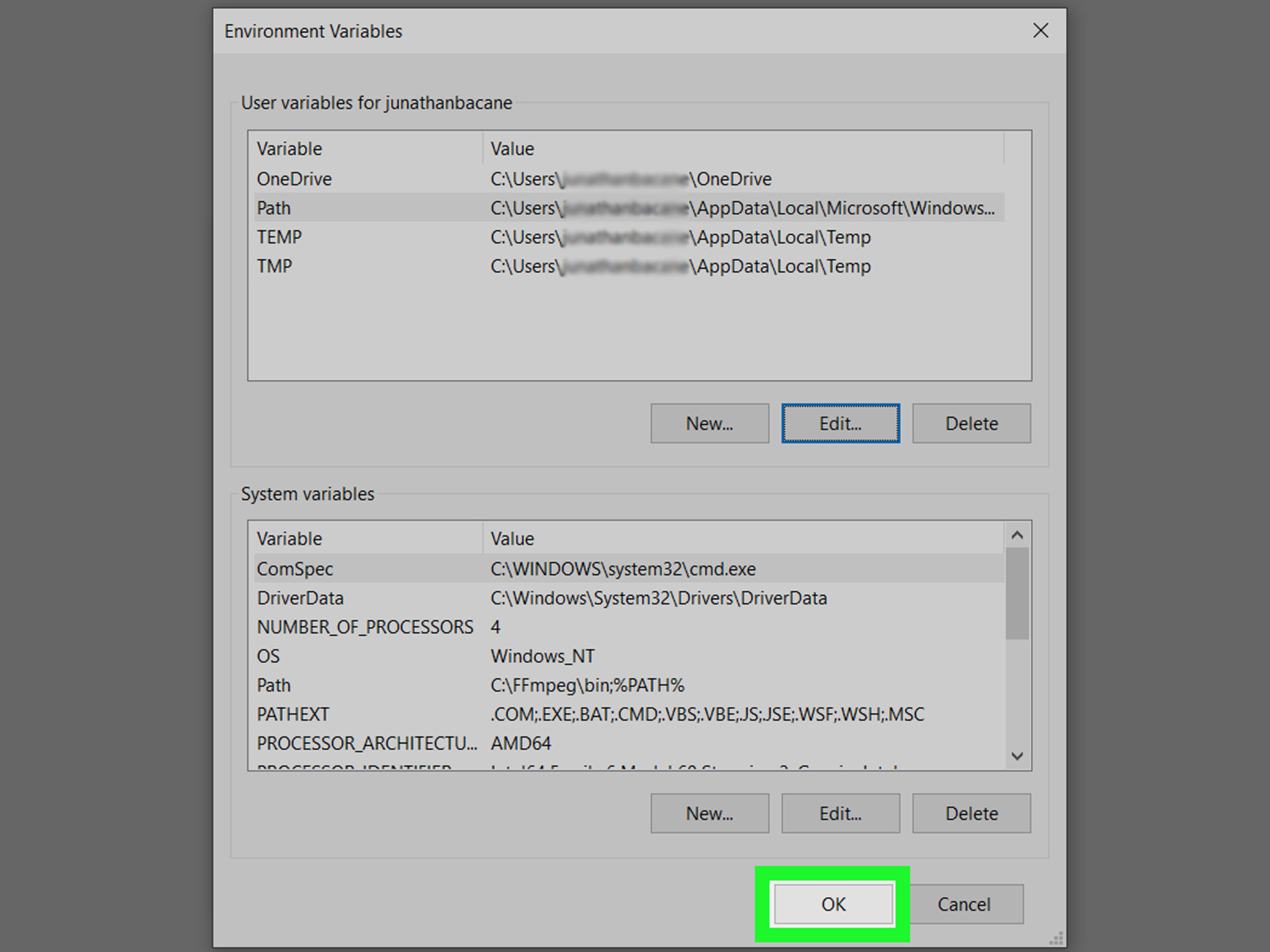
you have to add it to path
assuming youre on windows
wikiHow
FFmpeg is an open-source media tool you can use to convert any video format into the one you need. The tool is command-line only, which means it doesn't have a graphical, clickable interface. If you're used to installing regular graphical...
topaz ginkgo
dam! i shall pass on that
 agile minnow
How can I check which BucketType is it ? It's not working
print(BucketType.user == BucketType.user)
Output:
False
 cyan quail
...those are different types
cyan quail
...those are different types
no for same once
cyan quail
oh edited
...that returns True though?
what's your real code
you probably want isinstance instead
agile minnow
cyan quail
what's your real code
    def check(type: BucketType) -> commands.check:
        async def predicate(context: commands.Context) -> bool:
            command_name = context.command.name
            await self.cd.add_column(command_name)

            kwargs = {
                "context": context, "rate": rate, "per": per, "type": type, "reset_per_day": reset_per_day
            }

            print(BucketType.user == BucketType.user)
            if type == BucketType.role:
                kwargs["role_id"] = role_id
                return await self._role_predicate(**kwargs)
            elif type == BucketType.guild:
                return await self._guild_predicate(**kwargs)
            elif type == BucketType.channel:
                return await self._channel_predicate(**kwargs)
            elif type == BucketType.category:
                return await self._category_predicate(**kwargs)
            else:
                return await self._user_predicate(**kwargs)
doesn't work, any idea?
cyan quail
why don't you just print the type...
agile minnow
its printing BucketType.user
cyan quail
so it'll go to the last else, right?
agile minnow
Ya, but if I pass type = BucketType.guild, then also it's going to last one
cyan quail
do isinstance(type, BucketType.guild) or type is BucketType.guild work
agile minnow
lemme try
everything works now, vaule for type param was wrong
thank you
== and is both are working
fervent cradle
Error:
Ignoring exception in view <Paginator timeout=180.0 children=4> for item <Select type=<ComponentType.string_select: 3> placeholder='Filter' min_values=1 max_values=1 options=[<SelectOption label='Alle' value='all' description=None emoji=None default=False>, <SelectOption label='Sturm' value='sturm' description=None emoji=None default=False>, <SelectOption label='Mittelfeld' value='mittelfeld' description=None emoji=None default=False>, <SelectOption label='Abwehr' value='abwehr' description=None emoji=None default=False>, <SelectOption label='Torwart' value='torwart' description=None emoji=None default=False>] channel_types=[] disabled=False>:
Traceback (most recent call last):
  File "C:\Users\Pro 8\AppData\Local\Programs\Python\Python311\Lib\site-packages\discord\ui\view.py", line 421, in _scheduled_task
    await item.callback(interaction)
  File "C:\Users\Pro 8\Documents\Programmieren\Discord Bots\ZZGamesucht\football-minigame\cogs\management.py", line 752, in select_filter_callback
    await paginator.edit(await interaction.original_response())
                         ^^^^^^^^^^^^^^^^^^^^^^^^^^^^^^^^^^^^^
  File "C:\Users\Pro 8\AppData\Local\Programs\Python\Python311\Lib\site-packages\discord\interactions.py", line 348, in original_response
    data = await adapter.get_original_interaction_response(
           ^^^^^^^^^^^^^^^^^^^^^^^^^^^^^^^^^^^^^^^^^^^^^^^^
  File "C:\Users\Pro 8\AppData\Local\Programs\Python\Python311\Lib\site-packages\discord\webhook\async_.py", line 220, in request
    raise NotFound(response, data)
discord.errors.NotFound: 404 Not Found (error code: 10015): Unknown Webhook
Code:
        paginator = Paginator(pages=pages, custom_view=NewTradingPlayerView(self.players), author_check=False)
        paginator.remove_button("first")
        paginator.remove_button("last")
        #TODO: add user input processing


        await paginator.edit(await interaction.original_response())

        def check(message):
            return message.author == interaction.user and message.channel == interaction.channel and message.content.isnumeric()

        user_input = await interaction.client.wait_for('message', check=check, timeout=60)
        print(user_input.content)
await paginator.edit(await interaction.original_response())```painwhy don't you just use paginator.respond?
it's erroring because presumably you haven't responded yet
fervent cradle
cyan quail
why don't you just use paginator.respond?
because I want the process in just one message
when I have a message (message 1) and I click on a button on that message (mesage 1). then the original message (message 1) edits to a new message (message 2) and the button on message 2 edit the message to a paginator with paginator.edit (first time works). But that paginator has a custom view (Select Menu) and editing the pagnator after a select menu choice was taken don't work
proud mason
fervent cradle
when I have a message (message 1) and I click on a button on that message (mesag...
GitHub
Summary This seems to be happening with Paginator.edit() in all cases ive been able to test Reproduction Steps Send a message using e.g. ctx.respond or ctx.send create a paginator object and use aw...
Or wait no
Oh yeah different thing
proud mason
fervent cradle
Error:
```
Ignoring exception in view <Paginator timeout=180.0 children=4> for i...
You could either wait until https://github.com/Pycord-Development/pycord/pull/2105 gets merged. After that, you can simply pass interaction to paginator.edit
Or, defer the interaction response, and then pass interaction.message to paginator.edit

GitHub
Summary
Allows the Paginator to be sent using the edit methods offered by Interaction, ApplicationContext, and BridgeContext.
Also fixes #1877 by adding a new parameter user, when passing a Messag...
 solemn tendon
what is the problem
`import discord
from discord.ext import commands
client = commands.Bot(command_prefix="#")`

 grizzled sentinel
?tag intents
obtuse juncoBOT
https://docs.pycord.dev/en/master/intents.html
https://discord.com/developers/docs/topics/gateway#gateway-intents
import discord
from discord.ext import commands

# Get specific intents for fine control
intents = discord.Intents()
intents.emojis = True
intents.guilds = True
intents.messages = True  # Required for prefix commands!
...
# Get all non-priveliged intents; this excludes presences, members and message_content
intents = discord.Intents.default()

# Set priveliged intents: these must be enabled on dev portal
intents.members = True
intents.presences = True
intents.message_content = True  # Required for prefix commands >= 2.0.0b5

# Get all intents; all intents must be enabled on dev portal.
intents = discord.Intents.all()

# Apply intents when creating your bot
bot = commands.bot(prefix="?", intents=intents)
Pycord
In version 1.5 comes the introduction of Intents. This is a radical change in how bots are written. An intent basically allows a bot to subscribe to specific buckets of events. The events that corr...

Discord Developer Portal
Integrate your service with Discord — whether it's a bot or a game or whatever your wildest imagination can come up with.
grizzled sentinel
solemn tendon
what is the problem
`import discord
from discord.ext import commands
client = ...
Basically just add
intents= discord.Intents().defualt()
Then pass intents=intents to your bot.
fervent cradle
default*
fervent cradle
do command cooldowns reset when the bot is restarted?
proud mason
solemn tendon
You also seem to have dpy installed. Py-cord doesn't raise that error
Do you want to use dpy or py-cord
solemn tendon
proud mason
You also seem to have dpy installed. Py-cord doesn't raise that error
Do you wa...
Which is better?
proud mason
solemn tendon
Which is better?
Both are slightly different. Neither is perfect. You should choose what you like. The main difference is found in the Slash cmd implementation
Since you are asking in py-cord server, you will be recommended py-cord
solemn tendon
ok do you have a YouTube channel explaining about py-cord?
 somber pelican
there's the docs and the guide
Pycord
Pycord is a modern, easy to use, feature-rich, and async ready API wrapper for Discord. Features: Modern Pythonic API using async/ await syntax, Sane rate limit handling that prevents 429s, Command...

The official guide for making bots and other Discord applications using the Pycord library.
 uncut current
which advatage does the async start have? I don't really see any as the code still stops and does not execute any code further down
 full basin
uncut current
which advatage does the async start have? I don't really see any as the code sti...
full basin
uncut current
which advatage does the async start have? I don't really see any as the code sti...
What
Asynchronous function have the ability of running at the same time. Not in a sequence like normal functions
uncut current
import discord
from discord.ext import commands

import asyncio

from src import Bot
from settings import TOKEN

bot = Bot.Bot(
    command_prefix=commands.when_mentioned,
    activity=discord.Activity(
        type=discord.ActivityType.playing, name="with granades"
    ),
    status=discord.Status.idle,
)


async def main():
    async with bot:
        await bot.start(token=TOKEN)
        await asyncio.sleep(5)
        print("Done")


asyncio.run(main())
I've wrote this little start to test it but the done is not printed
and as far as I understood this addition, it should execute the wait and print after that
maybe I just don't understand this feature
proud mason
iirc, bot.start will block, but you can use asyncio.gather to run other coroutines alongside it
ill show an example
uncut current
so I could for example let a quart server run alongside this bot?
proud mason
uncut current
so I could for example let a quart server run alongside this bot?
yes thats possible
uncut current
nice, now I only need to learn flask/quart xD and html css and a little js ;-;
proud mason
you would need the async run method for quart btw
uncut current
proud mason
you would need the async run method for quart btw
I don't know what you mean
ahh I see what you mean some googeling solves problems
proud mason
haha
fervent cradle
async def blacklist(self, ctx, userid: int, time: Optional[str]):``` ive got the userid in my command set to int but inputting a user id asks for a valid integer?Take str and convert to int internally
prisma flicker
please send the code snippet
weak violet
prisma flicker
please send the code snippet
Oh no my bad i was searching if someone had that error, didnt meant to send it https://i.imgur.com/P1Ki9RZ.png
 weak violet
prisma flicker
please send the code snippet
weak violet
prisma flicker
please send the code snippet
well now i need help xd, im moving all my comands to cogs, but when im trying to move one that use bot.wait_for im getting this error
RuntimeError: Task <Task pending name='discord-ui-view-dispatch-40b84af78e0e8d857609e122bbeb3e81' coro=<View._scheduled_task() running at C:\Users\deadz\AppData\Local\Programs\Python\Python310\lib\site-packages\discord\ui\view.py:414>> got Future <Future pending> attached to a different loop
proud mason
weak violet
well now i need help xd, im moving all my comands to cogs, but when im trying to...
You somehow have multiple event loops running. Can you show one of your cog files?
weak violet
proud mason
You somehow have multiple event loops running. Can you show one of your cog file...
wich one?
proud mason
weak violet
wich one?
Show the one you are getting the error in
weak violet
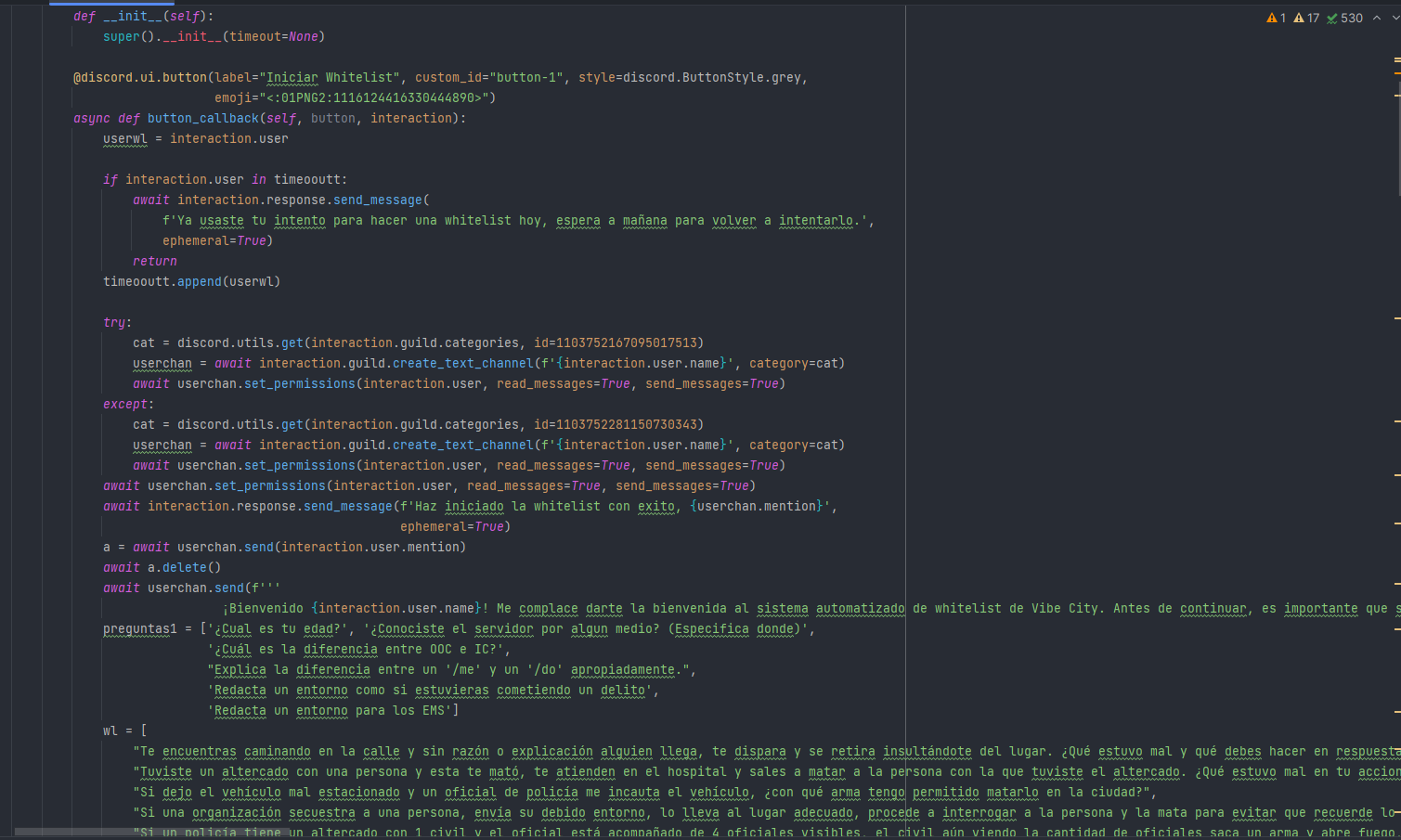
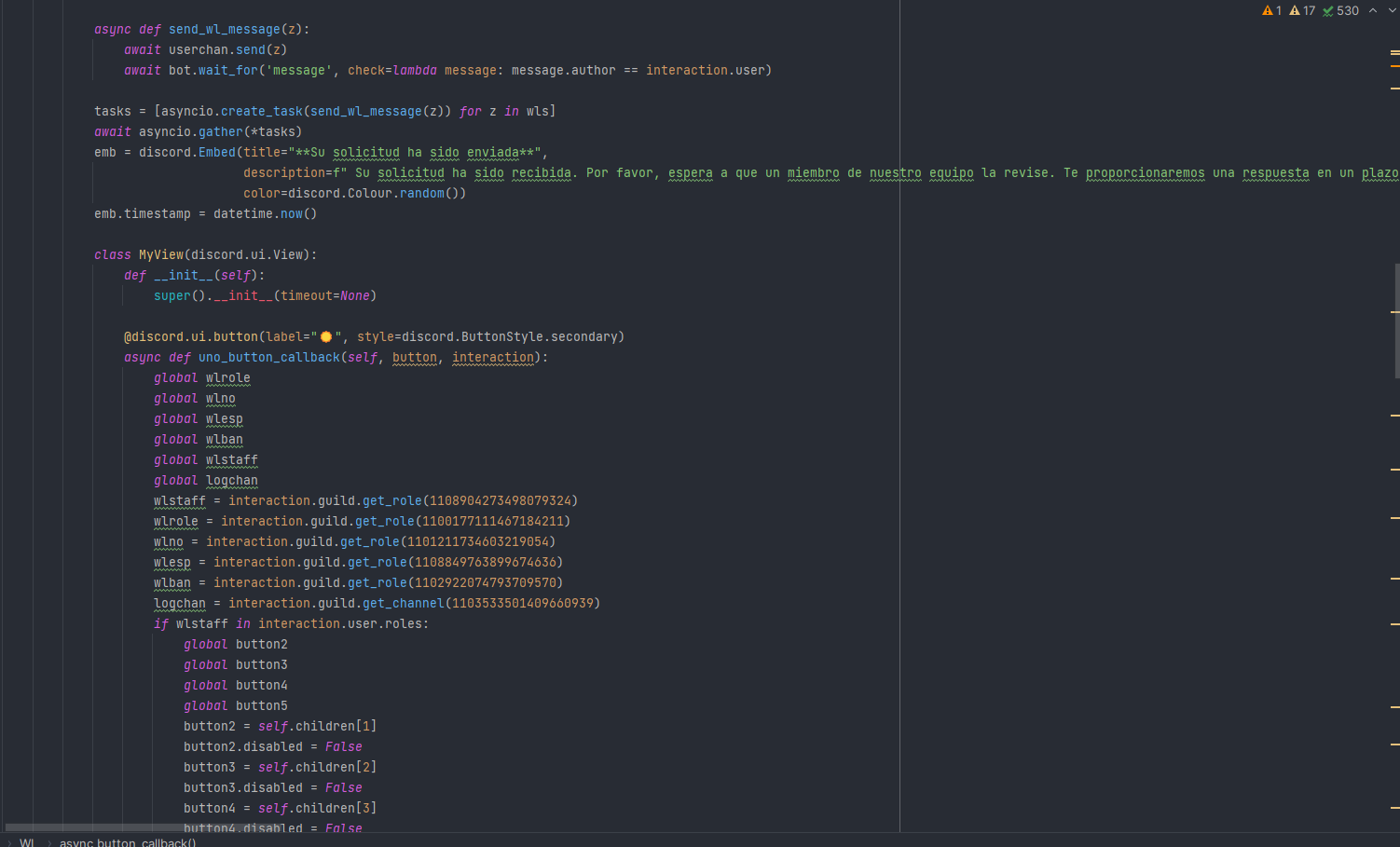
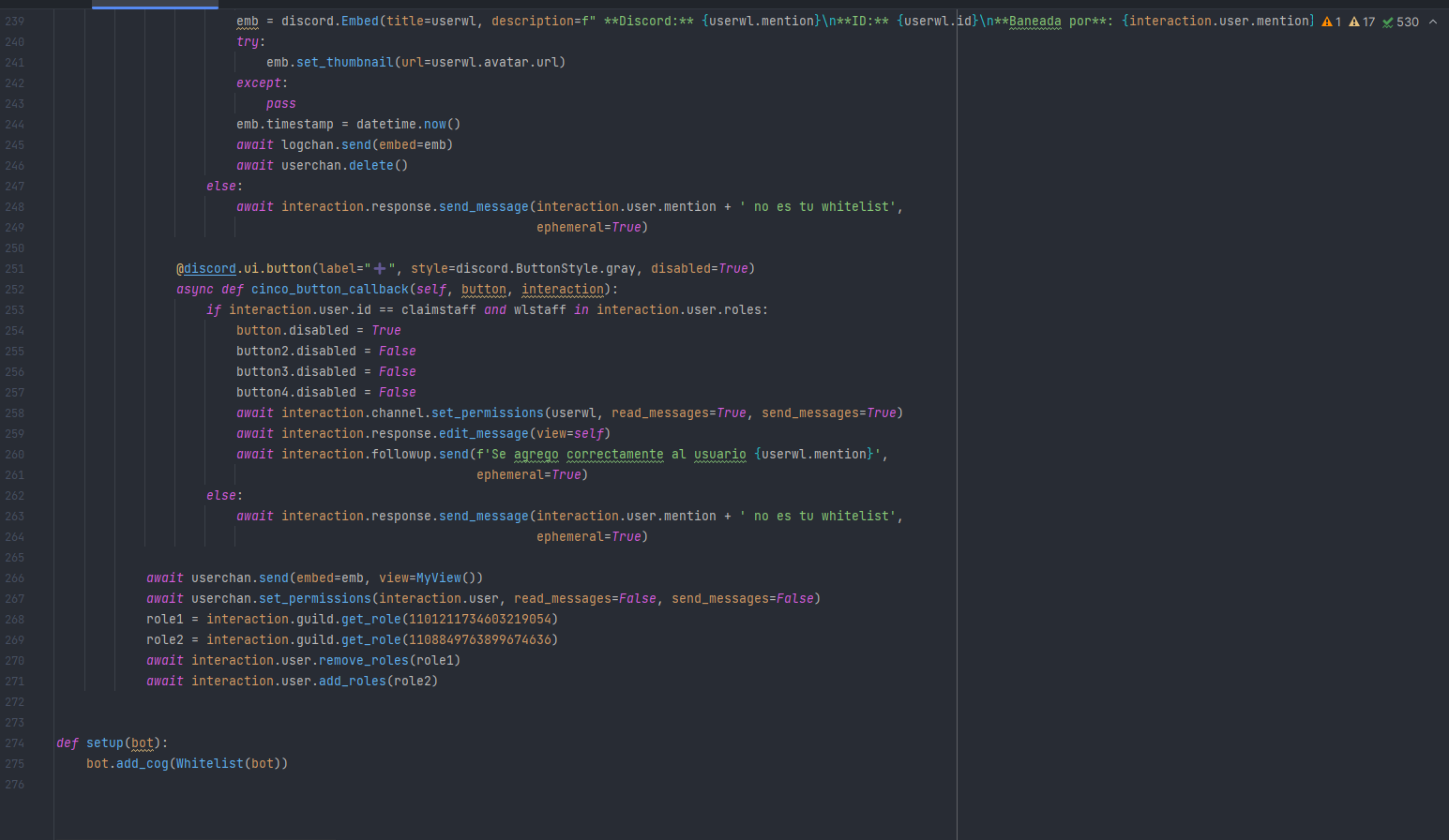 proud mason
weak violet
https://i.imgur.com/MlQBHOL.png
https://i.imgur.com/KBKTIHN.png
https://i.imgur....
proud mason
weak violet
https://i.imgur.com/MlQBHOL.png
https://i.imgur.com/KBKTIHN.png
https://i.imgur....
dont nest classes. it could cause conflicts
also, dont use global variables
assign them to an object
true pewter
to modify the messages, how are you doing it? I am using the following form and it is giving problems
    @discord.slash_command(name="edit", description="edit message")
    @discord.default_permissions(administrator=True)
    async def edit(self, ctx):
        embed = discord.Embed(title="Test message", description="This message will be edited in 5 seconds")
        message = await ctx.respond(embed=embed)
        # let's wait 5 seconds
        await discord.utils.sleep_until(discord.utils.utcnow() + timedelta(seconds=5))
        await message.edit(embed=discord.Embed(title="Edited message", description="This message has been edited"))
ctx.edit()
await ctx.respond()
await ctx.edit()
yk you can just do await asyncio.sleep(5) to sleep 😭
true pewter
proud mason
yk you can just do `await asyncio.sleep(5)` to sleep 😭
is much better?
proud mason
true pewter
is much better?
much simpler and cleaner than what you are doing
solemn idol
proud mason
yk you can just do `await asyncio.sleep(5)` to sleep 😭
Do that with me irl please
proud mason
true pewter
is much better?
discord.utils.sleep_until is only meant to be used as a shortcut for when you have a datetime object until which you need to sleep
it just calls asyncio.sleep internally
proud mason
solemn idol
Do that with me irl please
import time
import sys

voxy = sys.voxy

voxy.sleep()
time.sleep(28800)
voxy.wake()

||never use time.sleep in your bots btw. always asyncio.sleep||
true pewter
Thank you very much, I didn't know the difference between the two. Taking advantage of the fact that I have you here, I want to make the style dynamio, I had thought of passing a method but it throws me an error.
    @staticmethod
    def select_color(isPremium):
        if isPremium:
            return discord.ButtonStyle.green
        return discord.ButtonStyle.red

    @discord.ui.button(label="Premium", style=lambda self: self.select_color(self.isPremium), emoji=f"{Emojis.owner.value}")
    async def button_callback_premium(self, button, interaction):
        await interaction.response.edit_message(embed=embed_edit, view=None)
Is this possible?
proud mason
true pewter
Thank you very much, I didn't know the difference between the two. Taking advant...
you could override the style inside __init__
like this
class MyView(View):
  def __init__(...):
    super().__init__(...)
    self.my_ultimate_button.sytle = ...

  @discord.ui.button(...)
  async def my_ultimate_button(...):
    ...
you could have the check inside init
 proud mason

true pewter
 I've been here for a day or so, I think I'm starting to get tired hahaha.
proud mason
proud mason
```py
import time
import sys
voxy = sys.voxy
voxy.sleep()
time.sleep(28800)
vo...
replace voxy with sergi 🙃
and run
true pewter
proud mason
replace voxy with sergi 🙃
 oki
oki
proud mason
how did ctx.guild.icon.url "not work"
that is the correct way to get the url
Although if the guild doesnt have any icon, guild.icon will be None, so you cant get the url attribute from it
make sure to check guild.icon is not None before accessing the url attribute
young bone
Also what are your intents @fervent cradle
prisma flicker
Just use display_name?
full basin
The pfp makes it funnier
 halcyon gorge
I'm trying to make a task run at a certain time but I know that the function may take longer to run. I get an error saying that task shouldn't have a ctx parameter so how do I add a defer() function into it?
prisma flicker
Why do you need a defer in your task?
halcyon gorge
I know the task will take longer, and I don't want it to fail cause it took too long
or do I not need that because its a task compared vs a command?
prisma flicker
It doesn't matter how long the task takes
But I'd suggest not having it take longer than the interval between tasks
halcyon gorge
thanks!
rare ice
Why does interaction.response.send_message return an interaction and the returning variable’s message attribute returns None? This used to return a message object, aka the actual response message of the interaction. Kinda weird.
Can’t even get the message it sends
silver moat
rare ice
Why does `interaction.response.send_message` return an interaction and the retur...
interaction.message is only available for components.
rare ice
silver moat
`interaction.message` is only available for components.
So how can I get the message sent from an interaction that’s not a component
silver moat
Pycord
Models are classes that are received from Discord and are not meant to be created by the user of the library. Attributes key, url. Methods def is_animated, async read, def replace, async save, def ...
 rare garnet
I ran this code and got the below shown error i am not really sure what caused it but it successfully created a forum post
class Cog(commands.Cog):

        def __init__(self,client):
                self.client = client
                self.task.start()

        @tasks.loop(count=1)
        async def task(self):
                forumChannel = await self.client.fetch_channel(id)
                await forumChannel.create_thread("test", content = "testing content")
Unhandled exception in internal background task 'task'.
Traceback (most recent call last):
  File "C:\...\Python\Python311\site-packages\discord\ext\tasks\__init__.py", line 169, in _loop
    await self.coro(*args, **kwargs)
  File "i:\starpredetor\Code Projects\Projects\Python projects\SSU-Bot\cogs\news.py", line 17, in task
    await forumChannel.create_thread("test", content = "testing content")
  File "C:\...\Python\Python311\site-packages\discord\channel.py", line 1336, in create_thread
    ret = Thread(guild=self.guild, state=self._state, data=data)
          ^^^^^^^^^^^^^^^^^^^^^^^^^^^^^^^^^^^^^^^^^^^^^^^^^^^^^^
  File "C:\...\Python\Python311\site-packages\discord\threads.py", line 168, in __init__
    self._from_data(data)
  File "C:\...\Python\Python311\site-packages\discord\threads.py", line 206, in _from_data
    if thread := self.guild.get_thread(self.id) and data.pop("_invoke_flag", False):
                 ^^^^^^^^^^^^^^^^^^^^^
AttributeError: 'Object' object has no attribute 'get_thread'
Where is your task named postnews? And where do you define id
rare garnet
dont worry about that
its named task
not postnews
I just wanted to know what caused that error
prisma flicker
The stack trace is about a task named postnews.
rare garnet
well yeah im aware
i changed the name of the task from task to postnews while pasting the code here
i can assure you the stack trace was caused by the code above
prisma flicker
And where is id defined?
rare garnet
i didn't wanna paste the id so i changed the actual numeric id to the letters "id"
prisma flicker
Is your cog really named Cog? That can sometimes cause issues
rare garnet
the cog is named something else
prisma flicker
Anything else you renamed you'd like to mention? 🙂
rare garnet
thats about it
you know what actually wait ill paste actual code
class News(commands.Cog):

        def __init__(self,client):
                self.client = client
                self.postnews.start()

        @tasks.loop(count=1)
        async def postnews(self):
                forumChannel = await self.client.fetch_channel(1123222090858889286)
                await forumChannel.create_thread("test", content = "testing content")
not much change here
the stack trace Unhandled exception in internal background task 'postnews'. Traceback (most recent call last): File "C:\...\Python\Python311\site-packages\discord\ext\tasks\__init__.py", line 169, in _loop await self.coro(*args, **kwargs) File "i:\starpredetor\Code Projects\Projects\Python projects\SSU-Bot\cogs\news.py", line 17, in postnews await forumChannel.create_thread("test", content = "testing content") File "C:\...\Python\Python311\site-packages\discord\channel.py", line 1336, in create_thread ret = Thread(guild=self.guild, state=self._state, data=data) ^^^^^^^^^^^^^^^^^^^^^^^^^^^^^^^^^^^^^^^^^^^^^^^^^^^^^^ File "C:\...\Python\Python311\site-packages\discord\threads.py", line 168, in __init__ self._from_data(data) File "C:\...\Python\Python311\site-packages\discord\threads.py", line 206, in _from_data if thread := self.guild.get_thread(self.id) and data.pop("_invoke_flag", False): ^^^^^^^^^^^^^^^^^^^^^ AttributeError: 'Object' object has no attribute 'get_thread'
prisma flicker
So I've never used this method myself, but looking at the error it looks like self.guild in threads.py isn't being initialized correctly for whatever reason
What version of pycord are you on?
rare garnet
the thread it created
 rare garnet
prisma flicker
What version of pycord are you on?
rare garnet
prisma flicker
What version of pycord are you on?
latest i believe
prisma flicker
Can you give me a version number
rare garnet
prisma flicker
Can you give me a version number
2.4.1 to be exact
thats the latest...
rare garnet
prisma flicker
So I've never used this method myself, but looking at the error it looks like se...
well yeah the person i am working for wanted me to open a post in the forums channel each time the bot is started and post some things so the only method i could find to create post was this
in discord.ForumChannel
although i think it is trying to create a channel thread and not a post maybe thats whats causing the error
 chrome skiff
Any idea how can i fix this:
Traceback (most recent call last):
File "/usr/local/lib/python3.9/site-packages/jishaku/features/python.py", line 190, in jsk_python
async for send, result in AsyncSender(executor): # type: ignore
File "/usr/local/lib/python3.9/site-packages/jishaku/functools.py", line 124, in _internal
value = await base.asend(self.send_value)
File "/usr/local/lib/python3.9/site-packages/jishaku/repl/compilation.py", line 214, in traverse
yield await func_a(*self.args)
File "<repl>", line 13, in _repl_coroutine
await _ctx.guild.create_sticker(
File "/usr/local/lib/python3.9/site-packages/discord/guild.py", line 2621, in create_sticker
data = await self._state.http.create_guild_sticker(
File "/usr/local/lib/python3.9/site-packages/discord/http.py", line 1672, in create_guild_sticker
initial_bytes = file.fp.read(16)
AttributeError: '_io.BytesIO' object has no attribute 'fp'
import asyncio
import requests
import io
Guild = _bot.get_guild(123)
Stickers = Guild.stickers
for sticker in Stickers:
try:
image_data = requests.get(sticker.url).content
image_file = io.BytesIO(image_data)
await _ctx.guild.create_sticker(
name=sticker.name,
description=sticker.description,
emoji=sticker.emoji,
file=image_file,
reason='KEK'
)
except discord.HTTPException as e:
await ctx.send(f"Failed to create sticker {sticker.name}: {e}")
await asyncio.sleep(1.5)
silver moat
chrome skiff
Any idea how can i fix this:
Traceback (most recent call last):
File "/usr/l...
Not sure if this contributes to the issue, but use aiohttp instead of requests for asynchronous
obtuse juncoBOT
Why you should not use the requests library for your bot
requests is a popular HTTP library for Python. It is however not a good option for Discord bots, since it is not async and blocking.
This essentially means that your bot will not be able to execute any code at all while a request is happening. Since requests usually take a few seconds to complete, this can have a detrimental effect on your bot's performance. E.g if a user executes a command that performs a request taking 5 seconds to complete, no one else will be able to use your bot for those 5 seconds.
Please look at using a HTTP library that has async support, such as aiohttp or httpx
chrome skiff
proud mason
Yeah use aiohttp
And you need to pass discord.File
yeah did it now with aiohttp and bytesio and pil
proud mason
chrome skiff
yeah did it now with aiohttp and bytesio and pil
nice
silver moat
.rtfm bot.walk_application_commands
winter condorBOT
6 results
discord.ext.commands.Bot.walk_application_commands
discord.ext.commands.AutoShardedBot.walk_application_commands
discord.ext.bridge.Bot.walk_application_commands
discord.Bot.walk_application_commands
discord.ext.bridge.AutoShardedBot.walk_application_commands
discord.AutoShardedBot.walk_application_commands
 silver moat
idk maybe click the thing
uncut current
can't I set a local image as footer in an embed using icon_url like this em.set_footer(text="Sincerely your CheesyDragon Bank", icon_url="attachment://src/assets/bank-1071.png") ?
because the result is like this :/
 silver moat
Pretty sure you can. What does your code look like?
uncut current
    @commands.slash_command(name = "wallet", description = "see your money from your pocket and your bank")
    async def wallet(self, ctx: discord.ApplicationContext):
        bank = await db.get_member_cash(cash="bank", user=ctx.author.id, guild=ctx.guild_id)
        pocket = await db.get_member_cash(cash="wallet", user=ctx.author.id, guild=ctx.guild_id)
        em = discord.Embed(
            title="Bank statement",
            description=f"Pocket".zfill(8).replace("0", " ") + " | " + f"{pocket}" + ""
                        f"Bank".zfill(8).replace("0", " ") + " | " + f"{bank}" + ""
        )
        em.set_author(name=ctx.author.display_name, icon_url=ctx.author.display_avatar)
        em.set_footer(text="Sincerely your CheesyDragon Bank", icon_url="attachment://src/assets/bank-1071.png")
        await ctx.response.send_message(embed=em)
The file is (from content root) there src/assets/bank-1071.png
proud mason
uncut current
```py
@commands.slash_command(name = "wallet", description = "see your money...
?tag localfile
obtuse juncoBOT
f = discord.File("some_file_path", filename="image.png")
e = discord.Embed()
e.set_image(url="attachment://image.png")
await messagable.send(file=f, embed=e)```You only put the name in the url
Not the location
You need to set the name in discord.File and send it as a file in the same message
uncut current
in an embed too?
proud mason
Yes
proud mason
obtuse junco
```py
f = discord.File("some_file_path", filename="image.png")
e = discord.Embed...
This is for embed
uncut current
okay, I'll try
proud mason
I wonder if you can use a local file in the footer tho
It might only work with the main image and the thumbnail
uncut current
guess I'll find out
silver moat
proud mason
I wonder if you can use a local file in the footer tho
i don't see why not?
uncut current
else I'll have to use github to host the image 😅
uhhm PermissionError: [Errno 13] Permission denied: 'src/assets' how the f windows?
 left flame
Hey what is the cause of this error?
AttributeError: 'str' object has no attribute '__name__'. Did you mean: '__ne__'?
my code was working fine yesterday, but when I tried to run it today I got the error above.
here is the full traceback:
  File "/Users/jstrouse/Desktop/coding/EvReboot/EvReboot/evbot/bot.py", line 252, in <module>
    goodBot.run()
  File "/Users/jstrouse/Desktop/coding/EvReboot/EvReboot/evbot/bot.py", line 232, in run
    super().add_cog(NormalCommands(self))
  File "/Users/jstrouse/Desktop/coding/EvReboot/venv/lib/python3.10/site-packages/discord/cog.py", line 656, in add_cog
    cog = cog._inject(self)
  File "/Users/jstrouse/Desktop/coding/EvReboot/venv/lib/python3.10/site-packages/discord/cog.py", line 548, in _inject
    command._set_cog(self)
  File "/Users/jstrouse/Desktop/coding/EvReboot/venv/lib/python3.10/site-packages/discord/commands/core.py", line 603, in _set_cog
    self.cog = cog
  File "/Users/jstrouse/Desktop/coding/EvReboot/venv/lib/python3.10/site-packages/discord/commands/core.py", line 830, in cog
    self._validate_parameters()
  File "/Users/jstrouse/Desktop/coding/EvReboot/venv/lib/python3.10/site-packages/discord/commands/core.py", line 708, in _validate_parameters
    self.options: list[Option] = self._parse_options(params)
  File "/Users/jstrouse/Desktop/coding/EvReboot/venv/lib/python3.10/site-packages/discord/commands/core.py", line 748, in _parse_options
    option = Option(option)
  File "/Users/jstrouse/Desktop/coding/EvReboot/venv/lib/python3.10/site-packages/discord/commands/options.py", line 225, in __init__
    self.input_type = SlashCommandOptionType.from_datatype(input_type)
  File "/Users/jstrouse/Desktop/coding/EvReboot/venv/lib/python3.10/site-packages/discord/enums.py", line 786, in from_datatype
    if datatype.__name__ in ["Member", "User"]:
AttributeError: 'str' object has no attribute '__name__'. Did you mean: '__ne__'?```could you show the code for the cog named NormalCommands
left flame
sure
silver moat
at least the decorators and definition
left flame
class NormalCommands(commands.Cog):
    def __init__(
            self, bot
    ):
        self.bot: MainBot = bot

    @slash_command(name="view", description="Get eBay views")
    @commands.check(check_access_view_command)
    @dynamic_cooldown(decide_cooldown, type=BucketType.user)
    async def view(self, ctx: ApplicationContext, link: str, amount: int):
        new_link = Validation.link_validation(link)
        if new_link is None:
            await ctx.respond("Invalid eBay link")
            return

        rewards = PaidRewards(ctx)
        if amount > rewards.view_limit:
            await ctx.respond(f"Max views is {rewards.view_limit}")


        await ctx.respond("reeeeeeeee", ephemeral=True)

    # @slash_command(name="test")
    # async def test(self, ctx: ApplicationContext):
    #     x = Snowflake()
    #     x.id = 1123321195849318465
    #     await ctx.user.add_roles(x)

    async def cog_command_error(self, ctx: ApplicationContext, error: commands.CommandError):
        if isinstance(error, commands.CommandOnCooldown):
            cooldownMSG = ConvertTime(clean=True).convert_and_format(
                int(error.retry_after), separator=" and"
            )
            await ctx.respond(f"You are on cool down for another {cooldownMSG}", ephemeral=True)
        elif isinstance(error, CheckFailure):
            await ctx.respond(f"You do not have access to this command", ephemeral=True)
        else:
raise error # Here we raise other errors to ensure they aren't ignored```is that it?
left flame
to replace what?
silver moat
    @slash_command(name="view", description="Get eBay views")
    @commands.check(check_access_view_command)
    @dynamic_cooldown(decide_cooldown, type=BucketType.user)
+   @discord.option("link", type = str, description = "Enter a link")
+   @discord.option("amount", type = int, description = "Enter an amount")
    async def view(self, ctx: ApplicationContext, link: str, amount: int):
alright I'll try that
true panther
How to setup logger? I did what's in the docs but nothing gets printed to the console
proud mason
left flame
Hey what is the cause of this error?
```AttributeError: 'str' object has no attr...
Do you import annotations from __future__?
solemn idol
 waxen whale
remove that please xD
waxen whale
remove that please xD
they didnt
fervent cradle
is the description of an embed mandatory? is there a way to have just the title
true panther
yes, just pass in the title embed = Embed(title="sometitle")
fervent cradle
oh so it isnt mandatory
fervent cradle
true panther
yes, just pass in the title `embed = Embed(title="sometitle")`
can i also somehow get rid of this ugly gap
 true panther
fervent cradle
can i also somehow get rid of this ugly gap
true panther
fervent cradle
can i also somehow get rid of this ugly gap
what did you use to get this?
fervent cradle
true panther
what did you use to get this?
discord.Embed(title=f"Weather information for {city.capitalize()} ({area.name}) in {area.country}")```I assume the temperature is added with .add_field()? If so idk, unfortunately. I don't get a gap this big.
fervent cradle
how do u add ur embed? do you also add fields?
fervent cradle
true panther
it kind of looks like there's a `'\n'` in description field or something
theres no description, u told me to remove it, just a title
its really just the title, and then add_fields
 loud sail
hello, could someone help me and possibly tell me why my code is not working? The bot does not want to leave the voice channel and no errors come up.
young bone
loud sail
hello, could someone help me and possibly tell me why my code is not working? Th...
Pls dont crosspost
fervent cradle
how does an emoji get into the bots cache to use get_emoji what do u need to do
        emoji = iteminfo["emoji"]
        emoji_id = await extract_emoji_id(emoji)
        emoji_obj = self.bot.get_emoji(emoji_id)
        print(emoji, emoji_id, emoji_obj)```
this just doesnt print the object, as if it doesnt exist in the cache even tho theres a guild with it and the bots used the emoji
:test: 1002979645848830022 None```
young bone
fervent cradle
```py
emoji = iteminfo["emoji"]
emoji_id = await extract_emoji_i...
and if you do fetching it?
fervent cradle
but how does it even get into the bots cache
young bone
For what?
 empty crypt
umm
 waxen whale
am i wrong lol
empty crypt
waxen whale
read the docs <:sparkle_blurple:889965765300744263>
i read but didnt see anything to check if token is online
empty crypt
waxen whale
mr. master of Python
well I am master in python. noone code faster than me
 full basin
empty crypt
well I am master in python. noone code faster than me
full basin
empty crypt
well I am master in python. noone code faster than me
Looks like not the master of reading docs
waxen whale
guild download completed + we should've an on ready event
 spring hare
lmao
empty crypt
waxen whale
guild download completed + we should've an on ready event
oh cmon. i know that.
imagine I host my bot on replit
waxen whale
silver moat
k, https://www.codingame.com/clashofcode/clash/3154357f176fa49af7072370311b03578...
LMFAO
spring hare
I joined
full basin
Lmfao
silver moat
@empty crypt I'm waiting
empty crypt
and then try to host on glitch
waxen whale
empty crypt
oh cmon. i know that.
then your question is answered
empty crypt
waxen whale
then your question is answered
no I cant check if my bot is already online and if i rrun on glitch my bot run 22 instances
empty crypt
silver moat
<@1100640897030430802> I'm waiting
lemme signup
silver moat
empty crypt
no I cant check if my bot is already online and if i rrun on glitch my bot run 2...
that makes no sense
young bone
lol
spring hare
empty crypt
no I cant check if my bot is already online and if i rrun on glitch my bot run 2...
Create bot which checks if bot is online
full basin
Stonks
young bone

spring hare
silver moat
that makes no sense
Btw, mb host discord bots jam after the survey?
spring hare
WTF IS THIS GAME
💀
empty crypt
ez
spring hare
I spent most of my time reading this stupid stuff
empty crypt
lmao
spring hare
nah
empty crypt
cmon
left flame
proud mason
Do you import annotations from `__future__`?
yeah
waxen whale
PAHAHAHA YIKES
 empty crypt
i wasnt really that mood
cyan quail
wtf does it matter if you're the "fastest" at coding if it's all wrong anyway
empty crypt
come nowi dare you
full basin
LMAO
cyan quail
(and we should probably keep this in #general)
waxen whale
I fixed your nickname <3
empty crypt
broo
I dare anyone come to that challenge again. I am new to that thing so i had to read everything slowly
full basin
We don't give second chances here
empty crypt
spring hare
Create bot which checks if bot is online
good idea
 silver moat
you were slower than lacosst0 who also never done this before
empty crypt
full basin
We don't give second chances here
fear?
empty crypt
silver moat
you were slower than lacosst0 who also never done this before
I bet you all my owo i will win next one
solemn idol
spring hare
Create bot which checks if bot is online
Bot's literal only purpose, no commands just ping the bot and make it send an error in a channel if the bot is not online
epic
spring hare
silver moat
you were slower than lacosst0 who also never done this before
I spent 1 min translating the task cuz my english is just slow
 empty crypt
waxen whale
DID I HEARD AN OWO?!
empty crypt
waxen whale
DID I HEARD AN OWO?!
come on
empty crypt
waxen whale
https://tenor.com/view/owo-intensifies-lucky-star-konata-anime-gif-17442559
you have to change my name back if i win next
spring hare
solemn idol
Bot's literal only purpose, no commands just ping the bot and make it send an er...
Bot which pings other bot if it's offline so the other bot can see the message and wake up

silver moat
huh maybe I do this just a little too much
 solemn idol
spring hare
Bot which pings other bot if it's offline so the other bot can see the message a...
solemn idol
spring hare
Bot which pings other bot if it's offline so the other bot can see the message a...
LOL AND THE OTHER SHOULD DO THE SAME
empty crypt
come on i dare yall
silver moat
@empty crypt #general
solemn idol
solemn idol
LOL AND THE OTHER SHOULD DO THE SAME
XD
waxen whale
spring hare
I spent 1 min translating the task cuz my english is just slow
Проблема навыков, мой друг
empty crypt
oopsie sorry
silver moat
probably translated
waxen whale
who knows
spring hare
waxen whale
Проблема навыков, мой друг
В россии никто так не говорит.
Максимум люди, которые хотят секса

 spring hare
solemn idol
or ukranian
spring hare
solemn idol
or ukranian
Russian and Ukrainian are pretty similar
Most Ukranians know russian tho
btw, #general
spring hare
waxen whale
<a:bonk:1046770271031394326>
lmao
 proud mason
left flame
yeah
proud mason
left flame
yeah
Yep that doesn't work
Try using master branch
Also try using typing.Anotated on master branch
left flame
proud mason
Yep that doesn't work
wait so I can't use from __future__ import annotations?
left flame
proud mason
Try using master branch
Also try using typing.Anotated on master branch
what does typing.Anotated do exactly?
proud mason
left flame
wait so I can't use `from __future__ import annotations`?
Yeah that breaks stuff unfortunately
proud mason
left flame
what does `typing.Anotated` do exactly?
It is a way to make type checkers happy while having something else in the type hint
Example usage would be
async def hi(ctx, hello: typing.Anotated[str, discord.Option(...)]):
  ...
Don't put the input type inside discord.Option when using that
This might work when using future annotations
 willow kiln
how would yall go about triggering multiple bots with the same command at once? (bots for sound playback in different channels) can i use a bot prefix and / at the same time? and how would i make a command exclusively slash or prefix
young bone
The bot for the examples is down again....
young bone
willow kiln
how would yall go about triggering multiple bots with the same command at once? ...
proud mason
willow kiln
how would yall go about triggering multiple bots with the same command at once? ...
Multiple bots with same cmd would require all bots to have same prefix
You can use both, slash cmds and prefix cmds in commands.Bot
?tag client
obtuse juncoBOT
discord.Client # just for events
discord.Bot # events + slash/user/msg commands
commands.Bot # above + prefixed commands
bridge.Bot # above + bridge commands (application commands and text commands in one)
hmhm guess i'd initialize my bot as commands.Bot then, can i just differentiate/make a command exclusively slash or prefix like this?

after some modification it shows the desired behaviour 👍
 mystic cobalt
how to disable a button in pycord
full basin
.rtfm Button.disabled
winter condorBOT
fervent cradle
Bruh, how to count the number of reactions to a message?
 full basin
fervent cradle
Bruh, how to count the number of reactions to a message?
full basin
fervent cradle
Bruh, how to count the number of reactions to a message?
Do you realize message.reactions return a list of the reactions?

 torpid wraith
Dumb question: How would I put a standard Discord emoji like  into the title of an embed?
Putting :people: just prints the string (unlike a response), and it doesn't appear to be a standard unicode emoji.
Still interested in answer, but I found a workaround of 👥︎ for now 🙂
full basin
torpid wraith
Dumb question: How would I put a standard Discord emoji like <:people:7174399693...
Add a backslash behind the emoji
And copy that
Should look like that
torpid wraith
full basin
Add a backslash behind the emoji
Huh...
title=f" Total Player Count (All-Time)", prints the following... Interesting...

I swear I saved too, lol
full basin
Is the emoji in a separate server
torpid wraith
full basin
Is the emoji in a separate server
It's a "vanilla" emoji AFAIK
Like, it's not unicode, but it's also not a server emoji
full basin
What
full basin
In the same server where you ran the command in the screenshot?
torpid wraith
No no, I was being big dumb. It was in a different server, it wouldn't work, etc... Sry.
However, on the subject of "vanilla" Discord emojis:
- ⚠ is a unicode emoji for "warning"
- ⚠️ is
:warning:and isn't unicode (AFAIK, unless I'm being dumb)
\⚠️
oh...
Still different though... \:warning: gives the above. Interesting... Ignore me though... I'm just goin crazy over emojis over here, haha 😅
solemn idol
torpid wraith
No no, I was being big dumb. It was in a different server, it wouldn't work, etc...
The Discord emojis are literally Just Twemojis; https://twemoji.twitter.com

Twitter’s open source emoji has you covered for all your project's emoji needs. With support for the latest Unicode emoji specification, featuring 2,685 emojis, and all for free.
my man just deleted his question, I was literally spending the last 10 mins reading trough the docs... bruv;
Best example I could find; --> https://github.com/Pycord-Development/pycord/blob/master/examples/basic_voice.py
@commands.command()
    async def join(self, ctx: commands.Context, *, channel: discord.VoiceChannel):
        """Joins a voice channel"""

        if ctx.voice_client is not None:
            return await ctx.voice_client.move_to(channel)

        await channel.connect()
GitHub
Pycord, a maintained fork of discord.py, is a python wrapper for the Discord API - pycord/examples/basic_voice.py at master · Pycord-Development/pycord
 round rivet
torpid wraith
No no, I was being big dumb. It was in a different server, it wouldn't work, etc...
round rivet
torpid wraith
No no, I was being big dumb. It was in a different server, it wouldn't work, etc...
If you use Unicode emojis they will be converted to discord emojis
willow kiln
can i somehow trigger a bot that uses prefix commands with another bot that sends that command? cuz it doesnt seem to work, or is there any other way to trigger it
young bone
Why?
 drowsy hound
How can I add buttons to my embed?
prisma flicker
drowsy hound
How can I add buttons to my embed?
have you read the pycord guide on buttons?
drowsy hound
yup, and I can't find where it talks about embedding them :(
drowsy hound
not inside?
prisma flicker
no, that's not possible
 delicate horizon
I have a large cog base discord bot I wrote in discord.py, which uses hybrid commands using @commands.hybrid_command and I'm using response views for buttons. How complex would migration be to pycord?
young bone
delicate horizon
I have a large cog base discord bot I wrote in discord.py, which uses hybrid com...
You want to switch to py-cord?
delicate horizon
Yes, I'd like to use the voice functionality that py-cord offers and discord.py lacks
young bone
delicate horizon
Yes, I'd like to use the voice functionality that py-cord offers and discord.py ...
Pycord Guide is a complete guide for Pycord. Learn how to create Discord Bots today!
Its not that hard to switch to py-cord
delicate horizon
Thanks, I'll take a look
young bone
delicate horizon
Thanks, I'll take a look
For prefix and slash_command in one you have to look for bridge command
delicate horizon
young bone
For prefix and slash_command in one you have to look for bridge command
I see, I take it hybrid_commands don't work then?
silver moat
hybrid_commands don't exist in pycord
proud mason
bridge command in pycord is same as hybrid cmds in dpy
fervent cradle
@silver moat can help me please ?
full basin
fervent cradle
<@586743480651350063> can help me please ?
Just ask
Don't look for people to help you
hazy merlin
while reloading cogs, this error shows up
discord.ext.commands.errors.CommandInvokeError: Command raised an exception: AttributeError: 'BridgeCommand' object has no attribute 'name'
what shall I do to fix this?
full basin
I'm sure reloading cogs is broken atm
hazy merlin
huh
hazy merlin
full basin
I'm sure reloading cogs is broken atm
i tried unloading and loading too
still the same error
full basin
I'm sure that's what reloading does internally lmao
hazy merlin
man
chrome skiff
I want to transfer 8000 bans from one discord to another one. How can i do it good and efficiently without getting ratelimited?
silver moat
chrome skiff
I want to transfer 8000 bans from one discord to another one. How can i do it go...
for loop and let pycord handle the ratelimits for you
chrome skiff
silver moat
for loop and let pycord handle the ratelimits for you
Okay
hazy merlin
hazy merlin
while reloading cogs, this error shows up
`discord.ext.commands.errors.CommandIn...
Because of this I unfortunately have to ditch bridge.
Changing the code, the cog loaded and worked fine with commands.command() decorator, but after adding commands.slash_command() just below it, it presents me with this error: TypeError: Callback must be a coroutine.
proud mason
hazy merlin
while reloading cogs, this error shows up
`discord.ext.commands.errors.CommandIn...
it works on master branch
spring hare
Is there a way to change default values for all views in a code (like timout time, disable_on_timeout and so on)?
proud mason
you could make a base class to use instead of discord.ui.View
spring hare
And... Replace original class?
proud mason
inherit your individual vew classes from the base class
spring hare
like:
class BetterView(View):
  ....
  # changes

View = BetterView
dont overwrite View
just leave it at BetterView
you classes could be
class MyFirstView(BaseView):
  ...
Why? btw
I just don't wanna change View to BetterView everywhere
proud mason
spring hare
Why? btw
I just don't wanna change View to BetterView everywhere
overwriting could cause issues and we dont support monkeypatching
why could you not use the base class everywhere?
put it in a utility file
and import it wherever you have view classes
grizzled sentinel
It would just be find+replace discord.ui.View with myfile.BetterView though?
spring hare
grizzled sentinel
It would just be find+replace `discord.ui.View` with `myfile.BetterView` though?
There will be the same result as with monkeypatching lmao
Okay, thanks for the tips anyway
chrome skiff
silver moat
for loop and let pycord handle the ratelimits for you
is this a good way and would this work?
import asyncio

ncguild = _bot.get_guild(12345)
count = 0

async for ban in ncguild.bans(limit=None):
  try:
    newreason = f"Transferred Ban. OG Reason: {ban.reason}"
    await _ctx.guild.ban(ban.user, reason=newreason)
    count += 1
  except Exception as e:
    await _ctx.send(e)


yield count
and does it also work if the user isnt on the discord where he is goint to be banned?
loud sail
how can i pack two ids in this method?
 silver moat
what is get?
loud sail
silver moat
what is `get`?
from discord.utils import get
winter condorBOT
1 results
spring hare
Has someone already added an view.insert_item?
fervent cradle
ik this isnt pycord related but py await self.execute("INSERT INTO inventory (userID, itemID, quantity) VALUES ($1, $2, $3);", int(id), str(item), amount) how do i like insert into the inventory with the itemID being on the items table and the itemid on the inventory is a fk referencing the itemSerial pk on the items table maybe with an inner join or something im really not sure
chrome skiff
chrome skiff
is this a good way and would this work?
```py
import asyncio
ncguild = _bot.get...
what can i do?
 proud mason
chrome skiff
what can i do?
proud mason
chrome skiff
what can i do?
yeah you can only have some 5k non guild banned members
not sure
chrome skiff
proud mason
yeah you can only have some 5k non guild banned members
huh
but i am at 1981 bans right now
proud mason
oh then it might be 1k 💀
dk
you could use your own ban manager
if you really wanted
chrome skiff
proud mason
you could use your own ban manager
what you mean?
like if a person joins then check if they are banned on the other server
proud mason
chrome skiff
like if a person joins then check if they are banned on the other server
no
maintain your own database of banned members
if a person with a matching id joins, kick them
chrome skiff
proud mason
if a person with a matching id joins, kick them
yeah its just like the same
like a globalban
proud mason
proud mason
if a person with a matching id joins, kick them
you could also ban on discord instead of kicking, but you would need to maintain some sort of a rolling list
proud mason
chrome skiff
yeah its just like the same
yea but it would be very bad to get the bans from discord on every join 💀
your local db would be almost instant
chrome skiff
proud mason
yea but it would be very bad to get the bans from discord on every join 💀
yeah true
chrome skiff
proud mason
yea but it would be very bad to get the bans from discord on every join 💀
lol carl bot cant handle the error right😂
 proud mason
lul
chrome skiff
but i dont understand, like why do they to this
if you ban a member he also isnt on the guild after this
proud mason
chrome skiff
if you ban a member he also isnt on the guild after this
the member should have joined the guild when you ban
that has a very big limit
chrome skiff
is there a max limit for normal bans?
proud mason
but if you ban when the member isnt in the guild, it has a small limit
proud mason
chrome skiff
is there a max limit for normal bans?
that might be 10k. let me check
chrome skiff
proud mason
that might be 10k. let me check
lol thats very low
like big servers with 100k users?
i think 10k is low
chrome skiff
proud mason
1 of my servers has 11k bans rn
okay how to find out whats the limit
chrome skiff
okay
proud mason
or wait we have our own discord support
chrome skiff
is there a way to check the rate limit headers
proud mason
@waxen whale
proud mason
proud mason
or wait we have our own discord support
^
proud mason
chrome skiff
is there a way to check the rate limit headers
not when using the library
 proud mason
yes
waxen whale
proud mason
or wait we have our own discord support
FUCK U
waxen whale
there is only a limit when banning users who are not on the server
waxen whale
not sure but 1k?
proud mason
1k?
waxen whale
imma look
proud mason
yea thought so
chrome skiff
waxen whale
not sure but 1k?
but i banned 1981 users who are not on the server lol
waxen whale
that would be a safety issue
waxen whale
chrome skiff
but i banned 1981 users who are not on the server lol
the limit might be x/per time
chrome skiff
waxen whale
the limit might be x/per time
ah okay
proud mason
1981 users who are not on the server, or 1981 total users? 🤔
chrome skiff
proud mason
1981 users who are not on the server, or 1981 total users? 🤔
no we had 0 bans on the discord before i run my code
proud mason
oh hmm
chrome skiff
chrome skiff
is this a good way and would this work?
```py
import asyncio
ncguild = _bot.get...
this code
 chrome skiff
the error apperaded after like 15 minutes
chrome skiff
proud mason
not when using the library
wait but i can check it like this right?
import requests

headers = {
        'Authorization': f'Bot Token'
    }

url = f'https://discord.com/api/v9/guilds/12345/bans/12345'

response = requests.put(url, headers=headers)

remaining_requests = response.headers.get('X-RateLimit-Remaining')
reset_timestamp = response.headers.get('X-RateLimit-Reset')
await _ctx.send(f'{response}\n{response.content}\nRemaining requests: {remaining_requests}\nReset timestamp: <t:{int(float(reset_timestamp))}:F>')
@proud mason what does it mean

 wet lintel
async with aiohttp.ClientSession() as session:
   webhook = Webhook.from_url(url = url, session=session)
   msg = await webhook.send(file = file)
   print(msg)
>>> None```
I would like to get the message object from the posted webhook here, however, this always returns None - Is it not possible to get the message object this way?Idk the raw api in detail. Try asking in ddevs server
 midnight torrent
For some reason one of my check decorators is being skipped i think
drowsy hound
I can't figure out how to disable or delete a view after a button is pressed, how can i do that?
    def __init__(self, phrase : Phrase) -> None:
        self.phrase = phrase
        super().__init__()

    @discord.ui.button(label="Aprobar", style=discord.ButtonStyle.success, emoji="👍")
    async def button_callback_approve(self, button, interaction : discord.Interaction):
        await self.disable_all_items()

        reviewer_discord_id = interaction.user.id
        reviewer = await User.get(discord_user_id=reviewer_discord_id)
        self.phrase.reviewer = reviewer
        self.phrase.approved = True
        await self.phrase.save()

        await interaction.response.send_message("Frase aprobada!")

    @discord.ui.button(label="Rechazar", style=discord.ButtonStyle.danger, emoji="👎")
    async def button_callback_reject(self, button, interaction : discord.Interaction):
        await self.disable_all_items()

        reviewer_discord_id = interaction.user.id
        reviewer = await User.get(discord_user_id=reviewer_discord_id)
        self.phrase.reviewer = reviewer
        self.phrase.approved = False
        await self.phrase.save()

await interaction.response.send_message("Frase rechazada!")```edit the interaction response and pass self to the view param
proud mason
midnight torrent
For some reason one of my check decorators is being skipped i think
Check decorators should go below the command decorator
Command decorator should be the topmost one
midnight torrent
proud mason
Check decorators should go below the command decorator
Command decorator should...
https://uploads.wolfieog.xyz/14l7YnHs5Ixte0Z2Gpv3FT6VcKjXYRnvJpnYPwR8 this is how i have my method structured

the red box is being skipped
proud mason
midnight torrent
edit the interaction response and pass self to the view param

Pass None if you want to delete the view entirely
proud mason
midnight torrent
the red box is being skipped
Ah hmm
What's the contents of that check?
drowsy hound
proud mason
<:upvote:881521766231584848>
Pass None if you want to delete the view entirely
edit the interaction? what do you mean?
midnight torrent
proud mason
What's the contents of that check?


ignore the print, that was to test if the method was even being called
which it isnt
proud mason
drowsy hound
edit the interaction? what do you mean?
.rtfm interaction.edit_original_response
winter condorBOT
proud mason
Oh wait sorry
drowsy hound
oh,
interaction.edit_original_message(None)
like this?
proud mason
If you have sent a message already, use interaction.message.edit
Pass None to the view parameter
drowsy hound
proud mason
If you have sent a message already, use `interaction.message.edit`
interaction.message.edit(view=None)
midnight torrent
@proud mason if i comment out my last decorator, it works
proud mason
midnight torrent
https://uploads.wolfieog.xyz/mZueATY3JAltvissQSzHTwL26bgCxYzfalLwWjn1
https://up...
Hmm
Oh huh
proud mason
drowsy hound
```interaction.message.edit(view=None)```
Yes
proud mason
midnight torrent
<@454219912773107723> if i comment out my last decorator, it works
What are the contents of that one?
midnight torrent
proud mason
What are the contents of that one?
 proud mason
I don't see anything that would cause issues
midnight torrent
neither
proud mason
Do >2 checks not work on any cmd

 proud mason
midnight torrent
https://uploads.wolfieog.xyz/eMyfhUKDlEUPJD3gHZBDIg5hbmfinBKKkYMqChhY without co...
proud mason
midnight torrent
https://uploads.wolfieog.xyz/eMyfhUKDlEUPJD3gHZBDIg5hbmfinBKKkYMqChhY without co...
Your last check is raising an error
That's why the 2nd last one isn't working
The checks are executed in a bottom->up order
proud mason
When then it works right?
midnight torrent
nope
proud mason
The checks are working
 proud mason
So yea it is raising
proud mason
midnight torrent
https://uploads.wolfieog.xyz/eMyfhUKDlEUPJD3gHZBDIg5hbmfinBKKkYMqChhY without co...
This
midnight torrent
but, the artist value is none
the check is not even called
the artist check is ontop of the timeline check
proud mason
I think the checks are called bottom to top
The ones closer to the function are called first
midnight torrent
i thought it was top to bottom
proud mason
I think in prefix cmds it is top to bottom 💀
midnight torrent
ffs
proud mason
Fked up disparity
midnight torrent
ill test it
proud mason
👍
 midnight torrent
 proud mason
But prefix cmds reverses them
proud mason
midnight torrent
https://uploads.wolfieog.xyz/Kwfp62FYBWNso6dtUalzZ8WXwLEITFQH7Z6Ncn2E thanks goo...
Huh that's actually wrong
mystic cobalt
Can i send multiple photos at once and if yes how
proud mason
Yes. Pass a list of discord.File objects to the files parameter
mystic cobalt
alr ty
midnight torrent

Stack Overflow
def make_bold(fn):
return lambda : "<b>" + fn() + "</b>"
def make_italic(fn):
return lambda : "<i>" + fn() + "</i>"
@make_bold
@make_italic
def hello():
return "...
midnight torrent
@proud mason time to sort my decorators, thanks for helping
mystic cobalt
proud mason
Yes. Pass a list of discord.File objects to the files parameter
so do i do it like this?
 midnight torrent
lists are [] not {}
mystic cobalt
oh sorry lol
midnight torrent
also you can just leave the content param unset
midnight torrent
ctx.send(files=[discord.File(), discord.File()])
mystic cobalt
kk
wet lintel
wet lintel
```py
async with aiohttp.ClientSession() as session:
webhook = Webhook.from_u...
Please ping me when responding ^^
full basin
wet lintel
Please ping me when responding ^^
Pass wait=True when sending
wet lintel
Thank you!
drowsy hound
is there any way to prepopulate a modal field with a parameter of a slash command that invokes the modal?
Something like
self.add_item(InputText(label="Phrase", placeholder="Phrase for the bot to say", prepopulate=parameter))
 warm tendon
pycharm keeps complaining about this line:
if ctx.author.guild_permissions.kick_members:
Am I doing sth. wrong?
(its working though)
 prisma flicker
drowsy hound
is there any way to prepopulate a modal field with a parameter of a slash comman...
prisma flicker
drowsy hound
is there any way to prepopulate a modal field with a parameter of a slash comman...
I don't think that's possible, but why do you need a modal and a slash command?
drowsy hound
prisma flicker
I don't think that's possible, but why do you need a modal _and_ a slash command...
I have a /suggest command. But users keep writing the suggestion after the command. I still want to use the form to give it a title and some extra context. So I though I could pre-fill a field with the words written after the command
prisma flicker
So don't support any options in /suggest?
drowsy hound
right now it doesn't
proud mason
warm tendon
pycharm keeps complaining about this line:
```py
if ctx.author.guild_permiss...
You can ignore it
proud mason
drowsy hound
Something like
```self.add_item(InputText(label="Phrase", placeholder="Phrase fo...
Prefill the value
.rtfm inputtext
winter condorBOT
19 results
discord.ui.InputText
discord.ui.InputText.custom_id
discord.ui.InputText.label
discord.ui.InputText.max_length
discord.ui.InputText.min_length
discord.ui.InputText.placeholder
discord.ui.InputText.refresh_state
discord.ui.InputText.required
discord.ui.InputText.style
discord.ui.InputText.to_component_dict
discord.ui.InputText.type
discord.ui.InputText.value
discord.ui.InputText.width
discord.InputTextStyle
discord.InputTextStyle.short
discord.InputTextStyle.long
discord.InputTextStyle.singleline
discord.InputTextStyle.multiline
discord.InputTextStyle.paragraph
drowsy hound
perfect, I was about to try exactly that.
proud mason
Haha
warm tendon
proud mason
You can ignore it
is there a way to also fix it?
fervent cradle
ik this isnt pycord related but py await self.execute("INSERT INTO inventory (userID, itemID, quantity) VALUES ($1, $2, $3);", int(id), str(item), amount) how do i like insert into the inventory with the itemID being on the items table and the itemid on the inventory is a fk referencing the itemSerial pk on the items table maybe with an inner join or something im really not sure anyone
prisma flicker
If you're not using an orm you'd have to insert the item first, get the id, then insert the id here
fervent cradle
well im having a separate issue from this right now lol
UPDATE inventory SET quantity=$1 FROM items WHERE inventory.userID=$2 AND inventory.itemID=$3 AND inventory.itemID = items.itemSerial;``` i think that its trying to insert a string into the itemID in the inventory from items which is an integer
discord.errors.ApplicationCommandInvokeError: Application Command raised an exception: DataError: invalid input for query argument $3: 'item1' ('str' object cannot be interpreted as an integer)```
prisma flicker
So do int()?
 ionic hull
traveling across discord servers I have found such thing

it's like additional profile info provided by bot
is it possible to create something like this using pycord
and if yes where I can find more info about it
spring hare
@ionic hull
ionic hull
spring hare
<@701528314950582303>
thanks!!
 strange jackal
i tried running my discord bot on my python but what happened is that is came up with this syntax error, why? (i scribbled out my bot token)
 somber pelican
?tag replit
obtuse juncoBOT

Gist
Installing Pycord with Replit (only use replit as a last resort) - pycord-replit-install.md
somber pelican
@strange jackal ^
strange jackal
somber pelican
<@1046261522504105994> ^
thanks
waxen whale
strange jackal
somber pelican
<@1046261522504105994> ^

ive done all the steps then this error pops up when i try run my code
waxen whale
also:
obtuse juncoBOT
Why NOT to use Repl as a hosting platform
You should not use Repl.it to host your bot.
It may be a nice option as its "free" but you should use something else considering the major flaws.
- The machines are super underpowered.
This means your bot will lag a lot as it gets bigger. - You'll need a web server alongside your bot to prevent it from being shut off.
This isn't a trivial task, and eats more of the machines power. - Repl.it uses an ephemeral file system.
This means any file you saved via your bot will be overwritten when you next launch.
IMPORTANT
- They use a shared IP for everything running on the service.
This one is important - if someone is running a user bot on their service and gets banned, everyone on that IP will be banned. Including you.
Please avoid using repl.it to host your bot. It's not worth the trouble.
If you're looking for free options, consider using AWS/Google Cloud Platform/Azure and its respective free tiers or just pay for a vps.
waxen whale
strange jackal
im new
and second of all
#help-rules top block, rule 1: learn python
If u need a server to learn more about python stuff > https://discord.gg/python
strange jackal
k
 topaz meteor
how would I go about sending this type of formatted message from my bot

like this sort of screen
winter condorBOT
76 total results
discord.Embed
discord.Embed.Empty
discord.Embed.add_field
discord.Embed.append_field
discord.Embed.author
discord.Embed.clear_fields
discord.Embed.color
discord.Embed.colour
discord.Embed.copy
discord.Embed.description
discord.Embed.fields
discord.Embed.footer
discord.Embed.from_dict
discord.Embed.image
discord.Embed.insert_field_at
discord.Embed.provider
discord.Embed.remove_author
discord.Embed.remove_field
discord.Embed.remove_footer
discord.Embed.remove_image
loud sail
proud mason
Why not use bot.get_guild?
Ah, thank you. I managed it that way. 😄
fervent cradle
how can i get the message author in auto complete
full basin
.rtfm Autocompletecontext
winter condorBOT
 signal sandal
on_voice_state_update
    player = self.client.lavalink.player_manager.get(member.guild.id)
AttributeError: 'NoneType' object has no attribute 'player_manager'
``` i know about none type, i recive this before the bot has the chance to cache all members@silver moat i belive you helped me a long time ago on enabling caching so the whole thing works
^ chunk_guilds_at_startup
also if not, is there a way to make chunk_guilds_at_startup hapen in a faster mannor
or am i limited by the gateway
rare ice
@signal sandal Don’t ping helpers for help, even if they have helped you before.
signal sandal
sorry
 ocean jackal
how do I send a paginator in response to an on_message listener? I only have a Message object, so I don’t have an interaction or a context to use, and there are as far as I know only two ways to send a paginated response, paginator.send and paginator.respond
btw docs say to check out #ext-pages here on the discord, but I’m not seeing that channel anymore. maybe because v3 is going to revamp things considerably?
proud mason
signal sandal
```
on_voice_state_update
player = self.client.lavalink.player_manager.get(m...
Add bot.wait_until_ready at the top of that function
.rtfm wait_until_ready
winter condorBOT
8 results
discord.Client.wait_until_ready
discord.AutoShardedClient.wait_until_ready
discord.ext.bridge.Bot.wait_until_ready
discord.Bot.wait_until_ready
discord.ext.commands.AutoShardedBot.wait_until_ready
discord.AutoShardedBot.wait_until_ready
discord.ext.commands.Bot.wait_until_ready
discord.ext.bridge.AutoShardedBot.wait_until_ready
proud mason
ocean jackal
how do I send a paginator in response to an on_message listener? I only have a M...
Uh yes that is a very weird state rn. I'll try if I can work on a better solution
As of now, you could make a fake Context, using bot.get_context(msg)
And pass that
signal sandal
proud mason
Add bot.wait_until_ready at the top of that function
    async def on_voice_state_update(self, member: discord.Member, before: discord.VoiceState,
                                    after: discord.VoiceState):
        voice = discord.utils.get(self.client.voice_clients, guild=member.guild)
        player = self.client.lavalink.player_manager.get(member.guild.id)
        if not voice:
            if player:
                await cleanup(player)
            return
        elif voice.channel != before.channel:  # ignore if the member joined a voice channel
            return
        elif member.bot:
            return
        if after.channel != before.channel:
            memberlist = []
            for m in before.channel.members:
                if not m.bot:
                    memberlist.append(m.id)
            if player.current and player.current.requester not in memberlist:
                player.votes.clear()
            if not memberlist:
                if player.is_playing:
                    await cleanup(player)
                await voice.disconnect(force=True)
``` thats the entire block, where should i add the wait until readyshould i use this just after the aysnc def? await self.wait_until_ready
proud mason
signal sandal
should i use this just after the aysnc def? await self.wait_until_ready
yes. But self.bot and don't forget () at the end
signal sandal
ok one sec
signal sandal
proud mason
yes. But `self.bot` and don't forget () at the end
    async def on_voice_state_update(self, member: discord.Member, before: discord.VoiceState,
                                    after: discord.VoiceState):
        await self.bot.wait_until_ready()
        voice = discord.utils.get(self.client.voice_clients, guild=member.guild)
        player = self.client.lavalink.player_manager.get(member.guild.id)

        if not voice:
            if player:
                await cleanup(player)
            return
        elif voice.channel != before.channel:  # ignore if the member joined a voice channel
            return
        elif member.bot:
            return
        if after.channel != before.channel:
            memberlist = []
            for m in before.channel.members:
                if not m.bot:
                    memberlist.append(m.id)
            if player.current and player.current.requester not in memberlist:
                player.votes.clear()
            if not memberlist:
                if player.is_playing:
                    await cleanup(player)
                await voice.disconnect(force=True)
```updatedstill throwing the error AttributeError: 'Music' object has no attribute 'bot'
proud mason
Also, just use member.guild.voice_client instead of discord.utils.get
proud mason
signal sandal
still throwing the error AttributeError: 'Music' object has no attribute 'bot'
Why not pay attention to your own code instead of simply copying what I said
You have named your bot self.client
So use that
signal sandal
whoops
late for me didnt notice
self.client.lavalink.player_manager.get(member.guild.id) and for this i can just swap for member.guild.voice_client
ive now hit a diffrent wall line 408, in music player = self.client.lavalink.player_manager.create(ctx.guild.id) AttributeError: 'NoneType' object has no attribute 'player_manager'
ods are bc of caching again
stick the wait until and then ill come back
round rivet
signal sandal
ive now hit a diffrent wall ```line 408, in music
player = self.client.laval...
your lavalink client is most likely not initialized yet
signal sandal
it is, just my code requires me to cache the member list so that takes a bit
but if i could write a event handeler for this where if bot is not ready and command is requested, repond with the bot is not currently accpeting etc etc
maybe ill attack that tmr
should get some sleep in
while loop time
would something of this mannor work? if not self.client.is_ready:
proud mason
signal sandal
but if i could write a event handeler for this where if bot is not ready and com...
Use asyncio.Event
signal sandal
proud mason
Use asyncio.Event
Ty
hazy merlin
proud mason
it works on master branch
thank you, that made the cog reload without any errors.
i can use prefix commands in cogs now, but slash commands dont show for some reason, they did before i created cogs, any idea?
silver moat
proud mason
it works on master branch
why can't we just make a release already ;)


 proud mason
silver moat
why can't we just make a release already ;)
proud mason
silver moat
why can't we just make a release already ;)
Bob™️
proud mason
hazy merlin
i can use prefix commands in cogs now, but slash commands dont show for some rea...
.tag slashnoshow
winter condorBOT
hazy merlin
i can use prefix commands in cogs now, but slash commands dont show for some rea...
Checklist for Application Commands Not Showing Up:
• Does your bot have the application.commands scope?
• Are you loading cogs before on_ready and on_connect?
• Is on_connect not overridden?
• Did you update to the newest version of py-cord (tag: install)?
• Is User Settings > Accessibility > Chat Input > Use legacy chat input turned off?
• Did you share your code and errors?
• Do you still have libraries that conflict with the discord namespace (e.g. discord.py)?
ionic hull
ionic hull
I'm learning how to use role connections
is it pssoble to update user's role connection via pycord?
like this in docs
Discord Developer Portal
Integrate your service with Discord — whether it's a bot or a game or whatever your wildest imagination can come up with.
silver moat
ionic hull
is it pssoble to update user's role connection via pycord?
nope, go and learn OAuth2
I don't mean that in a mean way, but OAuth2 is not helpful /applicable for 99% of users so the library isn't built to support that
ionic hull
I have already authorized using oauth2, received code and exchanged it to bearer access token
silver moat
but yeah also #998272089343668364 message
ionic hull
where should I pass this token to continue?
silver moat
Sorry, I haven't done this myself before, so I do not know.
ionic hull
anyway thanks
hazy merlin
proud mason
.tag slashnoshow
i see, should i load cogs before on_ready or the opposite?
this is what i currently do

and yeah, the bot does have application.commands scope, slashes were working before
im using the master branch
silver moat
hazy merlin
i see, should i load cogs before on_ready or the opposite?
cogs should be loaded before on_ready
hazy merlin
silver moat
cogs should be loaded before `on_ready`
ah
YO they showed up
thank you for the help
proud mason
Nice
silver moat
yay
 astral mist
hazy merlin
this is what i currently do
astral mist
hazy merlin
this is what i currently do
what editor is that
hazy merlin
astral mist
what editor is that
sublime text
ocean jackal
proud mason
Uh yes that is a very weird state rn. I'll try if I can work on a better solutio...
oh nice, thank you! that makes sense to me. I wonder if it makes sense for the paginator API to render something that can then let the caller decide how to send (via interaction.response, ctx.whatever, some other means). in my case, I’m storing a discord user ID in the db and then later sending a message to the user with that id
ocean jackal
ocean jackal
oh nice, thank you! that makes sense to me. I wonder if it makes sense for the p...
ah dang, the guard is strong: TypeError: expected Interaction or BridgeContext, not <class 'discord.ext.commands.context.Context'>
hazy merlin
can i not create command groups in bridge module?
silver moat
ocean jackal
ah dang, the guard is strong: TypeError: expected Interaction or BridgeContext, ...
you should be using Paginator.send?
ocean jackal
silver moat
you should be using `Paginator.send`?
sorry, you’re right. had a conditional and I copy-pasted poorly. I got it working! thanks!
 astral python
Can I create a dynamic cooldown with an async function?
hazy merlin
hazy merlin
can i not create command groups in bridge module?
nvm, i got the answer through docs, dont know how i missed it beforehand
 brisk palm
I have a basic question, which I am confused about.
So when I use ctx.respond, I want it to mention the user, but I have no idea how to use it. Any help?
silver moat
astral python
Can I create a dynamic cooldown with an async function?
what is the reason for needing an async func?
silver moat
brisk palm
I have a basic question, which I am confused about.
So when I use ctx.respond, I...
Do you mean mentioning the user in text like this?
@brisk palm
brisk palm
silver moat
Do you mean mentioning the user in text like this?
<@1048607720183447572>
Like this
silver moat
slash commands aren't replies so that's not possible
brisk palm
aaah got it
silver moat
replies also need a message to reply to, which doesn't exist
so yeah, mentioning them in raw text is probably your best bet
brisk palm
Gotcha, coz I was confused, saw a guy doing it on youtube, and I was like, doesn't work on mine for some reason
Thanks for the help man!
astral python
silver moat
what is the reason for needing an async func?
i am trying to load something from a database
silver moat
np
@fervent cradle please do not crosspost
no, your problem is large enough that it would calls for a thread
silver moat
astral python
i am trying to load something from a database
you can try using asyncio.run (https://docs.python.org/3/library/asyncio-runner.html#asyncio.run)
I said #help-rules
your post contained insufficient information
astral python
silver moat
you can try using `asyncio.run` (<https://docs.python.org/3/library/asyncio-runn...
I tried using asyncio.run but i got this error:
RuntimeError: asyncio.run() cannot be called from a running event loop
silver moat
ok try using this lib with it, https://pypi.org/project/nest-asyncio/
 topaz meteor
so what are the ways of taking user input
proud mason
astral python
I tried using `asyncio.run` but i got this error:
`RuntimeError: asyncio.run() c...
Why are you using asyncio.run?
Why not use asyncio.create_task
Or bot.loop.create_task
spring hare
topaz meteor
so what are the ways of taking user input
Text messages
Slash commands parameters
UI (Buttons, select menus, modals)
Reactions
topaz meteor
spring hare
Text messages
Slash commands parameters
UI (Buttons, select menus, modals)
React...
so how do i take it from a text message
topaz meteor
ok so lets say i want the user to start a game (and call the bot) by entering a slash command, and then the program returns instructions for the game and asks the user for further input numerous times, how would i implement this chain of events
would i create separate functions for each time i require further user input
torpid wraith
Are discord.Colour values 0-255 or 0-100 (or something else)?
hazy merlin
topaz meteor
ok so lets say i want the user to start a game (and call the bot) by entering a ...
More features to make your bot cool and snazzy.
drowsy hound
is it possible to get the date of a member's last interaction? I'm trying to make an inactivity list command
fervent cradle
Hey, how do I check how many messages a user sent to the whole server? This is similar to from: user parameter in the search option that returns the amount of results (amount of messages)
proud mason
drowsy hound
is it possible to get the date of a member's last interaction? I'm trying to mak...
last interaction? like the last time a user used your bot's command? nope the api give you anything like that. you can use your own database
proud mason
fervent cradle
Hey, how do I check how many messages a user sent to the whole server? This is s...
no easy way to do it. even the search feature is only for users and not bots
fervent cradle
ah
drowsy hound
proud mason
last interaction? like the last time a user used your bot's command? nope the ap...
was thinking more of messages than commands
fervent cradle
then any other ways?
drowsy hound
but yes, again, I can use my own database hehe
proud mason
fervent cradle
then any other ways?
not a way i would recommend. you will need to go through the message history of all the channels in the server
very bad way and could easily ratelimit you
round rivet
i ❤️ 429
proud mason
drowsy hound
was thinking more of messages than commands
nope not that either
proud mason
drowsy hound
but yes, again, I can use my own database hehe
yea lol
drowsy hound
thanks
hazy merlin
what practical use can i make of from bridge.map_to?
proud mason
hazy merlin
what practical use can i make of from `bridge.map_to`?
it is for bridge group commands
since slash groups cannot have a base command, you need to map it to a subgroup
see this. you cannot have a command called /afk and also have subcommands.

this feature is available in prefix groups tho
where .afk and .afk set can both exist
so by using map_to, you could have the /afk command at a subcommand like /afk help or smth
while the prefix variant stays at .afk
 versed fern
I want to add permanently disabled buttons kinda like headings for the other buttons, what's the best way of doing this? Using a decorator above an empty callback function seems kinda pointless
proud mason
 glass gulch
3.0 v
glass gulch
3.0 v
v3 is not complete and there is not eta for it
glass gulch
oh so 2.4 is the latest one? okay thank you
proud mason
the stable release is 2.4.1 and latest one is 2.5 (master branch). docs for both can be found at https://docs.pycord.dev
Pycord
Pycord is a modern, easy to use, feature-rich, and async ready API wrapper for Discord. Features: Modern Pythonic API using async/ await syntax, Sane rate limit handling that prevents 429s, Command...
young bone
proud mason
the stable release is 2.4.1 and latest one is 2.5 (master branch). docs for both...
Its still 2.4.1 not 2.5
proud mason
young bone
Its still 2.4.1 not 2.5
yea lul. 2.4.1 is the "stable release"
topaz meteor
is it possible to loop embeds
torpid wraith
Is there a reason why discord.Member.display_name would return the username and not the display name for a user with a new discriminator-less username? Is this just API growing pains of the new name system, or am I doing something wrong?
fervent cradle
how do i edit a message, where the file gets edited bc when i do
await message.edit(file=file)
``` it adds an file and i want that the file that is already in it gets editedcause display name internally returns the nickname or the username
global_name returns the global display name iirc?
depends on what version youre using
full basin
fervent cradle
how do i edit a message, where the file gets edited bc when i do
```py
await me...
pass attachtments=[] instead
torpid wraith
full basin
cause display name internally returns the nickname or the username
Ahh, so if the user doesn't have a specifically assigned Guild name it will just return the username? Would be nice if default functionality was to return Global name instead, but I understand if it's not possible. Thanks 🙂
Also, I don't see a global_name attribute for Member in the docs. If I'm on the latest stable version, does this function exist?
torpid wraith
Ahh, gotcha. Thanks for the info
fervent cradle
full basin
pass attachtments=[] instead
thx
 zinc cloak
My bot isn't properly displaying a custom emoji
and instead is showing

when I inputted:

I tried in an embed and outside of an embed
I also tried adding spacing
and using discord.partialemoji
silver moat
you probably got the ID wrong
or the bot role/@everyone needs the Use External Emoji permission
zinc cloak
silver moat
or the bot role/`@everyone` needs the Use External Emoji permission
got that beforehand

And the ID was from \ing the emoji
how would I get it correctly?
silver moat
is the bot in the server with the emoji
zinc cloak
silver moat
is the bot in the server with the emoji
No
it's an external emoji from another server
is that required?
silver moat
yea
zinc cloak
silver moat
yea
Ok just uploaded the emoji to the server the bot is in, and it worked!
Thx
silver moat

prisma flicker
torpid wraith
Is there a reason why `discord.Member.display_name` would return the username an...
The current stable version doesn't have the updates for the new usernames
torpid wraith
prisma flicker
The current stable version doesn't have the updates for the new usernames
Sorry for noob question, but is there a way to get the version with the updates through pip? Or is it only available through GitHub?
young bone
torpid wraith
Sorry for noob question, but is there a way to get the version with the updates ...
Did you run the command with git?
prisma flicker
torpid wraith
Sorry for noob question, but is there a way to get the version with the updates ...
Yeah, you can do pip install and then the git url
obtuse juncoBOT
- Uninstall discord.py or any other forks of discord.py you might have with the namespace
discord.
python -m pip uninstall discord.py discord -y
2a. Install py-cord
python -m pip install py-cord
2b. Update py-cord
python pip install -U py-cord
Installing other builds:
Note: You need to have git installed. Use ?tag git to find out how to install git.
Updating the module to master branch (unstable):
pip install -U git+https://github.com/Pycord-Development/pycord
prisma flicker
Last line here ^
ocean jackal
ocean jackal
sorry, you’re right. had a conditional and I copy-pasted poorly. I got it workin...
finally got a chance to keep testing this out, and the pagination buttons aren’t working 🤔 no exceptions thrown, no debug level logs 🤔
hazy merlin
proud mason
while the prefix variant stays at `.afk`
Ahhh, understood
Thank you for the efforts
 pulsar narwhal
How to set timestamp in an embed?
spring hare
embed = Embed(timestamp=<datetime>)
proud mason
ocean jackal
finally got a chance to keep testing this out, and the pagination buttons aren’t...
try disabling author_check
signal sandal
            embed = discord.Embed(color=0xBEFFE1)
            embed.set_author(name="Error!")
            embed.add_field(name="Spacey Boi",
                            value=" is not actively responding to the music command right now, please try again in a few minutes")
            embed.add_field(name="Support Server", value="If you need help, feel free to join my support server over at [support.spaceyboi.com](https://support.spaceyboi.com)")
            embed.set_footer(text="Spacey Boi! • https://spaceyboi.com", icon_url=self.bot.user.display_avatar.url)
            await ctx.respond(embed=embed)

        else:
            await self.client.wait_until_ready()
            try:
currently using this but how would i implement asyncio
also do i need a parenthesis at the end of
self.client.is_ready
yeah i do whoops
proud mason
signal sandal
``` if not self.client.is_ready:
embed = discord.Embed(color=...
dont check is_ready if you are also using wait_until_ready. simply use wait_until_ready, as it will immediately return if the client is already ready
oh wait
signal sandal
i use wait until ready to stop errors
proud mason
why are you waiting until ready if is_ready is true?
signal sandal
i had an error yesterday most likely bc i forgot the paren
proud mason
signal sandal
i use wait until ready to stop errors
commands shouldnt work until the bot is ready
signal sandal
so i threw it in to stop so i could sleep lmao
signal sandal
proud mason
commands shouldnt work until the bot is ready
?
gonna do this now and restart any try ```
if not self.client.is_ready():
embed = discord.Embed(color=0xBEFFE1)
embed.set_author(name="Error!")
embed.add_field(name="Spacey Boi",
value=" is not actively responding to the music command right now, please try again in a few minutes")
embed.add_field(name="Support Server", value="If you need help, feel free to join my support server over at support.spaceyboi.com")
embed.set_footer(text="Spacey Boi! • https://spaceyboi.com", icon_url=self.bot.user.display_avatar.url)
await ctx.respond(embed=embed)
    else:
        try:```
client.is_ready() will return true inside a command. it is because commands wont run until bot is ready
proud mason
you wouldnt need a check for ready in a command
you were doing some lavalink stuff right
signal sandal
well, i do bc my command requires the member list to be cached
proud mason
you would need a separate asyncio.Event for it
signal sandal
proud mason
you were doing some lavalink stuff right
indeed
oh
sorry but im not quite sure how i would go about implimenting that
proud mason
signal sandal
well, i do bc my command requires the member list to be cached
are you sure the command runs before on_ready is fired?
signal sandal
yeah
proud mason
woah. this is interesting. ill check this out
signal sandal
bc other commands work
i have commands that are not dependant on the member list running
proud mason
hmm