#Basic Pycord Help (Quick Questions Only)
1 messages · Page 86 of 1
 fervent cradle
 willow kiln
fervent cradle
404 in slash command? u mean it didnt reply?
willow kiln
fervent cradle
404 in slash command? u mean it didnt reply?
i mean 404

this works(in a method)


okay i moved it to the top of the method and it works 🤷
now im just wondering this
 clear vault
@grizzled sentinel are u here?
 open cove
how do i add max length and min length to modal (im stupid and cant find it on docs)
 young bone
open cove
how do i add max length and min length to modal (im stupid and cant find it on d...
young bone
open cove
how do i add max length and min length to modal (im stupid and cant find it on d...
1 and 4000
 full basin
max_lenght=20?..
young bone
You should start to use google and read the stuff
open cove
young bone
You should start to use google and read the stuff
thats what i did 😭
fervent cradle
how can i convert this time into a utc timezone discord can process for local time for everyone? 2023-06-24 21:40:13.519874 ive used .timestamp() but that shows 2 hours ago the timestamp is stored without a timezone so in utc
young bone
fervent cradle
how can i convert this time into a utc timezone discord can process for local ti...
time = utc - now
utc + time = x
 grizzled sentinel
fervent cradle
how can i convert this time into a utc timezone discord can process for local ti...
grizzled sentinel
fervent cradle
how can i convert this time into a utc timezone discord can process for local ti...
This might help too: https://docs.pycord.dev/en/stable/api/utils.html#discord.utils.format_dt
fervent cradle
that just converts it to the timestamp format
i do that rn with just the timestamp and it shows as 2 hours ago
fervent cradle
young bone
```py
time = utc - now
utc + time = x
```
u lost me wdym utc + time = x what would x be in this case
grizzled sentinel
Can you show the entire function from this code. The only reasons I could see this happening is you never exit the ClientSession. Also explain the purpose of this function. I dont think you generally need to make direct calls with aiohttp in py-cord unless you are trying to get something else.
clear vault
grizzled sentinel
Can you show the entire function from this code. The only reasons I could see th...
wdym
grizzled sentinel
Is that your code that you posted in the message or internal pycord code?
clear vault
grizzled sentinel
Is that your code that you posted in the message or internal pycord code?
I don't quite understand what you mean
grizzled sentinel
async with aiohttp.ClientSession() as session:
    try:
        commanduse = discord.Webhook.from_url
Did you write this code or did you find it in pycords files?
grizzled sentinel
fervent cradle
how can i convert this time into a utc timezone discord can process for local ti...
Could the time be stored in the bots local time without a timezone?
fervent cradle
well not really no, i cant recreate the db
young bone
grizzled sentinel
Could the time be stored in the bots local time without a timezone?
The date you get from the code is everytime in utc what is -2h
fervent cradle
no, the time stored is in utc, always, for me right now its 12 am, and utc is 10pm and the bot sends it as if it was 10pm
i need to somehow turn it locale independent
grizzled sentinel
So you want it to be displayed in UTC?
fervent cradle
i want discord to handle the timezone for me, like u do with discord.utils.utcnow() u get the locale independent time
grizzled sentinel
So when you say
the bot sends it as if it was 10pm
Do you mean 10pm for you (8pm UTC)
young bone
import datetime

now = datetime.datetime.now()
utc = datetime.datetime.utcnow()
hours = now - utc
time = utc + hours
print(time.strftime("%d.%m.%Y, %H:%M:%S"))
```I do it like thatBut I dont really know if there is a better way @fervent cradle
 rough roseBOT
Evaluation Result
24.06.2023, 22:12:35
Return Code
0
 fervent cradle
i managed to fix it, turns out my timezone was not being set after all
 weak violet
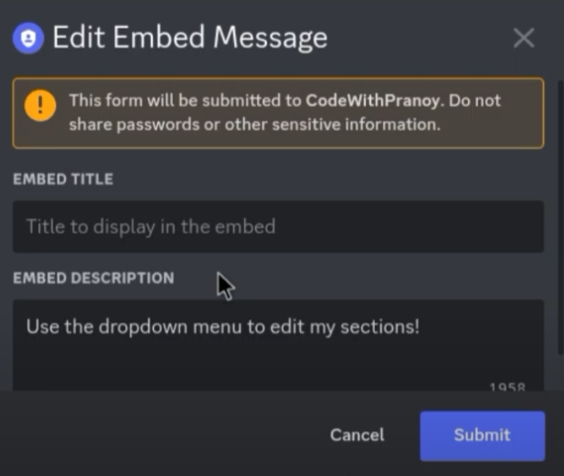
is there a way to make this? https://i.imgur.com/drAjkNG.png
 young bone
weak violet
is there a way to make this? https://i.imgur.com/drAjkNG.png
young bone
weak violet
is there a way to make this? https://i.imgur.com/drAjkNG.png
GitHub
Pycord, a maintained fork of discord.py, is a python wrapper for the Discord API - pycord/examples/modal_dialogs.py at master · Pycord-Development/pycord
weak violet
young bone
https://github.com/Pycord-Development/pycord/blob/master/examples/modal_dialogs....
ty
grizzled sentinel
[Solved] This error is discord side correct? Nothing I did wrong bot side?

Or is that the models version of "interaction did not respond"
Nevermind, Im not responding
 zealous bear
404 NOT FOUND 
WHY
I don't understand. My network connection is fine. My CPU is fine. I don't know what the hell is causing this to happen.
young bone
zealous bear
I don't understand. My network connection is fine. My CPU is fine. I don't know ...
But you know basic Python?
zealous bear
young bone
But you know basic Python?
Yes
I'm defering all commands

/ping JUST FAILED HOW
the code for that command could not be simpler

@bot.slash_command(server_id = server, name = "ping", description = "returns pong")
async def ping(ctx):
    await ctx.defer()
    await ctx.respond("pong!")

fervent cradle
is the on_member_join event broken?
all events work but on_member_join dont work on me
young bone
Do you have intents?
zealous bear
elp
 tidal narwhal
i used to be able to do bot = discord.Bot() but now it doesnt work?
and now slash commands dont work either???
young bone
tidal narwhal
i used to be able to do bot = discord.Bot() but now it doesnt work?
Can you show the pip list?
zealous bear
elp!!
weak violet
How i can send a message with interaction like a ctx.send? withouth the "respond" ?
zealous bear
zealous bear
Can anyone help me with this? It's not a network issue. Could it be a code issue?
weak violet
zealous bear
```python
@bot.slash_command(server_id = server, name = "ping", description = "r...
why using ctx.defer()?
zealous bear
weak violet
why using ctx.defer()?
so that it's not failing because of taking more than 3 seconds
defering just makes sense if i'm having the interactions fail
weak violet
remove it and try it without that
zealous bear
doesn't help
weak violet
you are self hosting it?
zealous bear
yes but it is not a network issue i have very low ping
I don't know how to fix this and i've been trying for days
zealous bear
weak violet
like for using server_id
no it has a single server id in that list
weak violet
zealous bear
no it has a single server id in that list
try removing it
zealous bear
weak violet
try removing it
i mean the interactions aren't failing all the time
its almost like random
weak violet
honestly i dont have any idea why is failling or lagging, is just a simple 3 line comand that responde "pong"
zealous bear
aiohttp 3.8.4
aiosignal 1.3.1
aiosqlite 0.19.0
async-timeout 4.0.2
attrs 23.1.0
autocorrect 2.6.1
boto3 1.26.140
botocore 1.29.140
cachetools 5.3.1
certifi 2023.5.7
charset-normalizer 3.1.0
components 1.2.8
discord 2.3.0
discord.py 2.3.0
distlib 0.3.6
ffmpeg-python 0.2.0
filelock 3.12.0
frozenlist 1.3.3
future 0.18.3
google-api-core 2.11.0
google-api-python-client 2.88.0
google-auth 2.19.0
google-auth-httplib2 0.1.0
google-cloud-language 2.9.1
googleapis-common-protos 1.59.0
grpcio 1.54.2
grpcio-status 1.54.2
httplib2 0.22.0
humanize 4.6.0
idna 3.4
imageio-ffmpeg 0.4.8
iniconfig 2.0.0
jmespath 1.0.1
multidict 6.0.4
nodejs 0.1.1
numpy 1.24.3
optional-django 0.1.0
packaging 23.1
pip 23.1.2
platformdirs 3.5.1
pluggy 1.0.0
proto-plus 1.22.2
protobuf 4.23.2
py-cord 2.4.1
pyasn1 0.5.0
pyasn1-modules 0.3.0
pycryptodome 3.18.0
pyparsing 3.0.9
pyspellchecker 0.7.2
pytest 7.3.1
python-dateutil 2.8.2
python-twitch-client 0.7.1
requests 2.31.0
rsa 4.9
s3transfer 0.6.1
secret 0.8
setuptools 67.8.0
six 1.16.0
tabulate 0.9.0
twitchAPI 3.11.0
typing_extensions 4.5.0
uritemplate 4.1.1
urllib3 1.26.16
virtualenv 20.23.0
wheel 0.40.0
wordninja 2.0.0
yarl 1.9.2
weak violet
maybe something else install it
zealous bear
alright how the fuck do i get rid of this
because it shows up every time i open terminal
 weak violet
try to run the command that say in the third line
 opal flax
Traceback (most recent call last):
  File "/home/adit/Coding/Bot/Discord/ditttt-bot/commands/normal/mods.py", line 30, in addrole
    await member.add_roles(*role, reason=f'add role by {ctx.author} | {reason}')
          ^^^^^^^^^^^^^^^^^^^^^^^^^^^^^^^^^^^^^^^^^^^^^^^^^^^^^^^^^^^^^^^^^^^^^^
TypeError: discord.member.Member.add_roles() argument after * must be an iterable, not Role``` why can this be like this? ```py
@commands.command()
    async def addrole(self, ctx, role: discord.Role, member: discord.Member, *, reason):
        try:
            await member.add_roles(*role, reason=f'add role by {ctx.author} | {reason}')
        except:
            traceback.print_exc()
        else:
            await ctx.send(
                embed=discord.Embed(
                    description=f"managed to add role {member.mention}".title(),
                    color=ctx.author.color,
                )
)```no i want to get rid of that shit
not install it or whatever
weak violet
zealous bear
not install it or whatever
¯_(ツ)_/¯
zealous bear
weak violet
¯\_(ツ)_/¯
figured it out
uninstalled everything and reinstalled
we'll see
weak violet
kk
zealous bear
yes it seems to be working, no commands have failed
yet i'm getting that error message in my terminal
 weak violet
whats the error in console?
zealous bear
weak violet
whats the error in console?
Traceback (most recent call last):
File "/Library/Frameworks/Python.framework/Versions/3.11/lib/python3.11/site-packages/discord/client.py", line 378, in _run_event
await coro(*args, **kwargs)
File "/Users/jef/Desktop/employee.py", line 658, in on_application_command_error
raise error
File "/Library/Frameworks/Python.framework/Versions/3.11/lib/python3.11/site-packages/discord/bot.py", line 1114, in invoke_application_command
await ctx.command.invoke(ctx)
File "/Library/Frameworks/Python.framework/Versions/3.11/lib/python3.11/site-packages/discord/commands/core.py", line 375, in invoke
await injected(ctx)
File "/Library/Frameworks/Python.framework/Versions/3.11/lib/python3.11/site-packages/discord/commands/core.py", line 132, in wrapped
raise ApplicationCommandInvokeError(exc) from exc
discord.errors.ApplicationCommandInvokeError: Application Command raised an exception: NotFound: 404 Not Found (error code: 10062): Unknown interaction
but its happening even when the actual commands aren't failing
zealous bear
zealous bear
im about to just give up on bots man
even when i'm not getting this kind of thing
zealous bear
zealous bear
Traceback (most recent call last):
File "/Library/Frameworks/Python.framework/...
its still sending this in terminal
reason was because i had two instances of the bot running 😂
what command handler should i be using for that error?
so that it sends a message telling the user to rerun the command
Traceback (most recent call last):
  File "/Library/Frameworks/Python.framework/Versions/3.11/lib/python3.11/site-packages/discord/commands/core.py", line 124, in wrapped
    ret = await coro(arg)
          ^^^^^^^^^^^^^^^
  File "/Library/Frameworks/Python.framework/Versions/3.11/lib/python3.11/site-packages/discord/commands/core.py", line 982, in _invoke
    await self.callback(ctx, **kwargs)
  File "/Users/jef/Desktop/employee.py", line 466, in join
    await ctx.respond(f"{ctx.author.mention} has joined the PvP battle!")
  File "/Library/Frameworks/Python.framework/Versions/3.11/lib/python3.11/site-packages/discord/commands/context.py", line 282, in respond
    return await self.interaction.response.send_message(
           ^^^^^^^^^^^^^^^^^^^^^^^^^^^^^^^^^^^^^^^^^^^^^
  File "/Library/Frameworks/Python.framework/Versions/3.11/lib/python3.11/site-packages/discord/interactions.py", line 825, in send_message
    await self._locked_response(
  File "/Library/Frameworks/Python.framework/Versions/3.11/lib/python3.11/site-packages/discord/interactions.py", line 1090, in _locked_response
    await coro
  File "/Library/Frameworks/Python.framework/Versions/3.11/lib/python3.11/site-packages/discord/webhook/async_.py", line 219, in request
    raise NotFound(response, data)
discord.errors.NotFound: 404 Not Found (error code: 10062): Unknown interaction

The above exception was the direct cause of the following exception:

Traceback (most recent call last):
  File "/Library/Frameworks/Python.framework/Versions/3.11/lib/python3.11/site-packages/discord/client.py", line 378, in _run_event
    await coro(*args, **kwargs)
  File "/Users/jef/Desktop/employee.py", line 656, in on_application_command_error
    raise error
  File "/Library/Frameworks/Python.framework/Versions/3.11/lib/python3.11/site-packages/discord/bot.py", line 1114, in invoke_application_command
    await ctx.command.invoke(ctx)
  File "/Library/Frameworks/Python.framework/Versions/3.11/lib/python3.11/site-packages/discord/commands/core.py", line 375, in invoke
    await injected(ctx)
  File "/Library/Frameworks/Python.framework/Versions/3.11/lib/python3.11/site-packages/discord/commands/core.py", line 132, in wrapped
    raise ApplicationCommandInvokeError(exc) from exc
discord.errors.ApplicationCommandInvokeError: Application Command raised an exception: NotFound: 404 Not Found (error code: 10062): Unknown interaction```That is the typical error that I get when one of my slash commands fail
if anyone could help me i would appreciate that so much 😭
I need The Bob to help me
if i ping him i'll probably get banned though
 silver moat
try using python 3.10?
zealous bear
silver moat
try using python 3.10?
is that just a less buggy version?
silver moat
potientially?
zealous bear
😭
zealous bear
zealous bear
-
what command handler should i be using for that error?
also wondering this
zealous bear
silver moat
potientially?
i guess its worth a try, i've tried everything
i've even searched through many of the #969574202413838426 posts similar to mine
silver moat
I only use 3.10 because some of my packages don’t support 3.11 yet.
zealous bear
zealous bear
also wondering this
@bot.event
async def on_command_error(ctx, error):
    if isinstance(error, commands.errors.CommandInvokeError) and isinstance(error.original, discord.errors.NotFound):
        await ctx.send("I'm sorry, this command failed. Please run it again.", ephemeral=True)
currently
and it doesn't work
silver moat
it should be on_application_command_error
 somber pelican
zealous bear
```Ignoring exception in on_application_command_error
Traceback (most recent cal...
somber pelican
zealous bear
```Ignoring exception in on_application_command_error
Traceback (most recent cal...
I sometimes get this error too, I just suppress it
The user will probably know to use the command again
 river void
I cant edit
wait im an idiot
After:
author: Member | User = user
What specific things would I have to complete for this change to be accepted? I am brand new to contributing to other projects like this on GitHub and I dont want to waste other peoples time with trial and error trying to get it right
 spring hare
What change?
river void
Litterally just adding typehinting to the author
spring hare
Isn't author is already typehinted?
river void
no
spring hare
Where?
river void
Line 212 in context.py in commands
 spring hare
GitHub
Pycord, a maintained fork of discord.py, is a python wrapper for the Discord API - pycord/discord/ext/commands/context.py at master · Pycord-Development/pycord
 spring hare
I think user is already typehinted so additional typehinting is not needed
river void
spring hare
Yup, user is already typehinted
river void
The reason that I am trying to add typehinting is without it pycharm kinda just doesn't recognise that the author is an instance of Member or User and throws all kinds of errors when I add proper doccumentation.
I'l get screenshots to show what I mean
"""
    The trade command for the bot. Allows users to trade with other users.

    Args:
        ctx (ApplicationContext): The context of the command
        user (User): The user to trade with
        item (int): The item to trade
        amount (int): The amount of the item to trade
        cost (int): The payment for the trade
    """


And if I add typehinting to author the warning disapears
And without typehinting code complete does not work at all
spring hare
Hm... Odd
river void
Yeah, I added the correct typehinting to it locally and it completely fixes the issue.
I don't see this breaking anything and while it may be a little verbose it does make the code more readable (especially for new contributors like me).
 alpine spear
ignore
river void
Anyways how on earth would I actually get this change included?
silver moat
river void
The reason that I am trying to add typehinting is without it pycharm kinda just ...
assert
river void
what
alpine spear
i'm trying load cogs to my main program, but i'm having some issues along the way
the picture is the lines i use to load the extension, and i'm using the filename as i'm meant to. i've correctly used setup to load the cog in the bot file as well

 silver moat
river void
what
silver moat
river void
what
you can do something like
assert isinstance(ctx.author, discord.Member)
bear in mind this is a fork of a current project made by someone else, and i'm simply adding improvements
 spiral spruce
alpine spear
i'm trying load cogs to my main program, but i'm having some issues along the wa...
spiral spruce
alpine spear
i'm trying load cogs to my main program, but i'm having some issues along the wa...
why not try using load_extension with f without the last three chars (".py")
river void
I have already fixed it on my local copy of the package just by changing one line to author: Member | User = user
alpine spear
spiral spruce
why not try using `load_extension` with `f` without the last three chars (".py")
but i'm using endswith, and the file doesn't end with "bot"
spiral spruce
yeah it ends with bot.py
remove the .py
python does the rest
I mean, to import from a file called bot.py, you do import bot
not import bot.py
so the name of the module becomes bot
alpine spear
is there another method to check for the whole name of the file? i'm not familiar with listdir and what it returns
alpine spear
spiral spruce
not `import bot.py`
true
spiral spruce
alpine spear
is there another method to check for the whole name of the file? i'm not familia...
f is the whole name
 spiral spruce
sure
silver moat
river void
I have already fixed it on my local copy of the package just by changing one lin...
btw, in your Pull Request, use typing.Union instead of | for backwards compatibility
spiral spruce
silver moat
btw, in your Pull Request, use `typing.Union` instead of `|` for backwards compa...
we switched to using new annotations with from __future__ import annotations
if the file has that import, you can use |
else you can add it yourself
clear vault
grizzled sentinel
```py
async with aiohttp.ClientSession() as session:
try:
commanduse...
I wrote it
clear vault
spiral spruce
sure
Hello 👋
 drowsy hound
Thanks
 solemn idol
drowsy hound
Thanks
solemn idol
drowsy hound
Thanks
Np 👌
river void
silver moat
btw, in your Pull Request, use `typing.Union` instead of `|` for backwards compa...
pull request done
drowsy hound
is it against terms of use to save all messages received in a database?
grizzled sentinel
clear vault
I wrote it
Can you show the function that it is in. The code above and below that bit of code that your wrote.
fervent cradle
how can I wait for a message in a callback? (I'm subclassing) bec. bot.wait_for("message") don't work
grizzled sentinel
Did you use a check? A message sent anywhere would trigger the wait_for to stop waiting
fervent cradle
grizzled sentinel
Did you use a check? A message sent anywhere would trigger the wait_for to stop ...
no, but I could use one
grizzled sentinel
Try adding a check that only returns true if it is in the same channel and/or author. Or whatever you need
fervent cradle
now I have one, but I still can't use the bot attribute, because I'm in a subclass
the problem is that I'm in a button callback in a view class and in there I don't have a bot object
you know what I mean?
fervent cradle
grizzled sentinel
Try adding a check that only returns true if it is in the same channel and/or au...
here is the code:
class ManagePersonalView(discord.ui.View):
    def __init__(self, team, logo, players):
        super().__init__(timeout=None)
        self.team = team
        self.logo = logo
        self.players = players

    @discord.ui.button(label='Traden', custom_id='player_trading', style=discord.ButtonStyle.blurple, emoji='🤝')
    async def player_trading_callback(self, button, interaction):
        em = discord.Embed(title='Spielerliste wird Generiert...' , color=discord.Color.red())
        await interaction.response.edit_message(embed=em, view=None)
        pages = []
        description = ''

        for index, player in enumerate(self.players):
            description += f"{index + 1}. {player}\n"

            if (index + 1) % 10 == 0:
                embed = discord.Embed(title='Spielerliste', description=description, color=discord.Color.green())
                pages.append(Page(embeds=[embed]))
                description = ''

        if description != '':
            embed = discord.Embed(title='Spielerliste', description=description, color=discord.Color.green())
            pages.append(Page(embeds=[embed]))

        print(pages)
        paginator = Paginator(pages=pages)
        paginator.custom_view = NewTradingPlayerView(self.players)
        paginator.remove_button("first")
        paginator.remove_button("last")
        await paginator.respond(interaction, ephemeral=True)

        def check(message):
            return message.author == interaction.user and message.channel == interaction.channel and message.content.isnumeric()

        user_input = await bot.wait_for(event='message', check=check, timeout=60)
        print(user_input.content)
The way I am seeing is you will have to pass bot when creating the view. Im looking if there is another way to access it.
 proud mason
fervent cradle
the problem is that I'm in a button callback in a view class and in there I don'...
proud mason
fervent cradle
the problem is that I'm in a button callback in a view class and in there I don'...
.rtfm interaction.client
 winter condorBOT
1 results
fervent cradle
Thanks
 hearty gorge
Hello, I have a small bot working that edit_message with a unique embed depending on which Select Menu option is clicked via a callback (menu and embed are in the same message). However, after clicking an option in the menu the visible selection clears. Is there a way to keep the selection visible after an edit?
fervent cradle
msg = await interaction.response.send_message(embed=emb)
as I understood right msg is the interaction object, right?
but how can I geht the discord.Message object of the interaction message?
proud mason
.rtfm interaction.original_response
winter condorBOT
1 results
proud mason
Await it btw
fervent cradle
proud mason
Await it btw
ok so msg= await interaction.original_response()
gives me the message object?
Ignoring exception in view <ManagePersonalView timeout=None children=4> for item <Button style=<ButtonStyle.primary: 1> url=None disabled=False label='Traden' emoji=<PartialEmoji animated=False name='🤝' id=None> row=None>:
Traceback (most recent call last):
  File "C:\Users\Pro 8\AppData\Local\Programs\Python\Python311\Lib\site-packages\discord\ui\view.py", line 414, in _scheduled_task
    await item.callback(interaction)
  File "C:\Users\Pro 8\Documents\Programmieren\Discord Bots\ZZGamesucht\football-minigame\cogs\management.py", line 481, in player_trading_callback
    await paginator.edit(await interaction.original_response())
  File "C:\Users\Pro 8\AppData\Local\Programs\Python\Python311\Lib\site-packages\discord\ext\pages\pagination.py", line 1073, in edit
    self.message = await message.edit(
                         ^^^^^^^^^^^^^
TypeError: InteractionMessage.edit() got an unexpected keyword argument 'suppress'
I have a command and server log
grizzled sentinel
Can you show the entire file that
async with aiohttp.ClientSession() as session:
    try:
        commanduse = discord.Webhook.from_url
Is in
grizzled sentinel
fervent cradle
ok so msg= await interaction.original_response()
gives me the message object?
if you are going to edit it right away you can use interaction.edit_original_response() Not sure what the error is from without seeing the snipet of code
clear vault
The entire file? Why
fervent cradle
grizzled sentinel
if you are going to edit it right away you can use `interaction.edit_original_re...
I try to edit the message with a paginator (awair paginator.edit(await interaction.original_response())
clear vault
I guess it’s a file error or smth
grizzled sentinel
clear vault
The entire file? Why
Or the function it was in. I just need to see more than 2 lines of code
clear vault
grizzled sentinel
Or the function it was in. I just need to see more than 2 lines of code
I don’t understand what u need haha
grizzled sentinel
fervent cradle
I try to edit the message with a paginator (awair paginator.edit(await interacti...
It might be an oversight. In pycords code
grizzled sentinel
clear vault
I don’t understand what u need haha
async with aiohttp.ClientSession() as session:
    try:
        commanduse = discord.Webhook.from_url
This code is in one of your functions correct? I need to see the all the code in that function.
grizzled sentinel
fervent cradle
I try to edit the message with a paginator (awair paginator.edit(await interacti...
I will look to see what I find.
clear vault
grizzled sentinel
```py
async with aiohttp.ClientSession() as session:
try:
commanduse...
Uh okay
I‘ll send u a little bit later. I’m not at home rn
grizzled sentinel
fervent cradle
I try to edit the message with a paginator (awair paginator.edit(await interacti...
So the problem is that Interaction.original_response() returns a slimed down version of a message object. Do you mind seeing what interaction.original_response().data returns.
Actually I think I found what you would need to do.
msg = await interaction.original_response()
msg = await msg.channel.fetch_message(msg.id)
Om said they are fixxing it.
https://github.com/Pycord-Development/pycord/pull/2138
This PR has been merged. So you could just update to master instead
fervent cradle
grizzled sentinel
https://github.com/Pycord-Development/pycord/pull/2138
This PR has been merged. ...
Its the development version right?
grizzled sentinel
Yeah, should be stable enough for most things rn
fervent cradle
Ok
drowsy hound
how do I add a discord.ui.Select to a Modal?
young bone
drowsy hound
how do I add a discord.ui.Select to a Modal?
Not possible
drowsy hound
:( can I add anything than an InputText?
grizzled sentinel
You can add long/short input text ( modal update when)
drowsy hound
I wanted to make an "annonymous: yes/no" selector, but... maybe some day haha
grizzled sentinel
drowsy hound
I wanted to make an "annonymous: yes/no" selector, but... maybe some day haha
This is my code for a t/f selector in a model :(
__init__
self.add_item(
            discord.ui.InputText(
                label="Required", required=True, max_length=1, placeholder="\"t\" (true) or \"f\" (false)"
            )
        )
callback
if self.children[1].value.lower() == "t":
    req = True
elif self.children[1].value.lower() == "f":
    req = False
else:
    return await interaction.response.send_message(embed=await ef.fail("Required Needs To Be Either \"t\" (True) Or \"f\"(False)"), ephemeral=True
            )
that's a nice workaround. Kinda idiot-proof, I'll try it out, thanks
 gleaming vortex
i have on question to ask:
my bot have about 280 commands
and i put them in the cogs
but... i unregister the all commands
and i restart the bot
and i didn't see the commands in the server app commands
(i restart the bot 2 days ago)
drowsy hound
How do I get the user's avatar_url? This way is not working. embed.set_footer(text=f"Done", icon_url=interaction.user.avatar_url)
grizzled sentinel
gleaming vortex
i have on question to ask:
my bot have about 280 commands
and i put them in the ...
Are some of them in groups? Discord only allows 100 commands. unless you use groups for some of them.
Did your bot get invited to the server recently? Ensure it was invited with the applications.commands scope.
Did you get any errors? Could you show your main file and a cog. (You can remove all the code in the command functions to make it shorter)
gleaming vortex
grizzled sentinel
Are some of them in groups? Discord only allows 100 commands. unless you use gro...
yeah they are groups
didn't get any error
grizzled sentinel
drowsy hound
How do I get the user's avatar_url? This way is not working. ```embed.set_foote...
It was changed a bit back to be avatar.url
drowsy hound
grizzled sentinel
It was changed a bit back to be `avatar.url`
perfect, that seems to work, thanks!
willow kiln
uhhh so my interaction/button code kinda loops or something and i have no idea why, i tried pass at the end but it doesnt work
start is the method/command im calling


 grizzled sentinel
willow kiln
uhhh so my interaction/button code kinda loops or something and i have no idea w...
grizzled sentinel
willow kiln
uhhh so my interaction/button code kinda loops or something and i have no idea w...
Does it only loop 4 times or does it keep going?
 grizzled sentinel
Do you override anything like on_interaction?
grizzled sentinel
gleaming vortex
Can you show an example of one of your cogs
willow kiln
grizzled sentinel
Do you override anything like on_interaction?
uhhhh doubt, besides imports this is the entire bot
 grizzled sentinel
willow kiln
uhhhh doubt, besides imports this is the entire bot
grizzled sentinel
willow kiln
uhhhh doubt, besides imports this is the entire bot
Try updating/restart your discord client. Also ensure no one is pranking you by pressing the button.
Also make sure your bot is only running in one console and you dont have it open multiple times
grizzled sentinel
gleaming vortex
This looks fine. Go through this checklist please :)
willow kiln
its a test server with only me and a co dev in it, so i highly doubt they are messing with me. only version of it is running in visual studio, will try restarting tho
winter condorBOT
Checklist for Application Commands Not Showing Up:
• Does your bot have the application.commands scope?
• Are you loading cogs before on_ready and on_connect?
• Is on_connect not overridden?
• Did you update to the newest version of py-cord (tag: install)?
• Is User Settings > Accessibility > Chat Input > Use legacy chat input turned off?
• Did you share your code and errors?
• Do you still have libraries that conflict with the discord namespace (e.g. discord.py)?
grizzled sentinel
@gleaming vortex ^
gleaming vortex
OK
grizzled sentinel
willow kiln
its a test server with only me and a co dev in it, so i highly doubt they are me...
The reason its weird is discord only allows you to respond to a button press once so even if it was looping discord would not allow another response and would give an error instead
drowsy hound
can a slash command have choices? e.g.: a field that can take only 2 values, "yes" or "no"
willow kiln
sounds like you want a bool
drowsy hound
not a bool, just constrained options, like "red", "green" or "blue"
fervent cradle
I have a problem. I updated to Development Version of Pycord and I have a paginator with a select menu. But when I select something in the menu nothing happens. Even the callback function don't get executed why?
this is a code snipped of the view class:
class NewTradingPlayerView(discord.ui.View):
    def __init__(self, players):
        super().__init__(timeout=None)
        self.players = players

    options = [
        discord.SelectOption(label='Alle', value='all'),
        discord.SelectOption(label='Sturm', value='sturm'),
        discord.SelectOption(label='Mittelfeld', value='mittelfeld'),
        discord.SelectOption(label='Abwehr', value='abwehr'),
        discord.SelectOption(label='Torwart', value='torwart')
    ]

    @discord.ui.select(placeholder='Filter', custom_id='select_player_filter', options=options)
    async def select_filter_callback(self, select, interaction):
        emb = discord.Embed(title='Spielerliste', color=discord.Color.green())
        pages = []
        description = ''
        print("Select")
and this is a code snipped of the code where I send the paginator:
        paginator = Paginator(pages=pages)
        paginator.custom_view = NewTradingPlayerView(self.players)
        paginator.remove_button("first")
        paginator.remove_button("last")

        print("Embeds")
        print(pages[0].embeds[0].description)
I don't get any errors and discord just said that the interaction was failed
grizzled sentinel
drowsy hound
can a slash command have choices? e.g.: a field that can take only 2 values, "ye...
Are you familiar with discord.Option?
drowsy hound
grizzled sentinel
Are you familiar with discord.Option?
nope. Isn't that for optional input?
grizzled sentinel
async def create(self, ctx, name: discord.Option(str, description="The Name For This Survey", max_length=64, required=True)):
This is a option. It allows you to modify how each argument in the slash command works. There is a kwarg called choices that you can pass a list to.
.rtfm discord.Option
winter condorBOT
zealous bear
somber pelican
I sometimes get this error too, I just suppress it
It happens too often for me to do this
willow kiln
other, hopefulyl easier question, anyone experienced with custom discord presence? so far had Playing ... but want to do smth custom
 somber pelican
zealous bear
It happens too often for me to do this
somber pelican
zealous bear
It happens too often for me to do this
i found it to be a network issue
zealous bear
somber pelican
i found it to be a network issue
My ping sits around 25 though
 trim cipher
hi! I came back to discord bot development after a long time. I had a discord bot which worked fine and I used the same code for a new bot. as soon as I ran the bot, it showed me this error. anyone has any idea why did this happen and how could I fix it? I never got this issue anytime before.
 grizzled sentinel
drowsy hound
nope. Isn't that for optional input?
grizzled sentinel
drowsy hound
nope. Isn't that for optional input?
This is a option that uses choices (sorry for spacing)
Option(str, description="How Should The Results Be Grouped",
                choices=[
                    discord.OptionChoice("By Template", "0"),
                    discord.OptionChoice("By Instance", "1"),
                    discord.OptionChoice("By User", "2"),
                ],
                required=False,
                default="0",
            )
ohhh ok, i get it now
grizzled sentinel
fervent cradle
I have a problem. I updated to Development Version of Pycord and I have a pagina...
Could you put this in a thread. Its getting crowded in this channel XD
gleaming vortex
grizzled sentinel
<@852006773854306304> ^
i'm checked:
the cog are loader before on_ready, on_connect
on_connect not overridden
the pycord version is 2.4.1
grizzled sentinel
trim cipher
hi! I came back to discord bot development after a long time. I had a discord bo...
Can you show pip list
trim cipher
grizzled sentinel
Can you show `pip list`
uhm this
 grizzled sentinel
And your bot had the applications.commpands scope and you do not have discord.py or disnake or interactions.py installed?
trim cipher
grizzled sentinel
And your bot had the applications.commpands scope and you do not have discord.py...
yes for both
it has applications.commands scope and i have not installed discord.py or any other lib
grizzled sentinel
I meant that for someone else but i guess it is relevent to you as well 🙃
trim cipher
oh
gleaming vortex
grizzled sentinel
And your bot had the applications.commpands scope and you do not have discord.py...
hmmmm how can i check the applications.commpands scope
and i do not have another api like: disnake discord.py or interaction.py
fervent cradle
Yeah
grizzled sentinel
trim cipher
yes for both
Can you try reinstalling pycord
grizzled sentinel
gleaming vortex
hmmmm how can i check the applications.commpands scope
and i do not have another...
Im not sure if there is a way to check. You could reinvite the bot into the server you are testing it on with that scope
trim cipher
grizzled sentinel
Can you try reinstalling pycord
ohk
gleaming vortex
grizzled sentinel
Im not sure if there is a way to check. You could reinvite the bot into the serv...
still didn't saw the commands in app commands
that confused me
and i not have the way to fix it
cry
grizzled sentinel
could you show the file that has bot.run()
 grizzled sentinel
I want to see how you load your cogs
gleaming vortex
ok wait me
gleaming vortex
grizzled sentinel
I want to see how you load your cogs
COG_FILE_COMMAND_LIST = [
    "group-command",
    "slash-command",
    "message-command"
]
cogs_count = 0
for i in COG_FILE_COMMAND_LIST:
    for filename in os.listdir(f"./Cogs/commands/{i}"):
        if filename.endswith('.py'):
            bot.load_extension(f"Cogs.commands.{i}.{filename[:-3]}")
            print(f"【INFO】-【COG-commands】- 已載入【count: {cogs_count}】【{filename[:-3]}】")
            cogs_count += 1
2 More things, try restarting your discord. (It is possible it is a visual bug in the discord client)
Try starting the bot without any cogs loaded. Than start it agian with the cogs loaded.
fervent cradle
I also had the problem one time. I kicked the bot out of my guild and reinvited it. If that don't work, try to reset my token. That also worked for me
proud mason
fervent cradle
```
Ignoring exception in view <ManagePersonalView timeout=None children=4> for ...
It should work on master branch
And I've also made a pr to avoid fetching the message
Oh wait just realised that was an old message
gleaming vortex
grizzled sentinel
2 More things, try restarting your discord. (It is possible it is a visual bug i...
restarted discord. same...
restarted without cog and restarted with cog
same QAQ
fervent cradle
proud mason
It should work on master branch
Is master the dev version or the version at pypl?
fervent cradle
proud mason
Oh wait just realised that was an old message
The message I tried to edit?
proud mason
fervent cradle
Is master the dev version or the version at pypl?
The one on GitHub
trim cipher
grizzled sentinel
Can you try reinstalling pycord
welp!
 proud mason
fervent cradle
The message I tried to edit?
proud mason
fervent cradle
The message I tried to edit?
No lol. Discord was showing me older messages
fervent cradle
proud mason
No lol. Discord was showing me older messages
Oh ok
grizzled sentinel
trim cipher
welp!
The bot does not have permission to create slash command in one of the guilds it is in. Ensure your bot is still in all of the guilds that you specify a guild_id for
trim cipher
ohhk
gleaming vortex
grizzled sentinel
2 More things, try restarting your discord. (It is possible it is a visual bug i...
cried...... so hard to fix the problem
fervent cradle
fervent cradle
I also had the problem one time. I kicked the bot out of my guild and reinvited ...
@gleaming vortex try these
grizzled sentinel
gleaming vortex
tried....
Can you run this code with your bot token to see if it works
https://github.com/Pycord-Development/pycord/blob/master/examples/app_commands/slash_basic.py
gleaming vortex
ok .w.
proud mason
You could force a sync by calling await bot.sync_commands() inside a prefix cmd
gleaming vortex
proud mason
You could force a sync by calling `await bot.sync_commands()` inside a prefix cm...
Thank You !
it works !!!!
thank you for your help: @proud mason @grizzled sentinel
thanks a lot
grizzled sentinel
👍
fervent cradle
bro how can i make that an embed has a random color??
proud mason
.rtfm colour.rand
winter condorBOT
1 results
proud mason
That
 proud mason
Call the function
fervent cradle
?
proud mason
colour=discord.Colour.random()
Add the ()
proud mason
Np
fervent cradle
.rtfm member author url
winter condorBOT
200 total results
discord.TeamMember
discord.TeamMember.accent_color
discord.TeamMember.accent_colour
discord.TeamMember.avatar
discord.TeamMember.banner
discord.TeamMember.bot
discord.TeamMember.color
discord.TeamMember.colour
discord.TeamMember.created_at
discord.TeamMember.default_avatar
discord.TeamMember.discriminator
discord.TeamMember.display_avatar
discord.TeamMember.display_name
discord.TeamMember.id
discord.TeamMember.jump_url
discord.TeamMember.membership_state
discord.TeamMember.mention
discord.TeamMember.mentioned_in
discord.TeamMember.name
discord.TeamMember.permissions
fervent cradle
.rtfm member author icon
winter condorBOT
200 total results
discord.TeamMember.public_flags
discord.TeamMember.system
discord.TeamMember.team
discord.Member
discord.Member.accent_color
discord.Member.accent_colour
discord.Member.activities
discord.Member.activity
discord.Member.add_roles
discord.Member.avatar
discord.Member.ban
discord.Member.banner
discord.Member.bot
discord.Member.can_send
discord.Member.color
discord.Member.colour
discord.Member.communication_disabled_until
discord.Member.create_dm
discord.Member.created_at
discord.Member.default_avatar
proud mason
#app-commands or #883236900171816970 please
proud mason
No worries

 proud mason
?tag intents
 obtuse juncoBOT
https://docs.pycord.dev/en/master/intents.html
https://discord.com/developers/docs/topics/gateway#gateway-intents
import discord
from discord.ext import commands

# Get specific intents for fine control
intents = discord.Intents()
intents.emojis = True
intents.guilds = True
intents.messages = True  # Required for prefix commands!
...
# Get all non-priveliged intents; this excludes presences, members and message_content
intents = discord.Intents.default()

# Set priveliged intents: these must be enabled on dev portal
intents.members = True
intents.presences = True
intents.message_content = True  # Required for prefix commands >= 2.0.0b5

# Get all intents; all intents must be enabled on dev portal.
intents = discord.Intents.all()

# Apply intents when creating your bot
bot = commands.bot(prefix="?", intents=intents)
Pycord
In version 1.5 comes the introduction of Intents. This is a radical change in how bots are written. An intent basically allows a bot to subscribe to specific buckets of events. The events that corr...

Discord Developer Portal
Integrate your service with Discord — whether it's a bot or a game or whatever your wildest imagination can come up with.
proud mason
You need message content intents
fervent cradle
i have it on
bruh

on an other bot i have this intents only and it works too
but on this bot not
proud mason
How do you pass the intents?
 solemn idol
try only doing the default intents and then the other intents you put below the top line
fervent cradle
@client.event
async def on_message(message):
if message.channel.id == int(get_config("Feedback_Channel")):
if message.author.bot == True:
pass
else:
embed = discord.Embed(title="\✨ New Feedback", description=f"{message.content}", color=discord.Colour.random())
embed.set_author(name="Pure Services", icon_url="https://colin.isfucking.pro/7tApHe.gif")
embed.set_footer(text=f"Feedback from {message.author.name}", icon_url="https://colin.isfucking.pro/7tApHe.gif")
embed.set_thumbnail(url=message.author.avatar.url)
await message.delete()
await message.channel.send(embed=embed)``` coarse spire
fervent cradle
and it dont work anyway
coarse spire
fervent cradle
and it dont work anyway
Do you pass the intents to the bot?
fervent cradle
yes
fervent cradle
solemn idol
try only doing the default intents and then the other intents you put below the ...
dont work
solemn idol
hmm
coarse spire
so something like: client = discord.Bot(intents=intents)?
coarse spire
hmm
solemn idol
 ... and why?
fervent cradle
forgot
solemn idol
🥹
fervent cradle

clear vault
@grizzled sentinel May i ask why u need the code
zealous bear
@bot.listen()
async def on_application_command_error(ctx: discord.ApplicationContext, error: discord.NotFound):

    if isinstance(error, discord.ApplicationCommandInvokeError):
        await ctx.respond("I'm sorry, this command failed. Please run it again.", ephemeral=True)
    else:
        raise error
Does anyone know to make this work
for the 404 interaction not found error
somber pelican
zealous bear
```python
@bot.listen()
async def on_application_command_error(ctx: discord.Appl...
you're using "and"
itll only execute if both of those conditions are true
should be applicationcommandinvokeerror
zealous bear
somber pelican
should be applicationcommandinvokeerror
edited my message
looking better?
proud mason
it might actually be discord.ApplicationCommandInvokeError
zealous bear
W
winter condorBOT
proud mason
yea
zealous bear
proud mason
yea
edited my message
i'll try that
now i need to sit and wait for one of my commands to fail! 
won't take long at all
proud mason
error: discord.NotFound uh
zealous bear
im still so pissed off by this happening all the time 
zealous bear
proud mason
`error: discord.NotFound` uh
ye?
hold on hold on hold on
if my commands fail the first time someone uses them if nobody uses them for a while
the solution is to have people constantly using my commands!
zealous bear
proud mason
`error: discord.NotFound` uh
is that wrong?
HOW CAN THAT COMMAND FAIL

ITS THE SIMPLEST CODE EVER
zealous bear
error: Exception.NotFound?
proud mason
error: Exception because that function is called for any error
not just discord.NotFound
zealous bear
proud mason
not just `discord.NotFound`
hmm
@bot.listen()
async def on_application_command_error(ctx: discord.ApplicationContext, error: Exception):

    if isinstance(error, discord.ApplicationCommandInvokeError):
        await ctx.respond("I'm sorry, this command failed. Please run it again.", ephemeral=True)
    else:
        raise error

discord.errors.ApplicationCommandInvokeError: Application Command raised an exception: NotFound: 404 Not Found (error code: 10062): Unknown interaction
young bone
zealous bear
```python
@bot.listen()
async def on_application_command_error(ctx: discord.Appl...
Is again discord.py installed?
zealous bear
young bone
Is again discord.py installed?
YES HOW DOES IT KEEP GETTING INSTALLED
Do you have any clue what could keep bringing discord.py into my system
I am not pip installing it
Okay well this happened when i didn't have discord.py installed
 zealous bear
```python
@bot.listen()
async def on_application_command_error(ctx: discord.Appl...
zealous bear
zealous bear
```python
@bot.listen()
async def on_application_command_error(ctx: discord.Appl...
And this wasn't triggered

I'm so tired of this
 cyan quail
if it's not firing the error handler then the error didn't originate from a command
more specifically, the random NotFound on interactions likely can be neither caught nor responded to
zealous bear
cyan quail
more specifically, the random NotFound on interactions likely can be neither cau...
can they be stopped?
from happening
zealous bear
cyan quail
more specifically, the random NotFound on interactions likely can be neither cau...
they are not totally random
most of the time they happen the first time that i run an interaction after a couple minute period of not running an interaction
cyan quail
if you're consistently getting notfound then that's a structural problem with your code that you should aim to fix
zealous bear
cyan quail
if you're consistently getting notfound then that's a structural problem with yo...
so if i organize everything into awesome cogs
it should fix?]
cyan quail
well no, by structual i mean that you're not dealing with interactions properly which causes issues
all interactions have to be responded to (or deferred) within 3 seconds, and interaction tokens only last for 15 minutes (for followup etc.)
zealous bear
could you explain the proper way?
zealous bear
cyan quail
all interactions have to be responded to (or deferred) within 3 seconds, and int...
Right but for commands like my /ping command
none of that applies (i think)
and yet it fails
cyan quail
you sure there's no network issues?
cyan quail
well ping is cool and all, but consistency is more relevant here
zealous bear
yes, my internet is consistent
cyan quail
you don't have any extra listeners for interactions? any potentially blocking code?
zealous bear
cyan quail
you don't have any extra listeners for interactions? any potentially blocking co...
extra listeners?
i don't think there is blocking code
i'm not using requests
my only @bot.event(s) are on_ready and on_shutdown
cyan quail
....fwiw, on_shutdown doesn't exist
zealous bear
meh okay that's fine
cyan quail
hmm
zealous bear
its not causing the problems
its been happening way before i added a non existent event 
@bot.event
async def on_shutdown():
    print('Shutting down...')
    save_task_states()
    await bot.close()

cyan quail
i mean if it was a lib issue it would have been stamped out long ago, only you'd be able to narrow it down
zealous bear
cyan quail
i mean if it was a lib issue it would have been stamped out long ago, only you'd...
i have no clue what is causing it
i would offer to send my code but it is 1000 lines of stuff and that is just not fun for you
fervent cradle
@proud mason ur PR is done now?
zealous bear
elp
fervent cradle
        m = await ctx.interaction.original_response()
msg = await m.channel.fetch_message(m.id)``` so instead of fetching it i can pass in just mmaybe you are using a venv?
young bone
fervent cradle
```py
m = await ctx.interaction.original_response()
msg = await ...
But that is still fetching
fervent cradle
yes but i dont need to do the extra steps
wait no
cant i just directly assign the m variable to await ctx.respond
zealous bear
solemn idol
maybe you are using a venv?
I am not
willow kiln
does anyone know what interaction is below the surface here? cuz i for some reason cant use ctx.respond in one specific method but also cant put interaction in its args as else it would just be picked up/required in the / command
 young bone
Interaction
zealous bear
@cyan quail did anything come to mind on what my issue is or should I ask someone else
proud mason
fervent cradle
```py
m = await ctx.interaction.original_response()
msg = await ...
yes that one is on master branch now.
ive made another pr will allow you to just pass ctx, no need for the original_response step too
 trim condor
how are people doing end-to-end tests with their discord bots? i’ve tried even just testing at the command level, but the decorators change things in weird ways that’s hard to reason about (e.g. you can’t just run the function for a slash command in a test, because you get an error about self being a _MissingSentinel object)
zealous bear
silver moat
try using python 3.10?
so just uninstall current version on my device completely
and install 3.10?
 uncut current
really quick question, why does am I not allowed naming my command ban but I am allowed to name it "test"
Traceback (most recent call last):
  File "F:\NigDiscord\main.py", line 34, in <module>
    @client.slash_command(name = "ban", description = "bans a user that is not on this server")
     ^^^^^^^^^^^^^^^^^^^^^^^^^^^^^^^^^^^^^^^^^^^^^^^^^^^^^^^^^^^^^^^^^^^^^^^^^^^^^^^^^^^^^^^^^^
  File "F:\NigDiscord\venv\Lib\site-packages\discord\bot.py", line 931, in decorator
    self.add_application_command(result)
  File "F:\NigDiscord\venv\Lib\site-packages\discord\bot.py", line 127, in add_application_command
    command._set_cog(None)
  File "F:\NigDiscord\venv\Lib\site-packages\discord\commands\core.py", line 603, in _set_cog
    self.cog = cog
    ^^^^^^^^
  File "F:\NigDiscord\venv\Lib\site-packages\discord\commands\core.py", line 830, in cog
    self._validate_parameters()
  File "F:\NigDiscord\venv\Lib\site-packages\discord\commands\core.py", line 708, in _validate_parameters
    self.options: list[Option] = self._parse_options(params)
                                 ^^^^^^^^^^^^^^^^^^^^^^^^^^^
  File "F:\NigDiscord\venv\Lib\site-packages\discord\commands\core.py", line 768, in _parse_options
    _validate_names(option)
  File "F:\NigDiscord\venv\Lib\site-packages\discord\commands\core.py", line 157, in _validate_names
    validate_chat_input_name(obj.name)
  File "F:\NigDiscord\venv\Lib\site-packages\discord\commands\core.py", line 1875, in validate_chat_input_name
    raise error
discord.errors.ValidationError: Command names and options must follow the regex \"^[-_\w\d\u0901-\u097D\u0E00-\u0E7F]{1,32}$\". For more information, see https://discord.com/developers/docs/interactions/application-commands#application-command-object-application-command-naming. Received "User ID"
MissingSentinel is a very old error
What's your pycord version
zealous bear
hmmm
trim condor
full basin
What's your pycord version
i’m on 2.4.1 - this is when I’m running it from a unit test though, if that changes things. so I’m calling from my test a function that is decorated with @commands.slash_command in a cog
young bone
trim condor
i’m on 2.4.1 - this is when I’m running it from a unit test though, if that chan...
That is not the python version
That is the py-cord version
young bone
Python
trim condor
I’m 3.10.6 for python
young bone
Do you have any other version installed?
 trim condor
ah no you’re confusing me with someone else, or I confused you 😂
I’m the one with the testing thing, talking to @full basin, @jef is asking about something python version related 😂
zealous bear
yes
i downgraded to 3.10 because @squ1d.dev suggested it
now i'm getting those cute errors
spring hare
redownload packages/libs?
zealous bear
spring hare
redownload packages/libs?
they're installed
spring hare
Are you sure, you are using right venv?
zealous bear
i have no venv
spring hare
tf?
zealous bear
tehe
spring hare
zealous bear
Is it vscode?
trim condor
get a venv for the love of god please 🙂
zealous bear
spring hare
Is it vscode?
yes
zealous bear
trim condor
get a venv for the love of god please 🙂
ugh
trim condor
python -m venv venv && source venv/bin/activate && pip install -r requirements.txt && pip show py-cord
spring hare
shadow wizard money gang
zealous bear
should i uninstall like all the global shit
trim condor
dont worry about that, it’ll override when your venv works
zealous bear
trim condor
`python -m venv venv && source venv/bin/activate && pip install -r requirements....
in which part of that command do i name it
trim condor
you just run this at a terminal. not sure what you mean by naming it, like the directory where the binaries and pkgs are stored? if so, it’s the second “venv” argument
 trim condor
yeah venv will set you straight!
zealous bear
well maybe it will magically fix my errors but i doubt it
its good to have anyway :)
zealous bear
trim condor
yeah venv will set you straight!
python3 -m employeenv .venv && pip install -r requirements.txt && pip show py-cord
that should do it right?
like if i run that in the VSC terminal when i'm inside my bot's folder @trim condor ?
proud mason
Sepcific the python version when using pip
zealous bear
okey
zealous bear
zealous bear
`python3 -m employeenv .venv && pip install -r requirements.txt && pip show py-c...
will this work though?
proud mason
python3.10 -m pip install ...
proud mason
zealous bear
will this work though?
Depends
zealous bear
proud mason
`python3.10 -m pip install ...`
oohhhh got it thanks so much
zealous bear
proud mason
Depends
on?
proud mason
What python3 points to. It could be 3.11
spring hare
zealous bear
(dont know if thats relevant)
(There are a lot of software that just don't work on m1, especially old software)
proud mason
Run python -V
zealous bear
spring hare
(There are a lot of software that just don't work on m1, especially old software...
(anything that would affect me?)
zealous bear
proud mason
Run `python -V`
in terminal of my bot's folder?
proud mason
spring hare
(There are a lot of software that just don't work on m1, especially old software...
Rosetta makes stuff like those pretty rare iirc
proud mason
zealous bear
in terminal of my bot's folder?
Anywhere
zealous bear
Python3 -V
gets me Python 3.10.0
because you have to use python3 on mac
as the command
proud mason
That's a pretty old 3.10 version tbh
proud mason
And what does python3.10 -V return
zealous bear
zealous bear
gets me Python 3.10.0
.
proud mason
I mean use 3.10.8 or later
zealous bear
i should just use the most recent i don't think downgrading will help
whats the most recent like "supported" version
proud mason
3.11.4 or 3.10.12
zealous bear
okay ill do 3.11.4
proud mason
Was there a reason why squid asked you to downgrade
zealous bear
interactions constantly failing
proud mason
Oh right that issue
zealous bear
so what's the command for the venv? i'm on 3.11.4 now, and want to name the venv for this bot "employeenv"
proud mason
Ig
proud mason
zealous bear
so what's the command for the venv? i'm on 3.11.4 now, and want to name the venv...
I don't remember 💀
zealous bear
RAHHH

Here's how you can setup a virtual environment in Visual Studio Code for Python.
▶ Master the Python language in less than a month:
https://www.udemy.com/course/the-complete-guide-to-mastering-modern-python/?referralCode=CC9D7387F065F70EBC23
▶ Follow me on Instagram:
https://www.instagram.com/indentlyreels
▶ Join the chat on Discord:
https:/...
im watching this shit
and i combined that with what jroes suggested
python3 -m employeenv .venv && pip install -r requirements.txt && pip show py-cord
and ended up with that 
shoot
how do i delete a venv
@trim condor
hey so i have a venv now
but
-ERROR: Could not open requirements file: [Errno 2] No such file or directory: 'requirements.text'
did i need to make a requirements.txt file or something?
elp meh
i should just do it manually!
done
should i be creating a virtual enviroment for all of my bots?
silver moat
it's a good practice to do so for all projects
zealous bear
hi okay
zealous bear
silver moat
it's a good practice to do so for all projects
how do i run something in a venv through pm2
silver moat
idk what pm2 is
silver moat
lemme make sure: I have an answer, but not 100% sure
zealous bear
okey!
silver moat
yeah should just be venv/bin/python
zealous bear
silver moat
yeah should just be venv/bin/python
okay so i am in this loop where if i uninstall and reinstall discord it installs discord.py so then its giving me a did you mean add_command error but then when i uninstall discord.py its giving me ImportError: cannot import name 'tasks' from 'discord.ext' (unknown location)
silver moat
uninstall discord, discord.py and just install py-cord
zealous bear
okkk
zealous bear
silver moat
uninstall discord, discord.py and just install py-cord
thanks! worked, should've done it sooner
aiohttp.client_exceptions.ClientConnectorCertificateError: Cannot connect to host discord.com:443 ssl:True [SSLCertVerificationError: (1, '[SSL: CERTIFICATE_VERIFY_FAILED] certificate verify failed: unable to get local issuer certificate (_ssl.c:997)')]
now there's this 
i've gotten it before
silver moat
zealous bear
`aiohttp.client_exceptions.ClientConnectorCertificateError: Cannot connect to ho...
you didn't install python correctly
silver moat
maybe
trim condor
@zealous bear to delete your venv just rm -rf venv
oh sorry I’m late, just catching up
zealous bear
trim condor
<@1031328980810350632> to delete your venv just `rm -rf venv`
ye thanks
zealous bear
silver moat
maybe
it did not work
what the hell

does it have to do with my venv?
full traceback
thank you @silver moat , how did you get the token?
silver moat
it was in the traceback
zealous bear
shoot
oh man it was
    return future.result()
  File "/Users/jef/Desktop/EmployeeBot/.employeenv/lib/python3.10/site-packages/discord/client.py", line 696, in runner
    await self.start(*args, **kwargs)
  File "/Users/jef/Desktop/EmployeeBot/.employeenv/lib/python3.10/site-packages/discord/client.py", line 659, in start
    await self.login(token)
  File "/Users/jef/Desktop/EmployeeBot/.employeenv/lib/python3.10/site-packages/discord/client.py", line 515, in login
    data = await self.http.static_login(token.strip())
  File "/Users/jef/Desktop/EmployeeBot/.employeenv/lib/python3.10/site-packages/discord/http.py", line 418, in static_login
    data = await self.request(Route("GET", "/users/@me"))
  File "/Users/jef/Desktop/EmployeeBot/.employeenv/lib/python3.10/site-packages/discord/http.py", line 283, in request
    async with self.__session.request(
  File "/Users/jef/Desktop/EmployeeBot/.employeenv/lib/python3.10/site-packages/aiohttp/client.py", line 1141, in __aenter__
    self._resp = await self._coro
  File "/Users/jef/Desktop/EmployeeBot/.employeenv/lib/python3.10/site-packages/aiohttp/client.py", line 536, in _request
    conn = await self._connector.connect(
  File "/Users/jef/Desktop/EmployeeBot/.employeenv/lib/python3.10/site-packages/aiohttp/connector.py", line 540, in connect
    proto = await self._create_connection(req, traces, timeout)
  File "/Users/jef/Desktop/EmployeeBot/.employeenv/lib/python3.10/site-packages/aiohttp/connector.py", line 901, in _create_connection
    _, proto = await self._create_direct_connection(req, traces, timeout)
  File "/Users/jef/Desktop/EmployeeBot/.employeenv/lib/python3.10/site-packages/aiohttp/connector.py", line 1206, in _create_direct_connection
    raise last_exc
  File "/Users/jef/Desktop/EmployeeBot/.employeenv/lib/python3.10/site-packages/aiohttp/connector.py", line 1175, in _create_direct_connection
    transp, proto = await self._wrap_create_connection(
  File "/Users/jef/Desktop/EmployeeBot/.employeenv/lib/python3.10/site-packages/aiohttp/connector.py", line 982, in _wrap_create_connection
    raise ClientConnectorCertificateError(req.connection_key, exc) from exc
aiohttp.client_exceptions.ClientConnectorCertificateError: Cannot connect to host discord.com:443 ssl:True [SSLCertVerificationError: (1, '[SSL: CERTIFICATE_VERIFY_FAILED] certificate verify failed: unable to get local issuer certificate (_ssl.c:997)')]```ait that's better
no clue why that's happening
young bone
oh you get the SSL Error
silver moat
try asking in the python server: discord.gg/python
zealous bear
oooh okey
silver moat
i didn’t do anything but 
zealous bear
silver moat
i didn’t do anything but <:yay:842724960354304020>
you help me sm
this server should integrate a thank you system
where you can thank people and it keeps track of who has the most thanks and there are rewards
@bot.listen()
async def on_application_command_error(ctx: discord.ApplicationContext, error: Exception):

    if isinstance(error, discord.ApplicationCommandInvokeError):
        await ctx.respond("I'm sorry, this command failed. Please run it again.", ephemeral=True)
    else:
        raise error
this still doesn't work 
and my interactions are still failing
and i'm even in a virtual enviroment
and this is my pip list
aiohttp 3.8.4
aiosignal 1.3.1
aiosqlite 0.19.0
async-timeout 4.0.2
attrs 23.1.0
charset-normalizer 3.1.0
frozenlist 1.3.3
humanize 4.6.0
idna 3.4
multidict 6.0.4
pip 23.1.2
py-cord 2.4.1
setuptools 65.5.0
yarl 1.9.2
So there's no reason
 sly comet
My bot has been working perfectly fine until some time recently, when I barely updated the code. Now it won't go online without any errors. Any quick ideas for solutions, or would I have to look deeper into the code?
zealous bear
sly comet
My bot has been working perfectly fine until some time recently, when I barely u...
you would have to show us the error

 naive remnant
how can i make my bot see if the command channel is full of webhooks or not ?
naive remnant
sly comet
It just won't go online
just try to run the code using CMD (which os you're using?)
 halcyon gorge
is auto_archive_duration close the post? because I have that enabled but it's not closing the post after the duration
silver moat
halcyon gorge
is auto_archive_duration close the post? because I have that enabled but it's no...
close ≠ locked
silver moat
sly comet
My bot has been working perfectly fine until some time recently, when I barely u...
do you have members intent?
river void
I am completely stumped
So i'm trying to create a dropdown menu that has a user's inventory in it
and i cannot for the life of me figure out how to actually get the user's inventory
code below for reference (it is nowhere near functional so just ignore it's incompleteness)
class MonetaryTradeUI(discord.ui.View):

    def __init__(self, config: Config, inventory_system: Inventories, user_initiating: Member | User, user_receiving: Member | User,
                 timeout: int = 60):
        super().__init__(timeout=timeout)
        self.config = config

        self.logger = create_logger("MonetaryTradeUI", "MonetartTradeUI", "monetary_trade_ui",
                                    level=self.config.logging_level)

        self.inventory_system = inventory_system
        self.user_initiating = user_initiating
        self.user_receiving = user_receiving

        try:
            self._user_receiving_inventory = self.inventory_system.get_user_inventory(self.user_receiving)
        except UserHasNoInventoryError:
            self.inventory_system.add_user_inventory(self.user_receiving.id)
            self._user_receiving_inventory = self.inventory_system.get_user_inventory(self.user_receiving)

        global user_receiving_inventory
        user_receiving_inventory = self._user_receiving_inventory
        self.logger.debug(f"User receiving inventory: {user_receiving_inventory}")

        setattr(__class__, "user_receiving_inventory", self._user_receiving_inventory)

    @staticmethod
    def test():
        return getattr(__class__, "user_receiving_inventory")

    global user_receiving_inventory

    @discord.ui.select(
        placeholder="Select the item you want",
        min_values=1,
        max_values=1,
        custom_id="select_item",
        options=user_receiving_inventory
    )
    async def select_item(self, select: discord.ui.Select, interaction: discord.Interaction):
        """
        Select menu for selecting the item to trade.
        """
        pass
how on earth would i get the user's inventory in the function decorator?
halcyon gorge
silver moat
close ≠ locked
I want it to close but not lock
weak violet
Quick question, this "box" is just and embed with the same color of the background or its something diferent? https://i.imgur.com/YqYr8QF.png


 silver moat
weak violet
Quick question, this "box" is just and embed with the same color of the backgrou...
silver moat
weak violet
Quick question, this "box" is just and embed with the same color of the backgrou...
just an embed
weak violet
kk ty
 elfin dagger
is there any way to make embed fields go downwards only instead of to the side
silver moat
elfin dagger
is there any way to make embed fields go downwards only instead of to the side
inline = false
or something like that
.rtfm embed.add_field
winter condorBOT
1 results
silver moat
yup
elfin dagger
oh beautiful tyvm
fervent cradle
proud mason
yes that one is on master branch now.
ive made another pr will allow you to ju...
ctx as in m = await ctx.respond or something or what am i able@to pass in now
fervent cradle
also i noticed that ctx.respond has been moved to interaction.respond that means i should also pass in interaction instead of ctx? or should i just keep using ctx since its a property
silver moat
fervent cradle
also i noticed that ctx.respond has been moved to interaction.respond that means...
ApplicationContext just wraps Interaction. If you can do it with one of them, you can do it with the other. Essentially, ApplicationContext just has more helper methods/attributes
proud mason
fervent cradle
ctx as in m = await ctx.respond or something or what am i able@to pass in now
earlier, you were doing
await ctx.respond("Hi")
m = await ctx.interaction.original_response()
msg = await ctx..channel.fetch_message(m.id)
await paginator.edit(m)
rn on master branch, my 1st pr got merged. so you can save 1 step
await ctx.respond("Hi")
m = await ctx.interaction.original_response()
await paginator.edit(m)
in a couple of days, my 2nd would get merged, allowing you to just do
await ctx.respond("Hi")
await paginator.edit(ctx)
🙃
ill try to get my pr merged today
||hopefully somebody tests it||
fervent cradle
proud mason
earlier, you were doing
```py
await ctx.respond("Hi")
m = await ctx.interaction....
thanks for the explanation, ill wait for the 2nd pr then
 maiden nexus
proud mason
earlier, you were doing
```py
await ctx.respond("Hi")
m = await ctx.interaction....
maiden nexus
proud mason
earlier, you were doing
```py
await ctx.respond("Hi")
m = await ctx.interaction....
hey uh I've run into another slight problem, related to the earlier problem I mentioned.. if you could please check my thread #1122598154009841674
fervent cradle
in async def on_message(message):
how do i react to it?
proud mason
.rtfm message.add_reac
winter condorBOT
fervent cradle
how can I change the button appereance from a paginator? in default there are the two blue buttons, one red and one green and one gray button. I want to change the color of the red and the green button and change their lable to an emoji. How can I do it?
proud mason
fervent cradle
how can I change the button appereance from a paginator? in default there are th...
you can use custom buttons
fervent cradle
proud mason
you can use custom buttons
ok and how does the paginator know which button does what?
winter condorBOT
18 results
discord.ext.pages.PaginatorButton
discord.ext.pages.PaginatorButton.callback
discord.ext.pages.PaginatorButton.custom_id
discord.ext.pages.PaginatorButton.disabled
discord.ext.pages.PaginatorButton.emoji
discord.ext.pages.PaginatorButton.from_component
discord.ext.pages.PaginatorButton.is_dispatchable
discord.ext.pages.PaginatorButton.is_persistent
discord.ext.pages.PaginatorButton.label
discord.ext.pages.PaginatorButton.refresh_component
discord.ext.pages.PaginatorButton.refresh_state
discord.ext.pages.PaginatorButton.row
discord.ext.pages.PaginatorButton.style
discord.ext.pages.PaginatorButton.to_component_dict
discord.ext.pages.PaginatorButton.type
discord.ext.pages.PaginatorButton.url
discord.ext.pages.PaginatorButton.view
discord.ext.pages.PaginatorButton.width
winter condorBOT
81 total results
discord.ext.pages.Paginator
discord.ext.pages.Paginator.add_button
discord.ext.pages.Paginator.add_default_buttons
discord.ext.pages.Paginator.add_item
discord.ext.pages.Paginator.add_menu
discord.ext.pages.Paginator.cancel
discord.ext.pages.Paginator.clear_items
discord.ext.pages.Paginator.disable
discord.ext.pages.Paginator.disable_all_items
discord.ext.pages.Paginator.edit
discord.ext.pages.Paginator.enable_all_items
discord.ext.pages.Paginator.from_message
discord.ext.pages.Paginator.get_item
discord.ext.pages.Paginator.get_page_content
discord.ext.pages.Paginator.get_page_group_content
discord.ext.pages.Paginator.goto_page
discord.ext.pages.Paginator.interaction_check
discord.ext.pages.Paginator.is_dispatching
discord.ext.pages.Paginator.is_finished
discord.ext.pages.Paginator.is_persistent
proud mason
pass custom buttons to it
fervent cradle
how do i get discord bots guild perms?
winter condorBOT
proud mason
.rtfm member.guild_per
winter condorBOT
1 results
proud mason
@fervent cradle ^
fervent cradle
i tried that it doesnt work
winter condorBOT
14 results
discord.DMChannel.permissions_for
discord.TextChannel.permissions_for
discord.TextChannel.permissions_synced
discord.StageChannel.permissions_for
discord.StageChannel.permissions_synced
discord.ForumChannel.permissions_for
discord.ForumChannel.permissions_synced
discord.VoiceChannel.permissions_for
discord.VoiceChannel.permissions_synced
discord.GroupChannel.permissions_for
discord.CategoryChannel.permissions_for
discord.CategoryChannel.permissions_synced
discord.abc.GuildChannel.permissions_for
discord.abc.GuildChannel.permissions_synced
proud mason
it is more accurate
maiden nexus
proud mason
it is more accurate
Hey do you remember telling me to use asyncio.run_coroutine_threadsafe() for my issue?
It works fine if I just want to send a simple message but if lets say the message contains a view, after you click the button the reply is very slow.. do you think I can do anything to make it faster?
proud mason
maiden nexus
Hey do you remember telling me to use asyncio.run_coroutine_threadsafe() for my ...
yeah i do remember but i dont know the solution
thats why i didnt reply
proud mason
its weird tbh. the asyncio.run_coroutine_threadsafe() shouldnt make the button slower
maiden nexus
proud mason
its weird tbh. the `asyncio.run_coroutine_threadsafe()` shouldnt make the button...
this whole thing is super weird, for some reason if the user clicks the button as soon as its send then the reply is quicker but if not the reply is way slower
it makes no sense
proud mason
delete an interaction? wdym?
interaction itself cant be deleted. do you want to delete the response sent to the interaction?
then see interaction.delete_original_response
.rtfm interaction.delete_original_response
winter condorBOT
fervent cradle
proud mason
then see `interaction.delete_original_response`
on master is this just interaction.delete now? since theres interaction.respond and .edit
silver moat
no, that's what ctx is for
fervent cradle
right
silver moat
hmm maybe component context? nah that would be breaking...
naive remnant
how can i make my bot see if the command channel is full of webhooks or not ?
silver moat
naive remnant
how can i make my bot see if the command channel is full of webhooks or not ?
Pycord
Models are classes that are received from Discord and are not meant to be created by the user of the library. Attributes key, url. Methods def is_animated, async read, def replace, async save, def ...
then check if that number is 25 (or something like that I forgot the exact number)
proud mason
silver moat
then check if that number is 25 (or something like that I forgot the exact numbe...
10 is the limit right
 true panther
Do I need some additional intent other than guilds for bot.get_guild() to work? It returns None even though I'm 100000% sure I pass the correct id.
young bone
true panther
Do I need some additional intent other than guilds for bot.get_guild() to work? ...
It can be None
Also what are your intents?
true panther
young bone
Also what are your intents?
I know it can be None 🙄
webhooks=True, message_content=True, messages=True, members=True, guilds=True
young bone
try it with fetch_guild
true panther
I can't because I need it in __init__ 
clear vault
@silver moat can u maybe help me please? #1122591787203174441
fervent cradle
@young bone r u any good with docker by chance
young bone
fervent cradle
<@366518394863878147> r u any good with docker by chance
I never used docker xd
fervent cradle
ah u seemed really smart damn it
young bone
You could edit the message and add view=None to it
It would get auto deleted after some time
await asyncio.sleep(5)
message = await ctx.interaction.original_response()
await message.delete()
works fine for me
proud mason
.rtfm interaction.delete_orig
winter condorBOT
proud mason
Mhm
proud mason
true panther
I can't because I need it in `__init__` <:Dogesmile:927614906017144943>
Init of the bot? That won't work ofc. get_guild will only work after the bot has connected to the gateway
true panther
proud mason
Init of the bot? That won't work ofc. get_guild will only work after the bot has...
A cog, i just removed that cog from loading on startup and do it manualy
¯_(ツ)_/¯
proud mason
true panther
A cog, i just removed that cog from loading on startup and do it manualy
You could use an on ready listener in the cog
Bear in mind that on ready could be called multiple times
 quiet ocean
~~How to get the display name for a user that doesn't have a server specific display name (has global display name)?
discord.Member.display_name is returning username when no server specific display name is set
discord.Member.nick is returning none when no server specific display name is set~~
Nvm, updating to dev version
drowsy hound
I am making some querys through the django ORM from the bot and I'm getting some exceptions suggesting to use sync_to_async or threads. Is there any good practice here? Any advice?
proud mason
drowsy hound
I am making some querys through the django ORM from the bot and I'm getting some...
I personally use Tortoise ORM, which is practically an async version of Django. Some parts like the QuerySet are the exact same, while there are some differences in other places
Depends on you. Tortoise is a new library so it has a few bugs here and there
drowsy hound
proud mason
Depends on you. Tortoise is a new library so it has a few bugs here and there
Are those bugs really a problem?
proud mason
drowsy hound
Are those bugs really a problem?
well i havent faced any
drowsy hound
proud mason
well i havent faced any
I'll give it a try. Kinda newbie in this ORM thing. Thanks!
proud mason
np 👍
 signal sandal
    player = self.client.lavalink.player_manager.get(member.guild.id)
AttributeError: 'NoneType' object has no attribute 'player_manager'
``` how should i attack this"NoneType" read the error
signal sandal
heres the thign i understand that but until the bot caches users this will be an error
 meager heron
If I have an ApplicationContext, how can I tell if it was a user command, message command, or slash command?
I see that I can access ctx.command.type, which gives 1 for slash command, but it gives a 2 for both a user command and a message command. Is there any way of differentiating the two?
(Other than simply isinstance(ctx.command, UserCommand)
young bone
meager heron
If I have an `ApplicationContext`, how can I tell if it was a user command, mess...
Is that for a bridge command?
meager heron
No
Oh, huh, I just ran it again and got a 3 on a message command. Maybe I messed something up when I first tested
meager heron
Sweet, simple enough
 true pewter
Is there a library to translate commands in various languages?
silver moat
true pewter
Is there a library to translate commands in various languages?
there's pycord-i18n, but not sure if it works
it worked at one point, but not sure
true pewter
silver moat
there's pycord-i18n, but not sure if it works
I can try it, what other options are there?
silver moat
that's the only one I know
fervent cradle
how can I get the label of the paginator page_indicator button?
proud mason
fervent cradle
how can I get the label of the paginator page_indicator button?
3rd item (index 2) of paginator.children
fervent cradle
thanks
proud mason
Use .label on it
fervent cradle
proud mason
3rd item (index 2) of paginator.children
print(paginator.children[2].label)
~~~~~~~~~~~~~~~~~~^^^
IndexError: list index out of range
is that right?
I'm disabling the "first" and the "last" button in the paginator
proud mason
fervent cradle
I'm disabling the "first" and the "last" button in the paginator
Oh then the 2nd item (index 1)
But the 3rd item still shouldn't be out of range
Can you print paginator.children
fervent cradle
proud mason
Can you print paginator.children
that is paginator.children: []
I found the problem
I tried to get the childrens before sending the paginator
proud mason
fervent cradle
I tried to get the childrens before sending the paginator
Oh lul
fervent cradle
whats the max time a user can be timed out for?
solemn idol
fervent cradle
whats the max time a user can be timed out for?
1 month iirc.
fervent cradle
thank u
silver moat
7 days?
fervent cradle
oh
then which one
hmm
Q: What are the time limits I can put on time out?
A: You can choose between 60 seconds, 5 minutes, 10 minutes, 1 hour, 1 day, or 1 week
i guess 7 days is max then
fervent cradle
where have u seen that?
silver moat
fervent cradle
where have u seen that?
probably more hallucination than chatgpt
solemn idol
silver moat
probably more hallucination than chatgpt
even the discord.js library has it documented


Imagine a guide... that explores the many possibilities for your discord.js bot.
full basin
Why not trying and see
 rare garnet
anyone has any idea how to run a task only once when the client runs
solemn idol
full basin
Why not trying and see
Because I currently have no functional bot running and I cba to make rn
solemn idol
rare garnet
anyone has any idea how to run a task only once when the client runs
event listener
rare garnet
if you're talking about on_connect i think its a dumb idea
full basin
Or make the task wait until the bot is ready?
rare garnet
trying to create posts in forums and send messages
rare garnet
full basin
Or make the task wait until the bot is ready?
hmm thats one approach
but tasks need looping right
solemn idol
.-.
solemn idol
rare garnet
but tasks need looping right
thats why I said event listeners
 knotty surge
Can anyone point me torwards the information for discord pop ups?
solemn idol
you can also make it so that you make x = 0 and you run the task only once when x = 0 and in the task itself you make x = 1 so that it only runs once.
if you wanna take the idiotic way :)
full basin
rare garnet
but tasks need looping right
Wdym
If you set a time, it'll loop every x time you set
solemn idol
Pycord
This section outlines the different types of events listened by Client. There are two ways to register an event, the first way is through the use of Client.event(). The second way is through subcla...
rare garnet
solemn idol
you can also make it so that you make x = 0 and you run the task only once when ...
oh...
makes sense thanks both of you!!
solemn idol
👍
rare garnet
this exists and now i look stupid...
 proud mason
rare garnet
this exists and now i look stupid...
proud mason
rare garnet
this exists and now i look stupid...
There is a better way yk
Using basic event loop methods
silver moat
proud mason
Using basic event loop methods
it's not on stable yet
rare garnet
proud mason
Using basic event loop methods
i.e.?
proud mason
rare garnet
i.e.?
Smth like
bot = ...

async def my_function():
  await bot.wait_until_ready() # optional. Depends on what you want to do in this function

  # do stuff here

bot.loop.create_task(my_function()) # will only run once bot.run is called

bot.run()
Not that lol
rare garnet
proud mason
Smth like
```py
bot = ...
async def my_function():
await bot.wait_until_read...
oh hey thats actually nice
thanks!
proud mason
Mhm I've started to use it quite often lol
knotty surge
How would I go about adding a updating dropdown to my modal? I can't seem to find out anything about it. Any help would be great -
class MyModal(discord.ui.Modal):
    def __init__(self, *args, **kwargs) -> None:
        super().__init__(*args, **kwargs)

        self.add_item(discord.ui.InputText(label="Short Input"))
        self.add_item(discord.ui.InputText(label="Long Input", style=discord.InputTextStyle.long))

    async def callback(self, interaction: discord.Interaction):
        embed = discord.Embed(title="Modal Results")
        embed.add_field(name="Name", value=self.children[0].value)
        embed.add_field(name="Collar", value=self.children[1].value)
        embed.add_field(name="Faction", value=self.children[1].value)
        await interaction.response.send_message(embeds=[embed])
modals cannot have dropdowns
knotty surge
silver moat
modals cannot have dropdowns
Ah okay so what would be the best way of doing a similar thing to this then, menus?
Or chat commands I am presuming, as you can add onto a slash command's options I believe
silver moat
depends on what you mean by updating dropdown
knotty surge
So
I would like to create a command which would add to the options -
Original List shown in slash command - ["Peach", "Orange"]
After running other slash command - ["Peach", "Orange", "Apple"]
silver moat
so dynamic?
knotty surge
Yes
 errant craneBOT
Here's the slash autocomplete example.
knotty surge
So adding to colours in real time
silver moat
sure
 livid wolf
I forgot what the line was for @option where you pick from a list
silver moat
livid wolf
I forgot what the line was for `@option` where you pick from a list
choices?
livid wolf
Yes, that
errant craneBOT
Here's the slash options example.
maiden nexus
silver moat
sure
Uhm sorry to disturb you but could you check my thread #1122598154009841674 ? I've asked people before on this issue but they don't seem to know the fix for this...
livid wolf
silver moat
choices?
okay, figured it out
maiden nexus
so maybe you could help..
livid wolf
let me look
livid wolf
silver moat
choices?
How would I pass the selected option into the command for the user to select that option?
Its not showing up with options
silver moat
livid wolf
How would I pass the selected option into the command for the user to select tha...
if you are looking for dynamic choices, look no further than autocomplete
livid wolf
I have a command that looks like
def returnCommandList() -> list:
  with open('commands.txt', 'r') as file:
    content = file.readlines()
    commands = []
    for index, line in enumerate(content):
      cline = line.split('cmd: ')
      if cline == '':
        commands.append(cline[1])
  return commands

@bot.command(description="Get help on a certain command")
@option("command", description="Command you need help with.", choices=returnCommandList())
async def find(ctx, command: str):
  resp = find_command(command.lower())
  if resp['found'] == True:
    embed = discord.Embed(title=f"Command:\n{command}", color=discord.Colour.green())
    embed.add_field(name='Description:', value=resp['desc'], inline=True)
    embed.set_footer(text="Brought by the /find command")
    await ctx.respond(embed=embed)
  else:
    embed = discord.Embed(title="Command not found", color=discord.Colour.red())
    embed.add_field(name="Error", value=f"Command {command} was not found.")
    await ctx.respond(embed=embed, ephemeral=True)
How would I use the @option into the command??
young bone
livid wolf
I have a command that looks like
```py
def returnCommandList() -> list:
with o...
use autocomplete or restart everytime the bot
livid wolf
the bot what?
young bone
you use choices
livid wolf
the function returns a list
young bone
yea
but you have to restart the bot to add new stuff to the list
Also the limit are 25 items
livid wolf
And how would I use autocomplete?
errant craneBOT
Here's the slash autocomplete example.
livid wolf
Thanks
 warm tendon
@pulsar narwhal
that's why several people mentioned $PATH.
its needed so you can run python anywhere and not just in the place the installation happend.
you can add it later but its easier to simply un and re-install python and tick the box for $PATH during install.
then the not found message wont show up anymore.
silver moat
it depends on your OS
warm tendon
silver moat
it depends on your OS
enlighten me, I am always happy to learn more
 pulsar narwhal
silver moat
it depends on your OS
pulsar narwhal
silver moat
it depends on your OS
Mine is Windows 10.
I recently upgraded from windows 8, but didn't activate windows because parents don't give money to buy product key lol
(No offense to any library) Is discord.js taking more RAM or Pycord?
silver moat
pulsar narwhal
Mine is Windows 10.
I recently upgraded from windows 8, but didn't activate wind...
I haven't used windows recently, so pardon me if I'm wrong.
Do follow @warm tendon's directions.
young bone
pulsar narwhal
(No offense to any library) Is discord.js taking more RAM or Pycord?
How much RAM is d.js using?
pulsar narwhal
young bone
How much RAM is d.js using?
My verified bot takes 65+ MB to start
silver moat
you picked python, performance shouldn't be an issue
silver moat
pulsar narwhal
My verified bot takes 65+ MB to start
does it have any privileged intents
pulsar narwhal
silver moat
you picked python, performance shouldn't be an issue
I am a beginner in py, but have knowledge in js therefore my OG bot is in d.js
warm tendon
silver moat
I haven't used windows recently, so pardon me if I'm wrong.
Do follow <@5604058...
I didn't mean it like that 😅
I honestly wanted to hear how its done on other OS's, even have a few machines with linux installed around and a dual boot system here.
For windows the "tick box" approach is the easiest one. for the rest.. i honestly have no idea.
silver moat
note that pycord isn't a beginner library.
young bone
pulsar narwhal
I am a beginner in py, but have knowledge in js therefore my OG bot is in d.js
So learn python first and after that you can come back to py-cord ;3
pulsar narwhal
silver moat
does it have any privileged intents
Yes, Server members and Message Content
silver moat
warm tendon
I didn't mean it like that 😅
I honestly wanted to hear how its done on other O...
iirc mac adds it to path automatically
pulsar narwhal
silver moat
note that pycord isn't a beginner library.
Ok
silver moat
pulsar narwhal
Yes, `Server members` and `Message Content`
if you don't mind, about how many members does your bot load?
pulsar narwhal
silver moat
if you don't mind, about how many members does your bot load?
Sorry, but i don't understand what you said
warm tendon
pulsar narwhal
Sorry, but i don't understand what you said
he was asking the member count your bot has.
young bone
pulsar narwhal
Sorry, but i don't understand what you said
Yea... pls learn Python first #help-rules
pulsar narwhal
young bone
Yea... pls learn Python first <#881891840746475570>
Okk
pulsar narwhal
warm tendon
he was asking the member count your bot has.
Never checked tho
Sever count is very less btw
pulsar narwhal
silver moat
if one server has like 40000
Dayum
warm tendon
pulsar narwhal
Dayum
i can give you a few easy lines to count members with the on ready event (so its only done when your bot starts up/reconnects) if you like.
pulsar narwhal
warm tendon
i can give you a few easy lines to count members with the on ready event (so its...
I already know how to do that
warm tendon
alright
warm tendon
pulsar narwhal
(In js)
That's why i offered
pulsar narwhal
warm tendon
That's why i offered
Ok, I have complete knowledge of js but 0 knowledge of py, so I am gonna learn py first, then I'll make pycord bot.
silver moat
pulsar narwhal
Ok, I have complete knowledge of js but 0 knowledge of py, so I am gonna learn p...
always good to learn new languages
pulsar narwhal
Is advertising allowed here?
warm tendon
Sounds like a good idea. Enjoy, python learning is awsome :]
pulsar narwhal
silver moat
always good to learn new languages
Yea
silver moat
but after learning javascript, javascript is indeed shit
warm tendon
pulsar narwhal
Yea
I dont think so
silver moat
pulsar narwhal
Is advertising allowed here?
nope
pulsar narwhal
silver moat
but after learning javascript, javascript is indeed shit
Nah, it's a very useful language (tho hard in staring, but eventually you'll learn)
I mostly use js
pulsar narwhal
silver moat
nope
Ok
silver moat
pulsar narwhal
Nah, it's a very useful language (tho hard in staring, but eventually you'll lea...
no no, I can confidently tell you that I would avoid using it if possible
pulsar narwhal
silver moat
no no, I can confidently tell you that I would avoid using it if possible
Anyways, both py and js have different uses and both are helpful
Js especially for web development
silver moat
kinda getting off-topic here. Are you done with your queries?
Note that for general Python help, you can try asking in discord.gg/python
pulsar narwhal
silver moat
Note that for general Python help, you can try asking in discord.gg/python
Thanks
warm tendon
pulsar narwhal
Anyways, both py and js have different uses and both are helpful
Js especially ...
if you're looking for some structured course I can reccomend the OPENSap python course. it covers most basics, has videos, exercises and so forth and is free. takes about 7 weeks.
Hope that doesnt count as advertisement.
pulsar narwhal
warm tendon
if you're looking for some structured course I can reccomend the OPENSap python ...
Lol ok
fervent cradle
d.py documentation:
until (Optional[Union[datetime.timedelta, datetime.datetime]]) – If this is a datetime.timedelta then it represents the amount of time the member should be timed out for. If this is a datetime.datetime then it’s when the member’s timeout should expire. If None is passed then the timeout is removed. Note that the API only allows for timeouts up to 28 days.``` so the max is 28 days.anyone know if I can put any old view into a Paginator Page? not sure why / how views are related to embeds, but I thought there might be some interchangeability. not seeing anything obvious though
oh sweet, just read through the code and found this in the Page docstrings: custom_view: Optional[:class:discord.ui.View] The custom view shown when the page is visible. Overrides the custom_view` attribute of the main paginator.11pm
young bone
Pls dont crosspost
 left flame
young bone
Pls dont crosspost
left flame
young bone
Pls dont crosspost
Sorry, I was looking at the other posts and realized mine was more of a short question
fervent cradle
  File "C:\Users\jan\.virtualenvs\src-UVICV5iw\Lib\site-packages\discord\commands\core.py", line 139, in wrapped
    raise ApplicationCommandInvokeError(exc) from exc
discord.errors.ApplicationCommandInvokeError: Application Command raised an exception: Forbidden: 403 Forbidden (error code: 50013): Missing Permissions``` im getting this error and the embed description is not being set in my error handler?

```py
    elif isinstance(error, discord.errors.Forbidden):
embed.description = "I don't have sufficient permissions to complete this action!"```Yeah that's cuz of a weird thing with the library
.rtfm applicationcommandinvokeerror.original
winter condorBOT
Target not found, try again and make sure to check your spelling.
proud mason
.rtfm applicationcommandinvokeerror
winter condorBOT
proud mason
It should have an original attribute
fervent cradle
i dont get it
proud mason
fervent cradle
i dont get it
You will need to nest checks
I'll show an example
One sec
if isinstance(error, ApplicationCommandInvokeError):
  if isinstance(error.original, Forbidden):
    ...
Smth like that
fervent cradle
or are there like more error messages to forbidden or something?
    elif isinstance(error, discord.errors.Forbidden):
        if isinstance(error.original, discord.errors.Forbidden):
embed.description = "I don't have sufficient permissions to complete this action!"``` basically like this huhNo. The 1st isinstance will check AppCmdInvokeError
Other wise looks good
fervent cradle
oh yeah
proud mason
fervent cradle
or are there like more error messages to forbidden or something?
Uh?
More error messages?
fervent cradle
like why does it need to be nested, why cant i just check for discord.errors.Forbidden directly
and are there any more cases where i need to watch out for this?
proud mason
fervent cradle
like why does it need to be nested, why cant i just check for discord.errors.For...
I'm not sure why
proud mason
fervent cradle
and are there any more cases where i need to watch out for this?
Pretty much any error coming from the callbacks
fervent cradle
basically any error that has discord.errors.something like NotFound
commands.MissingPermissions probably doesnt need it
probably dont even need that one tbh
just in case tho
nvm i dont need to use those with slash commands
errant craneBOT
winter condorBOT
Target not found, try again and make sure to check your spelling.
fervent cradle
@proud mason now this is what my error handler looks like
elif isinstance(error, discord.ApplicationCommandInvokeError):
if isinstance(error.original, discord.errors.Forbidden):
embed.description = "I don't have sufficient permissions to complete this action!"
elif isinstance(error, discord.errors.NotFound):
embed.description = "The requested option was not found!"
elif isinstance(error, gdshortener.GDGenericError):
embed.description = "Custom short URL already exists or is not at least 5 characters long!"
else:
embed.description = "Something went wrong"```, but now when i have an unhandled error, the description doesnt change to "something went wrong" ? candid coral
Is it better to make one database for all user data or spread the data across different databases?
fervent cradle
depends on what data
if u have like whitelists or something, then u can just add a column with a boolean to the user
candid coral
fervent cradle
depends on what data
Number values
candid coral
I plan to make a complex economy with multiple currencies and capital
I want to know what is the best way to store such information
fervent cradle
okay then for like users and balance and bank could be all 3 different tables but they could be set up as relations
candid coral
Thank you
fervent cradle
maybe inventory and shop could be related as well to see how many of each a user owns
im planning on making an economy system myself, just dont have enough time lol
 prisma flicker
fervent cradle
<@454219912773107723> now this is what my error handler looks like
```py
eli...
prisma flicker
fervent cradle
<@454219912773107723> now this is what my error handler looks like
```py
eli...
what is the description when you have an unhandled error?
and you don't handle the cse where it's discord.ApplicationCommandInvokeError but not Forbidden
fervent cradle
i fixed it, i had to add another else statement and i added Forbidden into it