#Basic Pycord Help (Quick Questions Only)
1 messages · Page 82 of 1
 tiny token
Ok
So like Im kinda noob at python. Im wondering why as I just try to import main.py through my command class, guildapplicationchannelcommand, but every time I try to import main (regardles if Im using anything in it, I want to use the bot to add listeners for a button) I get circular improrts saying: "commands.guildapplicationchannelcommand' has no attribute 'run'" in my cog class. Ill send screenshots


You can look at the side for the hierarchy
and the top for what class your viewing. I Looked through the imports on main and other classes and I have no clue why its circular importing
 young bone
tiny token
So like Im kinda noob at python. Im wondering why as I just try to import main....
young bone
tiny token
So like Im kinda noob at python. Im wondering why as I just try to import main....
Do you know basic Python?
 eternal wing
What is the limit on amount of children for a modal? Or is there none and it will be scrollable?
young bone
eternal wing
What is the limit on amount of children for a modal? Or is there none and it wil...
Do you mean options?
eternal wing
Well yeah, like the inputFields
 proud mason
5 input texts
eternal wing
Ok, thanks
 copper flicker
When I try to create a button with .link style, I'm asked for the url, but if I specify the url, I get an error. How do I make a link button?
proud mason
copper flicker
When I try to create a button with .link style, I'm asked for the url, but if I ...
are you creating the button using the decorator?
that wont work, since link buttons cant have callbacks
copper flicker
thats workink, thx
 long moat
uff, i hate the new usernames. I want my display name to work but if I don't set one on a server it doesn't recognise my default display name and just uses my username instead.
user.display_name is meant to right? Its just giving me thejuanog instead of TheJuanOG🔥
young bone
long moat
uff, i hate the new usernames. I want my display name to work but if I don't set...
try user.name
long moat
user.name gives thejuanog
if i have my display name set to "TheJuanOG🔥." or any other character "not" in my regular display name it show up as "TheJuanOG🔥."
if i don't have a server specific display name set, it reverts back to thejuanog >_>
first ss is with "TheDeveloperOG🔥" set as my nickname, second is reverting back to "default" display name.

 proud mason
long moat
first ss is with "TheDeveloperOG🔥" set as my nickname, second is reverting back...
proud mason
long moat
first ss is with "TheDeveloperOG🔥" set as my nickname, second is reverting back...
are you on the master branch?
long moat
proud mason
are you on the master branch?
Probably not. I'm assuming this has been fixed on that?
 dire fossil
Hello. I need to receive events from a lurked-mode server, such as voiceStateUpdate and messageReceived. The problem is that even after joining the server in preview mode, I don't receive events through the websocket. Maybe I need to send something to the websocket to get these events? After all, the client somehow receives them.
proud mason
long moat
Probably not. I'm assuming this has been fixed on that?
yes iirc
young bone
dire fossil
Hello. I need to receive events from a lurked-mode server, such as voiceStateUpd...
Pls dont crosspost
long moat
proud mason
yes iirc
ok I will get my server admin to update to latest version (currently running 2.4.1)
young bone
long moat
ok I will get my server admin to update to latest version (currently running 2.4...
You can see it in #app-commands
How to get the master branch one

 long moat
ok so user.name is acceptable
proud mason
i dont think there is a way to know if the install is outdated lol 
young bone
proud mason
i dont think there is a way to know if the install is outdated lol <:pain:909410...
You really have to look at the one at pip to see it
and at dev123
proud mason
hmm
long moat
i realise the "lowercase" call is entirely Discord's and nothing anyone here can do about it, its just frustrating 
i dont want my name more "twitter" like; i've avoided twitter for years i don't need a twittery username
proud mason
lmao
proud mason
long moat
or still `.display_name`
iirc
member.name          -> username
member.global_name   -> global display name (global nick name)
member.nick          -> guild nick name
member.display_name  -> member.nick OR member.global_name OR member.name
btw @waxen whale this is correct right
long moat
proud mason
cool
final noob question; where can i find the changelogs? my server admin wants to see whats updated since our current version for any compatability issues with antiquated code
 true loom
Please
long moat
oh hes here
 cyan quail
long moat
final noob question; where can i find the changelogs? my server admin wants to s...
cyan quail
long moat
final noob question; where can i find the changelogs? my server admin wants to s...
Pycord
All notable changes to this project will be documented in this file. The format is based on Keep a Changelog, and this project adheres to Semantic Versioning when possible (see our Version Guarante...
true loom
Ty
 wary rover
Hi there!
I have a question about VSCode and PyCharm.
I recently decided to try PyCharm which seems to be much better.
I have two problems:
- All my imports note an error
- What is the python project type for a discord bot? (Pure Python, Django, Flask, etc etc)

 waxen whale
pure py mostly

 young bone
wary rover
Okay, but why are my imports wrong?
young bone
wary rover
Okay, but why are my imports wrong?
Do you know PyCharm are using an venv?
 bitter lance
if I want use fetch_guild(), should bot be in that guild?
proud mason
.tag tias
 winter condorBOT
 tiny token
young bone
Do you know basic Python?
tiny token
young bone
Do you know basic Python?
Not really that's why I'm asking
Python I don't like. It's to easy to just shoot yourself in the foot
 full basin
tiny token
Not really that's why I'm asking
full basin
tiny token
Not really that's why I'm asking
They're asking that because circular imports knowledge is a basic python thing
young bone
tiny token
Not really that's why I'm asking
#help-rules
tiny token
full basin
They're asking that because circular imports knowledge is a basic python thing
I know I'm probably stupid 🤣 But I looked at the imports and I don't see how it could be circular in any way.
full basin
tiny token
I know I'm probably stupid 🤣 But I looked at the imports and I don't see how it...
Why are you even trying to import main into a cog?
 quaint coral
Regarding buttons, is there a way to set a button as "disabled" on its decorator? Here's what I need: I need to generate my View containing a button that could be enabled or disabled based on a boolean variable I have received when instantiating it. I need the button to already appear either enabled/disabled, so I can't just check when the user interacts with it.
I think it's doable because I have seen bots that work pretty similarly to this, but I can't find a way to do it.
full basin
quaint coral
Regarding buttons, is there a way to set a button as "disabled" on its decorator...
disabled=True?
quaint coral
full basin
disabled=True?
Sorry, I have edited the question. I need "disabled" to be True or False based on another boolean variable
full basin
quaint coral
Sorry, I have edited the question. I need "disabled" to be True or False based o...
On your init do my_button_callback.disabled = SomeBooleanIGot
tiny token
full basin
Why are you even trying to import main into a cog?
Not a cog class. It's a class for a function. I need to import main to insert a button, and add a listener with main.bot then the cog class imports the class
Here's the imports
Guildapplicatipnchannel imports main. Handler(Cog) imports guildapplicatipnchannel
 rain carbon
 opaque needle
def generate_menu2():
    temp = []
    for i in range(len(role2_id)):
        role_names = role2_name[f'role2_name_{i}']
        role_ids = role2_id[f'role2_id_{i}']
        role_emojis = role2_emoji[str(f'role2_emoji_{i}')]
        temp.append(discord.SelectOption(label=role_names, emoji=role_emojis, value=str(role_ids)))
    return temp

class MyView2(discord.ui.View):
    def __init__(self):
        super().__init__(timeout=None)
    @discord.ui.select(
        placeholder="Выбирете цвет",
        min_values=1,
        max_values=1,
        custom_id="role2",
        options=generate_menu2()
    )
    async def select_callback(self, select, inter: discord.Interaction):
        role = inter.user.guild.get_role(int(select.values[0]))
        if role in inter.user.roles:
            await inter.user.remove_roles(get(inter.guild.roles, id=int(select.values[0])))
            resp = "Роль убрана!"
        else:
            await inter.user.add_roles(get(inter.guild.roles, id=int(select.values[0])))
            resp = "Роль добавлена!"
        await inter.response.send_message(resp, ephemeral=True)
How to limit the selection in the select menu? So that the user can select only one item.
young bone
opaque needle
How to limit the selection in the select menu? So that the user can select only ...
the limit is 25 fields
opaque needle
So that the user can select only one item.
young bone
Edit it
opaque needle
young bone
Edit it
How?
 silver moat
opaque needle
```python
def generate_menu2():
temp = []
for i in range(len(role2_id)):...
silver moat
opaque needle
```python
def generate_menu2():
temp = []
for i in range(len(role2_id)):...
you can add a max_values kwarg: https://docs.pycord.dev/en/master/api/ui_kit.html#discord.ui.Select.max_values
opaque needle
max_values is already present, you can just check if he has no other roles when choosing a new one and if there is one to take away.
silver moat
I'm not sure I understand. What are you checking for, and how do you want to accomplish that from the user-side?
opaque needle
I need the user to have only the selected role, that is, if he cancels the role selection, then he needs to take the old role and give a new one.
silver moat
you can get user's roles with interaction.user.roles?
opaque needle
yes
 neon prairie
I get discord.errors.ValidationError: Command and option description must be 1-100 characters long. from this function ```py
class mcon_enum(enum.Enum):
shirt=1
pants=2
basemorph=3
name=4
@bot.slash_command(name = "modify", description = "Change")
async def mcon(ctx:discord.ApplicationContext,name:str,what:mcon_enum,to:str):``` and it works when i remove mcon_enum
I changed it to use py-cord Enum, which from my understanding is just enum.Enum class mcon_enum(discord.Enum): And it works.. why? they are the same thing..
print(enum.Enum == discord.Enum) = False confusing
proud mason
Huh. That's not supposed to be like that...
 tribal girder

neon prairie
proud mason
Huh. That's not supposed to be like that...
discord.Enum doesnt support == or is
so that makes enums unusable in py-cord?
if what is mcon_enum.pants``` is allways false, even if what is ``mcon_enum.pants``
and its the same for ``==`` ```py
if what == mcon_enum.pants``` allways false, even if what is ``mcon_enum.pants``that's not how slash command options are intended to be used?
neon prairie
silver moat
that's not how slash command options are intended to be used?
how do I use them??
silver moat

GitHub
Pycord, a maintained fork of discord.py, is a python wrapper for the Discord API - pycord/slash_options.py at master · Pycord-Development/pycord
Learn all about Slash Commands and how to implement them into your Discord Bot with Pycord!
neon prairie
silver moat
https://guide.pycord.dev/interactions/application-commands/slash-commands#option...
thats so fucking complicated and looks messy
why cant we use enums?
silver moat
neon prairie
why cant we use enums?
put in a feature request
neon prairie
silver moat
put in a feature request
it also shows the options using enum
 proud mason
enums should work tbh
silver moat
proud mason
enums should work tbh <:ThinkO_O:881521960192999424>
should as in already supported or should be supported, but not yet
neon prairie
silver moat
should as in already supported or should be supported, but not yet
both at the same time???
it works halfway except for the logic part
silver moat
neon prairie
both at the same time???
so the latter?
 halcyon gorge
new username system pushed to master already right?
proud mason
silver moat
should as in already supported or should be supported, but not yet
already supported iirc
neon prairie
just broken
proud mason
proud mason
already supported iirc
not sure if by accident or by intention 
silver moat
what even is discord.Enum
neon prairie
silver moat
what even is `discord.Enum`
it acts exactly like enum.Enum
but is not the same somehow
proud mason
The type of input that is expected for this option. This can be a :class:
SlashCommandOptionType, an associated class, a channel type, a :class:Converter, a converter class or an :class:enum.Enum.
yeaenum.Enumis supported
neon prairie
proud mason
> The type of input that is expected for this option. This can be a :class:`Slas...
why doesnt is or == work then?
proud mason
proud mason
> The type of input that is expected for this option. This can be a :class:`Slas...
needs to be input_type of discord.Option
proud mason
neon prairie
why doesnt ``is`` or ``==`` work then?
uh where?
neon prairie
proud mason
needs to be `input_type` of `discord.Option`
lemme try this first
neon prairie
proud mason
needs to be `input_type` of `discord.Option`
@discord.option("what", type=mcon_enum) doesnt work
neon prairie
``
print(what is mcon_enum.shirt) # false print(what == mcon_enum.shirt) # false
I chose shirt in the option
neon prairie
proud mason
can you print `what`
print(what) # Nothing printed```hmm
neon prairie
 silver moat
1 is not a type?
neon prairie
lmao yeah
proud mason
yea lol 😂
silver moat
watch 1 be a string
proud mason
hmm you might need to check the value
 silver moat
issue time?
proud mason
you would need to do what == mcon_enum.shirt.value
silver moat
proud mason
you would need to do `what == mcon_enum.shirt.value`
but the point is that it should just be enum.enum_thing
proud mason
yea
neon prairie
it works fine when py if what == 1
proud mason
i think you can make your enum class a subclass of enum.IntEnum
proud mason
proud mason
i think you can make your enum class a subclass of `enum.IntEnum`
this might allow what = mcon_enum.shirt
 proud mason
refresh your client
neon prairie
silver moat
or just like try again
I did
proud mason
or maybe wait a few mins
neon prairie
if what == 1``` doing this is fine thoughyeah 1 doesn't tell you anything
the whole point of enums is to make it more readable
neon prairie
class mcon_enum(enum.IntEnum):
  shirt=1
  pants=2
  basemorph=3
name=4``` breaks invisiblyclass mcon_enum(enum.Enum):
shirt=1
pants=2
basemorph=3
name=4``` gives errorclass mcon_enum(discord.Enum):
shirt=1
pants=2
basemorph=3
name=4``` makes py-cord give int instead (but works)it still gives this
 silver moat
time to make an issue I suppose
proud mason
neon prairie
it still gives this
yea refresh and wait. your only choice. discord™️
young bone
neon prairie
it still gives this
ctrl + r
 zealous bear
what's the pycord version of original_response?
neon prairie
proud mason
yea refresh and wait. your only choice. discord™️
it doesnt do that if I change it to discord.Enum
zealous bear
im getting
discord.errors.ApplicationCommandInvokeError: Application Command raised an exception: AttributeError: 'ApplicationContext' object has no attribute 'original_response'
when i try and use original_response
proud mason
neon prairie
it doesnt do that if I change it to ``discord.Enum``
discord thing. we cant really do much bout that 
silver moat
.rtfm applicationcontext
winter condorBOT
68 total results
discord.ApplicationContext
discord.ApplicationContext.app_permissions
discord.ApplicationContext.author
discord.ApplicationContext.can_send
discord.ApplicationContext.channel
discord.ApplicationContext.channel_id
discord.ApplicationContext.cog
discord.ApplicationContext.defer
discord.ApplicationContext.delete
discord.ApplicationContext.edit
discord.ApplicationContext.fetch_message
discord.ApplicationContext.followup
discord.ApplicationContext.guild
discord.ApplicationContext.guild_id
discord.ApplicationContext.guild_locale
discord.ApplicationContext.history
discord.ApplicationContext.invoke
discord.ApplicationContext.locale
discord.ApplicationContext.me
discord.ApplicationContext.message
proud mason
zealous bear
im getting
`discord.errors.ApplicationCommandInvokeError: Application Command r...
await ctx.interaction.original_response() use that
zealous bear
proud mason
`await ctx.interaction.original_response()` use that
thanks love
 worldly schooner
Is there a way to avoid all commands from working? Like a Owner command that makes every command show a message like: "Commands are not working for now, try again later"
proud mason
worldly schooner
Is there a way to avoid all commands from working? Like a Owner command that mak...
you could make a global bot check
do you logic inside that (i suggest using bot vars). if block command, respond to the command, and return false
?tag botvar
 obtuse juncoBOT
Need to keep track of a variable between functions? No problem!
⚠️ Careful what you name it though, else you might overwrite something ⚠️
Just add it to your commands.Bot or discord.Client instance like so:
bot = commands.Bot(...)
bot.my_variable = 0

async def foo():
    bot.my_variable += 1

# In a cog
@commands.command()
async def counter(self,ctx):
    await ctx.send("Current Counter is at {}".format(ctx.bot.my_variable))
This also allows you to access this from other cogs/extensions/functions. Anywhere you have access to the bot instance
worldly schooner
thats what I thought on doing, but
the problem is the checking part
will I have to make a check on every single command?
young bone
mhm
proud mason
no
worldly schooner
Isnt there a way to have a like all command handler?
young bone
You mean error handler?
worldly schooner
like global error handler
worldly schooner
yea but for check before a command starts
proud mason
.rtfm bot.checl
winter condorBOT
Target not found, try again and make sure to check your spelling.
proud mason
.rtfm bot.check
winter condorBOT
12 results
discord.ext.commands.AutoShardedBot.check
discord.ext.commands.AutoShardedBot.check_once
discord.ext.commands.Bot.check
discord.ext.commands.Bot.check_once
discord.Bot.check
discord.Bot.check_once
discord.ext.bridge.Bot.check
discord.ext.bridge.Bot.check_once
discord.ext.bridge.AutoShardedBot.check
discord.ext.bridge.AutoShardedBot.check_once
discord.AutoShardedBot.check
discord.AutoShardedBot.check_once
proud mason
it is bot-wide, not command specific
worldly schooner
so it will only check when the instance gets online?
proud mason
uh
ofc
Pycord
Bots: Attributes activity, allowed_mentions, application_flags, application_id, auto_sync_commands, cached_messages, cogs, debug_guilds, description, emojis, extensions, get_command, guilds, intent...
worldly schooner
proud mason
read this https://docs.pycord.dev/en/stable/api/clients.html#discord.Bot.check
The thing is, I have transaction commands BUT I dont make the transaction commands with rollback rules, so if someone is trading something and the bot stops in the middle of the transaction something will surely be vanished, so what I plan to do is to make a command that inutilizes all the commands in the bot, like accept trades command, so that will previne from people to make trades in the same hour as the bot goes off from a planned maintenance
so what im mainly looking for is like a global @before
to check if the bot variable is not false
proud mason
hmm
worldly schooner
like error handlers but that happens before a command
winter condorBOT
proud mason
is this of any help?
proud mason
previne from people to make trades in the same hour as the bot goes off from a planned maintenance
this might be possible to do with checks too tbh
worldly schooner
@proud mason gpt banging also
 young bone
Dont use gpt
worldly schooner
why not 
proud mason
worldly schooner
<@454219912773107723> gpt banging also
hmm that seems unnecessary 
worldly schooner
full basin
worldly schooner
why not <:Weary:1062765866657255544>
Because outdated and a dumb move to ask it to code for you, you don't learn
worldly schooner
full basin
Because outdated and a dumb move to ask it to code for you, you don't learn
I see, but it depends from what are you asking to it, I just asked like: "is there a way to use before_invoke but globally?" it said no but it could make something that works like that, so he showed that, so now I'm going to look what these decorator and wrapper functions work like from the docs
about it being outdated ik it comes with info only from 2021 and before
full basin
And the library changed like 90% after 2021
 livid wolf
So I have this kick command, and it is not DMing the user.
async def kick(ctx, user: discord.Member, reason: discord.Option(str)):
  embed = discord.Embed(title=f"Kicked from {ctx.guild}", description="Kicked from server.", color=0xE74C3C)
  embed.add_field(name="Reason", value=f"{reason}")
  embed.add_field(name="Kicked by", value=f"{ctx.author}")

  if user:
    await user.kick(reason=reason)
    await ctx.send(f"Kicked {user.display_name} from the server!")
    await user.send(embed=embed)
  else:
    await ctx.send("User not found. Please try again with a valid user.")
    # Fail safe.
Because you're kicking the user first and then dming
High chance bot and user don't share servers anymore, so dm can't go through.
livid wolf
full basin
Because you're kicking the user first and then dming
Fixed it. Lemme try it now
quaint coral
full basin
On your init do `my_button_callback.disabled = SomeBooleanIGot`
Hey, just wanted to update and say this worked just like I needed it to, thank you 😄
full basin
Np
 last mason
I'm trying to show a date in the footer of an embed but it's not formatting correctly. is this not possible using discord's timestamp format?
 silver moat
last mason
I'm trying to show a date in the footer of an embed but it's not formatting corr...
silver moat
last mason
I'm trying to show a date in the footer of an embed but it's not formatting corr...
certain fields of the embeds do not support formatting
however, you can set the timestamp of the embed with something like
embed.timestamp = discord.utils.utcnow()
yeah embeds have a specific timestamp field
silver moat
last mason
so that will only show the time in utc right
all times should be shown in utc
 heavy jungle
AttributeError: module 'discord' has no attribute 'Bot'
packages are py-cord PyGithub topggpy
young bone
heavy jungle
```AttributeError: module 'discord' has no attribute 'Bot'```
packages are `py-...
which topggpy?
github or pip one?
young bone
You need the github one
silver moat
heavy jungle
```AttributeError: module 'discord' has no attribute 'Bot'```
packages are `py-...
topggpy pypi requires discord.py which conflicts with py-cord. Using the "newer" version on github with git+https://github.com/top-gg/python-sdk should fix the issue
heavy jungle
thanks guys
 glossy forum
Hey, I got a little confused on how I'm supposed to use OptionChoice
consider following code, everything inside single cog, the command is a part of SlashCommandGroup
channel_types = [
    OptionChoice(name="Discussion - For a chit-chats about the posts", value="text"),
    OptionChoice(name="Posts - For discovering glorious wonders of the internet", value="post"),
    OptionChoice(name="Voice chat - For most vocal art enjoyers", value="vc")
]
action_types = [
    OptionChoice(name="Create - Create a new channel for the category", value="create"),
    OptionChoice(name="Add existing - Associate existing channel to the category", value="add"),
    OptionChoice(name="Remove - Remove channel from the category", value="remove")
]

@_category.command()
@discord.option("action_type", description="Select what do you want to do with the channel",
                choices=action_types, required=True)
@discord.option("channel_type", description="Select which channel you want to update",
                choices=channel_types, required=True)
@discord.option("channel", description="Select the channel to update (if relevant)")
async def update(self, ctx: ApplicationContext, category_alias: str, action_type: OptionChoice,
                 channel_type: OptionChoice, channel: TextChannel | VoiceChannel = None):
    ...
the current error is
TypeError: Invalid class <class 'discord.commands.options.OptionChoice'> used as an input type for an Option
Which I suppose make sense, considering how it works
My question is, if the user select one of the options, what's being passed to the function? value parameter?
young bone
glossy forum
Hey, I got a little confused on how I'm supposed to use OptionChoice
consider fo...
for channel use typing.Union[TextChannel, VoiceChannel] and why is channel_type: OptionChoice?
glossy forum
young bone
for channel use `typing.Union[TextChannel, VoiceChannel]` and why is `channel_ty...
for channel use
typing.Union[TextChannel, VoiceChannel]
I'm using Python 3.11, it should be equivalent, no?
why ischannel_type: OptionChoice
Let's say it's an utils function for polishing the edges
so it creates 9 potential outcomes as it takes 3 actions (creation of new channel, adding existing channel and removing a channel), for 3 types of channels depending on intended use-case.
It's because I'm connecting it with the database and do other stuff related to the data there
young bone
For options you have to restart the bot everytime?
glossy forum
huh? No, It's constant. It's just I find it more user friendly to provide them options to choose from instead of making them type it
and later the outcome is gonna be handled by the match statement
action_t = action_type.to_dict()
channel_t = channel_type.to_dict()
match action_t["value"]:
    case "create":
        status = await create_and_setup(channel_t["value"])
    case "add": #etc
Hey could you show the error with full traceback?
glossy forum
sure, I'd need to log on the VPS server first tho
but the error is because Option doesn't have OptionChoice as a valid input_type
from option.py's source code:
input_type: Union[Type[:class:`str`], Type[:class:`bool`], Type[:class:`int`], Type[:class:`float`], Type[:class:`.abc.GuildChannel`], Type[:class:`Thread`], Type[:class:`Member`], Type[:class:`User`], Type[:class:`Attachment`], Type[:class:`Role`], Type[:class:`.abc.Mentionable`], :class:`SlashCommandOptionType`, Type[:class:`.ext.commands.Converter`], Type[:class:`enums.Enum`], Type[:class:`Enum`]]
        The type of input that is expected for this option. This can be a :class:`SlashCommandOptionType`,
        an associated class, a channel type, a :class:`Converter`, a converter class or an :class:`enum.Enum`.
File "/root/commission_02_2023/bot/lib/python3.11/site-packages/discord/cog.py", line 774, in _load_from_module_spec
     spec.loader.exec_module(lib)  # type: ignore
     ^^^^^^^^^^^^^^^^^^^^^^^^^^^^
   File "<frozen importlib._bootstrap_external>", line 940, in exec_module
   File "<frozen importlib._bootstrap>", line 241, in _call_with_frames_removed
   File "/root/commission_02_2023/bot/cogs/serveradmin.py", line 16, in <module>
     class ServerAdmin(commands.Cog):
   File "/root/commission_02_2023/bot/cogs/serveradmin.py", line 173, in ServerAdmin
     @discord.option("channel_type", description="Select which channel you want to update",
     ^^^^^^^^^^^^^^^^^^^^^^^^^^^^^^^^^^^^^^^^^^^^^^^^^^^^^^^^^^^^^^^^^^^^^^^^^^^^^^^^^^^^^
   File "/root/commission_02_2023/bot/lib/python3.11/site-packages/discord/commands/options.py", line 406, in decorator
     func.__annotations__[name] = Option(type, **kwargs)
                                  ^^^^^^^^^^^^^^^^^^^^^^
   File "/root/commission_02_2023/bot/lib/python3.11/site-packages/discord/commands/options.py", line 230, in __init__
     raise exc
   File "/root/commission_02_2023/bot/lib/python3.11/site-packages/discord/commands/options.py", line 225, in __init__
     self.input_type = SlashCommandOptionType.from_datatype(input_type)
                       ^^^^^^^^^^^^^^^^^^^^^^^^^^^^^^^^^^^^^^^^^^^^^^^^
   File "/root/commission_02_2023/bot/lib/python3.11/site-packages/discord/enums.py", line 821, in from_datatype
     raise TypeError(
 TypeError: Invalid class <class 'discord.commands.options.OptionChoice'> used as an input type for an Option
That's why I asked
My question is, if the user select one of the options, what's being passed to the function?
valueparameter?
so I'd use str or whatever
unless that would overwrite discord.option(..., choices=...)
silver moat
glossy forum
That's why I asked
> My question is, if the user select one of the options, what...
yeah that assumption is correct
 meager heron
Does a bot that has slash commands actually need the "use application commands" permission?
silver moat
meager heron
Does a bot that has slash commands actually need the "use application commands" ...
no
silver moat
meager heron
Do invite links still need the "applications.commands" scope?
no, because discord adds them if you have the bot scope
still good to have ig
meager heron
And in discord.utils.oauth_url(), client_id is just bot.user.id, right?
neon prairie
how do I send multiple images in a embed?
silver moat
meager heron
And in `discord.utils.oauth_url()`, `client_id` is just `bot.user.id`, right?
mhm
silver moat
neon prairie
how do I send multiple images in a embed?
Discord only gives you two places for images.
.tag embeds
winter condorBOT
 neon prairie
winter condor
https://media.discordapp.net/attachments/381963689470984203/1014330043507408896/...
neon prairie
winter condor
https://media.discordapp.net/attachments/381963689470984203/1014330043507408896/...
oof
young bone
silver moat
Discord only gives you two places for images.
Is the stuff with the 4 images still working?
neon prairie
is there a way to send images that arent in the embed then?
silver moat
You can use an image manipulation tool like pillow to combine your images
neon prairie
silver moat
You can use an image manipulation tool like pillow to combine your images
I would haved to downgrade like 5 versions for that
I think like 3 of the imports I have are only 3.11
young bone
neon prairie
is there a way to send images that arent in the embed then?
Do you mean as a file?
neon prairie
young bone
Do you mean as a file?
ye
glossy forum
silver moat
yeah that assumption is correct
the bot is finally online, but something else happened. The commands from the cog are not included (I did load it) and then this error showed up
 neon prairie
but I only have links and dont have the bandwidth to get them as files
young bone
send(file=discord.File("path to file"))
silver moat
glossy forum
the bot is finally online, but something else happened. The commands from the co...
hi, want to make a new post and mention me there? kinda have two conversations at once here
glossy forum
oh wait
I think I figured it out
edit: or actually nvm, I just diagnosed the problem
edit2: oh wait, I might've accidentally created a name collision with Pycord's internals
silver moat
glossy forum
oh wait
I think I figured it out
edit: or actually nvm, I just diagnosed the pro...
great!
glossy forum
silver moat
hi, want to make a new post and mention me there? kinda have two conversations a...
If my try won't work, I'll do it
that is, channel_types got changed from non-valid type (OptionChoice) to a primitive (str) which isn't an iterable obv.
neon prairie
young bone
send(file=discord.File("path to file"))
okay I have the files in a variable but discord.File will only take an actual file on my directory
young bone
yea
neon prairie
young bone
yea
I cant make any files
it will shorten my micro sd cards lifespan too much I cant get around it
silver moat
neon prairie
okay I have the files in a variable but ``discord.File`` will only take an actua...
what do you mean by "files on a variable"?
neon prairie
silver moat
what do you mean by "files on a variable"?
v:bytes = request.get(stuff).stuff```request eh
silver moat
.rtfm discord.File
winter condorBOT
silver moat
yeah you can pass that into fp
neon prairie
thx
neon prairie
silver moat
yeah you can pass that into `fp`
fp is a file descriptor
it took me 10 minutes to figure that out
fp = open(x,x)
its not the actual bytes
silver moat
it does say that it accepts bytes
 neon prairie
silver moat
it does say that it accepts `bytes`
neon prairie
silver moat
it does say that it accepts `bytes`
thats because its iterable
probably
I still tried it and it didnt work so
silver moat
can you confirm that what you have actually are bytes?
neon prairie
silver moat
can you confirm that what you have actually are `bytes`?
<class 'bytes'>
    print(type(requests.get(i["imageUrl"]).content))
imgs.append(discord.File(requests.get(i["imageUrl"]).content,"v"))``` File "C:\Users\wells\OneDrive\Desktop\projects\Overseer\main.py", line 67, in msee
imgs.append(discord.File(requests.get(i["imageUrl"]).content,str(pseudo)))
^^^^^^^^^^^^^^^^^^^^^^^^^^^^^^^^^^^^^^^^^^^^^^^^^^^^^^^^^^^^^
File "D:\python\Lib\site-packages\discord\file.py", line 99, in __init__
self.fp = open(fp, "rb")```it gives the actual bytes
"v" is the "name" of the file its a arguement for discord.File
silver moat
so shouldn't it be inside of the parentheses
neon prairie
it is?
silver moat
my bad sorry
silver moat
full traceback?
neon prairie
Ignoring exception in command see:
Traceback (most recent call last):
  File "D:\python\Lib\site-packages\discord\commands\core.py", line 124, in wrapped
    ret = await coro(arg)
          ^^^^^^^^^^^^^^^
  File "D:\python\Lib\site-packages\discord\commands\core.py", line 982, in _invoke
    await self.callback(ctx, **kwargs)
  File "C:\Users\wells\OneDrive\Desktop\projects\Overseer\main.py", line 67, in msee
    imgs.append(discord.File(requests.get(i["imageUrl"]).content,str(pseudo)))
                ^^^^^^^^^^^^^^^^^^^^^^^^^^^^^^^^^^^^^^^^^^^^^^^^^^^^^^^^^^^^^
  File "D:\python\Lib\site-packages\discord\file.py", line 99, in __init__
    self.fp = open(fp, "rb")
              ^^^^^^^^^^^^^^
UnicodeDecodeError: 'utf-8' codec can't decode byte 0x89 in position 0: invalid start byte

The above exception was the direct cause of the following exception:

Traceback (most recent call last):
  File "D:\python\Lib\site-packages\discord\bot.py", line 1114, in invoke_application_command
    await ctx.command.invoke(ctx)
  File "D:\python\Lib\site-packages\discord\commands\core.py", line 375, in invoke
    await injected(ctx)
  File "D:\python\Lib\site-packages\discord\commands\core.py", line 132, in wrapped
    raise ApplicationCommandInvokeError(exc) from exc
discord.errors.ApplicationCommandInvokeError: Application Command raised an exception: UnicodeDecodeError: 'utf-8' codec can't decode byte 0x89 in position 0: invalid start byte```Application Command raised an exception: UnicodeDecodeError: 'utf-8' codec can't decode byte 0x89 in position 0: invalid start byte it parses the bytes type (from .content) as if its a string
but the first byte isnt a valid ascii character so it explodes
silver moat
fun. not sure if this specifically this image, could you try a different image to see if it yields any different results?
neon prairie
ye
silver moat
also, for the file thing, perhaps change it to
discord.File(
  fp = requests.get(i["imageUrl"]).content,
  filename = "v"
)
``` for readability sake.its more readable for me the first way
the second way my eyes dont like to traverse multiple lines
silver moat
and maybe filename needs an extension like .png or .jpeg
silver moat
neon prairie
the second way my eyes dont like to traverse multiple lines
that's ok, but perhaps at least add the "keyword" part (fp = "xyz")
neon prairie
it was giving me a hard time trying a separate image so I put it in manually and same error
obtuse juncoBOT
Why you should not use the requests library for your bot
requests is a popular HTTP library for Python. It is however not a good option for Discord bots, since it is not async and blocking.
This essentially means that your bot will not be able to execute any code at all while a request is happening. Since requests usually take a few seconds to complete, this can have a detrimental effect on your bot's performance. E.g if a user executes a command that performs a request taking 5 seconds to complete, no one else will be able to use your bot for those 5 seconds.
Please look at using a HTTP library that has async support, such as aiohttp or httpx
neon prairie
async is so fucking annoying
silver moat
you chose py-cord, an asyncio-oriented library
neon prairie
theres no other non-asyncio libraries
like at all, some libraries are even using async without anything blocking
its so fucking dumb
im gonna rewrite rq to use httpx
silver moat
if you use aiohttp, it would be better because it comes installed with py-cord
neon prairie
ok
neon prairie
silver moat
if you use aiohttp, it would be better because it comes installed with py-cord
discord.aiohttp?
silver moat
neon prairie
discord.aiohttp?
no, just import aiohttp
 silver moat
And I'm fairly certain you can do
async with aiohttp.ClientSession() as session: # creates session
    async with session.get(url) as response: # gets image from url
        image = await response.read()
        with io.BytesIO(image) as file: # converts to file-like object for discord.File to take
            file=discord.File(file, "just_an_image.png")
EEEEEEk
okay I shouldve expected this
neon prairie
this feels like it probably has so much overhead that requests is still faster
silver moat
requests just has the overhead internally
silver moat
premature optimization?
neon prairie
lol yeah
silver moat
if you hate the nesting make a helper function or something
neon prairie
yeah its gonna nest alot, I get the links from another link which I get from another link..
neon prairie
silver moat
And I'm fairly certain you can do
```py
async with aiohttp.ClientSession() as s...
HOLY SHIT IT WORKED
I just typed a sentence so fast discord thought I was spamming
silver moat

heavy jungle
bot.topggpy = topgg.DBLClient(bot, toptoken, autopost=True, post_shard_count=True)
gives
TypeError: DBLClient.__init__() takes 2 positional arguments but 3 were given
i dont see why
neon prairie
when there are multiple files discord is for some reason ignoring their size
young bone
heavy jungle
```bot.topggpy = topgg.DBLClient(bot, toptoken, autopost=True, post_shard_count=...
You use the github one now?
heavy jungle
young bone
You use the github one now?
yea
silver moat
heavy jungle
```bot.topggpy = topgg.DBLClient(bot, toptoken, autopost=True, post_shard_count=...
probably ask in the top.gg discord
heavy jungle
alright
silver moat
neon prairie
when there are multiple files discord is for some reason ignoring their size
if you mean the images are the same sizes, yes
neon prairie
silver moat
if you mean the images are the same sizes, yes
discord upscales the images if there are multiple of them??
silver moat
neon prairie
discord upscales the images if there are multiple of them??
yeah


see it's weird
kinda
idk discord thought it was a good feature to add
 dense gorge
There's still no way to edit a message such that you remove the file attachment, right?
As I understand it, that's an API issue that Discord doesn't offer that feature? I know that was the case when I last made a bot that needed to do it in like 2021.
silver moat
dense gorge
There's still no way to edit a message such that you remove the file attachment,...
there is
dense gorge
Real shit??
silver moat
you edit them with the attachments kwarg iirc
silver moat
file is for uploading them
dense gorge
But only for uploading them. Roger roger.
silver moat
yah
dense gorge
silver moat
yah
Mmmnope. Turns out that attachments allows you to edit new files into the message as an upload, but not to delete them.
Tried every method in the book before buckling and checking the docs, and they confirm this.
 dense gorge
Hold on, let me try that for myself and kick myself if I missed that.
Okay, wow. I'm sorry.
I misread the docs and forgot the most obvious form of passing in null into a list arg.
Thank you very much.
silver moat
yay
 cinder pelican
I think I'm in the right place. I am attempting to create a form that would contain multiple kinds of components (so modals won't work)
Why can't you add InputTexts to a discord.ui.View? Is that a Discord limitation or a Pycord limitation?
silver moat
cinder pelican
I think I'm in the right place. I am attempting to create a form that would cont...
that would be a discord limitation
cinder pelican
Gotcha. There seems to be a lot of those.
Thank you very much
tribal girder
is self.add_item necessary when subclassing discord.ui.View? i don't see it in guide
 spring hare
tribal girder
is self.add_item necessary when subclassing discord.ui.View? i don't see it in g...
spring hare
tribal girder
is self.add_item necessary when subclassing discord.ui.View? i don't see it in g...
You can pass items in __init__
proud mason
You would ideally use the decorator when subclassing
tribal girder
ok, if my view in different files, how do i use them?
proud mason
tribal girder
ok, if my view in different files, how do i use them?
You can import it
 quiet field
I'm using bridge_command and I have a command that uses modals. The modal works when used with a / prefix but not with a regular prefix. When used with a regular prefix, it gives the following error
Traceback (most recent call last):
  File "C:\Users\amogh\Documents\GitHub\MiscBot\venv\Lib\site-packages\discord\ext\commands\core.py", line 178, in wrapped
    ret = await coro(*args, **kwargs)
          ^^^^^^^^^^^^^^^^^^^^^^^^^^^
  File "C:\Users\amogh\Documents\GitHub\MiscBot\src\cogs\general.py", line 58, in qotd
    await ctx.send_modal(modal=ModalCreator())
          ^^^^^^^^^^^^^^
AttributeError: 'BridgeExtContext' object has no attribute 'send_modal'```because regular commands cant send modals
it has to be from an interaction
quiet field
Is there no workaround?
young bone
quiet field
Is there no workaround?
you can use a button, dropdown or slash commands
cyan quail
(tbf, why would you want to send a modal through prefix? making it slash means it pops up without any command output remaining in chat)
young bone
cyan quail
(tbf, why would you want to send a modal through prefix? making it slash means i...
Isnt prefix at the end the same like a normal message event?
cyan quail
Pretty much
halcyon gorge
so I am trying to try and find a fast way to go through the documentation, is there a way for me to see the member variables and functions of an object quickly?
I am struggling to do so quickly via google
something like during an on_message(message) I can see what functions/members the message parameter has
full basin
Search directly the object?
young bone
discord.Message
full basin
Each object has the attributes and methods below
halcyon gorge
first result shows https://docs.pycord.dev/en/stable/_modules/discord/message.html
but I'm looking for something like this
 full basin
halcyon gorge
first result shows https://docs.pycord.dev/en/stable/_modules/discord/message.ht...
full basin
halcyon gorge
first result shows https://docs.pycord.dev/en/stable/_modules/discord/message.ht...
Pycord
Models are classes that are received from Discord and are not meant to be created by the user of the library. Attributes key, url. Methods def is_animated, async read, def replace, async save, def ...
You don't click the first
You click the one that has (Python class, ...)
 vapid pumice
Is there anyway to extend a deffered interaction past 15 minutes when you know that a function will take 15+ to execute?
halcyon gorge
full basin
https://docs.pycord.dev/en/master/api/models.html#discord.Message
thanks
silver moat
vapid pumice
Is there anyway to extend a deffered interaction past 15 minutes when you know t...
Perhaps just send a normal message
vapid pumice
silver moat
Perhaps just send a normal message
ohh, just run channel.send?
silver moat
yeah
vapid pumice
ohhhhhh
okiee I didn't know it worked that way! That makes sense...the webhook object is what times out
vapid pumice
silver moat
yeah
Thanks! Hope you've been well Squid <3
I've come a long way on my coding journey since joining here. Very thankful for you and other NCs around
silver moat
vapid pumice
Thanks! Hope you've been well Squid <3
I've come a long way on my coding journey...
Thanks me as a helper, not an NC.
full basin
NC? 
vapid pumice
silver moat
Thanks me as a helper, not an NC.
ooo icic - just saw NC on side bar <3
vapid pumice
full basin
NC? <:stare_extreme:1067334315878400030>
 full basin
Oh. Ic
 wet coral
Is a message id always a fixed digit length like a user id (18)? I'm not sure what sql type I should use for a message id.
silver moat
wet coral
Is a message id always a fixed digit length like a user id (18)? I'm not sure wh...
nope
?tag snowflake
obtuse juncoBOT
 wet coral
so a simple bigint sql type should do the job?
unsigned ofc
I was just a bit confused because for use id's I'm simply using BIGINT(18)
oh i just read the number is just the display width.
cyan quail
discord uses string since it's the most reliable for compatability, we have it as int in python because it's convenient
if you're confident bigint is best for you then go for it
wet coral
well bigint is 8 bytes = 64 bits, so it should work.
But thanks for the help
 quasi stratus
Hi everyone, i'm back with a quick question about the API.
When i look to some attributes like guild in discord.Message in on_message in sometimes equals to None. What causes this ?
wet coral
quasi stratus
Hi everyone, i'm back with a quick question about the API.
When i look to some a...
When the message is a direct message it doesn't have a guild and therefore the guild attribute is None
young bone
quasi stratus
Hi everyone, i'm back with a quick question about the API.
When i look to some a...
Can you show your intents?
quasi stratus
Sorry i forgot to mention that some of the messages i got were in a guild not dm message
quasi stratus
young bone
Can you show your intents?
    intents = discord.Intents.none()
    intents.members = True
    intents.guilds = True
    intents.bans = True
    intents.emojis_and_stickers = True
    intents.webhooks = True
    intents.messages = True
    intents.message_content = True
    intents.reactions = True
    intents.auto_moderation_configuration = True
intents.auto_moderation_execution = True```add guild_messages
quasi stratus
young bone
add guild_messages
isn't messages set up for both dm and guild messages ?
young bone
 wet coral
Whats the best way to interact with another component in the same view, from inside a component callback?
quasi stratus
quasi stratus
Also, i don't know why but my `on_user_update` is not triggered
The list is not printed and i have the member intents activated as you can see right before the answered message

 simple canopy
Hi, is this intended for bridge command to return discord.User instead of discord.Member when using prefixed command specifically in this situation?


 fervent cradle
hi, I changed the name of my function and yet it doesnt update on discord. why could this be?
 long torrent
is there a bridge equivalent for bot_has_permissions, since using it in a bridge command doesnt seem to work.
proud mason
simple canopy
Hi, is this intended for bridge command to return `discord.User` instead of `dis...
Hmm that seems like an issue with Options 🤔🤔
What branch are you on? Stable or master?
simple canopy
stable 2.4.1
proud mason
Hmm there was a minor update with options in bridge. Try using master branch
Not sure if it would affect this
simple canopy
using member: discord.Option(discord.Member)
gives error when trying to use prefixed command.
something "couldn't translate discord.Option"
simple canopy
proud mason
Hmm there was a minor update with options in bridge. Try using master branch
i think it was tried before, second
proud mason
Also try member: discord.Member
simple canopy
oh yeah, master branch fails :p
ValueError: mutable default <class 'discord.utils._MissingSentinel'> for field name is not allowed: use default_factory
simple canopy
yes
simple canopy
member: discord.Member works, but there is no way to actually configure display settings of an option?
using syntax like this produces the same issue

removing decorator makes it work
proud mason
I think introducing a new bridge.Option would be the only way to successfully work every time
proud mason
Monkey patching discord.Option is very janky
proud mason
simple canopy
removing decorator makes it work
Yeah because the decorator overwrites the typing annotations used by the individual cmds (prefix/slash)
simple canopy
that's unlucky
proud mason
simple canopy
`member: discord.Member` works, but there is no way to actually configure displa...
This is the only way unfortunately
simple canopy
well, that's okay enough, at least it works
been trying to fix this thing for friend
proud mason
If you want you can make a GitHub issue, so somebody can work on a better fix (eventually)
simple canopy
im lazy fuck 😔
proud mason
simple canopy
Hi, is this intended for bridge command to return `discord.User` instead of `dis...
Btw you can always use ctx.guild.get_member with the id of User 
simple canopy
yeah, that's what the dude was doing
but it looks so fucking bad
💀
and the caching problems with the NoneType errors, duh
proud mason
Lol
proud mason
quasi stratus
```py
intents = discord.Intents.none()
intents.members = True
intent...
You are passing the intents to the bot right
quasi stratus
proud mason
You are passing the intents to the bot right
yup
my on_member_update works but not my on_userupdate
eternal wing
Is it normal that the member.display_name shows the username not the server or regular display name? This is happening for members who have changed to the new username system, works fine with the old usernames...
proud mason
quasi stratus
my on_member_update works but not my on_userupdate
huh. thats weird lmao
quasi stratus
yeah
proud mason
eternal wing
Is it normal that the `member.display_name` shows the username not the server or...
?tag pomelo
obtuse juncoBOT
member.name          -> username
member.global_name   -> global display name (global nick name)
member.nick          -> guild nick name
member.display_name  -> member.nick OR member.global_name OR member.name
this is for master branch
eternal wing
I also was doing member.nick and member.name but those 2 returned "None"
 mossy holly
Hey guys I have a small problem:
Sometimes when I restart my bot I have this error when launching a slash command (see screenshot); does someone know what could cause this ?
 mossy holly
I think it might be because either I restart the bot too fast (see the script below) or because the process doesn't get killed properly when I stop the bot (again see script + screenshots)
#!/bin/bash

# Script de gestion du bot (lancement, arrêt, etc.)

day=$(date +"%F")
timestamp=$(date +"%H_%M_%S")


start_bot() {
    # Création du dossier du jour s'il n'existe pas encore
    # (jour du lancement du bot)
    mkdir -p logs/$day

    echo "Lancement du bot..."
    nohup python3 -u argobot/main.py &> "logs/$day/nohup_$timestamp.out" &
    echo $! > pid

    # Pour accéder facilement au log courant
    rm logs/current.log > /tmp/trash
    ln -s $day/nohup_$timestamp.out logs/current.log
}


stop_bot() {
    kill -s 10 $(cat pid)
    sleep 0.1
    echo "Bot hors ligne"
}


if [ "$#" -lt "1" ]; then
    echo "Utilisation: $0 [start|stop|restart]"
    exit 1;
fi


if [ $1 = "start" ]; then
    start_bot
fi


if [ $1 = "stop" ]; then
    stop_bot
fi


if [ $1 = "restart" ]; then
    stop_bot
    sleep 0.25
    start_bot
fi


if [[ $1 =~ ^log.* ]]; then
    cat logs/current.log
fi
(I handle the SIGUSR signal (10) in my bot, calling bot.close() when receiving it)
 proud mason
mossy holly
proud mason
mossy holly
show how you create the view in devArgoBot/argobot/cogs/general.py", line 40
proud mason
mossy holly
I think it might be because either I restart the bot too fast (see the script be...
shouldnt be related imo
mossy holly
I also tried this as my stop function to make sure all process are killed but I still have the error occasionnaly
stop_bot() {
    kill -s 10 $(cat pid)
    echo "Bot hors ligne"
    sleep 0.1

    while ps | grep $(cat pid);
    do
        kill $(cat pid)
    done
}

With MenuRecherche being this
 proud mason
hmm
mossy holly
(sorry it's in french, can translate if necessary)
proud mason
do you have a select menu with no options?
mossy holly
proud mason
do you have a select menu with no options?
Oh maybe it can come from this, this command's SelectOptions are made from static data from my db.
All static data are loaded at the start of the bot
proud mason
ah this might be a race condition
are you making the view on ready? nope it is a cmd
quasi stratus
Maybe it's due to the CritereSelect or OperatorSelect ?
mossy holly
proud mason
~~are you making the view on ready?~~ nope it is a cmd
Not the view but the static data is loaded in the on_ready
quasi stratus
In the init of MenuRecherche
proud mason
mossy holly
Not the view but the static data is loaded in the on_ready
hmm try loading before that. is it ok if you load the data before the bot connects to the gateway?
mossy holly
quasi stratus
Maybe it's due to the CritereSelect or OperatorSelect ?
yes critere select is probably empty as it's using the static data
proud mason
because then you can override bot.start() or smth to load the static data
subclassing recommended
cyan quail
but if the view is initialized in the command, it shouldn't matter?
mossy holly
proud mason
hmm try loading before that. is it ok if you load the data before the bot connec...
Yes I'll try, honestly I was putting it in the on_ready because it was async and I was too lazy to use asyncio lmao
I already subclassed my bot so yeah bot.start() seems a good idea
proud mason
cyan quail
but if the view is initialized in the command, it shouldn't matter?
true, but loading the data might be failing
quasi stratus
You should check if the data is correctly loaded from your db
mossy holly
yep it seems like a good idea too, i'll try to load the static data before connecting the bot (it doesn't need the bot to do it) and make error handling 😄
mossy holly
proud mason
because then you can override `bot.start()` or smth to load the static data
Is bot.start() called automatically by the super().__init__() ?
cyan quail
...no?
proud mason
mossy holly
Is `bot.start()` called automatically by the `super().__init__()` ?
no. it is called by bot.run()
you would ideally do stuff like this
async def start(...):

  # your code

  await super().start(...)
thats it
mossy holly
Ok thanks (I was confused I completely forgot the bot.run lmao I wondered where was the start called)
mossy holly
proud mason
you would ideally do stuff like this
```py
async def start(...):
# your code
...
yep that's what i'll do thanks 😄
spring hare
Is there any good guide to linked roles for pycord/discord.py?
Does pycord supports linked roles?
eternal wing
what is linked roles?
cyan quail
spring hare
Is there any good guide to linked roles for pycord/discord.py?
The general guide is at https://discord.com/developers/docs/tutorials/configuring-app-metadata-for-linked-roles
The two endpoints in pycord are https://docs.pycord.dev/en/master/api/clients.html#discord.Bot.update_role_connection_metadata_records and https://docs.pycord.dev/en/master/api/clients.html#discord.Bot.fetch_role_connection_metadata_records

Discord Developer Portal
Integrate your service with Discord — whether it's a bot or a game or whatever your wildest imagination can come up with.
 novel jay
I don't wanna resend soo uhh ^
cyan quail
uhhh there aren't any built in methods for memory checking
 untold spoke
how do i report a bug of pycord ?
we can select 2 times the same values even if its in 2 differents view
quasi stratus
I guess by opening an issue request on the github
untold spoke
here a video of the bug
untold spoke
quasi stratus
I guess by opening an issue request on the github
thanks i will maybe do it
cyan quail
untold spoke
here a video of the bug
im not seeing the issue here
untold spoke
cyan quail
im not seeing the issue here
i cant reselect ticket autre
young bone
I also dont see the issue
cyan quail
that's a discord decision
untold spoke
cyan quail
that's a discord decision
but thats 2 differents view
cyan quail
it's the same select
untold spoke
nope its not
cyan quail
it literally is
untold spoke
but i really change the view so
spring hare
That's discord design choice
cyan quail
you forgot to update the message
you're already editing the embed, so just add view=...
untold spoke
cyan quail
you forgot to update the message
category_open.callback = self.category_open_callback
        view = discord.ui.View(category_open)
        await ctx.send(embed=embed, view=view)

    async def category_open_callback(self, interaction: discord.Interaction):
        embed = interaction.message.embeds[0]
        embed = discord.Embed(title="Tickets tools setups", description=embed.description,color=Couleur)
        await add_footer(embed)
        embed.add_field(name="Tickets open", value=selected_category.mention, inline=False)
        category_close = discord.ui.Select(
            select_type=discord.ComponentType.channel_select,
            channel_types=[discord.ChannelType.category],
        )
        category_close.callback = self.category_close_callback
        view = discord.ui.View(category_close)
        await interaction.response.edit_message(embed=embed, view=view)
look
cyan quail
you created a new view, but did you ever actually send it?
untold spoke
cyan quail
you created a new view, but did you ever actually send it?
yep
last line
spring hare
As far as I know, discord or pycord don't update view if it's the same
untold spoke
spring hare
As far as I know, discord or pycord don't update view if it's the same
but wdym by the same ?
the first is category_open
and the other category_close
spring hare
If your views have the same parameters
untold spoke
only with select so
spring hare
Try to change select menu name
untold spoke
this ? category_close
spring hare
yup
spring hare
untold spoke
first is category_open then category_close
Discord don't see the difference if you don't send view with new parameters
untold spoke
spring hare
Discord don't see the difference if you don't send view with new parameters
so i can maybe just change the min valu to 1 ?
spring hare
untold spoke
so i can maybe just change the min valu to 1 ?
Just anything, so the parameters are not the same
 undone smelt
i have a local discord bot for my small community for friends. i'm itching to rewrite my bot but have been putting off until v3. The disclaimer text hasn't been changed in awhile, would you guys recommend not using v3 for this low-stakes bot?
spring hare
undone smelt
i have a local discord bot for my small community for friends. i'm itching to re...
No
V3 is just not ready for public use. There is no reason rn to use v3 over v2
undone smelt
Thanks friend. While you're here, do you have a bot with cogs you'd like to show off? I'm curious how others structure their cog bots
spring hare
You mean folders or code?
undone smelt
all the above, a repo preferably
spring hare
I have a lot of internal abstract classes in my code, you will probably not understand 50% of my code
But I just use similar approach like in guide and examples
Cogs, often known as modules or extensions, are used to organize commands into groups. This is useful
young bone
undone smelt
all the above, a repo preferably
Only slash commands work at v3 at the moment so go for v2
meager heron
When a guild appears in the bot's guild cache, does that mean the guild's members are also cached, or is there a chance they won't yet be?
spring hare
If you don't have members intents, you will not get guild's members
meager heron
I do have the intent. I'm talking about bot startup
I have some commands that rely on users having a certain role in a certain server
untold spoke
@spring hare i have try to change parameter like the placeholder but nothing change
spring hare
Try to change select type?
untold spoke
spring hare
Try to change select type?
if i change this it work but i cant select category so
undone smelt
do you guys pin a specific version usually?
proud mason
i usually pin a minor version
like 2.4
so any patch update like 2.4.1, 2.4.2 etc come through
young bone
undone smelt
do you guys pin a specific version usually?
2.4.1 I would say
 round rivet
I use ~= for versions and let dependabot update them
 versed fern
How do I access the bot object inside of a modal callback?
silver moat
versed fern
How do I access the bot object inside of a modal callback?
interaction.client
versed fern
thx
Actually, I wanted to use the bot object in order to access to error_webhook I initialized in on ready (self.errors_webhook=...). Thus, it's not part of the client object return by discord. How do I access the webhook as clean as possible inside the modal callback?
versed fern
PyCharm thinks that interaction.client.error_webhook doesn't exist which is why I didn't run the bot 🤦♂️, but it somehow works haha
 loud sail
hey, why does the bot only joins the channel and not play audio? i have ffmpeg installed and defined as the system environment varibale as well.

 loud sail
loud sail
loud sail
now works. I restarted my PC and reinstalled everything (including the current py-cord version).
meager heron
versed fern
PyCharm thinks that `interaction.client.error_webhook` doesn't exist which is wh...
Presumably because Pycharm thinks it’s a discord.Bot instance, not a “YourBot” instance that has the attribute you need
quasi stratus
I'm coming back with my question,
I have this event :
    @commands.Cog.listener()
    async def on_user_update(self, before: User, after: User):
        print(after.mutual_guilds)
        # etc...
But it's never triggered, i have set the members intent (my on_member_update works) can someone expalin to me why it's not working ? :/
proud mason
meager heron
Presumably because Pycharm thinks it’s a discord.Bot instance, not a “YourBot” i...
exactly the reason lol
iirc, there can be a fix by making Interaction inherit from typing.Generic, and then passing your bot class while typehinting
silver moat
quasi stratus
I'm coming back with my question,
I have this event :
```py
@commands.Cog....
Pycord
This section outlines the different types of events listened by Client. There are two ways to register an event, the first way is through the use of Client.event(). The second way is through subcla...
quasi stratus
silver moat
https://docs.pycord.dev/en/stable/api/events.html#discord.on_user_update
yes and ?
I've been on this page countless times
silver moat
leaving guilds isn’t one of them?
quasi stratus
The print is just to check
I don't care about leaving/joining the guild
When i update my username etc... it's not triggered
silver moat
I don’t think it works properly with migrated users, yet
silver moat
perhaps wait until on_ready is fired?
quasi stratus
i can do command, and the on_member works. Just my on_user is never triggered
The bot is fully launched
silver moat
quasi stratus
i can do command, and the on_member works. Just my on_user is never triggered
your intents are enabled, correct?
quasi stratus
yeah
silver moat
sorry I don’t know, then
loud sail
hey, what's that called in py-cord?
that the bot first thinks before answering.
spring hare
defer?
quasi stratus
Pycord
Command Permission Decorators: Commands: Shortcut Decorators: Objects: Attributes full_parent_name, qualified_id, qualified_name. Methods@ after_invoke,@ before_invoke,@ error, def get_cooldown_ret...
loud sail
ah, thanks 😄
livid wolf
How do you do this in an embed?
I don't think its append_field because it only takes one argument

 topaz ruin
it uses this symbol "`"
`text`
text
livid wolf
But the listing part
topaz ruin
you mean like getting all the links into the embed?
livid wolf
No. So I'm working on a command that lists the user's roles.
In that screenshot, how would I do that? Listing the roles?
As an embed
I do have an idea, let me try that
topaz ruin
use
  rolelist = [r.mention for r in ctx.user.roles if r != ctx.guild.default_role]
  roles = "\n".join(rolelist)
#(https://stackoverflow.com/questions/62386397/discord-py-list-the-users-roles)
to get the roles
then to send them as an embed
  embed = discord.Embed(title="Your title", description=roles)
  await ctx.respond(embed=embed)
 livid wolf
topaz ruin
use
```python
rolelist = [r.mention for r in ctx.user.roles if r != ctx.guild...
livid wolf
topaz ruin
use
```python
rolelist = [r.mention for r in ctx.user.roles if r != ctx.guild...
Oh, its that easy?
topaz ruin
indeed
young bone
basic python ;3
topaz ruin
nice
copper flicker
I try to create a channel with certain rights, but I get an error.
        user_id = interaction.user.id
        print(user_id) # here user_id equals the real id
        overwrites = {
            guild.default_role: discord.PermissionOverwrite(read_messages=False),
            guild.me: discord.PermissionOverwrite(read_messages=True),
            guild.get_role(1114861309033467914): discord.PermissionOverwrite(read_messages=True),
            guild.get_member(user_id): discord.PermissionOverwrite(read_messages=True)
        }
        print(user_id) # here user_id is None```
error :
```py
TypeError: get_member() got an unexpected keyword argument 'id'```How can I fix it?
silver moat
livid wolf
How do you do this in an embed?
I don't think its `append_field` because it only...
as the command’s developer, I can confirm that it is just a really long description
spring hare
copper flicker
I try to create a channel with certain rights, but I get an error.
```py
...
Is it chatgpt? LoL
You passed id=... To get_member()
Just use get_member(id)
meager heron
One of the servers my bot is on appears to be cursed. For some reason, after a few weeks of being on this server, I start to get the following error when a slash command is used:
File "/opt/venv/lib/python3.10/site-packages/discord/commands/core.py", line 124, in wrapped
ret = await coro(arg)

File "/opt/venv/lib/python3.10/site-packages/discord/commands/core.py", line 1312, in _invoke
await command.invoke(ctx)

File "/opt/venv/lib/python3.10/site-packages/discord/commands/core.py", line 372, in invoke
await self.prepare(ctx)

File "/opt/venv/lib/python3.10/site-packages/discord/commands/core.py", line 292, in prepare
if not await self.can_run(ctx):

File "/opt/venv/lib/python3.10/site-packages/discord/commands/core.py", line 400, in can_run
return await async_all(predicate(ctx) for predicate in predicates) # type: ignore

File "/opt/venv/lib/python3.10/site-packages/discord/utils.py", line 699, in async_all
for elem in gen:

File "/opt/venv/lib/python3.10/site-packages/discord/commands/core.py", line 400, in <genexpr>
return await async_all(predicate(ctx) for predicate in predicates) # type: ignore

File "/opt/venv/lib/python3.10/site-packages/discord/ext/commands/core.py", line 2129, in predicate
permissions = ctx.channel.permissions_for(ctx.author) # type: ignore

AttributeError: 'PartialMessageable' object has no attribute 'permissions_for'
Why is it suddenly getting a PartialMessageable instead of a channel?
(I don't know exactly which line in my code is causing the error; this is the entiretly of the error message in my logs)
quasi stratus
Hi, i have another unknown issue.
I'm gathering all my errors but when my cog_check is returning False it does get handled :
    @commands.Cog.listener()
    async def on_application_command_error(self, ctx: ApplicationContext, error: DiscordException):
        if isinstance(error, Forbidden):
          pass
        elif isinstance(error, CheckFailure): # Should pass here right ?
            await ctx.respond("You didn't match the command checks")
        else:
await ctx.respond("Unknown error occured")```But it goes to the else statement
 honest spoke
meager heron
One of the servers my bot is on appears to be cursed. For some reason, after a f...
honest spoke
meager heron
One of the servers my bot is on appears to be cursed. For some reason, after a f...
is this command used in a dm ?
meager heron
honest spoke
is this command used in a dm ?
Nope
honest spoke
hmmmmmmmm
meager heron
The error seems to be in the core library, too
honest spoke
meager heron
The error seems to be in the core library, too
yea thats what im thinking
meager heron
I know that if the server removes and re-invites the bot, it works again
honest spoke
Im suggesting u to debug the libarry
Set a breakpoint at discord/interactions.py line 267 and look what if guild is None or if the code is hitting the if statment for some reason.
Or the channel is simply not cached
honest spoke
honest spoke
Im suggesting u to debug the libarry
Set a breakpoint at `discord/interactions.p...
Or Line 268 would be better
Then you can check channel and guild
meager heron
I think this will be very difficult to debug, unfortunately. I’m not on the server, and as I said, it works fine for a number of weeks
I do appreciate the suggestion, however
silver moat
what type is the error anyways
meager heron
AttributeError, if you’re asking me
silver moat
no, I was referring to @quasi stratus.
@meager heron @quasi stratus perhaps make a new forum post for each of your issues?
quasi stratus
silver moat
what type is the `error` anyways
Since it's a check its CheckFailure
Well, because it was a minor one i was not thinking of opening a new thread
But i'll see
honest spoke
quasi stratus
Hi, i have another unknown issue.
I'm gathering all my errors but when my cog_ch...
U 100 sure there is no other error thrown in the check ?
quasi stratus
I'll check it
quasi stratus
honest spoke
U 100 sure there is no other error thrown in the check ?
CheckFailure('The check functions for the command hello failed') This is the only error i get
silver moat
could you do something along the lines of print(type(error))
quasi stratus
I did a __repr__() so the type is checkFailure as you can see
honest spoke
Do you have by any chance pycord and a other dicord.py like lib installed ?
Could be that you take the wrong namespace
could you show pip list ?
quasi stratus
I checked the namespace and i only have pycord 2.4.1
honest spoke

silver moat
which CheckError are you using, discord.CheckError or commands.CheckError?
quasi stratus
commands
silver moat
yay
quasi stratus
Alright, one strange error down. Still need to figure out my user_update one x)
 frank thistle
Does Pycord allow you to use these new global display names
silver moat
frank thistle
Does Pycord allow you to use these new global display names
on master branch, yes
silver moat
meager heron
Are the new names just going to be user.name?
Pycord
Models are classes that are received from Discord and are not meant to be created by the user of the library. Attributes key, url. Methods def is_animated, async read, def replace, async save, def ...
 warm grotto
Is there a particular way to rename channels a lot faster? Everything seems to be running smoothly except for renaming a channel, which takes 6 minutes for some odd reason
 silver moat
warm grotto
Is there a particular way to rename channels a lot faster? Everything seems to b...
silver moat
warm grotto
Is there a particular way to rename channels a lot faster? Everything seems to b...
ratelimits exist. Also stop using bare-excepts
warm grotto
silver moat
ratelimits exist. Also stop using bare-excepts
Right, but the ones after the channel naming (changing overwrites and position) were running fast. I just had to separate them into three separate commands as shown above to debug what was taking the longest to edit the channel. In my code, I did:py try: await message.channel.edit(name=channelname,overwrites=Overwrites,position=len(message.channel.category.channels)) except Exception as e: print(e)There wasn't any other await functions other than:
- fetching a message from the channel
- editing a message from the channel
- sending a message in a separate channel
round rivet
the rate limit for channel name/topic changes is 2 per 10 minutes
also why are you doing 3 different edits
you can do 1
warm grotto
Again, had to make 3 different edits just so I can debug what was taking the longest
silver moat
round rivet
also why are you doing 3 different edits
they stated that they wanted to find the bottleneck
warm grotto
warm grotto
Right, but the ones after the channel naming (changing overwrites and position) ...
WIth this code, I only edited the channel once total, but it still took a long time to do?
round rivet
the rate limit for channel name/topic changes is 2 per 10 minutes
silver moat
hey plun, where do you get these figures or do you just know them
round rivet
they were announced in ddevs when they were changed
silver moat
is there a list of each individual thing's ratelimits
round rivet
no
warm grotto
And is that per channel, per guild, or per application?
round rivet
per channel
silver moat
and per ip
warm grotto
Dang, that rate limit is... pretty strict. I guess its just a matter of finding an alternative way to indicate when a ticket has been assigned to an agent
 earnest widget
does on_command_error also apply to slash commands?
silver moat
earnest widget
does on_command_error also apply to slash commands?
you would be looking for on_application_command_error
earnest widget
ty
earnest widget
oh yeah and what was the attribute to make it so that after u choose an option in dropdown it resets back to nothing
long moat
ValueError: mutable default <class 'discord.utils._MissingSentinel'> for field name is not allowed: use default_factory
has a fix been found for this?
using global_name gives this ^
proud mason
long moat
`ValueError: mutable default <class 'discord.utils._MissingSentinel'> for field ...
yes master branch on 3.11 is broken rn
pr already in the works https://github.com/Pycord-Development/pycord/pull/2111/

GitHub
Summary
Gives up trying to unify MISSING types by doing a version check instead
Not tested yet, just putting this out there because master is broken again for py3.11 due to #1806
Hopefully closes #...
long moat
proud mason
yes master branch on 3.11 is broken rn
thanks. only an issue for a test env on a windows pc anyway just was curious if my dev is just an idiot or theres actually a problem
proud mason
lul
 dapper flare
TypeError: issubclass() arg 1 must be a class can anyone help me with this?
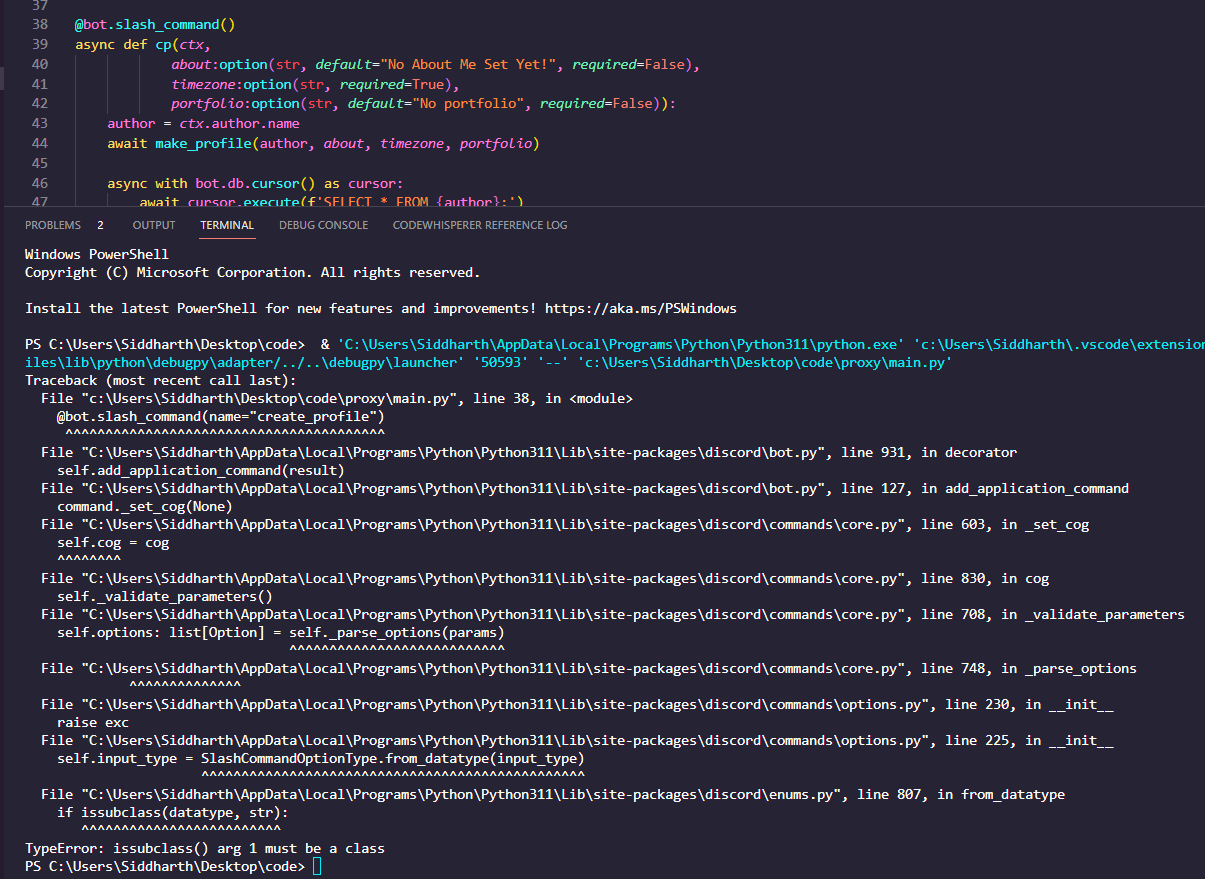
full error
proud mason
discord.Option O uppercase
proud mason
nice
loud sail
hey, why isn't the message here ephemeral?
        if ctx.voice_client is None:
            await ctx.defer()
            await asyncio.sleep(2)
            return await ctx.respond("Ich bin mit keinem Sprachkanal verbunden.", ephemeral=True)
need to make the defer ephemeral
tribal girder
is there a event listener when the bot is going to offline? like when a vps is down, i can close a background process
cyan quail
tribal girder
is there a event listener when the bot is going to offline? like when a vps is d...
on_disconnect exists, but it fires every time the bot disconnects from the gateway (which can be followed by a reconnect)
a possibly better approach would be to create your own run function/implementation for start-close https://docs.pycord.dev/en/master/api/clients.html#discord.Bot.run
loud sail
cyan quail
need to make the `defer` ephemeral
Ah, thanks
loud sail
hey, i always had this as a last restart in my code in discord.js, how can i do something like this in py-cord?
const starttime = `<t:${Math.floor(interaction.client.readyAt / 1000)}` + (style ? `:${style}` : '') + '>'
since when the bot is online just ...
meager heron
You can get the time in on_ready
proud mason
cyan quail
a possibly better approach would be to create your own `run` function/implementa...
it might be simpler to subclass Bot and override the close method
proud mason
loud sail
since when the bot is online just ...
yea store the time on_ready
 rare ice
I'm getting this error when I have these children in a modal (that sounds weird)
  File "/home/container/.local/lib/python3.9/site-packages/discord/ui/view.py", line 414, in _scheduled_task
    await item.callback(interaction)
  File "/home/container/cogs/economyv2.py", line 63, in set_desc_callback
    await interaction.response.send_modal(modal)
  File "/home/container/.local/lib/python3.9/site-packages/discord/interactions.py", line 1056, in send_modal
    await self._locked_response(
  File "/home/container/.local/lib/python3.9/site-packages/discord/interactions.py", line 1090, in _locked_response
    await coro
  File "/home/container/.local/lib/python3.9/site-packages/discord/webhook/async_.py", line 221, in request
    raise HTTPException(response, data)
discord.errors.HTTPException: 400 Bad Request (error code: 50035): Invalid Form Body
In data.components.0.components.1: The specified component exceeds the maximum width
In data.components.0.components.2: The specified component exceeds the maximum width
In data.components.0.components.3: The specified component exceeds the maximum width
In data.components.0.components.4: The specified component exceeds the maximum width
children=[discord.ui.InputText(label="Starting Amount", style=discord.InputTextStyle.short, placeholder="Starting amount of coins", max_length=5, min_length=1, value=economy_data['settings']['starting_amount']), discord.ui.InputText(label="Currency Name", style=discord.InputTextStyle.short, value=economy_data['settings']['currency_name']), discord.ui.InputText(label="Currency Emoji", style=discord.InputTextStyle.short, max_length=2, value=economy_data['settings']['currency_emoji']), discord.ui.InputText(label="Robbing?", style=discord.InputTextStyle.short, placeholder="'Yes' or 'No'", max_length=3, min_length=2, value=("Yes" if economy_data['settings']['robbing'] == True else "No")), discord.ui.InputText(label="Maximum Payout", max_length=5, min_length=1)]
mb value bigger/smaller than max_/min_length?
rare ice
ill check
rare ice
spring hare
mb value bigger/smaller than max_/min_length?
nope still same error
spring hare
rare ice
I'm getting this error when I have these children in a modal *(that sounds weird...
Wait
You have more than 5 InputText?
rare ice
mb
wait no?
In data.components.0.components.1: The specified component exceeds the maximum width
In data.components.0.components.2: The specified component exceeds the maximum width
In data.components.0.components.3: The specified component exceeds the maximum width```look at the error there is only 4
 hoary plover
Hi
rare ice
In data.components.0.components.4: The specified component exceeds the maximum width
hoary plover
How yall going
rare ice
hoary plover
How yall going
this is not the channel to general chat
#general
this is your only verbal warning
this channel is for help only
hoary plover
Alr sorry pls dont warn me
full basin
rare ice
```
In data.components.0.components.1: The specified component exceeds the maxim...
I wonder what width it's referring to
rare ice
yeah
hoary plover
I need to stop running my bot if my bot in render but since it is running 2 times i have a doubt . Can i use try except block for client.run(token) except if the client is already logged
Except if it already on ready
hoary plover
rare ice
yeah
Bro you there
rare ice
why are you pinging for help
because im in this channel doesn't mean i have to help you
hoary plover
Oh sorry
full basin
@rare ice have you tried removing one input
rare ice
yes
full basin
Same error?
rare ice
i also tried removing the value
hoary plover
Btw in disxord.py there is a thing called command.has permissions can i use it in pycord too. Because i have error with that
silver moat
label/placeholder could be too long?
rare ice
hoary plover
Btw in disxord.py there is a thing called command.has permissions can i use it i...
read the docs
.rtfm commands.has_permissions
winter condorBOT
1 results
hoary plover
I need to stop running my bot if my bot in render but since it is running 2 times i have a doubt . Can i use try except block for client.run(token) except if the client is already logged
full basin
silver moat
label/placeholder could be too long?
They don't seem long tho
It's just 1 - 3 words
hoary plover
rare ice
.rtfm commands.has_permissions
Thx
rare ice
silver moat
label/placeholder could be too long?
i've had longer placeholders and labels
hoary plover
Anyone pls answer my qn. Im new to coding and programming
full basin
Girl
hoary plover
I need to stop running my bot if my bot in render but since it is running 2 times i have a doubt . Can i use try except block for client.run(token) except if the client is already logged
full basin
Take a chill pill
rare ice
stop spamming your question
full basin
Stop posting it over and over again
hoary plover
Im sorry but i didnt get ans so
hoary plover
full basin
Girl
- Dont call me 'girl' 2. Nothin
waxen whale
hoary plover
Im sorry but i didnt get ans so
no but
-mute 920850442425102367 4h gives chill pill
 wanton pondBOT
🔇 Muted Haruki#8003 for 4 hours
full basin
hoary plover
Anyone pls answer my qn. Im new to coding and programming
"I'm new to coding and programming"
topaz ruin
is it possible to have separate descriptions for sub commands?
like each command would have it's own description
rare ice
agreed
waxen whale
but imma change that to a timeout now
 scenic raven
Hi! My bot has a command that sends message to the channel to the command was invoked in. Is there a way to check if the bot has permission to send messages in that channel before trying, or should I just catch discord.Forbidden?
waxen whale
-unmute 920850442425102367 switch to timeout 1h
wanton pondBOT
🔊 Unmuted Haruki#8003
waxen whale
topaz ruin
is it possible to have separate descriptions for sub commands?
like each command...
app commands or text commands?
both should support that. read the docs
full basin
scenic raven
Hi! My bot has a command that sends message to the channel to the command was in...
discord.Channel has some is_messagable attribute
 copper pine
My bot uses Bridge Commands and the bot logs the use of the commands, but only logs when it is executed as slash command :/
full basin
.rtfm discord.Channel
winter condorBOT
78 total results
discord.ChannelType
discord.ChannelType.text
discord.ChannelType.voice
discord.ChannelType.private
discord.ChannelType.group
discord.ChannelType.category
discord.ChannelType.news
discord.ChannelType.stage_voice
discord.ChannelType.news_thread
discord.ChannelType.public_thread
discord.ChannelType.private_thread
discord.ChannelType.directory
discord.ChannelType.forum
discord.ChannelFlags
discord.ChannelFlags.DEFAULT_VALUE
discord.ChannelFlags.VALID_FLAGS
discord.ChannelFlags.pinned
discord.ChannelFlags.require_tag
discord.ChannelFlags.value
discord.ui.channel_select
scenic raven
full basin
discord.Channel has some is_messagable attribute
Thank you ❤️
topaz ruin
waxen whale
app commands or text commands?
both should support that. read the docs
text commands, when i run the bot it gives the error
discord.errors.ApplicationCommandInvokeError: Application Command raised an exception: AttributeError: 'NoneType' object has no attribute 'invoke'
*when i run the command
 waxen whale
topaz ruin
text commands, when i run the bot it gives the error
`discord.errors.Application...
waxen whale
topaz ruin
text commands, when i run the bot it gives the error
`discord.errors.Application...
these are two different things lmfao
full basin
"To make sure they notice it" girl thinks we're blind or somethin
waxen whale
do we have a
-tempban
no sad
And both timeout and mute 4h is same for me. Im gonna slep now so no difference
well then
rare ice
hm
rare ice
waxen whale
my hammer is warming up
lovely
waxen whale
-ban 920850442425102367 You can fill out https://pycord.dev/appeal. You'll get an answer in a few months.
wanton pondBOT
🔨 Banned Haruki#8003 indefinitely
 rare ice
:/
 rare ice
I'm getting this error when I have these children in a modal *(that sounds weird...
rare ice
rare ice
I'm getting this error when I have these children in a modal *(that sounds weird...
discord.ui.InputText(label="Currency Name") <-- this is the second option from the original children, i removed everything but the label and im still getting the same error for this option In data.components.0.components.1: The specified component exceeds the maximum width
discord moment
the first option's label is longer than the second and it is throwing an error on the second
when i remove the first option the 2nd option works 
both options work when I remove one of them
copper pine
copper pine
My bot uses Bridge Commands and the bot logs the use of the commands, but only l...

full basin
copper pine
My bot uses Bridge Commands and the bot logs the use of the commands, but only l...
And what are you using to listen to command executions
copper pine
full basin
And what are you using to listen to command executions
on_application_command
waxen whale

full basin
The function name says it all lmao
It only runs on application commands
on_command is for normal commands
waxen whale
rare ice
I'm getting this error when I have these children in a modal *(that sounds weird...
that sounds like they don't get a single row per component
rare ice
how do I do another action row?
copper pine
full basin
on_command is for normal commands
oh, okay thx
rare ice
this is my BasicModal class
class BasicModal(discord.ui.Modal):
  def __init__(self, title: str, children: list):
    super().__init__(title=title)
    for c in children:
      self.add_item(c)
    self.interaction = None
    self.response = None
  async def callback(self, interaction):
    self.interaction = interaction
    self.response = self.children
    self.stop()```
am i doing it wrong to where it wont do action rows? proud mason
copper pine
My bot uses Bridge Commands and the bot logs the use of the commands, but only l...
proud mason
copper pine
My bot uses Bridge Commands and the bot logs the use of the commands, but only l...
Idk if this got answered, but there are bridge command events on the master branch
on_bridge_command, on_bridge_command_completion, and on_bridge_command_error
Those will get fired for both, slash version and prefix version
proud mason
rare ice
I'm getting this error when I have these children in a modal *(that sounds weird...
I think your placeholder/value cant be longer than the max length you set
Not sure about placeholder
rare ice
its not longer
proud mason
O
waxen whale
om the problem is that the payload is incorrect
to_dict internally produces

and thats not intented
rare ice
``` with rows manually defined for each childthats still totally wrong
rare ice
modal = BasicModal(title="Economy: General Settings", children=[discord.ui.InputText(label="Starting Amount", style=discord.InputTextStyle.short, placeholder="Starting amount of coins", max_length=5, min_length=1, value=economy_data['settings']['starting_amount'], row=0), discord.ui.InputText(label="Currency Name", style=discord.InputTextStyle.short, value=economy_data['settings']['currency_name'], row=1), discord.ui.InputText(label="Currency Emoji", style=discord.InputTextStyle.short, max_length=2, value=economy_data['settings']['currency_emoji'], row=2), discord.ui.InputText(label="Robbing?", style=discord.InputTextStyle.short, placeholder="'Yes' or 'No'", max_length=3, min_length=2, value=("Yes" if economy_data['settings']['robbing'] == True else "No"), row=3), discord.ui.InputText(label="Maximum Payout", max_length=5, min_length=1, row=4)])
waxen whale
i think we have a bug here
rare ice
o
proud mason
waxen whale
to_dict internally produces
Hmm what's wrong with that
waxen whale
each components needs an own row
{
   "title":"Economy: General Settings",
   "custom_id":"d8510e99078d5da3167ce97ddc767134",
   "components":[
      {
         "type":1,
         "components":[
            {
               "type":4,
               "style":1,
               "label":"Starting Amount",
               "custom_id":"8956171120bad39c8e28117bdd09dd2d",
               "placeholder":"Starting amount of coins",
               "min_length":1,
               "max_length":5,
               "value":100
            }
      }, ..
   ]
}
    def to_dict(self):
        return {
            "title": self.title,
            "custom_id": self.custom_id,
            "components": self.to_components(),
        }

    def to_components(self) -> list[dict[str, Any]]:
        def key(item: InputText) -> int:
            return item._rendered_row or 0

        children = sorted(self._children, key=key)
        components: list[dict[str, Any]] = []
        for _, group in groupby(children, key=key):
            children = [item.to_component_dict() for item in group]
            if not children:
                continue

            components.append(
                {
                    "type": 1,
                    "components": children,
                }
            )

        return components
no clue why this does not work
proud mason
waxen whale
```json
{
"title":"Economy: General Settings",
"custom_id":"d8510e99078d5d...
Ah so each input text should be in thier own dict inside the top level components key?
waxen whale
yes
waxen whale
i.e.
{
    "components": [
        {
            "type": 1,
            "components": [
                {
                    "type": 4
                    //..
                }
            ]
        },
        {
            "type": 1,
            "components": [
                {
                    "type": 4
                    //..
                }
            ]
        },
        {
            "type": 1,
            "components": [
                {
                    "type": 4
                    //..
                }
            ]
        }
    ]
}
bcs in message components you can have multiple components in a row
but modals = 1 row per item
proud mason
Ah bruh so they shared the same base platform for views and modals
waxen whale

yes
and if anyone asks why i'm here without doing python: i don't need to know python to find the shit
waxen whale
no pycord bug
rare ice
ah
proud mason
weird how this went unnoticed until now??
waxen whale
yeah............
i wonder why
here's the buggy line
or better said function
for child in children append to components within new row and return components
the fix ^
spring hare
All of that time, modals were bugged?
waxen whale
yep
spring hare
How this went unnoticed? lmao
I built an entire bot around modals and never had any problems
waxen whale
idfk
meager heron
I've also never encountered it, and I use a lot of modals
spring hare
lmao
rare ice
waxen whale
for child in children append to components within new row and return components
so how would I be able to implement a fix in my code?
waxen whale
u not
rare ice
:/
waxen whale
pycord needs to fix it
rare ice
k
waxen whale
waxen whale
for child in children append to components within new row and return components
@cyan quail my beloved, i got work for you!!
cyan quail
oh no
waxen whale
oh yes
cyan quail
waxen whale
.
so specifically to_components is broken...? im struggling to understand
like others have said we haven't noticed this at all LOL
waxen whale
waxen whale
```json
{
"components": [
{
"type": 1,
"comp...
.
cyan quail
ah
cyan quail
waxen whale
it should wrap every text input in a seperate row
can't repro the error ```json
{
"title":"wow",
"custom_id":"ccea69df58ed5a9a38909d8ea9a6eeb8",
"components":[
{
"type":1,
"components":[
{
"type":4,
"style":1,
"label":"Why?",
"custom_id":"bcb707311a4194cdd55bcb7bcf54b27c"
}
]
},
{
"type":1,
"components":[
{
"type":4,
"style":1,
"label":"Why?",
"custom_id":"8f7861daf245ab8d2857b7e8ec7c5573"
}
]
},
{
"type":1,
"components":[
{
"type":4,
"style":1,
"label":"Why?",
"custom_id":"8db31db2a76d1bb3d6266e9a1eb3c4ee"
}
]
},
{
"type":1,
"components":[
{
"type":4,
"style":1,
"label":"Why?",
"custom_id":"d9bb65fb12e97317d0339630af213ea6"
}
]
},
{
"type":1,
"components":[
{
"type":4,
"style":1,
"label":"Why?",
"custom_id":"1ac9eeec74a9930b99e12399673458f0"
}
]
}
]
}
tf
cyan quail
everything already seems fine... but that being said, I do recognise that error with modals from some weeks ago
but idk how it happens
rare ice
2.4.1 i think
cyan quail
both master and 2.4.x seem fine to me
waxen whale
hmm
cyan quail
ik it's possible but there seems to be some other trigger
waxen whale
confusing af
rare ice
yeah 2.4.1


 rare ice
waxen whale
and thats not intented
rare ice
waxen whale
and thats not intented
.
cinder pelican
There's no way to get a selector into a embed, correct? Or am I missing something?
(Edit: misspoke)
spring hare
cinder pelican
There's no way to get a selector into a embed, correct? Or am I missing somethin...
Select menu inside embed?
cinder pelican
spring hare
Select menu inside embed?
Yes
spring hare
No
You can't really change position of your ui components
They are always under your message, and you can only change their position with other elements (rows/pos)
cinder pelican
spring hare
No
You can't really change position of your ui components
They are always under ...
Okay, that's what I thought. Thank you
cyan quail
rare ice
i doubt its my code
just in case, can you give me full sample code that would reproduce this (as you would on github)? i tried with your class above and it still worked fine
rare ice
rare ice
I'm getting this error when I have these children in a modal *(that sounds weird...
^
bruh even this doesn't work, same errors
class GeneralSettingsModal(discord.ui.Modal):
  def __init__(self, bot, economy_data: dict):
    self.bot = bot
    self.economy_data = economy_data
    self.response = None
    self.interaction = None
    super().__init__(title="Economy: General Settings")
    self.children=[discord.ui.InputText(label="Starting Amount", style=discord.InputTextStyle.short, placeholder="Starting amount of coins", max_length=5, min_length=1, value=economy_data['settings']['starting_amount'], row=0), discord.ui.InputText(label="Currency Name", style=discord.InputTextStyle.short, value=economy_data['settings']['currency_name'], row=1), discord.ui.InputText(label="Currency Emoji", style=discord.InputTextStyle.short, max_length=2, value=economy_data['settings']['currency_emoji'], row=2), discord.ui.InputText(label="Robbing?", style=discord.InputTextStyle.short, placeholder="'Yes' or 'No'", max_length=3, min_length=2, value=("Yes" if economy_data['settings']['robbing'] == True else "No"), row=3), discord.ui.InputText(label="Maximum Payout", max_length=5, min_length=1, row=4)]
  async def callback(self, interaction):
    self.response = self.children
    self.interaction = interaction
self.stop()```@cyan quail even that doesn't work
cyan quail
rare ice
bruh even this doesn't work, same errors
```py
class GeneralSettingsModal(discor...
this breaks it with your exact error because you shouldn't assign children directly.
using add_item has consistently worked for me without breaking ```py
class BasicModal(discord.ui.Modal):
def init(self, title: str, children: list):
super().init(title=title)
for c in children:
self.add_item(c)
self.interaction = None
self.response = None
async def callback(self, interaction):
    self.interaction = interaction
    self.response = self.children
    self.stop()
economy_data = {
"settings": {
"starting_amount": "1",
"currency_name": "nice",
"currency_emoji": "..",
"robbing": True
}
}
class Example(commands.Cog):
def init(self, bot):
self.bot = bot
@commands.command()
async def modal(self, ctx):
    modal = BasicModal(
        title="Economy: General Settings",
        children=[
            discord.ui.InputText(label="Starting Amount", style=discord.InputTextStyle.short, placeholder="Starting amount of coins", max_length=5, min_length=1, value=economy_data['settings']['starting_amount']),
            discord.ui.InputText(label="Currency Name", style=discord.InputTextStyle.short, value=economy_data['settings']['currency_name']),
            discord.ui.InputText(label="Currency Emoji", style=discord.InputTextStyle.short, max_length=15, value=economy_data['settings']['currency_emoji']),
            discord.ui.InputText(label="Robbing?", style=discord.InputTextStyle.short, placeholder="'Yes' or 'No'", max_length=3, min_length=2, value=("Yes" if economy_data['settings']['robbing'] == True else "No")),
            discord.ui.InputText(label="Maximum Payout", max_length=5, min_length=1)]
    )

    b = Button(label="Modal 1", custom_id="1")
    v = View(b, timeout=None)
    async def d(i):
        await i.response.send_modal(modal)
    b.callback = d
    await ctx.send(view=v)
