#Basic Pycord Help (Quick Questions Only)
1 messages · Page 79 of 1
 normal tusk
 full basin
What is that supposed to mean?
Literally providing two lines of your code is not helpful
normal tusk
full basin
Literally providing two lines of your code is not helpful
i'm trying to explain but ehh 
full basin
You didn't explain anything
normal tusk
😭
normal tusk
full basin
You didn't explain anything
so that's why you are available to explain :-)
full basin
What
You make no sense
I have no idea what your issue is because you didn't explain and you just provided two lines of code.
 fervent cradle
message = await ctx.respond(embed=leaderboard_embed)
message = message.original_response()

AttributeError: 'Interaction' object has no attribute 'original_response'
the docs say otherwise?
full basin
We're humans, not mind readers.
full basin
fervent cradle
```py
message = await ctx.respond(embed=leaderboard_embed)
message = message.ori...
ctx.interaction.original_response()
normal tusk
full basin
We're humans, not mind readers.
ahm, i thought you talking about other thing.. however i was thinking why the IDE have some issues with displaying syntax
the interaction.followup.send() should to return an WebhookMessage but i have no idea how to delete that message (also wondering about adding delete_after to the parameters of followup.send) (edited... nvm)
fervent cradle
full basin
ctx.interaction.original_response()
message = await ctx.respond(embed=leaderboard_embed)
message = ctx.interaction.original_response()

AttributeError: 'Interaction' object has no attribute 'original_response'```

bruh whatWhat's your pycord version
 young bone
can you show the pip list?
use this command to get the file with the list
pip list > pip.txt
fervent cradle
young bone
can you show the pip list?
use this command to get the file with the list
`pip l...
it uh, literally just leaves a blank line LOL
young bone
oof
normal tusk
fervent cradle
it uh, literally just leaves a blank line LOL
cd the desktop then do the command you'll see a new txt file called pip upload it here
fervent cradle
young bone
can you show the pip list?
use this command to get the file with the list
`pip l...
yep, darsh was right that is what i needed to do
young bone
Do you use an venv?
normal tusk
can you try master branch
fervent cradle
young bone
Do you use an venv?
how do i check?
normal tusk
fervent cradle
how do i check?
if there is a dir on the root called venv
young bone
env or venv
 young bone
Doesnt really matter the name because you can give it a random name but many usw env or venv
fervent cradle
yeah but wheres like the dir actually located so i can look for it?
young bone
Which IDE do you use?
fervent cradle
pycharm
normal tusk
fervent cradle
yeah but wheres like the dir actually located so i can look for it?
delete the venv and work without it with the master branch
young bone
Open a Terminal at pycharm and try it there
normal tusk
fervent cradle
pycharm
did you used the pkg manger that's on pycharm... right 
fervent cradle
young bone
Open a Terminal at pycharm and try it there
try what?
fervent cradle
normal tusk
did you used the pkg manger that's on pycharm... right <:mr7mbolh:10500856618745...
yeah i should have been, i dont recall switching ever
young bone
normal tusk
delete the venv and work without it with the master branch
I would always use an env
normal tusk
fervent cradle
yeah i should have been, i dont recall switching ever
nope use pip because it's updated with site pkg's
however to upgrade the venv run the command pip install -U py-cord (make sure you in root folder of the project)
fervent cradle
normal tusk
nope use pip because it's updated with site pkg's
however to upgrade the venv r...
C:\Users\Acer\Desktop\Discord Bot\Casitas Gambling> i guess thatd be my root folder yeah>
normal tusk
fervent cradle
C:\Users\Acer\Desktop\Discord Bot\Casitas Gambling> i guess thatd be my root fol...
great cd there (or use pycharm project terminal) and run the command
normal tusk
fervent cradle
anythin else i should do?
huh.. pycord are up-to-date like this
can you try and see ?
young bone
Github link
 long torrent
hey does anyone know why when i try and get a members status is reports offline instead of online, it reports me as being offline when im really not
im doing if member.status == discord.Status.online or member.is_on_mobile():
to check if im online btw, the bot has all
 silver moat
long torrent
hey does anyone know why when i try and get a members status is reports offline ...
silver moat
long torrent
hey does anyone know why when i try and get a members status is reports offline ...
how are you getting the member object?
long torrent
silver moat
how are you getting the member object?
for member in ctx.guild.members:
its able to print the names just fine so im not sure if im doing something wrong
 proud mason
long torrent
```for member in ctx.guild.members:```
its able to print the names just fine so ...
proud mason
long torrent
```for member in ctx.guild.members:```
its able to print the names just fine so ...
Do you have presences Intent enabled in code as well as the dev portal?
long torrent
Yes
long torrent
proud mason
Could you show the intents and how you pass then to the bot

Luna's Void~

Luna's Void~
disabling and re-enabling the intent worked for some reason lmao
¯_(ツ)_/¯
proud mason
Huh lmao
fervent cradle
hii
is it possible to put a number selector in a modal?
it seems like its not but i wanna double check
 cerulean stump
has anyone had a similar problem? on linux the git package installs as UNKNOWN, i updated pip/setuptools and cleaned pip cache but i still have this while trying to install master

 cyan quail
cerulean stump
has anyone had a similar problem? on linux the git package installs as UNKNOWN, ...
cyan quail
cerulean stump
has anyone had a similar problem? on linux the git package installs as UNKNOWN, ...
try upgrading setuptools pip install setuptools -U
cerulean stump
cyan quail
try upgrading setuptools `pip install setuptools -U`
i done this but still the same
thats why i asked
cyan quail
hm
cerulean stump
lemme check versions
cyan quail
does it actually install to a folder called UNKNOWN
could also try complete uninstall, idk upgrading setuptools is meant to be the only fix
cerulean stump
cyan quail
does it actually install to a folder called UNKNOWN
yep
Python 3.10.6
pip 22.0.2
setuptools 67.8.0
UNKNOWN                2.4.1.dev106+g8950c2ee


so idk
ill clear all the cache and see if it does anything

still

cyan quail
cerulean stump
yep
```py
Python 3.10.6
pip 22.0.2
setuptools 67.8.0
UNKNOWN 2.4...
maybe just rename the folder to discord? or did it not actually install the lib files
the issue is beyond me so if it isn't working you may be better off manually downloading and extracting it
cerulean stump
cyan quail
maybe just rename the folder to discord? or did it not actually install the lib ...
modules would have been unrecognized then anyway
ill take a look in my spare time
 celest grove
Every time I want to change values inside the view via
interaction.response.edit_message(view=self)
the values set by the user gets reset. Is it possible to only edit separate slots in the view and retain the values from other slots?
 candid coral
celest grove
Every time I want to change values inside the view via
```py
interaction.respon...
candid coral
celest grove
Every time I want to change values inside the view via
```py
interaction.respon...
What do you mean?
celest grove
Every time I update the message using the command above, all the Select dropdowns reset in a way that the user's selection is discarded
I'd like to avoid that, if even possible
proud mason
i think that would still reset the selected choices. not sure tho
celest grove
So, there is no way to retain the values after resetting the view?
candid coral
celest grove
So, there is no way to retain the values after resetting the view?
Give a simple example
celest grove
I think it would be more appropriate to move this to a separate thread
Give me a sec
 worldly schooner
sometimes when I spam a slash command there is a little processing but the interaction fails and in the console its prompted this:

is there a way to avoid this error while spamming a slash command?
young bone
do you defer the slash command?
 young bone
you could already send a respond and then do the other stuff
worldly schooner
hmm, like respond with a embed: "loading..." and after that I edit the embed to the new embed?
cuz its a gambling command
so I calculate stuff before sending the original response
cyan quail
worldly schooner
do I have to defer it before the ctx.respond?
only if your code will take longer than 3 seconds to run
fervent cradle
What causes interaction failed?
The trace backs always says unknown interaction
I’ve noticed this happening with my bots and large bots like dyno
Seems like some weird discord bug with interactions , anyone else experience?
normal tusk
fervent cradle
The trace backs always says unknown interaction
that's mean your code attempted to respond to an interaction that has been timeouted
fervent cradle
normal tusk
that's mean your code attempted to respond to an interaction that has been timeo...
Can you increase the timeout?
normal tusk
fervent cradle
Can you increase the timeout?
you can do that but also you need to check you net ping
then set up a debugger if your interaction function needs that
or see wut you can optimize to get rid of that 3 seconds
normal tusk
worldly schooner
at the start of the command yes
so you defer the interaction
this should add about the 12 hours time to respond to that interaction
normal tusk
fervent cradle
The api calls that are made are slow
see discord api status on your country if there is any issues
full basin
fervent cradle
Can you increase the timeout?
Defer the interaction
normal tusk
my avg ping is 200 and in my mind it's normal to see something like this on the terminal (our servers kindly died)
 full basin
If your code takes longer than 3 seconds to process, you have to defer
normal tusk
worldly schooner
at the start of the command yes
^
fervent cradle
full basin
If your code takes longer than 3 seconds to process, you have to defer
How does deferring work?
normal tusk
fervent cradle
How does deferring work?
defer is some sort of a message that you just use to respond the the incoming interaction, then you can use a follow-up to get rid of the defer and replace it with the follow-up message
normal tusk
fervent cradle
What if I need an ephemeral response
then you need to pass the parameter ephemeral on the defer method to be true
default are false
fervent cradle
Oh defer is an actual method
I thought you meant just use a Ctx send
.rtfm defer
 winter condorBOT
7 results
discord.ext.bridge.BridgeContext.defer
discord.ext.bridge.BridgeExtContext.defer
discord.InteractionResponse.defer
discord.InteractionResponseType.deferred_channel_message
discord.InteractionResponseType.deferred_message_update
discord.ext.bridge.BridgeApplicationContext.defer
discord.ApplicationContext.defer
fervent cradle
Thank you
normal tusk
that second one which's you use


however, you must put in mind that if the defer is ephemeral you will need to make the respond message also ephemeral
why?, idk all of my attempts and test's leads to that point
fervent cradle
I currently have the bot running in Germany
Do you think performance would be better on an American server
silver moat
fervent cradle
Do you think performance would be better on an American server
depends, the discord api servers are in virginia. If you use a server on the us west coast, the ping is about the same.
normal tusk
fervent cradle
so the issue is probably my code not the latency
how that when you defer the interaction?
is the interaction begin deferred?
silver moat
are you using replit and/or their database
normal tusk
silver moat
are you using replit and/or their database
maybe that
if it try kill 1
fervent cradle
normal tusk
how that when you defer the interaction?
nah i havent tried deferring it yet, i meant without it
normal tusk
fervent cradle
nah i havent tried deferring it yet, i meant without it
defer the interaction Please
 mossy holly
Hey guys I have a quick question (more about Python actually but I'm confused af lmao)
I have something like this in my code:
# Let's say this is a dict that contains lists of int
my_dict = dict()

# Adding values to the dict
my_dict["Foo"] = [1, 2, 3]
my_dict["Bar"] = [4, 5, 6]
my_dict["Baz"] = [-1, -2, -3]

# self.foo, self.bar and self.baz are empty lists
all_infos = [self.foo, self.bar, self.baz]
str_corresp = ["Foo", "Bar", "Baz"]

for info, str_c in zip(all_infos, str_corresp):
  for el in my_dict[str_c]:
    info.append(el)

print(self.foo)    # Prints [] (foo is empty)
What am I doing wrong here ? Maybe I'm seeing stuff to much like C, but by doing info.append(el) in the first iteration for example, it's supposed to modify self.foo as it's the same thing or am I wrong ?
Thanks if someone can help 😄
young bone
Is that for school?
mossy holly
young bone
Is that for school?
Nope for a discord bot
But i just realized that this example I just made up is working lmao
I'll test another thing and send the real code if it doesn't work
Ok nvm I'm just so stupid
I used the wrong sql requests from my constants so obviously no results and so lists are empty ...
fervent cradle
@bot.slash_command(guild_ids=[GUILD_ID])
async def upload_subtitles(
    ctx,
    media_url: discord.Option(discord.SlashCommandOptionType.string),
    subtitle_file: discord.Option(discord.SlashCommandOptionType.attachment),
):
    pattern = r"metadata%2F(\d+)&context"
    match = re.search(pattern, media_url)
    if not match:
        await ctx.respond(
            "Invalid media URL, please copy the url on the media page.",
            ephemeral=True,
        )
        return
    media_id = match.group(1)
    media = plex.fetchItem(int(media_id))
    print(media)
    await subtitle_file.save(f"subtitles/{subtitle_file.filename}")
    subtitle_path = f"subtitles/{subtitle_file.filename}"
    subtitle = media.uploadSubtitles(subtitle_path)
return await ctx.respond(f"Uploaded subtitle {subtitle_file}.")```is this incorrect attachment handling? the file isnt saved
young bone
discord.Attachment
normal tusk
fervent cradle
```py
@bot.slash_command(guild_ids=[GUILD_ID])
async def upload_subtitles(
c...
the error was saying that is the file is not found so you can check if you are in correct folder that has the file that you trying to open with open module
fervent cradle
normal tusk
the error was saying that is the file is not found so you can check if you are i...
but thats the save() function
await subtitle_file.save(f"./subtitles/{subtitle_file.filename}")
this isnt working
normal tusk
fervent cradle
but thats the save() function
i seen a error you was sent before idk if it's related or not
fervent cradle
Traceback (most recent call last):
  File "/Users/X/Library/Mobile Documents/com~apple~CloudDocs/Code/Python/Plexcord/.venv/lib/python3.11/site-packages/discord/commands/core.py", line 124, in wrapped
    ret = await coro(arg)
          ^^^^^^^^^^^^^^^
  File "/Users/X/Library/Mobile Documents/com~apple~CloudDocs/Code/Python/Plexcord/.venv/lib/python3.11/site-packages/discord/commands/core.py", line 982, in _invoke
    await self.callback(ctx, **kwargs)
  File "/Users/X/Code/Python/Plexcord/bot.py", line 370, in upload_subtitles
    await subtitle_file.save(f"./subtitles/{subtitle_file.filename}")
  File "/Users/X/Library/Mobile Documents/com~apple~CloudDocs/Code/Python/Plexcord/.venv/lib/python3.11/site-packages/discord/message.py", line 258, in save
    with open(fp, "wb") as f:
         ^^^^^^^^^^^^^^
FileNotFoundError: [Errno 2] No such file or directory: './subtitles/Batteries.Not.Included.1987.1080p.BluRay.X264-AMIABLE_-_ITA_forced_1080p.ass'

The above exception was the direct cause of the following exception:```so save isnt working
cyan quail
fervent cradle
so save isnt working
that isn't a lib issue, chances are you can't save to that location or the filename isn't allowed
(open is a default python function)
cerulean stump
cyan quail
maybe just rename the folder to discord? or did it not actually install the lib ...
fyi i had specific configurations defined under python and just in them a forced pip update helped
i didnt look directly from pip install git+... but installed cloned repo already as pip install -e .
i just checked and git+... also fixed
candid coral
I need to delete a bot message that was sent on past runs and get_message(id) doesn't work. How can I use fetch_message?
young bone
fervent cradle
```Ignoring exception in command upload_subtitles:
Traceback (most recent call l...

 coarse cargo
candid coral
I need to delete a bot message that was sent on past runs and `get_message(id)` ...
coarse cargo
candid coral
I need to delete a bot message that was sent on past runs and `get_message(id)` ...
fetch_message is under channel
cerulean stump
candid coral
I need to delete a bot message that was sent on past runs and `get_message(id)` ...
get_message works if message is in cache, if by past runs you mean running a command/function without message in Bot cache you can store it in a Class/global variable and then delete it
When it comes to running a bot you can use disk storage to save channel/message id and then use it like:
channel = client.get_channel(channel_id)
# then without doing an unnecessary API call
await channel.get_partial_message(message_id).delete()
.rtfm fetch_message
winter condorBOT
15 results
discord.abc.Messageable.fetch_message
discord.PartialMessageable.fetch_message
discord.TextChannel.fetch_message
discord.ext.commands.Context.fetch_message
discord.Member.fetch_message
discord.VoiceChannel.fetch_message
discord.ext.bridge.BridgeExtContext.fetch_message
discord.Thread.fetch_message
discord.Webhook.fetch_message
discord.ext.bridge.BridgeApplicationContext.fetch_message
discord.SyncWebhook.fetch_message
discord.ApplicationContext.fetch_message
discord.User.fetch_message
discord.DMChannel.fetch_message
discord.GroupChannel.fetch_message
 fleet viper
Hi does anyone here know if it is possible to recreate the /giphy or /tenor command for an own gif selector? I would be most interested in how they managed to put the gif preview as options.
silver moat
fleet viper
Hi does anyone here know if it is possible to recreate the /giphy or /tenor comm...
discord limitation. The standard commands are only availible for Discord themselves to use.
candid coral
Is there any way to check if there is a particular message that is not in the bot's cache? .get_partial_message(id) send an error if there is no message. Should I use try-expect-finally?
silver moat
candid coral
Is there any way to check if there is a particular message that is not in the bo...
You should use https://docs.pycord.dev/en/stable/api/clients.html#discord.Bot.get_message and check if it is None
Pycord
Bots: Attributes activity, allowed_mentions, application_flags, application_id, auto_sync_commands, cached_messages, cogs, debug_guilds, description, emojis, extensions, get_command, guilds, intent...
error handling is rather expensive speed and memory wise
candid coral
silver moat
You should use https://docs.pycord.dev/en/stable/api/clients.html#discord.Bot.ge...
get_message(id) will return None if the message is not in the cache, no?
silver moat
candid coral
`get_message(id)` will return None if the message is not in the cache, no?
yes
candid coral
But I need to get rid of the error... A message most often won't be in the bot's cache
silver moat
candid coral
But I need to get rid of the error... A message most often won't be in the bot's...
I misunderstood your question. Then you are free to use a try-except clause
candid coral
silver moat
I misunderstood your question. Then you are free to use a try-except clause
Does it waste a lot of memory?
silver moat
candid coral
Does it waste a lot of memory?
just shouldn't be too much.
like it isn't something you should be worry about unless it is failing very often
candid coral
Command will rarely be used. Thank you
proud mason
candid coral
Does it waste a lot of memory?
NGL, this is python
Those optimisations would be so minor, that i can actually compare it to adding a bucket of water to the ocean
silver moat
proud mason
Those optimisations would be so minor, that i can actually compare it to adding ...
it's not an optimisation if it is a convention
proud mason
silver moat
it's not an optimisation if it is a convention
True
 livid wolf
ctx.respond() image attribute?
candid coral
livid wolf
`ctx.respond()` image attribute?
It has all attributes like ctx.send() and ephemeral if I'm not wrong
livid wolf
candid coral
It has all attributes like `ctx.send()` and `ephemeral` if I'm not wrong
Wait, nvm
figured it out
What in the world is ephemeral
candid coral
The message will only be visible to the person who used a command
livid wolf
Ooh ok
candid coral
Like this
 livid wolf
Ii get it, thanks.
candid coral
Traceback (most recent call last):
  File "C:\Users\user\AppData\Local\Programs\Python\Python310\lib\site-packages\discord\ui\view.py", line 421, in _scheduled_task
    await item.callback(interaction)
  File "C:\Users\user\Desktop\Проекты\server\bot.py", line 169, in post
    await channel.get_partial_message(values[0]).delete()
  File "C:\Users\user\AppData\Local\Programs\Python\Python310\lib\site-packages\discord\message.py", line 1315, in delete
    await del_func
  File "C:\Users\user\AppData\Local\Programs\Python\Python310\lib\site-packages\discord\http.py", line 367, in request
    raise NotFound(response, data)
discord.errors.NotFound: 404 Not Found (error code: 10008): Unknown Message```
Why does it print an error to the console when using try-expect?you cannot use ctx.send with ephemeral
That only works with Interactions
candid coral
young bone
you cannot use ctx.send with ephemeral
That's why I took it apart
"All attributes like ctx.send() and ephemeral"
full basin
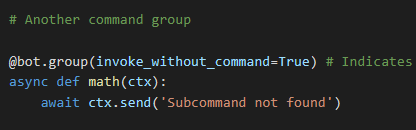
Guide shows how to handle a subcommand not found. But it actually errors saying its missing the ctx argument? https://dark.needs-a-hug.co/i/uBmW9s.png


 cyan quail
full basin
Guide shows how to handle a subcommand not found. But it actually errors saying ...
cyan quail
full basin
Guide shows how to handle a subcommand not found. But it actually errors saying ...
might be a side effect of invoke_without_command but not sure
normal tusk
cyan quail
might be a side effect of `invoke_without_command` but not sure
wut is invoke without command either.. :>
cyan quail
using subcommands without the group
e.g. !group subcommand could also be done as just !subcommand
normal tusk
uh, thx :>
 gleaming falcon
Sanity check just to make sure it's not something I'm doing wrong - once a scheduled event ends, are you ever able to retrieve the details?
 edgy coral
is it possible to attach an image to a slash command?
normal tusk
.rtfm attachment
winter condorBOT
21 total results
discord.Attachment
discord.Attachment.content_type
discord.Attachment.description
discord.Attachment.ephemeral
discord.Attachment.filename
discord.Attachment.height
discord.Attachment.id
discord.Attachment.is_spoiler
discord.Attachment.proxy_url
discord.Attachment.read
discord.Attachment.save
discord.Attachment.size
discord.Attachment.to_dict
discord.Attachment.to_file
discord.Attachment.url
discord.Attachment.width
discord.InteractionMessage.attachments
discord.Message.attachments
discord.SlashCommandOptionType.attachment
discord.WebhookMessage.attachments
cyan quail
gleaming falcon
Sanity check just to make sure it's not something I'm doing wrong - once a sched...
I believe so to some extent
Ending and deletion are separate events
Idk too much about them though so maybe just prod around with them and see what works
 simple steppe
What free hosting is currently the best option for a small bot (python ofc)?
 coarse spire
I wouldn't recommend free hosting, none of them are good really
fervent cradle
why does this command not work on non-nitro users? I have a try?
   @commands.slash_command(description="Get information about a user")
    async def whois(self, ctx, user: discord.Member = None):
        if user is None:
            user = ctx.author  # If no user is specified, use the command invoker

        embed = discord.Embed(title="User Information", color=discord.Color.blue())
        embed.set_thumbnail(url=user.avatar.url)

        try:
            banner = (await self.bot.fetch_user(user.id)).banner.url
            embed.set_image(url=banner)
        except AttributeError:
            return


        embed.add_field(name="Name", value=user.name, inline=True)
        embed.add_field(name="ID", value=user.id, inline=True)
        embed.add_field(name="Nickname", value=user.nick, inline=True)
        embed.add_field(name="Status", value=user.status, inline=True)
        embed.add_field(name="Joined Server", value=user.joined_at.strftime("%Y-%m-%d %H:%M:%S"), inline=True)
        embed.add_field(name="Joined Discord", value=user.created_at.strftime("%Y-%m-%d %H:%M:%S"), inline=True)
        embed.add_field(name="Roles", value=", ".join(role.name for role in user.roles[1:]), inline=False)

        await ctx.respond(embed=embed)
oh sorry. pass not return
normal tusk
.tias
winter condorBOT
 candid coral
How can I find out which server a member has joined in the on_member_join(member) function?
proud mason
candid coral
How can I find out which server a member has joined in the `on_member_join(membe...
.rtfm member.guild
winter condorBOT
proud mason
🙃
candid coral
Thank you
 fickle oracle
.rtfm start_recording
winter condorBOT
1 results
 spring hare
How to catch this type of errors?
discord.errors.Forbidden: 403 Forbidden (error code: 50013): Missing Permissions
on_command_error doesn't work for some reason
young bone
spring hare
How to catch this type of errors?
`discord.errors.Forbidden: 403 Forbidden (erro...
For what?
spring hare
young bone
For what?
Send an error message in guild's logs channel
young bone
spring hare
Send an error message in guild's logs channel
for a command?
spring hare
How else does the user know that the bot does not have Permissions?
spring hare
young bone
for a command?
No, this occurs in on_member_join event
Bot bans people if they are in a list
young bone
you could use try and except
spring hare
This inherits from CheckFailure
```?at the end you can still use on_error()
spring hare
Fair enough
Thank you
Okay, this still doesn't work
BotMissingPermissions and Forbidden don't work
normal tusk
spring hare
How to catch this type of errors?
`discord.errors.Forbidden: 403 Forbidden (erro...
try except
spring hare
normal tusk
`try` `except`
Do I need to "try except" my entire code?
normal tusk
hm, sounds good, use discord.errors.Forbidden
jk but i have no idea about your code tbh
spring hare
@Cog.listener()
async def on_command_error(self, ctx, error):
  if isinstance(error, BotMissingPermissions):
    print(1)
  elif isinstance(error, Forbidden):
    print(2)
 young bone
that is for prefix commands
normal tusk
wait is it on_command_error or on_application_command_error?
 spring hare
on_command_error
normal tusk
:|
spring hare
@bot.event
async def on_error(self, event):
  print(event)```
don't work eitherThat one is for slash commands
normal tusk
spring hare
```py
@bot.event
async def on_error(self, event):
print(event)```
don't work e...
what is your bot class did you use ?
spring hare
Are 403 errors raised differently?
spring hare
I can't catch 403 errors in on_error so... They probably ignore it?
normal tusk
on_command_error event is not being triggered like that :/
young bone
spring hare
I can't catch 403 errors in `on_error` so... They probably ignore it?
try:
  123
except Exception as e:
  if e == "":
    123
at the end you could do something like this
I dont really know the event to get the other stuff
normal tusk
can you see if the event begin triggered or not by printing the error without checking
spring hare
I already tried that
normal tusk
spring hare
I already tried that
what a result
spring hare
young bone
```py
try:
123
except Exception as e:
if e == "":
123
```
at the end you...
Oof Nasty
spring hare
normal tusk
what a result
Nothing
They just ignore everything
cyan quail
the solution you're attempting is rather odd
normal tusk
spring hare
Nothing
They just ignore everything
gruh the event didn't even triggered ;-;
cyan quail
either:
- check if you have permissions before sending the message
- try-except only the channel.send
normal tusk
cyan quail
verifying you do is easy enough
the issue that is the event ignore the exception
cyan quail
because events can't trigger the command handlers, and on_error isn't something you normally use
spring hare
I just wanted to be sure, that I couldn't catch this stupid error in on_error
normal tusk
spring hare
I just wanted to be sure, that I couldn't catch this stupid error in `on_error`
just try except that, i do that on every single cog
spring hare
Why I can't catch them in on_error? Wtf?
cyan quail
on_error isn't a real event
it's an attribute for commands
well... overriding Client.on_error specifically would work, but you should make sure to process stuff properly as that recieves more than just listener errors
 spring hare
cyan quail
well... overriding `Client.on_error` specifically would work, but you should mak...
spring hare
cyan quail
well... overriding `Client.on_error` specifically would work, but you should mak...
Overriding doesn't work either 
    async def on_error(self, event_method: str, *args: Any, **kwargs: Any) -> None:
        print(event_method, args, kwargs)
discord.errors.Forbidden: 403 Forbidden (error code: 50013): Missing Permissions
How do you defer an interaction?
spring hare
await interaction.response.defer()
fervent cradle
Thank you
worldly schooner
is there a way to reset the cooldown of the command if something goes wrong with the command? (like a trade command that didnt work, so reset the cooldown and they can try to trade again immediately)
spring hare
worldly schooner
is there a way to reset the cooldown of the command if something goes wrong with...
command.reset_cooldown()?
candid coral
What are data leaks and how do they appear? I've been completely confused
spring hare
candid coral
What are data leaks and how do they appear? I've been completely confused
What type of data leaks?
Like https://haveibeenpwned.com ?
Have I Been Pwned allows you to search across multiple data breaches to see if your email address or phone number has been compromised.
candid coral
spring hare
What type of data leaks?
Formed in code
worldly schooner
spring hare
`command.reset_cooldown()`?
Is there a way to reset only for that user in question? Not for everyone
Imagining the scenario:
Cooldown for the command = 1 min
View timeout = 10 secs
1 - I make the trade command
2 - The other person dont answer the trade request and the view gets timeouted
3 - Reset the cooldown for this user so he can trade with another person
is this possible or not?
 spring hare
worldly schooner
Is there a way to reset only for that user in question? Not for everyone
Imagin...
spring hare
worldly schooner
Is there a way to reset only for that user in question? Not for everyone
Imagin...
reset_cooldown resets for all users?
spring hare
candid coral
Formed in code
wdym? You can't have data leaks in your code
worldly schooner
spring hare
reset_cooldown resets for all users?
Thats what I believe it does
spring hare
worldly schooner
Thats what I believe it does
.tias
winter condorBOT
worldly schooner
Thats what I believe it does
worldly schooner
spring hare
candid coral
What are data leaks and how do they appear? I've been completely confused
 candid coral
They scare me that there may be data leaks from my databases, but that's not what they mean
spring hare
To not create data leaks in your discord bot, you need to validate that you don't expose your internal info (for example send your args on error), don't have SQLInjection, don't use eval or compile and don't do some crazy stuff with low levels of pycord
I can write you some examples if you really want to
candid coral
spring hare
I can write you some examples if you really want to
If it isn't difficult for you
spring hare
candid coral
If it isn't difficult for you
Okay, so
Don't expose your internal data:
IP of your host (where your bot is located)
It is advisable not to use the same host for your website and your bot
Don't write your Exception info to user like that (screenshot 1)
SQLInjections:
It is advisable to use orm (SQLAlchemy, peewee or stuff like that), they can really help you in the future
If you still use plain SQL, just don't use f-strings or any other formatting. Validate your input if you really need to "inject" it
+ execute("SELECT user FROM guild_config WHERE id = ?", [guild_id])
- execute(f"SELECT user FROM guild_config WHERE id = {guild_id}")
Eval or compile:
Just don't use eval or compile, especially code from untrusted sources (e.g user)
You can basically execute any code at a runtime (for exampleimport sys;sys.exit(0)
Don't use low levels of your libraries if you don't understand what you are doing. Most likely there is a simple way

And yeah, don't be too afraid
It's really difficult to duck up something nowadays (you will most likely get warning from your ide or your library)
Just know what you are doing and you are good to go
candid coral
spring hare
And yeah, don't be too afraid
It's really difficult to duck up something nowaday...
It doesn't sound as difficult as I thought. Thank you very much 😊
spring hare
candid coral
It doesn't sound as difficult as I thought. Thank you very much 😊
Yeah, good luck
High-level programming is really easy, but you can achieve pretty much anything with it.
Stick with one technology/library/language, don't be afraid of mistakes (it's part of programming) and just go with your journey
 vapid pumice
Shouldn't interaction.followup.edit_original_response work after deferring a response?
.rtfm interaction.followup
winter condorBOT
1 results
cyan quail
vapid pumice
Shouldn't `interaction.followup.edit_original_response` work after deferring a r...
no...? followup is a followup
oh wait
misread, but yes that should work
vapid pumice
Getting AttributeError: 'Webhook' object has no attribute 'edit_original_response' :/
fuck
cyan quail
oh rather
vapid pumice
I'm not awaiting my defer
FML lol
spring hare
Ignoring exception in view <ShieldCheckMenu timeout=180.0 children=3> for item <ShieldPunish style=<ButtonStyle.danger: 4> url=None disabled=False label='Kick' emoji=<PartialEmoji animated=False name='🔨' id=None> row=None>:
Traceback (most recent call last):
  File "C:\Users\Lacosst0\PycharmProjects\startrepo\venv_311\Lib\site-packages\discord\ui\view.py", line 414, in _scheduled_task
    await item.callback(interaction)
  File "C:\Users\Lacosst0\PycharmProjects\fluffyranger\bot\misc\utils\discord_utils.py", line 103, in wrapped
    return await func(*args, **kwargs)
           ^^^^^^^^^^^^^^^^^^^^^^^^^^^
  File "C:\Users\Lacosst0\PycharmProjects\fluffyranger\bot\cogs\admin\guild_config\shield_handler.py", line 424, in callback
    await member.kick(reason=f"Кик. Рейдер ({level})")
  File "C:\Users\Lacosst0\PycharmProjects\startrepo\venv_311\Lib\site-packages\discord\member.py", line 694, in kick
    await self.guild.kick(self, reason=reason)
  File "C:\Users\Lacosst0\PycharmProjects\startrepo\venv_311\Lib\site-packages\discord\guild.py", line 3037, in kick
    await self._state.http.kick(user.id, self.id, reason=reason)
  File "C:\Users\Lacosst0\PycharmProjects\startrepo\venv_311\Lib\site-packages\discord\http.py", line 365, in request
    raise Forbidden(response, data)
discord.errors.Forbidden: 403 Forbidden (error code: 50013): Missing Permissions
ohh okie that's helpful too. thx <3
cyan quail
spring hare
```py
Ignoring exception in view <ShieldCheckMenu timeout=180.0 children=3> for ...
since this is specifically happening in a View and not the command, it won't be caught by the error handlers
spring hare
cyan quail
since this is specifically happening in a View and not the command, it won't be ...
on_member_join don't work either?
cyan quail
well yeah, listeners/events aren't commands
so either try/except kick or check permissions
maybe we could have listener and view error handlers but it'd require some effort
spring hare

spring hare
cyan quail
maybe we could have listener and view error handlers but it'd require some effor...
Is there handlers for any errors?
cyan quail
i mean if you really want you could just create your own event or functions to handle it
spring hare
cyan quail
i mean if you really want you could just create your own event or functions to h...
Yeah, that's what I'm trying with
def printer(func):

    @wraps(func)
    async def wrapped(*args, **kwargs):
        try:
            return await func(*args, **kwargs)
        except Forbidden as e:
            print(e.code)
            print(dir(args[1]))
            pprint(args[1].guild_id)

    return wrapped


HTTPClient.request = printer(HTTPClient.request)
on_command_error (and its app counterpart) exist so yeah
spring hare
cyan quail
on_command_error (and its app counterpart) exist so yeah
But... on_command_error can't catch Forbidden from the View
cyan quail
because the view isn't a command
maybe you made it in the command, but the view callback is a separate instance entirely
spring hare
Is there handlers for any type of errors and even Views?
cyan quail
no 
spring hare
sad
cyan quail
idk why you're so against try-except
or literally just checking if the bot has proper perms
 versed fern
cyan quail
idk why you're so against try-except
versed fern
cyan quail
idk why you're so against try-except
Unnecessary nesting...
cyan quail
unnecessary how? do we need to make a lib function for every single edge case?
try-except is perfectly normal
versed fern
Imo listening for error is cleaner
cyan quail
shorter code doesn't make it better
spring hare
cyan quail
idk why you're so against try-except
Consistency
I don't need to think about permissions and errors when I'm writing code
If errors occurs, the bot will just respond with appropriate message
cyan quail
of course you need to think about permissions when you're using the discord api
they're integral to the platform
mossy holly
Hey guys, quick question:
I have this piece of code in buttons of one of my menus
await interaction.response.edit_message(file=my_file)
And somewhere else I want to modify the message again (I want to display an Embed and to remove the file)
I tried to do this
await interaction.response.edit_message(file=None, embed=my_emb)
# Doesn't work as file can't be None so I tried this as it's the default parameter
await interaction.response.edit_message(file=discord.MISSING)
# Still doesn't work, the file is still displayed when my embed appears
So does someone know how to delete a file from a message when editing it ?
Thanks 😄
(I also tried to set attachments to MISSING but doesn't work also)
versed fern
You're not gonna be able to do that, even using listeners
spring hare
cyan quail
of course you need to think about permissions when you're using the discord api
I don't need to think about edge cases and what errors can occur if something stupid happens
"Oh, will it work if user deletes the message"
"Oh, where do I need to respond if bot doesn't have permissions"
cyan quail
you literally have to think about those
just pretending those issues don't exist won't help you
even in your other error handler you still have to isinstance the error to check for every type before responding
versed fern
You could create an event, catch the most common errors and send all the others to a webhook, allowing you to catch them once you found out the exist tho that's in no way gonna result in great user experience
cyan quail
mossy holly
Hey guys, quick question:
I have this piece of code in buttons of one of my men...
attachments=[] should work
mossy holly
cyan quail
`attachments=[]` should work
Oh yes it works, thanks a lot !
spring hare
cyan quail
even in your other error handler you still have to isinstance the error to check...
I actually do that
I'm not complaining about library rn
I'm just trying to understand is there on_view_error in the first place
I will just write my custom wrapper for HTTPClient.request and will just handle them like in on_command_error, I'm just asking is that good, or there is a better solution?
cyan quail
oh wait
views... listeners are different, oops
my bad, if you subclass a view you can define on_error https://docs.pycord.dev/en/master/api/ui_kit.html#discord.ui.View.on_error
(that being said they were sitting in the docs the entire time)
spring hare
💀
spring hare
cyan quail
my bad, if you subclass a view you can define `on_error` <https://docs.pycord.de...
Wait, can i do the same with listeners?
Why there are multiple on_errors?
cyan quail
because having an on_error for every single exception across the entire bot at once isn't viable
spring hare
fair enough
cyan quail
i don't think any library does this, they simply try/except in specific areas of interest
that being said, on_error is designed to run for listeners/events so idk why it isn't working for you
spring hare
spring hare
Yeah, that's what I'm trying with
```py
def printer(func):
@wraps(func)
...
I will probably still stick to this approach
It looks uhm... A little bit nasty, but will probably help me
spring hare
cyan quail
that being said, `on_error` is designed to run for listeners/events so idk why i...
I will try it right now
I had problems only with Views
vapid pumice
Skill issue here:
If I want to say, learn what all of the options are for interaction.followup, how would I search for that info? I've checked the Docs ofc, but I'm struggling to find the answers I'm looking for.
winter condorBOT
94 total results
discord.Webhook
discord.Webhook.auth_token
discord.Webhook.avatar
discord.Webhook.channel
discord.Webhook.channel_id
discord.Webhook.created_at
discord.Webhook.delete
discord.Webhook.delete_message
discord.Webhook.edit
discord.Webhook.edit_message
discord.Webhook.fetch
discord.Webhook.fetch_message
discord.Webhook.from_state
discord.Webhook.from_url
discord.Webhook.guild
discord.Webhook.guild_id
discord.Webhook.id
discord.Webhook.is_authenticated
discord.Webhook.is_partial
discord.Webhook.name
vapid pumice
silver moat
followup is a webhook
OH, of course! Thank you!
mossy holly
Hey guys just wondering how you are stopping your bots ?
This might look stupid lmao but I have a managing script (to automatically launch nohup and handle logs, save pid etc) and I use the pid to kill it (I tried to just kill pid but the process still show up in ps even if the bot is offline)
So I tried to make a clean killing by using SIGUSR1 but same issue :/
On the screenshot you can see after 1 launch, 1 stop, 1 launch and 1 stop both process are still here (maybe zombies process ?)
Here's my launch script
#!/bin/bash

# Programme de gestion du bot (lancement, arrêt, etc.)

day=$(date +"%F")
timestamp=$(date +"%H_%M_%S")


if [ "$#" -lt "1" ]; then
    echo "Utilisation: $0 [start|stop|restart]"
    exit 1;
fi

if [ $1 = "start" ]; then
    # Création du dossier du jour s'il n'existe pas encore
    # (jour du lancement du bot)
    mkdir -p logs/$day

    echo Lancement du bot...
    nohup python3 -u argobot/main.py &> "logs/$day/nohup_$timestamp.out" &
    echo $! > pid

    # Pour accéder facilement au log courant
    rm logs/current.log > /tmp/trash
    ln -s $day/nohup_$timestamp.out logs/current.log
fi


if [ $1 = "stop" ]; then
    # Signal 10 is SIGUSR1
    kill -s 10 $(cat pid)
    echo "Bot hors ligne"
fi
And here's the "custom" stop I've implemented:
def quit_bot(sig, _):
    # No cleaning to do for now
    print("Arrêt du bot")
    exit(0)
    # Would like to use bot.close() here but it's a corountine so I'm looking into it


if __name__ == "__main__":
    # ...
    signal.signal(signal.SIGUSR1, quit_bot)
Maybe I'm missing something obvious, sorry if that's the case
(I also tried this for the signal handler)
def quit_bot(sig, _):
    print("Arrêt du bot")
    loop = asyncio.get_running_loop()
    loop.create_task(bot.close())
    exit(0)
 mossy holly
I use this but I don't know if there's a better solution (this doesn't look like the right way lmao)
    # To trigger the bot.close()
    kill -s 10 $(cat pid)
    echo "Bot hors ligne"

    # To remove all remains of the process
    while ps | grep $(cat pid);
    do
        kill $(cat pid)
    done
how about bot.http.logout()?
mossy holly
cyan quail
how about `bot.http.logout()`?
Nope doesn't work too, but I think it might come from nohup because the bot is getting deconnected properly so idk what's going on
livid wolf
How do you make an embed image as a spoiler?
 violet silo
I want to get the count of people in the voice channel that I'm in.
I wrote this but it tells me there is only 1 member in the voice channel while there are 3 people in that voice channel.
@bot.slash_command(name='people', description='shows the count of people in your voice channel')
async def people(ctx: discord.ApplicationContext):
    await ctx.respond(f'Number of people in your voice channel: {len(ctx.author.voice.channel.members)}')
Maybe try with ctx.user.voice.channel.members
violet silo
I tried but its the same
Nevermind I found the problem.
It was the intents basically . . .
 torpid wraith
How do I use discord.ActivityType.custom? It just makes the activity empty.
full basin
torpid wraith
How do I use `discord.ActivityType.custom`? It just makes the activity empty.
Bots can't have custom status
 zinc cloak
When trying to load my cogs after adding a new cog I recieve:
TypeError: issubclass() arg 1 must be a class
...
<class 'Fun.games.counting'>
<class 'Other.polls.Polls'>```
printing all cogs shows that they are type classWhat does this error mean?
Super weird, but I figured it out
turns out I was trying to instance a class that didn't exist from self in the cog
Nvm that wasn't the problem either, fixed some indentation and realized I used discord.option (which also doesn't exist) instead of discord.Option
 clever pulsar
@commands.command()
    async def change_prefix(self, ctx: commands.Context, *, new_prefix: str):
        if mongo_db.guildProfiles.find_one({"_id": ctx.guild.id}) == None:
            mongo_db.create_guild_profile(ctx.guild)

        if mongo_db.fetch_guild_prefix(self.client, ctx.message) == new_prefix:
            await ctx.reply("`Error: New prefix can not be the same as the old one`")
            return

        mongo_db.change_guild_prefix(ctx, new_prefix)

        prefix_embed = discord.Embed(
            title=f"Prefix for {ctx.guild.name} changed to {new_prefix}",
            timestamp=ctx.message.created_at,
            color=discord.Color.blue(),
        )
        prefix_embed.set_footer(
            text=ctx.author.display_name, icon_url=ctx.author.display_avatar
        )

        await ctx.reply(embed=prefix_embed)
```I want this command to return an error is the one running it doesnt have the administrator , how could i implement that using `@commands.has_permission()`All about handling errors.
proud mason
 novel yacht
how mack a space in a command
novel yacht
how mack a space in a command
Use command groups
young bone
proud mason
Use command groups
Can you use slash commands?
novel yacht
proud mason
Use command groups
its how?
proud mason
novel yacht
its how?

GitHub
Pycord, a maintained fork of discord.py, is a python wrapper for the Discord API - pycord/slash_groups.py at master · Pycord-Development/pycord
proud mason
young bone
Can you use slash commands?
Yes slash cmds have groups
young bone
No
That is not what I mean
I wanted to do the example slash command here to help and its not working again
proud mason
Oh yeah. I think the bot is down
novel yacht
but that ctx i mean /give role role or /remove role role
young bone
That is not possible
novel yacht
🤔
 young bone
You can see a -
novel yacht
?
 fervent cradle
.rtfm slashcommandgroup
winter condorBOT
30 total results
discord.SlashCommandGroup
discord.SlashCommandGroup.add_command
discord.SlashCommandGroup.after_invoke
discord.SlashCommandGroup.before_invoke
discord.SlashCommandGroup.call_after_hooks
discord.SlashCommandGroup.call_before_hooks
discord.SlashCommandGroup.callback
discord.SlashCommandGroup.can_run
discord.SlashCommandGroup.cog
discord.SlashCommandGroup.command
discord.SlashCommandGroup.cooldown
discord.SlashCommandGroup.copy
discord.SlashCommandGroup.create_subgroup
discord.SlashCommandGroup.dispatch_error
discord.SlashCommandGroup.error
discord.SlashCommandGroup.full_parent_name
discord.SlashCommandGroup.get_cooldown_retry_after
discord.SlashCommandGroup.has_error_handler
discord.SlashCommandGroup.invoke
discord.SlashCommandGroup.invoke_autocomplete_callback
novel yacht
how use in cog😅 ?
 fervent cradle
can i see ur imports
novel yacht
fervent cradle
can i see ur imports

or you mean in main file?
i first time use groups
fervent cradle
u need to add from discord.commands import SlashCommandGroup and then profile = SlashCommandGroup()
novel yacht
import discord
from discord.ext import commands
from discord.commands import SlashCommandGroup
import mysql.connector
from config import *
import datetime
import asyncio


class main(commands.Cog):
    def __init__(self, client):
        self.client = client
    profile = SlashCommandGroup("discord", "game")
    @profile.command(name="game", description="Displays a list of available commands.")
    async def _game(self, ctx, member: discord.Member = None):
        if member is None:
            member = ctx.author
            with mysql.connector.connect(**DB_CONFIG) as conn:
cursor = conn.cursor()....```?
like that
fervent cradle
.tag tias
winter condorBOT
novel yacht
xD
Ignoring exception in on_connect
Traceback (most recent call last):
  File "C:\Users\misha\AppData\Local\Packages\PythonSoftwareFoundation.Python.3.11_qbz5n2kfra8p0\LocalCache\local-packages\Python311\site-packages\discord\client.py", line 378, in _run_event
    await coro(*args, **kwargs)
  File "C:\Users\misha\AppData\Local\Packages\PythonSoftwareFoundation.Python.3.11_qbz5n2kfra8p0\LocalCache\local-packages\Python311\site-packages\discord\bot.py", line 1164, in on_connect
    await self.sync_commands()
  File "C:\Users\misha\AppData\Local\Packages\PythonSoftwareFoundation.Python.3.11_qbz5n2kfra8p0\LocalCache\local-packages\Python311\site-packages\discord\bot.py", line 719, in sync_commands
    registered_commands = await self.register_commands(
                          ^^^^^^^^^^^^^^^^^^^^^^^^^^^^^
  File "C:\Users\misha\AppData\Local\Packages\PythonSoftwareFoundation.Python.3.11_qbz5n2kfra8p0\LocalCache\local-packages\Python311\site-packages\discord\bot.py", line 599, in register_commands
    registered = await register("bulk", data, _log=False)
                 ^^^^^^^^^^^^^^^^^^^^^^^^^^^^^^^^^^^^^^^^
  File "C:\Users\misha\AppData\Local\Packages\PythonSoftwareFoundation.Python.3.11_qbz5n2kfra8p0\LocalCache\local-packages\Python311\site-packages\discord\http.py", line 371, in request
    raise HTTPException(response, data)
discord.errors.HTTPException: 400 Bad Request (error code: 50035): Invalid Form Body
In 13: Application command names must be unique
)
fervent cradle
read the error
proud mason
novel yacht
```py
import discord
from discord.ext import commands
from discord.commands impo...
I would not name it discord
proud mason
Nice
 agile minnow
why are the application commands not working
young bone
agile minnow
why are the application commands not working
what do you mean?
agile minnow
It's not registering the application command even when I provided the guiild id in guild_ids
agile minnow
young bone
what do you mean?
?
 obtuse juncoBOT
 No tag
 slashnotshow found.
young bone
they can take some time to see
 shadow widget
I am sure I am missing something, but how can I lock a slash command to a specific role?
in my old discord.py implementation (pre slash commands) I had used
@commands.command(name='add')
@commands.has_any_role(*creds.role)
async def add_queue(self, ctx: commands.Context, *, args: str):
I dont see a has_any_role in pycord
listings = discord.SlashCommandGroup("listing", "Listing related commands")
@listings.command()
async def add(ctx, itemname: str, buyprice: int, itemamount: int):
If you use the desktop version try to reload the window with ctrl + r @agile minnow
young bone
shadow widget
I am sure I am missing something, but how can I lock a slash command to a specif...
commands.has_any_role() also works for slash commands
 quiet field
I recently switched to using BridgeCommand
I get the following error while trying to print the help embed.
Traceback (most recent call last):
  File "C:\Users\amogh\AppData\Local\Packages\PythonSoftwareFoundation.Python.3.11_qbz5n2kfra8p0\LocalCache\local-packages\Python311\site-packages\discord\ext\commands\core.py", line 178, in wrapped
    ret = await coro(*args, **kwargs)
          ^^^^^^^^^^^^^^^^^^^^^^^^^^^
  File "C:\Users\amogh\PycharmProjects\discord\src\cogs\help.py", line 133, in help
    syntax = f"{prefix}{command.name}"
                        ^^^^^^^^^^^^
AttributeError: 'BridgeCommand' object has no attribute 'name'```
I tried looking through the docs but I couldn't find a BridgeCommand equivalent for name

Also this error
```python
Traceback (most recent call last):
  File "C:\Users\amogh\AppData\Local\Packages\PythonSoftwareFoundation.Python.3.11_qbz5n2kfra8p0\LocalCache\local-packages\Python311\site-packages\discord\ext\commands\core.py", line 178, in wrapped
    ret = await coro(*args, **kwargs)
          ^^^^^^^^^^^^^^^^^^^^^^^^^^^
  File "C:\Users\amogh\PycharmProjects\discord\src\cogs\help.py", line 135, in help
    for key, value in command.clean_params.items():
                      ^^^^^^^^^^^^^^^^^^^^
AttributeError: 'BridgeCommand' object has no attribute 'clean_params'```ahh im stupid forgot to import discord.ext commands thank you :)
agile minnow
young bone
If you use the desktop version try to reload the window with ctrl + r <@70316098...
Its not working for cogs, but working for @bot.slash_command(...)
young bone
Is the cog loaded?
proud mason
.slashnoshow
winter condorBOT
Checklist for Application Commands Not Showing Up:
• Does your bot have the application.commands scope?
• Are you loading cogs before on_ready and on_connect?
• Is on_connect not overridden?
• Did you update to the newest version of py-cord (tag: install)?
• Is User Settings > Accessibility > Chat Input > Use legacy chat input turned off?
• Did you share your code and errors?
• Do you still have libraries that conflict with the discord namespace (e.g. discord.py)?
proud mason
Load cogs before running. Very important
agile minnow
young bone
Is the cog loaded?
Ya
agile minnow
proud mason
Load cogs before running. Very important
Ok, lemme try it
it's working now thanks
quiet field
quiet field
I recently switched to using BridgeCommand
I get the following error while tryin...
Nevermind, got it
 stiff crest
@bot.event
async def on_guild_boost(channel, member):
    guild_id = 10250867******** #leaving it out because i dont want to get raided
    channel_id = 1093471518446604328
    message = f'Thanks for boosting, {member.name}!!! :D'

    if guild_id == channel.guild.id and channel_id == channel.id:
        target_channel = bot.get_channel(channel_id)
        await target_channel.send(message)
idw, i want it like if someone boosts my server that a message will be sent in the channel
but it doesn't send
full basin
stiff crest
```py
@bot.event
async def on_guild_boost(channel, member):
guild_id = 10250...
on_guild_boost doesn't exist
stiff crest
what is it then
full basin
And you can't raided by just showing your guild id lmao
full basin
You use on_message and check the message type
stiff crest
full basin
You use on_message and check the message type
how do you do that
full basin
By reading the documentation
winter condorBOT
normal tusk
how to restart a bot from the client side with a command or interaction (ext reload broken)
proud mason
.debug
winter condorBOT
Please don't post code like this and ask "what's wrong?"
@bot.event
async def on_message(message):
    if x == y:
        ...
        if a == b:
            ...
It can be difficult for us to determine this by just looking at the code, especially as it gets more complex. Are you even getting into this code? What are those values? It's very helpful for you to do some debugging first. Add some print statements to narrow down the problem. Or use your code editor's debugger if it has one.
- Are you even executing the code you think is the problem?
- Are you getting all the way through it? Maybe you're hitting an error you don't see. See
.tag noerrorfor reasons why you wouldn't see a thrown error. - Are the values you're comparing what you expect them to be? Maybe you're forking your code and not executing things because of if statements that don't behave like you assume they do.
Save us and yourself some time by doing some debugging ahead of time. It's much easier to have a discussion around a specific line of code not working as expected than trying to trace through logic (especially if it references variables passed in/out of scope).
proud mason
normal tusk
how to restart a bot from the client side with a command _or interaction_ (ext r...
Not a direct way to do it
You could use a process manager like PM2 and use os.system to send a restart cmd
That would be simple and easy
stiff crest
i use it in a hosting service
normal tusk
i tried os.execv(sys.executable, ['python'] + sys.argv)
but the issue is the bot ye begin killed and restarted but the old websocket connection doesn't die with the process
proud mason
normal tusk
i tried `os.execv(sys.executable, ['python'] + sys.argv)`
but the issue is the ...
Yea that's right. You could just call await bot.close and then run that cmd
But i would recommend the pm2 solution
normal tusk
proud mason
Yea that's right. You could just call `await bot.close` and then run that cmd
B...
bot.close will kill the process as my known (will kill the process before the os line execute)
and if the os line executed the close will not run
normal tusk
proud mason
Yea that's right. You could just call `await bot.close` and then run that cmd
B...
i'll see that
i have no idea about wth is this but i think it will work lol
 young bone
?tag restart
obtuse juncoBOT
No tag restart found.
young bone
?tag restartcmd
obtuse juncoBOT
Tag Credit: discord.py server
The only good way to restart your bot is to shut it down and have your process manager handle it. You can shutdown your bot by running Bot.close().
Do use:
- run your bot in a process manager such as:
- systemd
- openrc (gentoo, devuan)
- runit (void linux)
- supervisord
- upstart (old ubuntu)
- docker
- manually reboot it
Do not use:
- a bash loop (it can eat your C-c by rapidly spawning python and if your bot fails it won't stop it from constantly failing)
- subprocess.call (you will eat your memory up by not letting your old processes die)
- os.exec*
normal tusk
i have an idea
use a subprocess from the main file to run the bot.py then when i wanna control the restart will do it by the control functions on the main local server
lol
full basin
They're just emotes
violet silo
emotes?
silver moat
violet silo
emotes?
yeah, emojis
violet silo
But where are those emojis uploaded? They dont seem to be normal discord emojis.
They're kinda customized
full basin
They're emotes from a server..
cyan quail
violet silo
But where are those emojis uploaded? They dont seem to be normal discord emojis....
basically they upload their custom emojis in a personal server, bots have the nitro perk of being able to use external emojis (perms aside) so they can do this
 weak violet
Sup, im making simple log with on_application_command_completion, but i have commands that needs to mention a user like /add @user is there a way to get the mention user or the parameters used in the command?
@bot.event
async def on_application_command_completion(ctx):
    command = ctx.command.name
    log_message:str = f"[{datetime.datetime.now()}] Comando: {command} | Usuario: {ctx.author} ({ctx.author.id})"
    with open('command_logs.txt', 'a+') as log_file:
        log_file.write(log_message + '\n')
print(log_message)```Are you sure that is an event?
silver moat
weak violet
Sup, im making simple log with on_application_command_completion, but i have com...
Pycord
Command Permission Decorators: Commands: Shortcut Decorators: Objects: Attributes full_parent_name, qualified_id, qualified_name. Methods@ after_invoke,@ before_invoke,@ error, def get_cooldown_ret...
silver moat
young bone
Are you sure that is an event?
yes
young bone
Oh ok
weak violet
silver moat
see https://docs.pycord.dev/en/master/api/application_commands.html#discord.Appl...
love you
been reading the doc with a friend and we didnt saw that
 smoky flax
does typing.Optional work in bridge commands?
e.g.
@bridge_command()
@option("amount", int)
@option("user", discord.Member)
@option("contains", str)
async def clear(self, ctx, amount: int, user: typing.Optional[discord.Member], contains: str):
    ...
.tias ?
winter condorBOT
spring hare
Maybe a strange question, but why Interaction has guild and guild_id if you can just use guild.id?
smoky flax
spring hare
.tias ?
eh, doesnt work
spring hare
smoky flax
eh, doesnt work
sad
smoky flax
then ig i need to hardcode my command
spring hare
smoky flax
then ig i need to hardcode my command
?
 smoky flax
spring hare
?
smoky flax
spring hare
?
doesnt work with typing.Optional either
spring hare
sad
young bone
smoky flax
doesnt work with typing.Optional either
typing.Union
GitHub
Pycord, a maintained fork of discord.py, is a python wrapper for the Discord API - pycord/slash_options.py at master · Pycord-Development/pycord
smoky flax
young bone
typing.Union
oh ok
proud mason
spring hare
Maybe a strange question, but why `Interaction` has `guild` and `guild_id` if yo...
guild_id will always be there, even if you have the intents turned off
spring hare
proud mason
guild_id will always be there, even if you have the intents turned off
oooh, okay, thank you
 tropic prairie
how can i send a private message in pycord in channel, i mean the message that says "Only You can see the message"
silver moat
tropic prairie
how can i send a private message in pycord in channel, i mean the message that s...
you can only send them as a response to interaction responses (e.g. button presses, slash command responses)
?tag ephemeral
obtuse juncoBOT
An 'ephemeral' message is one that's only visible to the person who invoked a command. If you ever got a command error with a blue background, this is an example of one.
To do this, set ephemeral=True when you first use an ApplicationContext. (This includes .defer()ing it; the choice of whether a message is ephemeral or not must be made up front. If you .respond() to a deferred message, setting the ephemeral flag at that time will have no effect.)
This is the equivalent of hidden=True if you're coming from interactions.py
silver moat
e.g. await ctx.respond("Hello, World!", ephemeral = True)
tropic prairie
Thank you ❤️
tropic prairie
silver moat
e.g. `await ctx.respond("Hello, World!", ephemeral = True)`
btw if i install pycord in a new project now will i get v3?
$start
silver moat
tropic prairie
btw if i install pycord in a new project now will i get v3?
no. v3 is currently not stable and still in development
fervent cradle
hi i was just wondering when adding a cog should i have the bot.add_cog async? or is bot.add_cog fine
young bone
fervent cradle
hi i was just wondering when adding a cog should i have the bot.add_cog async? o...
just bot.add_cog
with async would be dpy
proud mason
Yeah cogs and extensions loading is not async in pycord
tropic prairie
how can i add dynamic fields to @discord.ui.select
normal tusk
tropic prairie
how can i add dynamic fields to @discord.ui.select
how about making a function that will make a list of the options then load that options into the view
also i was faced with a similar issue with the dynamic Selects
tropic prairie
normal tusk
how about making a function that will make a list of the options then load that ...
not a bad idea, the thing is that the decorator is loaded when the program starts, and i need to fetch the options from the context.
 tough quiverBOT
 Dreezy#1337
A Rare Chest Spawned!
Click Button Below to claim
Tip: You can set spawn channel by using $setspawn <channel>
spring hare
tropic prairie
not a bad idea, the thing is that the decorator is loaded when the program start...
select.options?
silver moat
@waxen whale please kick this bot
tropic prairie
btw another question if you may answer, i have member intents enables and i don't understand why ctx.guild.member gives me only 2 members
tropic prairie
spring hare
select.options?
yes
normal tusk
tropic prairie
not a bad idea, the thing is that the decorator is loaded when the program start...
ye that one may halp, use external functions to load the options
spring hare
tropic prairie
yes
Change select.options and edit message view
tropic prairie
spring hare
Change select.options and edit message view
wdym?
silver moat
tropic prairie
btw another question if you may answer, i have member intents enables and i don'...
wait until on_ready is fired.
tropic prairie
silver moat
wait until `on_ready` is fired.
doing it 😦
spring hare
tropic prairie
wdym?
if you use ui.select decorator:
select.options = ...
await interaction.response.edit_message(view=self)
tropic prairie
spring hare
if you use ui.select decorator:
> select.options = ...
> await interaction.respo...
in the class?
spring hare
tropic prairie
in the class?
when you want to change your select options, yes
tropic prairie
silver moat
wait until `on_ready` is fired.
waited for 2 mins and got only 2 members
silver moat
tropic prairie
waited for 2 mins and got only 2 members
do you have the intents enabled both in your code and on the Discord Developer Portal?
 spring hare
uhm...
ComponentType.users_select
silver moat
tropic prairie
What i'm trying to make is a dropdown of all members in the server
you don't have enough options and that is already a thing natively
tropic prairie
silver moat
you don't have enough options and that is already a thing natively
what do you mean?
 silver moat
tropic prairie
silver moat
tropic prairie
you aren't passsing the intents argument into the bot
spring hare
tropic prairie
what do you mean?
ComponentType.users_select
silver moat
Learn all about implementing Select Menus or Dropdowns in your Discord Bot with Pycord.
spring hare
select_type = ComponentType.users_select in your select
silver moat
?tag intents
obtuse juncoBOT
https://docs.pycord.dev/en/master/intents.html
https://discord.com/developers/docs/topics/gateway#gateway-intents
import discord
from discord.ext import commands

# Get specific intents for fine control
intents = discord.Intents()
intents.emojis = True
intents.guilds = True
intents.messages = True  # Required for prefix commands!
...
# Get all non-priveliged intents; this excludes presences, members and message_content
intents = discord.Intents.default()

# Set priveliged intents: these must be enabled on dev portal
intents.members = True
intents.presences = True
intents.message_content = True  # Required for prefix commands >= 2.0.0b5

# Get all intents; all intents must be enabled on dev portal.
intents = discord.Intents.all()

# Apply intents when creating your bot
bot = commands.bot(prefix="?", intents=intents)
Pycord
In version 1.5 comes the introduction of Intents. This is a radical change in how bots are written. An intent basically allows a bot to subscribe to specific buckets of events. The events that corr...

Discord Developer Portal
Integrate your service with Discord — whether it's a bot or a game or whatever your wildest imagination can come up with.
normal tusk
tropic prairie
What i'm trying to make is a dropdown of all members in the server
@tropic prairie
import discord
from discord.ext import commands

bot = discord.Bot(intents=discord.Intents.all())


async def optionsLoader(guild, roles):
    options = []
    for role_id in roles:
        role = guild.get_role(role_id)
        if role:
            options.append(discord.SelectOption(label=role.name, value=str(role.id)))
    return options

class RoleMenu(discord.ui.View):
  ...

@bot.slash_command(name="role")
async def role(ctx: discord.ApplicationContext):
    roles = [1223, 1332, 123] # you can get them from the context as well --example--
    guild = ctx.guild
    options = await optionsLoader(guild)
    view = RoleMenu(guild)
    select = view.select_callback
    for option in options:
        select.add_option(label=option.label, value=option.value)
    await ctx.send("Select a role:", view=view)
here is an example from a command that will make a dropdown roles
you can do also something like that will the members and paging plugin
silver moat
@normal tusk @spring hare I get it, we all want to help, but we don't need all of us. Having more people only adds to the confusion.
tropic prairie
but it's super nice of you ❤️
silver moat
@tropic prairie
Basically, you are only seeing 2 members because you didn't pass the intents kwarg into the bot. (#998272089343668364 message)
If you want to make a select menu with members, the maximum number of options is 25 for a select menu. However, there is a user select menu. (https://guide.pycord.dev/interactions/ui-components/dropdowns#select-types)
Learn all about implementing Select Menus or Dropdowns in your Discord Bot with Pycord.
tropic prairie
now it's working ❤️
tropic prairie
silver moat
<@934812663106662430>
Basically, you are only seeing 2 members because you did...
user-select menu has no limits? i can see all members there?
silver moat
tropic prairie
user-select menu has no limits? i can see all members there?
yes, regardless of members intent
tropic prairie
silver moat
yes, regardless of members intent
and all server members can see it?
Wow it works great! 😄
thank you ❤️
fervent cradle
young bone
with async would be dpy
ahhh okay okay
 quiet bridge
Can you get the user id of the user who interacted with a button? If so I can't seem to find out how
silver moat
 warm grotto
Is there a way to convert a discord.Message object to json, similarly like how discord.Embed has the to_json method?
silver moat
warm grotto
Is there a way to convert a `discord.Message` object to `json`, similarly like h...
you can try dict(message). If that doesn't work, you can always make your own function/method
stiff crest
@bot.event
async def on_member_presence_update(member, before, after):
    status_role_id = 1111711020923240469 # my role id
    status_text = 'voxelgames'

    has_desired_status = False


    if after.activities:
        for activity in after.activities:
            if isinstance(activity, discord.CustomActivity) and activity.name == status_text:
                has_desired_status = True
                break

    role = member.guild.get_role(status_role_id)

    if has_desired_status:
        await member.add_roles(role)
    else:
        await member.remove_roles(role)
I want to add a role if you have a specific status but it doesnt add the role and i am not getting an error code
silver moat
stiff crest
```py
@bot.event
async def on_member_presence_update(member, before, after):
...
does the event fire?
quiet bridge
silver moat
interaction.user.id
Hmm I get the error that the Button object has no attribute user
silver moat
quiet bridge
Hmm I get the error that the Button object has no attribute user
you switched the interaction and button parameters
stiff crest
no event didnt fire :(
quiet bridge
silver moat
you switched the `interaction` and `button` parameters
Thank you 😅
obtuse juncoBOT
https://docs.pycord.dev/en/master/intents.html
https://discord.com/developers/docs/topics/gateway#gateway-intents
import discord
from discord.ext import commands

# Get specific intents for fine control
intents = discord.Intents()
intents.emojis = True
intents.guilds = True
intents.messages = True  # Required for prefix commands!
...
# Get all non-priveliged intents; this excludes presences, members and message_content
intents = discord.Intents.default()

# Set priveliged intents: these must be enabled on dev portal
intents.members = True
intents.presences = True
intents.message_content = True  # Required for prefix commands >= 2.0.0b5

# Get all intents; all intents must be enabled on dev portal.
intents = discord.Intents.all()

# Apply intents when creating your bot
bot = commands.bot(prefix="?", intents=intents)
Pycord
In version 1.5 comes the introduction of Intents. This is a radical change in how bots are written. An intent basically allows a bot to subscribe to specific buckets of events. The events that corr...
Discord Developer Portal
Integrate your service with Discord — whether it's a bot or a game or whatever your wildest imagination can come up with.
silver moat
also need to be enabled in code as well
stiff crest
silver moat
check intents?
theyre all enabled recently checked
and i have it in code
silver moat
stiff crest
and i have it in code
show related code?
stiff crest
bot = discord.Bot(intents=discord.Intents.all())
looks like on_member_presence_update doesn't exist
maybe you are looking for https://docs.pycord.dev/en/master/api/events.html#discord.on_presence_update ?
Pycord
This section outlines the different types of events listened by Client. There are 3 ways to register an event, the first way is through the use of Client.event(). The second way is through subclass...
silver moat
on_presence_update
stiff crest
silver moat
on_presence_update
ty
tropic prairie
if you'd try to build something like this?
Get the user list after I grant access to my channel,
the first one is the user_select
I believe that the second one just gets the users from the private channel's permissions how can i access the allowed users of a channel and make a dropdown like this 😮 ?
 novel yacht
hello trying mack /ticket open
but i have error
discord.errors.ApplicationCommandInvokeError: Application Command raised an exception: TypeError: Button.__init__() got an unexpected keyword argument 'custom_id'
code
import discord
from discord import ActionRow, Button
from discord.ext import commands
from discord.commands import SlashCommandGroup

class TicketButton(Button):
    @discord.ui.button(label="Click me!", style=discord.ButtonStyle.primary, emoji="😎") # Create a button with the label "😎 Click me!" with color Blurple
    async def button_callback(self, button, interaction):
        await interaction.response.send_message("You clicked the button!")

    async def callback(self, interaction: discord.Interaction):
        thread_id = int(interaction.custom_id)

        channel = self.bot.get_channel(thread_id)
        if isinstance(channel, discord.Thread):
            await channel.add_user(interaction.user)

        user = interaction.user
        await interaction.response.send_message(f"You clicked the button, {user.mention}!")

class ticket(commands.Cog):
    def __init__(self, bot):
        self.bot = bot
    ticket = SlashCommandGroup("ticket")

    @ticket.command(name='open')
    async def create_ticket(self, ctx, *, reason):
        channel_id = 979774207288295494
        channel = self.bot.get_channel(channel_id)

        thread = await channel.create_thread(name="Ticket Thread", message=ctx.message)

        await thread.add_user(ctx.author)

        reason_message = f"**Ticket Reason:** {reason}"
        await thread.send(reason_message)


        staff_channel_id = 1084459911456505856
        staff_channel = self.bot.get_channel(staff_channel_id)
        user_mention = ctx.author.mention
        alert_message = f"New ticket from {user_mention}\n\n**Reason:** {reason}"

        join_button = TicketButton(custom_id=str(thread.id))

        embed = discord.Embed(title="New Ticket Alert", description=alert_message, color=discord.Color.green())

        embed.add_field(name="Join Thread", value="Click the button below to join the ticket thread.")

        await staff_channel.send(embed=embed, components=[ActionRow(join_button)])

        await ctx.send(f"A new ticket thread has been created with reason '{reason}': {thread.mention}")


def setup(bot):
bot.add_cog(ticket(bot))```is there anyway to get the channel from interaction?
young bone
novel yacht
hello trying mack /ticket open
but i have error
```discord.errors.ApplicationCo...
why do you have two button callbacks?
novel yacht
idk
tropic prairie
young bone
why do you have two button callbacks?
maybe you can answer,
the input_field works but always stays on "somethign went wrong try again" is there any way to close it after pressing the button?
 young bone
it should autoclose if you press submit but not if you have an error
Can you show the code from the modal?
tropic prairie
young bone
Can you show the code from the modal?
yes ofcourse one second
tropic prairie
young bone
Can you show the code from the modal?
 class EditName(Modal):
    def __init__(self) -> None:
        super().__init__(title="Edit Channel Name")
        self.add_item(InputText(label="Edit", placeholder="Edit Channel Name"))

    async def callback(self, interaction: discord.interactions):
        embed = discord.Embed(title=f"New channel name {self.children[0].value}")
        await interaction.channel.edit(name=self.children[0].value)
await interaction.channel.send(embeds=[embed]) ```what you recommend to change?
young bone
tropic prairie
```python
class EditName(Modal):
def __init__(self) -> None:
super...
you dont respond to the interaction
tropic prairie
young bone
you dont respond to the interaction
what should i do?
young bone
Respond to the interaction
tropic prairie
young bone
Respond to the interaction
how 😦
full basin
Instead of channel.send
tropic prairie
young bone
Do you know basic python?
Yeah I know basic python, it's like you didn't really explain what you're meaning lmao
tropic prairie
yeah i just understood it now, nothing to do with basic python @young bone lmao
it's a pycord thing, thanks @full basin
full basin
What's a pycord thing?
All interactions are required to be responded.
Not just in pycord
It's a Discord thing
young bone
I know its not a python thing but I still ask people that because we have so many at this server who doesn't know the basics of python
Learn how you can implement Modals in your Discord Bot with Pycord!
@tropic prairie take a look at this ^
tropic prairie
young bone
I know its not a python thing but I still ask people that because we have so man...
I see, thanks mate.
Another question if you may, first of all is there a way to delete ephemeral messages and post new ones instead?
tropic prairie
full basin
You'd have to send an ephemeral follow up
I sent two in a row and it just made two ephemerals for some reason
 weak violet
silver moat
see https://docs.pycord.dev/en/master/api/application_commands.html#discord.Appl...
weak violet
silver moat
see https://docs.pycord.dev/en/master/api/application_commands.html#discord.Appl...
Whats the usage? been trying but just gettin erros
ctx.command.selected_options
ctx.selected_options
?

 grizzled sentinel
weak violet
Whats the usage? been trying but just gettin erros
ctx.command.selected_options...
grizzled sentinel
weak violet
Whats the usage? been trying but just gettin erros
ctx.command.selected_options...
It should be ctx.selected_options Because ctx is an instance of ApplicationContext
novel yacht
novel yacht
hello trying mack /ticket open
but i have error
```discord.errors.ApplicationCo...
anybody
<_>
weak violet
grizzled sentinel
It should be `ctx.selected_options` Because `ctx` is an instance of ApplicationC...
Oh i see, so its like for example ctx.selected_options('user')?
grizzled sentinel
novel yacht
hello trying mack /ticket open
but i have error
```discord.errors.ApplicationCo...
If you are subclassing the button you dont need the decorator.
novel yacht
?
tropic prairie
tropic prairie
anyone 😦 how can i delete the ephs
grizzled sentinel
weak violet
Oh i see, so its like for example ctx.selected_options('user')?
No,
ctx.selected_options is a list.
Each item in the list is the response to the argument. So the first argument of a command is the first item in the list. Im not sure how the dict that is in the list is formatted. You will have to experiment with that.
grizzled sentinel
novel yacht
?
You are subclassing button but you also have @discord.ui.button
grizzled sentinel
tropic prairie
anyone 😦 how can i delete the ephs
You can get the message with this: https://docs.pycord.dev/en/master/api/models.html#discord.Interaction.original_response
tropic prairie
grizzled sentinel
You can get the message with this: https://docs.pycord.dev/en/master/api/models....
and i can delete it after someone presses something else? 😮
grizzled sentinel
Actually there is a shortcut: https://docs.pycord.dev/en/master/api/models.html#discord.Interaction.delete_original_response
grizzled sentinel
tropic prairie
and i can delete it after someone presses something else? 😮
You would just put that in the callback of the button I think
normal tusk
this is official?
 silver moat
no
grizzled sentinel
iirc it was made by someone here but is not official
weak violet
grizzled sentinel
No,
`ctx.selected_options` is a list.
Each item in the list is the response to t...
Ohh, i see thanks again
tropic prairie
grizzled sentinel
You would just put that in the callback of the button I think
first of all thank you ❤️
second, it doesn't work cause it works only if it deletes the latest response and doesn't delete the previous one even if i place it before
if i place it before i get 404 not found cause it's another function
class UserSelection(discord.ui.View):
    @discord.ui.user_select()
    async def select_callback(self, select, interaction):
        **        await interaction.delete_original_response()
        await interaction.channel.set_permissions(select.values[0], view_channel=True,
                                                  connect=True, speak=True)
        await interaction.response.send_message("choose who to allowz", view=UserSelection(), ephemeral=True)


class ControlButtons(discord.ui.View):
    @discord.ui.button(label="Private", row=0, style=discord.ButtonStyle.primary)
    async def first_button_callback(self, button, interaction):
        await interaction.channel.set_permissions(interaction.guild.default_role, view_channel=False)
        await interaction.response.send_message("Choose who to allow", view=UserSelection(), ephemeral=True)
        **        await interaction.delete_original_response()
tried putting it in both of this places
grizzled sentinel
You could check interaction.response.is_done() to see if it has been responded to. Or you could keep track if you have a message sent by using an instance variable.
tropic prairie
grizzled sentinel
You could check `interaction.response.is_done()` to see if it has been responded...
where should i put it?
grizzled sentinel
interaction.response.is_done() returns a T/F for if the interaction has been responded to before. So an if statments before the delete would work
tropic prairie
grizzled sentinel
`interaction.response.is_done()` returns a T/F for if the interaction has been r...
one last question for today,
how could i make @dicord.ui_select select menu which returns let's say the channel members with speak permission i tried almost everything.
And thank you for your help ❤️
grizzled sentinel
What part do you need help with the permission part or the adding members to the select menu?
or both
tropic prairie
grizzled sentinel
What part do you need help with the permission part or the adding members to the...
kindof both, i know how to retrieve the members with speak permissions i don't know how to add them to the select menu
grizzled sentinel
Otherwise it can only be strings.
cyan quail
what you could do is manually set it up with a regular select menu
tropic prairie
grizzled sentinel
Otherwise it can only be strings.
it's ok if it'll be strings i'll map them to user ids
cyan quail
just set the name to their username/tag and the value to their ID, then you can use the IDs to get their member objects
grizzled sentinel
You could get all the usernames. store them in a dict with the user objects and just add all the options
tropic prairie
grizzled sentinel
You could get all the usernames. store them in a dict with the user objects and ...
I'm having trouble doign so.
I want to add it to this view:
class UserSelection(discord.ui.View):
    @discord.ui.user_select()
    async def select_callback(self, select, interaction):
        await interaction.channel.set_permissions(select.values[0], view_channel=True,
                                                  connect=True, speak=True)

        await interaction.response.send_message("choose who to allowz", view=UserSelection(), ephemeral=True)
to have a select menu of "choose who to remove" and show all the users with permissions to this channel
permissions to speak
full basin
channel.members returns a list of users able to see that channel
You can make your own select based on that
grizzled sentinel
tropic prairie
I'm having trouble doign so.
I want to add it to this view:
```python
class Us...
It might be easiest to subclass the select. Than you can create the list of users in the __init__
tropic prairie
what's the limit?
young bone
25
cyan quail
regular selects have the 25 option limit
tropic prairie
how can i get more than 25?
cyan quail
u dont
young bone
Discord limit
young bone
I would use the id and not the name
silver moat
send multiple of them
cyan quail
mmm nope, don't have an autocomplete select
grizzled sentinel
Im not sure the entire situation. But a command with autocomplete sounds like it would fit this specific situation well.
cyan quail
you can send 5 selects per message which would technically give you 125
but yeah command autocomplete seems easier
tropic prairie
Oh i see
can i make an auto complete that completes user names in input_text modal?
grizzled sentinel
sadly no. Only as a command argument
tropic prairie
sht i see :O, and how can i make a select menu to just show the users who have permissions to the channel
grizzled sentinel
Discords UI features are great until you hit a somewhat specific usecase than it feels like you have to get around things in weird ways.
cyan quail
tropic prairie
sht i see :O, and how can i make a select menu to just show the users who have p...
again, you'd have to create it manually within the 25 option limit
grizzled sentinel
discord.ui.Select takes an options=list_of_options argument
tropic prairie
how can i iterate through the users? i mean how can i know it doesn't return the same users as previously?
in user_select
young bone
create a custom select
grizzled sentinel
how can i know it doesn't return the same users as previously?
what do you mean by this?
tropic prairie
grizzled sentinel
> how can i know it doesn't return the same users as previously?
what do you mea...
i mean i thought about adding paging buttons
grizzled sentinel
Do you know how subclassing works?
tropic prairie
yeah ofc
grizzled sentinel
So you could create a big list and just slice it per page
IE
0:25 25:50 50:75
tropic prairie
can i get all members in one list? no limit to guild.members?
grizzled sentinel
Do you need to get all members with the permission or only members in a channel with the permission?
tropic prairie
grizzled sentinel
Do you need to get all members with the permission or only members in a channel ...
i need two select menus, one for the members in a channel with the permission and a list of all server members
grizzled sentinel
So if you just need all members with no filter. Just a basic user_select will work.
But for the one with just the ones with permissions (filtered) you need your custom select described above.
tropic prairie
grizzled sentinel
So if you just need all members with no filter. Just a basic user_select will wo...
there's no limit on user_select? (the one for all server members)
young bone
all select have a limit of 25?
grizzled sentinel
tropic prairie
there's no limit on user_select? (the one for all server members)
No. That is the one that when you start typing it will show you different options. The only downside is that It can only show ALL guild members. It is a special case discord made
cyan quail
young bone
all select have a limit of 25?
no
because user/channel/role is generated by discord, there's no limit
regular selects have options generated by you, so the 25 limit applies
tropic prairie
grizzled sentinel
No. That is the one that when you start typing it will show you different option...
I see and can i add the custom select menu to the same message of the user_select?
grizzled sentinel
Yup!
tropic prairie
grizzled sentinel
Yup!
is there anyway to find the previous interaction i mean from another entity like a button or something and delete it? because it seems like it's done after "send_message"
tropic prairie
tropic prairie
I see and can i add the custom select menu to the same message of the user_selec...
in the same view*
grizzled sentinel
In the callback you can save the original response object as a instance varible and access it in the rest of the callbacks.
instance varible of the view*
tropic prairie
grizzled sentinel
instance varible of the view*
if there are from different views?
grizzled sentinel
Technically still yes, you would have to store it outside of the view class. In a list or something.
weak violet
if i disable a button how i can use another interaction.response?
grizzled sentinel
.rtfm Interaction.followup
weak violet
thanks
tropic prairie
class AllowedUsers():
    def __init__(self, channel):
        self.members_with_speak_permissions = []
        permissions = channel.overwrites
        for target, perms in permissions.items():
            if isinstance(target, discord.Role):
                pass
            else:
                self.members_with_speak_permissions.append(target)

        self.select = Select(
            placeholder="Remove user!",
            options=[discord.SelectOption(label=member.name, value=member.id) for member in self.members_with_speak_permissions]
        )


class UserSelection(discord.ui.View):
    @discord.ui.user_select()
    async def select_callback(self, select, interaction):
        await interaction.channel.set_permissions(select.values[0], view_channel=True,
                                                  connect=True, speak=True)

        allowed_members = AllowedUsers(interaction.channel)
        allowed_members_selector = allowed_members.select
        await interaction.response.send_message(allowed_members_selector, view=UserSelection(), ephemeral=True)
this doesn't work, how can i use the custom list i made here
inside the UserSelection view
weak violet
Another question, is posible to enable another button that is disables for default?, like for enable the second button in a message you must click in the first button.
full basin
Yes
weak violet
how
full basin
Index the children from View.children and change the disabled value
Then edit the message with the view
weak violet
full basin
Then edit the message with the view
i see, but how i can start o where i can read about it? im kinda lost with buttons
class MyView(discord.ui.View):
    @discord.ui.button(label="☀️", style=discord.ButtonStyle.secondary, disabled=True)
    async def uno_button_callback(self, button, interaction):
            button.disabled = True
            button.label = str(interaction.user.name)

            #role = interaction.guild.get_role(1108904273498079324)
            await interaction.response.edit_message(view=self)
            await interaction.followup.send(interaction.user.mention + ' esta corrigiendo esta whitelist')

    @discord.ui.button(label="✅", style=discord.ButtonStyle.gray, disabled=True)
    async def dos_button_callback(self, button, interaction):
            button.disabled = True

            #role = interaction.guild.get_role(1108904273498079324)
            await interaction.response.edit_message(view=self)
            await interaction.followup.send(interaction.user.mention +' lo aprobo')

@bot.slash_command(description="test")
async def test(ctx):
    emb = discord.Embed(title="Test", description="Test")
    view = View()
    view.add_item(button1)
    view.add_item(button2)
msg = await ctx.respond(embed=emb, view=MyView())```why do you have two times View?
weak violet
oh this was for testing
    view.add_item(button1)
view.add_item(button2)```forgot to delete it
full basin
weak violet
i see, but how i can start o where i can read about it? im kinda lost with butto...
The view has a children attribute.
Ordered by how you defined them
Index whatever button you want to enable and change the attribute
 glacial galleon
tryna save an image and send it but error
discord.errors.ApplicationCommandInvokeError: Application Command raised an exception: PermissionError: [Errno 13] Permission denied: '/home/runner/discord-bot/venv/lib/python3.8/site-packages/kaleido/executable/kaleido'```Like if my second button is dos_button_callback, how i can call it?
button_dos
button.dos?
full basin
What
weak violet
i mad lost lmao
full basin
Why would you call the callback from another button?
You said you want to change its disabled status
weak violet
ye
full basin
Then index the button
View.children
Returns a list with your buttons
Then you can change the attribute
weak violet

full basin
.rtfm View.children
Eh
.rtfm discord.ui.View.children
OK then
Pycord
The library has helpers to help create component-based UIs. Shortcut decorators: Objects: Attributes children, disable_on_timeout, message, parent, timeout. Methods cls View.from_message, def add_i...
silver moat
well, that bot's gone
weak violet
full basin
https://docs.pycord.dev/en/master/api/ui_kit.html#discord.ui.View.children
like button = [x for x in self.children][0]
full basin
self.children is already a list
Why would you iterate over it to create a new list and then index it?
Plus it wouldn't reflect the changes to the view
weak violet
Ohh, sorry i dont speak english and the translator wasnt helping
you mean like self.childen[1] [2] [3]?
full basin
Yes
weak violet
tysm
cyan quail
the callback ref does work tho
e.g. if their other button's function was called dos_button_callback under the decorator then they could have set self.dos_button_callback.disabled
novel yacht
import discord
from discord import ActionRow, Button
from discord.ext import commands
from discord.commands import SlashCommandGroup


#class button(discord.ui.View):
#   @discord.ui.button(label="Open", style=discord.ButtonStyle.success)
#    async def button_callback(self, button, interaction):
#        await interaction.response.send_message("You clicked the button!")

class ticket(commands.Cog):
    def __init__(self, bot):
        self.bot = bot
    ticket = SlashCommandGroup("ticket")

    @ticket.command(name='open')
    async def create_ticket(self, ctx, *, reason):
        channel_id = 979774207288295494
        channel = self.bot.get_channel(channel_id)

        thread = await channel.create_thread(name="Ticket Thread", message=ctx.message)
        await thread.add_user(ctx.author)

        reason_message = f"**Ticket Reason:** {reason}"
        await thread.send(reason_message)

        staff_channel_id = 1084459911456505856
        staff_channel = self.bot.get_channel(staff_channel_id)
        user_mention = ctx.author.mention
        alert_message = f"New ticket from {user_mention}\n\n**Reason:** {reason}"

        join_button = Button(style=discord.ButtonStyle.green, label="Claim Ticket", custom_id=str(thread.id))


        embed = discord.Embed(title="New Ticket Alert", description=alert_message, color=discord.Color.green())
        embed.add_field(name="Join Thread", value="Click the button below to claim the ticket.")

        await staff_channel.send(embed=embed, components=[[join_button]])

        await ctx.send(f"A new ticket thread has been created with reason '{reason}': {thread.mention}")


def setup(bot):
bot.add_cog(ticket(bot))```i have error with discord.errors.ApplicationCommandInvokeError: Application Command raised an exception: TypeError: Button.__init__() got an unexpected keyword argument 'style'
proud mason
novel yacht
```py
import discord
from discord import ActionRow, Button
from discord.ext impo...
Use discord.ui.Button
Don't use discord.Button
Don't use action rows too
Those are internal classes
Check out the guide on how to use buttons
 waxen whale
Om nom nom nom nom
waxen whale
Bot says no
proud mason
Btw lala
waxen whale

The official guide for making bots and other Discord applications using the Pycord library.
Yes?
proud mason
Why is discord.Button, discord.ActionRow and other stuff public?
waxen whale
Good question.
Tho in DisCatSharp we have them public so users can Override it if needed or manually build rows with specific counts
proud mason
Hmm
waxen whale
Not sure about pycords reason but might be same
proud mason
Yea i don't think such customisation is possible in py-cord
I'll ask this in #discussion
waxen whale
Sounds like a free pr for you haha
proud mason
Lul
novel yacht
😭 I don't understand
waxen whale
Read the guide and don't ping people
 tribal girder
how do i fix this?

 eager bronze
is there any way i can use a variable given by user into the bot, in the button_callback function
 formal wadi
Hey there, how can I edit request timeout?
silver moat
tribal girder
how do i fix this?
?tag replit
obtuse juncoBOT

Gist
Installing Pycord with Replit (only use replit as a last resort) - pycord-replit-install.md
 waxen skiff
how do i add a reaction to a response?
msg = await ctx.respond("Operation succeeded")
await msg.add_reaction("✅")```How does custom_id works with buttons?, i want to make the buttons persistant like a ticket button, but cant make it work
proud mason
waxen skiff
```py
msg = await ctx.respond("Operation succeeded")
await msg.add_reaction("✅")...
ctx.respond doesn't return the message, discord limitation
Use msg = await ctx.original_response()
full basin
weak violet
How does custom_id works with buttons?, i want to make the buttons persistant li...
?tag idw
obtuse juncoBOT
Saying it doesn't work or asking what's wrong with this code? is not helpful for yourself or others.
Describe what you expect and/or tried (with your code), and what isn't going right.
Please provide any errors you get for optimal assistance.
weak violet
full basin
?tag idw
How to make that the buttons dont stop working after 10-20m?
full basin
Have you read the guide?..
 distant roost
Is there a way to check who moved a member from a voice channel to a different voice channel? My first idea is to check the audit log in an on_voice_state_update but is there an easier way?
cyan quail
distant roost
Is there a way to check who moved a member from a voice channel to a different v...
audit log only
distant roost
ok
waxen skiff
proud mason
Use `msg = await ctx.original_response()`
'ApplicationContext' object has no attribute 'original_response'
young bone
waxen skiff
'ApplicationContext' object has no attribute 'original_response'
ctx.interaction.original_response()
 worn void
oh, i think its the part where it pulls from the database
worn void
 strong bobcat
Please help. AttributeError: 'FFmpegPCMAudio' object has no attribute
strong bobcat
Please help. AttributeError: 'FFmpegPCMAudio' object has no attribute
share your code
 tribal shale
I've been trying to make new commands, and I know that it takes about an hour to register, but it's been more than 4 hours now and nothing has changed. I'm not using cods, just using @bot.slash_command decoratior for each command and not doing anything complicated
I've checked your help command .slashnoshow and I've done everything well
And it's the most simple things ever
@bot.slash_command(name = "hello", description = "Say hello to the bot")
async def hello(ctx):
    await ctx.respond("Hey!")

@bot.slash_command(name = "ping", description = "Check if the bot is online")
async def ping(ctx):
    await ctx.respond(f"Pong! {round(bot.latency * 1000)}ms")
Hello has registered (made a while ago), but Ping hasn't (made "recently")
silver moat
refresh your discord
tribal shale
ah that's it ok
 river summit
tribal shale
I've been trying to make new commands, and I know that it takes about an hour to...
river summit
tribal shale
I've been trying to make new commands, and I know that it takes about an hour to...
couldnt you just make them guild commands?
fervent cradle
import discord

bot = discord.Bot()

@bot.slash_command()
async def hello(ctx, name: str = None):
    name = name or ctx.author.name
    await ctx.respond(f"Hello {name}!")

@bot.user_command(name="Say Hello")
async def hi(ctx, user):
    await ctx.respond(f"{ctx.author.mention} says hello to {user.name}!")


bot.run("")
Nice token
fervent cradle
Traceback (most recent call last):
File "C:\Users\xerd\Desktop\go lang\discord.py", line 1, in <module>
import discord
File "C:\Users\xerd\Desktop\go lang\discord.py", line 3, in <module>
bot = discord.Bot()
AttributeError: partially initialized module 'discord' has no attribute 'Bot' (most likely due to a circular import)
fervent cradle
young bone
Nice token
hah
young bone
Can you send the pip list
fervent cradle
aiodns 3.0.0
aiohttp 3.8.4
aiosignal 1.3.1
appdirs 1.4.4
async-timeout 4.0.2
attrs 23.1.0
beautifulsoup4 4.12.2
Brotli 1.0.9
bs4 0.0.1
certifi 2023.5.7
cffi 1.15.1
charset-normalizer 3.1.0
colorama 0.4.6
ffmpeg-python 0.2.0
frozenlist 1.3.3
future 0.18.3
greenlet 2.0.1
idna 3.4
imageio-ffmpeg 0.4.8
importlib-metadata 6.6.0
multidict 6.0.4
numpy 1.24.3
orjson 3.8.14
Pillow 9.5.0
pip 23.0.1
playwright 1.33.0
playwright-stealth 1.0.5
py-cord 2.4.1
pycares 4.3.0
pycord 0.1.1
pycparser 2.21
pyee 9.0.4
pyppeteer 1.0.2
requests 2.30.0
setuptools 65.5.0
soupsieve 2.4.1
tqdm 4.65.0
typing_extensions 4.5.0
urllib3 1.26.15
websockets 10.4
yarl 1.9.2
zipp 3.15.0
young bone
uninstall pycord and py-cord and reinstall only py-cord
fervent cradle
AttributeError: partially initialized module 'discord' has no attribute 'Bot' (most likely due to a circular import)
still
young bone
Is the terminal still open?
 young bone
Do you use an venv?
fervent cradle
venv?
fervent cradle
env???
young bone
what is the name of the file?
young bone
wow
young bone
fervent cradle
visual studio code
Install this Extension, It would say it that you cannot use some file names
 warm grotto
I'm trying to make a backup bot, and I'm trying to edit the guild's system channel flags: py await ctx.guild.edit( system_channel_flags = discord.SystemChannelFlags(value=Guild["SystemChannelFlags"]) )
However, this comes with the error:'value' is not a valid flag name.
If I change it to py await ctx.guild.edit( system_channel_flags = Guild["SystemChannelFlags"] )it comes up with this errorsystem_channel_flags field must be of type SystemChannelFlags
worn void
#cog.py

import discord, datetime
from discord.ext import commands

import cogs.utils.utils as utils

import config

# await ctx.respond("No Permissions.", ephemeral=True)
class JoinManager(commands.Cog):
    def __init__(self, bot):
        self.bot = bot

    @commands.Cog.listener()
    async def on_memeber_join(self, member):
        print("member joined")
        guildid, logid, dept = await utils.Configs.GetGuildConfigs(self=self, guild=member.guild.id)

        d = datetime.strptime(f"{str(member.created_at)[:-6]}", '%Y-%m-%d %H:%M:%S.%f')

        log_channel = await self.bot.get_channel(logid)
        #color = 0x123456
        header = f"Member Joined"
        content = f"{member.mention} has joined the server."
        footer = f"Created: {d.strftime('%m/%d/%Y %I:%M %p')}"
        url = member.display_avatar

        await utils.PostLog(self=self, channel=log_channel, header=header, content=content, color=None, footer=footer, thumbnail=url)
        print("called postlog")


def setup(bot):
    bot.add_cog(JoinManager(bot))
#bot.py

import discord, os
from dotenv import load_dotenv
from discord.ext import commands
from pathlib import Path

import config

dotenv_path = Path('sens.env')
load_dotenv(dotenv_path=dotenv_path)

# Config
token = os.getenv(config.token)

extensions = [
                'cogs.commands.admin',
                'cogs.commands.join_manager'
            ]


intents = discord.Intents.all()
#intents.members = True
#intents.message_content = True

client = commands.Bot(intents=intents)


for extension in extensions:
    client.load_extension(extension)
    print("loaded " + extension)

@client.event
async def on_ready():
    await client.change_presence(activity=discord.Activity(type=discord.ActivityType.playing, name=f"Valor Roleplay"))
    print(f"Version {config.version} | Bot Ready...\n")

client.run(token)```nothing happens when someone joins?? no error
proud mason
worn void
```py
#cog.py
import discord, datetime
from discord.ext import commands
import...
Can you check if the cog is actually loaded? Add an on ready listener in it
 unborn pebble
hello. is it possible to use a new line in a slash command?
if I made a slash command like this /text <multiline text>, how do i create new lines? Because I can't make new lines in discord itself (shift+enter). I usually have to do that in code.
basically i wanna be able to enter something like this:
this
is
on
multiple
lines
but in discord and not in code
proud mason
unborn pebble
basically i wanna be able to enter something like this:
this
is
on
multiple
line...
I would suggest using modal to input multiline text
unborn pebble
ahh, that works too. I assume discord doesnt allow multiple lines in app for slash commands? but i suppose thats where the usefulness of modals come in. thx!
 somber pelican
worn void
```py
#cog.py
import discord, datetime
from discord.ext import commands
import...
somber pelican
worn void
```py
#cog.py
import discord, datetime
from discord.ext import commands
import...
You spelled on_member_join wrong
 proud cargo
What's the best way to repeat a task once a week
 astral mist
 proud mason
somber pelican
You spelled on_member_join wrong
proud mason
somber pelican
You spelled on_member_join wrong
Lmao i just realised 😂
proud mason
proud cargo
What's the best way to repeat a task once a week
Use ext.tasks
 wild cobalt
hi, bit confused. Webhook.send() into a thread requires a thread object. How do I get that thread object if I just have the thread id?
(annoying because the error I'm getting is that it needs thread.id)
full basin
wild cobalt
hi, bit confused. Webhook.send() into a thread requires a thread object. How do ...
Use get_channel or get_thread
Any of those will return the thread obj
cyan quail
^ threads are just channels
wild cobalt
and if the thread/channel is in a guild where the bot isn't?
Webhook.fetch_message(), message.guild etc
full basin
Don't think it's possible
wild cobalt
after some experimentation: it seems Pycord only needs thread.id, and passing it a FakeThread with the thread_id as FakeThread.id seems to work... for how long? we will find out I don't think this will work 😄
proud mason
wild cobalt
~~after some experimentation: it seems Pycord only needs thread.id, and passing ...
you could try passing discord.Object(id)
Although im not sure if this would work either
might need to dig through the source
high chance it will
wild cobalt
My FakeThread works for sending; fetching is next experiment
proud cargo
discord.errors.ApplicationCommandInvokeError: Application Command raised an exception: AttributeError: 'SlashCommand' object has no attribute 'sync'
is sync no longer a thing?
 sly comet
I'm trying to remake a game I like into my bot, and I want to have a function running to wait for a certain message, and another function sending ephemeral messages to the user who started the game via a slash command, as well as sending non-ephemeral messages to the channel. I've looked up stuff like threading, but I couldn't get it to work myself. Any idea on how I might do this correctly?
tbh I've been working at this for like at least 5 hours straight 
(btw I'm not sure how to help other problems, or even if my question is more fit for a thread)
full basin
proud cargo
```py
discord.errors.ApplicationCommandInvokeError: Application Command raised a...
What is sync supposed to do.in a slash command object?
proud cargo
full basin
What is sync supposed to do.in a slash command object?
i have an option(optionchoice()...) type thing with dates. it syncs it to update the dates to have a rolling leaderboard
 cold hamlet
How can I edit a response straight after sending it? ctx.message doesn't seem to get populated after ctx.respond, and I need to edit the message (also, how come ctx.edit doesn't have the suppress= param?)
 cursive nova
I am testing a simple bot with modal user input that i want to save to a database. I had the problem that some entries where publiced in sqlite3(same entry as the user that submitted in the same second). Is this a async problem ? If i want to save user submitted data to a database do i need to query the database async or can i just use synced queries? So basicly what is the best way to save userdata persistent.
young bone
cold hamlet
How can I edit a response straight after sending it? `ctx.message` doesn't seem ...
message = ctx.interaction.original_response()
message.edit()
proud mason
cold hamlet
How can I edit a response straight after sending it? `ctx.message` doesn't seem ...
Use ctx.interaction.edit_original_response(...)
young bone
proud mason
Use `ctx.interaction.edit_original_response(...)`
There are just many ways to do it xd
proud mason
True, but message.edit just calls edit_original_response lol
full basin
Or just ctx.edit() xd
cold hamlet
Neither of those methods have the suppress kwarg
What I've had to do is fetch the original response, grab the message ID from it, then fetch the message from ctx.channel, and then edit the fetched message
full basin
Way too many methods just for one kwarg which could be irrelevant
cold hamlet
full basin
Way too many methods just for one kwarg which could be irrelevant
the entire reason for editing it is to suppress the embeds
because for some reason discord decided showing embeds for hyperlinks was a good idea
I don't think you can suppress them via the <angle bracket things> either
proud mason
this could be some pr worthy stuff
proud mason
cold hamlet
Yeah I'm already looking into it
i think this might be a discord limitation
editing a channel message (normal msg) has the flags field https://discord.com/developers/docs/resources/channel#edit-message-jsonform-params
interactions are webhooks under the hood. editing a webhook msg doesnt have flags field https://discord.com/developers/docs/resources/webhook#edit-webhook-message-jsonform-params
cold hamlet
Man if only discord's docs were clearer, I would've found this 2 minutes ago 🙄
I doubt I could implement my own hack into the library for this specific flag, since it wouldn't be clean and also I don't think its exactly high-demand
cold hamlet
proud mason
i wonder if sending a response triggers an `on_message` event
        response = await ctx.respond(
            f"Paper A: [{discord.utils.format_dt(paper_1, 'R')}]({paper_1_url})\n"
            f"Paper B: [{discord.utils.format_dt(paper_2, 'R')}]({paper_2_url})"
        )
        message_id = (await ctx.interaction.original_response()).id
        message = await ctx.channel.fetch_message(message_id)
        await message.edit(suppress=True)
I mean this works fine
Its just a little more latent, but considering this is a bot for my college dc server, latency isn't exactly a concern lol
young bone
If it works, dont touch it xd
proud mason
2 extra api calls. could get you ratelimited quicker 
you could also use partial messages
yeah that would save 1 call ig
cold hamlet
proud mason
2 extra api calls. could get you ratelimited quicker <:shrug:951370278141841469>
There's only 5 of us using it lol
If it does in fact trigger on_message I could just get it from bot.cached_messages
cold hamlet
Would be easier than filtering through cached_messages tbh
but this is fine, its not like its a high volume command anyway
proud mason
cold hamlet
Would be easier than filtering through cached_messages tbh
bot.get_message 👀
cold hamlet
wait that's a thing???
proud mason
yeah lol
cold hamlet
you mean this whole time I've been doing discord.utils.get(self.bot.cached_messages, id=<id>)
and I didn't need to
proud mason
yep 😂
cold hamlet
I feel dumb now
proud mason
it was only added in 2.0
cold hamlet
im still used to discord.py v1.1 i can't lie 
proud mason
and few forks dont have it
cold hamlet
hell I've still got some 0.16.x in me
proud mason
i dont even remember stuff from before ~1.6 lol
cold hamlet
cold hamlet
I doubt I could implement my own hack into the library for this specific flag, s...
Actually, I could add a async source() that does this shorthand fetch for me, but I'm not sure what I'd actually call the function
proud mason
cold hamlet
If it does in fact trigger on_message I could just get it from bot.cached_messag...
just tested. it actually does trigger the event
stiff crest
give.set_title(name = f':giveaway: NEUES GEWINNSPIEL!')
Error:
Ignoring exception in command giveaway:
Traceback (most recent call last):
  File "/home/container/.local/lib/python3.10/site-packages/discord/ext/commands/core.py", line 178, in wrapped
    ret = await coro(*args, **kwargs)
  File "/home/container/main.py", line 78, in giveaway
    give.set_title(name = f':giveaway: NEUES GEWINNSPIEL!')
AttributeError: 'Embed' object has no attribute 'set_title'
The above exception was the direct cause of the following exception:
Traceback (most recent call last):
  File "/home/container/.local/lib/python3.10/site-packages/discord/ext/commands/bot.py", line 347, in invoke
    await ctx.command.invoke(ctx)
  File "/home/container/.local/lib/python3.10/site-packages/discord/ext/commands/core.py", line 950, in invoke
    await injected(*ctx.args, **ctx.kwargs)
  File "/home/container/.local/lib/python3.10/site-packages/discord/ext/commands/core.py", line 187, in wrapped
    raise CommandInvokeError(exc) from exc
discord.ext.commands.errors.CommandInvokeError: Command raised an exception: AttributeError: 'Embed' object has no attribute 'set_title'
I want it to create a giveaway but it doesn't send the embed to my channel
young bone
stiff crest
```py
give.set_title(name = f':giveaway: NEUES GEWINNSPIEL!')
```
Error:
```py
I...
read the error
young bone
title=""
stiff crest
oh lol
young bone
Embed(title="")
stiff crest
and this?
Ignoring exception in command giveaway:
Traceback (most recent call last):
  File "/home/container/.local/lib/python3.10/site-packages/discord/ext/commands/core.py", line 178, in wrapped
    ret = await coro(*args, **kwargs)
  File "/home/container/main.py", line 78, in giveaway
    give.title(name = f':giveaway: NEUES GEWINNSPIEL!')
TypeError: '_EmptyEmbed' object is not callable
The above exception was the direct cause of the following exception:
Traceback (most recent call last):
  File "/home/container/.local/lib/python3.10/site-packages/discord/ext/commands/bot.py", line 347, in invoke
    await ctx.command.invoke(ctx)
  File "/home/container/.local/lib/python3.10/site-packages/discord/ext/commands/core.py", line 950, in invoke
    await injected(*ctx.args, **ctx.kwargs)
  File "/home/container/.local/lib/python3.10/site-packages/discord/ext/commands/core.py", line 187, in wrapped
    raise CommandInvokeError(exc) from exc
discord.ext.commands.errors.CommandInvokeError: Command raised an exception: TypeError: '_EmptyEmbed' object is not callable
# my code
    give = discord.Embed(color = 0x2ecc71)
    give.title(name = f':giveaway: NEUES GEWINNSPIEL!')
    give.add_field(name= f':sponsor: Sponsor:', value = f'{ctx.author.name}', inline = False)
    give.add_field(name= f':time: Zeit:', value = f'{round(time/60, 2)}', inline = False)
    give.add_field(name= f':troph: Preis:', value = f'{prize} Minuten', inline = False)
    give.add_field(name= f'Wie nehme ich am Gewinnspiel teil?', value = f'Du nimmst teil in dem du mit 🎉 reagierst!', inline = False)
    end = datetime.datetime.utcnow() + datetime.timedelta(seconds=time)
    give.set_footer(text = f'Giveaway endet am {end.strftime("%m/%d/%Y, %H:%M")} UTC!')
    my_message = await channel.send(embed = give)
how come when theres a problem in my cog, it doesnt error, it just doesnt load?
 proud mason
somber pelican
You spelled on_member_join wrong
proud mason
somber pelican
You spelled on_member_join wrong
@worn void
proud mason
lol
proud mason
stiff crest
```py
# my code
give = discord.Embed(color = 0x2ecc71)
give.title(name =...
give.title = ...
it is not a method
it is just an attribute which you can set
stiff crest
so what do i have to do
proud mason
- give.title(name = f':giveaway: NEUES GEWINNSPIEL!')
+ give.title = f':giveaway: NEUES GEWINNSPIEL!'
```  near hollow
Can you disable a button based off of a custom id?
proud mason
near hollow
Can you disable a button based off of a custom id?
From where are you trying to disable the button? From other button callbacks in the view?
versed fern
Pretty sure if asked this before, what's the difference between disord.Bot, discord.Client and commands.Bot?
obtuse juncoBOT
No tag discordclients found.
full basin
?tag client
obtuse juncoBOT
discord.Client # just for events
discord.Bot # events + slash/user/msg commands
commands.Bot # above + prefixed commands
bridge.Bot # above + bridge commands (application commands and text commands in one)
thx