#Basic Pycord Help (Quick Questions Only)
1 messages · Page 67 of 1
 wicked helm
 silver moat
Do you have members intent?
wicked helm
silver moat
Do you have `members` intent?
Yeah, these right?

And the bot has admin permissions
silver moat
wicked helm
Yeah, these right?
You also need to enable them in your code
wicked helm
silver moat
You also need to enable them in your code
Ohhh - then no, I don't think I have
I have not.. needed to do this yet for the / commands and ctx.respond.. I will look at doing that!
 proud mason
Try audio.file.read()
I have personally had similar issues. Wav files saved by vc recording do not get loaded into pydub.AudioSegment or numpy arrays. Normal files do. And the saved files can even be played back
But when saving them as MP3 they can be loaded into pydub
I'm not sure why this happens
 violet bear
ahh okay, so then I'm guessing I should use the MP3 sink and also audio.file.read() . Or could I still use audio.file.read() with the Wave Sink to fix it?
proud mason
Internally the mp3 sink just saves as wav and converts them using FFMpeg. And that works. Everything is just weird 💀
proud mason
violet bear
ahh okay, so then I'm guessing I should use the MP3 sink and also audio.file.rea...
Try both. If wav works, well and good
If not try MP3 sink
violet bear
perfect, I will try that. Thank you!
proud mason
||In case you really want wav, convert the mp3 back into wav using ffmpeg||
 livid wolf
Would the command be (to select a member)
async def member_roles(ctx, member: discord.Member()):
       ...
Or how would you get a discord member using discord.Member() in the bot command?
proud mason
livid wolf
Would the command be (to select a member)
```py
async def member_roles(ctx, mem...
Remove the ()
Easy as that
wicked helm
silver moat
You also need to enable them in your code
Do I need to do this in every cog that uses them, or just when I init the bot?
 cerulean yacht
how to write tests for my bot?
livid wolf
Quick question, how do I send an embed?
Never mind, figured it out
.rftm embed
.rtfm embed
 winter condorBOT
79 total results
discord.Embed
discord.Embed.Empty
discord.Embed.add_field
discord.Embed.append_field
discord.Embed.author
discord.Embed.clear_fields
discord.Embed.color
discord.Embed.colour
discord.Embed.copy
discord.Embed.description
discord.Embed.fields
discord.Embed.footer
discord.Embed.from_dict
discord.Embed.image
discord.Embed.insert_field_at
discord.Embed.provider
discord.Embed.remove_author
discord.Embed.remove_field
discord.Embed.remove_footer
discord.Embed.remove_image
livid wolf
Just what I needed
 grizzled sentinel
#883236900171816970 next time please :)
livid wolf
sorry
wicked helm
I'm going insane : ^ )
I've got to the point where my background task can get the member objects.. But I can't get the permissions to update their nicknames..? My bot is an admin and all intents are enabled..?
Aight - moving the bot up in the list of role priority fixed it. Glad I thought of that first x)
 full basin
cerulean yacht
how to write tests for my bot?
full basin
cerulean yacht
how to write tests for my bot?
That makes no sense
 wind jay
how can i do bot.loop.create_task(daily()) in a cog?
full basin
The same way?...
 chrome skiff
full basin
The same way?...
chrome skiff
full basin
The same way?...
you cant to this in cogs
proud mason
chrome skiff
you cant to this in cogs
why not 🤔
chrome skiff
f = discord.File(fp=output_buffer, filename=f"winner-{formatted_date}.png")

em = discord.Embed(title=f"day", description=f"test desc", colour=colour().main, timestamp=datetime.now())
em.set_image(url=f"attachment://winner-{formatted_date}.png")
em.set_footer(text=f"test")
await ctx.send(file=f, embed=em)
when i use this my image is not in the embed
its out of the embed
can somebody help?
 young bone
chrome skiff
```py
f = discord.File(fp=output_buffer, filename=f"winner-{formatted_date}.png"...
young bone
chrome skiff
```py
f = discord.File(fp=output_buffer, filename=f"winner-{formatted_date}.png"...
?tag localfile
 obtuse juncoBOT
f = discord.File("some_file_path", filename="image.png")
e = discord.Embed()
e.set_image(url="attachment://image.png")
await messagable.send(file=f, embed=e)```i exactly did it like this
young bone
any errors?
chrome skiff
no nothing
young bone
are you sure?
 chrome skiff
young bone
are you sure?
chrome skiff
young bone
are you sure?
isnt fp filepath?
now removed fp=
didnt changed anything
chrome skiff
young bone
are you sure?
lol found the problem bruh
you cant have a space in the filename
removed the space and now image is showing in the embed
young bone
ok
grizzled sentinel
chrome skiff
removed the space and now image is showing in the embed
Was the space in the timestamp?
violet bear
proud mason
Try both. If wav works, well and good
I got the wave sink to work by resampling the audio to 16000hz before writing it
audio_data = audio.file.getbuffer()
num_channels = 2
bytes_per_sample = 2
sample_rate_in = 48000
sample_rate_out = 16000
with wave.open("talk.wav", "wb") as wav_file:
wav_file.setnchannels(num_channels)
wav_file.setsampwidth(bytes_per_sample)
wav_file.setframerate(sample_rate_out)
resampled_data = audioop.ratecv(audio_data, bytes_per_sample, num_channels, sample_rate_in, sample_rate_out, None)[0]
wav_file.writeframes(resampled_data)``` devout anvil
what class to do this

 limber urchin
what?
devout anvil
when i click on a user profile, it shows me that section under roles
silver moat
devout anvil
when i click on a user profile, it shows me that section under roles
it’s an experimental feature iirc
silver moat
if i recall correctly
if discord released a new thing, it would be in their api announcement channel
silver moat
devout anvil
when i click on a user profile, it shows me that section under roles
actually nvm I'm dumb: https://discord.com/developers/docs/tutorials/configuring-app-metadata-for-linked-roles

Discord Developer Portal
Integrate your service with Discord — whether it's a bot or a game or whatever your wildest imagination can come up with.
devout anvil
silver moat
actually nvm I'm dumb: https://discord.com/developers/docs/tutorials/configuring...
ty
 ruby atlas
Ok how should I ask this, i have a code, his work is sending a message to WhatsApp with information, the thing is I need to get the message as soon as possible
import pywhatkit as pw
pw.sendwhatmsg("number", "message", 10, 30)
The last part is the one that gives me trouble, when I put 0,0 python takes it like 12pm
silver moat
ruby atlas
import pywhatkit as pw
pw.sendwhatmsg("number", "message", 10, 30)
The last par...
There's like no one here that knows about Whatsapp's api framework. I suggest reading documentation about it or joining a specific python whatsapp server
ruby atlas
💀, ty tho
proud mason
violet bear
``` for user_id, audio in sink.audio_data.items():
audio_data = audio...
Ohh that's cool
 leaden relic
does InputText have live regex validation like how the min max length? or do i only have the choice to do validation after submission?
young bone
leaden relic
does InputText have live regex validation like how the min max length? or do i o...
4000 but if you want it in an Embed you have to limit to 1200 I think. Is that what you mean?
leaden relic
young bone
4000 but if you want it in an Embed you have to limit to 1200 I think. Is that w...
i mean validation on what they type like only numbers allowed or certain format following a regex
you know like those online forms that goes red when you type an invalid character
rn it only does validation for the length of the text you put in the fields
young bone
Text and that only ^
leaden relic
i see so i can only validate the content of the text after submission
young bone
Yes
leaden relic
would be nice if there's a pattern= argument for that
 distant roost
Is there a way to add more than 2 fields to an modal because if i copy paste a field it doen’t work
proud mason
distant roost
Is there a way to add more than 2 fields to an modal because if i copy paste a f...
You can add 25 fields
Oh sorry
Modal
I thought embed 💀
distant roost
xD
proud mason
Modal can have upto 5 input texts
leaden relic
imagine having 25 input text on a modal 🤣
distant roost
And how do i add more? Thank you for you response
leaden relic
self.add_item()
distant roost
Ok i try thank you
leaden relic
self.add_item(discord.ui.InputText(label="Name", required=True))
 fervent cradle
Is there any module that converts a JSON discord embed raw to an Embed object?
 sinful pivot
Is there a func like setup_hook that I can use in my subclass for commands.Bot
Just like there is in dpy
proud mason
fervent cradle
Is there any module that converts a JSON discord embed raw to an Embed object?
.rtfm embed.from
winter condorBOT
1 results
 full widget
What's the best way to silently acknowledge a button/interaction?
I'm assuming editing a message with it's previous content or something like that?
or is there an easier way
proud mason
sinful pivot
Is there a func like `setup_hook` that I can use in my subclass for `commands.Bo...
not exactly, but you can override the bot.start to smth like this
async def start(self):
    ... # whatever you want to do
    await super().start()
on the master branch you also have @client.listen(once=True)
sinful pivot
wym?
sinful pivot
proud mason
on the master branch you also have `@client.listen(once=True)`
Did you tell this to me or Colin?
full widget
you
He means to subclass the start method of the bot
if you're running a subclassed bot objct
sinful pivot
mhm and where do I add the @client.listen
full widget
you wouldn't need it in that case
sinful pivot
Alright
full widget
assuming you're just looking to run some coroutine when you run bot.start()
proud mason
full widget
What's the best way to silently acknowledge a button/interaction?
defer and forget. defer is a valid response for message components and does not need a followup, unlike app cmds
full widget
problem with deferring is that the button stays greyed out until the defer times out
proud mason
full widget
problem with deferring is that the button stays greyed out until the defer times...
hmm wdym?
full widget
I'm just playing around with the way that I respond to user interactions. I'm manipulating a Lobby object that has a lot of methods, ideally the display to the lobby channel is done from within those methods as they can be called by multiple sources, including the button. So I don't want to return a message at all from clicking the button, just run the Lobby method
oh wow i'm sleep deprived
forgot I disabled the button after clicking it if no one else was in the lobby, works as intended
 orchid sapphire
I have a question. I cannot get my bot to mention users and roles in a response to an interaction in a private thread. allowed_mentions are set to all as an option for the bot and are set to all in the ctx.respond() function. However, allowed_mentions is no option in the interaction.response.edit_message function. Anyone know how to fix this?
grizzled sentinel
orchid sapphire
I have a question. I cannot get my bot to mention users and roles in a response ...
When you edit a message it will not ping the user or role. So allowed mentions does not matter.
 keen dove
Hello Guys, Is there a way to know which user invite a bot to his server ?
I didn't find this anywhere atm. Thanks for helping
orchid sapphire
grizzled sentinel
When you edit a message it will not ping the user or role. So allowed mentions d...
Thanks, I don't know how I missed that... Sorry!
sinful pivot
proud mason
not exactly, but you can override the bot.start to smth like this
```py
async de...
I get: TypeError: FoodieBot.start() takes 1 positional argument but 2 were given when I do run that exact code
heres my code: https://neil.hrzn.pics/tC3F9O7lqH.png
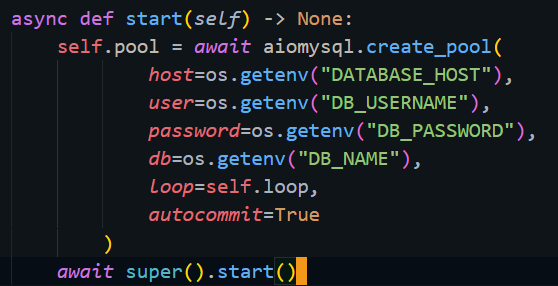
.start() takes in token as an arg cuz if I'm not wrong its called from .login()
oh wait, its ran from .run()
 blissful hazel
If you had copy pasted the code instead of a screenshot it would have taken less space 😉
sinful pivot
blissful hazel
If you had copy pasted the code instead of a screenshot it would have taken less...
didnt feel like copy pasting, did u find a solution tho
proud mason
sinful pivot
didnt feel like copy pasting, did u find a solution tho
change the parameters to (self, *args, **kwargs)
and pass *args, **kwargs to super start
sinful pivot
ok
sinful pivot
proud mason
change the parameters to `(self, *args, **kwargs)`
and pass `*args, **kwargs` to...
I seem to be getting a Unknown Interaction error everytime I run any of my commands now.
And all of em are guild commands (because I use the debug_guilds kwarg in commands.Bot)
proud mason
sinful pivot
I seem to be getting a Unknown Interaction error everytime I run **any** of my c...
 sinful pivot
huh?
sinful pivot
proud mason
that shouldnt be related at all ngl
discord.errors.ApplicationCommandInvokeError: Application Command raised an exception: NotFound: 404 Not Found (error code: 10062): Unknown interaction
wait 1s
Traceback (most recent call last):
  File "C:\Users\hp\AppData\Local\Programs\Python\Python311\Lib\site-packages\discord\bot.py", line 1114, in invoke_application_command
    await ctx.command.invoke(ctx)
  File "C:\Users\hp\AppData\Local\Programs\Python\Python311\Lib\site-packages\discord\commands\core.py", line 375, in invoke
    await injected(ctx)
  File "C:\Users\hp\AppData\Local\Programs\Python\Python311\Lib\site-packages\discord\commands\core.py", line 132, in wrapped
    raise ApplicationCommandInvokeError(exc) from exc
discord.errors.ApplicationCommandInvokeError: Application Command raised an exception: NotFound: 404 Not Found (error code: 10062): Unknown interaction```here ya go
proud mason
sinful pivot
```The above exception was the direct cause of the following exception:
Traceba...
there should be a bit more 
above the top line
sinful pivot
Mhm, you mean like the full full traceback?
proud mason

fervent cradle
proud mason
.rtfm embed.from
And is there any way I can convert an embed to json raw?
proud mason
fervent cradle
And is there any way I can convert an embed to json raw?
.rtfm embed.to
winter condorBOT
1 results

 soft girder
Hi guys . Can anyone post a list of errors.
you need to write a couple of commands like this one.
proud mason
soft girder
Hi guys . Can anyone post a list of errors.
you mean this?
https://docs.pycord.dev/en/stable/api/exceptions.html
Pycord
Exception Hierarchy:- Exception,-- DiscordException,-- ClientException,- InvalidData, InvalidArgument, LoginFailure, ConnectionClosed, PrivilegedIntentsRequired, InteractionResponded.,., NoMoreItem...
Pycord
The following section outlines the API of Pycord’s prefixed command extension module. Bots: Bot: Attributes activity, allowed_mentions, application_flags, application_id, cached_messages, case_inse...
soft girder
@очистка.error
async def clear_error(ctx,error):
    if isinstance( error, commands.MissingRequiredArgument):
        await ctx.send(f'{ctx.author.mention},обязательно укажите аргумент.')

    if isinstance( error, commands.MissingPermissions):
        await ctx.send(f'{ctx.author.mention},у вас нету прав на использование.')
@proud mason thx
🤗
 rich grail
does guild_only() not block the commands from being viewable in DMs?
i thought it used to, but i'm having commands show up using both guild_only() and commands.guild_only()
full basin
rich grail
does guild_only() not block the commands from being viewable in DMs?
No. It doesnt block commands from displaying
 sick quest
for some reason, the task loop in my discord bot just, stopped working
it works on my development computer, but on the server i'm hosting it, it just doesn't run (the next_iteration property returns None)
I've tried restarting it, changing the interval, even completely recloning the repository for the bot and restarting it
but it works completely fine on my local computer
proud mason
soft girder
<@454219912773107723> thx
np 🙃
proud mason
full basin
No. It doesnt block commands from displaying
pretty sure it used to
sinful pivot
Hi, how do I get the embed in a ephemeral msg
Like an embed is sent and the msg is ephemeral, how do I get that embed and modify it like changing the title etc (ik I can do it thru embed.title = "my title here" and then edit the msg)
proud mason
sick quest
but it works completely fine on my local computer
can you share python version and pip list on both, your computer and server
proud mason
sinful pivot
Like an embed is sent and the msg is ephemeral, how do I get that embed and modi...
do you not have access to the embed object?
sinful pivot
proud mason
do you not have access to the embed object?
No because I'm doing it in the view, like clicking a button on the view changes the embed
proud mason
get the 1st item (if you are only having 1 embed)
sinful pivot
does that exist
sinful pivot
proud mason
get the 1st item (if you are only having 1 embed)
yea but like HOW do i get the msg
I know .embeds exists
sinful pivot
Great ill lyk if it works
proud mason
cool
sinful pivot
Oh yeah and how do I edit a msg after I've sent a response?
proud mason
sinful pivot
Oh yeah and how do I edit a msg after I've sent a response?
interaction.edit_original_response is the best way
||Although that will stop working after 15 mins||
sinful pivot
Also I sent a modal as the resp, and I do .wait() on that modal, it doesn't actually end up waiting and just does the code right below it
Oh wait, it wasnt awaited, whoops
Wait uh
How tf do I take data back from the modal class? I tried to set a variable and then access that using ```py
my_modal = ModalClass()
.... # Wait stuff here
answer = my_modal.var_name
thats right
sinful pivot
but it returns None
proud mason
oh and dont forget to put self.stop() at the end of the modal callback
proud mason
sinful pivot
but it returns None
hmm and how do you set it?
sinful pivot
    async def creation(self, select: discord.ui.Select, interaction: discord.Interaction):
        message = interaction.message
        embed = message.embeds[0]
        if select.values[0] == "author":
            author_modal = TextModal(title="stuff here", text="text")
            await interaction.response.send_modal(author_modal)
            await author_modal.wait()
            author = author_modal.text
            print(author)

class TextModal(discord.ui.Modal):
    text: str | None = None

    def __init__(self, title: str, text: str) -> None:
        super().__init__(title=title)

        self.add_item(discord.ui.InputText(label=text, style=discord.InputTextStyle.long))

    async def callback(self, interaction: discord.Interaction):
        text = self.children[0].value
self.stop()```I do that
sinful pivot
self hmm, though the text var isnt set as a class var but sure ima change that
Lemme try that rq
Works but the embed errors out, what should I do here as I'm trying to reuse that same modal but just change the kwargs and handle everything in the select
proud mason
you cant reuse the same modal object
sinful pivot
yes I can lol
proud mason
you will need to create a new one
proud mason
ah ok
sinful pivot
How do I make the modal not error out
proud mason
send a response?
sinful pivot
But like what type of response?
proud mason
send_message ig
sinful pivot
alr its ok ima just re make modal classes for each thing ima do with the select
proud mason
proud mason
`send_message` ig
send a placeholder text like "Received" ephemerally if you dont want to send an actual response
sinful pivot
Also is there like a input thingy for links or how do I verify if the link is an asset or smth
Because I basically want to get a png from a modal or some way
proud mason
sinful pivot
Also is there like a input thingy for links or how do I verify if the link is an...
nothing which is discord native
you can check stuff using regex
sinful pivot
proud mason
you can check stuff using regex
Is there any method or a way to get the author name from an embed?
embed.author.name
Found it!
 warm grotto
I have this code here```py
import discord, asyncio, random
from discord.commands import slash_command, Option
from discord.ext import commands
from myfunctions import Load, Save
songs = ["CarelessWhisper"]
class Join(commands.Cog):
def init(self, client):
self.client = client
@slash_command(description="Joins a channel")
async def join(self, ctx):
if ctx.author.voice:
channel = ctx.author.voice.channel
try:
await channel.connect()
except:
await ctx.voice_client.move_to(channel)
Data = Load()
Data[str(ctx.guild.id)] = channel.id
Save(Data)
embed = discord.Embed(
title = "Joined Channel",
description = "Successfully joined channel. You can now enjoy the best music!",
color = discord.Color.green()
)
embed.set_footer(text="Powered by VersaDev.org")
if not ctx.guild.voice_client.is_playing():
ctx.guild.voice_client.play(source=f"file:{random.choice(songs)}.mp3")
Message = await ctx.respond(embed=embed)but when it comes to py
ctx.guild.voice_client.play(source=f"file:{random.choice(songs)}.mp3"), It runs into the error:
discord.errors.ApplicationCommandInvokeError: Application Command raised an exception: ClientException: Not connected to voice``` even when the bot is actually in the voice channel
Only py-cord is installed and not discordpy, yet it still does not play music
young bone
warm grotto
I have this code here```py
import discord, asyncio, random
from discord.commands...
what is your py-cord version?
warm grotto
young bone
what is your py-cord version?
2.2.2
young bone
update to the new version #library-updates
warm grotto
Great, thanks!
 green hinge
I created a paginator and wanted to have the paginator accutalize the pages at a certain interval. For this I created an update function that loads the new pages and then the view should be updated. Unfortunately this does not work the way I did it. Does anyone have an idea and can help me how to do this?
class PaginatorInfoView(Paginator):
async def __new__(cls, *args, **kwargs):
obj = super().__new__(cls)
await obj.__init__(*args, **kwargs)
return obj
async def __init__(self, bot: discord.Bot):
self.bot = bot
self.pages = await self.update_pages()
view = await self.generate_view()
custom_buttons =[#Code for Buttons]
super().__init__(pages=self.pages, use_default_buttons=False, custom_buttons=custom_buttons, custom_view=view, timeout=None, author_check=False)
asyncio.ensure_future(self.update_loop())
async def update_pages(self):
data = await dab.get_all_spots()
pages = []
spots_per_page = 6
# Erstelle eine neue Seite
embed = discord.Embed(title="Spotübersicht")
.
.
#embed.set_footer(text=spot_text)
pages.append(embed)
# Entferne NULL-Elemente
return [p for p in pages if p is not None]
async def update_loop(self):
while True:
self.pages = await self.update_pages()
self.update()
print("Pages updated")
await asyncio.sleep(30)
async def generate_view(self):
view = SpotDetails(self.bot)
return view``` novel yacht
code
@discord.user_command(name="Account Creation Date", guild_ids=[number])
    async def account_creation_date(ctx, *, member: discord.Member):
        await ctx.send(f"{member.name}'s account was created on {member.created_at}")```


error
Ignoring exception in command Account Creation Date:
Traceback (most recent call last):
File "/usr/local/lib/python3.8/dist-packages/discord/commands/core.py", line 124, in wrapped
ret = await coro(arg)
File "/usr/local/lib/python3.8/dist-packages/discord/commands/core.py", line 1571, in _invoke
await self.callback(self.cog, ctx, target)
TypeError: account_creation_date() takes 1 positional argument but 3 were given
The above exception was the direct cause of the following exception:
Traceback (most recent call last):
File "/usr/local/lib/python3.8/dist-packages/discord/bot.py", line 1114, in invoke_application_command
await ctx.command.invoke(ctx)
File "/usr/local/lib/python3.8/dist-packages/discord/commands/core.py", line 375, in invoke
await injected(ctx)
File "/usr/local/lib/python3.8/dist-packages/discord/commands/core.py", line 132, in wrapped
raise ApplicationCommandInvokeError(exc) from exc
discord.errors.ApplicationCommandInvokeError: Application Command raised an exception: TypeError: account_creation_date() takes 1 positional argument but 3 were given```
help pls)
 young bone
novel yacht
code
```py
@discord.user_command(name="Account Creation Date", guild_ids=[number...
young bone
novel yacht
code
```py
@discord.user_command(name="Account Creation Date", guild_ids=[number...
remove the *, and use ctx.respond
Learn all about Context Menus (User Commands & Message Commands) and how to implement them into your Discord Bot with Pycord!
novel yacht
young bone
remove the *, and use ctx.respond
 young bone
do you know basic python?
novel yacht
only started learning
 novel yacht
sorry
young bone
without the basic´s of Python you will have many problems creating a discord bot
novel yacht
young bone
without the basic´s of Python you will have many problems creating a discord bot
🤣 i founded problem
young bone
Pls learn Python first
full basin
And verbs conjugation
fervent cradle
view = CreateSuggestionView()
message = await interaction.response.send_message(content=PreviewMessage, embed=suggestion_embed, ephemeral=True, view=view)

view.message = message
send_message doesn't return message, any alternatives?
Like I just want this function here to have the message property
class CreateSuggestionView(ui.View):
  async def disable_all_items(self):
    for item in self.children:
      item.disabled = True
      await self.message.edit(view=self)
.rtfm interaction.original_response
winter condorBOT
1 results
full basin
fervent cradle
Like I just want this function here to have the message property
```python
class...
What?
Why are you trying to override a function?
fervent cradle
What it's supposed to do is disable all the buttons attached to the embed
Am i doing something wrong?
full basin
.rtfm View.disable_all_items
winter condorBOT
1 results
fervent cradle
damn
that makes my life easier
ty :o
Any idea why i got this error after switching to interaction.original_response btw?

it thinks the message is a coroutine object..?
view.message = interaction.original_response()
fervent cradle
winter condor
I'll still switch to this but i just wanna understand where i went wrong
oh i needed to await it 
nvm thanks for the help
OH
THIS IS PYCORD
why am i here
im a dumbass
 glossy tusk
Is there a way to listen to the sound the bot hears from the channel live from a different location?
 harsh canyon
glossy tusk
Is there a way to listen to the sound the bot hears from the channel live from a...
harsh canyon
glossy tusk
Is there a way to listen to the sound the bot hears from the channel live from a...
afaik theres no way in pycord to live stream audio only to record it
glossy tusk
glossy tusk
Is there a way to listen to the sound the bot hears from the channel live from a...
or there a way to record the sound as a single piece instead of it being specific to the user?
harsh canyon
ive been trying to work my own janky solution for voice commands but not much luck so far
glossy tusk
harsh canyon
ive been trying to work my own janky solution for voice commands but not much lu...
Is it impossible to access the sound data without interrupting the conversation
harsh canyon
afaik yes
glossy tusk
Is it possible to record the entire conversation as a single piece
not like @glossy tusk 's record etc.
harsh canyon
i think it should be
glossy tusk
I have tried manually combining different recording, but it becomes very chaotic because the recording starts with the sound action.
thank you btw
winter condorBOT
1 results
glossy tusk
I know but
This is save audio from sink.audio_data.items()
Different users audio in there
glossy tusk
okey thx a lot
proud mason
glossy tusk
or there a way to record the sound as a single piece instead of it being specifi...
Yes. PR is open
##1980
 errant craneBOT
proud mason
##1980
errant craneBOT
proud mason
##1980

GitHub
Summary Parameter responsible for whether the VoiceClient.start_recording method will record silence at the beginning and end of the recording What is the feature request for? The core library The ...
glossy tusk
Thx ı'll work on it
 magic pendant
Does the library support python 3.10?
glossy tusk
proud mason
Check that out
Wouldn't this method be faulty if a user joins the conversation and leaves after a very, very short time?
Or my brain had a hard time understanding the prepared algorithm for combining the sounds.
edit: Oh, or does it continue recording until the stop command comes after receiving the first sound from the user?
In other words, is the voice recording of a person who is included in the 50th second of a 100-second speech and comes out at the 55th second, is recorded as 50 seconds instead of 5 seconds? I don't have an environment to test this
 undone mulch
Failed to load slashes.py from ./cogs:
Extension 'cogs.slashes' raised an error: ImportError: cannot import name 'InputText' from 'discord.ui' (/home/container/.local/lib/python3.9/site-packages/discord/ui/__init__.py)
Failed to load casino.py from ./cogs/Casino:
Extension 'cogs.Casino.casino' raised an error: ImportError: cannot import name 'SlashCommandOptionType' from 'discord.enums' (/home/container/.local/lib/python3.9/site-packages/discord/enums.py)
Failed to load casino_misc.py from ./cogs/Casino:
Extension 'cogs.Casino.casino_misc' raised an error: ImportError: cannot import name 'SlashCommandOptionType' from 'discord.enums' (/home/container/.local/lib/python3.9/site-packages/discord/enums.py)
Failed to load casino_games.py from ./cogs/Casino:
Extension 'cogs.Casino.casino_games' raised an error: AttributeError: module 'discord' has no attribute 'Cog'
Failed to load miner_only.py from ./cogs:
Extension 'cogs.miner_only' raised an error: ImportError: cannot import name 'SlashCommandOptionType' from 'discord.enums' (/home/container/.local/lib/python3.9/site-packages/discord/enums.py)
Failed to load modals.py from ./cogs:
Extension 'cogs.modals' raised an error: ImportError: cannot import name 'InputText' from 'discord.ui' (/home/container/.local/lib/python3.9/site-packages/discord/ui/__init__.py)
/home/container/cogs/events.py:604: RuntimeWarning: coroutine 'BotBase.add_cog' was never awaited
  client.add_cog(events(client))
RuntimeWarning: Enable tracemalloc to get the object allocation traceback
Failed to load events.py from ./cogs:
Extension 'cogs.events' raised an error: TypeError: object NoneType can't be used in 'await' expression```

Why would I be getting these erorrs on one hosting service and not the other? Amazon Azure VPS doesn't have these issues but then when I use Bisects VPS it does? Any reasons?It's hard to know what code is correct if two different host give me code issues..
They're both using PyCord/on the same python version
glossy tusk
undone mulch
```py
Failed to load slashes.py from ./cogs:
Extension 'cogs.slashes' raised an ...
the environment variables or system paths could be different or the, or the vps service may not allow you to access or auto-access some locations. I think this is not an issue with python or pycord. Contact service providers
undone mulch
glossy tusk
the environment variables or system paths could be different or the, or the vps ...
Wdum by "the environment variables or system paths could be different"
proud mason
glossy tusk
Wouldn't this method be faulty if a user joins the conversation and leaves after...
Shouldn't be a problem
proud mason
undone mulch
```py
Failed to load slashes.py from ./cogs:
Extension 'cogs.slashes' raised an ...
I think this is a clear case of bad installation
Dpy is conflicting with pycord
proud mason
Uninstall dpy py-cord and any other discord related library. And reinstall py-cord
undone mulch
I have no access to those commands
proud mason
Oh hmm
proud mason
well pip uninstall works in the console right
undone mulch
Let me check
Nope

I have these only. But no commands can go into console
I just mention my packages in a requirements.txt
proud mason
glossy tusk
Or my brain had a hard time understanding the prepared algorithm for combining t...
There is a lot of info in https://discord.com/channels/881207955029110855/1087791762615050321
Check that out. If that is confusing, lmk I'll write a summary. It could be beneficial for others down the road
proud mason
Then create a new python file and put
import os
os.system("pip uninstall discord.py discord py-cord")
After that is done, change it to install py-cord
proud mason
undone mulch
Can I just do it in main.py?
Yea sure. But make sure to comment other stuff out for the time being
undone mulch
You should consider upgrading via the '/usr/local/bin/python -m pip install --upgrade pip' command.
Found existing installation: discord.py 2.2.2
Uninstalling discord.py-2.2.2:
  Would remove:
    /home/container/.local/lib/python3.9/site-packages/discord.py-2.2.2.dist-info/*
    /home/container/.local/lib/python3.9/site-packages/discord/*
  Would not remove (might be manually added):
    /home/container/.local/lib/python3.9/site-packages/discord/bot.py
    /home/container/.local/lib/python3.9/site-packages/discord/cog.py
    /home/container/.local/lib/python3.9/site-packages/discord/commands/__init__.py
    /home/container/.local/lib/python3.9/site-packages/discord/commands/context.py
    /home/container/.local/lib/python3.9/site-packages/discord/commands/core.py
    /home/container/.local/lib/python3.9/site-packages/discord/commands/errors.py
    /home/container/.local/lib/python3.9/site-packages/discord/commands/options.py
    /home/container/.local/lib/python3.9/site-packages/discord/commands/permissions.py
    /home/container/.local/lib/python3.9/site-packages/discord/ext/pages/__init__.py
    /home/container/.local/lib/python3.9/site-packages/discord/ext/pages/pagination.py
    /home/container/.local/lib/python3.9/site-packages/discord/iterators.py
    /home/container/.local/lib/python3.9/site-packages/discord/scheduled_events.py
    /home/container/.local/lib/python3.9/site-packages/discord/sinks/__init__.py
    /home/container/.local/lib/python3.9/site-packages/discord/sinks/core.py
    /home/container/.local/lib/python3.9/site-packages/discord/sinks/errors.py
    /home/container/.local/lib/python3.9/site-packages/discord/sinks/m4a.py
    /home/container/.local/lib/python3.9/site-packages/discord/sinks/mka.py
    /home/container/.local/lib/python3.9/site-packages/discord/sinks/mkv.py
    /home/container/.local/lib/python3.9/site-packages/discord/sinks/mp3.py
    /home/container/.local/lib/python3.9/site-packages/discord/sinks/mp4.py
    /home/container/.local/lib/python3.9/site-packages/discord/sinks/ogg.py
    /home/container/.local/lib/python3.9/site-packages/discord/sinks/pcm.py
    /home/container/.local/lib/python3.9/site-packages/discord/sinks/wave.py
    /home/container/.local/lib/python3.9/site-packages/discord/types/raw_models.py
    /home/container/.local/lib/python3.9/site-packages/discord/types/scheduled_events.py
/home/container/.local/lib/python3.9/site-packages/discord/ui/input_text.py```Said in console that it was being removed. But it says "Would not remove"
proud mason
undone mulch
Said in console that it was being removed. But it says "Would not remove"
What would it not remove
Oh wait put -y in there iirc
undone mulch

Wdum -y
I never use the os module 💀
I am used to using console linux but this host is diff
proud mason
undone mulch
Wdum -y
pip uninstall -y ...
proud mason
undone mulch
Oh
undone mulch
I can't use commands
proud mason
No put that in the os.system cmd
undone mulch
import os
os.system("pip uninstall -y discord.py discord py-cord")
proud mason
undone mulch
Uhh if that doesn't work then delete the discord folder from site packages yourself
undone mulch
You should consider upgrading via the '/usr/local/bin/python -m pip install --upgrade pip' command.
Found existing installation: discord.py 2.2.2
Uninstalling discord.py-2.2.2:
Successfully uninstalled discord.py-2.2.2
undone mulch
It might reinstall every restart 💀
undone mulch
Maybe I can keep that at the top of the code if that is the case
import importlib

# Replace 'module_name' with the name of the module you want to check
module_name = 'numpy'

try:
    importlib.import_module(module_name)
    print("True")
except ImportError:
    print("False")```

Let me try thisThat will slow down your startup time by a lot
undone mulch
trying stuff now let me check if it reinstalls
#import os
#os.system("pip uninstall discord.py discord py-cord")

import importlib

# Replace 'module_name' with the name of the module you want to check
module_name = 'discord.py'

try:
    importlib.import_module(module_name)
    print("True")
except ImportError:
print("False")```Is discord.py listed like this in module?
Cause this is printing false which is good..
undone mulch
proud mason
Bruh wtf 💀
Yup still installed
Let me try manually deleting every time with the code
discord.py py-cord has been uninstalled
/home/container/syst.py:11: RuntimeWarning: coroutine 'BotBase.load_extension' was never awaited
client.load_extension((f"{path[2:]}/{filename[:-3]}").replace("/", "."))
RuntimeWarning: Enable tracemalloc to get the object allocation traceback```
💀 torn helm
hi, how can i get the name of a Member in one guild? if i use member.name it returns, for example, Snakeice#7702, my global name, non maybe "Superpippo", my name in that server. Thanks!
glossy tusk
proud mason
There is a lot of info in https://discord.com/channels/881207955029110855/108779...
I think you should. I've been looking for a few days and I'm having a hard time understanding them.
proud mason
torn helm
hi, how can i get the name of a Member in one guild? if i use member.name it ret...
.rtfm member.nick
winter condorBOT
2 results
proud mason
glossy tusk
I think you should. I've been looking for a few days and I'm having a hard time ...
Hmm alr ig
torn helm
proud mason
.rtfm member.nick
Thanks!
glossy tusk
@proud mason
If the user is on the channel at the beginning of the recording and then leaves the channel and reconnects after a while, the time difference in the recording disappears. Can you detect and equalize the time difference?
proud mason
glossy tusk
<@454219912773107723>
If the user is on the channel at the beginning of the rec...
Oh it disappears? Like no silence between leaving and joining?
glossy tusk
yeah
proud mason
I feel this happens because data.timestamp gets paused when the user leaves
It is like discord really doesn't like us to receive audio 💀
glossy tusk
Ironically the worst created part of discord
proud mason
Separate timestamps for all users. No way to coordinate between timestamps of different users
Now i really wonder whether audio should be timed based on data.timestamp or actual packet receiving time
glossy tusk
Join and speak 10 second and leave. 10 seconds After, join and speak 10 seconds. The recording 20 seconds. WTF
Where is my 10 seconds .d
proud mason
proud mason
Now i really wonder whether audio should be timed based on data.timestamp or act...
I really didn't want to do this, but ig a solution which primarily uses data.timestamp and actual packet receiving time as backup is needed
glossy tusk
proud mason
I really didn't want to do this, but ig a solution which primarily uses data.tim...
I'm not skilled enough to understand your solution. Only in the classical recording method, I do not feel the time difference when the user leaves and then reconnects to the channel. Isn't this solved by your method?
Even if there are 10 seconds in between, the sound is combined instantly.
For example;
I connect and said hello. And then I left the channel and waited 5-6 seconds. Then I connected and said hello again.
But the recording is 2 seconds.
 proud mason
glossy tusk
I'm not skilled enough to understand your solution. Only in the classical record...
proud mason
glossy tusk
I'm not skilled enough to understand your solution. Only in the classical record...
My solution solves the cases where new users join or start speaking a while later than when the recording started
Although i can think of a way
What if i remove the user from the internal dict when he leaves
glossy tusk
proud mason
What if i remove the user from the internal dict when he leaves
Will this make the user have two different records?
oh my god, my brain is exploding when I think about this and the possible solutions and the problems that may arise due to the solutions. I think I'll give up
green hinge
I created a paginator and wanted to have the paginator accutalize the pages at a certain interval. For this I created an update function that loads the new pages and then the view should be updated. Unfortunately this does not work the way I did it. Does anyone have an idea and can help me how to do this?
class PaginatorInfoView(Paginator):
    async def __new__(cls, *args, **kwargs):
        obj = super().__new__(cls)
        await obj.__init__(*args, **kwargs)
        return obj

    async def __init__(self, bot: discord.Bot):
        self.bot = bot
        self.pages = await self.update_pages()
        view = await self.generate_view()
        custom_buttons =[#Code for Buttons]
        super().__init__(pages=self.pages, use_default_buttons=False, custom_buttons=custom_buttons, custom_view=view, timeout=None, author_check=False)

        asyncio.ensure_future(self.update_loop())

    async def update_pages(self):
        data = await dab.get_all_spots()
        pages = []
        spots_per_page = 6

        # Erstelle eine neue Seite
        embed = discord.Embed(title="Spotübersicht")
          .
          .
            #embed.set_footer(text=spot_text)
        pages.append(embed)

        # Entferne NULL-Elemente
        return [p for p in pages if p is not None]


    async def update_loop(self):
        while True:
            self.pages = await self.update_pages()
            self.update()
            print("Pages updated")
            await asyncio.sleep(30)


    async def generate_view(self):
        view = SpotDetails(self.bot)
return view```Yes possible
Oh wait
Hmm
Nope
 fringe socket
.rtfm rtfm
winter condorBOT
Target not found, try again and make sure to check your spelling.
fringe socket
.rtfm deez
winter condorBOT
Target not found, try again and make sure to check your spelling.
proud mason
novel yacht
how remove standart command help?
pass help_command = None to the bot constructor
novel yacht
proud mason
pass help_command = None to the bot constructor
in main py?
proud mason
yes
novel yacht
if i say nothing change? what to do?
bot = discord.Bot(intents=discord.Intents.all(), help_command=None)```how remove?(
novel yacht
mport discord
from discord.ext import commands

class general(commands.Cog):
    def __init__(self, bot):
        self.bot = bot
        self.help_command = None

    @discord.slash_command(name="help", description="Displays a list of available commands.")
    async def help(self, ctx):
        embed = discord.Embed(title="Help", description="Here's a list of my commands.", color=0x00ff00)
        await ctx.respond(embed=embed)

def setup(bot):
    bot.add_cog(general(bot))```
🙃
grizzled sentinel
Well you have a help command. You could remove that.
self.help_command = None is just setting a instance varible. It will not change anything.
grizzled sentinel
novel yacht
```py
mport discord
from discord.ext import commands
class general(commands.Cog...
Is that your full cog. Can you also show where you create bot.
novel yacht
import discord
import os # default module
from dotenv import load_dotenv
from config import *
import mysql.connector
load_dotenv() # load all the variables from the env file

bot = discord.Bot(intents=discord.Intents.all())
conn = mysql.connector.connect(
    host=DB_HOST,
    port=DB_PORT,
    database=DB_NAME,
    user=DB_USER,
    password=DB_PASSWORD
)


@bot.event
async def on_ready():
    print(f"{bot.user} is ready and online!")


#bot.load_extension('cmd.utility.welcome')
bot.load_extension('cmd.mod.report')
#bot.load_extension('cmd.mod.timeout')
bot.load_extension('cmd.utility.welcome')
bot.load_extension('cmd.utility.general')
bot.load_extension('cmd.main.check')
#bot.load_extension('cmd.utility.test')
bot.run(TOKEN)```And you do not have multiple bots running on the same token?
novel yacht
no
novel yacht
novel yacht
```py
mport discord
from discord.ext import commands
class general(commands.Cog...
genaral cog
grizzled sentinel
You are on the latest version of pycord?
novel yacht
checking
proud mason
novel yacht
```py
mport discord
from discord.ext import commands
class general(commands.Cog...
||that embed itself shows you have 5 help cmds somewhere||
young bone
@novel yacht did you already learn the basic´s of Python?
novel yacht
proud mason
||that embed itself shows you have 5 help cmds somewhere||
yea but in code only one msg
novel yacht
young bone
<@741957448532754493> did you already learn the basic´s of Python?
learing
grizzled sentinel
proud mason
||that embed itself shows you have 5 help cmds somewhere||
But they cant all be slash commands becouse that would through errors.
 covert kayak
Hi, how can I trace the button's custom_id parameter? For example, like: if view.custom_id = "for example":, is it workable? I'm subclassing the view.
grizzled sentinel
novel yacht
genaral cog
Can you find all embeds with that green color? And see if any of them look like the second embed that is sent
grizzled sentinel
covert kayak
Hi, how can I trace the button's `custom_id` parameter? For example, like: `if v...
You would have to get the custom_id of a item like button not the view.
Also generally custom ids are random and unique
covert kayak
grizzled sentinel
You would have to get the custom_id of a item like button not the view.
I'm not sure how to do that
 young bone
covert kayak
young bone
covert kayak
you already did it
covert kayak
really
proud mason
button.custom_id when accessing in the callback
grizzled sentinel
covert kayak
Hi, how can I trace the button's `custom_id` parameter? For example, like: `if v...
view.children
Returns a list of buttons.
So like view.children[0].custom_id
proud mason
view should be an object btw
covert kayak
I mean if the user clicks the button Test, the value I will get is going to be test
As a way to see which button the user clicked
proud mason
you just use button.label too ?
covert kayak
Is there anything such as view.action?
grizzled sentinel
What do you want to do when the user clicks the button?
covert kayak
So I want to simply know which button the user clicked
And feed that information to another function outside the view class
grizzled sentinel
interaction.message will give the message the button is attached to. Would that be enough?
covert kayak
Is that to be used inside the callback function?

can I do this instead, using self.action
full basin
If you're subclassing the view why not just also add the buttons there with their callbacks?
covert kayak
I'm going to need to load the the user's data from the database and use buttons to interact with these data. I'm at a loss about how to access data between callback functions without using global
So I think I'm should just see which button the user clicked and create an external function that handle the callback
grizzled sentinel
So do you have a command that gets the data and sends the buttons?
covert kayak
Yes, all left is to find a way to know which button the user's clicked
grizzled sentinel
That is what the callback is for. When the button is clicked the callback function is called.
So you can send the message with the data in the callback or similar.
covert kayak
I'm trying to interact with the same data between callbacks tho

Like this, but when I run the code it says 'int' object has no attribute 'value'
grizzled sentinel
Can you show the full error
 shut hedge
Is there a way to pull my "snowflake" then embed the photo within a command as a picture varible. Because right now I just have it hard coded in under author command. That has been interesting and reminded me I need to figure out a stop/shut command for the bot because I accidentally made mine into what is best described as a Daemon/zombie process but on windows. when I didn't have error handling. It used another completely unrelated comand though lol.
covert kayak
grizzled sentinel
Can you show the full error
here it is
 shut hedge
Is there a way to pull my "snowflake" then embed the photo within a command as a...
shut hedge
shut hedge
Is there a way to pull my "snowflake" then embed the photo within a command as a...
I have dyslexia and I know I chose like the worst thing to do for a career (programmer) so if it's in the docs is there anywhere that it would happen to be in a video series or someone would recommend? I get read the docs but I am the same guy who missed a .01 and could not figure out why it would work so feel free to call me dumb as you link/ dm a good playlist please?
grizzled sentinel
covert kayak
here it is
Your style needs to be of this type not an int
https://docs.pycord.dev/en/master/api/enums.html#discord.ButtonStyle
Pycord
The API provides some enumerations for certain types of strings to avoid the API from being stringly typed in case the strings change in the future. All enumerations are subclasses of an internal c...
grizzled sentinel
shut hedge
Is there a way to pull my "snowflake" then embed the photo within a command as a...
I think what you want is
.rtfm discord.Bot.get_user
winter condorBOT
covert kayak
covert kayak
So I should fix style=primary in __init__ perhaps?
grizzled sentinel
Style=discord.ButtonStyle.primary
 warm grotto
So I have been getting this error for the past couple of days, and seems to be having it constantly. The error does not seem to reference any of my code, so I'm not sure how I could fix it in on my end, but regardless, I don't recall using webhooks in my bot

But sometimes, I get interaction never responded, even though I have ctx.defer() in the application command
grizzled sentinel
warm grotto
So I have been getting this error for the past couple of days, and seems to be h...
Do you use ext.tasks? If so please post the code for the task and the after task code if any.
limber urchin
Well the error means you're trying to do something on something that doesn't exist. Like deleting a message that has already been deleted.
 strange cradle
if you make a role using the bot, can you define the role position? in the hierarchy?
livid wolf
How do I get the users roles?
@team.command(description="Send a team invite via DM")
async def invite(ctx, member: discord.Member):
  """Team Member Invite Handler"""
  requestedMember = await bot.fetch_user(member)
  userRoles = discord.Member.roles(requestedMember)
  await ctx.respond(f"{userRoles}") # Testing purposes
do you know basic python?
full basin
strange cradle
if you make a role using the bot, can you define the role position? in the hiera...
.rtfm create_role
winter condorBOT
1 results
 rapid lintel
Is there a way to get a user's server/display banner like with display_name and display_avatar?
 cyan quail
rapid lintel
Is there a way to get a user's server/display banner like with display_name and ...
cyan quail
rapid lintel
Is there a way to get a user's server/display banner like with display_name and ...
display_avatar is already the guild avatar
banner isn't available on api
 stuck canopy
yo its ronny
 delicate harbor
is there a way to get all threads of a specific channel ? please ping when you reply
 glad remnant
Hey, is there a way how to "Force Stop" select menu? My code is working just every time getting interaction failed even tho im getting selected option.
proud mason
glad remnant
Hey, is there a way how to "Force Stop" select menu? My code is working just eve...
Are you not sending a response?
glad remnant
I am. Into another function
 clever hinge
hey there quick, really basic question, how can I reply to a slash command with nothing? I have this slash command that sends a webhook, can't figure out how to close the slash command thing without it erroring out
limber urchin
You can't respond with nothing to a slash command, the best thing you can do is an ephemeral message saying "Webhook sent!" or something.
clever hinge
alright, thanks
green hinge
Can someone help me how to make my paginator update every 10 minutes?
Unfortunately, my approach doesn't work that way.
class PaginatorInfoView(Paginator):
async def __new__(cls, *args, **kwargs):
obj = super().__new__(cls)
await obj.__init__(*args, **kwargs)
return obj
async def __init__(self, bot: discord.Bot):
self.bot = bot
self.pages = await self.update_pages()
view = await self.generate_view()
custom_buttons =[#Code for Buttons]
super().__init__(pages=self.pages, use_default_buttons=False, custom_buttons=custom_buttons, custom_view=view, timeout=None, author_check=False)
asyncio.ensure_future(self.update_loop())
async def update_pages(self):
data = await dab.get_all_spots()
pages = []
spots_per_page = 6
# Erstelle eine neue Seite
embed = discord.Embed(title="Spotübersicht")
.
.
#embed.set_footer(text=spot_text)
pages.append(embed)
# Entferne NULL-Elemente
return [p for p in pages if p is not None]
async def update_loop(self):
while True:
self.pages = await self.update_pages()
self.update()
print("Pages updated")
await asyncio.sleep(600)
async def generate_view(self):
view = SpotDetails(self.bot)
return view``` copper flower
Hey! I'm trying to define a slash command with SlashCommandGroup and change its name. I wrote this still I'm getting the attached Slash Command. My code is working in a Cog
 @reactionGroup.command(name='create')
    async def reaction_add(self, interaction: discord.Interaction) -> None:
        logging.info('hello world!')
        pass
I've looked into some examples but couldn't find the solution. How can I achieve /reaction create command?
 green hinge
limber urchin
You can't respond with nothing to a slash command, the best thing you can do is ...
green hinge
limber urchin
You can't respond with nothing to a slash command, the best thing you can do is ...
You can use await interaction.response.defer() so that there is no error. It's not the cleanest way but it works to avoid the "Interaction failed" error 🙂
limber urchin
green hinge
You can use `await interaction.response.defer()` so that there is no error. It's...
It's still going to fail after 30 minutes
green hinge
limber urchin
It's still going to fail after 30 minutes
Ah okay I did not know yet 🙂
green hinge
limber urchin
It's still going to fail after 30 minutes
Do you know a solution to my Paginator problem?
limber urchin
You didn't explain your problem, all you said is that it doesn't work
green hinge
limber urchin
You didn't explain your problem, all you said is that it doesn't work
My Paginator is not updated. I get the print that the pages have been updated but the Paginator still shows the old data.
I think that my async def update_loop(self): is not quite correct but I don't know how to do it right.
limber urchin
You need to edit the message with the updated view
copper flower
copper flower
Hey! I'm trying to define a slash command with SlashCommandGroup and change its ...
I fixed it by removing the interaction parameter and adding a ctx variable.
green hinge
limber urchin
You need to edit the message with the updated view
So I'm only missing this line?
await self.message.edit(view=self)
limber urchin
yes
leaden relic
how do you remove specific buttons in a view from another message?
i made the view = discord.ui.View.from_message(message) work but how do i remove an item using their custom id from this point?
green hinge
limber urchin
yes
Okay thanks I will give it a try
 real frost
Hello, i have a question, how to fetch kick
I know that guild have guild.fetch_ban, but have no guild.fetch_kick
So, how to fetch it?
limber urchin
Why would you need to fetch a kick?
proud mason
real frost
Hello, i have a question, how to fetch kick
I know that guild have guild.fetch_b...
audit logs is the only way i can think of
proud mason
leaden relic
how do you remove specific buttons in a view from another message?
i made the `...
is the message sent by you? if yes then dont rely on from_message you lose out on custom ids and callbacks
limber urchin
real frost
Hello, i have a question, how to fetch kick
I know that guild have guild.fetch_b...
The reason fetch_ban exists is to be able to fetch a BanEntry to then unban the user, there is no such thing as a KickEntry and you can't "unkick" a user so there's no reason for a fetch_kick to exist.
Audit logs are your best bet, unless you store a log of the kicks yourself
leaden relic
proud mason
is the message sent by you? if yes then dont rely on `from_message` you lose out...
i'm doing it from the modal's callback so i could access the interaction.message but not the view so i used from_message
now i did
view.clear_items()
view.add_item() #to add the item i want to remain
it now works as intended but is there a better way? like using custom_id?
leaden relic
proud mason
is the message sent by you? if yes then dont rely on `from_message` you lose out...
and what do you mean by lose out on custom_id and callbacks?
proud mason
leaden relic
and what do you mean by lose out on custom_id and callbacks?
the View.from_message method uses message.components to create a view. message.components is sent by discord with message objects. these do not have custom ids or callbacks (not sure about custom ids)
this is why passing the view object around is much more preferable
proud mason
leaden relic
i'm doing it from the modal's callback so i could access the `interaction.messag...
you could pass the view to the modal init
leaden relic
proud mason
the `View.from_message` method uses `message.components` to create a view. `mess...
so it's fine if i do clear_items then edit the message and add the views right?
proud mason
leaden relic
so it's fine if i do `clear_items` then edit the message and add the views right...
yes but why not just create a new view object instead of view.clear_items
leaden relic
proud mason
yes but why not just create a new view object instead of view.clear_items
making another view will add a new view class and i just want to retain a single button
ohhhh wait i just understand what you meant 🤣
same problem though since my button is in a separate button class so clear item is the best way for me unless i want to make a new view with only a single button
delicate harbor
delicate harbor
is there a way to get all threads of a specific channel ? please ping when you r...
anyone pls
winter condorBOT
56 total results
discord.TextChannel
discord.TextChannel.archived_threads
discord.TextChannel.available_tags
discord.TextChannel.can_send
discord.TextChannel.category
discord.TextChannel.category_id
discord.TextChannel.changed_roles
discord.TextChannel.clone
discord.TextChannel.create_invite
discord.TextChannel.create_thread
discord.TextChannel.create_webhook
discord.TextChannel.created_at
discord.TextChannel.default_auto_archive_duration
discord.TextChannel.default_sort_order
discord.TextChannel.default_thread_slowmode_delay
discord.TextChannel.delete
discord.TextChannel.delete_messages
discord.TextChannel.edit
discord.TextChannel.fetch_message
discord.TextChannel.flags
delicate harbor
proud mason
have you tried "reading the docs" ?
yes i have

TextChannel does have a property threads
but does it also gives threads which the bot is not part of ?
like, the bot has administrator permissions (its for my own server)
but if someone creates a thread then bot is not actually a part of it, you cannot see it in members tab
so i am asking whether with TextChannel.threads, will the bot be able to access to all those threads ?
thanks
proud mason
delicate harbor
so i am asking whether with TextChannel.threads, will the bot be able to access...
i believe you would need to use the thread events
.rtfm on_thread
winter condorBOT
delicate harbor
winter condor
ah, well i will use it now for future threads.
For older threads i have figured out a way by directly calling discord api with proper authorization, because i saw one or two endpoints of getting all threads whether public or private , archived or active. But ig there isnt any way to do so via pycord right ?
anyways much thanks
real frost
proud mason
audit logs is the only way i can think of
thanks i got it!
proud mason
delicate harbor
like, the bot has administrator permissions (its for my own server)
but if some...
Oh wait if the bot has admin perms then it should be able to see those threads even it isn't a member of the thread
 ornate current
class WarnSystem(commands.Cog):
    def __init__(self, bot):
        self.bot = bot

    @slash_command(name="warn", description="warn command", guild_ids=[guild_id])
    async def warn(self, ctx : discord.ApplicationContext):
        await ctx.respond(content="Yo ok", ephemeral=True)```
help :C.tag idw
winter condorBOT
Saying it doesn't work or asking what's wrong with this code is not helpful for yourself or others.
Describe what you expect and/or tried (with your code), and what isn't going right.
Please provide any errors you get for optimal assistance.
ornate current
@bot.event
async def on_ready():

    bot.load_extension('cogs.warn_system')

    print("Bot is now online!")
error:
discord.errors.ExtensionFailed: Extension 'cogs.warn_system' raised an error: ClientException: Callback for warn command is missing "context" parameter.
 ornate current
aiofiles           23.1.0
aiohttp            3.8.4
aiosignal          1.2.0
aiosqlite          0.18.0
anyio              3.6.2
async-generator    1.10
Async-OAuthlib     0.0.9
async-timeout      4.0.2
attrs              22.1.0
autopep8           2.0.0
blinker            1.5
cachetools         5.3.0
certifi            2022.12.7
cffi               1.15.1
chardet            4.0.0
charset-normalizer 2.1.1
chat-exporter      2.5.3
click              8.1.3
colorama           0.4.6
dnspython          2.3.0
emoji              2.2.0
ffmpeg-python      0.2.0
Flask              2.2.3
frozenlist         1.3.1
future             0.18.2
grapheme           0.6.0
h11                0.14.0
h2                 4.1.0
hpack              4.0.0
httpcore           0.16.3
httpx              0.23.3
hypercorn          0.14.3
hyperframe         6.0.1
idna               3.4
imageio-ffmpeg     0.4.7
itsdangerous       2.1.2
Jinja2             3.1.2
MarkupSafe         2.1.2
motor              3.1.1
multidict          6.0.2
numpy              1.23.4
oauthlib           3.2.2
openai             0.26.5
outcome            1.2.0
Pillow             9.4.0
pip                22.3.1
priority           2.0.0
py-cord            2.4.0
pycodestyle        2.9.1
pycparser          2.21
PyJWT              2.6.0
pymongo            4.3.3
PySocks            1.7.1
python-dateutil    2.8.2
python-dotenv      1.0.0
pytz               2022.7.1
Quart-Discord-any  2.2.2b1
requests           2.28.2
rfc3986            1.5.0
roblox             2.0.0
setuptools         65.5.0
six                1.16.0
sniffio            1.3.0
sortedcontainers   2.4.0
toml               0.10.2
tomli              2.0.1
tqdm               4.64.1
trio               0.22.0
trio-websocket     0.9.2
typing_extensions  4.5.0
urllib3            1.26.14
websockets         10.4
Werkzeug           2.2.3
wsproto            1.2.0
yarl 1.8.1```then
proud mason
ornate current
then
Anywhere before bot.run
Like
bot = ...

...

bot.load_extension(...)

bot.run(...)
Rip lol
proud mason
ornate current
```py
class WarnSystem(commands.Cog):
def __init__(self, bot):
self....
||you have it here tho||
ornate current
oh thanks works now
ornate current
ornate current
```py
@bot.event
async def on_ready():
bot.load_extension('cogs.warn_system...
that is why i got this error
removed it after sending that message
me dumb
livid wolf
young bone
do you know basic python?
I have been coding in python for over a year or two
limber urchin
The time you've been coding doesn't matter at all, it's about your skill level
young bone
livid wolf
I have been coding in python for over a year or two
Im asking because you fetch the user again but you already got the user
livid wolf
So then how would I get the users roles?
limber urchin
Why are you fetching the user in the first place? You already have a member object
livid wolf
Or does this do it? (to get users roles)
@team.command(description="Send a team invite via DM")
async def invite(ctx, member: discord.Member):
  """Team Member Invite Handler"""
  userRoles = discord.Member.roles(member)
  await ctx.respond(f"{userRoles}") # testing
member.roles where member is an object of the class discord.Member
limber urchin
You need to know OOP before using pycord
ornate current
what are debug_guilds? in slash commands
livid wolf
limber urchin
You need to know OOP before using pycord
Sorry to ask, but whats OOP
limber urchin
livid wolf
Sorry to ask, but whats `OOP`
Exactly
livid wolf
._.
leaden relic
object oriented programming
livid wolf
ah ok
ornate current
ornate current
what are `debug_guilds`? in slash commands
can someone help me with this?
i am using guild_ids for now but what are debug_guilds?
limber urchin
ornate current
i am using `guild_ids` for now but what are `debug_guilds`?
You don't specify debug_guilds in a slash command, you pass it to your bot's init to automatically pass guild_ids to all your slash commands
.rtfm debug_guilds
winter condorBOT
Target not found, try again and make sure to check your spelling.
limber urchin
.rtfm Bot.debug_guilds
winter condorBOT
Target not found, try again and make sure to check your spelling.
limber urchin
k
leaden relic
it's under slash commands i guess
ornate current
limber urchin
You don't specify debug_guilds in a slash command, you pass it to your bot's ini...
alright, but what does it do? do i need to use it if i am using this command to test
ornate current
limber urchin
<https://docs.pycord.dev/en/stable/api/clients.html#discord.Bot.debug_guilds>
kk
 meager heron
I've got a bot that's near to the point where I will be forced to shard. According to https://guide.pycord.dev/popular-topics/sharding/#what-is-sharding, all I need to do is change my bot class to AutoShardedBot, which sounds great!
However, I'm seeing another dev (d.js in this case) saying he had to completely rewrite his bot to account for sharding, which has me a little worried.
Are there any special caveats/pitfalls I need to beware when sharding?
full basin
Why take into account what someone that uses d.js said when you're using py-cord?
And the guide, just like you said, tells you to just change the instance
cyan quail
meager heron
I've got a bot that's near to the point where I will be forced to shard. Accordi...
in the case you mentioned, at a very large scale you would inevitably have to rewrite code for sharding/clustering regardless of the library
but using the built in sharding tools you shouldn't need to
green hinge
Can someone explain to me how to get my Paginator persistens?
Unfortunately it does not work with the on_ready method. I don't get an error message, the print is also printed but the paginator still doesn't work after a bot restart.
Can someone explain me what I do wrong or how I get my Paginator persistent?
class Base(commands.Cog):
    def __init__(self, bot):
        self.bot = bot
        self.persistent_views_added = False

    @commands.Cog.listener()
    async def on_ready(self):
        if not self.persistent_views_added:
            self.bot.add_view(await PaginatorInfoView(self.bot))
            self.bot.add_view(SpotDetails(self.bot))
            print("Views added")
            self.persistent_views_added = True

    @commands.command(name="showspot", help="Zeigt alle Spots an")
    async def page(self, ctx):
        paginator = await PaginatorInfoView(self.bot)
        await paginator.send(ctx)
Can you give an example of something that might have to be rewritten at that scale, even at just a high level concept? The guide suggests you don't have to rewrite anything at all
cyan quail
meager heron
Can you give an example of something that might have to be rewritten at that sca...
well you'd mainly have to reduce api calls and structure other stuff to work around multiple connections, or even multiple servers/machines if you're at that large a scale
but you wouldn't need this until you hit like, 10s of thousands of guilds or so
sharding alone should be fine for a few thousand
meager heron
Cool, thanks
I wasn't sure if I'd need to rewrite my database cache, for instance. It doesn't seem like I would, since it's keyed off of guilds and guilds are isolated to shards, but that's why I asked if there are any obvious pitfalls
cyan quail
heck, clustering is only possible at 150k guilds probably way less, but point being you shouldn't need to worry
meager heron
Unlikely I'll ever get that big. The community I'm serving is small
 iron mesa
I know that discord implemented a thing where you can send timedate that is displayed in local time zone. Does pycord implement that and if so what is it named or where in docs can I find it?
winter condorBOT
<t:1664318247:t>
<t:1664318247:T>
<t:1664318247:d>
<t:1664318247:D>
<t:1664318247:f>
<t:1664318247:F>
<t:1664318247:R>
<t:1664318247:t>
<t:1664318247:T>
<t:1664318247:d>
<t:1664318247:D>
<t:1664318247:f>
<t:1664318247:F>
<t:1664318247:R>
API Reference: https://github.com/discord/discord-api-docs/blob/ff4d9d8ea6493405a8823492338880c47fb02996/docs/Reference.md#timestamp-styles
See discord.utils.format_dt for the discord.py implementation.
https://docs.pycord.dev/en/stable/api.html#discord.utils.format_dt
limber urchin
@iron mesa 
iron mesa
Thank you!
fervent cradle
Is there any method to call when a user is in the server for X days?
or any other ways technically
proud mason
fervent cradle
Is there any method to call when a user is in the server for X days?
can you elaborate? do you want to do something when lets say 5 days have passed since the user has joined?
limber urchin
fervent cradle
Is there any method to call when a user is in the server for X days?
There are a few ways, the way I'd probably do it is to set up an event handler for member joins and add the member to a database table along with the current datetime. Then set up a task that runs every 24 hours and compares the join date with the current date.
That way you can only store the members you actually want to track. As opposed to iterating through all members of all servers.
 coarse cargo
Hey guys, i would like to ask what is the best format for make a config file in python, i tried yaml but it doesnt really convince me
young bone
coarse cargo
Hey guys, i would like to ask what is the best format for make a config file in ...
Json?
coarse cargo
I dont really like the syntax of it as some people that doesnt know anything about coding would probably have some problems using it
young bone
coarse cargo
I dont really like the syntax of it as some people that doesnt know anything abo...
mhm, what is with InI or XML
coarse cargo
I will try .ini ty
limber urchin
yaml, json/hocon and ini are probably your best options. Otherwise you'll have to move onto making some sort of graphical configuration interface like a website or another python program that asks the user for values. Depends on how "non-coder" friendly you want to make it.
green hinge
Can I not use a local image as a thumbnail in the embed?
The thumbnail is not set but the image is sent large above the embed 🤔
file = discord.File(f"./Fische/{fisch}.png", filename=f"{fisch}.png")
embed.set_thumbnail(url=f'attachment://{fisch}.png')
interaction.response.send_message(embed=embed, File=file)
first the file and then the embed
green hinge
young bone
first the file and then the embed
The image is still packed large above the embed instead of as a thumbnail 😬
Use \:Emoji Name: in a channel and copy it to your code
 still helm
green hinge
Use `\:Emoji Name:` in a channel and copy it to your code
still helm
green hinge
Use `\:Emoji Name:` in a channel and copy it to your code
Thank you, it works !
proud mason
green hinge
Can I not use a local image as a thumbnail in the embed?
The thumbnail is not se...
f small in the kwarg name
file=file
Also the local file only works for the main image iirc
green hinge
proud mason
Also the local file only works for the main image iirc
Okay then I can't set the locale file as thumbnail?
proud mason
green hinge
Okay then I can't set the locale file as thumbnail?
i believe no
young bone
green hinge
Okay then I can't set the locale file as thumbnail?
.tias
winter condorBOT
green hinge
Okay then I can't set the locale file as thumbnail?
 green hinge
proud mason
i believe no
green hinge
proud mason
i believe no
If I send it as a normal embed then it goes into the thumbnail but in my paginator somehow not 🤔
Do I need to pass the embeds and files as a list with my Paginator?
pages.append(page)``` solemn idol
strange cradle
if you make a role using the bot, can you define the role position? in the hiera...
solemn idol
strange cradle
if you make a role using the bot, can you define the role position? in the hiera...
.rtfm edit_role_positions
winter condorBOT
1 results
solemn idol
ornate current
alright, but what does it do? do i need to use it if i am using this command to ...
You can use it in your Bot's class too, instead of having to add it to every single command... Just thought you'd wanna know :P
bot = discord.Bot(intents = intents, debug_guilds = """This is basically where you put the ID or multiple ID's""")
Hey there, im trying to use an emoji in a button but it throws Invalid emoji error. This is my code
button = Button(label=f"{ticketpanelconf['button_text']}", style=discord.ButtonStyle.green, emoji=f":{ticketpanelconf['button_emoji']}:")
and this is the data of button_emoji:
button_emoji: incoming_envelope
Anybody knows how to fix it? The format of the emoji looks good to me
young bone
coarse cargo
Hey there, im trying to use an emoji in a button but it throws `Invalid emoji` e...
where are the <>?
coarse cargo
The format for the discord emoji isnt :emoji_name:?
young bone
coarse cargo
The format for the discord emoji isnt :emoji_name:?
is it a discord or custom one?
coarse cargo
discord
📨 this one
really struggling with this thing i dont know why it doesnt work
grizzled sentinel
coarse cargo
really struggling with this thing i dont know why it doesnt work
\📨
Copy and paste this.
If you type out the emoji and put a \ in front of it. This will give you the raw unicode so that it will work in a python string instead of discords overlay. Than when sent, discord will overlay with there again.
 plain cave
Hey guys how would I read the contents of a message? like I basically want to do
@bot.slash_command(name = "read", description = "read message back to user")
async def info(message):
    await ctx.respond(message.content)
why so you send a empty message?
plain cave
No
young bone
also where is the ctx?
plain cave
I have a private bot testing server and want to try parsing my own address then passing it to an api and returning the date and time the ISS can be seen from my house
I could not get ctx to return the content of my message
young bone
Do you know basic python?
young bone
I'm asking because you have "ctx.respond" without the ctx in the function
 young bone
async def info(ctx, message):
    await ctx.respond(message)
It didn't work
young bone
Error?
plain cave
@bot.slash_command(name = "info", description = "for debugging")
async def info(ctx, message):
    await ctx.respond(message)
None
young bone
do you have anything else installed than py-cord?
plain cave
no
young bone
do you use discord.Bot?
young bone
plain cave
I actually intentionally uninstalled discord.py
before or after you installed py-cord?
plain cave
I forget, it was a while ago
young bone
what is the py-cord version?
plain cave
2.4.1
young bone
anything else than discord.py?
young bone
plain cave
Just looked at the list via `pip list` and no other discord libraries installed
does work? ```py
@bot.slash_command(name = "info", description = "for debugging")
async def info(ctx):
await ctx.respond("test")
can you uninstall and reinstall py-cord?
does the bot has the permissions to send messages?
plain cave
Yes
it has full admin permissions on my server and all intents enabled
Wait, I got it to work. I had a hello command that did basically the same thing so I copied it and replaced the name, description, and response fields and now it works?
Like the uninstall reinstall did not work but this did
young bone
mhm
young bone
^^
silver moat
plain cave
Hey guys how would I read the contents of a message? like I basically want to do...
you may be looking for Message Commands
errant craneBOT
Here's the context menus example.
silver moat
Learn all about Context Menus (User Commands & Message Commands) and how to implement them into your Discord Bot with Pycord!
plain cave
silver moat
you may be looking for Message Commands
I'll take a look, ultimately the response chain should be deleting the message if it's not a DM and then DM'ing the info back to the user for the ISS flyby
silver moat
plain cave
I'll take a look, ultimately the response chain should be deleting the message i...
then you may be looking for the on_message event.
.rtfm on_message
winter condorBOT
plain cave
can I combine this with the slash commands?
silver moat
plain cave
can I combine this with the slash commands?
what do you mean?
plain cave
@bot.slash_command(name = "info", description = "for debugging")
async def on_message(ctx, message):
    await ctx.respond(message)
 shut jasper
how do you restrict visibility of slash commands to a certain role?
i had the code earlier but i deleted it
silver moat
?tag xq
obtuse juncoBOT
 No tag
 xq found.
silver moat
plain cave
```py
@bot.slash_command(name = "info", description = "for debugging")
async def...
?tag xy
obtuse juncoBOT
An XY problem is when you're trying to ask about your attempted solution, rather than your actual problem.
You are trying to solve problem X, using solution Y. Instead of asking for help with X, you ask about Y. This only results in frustration as whoever is trying to help you needs to ask several questions before even beginning to help you with your actual issue, wasting both their own, and your time. Always include as much information as you can about your problem, including attempted solutions. If there are solutions you've ruled out, include them along with an explanation as to why you've ruled them out.
silver moat
.rtfm default_permission
winter condorBOT
1 results
plain cave
No
silver moat
What do you want to happen?
plain cave
I am asking if I can have the on message function nested under the slash command decorator so that I don't have to parse out manually the beginning of a command by doing something like `startswith("!flyover")
Basically I want to be able to type
/Flyover address
So that the message content only contains the address
silver moat
I'm not sure if you understand what a message is and the difference between that of a slash command argument
shut jasper
silver moat
.rtfm default_permission
that doesnt do role though?
silver moat
shut jasper
that doesnt do role though?
you cannot restrict the visibility of a slash command by role through a bot
shut jasper
silver moat
you cannot restrict the visibility of a slash command by role through a bot
oh
i can prevent people from using it tho?
silver moat
however, you can add internal checks, but other users without the role can still see it
.rtfm commands.has_role
winter condorBOT
1 results
shut jasper
ok thanks
 wary rover
Hello!
With this channel: discord.Option(discord.TextChannel, required=True) channels of type Announcement are not displayed. Any idea how to list only these channels?
 silver moat
.rtfm option.channel_types
winter condorBOT
Target not found, try again and make sure to check your spelling.
silver moat
wary rover
Something like this?
channel: discord.Option(discord.ChannelType.news, required=True)
No I have an error. :/
channel: discord.Option(input_type=discord.ChannelType.news, required=True)
silver moat
wary rover
Something like this?
```py
channel: discord.Option(discord.ChannelType.news, req...
no, something like
discord.Option(discord.TextChannel, channel_types = [discord.ChannelType....], ...)
Ok thanks!
 silver moat
shut jasper
silver moat
shut jasper
Learn all about implementing Select Menus or Dropdowns in your Discord Bot with Pycord.
shut jasper
silver moat
https://guide.pycord.dev/interactions/ui-components/dropdowns

so is this where i put my code
im making a subscription plan dropdown
silver moat
shut jasper
Yes, and I also recommend reading for more info
shut jasper
silver moat
Yes, and I also recommend reading for more info
if i just leave this in a channel, will it expire or something? or will users be able to keep using it
 silver moat
shut jasper
if i just leave this in a channel, will it expire or something? or will users be...
silver moat
shut jasper
if i just leave this in a channel, will it expire or something? or will users be...
views will no longer be functional after restart.
see
errant craneBOT
Here's the persistent example.
silver moat
for how to make views persist through restarts
shut jasper
oh ok thanks
shut jasper
silver moat
for how to make views persist through restarts
do u happen to have an example that doesnt use a class for the bot?
bot = discord.Bot(intents=intents)
im using this instead of a class
silver moat
you just have to adapt it.
bot = ...
bot.persistent_views_added = False

@bot.event
async def on_ready():
  if not bot.persistent_views_added:
    # add the view
    # set to true
  ...

i was getting this when i tried to adapt it thts why i asked
silver moat
shut jasper
yeah because the Pythonic way would be to inherit/extend it
shut jasper
silver moat
yeah because the Pythonic way would be to inherit/extend it
ValueError: View is not persistent. Items need to have a custom_id set and View must have no timeout
is this bc i didnt do the perisitent views added?
silver moat
shut jasper
ValueError: View is not persistent. Items need to have a custom_id set and View ...
no because the reason for the error is given in the error itself.
silver moat
send code for the view you are trying to make persistent
shut jasper
class PlanView(discord.ui.View):
    def __init__(self):
        super().__init__(timeout=None)
    @discord.ui.select(
        row=1,
        options=plan_options,
        placeholder="Choose a plan",
    )
    async def select_callback(self, select, interaction):
        chosen_plan = next((plan for plan in plans if plan["stripe_price_id"] == select.values[0]), None)
        if chosen_plan:
            await interaction.response.send_message(f"You've chosen the {chosen_plan['name']} plan.")
        else:
await interaction.response.send_message("Something went wrong. Please try again.")```this?
plan_options = [
    discord.SelectOption(label=plan["name"], value=plan["stripe_price_id"])
    for plan in plans
]```yeah your select menu doesn't have a custom_id
shut jasper
silver moat
yeah your select menu doesn't have a `custom_id`
sry where do i add that?
is it per option or for the whole thing?
silver moat
shut jasper
sry where do i add that?
  @discord.ui.select(
        row=1,
        options=plan_options,
        placeholder="Choose a plan",
+       custom_id = ...
  )
some string with a 30 (I think) character limit
shut jasper
silver moat
some string with a 30 (I think) character limit
ty it worked
shut jasper
ugh i decided to do a form instead based on member feedback so thats gonna be fun now
.rtfm modal
winter condorBOT
18 results
discord.ui.Modal
discord.ui.Modal.add_item
discord.ui.Modal.callback
discord.ui.Modal.children
discord.ui.Modal.custom_id
discord.ui.Modal.on_error
discord.ui.Modal.on_timeout
discord.ui.Modal.remove_item
discord.ui.Modal.stop
discord.ui.Modal.title
discord.ui.Modal.to_components
discord.ui.Modal.to_dict
discord.ui.Modal.wait
discord.InteractionType.modal_submit
discord.ApplicationContext.send_modal
discord.InteractionResponse.send_modal
discord.InteractionResponseType.modal
discord.ext.bridge.BridgeApplicationContext.send_modal

 young bone
shut jasper
SelectMenu isnt available in modals?
young bone
shut jasper
SelectMenu isnt available in modals?
no
 ocean pumice
Hey, when doing options with slash command, integer-only ones don't accept server IDs like 996922553266360360. Any thoughts why?
Is it viable to just make them integers in the code?
limber urchin
Because discord doesn't support numbers that large, you need to take a string and parse it in your code
ocean pumice
Okey, thanks
 nocturne canopy
is there a way to count how many messages one user sent in a server? or do i need to recursively search in every channel for the last 9 million messages and see how many match the user?
soft girder
Is it possible to write such a code that the button turns off at a certain time.
proud mason
soft girder
Is it possible to write such a code that the button turns off at a certain time.
i believe you are interested in timeouts
.rtfm view.on_timeout
winter condorBOT
1 results
proud mason
subclass and override that
disable the button you want in the view, and edit the msg
proud mason
nocturne canopy
is there a way to count how many messages one user sent in a server? or do i nee...
nope. no easy way. gotta go through the entire history of all the channels in the server
there is not recursion in this tbh...
simple plain looping
nocturne canopy
yeah that's what i was talking about, iterate i think is the word i was looking for
weird how that's not possible, since a normal user can just search messages from x and it spits out the whole history
fervent cradle
Hi
It this possible? I want to make sure before I try making it
a persistent view with a drop down of 3 items
If user chooses item it’ll show two buttons
If user chose a button it will run my code
However when you press the button I need the value of the item they chose in the dropdown
silver moat
yes
fervent cradle
silver moat
yes
Okay and I can do it ephemeral?
silver moat
yes
proud mason
nocturne canopy
weird how that's not possible, since a normal user can just search messages from...
discord doesnt offer that to bots unfortunately
nocturne canopy
boowomp
silver moat
So libraries implemented their own version of it
winter condorBOT
 silver moat
.rtfm view.timeout
winter condorBOT
Target not found, try again and make sure to check your spelling.
proud mason
silver moat
`history`?
history is available to bot api iirc. search isnt
silver moat
soft girder
It is a valid argument: https://docs.pycord.dev/en/master/api/ui_kit.html#discord.ui.View.timeout
Pycord
The library has helpers to help create component-based UIs. Shortcut decorators: Objects: Attributes children, disable_on_timeout, message, timeout. Methods cls View.from_message, def add_item, def...
proud mason
soft girder
oh yeah just set disable_on_timeout to True and set timeout as the number of seconds after which the buttons should be disabled
coarse cargo
Guys i have a view in a subclass and then a slash commands that should use the view of that class, but when i try to define the view with view=PanelView() it says its undefined. Any idea?
proud mason
coarse cargo
Guys i have a view in a subclass and then a slash commands that should use the v...
is the class in the same file as the slash cmd?
also full traceback please
also are you using the correct version of the file? ||and did you save the file 💀 ||
coarse cargo
proud mason
is the class in the same file as the slash cmd?
Yes they're in the same file and also i saved the file.
coarse cargo
proud mason
also full traceback please
Ignoring exception in command ticketpanel:
Traceback (most recent call last):
  File "C:\Users\Federico\AppData\Local\Programs\Python\Python39\lib\site-packages\discord\commands\core.py", line 113, in wrapped
    ret = await coro(arg)
  File "C:\Users\Federico\AppData\Local\Programs\Python\Python39\lib\site-packages\discord\commands\core.py", line 766, in _invoke
    await self.callback(ctx, **kwargs)
  File "c:\Users\Federico\Desktop\TicketBot\bot.py", line 152, in ticketpanel
    await channel.send(embed=embed, view=PanelView())
NameError: name 'PanelView' is not defined

The above exception was the direct cause of the following exception:

Traceback (most recent call last):
  File "C:\Users\Federico\AppData\Local\Programs\Python\Python39\lib\site-packages\discord\bot.py", line 755, in process_application_commands
    await ctx.command.invoke(ctx)
  File "C:\Users\Federico\AppData\Local\Programs\Python\Python39\lib\site-packages\discord\commands\core.py", line 312, in invoke
    await injected(ctx)
  File "C:\Users\Federico\AppData\Local\Programs\Python\Python39\lib\site-packages\discord\commands\core.py", line 119, in wrapped
    raise ApplicationCommandInvokeError(exc) from exc
discord.commands.errors.ApplicationCommandInvokeError: Application Command raised an exception: NameError: name 'PanelView' is not defined
You want the code?
Idk
proud mason
yes was gonna say just that 😂
coarse cargo
young bone
coarse cargo
https://paste.pythondiscord.com/maxiyuzive
you dont use ctx.respond in a slash command?
also view = Menu()?
silver moat
coarse cargo
https://paste.pythondiscord.com/maxiyuzive
The indentation is off. In order to use the view, the class has to be in the global scope.
coarse cargo
silver moat
The indentation is off. In order to use the view, the class has to be in the glo...
Oh im dumb didnt notice it, sorry
coarse cargo
young bone
also view = Menu()?
just another view class
Thanks to all of you, i fixed it.
 graceful mortar
Hey, you can make SlashCommandGroups. If I now create a group with e.g. "test", is there a possibility to use only the /test? And then /test 1, 2 etc. as well.?
young bone
graceful mortar
Hey, you can make SlashCommandGroups. If I now create a group with e.g. "test", ...

GitHub
Pycord, a maintained fork of discord.py, is a python wrapper for the Discord API - pycord/slash_cog_groups.py at master · Pycord-Development/pycord
graceful mortar
Sure, but there is only /greetings (hello, aloha), and I would like to be able to do only /greetings if possible.
proud mason
graceful mortar
Sure, but there is only /greetings (hello, aloha), and I would like to be able t...
not possible. discord limitation
it is because of the fact that subgroups are technically just option choices of the parent command
discord clients just render them differently
graceful mortar
Ah okay, all right. thx 😄
 novel jay
bot.get_channel(123) also works for categories, right?
full basin
Yes
novel jay
thx
fervent cradle
If an embed raw has the "contents" value, will it also be added as a message while using from_dict or will be ignored?
silver moat
fervent cradle
If an embed raw has the "contents" value, will it also be added as a message whi...
embeds don't have content. Messages have content
novel jay
The function input bot on __init__ in a commands.Cog cog is the type of commands.Bot yes?
silver moat
novel jay
The function input `bot` on `__init__` in a `commands.Cog` cog is the type of `c...
it can be whatever you want it to be
novel jay
when loading from bot.load_extension("cogs/cog")?
silver moat
yes
silver moat
iirc it is only there for you to access the bot object
novel jay
yeah
solemn idol
I am genuinely confused,
file = discord.File(f"assets/gifs/no.gif", filename=f"no.gif")
            em = discord.Embed(title="Error!", description="Why would I do that?.", color=em_red)
            em.set_image(url="attachment://no.gif")
            await ctx.respond(file = file, embed=em)
So for some reason, I cannot add images (gifs) to my embed, otherwise it will give me the error code :
discord.errors.NotFound: 404 Not Found (error code: 10062): Unknown interaction
young bone
solemn idol
I am genuinely confused,
```py
file = discord.File(f"assets/gifs/no.gif", filen...
code for the command?
solemn idol
# Mute
    @commands.has_permissions(moderate_members = True)
    @discord.slash_command(name = "mute", description = "Mutes a member.")
    @option("user", discord.Member, description="Choose a member.",)
    @option("reason", description="Reason for the user to be muted.", default="No reason provided", required=False)
    @option("days", description="Time for the user to be muted in days (optional).", required=False, default=0)
    @option("hours", description="Time for the user to be muted in hours (optional).", required=False, default=0)
    @option("minutes", description="Time for the user to be muted in minutes (optional).", required=False, default=0)
    @option("seconds", description="Time for the user to be muted in seconds (optional).", required=False, default=0)
    async def mute(self, ctx, user: discord.Member, reason: str, days: int, hours: int, minutes: int, seconds: int):
        unix_time = int(time.time())
        try:
            duration = timedelta(days = days, hours = hours, minutes = minutes, seconds = seconds)
        except OverflowError:
            file = discord.File(f"assets/gifs/no.gif", filename=f"no.gif")
            em = discord.Embed(title="Error!", description="Why would I do that?.", color=em_red)
            em.set_image(url="attachment://no.gif")
            await ctx.respond(file = file, embed=em)
            return
        user_role = discord.utils.get(user.roles, name='Muted')
        mute_role = discord.utils.get(ctx.guild.roles, name="Muted")
        if user.id == ctx.author.id:
            em = discord.Embed(title = "Error!", description = "You can't mute yourself, " + random.choice(insult), color = em_red)
            await ctx.respond(embed = em, ephemeral = True)
            return
...
its a mute command, but yeah the rest should be pretty irrelevant
just ping me if you have a solution ig
silver moat
solemn idol
I am genuinely confused,
```py
file = discord.File(f"assets/gifs/no.gif", filen...
It's taking longer than 3 seconds to respond. Consider using ctx.defer.
solemn idol
silver moat
It's taking longer than 3 seconds to respond. Consider using `ctx.defer`.
oh- that'd make sense lol didn't think of it. thanks
 shut jasper
plan_options = [
    discord.SelectOption(label=plan["name"], value=plan["stripe_price_id"])
    for plan in plans
]

# create a view for a dropdown for each plan in plans.yml
class PlanViewTest(discord.ui.View):
    def __init__(self):
        super().__init__(timeout=None)
    @discord.ui.select(
        row=1,
        options=plan_options,
        placeholder="Choose a plan",
    )
    async def select_callback(self, select, interaction):
        chosen_plan = next((plan for plan in plans if plan["stripe_price_id"] == select.values[0]), None)
        if chosen_plan:
            await interaction.response.send_message(f"You've chosen the {chosen_plan['name']} plan.")
        else:
            await interaction.response.send_message("Something went wrong. Please try again.")
im super confused with this, how do i make it so i can send code for each of the different options?
basically i need to have a changeable amount of options (plans that the user configures) so i have to use a for loop?
errant craneBOT
Here's the dropdown example.
shut jasper
i get that, but i need to have it scale for however many plans the user configures @silver moat
the example defines a set amount of plans

maybe i should say the end goal
a dropdown which spawns two buttons (one for one time payment and another for subscription), that button will open a modal asking for the users email, then it replies with a invoice link
but the invoice needs to know what plan to charge the user for
silver moat
imo this seems very insecure over a discord bot. Consider using a website with stripe instead.
shut jasper
hows it insecure?
i currently use a paid solution which uses a website but i want my own via a bot
payments are processed via a stripe invoice
api key is restricted in permissions
silver moat
well, I think it looks suspicious. Mostly because Discord Bots have been known to be involved with scams and such
shut jasper
i have a good reputation in the community i sell in, hundreds of reviews
but ye i get what you're saying
i dont believe its against discord tos as other popular payment bots exist
silver moat
well, you have the selected option(s) what else do you need?
shut jasper
well i need to create a two buttons after the user choses (which i can do)
then make a modal
i get that part
however i dont know how to then fetch what plan they chose after they submit email via modal
without manually setting up each option in the dropdown, which i cant do because i need to loop through all the user's plans
silver moat
just pass it as an argument through?
shut jasper
how do i do that?
plan_options = [
    discord.SelectOption(label=plan["name"], value=plan["stripe_price_id"])
    for plan in plans
]

# create a view for a dropdown for each plan in plans.yml
class PlanViewTest(discord.ui.View):
    def __init__(self):
        super().__init__(timeout=None)
    @discord.ui.select(
        row=1,
        options=plan_options,
        placeholder="Choose a plan",
    )
    async def select_callback(self, select, interaction):
        chosen_plan = next((plan for plan in plans if plan["stripe_price_id"] == select.values[0]), None)
        if chosen_plan:
            await interaction.response.send_message(f"You've chosen the {chosen_plan['name']} plan.")
        else:
            await interaction.response.send_message("Something went wrong. Please try again.")
#make a slash command to spawn the PlanViewTest```i dont see where i could put the arguement in the for loop
sry im not that good with python
this took me like 8 hours to make
silver moat
Do you know basic Python OOP?
silver moat
shut jasper
probably not rlly
Extending a class is a basic OOP concept.
silver moat
shut jasper
oh
Pycord is an advanced python library. You should have a solid understanding of fundamentals before starting to integrate with pycord.
shut jasper
silver moat
Pycord is an advanced python library. You should have a solid understanding of f...
ok
.rtfm modal
winter condorBOT
18 results
discord.ui.Modal
discord.ui.Modal.add_item
discord.ui.Modal.callback
discord.ui.Modal.children
discord.ui.Modal.custom_id
discord.ui.Modal.on_error
discord.ui.Modal.on_timeout
discord.ui.Modal.remove_item
discord.ui.Modal.stop
discord.ui.Modal.title
discord.ui.Modal.to_components
discord.ui.Modal.to_dict
discord.ui.Modal.wait
discord.InteractionType.modal_submit
discord.ApplicationContext.send_modal
discord.InteractionResponse.send_modal
discord.InteractionResponseType.modal
discord.ext.bridge.BridgeApplicationContext.send_modal
 vapid pumice
I'm having an issue when trying to host my bot that I actually ran into a few weeks ago.
I am getting:
"ImportError: cannot import name 'option' from 'discord' (/usr/local/lib/python3.10/dist-packages/discord/init.py)"
I have py-cord 2.4.0 installed, and my code is working just fine on my windows system, but it is getting hung up in my ubuntu system. I did a normal pip freeze, ported reqs, and now have encountered this issue.
Any clue what might cause this? Before, the problem was that my py-cord lib needed an update, but that's not the case here
wary rover
Hello!
I have a small question.
From a list of ID I get a list of channels.
I then try to do an auto completion but impossible to propose a custom channel list, any idea?
I am forced to give a list of channel names and retrieve the channel a second time, with the risk that the name is duplicated.
proud mason
vapid pumice
I'm having an issue when trying to host my bot that I actually ran into a few we...
do you have any other discord related library like dpy etc? uninstall that
also uninstall py-cord and reinstall it
see if that helps
proud mason
wary rover
I am forced to give a list of channel names and retrieve the channel a second ti...
you can return OptionChoice in the autocomplete
set the name as channel name and value as the id
.rtfm optionchoice
winter condorBOT
wary rover
proud mason
you can return OptionChoice in the autocomplete
set the name as channel name and...
I hadn't thought of that, it's a good idea! Thanks
vapid pumice
proud mason
see if that helps
Yep yep! Looks like I discord.py crept into my req doc somehow...thank you for always helping, NomNom
 bitter gull
sorry, why does the footer is not mentioned? I did set the footer's text to
"By: {ctx.author.mention}"

 storm oyster
ornate current
storm oyster
ornate current
how can i make slash commands limited to certain roles
proud mason
ornate current
how can i make slash commands limited to certain roles
.rtfm has_role
winter condorBOT
ornate current
doesn't seem to work
    @warn_class.command(name="view", description="Shows all the warns for a specified user", guild_ids=[guild_id])
    @commands.has_role(1088420607877730314)
    @discord.option(name="member", type=discord.SlashCommandOptionType.user, description="The member to view warns for", required=False)
async def view(self, ctx : discord.ApplicationContext, member):```@proud mason
no error
i want it so it only shows up for certain people
i could do it in js but not in py.. why?
young bone
ornate current
i want it so it only shows up for certain people
That is not possible for roles
Only for permissions
young bone
discord.default_permissions
fervent cradle
silver moat
embeds don't have content. Messages have content
Ik, but what if I pass this raw?
{
  "content": "Hello!",
  "embeds": [
    {
      "title": "hi",
      "description": "dasda",
      "color": null
    }
  ],
  "attachments": []
}```should i use bot.dispatch? is it good to use it?
limber urchin
Why would you?
proud mason
ornate current
should i use `bot.dispatch`? is it good to use it?
i can assure you there are better way to implement your features than using bot.dispatch 98% of the times
ornate current
I am trying to make an on_warn event
to make it organized
instead going on each command and doing stuff there
so what would you suggest?
limber urchin
Can't you just call the on_warn method in those places?
chrome skiff
has somebody a list of discord code block colors?
young bone
chrome skiff
has somebody a list of discord code block colors?
what?
there is not a list of code block colors


 young bone
google it ;3
limber urchin
Those are markdown syntax colors
Has nothing to do with Discord, and you can't control them
And there isn't a "list" of colors, the colors are decided by the syntax highlighting of the language you're writing in
fervent cradle
hey i was wondering, is there a way to mock and an interaction, like for example button press interaction, lets say i have a button and if the user does not press it in 20 seconds the bot can press it as it was the user who pressed it
solemn idol
em = discord.Embed(title = 'Test Embed!', description = 'Hell yeah', color = em_green) # em_green is a variable to hex color and works fine.
em.set_author(name=self.bot.user.name, # The Bot's Name (works fine, self because this embed is in a cog.)
url='https://google.com', # Here this is my issue, the Author name above, should become clickable in the embed, but for some reason it just doesn't
icon_url=self.bot.user.display_avatar.url) # The Bot's Avatar (works fine too, self because this embed is in a cog.)
What am I doing wrong with my url='https://google.com'
I mean https://google.com is a valid Url... so I am really confused here, docs say I can include url too soo... Yeah. I have no idea what I am doing wrong.
Search the world's information, including webpages, images, videos and more. Google has many special features to help you find exactly what you're looking for.
Oh my god I am an idiot. I made 2 embeds and it took the first one 
No more help needed 
proud mason
fervent cradle
hey i was wondering, is there a way to mock and an **interaction**, like for exa...
Well i can think of a way. Although how will you determine which user was going to press it?
Unless the callback is user indifferent
fervent cradle
well as of the moment let's say that i know 100% who is supposed to press it
it's some sort of turn based "game"
i just want to add a time for the turn, so the player doesnt intentionally make others wait
proud mason
If what you want to do it do stuff when button is pressed or 20s have passed and button not pressed, then what i was thinking is
For normal button press, call another function from the button and pass interaction.
For timeout,
Set view timeout to 20s. In the on_timeout method of the view, create any object (even object()) that has the parameters you would use from Interaction and then pass that to the function you would call from normal button press
Since python uses duck typing, the actual class won't matter
proud mason
fervent cradle
i just want to add a time for the turn, so the player doesnt intentionally make ...
Oh if you want to do different actions when button is pressed or timeout, just use on_timeout
proud mason
proud mason
If what you want to do it do stuff when button is pressed or 20s have passed and...
No need for this then
fervent cradle
proud mason
Oh if you want to do different actions when button is pressed or timeout, just u...
oh, didnt know that was a thing, thanks 😄 i guess i shouldve looked more into the docs 😄
ornate current
slash commands doesnt load. it loads in the first cog the main.py file loads but not the others
cogs = [
        "cogs.moderation_settings", #this cog has one command (and it works)
        "cogs.warn_system"]# this cog has 4 commands (doesnt load)


for filename in cogs:
bot.load_extension(filename)```.slashnoshow
winter condorBOT
ornate current
```py
cogs = [
"cogs.moderation_settings", #this cog has one command (a...
Checklist for Application Commands Not Showing Up:
• Does your bot have the application.commands scope?
• Are you loading cogs before on_ready and on_connect?
• Is on_connect not overridden?
• Did you update to the newest version of py-cord (tag: install)?
• Is User Settings > Accessibility > Chat Input > Use legacy chat input turned off?
• Did you share your code and errors?
• Do you still have libraries that conflict with the discord namespace (e.g. discord.py)?
ornate current
winter condor
**Checklist for Application Commands Not Showing Up:**
• Does your bot have the ...
nothing works 
and what do you mean by on_connect overriden
its not like all my commands are not loading its just that one cog
ornate current
class ModSettings(commands.Cog):
    def __init__(self, bot : discord.Bot):
        self.bot = bot

    modsettings_class = discord.SlashCommandGroup(name="modsettings", description="Everything related to moderation settings. Can only be set up by admins.", guild_ids=[guild_id])

    @modsettings_class.command(name="mod", description="Edit moderator roles", guild_ids=[guild_id])
    @discord.option(name="action", description="Choose actions to do moderator roles" ,autocomplete=["add", "view", "remove"])
    @discord.option(name="role", description="Role to do actions for. There is no need of this field if using the action \"view\"." ,autocomplete=modactions)
    async def mod(self, ctx, role):
      #code
def setup(bot):
    bot.add_cog(ModSettings(bot))```

cog 2do you have an on_connect ?
ornate current
nope on _ready
import discord
from discord.ext import commands
import os
from dotenv import load_dotenv
import time
import aiosqlite
from discord.ext import tasks
load_dotenv()
TOKEN = os.getenv("DISCORD_BOT_TOKEN")
guild_id = os.getenv("GUILD_ID")
intents = discord.Intents.all()
bot = commands.Bot(command_prefix="!", intents=intents, case_insensitive=True, debug_guild=guild_id)
bot.remove_command('help')
cogs = ["cogs.auto_actions",
        "cogs.moderation_settings",
        "cogs.warn_system"]


@bot.event
async def on_ready():
    print("Bot is now online!")

for filename in cogs:
bot.load_extension(filename)```I’m assuming modactions is defined
silver moat
ornate current
```py
import discord
from discord.ext import commands
import os
from dotenv impo...
are you on the newest pycord version
ornate current
class WarnSystem(commands.Cog):
    def __init__(self, bot):
        self.bot = bot
    warn_class = discord.SlashCommandGroup(name="warn", description="Everything related to... warns.", guild_ids=[guild_id])


    @warn_class.command(name="add", description="Warns a specified user", guild_ids=[guild_id])
    @discord.option(name="member", type=discord.SlashCommandOptionType.user, description="The member to warn")
    @discord.option(name="reason", type=str, description="Reason to warn the user", required=False, min_length=1, max_length=300)
    async def add(self, ctx : discord.ApplicationContext, member, reason : str=None):
      pass
    @warn_class.command(name="remove", description="Removes a warn for the specified user", guild_ids=[guild_id])
    @discord.option(name="member", type=discord.SlashCommandOptionType.user, description="The member to remove a warn for")
    @discord.option(name="warn id", type=discord.SlashCommandOptionType.integer, description="The warn to remove")
    @commands.has_permissions(administrator=True)
    async def remove(self, ctx : discord.ApplicationContext, member, warnid):
        pass
    @warn_class.command(name="view", description="Shows all the warns for a specified user", guild_ids=[guild_id])
    @discord.option(name="member", type=discord.SlashCommandOptionType.user, description="The member to view warns for", required=False)
    async def view(self, ctx : discord.ApplicationContext, member):
        pass
    @warn_class.command(name="clear", description="Clear all the warns for a specified user", guild_ids=[guild_id])
    @discord.option(name="member", type=discord.SlashCommandOptionType.user, description="The member to clear warns for", required=False)
    async def clear(self, ctx : discord.ApplicationContext, member):
        pass

def setup(bot):
bot.add_cog(WarnSystem(bot))```because debug_guild was removed way before alpha 1
silver moat
ornate current
```py
class ModSettings(commands.Cog):
def __init__(self, bot : discord.Bot...
I’m not sure what autocomplete = [“add”, “view”, “remove”] does
ornate current
oh hum
silver moat
autocomplete takes a coroutine with an argument of AutocompleteContext
errant craneBOT
Here's the buttons example.
 red geyser
bruh
errant craneBOT
Here's the confirm example.