#Basic Pycord Help (Quick Questions Only)
1 messages · Page 7 of 1
 silver moat
 lusty token
am i doing this right? python async def on_raw_reaction_add(self,payload:discord.RawReactionActionEvent): if self.messsage_id != payload.message_id: return else: if not payload.member.bot: message = await discord.TextChannel.fetch_message(id=payload.message_id) message.delete()
lusty token
Traceback (most recent call last):
  File "/home/pi/.local/lib/python3.9/site-packages/discord/client.py", line 382, in _run_event
    await coro(*args, **kwargs)
  File "/home/pi/S.H_pybot/profile.py", line 86, in on_raw_reaction_add
    message = await discord.TextChannel.fetch_message(id=payload.message_id)
TypeError: fetch_message() got some positional-only arguments passed as keyword arguments: 'id'```remove id=
lusty token
Traceback (most recent call last):
  File "/home/pi/.local/lib/python3.9/site-packages/discord/client.py", line 382, in _run_event
    await coro(*args, **kwargs)
  File "/home/pi/S.H_pybot/profile.py", line 86, in on_raw_reaction_add
    message = await discord.TextChannel.fetch_message(payload.message_id)
TypeError: fetch_message() missing 1 required positional argument: 'id'
is that the same?
no
ok good. Sometimes copying things from the VNC can be iffy
am i using the wrong fetch_message?
ok
it needed the Text channel
i tried it with user
it can't find the message still
 rare ice
lusty token
```Ignoring exception in on_raw_reaction_add
Traceback (most recent call last):
...
rare ice
lusty token
```Ignoring exception in on_raw_reaction_add
Traceback (most recent call last):
...
you can't fetch a message from discord.TextChannel since it's not an actual channel. You need to get the channel then fetch the message from that channel.
lusty token
ok, so
i got it to remove a reaction
but await message.delete() isn't removing the message
 meager heron
Is anyone having an issue with bot startup being very slow? This bot is only on ~350 servers, and it takes roughly two minutes to call on_ready. That only started being an issue in the last week or so
silver moat
meager heron
Is anyone having an issue with bot startup being very slow? This bot is only on ...
you mean chunk_guilds_on_startup?
lusty token
i have an if statement that has it so that if both of the options are None it sends an embed, both options are none, it's not sending the embed
meager heron
silver moat
you mean `chunk_guilds_on_startup`?
I don't even know what that is
Looks like I have it enabled, though, as Intents.members is True
What is the harm if it's false?
(Other than the caches may not be ready)
Looks like my main stumbling block will be pulling members from guilds if they aren't in the cache, since bot.fetch_guild(...) doesn't contain the member list
lusty token
What's the difference between on_reaction_add and on_raw_reaction_add


 full basin
 fervent cradle
I found a bug
fervent cradle
I found a bug
What
Regex is not pycord
Self bots are against tos.
You won't get help.
rare ice
Self bots are against tos, we don't provide support.
full basin
Did you just repeat what I said
 fiery tiger


whitelisted = fields.ManyToManyField("Bot.UserModel", on_delete=fields.SET_NULL, null=True, related_name="whitelisted")
vanity_whitelisted = fields.ManyToManyField("Bot.UserModel", on_delete=fields.SET_NULL, null=True, related_name="vanity_whitelisted")
issue should be coming from fields.ManyToManyField
looking at the relations i didn't do anything wrong
and idk if they got a support or msth
smth*, @waxen whale @rare ice this is what i meant
it will just be a empty value
 waxen whale
Don’t ping me
fiery tiger
ah sorry i just wanted to show u guys
is there a way to contact tortoise orm support? or?
rare ice
you literally just DMed me for support why should i help you if you're pinging me and other people for no reason.
rare ice
fiery tiger
is there a way to contact tortoise orm support? or?
yeah by contacting them maybe.
fiery tiger
its not support man i just know that bob has a fork for it
where can i contact them that's why i came in ur dms
i also contacted bob but i don't wanna message him a lot knowing that he is busy
fiery tiger
rare ice
yeah by contacting them maybe.
if you know how to contact them that would be great
because i personally don't know how to haha
waxen whale
-ban @fiery tiger I have enough
 wanton pondBOT
🔨 Banned xl_spooky#8874 indefinitely
waxen whale
And who tf deleted the message of the thread
 fervent cradle

 unreal shoal
Anyone here use sparked host using what python package link for pycord
fervent cradle
is there an event for when voice stops playing
 daring ginkgo
hii im tryna make a bot n the only event/method my terminal responds to is on_ready(). i tried making other events but my print statements dont come through. i also tried making a command but it doesn't come through on discord either. can anyone help ! ! im using anaconda 3.8
 grizzled sentinel
fervent cradle
is there an event for when voice stops playing
grizzled sentinel
fervent cradle
is there an event for when voice stops playing
I think this is the only voice event
https://docs.pycord.dev/en/master/api.html#discord.on_voice_state_update
fervent cradle
yeah, that wont work, we need it for the bot, not other users
grizzled sentinel
unreal shoal
Anyone here use sparked host using what python package link for pycord
?tag install
 obtuse juncoBOT
- Uninstall discord.py or any other forks of discord.py you might have with the namespace
discord.
python -m pip uninstall discord.py discord -y
2a. Install py-cord
python -m pip install py-cord
2b. Update py-cord
python pip install -U py-cord
Installing other builds:
Note: You need to have git installed. Use !git to find out how to install git.
Updating the module to Alpha (unstable):
pip install -U git+https://github.com/Pycord-Development/pycord
grizzled sentinel
2a is what you need i think
unreal shoal
uh
grizzled sentinel
fervent cradle
yeah, that wont work, we need it for the bot, not other users
You could check using this but I dont think there is a builtin event.
https://docs.pycord.dev/en/master/api.html#discord.VoiceClient.is_playing
unreal shoal
grizzled sentinel
You could check using this but I dont think there is a builtin event.
https://do...
im getting erro
ImportError: cannot import name 'PartialMessageable' from 'discord.channel'
fervent cradle
grizzled sentinel
You could check using this but I dont think there is a builtin event.
https://do...
is putting that on a timer and checking it every second a bad idea
grizzled sentinel
daring ginkgo
hii im tryna make a bot n the only event/method my terminal responds to is on_re...
Please post your code in your own thread. Than we can help pinpoint your problem
rare ice
fervent cradle
is putting that on a timer and checking it every second a bad idea
you shouldn't do it every second since you may get ratelimited.
grizzled sentinel
unreal shoal
ImportError: cannot import name 'PartialMessageable' from 'discord.channel'
And you have the latest version and no other python discord bot libs installed?
unreal shoal
im doing it on a hosting website
grizzled sentinel
fervent cradle
is putting that on a timer and checking it every second a bad idea
Os it possible to get the time of the audio and use asyncio to wait that time?
fervent cradle
yeah
grizzled sentinel
unreal shoal
im doing it on a hosting website
My guess is they auto install discord.py follow the steps on the message above to uninstall discord.py and install pycord
I assume you have console access?
grizzled sentinel
fervent cradle
yeah
Something along the lines of
async def waiter(audio):
    asyncio.wait(audio.duration)
await waiter(audio)
You might want to add 3 seconds to the waiter to make sure it is done to compensate for latency.
You might have to look deeper into async tho.
I'm not an expert on it
 restive harbor
Is there a way to make bridge commands only available in nsfw channels?
 proud pagoda
restive harbor
Is there a way to make bridge commands only available in nsfw channels?
proud pagoda
restive harbor
Is there a way to make bridge commands only available in nsfw channels?
Just add the decorator @commands.is_nsfw() to the command and then handle the NSFWChannelRequired exception raised when the channel is not NSFW in an error handler
 hushed ledge
One message removed from a suspended account.
One message removed from a suspended account.
silver moat
hushed ledge
One message removed from a suspended account.
Discord Developer Portal
Integrate your service with Discord — whether it's a bot or a game or whatever your wildest imagination can come up with.
hushed ledge
silver moat
https://discord.com/developers/docs/topics/rate-limits
One message removed from a suspended account.
restive harbor
proud pagoda
Just add the decorator `@commands.is_nsfw()` to the command and then handle the ...
does the commands.is_nsfw() work with the bridge_command decorator? it doesn't seem like it works for me
 lilac loom
Is it possible to pass a variable to a view class?
 ashen tiger
is there a way to support both calling a function asynchronously and synchronously for python? as in the only difference if you were to put await when calling it being that it does it asynchronously, and otherwise does it synchronously?
 wooden lodge
Hello, how can you get the ban Reason of a user by using on_member_ban?
I tryed it with
audit_logs = await ctx.guild.audit_logs(limit=1, action=discord.AuditLogAction.ban).flatten()```
But all i get is the action done by the Member who banned the UserEither when building the instance or just set it after
lilac loom
Ok ty
lilac loom
Any idea why this error happens?
AttributeError: 'View' object has no attribute 'children'
Happens when I try to init a self variable i think
lilac loom
lilac loom
Any idea why this error happens?
`AttributeError: 'View' object has no attribute...
Fixed it by adding super().__init__(timeout=30) to __init__
 frosty bramble
from discord.ext import commands
import re
import ast
import inspect

bot=commands.Bot(
    intents=discord.Intents.all(),
    help_command=None,
    command_prefix="$",
)

def source(o):
    s = inspect.getsource(o).split("\n")
    indent = len(s[0]) - len(s[0].lstrip())
    return "\n".join(i[indent:] for i in s)


source = source(discord.gateway.DiscordWebSocket.identify)
patched = re.sub(r'(['"]$browser['"]:\s?['"]).+(['"])',
                 r"\1Discord Android\2", source)

loc = {}
exec(compile(ast.parse(patched), "<string>", "exec"), discord.gateway.dict,
     loc)
discord.gateway.DiscordWebSocket.identify = loc["identify"]


bot.run("token")```!codeblock
daring ginkgo
is there a way to have your bot on 24/7? i run my code on the terminal, does that mean i have to have that window open 24/7 as well then?
 young bone
daring ginkgo
is there a way to have your bot on 24/7? i run my code on the terminal, does tha...
young bone
daring ginkgo
is there a way to have your bot on 24/7? i run my code on the terminal, does tha...
Do you have Node.js installed?


Advanced process manager for production Node.js applications. Load balancer, logs facility, startup script, micro service management, at a glance.
hushed ledge
One message removed from a suspended account.
young bone
hushed ledge
One message removed from a suspended account.
You mean something like this?
https://github.com/Pycord-Development/pycord/blob/master/examples/views/paginator.py
GitHub
Pycord, a maintained fork of discord.py, is a python wrapper for the Discord API - pycord/paginator.py at master · Pycord-Development/pycord
hushed ledge
young bone
You mean something like this?
https://github.com/Pycord-Development/pycord/blob/...
One message removed from a suspended account.
 bitter lance
can't I fix embed image?
if image of embed image url changed, image of embed that sent before changed together..
hushed ledge
One message removed from a suspended account.
 rough widget
How can I make a custom timestamp no. except the value 00:00 to start it from?
 fervent cradle
    embed_success=discord.Embed()
AttributeError: 'str' object has no attribute 'Embed'
embed_success=discord.Embed()
AttributeError: 'str' object has no attribute 'Embed'
pls help
young bone
fervent cradle
```
embed_success=discord.Embed()
AttributeError: 'str' object has no attrib...
can you show the pip list?
fervent cradle
young bone
can you show the pip list?
 young bone
fervent cradle
young bone
fervent cradle
uninstall rc1 and install py-cord==2.0.0
fervent cradle
young bone
uninstall rc1 and install py-cord==2.0.0
still
young bone
did you restart the editor?
 simple canopy
@fervent cradle show code
fervent cradle
simple canopy
<@456226577798135808> show code
@bot.command(description="Wyszukaj użytkownika po identyfikatorach")
@option("method", description="Wybierz Metode", choices=["Discord", "Steam"])
async def search(ctx, method, identifiers):
    if method == "Discord":

        discord_1 = identifiers
        discord = discord_1.replace("discord:", "")

        howmuch = 0

        embed=discord.Embed(title="123")
        await ctx.send(embed=embed)
you have a variable named discord

also, you can use
print('Hello World!')
to have syntax highlighting
 fervent cradle
simple canopy
you have a variable named `discord`
fervent cradle
simple canopy
you have a variable named `discord`
It's not about that
simple canopy
no, it is lol
AttributeError: 'str' object has no attribute 'Embed'
discord is a string
fervent cradle
oh okey
simple canopy
rename a variable, or rename your import to something else
fervent cradle
sorry
 tiny wagon
how to add option value pair in autocomplete list?
proud pagoda
restive harbor
does the commands.is_nsfw() work with the bridge_command decorator? it doesn't s...
It should because it adds an internal check
full basin
tiny wagon
how to add option value pair in autocomplete list?
What does that even mean
tiny wagon
full basin
What does that even mean
like you could use OptionChoice to create a label: value pair in choices,
can we do the same in autocorrect?
fervent cradle
im using an api, and created my own verification system, i want to make an if statement, that if you verify with a username that is already verified in the database, it will tell you that a user has already verified
@rare ice
 rugged lantern
you're using an api to check something in a db?
rare ice
@fervent cradle Don’t ping for help.
fervent cradle
im using replit db
rare ice
?tag norepl
obtuse juncoBOT
Why NOT to use Repl as a hosting platform
You should not use Repl.it to host your bot.
It may be a nice option as its "free" but you should use something else considering the major flaws.
- The machines are super underpowered.
-
- This means your bot will lag a lot as it gets bigger.
- You'll need a web server alongside your bot to prevent it from being shut off.
-
- This isn't a trivial task, and eats more of the machines power.
- Repl.it uses an ephemeral file system.
-
- This means any file you saved via your bot will be overwritten when you next launch.
IMPORTATNT
- They use a shared IP for everything running on the service.
This one is important - if someone is running a user bot on their service and gets banned, everyone on that IP will be banned. Including you.
Please avoid using repl.it to host your bot. It's not worth the trouble.
If you're looking for free options, consider using AWS/Google Cloud Platform/Azure and its respective free tiers or just pay for an actual VPS.
rare ice
@fervent cradle
rugged lantern
just use an sql db and no it's not good
fervent cradle
 full basin
Just use any other database
fervent cradle
there is an easy fix for that
rugged lantern
there is no reason not to just use something like sqlite, it is really as simple as it gets
fervent cradle
in the future i will switch to a better ide, but for now, im on it
so please help
rugged lantern
no
fervent cradle
why
lilac loom
this question isn't specific to pycord but thought i might as well ask it here.
I created my bot in a python venv and I want to send the source code to a friend, do I delete the venv folder and they activate their own venv and install the necessary requirements?
 dreamy raft
As long as there's no security tokens being shared, I don't see why you couldn't just send the venv
lilac loom
Ok thanks
dreamy raft
Does anyone know if embed videos has been fully implemented by discord
when I try to send an embed from JSON with video URL set, it seems to just send an empty embed
 dry echo
hello, whats faster?
guild.get_role(id)
or
discord.utils.get(guild.roles, id=id)
test it out, maybe?
dry echo
rugged lantern
test it out, maybe?

rugged lantern
why are we supposed to do the work for you- work that, might i add, take 3 seconds to test
 smoky forge
dry echo
hello, whats faster?
```py
guild.get_role(id)
or
discord.utils.get(guild.roles, ...
smoky forge
dry echo
hello, whats faster?
```py
guild.get_role(id)
or
discord.utils.get(guild.roles, ...
you can use get_role if you're only working with the ID and discord.utils.get when you have to get from a specific iterable that meets other parameters
like instead of just ID, you can search by name
because bots have no way of getting the guild member banner, and there's no default banner
dry echo
smoky forge
because bots have no way of getting the guild member banner, and there's no defa...
so discord api problem and not pycords?
lusty token
so if i have a link in the middle of the embed is there a way to make that Clickable?
fervent cradle
Hello, how i can edit this message? i have tried all in the pycord docs but nothing is works?
 silver moat
fervent cradle
Hello, how i can edit this message? i have tried all in the pycord docs but noth...
silver moat
fervent cradle
Hello, how i can edit this message? i have tried all in the pycord docs but noth...
interaction.response.edit_message()
fervent cradle
silver moat
interaction.response.edit_message()
i have already try this, this is not works..
    await interaction.response.edit_message(f"Ich wähle Stein, du wählst Schere, ich habe gewonnen!")
TypeError: InteractionResponse.edit_message() takes 1 positional argument but 2 were given
uhhhhhhhhhhhhh

idk why i got this error, I've had embeds working on another bot. and i was coding another embed and color decided not to work
my embeds work on my other bots just fine
it's just here
silver moat
fervent cradle
i have already try this, this is not works..
```Py
await interaction.respons...
content = "Ich wähle Stein, du wählst Schere, ich habe gewonnen!"
lusty token
lusty token
uhhhhhhhhhhhhh
nvm. I just named one of my command files after a python module
smoky forge
lusty token
so if i have a link in the middle of the embed is there a way to make that Click...
lusty token

frosty bramble
!codeblock
 woeful spindle
anyone know what’s wrong? my emoji won’t appear, my bot is in the server the emoji is in?
 fervent cradle
I don't think so you can put custom emojis in embed titles
woeful spindle
fervent cradle
I don't think so you can put custom emojis in embed titles
works now, I just accidentally left the black slash in my code, ty
 fervent cradle
oh 💀
woeful spindle
fervent cradle
oh 💀
yeah I copy and pasted the emoji ID and forgot to remove the \ 😭
dry echo
is it possible to use pages in normal message commands or does it has to be an application command?
 cyan quail
dry echo
is it possible to use pages in normal message commands or does it has to be an a...
cyan quail
dry echo
is it possible to use pages in normal message commands or does it has to be an a...
if you mean ext.pages, use Paginator.send
https://docs.pycord.dev/en/master/ext/pages/#discord.ext.pages.Paginator.send
fiery tiger
I have a pretty bad issue in my database that i can't find out how to fix-
whitelisted = fields.ManyToManyField("Bot.UserModel", on_delete=fields.SET_NULL, null=True, related_name="whitelisted")
vanity_whitelisted = fields.ManyToManyField("Bot.UserModel", on_delete=fields.SET_NULL, null=True, related_name="vanity_whitelisted")
The issue is coming from those 2 lines that are associated in the UserModel
class UserModel(DiscordDBModel):
    """Base User model, meant to be reference by extensions"""

    def discord_get(self, bot: discord.Bot) -> discord.User:
        """Returns the associated ID for the given user."""

        return bot.get_user(self.id)
They are inside the same file, the issue is that using ManyToManyField i will have to reference inside the UserModel where to put the user IDs and that's what i don't know how to do, i looked up for some examples but i can't find a good logic for it.
This is the traceback that i get from the code when i try to init my database - https://hastebin.com/yerafaciri.rust
Hastebin is a free web-based pastebin service for storing and sharing text and code snippets with anyone. Get started now.
dry echo
cyan quail
if you mean ext.pages, use `Paginator.send`
https://docs.pycord.dev/en/master/ex...
thanks
when i mention 20 users in an embeds description, i cant click on them because only the @plush magnet plain text is shown, how can i prevent that?
cyan quail
dry echo
when i mention 20 users in an embeds description, i cant click on them because o...
this isn't something you can control directly; it is based on your client cache
if a member hasn't entered your cache (e.g. you haven't seen their profile yet) then they will show up as the ID
dry echo
cyan quail
this isn't something you can control directly; it is based on your client cache
the cache of the bot or me?
fiery tiger
nelo do u mind checking my issue?
cyan quail
thats fine
fiery tiger
here u go https://hastebin.com/suwaqekofi.py
Hastebin is a free web-based pastebin service for storing and sharing text and code snippets with anyone. Get started now.
do u get this too?

how weird
rugged lantern
it's called modal btw, reference to.. nvm
fiery tiger
?
rugged lantern
?
cyan quail
fiery tiger
do u get this too?
it's because it has the .py extension, but it's fine
fiery tiger
i see
cyan quail
so the issue is just with UserModel?
fiery tiger
well the issue is that its coming from AntinukeModel actually, tortoise won't know where to put the ids inside the UserModels that should be why
fiery tiger
A many to many relationship will load in a list of user models on my antinuke model and a list of antinuke models on my user model.
So they both need to reference each other's unique identifier for that specific relationship.
 torn kayak
I want to creat a commane and shere in a room what A website share
but i don't know how
fiery tiger
cyan quail
the GuildModel etc. lines are fine?
yes 👍
using guild model as pk if u read the models, channel will be used for logs but that will be after spooky bot beta release
actually i may have to use it before for antinuke logs
forgot
full basin
torn kayak
I want to creat a commane and shere in a room what A website share
but i don't ...
And what does the website share?..
fiery tiger
ForeignKeyField works very different from ManyToManyField that's why that error is not happening
 torn kayak
full basin
And what does the website share?..
torn kayak
full basin
And what does the website share?..
Manga, manhwa
full basin
Is it an API?
cyan quail
just checking, related_name is described as
The attribute name on the related model to reverse resolve the many to many.
so is it meant to just be the variable name? don't know much about this lib
fiery tiger
related_name is to avoid duplicated stuff
torn kayak
full basin
Is it an API?
website
fiery tiger
what i have to do is to reference where to put the ids inside the user model... i know it sounds very weird that's why is pissing me off
and i can't understand it at all
fiery tiger
fiery tiger
A many to many relationship will load in a list of user models on my antinuke mo...
.
full basin
torn kayak
website
I don't get what's your goal
fiery tiger
cyan quail
just checking, `related_name` is described as
> The attribute name on the relate...
ping me if u find anything, i will be on google looking for it too
cyan quail
sure
 fervent cradle
await channel.set_permissions(select.guild.default_role, send_messages=True)
how do i specify it to specific roles
full basin
Get the role and pass it?
fervent cradle
hmmm
im making a ticket bot how do i make it so when i create the ticket the permissions are set to that only the creator of the ticket can view the ticket and the mods
lusty token
how do you make messages ephmeral?
full basin
lusty token
how do you make messages ephmeral?
ephemeral=True
lusty token
ah
Makes sense
where do i put it? that doesn't seem to work with await ctx.respond()
full basin
It's a keyword argument
lusty token
i guessed that. it doesn't work
full basin
?tag idw
obtuse juncoBOT
Saying it doesn't work or asking what's wrong with this code? is not helpful for yourself or others.
Describe what you expect and/or tried (with your code), and what isn't going right.
Please provide any errors you get for optimal assistance.
full basin
ephmeral
fervent cradle
        mods = get(select.guild.roles, name="Mod")
        owners = get(select.guild.roles, name="OZONE")
        await channel.set_permissions(select.user, select.guild.owners, select.guild.mods, send_messages=True)
ik its wrong
but owners and mods are not being defined
fervent cradle
its a select button
it needs to be select
for select and interaction, select refers back to interaction
lusty token
full basin
ephmeral
am i spelling it wrong? or am i putting it in the wrong place
full basin
You're clearly spelling it wrong
fervent cradle
ephemeral
lusty token
thank you
fervent cradle
full basin
You're clearly spelling it wrong
so how to refer to the role
lusty token
also for some reason one of my buttons is double tapping. and runs twice when i click it
full basin
Because you're confusing me with your weird variables
fervent cradle
        mods = get(select.guild.roles, name="Mod")
        owners = get(select.guild.roles, name="OZONE")
        await channel.set_permissions(select.user, mods, owners, send_messages=True)
I said your whole callback
fervent cradle
thats all that is needed
Traceback (most recent call last):
  File "/home/runner/Tradelands-Market-Discord-Bot/venv/lib/python3.8/site-packages/discord/ui/view.py", line 423, in _scheduled_task
    await item.callback(interaction)
  File "main.py", line 75, in select_callback
    await channel.set_permissions(select.user, mods, owners, send_messages=True)
TypeError: set_permissions() takes 2 positional arguments but 4 were given
this is my error
fiery tiger
@cyan quail it's a tortoise issue, do you know how i could contact them thru github?
i followed the docs there's no need to specify it into the user model
cyan quail
just create an issue on the github page
fiery tiger
which makes no fucking sense
fervent cradle
 fiery tiger
i never created a issue honestly, could u tell me the steps on how to?
cyan quail
fervent cradle
union means or
fervent cradle
how do i use the roles tho
cyan quail
fiery tiger
i never created a issue honestly, could u tell me the steps on how to?
go to the page > click issues > new issue
fervent cradle
how do i use it
cyan quail
fervent cradle
```py
mods = get(select.guild.roles, name="Mod")
owners = get(s...
set_permission takes a single object; this is either a member or role
fervent cradle
        mods = get(select.guild.roles, name="Mod")
        owners = get(select.guild.roles, name="OZONE")
        await channel.set_permissions(select.user, mods, owners, send_messages=True)
if you want multiple, you need to use it multiple times
fervent cradle
oh ok
cyan quail
there's another function that can do multiple overwrites at once but i can't recall what it is right now
 fervent cradle
        mods = get(select.guild.roles, name="Mod")
        owners = get(select.guild.roles, name="OZONE")
        await channel.set_permissions(select.user, mods, owners, send_messages=True)
        await channel.set_permissions(mods, send_messages=True)
        await channel.set_permissions(mods, send_messages=True)
just do what you can, you likely know the issue more than me
fiery tiger
true
cyan quail
fervent cradle
```py
mods = get(select.guild.roles, name="Mod")
owners = get(se...
i feel like you missed the point entirely
just read https://docs.pycord.dev/en/master/api.html#discord.TextChannel.set_permissions, it has some examples
fervent cradle
        await channel.set_permissions(select.user, send_messages=True)
        await channel.set_permissions(mods, send_messages=True)
        await channel.set_permissions(mods, send_messages=True)
whoops
cyan quail
close enough
lusty token
one of my embed buttons is activating twice on click. and I don't know why
lilac loom
is there a way to reload the bot, i made changes to the params of a slash command over 30 minutes ago and it hasn't updated
i'm using debug_guilds
cyan quail
lilac loom
is there a way to reload the bot, i made changes to the params of a slash comman...
if im not mistaken, options won't update unless you unregister and reregister the command
 cyan quail
you can try this by commenting out the command decorator, restarting the bot, then putting it back and restart again
lilac loom
cyan quail
if im not mistaken, options won't update unless you unregister and reregister th...
how can i do that
cyan quail
fiery tiger
to reproduce what 😂
the issue
lilac loom
ty
fiery tiger
how am i supposed to know how they should fix it
cyan quail
well if you don't then that's fine, it's for them to investigate
cyan quail
lusty token
one of my embed buttons is activating twice on click. and I don't know why
how did you implement it
lusty token
with a class
lusty token
class deleteBtn(discord.ui.Button):
    def __init__(self):
        super().__init__(
            label='\U0000274C',
            style= discord.ButtonStyle.danger
        )
    async def callback(self, interaction: discord.Interaction):
        await interaction.message.delete()
```this is the other button i have for the embed
it works fine, the other one doesn't work
and it's code is much longer
I mean the other one does, but it doubles up
fiery tiger
I Just feel ashamed of myself for what i said nelo, i just don't know how to explain...
 cyan quail
close enough i guess
cyan quail
lusty token
~~I mean the other one does, but it doubles up~~
what's the code for the one that's doubling
lusty token
class rerollBtn(discord.ui.Button):
    def __init__(self):
        super().__init__(
            label='Re-Roll',
            style=discord.ButtonStyle.primary,
        )
        self.roster = ["Mario", "Donkey Kong", "Link",
            "Samus", "Dark Samus", "Yoshi",
            "Kirby", "Pikachu", "Luigi", "Ness", "Cptn Falcon",
            "Jiggly Puff", "Peach", "Daisy",
            "Bowser", "Ice Climbers", "Sheik",
            "Zelda", "Dr.Mario", "Pichu",
            "Falco", "Marth", "Lucina",
            "Young Link", "Ganondorf", "MewTwo",
            "Roy", "Chrom", "Mr.Game & Watch",
            "Meta Knight", "Pit", "Dark Pit", "Zero Suit Samus",
            "Ike", "Pokemon Trainer", "Diddy Kong",
            "Lucas", "Sonic", "King Dedede",
            "Olimar", "Lucario", "R.O.B",
            "Toon Link", "Wolf", "Villager",
            "Mega Man", "Wii Fit Trainer", "Rosalina & Luma",
            "Little Mac", "Greninja", "Mii Brawler", "Mii Swordfighter", "Mii Gunner",
            "Palutena", "Pac-Man", "Robin",
            "Shulk", "Bowser Jr.", "Duck Hunt",
            "Ryu", "Ken", "Cloud",
            "Corrin", "Bayonetta", "Inkling",
            "Ridley", "Simon", "Richter",
            "King K. Rool", "Isabelle", "Incineroar",
            "Piranha Plant", "Joker", "Hero",
            "Banjo & Kazooie", "Terry", "Byleth",
            "Min-Min", "Steve", "Sephiroth",
            "The Aegis", "Kazuya", "Sora"]

    async def callback(self,interaction:discord.Interaction):
        charEmb = discord.Embed(title="**__Wotter's Character Randomizer__**",description=f"*You Rolled again?!*",color=0x0078D7)
        charNumb = random.randint(0,len(self.roster)-1)
        charEmb.add_field(name="**Who Did you Get?**",value=f"You got \n ``{self.roster[charNumb]}``")
        charEmb.set_footer(text=ver)
await interaction.message.edit(embed=charEmb)```iz long
this one doubles up. but usually fails the Second interaction
cyan quail
do interaction.response.edit_message instead
fervent cradle
  File "main.py", line 83, in select_callback
    await channel.send(view=CloseTicket())
  File "/home/runner/Tradelands-Market-Discord-Bot/venv/lib/python3.8/site-packages/discord/abc.py", line 1537, in send
    data = await state.http.send_message(channel.id, params=params)
  File "/home/runner/Tradelands-Market-Discord-Bot/venv/lib/python3.8/site-packages/discord/http.py", line 715, in request
    raise HTTPException(response, data)
discord.errors.HTTPException: 400 Bad Request (error code: 50006): Cannot send an empty message
That fixed it
fiery tiger
nelo my question is... will they ever read it haha 😂
cyan quail
nice
fervent cradle
await channel.send(view=CloseTicket())
line 83
cyan quail
fiery tiger
nelo my question is... will they ever read it haha 😂
who knows  ultimately up to the maintainers
cyan quail
fervent cradle
```py
await channel.send(view=CloseTicket())
```
line 83
are you sure the view has any items added
fiery tiger
cyan quail
who knows <:GuraShrug:810687292988850226> ultimately up to the maintainers
the only person that knows tortoise that i know is bob
he has a fork for it
cyan quail
no i mean, to their maintainers
if it's being actively worked on then someone will probably see it
fervent cradle
class CloseTicket(discord.ui.View): # Create a class called View
   def __init__(self):
        super().__init__(timeout=None)
@discord.ui.button(label="Close Ticket", style=discord.ButtonStyle.danger)

async def button_callback(self, interaction, button):

  await interaction.response.send_message("This Ticket will be Deleted in 10 Minutes")
  channel = interaction.channel
  await asyncio.sleep(600)
  await channel.delete()
no like i mean bob has a fork for it haha
cyan quail
fervent cradle
```py
class CloseTicket(discord.ui.View): # Create a class called View
def _...
indents
yeah ik
fervent cradle
?
cyan quail
your button isn't inside the class
fiery tiger
nelo i made a simple purge command using / commands... i am just curious how could i get messages history? just so i could add how many messages got deleted by a certain person and what person haha
cyan quail
fiery tiger
nelo i made a simple purge command using `/` commands... i am just curious how c...
the purge function actually returns a list of all messages that were deleted
cyan quail
e.g. deleted = await ctx.channel.purge(limit=100) would make deleted a list of 100 deleted message objects
fiery tiger
 cyan quail
yeah
fiery tiger
i will try it out to see what it would print
im also getting the channel history to see if it's empty
in order to send the error haha
 cyan quail
you don't need to do that
just try and purge anyway
then check if the length of the returned list is 0
fiery tiger
oohh yeah i didn't think of that
will change in a sec, i also have another question haha
how can i add a certain desc to an option?

 cyan quail
you mean choices?
don't think you can
but that's why OptionChoice has name and value
name is shown to the user, while value is hidden
fiery tiger
i see
cyan quail
so inside the command you set name to whatever you want, then check option.value to validate the choice

 limber grove
is there a way to force an input for slash commands? for some reason its not letting me input something
cyan quail
limber grove
is there a way to force an input for slash commands? for some reason its not let...
can you explain further? perhaps something messed up with the option
limber grove
I have a black jack command, and I am trying to get an input for the amount you want to bet
@gambling.command(description="Play some blackjack against me!")
async def blackjack(ctx, amount):
and its calling this error
Ignoring exception in command gambling blackjack:
Traceback (most recent call last):
  File "/home/runner/Gambling-Bot/venv/lib/python3.8/site-packages/discord/commands/core.py", line 127, in wrapped
    ret = await coro(arg)
  File "/home/runner/Gambling-Bot/venv/lib/python3.8/site-packages/discord/commands/core.py", line 881, in _invoke
    await self.callback(ctx, **kwargs)
  File "main.py", line 257, in blackjack
    amount = int(amount)
TypeError: int() argument must be a string, a bytes-like object or a number, not 'NoneType'

The above exception was the direct cause of the following exception:

Traceback (most recent call last):
  File "/home/runner/Gambling-Bot/venv/lib/python3.8/site-packages/discord/bot.py", line 992, in invoke_application_command
    await ctx.command.invoke(ctx)
  File "/home/runner/Gambling-Bot/venv/lib/python3.8/site-packages/discord/commands/core.py", line 358, in invoke
    await injected(ctx)
  File "/home/runner/Gambling-Bot/venv/lib/python3.8/site-packages/discord/commands/core.py", line 127, in wrapped
    ret = await coro(arg)
  File "/home/runner/Gambling-Bot/venv/lib/python3.8/site-packages/discord/commands/core.py", line 1171, in _invoke
    await command.invoke(ctx)
  File "/home/runner/Gambling-Bot/venv/lib/python3.8/site-packages/discord/commands/core.py", line 358, in invoke
    await injected(ctx)
  File "/home/runner/Gambling-Bot/venv/lib/python3.8/site-packages/discord/commands/core.py", line 135, in wrapped
    raise ApplicationCommandInvokeError(exc) from exc
discord.errors.ApplicationCommandInvokeError: Application Command raised an exception: TypeError: int() argument must be a string, a bytes-like object or a number, not 'NoneType'
is this inside a class?
limber grove
yes
cyan quail
you forgot self
limber grove
so it would be (ctx, self, amount)?
cyan quail
self is first
cyan quail
all good
fiery tiger
yo nelo
i just tried updating all my packages to see if it would work
and i kinda fucked it up haha

how can i import thread from pycord?
used for channels

@cyan quail

 fiery tiger
yes it is
cyan quail
then what's the issue
fiery tiger
it wouldn't let me get the thread
so i just used what squit told me to
Messageable which sounds weird
 cyan quail
messageable would encapsulate everything so it should be fine
fiery tiger
damn my pips were old haha
 cyan quail
pycord
fiery tiger
fuck me
cyan quail
you went back to 1.7.3
silver moat
check requirements.txt
fiery tiger
they are old by now
forgot to update them
but yes i was using 2.0
@cyan quail i have v2 installed
still won't work lol
cyan quail
idk that error means you definitely aren't on 2.0
fiery tiger
how can i check a package?
cyan quail
well inside the same py file try print(discord.__version__)
i guess right after importing
cyan quail
you might be using the wrong pip command since they can refer to different python versions
cyan quail
what command
fiery tiger
 silver moat
uninstall discord.py?
fiery tiger
done
cyan quail
then reinstall pycord
 rare ice
run pip freeze
 cyan quail
bruh
fiery tiger
😂
silver moat
ya might wanna uninstall about all of them :\
fiery tiger
yeh 1 sec
silver moat
actually discord-webhook is a-ok

 cyan quail
only discord, -py-slash and -components are problematic there
discord is just discord.py
cyan quail
after removing discord, reinstall pycord again
fiery tiger
cyan quail
only `discord`, `-py-slash` and `-components` are problematic there
deleted those 3
okay
now i can use thread again
silver moat
congrats
fiery tiger
cyan quail
after removing `discord`, reinstall pycord again
about the purge command, is there a way to make the purge a bit faster? like it will just get ratelimited after a few messages
 lusty token
Can you do varname:emoji or something along those lines for emoji or should you just use strings
fiery tiger
i will upload it into a hastebin @cyan quail
fiery tiger
cyan quail
what's the full command code
https://hastebin.com/orunabasut.py its a piece of it
Hastebin is a free web-based pastebin service for storing and sharing text and code snippets with anyone. Get started now.
that's why i added the 200 limit
cuz of ratelimit, happens every 5 messages
cyan quail
i mean purge itself really won't ratelimit, it's a single request
you can set max_value and min_value for integer options
as i mentioned before, just don't get channel.history; this is probably one of the causes
do you fetch messages anywhere else in the command?
fiery tiger
cyan quail
as i mentioned before, just don't get `channel.history`; this is probably one of...
just with this
cyan quail
it has a stricter ratelimit
cyan quail
?
fiery tiger
            deleted_messages = await channel.purge(limit=limit)
            names = list(map(lambda item: item.name, deleted_messages))
            print(names)
item is just going to be the message
and that's not what im looking for lol

like im just trying to get the names
cyan quail
messages don't have names...
 cyan quail
do you mean item.author.name?
cyan quail
don't try to interpret that list you printed
just look at the attributes of message
it makes far more sense
cyan quail
did you take out history
fiery tiger
yes
cyan quail
idk man, as i said purge is a single request
unless you're using the command way too much, it isn't the cause
fiery tiger
i deleted like 10 messages each time tbh
fiery tiger
oh it works
faster
could it be that i was just checking the limit lol
even tho ion think so
cyan quail
cyan quail
even if you did limit=1000 it would be a single request
i see i was wrong here; if limit > 100, it will delete 100 messages at once, then wait 1 second and go to the next group
but purge itself already calls history, so you shouldn't really use it alongside
you can typically ignore the ratelimit as long as you aren't spamming
fiery tiger
also how can i check how many messages are being deleted by the bot? i can set a crazy limit of 10000000 and the bot will just delete some certain messages
cyan quail
just check the length of the returned list
fiery tiger
cyan quail
just check the length of the returned list
also i don't see this in the docs u sent me but is it possible to check how many messages got deleted by a certain user?
fiery tiger
awesome
fiery tiger
cyan quail
https://docs.pycord.dev/en/master/api.html#discord.on_bulk_message_delete
ratelimits are back 😂
https://hastebin.com/axavufasit.py do u see anything that could possibly fuck it up again?
Hastebin is a free web-based pastebin service for storing and sharing text and code snippets with anyone. Get started now.
rare ice
Hope you know that you sent a download link for the .py file.
cyan quail
hastebin is fine
tiny wagon
how to add option value pair in autocomplete list?
like you could use OptionChoice to create a label: value pair in choices,
can we do the same in autocorrect?
 errant craneBOT
Here's the slash autocomplete example.
silver moat
tiny wagon
how to add option value pair in autocomplete list?
like you could use OptionChoi...
^
tiny wagon
silver moat
^
cant find answer to my question in code, like you mean this?
 silver moat
yes
tiny wagon
uhmm, but what if the key value pair is channel name and id?
i am displaying half of the channels of server in autocomplete list
silver moat
you can use a dictionary with the name mapping to the id
and making your own custom autocomplete function
tiny wagon
like i need to create dictionary in autocomplete function?
 celest lichen
i'm trying to implement a SQLite database into my bot to keep track of toggleable commands and what channels/servers they're turned on/off in
tiny wagon
coz if i create in command function, i ll need to make api calls again
celest lichen
this is the line i'm using to make my connection

however every time i run my bot
it makes a file in the same dir as my main.py CALLED 'sqlite\db\servers.db'
instead of actually directing to the folder i have called db inside the folder called sqlite lmao
btw if this is completely the wrong way to go about tracking per-server/channel settings then pls let me know lmao
silver moat
tiny wagon
like i need to create dictionary in autocomplete function?
wait why can't you just take a discord.TextChannel or something like that object?
celest lichen
as a rule of thumb can i usually follow discord.py tutorials from a year or so ago with pycord and expect them to work?
silver moat
celest lichen
as a rule of thumb can i usually follow discord.py tutorials from a year or so a...
if only a year then sure. They should work. If anything doesn't work refer to the migration to 2.0 linked on the Pycord documentation
 round rivet
as a better rule of thumb - don't use tutorials
celest lichen
the docs are extremely hard to follow as a beginner lmao
so thats what i resort to
 prisma flicker
when I do await interaction.response.defer(ephemeral=True) in a button now (new behavior since rc1) I don't get the "bot is thinking..." ephemeral message anymore, and I don't know how to send a follow up.
interaction.response.send_message and interaction.response.edit_message both raise the InteractionResponded error
interaction.edit_original_message now edits the message that the button is on which isn't at all what I want
I want interaction.followup.send
 cerulean drum
prisma flicker
when I do `await interaction.response.defer(ephemeral=True)` in a button now (ne...
cerulean drum
prisma flicker
when I do `await interaction.response.defer(ephemeral=True)` in a button now (ne...
i dont have the bot is thinking aswell, but i can still send a followup
round rivet
prisma flicker
when I do `await interaction.response.defer(ephemeral=True)` in a button now (ne...
try adding invisible=False
ig
prisma flicker
round rivet
try adding `invisible=False`
what does that do?
oh
makes the ephemeral message not invisible
I get it
ashen tiger
daring ginkgo
is there a way to have your bot on 24/7? i run my code on the terminal, does tha...
there's dozens of ways to have it on 24/7, i suggest looking into linux screen whatever choice you choose though
ashen tiger
celest lichen
it makes a file in the same dir as my main.py CALLED 'sqlite\db\servers.db'
is it on linux or windows? you need forward slashes if it's linux
 copper dew
daring ginkgo
is there a way to have your bot on 24/7? i run my code on the terminal, does tha...
copper dew
daring ginkgo
is there a way to have your bot on 24/7? i run my code on the terminal, does tha...
u could use pm2, or the better way is to run it as a docker container. for the docker container, you'll more than likely want to use either the debian base or alpine base, and use something like tini
 serene spindle
How would I stop
await message.channel.send("text here")
from looping in a if segment?
it's in a on_message event if that helps
serene spindle
nvm, I think I found the problem
dry echo
i get this error but i dont know why, but i havent importet discord.ui.TextInput
Extension 'jishaku' raised an error: AttributeError: module 'discord.ui' has no attribute 'TextInput'
new versions of jishaku are made to work with discord.py 2.0, which will break with pycord
if you want it to work with pycord, then you should go down to version 2.3.2
Apparently 2.5.1 fixed support for forks, so maybe upgrade to that instead
 tepid belfry
how can i make it so that each role has a specific cooldown for a command
young bone
cyan quail
Apparently 2.5.1 fixed support for forks, so maybe upgrade to that instead
Have you tried it?
young bone
do you use something else?
cyan quail
i just have a generic eval command
smoky forge
tepid belfry
how can i make it so that each role has a specific cooldown for a command
with dynamic cooldowns
def custom_cooldown(ctx):
    if [role object] in ctx.author.roles:
        return discord.ext.commands.Cooldown(rate = 1, per = [cooldown for role])
    else:
        return discord.ext.commands.Cooldown(rate = 1, per = [default cooldown])

@commands.command()
@commands.dynamic_cooldown(custom_cooldown, commands.BucketType.user)
async def command(self, ctx):
 faint zodiac
start_bot_message = f"Prompt by <@!{ctx.author.id}>: **{text_input}**\n\n"
        await ctx.respond(start_bot_message)

        await ctx.response.edit_message(content='xyz')
discord.errors.ApplicationCommandInvokeError: Application Command raised an exception: InteractionResponded: This interaction has already been responded to before
how do i edit this response thoughhhh 
cyan quail
just ctx.edit
tepid belfry
smoky forge
with dynamic cooldowns
```py
def custom_cooldown(ctx):
if [role object] in c...
what if i want to make a role can bypass cooldown
rate = 1, per = 0?
smoky forge
return None
tepid belfry
smoky forge
return None
def custom_cooldown(ctx):
    if 1005013248598364191 in ctx.author.roles:
        return discord.ext.commands.Cooldown(1, 100)
    if 1005013290251993108 in ctx.author.roles:
        return discord.ext.commands.Cooldown(1, 10)
    else:
        return None
@bot.command()
@commands.dynamic_cooldown(custom_cooldown, commands.BucketType.user)
async def ping(ctx):
    await ctx.send("hi")
its not activating the cooldown i can still spam it
smoky forge
get the role object or use discord.utils.get to search for id
like discord.utils.get(ctx.author.roles, id=[id])
tepid belfry
smoky forge
like `discord.utils.get(ctx.author.roles, id=[id])`
ok
 crimson plover
does message_content intent include embed content
tepid belfry
smoky forge
get the role object or use discord.utils.get to search for id
can i just use
guild = bot.fetch_guild(id)
role = guild.get_role(id)
you can't fetch since the function is not async
but yes you can get the guild from the bots cache
tepid belfry
smoky forge
but yes you can get the guild from the bots cache
Traceback (most recent call last):
File "c:\Users\ADMIN\Desktop\bot discord\cat.py", line 195, in <module>
epchai = guild.get_role(1005013290251993108)
AttributeError: 'NoneType' object has no attribute 'get_role'
PS C:\Users\ADMIN>
cant get too i think
smoky forge
the guild is not in the bots cache then
it's easier to just do the discord.utils.get() way
tepid belfry
smoky forge
the guild is not in the bots cache then
i can do fetch guild but not get
tepid belfry
smoky forge
it's easier to just do the `discord.utils.get()` way
can u demonstrate for me
cyan quail
strictly speaking you don't need to get the role object if you get a list of ids [r.id for r in ctx.author.roles]
but i'd prefer to grab the role anyway
crimson plover
how do you create a view and wait for the user to click something
instead of using a callback
cyan quail
just... use the callback
but if you're allergic to them for some reason then use bot.wait_for("interaction") with the necessary checks
https://docs.pycord.dev/en/master/api.html#discord.Client.wait_for
crimson plover
i want to keep it all in a single function call because all the local variables are in that function
and its not really a callback its more like waiting for user to respond
how do I get a view from a message?
fervent cradle
Traceback (most recent call last):
  File "/Library/Frameworks/Python.framework/Versions/3.10/lib/python3.10/site-packages/discord/client.py", line 382, in _run_event
    await coro(*args, **kwargs)
  File "/Volumes/Danya disk/coding/Py-cord/HFD/cogs/events.py", line 42, in on_invite_link
    await message.author.timeout_for(
AttributeError: 'User' object has no attribute 'timeout_for'```

How can i fix it?is this running in a DM?
fervent cradle
no
cyan quail
can you show the code
fervent cradle
cyan quail
can you show the code
@discord.Cog.listener('on_message')
    async def on_invite_link(self, message):

        for word in bad_words:
            if word in message.content:
                if message.channel.category_id == 924961062988677150:
                    pass
                else:
                    if message.channel.id == 863693133925711883:
                        pass
                    else:
                        if message.author == self.bot:
                            pass
                        elif message.author.id == 621415139953999883:
                            pass
                        elif message.author.id == 811205836704710686:
                            pass
                        elif message.author.id == 788355104612941844:
                            pass
                        else:
                            await message.delete()
                            duration = min(48 * 15, 40320)
                            await message.author.timeout_for(
                                timedelta(minutes=duration),
                                reason=f"АвтоМод: Отправлена ссылка приглашение ({message.channel})",
                            )
                            ms = await self.bot.create_dm(message.author)
                            embed = discord.Embed(
                            title=":mute: Вы были заглушины",
                            description="Вы были заглушины  на сервере **HFD**",
                            color=discord.Colour.from_rgb(56, 27, 161)
                            )
                            embed.add_field(name="Причина", value=f"`АвтоМод: Отправлена ссылка приглашение`")
                            embed.add_field(name="Модератор", value=f"`HFD#3548`")
                            embed.add_field(name="Время", value=f"`0д. 12ч. 0м. 0cек.`")
await ms.send(embed=embed)```i mean
round rivet
it's either a webhook or you're in a dm
 bronze vector
fervent cradle
```py
@discord.Cog.listener('on_message')
async def on_invite_link(self, mes...
bronze vector
fervent cradle
```py
@discord.Cog.listener('on_message')
async def on_invite_link(self, mes...
you could replace a lot of if elif with
if message.author.id in [IDS]
 amber shale
is there any way to check if user dm is open?
user.dm_channel.can_send() i tried this but i wont 403 forbidden
 vale prism
I have this embed message (image) and I have its exact location (guildID, channelID and messageID), how could i for example edit the description of this embed after running a command
 silver moat
vale prism
I have this embed message (image) and I have its exact location (guildID, channe...
silver moat
vale prism
I have this embed message (image) and I have its exact location (guildID, channe...
sending a message returns a message object. You can save that to a variable and use edit method.
vale prism
no other way? because I send that message a long time ago
silver moat
If that is not possible, you can use await bot.fetch_message(message+_d) which returns a message object which you can also use the edit method on
silver moat
sorry, you have to fetch the channel then from that channel fetch the message
vale prism
aight
silver moat
so that looks like
channel = await bot.fetch_channel(123456)
message = await channel.fetch_message(678901)
thanks
fervent cradle
How can I edit the message after the interaction has been send? 🤔
 lusty token
if you're making a normal command is ctx still ApplicationContext?
 thorny breach
What is the best way to get an application commands id by the name e.g. "/one two"
prisma flicker
fervent cradle
How can I edit the message after the interaction has been send? 🤔
msg.edit_original_message
fervent cradle
Ok thx
 rough venture
hey uh my pycord messed up
I'm trying to run a basic bot
and now its saying AttributeError: module 'discord' has no attribute 'Intents'
iv made multiple bots over the past months, this is the first time something like this happens
rough venture
I have it as discord.Intents.default()
prisma flicker
that's wrong

 prisma flicker
?tag codeblock
obtuse juncoBOT
Please put your code in a code block:
```py
Here is your Code
```
That makes reading code in Discord a lot easier:
print("This is an example.")
does that code not work?
prisma flicker
can you send the full error
rough venture
yea give me a min
prisma flicker
also you should use commands.Bot instead of discord.Client
bronze vector
also you cant respond to prefixed command
rough venture
prisma flicker
also you should use `commands.Bot` instead of `discord.Client`
  File "C:\Users\anis\Desktop\Desktop\Project\NIZON\master\main.py", line 7, in <module>
    intents = discord.Intents()
AttributeError: module 'discord' has no attribute 'Intents'```and how did you install pycord
rough venture
pip install py-cord
prisma flicker
can you show me pip freeze
rough venture
aiosignal==1.2.0
async-timeout==3.0.1
asyncio==3.4.3
attrs==21.4.0
certifi==2021.10.8
cffi==1.15.1
chardet==4.0.0
charset-normalizer==2.0.12
chat-exporter==2.1
click==8.1.2
cloudscraper==1.2.60
colorama==0.4.4
Discord-Anti-Spam==1.4.0
DiscordUtils==1.1.4
dnspython==2.2.0
emoji==1.7.0
ffmpeg==1.4
ffmpeg-python==0.2.0
Flask==2.1.1
frozenlist==1.3.0
future==0.18.2
fuzzywuzzy==0.18.0
grapheme==0.6.0
humanfriendly==10.0
idna==3.3
imageio-ffmpeg==0.4.7
itsdangerous==2.1.2
jikanpy==4.3.2
Jinja2==3.1.1
Js2Py==0.71
lxml==4.9.1
MarkupSafe==2.1.1
multidict==6.0.2
nekos.py==1.0.3
numpy==1.23.1
pafy==0.5.5
Pillow==9.0.1
py-cord==2.0.0
pycparser==2.21
pygame==2.1.2
pyjsparser==2.7.1
pymongo==3.12.0
PyNaCl==1.5.0
pyparsing==3.0.9
pypiwin32==223
pypresence==4.2.1
pyreadline3==3.4.1
python-aternos==1.1.1
pytz==2021.3
pytz-deprecation-shim==0.1.0.post0
pywin32==304
regex==2022.7.25
requests==2.27.1
requests-toolbelt==0.9.1
simplejson==3.17.6
six==1.16.0
typing_extensions==4.1.1
tzdata==2022.1
tzlocal==4.2
urllib3==1.26.9
utils==1.0.1
websockets==10.3
Werkzeug==2.1.1
win10toast==0.9
yarl==1.7.2
youtube-dl==2021.12.17
Zenora==0.0.3```Sorry for taking long
prisma flicker
rough venture
```aiohttp==3.7.4.post0
aiosignal==1.2.0
async-timeout==3.0.1
asyncio==3.4.3
att...
you need to uninstall DiscordUtils and Discord-Anti-Spam
also you should use venv's
smoky forge
rough venture
?tag client
obtuse juncoBOT
discord.Client # just for events
discord.Bot # events + slash/user/msg commands
commands.Bot # above + prefixed commands
you're using discord.Client, not commands.Bot
prisma flicker
rough venture
shouldnt I have discord with pycord?
no, pycord provides discord, having both causes issues
and yeah use commands.Bot
rough venture
Iv used commands.Bot
but still intents = discord.Intents() AttributeError: module 'discord' has no attribute 'Intents'
rough venture
prisma flicker
no, pycord provides discord, having both causes issues
the thing is
this problem started happening when I deleted discord.py
prisma flicker
?tag install
obtuse juncoBOT
- Uninstall discord.py or any other forks of discord.py you might have with the namespace
discord.
python -m pip uninstall discord.py discord -y
2a. Install py-cord
python -m pip install py-cord
2b. Update py-cord
python pip install -U py-cord
Installing other builds:
Note: You need to have git installed. Use !git to find out how to install git.
Updating the module to Alpha (unstable):
pip install -U git+https://github.com/Pycord-Development/pycord
rough venture
WARNING: Skipping discord as it is not installed.```already uninstalled
shouldnt 2b be python -m pip
lusty token
is there a way to check if all options have nothing?
silver moat
rough venture
you can just make it required
lusty token
silver moat
https://docs.pycord.dev/en/master/api.html#discord.ApplicationContext.selected_o...
are those bools?
silver moat
you can read the docs right?
lusty token
yes i can.
rough venture
lusty token
are those bools?
it returns a list
lusty token
i saw
prisma flicker
rough venture
shouldnt 2b be python -m pip
yes I guess there's a typo
rough venture
prisma flicker
yes I guess there's a typo
reinstalling discord.py fixed the problem
amber shale
amber shale
`user.dm_channel.can_send()` i tried this but i wont 403 forbidden
is there any way to avoid this error?
rough venture
I have installed both pycord and discord.py and now it works
prisma flicker
rough venture
reinstalling discord.py fixed the problem
that makes no sense
prisma flicker
it's unsupported though
you should get it working without discord.py
and you should set up a virtual environment and just install py-cord there.
rough venture
let me try that
fervent cradle
How can i fix it?
Ignoring exception in modal <mybot.ui.RoleColor object at 0x1088255a0>:
Traceback (most recent call last):
  File "/Library/Frameworks/Python.framework/Versions/3.10/lib/python3.10/site-packages/discord/ui/modal.py", line 324, in dispatch
    await value.callback(interaction)
  File "/Volumes/Danya disk/coding/Py-cord/HFD/mybot/ui.py", line 456, in callback
    await interaction.response.edit_message(view=self)
  File "/Library/Frameworks/Python.framework/Versions/3.10/lib/python3.10/site-packages/discord/interactions.py", line 837, in edit_message
    await self._locked_response(
  File "/Library/Frameworks/Python.framework/Versions/3.10/lib/python3.10/site-packages/discord/interactions.py", line 956, in _locked_response
    await coro
  File "/Library/Frameworks/Python.framework/Versions/3.10/lib/python3.10/site-packages/discord/webhook/async_.py", line 213, in request
    raise HTTPException(response, data)
discord.errors.HTTPException: 400 Bad Request (error code: 50035): Invalid Form Body
In components.0.components.0: Value of field "type" must be one of (2, 3, 5, 6, 7, 8).
In components.1.components.0: Value of field "type" must be one of (2, 3, 5, 6, 7, 8).
In components.2.components.0: Value of field "type" must be one of (2, 3, 5, 6, 7, 8).```whats your code?
?tag codeblock
obtuse juncoBOT
Please put your code in a code block:
```py
Here is your Code
```
That makes reading code in Discord a lot easier:
print("This is an example.")
class RoleColor(Modal):
def __init__(self, role: discord.Role) -> None:
super().__init__(title="Изменение цвета роли") #title of the modal up top
self.add_item(InputText(label="Цвет (r)",
placeholder="Пример: 204",
max_length=30,
min_length=1)
)
self.add_item(InputText(label="Цвет (g)",
placeholder="Пример: 44",
max_length=30,
min_length=1)
)
self.add_item(InputText(label="Цвет (b)",
placeholder="Пример: 105",
max_length=30,
min_length=1)
)
async def callback(self, interaction: discord.Interaction):
user = interaction.user
s = interaction.guild.get_role(p.get_role(self=p, user=interaction.user.id))
await s.edit(color=discord.Color.from_rgb(int(self.children[0].value), int(self.children[1].value), int(self.children[2].value)))
await interaction.response.edit_message(view=self)
await interaction.followup.send(f'Теперь цвет роли `{self.children[0].value}, {self.children[1].value}, {self.children[2].value}`',ephemeral=True)
``` void fable
i can't seem to have my OptionChoice show up at all. im trying a test command but it still isn't showing up,
classes_list = [
    OptionChoice(name = 'Tank', Value = 'Tank'),
    OptionChoice(name = 'Assassin', Value = 'Assassin'),
    OptionChoice(name = 'Fighter', Value = 'Fighter')
]
#
async def poopingtest(ctx, classes: Option(str, 'Class choice', choices = classes_list)):
worked in the env
only with pycord
I will just run my projects with an env
 empty kraken
is this how can i make a role giver for boosters?
@bot.listen("on_message")
async def on_message(msg):
  if msg.type == discord.MessageType.premium_guild_subscription:
    await msg.author.add_roles(...)
?
cyan quail
empty kraken
is this how can i make a role giver for boosters?
```py
@bot.listen("on_message"...
that looks fine i guess
silver moat
empty kraken
is this how can i make a role giver for boosters?
```py
@bot.listen("on_message"...
if you have a function named on_message, this one will override it, so name this one something different
cyan quail
fervent cradle
```py
class RoleColor(Modal):
def __init__(self, role: discord.Role) -> None...
you're trying to send a modal object as a view; this isn't possible
fervent cradle
cyan quail
you're trying to send a modal object as a view; this isn't possible
oh
but i want to edit select menu
 cyan quail
cant do it in titles
silver moat
or name in embed fields
fervent cradle
cyan quail
you're trying to send a modal object as a view; this isn't possible
how can i edit select menu?
after modal
 cyan quail
fervent cradle
how can i edit select menu?
cyan quail
fervent cradle
how can i edit select menu?
just make one? but i don't see any in your code
cyan quail
 cold eagle
i did it like this
cold eagle
i did it like this
it won't work in field names either
cold eagle
so only in value= right
cyan quail
yes
fervent cradle
cyan quail
just make one? but i don't see any in your code
class RoleMain(discord.ui.Select):
def __init__(self, bot, role: discord.Role, ):
self.bot = (
bot
)
options = [
discord.SelectOption(
label=f"{role.name}",
description='Изменение названия роли',
emoji="✏️",
value='RN'),
discord.SelectOption(
label=f"{role.color}",
description='Изменение цвета роли',
emoji="🎨",
value='RC'),
discord.SelectOption(
label=f"{role.mentionable}",
description='Могут люди пинговать роль',
emoji="🧑🦲",
value='RM'),
]
super().__init__(
placeholder="Выбири действие",
min_values=1,
max_values=1,
options=options
)
async def callback(self, interaction: discord.Interaction):
user = interaction.user
member = interaction.user.id
s = interaction.guild.get_role(p.get_role(self=p, user=interaction.user.id))
cow = interaction.guild.get_role(920730913384566795)
if self.values[0] == 'RN':
await interaction.response.send_modal(modal=RoleName(role=s))
self.refresh_component(component=self)
elif self.values[0] == 'RC':
await interaction.response.send_modal(modal=RoleColor(role=s))
self.refresh_component(component=self)
elif self.values[0] == 'RM':
await interaction.response.send_modal(modal=RoleMent(role=s))
else:
await interaction.response.send_message(
"Привет! Ты теперь **НЕГР**!!", ephemeral=True)
class RoleEditor(discord.ui.View):
def __init__(self, bot, role: discord.Role):
self.bot = bot
self.role = role
super().__init__()
self.add_item(RoleMain(self.bot, self.role))```so then
use the RoleEditor object
something like view=RoleEditor(interaction.client, role)
however you've defined role
fervent cradle
Thanks
cold eagle
is it possible to minimize the space between fields?
 smoky forge
no, only way you can do so is by doing it all in the embeds description
fervent cradle
What the matter with this thing?
Ignoring exception in on_message
Traceback (most recent call last):
  File "/Library/Frameworks/Python.framework/Versions/3.10/lib/python3.10/site-packages/discord/client.py", line 382, in _run_event
    await coro(*args, **kwargs)
  File "/Volumes/Danya disk/coding/Py-cord/HFD/cogs/events.py", line 38, in on_invite_link
    await message.author.timeout_for(
AttributeError: 'User' object has no attribute 'timeout_for'
it probably occured in a DM
cyan quail
do you have members intent
fervent cradle
yea
cyan quail
and im guessing any other guild intents
fervent cradle
i think it's bot message
fervent cradle
 super().__init__(intents=discord.Intents.all(), status=discord.Status.idle, activity = discord.Activity(type=discord.ActivityType.playing, name = 'пальчики бекона'))
        intents = discord.Intents.all()
        intents.message_content = True
        intents.dm_messages = True
intents.members = True```hmmmok
fervent cradle
fervent cradle
i think it's bot message
.
cyan quail
if all else fails just get the member with message.guild.get_member(message.author.id)
fervent cradle
ok
but i think it's bot, because another person send link to test server and he got timeout
How can i send message to another server with Modal?
cyan quail
either
- get the server with
bot.get_guild(...)and choose a channel fromguild.channels - get a channel in another server directly with
bot.get_channel(...)
fiery tiger
cyan quail
either
- get the server with `bot.get_guild(...)` and choose a channel from `gu...
fix the tortoise db error
fervent cradle
What would be the easiest way to add a confirmation message to a command?
proud pagoda
The easiest way would just be to send a confirmation message using ctx.respond, ctx.send, interaction.response.send_message, or something like that
woeful spindle
Resolved.
fervent cradle
Hello, can i get all message from bot dms and delete all what's the bot send?
cold eagle
how do you reload all the slash commands within a cog?
cyan quail
fervent cradle
Hello, can i get all message from bot dms and delete all what's the bot send?
use bot.create_dm to get the channel https://docs.pycord.dev/en/master/api.html#discord.Client.create_dm
then use channel.history https://docs.pycord.dev/en/master/api.html#discord.DMChannel.history
cyan quail
cold eagle
how do you reload all the slash commands within a cog?
just use reload_extension, but i can't guarantee its consistency
fervent cradle
cyan quail
use `bot.create_dm` to get the channel https://docs.pycord.dev/en/master/api.htm...
Okay i show this on thanks
fiery tiger
Oh nelo
i wanted to spoke to u about this
simple poll command, i think pycord has something to insert more options inside a / command? true?
prisma flicker
make all of them optional except for the question and the first option
 deft pantherBOT
question
1: option 1
2: option 2
prisma flicker
like this
deft pantherBOT
test
1: test
deft pantherBOT
test
1: test1
2: test2
fiery tiger
@prisma flicker where can i grab the code? is it open source
i see it has a handler so u can't make 2 options and choose option 10
which is smart
prisma flicker
yes /source
 harsh dust
why is it when I'm creating a slash command and working with a bot thats only in 3 servers, when I don't pass in a guild ID to guild_ids the slash command will show however if i dont then it doesnt show
woeful spindle
info_cog = bot.get_cog('information')
info_commands = info_cog.get_commands()
joined = ", ".join(command.name for command in info_commands)
print(joined)
I have this, but how do I remove the comma from the last command?
proud pagoda
harsh dust
why is it when I'm creating a slash command and working with a bot thats only in...
Discord registers the slash command as a global slash command which is only updated once an hour if you do not supply guild_ids
harsh dust
Oh
proud pagoda
woeful spindle
```py
info_cog = bot.get_cog('information')
info_commands = info_cog.get_command...
You might be looking for ```py
joined = ", ".join(command.name for command in info_commands[:-1])
I’ll have a try, ty
proud pagoda
You're welcome
woeful spindle
My bot isn’t responding to any of my commands?
fiery tiger
@cyan quail i got a question
https://hastebin.com/wanozadiwo.py - why is my purge command rate limiting again every single message
Hastebin is a free web-based pastebin service for storing and sharing text and code snippets with anyone. Get started now.
harsh dust
so I have 1 command within a cog, which works fine when i ran the bot
@commands.slash_command(guild_ids=[...])
async def discord(self, ctx: discord.ApplicationContext):
but then I add another command,
@commands.slash_command(guild_ids=[...])
async def discord(self, ctx: discord.ApplicationContext):

@commands.slash_command(guild_ids=[...])
async def invite(self, ctx: discord.ApplicationContext):
and all of a sudden discord doesnt register any of them at all, any idea why?
prisma flicker
harsh dust
so I have 1 command within a cog, which works fine when i ran the bot
```py
@com...
It's possible you have a syntax error that's preventing the file from being loaded
fiery tiger
prisma flicker
It's possible you have a syntax error that's preventing the file from being load...
jeb could u check my rate limit issue>
why is requesting every single message
harsh dust
prisma flicker
It's possible you have a syntax error that's preventing the file from being load...
yeah but i dont
i tested each of them commands individually by commenting them out
and both work independently
its just if i uncomment them BOTH all of a sudden they dont work
prisma flicker
harsh dust
yeah but i dont
add store=False in your load_extension call, it'll print out the stack trace
prisma flicker
fiery tiger
jeb could u check my rate limit issue>
discord is telling me your link is dangerous
?tag paste
obtuse juncoBOT
fiery tiger
prisma flicker
discord is telling me your link is dangerous
its because of the .py
woeful spindle
prisma flicker
discord is telling me your link is dangerous
it’s because the link name ends in .py
harsh dust
prisma flicker
add `store=False` in your load_extension call, it'll print out the stack trace
oh wow
Traceback (most recent call last):
  File "B:\Development\Python\Projects\Discord Bots\Questify\discord\cog.py", line 718, in _load_from_module_spec
    spec.loader.exec_module(lib)  # type: ignore
  File "<frozen importlib._bootstrap_external>", line 783, in exec_module
  File "<frozen importlib._bootstrap>", line 219, in _call_with_frames_removed
  File "B:\Development\Python\Projects\Discord Bots\Questify\cogs\help.py", line 11, in <module>
    class Help(commands.Cog):
  File "B:\Development\Python\Projects\Discord Bots\Questify\cogs\help.py", line 53, in Help
    async def invite(self, ctx: discord.ApplicationContext):
AttributeError: 'SlashCommand' object has no attribute 'ApplicationContext'
its mistaking
the module discord for the method discord ?
i didnt even know thats possible
young bone
harsh dust
so I have 1 command within a cog, which works fine when i ran the bot
```py
@com...
Im not sure if discord is a good Idea for a command name
harsh dust
Well I'll just rename the method and add a name keyword argument to the slash command
woeful spindle
** Issue:** My help command does not respond whatsoever and I also get no errors.
Code: https://mystb.in/ArePrideMortgage.python
woeful spindle
woeful spindle
** Issue:** My help command does not respond whatsoever and I also get no errors...
anyone available?
proud pagoda
?tags
obtuse juncoBOT
Tags (85)
youtube, welcome, wavelink, virtualembed, vacant, usercmd, unofficialguide, um_cmds, tokens, timer, tias, tcr, tca, tags, tagrules, swasvid, subcommands, sslfix, slashcommandmention, rie, restartcmd, requests, replit, removeall, python, paste, oracle, oop, official, objects, notpycord, norepl, nojson, nohelp, mybot, msgcmd, modal, missing_access, message-content, lp, localization, localfile, learnpython, json, jdjddjsj, intents, install_slash, install_git, install, importerror, idw, ide, how2sql, guide, getalpha, get_x, get-help, fork, forbidden, exception, examples, ex, ephemeral, eh, discord.app, discord.Bot, dighfuji, deploy, commandnoshow, colors, codeblock, client, buttons2, buttonlimit, bridge, breaking-changes, bitwise, asset, applicationcommands-registration-delay, announcement_channel_options, aiohttp, Woc, Timestamps, DMChannel, 50027
Use "?tag [name]" to show a tag
proud pagoda
?tag message-content
obtuse juncoBOT
As of Pycord Beta 5, Discord API v10 requires message content intent to receive message content. This affects the traditional commands. Not enabling this intent will result in the messages' content, embeds, and components being empty.
You will need to enable the intent on the developer portal, as well as in your code:
intents = discord.Intents.default()
intents.message_content = True
bot = discord.Bot(intents=intents)
Docs: https://docs.pycord.dev/en/master/api.html#discord.Intents.message_content
proud pagoda
@woeful spindle
woeful spindle
proud pagoda
<@831118106876969021>
i have all intents enabled
it’s just my help command that doesn’t work, all other commands do
young bone
woeful spindle
it’s just my help command that doesn’t work, all other commands do
Did you set the py-cord help command to None or remove it?
hushed ledge
One message removed from a suspended account.
woeful spindle
young bone
Did you set the py-cord help command to None or remove it?
yeah, I set it to None.
woeful spindle
woeful spindle
** Issue:** My help command does not respond whatsoever and I also get no errors...
^ Still looking for an answer if anyone knows how to fix this. All my intents are enabled. The only command which is not functional for me is my help command. And my help cog is definitely being loaded, so I’m unaware of the issue.
round rivet
message content intents?
woeful spindle
All are enabled.
proud pagoda
woeful spindle
it’s just my help command that doesn’t work, all other commands do
In your code it appears that the help command is indented into the init function so that might be the issue
woeful spindle
proud pagoda
In your code it appears that the help command is indented into the init function...
Yeah I just asked in the Python server and they said the exact same. That was the issue I had been spending just about 2 hours on 😂. Thank you :)
proud pagoda
Your welcome
 thorny stag
How does the inline thing work for embeds?
Is it inline with the one before it?
please ping me if you have an answer
rare ice
thorny stag
Is it inline with the one before it?
inline is for embed fields.
thorny stag
yes I know
 orchid hull
Here is my code: py channel = disnake.utils.get(new_server.channels, name="notifications") webhook = await channel.create_webhook(name="Ascend", avatar=_logo) # type: ignore
Getting a 'NoneType' object has no attribute 'create_webhook'
thorny stag
How does it work? Does it make it inline with the line before? after?
obtuse juncoBOT
When adding fields to an Embed instance, the inline kwarg determines the axis that the field will be placed on. You can have a maximum of 3 fields placed horizontally while the total number of fields is 25.
Example: https://i.imgur.com/rJdHLBA.png
||Credit: discord.py server||
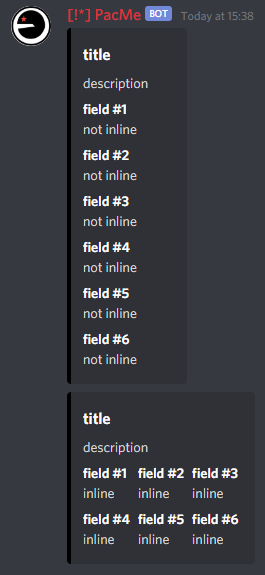 rare ice
obtuse junco
When adding fields to an Embed instance, the `inline` kwarg determines the axis ...
rare ice
obtuse junco
When adding fields to an Embed instance, the `inline` kwarg determines the axis ...
@thorny stag ^
thorny stag
ah
hushed ledge
One message removed from a suspended account.
full basin
orchid hull
Here is my code: ```py
channel = disnake.utils.get(new_server.channels, ...
This is Pycord not disnake
hushed ledge
hushed ledge
One message removed from a suspended account.
One message removed from a suspended account.
full basin
hushed ledge
One message removed from a suspended account.
The callback returns select.values
hushed ledge
One message removed from a suspended account.
One message removed from a suspended account.
full basin
Indeed.
hushed ledge
One message removed from a suspended account.
 dreamy nebula
So I'm fairly clueless on this, but since i added more commands that are "slow" (5-10s to read from database), it causes other commands to queue up if called right after.
I'm guessing thats on purpose, but is there anything I can do so i can "run" multiple commands at once - even if theyre slow
prisma flicker
Are you using defer?
celest lichen
does anyone have any ideas as to why my commands have stopped working since i switched my bot from a discord.Bot to a commands.Bot?
ex:
@bot.command()
async def ping(ctx):
    await ctx.respond("pong!")
usually replies to the message with pong
when i use discord.Bot it's a slash command, but when i use commands.Bot it's not a slash command, and running !ping
with command_prefix='!'
does nothing too
young bone
celest lichen
when i use discord.Bot it's a slash command, but when i use commands.Bot it's no...
if you use discord.Bot it would be a slash command
for a slash command you need bot.slash_command()
celest lichen
why is the prefixed command not working though?
young bone
you can use .send or .reply
celest lichen
what's the difference between .reply and .respond functionally?
young bone
.respond is an interaction like the buttons I would say
young bone
for testing slash commands add debug_guilds=[ID] to your discord.Bot or commands.Bot
with commands.Bot you can use prefix or slash commands with discord.Bot only use app commands
dreamy raft
Does sending webhook message count towards global rate limit?
tepid belfry
anyone knows how can i make a login system; eg. login for a custom role that has some unique perms
prisma flicker
celest lichen
yeah my intents are set up
You have the message content intent?
prisma flicker
tepid belfry
anyone knows how can i make a login system; eg. login for a custom role that has...
Like the user enters a password or something?
tepid belfry
prisma flicker
Like the user enters a password or something?
the user enters username and password
And he gets access to a role
prisma flicker
So what part are you stuck on
tepid belfry
idk how to create username password and let them enter it to access
prisma flicker
You'd just need to store the password somewhere (like in a database, and preferably hashed and salted) and verify the password they enter matches
prisma flicker
Technically you could just store it as a variable
tepid belfry
idk anything about db 😭
tepid belfry
prisma flicker
Technically you could just store it as a variable
What if i want them to sign up with a given token
copper dew
yeah in this case, i would recommend storing it in a db, and then hashing and salting the password for security reasons
fervent cradle
How can i fetch error interaction fail?
prisma flicker
fervent cradle
How can i fetch error `interaction fail`?
on_application_command_error

 frank yew
Hi guys I have a doubt, I would like to make the bot listen to a channel and when someone passes a picture add a reaction to it. How could I implement it?
fervent cradle
frank yew
Hi guys I have a doubt, I would like to make the bot listen to a channel and whe...
you can use on_message event
frank yew
thank you I will try 🙂
fervent cradle
To install py we need to do
pip uninstall discord
pip uninstall discord.py
pip uninstall poetry
pip install pycord
But now error is coming module discord is not defined
young bone
fervent cradle
To install py we need to do
pip uninstall discord
pip uninstall discord.py
pip u...
pycord or py-cord?
tiny wagon
hi, is there any way to get the id of slash command from code?
fervent cradle
young bone
pycord or py-cord?
Pycord
tiny wagon
fervent cradle
To install py we need to do
pip uninstall discord
pip uninstall discord.py
pip u...
py-cord
fervent cradle
Ok
young bone
Uninstall the pycord version and use py-cord
tiny wagon
yes
 fervent cradle
import os
import discord
from discord.ext import commands
TOKEN = os.environ["TOKEN"]

bot = commands.Bot(command_prefix=";")

@bot.event
async def on_ready():
  print('{bot.user.tag}is now online')

@bot.command()
async def bkl(ctx):
  await ctx.send('Tu bkl')
bot.run(TOKEN)

``` my bot is not replying and not even any error coming- give pycord version
- check if bot has message_content intent
- add intents in code
frank yew
fervent cradle
you can use `on_message` event
I dont understand how to implement that client. Do you have a example?
fervent cradle
tiny wagon
</attachmentspam disable:988395409615515668>
how can i send slash command?
fervent cradle
frank yew
I dont understand how to implement that client. Do you have a example?
no
i said way to implement this thing
tiny wagon
 tranquil thunder
how do I check if a member is online?
tranquil thunder
how do I check if a member is online?
you need presence intent for that
frank yew
how can I add my own server reaction with message.add_reaction()?
I try ':name:' and 'name' but its dont working
fervent cradle
 frank yew
aaah i know
fervent cradle
<:EmojiName:EmojiId>
frank yew
with <
frank yew
finally, how do I know that an image has been sent?
fervent cradle
How can I make Latency Command?
young bone
frank yew
finally, how do I know that an image has been sent?
on_message and use "" and let them empty
frank yew
young bone
on_message and use "" and let them empty
Sorry I don't understand and I have a problem and when I do message.content I get an empty message.
young bone
frank yew
Sorry I don't understand and I have a problem and when I do `message.content` I ...
@client.event
async def on_message(message: discord.Message):

    if message.content == "":
        print("image")
Yes, but allways is "". Even if I put only text, I don't know why
cerulean drum
isnt it supposed to be message.attachments
young bone
cerulean drum
isnt it supposed to be `message.attachments`
both works ^^
cerulean drum
young bone
both works ^^
huh... he wanted to check whether a message has image right?
what if i send something like this
 cerulean drum
what if i send something like this
cerulean drum
cerulean drum
what if i send something like this
also btw, is there any recent issue that cause description wont show on bot's account?
young bone
cerulean drum
huh... he wanted to check whether a message has image right?
oh, sry
frank yew
I think it's because of the intents issue. Currently I cannot have them until August 31.@cerulean drum @young bone
young bone
It can be
cerulean drum
frank yew
I think it's because of the intents issue. Currently I cannot have them until Au...
thats if your bot reached 100 server
frank yew
No, my bot is currently only on my server.
cerulean drum
frank yew
No, my bot is currently only on my server.
enable default and message_content intent
crimson plover
after calling await view.wait() how do I get the interaction from that
 fading granite
Anyone who uses vscode? How do you configure this?


 fading granite
thank you so much
tepid belfry
prisma flicker
Where does this token come from?
maybe generate it through a random system
copper dew
tepid belfry
maybe generate it through a random system
something like an OAuth2 access token ?
 slim drum
heyhey! this is my first time using pycord so excuse me if this is a stupid or easily fixed issue. i am trying to make a hybrid avatar command inside a cog, everything works correctly except that the embed doesnt show any color even though ive imported the random module and set the correct parameters (shown below). I know that it's correct because ive used it for my ping command. I dont know why it's like this
import discord
from discord.ext import bridge, commands
import random

class General(commands.Cog):
    def __init__(self, bot):
        self.bot = bot

    @bridge.bridge_command(name = ["avatar", "av"], description = "Get a user's avatar!")
    async def av(self, ctx, user: discord.Member = None):

     if user == None:
      user = ctx.author

     embed = discord.Embed(description = f"{user.name}\'s avatar", color=random.randint(0,0xFFFFFF))
     embed.set_image(url=user.display_avatar.url)
     await ctx.respond(embed=embed)

def setup(bot):
    bot.add_cog(General(bot))
the problem im facing is on
embed = discord.Embed(description = f"{user.name}\'s avatar", color=random.randint(0,0xFFFFFF))
Btw I do believe that u can make the color from rgb instead of randomly generating the hex value for it. And I think randint only returns int, so that might be a problem
slim drum
copper dew
Btw I do believe that u can make the color from rgb instead of randomly generati...
is that so? ive seen multiple people using randint so i assumed it was the best method