Ignoring exception in on_command_error
Traceback (most recent call last):
  File "/home/container/.local/lib/python3.9/site-packages/discord/ext/commands/core.py", line 181, in wrapped
    ret = await coro(*args, **kwargs)
  File "/home/container/cogs/info.py", line 85, in sbanner
    e.set_author(name=f"Here is {n}'s banner:")
TypeError: set_author() missing 1 required positional argument: 'self'
The above exception was the direct cause of the following exception:
Traceback (most recent call last):
  File "/home/container/.local/lib/python3.9/site-packages/discord/client.py", line 382, in _run_event
    await coro(*args, **kwargs)
  File "/home/container/cogs/events.py", line 45, in on_command_error
    raise error
  File "/home/container/.local/lib/python3.9/site-packages/discord/ext/commands/bot.py", line 344, in invoke
    await ctx.command.invoke(ctx)
  File "/home/container/.local/lib/python3.9/site-packages/discord/ext/commands/core.py", line 927, in invoke
    await injected(*ctx.args, **ctx.kwargs)
  File "/home/container/.local/lib/python3.9/site-packages/discord/ext/commands/core.py", line 190, in wrapped
    raise CommandInvokeError(exc) from exc
discord.ext.commands.errors.CommandInvokeError: Command raised an exception: TypeError: set_author() missing 1 required positional argument: 'self'
#Basic Pycord Help (Quick Questions Only)
1 messages · Page 1 of 1 (latest)
 full basin
Code
 woeful spindle
@commands.command()
    async def sbanner(self, ctx):
        e = discord.Embed()
        n = ctx.guild.name
        e.set_author(name=f"Here is {n}'s banner:")
        e.set_image(url=ctx.guild.banner)
nvm
discord.Embed just needed ()
apparently the guild object doesn’t have the banner_url attribute, how could I get the guild banner then?
tried looking on google but it was useless
 fervent cradle
Is there an slash command option where you can enter a channel
fervent cradle
 rough venture
channel: discord.TextChannel
rough venture
channel: discord.TextChannel
Thank you
woeful spindle
woeful spindle
apparently the `guild` object doesn’t have the `banner_url` attribute, how could...
h
full basin
banner.url
 loud holly
        try:
            Reviewing_Menu.add_field(
                name="Snacks",
                value=f"{self.snack_menu.values[0]} | {self.snack_menu.values[1]}",
                inline=False
            )

            for counter in range(2):
                Collected_Price.append(Food_Price[self.snack_menu.values[counter]])

        except:
            Reviewing_Menu.add_field(
                name="Snacks",
                value=f"{self.snack_menu.values[0]}",
                inline=False
            )
            Collected_Price.append(Food_Price[self.snack_menu.values[0]])
This is showing an error that it's not in range when I used try and except to do, it was working perfectly fine and decided to break
 full basin

loud holly
I'm using interaction.edit_message before the try and except, could that be the issue in the code breaking?
 hollow vale
I got an error in discord.ext.pages can anyone help?
https://discord.com/channels/881207955029110855/1000014905505742940
 dreamy nebula
^same, just got it recently/today worked fine before
didnt update anything as well
 smoky forge
discord started using 19 digit snowflakes and that broke the webhook authorization process
so you'll have to wait for discord to fix that
loud holly
smoky forge
so you'll have to wait for discord to fix that
i'm getting mixed answers
some r telling me its lib issue that they don't allow 19 digit snowflakes
whilst others are saying it's discord issue
 cyan quail
it's not a lib issue yeah
smoky forge
cuz everyone else in the ddevs server are having the same issue and there you have djs devs, dpy devs and more
loud holly
so I presume pycord was ahead of time since Discord didn't know time existed and made sure measures were in place if this in case ever happened again
in terms of snowflake ID changing
cyan quail
well in the first place i don't think any validate the length
smoky forge
discord maybe thought it wouldn't have been a big issue
cyan quail
pretty much
considering just webhooks broke and not the entire api, there probably isn't much issue on their end either
loud holly
So what kind of features are affected?
cyan quail
defer and followup responses are probably the two big ones
loud holly
I see, so only one of my command won't execute,  which I'm testing rn too
 rare ice
try not deferring the response and just doing response.send_message
it seems to work for other bots
 real compass
discord.errors.ApplicationCommandInvokeError: Application Command raised an exception: HTTPException: 401 Unauthorized (error code: 50027): Invalid Webhook Token
This error is occuring for each and every commands
i've also tried regenerating bot token
cyan quail
real compass
`discord.errors.ApplicationCommandInvokeError: Application Command raised an exc...
?tag 50027
bruh
#discord-api-updates
 obtuse juncoBOT
Error 403 Forbidden (error code: 50027): Invalid Webhook Token
Discord IDs recently went up to 19 digits, and this has lead to errors in the API involving Webhooks. Some affected methods include followup responses/edits, deferring, and potentially other interactions.
For now, we can only wait for a fix from Discord.
 tiny wagon
whats happening with discord application commands, can i get a short writeup?
or link to it
 silver moat
tiny wagon
whats happening with discord application commands, can i get a short writeup?
silver moat
tiny wagon
whats happening with discord application commands, can i get a short writeup?
this #discord-api-updates message
full basin
man had the answer above
silver moat
¯_(ツ)_/¯
loud holly
rare ice
try not deferring the response and just doing `response.send_message`
i need to use the defer since it takes more than 3 seconds to gather the data (using ranking card, checking for roles, applying emojis, adding details from the db)
 vital blade
how can i check if a message is a boost message
tried everything but still doesnt work
cyan quail
vital blade
how can i check if a message is a boost message
check message.type
rare ice
vital blade
how can i check if a message is a boost message
try checking if its a system message
cyan quail
there are 4 possible types; premium_guild_subscription, premium_guild_tier_1, premium_guild_tier_2 and premium_guild_tier_3
https://docs.pycord.dev/en/master/api.html#discord.MessageType.premium_guild_subscription
vital blade
cyan quail
there are 4 possible types; `premium_guild_subscription`, `premium_guild_tier_1`...
so message.type.premium_guild_subscription?
cyan quail
message.type will return the type, which is a discord.MessageType object
an example would be message.type == discord.MessageType.premium_guild_subscription
vital blade
i tried this and throwed errors somehow
cyan quail
what error?
vital blade
it said it wasnt a message type or something
cyan quail
what code did you run
vital blade
cyan quail
what code did you run
wdym
vital blade
if message.type = discord.MessageType.premium_guild.subscription
then or with the tier one 2 and 3 ones
the thing is i dont have access to vps rn. when i get back home ill try then show u if something wrong
cyan quail
vital blade
if message.type = discord.MessageType.premium_guild.subscription
discord.MessageType.premium_guild_subscription, not premium_guild.subscription
vital blade
cyan quail
`discord.MessageType.premium_guild_subscription`, not `premium_guild.subscriptio...
oh
im confused atm i dont even know how i used😭
nvm ill see that
rare ice
it's an if statement
 hollow brook
Can someone explain how checks can be used with SlashCommandGroup?
i got it
easy enough
rare ice
For slash command name and description localizations, is this correct? The first key being English and the second being Spanish? I tried looking to see if it updated but it says 'No description provided' for the slash command description. It's a global command so maybe it needs time to update?
@slash_command(name="warn", description_localizations={'en-US': 'Warn a member', 'es-ES': 'Advertir a una miembro'})
silver moat
rare ice
For slash command name and description localizations, is this correct? The first...
There should still be a default one, afaik
rare ice
silver moat
There should still be a default one, afaik
i dont see it
Discord Developer Portal
Integrate your service with Discord — whether it's a bot or a game or whatever your wildest imagination can come up with.
silver moat
@slash_command(name="warn", description = "Default description", description_localizations={'en-US': 'Warn a member', 'es-ES': 'Advertir a una miembro'})
I meant something like that
silver moat
Localizations are a way to make your bot more accessible to your users. Learn all about localizations now!
silver moat
if it's wrong blame it on the guide, not me :)
silver moat
rare ice
so do I event need `'en-US': 'Warn a member'`?
probably not
silver moat
default should be every localization that you didn't mention, probably
rare ice
silver moat
default should be every localization that you didn't mention, probably
i went on my alt and changed the language to Spanish and it still shows as English: https://images.nziie.fupl.ml/u/aujQ1CraA5mQ

vNziie--#7777
i restarted my discord too
silver moat
rare ice
i went on my alt and changed the language to Spanish and it still shows as Engli...
does the ctx.interaction.locale print es-ES?
silver moat
idk
rare ice
maybe i need to change the server's main language for it to work?
silver moat
but there's guild_locales?
rare ice
maybe I need to wait for a little bit to take affect? like how long slash commands take to appear
oh I need to apply a build override since its not fully released
silver moat
rare ice
oh I need to apply a build override since its not fully released
right that
?tag localization
obtuse juncoBOT
 No tag
 localization found.
silver moat
?tag localisation
obtuse juncoBOT
No tag localisation found.
rare ice
?tag locale
obtuse juncoBOT
No tag locale found.
silver moat
silver moat
obtuse juncoBOT
 Tag
Tag localization created.
rare ice
?tag localization
obtuse juncoBOT
rare ice
good
silver moat
would be funny if someone decided to advertise their guild here
rare ice
now time to use a lot of Google translate
silver moat
with a tag
silver moat
?tag myserver
rare ice
but wouldnt automod catch it?
obtuse juncoBOT
No tag myserver found.
rare ice
yeah
silver moat
rare ice
but wouldnt automod catch it?
not if it's slash command
silver moat
</tag create:824701594749763611>
silver moat
rare ice
*now time to use a lot of Google translate*
what if you made a script to do it
fervent cradle
Why i get this error?
    job_queue.run_daily(callback=wetter, time=datetime.time(hour=20, minute=16, second=0, microsecond=0,fold=0, tzinfo=None))
TypeError: unbound method datetime.time() needs an argument
with google's api?
silver moat
rare ice
with google's api?
yeah
rare ice
hm, i could
 quiet tendon
Can you envoke a modal after responding to the command(ctx.respond)
cyan quail
quiet tendon
Can you envoke a modal after responding to the command(ctx.respond)
modals can only be invoked from an interaction
quiet tendon
discord.errors.ApplicationCommandInvokeError: Application Command raised an exception: InteractionResponded: This interaction has already been responded to before
I responde to the command with something, than take in input and envoke the modal
but i get this error, so i assume you cannot send_modal after responding
cyan quail
not in a nice way; there's no internal list of tasks, but asyncio.all_tasks() will return every loop/task across the bot; you can try filter through that
cyan quail
quiet tendon
but i get this error, so i assume you cannot send_modal after responding
you need a new interaction to respond to
quiet tendon
cyan quail
you need a new interaction to respond to
It impossible then, how do you get another interaction in one use of command, message itself doesn't count as interaction
cyan quail
components
quiet tendon
There isn't a input component :/ 😄
cyan quail
has to be button/dropdown 
quiet tendon
Got it, can you envoke modal dialog on normal command(not slash)?
cyan quail
no, it has to be via an interaction
if your normal command sends a button, then that button could invoke the model
quiet tendon
is it only for modals
cyan quail
?
cyan quail
allgood
vital blade
cyan quail
`discord.MessageType.premium_guild_subscription`, not `premium_guild.subscriptio...
i wonder if this can work
 cyan quail
eh.... i guess? but you literally just need if message.type == discord.MessageType.premium_guild_subscription
vital blade
i want to get the message even if the server reaches level 1, 2 or 3
but ill try that
idk whatever
cyan quail
isee
fervent cradle
Hey, i have my error handlers in a cog and they dont seem to be working. Any ideas?
@commands.Cog.listener('on_command_error')
async def on_command_error(self, ctx: discord.ApplicationContext, error):

  if isinstance(error, commands.NoPrivateMessage):
     embed=discord.Embed(title='', color=0xb21a1a)
     embed.set_author(name='Test Bot')
     embed.add_field(name=ctx.author.display_name, value=error, inline=False)
     embed.set_footer(text='')
     await ctx.respond(embed=embed)
Error
Ignoring exception in command addkey:
Traceback (most recent call last):
  File "C:\Users\XeTrinityz\AppData\Local\Programs\Python\Python310\lib\site-packages\discord\bot.py", line 992, in invoke_application_command
    await ctx.command.invoke(ctx)
  File "C:\Users\XeTrinityz\AppData\Local\Programs\Python\Python310\lib\site-packages\discord\commands\core.py", line 355, in invoke
    await self.prepare(ctx)
  File "C:\Users\XeTrinityz\AppData\Local\Programs\Python\Python310\lib\site-packages\discord\commands\core.py", line 277, in prepare
    if not await self.can_run(ctx):
  File "C:\Users\XeTrinityz\AppData\Local\Programs\Python\Python310\lib\site-packages\discord\commands\core.py", line 374, in can_run
    return await async_all(predicate(ctx) for predicate in predicates)  # type: ignore
  File "C:\Users\XeTrinityz\AppData\Local\Programs\Python\Python310\lib\site-packages\discord\utils.py", line 562, in async_all
    for elem in gen:
  File "C:\Users\XeTrinityz\AppData\Local\Programs\Python\Python310\lib\site-packages\discord\commands\core.py", line 374, in <genexpr>
    return await async_all(predicate(ctx) for predicate in predicates)  # type: ignore
  File "C:\Users\XeTrinityz\AppData\Local\Programs\Python\Python310\lib\site-packages\discord\ext\commands\core.py", line 1961, in predicate
    raise NoPrivateMessage()
discord.ext.commands.errors.NoPrivateMessage: This command cannot be used in private messages.
wrong handler, should be using on_application_command_error
cyan quail
fervent cradle
is there a way to see what server or channel the command was used
ctx.guild, ctx.channel... https://docs.pycord.dev/en/master/ext/commands/api.html#context
or https://docs.pycord.dev/en/master/api.html#applicationcontext for slash commands
 wicked helm
Heya! I'm being stupid I think...
I have __init__ in my bot class. But when
@bot.event
async def onready(self):
  #Stuff
Is called, or any of the bot commands. I get "missing arg self"
I'm really confused because it worked yesterday 🤣
cyan quail
can you show the full code?
fervent cradle
How would i check if the channel where the command was used is not a DM with pycord?
This is how i am currently doing it but doesnt seem to work.
async def is_dm(ctx):

    if not isinstance(ctx.channel, discord.channel.DMChannel):

        role = discord.utils.get(ctx.guild.roles, name='MyRole')

        if role in ctx.author.roles:
            return ctx.command

        else:
            embed=discord.Embed(title='', color=0xb21a1a)
            embed.set_author(name='Test Bot')
            embed.add_field(name=ctx.author.display_name, value='This command can only be used in private messages.', inline=False)
            embed.set_footer(text='')
            await ctx.respond(embed=embed)

    else:
        return ctx.command
I made a function that makes commands DM only for everyone but the specified role. However, after moving to pycord it no longer works in the DM
Error
AttributeError: 'NoneType' object has no attribute 'roles'
it seems for some reason your ctx.author is returning None instead of the member that ran the command
which... typically shouldn't be happening
 wicked helm
cyan quail
can you show the full code?
wicked helm
cyan quail
can you show the full code?
Of course...
"""
BRVNS Discord Bot Object
"""
from discord import Bot
from src.brvns_bot_logic import BrvnsLogic

class BrvnsBot(Bot):
    """
    BRVNS Discord Bot
    """
    def __init__(self):
        """
        Init
        """
        print("Init the bot")
        self.brvns_logic = BrvnsLogic()


    bot = Bot()


    def run(self, token):
        """
        Run the bot
        """
        self.bot.run(token)

    @bot.event
    async def on_ready(self):
        """
        Bot Ready
        """
        print(f"The Bot, {self.bot.name} is ready and online!")

    @bot.command()
    async def sign_up(self, ctx):
        """
        Sign Up string slash command
        """
        author_name: str = ctx.author.name
        await ctx.respond(self.brvns_logic.signup_string(author_name))

    @bot.command()
    async def ping(self, ctx):
        """
        Send bot ping
        """
        await ctx.respond(f"Pong! Latency is {self.bot.latency}")
So the errors I get:
Missing self for on_ready
Missing ctx on sign_up and ping
I wanted to also put bot in __init__ but I then got errors with @bot
cyan quail
hmmmm
silver moat
wicked helm
Of course...
```py
"""
BRVNS Discord Bot Object
"""
from discord import Bot
fro...
uhh that’s not how you oop
cyan quail
yeah...
you're subclassing bot then defining another bot inside
i recommend reading https://guide.pycord.dev/popular-topics/subclassing-bots to get a better idea of how to subclass
cyan quail
fervent cradle
But it shouldnt even be trying to find the role because its in a DM
other way round, that happens when it isn't a DM
silver moat
cyan quail
i recommend reading <https://guide.pycord.dev/popular-topics/subclassing-bots> t...
yeah, but the guide about the slash command part is incorrect.
wicked helm
silver moat
uhh that’s not how you oop
I figured as it was breaking yes
cyan quail
oh it wasn't updated? oops
wicked helm
silver moat
yeah, but the guide about the slash command part is incorrect.
I can just ignore the part about the / command? As long as I could get the bot working..?
smoky forge
in that case declare the bot outside of the class as well as the commands
silver moat
smoky forge
in that case declare the bot outside of the class as well as the commands
... no
that's not the point of subclassing
silver moat
yeah, they can be in class
fervent cradle
hi, how do i detect audit log events?
for example i want to get audit log events and put them in a channel for easier use
smoky forge
i think theres no way to
fervent cradle
and automatically update every time a new event is made
cyan quail
there's no audit log listener
fervent cradle
ah ok, thanks
silver moat
but there are individual events for everything
smoky forge
youll have to watch for deletes and then check the audut log
cyan quail
you'd have to listen to the original event and then query the audit log
smoky forge
jinx
silver moat
like on_guild_update and on_member_leave
silver moat
wicked helm
I can just ignore the part about the / command? As long as I could get the bot w...
class BrvnsBot(Bot):
    """
    BRVNS Discord Bot
    """
    def __init__(self):
        """
        Init
        """
        super().__init__()
        print("Init the bot")
        self.brvns_logic = BrvnsLogic()
this is the bare minimum
    async def on_ready(self):
        """
        Bot Ready
        """
        print(f"The Bot, {self.name} is ready and online!")
``` is also how you make an eventso the @bot.event is not needed?
wicked helm
But it is for the / commands?
Either @bit.slash_command pr @bot.command 
fervent cradle
async def is_dm(ctx):

    if not isinstance(ctx.channel, discord.channel.DMChannel):

        role = discord.utils.get(ctx.guild.roles, name='MyRole')

        if role in ctx.author.roles:
            return ctx.command

        else:
            embed=discord.Embed(title='', color=0xb21a1a)
            embed.set_author(name='Test Bot')
            embed.add_field(name=ctx.author.display_name, value='This command can only be used in private messages.', inline=False)
            embed.set_footer(text='')
            await ctx.respond(embed=embed)

    else:
        return ctx.command
Everything works except when using it in a DM because its trying to check for a role in the dm channel even though i specified it to only check if its not a DM channel.
 storm geode
Is it possible to make this?
 vital blade
storm geode
Is it possible to make this?
vital blade
storm geode
Is it possible to make this?
thats a timestamp
smoky forge
?tag Timestamps
obtuse juncoBOT
To make a timestamp you need a unix timestamp. Then, put your time and date into the converter and copy the "Unix Timestamp" (https://www.unixtimestamp.com/) Then to use the timestamp, follow this syntax: <t:COPIED_TIMESTAMP_HERE:FORMAT>
Where it says FORMAT, you can put a few different things:
R: Relative, says "two weeks ago", or "in 5 years"

D: Date, says "July 4, 2021"

T: Time, "11:28:27 AM"

F: Full, "Monday, July 4, 2021 11:28:27 AM"
Example: (note: 1000190514 is Unix time for 11 September 2001)
<t:1000190514:R> -> says 20 years ago
<t:1000190514:D> -> says 11 September 2001
<t:1000190514:T> -> says 12:11:54
<t:1000190514:F> -> says Tuesday, 11 September 2001 12:11
Epoch and unix timestamp converter for developers. Date and time function syntax reference for various programming languages.
quiet tendon
My cog doesn't work anymore, i've narrowed it down because of the additional parameter i pass to the method, and im not sure why
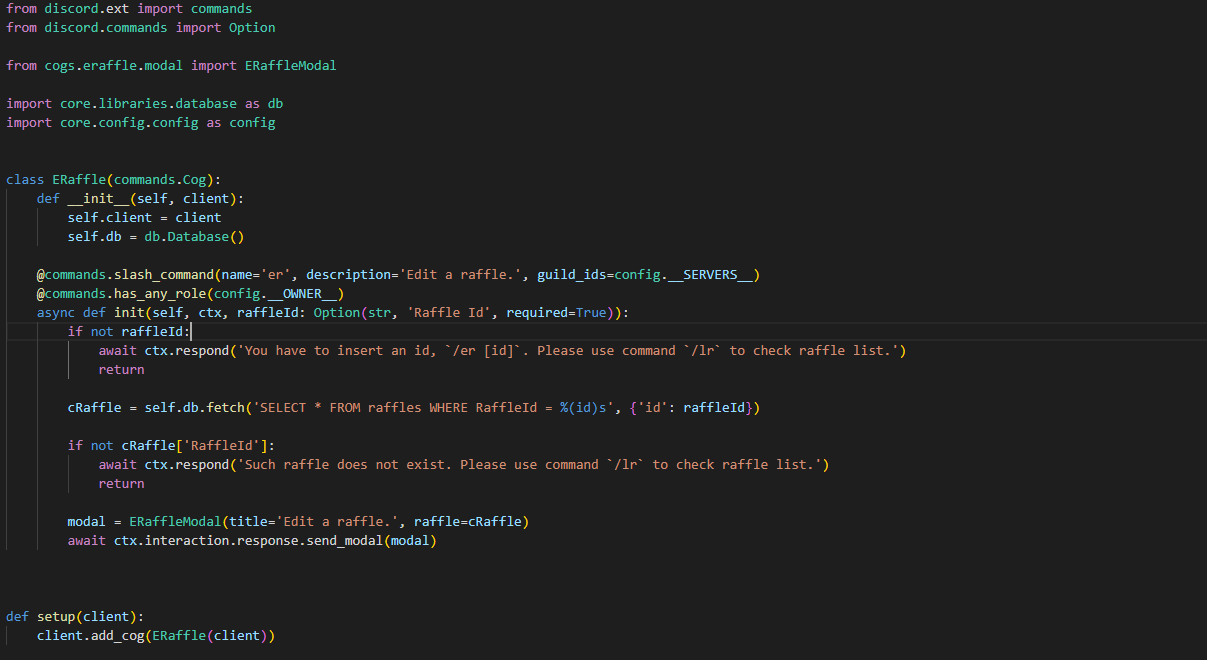
anyone?
wicked helm
silver moat
yeah, but the guide about the slash command part is incorrect.
Is this what you mean by the subclassing guide using @slash_command But following this just causes an error?
cyan quail
quiet tendon
My cog doesn't work anymore, i've narrowed it down because of the additional par...
is it not raising any errors?
fervent cradle
fervent cradle
```py
async def is_dm(ctx):
if not isinstance(ctx.channel, discord.channel....
Any ideas on this?
cyan quail
fervent cradle
Any ideas on this?
can you show some command code in which this function is used?
fervent cradle
    @commands.slash_command(name = 'create', description = 'Creates a Spotify account with the provided credentials')
    @commands.check(is_dm)
    async def create(self, ctx: discord.ApplicationContext, email: Option(str, 'Email', required=True), password: Option(str, 'Password', required=True)):
Im adding it as a check on select commands
cyan quail
gmmmm
silver moat
you realize that typing your password in a slash command is not very smart because everyone can see it right? oh wait it's in DMs
full basin
Can't you @commands.guild_only
cyan quail
they made a special check to make it guild only unless you have a specific role
full basin
Don't mind me then
fervent cradle
Its like its ignoring the isinstance
cyan quail
but the issue is that ctx.interaction.user is coming up as None
fervent cradle
is this related?
 fervent cradle
role = discord.utils.get(ctx.guild.roles, name='MyRole')
AttributeError: 'NoneType' object has no attribute 'roles'
thats the error it gives
cyan quail
not sure why the isinstance is failing, but you could instead check if ctx.guild:
 nova mirage
Is there a way to make a !embed command or something?
nova mirage
Oo ok
fervent cradle
cyan quail
not sure why the isinstance is failing, but you could instead check `if ctx.guil...
I appreciate the help
full basin
Won't ctx.guild will be nome if its dms
You can switch the isinstance
if not ctx.guild:
cyan quail
that's the point
fervent cradle
Yeah if ctx.guild works
 meager heron
I have a task. I want it to run every 12 hours, at 0:00 and 12:00. In addition, I want it to run right away when the bot starts up.
So if I start the bot at 16:00, the task will run once, then run again in 8 hours (0:00), then every 12 hours after that.
How can I do this?
 errant craneBOT
Here's the background task example.
meager heron
My first thought is to calculate the next run time every time it runs, then use change_interval(time=...)
silver moat
errant craneBOT
examples/background_task.py lines 28 to 31
@tasks.loop(time=time(3, 0, tzinfo=timezone.utc))  # Task that runs every day at 3 AM UTC
async def time_task(self):
    channel = self.get_channel(1234567)  # Your Channel ID goes here
await channel.send("It's 3 AM!")```That runs once every 24 hours
silver moat
just have 2 of them then
fervent cradle
When trying to sync slash commands to a specific guild i get a 'Missing Access' error. What perms does it need?
full basin
fervent cradle
When trying to sync slash commands to a specific guild i get a 'Missing Access' ...
application.commands from auth
fervent cradle
Ah thank you
wicked helm
Nice - so the bot runs now! Thanks for the help with that ^^
It's in my server, but does not have permission to use the commands
meager heron
I thought Discord made that implicit now so long as you have the bot scope
cyan quail
you still have to reapply it
cyan quail
meager heron
I have a task. I want it to run every 12 hours, at 0:00 and 12:00. In addition, ...
you can also pass a list of datetime.time objects so it will run at exact set times every day, instead of intervals
meager heron
Aha, I didn't see it could be a list
loud holly
silver moat
just have 2 of them then
how do you mention slash commands again?
silver moat
</name:id>
loud holly
thanks!
loud holly
silver moat
</name:id>
is there an easier way for getting the command id?
without typing in the command and getting the ID that way
smoky forge
you can go to the integrations page and copy the commands id from there
cyan quail
it's because tagging @ everyone like that isn't actually tagging @ everyone, but the internal @everyone role that all members have; it doesn't mention anyone
for other roles, that method is correct
smoky forge
are command mentions released or are they still testing them out?
cyan quail
they should be released
you can also just make up random ones
</likethis:927474839>
smoky forge
</i use arch btw:123577324>
cyan quail
not sure if spaces are supported... though technically they should be?
</wow nice:823824>
</i use arch btw:123577324>
maybe limited
</i use archbtw:123577324>
two spaces?
smoky forge
</dontcare didntask plusratio:123456789>
 waxen whale
cyan quail
two spaces?
waxen whale
cyan quail
two spaces?
command group, subcommand group, subcommand
cyan quail
ahh
fervent cradle
hi, i'm awaiting a message in my bot but when i send a message the message content returns blank
msg = await bot.wait_for('message', check = check)
my code
it literally returns a blank character no matter what i p0ut
msg.content returns blank
oops
i forgot to enable intents
smoky forge

nova mirage
Hi, when I tried installing pycord and then ran import discord in the terminal, I get this error.
import : The term 'import' is not recognized as the name of a cmdlet, function, script file, or operable program. Check the spelling of the name, or if a path was included, verify that the path is correct and try again.
At line:1 char:1
+ import discord
+ ~~
+ CategoryInfo : ObjectNotFound: (import:String) [], CommandNotFoundException
+ FullyQualifiedErrorId : CommandNotFoundException```
Anyone know a fix? round rivet
i recommend #help-rules #1
fervent cradle
Anyone know how to use regular commands and slash commands?
 rugged lantern
nova mirage
Hi, when I tried installing pycord and then ran `import discord` in the terminal...
rugged lantern
nova mirage
Hi, when I tried installing pycord and then ran `import discord` in the terminal...
why would you import in terminal
fervent cradle
nova mirage
Hi, when I tried installing pycord and then ran `import discord` in the terminal...
You should do import discord in whatever file your doing the bot coding in
nova mirage
fervent cradle
You should do ``import discord`` in whatever file your doing the bot coding in
Ok thanks
fervent cradle
nova mirage
Ok thanks
No problem!
smoky forge
nova mirage
Hi, when I tried installing pycord and then ran `import discord` in the terminal...
?tag lp
obtuse juncoBOT
Official Beginner's Guide: https://wiki.python.org/moin/BeginnersGuide
Official Tutorial: https://docs.python.org/3/tutorial/
Shortcuts:
https://wiki.python.org/moin/BeginnersGuide/NonProgrammers
https://wiki.python.org/moin/BeginnersGuide/Programmers
Learn Python:
https://automatetheboringstuff.com/ (for complete beginners to programming)
https://learnxinyminutes.com/docs/python3/ (for people who know programming already)
https://docs.python.org/3/tutorial/ (official tutorial)
http://python.swaroopch.com/ (useful book)
http://www.codeabbey.com/ (exercises for beginners)
full basin
fervent cradle
Anyone know how to use regular commands and slash commands?
commands.Bot instance
fervent cradle
full basin
commands.Bot instance
where do i put that at?
full basin
Make your bot a commands.Bot instance
smoky forge
?tag client
obtuse juncoBOT
discord.Client # just for events
discord.Bot # events + slash/user/msg commands
commands.Bot # above + prefixed commands
 alpine helm
How can i disable the buttons for a particular user only.
Like a have an embed with two buttons Smash and Pass, I want multiple users to interact with these buttons. Like if i press Smash, then a message will be sent saying UserA will SMASH and if UserB presses the Pass button a message will be sent saying UserB will PASS.
It works with normal views, but i dont want users to press any of the buttons twice. Like if i press smash, then all the buttons will get disabled for me so that i wont choose anything else.
I tried disabling the buttons in the button callbacks but that disabled the buttons for all users instead of the current user.
Any ideas?
rugged lantern
not possible
you cannot disable buttons for individual people. other people view the same state of buttons as you do
alpine helm
Hmm
rugged lantern
you can however add interaction checks and ignore interactions if someone choose something twice; but you cannot make it visually disabled for them after the first iteration
quiet tendon
cyan quail
is it not raising any errors?
No its just not loading the cog, probably thinks its not valid
Ill try to do some catching on start but yea
 proud pagoda
How do I guarantee that I get the guild's icon asset and url?
Because sometimes guild.icon returns None
So if I fetch the guild with an API request will it always return an Asset?
Cuz rn Im getting the icon from the guild object passed into the on_guild_join event
 marsh moth
How can I make slash commands work when joining a new server, because it didnt work when putting them in a function
proud pagoda
marsh moth
How can I make slash commands work when joining a new server, because it didnt w...
Make sure u have applications.commands selected in the invite link
quiet tendon
My cog doesn't work anymore, i've narrowed it down because of the additional parameter i pass to the method, and im not sure why
It's not raising any errors, when i remove the parameter the cog loads fine.
 cerulean drum
quiet tendon
My cog doesn't work anymore, i've narrowed it down because of the additional par...
cerulean drum
quiet tendon
My cog doesn't work anymore, i've narrowed it down because of the additional par...
set store=False on your load_extension
ehh whats your pycord version again?
quiet tendon
cerulean drum
set `store=False` on your `load_extension`
store=False on the load_extention or Option? 😄
cerulean drum
quiet tendon
store=False on the load_extention or Option? 😄
bot.load_extension but also make sure your pycord == v2.00
quiet tendon
Extension 'cogs.eraffle.cogs_er' raised an error: ValidationError: Command names and options must be lowercase. Received "raffleId"
Well fuck 😄
proud pagoda
Enable the message content intent in the dev portal and in your code
proud pagoda
You're welcome. Make sure you archive this thread by typing /close now that the problem is solved @fervent cradle
rugged lantern
proud pagoda
You're welcome. Make sure you archive this thread by typing /close now that the ...
this is the general help thread... u high bro?
proud pagoda
rugged lantern
this is the general help thread... u high bro?
Lmfao i forgot
I'm part of so many help threads I thought this was just another someone opened
fervent cradle
i want to make log and get user avatar, but i've got this error
discord.errors.ApplicationCommandInvokeError: Application Command raised an exception: TypeError: 'EmbedProxy' object is not callable
how can i fix it?
code:
ac = discord.Embed(
        description=f'Участнику {user} (<@{user.id}>) была выдана роль активного',
        color=discord.Color.from_rgb(155, 236, 82)

    )
    ac.add_field(name='Модератор', value=f'{member} (<@{member.id}>)')
    ac.thumbnail(url=user.avatar.url)
    ac.set_footer(icon_url=user.avatar.url, text=f'ID: {user.id}, {lib.nowtime}')
Should be set_thumbnail
fervent cradle
cyan quail
Should be set_thumbnail
Thanks
fervent cradle
How can i get category id?
@bot.event
async def on_member_join(member: discord.Member):
print(1)
roleJoin = member.guild.get_role(863696255224643605)
await member.add_roles(roleJoin)```
on_member_join doesn't work graceful plover
Why this command isn't responding?[pycord 2.0]
import discord
from discord.ext import commands, tasks

client = commands.Bot(command_prefix="!")

@client.event
async def on_ready():
    print(f"Bot is Ready!")

@client.command()
async def ping(ctx):
    await ctx.send("Pong!")

client.run("abcd")
 strange crypt
Hello, anyone know how we can have a dynamic select menu ? Because with an decorator I don't see how I can make dynamique options with paramater from the view class :/
 cinder pilot
uh cogs is not working properly
It loads and on_message event works but commands don't work and it doesn't even show up in help command
graceful plover
no error
when i type "!ping", it wont return pong
cinder pilot
try
client = commands.Bot(command_prefix="!", intents=discord.intents.all())
Works for me
graceful plover
wdym?
cinder pilot
cinder pilot
try
```py
client = commands.Bot(command_prefix="!", intents=discord.intents.all...
@graceful plover do this
strange crypt
an idea for my problem ? 🙂
cinder pilot
idk ¯\_(ツ)_/¯
smoky forge
graceful plover
Why this command isn't responding?[pycord 2.0]
```py
import discord
from discord...
?tag client
obtuse juncoBOT
discord.Client # just for events
discord.Bot # events + slash/user/msg commands
commands.Bot # above + prefixed commands
yeah i needintents.message_content = True
graceful plover
cinder pilot
try
```py
client = commands.Bot(command_prefix="!", intents=discord.intents.all...
al intents doesnt support in verified bots )
cinder pilot
cinder pilot
uh cogs is not working properly
It loads and on_message event works but commands...
Can anyone help me with this?
cinder pilot
graceful plover
al intents doesnt support in verified bots )
It works for me that's why I sent
graceful plover
cinder pilot
It works for me that's why I sent
in verified bot?
strange crypt
Hello, anyone know how we can have a dynamic select menu ? Because with an decorator I don't see how I can make dynamique options with paramater from the view class :/
for example with button add
I can add categories in an embed
and I have a button modif, when clicked we have a select menue wich each categories
but to create a select menue, options are in a decorator and i don't know how to have a dynamic select menue like that
cinder pilot
graceful plover
in verified bot?
Idk I don't have a verified bot
Just enable the intents you need
graceful plover
no the message intent is locked
cinder pilot
I enabled all because easier to test
smoky forge
strange crypt
Hello, anyone know how we can have a dynamic select menu ? Because with an decor...
try subclassing the buttons and selects instead of the view
and then make them interact with each other
fervent cradle
@bot.event
async def on_member_join(member: discord.Member):
    print(1)
    roleJoin = member.guild.get_role(863696255224643605)
    await member.add_roles(roleJoin)
on_member_join doesn't work
smoky forge
bruh thats typing it doesn't do anything
?
not sure why that's to be questioned
¯\_(ツ)_/¯
fetch the user and then call the banner attribute
 bleak goblet
discord.ext.commands.errors.CommandInvokeError: Command raised an exception: TclError: unknown option "-url"
button = Button(text="downoload", url=f"{member.avatar}")
view = View()
await ctx.send(embed = embed, view=view)```if the member has no avatar, member.avatar is gonna return None
proud pagoda
bleak goblet
discord.ext.commands.errors.CommandInvokeError: Command raised an exception: Tcl...
Use member.display_avatar instead
fervent cradle
in on_ready inside a cog, the functions do not get called.
 fervent cradle
in on_ready inside a cog, the functions do not get called.
fervent cradle
fervent cradle
in on_ready inside a cog, the functions do not get called.
well, they do but then it doesn't print in console (1, 2 3)
fervent cradle
How can i send message
File "/Volumes/Danya disk/coding/Py-cord/HFD/main.py", line 69, in on_message
    await message.send('<@&866375824671375371> вышел новый обзор на бота!')
AttributeError: 'Message' object has no attribute 'send'```are you loading the cogs in the bots on_ready()?
proud pagoda
fervent cradle
well, they do but then it doesn't print in console (1, 2 3)
Is there an error?
proud pagoda
fervent cradle
How can i send message
```py
File "/Volumes/Danya disk/coding/Py-cord/HFD/main....
Await message.channel.send
full basin
fervent cradle
How can i send message
```py
File "/Volumes/Danya disk/coding/Py-cord/HFD/main....
b!rtfm pyc Message.channel
 dire spadeBOT
full basin
b!rtfm pyc Message.channel
dire spadeBOT
full basin
b!rtfm pyc Message.channel
Best matches for Message.channel in pyc
discord.Message.channel
discord.Message.channel_mentions
discord.PartialMessage.channel
discord.DeletedReferencedMessage.channel_id
discord.Message.raw_channel_mentions
discord.MessageType.channel_follow_add
discord.MessageType.channel_icon_change
discord.MessageType.channel_name_change
discord.MessageReference.channel_id
discord.RawMessageDeleteEvent.channel_id
 grim canopy
what does MessageCommanddoes
same as Command?
but I can't add it with Bot.add_command
 mental maple
fervent cradle
smoky forge
are you loading the cogs in the bots on_ready()?
mental maple
fervent cradle
smoky forge
are you loading the cogs in the bots on_ready()?
No, and the end of bot.py
fixed it anyways
cyan quail
grim canopy
what does `MessageCommand`does<:Hmmm:996059317637763153>
MessageCommands are Context menu commands; they appear in the Apps section when you right click a message

The same goes for UserCommands when right-clicking a user
both of these are considered application commands (like slash commands); they work on the interaction system, unlike prefix commands.
storm geode
is it possible to have gifs inside the embed?
i tried doing
embed.set_image(url="")
but it doesnt work
rugged lantern
almost as though image implies an image
cyan quail
storm geode
im asking if theres a way to put gifs
? gif URLs work perfectly fine
cyan quail
what URL is it
storm geode
Tenor
Say more with Tenor. Find the perfect Animated GIFs and videos to convey exactly what you mean in every conversation.
cyan quail
ehhh
rugged lantern
u can send normal gifs in messages, u need the .gif path though
storm geode
yeah i was thinking of just downloading it
rugged lantern
no u just right click and copy image location
and u should get the .gif path of whatever gif u click
storm geode
yeah but i need to download the gifs first
cyan quail
yeah the direct tenor URL works fine
rugged lantern
no u don't
cyan quail
idk what you're running into
storm geode
cyan quail
yeah the direct tenor URL works fine
huh
storm geode
rugged lantern
no u don't
wdym
smoky forge
storm geode
https://tenor.com/
tenor "gifs" are actually videos
you'll have to go in the site and download the gif as sd or hd gif
storm geode
yeah thats what im saying
before i get the location i first have to have the gif
no?
rugged lantern
that is just not true though
right click a gif and copy image address
that's all u do
storm geode
if i right click it on the site thats all i have
 rugged lantern
copy image link
cyan quail
^
 cyan quail
yes
smoky forge
you can't get someone's about me cuz its a discord limitation
you can get someone's status, you just have to have the statuses intent i think
 crimson sundial
Is it possible to disable the buttons/components of a message using its ID?
smoky forge
get a member object and access the activity or activities method
you need the presences intent
cyan quail
crimson sundial
Is it possible to disable the buttons/components of a message using its ID?
a few ways;
- use
await channel.fetch_message(id)to make an API call to grab the message object you want to edit, raises an error if it doesn't exist. - use
client.get_message(id)to attempt to grab the message you want to edit from the bot's internal cache, returnsNoneif it isn't cached. - use
channel.get_partial_message(id)to essentially create a dummy message object to edit over. This will not raise an error or returnNoneon its own, but if you attempt to act on the message and it doesn't exist then it will raise the relevant error.
crimson sundial
cyan quail
a few ways;
- use `await channel.fetch_message(id)` to make an API call to grab ...
Thank you!! How would you disable the components in the message?
cyan quail
first use view.disable_all_items(), then when editing the message just pass in the view again
if you don't have a view object and instead want to get it from an existing message, then you must have the original message object (no partial) and use discord.View.from_message(message)
 onyx yacht
rugged lantern
onyx yacht
rugged lantern
how are we supposed to know
wicked helm
Do I need to include the ID of the server I want commands to appear in?
Or if left empty should they appear in all servers the bot is in?
vital blade
how can i check if an user is timed out
smoky forge
vital blade
how can i check if an user is timed out
member.communication_disabled_until
if it's None, the member is not timed out
vital blade
ty
smoky forge
wicked helm
Do I need to include the ID of the server I want commands to appear in?
Or if ...
if you use guild_ids the commands are only gonna be deployed to those guilds
if you don't specify anything, the commands are gonna be global and every server the bot is in is gonna have them, they just take a while to register
vital blade
smoky forge
`member.communication_disabled_until`
so if i say (if member.communication_disabled_until is not None:) it will check if user is timed out
smoky forge
Yes
vital blade
okay
wicked helm
smoky forge
if you use guild_ids the commands are only gonna be deployed to those guilds
if ...
Okay - how long is typical?
As they’ve stopped showing up completely… I feel like I’ve done something wrong.
The bot on ready runs, but the commands don’t show up..
smoky forge
Like an hour methinks
wicked helm
smoky forge
Like an hour methinks
Ahhh - ok.
I was a bit confused as I would create them before and they would update instantly. (When I was hosting the bot locally)
I’ll try again when I get back and wait ^^
smoky forge
if you need to test your commands use the bot.debug_guilds attribute
 neon raven
How can I get the Open DM channels of my bot?
cyan quail
neon raven
How can I get the Open DM channels of my bot?
bot.private_channels
Note there are some restrictions https://docs.pycord.dev/en/master/api.html#discord.Bot.private_channels
fervent cradle
So when I ran my bot in vscode I got this error
 smoky forge
i think thats not a pycord issue
 rugged lantern
and relevant code is all that is in your picture?
rugged lantern
that is not enough info to estimate a solution- provide some relevant code to what you're trying to run
fervent cradle
import discord
from discord.ext import commands
import os
bot = commands.Bot(command_prefix="c.", intents=discord.Intents.all())

for file in os.listdir("./cogs"):
   if file.endswith(".py"):
        bot.load_extension(f"cogs.{file[:-3]}")

@bot.event
async def on_ready():
    print(f"We have logged in as {bot.user}")

bot.run(os.environ["TOKEN"])```I run main.py because it has bot.run in it
cyan quail
you have some weird network issues or rules that's preventing connections, i recommend you look into this more yourself because there are so many different causes and factors that we probably can't account for
 signal stratus
How do I send an error message if the bot has no permissions to a /command?
And how can I then also display which permissions are needed?
smoky forge
on_application_command_error event
wicked helm
smoky forge
if you need to test your commands use the bot.debug_guilds attribute
I have the bot in one server only... and the debug_guilds didn't change anything
smoky forge
did you put the ids in a list?
wicked helm
I did yes.. well as I only have one id it was debug_guilds=[id]
wicked helm
smoky forge
did you put the ids in a list?
For what I am doing... (attempting to subclass the bot)
Bot: BrvnsBot = BrvnsBot(debug_guilds = [guild_id])
Bot.run(token)
brvns_bot_api.py:
class BrvnsBot(discord.Bot):
    """
    BRVNS Discord Bot
    """
    brvns_logic = BrvnsLogic()


    async def on_ready(self):
        """
        Bot Ready
        """
        print(f"The Bot, {self.user.name}, {self.user.id} is ready and online!")
        print(f"Bot Guilds: {self.guilds}")
        print(f"Debug Guilds: {self.debug_guilds}")

    @discord.slash_command(name = "sign-up", description = "Display the link to the RSI Org Page.")
    async def sign_up(self, ctx):
        """
        Sign Up string slash command
        """
        author_name: str = ctx.author.name
        await ctx.respond(self.brvns_logic.signup_string(author_name))

    @discord.slash_command(name = "ping", description = "Return the bot latency.")
    async def ping(self, ctx):
        """
        Send bot ping
        """
        await ctx.respond(f"Pong! Latency is {self.user.latency}")
For debugging purposes I am printing out the guilds the bot is in, and the debug guilds.
My go to assumption is that I am using the @discord.slash_command incorrectly.. but using @Bot.slash_command or @slash_command gives me errors.
The on ready event works, which is what makes me think I made my commands wrong.
smoky forge
try passing the debug guilds inside the classes super().__init__()
fervent cradle
How do I make my ban command to where when I ban someone it sends them an invite to the appeal server
signal stratus
It prints only the error but not the second one i.e. the error is not an instance of what else is it?

 smoky forge
it should be discord.Forbidden then
storm geode
signal stratus
It prints only the error but not the second one i.e. the error is not an instanc...
thats the bot missing perms
i think
signal stratus
storm geode
thats the bot missing perms
i think
What do u mean?
storm geode
like if the bot trys to kick someone but doesnt have kick perms
for permission missing i did
commands.CheckFailure
signal stratus
And how can I then display which permission is missing?
fervent cradle
wicked helm
For what I am doing... (attempting to subclass the bot)
main.py:
```py
Bot: Brv...
Do you have from discord.commands import (slash_command,) in your file?
wicked helm
fervent cradle
Do you have ``from discord.commands import (slash_command,) `` in your file?
Mm no.. I was using import discord and then using @discord.slash_command
fervent cradle
wicked helm
Mm no.. I was using `import discord` and then using `@discord.slash_command`
So does that work for you? If so I might have to try it.
wicked helm
The issue is - it’s not working 😂 so I assume not
fervent cradle
Oh
fervent cradle
wicked helm
The issue is - it’s not working 😂 so I assume not
Well then you should do the import I sent and use slash_command
signal stratus
fervent cradle
How do I make my ban command to where when I ban someone it sends them an invite...
try:
    user.send("link here")
except:
    pass
await guild.ban(user)
Yeah I will😂
grim canopy
cyan quail
`MessageCommand`s are Context menu commands; they appear in the `Apps` section w...
ohhh tysm
 undone falcon
Once you do a ctx.respond can you do a fallow up with a other response ?
 iron mesa
undone falcon
Once you do a ctx.respond can you do a fallow up with a other response ?
iron mesa
undone falcon
Once you do a ctx.respond can you do a fallow up with a other response ?
Interaction has a followup attribute, Never used it but might be what you are looking for https://docs.pycord.dev/en/master/api.html#discord.Interaction
undone falcon
iron mesa
Interaction has a followup attribute, Never used it but might be what you are lo...
I see thank you !
wicked helm
fervent cradle
Do you have ``from discord.commands import (slash_command,) `` in your file?
Hmmm... discord.commands does not exist according to pylance..?
iron mesa
Any way to inject values into a decorator? Trying to create view that are customisable and need a way to change for example max_answers in Select . If not, what would be sensible approach to do it
fervent cradle
wicked helm
Hmmm... `discord.commands` does not exist according to pylance..?
It should since he has py-cord install
wicked helm
Solved it, I was editing my poetry packages and got rid of py-cord. Added that back now
fervent cradle
Hey can someone help me with something?
waxen whale
#help-rules §5
full basin
Can't read your mind buddy
fervent cradle
Oh
Right
Let me show the problem
async def create_strike(user):
    with open("strikes.json", "r") as f:
        users = json.load(f)

    if str(user.id) in users:
        return False
    else:
        users[str(user.id)] = {}
        users[str(user.id)]["strike"] = 0

async def add_strike(user,admin,reason):
    with open("strikes.json", "r") as f:
        users = json.load(f)

    if str(user.id) in users:
        users[str(user.id)] = {}
users[str(user.id)]["strike"] += 1``` on the last line ``users[str(user.id)]["strike"] += 1`` it raises a keyerror about ``"strike"``well what do you want it to do
you removed the strike key and are now trying to increment it
fervent cradle
im trying to make it add a extra strike
round rivet
and because it doesn't exist it doesn't work
fervent cradle
but when i add it back in it resets back to 0
silver moat
?tag nojson
obtuse juncoBOT
Why you should not use json files for storing data
Using json files on a smaller scale is fine, however it is would be very beneficial to switch to a real database management system;
- JSON is a data format, not a database.
- It is easily corrupted as it does not come with any data integrity checks when writing to the file.
- It is not good at defining or utilizing relationships, making it very hard to store relational data.
- When the JSON file becomes too large, you will run into performance issues since your program has to read the entire file into memory every time you want to query the data.
- It does not include any security features that you may get when using a database management system.
fervent cradle
this is my error I get Traceback (most recent call last): File "C:\Users\fi\OneDrive\Desktop\Busta Bot\main.py", line 8, in <module> bot.load_extension(f"cogs.{file[:-3]}") File "C:\Users\fi\AppData\Local\Programs\Python\Python310\lib\site-packages\discord\cog.py", line 787, in load_extension self._load_from_module_spec(spec, name) File "C:\Users\fi\AppData\Local\Programs\Python\Python310\lib\site-packages\discord\cog.py", line 718, in _load_from_module_spec raise errors.ExtensionFailed(key, e) from e discord.errors.ExtensionFailed: Extension 'cogs.fun' raised an error: AttributeError: 'function' object has no attribute 'Cog'
silver moat
fervent cradle
this is my error I get ```Traceback (most recent call last):
File "C:\Users\fi...
show code, ty
fervent cradle
silver moat
show code, ty
K
fervent cradle
silver moat
show code, ty
silver moat
I meant for the loading the cogs part
fervent cradle
silver moat
I meant for the loading the cogs part
loading the cogs is in main.py
fervent cradle
silver moat
I meant for the loading the cogs part
import discord
from discord.ext import commands
import os
bot = commands.Bot(command_prefix="c.", intents=discord.Intents.all())

for file in os.listdir("./cogs"):
    if file.endswith(".py"):
        bot.load_extension(f"cogs.{file[:-3]}")


@bot.event
async def on_ready():
    print(f"We have logged in as {bot.user}")

bot.run(os.environ["TOKEN"])
instead of using a for loop and everything, what about just simply doing bot.load_extension(“cogs”, recursive=True)
 copper dew
^
fervent cradle
silver moat
instead of using a for loop and everything, what about just simply doing bot.loa...
So get rid of the .{file{:-3}}?
silver moat
I mean get rid of the for loop altogether
fervent cradle
silver moat
I mean get rid of the for loop altogether
K
@silver moat now im getting an error
 wicked helm
remove the if as well.. just use
bot.load_extension("cogs", recursive=True)
wicked helm
silver moat
I mean get rid of the for loop altogether
Also tysm for your help ^^ I've got it working now!
fervent cradle
wicked helm
remove the if as well.. just use
`bot.load_extension("cogs", recursive=True)`
 wicked helm
fervent cradle
wicked helm
fervent cradle
Yah, mine looks like:

So if you put it above where your bot.run is, it should work
fervent cradle
wicked helm
So if you put it above where your bot.run is, it should work
it was just and indentation error
silver moat
fervent cradle
it was just and indentation error
I’m sure you can fix an indentation error yourself
fervent cradle
I did
fervent cradle
wicked helm
Yah, mine looks like:
  File "C:\Users\fir\OneDrive\Desktop\Busta Bot\main.py", line 7, in <module>
    bot.load_extension("cogs", recursive=True)
TypeError: CogMixin.load_extension() got an unexpected keyword argument 'recursive'```whats your pycord version
fervent cradle
2.0.0.0
wicked helm
fervent cradle
```Traceback (most recent call last):
File "C:\Users\fir\OneDrive\Desktop\Bust...
Have you changed anything since adding in bot.load_extention("cogs" recursive=True) ?
fervent cradle
wicked helm
Have you changed anything since adding in `bot.load_extention("cogs" recursive=T...
No
wicked helm
Might be worth checking if your cogs are set up correctly?
fervent cradle
wicked helm
Might be worth checking if your cogs are set up correctly?
May I see one of you're cogs?
 near hollow
  File "/home/container/.local/lib/python3.10/site-packages/discord/client.py", line 715, in run
    return future.result()
  File "/home/container/.local/lib/python3.10/site-packages/discord/client.py", line 694, in runner
    await self.start(*args, **kwargs)
  File "/home/container/.local/lib/python3.10/site-packages/discord/client.py", line 658, in start
    await self.connect(reconnect=reconnect)
  File "/home/container/.local/lib/python3.10/site-packages/discord/shard.py", line 462, in connect
    raise item.error
  File "/home/container/.local/lib/python3.10/site-packages/discord/shard.py", line 185, in worker
    await self.ws.poll_event()
  File "/home/container/.local/lib/python3.10/site-packages/discord/gateway.py", line 589, in poll_event
    await self.received_message(msg.data)
  File "/home/container/.local/lib/python3.10/site-packages/discord/gateway.py", line 539, in received_message
    func(data)
  File "/home/container/.local/lib/python3.10/site-packages/discord/state.py", line 635, in parse_auto_moderation_action_execution
    event = AutoModActionExecutionEvent(self, data)
  File "/home/container/.local/lib/python3.10/site-packages/discord/raw_models.py", line 462, in __init__
    self.content: str = data["content"]
KeyError: 'content'
ERROR:asyncio:Unclosed client session```

Any time the bot errors it spits this out and restarts. Any way to resolve it? shrewd dome
I assume you mean `2.0.0`
shrewd dome
I assume you mean `2.0.0`
Yes
 north tartan
 near hollow
Why not just use timestamp=datetime.utcnow()
smoky forge
near hollow
near hollow
```
File "/home/container/.local/lib/python3.10/site-packages/discord/client.p...
Does anyone know how to fix this?
rugged lantern
read the rules
wicked helm
fervent cradle
May I see one of you're cogs?
"""
General Slash Cogs
"""
from discord.ext import commands

class SlashGeneral(commands.Cog):
    """
    General Slash Commands
    """

    def __init__(self, bot):
        self.bot: commands.Bot = bot
        print("Init Slash Command Cog.")

    @commands.slash_command(name = "ping", description = "Return the bot latency.")
    async def ping(self, ctx):
        """
        Send bot ping
        """
        await ctx.respond(f"Pong! Latency is {round(self.bot.latency * 100, 2)} ms")
        print("Sent Ping")

def setup(bot):
    """
    Add cog to bot
    """
    bot.add_cog(SlashGeneral(bot))
no reason to have self.bot: commands.Bot = bot
wicked helm
I mean yes - but I like it that way
rugged lantern
for what purpose do you have it as opposed to just self.bot = bot
wicked helm
I'm wanting to strongly type variables.. That's about it
rugged lantern
annotations doesn't define the variable type though
fervent cradle
@bot.event
async def on_message_delete(message):
    log = bot.get_channel(866224389787222036)
    member = message.author
    ac = discord.Embed(
    description=f'Сообщение удалено',
    color=discord.Color.from_rgb(255,109,150)
    )
    ac.add_field(name='Автор', value=f'**{member}** (<@{member.id}>)', inline=True)
    ac.add_field(name='Сообщение', value=f'> {message.content}', inline=True)
    ac.set_footer(icon_url=member.avatar.url, text=f'ID: {member.id}')
    await log.send(embed=ac)```
message.content doesn't show content signal stratus
How can i test if bot has permissions?
signal stratus
signal stratus
How can i test if bot has permissions?
How that e.g. only for the bot
 proud pagoda
signal stratus
How that e.g. only for the bot
proud pagoda
signal stratus
How that e.g. only for the bot
@commands.bot_has_permissions
signal stratus
proud pagoda
@commands.bot_has_permissions
I want to use it in an event and there I need it as if query
 torpid wharf
It's discord.ButtonStyle
marsh moth
How to make slash commands automatically work when the bot joins a new server, because for some reason it doesnt work in a function
graceful plover
marsh moth
How to make slash commands automatically work when the bot joins a new server, b...
You have to invite your bot with the application.command selected
 marsh moth
it is
graceful plover
do you put that new server in your debug_guilds list?
marsh moth
debug_guilds?
 mint sphinx
Guys I'm making a welcome system so i have some doubt
I maked a dictionary:-
variables = { "[user]": member.mention, "[userName]": member.name, "[guild]": member.guild.name, "[avatar]": member.display_avatar.url}
and in on message event I'm sending a message that
await channel.send(message_from_guild_db)
So my question is that if guild owner/admin set the welcome message Welcome [user], to [guild] so how to replace both the variables? If anyone can help please and yes i know about .replace but i have more than 10 variables and also i want to replace the variables on embed so is there a way to do it with this dictionary method?
marsh moth
@graceful plover if something is added to the guild_ids list will it automatically update?
nvm it doesnt
so how can I work around that?
graceful plover
you can just remove debug_guilds from client
client = discord.AutoShardedBot(intents=intents)
Remember global slash commands can take up to an hour to register
marsh moth
I dont want it to be a global slash command
thats the thing
I want it to be enabled once the owner of server says so, so I was gonna use a function but that doesnt work
So how do I have slash commands work if the bot joins a server after running the script
graceful plover
marsh moth
So how do I have slash commands work if the bot joins a server after running the...
you manually have to add the server id in debug guilds
marsh moth
what about bot.register_commands?
 storm geode
i have a requestion about ratelimits.
if i have a command like count which does for n in range(20): await ctx.send(n)
and the bot gets ratelimited. will it pause the command until the ratelimit is over and then continue outputting numbers?
graceful plover
GG
proud pagoda
For some reason when I added a new slash command, its not loading on my bot even though the other two are loading
nvm found the issue
I'm an idiot, i was migrating from prefixed to slash commands, and i forgot to change it from @commands.command to @discord.slash_command
 wheat summit
Quick question, is anyone having issues adding Option parameters to a slash command?
My slash commands are disappearing as soon as I add an option parameter in their definition
grim canopy
discord.errors.HTTPException: 400 Bad Request (error code: 50035): Invalid Form Body
In 1: Application command names must be unique
I kept getting this error on message_command
@bot.message_command(name="Testing Message Command", guild_ids=[995976950541729793])
async def testing(ctx: discord.ApplicationContext, message:discord.Message):
    await ctx.respond("Test")
code
fervent cradle
@bot.event
async def on_message_delete(message):
    log = bot.get_channel(866224389787222036)
    member = message.author
    ac = discord.Embed(
    description=f'Сообщение удалено',
    color=discord.Color.from_rgb(255,109,150)
    )
    ac.add_field(name='Автор', value=f'**{member}** (<@{member.id}>)', inline=True)
    ac.add_field(name='Сообщение', value=f'> {message.content}', inline=True)
    ac.set_footer(icon_url=member.avatar.url, text=f'ID: {member.id}')
    await log.send(embed=ac)```
message.content doesn't show content grim canopy
fervent cradle
```py
@bot.event
async def on_message_delete(message):
log = bot.get_channel...
grim canopy
fervent cradle
```py
@bot.event
async def on_message_delete(message):
log = bot.get_channel...
the content is > i guess
marsh moth
How can I check which application commands are in a guild?
cyan quail
marsh moth
How can I check which application commands are in a guild?
There isn't a built-in way to do this. What you could try is iterate through bot.application_commands and check if command.guild_ids is either None (a global command) or if it contains the guild ID.
marsh moth
cyan quail
There isn't a built-in way to do this. What you could try is iterate through `bo...
btw what is a "global" command?
cyan quail
any slash command that doesn't have guild_ids set; it's usable in all guilds and DMs (unless guild_only is set)
marsh moth
why does it take an hour for it to update if global, is it registered on dicords servers or something?
cyan quail
cyan quail
There isn't a built-in way to do this. What you could try is iterate through `bo...
though i think there's an endpoint for this, i don't see a function for the bot
cyan quail
marsh moth
why does it take an hour for it to update if global, is it registered on dicords...
Yes, application commands are also stored on discord's end; this is their limitation, but i believe in future they plan to make it instant as well
marsh moth
ah, so if its no global its stored on your computer?
cyan quail
no, all application commands are stored on discord
marsh moth
oh then what is the internal list of commands mean
cyan quail
maybe i was unclear; the bot will always have all commands stored. With application commands, their basic data (IDs, name, description etc.) is stored on discord. When someone runs a command, the bot still handles all the command logic.
marsh moth
Ohhhhhh ok ty
cyan quail
all good
cyan quail
marsh moth
How can I check which application commands are in a guild?
more definitive answer; use await bot.get_desynced_commands(guild_id=...)
https://docs.pycord.dev/en/master/api.html#discord.Bot.get_desynced_commands
marsh moth
I figured it out, thankyou
signal stratus
How can I check if the bot has certain permissions via if query?
fervent cradle
how do i make it so that when i click one button in that class, it disables ALL the buttons in that class?
 dire island
im having a problem with on_member_join i doesn't detect the new member when it joins
@bot.event
async def on_member_join(member):
    print(f"{member} has joined the server!")
in another bot works fine and i copied the code but doesn't work
torpid wharf
dire island
im having a problem with on_member_join i doesn't detect the new member when it ...
Have you given it the member intent
dire island
torpid wharf
Have you given it the member intent
?
torpid wharf
intents
torpid wharf

dire island
fervent cradle
torpid wharf
Have you given it the member intent
i've got the same thing, but all intents turned on

 grizzled sentinel
your data dictionary has no key "content"
real compass
grizzled sentinel
your `data` dictionary has no key `"content"`
have i did anything wrong from my side?
real compass
real compass
is there any way to fix this issue
the bot was running idle and this error came and totally bot gone offline
cyan quail
what version are you using?
real compass
i guess its something issue with the AutoMod
real compass
cyan quail
what version are you using?
2.0.0
waxen whale
This is an bug from our side
cyan quail
yeah looks like lib, should probably use get instead
though, what's the full traceback?
waxen whale
content is not represented if the message content intent is missing
real compass
waxen whale
This is an bug from our side
is this fixed in development version?
cyan quail
ahh
real compass
cyan quail
though, what's the full traceback?
i cant get it i have refreshed the heroku and i got partial logs
waxen whale
real compass
is this fixed in development version?
negative
waxen whale
@grizzled sentinel could you pr a fix?
grizzled sentinel
waxen whale
<@451848182327148554> could you pr a fix?
just a simple try except right? Or would it be better to check the intents and not run that line.
cyan quail
maybe just data.get("content", None)?
waxen whale
^
grizzled sentinel
forgot about that.
cyan quail
is the rest safe
     def __init__(self, state: ConnectionState, data: AutoModActionExecution) -> None:
        self.action: AutoModAction = AutoModAction.from_dict(data["action"])
        self.rule_id: int = int(data["rule_id"])
        self.guild_id: int = int(data["guild_id"])
        self.guild: Optional[Guild] = state._get_guild(self.guild_id)
        self.user_id: int = int(data["user_id"])
        self.content: str = data["content"]
        self.matched_keyword: str = data["matched_keyword"]
self.matched_content: str = data["matched_content"]```matched_content can be null
cyan quail
isee
waxen whale
In API v10, the MESSAGE_CONTENT (1 << 15) intent is now required to receive non-empty values for the content and matched_content fields
real compass
is there an ETA on this fix?
cyan quail
uhh can you view package files on heroku? you could just apply the fix yourself
real compass
hmmmk leme fork it and ill fix...
cyan quail
i made the commit here https://github.com/Pycord-Development/pycord/commit/56b806ada22f8d334e9cae0be9ee49a641f27fd7 but haven't pushed the PR yet incase wolfy's taking care of it
real compass
cyan quail
i made the commit here <https://github.com/Pycord-Development/pycord/commit/56b8...
ok ill be waiting till...
grizzled sentinel
cyan quail
i made the commit here <https://github.com/Pycord-Development/pycord/commit/56b8...
go for it. Im a bit busy and you basically gave me the answer.
cyan quail
oh fair enough then
cyan quail
real compass
ok ill be waiting till...
##1521
errant craneBOT
cyan quail
##1521
GitHub
Update to fix data["content"] raising a KeyError for Automod Events when the bot lacks the Message Content intent.
Information
This PR fixes an issue.
This PR adds something new (e.g....
real compass
cyan quail
##1521
??
cyan quail
that's the pr you want
real compass
errant crane
https://github.com/Pycord-Development/pycord/pull/1521
cool
nice bot...
waxen whale
That should do it
real compass
waxen whale
That should do it
good everything fine ill use the master branch for now
 hallow shuttle
how would i use the Voice Receive API to passively listen to a channel for voice commands?
I see the existing sample code is like manually listening until the user enters the stop command then shows like what users were talking and generated what files
I tried like a loop with asyncio sleeps but it causes like "already writing to file" errors and starts killing the processes
fervent cradle
hello!!!
my cog listener is farting errors.
yes im new to py and pycord
whenever i add @commands.Cog.listener() to my cog it farts a error
Extension 'cogs.Information' raised an error: IndentationError: unexpected indent (Information.py, line 32)
yea line 32 is @commands.Cog.listener()
fervent cradle
exactly
but why.
anyways i fixed that
and now Extension 'cogs.Information' raised an error: IndentationError: unexpected unindent (Information.py, line 34)
a unindent 💀 why python.
rugged lantern
shows the code then
rugged lantern
so why did u meantion @commands.Cog...
fervent cradle
for my commands to load ofc
signal stratus
I have made @command.only_guild() for one command. And I don't want to make a separate error for each command with name.error. So I used on_command_error. It is registered and works. So that with the invalid command. only the problem is that the error does not react there in on_command_error. no idea how I should say that haha but I want in any case that on_command_error reacts when there this error command or is there for it another event?

 fervent cradle
bird
rugged lantern
you're already capturing all errors
fervent cradle
LMAO
smoky forge
fervent cradle
for my commands to load ofc
you dont add @commands.Cog.listener() for the setup function
rugged lantern
you're just using 'raise' and therefore see it as an error when it occurs
fervent cradle
smoky forge
you dont add @commands.Cog.listener() for the setup function
ok then... explain me why @commands.command isnt working
rugged lantern
@signal stratus
fervent cradle
    @commands.command()
    async def ping(self, ctx, bot):
        await ctx.send(f'Hello, my name is {bot.user} you can use me by using slash commands. Type `/help` to see all of my commands!')
```pretty sure this is correct
smoky forge
you shouldn't have to put bot as an argument
fervent cradle
unless im wrong *
signal stratus
rugged lantern
<@455002904210702359>
But its dont answer with ctx.respond()
And when I removeraise it is still displayed
I meant that the event does not react to the error, even though it is registered.I meant that the event does not react to the error, even though it is registered.
fervent cradle
smoky forge
you shouldn't have to put bot as an argument
it doesnt work without it anyways
rugged lantern
signal stratus
But its dont answer with ctx.respond()
And when I removeraise it is still displa...
because that is what 'raise' does. it raises the error.
fervent cradle
smoky forge
again, <:ReadTheDocs:881521019481915422>
oK sorry iM new!!
signal stratus
rugged lantern
because that is what 'raise' does. it raises the error.
Yes I meant if I remove it it still stands in the console
fervent cradle
smoky forge
pass the bot into the cog object and call the bot with self.bot
i mean i already did
self.bot = bot
i read doc ok
obtuse juncoBOT

The official guide for making bots and other Discord applications using the Pycord library.
signal stratus
signal stratus
Yes I meant if I remove it it still stands in the console
And it does not respond, although there is ctx.respond
fervent cradle
the bot doesnt reply to ping
    @commands.command()
    async def ping(self, ctx):
        await ctx.send(f'Hello, my name is {ctx.author} you can use me by using slash commands. Type `/help` to see all of my commands!') #ignore ctx.author
```this is correct right
rugged lantern
do u have it in ur main?
rugged lantern
there's the problem then
rugged lantern
maybe the indent just looks weird on mobile then
smoky forge
is the cog being loaded in the main file?
fervent cradle
smoky forge
is the cog being loaded in the main file?
yep, i have it loaded
slash commands in the cogs works
the message cmd isnt working
Trying to do some stuff with images. How can I get the user image? not the url? Currently: asset = user.avatar_url_as(size = 128)
fervent cradle
well yea
fervent cradle
smoky forge
did you specify a command prefix?
well no
smoky forge
theres your problem
fervent cradle
ye
silver moat
fervent cradle
the message cmd isnt working
text commands require message and message content intent
fervent cradle
silver moat
text commands require message and message content intent
i do have that
silver moat
in the code and on dev portal?
fervent cradle
intents = discord.Intents.default()
intents.members = True
intents.message_content = True```yea
signal stratus
Why doesn't that work?
Listener is registered

 fervent cradle
signal stratus
Why doesn't that work?
Listener is registered
fervent cradle
signal stratus
Why doesn't that work?
Listener is registered
well becasue ....
signal stratus
fervent cradle
well becasue ....
?
silver moat
fervent cradle
well no
what do you mean don't have a command prefix?
fervent cradle
silver moat
what do you mean don't have a command prefix?
i want to it work without a prefic..
signal stratus
signal stratus
Why doesn't that work?
Listener is registered
Does this work at all with slash commands?
full basin
No
signal stratus
If no, is there also an event for slash command errors?
full basin
on_application_command_error
signal stratus
Thx
full basin
signal stratus
Had peeked, must have read over it 🤷
hallow shuttle
async def finished_callback(sink, channel: discord.TextChannel, *args):
    recorded_users = [f"<@{user_id}>" for user_id, audio in sink.audio_data.items()]
    await sink.vc.disconnect()
    files = [
        discord.File(audio.file, f"{user_id}.{sink.encoding}")
        for user_id, audio in sink.audio_data.items()
    ]
    await channel.send(
        f"Finished! Recorded audio for {', '.join(recorded_users)}.", files=files
    )
I see this code from the voice receive API - how would I get the actual wav file from this? It seems like it isn't like actually saved on the file system, and the audio content is actually just binary data and not formatted
ValueError: Audio file could not be read as PCM WAV, AIFF/AIFF-C, or Native FLAC; check if file is corrupted or in another format
How can i make button works one time for one user
obtuse juncoBOT

 dreamy raft
Is there a way to check a message's reply
 robust raptor
If I have my bot send a message using webhook.send() then use get_message() on that message, will I be able to edit it?
dreamy raft
robust raptor
If I have my bot send a message using `webhook.send()` then use `get_message()` ...
no
you're a different author than the webhook
robust raptor
dreamy raft
no
So if I want to be able to edit the messages I will have to have the webhook send method return the message object and then somehow store the objects with something like pickle?
dreamy raft
robust raptor
So if I want to be able to edit the messages I will have to have the webhook sen...
no
first, fetch the webhook, then you use await webhook.edit_message("message id", *args)
wicked helm
Just to check, the method def setup in cogs that is outside the class. Is that SUPPOSED to be outside the class, or can it be put in a class somewhere?
I thought it had to be outside because that's just how pycord rolls
cyan quail
wicked helm
Just to check, the method def setup in cogs that is outside the class. Is that S...
it should be outside the class yes, its only purpose is to hook with load_extension
wicked helm
Gotcha! Thanks ^^
hallow shuttle
Who wrote the pycord voice client?
cyan quail
hallow shuttle
Who wrote the pycord voice client?
the original voiceclient is from dpy which would be written by Danny/Rapptz
hallow shuttle
does he do open discussion or office hours or anything? i'm looking to get the voice client to just passively listen to a voice channel and pass through that audio data to a voice recognizer from say the Speech Recognition library
i mean surely discord already does this on the backend otherwise i wouldn't get advertising about things i talk about in voice
cyan quail
Hmmm he started work on dpy v2 so im not sure if he'd be available to, well, review whatever iterations the pycord devs have made over the client. You could try making a thread here for someone to assist you with that, though it'll ultimately depend on if anyone's familiar enough with using it
hallow shuttle
yeah i have low confidence in the latter thing there based on my messages and replies so far
how about this article here: https://guide.pycord.dev/voice/receiving/ who wrote this? and can i talk to them
Pycord tries to keep the recording of audio as simple and easy as possible, to keep making Discord
cyan quail
looking through the history, i think mainly @\VincentRPS wrote that
should be noted it had a PR recently to fix some errors that hasn't deployed to the main guide yet; you may be better off reading https://github.com/Pycord-Development/guide/blob/main/docs/voice/receiving.mdx directly
hallow shuttle
looks roughly the same
cyan quail
yeah, was primarily just changing some references for WaveSink
hallow shuttle
    for _, audio in sink.audio_data.items():
        # wavio.write('recording.wav', audio.file, rate=48000, sampwidth=2)
        with open('recording.wav', mode='wb') as f:
            audio.file.seek(0)
            f.write(audio.file.read())
anyone know why this wouldn't work? there's no frame data in the resulting wav file
i can play the file on the file system but if i try to load it in frame data is just b''
woeful spindle
how do i get all command names from a cog?
cyan quail
dreamy raft
Is there a way to check a message's reply
I don't think so; discord doesn't save all reply references to a message, but you can get the original message reference from a reply
cyan quail
woeful spindle
how do i get all command names from a cog?
cog.get_commands() for all commands, then command.name for each item in the list
if you want to include subcommands, you should use cog.walk_commands() instead... though im not sure if this includes application subcommands
cyan quail
cyan quail
the original voiceclient is from dpy which would be written by Danny/Rapptz
just realised, vincent also implemented the recording logic; this was not originally part of dpy's voice client, though there was interest in it (as per https://github.com/Pycord-Development/pycord/pull/532)
so if i had to guess he's probably one of the most experienced here on the subject
dreamy raft
cyan quail
I don't think so; discord doesn't save all reply references to a message, but yo...
yeah that's what i needed, i figured it out, thanks :)
 runic spruce
how i can install wavelink
woeful spindle
class MyView(discord.ui.View):
    @discord.ui.select( # the decorator that lets you specify the properties of the select menu
        placeholder = "idk what this is", # the placeholder text that will be displayed if nothing is selected
        min_values = 1, # the minimum number of values that must be selected by the users
        max_values = 1, # the maxmimum number of values that can be selected by the users
        options = [ # the list of options from which users can choose, a required field
            discord.SelectOption(
                label="Owner",
                description="placeholder"
            ),
            discord.SelectOption(
                label="Moderation",
                description="placeholder"
            ),
            discord.SelectOption(
                label="Fun",
                description="placeholder"
            )
        ]
    )
    async def select_callback(self, select, interaction): # the function called when the user is done selecting options
        await interaction.response.send_message("test")
Ok so I have this but how I make it author only when clicking interactions?
rugged lantern
author only when clicking what does this mean
woeful spindle
like when u press one of the select menu options, only the author can
rugged lantern
by adding async def interaction_check(self, interaction):
woeful spindle
 rugged lantern
class MyView(discord.ui.View):
    def __init__(self, author=None):
        self.author = author

    @discord.ui.select( # the decorator that lets you specify the properties of the select menu
        placeholder = "idk what this is", # the placeholder text that will be displayed if nothing is selected
        min_values = 1, # the minimum number of values that must be selected by the users
        max_values = 1, # the maxmimum number of values that can be selected by the users
        options = [ # the list of options from which users can choose, a required field
            discord.SelectOption(
                label="Owner",
                description="placeholder"
            ),
            discord.SelectOption(
                label="Moderation",
                description="placeholder"
            ),
            discord.SelectOption(
                label="Fun",
                description="placeholder"
            )
        ]
    )
    async def select_callback(self, select, interaction): # the function called when the user is done selecting options
        await interaction.response.send_message("test")

    async def interaction_check(self, interaction) -> bool:
        if interaction.user.id != self.author:
          return False
        else:
          return True
should work
then to send it
view = MyView()
view.author = ctx.author.id
await ctx.send(view=view)
where i get nodes for wavelink
rugged lantern
woeful spindle
rugged lantern
should work
Ignoring exception in on_command_error
Traceback (most recent call last):
  File "/home/container/.local/lib/python3.9/site-packages/discord/ext/commands/core.py", line 181, in wrapped
    ret = await coro(*args, **kwargs)
  File "/home/container/main.py", line 62, in help
    await ctx.send("testssssssssssss",view=MyView())
  File "/home/container/.local/lib/python3.9/site-packages/discord/abc.py", line 1469, in send
    components = view.to_components()
  File "/home/container/.local/lib/python3.9/site-packages/discord/ui/view.py", line 209, in to_components
    children = sorted(self.children, key=key)
AttributeError: 'MyView' object has no attribute 'children'
The above exception was the direct cause of the following exception:
Traceback (most recent call last):
  File "/home/container/.local/lib/python3.9/site-packages/discord/client.py", line 382, in _run_event
    await coro(*args, **kwargs)
  File "/home/container/cogs/events.py", line 45, in on_command_error
    raise error
  File "/home/container/.local/lib/python3.9/site-packages/discord/ext/commands/bot.py", line 344, in invoke
    await ctx.command.invoke(ctx)
  File "/home/container/.local/lib/python3.9/site-packages/discord/ext/commands/core.py", line 927, in invoke
    await injected(*ctx.args, **ctx.kwargs)
  File "/home/container/.local/lib/python3.9/site-packages/discord/ext/commands/core.py", line 190, in wrapped
    raise CommandInvokeError(exc) from exc
discord.ext.commands.errors.CommandInvokeError: Command raised an exception: AttributeError: 'MyView' object has no attribute 'children'
here’s my current code:
class MyView(discord.ui.View):
    def __init__(self, author=None):
        self.author = author

    @discord.ui.select( # the decorator that lets you specify the properties of the select menu
        placeholder = "idk what this is", # the placeholder text that will be displayed if nothing is selected
        min_values = 1, # the minimum number of values that must be selected by the users
        max_values = 1, # the maxmimum number of values that can be selected by the users
        options = [ # the list of options from which users can choose, a required field
            discord.SelectOption(
                label="Owner",
                description="placeholder"
            ),
            discord.SelectOption(
                label="Moderation",
                description="placeholder"
            ),
            discord.SelectOption(
                label="Fun",
                description="placeholder"
            )
        ]
    )
    async def select_callback(self, select, interaction): # the function called when the user is done selecting options
        await interaction.response.send_message("test")

    async def interaction_check(self, interaction) -> bool:
        if interaction.user.id != self.author:
            await ctx.send(f"<@{interaction.user.id}>, this command was not executed by you.")
        else:
            view = MyView()
            view.author = ctx.author.id
            await ctx.send(view=view)
did u use await ctx.send("testssssssssssss",view=MyView())?
i forgot
woeful spindle
rugged lantern
did u use ``await ctx.send("testssssssssssss",view=MyView())``?
in my help cmd, yes
@bot.command()
async def help(ctx):
    await ctx.send("testssssssssssss",view=MyView())
class MyView(discord.ui.View):
    def __init__(self, author=None):
        super().__init__()
        self.author = author

    @discord.ui.select( # the decorator that lets you specify the properties of the select menu
        placeholder = "idk what this is", # the placeholder text that will be displayed if nothing is selected
        min_values = 1, # the minimum number of values that must be selected by the users
        max_values = 1, # the maxmimum number of values that can be selected by the users
        options = [ # the list of options from which users can choose, a required field
            discord.SelectOption(
                label="Owner",
                description="placeholder"
            ),
            discord.SelectOption(
                label="Moderation",
                description="placeholder"
            ),
            discord.SelectOption(
                label="Fun",
                description="placeholder"
            )
        ]
    )
    async def select_callback(self, select, interaction): # the function called when the user is done selecting options
        await interaction.response.send_message("test")

    async def interaction_check(self, interaction) -> bool:
        if interaction.user.id != self.author:
            await ctx.send(f"<@{interaction.user.id}>, this command was not executed by you.")
            return False
        else:
            return True
try that but when you do the
command, do this instead:
@bot.command()
async def help(ctx):
    await ctx.send("testssssssssssss",view=MyView(author = ctx.author.id))
oh okay
so for my author only err message where it says "this command was not executed by you", where I used await ctx.send, it said ctx is not defined
so I added ctx to def interaction_check(ctx and the other stuff) but now it says interaction_check() is missing ctx argument
so I’m confused
rugged lantern
show your code
woeful spindle
Ignoring exception in view <MyView timeout=180.0 children=1> for item <Select placeholder='idk what this is' min_values=1 max_values=1 options=[<SelectOption label='Owner' value='Owner' description='placeholder' emoji=None default=False>, <SelectOption label='Moderation' value='Moderation' description='placeholder' emoji=None default=False>, <SelectOption label='Fun' value='Fun' description='placeholder' emoji=None default=False>] disabled=False>:
Traceback (most recent call last):
  File "/home/container/.local/lib/python3.9/site-packages/discord/ui/view.py", line 367, in _scheduled_task
    allow = await self.interaction_check(interaction)
TypeError: interaction_check() missing 1 required positional argument: 'ctx'
that’s the err
one sec let me get the code
class MyView(discord.ui.View):
    def __init__(self, author=None):
        super().__init__()
        self.author = author

    @discord.ui.select( # the decorator that lets you specify the properties of the select menu
        placeholder = "idk what this is", # the placeholder text that will be displayed if nothing is selected
        min_values = 1, # the minimum number of values that must be selected by the users
        max_values = 1, # the maxmimum number of values that can be selected by the users
        options = [ # the list of options from which users can choose, a required field
            discord.SelectOption(
                label="Owner",
                description="placeholder"
            ),
            discord.SelectOption(
                label="Moderation",
                description="placeholder"
            ),
            discord.SelectOption(
                label="Fun",
                description="placeholder"
            )
        ]
    )
    async def select_callback(self, select, interaction): # the function called when the user is done selecting options
        await interaction.response.send_message("test")

    async def interaction_check(self, interaction, ctx) -> bool:
        if interaction.user.id != self.author:
            await ctx.send(f"<@{interaction.user.id}>, this command was not executed by you.")
            return False
        else:
            return True
you don't put ctx in interaction check
woeful spindle
but the it says ctx isn’t defined
rugged lantern
what do you use to prompt the command
woeful spindle
!help
rugged lantern
code
woeful spindle
@bot.command()
async def help(ctx):
    await ctx.send("testssssssssssss",view=MyView(author = ctx.author.id))
oh
you're trying to ctx.send in an interaction
use await interaction.response.send_message instead
woeful spindle
oh okay
round rivet
woeful spindle
```py
class MyView(discord.ui.View):
def __init__(self, author=None):
...
interaction_check only takes interaction not ctx
rugged lantern
round rivet
`interaction_check` only takes `interaction` not `ctx`
i mean you could add ctx to the view if you for some reason wanted to send it as a message as opposed to interaction response
round rivet
that's not how that works
when you click a button interaction_check is called with that interaction
nothing else
(other than self)
woeful spindle
rugged lantern
use await interaction.response.send_message instead
I’m getting the same error
round rivet
remove the ctx parameter
woeful spindle
oh yeah
whoops
it works, ty you both very much :))
how do i get the guild id using message object? sorry this is completely different to my other issue but I just got an error for one of my cmds lol
message.guild.id returns NoneType
rugged lantern
depends on where you put it
woeful spindle
it’s an if condition on my @bot.listen(on_message) event
i have elif message.guild.id == my_guild_id:
#stuff
rugged lantern
round rivet
that's not how that works
that is exactly how it works though? you can use an interaction to send ctx.
round rivet
interaction_check does not take a ctx parameter
rugged lantern
class MyView(discord.ui.View):
    def __init__(self, author=None, ctx=None):
        super().__init__()
        self.author = author
        self.ctx = ctx

    @discord.ui.select( # the decorator that lets you specify the properties of the select menu
        placeholder = "idk what this is", # the placeholder text that will be displayed if nothing is selected
        min_values = 1, # the minimum number of values that must be selected by the users
        max_values = 1, # the maxmimum number of values that can be selected by the users
        options = [ # the list of options from which users can choose, a required field
            discord.SelectOption(
                label="Owner",
                description="placeholder"
            ),
            discord.SelectOption(
                label="Moderation",
                description="placeholder"
            ),
            discord.SelectOption(
                label="Fun",
                description="placeholder"
            )
        ]
    )

    async def select_callback(self, select, interaction): # the function called when the user is done selecting options
        await interaction.response.defer()
        await self.ctx.send("OK")

    async def interaction_check(self, interaction) -> bool:
        if interaction.user.id != self.author:
            await self.ctx.send(f"<@{interaction.user.id}>, this command was not executed by you.")
            return False
        else:
            return True
...

@commands.command()
async def example(self, ctx):
    msg = MyView(author = ctx.author.id, ctx=ctx)
    await ctx.send(view=msg)
that would make it work with ctx.
rugged lantern
woeful spindle
I’m using
elif message.guild.id == my guild is is here:
                 # do stuff
and it returns this err:
AttributeError: 'NoneType' object has no attribute 'id'
rugged lantern
and what's the entire code of your on_message
woeful spindle
I’m using a listen event
 spiral sail
Got a problem with my bridge command not registering. Hope someone can help.
rugged lantern
woeful spindle
I’m using a listen event
show
 proud pagoda
spiral sail
But for some odd reason it looks like it isn't registering at all.
proud pagoda
spiral sail
But for some odd reason it looks like it isn't registering at all.
R u sure the cog is being loaded?
woeful spindle
rugged lantern
show
dw, I just got told to add elif message.guild and message.guild.id == …, but ty
I’ll be back in a few mins 😂
spiral sail
proud pagoda
R u sure the cog is being loaded?
Yep
proud pagoda
spiral sail
Yep
Do both the prefixed command and slash command not work?
spiral sail
Both of them don't seem to work. Just says "not found"
Is there ways to pick up errors of it not registering at startup?
proud pagoda
spiral sail
Is there ways to pick up errors of it not registering at startup?
Like use an errror handler?
spiral sail
Because no errors spit out in the connsole
proud pagoda
spiral sail
Because no errors spit out in the connsole
You could set up logging for ur bot
spiral sail
proud pagoda
Like use an errror handler?
Of course, but not sure what it falls under
There's too many things to log
proud pagoda
I'm not rlly familiar with bridge commands so I don't think I'll be of much help
proud pagoda
spiral sail
Of course, but not sure what it falls under
If no errror is raised then the error handler wont output anything
spiral sail
Then what do you suggest I do?
proud pagoda
I'm not too sure tbh im assuming the issue is probably with the way you declared the command
proud pagoda
spiral sail
Are u using bridge.Bot?
spiral sail
proud pagoda
Are u using bridge.Bot?
Yup
proud pagoda
spiral sail
Yup
What happens if you comment out the cooldown?
By the way do you have the message content intent enabled?
And have you set the debug_guilds?
spiral sail
proud pagoda
What happens if you comment out the cooldown?
Will try now
Nothing happened, did not make a difference.
spiral sail
proud pagoda
By the way do you have the message content intent enabled?
Yup, message intent is enabled.
Debug guilds isn't.
proud pagoda
spiral sail
Yup, message intent is enabled.
Debug guilds isn't.
Try setting the debug guilds
spiral sail
Where?
proud pagoda
In the bot constructor
Bot = bridge.bot(debug_guilds=[...])
And supply the guild id
spiral sail
Alrighty, just set and restarted
proud pagoda
What version of pycord are u on btw?
proud pagoda
Ok
proud pagoda
spiral sail
What happens if you comment out the option decorators
spiral sail
Will do now
spiral sail
proud pagoda
What happens if you comment out the option decorators
Nothing, just tried it
Still same thing
 graceful nebula
Is any commands that use auto complete limited to desktop only?
 dire spadeBOT
silver moat
b!rtfm pyc options.name
dire spadeBOT
silver moat
b!rtfm pyc options.name
No results found when searching for options.name in pyc
spiral sail
F
silver moat
b!rtfm pyc option.name
dire spadeBOT
silver moat
b!rtfm pyc option.name
Best matches for option.name in pyc
discord.Option.name
discord.Option.name_localizations
discord.OptionChoice.name
discord.OptionChoice.name_localizations
discord.PartialWebhookChannel.name
discord.IntegrationApplication.name
discord.ext.pages.pagination.PaginatorMenu
discord.ApplicationCommand.qualified_name
discord.ApplicationCommand.full_parent_name
woeful spindle
How do I make it so in my drop-down menu, if you click for example the "Owner Commands" option, a certain embed is sent, however if you click the "Moderation Commands" options, a different embed is sent, and so on?
rare ice
woeful spindle
How do I make it so in my drop-down menu, if you click for example the "Owner Co...
discord.ext.pages
woeful spindle
???
rare ice
I’d recommend using that, then using page groups for selects then just pass in one embed for pages to show.
@woeful spindle
woeful spindle
rare ice
https://docs.pycord.dev/en/master/ext/pages/index.html#discord-ext-pages-a-pagin...
I’m using a select menu?
Isn’t that buttons and not a select / drop-down menu?
rare ice
woeful spindle
I’m using a select menu?
That’s just the easiest in my opinion. But if you want to just a select menu you can just edit interaction.message if you subclass the view or select menu.

 rugged lantern
what is your voted.json()
signal stratus
rugged lantern
what is your voted.json()
 rugged lantern
why do you use .json if that's the direct link
signal stratus
What else should I use?
 rugged lantern
nvm- no clue. u probably need to use .json after all. i've never used requests so nvm!
cyan quail
signal stratus
pretty sure it's because you aren't authorized, try printing voted
topgg requires you to pass in an Authorization header as per their docs; https://docs.top.gg/api/@reference/#authentication
...on that note, please read the docs for whatever services/libraries you use
signal stratus
cyan quail
topgg requires you to pass in an `Authorization` header as per their docs; <http...
I have tried it already

Did not work
cyan quail
what error
signal stratus
signal stratus
The same
cyan quail
then print voted without converting to json, what does it say


 cyan quail
you got ratelimited
signal stratus
What can I do about it?
 fallen cove
can you autocomplete a member field in slash commands?
cyan quail
fallen cove
can you autocomplete a member field in slash commands?
the discord.Member option type will let you search members
fallen cove
cyan quail
the `discord.Member` option type will let you search members
i only need members with a specific role
cyan quail
hm
slash autocompletes are only string based, but there's nothing stopping you from iterating through guild.members and returning the list of str(member)
fallen cove
hmm okie thank you
undone falcon
Is there a way to make that bot work with autocomplete in VScode ?
bot: discord.ext.commands.Bot = discord.ext.commands.Bot()
when I do discord.Bot it work fine
but not for that one
 next comet
anyone know why im randomly getting this error
Exception in callback _ProactorBasePipeTransport._call_connection_lost(None)
handle: <Handle _ProactorBasePipeTransport._call_connection_lost(None)>
Traceback (most recent call last):
  File "C:\Users\Username\AppData\Local\Programs\Python\Python310\lib\asyncio\events.py", line 80, in _run
    self._context.run(self._callback, *self._args)
  File "C:\Users\Username\AppData\Local\Programs\Python\Python310\lib\asyncio\proactor_events.py", line 162, in _call_connection_lost
    self._sock.shutdown(socket.SHUT_RDWR)
OSError: [WinError 10038] An operation was attempted on something that is not a socket
Yea if you have all the packages for pycord and discord installed
undone falcon
I do
the code is runnign without any problem
it is just the autocomplete not working for the discord.ext.commands.Bot
 fading granite
is it possible to call another command using a command?
 gleaming falcon
fading granite
is it possible to call another command using a command?
gleaming falcon
fading granite
is it possible to call another command using a command?
Wouldn't you just call it directly, passing in the ctx? Although if you're referencing code in two or more places, you may want to abstract the logic out.
next comet
next comet
anyone know why im randomly getting this error
```py
Exception in callback _Proa...
apparently cannot use await ctx.send() in a async with ClientSession().get()
but why 
fervent cradle
How do I run 3 background functions inside a cog? I try to get them running on on_ready but only the first one runs and blocks whatever is left in on_ready
proud pagoda
fervent cradle
How do I run 3 background functions inside a cog? I try to get them running on o...
Use ext.tasks
Check GitHub and the docs for examples and documentation
fervent cradle
proud pagoda
Use ext.tasks
could you gime an example please?
the 3 async functions need to be run only once.
they have while True: in them and will run in the backround