#Basic Pycord Help
1 messages · Page 66 of 1
 tiny fractal
 sage tendon
lol
tiny fractal
i just removed it
sage tendon
I'm almost certain it's something weird with that db package
 torn barn
could you share all of the code? With the try and except blocks
Use something like https://mystb.in/
tiny fractal
sage tendon
I'd say try to switch to something like async mysql but not sure if you can do that easily
otherwise sqlite never fails
 lapis dock
Can you try running the database script separate from the bot. Just fill in DM data instead of a message
GitHub
Describe the bug I'm trying to get some data from my surreal database but every queries to tables where there are datetimes return ('no decoder for tag', 12) Steps to reproduce Here is ...
GitHub
Describe the bug Using async client on SDK 0.4.1 and surrealdb 2.1.4, when I create records on schemaless table everything works fine. The moment I defined a field with a VALUE set, I can no longer...
tiny fractal
lol, yesterday
i am trying to use datetime
maybe i need to roll back a few versions. this used to work fine in the past
lapis dock
GitHub
Describe the bug The library code contains a very (very!) A dangerous call: surrealdb.py/surrealdb/connection_ws.py Line 112 in d72ffcc asyncio.get_event_loop().stop() Whenever surrealdb doesn'...
tiny fractal
someone made PR draft for it
WEBSOCKET
brb making it an http connection
progress, just battling with it saying my namespace isn't set. which is a lie
lapis dock
https://github.com/surrealdb/surrealdb.py/issues/137
Have you hit every single bug XD
GitHub
Describe the bug There was a problem with the database: There was a problem with authentication Steps to reproduce db = AsyncSurrealDB(url=url) await db.connect() await db.use(namespace=namespace, ...
sage tendon
lapis dock
And https://github.com/surrealdb/surrealdb.py/issues/138
i KNEW it
 dry gust
Is there any built-in method for implementing cooldowns?
I want to add level system and xp will come from messages. And I want to somehow stop spam-abuse
 lofty parcel
dry gust
Is there any built-in method for implementing cooldowns?
I want to add level sys...
lofty parcel
dry gust
Is there any built-in method for implementing cooldowns?
I want to add level sys...
Yes
.rtfm cooldown
 sly karmaBOT
55 total results
discord.ext.commands.Cooldown
discord.ext.commands.Cooldown.copy
discord.ext.commands.Cooldown.get_retry_after
discord.ext.commands.Cooldown.get_tokens
discord.ext.commands.Cooldown.per
discord.ext.commands.Cooldown.rate
discord.ext.commands.Cooldown.reset
discord.ext.commands.Cooldown.update_rate_limit
discord.ext.commands.CommandOnCooldown
discord.ext.commands.CommandOnCooldown.args
discord.ext.commands.CommandOnCooldown.with_traceback
discord.ext.commands.Command.cooldown
discord.ext.commands.Command.get_cooldown_retry_after
discord.ext.commands.Command.is_on_cooldown
discord.ext.commands.Command.reset_cooldown
discord.SlashCommandGroup.cooldown
discord.SlashCommandGroup.get_cooldown_retry_after
discord.SlashCommandGroup.is_on_cooldown
discord.SlashCommandGroup.reset_cooldown
discord.UserCommand.cooldown
lofty parcel
Pycord
The following section outlines the API of Pycord’s prefixed command extension module. Bots: Bot: Attributes activity, allowed_mentions, application_flags, application_id, cached_messages, case_inse...
sly karmaBOT
55 total results
discord.ext.commands.Cooldown
discord.ext.commands.Cooldown.copy
discord.ext.commands.Cooldown.get_retry_after
discord.ext.commands.Cooldown.get_tokens
discord.ext.commands.Cooldown.per
discord.ext.commands.Cooldown.rate
discord.ext.commands.Cooldown.reset
discord.ext.commands.Cooldown.update_rate_limit
discord.ext.commands.CommandOnCooldown
discord.ext.commands.CommandOnCooldown.args
discord.ext.commands.CommandOnCooldown.with_traceback
discord.ext.commands.Command.cooldown
discord.ext.commands.Command.get_cooldown_retry_after
discord.ext.commands.Command.is_on_cooldown
discord.ext.commands.Command.reset_cooldown
discord.SlashCommandGroup.cooldown
discord.SlashCommandGroup.get_cooldown_retry_after
discord.SlashCommandGroup.is_on_cooldown
discord.SlashCommandGroup.reset_cooldown
discord.UserCommand.cooldown
dry gust
okie
lapis dock
@cobalt bone What exactly do you mean?
You have to send a message, but your message does not have to have any content other than the view
 cobalt bone
lapis dock
<@628303764352401418> What exactly do you mean?
You have to send a message, but ...
cobalt bone
lapis dock
<@628303764352401418> What exactly do you mean?
You have to send a message, but ...
I'm in the process of creating a help post on the subject.
lapis dock
👍
 fresh sierra
what is a point of that ?
 final bone
If I'm manually handling my interaction responses. do I need to do something about the callback method on the modals to regain control over the response?

nevermind, I read the source code
lapis dock
fresh sierra
what is a point of that ?
I think it is for http only bots.
You can have discord send interactions to your webserver instead of having a gateway connection
lapis dock
@round heart moving here to not hijack
Discord gives you a temporary "interaction token" that is valid for 15 minutes. You can use that specific token for 15 minutes. If a user interacts with your view you get a new interaction with a new token.
 round heart
lapis dock
<@780148215865409556> moving here to not hijack
Discord gives you a temporary "...
round heart
lapis dock
<@780148215865409556> moving here to not hijack
Discord gives you a temporary "...
🤔 Does user code have to care about that in any way? I feel like I've had views where interaction after 15 mins was just met with 'interaction failed'
lapis dock
Everytime a user interacts discord sends a new token you can use for 15 minutes. But you cant have a button that when pressed waits an hour before editing the message without doing extra stuff
round heart
extra stuff
ok
Is that documented anywhere so I don't ask redundant questions? I've never seen a mention of that (but also didn't go looking for it)
(Outside of a persistent view, which isn't necessarily what I'm looking for, either.)
lapis dock
I feel like I've had views where interaction after 15 mins was just met with 'interaction failed'
Your bot still has to be listening for the interactions discord sends. I think the default timeout (before pycord stops listening) is 5 minutes. But you could make this as long as you want.
round heart
They were with Views with timeout=None
I guess what I'm asking is that you shouldn't need to do anything in Pycord to account for this new token, and that interactions should seamlessly work after 15 mins because it's generating that new token?
 stray cape
hey guys, is there an implementation of the bot.wait_for function that exactly is like that but doesn't take in an event parameter?
I need to wait until a certain condition has reached
 echo wraith
stray cape
I need to wait until a certain condition has reached
echo wraith
stray cape
I need to wait until a certain condition has reached
What condition?
stray cape
when a certain list reaches a length
it has to "block" until a certain condition has passed
echo wraith
stray cape
when a certain list reaches a length
I suggest you could subclass list or create a list handler class that accepts a callback and a condition.
echo wraith
stray cape
it has to "block" until a certain condition has passed
Where does the list come from
Like how is it edited
stray cape
I am using the list as a kind of "pointer" that is shared between multiple views (the views are all the same kind of views)
I share the list with every view so that they can modify it
and yeah every view has a timeout aswell, which will still append something to the list
Kind of structure:
class SomeView(View):
   def __init__(self, ptr_list: list, *args, **kwargs):
       super().__init__(*args, **kwargs)
       self.ptr_list = ptr_list
   # Here are some buttons that'll append things to the list


confirmations: list[bool] = []
for user in members:
   channel: discord.TextChannel
   await channel.send(user.mention, view=SomeView(confirmations, timeout=...))
I could technically wait until the timeout has reached
but I just want to directly continue after the length of confirmations has been met
I know I am a littlebit vague
echo wraith
stray cape
Kind of structure:
```py
class SomeView(View):
def __init__(self, ptr_list: ...
import asyncio
from typing import TypeVar, Generic, Optional

T = TypeVar('T')

class WaitingList(list, Generic[T]):
    def __init__(self, *args, **kwargs):
        super().__init__(*args, **kwargs)
        self._length_futures: dict[int, asyncio.Future] = {}

    def append(self, item: T) -> None:
        super().append(item)
        # Check if we have any futures waiting for this length
        new_length = len(self)
        futures_to_resolve = [
            (length, future)
            for length, future in self._length_futures.items()
            if length <= new_length
        ]

        # Resolve all futures that are waiting for this length or less
        for length, future in futures_to_resolve:
            if not future.done():
                future.set_result(None)
            del self._length_futures[length]

    async def wait_for(self, length: int, timeout: Optional[float] = None) -> None:
        """
        Wait until the list reaches the specified length.

        Args:
            length: The length to wait for
            timeout: Optional timeout in seconds. If None, wait indefinitely

        Raises:
            asyncio.TimeoutError: If the timeout is reached before the list reaches
                                the specified length
        """
        if len(self) >= length:
            return

        # Create a future if we don't already have one for this length
        if length not in self._length_futures:
            self._length_futures[length] = asyncio.Future()

        try:
            await asyncio.wait_for(self._length_futures[length], timeout=timeout)
        except asyncio.TimeoutError:
            # Clean up the future if we timeout
            if length in self._length_futures:
                del self._length_futures[length]
            raise

# Example usage:
async def example():
    waiting_list = WaitingList[int]()

    # Start waiting for length 3
    wait_task = asyncio.create_task(waiting_list.wait_for(3, timeout=5.0))

    # Append items with delays
    await asyncio.sleep(1)
    waiting_list.append(1)
    await asyncio.sleep(1)
    waiting_list.append(2)
    await asyncio.sleep(1)
    waiting_list.append(3)

    # Wait for the wait_task to complete
    await wait_task
    print(f"List reached length 3: {waiting_list}")

# Run the example
if __name__ == "__main__":
    asyncio.run(example())
Made this real quick w / chatgpt claude
stray cape
oh god
echo wraith
Also this only works when you explicitly use .append
stray cape
echo wraith
Also this only works when you explicitly use `.append`
oop aha
echo wraith
You could also check for len repeatedly but that would be inefficient
Or another option
stray cape
gonna review the code since ai can't do anything usefull these days
echo wraith
stray cape
gonna review the code since ai can't do anything usefull these days
Yeah, but I'm pretty sure that's how I would have done it, especially since I told claude how to do it specifically
stray cape
@lapis dock were you about to reply to me?
echo wraith
would be to make everything after the "wait_for" in another async function, and in the view, in every place where you .append, check for the list's lenght and call the function if applicable
stray cape
echo wraith
```py
import asyncio
from typing import TypeVar, Generic, Optional
T = TypeVar...
aha so I must make one Instance of WaitingList
echo wraith
stray cape
aha so I must make one Instance of ``WaitingList``
yes
echo wraith
stray cape
which holds a list I suppose
It subclasses list
so it does everything a list does
plus
wait for
and some shenanigangs in .append
everything else it will behave exactly like any list
stray cape
echo wraith
```py
import asyncio
from typing import TypeVar, Generic, Optional
T = TypeVar...
aha and append has been overwritten I suppose
sage tendon
echo wraith
Also this only works when you explicitly use `.append`
there's __add__ i think or something like that
when you add it another way
echo wraith
sage tendon
there's \_\_add__ i think or something like that
that's possible
stray cape
nuh I am planning to just use the append method
echo wraith
echo wraith
that's possible
yeah there is
sage tendon
also uh just reading it quickly cant you just create a task loop that checks the list every few seconds
stray cape
sage tendon
also uh just reading it quickly cant you just create a task loop that checks the...
I don't think so
sage tendon
why "think"
stray cape
I am gonna reply to your message
echo wraith
sage tendon
also uh just reading it quickly cant you just create a task loop that checks the...
But that's not efficient at all
stray cape
technically I could also use a while loop if asyncio allowed me
echo wraith
Nor reactive at all
echo wraith
stray cape
technically I could also use a while loop if asyncio allowed me
It does
lapis dock
round heart
I guess what I'm asking is that you shouldn't need to do anything in Pycord to a...
You will always use the new token in the interaction object passed to your callback.
class MyView(discord.ui.View)
  def __init__(self, original_interaction):
    self.original_interaction = original_interaction // This is the interaction that is used to send the view
    super().__init__(timeout=60*3)

  @discord.ui.button(label="Hi")
  async def hi(self, button, interaction):
    // This will work as long as pycord is listening for interactions on this view
    await interaction.respond("Hi")

  async def on_timeout(self):
    // This will only work if the view was sent less then 15 minutes ago.
    await self.original_interaction.edit(view=self)
    // You could choose to update self.original_interaction everytime you get an interaction and this would allow this to work as long as it was with 15 minutes of the most recent interaction
I think this is a more clear explanation that I am pretty sure is accurate.
Also a note: Py-cord treats timeout as time since last interaction, not time since it was sent. So the timeout can keep being extended
echo wraith
echo wraith
It does
But you would need to asyncio.sleep()
stray cape
echo wraith
It does
Is that possible
echo wraith
instead of time
echo wraith
The thing is if you don't wait at some point in your loop it would really consume ressources
And be blocking
round heart
lapis dock
You will always use the new token in the interaction object passed to your callb...
Now that you mention, I do recall that interactions extend the timeout. But what is the answer for when it's been around for, say, 20 minutes without any interaction in the meantime?
stray cape
ill just hold on your modified list
echo wraith
echo wraith
And be blocking
if you wait in it with some await asyncio.sleep it would technically be fine
but still not really efficient or reactive
lapis dock
round heart
Now that you mention, I do recall that interactions extend the timeout. But what...
If you try to edit it (without an interaction) it will not work unless you have fetched/cached the message is some other way. At that point it would also require you to have the view channel permission.
stray cape
gibberish
 round heart
lapis dock
If you try to edit it (without an interaction) it will not work unless you have ...
round heart
lapis dock
If you try to edit it (without an interaction) it will not work unless you have ...
Okay, so my earlier suggestion of setting a .message property on first interaction may not be terrible...
echo wraith
stray cape
gibberish
help
why did it uses non breaking spaces lool
oh wait no
It's me
bc when I copy pasted
I selected the text
stray cape
smart you
echo wraith
it's an issue with the interface
stray cape
yuh it doesnt render markdown correctly
round heart
Yeah @echo wraith, hope your code doesn't suck
echo wraith
Feeling the pressure rn
stray cape
i dont mean it like that*
echo wraith
it's fine haha
stray cape
publishing it directly to production is the best way to determine if there are errors or not ig
lapis dock
round heart
Okay, so my earlier suggestion of setting a `.message` property on first interac...
I guess it might be possible to have py-cord keep track of the most recent interaction (if it does not already, I did not look like it did) and try to use that when possible. My brain kinda hurts from thinking about this though, so I dont exactly know how it would be implemented
round heart
3 more minutes and I can test something. I have a simple View with a button that just ephemerally replies. I need to know for certain wether it still works after 15 mins. (or if my issue is just with editing the message, which I'm not currently testing)
Interesting. So it's not that; clicking the button yielded the expected reply. Must just be message editing. Time to test that.
lapis dock
ephemerally messages are only accessible through the original interaction I believe.
round heart
I believe you're right. But right now the original message is public
so this is my example View
class TestView(discord.ui.View):
    def __init__(self):
        self.number = 0
        super().__init__(timeout=3600, disable_on_timeout=True)

    @discord.ui.button(label='Test', style=discord.ButtonStyle.green)
    async def test(self, button: discord.ui.Button, interaction: discord.Interaction):
        self.number += 1
        await interaction.edit(content=f'Clicked {self.number} times', view=self)
.. interaction.edit_original_response is not the right method, apparently. Update: It's interaction.edit()
This is why we need a visual guide on which methods to use for which situation 😅
See you in 16 minutes
lapis dock
I am going to make a comprehensive visual guide rn. I have wanted to for so long and after explaining everything I have somewhat confused myself as well
round heart
Just in case you're interested in ideas, https://github.com/Pycord-Development/guide/issues/476 contains my personal wishlist for items to include.
round heart
round heart
so this is my example View
```py
class TestView(discord.ui.View):
def __ini...
Now I too am confused. It continues to modify the message just fine, even 30 mins later 
round heart
 echo wraith
stray cape
<@707196665668436019> your code *somehow* worked
echo wraith
stray cape
<@707196665668436019> your code *somehow* worked
I was sure It would mhhhm :
round heart
Claude never makes mistakes.
... actually I am curious how much better Claude is for python than ChatGPT. I've actually not used Claude much
 little cobalt
round heart
... actually I am curious how much better Claude is for python than ChatGPT. I'v...
little cobalt
round heart
... actually I am curious how much better Claude is for python than ChatGPT. I'v...
I use a lot of ChatGPT so I dont have to search everytime it at the Internet if I need something xd
round heart
Oh, for sure. Sadly ChatGPT is not super helpful with Pydantic because it insists on v1, or Pycord because it still conflates it with d.py, but for generalized stuff (especially on using comprehensions) it works well.
stray cape
human's brain works the best
round heart
Not mine, sadly
sage tendon
round heart
... actually I am curious how much better Claude is for python than ChatGPT. I'v...
supposedly, gemini is the best for coding rn i think
echo wraith
round heart
... actually I am curious how much better Claude is for python than ChatGPT. I'v...
From my subjective point of view, claude is much better
even compared to openai's o1
like o1 can sometimes solve better complex algorithmical problems
but claude is way better at acutally not wanting to rewrite your entire codebase
and it feels less weird overall
round heart
round heart
so this is my example View
```py
class TestView(discord.ui.View):
def __ini...
Actually, interestingly enough self.message is visible here (but of course using self.message.edit method doesn't mark the interaction responded).
 minor basin
hello - is it easy to use a rate limit warning message to work out exactly what call is being rate limited?
990888169610285056:None:/channels/{channel_id}/messages/{message_id}
this one was for 13 minutes... and just had another for 19 mins. Not ideal!
echo wraith
minor basin
hello - is it easy to use a rate limit warning message to work out exactly what ...
fetching messages
minor basin
thanks, is there a quick reference that gets you that answer?
echo wraith
the api path you sent is the one for fetching messages

Discord Developer Portal
Integrate your service with Discord — whether it's a bot or a game or whatever your wildest imagination can come up with.
you can find all of them here
sage tendon
minor basin
hello - is it easy to use a rate limit warning message to work out exactly what ...
dont use fetch message, rely on cache as much as possible
minor basin
I'm using get most of the time - in this case I'm trying to establish whether a user has deleted the message sent through a webhook? if there's a better way would be very happy
sage tendon
https://docs.pycord.dev/en/stable/api/clients.html#discord.Bot.get_message always use this first
minor basin
and then to edit the message sent through the webhook? The partial doesn't allow much to be done
minor basin
the bot sends messages through webhooks, and then updates those messages periodically. To edit the message, as far as I can tell, I have to fetch the message?
sage tendon
do you have to send messages with the webhook for your use case?
minor basin
I think so, yes
the bot can't join the other servers
in my test case I'm only fetching four messages in ~2 seconds
a 19 minute limit seems a bit intense
sage tendon
i mean.. if you fetch them once thats enough already, because then you could just manually save the message object
and how often do you fetch them anyway
minor basin
once an hour
hadn't realised fetch was so frowned upon! I can work in saving the objects and only fetch them at startup
sloooowly
sage tendon
yea i have no clue about webhooks
but yea fetching bad cause fetching is slow and counts towards ratelimits
tiny fractal
@commands.cooldown(1, 300, commands.BucketType.user)
does this not work with on_application_command_error()
command just says "Not responding", but prints in console that its on cooldown
 minor crescent
i changed nothing and my autocomplete stopped working #1330459008569704478
 valid panther
I am trying to perform a command with a cooldawn, but the cooldawn is null in the case that a user has the role x. The problem is that the decorator works correctly, but does not apply the action. That is, it assigns cooldawn to all users, even if you have the bypass role. Has this happened to anyone else
 sage tendon
i think using a dynamic cooldown is easier for that
valid panther
sage tendon
i think using a dynamic cooldown is easier for that
Sorry for the question, could you give a simple example? 
 rugged lodgeBOT
Searched in pycord
 sage tendon
np
dry gust
what's more optimized: saving data about cooldown in json fine directly in bot's directory, or use database for it? I'm between those stupid and shitty solutions because I don't know how to implement cooldown for discord users other way
 deft hull
Can a bot use another bot's emojis
deft hull
Nope, I think teams are only for developers
echo wraith
@frozen silo either use the built in cooldowns or use a cache db like redis. You can see a custom cooldown implementation above
.tag nojson
sly karmaBOT
JSON is a convenient and easy-to-read data storage protocol that's widely accepted by most programming languages. However, we caution against its use for storing and retrieving data in an asynchronous environment like a Discord bot. Don’t use json!
- It's a file-based data storage, which makes it vulnerable to race conditions
- You'll need to implement your own synchronization primitives to avoid corrupting data
- If you're not careful, you could accidentally wipe your entire JSON file.
Solution? Use a database. Recommended schema are SQLite, PostgreSQL, and MongoDB.
- Async libraries exist on pypi for each of these
sqlite --aiosqlite(or Danny's wrapper: asqlite)
postgresql --asyncpg
mongodb --motor - Databases organize your data into tables, and are fast at inserting, retrieving, and removing records
- You can impose uniqueness constraints to ensure against duplication
- The Python libraries enforce synchronization for you
- The query language is intuitive, you can get running with simple queries in just a few hours!
sage tendon
you should really use the built in ones if it's about command cooldowns tho, as it's all kept in memory as well
 ionic wasp
sly karma
JSON is a convenient and easy-to-read data storage protocol that's widely accept...
ionic wasp
sly karma
JSON is a convenient and easy-to-read data storage protocol that's widely accept...
pymongo 4.X.X has AsyncMongoClient now, so you dont have to use motor anymore. (although its still experimental)
dry gust
sage tendon
if it's about command limiting
It's about
@bot.event
async def on_message(message: discord.Message):
  ...
id just save it in memory, there's not much point in saving it to disk anywhere unless your cooldowns are like, hours
dry gust
lmfao I'm so stupid 😭
lapis dock
what toothy said, You can just have a dictionary like
{user_id: time_when_cooldown_over}
dry gust
yes 😭
dry gust
Is there any built-in method to define roles that allowed to use commands outside of code (with other commands in discord chat)?
Like in mee6 you could pin roles to commands in webui
sage tendon
you typically do it in the integrations menu inside discord, per-server
round heart
I really should use redis with persistence
All my stuff is in-bot memory or yaml files 😅
round heart
dry gust
Is there any built-in method to define roles that allowed to use commands outsid...
To add onto Toothy’s response and directly address this message, you can only do fine-grained controls through the integrations menu. There’s no api available
sage tendon
there is some way to get role settings from a web ui into the integrations menu though
dyno is doing it like that, its very weird and i think not really intended but they use that
round heart
sage tendon
there _is_ some way to get role settings from a web ui into the integrations men...
Oauth, isn’t it?
sage tendon
has to be
round heart
Yeah. So slight correction: there’s just no bot api for it, but can be done with more advanced oauth setups
Also, did they remove search from threads on mobile or did it never exist
sage tendon
defi dont become like me :3
round heart
But this isn’t trivial theming stuff, this is tangible qol
 dry gust
round heart
But this isn’t trivial theming stuff, this is tangible qol
dry gust
round heart
But this isn’t trivial theming stuff, this is tangible qol
I can definitely say it was there
I remember using it
sage tendon
lol that looks wrong
dry gust
round heart
Yeah. So slight correction: there’s just no bot api for it, but can be done with...
in ol' good times there wasn't such thing as integration settings 👵
echo wraith
round heart
I really should use redis with persistence
Look at aiocache, it supports redis as well as memory
echo wraith
round heart
Oauth, isn’t it?
Yeah it's oauth
sage tendon
dry gust
in ol' good times there wasn't such thing as integration settings 👵
you mean in the awful dark times
dry gust
sage tendon
you mean in the awful dark times
yeah, like 5-6 years ago
round heart
echo wraith
Look at aiocache, it supports redis as well as memory
My thing is I have a lot of medium-term things to store. Like configuration of external platforms where parts can change (but mostly don’t)
dry gust
wait... 3-4 years ago
round heart
dry gust
wait... 3-4 years ago
That’s like a century in tech terms
dry gust
really love how discord saved its native look and in the same time became very advanced
sage tendon
define "native look"
dry gust
Positions of server list, short user info, channels, chat
its colors
design and icon style
 upper slate
I want to create voice channels that are private for users with the default role so I have:
overwrites = { guild.default_role: discord.PermissionOverwrite(connect=False), }
but, I can't figure out how to create invite links that allow these same users to join the voice channel if they receive an invite.
upper slate
just want my bot to give permission to users to join certain channels if they run a certain command, but do not want to deal with dynamic changing of roles to accomplish this
tiny fractal
upper slate
I want to create voice channels that are private for users with the default role...
you have to write an invite command, which is what i did. the admin of the channel would do /private invite @someone and it does overwrites for the @someone for that channel
sage tendon
just create overrides for the specific users
tiny fractal
overwrites = channel.overwrites
overwrites[member] = discord.PermissionOverwrite(connect=True, view_channel=True, speak=True, use_voice_activation=True)
i just dont see the point if anyone can run said command lol
upper slate
tiny fractal
you have to write an invite command, which is what i did. the admin of the chann...
I can change these overwrites dyamically right? ex: update the overwrites for a channel multiple times
tiny fractal
i do
@pvc.command(name="invite", description="Invite a member to your private channel.")
    async def invite_member(self, ctx: discord.ApplicationContext, member: discord.Member):
        await ctx.defer()

        # Check if user is in a channel named after them
        if ctx.author.voice and ctx.author.voice.channel.name == ctx.author.display_name:
            channel = ctx.author.voice.channel
            overwrites = channel.overwrites
            overwrites[member] = discord.PermissionOverwrite(connect=True, view_channel=True, speak=True, use_voice_activation=True)
            await channel.edit(overwrites=overwrites, reason="User invited to channel.")
            await ctx.send_followup(f"{member.mention} has been invited to your channel.", ephemeral=True, delete_after=5)
            # mention the member in the channel
            await channel.send(f"{member.mention} you may now connect to this voice channel.")
        else:
            await ctx.send_followup("You are not in your channel.", ephemeral=True, delete_after=5
this is my invite command for private voice channels
tiny fractal
because it deletes the defer messages
sage tendon
ctx.respond handles everything you need to reply to any interaction
including followups
or wdym
tiny fractal
i was experiencing instances where running a defered command would leave the "bot is thinking" text in the channel
using followups fix that
sage tendon
respond should handle it all  i defer a ton too and never needed explicit followups
minor basin
sage tendon
respond should handle it all <:Shrug_3:1257837892257190069> i defer a ton too an...
do you know of any downsides to deferring? I'm getting plenty of Unknown Interaction exceptions while my indecisive users mull their options...
sage tendon
you shouldn't unless you have to
sage tendon
minor basin
do you know of any downsides to deferring? I'm getting plenty of Unknown Interac...
also, wdym exactly, in what situation
minor basin
eg button callbacks that edit the original message
sage tendon
dont see why you need a defer for that
minor basin
Traceback (most recent call last):
  File "/home/jon/.local/lib/python3.10/site-packages/discord/ui/view.py", line 426, in _scheduled_task
    await item.callback(interaction)
  File "/var/amorphia/fcoc-timetabler/fcoc-timetabler.py", line 2048, in callback
    await interaction.response.edit_message(embed=embed, view=None)
  File "/home/jon/.local/lib/python3.10/site-packages/discord/interactions.py", line 1082, in edit_message
    await self._locked_response(
  File "/home/jon/.local/lib/python3.10/site-packages/discord/interactions.py", line 1243, in _locked_response
    await coro
  File "/home/jon/.local/lib/python3.10/site-packages/discord/webhook/async_.py", line 220, in request
    raise NotFound(response, data)
discord.errors.NotFound: 404 Not Found (error code: 10062): Unknown interaction```

I assume these are happening because users are taking to long to (in this case) confirm deletion of a tripthat is your view timing out i think
minor basin
or they might be dismissing the ephemeral message rather than confirming...
sage tendon
you should set disable_on_timeout to true to make sure the view isnt accessible after it times out
default is 5m i think
or actually in that message it says the timeout is only 3 minutes so ig thats the default unless you changed it
lapis dock
The callback is working, the issue is that your interaction token has expired which happens when
- You dont respond in 3 seconds
- 15 minutes passes from the time that the interaction was created.
 modern trail
Is there a way to restrict a command to only people with a specific role? Or do I need to write my own custom decorator for that?
lofty parcel
.rtfm commands.has_role
sly karmaBOT
1 results
lofty parcel
Youd need to handle the error tho
modern trail
hm, interesting
lapis dock
Ideally you would leave this up to server admins to setup in the integration settings
modern trail
what do you mean?
lapis dock
You are using slash commands correct?
lofty parcel
If you have a slash command, you can manage the visibility through the integration settings on your server
You could set default permissions for the slash command when the bot gets added
.rtfm default_permissions
sly karmaBOT
1 results
lapis dock
Server Settings -> Integrations -> Your Bot -> Your Command
modern trail
oh. hm, that's odd
lapis dock
Note that this is per server, so if you need the command to only be accessible to people on ONE server with a specific role you should still use a backend check
modern trail
so essentially at the application level, all commands are available to anyone, and then i would go into the integration settings on the server to limit access to certain commands?
cuz i'm not sure i like that lol
lapis dock
Yes, you can also make them guild commands if you only want them on specific guilds
modern trail
my bot will only ever be in one guild
lapis dock
If you are concerned about it I suggest using both the integration settings and a backend check. Users who are not allowed to use the command in the integration settings will not even be able to see the command
modern trail
right, yea i would be fine with doing the integration settings part to make it so people who can't use the command don't see it, but i definitely feel like the backend check should be there
tiny fractal
i've always wondered if the integration settings in server settings hid the commands from users.. good to know
tiny fractal
modern trail
right, yea i would be fine with doing the integration settings part to make it s...
@commands.has_any_role(*MODERATION_ROLES)
not sure if i want to use that has_role decorator though, still kind of considering rolling my own. it's weird that it raises an exception
tiny fractal
modern trail
not sure if i want to use that `has_role` decorator though, still kind of consid...
@bot.event
async def on_application_command_error(ctx: discord.ApplicationContext, error: commands.CommandError):
    logger.error(f'Error in command "{ctx.command}" invoked by "{ctx.author}" in "{ctx.channel}": {error}')

    error_messages = {
        commands.CommandOnCooldown: f"This command is on cooldown. Please try again in {error.retry_after:.2f} seconds.",
        commands.MissingAnyRole: "You do not have the required role to use this command.",
        commands.MaxConcurrencyReached: "This command is already in use. Please wait until it's finished.",
        commands.NotOwner: "You do not have permission to use this command.",
        commands.MissingRole: "You do not have the required role to use this command."
    }

    for error_type, message in error_messages.items():
        if isinstance(error, error_type):
            try:
                await ctx.respond(message, ephemeral=True)
            except discord.errors.NotFound:
                logger.error(f"Failed to respond to interaction: {error}")
            return

    try:
        await ctx.respond("An unexpected error occurred. Please try again later.", ephemeral=True)
    except discord.errors.NotFound:
        logger.error(f"Failed to respond to interaction: {error}")

    logger.exception(f"Unhandled exception for command '{ctx.command}' invoked by '{ctx.author}' in '{ctx.channel}': {error}")
thats why i did this
modern trail
interesting
how does default_permissions work? Doesn't that also hide the command from people without the permission? It'd be nice to have a has_role that worked the same way
Pycord
Command Permission Decorators: Commands: Shortcut Decorators: Objects: Attributes full_parent_name, qualified_id, qualified_name. Methods@ after_invoke,@ before_invoke,@ error, def get_cooldown_ret...
tiny fractal
i think it just throws, if they don't have a role with XYZ permission
dunno about hiding it.
well test one sec
does not hide
modern trail
interesting, so i assume you just get a discord error when trying to use it then
tiny fractal
ERROR:discord:Error in command "mod testperms" invoked by "bsd_alt (ADMIN)" in "welcome": You are missing Manage Messages permission(s) to run this command.
modern trail
i just asked someone from my server actually what commands they see, and they don't see any of the commands that are decorated with default_permissions with a permission they don't have
modern trail
ah
tiny fractal
retrying
my alt can still see the commands
oh weird. it think it has permissions
its lying
modern trail
maybe restart discord?
modern trail
odd
tiny fractal
maybe its a cog issue
lol yea i can't make any use of @default_permissions at all
conflicts with discord.commands and discord.ext.commands
yea default_permissions falsely says a user has permissions
atleast for me

lol this solves the problem
modern trail
i'm trying to understand how @default_permissions works. seems to modify default_member_permissions for the command object
Pycord
Command Permission Decorators: Commands: Shortcut Decorators: Objects: Attributes full_parent_name, qualified_id, qualified_name. Methods@ after_invoke,@ before_invoke,@ error, def get_cooldown_ret...
which is not ideal
round heart
lapis dock
Yes, you can also make them guild commands if you only want them on specific gui...
The thing that bugs me is that with a public bot, I may want to allow a slash command in one server but not be invokable at all in another (e.g. enabled commands) where it's not about what the server owner wants, but the fact that it shouldn't be present at all
tiny fractal
guild_ids=[GUILD_ID] in your slashcommand definition?
ive run the same bot in multiple server, and this prevents that
round heart
But that requires a code change to update it
lapis dock
Technically it does not need to, you could implement something that changes the guild_IDs and syncs
round heart
Oh, is it easy to sync a single command?
I thought that was one of the things other Pycord devs were struggling with implementing
lapis dock
Wellll I dont know how well it works but you should just be able to sync and specify a command and a guild ID
lapis dock
You will have a ratelimit of 200 command CREATES per day per guild
round heart
It was something about updating a command that apparently was not getting hit with limits.
though I guess I don't know how that works in practice since you have to restart the bot to change a command (although I wonder if you could make a versioned cog, unload it, load the new version with whatever changes, and then sync those.)
 errant trout
lapis dock
Technically it does not need to, you could implement something that changes the ...
errant trout
lapis dock
Technically it does not need to, you could implement something that changes the ...
changing guild id is a create
lapis dock
yeah, that was a later question tho.
BTW I have some changes for your voice encryption PR that I am opening a PR for rn
errant trout
go for it
lapis dock
errant trout
go for it
PRed on your branch, I think I did it right but I have never done that before so let me know if I messed up and I will get it fixed tomorrow
deft hull
can you use return await ctx.respond?
lapis dock
Yes the return just ends the callback though it does not do anything with the return value of respond
 hasty meadow
Any suggestions for where to host discord bots? Right now I'm using an EC2 instance on AWS but it is getting expensive.
sly karmaBOT
Need to run your bot 24/7? Get a cheap VPS.
Scaleway - EU
Time4VPS - Lithuania
Infomaniak - Western EU/CH
Hetzner - Germany/US
DigitalOcean - US
Vultr - US
GalaxyGate - US
HelioHost - US
- Self-hosting: Any computer
- Free hosting:
Herokudead :crab: - Kinda free: GCP, AWS (one year free micros), HelioHost (but with some constraints)
lapis dock
I am not an expert on hosting though so I am only relaying the community made list
echo wraith
hasty meadow
Any suggestions for where to host discord bots? Right now I'm using an EC2 insta...
What are the metrics of your bots and your current EC2 usage ?
tiny fractal
can you make button views persist through bot reboots?
 limber wagonBOT
 No tag
 persistent found.
sly karmaBOT
The Issue
When you send a message with a view, button for example
if your bot restarts, you will lose the ability to use this button.
How To Fix This
- Set your view timeout to
None
- By default, the view timeout value is set to 300 seconds
- Pass a
custom_idvalue to the view
- Custom ids must be unique
- Chose a custom id that has a meaning in relation to your view
- Add the view to the bot
- You can use the method
Bot.add_view(YourViewClass()) - Make sure to add the view when the bot begin ready
rugged lodgeBOT
Here's the persistent example.
tiny fractal
cheers
tiny fractal
rugged lodge
Here's the persistent example.
self.add_view(PersistentView())
where is add_view declared?
it doesn't exist anywhere except as teh self.add_view
oh this is outside of a cog
lapis dock
tiny fractal
it doesn't exist anywhere except as teh self.add_view
In that example they are subclassing commands.Bot so self is referring to a commands.Bot instance
tiny fractal
yea lol. dawned on me late
lapis dock
all good, subclassing bot is not all that common so its a bit weird to look at
tiny fractal
 message = await channel.fetch_message(message_id)
                    ^^^^^^^^^^^^^^^^^^^^^
AttributeError: 'NoneType' object has no attribute 'fetch_message'
but i'm looking at it...
lapis dock
How did you get the channel? This sounds like a get_x problem
sly karmaBOT
Any function that starts with get_ in Py-cord is retrieving the related object from your bots cache. If the object is not in the bots cache the get_ method will return None. Because of this behavior you should check if the get_x method is None and if it is use the fetch_x method.
Why Is Using fetch_ Without Using get_ First Bad?
The fetch_ method makes a call to the discord API. This API call is unneeded if you already have the information. It will also make your command take longer because it will have to send and than wait for a response from the discord API. It will also contribute to the discord APIs global rate limit of 50 requests per second.
What Is Cache?
The cache is a temporary storage inside your bot. It holds many objects from members to messages. When you restart your bot the cache will be empty. When the cache is full it will delete older objects to make space for the new objects.
tiny fractal
there is no get_message though
channel = self.bot.get_channel(VERIFY_CHANNEL)
its a task, thats why, tasks was firing before the cog was ready
unless i can do the same thing with get_partial_message. im using it to update a button view
lapis dock
I mean the other way around.
If the bot does not have the channel in cache you need to fetch it
Do you need to update the message on startup?
tiny fractal
well the button expires after a few minutes and noone can click it ever again
lapis dock
Your understanding on that is a bit off.
The bot stops listening for people clicking on the button after a few minutes, but people can still click it
tiny fractal
yea but it fails
lofty parcel
Then you're setting some timeout
lapis dock
When a user clicks a button discord will send you an interaction with a custom ID that you set when creating the button. If you did not set a custom ID pycord set one for you randomly
So you need to reverse your logic. Instead of saving the message/channel ID and updating the message with a new button. You should save the custom_id of the button and set up your view to start listening for button presses with that custom_id
tiny fractal
yea thats what i did
my slash command that creates the message , saves the message_id with custom_id to a json file
then on boot i read those values in
lapis dock
Then what dark said, you are not setting the views timeout to None
tiny fractal
its set to None
lapis dock
or you are stopping the view at some point
tiny fractal
the only timeout i have is a waiting for a message reply
msg = await self.bot.wait_for('message', check=check, timeout=300) # 5 minutes timeout
lapis dock
Can you show how you are loading the views on startup
tiny fractal
class VerifyView(discord.ui.View):
    def __init__(self, bot, custom_id):
        super().__init__(timeout=None)
        self.add_item(VerifyButton(bot, custom_id))


class Verify(commands.Cog):
    def __init__(self, bot):
        self.bot: discord.Bot = bot
        #self.update_button_task.start()
        self.persistent_views_added = False

    @commands.Cog.listener()
    async def on_ready(self):
        if not self.persistent_views_added:
            self.bot.add_view(VerifyView(self.bot, "verify_button"))
            self.persistent_views_added = True
ok now it seems to be working on restart with this method
lapis dock
and VerifyButton is using the custom_id you pass?
tiny fractal
gonna wait for ten minutes till it "expires" again
lapis dock
Yeah, this will not work with any "old" messages that dont have a custom ID
tiny fractal
class VerifyButton(discord.ui.Button):
    def __init__(self, bot, custom_id):
        super().__init__(label="Verify", style=discord.ButtonStyle.green, custom_id=custom_id)
        self.bot = bot
does this just look for any button with "verify_button" and keep it alive?
lapis dock
There is nothing to keep "alive"
When you send a message containing that button the custom_id is sent with it. Discord saves the custom_id for each component (on the message object itself). Whenever someone on discord uses a component discord looks at what bot sent it and then sends an interaction to that bot along with the custom_id that was original sent with the component. Then pycord matches the custom_id to a callback and runs that callback. If you dont add the view on startup pycord will not know what callback the custom_id matches, so it just ignores it.
lapis dock
correct. discord does not want that because that would be a massive amount of api calls at scale 
tiny fractal
yeah thats what i was thinking when i started writing that loop

this is what i've been working on with that button
round heart
I have been wanting to do stuff like that, but unfortunately ChatGPT makes quick work of that
sage tendon
I've tried a big bunch of verification systems throughout my time on Discord, and the one that worked for me best was to get a levelling bot, and limit server access to level 1. With only a welcome channel accessible otherwise. Allows you to manually weed out spammers and idiots, while letting genuine people chat for a bit until they reach level one. I also kick anyone who didn't reach level 1 within a week, and I've also made out a few sets of roles bots will always select from onboarding, so I automatically kick those as bots. Also, kicking everyone with a spammer flag is really helpful
lapis dock
If they join back and select the same roles does it still kick them?
valid panther
I am putting await ctx.defer() at the beginning of a command to wait for the response if I put ephemeral=True, it expects all results to be of type ephemeral. I can decide that x results for example if it gives KO the command shows individually to the user with ephemeral=True and if it gives OK it shows for all?
sage tendon
lapis dock
If they join back and select the same roles does it still kick them?
yep
I specifically DM them telling them to select different roles if they rejoin
So if it's a bot that rejoins they'll be kicked again and if it's a person who pays attention they won't be
But it's very unlikely to select either of those sets of roles randomly
sage tendon
valid panther
I am putting await ctx.defer() at the beginning of a command to wait for the res...
You can't change visibility after a defer
valid panther
Okay
sage tendon
you could send a message into the channel or send another response after responding to the defer, that won't be forced to be ephemeral I think
 tender python
Am I able to have every user in my server in the cache at the same time? My server has under 20 members so I want everyone in the cache.
sage tendon
Yup, you need to do .
(it's already like that)
default cache size is 1000 members iirc
just remember you need members intent to actually receive the member objects
errant trout
sage tendon
default cache size is 1000 members iirc
that's message cache LOL
errant trout
by default every member is cached
sage tendon
no limit?? damn
errant trout
if the guild is over 75k members or you don't have presences(?) intent then it's limited to online members only
ah not quite, those conditions only send members connected to voice
sage tendon
odd
errant trout
so by default the lib uses Request Guild Members to fill every member in chunks of 1000
 edgy nest
sage tendon
how big is the member cache
edgy nest
sage tendon
how big is the member cache
how much ram do you have 
round heart
7 ram
tiny fractal
is there a way to get the join method of users?
errant trout
tiny fractal
is there a way to get the join method of users?
not on api
tiny fractal
Bummer
 solid sapphire
hi! how do I make a slash command guild_only since version 2.6?
I'm trying something like this
import discord

bot = discord.Bot()


@bot.slash_command(guild_only=True)
async def hello(ctx, text: str = ""):
    await ctx.respond("Hello!")


@bot.slash_command(contexts=set(discord.InteractionContextType.guild))
async def test(ctx):
    await ctx.respond("test")

DISCORD_TOKEN = ''

bot.run(DISCORD_TOKEN)
and it raises a warning for the hello command with the old methon and an error for the test command with the new one
C:\Users\Admin\PycharmProjects\discordBots\.venv\lib\site-packages\discord\commands\core.py:736: DeprecationWarning: guild_only is deprecated since version 2.6, consider using contexts instead. See https://discord.com/developers/docs/change-log#userinstallable-apps-preview for more information.
  super().__init__(func, **kwargs)
Ignoring exception in on_connect
Traceback (most recent call last):
  File "C:\Users\Admin\PycharmProjects\discordBots\.venv\lib\site-packages\discord\client.py", line 412, in _run_event
    await coro(*args, **kwargs)
  File "C:\Users\Admin\PycharmProjects\discordBots\.venv\lib\site-packages\discord\bot.py", line 1214, in on_connect
    await self.sync_commands()
  File "C:\Users\Admin\PycharmProjects\discordBots\.venv\lib\site-packages\discord\bot.py", line 742, in sync_commands
    registered_commands = await self.register_commands(
  File "C:\Users\Admin\PycharmProjects\discordBots\.venv\lib\site-packages\discord\bot.py", line 595, in register_commands
    data = [cmd["command"].to_dict() for cmd in filtered_deleted]
  File "C:\Users\Admin\PycharmProjects\discordBots\.venv\lib\site-packages\discord\bot.py", line 595, in <listcomp>
    data = [cmd["command"].to_dict() for cmd in filtered_deleted]
  File "C:\Users\Admin\PycharmProjects\discordBots\.venv\lib\site-packages\discord\commands\core.py", line 962, in to_dict
    as_dict["contexts"] = [ctx.value for ctx in self.contexts]
  File "C:\Users\Admin\PycharmProjects\discordBots\.venv\lib\site-packages\discord\commands\core.py", line 962, in <listcomp>
    as_dict["contexts"] = [ctx.value for ctx in self.contexts]
AttributeError: 'int' object has no attribute 'value'
Contexts is like this {}
try like so:
contexts={discord.InteractionContextType.private_channel}
solid sapphire
it works now
solid sapphire
fresh sierra
Contexts is like this {}
ty so much!
 sour flint
is it possible for a discord bot to monitor the activty of someone in discord just the spotify one
like the bot can track what music they are playing
deft hull
Is there an example of @after_invoke?
fresh sierra
deft hull
Is there an example of `@after_invoke`?
for what ?
deft hull
Err it's hard to explain
I want to have my bot to check the user's level and send level up messages after each command.
This would be the structure of a command:
@discord.slash_command()
async def random_command(ctx)
    ... # Command logic
    user = UserData(ctx.user.id)
    ctx.level_data = await user.add_exp(10)
class UserData:
    def __init__(user_id):
        ...
    async def add_exp(amount):
        ... # Some logic and database operations
        return {
            'hasLeveledUp': level_up,
            'level': self._level,
            'rewards': rewards
        }
I would like to do something like:
# After invoking the command
if not ctx.level_data['hasLeveledUp']:
    return

await ctx.followup.send(f"{ctx.user.mention}, you are now Level {ctx.level_data['level']}")
@after_invoke() takes one parameters, a coroutine that accepts the Context argument. Where are you running into issues?
Your coro would have to separately look up the user in your level data as ctx.user, but at least keeps you from having to add it to every command
But if it’s after invoke, I don’t know if you could use followup. Would need some testing
deft hull
I actually want to know how to set up the decorator. Is it just @after_invoke(ctx)?
round heart
No, according to the docs it takes a coroutine (an awaitable method). That method is what accepts ctx
deft hull
Ah, so like
@commands.after_invoke()
async def something(ctx):
because my commands are in a Cog
round heart
In a cog I would think it would be (self, ctx)
lapis dock
.rtfm cog_after_invoke
sly karmaBOT
lapis dock
I think that auto does it after every command in the cog. I have not actually used it though.
I don't think there is a way to do it after every listener calls as well if that is what you are asking
tender python
I want to have sub commands with discord app commands (e.g. /vc create instead of /vccreate). But setting the command name to vc create does not work.
sly karmaBOT
30 total results
discord.SlashCommandGroup
discord.SlashCommandGroup.add_command
discord.SlashCommandGroup.after_invoke
discord.SlashCommandGroup.before_invoke
discord.SlashCommandGroup.call_after_hooks
discord.SlashCommandGroup.call_before_hooks
discord.SlashCommandGroup.callback
discord.SlashCommandGroup.can_run
discord.SlashCommandGroup.cog
discord.SlashCommandGroup.command
discord.SlashCommandGroup.cooldown
discord.SlashCommandGroup.copy
discord.SlashCommandGroup.create_subgroup
discord.SlashCommandGroup.dispatch_error
discord.SlashCommandGroup.error
discord.SlashCommandGroup.full_parent_name
discord.SlashCommandGroup.get_cooldown_retry_after
discord.SlashCommandGroup.has_error_handler
discord.SlashCommandGroup.invoke
discord.SlashCommandGroup.invoke_autocomplete_callback
deft hull
deft hull
I would like to do something like:
```py
# After invoking the command
if not ctx...
I figured it out, you just name a method as cog_after_invoke
async def cog_after_invoke(self, ctx):
        if not hasattr(ctx, 'level_data'):
            return

        if not ctx.level_data['hasLeveledUp']:
            return

        rewards = ctx.level_data['rewards']
        level = ctx.level_data['level']

        if rewards > 0:
            await ctx.followup.send(
                f"{ctx.user.mention} Great job on reaching level {level}!\n"
                f"You earned ${rewards:,}"
            )
        else:
            await ctx.followup.send(f"{ctx.user.mention} You are now level {level}!")
 indigo grove
does pycord support optimization flags and if so whats the max it supports?
sage tendon
like what
echo wraith
sage tendon
like what
-O and -OO I think
sage tendon
deft hull
I figured it out, you just name a method as `cog_after_invoke`
```py
async def c...
btw you can replace those followup.send with .respond, makes it a bit easier
deft hull
That will result in an error because I am already responding to the Context in the command itself
deft hull
i see, thanks
 boreal coral
hi, when you specify debug_guilds, does application commands still take up to an hour to register with that attribute specified ?
sage tendon
commands dont take that long to register anymore
its effectively instant
you just need to restart discord
echo wraith
see
boreal coral
o, i c. thank u. i'm having a bit of trouble registering application commands rn so i guess im having another issue. i will make a thread for it
echo wraith
.tag slashnoshow
sly karmaBOT
Application Commands Not Showing Up?
- Refresh Discord by restarting or pressing
Ctrl+R(orCommand ⌘ + R) - Uninstall libraries that conflict with the
discordnamespace (e.g.discord.py). - Invite your bot with the
application.commandsscope. - Load cogs before
bot.run()(e.g. not inon_ready). - Do not override
on_connect. - Update to the newest version of
py-cord(see?tag install). - Turn off
User Settings > Accessibility > Chat Input > Use legacy chat input. - Share your code and errors.
boreal coral
sly karma
## Application Commands Not Showing Up?
- Refresh Discord by restarting or pres...
oo ok i will make sure i try all of these
ty
boreal coral
idk T-T i made it in a cog and for some reason a test prefix command works but not the slash command
sage tendon
if you need slash and prefix you might wanna look into bridge
boreal coral
o i just want to make the slash commands tbh but i thought my cog wasnt working so i made a prefix command in it to make sure it was just the application command
boreal coral
i should make it in a separate thread right (?)
i mean post
or idk what these things are called
echo wraith
boreal coral
i should make it in a separate thread right (?)
As you wish
boreal coral
created ! (ty for the help btw)
dry gust
hi! what channel_types exist in discord? Couldn't find them in docs
rugged lodgeBOT
Searched in pycord
discord.ChannelType
discord.ChannelType.category
discord.ChannelType.directory
discord.ChannelType.forum
discord.ChannelType.group
discord.ChannelType.news
discord.ChannelType.news_thread
discord.ChannelType.private
discord.ChannelType.private_thread
discord.ChannelType.public_thread
discord.ChannelType.stage_voice
discord.ChannelType.text
discord.ChannelType.voice
discord.DMChannel.type
discord.TextChannel.type
dry gust
oh wait, found it
 tranquil thicket
I am in a predicament where a slash command that is inside a cog and a slash command that is just in the main bot.py file have the same implementation. They also both have the same exact autocomplete function. The slash command inside the cog is noticably slower, and also does not filter the options properly. video attached. Any ideas?
lapis dock
This should not be an issue? Are you sure it is not a difference in time between API/DB calls?
 unkempt sable
discord.errors.HTTPException: 400 Bad Request (error code: 30032): Maximum number of application commands reached (5).
How can i make more than 5 context menu message commands?
lapis dock
I think you can have 5 more guild ones. But in general you cant. It is a discord limitation.
indigo grove
echo wraith
-O and -OO I think
my codebase (that heavily relies on cogs) does in fact work with python optimization flags with python -OO, and i hope this infomation helps greatly with whoever needs to know that when they use the discord search bar
 quartz umbra
nvm
 sage tendon
whats the issue
 drowsy prairie
I just dont get it
sage tendon
what part
drowsy prairie
Im trying to provide cooldown arg for @bot.slash_command decorator and it wants it to be a an instance of CooldownMapping, but i couldnt find way to create it
sage tendon
use the @commands.cooldown decorator below the slash command decorator
drowsy prairie
module 'discord.commands' has no attribute 'cooldown'
sage tendon
guh
drowsy prairie
veah
sage tendon
yes it does lol
can you show your pip list
Pycord
The following section outlines the API of Pycord’s prefixed command extension module. Bots: Bot: Attributes activity, allowed_mentions, application_flags, application_id, cached_messages, case_inse...
drowsy prairie
its pretty long
sage tendon
from discord.ext import commands then @commands.cooldown()
are you importing it like that
 sage tendon
discord.commands isn't even a thing i think, or its a shortcut for discord.ext.commands
so not sure why it didnt work
drowsy prairie
i tried to access it right away
sage tendon
yea but according to the error discord.commands exists
so im wondering what that points to lol
lets see
quartz umbra
How come I get this: ```
Forbidden: 403 Forbidden (error code: 50005): Cannot edit a message authored by another user
from this code? ```py
async def getmsgcount(ctx: discord.ApplicationContext, channel: TextChannel):
    message_count = 0
    message = await ctx.respond("Counting...")
    async for message in channel.history(limit=None):  # Fetch all messages
        if message_count % 100 == 0 and message_count != 0:
            await ctx.channel.send(content=f"Got {message_count} messages in the channel <#{channel.id}> so far!")
        if not message.author.bot:
            message_count += 1
    await message.edit(content=f"Got {message_count} messages in the channel <#{channel.id}>")
rename the message var outside of the for loop
drowsy prairie
sage tendon
discord.commands isn't even a thing i think, or its a shortcut for discord.ext.c...
i may have messed up something on install
sage tendon
no, it does exist
oh bruh yea nvm im dumb it has all the non prefix command stuff
its just imported right into the discord namespace so you never use discord.commands.*
drowsy prairie
i see ty
 maiden bloom
Is there a way to get the channels a member/user has access to in a guild without having to loop through each channel and check the permissions of it?
I’ve been doing this but in large servers it takes way too long
sage tendon
not really i think, what do you need that for
errant trout
maiden bloom
I’ve been doing this but in large servers it takes way too long
are you fetching every channel or something?
maiden bloom
sage tendon
not really i think, what do you need that for
The “jailing” process for my bot. If a user can see channels they’re not supposed to, it’s pretty pointless
maiden bloom
errant trout
are you fetching every channel or something?
Not sure, I’d have to check. This has been on my improvement list for a while
errant trout
i mean, i can't think of any reason for why that would take more than a second or two
sage tendon
maiden bloom
The “jailing” process for my bot. If a user can see channels they’re not suppose...
cant you just remove all their roles lol
maiden bloom
sage tendon
cant you just remove all their roles lol
Yes, that’s also part of the process. It then assigns them an inmate role which has the view permissions set to deny on every single channel. That’s what takes so long is verifying that the inmate role is set properly on all the channels. Otherwise, they’d be able to see channels that @ everyone can see
sage tendon
just update the overrides everytime a new channel is made or overrides are changed
or make a command like /jailrole sync or something that verifies the overrides
maiden bloom
errant trout
this really shouldn't take more than 5 seconds
I can get it later, I’m at work atm lol
errant trout
fair
 hexed herald
hey, I've got a little issue
    @commands.slash_command(
        name="generate_password",
        description="Generate a random password.",
        contexts={
            discord.InteractionContextType.guild,
            discord.InteractionContextType.bot_dm,
            discord.InteractionContextType.private_channel
        }
    )
    async def generate_password(self, ctx: discord.ApplicationContext, length: discord.Option(
        name="password length",
        default=16,
        required=False,
        input_type=discord.SlashCommandOptionType.integer,
        max_value=1024,
        description="The length of the generated password.",)
      ):
        view = PasswordView(length=length)
        await ctx.response.send_message(
            "Please select all elements you password should contain!",
            ephemeral=True,
            view = view
        )
This command raises AttributeError: Option does not take min_value or max_value if not of type SlashCommandOptionType.integer or SlashCommandOptionType.number even through it surely is set to input_type integer.
Also if I try doing it with the decorator it's not set at all, the option shows up but without parameters.
hexed herald
sage tendon
try type=
same issue
and I'll try the decorator
sage tendon
make sure to restart discord every time
else you wont see the updated command
and also, use ctx.respond(), you dont need .response.send_message
hexed herald
sage tendon
else you wont see the updated command
still no description no limit no default with the decorator, but the bot starts
    @commands.slash_command(
        name="generate_password",
        description="Generate a random password.",
        contexts={
            discord.InteractionContextType.guild,
            discord.InteractionContextType.bot_dm,
            discord.InteractionContextType.private_channel
        }
    )
    @discord.option(
        name="password length",
        default=16,
        required=False,
        type=discord.SlashCommandOptionType.integer,
        max_value=1024,
        description="The length of the generated password.",
    )
    async def generate_password(self, ctx: discord.ApplicationContext, length: int):
        view = PasswordView(length=length)
        await ctx.response.send_message(
            "Please select all elements you password should contain!",
            ephemeral=True,
            view = view
        )
This is the current code
sage tendon
you arent matching it to the argument lol
pass parameter_name="length"
and you dont need to pass contexts if you want all three i think
hexed herald
sage tendon
pass `parameter_name="length"`
ohh, I didn't know that. Thank you that fixed it
sage tendon
docs tell you that :)
hexed herald
sage tendon
and you dont need to pass contexts if you want all three i think
I'm doing it just for safety. Could be that it's not needed
hexed herald
sage tendon
docs tell you that :)
ohh, I've looked for the Object Option not for the decorator, yeah I see the extra parameter_name 
already thought I am going crazy because it didn't work
tender python
Why cant I use ```python
@vc_group.command(name="create", description="Create a voice channel")
async def vccreate(ctx: discord.ApplicationContext, privacy: typing.Literal["Public", "Friends", "Invite only"] = "Public", name: str = None):
How else can I have a multiple choice selectorHere's the slash options example.
tender python
rugged lodge
Here's the slash options example.
This didn't work and gives Application Command raised an exception: TypeError: issubclass() arg 1 must be a class
@discord.option("privacy", "Privacy of the voice channel", choices=["Public", "Generics", "Invite only"], required=False)
async def vccreate(ctx: discord.ApplicationContext, privacy: str, name: str = None):
The second positional argument is the type. So you either need to specify the type or add description= before the description
 queen dirge
Is there a way to make certain commands only available in a specific server? Everything i see online just checks the server id when the command is run, but I only want the slash command to be visible in one server
lapis dock
Yes you can pass guild_ids=[list of ids] to your command decorator.
If you want all commands to only be on one server you can add debug_guilds=[list of ids] to your bot instance call
queen dirge
Ohh so like @commands.slash_command(name="name", description="description", guild_ids=[12345])?
lapis dock
yes
 verbal torrent
is there a way to make, that the bot runs some async functions, when the bot gets on a new server?
echo wraith
verbal torrent
is there a way to make, that the bot runs some async functions, when the bot get...
Yes
.rtfm on_guild
sly karmaBOT
13 results
discord.on_guild_join
discord.on_guild_remove
discord.on_guild_update
discord.on_guild_available
discord.on_guild_role_create
discord.on_guild_role_update
discord.on_guild_emojis_update
discord.on_guild_channel_create
discord.on_guild_channel_update
discord.on_guild_channel_delete
discord.on_guild_stickers_update
discord.on_guild_channel_pins_update
discord.on_guild_integrations_update
verbal torrent
the on_guild_join?
echo wraith
Is it possible, in the pypi pycord version to know if a message contains a voice message ?
sage tendon
probably in the raw message data
 silk spire
Check flags https://docs.pycord.dev/en/stable/api/data_classes.html#discord.MessageFlags.is_voice_message
if message.flags.is_voice_message:
    ...
Pycord
Some classes are just there to be data containers, this lists them. Unlike models you are allowed to create most of these yourself, even if they can also be used to hold attributes. Nearly all clas...
 molten timber
These are 'NewsChannel' type correct?
 lapis dock
Yes
molten timber
Thanks
lapis dock
Pycord does not have a class for that though. It is just a TextChannel
Just has is_news() and follow()
molten timber
and messages in the channel have the .publish()
 deft kestrel
creating permissions required for slash commands?
sage tendon
Do you want to lock a slash command to certain permissions?
deft kestrel
yep
rugged lodgeBOT
Searched in pycord
sage tendon
look into that
deft kestrel
how can i make my messages ephemeral?
sage tendon
ephemeral=True
deft kestrel
sage tendon
ephemeral=True
in ctx.respond i can just do like ctx.respond("example", ephemeral=True) ?
lapis dock
yes
deft kestrel
thanks
queen dirge
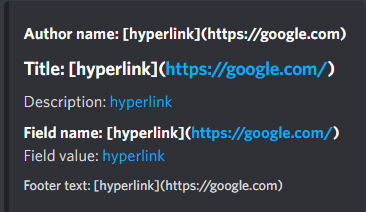
How do I embed a link in an embed field title? It seems text only works in descriptions, and I saw online about { title: "title", url: "url" } but it seems to only be for main embed title?
I'm looking for here:
embed.add_field(
  name=[text](link)
  ...
Other searches around github issues and such suggest it might be impossible, I just wanted to make sure
echo wraith
queen dirge
How do I embed a link in an embed field title? It seems [text](link) only works ...
I think you can't
queen dirge
Ah, thanks anyway!
silk spire
Works in the field value too 
https://i.imgur.com/zkxPUU9.png
set_author has a URL kwarg too
But that's not what you asked
 sage tendon
the field title is pure text
you can't use any markdown or mentions or anything there
lofty parcel
Titles and footers indeed don't support markdown
Title has its own link kwarg you can set
 worthy knoll
category = interaction.data['custom_id'].lower()
lessons = file_info.get(category.lower(), [])
print(lessons, category.lower())
I'm trying to print the lessons in a subject in a json file however why does it return empty?


1 min
The JSON isn't empty but still returns []
 lapis dock
what is file_info?
worthy knoll
data = ReadInfo.read_json()
file_info = data['subjects'][subject]['files']
def read_json():
    json_file_path = os.path.join(script_dir, 'subjects_data.json')

    with open(json_file_path, 'r') as file:
        data = json.load(file)
        return data
This one is in a file (ReadInfo) ^
worthy knoll
I think it's due to the accents and symbols?
echo wraith
worthy knoll
```py
def read_json():
json_file_path = os.path.join(script_dir, 'subjects_d...
add encoding="utf-8" after 'r'
worthy knoll
echo wraith
add `encoding="utf-8"` after `'r'`
Yeah, I've fixed it with that
Thank you.
 round girder
im having.. unexpected bahavior with views. does the timeout property start the countdown from the last interaction or from when the view is initalized? because ive been working with views for what seems like years now and im just now experiencing the first one, when ive learned to expect the second one  additionally there is nothing of help online, from what i can see
echo wraith
round girder
im having.. unexpected bahavior with views. does the timeout property start the ...
It starts from the last interaction
countdown restarts at every view interaction
round girder
gotcha. thanks
how long has that been the case?
let me guess, im an idiot and its been that way forever
round girder
is there any way to force it to timeout in a certain amount of time
or would i just have to essentuially redo the timeout system
i think ill just do that
round girder
echo wraith
It starts from the last interaction
if i could bum another answer from you quick.. i have a view set to timout in 2 minutes. so as a test i summon the view and wait for 2 minutes but the view expires at arounf 30s. is that normal behavior?
echo wraith
round girder
if i could bum another answer from you quick.. i have a view set to timout in 2 ...
I'm pretty sure it isn't
echo wraith
round girder
is there any way to force it to timeout in a certain amount of time
What do you mean ?
round girder
thank you for you help
echo wraith
there is
rugged lodgeBOT
Searched in pycord
round girder
echo wraith
What do you mean ?
like i want my view to be done after 2 or 4 minutes no matter how many people interact with it and when
echo wraith
round girder
like i want my view to be done after 2 or 4 minutes no matter how many people in...
Then you can probably use that
what I just sent
You create an asyncio task
echo wraith
round girder
well yeah but id have to make my own timer and everything
I made an exmaple here of a timed task
#1132206148309749830 message this
round girder
im not saying its hard im just saying its annoying i gotta add it now
echo wraith
yeah
round girder
thanks for the help man
echo wraith
np lmk if anything else
round girder
round girder
if i could bum another answer from you quick.. i have a view set to timout in 2 ...
yeah this is actually happening 😐
I'm really confused now
echo wraith
round girder
yeah this is actually happening 😐
If you have a minimal replroductible code please open an issue on github for that
round girder
I could try yeah
it's in a big file. I haven't moved everything away or abstracted anything yet so like I just ran into what I thought was a small problem but now it kinda messes with my whole command. there goes 950 lines of hell
very ood
I'll add a gh issue tho yeah
round heart
I’ve also had some weird inconsistencies with Views. Some expiring after 15 mins despite having a longer timeout. But then when I went to explicitly recreate it, I couldn’t
So it’s also entirely possible discord quietly fixed something within the last year and gaslighted us all
lapis dock
To debug further you can give the view a timestamp when it is created and compare that timestamp in interactions and the on_timeout event
round heart
I know I've seen them in here before.. (doesn't seem to be in #creations) but does anyone have open examples of recording voice per user (preferably with timestamps)?
Oh. The sinks already do have it per user.. but is it easy to differentiate between someone speaking for 5 mins at the start of a 1 hour call, and someone only speaking for 5 mins at the end of the call? (i.e. timestamps)
lapis dock
Om made a PR for that a while ago I think. Iirc The silent time based on when we received the packet tho. So there can be slight shifts because of network lag
maiden bloom
What exactly is this asking for? I gave it a list of SKU IDs and and a list of SKU objects and it throws an error both times
It's under member.entitlements()
 lapis dock
SKU objects should have worked, what errors are you getting?
lapis dock
I think all discord objects inherit from Snowflake tho
This is all it is doing on the backend anyways
[sku.id for sku in skus] if skus else None
 frosty trellis
is there any way to make a bridge between normal slash commands and user commands?
similar to how it is possible to make a bridge between prefixed and slash commands
sage tendon
frosty trellis
is there any way to make a bridge between normal slash commands and user command...
no
just make them both call the same function
frosty trellis
alright, thanks 👍
 hazy turret
Is it possible if I have the author_check enabled on a Paginator that I can then return a custom message when someone tries to use the Paginator so that I don't just get “Interaction Failed”?
If I read this correctly in the docs, then I can only implement it manually with interaction_check and on_check_failure and leave out the author_check, right?
deft hull
Is there a way I can create a file for each command and register them to the same cog
tiny fractal
??? Why would you do that.
deft hull
uh my commands are getting a bit long
Should I still keep them all in a single file or cog
echo wraith
deft hull
uh my commands are getting a bit long
I remember there was a discussion about this some time ago already
echo wraith
deft hull
uh my commands are getting a bit long
Are your commands in the same group ?
echo wraith
Is that the reason why you want them in the same cog ?
deft hull
they're in the same cog file
echo wraith
A cog is a class
lapis dock
hazy turret
If I read this correctly in the docs, then I can only implement it manually with...
correct
hazy turret
lapis dock
correct
Okay thanks
sage tendon
deft hull
Should I still keep them all in a single file or cog
no, cogs are literally made to seperate commands into multiple files lol
that's the entire point
deft hull
well, alright
lapis dock
You could look in to not needing cogs at all. Most people do not use the features of cogs anyways. Extensions and cogs are not required to be linked
sage tendon
how would you do that then
lapis dock
https://docs.pycord.dev/en/stable/api/clients.html#discord.Bot.add_application_command
in the setup function I believe
sage tendon
ah yea
kinda unnecessary tho, imo just doing it the regular cog way is simpler and less prone to errors
deft hull
Hi, I have a view with some buttons, and whenever a button is clicked, it sends a confirmation message to the user in ephemeral (which is another view). After confirming, the confirmation message gets edited instead of the original one.
lofty parcel
deft hull
Hi, I have a view with some buttons, and whenever a button is clicked, it sends ...
What does your callback look like?
deft hull
Something like this
async def callback(self, interaction):
        result = await send_confirmation(
            f"Buy **{self.item_name}** for ${self.price}?",
            user = interaction.user,
            interaction = interaction
        )
        if result:
            await interaction.respond(f"You bought 1 **{self.item_name}**!", ephemeral=True)
            await interaction.edit(embed=ShopEmbed(self.user), view=Shop(self.interaction_user, self.user))
            await self.user.add_wallet(- self.price)
            await self.user.add_item(self.item_id, 1)
That's the conformation callback?
deft hull
And here's what send_confirmation_message does
import discord

class Confirm(discord.ui.View):
    def __init__(self, user:discord.Member, embed):
        super().__init__(timeout=30)
        self.user = user
        self.embed = embed
        self.result = None

    async def interaction_check(self, interaction: discord.Interaction):
        ...

    async def on_timeout(self):
        ...

    @discord.ui.button(label="Cancel", style=discord.ButtonStyle.red)
    async def cancel(self, button:discord.ui.Button, interaction:discord.Interaction):
        self.result = False
        self.disable_all_items()
        self.children[1].style = discord.ButtonStyle.gray
        self.embed.title = "Action Cancelled"
        self.embed.colour = discord.Colour.brand_red()
        await interaction.response.edit_message(embed=self.embed, view=self)
        self.stop()

    @discord.ui.button(label="Confirm", style=discord.ButtonStyle.green)
    async def confirm(self, button:discord.ui.Button, interaction:discord.Interaction):
        self.result = True
        self.disable_all_items()
        self.children[0].style = discord.ButtonStyle.gray
        self.embed.title = "Action Confirmed"
        self.embed.colour = discord.Colour.brand_green()
        await interaction.response.edit_message(embed=self.embed, view=self)
        self.stop()


async def send_confirmation(message, user: discord.Member, ctx: discord.ApplicationContext=None, interaction: discord.Interaction=None, ephemeral: bool=None):
    embed = discord.Embed(title="Pending Confirmation", description=message, color=discord.Colour.yellow())
    view = Confirm(user, embed)

    if ctx:
        view.message = await ctx.respond(embed=embed, view=view, ephemeral=ephemeral if ephemeral else True)
    if interaction:
        view.message = await interaction.respond(embed=embed, view=view, ephemeral=ephemeral if ephemeral else True)

    await view.wait()
    return view.result
It's the callback for one of the uh, buttons in the context response
lofty parcel
deft hull
It's the callback for one of the uh, buttons in the context response
The confirmation callback is just a yes/no to either continue with the process of your original view?
deft hull
Yup
lofty parcel
Can't you use something like this?https://github.com/BruhDark/sally/blob/main/src%2Fresources%2Futility_views.py
GitHub
Contribute to BruhDark/sally development by creating an account on GitHub.
You then just wait for the view on your original callback
deft hull
hmm I'll try that
round heart
Are there any known/recommended 'templates' for creating a new bot (including cogs and such)? Given I haven't created one from scratch in years at this point, I'm curious if there are any resources that collect a bunch of best practices
echo wraith
round heart
Are there any known/recommended 'templates' for creating a new bot (including co...
I made one
GitHub
An Advanced Framework for Crafting Sophisticated Discord Bots with py-cord - nicebots-xyz/botkit
round heart
echo wraith
I made one
I was just looking at this. It does look very cool, but seems more framework-y than I was personally looking for. Although I did learn about the __init__.py file, which might come in handy elsewhere.
echo wraith
round heart
I was just looking at this. It does look very cool, but seems more framework-y t...
Yeah it's true that it makes a lot of more subjective design choices for you. It's really biased towards how I myself do things, but I figured I may as well make it open
sage tendon
round heart
I was just looking at this. It does look very cool, but seems more framework-y t...
you didnt know about init?
round heart
Nope. Never built a published package, and it seemed superfluous.
I still don't get why there's both __init__.py and __main__.py 🤷♂️
echo wraith
round heart
I still don't get why there's both `__init__.py` and `__main__.py` 🤷♂️
main if if I run the module, init is if I import (from) the module
e.g.
pythom -m src # This will run __main__.py
from src import yada, bleh # this will import from __init__.py
Interesting. So you could theoretically build a package as an extension that also contains a full-fledged, runnable bot (if barebones aside from the extension) if run that way?
echo wraith
round heart
Interesting. So you could theoretically build a package as an extension that als...
yes
Lots of packages from pypi allow both to be used with code and also executed from cli
sage tendon
round heart
I still don't get why there's both `__init__.py` and `__main__.py` 🤷♂️
i use it to get stuff higher up in the folder hierarchy
 ebon swift
hey all, I have a few questions , a while back, some helpers told me to not use the has_role() decorator, I need it for my bot because I'm building something that manages roles and build some games around those roles, for example a @knight can't use magic or your not the @king you can't ask @MyBot to do this. Even though I still check user roles, I agree it doesn't mean I have to use a deprecated decorator, so here are my questions:
- Why shouldn't I use it , does it have to do with how slash commands handles contexts?
- Is there a newer decorator to check roles of a user ? if no do you think I should make my own decorator ?
ebon swift
you're right I don't know why I remembered someone telling me it was deprecated. But in the past you told me I shouldn't use has_role cause it was an old relict
 echo wraith
ebon swift
you're right I don't know why I remembered someone telling me it was deprecated....
echo wraith
ebon swift
you're right I don't know why I remembered someone telling me it was deprecated....
Yeah but you should use slash commands with that
ebon swift
I'm using slash commands with has_role actually, so if there is nothing bad with it then I don't need more help
echo wraith
ebon swift
I'm using slash commands with has_role actually, so if there is nothing bad with...
Is it in just one server
ebon swift
no
echo wraith
ebon swift
no
Then yeah has_role is probably good
But how do you use has_role if it's in multipe servers
the roles are different between servers
ebon swift
it checks for specific roles and will create the one needed for the games
echo wraith
I'm not sure I understand
In any case
what Toothy meant was that you should edit the server's integration settings
and change there what role can use what command
round heart
echo wraith
I'm not sure I understand
His intention is that the bot manages the needed roles for his application - using his examples earlier, roles named "King", "Knight", etc.
He wants to be sure that application commands, when run, are checked against the named roles.
echo wraith
Yeah so has_role is good for that
ebon swift
thank you for that it helped a lots !
maiden bloom
lapis dock
SKU objects should have worked, what errors are you getting?
Here's my code and full traceback
all_premium_bot_skus = await self.bot.fetch_skus()
purchased_member_skus = member.entitlements(all_premium_bot_skus)
That looks like a bug in pycord
maiden bloom
Oh nice I'll make a report lol
lapis dock
maiden bloom
Oh nice I'll make a report lol
Yup, already been fixed on master
https://github.com/Pycord-Development/pycord/pull/2628

GitHub
Summary
Fix #2627 about the entitlements() method that raises TypeError when passing skus argument
Information
This PR fixes an issue.
This PR adds something new (e.g. new method or parameters...
We really need to do a 2.7 release
lapis dock
I have been trying #discussion message
round heart
I added a voice to the echo
lapis dock
one of the big things is doru is not very active anymore cuz country bans
round heart
Oh I forgot about that. Hopefully he has a VPN?
lapis dock
yeah, but i think it just makes everything harder
maiden bloom
"You get master" 😂
deft hull
Hi, anyone knows what this error means?
AttributeError: property "view" of "Button" object has no setter
Update: button already has a built in view property, so renaming the property fixed the issue
 high spire
Traceback (most recent call last):
File "c:\Users\icesc\Documents\NRTH.venv\Lib\site-packages\discord\ui\view.py", line 426, in _scheduled_task
await item.callback(interaction)
File "c:\Users\icesc\Documents\NRTH\src\cogs\verification.py", line 57, in button_callback
await interaction.response.send_modal(VerificationModal(code=self.code))
File "c:\Users\icesc\Documents\NRTH.venv\Lib\site-packages\discord\interactions.py", line 1221, in send_modal
await self._locked_response(
File "c:\Users\icesc\Documents\NRTH.venv\Lib\site-packages\discord\interactions.py", line 1292, in locked_response
await coro
File "c:\Users\icesc\Documents\NRTH.venv\Lib\site-packages\discord\webhook\async.py", line 222, in request
raise NotFound(response, data)
discord.errors.NotFound: 404 Not Found (error code: 10062): Unknown interaction
class VerificationView(discord.ui.View):
    def __init__(self, *items, code:int):
        super().__init__(*items)
        self.code = code


    @discord.ui.button(label="Enter Verification Code", style=discord.ButtonStyle.primary)
    async def button_callback(self, button, interaction):
        await interaction.response.send_modal(VerificationModal(code=self.code))
Line 57 is the await interaction response
added self.code as my own attribute for verification
I don't understand why the interaction isn't found
high spire
Codebin Paste:
Description: discord bot
Language: python
Last Edited: 1/29/2025, 11:01:46 AM
Expires: 1/30/2025, 9:29:24 AM
Is your internet slow ?
Does it always error like that?
high spire
echo wraith
Is your internet slow ?
it is
high spire
echo wraith
Does it always error like that?
never tried it
could there be no other possible reasons?
echo wraith
high spire
could there be no other possible reasons?
Not really
try doing
await interaction.response.defer ()
high spire
echo wraith
`await interaction.response.defer ()`
before the second await?
I always get this when inputting it
 echo wraith
high spire
I always get this when inputting it
echo wraith
high spire
I always get this when inputting it
Wait
Do you have a callback on your modal ?
high spire
echo wraith
Do you have a callback on your modal ?
Yes
echo wraith
high spire
This is the only issue ?
Or do you have issues with the / command istelf ?
high spire
echo wraith
This is the only issue ?
on the user side yes
high spire
echo wraith
Do you have a callback on your modal ?
does the callback impact it?
bc I get this all the time
 echo wraith
high spire
does the callback impact it?
echo wraith
high spire
does the callback impact it?
I'm not sure one can defer a modal interaction response
echo wraith
high spire
But this is not in the modal
it's not the same issue
try changing it like this
class VerificationView(discord.ui.View):
    def __init__(self, *items, code:int):
        super().__init__(*items)
        self.code = code


    @discord.ui.button(label="Enter Verification Code", style=discord.ButtonStyle.primary)
    async def button_callback(self, button, interaction):
        await interaction.response.defer()
        await interaction.response.send_modal(VerificationModal(code=self.code))
Also it's not secure to use randint for secure code generation
high spire
echo wraith
Also it's not secure to use randint for secure code generation
yeah thats fine for now its just a small verification step for like a hs server so there's not really any risk
high spire
echo wraith
try changing it like this
```py
class VerificationView(discord.ui.View):
def...
alr sure
im getting this
 high spire
echo wraith
try changing it like this
```py
class VerificationView(discord.ui.View):
def...
high spire
echo wraith
try changing it like this
```py
class VerificationView(discord.ui.View):
def...
just changed it to that
echo wraith
high spire
oh yeah that's what I thought
Yeah no so then you simply can't
It's an issue with internet speed
echo wraith
Basically, once you recieve an interaction from discord, you have 3 seconds to respond
and if your internet is too slow, you can't respond in 3 seconds
high spire
the user has 3 seconds to respond?
echo wraith
No you have
high spire
Ohhh
echo wraith
once the user clicks on the button
or runs the command
or anything
you have 3 sec to respond with something
high spire
why is it that when running commands there is no issue tho?
wouldn't they realistically have similar requirements to run it?
lapis dock
Pretty sure you can't defer when sending a modal. (I can't tell if that is what you were getting at)
lofty parcel
You indeed can't defer to then send a modal.
 eternal kite
can dynamic cooldown be an asynchronous function?
silk spire
sage tendon
i dont see what there makes it a no
i was looking at the docs as well
 dense summit
hey guys what does this error means: https://mystb.in/1dbb41cd7763be4d12
echo wraith
That the payload is too large
dense summit
basically the image its too heavy?
echo wraith
yes
dense summit
strange, it worked before
echo wraith
if you're sending a message
dense summit
they changed something?
dense summit
echo wraith
if you're sending a message
its a paginator
do you know whats the limit?
silk spire
sage tendon
i dont see what there makes it a no
i was looking at the docs as well
Callable[[discord.Message], Optional[Cooldown]]) means its supposed to take a Message and returns a Cooldown obj, not a Coroutine (Coroutine[Any, Any, Cooldowm | None])
also when looking at the actual cooldown impl, nothing is async https://github.com/Pycord-Development/pycord/blob/19721e2ca56bc102d933d8198af89ca0dbdec498/discord/ext/commands/cooldowns.py#L207-L271
echo wraith
dense summit
its a paginator
.tag embed_limits
sly karmaBOT
dense summit
its a paginator
Field amount = 25, Title/field name = 256, Value = 1024, Description = 4096, Footer text = 2048, Author name = 256
Note that the sum of all characters in the embed should be less than or equal to 6000.
https://cdn.discordapp.com/attachments/559455534965850142/885103228566515732/unknown.png
 dense summit
echo wraith
.tag embed_limits
dense summit
echo wraith
.tag embed_limits
so the problem is this change dw thanks
 dense summit
echo wraith
Oh yeah
dense summit
echo wraith
Oh yeah
do you know if boosting the server to level 2 increase the limit for the bot too
echo wraith
dense summit
do you know if boosting the server to level 2 increase the limit for the bot too
Pretty sure it does
high spire
echo wraith
you have 3 sec to respond with something
sorry for the followup, just wondering, I tested it again just now, and it immediately shows the error after I send in the form on the user side, no delay whatsoever, could it be something else causing this?
lofty parcel
high spire
sorry for the followup, just wondering, I tested it again just now, and it immed...
What does your callback look like?
And whats the error
 wary portal
discord.errors.ApplicationCommandInvokeError: Application Command raised an exception: NotFound: 404 Not Found (error code: 10015): Unknown Webhook What does this error mean?
lapis dock
wary portal
`discord.errors.ApplicationCommandInvokeError: Application Command raised an exc...
It has something to do with how you are respondingto or preforming actions on interactions. I believe specifically when you are dealing with ephemeral messages.
We would need more code to diagnose.
 silk spire
high spire
https://i.imgur.com/KAZs2y8.png
silk spire
high spire
https://i.imgur.com/KAZs2y8.png
You sure that value matches? Maybe print it out
 frail basin
Also, convert self.code to a str
 late slate
Sry, took a long break from using Pycord, but is there a reason https://docs.pycord.dev/en/stable/ says "Pycord v0.1 Documentation"? I'm just looking for latest docs.
echo wraith
late slate
Sry, took a long break from using Pycord, but is there a reason https://docs.pyc...
It's a bug
that's the latest
late slate
Awesome, just thought I was goin crazy for a sec 😅 Thx
high spire
silk spire
You sure that value matches? Maybe print it out
i fixed, had an if statement that didn't have an interaction response
deft hull
How do you define autocomplete for an Option? This is my function
def get_matching_items(cls, ctx:discord.AutocompleteContext):
        '''Returns a list of matching item names based on user input.'''
        cls._load_data()

        if not cls._item_metadata:
            return []

        all_names = [
            data['name']
            for data in cls._item_metadata.values()
            if 'name' in data
        ]

        user_input = ctx.value.lower().replace(' ', '')
        matches = [
            name
            for name in all_names
            if name.lower().replace(' ', '') == user_input
        ][:25]

        return matches

Can anyone tell me why my buttons aren't showing up?
Only the Resend Code button shows up
No errors or anything
nvm figured it out
each button needs its own callback function
why is that?
if it's all under the same decorator and has its own label won't it differentiate it
frail basin
high spire
why is that?
Thats because of how python works at a lower level.
If you have multiple functions with the same name, in the same scope, then it will always prioritize the "bottom" one.
high spire
ic
high spire
why do I keep getting this?

I gave the server id

I suspect its because discord.Client.get_guild isn't supported? so I just have to use the instance of the discord.Bot setup in my main file, which isn't connected to my cog?
So how would I be able to use bot.get_guild() when my cog doesn't inherent the bot
ionic wasp
inherit the bot i guess
high spire
ionic wasp
inherit the bot i guess
from what class


 high spire
i don't think so
silk spire
interaction.client will return your bot instance
And you're probably also passing the bot to the cog and have defined it as self.bot
high spire
actually yes, the cog inherits from discord.ui.Modal
high spire
silk spire
And you're probably also passing the bot to the cog and have defined it as `self...
yes but the thing is that this is in a dialogue modal
silk spire
Ah you're talking about a class
echo wraith
high spire
Someone had a similar weird issue some time ago
silk spire
Not specifically a commands.Cog
high spire
and I'd have to pass it through from the initial Commands.Cog to the View to the Modal
high spire
silk spire
interaction.client will return your bot instance
ah alr
high spire
echo wraith
Someone had a similar weird issue some time ago
Ic
silk spire
echo wraith
Someone had a similar weird issue some time ago
"Issue"? They're literally trying to use a method of a class without initialising it
Even if it was called, it wouldn't work because it's not the running instance
echo wraith
high spire
Ic
Can you please make sure pycord is up to date and you don't have other discor dlibs installed ?
echo wraith
silk spire
"Issue"? They're literally trying to use a method of a class without initialisin...
Oh yeah
silk spire
Get your OOP knowledge up lmao
high spire
echo wraith
Can you please make sure pycord is up to date and you don't have other discor dl...
I'm pretty sure that it is
Thanks guys for all the help anyways
 silk spire
lol
class MyClass:
    def method(self, arg):
        pass

MyClass.method("arg")  # error: MyClass.method() missing 1 required positional argument: 'arg'
MyClass().method("arg") # valid

inst = MyClass()
inst.method("arg") # valid
 flat wind
Hello !!
Does anyone know how I can avoid these errors ?
  File "/usr/local/lib/python3.12/site-packages/discord/client.py", line 412, in _run_event
    await coro(*args, **kwargs)
  File "/usr/local/lib/python3.12/site-packages/discord/bot.py", line 1214, in on_connect
    await self.sync_commands()
  File "/usr/local/lib/python3.12/site-packages/discord/bot.py", line 761, in sync_commands
    app_cmds = await self.register_commands(
               ^^^^^^^^^^^^^^^^^^^^^^^^^^^^^
  File "/usr/local/lib/python3.12/site-packages/discord/bot.py", line 538, in register_commands
    prefetched_commands = await self._bot.http.get_guild_commands(
                          ^^^^^^^^^^^^^^^^^^^^^^^^^^^^^^^^^^^^^^^^
  File "/usr/local/lib/python3.12/site-packages/discord/http.py", line 368, in request
    raise Forbidden(response, data)
discord.errors.Forbidden: 403 Forbidden (error code: 50001): Missing Access
They are happening when I start the bot
nvm it was a guild_ids=[...] argument with a server ID where my bot is not in..
little cobalt
flat wind
Hello !!
Does anyone know how I can avoid these errors ?
```py
File "/usr/loca...
With a Error Handler
;3
sage tendon
high spire
So how would I be able to use bot.get_guild() when my cog doesn't inherent the b...
save the bot object in the cog upon creation?
sage tendon
high spire
actually yes, the cog inherits from discord.ui.Modal
that makes no sense
for a class to be a cog it needs to subclass discord.Cog
if it doesnt its not a cog
@high spire @ionic wasp just to get you two straight on vocabulary
inherit means when you take over things from a superclass when you subclass a class
import (which you probably meant) is importing a value from another file, or a module etc
just so it doesnt cause confusion later on
 wise harness
Do grouped slash commands not work with user apps? For example I have this: (which doesn't register)
        discord.IntegrationType.guild_install,
        discord.IntegrationType.user_install,
}, description="Get general stats of a player.")```but this does:
@commands.slash_command(integration_types={
        discord.IntegrationType.guild_install,
        discord.IntegrationType.user_install,
    }, description="List of commands.")
You probably need to register the whole group as user installable.
Subcommands are not treated as separate commands by Discord.
high spire
sage tendon
that makes no sense
oops
maiden bloom
It’s not possible to set a bot’s status message on a guild-by-guild basis, is it?
sage tendon
no
high spire
sage tendon
save the bot object in the cog upon creation?
can you explain on this it doesn't make sense to me
sage tendon
 modern trail
Is it possible to prevent a paginator from timing out?
Pycord
This module provides an easy pagination system with buttons, page groups, and custom view support. Example usage in a cog: API Reference: Page: Attributes content, custom_view, embeds, files. Metho...
sage tendon
timeout=None?
modern trail
oh, how did I not see that. So it defaults to 180 seconds?
sage tendon
yea
modern trail
i got too distracted by the disable_on_timeout kwarg
which only applies to the buttons for some reason
boy i'm dumb. thanks for being my rubber duck as always toothy
perhaps one of these days i'll learn how to read
high spire
sage tendon
what's providing the bot parameter?
ohh in setup right

so is setup automatically called in the main file?
v
 sage tendon
its completely and entirely unnecessary
high spire
ic
lofty parcel
sage tendon
god where do people keep getting the fucking if name is main from
It's a practice to prevent the file from running if not itself or something like that
It's a common thing
lofty parcel
well
high spire
lofty parcel
It's a practice to prevent the file from running if not itself or something like...
Not itself?
edgy nest
it prevents the code inside it from running if the file was imported
it only runs if the file was the original script that got ran
ionic wasp
does the on_disconnect event happen everytime the shard resumes a session?
tiny fractal
400 Bad Request (error code: 50034): You can only bulk delete messages that are under 14 days old.
is this a new thing?
echo wraith
tiny fractal
```400 Bad Request (error code: 50034): You can only bulk delete messages that a...
Pretty sure not
lapis dock
Discord has stronger limits on older messages
upper slate
Are there built in DOS protections? That is, if someone spams a command for 24 hours + is this inherently dealt with? I know slow mode exists, just wondering if I have to deal with this edge case in my code
sage tendon
no
silk spire
tiny fractal
```400 Bad Request (error code: 50034): You can only bulk delete messages that a...
no that's not new
that's why the lib deletes messages older than 14 days one-by-one in purge
upper slate
sage tendon
no
What is the simplest way to deal with this
lapis dock
upper slate
Are there built in DOS protections? That is, if someone spams a command for 24 h...
You can implement cooldowns on your commands, but if you are using slash commands it is going to be hard for people to spam the command anyways
upper slate
lapis dock
You can implement cooldowns on your commands, but if you are using slash command...
Cool okay I am using slash commands, thank you for providing me witht the correct answer
rugged lodgeBOT
Searched in pycord
discord.ext.commands.Cooldown
discord.ext.commands.Cooldown.copy
discord.ext.commands.Cooldown.get_retry_after
discord.ext.commands.Cooldown.get_tokens
discord.ext.commands.Cooldown.per
discord.ext.commands.Cooldown.rate
discord.ext.commands.Cooldown.reset
discord.ext.commands.Cooldown.update_rate_limit
discord.ext.commands.cooldown
discord.ext.commands.cooldowns.Cooldown
discord.ext.commands.Command.cooldown_after_parsing
discord.ext.commands.dynamic_cooldown
discord.ext.commands.CommandOnCooldown
discord.ext.commands.CommandOnCooldown.cooldown
discord.ext.commands.CommandOnCooldown.retry_after
sage tendon
typically you dont need cooldowns unless your code does something else that counts against an APIs ratelimit or is otherwise heavy on compute
upper slate
SQL queries take place on the backend so just don't want the workers being unecessarily taxed
modern trail
I want to have a job get added to a scheduler in one of my cogs, and was gonna put that logic in cog_load, but i'm realizing pycord doesn't have that. Would it make sense to put this logic in the cog's __init__ method?
lofty parcel
modern trail
I want to have a job get added to a scheduler in one of my cogs, and was gonna p...
Yes. You could also wait for on_ready in the cog
modern trail
oh, like i can just throw
@bot.event
async def on_ready():
directly into the class or something?
lofty parcel
@commands.Cog.listener()
async def on_ready(self):
you would want to throw a once=True in the listener
What does your situation look like? You could also add it to the setup() function instead of in the cog
modern trail
I was planning on putting it in this cog because the scheduled job will be auto posting a leaderboard

GitHub
Discord bot for PZSD server. Contribute to fiskenslakt/pzsd-bot development by creating an account on GitHub.
lapis dock
When you say "job" are you talking about ext.tasks or your own system?
And are you planning on running the job ever X seconds?
modern trail
i want to have it essentially invoke the weekly command every friday at 4pm ET. So i was gonna schedule it with apscheduler. ext.tasks didn't seem equipped for that to me
lapis dock
Yeah, init, event or setup should all work. init is probably the easiest.
modern trail
oh so you think it's fine to just dump it in the cog's __init__?
lapis dock
I am not familiar with apscheduler but if the add job function is not async then it should be fine. The cogs init gets called once when the cog is added to the bot so it seems like a good place to put it
modern trail
gotcha
hasty meadow
Anyone else having issues playing audio files within channels on latest discord version (Android) ?
lapis dock
Like with a bot or on discord in general?
lapis dock
on_shard_disconnect fires everytime the shard disconnects
on_shard_resumed fires everytime a shard resumes
hasty meadow
lapis dock
Like with a bot or on discord in general?
In general
lapis dock
This function can be called many times without a corresponding on_connect() call.
This is relevent as well
lapis dock
hasty meadow
In general
seems to work for me
hasty meadow
lapis dock
seems to work for me
I just see this now, no longer any playback interface
 lapis dock
I dont think mobile ever had audio file playbacks
Note: there is a difference between sending a voice message and an audio file. A voice message will work on mobile
 shell radish
lapis dock
I dont think mobile ever had audio file playbacks
Note: there is a difference be...
shell radish
lapis dock
I dont think mobile ever had audio file playbacks
Note: there is a difference be...
mobile has audio file playbacks
at least in ios
lapis dock
Huh, I might be wrong then.
high spire
why is interaction.user.id not giving me the correct id?
i don't understand
675238101253226500
instead of
675238101253226496
it's like rounding my user id
to the nearest 100
high spire
please help
silk spire
high spire
please help
Code?
ionic wasp
for userapps, can i somehow get a event if a specific message of the bot was deleted?
silk spire
Not if the bot isn't even in the server
ionic wasp
so also not in dms? rip
silk spire
That would make it a user bot technically lol