#Basic Pycord Help
1 messages · Page 57 of 1
 frail basin
let me write a quick demo with timeit
This is chatgpt json, not real client data / schema but you get the point
https://paste.sparked.host/obunifinef.rb
 frail basin
wdym
 sage tendon
like this decorator you mean
I've never seen that
can you show that in your code
frail basin
@attrs.define?
sage tendon
yes
frail basin
Oh thats the exact same as @frozen in the test, just with with one of the params set to True
sage tendon
yes but can you show it in your code lol
frail basin
 frail basin
This is chatgpt json, not real client data / schema but you get the point
https:...
frail basin
frail basin
This is chatgpt json, not real client data / schema but you get the point
https:...
The paste server has the code
sage tendon
oh i didnt see the paste link as that lol
thought it was just yet another image hoster link
frail basin
 frail basin
sage tendon
oh i didnt see the paste link as that lol
frail basin
sage tendon
oh i didnt see the paste link as that lol
Just a fork of https://github.com/toptal/haste-server
sage tendon
hm interesting, basically a bit like a java record class
and i guess it also provides getters and setters? or is that decorator really only to simplify the init?
frail basin
It provides extra functionality
Basically an improved version of the builtin dataclasses.define
sage tendon
but yea, i guess python shows its ugly side there regarding performance
frail basin
I might also try to compile it using CPython, curious how much that improves
sage tendon
or use mojo
frail basin
Havent heard of that one before
sage tendon
i think most of your latency will be unavoidable though
frail basin
Yeah, hopefully localhost API calls + DC ping will improve on that though
Would be nice if discord disclosed the locations of their API gateways
Never going to happen, ik
sage tendon
pointless info
frail basin
Not really
sage tendon
very
frail basin
Being in the same DC would improve ping
Maybe not that significantly
But would improve nevertheless
sage tendon
what
as long as youre at least on the same continent as the gateway, any difference in location is negligible
and as you can see, a single line in your code can add more latency than going half across the world, literally
 haughty grove
is it possible to get a guild specific banner?
fetching the user returns the normal banner and member.banner is always None
haughty grove
sage tendon
or wait, are you on 2.6.1?
yep
haughty grove
nope
sage tendon
ah ok
haughty grove
sage tendon
yea then its in 2.7 when it releases
okay, thanks
 marsh nymph
is there a way if a bot joins in a guild with manage roles perms, within the event on_guild_join to edit the self_role ?
sage tendon
you cant edit your highest role
marsh nymph
i thought maybe theres another way to edit the role of the bot like the color or name
sage tendon
no
not sure if bots can edit their role if they have a higher role, might work then
but thats usually not the case
 tiny fractal
        banr = self.bot.get_guild(BANR_ID)
        await ctx.send(f'{banr.members}')
am I high? this is only returning two members myself and a bot, did something change. this worked for ages
 little cobalt
tiny fractal
```python
banr = self.bot.get_guild(BANR_ID)
await ctx.send(f'{b...
little cobalt
tiny fractal
```python
banr = self.bot.get_guild(BANR_ID)
await ctx.send(f'{b...
.tag get_x
 sly karmaBOT
tiny fractal
```python
banr = self.bot.get_guild(BANR_ID)
await ctx.send(f'{b...
sly karmaBOT
tiny fractal
```python
banr = self.bot.get_guild(BANR_ID)
await ctx.send(f'{b...
Any function that starts with get_ in Py-cord is retrieving the related object from your bots cache. If the object is not in the bots cache the get_ method will return None. Because of this behavior you should check if the get_x method is None and if it is use the fetch_x method.
Why Is Using fetch_ Without Using get_ First Bad?
The fetch_ method makes a call to the discord API. This API call is unneeded if you already have the information. It will also make your command take longer because it will have to send and than wait for a response from the discord API. It will also contribute to the discord APIs global rate limit of 50 requests per second.
What Is Cache?
The cache is a temporary storage inside your bot. It holds many objects from members to messages. When you restart your bot the cache will be empty. When the cache is full it will delete older objects to make space for the new objects.
 errant trout
tiny fractal
```python
banr = self.bot.get_guild(BANR_ID)
await ctx.send(f'{b...
errant trout
tiny fractal
```python
banr = self.bot.get_guild(BANR_ID)
await ctx.send(f'{b...
Do you have members intents
tiny fractal
i've got it set to all
actually... you know what.. im an idiot
i forgot the part in bot = discord.Bot(intents=intents) where you pass intents
sage tendon
a good IDE should've warned you about that
tiny fractal
yea, vscode normally does. but i think its because im remoting to a linux server to do work
 opal swan
slash_command in logic don't need an help ? bcs all cmds are in slash
 lapis dock
Please rephrase your question.
opal swan
a bot with somes slash commands don't need an help
?
(bcs all commands are show in slash)
lapis dock
It is your preference. But I do not use a help command. I just make sure to give each slash command a description
opal swan
ye me too
 mossy star
is it possible to have a custom embed and a link embed (an embed auto-generated by discord from a link) in the same message?
mossy star
because when i try, the link embed doesn't show up when i have a custom embed
sage tendon
show how it looks like in discord
mossy star
this is the result of this command:
r = await c.send(f"https://imgur.com/jTduCVL",embed=discord.Embed(description='custom embed'))

the imgur will load if i remove the other embed, but doesn't if there is
sage tendon
ah yea i see the issue
it should work if you send an empty message and edit the link in later
the issue is that you are passing embed= which basically tells discord to only show that embed
lapis dock
I am pretty sure that a message has to only have the link for it to render
https://google.com/ extra chars
Search the world's information, including webpages, images, videos and more. Google has many special features to help you find exactly what you're looking for.
sage tendon
no
lapis dock
Nevermind Im dumb
sage tendon
what you're thinking of is that it hides image links if the message consists only of the link
lapis dock
yeah your right
mossy star
time.sleep(1)
y = await c.fetch_message(r.id)
await y.edit(content='https://imgur.com/jTduCVL')``` sage tendon

probably wont work but can you try doing embeds=[your embed] instead of embed=
you need the brackets btw
mossy star
just tried it, no luck
sage tendon
then i think you're out of luck
it might work differently because its a media embed and not like, a normal embed
i think it should work with e.g. google.com if you put that in there
can you try that rq
mossy star
still using the embeds=[] method

well, it's not too big of a deal if i have to send two messages, but a little annoying
lapis dock
If that does not work you can put the link in its own embed by using
Embed.set_image()
mossy star
well, the reason i ended up down this rabbit hole was to handle video links, which that can't handle
sage tendon
yea i think video embeds are reserved for some sites
lapis dock
Ah, ok
sage tendon
or at least cant be manually made afaik
mossy star
i also tried doing the embed first and then editing a second embed in later, which kinda works but screws up the link embed and strips out videos
lapis dock
mossy star
```r = await c.send(embed=discord.Embed(description='custom embed'))
time.sleep(...
Yo ucould try this the other way. Edit in your custom embed
mossy star
mossy star
i also tried doing the embed first and then editing a second embed in later, whi...
there is technically an embed, but it ends up small and weird with no video
time.sleep(1)
y = await c.fetch_message(r.id)
await y.edit(embeds=[discord.Embed(description='custom embed'), *y.embeds])``` sage tendon
this might be very forceful but you MIGHT be able to make videos work with
embed = discord.Embed()
embed.video = discord.EmbedMedia(video_link)
from my testing, pycord/discord will ignore any video data you try to send in an embed, i've tried
sage tendon
f
errant trout
users/bots cannot send videos in embeds
mossy star
yeah, which is why i'm trying workarounds lmao
even just editing a message with a functional link/video embed will break it
errant trout
well.. the only "workarounds" are using gifs or sending a site that embeds videos itself
websites are able to configure video embeds using opengraph
sage tendon
proxy it through your own VPS and abuse it as CDN
lmao
that would work but itd probably be unreasonable effort
mossy star
basically, the only thing that works in my testing is a regular text message with a link/video embed generated by discord. which means i can't use embed decorators for my text which is annoying, so that's why i figured i'd ask
anyways, thanks
 lament totem
How does autosharding work? Does it spawn multiple processes and handle ipc or does it still use a single process but use multiple gateway connections? This is a bit confusing
little cobalt
lament totem
How does autosharding work? Does it spawn multiple processes and handle ipc or d...
Do you really need it?
lament totem
little cobalt
Do you really need it?
I have a bot with 2300~ servers, I feel like I should be thinking about sharding soon
lament totem
little cobalt
Do you really need it?
Would it be wrong to ask without needing it?
 lofty parcel
It is multiple gateway connections.
At least what it says in the source code.
"Instead of a single websocket, we have multiples. The key is the shard_id"
little cobalt
lament totem
Would it be wrong to ask without needing it?
nothing is wrong about asking ^^
lapis dock
lament totem
Would it be wrong to ask without needing it?
We have some people who come here wanting to start sharding at 150 servers so we want to make sure 🙃
sage tendon
i think its forced at 2500 so yes you should do it
lament totem
lapis dock
We have some people who come here wanting to start sharding at 150 servers so we...
I see, that's understandable 😛
I'm just trying to understand this, so for example if I do autoshardedbot.guilds will I get all the guilds where the bot is installed? or all the guilds corresponding to the shards in the current process being run?
sage tendon
it will show all the bot's guilds
the only real difference is that not all guilds run on the same shard / websocket connection
 round heart
lapis dock
We have some people who come here wanting to start sharding at 150 servers so we...
round heart
lapis dock
We have some people who come here wanting to start sharding at 150 servers so we...
Mine is in two servers. How can I spawn 10 shards?
lapis dock
- add your bot to about 10k more servers
- Use autosharded bot
easy :)
lament totem
sage tendon
it will show all the bot's guilds
Even if for example I run two processes each with its own subset of shards?
sage tendon
you can do that but theres little point if its on the same machine
lofty parcel
Why would you run two processes tho
The point of autoshardedbot is to avoid you the frustration of handling IPC
lament totem
lofty parcel
Why would you run two processes tho
My bot is not shared rn and sits at 30% single core utilization all the time. I'm thinking I'll need more processes to avoid single process constraints.
Later on ofc, assuming the bot gets installed in more and more servers
If I understand, it's still a single process but receiving guild events through multiple gateway sockets, no?
sage tendon
30% is nothing
lament totem
sage tendon
30% is nothing
Doesn't 30% mean that I can only handle 3~ times the current bot usage/activity on a single process at most?
lament totem
sage tendon
And you arent suddenly getting 3x as many servers to handle
Agreed, I'm just thinking about the future
lament totem
sage tendon
No
so every shard gets a new process? I feel like there's something I'm missing
lament totem
lament totem
Doesn't 30% mean that I can only handle 3~ times the current bot usage/activity ...
Then why is this not true? I'm sorry I just dont understant lol, thank you for your patience with me
sage tendon
not 100% of your CPU usage is variable
there'll be some % that remain even if you have 0 servers in your bot
lament totem
sage tendon
there'll be some % that remain even if you have 0 servers in your bot
I think all of it is related to event handling in my case, when on my testing environment it stays at 0% on avg.
sage tendon
yea okay then i overestimated it
but still, 30% is nothing, you'll have long until you reach high percentages still
lament totem
sage tendon
but still, 30% is nothing, you'll have long until you reach high percentages sti...
I agree, I've done a lot to keep it as low as possible but definitely want to avoid it getting high so that it can stay responsive
but I think I understand a bit better now, I guess I should give the source code a good look sometime soon
sage tendon
it wont become unresponsive until it reaches literally 100%
lament totem
I guess what I meant was, like being late to defer or respond to interactions (buttons / slash commands, etc) not really unresponsive in the strict sense
sage tendon
same thing there
its not slower at 95% CPU usage than it is at 5%
well, it is, but thats about a few nanoseconds at best
lament totem
If that's the case then I must be doing something wrong 👀
sage tendon
why?
lament totem
well if the bot is being late here and there on defering stuff then something must be blocking for longer than 3 secs or its just too slow to do the stuff ahead in the queue
sage tendon
yea, but thats unrelated to CPU usage
thats just because you have blocking code that adds up
may or may not be unavoidable
 agile oar
Is there no way to handle a ratelimit on channel edits? I know the limit it 2 edits per 10 minutes, but im not getting any errors raised on a try except.
How am I supposed to know if the bot is ratelimited on editing a channel before trying an edit if it does not return anything?
lapis dock
In general the library will handle rate limits like that. With how discord is set up you cannot check if you are going to hit a rate limit. You have to hit it and then wait the timeout.
When rate limited the library will queue your request to be sent when unratelimiter.
 stuck oar
I understand that to add tags after creating a thread in a forum channel, I should use ForumChannel#edit(applied_tags=[]), but I don't know what values to put in discord.ForumTag. I tried using discord.ForumTag(name="Plugin", emoji="🌙"), but it doesn't work (even though it's an actual tag).
errant trout
stuck oar
I understand that to add tags after creating a thread in a forum channel, I shou...
you need to get the tag by ID; either check through ForumChannel.available_tags, or use ForumChannel.get_tag if you know the id
stuck oar
oh Thanks!! 
agile oar
lapis dock
In general the library will handle rate limits like that. With how discord is se...
Hm okay so best way is to just count channel edits per channel id then
frail basin
Is there a way to get the message that a view is attached to, from within the view's code? self.message is not None, but raises an Unknown message error when I try editing it, even though I can still clearly see it on my client and even use the view's buttons.
little cobalt
frail basin
Is there a way to get the message that a view is attached to, from within the vi...
which intents does your bot have?
 little cobalt
frail basin
all
little cobalt
frail basin
all
Can I see it? ;3


 fresh sierra
frail basin
fresh sierra
frail basin
Defer is the original response
As far as I know
Try again without the defer
frail basin
did not work
sage tendon
is your view in an ephemeral message?
frail basin
sage tendon
is your view in an ephemeral message?
Yes
sage tendon
that is the problem
frail basin
Any workarounds?
sage tendon
dont think so
just do an ephemeral followup instead of editing it
frail basin
That wont prevent the original issue, of the user pressing the buttons multiple times
sage tendon
then disable the buttons once clicked
frail basin
And since I dont have the original message, I cant disable the button
sage tendon
self.disable_all_items()
frail basin
Dont I have to edit the message with view=self for that?
sage tendon
not sure, p sure if you disable all items itll still reject any interactions sent to them
let me check my code
frail basin
Well yea it will reject them, causing an "interaction failed" thing
iirc to disable the buttons you have to edit the message
sage tendon
yea, i dont think you can properly disable the buttons in an ephemeral message
frail basin
Well thats dumb
sage tendon
i mean, discord limitation
ephemeral messages are really barely messages at all lol
frail basin
I am aware that this is discord's bs
sage tendon
actually lemme check smth
okay forget what i said, wtf
I just remembered a bot i use has ephemeral messages that can be edited
sorry lol
but i have no idea how that's done
have you tried editing both self.message (by passing it from the original view) and self.original_response() with ephemeral=True passed?
frail basin
I fixed it
not sure how lol
I am not touching this

seems like its actually editing it though
 frail basin
Yes.. Yes I did
Oh
You know what I changed? Removed ephemeral=True from the defer
But the message is still somehow ephemeral
So I dont know wtf is going on
 echo wraith
wat
frail basin
Exactly 😂
sage tendon
thats not even possible
if you respond non-ephemerally the response cant be ephemeral
frail basin
Oh I know why,
Slashcommand -> ephemeral view -> non ephemeral defer -> ephemeral edit_original_response
sage tendon
wow
frail basin
And it stays ephemeral all the way
errant trout
sage tendon
yea, i dont think you can properly disable the buttons in an ephemeral message
you can
errant trout
ephemeral messages are full messages (to the point they appear on different clients)
sage tendon
but explicitly passing ephemeral=True to the defer shouldnt break it lol, since its all forced ephemeral anyway apparently
frail basin
Not sure why it did that. I bet if I passed it now, it wouldn't break.
errant trout
frail basin
this should have been interaction.response.edit_message
frail basin
Whats the difference between that and edit_original_response?
errant trout
response.edit_message is for the initial interaction
frail basin
so thats basically interaction.message.edit()?
errant trout
edit_original_response is for editing the response you already made later
(and again, we implemented interaction.edit to simplify it)
more or less yeah
frail basin
errant trout
this should have been interaction.response.edit_message
How would I make the 3rd message replace the 2nd one then? The 2nd message's "send" button triggers the 3rd message.
I tried:
-
interaction.response.edit_message-> raises InteractionResponded (I'd assume cause the defer?) -
interaction.edit-> makes a 3rd ephemeral message -
interaction.edit_original_response-> same as above -
interaction.message.edit-> Unknown Message -
interaction.followup.edit_message(message_id=interaction.message.id, ...)-> Nothing happens

Here is the relevant code: https://paste.sparked.host/owujovapit.rust
errant trout
frail basin
How would I make the 3rd message replace the 2nd one then? The 2nd message's "se...
defer with invisible=True (which is default....) -> interaction.edit, you've overcomplicated it
if you defer with invisble=False, discord explicitly creates a new message
errant trout
allgood
round heart
wait, what? What takes an invisible kwarg?
round heart
sage tendon
doesnt show the thinky dots
Ahhhhh. Do the dots automatically disable the control (button), though? That could be helpful.
sage tendon
wdym?
round heart
You say it's used when receiving a button press. The discussion above was about disabling the button once pressed (which it doesn't generally do). So I'm wondering if not having it 'invisible' brings that behavior with it.
sage tendon
no clue
frail basin
round heart
You say it's used when receiving a button press. The discussion above was about ...
To my understanding, invisible is True, you cannot interaction.edit() (disable the button), because it forces a new ephemeral message
errant trout
opposite, but yeah
invisible was introduced so you could respond to components without having to make a new message
i.e. before that, you ALWAYS had to respond to them with a new message (but this was very early on)
on discord's end, this is referred to as DEFERRED_UPDATE_MESSAGE - the library defaults to this behavior because, for the vast majority of use cases, it's more useful
 full ore
Hello,
I often have issues with Discord rate limits when programming a bot. I have to restart it frequently to apply changes, and I probably restart it five times or more within 10 minutes.
Here’s my GitHub link to the bot:
https://github.com/DerTarzan/AuraCity
Can someone explain to me why I keep getting rate limited? Is there a way to prevent this, as it's nearly impossible to program a bot under these conditions?

GitHub
Contribute to DerTarzan/AuraCity development by creating an account on GitHub.
sage tendon
you still didnt send your ratelimit message
full ore
sage tendon
you still didnt send your ratelimit message
I have no one but my commands dont sync...
in the morning yestady i have a message like this:
2024-09-28 15:05:48,363 - AuraCityBot - ERROR - ❌ Failed to sync commands: 429 Too Many Requests (error code: 30034): Max number of daily application command creates has been reached (200)
full ore
sage tendon
yea, dont edit your command metadata so often
explain please i dont unterstand
sage tendon
sage tendon
names, descriptions, options
dont edit this of your commands so often, thats it
the limit is 200 commands per day, impressive that you managed to reach that lol
full ore
sage tendon
the limit is 200 commands per day, impressive that you managed to reach that lol
But i dont have 200 Commands i have only 5 or 7 idk
sage tendon
yea, but it adds up whenever you edit their data
full ore
sage tendon
yea, but it adds up whenever you edit their data
could you send or explain me a example i dont unterstandt this
sage tendon
just dont edit the names, options and descriptions of your commands so often
thats all there is to it
sage tendon
the changes of the command functions doesn't count, i never mentioned that
full ore
    @slash_command(name="abmeldung", description="/abmeldung - Melde dich ab von AuraCity-Team.")
    async def deregistration(self, ctx: discord.ApplicationContext):
        user_id = ctx.author.id

        # Fetch the last deregistration timestamp from the database
        last_deregistration = await self.database.get_last_deregistration(user_id)

        # Ensure we get a datetime object from the query result
        if last_deregistration:
            # Since the result is a tuple, extract the first element (the datetime)
            last_deregistration_time = last_deregistration[0] if isinstance(last_deregistration, tuple) else last_deregistration

            # Check if last_deregistration_time is a string and convert it to datetime if necessary
            if isinstance(last_deregistration_time, str):
                last_deregistration_time = datetime.strptime(last_deregistration_time, "%Y-%m-%d %H:%M:%S.%f")

            # Ensure last_deregistration_time is timezone-aware
            if last_deregistration_time.tzinfo is None:
                last_deregistration_time = last_deregistration_time.replace(tzinfo=timezone.utc)

            # Check if the user has deregistered within the last 48 hours
            time_since_last = (discord.utils.utcnow() - last_deregistration_time).total_seconds()
            if time_since_last < 48 * 3600:  # Allowing deregistration every 48 hours
                await ctx.respond("Du kannst dich nur alle 48 Stunden abmelden.", ephemeral=True)
                return

        # Update the last deregistration timestamp in the database
        await self.database.add_deregistration(user_id, discord.utils.utcnow())
        await ctx.respond("Du hast dich erfolgreich abgemeldet.", ephemeral=True)
This is my command to derigster... i have to show if it still work
sage tendon
again, code changes of the function itself don't count
full ore
sage tendon
the changes of the command functions doesn't count, i never mentioned that
Sorry i know but i try to understand this but i dont unterstand...
sage tendon
and if you dont somehow literally edit the options, names or descriptions of your commands 200 times before hitting the ratelimit you are doing something weird
show your main bot file
full ore
sage tendon
and if you dont somehow literally edit the options, names or descriptions of you...
yeah wait i have to edit...

 full ore
sage tendon
yea, this is the issue
full ore
sage tendon
yea, this is the issue
but whyyy when i dont do then dont sync my command -> my changes dont work....
sage tendon
and you cannot load cogs in your on_ready, it doesn't do anythig unless you have prefix commands
 sage tendon
full ore
but whyyy when i dont do then dont sync my command -> my changes dont work....
sage tendon
full ore
but whyyy when i dont do then dont sync my command -> my changes dont work....
syncing your commands has nothing to do with seeing changes in your code. if you mean commands not showing up at all etc, you need to restart your discord
full ore
sage tendon
and you cannot load cogs in your on_ready, it doesn't do anythig unless you have...
where should I load them then
full ore
sage tendon
syncing your commands has nothing to do with seeing changes in your code. if you...
yeahhh this is my problem they dont showing up
work ctrl + r in my case ?
sage tendon
yea
full ore
sage tendon
lol
HAHHA sorry i still try to unterstand don't take it badly
full ore
sage tendon
thats most certainly not from the pycord guide
which code do you mean
sage tendon
all of it
sage tendon
yea but you must've gotten the general concept of how to load cogs etc from somewhere
full ore
sage tendon
yea but you must've gotten the general concept of how to load cogs etc from _som...
okay wait i read this
cogs_list = [
    'greetings',
    'moderation',
    'fun',
    'owner'
]

for cog in cogs_list:
    bot.load_extension(f'cogs.{cog}')
you mean this ?
sage tendon
full ore
```
cogs_list = [
'greetings',
'moderation',
'fun',
'owner'
]
f...
you have to do that before running bot.run, yes
full ore
sage tendon
you have to do that before running bot.run, yes
def load_cogs(self, directory: str, is_root: bool = True) -> None:
        """Loads all cogs from the specified directory."""
        if is_root:
            logger.info(":package: Loading Cogs...")

        for filename in os.listdir(directory):
            if os.path.isdir(f'{directory}/{filename}'):
                self.load_cogs(f'{directory}/{filename}', is_root=False)
            elif filename.endswith('.py'):
                try:
                    self.load_extension(f'{directory.replace("/", ".")}.{filename[:-3]}')
                    logger.info(f' - :white_check_mark: Loaded Cog: {directory}/{filename}')
                except Exception as e:
                    logger.error(f':x: Failed to load cog {filename}: {e}')
        if is_root:
            logger.info(":tada: All Cogs Loaded Successfully.")
But this is the same just more complicated
sage tendon
yea but also the command syncing stuff etc
thats not in the guide and you dont typically use that
full ore
full ore
sage tendon
yea but also the command syncing stuff etc
thats not in the guide and you dont t...
okay my bad thank you very much...
sage tendon
i still dont know where you got all that stuff from lol
full ore
sage tendon
i still dont know where you got all that stuff from lol
my braiiinnnn
my brain tell me write this... and i sayd yes it makes sence...
sage tendon
you didnt just randomly think all of that up.... where did you get it from, the guide, the docs, stackoverflow?
full ore
sage tendon
you didnt just randomly think all of that up.... where did you get it from, the ...
idk i programm since 4 years that all form the years i programm.. yk
sometimes i use ChatGPT or i read the py-cord guide only for idk
see what discord.Member have for attributes...
full ore
its only for global bots like mee6 or rythm ?
sage tendon
i dont see why those would inherently need it either
and with how many commands they have, they probably couldn't
full ore
okay wait i make my changes i hope im not currently ratelimitet...
Today i have to wait for 5 hours
yeah my commands dont show up i have restart my discord...

Bot says cogs been loaded outsite the on_ready func...
 sage tendon
show your main file and also one of your cogs
full ore
okay wait
from dis import disco

import discord

from base.bot import AuraCityBot
from base.logger import AuraCityLogger

logger = AuraCityLogger("AuraCityMain").get_logger()

class AuraCity(AuraCityBot):
    def __init__(self):
        super().__init__()
        self.config.DEV_MODE = True

    @staticmethod
    def setup():
        if os.name == "nt":
            pass
        elif os.name == "posix":
            pass

    def start_bot(self):
        try:
            self.load_cogs("base/cogs")
            self.run(self.config.TOKEN)
        except discord.LoginFailure:
            token = self.config.TOKEN
            if len(token) != 59:
                logger.error("Ungültiger Token. Bitte überprüfe den Token in der Konfiguration.")
                return
            logger.error("Fehler beim Einloggen. Bitte überprüfe den Token in der Konfiguration.")

if __name__ == "__main__":
    AuraCity.setup()
    aura_city = AuraCity()
    aura_city.start_bot()
how do you even have so much command code without ever being able to test it lol
full ore
sage tendon
how do you even have so much command code without ever being able to test it lol
what do you mean
class Moderation(commands.Cog):
    def __init__(self, bot):
        self.bot = bot
        self.config: AuraCityBotConfig = bot.config
        self.embeds = AuraCityEmbeds()

    @has_permissions(administrator=True)
    @slash_command(name="clear", description="Lösche eine bestimmte Anzahl von Nachrichten.")
    async def clear(self, ctx: discord.ApplicationContext, amount: int = 1):
        await ctx.channel.purge(limit=amount + 1, check=lambda m: not m.pinned)
        embed = self.embeds.clear_embed(amount, ctx.guild.icon.url)
        await ctx.respond(embed=embed, delete_after=5)

    @has_permissions(administrator=True)
    @slash_command(name="sync", description="Synchronisiere die Befehle mit Discord.")
    async def sync(self, ctx: discord.ApplicationContext):
        await ctx.defer()
        await self.bot.sync_commands()
        embed = self.embeds.sync_embed(ctx.guild.icon.url, [c.name for c in self.bot.commands])
        await ctx.respond(embed=embed, delete_after=5)

    @clear.error
    async def clear_error(self, ctx: discord.ApplicationContext, error: commands.CommandError):
        channel = self.bot.get_channel(self.config.ERROR_LOGS_CHANNEL_ID)
        embed = self.embeds.clear_error_embed(ctx.guild.icon.url, str(error))
        await ctx.respond(embed=embed)
        await channel.send(f"Failed to clear messages. [{error}]")

    @sync.error
    async def sync_error(self, ctx: discord.ApplicationContext, error: commands.CommandError):
        channel = self.bot.get_channel(self.config.ERROR_LOGS_CHANNEL_ID)
        embed = self.embeds.sync_error_embed(ctx.guild.icon.url, str(error))
        await ctx.respond(embed=embed)
        await channel.send(f"Failed to sync commands. [{error}]")

def setup(bot):
    bot.add_cog(Moderation(bot))`
did your commands ever show up?
full ore
sage tendon
did your commands ever show up?
yeah when i have sync them#
little cobalt
full ore
```
class Moderation(commands.Cog):
def __init__(self, bot):
self.bo...
why is the permission at the top of the command?
sage tendon
has_permissions shouldnt be used for slash commands anyway but thats not the issue rn
full ore
little cobalt
why is the permission at the top of the command?
why not... i this a problem for py-cord `?
sage tendon
full ore
why not... i this a problem for py-cord `?
it doesnt work.
full ore
sage tendon
it doesnt work.
but it still work
i have test it
wait
ahh i cant show you my commands dont show up HHAA i forget it
sage tendon
full ore
I have no one but my commands dont sync...
in the morning yestady i have a mess...
and i mean, you are out of luck for today anyway, given this message
try again tomorrow
full ore
sage tendon
and i mean, you are out of luck for today anyway, given this message
try again t...
So they worked 2 hours ago after I got the error
idk why
so my commands were visible
sage tendon
because a syncing error doesnt magically unsync your commands
im kinda confused why they dont show up at all now but 
full ore
sage tendon
because a syncing error doesnt magically unsync your commands
im kinda confused ...
idk i cant tell you
everything else goes
like on_message event
sage tendon
https://github.com/Pycord-Development/pycord/blob/master/examples/app_commands/slash_perms.py also, look at this for proper slash command permission setting

GitHub
Pycord is a modern, easy to use, feature-rich, and async ready API wrapper for Discord written in Python - Pycord-Development/pycord
full ore
sage tendon
https://github.com/Pycord-Development/pycord/blob/master/examples/app_commands/s...
thank you
omg my commands show up ahhhhhhh
thank you, you are really good guy...
 solid sapphire
hey,
I've discovered that if a bot sends a message with a link, the link gets a preview
but if it sends exactly the same message but with an embed attached, the link doesn't get a preview
is there a way to send a message with a link with both link preview and embed?
sage tendon
dont think you can change that
solid sapphire
okay, thanks
 civic moon
I'm have trouble getting an event to fire when someone leaves the guild. Is there something I'm missing? This code is not executing:
async def on_raw_member_remove(payload):
    print(payload.user.name + " left: on_raw_member_remove")

async def on_member_remove(member):
    print(member.name + " left: on_member_remove")
My intents are active (on_member_update executes fine). I am seeing another bot (ProBot) activate when a member leaves the guild. No way it would absorb the event right? Btw I may have handled the payload incorrectly, I don't have any errors though.
sage tendon
what are your intents?
civic moon
intents=discord.Intents.all()
with all intents active on the developer portal
civic moon
lapis dock
@bot.listen()
Omg you are right thank you 🤦♂️
lapis dock
:)
civic moon
Do you know if that payload is handled correctly for the on_raw_member_remove?
errant trout
looks fine
lapis dock
This is the docs for they payload for that event.
https://docs.pycord.dev/en/stable/api/models.html#discord.RawMemberRemoveEvent
 red mist
 twilit socket
ban in Member.ban is maximum of 7 days of message deletion? is this an API call for all messages? I want to delete a large history from years ago, do I really need to fetch each message with API calls?
 lofty parcel
The max being 7 days is an api limitation
And I wouldn't recommend you fetching and deleting the messages one by one, you'll get ratelimited very quickly if they're actually too many
twilit socket
I need to wipe my own messages from my own server
what do you recommend?
I can't delete the channels
lapis dock
I dont think that is a valid usecase of the API
You can request that discord deletes all of your data (including your account and messages on all servers) but i doubt this is what you want
twilit socket
I would want that, but I don't want to lose my bots/apps
I want to get off discord
but my bots needs to be kept running
lapis dock
You can transfer the bots ownership to another user
If they are verified you will have to contact support to do this
twilit socket
there's an option on my account to just disable it, not delete
disabling it would hide my messages or something?
lapis dock
You can disable your account but I dont think this will delete messages
twilit socket
what a tricky situation
lapis dock
It does not make a whole lot of sense why you want to get rid of your account but still have bots
twilit socket
it has been said that i'd be rate limited, but what are the numbers? I've downloaded messages before in the millions, and it's been pretty fast, but not deleted it
deleting it is an api call by itself
twilit socket
lapis dock
It does not make a whole lot of sense why you want to get rid of your account bu...
dont want to be on the internet anymore, personal reasons. My bot helps a lot of people and I don't want to just kill it
lapis dock
Discord does not post what numbers cause rate limits. It depends on a case by case basis. In generally the library should handle the rate limits for you but I am unsure if it would be able to with the quantity of requests. There is a hard limit of 50 requests per second though.
My recommendation is to transfer the bots to a trusted person or a account that you will not use. And then request discord deletes your data.
In my opinion deleting your messages is not worth it. You have already sent them so deleting them will not make much of a difference.
twilit socket
lapis dock
Discord does not post what numbers cause rate limits. It depends on a case by ca...
so I can do it slowly
does'nt need to be in seconds
I can wait all day
I'll back it up anyways
I'll first download it
thanks for all the help
errant trout
twilit socket
ban in ``Member.ban`` is maximum of 7 days of message deletion? is this an API c...
what country do you live in
i'd just go with what wolfy said, transferring your bot to a team under another account and then requesting discord to wipe and anonymize your data would be significantly easier
echo wraith
twilit socket
so I can do it slowly
https://youtu.be/g5FbRfwMEuo
If it's your own messages
lofty parcel
The clickbait 💀
sage tendon
NTTS is pure misinformation in that disregard
its high level clickbait to lure in kids
echo wraith
sage tendon
its high level clickbait to lure in kids
I agree 100% but that video was actually worth it i wouldn't have shared it else
removed the embed
 deft kestrel
discord.http.Route.BASE = ""
client = discord.Client()
This works on pycord?
errant trout
deft kestrel
```python
discord.http.Route.BASE = ""
client = discord.Client()
```
This works...
well.. what exactly are you trying to do?
i can see what it's doing in dpy... but i fail to understand why you'd ever want to
if you mean to change the api version then you modify discord.http.API_VERSION, which is an int, but note that if you change the version from the default then it may be harder to debug certain issues
most of the time people only want this to force v6 for message content... but i don't really think it's worth it considering how old v6 is
 edgy nest
errant trout
if you mean to change the api version then you modify `discord.http.API_VERSION`...
edgy nest
errant trout
if you mean to change the api version then you modify `discord.http.API_VERSION`...
doesnt message content still not work anyways if you dont have the intent
 delicate wedge
I am trying now and I only did slash cmds so far but no prefix and I can't get the to work.
@bot.command()
async def test(ctx):
    await ctx.send("Returned Test")
bot = discord.Bot(
    intents=intents,
    debug_guilds=[idthatIwontshow],
    status=status,
    activity=activity,
    command_prefix="."
    )
intents = discord.Intents.default()
intents.members = True
import discord
import os
from dotenv import load_dotenv
from ezcord import commands
```stay in one channel pls
deft kestrel
errant trout
well.. what exactly are you trying to do?
Change API backend
errant trout
edgy nest
doesnt message content still not work anyways if you dont have the intent
i think v6 bypassed verification for it or something, i forget
round heart
full ore
```
cogs_list = [
'greetings',
'moderation',
'fun',
'owner'
]
f...
Btw load_extension has recursive=True so you don’t have to explicitly set each name or do your own iteration
https://docs.pycord.dev/en/stable/api/clients.html#discord.Bot.load_extension
 loud kayak
Why is it that channel.send (sometimes) sends multiple messages when only being fired once? Is it just an API bug?
It’s usually in button callbacks or timers for me
 proven valley
is there some guide on testing, so I can auto test commands and views?
sage tendon
Not that i know of
typically discord bots arent so complex that you cant quickly test a command yourself in 2 minutes
full ore
round heart
Btw load_extension has `recursive=True` so you don’t have to explicitly set each...
Does it make a difference if I use recursive=True or if I do it the way I see it picture:
 sage tendon
i just dont get why people do it like that
loading cogs is a single line if you do it the normal way
round heart
full ore
Does it make a difference if I use recursive=True or if I do it the way I see it...
I mean.. I guess not, but you're saving yourself a bunch of code duplication by using the built-in method.
proven valley
sage tendon
Not that i know of
typically discord bots arent so complex that you cant quickly...
true but im lazy and the specific thing that needs testing is something that sends a view to 4 peoples dms and they have to interact with it so that I can see if the correct information and everything was sent.
sage tendon
i mean just send / duplicate all those messages to a channel instead ig
or your own dms
lapis dock
proven valley
is there some guide on testing, so I can auto test commands and views?
There was a pycord unit test project at one point but I think it kinda died out
sage tendon
it really isnt hugely feasible given you entirely rely on a foreign API
 torn barn
delicate wedge
I am trying now and I only did slash cmds so far but no prefix and I can't get t...
torn barn
delicate wedge
I am trying now and I only did slash cmds so far but no prefix and I can't get t...
You dont seem to have message content intent enabled
lapis dock
They are also using discord.Bot instead of ext.commands.Bot so prefix commands will not work anyways
sage tendon
already solved in a thread made by them later
delicate wedge
sage tendon
already solved in a thread made by them later
Yes
delicate wedge
sage tendon
already solved in a thread made by them later
Im a different server
sage tendon
here.
so that means you made minimum three threads for one issue reading the guide would've prevented
loud kayak
Why is it that channel.send (sometimes) sends multiple messages when only being fired once? Is it just an API bug? It’s usually in button callbacks or timers for me
fresh sierra
is there a built in way to do that ?
async def flip(self, ctx: LumabotContext, bet: int | "all"):
Do what exactly?
fresh sierra
frail basin
Do what exactly?
bet: int | "all"):
set the type as int or a specific text
frail basin
If you are talking about slash command options, I doubt you can.
fresh sierra
frail basin
If you are talking about slash command options, I doubt you can.
dont need to block the user from entering but if it does it raise an error bad argument like in prefix command
frail basin
I dont think it will allow you to mix int and string
fresh sierra
frail basin
I dont think it will allow you to mix int and string
its ok then i will make a custom converter
thanks for the help
sage tendon
fresh sierra
is there a built in way to do that ?
```py
async def flip(self, ctx: Lumabo...
tf are you trying
fresh sierra
sage tendon
tf are you trying
I mean u can see it
For the user has to put either an int either all in str
sage tendon
so take a string, check if it says "all", if no, cast it to int
fresh sierra
sage tendon
so take a string, check if it says "all", if no, cast it to int
Yeah but then I have to make at least 4 lignes each time
So u just made a custom converter so its easier
sage tendon
which is how many lines?
you keep overcomplicating absolutely everything you do once you hit anything you can't solve with the most simple things
and from what I saw it makes your code extremely overcomplicated and hard to maintain
fresh sierra
sage tendon
you keep overcomplicating absolutely everything you do once you hit anything you...
How a custom converter is hard to maintain 🤣
sage tendon
It's the sum of everything
the fuck do you need a custom converter for? it's literally 2 lines if you do it compactly
fresh sierra
sage tendon
the fuck do you need a custom converter for? it's literally 2 lines if you do it...
Because I will not put try: int except raise for 10 commandes
Im just doing the type hint
sage tendon
wtf do you need to raise an exception for
fresh sierra
sage tendon
wtf do you need to raise an exception for
For a bad argument
sage tendon
take str
check if Str says all
if no, cast to int
fresh sierra
And if the user put neither ?
sage tendon
then for all I know the cast will be 0
fresh sierra
So I would have to handle that
sage tendon
you should already check for 0 being entered
fresh sierra
And to say the user he should put either all either a number
Or I use my custom converter
That does everything for me
sage tendon
mess up your codebase piece by piece, sure
why did you even ask if you already have the solution?
frail basin
Why not just use -1 instead of "all" ? 😂
fresh sierra
 sage tendon
fresh sierra
True that does
bet: BetConverter
sage tendon
fresh sierra
True that does
bet: BetConverter
youve never programmed a bigger program in something like java, right
fresh sierra
Is that messy ?

What a messy way to handle the typehint of a command
It’s so more logic to add the same thing at the beginning of all command
sage tendon
and it makes your code less clear, is way longer, and introduces additional complexity as opposed to doing it exactly where you need it or even just moving it into a seperate function if youre lazy
fresh sierra
How is that less clear ?
sage tendon
sage tendon
youve never programmed a bigger program in something like java, right
again
fresh sierra
So ur saying adding the same function at the beginning of each command is more clear and shorter that using a custom converter ?
fresh sierra
sage tendon
youve never programmed a bigger program in something like java, right
Tbh I don’t see any link with the situation
fresh sierra
I mean I prefer to listen to danny than to listen to make making the same function again and again inside each command
sage tendon
and instead you're doing the same but in an unexpected code without even documenting it meaning any outside person reading your code can't intuitively know what the fuck that even does
fresh sierra
Why the fuck would I care about reading my code ?
sage tendon
I feel like sometimes you're compensating for lack of something with your overly complicated code for literally the most simple things ever
frail basin
fresh sierra
Why the fuck would I care about reading my code ?
You are frequently asking questions here, thats why. lol
fresh sierra
frail basin
You are frequently asking questions here, thats why. lol
And I had been always to do everything that I need
Also if I want to make my converter more clear to the user I can use comment
I don’t see how a function inside the command that will do the same thing is more clear
sage tendon
Because then you have a properly named function that ideally already describes what it does in the name, you leave the typehint proper, etc
fresh sierra
sage tendon
Because then you have a properly named function that ideally already describes w...
Bet converter is not a good name ?
I mean it convert the bet option so
sage tendon
That is a substantive for a name, functions are named by actions using verbs.
fresh sierra
Yeah but that’s not a function but a class
So I understand ur point
I understand that ur point work if u are many user using this code
But since im the only one I don’t teallly need to put comment explaining what it does since I know what I just code
But using a custom converter is still more appropriate that make a fonction after since you are converting the arg
Also what danny make a guide using custom converter rather thzn runction inside the command
errant trout
if you're working with converters, i highly recommend reading through https://docs.pycord.dev/en/stable/ext/commands/commands.html#converters since it has a lot of interesting stuff (not all of this works with slash, but the important stuff should be fine)
fresh sierra
errant trout
if you're working with converters, i highly recommend reading through <https://d...
Yep I did use that to make my converter
errant trout
nice
 errant trout
nah looks good to me
fresh sierra
Ok thanks
 wheat field
how do i stop a await ctx.respond if a if statment comes back true?
if condition?
    async def warn(self, ctx, user: Option(discord.Member, "User to warn"), reason: Option(str, "Reason for the warning")):
        # Check if the bot has permission to manage messages
        if not ctx.guild.me.guild_permissions.manage_messages:
            timeout_on_bot = discord.Embed(title="Error ", description=f"I don't have permission to warn members.", color=discord.Color.blue())
            await ctx.respond(embed=timeout_on_bot, ephemeral=True)
            return

        # Check if the user has permission to manage messages
        if not ctx.author.guild_permissions.manage_messages:
            timeout_on_bot = discord.Embed(title="Error ", description=f"You don't have permission to warn members.", color=discord.Color.blue())
            await ctx.respond(embed=timeout_on_bot, ephemeral=True)
            return

        if user == ctx.bot.user:
            embed = discord.Embed(title="Error", description="You cannot warn the bot")
            await ctx.respond(embed=embed)
            return
```why?
wheat field
this my maint warn command but i wanna check if the user is == the bots user name and if it is send embed saying it is but i need to stop the the bot from editint database info
        cursor.execute("SELECT warnings FROM warnings WHERE user_id = %s", (user.id,))
        result = cursor.fetchone()
        if result is None:
            await self.create_warning(user)
        else:
            warnings = result[0]
            warnings += 1
            cursor.execute("UPDATE warnings SET warnings = %s WHERE user_id = %s", (warnings, user.id))
            self.cnx.commit()
            if warnings > 20:
                await user.kick(reason="Exceeded warning limit")
                embed = discord.Embed(title="User Kicked", description=f"{user.mention} has been kicked for exceeding the warning limit", color=discord.Color.blue())
                await ctx.respond(embed=embed)
            else:
                embed = discord.Embed(title="Warning", description=f"{user.mention} has been warned for {reason}", color=discord.Color.blue())
await ctx.respond(embed=embed)```and stop it from saying warned user wtv
i swear i did it on another bot i just cant rember 😭
could i use difer?
little cobalt
for what?
wheat field
            embed = discord.Embed(title="Error", description="You cannot warn the bot")
            await ctx.respond(embed=embed)
            return``` this

```else:
                embed = discord.Embed(title="Warning", description=f"{user.mention} has been warned for {reason}", color=discord.Color.blue())
await ctx.respond(embed=embed)```the if statment is checking if user is the bot name and if it is ill send the embed but how do i stop the bot from adding a warn
i have alr have return

heres little better picture
wheat field
wheat field
the if statment is checking if user is the bot name and if it is ill send the em...
to the db
i also wanna comepletly that stop the respond
frail basin
I dont see what the issue is here?
wheat field
frail basin
I dont see what the issue is here?
no issue
permison checks n shit
when i try to warn my bot right
it will send the failed
and it will send the warn added
frail basin
wheat field
If you return after an if check is true, it wont execute the db stuff
frail basin
The code itself looks fine
wheat field
yes ik the code is fine
frail basin
Are you sure that the bot is running this code?
little cobalt
wheat field
Keep in mind if you do a if if if its gonna do all the stuff
 hazy turret
Is there an easy way to find out which user has invited another user to the server?
wheat field
async def on_member_join(member):
    invites_before_join = await member.guild.invites()
    invites_after_join = await member.guild.invites()
    for invite in invites_before_join:
        if invite.uses < [i.uses for i in invites_after_join if i.code == invite.code][0]:
            inviter = invite.inviter
            await member.send(f"You were invited by {inviter.mention}")
break```?
@hazy turret like this?
fresh sierra
wheat field
```@bot.event
async def on_member_join(member):
invites_before_join = await ...
how that supposed to work ?
since ur comparing 2 times the same thing
but you can use a database to save each time the invite and they usage, then you can compare
wheat field
gonna need a db like he said but u can use mysql
wheat field
from discord.ext import commands
import mysql.connector

class InviteTracker(commands.Cog):
    def __init__(self, bot):
        self.bot = bot
        self.cnx = mysql.connector.connect(
            user=
            password=
            host=
            port=
            database=
        )

    async def create_invite_event(self, invite, invitee):
        try:
            cursor = self.cnx.cursor()
            cursor.execute("INSERT INTO invite_events (invite_code, inviter_id, invitee_id, invite_date) VALUES (%s, %s, %s, %s)", (invite.code, invite.inviter.id, invitee.id, invitee.joined_at))
            self.cnx.commit()
        except mysql.connector.Error as err:
            print(f"Error: {err}")


    async def create_invite_on_duplicate(self, invite):
        try:
            cursor = self.cnx.cursor()
            cursor.execute("", (invite.code, invite.inviter.id))
            self.cnx.commit()
        except mysql.connector.Error as err:
            print(f"Error: {err}")


    @commands.Cog.listener()
    async def on_member_join(self, member):
        try:
            invites = await member.guild.invites()
            for invite in invites:
                if invite.uses > 0:
                    inviter = invite.inviter
                    await self.create_invite_event(invite, member)
                    await member.send(f"You were invited by {inviter.mention}")
                    embed = discord.Embed(title="Invite Tracker", description=f"{member.mention} was invited by {inviter.mention}", color=discord.Color.blue())
                    await self.bot.get_channel(1271983219230900224).send(embed=embed)
                    break
        except discord.Forbidden:
            print("Error: Forbidden")
        except discord.HTTPException as err:
            print(f"Error: {err}")

def setup(bot):
bot.add_cog(InviteTracker(bot))```i tried
 elfin inlet
if I have integration_types = [both], then how do I check if the command is invoked in a user install?
the reason is since bots cant react to user installs, which is what its trying to do, causing an error
can I do ctx.integration_type or smth?
little cobalt
wheat field
```import discord
from discord.ext import commands
import mysql.connector
class...
your db is not even asyncio?
wheat field
why
little cobalt
what do you mean with why?
little cobalt
wheat field
why
your db is not asyncio
elfin inlet
elfin inlet
if I have integration_types = [both], then how do I check if the command is invo...
@little cobalt can u help maybe
wheat field
elfin inlet
<@366518394863878147> can u help maybe
bruh
that explained
it a;;
why my events wouldnt work 😭
sage tendon
elfin inlet
if I have integration_types = [both], then how do I check if the command is invo...
lol
oh i thought you were asking why = [both] doesnt work lmao
i think you need this
Pycord
Models are classes that are received from Discord and are not meant to be created by the user of the library. Attributes key, url. Methods def is_animated, async read, def replace, async save, def ...
and then check whether guild is none, that's a user install
elfin inlet
sage tendon
and then check whether guild is none, that's a user install
ohhh that does make sense ty
sage tendon
well, it could also still be a DM command invocation i think
elfin inlet
ik you need discord.IntegrationType.user_install etc
elfin inlet
sage tendon
well, it _could_ also still be a DM command invocation i think
dms are in ctx.channel not ctx.guild
im p sure
sage tendon
sage tendon
i _think_ you need [this](https://docs.pycord.dev/en/stable/api/models.html#disc...
I mean if guild is None here it can still be from a DM interaction, as it says there
https://docs.pycord.dev/en/stable/api/enums.html#discord.InteractionContextType this lets you specifically check tho, if you need it
Pycord
The API provides some enumerations for certain types of strings to avoid the API from being stringly typed in case the strings change in the future. All enumerations are subclasses of an internal c...
elfin inlet
oh wait we're going in circles
lol
the issue is not checking if its in a dm, but if its a user install invoked in a server that doesnt have the bot
cause u can do that
sage tendon
sage tendon
i _think_ you need [this](https://docs.pycord.dev/en/stable/api/models.html#disc...
i know, and that's done using this lol
sage tendon
No, the context tells you where an interaction happened
you need to check if guild is none in ctx.interaction.authorizing..thingy.guild
elfin inlet
well yeah I mean if discord.InteractionContextType == discord.IntegrationTypes.user_install
elfin inlet
sage tendon
you need to check if guild is none in ctx.interaction.authorizing..thingy.guild
?????
sage tendon
thats literally one of the first things i said lol
sage tendon
elfin inlet
well yeah I mean if discord.InteractionContextType == discord.IntegrationTypes.u...
No.
if ctx.interaction.authorizing_integration_owners.guild is None
Any problems with bots?
WARNING: Shard ID None heartbeat blocked for more than 10 seconds.
sage tendon
do you have a non-async db or a lot of heavy blocking code?
deft kestrel
sage tendon
do you have a non-async db or a lot of heavy blocking code?
yeah but i use ctx.defer()
but i got nwo have this problem
sage tendon
that doesnt stop code from being blocking lol
deft kestrel
no code changes
elfin inlet
ctx.defer() just gives your bot more time to respond
you can still write blocking code
sage tendon
if your DB isnt async you should just switch over to the async version of whatever db you use
typically its just changing the import and adding await
elfin inlet
ctx.defer()
time.sleep(0.5)
``` will still be blockingI still see people doing that and using something like requests at there bots
sage tendon
If you're new to python its an understandable mistake
deft kestrel
nevermind, it's an third party service that cause this error
fresh sierra
.tag blocking
sly karmaBOT
In asynchronous programming a blocking call is essentially all the parts of the function that are not await. Do not despair however, because not all forms of blocking are bad! Using blocking calls is inevitable, but you must work to make sure that you don’t excessively block functions. Remember, if you block for too long then your bot will freeze since it has not stopped the function’s execution at that point to do other things.
A common source of blocking for too long is something like time.sleep(). Don’t do that. Use asyncio.sleep() instead. Similar to this example:
# bad
time.sleep(10)

# good
await asyncio.sleep(10)
 meager token
ctx.author.get_role is allways returning none, how do I find a users role with ApplicationContext from a slash command??
ctx.author.roles is none too
ctx.user.* is also allways none
It works just fine when I use the undocumented *._roles but not *.roles, this is in the first 2 lines and its the copy paste from example??
why does .roles even exist when its just a broken frontend of ._roles
Why does .roles exist when ._roles exists and is faster, less glitchy https://github.com/Pycord-Development/pycord/blob/master/discord/member.py#L556
deft kestrel
What are the best ways to make a temp role command?
 shell radish
meager token
Why does ``.roles`` exist when ``._roles`` exists and is faster, less glitchy ht...
shell radish
meager token
Why does ``.roles`` exist when ``._roles`` exists and is faster, less glitchy ht...
one is an array of role IDs, but the other is an array of roles. It is meant for internal use only
deft kestrel
deft kestrel
What are the best ways to make a temp role command?
Task loop to check when the role expires?
shell radish
deft kestrel
What are the best ways to make a temp role command?
what is a temp role in your usecase?
 keen relic
Traceback (most recent call last):
  File "/home/container/.local/lib/python3.12/site-packages/discord/ext/commands/core.py", line 180, in wrapped
    ret = await coro(*args, **kwargs)
          ^^^^^^^^^^^^^^^^^^^^^^^^^^^
  File "/home/container/banking/deposit.py", line 36, in deposit
    try:
  File "/home/container/.local/lib/python3.12/site-packages/discord/abc.py", line 1666, in send
    data = await state.http.send_message(
           ^^^^^^^^^^^^^^^^^^^^^^^^^^^^^^
  File "/home/container/.local/lib/python3.12/site-packages/discord/http.py", line 368, in request
    raise Forbidden(response, data)
discord.errors.Forbidden: 403 Forbidden (error code: 50007): Cannot send messages to this user
The above exception was the direct cause of the following exception:
Traceback (most recent call last):
  File "/home/container/.local/lib/python3.12/site-packages/discord/ext/bridge/bot.py", line 144, in invoke
    await ctx.command.invoke(ctx)
  File "/home/container/.local/lib/python3.12/site-packages/discord/ext/commands/core.py", line 959, in invoke
    await injected(*ctx.args, **ctx.kwargs)
  File "/home/container/.local/lib/python3.12/site-packages/discord/ext/commands/core.py", line 189, in wrapped
    raise CommandInvokeError(exc) from exc
discord.ext.commands.errors.CommandInvokeError: Command raised an exception: Forbidden: 403 Forbidden (error code: 50007): Cannot send messages to this user```dm is open
of the user
fresh sierra
does the bot is in the same server as the user ?
keen relic
yeap
fresh sierra
keen relic
yeap
can the user dm the bot ?
keen relic
fresh sierra
can the user dm the bot ?
idk
fresh sierra
try
keen relic
user isn't online
keen relic
fresh sierra
can the user dm the bot ?
 fresh sierra
and you can you dm him / recevied message
keen relic
fresh sierra
and you can you dm him / recevied message
yeap
fresh sierra
keen relic
i mean the message tells you the issue
 rain dune
ctx.guild.get_member(config.bot_id).display_avatar
does this thing have any issue? it seems that it dont return anything
little cobalt
rain dune
```ctx.guild.get_member(config.bot_id).display_avatar```
does this thing have a...
.tag get_x
sly karmaBOT
rain dune
```ctx.guild.get_member(config.bot_id).display_avatar```
does this thing have a...
Any function that starts with get_ in Py-cord is retrieving the related object from your bots cache. If the object is not in the bots cache the get_ method will return None. Because of this behavior you should check if the get_x method is None and if it is use the fetch_x method.
Why Is Using fetch_ Without Using get_ First Bad?
The fetch_ method makes a call to the discord API. This API call is unneeded if you already have the information. It will also make your command take longer because it will have to send and than wait for a response from the discord API. It will also contribute to the discord APIs global rate limit of 50 requests per second.
What Is Cache?
The cache is a temporary storage inside your bot. It holds many objects from members to messages. When you restart your bot the cache will be empty. When the cache is full it will delete older objects to make space for the new objects.
lofty parcel
rain dune
```ctx.guild.get_member(config.bot_id).display_avatar```
does this thing have a...
If you want the bot as a member just use ctx.guild.me
 jolly shuttle
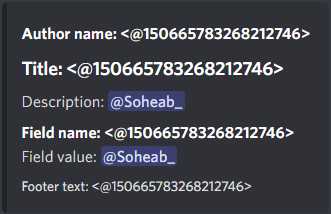
Can I have f"<@{user_id}>" inside of an embed?
shell radish
not in all fields
jolly shuttle
Not at all in fields (i.e. add_field), but maybe in description, author, footer etc?
shell radish
seems to work in description and field values
jolly shuttle
Im getting no luck with
embed.add_field(name=f"<@{user_id}>", value=f"{val*100:.2f}%", inline=True)
i even made sure to try user_id as an int
shell radish
it will only render in the value section
jolly shuttle
I just guessed that might be it.. thanks!
shell radish
maybe you can try using description instead?
 silk spire
https://i.imgur.com/zIJT3CF.png for future reference
 hexed herald
hey can someone help me getting my bot to really stop xD
bot = Bot()

@bot.listen("on_stop")
async def on_stop():
    await bot.api.close()
    await bot.db.close()
    await bot.close()

if __name__ == "__main__":
    try:
        loop = asyncio.get_event_loop()
        print(os.getpid())
        loop.run_until_complete(bot.start(DISCORD_API_KEY))
    except KeyboardInterrupt:
        bot.logger.critical("Shutting down...")
        print("I AM NOT DEAD")
        print("yet")
        bot.dispatch("stop")
        exit_()
        loop.run_until_complete(bot.close())

        # cancel all tasks lingering
    finally:
        loop.close()
I've got this piece of code to start the bot and later stop the bot on KeyboardInterrupt and in the stop dispatch every job with some async connection get's closed (e.g. aiosqlite connections and aiohttp sessions) but the process does not stop I am also closing the bot in the on_stop event even through when I let loop.run_until_complete() it's not completely shutting down this is why I use os.exit() (importet as exit_()) to exit the process. but it's not stopping
it' s remaining unresponsive since many minuets now and gave me this traceback
Traceback (most recent call last):
  File "E:\Programming\PyCharm\Dragons-BotV2\main.py", line 90, in <module>
    loop.run_until_complete(bot.start(DISCORD_API_KEY))
  File "C:\Users\User\AppData\Local\Programs\Python\Python311\Lib\asyncio\base_events.py", line 640, in run_until_complete
    self.run_forever()
  File "C:\Users\User\AppData\Local\Programs\Python\Python311\Lib\asyncio\windows_events.py", line 321, in run_forever
    super().run_forever()
  File "C:\Users\User\AppData\Local\Programs\Python\Python311\Lib\asyncio\base_events.py", line 607, in run_forever
    self._run_once()
  File "C:\Users\User\AppData\Local\Programs\Python\Python311\Lib\asyncio\base_events.py", line 1884, in _run_once
    event_list = self._selector.select(timeout)
                 ^^^^^^^^^^^^^^^^^^^^^^^^^^^^^^
  File "C:\Users\User\AppData\Local\Programs\Python\Python311\Lib\asyncio\windows_events.py", line 444, in select
    self._poll(timeout)
  File "C:\Users\User\AppData\Local\Programs\Python\Python311\Lib\asyncio\windows_events.py", line 817, in _poll
    status = _overlapped.GetQueuedCompletionStatus(self._iocp, ms)
             ^^^^^^^^^^^^^^^^^^^^^^^^^^^^^^^^^^^^^^^^^^^^^^^^^^^^^
KeyboardInterrupt
Exception in thread Thread-1:
Traceback (most recent call last):
  File "C:\Users\User\AppData\Local\Programs\Python\Python311\Lib\threading.py", line 1038, in _bootstrap_inner
    self.run()
  File "E:\Programming\PyCharm\Dragons-BotV2\venv\Lib\site-packages\discord\gateway.py", line 166, in run
    f = asyncio.run_coroutine_threadsafe(coro, loop=self.ws.loop)
        ^^^^^^^^^^^^^^^^^^^^^^^^^^^^^^^^^^^^^^^^^^^^^^^^^^^^^^^^^
  File "C:\Users\User\AppData\Local\Programs\Python\Python311\Lib\asyncio\tasks.py", line 926, in run_coroutine_threadsafe
    loop.call_soon_threadsafe(callback)
  File "C:\Users\User\AppData\Local\Programs\Python\Python311\Lib\asyncio\base_events.py", line 806, in call_soon_threadsafe
    self._check_closed()
  File "C:\Users\User\AppData\Local\Programs\Python\Python311\Lib\asyncio\base_events.py", line 519, in _check_closed
    raise RuntimeError('Event loop is closed')
RuntimeError: Event loop is closed
C:\Users\User\AppData\Local\Programs\Python\Python311\Lib\threading.py:1040: RuntimeWarning: coroutine 'DiscordWebSocket.send_heartbeat' was never awaited
  self._invoke_excepthook(self)
RuntimeWarning: Enable tracemalloc to get the object allocation traceback
please ping me if someone responds to this
little cobalt
hexed herald
hey can someone help me getting my bot to _really_ stop xD
```py
bot = Bot()
@...
why do you run the bot like that?
sage tendon
on_stop isnt even a thing in pycord
Or at least it's not documented if it exists
so i dont think thats pycord
little cobalt
sage tendon
so i dont think thats pycord
its not even at discord.py
little cobalt
same for nextcord
sage tendon
@hexed herald
sage tendon
bot = discord.Bot(...)
bot.run(...)
simple as that
also accounts for keyboard interrupts by the fact that keyboardinterrupts kill programs by default
hexed herald
hi again, I am dispatching my own event because I've external connections which need to be closed before the bot shuts down like normal.
class Bot(multicogBot, commands.Bot):
    def __init__(self, *args, **kwargs):
        super().__init__(*args, **kwargs)
        self.client_version = VersionInfo(1, 3, 3, "")
        self.api: aiohttp.ClientSession = None  # type: ignore
        self.boot_time = datetime.now()  # Ignoring because it's dynamically allocated
        self.db: ContentDB = None  # type: ignore
        self.sts: ShortTermStorage = None  # type: ignore
        self.ipc = ipc.Server(self, secret_key=IPC_SECRET)
        self.logger = CustomLogger(name="core", start_stamp=self.boot_time)
And since I've attached the db like that, to be able to access it in cogs, the bot does not shut down like a "simple" instance
(the None from the db is later replaced while the on_ready event)
sage tendon
but if the bot process dies, so do all the connections
hexed herald
yeah, the process is not dying, it's living as a kind of zombie ;-;
the bot isn't online but the process is not dead
 sage tendon
yea i mean i get that but i dont get the overcomplicated start and stop of your bot
if you stop it with ctrl+c the process will die completely
and thats also the issue, something during your startup (i think)
hexed herald
but if I don't do it the complicated way it's taking ages until it stops being online and even longer until the process stops
with the complicated way it at least stops being online instantly even through the process is not really dying
sage tendon
why? you're starting it the exact same way in both cases
hexed herald
I have no clue, that's how I ended up here 😅
sage tendon
remove all this and replace it with a simple bot.run
sage tendon
hexed herald
hey can someone help me getting my bot to _really_ stop xD
```py
bot = Bot()
@...
this i mean
hexed herald
I did, the process is not dying since ~4 minuets
sage tendon
did you ctrl+c?
hexed herald
yes
sage tendon
show
hexed herald
spamming control + c at around 8 secs + 10 secs
hexed herald
(the cursor stops blinking)
sage tendon
also to test it just put all your closing stuff after bot.run
hexed herald
current code + console
    print(os.getpid())
    bot.run(DISCORD_API_KEY)
    print("I have stopped")
but I still can't reuse the terminal
and the process is still listed in the taskmanager
 sage tendon
i think your cmd is borked lmfao
hexed herald
should I try with powershell xDDD
hexed herald
I had an Idea that worked o.o
    pid = os.getpid()
    bot.run(DISCORD_API_KEY)
    bot.logger.critical("Exiting")
    psutil.Process(pid).terminate()
Just killing the process after the bot finished running did the job
tiny fractal
is there a reason why my bot doesn't generate auditlog entries?
sage tendon
for what action
tiny fractal
specifically roles
it used to make audit log entries when it granted and removed roles. now it doesn't
but they generate when i do it my self
sage tendon
something in the very far back of my head tells me I had something similar too but I don't really remember
not sure, lemme test with my own bot in a bit
if anything it's a discord change or issue tho, nothing to do with your bot or pycord
tiny fractal
bummer
yea, weird. it shows audit entries when the bot creates and deletes channels and sets overrirdes
keen relic
can we set multiple value of command option
sage tendon
an option can only have one value passed to it
keen relic
sage tendon
an option can only have one value passed to it
ok
 stray pasture
tiny fractal
it used to make audit log entries when it granted and removed roles. now it does...
stray pasture
tiny fractal
it used to make audit log entries when it granted and removed roles. now it does...
you are right just tested as well
my bot was relying on those audit log 😄
tiny fractal
same lol
stray pasture
what is happening 😄
no anoncement about it either
not even a warning
is there a way to report it to discord ?
sage tendon
they actively ignore bug reports, so no
don't waste time trying, i've done so numerous times
stray pasture
sage tendon
don't waste time trying, i've done so numerous times
so I can only hope they notice the issue and fix it 😄
sage tendon
yip
stray pasture

sage tendon
i've easily reported 10+ minor-to-severe bugs by now, not a single one has been fixed
some are over 2y old
stray pasture
damn, my bot will be broken because of this to 😄
edgy nest
ask in discord.gg/discord-developers or make an issue in https://github.com/discord/discord-api-docs

GitHub
Official Discord API Documentation. Contribute to discord/discord-api-docs development by creating an account on GitHub.
since it's an api problem
(most likely)
sage tendon
good luck
stray pasture
Thank you ! I will need luck ahaha yes
lapis dock
sage tendon
don't waste time trying, i've done so numerous times
I feel like the API team does better than the client team
round heart
sage tendon
if you stop it with ctrl+c the process _will die_ completely
No. I have to hit CTRL-C twice in order for my bot to completely exit. It's certainly my own issue, but I don't know why or how to correct it.
errant trout
are you intercepting keyboardinterrupt or something
 fossil valve
hey, is there a way to catch autocomplete errors (e.g an event like we have for slash commands)?
fresh sierra
Hi, my bot rate limit a lot about message, but i dont have any fetch_message so what can be the cause of that ?
echo wraith
fresh sierra
Hi, my bot rate limit a lot about message, but i dont have any fetch_message so ...
Maybe history or prune ?
fresh sierra
echo wraith
Maybe history or prune ?
yeah but should not explain why i got that much
but i will wait
i think it might be because i just switch version
and so the old one already rate limit a lot
sage tendon
yea I was also gonna say history and big prunes
 heavy inlet
How do I add a button to a message ONLY when a certain condition is True?
little cobalt
heavy inlet
How do I add a button to a message ONLY when a certain condition is True?
Check and edit the Message I would say
sage tendon
like what condition
heavy inlet
boolean, either True or False
sage tendon
Yea thanks I know what booleans are
I mean what condition in particular you're checking for
errant trout
fossil valve
hey, is there a way to catch autocomplete errors (e.g an event like we have for ...
not really... you can try-except, but your autocomplete ideally should never error
deft kestrel
for how much time discord caches an image (webp)?
sage tendon
wdym?
deft kestrel
sage tendon
wdym?
like i send you an image link (bot embed thumbnail) and i change it
sage tendon
image links outside of discord are valid for 24h
deft kestrel
sage tendon
image links outside of discord are valid for 24h
no i mean 3p discord image cache
 sage tendon
inside of discord they're fetched even if the link is over 24h old
sage tendon
deft kestrel
no i mean 3p discord image cache
what
deft kestrel
deft kestrel
no i mean 3p discord image cache
the right logo (thumbnail) it's not updated, but if i open it i see the new bot logo
sage tendon
restart your discord ig
deft kestrel
sage tendon
restart your discord ig
nope
sage tendon
and wdym when you open it
sage tendon
oh you mean you changed what image the link points to?
deft kestrel
sage tendon
oh you mean you changed what image the link points to?
i just changed the file with the same image link
yep
image replace
sage tendon
No clue then, the client caches stuff for relatively long
really you should just edit the embed if you plan on changing what the image is more often, and create new links
sage tendon
hm no idea actually, try clearing your local cache
fresh sierra
my decorator doesnt work and just return true to the command, am i the only one ?
(mean everyone can use every single command
like it does not even get print
    @staticmethod
    def has_perm(perm_level: str | None = None):
        async def wrapper(ctx: LumabotContext):
            print(ctx.command)
            perm = perm_level
        return commands.check(wrapper)
    @Lumabot.group("bot")
    @Lumabot.command()
    @Lumabot.has_perm()
    async def ping(self, ctx: LumabotContext):
show the entire decorator code
fresh sierra
sage tendon
show the entire decorator code
i added the missing line
like it does not even print the first line
sage tendon
why do you not use the default @commands.check decorator
why do you do custom copies of literally everything the library offers
fresh sierra
sage tendon
why do you do custom copies of literally everything the library offers
its just a custom decorator man
when im doing the help, it does trigger the print of the decorator
well the slash trigger the print
sage tendon
so when does it not work
fresh sierra
using prefix
sage tendon
bridge group?
fresh sierra
yep
sage tendon
bridge is messy
fresh sierra
i did implement my thing
cos bridge cant work rn
but its still relying on bridge in some part
sage tendon

then use normal bridge first to check if it isnt an issue with your code
because i think, depending on how custom you made it, you are invoking the command incorrectly and bypass the checks
fresh sierra
sage tendon
because i think, depending on how custom you made it, you are invoking the comma...
i didnt change the invoke part
and i will check which invoke part is use
if its prefix one
or another one
sage tendon
just saying because of this
 fresh sierra
yeah this is handle before by the
if await self.can_run(ctx, call_once=True):
and in my case this return True
but it doesnt trigger the decorator
which is the issue
sage tendon
im not sure if it works that way but can you check the checks attribute of the command?
cuz this
 fresh sierra
sage tendon
im not sure if it works that way but can you check the `checks` attribute of the...
fresh sierra
sage tendon
im not sure if it works that way but can you check the `checks` attribute of the...
the self.can_run check only the bot._checks
which seems to be only the global check
which is strange, both part of the code does the same thing
only difference is the ctx which is one time a prefix and another time a slash
sage tendon
can you change the print to just be a letter instead of ctx.commands
maybe that is null somehow? idfk
fresh sierra
also tried
just the can_run return always true
but trigger the decorator only for the slash command
fresh sierra
gonna try to debug that bug it seems to be from the context part
fresh sierra
fresh sierra
which seems to be only the global check
this is true
so i will now have to check about the command invoke itself
errant trout
fresh sierra
the self.can_run check only the bot._checks
commands have their own can_run function
fresh sierra
errant trout
commands have their own can_run function
yep im checking that rn
but i dont really understand why the prefix are not submitted to that decorator while the slash is
ctx.command class seems to be
<class 'discord.ext.commands.core.Group'>
so update now i check the different self.checks for each command, the one for the slash command find the
[<function Lumabot.has_perm.<locals>.wrapper at 0x7f37d120ac00>]
while the prefix return []
i fixed it
sage tendon
how?
fresh sierra
sage tendon
how?
prefix command checks was a copy of the group
while it should have been a copy AND the checks
 vague plaza
whats discord bots upload limit?
sage tendon
file size?
sage tendon
25MB
vague plaza
thanks, and maximum text character limit?
sage tendon
4000
little cobalt
sage tendon
25MB
Is it still 25MB?
hexed herald
sage tendon
25MB
it's 10 MB as you can read in this article https://support.discord.com/hc/en-us/articles/115000435108-What-are-Nitro-Nitro-Basic
at least that's my lastest information
 lofty parcel
hexed herald
it's 10 MB as you can read in this article https://support.discord.com/hc/en-us/...
lofty parcel
hexed herald
it's 10 MB as you can read in this article https://support.discord.com/hc/en-us/...
Thats for users, not bots
hexed herald
huh, that's wierd that it's different for normal users and bot's but okay, learned something new
lofty parcel
Or external emojis
sage tendon
stickers too right?
fresh sierra
80% of cpu usage for a 2k guild bot with 4 shards
should i begin to look about it or it seems normal to u
fresh sierra
its on pterodactyl so like its for one of my bot only
sage tendon
thats great, but if you have 80% cpu usage you still need to get a bigger VPS sooner or later
fresh sierra
i have 4v core so im at like 150 in total out of 400
sage tendon
then why do you say 80% lol
fresh sierra
80% for one of my bot
so like does i have an issue in my code or its jsut normal for a bot with 2k
sage tendon
with no info about the CPU it could be anything
fresh sierra
i do have a lot of even/loop
sage tendon
its probably just the amount of events at 2k guilds
fresh sierra
my bot test has less than 5% so yeah might be just number of event
sage tendon
limit your intents if possible
fresh sierra
yeah cant since i use them, but i will thing about the on_presencd
implement more cache i think
does on_connect is supposed to be trigger for each shard connect ?
same for on_ready
torn barn
.rtfm on_connect
sly karmaBOT
torn barn
There is on_connect and on_shard_connect
So for shards it dispatches the second one
And after connecting every shard it dispatches on_connect fron what I read
fresh sierra
torn barn
And after connecting every shard it dispatches on_connect fron what I read
yep it seems like it
        self.dispatch("connect")
        self.dispatch("shard_connect", data["__shard_id__"])
Then thats it
 shadow sigil
question, what the heck does this error mean
Ignoring exception in on_application_command_error
Traceback (most recent call last):
  File "...\.venv\Lib\site-packages\discord\client.py", line 409, in _run_event
    await coro(*args, **kwargs)
  File "...\bot.py", line 182, in on_application_command_error
    await ctx.respond(response)
  File "...\.venv\Lib\site-packages\discord\interactions.py", line 616, in respond
    return await self.response.send_message(*args, **kwargs)
           ^^^^^^^^^^^^^^^^^^^^^^^^^^^^^^^^^^^^^^^^^^^^^^^^^
  File "...\.venv\Lib\site-packages\discord\interactions.py", line 957, in send_message
    await self._locked_response(
  File "...\.venv\Lib\site-packages\discord\interactions.py", line 1288, in _locked_response
    await coro
  File "...\.venv\Lib\site-packages\discord\webhook\async_.py", line 222, in request
    raise NotFound(response, data)
discord.errors.NotFound: 404 Not Found (error code: 10062): Unknown interaction
log file just contains this
the bot just gave a The application did not respond error on discord
but running the command a second time worked fine
errant trout
shadow sigil
question, what the heck does this error mean
```
Ignoring exception in on_applic...
all your responses took too long
initial response took too long, so when it tried to respond discord gave you an error; but your error handler also tries to use the same interaction token to respond, so you errored again
then your logs also show that your autocomplete is taking too long
shadow sigil
...
i'm guessing it's probably due to it being idle for an extended amount of time
because basically the first thing the command does is await ctx.defer()
 maiden bloom
Is there a code example for setting up entitlement checks and such?
fresh sierra
anyone experiencing issue with mention command ?
    return f"</{self.qualified_name}:{self.qualified_id}>"
                                self.parent.qualified_id
AttributeError: 'NoneType' object has no attribute 'qualified_id'
 clear lark
is it possible to setup in app purchases on my bot, SKUs rather
sage tendon
sure
sage tendon
fresh sierra
anyone experiencing issue with mention command ?
```
return f"</{self.qualif...
only exists for slash commands
fresh sierra
sage tendon
only exists for slash commands
im using it for a slash command
sage tendon
100% sure?
fresh sierra
seems like something the bot.walk_application_command return []
even if the command work
frail basin
Am I doing something wrong here?
This is what it prints:
i=0 role.name='@everyone' role.position=0
i=1 role.name='test' role.position=1
i=2 role.name='new role' role.position=1
i=3 role.name='Akos test' role.position=2
i=4 role.name='12345' role.position=3
i=5 role.name='test2' role.position=4
i=6 role.name='----- Client Roles -----' role.position=5
i=7 role.name='Network Support' role.position=6
i=8 role.name='Technical Support' role.position=7
i=9 role.name='Staff' role.position=8
i=10 role.name='Management' role.position=9
i=11 role.name='.' role.position=10
i=12 role.name='LDG Dev' role.position=11

How can 2 roles have the same position?
sage tendon
 frail basin
Oh, thanks
echo wraith
sage tendon
Why is it so tho ?
sage tendon
no idea
frail basin
Is this endpoint implemented? https://discord.com/developers/docs/resources/guild#modify-guild-channel-positions
I only found it's role counterpart in the docs.
shell radish
frail basin
Is this endpoint implemented? https://discord.com/developers/docs/resources/guil...
frail basin
Isn't that only for moving a single channel?
I am basically looking for the channel counterpart of Guild.edit_role_positions
sage tendon
Don't think that's in pycord
and i'm wondering why the endpoint exists at all, like, with roles it makes sense, e.g. in the UI you can move them around fine and then click save
But channels, you usually only move one-by-one
and typically you dont move enough channels at once to justify a bulk operation
frail basin
Seems like the function exists for it actually, after looking into how TextChannel.move is implemented
 sage tendon
yea but in a private attribute so not really meant to be used
odd
oh wait nvm
ah idk lol
frail basin
sage tendon
yea but in a private attribute so not really meant to be used
odd
Well I am def not sorting 200+ channels by hand, alphabetically lol
sage tendon
- why do you have so many channels
- just do it in a loop really
frail basin
Discord would nuke the IP if I looped over all the channels
shell radish
frail basin
Well I am def not sorting 200+ channels by hand, alphabetically lol
if your use case is really necessary, then you can send an http request through the library
sage tendon
i dont think channel move limits are low
its just channel renames that are mega limited
frail basin
I am forced to use channel.edit, since in some cases I also need to move the channel to a different category
frail basin
shell radish
if your use case is really necessary, then you can send an http request through ...
Would it just be bot.http.bulk_channel_update?
sage tendon
no clue if discord specifically applies the rate limit to renames, or all edit operations
sage tendon
damn
shell radish
frail basin
Would it just be bot.http.bulk_channel_update?
looks right
frail basin
sage tendon
damn
This would ratelimit the bot after the 3rd - 4th cycle, even though nothing actually happens.
 sage tendon
would this be worth properly putting into the library?
sage tendon
frail basin
This would ratelimit the bot after the 3rd - 4th cycle, even though nothing actu...
but if you used move()?
shell radish
you can always open a feature request
sage tendon
yea i'm just wondering if like, its worth it / has potential or if its a waste of time
i never really do feature requests ever for anything
frail basin
sage tendon
but if you used move()?
Seems like move() hits the same endpoint as edit()
sage tendon
frail basin
Seems like the function exists for it actually, after looking into how TextChann...
but what about this?
fresh sierra
echo wraith
Why is it so tho ?
when you create a role you can put a position
and maybe it was a bug and they where lazy to correct it
frail basin
frail basin
Seems like move() hits the same endpoint as edit()
actually, its a different endpoint but same ratelimit bucket
frail basin
sage tendon
but what about this?
Well thats just the underlying function of move(), so its the same in terms of ratelimits
However I'll only need to send a single request this way.
echo wraith
fresh sierra
and maybe it was a bug and they where lazy to correct it
That wouldn't even surprise me
fresh sierra
echo wraith
That wouldn't even surprise me
i dont see any other option, in what way having 50 roles with the position = 1 is a good thing
 ivory wind
hello, i have an extension that's made up of a directory. i am able to load it with recursive = True but dont see a way to do that with re/unload
fresh sierra
ivory wind
hello, i have an extension that's made up of a directory. i am able to load it w...
for extension in self.bot.extensions:
if extension.startwiths ... continue else unload/reload

 fresh sierra
meager token
why is this happening
fresh sierra
meager token
why is this happening
read the message
meager token
fresh sierra
read the message
its not missing any permissions though
and theres no error
fresh sierra
you are i think
meager token
fresh sierra
you are i think
wat??
fresh sierra
meager token
wat??
you are missing permission to run that command
i think thats what missing perm mean here
meager token
fresh sierra
you are missing permission to run that command
it only checks if I have the role though and i have the role??
and thats only when it runs, its not running because of "missing permissions"
fresh sierra
did you check the default permission from discord ?
fresh sierra
/ try to reload ur discord
meager token
Ive allready done that
fresh sierra
meager token
that exists?
yes but normally you shouldnt be able to see the command in that case but we never know
in the discord server setting
meager token
I have permission in discord
fresh sierra
you can choose about the permission requiered
meager token
fresh sierra
you can choose about the permission requiered
wait so the channel has slash commands disabled??
why cant it say that
fresh sierra
maybe
meager token
bruh
fresh sierra
meager token
why cant it say that
more fun for us to guess
meager token
fresh sierra
more fun for us to guess
wow it wont even let me /tableflip in taht server
and it doesnt fix when I reload discord