1 messages · Page 56 of 1
 stray yarrow
 sage tendon
what is discord protos
stray yarrow
idk
 lapis dock
Im not really sure the issue here. As the code looks like it should work. Could you try downgrading to py-cord 2.6
stray yarrow
lapis dock
Im not really sure the issue here. As the code looks like it should work. Could ...
Did nothing
 deft kestrel
why buttons are not permanent like as default? there's no way to be permanent to default?
deft kestrel
sage tendon
"by default" no
why not? i mean, what is the reason about that
deft kestrel
got it
lapis dock
it would take up a bunch of bot memory if people never properly closed them
deft kestrel
lapis dock
it would take up a bunch of bot memory if people never properly closed them
i wanna make a ticket bot, so if i need to restart it it will be a problem
so i wanna make them default without using the PersistentBot()
sage tendon
well then make your views persistent
pass no timeout to the super constructor, run bot.add_view(Your view()) in on ready and give your buttons custom IDs
(timeout=None)
lapis dock
stray yarrow
Did nothing
im not really sure what to tell you. You could ask in the python discord why your class is not treating the first arg as self.
discord.gg/python
stray yarrow
lapis dock
im not really sure what to tell you. You could ask in the python discord why you...
I've figured something out
it doesnt happen when 1 command group is in a cog
but only whenever there is another
lapis dock
oh that is strange. I guess just split up your command groupd then because we dont have a better solution
sage tendon
seems like a bug report waiting to happen
 formal turret
I am trying to create a simple slash command to ping a specific role in a server
how to I get the bot to actually ping the role instead of printing the name of the role (without the ping)
thanks
 shell radish
formal turret
I am trying to create a simple slash command to ping a specific role in a server...
shell radish
formal turret
I am trying to create a simple slash command to ping a specific role in a server...
Is the role the same thing every time?
formal turret
shell radish
Is the role the same thing every time?
yes
shell radish
so what does the current message and code look like?
 livid nymph
am I able to send attachments through a modal dialog?
 fresh sierra
formal turret
I am trying to create a simple slash command to ping a specific role in a server...
fresh sierra
formal turret
I am trying to create a simple slash command to ping a specific role in a server...
using allowed mention
 rugged lodgeBOT
discord.AllowedMentions
discord.AllowedMentions.all
discord.AllowedMentions.everyone
discord.AllowedMentions.none
discord.AllowedMentions.replied_user
discord.AllowedMentions.roles
discord.AllowedMentions.users
discord.Bot.allowed_mentions
discord.Client.allowed_mentions
discord.mentions.AllowedMentions
discord.ext.commands.Bot.allowed_mentions
 keen relic
@sage tendon Command Choice in Py-cord bridge command??
BridgeOption??
or what
@errant trout i'm correct ??
 errant trout
BridgeOption is correct yes
keen relic
errant trout
BridgeOption is correct yes
ok thank u so much
lapis dock
Dont ping people for support please.
sage tendon
imagine reading the docs
fresh sierra
that man was panicked, 2 ping, 6 ?, i hope it was not a matter of live
 round heart
Dumb question. In this example, the checks uses .predicate. Is that required for all types of checks, like commands.has_permissions(kick_members=True), or is that statement enough?
Hm. Well I can confirm that .predicate doesn't actually restrict it. Let's see if removing that has any effect.
I cannot seem to get this to work, btw. Dunno if you've ever personally modified a command like this that we can compare notes.
moderation_group = SlashCommandGroup("mod", "Moderation Tools and Settings", checks=[commands.has_permissions(kick_members=True)])
This doesn't prevent people without the kick_members permission from seeing the slash commands, like the previous conversation suggested.
lapis dock
default_permissions is separate from checks and has_permissions
It is its own kwarg that you pass a permissions object to I believe.
default_member_permissions is the correct name i guess
default_member_permissions=Permissions(kick_members=True) instead of checks=...
round heart
You only need Permissions(...), not commands.has_permissions?
lapis dock
correct
commands.has_permissions is the check that is preformed bot side only
Where default_member_permissions is sent to discord upon command registration, so discord enforces it
round heart
Yay. there we go; some sensical restrictions until being able to change the Integration. Thanks for the sanity check.
lapis dock
When you say user_command
are you talking about user installs or when you right click on a user and can select a command from the list?
 wide jasper
lapis dock
When you say user_command
are you talking about user installs or when you right ...
wide jasper
lapis dock
When you say user_command
are you talking about user installs or when you right ...
yeah talking bout the "apps" when right clicking on a user
 lapis dock
It should be the same as other commands in a cog
@discord.user_command()
lapis dock
the callback just takes 1 argument of user (after self and ctx)
wide jasper
yeah makes sense, thank you
 coral snow
i saw this example, and i wondered how to use it in a cog, because it requires the argument self
def is_me():
def predicate(ctx):
return ctx.message.author.id == 85309593344815104
return commands.check(predicate)
@bot.command()
@is_me()
async def only_me(ctx):
await ctx.send('Only you!')
coral snow
sage tendon
@staticmethod
i tried this now:
import discord
from discord.ext import commands
from globalsupport import emoji, colour
from datetime import *
import os

class BanListenerCog(commands.Cog):
    def __init__(self, bot):
        self.bot = bot
        self.team_role_id = 919707797208305666

    @staticmethod
    def has_serverteam_role(self):
        def predicate(ctx):
            return self.team_role_id in [role.id for role in ctx.author.roles]
        return commands.check(predicate)

    @commands.Cog.listener()
    async def on_message(self, message):
        ..........


    @discord.user_command(guild_ids=[], name="addSperre")
    @has_serverteam_role()
    #@commands.has_permissions(administrator=True)
    async def addSperre(self, ctx, member: discord.Member):
        await ctx.respond(f"{emoji().success} {ctx.author.mention}, test test", ephemeral=True)


def setup(bot):
    bot.add_cog(BanListenerCog(bot))
but i get 'staticmethod' object is not callable
sage tendon
lol remove the self if you use staticmethod
 timid shuttleBOT
No valid attachments found
 flat wind
Does pycord supports the Guild subscriptions of the monetization category of Discord API ? referenced here
 echo wraith
flat wind
Does pycord supports the Guild subscriptions of the monetization category of Dis...
echo wraith
flat wind
Does pycord supports the Guild subscriptions of the monetization category of Dis...
Yes I believe
flat wind
echo wraith
Yes I believe
sadly I saw there is a PR for the 2.7 about this implementation.
And without much tests because plun1331 does not have a verified app or can't in his country
lapis dock
Lala gave him perms for a test bot. Idk if he ever got around to testing it though
@edgy nest Did you test that PR? ^
 edgy nest
lapis dock
<@545064119326212106> Did you test that PR? ^
edgy nest
lapis dock
<@545064119326212106> Did you test that PR? ^
nope
 civic moon
Can I distinguish between a scheduled event that was deleted by a member and one that was completed (and essentially removed automatically).
I'm only seeing on_scheduled_event_delete (and possibly on_scheduled_event_update), not sure how they react in those two cases.
sage tendon
I'd just check if the event's end time is within 1 or 2 seconds of now and if that's the case, its most likely just normally completed
or actually, maybe once its normally completed its updated and you can check its status
not really sure, never used events myself
but the status might be the better choice https://docs.pycord.dev/en/stable/api/enums.html#discord.ScheduledEventStatus
The API provides some enumerations for certain types of strings to avoid the API from being stringly typed in case the strings change in the future. All enumerations are subclasses of an internal c...
errant trout
status is the answer, yes
civic moon
I'm a bit confused and intrigued. I'm storing current event ids with guild.events. That doesn't pull completed events though, only ones that are still upcoming (or active I believe). So does this imply I can reference a completed event, that doesn't pull from guild.events? Hopefully referenced via event id.
sage tendon
You just wanna compare if a completed event matches an event ID you stored right?
civic moon
Yeap, looks like I can check if a event ID was cancelled or completed (which is awesome). I just assumed if it was no longer in guild.events it was gone and couldn't be referenced (seems like I assumed wrong, which is awesome).
Now I just need to see if on_scheduled_event_delete triggers cancelled or completed.
errant trout
delete is for actual deletions, almost certainly not the other two
if you can't find them in the events cache, consider fetching them using guild.fetch_scheduled_events
(the library attempts to cache them where possible, but it's not guaranteed)
civic moon
Hmm, if that's the case maybe I could use the fact that it can't be found at all, it was manually deleted.
Maybe on_scheduled_event_update triggers to check cancelled or completed.
errant trout
mhm
the official docs show some examples on how certain values update https://discord.com/developers/docs/resources/guild-scheduled-event#guild-scheduled-event-status-update-automation
civic moon
Awesome thanks for your help. This will work then. Would of took a butt load of testing to parse this out.
 modern trail
am I crazy or can you not include a timestamp (eg. <t:0:f>) in an embed?
sage tendon
depends where
modern trail
i'd like to put it in the value of a field. but i can't seem to get it to work anywhere
i also want to put it in the embed description
modern trail
well i'm just literally seeing <t:0:f> instead of <t:0:f>
sage tendon
show the embed
sage tendon
you cant put comma values lol
modern trail
i forgot to convert to an integer
i should get more sleep
thanks for being my rubber duck
sage tendon
lol i was literally just thinking about the rubber duck thing cause of this
 zealous prism
Hey all, qq about how slash commands refresh, I have a slash command with options option_a and option_b, if I update the description of the options I see it reflected immediately upon discord refresh, but if I change option_a to Option1 it doesn't refresh
I'm assuming this has something to do with how they're being stored in discord, is there a way to update the options within a command? or do I need to make a brand new one?
sage tendon
show your code
sage tendon
you dont need the name option in the slash command decorator btw
and you dont need an option type if its str
fresh sierra
I mean they don’t need to add the type hint inside the decorator since they already put it inside the register
fresh sierra
sage tendon
no, you do, else you dont get proper autocomplete inside the funciton
You do
sage tendon
no
fresh sierra
Try and see
fresh sierra
If using only the type hint from the command definition and I have every type hint working fine
Apparently u don’t by thinking decorator needs it
sage tendon
yea now you edited the message and it means the opposite
fresh sierra
I mean I just change twitch to hint
And add decorator for more context which is kinda not needed cos what can it be else than the decorator
fresh sierra
zealous prism
to be clear about the decorator and type
    @discord.option(name="test", type=discord.Role, description="")
    async def test(self, ctx: discord.ApplicationContext, test):
is the same as
    @discord.option(name="test", description="")
    async def test(self, ctx: discord.ApplicationContext, test: discord.Role):
but you lose the autocomplete so the 2nd is better and it useless to have both typehint (except you want it for u)
 elder wolf
where can i see the differences between discord.py and pycord?
 little cobalt
elder wolf
where can i see the differences between discord.py and pycord?
little cobalt
elder wolf
where can i see the differences between discord.py and pycord?
At the code
elder wolf
no like i mean why use pycord if theres discord.py
 tidal vessel
elder wolf
no like i mean why use pycord if theres discord.py
tidal vessel
elder wolf
no like i mean why use pycord if theres discord.py
Pycord and other forks exist because discord.py stopped receiving updates, but it's back now. Just use whichever you prefer lol
 lofty parcel
d.py stopped when interactions were introduced
Then Danny resumed its maintenance
Since interactions, the implementation between d.py and pycord is different
shell radish
lofty parcel
d.py stopped when interactions were introduced
no, it was a bit after that. It was closer to when message content intent as a privileged intent was introduced
shell radish
yeah, but slash commands and other interactions were introduced nearly a year prior
albeit early versions
 fossil valve
is it possible to only show specific members in a slash command discord.Member option or do I need to use autocomplete?
fresh sierra
fossil valve
is it possible to only show specific members in a slash command discord.Member o...
not possible, also discord.Member does not really exist in slash command, so you will also need to check if that user is also a member
deft kestrel
is it possible to stream my Desktop audio to a voice chat?
shell radish
Are you talking about through a bot into the vc or from your discord app to the vc?
deft kestrel
shell radish
Are you talking about through a bot into the vc or from your discord app to the ...
Like, i'm watching a video on yt and the bot streams the desktop audio
sage tendon
at that point just use watch together
round heart
Anyone know offhand whether animated emoji can be set to a Button's emoji property? I would think yes but worth asking
shell radish
round heart
Anyone know offhand whether animated emoji can be set to a Button's emoji proper...
yes
round heart
One thing that would be great for the Guide is some sort of visual of what's targeted with interaction.edit, interaction.edit_original_response and interaction.edit_original_message 😵💫
And is interaction.response.edit_message (as printed in the Guide) the same as interaction.edit_original_message?
errant trout
no
anything under interaction.response is a direct response to an interaction (also, edit_original_message is deprecated in favor of edit_original_response)
edit_original_response is essentially a regular message edit
sage tendon
i still think something like interaction.response_handler would be a better name
it keeps confusing me, the fact that its called response
errant trout
meh
round heart
errant trout
edit_original_response is essentially a regular message edit
So that won't trigger a 'responded'? I want to disable buttons when they're pressed but I am still going to be doing operations on the interaction. Don't want to hit "already responded to" or whatever it's called.
errant trout
just use interaction.respond and interaction.edit, it handles the logic for you
(same usage as ctx.respond and ctx.edit, these were added in 2.5 or so)
round heart
round heart
One thing that would be great for the Guide is some sort of visual of what's tar...
Then this (with the correct methods) is doubly needed 😅
An image of a message with UI elements, highlighting the messages with which exact methods will change what parts of the flow.
errant trout
guide PRs are always welcome (or even just raising an issue, if you don't want to change it yourself)
 wild prairie
How can I get a message sent before the bot restarts (sent by the bot) to edit it? I understand it has to do with the cache and that for reactions, you have to use the raw event instead, but what about for editing?
sage tendon
just fetch the message
wild prairie
sage tendon
just fetch the message
discord.errors.NotFound: 404 Not Found (error code: 10008): Unknown Message
oh wait, hold on. I think I'm using the wrong channel ID
wild prairie
sage tendon
just fetch the message
But this should work?
little cobalt
wild prairie
```discord.errors.NotFound: 404 Not Found (error code: 10008): Unknown Message``...
"Unknown Message"
wild prairie
little cobalt
"Unknown Message"
Wouldn't it return that if it was a message it didn't have cached either?
sage tendon
no, it would just be None
wild prairie
sage tendon
no, it would just be None
Ah, gotcha.
Hmm, how can I use fetch_message without knowing the channel?
wild prairie
Ok, thanks
If i pass a message url instead of a message ID, is there a way to parse that directly in pycord or should I just split by backslash (or url parsing)?
sage tendon
Why do you have the message link lol
wild prairie
sage tendon
Why do you have the message link lol
I'm trying to make a slash command to edit messages that the bot previously sent in case of factual errors (an FAQ of sorts)
wild prairie
sage tendon
idk why you have the link
Because the bot already sent the messages. And now I need to edit one out of tens
wild prairie
If I was planning this in advance, I would. But the messages have already been sent. Tens, months ago.
errant trout
wild prairie
If i pass a message url instead of a message ID, is there a way to parse that di...
MessageConverter handles URLs
sage tendon
ah
wild prairie
Whatever, it's fine. I pass a channel and message ID to the bot and it works
wild prairie
errant trout
MessageConverter handles URLs
Oh, great. Thanks!
sage tendon
TIL
wild prairie
errant trout
MessageConverter handles URLs
Doesn't seem to work for forum channels. Hmm
errant trout
eh it's just guildid/threadid/messageid, but i guess get_channel might fail for forum threads...?
wild prairie
It seems to be the same format, but I think the middle is the forum thread instead of channel
errant trout
did you get an error
edgy nest
oh guild
wild prairie
errant trout
did you get an error
Yeah, discord.ext.commands.errors.ChannelNotFound: Channel "1197763716037476423" not found.
edgy nest
thread id imagine
errant trout
mmmmm if it's stuck at the thread then there's no way around it on converter unless it's patched separately
butttttt you can use the related functions to parse the IDs anyway
guild_id, message_id, channel_id = PartialMessageConverter._get_id_matches(ctx, argument)
see https://github.com/Pycord-Development/pycord/blob/master/discord/ext/commands/converter.py#L345
(in the long run you might find it more useful to just write your own regex, whatever works)
errant trout
yeah i'm inclined to agree
wild prairie
Is there a way to pass a message with newlines to a slash command (without modals)?
wild prairie
sage tendon
but not sure if it actually carries it over
It does. Thanks
 robust ginkgo
Is there a better alternative to on_interaction? I need to run some code before every slash command/componenet that is used. (I.e. checking if there is a cooldown, checking if the command/component is disabled, etc.)

 torn barn
cooldowns raise exceptions, if a component is disabled then it would not allow it to be interacted with in the first place, to check whether the command is disabled then use a custom check
 arctic plover
how do I put a file in embed.set_image()?
errant trout
robust ginkgo
Is there a better alternative to on_interaction? I need to run some code before ...
if you're handling both commands and components, then on_interaction is probably the best one
robust ginkgo
errant trout
if you're handling both commands and components, then on_interaction is probably...
alright
errant trout
for command cooldowns there is a built in system which you can see in examples
errant trout
arctic plover
how do I put a file in ``embed.set_image()``?
.tag local-file
 sly karmaBOT
arctic plover
how do I put a file in ``embed.set_image()``?
sly karmaBOT
arctic plover
how do I put a file in ``embed.set_image()``?
f = discord.File("some_file_path", filename="image.png")
e = discord.Embed()
e.set_image(url="attachment://image.png")
await messagable.send(file=f, embed=e)```Is there a way to get the full command name rather than just part of it?
Currently I'm using interaction.data. It returns a json, but not the full name

 robust ginkgo
errant trout
interaction.data should have an ID <:nelothink:574061897737961526>
robust ginkgo
errant trout
interaction.data should have an ID <:nelothink:574061897737961526>
let me see
errant trout
i'd say either:
on_application_command insteadawait bot.get_application_context(interaction) and then access ctx.commandtl;dr just use on_application_command to save you the headache, then handle components in on_interaction
robust ginkgo
errant trout
tl;dr just use on_application_command to save you the headache, then handle comp...
ig
And last question, how do I have the command or button stop running within on_application_command or in on_interaction
arctic plover
errant trout
.tag local-file
preview = discord.File('C:/path/preview.jpg', filename='live_preview.jpg')
game_icon = discord.File('C:/path/game_icon.jpg', filename='live_game_icon.jpg')
embed.set_image(url='attachment://live_preview.jpg')
embed.set_thumbnail(url='attachment://live_game_icon.jpg')
what`s wrong?

its empty
sage tendon
are you sending the files with the message as well?
arctic plover
sage tendon
are you sending the files with the message as well?
no, should i?
ye now it works
thanks The Toothy 💕 and The Nelo
 red mist
Discord having an issue?
DiscordServerError: 503 Service Unavailable (error code: 0): no healthy upstream
sage tendon
yes
 dusk violet
What is a simple way to remove all mentions in a message's content?
fresh sierra
dusk violet
What is a simple way to remove all mentions in a message's content?
Dépends if u want to keep the mention but remove the ping or just remove the mention
It’s either allowedmention
Either
dusk violet
fresh sierra
Dépends if u want to keep the mention but remove the ping or just remove the men...
like for example " @dusk violet hello"
I would keep that message the same but remove the whole @Mimi part
and just leave it as "hello"
sly karmaBOT
fossil valve
Is there a way to get the channel creator of a text channel?
rugged lodgeBOT
rugged lodgeBOT
echo wraith
@fossil valve You get the audit logs for around then the channel was created and there you can maybe find who created it. Idk if that works but yeah
fossil valve
echo wraith
<@715819265252655154> You get the audit logs for around then the channel was cre...
I see thought also this would be an option. But found a simpler solution, still thank you for your help :)
flat wind
is there an argument to be able to get some slash commands to work only with the users I have here ? I want to make some commands only available for me for beta version
 fresh sierra
flat wind
is there an argument to be able to get some slash commands to work only with the...
fresh sierra
flat wind
is there an argument to be able to get some slash commands to work only with the...
Custom check
robust ginkgo
Why doesn't on_application_command or on_interaction run before the command is executed?
errant trout
they do, but they are listeners
or, well let me phrase differently, ultimately they are just events
if you make them as listeners, they won't intercept anything - you'd have to override the original events
 eternal kite
Application Command raised an exception: DiscordServerError: 503 Service Unavailable (error code: 0): upstream connect error or disconnect/reset before headers. reset reason: overflow
what is this error?
errant trout
(for commands, there's multiple systems such as checks or before_invoke instead)
errant trout
eternal kite
`Application Command raised an exception: DiscordServerError: 503 Service Unavai...
probably just discord issues
eternal kite
errant trout
probably just discord issues
it happened around 12 hours ago
i found it in my bot logs
robust ginkgo
errant trout
if you make them as listeners, they won't intercept anything - you'd have to ove...
oh alright then
errant trout
damn that's crazy, https://discordstatus.com/ shows a spike in errors exactly 12 hours ago
 haughty grove
is there currently a way to create client emojis?
 ivory beacon
What is the global rate limit for adding reactions?
sage tendon
haughty grove
is there currently a way to create client emojis?
not yet
haughty grove
sage tendon
not yet
alright
 fickle salmon
how do I fetch a message with a message id with a user bot?
fresh sierra
fickle salmon
how do I fetch a message with a message id with a user bot?
U can’t as far as I know
fickle salmon
it's a message the bot sent
fresh sierra
User bot => user app ?
fickle salmon
yes
fresh sierra
Since they don’t have access to the channel I don’t see how u can fetch a message since to fetch a message u also need a channel
sage tendon
id still reckon you cant
fresh sierra
Maybe you can implement a cache system to get each message of ur bot in case you really need
fickle salmon
I need to edit the message the bot sent
fresh sierra
fickle salmon
I need to edit the message the bot sent
Can’t you do
msg = …
await msg.edit ?
fresh sierra
Maybe store it as an object for then u can use it again
Never really used user app but as far as I know it’s just limited asf
fickle salmon
do I need guild id?
sly karmaBOT
discord.PartialMessage
discord.PartialMessage.add_reaction
discord.PartialMessage.channel
discord.PartialMessage.clear_reaction
discord.PartialMessage.clear_reactions
discord.PartialMessage.created_at
discord.PartialMessage.delete
discord.PartialMessage.edit
discord.PartialMessage.fetch
discord.PartialMessage.guild
discord.PartialMessage.id
discord.PartialMessage.jump_url
discord.PartialMessage.pin
discord.PartialMessage.pinned
discord.PartialMessage.publish
discord.PartialMessage.remove_reaction
discord.PartialMessage.reply
discord.PartialMessage.to_message_reference_dict
discord.PartialMessage.to_reference
discord.PartialMessage.unpin
lofty parcel
.rtfm PartialMessageable
sly karmaBOT
discord.PartialMessageable
discord.PartialMessageable.can_send
discord.PartialMessageable.fetch_message
discord.PartialMessageable.get_partial_message
discord.PartialMessageable.history
discord.PartialMessageable.pins
discord.PartialMessageable.send
discord.PartialMessageable.trigger_typing
discord.PartialMessageable.typing
fresh sierra
.tag partial-objects
sly karmaBOT
These can be used to make API calls when you have channel id and/or message id, and you don't want to rely on the cache to have their objects.
Methods which can be used on them are
async def star_message(channel_id: int, message_id: int):
    # Get Partial Messageable object
    partial_channel = bot.get_partial_messageable(channel_id)

    # Get Partial Message
    partial_message = partial_channel.get_partial_message(message_id)

    # Add a reaction
    await partial_message.add_reaction(":star:")
whelp
  File "/usr/local/lib/python3.11/site-packages/discord/commands/core.py", line 138, in wrapped
    ret = await coro(arg)
          ^^^^^^^^^^^^^^^
  File "/usr/local/lib/python3.11/site-packages/discord/commands/core.py", line 1078, in _invoke
    await self.callback(self.cog, ctx, **kwargs)
  File "/prunbot/cogs/simple.py", line 58, in post
    await partial_message.edit(content=to_post)
  File "/usr/local/lib/python3.11/site-packages/discord/message.py", line 2220, in edit
    data = await self._state.http.edit_message(
           ^^^^^^^^^^^^^^^^^^^^^^^^^^^^^^^^^^^^
  File "/usr/local/lib/python3.11/site-packages/discord/http.py", line 368, in request
    raise Forbidden(response, data)
discord.errors.Forbidden: 403 Forbidden (error code: 50001): Missing Access```Uh
fickle salmon
@slash_command(name="post", integration_types={discord.IntegrationType.user_install, discord.IntegrationType.guild_install})
async def post(self, ctx: discord.ApplicationContext):
    """Post a sales ad. Format: /post <location> <item> <price>..."""
    db = await aiosqlite.connect("/data/prunbot.db")
    await db.execute("CREATE TABLE IF NOT EXISTS posts (username TEXT PRIMARY KEY, channel_id INTEGER, message_id INTEGER)")
    to_post = ""
    for username, posts in self.posts.items():
        for location, items in posts.items():
            to_post += f"**{location}**\n"
            for item in items:
                to_post += f"- {item['item']} - {item['price']}\n"
        to_post += f"last edited: <t:{datetime.now().strftime('%s')}:R>\n"
        message_id = None
        channel_id = None
        async with db.execute("SELECT message_id, channel_id FROM posts WHERE username = ?", (username,)) as cursor:
            post = await cursor.fetchone()
            if post:
                message_id, channel_id = post
        print(message_id, channel_id)
        if not message_id:
            interaction = await ctx.respond(to_post)
            response = await interaction.original_response()
            message_id = response.id
            channel_id = response.channel.id
        else:
            partial_channel = self.bot.get_partial_messageable(channel_id)
            partial_message = partial_channel.get_partial_message(message_id)
            await partial_message.edit(content=to_post)
        print(message_id)
        async with db.execute("INSERT OR REPLACE INTO posts (username, channel_id, message_id) VALUES (?, ?, ?)", (username, channel_id, message_id)):
await db.commit()```I'm confused why it's giving you forbidden
fickle salmon
yes
lofty parcel
It is the bot's own message right
Can the bot see the channel? Idk if that gives you issues
fickle salmon
it's the bots own message yes
torn barn
try using edit_original_response
As that uses the interactions endpoint rather than /channels/.../messages/...
lapis dock
The interaction token is only valid for 15 min iirc.
fresh sierra
fickle salmon
```py
@slash_command(name="post", integration_types={discord.IntegrationType.use...
If u do
msg = send
Await msg.edit
Does it works or give u forbidden
shell radish
fresh sierra
If u do
msg = send
Await msg.edit
this makes no sense
fresh sierra
shell radish
this makes no sense
msg = await ctx.send()
await msg.edit()
(I didn’t look to his code, more about the partial that give him forbidden)
shell radish
jab is trying to edit a message using a channel id and a message id; no message is being sent
fresh sierra
shell radish
jab is trying to edit a message using a channel id and a message id; no message ...
I know, is to check if it’s possible to edit a message with user app or not
edgy nest
if you cannot see the channel you cannot arbitrarily edit the message
you can still update it in response to an interaction
lofty parcel
lofty parcel
Can the bot see the channel? Idk if that gives you issues
slay I was correct
fickle salmon
edgy nest
if you cannot see the channel you cannot arbitrarily edit the message
so a user bot can't arbitrarily edit its own messages?
do you have to be able to see the channel to edit?
 summer knot
I would like to respond to an ephemera interaction after editing an ephemera but the problem is that it gives a 404 error
How could I solve it?
lofty parcel
summer knot
I would like to respond to an ephemera interaction after editing an ephemera but...
Show your code how you're doing it
summer knot
lofty parcel
Show your code how you're doing it
                await interaction.response.send_message(f"{video_urls[fruit]}", ephemeral=True)

                # Update the view after sending the video
                self.update_fruit_options()
                embed = discord.Embed(
                    title="Selección de Fruta",
                    description=f"Selecciona tu fruta para el torneo (Página {self.current_page + 1}):",
                    color=discord.Color.blue()
                )
                embed.set_thumbnail(url=self.avatar_url)
                await interaction.message.edit(embed=embed, view=self)
                return
when pass the interaction.message.edit it gives error 404
lofty parcel
summer knot
```python
await interaction.response.send_message(f"{video_urls[...
Use interaction.edit
summer knot
lofty parcel
Use interaction.edit
I'm going to try
summer knot
lofty parcel
Use interaction.edit
 lofty parcel
summer knot
lofty parcel
summer knot
I thought it was going to handle that.
Try interaction.response.edit_original_response
summer knot
lofty parcel
I thought it was going to handle that.
Try `interaction.response.edit_original_...
like this?
                # Update the view after sending the video
                self.update_fruit_options()
                embed = discord.Embed(
                    title="Selección de Fruta",
                    description=f"Selecciona tu fruta para el torneo (Página {self.current_page + 1}):",
                    color=discord.Color.blue()
                )
                embed.set_thumbnail(url=self.avatar_url)
                await interaction.response.edit_original_response(embed=embed, view=self)
                await interaction.response.send_message(f"{video_urls[fruit]}", ephemeral=True)
                return
            else:
                embed = discord.Embed(
                    title="Selección de Fruta",
                    description=f"Selecciona tu fruta para el torneo (Página {self.current_page + 1}):",
                    color=discord.Color.blue()
                )
                embed.set_thumbnail(url=self.avatar_url)
                await interaction.response.edit_original_response(embed=embed, view=self)
                await interaction.response.send_message(f"La fruta {fruit} no está permitida en el torneo. Intento {self.forbidden_attempts[fruit]}/3", ephemeral=True)
                return
Yes
lofty parcel
Sorry, remove the response
summer knot
lofty parcel
Sorry, remove the `response`
 lofty parcel
I'm going to scream
summer knot
lofty parcel
I'm going to scream
XD
summer knot
summer knot
I would like to respond to an ephemera interaction after editing an ephemera but...
someone
summer knot
lofty parcel
I'm going to scream
I'm going to have to make a threat, right?
lofty parcel
summer knot
like this?
```python
# Update the view after sending the video
...
You're responding incorrectly
You should first send the response and then edit it
Alternatively you can switch the responses
Respond editing the message and send an ephemeral followup
summer knot
lofty parcel
You should first send the response and then edit it
the problem with doing that, what would give this result

and the idea is that the first embed is edited
tidal vessel
summer knot
the problem with doing that, what would give this result
You can try this way:
 summer knot
tidal vessel
You can try this way:
summer knot
tidal vessel
You can try this way:
we already tried that
summer knot
tidal vessel
You can try this way:
oh wait
lofty parcel
await interaction.response.edit_message(embed=..., view=self)
And then
await interaction.followup.send("{video url}", ephemeral=True)
tidal vessel
summer knot
oh wait
with respond() and defer()?
summer knot
tidal vessel
with respond() and defer()?
no, let me try
lofty parcel
lofty parcel
`await interaction.response.edit_message(embed=..., view=self)`
And then
`await ...
@summer knot do this
summer knot
lofty parcel
<@867751236903632927> do this
ok
tidal vessel
but respond() is easier, it automatically checks if it is a followup or not
summer knot
tidal vessel
but respond() is easier, it automatically checks if it is a followup or not
I'm going to try both solutions
summer knot
lofty parcel
<@867751236903632927> do this
it worked
summer knot
tidal vessel
but respond() is easier, it automatically checks if it is a followup or not
it works too
thank you
tidal vessel
summer knot
thank you
np
round heart
Having trouble reading Option handling. I see choices= can be a list when name and value are the same, but for name/value pairs, can choices= be a k:v dict, or must it be a list of OptionChoice(name, value)?
ah, nm, I should've read the docstrings (doesn't seem that's supported; might make a PR cuz I like being lazy)
errant trout
round heart
Having trouble reading `Option` handling. I see `choices=` can be a list when na...
list, but you could always make a function that converts a k:v pair to said list
or just [OptionChoice(name=k, value=v for k, v in dict.items())]
round heart
Yeah, realized I was doing that in one part of my code. But would be nice to be able to directly pass it in. Because again, lazy. Pycord should do everything I want in the least amount of userspace code 😛
 grizzled loom
round heart
Yeah, realized I was doing that in one part of my code. But would be nice to be ...
grizzled loom
round heart
Yeah, realized I was doing that in one part of my code. But would be nice to be ...
I like your sense of humor
flat wind
can we make the custom status sentence like YAGPDB does ?
I saw the activity and the status in the docs, but did not notice anything about it
 sly karmaBOT
Target not found, try again and make sure to check your spelling.
Target not found, try again and make sure to check your spelling.
rugged lodgeBOT
flat wind
okay thanks
 opal swan
we can do an hybrid command ? if yes how to do it ? (send me the guide link or an example)
fresh sierra
opal swan
we can do an hybrid command ? if yes how to do it ? (send me the guide link or a...
Check ajout bridge
fresh sierra
Well it’s outdated so check in the doc
opal swan
ty a lot
opal swan
in a cog bridge is build like that ? :
@bridge.bridge_command(name="mybridgecommand")
.tias
sly karmaBOT
opal swan
in a cog bridge is build like that ? :
```py
@bridge.bridge_command(name="mybrid...
opal swan
little cobalt
.tias
it send me an error
little cobalt
can you send a screenshot pls
fresh sierra
opal swan
it send me an error
will all those info u gave we will be able to give u the best help, yeah 100%
arctic plover
How in select, by selecting select type discord.ComponentType.role_select, can I make it so that only certain roles can be selected?
little cobalt
arctic plover
How in select, by selecting select type ``discord.ComponentType.role_select``, c...
no
only all roles
opal swan
little cobalt
can you send a screenshot pls
Extension 'cogs.moderations' raised an error: TypeError: issubclass() arg 1 must be a class
(not a screenshot but that's work too lol)
keen relic
@errant trout can i map command choices
errant trout
wdym
keen relic
mapping
keen relic
solana = sol
$balance solana
$balance sol
in both case i want same output
@bridge.bridge_option(name="currency", description="Choose currency", choices=['solana', 'usdt', 'usdc', 'zack-morris', 'giga', 'mother-iggy', 'pollux-coin', 'vibe-shift', 'michicoin', 'neiro-3'])```Mapping the Choices @errant trout
it can be possible??
errant trout
use OptionChoice
keen relic
ok
errant trout
it takes a name which shows on the UI, and a value which is recieved in the variable
so you can have different names with the same value
keen relic
errant trout
it takes a `name` which shows on the UI, and a `value` which is recieved in the ...
thank u so much for helping me 🥹🥹
round heart
You could also use an Autocomplete, so if someone does type 'sol', it would direct them to the de facto "Solana" entry. You'd also be able to create a mapping that way
keen relic
round heart
You could also use an `Autocomplete`, so if someone does type 'sol', it would di...
plz provide me docs link
round heart
Gotta learn to search the docs yourself. "Autocomplete" is pretty specific.
https://guide.pycord.dev goes over it, as well
keen relic
round heart
Gotta learn to search the docs yourself. "Autocomplete" is pretty specific.
thank u for helping me
 cloud bloom
I'm trying to get a modal to edit the original view
but I can't get the original view via the interaction
therefore, should I just store the initial view on modal creation?
nvm that's what I'm dong
doing*
But now if I want to update a select do I just remove and re-add the select?
tidal vessel
cloud bloom
But now if I want to update a select do I just remove and re-add the select?
A drop-down menu?
cloud bloom
tidal vessel
A drop-down menu?
i figured it out ty
i just
                        newView = self.view
                        newView.remove_item(self.view.get_item('cardSelect'))
                        newView.add_item(self.upper.upper.cardSelect(self.setName, self.cur, interaction.user))
                        await self.upper.upper.message.edit(view=newView)
upper is just the class that's above the class
i have a weird structure
tidal vessel
cloud bloom
i have a weird structure
To update the user-selected options, I follow this method:

if there are more options it also works
I don't know if there is a better way to do it
cloud bloom
tidal vessel
To update the user-selected options, I follow this method:
i was adding an option and it was from a modal so
self.view prolly wouldn't work
tidal vessel
cloud bloom
`self.view` prolly wouldn't work
I completely forgot that modals don't have that property, I'm not very familiar with modals, I only used them once for something very simple 
cloud bloom
ye
keen relic
@errant trout is it possible my bridge command only show in one guild??
@bridge.guild_only ??
 elfin inlet
how does the new bot emojis system work
keen relic
elfin inlet
how does the new bot emojis system work
same like guild emoji work
keen relic
elfin inlet
and itll work?
yeap
elfin inlet
oki
little cobalt
keen relic
<@242367619431268353> is it possible my bridge command only show in one guild??
you have to add the guild ID to the command with guild_ids=[]
keen relic
little cobalt
you have to add the guild ID to the command with guild_ids=[]
can u give me example plz
little cobalt
 little cobalt
that is only a check if the command was run at a guild or dm
keen relic
little cobalt
command will only show in that guild na @little cobalt
lofty parcel
keen relic
command will only show in that guild na <@366518394863878147>
Yes, that's what he literally said
The command will only register in the specified guild id(s)
keen relic
lofty parcel
The command will only register in the specified guild id(s)
yeap
i check
lapis dock
keen relic
<@242367619431268353> is it possible my bridge command only show in one guild??
Please stop pinging people for help. Someone will eventually see your message. You have to be patient.
keen relic
lapis dock
Please stop pinging people for help. Someone will eventually see your message. Y...
sorry for that i will never ping any one
lapis dock
Very mature...
keen relic
lapis dock
Very mature...
do u play valo or minecraft
keen relic
sage tendon
skull reacting on your own offtopic message is wild
just for fun i do it
keen relic
sage tendon
yea ok thats enough
in which language tip.cc bot is made??
sage tendon
google it yourself
keen relic
sage tendon
google it yourself
ok
keen relic
sage tendon
google it yourself
it is not available
elfin inlet
is it possible to take a file as an argument to a slash command?
errant trout
you're 2(?) years late 
elfin inlet
guh????
I guess I dont use bots a lot but still
🫃
so do I just do file: discord.Option(discord.Attachment, name="file")?
@sage tendon
sage tendon
yea
sage tendon
no
elfin inlet
darn
sage tendon
(for all i know)
elfin inlet
can you edit an ephemeral message?
sage tendon
try it
elfin inlet
oki
lapis dock
Only with the interaction token/object
elfin inlet
do boolean options exist or should I do str, options=["True", "False"]
elfin inlet
oki
elfin inlet
sage tendon
just try it
its so I dont have to take the time to bring the bot online and use the commnd
like sure its not a lot of time but its enough
sage tendon
i mean that takes all of 5 seconds
wide jasper
im running a few discord bots on large discords now. in total they are using about 3.5 GB RAM. are there any tips to increase performance
sage tendon
RAM usage doesnt affect performance*
*very sometimes it does
RAM is best used, not empty
 forest horizon
Hi gang. Question: How can I retrieve messages that were sent to a channel while my bot was offline, and/or how can I retrieve the message history of a channel in general? I feel like I'm probably missing something obvious, but for the life of me I can't find anything related to this in the docs.
sage tendon
i mean its called channel.history https://docs.pycord.dev/en/stable/api/models.html#discord.TextChannel.history
Models are classes that are received from Discord and are not meant to be created by the user of the library. Attributes key, url. Methods def is_animated, async read, def replace, async save, def ...
fickle salmon
dumb question, how do I use choices with the option decorator
rugged lodgeBOT
Here's the slash options example.
lapis dock
I assume you answered your question?
fickle salmon
no
lapis dock
@option("gender", description="Choose your gender", choices=["Male", "Female", "Other"])?
fickle salmon
lapis dock
`@option("gender", description="Choose your gender", choices=["Male", "Female", ...
@slash_command(name="post", integration_types={discord.IntegrationType.user_install, discord.IntegrationType.guild_install})
async def post(self, ctx: discord.ApplicationContext, user: str):```I think so, Im a typehints user, toothy would know better 🙃
shell radish
fickle salmon
```@option("user", description="user", required=True, choices=["a","b"])
@slash_...
i think the slash dec goes first
summer knot
How can I make a mention(role or user) but without notifying those of the mention?
errant trout
summer knot
How can I make a mention(role or user) but without notifying those of the mentio...
uhh depends on what exactly you want
either:
summer knot
errant trout
either:
- allowedmentions (normal message, no mention, no notification)
- silent...
silent
errant trout
then just set silent=True in your send function
summer knot
errant trout
then just set `silent=True` in your send function
and when is it in respond?
errant trout
(this is the same as adding @silent to the start of your message in discord)
summer knot
errant trout
(this is the same as adding @silent to the start of your message in discord)
when is ctx.respond the same?
errant trout
for ctx.respond it doesn't exist, but i think the default behavior in respond is to not mention anyway
if you want to be safe, you just set allowed_mentions=discord.AllowedMentions.none()
summer knot
errant trout
for ctx.respond it doesn't exist, but i think the default behavior in respond is...
 errant trout
oh the reply mention
summer knot
errant trout
oh the reply mention
yep
summer knot
errant trout
or are you using bridge
let me see the code
errant trout
for replies, set mention_author=False
summer knot
errant trout
wait that isn't respond though
 errant trout
you must be using bridge no?
errant trout
errant trout
for replies, set mention_author=False
you can just do this then
summer knot
errant trout
i guess using the bridge bot forces all ctx to use bridge versions regardless?
no?
 errant trout
no uh
summer knot
errant trout
you can just do this then
I'm going to try
errant trout
i mean that if you use bridge.Bot, it'll force Context to BridgeExtContext even if it's not a bridge command
which is why you can use ctx.respond in a normal prefix command
summer knot
errant trout
which is why you can use ctx.respond in a normal prefix command
I didn't know that curious fact
errant trout
neither
summer knot
errant trout
then just set `silent=True` in your send function
This works within @bot.events, right?
errant trout
as long as it's a regular channel.send or message.reply etc.
errant trout
docs will have all available params https://docs.pycord.dev/en/master/api/abcs.html#discord.abc.Messageable.send
allgood
summer knot
errant trout
as long as it's a regular channel.send or message.reply etc.
    @commands.Cog.listener()
    async def on_member_join(self, member):
        welcome_channel = member.guild.system_channel
        if welcome_channel:
            welcome_message = await self.generate_welcome_message(member)
            await welcome_channel.send(welcome_message, silent=True)
 errant trout
summer knot
```python
@commands.Cog.listener()
async def on_member_join(self, member...
errant trout
summer knot
```python
@commands.Cog.listener()
async def on_member_join(self, member...
yes, that is how silent works
it shows the highlight, but they will not recieve a desktop/mobile notification
summer knot
errant trout
yes, that is how silent works
however the mention is notified to the users
summer knot
errant trout
it shows the highlight, but they will not recieve a desktop/mobile notification
uh
let me try
errant trout
errant trout
if you want to be safe, you just set `allowed_mentions=discord.AllowedMentions.n...
if you don't want the highlight/ping at all, then use allowed_mentions as such
also this shows that the message was silent

 spiral heron
Is there a nice way i can stop mypy from complaining when declaring arguments to a command? For example:
argument: str = discord.Option(str, choices=SOME_CHOICES)
Gives the following error:
Incompatible default for argument "argument" (default has type "Option", argument has type "str") Mypy(assignment)
dont use the typehint way, use the @option decorator
also you're doing it wrong lol, you'd have to typehint it as option, not set the option as the default value
(still use the decorator)
spiral heron
sage tendon
also you're doing it wrong lol, you'd have to typehint it as option, not set the...
Well damn
spiral heron
sage tendon
dont use the typehint way, use the @option decorator
Does seem to work
Thanks
 harsh crane
I coppied an pasted the example code from the pycode website to try it and start editing, and it's not working in discord. I've made sure discord.py is uninstalled and that i have py-cord not pycord installed and the bot has admin perms in the discord. The command does nothing though
import discord
import os # default module
from dotenv import load_dotenv
load_dotenv() # load all the variables from the env file
bot = discord.Bot(intents=discord.Intents.default())
@bot.event
async def on_ready():
print(f"{bot.user} is ready and online!")
@bot.slash_command(name="hello", description="Say hello to the bot")
async def hello(ctx: discord.ApplicationContext):
await ctx.respond("Hey!")
bot.run(os.getenv('DISCORD_TOKEN')) # run the bot with the token
little cobalt
is the bot invited with application commands?
lofty parcel
all bots default to the application.commands scope now iirc?
lofty parcel
harsh crane
I coppied an pasted the example code from the pycode website to try it and start...
Do you see the command at all?
harsh crane
Thank you so much, that was the fix. I feel silly
deft kestrel
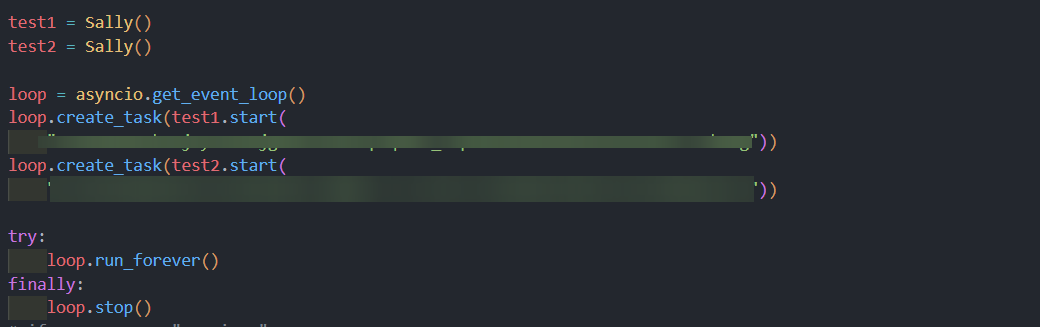
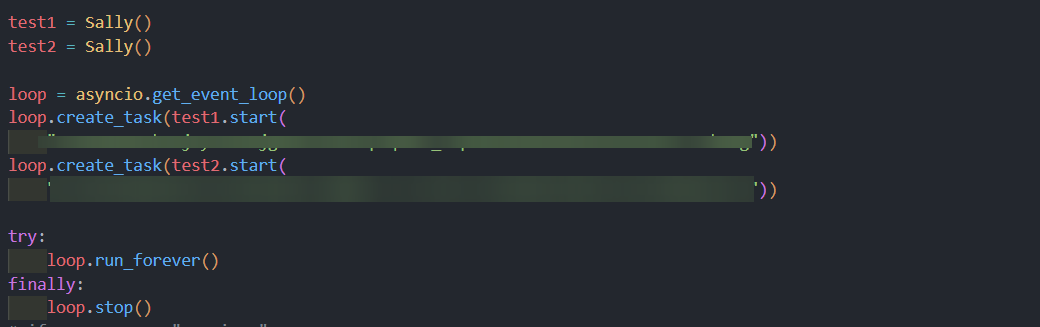
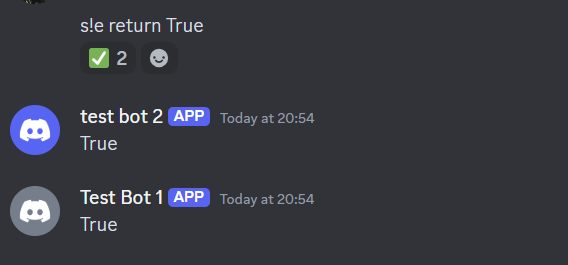
is possible to run 2 bots with the name script without creating another file?
like, just client.run(token1, token2)
sage tendon
why?
fresh sierra
deft kestrel
like, just client.run(token1, token2)
yes
client.run(token1)
client.run(token2)
lofty parcel
client.run is a blocking line isnt it
fresh sierra
lofty parcel
client.run is a blocking line isnt it
just need to do 2 threads, use bot.start, etc etc
there is a lot of way to do that
sage tendon
.start()?
deft kestrel
sage tendon
why?
same bot with different name
deft kestrel
fresh sierra
just need to do 2 threads, use bot.start, etc etc
(?)
lofty parcel
deft kestrel
is possible to run 2 bots with the name script without creating another file?
https://github.com/Rapptz/discord.py/issues/516
This is old af but ig it works
Hi there. I'm wondering if someone could give me some information about how to create multiple bots in the same project. I have three discord apps, but related to each other, so I want to use t...
deft kestrel
lofty parcel
https://github.com/Rapptz/discord.py/issues/516
This is old af but ig it works
i see but i need to rewrite the commands
@bot1.slash_command() @bot2.slash_command()
No other solutions right? i don't wanna rewrite them
lofty parcel
deft kestrel
i see but i need to rewrite the commands
`@bot1.slash_command()
@bot2.slash_com...
You could technically subclass the bot and cover everything there, then just create two instances and run them?
Not quite sure tbh
lofty parcel
lofty parcel
You could technically subclass the bot and cover everything there, then just cre...
Wouldn't this work then? With cogs
class MyBot(discord.Bot):
   def __init__(self):
         super.__init__(blah blah)
         for cog in COGS:
                 self.load_extension(cog)


bot1 = MyBot()
bot2 = MyBot()
?
I'm genuinely tempted to see if it works
Time to open my laptop
deft kestrel
lofty parcel
<@456226577798135808>
thank you, so i will implement it ASAP. ❤️ 
round heart
It is completely stupid that Discord doesn't allow emoji for Options
Edit: It is also completely stupid that you can't have autocomplete for Selects. There needs to be parity between Options and Selects since you can't accept an arbitrary number of entries.
That is all.
harsh crane
Anyone able to tell me how to make a channel with pycord? I cant find any info except the discord.py way and that isn't working. I'm looking to make a channel in a specific catagory as well
rugged lodgeBOT
edgy nest
(its the exact same as discord.py)
 summer scroll
hi, quick question, is it possible with pycord to create those discord polls? ty
 summer knot
.rtfm polls
sly karmaBOT
Target not found, try again and make sure to check your spelling.
rugged lodgeBOT
discord.Poll
discord.Poll.add_answer
discord.Poll.allow_multiselect
discord.Poll.answers
discord.Poll.duration
discord.Poll.end
discord.Poll.expiry
discord.Poll.get_answer
discord.Poll.has_ended
discord.Poll.layout_type
discord.Poll.question
discord.Poll.results
discord.Poll.total_votes
discord.PollAnswer
discord.PollAnswer.count
fresh sierra
is there a way to get an application command based on the id ?
get_application_command use the name for
summer scroll
lofty parcel
Then you just use `.send(poll=MyPoll)`
ah tahnks, was searching on UI on the doc, thats why I didnt found
errant trout
fresh sierra
is there a way to get an application command based on the id ?
Bot._application_commands is a dict of id(str) : command
fresh sierra
errant trout
`Bot._application_commands` is a dict of id(str) : command
thanks
 glossy tide
Hello, how can I make the buttons and menu selector (view) work even after a bot restart?
lapis dock
.tag persistent
sly karmaBOT
When you send a message with a view, button for example
if your bot restarts, you will lose the ability to use this button.
Nonecustom_id value to the viewBot.add_view(YourViewClass())
rugged lodgeBOT
Here's the persistent example.
lapis dock
Start with these and we can help if you have further questions:)
glossy tide
ooh ok thanks i only have to put a custom_id and add the view to the bot
(timeout=None is already done)
round heart
I forget -- A single Embed description has a limit of 4096 characters, can I split that up into two embeds in the same message, or is that essentially a message limit?
lapis dock
You can have up to 10 embeds in a message with all characters adding up to 6000
round heart
6K, gotcha. Thank you
round heart
lapis dock
You can have up to 10 embeds in a message with **all** characters adding up to ...
"all characters" -- does pycord have any helpers to pre-determine the size of a message?
lapis dock
I don't believe so
round heart
len(embed) seems to work, at least; gives a starting point.
lapis dock
Interesting!
round heart
🏆 I have taught Wolfy something.
 frail basin
Any ideas?
bot      | 2024-09-25 17:16:26,854 | Task exception was never retrieved
bot      | future: <Task finished name='Task-31' coro=<ApplicationCommandMixin.on_application_command_auto_complete.<locals>.callback() done, defined at /usr/local/lib/python3.12/site-packages/discord/bot.py:876> exception=HTTPException('400 Bad Request (error code: 40060): Interaction has already been acknowledged.')>
bot      | Traceback (most recent call last):
bot      |   File "/usr/local/lib/python3.12/site-packages/discord/bot.py", line 879, in callback
bot      |     return await command.invoke_autocomplete_callback(ctx)
bot      |            ^^^^^^^^^^^^^^^^^^^^^^^^^^^^^^^^^^^^^^^^^^^^^^^
bot      |   File "/usr/local/lib/python3.12/site-packages/discord/commands/core.py", line 1111, in invoke_autocomplete_callback
bot      |     return await ctx.interaction.response.send_autocomplete_result(
bot      |            ^^^^^^^^^^^^^^^^^^^^^^^^^^^^^^^^^^^^^^^^^^^^^^^^^^^^^^^^
bot      |   File "/usr/local/lib/python3.12/site-packages/discord/interactions.py", line 1182, in send_autocomplete_result
bot      |     await self._locked_response(
bot      |   File "/usr/local/lib/python3.12/site-packages/discord/interactions.py", line 1292, in _locked_response
bot      |     await coro
bot      |   File "/usr/local/lib/python3.12/site-packages/discord/webhook/async_.py", line 224, in request
bot      |     raise HTTPException(response, data)
bot      | discord.errors.HTTPException: 400 Bad Request (error code: 40060): Interaction has already been acknowledged.

the service_autocomplete func correctly returns a list of OptionChoice
sage tendon
Make sure you arent running your bot twice
frail basin
I am not.
The autocomplete is running multiple API calls and DB queries, could time be an issue here?
frail basin
After doing some testing, it does indeed raise the unknown interaction error.
 lofty parcel
frail basin
After doing some testing, it does indeed raise the unknown interaction error.
lofty parcel
frail basin
After doing some testing, it does indeed raise the unknown interaction error.
That means you're not responding under 3 seconds.
shell radish
nope
lapis dock
Does your caching work?
I think that interaction.id will be different for each autocomplete call so your cacheing will never actually be used
frail basin
Oh actually, I messed up the caching dictionary
yeah
I switched it to the user id and it works now. The first call fails but oh well.
Thanks.
lapis dock
Yeah, that is very common for autocomplete
echo wraith
errant trout
`Bot._application_commands` is a dict of id(str) : command
Why is that private btw
errant trout
the library exposes Bot.application_commands as a list instead
private doesn't mean that you can't use it, but rather it may change without warning
 jolly shuttle
I seem to be unable to post a local image inside of an embed even following https://docs.pycord.dev/en/stable/faq.html#how-do-i-use-a-local-image-file-for-an-embed-image. if the image is behind a http(s) url it inserts inside the embed, but if local using attachment:// is sends the image above the embed
jolly shuttle
is there a difference between sending it as a discord.File object vs discord.EmbedMedia?
sage tendon
make sure the filename is exactly right
and just send it as file, never seen embedmedia personally
jolly shuttle
sage tendon
make sure the filename is exactly right
this is the difference

unless there are size restrictions for the embed image
i will try the same image on https:// instaead of attachment:// and see if it will embed then
sage tendon
well, show your code
jolly shuttle
    channel = ctx.channel
    filename = f"{ctx.author.name} & {member.name}.png"
    file = discord.File(f"images/{filename}", filename=f"{filename}")
    embed = discord.Embed()
    embed.set_image(url=f"attachment://{filename}")
    await channel.send(file=file, embed=embed)
weird
jolly shuttle
i thought maybe a banner has to be specific dimensions
little cobalt
jolly shuttle
```py
channel = ctx.channel
filename = f"{ctx.author.name} & {member.n...
If I did that way always working for me ;3
sage tendon
maybe the file name?
jolly shuttle
spaces
sage tendon
try remove the ampersand
jolly shuttle
okay
sage tendon
and spaces too maybe yea
jolly shuttle
good guess cause i assume the spaces automatically convert to %20
little cobalt
instead of the space use _
jolly shuttle
tested 3 cases:
❎ no space
❎ no ampersand
✅ no space and no ampersand
sage tendon
you're not done yet :)
i'm not sure what .name even maps to anymore, but if it's NOT the "account" name, then you also have to watch out for spaces there
jolly shuttle
spaces are allowed in display names and not usernames right?
sage tendon
yea
but from what i see in the docs, .name is the account name
aka no spaces there
so all good
jolly shuttle
well i was planning to use the display name but that will only be inside the image..
cool thanks guys
say i want to contribute somehow. what makes more sense.. do more research and find out the test fail cases (or look in the code to see if its obvious) and edit the docs or include some kind of raised error in the actual code / type checking or whatever warns my ide of improper syntax before the code is run
sage tendon
i mean it's not really a bug or anything
jolly shuttle
shouldn't the ampersand and the spaces been converted to %20 and %26 url encoding?
fresh sierra
jolly shuttle
```py
channel = ctx.channel
filename = f"{ctx.author.name} & {member.n...
u might need to put unicod
idk if its that
sage tendon
we already fixed it
fresh sierra
mb then
jolly shuttle
i broke my general rule of don't f with spaces w/ filenames
sage tendon
the file names werent the issue
jolly shuttle
how so?
sage tendon
the URL was the issue because it replaces the spaces
jolly shuttle
ampersand made it fail too
sage tendon
same thing
 clear lark
Is it possible to call discord slash commands directly the pythonic way?
lofty parcel
clear lark
Is it possible to call discord slash commands directly the pythonic way?
What do you mean
clear lark
like lets say I have another discord command and need to call this discord command function directly and programmatically
 lofty parcel
clear lark
like lets say I have another discord command and need to call this discord comma...
lofty parcel
clear lark
like lets say I have another discord command and need to call this discord comma...
You could simply extract the command functionally into a general function and use it on both commands.
fresh sierra
clear lark
like lets say I have another discord command and need to call this discord comma...
u can invoke the command
 vague plaza
can you ip ban somebody from a server so that even with his alts that never joined the server he's not gonna be able to get in?
echo wraith
vague plaza
can you ip ban somebody from a server so that even with his alts that never join...
when you ban someone I believe discord ip bans too by default
might be wrong tho
lapis dock
What paillat said
There is no additional way to IP ban someone. It just depends on what discord does by default
vague plaza
gotcha, thanks 🙌
eternal kite
i remember you can run commands through mentioning the bot without message intents, is it not possible anymore?
fresh sierra
eternal kite
i remember you can run commands through mentioning the bot without message inten...
its possible
eternal kite
fresh sierra
its possible
ah i just realised there's something wrong with my code
anyways is it possible to invoke application commands?
lapis dock
It is but it would be better to put all of the code in your app command in a separate function that you call from the app command callback and whereever else you want to invoke it
.rtfm invoke_app
sly karmaBOT
discord.Bot.invoke_application_command
discord.AutoShardedBot.invoke_application_command
discord.ext.bridge.Bot.invoke_application_command
discord.ext.bridge.AutoShardedBot.invoke_application_command
discord.ext.commands.AutoShardedBot.invoke_application_command
discord.ext.commands.Bot.invoke_application_command
eternal kite
lapis dock
It is but it would be better to put all of the code in your app command in a sep...
yeah that's what i did and my code is a complete mess
fresh sierra
if u <ant pprerix and slash iu can use bridghe
eternal kite
bridge?
fresh sierra
yes
eternal kite
lapis dock
It is but it would be better to put all of the code in your app command in a sep...
I am trying to invoke an application command with parameters through discord with normal message, is it possible?
eternal kite
for instance, @bot <user1> profile <user2> will invoke the application command profile with the ctx author being user1
eternal kite
it should be possible if parameters can be passed into the invoke_application_command
fresh sierra
ctx.author will never be different than the author of the message
eternal kite
fresh sierra
that's not possible since the contect is given by the message
i can just change ctx.author to the user's id and get the new context through get_context
fresh sierra
because the context is given by the message
you can edit the message object and then process it
it will be easier
(if its possible)
like message.author = ..., await process message(message)
eternal kite
basically this is the code i wrote two years ago, and it works fine for message commands back then

right now idk how to make it work for application command
fresh sierra
eternal kite
right now idk how to make it work for application command
wdym by for application command ?
for a prefix trigger a app command ?
eternal kite
fresh sierra
wdym by for application command ?
invoke is only for invoking normal commands, if i change it to invoke_application_command, idk where i can pass the command arguments into the application command
because apparently changing msg.content wouldnt work
fresh sierra
the thing is
to invoke an invoke_application_command i think you need to have an interation
so i dont see how with a message content u will be able to trigger an application command
or you mean do /command @user image
and it will use @user as an author for the image app command
eternal kite
so i have to make the command triggered by slash command, so i can get the application ctx?
fresh sierra
eternal kite
so i have to make the command triggered by slash command, so i can get the appli...
without an interaction u cant invoke an app context as far as i know
so yes you will need that
but if i understand ur trying to make a command to run another command changing the command author ?
eternal kite
what if creating an application context myself?
eternal kite
fresh sierra
but if i understand ur trying to make a command to run another command changing ...
yes
fresh sierra
eternal kite
what if creating an application context myself?
you will still need an interaction
eternal kite
it's a lot more complicated than simply changing the author
fresh sierra
like that's how discord works
maybe overwrite the command invoke to do ur change on the ctx there
eternal kite
btw shouldn't this be ApplicationContext?

how long does it require for new slash command to register?
sage tendon
instant, but you need to restart discord
lapis dock
ctrl + r works too
eternal kite
how do i get the command entered including the arguments from application context?
ctx.message returns None and ctx.command only returns the command
errant trout
sage tendon
oh i thought they meant options in general oops
errant trout
eternal kite
basically this is the code i wrote two years ago, and it works fine for message ...
you're trying to recreate a sudo-esque command?
eternal kite
errant trout
you're trying to recreate a sudo-esque command?
yes
but i just couldn't figure out how to make it in slash commands
errant trout
you have to trigger it from some sort of interaction, either another slash command or a component such as a button
to modify stuff, you edit ctx.interaction (e.g. reassign ctx.interaction.user)
eternal kite
yeah i made the command a slash command but it still wouldn't work
errant trout
if it's the method you used in the screenshot, of course not
eternal kite
i am still figuring out how to pass the arguments to invoke
errant trout
it's because invoke_application_command runs entirely on context which has the args filled separately
you could just call the command's function manually instead
eternal kite
oh
let me try that rq
but i would need a dispatcher to show which command i am calling?
nvm i got it working, but i still have to find a way to pass the args
 sage tendon
use respond() with slash commands
eternal kite
is reply deprecated?
sage tendon
its not for slash commands
eternal kite
oh
errant trout
if you're insisting on this method, you need to look at the source yourself to understand how args are passed
https://github.com/Pycord-Development/pycord/blob/master/discord/bot.py#L1123
https://github.com/Pycord-Development/pycord/blob/master/discord/commands/core.py#L431
https://github.com/Pycord-Development/pycord/blob/master/discord/commands/core.py#L966
and understand that trying to approach slash the same as you did with prefix doesn't work
sage tendon
genuine question what is the plan here
errant trout
sudo command that can run any command as any user
errant trout
it can  it's significantly easier to just call the function directly though, instead of going through invoke
errant trout
well, going through invoke makes the library treat it like a normal command call and goes through all the events and checks properly
eternal kite
errant trout
it can <:GuraShrug:1070181611737456680> it's significantly easier to just call t...
but i would have to create a dictionary as a dispatcher to all the commands
errant trout
why
eternal kite
otherwise how would i convert str inputs into command functions
errant trout
just use get_application_command
(also autocomplete can list the commands out nicely)
using invoke won't help with your options because it relies on raw interaction conversions that discord would do for you
eternal kite
wait i can call the application command function directly?
so whats the point of having invoke command
sage tendon
that's basically what nelo is saying lol
errant trout
invoke does all the necessary conversions that discord gave the client, and then calls the function at the end
look at the last link i posted, that's what it has to deal with
eternal kite
alr
errant trout
assuming you're the only one using the sudo command, you handle the conversions yourself and just make sure you're doing the correct inputs that would safely pass any validation
eternal kite
errant trout
assuming you're the only one using the sudo command, you handle the conversions ...
yeah i ran into another issue and it's about the argument type conversions
i dont wanna hard code and manually convert everything though
errant trout
you gotta
even if you were to use the invoke function, you'd have to manually recreate the interaction dict that holds options
eternal kite
errant trout
even if you were to use the invoke function, you'd have to manually recreate the...
yes and it's worse when i realise i have to manually change the "name" key for every command in the dict
errant trout
do you really need an all-round sudo command, or do you only need it for one or two commands?
eternal kite
errant trout
do you really need an all-round sudo command, or do you only need it for one or ...
all-round
errant trout
then you got a lotta manual work in store
well
if you want the quickest way, probably:
0. Decide how you're parsing the command string
CONVERTER_MAPPING from ext.commands to map the option type to a converterthen just call i guess
eternal kite
converter_mapping? i cant find it in the docs
errant trout
because it isn't
from discord.ext.commands.converter import CONVERTER_MAPPING havefun
eternal kite
great
errant trout
(don't bother for string/int/bool/float etc, this is for discord models)
sage tendon
and i thought luma was already too deep in the library
errant trout
luma fucks with the library at a relatively surface level because he wants it to work with his own classes and models
(which isn't necessarily bad, but at that point you have to forgo regular help requests because most helpers aren't digging through the lib)
sage tendon
fair
 merry ermine
How do I get the commands list JSON output to send over to discordbotlist
lofty parcel
merry ermine
How do I get the commands list JSON output to send over to discordbotlist
What's the format it expects?
 upper flint
Hello everyone,
Anyone free to help? 👀 😄
https://discord.com/channels/881207955029110855/1288898368831098937
 stuck oar
how can i create forum tags? this is my code, but i have error
category = get(interaction.guild.categories, id=1284833150375166033)
overwrites = {
    interaction.guild.default_role: discord.PermissionOverwrite(read_messages=False, send_messages=False),
    interaction.user: discord.PermissionOverwrite(read_messages=True, send_messages=False)
}
channel = await category.create_forum_channel(name=self.children[0].value, overwrites=overwrites, topic=self.children[1].value)
tags = [
    discord.ForumTag(name="pl", emoji="🌙"),
    discord.ForumTag(name="re", emoji="📝"),
]
await channel.edit(available_tags=tags)
await channel.edit(require_tag=True)
Error:
Ignoring exception in modal <cogs.shop.Register_ShopInfo object at 0x000001E46D23B4C0>:
Traceback (most recent call last):
  File "C:\Users\itskimlot\AppData\Local\Programs\Python\Python38\lib\site-packages\discord\ui\modal.py", line 341, in dispatch
    await value.callback(interaction)
  File "c:\LucyStudio\LucyStore\bot\cogs\shop.py", line 48, in callback
    await channel.edit(available_tags=tags)
  File "C:\Users\itskimlot\AppData\Local\Programs\Python\Python38\lib\site-packages\discord\channel.py", line 1173, in edit
    payload = await self._edit(options, reason=reason)
  File "C:\Users\itskimlot\AppData\Local\Programs\Python\Python38\lib\site-packages\discord\abc.py", line 428, in _edit
    options["available_tags"] = [
  File "C:\Users\itskimlot\AppData\Local\Programs\Python\Python38\lib\site-packages\discord\abc.py", line 429, in <listcomp>
    tag.to_dict() for tag in options.pop("available_tags")
  File "C:\Users\itskimlot\AppData\Local\Programs\Python\Python38\lib\site-packages\discord\channel.py", line 172, in to_dict
    payload: dict[str, Any] = {
TypeError: unsupported operand type(s) for |: 'dict' and 'dict'
I tried to click on ForumTag in the documentation to check it, but it doesn't show up, so I'm asking my questions here. please ping me
errant trout
stuck oar
Error:
```
Ignoring exception in modal <cogs.shop.Register_ShopInfo object at 0x...
sorry... the person who implemented this function used a feature only present in python 3.9 and above
errant trout
no, it's not your fault at all
stuck oar
i'll update my python version and retry it!!
errant trout
because the current library should fully operate on 3.8 still
but indeed, upgrading would be the easiest fix
little cobalt
(soon)
 errant trout
well, hence current
errant trout
merry ermine
Exactly the same as Discord
every command has a to_dict function
you can iterate through bot.application_commands
merry ermine
oh ok
deft kestrel
async def test_photo(ctx, photo: List[discord.Attachment] = None):
can i do this?
sage tendon
no
round heart
These image sharing domain names..
round heart
Is there a good way to search number of messages by a user in a list of channels by doing backwards searching, or would it be better to monitor realtime and keep periodic updates
lofty parcel
I think the latter is better
harsh crane
Why does this line
member = discord.Guild.fetch_member(182315234793488391)
give me this error?
TypeError: fetch_member() missing 1 required positional argument: 'member_id'
shell radish
2 things.
discord.Guild is a class, not an instance. You should use an instance of discord.Guild
fetch_member is a coroutine, which needs to be prefixed with an await keyword
summer scroll
Hey, I may not get smth: it seemsn that I cant acess the Poll class through my code, whats the import? I now have those:
from discord import option, slash_command
from discord.commands import Option
from discord.ext import commands, tasks
from discord.utils import get
from discord.ui import Button, View, Select
discord.Poll
discord.Poll.add_answer
discord.Poll.allow_multiselect
discord.Poll.answers
discord.Poll.duration
discord.Poll.end
discord.Poll.expiry
discord.Poll.get_answer
discord.Poll.has_ended
discord.Poll.layout_type
discord.Poll.question
discord.Poll.results
discord.Poll.total_votes
discord.PollAnswer
discord.PollAnswer.count
summer scroll
that doesnt awnser my question: which import do I have to use to be able to call discord.Poll pls?
echo wraith
summer scroll
that doesnt awnser my question: which import do I have to use to be able to call...
What do you mean ? For type hinting ?
summer scroll
echo wraith
What do you mean ? For type hinting ?
Traceback (most recent call last):
  File "/usr/local/lib/python3.9/dist-packages/discord/bot.py", line 1114, in invoke_application_command
    await ctx.command.invoke(ctx)
  File "/usr/local/lib/python3.9/dist-packages/discord/commands/core.py", line 375, in invoke
    await injected(ctx)
  File "/usr/local/lib/python3.9/dist-packages/discord/commands/core.py", line 132, in wrapped
    raise ApplicationCommandInvokeError(exc) from exc
discord.errors.ApplicationCommandInvokeError: Application Command raised an exception: AttributeError: module 'discord' has no attribute 'Poll'
@bot.slash_command(name="poll", description="Crée un sondage")
@option("question", description="Question du sondage", required=True, type=str)
@option("answers", description="Réponses du sondage", required=True, type=str)
@option("duration", description="Durée du sondage", required=False, type=int, choices=[1,4,8,24,72,168, 336])
@option("multiselect", description="Autoriser le multiselect", required=False, type=bool)
async def poll(ctx, question: str, answers: str, duration: int, multiselect: bool = False):
    """
    Commande permettant de créer un sondage
    """
    answers = answers.split(",")
    poll = discord.Poll(question, duration=duration, allow_multiselect=multiselect)
    for answer in answers:
        poll.add_answer(answer)
    await ctx.send(poll=poll)
.tag install
sly karmaBOT
summer scroll
```
Traceback (most recent call last):
File "/usr/local/lib/python3.9/dist-pac...
1. Uninstall discord.py or any other forks of discord.py you might have with the namespace discord.
python -m pip uninstall discord.py discord -y
2a. Install py-cord
python -m pip install py-cord
2b. Update py-cord
python pip install -U py-cord
Installing other builds:
Note: You need to have git installed. Use ?tag git to find out how to install git.
Updating the module to master branch (unstable):
pip install -U git+https://github.com/Pycord-Development/pycord
summer scroll
echo wraith
.tag install
already did, and still the same :
The above exception was the direct cause of the following exception:

Traceback (most recent call last):
  File "/usr/local/lib/python3.9/dist-packages/discord/bot.py", line 1114, in invoke_application_command
    await ctx.command.invoke(ctx)
  File "/usr/local/lib/python3.9/dist-packages/discord/commands/core.py", line 375, in invoke
    await injected(ctx)
  File "/usr/local/lib/python3.9/dist-packages/discord/commands/core.py", line 132, in wrapped
    raise ApplicationCommandInvokeError(exc) from exc
discord.errors.ApplicationCommandInvokeError: Application Command raised an exception: AttributeError: module 'discord' has no attribute 'Poll'
are you using a venv ?
if not pelase set one up
sly karmaBOT
Tag not found.
echo wraith
summer scroll
already did, and still the same :
```
The above exception was the direct cause o...
.tag venv
sly karmaBOT
summer scroll
already did, and still the same :
```
The above exception was the direct cause o...
Sometimes you want to keep libraries from polluting system installs or use a different version of libraries than the ones installed on the system. You might also not have permissions to install libraries system-wide. For this purpose, the standard library as of Python 3.3 comes with a concept called “Virtual Environment”s to help maintain these separate versions.
Read more here
Learn how to set up a virtual environment for Pycord.
sage tendon
@summer scroll what's your pycord version
summer scroll
sage tendon
<@310732202570678272> what's your pycord version
py-cord 2.6.1.dev114+ga2117adb
little cobalt
summer scroll
py-cord 2.6.1.dev114+ga2117adb
Try to stay away from the master branch when you dont need it
lapis dock
Just to be sure can you show your entire pip list
summer scroll
lapis dock
Just to be sure can you show your entire pip list
sure:
lapis dock
That looks fine. Like zery said try downgrading to a stable version 2.6.1. I can help more later
summer scroll
I had the same problem on the stable version tho, but I thought that upgrading could help
apparently no
maybe the problem is the way I use poll?
@bot.slash_command(name="poll", description="Crée un sondage")
@option("question", description="Question du sondage", required=True, type=str)
@option("answers", description="Réponses du sondage", required=True, type=str)
@option("duration", description="Durée du sondage", required=False, type=int, choices=[1,4,8,24,72,168, 336])
@option("multiselect", description="Autoriser le multiselect", required=False, type=bool)
async def poll(ctx, question: str, answers: str, duration: int, multiselect: bool = False):
    """
    Commande permettant de créer un sondage
    """
    answers = answers.split(",")
    poll = discord.Poll(question, duration=duration, allow_multiselect=multiselect)
    for answer in answers:
        poll.add_answer(answer)
    await ctx.send(poll=poll)
did you install plain 2.6.1 now?
sage tendon
can you print discord.__version__ anywhere in your code
fresh sierra
summer scroll
Hey, I may not get smth: it seemsn that I cant acess the Poll class through my c...
if you try from disord import Poll is that working ?
summer scroll
fresh sierra
if you try from disord import Poll is that working ?
neither Poll and poll
 little cobalt
Im not sure if this can also create a issue
 sage tendon
why?
sage tendon
sage tendon
can you print `discord.__version__` anywhere in your code
can you try this too please
little cobalt
Poll gibt es bei mir auch nicht bei discord
fresh sierra
little cobalt
Im not sure if this can also create a issue
should not be that since he cant even import poll from discord
sage tendon
works for me
little cobalt
uh Im at 2.5
sage tendon
duh
little cobalt
now its working
fresh sierra
summer scroll
neither Poll and poll
can you show us the init.py from the discord package ?
little cobalt
@summer scroll uninstall py-cord and reinstall it
sage tendon
bruh lmfao
fresh sierra
 sage tendon
they already changed the version, thats basically a reinstall
fresh sierra
fresh sierra
to check if there is this .poll import *
summer scroll
ok well found the problem
for some reasons, the systemctl that start the bot use a wrong version of python, even if I specified python3:
[Unit]
Description=MonkeyLand - Lancement de main.py au démarrage
After=network.target


[Service]
WorkingDirectory=/srv/Monke-Land
ExecStart=/usr/bin/python3 main.py
StandardOutput=file:/srv/Monke-Land/output.log
StandardError=file:/srv/Monke-Land/output.log
Restart=always

[Install]
WantedBy=multi-user.target

COULD it be like a cache problem?
 willow dune
import os
import dotenv
import discord
from discord.ext import commands

dotenv.load_dotenv()
DISCORD_BOT_TOKEN = os.getenv('DISCORD_BOT_TOKEN')

#intents = discord.Intents.all()
bot = discord.Bot()

@bot.event
async def on_ready():
    print(f"{bot.user} is online.")


@bot.command(name="hello", description="testing")
async def hello(ctx: discord.ApplicationContext):
    await ctx.respond("hi")


bot.run(DISCORD_BOT_TOKEN)
@sage tendon
summer scroll
sage tendon
you might just have multiple python installations
I do, but the one I use on my systemctl and the one when I try to start it by hand is technically the same (cf my screen)
sage tendon
willow dune
```python
import os
import dotenv
import discord
from discord.ext import command...
which pycord version?
sage tendon
summer scroll
I do, but the one I use on my systemctl and the one when I try to start it by ha...
no idea then
willow dune
sage tendon
which pycord version?
2.6.1
sage tendon
and you got the token from here, right?
 lapis dock
@willow dune did you fix it?
frail basin
Is there a way to force discord not to cache autocomplete values?
lapis dock
Do you mean it just caches them if you gave it values but then you dont respond in time for the next call?
willow dune
lapis dock
<@240962206433280000> did you fix it?
Not yet, I've tried different variations of it and still get the same error.
frail basin
I wanted to respond with an empty list to prevent it from failing, but then send the correct autocomplete for the same input later
sage tendon
willow dune
Not yet, I've tried different variations of it and still get the same error.
can you send the full error here
sage tendon
frail basin
I wanted to respond with an empty list to prevent it from failing, but then send...
that doesnt work
lapis dock
willow dune
Not yet, I've tried different variations of it and still get the same error.
I thought you deleted the error, for got it was in #general sorry 
sage tendon
if you take longer than 3 seconds? to respond to autocomplete, you are doing something wrong
lapis dock
If you really want just reply with ["Loading..."]
sage tendon
but you cant like, "follow up" without the user changing inputs
or can you
because for all i know autocomplete is also a type of interaction that can only have one response
frail basin
I meant:
" " -> "a" -> " "
It caches the first response for the " " input
so refreshing it by typing in it will still show "loading..."
sage tendon
ah
yea you can't prevent that cause its probably done on the client
and typically if you type the same thing, the results dont change
willow dune
Here is the traceback and error.
discord.errors.HTTPException: 400 Bad Request (error code: 50240): You cannot remove this app's Entry Point command in a bulk update operation. Please include the Entry Point command in your update request or delete it separately.
 frail basin
sage tendon
if you take longer than 3 seconds? to respond to autocomplete, you are doing som...
frail basin
sage tendon
if you take longer than 3 seconds? to respond to autocomplete, you are doing som...
I am pulling data from 2 separate APIs + a database.
Sadly using choices is not an option
lapis dock
willow dune
Here is the traceback and error.
```
discord.errors.HTTPException: 400 Bad Reque...
Do you have an activity on your bot?
willow dune
lapis dock
Do you have an activity on your bot?
Nope, nothing, I have the exact code from the guide (except some variable values), just started making the bot. https://guide.pycord.dev/getting-started/creating-your-first-bot
Excited to create your first bot? Once you install Pycord, you can start right
lapis dock
frail basin
I am pulling data from 2 separate APIs + a database.
I forgot what your autocomplete is doing but it sound like you are taking the first autocomplete interaction and using its value to call the APIs?
You should cache all possible values on the first autocomplete interaction and filter based on the content from there.
sage tendon
sage tendon
and you got the token from here, right?
@willow dune
frail basin
lapis dock
I forgot what your autocomplete is doing but it sound like you are taking the fi...
That is exactly what I am doing, however I wanted to display all possibilities once the data is cached
willow dune
Yeah, got the token from there. The bot goes online, but doesn't recognize any commands.
frail basin
sage tendon
why do you need **2** APIs AND a db request?
db -> billing
2 apis -> shared hosting & dedicated machines
sage tendon
willow dune
Yeah, got the token from there. The bot goes online, but doesn't recognize any c...
can you try make a new application on discord, and do absolutely nothing but copy its token and try using that in your bot?
i feel like the issue is somewhere there
lapis dock
I think you enabled activities on the dev portal and that is breaking it becaue syou dont have a command for activites
sage tendon
yea
lapis dock
You
 frail basin
That is exactly what I am doing, however I wanted to display all possibilities o...
frail basin
frail basin
That is exactly what I am doing, however I wanted to display all possibilities o...
I have to let it fail it seems. It will retry with the same inputs.
lapis dock
sage tendon
how do you even do that? I suspected something like that buti couldn't find it
You just click on activities and click ok on the pop up I guess. Did it for the first time right now.
That might actually be something that we need to fix in the lib. Im not sure.
lapis dock
frail basin
I have to let it fail it seems. It will retry with the same inputs.
I understand what you are doing about 80%. If you could post your autocomplete code that would be great (you can slim it down by removing the api call info and such)
willow dune
Thank you both, I didn't realize that it could be the Discord app's activity, I thought you meant if the bot was in an activity. Disabling activities from the Discord app's setting fixed it.
lapis dock
👍 If you are planning on using activities you just have to get that far in the code before enabling in the dev portal
frail basin
lapis dock
I understand what you are doing about 80%. If you could post your autocomplete c...
everything private should be behind classes already
 sage tendon
This is a typical nitpick of mine but why are you typehinting variables when you could just typehint the return type of the functions
frail basin
I actually did that about 15 seconds ago so you can see that it returns a list
They are all typehinted
 frail basin
I might just need to micro optimize it until I can get it down to under 3 seconds.
lapis dock
depending on the size of your services you can improve this by not calculating the entire list and then limiting it to 25. Rather stop the for loop once it finds 25 items.
frail basin
True, thanks.
sage tendon
This might be entirely unfeasible and stupid but since you basically run 3 things, what about threads
frail basin
I am currently in the process of checking how many API calls I make on average.
Since this bot will be running on the same machine as one of the APIs, I expect a significant performance increase from that.
lapis dock
Re reading your question:
I dont think that it is possible to respond again if a user types /command option:hi really fast before you can load the values for option. And then does not type again. If you cant get it below 3 seconds. I would add "Please keep typing" to the results of the autocomplete or in the option description.
sage tendon
just wondering but about how many options do you typically return
frail basin
So it turns out the culprit was attrs.define?
This doesnt sound right...
Thats the only thing I changed and I managed to get everything down to 1.21 seconds, with the same data
lapis dock
Do keep in mind i think DBs have caches so that if you are calling the same data a bunch it might get slightly faster as well ¯_(ツ)_/¯
frail basin
I am using docker compose with mariadb so I doubt that keeps its cache between restarts
frail basin
frail basin
This doesnt sound right...
Using a simple class without the decorator is infact 0.5s faster.
frail basin
Using @attrs.define is 0.5s slower than a class with only an __init__ constructor.
This is most likely due to the number of instances it has to create of said class.
sage tendon
can you show that? never seen it before