
#Basic Pycord Help
1 messages · Page 13 of 1
 deft kestrel
 little cobalt
ye
deft kestrel
need to update?
 shell radish
deft kestrel
shell radish
deft kestrel
then you would use a command tree and add the slash command to the tree
little cobalt
do you have discord.py and py-cord installed?
shell radish
pycord is a seperate projecct from discord.py
deft kestrel
solved, thank you!!!
 shell radish
yay
 shell radish
?tag defer
 limber wagonBOT
 No tag
 defer found.
shell radish
?tag ephemeral
limber wagonBOT
An 'ephemeral' message is one that's only visible to the person who invoked a command. If you ever got a command error with a blue background, this is an example of one.
To do this, set ephemeral=True when you first use an ApplicationContext. (This includes .defer()ing it; the choice of whether a message is ephemeral or not must be made up front. If you .respond() to a deferred message, setting the ephemeral flag at that time will have no effect.)
This is the equivalent of hidden=True if you're coming from interactions.py
e.g.
await ctx.respond("Imagine a message!", ephemeral = True)

await interaction.response.send_message("Imagine a message!", ephemeral = True)
cool, thank you
 red mist
@deft kestrel I mean I'm confused a lil ab the error too, but I suppose something is wrong with your .env
 red mist
The
Yes
You should only
Do the Token =
The rest is irrelevant
Env files only store environment variables.
So pretty much you import the key of your token variable into the bot.run function which then runs it
And that's most likely the cause for your error
But man I've never seen such a shitty traceback lmfao
red mist
Yess
deft kestrel
red mist
Yess
cool
red mist
And API keys I suppose
deft kestrel
btw @red mist can u send me the moderation functions in dms
i dont feel like figuring them out
red mist
the library provides you with options which you can use, it's all pretty much in the documentation, (takes a while to get used to yes but after some tutorials you'll get used to it quickly)
like in #app-commands you can try using .rtfm ban
And it'll provide you with all kinds of hotlinks to the documentation about bans which you can implement into your bot
But it's really, you'll need to look what exactly you wish to do
Either you can log all of the bans or not
deft kestrel
thanks
red mist
deft kestrel
thanks
np
red mist
Maybe this shortcut will help you
Read the fucking manual
literally stands for rtfm
This is no joke
Ok look, you don't usually list all intents to true as pretty much people want privacy.
If you put all intents to true, when the user invites your bot they get the almighty popup which makes people speculate what things your bot has access to
See user data
See any message
Etc.
deft kestrel
red mist
Maybe this shortcut will help you
**Read the fucking manual**
literally stands ...
ok chill damn i mispelled the command
red mist
They don't really want that, but sometimes you do need that of you're making a moderation bot, which handles logs yk
Where the bot needs to be able to see all kinds of messages
So you put intents.message(s)? To true
red mist
In which case they also get informed to what your bot has access to
Idk if you're just getting started I suppose first checkout indeed how a basic command works
And then
After that
The first best thing you do
Is subcommands and command groups
And then cogs.
deft kestrel
yup thats what im going to do
red mist
mkay (then don't make things too complicated yet xd)
Also for warning you'll need a database
deft kestrel
red mist
mkay (then don't make things too complicated yet xd)
this is my first try im not gonna make it be complicated
deft kestrel
red mist
Also for warning you'll need a database
thankgod i have mongo db
deft kestrel
but incase i was gonna host the bot in a vps
red mist
I still don't know the tag which had that
hold on lemme search
Yes you could potentially pass in your intents variable like that
but it's not... very common or practical
deft kestrel
so to be clear the way i placed them was incorrect thats why
red mist
intents = discord.intents.default()
intents. (messages I forgot how this was) = True

# and then you define your bot class

bot = discord.Bot(intents=intents)

# Now don't think intents is itself, you pass in your own intents which you defined but the variables of the class have the same name which works but looks confusing at first.

# So you could also do it like this.
permissions = discord.intents.default()
permissions. (messages I forgot how this was) = True

bot = discord.Bot(intents=permissions)
Yk?
I mean this is pretty much a bit of simple python too... But ig we all need to start somewhere 💀
deft kestrel
red mist
I mean this is pretty much a bit of simple python too... But ig we all need to s...
💀 i realized i wasted 30 mins of ur time
red mist
Yes but I don't want to be rude 
deft kestrel
red mist
Yes but I don't want to be rude <:rooBulli:881521728810004510>
....actually nvm its fine i will figure it out myself
ur free to go
red mist
:) guide, documentation and a lot of google
deft kestrel
oke
red mist
.rtfm is just to get your way around the documentation easier :)
 sly karmaBOT
4485 total results
discord.Bot
discord.Bot.activity
discord.Bot.add_application_command
discord.Bot.add_check
discord.Bot.add_cog
discord.Bot.add_listener
discord.Bot.add_view
discord.Bot.after_invoke
discord.Bot.all_commands
discord.Bot.allowed_mentions
discord.Bot.application_command
discord.Bot.application_commands
discord.Bot.application_flags
discord.Bot.application_id
discord.Bot.application_info
discord.Bot.before_identify_hook
discord.Bot.before_invoke
discord.Bot.cached_messages
discord.Bot.can_run
discord.Bot.change_presence
red mist
^~^
red mist
I had a ping?
 leaden hornet
hi guys, is it possible to mention command with prefilled arguments
shell radish
leaden hornet
hi guys, is it possible to mention command with prefilled arguments
nope
leaden hornet
bruh
 shadow junco
are there a way to know what cog is loaded or not?
shell radish
shadow junco
are there a way to know what cog is loaded or not?
bot.cogs iirc
shadow junco
shell radish
bot.cogs iirc
how to use
Pycord
Bots: Attributes activity, allowed_mentions, application_flags, application_id, auto_sync_commands, cached_messages, cogs, debug_guilds, description, emojis, extensions, get_command, guilds, intent...
do you mean this?
shell radish
shadow junco
do you mean this?
yes
shadow junco
shell radish
yes
but i don't know how to use
for filename in os.listdir("cmds"):
        if filename.endswith('.py'):
            cogs = bot.get_cog(filename[:-3])
            if cogs is not None:
                extensions.append(filename[:-3])
you never told me how you want to use it specifically
shadow junco
shell radish
you never told me *how* you want to use it specifically
i want to make a auto complete and it will get loaded cogs
shell radish
Just confirming you know how autocomplete works?
shadow junco
yes
shell radish
so you can use something like
def get_loaded_cogs(ctx: discord.AutocompeleteContext):
  loaded_cogs = []
  for cog_name in bot.cogs: # or ctx.bot.cogs if you don't have access to bot
    loaded_cogs.append(cog_name)

  return loaded_cogs
oh but why this code can't work
shell radish
shadow junco
but i don't know how to use
```py
for filename in os.listdir("cmds"):
if...
What is extensions? Is it just an array similar to loaded_cogs
shadow junco
shell radish
so you can use something like
```py
def get_loaded_cogs(ctx: discord.Autocompele...
cog is a string so it has no attribute name
shell radish
shadow junco
cog is a string so it has no attribute name
sorry, it's just cog then
shadow junco
so can i use for loop to load loaded cogs?
shell radish
shadow junco
so can i use for loop to load loaded cogs?
you can use a for loop to see loaded cogs
shell radish
yw
shell radish
shadow junco
ok
It was a question...
shadow junco
shell radish
It was a question...
what do u mean?
shell radish
never mind
shadow junco
shell radish
never mind
@option(name='extension', description="選擇一個你要載入的Cog", choices=[str(cog) for cog in bot.cogs])
why this doesn't show any choices
shell radish
shadow junco
@option(name='extension', description="選擇一個你要載入的Cog", choices=[str(cog) for cog ...
because it uses the bot instance on startup which is empty
shadow junco
shell radish
because it uses the bot instance on startup which is empty
so how can i fix it
shadow junco
or i should just use autocomplete
 autumn gust
assuming we're talking about slash commands
shell radish
shadow junco
or i should just use autocomplete
just use autocomplete
shadow junco
ok
shell radish
autumn gust
how?
economy bots like dank memer exist
shell radish
autumn gust
well, they have confirmation, no?
many bots don't
shadow junco
shell radish
just use autocomplete
can i unload a cog which has slash command?
little cobalt
yes
autumn gust
shell radish
many bots don't
well then that's an issue on their end
shell radish
autumn gust
well then that's an issue on their end
how is it an issue if Discord never released a feature like that
shadow junco
shadow junco
and can use
so can i unload an slash command?
autumn gust
shell radish
how is it an issue if Discord never released a feature like that
an embed saying "You're about to pay X to Y, are you sure?" isn't something Discord didn't implement?
shell radish
autumn gust
an embed saying "You're about to pay X to Y, are you sure?" isn't something Disc...
first of all, Discord never released the autofill thing. Second, bot users don't like being asked to confirm things because Discord is not a very responsive platform
autumn gust
shell radish
first of all, Discord never released the autofill thing. Second, bot users don't...
discord never released the autofill thing
yeah that's not what I'm talking about, I'm more talking about your reason as to why it hasn't been released
bot users don't like being asked to confirm things because Discord is not a very responsive platform
eh? I see confirmation boxes in a lot of bots so I don't really understand that point
shell radish
we can take this to DMs or #general because it is off-topic
 steady oasis
When i try to install py cord the following error shows up :
Failed building wheel for aiohttp
Failed to build aiohttp
ERROR: Could not build wheels for aiohttp, which is required to install pyproject.toml-based projects
 sage tendon
Is this for e.g. phone verification in the server settings?
 sage tendon
steady oasis
When i try to install py cord the following error shows up :
Failed building whe...
sage tendon
steady oasis
When i try to install py cord the following error shows up :
Failed building whe...
p3.12?
steady oasis
How to send embed to specified chanell
steady oasis
sage tendon
p3.12?
p.3.10.6 solved problem
sage tendon
sage tendon
Is this for e.g. phone verification in the server settings?
and in connection, do you reckon this will work (i couldnt test it properly yet unless i push to prod)
 sage tendon
well it does work but it only returns 4 members which seems wrong since i have phone verification on in a 500 member server
and it doesnt return members who i know dont have a phone number attached to their account
sage tendon
steady oasis
p.3.10.6 solved problem
3.11.6 will work, 3.12 is just not supported by many packages
 lofty parcel
Use autocomplete
 deep blaze
hmm
 rugged lodgeBOT
Here's the slash autocomplete example.
lofty parcel
But technically the max is always 25
 maiden birch
shell radish
maiden birch
shell radish
no
shadow junco
when i disable a cog which has a slash command in it, why the slash command still exist and can use
little cobalt
shadow junco
when i disable a cog which has a slash command in it, why the slash command stil...
you have to sync the commands
shadow junco
little cobalt
you have to sync the commands
How
Or i just have to wait discord to sync the commands
little cobalt
you have to sync the commands
Here is a example, you have to change some stuff to it
cog = client.get_cog(name="Name")
client.reload_extension("Cogs.Name")
cmd = [c for c in cog.get_commands()] # Command list of the cog
await client.sync_commands(commands=cmd, guild_ids=[]) # I had to add guild_ids=[] to it with a empty list
ok
deft kestrel
 sly karmaBOT
shell radish
sly karmaBOT
shell radish
yeah
deft kestrel
shell radish
it's `guilds`
ow 😳 sorry first time coding
 lofty parcel
deft kestrel
how can i make it ping a user
lofty parcel
deft kestrel
how can i make it ping a user
Code?
deft kestrel
lofty parcel
Code?
yes
lofty parcel
deft kestrel
yes
Im asking for your code
deft kestrel
 deft kestrel
mb first time making a bot
red mist
whoever keeps ghost pinging please stop ty-
shadow junco
cog = client.get_cog(name="Name")
client.reload_extension("Cogs.Name")
cmd = [c for c in cog.get_commands()] # Command list of the cog
await client.sync_commands(commands=cmd, guild_ids=[]) # I had to add guild_ids=[] to it with a empty list
'NoneType' object has no attribute 'get_commands'
@little cobalt
the code doens't work
bot.unload_extension(f'cmds.{extension}')
        print(extension)
        cog = bot.get_cog(name=extension)
        print(cog)
        print(cog.get_commands())
        cmd = [c for c in cog.get_commands()] # Command list of the cog
Yes, because you unload the cog already
shadow junco
little cobalt
Yes, because you unload the cog already
what do you mean
little cobalt
You have first to get the cog and the commands and after that you can unload the cog
shadow junco
cog = bot.get_cog(name=extension)
cmd = [c for c in cog.get_commands()] # Command list of the cog
await bot.sync_commands(commands=cmd)
bot.unload_extension(f'cmds.{extension}')
but i want to disable the slash command is this cog
but it disable all the slash commands except the one in the cog
 lapis dock
.tag slashnoshow
sly karmaBOT
Application Commands Not Showing Up?
- Uninstall libraries that conflict with the
discordnamespace (e.g.discord.py). - Invite your bot with the
application.commandsscope. - Load cogs before
bot.run()(e.g. not inon_ready). - Do not override
on_connect. - Update to the newest version of
py-cord(see?tag install). - Turn off
User Settings > Accessibility > Chat Input > Use legacy chat input. - Share your code and errors.
lapis dock
Read this please :)
 grizzled loom
can someone take a look at my post #1162830037758783588 ? it's been sitting there for days.
 red pagoda
Hey, just wonder. While using slash command is it possible to make command visible only for specific role?
 hazy turret
How can I defer an interaction?
interaction.defer does not work ?
 opal hamlet
hazy turret
How can I defer an interaction?
interaction.defer does not work ?
opal hamlet
hazy turret
How can I defer an interaction?
interaction.defer does not work ?
interaction.response.defer() iirc
hazy turret
opal hamlet
interaction.response.defer() iirc
Oh damned
Thank you!
opal hamlet
👍
 hybrid tinsel
what's a better way to do this?

quickly realized this isnt scalable at all
should i just keep an index instead of getting the display name straight from discord or is there a faster way
 hazy fulcrum
hybrid tinsel
what's a better way to do this?
hazy fulcrum
hybrid tinsel
what's a better way to do this?
Uh your code won't work if there are alot of users.
There's a limit on the number of fields an embed can have
https://guide.pycord.dev/extensions/pages/paginator-basics should help i believe
hybrid tinsel
hazy fulcrum
Uh your code won't work if there are alot of users.
oh yeah i know i just havent added code for that yet
im just focused on getting it to output within a reasonable time
hazy fulcrum
hybrid tinsel
should i just keep an index instead of getting the display name straight from di...
I don't understand what you mean sadly
hybrid tinsel
for some reason it gets the name of up to 43 users and then stops for a bit
hazy fulcrum
wait you're asking if I should use get_display_name for each iteration?
hybrid tinsel
while its stopped the interaction fails so i cant reply to do thing anymore
hazy fulcrum
Ratelimits maybe?
hybrid tinsel
hazy fulcrum
wait you're asking if I should use `get_display_name` for each iteration?
kinda asking if theres a similar way to get display names in bulk
rather than one by one
hazy fulcrum
hybrid tinsel
kinda asking if theres a similar way to get display names in bulk
Oh
Yeah one second, been a while since I used PyCord
hazy fulcrum
hybrid tinsel
kinda asking if theres a similar way to get display names in bulk
I believe guild.members returns a list of Member's from which then you can do member.display_name
hazy fulcrum
hybrid tinsel
what's a better way to do this?
also what's that get_display_name function?
hybrid tinsel
basically just this

artifact from stuff i tried with asyncio
didnt bother removing it
little cobalt
Uh
hazy fulcrum
hazy fulcrum
I believe `guild.members` returns a list of `Member`'s from which then you can d...
Try this
little cobalt
Using fetch is not always a great Idea
hazy fulcrum
hybrid tinsel
basically just this
you are fetching potentially 1000+ members at once
get would be better
but still
little cobalt
You should try to use get_ first
hazy fulcrum
both aren't the best in this scenario
hybrid tinsel
hazy fulcrum
`get` would be better
wait whats the difference
hazy fulcrum
hybrid tinsel
wait whats the difference
get gets it from cache or something
fetch is fetching it from the API
get is more used to DM users who are in the guild or are loaded to the bot. fetch is used when you want to DM an user the bot has technically never seen before
hybrid tinsel
ah
get is pretty much perfect for my usecase then
that works 
thanks!
if my userlist gets bigger than it is right now id probably just use a database instead to store all the displaynames
hazy fulcrum
hybrid tinsel
that works <:eel:1138046105427378311>
alright
little cobalt
hybrid tinsel
if my userlist gets bigger than it is right now id probably just use a database ...
Never save the names
Only the ID's
You can change the names but not the ID
 upper flint
Hello!
Very quick question, is there a way for pycord to create webhooks for guilds? I've seen manage_webhooks permission on the developer portal, but I haven't seen a way to create webhooks. Only from already created webhook URLs
red mist
hybrid tinsel
what's a better way to do this?
You're need to specify the guild first I think
lofty parcel
upper flint
Very quick question, is there a way for pycord to create webhooks for guilds? I'...
Pycord
Models are classes that are received from Discord and are not meant to be created by the user of the library. Attributes key, url. Methods def is_animated, async read, def replace, async save, def ...
 red cedar
how do I delete every thread in a channel
 summer scroll
Hello, thats probably a dumb question but how to add a youtube video to an embed please? like youtube video that you can watch on discord
 warm jay
summer scroll
Hello, thats probably a dumb question but how to add a youtube video to an embed...
warm jay
summer scroll
Hello, thats probably a dumb question but how to add a youtube video to an embed...
Just send the link? Discord auto embeds youtube videos
summer scroll
warm jay
Just send the link? Discord auto embeds youtube videos
thats disgustingly udly :/

I want my bot to send a message when X user is publishing a video
my code work
I just need to make a cute embed :/
 edgy nest
you cannot embed the YouTube player into discord yourself
summer scroll

 valid panther
I have an embed with some buttons which displays a modal, the idea is that the modal edits the original embed by adding and removing a field and also responds with a new message. The problem comes because I think you can't have more than one interaction at a time, is that correct?
Ignoring exception in modal <commands.moderator.views.buttons_reports.ModalWarn object at 0x00000177B055D240>:
Traceback (most recent call last):
  File "C:\Users\sergio\PycharmProjects\DiscordBot\venv\lib\site-packages\discord\ui\modal.py", line 341, in dispatch
    await value.callback(interaction)
  File "C:\Users\sergio\PycharmProjects\DiscordBot\commands\moderator\views\buttons_reports.py", line 25, in callback
    await interaction.response.edit_message(embed=self.embed, view=self.view)
  File "C:\Users\sergio\PycharmProjects\DiscordBot\venv\lib\site-packages\discord\interactions.py", line 906, in edit_message
    raise InteractionResponded(self._parent)
discord.errors.InteractionResponded: This interaction has already been responded to before
 hybrid tinsel
anyone know of some code i can steal that creates pages from a list? all the documentation ive seen so far has only given me predefined pages rather than an arbitrary amount
im getting humbled by paginator 💀
 brave arch
yo, a quick question, do i need something specific (i.e. Members intent) to get user Displayed name / nickname? I.e. on myself, i want to get Sanctus Animus
so far i tried .nick, .name, .display_name and str(user), and recevied None, sanctus_animus, sanctus_animus, sanctus_animus#0 respectfully
am i missing something?
shell radish
valid panther
I have an embed with some buttons which displays a modal, the idea is that the m...
you would just use edit_original_response instead of response.edit_message
 late slate
brave arch
yo, a quick question, do i need something specific (i.e. Members intent) to get ...
late slate
brave arch
yo, a quick question, do i need something specific (i.e. Members intent) to get ...
Try this release: #library-updates message
brave arch
late slate
Try this release: https://discord.com/channels/881207955029110855/88122494180933...
ye now it works as expected, thanks!
late slate
I want to do something like the following (and maybe the way I'm going about it is wrong, but bear with me):
_uids = [...] # List of Discord user IDs
_i_notified = []
for _i, _uid in enumerate(_uids):
  # Some random conditional statement (not important)
  # In my particular application, only 2 IDs will match
  if _uid < 10000:
    await self.bot.get_user(_uid ).send("Your UID is special!")
    _i_notified.append(_i)
# Remove notified IDs from original ID list
for _i in _i_notified:
  _uids.pop(_i)
My issue is that, in practice, only one user is messaged and the other user stays in the list. I'm assuming this is due (somehow) to the await ...send(), but I'm not sure why, or how I could do this better.
late slate
little cobalt
get can be none
Agreed, but let's assume I know for certain that the IDs are real users. Other than Discord API going down, are there other reasons why it could return None?
late slate
little cobalt
what are your intents?
Server and Message (not Presence)
I guess for shiggles I could throw in a debug print and see if get_user() is actually getting a user, but I feel like the issue is with the send() breaking out of the loop/function or being rate limited or something.
little cobalt
you usually need member intents for get_user and fetch_user stuff
late slate
Omg it was a tab-logic-flow mistake... smh Python... Sry, thanks y'all
I accidentally had the pop happening within the first for loop.
 fierce elk
how to get the guild-specific display name of a user? message.author.display_name given the unique username, not the guild username
little cobalt
?tag pomelo
limber wagonBOT
Before Pomelo-
member.name          -> username
member.nick          -> guild nick name
member.display_name  -> member.nick OR member.name
After Pomelo-
member.name          -> username
member.global_name   -> global display name (global nick name)
member.nick          -> guild nick name
member.display_name  -> member.nick OR member.global_name OR member.name
Thanks. What is Pomelo?
Still does not work. I have version 2.4.1.
It's only in 2.5? Which is not out yet?
little cobalt
fierce elk
Still does not work. I have version 2.4.1.
2.4.1 or github 2.4.1?
little cobalt
fierce elk
It's only in 2.5? Which is not out yet?
you can install 2.5 with uninstall py-cord and install py-cord-dev
little cobalt
where do you use it?
fierce elk
at
@client.event
async def on_message(message):
Can you see your intents?
fierce elk
I also tried to fetch the guild and then fetch the member, but still no
what does "see your intents" mean?
shell radish
fierce elk
what does "see your intents" mean?
how did you define your bot/client object
fierce elk
client = discord.Client(intents=discord.Intents(message_content=True, guild_messages=True, guilds=True, messages=True, members=True))
fierce elk
Ohhh ok. If the user has not chosen a server-specific nick, then nick == None. In that case I need to use global_name. Is this a intended or a bug?
I need to write something like author.global_name if author.nick == None else author.nick
shell radish
fierce elk
Ohhh ok. If the user has not chosen a server-specific nick, then nick == None. I...
no, it’s simply what discord says
grizzled loom
can someone have a look at #1162830037758783588 ? I am stuck with this problem for four days now and have no idea what could be wrong.
valid panther
little cobalt
you can install 2.5 with uninstall `py-cord` and install `py-cord-dev`
approx. date for 2.5 ?
little cobalt
valid panther
approx. date for 2.5 ?
You can already install 2.5 with py-cord-dev
I dont really have a date for it
valid panther
little cobalt
You can already install 2.5 with py-cord-dev
but it is not a stable version
little cobalt
?
valid panther
is dev version, not stable version
little cobalt
The github one is not the stable one?
 little cobalt
?tag install
limber wagonBOT
1. Uninstall discord.py or any other forks of discord.py you might have with the namespace discord.
python -m pip uninstall discord.py discord -y
2a. Install py-cord
python -m pip install py-cord
2b. Update py-cord
python pip install -U py-cord
Installing other builds:
Note: You need to have git installed. Use ?tag git to find out how to install git.
Updating the module to master branch (unstable):
pip install -U git+https://github.com/Pycord-Development/pycord
little cobalt
I mean the master branche
 ivory beacon
how to delete the message if user click the button ??
like
await interaction.response.edit_message(content="Edited")
 lofty parcel
valid panther
is dev version, not stable version
lofty parcel
valid panther
is dev version, not stable version
py-cord-dev is stable
It won't break your bot
little cobalt
^
little cobalt
ivory beacon
how to delete the message if user click the button ??
like
```py
await interacti...
await interaction.message.delete()?
Or you get the message and delete it
 ivory beacon
little cobalt
Or you get the message and delete it
ivory beacon
little cobalt
Or you get the message and delete it
yes i wanna delete the message
hazy fulcrum
ivory beacon
yes i wanna delete the message
You want to reply, then delete that reply after a short while?
ivory beacon
hazy fulcrum
You want to reply, then delete that reply after a short while?
delete the message if user click Delete button
ivory beacon
little cobalt
await interaction.message.delete()?
ty ☺️
can i edit embed ?
i can only edit content:(

 paper marlin
ivory beacon
can i edit embed ?
i can only edit content:(
paper marlin
ivory beacon
can i edit embed ?
i can only edit content:(
embeds=embed with the updated embed
ivory beacon
paper marlin
embeds=embed with the updated embed
okhh let me try
deep blaze
how can i show an shard id only for the servers that are in the shard
 proper dew
Hey, ephemeral=True does not work on ctx.followup.send is there another way that only the autor of the slash commands can see the message? I used ctx.defer.
Thanks ^^
valid panther
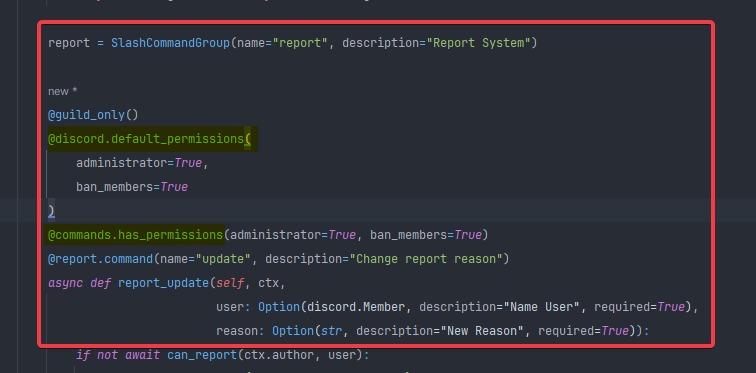
In a sub-command, can you set the limiting decorators so that only people with X permissions can use it?
https://i.imgur.com/UbQy9vN.png
Traceback (most recent call last):
  File "C:\Users\sergio\PycharmProjects\DiscordBot\main.py", line 95, in load_cogs
    bot.load_extension(cog)
  File "C:\Users\sergio\PycharmProjects\DiscordBot\venv\lib\site-packages\discord\cog.py", line 910, in load_extension
    self._load_from_module_spec(spec, name)
  File "C:\Users\sergio\PycharmProjects\DiscordBot\venv\lib\site-packages\discord\cog.py", line 777, in _load_from_module_spec
    raise errors.ExtensionFailed(key, e) from e
discord.errors.ExtensionFailed: Extension 'commands.moderator.reports' raised an error: RuntimeError: Permission restrictions can only be set on top-level commands

 Extension 'commands.moderator.reports' raised an error: RuntimeError: Permission restrictions can only be set on top-level commands
 shadow junco
https://guide.pycord.dev/voice/playing
why the code here is outdated
Pycord and Wavelink try to keep the playing of audio as simple and easy as possible, to keep making Discord
lofty parcel
proper dew
Hey, ephemeral=True does not work on ctx.followup.send is there another way that...
The defer must be ephemeral too
lofty parcel
shadow junco
https://guide.pycord.dev/voice/playing
why the code here is outdated
Because it is
lofty parcel
valid panther
In a sub-command, can you set the limiting decorators so that only people with X...
I think default_permissions is what you can't set (probably some discord limitation)
But internal checks work
shadow junco
lofty parcel
Because it is
or i should read wavelink's docs
lofty parcel
You should read their docs
shadow junco
ok
shadow junco
shadow junco
https://guide.pycord.dev/voice/playing
why the code here is outdated
but why pycord doesn't update this
lofty parcel
You can contribute yourself and update it
 cerulean sun
anyone know of a good way to enable users to schedule calls with each other?
opal hamlet
you could just make a command that takes a date in a f.e. dd/mm/yyyy mm:hh format and converts it to to a time obj, stores the ctx author and user to call and then run a task every f.e. 30secs that checks the storage for a time obj that's "in the past" and sends the author a msg to notify them IG
 coral lake
soo...uhh...this code is meant to grab the message object as it's sent...
It's giving a completely different message ID than the one sent however. NEVER had an issue with this in the past and made the name fucky too in order to be sure there was no overlap in naming conventions....
Any idea how the fuck, why the fuck?
newnew_messsage = await interaction.response.send_message("#everyone", embeds = embeds, view = set_match_time(self.pool_name, self.match_type, self.team1, self.team2, self.challenge_message_id))

print(newnew_messsage.id)```So..I realize now that it is returning the actual interaction...but I SWEAR I've used this to grab the message's ID before which has me so confused. anyone have any thoughts on how to properly grab the ID without doing channel history checking?
lofty parcel
coral lake
So..I realize now that it is returning the actual interaction...but I SWEAR I've...
msg = await interaction.original_response()
msg.id``` austere plank
Anyone played around yet with activating security measurements via Bot?
 eager lintel
why isnt my bridge working? im doing it correctly i think:
bot = bridge.Bot(command_prefix=commands.when_mentioned_or("."), intents=intents)```how to create multiple button ?
@discord.ui.button(label=f"Trivia", style=discord.ButtonStyle.green)
   async def button_callback(self, button, interaction):

 atomic mortar
does anyone have a latest python replit in which the .replit file has all the settings cuz in mine .replit file it just has this
modules = ["python-3.10:v18-20230807-322e88b"]

hidden = [".pythonlibs"]

[nix]
channel = "stable-23_05"

[deployment]
run = ["python3", "main.py"]
deploymentTarget = "cloudrun"```

ive already treid recreating a thousand repls all the same.idw
sly karmaBOT
eager lintel
why isnt my bridge working? im doing it correctly i think:
```python
bot = brid...
Saying it doesn't work or asking what's wrong with this code is not helpful for yourself or others.
Describe what you expect and/or tried (with your code), and what isn't going right.
Please provide any errors you get for optimal assistance.
lofty parcel
ivory beacon
how to create multiple button ?
```py
@discord.ui.button(label=f"Trivia", style...
add multiple button decorators with their callback?
shell radish
atomic mortar
does anyone have a latest python replit in which the .replit file has all the se...
just create a new replit from scratch
atomic mortar
shell radish
just create a new replit from scratch
i've done a million times it's the same thing dude
shell radish
I wonder if replit updated
shell radish
atomic mortar
i've done a million times it's the same thing dude
you can just install py-cord from packages
atomic mortar
I installed py cord from packages then I ran it and it auto installs discord.py and disregards the existence of py cord
shell radish
you can disable guessImports
atomic mortar
that's the problem it's not in the .replit file
shell radish
you can still use it
atomic mortar
when i tried putting it myself the repl fails to run
edgy nest
just don't use repl
shell radish
repls are fine. replit isn't
edgy nest
why do they even call it replit
shell radish
edgy nest
why do they even call it replit
when they were coding it. One of them said "just REPL it"
austere plank
Is it possible to trigger safety measurements with pycord?
Like enable 24hrs „Disable DM‘s“ -> check if it’s still enabled -> enable again if not
shell radish
atomic mortar
when i tried putting it myself the repl fails to run
I mean this works, there's definitely a better way,
import os

os.system("pip uninstall discord discord.py && pip install py-cord")

import discord
I'm just grasping at anything that works I've tried dozens of things
shell radish
austere plank
Like enable 24hrs „Disable DM‘s“ -> check if it’s still enabled -> enable again ...
disable for what
on your user account?
lofty parcel
shell radish
disable for what
Server. Its a feature where you can disable members dming each other
ivory beacon
lofty parcel
add multiple button decorators with their callback?
yeap ty
it's works
 clear aurora
Could anyone help me?
https://canary.discord.com/channels/881207955029110855/1162369021790920745
ivory beacon
how to create a switch like this ?
late slate
Is there a way to use DefaultHelpCommand() but with slash commands?
shell radish
late slate
Is there a way to use `DefaultHelpCommand()` but with slash commands?
you can always do some funny bungalow to get it to work, but not natively
austere plank
shell radish
disable for what
What dark said, disable on server
 slender surge
hello, would i be able to do this
asyncio.run(incoming(interaction.channel.id, msg.id))?
the incoming is the loop i am running
and the channel id and msg id is being carried over to the incoming loop?
 echo wraith
Heyy, when assining an emoji to a button with emoji="" is it possible to do it in a different way than setting it to a unicode character? For example, to use the emoji's name to retrieve an emoji object and use that, with a discord default emoji?
red mist
echo wraith
Heyy, when assining an emoji to a button with emoji="" is it possible to do it i...
You can mention an emoji of your own server yes.
Bot has to be in your server have access to the emojis I suppose, and that should allow them to be used.
<:emoji-name:emoji-id>
echo wraith
red mist
You can mention an emoji of your own server yes.
Bot has to be in your server ha...
Yup but I would like to do it with a unicode default emoji, that's the thing. Because I want to avoid using emoji characters in my code
red mist
then just do :sparkles: ✨
echo wraith
nope
lofty parcel
ivory beacon
how to create a switch like this ?
It's just button.disabled = True and you edit the message and pass the view again
little cobalt
red mist
then just do `:sparkles:` ✨
That is not gonna work with Emojis at buttons
 echo wraith
little cobalt
That is not gonna work with Emojis at buttons
echo wraith
little cobalt
That is not gonna work with Emojis at buttons
exactly
echo wraith
I mean ill look for it there is probably a lib that has a feature that takes the emoji name as inout and outputs the character
red mist
You could potentially make a list / dict yourself :P
 slow nimbus
Hey guys! I am trying to install pycord but I get this crazy issue which I haven't been able to resolve ☹️
Failed to build aiohttp
ERROR: Could not build wheels for aiohttp, which is required to install pyproject.toml-based projects
error: command 'C:\Program Files (x86)\Microsoft Visual Studio\2022\BuildTools\VC\Tools\MSVC\14.37.32822\bin\HostX86\x64\cl.exe' failed with exit code 2
I've tried different python versions and to update visual studio but nothing works! Is there a known fix for this issue?
shell radish
it's the c build tools that needs updating
probably
probably just send the whole error
shell radish
yeah, you should use 3.11 for aiohttp
little cobalt
Dont use 3.12 yet
shell radish
they haven't upgraded last time I checked
slow nimbus
i tried making a 3.11 venv i think it gives the same error
shell radish
slow nimbus
I updated the c++ build tools are c different?
might be c++, not 100% sure
some c thing
for all I know it could be gcc
slow nimbus
Yeah I don't have 3.11 installed but a 3.10 venv does the same thing
seems like it's using 3.12 anyways is it a path thing
little cobalt
Do you use the Microsoft Store or from the one from the Python site?
slow nimbus
site
removed from path it still says 312 wtf
oh no way removing the -3 when installing fixed it
crazy innit
 winged vault
Is it possible to be able to check if a user/guild is subscribed to Discord's App Monetization
shadow junco
how to get bot's latency here
class Refresh(discord.ui.View):
    async def on_timeout(self):
        self.disable_all_items()

    @discord.ui.button(label="重新整理", style=discord.ButtonStyle.primary, emoji="🔄")
    async def button_callback(self, button, interaction):

        embed = discord.Embed(colour=0x00b0f4, timestamp=datetime.now())

        embed.add_field(name="我目前的延遲",
                        value=f"{round(self.bot.latency * 1000)} 毫秒",
                        inline=False)

        embed.set_footer(
            text='學渣機器人',
            icon_url='https://images-ext-1.discordapp.net/external/_3soYdDQw1vNOwPKXw5JPEf4VBpm0IfedOIx4a2dzc4/https/cdn.discordapp.com/avatars/1133697639003738142/0a6f2144073f27423b7c057ed4cd8379.png'
        )

        await interaction.response.edit_message(embed=embed)
I can edit the button that I clicked; maybe I have to access another one too.
lofty parcel
ivory beacon
I can edit the button that I clicked; maybe I have to access another one too.
Assuming youre subclassing the view you can use self.children[0 or 1 (depends on where the button is)].disabled = True or False
Pycord
The library has helpers to help create component-based UIs. Shortcut decorators: Objects: Attributes children, disable_on_timeout, message, parent, timeout. Methods cls View.from_message, def add_i...
If you are giving them a custom id
ivory beacon
lofty parcel
If you are giving them a custom id
okh let me try
yeap its works 😊
working but i have a problem
both buttons are enabled after using /settings command

should i use disabled ?
@discord.ui.button(label=f"Disable", style=discord.ButtonStyle.red,disabled=True)
but disabled depend on a variable 🙂💔
how can i do this ?🙂💔
how can use a condition to detect the mode ??
lofty parcel
ivory beacon
how can use a condition to detect the mode ??
Make the condition in your init
ivory beacon
lofty parcel
Make the condition in your init
okh
eager lintel
could someone help me with my select menu? it keeps responding with a "this interaction failed".
lofty parcel
eager lintel
could someone help me with my select menu? it keeps responding with a "this inte...
.idw
sly karmaBOT
eager lintel
could someone help me with my select menu? it keeps responding with a "this inte...
Saying it doesn't work or asking what's wrong with this code is not helpful for yourself or others.
Describe what you expect and/or tried (with your code), and what isn't going right.
Please provide any errors you get for optimal assistance.
valid panther
I am trying to make the bot mention a subcommand, I tried </group_name:ID> and it doesn't work.
deft kestrel
valid panther
I am trying to make the bot mention a subcommand, I tried </group_name:ID> and i...
It would be </groupname commandname:ID>
valid panther
with space?
deft kestrel
Yes
 upbeat sluice
I cant seem to get images to work in embeds, but the weird thing is that it worked before and suddenly stopped working
here is a code snippet:
embed = discord.Embed(
    title=data['question'],
    color=0xFFCC00,
)
embed.set_image(url=str(data['image']))
print(data['image'])
print(type(data['image']))
await channel.send(embed=embed)
returns:
<class 'str'>```
URL is validbut:
 deft kestrel
Hello, is it possible to get the id of the message that my bot sent ?
i tried this but it don't give the correct id :
@bot.slash_command(name = "test", description = "test")
async def test(ctx):
    mess = await ctx.respond("test")
    print(mess.id)
 heavy sky
deft kestrel
Hello, is it possible to get the id of the message that my bot sent ?
i tried t...
heavy sky
deft kestrel
Hello, is it possible to get the id of the message that my bot sent ?
i tried t...
You first need to get the original response, then you can get the id of that.
https://docs.pycord.dev/en/stable/api/models.html#discord.Interaction.original_response
Pycord
Models are classes that are received from Discord and are not meant to be created by the user of the library. Attributes key, url. Methods def is_animated, async read, def replace, async save, def ...
 dusty basin
How do I get it to respond when the user clicks a button?
lofty parcel
dusty basin
How do I get it to respond when the user clicks a button?
await interaction.response.send_message(...)

dusty basin
lofty parcel
await interaction.response.send_message(...)
i solved it, i meant that the bot wouldent detect when the user clicked
 ebon swift
is there a way to filter the list of role in options ? I saw it was possible to do a union
@option(
        type=Union[discord.Role,...],
        name="role",
        description="The role to add to the user",
    )
would it be possible to get the opposite, I'd like to be able to give role option in a specified list. some sort of filter so user can't choose any roles in my function
lofty parcel
ebon swift
is there a way to filter the list of role in options ? I saw it was possible to ...
You'd need to use autocomplete and parse the roles yourself
ebon swift
great so it is possible, is there a code example on how to use autocomplete ? I already know how to parse my role
rugged lodgeBOT
Here's the slash autocomplete example.
ebon swift
thank you verymuch
 unborn spear
getting this error when loading a slash command
  File "C:\Users\Aidan\AppData\Local\Programs\Python\Python311\Lib\site-packages\discord\client.py", line 378, in _run_event
    await coro(*args, **kwargs)
  File "C:\Users\Aidan\AppData\Local\Programs\Python\Python311\Lib\site-packages\discord\bot.py", line 1164, in on_connect
    await self.sync_commands()
  File "C:\Users\Aidan\AppData\Local\Programs\Python\Python311\Lib\site-packages\discord\bot.py", line 738, in sync_commands
    app_cmds = await self.register_commands(
               ^^^^^^^^^^^^^^^^^^^^^^^^^^^^^
  File "C:\Users\Aidan\AppData\Local\Programs\Python\Python311\Lib\site-packages\discord\bot.py", line 531, in register_commands
    prefetched_commands = await self._bot.http.get_guild_commands(
                          ^^^^^^^^^^^^^^^^^^^^^^^^^^^^^^^^^^^^^^^^
  File "C:\Users\Aidan\AppData\Local\Programs\Python\Python311\Lib\site-packages\discord\http.py", line 365, in request
    raise Forbidden(response, data)
discord.errors.Forbidden: 403 Forbidden (error code: 50001): Missing Access
Missing Access
Read the error
unborn spear
Missing Access to what
The bot worked last week now I get this error
@little cobalt
shell radish
unborn spear
The bot worked last week now I get this error
it is likely that one of your guild_ids or debug_guilds do not have your bot in there
unborn spear
shell radish
it is likely that one of your `guild_ids` or `debug_guilds` do not have your bot...
It's only in one server and the bot is in it
shell radish
unborn spear
It's only in one server and the bot is in it
confirm that the guild ID is correct
unborn spear
it is
shell radish
so you right clicked the guild your bot is in, clicked "copy server ID" and that ID matches with the one in your code?
shell radish
try re-inviting the bot with the bot scope
shell radish
do you have guild_ids or debug_guilds specified anywhere?
unborn spear
I fixed it
unborn spear
shell radish
because you could be logging into a different bot
it was this
the token was right but for some reason a different bot was loading
shell radish
lol
shell radish
yw
 viscid sky
can someone settle this for me does bot.wait_for have a button_click event trigger?
lofty parcel
viscid sky
can someone settle this for me does bot.wait_for have a button_click event trigg...
No
 summer knot
I have a problem that Bridge's commands only work so when I put it several times because when I put it for a long time when I want to put it again I have to do it several times more asta than the bot before the command
shell radish
what
 jolly ledge
@client.command()
async def drs(ctx):
amountDeleted = 0
guild = ctx.guild
for role in guild.roles:
try:
await role.delete()
amountDeleted += 1
except discord.Forbidden:
await ctx.send(f"Cannot delete this role: `{role.name}`")
await ctx.send(f"Deleted {amountDeleted} roles.")```
I'm getting error:
`HTTPException: 400 Bad Request (error code: 50028): Invalid Role` scenic crescent
jolly ledge
```py
@client.command()
async def drs(ctx):
amountDeleted = 0
guild = ct...
scenic crescent
jolly ledge
```py
@client.command()
async def drs(ctx):
amountDeleted = 0
guild = ct...
Some roles may not be deleted because they are managed by discord / an integration.
So you would need to check that before trying to delete the role.
jolly ledge
scenic crescent
Some roles may not be deleted because they are managed by discord / an integrati...
Yeah it tried to delete the @everyone lol
Fixed it
jolly ledge
    for category in guild.categories:
        for channel in category:
            print(channel)```

`'CategoryChannel' object is not iterable`Any idea why it's not iterable?
little cobalt
jolly ledge
```py
for category in guild.categories:
for channel in category:
...
Are you creating a nuke bot?
jolly ledge
little cobalt
Are you creating a nuke bot?
Just for deleting channels in my own discord server
 cloud ember
yo
can anyone point me into a direction
i wanna make a view that is only seeable by the person that sent the command
ping me please if respond
lofty parcel
jolly ledge
Any idea why it's not iterable?
Because its just an object? You have to access the channels attribute..
lofty parcel
cloud ember
yo
can anyone point me into a direction
i wanna make a view that is only seeabl...
?tag ephemeral
limber wagonBOT
An 'ephemeral' message is one that's only visible to the person who invoked a command. If you ever got a command error with a blue background, this is an example of one.
To do this, set ephemeral=True when you first use an ApplicationContext. (This includes .defer()ing it; the choice of whether a message is ephemeral or not must be made up front. If you .respond() to a deferred message, setting the ephemeral flag at that time will have no effect.)
This is the equivalent of hidden=True if you're coming from interactions.py
e.g.
await ctx.respond("Imagine a message!", ephemeral = True)

await interaction.response.send_message("Imagine a message!", ephemeral = True)
thanks
deft kestrel
I decided to ask you again, I understood correctly in order for the slash command to be seen by certain people you need to use role_ids="roleid"
ebon swift
is it possible to have an autocomplete to be of another type than str ? I have a function returning a parsed part of my roles , is there a way to get it so my option display roles instead of str choices ?
shell radish
ebon swift
is it possible to have an autocomplete to be of another type than str ? I have a...
nope, discord only supports strings
ebon swift
okay thank you
deft kestrel
how to do it? i wanna get a parameter in a slash command
 ebon swift
deft kestrel
how to do it? i wanna get a parameter in a slash command
ebon swift
deft kestrel
how to do it? i wanna get a parameter in a slash command
can you explain a bit more what you want, maybe share you code ? also have you read the option category on the docs ?
deft kestrel
@bot.slash_command(description="Search in google") async def faq(ctx): query = ctx.data['query']
ebon swift
this might help you https://guide.pycord.dev/interactions/application-commands/slash-commands#options--option-types
Learn all about Slash Commands and how to implement them into your Discord Bot with Pycord!
Pycord
Command Permission Decorators: Commands: Shortcut Decorators: Objects: Attributes full_parent_name, qualified_id, qualified_name. Methods@ after_invoke,@ before_invoke,@ error, def get_cooldown_ret...
little cobalt
deft kestrel
`@bot.slash_command(description="Search in google")
async def faq(ctx):
quer...
the same like a prefix command
ctx, name
ebon swift
shell radish
nope, discord only supports strings
can't I achieve this using choices ?
like parsing my roles and using choices to have roles by giving it a list of roles ? I can't find if it is possible to put a list of Discord.roles in option.choices
shell radish
ebon swift
can't I achieve this using choices ?
like parsing my roles and using choices to ...
iirc setting the types to roles makes all roles available to be selected and not able to be narrowed down
ebon swift
Okay so no workaround thank you !
shell radish
ebon swift
Okay so no workaround thank you !
the workaround is strings and parce them
ebon swift
yes I'll keep that in mind thank you
sage tendon
async def unverified(self, ctx: discord.ApplicationContext):
        verified_roles = [  # Level 1 at the top
            715990806061645915,
            715992589891010682,
            715993060244455545,
            715994868136280144,
            715995443397525624,
            715995916410028082,
            715992374731472997,
            724606719619235911,
            724607040642613290,
            724607481594118216,  # Level 10
            716590668905971752  # Partners
        ]
        unverified_role = 1165755854730035301
        unverified_added = 0
        unverified_removed = 0
        # Remove the role from everyone who doesn't need it anymore
        async for member in ctx.guild.fetch_members():
            if any(role.id in verified_roles for role in member.roles):
                for role in member.roles:
                    if role.id == unverified_role:
                        member.remove_roles(unverified_role)
                        unverified_removed = - 1
                        break
            else:
                # Add the unverified role to people who don't yet have it
                member.add_roles(unverified_role)
                unverified_added += 1

        await ctx.respond(f"{unverified_removed} people verified since last time, {unverified_added} new people are unverified")
I know this is a little scuffed and could be done miles better, but i copied the bulk of the code from somewhere else
I cannot test this in my testing environment, so can anyone tell me if this would work? I basically want people to get the unverified role if they do not have any of the verified roles, and remove the unverified role if they do have any of the roles in the verified_roles array
Okay i did test it now but despite appropriate permissions it doesn't seem to assign the role
Or do i need to get the role like this?
 little cobalt
sage tendon
Or do i need to get the role like this?
little cobalt
sage tendon
Or do i need to get the role like this?
?tag get_x
limber wagonBOT
Any function that starts with get_ in Py-cord is retrieving the related object from your bots cache. If the object is not in the bots cache the get_ method will return None. Because of this behavior you should check if the get_x method is None and if it is use the fetch_x method.
Why Is Using fetch_ Without Using get_ First Bad?
The fetch_ method makes a call to the discord API. This API call is unneeded if you already have the information. It will also make your command take longer because it will have to send and than wait for a response from the discord API. It will also contribute to the discord APIs global rate limit of 50 requests per second.
What Is Cache?
The cache is a temporary storage inside your bot. It holds many objects from members to messages. When you restart your bot the cache will be empty. When the cache is full it will delete older objects to make space for the new objects.
little cobalt
;3
sage tendon
well my question was if i need a role object for add_roles
But it seems to not work regardless 
little cobalt
to add a role to a user you use add_roles(the role object)
little cobalt
sage tendon
well my question was if i need a role object for add_roles
you need a role
like this
 sage tendon
isnt guild.get_role(id) enough
little cobalt
No because if it not in the cache, its a NoneType

 little cobalt
any error?
sage tendon
despite an all-enclosing try: catch Exception as e: print(e)
no.
well okay it was a missing ctx.defer()
:3
little cobalt
oof
sage tendon
but somehow it doesnt actually reply now
little cobalt
But you get the role?
little cobalt
sage tendon
please tell me asyncio.sleep supports decimals
its the same like time.sleep
sage tendon
i think i did run right into the api limit
sage tendon
wait, no, hm
little cobalt
you fetch a lot of users?
sage tendon
its 50 per second right
so i can just do asyncio.sleep = 0.25
sage tendon
little cobalt
you fetch a lot of users?
i need to iterate through all server members
wait, 0.025
now to find out if i can somehow make that code faster using get_or_fetch or if I'm stuck with guild.fetch_members
Because it takes absolute fucking YEARS to complete
like it takes 2.5 minutes to complete idk how
summer knot
shell radish
what
bridge commands have so much delay
shell radish
I think the issue is somewhere within your bot's code then. Bridge commands are just as minimal as text-based and application commands
summer knot
shell radish
I think the issue is somewhere within your bot's code then. Bridge commands are ...


What I said the first time works then the others do not work for a certain point where the bot works
What I want is to eliminate the delay of having to put the command several times so that it wants to work 2 times since this is how others do
little cobalt
summer knot
Do you use anything blocking at your code?
summer knot
little cobalt
Do you use anything blocking at your code?
nope
 rare condor
how do I detect if a member joined by a certain invite?
nvm just found out that there is an external module needed
 keen dragon
How would I get an indexable list of all registered slash commands on my bot for a /help command?
rugged lodgeBOT
keen dragon
Thank you!
summer knot
little cobalt
Do you use anything blocking at your code?
I found the problem
The problem is that for some reason this code does something that causes the bridge commads to not work
@bot.event
async def on_message(message):
    global xp_base_para_subir_nivel

    if message.author.bot or message.channel.id in canales_no_xp:
        return

    data = await cargar_datos_xp()
    author_id = str(message.author.id)
    current_time = time.time()

    if author_id not in data:
        data[author_id] = {"xp": 0, "nivel": 1, "last_message_time": current_time}
    else:
        last_message_time = data[author_id]["last_message_time"]
        if current_time - last_message_time < xp_cooldown:
            return

    rol_deseado_id = 1030948145133273108
    rol_boost_id = 1162743057960140830  # ID del rol de boost

    if isinstance(message.author, discord.Member):
        rol_deseado = discord.utils.get(message.author.roles, id=rol_deseado_id)
        rol_boost = discord.utils.get(message.author.roles, id=rol_boost_id)
    else:
        rol_deseado = None
        rol_boost = None

    if rol_deseado:
     xp_ganado = int(random.randint(min_xp_por_mensaje, max_xp_por_mensaje) * 1.5 * xp_multiplier)
    elif rol_boost:
     xp_ganado = int(random.randint(min_xp_por_mensaje, max_xp_por_mensaje) * 1.2 * xp_multiplier)
    else:
     xp_ganado = (random.randint(min_xp_por_mensaje, max_xp_por_mensaje)* xp_multiplier)

    data[author_id]["xp"] += xp_ganado
    data[author_id]["last_message_time"] = current_time

    nivel_actual = data[author_id]["nivel"]
    xp_necesario = xp_necesario_para_subir_nivel(data[author_id]["nivel"] + 1)

    if data[author_id]["xp"] >= xp_necesario:
        data[author_id]["nivel"] += 1
        data[author_id]["xp"] -= xp_necesario
await message.channel.send(f"{message.author.mention} alcanzó el nivel {data[author_id]['nivel']} por ser activo en el servidor. ¡Sigue así!{nivel}")

        if data[author_id]["nivel"] in recompensas_niveles:
            rol_recompensa_id = recompensas_niveles[data[author_id]["nivel"]]
            rol_recompensa = discord.utils.get(message.guild.roles, id=rol_recompensa_id)
            if rol_recompensa:
                await message.author.add_roles(rol_recompensa)
                await message.channel.send(f"Felicidades, {message.author.mention}, obtuviste el rol de recompensa: {rol_recompensa.name}!")

    await guardar_datos_xp(data)
    await bot.process_commands(message)
# Función para obtener la cantidad de XP necesaria para subir de nivel
def xp_necesario_para_subir_nivel(nivel):
    return 50 * nivel**2 + 25 * nivel

# Function to format XP in thousands or millions
def mostrar_xp_en_formato_k(xp):
    if xp >= 1000000:  # If greater than or equal to a million
        return f"{xp/1000000:.1f}M XP"
    elif xp >= 1000:  # If greater than or equal to a thousand
        return f"{xp/1000:.1f}k XP"
    else:
        return f"{xp} XP"
IDK why that script is interfering with the bridge commands
someone can help me
lofty parcel
summer knot
```py
@bot.event
async def on_message(message):
global xp_base_para_subir_ni...
Dont override the bot event to do your xp thing
Use an event listener
summer knot
lofty parcel
Use an event listener
Let me try
summer knot
lofty parcel
Use an event listener
How do I use it?
lofty parcel
summer knot
How do I use it?
Pycord
Bots: Attributes activity, allowed_mentions, application_flags, application_id, auto_sync_commands, cached_messages, cogs, debug_guilds, description, emojis, extensions, get_command, guilds, intent...
summer knot
lofty parcel
https://docs.pycord.dev/en/master/api/clients.html#discord.Bot.listen
It works but
 lofty parcel
summer knot
It works but
lofty parcel
summer knot
It works but
Don't process the command in the listener too...
 tepid coyote
how do get guild members when the guild isnt in cache
as bot.get_guild() is returning None
lofty parcel
.rtfm fetch_guild
sly karmaBOT
16 results
discord.ext.commands.Bot.fetch_guild
discord.ext.commands.Bot.fetch_guilds
discord.ext.commands.AutoShardedBot.fetch_guild
discord.ext.commands.AutoShardedBot.fetch_guilds
discord.ext.bridge.Bot.fetch_guild
discord.ext.bridge.Bot.fetch_guilds
discord.ext.bridge.AutoShardedBot.fetch_guild
discord.ext.bridge.AutoShardedBot.fetch_guilds
discord.Client.fetch_guild
discord.Client.fetch_guilds
discord.AutoShardedBot.fetch_guild
discord.AutoShardedBot.fetch_guilds
discord.AutoShardedClient.fetch_guild
discord.AutoShardedClient.fetch_guilds
discord.Bot.fetch_guild
discord.Bot.fetch_guilds
tepid coyote
lofty parcel
.rtfm fetch_guild
cant get roles form fetch_guild acording to the api
deft kestrel
Hello, is it possible to use bridge and commands in one project? When I try to do this they keep conflicting
shell radish
deft kestrel
Hello, is it possible to use bridge and commands in one project? When I try to d...
yes
deft kestrel
shell radish
yes
Okay, then could you give me a little guidance. When I try to add bridge_command there is always an error
import discord
import subprocess
import subprocess
subprocess.call(['pip', 'install', 'py-cord'])
from discord.ext import bridge, commands
import asyncio
import random
import sqlite3
import os
import aiohttp
import requests
import logging


my_secret = os.environ['TOKEN']

intents = discord.Intents.all()

class PersistentViewBot(commands.Bot):
    def __init__(self):
        intents = discord.Intents.all()
        super().__init__(
            command_prefix=commands.when_mentioned_or("?"), intents=intents, help_command=None)
        self.persistent_views_added = False
        self.load_extension("events")
        self.load_extension('econom')
        self.load_extension('moderation')
        self.load_extension('utils')
        self.load_extension('server_utils')

    async def on_ready(self):
        if not self.persistent_views_added:
            self.persistent_views_added = True

        print(f"Бот загружен! {self.user}")
        print("------")


bot = PersistentViewBot()


bot.run(my_secret)
you are supposed to use bridge.Bot not commands.Bot
deft kestrel
Got it, fixed it. Thanks again
 junior ember
wtf does discord.errors.ApplicationCommandInvokeError: Application Command raised an exception: TypeError: Messageable.send() got an unexpected keyword argument 'ephemeral' mean
did i misspsll somethign
shell radish
junior ember
wtf does discord.errors.ApplicationCommandInvokeError: Application Command raise...
you can't send ephemeral messages
ephemeral messages can only be a response to an interaction
junior ember
except Exception as e:
await ctx.respond(f"hehhehehehehehehehhehehhe),ephemeral=True")
shell radish
junior ember
except Exception as e:
await ctx.respond(f"hehhehehehehehehehhehehhe),ep...
is this code?
summer knot
lofty parcel
Don't process the command in the listener too...
thanks it works
little cobalt
deft kestrel
Okay, then could you give me a little guidance. When I try to add bridge_command...
Also never use requests
junior ember
shell radish
is this code?
Yes
 balmy dome
what is meant by "source" in discord.FFmpegPCMAudio(source)? Do I need to insert the URL of the site with the video or the path to the video file there?
shell radish
balmy dome
what is meant by "source" in discord.FFmpegPCMAudio(source)? Do I need to insert...
 late slate
Is there anything like the Paginator's author_check kwarg for a discord.ui.View with a @discord.ui.select in it?
lofty parcel
late slate
Is there anything like the Paginator's `author_check` kwarg for a `discord.ui.Vi...
No, you have to do it yourself
little cobalt
@lofty hedge what is the problem?
 lofty hedge
little cobalt
<@528841666526838785> what is the problem?
lofty hedge
little cobalt
<@528841666526838785> what is the problem?
hey
have anyone had issues with reloading a cog? After I reload it / pull the changes from github, my new code does work until that command is ran for a few times which it then
goes back to the old code before i reloaded it
Alex — Today at 10:22 AM
just to state, ti does pull the changes from github before reloading just, the order of wording
.
little cobalt
do you reload and sync the commands?
lofty hedge
Basically, after i make changes to a cog, pull those changes from github, / reload the cog. the new / updated code does work, but after running that command several times, it starts using the old code
sync
how do you sync the commands
that might be the issue
if thats mandatory
little cobalt
await client.sync_commands(commands=[list of the commands], guild_ids=[])
cog = client.get_cog(name="Name")
client.reload_extension("Cogs.Name")
cmd = [c for c in cog.get_commands()] # Command list of the cog
await client.sync_commands(commands=cmd, guild_ids=[]) # You have to add guild_ids=[] to it with a empty list
you have to change some stuff
lofty hedge
dope ima give it a shot thank y ou
how long would it take to sync all commands on like 8.6k servers
lofty hedge
how would it work, cause i send a response at the end saying it's completed so if its not instant and it takes
time
would that lead to the bot thinking for a while?
but would eventually timeout after 15m due to it being deferred
/ stop the command from processing
little cobalt
deft kestrel
how can i make an embed
embed = discord.Embed
deft kestrel
little cobalt
embed = discord.Embed
await log_channel.send(title="Warning Has Been Issued To A duck", description=f"\nThe Duck: {member.mention}\nReason: {reason}\nThe Duckerator: {ctx.author.mention}\nDate: {datetime.datetime.now(tz=datetime.timezone.utc)}")
should i add something
here
to make it an embed
little cobalt
embed = discord.Embed()
await ctx.send(embed=embed)
```?oh alr
thanks
im sorry im dumbass
like that ah??

embed = discord.Embed() await log_channel.send(embed=embed)(title="Warning Has Been Issued To A duck", description=f"\nThe Duck: {member.mention}\nReason: {reason}\nThe Duckerator: {ctx.author.mention}\nDate: {datetime.datetime.now(tz=datetime.timezone.utc)}")
little cobalt
do you know basic Python?
little cobalt
you really should get outside and take some fresh air ;3
little cobalt
That helps to get the head free ^^
little cobalt
Well, that is how I would get my head free if something is not working great at the moment
late slate
lofty parcel
No, you have to do it yourself
Ahh gotcha. Could you give me a hint on what documentation/methods to look at to do this manually?
lofty hedge
little cobalt
```py
cog = client.get_cog(name="Name")
client.reload_extension("Cogs.Name")
cmd...
cog = self.bot.get_cog(name=full_cog_name)
how come thisis returning none, whenever i print out full_cog_name it does show my cog correctly, and on bot startup i also have it print out the loaded cogs which it does show.
idgi
lofty parcel
late slate
Ahh gotcha. Could you give me a hint on what documentation/methods to look at to...
You have to override the interaction_check method in the view.
You will also need to pass your ctx.author to the view to then compare it to your interaction.user and return true or false.
little cobalt
lofty hedge
```py
cog = self.bot.get_cog(name=full_cog_name)
```
how come thisis returning ...
Did you add the class or file name?
lofty hedge
little cobalt
Did you add the class or file name?
im a idiot, its cause i added the filename isnt it
because my calsses tend to be capital letter for the first letter while the file names tends to be al lowercase
that still didnt fix the issue
little cobalt
do you unload the cog in any way?
lofty hedge
i do got a system setup that i can use a command to unload the cog
if that's what youre asing
tepid coyote
@commands.command()
    async def pget(self, ctx: commands.Context):
        resilient: discord.Guild = self.bot.get_guild(722211485505421442)
        triumphant: discord.Guild = self.bot.get_guild(584701143968514048)
        print(len(ctx.guild.members))
        for member in ctx.guild.members:
            info = []
            print(member.display_name)
            mscrids = []
            for role in member.roles:
                mscrids.append(role.id)
            company = check_company(mscrids)
            print(company)
            info.append(company)
            mscrids.clear()
            set_compA = ['Ares', 'Reaper', 'Havoc', 'Valkyrie', 'Monarch', 'Horizon', 'Vanguard', 'Rogue', 'Rancor']
            set_compB = ['Owls', 'Eagles']
            if company in set_compA:
                member1 = resilient.get_member(member.id)
                print(member1.display_name)
                r = []
                for role in member1.roles:
                    r.append(role.id)
                platoon = check_platoon(r)
                print(platoon)
                if platoon is not None:
                    # print(f"{member.display_name} | {company} | {platoon}")
                    info.append(platoon)
                    r.clear()
                    break
            elif company in set_compB:
                member1 = triumphant.get_member(member.id)
                for role in member1.roles:
                    platoon = check_platoon(role.id)
                    # print(platoon)
                    if platoon is not None:
                        # print(f"{member.display_name} | {company} | {platoon}")
                        info.append(platoon)
why would this not loop though all the members, theres 9000+ in the server where this gets run but only a handful are actually processed
little cobalt
tepid coyote
```py
@commands.command()
async def pget(self, ctx: commands.Context):
...
?tag get_x
limber wagonBOT
Any function that starts with get_ in Py-cord is retrieving the related object from your bots cache. If the object is not in the bots cache the get_ method will return None. Because of this behavior you should check if the get_x method is None and if it is use the fetch_x method.
Why Is Using fetch_ Without Using get_ First Bad?
The fetch_ method makes a call to the discord API. This API call is unneeded if you already have the information. It will also make your command take longer because it will have to send and than wait for a response from the discord API. It will also contribute to the discord APIs global rate limit of 50 requests per second.
What Is Cache?
The cache is a temporary storage inside your bot. It holds many objects from members to messages. When you restart your bot the cache will be empty. When the cache is full it will delete older objects to make space for the new objects.
tepid coyote
cheers :)
red mist
e
little cobalt
red mist
e
e
red mist
little cobalt
e
I knew someone was gonna comment xD
little cobalt
;3
deft kestrel
Guys, does anyone know where I can find examples and any useful information about automod? So that even poorly versed people can understand
 daring grove
aiohttp.client_exceptions.ClientConnectorCertificateError: Cannot connect to host discord.com:443 ssl:True [SSLCertVerificationError: (1, '[SSL: CERTIFICATE_VERIFY_FAILED] certificate verify failed: unable to get local issuer certificate (_ssl.c:1006)')]
running my bot sends this in my console
daring grove
pip3 list
Package            Version
------------------ -------
aiohttp            3.8.6
aiosignal          1.3.1
async-timeout      4.0.3
attrs              23.1.0
charset-normalizer 3.3.1
frozenlist         1.4.0
idna               3.4
multidict          6.0.4
Pillow             10.1.0
pip                23.3.1
py-cord            2.4.1
setuptools         65.5.0
yarl               1.9.2
.sslfix
sly karmaBOT
daring grove
```
aiohttp.client_exceptions.ClientConnectorCertificateError: Cannot connect to...
If you're getting the [SSL: CERTIFICATE_VERIFY_FAILED] certificate verify failed: certificate has expired (_ssl.c:1108) error on a Windows host do the following:
Download and install this certificate here: https://crt.sh/?id=2835394
--> It can be installed by double-clicking the file and installing it to Local Computer, download link location: https://beans-took-my-kids.reeee.ee/38qB2n.png
For those curious, it was caused by this:
https://support.sectigo.com/Com_KnowledgeDetailPage?Id=kA03l00000117LT
 south fox
Does better-ipc works with pycord??
 hollow warren
Anyone knows if it's possible in discord.py, to make a button that when you click it, another message pops up?
Example below, Thanks in advance!
 daring grove
lofty parcel
.sslfix
daring grove
lofty parcel
.sslfix
What id im on a mac
hazy turret
Is it possible that I can retrieve the linked accounts of a user with a bot?
little cobalt
hollow warren
Anyone knows if it's possible in discord.py, to make a button that when you clic...
This server is for py-cord help and not discord.py
And yes its possible
little cobalt
hazy turret
Is it possible that I can retrieve the linked accounts of a user with a bot?
I dont think so
little cobalt
south fox
Does better-ipc works with pycord??
You have to try it
south fox
okiee
hollow warren
little cobalt
This server is for py-cord help and not discord.py
oh, sorry
does discord.py even has a discord server?
hollow warren
little cobalt
You can find it at the github one
github? 
do you have a link of it by any chance? I can't really find it
oh nvm found it
thanks anyways
little cobalt
np ^^
lofty parcel
daring grove
What id im on a mac
Then youd need to google the error
Goes around the same thing, installing a certificate.
daring grove
Yeah alright I fixed it
When installing python on mac i forgot to install certificates
valid panther
Is there any way to get the user who invited my bot to your discord server?
shell radish
check the audit log

 woeful oak
I'm trying to put an image to an embed by using embed.add_image(url = "url")
But it doesn't work with the image I want...
image:
https://i.ibb.co/LRSQ3sW/88fb98826763.png
https://i.postimg.cc/QdRSWW6K/download-2.png
(both are same image with different host websites. Both links don't work)
But when I try putting https://placehold.jp/150x150.png it works.
is there any problem with my images? Or any limitations exist with images in embeds?

it used to work yesterday
little cobalt
woeful oak
I'm trying to put an image to an embed by using `embed.add_image(url = "url")`
...
you could use a link or local images
woeful oak
little cobalt
you could use a link or local images
i just tried attachment://playernotfound.png and image and python files were in same folder. Still doesn't work
little cobalt
woeful oak
i just tried `attachment://playernotfound.png` and image and python files were i...
?tag localfile
limber wagonBOT
f = discord.File("some_file_path", filename="image.png")
e = discord.Embed()
e.set_image(url="attachment://image.png")
await messagable.send(file=f, embed=e)```yeah I did that except for discord.File line as I want image in the embed
Yesterday when it worked: (using the imgbb link)

Today: (only placeholder image works. Not the image I want)
 deft kestrel
woeful oak
I'm trying to put an image to an embed by using `embed.add_image(url = "url")`
...
deft kestrel
woeful oak
I'm trying to put an image to an embed by using `embed.add_image(url = "url")`
...
I just tested the same image and it is not working for me either. However, it does work on imgur - https://i.imgur.com/2j4Sxcd.png.
woeful oak
deft kestrel
I just tested the same image and it is not working for me either. However, it do...
Can I use this image link? 😓
deft kestrel
Sure
woeful oak
Thanks!
shell radish
woeful oak
I'm trying to put an image to an embed by using `embed.add_image(url = "url")`
...
those links do not load images for me
so I guess not
woeful oak
shell radish
those links do not load images for me
Load in browser or embed?
shell radish
woeful oak
Load in browser or embed?
browser
and embed too I suppose for that matter
woeful oak
Oh, it works for me
Anyway thanks
 loud kayak
Does Pycord allow multiple task.start()s in the __init__ of a cog? For me it doesn’t seem to work, only the first .start() of a task seems to work, no errors in either of them.
deft kestrel
how to do this in pycord? any example code?
 little cobalt
deft kestrel
how to do this in pycord? any example code?
jolly ledge
little cobalt
deft kestrel
how to do this in pycord? any example code?
jolly ledge
Is there a way to connect 2 clients in a single script?
 frail basin
Is there any way to ignore on_message_delete, for every message that was deleted by the bot itself?
hazy turret
If I have a slash command with 2 options and select a user in the first option, I can't work with the user ID in the second option but only in the function itself or ?
So my thought process was that I select the user in the first option and then get the cards of the selected user in the second option via the get_card function, does that work somehow?
    @slash_command(name="card", description="")
    @option("user", description="", required=True)
    @option(
        "card", description="", autocomplete=get_card, required=True
    )
async def card(self, ctx: discord.ApplicationContext, user: discord.User, card: str):```@bot.event
async def on_message_delete(message):
if message.author == bot.user:
return
else:
^
little cobalt
hazy turret
If I have a slash command with 2 options and select a user in the first option, ...
Dont use discord.User, use discord.Member instead
hazy turret
little cobalt
Dont use discord.User, use discord.Member instead
What is the advantage?
But I still can not use the registered user in the second option or?
hazy turret
little cobalt
It should work with autocomplete
So my thought was that I can select the user in user and then in the card option via the get_card function only the cards of the selected user are displayed but for this I have to get the user ID in the get_card function from the user option.
frail basin
jolly ledge
^
that only works if the message author is the bot
what i want to do is filter the messages deleted by the bot
little cobalt
You could check it with the id
little cobalt
Basic if else?
frail basin
how would i get the ID of the message deleter (not message.author)
lofty parcel
frail basin
how would i get the ID of the message deleter (not message.author)
You'd need to search the audit logs
frail basin
thanks
lofty parcel
Keep in mind it only applies to messages a user deletes from another user
Audit logs dont log self-deleted messages
frail basin
even better
the only message im interested in are the ones that the user himself deleted
balmy dome
FFmpeg: Youtube URL: Invalid data found when processing input
info = ydl.extract_info(f"ytsearch:{name}", download=False)['entries'][0]
url = info['webpage_url']
vc.play(discord.FFmpegPCMAudio(url, executable='ffmpeg'))
Why do I get a different message ID here than when I copy the ID in Discord directly after sending?
                message = await ctx.response.send_message(
                    embed=embed, file=file, view=view
                )
print(message.id)```why do you use ctx.response and not just ctx.respond?
hazy turret
little cobalt
why do you use ctx.response and not just ctx.respond?
What is the difference?
hazy turret
little cobalt
why do you use ctx.response and not just ctx.respond?
In any case, does not solve the problem that I get 2 different message ID's....
little cobalt
hazy turret
In any case, does not solve the problem that I get 2 different message ID's....
message = await interaction.original_response()
id = message.id
try it like that
shell radish
hazy turret
In any case, does not solve the problem that I get 2 different message ID's....
it returns an Interaction object, not a message object. You are getting the interaction ID instead of the message ID
balmy dome
balmy dome
**FFmpeg: Youtube URL: Invalid data found when processing input**
```
info = ydl...
?
frail basin
balmy dome
?
that has nothing to do with pycord
 lunar nacelle
(this is the pycord support btw)
balmy dome
frail basin
that has nothing to do with pycord
but the processing starts from the discord(pycord)
hazy turret
shell radish
it returns an Interaction object, not a message object. You are getting the inte...
And how do I get the Message ID?
hazy turret
shell radish
it returns an Interaction object, not a message object. You are getting the inte...
This should be correct or not?
interaction_obj= await ctx.response.send_message(embed=embed, file=file, view=view)
print(interaction_obj.message.id)```interaction_obj.message is always None, but if I click on the button in the view and then do interaction.message I get the message ID.
I don't understand why I can't access the ID directly after sending the message. 🤔
 round heart
Not really super-related to Pycord itself, but just as a sanity check, can messages sent through a webhook only use custom emoji by doing the full <:name:id> syntax?
shell radish
round heart
Not really super-related to Pycord itself, but just as a sanity check, can messa...
or <a:name:id> for animated
round heart
Right, but the point is that the (script) assembling the message needs to know the actual IDs of the Emoji. Just seems silly for it to not resolve custom emoji if it exists locally by name. Thanks for the sanity check
 round girder
hey, im running a large bot and every command being processed is raising errors via the defer method. the defer method is called as the first asynchronous code in all of my commands because some of them are sloow and rely on the internet, and it is a basic suggestion. anybody know whatd goin on? im tired of trying to solve a problem that really doesnt feel like my responsibility. please @ me
red mist
@round girder without proper knowledge of what exactly your command / code is doing, I am unsure how to help you.
round girder
red mist
<@378402092575883265> without proper knowledge of what exactly your command / co...
if it helps
@commands.slash_command(guild_ids = ALL_SERVERS, name = _profile.name, description = _profile.description)
    @cooldown(1, _profile.cooldown, BucketType.user)
    async def profile(self,
                        ctx : discord.ApplicationContext,
                        user : discord.Option(discord.Member, "User to Query") = None,
                        category : discord.Option(str, "Profile Category", choices = ["Game", "Job"]) = None):
        if ctx.author.id in backend.BL.COOLDOWN_RESET_USERS and backend.BL.blockCD:
            ctx.command.reset_cooldown(ctx)

        if await is_blacklisted(ctx):
            return False

        if not _profile.enabled and ctx.author.id not in backend.BL.DEVELOPER_AUTH_USERS:
            await CommandDisabled.handle(ctx)
            return False

        await ctx.defer()
# command runs
putting it into a try statement seems like a fix, but im still quite confused
red mist
I mean, there's already a lot of logic going on, before the await ctx.defer, you could try deferring directly before any of the if statements, 2ndly I am not sure what kind of network logic you're doing or how long such a request takes, neither do I know if you are using aiohttp or requests module which causes conflicts sometimes too (I recommend aiohttp) + I shall not question what ever it is what your command is doing lol
So pretty much just try putting it before if ctx.author.id in ...
round girder
im using aio
also the logic before the defer is irrelevant because the defer is still being run
and as the one who made the logic none of it is being triggerd
defer is the only action performed in the whole command
red mist
Tried debugging?
Seeing what info gets put in, where it stops functioning etc.
Usually compare expected results to actual results
red mist
Hmmm ok you mentioned it did work when putting in a try except statement
round girder
the thing is, this defer bug is for all my defer statements across all of my commands
131+
round girder
they did yes
 jade sentinel
is there a way to install pycord without msvc?
round girder
im working on my test/beta bot rn
red mist
red mist
Hmmm ok you mentioned it did work when putting in a try except statement
As in, does it raise an exception in which case it then gets handled by the except or does it just now decide to take the try road
round girder
but defer is working on the main one with no issue
round girder
red mist
As in, does it raise an exception in which case it then gets handled by the exce...
everything seemingly returns to normal
red mist
round girder
but defer is working on the main one with no issue
Api keys updated?
round girder
ill try
red mist
Idk what kind of requests you're making but maybe the network logic you've got going on only allows to be done by the other bot as that has got the correct access to APIs
red mist
jade sentinel
is there a way to install pycord without msvc?
Im not sure what msvc is btw
jade sentinel
red mist
Im not sure what msvc is btw
microsoft visual C++
thebuild tools

my drive doesn't have enough space to download it
red mist
Ohh
No idea, others might be able to help you with that, I genuinely have no idea about that, sorry.
jade sentinel
oh okay
round girder
red mist
Idk what kind of requests you're making but maybe the network logic you've got g...
no, the TOU for all of them allow multi use for my cases. changed all keys including my discord keys
still not working
going to try something else
red mist
strange I don't understand why it would work fine with try except statement
But something obviously isn't going 100%
round girder
solved my issue, thanks for your assistance
 lofty dome
is there a way i can run code when my bot shuts down? like i want to close all threads
little cobalt
lofty dome
is there a way i can run code when my bot shuts down? like i want to close all t...
As long you dont disconnect the bot
you can close threads
lofty dome
im talking about when my bot shuts down
little cobalt
you could do it with the API
lofty dome
ok and how about seeing if a channel is a thread or not

 little cobalt
deft kestrel
how to show options in slash commands?
little cobalt
deft kestrel
how to show options in slash commands?
discord.Option()
red mist
round girder
solved my issue, thanks for your assistance
So what did you do to fix it? 
round girder
red mist
So what did you do to fix it? <:HmmGe:934588738951077889>
accidentily had my "process commands" function running twice
red mist

 solid turtle
does anyone know how i can send messages thru webhooks?
i can't seem to find it anywhere
not even on the docs

little cobalt
solid turtle
i can't seem to find it anywhere
Time to look again at the docs
solid turtle
little cobalt
Time to look again at the docs
I DID
solid turtle
little cobalt
Time to look again at the docs

can you please give me an example
of how i can send a message thru a webhook
little cobalt
I found even it with a example at it
solid turtle
damn
little cobalt
Can you send the link if you are at right Website?
little cobalt
Pycord
Pycord offers support for creating, editing, and executing webhooks through the Webhook class. Attributes avatar, channel, channel_id, created_at, guild, guild_id, id, name, source_channel, source_...
solid turtle
little cobalt
https://docs.pycord.dev/en/stable/api/webhooks.html#discord.Webhook
it doesn't work 😭
i double checked the url and everything


 severe finch
solid turtle
i double checked the url and everything
severe finch
solid turtle
i double checked the url and everything
Can you try to use the example code from
https://docs.pycord.dev/en/stable/api/webhooks.html#discord.Webhook
It's slightly different when using the aiottp session thing
Pycord
Pycord offers support for creating, editing, and executing webhooks through the Webhook class. Attributes avatar, channel, channel_id, created_at, guild, guild_id, id, name, source_channel, source_...
solid turtle
severe finch
Can you try to use the example code from
https://docs.pycord.dev/en/stable/api/w...
thats what im using
little cobalt
severe finch
Can you try to use the example code from
https://docs.pycord.dev/en/stable/api/w...
That is the same link
severe finch
little cobalt
That is the same link
Does it work if you remove the username kwarg
Latest time I used this webhook thing was without overwriting the username
I mean you can do it bit may remove it for testing
solid turtle
ill try that
little cobalt
solid turtle
thats what im using
I maybe also know what the issue is ;3
solid turtle
little cobalt
I maybe also know what the issue is ;3
what do u think
solid turtle
severe finch
Does it work if you remove the username kwarg
Latest time I used this webhook th...
yea no it didn't fix anything
solid turtle
little cobalt
So... what have you to do?

little cobalt
But you know how to use a normal func?
severe finch
Ah wait yea you need to call this async def function
Try to import asyncio
And then asyncio.run_until_complete(foo())
solid turtle
little cobalt
But you know how to use a normal func?
yea ofc
solid turtle
severe finch
Ah wait yea you need to call this async def function
Try to import asyncio
And t...
okay
lemme try
severe finch
If that does not work may remove the () directly after the foo
If may need to just be referenced as a function
little cobalt
severe finch
Ah wait yea you need to call this async def function
Try to import asyncio
And t...
just asyncio.run(the func()) would be enough
solid turtle
??????
 solid turtle
little cobalt
just `asyncio.run(the func())` would be enough
solid turtle
little cobalt
just `asyncio.run(the func())` would be enough
oke
severe finch
Or that yea try that, with these I was not very familiar
solid turtle
solid turtle
??????
when did they remove this
severe finch
little cobalt
just `asyncio.run(the func())` would be enough
So this
solid turtle
run until complete method
o ma gad it worked
but do i have to do this for every time
little cobalt
?
severe finch
Depends what you plan to implement in your application
solid turtle
little cobalt
?
like:
*webhook send*
*asyncio.run*
*some more activities*
*webhook send*
*asyncio.run*
im only using this for logging
little cobalt
If you dont do it with a bot yes
severe finch
In a bot just implement this in your logging, if will automatically get send on every event executions.
If is that what you mean
solid turtle
but this takes way less time then using this right:
channel = client.get_channel(CHANNEL_ID)
await channel.send('something')
like with a bot
solid turtle
severe finch
In a bot just implement this in your logging, if will automatically get send on ...
what?
severe finch
solid turtle
but this takes way less time then using this right:
```py
channel = client.get_c...
Depends on logging, if you have for example like a message log with spammy messages a webhook is probably better
Because of Ratelimits
Sending it directly via the bot would cause hitting limits bit faster
That's why most big bots create webhooks for their logs
solid turtle
ohh
damn
so like
i have to use this piece of code for every single message sent with a webhook?

severe finch
No that's because you just created an async function that executes this
If you have like a on_message_delete event you just write the async with aiohttp.ClientSession.. thing into the bot event that already includes the async function that gets executed by the event
solid turtle
oh
severe finch
The example from py-cord is just written like this because you can send/use webhook features without creating a bot
little cobalt
solid turtle
i'm not creating a bot
You can use run_forever or something like that with asyncio
severe finch
solid turtle
i'm not creating a bot
Then you need to implement that in your application that has some sort of async function/ tasks thing that runs it with asyncio
Totally depends what you are exactly logging/ what application that is
solid turtle
severe finch
Then you need to implement that in your application that has some sort of async ...
async def send(message):
    async with aiohttp.ClientSession() as session:
        webhook = discord.Webhook.from_url(url, session = session)
        await webhook.send(message)

asyncio.run(send("dem"))

# some more stuff

asyncio.run(send("done"))
i plan to do something like this
 surreal birch
How can i make a slash command show only for someone with x perm?
little cobalt
surreal birch
How can i make a slash command show only for someone with x perm?
With discord.default_permissions()
surreal birch
and where do i exactly put that
deft kestrel
how to send a message with a button?
little cobalt
deft kestrel
how to send a message with a button?
Learn all about implementing buttons in your Discord Bot using Pycord.
little cobalt
surreal birch
and where do i exactly put that
at the commands
like @commands.has_permissions()
surreal birch
hmm
thanks
i thought that approach was deprecated since we switched over to slash commands
little cobalt
@commands.has_permissions() is like the hard coded permission check while you can kinda change it at discord.default_permissions()
deft kestrel
little cobalt
https://guide.pycord.dev/interactions/ui-components/buttons
How to send an ephemeral message with interaction.?
little cobalt
deft kestrel
How to send an ephemeral message with interaction.?
Its at the examples
deft kestrel
little cobalt
Its at the examples
class MyView(discord.ui.View):
@discord.ui.button(label="Timbra", style=discord.ButtonStyle.primary, custom_id="clockin")
async def button_callback_clockin(self, button, interaction):
user_id = interaction.user.id
clockin_timestamps[user_id] = time.time()
await interaction.response.send_message(f"**Hai timbrato il cartellino con successo!**", ephemeral=True)``` little cobalt
do you have anything else installed?
deft kestrel
little cobalt
do you have anything else installed?
nope, just only this function don't work (interaction response) everything else works
deft kestrel
little cobalt
do you have anything else installed?
no, the buttons when i restart the bot don't works, why?
rugged lodgeBOT
Here's the persistent example.
deft kestrel
little cobalt
do you have anything else installed?
solved
How to add persistent if the class is in cog?
little cobalt
deft kestrel
How to add persistent if the class is in cog?
why is the view class in the cog
little cobalt
deft kestrel
**solved**
what was it?
deft kestrel
little cobalt
what was it?
super().__init__(timeout=None)
lel
deft kestrel
little cobalt
why is the view class in the cog
little cobalt
you know you dont have to name your class like that? ;3
and you could just import it or create a on_ready one and add the class there
deft kestrel
little cobalt
and you could just import it or create a on_ready one and add the class there
I guess I misunderstood
I have in my main code which I took from pycord github persistent , But class the button that I need to add is in another file, in other words in cog
If I try to add this class to main, of course it says class not found, so how can I make it see the class that is in cog
little cobalt
do you have the view class in the cog or outside of the cog class?
deft kestrel
No, it is not directly inside, the button class is outside
There may be errors in my messages, because I use a translator
little cobalt
you can create a on_ready event at the kick.py file and add the persistent like that
deft kestrel
little cobalt
you can create a on_ready event at the kick.py file and add the persistent like ...
Its true?
async def on_ready(self):
if not self.persistent_views_added:
self.add_view(Info())
self.persistent_views_added = True
like that yea
self.bot.add_view()
If Im not wrong
 edgy glen
is there a way to handle custom checks for a command?
Like if the check fails, then print something
little cobalt
edgy glen
is there a way to handle custom checks for a command?
like a error handler?
edgy glen
yeah but for custom checks
I mean if you use an check for an command, then i want to handle the error
@little cobalt
 errant trout
edgy glen
I mean if you use an check for an command, then i want to handle the error
errant trout
edgy glen
I mean if you use an check for an command, then i want to handle the error
failed checks raise discord.CheckFailure in the command error handler
the docs tell you more specific errors for the other built-in checks
coral lake
Anyone familiar with this error when attempting to load command cogs?
discord.errors.ExtensionFailed: Extension 'cogs.wallet_verify' raised an error: AttributeError: 'Bot' object has no attribute 'add_command'```
Fixed...was using the wrong extension @discord.slash_command() > @commands.command()Now...I'm struggling to understand why this is causing a runtime error:
RuntimeError: Event loop is closed
This occurs only once I stop the program. Otherwise, it's as if bot.load_extension(extension) doesn't occur.
EXTENTIONS = ["cogs.wallet_verify"]

class PersistentViewBot(commands.Bot):
    def __init__(self):
        intents = discord.Intents.all()
        super().__init__(command_prefix=commands.when_mentioned_or("!"), intents=intents)
        self.persistent_views_added = False

        for extension in EXTENTIONS:
            bot.load_extension(extension)
        print(bot.extensions)

    async def on_ready(self):
        if not self.persistent_views_added:
            #self.add_view(Create_Team())
            self.persistent_views_added = True

bot = PersistentViewBot()```
cogs/wallet_verify.py
```py
class WalletVerification(commands.Cog):
    def __init__(self, bot):
        self.bot = bot

    @discord.slash_command()
    async def check_gate_roles(self, ctx):
        if not ctx.guild:
            await ctx.respond("This command cannot be used in DMs.", ephemeral=True)
            return

        server_id = ctx.guild.id

        await timed_walletCheck(server_id)


def setup(bot):
bot.add_cog(WalletVerification(bot))```try self.load_extension
coral lake
deft kestrel
try self.load_extension
Gives the same thing..FWIW, when I kill the program, the print(bot.extensions) does return the cog
deft kestrel
coral lake
Gives the same thing..FWIW, when I kill the program, the `print(bot.extensions)`...
Personally this is how I am loading extensions
client = discord.Bot(intents...

for filename in os.listdir("./cogs"):
    if filename.endswith(".py"):
        client.load_extension(f"cogs.{filename[:-3]}")

client.run(config["token"])
Maybe try loading the extensions outside of the class
 sour widget
Hello guys, I've got a problem that modrinth api is working too long in my autocomplete
and as a result I've got discord.errors.NotFound: 404 Not Found (error code: 10062): Unknown interaction
how can I give it more time to work because await ctx.defer() doesn't work in discord.AutocompleteContext
async def modrinth_project_generator(ctx: discord.AutocompleteContext):
    search = ctx.options['project_name']
    if search != "":
        projects = modrinth.Projects.Search(search)
        return [projects.hits[x].name for x in range(len(projects.hits))]
    else:
        projects = modrinth.Projects.Search(random.choice(string.ascii_letters))
        return [projects.hits[x].name for x in range(len(projects.hits))]
You cant, what you should do is cache the results so you do not have to make an API call everytime. So you might miss the first response but You will be able to quickly respond to the second.
coral lake
deft kestrel
Personally this is how I am loading extensions
```py
client = discord.Bot(intent...
Thanks for this feedback. I tried bringing it out of the class (just above) and it's still giving the same Runtime error as I kill the program 
 rapid jackal
how can I use a emoji from a guild as my button emoji?
coral lake
rapid jackal
how can I use a emoji from a guild as my button emoji?
Get the emoji id and set the emoji = x where x is the emoji's id
you can get it by putting \ in front of any emoji
rapid jackal
I get something without the numbers behind like this: \ :captcha:
coral lake
rapid jackal
I get something without the numbers behind like this: \ :captcha:
you need to put the \ in front of the emoji and it will gib numbers
 !
!


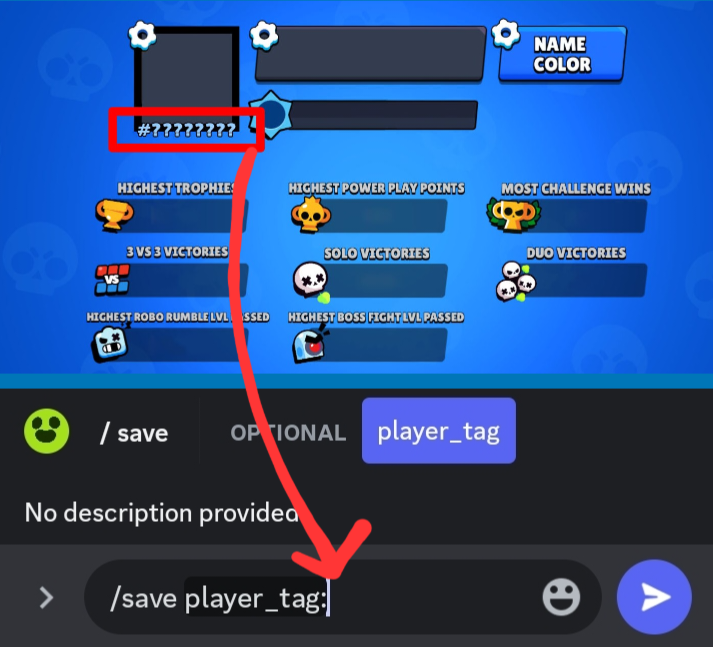
 coral lake
Now...I'm struggling to understand why this is causing a runtime error:
` Runti...
coral lake
coral lake
Now...I'm struggling to understand why this is causing a runtime error:
` Runti...
nervous bump
summer scroll
hi,
@bot.slash_command(name="sondage",description="Crée un sondage")
@option("Choix 1", description = "Choix numéro 1", required = True)
@option("Choix 2", description = "Choix numéro 2", required = True)
@option("Choix 3", description = "Choix numéro 3", required = False)
@option("Choix 4", description = "Choix numéro 4", required = False)
@option("Choix 5", description = "Choix numéro 5", required = False)
@option("Choix 6", description = "Choix numéro 6", required = False)
@discord.default_permissions(administrator=True)
async def poll(ctx, choix1, choix2, choix3 = None, choix4= None , choix5 = None, choix6 = None):
    options = [choix1, choix2, choix3, choix4, choix5, choix6]
    channel = await bot.fetch_channel(ctx.channel.id)
    embed = discord.Embed(
                title=str("*** Sondage ***"),
                colour=0xa675a1,
            )
    for i in range (len (options) -1):
        embed.add_field(name = options[i], value = 0, inline = False)

    embed.set_footer(text="Sondage créé par "+ctx.user.name)

    await ctx.respond("le sondage a été créé")
    await ctx.channel.send(embed = embed, view = sondage.sondage.poll(options , embed))
does someone have an idea on why do I get this error:
discord.errors.ApplicationCommandInvokeError: Application Command raised an exception: HTTPException: 400 Bad Request (error code: 40060): Interaction has already been acknowledged. at await ctx.respond("le sondage a été créé")?
ty
coral lake
summer scroll
hi,
```py
@bot.slash_command(name="sondage",description="Crée un sondage")
@opti...
Super weird...
Should be fine as you're only responding once
summer scroll
thats effectively the point
summer scroll
coral lake
Super weird...
:/
little cobalt
Can you show the pip list?
summer scroll
little cobalt
Can you show the pip list?
python3 -m pip list
Package                  Version
------------------------ --------------
aiohttp                  3.8.5
aiosignal                1.3.1
async-timeout            4.0.3
attrs                    20.3.0
blinker                  1.4
cachetools               5.3.1
certifi                  2020.6.20
chardet                  4.0.0
charset-normalizer       3.2.0
cloud-init               20.4.1
configobj                5.0.6
cryptography             3.3.2
dbus-python              1.2.16
distro-info              1.0
et-xmlfile               1.1.0
fail2ban                 0.11.2
frozenlist               1.4.0
google-api-core          2.12.0
google-api-python-client 2.104.0
google-auth              2.23.3
google-auth-httplib2     0.1.1
google-auth-oauthlib     1.1.0
googleapis-common-protos 1.61.0
httplib2                 0.22.0
idna                     2.10
importlib-metadata       1.6.0
Jinja2                   2.11.3
jsonpatch                1.25
jsonpointer              2.0
jsonschema               3.2.0
MarkupSafe               1.1.1
more-itertools           4.2.0
multidict                6.0.4
mysql-connector-python   8.1.0
oauthlib                 3.1.0
openpyxl                 3.1.2
Pillow                   10.0.0
pip                      23.3.1
protobuf                 4.21.12
py-cord                  2.4.1
pyasn1                   0.5.0
pyasn1-modules           0.3.0
pycurl                   7.43.0.6
PyGObject                3.38.0
pyinotify                0.9.6
PyJWT                    1.7.1
pyparsing                3.1.1
pyrsistent               0.15.5
PySimpleSOAP             1.16.2
python-apt               2.2.1
python-debian            0.1.39
python-debianbts         3.1.0
PyYAML                   5.3.1
reportbug                7.10.3+deb11u1
requests                 2.25.1
requests-oauthlib        1.3.1
rsa                      4.9
setuptools               52.0.0
six                      1.16.0
systemd-python           234
typing_extensions        4.7.1
ufw                      0.36
unattended-upgrades      0.1
Unidecode                1.3.6
uritemplate              4.1.1
urllib3                  1.26.5
wheel                    0.41.1
yarl                     1.9.2
zipp                     1.0.0
Weird
shell radish
you could have multiple bot instances running at once
summer scroll
shell radish
you could have multiple bot instances running at once
any idea on bhow I could try to see it and shutdown?
coral lake
coral lake
Now...I'm struggling to understand why this is causing a runtime error:
` Runti...
@shell radish Would you have any advice regarding this manner? Please pardon my tag
shell radish
coral lake
<@586743480651350063> Would you have any advice regarding this manner? Please pa...
traceback would be appreciated
coral lake
shell radish
traceback would be appreciated
  File "c:\LocalCode\Others\!Gravity\Bots\cawg\base_template copy.py", line 71, in <module>
    bot.run(TOKEN) #Cherub
  File "C:\Users\Drew\AppData\Local\Packages\PythonSoftwareFoundation.Python.3.10_qbz5n2kfra8p0\LocalCache\local-packages\Python310\site-packages\discord\client.py", line 704, in run
    future = asyncio.ensure_future(runner(), loop=loop)
  File "C:\Program Files\WindowsApps\PythonSoftwareFoundation.Python.3.10_3.10.3056.0_x64__qbz5n2kfra8p0\lib\asyncio\tasks.py", line 615, in ensure_future
    return _ensure_future(coro_or_future, loop=loop)
  File "C:\Program Files\WindowsApps\PythonSoftwareFoundation.Python.3.10_3.10.3056.0_x64__qbz5n2kfra8p0\lib\asyncio\tasks.py", line 636, in _ensure_future
    return loop.create_task(coro_or_future)
  File "C:\Program Files\WindowsApps\PythonSoftwareFoundation.Python.3.10_3.10.3056.0_x64__qbz5n2kfra8p0\lib\asyncio\base_events.py", line 436, in create_task
    self._check_closed()
  File "C:\Program Files\WindowsApps\PythonSoftwareFoundation.Python.3.10_3.10.3056.0_x64__qbz5n2kfra8p0\lib\asyncio\base_events.py", line 515, in _check_closed
    raise RuntimeError('Event loop is closed')
RuntimeError: Event loop is closed
PS C:\LocalCode\Others> ```