#Basic Pycord Help
1 messages · Page 2 of 1
 daring valve
 frank anchor
antispam: bool
daring valve
yup
daring valve
What you can do imo:
Detect if user not in "exceptions list"
Get ~5 first and ~5 last letters
Store them in dict and store amount of spam messages
If new message contains exact first and last letters -> add more to spam amount if spam amount is big enough -> punish
daring valve
daring valve
What you can do imo:
Detect if user not in "exceptions list"
Get ~5 first and ~5...
Yes.
Nothing will change lol
str[-5:] will just return 1 letter if message is 1 letter long (like just f)
frank anchor
i dont understand
daring valve
frank anchor
i dont understand
"The silly fox really loves programming"
"The silly fox really loves programming"[-5:] -> "mming"
"The silly fox really loves programming"[:5] -> "The s"
"f"
"f"[-5:] -> "f"
"f"[:5] -> "f"
frank anchor
its basically taking some of the contents of the 1st message then checking to see if the other messages have the same contents?
daring valve
Yes
if the user's message has the same contents as his previous message
frank anchor
how can i put this into code for my bot event?
daring valve
frank anchor
how can i put this into code for my bot event?
make bot.event to bot.listen
add bots check
frank anchor
wym bot checks
 little cobalt
daring valve
if message.author.bot:
return
little cobalt
daring valve
if message.author.bot:
return
or if message.author == client.user: return x3
frank anchor
like this?
little cobalt
one great oneliner xd
frank anchor
@bot.listen
async def on_message(message):
  if user is bot -> skip
  if message.author.bot:
    pass

  if antispam == "Enabled":
 shell radish
💀
daring valve
make if message authot return, not bot pls
daring valve
little cobalt
or `if message.author == client.user: return` x3
Only self messages, and also not bot check
little cobalt
Now I want to ask for basic Python ;3
frank anchor
daring valve
make if message authot return, not bot pls
im sorry, but im so confused on what you mean
daring valve
if message.author.bot:
return
Delete
if message.author.bot:
pass
frank anchor
depends whats basic
daring valve
Have you already written discord bots?
frank anchor
yesa
 lofty parcel
frank anchor
```py
@bot.listen
async def on_message(message):
if user is bot -> skip
if m...
lofty parcel
frank anchor
```py
@bot.listen
async def on_message(message):
if user is bot -> skip
if m...
Tell me that's a joke
frank anchor
dang im getting clowned 😭
frank anchor
lofty parcel
Tell me that's a joke
its not tho, why?
lofty parcel
Because that code doesn't make any sense
frank anchor
lofty parcel
Because that code doesn't make any sense
im just taking his advice
shell radish
frank anchor
im just taking his advice
they gave you pseudocode and you just slapped it in
frank anchor
shell radish
they gave you pseudocode and you just slapped it in
i didnt know it wasnt pycord after all this is a pycord server
lofty parcel
 fleet cedar
THE OM KILLER? 💀
 rancid arrow
new programming language just dropped
 fickle salmon
frank anchor
i didnt know it wasnt pycord after all this is a pycord server
fickle salmon
frank anchor
i didnt know it wasnt pycord after all this is a pycord server
you should have enough experience with python to know that was pseudocode and not real python
?tag lp
 limber wagonBOT
Official Beginner's Guide: https://wiki.python.org/moin/BeginnersGuide
Official Tutorial: https://docs.python.org/3/tutorial/
Shortcuts:
https://wiki.python.org/moin/BeginnersGuide/NonProgrammers
https://wiki.python.org/moin/BeginnersGuide/Programmers
Learn Python:
https://automatetheboringstuff.com/ (for complete beginners to programming)
https://learnxinyminutes.com/docs/python3/ (for people who know programming already)
https://docs.python.org/3/tutorial/ (official tutorial)
http://python.swaroopch.com/ (useful book)
http://www.codeabbey.com/ (exercises for beginners)

Python documentation
Python is an easy to learn, powerful programming language. It has efficient high-level data structures and a simple but effective approach to object-oriented programming. Python’s elegant syntax an...
frank anchor
fickle salmon
you should have enough experience with python to know that was pseudocode and no...
i dont know what pseudocode is
 glossy latch
How to make buttons work in the dms ?
little cobalt
glossy latch
How to make buttons work in the dms ?
the same like at the server?
glossy latch
Yup
little cobalt
than why do you ask?
glossy latch
Because when i click it shows interaction failed
little cobalt
after a restart of the bot?
glossy latch
Yup
 rugged lodgeBOT
Here's the persistent example.
little cobalt
check this out @glossy latch ^
fickle salmon
glossy latch
Because when i click it shows interaction failed
did you respond?
glossy latch
fickle salmon
did you respond?
Yup
fickle salmon
glossy latch
Yup
Send your code please
 cerulean sun
hey im building a slash command with options. When i use it, it doesnt show the options that the user inputted in the original message. It just shows the slash command used. Any way to display the options inputted?
shell radish
when you click the command itself, it will show the options used
 frail ocean
Is there a way to get how many / commands the bot have?
 round heart
Is it still true that you cannot combine a discord.Member Option type with an autocomplete, or otherwise filter the users that show in that control?
 edgy nest
yes
shell radish
round heart
Is it still true that you cannot combine a `discord.Member` Option type with an ...
only string autocomplete if that’s what you mean
but you can always code your own
round heart
Thanks!
Maybe one day Discord will be more flexible
fickle salmon
round heart
Is it still true that you cannot combine a `discord.Member` Option type with an ...
I was using a member auto complete to act on a member in that channel, and the initial list was filtered to members in that channel. So I wonder if discord is doing that by default, or learning the use case of each command or something, or even something as simple as showing recently active users
 noble flax
Can you use buttons, context menu's etc. within DM's to people? Via a bot obviously.
 subtle moth
Yes you can
 lapis dock
It works the exact same way as normal.
lapis dock
fickle salmon
I was using a member auto complete to act on a member in that channel, and the i...
Discord always sorts mentions off of who sent the most recent message to the channel and so on. Not sure how many users it saves before just doing off name tho.
 hazy turret
Is it possible to use multiple selection with a slash command in autocomplete?
lapis dock
No, but you can do it manually in autocomplete. So after they select an option the next suggestion is a , then it will suggest things again
hazy turret
As an example here:
Can I select both German and English here?
    @option(
        "language",
        description="Choose your Language.",
        choices=["English", "Deutsch"],
        required=True,
)```Yes I know.
So is it not somehow possible to select multiple options?
Here is what I have in mind:
Choices: ["apple", "banana", "tomato", "potato"].
shopping_list: Apple:2 Tomato:1 Banana:3
And then in the callback I want to extract the values accordingly using the : so I know how much of each I need.
lapis dock
You would have to use autocomplete to do it manually. Or use a select menu.
hazy turret
How can I do it with autocomplete?
hazy turret
lapis dock
No, but you can do it manually in autocomplete. So after they select an option t...
Somehow I can not manage that I can select a second thing 🤔
    async def test_autocomplete(self, ctx: discord.AutocompleteContext):
        buffs = ["Buff1", "Buff2", "Buff3", "Buff4"]
        return [buff for buff in buffs if buff.startswith(ctx.value.lower())]


    @slash_command(
        name="test",
        description="test",
)
    @option(
        "test",
        description="test",
        autocomplete=test_autocomplete,
        required=True,
    )
    @commands.has_permissions(administrator=True)
    async def create_template(
        self,
        ctx: discord.ApplicationContext,
        test: str,
    ):
        await ctx.respond("Successfully.")
Can anyone help? 🙂
 sharp birch
Hello. Is it possible to restrict a slash command to be visible only to some users or only in one server?
little cobalt
sharp birch
Hello. Is it possible to restrict a slash command to be visible only to some use...
Only for permissions
sharp birch
little cobalt
Only for permissions
Okay. Thank you
lapis dock
hazy turret
Somehow I can not manage that I can select a second thing 🤔
```py
async de...
You would need to add more then just a simple auto complete. I've never done it but I would do something like.
buffs = ...
Choices = []
if ctx.value.lower() in buffs:
    Choices.append(ctx.value)
return [ctx.value + ", "+ buff for buff in buffs if buff.startswith(ctx.value.lower().split(", ")[-1])]
Just add guild_ids to the command (as of right now this will on update on a bot restart.) Otherwise you can use default permissions. But to restrict users that will have to be done per server by server admins. Or you could use a check but that would still show the slash command to all just not let the command return anything.
sharp birch
lapis dock
Just add guild_ids to the command (as of right now this will on update on a bot ...
Yeah that works but I wanted it to be clean and not show all the administrative commands to everyone. The permission restriction is good enough.
hazy turret
lapis dock
You would need to add more then just a simple auto complete. I've never done it ...
I don't quite know how this is supposed to work.
I would like to have several entries in the field of the autocomplete, but they are all in the given list.
list = ["apple", "banana"]
var: Apple:2,Banana:3
Tomato should not be possible then e.g.
lapis dock
hazy turret
I don't quite know how this is supposed to work.
I would like to have several e...
I can't make the whole function for you but the basic idea would be.
- Get the current input
- Split the input into options EX split(", ")
- Do simple auto complete on the last element of step 2.
- Reconstruct the return list with previous selections and the new suggested option at the end.
- Repeat above steps until command is submitted
- In the command split the string into individual options again (same as step 2)
- If there is an invalid option return an error.
List> banana, apple, watermelon, pear, grape, orange, blueberry,
User> wa
Suggested> watermelon,
User> watermelon, b
Suggested> watermelon, banana,
    watermelon, blueberry,
User> watermelon, blueberry, app
Suggested> watermelon, blueberry, apple,
Okay I will give it a try.
Or do you have another idea how I can maybe make it better?
I have a list with 19 entries. From this I want to select the entries I need and additionally to each entry I want to specify how much of it I need. The number can be different for each item.
To make 19 options with choices from 0 - 10 would not be very useful and very confusing, so I am looking for another good solution 🤔
lapis dock
I think that this is the best way to start. The numbers will make it more difficult but you should be able to use some python knowledge to figure out the algorithm.
||ChatGPT might be able to help with the algorithm part||
 harsh gust
How do i make autocomplete but for optional arguments
little cobalt
yea
harsh gust
oh
little cobalt
little cobalt
https://github.com/Pycord-Development/pycord/blob/master/examples/app_commands/s...
its at the example here
harsh gust
little cobalt
its at the example here
i couldnt find any examples for autocompletions for optional arguments
  async def render(self, ctx,prompt:str,
                   size:Optional[int]=100,
                   color:Optional[str]="white",
                   ephemeral:Optional[bool]=False
                  ):
was talking about those
i want autocompletion for the color param
lapis dock
discord.Option has a required keyword argument
harsh gust
lapis dock
discord.Option has a `required` keyword argument
rip
harsh gust
can i edit a message if its ephemeral
 lapis dock
sharp birch
Write a description here?
lapis dock
sharp birch
Write a description here?
https://docs.pycord.dev/en/stable/api/application_commands.html#discord.Option
There is a description keeard argument
Pycord
Command Permission Decorators: Commands: Shortcut Decorators: Objects: Attributes full_parent_name, qualified_id, qualified_name. Methods@ after_invoke,@ before_invoke,@ error, def get_cooldown_ret...
sharp birch
lapis dock
https://docs.pycord.dev/en/stable/api/application_commands.html#discord.Option
T...
oh i missed that while reading the docs. thanks
 slender lantern
So I'm starting a new bot. It's not my first one by any means, but I think I'm forgetting something very basic; I just can't figure out what.
- The bot has the "bot" and "applications.commands" scopes
- I've got py-cord==2.4.1 installed
- I've got no other "discord" or "discord.py" package installed
- The bot is a subclass of
discord.Bot - I have
debug_guildsset in the initializer, and I get no complaints about it in the debug output - I have a command defined in a cog
- I've confirmed (via
printin the initializer) that the cog is being loaded - The bot's
on_connectandon_readyare firing
Despite this, my slash command isn't registering. The cog:
class BasicCog(Cog, name="Basic WoD Commands"):
    """The "Basic" cog contains non-help commands usable by anyone without a
    character in the bot (though some commands have enhanced functionality if
    the user has a character)."""

    def __init__(self, bot: BotchBot):
        self.bot = bot
        print("basic")

    @slash_command()
    async def ping(self, ctx: discord.ApplicationContext):
        """Responds with pong."""
        await ctx.respond("Pong!")

def setup(bot: BotchBot):
    bot.add_cog(BasicCog(bot))
slash_command is imported from discord.commands
shell radish
did you override on_connect
shell radish
yay
slender lantern
Knew it was something simple, lol
shell radish
yeah that happens
 stray pasture
Can you get the ip of a member. For exemple to make sure to ban that device and he does not make a other account and come back ?
edgy nest
discord does that for you
you cannot access the ip address of a user
but they are ip banned from your server if they get banned
frank anchor
how do i do a drop menu like this
 rugged lodgeBOT
Here's the dropdown example.
frank anchor
ty @shell radish
sharp birch
lapis dock
https://docs.pycord.dev/en/stable/api/application_commands.html#discord.Option
T...
hey, i just came home and read this. i think you misunderstood. i want a description for the choices, not for the command itself
like this
 shell radish
sharp birch
hey, i just came home and read this. i think you misunderstood. i want a descrip...
shell radish
sharp birch
hey, i just came home and read this. i think you misunderstood. i want a descrip...
you can't
sharp birch
shell radish
you can't
then how was that bot able to?
shell radish
I actually I misunderstood your question
user is an option
not a choice
avatar is the command
discord.Option.description is exactly what you are looking for
sharp birch
shell radish
`discord.Option.description` is exactly what you are looking for
That sets this, not what's highlighted in red
 shell radish
sharp birch
That sets this, not what's highlighted in red
shell radish
sharp birch
That sets this, not what's highlighted in red
no, that is ApplicationCommand.description
 fringe drum
sharp birch
That sets this, not what's highlighted in red
fringe drum
sharp birch
That sets this, not what's highlighted in red
the part in red is the option description. if you click on the option that text will appear where the text circled in yellow is.
when no option is selected like in the image above, as said by squid, that is the comand description
 wary wyvern
Hi,
I have a question, how can I delete an ephemeral response message from an interaction?
await interaction.message.delete() return Unknown Message
shell radish
.rtfm interaction.delete
 sly karmaBOT
shell radish
sly karmaBOT
shell radish
@wary wyvern the latter one
wary wyvern
shell radish
.rtfm interaction.delete
there is no interaction.delete
I can only see interaction.delete_original_response which does not work as well
shell radish
wary wyvern
I can only see `interaction.delete_original_response` which does not work as wel...
what's the error, if any
wary wyvern
shell radish
what's the error, if any
discord.errors.NotFound: 404 Not Found (error code: 10015): Unknown Webhook
shell radish
could you show the related code for this?
wary wyvern
@Bot.event
async def on_interaction(interaction: discord.Interaction):
  if(interaction.custom_id == 'close_ticket'):
    await interaction.response.send_message('Are you sure you wanna close your ticket?', view=buttonYesNoView, ephemeral=True, delete_after=10)
  elif(interaction.custom_id == 'no_ticket'):
    await interaction.delete_original_response()
Something like this
wary wyvern
shell radish
the message that the button is attached to or –?
Yes, the message with buttons
and it's ephemeral
shell radish
is the message a followup or an original response
wary wyvern
shell radish
the message that the button is attached to or –?
When I use interaction.message.content I get the content successfully but interaction.message.delete() fails
wary wyvern
shell radish
is the message a followup or an original response
original response
shell radish
What does interaction.data return
wary wyvern
shell radish
What does `interaction.data` return
{'custom_id': 'no_ticket', 'component_type': 2}
shell radish
Is there any reason you are specifically using on_interaction instead of the View class?
wary wyvern
I think that was the quick solution cuz I wanted to make the button work after the bot is restarted
shell radish
where do you send the button
wary wyvern
wary wyvern
```python
@Bot.event
async def on_interaction(interaction: discord.Interaction):...
buttonYesNoView
shell radish
what is that referencing?
wary wyvern
yButton = discord.ui.Button(label='Yes', style=discord.ButtonStyle.red, custom_id='yes_ticket')
nButton = discord.ui.Button(label='No', style=discord.ButtonStyle.grey, custom_id='no_ticket')
buttonYesNoView = discord.ui.View(yButton, nButton)
when you try to use interaction.message.delete() what is the error message? With traceback, thanks.
wary wyvern
Traceback (most recent call last):
  File "C:\Users\HamidReza\AppData\Local\Programs\Python\Python311\Lib\site-packages\discord\client.py", line 378, in _run_event
    await coro(*args, **kwargs)
  File "C:\Users\HamidReza\Desktop\Discord\DDPER\Tickets.py", line 79, in on_interaction
    await ticket_callback(interaction)
  File "C:\Users\HamidReza\Desktop\Discord\DDPER\Tickets.py", line 130, in ticket_callback
    await interaction.message.delete()
  File "C:\Users\HamidReza\AppData\Local\Programs\Python\Python311\Lib\site-packages\discord\message.py", line 1301, in delete
    await del_func
  File "C:\Users\HamidReza\AppData\Local\Programs\Python\Python311\Lib\site-packages\discord\http.py", line 367, in request
    raise NotFound(response, data)
discord.errors.NotFound: 404 Not Found (error code: 10008): Unknown Message```hmm. Does the message have an ID and what is it's author?
shell radish
and is it possible that the message has already been deleted
wary wyvern
no
I even tried removing that delete_after from the send_response method
Doesn't work
fickle salmon
Can you delete ephemeral messages now? You couldn't originally
shell radish
fickle salmon
Can you delete ephemeral messages now? You couldn't originally
yes

Discord Developer Portal
Integrate your service with Discord — whether it's a bot or a game or whatever your wildest imagination can come up with.
seems like you can only delete a message with the original interaction token
little cobalt
fickle salmon
Can you delete ephemeral messages now? You couldn't originally
You can even edit them
wary wyvern
shell radish
seems like you can only delete a message with the original interaction token
So, what's the solution now
shell radish
so if this was sent from another button, that button's interaction would be used to delete the actual message
fickle salmon
little cobalt
You can even edit them
I don't think that's new though
shell radish
wary wyvern
So, what's the solution now
you would save the Interaction object that sent the ephemeral message somehow and use that saved Interaction object to delete the ephemeral message
and to delete it you would use the interaction.delete_original_response() coro method
wary wyvern
shell radish
and to delete it you would use the `interaction.delete_original_response()` coro...
Ok, and thanks for helping 🙃
 deft kestrel
Log
Args are not shown when the user uses the slash command for example /help 1 it only shows /help
@client.event
async def on_application_command_completion(interaction, *args):

    logchnl = client.get_channel()

    arguments = ' '.join(args)

    embed=discord.Embed(title="/{} {}".format(interaction.command, arguments)
    embed.set_author(name=interaction.user.name, icon_url=interaction.user.avatar.url)
on_application_command_completiononly takes one argument,context, not multiple.- You can use
ctx.selected_options
deft kestrel
shell radish
1. `on_application_command_completion` only takes one argument, `context`, not m...
thanks for help
frank anchor
@bot.event
async def on_channel_remove(channel):
  if antiraid == "Enabled":
    if
the part i need help on is the blank if statement, i want it to basically say "if the person who deleted the channel is a bot"
can anyone help
stray pasture
Is it possible to have a button that does not expire ?
rugged lodgeBOT
Here's the persistent example.
stray pasture
thank you !
 languid prism
For a slash command, if it times out, does any code that would run otherwise not?
lofty parcel
frank anchor
```py
@bot.event
async def on_channel_remove(channel):
if antiraid == "Enabled...
That event doesn't exist
And you'd need to get the audit log to get the person that edited the channel
lofty parcel
languid prism
For a slash command, if it times out, does any code that would run otherwise not...
The slash command timing out doesn't make the process of your command stop
frank anchor
lofty parcel
And you'd need to get the audit log to get the person that edited the channel
alr
languid prism
lofty parcel
The slash command timing out doesn't make the process of your command stop
Is there anyway to do so within the library or is that something I have to handle on my own?
subtle moth
You need to first defer the interaction before responding
Since your callback takes more than 3 seconds to respond
To defer do await interaction.response.defer()
And place it at the top of your callback
subtle moth
subtle moth
To defer do `await interaction.response.defer()`
I'm not sure if this would work since you aren't really responding to the interaction after you defer
don't think so interaction.message.edit responds to the interaction
little cobalt
subtle moth
don't think so interaction.message.edit responds to the interaction
Its not
Instead of interaction.message.edit() use interaction.response.edit_message()
subtle moth
little cobalt
Its not
I see
 bronze beacon
for some reason discord.Bot isnt getting recognized
 heavy sky
bronze beacon
for some reason discord.Bot isnt getting recognized
heavy sky
bronze beacon
for some reason discord.Bot isnt getting recognized
Are you getting any errors?
And did you uninstall discord.py, and install py-cord?
bronze beacon
AttributeError: module 'discord' has no attribute 'Bot'```I did
only py-cord isnt installed
heavy sky
Can you show me your pip list?
 lapis dock
Not if they only want slash commands. discord.Bot is fine
lapis dock
bronze beacon
Can you restart your IDE
bronze beacon
yea thats what im aiming for
kk
im using a venv if that helps
still didnt work
i tried to reinstall the lib
let me try without a venv
lapis dock
Can you try printing discord.__version__
bronze beacon
2.0.0a
lapis dock
So you are installing your packages to a venv but not running your code in it or vise versa.
bronze beacon
I installed the package in both my venv and global env
both dont have the discord.Bot() attribute
lapis dock
Your console should look like this is you are in a venv
(venv) PS C:\Users\USER\Desktop\StatWolfBot>
 lapis dock
bronze beacon
is there a difference between py-cord and pycord
lapis dock
bronze beacon
is there a difference between py-cord and pycord
Yes py-cord is us. pycord is some video manipulation library I think.
 fleet cedar
can you do pip -V
fleet cedar
bronze beacon
pip 22.0.4
i actually wanted the python version at the end of the output
forgot to mention 😂
fleet cedar
hmm
lapis dock
Can you show the whole line. of output
bronze beacon
Python 3.9.13
fleet cedar
hmm no issues there ig
bronze beacon
pip 23.2.1 from C:\Users\anis\Desktop\Desktop\Project\Environments\BTF-Client\lib\site-packages\pip (python 3.9)
I just upgraded pip
fleet cedar
ah
bronze beacon
the yellow warning is annoying
I mean iv made multiple bots before on the same machine and python version
first time facing this problem
lapis dock
Check that your interpreter is set to
C:\Users\anis\Desktop\Desktop\Project\Environments\BTF-Client\test\venv\Scripts\python.exe
bronze beacon
it is

im really confused rn
should I change smth in my env variables in windows
or is that just for java
lapis dock
Ive never seen anyone need to change env vars.
If you are not far into the project you might want to just copy/paste the code you have and delete the vevn and create a new one.
I am seeing no issues
bronze beacon
I tried opening another project
that was just running like last week
it didnt work
im not sure what went wrong
let me just upgrade python
lapis dock
Somewhere you have py-cord 2.0.0a installed and the project is trying to use that for whatever reason
bronze beacon
restarted my pc now it works
I love coding
not really working
now its working
weird
anyways really sorry for the waste of time
I should have "turned it off then on"
before asking for help
thanks all
lapis dock
Its fine. vevns like to act weird sometimes
wary wyvern
Can a button's label be bold?
little cobalt
wary wyvern
Can a button's label be bold?
test like this?
wary wyvern
Yep
wary wyvern
doesnt work
frail ocean
frail ocean
Is there a way to get how many / commands the bot have?
? Can it be that my bot needs 1.4GB ram on 4.8k servers? That is already very much
little cobalt
frail ocean
? Can it be that my bot needs 1.4GB ram on 4.8k servers? That is already very mu...
How many intents do you use?
frail ocean
little cobalt
How many intents do you use?
Member
The bot also needs 2h until the on ready triggers.
little cobalt
Only member intents?
frail ocean
Yes
little cobalt
Do you use AutoShareBot?
frail ocean
Yes
frail ocean
little cobalt
4.8k are so many Servers x3
That’s not many xD
little cobalt
My Internet is sadly sometimes so bad that I cannot really host a bot
It dies at least every day one time
 magic thistleBOT
 Galactus#9542
About:
Dashboard
Invite link
Commands
Bot support server
Discord bot list Vote
Patreon link
Carl-Bot does what the most popular bots do but does it better, faster, and without the meme commands that spam and annoy you. Carlbot has been used to reduce the number of bots needed in a server from 3 to 4 or more… to just 1.
Members
950,106,295 total
188,959,305 unique
Channels
272,998,048 total
219,596,299 text
53,401,749 voice
Process
3209.22 MiB
8.30% CPU
Servers
8393168
4096 shards
Messages seen
0 messages (-0.0/s)
Uptime
11h 41m 49s
 Made with 💖 with Pycord
frail ocean
Made with 💖 with Pycord
frail ocean
@little cobalt the bot is on 8 Million servers und need 3 Gb ram
How is that possible
frail ocean
little cobalt
My Internet is sadly sometimes so bad that I cannot really host a bot
Buy a Hoster
Server
 unkempt cipher
thats probably per cluster or even per shard
glossy latch
How can i record audio in voice channel
rugged lodgeBOT
Here's the audio recording example.
heavy sky
@glossy latch ^
glossy latch
Thxxx
frail ocean
Can some1 help me? My bot on 4.8k servers needs 1.4GB of ram. Is this normal or is pycord not so optimized?
 velvet sail
how do i access a cog's function from inside another cog?
heavy sky
frail ocean
Can some1 help me? My bot on 4.8k servers needs 1.4GB of ram. Is this normal or ...
I'd say that it is pretty normal
shell radish
velvet sail
how do i access a cog's function from inside another cog?
?tag xy
limber wagonBOT
An XY problem is when you're trying to ask about your attempted solution, rather than your actual problem.
You are trying to solve problem X, using solution Y. Instead of asking for help with X, you ask about Y. This only results in frustration as whoever is trying to help you needs to ask several questions before even beginning to help you with your actual issue, wasting both their own, and your time. Always include as much information as you can about your problem, including attempted solutions. If there are solutions you've ruled out, include them along with an explanation as to why you've ruled them out.
velvet sail
[learning from the image] am i able to just use self.bot.get_cog("whatever the cog's name is") in a cog?
 shell radish
velvet sail
[learning from the image] am i able to just use self.bot.get_cog("whatever the c...
shell radish
velvet sail
[learning from the image] am i able to just use self.bot.get_cog("whatever the c...
but why
velvet sail
i thought it might be useful for calling functions across scripts instead of redefining them
is there a better way of doing this?
shell radish
yes, create a seperate file that you can call from your cogs
velvet sail
velvet sail
[learning from the image] am i able to just use self.bot.get_cog("whatever the c...
that aside, how would i go about doing this?
if it is possible
frail ocean
heavy sky
I'd say that it is pretty normal
Bro carl bot needs 3 gb howw?
shell radish
velvet sail
[learning from the image] am i able to just use self.bot.get_cog("whatever the c...
yes
heavy sky
frail ocean
Bro carl bot needs 3 gb howw?
as Lala said, that's probably per cluster:
 shell radish
I mean carl also uses pycord so
frail ocean
heavy sky
as Lala said, that's probably per cluster:
Oh
 vapid tangle
So, I'm trying to run this
from .mixins import Hashable
But I do know that I need the .mixins package form somewhere but idk what pip command I should run in my terminal, sorry if this doesn't make sense I'm very new to this
little cobalt
vapid tangle
So, I'm trying to run this
from .mixins import Hashable
But I do know that I n...
And how is that related to pycord?
vapid tangle
I saw this in a pycord documentation webpage
little cobalt
where?
vapid tangle
GitHub
Pycord, a maintained fork of discord.py, is a python wrapper for the Discord API - Pycord-Development/pycord
lofty parcel
What
shell radish
what
fleet cedar
.guide
sly karmaBOT
fleet cedar
see that if you are just starting out
vapid tangle
Alright, I will
fleet cedar
vapid tangle
https://github.com/Pycord-Development/pycord/blob/v2.4.1/discord/channel.py
this is the libary source code, not the docs
the docs are at https://docs.pycord.dev
Pycord
Pycord is a modern, easy to use, feature-rich, and async ready API wrapper for Discord. Features: Modern Pythonic API using async/ await syntax, Sane rate limit handling that prevents 429s, Command...
shell radish
fleet cedar
the docs are at https://docs.pycord.dev
www.docs 💀
 deep blaze
how do i disable a select menu after clicking on it
little cobalt
deep blaze
how do i disable a select menu after clicking on it
There is a example for it
deep blaze
woudn't work
little cobalt
deep blaze
woudn't work
sry
wrong link
Learn all about implementing Select Menus or Dropdowns in your Discord Bot with Pycord.
 deep blaze
Wouldn't work either
lofty parcel
why not lol
little cobalt
deep blaze
Wouldn't work either
And what is the error?
 sacred burrow
Is there a method somewhere that will cause all registered commands to be re-evaluated?
Context: for commands defined in a cog that use Options in the command function definition, I would like the available options to be loaded on the cog's initialization rather than when the cog's .py file is loaded.
shell radish
I don't think so. You can try using autocomplete tho
since that allows for things to be dynamic
sacred burrow
Darn. Right now I am working around this by setting up option choices before the cog is loaded but that seems really rancid
deep blaze
little cobalt
And what is the error?
No error lol
lapis dock
What's wrong with the example? It just does not disable the select?
stray pasture
Is there a way to safely close the bot (I see the close() method, but it only say it close the connection with discord) ? I just normally kill the process on linux
 zinc pagoda
Sorry for any trouble, but I am new to pycord and am running into an issue. I cant seem to get aplication commands to work, and even when I use the example documentation for slash commands, I get an error: Invalid Form Body
In name: Username cannot contain "discord"
My bot does not contain discord in the username, which was my first thought, and I have a feeling I am doing something wrong. Anyu help possible is appreciated, thanks!
shell radish
zinc pagoda
Sorry for any trouble, but I am new to pycord and am running into an issue. I ca...
does the any field (e.g. name, description, option) of the slash command contain "discord"?
zinc pagoda
Oops, sorry -
It turns out my application has discord in the name, and I was thinking of the bot only. My appoligies, thanks for the help though!
shell radish
yay
fleet cedar
stray pasture
Is there a way to safely close the bot (I see the close() method, but it only sa...
iirc, if you used bot.run(), then the close() method will also close the event loop, and then the procress itself shutsdown gracefully
ctrl + c does that too
if you are using some tools to deploy, send a SIGINT to the process
that gracefully closes the bot
stray pasture
Thank you ☺️
deft kestrel
How would i go about checking if the current chennel is NSFW?
fickle salmon
.rtfm channel.is_nsfw
sly karmaBOT
deft kestrel
fickle salmon
^
alr
deft kestrel
fickle salmon
^
another question: how would i get the current channels id?
fickle salmon
deft kestrel
another question: how would i get the current channels id?
The docs answer these questions
deft kestrel
fickle salmon
The docs answer these questions
my potato brain cant find the correct section of the docs to look at most of the time so
deft kestrel
fickle salmon
channel.id
alr
fickle salmon
deft kestrel
my potato brain cant find the correct section of the docs to look at most of the...
Pycord
Models are classes that are received from Discord and are not meant to be created by the user of the library. Attributes key, url. Methods def is_animated, async read, def replace, async save, def ...
deft kestrel
fickle salmon
Right here
https://docs.pycord.dev/en/stable/api/models.html#discord.TextChannel...
k
vapid tangle
vapid tangle
https://github.com/Pycord-Development/pycord/blob/v2.4.1/discord/channel.py
Ok so yesterday I asked for help about the documentation but I ended up sending this github source code that I was trying to guide myself trough, I did know that I had seen this in a documentation somewhere and I found it https://docs.pycord.dev/en/stable/_modules/discord/channel.html
So, the only things that is getting me confused is that I have no idea about what package to install to be able to run "from .mixins import Hashable" Im really sorry if this is simple and if I'm wasting anyone's time with this
edgy nest
vapid tangle
Ok so yesterday I asked for help about the documentation but I ended up sending ...
why are you trying to use hashable
vapid tangle
To be able to run this line, which I think is the only way to make a text channel?
class _TextChannel(discord.abc.GuildChannel, Hashable):
vapid tangle
I will try again I guess, thank you for replying to me
edgy nest
no but genuinely
I wish I was joking
that is the worst thing I've seen in this channel
vapid tangle
Well, I am desesperate, I spent a few hours trying to understand these things already but I guess I will have to search even further
edgy nest
if you think you already know enough python, I would start off at the examples in the GitHub repository and the 'getting started' page in the docs
but I heavily encourage you to learn some more 'vanilla' python
specifically OOP
we have a tag for some resources somewhere
?tag lp
limber wagonBOT
Official Beginner's Guide: https://wiki.python.org/moin/BeginnersGuide
Official Tutorial: https://docs.python.org/3/tutorial/
Shortcuts:
https://wiki.python.org/moin/BeginnersGuide/NonProgrammers
https://wiki.python.org/moin/BeginnersGuide/Programmers
Learn Python:
https://automatetheboringstuff.com/ (for complete beginners to programming)
https://learnxinyminutes.com/docs/python3/ (for people who know programming already)
https://docs.python.org/3/tutorial/ (official tutorial)
http://python.swaroopch.com/ (useful book)
http://www.codeabbey.com/ (exercises for beginners)
Python documentation
Python is an easy to learn, powerful programming language. It has efficient high-level data structures and a simple but effective approach to object-oriented programming. Python’s elegant syntax an...
vapid tangle
thanks
edgy nest
I really don't want to be mean or discourage you and I'm sorry if I did
But you really should start a bit smaller and get more of the basics down before diving into something like a discord bot
 sour musk
Heeeey, i have question about slash commands.
more specifically about the specifics of the register of numbers

 sour musk
@bot.slash_command(name='alpha', description="create code")
@commands.has_any_role("Admins", "Global Moderators", "Regional Moderators",
                       "Events MC")
async def add(ctx, addcode: Option(int, description="write code")):
  data = (addcode)
  with open('ba.json', 'w') as file:
    json.dump(data, file)
    await ctx.respond(f'You create code {addcode}', ephemeral=True)

sour musk
@deft kestrel Display a list of roles
 valid panther
Does anyone know how to get the Guild from the Id (int) ?
lapis dock
valid panther
Does anyone know how to get the Guild from the Id (int) ?
https://docs.pycord.dev/en/stable/api/clients.html#discord.Bot.get_guild
Don't forget you might need to fetch too.
Pycord
Bots: Attributes activity, allowed_mentions, application_flags, application_id, auto_sync_commands, cached_messages, cogs, debug_guilds, description, emojis, extensions, get_command, guilds, intent...
lapis dock
sour musk
```py
@bot.slash_command(name='alpha', description="create code")
@commands.has_...
I'm not exactly sure how discord handles it however I am sure that python gets rid of leading zeros. That is just how integers work.
You would have to take a string and check if the string was only numbers yourself if you want to include leading zeros.
https://www.w3schools.com/python/ref_string_isnumeric.asp you can look at this to

W3Schools offers free online tutorials, references and exercises in all the major languages of the web. Covering popular subjects like HTML, CSS, JavaScript, Python, SQL, Java, and many, many more.
sour musk
lapis dock
https://www.w3schools.com/python/ref_string_isnumeric.asp you can look at this t...
TY, i try it, just never had this problem before.
lapis dock
If you think about how ints are stored in binary.
5 -> 101
You cant add leading zeros.
1010 = 10 not 05
deep blaze
lapis dock
What's wrong with the example? It just does not disable the select?
yes it woudn't disable and no errors
 boreal rain
someone told me u can make slash commands
visible to certain roles
anyone knoww how that works or can give me a link to it in the docs
thanks
fringe drum
boreal rain
someone told me u can make slash commands
visible to certain roles
anyone knoww ...
dont think you can make it visible to only certain roles but you can use the has_role decorator to check if the person using the command has the role required
https://docs.pycord.dev/en/stable/ext/commands/api.html#discord.ext.commands.has_role
sharp birch
How can I have multiple options per command. This code returns an error:
@bot.slash_command(
    name = "parameter",
    options = [
        discord.Option(
            name="string select",
            description = "select a string",
            choices = [discord.OptionChoice("One", "one"), discord.OptionChoice("Two", "two")],
            required = True,
        ),
        discord.Option(
            name="float select",
            input_type=float,
            description = "Type a float value",
            required = True,
        ),
    ]
)```
Error: `discord.errors.ClientException: Too many arguments passed to the options kwarg.`I'm trying to make a command which changes parameters internally, each parameter will have its own option instead of having all different commands
fringe drum
.rtfm slash_options
sly karmaBOT
Target not found, try again and make sure to check your spelling.
rugged lodgeBOT
Here's the slash options example.
sharp birch
is it possible to mention someone in the footer of an embed?
daring valve
Is it a good idea to translate errors for users? Also, is it a good idea to translate pydantic (validation) errors?
fickle salmon
daring valve
Is it a good idea to translate errors for users? Also, is it a good idea to tran...
If you're using localization already why not translate the error too
daring valve
fickle salmon
If you're using localization already why not translate the error too
Fair, but I'll also have to translate all pydantic errors too 💀
daring valve
Bot randomly crashed after ~2 weeks of non-stop working
Is it my fault, or just Heisenbugs?
 little cobalt
daring valve
Bot randomly crashed after ~2 weeks of non-stop working
Is it my fault, or just ...
little cobalt
daring valve
Bot randomly crashed after ~2 weeks of non-stop working
Is it my fault, or just ...
you should add a check for something like this
 daring valve
little cobalt
you should add a check for something like this
daring valve
little cobalt
you should add a check for something like this
Idk when and why this was triggered
This is inside pycord 💀
little cobalt
I have it for anything
daring valve
This is inside pycord
I don't even know why it crashed the bot, because when you get error in your functions, you just get traceback, but bot keeps working
daring valve
little cobalt
?
 little cobalt
oh
daring valve
Your bot doesn't even crash by your mistakes, bot can crash only if something was triggered not by (outside of) pycord (like syntax error not in the function)
So yeah, really odd
 wind crypt
how do i fix 😭
 daring valve
wind crypt
how do i fix 😭
daring valve
wind crypt
how do i fix 😭
#how-to-get-help And you most likely used wrong bot (iirc bot.slash_command is for prefixed bot (ext.commands), but you probably have normal bot)
wind crypt
daring valve
<#1048280420967514212> And you most likely used wrong bot (iirc bot.slash_comma...
completely unrelated but-
fringe drum
wind crypt
how do i fix 😭
show some code
wind crypt
fringe drum
show some code
i figured out the error
daring valve
wind crypt
completely unrelated but-
?
wind crypt
daring valve
?
how come if i try to run it in vsc, itll show errors but if i run it in terminal like py main.py itll work with no errors?
edgy nest
daring valve
<#1048280420967514212> And you most likely used wrong bot (iirc bot.slash_comma...
bot.slash_command is on discord.Bot and commands.Bot but not discord.Client
daring valve
wind crypt
how come if i try to run it in vsc, itll show errors but if i run it in terminal...
Really odd tbh
Maybe your hinter is old or broken

 willow turtle
I have a werid situation with my /register command that writes user data to a json file. Specifically, I have a mobile user that whenever they register, the space in their display name gets removed entirely. When I (from desktop) use the same name with an extra space and the exact same register command, the entry contains the space. Is this some weird idiosyncracy of mobile/desktop versions? The circled user's display name is "Don Kush"

 willow turtle
I'm very new to python in general, what do you mean? ditch json?
lofty parcel
you shouldnt use json as a database
willow turtle
Yeah I was reading a little on the quickstart guide about the different DBs earlier today. Do you have a suggestion on which to use for a complete novice?
willow turtle
Awesome, thanks friend  glad someone got me on the right track before I got too in the weeds
 fiery stratus
I'm looking to have a function, exit(), ran after my code is stopped, kinda like how signal() works in C. Does anyone know of a library I can use to do that?
I tried using atexit but it doesn't seem to work
daring valve
fiery stratus
I'm looking to have a function, `exit()`, ran after my code is stopped, kinda li...
Why do you need that?
If you want to use functions before bot is stopped, you can subclass bot class and add your code to func close
fiery stratus
I have a list object that i need to serialize into a .json file after my bot has been stopped
fiery stratus
daring valve
Why do you need that?
If you want to use functions before bot is stopped, you c...
thanks! I'll do that
shell radish
fiery stratus
I have a list object that i need to serialize into a .json file after my bot has...
are you using json as a database
or as a form of persistent storage
fiery stratus
shell radish
are you using json as a database
no just need it to hold a list of like max 10 ints
should i use mysql for this or is that overkill?
little cobalt
I really like to use MongoDB
shell radish
fiery stratus
should i use mysql for this or is that overkill?
nah, it's not overkill
daring valve
fiery stratus
should i use mysql for this or is that overkill?
You can still use pickledb or Aiosqlite
They are file-based databases, so you can easily use them in your bot
pickeldb - nosql key-value database (basically a dict)
Aiosqlite- sql file database
little cobalt
Aiosqlite*
daring valve
yeah
shell radish
daring valve
pickeldb - nosql key-value database (basically a dict)
Aiosqlite- sql file datab...
wait but doesn't pickledb be potentially unsafe if you're not in full control of the data being stored
fiery stratus
daring valve
You can still use pickledb or Aiosqlite
They are file-based databases, so you ca...
what if I just want to serialize and deserialize a single list object
daring valve
fiery stratus
what if I just want to serialize and deserialize a single list object
pickledb
shell radish
daring valve
pickledb
but it can execute arbitrary code when loading pickled data, no?
daring valve
shell radish
wait but doesn't pickledb be potentially unsafe if you're not in full control of...
iirc pickledb doesn't allow you to serialize python functions and stuff like that
It has a lot of limits and uses pickle just to serialize json like objects into a file
It's just json into file, but with better handling
shell radish
hmm
daring valve
pickleDB is lightweight, fast, and simple database based on Python’s own json module. And it’s BSD licensed!
From pickledb pypi
slender lantern
pickleDB got its name from Python's "pickle" module, which it used to use. However, now pickleDB uses the "simplejson" module. It is faster and cleaner. But the name stuck!
shell radish
eh if you're doing this on bot close, async shouldn't matter
daring valve
slender lantern
> pickleDB got its name from Python's "pickle" module, which it used to use. How...
pickleDB got its name from Python's "pickle" module, which it previously used. However, now pickleDB uses the "json" module. It is faster and cleaner. But the name stuck!
From website (they probably changed that)
So yeah
I don't think it's even possible to save python functions and non-basic objects into a file
slender lantern
Doesn’t sound like it, no
shell radish
tbh just use what you're comfortable with, just not json
 sweet gale
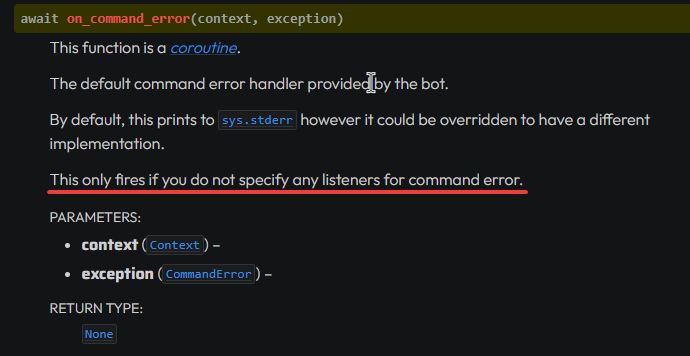
what this last line means? 👀
if I use on_command_error listener somewhere in code, and ask it to send to a specific channel... it will work na?
shell radish
sweet gale
if I use `on_command_error` listener somewhere in code, and ask it to send to a ...
you can create command-specific error handlers with
@<command_name>.error
if that is present, then on_command_error will not fire for that command
sweet gale
shell radish
you can create command-specific error handlers with
```py
@<command_name>.error
...
if I want to create a single listener for all commands, like it gets triggered for any command error than happens?
shell radish
sweet gale
if I want to create a single listener for all commands, like it gets triggered f...
yes
sweet gale
and then make it do something specific
sweet gale
shell radish
yes
then I have to use
@bot.event
async def on_command_error(ctx: bridge.BridgeContext, exception):
  """
  here goes whatever I want to do
  """
  await bot.get_channel(12345678901234).send(exception + f"\n was raised during handling a command")
right?
this is my basic idea, pls guide if I am wrong
subtle moth
willow turtle
I have a werid situation with my /register command that writes user data to a js...
I'd recommend you to save data using the user id as the key instead of the username though
willow turtle
subtle moth
I'd recommend you to save data using the user id as the key instead of the usern...
Yeah, I was coming to this realization too, i was running into walls creating a gift command that users could refer to other users by nickname to transfer currency, i think i need to plan things out a touch more too
 upper flint
What's the point of passing description to the command group if you can't see it anyways?
math = bot.create_group("math", "math commands")

@math.command()
async def add(ctx: discord.ApplicationContext, a: int, b: int):
    await ctx.respond(f"This is equal to: **{a + b}**")

@math.command()
async def subtract(ctx: discord.ApplicationContext, a: int, b: int):
    await ctx.respond(f"This is equal to: **{a - b}**")
 sweet gale
upper flint
What's the point of passing description to the command group if you can't see it...
sweet gale
upper flint
What's the point of passing description to the command group if you can't see it...
@math.command()
async def add(ctx: discord.ApplicationContext, a: int, b: int):
  """This is the command description for add command"""
  await ctx.respond(f"This is equal to: **{a + b}**")
for subtract too in similar way
upper flint
Yes, it will indeed set the description for the subcommands. But what is the purpose of setting the description for the group if it is not shown anywhere. Sorry, didn't put the question right.
fleet cedar
There is no purpose iirc
Slash groups are just slash commands
That's why you can set the description
But the client won't show it anywhere
Or wait
Check the command perms settings in guild settings
upper flint
fleet cedar
Check the command perms settings in guild settings
Oh! Haha, I see it now
Thanks. Now I know 
 dusk flume
I have defined this in my main.py file:
import configparser
scores = configparser.ConfigParser()
scores.read("scores.ini")
@Bot.event
async def on_interaction(interaction):
    global scores
    if interaction.custom_id == "clicked":
        await interaction.response.defer()
        user_id = str(interaction.user.id)
        server_id = str(interaction.guild_id)

        if server_id not in scores.sections():
            scores.add_section(server_id)

        user_scores = scores[server_id]
        clicks = int(user_scores.get(user_id, 0)) + 1
        user_scores[user_id] = str(clicks)

        if clicks == 1 and interaction.user.id != Bot.user.id:
            await interaction.followup.send(
                "🎊 WOHOO! You clicked the button once. 🎊 I'll let you know how you're doing every 🔟 clicks",
                ephemeral=True,
            )

        if clicks % 10 == 0 and interaction.user.id != Bot.user.id:
            await interaction.followup.send(
                f"You have clicked the button {clicks} times!", ephemeral=True
            )

        with open("scores.ini", "w") as file:
            scores.write(file)
    else:
        pass
How can i make any other interactions just run the code in their cog.
fleet cedar
dusk flume
I have defined this in my main.py file:
```
import configparser
scores = config...
Why are you using that event?
You should use callbacks for buttons
.guide
sly karmaBOT
rugged lodgeBOT
Here's the counter example.
fleet cedar
Smth like that
dusk flume
fleet cedar
You should use callbacks for buttons
i need it to work even after the bot restarts
fleet cedar
You can still do that with callbacks
dusk flume
how?
rugged lodgeBOT
Here's the persistent example.
fleet cedar
Set custom id in the button decorator and set timeout to None in the view
I mean that's pretty simple
dusk flume
one sec
fleet cedar
Can you show the view class if you have made any
dusk flume
how to set view timeout to none
dusk flume
fleet cedar
Can you show the view class if you have made any
button = discord.ui.Button(label="Click ME!", emoji=":sos:", custom_id="clicked")
        view = discord.ui.View()
        view.add_item(button)
message = await ctx.send(embed=embed, view=view)```It is a parameter in the View init
timeout=None
dusk flume
fleet cedar
timeout=None
so what would i change?
view = discord.ui.View:Timeout=None()?
idk lol
fleet cedar
dusk flume
```
button = discord.ui.Button(label="Click ME!", emoji=":sos:", custom_id="clic...
Ah. If possible, make a View subclass. That makes persistent views much easier
dusk flume
fleet cedar
Ah. If possible, make a View subclass. That makes persistent views much easier
wdym by that. I dont really use views that often
fleet cedar
dusk flume
idk lol
It's just the same way you pass intents or command prefix to Bot
I'll let you figure it on your own
dusk flume
view = discord.ui.View(Timeout=None)??
fleet cedar
Yes
dusk flume
ty so much!
fleet cedar
Just timeout T lowercase
dusk flume
ok
so when my bot restarts, the button will still work?
the interaction is still failing
fleet cedar
dusk flume
wdym by that. I dont really use views that often
So you can create a view subclass like so
class MyView(discord.ui.View)
  @discord.ui.button(label="smth", ...)
  async def my_button(self, button, interaction):
    # your code goes here
    # the logic and responses etc

    # the button parameter will let you modify stuff like label etc
    # the interaction parameter will allow you to respond n stuff
You can then send your view like this
view = MyView(timeout=None)
await ctx.send(view=view)
And to make this persistent
dusk flume
so do i do view=MyView
fleet cedar
You need to setup an on_ready listener and do
view = MyView(timeout=None)
bot.add_view(view)
In the ctx.send?
fleet cedar
dusk flume
yep
Yes you can. Make sure to pass an object of the class and not the class itself
- await ctx.send(view=MyView)
+ await ctx.send(view=MyView())
yep! thanks so much
fleet cedar
Np!!
dusk flume
fleet cedar
Np!!
would i define MyView inside my cog?
class ClickButton(commands.Cog):
    def __init__(self, bot):
        self.bot = bot


class MyView(discord.ui.View):```is it possible to find who pinned the message returned by discord.on_message_edit(before, after)? (https://docs.pycord.dev/en/stable/api/events.html#discord.on_message_edit)
(assuming the edit event was a message pin)
if i wanted to find who pinned what, should i use .on_message_edit?
Pycord
This section outlines the different types of events listened by Client. There are two ways to register an event, the first way is through the use of Client.event(). The second way is through subcla...
fleet cedar
dusk flume
would i define MyView inside my cog?
```
class ClickButton(commands.Cog):
d...
nope. preferably outside the cog
dusk flume
fleet cedar
nope. preferably outside the cog
ok
fleet cedar
velvet sail
is it possible to find who pinned the message returned by `discord.on_message_ed...
from what i remember, pinning a message sends another message stating "xyz pinned a message" or something
you can check that message
message.type for it would be https://docs.pycord.dev/en/stable/api/enums.html#discord.MessageType.pins_add
Pycord
The API provides some enumerations for certain types of strings to avoid the API from being stringly typed in case the strings change in the future. All enumerations are subclasses of an internal c...
you might find the user in message.mentions
Pycord
Models are classes that are received from Discord and are not meant to be created by the user of the library. Attributes key, url. Methods def is_animated, async read, def replace, async save, def ...
velvet sail
thank you ORZ
little cobalt
Orz?
fleet cedar
😂
 tawdry bluff
is there a way to make on_message event handler in a cog only run when a message is sent in certain channels? currently i just return if it was sent in some other channel
fleet cedar
return if wrong channel is the only way
fleet cedar
negligible. even if it there was some "built-in" way to filter out the channels, it would have been the same working
so dont worry about the thing
 atomic fern
what is this? I'm trying to change a role icon using a link of the image, or i can't?
    if data.startswith(b"\x89\x50\x4e\x47\x0d\x0a\x1a\x0a"):
TypeError: startswith first arg must be str or a tuple of str, not bytes```
```py
    @commands.command(hidden=True)
    async def roleicon(self, ctx, role: discord.Role, source):
        if "https://" in source:
            await role.edit(icon=source)
        else:
            await ctx.send("Send valid image link!")
full error?
atomic fern
Traceback (most recent call last):
  File "/home/horizone/.local/lib/python3.10/site-packages/discord/ext/commands/core.py", line 178, in wrapped
    ret = await coro(*args, **kwargs)
  File "/home/horizone/cogs/testing.py", line 103, in roleicon    await role.edit(icon=source)
  File "/home/horizone/.local/lib/python3.10/site-packages/discord/role.py", line 473, in edit
    payload["icon"] = _bytes_to_base64_data(icon)
  File "/home/horizone/.local/lib/python3.10/site-packages/discord/utils.py", line 658, in _bytes_to_base64_data
    mime = _get_mime_type_for_image(data)
  File "/home/horizone/.local/lib/python3.10/site-packages/discord/utils.py", line 644, in _get_mime_type_for_image
    if data.startswith(b"\x89\x50\x4e\x47\x0d\x0a\x1a\x0a"):
TypeError: startswith first arg must be str or a tuple of str, not bytes```are you sure the error is from
        if "https://" in source:
            await role.edit(icon=source)
?
sweet gale
sweet gale
then I have to use
```py
@bot.event
async def on_command_error(ctx: bridge.Bridg...
👀
atomic fern
sweet gale
👀
@commands.Cog.listener() async def on_command_error(self, ctx, error): if isinstance(error, commands.BadArgument): #code
as i know
atomic fern
or commands.errors.BadArgument
boreal rain
howw do i get mentions working in an embed
little cobalt
boreal rain
howw do i get mentions working in an embed
What do you mean with getting it working?
boreal rain
little cobalt
What do you mean with getting it working?
like its displayed as @boreal rain
instead of @halcyon vault
the raww numbers
fleet cedar
you cant. discord client renders it. it needs to be cached in the user's client
boreal rain
hmm alright thanks
tawdry bluff
how do you make it such that a bot response is only shown to the user? is there an annotation somewhere
little cobalt
tawdry bluff
how do you make it such that a bot response is only shown to the user? is there ...
?tag ephemeral
limber wagonBOT
An 'ephemeral' message is one that's only visible to the person who invoked a command. If you ever got a command error with a blue background, this is an example of one.
To do this, set ephemeral=True when you first use an ApplicationContext. (This includes .defer()ing it; the choice of whether a message is ephemeral or not must be made up front. If you .respond() to a deferred message, setting the ephemeral flag at that time will have no effect.)
This is the equivalent of hidden=True if you're coming from interactions.py
e.g.
await ctx.respond("Imagine a message!", ephemeral = True)

await interaction.response.send_message("Imagine a message!", ephemeral = True)
ooh i see thank you
 open gust
is there a built-in way to edit and not overwrite permissions ?
e.g. channel.set_permissions(m, connect=False) will reset any other permissions that m already had
deft kestrel
how would i make a slash AND normal command? as rn i use bot.slash_command, but i would like those commands to also be able to be used with a prefix.
any way to do so?
fringe drum
.rtfm bridge
sly karmaBOT
470 total results
discord.ext.bridge.Bot
discord.ext.bridge.Bot.activity
discord.ext.bridge.Bot.add_application_command
discord.ext.bridge.Bot.add_bridge_command
discord.ext.bridge.Bot.add_check
discord.ext.bridge.Bot.add_cog
discord.ext.bridge.Bot.add_command
discord.ext.bridge.Bot.add_listener
discord.ext.bridge.Bot.add_view
discord.ext.bridge.Bot.after_invoke
discord.ext.bridge.Bot.all_commands
discord.ext.bridge.Bot.allowed_mentions
discord.ext.bridge.Bot.application_command
discord.ext.bridge.Bot.application_commands
discord.ext.bridge.Bot.application_flags
discord.ext.bridge.Bot.application_id
discord.ext.bridge.Bot.application_info
discord.ext.bridge.Bot.before_identify_hook
discord.ext.bridge.Bot.before_invoke
discord.ext.bridge.Bot.bridge_command
fringe drum
deft kestrel
any way to do so?
^ first one
deft kestrel
thank u 🙂
deft kestrel
fringe drum
^ first one
are there perhaps any examples of this being used somewhere?
rugged lodgeBOT
Here's the bridge commands example.
deft kestrel
@fringe drum can i still use bot.slash_command if i transform my bot to bot = bridge.bot?
like does it change anything other then allowing bridge commands to be used?
fringe drum
deft kestrel
<@270630360721784833> can i still use bot.slash_command if i transform my bot to...
if you want both prefix and slash commands you will need to change to @bot.bridge_command()
shell radish
deft kestrel
like does it change anything other then allowing bridge commands to be used?
no, it doesn't
deft kestrel
fringe drum
if you want both prefix and slash commands you will need to change to @bot.bridg...
ye but i dont want to use that everywhere. just on some places. do i need to change my bot = commands.bot to bridge.bot? or can i keep it commands.bot + if i do switch would that change anything on my current bot.slash_command setup?
shell radish
You can still keep your current setup
deft kestrel
ah okay thank u
@bot.bridge_command()
^^^^^^^^^^^^^^^^^^
AttributeError: 'Bot' object has no attribute 'bridge_command'. Did you mean: 'message_command'?
@shell radish
so guess change to bridge.bot?
shell radish
yeah, changing to bridge.Bot is the only change you would need to make
deft kestrel
❤️
 stiff saddle
is there a method for messages that converts them into strings? py str(message) doesnt work
daring valve
stiff saddle
is there a method for messages that converts them into strings? ```py
str(messag...
message.content
And don't need to convert it to string again
 fickle salmon
stiff saddle
hmm curiously this returns this ``"message":""``
fickle salmon
stiff saddle
hmm curiously this returns this ``"message":""``
You need message content intent
stiff saddle
fickle salmon
You need message content intent
?
fickle salmon
?tag intents
limber wagonBOT
https://docs.pycord.dev/en/master/intents.html
https://discord.com/developers/docs/topics/gateway#gateway-intents
import discord
from discord.ext import commands

# Get specific intents for fine control
intents = discord.Intents()
intents.emojis = True
intents.guilds = True
intents.messages = True  # Required for prefix commands!
...
# Get all non-priveliged intents; this excludes presences, members and message_content
intents = discord.Intents.default()

# Set priveliged intents: these must be enabled on dev portal
intents.members = True
intents.presences = True
intents.message_content = True  # Required for prefix commands >= 2.0.0b5

# Get all intents; all intents must be enabled on dev portal.
intents = discord.Intents.all()

# Apply intents when creating your bot
bot = commands.bot(prefix="?", intents=intents)
Pycord
In version 1.5 comes the introduction of Intents. This is a radical change in how bots are written. An intent basically allows a bot to subscribe to specific buckets of events. The events that corr...
Discord Developer Portal
Integrate your service with Discord — whether it's a bot or a game or whatever your wildest imagination can come up with.
stiff saddle
still returns nothing
little cobalt
stiff saddle
still returns nothing
How do you define the bot?
stiff saddle
intents = discord.Intents
intents.all()

bot = discord.Bot()```where are the intents....
little cobalt
limber wagon
https://docs.pycord.dev/en/master/intents.html
https://discord.com/developers/do...
take a look again at this
stiff saddle
ohhh thank you all so much sorry for being an idiot
 daring grove
async def transfer(ctx, player: str, price: int):
this line is causing this error:
  File "C:\PYTHON310\lib\site-packages\discord\client.py", line 352, in _run_event
    await coro(*args, **kwargs)
  File "C:\PYTHON310\lib\site-packages\discord\bot.py", line 793, in on_connect
    await self.register_commands()
  File "C:\PYTHON310\lib\site-packages\discord\bot.py", line 286, in register_commands
    if key2 in match[key][i].keys():
IndexError: list index out of range
with only 'player' it works fine but with player and price it doesnt seem to work
heres the whole command:
@bot.slash_command(name="transfer", description="Allows for the transfer of a player.")
async def transfer(ctx, player: str, price: int):
    await ctx.respond(player + price)
that is basic python
 little cobalt
str + int
daring grove
i replaced it with ctx.respond("hello") but still the same error
shell radish
Full traceback, thanks
daring grove
Ideally id want to to be /transfer player[] price[]

Im not sure if theres a better way to do this
shell radish
shell radish
Full traceback, thanks
.
daring grove
Ignoring exception in on_connect
Traceback (most recent call last):
  File "C:\PYTHON310\lib\site-packages\discord\client.py", line 352, in _run_event
    await coro(*args, **kwargs)
  File "C:\PYTHON310\lib\site-packages\discord\bot.py", line 793, in on_connect
    await self.register_commands()
  File "C:\PYTHON310\lib\site-packages\discord\bot.py", line 286, in register_commands
    if key2 in match[key][i].keys():
IndexError: list index out of range
Logged into discord api as: BudgetBot#6896
can you show your pip list pls?
daring grove
all of it?
shell radish
yeah
little cobalt
pip freeze > pip.txt @daring grove
little cobalt
discord, discord
shell radish
and why py-cord 2.0.0b1
lofty parcel
thats as old as my grandma
daring grove
lofty parcel
thats as old as my grandma
my grandma is pretty young
whats the newest vers of pycord?
shell radish
2.4.1
little cobalt
2.4.1
daring grove
deary me okay
little cobalt
?tag install
limber wagonBOT
- Uninstall discord.py or any other forks of discord.py you might have with the namespace
discord.
python -m pip uninstall discord.py discord -y
2a. Install py-cord
python -m pip install py-cord
2b. Update py-cord
python pip install -U py-cord
Installing other builds:
Note: You need to have git installed. Use ?tag git to find out how to install git.
Updating the module to master branch (unstable):
pip install -U git+https://github.com/Pycord-Development/pycord
fiery stratus
Hey does anyone know how to fix the constant "Invalid interaction application command" error I keep getting? I do a slash command on my bot and it always responds with that text.
shell radish
restart your app
fiery stratus
How so? just restart the python script?
shell radish
no your actual discord app
fiery stratus
thank you so much dude i was having so much trouble with this
shell radish
yw
dusk flume
Someone helped me yesterday. I tried to make a persistant view. Its not working, heres my code:
import discord
from discord.ext import commands


class PersistentView(discord.ui.View):
    def __init__(self):
        super().__init__(timeout=None)

    @discord.ui.button(
        label="Green",
        style=discord.ButtonStyle.green,
        custom_id="persistent_view:green",
    )
    async def green(self, button: discord.ui.Button, interaction: discord.Interaction):
        await interaction.response.send_message("This is green.", ephemeral=True)


class Test(commands.Cog):
    def __init__(self, bot):
        self.bot = bot

    @commands.slash_command()
    async def test(self, ctx):
        await ctx.respond("test", view=PersistentView())


def setup(bot):
    bot.add_cog(Test(bot))
i want it to continue to work after the bot restarts however it says this interaction failed
shell radish
dusk flume
Someone helped me yesterday. I tried to make a persistant view. Its not working,...
You didn’t add the view to the bot object
dusk flume
shell radish
You didn’t add the view to the bot object
So what would i do instead?
to make the button work even after the bot restarts
😄
shell radish
Learn all about implementing buttons in your Discord Bot using Pycord.
dusk flume
your a hero. I have had this issue for the past 2 days. if anyone needs a cog slash command version, here it is:
import discord
from discord.ext import commands

class MyView(discord.ui.View):
    def __init__(self):
        super().__init__(timeout=None) # timeout of the view must be set to None

    @discord.ui.button(label="A button", custom_id="button-1", style=discord.ButtonStyle.primary, emoji="😎") # the button has a custom_id set
    async def button_callback(self, button, interaction):
        await interaction.response.send_message("Button was pressed", ephemeral=True)

class Test(commands.Cog):
    def __init__(self, bot):
        self.bot = bot


    @commands.Cog.listener()
    async def on_ready(self, ):
        self.bot.add_view(MyView()) # Registers a View for persistent listening


    @commands.slash_command()
    async def button(self, ctx):
        await ctx.send(f"Press the button! View persistence status: {MyView.is_persistent(MyView())}", view=MyView())


def setup(bot):
    bot.add_cog(Test(bot))
I have looked at the example in the documentation but I get the warning in the .predicate

 cyan violet
Is it possible to do in pycord that if I use Option: discord.TextChannel that only certain selected channels that I want to be displayed? And not all channels that exist
valid panther
cyan violet
Is it possible to do in pycord that if I use Option: discord.TextChannel that on...
yes
valid panther
 lost ocean
how to set timeout for modal dialogues?
lost ocean
how to set timeout for modal dialogues?
Learn how you can implement Modals in your Discord Bot with Pycord!
cyan violet
how?
valid panther
cyan violet
how?
make a list of all channels and then exclude what you want.
valid panther
I don't know what you want to do in general either
lost ocean
valid panther
https://guide.pycord.dev/interactions/ui-components/modal-dialogs
bro
there's no tiemout ni there
why else would i come here
lost ocean
cyan violet
Is it possible to do in pycord that if I use Option: discord.TextChannel that on...
yeah suer
that's possible
make a list
cyan violet
Slash
lost ocean
cyan violet
Slash
theres a thing for rthat
search the docs
its like u can only choose an option
from a certain list of things
and it shows that list while choosing the option
lost ocean
cyan violet
Maybe you have link?
ah lemme see
in Option() itself
thers this parameter called autocomplete
so it'll be like
Option(autocomplete=channels)
async def channels(self, ctx: discord.AutocompleteContext):
  return [LIST OF CHANNELS]

# some command
...
async def foo(self, ctx, a:Option(autocomplete=channels)```@cyan violet
cyan violet
Thx
lost ocean
np
daring grove
How would I check if the author has a certain role and based on that allow usage of a command?
lofty parcel
daring grove
How would I check if the author has a certain role and based on that allow usage...
.rtfm Guild.get_role
sly karmaBOT
1 results
lofty parcel
.rtfm Member.roles
sly karmaBOT
1 results
 ancient cosmos
Is there an estimated release date for 2.5 at this point, or a list of breaking changes in master that would need to get accounted for? (If I don't have any pre-existing code, can I just pull master and start working with it?)
I've tried to flip through the FAQs and search through here, and the most recent update I can see about it is someone asking about a month ago and being answered "soon / when it's ready" - which is completely fine, I just couldn't find anywhere that had some kind of update on that.
little cobalt
ancient cosmos
Is there an estimated release date for 2.5 at this point, or a list of breaking ...
Im not really sure if there will be any breaking changes at 2.5
sly karmaBOT
45 total results
discord.Activity
discord.Activity.application_id
discord.Activity.assets
discord.Activity.buttons
discord.Activity.created_at
discord.Activity.details
discord.Activity.emoji
discord.Activity.end
discord.Activity.flags
discord.Activity.large_image_text
discord.Activity.large_image_url
discord.Activity.name
discord.Activity.party
discord.Activity.session_id
discord.Activity.small_image_text
discord.Activity.small_image_url
discord.Activity.start
discord.Activity.state
discord.Activity.sync_id
discord.Activity.timestamps
round heart
To get discord.User autocomplete in slash commands, does it need additional perms?
I am using
discord.Option(name="assignee", required=False, type=discord.Member)
``` But it's not actually doing anythingwhat?
round heart
What's not clear? I have a slash command that I want to use user-based autocomplete, which I am pretty sure is a thing.
round heart
Not sure I understand where you're going with this.
You can have an Option of discord.Role and it will autocomplete Roles. There is one for Users and/or Members. I just want that.
little cobalt
Use discord.Member because it got way more informations
wary wyvern
Is there a way to access a user's selected option (select menus) from an interaction?
round heart
round heart
To get `discord.User` autocomplete in slash commands, does it need additional pe...
As you can see, I'm already using discord.Member
It needs to be an Option though beacuse it's not a required field.
little cobalt
you added required=False right?
round heart
Not to be rude, but did you not see the code I posted? It literally says required=False in it 😕
little cobalt
yea, so it would be already optional
or do you want to have role and member in one?
round heart
Okay, the point is that the users are not being autocompleted. Hence my question of whether there are other permissions that need enabling. I added User Intents, but that didn't seem to fix it
shell radish
wary wyvern
Is there a way to access a user's selected option (select menus) from an interac...
what type of interaction?
little cobalt
round heart
Okay, the point is that the users are not being autocompleted. Hence my question...
that is weird
with member intents it should work
wary wyvern
shell radish
what type of interaction?
select menu
shell radish
little cobalt
with member intents it should work
you don't even need members intents for it to work
round heart
wary wyvern
select menu
Views I have are accessing self.values for that.
round heart
shell radish
you don't even need members intents for it to work
Hm. Any other thoughts as to what the issue could be? It's just acting like a text field
little cobalt
shell radish
you don't even need members intents for it to work
You need intents for it
shell radish
little cobalt
You need intents for it
no you don't
little cobalt
I tested it and I cannot get all the users
I see only 2 users and there are way more at the server
round heart
Doesn't it only get users that are in the current channel?
little cobalt
round heart
Doesn't it only get users that are in the current channel?
I have 10 users at the channel and can only see 2
or discord is just glitching again?
shell radish
round heart
Hm. Any other thoughts as to what the issue could be? It's just acting like a te...
try commenting out the command, running the bot, uncommenting out the command, and running the bot
maybe the command is de-synced from discord
little cobalt
I remember the time where it took 1h for a global slash command x3
round heart
Yeah that was going to be my next try; adding debug guilds
shell radish
round heart
Yeah that was going to be my next try; adding debug guilds
not really any point since global application commands register instantly
little cobalt
round heart
Yeah that was going to be my next try; adding debug guilds
I also dont use debug guilds anymore
wary wyvern
shell radish
what type of interaction?
seems like interaction.data.values contains what I want but I don't know how to access the option's string
shell radish
which option string? From slash commands, or?
shell radish
What does your select menu callback look like?
wary wyvern
shell radish
What does your select menu callback look like?
I want to access it through on_interaction because the callback doesnt work after restart
round heart
shell radish
try commenting out the command, running the bot, uncommenting out the command, a...
Sadly not. I commented it out, confirmed it was gone, then re-implemented and it's still not showing correctly.
@subcommand.command(name="list", description="...")
async def task_list(
    ctx: discord.ApplicationContext,
    search: discord.Option(name="search", description="", required=False, type=str),
    assignee: discord.Option(name="assignee", description="User to view", required=False, type=discord.Member)
):
Here's the persistent example.
sweet gale
how can I add aliases to a bridge command?
shell radish
rugged lodge
Here's the persistent example.
@wary wyvern for views to work after restart
little cobalt
sweet gale
how can I add aliases to a bridge command?
aliases=["text"]
sweet gale
like the user can do any of these:
@sweet gale play
@sweet gale p
!play
!p
/play
shell radish
round heart
Sadly not. I commented it out, confirmed it was gone, then re-implemented and it...
I think it's input_type, not type
yeah https://docs.pycord.dev/en/stable/api/application_commands.html#discord.Option.input_type
sweet gale
little cobalt
aliases=["text"]
will it work for bridge commands?
wary wyvern
shell radish
<@807301057901494342> for views to work after restart
oh thanks
sweet gale
and does slash command support aliases or smthing?
shell radish
sweet gale
and does slash command support aliases or smthing?
no
little cobalt
only prefix commands support aliases
sweet gale
yea, that's why I wondered. bridge commands will support aliases?
little cobalt
But it should work at bride commands
sweet gale
little cobalt
aliases=["text"]
oh, where exactly I have to add this then?
shell radish
sweet gale
yea, that's why I wondered. bridge commands will support aliases?
bridge commands support aliases to the extent that text-based commands support aliases
sweet gale
shell radish
bridge commands support aliases to the extent that text-based commands support a...
ohkk, Thanks for all the info :)
shell radish
@bot.command(..., aliases = ["foo"])
bridge is cut off here because I thought that was obvious
and cogs equivalent
sweet gale
also I wondered if I could ask my wavelink related doubts here coz the official server mods' most of the time say that "we don't support py-cord, so can't help"
👀
shell radish
depends on the type of problem
round heart
shell radish
I think it's `input_type`, not `type`
yeah <https://docs.pycord.dev/en/stable/a...
Oh I see it's the first positional argument.
And also, it needs to be discord.User. I couldn't get it to work with discord.Member. Thanks for the sanity check!
(Related but unrelated, I hope they allow autocomplete filters on User selection someday)
round heart
shell radish
I think it's `input_type`, not `type`
yeah <https://docs.pycord.dev/en/stable/a...
Actually, sorry. One more weird issue - if I submit the command with a target user, something breaks in the core
Traceback (most recent call last):
  File ".../discord/commands/core.py", line 124, in wrapped
    ret = await coro(arg)
          ^^^^^^^^^^^^^^^
  File ".../discord/commands/core.py", line 894, in _invoke
    arg = ctx.guild._get_and_update_member(_data, int(arg), cache_flag)
          ^^^^^^^^^^^^^^^^^^^^^^^^^^^^^^^^
AttributeError: 'NoneType' object has no attribute '_get_and_update_member'
I've never seen this before. Don't get why it would be a NoneType.
shell radish
round heart
Actually, sorry. One more weird issue - if I submit the command with a target us...
hmm
does it always break
round heart
In this app, yes.
(My main app has a couple of autocompletes and has never seen this issue)
Just as a spitball, I'm going to try member intent. I know it's not supposed to care, but it is one difference between the two bots. (Edit: No change, of course)
Strange. ctx.guild is indeed None after being invoked.
The Context knows everything else - author, channel (as a PartialMessagable), channel_id
And knows the selection. It's not having trouble resolving it. It's literally just the fact that it somehow doesn't know where it is 😅

It knows the guild_id (ctx.guild_id), but ctx.guild is None and ctx.bot.guilds is empty. tf
So I guess the new question is: What situation causes a bot to not know what guild(s) it's even in?
velvet sail
does on_message_edit only listen to messages created after the bot became ready?
lofty parcel
velvet sail
does on_message_edit only listen to messages created after the bot became ready?
.rtfm on_message_edit
sly karmaBOT
1 results
 solemn finch
um, can someone tell me how to use before_loop and after_loop, I have trouble using it, my tasks has count=2 but neither function are called
do I call it task.before_loop(before_function) or something else?
fringe drum
if i were to use sqlite as my db approximately when should i switch to something like postgres? how much data would be too much?
sly karmaBOT
Target not found, try again and make sure to check your spelling.
fringe drum
.rtfm user.avatar.url
sly karmaBOT
Target not found, try again and make sure to check your spelling.
fringe drum
let me get you a code snippet i have
bronze beacon
 little cobalt
bronze beacon
little cobalt
bronze beacon
avatar.url not avatar_url
sly karmaBOT
Target not found, try again and make sure to check your spelling.
Target not found, try again and make sure to check your spelling.
little cobalt
#app-commands
shell radish
lofty parcel
It's an attribute
it's an attribute of an attribute
lofty parcel
You're right octopus
daring grove
how would i display a decline trade button on this embed too?
 shell radish
views can have multiple buttons
daring grove
how would i do that here?
shell radish
depends on the code for AcceptTrade
 shell radish
you're supposed to combine them into a single view object/class
 shell radish
almost, they shouldn't both be called button_callback
personally, I would use accept_callback and decline_callback
but they can be basically anything
shell radish
no, that's exactly why only the decline button shows
daring grove
shell radish
no, that's exactly why only the decline button shows
hm?
shell radish
if both are called button_callback then the second button overrides the value of button_callback
daring grove
yeah so only the decline button shows
shell radish
you said "maybe," I'm asserting that is exactly why
daring grove
shell radish
you said "maybe," I'm asserting that is exactly why
how might i find who clicks the button?
bronze beacon
lofty parcel
No
how can I format it as png
daring grove
like if someone has a certain role they can press it
shell radish
daring grove
how might i find who clicks the button?
interaction.user
daring grove
thanks
shell radish
Pycord
v2.0 introduced new Discord features and deprecated some old ones. Part of the redesign involves making application commands and components. These changes include a new Bot class, ui.View, and a ne...
bronze beacon
oh never seen this before
round heart
round heart
So I guess the new question is: What situation causes a bot to not know what gui...
Restarting the question about this. It seems like a Pycord assumptions bug, but I also don't know if it is valid that Discord itself doesn't know what Guild a responding bot is part of.
 cursive leaf
whats the best way to take in a list of mentionables of variable length in a slash_command Option()
shell radish
cursive leaf
whats the best way to take in a list of mentionables of variable length in a sla...
two ways, multiple options or a really long string and convert it yourself
cursive leaf
long string it is then
alr
async def get_mentions(content):
  mentions = []
  for x in content.split(" "):
    if x.startswith("<@") and x.endswith(">"):
      mentions.append(x[2:-1])
  return mentions
``` copilot just cooked this up without me even saying what i wanted lmaooodont think it works tho lol
daring grove
shell radish
`interaction.user`
how would i get a list of the roles of this person?
ive tried interaction.user.roles but it doesnt seem to work
little cobalt
daring grove
ive tried interaction.user.roles but it doesnt seem to work
that should work
Do you have intents?
daring grove
yeah
little cobalt
which one?
daring grove
im trying to do this

is there anything wrong with this?
rolewantmanager = "Man City"
 little cobalt
do you even get a list at interaction.user.roles?
daring grove
little cobalt
do you even get a list at `interaction.user.roles`?
I do
It was originally ['Man City']
actually hold on

This is what I get
hm
cursive leaf
trying to take in a string from a slash_command Option parameter, but as soon as i have a @mention in that string its somehow = "" and hence prints nothing

@bot.slash_command(guild_only=True,description="Host a giveaway!")
async def giveaway(
    ctx: discord.ApplicationContext,
    ....
    required_roles: Option(str, "Roles required to enter the giveaway", default='default'),
    winners: Option(int, "The number of winners to pick", min_value=1, default=1)
    ):

  print(str(required_roles))
 cursive leaf
daring grove
cursive leaf
daring grove
try
if rolewantmanager in [role.name for role in interaction.user.roles]:
 grizzled hinge
Yo
quick question
eh
How do i install pycord
for arch
with pacman package manager
little cobalt
grizzled hinge
with pacman package manager
you cannot install it with the pacman manager
that is not for python librarys
grizzled hinge
Oh really?
[root@archi system]# python -m pip install py-cord
error: externally-managed-environment

× This environment is externally managed
╰─> To install Python packages system-wide, try 'pacman -S
    python-xyz', where xyz is the package you are trying to
    install.

    If you wish to install a non-Arch-packaged Python package,
    create a virtual environment using 'python -m venv path/to/venv'.
    Then use path/to/venv/bin/python and path/to/venv/bin/pip.

    If you wish to install a non-Arch packaged Python application,
    it may be easiest to use 'pipx install xyz', which will manage a
    virtual environment for you. Make sure you have python-pipx
    installed via pacman.
[root@archi system]# pip install py-cord
error: externally-managed-environment

× This environment is externally managed
╰─> To install Python packages system-wide, try 'pacman -S
    python-xyz', where xyz is the package you are trying to
    install.

    If you wish to install a non-Arch-packaged Python package,
    create a virtual environment using 'python -m venv path/to/venv'.
    Then use path/to/venv/bin/python and path/to/venv/bin/pip.

    If you wish to install a non-Arch packaged Python application,
    it may be easiest to use 'pipx install xyz', which will manage a
    virtual environment for you. Make sure you have python-pipx
    installed via pacman.
py?
 little cobalt
that is weird
 inland urchin
is python-pip installed?
little cobalt
grizzled hinge
not michaelsoft bindows
?
grizzled hinge
inland urchin
is ``python-pip`` installed?
Yes.
little cobalt
grizzled hinge
Yes.
PIP is a large suite of tools that are used to automate the installation and management of python packages and modules. It is essentially a package manager for non-standard python packages, those not included in the standard python library. In this article, setting up PIP on ArchLinux is explained.
grizzled hinge

fixed
Solution was
hold on
mkdir {f} (F being the name you want for your folder, put it in your projects directory)
python -m venv full/path/to/{f}
{f}/bin/pip install py-cord
oh yeah
dont forgor to use this
{f}/bin/python path/to/youwanttoexecute
daring grove
how would i add a role after a button press to someone from a different command?
i want to use this 'offer' elsewhere essentially
 little cobalt
daring grove
how would i add a role after a button press to someone from a different command?
little cobalt
daring grove
how would i add a role after a button press to someone from a different command?
store the user id and create a member object at the button and give the user the role
daring grove
why is this not timing out after 10 seconds?
 little cobalt
daring grove
why is this not timing out after 10 seconds?
little cobalt
daring grove
why is this not timing out after 10 seconds?
you also have to edit it
daring grove
ah okay thanks

 daring grove
yep i already got it
tawdry bluff
when you use @commands.guild_only() the slash command is still able to be used in dms (it just shows that the bot did not respond and throws an error about how it's not allowed to be used in dms); is there a way to not have it show as a command in dms, or at least make it unselectable, or show a more descriptive error message?
little cobalt
tawdry bluff
when you use `@commands.guild_only()` the slash command is still able to be used...
only if you would add the guild ids
is the bot for a privat server or a public bot?
tawdry bluff
public
shell radish
tawdry bluff
when you use `@commands.guild_only()` the slash command is still able to be used...
that's because it should be @discord.guild_only()
tawdry bluff
oh, even in cogs?
shell radish
yes
tawdry bluff
okay tq!
wind crypt
Does anyone know what i'm doing wrong? i just copied some random slash command and the response will send but not the actual interaction


 little cobalt
wind crypt
Does anyone know what i'm doing wrong? i just copied some random slash command a...
little cobalt
wind crypt
Does anyone know what i'm doing wrong? i just copied some random slash command a...
ctx.respond and not ctx.send
wind crypt
little cobalt
ctx.respond and not ctx.send
oh my god im so dumb thats embarassing
thank u stranger <3
another (probably) dumb question but i made this payment method-ish command to help me receive payments but when i press anything other than the x, it fails. but when i press the x it works perfectly fine


 lofty parcel
wind crypt
another (probably) dumb question but i made this payment method-ish command to h...
lofty parcel
wind crypt
another (probably) dumb question but i made this payment method-ish command to h...
Your other buttons don't have a callback?...
wind crypt
lofty parcel
Your other buttons don't have a callback?...
yep just realized
sorry about that
😭
velvet sail
lofty parcel
.rtfm on_message_edit
sorry for the late reply- thank you
i didn't read the cache part before i asked