#Hiekki - subscription payment method
1 messages · Page 1 of 1 (latest)
 eager path
Hello, where is the payment method not showing up?
And do you have the ID for this subscription?
 lyric nacelle
like
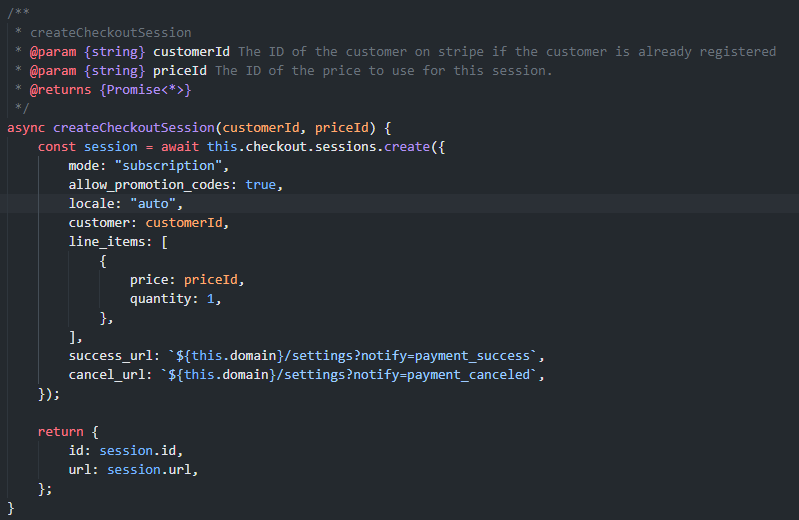
i created a checkout
for a subscription
and the test client has a payment method
 lyric nacelle
eager path
Hello, where is the payment method not showing up?
lyric nacelle
eager path
Hello, where is the payment method not showing up?
checkout page
eager path
Ah gotcha. How was this payment method saved before? We do show payment methods that were saved via Link but I don't think we show payment methods that are saved other ways in Checkout at the moment. https://stripe.com/docs/payments/link/accept-a-payment
lyric nacelle
eager path
Ah gotcha. How was this payment method saved before? We do show payment methods ...
i tested the checkout, made the payment
and created another chekout link
and dont show any saved payment method
lyric nacelle
eager path
Ah gotcha. How was this payment method saved before? We do show payment methods ...
the one that i had was saved with setupIntent
this is only appeing with the test customer that i created with the api
eager path
To clarify, do you want the subscription to start right away after they enter their details the first time?
Or is this simulating that some amount of time will pass between entering their details and starting a subscription?
lyric nacelle
the probleim is not about the subscription start
the problem is that this is being showed, when the customer has is payment method already in the system
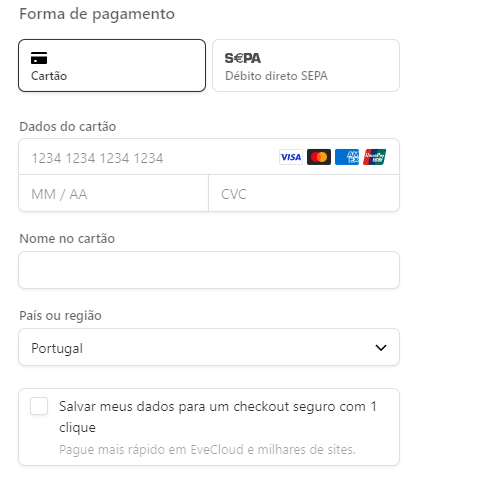
payment methods added by setupIntent are not alowed to be used in checkout?
eager path
They are, but you will need to check that "Salvar meus dados..." box for them to be displayed again
lyric nacelle
but the thing is
i saved the customer payment method with the setupIntent
then i created the chekout session
it was supposed to that payment method to be showed
eager path
Unfortunately that isn't always how it works. You can re-use that saved payment method but unless the checkbox was checked the payment method won't show up in future checkout sessions to the user as far as I know
lyric nacelle
but the payment method was add in the setupIntent
 shy turret
👋 I'm stepping in for @eager path since they had to step away
Gimme a sec to catch up
lyric nacelle
i already found the problem
only payment methods add during checkout can be used in checkou
so if a user adds a payment method on the billing portal, it cant be used in checkout
shy turret
Okay, do you have any additional questions?
lyric nacelle
so
to the payment method added by the setupintent be showed in the checkout, he needs the card titular name
so is possible to the stripe elements
have a field to add that?
lyric nacelle
name in the card
shy turret
Gotcha. With the Payment Element you can specify which Billing Details you want the Element to collect (render fields for)
https://stripe.com/docs/js/elements_object/create_payment_element#payment_element_create-options-fields-billingDetails
lyric nacelle
but like
i can only define auto or never
and this is on auto by default
@shy turret
shy turret
Okay so I did some research on this
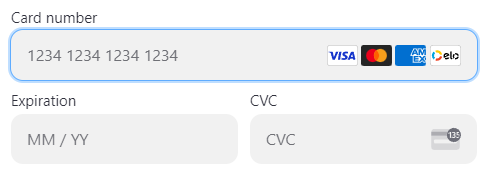
You cannot force the Payment Element to render the name field
But you can collect it yourself


 shy turret
Right, that's what I said. You cannot force the Payment Element to collect the name but you can render a field to collect that data and provide it in the billing_details when confirming the Setup Intent.
https://stripe.com/docs/js/setup_intents/confirm_setup#confirm_setup_intent-options-confirmParams-payment_method_data-billing_details
lyric nacelle
and how can i render that field?
shy turret
You would need to write it yourself. Basic HTML and JS
lyric nacelle
but will not have that style
shy turret
<input id="name-on-card"></input>
True but that is the only way we have available presently to collect that information
lyric nacelle
and the card element can have that field?
shy turret
No I do not think so. You can review a Card Element integration here:https://stripe.com/docs/payments/card-element but we don't recommend it. The Payment Element is the recommended approach
lyric nacelle
why, is not recommended?
shy turret
Because it is less functional than the Payment Element
lyric nacelle
and the cardNumber, cardExpiry and cardCvc?
shy turret
Those are individual components of the card element, if you wanted to render each one in a specific part of your HTML
lyric nacelle
is there an bs4 style for the stripe elements?
shy turret
I do not believe so. You can modify the appearance of the Payment Element using the Appearance API though to allow it to more closely resemble a style that matches with the rest of your site.
lyric nacelle
and how can get the stripe elements css, so i can make a new input like the rest?
shy turret
We don't publish a set of CSS rules as far as I know. I think you'd just need to inspect the elements rendered. I think a better approach would be to use the Appearance API I linked to set your own rules and then apply them to any other inputs you create yourself.
https://stripe.com/docs/elements/appearance-api?platform=web#rules
lyric nacelle
okay, thanks