#S60-Sub-Schedules
1 messages · Page 1 of 1 (latest)
 sick sierra
Hey! Thank you so much!

I am trying to do this:
(the instalments plan, use case)

Learn how to use subscription schedules.
 loud rover
Let me take a look!
sick sierra
it seems like it needs [items] but I am not sure where I have to actually put in the item ID.
loud rover
Yeah it looks like you are using a Subscription item there instead of a price: https://stripe.com/docs/api/subscription_schedules/update#update_subscription_schedule-phases-items-price
You will want to pass a price ID there or create a new price by passing the necessary price_data.
sick sierra
and the syntax should be something like: [phases[0][items][ID_HERE][iterations]=6
is this correct? 🙂
loud rover
Hrmm I'm not exactly positive! I haven't used the tool you are using before.
loud rover
Right but that is a tool like postman right?
sick sierra

this is what the body of the API request would look like
and yes. I think so.
I am a no - coder / low code guy. I really hope I am expressing things properly. 😄
loud rover
Sure, but that is not writing in a server-side language. It is a tool that is taking a specific syntax to create the request for you.
Since I haven't used that tool, I don't know what syntax it expects!
sick sierra
hmmmm
loud rover
I would recommend trying what you put above and seeing if it errors
sick sierra
[
{
"qs": [],
"url": "v1/subscription_schedules",
"body": "from_subscription=sub_1KUg8TBUHziHdjOsaPYQEaLd",
"method": "POST",
"headers": [
{
"key": "Content-Type",
"value": "application/x-www-form-urlencoded"
}
]
}
]
loud rover
If it does, we can adjust
sick sierra
This is JSON ?
loud rover
Yes that is JSON
sick sierra
is this helpfull ?:)
[
{
"qs": [],
"url": "v1/subscription_schedules/sub_sched_1KUg8ZBUHziHdjOs41E59ip6",
"body": "phases[0][items][si_LB2CuiRYMExxAl][iterations]=6",
"method": "POST",
"headers": [
{
"key": "Content-Type",
"value": "application/x-www-form-urlencoded"
}
]
}
]
loud rover
One sec!
Okay so what we need to do is figure out how your tool is intaking the data you are giving it so we can map it to the Stripe API. Subscription Schedules are complex requests so let's back up, if it is okay with you, and do something simpler first to get an idea of how your tool works with parameters and then nested parameters (which is necessary for the Subscription Schedule update)
Can you first just create a customer (https://stripe.com/docs/api/customers/create) and pass a name for that customer?
loud rover
Happy to help! If you can provide me with the customer ID after you create the customer then I can look at the request.
sick sierra
cus_LB2hfRlJDwKgbj
loud rover
And the body that you passed into your tool?
sick sierra
the JSON input is like this:
[
{
"qs": [],
"url": "v1/customers",
"body": "description=My First Test Customer",
"method": "POST",
"headers": [
{
"key": "Content-Type",
"value": "application/x-www-form-urlencoded"
}
]
}
]
loud rover
okay perfect. Now let's try to add a name as well as description. Can you try: ``` "body": "description=My First Test Customer", "name": "test name"
Yes it would
Okay perfect that worked. Now let's see if we can figure out how to pass a nested parameter
sick sierra
bismarck, I am so excited hahahahha
loud rover
Let's try: "body": "description=My First Test Customer", "name": "test name", "shipping"["name"]="nested name"
 loud rover
Okay that's good to know.
Yeah let me see if I can figure out how it should be written
I don't think this will work but let's try: "body": "description=My First Test Customer", "name": "test name", "shipping.name"="nested name"
Just to rule that out
I'm also looking for integromat documentation at the moment
To see if they have this documented anywhere
sick sierra
I thinkI figured it out
loud rover
Nice!
 loud rover
Do you have the customer ID?
loud rover
hrmm that one still doesn't have shipping.name
sick sierra
so the nested parameter was not sent
loud rover
Ah okay one sec, I can see your failed request in the Stripe Dashboard. Give me a sec to align them.
Oh it did work! I forgot that shipping.address is required if you pass shipping.name
Okay we are in business
Let me put the request together for the sub schedule
sick sierra
I am simply in awe of the speed and quality of support.
loud rover
Lets try body: phases[items][price= price_1KUZzGBUHziHdjOsbJQVGJYi]&&phases[items][iterations=6]
Not positive this is going to work
Might need a [0] in there, but I think if you just use one phase then it will infer the [0]
loud rover
Yeah that is the price ID. I pulled it from one of your past request attempts
sick sierra
 loud rover
K let's take out the iterations and deal with that next. Let's just do body: phases[items][price= price_1KUZzGBUHziHdjOsbJQVGJYi]
sick sierra
maybe it was because of a double "&&" ?
loud rover
Oh interesting, you used one double && and one single & in your previous example
I only looked at the first one and assumed they should all be double &&
sick sierra
I am redoing the test.
loud rover
What we did before was actually very close... I think the correct way would actually be body: phases[items][price= price_1KUZzGBUHziHdjOsbJQVGJYi&iterations=6]
But feel free to check without the iterations first
Then we can figure that out
loud rover
Ah I was wrong. You do need the [0], sorry.
body: phases[0][items][price= price_1KUZzGBUHziHdjOsbJQVGJYi]
sick sierra
and the iterations?
phases[0][items][price= price_1KUZzGBUHziHdjOsbJQVGJYi&iterations=6]
loud rover
body: phases[0][items][price= price_1KUZzGBUHziHdjOsbJQVGJYi&iterations=6]
Yeah that is my guess for the whole thing
But it may be worth doing it without the iterations first to make sure the rest of it works
sick sierra
is it possible that you can help me with the schedule ID for price_1KUZzGBUHziHdjOsbJQVGJY
?
loud rover
The schedule ID should be generated from your previous request when you create the Subscription Schedule
You should be able to just use the one before... I think sub_sched_1KUh6LBUHziHdjOsnvMiuvZx
The price can be assigned to any subscription schedule. It dictates the amount you are charging
sick sierra
 loud rover
Okay one sec
While I figure out the iterations syntax can you just run it without iterations and make sure it works?
 loud rover
lol okay we are close. For some reason it is tacking the ] on the end
Like I see: { "phases": { "0": { "items": { "price": "price_1KUZzGBUHziHdjOsbJQVGJYi]" } } } }
Not sure why it is grabbing that last close bracket...
But try removing that I guess
This tool is strange 😅
sick sierra
I am 100% sure the solution is like the dumbest thing ever.
hmmm
I did manage something

but I took out the price too
loud rover
Yeah the request worked but it didn't do anything
So that is why it functioned fine.
Try body: phases[0][items][price= price_1KUZzGBUHziHdjOsbJQVGJYi
sick sierra
invalid array
sick sierra
it's all good. really i am trying to figure it out too. I am glad I have you on my side
phases[0][items][price]
This works
loud rover
Okay was testing some stuff on my end to try and figure out the simplest way to do this.
Let's back up... updating a subscription schedule is mighty complicated because you need to put in the current phase info and then also future phase info
If you are trying to just build iterations off the bat, it is going to be easier for you to just create the sub schedule with the phases
And not update
Like is shown in the doc that you are following
sick sierra
essentially, what I am trying to do is create instalments
loud rover
Right sorry, I meant installments when I said iterations
sick sierra
I have a product that is 3000 USD and I want it to be split in 3 instalments 1000 each
loud rover
So like my code, written in Node is: const subscriptionSchedule = await stripe.subscriptionSchedules.create({ customer: 'cus_KwLMEgUXoBN6m0', start_date: 'now', phases: [ { items: [{ price: 'price_1JfSYbBpF9kEgTSc50TNR3ii' }], }, ], });
Let's see if we can replicate this in your tool
It will be simpler than trying to update
And will still accomplish what you are looking for.
sick sierra
the logic so far is the following:
Get subscription ID --> Create subscription schedule using from_subscription
loud rover
Oh you are using Stripe Checkout to create your Subscription
That is why you are doing it this way...
sick sierra
I think I will go to sleep. it 3:30 AM here
loud rover
Oh wow.
I am working on replicating what you are trying to do to see exactly how to pass it into your tool.
But yes sleep is probably a good idea.
sick sierra
integromat is a very very cool tool.
I am sure that is bringing lots of clients to stripe
loud rover
To get further help you can either come back to Discord next week (we don't staff this on weekends), or I recommend you write into Support (https://support.stripe.com/contact/login) for help.
sick sierra
yes, I know. Let me know if you find something. I am going to read it as soon as I wake up.
is there anything I can do to help here ? 🙂
loud rover
Honestly I probably need to play with the integromat tool a little bit to fully understand how it works... I'm nearing my end of day as well so I may have to come back around to this next week (if you don't get help before then)
sick sierra
I will talk with my colleagues too. If they have a solution, I'll send it over to you too 🙂
but hopefully, there will be an instalment feature that can be done automatically 🙂
thanks a lot!
have a great day !
loud rover
You too!
sick sierra
Hello @loud rover ! 😄 I kinda sorted out the problem to a certain degree 😄
loud rover
Hey there! That's great. What did you do?
sick sierra
hmmmm....I put everything in a query. I could send you the JSON or the ID to check it out?
but somehow I managed to create 2 subscriptions instead of one.
loud rover
Sure feel free to send over the Subscription ID or Request ID
sick sierra
sub_1KW3ozBUHziHdjOsd3tViR6l
sub_1KW3otBUHziHdjOsSDJHaGBW
somehow 2 subscriptions were created
req_iVJtphfNu7Kvox
This is the request ID
loud rover
Okay I'm working with a few folks at the moment so give me a bit but I'll come back around to this!
sick sierra
gotcha!
loud rover
Okay wrapped up with other folks. Taking a look now!
Okay so here with sub_1KW3ozBUHziHdjOsd3tViR6l you are creating the Subscription directly from a Subscription Schedule creation (which is the request you shared above). This is different than creating a Subscription Schedule using from_subscription which is what you were doing previously. Since you are using Stripe Checkout, you will need to use from_subscription else you will have 2 subscriptions created here as you noted, which is not what you want.
I was thinking about what you are trying to do a bit yesterday and using a Subscription Schedule update with the tool you are using will be extremely difficult.
You have to retrieve the start_date and end_date of the current Subscription and use that in your body as well for the current phase of the Subscription Schedule. Then you also need to set all the necessary information for your new phase in order to handle installments.
And you are planning on doing all of this manually for each of your customers using the Integromat tool?
loud rover
How are you going to retrieve the timestamps of the Subscription's initial billing period date?
That will change for each new Subscription
Does integromat have a way to get that information dynamically?
You can see what I'm referring to if you look at our docs here: https://stripe.com/docs/billing/subscriptions/subscription-schedules#updating. We didn't even get to this part last week, but you have to pass the start_date and end_date when you are updating the Subscription Sechedule. This is a unix timestamp based on the Subscription that was already created. So you will need to know these timestamps dynamically in order to automate this.
In thinking about this more, it also may be worth reaching out to Integromat directly about this instead of us just trying to troubleshoot the necessary syntax. You should be able to talk to their support team and show them the Stripe API documentation for updating a Subscription Schedule (https://stripe.com/docs/api/subscription_schedules/update) and they should be able to help you with the necessary syntax for inputting to Integromat.
sick sierra
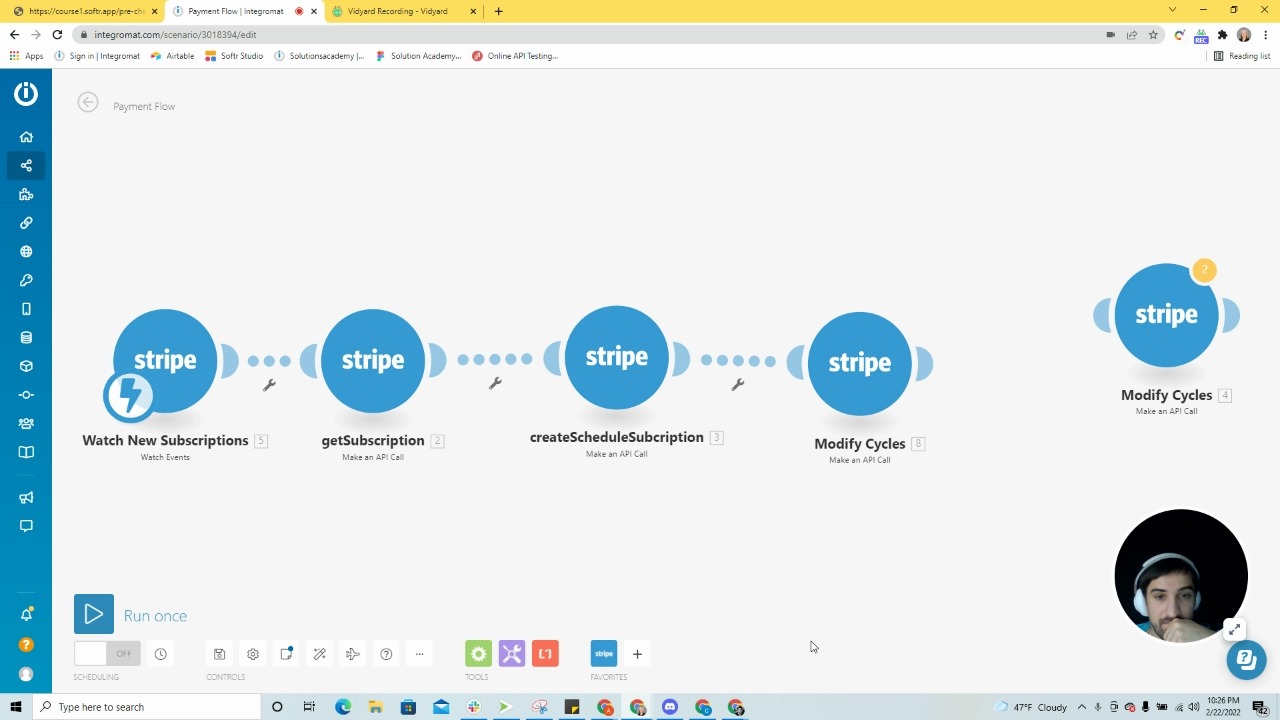
here. this can explain a bit my process
yea. this will be my next step.
I feel I am close though. Learning. Figured out the syntax more or less I think
loud rover
Okay that actually helps a ton!
So yes, it looks like they will take care of the syntax for you since you can just use key/value pairs
That is much much easier than trying to figure out the proper raw body syntax
Okay so let's outline the steps then and each piece you need in each step.
Then you can see if you can create that
sick sierra
if everyone at stripe is like you, I wanna work there 🙂
but sure. Let's outline the steps.
the first thing would be:
- Watch subscriptions that are newly created.
- Get the sub ID.
loud rover
Okay so you want to separate the create subscription schedule and update subscription schedule requests like you were doing on Friday.
Since you can't set phases on a sub schedule creation that uses from_subscription as the error in your video showed.
So yes:
- watch for sub created
- get sub ID and Sub billing period start and end date
You are going to need those timestamps for your Subscription Schedule update
So let's work on that first and see if you can get those time stamps. They will be here on the subscription object: https://stripe.com/docs/api/subscription_schedules/object#subscription_schedule_object-current_phase
Complete reference documentation for the Stripe API. Includes code snippets and examples for our Python, Java, PHP, Node.js, Go, Ruby, and .NET libraries.
sick sierra
i'd like to edit the first subscription that identify. My understanding is that I can't do this unless I have a schedule
loud rover
current_phase.start_date and current_phase.end_date
Yes that is what we are going to do
- Subscription is created via Stripe Checkout
- You retrieve the information about the Subscription
- You create a Subscription Schedule for that original Subscription
- You update the Subscription Schedule to use installments.
sick sierra
I am checking the documentation now 🙂
so the call would be: https://api.stripe.com/v1/subscription_schedules/sub_sched_ID
loud rover
Yep for step 4, just like you were doing on Friday.
Okay in your video in step 4 at minute 3:28 of the video, you use a key for start_date and set its Value to now
Can you instead set that Value to 2. current_phase.start_date meaning the start date that you get back from when you retrieve the Subscription in your second step?
loud rover
No you don't need to add anything. You should get the information back from Stripe
Based on retrieving the Subscription in your second step
So based on your video the proper steps are:
- "Watch New Subscriptions"
- "getSubscription"
- "createSchedule"
- "Modify Cycles"
You were doing everything right until the "Modify Cycles" step. Where we just need to set the start and end dates of the current phase (which you can get based on the Subscription that was already created)
 loud rover
Getting close. The key there should be phases[0][start_date]
I'm not sure what data[1] references.
loud rover
Ah I'm sorry. I may have thrown you off before. You actually want the current_period_start from the original Subscription. Not the current_phase.start_date
Let me take a look back at the video
One sec
sick sierra
if you're cool we can even do a google meet. not sure if this is possible for you
loud rover
Can't do that, sorry. But I think you want 2. body: current_period_start for the value. So key: phases[0][start_date] and value: 2. body: current_period_start
Can you input that and take a screenshot?
 loud rover
Perfect!
Now just add the current_period_end as well
So "add item"
And key: phases[0][end_date] and value: 2. body: current_period_end
Then let's try to run it and see what happens!
sick sierra
back
sorry, had a small issue

"The operation failed with an error. Parameter: phases[0][end_date] You may only specify one of these parameters: end_date, iterations."

maybe we remove phases)enddate key?
sub_1KW5e4BUHziHdjOs52WcKhDD
it worked!
loud rover
Oh, doh! Yeah you don't need the end date since you are only using one phase!
sick sierra
 loud rover
Wahoo! It worked!
sick sierra
what are these phases actually ?
loud rover
So that subscription will now charge for 3 months and then cancel
The phases are the different parts of the Subscription
So, say you want to charge for 3 months at one price and then change them to a different price after 3 months, you would use a second phase for the period after the first three months.
See info here on phases: https://stripe.com/docs/billing/subscriptions/subscription-schedules#subscription-schedule-phases
sick sierra
I see
bismark, I'll make a video that I hope you'll send to your supervisor. He needs to know how cool you are 🙂
loud rover
lol thanks for your patience while we worked through this!
 sick sierra
you are.
and just out of curiosity. if I wanna add a trial period for 15 days...can I do this in the same request?
loud rover
You want a trial period initially for the Subscription?
Or later on?
I assume at the beginning? In which case you would need to do that in your initial Checkout Session.
Otherwise the first invoice will be paid immediately.
sick sierra
so this will be a different process entirely. You are right.
loud rover
Yeah, you would also need to change how you update the subscription schedule
This would be a case where you need two phases
First phase would be the trial phase, and second would be the paid phase.
sick sierra
yeah. I got it. It makes sense.
loud rover
Actually I'm wrong... you could still do this with one phase and just set the trial_end. See our docs here: https://stripe.com/docs/billing/subscriptions/subscription-schedules#using-trials
If you are working on setting that up and get stuck, just pop back on here and someone would gladly help you (I will if I'm around)
sick sierra
Yes. Not going to do this right now.
I feel like I have enough info for the moment 🙂
again! thank you so much !
loud rover
No problem. Have a great rest of the day!