#Penguin - GPay Button Rendering
1 messages · Page 1 of 1 (latest)
 proper glacier
The user is not authenticated but right now I don't get it
I see this one https://i.imgur.com/eQsYBJP.png

And also this.paymentRequest.canMakePayment() function return null in response
proper glacier
I can't say that it's intermittent issue cause almost all day I get this errors
it happening for users of my website and for me like a developer)
also maybe it could help
I test it from Ukraine but my friend tested it from Spain and gPay worked for him
 lunar sigil
Do you see a warning message at the top of this page, or does the google pay button appear? https://stripe.com/docs/stripe-js/elements/payment-request-button
Do you see this?
 proper glacier
Yep, I see this message but I have saved card in chrome and it worked for me yesterday and this morning
Here is my dev environment
Could you please take a look
lunar sigil
If you see this message, then that means it's an issue with your google pay configuration
proper glacier
Sorry, let me open this link from pc, I have opened that from phone
 rustic pasture
saved card in Chrome is not at all the same as google pay
rustic pasture
no it's not the same
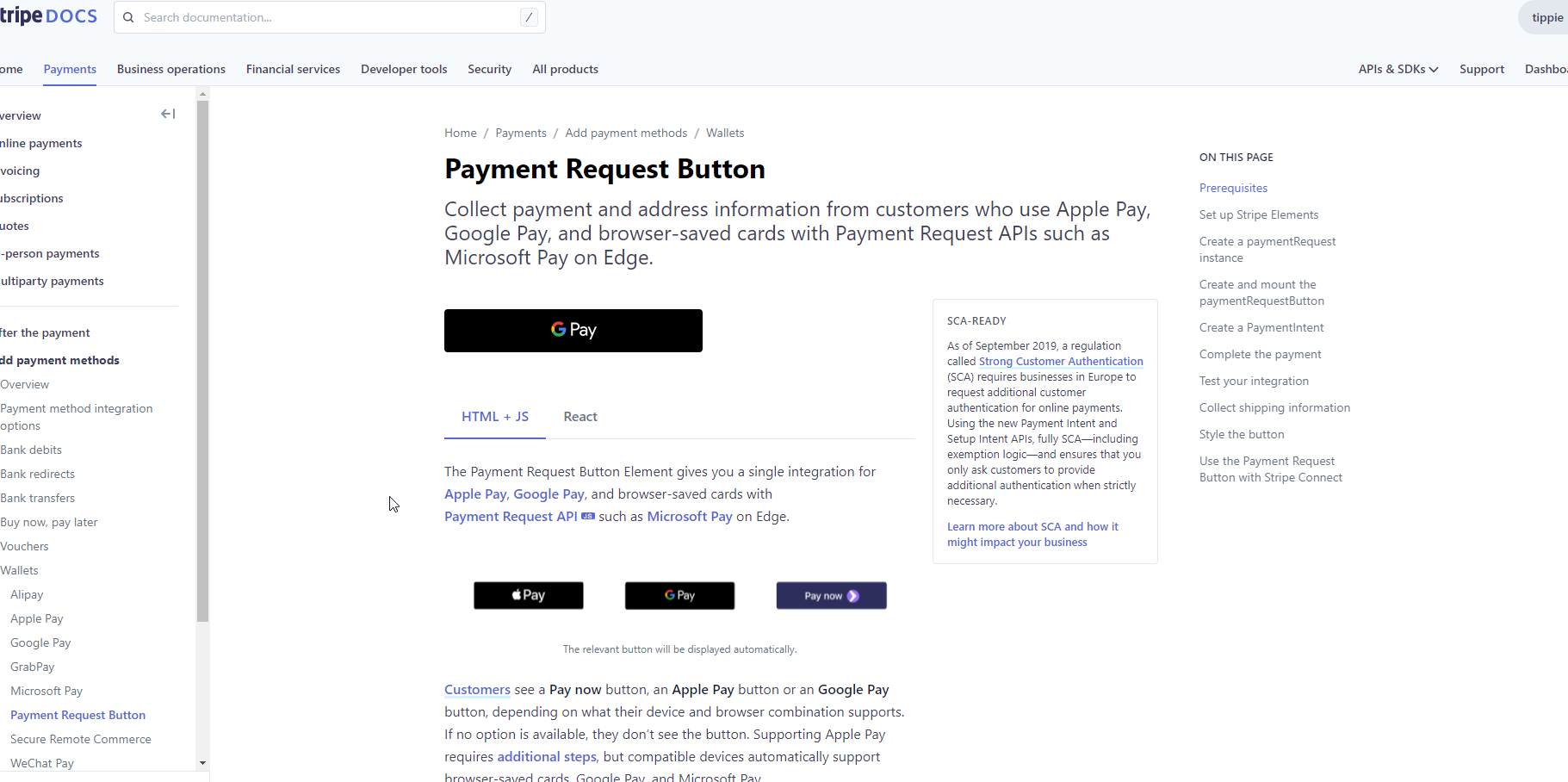 rustic pasture
ah I thought you just said you get the message
Okay so this is properly configured and you have Google Pay so the issue is with your code in that case
proper glacier
I have changed nothing on prod and it stopped to work
lunar sigil
Can you share some code with us?
proper glacier
sure
lunar sigil
That way we can dig into this a bit more
proper glacier
this.stripe = window.Stripe(process.env.VUE_APP_PAYMENT_STRIPE_PUBLISH_KEY, {
      locale: this.$i18n.locale
    });
    this.paymentRequest = this.stripe.paymentRequest(this.paymentRequestOptions);
    this.paymentRequest.on('token', this.processPayment);
this.paymentRequest.canMakePayment().then(canMakePayment => {
if (canMakePayment && canMakePayment.googlePay) {
this.$axios.post('/api/v1/fe-status', {
status: 200,
message: Payment page event User has google pay: ${this.$route.params.qrCode}, ${Date.now()}
});
const prButton = this.stripe.elements().create('paymentRequestButton', {
paymentRequest: this.paymentRequest,
style: this.buttonStyle
});
prButton.mount('#google-pay');
} else {
this.showButton = false;
}
});
    return {
      paymentRequestOptions: {
        country: process.env.VUE_APP_PAYMENT_COUNTRY_CODE,
        currency: this.currency.toLowerCase(),
        total: {
          label: `Pay tips to ${this.employee.name} ${this.employee.surName} in ${this.business.name}`,
          amount: this.totalAmount
        }
      },
      buttonsStyle: {
        paymentRequestButton: {
          type: 'tip',
          theme: 'light',
          height: '55px',
          borderRadius: '8px'
        }
      },
      paymentRequest: {},
      stripe: {}
    };
I think that all code I use for generate button
lunar sigil
Ok. Looking
proper glacier
thank you
lunar sigil
I would recommend you add some log statements. One before this line: this.paymentRequest.canMakePayment().then(canMakePayment => { where you check the result of canMakePayment(). And then I would add some more before and after this if statement: if (canMakePayment && canMakePayment.googlePay) { to check what canMakePayment and canMakePayment.googlePay are and to see if it's getting within that if block
lunar sigil
Ok. You already added these log statements?
proper glacier
yep
lunar sigil
Also can you share what this is: this.paymentRequestOptions
proper glacier
proper glacier
```
return {
paymentRequestOptions: {
country: process.env.VUE...
here
lunar sigil
The value passed in to that method is identical to the one in your return statement?
proper glacier
yep
lunar sigil
Add a log statement prior to this: this.paymentRequest = this.stripe.paymentRequest(this.paymentRequestOptions);
Log the options
proper glacier
1 sec
{
    "country": "DE",
    "currency": "eur",
    "total": {
        "label": "Pay tips to Yaroslav S in dfgjhgfd",
        "amount": 300
    }
}
Can you add all of these log statements so we can see them in our browser console when we load your test page?
Will help us investigate a bit
 sullen quarry
Hello! It looks like the options you're passing in aren't a plain JS object, but rather some kind of observer? If you change to a plain JS object instead (maybe try hard-coding the object as a quick test) does that make a difference?
proper glacier
it's regular js object
sullen quarry
It's not being logged as a regular object in the console.
proper glacier
I use vuejs maybe it is there observer
sullen quarry
 proper glacier
yes, it's vuejs object
sullen quarry
Yeah, so can you try a plain JS object instead?
proper glacier
It worked this morning in this config
sullen quarry
What changed in your code since then?
proper glacier
nothing
sullen quarry
I'm looking further, but so far I haven't found much. Google Pay works for me on other sites, but not on yours. There's a lot going on in your code though, so it's hard to track down the specific issue.
You're sure nothing at all has changed? What about the values in the configuration object, like the country?
proper glacier
yep and also i have reverted git branch to prev release
and it doesn't work but it worked 100%
cause I deployed it to prod
sullen quarry
Have you enabled any logging, debugging, or observability of any kind?
 proper glacier
Yep, for me too
I have tested from my iPhone and it works
It’s very strange, I have tested all my code today but there are no error that could block gpay render
I don’t have ideas 🙂
Also I found 1 way to render it
Idk why it works
Click on the credit card button and then at the top left corner of the form click back arrow and you will see correct responses for canMakePayment and gpay appears
proper glacier
I have same reaction😂
sullen quarry
Wait... canMakePayment's result is never logged when you do that.
Are you calling canMakePayment in more than one place? If you call it too quickly you get rate limited... maybe that's what's going on? You're calling it in one place, then calling it rapidly again, and the second one fails?
To clarify, the result showing googlePay: true is never logged.
sullen quarry
You should not be calling it twice.
Only one Payment Request Button can exist at a time.
proper glacier
yep, I show only one
sullen quarry
You can't have both Apple Pay and Google Pay on the same page at the same time. Apple Pay is only supported in Safari and Google Pay is only supported in Chrome.
proper glacier
i know
sullen quarry
Maybe I'm misunderstanding, why are you calling canMakePayment twice?
proper glacier
but I call canMakePayment in 2 components to check ability googlePay and applePay
I got your idea
I will change it later
and test
rustic pasture
@proper glacier are you unblocked?
proper glacier
@rustic pasture nope
right now I tried use only one canMakePayment
    this.paymentRequest.canMakePayment().then(canMakePayment => {
      console.log(canMakePayment);
      if (canMakePayment && (canMakePayment.googlePay || canMakePayment.applePay)) {
        const prButton = this.stripe.elements().create('paymentRequestButton', {
          paymentRequest: this.paymentRequest,
          style: this.buttonStyle
        });
        prButton.mount('#apple-pay');
      }
    });
and it doesn't work
canMakePayment response is null
rustic pasture
cc @sullen quarry do you have more thoughts?
@proper glacier can I take a step back for a sec? Why don't you trust us and use our Payment Request button and do nothing else? Why do all that fancy stuff instead of letting us display the button?
proper glacier
well, this button redirects user to the checkout page
we don't need it
our client wants fast payments for users without additional redirects
@rustic pasture
rustic pasture
what do you mean "this button redirects user to the checkout page"
Checkout is a hosted redirect, not the PaymentRequest button
proper glacier
ok, maybe i didn't get your idea
Why do all that fancy stuff instead of letting us display the button?
I try to display your buttons
rustic pasture
why do you do if (canMakePayment && (canMakePayment.googlePay || canMakePayment.applePay)) {
proper glacier
I check if I get response
rustic pasture
https://stripe.com/docs/stripe-js/elements/payment-request-button?html-or-react=html#html-js-mount-element ```var elements = stripe.elements();
var prButton = elements.create('paymentRequestButton', {
paymentRequest: paymentRequest,
});
// Check the availability of the Payment Request API first.
paymentRequest.canMakePayment().then(function(result) {
if (result) {
prButton.mount('#payment-request-button');
} else {
document.getElementById('payment-request-button').style.display = 'none';
}
});```
we don't do this, we just mount it, why don't you do that?
proper glacier
I mount it
const prButton = this.stripe.elements().create('paymentRequestButton', {
          paymentRequest: this.paymentRequest,
          style: this.buttonStyle
        });
        prButton.mount('#apple-pay');
I know you do but why do you have that extra google and apple pay detection?
rustic pasture
but why do you only mount inside the if then?
proper glacier
ok, it doesn't matter, I have changed it
but main problem that result of canMakePayment() is null for me
rustic pasture
yep that one I have no idea for now, we'll see if @sullen quarry has an idea later and otherwise you'll have to write in to support
proper glacier
ok
sullen quarry
Hello! Just got out of a meeting and catching up...
I still see canMakePayment being called multiple times on your site.
It's being called in both ApplePay.vue and GooglePay.vue.
Can you remove or comment this code out in ApplePay.vue and try again in Chrome?
    this.paymentRequest.canMakePayment().then(function (canMakePayment) {
      if (canMakePayment && canMakePayment.applePay) {
        _this.$axios.post('/api/v1/fe-status', {
          status: 200,
          message: "Payment page event User has apple pay: ".concat(_this.$route.params.qrCode, ", ").concat(Date.now())
        });

        var prButton = _this.stripe.elements().create('paymentRequestButton', {
          paymentRequest: _this.paymentRequest,
          style: _this.buttonStyle
        });

        prButton.mount('#apple-pay');
      } else {
        _this.showButton = false;
      }
    });
I have tried it yet
No result
I could deploy that fix on dev if you want
I have tried local
proper glacier
proper glacier
```
this.paymentRequest.canMakePayment().then(canMakePayment => {
cons...
Here
sullen quarry
Yeah, if you could deploy it so I could test that would be great.


 rustic pasture
same for me
 sullen quarry
To clarify, you should not have ApplePay.vue and GooglePay.vue at all. You should have a single PaymentRequestButton.vue.
proper glacier
I got it
Let me check
Seems it’s fixed
So strange cause I used 2 calls of canMakePayment since July)
Thank you very much guys !
sullen quarry
Google adjusts things all the time. They probably tweaked the rate limiting on their end, but yeah, you should avoid two calls and this won't be a problem. 🙂
proper glacier
Thanks !