#asahagun - Checkout Total
1 messages · Page 1 of 1 (latest)
 boreal hamlet
So do you want to show the options that the user selected, itemized on the Checkout page, or is it more you just want to be able to create a checkout page with a unique price total on the fly (not itemizing everything)?
 timid token
I need to save and store the total amount and show it on the checkout page
timid token
no, the total amount, shown in USD is already calculated by a function on javascript

I only need that the total amount appears on the checkout page
The tricky part is that this price could change depending on the user selection
boreal hamlet
So you could create a stripe checkout session with a custom price on the fly by passing price_data instead of a price object: https://stripe.com/docs/api/checkout/sessions/create#create_checkout_session-line_items-price_data
Complete reference documentation for the Stripe API. Includes code snippets and examples for our Python, Java, PHP, Node.js, Go, Ruby, and .NET libraries.
timid token
I think I already did that, let me show you the code

this is the server.js
and this is from the client side

on live server it shows this error
 boreal hamlet
Oh so you already have the strategy to do this. You are just getting an error in the implementation
timid token
Yes
I previoiously tested on repl.it with help of one of your staff videos on youtube
I somehow implemented this video
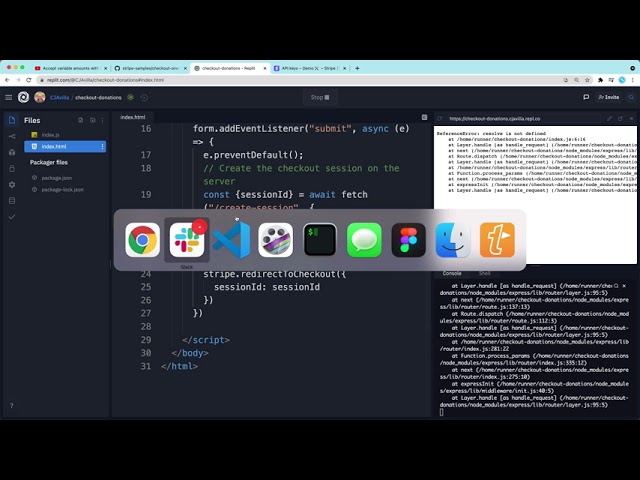
I changed the way it worked, instead of making the user input the price, the prices is already defined
price*
And it worked, but when I try to make it work on my project it fails to do so
I've watched multiple videos and read the documentation, but nothing appears to work
😦
boreal hamlet
The error says it can't add an event listener to a null object. I'd make sure whatever you're adding an event listener to on line 195 of ritual.html actually exists (you might have made a typo in the ID or class of the object).
timid token

oh
i see
i fixed but
this appeared

this is the error that always appears when everything seems to work
I don't know if it has something to do with Live Server
the error seems to be on line 226

on the return await
boreal hamlet
That Method Not Allowed error signifies that your /session endpoint isn't configured for POST requests
Probably only GETs
timid token
So should i change the method to get?
I tried to start a node server but it gives me many errors
boreal hamlet
If it's just an endpoint to fetch an ID, get makes sense
Also, I'd recommend you try debugging on your own a bit first. This channel is mostly for issues/help with the Stripe API
timid token
I already tried changing with get but it says that get can't take body
boreal hamlet
You're going to have to work this out yourself, since that's outside the scope of your Stripe integration (that's a general coding question). But with GET requests you use query params. Otherwise you'll need to use a POST
timid token
Well thanks
 hazy forum
FYI @timid token -- the example linked in the video you shared does use a POST endpoint to create the session: https://replit.com/@CJAvilla/checkout-donations#index.js
See the line app.post("/create-session", ...)
timid token
Thanks, I will check it out again
This is my test project and it does work, but in my main project it doesn't
https://glitch.com/edit/#!/pushy-titanium-cross?path=server.js%3A1%3A0

Simple, powerful, free tools to create and use millions of apps.
It's exactly the same code
it gives me the same error, 405 not allowed
timid token
I'm sorry but how do you configure the /session endpoint ?
boreal hamlet
That is a server configuration/coding question not related to the Stripe API, so it would depend on what language/framework you're using server-side
Spend some time reading documentation/debugging first
hazy forum
@timid token what exactly is the problem you're having?
Visit your demo app above and clicking the button redirects me to Checkout like i'd expect: https://pushy-titanium-cross.glitch.me/
An example of Stripe Checkout for donations
What part is not working for you?
timid token
I already got a successful try
but
in my test code
when i try to use the same code on my project i get this error

the 405 error is fixed by using npm start
 hazy forum
did you run npm install first?
hazy forum
did it succeed?
timid token
yes
hazy forum
i though you were using sample code
that should have included a package.json file
and the install would be expected to load dependencies from there
Simple, powerful, free tools to create and use millions of apps.
notice this package file
it has dependencies, and an existing start script
timid token
i made some changes
in this link

in that repl i had the successful try
it works as i need
as needed*
hazy forum
Yes i see that too here: https://checkout-donations-2--alexissahagun.repl.co/
so again, whats the issue?
timid token
when i try npm start on my main project i get this error

i know is not related to stripe, but i will appreciate any help

this is the structure of my project
is a path issue
 hazy forum
Whatever you're done with this other instance, i dont think the node project is set up correctly to run