#peter_code
1 messages · Page 1 of 1 (latest)
 icy cometBOT
👋 Welcome to your new thread!
⏲️ We'll be here soon! Typically we respond in a few minutes, but sometimes we might take a bit longer if the server is busy or if you have a particularly tricky question.
⏱️ We close idle threads, which makes them read-only. Once a thread is closed it won't be reopened, but you can always start a new thread if you have another question.
🔗 This thread will always be available, even after it's closed. You can find it again using Discord's search, or you can save this link: https://discord.com/channels/841573134531821608/1377635730511237140
📝 Have more to share? Add more details, code, screenshots, videos, etc. below.
 simple dune
Some images for context: https://ibb.co/yFftR2jt

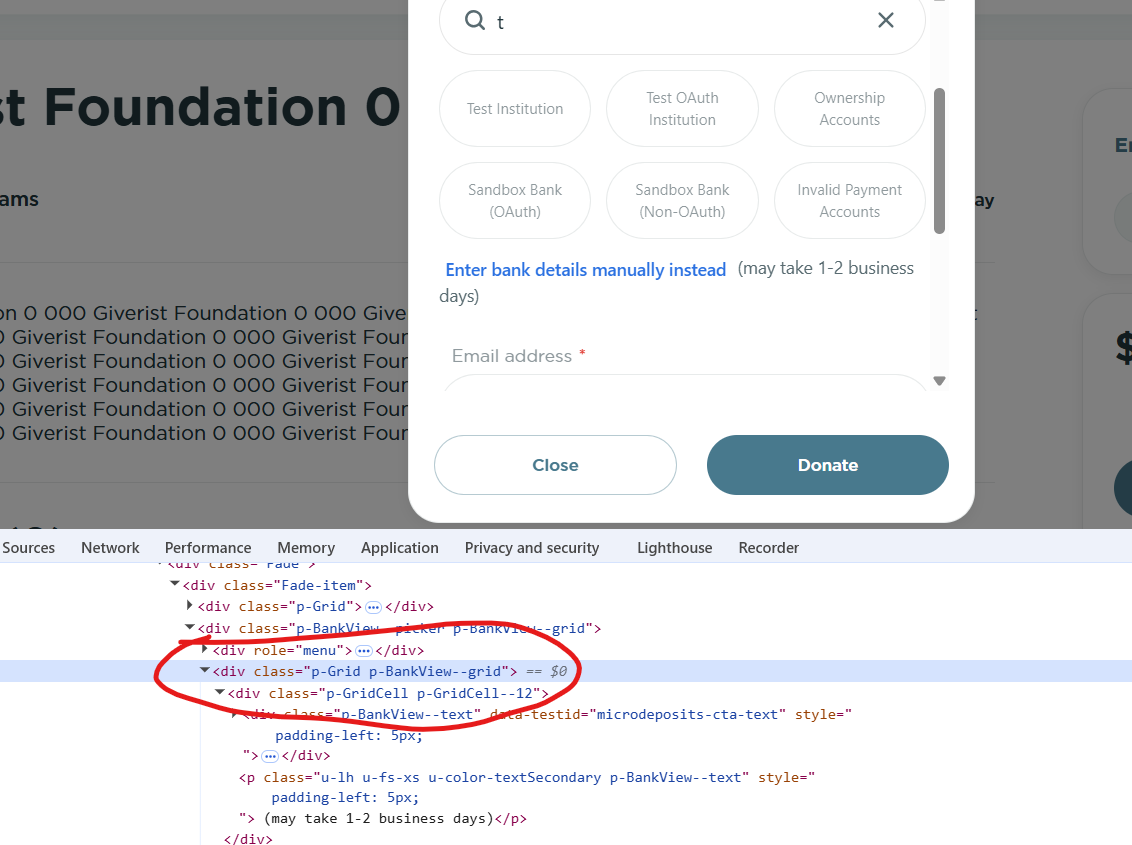
Also for context, I've been able to customize the CSS for almost everything else on my Stripe Elements form
 hardy trout
Are you trying to style the "Enter bank details..." text/message itself, or the form surfaced when it is used?
simple dune
the text / message itself
hardy trout
I would expect the inputs to adhere to your other input styling, at least.
Gotcha
I'm not sure if this is supported specifically, though the colours should take on the primary colours you set etc.
What kind of style are you trying to apply?
simple dune
the tricky part here is that the input labels (which is what I want this specific text to algin with) has a margin in relation to the side borders of the inputs themselves
either margin-left: 10px to this text
or text-align: center
hardy trout
Ah, to align with the other label text, i see
simple dune
the two classes that this might work with (if I can pass CSS to them via the appearance.rules object) are ".p-Grid" and ".p-GridCell", but looking at the appearance API webpage, it doesn't look like this is possible
I also looked up the DOM tree at parent elements for this specific element and I wasn't able to find a class exposed via appearance.rules there either