#raj_unexpected
1 messages · Page 1 of 1 (latest)
 steel flowerBOT
👋 Welcome to your new thread!
⏲️ We'll be here soon! We typically respond in a few minutes, but in some cases we might need a bit more time (e.g., server's busy, you've got a complex question, etc.).
⏱️ We close idle threads, which makes them read-only. Once a thread is closed it won't be reopened, but you can start a new thread if you have another question.
🔗 This thread will always be available, even after it's closed. You can find it again using Discord's search, or you can save this link: https://discord.com/channels/841573134531821608/1257472508387524710
📝 Have more to share? Add details, code, screenshots, videos, etc. below.
 sterile trout
In test mode, all of that happens at once, so that you don't have to wait days to see if your test worked. In live mode, just listen for checkout.session.async_payment_succeeded and provision your services/products when that webhook comes in. It will have the delay and work as expected.
 brisk owl
sterile trout
In test mode, all of that happens at once, so that you don't have to wait days t...
brisk owl
sterile trout
In test mode, all of that happens at once, so that you don't have to wait days t...
In test mode, all of that happens at once, so that you don't have to wait days to see if your test worked.
Test mode would basically eliminate the wait times between events (e.g. the 2-3 day settling time for ACH payments), but aren't the contents for each event supposed to match what would be shown in live mode?
https://i.raj.wtf/imgs/Al4g7APDDNie03ID0TdY8H1Gug7.png
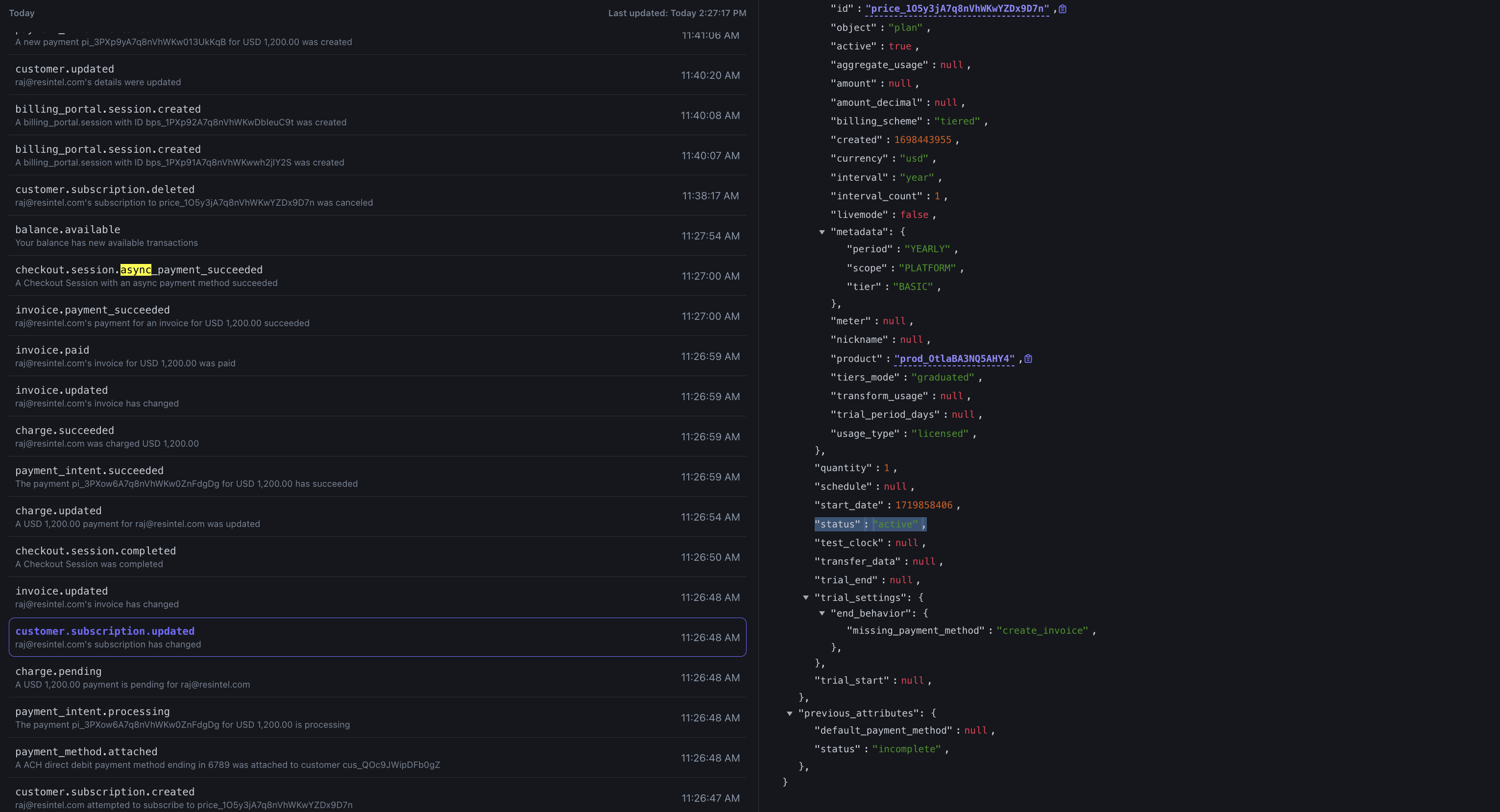
Why does customer.subscription.updated show that the subscription's status is active ?
Shouldn't it still be incomplete up until the async payment is settled? The associated invoice's status stays open until the async payment is settled, after which it's set to paid (and the invoice.paid event gets fired)
 sterile trout
Isn't the Subscription active because the test payment processed immediately?
brisk owl
Shouldn't it wait for the async payment confirmation before becoming active? One of invoice.paid/payment_failure, checkout.async_payment_succeeded/failed
I just tried out using the indefinite processing test payment method, and the subscription's status was set to active immediately even though the payment hasn't settled (since the payment will never settle using this test method)
Learn how to create and charge for a subscription with US bank account.
sterile trout
You need to set the payment_behavior on the Subscription to default_incomplete so that the status doesn't go into active in that case: https://docs.stripe.com/api/subscriptions/create#create_subscription-payment_behavior
Complete reference documentation for the Stripe API. Includes code snippets and examples for our Python, Java, PHP, Node.js, Go, Ruby, and .NET libraries.
Also, you shouldn't be getting checkout.async_payment_succeeded with that test payment method. Are you saying that you are?
steel flowerBOT
brisk owl
sterile trout
Also, you shouldn't be getting `checkout.async_payment_succeeded` with that test...
No, I don't get checkout.async_payment_succeeded with the indefinite processing payment method. I only brought it up because it shows that the subscription status being changed to active wasn't because test mode processed all payment events (async & async) at once.
brisk owl
sterile trout
You need to set the `payment_behavior` on the Subscription to `default_incomplet...
I don't think this is possible to do when creating a checkout session?
Complete reference documentation for the Stripe API. Includes code snippets and examples for our Python, Java, PHP, Node.js, Go, Ruby, and .NET libraries.
 summer gazelle
👋 Taking over this thread, catching up now
This is expected. For asynchronous payment method, it's recommended to listen to checkout.async_payment_succeeded event as per suggested by @.two-shoes earlier. In general, I'd suggest checking payment_status on the checkout.session.* events to fulfil the order as mentioned in this doc: https://docs.stripe.com/payments/checkout/fulfill-orders#delayed-notification
Do you have an example Checkout Session (cs_xxx) that you didn't get checkout.async_payment_succeeded event for async payment methods?
Learn how to fulfill orders after a customer pays with Stripe Checkout or Stripe Payment Links.
brisk owl
For asynchronous payment method, it's recommended to listen to checkout.async_payment_succeeded event as per suggested by @.two-shoes earlier. In general, I'd suggest checking payment_status on the checkout.session.* events to fulfil the order as mentioned in this doc: https://docs.stripe.com/payments/checkout/fulfill-orders#delayed-notification
Sure, but then anything that queries Stripe's API for that subscription (or any related events that get fired) would show a status of active even if the payment intent hasn't succeeded yet.
I'm listening to the customer.subscription.updated event to keep track of changes like the user requesting to cancel their subscription at period end, but the event handler also upserts as many fields as possible since sales/support may make changes to the subscription from the web dashboard.
Not ideal given that Stripe is meant to be the source of truth for subscriptions/payments
Also, wouldn't the current period start & end for the subscription be desynced due to the async settling time?
For example, if I authorized the charge on the 1st of the month for a 14d subscription, but the payment settled on the 3rd, Stripe right now would still show the subscription period as the 1st to the 15th instead of the 3rd to the 18th.
I guess I'm also confused about the principle of async payments, since the same thing would happen when that subscription renews (renews at the end of the period, but doesn't settle/finalize until a couple days after, leaving a gap of a couple days where the customer has a subscription for "free"). It's def not good UX to revoke a customer's subscription until their invoice for the next payment period is paid, but I'm not sure what the best practices are for that scenario
Do you have an example Checkout Session (cs_xxx) that you didn't get checkout.async_payment_succeeded event for async payment methods?
The only checkout session that didn't get the checkout.async_payment_succeeded event is the one where I used the indefinite processing payment method (which is expected behavior). Seems like a misunderstanding, my bad if the wording was confusing.
Learn how to fulfill orders after a customer pays with Stripe Checkout or Stripe Payment Links.
summer gazelle
For the initial subscription, i.e. when the customer signs up for the subscription using Checkout Session, the subscription will be moved to active status after the payment method has been collected and customer authorises the payment. The payment outcome will only come later after the payment parter informs Stripe about the payment result. If the payment fails, the subscription will then be canceled for initial subscription.
For asynchronous payment methods on subscriptions, the period start will from the time when customer authorises the payment (not the successful debits) when the subscription is in active status. In the future billing cycles, a subscription will only be revoked after the async payment fails.
This is the behaviour of the asynchronous payment methods that the subscription follows the timestamp when the customer authorises the payment instead of the actual successful payment timestamp by the payment method banks/partners.
If you wish to update the billing cycle from the timestamp when the payment is successfully debited in the initial cycle, I'd recommend updating the billing cycle anchor of the subscription: https://docs.stripe.com/billing/subscriptions/billing-cycle#reset-the-billing-cycle-to-the-current-time
Learn how to set the billing date for subscriptions.
If you have further feedback, I'd suggest writing to Support https://support.stripe.com/contact/email, so that they can share with the relevant team 😄